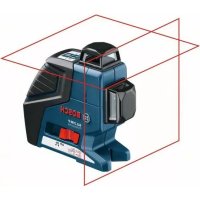
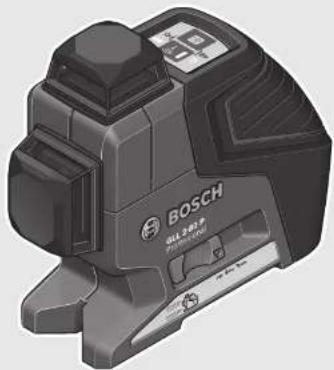
GLL 280 P Professional - Laser level BOSCH - Free user manual and instructions
Find the device manual for free GLL 280 P Professional BOSCH in PDF.
 FR
FR
 BG
BG
 CS
CS
 DA
DA
 DE
DE
 EL
EL
 EN
EN
 ES
ES
 ET
ET
 FI
FI
 HU
HU
 ID
ID
 IT
IT
 JA
JA
 KK
KK
 KO
KO
 LT
LT
 LV
LV
 MK
MK
 NL
NL
 NO
NO
 PL
PL
 PT
PT
 RO
RO
 RU
RU
 SK
SK
 SL
SL
 SV
SV
 TR
TR
 UK
UK
 VI
VI
 ZH
ZH
| Product Type | Linear laser level |
| Brand | Bosch |
| Model | GLL 280 P Professional |
| Dimensions (L x W x H) | 159 x 54 x 141 mm |
| Weight (according to EPTA 01:2014) | 0,69 kg |
| Power supply | 4 LR6 (AA) 1,5 V batteries |
| Battery life | Approx. 9 h (2 laser lines), 18 h (1 laser line) |
| Range | Standard: 20 m; with pulse function: 15 m; with receiver: 5–80 m |
| Leveling accuracy | ±0,2 mm/m |
| Self-leveling range | ±4° |
| Typical leveling time | < 4 s |
| Laser class | 2 |
| Laser type / wavelength | 640 nm, < 1 mW |
| IP rating | IP 54 (dust and splash water protected) |
| Operating temperature | -10 °C to +45 °C |
| Storage temperature | -20 °C to +70 °C |
| Tripod mount | 1/4" and 5/8" |
| Main functions | Horizontal, vertical and cross lines; self-leveling; pulse mode for receiver; auto shut-off (adjustable); acoustic signal (deactivatable) |
| Maintenance and cleaning | Soft, damp cloth; do not use solvents; clean laser outlets regularly |
| Safety | Do not look into the beam; keep away from pacemakers (magnets); store in protective case |
| Spare parts and repairability | Available from Bosch customer service; 10-digit article number (3 601 K63 2..); repair by qualified personnel only |
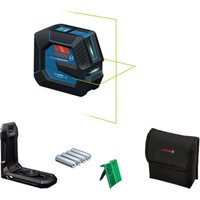
| General information | Manual free download at notice-facile.com; supplied with target plate, case, batteries; optional accessories: receiver, tripod, universal mount, glasses |
Frequently Asked Questions - GLL 280 P Professional BOSCH
User questions about GLL 280 P Professional BOSCH
0 question about this device. Answer the ones you know or ask your own.
Ask a new question about this device
Download the instructions for your Laser level in PDF format for free! Find your manual GLL 280 P Professional - BOSCH and take your electronic device back in hand. On this page are published all the documents necessary for the use of your device. GLL 280 P Professional by BOSCH.
USER MANUAL GLL 280 P Professional BOSCH
ORI BUCH-9017-005.hook Page 1 Monday, July 4, 2016 2:51 PM
natural_image
3D rendered image of a Bosch industrial sensor device (no visible text or symbols)Robert Bosch Power Tools GmbH
70538 Stuttgart
CERMANY
www.bosch-pt.com
1609 92A 1YU (2016.03) T/218

1609 92A 1YU
GLL 2-80 P Professional

BOSCH
by Companhia, Magrochini
mk. Сривынсько-кредствам за рабета
sr Originaling unulstvo za rad
sllvina nssunile
hr Originalne upute za rad
GLL 2-80 P








4
natural_image
3D rendering of a camera on a tripod inside a room with dashed lines indicating perspective projection (no text or symbols)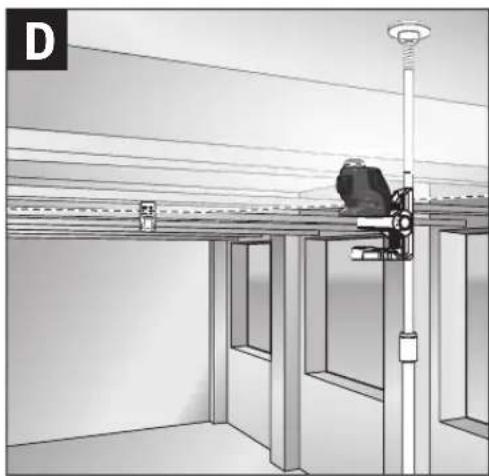
natural_image
Interior view of a room with overhead lighting and a worker on a platform (no text or symbols visible)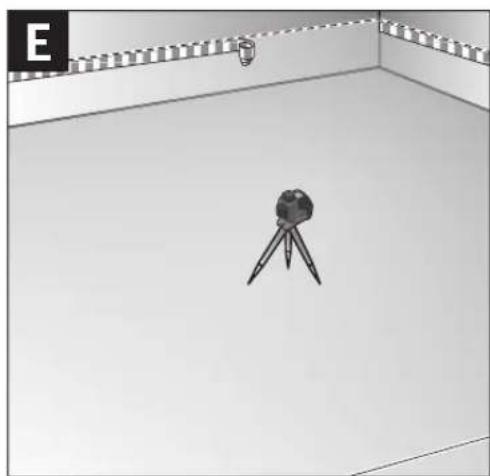
natural_image
Simple 3D illustration of a camera on a tripod inside a room with a lamp and patterned wall (no text or symbols)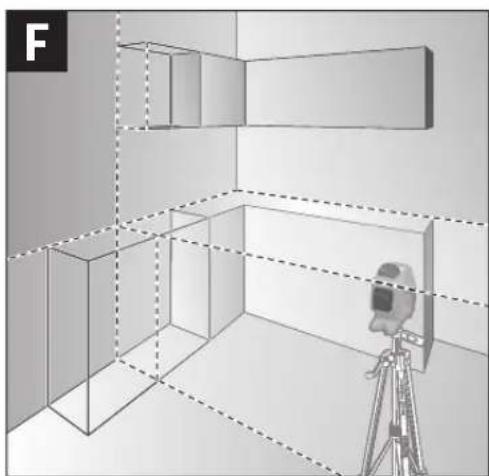
natural_image
3D architectural rendering of a room with walls, a camera on a tripod, and no visible text or symbols1 609 92A 1YU | (4.7.16) Bosch Power Tools
5
natural_image
3D rendering of a tripod on a flat surface with vertical supports (no text or symbols)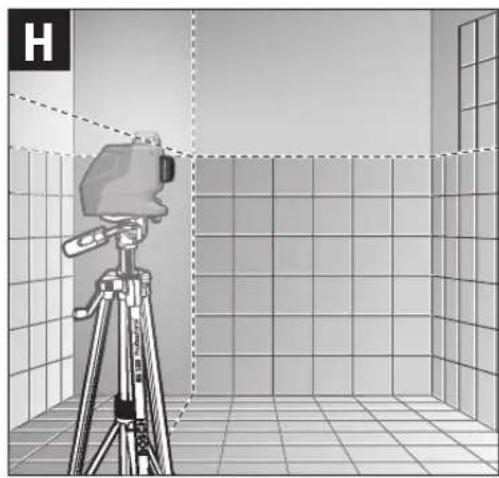
natural_image
Illustration of a camera on a tripod inside a tiled room with a window, no text or symbols present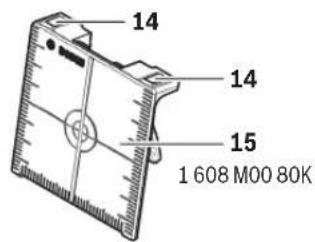

6 | Deutsch
Deutsch
Sicherheitshinweise
Linienlaser

Laser Radiation Class 2 do not stare into beam IEC 60825-1:2014-03 <1 mW, 640 nm
All instructions must be read and observed in order to work safely with the measuring tool. The integrated protections in the measuring tool may be compromised if the measuring tool is not used in accordance
with the instructions provided. Never make warning signs on the measuring tool unrecognisable. STORE THESE INSTRUCTIONS IN A SAFE PLACE AND INCLUDE THEM WITH THE MEASURING TOOL WHEN GIVING IT TO A THIRD PARTY.
▶ Caution – The use of other operating or adjusting equipment or the application of other processing methods than those mentioned here can lead to dangerous radiation exposure.
The measuring tool is provided with a warning label (marked with number 12 in the representation of the measuring tool on the graphics page).

Laser Radiation Class 2
do not stare into beam
IEC 60825-1:2014-03 <1 mW, 640 nm
▶ If the text of the warning label is not in your national language, stick the provided warning label in your national language over it before operating for the first time.

Do not direct the laser beam at persons or animals and do not stare into the direct or reflected laser beam yourself, not even from a distance. You could blind somebody, cause accidents or damage your eyes.
▶ If laser radiation strikes your eye, you must deliberately close your eyes and immediately turn your head away from the beam.
▶ Do not make any modifications to the laser equipment.
▶ Do not use the laser viewing glasses as safety goggles. The laser viewing glasses are used for improved visualisation of the laser beam, but they do not protect against laser radiation.


12 | English
▶ Do not use the laser viewing glasses as sun glasses or in traffic. The laser viewing glasses do not afford complete UV protection and reduce colour perception.
▶ Have the measuring tool repaired only through qualified specialists using original spare parts. This ensures that the safety of the measuring tool is maintained.
▶ Do not allow children to use the laser measuring tool without supervision. They could unintentionally blind other persons or themselves.
▶ Do not operate the measuring tool in explosive environments, such as in the presence of flammable liquids, gases or dusts. Sparks can be created in the measuring tool which may ignite the dust or fumes.
Laser target plate

Keep the measuring tool and the laser target plate 15 away from cardiac pacemakers. The magnets of the measuring tool and laser target plate generate a field that can impair the function of cardiac pacemakers.
▶ Keep the measuring tool and the laser target plate 15 away from magnetic data medium and magnetically-sensitive equipment. The effect of the magnets of the measuring tool and laser target plate can lead to irreversible data loss.
Product Description and Specifications
Please unfold the fold-out page with the representation of the measuring tool and leave it unfolded while reading the operating instructions.
Intended Use
The measuring tool is intended for determining and checking horizontal and vertical lines.
Noise Information
The A-weighted sound pressure level of the audio signal at one meter distance is 80 dB(A).
Do not hold the measuring tool close to your ear!
Product Features
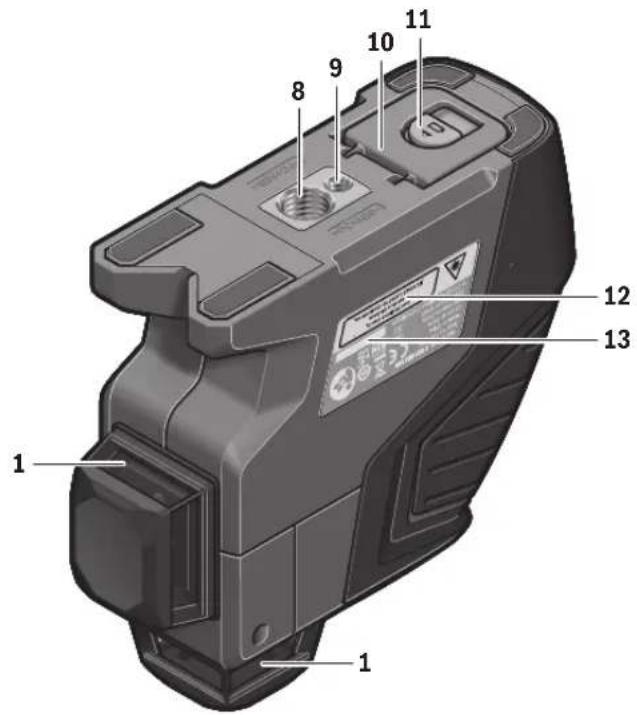
The numbering of the product features shown refers to the illustration of the measuring tool on the graphic page.
1 Exit opening for laser beam
2 Battery low indicator
3 Pulse-function button
4 Pulse-function indicator
5 Operating mode button
6 Working without automatic levelling indicator
7 On/Off switch
8 Tripod mount 5/8"
9 Tripod mount 1/4"
10 Battery lid
11 Latch of battery lid
12 Laser warning label
13 Serial number
14 Magnets
15 Laser target plate
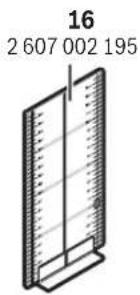
16 Measuring plate with stand*
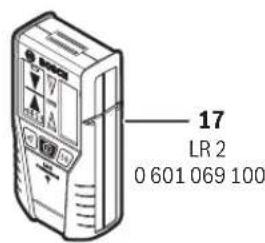
17 Laser receiver*
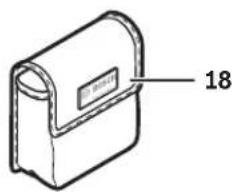
18 Protective pouch*
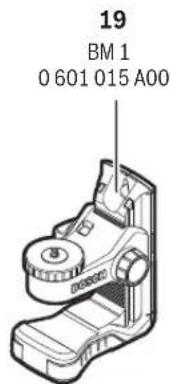
19 Universal holder*
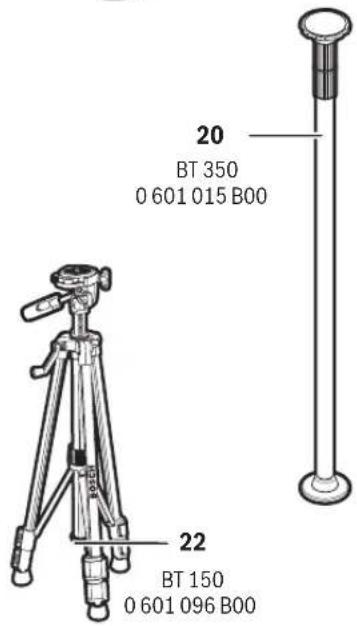
20 Telescopic rod*
21 Laser viewing glasses*
22 Tripod*
* The accessories illustrated or described are not included as standard delivery.
Technical Data
Line laser GLL 2-80 P
| Article number | 3 601 K63 2.. |
| Working range1) | |
| - Standard | 20 m |
| - With pulse function | 15 m |
| - With laser receiver | 5-80m |
| Levelling Accuracy | ±0.2mm/m |
| Self-levelling range, typically | ±4° |
| Levelling duration, typically | <4s |
| Operating temperature | -10°C...+45°C |
| Storage temperature | -20°C...+70°C |
| Relative air humidity, max. | 90% |
| Laser class | 2 |
| Laser type | 640 nm,<1 mW |
| C_6 | 1 |
| Shortest pulse duration | 1/1600 s |
| Divergence of laser line | 0.5 mrad (full angle) |
| Tripod mount | 1/4", 5/8" |
| Batteries | 4 x 1.5 VLR6 (AA) |
| Operating duration | |
| - With 2 laser planes | 9 h |
| - With 1 laser plane | 18 h |
| Weight according to EPTA-Procedure 01:2014 | 0.69 kg |
| Dimensions(length x width x height) | 159 x 54 x 141 mm |
| Degree of protection | IP 54 (dust and splash water protected) |
| 1) The working range can be decreased by unfavourable environmental conditions (e.g. direct sun irradiation).The measuring tool can be clearly identified with the serial number 13 on the type plate. | |







English | 13
Assembly
Inserting/Replacing the Batteries
Alkali-manganese batteries are recommended for the measuring tool.
To open the battery lid 10, slide the latch 11 in the direction of the arrow and fold the battery lid up. Insert the batteries. When inserting, pay attention to the correct polarity according to the representation on the inside of the battery lid.
When the batteries become weak, a single 5 s audio signal will sound. The battery low indicator 2 continuously flashes red. The measuring tool can be operated for less then 2 h.
If the batteries are weak when switching on the measuring tool, the 5 s audio signal will sound directly after switching on the measuring tool.
Always replace all batteries at the same time. Only use batteries from one brand and with the identical capacity.
Remove the batteries from the measuring tool when not using it for extended periods. When storing for extended periods, the batteries can corrode and self-discharge.
Operation
Initial Operation
▶ Loud audio signals will sound under certain conditions while operating the measuring tool. Therefore, keep the measuring tool away from your ear or other persons. The loud audio signal can cause hearing damage.
▶ Protect the measuring tool against moisture and direct sun light.
Do not subject the measuring tool to extreme temperatures or variations in temperature. As an example, do not leave it in vehicles for a long time. In case of large variations in temperature, allow the measuring tool to adjust to the ambient temperature before putting it into operation. In case of extreme temperatures or variations in temperature, the accuracy of the measuring tool can be impaired.
▶ Avoid heavy impact to or falling down of the measuring tool. Damage to the measuring tool can impair its accuracy. After heavy impact or shock, compare the laser lines or plumb beams with a known horizontal or vertical reference line or with already checked plumb points.
▶ Switch the measuring tool off during transport. When switching off, the levelling unit, which can be damaged in case of intense movement, is locked.
Switching On and Off
To switch on the measuring tool, slide the On/Off switch 7 to the “on” position (when working without automatic levelling) or to the “on” position (when working with automatic levelling). Immediately after switching on, the measuring tool sends laser beams out of the exit openings 1.
▶ Do not point the laser beam at persons or animals and do not look into the laser beam yourself, not even from a large distance.
▶ Do not leave the switched-on measuring tool unattended and switch the measuring tool off after use. Other persons could be blinded by the laser beam.
To switch off the measuring tool, slide the On/Off switch 7 to the "off" position. When switching off, the levelling unit is locked.
When exceeding the maximum permitted operating temperature of 45 ^ , the measuring tool switches off to protect the laser diode. After cooling down, the measuring tool is ready for operation and can be switched on again.
Deactivating the Automatic Shut-off
When no button on the measuring tool is pressed for approx. 30 minutes, the measuring tool automatically switches off to save the batteries.
To switch on the measuring tool after automatic shut-off, either slide the On/Off switch 7 to the "off" position and then switch the measuring tool on again or press the operating mode button 5 once or press the pulse-function button 3 once.
To deactivate the automatic shut-off, keep the operating mode button 5 pressed for at least 3 s (while the measuring tool is switched on). Deactivation of the automatic shut-off is confirmed by brief flashing of the laser beams.
To activate the automatic shut-off, switch the measuring tool off and then on again or press and hold the operating mode button 5 for at least 3 s.
Deactivating the Signal Tone
After the measuring tool has been switched on, the audio signal is always activated.
To deactivate/activate the audio signal, press and hold the operating mode button 5 and the pulse-function button 3 at the same time for at least 3 s.
The audio signal activation and deactivation are both confirmed by three short beeps.
Operating Modes
The measuring tool has three operating modes between which you can switch at any time:
– Horizontal operation: generates a horizontal laser plane,
- Vertical operation: generates a vertical laser plane,
- Cross-line operation: generates a horizontal and vertical laser plane.
After switching on, the measuring tool is in horizontal operation. Press the operating mode button 5 to change the operating mode.
All three operating modes can be selected either with or without automatic levelling.
Pulse Function
When working with the laser receiver 17, the pulse function must be activated, – independent of the selected operating mode.
In pulse function, the laser lines flash at very high frequency and thus become detectable by the laser receiver 17.
To switch on the pulse function, press button 3. When the pulse function is switched on, the pulse-function indicator 4 lights up green.
When the pulse function is switched on, the visibility of the laser lines is reduced for the human eye. Therefore, shut off the pulse function by pushing button 3 again when working without laser receiver. When the pulse function is switched off, the pulse-function indicator 4 is deactivated.






14 | English
Automatic Levelling
Working with Automatic Levelling
Position the measuring tool on a level and firm support, attach it to the holder 19 or to the tripod 22.
When working with automatic levelling, push the On/Off switch 7 to the "on" position.
After switching on, the levelling function automatically compensates irregularities within the self-levelling range of ±4^ . The levelling is finished as soon as the laser beams do not move any more.
If automatic levelling is not possible, e.g. because the surface on which the measuring tool stands deviates by more than 4^ from the horizontal plane, the laser lines begin to flash rapidly. When the audio signal is activated, a fast-beat signal sounds for 30 s (maximum). This alarm is deactivated within 10 s after switching on, in order to allow adjustment of the measuring tool.
Set up the measuring tool in level position and wait for the self-levelling to take place. As soon as the measuring tool is within the self-levelling range of ±4^ , all laser beams light up continuously and the audio signal is switched off.
In case of ground vibrations or position changes during operation, the measuring tool is automatically levelled in again. To avoid errors, check the position of the horizontal and vertical laser line with regard to the reference points upon relevelling.
Working without Automatic Levelling
For working without automatic levelling, slide the On/Off switch 7 to the "on" position. When automatic levelling is switched off, indicator 6 lights up red and for the first 30 s laser beams flash slowly.
When the automatic levelling is switched off, the measuring tool can be held by hand or placed on an inclined surface. In cross-line operation, the two laser lines do not necessarily run at a right angle to each other.
Levelling Accuracy
Influences on Accuracy
The ambient temperature has the greatest influence. Especially temperature differences occurring from the ground upward can divert the laser beam.
Because the largest difference in temperature layers is close to the ground, the measuring tool should always be mounted on a tripod when measuring distances exceeding 20 m. If possible, also set up the measuring tool in the centre of the work area.
In addition to external influences, device-specific influences (e.g. falls or heavy impacts) can also lead to deviations. For this reason, check the levelling accuracy each time before beginning work.
Firstly, check the levelling accuracy of the horizontal laser line and then the levelling accuracy of the vertical laser line.
Should the measuring tool exceed the maximum deviation during one of the tests, please have it repaired by a Bosch after-sales service.
Checking the Horizontal Levelling Accuracy of the Lateral Axis
For this check, a free measuring distance of 5 m on a firm surface between two walls A and B is required.
- Mount the measuring tool onto a tripod or place it on a firm and level surface close to wall A. Switch on the measuring tool. Select cross-line operation with automatic levelling.
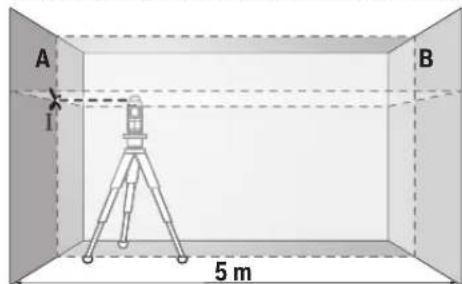
- Direct the laser against the close wall A and allow the measuring tool to level in. Mark the centre of the point where the laser lines cross each other on the wall (point 1).
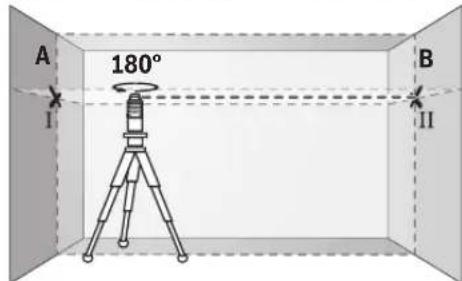
- Turn the measuring tool by 180°, allow it to level in and mark the cross point of the laser lines on the opposite wall B (point 11).
- Without turning the measuring tool, position it close to wall B. Switch the measuring tool on and allow it to level in.
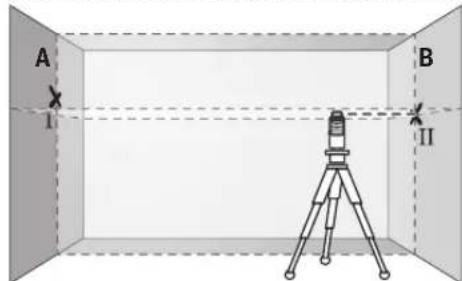
- Align the height of the measuring tool (using a tripod or by underlaying, if required) in such a manner that the cross point of the laser lines is projected against the previously marked point 11 on the wall B.







English | 15
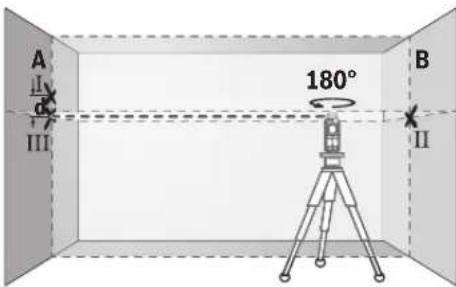
- Without changing the height, turn around the measuring tool by 180^ . Direct it against the wall A in such a manner that the vertical laser line runs through the already marked point I. Allow the measuring tool to level in and mark the cross point of the laser lines on the wall A (point III).
- The difference d of both marked points 1 and 111 on wall A results in the actual height deviation of the measuring tool alongside the lateral axis.
On the measuring distance of 2 × 5 m = 10 m , the maximum allowable deviation is:
10 m x ± 0.2 mm/m = ± 2 mm.
Thus, the difference d between points I and III must not exceed 2 mm (max.).
Checking the Levelling Accuracy of the Vertical Line
For this check, a door opening is required with at least 2.5 m of space (on a firm surface) to each side of the door.
- Position the measuring tool on a firm, level surface (not on a tripod) 2.5 m away from the door opening. Allow the measuring tool to level in while in vertical operation with automatic levelling, and direct the laser beam at the door opening.
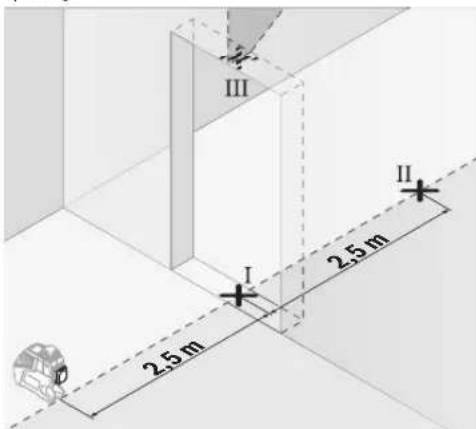
- Mark the centre of the vertical laser line at the floor of the door opening (point I), at a distance of 5 m beyond the other side of the door opening (point II) and at the upper edge of the door opening (point III).
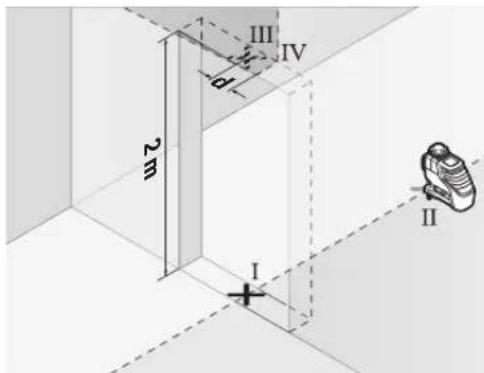
- Rotate the measuring tool by 180^ and position it on the other side of the door opening directly behind point 11. Allow the measuring tool to level in and align the vertical laser line in such a manner that its centre runs exactly through points 1 and 11.
- Mark the centre of the laser line at the upper edge of the door opening as point IV.
- The difference d of both marked points III and IV results in the actual deviation of the measuring tool to the plumb line.
- Measure the height of the door opening.
The maximum admissible deviation is calculated as follows: Doubled height of the door opening x 0.2 mm/m Example: For a door-opening height of 2 m, the maximum deviation may be
2 x 2 m x ± 0.2 mm/m = ± 0.8 mm. Consequently, points III and IV may be no more than 0.8 mm (max.) apart from each other.
Working Advice
▶ Always use the centre of the laser line for marking. The width of the laser line changes with the distance.
Working with the Laser Target Plate
The laser target plate 15 increases the visibility of the laser beam under unfavourable conditions and at large distances. The reflective part of the laser target plate 15 improves the visibility of the laser line. Thanks to the transparent part, the laser line is also visible from the back side of the laser target plate.
Working with the Tripod (Accessory)
A tripod offers a stable, height-adjustable measuring support. Position the measuring tool with the 1/4" tripod mount 9 onto the thread of the tripod 22 or a commercially available camera tripod. For fastening to a commercially available construction tripod, use the 5/8" tripod mount 8. Tighten the measuring tool with the tripod mounting stud.
Fastening with the Universal Holder (Accessory) (see figure D)
With the universal holder 19, you can fasten the measuring tool, e.g., to vertical surfaces, pipes or magnetisable materials. The universal holder is also suitable for use as a ground tripod and makes the height adjustment of the measuring tool easier.




16 | English
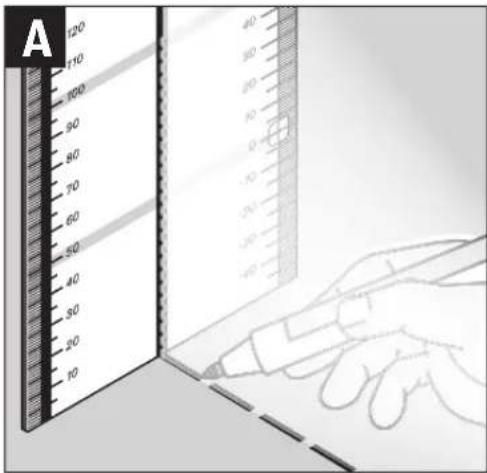
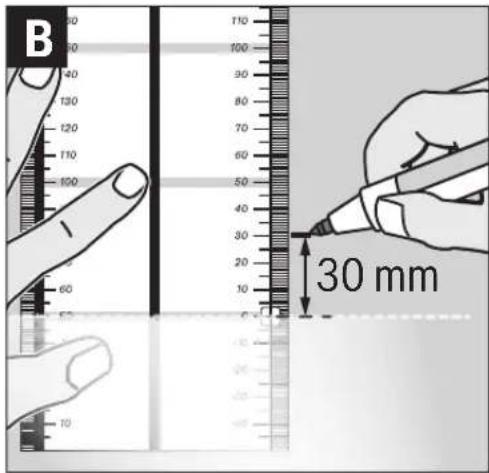
Working with the Measuring Plate (Accessory) (seefiguresA-B)
With the measuring plate 16, it is possible to project the laser mark onto the floor or the laser height onto a wall.
With the zero field and the scale, the offset or drop to the required height can be measured and projected at another location. This eliminates the necessity of precisely adjusting the measuring tool to the height to be projected.
The measuring plate 16 has a reflective coating that enhances the visibility of the laser beam at greater distances or in intense sunlight. The brightness intensification can be seen only when viewing, parallel to the laser beam, onto the measuring plate.
Working with the Laser Receiver (Accessory) (see figure D)
Under unfavourable light conditions (bright environment, direct sunlight) and for larger distances, use the laser receiver for improved finding of the laser lines 17. When working with the laser receiver, switch the pulse function on (see "Pulse Function", page 13).
Laser Viewing Glasses (Accessory)
The laser viewing glasses filter out the ambient light. This makes the red light of the laser appear brighter for the eyes.
▶ Do not use the laser viewing glasses as safety goggles. The laser viewing glasses are used for improved visualisation of the laser beam, but they do not protect against laser radiation.
Do not use the laser viewing glasses as sun glasses or in traffic. The laser viewing glasses do not afford complete UV protection and reduce colour perception.
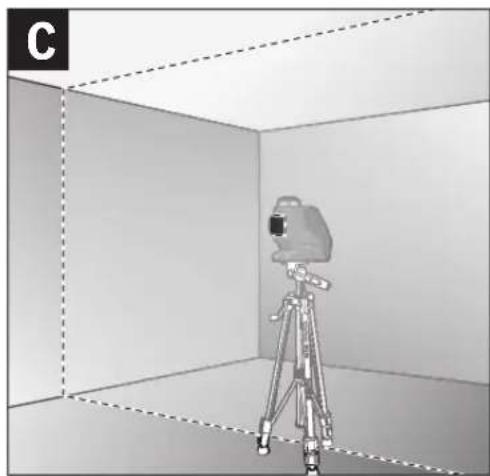
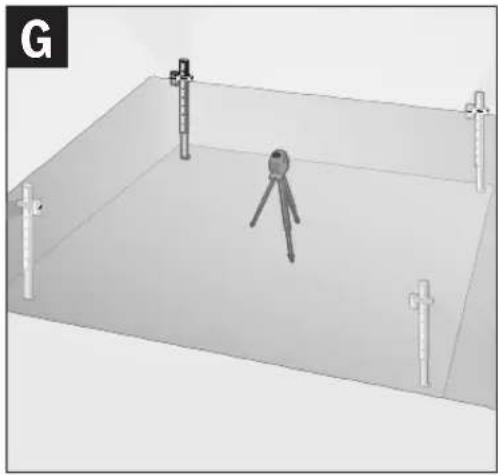
Work Examples (see figures C-H)
Applicational examples for the measuring tool can be found on the graphics pages.
Maintenance and Service
Maintenance and Cleaning
Store and transport the measuring tool only in the supplied protective pouch.
Keep the measuring tool clean at all times.
Do not immerse the measuring tool in water or other fluids. Wipe off debris using a moist and soft cloth. Do not use any cleaning agents or solvents.
Regularly clean the surfaces at the exit opening of the laser in particular, and pay attention to any fluff or fibres.
In case of repairs, send in the measuring tool packed in its protective pouch 18.
After-sales Service and Application Service
Our after-sales service responds to your questions concerning maintenance and repair of your product as well as spare parts. Exploded views and information on spare parts can also be found under:
www.bosch-pt.com
Bosch's application service team will gladly answer questions concerning our products and their accessories.
In all correspondence and spare parts orders, please always include the 10-digit article number given on the nameplate of the product.
Great Britain
Robert Bosch Ltd. (B.S.C.)
P.O. Box 98
Broadwater Park
North Orbital Road
Denham
Uxbridge
UB 9 5HJ
At www.bosch-pt.co.uk you can order spare parts or arrange the collection of a product in need of servicing or repair.
Tel. Service: (0344) 7360109
E-Mail: boschservicecentre@bosch.com
Ireland
Origo Ltd.
Unit 23 Magna Drive
Magna Business Park
City West
Dublin 24
Tel. Service: (01) 4666700
Fax: (01) 4666888
Australia, New Zealand and Pacific Islands
Robert Bosch Australia Pty. Ltd.
Power Tools
Locked Bag 66
Clayton South VIC 3169
Customer Contact Center
Inside Australia:
Phone: (01300) 307044
Fax: (01300) 307045
Inside New Zealand:
Phone: (0800) 543353
Fax: (0800) 428570
Outside AU and NZ:
Phone: +61 3 95415555
www.bosch.com.au
Republic of South Africa
Customer service
Hotline: (011) 6519600
Gauteng - BSC Service Centre
35 Roper Street, New Centre
Johannesburg
Tel.: (011) 4939375
Fax: (011) 4930126
E-Mail: bsctools@icon.co.za
KZN - BSC Service Centre
Unit E, Almar Centre
143 Crompton Street
Pinetown
Tel.: (031) 7012120
Fax: (031) 7012446
E-Mail: bsc.dur@za.bosch.com



Français | 17
Western Cape - BSC Service Centre
Democracy Way, Prosperity Park
Milnerton
Tel.: (021) 5512577
Fax: (021) 5513223
E-Mail: bsc@zsd.co.za
Bosch Headquarters
Midrand, Gauteng
Tel.: (011) 6519600
Fax: (011) 6519880
E-Mail: rbsa-hq.pts@za.bosch.com
Disposal
Measuring tools, accessories and packaging should be sorted for environmental-friendly recycling.
Do not dispose of measuring tools and batteries/rechargeable batteries into household waste!
Only for EC countries:

According to the European Guideline 2012/19/EU, measuring tools that are no longer usable, and according to the European Guideline 2006/66/EC, defective or used battery packs/batteries, must be collected separately and disposed of in an environmentally correct manner.
Batteries no longer suitable for use can be directly returned at:
Great Britain
Robert Bosch Ltd. (B.S.C.)
P.O. Box 98
Broadwater Park
North Orbital Road
Denham
Uxbridge
UB 9 5HJ
At www.bosch-pt.co.uk you can order spare parts or arrange the collection of a product in need of servicing or repair.
Tel. Service: (0344) 7360109
E-Mail: boschservicecentre@bosch.com
Subject to change without notice.
Français
Laser Radiation Class 2
do not stare into beam
IEC 60825-1:2014-03<1 mW, 640 nm
Robert Bosch (France) S.A.S.
Laser Radiation Class 2 do not stare into beam IEC 60825-1:2014-03 <1 mW, 640 nm
Laser Radiation Class 2
do not stare into beam
IEC 60825-1:2014-03 <1 mW, 640 nm
Laser Radiation Class 2 do not stare into beam IEC 60825-1:2014-03 <1 mW, 640 nm
The Ground Truth image displays a single, solid horizontal line. According to Rule 2 (UNDERSCORE & LINE RULES), this is a stylistic or background line, not a placeholder underscore. Therefore, the OCR result must ignore it and output nothing or only meaningful text. The provided OCR content is "____", which consists of four underscores. This is an incorrect interpretation of the line as a placeholder, violating the rule that stylistic lines must be ignored. The OCR has hallucinated placeholder underscores where none exist in the GT. Hence, the result is inconsistent with the Ground Truth.
Svizzera
Batrec AG
3752 Wimmis BE
Laser Radiation Class 2
do not stare into beam
IEC 60825-1:2014-03 <1 mW, 640 nm
Laser Radiation Class 2 do not stare into beam IEC 60825-1:2014-03 <1 mW, 640 nm
Bosch Service Center
Telegrafvej 3
2750 Ballerup
På www.bosch-pt.dk kan der online bestilles reservedele eller oprettes en reparations ordre.
Tlf. Service Center: 44898855
Fax: 44898755
E-Mail: vaerktoej@dk.bosch.com
Bortskaffelse
Laser Radiation Class 2 do not stare into beam IEC 60825-1:2014-03 <1 mW, 640 nm
Bosch Service Center
Telegrafvej 3
2750 Ballerup
Danmark
Tel.: (08) 7501820 (inom Sverige)
Fax: (011) 187691
Avfallshantering
Laser Radiation Class 2
do not stare into beam
IEC 60825-1:2014-03 <1 mW, 640 nm
Hvis teksten på advarselsskiltet ikke er på ditt språk, må du lime en etikett på ditt språk over dette skiltet før du tar produktet i bruk.

Laser Radiation Class 2 do not stare into beam IEC 60825-1:2014-03 <1 mW, 640 nm
Linjalaser GLL 2-80 P
Laser Radiation Class 2
do not stare into beam
IEC 60825-1:2014-03 <1 mW, 640 nm
Laser Radiation Class 2 do not stare into beam IEC 60825-1:2014-03 <1 mW, 640 nm
Laser Radiation Class 2
do not stare into beam
IEC 60825-1:2014-03 <1 mW, 640 nm
Robert Bosch Sp. z o.o.
Laser Radiation Class 2 do not stare into beam IEC 60825-1:2014-03 <1 mW, 640 nm
Bosch Service Center PT
K Vápence 1621/16
692 01 Mikulov
Laser Radiation Class 2
do not stare into beam
IEC 60825-1:2014-03 <1 mW, 640 nm
Laser Radiation Class 2
do not stare into beam
IEC 60825-1:2014-03 <1 mW, 640 nm
Laser Radiation Class 2 DO BPEMA do not stare into beam IEC 60825-1:2014-03 <1 mW, 640 nm
Laser Radiation Class 2
do not stare into beam
IEC 60825-1:2014-03 <1 mW, 640 nm
Laser Radiation Class 2
do not stare into beam
IEC 60825-1:2014-03 <1 mW, 640 nm
Laser Radiation Class 2
do not stare into beam
IEC 60825-1:2014-03 <1 mW, 640 nm
Tel. service scule electrice: (021) 4057540
Fax: (021) 4057566
E-Mail: infoBSC@ro.bosch.com
Laser Radiation Class 2
do not stare into beam
IEC 60825-1:2014-03 <1 mW, 640 nm
Laser Radiation Class 2 do not stare into beam IEC 60825-1:2014-03 <1 mW, 640 nm
Laser Radiation Class 2
do not stare into beam
IEC 60825-1:2014-03 <1 mW, 640 nm
Ako tekst tablice sa opomenom nije na Vašem jeziku, onda prelepite ga pre prvog puštanja u rad sa isporučenom nalepnicom na jeziku Vaše zemlje.

- Usmerite laser na bliski zid A i nivelišite merni alat. Označite sredinu tačke, na kojoj ćete ukrstiti laserske linije na zidu (tačka I).








Srpski|139
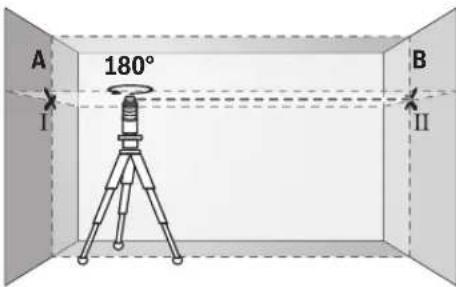
- Okrenite merni alat za 180° nedostaje stepen, nivelišite ga i označite tačku ukrštanja laserskih linija na suprotnom zidu B (tačka II).
- Postavite merni alat ne okrećući ga blizu zida B, uključite ga i pustite da se niveliše.
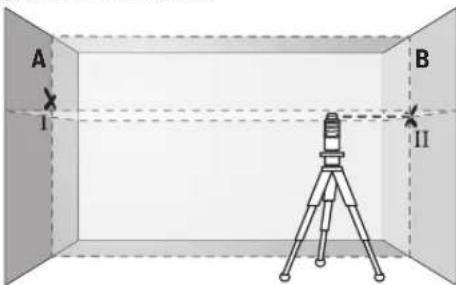
- Postavite merni alat po visini tako (sa stativom ili u datom slučaju podmetačima), da tačka ukrštanja laserskih linija tačno pogadja prethodno označenu tačku II na zidu B.
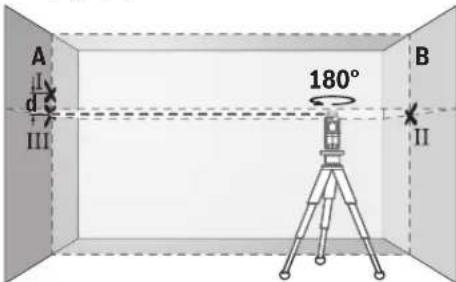
- Okrenite merni alat za 180° nedostaje stepen, ne menjajući visinu. Upravite ga tako na zid A, da vertikalna laserska linija prolazi kroz već označenu tačku I. Nivelišite merni alat i označite tačku ukrštanja laserskih linija na zidu A (tačka III).
- Razlika d obe obeležene tačke I i III na zidu A daje stvarno visinsko odstupanje mernog alata duž poprečne ose.
Na mernoj liniji od 2 x 5 m = 10 m iznosi maksimalno dozvoljeno odstupanje:
10 m x ±0,2 mm/m = ±2 mm. Razlika d izmedju tačaka I i III sme na kraju da iznosi najviše 2 mm.
Kontrola tačnosti nivelisanja vertikalne linije
Za kontrolu potreban Vam je otvor od vrata, kod kojih (na čvrstoj zemlji) sa svake strane vrata ima najmanje 2,5 m prostora.
- Postavite merni alat na 2,5 m rastojanja od otvora vrata na čvrstu, ravnu podlogu (ne na neki stativ). Pustite merni alat da se u vertikalnom radu nivelise sa automatikom za nivelaciju, i upravite lasersku liniju na otvor vrata.
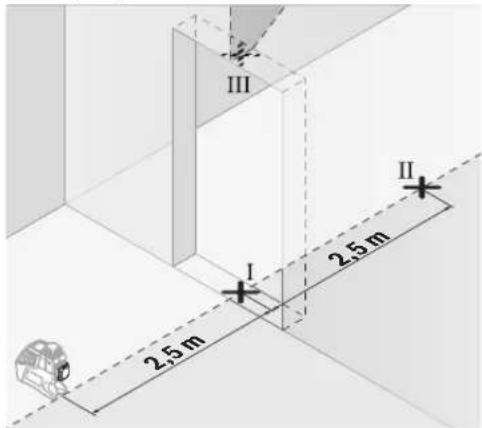
- Označite sredinu vertikalne laserske linije na podu otvora vrata (tačka I), 5 m rastojanja druge strane otvora vrata (tačka II), kao i na gornjoj ivici otvora vrata (tačka III).
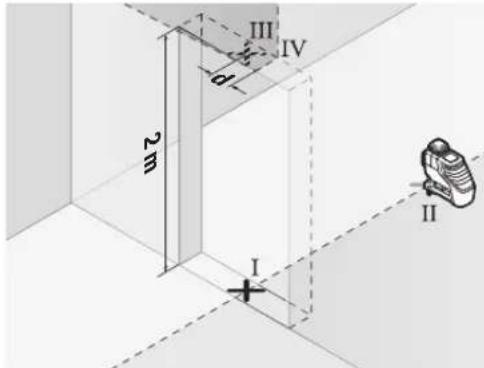
- Okrenite merni alat za 180° i postavite ga na drugu stranu otvora vrata direktno iza tačke II. Pustite merni alat da se niveliše i centrirajte vertikalnu lasersku liniju tako, da njena sredina prolazi tačno kroz tačke I i II.
– Označite sredinu laseske linije na gornjoj ivici otvora vrata kao tačku IV. - Razlika d obe markirane tačke III i IV daje stvarno odstupanje mernog alata od vertikale.
- Merite visinu otvora vrata.
Maksimalno dozvoljeno odstupanje izračunajte kao što sledi: dvostruka visina otvora vrata x 0,2 mm/m Primer: Pri visini otvora vrata od 2 m sme maksimalno odstupanje da iznosi
2 x 2 m x ±0,2 mm/m = ±0,8 mm. Tačke III i IV smeju na kraju najviše 0,8 mm da su udaljene.
140 | Srpski
Uputstva za rad
Laser Radiation Class 2
do not stare into beam
IEC 60825-1:2014-03 <1 mW, 640 nm
Če tekst opozorilne tablice ni v vašem jeziku, ga pred prvim zagonom prelepite z ustrezno nalepko v vašem nacionalnem jeziku.

Laser Radiation Class 2
do not stare into beam
IEC 60825-1:2014-03 <1 mW, 640 nm
- Označite sredinu okomite linije lasera na dnu otvora vrata (točka I), na udaljenosti 5 m na drugoj strani otvora vrata (točka II), kao i na gornjem rubu otvora vrata (točka III).
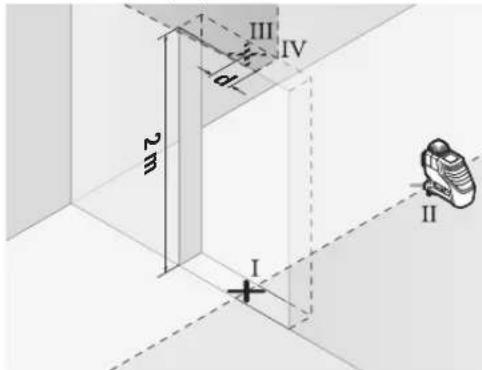
Laser Radiation Class 2 do not stare into beam IEC 60825-1:2014-03 <1 mW, 640 nm
Laser Radiation Class 2
do not stare into beam
IEC 60825-1:2014-03 <1 mW, 640 nm
Laser Radiation Class 2
do not stare into beam
IEC 60825-1:2014-03 <1 mW, 640 nm


162 | Lietuviškai





Lietuviškai | 165
Laser Radiation Class 2 do not stare into beam IEC 60825-1:2014-03 <1 mW, 640 nm
Laser Radiation Class 2 do not stare into beam IEC 60825-1:2014-03 <1 mW, 640 nm
Laser Radiation Class 2 do not stare into beam IEC 60825-1:2014-03 <1 mW, 640 nm
Laser Radiation Class 2 do not stare into beam IEC 60825-1:2014-03 <1 mW, 640 nm
Mechanics and Electronics Ltd.
PT/SAX-ASA
298 Bojeong-dong Giheung-gu
Yongin-si, Gyeonggi-do, 446-913
Republic of Korea
080-955-0909
처리
Laser Radiation Class 2
do not stare into beam
IEC 60825-1:2014-03 <1 mW, 640 nm
Laser Radiation Class 2
do not stare into beam
IEC 60825-1:2014-03 <1 mW, 640 nm
Laser garis GLL 2-80 P
| Suhu kerja -10°C ... +45°C | |
| Suhu penyimpanan | -20°C ... +70°C |
| Kelembaban udara relatif maks. | 90% |
| Kelas laser | 2 |
| Jenis laser | 640 nm, <1 mW |
| C_8 | 1 |
| Lama pulsa yang terpendek | 1/1600 s |
| Divergensi garis laser | 0,5 mrad(sudut satu putaran) |
| Ulir untuk tripod | 1/4", 5/8" |
| Baterai | 4 x 1 , 5 V L R 6 (AA) |
| Kemampuan baterai– dengan 2 bidang laser– dengan 1 bidang laser | 9 h18 h |
| Berat sesuai denganEPTA-Procedure 01:2014 | 0,69 kg |
| Ukuran (panjang x lebar x tinggi) | 159 x 54 x 141 mm |
| Jenis keamanan | IP 54 (lindungan terhadapdebu dan air penyiraman) |
Laser Radiation Class 2
do not stare into beam
IEC 60825-1:2014-03 <1 mW, 640 nm
10 m x ±0.2 mm/m = ±2 mm.
Tăng 10,194 Golden Building
473 Điện Biên Phú
IOI I I I I I I I I I I I I I I I I I I I I I I I I I I I I I I I I I I I I I I
11 Bhitt ghape, Hypera bpatirias
Laser Radiation Class 2 do not stare into beam IEC 60825-1:2014-03 <1 mW, 640 nm
انواع عملکردها
Laser Radiation Class 2 do not stare into beam IEC 60825-1:2014-03 <1 mW, 640 nm



- GLL 2-80 P Professional
- BOSCH
- | Deutsch
- Deutsch
- Sicherheitshinweise
- Linienlaser
- | English
- Laser target plate
- Product Description and Specifications
- Intended Use
- Noise Information
- Product Features
- Technical Data
- English | 13
- Assembly
- Inserting/Replacing the Batteries
- Operation
- Initial Operation
- Switching On and Off
- Deactivating the Automatic Shut-off
- Deactivating the Signal Tone
- Operating Modes
- Pulse Function
- | English
- Automatic Levelling
- Working with Automatic Levelling
- Working without Automatic Levelling
- Levelling Accuracy
- Influences on Accuracy
- Checking the Horizontal Levelling Accuracy of the Lateral Axis
- Checking the Levelling Accuracy of the Vertical Line
- Working Advice
- Working with the Laser Target Plate
- Working with the Tripod (Accessory)
- Fastening with the Universal Holder (Accessory) (see figure D)
- | English
- Working with the Measuring Plate (Accessory) (seefiguresA-B)
- Working with the Laser Receiver (Accessory) (see figure D)
- Laser Viewing Glasses (Accessory)
- Work Examples (see figures C-H)
- Maintenance and Service
- Maintenance and Cleaning
- After-sales Service and Application Service
- www.bosch-pt.com
- Great Britain
- Ireland
- Australia, New Zealand and Pacific Islands
- Republic of South Africa
- Customer service
- Gauteng - BSC Service Centre
- KZN - BSC Service Centre
- Français | 17
- Western Cape - BSC Service Centre
- Bosch Headquarters
- Disposal
- Only for EC countries:
- Français
- Bortskaffelse
- Avfallshantering
- Kontrola tačnosti nivelisanja vertikalne linije
- | Srpski
- Uputstva za rad
- | Lietuviškai
- Lietuviškai | 165
- 처리
- IOI I I I I I I I I I I I I I I I I I I I I I I I I I I I I I I I I I I I I I I
- انواع عملکردها
Brand : BOSCH
Model : GLL 280 P Professional
Category : Laser level