
GLL 210 Professional - Laser pointer BOSCH - Free user manual and instructions
Find the device manual for free GLL 210 Professional BOSCH in PDF.
 FR
FR
 BG
BG
 CS
CS
 DA
DA
 DE
DE
 EL
EL
 EN
EN
 ES
ES
 ET
ET
 FI
FI
 HU
HU
 ID
ID
 IT
IT
 JA
JA
 KA
KA
 KK
KK
 KO
KO
 LT
LT
 LV
LV
 MK
MK
 NL
NL
 NO
NO
 PL
PL
 PT
PT
 RO
RO
 RU
RU
 SK
SK
 SL
SL
 SV
SV
 TH
TH
 TR
TR
 UK
UK
 VI
VI
 ZH
ZH
| Product Type | Laser line pointer |
| Brand | Bosch |
| Model | GLL 210 Professional |
| Minimum Range | 10 m |
| Leveling Accuracy | ±0.3 mm/m |
| Self-leveling Range | ±4° |
| Leveling Time | < 4 s |
| Operating Temperatures | -10 °C to +50 °C |
| Storage Temperatures | -20 °C to +70 °C |
| Max Relative Humidity | 90 % |
| Laser Class | 2 |
| Laser Type | 630-650 nm, < 1 mW |
| Divergence | 0.5 mrad (full angle) |
| Tripod Mount | 1/4" and 5/8" |
| Power Supply | 3 batteries 1.5 V LR6 (AA) |
| Battery Life - Cross-line Mode | 9 h |
| Battery Life - Line Mode | 17 h |
| Weight (according to EPTA) | 0.49 kg |
| Dimensions (L x W x H) | 112 x 55 x 106 mm |
| Protection Rating | IP54 |
| Operating Modes | Cross-line, horizontal, vertical |
| Special Features | Self-leveling, automatic shut-off (120 min), locked pendulum unit |
| Included Accessories | Swivel mount RM 1, protective case, laser target, laser viewing glasses (depending on version) |
| Maintenance | Clean with soft damp cloth, no solvents |
| Repairability | Spare parts available, Bosch after-sales service |
Frequently Asked Questions - GLL 210 Professional BOSCH
User questions about GLL 210 Professional BOSCH
0 question about this device. Answer the ones you know or ask your own.
Ask a new question about this device
Download the instructions for your Laser pointer in PDF format for free! Find your manual GLL 210 Professional - BOSCH and take your electronic device back in hand. On this page are published all the documents necessary for the use of your device. GLL 210 Professional by BOSCH.
USER MANUAL GLL 210 Professional BOSCH
GLL 2-10 Professional
Robert Bosch Power Tools GmbH
70538 Stuttgart
GERMANY
www.bosch-pt.com
1609 92A7AN(2021.12)T/533

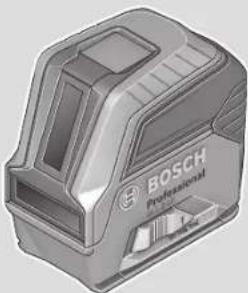
de Originalbetriebsanleitung en Original instructions fr Notice originale es manual original pt Manual original it Istruzioni originali nl Oorspronkelijke gebruiksaanwijzing da Original brugsanvisning sv Bruksanvisning original no Original driftsinstruks fi Alkuperäiset ohjeet el Πρωτότυπο οδηγίες χρήσης ru Оригинальное руководство по эксплуатации pl Instrukcja oryginalna cs Původní návod k použití sk Pôvodný návod na použitie hu Eredeti használati utasítás uk Оригінальна інструкція з експлуатації kk Пайдалану бойынша түпнұсқа нұсқаулық
ka მოხმარების ორიგინალური ინსტრუქცია ro Instrucțiuni originale bg Оригинална инструкция mk Оригинално упатство за работа sr Originalno uputstvo za rad sl Izvirna navodila hr Originalne upute za rad et Algupärane kasutusjuhend lv Instrukcijas oriģinālvalodā lt Originali instrukcija zh 正本使用说明书 zh 原始使用說明書 id Petunjuk-Petunjuk untuk Penggunaan Orisinal vi Bản gốc hướng dẫn sử dụng ar دليل الاستخدام الأصلي fa راهنمای اصلی

Deutsch.. 9
English 22
Francais 36
Espanol. Pagina 50
Portugués Pagina 64
Italiano 77
Nederland. 91
Danish . 104
Swedish Page 117
Norwegian. Page 129
Finnish Page 142
Greek 155
Turkish. Page 168
Polish. Page 184
Czech Page 198
Slovak Page 211
Hungarian .Page 223
Russian ..Page 237
Ukrainian Page 252
Kazakh . 267
Mongolian 83.281
Romanian.. 296
Bulgarian. Page 310
Macedonian. 324
Serbian. Page 338
Slovenian. Page 351
www.bosch-pt.com/serviceaddresses
22 | English
Disposal
All instructions must be read and observed in order for the measuring tool to function safely. The safeguards integrated into the measuring tool may be compromised if the measuring tool is not used in accordance with these instructions. Never make warning signs on the measuring tool unrecognisable. SAVE THESE INSTRUCTIONS FOR FUTURE REFERENCE AND INCLUDE THEM WITH THE MEASURING TOOL WHEN TRANSFERRING IT TO A THIRD PARTY.
STRUCTIONS FOR FUTURE REFERENCE AND INCLUDE THEM WITH THE MEASURING TOOL WHEN TRANSFERRING IT TO A THIRD PARTY.
Warning! If operating or adjustment devices other than those specified here are used or other procedures are carried out, this can lead to dangerous exposure to radiation. The measuring tool is delivered with a laser warning sign (marked in the illustration of the measuring tool on the graphics page). If the text of the laser warning label is not in your national language, stick the provided warning label in your national language over it before operating for the first time.
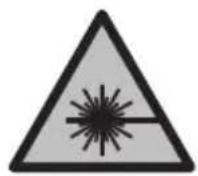
Do not direct the laser beam at persons or animals and do not stare into the direct or reflected laser beam yourself. You could blind somebody, cause accidents or damage your eyes.
If laser radiation hits your eye, you must close your eyes and immediately turn your head away from the beam. Do not make any modifications to the laser equipment. - Do not use the laser goggles (accessory) as protective goggles. The laser goggles make the laser beam easier to see; they do not protect you against laser radiation. - Do not use the laser goggles (accessory) as sunglasses or while driving. The laser goggles do not provide full UV protection and impair your ability to see colours. Have the measuring tool serviced only by a qualified specialist using only original replacement parts. This will ensure that the safety of the measuring tool is maintained. - Do not let children use the laser measuring tool unsupervised. They could unintentionally blind themselves or other persons. - Do not use the measuring tool in explosive atmospheres which contain flammable liquids, gases or dust. Sparks may be produced inside the measuring tool, which can ignite dust or fumes.
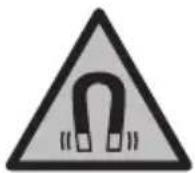
Keep the measuring tool and the magnetic accessories away from implants and other medical devices, e.g. pacemakers or insulin pumps. The magnets inside the measuring tool and accessories generate a field that can impair the function of implants and medical devices.
- Keep the measuring tool and the magnetic accessories away from magnetic data storage media and magnetically sensitive devices. The effect of the magnets inside the measuring tool and accessories can lead to irreversible data loss.
Product Description and Specifications
Please observe the illustrations at the beginning of this operating manual.
Intended Use
The measuring tool is intended for determining and checking horizontal and vertical lines.
The measuring tool is suitable for indoor and outdoor use.
Product Features
The numbering of the product features shown refers to the illustration of the measuring tool on the graphic page.
(1) Laser beam outlet aperture (2) On/off switch (3) 5/8" tripod mount (4) 1/4" tripod mount (5) Vertical mode button (6) Horizontal mode button (7) Status indicator (8) Pendulum lock indicator (9) Laser warning label (10) Serial number (11) Battery compartment cover (12) Battery compartment cover locking mechanism (13) Rotating mount (RM 1)a (14) Guide rail (15) Fastening slot (16) Magnet a) (17) Guide groove (18) Ceiling clip (BM 3)a (19) Universal holder (BM 1)a) (20) Laser target platea) (21) Protective bag (22) Laser viewing glassesa) (23) Tripod (BT 150)a (24) Telescopic shaft (BT 350)a
a) Accessories shown or described are not included with the product as standard. You can find the complete selection of accessories in our accessories range.
Technical Data
| Line laser GLL 2-10 | |
| Article number | 3601 K63 L.. |
| Working range at leastA) | 10 m |
| Levelling accuracy ±0.3 mm/m | |
| Typical self-levelling range ±4° | |
| Typical levelling time < 4 s | |
| Operating temperature -10 °C to +50 °C | |
| Storage temperature -20 °C to +70 °C | |
| Max. altitude 2000 m | |
| Relative air humidity max. 90 % | |
| Pollution degree according to IEC 61010-1 2 | B) |
| Laser class 2 | |
| Laser type 630-650 nm, < 1 mW | |
| C6 | 1 |
| Divergence 0.5 mrad (full angle) | |
| Tripod mount 1/4"; 5/8" | |
| Batteries 3 × 1.5 V LR6 (AA) | |
| Operating duration in operating mode | |
| - Cross-line mode | 9 h |
| - Line mode | 17 h |
| Weight according to EPTA-Procedure 01:2014 | 0.49 kg |
| Dimensions (length × width × height) | 112 × 55 × 106 mm |
| Protection rating IP54 (dust and splash-proof) | |
A) The working range may be reduced by unfavourable environmental conditions (e.g. direct sunlight). B) Only non-conductive deposits occur, whereby occasional temporary conductivity caused by condensation is expected.
The serial number (10) on the type plate is used to clearly identify your measuring tool.
Assembly
Inserting/changing the batteries
It is recommended that you use alkaline manganese batteries to operate the measuring tool.
To open the battery compartment cover (11), press on the locking mechanism (12) and remove the battery compartment cover. Insert the batteries.
When inserting the batteries, ensure that the polarity is correct according to the illustration on the inside of the battery compartment.
If the batteries become weak, the status indicator (7) will flash. The measuring tool can still be operated for approximately 1 hour after the first flash.
Always replace all the batteries at the same time. Only use batteries from the same manufacturer and which have the same capacity.
Take the batteries out of the measuring tool when you are not using it for a prolonged period of time. The batteries can corrode and self-discharge during prolonged storage in the measuring tool.
Working with the RM 1 rotating mount (see figures A-B)
Using the rotating mount (13), you can rotate the measuring tool 360°. This enables you to set up the laser lines precisely, without having to change the position of the measuring tool.
Place the measuring tool with the guide groove (17) on the guide rail (14) of the rotating mount (13) and slide the measuring tool all the way onto the platform.
To disconnect the measuring tool, pull it off the rotating mount in the opposite direction.
Rotating mount positioning options:
- Standing on a flat surface, Screwed to a vertical surface,
- On metallic ceiling strips using the ceiling clip (18),
- On metallic surfaces using the magnets (16).
- Keep your fingers away from the rear side of the magnetic accessory while attaching the accessory to surfaces. The strong pulling force of the magnets may jam your fingers.
Operation
Starting Operation
Protect the measuring tool from moisture and direct sunlight. Do not expose the measuring tool to any extreme temperatures or fluctuations in temperature. For example, do not leave it in a car for extended periods of time. If it has been subjected to significant fluctuations in temperature, first allow the measuring tool to adjust to the ambient temperature and then always carry out an accuracy check before continuing work (see "Accuracy Check of the Measuring Tool", page 29). The precision of the measuring tool may be compromised if exposed to extreme temperatures or fluctuations in temperature. Avoid substantial knocks to the measuring tool and avoid dropping it. Always carry out an accuracy check before continuing work if the measuring tool has been subjected to severe external influences (see "Accuracy Check of the Measuring Tool", page 29). Switch the measuring tool off when transporting it. The pendulum unit is locked when the tool is switched off, as it can otherwise be damaged by big movements.
Switching On/Off
To switch on the measuring tool, slide the on/off switch (2) to the "On" position (for working with the pendulum lock) or to the "On" position (for working with automatic levelling). The status indicator (7) lights up. As soon as it is switched on, the measuring tool emits laser lines from the outlet apertures (1). Do not direct the laser beam at persons or animals and do not stare into the laser beam yourself (even from a distance).
To switch off the measuring tool, slide the on/off switch (2) to the "Off" position. The status indicator (7) goes out. The pendulum unit is locked when the tool is switched off.
- Never leave the measuring tool unattended when switched on, and ensure the measuring tool is switched off after use. Others may be blinded by the laser beam.
If the maximum permitted operating temperature of 50°C is exceeded, the tool shuts down to protect the laser diode. Once it has cooled down, the measuring tool is operational again and can be switched back on.
Automatic shut-off
If no button on the measuring tool is pressed for approx. 120 min, the measuring tool will automatically switch itself off to preserve battery life.
28 | English
To switch the measuring tool back on after it has been automatically switched off, you can either slide the on/off switch (2) to the "Off" position first and then switch the measuring tool back on, or press either the vertical mode button (5) or the horizontal mode button (6) once.
To deactivate automatic shut-off, hold down the horizontal mode button (6) for at least three seconds (with the measuring tool switched on). If automatic shut-off is deactivated, the laser lines will flash briefly as confirmation.
Note: If the operating temperature exceeds 45°C, automatic shut-off can no longer be deactivated.
To activate the automatic shut-off function, switch the measuring tool off and on again.
Operating Modes
The measuring tool has several operating modes, which you can switch between at any time:
- Cross-line mode (see figure C): Generates one horizontal and one vertical laser line
- Horizontal mode (see figure D): Generates one horizontal laser line
- Vertical mode (see figure E): Generates one vertical laser line
After switching on, the measuring tool is in cross-line operating mode. Using the buttons for horizontal mode (6) and vertical mode (5), you can switch the horizontal and vertical laser lines on and off independently of one another.
All operating modes can be selected with both automatic levelling or the pendulum lock.
Automatic Levelling
Working with automatic levelling
Position the measuring tool on a level, firm surface or attach it to the rotating mount (13) or the tripod (23).
For work with automatic levelling, slide the on/off switch (2) to the "On" position.
The automatic levelling function automatically compensates irregularities within the self-levelling range of ±4°. The levelling is finished as soon as the laser lines stop moving.
If automatic levelling is not possible, e.g. because the surface on which the measuring tool stands deviates by more than 4° from the horizontal plane, the laser beams will flash quickly.
If this is the case, set up the measuring tool in a level position and wait for the self-levelling to take place. As soon as the measuring tool is within the self-levelling range of ±4°, the laser beams will light up continuously.
In case of ground vibrations or position changes during operation, the measuring tool is automatically levelled again. Upon levelling, check the position of the laser beams with regard to the reference points to avoid errors arising from a change in the measuring tool's position.
Working with the pendulum lock
For work with the pendulum lock, slide the on/off switch (2) to the "On" position. The pendulum lock indicator (8) lights up red and the laser lines continuously flash slowly. For work with the pendulum lock, automatic levelling is switched off. You can hold the measuring tool freely in your hand or place it on a sloping surface. This means that the laser beams are no longer levelled and no longer necessarily run perpendicular to one another.
Accuracy Check of the Measuring Tool
Influences on Accuracy
The largest influence is exerted by the ambient temperature. In particular, temperature differences that occur from the ground upwards can refract the laser beam.
In order to minimise thermal influences resulting from heat rising from the floor, it is recommended that you use the measuring tool on a tripod. In addition, position the measuring tool in the centre of the work surface, wherever this is possible.
In addition to external influences, device-specific influences (e.g. falls or heavy impacts) can also lead to deviations. For this reason, check the levelling accuracy each time before beginning work.
First check the height accuracy and levelling accuracy of the horizontal laser line, then the levelling accuracy of the vertical laser line.
Should the measuring tool exceed the maximum deviation during one of the tests, please have it repaired by a Bosch after-sales service.
Checking the Height Accuracy of the Horizontal Line
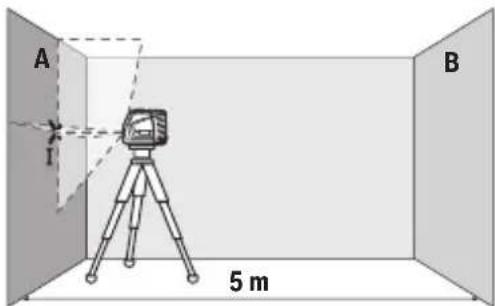
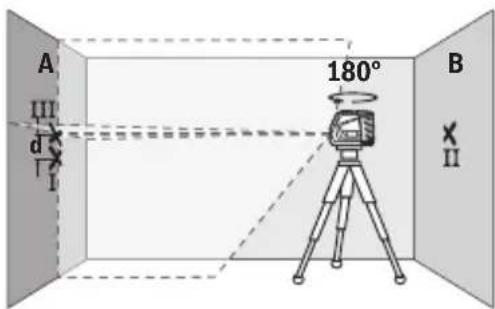
For this check, you will need a free measuring distance of 5 m on firm ground between two walls (designated A and B).
- Mount the measuring tool close to wall A on the holder or a tripod, or place it on a firm, level surface. Switch on the measuring tool with the automatic levelling function enabled and select cross-line mode.
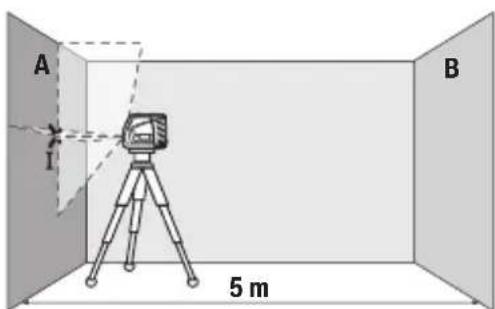
- Aim the laser at the closer wall A and allow the measuring tool to level in. Mark the middle of the point at which the laser lines cross on the wall (point I).
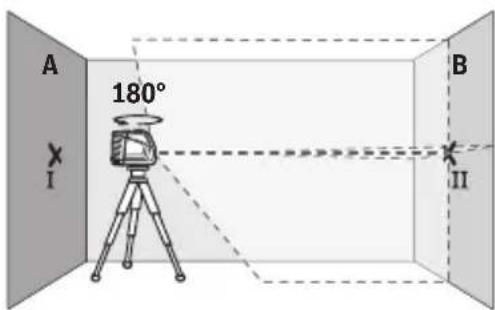
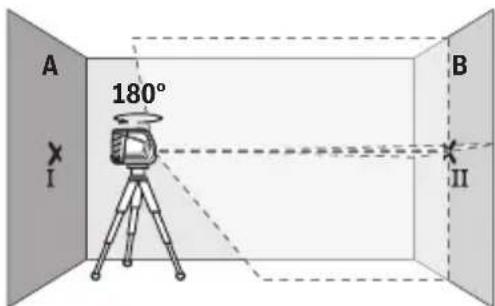
Turn the measuring tool 180°, allow it to level in, and mark the point where the laser lines cross on the opposite wall B (point II).
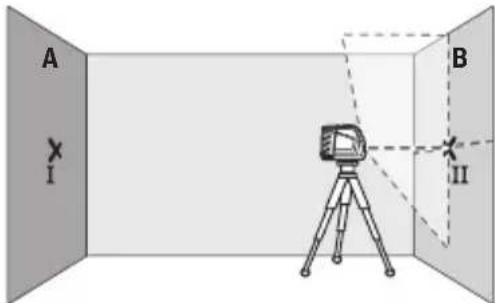
- Position the measuring tool - without rotating it - close to wall B, switch it on and allow it to level in.
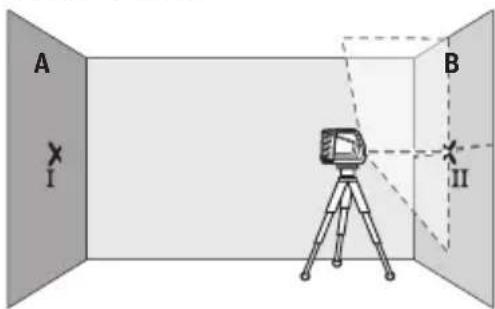
- Align the height of the measuring tool (using the tripod or by placing objects underneath as required) so that the point where the laser lines cross exactly hits the previously marked point II on wall B.
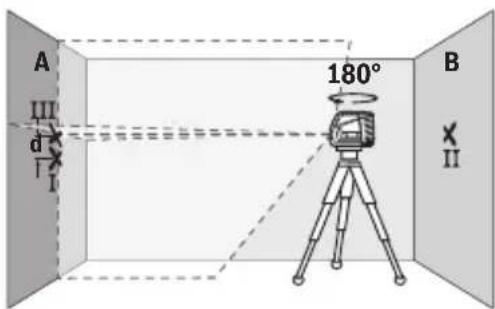
- Turn the measuring tool 180° without adjusting the height. Aim it at wall A such that the vertical laser line runs through the already marked point I. Allow the measuring tool to level in and mark the point where the laser lines cross on wall A (point III).
- The discrepancy d between the two marked points I and III on wall A reveals the actual height deviation of the measuring tool.
The maximum permitted deviation on the measuring distance of 2 × 5 m = 10 m is as follows:
10 m × ±0.3 mm/m = ±3 mm. The discrepancy d between points I and III must therefore amount to no more than 3 mm.
Checking the Level Accuracy of the Horizontal Line
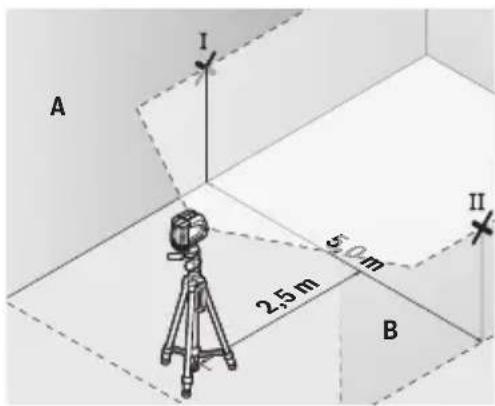
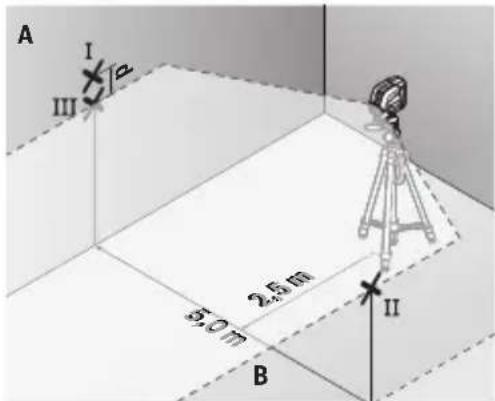
For this check, you will need a free area of 5 × 5 m.
- Mount the measuring tool in the middle between walls A and B on the holder or a tripod, or place it on a firm, flat surface. Switch on the measuring tool with the automatic levelling function enabled and select horizontal mode. Allow the measuring tool to level in.
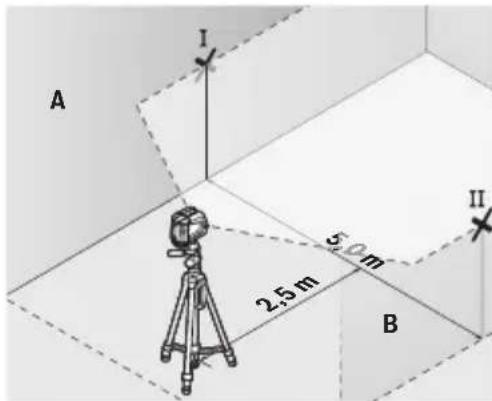
- At a distance of 2.5 m from the measuring tool, mark the centre of the laser line on both walls (point I on wall A and point II on wall B).
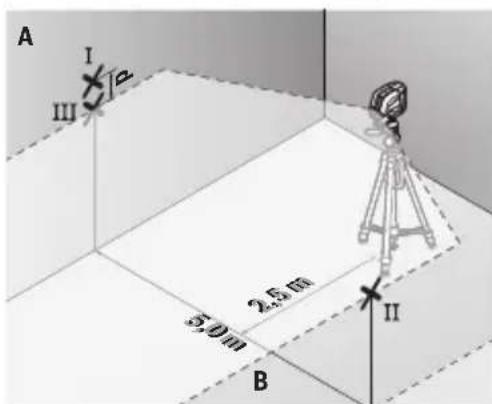
- Set up the measuring tool at a 5 m distance and rotated by 180° and allow it to level in.
- Align the height of the measuring tool (using the tripod or by placing objects underneath as required) so that the centre of the laser line exactly hits the previously marked point II on wall B.
- Mark the centre of the laser line on wall A as point III (vertically above or below point I).
- The discrepancy d between the two marked points I and III on wall A reveals the actual horizontal deviation of the measuring tool.
The maximum permitted deviation on the measuring distance of 2 × 5m = 10m is as follows:
10m× ± 0.3mm / m = ± 3mm . The discrepancy d between points I and III must therefore amount to no more than 3mm
Checking the Level Accuracy of the Vertical Line
For this check, you will need a door opening (on solid ground) which has at least 2.5m of space either side of the door.
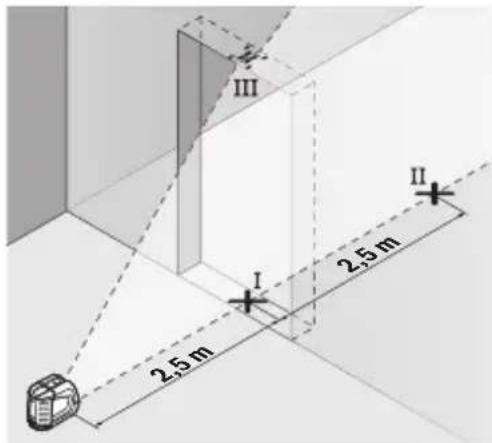
- Place the measuring tool 2.5m away from the door opening on a firm, flat surface (not on a tripod). Switch on the measuring tool in the mode with automatic levelling. Select vertical mode and allow the measuring tool to level in.
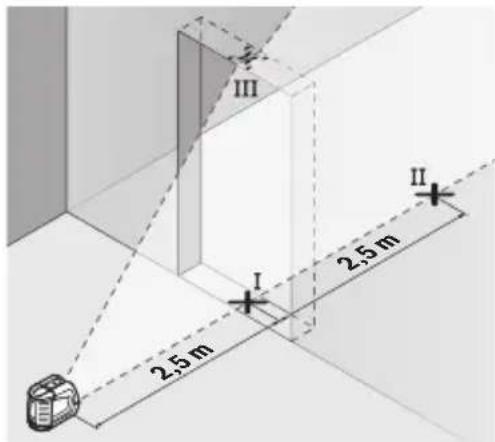
- Mark the centre of the vertical laser line on the floor of the door opening (point I), 5m away on the other side of the door opening (point II) and on the upper edge of the door opening (point III).
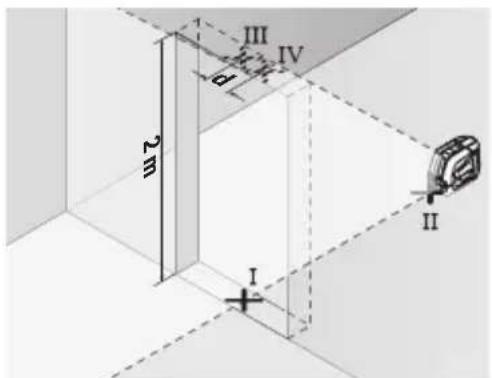
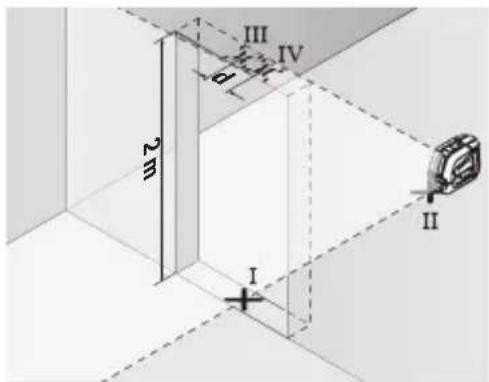
- Set up the measuring tool on the other side of the door opening, directly behind point II. Allow the measuring tool to level in and align the vertical laser line in such a way that its centre passes through points I and II exactly.
- Mark the centre of the laser line on the upper edge of the door opening as point IV.
- The discrepancy d between the two marked points III and IV reveals the actual vertical deviation of the measuring tool.
- Measure the height of the door opening.
You can calculate the maximum permitted deviation as follows:
Doubled height of the door opening × 0.3mm / m
Example: At a door opening height of 2m , the maximum deviation amounts to
2 × 2m × ± 0.3mm/m = ± 1.2mm . The points III and IV must therefore be no further
than 1.2mm from each other.
Working Advice
- Only the centre of the laser line must be used for marking. The width of the laser line changes depending on the distance.
Working with the Laser Target Plate
The laser target plate (20) improves visibility of the laser beam in unfavourable conditions and at greater distances.
The reflective surface of the laser target plate (20) improves visibility of the laser line.
The transparent surface enables the laser line to be seen from behind the laser target plate.
Working with the Tripod (Accessory)
A tripod offers a stable, height-adjustable support surface for measuring. Place the measuring tool with the 1/4" tripod mount (4) on the thread of the tripod (23) or a conventional camera tripod. Use the 5/8" tripod mount (3) to secure the measuring tool on a conventional building tripod. Tighten the measuring tool using the locking screw of the tripod.
Roughly align the tripod before switching on the measuring tool.
Securing with the universal holder (accessory) (see figure F)
You can secure the measuring tool, for example, on vertical surfaces or magnetisable materials using the universal holder (19). The universal holder is also suitable for use as a floor stand and facilitates the height adjustment of the measuring tool.
- Keep your fingers away from the rear side of the magnetic accessory while attaching the accessory to surfaces. The strong pulling force of the magnets may jam your fingers.
Roughly align the universal holder (19) before switching on the measuring tool.
Laser Goggles (Accessory)
The laser goggles filter out ambient light. This makes the light of the laser appear brighter to the eye.
Do not use the laser goggles (accessory) as protective goggles. The laser goggles make the laser beam easier to see; they do not protect you against laser radiation.
Do not use the laser goggles (accessory) as sunglasses or while driving. The laser goggles do not provide full UV protection and impair your ability to see colours.
Example applications (see figures F-H)
Examples of possible applications for the measuring tool can be found on the graphics pages.
Maintenance and Service
Maintenance and Cleaning
Keep the measuring tool clean at all times.
Never immerse the measuring tool in water or other liquids.
Wipe off any dirt using a damp, soft cloth. Do not use any detergents or solvents.
The areas around the outlet aperture of the laser in particular should be cleaned on a regular basis. Make sure to check for lint when doing this.
Only store and transport the measuring tool in the protective pouch (21).
If the measuring tool needs to be repaired, send it off in the protective pouch (21).
After-Sales Service and Application Service
Our after-sales service responds to your questions concerning maintenance and repair of your product as well as spare parts. You can find explosion drawings and information on spare parts at: www.bosch-pt.com
The Bosch product use advice team will be happy to help you with any questions about our products and their accessories.
In all correspondence and spare parts orders, please always include the 10-digit article number given on the nameplate of the product.
Malaysia
Robert Bosch Sdn. Bhd.(220975-V) PT/SMY
No.8A,Jalan 13/6
46200 Petaling Jaya
Selangor
Tel.: (03) 79663194
Toll-Free: 1800 880188
Fax: (03) 79583838
E-Mail: kiathoe.chong@my.bosch.com
www.bosch-pt.com.my
Great Britain
Robert Bosch Ltd. (B.S.C.)
P.O.Box 98
Broadwater Park
North Orbital Road
Denham Uxbridge
UB95HJ
At www.bosch-pt.co.uk you can order spare parts or arrange the collection of a product in need of servicing or repair.
Tel. Service: (0344) 7360109
E-Mail: boschservicecentre@bosch.com
You can find further service addresses at:
www.bosch-pt.com/serviceaddresses
Disposal
Measuring tools, accessories and packaging should be recycled in an environmentally friendly manner.

Do not dispose of measuring tools or batteries with household waste.
Only for EU countries:
According to the Directive 2012/19/EU, measuring tools that are no longer usable, and according to the Directive 2006/66/EC, defective or used battery packs/batteries, must be collected separately and disposed of in an environmentally correct manner.
Only for United Kingdom:
According to Waste Electrical and Electronic Equipment Regulations 2013 (2013/3113) and the Waste Batteries and Accumulators Regulations 2009 (2009/890), measuring tools that are no longer usable must be collected separately and disposed of in an environmentally friendly manner.
French
Robert Bosch Morocco SARL 53, Rue Lieutenant Mahroud Mohamed
20300 Casablanca
Tel.: +212529314327
E-Mail: sav.outillage@ma.bosch.com
France
Robert Bosch (France) S.A.S.
www.bosch-pt.com/serviceaddresses
Calle Robert Bosch No. 405
C.P. 50071 Zona Industrial, Toluca - Estado de Mexico
Tel.: (52) 55 528430-62
Tel.: 800 6271286
www.bosch-pt.com/serviceaddresses
Disposal
www.bosch-pt.com/serviceaddresses
Disposal
Line laser GLL 2-10
www.bosch-pt.com/serviceaddresses
Disposal
www.bosch-pt.com/serviceaddresses
Disposal
Bosch Service Center
Telegrafvej 3
2750 Ballerup
At www.bosch-pt.dk you can order spare parts online or create a repair order.
Tel. Service Center: 44898855
Fax: 44898755
E-Mail: vaerktoej@dk.bosch.com
www.bosch-pt.com/serviceaddresses
Disposal
Bosch Service Center
Telegrafvej 3
2750 Ballerup
Denmark
Tel.: (08) 7501820 (within Sweden)
Fax: (011) 187691
You can find more contact information for service here:
www.bosch-pt.com/serviceaddresses
Waste disposal
www.bosch-pt.com/serviceaddresses
Disposal
www.bosch-pt.com/serviceaddresses
Hävitis
www.bosch-pt.com/serviceaddresses
Anoupon
The tools, accessories, and packaging should be recycled in an environmentally friendly way.

Do not dispose of measuring tools and batteries in household waste!
Only for EU countries:
www.bosch-pt.com/serviceaddresses
Disposal
Robert Bosch Sp. z o.o.
www.bosch-pt.com/serviceaddresses
Waste disposal
Laser GLL 2-10
Bosch Service Center PT
K Vapence 1621/16
692 01 Mikulov
www.bosch-pt.com/serviceaddresses
Disposal
www.bosch-pt.com/serviceaddresses
Disposal
The product, accessories, and packaging should be recycled in an environmentally friendly manner.

Do not dispose of measuring instruments and batteries in household waste!
Only for EU countries:
According to European Directive 2012/19/EU, unused electrical measuring instruments and, according to European Directive 2006/66/EC, damaged or discharged accumulators/batteries must be collected separately and handed over for recycling in accordance with environmental protection.
Hungarian
www.bosch-pt.com/serviceaddresses
Waste disposal
It is recommended to clean the instrument from dust after each use.
Storage
- It is necessary to store in a dry place - It is necessary to store away from sources of high temperatures and exposure to sunlight - When storing, it is necessary to avoid sharp temperature changes - If the instrument is supplied in a case or plastic bag, it is recommended to store the instrument in this protective packaging - Detailed requirements for storage conditions are given in GOST 15150-69 (Condition 1)
Transportation
- Dropping and any mechanical impacts on the packaging during transportation are categorically not allowed.
- During unloading/loading, it is not allowed to use any equipment operating on the principle of gripping the packaging.
- Detailed requirements for transportation conditions are given in GOST 15150-69 (Condition 5)
Safety instructions

To ensure safe and reliable operation of the measuring instrument, all instructions must be read and followed. Using the measuring instrument not in accordance with these instructions may damage the integrated protective mechanisms.
Never change the warning labels on the measuring instrument beyond recognition. Keep these instructions well and pass them on together with the measuring instrument.
Caution - the use of instruments, illustrations, or procedures other than those specified here may lead to dangerous exposure to radiation. The measuring instrument is supplied with a warning label for laser radiation (shown on the page with the image of the measuring instrument).
If the technical table of laser radiation is not in your native language, before the first start-up, stick the label in your native language, which is included in the delivery scope.

Do not point the laser beam at people or animals, and do not look directly or indirectly at the laser beam. This beam can cause eye damage, become a source of accidents, or damage eyes.
If the laser beam hits the eye, close your eyes immediately and turn away from the beam. Do not change anything in the laser device. Do not use laser instrument glasses (accessory) as protective glasses. Laser instrument glasses ensure laser beam recognition, but do not protect against laser radiation. Do not use laser instrument glasses (accessory) as sunglasses when driving. Laser glasses do not provide protection against UV radiation and interfere with correct color perception. Repair of the measuring instrument may only be carried out by qualified personnel using original spare parts. This ensures the safety of the measuring instrument. Do not allow children to use the laser measuring instrument without supervision. They may inadvertently blind themselves or other people. Do not work with the measuring instrument in an explosive atmosphere, near flammable liquids, gases, or dust. Sparks may form in the measuring instrument, which can ignite dust or vapors.
Do not install the measuring instrument or magnetic accessories near implants or other medical devices, e.g., pacemakers or insulin pumps. The magnets of the measuring instrument or accessory create a field that can negatively affect the operation of implants or medical devices.
Keep the measuring instrument and magnetic accessories away from magnetic data carriers and devices sensitive to magnetic
240 | Russian
The effect of the magnets of the measuring instrument and accessories can lead to irreversible data loss.
Product description and functions
Please observe the illustrations at the beginning of the operating manual.
Intended use
This measuring device is intended for the construction and checking of horizontal and vertical lines.
The measuring instrument is suitable for indoor and outdoor use.
Illustrated components
The numbering of the illustrated components refers to the illustration of the measuring instrument on the page with the illustration.
(1) Laser beam output aperture (2) Switch (3) 5/8" thread socket (4) 1/4" thread socket (5) Vertical mode button (6) Horizontal mode button (7) Status indicator (8) Magnet indicator (9) Laser radiation warning label (10) Serial number (11) Battery compartment cover (12) Battery compartment cover latch (13) Rotating mount (RM 1) (14) Guide rail (15) Grooved mounting hole (16) Magnet (17) Guide groove (18) Auxiliary bracket (BM 3)
(19) Universal mount (BM 1) (20) Laser beam exit window (21) Protective cap (22) Laser tool operation window (23) Rod (BT 150) (24) Telescopic rod (BT 350)
The accessories shown or described are included in the standard delivery scope. You will find the complete range of accessories in our accessory program.
Technical data
Laser level GLL 2-10
Dimensions (length x width x height) 112 x 55 x 106 mm
Protection class IP54 (protected against dust and
splash water)
A) The working range may be reduced due to unfavorable ambient conditions (e.g., direct sunlight). B) The device is only protected against non-conductive contamination. However, temporary conductivity may occur due to condensation.
The measuring tool can be identified by the serial number (10) on the rating plate.
Assembly
Inserting/replacing batteries
It is recommended to use alkaline manganese batteries in the measuring tool.
To open the battery compartment cover (11), press the latch (12) and remove the cover. Insert the batteries.
Ensure correct polarity according to the illustration on the inside of the battery compartment.
After pressing the button, the status indicator (7) starts blinking. After the start of the measurement, the instrument can operate for about 1 more hour.
Replace all batteries at the same time. Use only batteries from the same manufacturer and with the same capacity.
Remove the batteries from the measuring instrument if you will not be working with it for an extended period. During long-term storage in the measuring instrument, corrosion and self-discharge of the batteries are possible.
Working with the swivel mount RM 1 (see Fig. A-B)
With the swivel mount (13), the measuring instrument can be rotated by 360°. This allows you to align the laser lines while monitoring the position of the measuring instrument.
Checking the accuracy of the measuring instrument
Factors affecting accuracy
The greatest influence on accuracy is exerted by the ambient temperature. In particular, temperature fluctuations that occur with increasing distance from the ground can cause deviations of the laser beam.
We recommend using the measuring instrument on a tripod to minimize the influence of heat rising from below. Additionally, place the measuring instrument, as far as possible, in the middle of the working surface.
In addition to external influences, device-specific influences (e.g., falls or strong impacts) can also lead to deviations. Therefore, always check the leveling accuracy before starting work.
First check the height accuracy and the leveling accuracy of the horizontal laser line, then the leveling accuracy of the vertical laser line.
If during one of the checks the measuring instrument exceeds the maximum permissible deviation, have it repaired at the Bosch service center.
Checking the height accuracy of the horizontal line
For the check, a free measuring distance of 5 m on a firm surface between two walls A and B is required.
Mount the measuring instrument near wall A on a tripod or place it on a firm, level surface. Switch on the measuring instrument with automatic leveling and select the cross-line mode.
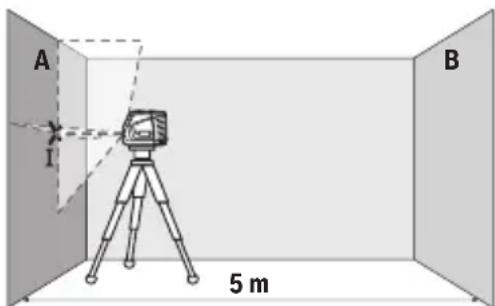
- Aim the laser at the nearby wall A and allow the measuring tool to level itself. Mark the center of the point where the laser lines cross on the wall (point I).
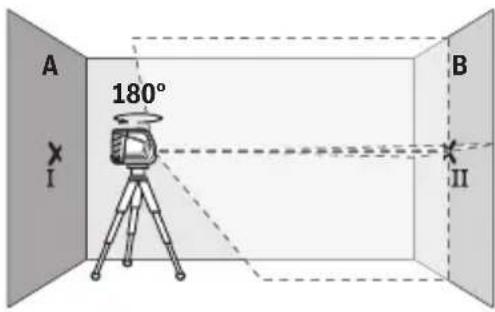
Turn the measuring tool 180°, allow it to level itself, and mark the point where the laser lines cross on the opposite wall B (point II).
- Place the measuring tool - without turning it - near wall B, switch it on and allow it to level itself.
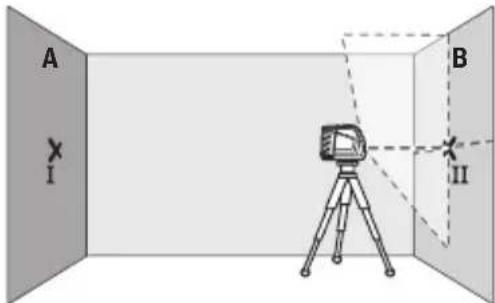
- Adjust the height of the measuring tool (using the tripod or by adding shims) so that the point where the laser lines cross exactly coincides with the previously marked point II on wall B.
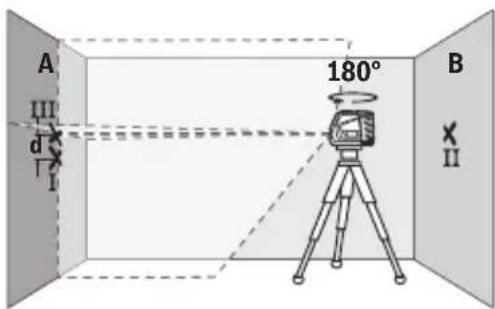
Turn the measuring tool 180° without changing the height. Aim it at wall A so that the vertical laser line runs through the already marked point I. Allow the tool to level itself and mark the point where the laser lines cross on wall A (point III).
- The distance d between the two marked points I and III on wall A reflects the actual deviation of the measuring tool in height.
On a measuring distance of 2 × 5 m = 10 m, the maximum allowable deviation is:
10 m × ±0.3 mm/m = ±3 mm. Thus, the distance d between points I and III must not exceed 3 mm.
Checking the leveling accuracy of the horizontal line
For this check, a free surface of approx. 5 × 5 m is required.
Mount the measuring tool in the middle between walls A and B on a tripod, or place it on a firm, level surface. Switch on the measuring tool with automatic leveling.
Select the horizontal mode. Allow the measuring tool to level itself.
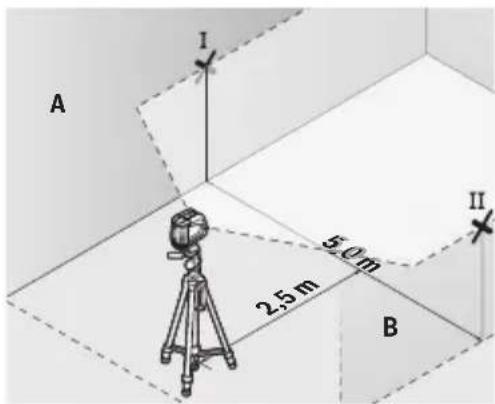
Mark at a distance of 2.5 m from the measuring tool the center of the laser beam on both walls (point I on wall A and point II on wall B).
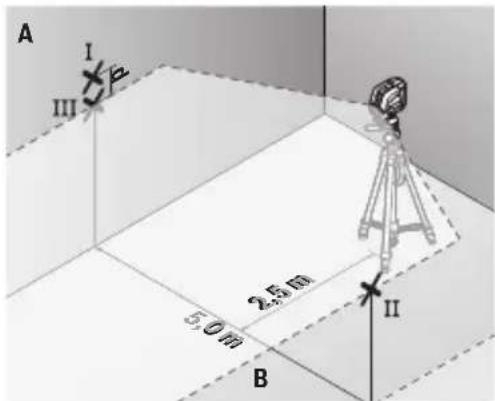
Set up the measuring tool turned by 180° at a distance of 5 m and allow it to level itself.
- Set up the measuring tool at the correct height as follows (using a tripod or placing something underneath it as needed) so that the center of the laser line exactly hits the previously marked point II on the wall. - Mark the center of the laser line on wall A as point III (vertically above or below point I).
- The distance d between the two marked points I and III on wall A reflects the actual deviation of the measuring tool from the horizontal.
On a section of 2 × 5 m = 10 m, the maximum permissible deviation is:
10 m × ±0.3 mm/m = ±3 mm. Thus, the distance d between points I and III must not exceed max. 3 mm.
Checking the accuracy of the horizontal leveling
For this check, you need a door opening with free space of at least 2.5 m on both sides of the door (on firm ground).
- Place the measuring tool at a distance of 2.5 m from the door opening on a firm, level surface (not on a tripod). Switch on the measuring tool and allow it to level automatically. Select vertical mode and let the measuring tool level itself.
- Mark the center of the vertical laser line on the floor in the door opening (point I), at a distance of 5 m on the other side of the door opening (point II), and also at the upper edge of the door opening (point III).
- Place the measuring tool on the other side of the door opening directly behind point II. Allow the measuring tool to level itself and align its vertical laser lines so that their centers pass exactly through points I and II.
- Mark the center of the laser line on the upper edge of the door opening as point IV. The distance d between the two marked points III and IV reflects the actual deviation of the measuring tool from the vertical. - Measure the height of the door opening.
The maximum permissible deviation is calculated as follows:
Working with the laser receiver
The laser receiver (20) improves the visibility of the laser beam in unfavorable conditions over long distances.
The reflective surface of the laser receiver (20) improves the visibility of the laser line. On transparent surfaces, the laser line is also visible from the back side of the laser receiver.
Working with the tripod (accessory)
The stand provides a stable, height-adjustable support for the measuring instrument. Place the measuring instrument with the 1/4" socket (4) on the stand thread (23) or on a standard tripod. For mounting on a standard construction tripod, use the 5/8" socket (3). Secure the measuring instrument with the stand locking screw.
Level the stand before switching on the measuring instrument.
Attaching the universal holder (accessory) (see figure F)
With the universal holder (19), you can secure the measuring instrument, for example, on vertical surfaces or on surfaces made of magnetic materials. The universal holder can also be used as a stand. It facilitates leveling the instrument by height.
When attaching the accessory to surfaces, keep your fingers away from the back of the magnetic accessory. The strong magnetic attraction can pinch your fingers.
Level the universal holder (19) before switching on the measuring instrument.
Working with the laser viewing glasses (accessory)
Laser viewing glasses filter out ambient light. Therefore, the laser beam appears brighter to the eye.
Do not use the laser viewing glasses (accessory) as protective goggles. The laser viewing glasses improve the visibility of the laser beam but do not protect against laser radiation.
Do not use the laser viewing glasses (accessory) as sunglasses or while driving. The laser viewing glasses do not provide protection from UV radiation and impair color perception.
Examples of possible applications (see figures F-H)
Examples of possible applications of the measuring instrument are shown on the pages with figures.
Maintenance and service
Maintenance and cleaning
Keep the measuring instrument clean at all times.
Hnkorga He norpykaTe n3MepeTbHbI INCTpMeHT B Ody nn dpyrne KndKocTN.
BbItpaIte 3arpa3HeHn cyXo n MArKO TpAknO. He nCnoJIb3yIe KaKne-Im6o YnCTa- Ie cpeCTBa nn pactBOpHTen.
OuHauTe peRyIaRHO oc6eHHo NOBepXHocTH y BbIXoHOrO OTBepCTnA3epa n CneHN-Te pRn 3TOM 3a OTCyTCTBnEM BOPCHOK.
O6ra3aTeIbHox xpaHnTe n TpaHcnpTnpyIte H3MepeHbHbI HHCTpyMeHT B 3aunTHOH cyMke (21).
Ha peMOHT OTnpaBJIte H3MePHTeIbHbI INHCTpyMeHT B 3aUNTHOM qExNe (21).
CepBnC n KOHcyIbTnPoBaHne no BOpocam npImeHnA
CepBnchbI OTDen OTBeHT Ha BCE Baun BOpocbi No pemOnTy n 06cnyKbAHIO BaWero npOyKta, a TAKKe IIO 3aNpactm. N3o6paKeHHcNpOCTpaHCTBeHHbIM paZdeneHnEM deIaTe HnHΦopMaunIO NO 3aNpactm MOXHO NOCMOTpeTb TAKKe IIO aDpccy: www.boschpt.com
KoIneKTHB COTpydHnKOB Bosch, npedocTablaHouu KOncylbTaun Ha npedMeT nCnoJIb-30BaHnnpOdyKUn, cyIOBOJbCTBnEM OTBeHT Ha BCE BaUN BONpOcBi OTHOCHTeNbHOHaWe npOdyKUn n ee npHnAdnEeXHoTeN.
Poxayncta, Bo Bcex 3anpocax n 3aka3ax 3anuacte o6ra3atebHo yka3bBaIte 10-3naHbTOBapHbH Homep no 3aBOdCKoTabnUyKe n3dEInr.
ДлpernoHa: Pocchn, Benapycb, Ka3axCTaH, YkpanHa
IapaHTnHoe 06cnyKbAHne n peMOHT 3NeKtpOnHCTpyMeH-Ta, c co6JIIOJeHNHeM Tpe6oBaHn HOpM N3rTOBNTeJI npo- N3BOJATCn Ha TeppHTopnB BceX CTpaH ToIbKO BΦnpMeHHbIX nII ABTopn3OBAHbIX CepBnCHbIX ueTpax «Po6epT BoW». IPEyIPPEKdEHNE! IcNoB3OBAHne KOHTpapakTHOH npo- DkyuIN OnaCHO B 3KcNPyatauIN, MoKeT npNBecTN
252|YkpaHcbKa
K yuep6y dIy BaIero 3dOpOBbI. I3rOToBHeHne n pacnpoCTpaHHeHne KOHTpaKaTHoI npOdykUHN pIpecJeDyETcI NO 3aKOHy B aI-MMHNCtpaTHBOM H yRONOBHOM NopRKe.
Pocch
yNIOHOMOeHHa H3ROTOBtTeJem OprAHn3aun:
OOO «Robert Bosch» Vatutinskoe shosse, vl. 24
141400, g. Khimki, Moskovskaya obl.
Tel.: +7 800 100 8007
E-Mail: info.powertools@ru.bosch.com
www.bosch-pt.ru
Additional service center addresses can be found at the link:
www.bosch-pt.com/serviceaddresses
Disposal
Measuring tools, accessories and packaging should be sorted for environmentally friendly recycling.
Do not dispose of measuring tools and batteries in household waste!
Only for EU countries:
According to the European Directive 2012/19/EU, used measuring tools and according to the European Directive 2006/66/EC, defective or exhausted battery packs/batteries must be collected separately and handed in for environmentally correct recycling.
Ukrainian
Safety instructions

Read all safety instructions and follow them to work with the measuring tool safely and reliably.
Unauthorized use of the measuring tool without following its instructions can lead to dangerous activation of the protected mechanisms. Never allow untrained
persons to use the measuring tool. Unauthorized use can lead to damage.
1609 92A 7AN| (14.12.2021) Bosch Power Tools
SAVE ALL INSTRUCTIONS AND PASS THEM ON TO THE USER OF THE MEASURING TOOL.
Use of the tool for operations different from those intended could result in a hazardous situation. The measuring tool is supplied with a warning label for laser radiation (it is indicated on the illustration of the measuring tool on the page with the figure). If the text of the warning label is not in your country's language, before first use, stick the provided label in your country's language over it.

Do not direct the laser beam at persons or animals, and do not stare into the laser beam yourself. It can blind persons, cause accidents, or damage eyes.
If laser radiation hits your eye, close your eyes and immediately turn away from the beam. Do not look into the laser device. Do not use laser viewing glasses (accessory) as protective goggles. Laser viewing glasses improve the visibility of the laser beam, but they do not protect against laser radiation. Do not use laser viewing glasses (accessory) as safety goggles and do not wear them when operating the tool. Laser viewing glasses do not provide complete protection against UV radiation and impair color recognition. Have your measuring tool serviced by qualified personnel using only original replacement parts. This will ensure that the safety of the measuring tool is maintained. Do not allow children to use the laser measuring tool without supervision. Protect yourself and others from unintended use. Do not operate the measuring tool in environments where there is a risk of explosion due to the presence of flammable gases, vapors, or dust. Sparks may be created in the measuring tool, which could ignite dust or vapors.
254|Ukrainian

Do not place the measuring tool and magnetic accessories near implants and other medical devices, e.g., pacemakers and insulin pumps. The magnets of the measuring tool and accessories create a field that can adversely affect the functionality of implants and other medical devices.
The measuring tool and magnetic accessories should not be kept near magnetic data carriers and devices that are sensitive to magnetic fields. The magnets of the measuring tool and accessories can cause irreversible data loss.
Laser line GLL 2-10
Mounting thread 1/4"; 5/8"
Batteries 3 × 1.5 V LR6 (AA)
Operating time depends on the operating mode
- Operating mode with cross lines 9 m
- Weight 17 g
Battery type: EPTA-Procedure 01:2014 0.49 K
Dimensions (length x width x height) 112x55x106 mm
Protection class IP54 (protected against dust and
water splashes)
A) The operating range may vary depending on unfavorable conditions (e.g., direct sunlight). B) Slight conductive contamination may be present. However, as a rule, it causes temporary conductivity through condensation.
The identification of the measuring instrument can be done with the help of the serial number (10) on the nameplate.
MOUNTING
Inserting/replacing batteries
It is recommended to use alkaline manganese batteries in the measuring instrument.
To open the battery compartment cover (11), press the latch (12) and remove the battery compartment cover. Insert the batteries.
When inserting, pay attention to the correct polarity, as shown inside the battery compartment.
When the battery charge is low, the status indicator (7) flashes. After the start of flashing, the measuring instrument can operate for approx. 1 hour.
Replace all batteries at once. Use only batteries of the same type and with the same capacity.
Remove the batteries from the measuring instrument if it will not be used for a long time. In case of long-term storage in the measuring instrument, the batteries may corrode and discharge themselves.
Pobotn 3 noBopOTHM KpinneHHaM RM 1 (dHB. man. A-B)
3a donomoroIO NOBOPOTHO KpINHeHH (13) MoXHa NOBepTaH BHMipOBaIbHN iHCTpyMeHT Ha 360°. Lcdo3BOJRE TOHHO HanaTByBatn Na3epHi IiHII, He 3MiHIOUH IONoXeHH BMMIPOBaIbHO rHCTpyMeHTa.
IpnCTaBTE BmIPIOBaJIbHn IInCTpyMeHT HAnpMaHm Na3OM (17)do HAnpMaHoi peKn (14) NOBOpOTHO KpinHeHHa (13)i nocyHbTe BmIPIOBaJIbHn IInCTpyMeHT Do ynpOHa nnatopmy.
Uo6 3HHTN,NOTARHITb BmipIOBaJIbHN iHCTpMeHT y 3BOPOTbOMy HaprMky 3 NOBOPOTHOKpINHeHH.
MoxkInBOcTi I03nIioHyBaHHN IOBOPOTHO KpINJIeHHA:
- cTOnyH aPiBHiI NobepxHi,
- npnKpyeHe Do BepTkaJIbHOI pIoUHH, -y3eHaHHi 3i CTenboBOIO CKOBOIO (18) yPiDBiWeHOMy CTAHI Ha MetaIeBIi CTeIbOBi peuizi,
- npnKpInnHe MarHitamn (16) do MeTaneBoi nobepxhi.
PnHKpINIOUO npnaIdo NOBepxohb, TpMaTe naIe nIodani BID 3aHboi qactHH MarHITHO npnaI. Bawi naIe moKyTb 3aIeMHNTcB HacIIOK CnIbHO rnpTAYBaHH MaHITIB.
Po60ta
Pouatok po60tn
3axuatae Bmipobalbnn npnaB iD Bonr i cohnynx npomeHiB. He donyckaIte BnHbNy Ha BmipIOBaNbHn iHcTpymeHT ekCTpeMaIbHnx Temnepatyp a6o TemnepatypnX nepenad. Hanpknad, He 3aIIuAte Horo HADOBRO b abTomobini. Iicna 3NaHOrO nepenady Temnepatyp daTe Temnepatypi BmipIOBaIbHomy iHcTpymeHa cta6i13yBaTncb, i neped noanbfo p06to10 3aBXd n pepeBipnTe ToHicThpo60TH BmipIOBaIbHO rHcTpymeHa (DVB. "PepeBipka ToHocTI BmipIOBaIbHO rHcTpymeHa", Ctopinka 260). EkCTpeMaIbHi Temnepatyp Ta Temnepatypni nepenadi MoKytb noripuByaTH ToHicTh BmipIOBaIbHO rHcTpymeHa. YHnKaIe CNbHnx NOToBxIB i naIHnBaHmIPoBaNbHO IHcTpMeHa. NcHbHnx 3OBHIshIX BnHBiB Ha BmIPoBaNbHn IHcTpMeHT nepeI nOaIbWoIO po60TOIO o6OB'3KOBO 3aBXJn IpeBiprTe TOHicTh b po6OTn BmIPoBaNbHO IHcTpMeHa (INB. "PepeBipka ToHocTi BmIPoBaNbHO IHcTpMeHa", CtopiHa 260).
258|YkpaIHcbKa
Пд часрансортуваши Вьнkaite Вьмірювьній�спгштүмг. Прь Вьнкениnpinapny MaRTNkoBn By30n 6IOKyETbCn, 7O6 3anO6iTn nOwKoJxHnOBHacnIDOK CINlbHnx NOITOBXIB.
BMKahH/HBMKaHH
To turn on the measuring tool, move the switch (2) to the "On" position (for working with a leveling mat) or to the "On" position (for working with automatic leveling). The status indicator (7) lights up. Immediately after turning on the measuring tool, laser lines are emitted from the laser outlet (1). Do not direct the laser beam at people or animals and do not look into the laser beam, even from a distance.
To turn off the measuring tool, move the switch (2) to the "Off" position. The status indicator (7) goes out. When the tool is turned off, the pendulum unit is locked. Do not leave the measuring tool turned on unattended; after finishing work, turn off the measuring tool. The laser outlet may be covered by the laser beam.
If the maximum permissible operating temperature of 50°C is exceeded, the laser beam will automatically switch off to protect the laser diode. After the measuring tool has cooled down, it is ready for operation again and can be switched on again.
Automatic shut-off
If no button is pressed on the measuring tool for approx. 120 minutes, the tool automatically switches off to protect the battery or rechargeable battery.
To switch the measuring tool back on after automatic shut-off, you can either move the switch (2) first to the "Off" position and then switch the measuring tool on again, or press the vertical mode button (5) or the horizontal mode button (6) once.
To deactivate the automatic shut-off, keep the horizontal mode button (6) pressed for at least 3 seconds while the measuring tool is switched on. If the automatic shut-off is deactivated, the laser lines will briefly flash as confirmation.
Note: If the operating temperature exceeds 45°C, the automatic shut-off cannot be deactivated.
To activate the automatic shut-off function, switch the measuring tool off and then on again.
Operating modes
The measuring tool has several operating modes that can be switched at any time:
-Cross-line mode (see figure C): The tool emits a horizontal and a vertical laser line. -Horizontal mode (see figure D): The tool emits one horizontal laser line. -Vertical mode (see figure E): The tool emits one vertical laser line.
After switching on the measuring tool, it is in cross-line mode. Using the horizontal mode button (6) and the vertical mode button (5), you can switch the horizontal and vertical laser lines on and off independently.
All operating modes can be selected with automatic leveling or with a leveling mat.
Automatic leveling
Work with the tool in automatic leveling mode
Place the measuring tool on a firm, horizontal surface, and secure it on the swivel mount (13) or on the tripod (23).
Maintenance and cleaning
Keep the measuring tool clean at all times.
Do not immerse the measuring tool in water or other liquids.
Wipe off dirt with a damp, soft cloth. Do not use harsh cleaning agents or solvents.
In particular, regularly clean the surfaces of the laser outlet opening and pay attention to not leaving any lint.
Store and transport the measuring tool only in the protective pouch (21).
Send the measuring tool for repair in the protective pouch (21).
After-sales service and application service
In the service center, you will receive answers to your questions regarding repair and maintenance of your product. You will find detailed information and spare parts at: www.bosch-pt.com
The Bosch team will be happy to help you with any questions regarding the use of our products and accessories.
For all questions and spare parts orders, please always specify the 10-digit order number found on the product nameplate.
266|Ukrainian
Warranty service and repair of power tools are carried out in accordance with the requirements and standards established in all countries of the European Union, exclusively in authorized or certified service centers of Robert Bosch GmbH. WARNING! Use of counterfeit products is unsafe during operation and may have negative consequences for health. Manufacturing and distribution of counterfeit products is prohibited by law and is subject to administrative and criminal liability.
Service Center for Power Tools
Kranaya St. 1
02660 Kyiv 60
www.bosch-pt.com/serviceaddresses
Disposal
Power tools, accessories, and packaging should be sorted for environmentally friendly recycling.
Do not dispose of power tools and batteries in household waste.
For EU countries only:
According to the European Directive 2012/19/EU, power tools that are no longer usable, and according to the European Directive 2006/66/EC, defective or exhausted batteries must be collected separately and disposed of in an environmentally correct manner.
Kazakhstan
Eurasian Economic Union (EAEU) Conformity Mark
This product has been assessed for compliance with the requirements of the technical regulations of the Customs Union and the EAEU, and the relevant marking has been applied.
Do not dispose of the product with household waste.
Information about the country of origin is indicated on the product housing and packaging.
The product must be used only for its intended purpose and in its original housing.
The product must be installed in the device's housing.
Product service life
The service life of the product is 7 years. After the expiration of the service life (from the date of manufacture indicated on the label), within 5 years after the end of the warranty period, the product must be sent for technical inspection (service maintenance).
If the product fails, its components and parts must be
- if the product is removed from its housing, the warranty is void; - if the housing is damaged, the warranty is void.
Main technical data
Product housing sealing
Type of service and repair
After the end of the product's service life, it must be disposed of.
Storage
Storage should be carried out in accordance with the requirements: - the product should be stored away from high temperatures and direct sunlight; - during storage, it is necessary to protect the product from sudden temperature changes; - if the product is made of soft material or plastic, it should be stored in its original protective packaging; - storage conditions must comply with GOST 15150-69 (part 1) for the purchase of the product.
Transportation
- During transportation, the product must be protected from mechanical impacts and shocks; - it is not allowed to load the product with heavy objects during loading/unloading; - transportation conditions must comply with GOST 15150-69 (part 5).
Safety precautions

Before using the device, you must read all safety instructions. Failure to follow these instructions may result in electric shock, fire, or serious injury. Keep all safety warnings and instructions for future reference. The term "device" in the warnings refers to the power tool (corded) or the battery-operated (cordless) power tool.
Do not use the device if it is damaged. If the device is damaged, do not use it. Do not attempt to repair it yourself; take it to a qualified service center.
If the device is used in a manner not specified in this manual, the protection provided by the device may be impaired. The device is intended for use with the battery pack and charger specified in the manual. If the battery pack or charger is not as specified, the device may not function properly.

Do not expose the device to rain or wet conditions. Water entering the device will increase the risk of electric shock. Do not handle the device with wet hands.
If the device is dropped, check for damage. Do not use the device if it is damaged. Do not operate the device with a damaged cord or plug. If the cord is damaged, have it replaced by a qualified person. Do not use the device if the switch does not turn it on and off.
Do not use the device with a damaged battery pack. If the battery pack is damaged, have it replaced by a qualified person.
Use the device only with the specified battery pack and charger. Do not use the device with any other battery pack. Do not allow children to use the device without supervision. Keep the device away from heat sources, such as radiators, stoves, or other appliances that produce heat. Do not expose the device to fire or excessive temperature.
Do not use the device near medical implants, such as pacemakers or defibrillators. The device contains magnets that may affect the operation of medical implants.
Do not place the device near magnetic cards, such as credit cards, or other magnetic storage media. The magnetic field of the device may damage these items.
Safety Warnings for Battery Pack
Read all safety warnings and instructions.
Use the battery pack only with the specified charger.
The device is intended for household and similar applications. It is not intended for commercial or industrial use.
Correct Use of the Device
The correct use of the device is described in the following figures and instructions.
(1) Laser safety class (2) Warning (3) Take precautions, 5/8 inch (4) 5/8 inch wrench, 1/4 inch (5) The road to the lake (6) The road to the lake
270|Kazakh
(7) Laser indicator (8) Magnetic indicator (9) Laser receiver
(10) Serial number (11) Battery compartment (12) Battery compartment, lock (13) Locking lever (RM 1)a (14) Locking lever (15) Safety class (16) Mount (17) Locking lever (18) Belt clip (BM 3)a (19) Adjustable foot (BM 1)a) (20) Laser receiver a) (21) Protective cover (22) Lens cleaning cloth (23) Tripod (BT 150)a (24) Telescope tripod (BT 350)a
a) Unless otherwise specified, the standards for the listed items are subject to change. The listed items are not included in the scope of delivery.
Technical data
| Сызбikтбikлазер GLL 2-10 | |
| Өнím hөмірì | 3 601 K63 L.. |
| Минималды күмьс диаразоныA) | 10 M |
| Нивелиреу дәлдіri ±0,3 MM/M | |
| Өдetteri оздігінен Hивелиреу диаразоны ±4° | |
| Өдetteri Hивелиреу укыты < 4 c | |
| Жүмьс Temперауразы -10°C ... +50°C | |
| СаCompatibility -20°C ... +70°C | |
| Herізгі биіktікін устінderі мɑк. пайдану bүiktiri 2000 M | |
| Саль岐рмалы aya bілfaлдылыfы, мɑкс. 90% | |
1609 92A 7AN (14.12.2021) Bosch Power Tools
Kazakh|271
| Сыз本科生дэржesci IEC 61010-1 сандаръбоьиша 2 | В) |
| Пазер клась 2 | |
| Пазер турì 630-650美人, < 1 MBт | |
| С6 | 1 |
| Альперmaшылік 0,5 мраз (Толык 6урыш) | |
| Шатов 6екітkiшì 1/4 дюм; 5/8 дюm | |
| Багэрлар 3 × 1,5 V LR6 (AA) | |
| Жуmbіс рожимі боьиша жуmbіс узakъфbl | |
| - Кыльсу рожимі 9 car | |
| - Сыз本科生 куmbіс рожимі 17 car | |
| Салмafы EPTA-Procedure 01:2014 кужатыпа сао 0,49 кг | |
| Өлшем dipei (узвдыflы × ehi × bиiktiri) 112 × 55 × 106 MM | |
| Корганыс дэржesci IP54 (шан меншашыраны) | Сydан Коргалfaн) |
A) Shortening is possible under certain conditions (with the appropriate laser). B) Only the laser beam is visible; in some cases, the beam may be invisible to the naked eye.
The laser's warning label (10) helps you identify it.
Operation
Battery insertion/replacement
For the laser, use the recommended battery type.
To open the battery compartment (11), press the latch (12) and pull it out. Insert the batteries.
Ensure the battery polarity is correct, as shown in the diagram.
Battery charge indicator (7) lights up. After the battery has been fully charged, the charger can be used for 1 hour of continuous operation.
The battery can be charged at any time without reducing its service life. Interrupting the charging process does not damage the battery.
If the charger is not used for a long time, remove the battery from the charger. When storing for a long time, the batteries in the charger should be removed to avoid damage.
Drilling with the drill bit (1) (see figures A-B)
The drill bit (13) can be rotated 360 degrees for drilling.
The laser lines are for guidance only, do not rely on them for positioning the charger.
To adjust the charger, loosen the screw (17) on the drill bit (13) and adjust the charger to the platform.
For adjustment, loosen the screws on the drill bit.
Possible adjustments of the drill bit:
- For horizontal drilling,
- For vertical drilling, - with the depth stop (18) for metal plates,
- With the magnet (16) for metal surfaces. The magnet can be attached to the metal surface. The magnet has a strong pull force and can be removed from the metal surface.
Usage
• The heating element must be connected to the power supply and the temperature sensor must be installed. • The heating element must be protected from overheating and temperature changes. They must be installed in a safe place in the vehicle. If the temperature changes are significant, the heating element's operating temperature must be maintained and the humidity must not be allowed to exceed the specified limit (see "Heating Element Installation" section, page 275). If overheating or temperature changes occur, the heating element may be damaged. • The heating element must be kept clean and dry. Before connecting the power supply, the humidity of the heating element must be checked.
The specified limit must be observed (see "Heating Element Installation" section, page 275).
• The heating element must not be operated without the power supply. It may be stored in a dry place, but it must be protected from moisture.
Operation
Press the "On" button (to start operation) or the "Off" button (to stop operation). The indicator light (7) will illuminate. The laser sensors (1) will emit a beam after the heating element is turned on. - Do not look directly into the laser beam and do not point it at yourself or others.
To turn on the heating element, press the "On" button (2). The indicator light (7) will turn on. The heating element will begin to heat up.
The heating element must be installed without the protective cover and must be turned off after use. It is possible to adjust the laser beam intensity.
If the temperature exceeds the maximum permissible temperature of approximately 50°C, the laser diode may be damaged. After use, the heating element may be hot.
Automatic operation
If the heating element does not turn off within 120 minutes, the automatic shut-off will activate to prevent overheating.
To restart the heating element after automatic shut-off, press the "Off" button (2) and then turn the heating element back on, or press the mode button (5) or the mode button (6) once.
To activate automatic operation (when the heating element is connected), press and hold the mode button (6) for 3 seconds. After automatic operation is activated, the laser sensors will emit a short beam.
Note: If the temperature is higher than 45 °C, the automatic operation will not be activated.
To manually turn off the heating element, turn it off and disconnect it.
Operating modes
The device has the following operating modes:
- Continuous mode (switch C): one pulse and one continuous laser emission,
- Pulse mode (switch D): pulsed laser emission, - Single pulse mode (switch E): single laser emission.
After the device is turned on, it switches to continuous mode. The pulse mode (6) and single pulse mode (5) can be switched by pressing the pulse and single pulse buttons alternately.
The presence of modes can be determined both by the leveling automatic system and by the pendulum setting method.
Leveling automatic system
Working with the leveling automatic system
After turning on the device, make sure the lock lever (13) or the clamp (23) is released.
To work with the leveling automatic system, press the button (2) "On".
The leveling automatic system must be placed on a horizontal surface within ±4° of the leveling range. If the laser beams do not move, the leveling automatic system is working.
If the automatic system cannot level, the device may be tilted more than 4° from the horizontal plane, and the laser beams will blink.
In this case, turn the device by hand and place it on a horizontal surface. If the device is tilted more than ±4° from the horizontal plane, the laser beams will not be visible.
If there are vibrations or shocks during operation, the device may automatically level itself. After leveling, the device may be lowered by pressing the laser beam button to the required level.
Working with the pendulum setting method
To check the correct operation of the device, press the "On" button. The device operation indicators (8) should light up red or green.
When checking the device operation, the leveling automation is activated. The measuring ruler should be installed vertically or at an angle of 45 degrees. The laser beams should be directed at the leveling device and at each other.
Measuring ruler, checking
Impact of external factors
The ambient temperature has the greatest impact. Temperature changes can cause the laser beam to drift.
To reduce the temperature impact on the measuring ruler, it is recommended to install it on a tripod. Additionally, the measuring ruler should be placed in the middle of the device's operating range.
External impacts such as strong shocks or vibrations can cause the laser beams to shift. Therefore, check the leveling device before each use.
Check the leveling device's accuracy and the laser beam's leveling accuracy as described in section 1.
If the measuring ruler exceeds the maximum deviation during the check, contact the service center.
Checking the leveling device's accuracy
For the check, place the measuring ruler vertically between two walls A and B at a distance of 5 m.
- Install the measuring ruler on wall A or mount it on a tripod, or place it on a firm, flat surface. Turn on the leveling automation and set it to horizontal mode.
- Aim the laser at wall A and mark the laser beam's position on the ruler. Mark the laser beam's position on the ruler (point I).
276|Kazakh
Rotate the measuring ruler 180 degrees and mark the laser beam's position on the opposite wall (point II).
The leveling rod is installed vertically in the bracket, and the reading is taken.
- The leveling rod, if it is tilted (if there is a deviation from vertical), the laser beam spot in the bracket should be aligned with the center of the target plate II.
The leveling rod is tilted. It should be aligned with the laser beam spot in the bracket, aiming at the center of the target plate II. The leveling rod is tilted, and the laser beam spot should be aligned with the center of the target plate III in the bracket.
The deviation between the target plates II and III in the bracket should not exceed the permissible value for the leveling rod.
2× 5M = 10M The maximum permissible deviation in the leveling rod's scale: 10M× ± 0,3MM /M = ± 3MM. The deviation between target plates I and III should not exceed 3 mm.
Checking the laser beam direction
For the check, a 5× 5 M open space is required.
- The leveling rod and the brackets should be installed at the average distance or mounted on a tripod, or fixed on a rigid base. The leveling rod should be used in conjunction with the automatic level in the working mode, and the mode should be set with the knob. The leveling rod is ready for use.
Kazakh|277
- The leveling rod at 2.5 M distance should be placed in two brackets so that the laser beam spot is centered (in bracket A at target I, in bracket B at target II).
The leveling rod is turned 180° and placed at a distance of 5 M, and the reading is taken.
The leveling rod, if it is tilted (if there is a deviation from vertical), the laser beam spot in the bracket should be aligned with the center of the target plate II. In bracket A, the laser beam spot should be aligned with the center of target plate III (target I, above or below). The deviation between the target plates I and III in bracket A should not exceed the permissible value for the leveling rod.
2× 5M = 10M The maximum permissible deviation in the leveling rod's scale: 10M× ± 0,3MM / M = ± 3MM The deviation between target plates I and III should not exceed 3 mm.
Checking the laser beam direction
For the check (with a flat surface), each step should be at least 2.5 M apart, and a flat surface is required.
Laser level indicator (20) Laser level indicator, laser level indicator with laser level indicator.
Battery installation (required)
The laser level and the receiver are powered by batteries. They are powered by 1/4" laser level (4) or (23) standard laser level. The standard laser level is powered by 5/8" laser level (3). The laser level is powered by the battery.
The laser level is powered by the battery.
The battery is installed (required) (see figure F)
ON.
The magnetic bracket is attached to the battery. The magnetic bracket is attached to the battery. The magnetic bracket is attached to the battery.
The battery is installed (19) required.
Laser viewing glasses (required)
Laser viewing glasses improve visibility of the laser beam. The laser beam is brighter for the laser beam.
Laser viewing glasses (required) are used to improve visibility of the laser beam. Laser viewing glasses are used to improve visibility of the laser beam. Laser viewing glasses are used to improve visibility of the laser beam. Laser viewing glasses are used to improve visibility of the laser beam.
Batteries (see figures F-H)
The battery is installed. The battery is installed.
Technical data and service
Service and cleaning
Only use the device as intended.
Do not use the device if it is damaged.
Do not use the device if it has been dropped or if the housing is damaged. Do not use the device if it has been exposed to rain or moisture.
Keep the device away from children and do not leave it unattended while in use.
Only use the device with the guard (21) attached and in place.
For repairs, contact the service center (21).
Service and maintenance
For service and repair, and for questions about accessories, contact the service center. For questions about accessories and spare parts, contact: www.bosch-pt.com
The Bosch service center will be happy to answer your questions and provide advice on repairs and accessories.
When ordering spare parts, please provide the product number and the type designation as shown on the rating plate (10).
WARNING! The device must only be used with the original "Robert Bosch" accessories or accessories authorized by the manufacturer, in accordance with the operating instructions and safety regulations.
Unauthorized modifications to the device are not permitted and may result in injury. Unauthorized modifications to the device are not permitted and may result in injury.
Kazakhstan
Service and consultation center:
"Robert Bosch" (Robert Bosch) LLC
Republic of Kazakhstan
050012
Muratbayev St., 180y
"Teremets" office, 7th floor
Tel.: +7 (727) 331 31 00
Fax: +7 (727) 2330787
E-Mail: ptka@bosch.com
For information about service centers and collection points, please visit: www.bosch-professional.kz
For other service centers and dealers, see here:
www.bosch-pt.com/serviceaddresses
Disposal
Measuring tools, accessories, and packaging should be recycled in an environmentally friendly manner.
Do not dispose of measuring tools or batteries with household waste!
For EU countries only:
Waste batteries must not be disposed of with household waste. Please recycle them at the designated collection points in accordance with European Directive 2012/19/EU and European Directive 2006/66/EC.
Disposal
Disposal of the device

Dispose of the device in accordance with local regulations. For more information on how to dispose of the device correctly, contact your local waste management service.
Do not dispose of the device with household waste. The device contains a battery that must be removed before disposal. Dispose of the battery separately at a designated collection point.
- Battery - Remove the battery from the device before disposal, as it contains hazardous substances.
Remove the battery from the device and dispose of it separately at a designated collection point.
The power tool is intended for driving and removing screws, and for drilling in wood, metal, ceramic, and plastic. Poor lighting, adverse weather conditions, or the presence of flammable materials can lead to accidents. Do not use the tool in areas where there is a risk of explosion. Keep the work area clean and well lit.

The power tool is intended for driving and removing screws, and for drilling in wood, metal, ceramic, and plastic. Poor lighting, adverse weather conditions, or the presence of flammable materials can lead to accidents. Do not use the tool in areas where there is a risk of explosion. Keep the work area clean and well lit.
The power tool is intended for driving and removing screws, and for drilling in wood, metal, ceramic, and plastic. Poor lighting, adverse weather conditions, or the presence of flammable materials can lead to accidents. Do not use the tool in areas where there is a risk of explosion. Keep the work area clean and well lit.
The power tool is intended for driving and removing screws, and for drilling in wood, metal, ceramic, and plastic. Poor lighting, adverse weather conditions, or the presence of flammable materials can lead to accidents. Do not use the tool in areas where there is a risk of explosion. Keep the work area clean and well lit.
The power tool is intended for driving and removing screws, and for drilling in wood, metal, ceramic, and plastic. Poor lighting, adverse weather conditions, or the presence of flammable materials can lead to accidents. Do not use the tool in areas where there is a risk of explosion. Keep the work area clean and well lit.
The power tool is intended for driving and removing screws, and for drilling in wood, metal, ceramic, and plastic. Poor lighting, adverse weather conditions, or the presence of flammable materials can lead to accidents. Do not use the tool in areas where there is a risk of explosion. Keep the work area clean and well lit.
The power tool is intended for driving and removing screws, and for drilling in wood, metal, ceramic, and plastic. Poor lighting, adverse weather conditions, or the presence of flammable materials can lead to accidents. Do not use the tool in areas where there is a risk of explosion. Keep the work area clean and well lit.
The device must be installed in a location that is not exposed to direct sunlight or moisture.
The device should be placed on a stable surface, and it must not be covered with any objects that could obstruct ventilation. The ventilation openings should not be blocked by any means.
Connect the device to the RM 1 (ob.lyA-B) port.
The device (13) can be rotated 360° to adjust the viewing angle. To do this, hold the base firmly and rotate the device. The locking mechanism (17) secures the device (13) in the desired position. The device can be rotated to any angle within the 360° range.
The device is supplied with the following accessories: - power adapter, - USB cable, - mounting bracket (18) with screws, - user manual (16). The device should be installed on a flat surface. The mounting bracket can be attached to the wall or ceiling.
Installation
Installation steps
• Ensure the device is placed on a stable surface. • Connect the power adapter to the device and plug it into a power outlet.
The device should be connected to the network using an Ethernet cable.
The device can be connected to the network via Wi-Fi. To do this, follow the instructions in the "Network Settings" section (see page 289). The device will automatically detect available networks and prompt you to enter the password.
Power supply
Connect the power adapter (2) to the device.
Press the "On" button (located on the back panel) to turn on the device.
Press the "On" button (located on the front panel). The LED indicator (7) will light up. The device will start up and be ready for use.
The device will automatically connect to the network and begin operation.
Set the switch (2) to "Off". Press the button (7). The device will turn off.
The device is designed for use in accordance with the specifications in the user manual from 2003. The manufacturer is not liable for damages caused by improper use.
The device should be stored at a temperature not exceeding 50 °C. If the device is not used for a long time, remove the batteries to prevent leakage.
SUPPRIMER
The device has a power consumption of 120 W. It is equipped with a safety mechanism that prevents overheating.
To replace the battery, open the compartment (2) by sliding the cover to "Off". Then remove the old battery and insert a new one, ensuring the polarity is correct (5) and close the compartment (6).
To clean the device, use a soft, dry cloth. Do not use any solvents or abrasive cleaners.
Warning: Do not expose the device to temperatures above 45 °C. This may damage the internal components.
The device is designed for indoor use only. Do not use it outdoors.
SUPPRIMER
The following symbols are used in this manual to indicate important information:
- Warning symbol (W): Indicates a risk of injury or damage to the device. - Caution symbol (C): Indicates a risk of damage to the device. - Note symbol (N): Indicates important information for the user.
The device must be connected to a power source that matches the specifications. The power cord (6) should be plugged into the socket (5) and the device should be turned on using the switch (2).
SUPPRIMER
SUPPRIMER
Gssy6g n 58m n 6u y m 3mno8m5y m u 3d8 (13) s6 0n3b2 (23).
30mDgmo 6030mnngdoa ydmnbu 800sy36gon samdn32 (2)
3m8nogosan"on".
30mssymo 6030mnmgduo 3y6duo 3mo36buomgdu yufmmaduymmsu m0m6030mnmgduo conss38m6nu 3gmngdo ± 4° .6030mnmgdu osummyjmyos, mogmb 30 m58mymo b8jon d9y3026 800000000000.
m30mdsmyn 603gmndds ydydmogmnns,ds..nanma, mda 800s3mo mmadgBwyy6ydoynns ubmdn n5uymy26o, 5ub3s3qdo
3mmno8m6smonu8s6 4° aoo, mssmymo lbn3do ooadnod6 u6mo3o gda3do.
a aab333an 1s8m0n 6b0gossy6o 3mn86moos 0 oogmmogon mno5gnmngou gusmygdsu. 4u ago8, nug 1s8m0n obuyd0agol s3omdofo 60gmoqdou oos38m6do ± 4° msymynn 1bn30n ny866 y366
aamnu mnu 3m8nnu 3mmnngnu aanb3sdo, usman bnuusym 3omdsmyo 030603mnoogos. 6n3moynodu oag davmaon mnu ubn3jnu 3m8nnu usman ngnnou anssmon, msns nssnssnngmmn agwcmndnu usman bnuusymu aovssgngnu asdm.
j6j6nbu 0mm3o6jooa ydsms
J666nnu 0mm3mgon yasmdnusu 8ssoy35gon saamno3jmo (2)
3m8nogosan "On" j5dssu dmm3mngdu n6con3gmmn (8) 50ns fnoomoo os m8bmynn bs8gon yy3o gndnagob6 gm no3non.
J56Jomlu ommnmoon ydsmdolus 30masyynno 603mogdo oammonos. u8man no 6uymy260 ngmdmss aonmbo mnn unasymg 60 osomn osbmon us3y3jmy. sdsns mshymn ubo3 s6n63gmngdo oo f 66nu 363g6mnymsnl.
usbman bcmusymu un8yuognu agamdaos
Iobylgogd amjagon 3djmgon
The device must be installed in a location that is not exposed to direct sunlight, moisture, or excessive dust. Ensure adequate ventilation around the device.
The operating temperature range is from 0°C to 40°C, with a relative humidity of up to 85% (non-condensing). Avoid placing the device near heat sources or in enclosed spaces.
For proper installation, use the mounting brackets (included, 5 screws each) and secure them to the wall. Then attach the device to the brackets.
Connect the power adapter to the DC input jack, and then plug it into a power outlet.
290|Jshonmy
The device should be connected to a network using an Ethernet cable, and the IP address can be configured via the web interface.
3mno8mbosmybbsnlo8yulolgagdoaas
The device supports both A and B type connections.
To reset the device to factory defaults, press and hold the reset button for 5 seconds. The device will restart automatically.
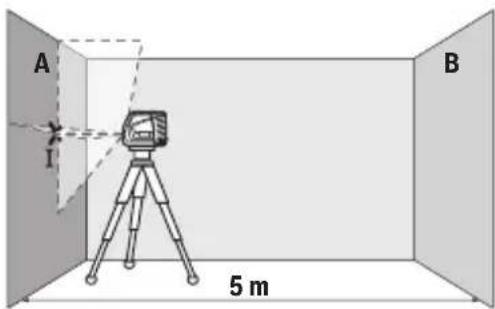
- The LED indicator will light up when the device is powered on. The status of the LED is described in the table (f).
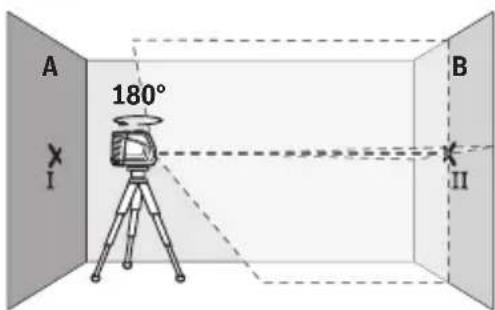
- Rotate the device 180° to change the mounting orientation, as shown in figure II.
- To adjust the camera angle, loosen the screw B, then tilt the camera to the desired position and tighten the screw.
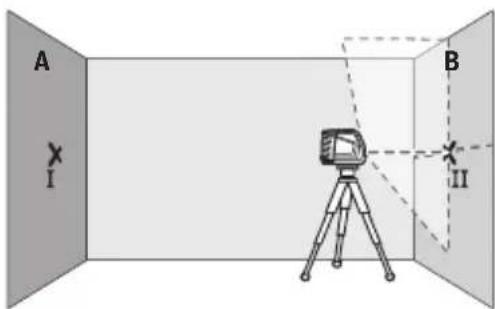
- The device supports both wired and wireless network connections. For wireless setup, refer to the user manual for configuration steps.
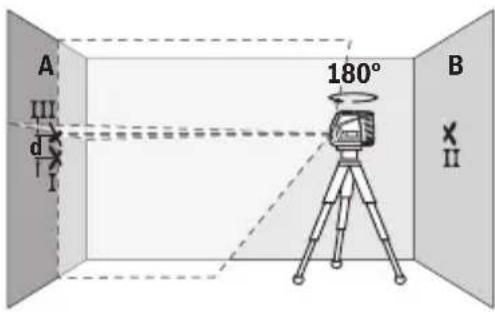
The device is equipped with a control unit (Fig. III).
Connect the device to the mains supply using the I and III terminals.
The device is designed for continuous operation. The power consumption is 2 x 5 = 10 VA, with a tolerance of ±0.3 VA.
10 VA ± 0.3 VA = ±3 VA. The device is protected against overload and short-circuit. See section 3.
The device is protected against overload and short-circuit.
The device is protected against overload and short-circuit. See section 5.
- The device is protected against overload and short-circuit. The device is protected against overload and short-circuit. The device is protected against overload and short-circuit.
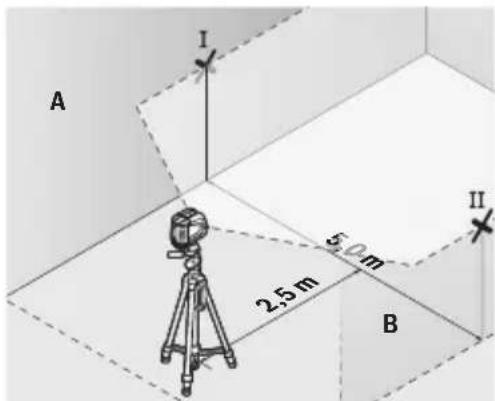
- The device is protected against overload and short-circuit. The device is protected against overload and short-circuit. The device is protected against overload and short-circuit.
292|Jshonmy
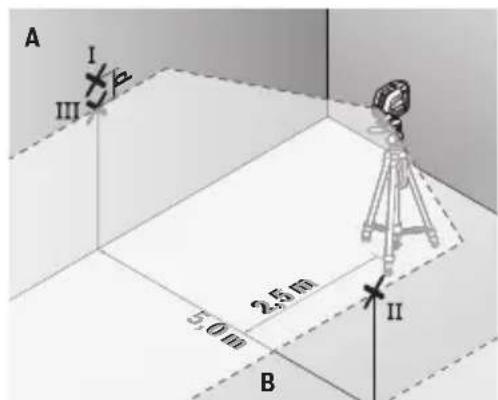
The device is protected against overload and short-circuit. The device is protected against overload and short-circuit.
- The device is protected against overload and short-circuit. The device is protected against overload and short-circuit. The device is protected against overload and short-circuit.
- The device is protected against overload and short-circuit. The device is protected against overload and short-circuit.
The device is protected against overload and short-circuit. The device is protected against overload and short-circuit.
10 VA ± 0.3 VA = ±3 VA. The device is protected against overload and short-circuit.
The device is designed for use with a 26 mm diameter, 2.5 mm thick tube (type B) and is made of plastic.
The device is not suitable for use with tubes of 2.5 to 4 mm diameter, unless a special adapter is used. The device is not intended for use with tubes of other diameters. The device must be installed by a qualified technician.
j60ymo1293
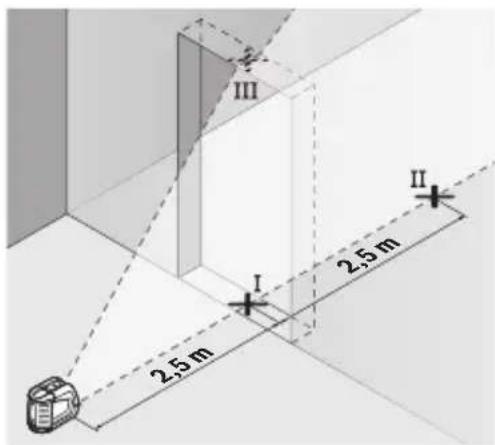
- The device has three operating modes: mode I (continuous), mode II (intermittent), and mode III (pulse).
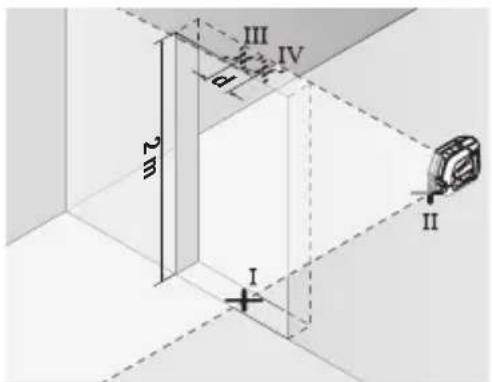
The device is not suitable for use with tubes of other diameters. The device must be installed by a qualified technician. The device is not intended for use with tubes of other diameters. The device must be installed by a qualified technician.
- The device has three operating modes: mode I (continuous), mode II (intermittent), and mode III (pulse).
- The device has three operating modes: mode I (continuous), mode II (intermittent), and mode III (pulse).
aJundasmyngosuagdo gossbnss
The device has three operating modes: mode I (continuous), mode II (intermittent), and mode III (pulse).
The device has three operating modes: mode I (continuous), mode II (intermittent), and mode III (pulse).
800006
2×2a×±0,3a/α=±1,2aa.aaamgmoqdoIIIv6
The device has three operating modes: mode I (continuous), mode II (intermittent), and mode III (pulse).
The device has three operating modes: mode I (continuous), mode II (intermittent), and mode III (pulse).
Use a 20-tooth gear (20) to adjust the mechanism for proper operation.
Use a 20-tooth gear (20) to adjust the mechanism, and adjust the gear to the correct position.
Adjustment screw (optional)
Adjust the screw to the correct position
The adjustment screw (optional) (see Fig. F) adjusts the mechanism. Turn the screw clockwise or counterclockwise to adjust the tension. The adjustment screw is located on the side of the device.
Adjust the screw, then tighten the locknut (19).
Adjustment knob (optional)
Turn the adjustment knob to the desired position. The knob should be turned until it stops.
The adjustment mechanism is used to adjust the device. The adjustment screw (optional) is located on the adjustment mechanism. The device is adjusted by turning the screw clockwise or counterclockwise. The adjustment mechanism is secured with a locknut (optional) to prevent loosening. The locknut is tightened after adjustment.
Adjustment range (see Fig. G-H)
www.bosch-pt.com/serviceaddresses
and must be disposed of in accordance with the regulations concerning the disposal of waste.

The product must not be disposed of with household waste.
Disposal of the product:
The product must be disposed of in accordance with the European Directive 2012/19/EU on waste electrical and electronic equipment, and the European Directive 2006/66/EC on batteries and accumulators, and their national implementations. Please dispose of the product separately from other waste.
Româna
Safety instructions

Power tool service
Strada Horia Macelariu Nr. 30-34, sector 1
013937 Bucureşti
www.bosch-pt.com/serviceaddresses
Български
Disposal
Laser GLL 2-10
Protection degree IP54 (protection against dust and splashing water)
protection against dust and splashing water)
A) Under unfavorable conditions (e.g., direct sunlight) the operating range may be smaller. B) Do not perform measurements where it is possible that the conductivity may be temporarily affected by the end.
For unambiguous identification of your measuring instrument, use the serial number (10) on the instrument's label.
Mounting
Use/replacing the battery
For powering the measuring instrument, it is recommended to use alkaline-manganese batteries.
To remove the battery compartment cover (11), press the locking button (12) and slide the cover. Insert the batteries.
Observe the correct polarity, shown in the figure on the inside of the battery compartment.
If the battery status indicator (7) lights up, the batteries are exhausted. The measuring instrument can still operate for approx. 1 hour.
Replace all batteries at the same time. Use batteries of the same type and from the same manufacturer and with the same capacity.
If you do not use the instrument for a long time, remove the batteries from it. During prolonged storage, batteries in the measuring instrument may corrode and self-discharge.
Working with the rotating stand RM 1 (see fig. A-B)
With the help of the rotating stand (13) you can rotate the measuring instrument by 360°. Thus the instrument can be positioned precisely without changing the position of the measuring instrument.
Place the measuring instrument with its guide groove (17) onto the guide pin (14) of the rotating stand (13) and push the measuring instrument down until it stops on the platform.
The measuring device can be positioned in the opposite direction.
The measuring device can be positioned:
- Placed on a flat surface, -attached with screws to a vertical surface, -combined with the base plate (18) to the metal part of the base,
- With the help of magnets (16) to metal surfaces.
riangleright Before starting work, clean the magnet contact surfaces when attaching the device to a surface. Through the cleaning of the magnets, the device can be held securely.
Operation
Starting and operation
Protect the measuring device from moisture and direct sunlight. Do not expose the measuring device to extreme temperatures or temperature fluctuations. For example, do not leave it in a car for a long time. In case of large temperature fluctuations, let the measuring device adjust to the ambient temperature before starting work. After extreme temperatures or large temperature differences, the accuracy of the measuring device may be affected. riangleright Avoid strong impacts or dropping the measuring device. After external influences on the measuring device, you should check its accuracy before continuing to use it (see "Checking the accuracy of the measuring device", page 317). When you switch off the device, remove the batteries beforehand. When removing the batteries, the oscillation movements may be blocked, and the device may be damaged by strong vibrations.
Switching on and off
To switch on the measuring device, press the on/off button (2) to the "On" position (for operation with automatic leveling) or to the "On" position (for operation with manual leveling). The status indicator (7) lights up. When switching on, the measuring device emits a laser beam through the exit opening (1).
Do not point the laser beam at people or animals; do not look into the laser beam, even from a distance.
316 |Bulgarian
To switch off the measuring device, press the on/off button (2) to the "Off" position. The status indicator (7) goes out. When switching off, the oscillation movements may be blocked. Do not leave the device switched on unattended; after finishing work, switch it off. The laser beam may be directed at other people.
When the maximum permissible temperature of 50 ° C is exceeded, the device switches off to protect the laser diode. After cooling, the measuring device is ready for operation again and can be switched on.
Automatic switch-off
If for approx. 120 minutes no button on the measuring device has been pressed, the device switches off automatically to save the batteries.
To switch the measuring device back on after automatic switch-off, you can press the On/Off button (2) briefly first, and then switch the measuring device on again, or press the button for laser operation (5) or the button for receiver mode (6).
To deactivate the automatic switch-off, press and hold the button for receiver mode (6) (while the measuring device is switched on). When the automatic switch-off is deactivated, the laser lines flash briefly for confirmation.
Note: If the operating temperature exceeds 45 °C, the automatic switch-off cannot be deactivated.
To activate the automatic switch-off, switch the measuring device off and then on again.
Operating modes
The laser device has several operating modes, between which you can switch at any time:
- Cross-line mode (see Fig. C): generates a horizontal and a vertical laser line,
- Horizontal mode (see Fig. D): generates a horizontal laser line,
Vertical mode (see Fig. E): generates a vertical laser line.
When the measuring device is switched on, it is in cross-line mode.
The buttons for horizontal mode (6) and vertical mode (5) allow you to switch the corresponding vertical laser line on and off independently of each other.
All modes can be used both with automatic leveling and with manual adjustment.
Automatic leveling
Working with the automatic leveling system
To work with automatic leveling, set the switch (2) to position "n".
The automatic leveling system compensates for deviations from horizontal within the leveling range of ±4°. Leveling is complete when the laser lines stop moving.
If automatic leveling is not possible, e.g., when the surface on which the tool is placed deviates from horizontal by more than 4°, the laser lines start to blink rapidly.
In such a case, place the measuring tool horizontally and wait for it to level itself automatically. When the measuring tool is placed within the limits of the automatic leveling range of ±4°, the laser lines will start to blink continuously.
If the position changes during operation, the measuring tool levels itself again automatically. After leveling is complete, check the position of the laser lines relative to the reference point to avoid errors due to displacement of the tool.
Manual leveling
To work with manual leveling, set the switch (2) to position
The reflective surface of the laser target plate (20) improves visibility of the laser line, and through the transparent surface of the laser target plate, the laser line can also be seen from the back side of the laser target plate.
Working with the tripod (accessory)
The tripod provides a stable, height-adjustable mounting for the measuring tool. Mount the measuring tool with the 1/4" tripod mount (4) onto the thread of the tripod (23) or a standard camera tripod. For mounting onto a standard tripod, use the 5/8" tripod mount (3). Tighten the measuring tool with the tripod mounting screw.
Before switching on the measuring tool, roughly align the tripod.
Mounting with the universal holder (accessory) (see figure F)
With the universal holder (19), you can attach the measuring tool, e.g., to vertical surfaces, pipes, or magnetizable materials. The universal holder is also suitable for use as a floor stand and facilitates height adjustment of the measuring tool.
Do not place your fingers near the magnetized accessory when attaching it to surfaces. The strong pulling force of the magnets could pinch your fingers.
Roughly align the universal holder (19) before switching on the measuring tool.
Eyewear for observing laser radiation (accessory)
The eyewear for observing laser radiation filters the bright light. Thus, the laser beam becomes less bright.
Do not use the laser eyewear (accessory) as eye protection. The laser eyewear is intended for better recognition of the laser beam; they do not protect against laser radiation. Do not use the laser eyewear (accessory) as safety glasses or when working. The laser eyewear does not provide complete or adequate protection against laser radiation.
Working examples (see Fig. 1)
Examples for the use of the measuring device can be found on the following page.
Maintenance and service
Maintenance and cleaning
Keep the measuring device clean.
Do not immerse the measuring device in water or other liquids.
Remove coarse dirt with a soft, dry cloth. Do not use cleaning agents or solvents.
Clean the optical surfaces at the laser beam exit regularly and make sure no fibers remain.
Store and transport the measuring device only in the protective pouch included in the scope of delivery (21).
If repair is necessary, send the measuring device to the service center (21).
Customer service and consultation regarding use
The service department is responsible for questions regarding repair and maintenance of your purchased product, as well as for spare parts. Component drawings and information about spare parts can also be found at:
www.bosch-pt.com
Information about the use of Bosch products and advice on our products and technical accessories.
For questions and for ordering spare parts, please refer to the 10-digit spare parts catalog, printed on the device's nameplate.
Bulgaria
Robert Bosch SRL
Service scule electrice
Strada Horia Macelariu Nr. 30-34, sector 1
013937 Bucuresti, Romania
Tel.: +359(0)700 13667 (Bulgarian)
Fax: +40 212 331 313
Email: BoschServiceCenterBG@ro.bosch.com
www.bosch-pt.com/bg/bg/
Other service addresses can be found at:
www.bosch-pt.com/serviceaddresses
324 Macedonian
Rejected
The measuring device, accessories and packaging must be clean and environmentally processed for recycling of the materials in them.
Do not throw the measuring device and batteries into household waste!
Only for EU countries:
According to European Directive 2012/19/EC, measuring devices that can no longer be used, and according to European Directive 2006/66/EC, damaged or exhausted batteries or accumulators must be collected separately and handed over for environmentally friendly recycling of the materials in them.
Macedonian
Safety instructions

Read all safety warnings and all instructions. Failure to follow the warnings and instructions may result in electric shock, fire and/or serious injury. Save all warnings and instructions for future reference. The term "measuring device" in the warnings refers to your mains-operated (corded) measuring device or battery-operated (cordless) measuring device.
Do not operate the measuring device in explosive atmospheres, such as in the presence of flammable liquids, gases or dust. Sparks created by the measuring device may ignite the dust or fumes.
Caution: When using other accessories, such as laser goggles or protective screens, or when using the device in a different manner than specified in the operating instructions, this may lead to dangerous exposure to laser radiation. The measuring device is equipped with a laser warning label (indicated on the device's nameplate). If the text on the laser warning label is not in your national language, affix the warning label in your national language before first use.
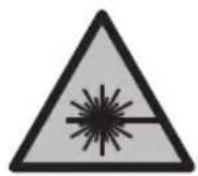
Do not direct the laser beam at persons or animals and do not stare into the direct or reflected laser beam. This can lead to eye damage, cause accidents, or damage your eyes.
If laser radiation hits your eyes, you must close your eyes and turn your head away from the laser beam. Do not make any changes to the laser device. Do not use the laser goggles (accessory) as protective goggles. The laser goggles are used for better detection of the laser beam; however, they do not protect against laser radiation. Do not use the laser goggles (accessory) as safety goggles or for other purposes. The laser goggles do not provide UV protection and reduce color recognition. The measuring device may only be repaired by qualified personnel using original spare parts. This ensures the safety of the measuring device. Do not leave children unsupervised with the measuring device. Without supervision, they could endanger themselves or others. Do not work with the measuring device in environments where there is a risk of explosion, in the presence of flammable liquids, gases or dust. The measuring device creates sparks that could ignite the dust or fumes.
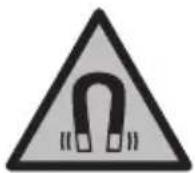
Do not place the measuring device and magnetic accessories near implants or other medical devices, e.g., pacemakers or insulin pumps. The magnets of the measuring device and accessories generate a field that could impair the function of implants or medical devices.
Hold the measuring tool away from magnetic objects or devices that are sensitive to magnets. Improper handling of the measuring tool and the device may lead to irreversible damage to the device.
Description of the product and performance
Pay attention to the illustrations during the operation of the device for use.
Use with appropriate designation
The measuring tool is intended for determining and checking horizontal and vertical lines.
The measuring tool is suitable for use in interior and exterior spaces.
Illustrated components
The numbering of the illustrations with components refers to the graphic page of the measuring tool.
(1) Laser beam outlet aperture (2) Battery indicator/charge indicator (3) 5/8" tripod thread (4) 1/4" tripod thread (5) Switch for vertical mode (6) Switch for horizontal mode (7) Status indicator (8) Oscillation lock indicator (9) Laser warning label (10) Serial number (11) Battery compartment cover (12) Locked battery compartment cover (13) Rotating mount (RM 1)a (14) Leveling vial (15) Outlet apertures for dust protection (a) (16) Magnet a) (17) Guide groove (18) Cover plate (BM 3)a (19) Universal mount (BM 1)a) (20) Adapter plate (21) Protective cap (22) Protective cap for the outlet aperture (23) Tripod (BT 150)a
(24) Telescopic rod (BT 350)a
a) The illustrated or described accessories are not part of the standard scope of delivery. The complete accessories can be found in our Accessories Program.
Technical data
| Пиниски ласер GLL 2-10 | |
| Бров на дол | 3 601 K63 L.. |
| Минимално работно поleA) | 10 m |
| Точность на Новелега ве ±0,3 mm/m | |
| Тишино поle на самоньелега ве ±4° | |
| Тишино Вразе на Новелега ве < 4 s | |
| Операимьна Temпература -10°C ... +50°C | |
| Temпература посменения -20°C ... +70°C | |
| Мakс. операимьна Висни пеку решени висни 2000 m | |
| Мakс. релатовна Влажност на Воздунот. 90% | |
| Стосян на Извалкеанocst соред IEC 61010-1 2 | В) |
| Клеса на ласер 2 | |
| Тил на ласер 630-650 nm, < 1 mW | |
| C6 | 1 |
| Остanyва bene 0,5 mrad (целесен arол) | |
| Пробат за статов 1/4"; 5/8" | |
| Батерни 3 × 1,5 V LR6 (AA) | |
| Вразе ласер на р散热имOT на пбotinga | |
| - Ржим на Вкрстени линни 9 h | |
| - Линскри ржим | 17 h |
| Тжига согласно EPTA-Procedure 01:2014 | 0,49 kg |
| Димензни (дожима ×ширина × Висни) | 112 × 55 × 106 mm |
328 Macedonian
GLL 2-10
Protection class IP54 (protection against dust and water splashes)
npckahe Boga)
A) The measuring device can be used in unfavorable conditions in the room (e.g., direct exposure to sunlight). B) Condensation may occur, but timely ventilation is expected to prevent it.
The serial number (10) on the special sticker must match the number on the measuring device.
Installation
Inserting/Replacing the Battery
For operation of the measuring device, the use of alkaline-manganese batteries is recommended.
To open the battery compartment cover (11), press the locking mechanism (12) and remove the cover from the battery compartment. Insert the batteries.
Pay attention to the polarity according to the marking on the inside of the battery compartment.
If the batteries are weak, the status indicator (7) will flash. After the first flash, the measuring device can still be used for about 1 hour.
Replace all batteries at once. Use only batteries from the same manufacturer with the same capacity.
If you do not use the measuring device for a long time, remove the batteries.
AUTOMATIC LEVELING: The automatic leveling range is ±4°. Leveling is done automatically. If the device is tilted beyond the leveling range, the laser beams flash.
If automatic leveling is not possible, e.g., the surface on which the measuring device is placed is tilted more than 4° from horizontal, the laser beams flash quickly.
In such a case, place the measuring device horizontally and let it self-level. Once the measuring device is within the self-leveling range of ±4°, the laser beams will flash continuously.
If vibrations or changes in position occur during operation, the measuring device will self-level again automatically. After repeated leveling, check that the laser beams are aligned with the reference points to avoid errors during positioning.
When working with the oscillator laser, press the On/Off switch (2) to the "On" position. The oscillator laser (8) lights up red and the laser line is visible at the base.
When working with the oscillator laser, the automatic leveling is disabled. You can hold the measuring tool freely in your hand or place it on a level surface. The laser lines do not level and do not have to be vertical to each other.
Checking the accuracy of the measuring tool
Example: The height of the door opening is 2 m, the maximum deviation is allowed to be
2 × 2m × ± 0,3mm/m = ± 1,2mm . Points III and IV must be at most 1.2 mm apart.
Working advice
For marking, always use the center of the laser line. The width of the laser line changes with distance.
Working with the laser target plate
The laser target plate (20) improves the visibility of the laser beam under unfavorable conditions and over larger distances.
The reflective side of the laser target plate (20) improves the visibility of the laser line. The transparent side of the laser target plate allows the laser line to be seen from behind the target plate.
Working with the tripod (accessory)
The tripod provides a stable measuring support that can be adjusted in height. Place the measuring tool with the 1/4" tripod mount (4) on the tripod thread (23) and tighten the tripod. For the 5/8" tripod mount (3), use the 5/8" tripod thread. Tighten the measuring tool with the tripod mounting screw.
Roughly align the tripod before switching on the measuring tool.
Tighten with the universal holder (accessory) (see figure F)
According to the universal wrench (19), you can tighten the adjusting screws on vertical surfaces or magnetized materials. The universal wrench is also used in the same way as other tools for adjusting the adjusting screws on the measuring tool.
Keep the universal wrench away from magnetic equipment when attaching it to surfaces. Due to the strong magnetic force, your fingers may get pinched.
Tel./Fax: 02/2467610
Mob.: 070595888
D.P.T.U. "ROJKA"
Jane Nukrovski 66; T.L. Vtokomana locality 69
1000 Skopje
E-mail: servisrojka@yahoo.com
Bosch Power Tools 1609 92A 7AN| (14.12.2021)
Tel: +389 2 3174-303
Mob: +389 70 388-520, -530
Additional service addresses can be found at:
www.bosch-pt.com/serviceaddresses
Disposal
Measuring tools, accessories, and packaging should be disposed of in an environmentally friendly manner.

Hermetic and battery tools must not be disposed of with household waste!
Only for EU countries:
According to the European Directive 2012/19/EU, tools that are no longer usable, and according to the European Directive 2006/66/EC, defective or exhausted batteries must be collected separately and recycled in an environmentally friendly manner.
Serbian
www.bosch-pt.com/serviceaddresses
Disposal
Measuring tools, accessories, and packaging should be sorted for environmentally friendly recycling.

Do not dispose of measuring tools and batteries in household waste!
Only for EU countries:
According to the European Directive 2012/19/EU, measuring tools that are no longer usable, and according to the European Directive 2006/66/EC, defective or exhausted batteries must be collected separately and recycled in an environmentally friendly manner.
Slovenian
Safety warnings

www.bosch-pt.com/serviceaddresses
Disposal
Measuring devices, accessories, and packaging should be disposed of in an environmentally friendly recycling process.

www.bosch-pt.com/serviceaddresses
Disposal
Measuring tools, accessories and packaging should be recycled in an environmentally friendly manner.

Do not dispose of measuring tools and batteries in household waste!
Only for EU countries:
In accordance with the European Directive 2012/19/EU, measuring tools that are no longer usable and, in accordance with the European Directive 2006/66/EC, defective or exhausted batteries must be collected separately and recycled in an environmentally friendly manner.
Estonian
Safety instructions

www.bosch-pt.com/serviceaddresses
Waste disposal
Laser viewing glasses (accessory)
Laser viewing glasses have the property of filtering out ambient light, making the laser beam appear brighter to the eye.
▶ Do not use the laser viewing glasses (accessory) as protective goggles. Laser viewing glasses are intended to improve visibility of the laser beam, but they cannot protect the eyes from laser radiation. ▶ Do not use the laser viewing glasses as sunglasses or as glasses when driving a vehicle. Laser viewing glasses do not provide complete protection from ultraviolet radiation and reduce color perception.
Examples of work operations (figures F-H)
www.bosch-pt.com/serviceaddresses
www.bosch-pt.com/serviceaddresses
Removal
www.bosch-pt.com/serviceaddresses
www.bosch-pt.com/serviceaddresses
Disposal
www.bosch-pt.com/serviceaddresses
Waste disposal

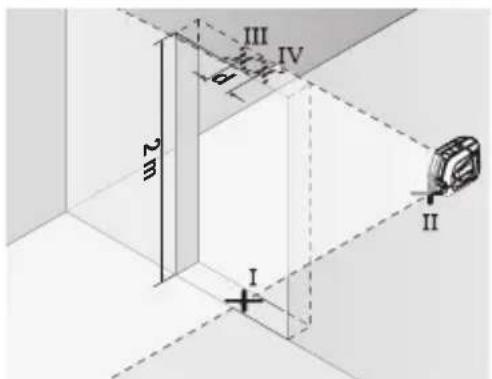
www.bosch-pt.com/serviceaddresses
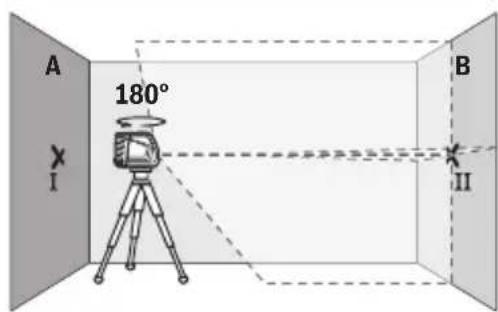
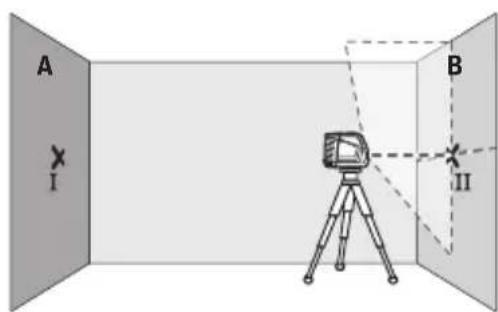
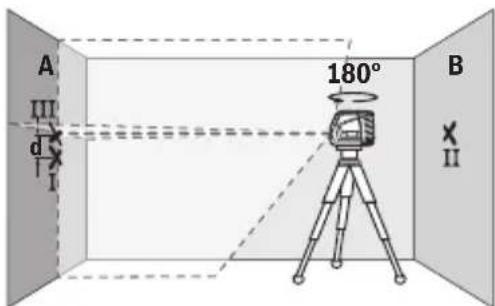
Bosch Power Tools 1609 92A 7AN|(14.12.2021)
tn: +66 2012 8888
wnn: +66 2064 5800
www.bosch.co.th
y
2
10/11 16
www.bosch-pt.com/serviceaddresses
n
1

v 17u
aunssnnnnaannnns
2012/19/EU 2006/66/EC 2007/10/10
Bahasa Indonesia
Laser garis GLL 2-10
| C6 | 1 |
| Divergensi 0,5 mrad (sudut penuh) | |
| Dudukan tripod 1/4"; 5/8" | |
| Baterai 3 × 1,5 V LR6 (AA) | |
| Durasi pengoperasian pada mode pengoperasian | |
| - Mode garis silang 9 h | |
| - Mode garis 17 h | |
| Berat seksuai dengan EPTA-Procedure 01:2014 0,49 kg | |
| Dimensi (panjang × lebar × tinggi) 112 × 55 × 106 mm | |
| Jenis perlindungan IP54 (terlindung dari debu | dan percikan air) |
Palma Tower 10th Floor
Jalan RA Kartini II-S Kaveling 6
Pondok Pinang, Kebayoran Lama
www.bosch-pt.com/serviceaddresses
www.bosch-pt.com/serviceaddresses
Power tools, accessories and packaging should be sorted for environmentally friendly recycling.
Do not dispose of power tools and batteries together with household waste!
Only for EU countries:
According to the European Directive 2012/19/EU, power tools that are no longer usable, and according to the European Directive 2006/66/EC, defective or used batteries, must be collected separately and disposed of in an environmentally correct manner.



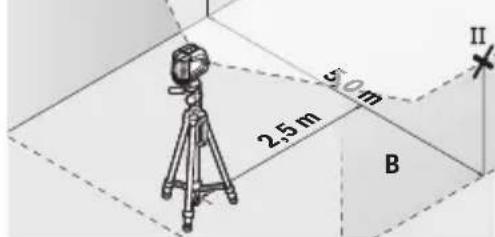
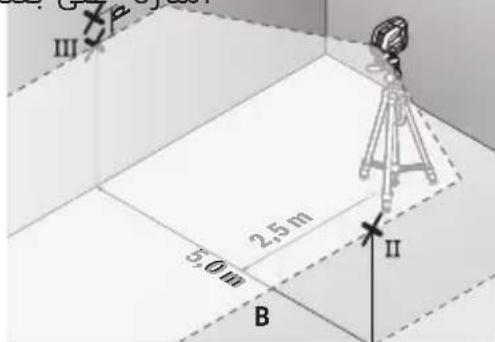
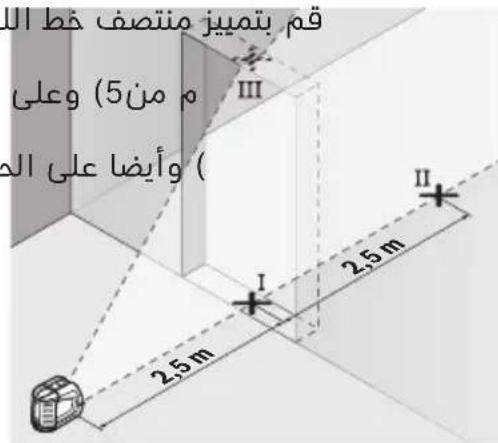
__SUPPIMER__
www.bosch-pt.com
Robert Bosch Morocco SARL
Tel: +2125293143
Email: sav.outillage@ma
www.bosch-pt.com/serviceaddresses
Directive 2012/19/EU
Directive 2006/66/EC

(2) 1/10
50oC jdo y jLjlo slj g
120 120
The quick brown fox jumps over the lazy dog. The quick brown fox jumps over the lazy dog.
The quick brown fox
The quick brown fox jumps over the lazy dog. The quick brown fox jumps over the lazy dog. The quick brown fox jumps over the lazy dog.
The quick brown fox
The quick brown fox
The quick brown fox jumps over the lazy dog.
The quick brown fox jumps over the lazy dog. The quick brown fox jumps over the lazy dog. The quick brown fox jumps over the lazy dog. The quick brown fox jumps over the lazy dog. The quick brown fox jumps over the lazy dog.
The quick brown fox
The quick brown fox jumps over the lazy dog.
The quick brown fox jumps over the lazy dog. The quick brown fox jumps over the lazy dog. The quick brown fox jumps over the lazy dog.
The quick brown fox jumps over the lazy dog. The quick brown fox jumps over the lazy dog.
Total length 10 m x ±0.3 mm/m = ±3 mm
c u l g i 3 . s w l j i o u l o
gac bajj jus
.1JwJ (21) 1000 J J J J J J J J J J J
juiuwo ly oJgluoglo
Iabg g uugw, jooj J laow 21g w d, sjuu lo
LbBgBgJooIcIbI gSsduwIgauai .sIuolgsewy
:uuu ujj laijli jS u
www.bosch-pt.com
jUjJoo oJgLoo ogS BoschoJUJ Lw
. sin s o e w y lalao g Xgaa
i jlaa l aai k 10
L
U
wJUJJWg-|g
1994834571
:42039000+ 9821
www.bosch-pt.com/serviceaddresses



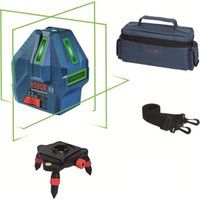
- GLL 2-10 PROFESSIONAL
- ENGLISH
- DISPOSAL
- PRODUCT DESCRIPTION AND SPECIFICATIONS
- INTENDED USE
- PRODUCT FEATURES
- TECHNICAL DATA
- ASSEMBLY
- INSERTING/CHANGING THE BATTERIES
- WORKING WITH THE RM 1 ROTATING MOUNT (SEE FIGURES A-B)
- OPERATION
- STARTING OPERATION
- SWITCHING ON/OFF
- AUTOMATIC SHUT-OFF
- OPERATING MODES
- AUTOMATIC LEVELLING
- WORKING WITH AUTOMATIC LEVELLING
- WORKING WITH THE PENDULUM LOCK
- ACCURACY CHECK OF THE MEASURING TOOL
- INFLUENCES ON ACCURACY
- CHECKING THE HEIGHT ACCURACY OF THE HORIZONTAL LINE
- CHECKING THE LEVEL ACCURACY OF THE HORIZONTAL LINE
- CHECKING THE LEVEL ACCURACY OF THE VERTICAL LINE
- WORKING ADVICE
- WORKING WITH THE LASER TARGET PLATE
- WORKING WITH THE TRIPOD (ACCESSORY)
- SECURING WITH THE UNIVERSAL HOLDER (ACCESSORY) (SEE FIGURE F)
- LASER GOGGLES (ACCESSORY)
- EXAMPLE APPLICATIONS (SEE FIGURES F-H)
- MAINTENANCE AND SERVICE
- MAINTENANCE AND CLEANING
- AFTER-SALES SERVICE AND APPLICATION SERVICE
- MALAYSIA
- GREAT BRITAIN
- YOU CAN FIND FURTHER SERVICE ADDRESSES AT
- ONLY FOR EU COUNTRIES
- ONLY FOR UNITED KINGDOM
- FRENCH
- FRANCE
- LINE LASER GLL
- YOU CAN FIND MORE CONTACT INFORMATION FOR SERVICE HERE
- WASTE DISPOSAL
- HÄVITIS
- ANOUPON
- HUNGARIAN
- STORAGE
- TRANSPORTATION
- SAFETY INSTRUCTIONS
- RUSSIAN
- PRODUCT DESCRIPTION AND FUNCTIONS
- ILLUSTRATED COMPONENTS
- LASER LEVEL GLL
- INSERTING/REPLACING BATTERIES
- WORKING WITH THE SWIVEL MOUNT RM 1 (SEE FIG. A-B)
- CHECKING THE ACCURACY OF THE MEASURING INSTRUMENT
- FACTORS AFFECTING ACCURACY
- CHECKING THE LEVELING ACCURACY OF THE HORIZONTAL LINE
- CHECKING THE ACCURACY OF THE HORIZONTAL LEVELING
- WORKING WITH THE LASER RECEIVER
- ATTACHING THE UNIVERSAL HOLDER (ACCESSORY) (SEE FIGURE F)
- WORKING WITH THE LASER VIEWING GLASSES (ACCESSORY)
- EXAMPLES OF POSSIBLE APPLICATIONS (SEE FIGURES F-H)
- CEPBNC N KOHCYIBTNPOBAHNE NO BOPOCAM NPIMEHNA
- ДЛPERNOHA: POCCHN, BENAPYCB, KA3AXCTAH, YKPANHA
- YKPAHCBKA
- POCCH
- UKRAINIAN
- SAVE ALL INSTRUCTIONS AND PASS THEM ON TO THE USER OF THE MEASURING TOOL
- LASER LINE GLL
- MOUNTING
- POBOTN 3 NOBOPOTHM KPINNEHHAM RM 1 (DHB. MAN. A-B)
- PO60TA
- POUATOK PO60TN
- YKPAIHCBKA
- BMKAHH/HBMKAHH
- AUTOMATIC LEVELING
- WORK WITH THE TOOL IN AUTOMATIC LEVELING MODE
- FOR EU COUNTRIES ONLY
- KAZAKHSTAN
- EURASIAN ECONOMIC UNION (EAEU) CONFORMITY MARK
- PRODUCT SERVICE LIFE
- IF THE PRODUCT FAILS, ITS COMPONENTS AND PARTS MUST BE
- MAIN TECHNICAL DATA
- TYPE OF SERVICE AND REPAIR
- SAFETY PRECAUTIONS
- SAFETY WARNINGS FOR BATTERY PACK
- USE THE BATTERY PACK ONLY WITH THE SPECIFIED CHARGER
- CORRECT USE OF THE DEVICE
- KAZAKH
- BATTERY INSERTION/REPLACEMENT
- DRILLING WITH THE DRILL BIT (1) (SEE FIGURES A-B)
- USAGE
- AUTOMATIC OPERATION
- LEVELING AUTOMATIC SYSTEM
- WORKING WITH THE LEVELING AUTOMATIC SYSTEM
- WORKING WITH THE PENDULUM SETTING METHOD
- MEASURING RULER, CHECKING
- IMPACT OF EXTERNAL FACTORS
- CHECKING THE LEVELING DEVICE'S ACCURACY
- CHECKING THE LASER BEAM DIRECTION
- BATTERY INSTALLATION (REQUIRED)
- THE BATTERY IS INSTALLED (REQUIRED) (SEE FIGURE F)
- LASER VIEWING GLASSES (REQUIRED)
- BATTERIES (SEE FIGURES F-H)
- TECHNICAL DATA AND SERVICE
- SERVICE AND CLEANING
- SERVICE AND MAINTENANCE
- FOR OTHER SERVICE CENTERS AND DEALERS, SEE HERE
- DISPOSAL OF THE DEVICE
- CONNECT THE DEVICE TO THE RM 1 (OB.LYA-B) PORT
- INSTALLATION
- INSTALLATION STEPS
- POWER SUPPLY
- SUPPRIMER
- J6J6NBU 0MM3O6JOOA YDSMS
- USBMAN BCMUSYMU UN8YUOGNU AGAMDAOS
- IOBYLGOGD AMJAGON 3DJMGON
- JSHONMY
- MNO8MBOSMYBBSNLO8YULOLGAGDOAAS
- THE DEVICE HAS THREE OPERATING MODES: MODE I (CONTINUOUS), MODE II (INTERMITTENT), AND MODE III (PULSE)
- ADJUSTMENT SCREW (OPTIONAL)
- DISPOSAL OF THE PRODUCT
- ROMÂNA
- БЪЛГАРСКИ
- LASER GLL
- USE/REPLACING THE BATTERY
- WORKING WITH THE ROTATING STAND RM 1 (SEE FIG. A-B)
- STARTING AND OPERATION
- SWITCHING ON AND OFF
- BULGARIAN
- AUTOMATIC SWITCH-OFF
- ALL MODES CAN BE USED BOTH WITH AUTOMATIC LEVELING AND WITH MANUAL ADJUSTMENT
- MANUAL LEVELING
- MOUNTING WITH THE UNIVERSAL HOLDER (ACCESSORY) (SEE FIGURE F)
- EYEWEAR FOR OBSERVING LASER RADIATION (ACCESSORY)
- WORKING EXAMPLES (SEE FIG. 1)
- CUSTOMER SERVICE AND CONSULTATION REGARDING USE
- WWW.BOSCH-PT.COM
- BULGARIA
- OTHER SERVICE ADDRESSES CAN BE FOUND AT
- MACEDONIAN
- REJECTED
- DESCRIPTION OF THE PRODUCT AND PERFORMANCE
- USE WITH APPROPRIATE DESIGNATION
- GLL
- INSERTING/REPLACING THE BATTERY
- CHECKING THE ACCURACY OF THE MEASURING TOOL
- TIGHTEN WITH THE UNIVERSAL HOLDER (ACCESSORY) (SEE FIGURE F)
- ADDITIONAL SERVICE ADDRESSES CAN BE FOUND AT
- SERBIAN
- SLOVENIAN
- SAFETY WARNINGS
- ESTONIAN
- LASER VIEWING GLASSES (ACCESSORY)
- EXAMPLES OF WORK OPERATIONS (FIGURES F-H)
- REMOVAL
- N
- AUNSSNNNNAANNNNS
- BAHASA INDONESIA
- LASER GARIS GLL
- THE QUICK BROWN FOX
- THE QUICK BROWN FOX JUMPS OVER THE LAZY DOG
- JUIUWO LY OJGLUOGLO
Brand : BOSCH
Model : GLL 210 Professional
Category : Laser pointer