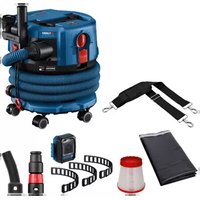
GAS 18V-12 MC Professional - Power tool BOSCH - Free user manual and instructions
Find the device manual for free GAS 18V-12 MC Professional BOSCH in PDF.
 FR
FR
 BG
BG
 CS
CS
 DA
DA
 DE
DE
 EL
EL
 EN
EN
 ES
ES
 ET
ET
 FI
FI
 HU
HU
 IT
IT
 KK
KK
 KO
KO
 LT
LT
 LV
LV
 MK
MK
 NL
NL
 NO
NO
 PL
PL
 PT
PT
 RO
RO
 RU
RU
 SK
SK
 SL
SL
 SV
SV
 TR
TR
 UK
UK
| Product type | Cordless wet and dry vacuum cleaner |
| Brand | Bosch |
| Model | GAS 18V-12 MC Professional |
| Rated voltage | 18 V |
| Power consumption | 400 W |
| Gross tank capacity | 12 L |
| Net capacity (dry matter) | 8 L |
| Net capacity (liquids) | 6 L |
| Max vacuum (vacuum cleaner) | 140 mbar |
| Max vacuum (turbine) | 170 mbar |
| Max flow rate (vacuum cleaner) | 23 l/s |
| Max flow rate (turbine) | 30 l/s |
| Runtime per charge (with ProCORE 8Ah) | ~20 min |
| Filtration class | M (according to IEC/EN 60335-2-69) |
| Weight (depending on battery) | 7.0 – 8.7 kg |
| Protection rating | IPX4 |
| Connection technology | Bluetooth® 4.2 Low Energy |
| Bluetooth range | 30 m |
| Compatible batteries | GBA 18V..., ProCORE18V... |
| Recommended chargers | GAL 18..., GAX 18..., GAL 36... |
| Main filter | HEPA pleated filter class M |
| Sound level | 79 dB(A) (uncertainty K=2 dB) |
| Vibration values | < 2.5 m/s² (K=1.5 m/s²) |
| Supplied accessories | Suction hose, adapter, elbow, brush, nozzles, shoulder strap |
| Special functions | Automatic start, airflow alarm, manual filter cleaning |
Frequently Asked Questions - GAS 18V-12 MC Professional BOSCH
User questions about GAS 18V-12 MC Professional BOSCH
0 question about this device. Answer the ones you know or ask your own.
Ask a new question about this device
Download the instructions for your Power tool in PDF format for free! Find your manual GAS 18V-12 MC Professional - BOSCH and take your electronic device back in hand. On this page are published all the documents necessary for the use of your device. GAS 18V-12 MC Professional by BOSCH.
USER MANUAL GAS 18V-12 MC Professional BOSCH
natural_image
Exterior view of a portable vacuum cleaner with coiled hose and control panel (no visible text or symbols)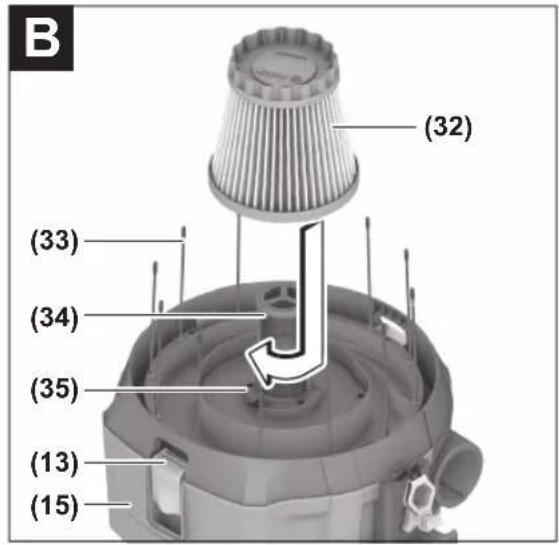
6

natural_image
Three stylized human figures with briefcases and crosses, no text or symbols present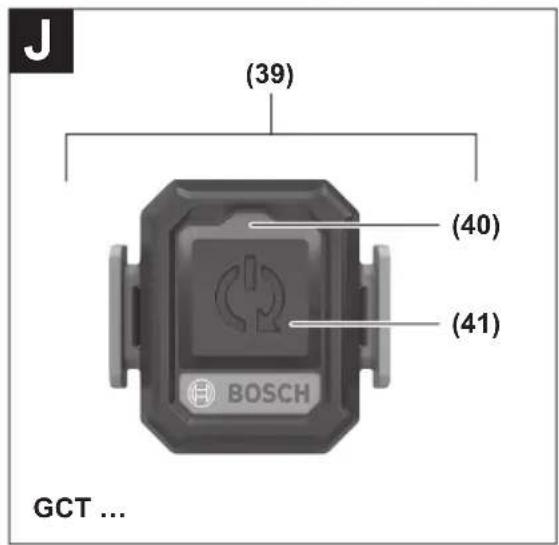

Deutsch
www.bosch-pt.com/serviceaddresses
Transport
Safety information for vacuum cleaners

Read all the safety information and instructions. Failure to observe the safety information and follow instructions may result in electric shock, fire and/or serious injury.
Save all warnings and instructions for future reference.
This vacuum cleaner is not intended for use by children or persons with physical, sensory or mental impairments. It should not be used by persons who have insufficient experience and knowledge. Otherwise, there is a risk of operating errors and injuries.
▶ Supervise children. This will ensure that children do not play with the vacuum cleaner.
▶ Comply with all safety provisions for the substances being extracted.
WARNING
Never vacuum material that contains asbestos. Asbestos is a carci-
nogenic substance.
WARNING
Only use the vacuum cleaner if you have been adequately informed
about the use of the equipment, the substances to be vacuumed and how to dispose of these safely. Thorough instruction on how to use the equipment prevents accidental misuse and injuries.
WARNING
The vacuum cleaner is suitable for vacuuming dry substances, and
can also be used to vacuum liquids when taking appropriate measures. The penetration of liquids increases the risk of an electric shock.
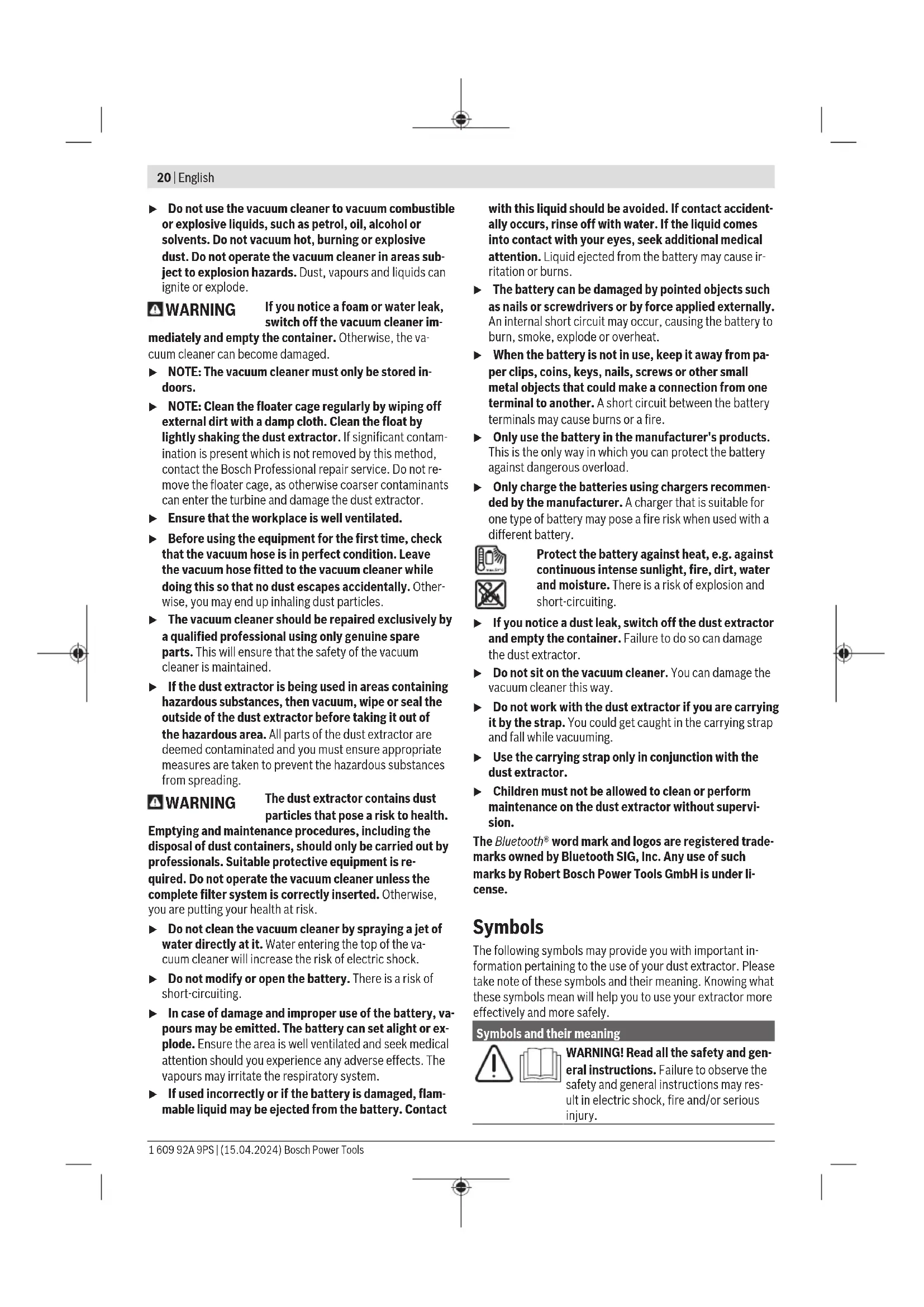
20 | English
▶ Do not use the vacuum cleaner to vacuum combustible or explosive liquids, such as petrol, oil, alcohol or solvents. Do not vacuum hot, burning or explosive dust. Do not operate the vacuum cleaner in areas subject to explosion hazards. Dust, vapours and liquids can ignite or explode.
WARNING
If you notice a foam or water leak, switch off the vacuum cleaner immediately and empty the container. Otherwise, the vacuum cleaner can become damaged.
NOTE: The vacuum cleaner must only be stored indoors.
NOTE: Clean the floater cage regularly by wiping off external dirt with a damp cloth. Clean the float by lightly shaking the dust extractor. If significant contamination is present which is not removed by this method, contact the Bosch Professional repair service. Do not remove the floater cage, as otherwise coarser contaminants can enter the turbine and damage the dust extractor.
▶ Ensure that the workplace is well ventilated.
Before using the equipment for the first time, check that the vacuum hose is in perfect condition. Leave the vacuum hose fitted to the vacuum cleaner while doing this so that no dust escapes accidentally. Otherwise, you may end up inhaling dust particles.
The vacuum cleaner should be repaired exclusively by a qualified professional using only genuine spare parts. This will ensure that the safety of the vacuum cleaner is maintained.
If the dust extractor is being used in areas containing hazardous substances, then vacuum, wipe or seal the outside of the dust extractor before taking it out of the hazardous area. All parts of the dust extractor are deemed contaminated and you must ensure appropriate measures are taken to prevent the hazardous substances from spreading.
WARNING
The dust extractor contains dust particles that pose a risk to health. Emptying and maintenance procedures, including the disposal of dust containers, should only be carried out by professionals. Suitable protective equipment is required. Do not operate the vacuum cleaner unless the complete filter system is correctly inserted. Otherwise, you are putting your health at risk.
▶ Do not clean the vacuum cleaner by spraying a jet of water directly at it. Water entering the top of the vacuum cleaner will increase the risk of electric shock.
▶ Do not modify or open the battery. There is a risk of short-circuiting.
In case of damage and improper use of the battery, vapours may be emitted. The battery can set alight or explode. Ensure the area is well ventilated and seek medical attention should you experience any adverse effects. The vapours may irritate the respiratory system.
▶ If used incorrectly or if the battery is damaged, flammable liquid may be ejected from the battery. Contact
with this liquid should be avoided. If contact accidentally occurs, rinse off with water. If the liquid comes into contact with your eyes, seek additional medical attention. Liquid ejected from the battery may cause irritation or burns.
The battery can be damaged by pointed objects such as nails or screwdrivers or by force applied externally. An internal short circuit may occur, causing the battery to burn, smoke, explode or overheat.
When the battery is not in use, keep it away from paper clips, coins, keys, nails, screws or other small metal objects that could make a connection from one terminal to another. A short circuit between the battery terminals may cause burns or a fire.
▶ Only use the battery in the manufacturer's products. This is the only way in which you can protect the battery against dangerous overload.
▶ Only charge the batteries using chargers recommended by the manufacturer. A charger that is suitable for one type of battery may pose a fire risk when used with a different battery.

Protect the battery against heat, e.g. against continuous intense sunlight, fire, dirt, water and moisture. There is a risk of explosion and short-circuiting.
▶ If you notice a dust leak, switch off the dust extractor and empty the container. Failure to do so can damage the dust extractor.
▶ Do not sit on the vacuum cleaner. You can damage the vacuum cleaner this way.
▶ Do not work with the dust extractor if you are carrying it by the strap. You could get caught in the carrying strap and fall while vacuuming.
▶ Use the carrying strap only in conjunction with the dust extractor.
▶ Children must not be allowed to clean or perform maintenance on the dust extractor without supervision.
The Bluetooth® word mark and logos are registered trademarks owned by Bluetooth SIG, Inc. Any use of such marks by Robert Bosch Power Tools GmbH is under license.
Symbols
The following symbols may provide you with important information pertaining to the use of your dust extractor. Please take note of these symbols and their meaning. Knowing what these symbols mean will help you to use your extractor more effectively and more safely.
Symbols and their meaning


WARNING! Read all the safety and general instructions. Failure to observe the safety and general instructions may result in electric shock, fire and/or serious injury.
Symbols and their meaning

Dust extractor from dust class M in accordance with IEC/EN 60335-2-69 for the dry extraction of harmful dusts with an exposure limit of ≥ 0.1mg / m^3
WARNING! The dust extractor contains dust particles that pose a risk to health. Emptying and maintenance procedures, including the disposal of dust containers, should only be carried out by professionals. Suitable protective equipment is required. Do not operate the dust extractor unless the complete filter system is correctly inserted. Otherwise, you are putting your health at risk.

Auto-Start function
Extraction of the accruing dust from operational power tools that are connected via an Auto-Start Remote GCT ...; the dust extractor switches on automatically and then switches off again after a time delay.

Switching Off

Extraction
Extracting dust deposits
Product Description and Specifications
Please observe the illustrations at the beginning of this operating manual.
Intended Use
The dust extractor is intended for collecting, vacuuming, conveying and separating wood chips as well as non-flammable dry dusts, non-flammable liquids and water-air mixtures. The dust extraction capability of the dust extractor has been tested and corresponds to dust class M. It is suitable for the increased demands in professional use, e.g. in trade, industry and workshops.
Dust extractors from dust class M in accordance with IEC/EN 60335-2-69 may only be used to vacuum and extract harmful dust with an exposure limit of ≥ 0.1mg / m^3 .
Only use the dust extractor if you can fully evaluate all functions and carry them out without restrictions, or if you have received corresponding instructions.
Product Features
The numbering of the product features refers to the representation of the vacuum cleaner on the graphic pages.
(1) Air flow alarm indicator (user interface)
(2) Statusbar (user interface)
(3) Rechargeable battery charge indicator (user interface)
(4) Auto-Start function indicator (user interface)
(5) Button pairing (user interface)
(6) User interface
(7) Holder for accessories
(8) Locking mechanism for accessories bracket
(9) Pull strap
(10) Hose adapter
(11) Sealing plug for extraction connection
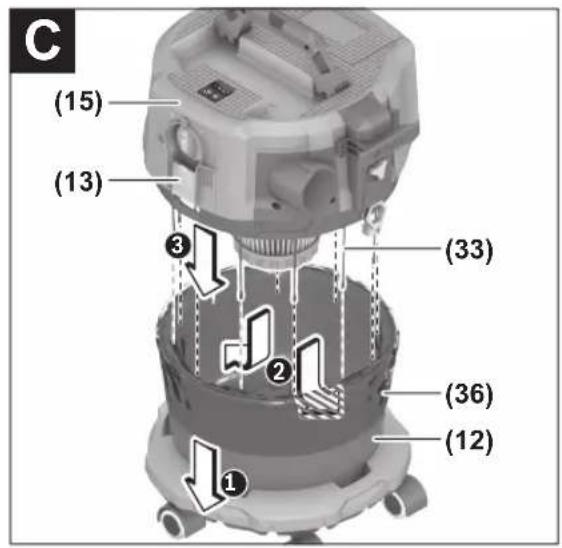
(12) Container
(13) Catch for top part of dust extractor
(14) On/off switch
(15) Top part of dust extractor
(16) Carrying handle
(17) Fastening eyes
(18) Battery compartment cover
(19) Battery compartment cover release button
(20) Vacuum hose
(21) Dust extraction adapter
(22) Curved nozzle
(23) SDS Clean adapter for drilling ^4
(24) Brush
(25) Crevice nozzle, short
(26) Crevice nozzle, long ^a)
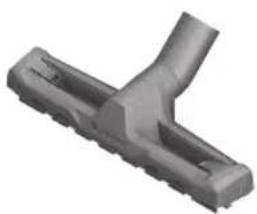
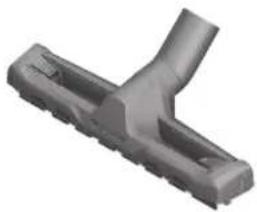
(27) Floor nozzle, narrow ^4
(28) Floor nozzle, wide ^a
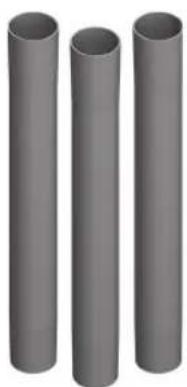
(29) Suction tube ^a)
(30) Battery bay
(31) Rechargeable battery ^a)
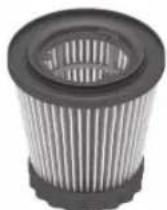
(32) Main filter
(33) Bag holder
(34) Float cage
(35) Filter holder
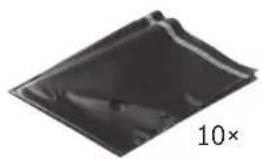
(36) Plastic bag
(37) Snap fastener
(38) Carrying strap
(39) Auto-Start remote GCT ... a)
(40) Status indicator of Auto-Start Remote ^a1
(41) Start/stop button for Auto-Start Remote ^a)
(42) False air intake of the dust extraction adapter
(43) Detents for bag holder
(44) Float
(45) Castor
(46) Castor adapter
22 | English
(47) Hose connector
(48) Sealing sleeve at hose end on dust extractor side
(49) Locking ring
(50) Sealing sleeve at hose end of power tool/nozzle
(51) Spring for electrostatic discharge
a) This accessory is not part of the standard scope of delivery.
Technical data
| Cordless wet/dry dust extractor GAS 18V-12 MC | ||
| Article number | 3 601 JK2 0.. | |
| Voltage V 18 | ||
| Rated power input W 400 | ||
| Container volume (gross) I 12 | ||
| Net volume (dry) I 8 | ||
| Net volume (liquid) I 6 | ||
| Max. vacuum ^A) | ||
| -Dust extractor ^B) | mbar | 140 |
| hPa | 140 | |
| -Turbine mbar | 170 | |
| hPa | 170 | |
| Max. flow rate ^A) | ||
| -Dust extractor ^B) | l/s | 23 |
| m ^3 /h | 82.8 | |
| -Turbine l/s | 30 | |
| m ^3 /h | 108 | |
| Operating time per battery charge | min/Ah 2.5 | |
| Dust class M | ||
| Weight kg 7.0-8.7 | c) | |
| Protection rating | IPX4 | |
| Recommended ambient temperature during charging | °C | 0 ... +35 |
| Permitted ambient temperature during operation ^1) and during storage | °C | -20 ... +50 |
| Compatible rechargeable batteries | GBA 18V...ProCORE18V... | |
| Recommended rechargeable batteries for maximum performance | ProCORE18V...≥8 Ah | |
| Recommended chargers GAL 18... | GAX 18...GAL 36... | |
| Data transfer | ||
| Bluetooth® | Bluetooth ^ 4.2(Low Energy) ^E) | |
| Operating frequency range | MHz | 2402-2480 |
| Max. transmission power | mW | < 1 |
| Signal interval | s 8 | |
Cordless wet/dry dust extractor GAS 18V-12 MC
| Max. signal range ^F1 | m | 30 |
A) Measured at 20–25 °C with rechargeable battery ProCORE18V 8.0Ah
B) Measured with vacuum hose (20) and curved nozzle (22)
C) Depends on battery in use
D) Limited performance at temperatures < 0 °C
E) The mobile devices must be compatible with Bluetooth® Low Energy devices (version 4.2) and support the Generic Access Profile (GAP).
F) The signal range may vary greatly depending on external conditions, including the receiving device used. The Bluetooth® range may be significantly weaker inside closed rooms and through metallic barriers (e.g. walls, shelving units, cases, etc.).
Values can vary depending on the product, scope of application and environmental conditions. To find out more, visit www.bosch-professional.com/wac.
Noise/Vibration Information
Noise emission values determined according to EN 60335-2-69.
Typically the A-weighted sound pressure level of the dust extractor is 79 dB(A). Uncertainty K = 2 dB. The noise level when working can exceed the volume stated. Wear hearing protection!
Vibration total values a_h (triax vector sum) and uncertainty K determined according to EN 60335-2-69:
$$ a _ {n} < 2. 5 \mathrm{m} / \mathrm{s} ^ {2}, K = 1. 5 \mathrm{m} / \mathrm{s} ^ {2}. $$
Rechargeable battery
Bosch sells some cordless dust extractors without a rechargeable battery. You can tell whether a rechargeable battery is included with the dust extractor by looking at the packaging.
Charging the battery
▶ Use only the chargers listed in the technical data. Only these chargers are matched to the lithium-ion battery of your dust extractor.
Note: Lithium-ion rechargeable batteries are supplied partially charged according to international transport regulations. To ensure full rechargeable battery capacity, fully charge the rechargeable battery before using your tool for the first time.
Inserting and removing the Battery (see figure A)
▶ Do not use force to insert the battery. The battery is designed in such a way that it can only be inserted into the vacuum cleaner when it is in the right position.
▶ Keep the battery compartment and the battery bay clean and dry at all times to ensure good, safe operation.
- Press the release button (19) to open the battery compartment cover (18).
- Slide the battery (31) into the battery bay (30) until it audibly clicks into place.
- To remove the battery (31), press the release button on the battery and pull it out of the battery bay (30).
- Close the battery compartment cover (18).
Note: Due to the filter cleaning system, closing the battery compartment cover requires the use of increased force.
Battery Charge Indicator
When the rechargeable battery is inserted, you can see the state of charge of the battery on the user interface (6). When the rechargeable battery is removed, you can see this on the battery itself.
Battery Charge Indicator on the Dust Extractor
After the dust extractor is switched on, the five green LEDs of the battery charge indicator (3) will light up individually on the user interface one after another in ascending and descending order. Then the LEDs will indicate the state of charge of the battery (31).
Battery Charge Indicator on the Rechargeable Battery
If the rechargeable battery is removed from dust extractor, its state of charge may be indicated by the green LEDs of the battery charge indicator on the battery.
Press the button for the battery charge indicator or to show the state of charge.
If no LED lights up after pressing the button for the battery charge indicator, then the battery is defective and must be replaced.
Note: Not all battery types have a battery charge indicator.
Battery model GBA 18V...


LEDs Capacity
| 3× continuous green light 60-100% |
| 2× continuous green light 30-60% |
| 1× continuous green light 5-30% |
| 1× flashing green light 0-5% |
Battery model ProCORE18V...
LEDs Capacity
| 5× continuous green light 80-100% |
| 4× continuous green light 60-80% |
| 3× continuous green light 40-60% |
| 2× continuous green light 20-40% |
| 1× continuous green light 5-20% |
| 1× flashing green light 0-5% |
Recommendations for Optimal Handling of the Battery
Protect the battery against moisture and water.
Only store the battery within a temperature range of -20 to 50 °C. Do not leave the battery in your car in the summer, for example.
Occasionally clean the ventilation slots on the battery using a soft brush that is clean and dry.
A significantly reduced operating time after charging indicates that the battery has deteriorated and must be replaced. Follow the instructions on correct disposal.
Assembly
Remove the battery before cleaning or performing maintenance on the dust extractor, making tool adjustments, changing accessories or placing the dust extractor in storage. This safety measure prevents the dust extractor from being started accidentally.
Inserting the Main Filter (see figure B)
The main filter (32) is a HEPA pleated filter with extremely high filtration performance for cleaning exhaust air.
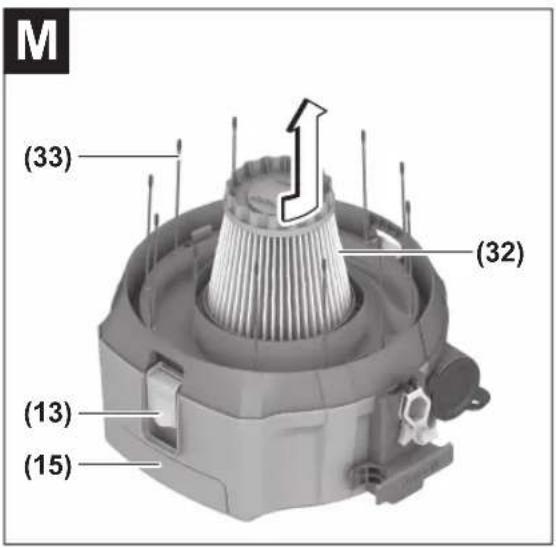
- Open the catches (13) and remove the top part of the vacuum cleaner (15).
Note: When removing and setting down the top part of the dust extractor (15), make sure that the rods of the bag holder (33) do not bend or break.
- Place the main filter (32) over the float cage (34) and turn it as far as it will go in the rotational direction into the filter holder (35).
- Put the top part of the vacuum cleaner (15) on and close the catches (13).
Note: Ensure that the filter is always fitted correctly. This is particularly important when vacuuming hazardous dust.
Inserting/removing the plastic bag (dry extraction) (see figure C)
Note: When removing and setting down the top part of the dust extractor (15), make sure that the rods of the bag holder (33) do not bend or break.
Open both catches (13) and remove the top part of the dust extractor (15).
For dry extraction, insert a plastic bag (36) into the container (12).
Insert the plastic bag (36) into the container (12) ① with the inlet facing upwards.
Make sure that the plastic bag (36) touches all the inside walls of the container (12) ②.
Fold the rest of the plastic bag (36) over the edge of the container (12).
Put the top part of the dust extractor (15) back on ③ and close the dust extractor using the catches (13).
▶ Ensure that the dust extractor is always properly closed.
Note: Make sure when replacing the top part of the dust extractor (15) that you do not pierce the plastic bag (36) with the rods of the bag holder (33).
24 | English
Seal the plastic bag before you remove it. To do this, remove the white strip from the plastic bag, hold the bag together at the top and use the strip to tie up the bag.
Fitting the Bracket for Extractor Accessories
Insert the bracket for extractor accessories (7) into the adapter provided.
Lock the bracket for extractor accessories (7) by turning the locking mechanism for the accessories bracket (8) clockwise.
Fitting/attaching the vacuum hose
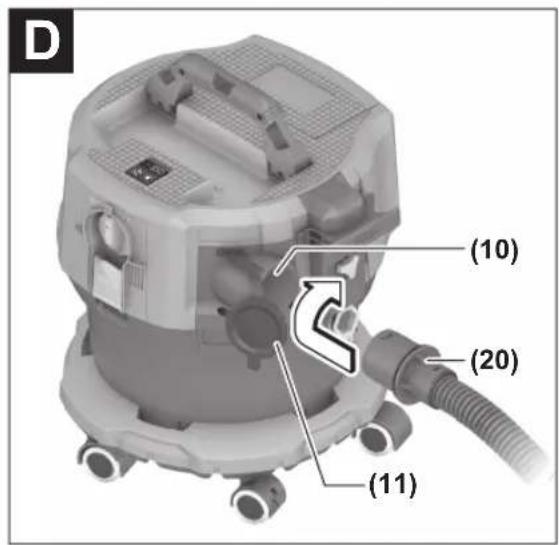
Fitting the vacuum hose (see figure D)
Pull the sealing plug (11) out of the hose adapter (10).
Attach the vacuum hose (20) to the hose adapter (10) and turn it clockwise as far as it will go.
▶ Always seal the extraction connection with the sealing plug whenever you remove the vacuum hose. This prevents dust from escaping.
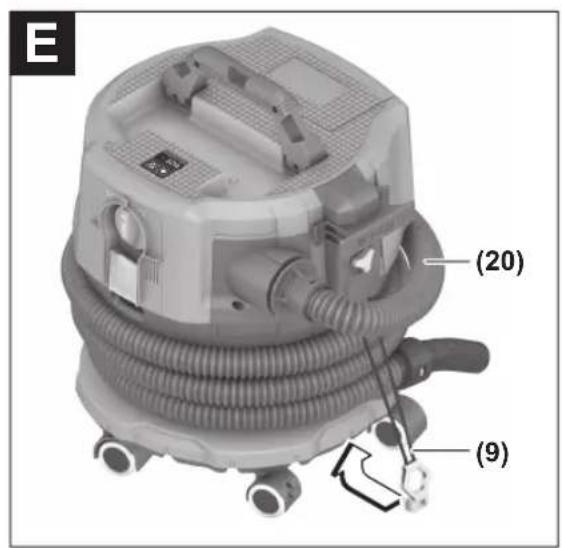
Attaching the Vacuum Hose to the Dust Extractor (see figure E)
Wrap the fitted vacuum hose (20) around the dust extractor. Pull the pull strap (9) down and hook it into one of the 3 grooves you can reach out of the total 15 grooves.
Fitting the Vacuuming Accessories
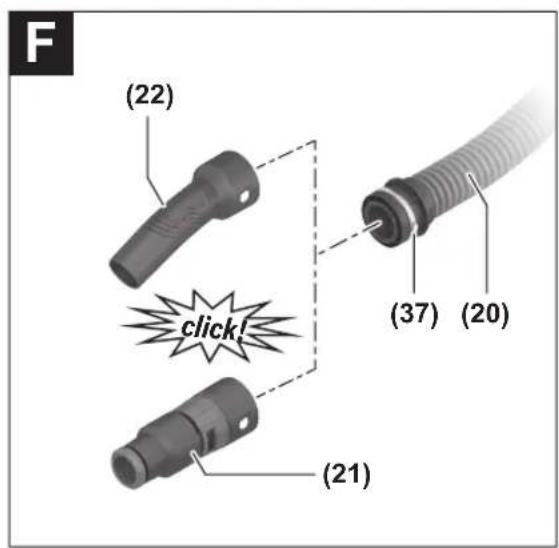
The vacuum hose (20) is equipped with a clip system which can be used to connect vacuuming accessories (dust extraction adapter (21), curved nozzle (22)).
Fitting the extraction adapter or curved nozzle (see figure F)
Fit the extraction adapter (21) or the curved nozzle (22) to the vacuum hose (20) until the two snap fasteners (37) on the vacuum hose audibly click into place.
To remove the adapter, press the snap fasteners (37) inwards and pull apart the components.
Fitting the Nozzles and Tubes
If required, place the suction tubes (29) firmly inside one another and then attach them firmly to the curved nozzle (22).
Attach a floor nozzle (27)/(28), a crevice nozzle (25)/(26) or the brush (24) firmly to the suction tube (29) or the curved nozzle (22).
Carrying strap
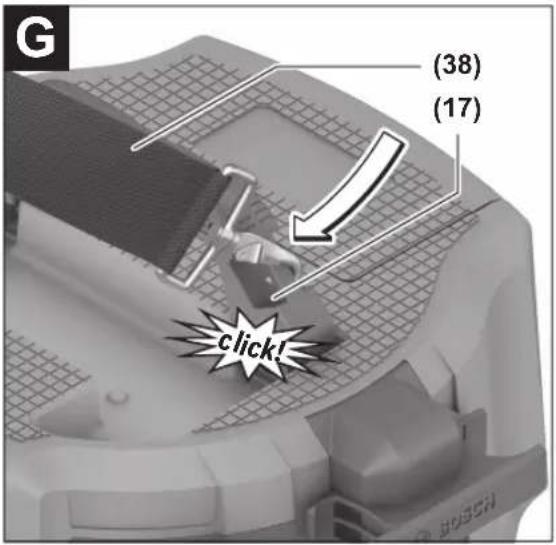
Attaching the carrying strap (see figure G)
The carrying strap is only intended for carrying and attaching the dust extractor!
Click the snap hooks of the carrying strap (38) into the fastening eyes (17) of the dust extractor.
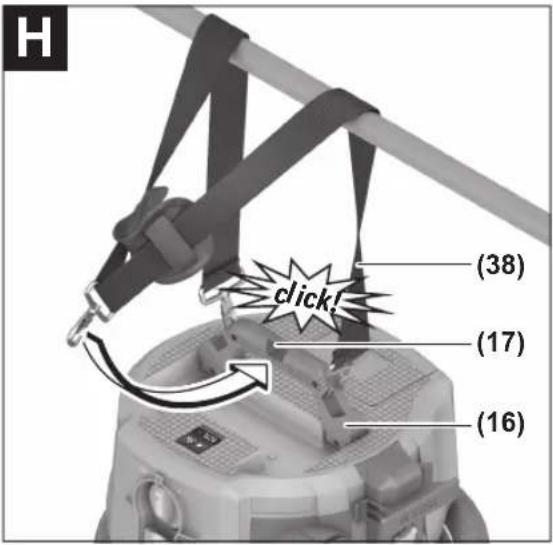
Hanging up the Dust Extractor using the Carrying Strap (see figure H)
Only hang the dust extractor on objects that can safely support the weight of the full dust extractor.
Place the carrying strap (38) fitted on the dust extractor over a horizontal object (e.g. a bar) or pull the upper end of the loop through a hook or eye. Click the middle snap hook of the carrying strap into the centre fastening eye (17) of the carrying handle (16).
Using the Carrying Strap as a Shoulder Strap (see figure I)
You can use the carrying strap as a shoulder strap.
To do so, simply hang the carrying strap fitted to the dust extractor over your shoulder. When doing so, make sure you adhere to the correct carrying position shown in the figure I.
Operation
Remove the battery before cleaning or performing maintenance on the dust extractor, making tool adjustments, changing accessories or placing the dust extractor in storage. This safety measure prevents the dust extractor from being started accidentally.
When operating the dust extractor, ensure that the lockable castors on the dust extractor are blocked to prevent the dust extractor from rolling away unintentionally. Test the correct functioning of the castors on the relevant surface before operation.
Start-up
▶ Make sure you inform yourself about the applicable regulations/laws on how to handle harmful types of dust in your country.
The dust extractor may be used for vacuuming and extracting the following materials:
- Dusts with an exposure limit of ≥ 0.1mg / m^3
The dust extractor must categorically not be used in potentially explosive areas.
▶ Make sure that the working area is safe.
▶ Ensure that the work area is clean and tidy to minimise the risk of tripping.
▶ Before extraction, ensure that the battery compartment cover is securely closed.
Note: In order to comply safely with dust class M and to ensure a maximum application time ProCORE batteries with a capacity of 8 Ah or 12 Ah are recommended.
To ensure optimum suction power, you must always fully unwind the vacuum hose (20).
▶ Ensure that the dust extractor is always properly closed.
▶ Do not use damaged filters (e.g. no cracks, small holes, etc.). Replace any damaged filters immediately.
Switching On and Off
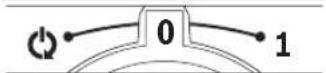
To switch on the dust extractor, turn the on/off switch (14) to position 1.
To switch on the Auto-Start function, turn the on/off switch (14) to position The Auto-Start function indicator (4) lights up. The dust extractor can be started
automatically if it is connected to a power tool via Auto-Start Remote GCT ....
To switch off the dust extractor, turn the on/off switch (14) to position 0.
User interface
The user interface (6) is used as follows:
- As a status indicator for the dust extractor
- For establishing a connection to an Auto-Start Remote GCT ... (39)
- For establishing a connection to a mobile device
Status indicators
| Status bar Auto-Start function indicatorA) | Air flow alarm indicator | Meaning |
| Green - - Dust extractor is switched on and ready to use. | ||
| Green Green - Dust extractor is ready to use and connected to an | Auto-Start Remote. | |
| Yellow - - Battery almost empty | ||
| Yellow Yellow - No Auto-Start Remote found | ||
| Yellow - Flashing yellow Air Flow Alarm | ||
| Red - - Rechargeable battery empty, restart protection | triggered or temperature alarm for dust extractor or rechargeable battery | |
| Slowly flashing blue Slowly flashing blue - Connection to the Auto-Start Remote is automatically being re-established, following a switch-on of the Auto-Start function. | ||
| Rapidly flashing blue 1× flashing blue - Connection to the Auto-Start Remote is being sought and newly established. | ||
| Illuminated blue (2 s) Illuminated blue (2 s) - Connection to the Auto-Start Remote has been successfully established | ||
| Slowly flashing blue - - Connection to the mobile device is automatically being re-established or data transfer from the mobile device is taking place. | ||
| Rapidly flashing blue - - Connection to the mobile device is being sought and newly established. | ||
| Illuminated blue (3 s) - - Connection to the mobile device has been successfully established | ||
| 4× flashing blue (interval of 1.5 s) | - - Reset is being initiated. | |
A) The Auto-Start function indicator (4) only lights up if the on/off switch (14) is in the ⏻ position.
Establishing a Connection to the Auto-Start Remote (Accessory) (see figure J)
To be able to use the Auto-Start function, the dust extractor must be connected via Bluetooth® to an Auto-Start Remote GCT ... (39).
For this, the dust extractor and the Auto-Start Remote must be located in the immediate vicinity of one another. If the on/off switch (14) of the dust extractor is turned to the
position, the dust extractor automatically begins searching for an Auto-Start Remote GCT .... The statusbar (2) and the Auto-Start function indicator (4) slowly flash blue.
Reconnection to a known Auto-Start Remote: If the dust extractor has already been connected to an Auto-
Start Remote GCT ... and this Auto-Start Remote is functional and within range, the connection to this Auto-Start Remote is automatically re-established.
Establishment of a new connection (first-time connection or connection to another Auto-Start Remote):
- Press and hold the pairing button (5) on the dust extractor until the statusbar (2) begins rapidly flashing blue.
- Then promptly press and hold the start/stop button (41) on the Auto-Start Remote (39) until the status indicator (40) on the Auto-Start Remote flashes blue twice.
26 | English
Connection successfully established:
- The statusbar (2) and the Auto-Start function indicator (4) on the dust extractor light up green.
- The status indicator (40) on the Auto-Start Remote flashes green once.
Connection could not be established (after several minutes):
- The statusbar (2) and the Auto-Start function indicator (4) on the dust extractor light up yellow.
- The status indicator (40) on the Auto-Start Remote lights up red.
When the dust extractor is switched off, the connection to the Auto-Start Remote GCT ... is saved. After it has been switched on again, the dust extractor attempts to re-establish connection to the same Auto-Start Remote automatically.
Connectivity functions
Within the connectivity functions, data can be transmitted between the dust extractor and certain mobile devices via Bluetooth ^® .
System Requirements
| Mobile device (tablet, smartphone) | Android 6.0 (and newer) |
| iOS 11 (and newer) |
You will need to install the device-specific app before you can use the connectivity functions.
Download the app from the corresponding app store (Apple App Store, Google Play Store).
Note: You will need to have a user account with the relevant app store to do this.
App name iOS/Android
Bosch Toolbox
Then select the MyTools or Connectivity sub-item in the app. The display of your mobile device shows you all of the subsequent steps required to connect the dust extractor to the mobile device.
The establishment of the connection between the dust extractor and the mobile device is initiated via the app. When the statusbar (2) on the dust extractor begins rapidly flashing blue, confirm the establishment of the connection by pressing the pairing button (5). After the connection has been successfully established, the statusbar (2) lights up blue for 3 s.
The following functions will be available when a connection has been established with the mobile device and authorisation has been successful:
- Registration and personalisation
- Status check, output of warning messages
– General information and settings - Management
- Setting the follow-up time for the Auto-Start function
- Update of the connectivity software in the dust extractor
Resetting to Factory Settings (Reset)
If necessary, you can reset the saved settings (run-on time, connections to the Auto-Start Remote and mobile device) as well as error messages. To do so, press the pairing button (5) until the statusbar (2) flashes blue four times in intervals of 1.5 s.
The reset can also be initiated via the Bosch Toolbox app.
Dry Vacuuming
The dust extractor must not be used without a filter.
For dry extraction, the main filter (32) must be dry and a plastic bag (36) must be used (see "Inserting/removing the plastic bag (dry extraction) (see figure C)", page 23).
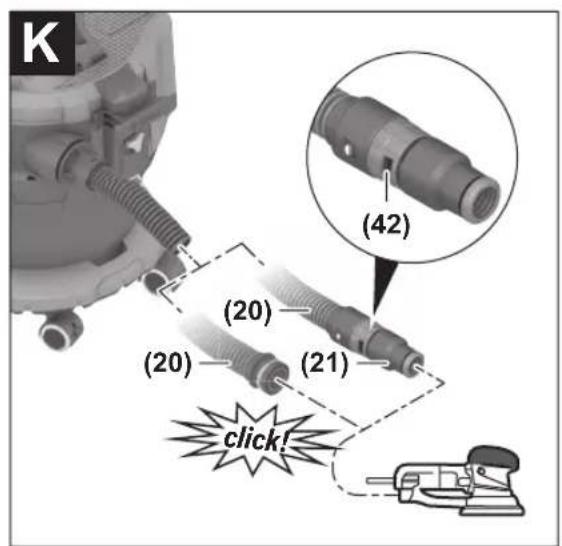
Extracting dust that accumulates from working power tools (see figure K)
There must be a sufficient air exchange rate in the room when the exhaust air comes back into the room. Be aware of the corresponding national regulations.
Connect the extraction outlet of the power tool and the vacuum hose (20) either directly or via the dust extraction adapter (21) (see "Fitting the extraction adapter or curved nozzle (see figure F)", page 24).
Note when using the dust extraction adapter: When working with power tools that have a low air feed into the vacuum hose (e.g. jigsaws, sanders, etc.), the false air intake (42) of the dust extraction adapter (21) must be opened. This will improve the total output of the dust extractor and the power tool. To do this, turn the ring above the false air intake (42) until the opening is at its maximum size.
The SDS Clean adapter (23) can be used for dust extraction when drilling. Make sure to observe the corresponding operating instructions when using this.
With the Auto-Start function, you can automatically switch the dust extractor on and off with the power tool using the Auto-Start remote (39):
- Turn the on/off switch (14) to position. The Auto-Start function indicator (4) lights up to indicate that the function is switched on.
- Connect the dust extractor to the Auto-Start Remote (see "Establishing a Connection to the Auto-Start Remote (Accessory) (see figure J)", page 25). When fitting the Auto-Start Remote (39) to the power tool, observe the operating instructions of the Auto-Start remote.
- To switch on the dust extractor, switch on the connected power tool. The dust extractor will start automatically.
▶ Make sure that the dust extractor has started after the power tool has been switched on.
- To switch off the dust extractor, switch off the power tool. The extraction comes to an end after the set run-on time.
During the run-on period, the residual dust is extracted from the vacuum hose. You can determine the run-on time using the Bosch Toolbox app.
Air Flow Alarm
The air flow alarm is automatically triggered as soon as the air flow falls below the minimum value set by the relevant standard. When an air flow alarm is triggered, the air flow alarm indicator (1) flashes yellow and the statusbar (2) lights up yellow.
Switch off the dust extractor and eliminate the cause of the alarm.
After each step, check whether the air flow alarm is still activated by switching on the dust extractor. In this case, switch off the dust extractor and perform the following actions. Proceed as follows:
- Check that there is sufficient air flow through the connected power tool.
Open the false air intake (42) of the dust extraction adapter (21) or the false air intake of the power tool completely. - Check the state of charge of your rechargeable battery. If the rechargeable battery is running low on power, charge or change the rechargeable battery.
- Check the plastic bag (36).
If it is full, switch it out for another one. - Disconnect the vacuum hose (20) from the dust extractor. If this ends the air flow alarm, check the vacuum hose (20) for kinks and remove any suction residues in the hose or the fitted nozzles.
- Activate the manual filter cleaning (see "Manual Filter Cleaning", page 27).
- Clean the main filter (32) (see "Cleaning/replacing filters", page 28).
- Change the main filter (32).
If all measures have been carried out to no success, contact an authorised Bosch after-sales service centre.
Manual Filter Cleaning
▶ Only carry out the filter cleaning with the dust extractor switched off and the turbine stationary.
The filter cleaning function should be activated at the very latest when the suction power is no longer sufficient. How often filter cleaning needs to be carried out will depend on the type and quantity of dust that has been extracted. With regular use, the maximum conveying capacity will be maintained for longer.
For the filter cleaning, open and close the battery compartment cover (18). This sets the filter into vibration. Opening and closing multiple times (up to three times) will improve cleaning.
You can find a video on manual filter cleaning via this QR code.
Electrostatic discharge
The friction generated by the dust in the vacuum hose and accessory during vacuuming causes an electrostatic charge that may be perceptible as static discharge (depending on environmental factors and physiological state).
This dust extractor is fitted with a conductive vacuum hose (20) as standard. This vacuum hose (20) is electrically connected to the bag holder (33) via the hose adapter (10). Therefore, if the vacuum hose (20) comes into contact with the floor, an electrostatic discharge is possible.
Wet Vacuuming
▶ Do not use the vacuum cleaner to vacuum combustible or explosive liquids, such as petrol, oil, alcohol or solvents. Do not vacuum hot, burning or explosive dust. Do not operate the vacuum cleaner in areas subject to explosion hazards. Dust, vapours and liquids can ignite or explode.
The dust extractor must not be used without a filter.
Note: When removing and setting down the top part of the dust extractor (15), make sure that the rods of the bag holder (33) do not bend or break.
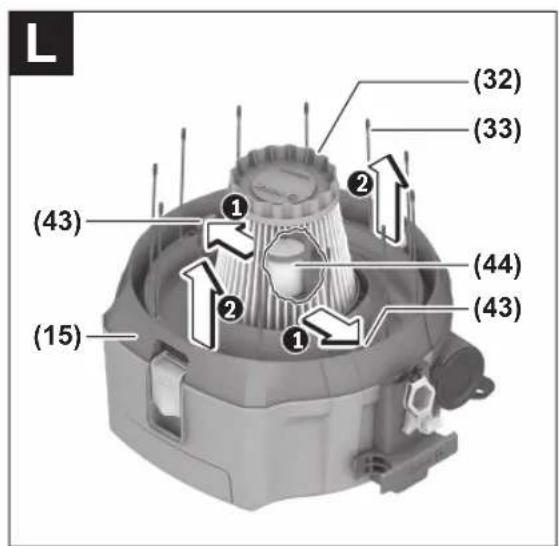
Before Starting Wet Extraction (see figure L)
Empty the container (12) and remove the plastic bag (36).
Press the detents (43) ① and remove the bag holder (33) ②.
During and after wet vacuuming
The dust extractor is equipped with a float (44). Extraction is stopped when the maximum filling level is reached. The container (12) should then be emptied.
Note: If the container (12) is not emptied in a timely manner, the main filter (32) will also become filled with fluid. In this case, remove the main filter (32) and empty it as well (see "Cleaning/replacing filters", page 28).
After the work is complete, to prevent the formation of mould, remove the top part of the dust extractor (15) and the main filter (32) and allow both components to dry thoroughly.
Maintenance and Service
Maintenance and Cleaning
Remove the battery before cleaning or performing maintenance on the dust extractor, making tool adjustments, changing accessories or placing the dust extractor in storage. This safety measure prevents the dust extractor from being started accidentally.
▶ To ensure safe and efficient operation, always keep the dust extractor and the ventilation slots clean.
▶ Wear a dust mask when servicing and cleaning the vacuum cleaner.
Clean the housing of the dust extractor occasionally with a damp cloth.
Clean dirty charging pins using a dry cloth.
▶ Do not use compressed air to clean the dust extractor. The filter or other components may become damaged.
28 | English
At least once a year a technical inspection of the dust extractor must be carried out by the manufacturer or someone who has been trained (e.g. to check for filter damage, to check that the dust extractor is tight and that the control unit is in perfect working order).
Cleaning and maintenance after extracting hazardous substances
- All parts that may have come into contact with the hazardous substances must be considered contaminated.
- Vacuum, wipe down and seal the outside of the dust extractor thoroughly before removing it from the area containing the hazardous substances.
- Only clean, dismantle and perform maintenance on the dust extractor if this can be done without endangering yourself or other persons. Wear personal protective equipment for cleaning and maintenance tasks. Undertake the work in a well ventilated room.
- First clean the outside of the dust extractor before dismantling it.
- All parts of the dust extractor that cannot be adequately cleaned must be disposed of in impermeable bags. Please observe the applicable regulations for the disposal of such waste.
- Clean the maintenance area after completing the work.
Cleaning the container
Wipe the container (12) from time to time using a non-abrasive off-the-shelf cleaning product and leave it to dry.
Cleaning/replacing filters
The suction power is dependent on the condition of the filter. Therefore, the filter should be cleaned regularly.
Replace any damaged filters immediately.
- Open the catches (13) and remove the dust extractor lid (15).
- Take hold of the main filter (32) at the end piece (not at the flaps). Turn it as far as it will go in the rotational direction and then remove it (see figure M).
- If the filter is dry:
Tap the main filter (32) on the side of a suitable waste bin. When doing so, ensure that you do not damage the flaps on the filter.
To achieve maximum suction power, brush down the flaps of the filter using a soft brush.
or
If the filter is wet:
Rinse the main filter (32) under running water and then leave it to dry thoroughly.
or
Replace the main filter (32) if it is damaged.
- Place the main filter (32) over the float cage (34) and turn it as far as it will go in the rotational direction into the filter holder (35) (see figure B).
- Replace the dust extractor lid (15) and close the catches (13).
Make sure that the catches engage firmly.
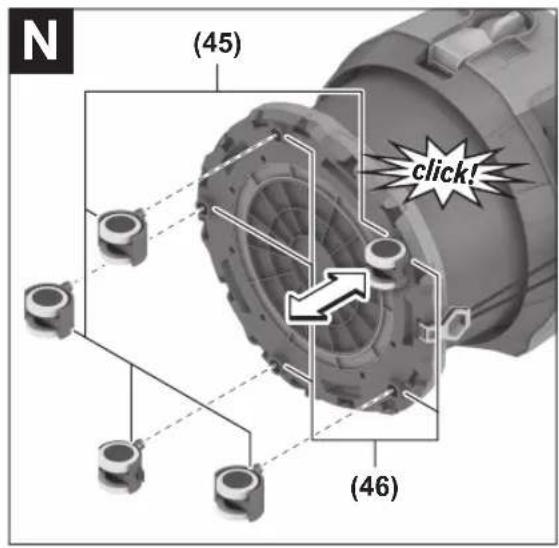
Replacing castors (see figure X N)
Only use rollers as per EN 12529 (diameter of fastening pin 11 mm).
▶ Check the functionality of the castor brakes before using the dust extractor.
Use the brakes if you want the dust extractor to remain stationary.
Repairing the Vacuum Hose
You can cut off a section of a vacuum hose (20) that is defective and continue to use the undamaged section.
▶ Wear gloves when repairing the hose. This poses a risk of injury.
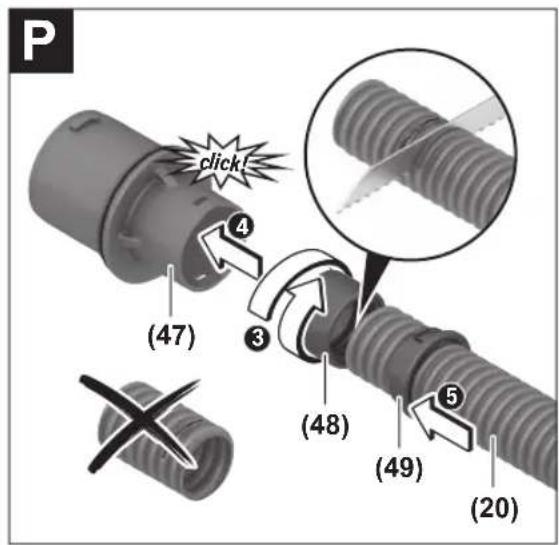
To repair the vacuum hose at the dust extractor side (see figures O-P):
- Loosen the locking ring (49) from the hose connector (47) by pushing in the retaining lugs with a screwdriver.
- Pull the locking ring (49) behind the defective area ①.
- Unscrew the sealing sleeve (48) ②.
- Cut off the vacuum hose (20) behind the defective area (see figure P).
- Screw the sealing sleeve (48) back on ③.
- Push the end of the vacuum house into the hose connector (47) ④.
- Push the locking ring (49) onto the hose connector (47) until it clicks audibly into place ⑤.
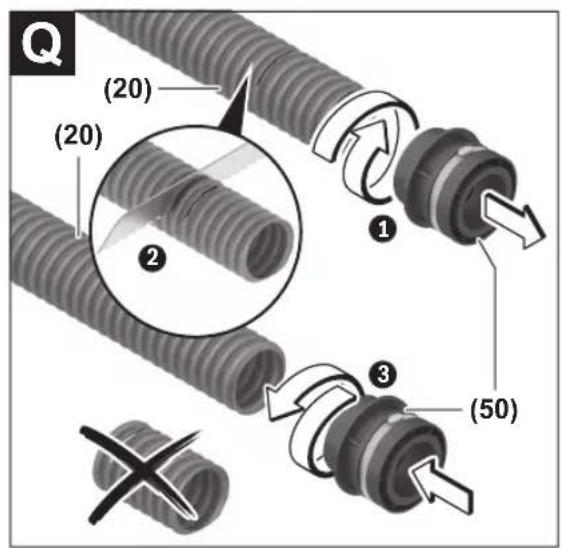
To carry out a repair at the power tool/nozzle side (see figure Q):
- Unscrew the sealing sleeve (50) ①.
- Cut off the vacuum hose (20) behind the defective area ②.
- Screw the sealing sleeve (50) back on ③.
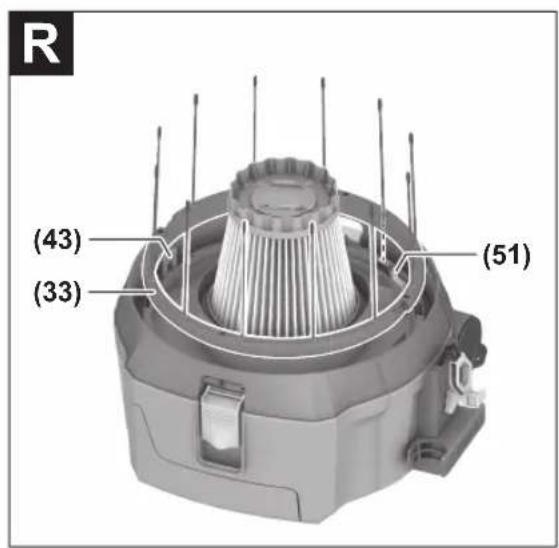
Repairing the Bag Holder Attachment (see figure R)
If the detents (43) for the bag holder (33) are damaged, the bag holder can also be permanently screwed to the top part of the dust extractor with commercially available Phillips P4 11 mm screws. If the bag holder (33) is in contact with the spring (51), the conductivity for the electrostatic discharge is retained.
Rectifying Errors
Problem Cause Corrective measure
| Suction turbine will not switch on. | Rechargeable (31) low on power | Charge or replace battery |
| Restart protection triggered | First turn on/off switch to position 0, then to position 1 |
Problem Cause Corrective measure
| On/off switch (14) in position, but no Auto-Start Remote GCT ... is connected | Turn on/off switch to position 1 | |
| The suction turbine switches off. | Container (12) full | Empty the container |
| The suction turbine will not switch on again after the con-tainer has been emptied. | Reset required Switch off the dust extractor, remove the rechargeable battery (31), wait 5 s, insert the rechargeable battery and switch on the dust extractor | |
| Dust extractor switches off too late with the Auto-Start function. | Run-on time has been set for too long | Shorten the run-on time via the Bosch Toolbox app (min-imum run-on time: 6 s) |
| The suction power is decreas-ing. | Plastic bag (36) is full | Replace the plastic bag |
| Suction nozzle, suction tube (29) or vacuum hose (20) is blocked | Remove blockages | |
| Main filter (32) is soiled or defect-ive | Carry out manual filter cleaning, clean or replace the main filter | |
| Main filter (32) has not engaged in the filter holder (35) | Make sure that the main filter has correctly engaged | |
| Top part of the dust extractor (15) is not seated correctly | Place the top part of the dust extractor on correctly and close the catches (13) | |
| Dust escapes during dry ex-traction | Main filter (32) has been fitted in-correctly | Check that the main filter has been fitted correctly |
| Main filter (32) is defective | Change the main filter | |
| Water escapes during wet ex-traction | Float (44) is blocked | Continually check the fill level and empty the container (12) in good timeWipe down the float cage with a damp cloth and clean the float by lightly shaking the dust extractorIf the float and float cage become heavily contaminated, contact an authorised Bosch after-sales service centre. |
| Temperature warning triggered (statusbar (2) lights up red) | Rechargeable battery (31) or mo-tor overheated | Switch off the dust extractor, remove the rechargeable battery, and allow the rechargeable battery and the dust extractor to adjust to the ambient temperature |
| Air flow alarm triggered (air flow alarm indicator (1) flashes yellow) | Follow the instructions in the corresponding section (see "Air Flow Alarm", page 27). | |
| Manual filter cleaning cannot be triggered. | Contact an authorised Bosch after-sales service centre. | |
| Electrostatic discharge Dissipation of electrostatic char-ging has been interrupted | Ensure that the vacuum hose (20) is always in contact with the ground during operation.Check that there is no defect in the contact of the spring (51) with the bag holder (33).If necessary, repair the bag holder attachment (see "Re-pairing the Bag Holder Attachment (see figure R)", page 28). | |
After-Sales Service and Application Service
Our after-sales service responds to your questions concerning maintenance and repair of your product as well as spare parts. You can find explosion drawings and information on spare parts at: www.bosch-pt.com
The Bosch product use advice team will be happy to help you with any questions about our products and their accessories.
30 | Français
In all correspondence and spare parts orders, please always include the 10-digit article number given on the nameplate of the product.
Great Britain
Robert Bosch Ltd. (B.S.C.)
P.O. Box 98
Broadwater Park
North Orbital Road
Denham Uxbridge
UB 9 5HJ
At www.bosch-pt.co.uk you can order spare parts or arrange the collection of a product in need of servicing or repair.
Tel. Service: (0344) 7360109
E-Mail: boschservicecentre@bosch.com
You can find further service addresses at:
www.bosch-pt.com/serviceaddresses
Transport
The recommended lithium-ion batteries are subject to legislation on the transport of dangerous goods. The user can transport the batteries by road without further requirements.
When the batteries are shipped by third parties (e.g. air transport or forwarding agency), special requirements on packaging and labelling (e.g. ADR regulations) must be met. A dangerous goods expert must be consulted when preparing the items for shipping.
Dispatch battery packs only when the housing is undamaged. Tape or mask off open contacts and pack up the battery in such a manner that it cannot move around in the packaging. Please also observe the possibility of more detailed national regulations.
Disposal

Vacuum cleaners, batteries, accessories and packaging should be sorted for environmentally friendly recycling.
Do not dispose of vacuum cleaners or battery packs/batteries with household waste.
Only for EU countries:
According to the Directive 2012/19/EU on waste electrical and electronic equipment and its transposition into national law, dust extractors that are no longer usable, and, according to the Directive 2006/66/EC, defective or drained batteries must be collected separately and disposed of in an environmentally correct manner.
If disposed incorrectly, waste electrical and electronic equipment may have harmful effects on the environment and human health, due to the potential presence of hazardous substances.
Only for United Kingdom:
According to The Waste Electrical and Electronic Equipment Regulations 2013 (SI 2013/3113) (as amended) and the
Waste Batteries and Accumulators Regulations 2009 (SI 2009/890) (as amended), products that are no longer usable must be collected separately and disposed of in an environmentally friendly manner.
Battery packs/batteries:
Li-ion:
Please observe the notes in the section on transport (see "Transport", page 30).
Français
Appareil mobile (tablette, smartphone)
Robert Bosch (France) S.A.S.
www.bosch-pt.com/serviceaddresses
Transport
Calle Robert Bosch No. 405
www.bosch-pt.com/serviceaddresses
Transporte
www.bosch-pt.com/serviceaddresses
Transporte
www.bosch-pt.com/serviceaddresses
Trasporto
www.bosch-pt.com/serviceaddresses
Vervoer
Bosch Service Center
Telegrafvej 3
2750 Ballerup
På www.bosch-pt.dk kan der online bestilles reservedele eller oprettes en reparations ordre.
Tlf. Service Center: 44898855
Fax: 44898755
E-Mail: vaerktoej@dk.bosch.com
www.bosch-pt.com/serviceaddresses
Transport
Bosch Service Center
Telegrafvej 3
2750 Ballerup
Danmark
Tel.: (08) 7501820 (inom Sverige)
Fax: (011) 187691
www.bosch-pt.com/serviceaddresses
Transport
(23) SDS Clean-adapter for boring ^a)
(24) Børste
(43) Hakk for poseholder
(44) Flottør
(45) Hjul
(46) Hjulholder
(47) Slangestuss
(48) Tetningsmuffe på slangeende støvsugerside
(49) Låsering
(50) Tetningsmuffe på slangeende elektroverktøy/munnstykke
(51) Fjær for elektrostatisk avledning
www.bosch-pt.com/serviceaddresses
Transport
www.bosch-pt.com/serviceaddresses
Kuljetus
www.bosch-pt.com/serviceaddresses
Μεταφορά
www.bosch-pt.com/serviceaddresses
Nakliye
Robert Bosch Sp. z o.o.
www.bosch-pt.com/serviceaddresses
Transport
Bosch Service Center PT
K Vápence 1621/16
692 01 Mikulov
www.bosch-pt.com/serviceaddresses
Přeprava
www.bosch-pt.com/serviceaddresses
Transport
www.bosch-pt.com/serviceaddresses
Szállítás
www.bosch-pt.com/serviceaddresses
Транспортировка
www.bosch-pt.com/serviceaddresses
Транспортування
www.bosch-pt.com/serviceaddresses
Тасымалдау
Service scule electrice
Strada Horia Măcelariu Nr. 30–34, sector 1
013937 Bucureşti
www.bosch-pt.com/serviceaddresses
Transport
Service scule electrice
Strada Horia Măcelariu Nr. 30–34, sector 1
013937 Bucureşti, România
www.bosch-pt.com/bg/bg/
www.bosch-pt.com/serviceaddresses
Транспортиране
www.bosch-pt.com/serviceaddresses
Транспорт
www.bosch-pt.com/serviceaddresses
Transport
Preporučeni litijum-jonski akumulatori podležu zahtevima propisa o opasnim materijama. Korisnik može bez dodatnih uslova transportovati akumulatore na drumu.
Kod slanja preko trećih lica (na primer vazdušnim transportom ili špedicijom) mora se obratiti pažnja na posebne zahteve u pogledu pakovanja i označavanja. Tada se kod pripreme paketa za slanje mora pozvati stručnjak za opasne materije.
Akumulatorske baterije šaljite samo ako kućište nije oštećeno. Odlepite otvorene kontakte i upakujte akumulatorsku bateriju tako, da se ne pokreće u paketu. Molimo da obratite pažnju na eventualne dalje nationalne propise.
Odlaganje na otpad

Usisivače, akumulatore, pribor i ambalažu treba da predate na reciklažu u skladu sa zaštitom životne sredine.
Usisivače i akumulatore/baterije nemojte da bacate u kućno dubre!
Samo za EU zemlje:
Prema evropskoj direktivi 2012/19/EU o starim električnim i elektronskim uređajima i njenoj primeni u nacionalnom pravu, usisivači koji se više ne mogu koristiti, a prema evropskoj direktivi 2006/66/EC akumulatori/baterije koje su u kvaru ili istrošene moraju se odvojeno sakupljati i uključiti u reciklažu koja ispunjava ekološke uslove. Ukoliko se elektronski i električni uređaji otklone u otpad na neispravan način, moguće opasne materije mogu da imaju štetno dejstvo na životnu sredinu i zdravlje ljudi.
Akumulatori/baterije:
Li-jonska:
Molimo da obratite pažnju na napomene u odeljku Transport (videti „Transport“, Strana 282).
Slovenščina
Varnostna opozorila za sesalnike

a_n < 2.5 m/s^2, K = 1.5 m/s^2 .
Akumulatorska baterija
Podjetje Bosch prodaja akumulatorske sesalnike tudi brez priložene akumulatorske baterije. Ali je v obseg dobave sesalnika vključena tudi akumulatorska baterija, je navedeno na embalaži.
Polnjenje akumulatorske baterije
www.bosch-pt.com/serviceaddresses
Transport
www.bosch-pt.com/serviceaddresses
Transport
www.bosch-pt.com/serviceaddresses
Transport
www.bosch-pt.com/serviceaddresses
Transportešana
www.bosch-pt.com/serviceaddresses
Transportavimas
www.bosch-pt.com/serviceaddresses
운반
Robert Bosch Morocco SARL
53.شارع الملازم محمد محرود
20300 الدار البيضاء
www.bosch-pt.com/serviceaddresses
النقل
(38) Tesla hotel and non-
natural_image
3D rendered image of a cylindrical mechanical component (no text or symbols visible)2 608 000 661
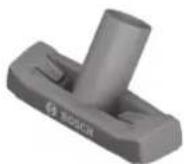
2 608 000 707
natural_image
3D rendered image of a gray mechanical component with a Y-shaped groove (no text or symbols)2 608 000 797
natural_image
Three identical gray cylindrical pipes arranged vertically (no text or symbols visible)2 608 000 806
natural_image
Black plastic bag with 10× multiplier label (no other text or symbols)
natural_image
Black plastic bag with a pointed tip and visible texture (no text or symbols)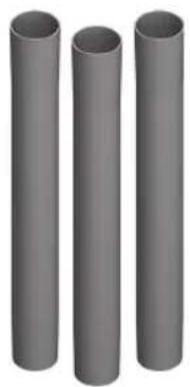
natural_image
Three identical gray cylindrical objects arranged vertically (no text or symbols visible)2 608 000 773
2608000774
2 608 000 771
natural_image
3D rendered image of a gray mechanical component with a Y-shaped groove (no text or symbols)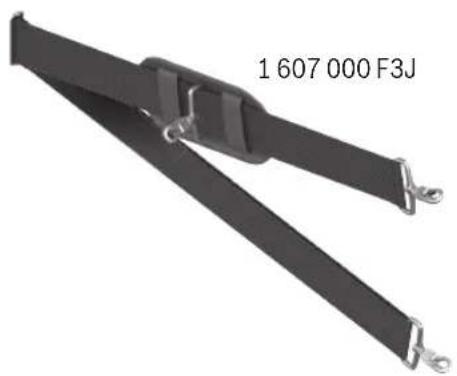
natural_image
Black mechanical belt with metal clamps and mounting bracket, no visible text or symbols on the belt itself
natural_image
Close-up of a metallic electronic component with visible internal structure and logo (no readable text or symbols)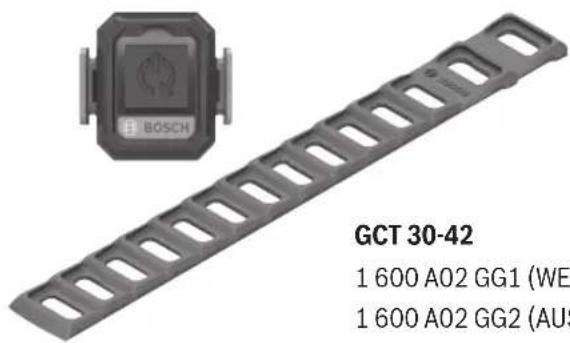
1 600 A02 GG1 (WEU)
1 600 A02 GG2 (AUS/NZ, KR)
Licenses
Apache-2.0
CMSIS, V5.0.2
Copyright © 2009–2017 Arm Limited. All rights reserved.
Licensed under the Apache License, Version 2.0 (the "License"); you may not use this file except in compliance with the License. You may obtain a copy of the License at http://www.apache.org/licenses/LICENSE-2.0
Unless required by applicable law or agreed to in writing, software distributed under the License is distributed on an "AS IS" BASIS, WITHOUT WARRANTIES OR CONDITIONS OF ANY KIND, either express or implied. See the License for the specific language governing permissions and limitations under the License.
CMSIS Device R0, V2.3.4
Copyright © 2016 STMicroelectronics.
Licensed under the Apache License, Version 2.0 (the "License"); you may not use this file except in compliance with the License. You may obtain a copy of the License at http://www.apache.org/licenses/LICENSE-2.0
Unless required by applicable law or agreed to in writing, software distributed under the License is distributed on an "AS IS" BASIS, WITHOUT WARRANTIES OR CONDITIONS OF ANY KIND, either express or implied. See the License for the specific language governing permissions and limitations under the License.
CMSIS\_5, V5.7.0
Copyright © 2009-2020 Arm Limited. All rights reserved.
Licensed under the Apache License, Version 2.0 (the "License"); you may not use this file except in compliance with the License. You may obtain a copy of the License at http://www.apache.org/licenses/LICENSE-2.0
Unless required by applicable law or agreed to in writing, software distributed under the License is distributed on an "AS IS" BASIS, WITHOUT WARRANTIES OR CONDITIONS OF ANY KIND, either express or implied. See the License for the specific language governing permissions and limitations under the License.
License Text
Apache License
Version 2.0, January 2004
http://www.apache.org/licenses/
TERMS AND CONDITIONS FOR USE, REPRODUCTION, AND DISTRIBUTION
- Definitions.
"License" shall mean the terms and conditions for use, reproduction, and distribution as defined by Sections 1 through 9 of this document. "Licensor" shall mean the copyright owner or entity authorized by the copyright owner that is granting the License.
"Legal Entity" shall mean the union of the acting entity and all other entities that control, are controlled by, or are under common control with that entity. For the purposes of this definition, "control" means (i) the power, direct or indirect, to cause the direction or management of such entity, whether by contract or otherwise, or (ii) ownership of fifty percent (50%) or more of the outstanding shares, or (iii) beneficial ownership of such entity.
"You" (or "Your") shall mean an individual or Legal Entity exercising permissions granted by this License.
"Source" form shall mean the preferred form for making modifications, including but not limited to software source code, documentation source, and configuration files.
"Object" form shall mean any form resulting from mechanical transformation or translation of a Source form, including but not limited
to compiled object code, generated documentation, and conversions to other media types.
"Work" shall mean the work of authorship, whether in Source or Object form, made available under the License, as indicated by a copyright notice that is included in or attached to the work (an example is provided in the Appendix below).
"Derivative Works" shall mean any work, whether in Source or Object form, that is based on (or derived from) the Work and for which the editorial revisions, annotations, elaborations, or other modifications represent, as a whole, an original work of authorship. For the purposes of this License, Derivative Works shall not include works that remain separable from, or merely link (or bind by name) to the interfaces of, the Work and Derivative Works thereof.
"Contribution" shall mean any work of authorship, including the original version of the Work and any modifications or additions to that Work or Derivative Works thereof, that is intentionally submitted to Licensor for inclusion in the Work by the copyright owner or by an individual or Legal Entity authorized to submit on behalf of the copyright owner. For the purposes of this definition, "submitted" means any form of electronic, verbal, or written communication sent to the Licensor or its representatives, including but not limited to communication on electronic mailing lists, source code control systems, and issue tracking systems that are managed by, or on behalf of, the Licensor for the purpose of discussing and improving the Work, but excluding communication that is conspicuously marked or otherwise designated in writing by the copyright owner as "Not a Contribution".
"Contributor" shall mean Licensor and any individual or Legal Entity on behalf of whom a Contribution has been received by Licensor and subsequently incorporated within the Work.
-
Grant of Copyright License. Subject to the terms and conditions of this License, each Contributor hereby grants to You a perpetual, worldwide, non-exclusive, no-charge, royalty-free, irrevocable copyright license to reproduce, prepare Derivative Works of, publicly display, publicly perform, sublicense, and distribute the Work and such Derivative Works in Source or Object form.
-
Grant of Patent License. Subject to the terms and conditions of this License, each Contributor hereby grants to You a perpetual, worldwide, non-exclusive, no-charge, royalty-free, irrevocable (except as stated in this section) patent license to make, have made, use, offer to sell, sell, import, and otherwise transfer the Work, where such license applies only to those patent claims licensable by such Contributor that are necessarily infringed by their Contribution(s) alone or by combination of their Contribution(s) with the Work to which such Contribution(s) was submitted. If You institute patent litigation against any entity (including a cross-claim or counterclaim in a lawsuit) alleging that the Work or a Contribution incorporated within the Work constitutes direct or contributory patent infringement, then any patent licenses granted to You under this License for that Work shall terminate as of the date such litigation is filed.
-
Redistribution. You may reproduce and distribute copies of the Work or Derivative Works thereof in any medium, with or without modifications, and in Source or Object form, provided that You meet the following conditions:
(a) You must give any other recipients of the Work or Derivative Works a copy of this License; and
(b) You must cause any modified files to carry prominent notices stating that You changed the files; and
(c) You must retain, in the Source form of any Derivative Works that You distribute, all copyright, patent, trademark, and attribution notices from the Source form of the Work, excluding those notices that do not pertain to any part of the Derivative Works; and
(d) If the Work includes a "NOTICE" text file as part of its distribution, then any Derivative Works that You distribute must include a readable copy of the attribution notices contained within such NOTICE file, excluding those notices that do not pertain to any part of the Derivative Works, in at least one of the following places: within a NOTICE text file
374 | Licenses
distributed as part of the Derivative Works; within the Source form or documentation, if provided along with the Derivative Works; or, within a display generated by the Derivative Works, if and wherever such third-party notices normally appear. The contents of the NOTICE file are for informational purposes only and do not modify the License. You may add Your own attribution notices within Derivative Works that You distribute, alongside or as an addendum to the NOTICE text from the Work, provided that such additional attribution notices cannot be construed as modifying the License.
You may add Your own copyright statement to Your modifications and may provide additional or different license terms and conditions for use, reproduction, or distribution of Your modifications, or for any such Derivative Works as a whole, provided Your use, reproduction, and distribution of the Work otherwise complies with the conditions stated in this License.
- Submission of Contributions. Unless You explicitly state otherwise, any Contribution intentionally submitted for inclusion in the Work by You to the Licensor shall be under the terms and conditions of this License, without any additional terms or conditions. Notwithstanding the above, nothing herein shall supersede or modify the terms of any separate license agreement you may have executed with Licensor regarding such Contributions.
- Trademarks. This License does not grant permission to use the trade names, trademarks, service marks, or product names of the Licensor, except as required for reasonable and customary use in describing the origin of the Work and reproducing the content of the NOTICE file.
- Disclaimer of Warranty. Unless required by applicable law or agreed to in writing, Licensor provides the Work (and each Contributor provides its Contributions) on an "AS IS" BASIS, WITHOUT WARRANTIES OR CONDITIONS OF ANY KIND, either express or implied, including, without limitation, any warranties or conditions of TITLE, NON-INFRINGEMENT, MERCHANTABILITY, or FITNESS FOR A PARTICULAR PURPOSE. You are solely responsible for determining the appropriateness of using or redistributing the Work and assume any risks associated with Your exercise of permissions under this License.
- Limitation of Liability. In no event and under no legal theory, whether in tort (including negligence), contract, or otherwise, unless required by applicable law (such as deliberate and grossly negligent acts) or agreed to in writing, shall any Contributor be liable to You for damages, including any direct, indirect, special, incidental, or consequential damages of any character arising as a result of this License or out of the use or inability to use the Work (including but not limited to damages for loss of goodwill, work stoppage, computer failure or malfunction, or any and all other commercial damages or losses), even if such Contributor has been advised of the possibility of such damages.
- Accepting Warranty or Additional Liability. While redistributing the Work or Derivative Works thereof, You may choose to offer, and charge a fee for, acceptance of support, warranty, indemnity, or other liability obligations and/or rights consistent with this License. However, in accepting such obligations, You may act only on Your own behalf and on Your sole responsibility, not on behalf of any other Contributor, and only if You agree to indemnify, defend, and hold each Contributor harmless for any liability incurred by, or claims asserted against, such Contributor by reason of your accepting any such warranty or additional liability.
END OF TERMS AND CONDITIONS
BSD-3-Clause
STM32F0 HAL Driver, V1.7.3
Copyright © 2016 STMicroelectronics. All rights reserved.
Redistribution and use in source and binary forms, with or without modification, are permitted provided that the following conditions are met:
- Redistributions of source code must retain the above copyright notice, this list of conditions and the following disclaimer.
- Redistributions in binary form must reproduce the above copyright notice, this list of conditions and the following disclaimer in the
documentation and/or other materials provided with the distribution.
- Neither the name of the copyright holder nor the names of its contributors may be used to endorse or promote products derived from this software without specific prior written permission.
THIS SOFTWARE IS PROVIDED BY THE COPYRIGHT HOLDERS AND CONTRIBUTORS "AS IS" AND ANY EXPRESS OR IMPLIED WARRANTIES, INCLUDING, BUT NOT LIMITED TO, THE IMPLIED WARRANTIES OF MERCHANTABILITY AND FITNESS FOR A PARTICULAR PURPOSE ARE DISCLAIMED. IN NO EVENT SHALL THE COPYRIGHT HOLDER OR CONTRIBUTORS BE LIABLE FOR ANY DIRECT, INDIRECT, INCIDENTAL, SPECIAL, EXEMPLARY, OR CONSEQUENTIAL DAMAGES (INCLUDING, BUT NOT LIMITED TO, PROCUREMENT OF SUBSTITUTE GOODS OR SERVICES; LOSS OF USE, DATA, OR PROFITS; OR BUSINESS INTERRUPTION) HOWEVER CAUSED AND ON ANY THEORY OF LIABILITY, WHETHER IN CONTRACT, STRICT LIABILITY, OR TORT (INCLUDING NEGLIGENCE OR OTHERWISE) ARISING IN ANY WAY OUT OF THE USE OF THIS SOFTWARE, EVEN IF ADVISED OF THE POSSIBILITY OF SUCH DAMAGE.
GD32E23x\_Firmware\_Library, V1.0.0
Copyright © 2018–2019, GigaDevice Semiconductor Inc. All rights reserved.
Redistribution and use in source and binary forms, with or without modification, are permitted provided that the following conditions are met:
- Redistributions of source code must retain the above copyright notice, this list of conditions and the following disclaimer.
- Redistributions in binary form must reproduce the above copyright notice, this list of conditions and the following disclaimer in the documentation and/or other materials provided with the distribution.
- Neither the name of the copyright holder nor the names of its contributors may be used to endorse or promote products derived from this software without specific prior written permission.
THIS SOFTWARE IS PROVIDED BY THE COPYRIGHT HOLDERS AND CONTRIBUTORS "AS IS" AND ANY EXPRESS OR IMPLIED WARRANTIES, INCLUDING, BUT NOT LIMITED TO, THE IMPLIED WARRANTIES OF MERCHANTABILITY AND FITNESS FOR A PARTICULAR PURPOSE ARE DISCLAIMED. IN NO EVENT SHALL THE COPYRIGHT HOLDER OR CONTRIBUTORS BE LIABLE FOR ANY DIRECT, INDIRECT, INCIDENTAL, SPECIAL, EXEMPLARY, OR CONSEQUENTIAL DAMAGES (INCLUDING, BUT NOT LIMITED TO, PROCUREMENT OF SUBSTITUTE GOODS OR SERVICES; LOSS OF USE, DATA, OR PROFITS; OR BUSINESS INTERRUPTION) HOWEVER CAUSED AND ON ANY THEORY OF LIABILITY, WHETHER IN CONTRACT, STRICT LIABILITY, OR TORT (INCLUDING NEGLIGENCE OR OTHERWISE) ARISING IN ANY WAY OUT OF THE USE OF THIS SOFTWARE, EVEN IF ADVISED OF THE POSSIBILITY OF SUCH DAMAGE.
GD32E230, V1.0.0
Copyright © 2019, GigaDevice Semiconductor Inc. All rights reserved. Redistribution and use in source and binary forms, with or without modification, are permitted provided that the following conditions are met:
- Redistributions of source code must retain the above copyright notice, this list of conditions and the following disclaimer.
- Redistributions in binary form must reproduce the above copyright notice, this list of conditions and the following disclaimer in the documentation and/or other materials provided with the distribution.
- Neither the name of the copyright holder nor the names of its contributors may be used to endorse or promote products derived from this software without specific prior written permission.
THIS SOFTWARE IS PROVIDED BY THE COPYRIGHT HOLDERS AND CONTRIBUTORS "AS IS" AND ANY EXPRESS OR IMPLIED WARRANTIES, INCLUDING, BUT NOT LIMITED TO, THE IMPLIED WARRANTIES OF MERCHANTABILITY AND FITNESS FOR A PARTICULAR PURPOSE ARE DISCLAIMED. IN NO EVENT SHALL THE COPYRIGHT HOLDER OR CONTRIBUTORS BE LIABLE FOR ANY DIRECT, INDIRECT, INCIDENTAL,
SPECIAL, EXEMPLARY, OR CONSEQUENTIAL DAMAGES (INCLUDING, BUT NOT LIMITED TO, PROCUREMENT OF SUBSTITUTE GOODS OR SERVICES; LOSS OF USE, DATA, OR PROFITS; OR BUSINESS INTERRUPTION) HOWEVER CAUSED AND ON ANY THEORY OF LIABILITY, WHETHER IN CONTRACT, STRICT LIABILITY, OR TORT (INCLUDING NEGLIGENCE OR OTHERWISE) ARISING IN ANY WAY OUT OF THE USE OF THIS SOFTWARE, EVEN IF ADVISED OF THE POSSIBILITY OF SUCH DAMAGE.
CMSIS Cortex-M23 Device Peripheral Access Layer Header File for GD32E23x Device Series
Copyright © 2012 ARM LIMITED. All rights reserved.
Redistribution and use in source and binary forms, with or without modification, are permitted provided that the following conditions are met:
- Redistributions of source code must retain the above copyright notice, this list of conditions and the following disclaimer.
- Redistributions in binary form must reproduce the above copyright notice, this list of conditions and the following disclaimer in the documentation and/or other materials provided with the distribution.
- Neither the name of the copyright holder nor the names of its contributors may be used to endorse or promote products derived from this software without specific prior written permission.
THIS SOFTWARE IS PROVIDED BY THE COPYRIGHT HOLDERS AND CONTRIBUTORS "AS IS" AND ANY EXPRESS OR IMPLIED WARRANTIES, INCLUDING, BUT NOT LIMITED TO, THE IMPLIED WARRANTIES OF MERCHANTABILITY AND FITNESS FOR A PARTICULAR PURPOSE ARE DISCLAIMED. IN NO EVENT SHALL THE COPYRIGHT HOLDER OR CONTRIBUTORS BE LIABLE FOR ANY DIRECT, INDIRECT, INCIDENTAL, SPECIAL, EXEMPLARY, OR CONSEQUENTIAL DAMAGES (INCLUDING, BUT NOT LIMITED TO, PROCUREMENT OF SUBSTITUTE GOODS OR SERVICES; LOSS OF USE, DATA, OR PROFITS; OR BUSINESS INTERRUPTION) HOWEVER CAUSED AND ON ANY THEORY OF LIABILITY, WHETHER IN CONTRACT, STRICT LIABILITY, OR TORT (INCLUDING NEGLIGENCE OR OTHERWISE) ARISING IN ANY WAY OUT OF THE USE OF THIS SOFTWARE, EVEN IF ADVISED OF THE POSSIBILITY OF SUCH DAMAGE.
STM32CubeF0, 1.10.1
Copyright © 2016-2020 STMicroelectronics. All rights reserved. Redistribution and use in source and binary forms, with or without modification, are permitted provided that the following conditions are met:
- Redistributions of source code must retain the above copyright notice, this list of conditions and the following disclaimer.
- Redistributions in binary form must reproduce the above copyright notice, this list of conditions and the following disclaimer in the documentation and/or other materials provided with the distribution.
- Neither the name of the copyright holder nor the names of its contributors may be used to endorse or promote products derived from this software without specific prior written permission.
THIS SOFTWARE IS PROVIDED BY THE COPYRIGHT HOLDERS AND CONTRIBUTORS "AS IS" AND ANY EXPRESS OR IMPLIED WARRANTIES, INCLUDING, BUT NOT LIMITED TO, THE IMPLIED WARRANTIES OF MERCHANTABILITY AND FITNESS FOR A PARTICULAR PURPOSE ARE DISCLAIMED. IN NO EVENT SHALL THE COPYRIGHT HOLDER OR CONTRIBUTORS BE LIABLE FOR ANY DIRECT, INDIRECT, INCIDENTAL, SPECIAL, EXEMPLARY, OR CONSEQUENTIAL DAMAGES (INCLUDING, BUT NOT LIMITED TO, PROCUREMENT OF SUBSTITUTE GOODS OR SERVICES; LOSS OF USE, DATA, OR PROFITS; OR BUSINESS INTERRUPTION) HOWEVER CAUSED AND ON ANY THEORY OF LIABILITY, WHETHER IN CONTRACT, STRICT LIABILITY, OR TORT (INCLUDING NEGLIGENCE OR OTHERWISE) ARISING IN ANY WAY OUT OF THE USE OF THIS SOFTWARE, EVEN IF ADVISED OF THE POSSIBILITY OF SUCH DAMAGE.
Zlib
nanopb, 0.3.9.2
Copyright © 2011 Petteri Aimonen
- The origin of this software must not be misrepresented; you must not claim that you wrote the original software. If you use this software in a product, an acknowledgment in the product documentation would be appreciated but is not required.
- Altered source versions must be plainly marked as such, and must not be misrepresented as being the original software.
- This notice may not be removed or altered from any source distribution.
Warranty Disclaimer
This product contains Open Source Software components which underly Open Source Software Licenses. Please note that Open Source Licenses contain disclaimer clauses. The text of the Open Source Licenses that apply are included in this manual under "Licenses".
376 | Licenses
CE
|
| de | EU-Konformitätserklärung | Wir erklären in alleiniger Verantwortung, dass die genannten Produkte allen einschlägigen Bestimmungen der nachfolgend aufgeführten Richtlinien und Verordnungen entsprechen und mit folgenden Normen übereinstimmen. Technische Unterlagen bei:* | |
| Akku-Nass-/Trockensauger | Sachnummer | ||
| en | EU Declaration of Conformity | We declare under our sole responsibility that the stated products comply with all applicable provisions of the directives and regulations listed below and are in conformity with the following standards.Technical file at:* | |
| Cordless wet/dry dust extractor | Article number | ||
| fr | Déclaration de conformité UE | Nous déclarons sous notre propre responsabilité que les produits décrits sont en conformité avec les directives, règlements normatifs et normes énumérés ci-dessous.Dossier technique auprès de:* | |
| Aspirateur eau et poussière sans-fil | N° d'article | ||
| es | Declaración de conformidad UE | Declaramos bajo nuestra exclusiva responsabilidad, que los productos nombrados cumplen con todas las disposiciones correspondientes de las Directivas y los Reglamentos mencionados a continuación y están en conformidad con las siguientes normas.Documentos técnicos de:* | |
| Batería del aspirador en húmedo y seco | N° de artículo | ||
| pt | Declaração de Conformidade UE | Declaramos sob nossa exclusiva responsabilidade que os produtos mencionados cumprem todas as disposições e os regulamentos indicados e estão em conformidade com as seguintes normas.Documentação técnica pertencente à:* | |
| Aspirador universal sem fio | N.° do produto | ||
| it | Dichiarazione di conformità UE | Dichiariamo sotto la nostra piena responsabilità che i prodotti indicati sono conformi a tutte le disposizioni pertinenti delle Direttive e dei Regolamenti elencati di seguito, nonché alle seguenti Normative.Documentazione Tecnica presso:* | |
| Aspiratore a umido/a secco a batteria | Codice prodotto | ||
| nl | EU-conformiteitsverklaring | Wij verklaren op eigen verantwoordelijkheid dat de genoemde producten voldoen aan alle desbetreffende bepalingen van de hierna genoemde richtlijnen en verordeningen en overeenstemmen met de volgende normen.Technisch dossier bij:* | |
| Accunat- en droogzuiger | Productnummer | ||
| da | EU-overensstemmelseserklæring | Vi erklærer som eneansvarlige, at det beskrevne produkt er i overensstemmelse med alle gældende bestemmelser i fölgende direktiver og forordninger og opfylder fölgende standarder.Tekniske bilag ved:* | |
| Akku-våd-/ tørstøvsuger | Typenummer | ||
| sv | EU-konformitetsförklaring | Vi förklarar under eget ansvar att de nämnda produkterna uppfyller kraven i alla gällande bestämmelser i de nedan angivna direktiven och förordningarnas och att de stämmer överens med följande normer.Teknisk dokumentation:* | |
| Sladdlös våt-/ torrdammsugare | Produktnummer | ||
| no | EU-samsvarserklæring | Vi erklærer under eneansvar at de nevnte produktene er i overensstemmelse med alle relevante bestemmelser i direktivene og forordningene nedenfor og med fölgende standarder.Teknisk dokumentasjon hos:* | |
| Batteridrevet våt-/tørrsuger | Produktnummer | ||
| fi | EU-vaatimustenmukaisuusvakuutus | Vakuutamme täten, että mainitut tuotteet vastaavat kaikkia seuraavien direktiivien ja asetusten asiaankuuluvia vaatimuksia ja ovat seuraavien standardien vaatimusten mukaisia.Tekniset asiakirjat saatavana:* | |
| Akkukäyttöinen märkäkuivaimuri | Tuotenumero | ||
| el | Δήλωση πιστότητας EE | Δηλώνουμε με αποκλειστική μας ευθύνη, ότι τα αναφερόμενα προϊόντα αντιστοιχούν σε όλες τις σχετικές διατάξεις των πιο κάτω αναφερόμενων οδηγιών και κανονισμών και ταυτίζονται με τα ακόλουθα πρότυπα.Τεχνικά έγγραφα στη:* | |
| Απορροφητήρας υγρής/στεγνής αναρρόφησης μπαταρίας | Αριθμός ευρετηρίου | ||
| tr | AB Uygunluk beyani | Tek sorumlu olarak, tanımlanan ürünün aşağıdaki yönetmelik ve direktiflerin geçerli bütün hükümlerine ve aşağıdaki standartlara uygun olduğunu beyan ederiz.Teknik belgelerin bulunduğu yer:* | |
| Akülü ıslak/kuru elektrikli süpürge | Ürün kodu | ||
||
CE
| pl | Deklaracja zgodności UE | Oświadczamy z pełną odpowiedzialnością, że niniejsze produktyodpowiadają wszystkim wymaganiom poniżej wyszczególnionych dyrektyw irozporządzeń, oraz że są zgodne z następującymi normami.Dokumentacja techniczna:* | |
| Akumulatorowy odkurzacz do pracy na sucho i mokro | Numer katalogowy | ||
| cs | EU prohlášení o shodě | Prohlašujeme na výhradní zodpovědnost, že uvedený výrobek splňujevšechna příslušná ustanovení níže uvedených směrnic anařízení aje vsouladusnásledujícími normami:Technické podklady u:* | |
| Vysavač na mokré/suché sání | Objednací číslo | ||
| sk | EÚ vyhlásenie o zhode | Vyhlasujeme na výhradní zodpovednosť, že uvedený výrobok splňa všetkypríslušné ustanovenia nižšie uvedených smerníc anariadení aje vsúladesnasledujúcimi normami:Technické podklady má spoločnosť:* | |
| Vysávač na vysávanie namokro/nasucho | Vecné číslo | ||
| hu | EU konformitási nyilatkozat | Egyedüli felelőséggel kijelentjük, hogy a megnevezett termékek megfelelnekaz alábbiakban felsorolásra kerülő irányelvek és rendeletek valamennyiidevágó előírásainak és megfelelnek a következő szabványoknak.Műszaki dokumentumok megőrzési pontja:* | |
| Akkumulátoros száraz/nedves porszívó | Cikkszám | ||
| ru | Заявление о соответствии EC | Мы заявляем под нашу единоличную ответственность, что названныепродукты соответствуют всем действующим предписаниямнижеуказанных директив и распоряжений, а также нижеуказанныхнорм.Техническая документация хранится y:* | |
| Аккумуляторный пылесос длявлажной/сухой уборки | Товарный No | ||
| uk | Заява про відповідність ЄС | Мизаявляемо під нашу одноособову відповідальність, що названівироби відповідають усім чинним положенням нищеозначених директиві розпоряджень, а також нижчеозначеним нормам.Технічна документація зберігається y:* | |
| Акумуляторний вологовідсмок-тувач/пипосмок | Товарний номер | ||
| kk | EO сәйкестік мағлумдамасы | Өз жауапкершілікпен біз аталған өнімдер төменде жзылғандиректикалар мен жарлыктардың тиісті қағидаларына сәйкестігін жәнетөмендері нормаларға сай екенін білдіреміз.Техникалық қужаттар:* | |
| Аккумуляторлық ұлғалды/құрғақ сорғыш | Өнім нөмірі | ||
| ro | Declarație de conformitate UE | Declarăm pe proprie răspundere că produsele mentionate corespundtuturor dispozițiilor relevante ale directivelor și reglementărilor enumerate încele ce urmează și sunt în conformitate cu următoarele standarde.Documentаție tehnică la:* | |
| Aspirator univer-sal cu accumulator | Număr de identificare | ||
| bg | ЕС декларация за съответствие | С пълна отговорностние декларираме, че посочените продуктиотговарят на всички валидни изисквания на директивите и разпоредбитепо-долу и съответства на следните стандарти.Техническа документация при:* | |
| Акумулаторна прахосмукачка за сухо и мокро засмукване | Каталожен номер | ||
| mk | EU-Изјава за сообразност | Со целосна одговорност изјавуваме, дека опишаните производи се восогласност со сите релевантни одредби на следните регулативи ипрописи и се во согласност со следните норми.Техничка документација кај:* | |
| Батериски всисувач за влажно/суво всисување | Број на дел/артик | ||
| sr | EU-izjava o usaglašenosti | Na sopstvenu odgovornost izjavljujemo, da navedeni proizvodi odgovarajusvim dotičnim odredbama naknadno navedenih smernica u uredaba i da su uskladu sa sledećim standardima.Tehnička dokumentacija kod:* | |
| Usisivač za mokro i suvo usisavanje sa akumulatorom | Broj predmeta | ||
| sl | Izjava o skladnosti EU | Izjavljamo pod izključno odgovornostjo, da je omenjen izdelek v skladu zvsemi relevantnimi določili direktiv in uredb ter ustreza naslednjimstandardom.Tehnična dokumentacija pri:* | |
CE
III
| Akumulatorski sesalnik za mokro in suho čiščenje | Številka artikla | ||
| hr | EU izjava o sukladnosti | Pod punom odgovornošću izjavljujemo da navedeni proizvodi odgovaraju svim relevantnim odredbama direktiva i propisima navedenima u nastavku i da su sukladni sa sljedećim normama.Tehnička dokumentacija se može dobiti kod: * | |
| Akumulatorski usisavač za mokro/suho usisavanje | Kataloški br. | ||
| et | EL-vastavusdeklaratsioon | Kinnitame ainuvastutajatena, et nimetatud tooted vastavad järgnevalt loetletud direktiivide ja määruste kõikidele asjaomastele nõuetele ja on kooskõlas järgmiste normidega.Tehnilised dokumendid saadaval: * | |
| Akuga märg-/ kuivimur | Tootenumber | ||
| lv | Deklarácija par atbilstibu ES standartiem | Mês ar pilnu atbildību paziņojam, ka šeit aplūkotie izstrādājumi atbilst visiem talāk minētajās direktīvās un rīkojumos ietvertajām saistošajām nostādnēm, kā arī sekojošiem standartiem.Tehniskā dokumentācija no: * | |
| Akumulatora vakuumsūcējs mitrai un sausai uzsūkšanai | Izstrādājuma numurs | ||
| lt | ES atitikties deklaracija | Atsakingai pareiškiame, kad išvardyti gaminiai atitinka visus privalomus žemiau nurodytu direktyvu ir reglamentu reikalavimus ir šiuos standartus.Techninė dokumentacija saugoma: * | |
| Akumuliatorinis skysčių ir sausų dulkių siurblys | Gaminio numeris | ||
| GAS 18V-12 MC 3 | 601 JK2 000 | 2006/42/EC EN 60335-1:2012+A11:2014+2014/53/EU A13:2017+A1:2019+A2:2019+A14:2019+A15:2021EN 60335-2-69:2012EN 300 328 V2.2.2EN 301 489-17 V3.2.4EN 55032:2015+A11:2020+A1:2020EN 50566:2017EN IEC 63000:2018 | |
| *Robert Bosch Power Tools GmbH (PT/ECS)70538 StuttgartGERMANY | |||
| Henk Becker Helmut HeinzelmannChairman of Head of Product CertificationExecutive Management | |||
| Robert Bosch Power Tools GmbH, 70538 Stuttgart, GERMANYStuttgart, 09.05.2023 | |||
IV
CE
Declaration of Conformity
Cordless wet/dry dust extractor Article number
GAS 18V-12 MC 3 601 JK2 000
We declare under our sole responsibility that the stated products comply with all applicable provisions of the regulations listed below and are in conformity with the following standards.
Technical file at: Robert Bosch Ltd. (PT/SOP-GB), Broadwater Park, North Orbital Road, Uxbridge UB9 5HJ, United Kingdom
The Supply of Machinery (Safety) Regulations 2008
The Radio Equipment Regulations 2017
The Restriction of the Use of Certain Hazardous Substances in
Electrical and Electronic Equipment Regulations 2012
EN 60335-1:2012+A11:2014+A13:2017+A1:2019+
A2:2019+A14:2019+A15:2021
EN 60335-2-69:2012
EN 300 328 V2.2.2
EN 301 489-17 V3.2.4
EN 55032:2015+A11:2020+A1:2020
EN 50566:2017
EN IEC 63000:2018

BOSCH
Robert Bosch Power Tools GmbH, 70538 Stuttgart, Germany represented (in terms of the above regulations) by
Robert Bosch Limited, Broadwater Park, North Orbital Road, Uxbridge UB9 5HJ, United Kingdom
Vonjy Rajakoba
Managing Director – Bosch UK
Martin Sibley
Head of Sales Operations and Aftersales
Robert Bosch Ltd. Broadwater Park, North Orbital Road, Uxbridge UB9 5HJ, United Kingdom, as authorised representative acting on behalf of Robert Bosch Power Tools GmbH, 70538 Stuttgart, Germany
Place of issue: Uxbridge Date of issue: 25/05/2023


- Deutsch
- Transport
- Safety information for vacuum cleaners
- WARNING
- | English
- Symbols
- Symbols and their meaning
- Auto-Start function
- Switching Off
- Extraction
- Product Description and Specifications
- Intended Use
- Product Features
- | English
- Noise/Vibration Information
- Rechargeable battery
- Charging the battery
- Inserting and removing the Battery (see figure A)
- Battery Charge Indicator
- Battery Charge Indicator on the Dust Extractor
- Battery Charge Indicator on the Rechargeable Battery
- Recommendations for Optimal Handling of the Battery
- Assembly
- Inserting the Main Filter (see figure B)
- Inserting/removing the plastic bag (dry extraction) (see figure C)
- | English
- Fitting the Bracket for Extractor Accessories
- Fitting/attaching the vacuum hose
- Fitting the vacuum hose (see figure D)
- Attaching the Vacuum Hose to the Dust Extractor (see figure E)
- Fitting the Vacuuming Accessories
- Fitting the extraction adapter or curved nozzle (see figure F)
- Fitting the Nozzles and Tubes
- Carrying strap
- Attaching the carrying strap (see figure G)
- Hanging up the Dust Extractor using the Carrying Strap (see figure H)
- Using the Carrying Strap as a Shoulder Strap (see figure I)
- Operation
- Start-up
- Switching On and Off
- User interface
- Establishing a Connection to the Auto-Start Remote (Accessory) (see figure J)
- | English
- Connection successfully established:
- Connectivity functions
- App name iOS/Android
- Resetting to Factory Settings (Reset)
- Dry Vacuuming
- Air Flow Alarm
- Manual Filter Cleaning
- Electrostatic discharge
- Wet Vacuuming
- Before Starting Wet Extraction (see figure L)
- During and after wet vacuuming
- Maintenance and Service
- Maintenance and Cleaning
- | English
- Cleaning and maintenance after extracting hazardous substances
- Cleaning the container
- Cleaning/replacing filters
- Replacing castors (see figure X N)
- Repairing the Vacuum Hose
- Repairing the Bag Holder Attachment (see figure R)
- Rectifying Errors
- After-Sales Service and Application Service
- | Français
- Great Britain
- You can find further service addresses at:
- Disposal
- Only for EU countries:
- Only for United Kingdom:
- Battery packs/batteries:
- Français
- Transporte
- Trasporto
- Vervoer
- Kuljetus
- Μεταφορά
- Nakliye
- Přeprava
- Szállítás
- Транспортировка
- Транспортування
- Тасымалдау
- Транспортиране
- Транспорт
- Odlaganje na otpad
- Samo za EU zemlje:
- Akumulatori/baterije:
- Li-jonska:
- Slovenščina
- Varnostna opozorila za sesalnike
- Akumulatorska baterija
- Polnjenje akumulatorske baterije
- Transportešana
- Transportavimas
- 운반
- Licenses
- Apache-2.0
- CMSIS, V5.0.2
- CMSIS Device R0, V2.3.4
- CMSIS\_5, V5.7.0
- License Text
- | Licenses
- BSD-3-Clause
- STM32F0 HAL Driver, V1.7.3
- GD32E23x\_Firmware\_Library, V1.0.0
- GD32E230, V1.0.0
- CMSIS Cortex-M23 Device Peripheral Access Layer Header File for GD32E23x Device Series
- STM32CubeF0, 1.10.1
- Zlib
- nanopb, 0.3.9.2
- Warranty Disclaimer
- CE
- Declaration of Conformity
- BOSCH
Brand : BOSCH
Model : GAS 18V-12 MC Professional
Category : Power tool