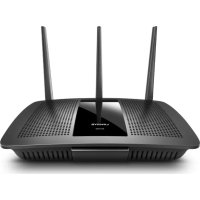
MaxStream EA7300 - Router LINKSYS - Free user manual and instructions
Find the device manual for free MaxStream EA7300 LINKSYS in PDF.
 FR
FR
 BG
BG
 CS
CS
 DA
DA
 DE
DE
 EL
EL
 EN
EN
 ES
ES
 ET
ET
 FI
FI
 HU
HU
 ID
ID
 IT
IT
 LT
LT
 LV
LV
 NL
NL
 NO
NO
 PL
PL
 PT
PT
 RO
RO
 RU
RU
 SK
SK
 SL
SL
 SV
SV
 TH
TH
 TR
TR
 UK
UK
 VI
VI
 ZH
ZH
| Product Type | Gigabit MU-MIMO AC1750 Wi-Fi Router |
| Brand | Linksys |
| Model | MaxStream EA7300 |
| Dimensions (without antennas) | 257 x 184 x 56 mm |
| Weight | 636 g |
| Power Supply | 12 V, 2.5 A (power adapter included) |
| Radio Frequencies | 2.4 GHz and 5 GHz |
| Wi-Fi Standard | IEEE 802.11 a/b/g/n/ac |
| Maximum Speed | AC1750 (450 Mbps on 2.4 GHz + 1300 Mbps on 5 GHz) |
| Number of Antennas | 3 external adjustable |
| Ports | 1 Gigabit Internet port (yellow), 4 Gigabit Ethernet ports (blue), 1 USB 3.0 port |
| Buttons | Reset, Wi-Fi Protected Setup, Power On/Off |
| Wireless Security | WEP, WPA2, RADIUS, 128-bit encryption |
| Advanced Functions | MU-MIMO, parental controls, guest network, traffic prioritization, speed test, USB storage |
| Management | Linksys Smart Wi-Fi (mobile app and web interface) |
| USB File Support | FAT, NTFS, HFS+ |
| UPnP | Supported |
| Certifications | FCC, CE, Windows 7/8 |
| Operating Temperature | 0 to 40 °C |
| Operating Humidity | 10% to 80% non-condensing |
| Care and Cleaning | Turn off and unplug before cleaning; use a dry cloth |
| Repairability | Factory reset via Reset button or software; restart via power cord or interface |
| Package Contents | Router, power adapter, Ethernet cable, quick start guide |
Frequently Asked Questions - MaxStream EA7300 LINKSYS
User questions about MaxStream EA7300 LINKSYS
0 question about this device. Answer the ones you know or ask your own.
Ask a new question about this device
Download the instructions for your Router in PDF format for free! Find your manual MaxStream EA7300 - LINKSYS and take your electronic device back in hand. On this page are published all the documents necessary for the use of your device. MaxStream EA7300 by LINKSYS.
USER MANUAL MaxStream EA7300 LINKSYS
Setting Up: Basics 6
Where to find more help 6
How to install your router 6
How to Use Linksys Smart Wi-Fi 9
How to connect to Linksys Smart Wi-Fi. 9
Network Map. 10
Guest Access. 10
Parental Controls. 11
Media Prioritization 11
Speed Test. 12
External Storage. 12
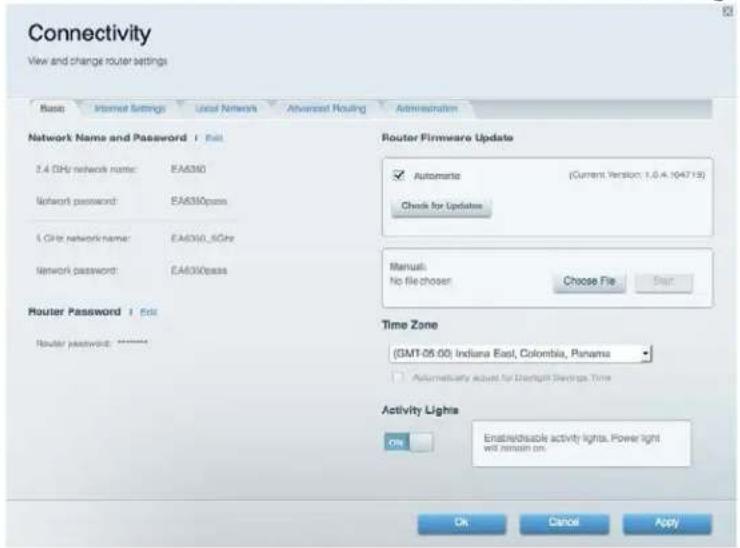
Connectivity 13
Troubleshooting 13
Wireless 14
Security 14
Troubleshooting 15
Your router was not successfully set up. 15
Your Internet cable is not plugged inmessage 16
Cannot access your router message 17
After setup. 18
The Internet appears to be unavailable 18
Linksys Smart Wi-Fi does not open in your web browser 19
Specifications 20
Linksys EA7300 20
Environmental 20
Product Overview
Top view
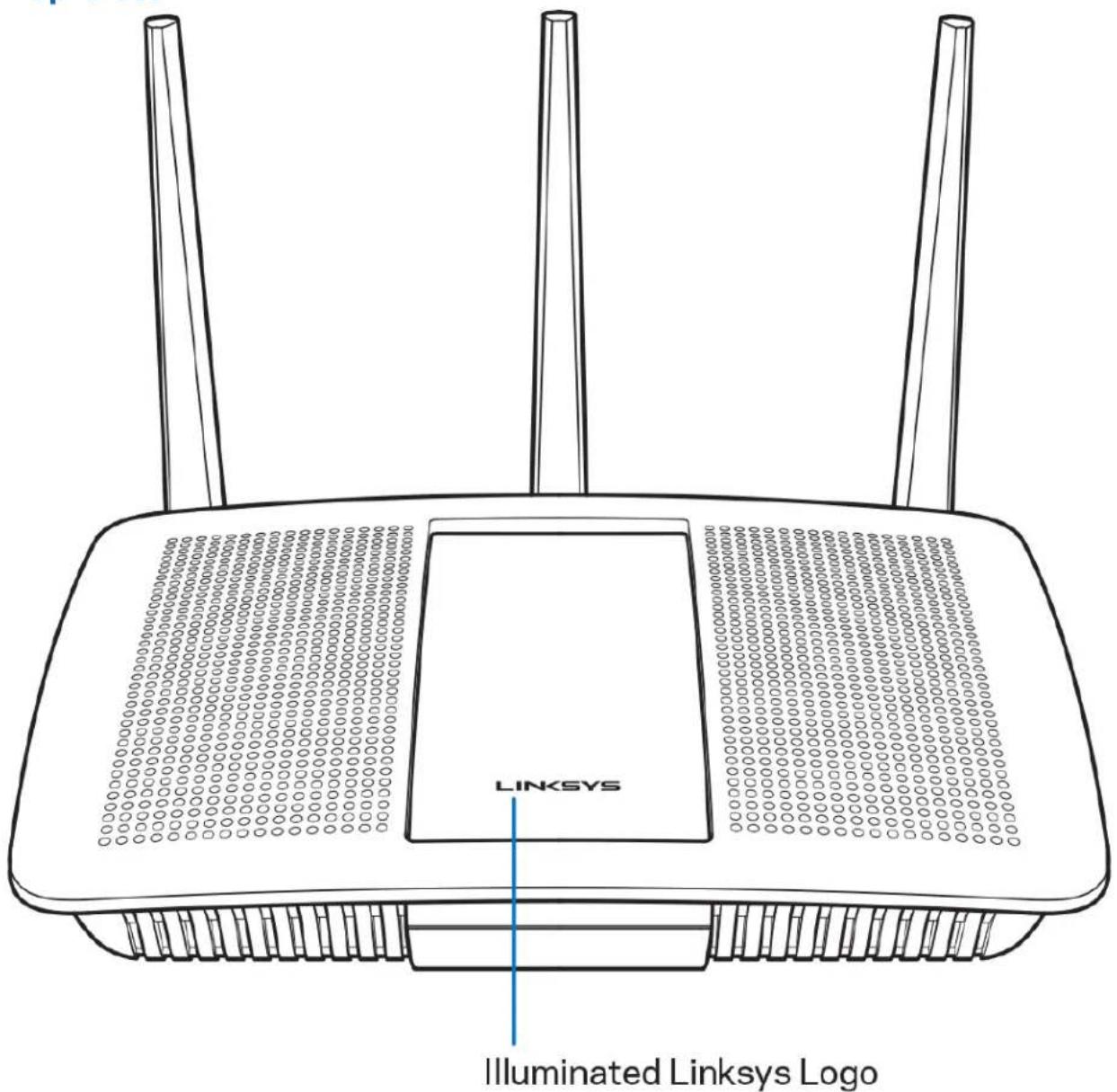
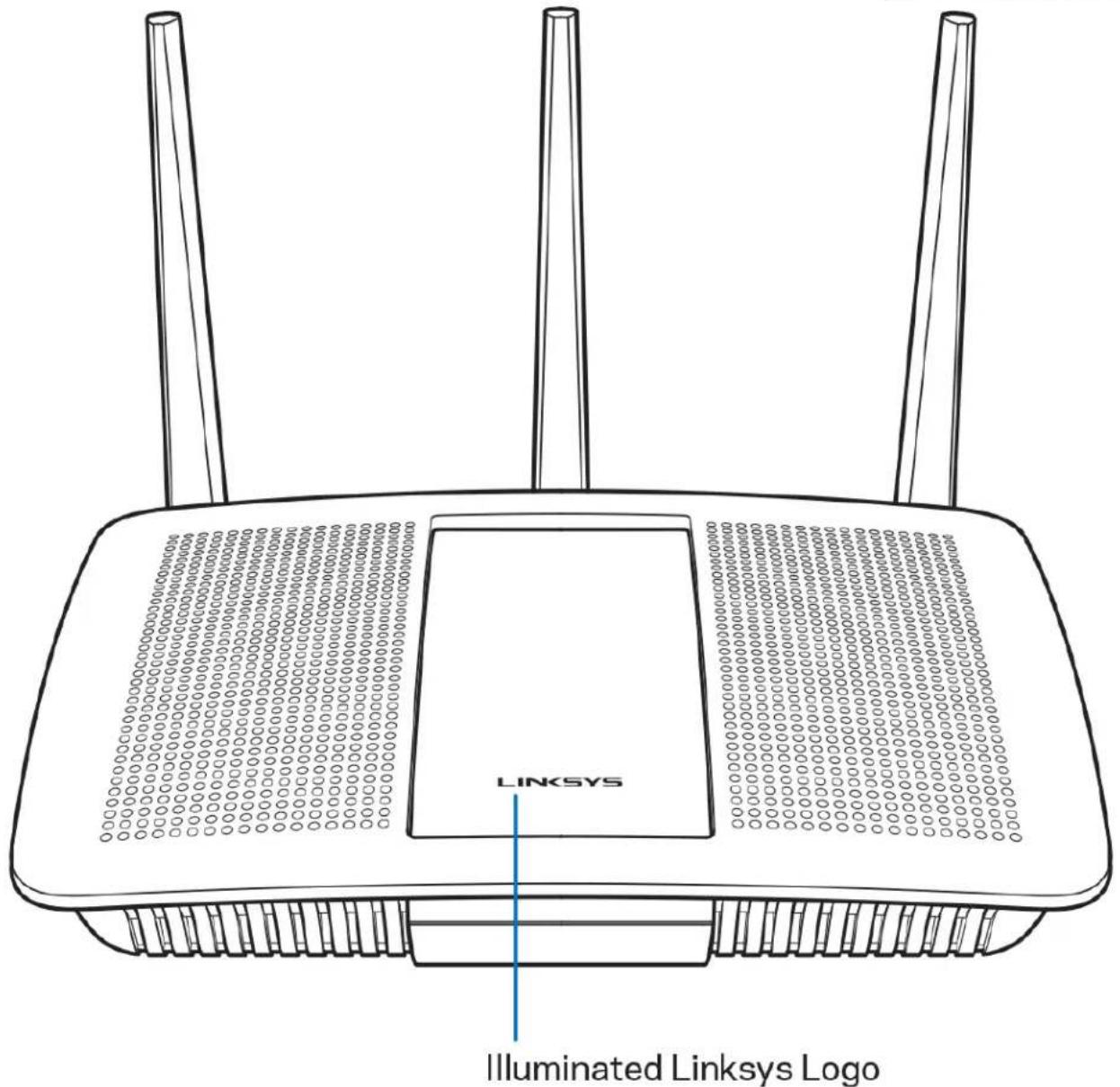
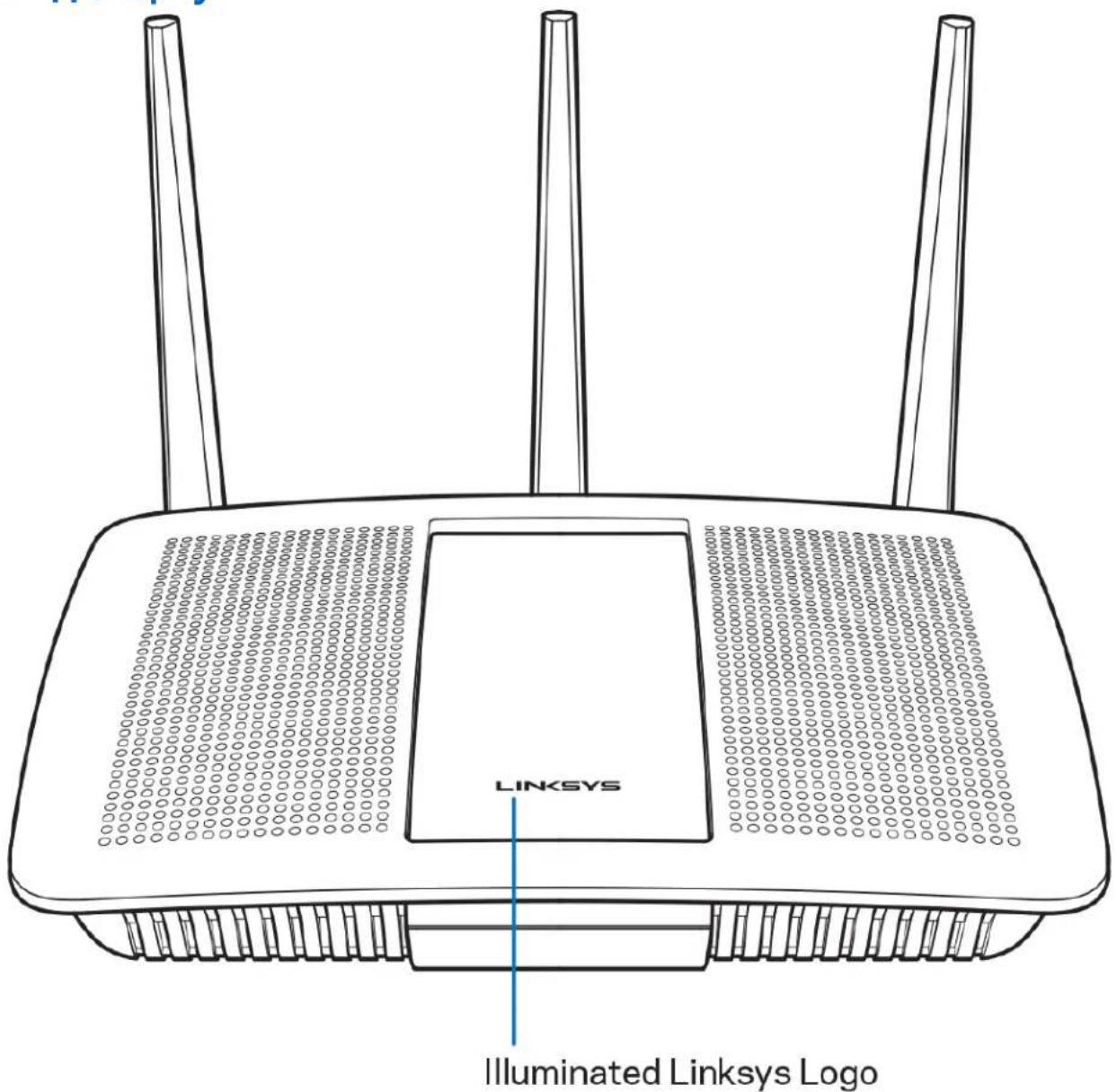
Illuminated Linksys logo—The Linksys logo stays on steadily while connected to the internet. It flashes or pulses slowly during startup, self-testing and firmware upgrades. It flashes quickly when indicating connection errors.
Back view
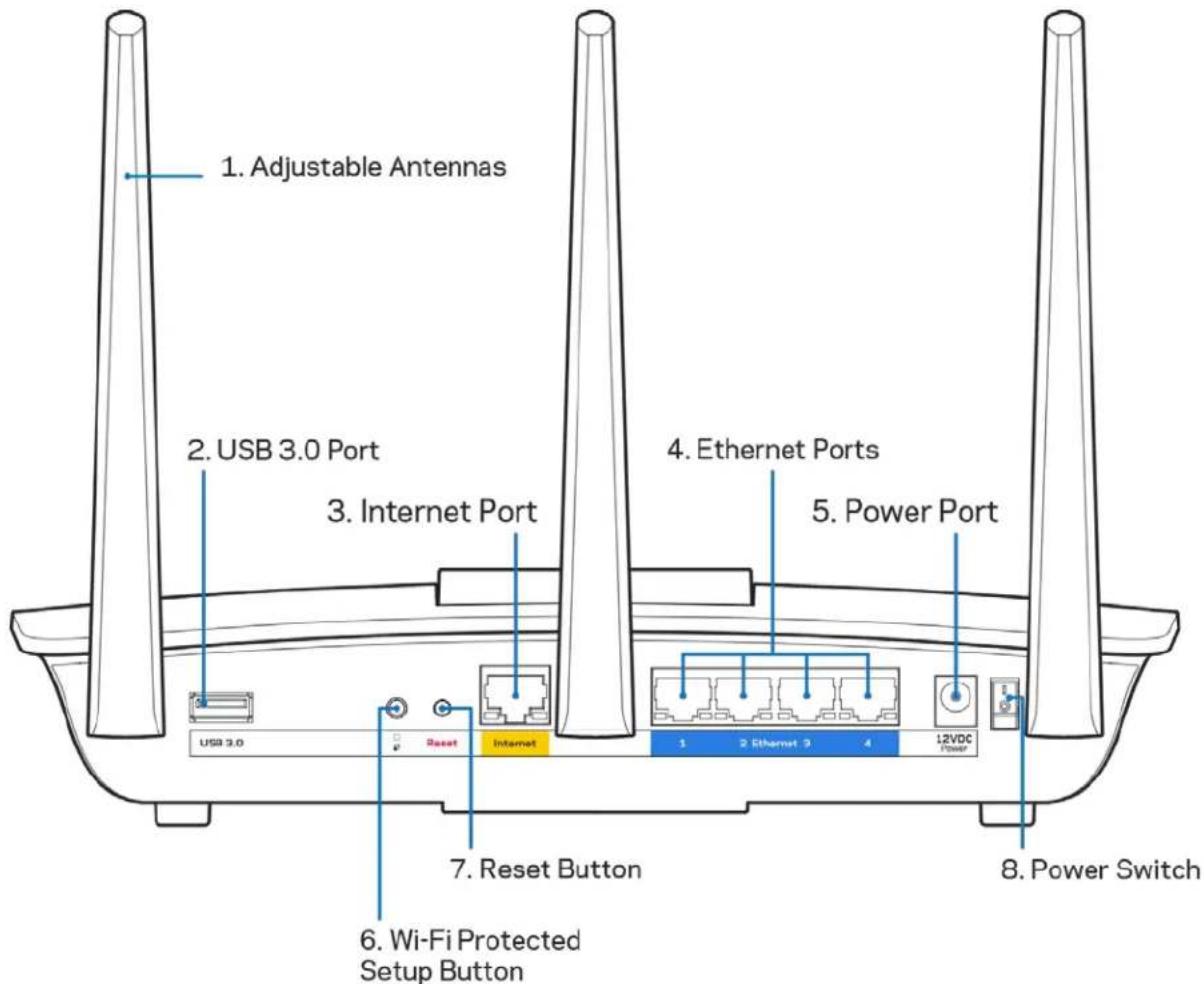
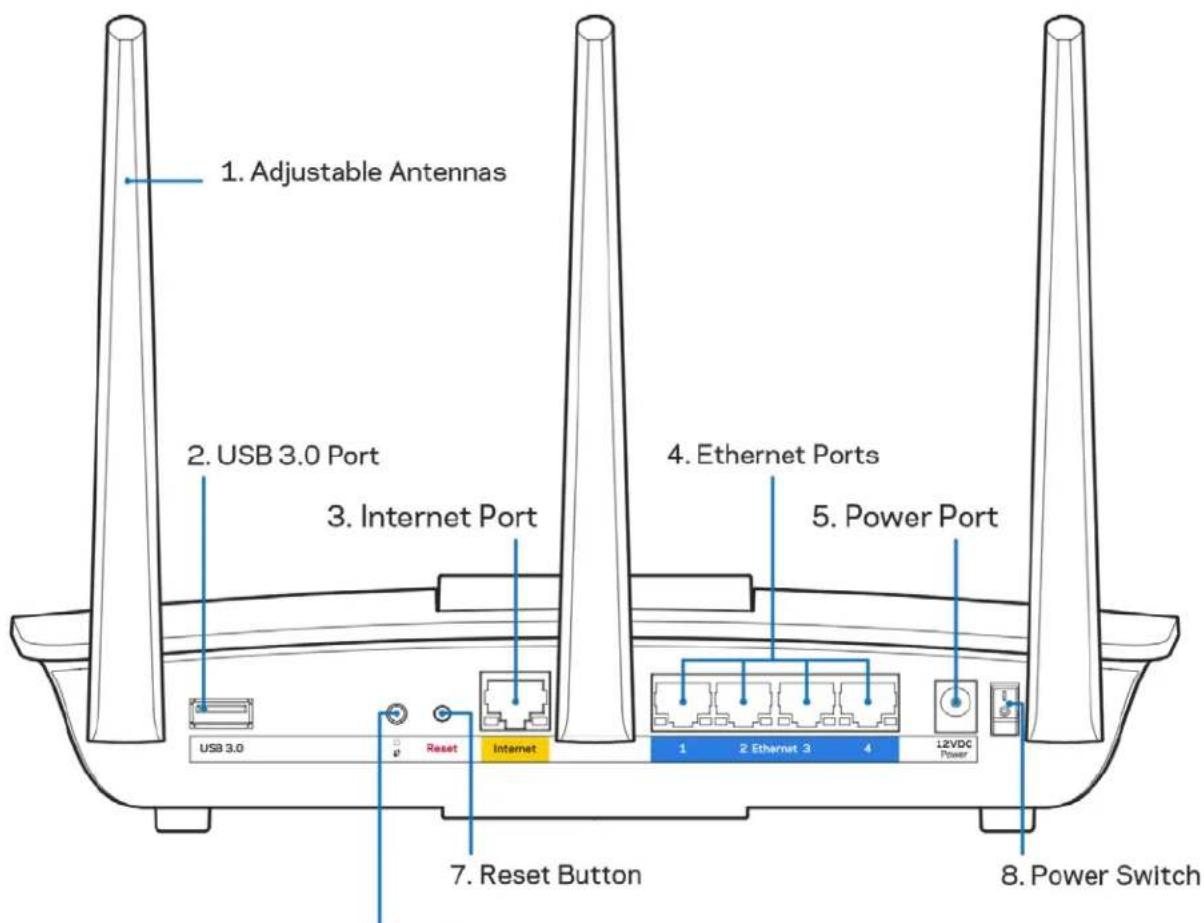
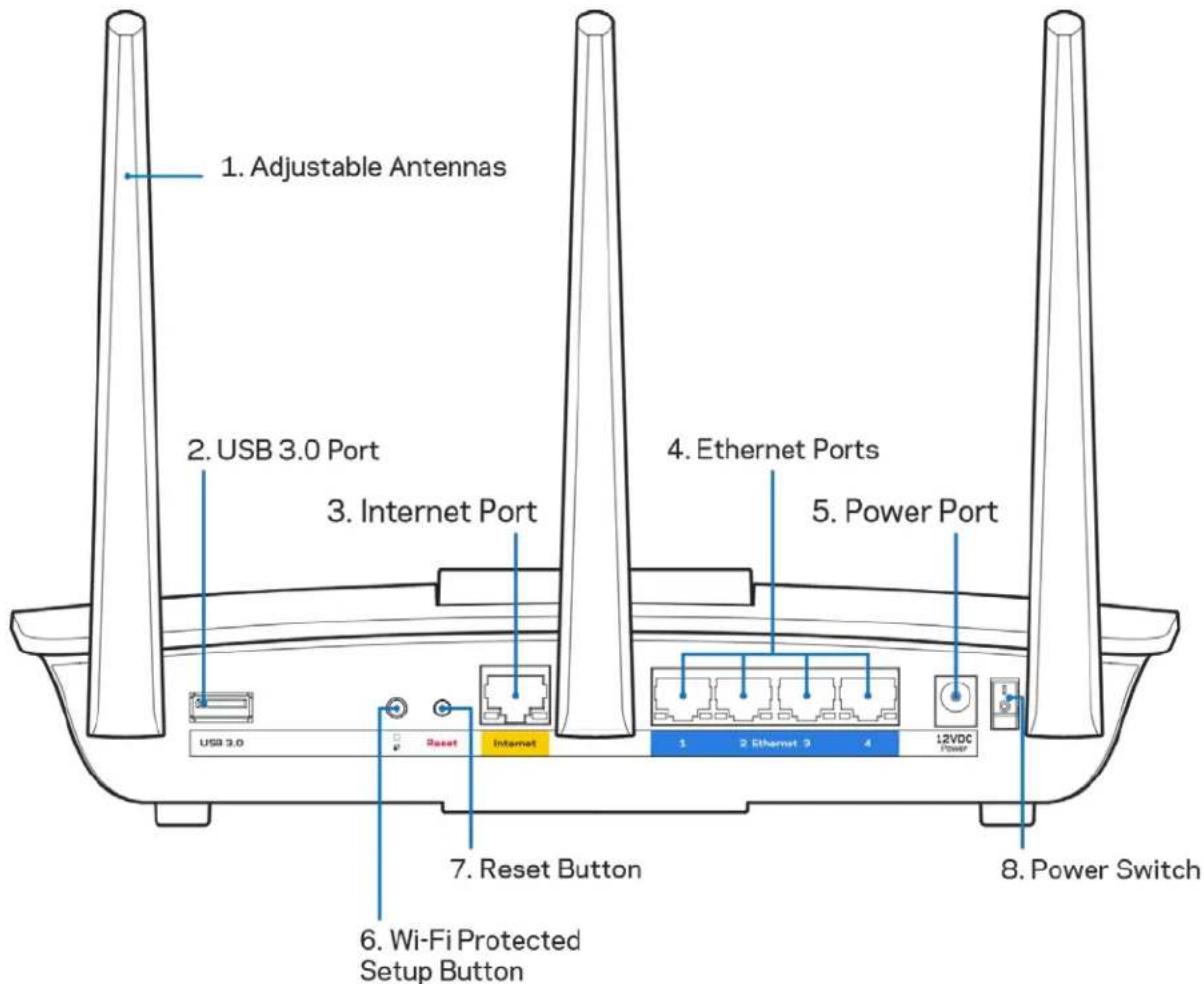
Adjustable antennas (1)—For best performance, position the antennas vertically as shown in the drawing.
USB 3.0 port (2)—Connect and share a USB drive or USB printer on your network or on the internet.
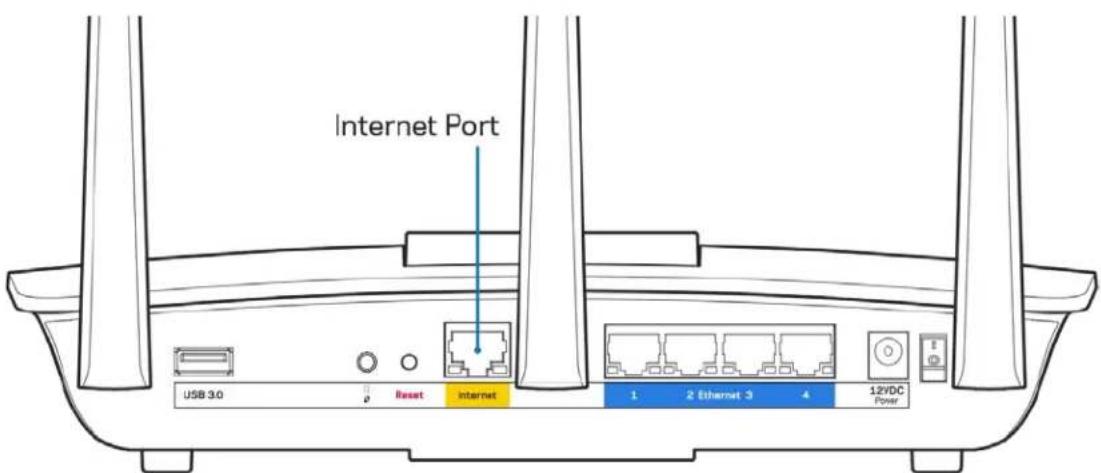
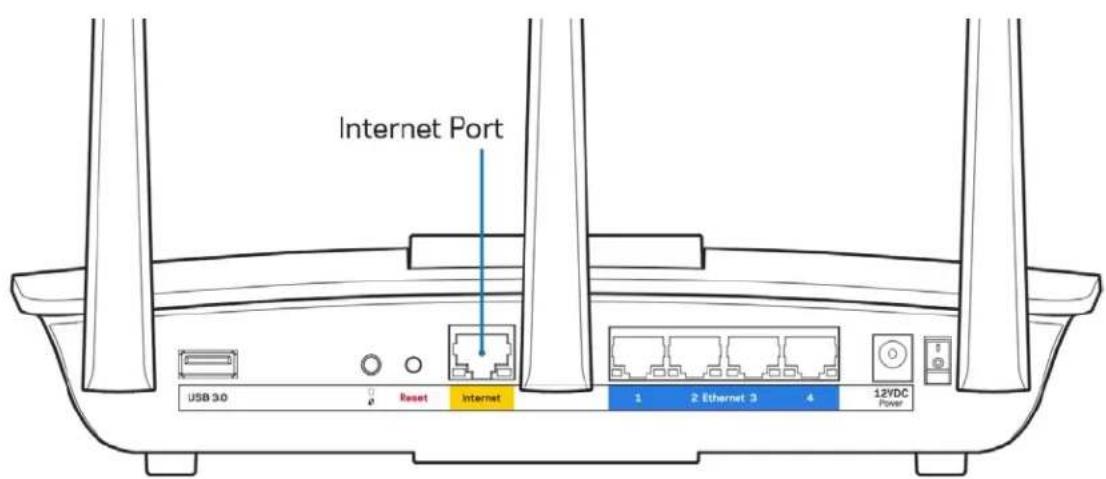
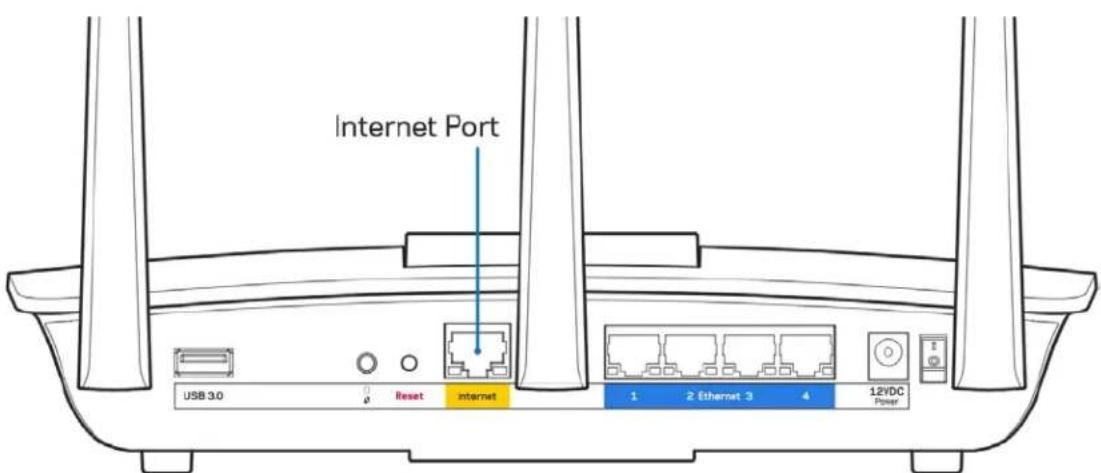
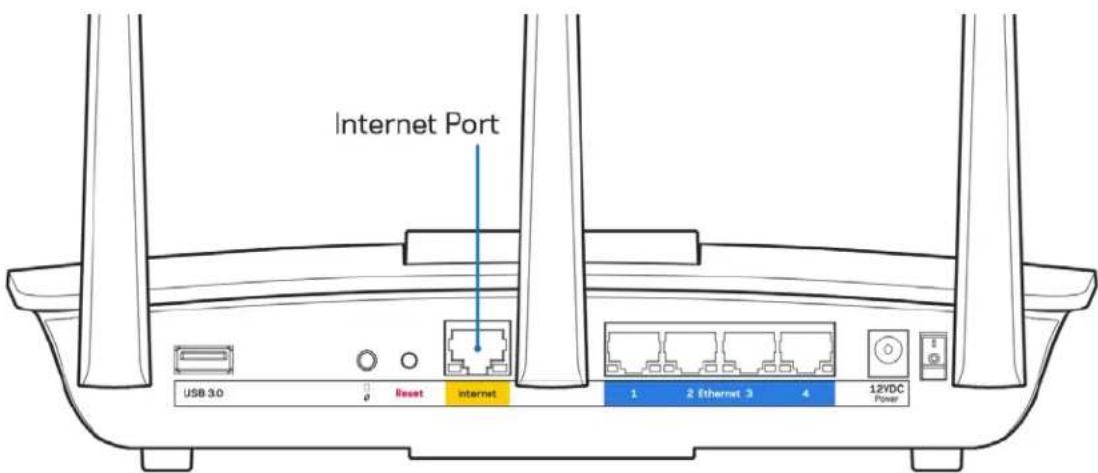
Internet port (3)—Connect an Ethernet cable to this yellow gigabit (10/100/1000) port, and to a broadband internet cable/DSL or fiber modem.
Note—For best performance, use CAT5e or higher rated cables on the Internet ports.
Ethernet ports (4)—Connect Ethernet cables to these blue gigabit (10/100/1000) ports, and to wired devices on your network.
Note—For best performance, use CAT5e or higher rated cables on the Ethernet ports.
Power port (5)—Connect the included AC power adapter.
Wi-Fi Protected Setup™ button (6)—Press to configure wireless security on Wi-Fi Protected Setup-enabled network devices.
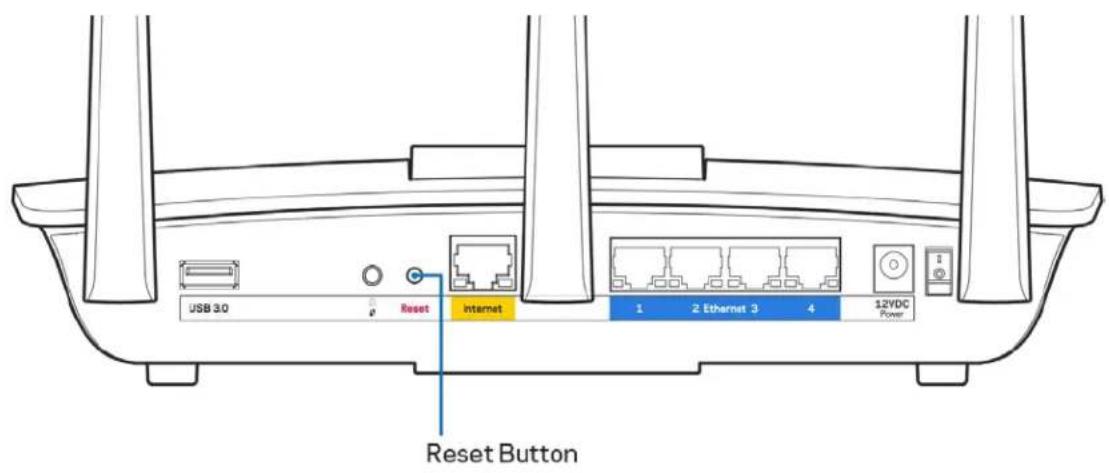
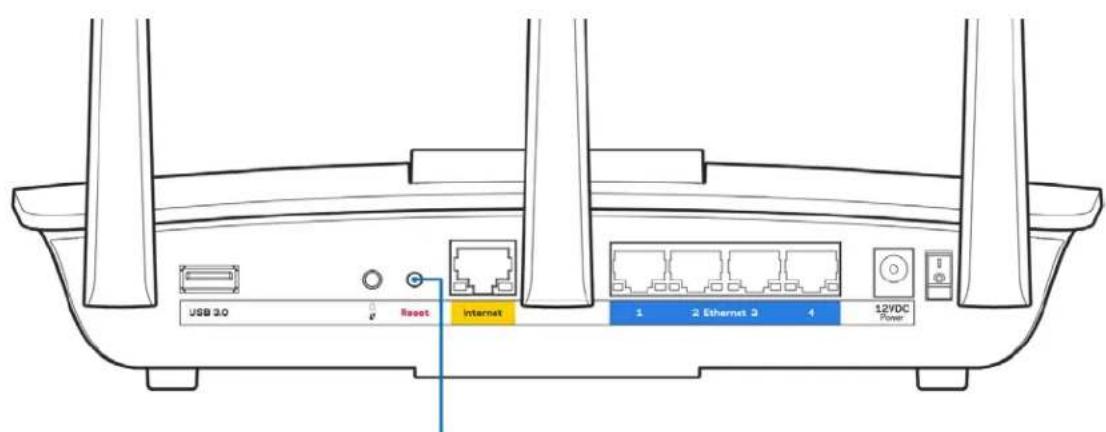
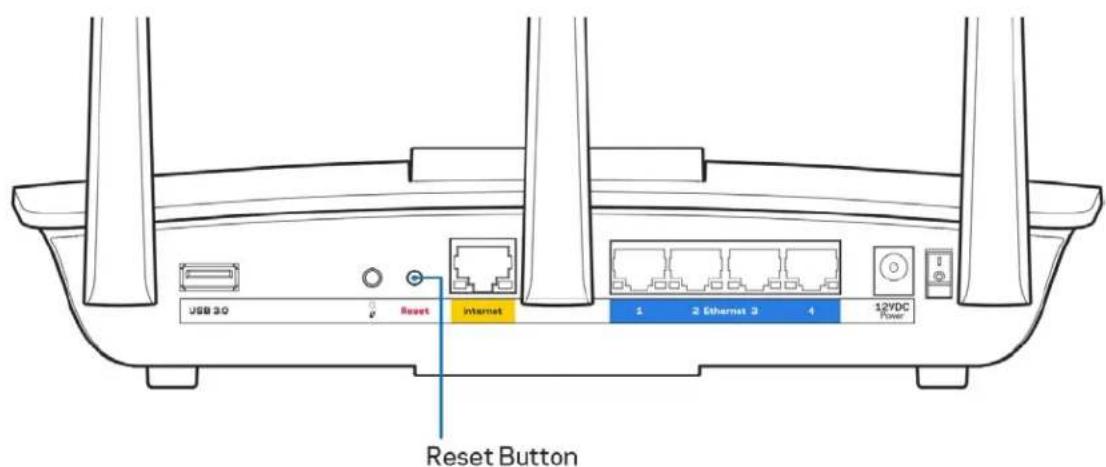
Reset button (7)—Press and hold until the illuminated Linksys logo starts flashing to reset the router to factory settings. You can also restore the factory settings using Linksys Smart Wi-Fi on the internet or mobile app.
Power switch (8)—Press | (on) to turn on the router.
Setting Up: Basics
Where to find more help
In addition to this user guide, you can find help at these locations:
- Linksys.com/support/EA7300 (documentation, downloads, FAQs, technical support, live chat, forums)
Note—Licenses and notices for third party software used in this product may be viewed on http://supportlinksys.com/en-us/license. Please contact http://supportlinksys.com/en-us/gplcodecenter for questions or GPL source code requests.
How to install your router
- To complete setup, you will need a computer to visit http://LinksysSmartWiFi.com in a web browser.
- Identify your equipment.
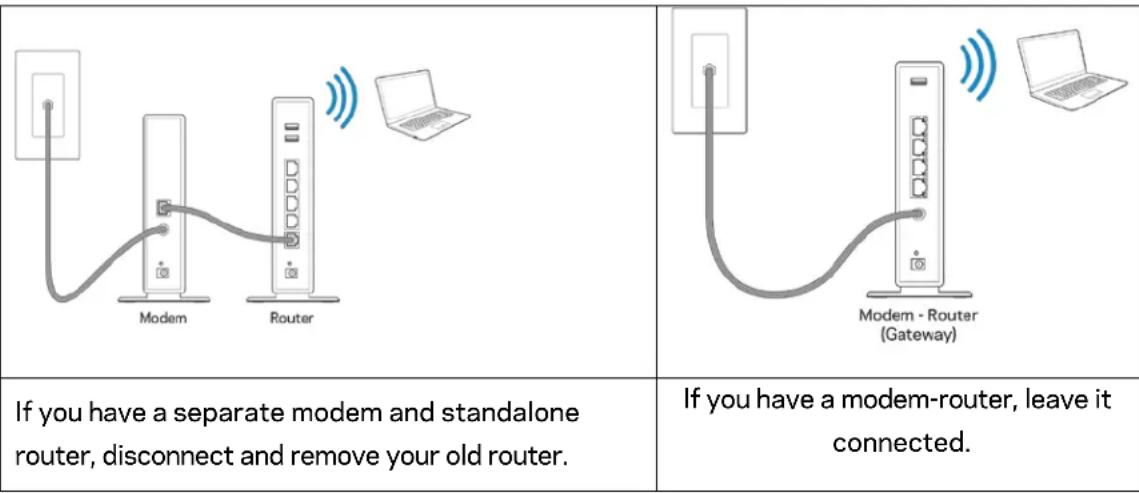
- Position the antennas straight up and plug in the router to a power source. Make sure the power switch in the I (on) position.
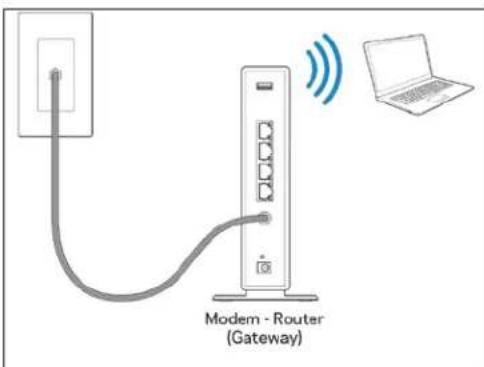
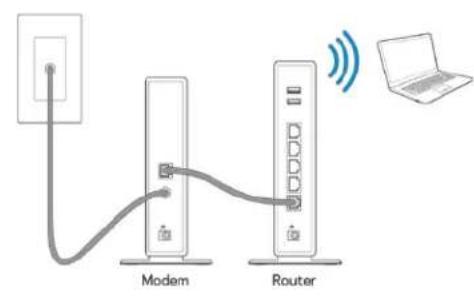
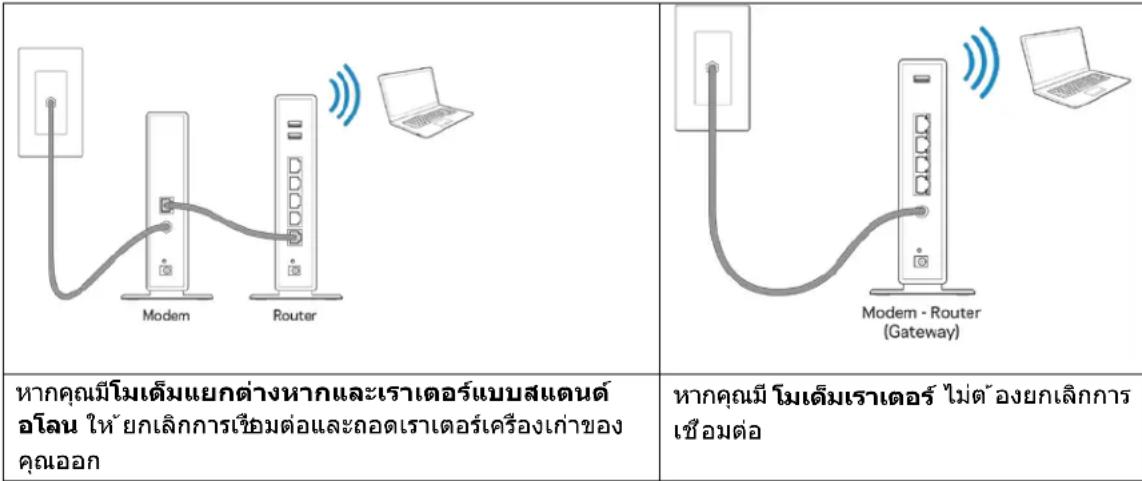
- Connect your router to your modem or modem router. Plug one end of the included internet cable to the yellow Internet port on your new router. If you have a modem, plug the other end into the Ethernet (LAN) port on the modem. If you have a modem-router, plug into any available port.
- Wait until the illuminated Linksys LED on the top of your router stops blinking and is solid white.
- Connect to the Wi-Fi name shown in the Quick Start Guide that came with your router. (You can change these details later.) If you need help connecting to the network refer to your device documentation at linksys.com/support/ea7300.
Note-You will not have internet access until router setup is complete.
- Enter http://LinksysSmartWiFi.com in a web browser. Follow the on-screen instructions to complete your router setup. You also can type 192.168.1.1 in a browser to start setup.
At the end of setup, follow the on-screen instructions to set up your Linksys Smart Wi-Fi account. Use Linksys Smart Wi-Fi to configure your router from any computer with an internet connection.
Manage your router's settings:
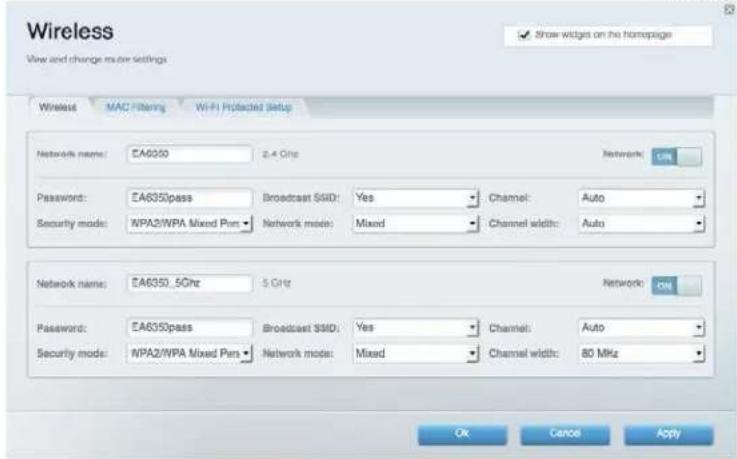
- Change your router's name and password
- Set up guest access
- Configure parental controls
- Connect devices to your network
- Test your internet connection speed
Note—As part of Linksys Smart Wi-Fi account setup, you will be sent a verification e-mail. From your home network, click the link in the email to associate your router with the Linksys Smart Wi-Fi account.
Tip-Print the next page, then record your router and account settings in the table as a reference. Store your notes in a safe place.
| 2.4 GHz Network Name | |
| Network Password | |
| 5 GHz Network Name | |
| Network Password | |
| Router Password | |
| Guest Network Name | |
| Guest Network Password | |
| Linksys Smart Wi-FiUsername | |
| Linksys Smart Wi-Fi Password |
How to Use Linksys Smart Wi-Fi
You can configure your router from anywhere in the world by using Linksys Smart Wi-Fi, but you can also configure your router directly from your home network. Linksys Smart Wi-Fi may be available for your mobile device, as well. See your device's app store for information.
How to connect to Linksys Smart Wi-Fi
To connect to Linksys Smart Wi-Fi:
- Open your computer's web browser.
- Go to wwwlinksysmartwifi.com and log in to your account.
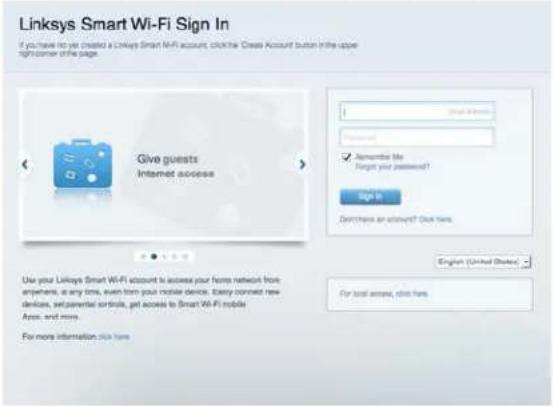
If you can't remember your password, click Forget your password? and follow the on-screen instructions to recover it.
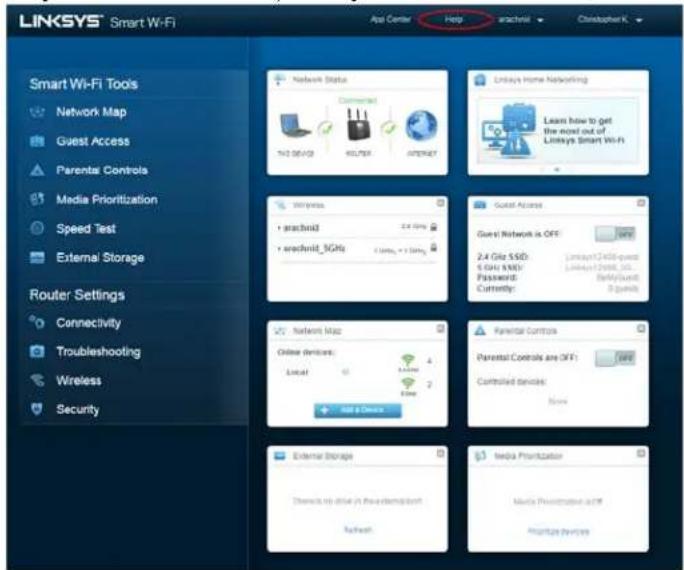
For Linksys Smart Wi-Fi help (connect to Linksys Smart Wi-Fi, then click Help at the top of the main screen.
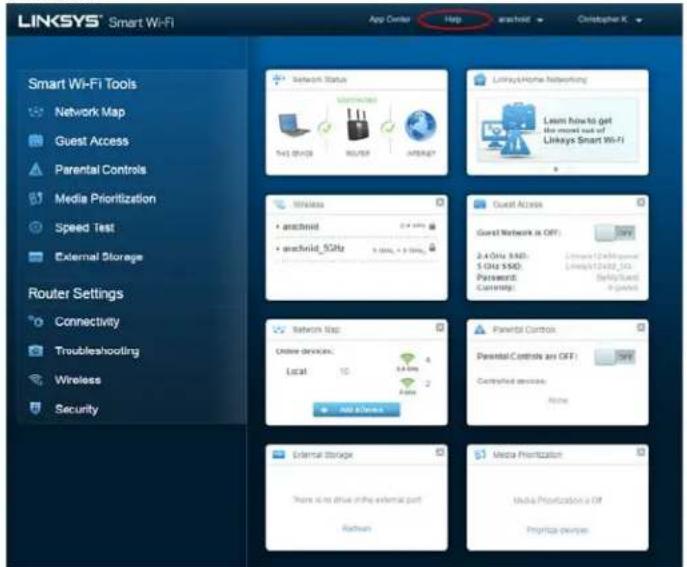
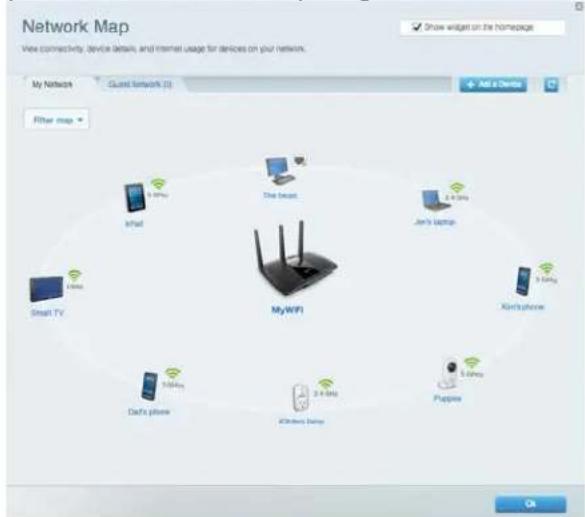
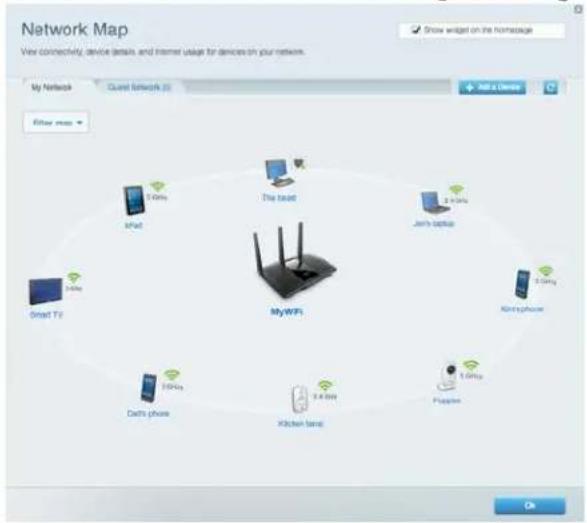
Network Map
Lets you display and manage all network devices connected to your router. You can view devices on your main network and your guest network, or display information about each device.
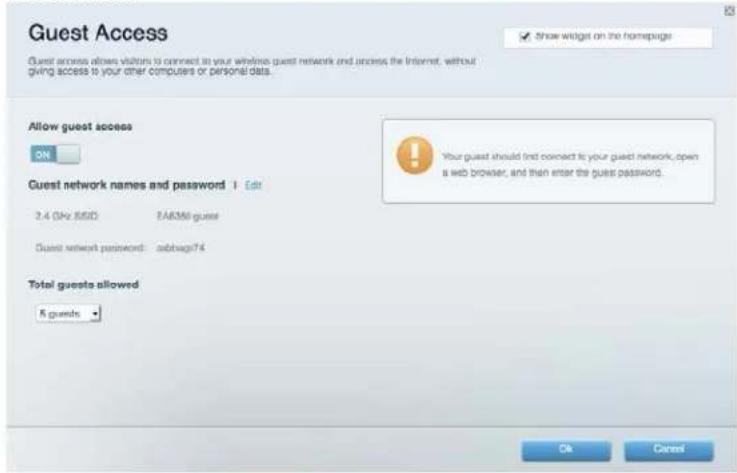
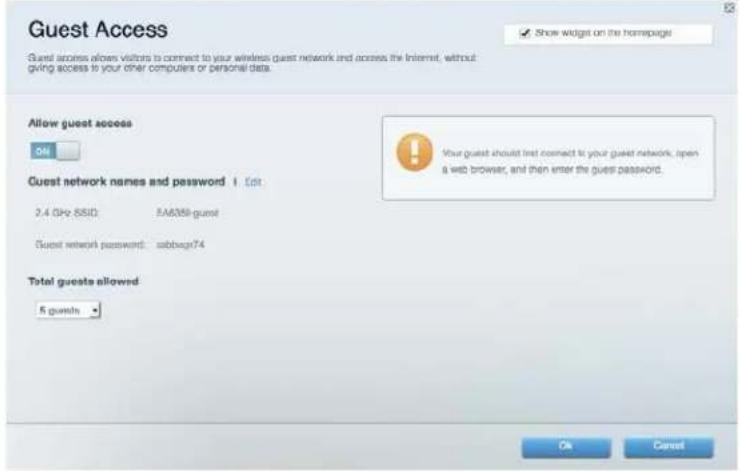
Guest Access
Lets you configure and monitor a network that guests can use without accessing all of your network resources.
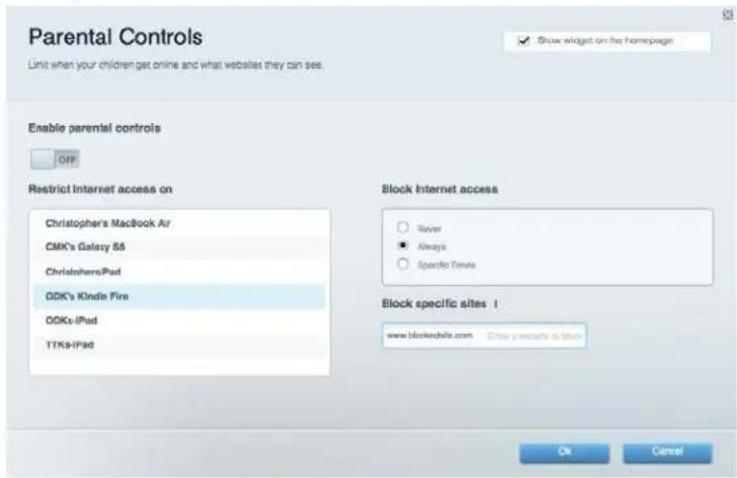
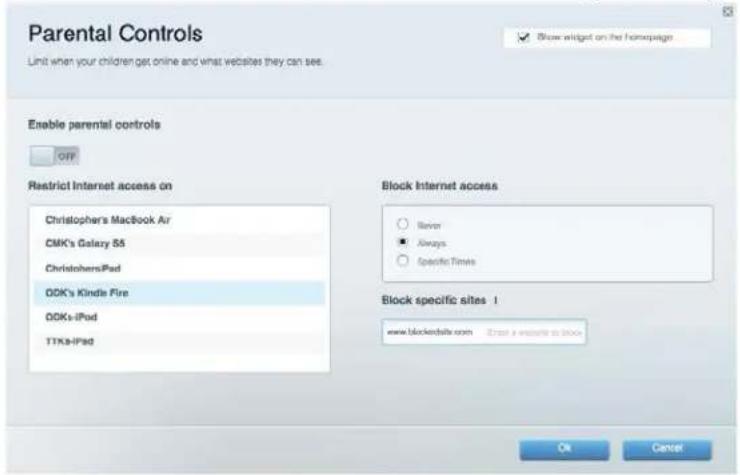
Parental Controls
Lets you block web sites and set internet access times.
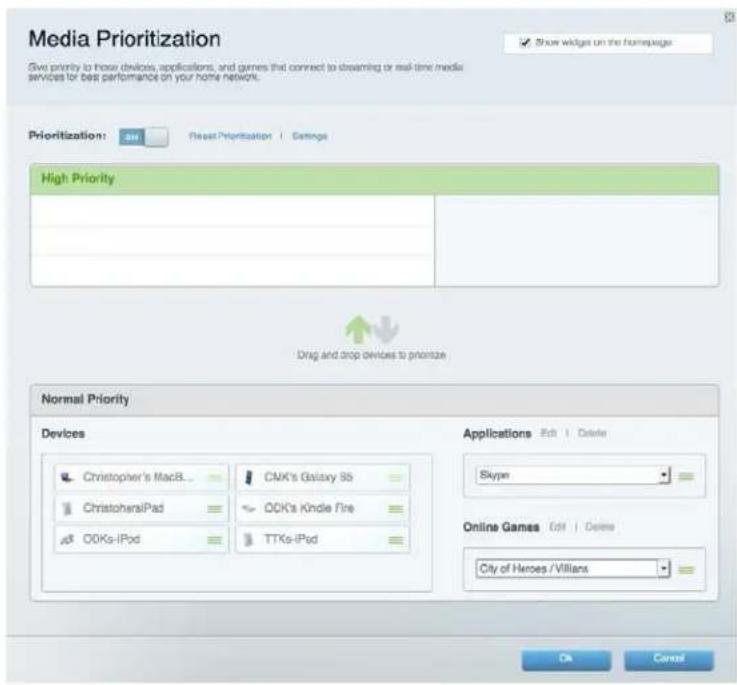
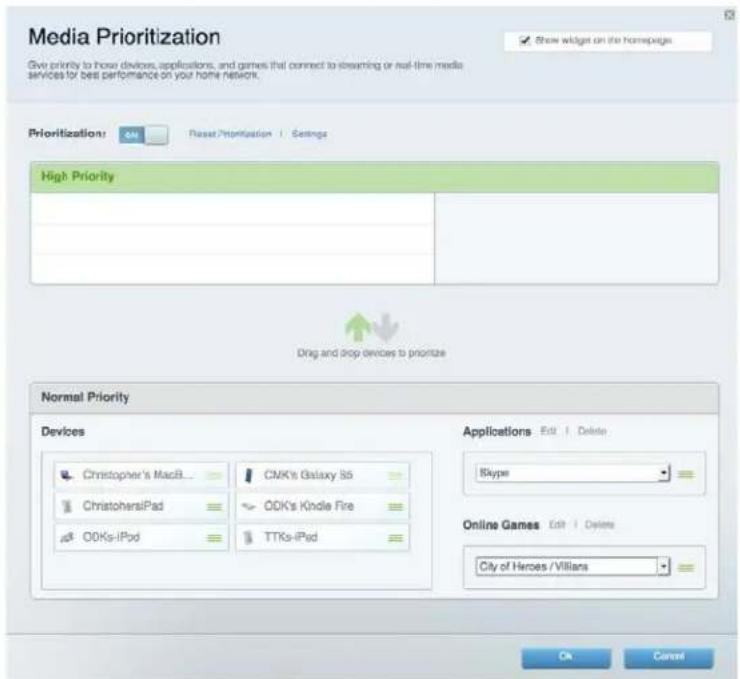
Media Prioritization
Lets you set which devices and applications have top priority for your network traffic.
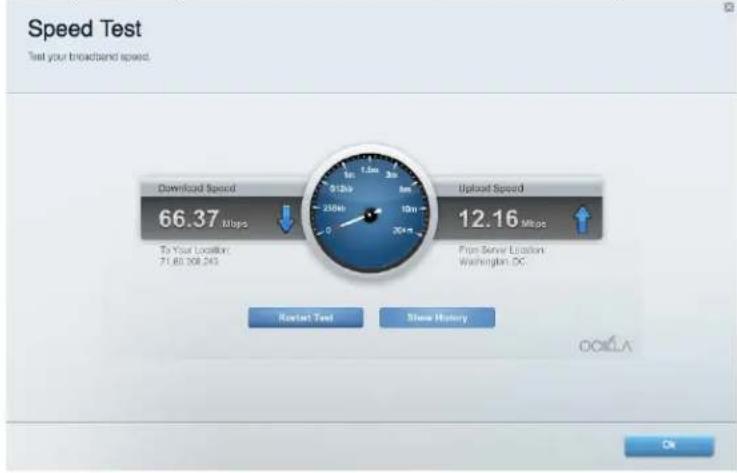
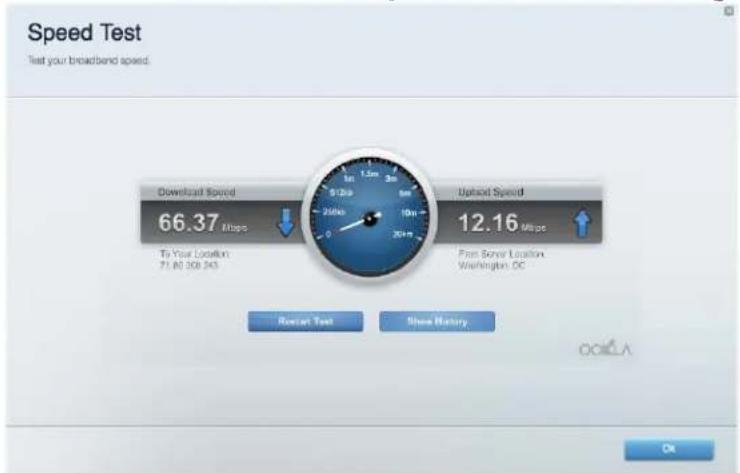
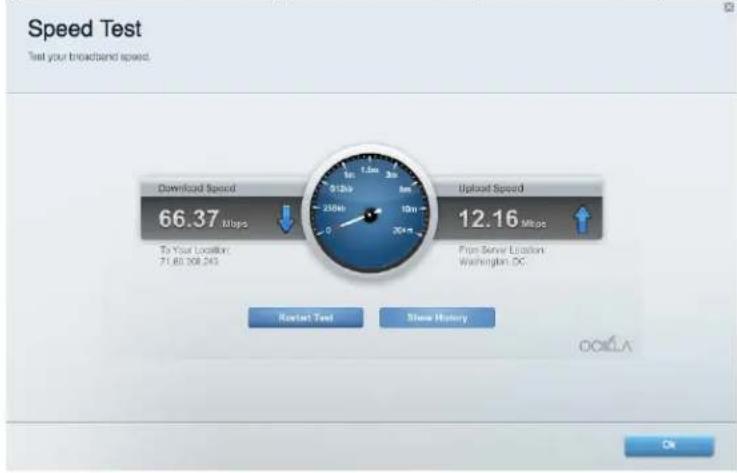
Speed Test
Lets you test your network's internet connection speed.
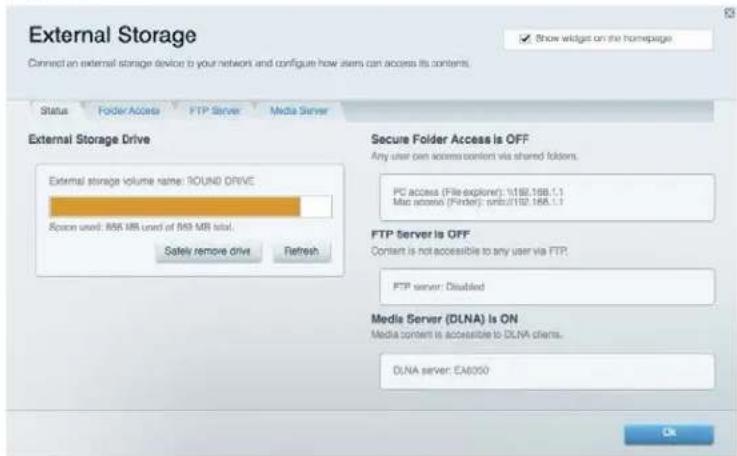
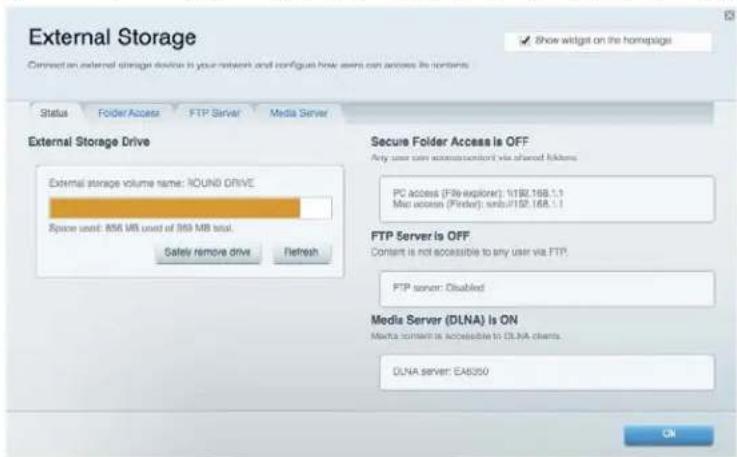
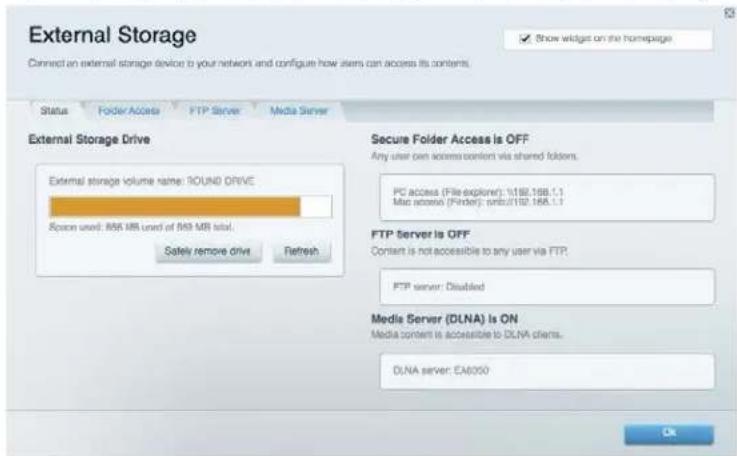
External Storage
Lets you access an attached USB drive (not included) and set up file sharing, a media server, and FTP access.
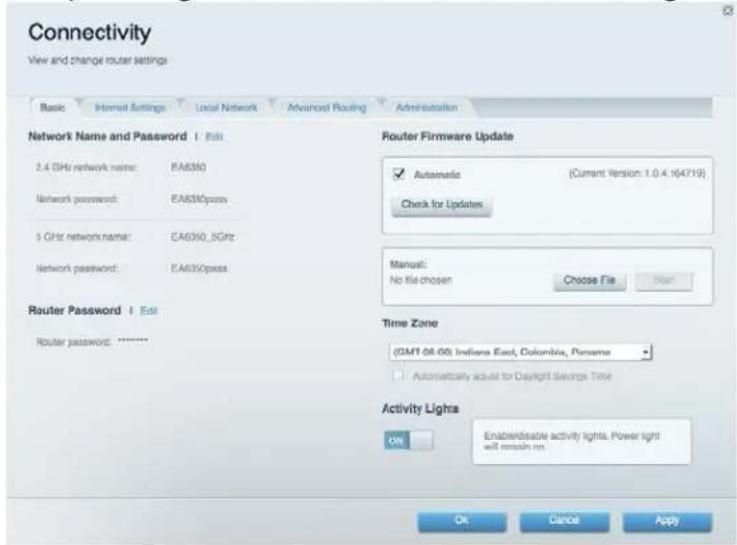
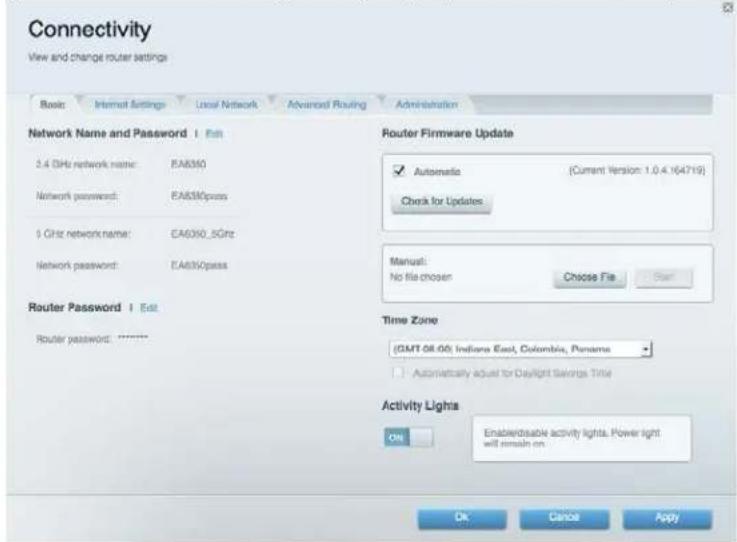
Connectivity
Lets you configure basic and advanced network settings.
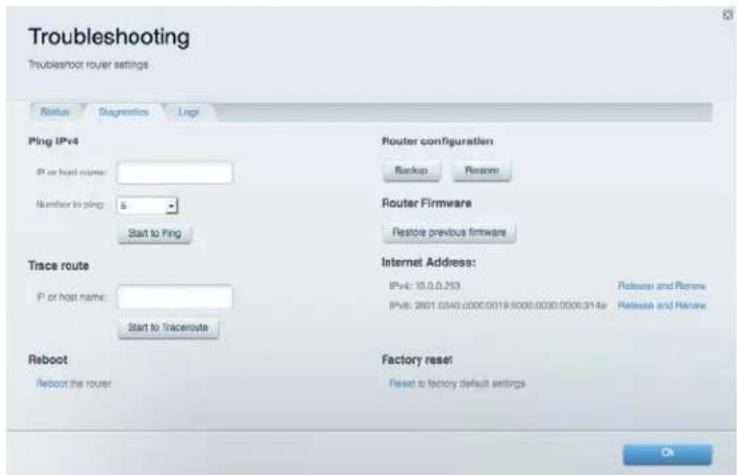
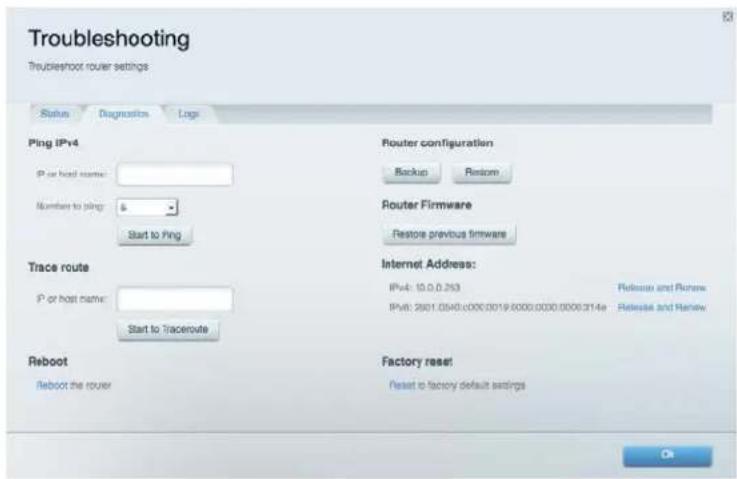
Troubleshooting
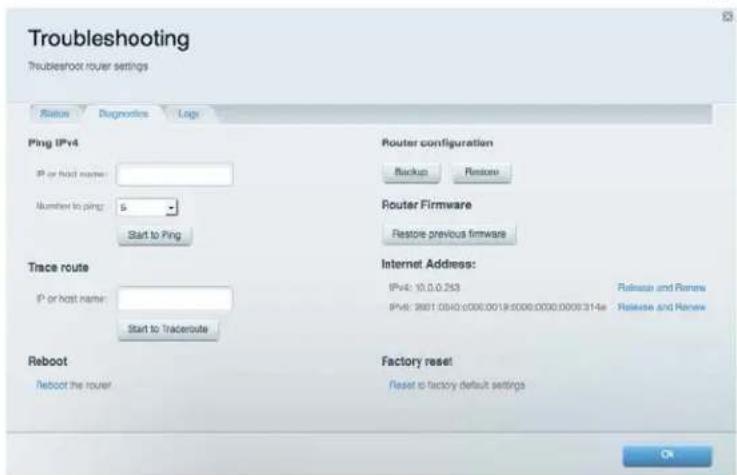
Lets you diagnose problems with your router and check the status of the network.
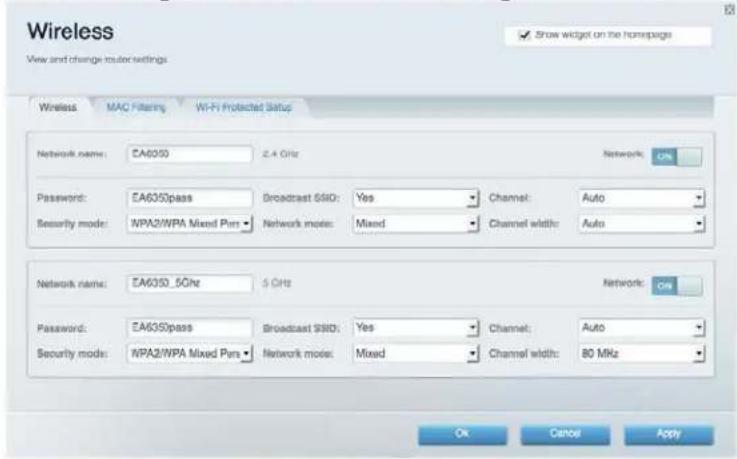
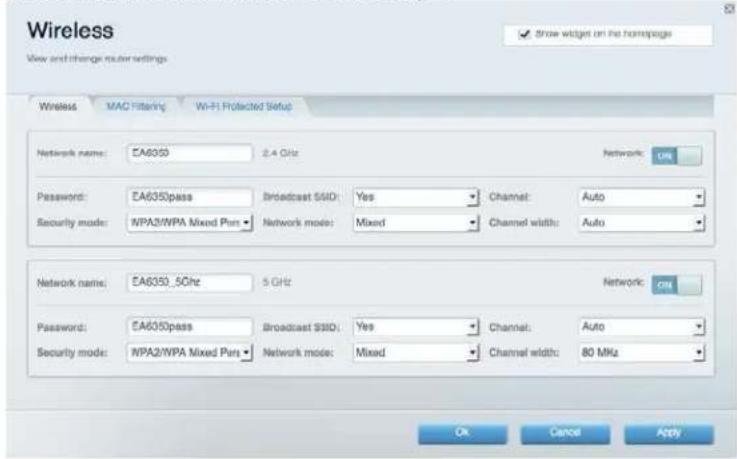
Wireless
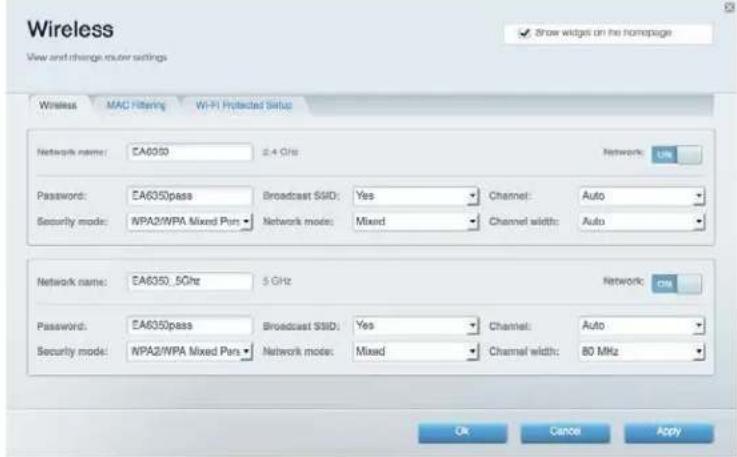
Lets you configure your router's wireless network. You can change the security mode, password, MAC filtering, and connect devices using Wi-Fi Protected Setup™.
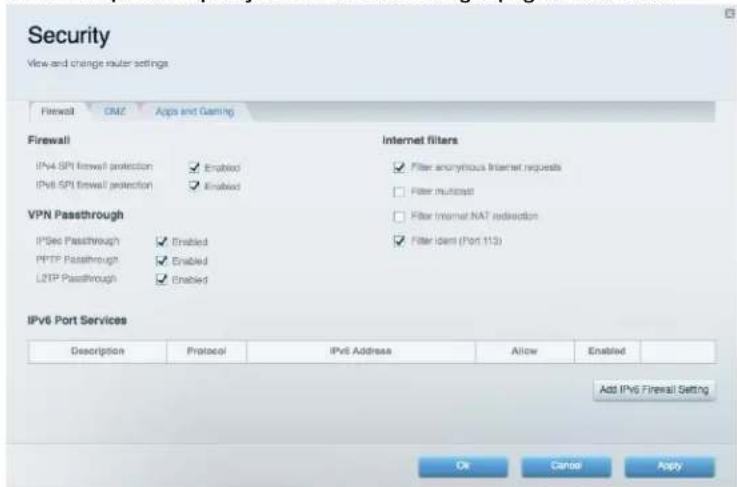
Security
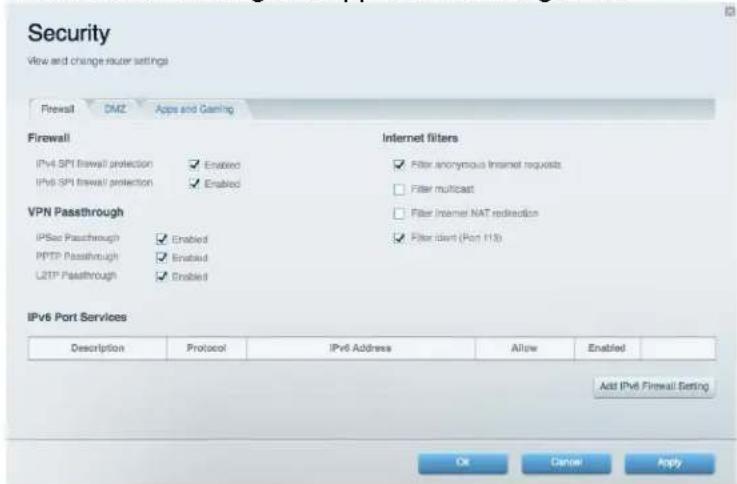
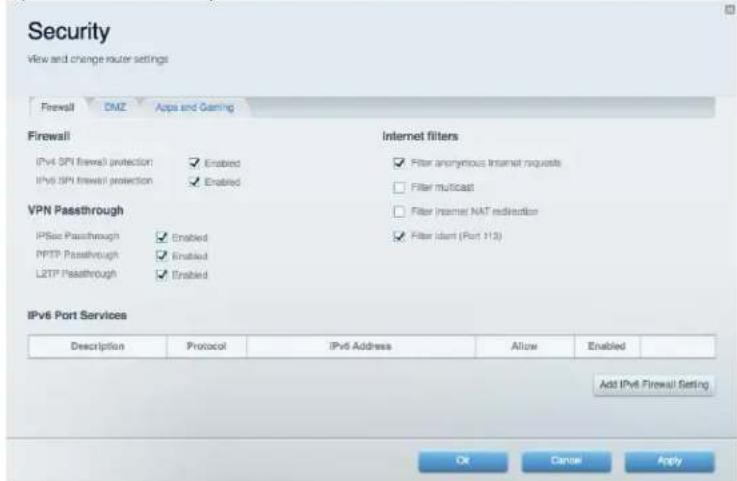
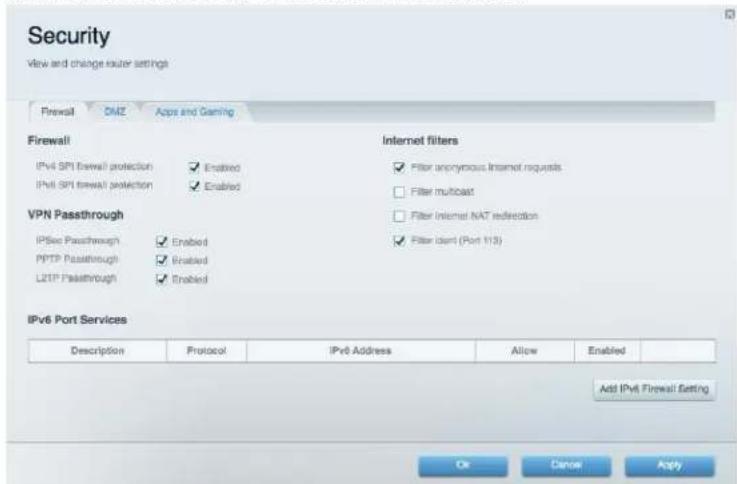
Lets you configure your router's wireless security. You can set up the firewall, VPN settings, and make custom settings for applications and games.
Troubleshooting
You can find more help from our award-winning customer support at Linksys.com/support/EA7300.
Your router was not successfully set up
If Linksys Smart Wi-Fi did not complete the setup, you can try the following:
- Press and hold the Reset button on your router with a paperclip or pin until the LED starts blinking (about 10 seconds). Install the router again.
- Temporarily disable your computer's firewall (see the security software's instructions for help). Install the router again.
If you have another computer, use that computer to install the router again.
Your Internet cable is not plugged in message
If you get a "Your Internet cable is not plugged in" message when trying to set up your router, follow these troubleshooting steps.
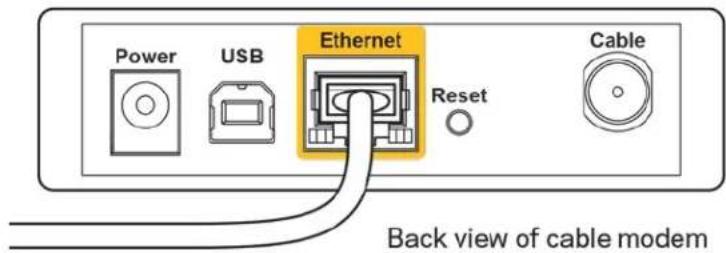
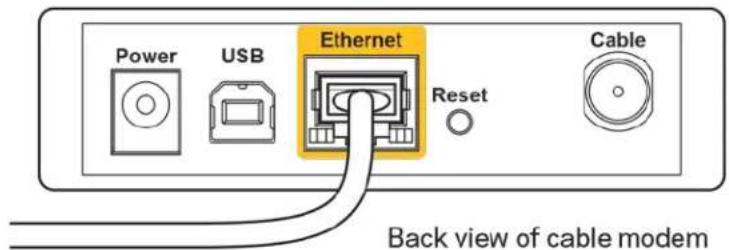
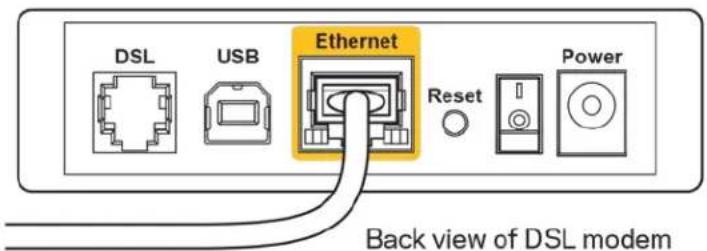
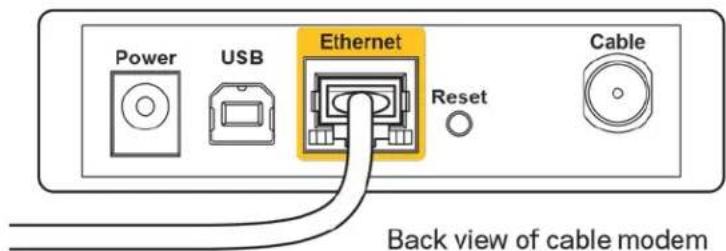
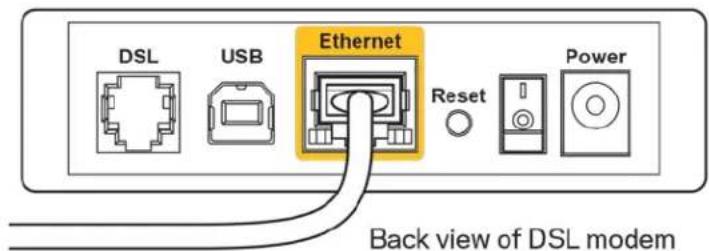
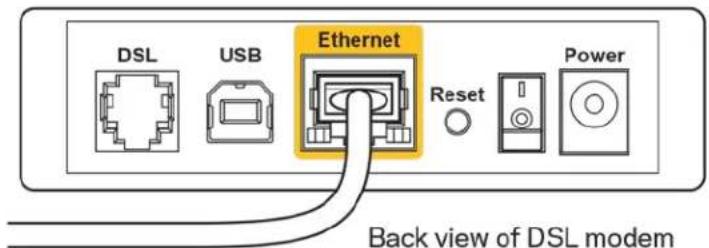
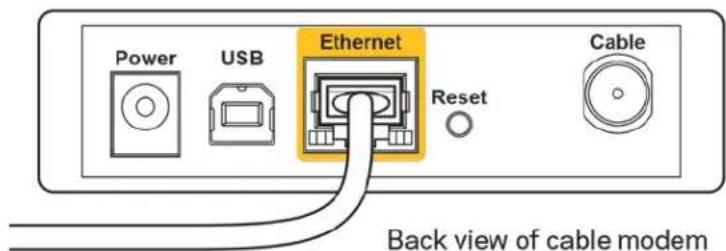
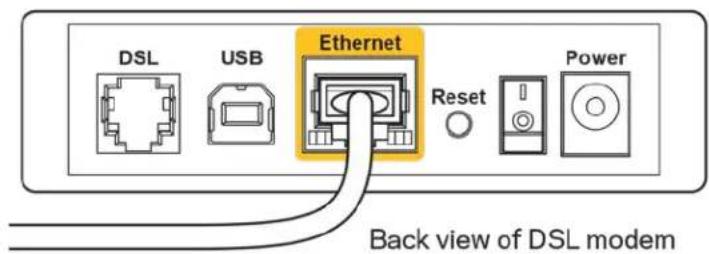
- Make sure that an Ethernet or internet cable (or a cable like the one supplied with your router) is securely connected to the yellow Internet port on the back of the router and to the appropriate port on your modem. This port on the modem is usually labeled Ethernet, but may be named Internet or WAN.
- Make sure that your modem is connected to power and is turned on. If it has a power switch, make sure that it is set to the ON or I (as opposed to O) position.
- If your internet service is cable, verify that the cable modem's CABLE port is connected to the coaxial cable provided by your ISP.
- If your internet service is DSL, make sure that the DSL phone line is connected to the modem's DSL port.

If your computer was previously connected to your modem with a USB cable, disconnect the USB cable.
Install the router again.
Cannot access your router message
To access your router, you must be connected to your own network. If you currently have wireless internet access, the problem may be that you have accidentally connected to a different wireless network.
To fix the problem on Windows computers, do the following*:
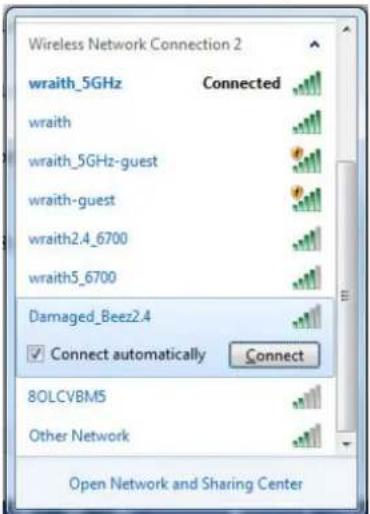
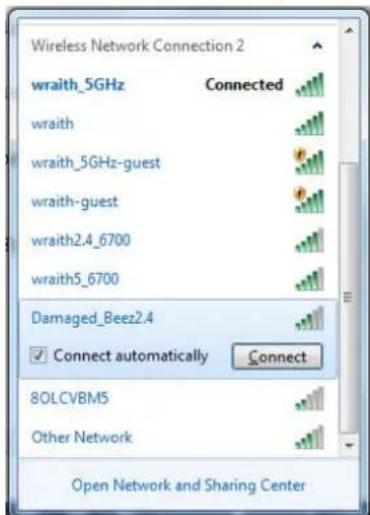
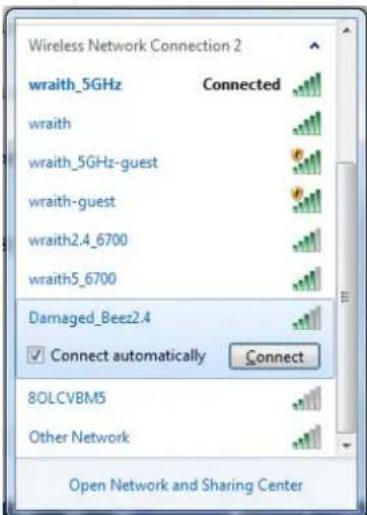
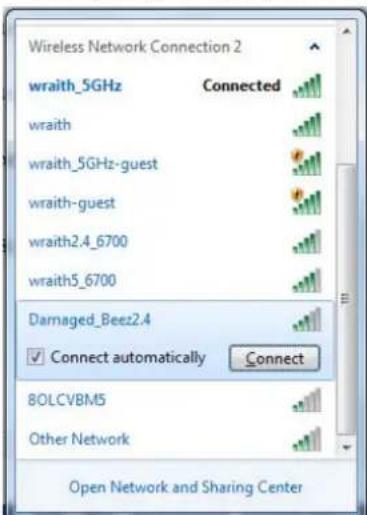
- On your Windows desktop, click on the wireless icon in the system tray. A list of available networks will appear.
- Click your own network name. Click Connect. In the example below, the computer was connected to another wireless network named wraith_5GHz. The wireless network name of the Linksys EA7300 router, Damaged Beez2.4 in this example, is shown selected.
-
If you are prompted to enter a network security key, type your password (security key) into the network security key field. Click OK.
-
Your computer will connect to the network, and you should be able to access the router.
*Depending on your version of Windows, there could be some differences in wording or icons in these steps.
To fix the problem on Mac computers, do the following:
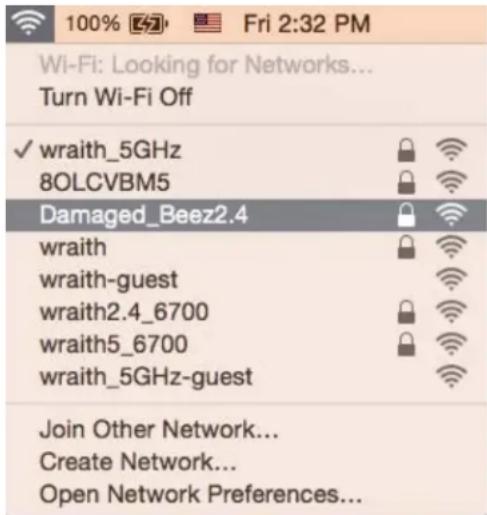
- In the menu bar across the top of the screen, click the Wi-Fi icon. A list of wireless networks will appear. Linksys Smart Wi-Fi has automatically assigned your network a name.
- In the example below, the computer was connected to another wireless network named wraith_5GHz. The wireless network name of the Linksys EA7300 router, Damaged_Beez2.4 in this example, is shown selected.
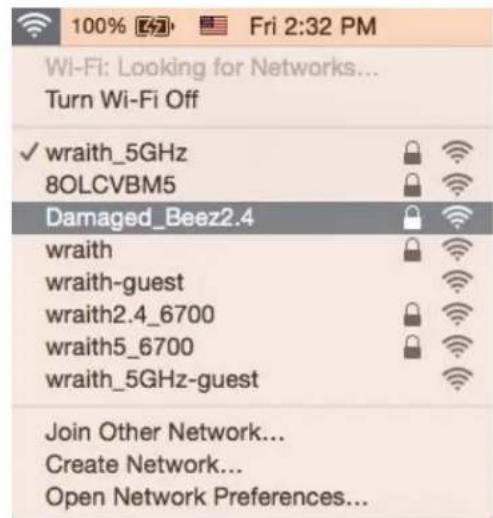
- Click the wireless network name of your Linksys EA7300 router (Damaged_Beez2.4 in the example).
- Type your wireless network password (Security Key) into the Password field. Click OK.
After setup
The internet appears to be unavailable
If the internet has difficulty communicating with your router, the problem may appear as a "Cannot find [internet address]" message in your Web browser. If you know that the internet address is correct, and if you've tried several valid internet addresses with the same result, the message could mean that there's a problem with your ISP or modem communicating with your router.
Try the following:
Make sure that the network and power cables are securely connected.
- Make sure that the power outlet that your router is connected to has power.
Reboot your router.
- Contact your ISP and ask about outages in your area.
The most common method of troubleshooting your router is to turn it off, then back on again. Your router can then reload its custom settings, and other devices (such as the modem) will be able to rediscover the router and communicate with it. This process is called rebooting.
To reboot your router using the power cord, do the following:
- Disconnect the power cord from the router and the modem.
- Wait 10 seconds, and reconnect the power cord to the modem. Make sure it has power.
- Wait until the modem's online indicator has stopped blinking (about two minutes). Reconnect the power cord to the router.
- Wait until the power indicator stops blinking. Wait two minutes before trying to connect to the internet from a computer.
To reboot your router using Linksys Smart Wi-Fi, do the following:
- Log in to Linksys Smart Wi-Fi. (See "How to connect to Linksys Smart Wi-Fi" on page 9.)
- Under Router Settings, click Troubleshooting
- Click the Diagnostics tab.
- Under Reboot, click Reboot.
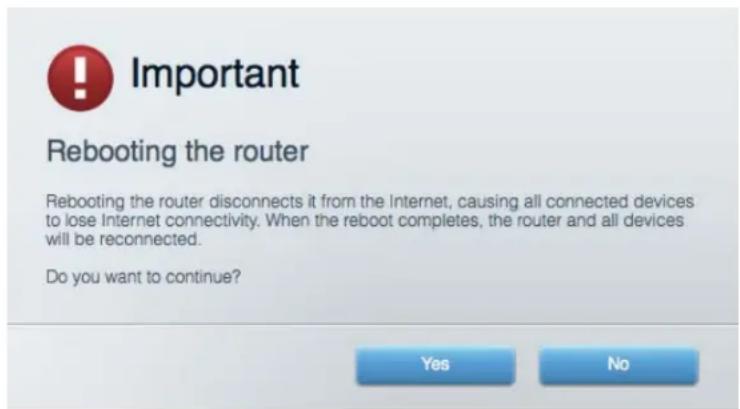
- Click Yes. The router will reboot. While the router is rebooting, all connected devices will lose their internet connection, and will automatically reconnect when the router is ready again.
Linksys Smart Wi-Fi does not open in your web browser
The latest versions of Google Chrome™, Firefox®, Safari® (for Mac® and iPad®), Microsoft Edge, and Internet Explorer® version 8 and newer work with Linksys Smart Wi-Fi.
Specifications
Linksys EA7300
| Model Name | Linksys Max-Stream AC 1750 MU-MIMO Gigabit Router |
| Model Number | EA7300 |
| Switch Port Speed | 10/100/1000 Mbps (Gigabit Ethernet) |
| Radio Frequency | 2.4 GHz and 5 GHz |
| # of Antennas | 3 external adjustable antennas |
| Ports | Power, USB 3.0, Internet, Ethernet (1-4) |
| Buttons | Reset, Wi-Fi Protected Setup, Power |
| LEDs | Top panel: illuminated Linksys logo Back panel: Internet, Ethernet (1-4) |
| UPnP | Supported |
| Security Features | WEP, WPA2, RADIUS |
| Security Key Bits | Up to 128-bit encryption |
| Storage File System Support | FAT, NTFS, and HFS+ |
| Browser Support | Latest versions of Google Chrome™, Firefox®, Safari® (for Mac® and iPad®), Microsoft Edge, and Internet Explorer® version 8 and newer work with Linksys Smart Wi-Fi |
Environmental
| Dimensions | 10.12" x 7.24" x 2.2" (257 x 184 x 56 mm) without antennas |
| Unit Weight | 22.43 oz. (636 g) |
| Power | 12V, 2.5A |
| Certifications | FCC, CE, Wi-Fi a/b/g/n/draft ac, Windows 7, Windows 8 |
| Operating Temperature | 32 to 104°F (0 to 40°C) |
| Storage Temperature | -4 to 140°F (-20 to 60°C) |
| Operating Humidity | 10% to 80% relative humidity, non-condensing |
| Storage Humidity | 5% to 90% non-condensing |
Specifications are subject to change without notice.
For regulatory, warranty, and safety information, go to Linksys.com/support/ea7300.
Maximum performance derived from IEEE Standard 802.11 specifications. Actual performance can vary, including lower wireless network capacity, data throughput rate, range and coverage. Performance depends on many factors, conditions and variables, including distance from the access point, volume of network traffic, building materials and construction, operating system used, mix of wireless products used, interference and other adverse conditions.
BELKIN, LINKSYS and many product names and logos are trademarks of the Belkin group of companies. Third-party trademarks mentioned are the property of their respective owners. Licenses and notices for third party software used in this product may be viewed here: http://supportlinksys.com/en-us/licenses. Please contact http://supportlinksys.com/en-us/gplcodecenter for questions or GPL source code requests.
© 2016 Belkin International, Inc. and/or its affiliates. All rights reserved.
LNKPG-00309 RevA00
LINKSYS
Gui de usuario
MAX-STREAM
AC1750
MU-MIMO
ROUTERGIGABIT
15 2
16 (J) Your Internet cable is not plugged in
17 .(A) Cnnot access your router
18
18 2
19 Fi-Linksys Smart Wi
20
- Linksys EA7300
20 1
eaiie 10
g
Linksys Jaa
Juiy jie bai jiyjuyi
6. Wi-Fi Protected Setup Button
a 1
USB
USSB
(2)USSG
DSL/(1000/100/10)gigabit Ethernet
3)
. Ethernet 120000000000000000000000000000000000000000000000000
1000/100/10) gigabit Ethernet (4) Ethernet
. Ethernet 1000000000000000000000000000000000000000000000000
(5)
.Wi-Fi Protected Setup
(6Wi-Fi Protected Setup)
iLsay. iinall 100! all agell bax sdy jagill f Linksys
(7)
Linkey's Hantwifil 1
Asall (j) | 8.
iiaie iiaie
y j 1
()
linksys.com/sup
e 1
http://supportlinksys.com/en
us/licenses-http://support.
GPL
a 1000000000000000000000000000000000000000000000000000000000
a gai 15
http://LinksysSmartWiFi.com 1
jui jia jiyu 2
Xua 2a 15
Aill jg pall gall Jaiy jainn agag Jaiia poalj jls
.3
4
E (Ethernet (LAN 1
Aolalololololololololololololololololololololololololololololololololololololololololololololololololololololololololololololololololololololololololololol
J 6
. linksys.com/support/ea7300e
Aaal 1 Jaaai Jaaai Jaaai aai
1.7
192.168.1.1
LinksysSmartWi-Fi LinksysSmartWi-Fi
JyJUaJyJyS
4
jssal 2k
()
y
cui jiyi ydiyai 4e yj
If you have any yet posted a Lrowsy Smart Air cushion, click this Create Amount button in the upper right corner of this page.


The your Likeys Stret Wi-Fi mobile app to assess your home network from anywhere, at any time, even from your mobile device. Easily connect new devices, set parental settings, jail access to Stret Wi-Fi mobile App, and more.
For non-termination 2013

a
(()Help ()LinksysSmartWi-Fi)LinksysSmartWi-Fidg
auii bi
Jg Jg Cagge g aagaaagaaagaaagaaagaaagaaagaaagaaagaaagaaagaaagaaagaaagaaagaaagaaagaaagaaagaaagaaagaaagaaagaaagaaagaaagaaagaaagaaagaaagaaagaaagaaagaaagaaagaaagaaagaaagaaagaaagaaagaaagaaagaa
a 1
biliuogai yagai
Aaal aaiyaae yagol gllgill cailbll o jzj 1
y
.FTP 1JgssllgBaaagllpplgclalldyJia Juaa (jra) USB
gduolglbsi1
aal aal alal alal alal alal alal
Wi-Fi Protected
. ^TM Setup

(Your Internet cable is not plugged in
Yount Interet gable jalnot bluged in (jibia yjyjyjyj)
- 12345678901234567890
ailll llll 1 1 1 1 1 1 1 1 1 1 1 1 1 1 1 1 1 1 1 1 1 1
WAN Internet
Jaaa yall gaii aal alaaaalee aagall gie
(0 1
DSL dDSL dDSL dDSL dDSL dDSL d
USBJLJU.USB JSLJALIyjy
A. all 15
(4)Cannot access your router
1 1
: *y y y Windows albi biny jy jy jy k
.1
wraith_5GHz 1aJyAeJyJyJyJyJyJyJyJyJyJyJyJyJyJyJyJyJyJyJyJyJyJyJyJyJyJyJyJyJyJyJyJyJyJyJyJyJyJyJyJyJyJyJyJyJyJyJyJyJyJyJ
.(g)OK g f j (securitykey)
21 ≤ 21 ≤ 21
gus
Jie 1111111111111111111111111111111111111
1
Jaljill aill 1s
Jy 4y y Jy 1y 1y 1y
Asgall Jus
Jg 10000000000000000000000000000000000000000000000000
y
gall jag gall jajll Jal 1.
2.
3.
4.
(9
:Li Lw .Linksys Smart Wi-Fi
Fi-Linksys-Impar-Wj:
Fi-LinkSyed Smart Wi
(1) Troubleshooting (Troubleshooting)
(1)Reboot 4.

Important
Rebooting the router
Rebooting the router disconnects it from the Internet, causing all connected devices to lose Internet connectivity. When the reboot completes, the router and all devices will be reconnected.
Do you want to continue?
Yes
No
I3rIeD oTrope 3
I3rIeI OTe3aI 4
HacTroBvAHe: OChOBn nOIoJKeHn6
Kbde da hamepnte oue nomou.. 6
Kak da nHcTaInpaTe pyTepa 6
Kak da n3noJ3BaTe Linksys Smart Wi-Fi 9
Kak da ce cBbpxeTe KbM Linksys Smart Wi-Fi 9
MpejkoBa KapTa. 10
DocTb3a roctn. 10
PonnteJckn KOHTpoJ 11
Ppnoptn3npaHe Ha MeDIn 11
Tect Ha ckopoctTa 12
BbHnO cbxpanenne 12
Cbbp3aHocT 13
OToTpaHraBaHe Ha Hen3npaBHOCTn 13
Бezична мрека 14
3auiTa 14
OTcTpaHraBaHe Ha Hen3npaBHOCTn 15
Baunr pyTep He e hactpoen ycneuho. 15
Cbo6eHne Your Internet cable is not plugged in (Baunrnt nHTepnT KabeI He e BkIoueH) 16
Cbo6eHneCannot access your router (He e Bb3MOxHO da ce ocBueCTBN doCTbndo Baun pyTeP) 17
Cleid nactpoikata 18
N3rIeKda Hma nHTepHET 18
LinksysSmartWi-FiHeceotbapBye66pay3bpa 20
CpeunphiKaun 21
Linksys EA7300 21
IaBA Bn Bb3MOXHOCT Da TcTeBaTe CKOpocTtHa HInHTepHeBp3KaTa Ha MpeKaTa.
BbHsHo cxbxpaHeHne
Дава Вьзмохноctда поучite doctbnpdo cbbp3aHO USB yctpoiCTBO (He e BkIIOueho BV KOMPKETA)ида наст ponte сnodeянeto Ha φaIIIOBE,MyTNIMEdneH cbpbp n FTP doctbnp.
CbBp3aHOCT
IaBA BV B3MOXHOCT Da KOHcHpynpaTe OCHOBnTE n pa3uHpeHnTe MpeKOBn HacTpoKn.
Отстразнын Неницьоста
Да Ви Вьзмохноctда павиTe Диагнocтуka Ha пpo6лемс рутepa И да поберразе CBCTОHneTo Ha Мржата.
Бeзшина мрека
Дава Ви Вьзможноctда конфигурирахе 6e3ЖИЧАТМржka Ha pyTepa.Можeteда смehnte peжima Ha 3aцит,a napolata,ФнлtpupaHTo no MAC aadpec, KaKTo n da CBbp3BaTe yCTpoiCTBa cnomoцт ha Wi-Fi Protected SetupTM.
3aunra
ДаВа Ви ВьзмохноCTда КОнфИгурпаTe 6e3ЖИЧАТа Мржа Ha pyTepa.Можete Дa HAcTpОпTe 3aцИТНATA CTeHa, HabtpoIKNITE 3a VPN, KaKTo I da HanpaBInTE nepcoHJIIN3IupaHn HAcTpOikN 3a npINOJKeHЯ Иrgn.
Rebooting the router disconnects it from the Internet, causing all connected devices to lose Internet connectivity. When the reboot completes, the router and all devices will be reconnected.
Do you want to continue?
Yes
No
- KlnkHeTe Bbpxy Yes (Ja). PyTepbT uecepectaptnpa. DOKaTo pyTepbT ce pectaptnpa, BCnukn Cbbp3aHn yCtpoiCTBa ige 3ary6r INTepHET Bpb3kata cn n ige ce CbbpXaT OTHOB aBTOMaTuHOb, KOraTo Toe e Rotob.
Linksys Smart Wi-Fi He ce oTbapB ye6 6pay3bpa
Ha- noBnte Bercn Ha Google ChromeTM, Firefox®, Safari® (3a Mac® n iPad®), Microsoft Edge n Internet Explorer® Bercn 8 n no-Hobpapotc Linksys Smart Wi-Fi.
Cpeunkaun
Linksys EA7300
| Име на модаlea | MU-MIMO rɪɡaʊbɪtɒв рутep Linksys Max-Stream AC 1750 |
| Homer ha moedela | EA7300 |
| Скорост на поста на превке лочаел | 10/100/1000 Mbps (rɪɡaʊbɪtɒв Ethernet) |
| Радионецтоа | 2,4 GHz и 5 GHz |
| Брòй сантын | З вьнши рergулируеми сантын |
| Портоve | Зхранвац, USB 3.0, InteRPHeT, Ethernet (1 - 4), |
| Бутон | Нуларе, Wi-Fi Protected Setup, зхранвае |
| С被告оюд | Горен панел: с verteши лого на Linksys Заден панел: InteRPHeT, Ethernet (1-4) |
| UPnP | Пордьржа ce |
| Зашатни Функции | WEP, WPA2, RADIUS |
| Битоve на клоча за зашиа | До 128-битовошифраве |
| Пордьъжka на phайLOBату систema за съхсанेнe | FAT, NTFS и HFS+ |
| Пордьъжka на бpayztырì | Най-hовITE вэрсий на Google Chrome™, Firefox®, Safari® (а Mac® и iPad®), Microsoft Edge и Internet Explorer® вэрсий 8 и по-нови разовет c Linksys Smart Wi-Fi |
Данни за Okолна та среда
Installation of routeren
Internet cable is not plugged in)
Av eipavio To mnuu A To kalwio Internet dev ev iai ouvdepevo> Ev w pooataeite va Eykataohtoe To router a, akolouhote ta napakatw bmu at aviuetwns trpoaunatw.
Bebaiowte TWC exTe ouvdoeKaal eva kaawio Ethernet n Internet (n eva kalwio otwo ekeivo Tou ouvoedei to router oac) otnv kipivn UpaInternet 0to iou wepoc tou router kai otny katalnn thupa Tou movteu aac. Autn ng upa sto movteu ouvnwoc ovopaetai Ethernet, wotso evdexetai va ovopaetzai kai Internet n WAN.
BeaiwTei oTo moVteo aC eivai ouvdepevo oTo peuKa evepyoToinevo.Av exiaakottnn evepytooinc/atevepyoToinc,BeaiwTei on Bioketai otn tEon ON n (kai oxi otn tEon O).
- Av n utnpesia Internet eivai kaawdiakn, 8eaiwthei6 oT to opaoovikko kaawio Tou npexetai ano tov ISP oac eivai ouvodoevo otn upa CABLE tou movtupoc.
Eav n utnpesia Internet eivai DSL oTn ypaun tnAepwou DSL eivai ouvodepevn otN UpaDSL tou
-
Av o unoayoiotnca nTav nponyouevwoc uovdeepevoc oTo movtu aC kaawdiou USB, attoovdeote to kawio USB.
-
EykataoTjote lav to router.
Rebooting the router disconnects it from the Internet, causing all connected devices to lose Internet connectivity. When the reboot completes, the router and all devices will be reconnected.
Do you want to continue?


Rebooting the router disconnects it from the Internet, causing all connected devices to lose Internet connectivity. When the reboot completes, the router and all devices will be reconnected.
Do you want to continue?
Yes
No
Rebooting the router disconnects it from the Internet, causing all connected devices to lose Internet connectivity. When the reboot completes, the router and all devices will be reconnected.
Do you want to continue?
Yes
No
- Noklikskiniet Yes (Ja). Marstrutetajs atsaknesies. Kamer marsrutetajs atsaknejas, visas pieslegtas ierices zaud interneta pieslegumu, un tas automatiski pieslegsies no jauna, kad marsrutetajs bus atkal gatavs.
Security (Beveiliging) 14
Problemen oplossen 15
De installment van de router was nicht succesvol 15
Melding: "Your Internet cable is not plugged in" (Uw internetkabel is nicht aangesloten)... 16
Melding: "Cannot access your router"(Geen toegang tot uw router) 17
Na de installatione 18
Verbinding makes Linksys Smart Wi-Fi
Security (Beveiling)
PykoBoDCTBONoIb30BaTeJIa
MAX-STREAM
AC1750
MU-MIMO
TINRAENTHbIMAPUPYTN3ATOP
MoelbEA7300
Copepkanne
063op npoDyKta 3
Bvnd cbepxy 3
BnD c3a. 4
HactpoKa: OCHOBbl 6
Kya o6paTntbca 3a dnoJHnTeIbHO nHΦopMauee. 6
Kak hactpoNTb mapuptyaTOp 6
Kak noIb30BaTbc8 Linksys Smart Wi-Fi 9
Подклоченke Linksys Smart Wi-Fi.. 9
Kapta cetn. 10
TocTeBOn Doctyn 10
PoInteJIbckn KOHTpoJIb 11
Ha3naeHne npnopTeTob 11
PpOBepKa cKOpocTn 12
BheHHe yCtpoiCTBO xpaHeHnaDaHHbIX. 12
IopKJIoueHn 13
Ponck nyctpaHene HeucnpaBHOte 13
BecnpoBoDna CBy3b. 14
Бezonauchocь 14
Поиск и устраненье Нениравност 15
MapspuTn3atop He 6bl ycpeHNO hacrpoen 15
CoobueHne KabeIb HHTepHeTa He noKIOueH 16
CoobueHne «MapuTuHaTOp HeoctypeH» 17
Pocle hactroki 18
IHTepHET no-tpexHemy HeIOCTypeH 18
Linksys Smart Wi-Fi He oKpbBaetcB 6pay3epe. 20
Texnueckne xapaKTepcntuKn 21
Linksys EA7300 21
Φn3nueckne xapaKTepeNTnKn 21
0630pnpoodykTa
Budcbepxy
IopcbueHHa 3m6nema Linksys - 3m6nema Linksys nocToHHo rOpHT, KOrda MapwpyTu3aTOp
IOKJIuOeH K INTEpHeTy. OHa MeJleHHO MIRaET BO BpeM nepe3aRpy3KN, TeCTnpOBaHn IIN
0bHOBLeHnI PO. OHa 6bICTpo MIRaET npN OUn6kax NOkJIoueHnI.
BnDc3aAn
IobopoTHbIe aHTehHbI (1) - nHaunnyuwei npOn3BODntelbHOCTn pa3MeCTnTe aHTehHbI BepTKaJIbHo, KaK noka3aHo Ha pncyHke.
IopT USB 3.0 (2) -MOxHNO NOdkLIOUHTb USB-HaKoONTeMb IIN npInTEp dJa npedocTabHeHn DaocTyna K Hm n3 lokaBHO cETn nn n3 INtePheTa.
IopT INTepeHeta (3) - NOKIOUHTe K 3OMy JKeIToM y nOpy 1 T6nt/c (10/100/1000) Ka6eJIb Ethernet, NOKIOUeHHb K INTepeHety (NocpeCTBOM WnPOKOnoLoCHoro Ka6eJIbHOrO MoEma, DSL IIN ONTOBOJIOKOHORO MOeMa).
IpmeHne. Ira haunyuue npou3BodumelbHocmu pekomehdyemc ucnolzobamkabeu Ethernet kamezopuu 5e unu 6olee Bicokoi.
IopTb Ethernet (4) -nodklouHTe K 3TNm CnHm nopTaM 1 6 T / c (10/100/1000) Ka6eN Ethernet, noDKLIOUeHHbE K npOBdHbIM yCTpo'CTBaM B BaWeJ IOKaJIbHOcTeN.
Приимechanical. Дд Нашичшew npou3BodumelbHocmu pekomehdyemcru cnoJIb3OBamb KaBeLu Ethernet kamezopuu 5e uLU 6oJee BbICOKoi.
Pa3bem nHTaHn (5) - noKIOUHTe K 3TOMy pa3bemy aAnTEp NITAHn, BXoJusn B KOMnEKT NOCTaBKn.
KhoNka HacTpoKn Wi-Fi (6) — haxMnte 3Tu KhoNky dIy HacTpoKn 6e3oNaChocTn 6ecnpoBdoHoi cTe n dIe CeTeBbix ycTpoNCTB, noDepXnBaIoUnx Wi-Fi Protected Setup (WPS).
Khonka c6poca (7) — Haxmnte u ydepknaBate 3Ty KhoNky, noka noDCBEeHHa 3M6JIema Linksys He NaHET MInatb, YTObI c6pocntb HAcTPOnKn Mapwpytn3aTopa n BepHyt b a6pnHbte HacTpoKn. TAKKe moXHO BOCCTAHOBNTb a6pnHbte HAcTPOnC n NOMOuBc TpaHnCb Linksys Smart Wi-Fi B INTEpHeTe nn C NOMOuB MO6nJbHoro npNJoxEHHa.
BbIKIOuHaTeIb NHTAHn8 (8) - HaxMMte | (BKnI. ,yTo6bl BkIIOUHTb MapwpyTN3aTOp.
HactpoIka: OCHOBbl
Kya o6paTb8a 3a dOpHnTeIbHo nHΦopMaun
BdoonHeHneK3OMypyKOBoDCTByNoJIb3OBaTeIeM0XHOHaHTNIOJe3HyIO HΦOpMaUIO 3deCb:
Your router was not successfully set up (Instalacia smerovača nebola uspešná) 15
Hlasyenie Your Internet cable is not plugged in(Internetovy kabel nie je pripojeny) 16
Hlase Nie access your router(Nie je mozny pristup k smerovaču) 17
Po instalacii 18
Your router was not successfully set up (Instalácia smerovača nebola úspeřné)
Ak sluzba Linksys Smart Wi-Finedokonc'nastavenie, vyskusajte nasledujuci postup:
- wavinrnnn rnrnnn nnnn nn nnnn nn nnnn nn nnnn nnnn nnnn nnnn nnnn nnnn nnnn nnnn nnnn nnnn nnnn nnnn nnnn nnnn nnnn nnnn nnnn nnnn nnnn nnnn nnnn nnnn nnnn nnnn nnnn nnnn nnnn nnnn nnnn nnnn nnnn nnnn nnnn nnnn
2.
- wuunannn n 25000000000000000000000000000000000000000000000000000000000000000000000000000
- 4
- 5
- waiyaiyai Wi-Fi 10000000000000000000000000000000000000000000000000000000000000000000000000000000000000000000
wnunnnaaannnnnnaaennnnnnaananaananaananaananaananaananaananaananaananaananaananaananaananaananaananaananaananaananaananaananaananaananaananaananaananaananaananaananaananaananaananaananaananaananaananaananaananaananaananaananaananaananaananaananaananaananaananaananaananaananaan ana anaa
- http://LinksysSmartWiFi.com 192.168.1.1
ynnnnaaannnnaananaananaananaananaananaananaananaananaananaananaananaananaananaananaananaananaananaananaananaananaananaananaananaananaananaananaananaananaananaananaananaananaananaananaananaananaananaananaananaananaananaananaananaananaananaananaananaananaananaananaanaraannnna
nun
nnae nnae nae neae neae
wn Linksys Smart Wi-Fi wil
Reset ()uunnnnnaa nnnnnnnnnnnnnnnnnnnnnnnn WLED
Reset Button
- 1
wanaaauuuaaauauauuuuauuauuuuuuuuuuuuuuuuuuuuuuuuuuuuuuuuuuuuuuuuuuuuuuuuuuuuuuuuuuuuuuuuuuuuuuuuuuuuuuuuuuuuuuuuuuuuuuuuuuuuuuuuuuuuuuuuuuuuuuuuuuuuuuuuuuuuuuuuuuuuuuuuuuuuuuuuuuuuuuuuuuuuuuuuuuu
aannnnn nn nnnnnnnnnnnnnnnnnnnnnnnnnnnnnnnnnnnnnnnnnnnnnnnnnnnnnnnnnnnnnnnnnnnnnnnnnnnnnnnnnnnnn
- wnnnnaaanaananaanana aDSL nannnnaa anananaananaananaananaananaananaananaananaananaananaananaananaananaananaananaananaananaananaananaananaananaananaananaananaananaananaananaananaananaananaananaananaananaananaananaananaananaananaananaananaananaananaananaananaananaananaananaananaananaananaan ana
-
wnnnaunnnaaannnnaanennnnaanennnne nnnnne nnnnne nnnnne nnnnne nnnnne nnnnne nnnnne nnnnne nnnnne nnnnne nnnnne nnnnne nnnnne nnnnne nnnnne nnnnne nnnnne nnnnne nnnnne nnnnne nnnnne nnnnne nnnnne nnnnne nnnnne nannnee
-
今日的节日快乐!
aannnnnnaeennnnneaaanee
ywnnnaaannnnnnaeennnnne aen nnnnnnne ane annnne ean ne
wnnnnnaaannnnnneennnnnneeeWindows n vnnn*:
- uunnnnnaa Windows 11eannnnaaennnnaaennnnnnaaennnnnnaaennnnnnaaennnna
- anan' aannnnaaannnnn nn Connect (nana) nanaananaananaananaananaananaananaananaananaananaananaananaananaananaananaananaananaananaananaananaananaananaananaananaananaananaananaananaananaananaananaananaananaananaananaananaananaananaananaananaananaananaananaananaananaananaananaananaananaananaanana an
-
nuaiaiaiaiaiaiaiaiaiaiaiaiaiaiaiaiaiaiaiaiaiaiaiaiaiaiaiaiaiaiaiaiaiaiaiaiaiaiaiaiaiaiaiaiaiaiaiaiaiaiaiaiaiaiaiaiaiaiaiaiaiaiaiaiaiaiaiaiaiaiaiaiaiaiaiaiaiaiaiaiaiaiaiaiaiaiaiaiaia
-
4
*aannnnnnaanennnnnnnnnnnnnnnnnnnnnnnnnnnnnnnnnnnnnnnnnnnnnnnnnnnnnnnnnnnnnnnnnnnnnnnnnnnnnnnnnnnnnnnnnnnnnnnnnnnnnnnnnnnnnnnnnnnnnnnnnnnnnnnnnnnnnn
WanavnSun JuynuuaawwauoMacInVni
- 1027a1027a1027a1027a1027a1027a1027a1027a1027a1027a1027a1027a1027a1027a1027a1027a1027a1027a1027a1027a1027
- www.wjw.net/wwwnet/wwwnet/ (www.wjw.net) wjw.net Password (wwwnu) nIN OK (nna)
75
Jnnaaennnnnnnnnnn
nannananaananaananaananaananaananaananaananaananaananaananaananaananaananaananaananaananaananaananaananaananaananaananaananaananaananaananaananaananaananaananaananaananaananaananaananaananaananaananaananaananaananaananaananaananaananaananaananaananaananaanaraannnaaannnnnnaannnnnnaannnnnnaannnnnnaannnnnnaannnnnnaannnnnnaannnnnnaannnnnnaannnnnnaannnnnnaannnnnnaannnnnnaannnnnnaannnnnnaannnnnnaannnnnnaannnnnnaannnnnnaannnnnnaannnnnnaannnnnnaannnnnnaannnnnnaannnnnnaannnnn
wannvni:
- W
- 1
nntnnn nnnnnnnnnnnnnnnnnnnnnnnnnnnnnnnnnnnnnnnnnnnnnnnnnnnnnnnnnnnnnnnnnnnnnnnnnnnnnnnnnnnnnnnnnnnnnnnnnnnnnnnnnnnnnnnnnnnnnnnnnnnnnnn
iannnnnnaaennnnnnae annnnae nnnnnae
Maan anananaananaananaananaananaananaananaananaananaananaananaananaananaananaananaananaananaananaananaananaananaananaananaananaananaananaananaananaananaananaananaananaananaananaananaananaananaananaananaananaananaananaananaananaananaananaananaananaananaananaanara
- Linksys Smart Wi-Fi (“端到端”端到端) Linksys Smart Wi-Fi™ (TM)
- u Router Settings (nTnTnTnTn) nTrnTntroubshooting (nunTny)
- nannu Diagnostics (n
- luReboot (y) nReboot (y)

Important
Rebooting the router
Rebooting the router disconnects it from the Internet, causing all connected devices to lose Internet connectivity. When the reboot completes, the router and all devices will be reconnected.
Do you want to continue?
Yes
No
- 5n Yes (2) 1uauuaaunau uauuuuauauauauauauauauauauauauauauauauauauau
Linksys Smart Wi-Fi 1
Google ChromeTM, Firefox® Safari® (Mac® iPad®), Microsoft Edge ® Internet Explorer® 8 Linksys Smart Wi-Fi
N
Linksys EA7300
| zhouxu | Linksys Max-Stream AC 1750 MU-MIMO Gigabit Router |
| muaaiaiaiaiaiaiaiaiaiaiaiaiaiaiaiaiaiaiaiaiaiaiaiaiaiaiaiaiaiaiaiaiaiaiaiaiaiaiaiaiaiaiaiaiaiaiaiaiaiaiaiaiaiaiaiaiaiaiaiaiaiaiaiaiaiaiaiaiaiaiaiaiaiaiaiaiaiaiaiaiaiaiaiaiaiaiaiaiaiaiaiaiaiaiaiaiaiaiaiaiaiae | |
| 10/100/1000 Mbps (Gigabit Ethernet) | |
| 2.4 GHz uae 5 GHz | |
| ### | ### |
| USB 3.0, ### | (1-4) |
| Wi-Fi Protected Setup, ###/### | |
| ### | ### |
| ### | ### |
| ### | ### |
| UPnP | ### |
| WEP, WPA2, RADIUS | |
| ### | ### |
| ### | ### |
| Storage File System Support (###) | FAT, NTFS uae HFS+ |
| ### | ### |
| ### | ### |
nunuunna
| ywann | 10.12'' × 7.24'' × 2.2'' (257 × 184 × 56 mm.) wyyuoy |
| ywannwunwann | 22.43 aauy (636 n.) |
| ywanny | 12V, 2.5A |
| ywannwunwannwannw | FCC, CE, Wi-Fi a/b/g/n/draft ac, Windows 7, Windows 8 |
| ywannwunwannwannw | 32 80 104°F (0 80 40°C) |
| ywannwunwannwannw | -4 80 140°F (-20 80 60°C) |
| ywannwunwannwannw | wyyuoy 10% 80%, lvyuoy uuuu |
| ywannwunwannwannw | 5% 80% lvyuoy uuuu |
wnnnn nn nnnnnnnnnnnnnnnnnnnnnnnnnnnnnnnnnnnnnnnnnnnnnnnnnnnnnnnnnnnnnnnnnnnnnnnnnnnnnnnnnnnnnnnnnnnnnnnnnnnnn
BELKIN, LINKSYS 7uauauauauauauauauauauauauauauauauauauauauauauauauauauauauauauauauauauauauauauauuuuuuuuuuuuuuuuuuuuuuuuuuuuuuuuuuuuuuuuuuuuuuuuuuuuuuuuuuuuuuuuuuuuuuuuuuuuuuuuuuuuuuuuuuuuuuuuuuuuuuuuuuuuuuuuuuuuuuuuuuuuuuuuuuuuuuuuuuuuuuuuuuuuuuuuuuuuuuuuuuuuuuuuuuuuuuuuuuuuuuuuuuuuuuuuuuuuuuuuuUUUUUUUUUUUUUUUUUUUUUUUUUUUUUUUUUUUUUUUUUUUUUUUUUUUUUUUUUUUUUUUUUUUUUUUUUUUUUUUUUUUUUUUUUUUUUUUUUUUUUUUUUUUUUUUUUUUUUUUUUUUUUUUUUUUUUUUUUUUUUUUUUUUUUUUUUUUUUUUUUUUUUUUUUUUUUUUUUUUUUUUUUUUUUUUUUUUUUUUU
© 2016 Belkin International, Inc.
LINKSYS
Kullanici Kilavuzu
MAX-STREAM
AC1750
MU-MIMO
GIGABIT ROUTER
Model No.EA7300
icindekiler
Urune Genel Bakis 3
Ustten gRonum 3
Arkadan gorenum 4
| Boyutları | 257 x 184 x 56 mm (10,12" x 7,24" x 2,2") antensiz |
| Birim A关键字 | 636 g (22,43 oz.) |
| Güç | 12V, 2,5A |
| Sertifikalar | FCC, CE, Wi-Fi a/b/g/n/draft ac, Windows 7, Windows 8 |
| İşletim Sıcalıgli | 0 - 40°C (32 - 104°F) |
| Depolama Sıcalıgli | -20 - 60°C (-4 - 140°F) |
| Çalisma Nem Seviyesi | %10 - %80 arasi®,®,®,®,®,®,®,®,®,®,®,®,®,®,®,®,®,®,®,®,®,®,®,®,®,®,®,®,®,®,®,®,®,®,®,®,®,®,®,®,®,®,®,®,®,®,®,®,®,®,®,®,®,®,®,®,®,®,®,®,®,®,®,®,®,®,®,®,®,®,®,®,®,®,®,®,®,®,®,®,®,®,®,®,®,®,®,®,®,®,®,®,®,®,®,®,®,®,®,®,® |
| Depolama Nem Seviyesi | %5 ile %90arasında®,®,®,®,®,®,®,®,®,®,®,®,®,®,®,®,®,®,®,®,®,®,®,®,®,®,®,®,®,®,®,®,®,®,®,®,®,®,®,®,®,®,®,®,®,®,®,®,®,®,®,®,®,®,®,®,®,®,®,®,®,®,®,®,®,®,®,®,®,®,®,®,®,®,®,®,®,®,®,®,®,®,®,®,®,®,®,®,®,®,®,®,®,®,®,®,®,®,®, ® |
HanaHTyBaHHa: OCHOBn
Wireless (Khong day)
Cho phép ban dát cau hinh mang khong day cua bó dinh tuyén. Ban co the thay doi ché do bao mat, mat khau, loc MAC và két néi cac thiét bi bang cach su dung Wi-Fi Protected SetupTM.
Security (Báo mát)
Cho phép ban dát cau hinh bao mat khong day cua bo dinh tuyén. Ban co the thiet lap tuong lura, cai dát VPN vatao cai dát tuy chinh cho cac ung dung va tro choi.
Xu ly su co
Ban co the tim them tro giup tu bo phan htro khach hang da gnh nhieu gai thong cua chung toi tai dia chi Linksys.com/support/EA7300.
Bô dinh tuyén cua ban chuà duoc thiet lap thanh cóng
Néu Linksys Smart Wi-Fi khong hoàn tát thiet lap, ban có thecach sau:
An va giur nut Reset (Dat lai) trn bo dinh tuyen bang mot Cay keg iy hoc dinh ghim cho den khi den LED bat dau nhap nhay (khoang 10 giy). Cai dat lai bo dinh tuyen.
Tam thoi tát vuong lva trén may tinh cua ban (xem huong dan cua phan mem bao ma t de duoc tro giup). Cai dai lai bo dinh tuyen.
- Néu ban có may tinh khac, hyay su dung may tinh do de cai dai lai bo dinh tuyén.
Thong bao Chua cam cap Internet
Neu ban nhán duoc thong bao "Chua cam cap Internet" khi dang cai dāt bo dinh tuyén, hyi lam theo cac buoc khac phuc su co sau.
Hay chan rang cap Ethernet hoac Internet (hoac cap gion voi loai duyc cung cap cung voi bo dinh tuyen) duoc cam chan vao cong Internet mau vang o mat sau cua bo dinh tuyen va vao cong thich hop tren modem. Cong nay tren modem thuong co nhan Ethernet, nhung co the duyc datt ten la Internet hoac WAN.
Hay chac chan rang modem cua ban da cam ngon va da bat. Neu bo dinh tuyen co cong tac ngon, hay chac chan rang cong tac da o vi tri ON (BAT) hoac | (trai ngoc voi O).
- Neu dich vu Internet cua ban la dich vu cap, hay kiem tra va dam bao rang cong CABLE (CAP) cua modem cap da duoc két não voi cap dong truc do ISP cua ban cung cap.
- Néu dìch vú Internet cúa bān là dìch vú DSL, háy dam bao ràng duòng day dièn thǒài DSL dà duòc két néi vòi cúa cóng DSL cúa modem.
- Néu trucd, may tinh cua bana d két noi voi modem bang cap USB, hay rut cap USB ra.
Cai dāt lai bó dinh tuyén.
Thong bao Khong the truy nhap bo dinh tuyen
Dé truy nhap bó dinh tuyén, ban phai két néi voi mang cua rieng ban. Nou ban hiên co truy nhap Internet khong day, su có co the la do ban dā vô tinh két néi voi mot mang khong day khac.
Dé khac phuc su co trén may tinh chay Windows, hy lam theo cac buoc sau*:
- Trèn mān hinh Windows, bóm vào biéu tóng khòng day trèn khay hé thǒng. Danh sách cac mang hiên có sé xuát hiên.
- Bam vao tén mang rieng cua ban. Bam Connect (Két ), Trong vú du duoi day, may tinh dà duoc két néi vao mot mang khong day khac co ten wraith_5GHz. Tens mang khong day cua bó dinh tuyén Linksys EA7300, trong vú du nay la Damaged Beez2.4, dà duoc chon nhu minh hoa.
-
Néu ban duoc nhac nhap khoa bao māt mang, hy nhap māt khau (khoa bao māt) cua ban vao truong network security key (khóa bao māt mang). Bām OK.
-
May tinh cua ban se két noi vao mang va ban se co the truy nhap bó dinh tuyén.
*Tuy thuoc vao phien ban Windows cua ban ma co the có môt so su khac nhau trong cau chur hay cac bieu tuong o' cac buoc nay.
Dé khac phuc su co trén may tinh Mac, hy lam theo cac buoc sau:
- Trèn thanh menu ngang trèn cung män hinh, hyy bam vao biéu tuong Wi-Fi. Danh sách cac mang khòng day sé xuát hiên. Linksys Smart Wi-Fi dà tv dong gán tén cho mang cua ban.
- Trong vú du duǒi day, may tinh dā duoc két néi vào mot mang khòng day khac có tén wraith_5GHz. Tén mang khòng day cúa bó dinh tuyén Linksys EA7300, trong vú du nay là Damaged_Beez2.4, dā duoc chon nhu minh hoa.
- Bám vào tên mang khongDay cua bó dinh tuýen Linksys EA7300 cua bàn (trong ví du này la Damaged_Beez2.4).
- Nhap mat khau mang khong day (Khoa Bao mat) cua ban vao truong Password (Mai khau). Bam OK.
Sau khi thiet lap
Mang Internet khong kha dung
Néu mang Internetgap kho khan khi giao tiép voi bo dinh tuyén cua ban thi van de nay co the se lam xuat hiend thong diep "Khong tim thay [dia chi Internet]"trong trinh duyét Web cua ban. Néu ban biét rang dia chi Internetdo la chinh xac va néu ban da thu mot vai dia chi Internet hop le ma vān nhān két qua twrong tur thi thong diépnay có nghia la co sur co voi ISP cua ban hoac voi modem giao tiép voi bo dinh tuyén cua ban.