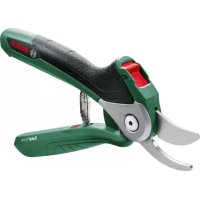
USER MANUAL EasyPrune BOSCH
natural_image
Illustration of a pair of pliers with textured handles and a digital display (no text or symbols)
www.bosch-garden.com
Explanation of symbols

Read instruction manual.

General hazard safety alert.

Keep hands away from blade.

Do not use the product in the rain or leave it outdoors when it is raining.
WARNING
Read all safety warnings, instructions, illustrations and specifica-
tions provided with this power tool. Failure to follow all instructions listed below may result in electric shock, fire and/or serious injury.
Save all warnings and instructions for future reference.
The term "power tool" in the warnings refers to your mains-operated (corded) power tool or battery-operated (cordless) power tool.
Work area safety
▶ Keep work area clean and well lit. Cluttered or dark areas invite accidents.
▶ Do not operate power tools in explosive atmospheres, such as in the presence of flammable liquids, gases or dust. Power tools create sparks which may ignite the dust or fumes.
▶ Keep children and bystanders away while operating a power tool. Distractions can cause you to lose control.
Electrical safety
▶ Power tool plugs must match the outlet. Never modify the plug in any way. Do not use any adapter plugs with
earthed (grounded) power tools. Unmodified plugs and matching outlets will reduce risk of electric shock.
▶ Avoid body contact with earthed or grounded surfaces, such as pipes, radiators, ranges and refrigerators. There is an increased risk of electric shock if your body is earthed or grounded.
▶ Do not expose power tools to rain or wet conditions. Water entering a power tool will increase the risk of electric shock.
▶ Do not abuse the cord. Never use the cord for carrying, pulling or unplugging the power tool. Keep cord away from heat, oil, sharp edges or moving parts.
Damaged or entangled cords increase the risk of electric shock.
▶ When operating a power tool outdoors, use an extension cord suitable for outdoor use. Use of a cord suitable for outdoor use reduces the risk of electric shock.
▶ If operating a power tool in a damp location is unavoidable, use a residual current device (RCD) protected supply. Use of an RCD reduces the risk of electric shock.
Personal safety
▶ Stay alert, watch what you are doing and use common sense when operating a power tool. Do not use a power tool while you are tired or under the influence of drugs, alcohol or medication. A moment of inattention while operating power tools may result in serious personal injury.
▶ Use personal protective equipment. Always wear eye protection. Protective equipment such as a dust mask, non-skid safety shoes, hard hat or hearing protection used for appropriate conditions will reduce personal injuries.
▶ Prevent unintentional starting. Ensure the switch is in the off-position before connecting to power source and/or battery pack, picking up or carrying the tool. Carrying power tools with your finger on the switch or energising power tools that have the switch on invites accidents.
Remove any adjusting key or wrench before turning the power tool on. A wrench or a key left attached to a rotating part of the power tool may result in personal injury.
▶ Do not overreach. Keep proper footing and balance at all times. This enables better control of the power tool in unexpected situations.
▶ Dress properly. Do not wear loose clothing or jewellery. Keep your hair and clothing away from moving parts. Loose clothes, jewellery or long hair can be caught in moving parts.
If devices are provided for the connection of dust extraction and collection facilities, ensure these are connected and properly used. Use of dust collection can reduce dust-related hazards.
▶ Do not let familiarity gained from frequent use of tools allow you to become complacent and ignore tool
safety principles. A careless action can cause severe injury within a fraction of a second.
▶ Do not force the power tool. Use the correct power tool for your application. The correct power tool will do the job better and safer at the rate for which it was designed.
▶ Do not use the power tool if the switch does not turn it on and off. Any power tool that cannot be controlled with the switch is dangerous and must be repaired.
▶ Disconnect the plug from the power source and/or remove the battery pack, if detachable, from the power tool before making any adjustments, changing accessories, or storing power tools. Such preventive safety measures reduce the risk of starting the power tool accidentally.
▶ Store idle power tools out of the reach of children and do not allow persons unfamiliar with the power tool or these instructions to operate the power tool. Power tools are dangerous in the hands of untrained users.
- Maintain power tools and accessories. Check for misalignment or binding of moving parts, breakage of parts and any other condition that may affect the power tool's operation. If damaged, have the power tool repaired before use. Many accidents are caused by poorly maintained power tools.
▶ Keep cutting tools sharp and clean. Properly maintained cutting tools with sharp cutting edges are less likely to bind and are easier to control.
▶ Use the power tool, accessories and tool bits etc. in accordance with these instructions, taking into account the working conditions and the work to be performed. Use of the power tool for operations different from those intended could result in a hazardous situation.
▶ Keep handles and grasping surfaces dry, clean and free from oil and grease. Slippery handles and grasping surfaces do not allow for safe handling and control of the tool in unexpected situations.
▶ Recharge only with the charger specified by the manufacturer. A charger that is suitable for one type of battery pack may create a risk of fire when used with another battery pack.
▶ Use power tools only with specifically designated battery packs. Use of any other battery packs may create a risk of injury and fire.
When battery pack is not in use, keep it away from other metal objects, like paper clips, coins, keys, nails, screws or other small metal objects, that can make a connection from one terminal to another. Shorting the battery terminals together may cause burns or a fire.
▶ Under abusive conditions, liquid may be ejected from the battery; avoid contact. If contact accidentally occurs, flush with water. If liquid contacts eyes, addi-
12 | English
tionally seek medical help. Liquid ejected from the battery may cause irritation or burns.
▶ Do not use a battery pack or tool that is damaged or modified. Damaged or modified batteries may exhibit unpredictable behaviour resulting in fire, explosion or risk of injury.
▶ Do not expose a battery pack or tool to fire or excessive temperature. Exposure to fire or temperature above 130°C may cause explosion.
▶ Follow all charging instructions and do not charge the battery pack or tool outside the temperature range specified in the instructions. Charging improperly or at temperatures outside the specified range may damage the battery and increase the risk of fire.
Service
▶ Have your power tool serviced by a qualified repair person using only identical replacement parts. This will ensure that the safety of the power tool is maintained.
▶ Never service damaged battery packs. Service of battery packs should only be performed by the manufacturer or authorized service providers.
Safety Warnings for Cordless Secateurs
This tool is not intended for use by persons (including children) with reduced physical, sensory or mental capabilities, or lack of experience and knowledge, unless they have been given supervision or instruction concerning use of the tool by a person responsible for their safety. Children should be supervised to ensure that they do not play with the tool.
▶ Minors should never be allowed to operate the tool; it should never be left unattended and when not in use should be stored in a locked place out of the reach of children.
- Don't use the tool or perform battery charging operations in the rain.
- Don't leave the tool in rain or wet locations.
▶ Keep bystanders well away from your work area.
▶ Be careful not to catch foreign matter between the blades. Remove the foreign matter from the blades.
▶ Take care, avoid cutting electrical wires that may be hidden.
▶ Keep your free hand away from the cutting area. Never touch the blades. They are very sharp and you may cut yourself.
▶ Be vigilant when operating to ensure that the fingers on the hand used to hold or move twigs to be pruned are not exposed to the cutting blade.
▶ Do not force the tool to make it cut. You could slip and injure yourself or cut something else unintentionally.
▶ Always check the blades carefully before operation.
▶ Handle the blades with extreme care to prevent cuts or injury from the blades.
▶ Operate the safety lock after each use and before attempting to perform inspection or maintenance.
▶ Always wear protective gloves when using, adjusting or cleaning the tool
▶ Only use the tool for its intended use (see "Intended Use", page 13).

Protect the power tool against heat, e.g. against continuous intense sunlight, fire, water, and moisture. There is a risk of explo-
sion.
Safety Warnings for Battery Chargers
▶ Never allow children, persons with physical, sensory or mental limitations or a lack of experience and/or knowledge and/or people unfamiliar with these instructions to use the battery charger. Local regulations may restrict the age of the operator.
▶ Supervise children at all times.
This will ensure that children do not play with the battery charger.
▶ Keep the battery charger away from rain or moisture. Penetration of water in the battery charger increases the risk of an electric shock.
▶ Keep the charger clean. Contamination can lead to danger of an electric shock.
Before each use check the battery charger and USB cable. If damage is detected, do not use the battery charger. Never open the battery charger yourself. All repairs must be performed by a Bosch Service Centre. Damaged battery chargers and USB cables increase the risk of an electric shock.
▶ Do not operate the battery charger on flammable surfaces (e.g., paper, textiles, etc.) or surroundings. The heating of the battery charger during the charging process can pose a fire hazard.
▶ Damage to the machine may cause vapours to be emitted. Ventilate the area and seek medical attention in case of discomfort. The vapours can irritate the respiratory system.
Symbols
The following symbols are important for reading and understanding the original instructions. Please take note of the symbols and their meaning. The correct interpretation of the symbols will help you to use the product in a better and safer manner.
Symbol Meaning


CLICK!

Wear eye protection and stout shoes at all times while operating the product.
Only use the battery charger indoors, in dry conditions.
Movement direction
Reaction direction
Wear protective gloves
Weight
Switching on
Switching off
Permitted action
Prohibited action
Audible noise
Accessories/Spare parts
Intended Use
This tool is intended for domestic use in pruning branches and plants with a thickness up to 25 mm (20 mm in hardwood).
Delivery Scope
Carefully remove the garden tool from its packaging and check if the following parts are complete:
- EasyPrune
- Charger
- Operating instructions
When parts are missing or damaged, please contact your dealer.
Product Features
The numbering of the product features refers to the illustration of the product on the graphics pages.
(1) Replaceable blade
(2) Lower blade
(3) Wire cutter
(4) Spring
(5) Micro USB socket
(6) Safety lock
(7) Battery charge-control indicator
(8) Blade screw
(9) Micro USB connector for charger
(10) Charger
(11) Bushing for fastening of blades
The accessories illustrated or described are not included as standard delivery. A complete overview of accessories can be found in our accessories program.
Technical Data
| Cordless Secateurs EasyPrune |
| Article number | | 3 600 HB2 0.. |
| Rated voltage V 3.6 | | |
| Max. cutting capacity mm 20 (hard wood) | | |
| mm 25 (soft wood) | |
| Max. cuts per battery charge (size of the cuts per charge) | | 450 |
| Weight according to EPTA-Procedure 01:2014 kg 0.49 | | |
| Recommended ambient temperature during charging | °C +10... +45 | |
| Permitted ambient temperature during operation ^4) and storage | °C -10... +50 | |
| Battery Li-Ion | | |
| Capacity Ah 1.5 | | |
Bosch Power Tools F 016 L94 019 | (07.01.2020)
14 | English
| Energy Wh 5.4 | |
| Number of battery cells 1 | |
A) Limited performance at temperatures <0^
Charging cable
| Article number 1 607 000 CGP |
Charger
| Article number |
| EU | 2 609 120 713 1 600 A00 3RK |
| UK | 2 609 120 718 1 600 A00 48V |
| AUS | 2 609 120 717 1 600 A00 48U |
| JP | 2 609 120 715 1 600 A00 48T |
| KO | 2 609 120 716 1 600 A00 JL5 |
| Rated voltage V 5.0 5.0 |
| Charging current A 1.0 0.5 |
| Charging period (battery dis-charged) | h 3.5 3.5 | |
| Weight according to EPTA-Proced-ure 01:2014 | kg 0.06 0.06 | |
| Protection class | ☐/II /II |
Measured sound values determined according to EN 62841-1.
Typically the A-weighted sound pressure level of the product is lower than 70 dB(A).
Overall vibrational values a_h vector sum of three directions) and uncertainty K determined according EN 62841-1: a_h = 2.5 m/s^2 , K = 1.5 m/s^2 .
The vibration level and noise emission value given in these instructions have been measured in accordance with a standardised measuring procedure and may be used to compare power tools. They may also be used for a preliminary estimation of vibration and noise emissions.
The stated vibration level and noise emission value represent the main applications of the power tool. However, if the power tool is used for other applications, with different application tools or is poorly maintained, the vibration level and noise emission value may differ. This may significantly increase the vibration and noise emissions over the total working period.
To estimate vibration and noise emissions accurately, the times when the tool is switched off or when it is running but not actually being used should also be taken into account. This may significantly reduce vibration and noise emissions over the total working period.
Implement additional safety measures to protect the operator from the effects of vibration, such as servicing the
power tool and application tools, keeping their hands warm, and organising workflows correctly.
Starting Operation
▶ Use only the chargers listed in the technical data. Only these battery chargers are matched to the lithium-ion battery of your product.
Note: The battery is supplied partially charged. To ensure full capacity of the battery, completely charge the battery before using your tool for the first time.
The lithium-ion battery can be charged at any time without reducing its service life. Interrupting the charging procedure does not cause damage to the battery.
The Lithium-Ion battery is protected against deep discharging. When the battery is discharged, the tool stops the power-assisted cutting and works in manual mode at all cutting diameters.
The battery needs to be recharged when the battery charge-control indicator (7) briefly flashes red during a cut.
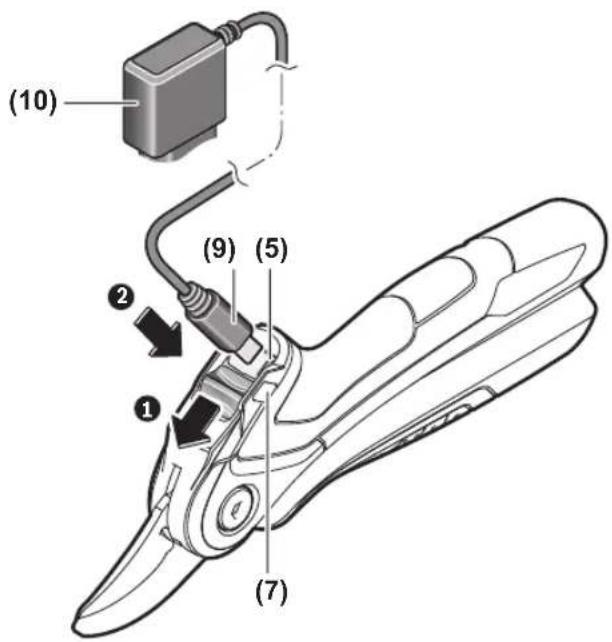
The charge procedure begins as soon as the mains plug of the battery charger is plugged into the socket outlet and the charge Micro USB connector (9) is plugged into Micro USB socket (5) at the handle top.
The Micro USB socket (5) can only be accessed when the safety lock (6) is locked.
The battery charge-control indicator (7) indicates the charging progress. The indicator slowly flashes green during charge process. When the battery charge-control indicator lights up green continuously, the battery is fully charged.
During the charging procedure, the handle of the machine warms up. This is normal.
Disconnect the battery charger from the mains supply when charging process ends.
▶ Protect the charger from moisture.
Observe the notes for disposal.
Battery charge-control indicator
The battery charge-control indicator (7) indicates the charge condition of the battery while in operation.
LED Capacity
Continuous lighting, green ≥35 %
Flashing light, green 5 - 35 %
Single flash, red 0 - 5 %
Charging Guide
Please charge before use.
Charge-control indicator will flash red if:
- Charger is damaged
- Incorrect charger is installed
The tool has overload protection software. If the software is activated, the tool will lock to prevent damage. To reset the protection software, connect the charger. Before re-use, we recommend to fully charge the tool until the charge-control indicator is continuously green.
Operation
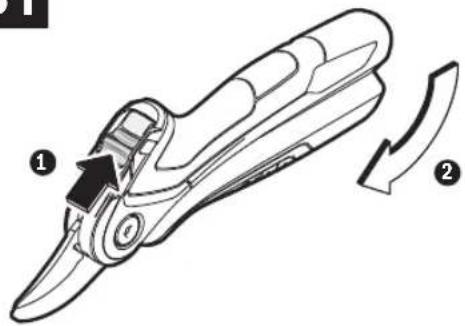
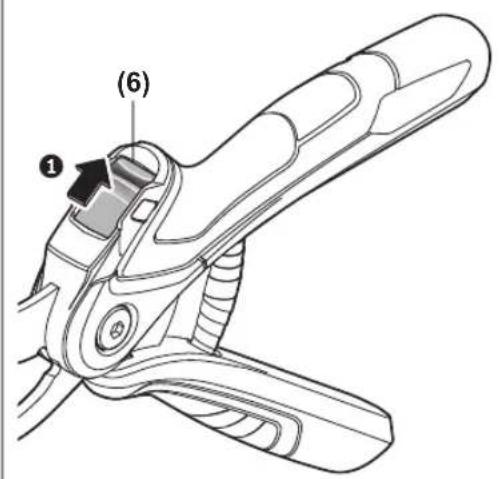
Deactivate the safety lock (6) by pushing it back. The tool will open and is now ready for use.
Locking
After usage, close the handles and engage the safety lock (6) by pushing it forward. Always keep in locked position, when not in use.
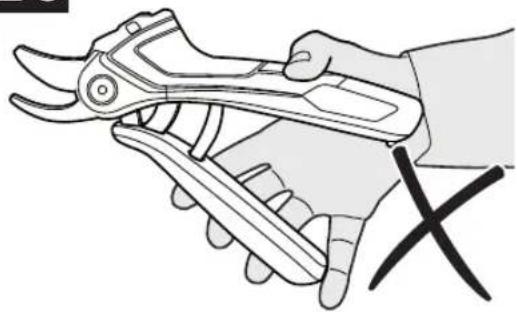
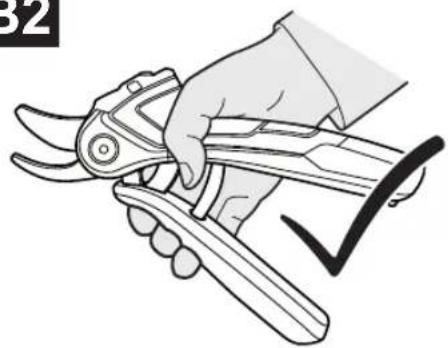
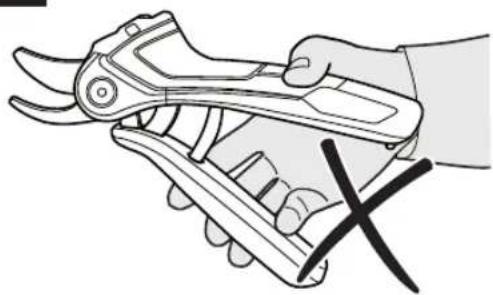
Grip the tool at the front, as shown. Do not grip the tool towards the back of the handles or with finger(s) between the handles.
This tool provides power-assisted cutting. It is operated like a pair of manual secateurs and will cut in manual mode without power-assisted cutting until a certain branch diameter is reached. The tool will start power-assisted cutting when cutting above this branch diameter by starting the integrated motor. Noise development while power-assisted cutting is active, is normal.
Power-assist feature is only active as long as gripping force is exerted on the handles. If no force is exerted onto the handles, the tool stops.
Working Advice
Never operate the tool in an awkward posture. This may cause serious injury.
Keep your free hand away from the cutting area. Never touch the blades. They are very sharp and you may cut yourself.
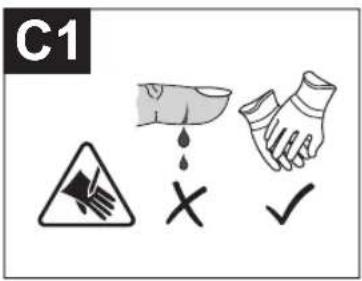
C1 Always wear protective gloves while pruning.
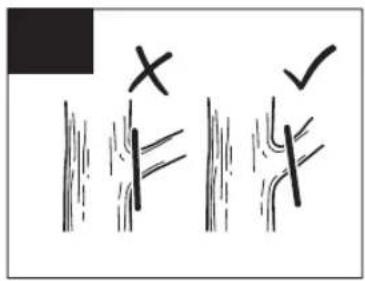
C2 Never cut too close to the stem so the wound can heal properly.
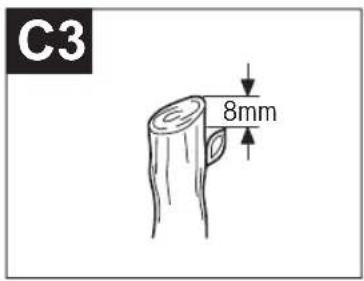
C3 Always make the cut about 8 mm from the bud.
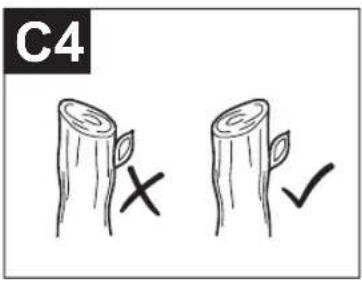
C4 The cut should slope away from the bud so the rain can run off.
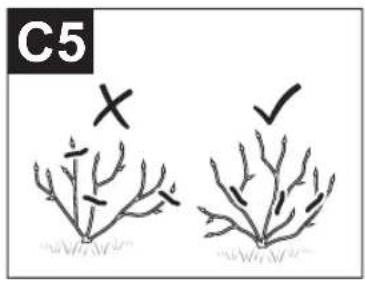
C5 If you remove an entire stem, cut back to the point where it branched.
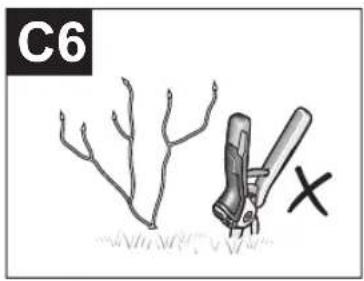
C6 Never push the blade of the pruner into the ground to cut root suckers.
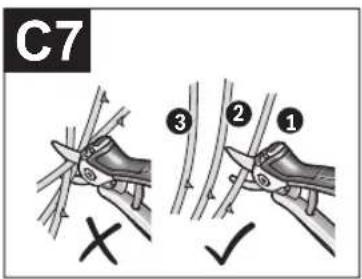
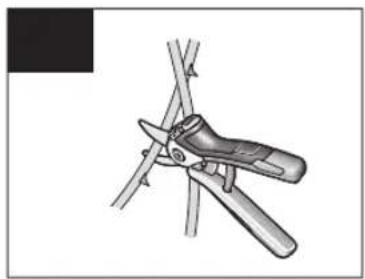
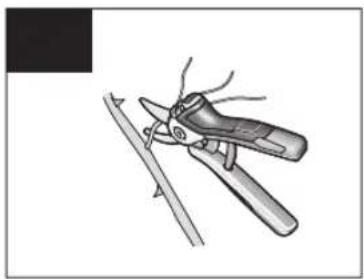
C7 Cut branches one by one as shown.
C8 Remove overcrowds or crossing stems.
C9 Remove thin or weak growth.
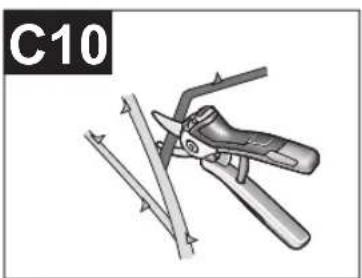
C10 Always remove dead, damaged and diseased branches.
Troubleshooting

The following table provides common troubleshooting information. The battery-charge control indicator provides additional information that can be used to identify a malfunction or problem.
Problem Possible Cause Corrective Measure
Tool stops while cutting Not enough pressure on handles Continue moving handles towards each other
while cutting.
Hold the tool with a firmer grip.
16 | English
| Problem Possible Cause Corrective Measure |
| Blades get stuck in a thick branch | Low battery capacity | Grip the upper handle only and remove the tool by tilting the blade. |
| Too hard wood |
| Too big diameter | Recharge tool, if necessary. |
| Wrong cutting position | |
| Power-assisted cutting does not activate with LED flashing when cutting is attempted: |
| LED flashes red 3 times Wood being cut is too thick/hard Try cutting in a thinner area of the branch. |
| Battery charge is too low Recharge battery. | |
| LED flashes red twice Battery temperature too high Ambient temperature too high (do not leave tool in direct sunlight). |
| Wait 10–15 minutes to let battery cool down. |
| Battery temperature too low Ambient temperature too low (do not use tool when outside temperatures are below -20°C). |
| Store tool inside, when not in use. |
| LED flashes red once Battery charge is too low Recharge battery. |
| LED solid green then flashes red fast | Power-assisted cutting system defective Contact Service Agent. |
| LED flashes red fast when cut is attempted | Time between cuts too short Slow down between two consecutive cuts. |
Maintenance and Service
Maintenance, Cleaning and Storage
▶ For safe and proper working, always keep the product clean.
▶ Always wear protective gloves when using, adjusting or cleaning the tool
If the battery is no longer working, please contact an authorised after-sales service agent for Bosch power tools.
The spring (4) located between the handles is NOT exchangeable and SHOULD NOT be removed. Failure to follow this warning may lead to serious injury.
Replacement blade: F 016 800 475
Unlock the tool using safety lock (6).
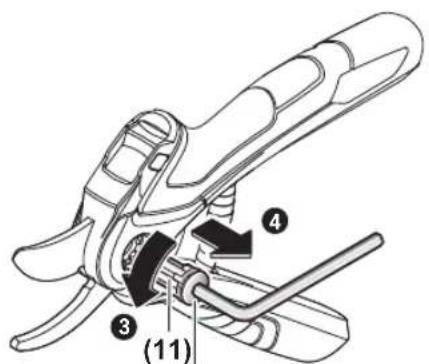
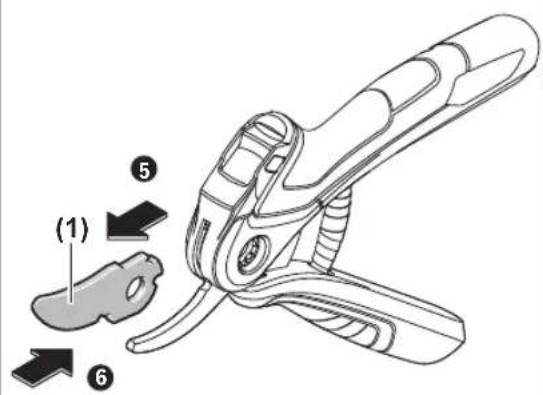
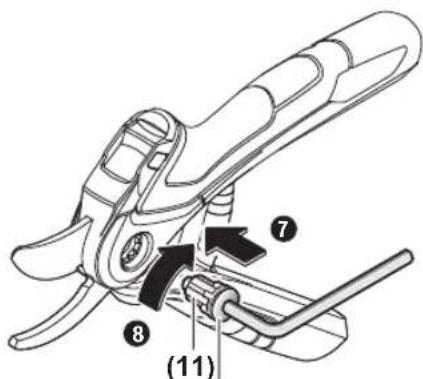
Use Allen key provided with replacement blade to remove the blade screw (8) and bushing (11) together, and thus release the blade.
Insert new blade (1) as shown. Now, insert bushing (11) together with screw (8) and tighten using Allen key.
After oruning/storage
Clean the exterior of tool thoroughly using a soft brush and cloth. Do not use water, solvents or polishes. Remove all debris.
Always lubricate the cutting blade with protective spray before storage.
Store the tool in a secure, dry place out of reach of children with the safety lock (6) engaged. Do not leave the tool out-
side, when not in use. Do not place other objects on top of the tool
After-sales Service and Application Service
In all correspondence and spare parts orders, please always include the 10-digit article number given on the nameplate of the product.
Great Britain
Robert Bosch Ltd. (B.S.C.)
P.O. Box 98
Broadwater Park
North Orbital Road
Denham Uxbridge
UB 9 5HJ
At www.bosch-pt.co.uk you can order spare parts or arrange
the collection of a product in need of servicing or repair.
Tel. Service: (0344) 7360109
E-Mail: boschservicecentre@bosch.com
Ireland
Origo Ltd.
Unit 23 Magna Drive
Magna Business Park
City West
Dublin 24
Tel. Service: (01) 4666700
Fax: (01) 4666888
Australia, New Zealand and Pacific Islands
Robert Bosch Australia Pty. Ltd.
Power Tools
Locked Bag 66
Clayton South VIC 3169
Customer Contact Center
Inside Australia:
Phone: (01300) 307044
Fax: (01300) 307045
Inside New Zealand:
Phone: (0800) 543353
Fax: (0800) 428570
Outside AU and NZ:
Phone: +61 3 95415555
www.bosch-pt.com.au
www.bosch-pt.co.nz
Republic of South Africa
Customer service
Hotline: (011) 6519600
Gauteng - BSC Service Centre
35 Roper Street, New Centre
Johannesburg
Tel.: (011) 4939375
Fax: (011) 4930126
E-Mail: bsctools@icon.co.za
KZN - BSC Service Centre
Unit E, Almar Centre
143 Crompton Street
Pinetown
Tel.: (031) 7012120
Fax: (031) 7012446
E-Mail: bsc.dur@za.bosch.com
Western Cape - BSC Service Centre
Democracy Way, Prosperity Park
Milnerton
Tel.: (021) 5512577
Fax: (021) 5513223
E-Mail: bsc@zsd.co.za
Bosch Headquarters
Midrand, Gauteng
Tel.: (011) 6519600
Fax: (011) 6519880
E-Mail: rbsa-hq.pts@za.bosch.com
Armenia, Azerbaijan, Georgia
Robert Bosch Ltd.
David Agmashenebeli ave. 61
0102 Tbilisi, Georgia
Tel. +995322510073
www.bosch.com
Kyrgyzstan, Mongolia, Tajikistan, Turkmenistan, Uzbekistan
TOO "Robert Bosch" Power Tools, After Sales Service Muratbaev Ave., 180
050012, Almaty, Kazakhstan
Service Email: service.pt.ka@bosch.com
Official Website: www.bosch.com, www.bosch-pt.com
Transport
The contained lithium-ion batteries are subject to the Dangerous Goods Legislation requirements. The batteries are suitable for road-transport by the user without further restrictions.
When shipping by third parties (e.g.: by air transport or forwarding agency), special requirements on packaging and labelling must be observed. For preparation of the item being shipped, consulting an expert for hazardous material is required.
Disposal

The product, batteries, accessories and packaging should be sorted for environmental-friendly recycling.

Do not dispose of the product and batteries/re-chargeable batteries into household waste!
Only for EU countries:
According to the European Guideline 2012/19/EU, products that are no longer usable, and according to the European Guideline 2006/66/EC, defective or used battery packs/batteries, must be collected separately and disposed of in an environmentally correct manner.
Battery packs/batteries:
Li-ion:
Please observe the notes in the section on transport (see "Transport", page 17).
▶ Integrated batteries may only be removed for disposal by a qualified repair person. Opening the housing shell can damage or destroy the product.
To remove the battery from the tool, the battery has to be fully discharged. One possibility to discharge the battery is, to cut branches with large diameter with power-assistance sliding switch on setting c. Remove the top blade as described in section "Maintenance and Cleaning". Remove the upper housing by unscrewing the screws, then disconnect the white connector from the electronics. Unscrew the screws from the lower housing to remove the battery. To prevent a short circuit, cut the wiring to the battery one at a time and then isolate the poles. Even when fully discharged, the battery still contains a residual capacity, which can be released in case of a short circuit.
Français
Robert Bosch (France) S.A.S.
Robert Bosch Argentina Industrial S.A.
Calle Blanco Encalada 250 - San Isidro
B1642AMQ
Calle Robert Bosch No. 405
Bosch Service Center
Telegrafvej 3
2750 Ballerup
På www.bosch-pt.dk kan der online bestilles reservedele eller oprettes en reparations ordre.
Tlf. Service Center: 44898855
Fax: 44898755
E-Mail: vaerktoej@dk.bosch.com
Transport
Bosch Service Center
Telegrafvej 3
2750 Ballerup
Danmark
Tel.: (08) 7501820 (inom Sverige)
Fax: (011) 187691
Transport
Robert Bosch Sp. z o.o.
Bosch Service Center PT
K Vápence 1621/16
692 01 Mikulov
Service scule electrice
Strada Horia Măcelariu Nr. 30–34, sector 1
013937 Bucureşti
Service scule electrice
Strada Horia Măcelariu Nr. 30-34, sector 1
013937 Bucureşti, România
www.bosch-pt.com/bg/bg/
Транспортиране
Molimo da kod svih pitanja i poručivanja rezervnih delova neizostavno navedete broj artikla sa 10 brojčanih mesta prema tipskoj pločici proizvoda.
Srpski
Bosch Elektroservis
Dimitrija Tucovića 59
11000 Beograd
Tel.: +381 11 644 8546
Tel.: +381 11 744 3122
Tel.: +381 11 641 6291
Fax: +381 11 641 6293
E-Mail: office@servis-bosch.rs
www.bosch-pt.rs
Keller d.o.o.
Ljubomira Nikolica 29
18000 Nis
Tel./Fax: +381 18 274 030
Tel./Fax: +381 18 531 798
E-Mail: office@keller-nis.com
www.bosch-pt.rs
Prilikom naručivanja rezervnih dijelova i kod svih upita molimo svakako navedite 10-znamenkasti broj artikla prema označnoj pločici proizvoda.
Hrvatski
Robert Bosch d.o.o PT/SHR-BSC
Kneza Branimira 22
10040 Zagreb
Tel.: +385 12 958 051
Fax: +385 12 958 050
www.bosch-garden.com
ال Ratings Impact: What is the correct.
www.bosch-garden.com
natural_image
Illustration of a cable with a connector, labeled (9)(10), showing no text or symbols on the cable itself.
236
A
B1
B3
natural_image
Line drawing of a hand holding a pair of pliers (no text or symbols)
B2
natural_image
Illustration of a hand using a pair of pliers to cut a tool (no text or symbols present)
B4
natural_image
Illustration of a hand holding a pair of pliers with a black X mark, no text or symbols present
natural_image
Illustration of a pair of scissors cutting through a bamboo structure (no text or symbols)
natural_image
Illustration of a pair of pliers cutting a metal strip (no text or symbols)
natural_image
Illustration of a hand using a tool to cut plant stems (no text or symbols)
238
D1
(8)
D3
(8)
CE
1
| de | EU-Konformitätserklärung | Wir erklären in alleiniger Verantwortung, dass die genannten Produkte allen einschlägigen Bestimmungen der nachfolgend aufgeführten Richtlinien und Verordnungen entsprechen und mit folgenden Normen übereinstimmen.Technische Unterlagen bei:* |
| Akkubetriebene Gartenschere | Sachnummer |
| en | EU Declaration of Conformity | We declare under our sole responsibility that the stated products comply with all applicable provisions of the directives and regulations listed below and are in conformity with the following standards.Technical file at:* |
| Cordless Seca-teurs | Article number |
| fr | Déclaration de conformité UE | Nous déclarons sous notre propre responsabilité que les produits décrits sont en conformité avec les directives, règlements normatifs et normes énumérés ci-dessous.Dossier technique auprès de:* |
| Sécateur sans fil | N° d'article |
| es | Declaración de conformidad UE | Declaramos bajo nuestra exclusiva responsabilidad, que los productos nom-brados cumplen con todas las disposiciones correspondientes de las Directi-vas y los Reglamentos mencionados a continuación y están en conformidad con las siguientes normas.Documentos técnicos de:* |
| Tijeras de podar accionadas por acumulador | N° de artículo |
| pt | Declaração de Conformidade UE | Declaramos sob nossa exclusiva responsabilidade que os produtos mencionados cumprem todas as disposições e os regulamentos indicados e estão em conformidade com as seguintes normas.Documentação técnica pertencente à:* |
| Tesoura de jardi-nagem sem fio | N.° do produto |
| it | Dichiarazione di conformità UE | Dichiariamo sotto la nostra piena responsabilità che i prodotti indicati sono conformi a tutte le disposizioni pertinenti delle Direttive e dei Regolamenti elencati di seguito, nonché alle seguenti Normative.Documentazione Tecnica presso:* |
| Cesoie da giardi-no azionate a bat-teria ricaricabile | Codice prodotto |
| nl | EU-conformiteitsverklaring | Wij verklaren op eigen verantwoordelijkheid dat de genoemde producten voldoen aan alle desbetreffende bepalingen van de hierna genoemde richtlijnen en verordeningen en overeenstemmen met de volgende normen.Technisch dossier bij:* |
| Accutuinschaar | Productnummer |
| da | EU-overensstemmelseserklæring | Vi erklærer som eneansvarlige, at det beskrevne produkt er i overensstem-melse med alle gældende bestemmelser i følgende direktiver og forordnin-ger og opfylder følgende standarder.Tekniske bilag ved:* |
| Akkudrevet have- saks | Typenummer |
| sv | EU-konformitetsförklaring | Vi förklarar under eget ansvar att de nämnda produkterna uppfyller kraven i alla gällande bestämmelser i de nedan angivna direktiven och förordningar-nas och att de stämmer överens med följande normer.Teknisk dokumentation:* |
| Batteridriven trädgårdssax | Produktnummer |
| no | EU-samsvarserklæring | Vi erklærer under eneansvar at de nevnte produktene er i overensstemmelse med alle relevante bestemmelser i direktivene og forordningene nedenfor og med følgende standarder.Teknisk dokumentasjon hos:* |
| Batteridrevet ha-gesaks | Produktnummer |
| fi | EU-vaatimustenmukaisuusvakuutus | Vakuutamme täten, että mainitut tuotteet vastaavat kaikkia seuraavien direktiivien ja asetusten asiaankuuluvia vaatimuksia ja ovat seuraavien standardi-en vaatimusten mukaisia.Tekniset asiakirjat saatavana:* |
| Akkukäyttöiset puutarhasakset | Tuotenumero |
| el | Δήλωση πιστότητας EE | Δηλώνουμε με αποκλειστική μας ευθύνη, ότι τα αναφερόμενα προϊόντα αντιστοιχούν σε όλες τις σχετικές διατάξεις των πιο κάτω αναφερόμενων οδηγιών και κανονισμών και ταυτίζονται με τα ακόλουθα πρότυπα.Tεχνικά έγγραφα στη:* |
| Ψαλίδι κήπου με μπαταρία | Αριθμός ευρετηρίου |
| tr | AB Uygunluk beyani | Tek sorumlu olarak, tanımlanan ürünün aşağıdaki yönetmelik ve direktiflerin geçerli bütün hükümlerine ve aşağıdaki standartlara uygun olduğunu beyan ederiz.Teknik belgelerin bulunduğu yer:* |
| Akülü bahçe ma-kası | Ürün kodu |
||
CE
| pl | Deklaracja zgodności UE | Oświadczamy z pełną odpowiedzialnością, że niniejsze produkty odpowiadają wszystkim wymaganiom poniżej wyszczególnionych dyrektyw i rozporządzeń, oraz że są zgodne z następującymi normami.Dokumentacja techniczna:* |
| Akumulatorowe nożyce ogrodowe | Numer katalogowy |
| cs | EU prohlăšení oshodě | Prohlašujeme na výhradní zodpovědnost, že uvedený výrobek splňuje všechna příslušná ustanovení níže uvedených směrnic anařízení aje vsouladu snásledujícími normami:Technické podklady u:* |
| Akumulátorové zahradní nůžky | Objednaci číslo |
| sk | EÚ vyhlásenie ozhode | Vyhlasujeme na výhradní zodpovednosť, že uvedený výrobok spĺňa všetky príslušné ustanovenia nižšie uvedených smerníc anariadení aje vsúlade snasledujúcimi normami:Technické podklady má spoločnosť:* |
| Akumulátorové záhradnicke nožnice | Vecné číslo |
| hu | EU konformitási nyilatkozat | Egyedüli felelőséggel kijelentjük, hogy a megnevezett termékek megfelelnek az alábbiakban felsorolásra kerülő irányelvek és rendeletek valamennyi idevágó előírásainak és megfelelnek a következő szabványoknak.Műszaki dokumentumok megőrzési pontja:* |
| Akkumulátorral üzemelő kerti olló | Cikkszám |
| ru | Заявление о соответствии EC | Мы заявляем под нашу единоличную ответственность, что названные продукты соответствуют всем действующим предписаниямнижеуказанных директив и распоряжений, а также нижеуказанных норм.Техническая документация хранится y:* |
| Аккумуляторный секатор | Tоварный No |
| uk | Заява про відповідність ЄС | Мизаявляємо під нашу одноособову відповідальність, що названі вироби відповідають усім чинним положенням нищеозначених директив і розпоряджень, а також нижчеозначеним нормам.Технічна документація зберігається y:* |
| Акумуляторний секатор | Tоварний номер |
| kk | EO сәйкестік мағлумдамасы | Өз жауапкершілікпен біз аталған өнімдер төменде жзылғандиректикалар мен жарлықтардың тиісті қағидаларына сәйкестігін жәнетөменdegі нормаларға сай екенін білдіреміз.Техникалық құжаттар:* |
| Аккумулятормен жұмыс істейтін бақ қайшысы | Өнім нөмірі |
| ro | Declaratie de conformitate UE | Declarăm pe proprie răspundere că produsele mentionate corespund tutu-ror dispozițiilor relevante ale directivelor și reglementărilor enumerate în ce-le ce urmează și sunt în conformitate cu următoarele standarde.Documentаție tehnică la:* |
| Foarfecă de gră-dină cu acumula-tor | Număr de identificare |
| bg | EC декларация за съответствие | С пълна отговорност ние декларираме, че посочените продукти отговарят на всички валидни изисквания на директивите и разпоредбите по-долу и съответства на следните стандарти.Техническа документация при:* |
| Акумулаторна градинска ножица | Каталожен номер |
| mk | EU-Изјава за сообразност | Со целосна одговорност изјавуваме, дека опишаните производи се во согласност со сите релевантни одредби на следните регулативи и прописи и се во согласност со следните норми.Техничка документација кaj:* |
| Градински ножици на батерија | Број на дел/артик |
| sr | EU-izjava o usaglašenosti | Na sopstvenu odgovornost izjavljujemo, da navedeni proizvodi odgovaraju svim dotičnim odredbama naknadno navedenih smernica u uredaba i da su u skladu sa sledećim standardima.Tehnička dokumentacija kod:* |
| Akumulatorske baštenske makaze | Broj predmeta |
| sl | Izjava o skladnosti EU | Izjavljamo pod izključno odgovornostjo, da je omenjen izdelek v skladu z vse-mi relevantnimi določili direktiv in uredb ter ustreza naslednjim standardom.Tehnična dokumentacija pri:* |
| Akumulatorske vrtne škarje | Številka artikla |
| hr | EU izjava o sukladnosti | Pod punom odgovornošću izjavljujemo da navedeni proizvodi odgovaraju svim relevantnim odredbama direktiva i propisima navedenima u nastavku i da su sukladni sa sljedećim normama.Tehnička dokumentacija se može dobiti kod:* |
| Akumulatorske vrtne škare | Kataloški br. |
CE
III
| et | EL-vastavusdeklaratsioon | Kinnitame ainuvastutajatena, et nimetatud tooted vastavad järgnevalt loetletud direktiivide ja määruste köikidele asjaomastele nõuetele ja on kooskõlas järgmiste normidega.Tehnilised dokumendid saadaval: * |
| Akutoitega aia-käärid | Tootenumber |
| lv | Deklaräcija par atbilstībuES standartiem | Mës ar pilnu atbildību paziņojam, ka šeit aplūkotie izstrādājumi atbilst visiem tālāk minētajās direktīvās un rikojumos ietvertajām saistošajām nostādnēm,kā arī sekojošiem standartiem.Tehniskā dokumentācija no: * |
| No akumulatora darbināmas dārza šķēres | Izstrādājuma numurs |
| lt | ES atitikties deklaracija | Atsakingai pareiškiame, kad išvardyti gaminiai atitinka visus privalomus žemiau nurodytu direktyvu ir reglamentu reikalavimus ir šiuos standartus.Techninė dokumentacija saugoma: * |
| Akumuliatorinis sekatorius | Gaminio numeris |
| EasyPrune | 3 600 HB2 0.. 2006/4 | 2/EG2014/30/EU2011/65/EU | EN 62841-1:2015EN 55014-1:2006+A1:2009+A2:2011EN 55014-2:2015EN 50581:2012 |
| [YBAT] | *BOSCH* Robert Bosch Power Tools GmbH, PT/ECS,70538 Stuttgart, GERMANY |
Henk BeckerChairman of Executive Management | Helmut HeinzelmannHead of Product Certificationi.V. K-wd |
| Robert Bosch Power Tools GmbH, 70538 Stuttgart, GERMANYStuttgart, 21.11.2019 |
BOSCH