
GCA 30-42 - Vacuum Cleaner BOSCH - Free user manual and instructions
Find the device manual for free GCA 30-42 BOSCH in PDF.
 FR
FR
 BG
BG
 CS
CS
 DA
DA
 DE
DE
 EL
EL
 EN
EN
 ES
ES
 ET
ET
 FI
FI
 HU
HU
 IT
IT
 KK
KK
 KO
KO
 LT
LT
 LV
LV
 MK
MK
 NL
NL
 NO
NO
 PL
PL
 PT
PT
 RO
RO
 RU
RU
 SK
SK
 SL
SL
 SV
SV
 TR
TR
 UK
UK
| Product type | Receiver module for cordless vacuum cleaner |
| Brand | Bosch |
| Model | GCA 30-42 |
| Reference number | 1 600 A02 GE |
| Dimensions (L × H) | 91 × 121 mm |
| Weight | Not specified |
| Power supply | Via the vacuum cleaner's power outlet (integrated male plug) |
| Transmission | Bluetooth® 4.2 Low Energy |
| Frequency range | 2402–2480 MHz |
| Output power | < 10 mW |
| Operating temperature | -20 °C to +50 °C |
| Storage temperature | -20 °C to +65 °C |
| Main functions | Automatic start/stop of the vacuum cleaner by tool vibration detection; manual on/off; delayed shutdown |
| Compatibility | Bosch Professional vacuum cleaners with receiver module socket |
| Associated transmitter module | GCT 30-42 (sold separately) |
| Status indicators | Blue, green, yellow LED (receiver module) |
| Care and cleaning | Clean with a brush or damp cloth; no detergents or solvents |
| Safety | Do not expose the button cell to heat; keep out of reach of children; risk of ingestion |
| Button cell (transmitter module) | CR2032, lithium 3 V (replaceable) |
| After-sales service | Bosch Power Tools; repairs within 5 days via SAV DIRECT |
Frequently Asked Questions - GCA 30-42 BOSCH
User questions about GCA 30-42 BOSCH
0 question about this device. Answer the ones you know or ask your own.
Ask a new question about this device
Download the instructions for your Vacuum Cleaner in PDF format for free! Find your manual GCA 30-42 - BOSCH and take your electronic device back in hand. On this page are published all the documents necessary for the use of your device. GCA 30-42 by BOSCH.
USER MANUAL GCA 30-42 BOSCH
GCA 30-42 + GCT 30-42 Professional
Robert Bosch Power Tools GmbH
70538 Stuttgart
GERMANY
www.bosch-pt.com
1609 92A 7U3 (2023.07) DOC / 187


Original instructions
bg Original instructions
it Original instructions
ko Original instructions
ar Original instructions
1 609 92A 7U3 | (30.06.2023) Bosch Power Tools
English
Safety Instructions
All instructions must be read and observed in order to enable work with the GCA 30-42 and GCT 30-42 to be carried out safely. Store these instructions in a safe place and include them with the GCA 30-42 and the GCT 30-42 when giving either of them to a third party.
The Bluetooth® word mark and logos are registered trademarks owned by Bluetooth SIG, Inc. and any use of such marks by Robert Bosch Power Tools GmbH is under license.
The receiver must only be inserted into the plug socket of a Bosch Professional dust extractor. The Auto-Start remote must only be attached to the power tool.
Never fasten the Auto-Start remote to places which are required to operate the cordless tool (such as gripping surfaces, switches).
Supervise children. This will ensure that children do not play with the receiver and the Auto-start remote.


WARNING
Ensure that the coin cell is kept out of the reach of children. Coin cells are dangerous.


Coin cells must never be swallowed or inserted into any other part of the body. If you suspect that someone has swallowed a coin cell or that a coin cell has entered the body in another way, seek medical attention immediately. Swallowing coin cells can result in severe internal burns and death within 2 hours. Ensure that coin cell replacement is carried out properly. There is a risk of explosion. Only use the coin cells listed in this operating manual. Do not use any other coin cells or other forms of electrical power supply.
Do not attempt to recharge the coin cell and do not short circuit the coin cell. The coin cell may leak, explode, catch fire and cause personal injury. Remove and dispose of drained coin cell correctly. Drained coin cell may leak and damage the product or cause personal injury. Do not overheat the coin cell or throw it into fire. The coin cell may leak, explode, catch fire and cause personal injury. Do not damage the coin cell and take the coin cell apart. The coin cell may leak, explode, catch fire and cause personal injury. Do not allow damaged coin cells to come into contact with water. Leaking lithium may mix with water to create hydrogen, which could cause a fire, an explosion, or personal injury.
Product description and specifications
Intended Use
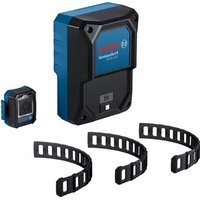
The receiver GCA 30-42 receives a start-stop signal for a Bosch Professional dust extractor. This signal is transferred by the Auto-Start remote GCT 30-42.
Refer to the operating instructions for the Auto-Start remote GCT 30-42 or the dust extractor used for more information.
Product Features
The numbering of the product features shown refers to the illustrations on the graphic pages.
GCA 30-42 components
(1) Receiver
(2) Status indicator with Auto-Start symbol (user interface) (3) Button (user interface) (4) Plug
GCT 30-42 components
(5) Auto-Start remote (6) LED status indicator (user interface) (7) Start/stop button (user interface) (8) Fastening hook for rubber band (9) Rubber band
Technical Data
| Receiver GCA 30-42 | |
| Article number | 1 600 A02 GE. |
| Operating temperature | -20 to +50 °C |
| Storage temperature | -20 to +65 °C |
| Dimensions (width x height) | 91 x 121 mm |
| Data transfer | |
| Bluetooth® Bluetooth® 4.2 (Low Energy) | |
| Frequency range used | 2402–2480 MHz |
| Output power < 10 mW | |
| Auto-Start remote GCT 30-42 | |
| Article number | 1 600 A02 GH. |
| Operating temperature | -20 to +50 °C |
| Storage temperature | -20 to +65 °C |
| DimensionsA) | 43 x 18 x 42 mm |
12 | English
Auto-Start remote GCT 30-42
| Rubber band length 240 mm | |
| Protection class IP54 | |
| Data transfer | |
| Bluetooth® Bluetooth® 4.2 (Low Energy) | |
| Frequency range used | 2402-2480 MHz |
| Output power < 10 mW | |
| Energy supply Bluetooth® Low Energy module | |
| Coin cell 3 V lithium battery, CR 2032 | |
A) Without rubber band
Values can vary depending upon the product and are subject to application and environmental conditions. For further information www.bosch-professional.com/wac.
Assembly and Operation
Mounting the Auto-Start Remote
- Attach one end of the rubber band (9) to one of the two fastening hooks (8).
- Secure the Auto-Start remote (5) to the cordless tool. To do so, tighten the rubber band (9) and attach the free end to the second fastening hook (8). Cut the rubber band to the correct length, as necessary. Appropriate places are those at which the cordless tool generates sufficient vibration during operation. Never fasten the Auto-Start remote to places which are required to operate the cordless tool (such as gripping surfaces, switches, displays).
Starting operation
Establishing a connection between GCA 30-42 and GCT 30-42
- Ensure that the GCT 30-42 Auto-Start remote is in the vicinity of the GCA 30-42 receiver.
- Insert the mains plug of the dust extractor into the mains socket.
- Set the switch of the dust extractor to automatic start/stop.
- Insert the plug (4) of the GCA 30-42 receiver (1) into the plug socket on the dust extractor.
- The status indicator with the Auto-Start symbol (2) flashes blue.
- Press the start/stop button (7) on the GCT 30-42 Auto-Start remote until the LED status indicator (6) has flashed blue twice. The LED status indicator (6) on the Auto-Start remote GCT 30-42 briefly lights up blue.
Connection established:
- The status indicator with the Auto-Start symbol (2) on the GCA 30-42 receiver lights up green.
- The LED status indicator (6) on the GCA 30-42 Auto-Start remote briefly lights up green.
When changing a coin cell, the following shall apply:
- If the GCT 30-42 transmitter module was connected to the GCA 30-42 receiver module before changing the coin cell, the connection is automatically re-established after changing the coin cell.
- If the modules were not connected before replacing the coin cell, the connection needs to be established.
After a reset, the Auto-Start remote and the receiver must be reconnected.
Auto Starting the Dust Extractor
- Insert the extraction hose into the dust extraction attachment of the cordless tool.
Vibration Detection
The GCT 30-42 transmitter module is equipped with vibration detection. If it detects the vibrations of the activated cordless tool, the dust extractor will switch on automatically.
If you switch off the cordless tool, the dust extractor switches off automatically after a certain run-on time.
Switching On and Off Manually
- Briefly press the start/stop button (7) on the Auto-Start remote (5).
The dust extractor switches on.
- To switch off the dust extractor, press the start/stop button (7) on the Auto-Start remote again.
Note: If you switch off the dust extractor with the start/stop button (7) on the Auto-Start remote, the dust extractor will automatically switch on again once the Auto-Start remote (5) detects the vibrations of the cordless tool.
Resetting to Factory Settings
- Receiver GCA 30-42: Press and hold the (3) button until the status indicator with the Auto-Start symbol (2) flashes blue four times in quick succession.
- GCT 30-42 Auto-Start remote: Press and hold the start/stop button (7) until the LED status indicator (6) flashes blue four times in quick succession.
Status indications
GCA 30-42: Status Indicator (2) Meaning/cause Solution
| Blue – Connection is established | – |
| or | |
| – Data is being received | |
| Green – Connection established and active | – |
| Yellow – Connection interrupted – Move Auto-Start remote closer to the receiver | |
| – Initiate vibration detection or press the start/stop button (7) | |
GCT 30-42: LED Meaning/cause Solution status indicator (user interface) (6)
| Blue – Connection is established | - |
| or | |
| – Data is being transmitted | |
| Green – Connection established | - |
| – Coin cell sufficiently charged | |
| Yellow – Coin cell nearly empty Change coin cell soon | |
| Red – Connection not established | – Restart the connection attempt |
| or | or |
| – Coin cell empty | – Change the coin cell |
Maintenance and Service
Maintenance and Cleaning
Remove any dirt using a brush or a damp cloth. Do not use any detergents or solvents.
Changing the Coin Cell
Caution: The coin cell must always be replaced with a coin cell of the same type. There is a risk of explosion. Remove and dispose of drained coin cell correctly. Drained coin cell may leak and damage the product or cause personal injury. - Open the battery compartment cover on the rear of the Auto-Start remote with a coin. - Carefully remove the coin cell and insert a new coin cell. Pay attention to the markings for correctly inserting the coin cell. - Close the battery compartment cover with a coin.
Turn the cover as far as it will go to ensure that it is closed properly.
After-Sales Service and Application Service
Our after-sales service responds to your questions concerning maintenance and repair of your product as well as spare parts. You can find explosion drawings and information on spare parts at: www.bosch-pt.com
The Bosch product use advice team will be happy to help you with any questions about our products and their accessories.
In all correspondence and spare parts orders, please always include the 10-digit article number given on the nameplate of the product.
Great Britain
Robert Bosch Ltd. (B.S.C.)
P.O. Box 98
Broadwater Park
North Orbital Road
Denham Uxbridge
UB 9 5HJ
At www.bosch-pt.co.uk you can order spare parts or arrange the collection of a product in need of servicing or repair.
Tel. Service: (0344) 7360109
E-Mail: boschservicecentre@bosch.com
You can find further service addresses at: www.bosch-pt.com/serviceaddresses
Disposal
The receiver, Auto-Start remote, accessories and packaging should be sorted for environmental-friendly recycling.
Do not dispose of electronic components and batteries into household waste!
Robert Bosch (France) S.A.S.
www.bosch-pt.com/serviceaddresses
www.bosch-pt.com/serviceaddresses
www.bosch-pt.com/serviceaddresses
Disposal
www.bosch-pt.com/serviceaddresses
Disposal
www.bosch-pt.com/serviceaddresses
Disposal
Bosch Service Center
Telegrafvej 3
2750 Ballerup
At www.bosch-pt.dk you can order spare parts online or create a repair order.
Service Center phone: 44898855
Fax: 44898755
E-mail: vaerktoej@dk.bosch.com
www.bosch-pt.com/serviceaddresses
48 | Swedish
Disposal
Bosch Service Center
Telegrafvej 3
2750 Ballerup
Denmark
Tel.: (08) 7501820 (within Sweden)
Fax: (011) 187691
www.bosch-pt.com/serviceaddresses
Waste disposal
www.bosch-pt.com/serviceaddresses
Disposal
www.bosch-pt.com/serviceaddresses
Disposal
www.bosch-pt.com/serviceaddresses
Disposal
Robert Bosch Sp. z o.o.
www.bosch-pt.com/serviceaddresses
Waste disposal
Bosch Service Center PT
K Vápence 1621/16
692 01 Mikulov
www.bosch-pt.com/serviceaddresses
Disposal
www.bosch-pt.com/serviceaddresses
Disposal
www.bosch-pt.com/serviceaddresses
Removal
TC RU C-DE.AЯ46.B.767xx
01.05.2020 - 30.04.2025
www.bosch-pt.com/serviceaddresses
www.bosch-pt.com/serviceaddresses
Disposal
TC RU C-DE.AЯ46.B.767xx
01.05.2020 - 30.04.2025
www.bosch-pt.com/serviceaddresses
Power tool service
Strada Horia Măcelariu Nr. 30–34, sector 1 013937 Bucharest
www.bosch-pt.com/serviceaddresses
Disposal
Power tool service
Strada Horia Măcelariu Nr. 30-34, sector 1 013937 Bucharest, Romania
www.bosch-pt.com/serviceaddresses
Disposal
www.bosch-pt.com/serviceaddresses
Disposal
www.bosch-pt.com/serviceaddresses
Removing debris
Recycle the receiver module, transmitter module, accessories, and packaging in an environmentally friendly manner.

Do not dispose of electronic components and batteries in household waste!
Slovenščina
Safety warnings
Read and follow all instructions to ensure safe and reliable use of the GCA 30-42 and GCT 30-42 modules. Store the instructions in a safe place and, if you pass the modules on to someone else, include them with the GCA 30-42 and GCT 30-42 modules.
www.bosch-pt.com/serviceaddresses
Disposal
www.bosch-pt.com/serviceaddresses
Disposal
Transmitter module GCT 30-42
| Tootenumber | 1 600 A02 GH. |
| Töötemperatuur -20 ... +50 °C | |
| Hoiutemperatuur -20 ... +65 °C | |
| Mõõtmed A) | 43 x 18 x 42 mm |
| Kummilindi pikkus 240 mm | |
| Kaitseklass IP54 | |
Data transfer
Transmitter module GCT 30-42
www.bosch-pt.com/serviceaddresses
154 | Latvian
www.bosch-pt.com/serviceaddresses
www.bosch-pt.com/serviceaddresses
Disposal
www.bosch-pt.com/serviceaddresses
Processing
Robert Bosch Morocco SARL
www.bosch-pt.com/serviceaddresses
(User Interface) Start
www.bosch-pt.com/serviceaddresses
Copyright © 2012-2020 STMicroelectronics
All rights reserved.
Redistribution and use in source and binary forms, with or without modification, are permitted provided that the following conditions are met:
- Redistributions of source code must retain the above copyright notice, this list of conditions and the following disclaimer.
- Redistributions in binary form must reproduce the above copyright notice, this list of conditions and the following disclaimer in the documentation and/or other materials provided with the distribution.
- Neither the name of STMicroelectronics nor the names of its contributors may be used to endorse or promote products derived from this software without specific prior written permission.
THIS SOFTWARE IS PROVIDED BY THE COPYRIGHT HOLDERS AND CONTRIBUTORS "AS IS" AND ANY EXPRESS OR IMPLIED WARRANTIES, INCLUDING, BUT NOT LIMITED TO, THE IMPLIED WARRANTIES OF MERCHANTABILITY AND FITNESS FOR A PARTICULAR PURPOSE ARE DISCLAIMED. IN NO EVENT SHALL THE COPYRIGHT OWNER OR CONTRIBUTORS BE LIABLE FOR ANY DIRECT, INDIRECT, INCIDENTAL, SPECIAL, EXEMPLARY, OR CONSEQUENTIAL DAMAGES (INCLUDING, BUT NOT LIMITED TO, PROCUREMENT OF SUBSTITUTE GOODS OR SERVICES; LOSS OF USE, DATA, OR PROFITS; OR BUSINESS INTERRUPTION) HOWEVER CAUSED AND ON ANY THEORY OF LIABILITY, WHETHER IN CONTRACT, STRICT LIABILITY, OR TORT (INCLUDING NEGLIGENCE OR OTHERWISE) ARISING IN ANY WAY OUT OF THE USE OF THIS SOFTWARE, EVEN IF ADVISED OF THE POSSIBILITY OF SUCH DAMAGE.
Copyright © 2011 Petteri Aimonen
This software is provided 'as-is', without any express or implied warranty. In no event will the authors be held liable for any damages arising from the use of this software.
Permission is granted to anyone to use this software for any purpose, including commercial applications, and to alter it and redistribute it freely, subject to the following restrictions:
- The origin of this software must not be misrepresented; you must not claim that you wrote the original software. If you use this software in a product, an acknowledgment in the product documentation would be appreciated but is not required.
- Altered source versions must be plainly marked as such, and must not be misrepresented as being the original software.
- This notice may not be removed or altered from any source distribution.
CE
|
| de | Hiermit erklärt Robert Bosch Power Tools GmbH, dass der Funkanlagentyp GCA 30-42/GCT 30-42 der Richtlinie 2014/53/EU entspricht. Der vollständige Text der EU-Konformitätserklärung ist unter der folgenden Internetadresse verfügbar: | |
| en | Hereby, Robert Bosch Power Tools GmbH declares that the radio equipment type GCA 30-42/GCT 30-42 is in compliance with Directive 2014/53/EU. The full text of the EU declaration of conformity is available at the following internet address: | |
| fr | Le soussigné, Robert Bosch Power Tools GmbH, déclare que l'équipement radioélectrique du type GCA 30-42/GCT 30-42 est conforme à la directive 2014/53/UE. Le texte complet de la déclaration UE de conformité est disponible à l'adresse internet suivante : | |
| es | Por la presente, Robert Bosch Power Tools GmbH declara que el tipo de equipo radio-eléctrico GCA 30-42/GCT 30-42 es conforme con la Directiva 2014/53/UE. El texto completo de la declaración UE de conformidad está disponible en la dirección Internet siguiente: | |
| pt | A abaixo assinada Robert Bosch Power Tools GmbH declara que o presente tipo de equipamento de rádio GCA 30-42/GCT 30-42 está em conformidade com a Diretiva 2014/53/UE. O texto integral da declaração de conformidade está disponível no seguin-te endereço de Internet: | |
| it | Il fabbricante, Robert Bosch Power Tools GmbH, dichiara che il tipo di apparecchiatura radio GCA 30-42/GCT 30-42 è conforme alla direttiva 2014/53/UE. Il testo completo della dichiarazione di conformità UE è disponibile al seguente indirizzo Internet: | |
| nl | Hierbij verklaar ik, Robert Bosch Power Tools GmbH, dat het type radioapparatuur GCA 30-42/GCT 30-42 conform is met Richtlijn 2014/53/EU. De volledige tekst van de EU-conformiteitsverklaring kan worden geraadpleegd op het volgende internetadres: | |
| da | Hermed erklærer Robert Bosch Power Tools GmbH, at radioudstyrstypen GCA 30-42/GCT 30-42 er i overensstemmelse med direktiv 2014/53/EU. EU-overensstemmelse-serklæringens fulde tekst kan findes på fölgende internetadresse: | |
| sv | Härmed försäkrar Robert Bosch Power Tools GmbH att denna typ av radioutrustning GCA 30-42/GCT 30-42 överensstämmer med direktiv 2014/53/EU. Den fullständiga texten till EU-försäkran om överensstämmelse finns på följande webbadress: | |
| no Robert Bosch Power Tools GmbH erklærer herved at radioutstyrstypen GCA 30-42/GCT 30-42 er i overensstemmelse med direktivet 2014/53/EU. Den fullstendige teksten i EU-samsvarserklæringen er tilgjengelig på fölgende nettadresse: | ||
| fi | Robert Bosch Power Tools GmbH vakuuttaa, että radiolaitetyyppi GCA 30-42/GCT 30-42 on direktiivin 2014/53/EU mukainen. EU-vaatimustenmukaisuusvakuutuksen täysimittainen teksti on saatavilla seuraavassa internetosoitteessa: | |
| II | CE | |
| el | Ме тнв пароύσа о/η Robert Bosch Power Tools GmbH, δηλώνει ότι οραδιοεξοπλισμός GCA 30-42/GCT 30-42 πληροί την οδηγία 2014/53/ΕΕ. Το πλήρες κείμενο της δήλωσης συμμόρφωσης ΕΕ διατίθεται στην ακόλουθη ιστοσελίδα στο διαδίκτυο: | |
| tr | Robert Bosch Power Tools GmbH, GCA 30-42/GCT 30-42 radyo ekipmanı tipinin Direktif 2014/53/EU ile uyumlu olduğunu beyan eder. AB uygunluk beyanının tam metnine aşağıdaki internet adresinden ulaşabilirsiniz: | |
| pl | Robert Bosch Power Tools GmbH niniejszym oświadcza, że typ urządzenia radiowego GCA 30-42/GCT 30-42 jest zgodny z dyrektywą 2014/53/UE. Pełny tekst deklaracji zgodności UE jest dostępny pod następującym adresem internetowym: | |
| cs | Tímto Robert Bosch Power Tools GmbH prohlašuje, że typ rádiového zařízení GCA 30-42/GCT 30-42 je v souladu se směrnicí 2014/53/EU. Úplné znění EU prohlášení o shodě je k dispozici na této internetové adrese: | |
| sk | Robert Bosch Power Tools GmbH týmto vyhlasuje, že rádiové zariadenie typu GCA 30-42/GCT 30-42 je v súlade so smernicou 2014/53/EÚ. Úplné EÚ vyhlásenie o zhode je k dispozícii na tejto internetovej adrese: | |
| hu | Robert Bosch Power Tools GmbH igazolja, hogy a GCA 30-42/GCT 30-42 típusú rádióberendezés megfelel a 2014/53/EU irányelvnek. Az EU-megfelelőségi nyilatkozat teljes szövege elérhető a következő internetes címen: | |
| ru | Сим Robert Bosch Power Tools GmbH заявляет, что радиооборудование типа GCA 30-42/GCT 30-42 соответствует Директиве 2014/53/EU. С полным текстом декларации о соответствии EU можно ознакомиться по следующему Интернет-адресу: | |
| uk | Цим Robert Bosch Power Tools GmbH заявляє, що радіообладнання типу GCA 30-42/GCT 30-42 відповідає Директиві 2014/53/EU. З повним текстом декларації відповідності EU можна ознайомитися за такою інтернет-адресою: | |
| kk | Осымен Robert Bosch Power Tools GmbH компаниясы GCA 30-42/GCT 30-42 туріндегі радио жабдыктарды 2014/53/EU директивасына сайлығын мағлүмдайды. ЕО сәйкестік мағлүмдамасы төмендегі интернет мекенжайында қолжетімді: | |
| ro | Prin prezenta, Robert Bosch Power Tools GmbH declară că tipul de echipamente radio GCA 30-42/GCT 30-42 este în conformitate cu Directiva 2014/53/UE. Textul integral al declarației UE de conformitate este disponibil la următoarea adresă internet: | |
| bg | С настоящото Robert Bosch Power Tools GmbH декларира, че този тип радиосьоръжение GCA 30-42/GCT 30-42 е в съответствие с Директива 2014/53/EC. Цялостният текст на EC декларацията за съответствие може да се намери на следния интернет адрес: | |
CE
III
| mk | Co ova, Robert Bosch Power Tools GmbH потврдува дека типот на радио опрема GCA 30-42/GCT 30-42 е во согласност со Директивата 2014/53/EU. Целосниот текст на Изјавата за сообразност на ЕУ може да го прочитате на следнава интернет страница: |
| sr | Ovim Robert Bosch Power Tools GmbH izjavljuje da je radio-oprema tipa GCA 30-42/GCT 30-42 u skladu sa direktivom 2014/53/EU. Kompletan tekst EC izjave o usaglaše-nosti je dostupan na sledećoj veb-adresi: |
| sl | Robert Bosch Power Tools GmbH potrjuje, da je tip radijske opreme GCA 30-42/GCT 30-42 skladen z Direktivo 2014/53/EU. Celotno besedilo izjave EU o skladnosti je na voljo na naslednjem spletnem naslovu: |
| hr | Robert Bosch Power Tools GmbH ovime izjavljuje da je radijska oprema tipa GCA 30-42/GCT 30-42 u skladu s Direktivom 2014/53/EU. Cjeloviti tekst EU izjave o sukladnosti dostupan je na sljedećoj internetskoj adresi: |
| et | Käesolevaga deklareerib Robert Bosch Power Tools GmbH, et käesolev raadioseadme tüüp GCA 30-42/GCT 30-42 vastab direktiivi 2014/53/EL nõuetele. ELi vastavusdekla-ratsiooni täielik tekst on kättesaadav järgmisel internetiaadressil: |
| lv | Ar šo Robert Bosch Power Tools GmbH deklarē, ka radioiekārta GCA 30-42/GCT 30-42 atbilst Direktīvai 2014/53/ES. Pilns ES atbilstības deklarācijas teksts ir pieejams šādā interneta vietnē: |
| lt | Aš, Robert Bosch Power Tools GmbH, patvirtinu, kad radijo jrenginių tipas GCA 30-42/GCT 30-42 atitinka Direktyvą 2014/53/ES. Visas ES atitikties deklaracijos tekstas prieinamas šiuo interneto adresu: |
-> http://eu-doc.bosch.com/

i
Declaration of Conformity
Hereby, Robert Bosch Limited as authorised representative acting on behalf of Robert Bosch Power Tools GmbH declares that the radio equipment type GCA 30-42/GCT 30-42 is in compliance with the Radio Equipment Regulations 2017. The full text of the declaration of conformity is available at the following internet address:
-> https://gb-doc.bosch.com
- GCA 30-42 + GCT 30-42 PROFESSIONAL
- ENGLISH
- SAFETY INSTRUCTIONS
- WARNING
- PRODUCT DESCRIPTION AND SPECIFICATIONS
- INTENDED USE
- PRODUCT FEATURES
- GCA 30-42 COMPONENTS
- GCT 30-42 COMPONENTS
- ASSEMBLY AND OPERATION
- MOUNTING THE AUTO-START REMOTE
- STARTING OPERATION
- ESTABLISHING A CONNECTION BETWEEN GCA 30-42 AND GCT
- AUTO STARTING THE DUST EXTRACTOR
- VIBRATION DETECTION
- SWITCHING ON AND OFF MANUALLY
- RESETTING TO FACTORY SETTINGS
- STATUS INDICATIONS
- MAINTENANCE AND SERVICE
- MAINTENANCE AND CLEANING
- CHANGING THE COIN CELL
- AFTER-SALES SERVICE AND APPLICATION SERVICE
- GREAT BRITAIN
- DISPOSAL
- SWEDISH
- WASTE DISPOSAL
- REMOVAL
- REMOVING DEBRIS
- SLOVENŠČINA
- SAFETY WARNINGS
- TRANSMITTER MODULE GCT
- PROCESSING
- COPYRIGHT © 2012-2020 STMICROELECTRONICS
- COPYRIGHT © 2011 PETTERI AIMONEN
- CE
- III
- DECLARATION OF CONFORMITY
Brand : BOSCH
Model : GCA 30-42
Category : Vacuum Cleaner