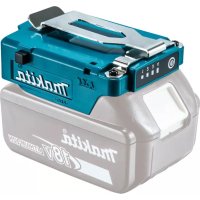
TD00000111 - Battery holder MAKITA - Free user manual and instructions
Find the device manual for free TD00000111 MAKITA in PDF.
 FR
FR
 BG
BG
 CS
CS
 DA
DA
 DE
DE
 EL
EL
 EN
EN
 ES
ES
 ET
ET
 FI
FI
 HU
HU
 ID
ID
 IT
IT
 KK
KK
 KO
KO
 LT
LT
 LV
LV
 MK
MK
 NL
NL
 PL
PL
 PT
PT
 RO
RO
 RU
RU
 SK
SK
 SL
SL
 SQ
SQ
 SR
SR
 SV
SV
 TR
TR
 UK
UK
 VI
VI
 ZH
ZH
| Product Type | Battery holder (battery support) for Makita clothing and accessories |
| Brand | Makita |
| Model | TD00000111 |
| Power Supply | Makita lithium-ion battery (not included) – compatible models listed in the manual |
| Main Functions | Powering Makita ventilated/heated clothing; charging USB devices (USB port) |
| Power Level Indicator | Yes, depending on connected product (4 levels) |
| Power Button | Yes, on/off and level change |
| USB Port | 1 USB port (variable current output depending on device) |
| Attachment | Belt clip with lock and eyelet for lanyard |
| Compatible Products (Group A) | Ventilated jackets DFJ206/207/210/211/212/213/214/216/304/305/310/311/405/407/410/411/416; ventilated vests DFV210; heated jackets CJ105D/CJ106D/DCJ205/DCJ206; heated vests CV102D/DCV202; heated blankets CB100D/DCB200 |
| Compatible Products (Group B) | Ventilated jackets DFJ212A/213A/214A/216A/312A/416A; ventilated vests DFV210A/214A/215A; heated base layers DCX200/DCX201 |
| Adapter Cable | Available as an option for Group A (ventilated jacket/vest and heated clothing) |
| Safety | Do not use with non-compliant batteries; do not expose to water, fire, temperatures >50°C; do not short-circuit; automatic shutdown in case of excessive temperature |
| Maintenance | Wipe with a dry or slightly soapy cloth; do not wash with water; do not use solvents |
| Repairability | Repairs exclusively by an authorized Makita service center using genuine parts |
| Warranty | Makita manufacturer warranty (voided if non-original batteries used) |
| Recommended Charging Temperature | 10°C – 40°C |
| Weight | Approximately 200 g (estimate) |
Frequently Asked Questions - TD00000111 MAKITA
User questions about TD00000111 MAKITA
0 question about this device. Answer the ones you know or ask your own.
Ask a new question about this device
Download the instructions for your Battery holder in PDF format for free! Find your manual TD00000111 - MAKITA and take your electronic device back in hand. On this page are published all the documents necessary for the use of your device. TD00000111 by MAKITA.
USER MANUAL TD00000111 MAKITA
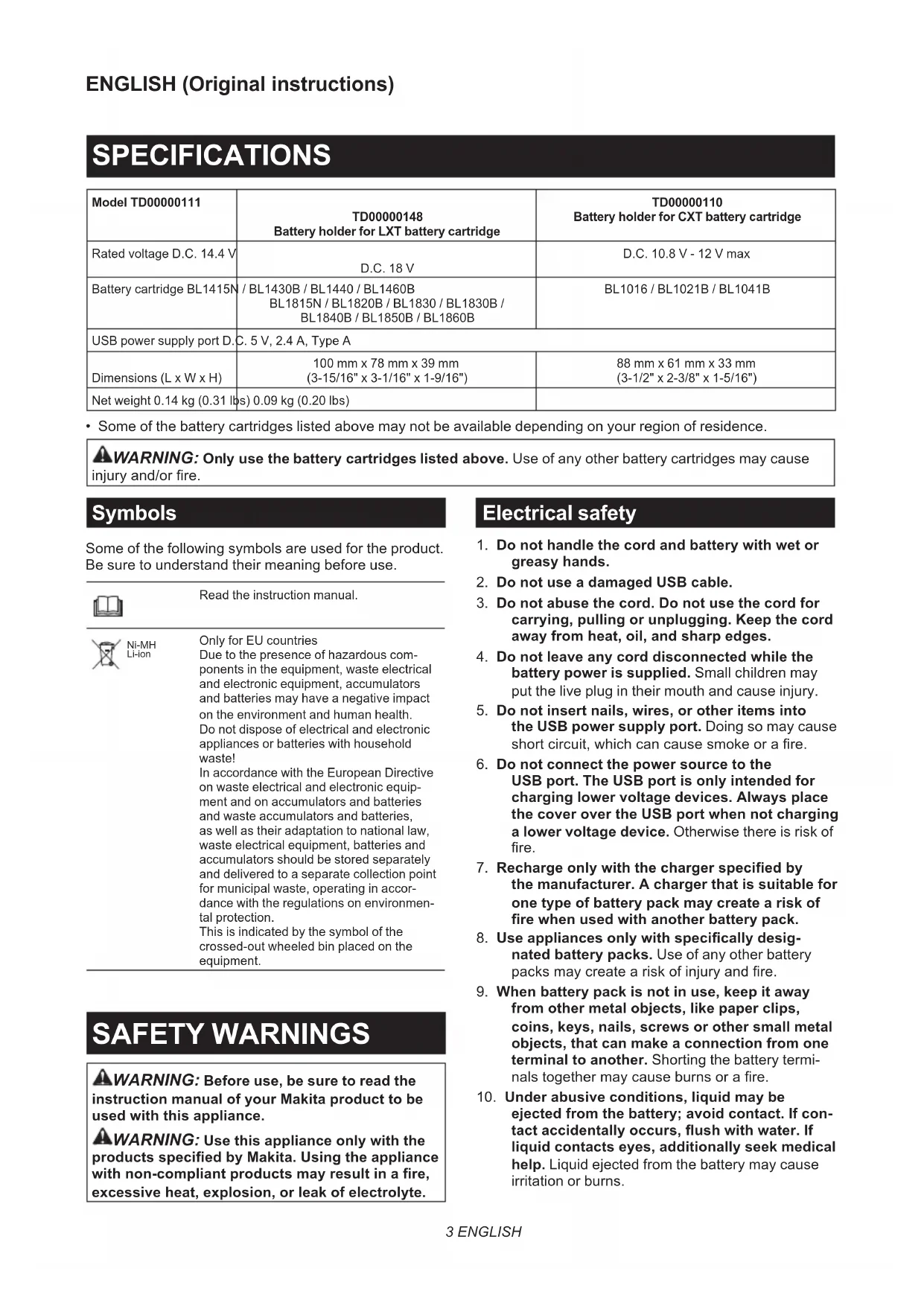
| Model TD00000111 | TD00000148 Battery holder for LXT battery cartridge | TD00000110 Battery holder for CXT battery cartridge |
| Rated voltage D.C. 14.4 V | D.C. 18 V | D.C. 10.8 V - 12 V max |
| Battery cartridge BL1415N / BL1430B / BL1440 / BL1460B BL1815N / BL1820B / BL1830 / BL1830B / BL1840B / BL1850B / BL1860B | BL1016 / BL1021B / BL1041B | |
| USB power supply port D.C. 5 V, 2.4 A, Type A | ||
| Dimensions (L x W x H) | 100 mm x 78 mm x 39 mm (3-15/16" x 3-1/16" x 1-9/16") | 88 mm x 61 mm x 33 mm (3-1/2" x 2-3/8" x 1-5/16") |
| Net weight 0.14 kg (0.31 lbs) 0.09 kg (0.20 lbs) | ||
- Some of the battery cartridges listed above may not be available depending on your region of residence.

WARNING: Only use the battery cartridges listed above. Use of any other battery cartridges may cause injury and/or fire.
Symbols
Some of the following symbols are used for the product. Be sure to understand their meaning before use.

Read the instruction manual

Ni-MH Li-ion
Only for EU countries
Due to the presence of hazardous components in the equipment, waste electrical and electronic equipment, accumulators and batteries may have a negative impact on the environment and human health. Do not dispose of electrical and electronic appliances or batteries with household waste! In accordance with the European Directive on waste electrical and electronic equipment and on accumulators and batteries and waste accumulators and batteries, as well as their adaptation to national law, waste electrical equipment, batteries and accumulators should be stored separately and delivered to a separate collection point for municipal waste, operating in accordance with the regulations on environmental protection. This is indicated by the symbol of the crossed-out wheeled bin placed on the equipment.
SAFETYWARNINGS

WARNING: Before use, be sure to read the Instruction manual of your Makita product to be used with this appliance.

WARNING: Use this appliance only with the products specified by Makita. Using the appliances with non-compliant products may result in a fire, excessive heat, explosion, or leak of electrolyte.
Electrical safety
- Do not handle the cord and battery with wet or greasy hands.
- Do not use a damaged USB cable.
- Do not abuse the cord. Do not use the cord for carrying, pulling or unplugging. Keep the cord away from heat, oil, and sharp edges.
- Do not leave any cord disconnected while the battery power is supplied. Small children may put the live plug in their mouth and cause injury.
- Do not insert nails, wires, or other items into the USB power supply port. Doing so may cause short circuit, which can cause smoke or a fire.
- Do not connect the power source to the USB port. The USB port is only intended for charging lower voltage devices. Always place the cover over the USB port when not charging a lower voltage device. Otherwise there is risk of fire.
- Recharge only with the charger specified by the manufacturer. A charger that is suitable for one type of battery pack may create a risk of fire when used with another battery pack.
- Use appliances only with specifically designated battery packs. Use of any other battery packs may create a risk of injury and fire.
- When battery pack is not in use, keep it away from other metal objects, like paper clips, coins, keys, nails, screws or other small metal objects, that can make a connection from one terminal to another. Shorting the battery terminals together may cause burns or a fire.
-
Under abusive conditions, liquid may be ejected from the battery; avoid contact. If contact accidentally occurs, flush with water. If liquid contacts eyes, additionally seek medical help. Liquid ejected from the battery may cause irritation or burns.
-
Do not use a battery or the appliance to be used with the battery if they are damaged or modified. Damaged or modified battery or appliance may exhibit unpredictable behaviour resulting in fire, explosion or risk of injury.
- Do not expose a battery pack to fire or excessive temperature. Exposure to fire or temperature above 130^ may cause explosion.
- Follow all charging instructions and do not charge the battery pack outside the temperature range specified in the instructions. Charging improperly or at temperatures outside the specified range may damage the battery and increase the risk of fire.
- Have servicing performed by a qualified repair person using only identical replacement parts. This will ensure that the safety of the product is maintained.
- Do not modify or attempt to repair the appliance or the battery pack except as indicated in the instructions for use and care.
Important safety instructions for battery cartridge
- Before using battery cartridge, read all instructions and cautionary markings on (1) battery charger, (2) battery, and (3) product using battery.
- Do not disassemble or tamper with the battery cartridge. It may result in a fire, excessive heat, or explosion.
- If operating time has become excessively shorter, stop operating immediately. It may result in a risk of overheating, possible burns and even an explosion.
-
If electrolyte gets into your eyes, rinse them out with clear water and seek medical attention right away. It may result in loss of your eyesight.
-
Do not short the battery cartridge:
(1) Do not touch the terminals with any conductive material.
(2) Avoid storing battery cartridge in a container with other metal objects such as nails, coins, etc.
(3) Do not expose battery cartridge to water or rain.
A battery short can cause a large current flow, overheating, possible burns and even a breakdown.
- Do not store and use the tool and battery cartridge in locations where the temperature may reach or exceed 50^ (122^) .
- Do not incinerate the battery cartridge even if it is severely damaged or is completely worn out. The battery cartridge can explode in a fire.
- Do not nail, cut, crush, throw, drop the battery cartridge, or hit against a hard object to the battery cartridge. Such conduct may result in a fire, excessive heat, or explosion.
-
Do not use a damaged battery.
-
The contained lithium-ion batteries are subject to the Dangerous Goods Legislation requirements.
For commercial transports e.g. by third parties, forwarding agents, special requirement on packaging and labeling must be observed.
For preparation of the item being shipped, consulting an expert for hazardous material is required. Please also observe possibly more detailed national regulations.
Tape or mask off open contacts and pack up the battery in such a manner that it cannot move around in the packaging. - When disposing the battery cartridge, remove it from the tool and dispose of it in a safe place. Follow your local regulations relating to disposal of battery.
- Use the batteries only with the products specified by Makita. Installing the batteries to non-compliant products may result in a fire, excessive heat, explosion, or leak of electrolyte.
- If the tool is not used for a long period of time, the battery must be removed from the tool.
- During and after use, the battery cartridge may take on heat which can cause burns or low temperature burns. Pay attention to the handling of hot battery cartridges.
- Do not touch the terminal of the tool immediately after use as it may get hot enough to cause burns.
- Do not allow chips, dust, or soil stuck into the terminals, holes, and grooves of the battery cartridge. It may cause heating, catching fire, burst and malfunction of the tool or battery cartridge, resulting in burns or personal injury.
- Unless the tool supports the use near high-voltage electrical power lines, do not use the battery cartridge near high-voltage electrical power lines. It may result in a malfunction or breakdown of the tool or battery cartridge.
- Keep the battery away from children.
SAVE THESE INSTRUCTIONS.
CAUTION: Only use genuine Makita batteries.
Use of non-genuine Makita batteries, or batteries that have been altered, may result in the battery bursting causing fires, personal injury and damage. It will also void the Makita warranty for the Makita tool and charger.
Tips for maintaining maximum battery life
- Charge the battery cartridge before completely discharged. Always stop tool operation and charge the battery cartridge when you notice less tool power.
- Never recharge a fully charged battery cartridge. Overcharging shortens the battery service life.
-
Charge the battery cartridge with room temperature at 10^ - 40^ (50°F - 104°F). Let a hot battery cartridge cool down before charging it.
-
When not using the battery cartridge, remove it from the tool or the charger.
- Charge the battery cartridge if you do not use it for a long period (more than six months).
PARTS DESCRIPTION
This holder can be used for following Makita products.
Fig.1
| Group Product name Model | ||
| A Fan | packet DFJ206 / DFJ207 / DFJ210 /DFJ211 / DFJ212 / DFJ213 /DFJ214 / DFJ216 / DFJ304 /DFJ305 / DFJ310 / DFJ311 /DFJ405 / DFJ407 / DFJ410 /DFJ411 / DFJ416 | |
| Fan vest DFV210 | ||
| Heated jacket CJ105D / CJ106D /DCJ205 / DCJ206 | ||
| Heated vest CV102D / DCV202 | ||
| Heated blanket CB100D / DCB200 | ||
| B Fan | packet DFJ212A / DFJ213A /DFJ214A / DFJ216A /DFJ312A / DFJ416A | |
| Fan vest DFV210A /DFV214A /DFV215A | ||
| Heated base layershirt | DCX200 / DCX201 | |
1. Power level indicator
When using a fan jacket/vest, the power level is displayed.
NOTE: If you use the fan jackets/vests in group A listed above, the power level indicator 4 will not lights up because their fan units employ 3-step control.
NOTE: If you use the heated clothing, only the power level indicator 4 will lights up.
2. Power button
To turn on, insert the battery cartridge and then press and hold the power button until the power level indicator lights up.
To change the power level of the fan jacket/vest, press the power button briefly when the power is turned on.
To turn off, press and hold the power button until the power level indicator turns off.
NOTE: To change the warmth of the heated clothing, press the button on the heated clothing when it is powered.
3. Power socket
Connect the cable from the products or the adapter cable.
4. Adapter cable for fan jacket/vest (optional accessory)
Use adapter cable when using the products in group A listed above.
5. Adapter cable for heated clothing (optional accessory)
Use adapter cable when using the products in group A listed above.
6. Power cord of the products
For the products in group A listed above, connect the suitable adapter cable for the fan jacket/vest or heated clothing.
For the products in group B listed above, connect to the power socket of the battery holder.
NOTE: The shape and location of the socket vary depending on your products.
7. Battery cartridge (optional accessory)
Insert the battery cartridge to the holder all the way until it locks in place with a small click.
FUNCTIONAL DESCRIPTION
Installing or removing the battery cartridge
CAUTION: Hold the battery holder and the battery cartridge firmly when installing or removing the battery cartridge. Failure to hold the battery holder and the battery cartridge firmly may cause them to slip out of your hands and result in damage to the battery holder and battery cartridge and/or a personal injury.
CAUTION: Always switch off the device before removing the battery cartridge.
Fig.2: 1. Red indicator 2. Button 3. Battery cartridge 4. Battery holder
To install the battery cartridge, align the tongue on the battery cartridge with the groove in the housing and slip it into place. Insert the battery cartridge all the way until it locks in place with a small click. If you can see the red indicator on the upper side of the button, it is not locked completely.
To remove the battery cartridge, slide it from the battery holder while pressing the button on the front of the cartridge.
CAUTION: Always install the battery cartridge fully until the red indicator cannot be seen.
Otherwise the battery cartridge may accidentally fall out of the battery holder, causing injury to you or someone around you.
CAUTION: Do not forcibly install the battery cartridge. If the battery cartridge does not slide in easily, it is not being inserted correctly.
Attaching the battery holder
You can hang the battery holder on your waist belt. To prevent the battery holder from dropping accidentally, attach a strap using the strap hole and secure it.
Fig.3: 1. Strap hole
The battery holder has an anti-drop function. When removing the battery holder from the belt, pull up the battery holder while pressing the unlock button.
Fig.4: 1. Unlock button
Connecting USB devices
CAUTION: Connect only devices that are compatible with the USB power supply port. Not doing so may cause a malfunction of the battery holder.
NOTICE: Before connecting a USB device to the battery holder (with the battery), always back up the data on the USB device. Not doing so may cause a loss of your data.
NOTICE: The battery holder may not supply power to some USB devices.
NOTICE: When not in use or after charging, remove the USB cable and close the cover.
The battery holder (with the battery cartridge) can work as an external power supply for USB devices.
Open the cover and connect a USB cable (not included) to the USB port of the battery holder. Then connect the other end of the cable to the device. To start charging, press and hold the power button until the power level indicator lights up. To stop charging, press and hold the power button until the power level indicator turns off.
Fig.5: 1. Cover 2. USB port
NOTE: The actual output current varies depending on the USB device to be connected.
NOTE: Battery power is consumed while the power button is turned on. Always turn off the switch when not in use.
NOTE: When charging multiple USB devices in succession, wait about 10 seconds after charging of the previous device has completed before beginning to charge the next device.
MAINTENANCE
NOTICE: Never use gasoline, benzine, thinner, alcohol or the like. Discoloration, deformation or cracks may result.
NOTICE: Do not wash the battery holder with water.
Wipe off dirt, dust, oil, grease, etc on the housing with clean dry cloth or one dipped in soapy water and tightly wrung out.
- Keep the appliance in a place where it will not be extremely hot, cold or humid.
To maintain product SAFETY and RELIABILITY, repairs, any other maintenance or adjustment should be performed by Makita Authorized or Factory Service Centers, always using Makita replacement parts.
ESPECIFICAções
| Modelo TD00000111 | TD00000148 Porta-bateria para bateria LXT | TD00000110 Porta-bateria para bateria CXT |
| Tensão nominal C.C. 14,4 V | C.C. 18 V | C.C. 10.8 V - 12 V max.: |
| Bateria BL1415N / BL1430B | / BL1440 / BL1460B BL1815N / BL1820B / BL1830 / BL1830B / BL1840B / BL1850B / BL1860B | BL1016 / BL1021B / BL1041B |
| Porta USB de alimentação C | C. 5 V, 2,4 A, tipo A | |
| Dimensoes (C x L x A) 100 mm x 78 mm x 39 mm 88 mm x 61 mm x 33 mm | ||
| Peso liquido 0,14 kg 0,09 kg | ||
VEILIGHEIDSWAARSCHUWINGEN

Fig.3: 1. Vrima e rripit
Mbaijtesi i baterise ka një funkson kunder renies. Kur hiqni mbajtesin e baterise nga rripi, térihjen i lart mbajtesin e baterise ndersa shtypni butonin e zhllokimit.
Fig.4: 1. Butoni i zhllokimit
Lidhja e pajisjeve USB
A KUJDES: Lidhni vetem pajisje qe janet pajtueshme me porten USB te furnizimit me energji. Duke mos veprüar keshtu mund teshkaktohet keqfunksionim i mbajtesit te baterise.
VINIRE: Perpara lidhjes se një pajisjeje USB me mbajtesin e baterise (me baterine), gjithmonerezervojini te dhenat ne pajisjen USB. Duke mos veprüar késhtu mund te shkaktohet humbje e te dhénave tuaja.
VINIRE: Mbajtesi i baterise mund te furnizojenergi ne disa pajisje me USB.
VINIRE: Kur nuk e perdorni ose pas karikimit, higeni kabllon USB dhe mbyllni kapakun.
Mbaijtesi i baterise (me kutin e baterise) mund te veproje si furnizim i jashtem me energji per pajisjet me USB.
(1) He DoKocBaIte KIeMHTe c npoBoIMMaTePnaJI.
(2) 368BaTe cBxpaHbAHeTo Ha akymytaTOpHnTe 6aTeepn B KOHTeHep C dpyrMeTaJIHn PpeDMeTu KaTo NpOHN, MOHeTN n dpyrNoDo6Hn.
(3) He n3naraTe akymyNaTopHnTe 6aTepeHn Ha BODa Nn DbXd.
3akbcBaHeTo Ha akymyNaTopHa 6aTepeHn MoKe Da DOBeDe Do npOTnHa H MHOr OCHEN TOK,do npErpBaHe,do BV3MOxHN 3raPApHn I daKe Do pa3nDaHe Ha 6aTepeHnTa.
- He cxbxaHbAaTe n He n3noN3BaIte HnCtpyMeHTa n akymyNaTOPHnTe 6aTePnHa MeCTa, KbJeTo TEMnepaTypa MoKe Da DoCTnHe NnHaDMnHe 50°C (122°F).
7.He n3rapnTe akymyNatopHnTe 6aTepeHH DaKe n aKO Te ca cepno3HO NOBpeDeHN IIN HAnbJHo n3HocEH.N AkymyNatopHaTa 6aTepeHH MoKe Da ekcnNoDnpa BOrh.
8.He 3a6nBaTe npoHn,He pexKeTe,He cMaKBAuTe,He XBpIaTe,He N3nyckaTe H He ydpraTe B TBbpN ppeMet akymyNaTopHaTa 6aTePna.Toba noBeHne MoKe Da npEi3BnKa nokap, nperepaHe nnB3pNB. - He n3noJI3BaIte IOBpeDeHn akymyJlAToPn6aTepn.
- CbIbPkaunTe ce JntHeBO-IOHn AkymytaTOpHn 6aTePNn Ca OeKT Ha N3NCKBaHNrTa Ha 3aKHOdaTeNCBTO 3a ONaCH CTOKN. Pn TbProBckn npeBO3n, HAp. OT TpeTn CTpaHn, CneIITOPn, Tp8Ba Da Ce Cna3BaT CneUaHn N3NCKBaHn 3a ONaKOBaH e ETKeTIpaHc. 3a noIroTobKa Ha apTKyHa, KOTo Tp8Ba Da 6bJe n3npaTeH, e Heo6xOdima KOHCytTaunC cekCnept No ONaCHNe MaTePnAnu. MoJ, Cna3BaTe N eBEHTyaHNO NO-NoDPo6HnTE HaUHOHaHN pa3nopeD6n. 3aIenete C JeHTa ININ NOKpnTe OTKpNTte KOHTKn I ONaKOBaTe AkymyNaTOPHaTa 6aTePnNo TaKbH NaHH, Ye Da He MoKe Da CE IpemeCTBa B ONaKOBkata.
11.Пи n3XBpIa He Ha akymyIaTopHaTa 6aTePnЯ n3BaTeOT HcTpymeHTa NЯ n3XBbPneTeHa NOxOJaTO MrcTo.CnaBaIte MeCTHITepa3Nope6n 3a n3XBbPnIHe Ha akymyIaTopH6aTePnI.
12. 3nOJ3BaIte 6aTeepHnte cAmO C npOdyKTHTe, onpeDeneHn ot Makita. NocTABHrTo Ha 6aTeepH NTe KbM HeoO6peHn npOdyKTm MOKe Da npeHn3-BNka noXap, npeprBaHe, B3pNB Hn n3TuHa He eJIeKtpoNT.
13. Ako nHCTpyMeHTbT Hma da ce n3noJ3Ba npoDbJnxTeJHo BpeMe, 6aTepeJa Tp8Ba da ce n3BaDi OT Hero.
14. IIO Bpeme Ha n CJIeD yIOnTe6a akymyNaTOpHata 6aTepeRn MoKe Da NoEme TOnNHa, KOrTo MoKe Da npuHHn N3rapAHHn Hn HnCKOTemNepaTyPhn N3rapAHHn. BHmAbaiTe, KORato 6opabnte c ropeunTe akymyNaTOpHn 6aTepeHn.
15. He dokocbaite KneMaTa Ha nHCTpyMeHTa BeDHara CneI yNtpe6a, TbKATO e Bb3MOXHO Da e DOCTaTbUHO Harpra, 3a Da npeDn3BnKa n3rapaHna.
16. He no3BONBAIte cTpyKn, npax nIn noUBa Da noJenBAT NO KJIemnte, OTBOpTe n KaHaJIne Ha akymyIaTOPHaTa 6aTePn. ToBa moKe Da npuHn 3arpaBaHe, Bb3HnKBaHe Ha noXkap, N36yXBaHe n NobpeDa Ha INCTpyMeHTa nIn aKyMyIaTOPHaTa 6aTePn, KoTo Da doBoDe Do n3raPaRnna TNeCEHn HapaHyaBaHn.
17. OcBeH aKO uHCTpyMeHTbT NOdIbPka H3NoJ3BaHeTO B 6nN3OCT Do BnCOKOBOTOBn eKeKTPoPBODo, He N3NoJ3BaTe aKymJaTOpHaTa 6aTePn8 6n30 Do BnCOKOBJTOBn eKeKTPoPBODo. ToBa MoKe Da DoBeDe Do HEn3npaBHOCT IIN IOBpeDa Ha INHCTpyMeHTa IIN aKymJaTOpHaTa 6aTePn8.
18. Пазerte баразся от.Deca. 3АПАЗETE HACTОДЦNTE NHСТРУКЦИN.
A BHIMAHNE: N3non3BaIte cAmo opnHaHnHaKymlaTopHn 6aTePN Ha Makita. PnN3non3BaHe Ha pa3nUHn OT aKymyNaTopHnTE 6aTePnHa Makita nnn CTapn aKymyNaTopHn 6aTePN MoKe Da ce npCkAHe Ha aKymyNaTopHaTa 6aTePn, KoTo Da DoBede Do noxkap, HapaHraBaHe nn nobpeJa. Toba cbsoe anynpa rapaunrTa Ha Makita 3a nHCTpymenta n 3apAnHOTo yCTpoiCTBO Makita.
CbBETn 3a noDbPkaHe Ha MaKcImaJIHo Dblr XNBOT Ha aKyMyIaTOPHnte 6aTeepn
-
3apekdaTe akymyataOpHnTe 6aTeepn, npEn Te da ca ce pa3peuHn HanbIHo. Korato 3a6eJnxKeTte, Ye MoUHOCTTa Ha HNCTpyMeHTa HamaJIraBa, BnHaRn CnpaTe pa6oTaTa C HNCTpyMeHTa N 3apeDeTe akymyataOpHnTa 6aTeepn.
-
Hukora He npe3apekdaIte HanbIHO 3apeDeHa akymyIaTOPHa 6aTePnI. Ipe3apIbT cKbCBA ekcnloataauOHnJ KINBOT Ha 6aTePnIra.
-
3apeKdaTe akymyIaTopHaTa 6aTepe npn cTaNHa TeMnepaTypa ot 10^ - 40^ (50^ - 104^) .OcTabeTe 3arpeTHe akymyIaTopHb aTepeHn Da ce oxlaJaT, ppeHn Da rN 3apeXdaTe.
- Korato He n3noJ3BaTe akyMyaTopHaTa 6aTe-pn, n3BaTeTe oT nHCTpyMeHTa nn 3apd-HOTO yCTpoIcTBO.
- 3apeTe akymyIaTOPHaT6aTePnA, aKo He CTe rN3NoI3BaJIN dblbI nepNOd OT BpeMe (noBeeOTweCT Meceua).
ОпиcaнеHAчACTNTE
To3n IbpxaMuKe da ce n3noJ3Ba 3a cJeHnTe npOdykTu Ha Makita.
Φn1.1
| Гура На | нименоваши на поodyкta | Моden |
| Aяke | С вентлиатори DFJ206 / DFJ207 / DFJ210 /DFJ211 /DFJ212 /DFJ213 /DFJ214 /DFJ216 /DFJ304 /DFJ305 /DFJ310 /DFJ311 /DFJ405 /DFJ407 /DFJ410 /DFJ411 /DFJ416 | DFV210 |
| Жиileтka сВентлиатори | ||
| ЯKE c подграване C105D / CJ106D /DCJ205 / DCJ206 | ||
| Жиileтka с подграванe CV102D / DCV202 | ||
| Од��но с подграванe CB100D / DCB200 | ||
| Вяke | С вentлиатори DFJ212A / DFJ213A /DFJ214A / DFJ216A /DFJ312A / DFJ416A | |
| Жиileтka сВentлиатори | DFV210A / DFV214A /DFV215A | |
| Долна Термоблuyaас подграванe DCX200 / DCX201 |
1.Индikatop3a cTepeHHaMoUHOCT
Ioka3Ba ceCTeneHTa Ha MOUHOCr, KOraTO Ce n3NoJ3-BaT rKe/KeIneTKa C BeHTuNaTop.
3A6EJIEXKA: Ako n3noJ3BaTe JKe/JKIneTka C BeHTnIaTOP oT rpyna A, n36poeHn no-rope, INdNkATOpbT 3a CTeneH Na MoUHocT 4 Hma Da CBETn, TbN KaTO TexHnTe BeHTnIaTOPHMoDynpa6OToTc 3-CTe-NeHNO ynpabJeHne.
3A6EENKKA: Ako n3non3BaTe dpexn c noDprBaHe, ue CBetba camo INdikKaTOpbT 4 3a HNBOTO HaMOUHOCT.
2. ByToH 3a 3axpaHbHaHeTo
3a BKNIOUcBaHe NOCTaBeTe aKymIaTOPHaT6aTePnI n CNeI TOBa HAtncHeTe 3aApbXKe 6yToHa 3a 3axpaHBAHeTO, DOKaTO INDnKaTOpB7 3a CTepeH Ha MOuHOCT CBeTHE.
3a npomraHa h CTeneHTa Ha MOUHcT Ha JKeTO/ KIneTKaTa C BeHTnJaTop pN BKNIOueHo 3axpaHbHe HATNCHEte 6yToHa Ha 3axpaHbHeTo 3a KpaTKO.
3a n3knHouBaHe HaTnCHTe N 3aDpBxTe 6yToHa 3a3axpaHbAHeTO, DOKaTO INHdNkAToPbT 3a CTeEN Ha MOUHOCT yrache.
3A6ELEKKA: 3a Na npomehnte TemnepaTpaTa Ha dpexnte C noDprbaHe, HATNCheTe 6yToHa Bbpxy Tx, KOrato Ca BKnIOUeyH.
3. He3do 3a 3axpaHbaHe
Cbpxte ka6ena ot npodyknte nn ananTepnna ka6en.
4. Ka6eJ Ha aadTep 3a JKe/JKNeTka C BeHTnA-tOp (DOnbHnTeJHa npHaIaeXHOCT)
N3noJ3BaIte Ka6eJa Ha aadantepa c npOdyKTInTe ot rpyna A, n36poeHn no-rope.
5. AanTepeH Ka6eJ 3a dpexn c noDprBaHe (OonbHnTeJeH akcecoap)
I3noI3BaIte Ka6eJa Ha aIaIaTepa C npOdyKTIte OT rpyna A, n36poEHN no-rope.
6. 3axpaHbau Ka6eJ 3a npOdykTnte
3a npodykTnTe OT rpyna A, n3bpoeHn no-rope, cBbpKTe nOxOJaunA aanTepen Ka6eJ 3a JKeTo/KnJETKaTa C BENTnJatopn nn dpexnte C noDrpBaHe.
3a npodykTne OT rpyna B, n36poeHn no-rope, cBbpxKeTe KbM rHe3dOTo 3a 3axpaHbaHe Ha cToiKaTa 3a akymyNaTOPH 6aTePnn.
3A6ELEKKA:ΦOpMaTa N MeCTOnOJIOKeHneTo Ha KOHTaKTa ce pa3JIuHaBAt B 3aBnCmOcT OT npOdykTtTe.
7. AkymlyaTopha 6aTepe nra (DOnbHnTeJeH akcecoap)
BkapaTe akyMynaTopHaTa 6aTepnB CToiKaTa DOKpaI, DOKaTO ce 3aKIOUH Na MrcTo, Pn KoeTo Ce CyBa IeKo UpaKaBaHe.
ОписимеHA
ФУнкцИNTE
NocTaBraHe NJIu N3BaXdaHe Ha akymyIaTopHaT aTepeHn
BHIMAHNE: 3dpaBO cToKata 3a akyMylatopn6bATEPNu akyMylatopHATA6bATEPn npn noCTABHe nNn N3BaXdaHe Ha akyMylatopHa76bATEPNr.AKO He dbpKNTe 3dpBO cToNKata 3a akyMylatopn6bATEPNu akyMylatopHa76bATEPNr. Te mOrat da ce n3nB3HaT OT pbcTe Bn, da ce nobpeRt n/nn da ce noJyHn HapaHbaHe.
BHIMAHHE:BnHaHn n3KnIOuBaIte ycTpoiCTBOTO npeDn n3BaXdaHe Ha aKymyNaTOpHaTa 6aTeprna.
Φn.r.2: 1. YepBEN INHДиKaTOp 2. ByToH
3.Akymyntopha6aTepeu4.Ctoka 3a akymyntopn6aTeepn
3a da noctabnTe akymlyaTOPHa 6atepna, n3paBHeTe e3uHTo Ha akymlyaTOPHa 6atepna cKne6b Kopnyca n rno pIb3HeTe Ha mAcTOTO My. BkapaTe akymlyaTOPHa 6atepna DOKpaJ, DOkato ce 3aklnouHn MaCTo, npN KOeTO ce UyBa IeKo UpaKaBaHe. B cnUyai Ye BnKdAte YepBeHn NndNKaTOp B TropHa Taact Ha 6byToHa, TOBA O3HaYaba, Ye T He E fNkCnpaHa HAnbJIHO Ha MAcTOTO Cn.
3a da n3BaAnTe akymyIaTopHaTa 6aTePn, nIb3HeTe Ra HABh OH CTOnKaTAta 3a akymyIaTopHn 6aTePn, DOKaTo HAtNcKaTe 6yToHa B IpeHaTaNact.
BHIMAHNE:BnHaBn BmKBaTe akyMnyaTOpHaTa 6aTePnI DOKpaT Taka, Ye cepBeHnT HnKAtOp Da ce CkPne.B npOTuBEn cnyaI akyMaTOpHata 6aTePnI MOKe Da n3NaDHe cnyauHo OT cToiKaTa 3a akyMnyaTOpHn 6aTePnI, Da Bn HapaHn IIN Da HapaHn HrKOro Okono Bac.
BHUMAHNE: Pn noctabReHo Ha akymaTOpHata 6atepna He nacnBaTe. Ako akmyIaTOpHata 6atepna He ce nbl3ra neCHO, To THe e BkapaHa npabuHIO.
3aKpenBaHe Ha cToiKaTa 3a akymlyaTopn6aTepn
Mokete Da OkaHTe CToiKaTa 3a AkymyNaTOpHn 6aTePnHa KOnaHa cn.
3a da npedotbpaTne Bhe3anHTo naDaHe Ha cToKata 3a akymytaopn6batepnn,3akpenete KOHaB OTbopa 3a KOHa Hro oBe3onacete.
Φn.r.3: 1. OTbop 3a KOJah
CtoiKaTAt3aakymyIaTOpHn6atePmNImaФyHKUnc Cpeu npaHe. Korato maxaTe cToiKaTa 3a akymyIaTOpHn 6aTePmN OT KOJIaHa CN, n3dbpnaTe cToiKaTa, KaTo HATnCKaTe De6JOKupaun6yToH.
Φn.r.4: 1.Дe6noKupa6byToH
Cbbp3BaHe Ha USB yctpoiCTBa
ABHIMAHHE: Cbbp3BaIte cMo ycTpoiCTBa, KOTo ca CbBMeCTMn C USB nopT 3a 3axpaHBaHe. Ako He HapabNTe TOBa, CToKata 3a akymyNaTopHn 6aTePN MoKe Da ce nobpeN.
BENKKA: Ppei Da CbpxeTe USB yctpoCTBO KbM cToKaTa 3a AkymyIaTOPH 6aTePN (C 6aTePnra), BnHar 3ana3BaIte pe3epBHO KOIne Ha daHHnte B USB yctpoNCTBO.To, MoKeTe Da 3aIy6nte daHHnte CN.
BENEKKA:CToKaTa 3aakymyIaTOPH6aTePm MOKe Da He NOdaBa 3axpaHbAe KbM HAKON USB yctpoiCTBa.
BENEXKA: KoraTo He ro n3non3BaTe nn cneJ 3apeXdaHe, n3BaXdaIte USB ka6ena n 3aTBopete kanayeTo.
CToKaTa 3a akymyIaNtopHn 6aTePN (c akymyIaNtopHaT a 6aTePN) MoKe da pa60Tu KaTo BbHsHo 3axpaHBaUO yCTpoNCTBO 3a USB yCTpoNCTBa.
OTbopete Kaanaykata N cbpkeTe USB ka6en (he e BkIoueH) KbM USB npTa Ha cToiKaTa 3a akymyIaTOpHn 6aTeepnn. CJeT ToBa cbpKeTe dpyrna KpaHa Ka6eJa KbM ycTpoiCTBTO. 3a 3anoCbAHe Ha 3apeXda-HeTO HATNCHEte 3aPbXTe 6yToHa 3a3xpaHBAHe, DOKATO INDnKaTOPbT 3a CTeneH Ha MOuHOC T CBtHe. 3a CnnpaHe Ha 3apeXdaHeTo HATNCHeTe 3aDpXTe 6yToHa 3a3axpaHBAe, DOKATO INDnKaTOPbT 3a CTeneH Ha MOUHOCT Yrache.
Φur.5:1.Kanak2.USB nopT
3A6ELEKKA:ДeIcTBuTeJIHnIrTиXoJeH ToK e pa3- nHuEn B 3aBucmocT ot USB yCTpoIcTBOTO, KoTo ce CBbp3Ba.
3A6EJEXKKA: 3apnHa 6aTeepnTa ce KOHCympa, DOKaTO e BkIouyen 6yToHbT 3a 3axpaHbaHeTO. BuHaru n3KnUoBaIte npebKIOUOBATeIe, KOraTO He ce n3noJI3Ba.
3A6EJEXKKA: KoraTo 3apeXdaTe HnKoNko USB yCTpoiCTBa nocJeIOBATEJIHO, n3yakaiTe OKOJIO 10 cekyni, cneI KaTo 3apeXdHeTo Ha eHnoto ycTPOIcTBo pNIKJIouH, npEIN Da 3aNoUHeTe da 3apeXdAte CneIDBaIoTO.
ПОДДРьЖKA
BENKKA: He n3noJ3BaIte 6eH3nH, 6eH3oI, pa3peiTeI, cnpT n dp. nOo6Hn. ToBa moKe Da npuHH o6e3ucBetraHe, deOpmaunr nnnykHaTHnH.
BENEXKA: He MInTe cToiKaTa 3a akymytaTOpHn 6aTePmN C B0Da.
- N36bpcBaIte 3aMbpcBaHnI, npax, Macna, rpeCn I T.H. NO KOpnyca C YnCTa CyXa KbpNa IIN C KbpNa, HanoeHa BbB Boda C Mneu npenapat N do6pe n3ueDeHa.
-ДрьжTe yctpoiCTBOTo Ha MЯCTO,КБdeto He e NOДLOKeHO Ha ekCTpeMHa ropeuHa,CTyI INI Bnara.
3a da ce noDbpxka BE3OJACHOCTTA n HADEXJHOCTTA Ha npoodykta, pemOHNTte, noDpBXK kata nn peylnpaHTo Tpr6Ba Da ce n3BbprWBat OT ynbNJHomOueh cepBn3 nn fapnyuHn cepBn3Hn CEHTPOBE Ha Makita, kaTO BUNHn Tpr6Ba Da n3NON3BaTe pe3epBn Yactn ot Makita.
SPECIFIKACije
| Model TD00000111 | TD00000148 Držač baterije za baterijski uložak LXT | TD00000110 Držač baterije za baterijski uložak CXT |
| Nazivni napon DC 14,4 V | DC 18 V | DC 10,8 V – 12 V maks. |
| Baterijski uložak BL1415N | BL1430B / BL1440 / BL1460B BL1815N / BL1820B / BL1830 / BL1830B / BL1840B / BL1850B / BL1860B | BL1016 / BL1021B / BL1041B |
| Priključak USB napajanja Dc 5 V, 2,4 A, vrsta A | ||
| Dimenzije (D x Š x V) 100 mm x 78 mm x 39 mm 88 mm x 61 mm x 33 mm | ||
| Neto težina 0,14 kg 0,09 kg | ||
3a ropehaBeIe He npOn3BoDe n3 rpyne B, npNKbUynte Ha yTuHnUy dpKaaya 6aTepeJe.
HANOMEHA: O6nIK n noJoxaj npNKbUyka ce pa3nkye y 3aBnCHoCTn oD npOn3BOda.
7. YIIOXAK 6aTepeNje (OnuONH np6Op)
IocTabTe yIoxak 6atepnje y dpkaue JcJOM dyKINHom Tako da ce 3aKbuya y neKmUty u WkJbOuHe.
ОПИС HAUINHA ФУHKЦИОНSCAHьА
IocTaBJIbaHbe n cKndaHbe yNoWka 6aTepeNje
AAXHbA: Dpxnte yBpcto dpkau 6atepnje n ynoxak 6atepnje kada noctabbaTe nNn cKndaTe ynoxak 6atepnje. Ako dpxka 6atepnje n ynoxak 6atepnje He 6ydtete dpxanu yBpctO, mory Bam nckln3Hytn n3 pyky, owtetntn ce npn naNy n/nn Bac nobpeDHTN.
AAXbA:YBeK nckbyuTe ypehaj npe yknaBaHa yNoka 6aTepnje.
Cnka2: 1. LpBHeH INHdNkAToP 2. DyMe 3. YIoxak 6aTepeJe 4. Dpxa 6aTepeJe
Да 6исте постаму уложak 6atepnje, nopabhaite je3uak Ha HeMy ca Xnebom Ha KyhnsTu n rypnite raHa MeTo. Nocstabte yloxak 6atepnje uenom dYkHOM Tako Da ce 3aKbUya y JeknUry u KJboUhe. Ako BUnITE UprBEN HndNKaTOp Ha ropBoj cTpaHn duYmTa, To 3Haun Da yloxak 6atepnje Hnje NotnyHO 3aKbUyHaH.
Ia 6ncte n3Baunu ynoxak 6atepnje,Kn3aHem ra n3ByuTe n3 dpkaa 6atepnje dok dpknte npntucnytm Dyme Ha npedBoj ctpanu ynooka.
AAXHB:YBeKdoKpaja rypHnTe ynoXak 6aTepeJe Tako da ce uPBHeu HndkATOp He BnD. YcnpToHOM,yNoXak 6aTepeJe MoKe cnyajHo da nCnaIHe n3dpXaUa 6aTepeJe,13a3NbajyHn Nobpey Bac nnn Ooc6e y BaWoJ 6n3nHn.
AAXbA: HemojTe ha cnny da rypate ynoxak 6aTepeJe. Ako ynoxak 6aTepeJe He moKeTe naKo da rypHe, To 3NaHn Da ra He noCTabBaTe npabuHNO.
NocTaBbAHe DpJkaa 6aTepeJe
ДржачбатериюможeteДаOKaHTece6nOKOkanwa.Даджачбатерию He 6n cnyajno nao, npOBuNTeKanw KpO3 HberObypyny 3a KaIw n pnpUBypCTnte ra.
Cnka3:1.Pyna 3a Kaanu
JeHa oJ cyHKunja dpkaa 6atepe je da cnpeu nai. Ako JeHNTe da cKHeTe dpkaay 6atepeje ca KaIwa, NOBYUHTe dpkaay 6atepej HABnwe DOK dpxntep npTCHyTM DyMte 3a OTKbuyabahe.
Cnka4:1.Dyrgme3aOTKbByaBaHe
Fig.5: 1. Capac 2. Port USB
TEXHIYHXAPAKTEPNUCTNKN
IINONEPEXEHH: BnKOpNCToBvTe npuDn Nnwe 3 Bnpo6amN, yka3aHMMKOMpaHicHO Akita. BnKOpNCtAHN npuAdy 3 Bnpo6amN, He BiNobIdaOTb BMOrAM, MOxE npN3BeCTN noxexi, NaMipHoro HarpBaHHra, Bu6yxy n ToKy eNeKTPonlity.
EneKtpo6e3neka
- He TpImaTec3a UHyp XINBJIeHH Ta aKymyIaTOp MOKPmM uMACHmPykAmn.
- He BnKOpNCToBvIe N0uKOJKeHn USB-Ka6eJIb.
-
BnKOpncToByTe Whyp XNBHeHHB iDnOBiHDo npn3HaueHHa. 3a6oPoneHO BnKOpncTOByBAtu wHyp dIra nepeHeceHHa NnepeMiueHHa npnaNy a6o BNTaRyBaHHa BNJKN 3 po3eKn. Tpmaite uHyp noDani BiD dJxepen HarpiBaHHa, MaCTnTa roctpnx KpaIB.
4.He 3aHnWae 6yDb-akn shHyp XNBLeHHB iD'EDHaHM, NOKn akymyIaTOp 3apJdxaCTbCra. Mani dITN MOkyTB B3rTN wTeNCeJIb, 3hAxOuNTbcra nHappyroIO,do pota, 10 npn-3BeDe do TpaBMyBaHHra.
5.He BCTABJnTe HITI,dpOTn uINiHwIppeMetn BnopT noaui KNBJIeHHN USB.LcMoKe npu- 3BecTN DO KOPOTKOrO 3AMKAnHH,IO npu3BeDe Do IOBBN DmMy Nn BOrHIO. -
He πικλυηαι Te Δχερελο Μχινληουση Σ ΜB-πορτι. USB-πoP T npɪn3hauehŋ Tɪnbkɪ dŋa 3apáxàHŋ Hɪ3bkoBOJbTHnx nPncTpoiB. 3aBXdɪ 3akpɪBaIte USB-πoP T kprɪwkoU, KɔnB BɪN He BnKOpNCTOBycTbcA Dŋa 3apáxàHŋ Hɪ3bkoBOJbTHnx nPncTpoiB. IHaKwe icHyé pɪn3NK BnHɪKHeHŋ noXeKi.
- Ipe3apJdxJaIte akymyIaTOp nIwe 3a donoMOrOIO 3apJdHOrO npNCTPOU, Bka3aHOrOBnpo6HnKOM. 3apJdHn npNCTpi, kKn NiXoHNb DnOHO rTO yakymyIaTOpIB, MoKe npN3BeCTn Do noKexi npBnKOpNCtAHHi 3akymyIaTOpom iHoro Tnny.
- BnKOpncToByTe npucTpoI nIwe 3i cneizi- anbHO npn3HaueHm TINOM akymyIaTOpIB. BnKOpncTaHHA kymyIaTOpIB IHux TUNIB MOKe npn3BecTu Do TpaBM i noxekxi.
- KOnn aKymyIaTOP He BnKOpNCTOBycTbCra, TpmaTe NOro NodaJI BiD TaKnx MeTaJeBux npedmetiB, kCkpInKn, MoHETN, KlnOuyi, UBXn, Wypyn ToIO, kI MoKyTb 3aKOpOTnKNeMn aKymyIaTopa. 3amkaHHK KEm aKymyIaTopa MOKe pN3BeCTn Do OTrpMaHHa ONIKIB a60 Do IOKeKi.
- 3a HehaJeXnX yMOB 36epirAHH 3 akymyIa-Topa MoKe BnteKTH pIDHa, KOHTaKTu 3 aKOIO cnId yHnKaTn. Y pa3i BnnaKOBoro notpa-nHnR piINn Ha TIIO BiNobiHy cactHy TiJa cnId npomTu BOIOJ. KaIO piINHa notpanNu B oOi, ix cnId npomTu BOIOO, nicra YORo Heo6xIDHO 3BepHyTncsdo Nikapra. PInHa, 50 BuTIkae 3 akymyIaTopa, Moke cnpuHHITn NOpa3HeHHa 60 onIKn.
- He BnKOpNCToBMyTe aKymyIaTOp qN npuJa, 3 kIM BIn BnKOpNCToBByBaTMeTbCra, kUO BOHn NOwKOJKeHi a6o IX KOHCTpyKciIO 3MiHeNo. EKcJIyataiA aKymyIaTOpi b N npuJaIB, Rki 6yNo MoNiΦiKOBaHO qN NOwKOJKeHO, M0x e 6ytN He6e3neHIO u CnpuHHTn NoKExy, Bn6yx a6o TpaBMy.
- He niДаВaIe akymyIaTOp BnIbBy BorHIO qI NaMipHOI TemnepaTyPi. BnIb BorHIO a6o TempePaTyPi BnIe 130 °C MoKe cnpuHHTn Bn6yx.
- DToPmUyIeTc b ycix yka3iBOK i3 3apJxahHn He 3apJdxJaTe akymyIaTOP 3a TeMnepaTypn No3a MekAmn 3a3HaueHoro B IHCTpyKciDia- na3oHy. HenpaBnIbHe 3apJxahHn a6o 3apJdxHn 3a MekAmn BkA3aHOrO TempeaTpHoro diana3oHy MoKe npN3BeCTn Do NOuKOJxehn AkyMylTopa N iINBnIHTn He6e3NeKy 3aMaHHn.
- Cepbiche obcnyrobyBaHH npncIpoMaBnKohyBaTnca KBaIiΦikOBaHm faxibem i3peMOHTy nTlBKn 3 BnKOpNCTaHHm iDeHTNuHnx 3anachnx YacTHN. Lc e 3a6e3neuNb niTpmaHH npicIpoB H aJIexHOMy cTaHi.
- He po6itb cnpo6 camoctiHb BiDpeMOHTyBaTH npnlaq nn akymyIaTOp a6o BHeCTN 3MiHN B ixHNO KOHcTpkyKIO; DToPmYIteCn IHcTpkyKIO 3 ekcnnyatauii.
Baxnbi iHctpykuii 3 6e3neKn dny kacetn 3 akymyIaTOPOM
1.пелд.TIMякКористуВаТСЯКaceToO 3akymyIaTOpOM, cIiД npOHTaTN Bci iHcTpkyKuII Ta 3aCtepeXHi 3HaKn 7Odo (1)ЗapdHoro npn-CTpoIaKymyIaTopa, (2)akymyIaTopa Ta (3) BInpo6iB, 7O npaIIOHTb BiD akymyIaTopa.
2. He po36npaIte kaceTy 3 akymyIaTOpom i He 3mIHouTe II KOHcTpkyciIO. Ie MoKe npu3BecTu Do noKexi, neperpiBy a6o Bv6vy.
3. RaKuo nepioo po60tn dyKe nokopoTwaB, cnId HeraHNO npnnnHTN KOpncTyBaHHa. Ce MoKe npn3BeCTn DO BnHNKHeHHa PN3NKy neperpiBy, oniKy Ta HabItb Bn6yxy.
4. Y pa3i notpannHnEneKtpoNity B oOi cnId npomtnix NCTOIO BDOIO Ta HeraHNO 3BepHyTncdo NiKapra. Lc MoKe npu3BecTu Do BTPaTH 30py.
5. He 3akopoitib kaceTy 3 akymyIaTOpom.
(1) He cniT TopKaTnC KIeM 6yDb JkIM CtpymonpoBIDHM MaTepiJOM.
(2) He cπiδ 36epiratn kaceTy 3 akymyIaTOpom y cMHOCTi 3 iHUNM MeTaJIeBIMn IpeDMeTam, TaKIMN JK ZBAXN, MOHeTTOso.
(3) He 3aIIuAaIe KaceTy 3 akymyIaTOpom nID doUeM, 3ano6iraIte KOHTaKTy 3 BOIOU. KopOTke 3aMnKaHHa MoKe npN3BecTu Do NOBn 3HaCHoro CtpMy, nepepiBy, MOxJIbNx onikib Ta HABiT BHXOdy 3 naDy.
- He cnid 36epiratn BukopncTOBvBaTu iHctpymenti KaceTy 3akymyIaTOpom y Micux, De TemnepaTypa MoKe cRHyTu NnepeBuunTu 50 ^ (122 F).
- He cnid cnaIHOBaTH KaceTy 3 akymyIaTOpOM, HabITb kkuo BOHa 6yNa HeoHopa3OBO NowkoDxKeHa a6o NobHicTc npaCboBaHa. KaceTa 3 akymyIaTOpOM MoKe Bn6yXHyTu BorHi.
- 3a60pOHeHO 3a6nBaTu CBxu B Kacety 3 aKymyIaTOPOm, pI3aTu, NaMaTu, KNuTaTu, BNyCKaTu KAcety 3 aKymyIaTOPOm a6o BdApTtu II TBepdUm npEMeToM. Lc MoKe Ipn3BecTu do noKeKi, neperpiBy a6o Bu6yxy.
- He cnid BnKOpncToBvBaTn NOwKOJKeHn akyMylrTOP.
- Jitii-iohhi akymyIaTOpn, 0o MICTbC B IHCTpyMeHti, MaOTb BiIDNObiDaTH BUMoram 3akOHIB npo He6e3neuHi TOBAPn. Iic TpaHCnOpTyBaHHra 3a DOnOMOrOIO KomepuiHnx nepeBe3eHb, HapriKJa i3 3aNyuaHHaTpeTboi cTOPOHn Ta EKcNeiHTOpIB, Heo6XiHO dOTPmYBaTncb OcO6JIbNX BUMOR, Bka3aHnx Ha naKyBaHHi y MapkyBaHHi.
Iiud niirtoybaHH no3nuii do BiinpaBneHH Heo6xndno npokohcybTyBaTncb 3i cneuaianictom 3 He6e3neuHnx MaTepiAnib. Kpim TOrO, cnid BkoHyBatn 6InbDoknaHn HaioHaBHi HactaHOBn, kkuo TaKi e.
3aKneIte BiDkPnti KOHTn CTpiKoHO a6o 3axoBaIte ix i 3anaKyIte AkyMylTOp TAKIM YHOM, 06 Bin He Mir pyxatncB nakyBaHHi.
11.ДЯутunлizauii kaceTu 3akymyIaTOpOM BnTarHITb II 3IncTpymeHTa Ta yTuNl3yUte 6e3neuHm cnoCo6oM.DOTpUmYTeC HOpM MicueBOrO 3akOHoDaBCTBa uODo yTuNl3auii akymyIaTOpIB.
12. BnKOpNCTOByTe aKymJrTOpn JnWe 3 Bnpo6amn, yka3aHmM KOMpaHicMo Makita. YcTaHOBNeHHraKymJrTOpibY HeBiNDoHi BnPo6n MoKe npu3BeCtNo noKexi, HApMipHoro HarpiBaHH, Bn6yxy Nn BnTOky eNeKTpOnity.
13. Raio hctpyMeHr He KopnCTyBaTHMyTbCn npotraom TpNbAioro nepiody yacy, BmMitb akymyIaTOP 3 hctpyMeHTa.
14.ПдчacicnBnKOpncTahHnKaceTa3akymyIЯTOPOMMOxeHarpiBaTcH,IOMOxeCTaTH npuHNOOnikIBa6oHn3bKOTempeNepaTyphnx onikIB.BybTeObepeXHi nIDqac nobOJKeHHa 3rapaTOKaceToO3akymyIaTOPOm.
15. He TopkaTecKa KOHTaKtIb IHCTpyMeHa BIdpa3y nicra BnKOpNCTaHH, OckIbKn BIn MoKe 6yTu Docntb rapYm, 0oB BnKlnkATn OniKn.
16. He donyckaante, yolamkn, nln a6o 3emn npnnnann do kontaktib, OTbopib i naib Ha kaceti 3 akymnyTopom. Ie moke npni3Bectn do neperpipy, 3aImaHHra, Bn6yxy Ta BNXOdy 3 Ja dy IHCTpymEnta a6o kaceTn 3 akymnyTopom i cnpnHHTN onIKn a6o TpaBMn.
17. RaKuo iHcTpymeHT He po3paXoBaHo Ha BnKOpnCTaHHNo6JN3y BnCOKOBbTHnx NiHIn eNeKtponepeDa, He BnKOpncTOByTe KaceTy 3 aKymyIaTOpom No6JN3y BnCOKOBbTHnx NiHIn eNeKtponepeDa. Lc MoKe npu3BecTu Do HecnpabHocTi, NOJOMKn iHcTpymeHTa a6o KaceTu 3 aKymyJIaTOpom.
18. TpmaTe akymyTOp y HeoctyHOMy dna diTei Micci.
3БЕРIGАЙTE Lİ BKA3IBKN.
OBEPEXHO: BnKOpncToByTe TlBKn akyMyIaTOpN Makita. BnKOpncTaHnA akyMnyTopiB, iHux HIX opuHaJIbHi akyMnyTopn Makita, a6o akyMnyaTOpiB, KOHCTpyKciIO kNx 6yNo 3mHeHO, MOKe npu3BeCTN DO Bn6bxy akyMnyTopa i CnpuHHNTn NOkExy, TpaBMy a6o NowKOdKeHHN. Y 3B'3Ky 3 UIM TaKoX 6yJe anyIbObaHo rapaHTIO Makita Ha IHcTpymENT Makita i Ha 3aprHn npucptpi.
Iopadn 3 3a6e3neueHnaMaKcNMaJbHoro cTpOKy ekCnIyaTaauiakymyJrTopa
- Kacety 3 akymytoptopom cnid 3apxkatan do TORO, kBin po3pndtbc noBHcHcN cnd 3ynnHTn po60ty IHCTpyMeHTa Ta 3apnDNTn akymytoTOp, kkuo BN nomITnN 3meHHn NotyxKHOCTi IHCTpyMeHTa.
- Hikon He cnid 3apjxknt noBtOPO NOHicTHo 3apJXeHy kaceTy 3 akymyIaTOpOM. Ipe3apJxKeHH cKopoUc cTpOK ekCnnyatauii akymyIaTopa.
-
3apraKaTe KaceTy 3akymyIaTOpom npn KimHathi TeMneparaty1 10^ - 40^ (50^ - 104^) Ipeed TmJk 3apraKaTu KaceTy 3 akymyIaTOpom, cniD 3aueKaTu, DOKN BOHa OXOIOHe.
-
Koln kaceTa 3 akymyIaTOpom He BnKOpncToBByeTbCra, BnMaIte II 3 iHcTpymeHa a6o 3apdHorO npncTroIo.
- RaKuo KaceTa 3 akymyIaTOpom He BnKOpncToBByBaIacr TpBbIuN Yac (noHaJ WicTB MicraIIB), II cIi 3apAunTu.
ONIC DETALEN
Ley Tpmau MoKHa BVKnOpuctOByBaTu Ia HaBeDeHnx Hxue Bnpo6iB KomnaHii Makita.
Pnc.1
| ГрунаНаЗв Вирав Melbourne | |
| A BeNTиЯційнa Куртka | DFJ206 / DFJ207 / DFJ210 /DFJ211 /DFJ212 /DFJ213 /DFJ214 /DFJ216 /DFJ304 /DFJ305 /DFJ310 /DFJ311 /DFJ405 /DFJ407 /DFJ410 /DFJ411 /DFJ416 |
| Венияційни Жилет DFV210 | |
| Куртka 3 еlektroponidirpibom CJ105D / CJ106D /DCJ205/ DCJ206 | |
| Жилет 3 eilektroponidirpibom CV102D/DCV202 | |
| Ковда 3 eilektroponidirpibom CB100D/DCB200 | |
| В BeNTиЯційнa Куртka | DFJ212A /DFJ213A/ DFJ214A /DFJ216A/ DFJ312A /DFJ416A |
| Венияційни Жилет DFV210A /DFV214A/ DFV215A | |
| Сорочka 3 eilektroponidirpibom DCX200/DCX201 |
1. IndnkaTop pIBNa notyXhOcTi
IiD qac BnKOpncTaHHB BeHTnJIauiHx KypTOK / KUnetIB BiO6paKaaeTbcra iHnkaTop pIBHa NOTyKHOCTi.
INPUMITKA: Y paazi BUKOPUCHaHH BeHTnlaiHnx KypToK / XunNetiB i3 rpyuA, HabeDeHnx Bnue, IHnKaTOp pIBH naTyXHoCTi 4 He 3acBiyEcTbCra, OckInbKn BeHTnlauiHn npucptpiy HnX Maec CnCTeMy 3-KpOKoBOrO KOHTpOnIO.
PIMITKA: Y paazi BUKOPINCTaHH OJdRy 3 eJeKtpo-niirpiBOM CBITNTMEmTbCRA JIWe iHdkaTop pIBH noTyXHOCTi 4.
2. Khonka XNBJIeHHa
U6 yBIMKHyTN, BCTaBTE Kacety 3 akymyIaTOpOM, a NOT IM HATNCHITb i BTpMMyTe KHONKY XNBHeHH, DOKN He 3acBtITbCg IHDNkATOp pIBH NOtyXHOCTi.
Uo63miHnpiBHeNnotyXHOCTIBeHTnJIaICHHX KypTOK /KJInTeTIB,KOPOTKOHaTNCiTbKHONKyXNBLeHHra 3a BBIMKHeHOrO XNBLeHHr.
UoB BmKHyTn,HaTNCiMb i BtpMnyTe KHOKNy KINBHeHH,doKnIHdkaTop NotxHcOCTI He BmKHeTbcra.
PIMITKA: 3miHnpiBHe niirpiBaHHaOJy 3 eKeTponiirpIbOM, HATNCHTb KHOKNy Ha Bnpo6i, KOJI BIn yBIMKHeHn.
3. Po3'cM XNBJIeHHa
IiD'edhaTe ka6eNb Bnpo6y a6o ka6eNb aanTepa.
- Ka6enb aanTepa nIy BeHTnlauiHnx KypTK / XnIeTa (doataKOBe npunaadra)
Y pa3i BnKOpncTahHn BInpo6iB i3 rpyn A, HabeJeHx BnIe, BnKOpncTobynte Ka6eIb aanTepa.
- Ka6eJb aanTepa dny oOary 3 eJeKtponiirpiBOM (oDaATKOBe npuaa)
Y pa3i BnKOpncTahHn BInpo6iB i3 rpyn A, HabeJeHx BnIe, BnKOpncTobynte Ka6eIb aadantepa.
- Hyp KINBJeHH Bnpo6ib
IiD'edHaTe BiINOBiHn Ka6eJIb aanTepa Do BENTUNauiHOJ KypTKu YN XNJeTa a6o OJry 3 eJeKtponiDirpiBOM, UO HAnExKaTB Do rpynn A B HabeDeHn BUnTe Ta6nui.
IЯ habeHbX Bnue Bnpo6iB i3 rpyuB: niD'edHaHTe Do po3'Emy KINBHeHHB TpImaqui akymyIaTopa.
PIMITKA:ΦopMa ΜροτaωγBaHHaρo3'EMMyMOKyTB BiDiPI3HrTnC3aJIeKHO BiD BaIUX BIVo6iB.
- Kaceta 3 akymyIaTOPOM (OoataKOBe npnlaad)
BCTabnIte kaceTy 3akymyIANTOPOM y TpImaY, DOKN BOHa He 3aΦikCyETbc3 JERKIM KlaaHnM.
ONMC POBOTN
YcTaHOBJIeHHa6o 3HimaHHa KacETn 3 aKymyIaTOPOM
OBEPEXHO:Пдчac yctahOBlenHa60 3HimAHnKacETN3akymyJrTOpOMcIdMiHOr TPImaTH TpIMaayakmyJrTOpaTa KaceTy3akymyJrTOpOM.KnO BuYtpmByBaTumTe TpIMaayakMyJrTOpaTa KaceTy3akymyJrTOpOM HeoCTaTHbO MiHO,BOHNMOxytB Bucn3HyTN3pyk,IO npu3BeDe DO NOxKOxHeHH TpIMaayakmyJrTOpaTa KaceTu3 akymyJrTOpOM Ta/a60 CnpuHHTb TpaBMn.
O6EPEXKHO:3aBxNn BUMKaTe npncTpii nepe 3HimaHHM kaceTu 3 akymyIaTOPOM.
Puc.2: 1. YepBoHn iHnKaTOp 2. KhoNka 3. Kaceta akMyJrTopoM 4. TpMaay akMyJrTopa
Uo6 yctahOBHTN KaceTy 3 akymyIaTOPOM, cniD cymi-CTHTN BnCTyn Ha Kaceti 3 akymyIaTOPOM i3 na3OM y Kopnyci Ta BCTABNTN KaceTy Ha Micue. BCTABnIe KaceTy 3 akymyIaTOPOM DO KnaCaHn. RaHo Ha BepxHiu qactHi KhoNk NiomITH N cepBOHn IHnKaTOp, eO3Haue, zo Kaceta 3 akymyIaTOPOM 3aΦikCoBaHa He do KInz.
Uo6 3nTn KaceTy 3 akyMnyTopom, cnIb BuTgHyTu ii 3 TpImaaya akyMnyTopa, HATNCyBUn Ha KHONKy B nepeDHiy AcTHNI KacETn.
OBEPEKHO:3aBxDn BCTaBnIe KaceTy 3 akyMnyTopom NOBHCIO, NOK He 3HnKHe YepBOHni iHnkatOp. IHaKwe Kaceta MoKe BnnaKOBO BnnaTn 3 TpImaaya akyMnyTopa Ta TpaBMyBaTN Bac a6o IIOJe, IO 3haxOJaTBc NOPu.
OBEPEXHO: He BCTaHOblIOte KaceTy 3 akymyIaTOPOM i3 3ycnIJaM. RaKIO kaceta 3 akymyIaTOPOM He BCTaBnEbCra IeRKO, ue O3Haaye, lo II BCTaBJIHOb HEPpaBnIbHO.
PpNkpinHnTpImaayakymyTopa
TpmaayakymyIaTopaMOxHaNobicHTNaNoC.
Uo6TpmaayakymyIaTopaPANTOMHeBnAB,HaDiH0
3aΦikCyuTeYoro3aDONOMOTopeMeHraOTbOpyDnpeMeHra.
Pnc.3:1.OTBipIpaMeHra
TpmaayakymyIaTopaMaeФyHKciio3an06iraHH naHIO.KoJIIMaETe TpmaayakymyIaTopa3noCa, NotarHtB TpmaayakymyIaTopa,OdHouacHOHaTnCKaH OHNky po36JokyBaHH.
Pnc.4:1.KhONka po36nokyBaHHa
PiD'cDHaHn USB-npncTpoB
OBEPEXHO:PiI'EDHyTe Nnwe npncTpoi, cymichi 3 nopTom KnBHeHn USB. IHaKWe ue MoKe npu3BeCTn Do HecnpaBHOcTi TpMaaya AkymyJrTopa.
YBAFA: Nepsh hix ni'εdHaTu USB-npncpti do Tpmaa akymyIaTopa (3akymyIaTopoM), 3aBxdn apxibYe daH i Ha USB-npncptoi. IHaKwe ue moKe npn3BecTn Do BTPaTu daHIX.
YB4A: TpImaayakmyyTopa MoKe He noDaBaTu Hanpyry Ha deaKi USB-npncTpoi.
YBAGA:ПисязаВершенизарджаннayabo ЯкsoUSB-ka6eNB He BnKOpncTOByeTbcry,BiD'ED- HaHte NOrO n 3akpInTe KpnuKy.
TpmaayakymyIaTopa(3kaceToIO 3akymyIaTopoM) MoKe 6yTn 3OBHIHIM DxKepeIOM KINBJIeHHra IJRA USB-npncTroIB.
Bdkpnte KpnuKy niD'ednaHTe USB-ka6eb (he BXoNTb y komnneKT noctaHnn) do npoty USB ha Tpmaqi akymnyTopa. Notim nD'edhaTe iHnkiHeCb Ka6eNo do npictpo. Dn aouatky 3apdXkHaHH HaTNCiThb i BTPMMyTe KHONKY XNBHeHH, DOKN iHNkAToP pIBH NOtJXHOCTI He 3acBITntbC. Dn 3ynHeHH 3apdXkAHnHaTNCiThb i BTPMMyTe KHONKY XNBHeHH, DOKN iHNkAToP pIBH NOTJXHOCTI He 3rache.
Pnc.5:1.Kpnuka 2.Iopr USB
PIMITKA:ФakTuHn BxixHn CTpym BiDpi3Ha-etbcra 3aIexHo Bi USB-npcTpo, knn noTpioHo niE'edHaTn.
PIMITKA: 3apad akymyIaTopa BnTppaeTbcra, KOJI KHOIIKa KINBLeHHRA BBIMKHeHa. 3aBXdN BmNKaTe nepemKau, KOJI He BnKOpNCTOByeTe npucTpi.
PnIMtKA:Ypa3i 3apJxHnIeKINbKo npncTpoIB USB no cep3i noeKaIte 6n3bko 10 cekyHnepei noaTkom 3apJxHnHaH nAcTyHnOro npncTpoIO.
TEXHlUHe OBCJyYrOByBAHHa
YBAFA: Hikonn He BnKOpncToBnyTe ra30iH, 6eH3nH, po3piJxByBaC, cnpT i noDi6Hi peOBoHH. Ue moKe npN3BeCTn Do 3mHn KOJIbOpy, DeΦopMa- uii a6o nOaBn TpIuH.
YB4A: He MnIe TpMau aKymyIaTopa BdoIO.
- ycyHeHHnIy, 6pydy, MaCTnna, ONNBTOIO 3 KopnyCa BnKOpNCToByTe Cyxy NCTy TKAHNHy a6o 3MooyH My MInbHO BOIO N BiKaTy raHicKy.
36epiraTe npnla y mciu, de BiH He niDabATmETbCBy HADTO BNCOKX YH N3bKx TEMpePaptyp a60 BOJOrn.
Дязабзne�нгБ3NEKN Ta HADIINHOCTI npodykii, II pemOHt, a TAKOX po6OTn 3 o6cnyROyBaHnAbopeyIbOBAHHNoBHHI BIKOHyBaTncb yNOBHOBaKeHMMa603aBOdcbKIMn cepBICHmUeHTpamM Makita i3 BUKOpNCtaHHaM 3aNuaCTIH BInpo6HnTBA KOMNaHII Makita.
TEXHNUECKNEXAPAKTEPNCNU
OCTOPOXHO: NcnoIb3yIte TOnbKO nepeuNCJIeHbIe BblIe 6NOK aKKMyJrTOpOB. NcnoIb30BaHne VnIX 6NOKOB aKKMyJrTOpOB MoKET npIBecT K TpaMe n/nn noKapy.
CNMBOJIbI
IIN3eJIIN MOrYT NcN0JIb3OBaTbCcNeDyIOUne CmBOJI. IpeE INcN0JIb3OBaHHeM y6eIITecB TOM, YTO Bbl NOHMAeTe IN 3HaueHHe.

IpoHTaTe pyKOBOCTBO NO 3KcNpyatau.

Ni-MH Li-ion
ToIbKO dIa cTpaH EC
B cBa3n C haHnUHem B o6OpydoBaHn
onacbIX KOMnoHEHTOB OTXoDbI 3NeKTPnueCKORIO 3NeKTPoHHO O6OpyDoBAHn,
aKKymJrTOpBI I 6TapeN MOrY T OKa3blBaTb HeaTINBHOE BInHHe N OkpyxauOu cyDy N 3DopOBBe YenOBeka.
He bIbpaCbaIaTe 3NeKTPnuCeckne N 3NeKTPoHHO yCTPOJcTBa NIN 6TaapeN BMeCTe C 6bITobBMIM OTXdAM!
B COOTBEcTBn C DnpeKTHBOI EC NO
OTXdAM 3NeKTPnuCeCKORIO N 3NeKTPoHHO O6OpyDoBAHn, NO aKKymJrTopam,
6TapeR M OTXdAM aKKymJrTopOB IN
6Taape, a TaKke B COOTBEcTBn C ee
adAnTAuNE K HauNoHaJIbHOMy 3aKOHODaTeNbCTBy, OTXdI 3NeKTPnuCeCKORIO O6OpyDoBAHn,
6TapeN i aKKymJrTOpBI CneDyET XpaHNTb OTDeJIbHO N DOctABJIaTb Ha
nyHKT pa3dJIbHO rC6opa KOMMyHaJIbHbIX
OTXdOB, pa6ToAouN C COBIOHeHm
npaBNI OxApaHIb OKpykaOuSe CpeDbI.
3To 0603hauEHO CmBBOJOM B VIne NepepeKHyTORo MycOPHoro KOHTeHepa Ha
Konecax, HaHeceHHbIM Ha O6OpyDoBAHne.
MEPbI BE3OПACHOCTN

OCTOPOXHO: Ipeep Haayanom 3Kcnpnyata-n O6raTeIbHO npoHTaIte HnCtpyKuIO no cnpnyataun n3deJnMaKita, c KOTOpBIM 6yDetnONlb3OBaTbc 3T0 TpN6op.

OCTOPOXHO: NcnoB3yIte 3TOPTnp6opNbKO c npoDyKUnei, yka3aHHoN KOMnHaHnei kita. NcnoB3oBaHne np6opa c npoDyKUnei COOTBeTCTByUoEe Tpe6OBaHNM, MOxET npnCTNI K NoXapY, neperpeBy, B3pbIBy IIN yTeueke ekTpOnNTa.
3JneKtpo6e30naChocTb
- He npnkacaiTecb K shhpy n akkyMnyTopy MOKpbIMn NIN 3aMaCneHHbIMn pykam.
- He nCnoJb3yIte noBpeXeHbI USB-ka6eJIb.
- AkkypaTHO o6paauTecb co shhypom. 3anpeuaeTcra nCnoJIb3OBaTb wHyp dIe nepe-HOCKN, nepemeueHn yCTpoiCTBa nn BbITrBbAHn BuJKN u3 po3eTK. PacnonaraTe shyp Ha pacctoAHn OT nCTOuHNKOB tenna, Macna n OCTpbix KpaEB.
- Pn noaee ntaHna aKKymyIaTopa y6eDNTecb, YTO Bce WHypbIO NOKlnOyeHb.I MaJeHbKne DeTmMoryT NOMECTuN IOKlnOueHNyHO BUNKy B pot, YTO Bbl3OBET TpaBMbl.
- He BCTaBnIe HOrTn, npoBoDa n dpyrHe npedMeTb I nopT nOaun nHTaHna USB. PpN 3tOM MOKeT BO3HNKHyTb KOpOTKoe 3aMbIkaHne, KOToPoE pINBeTe K NOBLeHIO DbIMa NJI IN BO3rOpaHnIO.
6.He nodknoaHTe HCTOuHKn NHTAHN K Nopty USB. NpEHa3HaueH dJa 3apAkn yctpoiCTB C 60Jee Hn3Km yPOBHe HApnja XeHn. NpT USB Heo6xOAnMo 3AkpbIBaTb KpbIkwO,ecn He BbINONHeTc 3apAka YcTPOiCTB C 60Jee Hn3Km yPOBHe HApnXeHn. Heco6NoDeHne DaHHOro Tpe6OBaHn MoKeT npNBecTN K NoKapy.
7. 3apKaIe aKKMyJrTOp TOIbKO 3apAHyIM yCTpoNCTBOM, yKa3aHHbIM n3ROTOBHTeJIeM. 3apAHOe yCTpoNCTBO, NOxOJaUe DnA OdHOro Tnna aKKMyJrTOpHbIX 6JOKOB, MOXET npNBecTn K noXApy npn erO nCNoJIb3OBAHN C dpyrIM aKKMyJrTOpHbIM 6JOKOM.
8. IcnoJb3yIte yctpoIcTBO TOnbKo C yka- 3aHHbIMn aKKymyJIaTOpHbIMN 6JOKAMN. IcnoJb3OBAHne dpyrnx aKKymyJIaTOpHbIX 6JOKOB MOKeT npINBeCTN K TpaBMe INI NOkApY.
9. Korda aKKymyIaTOPbI 6nOK He nCNoB3y- eTcra, xpaHnte erO OTdJIbHO OT MeTaJIINueCKNX ppeMToB, TaKx KaK CKePkn, MoHeTbI, KInOuH, rBO3dN, Wypynbl NnD pyrHne He6oJb- Wne MeTaJIINueCKNe ppeMToB1, KOtOpbI MOYr npNBecTN K 3aKopaUbaHnO KOHTaKTOB aKKymyIaTOPHO 6noka MEXdy cO6oJ. KopotKoe 3ambIkaHne MeKdy KOHTaKTaMn aKKymyIaTOPHO 6noka MoKET pnpBeCTN K OXkOram Nn IIOkApy.
10.ПиНЕРаВиьHOMOBpaшeHHN3akKуМy- nTOpHOrO6LOKaMOxETNOTeYbXnDkoCTb. N36eraIteKOHTaCHeB.CnyaeKOHTa c KOxeynpOMoITMeCToKOHTaO6nIbHbIM KOnuYeCTBOMBObl.BcnyaeNonadHn Brna3aO6paTntecbKbpay.YnDkoCTbN3 aKKMyJIaTOPaMOxETBbI3BaTbpa3dpaXeHneNJn OxKOrn.
11. He nCnoJb3yIte aKKMyJrTOpbl IIN npi-6Opbl, NOJnxJaune NcNoJIb3OBAHnIO BMeCTe c aKKymJrTOpOM, ecNn OHn IOBpeKdEhbl IIN MoDnΦuNpOBAHbl. IOBpeKdEHbIe IIN MoDnΦuNpOBAHbIe aKKymJrTOpBl IIN np6Opbl MOrYT pa6oTaTB HeKOppeKTHO, YTO MOKeT npUBeCTN K NoXapy, B3pbBy IIN TpaBMIpOBAHnIO.
12. He noDBepraTe aKKyMylTopHbI 6JOK Bo3-DeiCTBnO ORHa NII BBICOKOI TempeAtpybl. Bo3deiCTBne OHRN IIN TeMpeAtpybl Bblwe 130^ MoKET npNBecTn K B3pbBy.
13. CneDyIe BCem HNCTpyKUIM NO 3apRdKe I He 3apJXaIte aKKMyJIaTOpHbI 6nOK npn TeMnepaTpyHbIX ycNOBHX, BbIXOJaux 3a npedeJIb Dnana3OHa, yKa3aHHORo B INCTpyKuIN. 3apRdka HeHaJNeJxauIm o6pa3OM nII npn TeMnepaTpyHbIX ycNoBHX, BbIXOJaNX 3a npdeJIb YKa3aHHORo Dnana3OHa, MoKeT npNBecTN K NOBpeJXDeHIO aKKMyJIaTOpA N IOBbICNTb PnCK IOKapa.
14. CepBnCHOe 6cnyKbAHne yctpoiCTBa DOJXHO BbINONHtbcra KBaIINpOBAH- HbIM CNEuAnCTOM NO pEMoHTy I TOJIbKO C NcNoJIb3OBaHHem NdeHTNHybIX 3aNaChbIX Yacten. 3TO n03BOJNT oBeCneuHt b 6e3OnaCHOCTb yctpoiCTBa.
- He nbitaTecb camocToTeNbHo peMOHTnpoBaTb np6op nnn aKKymyIaTOPhBn 6nOKnn BHOH3MeHeHHB INX KOHCTpyKuHc; cTporo co6NIOaTe NHCTpyKuHn no INX ekcnnyataun.
BaxHbIe npaBnla texHnKn 6e3ONaChocTn dJa pa6oTbIC aKKyMylrTopHbIM 6JOKOM
- Npeed nCnoB3OBAHnem AkkymyIaTOpHOro 6JOKa npouHTaTe BCE uHCTpyKuIN uPpeDynpeXdaUoune HaDnncn Ha (1) 3apAHDom yctpoiCTBe, (2) aKKymyIaTOpHOM 6JIOKe I (3) INCTpyMeHTe, pa6OtaHOe mOT aKKymyIaTOpHOro 6JOKa.
- He pa36npaTe 6JOK aKKymyIaTopa n He MeHnTe erO KOHcTpKcuIO. 3TO MOKeT npNBecCTN K NOxApy, nepepeBy uIN B3pbIbY.
- EcIn BpeMa pa60tbi AkkymyIaTOpHOro 6Joka 3HaunTeIbHo COKpaTHIOcB, HeMeJeHHO npeKpaTnte pa60ty. B npotNBHom cnyae, MoXeT BO3HNKHyTb nepepeB 6Joka, YTO npuBeDet K OXORAM N DaXe K B3pbIBy.
- B cnyae nonaHaHn 3JeKtpOnIta B rna3a npomOte Hx 06NJIbHbIM KOINueCTBOM YnCToI BObl N HeMeDneHHO 6paTntecb K Bpaay. 3To MOKeT npNBecTu K nOtepe 3peHnA.
- He 3aMbIkaIte KOHTaKTbI aKKyMylTOpHOrO 6noka MEXdy co6oN:
(1) He npnKacaiTecb K KOHTaKTam KaKIMN-JI60 TOKONPOBOJUIMN npedMeTAM.
(2) He xpaHnTe aKKymyJrTophBi 6JOK B KOHeIHepe BmecTe C dpyrIM MeTaJINuCeCKIMn PpeDMeTAM, TaKIMn KaK rBO3dN, MOHeTbI N. I.
(3) He donyckaite nonaHa Ha akKymyTopHbIK 6JOK BoBbI HIN DoXJa. 3ambKaHHe KOHTaKTOB aKKymyJIaTOPHO 6JOKa MEXdy CO6o MoKet npNBcETN K BO3- HNKHOBeHHIO 60JbWoTO Toka, NpePpeBy, BO3MOxHbIM OXOrAM I DaXe NOnOMKe 6JOKa.
6.He xpaHHTe H He nCNoB3yTe HNCTpyMeHT n aKKMyJrTOPbIb 6JOK B MeCTax, rDe Tem- nepaTpaMoKeT DOCTnRaTb Hnn NpeBbIwaTb 50^ (122
7.He 6pocaiTe aKymyIaTOPbHb 6nOK B OROh, daKe ecNn OH cnIbHO NOBpeXdEHN NIN NONHOCTbIO BblweJn3 cTpor. AKKymyIaTOPbHb 6nOK MoKeT B3OpBaTbcra NoD DeeCTBHeM ORHa.
8. 3anpeueho B6nBaTb rBO3nB 6JOK aKKymyIaTopa, pe3aTb, IOMaTb, 6pocatb, poHrtb 6JOK aKKymyIaTopa nn ydapTb erO TBepdbIM npedmetom. 3TO MOKeT npINBeCTN K NOxApy, neperpeBy nIN B3pbBy.
9. He nCnoJb3yIte NOBpeXeHHbI aKKymJIaTOpHbI 6JIOK.
- BxOJaIeB KOMnJIeKT JNTHm-NOHHbIe AKKyMyJITOpbI DOJXHbI 3KcNJIyAHTpOBaTbcR B COOTBeTCTBnC Tpe6oBaHnMn 3aKOHOaTeJIbCTBa 06 onachhix TObapax.
PnKOMMepuecko TpaHcnpTupOBke, HApnPmEp, TpeTbeN CTOpOH NIN 3KcneDHTOPOM, Heo6xoDnMo HaHeCTn Ha yNaKOBky CneuaNbHbIe PpeDynpExdEHHa MapKnupOBky.
B npocce NoTROBn ycTpoNCTBa K OTnpabKe 6b3aTeJIbHO npOKOHcyIbTpHyITecb Co cneuaJIInCTOM NO ONaChbIM MaTePnaJAM. TaKke CO6JIIOdaIte MeCTHbIE Tpe6oBaHnI N HopMbI. OH MoYr 6bItb CTPOKe.
3akpoTe nIn 3akpenTe pa3OMKHyTbI KOHTaKTbI n ynyKeTe aKKyMylrTop TaK, YTO6bI OH He nepeMeuaJcNcNo ynaKOBke.
11.ДЯуTNIN3aUN 6JOKa aKKyMylrTopa n3BneKInTe erO n3 INHCTpyMeHTa n yTINn3HpyIte 6e3onacHBIM cnocobom.BbINONHnTe Tpe6oBaHHMa MeCTHO 3aKOHodATEJIbCTBa no yTINN3aUN aKKyMylrTopHO 6JOKa. - NcnoJb3yIte akKymJrTopbI TOnbKO c npOdyKuNe, yka3aHHoM Makita. YcTaHOBka aKKyMyJrTOPOB Ha npOdyKUIO, He COOTBeTCTByIOUyTOpe6OBaHnM, MoKET npNBecTn K NOxApy, nepeRpeBy, B3pbIBy nIyTeUKe 3JIeKTpOInTa.
- Ecnn HNCTpyMeHToM He 6yDyT NOJb3ObaTbcB B TeueHHe DInTeJIbHOrO nepNoa BpeMeHN, N3BLeKeNTe aKkymyIaTOp N3 HNCTpyMeHTa.
14.Bo Bpemn noCne nCnoB3OBAHn6nok aKKMyJrTopa MoKeT HArpeBaTbc, YTO MoKeT cTaTb npuHHoN OXOROB Nn Hn3KOTempe paTyphbIX OXOROB. BybTe ocToPOxHbI npn o6paueHN C ropyHM 6JOKOM aKKMyJrTopa. - He npukacaiTecb K KOHTaKtAm HhCTpyMeHcpa3y Nocne hCNoJIb3OBAHH, NOCKoJIbKY OHN MOryt 6bITb DOCTaTOUHO RopAHHM, YTO6bl BbI3BaTb OXkOrn.
- He donyckaIte HaIIIIaIIH a KoHTaKbI, OTBepCTn I Na3bI 6NoKa aKKMyJrTopa OINLOK, Nblnn nnn 3emnn. 3TO MOxET CtaTb npuHoi neperpeBa, Bo3ropaHna, B3pbIba nn HncnpaBHocTN IHcTpymeHTa nn 6NoKa aKKMyJrTopa, YTO MOxET pNBeCTn K OKOram nn TpaBMam.
- EcInn HNCTpyMeHT He paccuHtAH Ha nCNoIb-3OBaHHe B6IN3n BblCOKOBONbTHbIX INHHN 3NeKTPonepeDaH, He nCNOJb3yIte 6nOK aKKMyIaTopa B6IN3n BblCOKOBONbTHbIX INHHN 3NeKTPonepeDaH. 3To MoKeT npBecTu K HeNCnpabHOCTn, IOnOMke HNCTpyMeHTa INn 6noka aKKMyIaTopa.
- XpaHnTe aKKyMylrTop B HeDocTynHom nIa DeTei MeCTe.
COXPAHNTE DAHHbIE NHCTPYKcN.
A BHUMAHNE: NcnoB3yIe TOnbko fOpMeHHbIe aKKymyTOpHbIe 6aTapen Makita.
IcnoB3OBAHne aKKymyTOpHBix 6aTapei, He npo
n3BeDeHHbIX Makita, nnn 6aTapei, KOtOpbie 6bln
IODBeRpyTbMoNnKauzma, MoKeT pINBecTN K
B3PbIBy aKKymyTAToPA, NOKApY, TpaBMam IN NOBpeX
dENHIO mMyuEcTBA. 3TO TAkKe ABTomuYeCKn AHHy
nIpyET rapaHTNIo Makita ha INHCTpymEt NT 3apJdHoe
ycTpOciTBo Makita.
CobetbI no obecneueHIO maKcImaJIbHOro cPoka cnJx6bI aKKymyIaTopa
- 3apjkaTe 6Jok aKKymyIaTOPOB nepeI ero nonHO pa3pIko. O6raTeJIbHo npeKpaTnte pa6Otu c HnCTpyMeHToM u 3apJnte 6JOK aKKymyIaTOPOB, ecN Bbl 3aMeTNI CHHXKeHne MOUHOCTn IHCTpyMeHTa.
- HnKoIa He no3apJxJaTe NoJIHoCTbIO 3apJxHbI 6NOK aKKymJrTOpOB. Ipe3apJka cokpaJaaet cPOK cnYk6bI aKKymJrTOpA.
- 3apjkaTe 6JOK aKKymyIaTOPOB npi KOM- HaTHoN TemnepaType B 10 - 40 ^ C (50 - 104 F). Ipeed 3apjdko ropqero 6Joka aKKymyIaTOPOB daJIte emOCTbITb.
- EcIn 6Jok akKymyTOpa He nCnoNb3yeTc, n3BJIeKInTe erO n3 nHCTpyMeHTa nIIN 3apd-Horo yctpoiCTBa.
- 3apnnte HNOHO-JNTneBbI aKKymyTOpHbI 6NOK,ecNI BbI He 6ydeTe NOJIb3OBaTbcN HCTpyMeHTOM dINTeJIbHOe Bpem (6OJee Wectn MecraeB).
ОпИСАнUEДETАЛЕN
DAnHbI DepKaTeJIb MOKeT IcNoJIb3OBaTbcra dIra CJIeDyUoXn U3denn Makita.
Pnc.1
| Гушина | Изменоваимяdenя | Модаль |
| A Куртka c заLEКТРВЕТПЯТОРМ | DFJ206 / DFJ207 / DFJ210 /DFJ211 / DFJ212 / DFJ213 /DFJ214 / DFJ216 / DFJ304 /DFJ305 / DFJ310 / DFJ311 /DFJ405 / DFJ407 / DFJ410 /DFJ411 /DFJ416 | DFV210 |
| Жилтс с заLEКТРВЕТПЯТОРМ | CJ105D / CJ106D /DCJ205 / DCJ206 | |
| Жилтс с заLEKTPOBOM | CV102D / DCV202 | |
| Оделя с заLEKТРВЕТПЯТОРМ | CB100D / DCB200 | |
| В Куртka c заLEКТРВЕТПЯТОРМ | DFJ212A / DFJ213A /DFJ214A / DFJ216A /DFJ312A / DFJ416A | |
| Жилтс с заLEKТРВЕТПЯТОРМ | DFV210A / DFV214A /DFV215A | |
| Нжная рубшka с заLEKТРВЕТПЯТОРМ | DCX200 / DCX201 |
1.Индikatop ypoBmoHocTn
PnncnoB3OBaHm KypTKn /XnJIeTa C3JIeKtpoBeHTNJIATOPOM OTo6paKaetc HnDnKAtOp ypOBH MoUHOCTN.
PIMMEUHNE: Pn nncnoJb3ObaHnn yka3aHHbIX Bblwe KypTK / KIneta C 3neKtpOBeHTnIaTOpOM N3 rpynbl A INDnKaTOp yPOBnMoUHOCTn 4 He CBeTITcra, NOCKoJIbKy 6NOK BeHTnIaTOpa B Hnx IMeET CnCTemy 3-ypOBHeBOr KOHTpOJIra.
PIMMEUHNE: Pn nCnoJb3OBAHn OeJkbl C NOOrpeBOM 3aropaeTcR ToIbKO INDnKATOp yPOBHa MOuHocTn 4.
2. Khonka nHTaHn
ДяВКЛЮЧЕНЯ BCTaBbTe 6nOK akKymЛЯТopa,3aTeMHAKMITEи ydePKNBaIte KHONky nITaHЯ, NOKa He3acBeTITcR INDnKATOp yPOBн RAOuHOCTN.
IyPOBn MOHOCn KypKn / XJNeTa C 3NEKPTPOBEHTNJIATOPOM KOpTko HaxMNTe KHONKY NITAHN INBKNIOUeyHOM NITAHIN.
Дя Вькночени НжмTe u ydepkuBaTe KhoNky NITaHnI, NOka He NorachET uHdIkKatOp ypoBn MOUHOCTn.
PIMMEUHNE: INa n3MeHeHHn CTeneHH yTeNneHHn OeKDbI C NoDOrpeBOM HaxMMTe KHONKy Ha NDoTgeBaEMo OeXDe Pn BKNIOUeHHOM NTaHHN.
3. CnIOBaJ po3eTka
PoiKnHouHTe Ka6enb OT n3dennn nn Ka6enb aanTepa.
- Ka6eNb aanTepa nIy KypTOK / KInneTOB c 3JIeKTPoBEHTUNrAToPOM (DOnONHnTeJbHa npHaadNexKHOCTb)
NcnoIb3yIte Ka6eIb aIaITepa npn IcNoIb3OBAHn yka3aHHoB BblIe npOdyKuIN n3 rpynnB A.
5. Ka6eIb aanTepa dna oJekblc noDorpeBOM (DononHnTeJIbHa npHaadneKHOCTb)
NcnoB3yIe Ka6eIb aanTepa npn nCNoIb3OBaHnn yka3aHHo Bblwe npOdyKuNN u3 rpynnbl A.
6. Hyp nTaHnHa n3deHn
Iyka3aHHoB BbIe npOdyKuunn 3rpynnblA: noKnIOUaHTe K KypTKaM/JKUNETAM C 3JeKTPOBEHTNJIAToPOM NIN ODeJde C NOOrpEBOM NOxOJaune KaBeNn aadantepa.
Iyka3aHHo Bblwe npodykunn n3 rpynnbB: noKnno- yaTe K cInOBoPo3eTke depKaTeIaKyuIyIaTopa.
ПРИМЕЧАНЕ:ФорmaиpacnoLOжЕнгтHe3da MOryT pa3nuaTbC8В 3aBnCnMOCTN OT KOHKpeTHbIX n3ДeЛи.
7.БнokakkymyЯTopa(dononHHTeJIbHoe npncnoc6nHe)
BCTaBbTe 6nok akKymyIaTOpBa B depKaTeJIb do ynopa TaK, yTo6bl OH 3aΦnKcnpoBaIcna Ha MeCTe CO UeJIYkOM.
ОпИСАнг佩 PAБOTьI
YcTaHOBka Nn3BNeueHne 6NoKa aKKymyIaTopa
BHIMAHHE: npu yctaHOBKe n 3BneueHn 6noka aKKymyIaTOPa Kpenko ydepXnBaIe Te depKataIb aKKymyIaTOPa n 6nok aKKymyIaTOPa.
Ecn He co6nOdaT b30 Tpe6oBaHne, OHN MOryT BbICKoJIb3HyTb N3 pyK, YTO npuBeTe K NOBpeJdeHIO depKaTeIa 6Ioka AKKymJaTopa N/IN TpaBMnpoBaHIO onepaTopa.
A BHUMAHNE: O6raTeIbHo BblKJIIO- YaHrTe yCTpoIcTBO nepei N3BNeueHHeM 6Joka aKKyMylrTopa.
Puc.2: 1. KpacHybI uHdNkaTOp 2. KhOnka 3. Bnok aKKyMylTopa 4. DepeKaTeIb aKKyMylTopa
Дя yctaHOBKn 6noka aKKymyIaTopa COBMeCTnte BbICTyn 6noka aKKymyIaTopa c na3OM B Kopnyce n 3aDbHbTe ero ha MeCTO. BcTaBBte 6nok aKKymyIaTopa Do ynpota TAK, YTO6bI OH 3aФNKcnpOBaNc Ha MeCTe C He6OJIbWIM UeJYKOM. EcIn BB MoKeTe BnDEtB KpaChbIn HnDnKaTOp Ha BepXHe YactN KnaBUnn, 6nOK aKKymyIaTopa He NoNHOCTbIO yCTaHOBNeH Ha MeCTe.
IЯ ChTЯ 6JOKa AkKymYrTaTOPa HaxMnTe KHOJIky Ha IInCeBOI CTOpOHe N IN3BNeKnTe 6JIOK IN3 DePKeTaTeJIa AKKymyJrTaTOPa.
A BHUMAHNE: O6raTeIbHo yctHaBnBaIte 6nok aKKymyIaTopa do KOHca, YTO6bl KpaCHbIM HnDKaTOp He 6bl BnDeH. B npOTNBOM cnyae 6nok aKKymyIaTopa MoKet BbInactb N3 depKaTeIa HaHeCTN TpaBMy Bam NIN DpyrM NIOdAm.
A BHUMAHNE: He npunaraTe ue3MepHBx ycnnn npu yctaHOBke 6noka akkymyTota.
Ecnn 6nok akkymyjTOpa He DbVraeTc CBO6oJHO, 3NaHT, OH BCTaBJeH HEnpaBnIbHO.
KpenneHne depXaTeIaKKymyIaTopa
Moxho noBecntb depkaTeIb aKKymyTopa Ha noC-HoH peMeHb.
YTo6bl npedotBpaTb naeHne depkaTeIa, npKpe nnte pemeHb uepe3 OTBepCTne n 3aФNKcpyNe erO.
Pnc.3:1.OTBepctnepeMHRA
DepkaTeIb aKKyMnyTota oChaueH yHKuNe 3auNTbI OT naDeHn. Pnp ChrTm n depKaTeJIa AKKMyJrToPA C peMH rNotAHnTE depKaTeJIb BBepx, HAXIMar KHONKy pa36NknpOBKn.
Pnc.4: 1.Khonka pa36nKnpOBKn
IopdknquHne ycTpoiCTB USB
A BHIMAHNE: NodknoyaTe TOnbKO yCTpoiCTBa, COBmecTnMbIe C NOPTom NOdau NHTaHnUSB. Pn Hec6bnOHeHn 3TOro Tpe6oBaHnMOxET Bo3NkHyTb HeNCpRaBHocTb DePkaTeJIaAKyMylrTopa.
PIMMEAHNE: Ipepe noKIOueHnem ycTpoi-CTBa USB K depKaTeIIO aKKymJrTopa (c akKymJrTopoM) Bcerda co3DaBaIte pe3epBHyIO KOHNIO daHHbIX Ha ycTPOIcTBe USB. Pn HecO6NIODeHNN 3TORO Tpe6OBaHnIA daHHbIe MOyT 6bITb NOTepRHiI.
ПРИМЕЧАНЕ: ДерхаTeNB aKKуMЛЯТОпа He NOДаET NITaHne Ha HeKOTOpbI TINbI yCTpoIcTB USB.
PIMMEAHHE: Nocne 3aBepweHn 3apAnKn nn ecnn USB-ka6eJb He nCnoJIb3yETc,OTcoeDHHte erO n 3akpoIte KpbIshky.
Деркателыakkyмлгета(c6nokomakkymлгета) MoKET BbINONHrTb cyHKUIMBHeIHIero nCTOCHNka nITaHnДЯ yCTpoiCTB USB.
OTkpOHTe KpbIshky n noKnIOChte USB-ka6eIb (He BkHouen B KomnneKT) K USB-nopty depKataTe naKymyIaTopa. pyroN KOHeC Ka6eN noKnIOChte K yCTpoIcTBy. Na Hauana 3apRKn HaxMnte N ydepKuBaIte KhoNk NyTaHn, Noka He 3acBETTCr INdNKaTOp yPOBHR MOUHOCTN. Ira octAHOBKn 3apRKn HaxMNTe N yDepKINBaIte KhoNk NITaHn, Noka INHdNKaTOp yPOBHR MOUHOCTN He NorachET.
Pnc.5:1.KpbuKa 2.USB-nopt
PIMMEUAHNE:ФakTnuecka BbIXoHna Cnla TOKa MOKET OTJNuaTbcB 3aBNCmOcTH OT Tnna NODKnHOeHHoro yctpoiCTBa USB.
PIMMEUAHNE: MoHocb akKymyIaTopa pacxOdyetc, KOrda Haxkata KhoNka NITAHNA. Korda yctpoiCTBO He IcNoJIb3yeTc, NepeBOdnte nepeKJIouaTeNb NITAHNA B BbIKNoUeHHOE NOJoxEHne.
PIMMEUHNE: Pn3apjxkanHn HeckoBkux ycTpoiCTVB USB no oupeen nOdoKdnte OKo10 cekynd nepeed hauaIom 3apJKn cJeDyUoero ycTpoiCTBa.
OBCJIYJKBAHNE
PIMMEAHHE: 3anpeaatec nCnoB3oBaTb 6eH3nH, pactBopnten, cnprt n dpyrne noo6HbIe XnKoCTn. 3To moKeT npNBecTN K oBeCuBe- YBaHIO, deOpMaun N TpeuHaM.
PIMMEAHHE: He npomblaTe depkaTeIb aKKMyIaTopa BDOJ.
IydaJIeHnC KOpnyCa nbIIn, rpr3n, Macna, Cma3Kn I T.Д. INcNoJIb3yIte YIcTcyIO cyXyIO TKaHb INIITpRkKy, CMOyeHHyIO BMbIbHOB BOe, a 3aTeM BbIXKaTyIO.
XpaHnTe np6Op B MeCTe, 3aUuIeHHOM OT CnUKOM BBICOKNX INN HN3KNX TEMpePaTyPA N BJaRn.
AkkymyITop KapTpndxIhe apHaIraH MaHbI3dbl Kayinci3dk HycKaynapbl
- AkkymyIaTOp KapTpIaXIn naIaIaH6ac 6ypbI, (1) AkkymyIaTOpDbIH 3apIaTay KpyblrIbICbIHdArbl, (2) AkkymyIaTOpdaRbl XHe (3) AkkymyIaTOpDbI naIaIaHaTbIH eHimderi 6apIbIK Hcckaynap MeH eCKepTy 6Ilrinepi OHbIN WbIFbIHbI3.
- AkkymyIaTOp KapTpNdxH 6eJWeKTeMeHi3 Hemece 336etH3we aubin XeHdEmei3. OI ept, Wamadaan TbIC Kbl3y Hemece kapblny KaFdaunapbHa anbIn KeNyi MymkiH.
- ErepakymyITop KaptpnJxin naIaIahy yaKbITb6iptana KbICkapraH 60nca, naIdaIaNHydepey TOKtaHB13.Byn KbI3bIN KeTy,bIKTmAl KnyIKTepe Hemece tinti Xapblbc Kayin TydbybIMMKIn.
- Erep 3neKtpoNt Ke3iH3re Turen 60nca, Ke3iH3di Ta3a Cymen WaibHb3 XHe Depey MeduunHaBbK KEmekke JyriHb3. Byn Kepy Ka6iNetHe aBipbIyra eKe n CoKtbipybl MymkiH.
- AkkymyIaTOp KapTpNdxJiH KAnfacynapbIH 6ip 6ipimeH MaTAcTbIpMaHbI3:
(1) KneMaIapBk Ke3 KeIeRr ToK eTki3riu MaTePnAaPaFra Tnri36eHiz.
(2) AkkymyITop KapTpIxKiH iwiHde Werenepe, TbIHap, T.6. 6aca MeTann 3aTTapbl 6ap KOHTeHepDe caKTaMaHbI3.
(3) AkkymyIaTOp 6norbIH cyra caImMaHbI3 HEmece XaHbIbIp actbIHda KaIbIpMaHbI3. AkkymyIaTOp tyicnepeHH tybIKTaNYbI YJKeH TOK aFBiHBiHbIH naHa 6onybHa, Kbl3bIN KeTyre, bIKTMaII KyikTepre XHe TiNTi 6y3bInyfa ce6en 6onybIMyMKIn.
- KypaIbI JxHe aKkMyJrTop 6nOrbIH Tempeatypacbi 50^ -Den (122 F ) WAmacbIHah acaTbIH XepJIepDe caKaTaMaHbI3 XHe naJaHaHa6aHbI3.
- AkkymyIaTOp 6Iorbl KaTbI 3aKbIMdaIaFHeMece ToJIbIfbImeH To3FaH 6OJca Da, OHbIOtKa XaKnabI3. AkkymyIaTOp 6Iorbl OTTaXapblBn Ketyi MymkiH.
- AkkymyIaTOp KapTpndxin Wereneyre, Kecyre, 6acyra, NaKtbypyra, KynatyrHa Hemece OHb KaTb3aTneH coryra 60nMaadbl. Byn epekeTTep oPt, Wamadaan TbIC Kbly Hemece Xapblny KaFdaNapbHa aBIn KeNyIMMKIN.
-
3akbIMdaIraH aKKyMnyTopDbI naIdaIaHa6aHbI3.
-
KInHaKa KipeTIN NHTN-NOHbI aKKymyTAOpnap DeHCayNbIKKa XeHe KOpwaH opTaFA 3nHbI 3aTTap 3aHMaCbI TaanTapbHa CaiKec KapactbIPbIaDbI. KompeuBk TacbImaNlay yuiH, MbcAbl, yuiHti TapanTp, kCneDITopnp yuiH Kantamada XeH Te H6aayda apHaBt TanaTAP caTaNbTiic. Xi6epinTeH eHIMdi daBHday yuiH kayinti 3aTTap 6oBbHa capanBbMaMaHMeH KeHcy KepeK. CoHbEme KaTAP yNTbIK epexenepeDi De ToNbIK Kapan WbIFbIHbI3. AdbTK tyicnepepiXaybl, aKKymyTAOpdbI KantamaF Ko3raJMaTbIHdae etin OPhaNaCTbIPbIHbI3.
- AkkymyraTop Kaptpnxdin Kdere japaTkan Ke3de OHbl KypaIaN Whifapbn anbIn, Kayinci3 Xepde Kdere JapaTbHbI3. AkkymyraTopbl KaDere JapaTyra KaTbICTbJ XepriniKti epexepeDi opbHaHaB13.
- AkkymyTopnapbI Tek Makita KomnnaHcBi KepceTkeh eHimdepmH 6ipre naDanaHbHb3. AkkymyTopnapdbI yInecimDi emec eHimdepre opHaTy eptKe, Kb3bIN KeTyRe, KapbIbCKa Hemece 3NeKTpONIT aByiHa oKeN cOKtbpYbI MymKIH.
- Erep Kypan y3ak yaKbIT 60nbI naDanaHbIMaTbIH 60nca, KypandaFbI aKKMyJrTopDbI anBIn TacTay KepeK.
- AkkymyIaTOp KapTpIaXiH naIaIaHy Ke3InDe XeHe naIaIaHaHH KeiH, OI KbI3bI, KyIKKe HemeCe TEmeH TempepaTyIbI KyIKKe eKenyI MymKiH. bIcTbIK akkymyIaTOp KapTpIaXJepImeH KymbIc icTeReHde caK 60JIbIHbI3.
- KypaIbIH KJIeMMacBn NaJaHaHFaHHaH KeiH, OHbI 6ipDeH yCTaMaHbI3, ON KYIOre ce6en 6oJatbIHdai bICTbIK 6Ojybl MymKiH.
- AkkymyIaTOp KapTpdiXiH IN KJIeMMaJapbHa, caHbIaynapbHa XHe OIBIKTapbHa KOHka, WAn HEmecE KipDIn TybpIN KaIyBn 6oIbIpMaHbI. ByN KypanDbH KbI3yBaHa, TyTaHyBaHa, XApblNyBaHa XHe 6aTaper KaTpdiXiH IcTeH WbIFyBaHa eKeIn, KyIK HEmecE XapaKaT anyFa ce6en 6Oly MyMkiH.
- Erep Kypan XorapbBoBbTTb3NeKtpnik Kyat Xeinepi KaHbIHda naDaIaHyra JkapamDbI 6oImaca, aKKymyIaTOPbIK KapTpndkdi XorapbBOBbTTb3NeKtpnik Kyat Keinepi XaHbIHda naDaIaHa6aHbI3. ByN KypanDbIH HeMece akKymyIaTOP KapTpndxHInH ICTeh 5bIfyiba HEmec CeHybHa anbIN Kenyi MymKiH.
- AkkymyIaTopbI 6anaIapdaH aynaK yctaHbI3. OCbl HYCKAYAPDbI CAKTAHbI3.
CAK BOJIbIbI3: Tek TynHycKa Makita akymJrTOPnapbIH naJaHaNbIHbI3. TyHcycka emec Makita akymJrTOPnapbIH hemece e3reptinreH akymJrTOPnapdbI naJaHaHy hTeINkeciHe ept, JapaKat any HeMece 3aKbIMdaNyfa c6en 6oNaTbIH akymJrTOP kapblNybiHa aKeenyi MymKiH. On coHdai-ak Makita Kypanbi MeH 3apraTay KypblfbcIy wih Makita KeinindirH KywH XOydi.
AkkymyIaTOPdbIH MaKcIMaJIbI Kbl3MeT eTy Mep3iMIn caKTay 6oYbIHwa KeHeCTep
- AkkymyIaTOp KapTpDxKIn KyaTbI ToIbIbImeH TaycblMaC 6ypbIH 3aprTaHbI3. 3neKtp KypaIbHbIH KyaTbI a3 eKeHdiriN 6aKaRaH Ke3De, KypaJI JxMbcIH TOKtA bIN, AkkymyIaTOp KapTpDxKIn 3aprTaHbI3.
- TOnbIfbIme3aprTaJraH aKkymyIaTOp KapTpndxih ewkaush KaTaN 3aprTaMaHaB13. ApTBk 3aprTaay aKKymyIaTOpDbH KbI3MeT eTy MEP3imH KbICApTaDbI.
- AkkymnyTop KaptpnDxih 10°C - 40°C (50°F - 104°F) 6eJMe TemnepaTypacbHda 3apraTahbI3. 3apraTamaC 6ypbIH akKymyTOp KaptpnDxih cybltbiHbI3.
- AkkyjTOp KapTpDxH naDanaHaY yaBtTa OHbI KypaJdH HeMece 3apdTay KypblfbcihAanBn TaCTaHbI3.
- ErepakkymyITop KaptpnIxH y3ak yaKbIT 6oynbl (aJtbl aHaapTbIK) naJaHaHa6aHaH 6oJcaHb13, OHbl 3aprTaHb13.
1. KyaT DeHreinHnHnKaToPbI
KeIeTkiwi 6ap kypTe/KeydeWeHi naJaHaHraH Ke3ne, KyaT DeHreI KepeTinei.
ECKEPTNE:Korapbda KepceTINREH A To6bInbH KypTeJIepiH/KeUdEWeJIepiH naIdaIaHaTbH 6oNcAbl3, OnapdbH JeJdETKiIb 6nOrbIHDa 3 KaJaMdbK 6acApy Knyeci KOnDaHbIaTbIHbIKTaH, Kyat DeHreHiH 4-UNdkaTopbI XaH6aBbl.
ECKEPTNE:KbIbITKbIbIbIbI6ap KIMiI naDanaHaTaBn 6oNcaHbI3,KyAT DeHreinH 4-nHdkaTopbI rHa KaHaDaI.
2. Kyat TyuMeci
Icke Kocy yuHnAkkymyTOpKapTpNdxHcAnbIn, Kyat DeHreiniHnHNdkaTOpblKaHfHaWu Kyat TYmecin 6acbl TpybHb3.
KeIeTkiwi 6ap KypTe/KeYdeWeHin Kyat DeHreHn aybIcTbpy yWIn Kyat KocblfAH Ke3De Kyat Tymeci H XblJam 6acblHbI3.
Ohbi eWipy ywiH, KyaT DeHReHH INHdkaTopbl EwkeHwe Kyat Tymecin 6acbln TypbHb3.
ECKEPTNE: XbIbITKbIbIb6ap KIMHHXbIyBH 03repTy ysiH KOcbIbIN TypFaH XbIbITKbIbIb6ap KIMdERi TyMeikTi 6acblb3.
3. 3neKtpnik po3eTa
ΘHIMdepdiH ka6eHHemece kajfactbipfbiW ka6eIbdi KaIraHbi3.
4. XeIeTkiwi 6ap kypTe/KeydeWeere apHanraH anaanTep ka6eni (KocbIMwa KepeK-kaPak)
Korapbida KepceTilreH A To6bIHbH eHIMdepiH naDanaHaH Ke3e aanTeP Ka6eHIN KOJaHaBbHbI3.
5. XbIbITkbIb6ap KIMHIN KaJIfactTbIPfbIW Ka6eni (KocbIMwa Kepek-KapaK)
KorapbdaKepeTJREH A To6bIHbIH eHIMdepiH naDanaHaR Ke3e aanTeP Ka6eIN KOJaHaBbIb3.
Cypet2: 1. Kbl3bln nHdkaTop 2. TyMe
3.AkkymyIaTOp KapTpniJxI
4.AkkymyTOp yCTaftbIuB
AkkymyIaTOp KapTpJxHIn OPhAty yuH, aKKymyIaTOp KapTpJxHderi Tinuehi Kopnyctafbl ObIKneH Typanan, OHbI OphbHa CbIPfblTBnCaJIbHb3. CbPT etKeH dIb6bcEctin, 33 OPhbHda KylbINTanFaHwa, aKKymyIaTOp KapTpJxHIn OPhbHa NTepin CaJIbHb3. Erep TynMeHHKofapbl KaftbHda Kb3bl INHdNkATOp KepiHn Typca, DEMEK ON ToJIbFbIMeH KyJIbINTaNMaFAH.
AkkymyIaTOP KaptniXin any ywiH KaptpnXdiH anDbIHbI KaBHdaBfTyMeHi 6acbl, OHbl aKKymyIaTOP ycTaftbIbHaH cbPbITbIN WbIFapBIn aBlHbI3.
CAK BOJIbIbI3: AkkymyJrTop KaptpnDxih apdaiBIM KbI3bl INHdkaTOp KepiH6eHTiHeJe etin, TOnbIFbImeH opHaTbIHbI3.
Thnce akkymyTop KapTpniXk akmyIaTOp yTaBbHbHaH abcib3da Tycin KaBIn, ci3di Hemece aHaHaHa3daftbI aamdapbl kapaKaTTayb MyMkiH.
CAK BOJIbIHbI3: AkymyTOp KaptpnJxH Kywten opHaTnaHbI3. Erep akymyTOp KaptpnJxKi KeHJ cbPbIMaca, demek ON dypbc caJIbH6araH.
AkkymyIaTOP yCTaftbIuBIn 6eKiTy
AkkymyIaTOp yCTaBbIbH 6eN 6yaTbH 6eNikke iJin KOIOrFa 6oJaBl.
AkkymyIaTOp yCTaftbIbHbIH Ke3deNcOK TyciN KeTyIHe XoI 6epMey yuH, 6aybI 6ayra apHaIraH caHbIaydaH eTki3in, 6ekitih3.
Cyper3: 1. Bay Teciri
AkkymyIaTOp yCTaftbIbHbIN Tycin KaNyfa Kon
6epMeiTHn FyHKUncBcI 6ap. AkkymyIaTOp yCTaftbIbHbIN
6eNikTeH any Ke3iHe oHb 6ocaty Tymecin 6acbin
TypbIn, TapTbHb3.
Cyper4: 1. Bocaty tvimeci
USB KypbIINfbIInapbIH Kocy
CAK BOJIbIHbI3:USB Kypblfbcih
ehri3etin nopTneH yJnecimdi Kypblfnapdbi
raHa KocbiHbI3. Θntnece 6yn aKKymyIaTOP
YCTaftbIbIHbIH, akaynbIfbHa ce6en 6onybl MymkIH.
HA3AP CAJIbIbI3: USB Kypblrbcih
akymnytOp yctaftbIbHa (akymyrtopMeH)
Kocyaan 6ypbH, apaibIM USB Kypblrbcihda
depekTeprin pe3epBtik Kowipmecin XacaHbI3.
OnTnece 6yn depekTepiH3diH xofanybHa ce6en
6onybl MymknH.
HA3AP CAIbIHbI3: AKKyMnTOp yCTaFbIuBkiEi6ip USB KypblfbnapbH 3aprTaMaaybIMyMKIn.
HA3AP CAJIbIHbI3: NaiDanaH6aNTbIH Ke3de Hemece 3apdTaaydah KeiH, USB Ka6eIn aJbIn TactaHbI3 XHe KaKNaKTbI Xa6bHbI3.
AkkymyIaTOp yCTaftbIuBt (akkymyIaTOp kapTpndximEn) USB Kypblfblnapbl ywiH cbiptkbi Kyat Ke3i peTiHde Kymbic ICTeyi MymkiH.
KaKaNaKbI aWbIn, USB Ka6eIn (6ipre 6epiMereH)
aKKyMyJrTop yCTaftbUdbAftb USB nopTbHa
KanFaHbI3. CoaH Kein Ka6eJIbDiE kInHi YsBn
KpyBfNfRa KaFHaHbI3. 3apdTaaybI bactay ywiH, KyaT INDkAToPbI KaHfAHa WkaT TyMecIH bAcBn TypbHbI3. 3apdTaaybI TOkTaTy wH, KyaT INDkAToPbI cehReHwE
KyAT TyMecIH bAcBn TypbHbI3.
Cyper5: 1. KaiknaK 2. USB nopTbI
ECKEPTNE:IC Kyy3iHderi WbIFbIC KepHey KocblNaTbIH USB KypblrbcbiHa 6auihaBcTbI eptpyi 6oanaBl.
ECKEPTNE: Kyat TyuMeci KocyIbKe3de aKMyJrTop KyaTbI KymcaJaDbI. KypblfBhlb naDanaH6aFah Ke3De aybICTbIPbIN-KOCKBIWbI epaabimewipin Kypihi3.
ECKEPTNE:BipHeWe USB Kypblfbcih 3apraTay Ke3iHde KeJIeci KypblfHbI 3apraTaydbI 6actaydAn 6ypbH,anDbHfbKypblfHbIH 3apraTanybi aKaTaJrFaHHaN KeiH WAmamEn 10 cekyhd KytiH3.
TEXHINKAJIbIK Kbl3MET KOPCETY
HA3AP CAIbIHbI3:KaHapMaIbI,6eH3nHdi, cyIbITKbIWTbI, cNpTTi Hemece corah YKcac 3aTApdbI eWkaWah naJaanHa6aHbI3. HAtnxkeciHe Tycci3deHy, 6yniHy Hemece JapbIKtap naJa da 6onybl MyMKIn.
HA3AP CAJIbIbI3: AKKMyJrTOp yCTarblBIn Cymen Kyyra 6oImaIdbI.
Kopnyctafti Kipdi,waHdbi,MaNbIb,6acka da KaanDbikTapdbicabibDcya 6taBipbnraH XHe Xakcbinan cbfblnraH Ta3a XeHe Kpyrak Wy6epeKeHcypIn anbHb3.
Ka6bIKbI WamaH TbIC Kblny, cybIK Hemece bIFaIbIH acepi TImeTIN JKepe YCTaHbI3.
KAYINCI3IIMeH CEHIMDIIIIIH KaTAMacb3 eTy yWIn,KeHDey KymbICTapbl,Ke3 KeJIReh 6aCa TeXnKaIbIK KbI3MeT KepCteY HeMece petTey apdaiM Makita Kocankb6eJWeKTePi naiDaHaHy apkblbMakita KomnaHnrcbHbN eKinetTI HeMece 3aybITbIK KbI3MeT KepCteY OPTaJIbIKTapbl TapanbHaH opbHaanybKepeK.
| 规格 | |||
| 型号 TD00000111 | TD00000148 LXT电池组专用电池座 | TD00000110 CXT电池组专用电池座 | |
| 额定电压 D.C. 14.4 V | D.C. 18 V | D.C. 10.8 V - 12 V最大 | |
| 电池组 BL1415N / BL1 | 430B / BL1440 / BL1460B BL1815N / BL1820B / BL1830 / BL1830B / BL1840B / BL1850B / BL1860B | BL1016 / BL1021B / BL1041B | |
| USB供电端口 | D.C. 5 V, 2.4 A, A型 | ||
| 尺寸(长×宽×高) | 100 mm × 78 mm × 39 mm | 88 mm × 61 mm × 33 mm | |
| 净重 0.14 kg 0.09 kg | |||
[BaT]IgA DnLkDfHgE, 1000
[BaT]KHTIJIiJiJiJiJiJiJiJiJiJiJiJiJiJiJiJiJiJiJiJiJiJiJiJiJiJiJiJiJiJiJiJiJiJiJiJiJiJiJiJiJiJiJiJiJiJiJiJiJiJiJi
能
映贝拉
() ()
WJWJWJWJWJWJWJWJWJWJWJWJWJWJWJWJWJWJWJWJWJWJWJWJWJWJWJWJWJWJWJWJWJWJWJWJWJWJWJWJWJW
▶ NENJU5: 1. TIN2. WNT USB
yhuynh:nwnwnanwnanwnnnn
ywnn:wwwnnnn6nnaan nynnnnnywnnnn
nannnnnnaa nnnnne USB nnnnnn nnnn nn nnnnnn 10 nnnnnn nn nnnn nnnn nnnn nnnn nnnn nnnn nnnn nnnn nnnn nnnn nnnn nnnn nnnn nnnn nnnn nnnn nnnn nnnn nnnn nnnn nnnn nnnn nnnn nnnn nnnn nnnn nnnn nnnn nnnn nnnn nnnn nnnn nnnn nnnn
n
y2y67n: nnnnnaaennn 1nnuu
yio 107
- 62nnnun n uu nn uan yuyu uynuynuynuynuynuynuynuynuynuynuynuynuynuynuynuynuynuynuynuynuynuynuynuynu
- 1nuyunrnnnnyuynnnaaunnuuunnu
Wnwnnuanrnnnnae nn nnnnne nnnnne nnnnne nnnnne nnnnne nnnnne nnnnne nnnnne nnnnne nnnnne nnnnne nnnnne nnnnne nnnnne nnnnne nnnnne nnnnne nnnnne nnnnne nnnnne nnnnne nnnnne nnnnne nnnnne nnnnne nnnnnee nnnnne nnnnne nnnnne nnnnne nnnnne nnnnne nnnnne nnnnne nnnnne nnnnne nnnnne nnnnne nnnnne nnnnne nnnnne nnnnne nnnnne nnnnne nnnnne nnnnne nnnnne nnnnne nnnnne nnnnne nnnnae nn
SPESIFIKASI
| Model TD00000111 | TD00000148 Pemegang bateri untuk kartrij bateri LXT | TD00000110 Pemegang bateri untuk kartrij bateri CXT |
| Voltan terkadar D.C. 14.4 | V D.C. 18 V | D.C. 10.8 V - 12 V maks |
| Kartrij bateri BL1415N / BL1430B / BL1440 / BL1460B BL1815N / BL1820B / BL1830 / BL1830B / BL1840B / BL1850B / BL1860B | BL1016 / BL1021B / BL1041B | |
| Port bekalan kuasa USB D.C. 5 V, 2.4 A, Penis A | ||
| Dimensi (P x L x T) 100 mm x 78 mm x 39 mm 88 mm x 61 mm x 33 mm | ||
| Berat bersih 0.14 kg 0.09 kg | ||
J 1500000000000000000000000000000000000000000000
1
(s)g
S 15 S 15 S 15 S 15 S 15 S 15
#
yjy jyjy jyj yj
s yj 100000000000000000000000000000000000000000000000000000000000000000000
4.4s jyj 3.32.2 jyj 1:2
1 1 1 1 1 1 1 1 1 1 1 1 1 1 1 1 1 1 1 1 1 1 1 1 1 1 1 1 1 1 1 1 1
1 1
J 1 J 1 J 1 J 1 J 1 J 1 J 1 J 1 J 1 J 1 J 1 J 1 J 1 J 1 J 1 J 1 J 1 J 1 J 1 J 1 J 1 J 1 J 1 J 1 J 1 J 1 J 1 J 1 J 1 J 1
1 1
jssolal, jssolal lusla jsl sgl jy j baa:blia
aai 10000000000000000000000000000000000000000000
y
y jj j 1 jj gai o dai j j j j j j as gai
45
Jus Jus Jus Jus Jus Jus Jus Jus Jus Jus Jus Jus
Ciiitally aiei iia 6
JL Jc 10d1 sSall A aegssall gddglll
a a a a a a a a a a a a a a a a a a a a a
y
AaBaa aai jia jia jia jia jia jia jia jia jia
Jol.4 1jblg.3 jll.2 jaljall.1:2
g 1
gaiiall 2020 g22sall jll
a 1
Jolj 1
a
g j 11 11. gie y j b u 8 gaiu uusy
jll jll 4 jll jll jll jll jll jll
a 2
- 1.
6
(122°F)50°C
4 7
g 1
gaiabai gaiiaai gaiygiiaai gaiyai
y
j 1
Aa 9
aalalalalalalalalalalalalalalalalalalalalalalalalalal
.3jbiil
y
11111111111111111111111111
y
y
2 1
.
4a 11
AaBbI aal 1
12