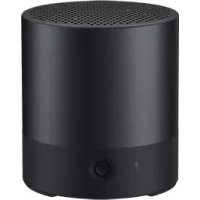
Mini Speaker CM510 - Hi-fi system HUAWEI - Free user manual and instructions
Find the device manual for free Mini Speaker CM510 HUAWEI in PDF.
 FR
FR
 BG
BG
 CS
CS
 DA
DA
 DE
DE
 EL
EL
 EN
EN
 ES
ES
 ET
ET
 FI
FI
 HU
HU
 IT
IT
 JA
JA
 KO
KO
 LT
LT
 LV
LV
 MY
MY
 NL
NL
 NO
NO
 PL
PL
 PT
PT
 RO
RO
 RU
RU
 SK
SK
 SL
SL
 SV
SV
 TR
TR
 UK
UK
| Product Type | Portable Bluetooth Speaker |
| Brand | Huawei |
| Model | Mini Speaker CM510 |
| Dimensions (approx.) | 100 x 100 x 50 mm |
| Weight (approx.) | 200 g |
| Power Supply | USB 5 V |
| Battery | Built-in rechargeable lithium-ion battery (model HB642735ECW) |
| Battery Life | Variable, up to 6 hours (estimated) |
| Connectivity | Bluetooth 4.2 (estimated) |
| Bluetooth Range | Approximately 10 m |
| Main Functions | Music playback, hands-free calling, TWS pairing, volume control, built-in microphone |
| LED Indicators | Blue (connection/playback), red (charging/low battery), flashing (pairing) |
| Maintenance and Cleaning | Wipe with a soft, dry cloth. Do not use chemical products. |
| Safety | Do not expose to water, extreme temperatures, or magnetic fields. Keep out of reach of children. |
| Spare Parts and Repairability | Non-removable battery. Contact an authorized Huawei service center for repairs. |
| General Information | Compliant with EU and FCC directives. Bluetooth band: 2.4 GHz. Max power: 12.99 dBm. |
Frequently Asked Questions - Mini Speaker CM510 HUAWEI
User questions about Mini Speaker CM510 HUAWEI
0 question about this device. Answer the ones you know or ask your own.
Ask a new question about this device
Download the instructions for your Hi-fi system in PDF format for free! Find your manual Mini Speaker CM510 - HUAWEI and take your electronic device back in hand. On this page are published all the documents necessary for the use of your device. Mini Speaker CM510 by HUAWEI.
USER MANUAL Mini Speaker CM510 HUAWEI
KpaTKoe pyKOBOdCTBO NOIb3OBaTeJIa
Kratko uputstvo
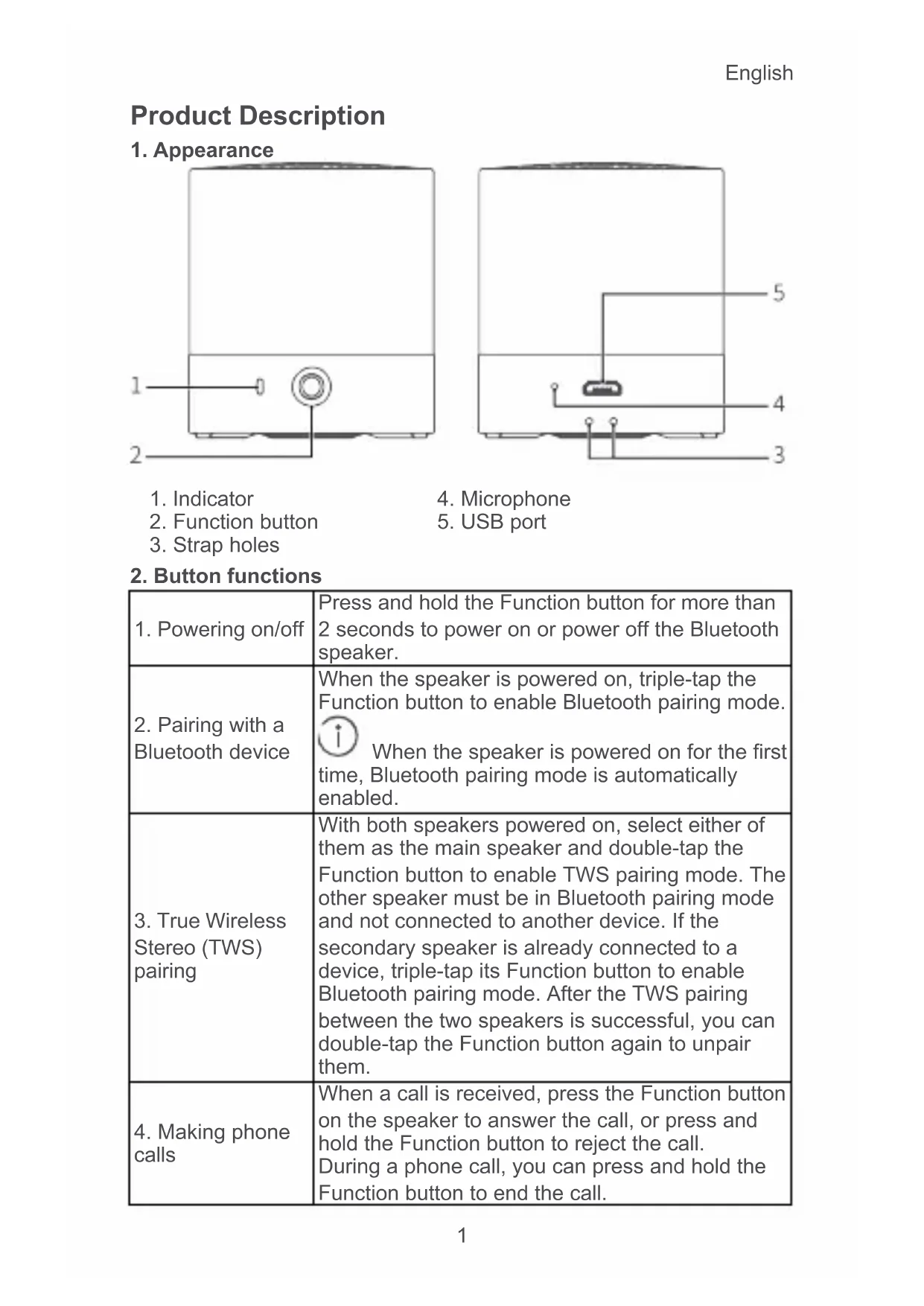
| 1. Powering on/off | Press and hold the Function button for more than 2 seconds to power on or power off the Bluetooth speaker. |
| 2. Pairing with a Bluetooth device | When the speaker is powered on, triple-tap the Function button to enable Bluetooth pairing mode. When the speaker is powered on for the first time, Bluetooth pairing mode is automatically enabled. |
| 3. True Wireless Stereo (TWS) pairing | With both speakers powered on, select either of them as the main speaker and double-tap the Function button to enable TWS pairing mode. The other speaker must be in Bluetooth pairing mode and not connected to another device. If the secondary speaker is already connected to a device, triple-tap its Function button to enable Bluetooth pairing mode. After the TWS pairing between the two speakers is successful, you can double-tap the Function button again to unpair them. |
| 4. Making phone calls | When a call is received, press the Function button on the speaker to answer the call, or press and hold the Function button to reject the call. During a phone call, you can press and hold the Function button to end the call. |
English
| 5. Answering or rejecting a new call during a conversation | When a new call is received while you are already in a conversation, press the Function button to hold the original call and answer the new one, or press and hold the Function button to reject the new call. You can also switch between the two calls by double-tapping the Function button. |
| 6. Microphone | During a call, press the Function button to mute or unmute the microphone. |
| 7. Music playback | During music playback, you can press the Function button to pause or resume the music. |
| 8. Restoring the speaker to factory settings | When the speaker is powered on, press and hold the Function button for more than 8 seconds to restore the speaker to factory settings. Press and hold the Function button for more than 12 seconds to force a shutdown. |
3. Indicator descriptions
| Bluetooth pairing mode | Flashes blue |
| Connected | Steady blue |
| Low battery level | Flashes red every 3 seconds, together with steady or flashing blue |
| Charging (The speaker is powered off) | Steady red during charging, and steady blue after the speaker is fully charged |
| Charging (The speaker is powered on) | Steady red for 5 seconds, and then returns to the previous indicator state ① Steady or flashing blue when the battery level is low |
| Calling | Flashes blue when a call comes in, and remains steady blue during the conversation |
| Music playback | Steady blue |
| TWS pairing mode | Flashes red and blue alternately on the main speaker and flashes blue on the secondary speaker |
| TWS connection mode | Steady or flashing blue on the main speaker, and flashing blue on the secondary speaker |
4. Charging
To charge the speaker, connect it to a charger (voltage output: 5 V) or computer using a USB cable.
Paring the Speaker
1. Paring the speaker with a Bluetooth device
When the speaker is powered on for the first time, it automatically
enables Bluetooth pairing mode. Search for the speaker with the Bluetooth device that you want to connect to, such as a phone. Touch the device name of the speaker (HUAWEI CM510) to complete the pairing.

Note: On some Bluetooth devices, you may need to enter a password to set up a connection. The default password is 0000.
- Whenever the speaker is powered on after the first time, you need to triple-tap the Function button to enable Bluetooth pairing mode.
2. Pairing two speakers
(Two Bluetooth speakers are required for TWS pairing.)
- When two speakers are powered on, select either of them as the main speaker and double-tap its Function button to enable TWS pairing mode.
(For example, if speaker A is paired with a phone, double-tap the Function button of speaker A to enable TWS pairing mode.) - The other speaker functions as the secondary speaker, which should be in Bluetooth paring mode. If the secondary speaker is not in Bluetooth pairing mode, triple-tap its Function button to enable Bluetooth pairing mode.
- Then the two speakers will be in the TWS pairing state.

- After the TWS pairing is complete, the main speaker becomes the left audio channel, and the secondary speaker becomes the right audio channel. In this state, only the main speaker can be paired with another device.
- After the TWS pairing is complete, you can operate the speakers by tapping either of the Function buttons (except in calling mode). In calling mode, you can only operate the main speaker.
3. Automatic reconnection upon startup
After the speaker is powered on, it automatically connects to the previously paired Bluetooth device.

The most recently paired speaker will automatically reconnect upon startup.
(For example, power on the main speaker and pair it with your phone, and then power on the secondary speaker. The secondary speaker will automatically reconnect to the main speaker to complete the TWS pairing.)
4. Automatic reconnection within the Bluetooth range
In the event that the speaker disconnects from your phone due to exceeding the Bluetooth connection range:
- If you return to the Bluetooth connection range within 30 minutes,
English
the speaker will automatically reconnect with your phone.
- Otherwise, the speaker automatically powers off.

If the speaker does not automatically reconnect to your phone, go to your phone's Bluetooth connection screen and reconnect manually.
Safety information
Before you use the device, read the following precautions carefully to ensure optimal product performance and to avoid danger or violation of laws and regulations.
- Do not use this device in areas where the use of wireless devices is prohibited. It may interfere with other devices or present other hazards.
- Follow rules and regulations set forth by hospitals and health care facilities. Do not use your device where prohibited.
- Some wireless devices may interfere with implantable medical devices and other medical equipment, such as pacemakers, cochlear implants, and hearing aids. Consult the manufacturer of your medical equipment for more information.
- Keep a minimum distance of 15cm between this device and implantable medical devices (such as pacemakers or cochlear implants) to prevent potential interference.
- Observe all local traffic laws and regulations while using this device. Do not use this device while driving.
Concentrate on driving. Your first responsibility is to drive safely. - Wireless signals may interfere with your vehicle's electrical systems. For more information, consult your vehicle manufacturer.
- Avoid placing the device directly above or in areas around the vehicles airbags shall they inflate and cause serious injuries.
- Wireless devices may interfere with the airplane's flight system. Power off your wireless devices according to airplane companies regulations.
- Avoid dusty, damp, or dirty environments. Avoid magnetic fields. Using the device in these environments may result in circuit malfunctions.
- Use the device where the ambient temperature is between 0^ to +40^ . Store the device and its accessories where the ambient temperature is between -20^ to +45^ . Extreme heat or cold may damage the device.
- Avoid immersing the device and its accessories, as this may cause a fire or electrical shock.
- Keep your device away from fire or heating sources, such as electric heaters, ovens, microwave ovens, stoves, or water heaters.
- Do not allow pins or other sharp metallic objects to come into
contact with the speaker or microphone to avoid damaging the device or harming yourself.
- Keep the device out of reach of children and pets to prevent them from accidentally swallowing and choking on the small parts of the device. Biting or swallowing the device could lead to serious injury.
- This device and its accessories may contain some small components that present a choking hazard. Keep the device and its accessories out of the reach of children to prevent injury or accidental damage.
- This device is not a toy. Children should only use the device when supervised by an adult.
- Only use the authorized accessories that match the device. Otherwise, damage caused to the device may not be covered by the warranty. Using unauthorized accessories may also present a safety hazard. For more information, contact an authorized Huawei Customer Service Center.
- Do not use unauthorized or incompatible power supplies, chargers, or batteries to avoid hazards such as fire and explosion.
- If you need to connect the device to a USB port to charge it, make sure the USB port is USB-IF certified and that it conforms to relevant USB-IF standards.
- For pluggable devices, the socket-outlet shall be installed near the devices and shall be easily accessible. Unplug the charger from electrical outlets and the device when not in use.
- Do not attempt to disassemble or remanufacture the device, insert foreign objects into it, or immerse or expose it to water or other liquids. Doing so may lead to fire, explosion, or other hazards.
- Do not drop, squeeze, or pierce the device. If excessive pressure is applied to the device, the device may short circuit or overheat.
- The device comes with an irremovable, built-in battery. Do not attempt to replace the battery on your own to prevent the device and battery from being damaged. Go to an authorized Huawei Customer Service Center to replace the battery.
- Keep the device and its accessories dry. Do not use the external heat source, such as microwave oven or hair dryer, to dry the device.
- Do not expose the device and its accessories to extreme temperatures as this could cause the device to malfunction, catch fire, or even explode.
- Before you clean or maintain the device, stop using it, close all apps, and disconnect all cables.
- Do not use any strong chemicals, detergents, or other chemical agents. Use a clean, soft, and dry cloth to clean the device and its accessories.
- Do not place magnetic stripe cards, such as bank cards, near the
English
device. Otherwise, these cards may be ruined.
- Do not dismantle the device or accessories. This voids the warranty and releases the manufacturer from liability for damage. In case of any device malfunction, go to an authorized Huawei Customer Service Center for assistance.
- Do not dispose of the device and accessories in normal household refuge.
- Dispose of or recycle your device and accessories according to local laws.
Disposal and recycling information
The crossed-out wheeled-bin symbol on your product, battery, literature or packaging reminds you that all electronic products and batteries must be taken to separate waste collection points at the end of their working lives; they must not be disposed of in the normal waste stream with household garbage. It is the
responsibility of the user to dispose of the equipment using a designated collection point or service for separate recycling of waste electrical and electronic equipment (WEEE) and batteries according to local laws.
Proper collection and recycling of your equipment helps ensure electrical and electronic equipment (EEE) waste is recycled in a manner that conserves valuable materials and protects human health and the environment, improper handling, accidental breakage, damage, and/or improper recycling at the end of its life may be harmful for health and environment. For more information about where and how to drop off your EEE waste, please contact your local authorities, retailer or household waste disposal service or visit the website http://consumer.huawei.com/en/.
Reduction of hazardous substances
This device and any electrical accessories are compliant with local applicable rules on the restriction of the use of certain hazardous substances in electrical and electronic equipment, such as EU REACH, RoHS and Batteries (where included) regulations, etc. For declarations of conformity about REACH and RoHS, please visit our web site http://consumer.huawei.com/certification.
EU Regulatory Conformance
RF exposure
Your device is a low-power radio transmitter and receiver. As recommended by international guidelines, the device is designed not to exceed the limits established by the European Commission for exposure to radio waves.
Statement
Hereby, Huawei Technologies Co., Ltd. declares that this device CM510 is in compliance with the essential requirements and other relevant provisions of Directive 2014/53/EU.
The most recent and valid version of the DoC (Declaration of
Conformity) can be viewed at
http://consumer.huawei.com/certification.
This device may be operated in all member states of the EU.
Observe national and local regulations where the device is used.
This device may be restricted for use, depending on the local network.
Frequency bands and power
Frequency bands in which the radio equipment operates: Some bands may not be available in all countries or all areas. Please contact the local carrier for more details.
Maximum radio-frequency power transmitted in the frequency bands in which the radio equipment operates: The maximum power for all bands is less than the highest limit value specified in the related Harmonized Standard.
The frequency bands and transmitting power (radiated and/or conducted) nominal limits applicable to this radio equipment are as follows:
CM510
Bluetooth: 2402 MHz-2480 MHz: 12.99 dBm
Accessories and software information
It is recommended that the following accessories should be used:
Batteries: HB642735ECW
The product software version is V101B. Software updates will be released by the manufacturer to fix bugs or enhance functions after the product has been released. All software versions released by the manufacturer have been verified and are still compliant with the related rules.
All RF parameters (for example, frequency range and output power) are not accessible to the user, and cannot be changed by the user.
For the most recent information about accessories and software, please see the DoC (Declaration of Conformity) at
http://consumer.huawei.com/certification.
FCC Regulatory Compliance
RF Exposure
Your device is a low-power radio transmitter and receiver. As recommended by international guidelines, the device is designed not to exceed the limits established by the Federal Communications Commission for exposure to radio waves.
FCC statement
This equipment has been tested and found to comply with the limits for a Class B digital device, pursuant to Part 15 of the FCC Rules. These
English
limits are designed to provide reasonable protection against harmful interference in a residential installation. This equipment generates, uses and can radiate radio frequency energy and, if not installed and used in accordance with the instructions, may cause harmful interference to radio communications. However, there is no guarantee that interference will not occur in a particular installation. If this equipment does cause harmful interference to radio or television reception, which can be determined by turning the equipment off and on, the user is encouraged to try to correct the interference by one or more of the following measures:
--Reorient or relocate the receiving antenna.
--Increase the separation between the equipment and receiver.
--Connect the equipment into an outlet on a circuit different from that to which the receiver is connected.
--Consult the dealer or an experienced radio/TV technician for help. This device complies with Part 15 of the FCC Rules. Operation is subject to the following two conditions: (1) this device may not cause harmful interference, and (2) this device must accept any interference received, including interference that may cause undesired operation.
Caution: Any changes or modifications to this device not expressly approved by Huawei Technologies Co., Ltd. for compliance could void the user's authority to operate the equipment.
Responsible Party - Contact for FCC Information only
Huawei Device USA Inc.
5700 Tennyson Parkway, Suite 300
Plano, TX 75024
Main: 214-919-6800
Legal statement
Copyright © Huawei Technologies Co., Ltd. 2019. All rights reserved.
This document is for reference only. Nothing in this guide constitutes a warranty of any kind, express or implied.
All pictures and illustrations in this guide, including but not limited to the phone color, size, and display content, are for your reference only. The actual product may vary. Nothing in this guide constitutes a warranty of any kind, express or implied.
Please visit http://consumer.huawei.com/us/support/index.htm for recent updated hotline and email address in your country or region. The Bluetooth® word mark and logos are registered trademarks owned by Bluetooth SIG, Inc. and any use of such marks by Huawei Technologies Co., Ltd. is under license.
User Software License Agreement
Please read the software license agreement carefully before using the product. By using the product, you indicate that you agree to be bound
English
by the license agreement. If you do not agree with the terms of the license agreement, please do not use the product and software. The product can be returned to the point of sale for a refund.
For agreement content, please visit:
https://consumer.huawei.com/en/legal/eula/.
Privacy protection
To understand how we protect your personal information, please visit http://consumer.huawei.com/privacy-policy and read our privacy policy.
For United States warranty card information, visit http://consumer.huawei.com/us/support/warranty-policy/index.htm.
Былгарскn
Описане на пожукта
1. BbHsEh BnD
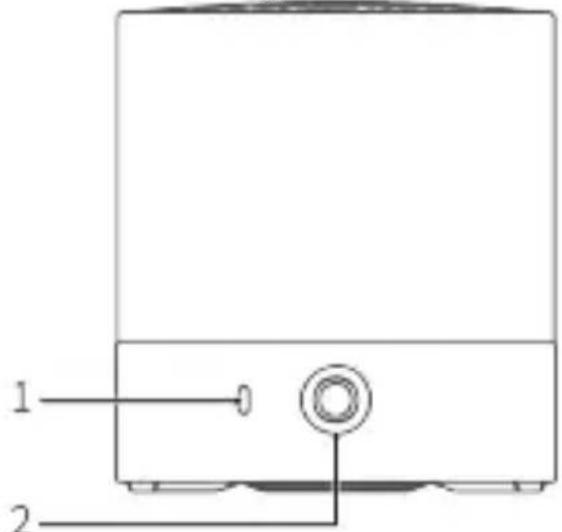
1.Инданкатор
2.БутонзаФункци
3. OTbOpn 3a Bpb3BaHe
- MinkpofoH
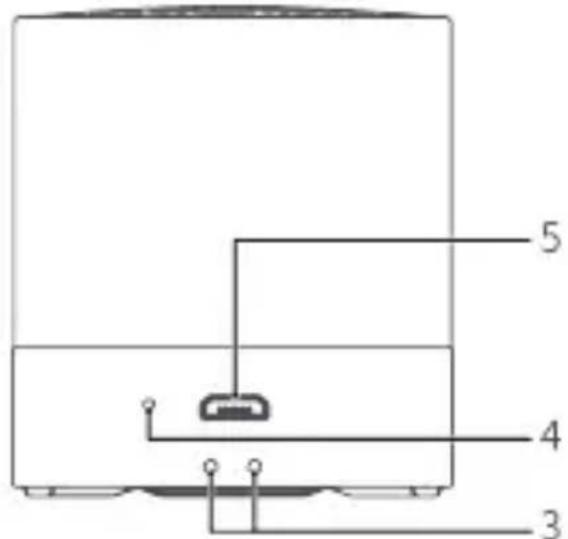
- USB nopt
2.Функцин Ha 6уTOHnTe
CneI KaTo TWS cDBoaHaTeTo npKnOuN, OCHOBHnAeT
BnCOKOROBOpTeJI Ctaba JIeBnT ayDnO KaHaJI, a
BTOPNUHnT BNCOKOROBOpNTeI CTaBa DeCHnT ayDnO KaHaJI.
B TOBA CbCTOJHnE CAMO OCHOBHnT BUCOKOTOBOPHTI MOKe Da
6bnde cDBoEH C npyro yctpoiCTBO.
Cnei KaTo TWS cDBoaHaTe OpiKJIouH, MoKeTe da
pa6OTnte C BnCOKOROBOpNTeJIte, KaTO DoKoCHeTe HraKOJ
OT 6yToHnTe 3a 4yHKcnn (OCBeH B peKm Ha obaKaDaHe).
BpekIm Ha obaKdane MoKeTe da pa6oTnte cAmOc
OCHOBHNA BNCOKOROBOpNTeJ.
3. ABTOMaTnUH NoBToPHo CBbP3BaHe npi cTapTnpaHe
Clek KaTO BnCOKOrOBOpHTeJIaT 6bJe BKnIoueH, ce Cbbp3Ba aBTOMaTHUHO C nocJeDHO cDBoEHO Bluetooth yCTpOInCTBO.

Ha-ckopo cDBoEHNr BnCOKOrOBOpHTeI aBTOMaTHUHO ige ce CBbpxe NOBTOpHOn pIn CTapTnpaHe.
(Hanpimep BKIOUeTe OCHOBnBnBCOKOROBOpNTI IN I
CDBOeTe C TeJePOna CN, CNeI KOeTO BKNIOUcTe BTOpNHyHnA
BnCOKOROBOpTeI. BToPnHHaT BnCOKOROBOpTeI aBTOMaTHHO
Ie Ce Cbbpke C OCHOBHnB BNCOKOROBOpnten, 3a Da 3aBbpwn
TWS cDBoRABaHeTo.)
4. ABTomatnuho NOBtOpHo CBbP3BaHe B 06xBaTa Ha Bluetooth
B cnyuaye BncoKoROBOpTeJrT npeKbCHe Bpb3kaTa Cn C TeJeP0Ha BN npaN ppeBnWabAhe Ha 0xbata 3a Bluetooth Bpb3ka:
Ako ce Bbphete B 06xBata 3a Bluetooth Bpb3ka B paMKnte Ha
30 MInHyTn, BnCOKOROBOpTeJIaT aBTOMaTnUHO ige ce CbbpXe
NOBTOPOC TeJeOHa BN.
B npotnBeH cnUaH BnCOKOROBOpHTeJIr Ic e N3KJIIOuH aBTOMaTHUHO.

Ako BncoKoROBOpTeJIrT He Ce CBbpXe aBTOMaTHUHO C
Telepona Bn, OTndeTe Ha ekpaHa 3a Bluetooth Bpb3ka Ha
TeIeOHa CN N N3BbPwTe pBHyO CBbp3BaHe.
HΦopMaζη 3a 6e3oNaChocCTTa
PpeDn da n3noJ3BaTe yCTpoiCTBOTO, npoYeTe BHNMaTeJIHO
CneHnTe IpeOxpaHnTeHnMepKn, 3a da rapaHTnpate ONTmHa np60Ta Ha npodykTa n 3a da n36erHeTe onachocCTta OT HapyuBaHe
Ha 3aKoHnTe n pa3nope6nTe.
He n3noJ3BaIte ycTpoiCTBOTO B 30Hn, B KOnTo e 3a6paHeHo
Былгарский
I3PON3BaHeTo Ha 6e3xNCHyCTpoiCtBa. Toba MoKe da DOBeDe Do CMUSeHnB DpyrN yCTpoiCTBa IIN Da Hocn Dpyr n PnCKOBe.
Cna3BaIte npaBnIata n pa3npoe6nte, onpeJeHn ot 6oHNuTe n 3dpaBHnTe clyx6n. He n3noJ3BaIte ycTpoiCTBOTo, aKO TOBa e 3a6paHeNo.
- Hяко 6e3xuHn yctpoiCTBa MoaT da BHeCat cMyuIeHnB NmPJIaHTnpaHn MeINcHcN yCTpoiCTBa N dpyro MeINcHcKo o6OpyDbAHe, KaTO neICMeKbpr, KoxJleapHn NmPJIaHTn i CnyXOBn anapatn. KoHCyPTpaIte ce c npOn3BOdnteJЯ Ha MeINcHcKOTO o6OpyDbAHe 3a NOBeue INΦopMaIzra.
CnataBaIte MInHMaJIHo pa3cTOrHne ot 15 cm MeJdy yCTpoIcTBOTO n MMnPaHTnpaHn MeINuHNckn yCTpoIcTBA (kaTO neiCMeKbprn INn KOxJIeapHn MMnPaHTn), 3a da npedeOTbpaTnte Bb3MOXHnTe CmUeHnra.
Cna3BaIte BCnUKN MeCTHn 3aKOHn npa3npoe6n 3a DnXKeHneTO, KOrato n3NoJ3BaTe yCTpOeCTBOTO. He ro n3NoJ3BaIte no BpeMe Ha WoOpupaHe.
CbcpenoToTe Ce Bbpxy wOΦnpaHeto. Hau-BaXHaTa BN OTROBOPHOCT e da wOΦnpuTe 6e30NaCHO.
- Be3KnHnTe CnHaJIIM MoKe Da CmUaBaT eJekTpnueCKnTe CnCTeMn Ha aBtOMo6nla. 3a nobuee nHΦopMaunCe KOHCyIITnpaIte C npON3BOIDTeJHa npeBO3HOTcpeIcTB0.
- ɪЗбягbaɪte ᵠа NOCTaBЯTe yCtpoɪcTBOTO ἀnpeΚTHO Ḥaɪ ṢιN B 3ɔHn OKONo Bb3dUψHaT a Bb3rʌaBΗuça Ha aBTOMoБиla, Tbɪ KaTo npɪ pa3rɒbʌaHe ca Bb3MoxHn cepno3Hn HapaŋBaHn.
- Be3xuHnTe yctpoNCTBa MoT Da nonpeyat Ha pa6oTaHa IIOJIeTHnTe CnCTeMn Ha camOJeta. N3KIOUByaIte 6e3xuHnTe yCTPOhCTBa B CbOTBeTCTBne C pa3npoeD6nTe Ha aBNOKOMnAHnTe.
- ɪЗбягbaɪte 3aɪpaʊeHn, BlaʌkHn iʌn 3aMbpeHn cpeɪn.
- ɪЗбягbaɪte MaɪnɪTHn nɒleta.ɪənɔnɪ3BaHéTo Ha yCTpɔnICTBOTO BTe3n cpeɪn Mɔnge Da dɒBede Do Hænɪ3nPpAxBHocTn BbB Bepɪrata.
- Изполизваite устюствOTO пи Temnéратуг меку 0 °C до +40 °C. Сьхсаньaite устюствOTO и HeroВITE пинадлесноши пи okолна Temnéратуг меку -20 °C до +45 °C.Екст pemнite Temnéратуг могатда повpeяг устюствOTO.
He notanayte yctpoictBOTo n npHaJneJXHOCTNe My B TeuHOCTN, TbKATO TOBa MoKe Da DOBeDe Do noXap nn TOKOB ydap.
- Пазete устюпвото далец OT orbн и harpeBaTeHn И3TOHnI, kaTo habример eilektpnueckn peuKn, Фурн, МИКpoBbJHOBn Фурн, roTbapcKn peuKn IIn BODHn HarpeBaTeI.
He no3BOJRAaTe KOHTaKT Ha BnCOKOrOBOpnteIa MmKpOfoHa C KApOnu INn dpyrN OCTpn MeTaJIHn IpeDMeTu, 3a Da He NOBpeDInTe yCTpoiCTBOTO n Da He Ce HapaHnte.
CbxpaHraBaIte yctpoiCTBOTO n3BbH Docera Ha deca n Domaun
JIIO6mU, 3a Da rN IpeDnA3nTe OT eBENTyaJHNO NOrIbJUaHe Ha MaJIKIne YAcTn Ha yCTpOiCTBOTO n 3aDyUbaBaHe. 3aTxanBaHeTo IIN IORIbUaHETo Ha yCTpOiCTBOTO MoKe Da IOBeDe Do cepNo3Hn HapaHЯBaHnY.
ToBa yCTpoIcTBo n npHaJnEJXHOCTNte My MoKe Da cBdbpKaT dp6HN eIeMeHTN, KOINTO cb3DaBAT pNCK OT 3aDABH. DpbKTe YCTPOINCTBOTO n npHaJnEJXHOCTNte My N3BbH OBCera Ha Deca, 3a Da npEdOTBpATnTE HapaHЯBaHe IIn CNyauHn NOBpeDN.
ToBa yCTpoIcTBO He e nIrpauka. Deuata MoKe da n3noJ3BaT yCTPOIcTBOTO cMo NOd Ha6JIHOdeHneTO Ha Bb3paCTeH.
- Изпольайтесамо ульномошени рпиадлжноctи, похдяши 3а устюстбOTO.В пotиbeh счуаи рпуненITE
цети на устюстбOTO e вьзможно да не се пokрват
OT rapанцята.Изпольданeto на Heyпьлномошени
приhalдлжноctи може да пedingстая рпск 3a снгурноctт.
За поеве ифорmaця се CBьржete c OTOPиЗИРAN ueHTbp 3a
обслужвае на Клиенти на Huawei.
He n3no3BaITe HeynbHOMOeHN nn HeCbBMeCTnMn 3axpaHbAsn n3ToCHnCu, 3apdHn ycTpoiCTBa nn 6aTePnn, 3a da n36erHeTe pNCKOBe OT noXap n ekCnIO3nJ.
Ako e Heo6xOIMO da cBbpxKeTe ycTpoiCTBOTo KbM USB npot, 3a da ro 3apeiTe, ce ybepeTe, ye USB npotbTe oT tIn USB-IF n cbOTBeTCTBa Ha cTaHdapTnte 3a USB-IF.
3a yctpoicTba c ounceI Tp6Ba da ce MOHTupa necho doctbneh KOHTaKT B 6n30cT DO yctpoicTBaTa. N3KnHouBaIte 3apAHDoto yctpoiCTBO OT eJektpnuecknKoHTaKT I yctpoiCTBOTO, KOrato He ITO IN3NOJ3BaTe.
He npaBeTe onHTn da pa3rno6BaTe nnn moNcnpaTe yCTPOINCTBOTo, Da NOCTaBAre TeJn Tela B Hero, Da rO NotanTte nnn n3naTe Ha BnnaHneTo Ha BODa nn dpyrn TeuHocTn. ToBa MOKe Da DoBeDe Do NoXkap, ekCnNo3n nn dpyrn pNCKOBe.
He n3nyckaIte, He cTnCKaIte n He KbcaIte yCTpoNCTBOTO. Ako KbM yCTPOINCTBOTO 6bJe npNJIOXeHO Ha TBbpDe rOJMAO HAnraHe, To MOKe Da daDe HaKbCO nII da npepee.
- YcTpoiCTBOTO ce npednara c HeOTcTpaHЯema, BrpaTeHa 6aTepy. He npaBeTe OINTI Da CmeHrte 6aTepyTa, 3a Da npeDoTbPaTITe 7eTN Ha yCtpoiCTBOTO nIN 6aTepyTa. 3a CmHa Ha 6aTepyTA OTnDETe B OTOpN3npaH ueHTbp 3a ObcJyKBaHe Ha KJIneHTn Ha Huawei.
- ПовьраиTe yctpoiCTBOTo n npHaIeJxHocTnTe My cyxn. He n3noI3BaIte n3TOUHnCn Ha TOIINHa, KaTO hAnpImep MmKPOBbJIHOBnФypHn IIn CeIooApn, 3a NODcyuShaBaHe Ha yctpoiCTBOTo.
He n3naIte yctpoicTBOTO n npHaJnxHocHTe My Ha ekCTpeMHn TeMnpaTypn, Tb' KaTO TOBa MoKe da DOBeDe do
Былгарский
HEn3npaBHO yHKUOHnPaHe, NOKap IIN DOpN EKcnI03na.
- Прази поисвае илpeмоNT ha yctpoiCtBOTo cnpeTe da ro n3noJ3BaTe, 3aTBOpTe BCnUKN npINIOXeHnЯ n N3KJIIOUcTe BCnUKN ka6eJIi.
He n3noJ3BaIte aKTHBn XmMkaJI, nouchTbaU npenapatn nn dpYrN XmMueckn areHTn. N3noJ3BaIte YnCTa, MeKa n cyxa Kbpna 3a NOuNCtBaHe Ha yCTpoiCTBOTo I npHaJdJeXHOCTnte My.
He nocTaBraIte MaHHTnKapTn, KaTO 6aHKOBn KapTn, B 6JN3OCT do yctpoiCtBOTo. B npotuBeH cnyaH kapTnte e Bb3MOxHO da 6bDat NOBpeDeHn.
He pa3rIIO6BaIte yCTpoiCtBOTo n npHaJNeXHocTnte My. Toba OTMeHraPauHcIraTa n OCBo6OxJaBa npon3BODnteJIa OT OTROBOPHOCT 3a NOBpeDN. B cIyauH na Heu3npaBHOCT B yCTPOIcTBOTO rO 3aHeCeTe B OTOpN3npan ceHTbp 3a ObcIpyKbaHe Ha KJIneHTn Ha Huawei.
He n3xBpIy Te yCTpoIcTBOTOn npHaJIeXHOCTnTe My C O6NKHOBeHInTe 6HTOBN OTNaIbU. - I3xBbPJIaIe nIIN peuKnIpaIte yCTpOcTBOTOn I npHaJNeXHOCTnTe B CbOTBETCTBNE C MeCTHnte 3aKOH.
HΦopMaçnla 3a n3XBbPJIHe n pezuklnpaHe
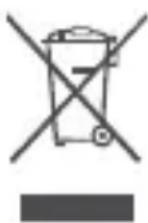
CnMBOJbT CbC 3aDpaKcHo KOWue 3a OTnaDbuN Bbpxy npOdykTa, 6aTePnraT, B IInTePaTypa TIN Bbpxy ONAKOBAtA HAnOMH, Ye BCnUeEneKtpOHN INPOdykTu N 6aTePn IN Tp6Ba Da 6bDaT OTHeSeH N OTdeHN INYHKTOBe 3a Cb6BpaHe Ha OTnaDbuN B KpaHa EKcPiOaTaauOHnI M XNBOT. He Tp6Ba Da ce
n3xBbpyT C obHKHOBeHnte 6ntOBu OTnaDbu. OTROBOpHocT Ha
noTpe6nteI e da n3XBbprIyOBpUdBaHeTO npn n3NoJ3BaHe Ha
CbOTBeHTNE pYHKTOBE uNcIyRn 3a pa3JeIHO peuKJIpaHe Ha
OTNaDbUHO eEKeTPnuecko I eEKeTPOHHO o6OpUDbAHe I bATEPnn
(OEEO) cnopei CbOTBeTHOTO MeCTHO 3aKOHOaTeJICTBO.
PiabUNHOTo Cb6npaHe I peuKJIpaHe Ha OBOPyDBaHETo NOMara Da
ce rapaHTnpa, ye OTNaDbUte OT eEKeTPnuecko I eEKeTPOHHO
obopyDbAne (EEO) ige 6bDaT peuKJIpaHn IO NaunH, KOIT0 3aNa3Ba
zeHNHTE MaTePnAIn N 3aUnTaBA YObEwKOTo 3dPaBe I OKOIHaTa
CpeJa. HenpaBnHoto 6opABeHe, clyuaHOTO cHyNbAhe, NOBpeDITE
n/IIIN He npaBnHoto peuKJIpaHne B KpaI Ha EKCnloaTaOnOHnI
XIBOT MoRaT Da 6bDaT BpeHN 3a 3dPaBeTo I 3a OKOIHaTa CpeJa.
PiBuee INΦopMaZr OTHOCHO Kbde I KaK MoXeTe Da OCTaBNTe
CBONTe OTnaDbUcI O EEOMoXeTe Da NOLyUHe T MeCTHHe BlaactN,
TbpROBeuA IIIN φnIpMaTa 3a Cb6npaHe Ha DomAKnHckn OTnaDbu,
IIIN KaTO NoCeTHe Ye6 caTa http://consumer.huawei.com/en/.
HamaJIYaHe Ha onaChnTe BeIeCTBa
Toba yctpoiCTBO n eIektpnuecknte npHaJneXHocTn OTROBaprT
Ha MeCTHnTe npIIOxIMn pa3nope6n nIIN oRpaHnueHnra 3a
n3noJ3BaHe Ha onpeJeIeHN OIacn BeIecTbA B eJIeKTPnuECKOTOn
n eJIeKTPoHnO obOpuDbaHe, KaTo EU REACH, RoHS n pa3nope6nTe
3a 6aTePnn (KbDeTo ca BKnIoueHn). DeKnapaunrTa 3a CbOTBeTCTBVe
BbB BpB3ka c REACH n RoHS moKeTe da BnIte Ha hauIna caT
http://consumer.huawei.com/certification.
CbOTBeTcTBnE c pa3npope6nte Ha EC
IzharaheHaP4
Baшето усточье НИСКОЧЕТЕн радионпедаВаTeл И радионпемнк. Ппрөръка OT мждунардНITE радиордБИ усточьо e сьдаedo на He надвшава орданченита 3a Излагане на радиовьлн, установен ot БрoneйсkaТа KMИSCЯ.
Декларачnia
C hactoTo Huawei Technologies Co., Ltd. deKnapipa, ye ToBa yctpoiCTBO CM510 e B cbOTBeTCTBnE C OCHOBHnTe n3NCKBaHnI n Dpyrnte npInJoxmnpa3nope6n Ha NipeKTnBa 2014/53/EO.
Ha-NOBaTa N BaNnDa BepCn Ha DC (DeknapaunrTa 3a CbOTBcTCTBnE) MoKeTe Da BnInTe Ha http://consumer.huawei.com/certification.
C TOBa yCTpOInCTBO MOKe Ce paBToN BbB BCnUKN CTpaHn-QuEnKn Ha EC.
Cna3BaIte HaunohnHnte I MeCTHnte pa3npoe6n Ha MxCTOTO, KbTeTO n3NOJ3BaTe yCTPOIcTBOTO.
B 3aBnCmOcT OT MecTHaTa MpeXa, TOBa yCTpOInCTBO MOKe da 6bDe c orpaHnueHa yNoTpe6a.
YeCTOTHnJIeHTnI 3aXpaHBaHe
YeCTOTHnJeHTN, B KOHTO pa6OTn paINOOBOpyDBAHeTO: Bb3MOxHO e HRAKON JeHTN Da He Ca DOCTbHNB BB BCNUKN CTpaH NII IN BCNUKN OblactN. CbpxKeTe ce C MeCTHn ONEpAToP 3a NOBeue NOpPo6HocTn. MakcImaJIHa MOUHOCHT Ha paIOuCeTOTaTa, IpeDaBaHa B YeCTOTHnTE JeHTN, B KOHTO pa6OTn paINOOBOpyDBAHeTO: MakcImaJIHaTa MOUHOCCT 3a BCNUKN JeHTN e IO-MaJka OT HaN-BNCOKaTa rpaHnHuCA TOnHOCT, NOCOeHa B CbOTBeTHn XApMOHn3IpaH cTaHdapT.
HomHaHnHTe rpaHnI Ha yeCTOTnTe JeHTN mOuHocTtHa npedabaHe (n3JIbYeHa n/IIn npoBeDeHa), npNJIOxIMn 3a TOBa paAnoo6OpyDbAHe, ca cneHNTE:
CM510
Bluetooth: 2402 MHz - 2480 MHz: 12.99 dBm
HnΦopMaζηa 3a npHaJæχHoCTnte n coΦTyepa
IpeopbHTeHNo e da ce n3noJ3BaT cJeHNTe npHaJNeXHOCTN: BaTePn: HB642735ECW
CoΦTyepHaTa Bercn Ha npOdykTa e V101B. Ipn3BoDnteIaTt ige nyska akTuJIIN3aUIn Ha coΦTyepa 3a KopuRipaHe Ha rpeiKn nn noDo6pBaHc yHKcIn cIeI nyckaHc H npOdykTa Ha na3apa.
Блгарский
BcunBepnHa coTyepa, npedocTaBeHn OT npOn3BOnteJna, ca npOBepn H npOdbjKabat Da OTRObaprT Ha cBoTBHTHe npaBnla. BcunPp napametpn (HaNPmep yeCToTeH dnaIa3OH n 3XoJHa MOuHocT) He ca DoCTbHN 3a Notpe6nteJn He Morat da ce npomehrOT notpe6nteJn.
Hai-HOBaTa INΦOpMaζησ OTHOCHO pɪnHaДJIeЖHOCHTne N coΦTyepa Moxe Ta Hamepnte B DC (ДeКларaζη 3a CbOTBcTCTBnE) Ha http://consumer.huawei.com/certification.
Празвна.Deекларачnia
© Huawei Technologies Co., Ltd. 2019 r. Bcnyk npaba 3ana3ehn. To3n dokymeH e cmo 3a cnpaBka. Hnso B TOBa pkoBOdCTBO He daBa rapaHOn OT KaKbBTO n Da 6nIO BnD, npRAKO nn KocBeHO. Bcnyk CHIMK N INIOCTpauN B pkoBOdCTBOTo, BKIOHTeJIHO, HO He cMo CBeTa Ha TeJeOHa N CbIbPkaHneTo Ha DnCnIeR, ca cMo 3a cnpaBka. PeaHnT npOyKT MoKe Da ce pa3JnuAba. Hnso B TOBa pkoBOdCTBO He daBa rapaHOn OT KaKbBTO n Da 6nIO BnD, npRAKO nn KocBeHO.
Iocete http://consumer.huawei.com/us/support/index.htm 3a aKtyaJIHa nHΦopMaζησ OTHOCHO ropeaTa JINHЯ 3a o6cnyXBaHe Ha KJIeHTn I NMeJl aDpeCnTe BbB BaWaTa CtpaHa NJI npENoH. O6o3NaueHneTo Ha dymata n eM6JIeMnte Bluetooth ca perncTpnpaHn TbproBcKn MapKn, pInTeKaBaHn OT Bluetooth SIG, Inc. nN3NoI3BaHeTo nM ot Huawei Technologies Co., Ltd. e npEdmet Ha JInceH3.
600:mC:cG:32qM32wM4p:
0000:0000:0000:0000:0000:0000:0000:2603
02:42:42:42 11:6000000000000000000000000000000000000
00000000000000000000000000
00000000000000000000000000000000
300:000000000000000000000000000
0000 300: 300pWp: Goo
G
oo:qp:5c m:06n: 000gqpo yocqcpm 000yos
g0s:oo:0o2 o2:0o2 o2:0o2 p:0 c0s011
oo:Goo:oo:699pogc 000320:Gol
00000000000000000000000000000000000000000000000000000000000000000000000000
- 150
10003 200:G0263008:0020034p:5
025:2:300:000s0u11 m060c:02 0007 300:Gul
600:600:600:600:600:600:600:600:600:600:600:600:600:600:600:600:600:600:600:600:600:600:600:600:600:600
- 3000000000000000000000000000000000000000000000000000000000
000000000000000000000000000000000000000000000000000000
00000000000000000000000000000000000000000000000
00000000000000000000000000000000000000000000000000000
0000 000000000000000000000000000000000000000000000000000000000000000000000000000000
00s q:000000p:00000011 wC:
8:6600[3:6:0000000000000000000000000000000000000000
00000000000000000000000000000000000000000000000000000000000
0000000000000000000000000000000000000000000000000000
30 3000000000000000000000000000000000000000000000000000000000
- 100569930050082990830059930050082993005008299300500829930050082993005008299300500829930050082993005008299300500829930050082993005008
- 0000000000000000000000000000000000000000000
- 0056672222222222222222222222222222222222222222222222222222222222222222222222222222222222222222222222222222
Gooocgocococococococococococococococococococococococococococococococococococococococococococococococococococococococococococococococococococococococococococococococococococococococococococ
- 320:320:320:USB 632015:320:320: USB 632015:USB-IF 6000:320:320: USB-IF 6000:320: USB-IF
ooosolc:0g:3o:glccoo oomp:3o0s 8:ooosolm 0
0oep:6g:npoc 0oocooqg:3oogoo 0
3o:glcog 3o:Golcoo3aol yodoo ooosolpe:sc 0
G
300:8: 000000000000000
000000000000000000000000000000000000000000000000000000000000000000000000
00000000000000000000000000000000000000000000000000000000000
0000000000000000000000000000000000000000000000000000000000000000000000000
0000000000000000000000000000000000000000000000000000000000000000000000000000
- 0088888888888888888888888888888888888
00000000000000000000000000000000000000000000000
300:0000000000000000000000000000000000000000000000000000
000000000000000000000000000000000000000000
0000000000000000000000000000000000000000000000000000000000000000000000000000
0000000000000000000000000000000000000000000
89.0026699p4p:03c 8g9.00qll
- 0000000000000000000000000000000000000000000000000000
g00g: g0030: g630c 600c0g: 300300q:
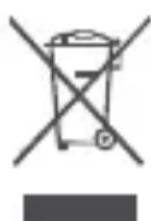
000001 0000000000000000000000000000000000000000000000000000000000000000000000000000000
3aep: 0g3w [g]g: o1- g:c:g3o:0:32o0m 3aep:0olow
wwgcp 0g:c:oo:00s 0g:c:oo0c w00yoooc:
000000000000000
0qgwhgwhgwhgwhgwhgwhgwhgwhgwhgwhgwhgwhgwhgwhgwhgwhgwhgwhgwhgwhgwhgwhgwhgwhgwhgwhgwhgwhgwhgwhgwhgwhgwhgwhgwhgwhgwhgwhgwhgwhgwhgwhgwhgwhgwhgwhgwhgwhgwhgwhg
| CM510 | 2402 MHz-2480 MHz-AA'1 dBm |
G
000000000000000000000000000
60000:8:3:60:00000000000
http://consumer.huawei.com/us/support/index.htm 00000
2
Bluetooth® 320000000000000000000000000000000000000000000000000000000000000000000000000000
08g:00000000000000000000000000000000000
Huawei Technologies Co., Ltd.
300:GgC:Goo
000000000000000000
000000000000000000000000000000000000000
000000000000000000000000000000000000000
600000000000000000000000000000000000000000000
00000000000000000000000000000000000000
600000000000000000000000000000000000000000000000
000000000000000000000000000000000000000000000
008000
6000000000000000000000000000000000000
https://consumer.huawei.com/en/legal/eula/ oS oS qoS
0w8c3a9m3aow mcmg6wq
000000000000000000000000000000000000000
http://consumer.huawei.com/privacy-policy
000:6q00g: 00000000000000000
Opis proizvoda
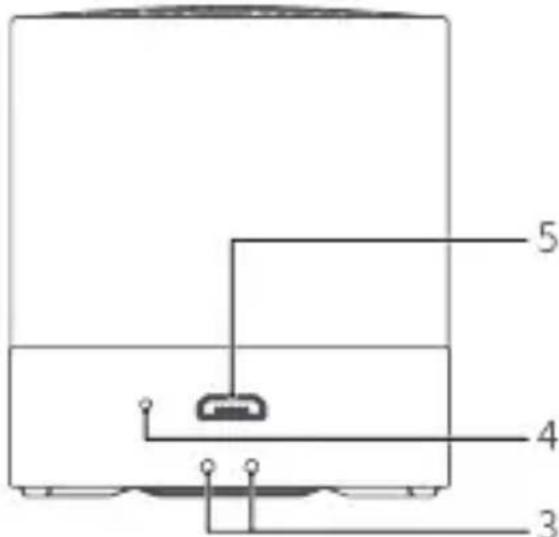
1. Izgled
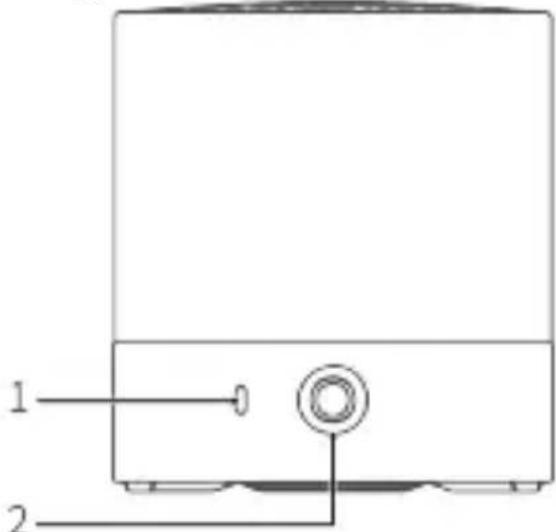
- Pokazatelj
- Funkcijski gumb
- Otvori za traku za zapešće
https://consumer.huawei.com/en/legal/eula/.
Ochrana soukromí
https://consumer.huawei.com/en/legal/eula/.
https://consumer.huawei.com/en/legal/eula/.
Privaatsuse kaitse
https://consumer.huawei.com/en/legal/eula/.
Tietosuoja
https://consumer.huawei.com/en/legal/eula/.
Datenschutz
https://consumer.huawei.com/en/legal/eula/.
Copyright © Huawei Technologies Co., Ltd. 2019.All rights reserved.
| 기憑 Burtsen를 희해 썸고 썸고 썸고 썸고 썸고 썸고 썸고 썸고 썸고 썸고 썸고 썸고 썸고 썸고 썸고 썸고 썸고 썸고 썸고 썸고 썸고 썸고 썸고 썸고 썸고 썸ious 썸ious 썸ious 썸ious 썸ious 썸ious 썸ious 썸ious 썸ious 썸ious 썸ious 썸ious 썸ious 썸ious 썸ious 썸ious 썸ious 썸ious 썸ious 썸ious 썸ious 썸ious 썸ious 썸ious 썸ious 썸iosis 썸iosis 썸iosis 썸iosis 썸iosis 썸iosis 썸iosis 썸iosis 썸iosis 썸iosis 썸iosis 썸iosis 썸iosis 썸iosis 썸iosis 썸iosis 썸iosis 썸iosis 썸iosis 썸iosis 썸iosis 썸iosis 썸iosis 썸iosis 썸iosis 썸ious 썸ious 썸ious 썸ious 썸ious 썸ious 썸ious 썸ious 썸ious 썸ious 썸ious 썸ious 썸ious 썸ious 썸ious 썸ious 썸ious 썸ious 썸ious 썸ious 썸ious 썸ious 썸ious 썸ious 썸ous 썸ious 썸ious 썸ious 썸ious 썸ious 썸ious 썸ious 썸ious 썸ious 썸ious 썸ious 썸ious 썸ious 썸ious 썸ious 썸ious 썸ious 썸ious 썸ious 썸ious 썸ious 썸ious 썸ious 썸ious 썸rous 썸ious 썸ious 썸ious 썸ious 썸ious 썸ious 썸ious 썸ious 썸ious 썸ious 썸ious 썸ious 썸ious 썸ious 썸ious 썸ious 썸ious 썸ious 썸ious 썸ious 썸ious 썸ious 썸ious 썸ious 썸iously 썸ious 썸ious 썸ious 썸ious 썸ious 썸ious 썸ious 썸ious 썸ious 썸ious 썸ious 썸ious 썸ious 썸ious 썸ious 썸ious 썸ious 썸ious 썸ious 썸ious 썸ious 썸ious 썸ious 썸ious 썸性疾病 8. Stürftungen 高規 満고 事 格約 貢원hiba | 1234567890000000000000000000000000000000000000000000000000000000000000000000000000000000000000000000000000000 123456789000000000000000000000000000000000000000000000000000000000000000000000000000000000000000000 12345678890000000000000000000000000000000000000000000000000000000000000000000000000000000000000000000000000 18345678900000000000000000000000000000000000000000000000000000000000000000000000000000000000000000000 183456889000000000000000000000000000000000000000000000000000000000000000000000000000000000000000000000000 184456889000000000000000000000000000000000000000000000000000000000000000000000000000000000000000000000 184458889000000000000000000000000000000000000000000000000000000000000000000000000 18445888900000000000000000 1844588890000000000000000 18445888900000000000000 18445888900000000000 1844588890000000000 1844588890000000000 184458889000000000 184458889000000000 18445888900000000 1844588890000000 1844588890000000 184458889000000 184458889000000 184458889000000 184458889000000 184458889000000 184458889000000 184458889000 184458889000 184458889000 184458889000 184458889000 184458889000 184458889000 184458889000 184445889000 184458889000 184458889000 184458889000 184458889000 184458889000 184458889000 184458889000 123456789000 123456889000 123456889000 123456889000 123456889000 123456889000 123456889000 123456889000 123456889000 12445688900 12445688900 1244568890 124456889 124456889 124456889 124456889 124456889 124456889 124456889 124456889 124456889 124456889 12445688 124456889 124456889 124456889 124456889 124456889 124456889 124456889 124456889 124456889 12445688 | 12345678900 123456889 123456889 123456889 123456889 123456889 123456889 123456889 123456889 123456889 123456889 12345688 123456889 123456889 123456889 123456889 123456889 123456889 123456889 123456889 123456889 12345688 | 123456789 123456889 123456889 123456889 123456889 123456889 123456889 123456889 123456889 123456889 123456 123456 123456 123456 123456 123456 123456 123456 123456 123456 123456 123456 123456 123456 123456 |
- 五指通 蜿明
賊記器樂樂樂樂樂樂樂樂樂樂樂樂樂樂樂樂樂樂樂樂樂樂樂樂樂樂樂樂樂樂樂樂樂樂樂樂樂樂樂樂樂樂樂樂樂樂樂樂樂樂樂樂樂樂樂樂樂樂
当国,用通业,是之自定,
http://consumer.huawei.com/en/ 蜀SAIeTtBnBmHs
用法 用整数的差
ACKSSETRI Mf SFOFTEWEREgR
dām和g在藏,
[BaT]:HB642735ECW
MOINRFMAKANBNTN(AE:JHJFJFJFJFJFJFJFJFJFJFJFJFJFJFJFJFJFJFJFJFJFJFJFJFJFJFJFJFJFJFJFJFJFJFJFJ
ACKSHaHnNnNnNnNnNnNnNnNnNnNnNnNnNnNnNnNnNnNnNnNnNnNnNnNnNnNnNnNnNnNnNnNnNnNnNnNnNnNnNnNnNnNnNnNnNnNnNnNnNnNn
默斯社和上法用
http://consumer.huawei.com/certification 1e 1oC(3)
敲击 那
賊藻藻藻藻藻藻藻藻藻藻藻藻藻藻藻藻藻藻藻藻藻藻藻藻藻藻藻藻藻藻藻藻藻藻藻藻藻藻藻藻藻藻藻藻藻藻藻藻藻藻藻藻藻藻藻藻藻藻藻藻藻藻藻藻藻藻藻藻藻藻藻藻藻藻藻藻藻藻藻
启者主信。
默用,同之。
https://consumer.huawei.com/en/legal/eula/.
Konfidencialitatea aizsardziba
Lai uzzinatu vairak par to, kā mēs izmantojam un aizsargājam jusupersonas informaciju, apmeklejiet timekla vietni
http://consumer.huawei.com/privacy-policy, lai skatitu musu konfidencialitate politiku.
Gaminio aprasymas
1. Isvaizda
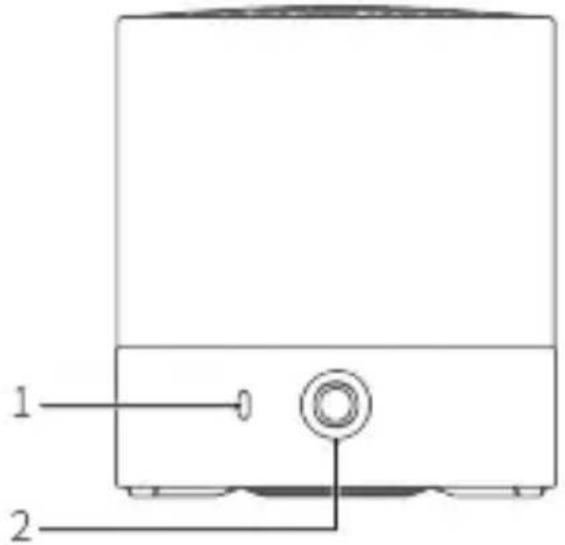
- Indikatorius
- Funkcijmygtukas
- Kiaurymes dirzeliui
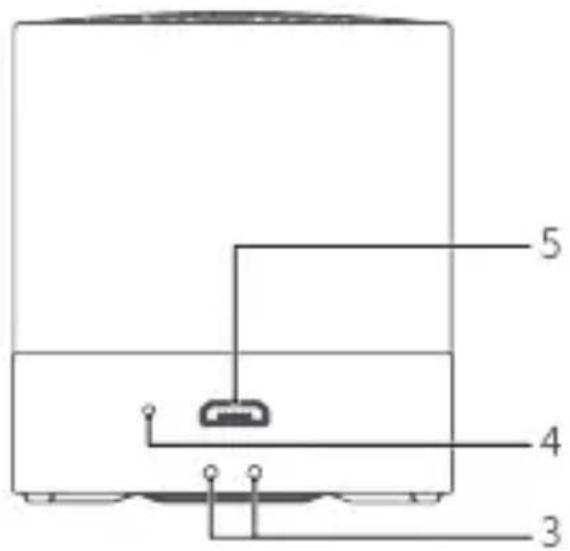
- Mikrofonas
- USB prievadas
https://consumer.huawei.com/en/legal/eula/.
Ochrona prywatnosci
https://consumer.huawei.com/en/legal/eula/.
https://consumer.huawei.com/en/legal/eula/.
C TEKCTOM JIUNCEH3NHOHORO CORNAUHEHNA MOXHO O3HaKOMITbCRA Ha Be6-caHTe: https://consumer.huawei.com/en/legal/eula/.
3auntata nepcohaJIbHbIX daHHbIX
Mepbl, npHnHaemble KOMnaHnei Huawei dIa3aunbI Baux NepcoHaJIbHbIX DaHHbIX, MoXHO HaHTN Ha Be6-caITe http://consumer.huawei.com/privacy-policy IN B noJNTke KOHdEHNaJIbHOCTN.
EAC
BknaDbIsh K kpaTkomy pyKOBoDcTBy NOJIb3OBaTeJra
https://consumer.huawei.com/en/legal/eula/.
Zašita privatnosti
Da biste razumeli kako štitimo vase lične podatke, posetite http://consumer.huawei.com/privacy-policy i pročitajte nasu politiku privatnosti.
Slovencina
Popis vyrobku
1. Vzhlad
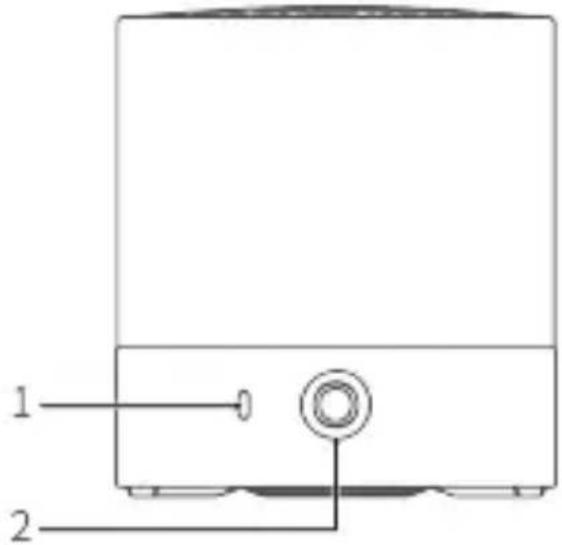
- Indikātār
- Tlačidlo funkcić
- Otvory na snurku
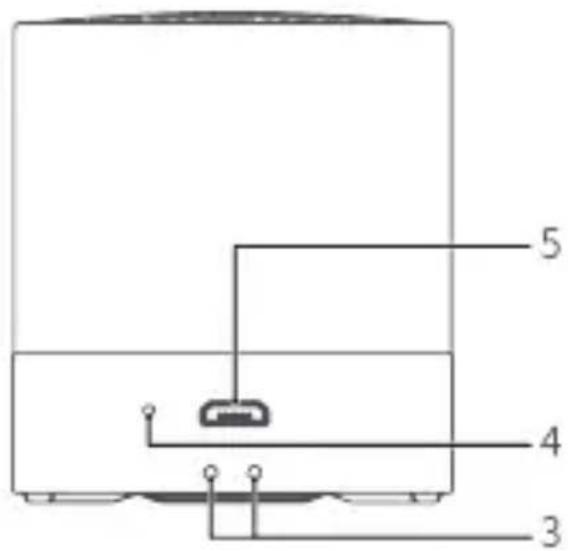
- Mikrofón
- USB port
https://consumer.huawei.com/en/legal/eula/.
https://consumer.huawei.com/en/legal/eula/.
Varstvo zasebnosti
Čeželite preveriti, kako šcitimo vase osebne podatke, obišcite spltehnostmo. http://consumer.huawei.com/privacy-policy in preberite naš pravilnik o zasebnosti.
Espanol
Paraocular contentodel contrato,acceda at https://consumer.huawei.com/en/legal/eula/.
| lnvntanr'vntn'tvny # | nswtwn'vntn'tvny |
| #wntan'vntn'tvny | #wntwn'vntn'tvny |
| #vntan'vntn'tvny | nswtwn'vntn'tvny 3 vntn'wntn'tvny'vntn'vntn'tvny'vntn'tvny |
| #vntan'vntn'tvny (##lww) ## | #vntan'vntn'tvny vntn'tvny ##vntan'vntn'tvny vntn'tvny vntn'tvny |
| lnvntan'vntn'tvny (##lww) ## | #vntan'vntn'tvny 5 vntn'vntn'tvny vntn'tvny vntn'tvny vntn'tvny vntn'tvny |
| lnvntan'vntn'tvny | nswtwn'vntn'tvny vntn'tvny vntn'tvny vntn'tvny vntn'tvny vntn'tvny |
| lnvntan'vntn'tvny | nswtwn'vntn'tvny vntn'tvny vntn'tvny vntn'tvny vntn'tvny vntn'tvny |
| lnvntan'vntn'tvny TWS | nswtwn'vntn'tvny vntn'tvny vntn'tvny vntn'tvny vntn'tvny vntn'tvny vntn'tvny vntn'tvny |
| lnvntan'vntn'tvny TWS | #vntan'vntn'tvny vntn'tvny vntn'tvny vntn'tvny vntn'tvny vntn'tvny vntn'tvny |
4.175 130
nno nnnnnaa nnnnnae nnne nnnnnae (nne nne nne nne nne nne nne nne nne nne nne nne nne nne nne nne nne nne nne nne nne nne nne nne nne nne nne nne nne nne nne nne nne nne nne nne nne nne nne nne nne nne nne nne nne nne nne nne nne nne nne
n
- nnnnnaaannnnaa
wannnnaaannnnnnaanennnnnnaa
HuaWuWuWuWuWuWuWuWuWuWuWuWuWuWuWuWuWuWuWuWuWuWuWuWuWuWuWuWuWuWuWuWuWuWuWuWuWuWuWuWuWuWuWuWuWuWuWuWuWuWuWw
nnu
CM510)

Wu:luuunwuyuunuee uonouoanrnnnnaaannnnaa 0
wolamunwnwnwnnnn
2. nivq
(TWS)
- 1
TWS
()nwnnwnAunnnnwnnnnnnnnnnnnnnnnnnnnnnnnnnnnnnnnnnnnnnnnnnnnnnnnnnnnnnnnnnnnnnnnnnnnnnnnnnnnnnnnnnnnnnnnnnnnnnnnnnnnnnnnnnnnnnnnnnnnnnnnnnnnnnnnnnnnnnnnnnnnnnnnnnnnnnn
- 1wwnnnaaunnnn nn nannnnn nn nnnnnnnnnnnnn
nannanwssyioy uunnnnna
nnaananaan anananaan anananaan anananaan
- nnnn nn nn noonnnnooynnnnns TWS

i o uuauauauauauauauauauuuuuuuuuuuuuuuuuuuuuuuuuuuuuuuuuuuuuuuuuuuuuuuuuuuuuuuuuuuuuuuuuuuuuuuuuuuuuuuuuuuuuuuuuuuuuuuuuuuuuuuuuuuuuuuuuuuuuuuuuuuuuuuuuuuuuuuuuuuuuuuuuuuuuuuuuuuuuuuuuuuuuuuuuuuuuuuuuuuuuuuuuuuuuuuuuuuUU
Huawei Technologies Co., Ltd.
unnnnnaeennnnnne
yannan
1nnuannanr 1nnnnaaennn an nnnnnnnnnnnnn
https://consumer.huawei.com/en/legal/eula/.
Gizlik koruması
https://consumer.huawei.com/tr/support/warranty-policy/
https://consumer.huawei.com/tr/legal/privacy-policy/

- English
- Indicator descriptions
- Charging
- Paring the Speaker
- Paring the speaker with a Bluetooth device
- Pairing two speakers
- Automatic reconnection upon startup
- Automatic reconnection within the Bluetooth range
- Safety information
- Disposal and recycling information
- Reduction of hazardous substances
- EU Regulatory Conformance
- RF exposure
- Statement
- Frequency bands and power
- Accessories and software information
- FCC Regulatory Compliance
- FCC statement
- Legal statement
- User Software License Agreement
- Privacy protection
- Былгарскn
- Описане на пожукта
- BbHsEh BnD
- 2.Функцин Ha 6уTOHnTe
- ABTOMaTnUH NoBToPHo CBbP3BaHe npi cTapTnpaHe
- ABTomatnuho NOBtOpHo CBbP3BaHe B 06xBaTa Ha Bluetooth
- HΦopMaζη 3a 6e3oNaChocCTTa
- Былгарский
- HΦopMaçnla 3a n3XBbPJIHe n pezuklnpaHe
- HamaJIYaHe Ha onaChnTe BeIeCTBa
- CbOTBeTcTBnE c pa3npope6nte Ha EC
- IzharaheHaP4
- Декларачnia
- YeCTOTHnJIeHTnI 3aXpaHBaHe
- HnΦopMaζηa 3a npHaJæχHoCTnte n coΦTyepa
- Блгарский
- Празвна.Deекларачnia
- 600:mC:cG:32qM32wM4p:
- G
- g00g: g0030: g630c 600c0g: 300300q:
- Opis proizvoda
- Izgled
- Ochrana soukromí
- Privaatsuse kaitse
- Tietosuoja
- Datenschutz
- Copyright © Huawei Technologies Co., Ltd. 2019.All rights reserved.
- 用法 用整数的差
- ACKSSETRI Mf SFOFTEWEREgR
- 敲击 那
- Konfidencialitatea aizsardziba
- Gaminio aprasymas
- Isvaizda
- Ochrona prywatnosci
- 3auntata nepcohaJIbHbIX daHHbIX
- BknaDbIsh K kpaTkomy pyKOBoDcTBy NOJIb3OBaTeJra
- Zašita privatnosti
- Slovencina
- Popis vyrobku
- Vzhlad
- Varstvo zasebnosti
- Espanol
- 130
- n
- nivq
- yannan
- Gizlik koruması
Brand : HUAWEI
Model : Mini Speaker CM510
Category : Hi-fi system