FreeClip - Hi-fi system HUAWEI - Free user manual and instructions
Find the device manual for free FreeClip HUAWEI in PDF.

 FR
FR
 BG
BG
 CS
CS
 DA
DA
 DE
DE
 EL
EL
 EN
EN
 ES
ES
 ET
ET
 FI
FI
 HU
HU
 ID
ID
 IT
IT
 JA
JA
 KK
KK
 LT
LT
 LV
LV
 NL
NL
 NO
NO
 PL
PL
 PT
PT
 RO
RO
 RU
RU
 SK
SK
 SL
SL
 SV
SV
 TR
TR
 UK
UK
 VI
VI
| Product Type | Open-design wireless earphones |
| Brand | HUAWEI |
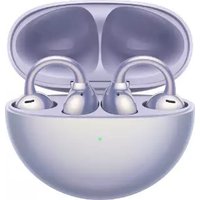
| Model | FreeClip (T0017 / T0017C) |
| Acoustic design | Open, without insertion into ear canal |
| Connectivity | Bluetooth 2.4 GHz |
| Bluetooth power | T0017 : 10 dBm, T0017C : 8 dBm |
| Dedicated app | HUAWEI AI Life (customization of controls and updates) |
| Touch controls | Double tap (play/pause), triple tap (next track) |
| Pairing methods | Proximity pairing (EMUI 10.0/HarmonyOS 2+) or manual Bluetooth connection |
| Charging case | USB-C (cable included) and compatible wireless charging |
| Water and dust resistance | IP54 (earbuds only, splash resistant) |
| Automatic ear detection | Automatic left/right - tilt head after placing to optimize |
| Operating temperature | 0°C to 35°C |
| Storage temperature | -20°C to +45°C |
| Earbud power | Non-replaceable integrated battery - charge via case |
| Battery safety | Do not swallow, keep out of reach of children, do not expose to heat |
| Usage precautions | Do not excessively bend or stretch the elastic connector |
| Cleaning | Regularly clean the metal contacts with a dry cloth |
| Firmware updates | Automatic when connected to a Huawei/Honor device (network enabled) |
| EU regulatory compliance | Directives RED 2014/53/EU, RoHS 2011/65/EU, REACH |
Frequently Asked Questions - FreeClip HUAWEI
User questions about FreeClip HUAWEI
0 question about this device. Answer the ones you know or ask your own.
Ask a new question about this device
Download the instructions for your Hi-fi system in PDF format for free! Find your manual FreeClip - HUAWEI and take your electronic device back in hand. On this page are published all the documents necessary for the use of your device. FreeClip by HUAWEI.
USER MANUAL FreeClip HUAWEI
Downloading and installing the app
Scan the QR code to download and install the HUAWEI AI Life app, where you can try out more features and customize the settings for your earbuds.


Pairing and connecting
Method 1: Proximity pairing
- Enable Bluetooth on your phone/tablet.
- When you open the charging case for the first time, the earbuds will automatically enter Pairing mode. Touch CONNECT in the pop-up window that appears to connect with the earbuds.
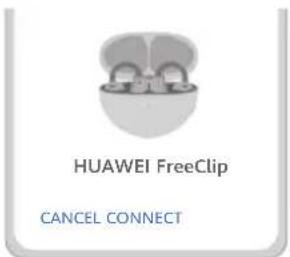

Proximity pairing is supported on phones/tablets running EMUI 10.0/HarmonyOS 2 or later.
Method 2: Bluetooth connection
- Open the charging case and hold down on the Function button for 2 seconds until the indicator flashes white. The earbuds will then enter Pairing mode.
- Enable Bluetooth on your phone/tablet to be paired with the earbuds, then search for the earbuds and complete the pairing.
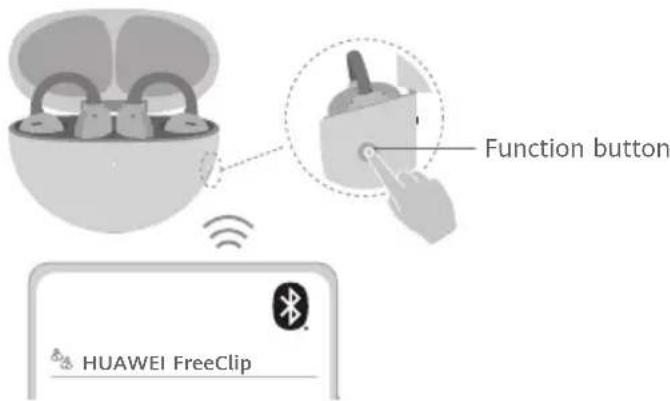

Restoring the earbuds to their factory settings
Open the charging case and leave the earbuds inside. Hold down on the Function button for 10 seconds until the indicator flashes red. The earbuds will then be restored to their factory settings before re-entering Pairing mode.

Putting on the earbuds
This product uses an open acoustic design, which means it does not need to be inserted into the ear canal. The left and right earbuds are interchangeable, and will be automatically recognized as soon as they are worn.

The accuracy of automatic recognition varies depending on certain factors, like head movement and body posture. Dip your head slightly after putting on the earbuds to ensure optimally accurate recognition. Actual experience shall prevail.
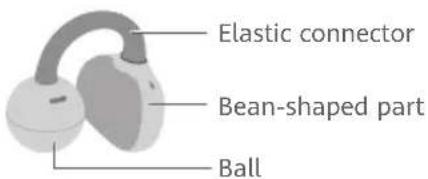
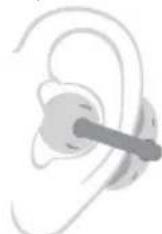
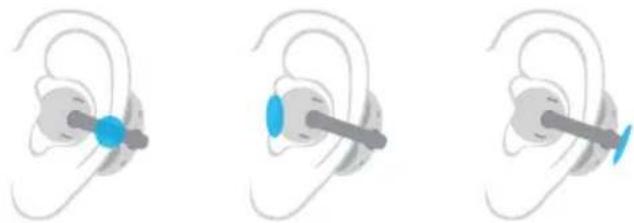
- Open the elastic connector to clip each earbud on. The ball should go in front, and the bean-shaped part should rest against the back of your ear.
- Adjust until you're comfortable.
Tap anywhere in the blue area to control the earbuds.
natural_image
Three illustrations of an ear with a blue earbell and a gray barbell, showing different ear positions (no text or symbols)| Double-tap | Play/Pause audioAnswe | |
| Triple-tap | / | Next track |
You can also customize the double-tap and triple-tap gestures in the HUAWEI AI Life app.

Charging the earbuds
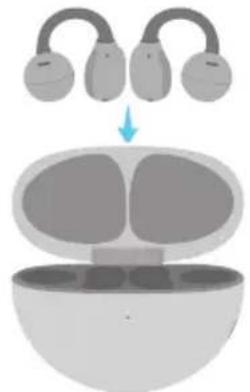
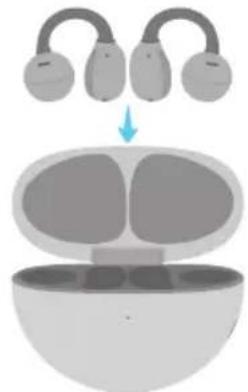
Place the earbuds in the charging case to initiate automatic charging.
natural_image
Diagram of a device with four curved arms and an open base, showing internal components (no text or symbols)
Charging the case
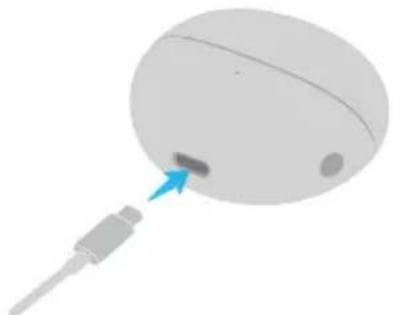
Method 1: Wired charging
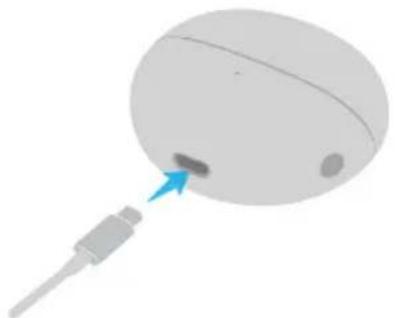
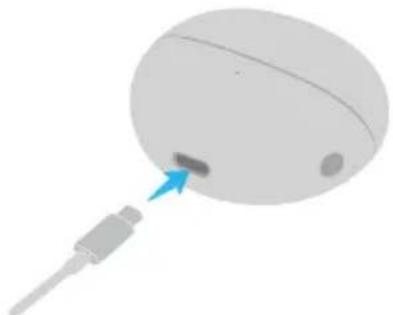
Connect the case to a power source via a USB-C cable to begin charging it.
natural_image
3D illustration of a computer mouse with a blue arrow pointing to the mouse's head (no text or symbols)Method 2: Wireless charging
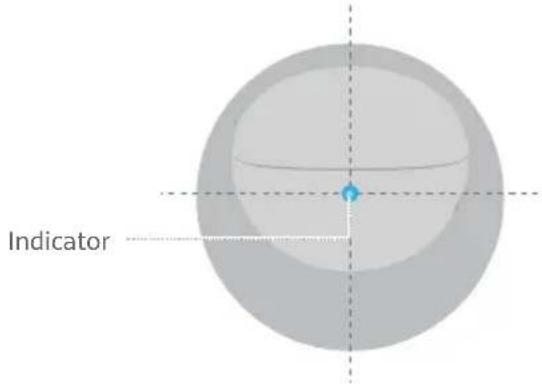
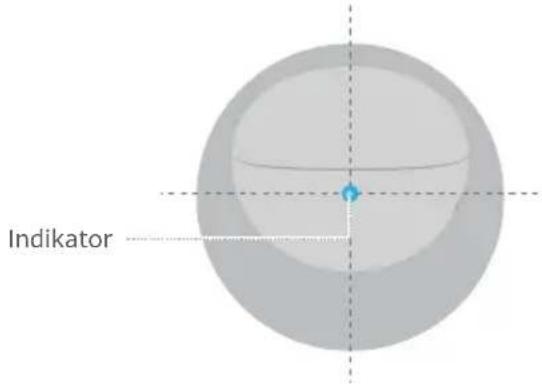
Place the charging case on a compatible wireless charger with the indicator facing upwards and aligned with the center of the wireless charger.
Safety Information
Before using and operating this device, read the following precautions to ensure an optimal device performance and avoid dangerous use or unauthorized operations.
• To protect your hearing, do not listen to audio at a high volume for a long period of time.
- Some wireless devices may interfere with implantable medical devices and other medical equipment, such as pacemakers, cochlear implants, and hearing aids. When using the product, keep it at least 15 cm away from such medical devices. Consult the manufacturer of your medical equipment for more information.
- Ideal temperatures: 0^ to 35^ for operating; -20^ to +45^ for storage.
- Ensure that the power adapter meets the requirements of IEC/EN 62368-1 and has been tested and approved according to national or local standards.
- Remember to comply with all relevant laws and regulations, and exercise caution if using the device while driving.
- Wearing the device may affect your ability to perceive dangers and alerts in your environment. Please wear the device in safe environments only.
- Keep this device and its accessories that may contain small components out of the reach of children. Otherwise, children may damage this device and its accessories by mistake, or swallow the small components, which may cause choking.
- Avoid immersing the device and its accessories in deep water, as this can cause short circuits or damage to the earbuds.
- Avoid disassembling or modifying your device and its accessories. Unauthorized disassembly and modifications may result in voiding the factory warranty. If your device is faulty, visit an authorized Huawei Customer Service Center for assistance.
- The earbuds (excluding the charging case) comply with the IP54 (IEC 60529) requirements. This product is not a pro-level water-proof device, but is splash-, water-, and dust-resistant during normal use. It has been subject to lab tests under controlled conditions, which indicate that it meets the IP54 level under the IEC 60529 standard. Splash, water, and dust resistance are not permanent, and may deteriorate over time with normal use.

Warning:
- This device contains a coin, button, or small-sized cell battery. Do not swallow the battery, as it constitutes a chemical burn hazard.
• If the coin, button, or small size cell battery is swallowed, it can cause severe internal burns in just 2 hours and can lead to death. - Keep new and used batteries away from children. If the battery compartment does not close securely, stop using the product and keep it away from children. If you think batteries might have been swallowed or placed inside any part of the body, seek immediate medical attention.
- Keep the battery away from fire, excessive heat, extremely low air pressure and direct sunlight. Do not place it on or in heating devices. Do not disassemble, modify, throw, or squeeze it. Do not insert foreign objects into it, submerge it in liquids, or expose it to external force or pressure, as this may cause it to leak, overheat, catch fire, or even explode.
- Do not attempt to replace the battery yourself — you may damage the battery, which could cause overheating, fire, and injury. The built-in battery in your device should be serviced by Huawei or an authorized service provider.
- The nameplate of this device is attached to the inside of the charging case lid.
Precautions
- Keep the metal contact points on the earbuds and charging case clean. Otherwise, the earbuds may not function properly.
- If you experience any skin irritation while wearing the earbuds, remove them and clean them thoroughly. If the issue persists, seek advice from a medical professional.
- This device's firmware will automatically update whenever it connects to a previously paired Honor device (released before the end of 2020) or a previously paired Huawei device, and Wi-Fi or mobile data is enabled. You can disable automatic firmware updates in Settings.
- Some heat may be generated when the charging case is wirelessly charged. This is normal and does not indicate any issue with your device. If your device overheats, contact an authorized Huawei Customer Service Center in a timely manner.
- Do not overbend or stretch the elastic connector of the earbuds, as doing so can shorten the earbuds' service life, cause damage, and affect the wearing experience.
Disposal and recycling information

This symbol on the product, battery, literature, or packaging means that the products and batteries should be taken to separate waste collection points designated by local authorities at the end of the lifespan. This will ensure that EEE waste is recycled and treated in a manner that conserves valuable materials and protects human health and the environment. For more information, please contact your local authorities, retailer, or household waste disposal service, or visit the website https://consumer.huawei.com/en/.
UK regulatory conformance
Hereby, Huawei Device Co., Ltd. declares that this device T0017/T0017C is in compliance with the relevant statutory instruments in the UK. The full text of the declaration of conformity is available at the following internet address: https://consumer.huawei.com/certification.
EU Regulatory Conformance
Hereby, Huawei Device Co., Ltd. declares that this device T0017/T0017C is in compliance with the following Directive RED 2014/53/EU, RoHS 2011/65/EU, EU REACH regulation, and Batteries (where included) directive.
The full text of the EU declaration of conformity and most recent information about accessories & software are available at the following internet address: https://consumer.huawei.com/certification.
Frequency Bands and Power
T0017: Bluetooth: 2.4 GHz 10 dBm.
T0017C: Bluetooth: 2.4 GHz 8 dBm.
RF Exposure Information
For the countries that adopt the SAR limit of 2.0 W/kg over 10 grams of tissue. The device complies with RF specifications when used near your ear, limbs or at a distance of 0.5 cm from your body.
T0017: The highest reported SAR value: Head SAR: 0.11 W/kg.
T0017C is a low-power radio transmitter and receiver. As recommended by international guidelines, the device is designed to comply with the limits established by the market that the device will be placed on.
ISED Statement
IC: 25182-T0017
IC: 25182-T0017C
This device complies with CAN ICES-3 (B)/NMB-3(B).
This device contains licence-exempt transmitter(s)/receiver(s) that comply with Innovation, Science and Economic Development Canada's licence-exempt RSS(s). Operation is subject to the following two conditions:
(1) This device may not cause interference.
(2) This device must accept any interference, including interference that may cause undesired operation of the device.
Industry Canada compliance
The device complies with RF specifications when used near your ear or at a distance of 0.5 cm from your body. Ensure that the device accessories, such as a device case and device holster, are not composed of metal components. Keep the device away from your body to meet the distance requirement.
Certification information (SAR)
This device is also designed to meet the requirements for exposure to radio waves established by the Industry Canada.
The SAR limit adopted by Canada is 1.6 W/kg averaged over 1 gram of tissue for use against the head or body and 4.0 W/kg averaged over 10 grams of tissue for use on the extremity. The highest SAR value reported to the IC for this device type complies with this limit.
T0017: The highest SAR value reported to the IC for this device type when using at the ear is 0.29 W/kg.
T0017C: The highest SAR value reported to the IC for this device type when using near the body is 0.08 W/kg. When the device is used on the extremities, device is a low-power radio transmitter and receiver. As recommended by international guidelines, the device is designed to comply with the limits established by the market that the device will be placed on.
Legal Notice
Copyright © Huawei Device Co., Ltd. 2023. All rights reserved.
All contents in the documents in the packaging box, including but not limited to information about and portrayals of the appearance, color, size, and supported features of the product (the latest features will come with software updates), are for reference only. The actual product may vary.
The Bluetooth ^® word mark and logos are registered trademarks owned by the Bluetooth SIG, Inc. and any use of this mark by Huawei Technologies Co., Ltd. is under license. Huawei Device Co., Ltd. is an affiliate of Huawei Technologies Co., Ltd.
Privacy Protection
To better understand how we protect your personal information, please see the privacy policy at https://consumer.huawei.com/privacy-policy, or read the privacy policy and service terms using the corresponding app.
Software License Agreement
Please read the software license agreement carefully before using this device. By using the device, you indicate that you agree to be bound by the license agreement. To read the agreement, please visit the following website: https://consumer.huawei.com/en/legal/eula/.
Open Source Software Notice
For the open source software statement of your device, please visit https://consumer.huawei.com/en/opensource/ and search for the device name.
Australia/New Zealand

natural_image
Three illustrations of an ear with a blue earbell and a gray barbell, showing different ear positions (no text or symbols)natural_image
Diagram of a device with three lenses above an open base, showing internal components (no text or symbols)
Charge du boîtier
natural_image
3D illustration of a computer mouse with a blue arrow pointing to the mouse's head (no text or symbols)natural_image
Three illustrations of an ear with a blue earbell and a gray barbell, showing different ear positions (no text or symbols)natural_image
Diagram of a device with three curved arms above an open base, showing internal components (no text or symbols)
natural_image
3D illustration of a computer mouse with a blue arrow pointing to the mouse's head (no text or symbols)natural_image
Three illustrations of an ear with a blue earbell and a gray barbell, showing different ear positions (no text or symbols)natural_image
Diagram of a device with three lenses above an open base, showing internal components (no text or symbols)
natural_image
3D illustration of a computer mouse with a blue arrow pointing to the mouse's head (no text or symbols)Metodo 2: ricarica wireless
natural_image
Three illustrations of an ear with a blue earbell and a gray barbell, showing different ear positions (no text or symbols)natural_image
Diagram of a device with three lenses above an open base, showing internal components (no text or symbols)
natural_image
3D illustration of a computer mouse with a blue arrow pointing to the mouse's tip (no text or symbols)natural_image
Three illustrations of an ear with a blue earbell and a gray barbell, showing different ear positions (no text or symbols)natural_image
Diagram of a device with three lenses above an open base, showing internal components (no text or symbols)
Carregar a caixa
natural_image
3D illustration of a computer mouse with a blue arrow pointing to the mouse tip (no text or symbols)natural_image
Three illustrations of an ear with a blue earbell and a gray barbell, showing different ear positions (no text or symbols)natural_image
Diagram of a device with three curved arms above an open bulb, showing internal compartments (no text or symbols)
De case opladen
Methode 1: Bedraad opladen
natural_image
3D illustration of a computer mouse with a blue arrow pointing to the mouse's head (no text or symbols)Methode 2: Draadloos opladen
natural_image
Three illustrations of an ear with a blue earbell and a gray barbell, showing different ear positions (no text or symbols)natural_image
Diagram showing a device with three curved arms above an open base, indicating a process or assembly (no text or symbols present)
Ładowanie etui
natural_image
3D illustration of a computer mouse with a blue arrow pointing to the mouse tip (no text or symbols)natural_image
Three illustrations of an ear with a blue earbell and a gray barbell, showing different ear positions (no text or symbols)natural_image
Diagram of a device with four lenses above an open base, showing internal components (no text or symbols)
Φόρτιση της θήκης
natural_image
3D illustration of a computer mouse with a blue arrow pointing to the mouse's head (no text or symbols)natural_image
Three illustrations of an ear with a blue earbell and a gray barbell, showing different ear positions (no text or symbols)natural_image
Diagram of a device with three curved arms above an open bulb, showing internal components (no text or symbols)
Nabíjení pouzdra
natural_image
3D illustration of a computer mouse with a blue arrow pointing to the mouse's head (no text or symbols)natural_image
Three illustrations of an ear with a blue earbell and a gray barbell, showing different ear positions (no text or symbols)natural_image
Diagram of a device with three lenses above an open base, showing internal components (no text or symbols)
A tok feltöltése
natural_image
3D illustration of a computer mouse with a blue arrow pointing to the mouse's tip (no text or symbols)natural_image
Three illustrations of an ear with a blue earbell and a gray barbell, showing different ear positions (no text or symbols)natural_image
Diagram of a device with three lenses above an open base, showing internal components (no text or symbols)
Încărcarea carcasei
natural_image
3D illustration of a computer mouse with a blue arrow pointing to the internal component (no text or symbols)natural_image
Three illustrations of an ear with a blue sensor or lens, shown in different angles (no text or symbols present)natural_image
Diagram of a device with three lenses above an open base, showing internal components (no text or symbols)
Kutuyu şarj etme
natural_image
3D illustration of a computer mouse with a blue arrow pointing to the mouse tip (no text or symbols)https://consumer.huawei.com/certification.
Xincheng Road 2, Songshan Lake Zone, Dongguan, Guangdong 523808, China
Tel: 0086-755-28780808
Web: www.huawei.com
E-mail: mobile.tr@huawei.com
Çin'de üretilmiştir
Web: www.huawei.com/tr/
E-posta: mobile.tr@huawei.com
natural_image
Three illustrations of an ear with a blue earbell and a gray barbell, showing different ear positions (no text or symbols)natural_image
Diagram of a device with three curved arms above an open base, showing internal components (no text or symbols)
ケースの充電
方法1:有線充電
natural_image
3D illustration of a computer mouse with a blue arrow pointing to the mouse tip (no text or symbols)方法2:ワイヤレス充電
https://consumer.huawei.com/certification
高周波曝露情報
Copyright © Huawei Device Co., Ltd. 2023. All rights reserved.
natural_image
Three illustrations of a human ear with a blue sensor or probe inserted, showing different eye positions (no text or symbols present)natural_image
Diagram of a device with three curved arms above an open base, showing internal components (no text or symbols)
Заряджання чохла
natural_image
3D illustration of a computer mouse with a blue arrow pointing to the mouse's tip (no text or symbols)natural_image
Illustration of a human ear with a finger inserted, showing ear structure (no text or symbols)natural_image
Three illustrations of an ear with a blue earbell and a gray barbell, showing different ear positions (no text or symbols)natural_image
Diagram showing a device with three curved arms above an open bowl, indicating a process or assembly (no text or symbols present)
Зарядка чехла
natural_image
3D illustration of a computer mouse with a blue arrow pointing to the mouse's tip (no text or symbols)natural_image
Three illustrations of an ear with a blue earbell and a gray barbell, showing different ear positions (no text or symbols)natural_image
Diagram of a device with three curved arms above an open container, showing internal compartments (no text or symbols)
Корпусты зарядтау
natural_image
3D illustration of a computer mouse with a blue arrow pointing to the mouse's head (no text or symbols)natural_image
Three illustrations of an ear with a blue and gray connector, showing different ear positions (no text or symbols)natural_image
Diagram showing a device with three curved arms above an open base, indicating a process or assembly (no text or symbols present)
Mengisi daya kotak
Metode 1: Pengisian daya berkabel
natural_image
3D illustration of a computer mouse with a blue arrow pointing to the mouse's head (no text or symbols)Metode 2: Pengisian daya nirkabel
natural_image
Three illustrations of an ear with a blue earbell and a gray barbell, showing different ear positions (no text or symbols)natural_image
Diagram showing a device with three curved arms above an open base, indicating a process or assembly (no text or symbols present)
Зареждане на кальфа
natural_image
3D illustration of a computer mouse with a blue arrow pointing to the mouse's head (no text or symbols)natural_image
Three illustrations of an ear with a blue sensor or probe inserted into the ear, showing different mechanical or diagnostic states (no text or symbols present)natural_image
Diagram of a device with three lenses above an open base, showing internal components (no text or symbols)
Sạc hộp
Cách 1: Sạc có dây
natural_image
3D illustration of a computer mouse with a blue arrow pointing to the mouse's head (no text or symbols)https://consumer.huawei.com/certification.
natural_image
Three illustrations of an ear with a blue sensor or probe inserted into the ear, showing different eye positions (no text or symbols present)natural_image
Diagram showing a device with three curved arms above a container, indicating a process or assembly (no text or symbols present)
การชาร์อกล่อง
natural_image
3D illustration of a computer mouse with a blue arrow pointing to the mouse (no text or symbols)natural_image
Three illustrations of an ear with a blue and gray connector, showing different ear positions (no text or symbols)natural_image
Diagram of a device with three curved arms above an open base, showing internal compartments (no text or symbols)
Ladda fodralet
natural_image
3D illustration of a computer mouse with a blue arrow pointing to the mouse's tip (no text or symbols)natural_image
Three illustrations of an ear with a blue earbell, shown in different angles (no text or symbols)natural_image
Diagram showing a device with three curved arms above an open bowl, indicating a process or assembly (no text or symbols present)
Opladning af etuiet
Metode 1: Kablet opladning
natural_image
3D illustration of a computer mouse with a blue arrow pointing to the mouse tip (no text or symbols)natural_image
Three illustrations of a human ear with a blue earbell and a gray barbell, showing different ear positions (no text or symbols)natural_image
Diagram of a device with three curved arms above an open base, showing internal components (no text or symbols)
Lade etuiet
Metode 1: Kablet lading
natural_image
3D illustration of a computer mouse with a blue arrow pointing to the mouse's head (no text or symbols)natural_image
Three illustrations of an ear with a blue earbell and a gray barbell, showing different ear positions (no text or symbols)natural_image
Diagram showing a device with three curved arms above it, indicating a process or assembly (no text or symbols present)
Kotelon lataaminen
natural_image
3D illustration of a computer mouse with a blue arrow pointing to the mouse's head (no text or symbols)natural_image
Three illustrations of an ear with a blue earbell and a gray barbell, showing different ear positions (no text or symbols)natural_image
Diagram showing a device with three curved arms above an open base, indicating a process or assembly (no text or symbols present)
Dėklo įkrovimas
natural_image
3D illustration of a computer mouse with a blue arrow pointing to the mouse tip (no text or symbols)https://consumer.huawei.com/certification.
natural_image
Three illustrations of an ear with a blue earbell and a gray barbell, showing different ear positions (no text or symbols)natural_image
Diagram of a device with four curved arms and an open base, showing internal components (no text or symbols)
Futrāla uzlāde
1. metode Uzlāde ar vadu
natural_image
3D illustration of a computer mouse with a blue arrow pointing to the mouse tip (no text or symbols)2. metode Bezvadu uzlāde
natural_image
Three illustrations of an ear with a blue earbell and a gray barbell, showing different ear positions (no text or symbols)natural_image
Diagram showing a device with four curved arms above an open base, indicating a process or assembly (no text or symbols present)
Karbi laadimine
natural_image
3D illustration of a computer mouse with a blue arrow pointing to the mouse's tip (no text or symbols)natural_image
Three illustrations of an ear with a blue earbell and a gray barbell, showing different ear positions (no text or symbols)natural_image
Diagram showing a device with four curved arms above an open container, indicating a process or assembly (no text or symbols present)
Nabíjanie puzdra
natural_image
3D illustration of a computer mouse with a blue arrow pointing to the mouse tip (no text or symbols)natural_image
Three illustrations of an ear with a blue and gray connector, showing different ear positions (no text or symbols)natural_image
Diagram showing a device with three curved arms above an open base, indicating a process or assembly (no text or symbols present)
Polnjenje etuija
natural_image
3D illustration of a computer mouse with a blue arrow pointing to the mouse's head (no text or symbols)natural_image
Three illustrations of an ear with a blue sensor or probe inserted, showing different mechanical or diagnostic states (no text or symbols present)| Dvostruki dodir | Reprodukcija /pauziranje zvuka | |
| Trostruki dodir | / | Sljedeći zvučni zapis |
Također možete prilagoditi geste dvostrukog i trostrukog dodira u aplikaciji HUAWEI AI Life.

Punjenje slušalica
Za pokretanje automatskog punjenja slušalice stavite u kućište za punjenje.
natural_image
Diagram of a device with three curved arms above an open base, showing internal components (no text or symbols)
Punjenje kućišta
Prvi način: punjenje putem kabela
Povežite kućište s izvorom napajanja putem USB-C kabela za početak punjenja.
natural_image
3D illustration of a computer mouse with a blue arrow pointing to the mouse's head (no text or symbols)Drugi način: bežično punjenje
Postavite kućište za punjenje na kompatibilni bežični punjač s indikatorom okrenutim prema gore i poravnanim sa središtem bežičnog punjača.
https://consumer.huawei.com/certification.
natural_image
Three illustrations of a human ear with a blue earbell and a gray barbell, showing different ear positions (no text or symbols)| # | # | |
| Dvostruko tapkanje | / / Odgovaranje na poziv/prekid poziva | / / Reprodukcija/pauziranje zvuka |
| Trostruko tapkanje | / | Sledeća numera |
natural_image
Diagram of a device with three curved arms above an open base, showing internal components (no text or symbols)
Punjenje kutije
1. način: Žičano punjenje
Putem USB-C kabla spojite kutiju sa izvorom napajanja da biste počeli sa punjenjem.
natural_image
3D illustration of a computer mouse with a blue arrow pointing to the mouse's head (no text or symbols)natural_image
Diagram of a device with three curved arms above a bowl, showing internal components and a blue arrow indicating direction (no text or symbols)شارز کردن محفظه

روش 1: شارز باسيم
natural_image
3D illustration of a computer mouse with a blue arrow pointing to the mouse's head (no text or symbols)روش 2: شارز بى سيم
natural_image
Three illustrations of a human ear with a blue sensor or probe inserted into the ear (no text or symbols present)natural_image
Diagram showing a device with three lenses above an open base, indicating a process or assembly (no text or symbols present)شحن العلابة