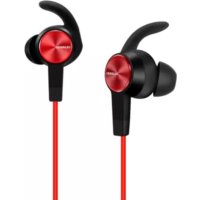
AM61 - Hi-fi system HUAWEI - Free user manual and instructions
Find the device manual for free AM61 HUAWEI in PDF.



| Product Type | Wireless Bluetooth Earphones |
| Brand | Huawei |
| Model | AM61 |
| Approximate Dimensions | 45 x 25 x 20 mm (per earpiece) |
| Approximate Weight | 15 g (per earpiece) |
| Power Supply | Rechargeable lithium-ion battery via micro USB port |
| Charging Time | Approximately 2 hours |
| Talk Time | Approximately 6 hours |
| Standby Time | Up to 10 days |
| Bluetooth Version | 4.2 (estimated) |
| Bluetooth Range | Up to 10 m |
| Main Functions | Answer/reject calls, music control (play/pause, track change), dual phone connection, power on/off, factory reset |
| Care and Cleaning | Clean with a dry, soft cloth. Do not expose to water or moisture. Close the micro USB port after charging. |
| Safety | Do not use at high volume for extended periods. Keep more than 15 cm away from medical devices. Use between 5 and 35 °C. Do not disassemble the battery. |
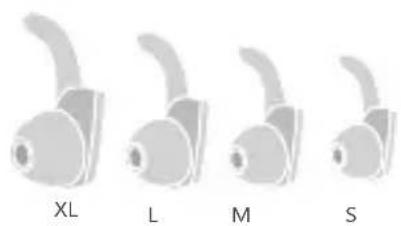
| Included Spare Parts | Ear tips of different sizes (S, M, L, XL) |
| Repairability | Have it repaired at an authorized Huawei service center. Any unauthorized disassembly voids the warranty. |
| General Information | In-ear headphones with microphone, FCC and CE certified |
Frequently Asked Questions - AM61 HUAWEI
User questions about AM61 HUAWEI
0 question about this device. Answer the ones you know or ask your own.
Ask a new question about this device
Download the instructions for your Hi-fi system in PDF format for free! Find your manual AM61 - HUAWEI and take your electronic device back in hand. On this page are published all the documents necessary for the use of your device. AM61 by HUAWEI.
USER MANUAL AM61 HUAWEI
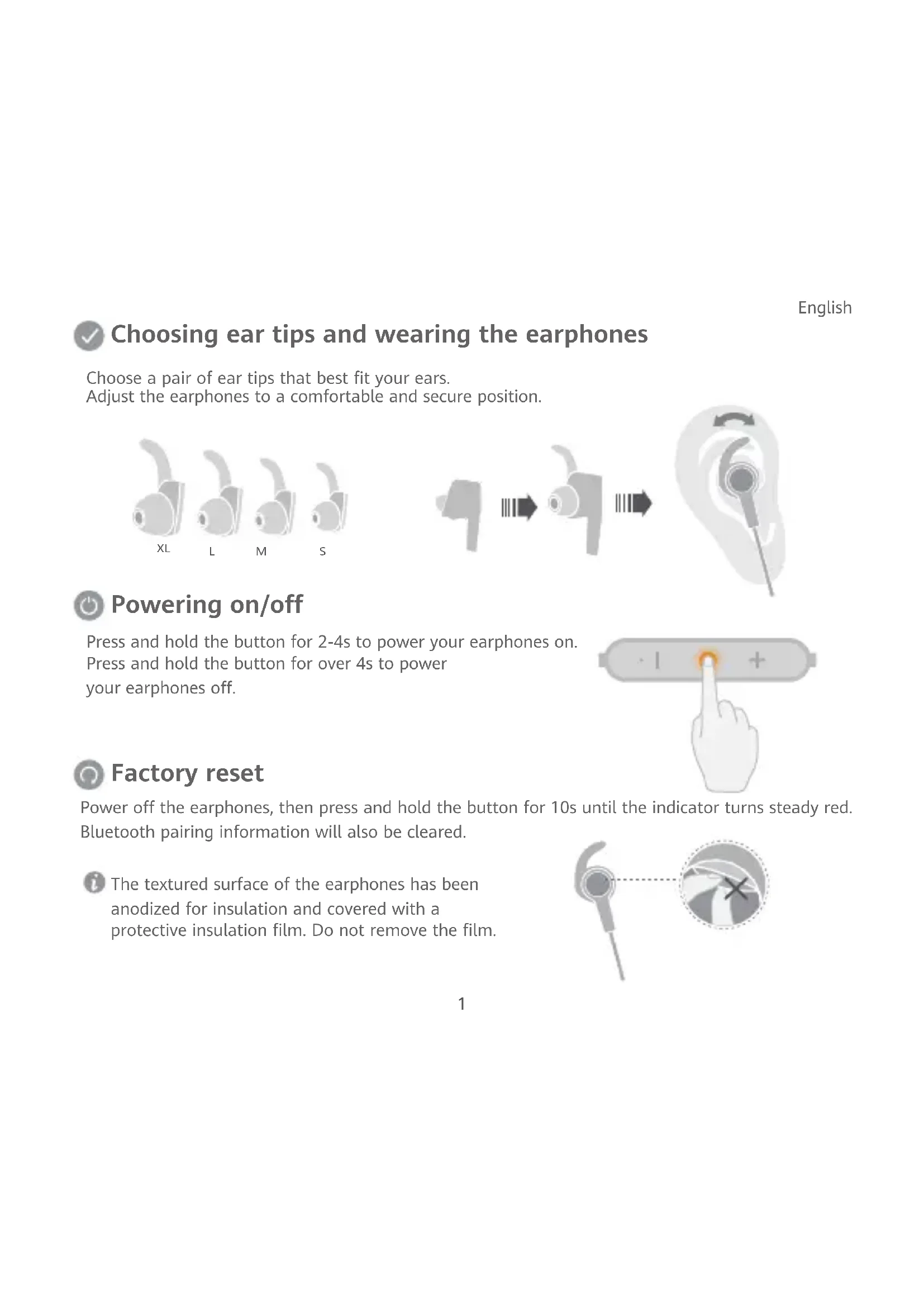
Choosing ear tips and wearing the earphones
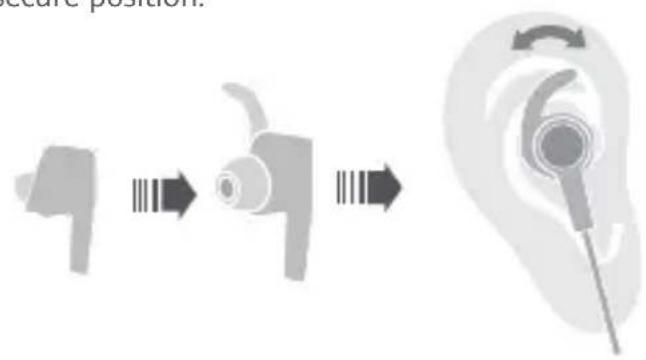
Choose a pair of ear tips that best fit your ears. Adjust the earphones to a comfortable and secure position.

Powering on/off
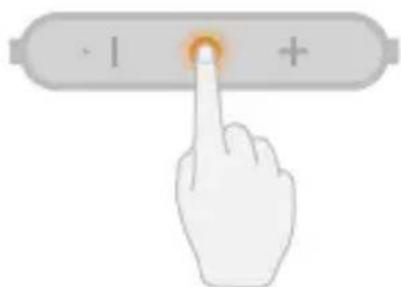
Press and hold the button for 2-4s to power your earphones on. Press and hold the button for over 4s to power your earphones off.

Factory reset
Power off the earphones, then press and hold the button for 10s until the indicator turns steady red. Bluetooth pairing information will also be cleared.

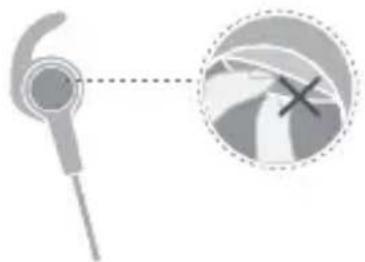
The textured surface of the earphones has been anodized for insulation and covered with a protective insulation film. Do not remove the film.

Pairing
- When powering on for the first time, the earphones will automatically enter Pairing mode.
- When the earphones are powered off, press and hold the button for about 4s until the indicator flashes red and blue for the earphones to enter Pairing mode.
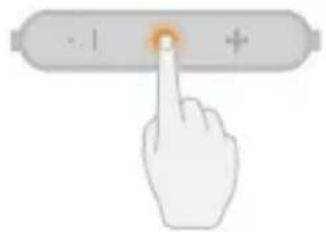
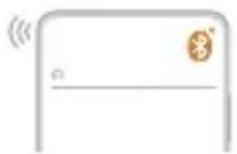
After entering Pairing mode, the earphones will automatically power off if no connection is made within 3 min.

Reconnecting when powering on
When you power on the earphones, they will automatically reconnect to the last phone they were connected to.

Reconnection after long-distance disconnection
After the earphones disconnect from your phone:
If you return back within the Bluetooth range in under 10 min, the connection will automatically resume. If you return back within 10-30 min, the connection can be manually reconnected. If you do not return back within 30 min, the earphones will automatically power off.

Due to differences in Bluetooth technologies, some phone models do not support automatic reconnection. This does not indicate an issue with your earphones.

Connecting to two phones
- Connect the earphones to phone A, then power the earphones off.
- Press and hold the button on the earphones for about 4s to connect to phone B.
- Access the list of paired devices on phone A and reconnect to the earphones.

Receiving calls in standby mode
Press the button to answer it, or press and hold the button for 2-4s to reject it.
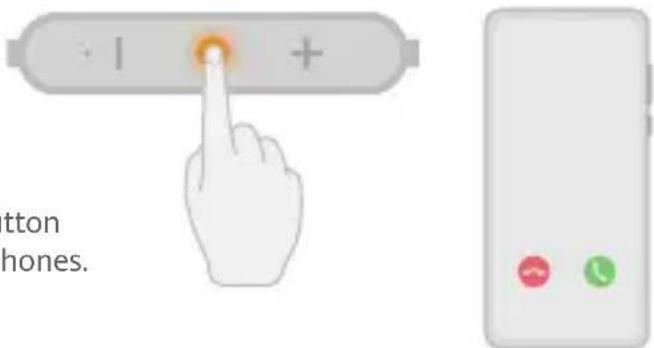

During a call
Press the button to end it, or press and hold the button for 2-4s to switch between the phone and the earphones.

Receiving a call during an ongoing call
Press the button to end the ongoing call and answer the new call. Press the button twice to put the ongoing call on hold and answer the new call.
Press and hold the button for 2-4s until you hear a prompt tone to continue the ongoing call and reject the new call.
Operations may vary slightly depending on the phone brand and specifications. If you have any questions, contact Huawei after-sales personnel for assistance.

Remaking a call
Press the button twice to remake the last outgoing call. Press the button again to cancel the call.

Receiving a call during music playback
Press the button to pause the music and answer the call. Press the button again to end the call and resume music playback.

Ensure that the earphones and your phone are within range and there are no obstacles between them. Otherwise, call or music quality may be compromised and Bluetooth may even disconnect.

Music playback
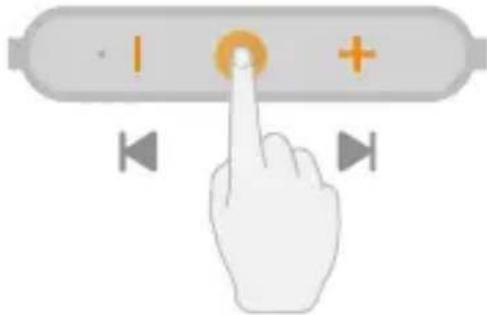
Press the button to play/pause during music playback. Press and hold the + / - button for over 2s to switch songs.

Charging
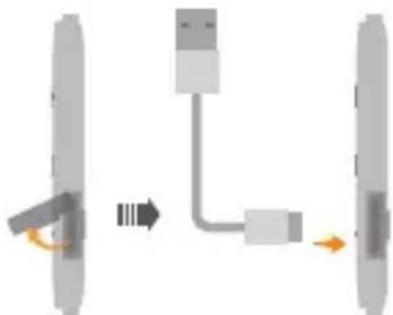
During charging, the indicator will be steady red. After the earphones are fully charged, the indicator will be steady blue.

Note
- If the earphones automatically power off due to low battery and are not charged within 30 days, they may not charge normally.
- After charging, ensure that the Micro-USB port cover is closed to prevent liquid from entering the port and causing a short circuit.
Safety Information
Before using and operating this device, read the following precautions to ensure optimal device performance and avoid dangers or unauthorized operations.
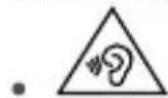
To prevent hearing damage, avoid using the device at a high volume for long periods of
- Some wireless devices may interfere with implantable medical devices and other medical equipment, such as pacemakers, cochlear implants, and hearing aids. When using the product, keep it at least 15cm away from such medical devices. Consult the manufacturer of your medical equipment for more information.
- Use this device at temperatures between 5^ to 35^ ( 40^ to 90^ ) and store this device and its accessories at temperatures between 5^ to 35^ ( 40^ to 90^ ). Extreme heat or cold may damage this device.
- When charging this device, ensure that the charger is plugged into a nearby power socket that is easy to reach. Disconnect the charger from this device and unplug the charger from the power socket once this device is fully charged.
- Ensure that the power adapter meets the requirements of Clause 2.5 in IEC60950-1/EN60950-1 and it is tested and approved according to national or local standards.
- Observe all local traffic laws and regulations while using this device. Do not use this device while driving.
- Keep this device and its accessories that may contain small components out of the reach of children. Otherwise, children may damage this device and its accessories by mistake, or swallow small components, which may cause choking.
- Do not expose this device and its accessories to rain or moisture, as this is a potential fire hazard and may cause you to experience an electric shock.
- Avoid placing this device or its accessories in environments that are too hot (for example, near heat sources or open flame) or cold as this may cause device malfunctions or even explosions.
- Do not disassemble, drop, hit, squeeze, or modify the device battery. Do not insert foreign objects into the device battery, or otherwise puncture it. Do not submerge the device battery in water or other liquids. Do not store the device battery in high-temperature environments as this may cause it to short-circuit, overheat, leak, catch on fire, and even explode.
- Avoid disassembling or modifying this device and its accessories. Unauthorized disassembly and modifications may result in voiding of the factory warranty. If your device is faulty, visit an authorized Huawei Customer Service Center for assistance.
Respect local laws on the disposal of this device and its accessories and support recycling efforts.
If you experience skin discomfort when wearing the device, take it off and consult a doctor.
Disposal and recycling information
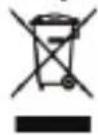
The symbol on the product, battery, literature or packaging means that the products and batteries should be taken to separate waste collection points designated by local authorities at the end of life. This will ensure that EEE waste is recycled and treated in a manner that conserves valuable materials and protects human health and the environment.
For more information, please contact your local authorities, retailer or household waste disposal service or visit the website http://consumer.huawei.com/en/.
EU regulatory conformance
Statement
Hereby, Huawei Technologies Co., Ltd. declares that this device AM61 is in compliance with the essential requirements and other relevant provisions of Directive 2014/53/EU, EU REACH regulation, RoHS and Batteries (where included) directive.
The most recent and valid version of the DoC (Declaration of Conformity) can be viewed at http://consumer.huawei.com/certification.
This device may be operated in all member states of the EU.
Observe national and local regulations where the device is used.
This device may be restricted for use, depending on the local network.
Frequency Bands and Power
Bluetooth: 2402 MHz-2480 MHz: 8 dBm.
RF Exposure Information
This device is a low-power radio transmitter and receiver. As recommended by international guidelines, the device meets applicable national SAR limits of 2.0W/kg (10g) and 1.6W/kg (1g). 10g SAR: meets low-power exclusion level, SAR test is not required.
FCC statement
This equipment has been tested and found to comply with the limits for a Class B digital device, pursuant to Part 15 of the FCC Rules. These limits are designed to provide reasonable protection against harmful interference in a residential installation. This equipment generates, uses and can radiate radio frequency energy and, if not installed and used in accordance with the instructions, may cause harmful interference to radio communications. However, there is no guarantee that interference will not occur in a particular installation. If this equipment does cause harmful interference to radio or television reception, which can be determined by turning the equipment off and on, the user is encouraged to try to correct the interference by one or more of the following measures:
--Reorient or relocate the receiving antenna.
--Increase the separation between the equipment and receiver.
--Connect the equipment into an outlet on a circuit different from that to which the receiver is connected.
--Consult the dealer or an experienced radio/TV technician for help.
This device complies with Part 15 of the FCC Rules. Operation is subject
to the following two conditions: (1) this device may not cause harmful interference, and (2) this device must accept any interference received, including interference that may cause undesired operation.
Caution: Any changes or modifications to this device not expressly approved by Huawei Technologies Co., Ltd. for compliance could void the user's authority to operate the equipment.
Legal statement
Copyright © Huawei 2020, All rights reserved.
Documents and manuals that come with the product are for reference only and do not constitute any commitments or guarantees. The actual product may vary (including but not limited to color and size).
The Bluetooth® word mark and logos are registered trademarks owned by the Bluetooth SIG, Inc. and any use of this mark by Huawei Technologies Co., Ltd. is under license. Huawei Device Co., Ltd. is an affiliate of Huawei Technologies Co., Ltd.
Privacy protection
To understand how we protect your personal information, please visit http://consumer.huawei.com/privacy-policy and read our privacy policy
Cestina

Declaratie de conformitate FCC (Federal Communications Commission)
Bvndy nCnoIb3OBaHnpa3hbx TexHoIorn Bluetooth, HeKOToPbIe MoDeI NTepeHOB He NOdEprKINBaHT aBTOMaTnueCKoe IOBTOpHOe IOnkIIOUeHne. 3To He yKa3bIBaET Ha HEnCnpaBHOCTb HayuHNKOB.
HCTpyKcnn no ytnn3aun
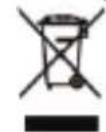
3TOT 3HaOK Ha yCTpoNCTBe, erO aKKymyIaTOPHO 6aTapee, B DOKMeHTaUNn HA yNAKOBOHyBIX MaTePnaIax O3Haayet, YTO yCTPOINCTBa n aKKymyIaTOPHbIE 6bATapeN no 3aBepWeHHn Cpoka 3KcNpyatauHN DoNXHbI nepeDaBbCBA B CneuaNBbIe NyHKtBi c60pa HytNIn3aun. 3To 06ecneuBaET HndexKaun C6Op N yTNIN3aUIO 3NeKTPOHOro N 3NeKTpueeCKoro
O6OpUOBAHn, N03BONrE T NOBTOPO HcN0b3OBaTB ceHHbIe MaTePnaIb I 3aunTITb 3dopOBBe YenOBeka n OKpykaHouyIO Cpey.
Длг noIyehn6 60Iee noIpo6Hoi INHΦopMaun O6paauTecb MeCTHyIO aDMHHCTpauHO, cIyK6y yHHTOKeHn6 6bITOBbIX OTXODOB NIM Mara3MH PO3HNUHOn TOPROBIN, B KOTOPOM bIIO npno6peTeHo yCTPOIcTBo, nI6o nocetnte Be6-caIT http://consumer.huawei.com/en/.
Dnana30HbI yactOT N MOUHOCTb
Bluetooth:2402-2480 Mf;8 dBm.
PapnoactoTHoe n3nyueHne
DaHoe yctpoICTBO ABnIeTc npHemonepeaTnKOM paHocnHaNoB MaIO MOuHOCTH. B COOTBeTCTBN C MeXdyHapOdbIM pernaMeHTOM daHHoe yctpoICTBO OTBeHaET MeCTHBIM npedeNbHbIM 3HaueHnM ydEhoro n3nyehn (SAR):2,0 BT/kr cycpeHHeHnEM no 10 rpaMMam TkaHN 1,6 BT/kr cycpeHHeHnEM no 1 rpaMMy TkaHN.
SAR c ycpedhenem no 10 rTKaH: yctpoiCTBO OTBeuayet Tpe6oBAHN, nCnblTAHN Ha ydeneHoe n3nyeHne He Tpe6yIOTc.
3aBHeHne o co6IIOeHHn HopMaTnBOB FCC
DaHoe 6bIIO npoteTnpoBAHO np3HaHO COOTBeCTByOuHm HopMaK NaCCaB DnA UΦpObIX yctpoiCTB cornaHO YACTN 15 PernameHa FCC. 3TN HOpMb 6bln pa3pa6oTaHbI DnA OecneueHHra 30fkeKTHBOHON 3aunTB o T BpeHoro 3eKtpomarHHTHO 3nyeHHB DOMaHnx ycNOBHX DaHoe yctpoiCTBO reHeppyet, nONb3yET mOxet nMOxet bpaHouactOthyO 3HeprIO. No3tOMy B CNYae Heco6nOdeHHn HcTpyKUIN NO yCTAHOBKE IN KcNlYatauIN, DaHHoe yCTPOICTBO MOxET Bbl3bIBaTb NOMEX PAADOCB83N. KaK 6bl TO HN 6blIO, Het HNKAKOI rapaHTIN, B KaXDOM KOHKpeTHOM CNYae, YTO NOMEX HE 6dyT BO3HKATb. ECNI 3TO yCTPOICTBO Bbl3bIBaET HeDOnyCTMble NOMEX npHema PaNDo- NITeNEBn3NoHHbIX CNrHAOB (4TO MOxET 6blb yCTAHOBNeHO NyTeM BblKNIOueHHN IN BkNIOueHHN yCTPOICTBA), NOL3OBATENB MoXET NOnbTABCRA 36ABNTBCR OT NOMex NytEM BblONHeHHN CNe dyUoXn DeIcTBn:
--N3MeHHe HappaBHeHn IIN nppeMeueHne npneMHo aHTeHHb.
--YBeHnueHne pacCToHHMeKdy yCtpoiCTBOM n npHmAmOuM o6OpydoBaHHeM.
--IopKnIOueHHe yCTPOINCTBA n npnHmAoUeO o6OpyIOBaHnK pa3HbIM po3ETkAM 3JeKtpoNTaHn.
--Bb3OB CnueuaHnCTa no paDno/TeeneBu3NoHHOMy 06OpdyoBaHIO.
DaHoe yctpoIcTBcooTBeCTByeT qactn 15 PernameHa FCC. Pa6ota yctpoIcTBa CB3aHa co cneDyoummn DBymra YcIOBnAMn: (1) DaHoe yctpoIcTBo He MoXeT RaJIaTbCRA NCTOCHNKOM HeDOnyCTHMbIX NOMEX n (2) DaHHoe yctpoIcTBo DOJXHO NorNoUaTb BCE pINHIMaEMbIe NOMEXN, BKIOuaY Te, KOTOpbIe MOrYT OKa3aTb HexKeNaTeNbHO B03dEChTBnE.
BHHMaHHe!IIO6bIe H3MeHEnr IIN MoNΦnKaUu DaHHoro yCTpoiCTBa, He OoOpeHHbIe KOMNaHnei Huawei Technologies Co., Ltd. MoryT npueCTn KaHHyInpOBaHNo npaba NoJIb3OBaTeHa 3KcNpyatauio daHHoro yCTPOICTBa.
PpabOBaHΦopMaun
Copyright© Huawei, 2020. Bce npaba 3aunuehbl.
DokymentbI INHCTpyKcH, BXOJUeB KOMNNEKT NOCTABKN yCTPOINCTBa, HOCRT CNpABOCHbI XapAKTeP I He
noopa3yMeBaHT NkKaNX 08a3aTeNbCTB Nn rapaHTN. DaKTNUeCKN npOdyKT (BKIOUaY aCBET n pa3Mep)
MOKET OTNIuHaTbcR.
Bluetooth® n ero norotnblr ABNIOCTaPereMCTpnpOBaHbIMTOBapHBIM3HaKaMN, npHaJneKauMMn opranh3aunn Bluetooth Special Interest Group, Inc NIO6oe NCNOB3OBAHne 3TNX 3HaKOB KOMNaHnei Huawei Technologies Co., Ltd. ocUeCTBnRETC Ha OCHOBAHn NInceH3HH. Huawei Device Co., Ltd. - 3to dopeHra KOMnHn Huawei Technologies Co., Ltd.
3aunTa nepcoHaJIbHbIX daHHbIX
Mepb, npHnMaemble KOMnHaHne Huawei dna 3aunTbI Baunx nepcoHaJIbHbIX daHHbIX, onncaHbI HaBe6-caTe http://consumer.huawei.com/privacy-policy n B noNTnke KOHndeHuaNbHOCTN.
EAC
Slovencina

Vyber nastavcov a nosenie sluchadiel
Bantian, Longgang District Shenzhen 518129, P.R. China
Tel:0086-755-28780808
Web: www.huawei.com
E-mail: mobile.tr@huawei.com
Cin'de uretilmistir
Web: www.huawei.com/tr/
E-posta: mobile.tr@huawei.com

- Choosing ear tips and wearing the earphones
- Powering on/off
- Factory reset
- Pairing
- Reconnecting when powering on
- Reconnection after long-distance disconnection
- Connecting to two phones
- Receiving calls in standby mode
- During a call
- Receiving a call during an ongoing call
- Remaking a call
- Receiving a call during music playback
- Music playback
- Charging
- Note
- Safety Information
- Disposal and recycling information
- EU regulatory conformance
- Statement
- Frequency Bands and Power
- RF Exposure Information
- FCC statement
- Legal statement
- Privacy protection
- Declaratie de conformitate FCC (Federal Communications Commission)
- HCTpyKcnn no ytnn3aun
- Dnana30HbI yactOT N MOUHOCTb
- PapnoactoTHoe n3nyueHne
- 3aBHeHne o co6IIOeHHn HopMaTnBOB FCC
- PpabOBaHΦopMaun
- 3aunTa nepcoHaJIbHbIX daHHbIX
- Slovencina
- Vyber nastavcov a nosenie sluchadiel
Brand : HUAWEI
Model : AM61
Category : Hi-fi system