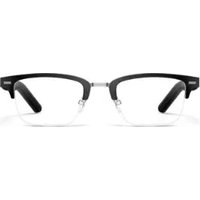
Eyewear 2 - Hi-fi system HUAWEI - Free user manual and instructions
Find the device manual for free Eyewear 2 HUAWEI in PDF.


User questions about Eyewear 2 HUAWEI
0 question about this device. Answer the ones you know or ask your own.
Ask a new question about this device
Download the instructions for your Hi-fi system in PDF format for free! Find your manual Eyewear 2 - HUAWEI and take your electronic device back in hand. On this page are published all the documents necessary for the use of your device. Eyewear 2 by HUAWEI.
USER MANUAL Eyewear 2 HUAWEI
natural_image
Huawei corporate logo featuring a stylized white sunburst design (no text or symbols)HUAWEI

Appearance
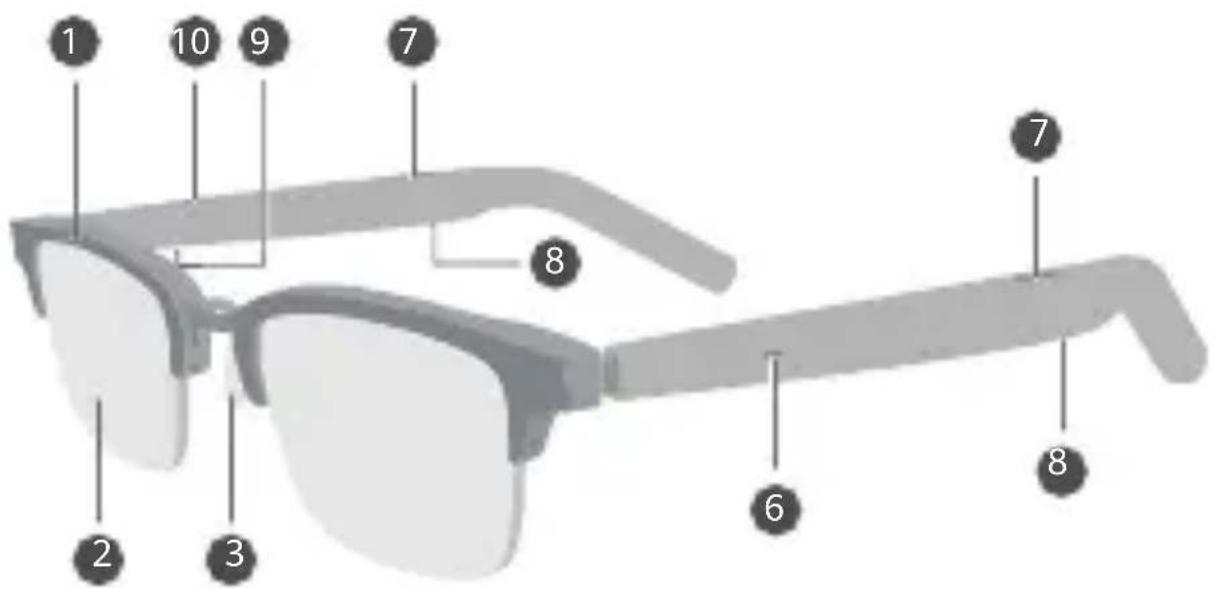
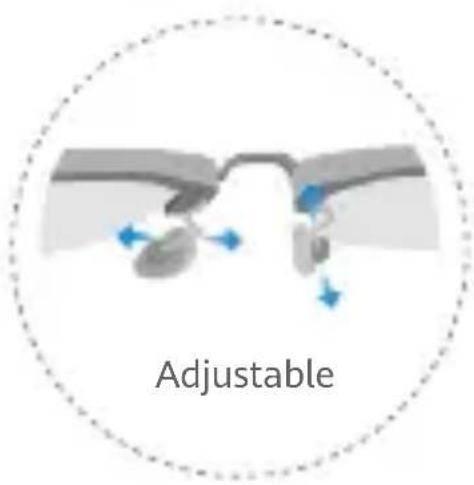
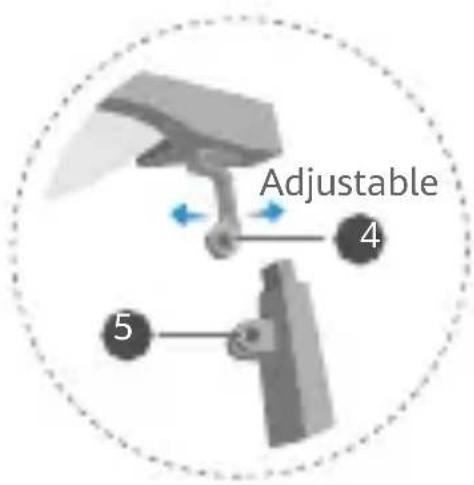

1 Frame
2 Demo lens
3 Nose pad
4 Frame hinge
5 Temple hinge
6 Indicator
7 Anti-sound leakage hole
8 Speaker hole
9 Microphone
10 Noise cancellation microphone

The eyewear is sold with decorative lenses. Avoid wearing these lenses for extended periods of time.
FR 1 Trame 2 Verre de démonstration 3 Coussinet de nez 4 Charnière de la trame
5 Charnière de branche
6 Témoin
7 Orifice anti-fuite sonore
8 Orifice du haut-parleur
9 Microphone
10 Microphone avec réduction du bruit
Les lunettes sont vendues avec des verres décoratifs. Évitez de porter ces verres pendant de longues périodes.
DE 1 Rahmen 2 Demo-Glas 3 Nasenpolster 4 Rahmenscharnier
5 Bügelscharnier 6 Anzeige 7 Anti-Schallentweichungsöffnung
8 Lautsprecheröffnung 9 Mikrofon 10 Mikrofon mit Rauschunterdrückung
Die Brillen werden mit dekorativen Gläsern verkauft. Vermeide es, diese Gläser über einen längeren Zeitraum zu tragen.
IT 1 Montatura 2 Lente dimostrativa 3 Nasello 4 Cerniera della montatura
5 Cerniera dell'asticella
6 Indicatore
7 Foro anti-dispersione audio
8 Foro dell'altoparlante
9 Microfono
10 Microfono a cancellazione del rumore
Gli occhiali vengono venduti con lenti decorative. Non indossare queste lenti per lunghi periodi di tempo.
Downloading and installing the app

EN Scan the QR code to download and install the HUAWEI AI Life app, where you can try more features and customize the device settings.
- Connect one end of the charging converter with the charging port to a USB-C charging cable.
- Connect the other end of the charging converter to the two arms to charge the eyewear. Make sure that the indicators on the arms are on.

- Do not charge the eyewear while you are wearing it. Do not excessively bend or pull the charging converter.
- The eyewear will enter low power mode if left idle for more than 3 minutes. The eyewear will automatically exit low power mode when you put it on or charge it.
FR
-
While the eyewear is being charged, press and hold the button on the charging converter for 4 seconds and then release. Wait for the indicators on the arms to flash white, which indicates that the eyewear has entered Pairing mode.
-
Go to your phone's Bluetooth settings, search for the eyewear, and connect to it.

The eyewear will automatically enter Pairing mode when charged for the first time.
FR
Méthode 1 :
natural_image
Illustration showing two hand gestures interacting with a pair of eyeglasses, one pointing to the same frame (no text or symbols present)EN
Method 2:
- While wearing the eyewear, press and hold the middle part of the outside of both arms at the same time for at least 4 seconds, until you hear a long beep, which indicates that the eyewear has entered Pairing mode.
- Go to your phone's Bluetooth settings, search for the eyewear, and connect to it.

If no sound plays when you press and hold the arms with both hands, press and hold another position or check whether the eyewear has sufficient power.
FR
Méthode 2 :
natural_image
Side view of a smart glasses with speaker icon and connection point (no text or symbols on the device itself)EN


Volume adjustments: Swipe along either arm.

To sync the volume adjustment between your eyewear and phone, you'll need to toggle on the switch for sync Bluetooth volume on certain phone models.
FR



natural_image
Illustration of a pair of smart glasses with blue circular components on the front frame (no text or symbols)EN
Rejecting a call: Press and hold either arm for 2 seconds.
FR
Rejeter un appel : Maintenez appuyé sur l'une des branches pendant 2 secondes.
DE
Ablehnen eines Anrufs: Halte einen der beiden Bügel mindestens 2 Sekunden lang gedrückt.
IT
Rifiuto di una chiamata: Tieni premuta una delle asticelle per 2 secondi.
ES
Rechazar una llamada: Mantener pulsada la patilla durante 2 segundos.





PL

natural_image
Illustration of a smart glasses with a blue circular button and three colored play buttons (play, pause, phone) below it, no text or symbols present.EN


Play/Pause: Double-tap either arm.

Answering/Ending a call: Double-tap either arm.

You can customize what the double-tap and swipe gestures do in the HUAWEI AI Life app, by touching the eyewear card and then Gestures. From there you can select voice assistant wakeup, skipping to the previous/next track, or other operations. Actual interface may vary.
FR


To protect your hearing, do not listen to audio at a time for a long period of time.
- Do not heat or bend the glasses arms to avoid damage, functional failures, and fire hazards.
- This device strictly complies with standard EN ISO 12870: 2016 for ophthalmic optics spectacle frames.
- Wearing this device will not protect your eyes from injury if you look directly at the sun or other strong light sources, or from physical trauma (applicable to optical glasses).
- Use the microfiber cloth that came with your glasses or a clean and soft cloth to clean your glasses. Do not clean your glasses with anything sharp or abrasive. Use a neutral cleanser to clean your glasses. To avoid lens damage, deformation, and discolouration, do not use abrasive cleansers or sprays, high-concentration cleaners, chemical cleaning fluid, alcohol, or acetone solvent to clean your glasses.
- Wearing the glasses during intense exercise poses a risk of facial injury as the glasses may get damaged.
- Clean the glasses arms and frames regularly to avoid skin irritation.
- Some wireless devices may interfere with implantable medical devices and other medical equipment, such as pacemakers, cochlear implants, and hearing aids. When using the product, keep it at least 15 cm away from such medical devices. Consult the manufacturer of your medical equipment for more information.
- Ideal temperatures: 0°C to 35°C for operating; -20°C to +45°C for storage.
- When charging, an adapter should be plugged into a socket nearby and easily accessible. Use approved power adapters and chargers. Do not charge the glasses when you are wearing them.
- Comply with regional or national regulations. Exercise caution when using the device while driving.
- Keep this device and its accessories that may contain small components out of the reach of children. Otherwise, children may damage this device and its accessories by mistake, or swallow the small components, which may cause choking.
- This device is rated IP54 under IEC 60529. It was tested under controlled laboratory conditions and determined to be splash-resistant. Splash resistance is not permanent, and performance may deteriorate with daily wear and tear. Therefore, do not expose this device or its accessories to rain or moisture.
- If this device or its accessories get wet, wipe them as soon as possible and place them in a cool, ventilated place for them to dry. Do not re-use or charge until completely dry.

Warning:
- This device contains a coin, button, or small-sized cell battery. Do not swallow the battery, as it constitutes a chemical burn hazard.
- If the coin, button, or small size cell battery is swallowed, it can cause severe internal burns in just 2 hours and can lead to death.
- Keep new and used batteries away from children. If the battery compartment does not close securely, stop using the product and keep it away from children. If you think batteries might have been swallowed or placed inside any part of the body, seek immediate medical attention.
- Keep the battery away from fire, excessive heat, extremely low air pressure and direct sunlight. Do not place it on or in heating
devices. Do not disassemble, modify, throw, or squeeze it. Do not insert foreign objects into it, submerge it in liquids, or expose it to external force or pressure, as this may cause it to leak, overheat, catch fire, or even explode.
- Do not attempt to replace the battery yourself — you may damage the battery, which could cause overheating, fire, and injury. The built-in battery in your device should be serviced by Huawei or an authorized service provider.
- Avoid disassembling or modifying your device and its accessories. Unauthorized disassembly and modifications may result in voiding the factory warranty.
- Stop using this device and disconnect all connected devices before performing cleaning and maintenance on this device.
- The charging converter is not water-resistant. Before charging, clean the charging contact points on the glasses and springs on the charging converter. If there is any moisture, wipe it dry promptly to avoid short circuits.
- Do not rinse the arms or perform ultrasonic cleaning on your glasses.
- If you experience skin discomfort when wearing this device, take it off and consult a doctor.
- This device's firmware will automatically update whenever it connects to a previously paired Honor device (released before the end of 2020) or a previously paired Huawei device, and WiFi or mobile data is enabled. You can disable automatic firmware updates in Settings.
Disposal and recycling information
This symbol on the product, battery, literature, or packaging means that the products and batteries should be taken to separate waste collection points designated by local authorities at the end of the
lifespan. This will ensure that EEE waste is recycled and treated in a manner that conserves valuable materials and protects human health and the environment. For more information, please contact your local authorities, retailer, or household waste disposal service, or visit the website https://consumer.huawei.com/en/.
EU Regulatory Conformance
Hereby, Huawei Device Co., Ltd. declares that this device LFT-G00 is in compliance with the following Directive RED 2014/53/EU, RoHS 2011/65/EU, EU REACH regulation, and Batteries (where included) directive.
The full text of the EU declaration of conformity and most recent information about accessories & software are available at the following internet address:
https://consumer.huawei.com/certification.
Frequency Bands and Power
Bluetooth: 2.4 GHz 14 dBm.
RF Exposure Information
For the countries that adopt the SAR limit of 2.0 W/kg over 10 grams of tissue. The device complies with RF specifications when used near your head. The highest reported SAR value: head SAR: 0.658 W/kg.
Legal Notice
Copyright © Huawei Device Co., Ltd. 2023-2024. All rights reserved.
All contents in the documents in the packaging box, including but not limited to information about and portrayals of the appearance, color, size, and supported features of the product (the latest features will come with software updates), are for reference only. The actual product may vary.
The Bluetooth ^® word mark and logos are registered trademarks owned by the Bluetooth SIG, Inc. and any use of this mark by Huawei Technologies Co., Ltd. is under license. Huawei Device Co.,
Ltd. is an affiliate of Huawei Technologies Co., Ltd.
Privacy Protection
To better understand how we protect your personal information, please see the privacy policy at
https://consumer.huawei.com/privacy-policy, or read the privacy policy and service terms using the corresponding app.
Software License Agreement
Please read the software license agreement carefully before using this device. By using the device, you indicate that you agree to be bound by the license agreement. To read the agreement, please visit the following website:
https://consumer.huawei.com/en/legal/eula/.
Français
https://consumer.huawei.com/en/legal/eula/.
Deutsch
Sicherheitshinweise
https://consumer.huawei.com/certification.
https://consumer.huawei.com/certification.
https://consumer.huawei.com/en/legal/eula/.
Español
https://consumer.huawei.com/en/legal/eula/.
Türkçe
Xincheng Road 2, Songshan Lake Zone, Dongguan, Guangdong 523808, China
Tel: 0086-755-28780808
Web: www.huawei.com
E-mail: mobile.tr@huawei.com
Çin'de üretilmiştir
Web: www.huawei.com/tr/
E-posta: mobile.tr@huawei.com
https://consumer.huawei.com/tr/support/warranty-policy/ https://consumer.huawei.com/tr/legal/privacy-policy/
https://consumer.huawei.com/certification
周波数带
Bluetooth: 2.4 GHz.
高周波曝露情報
Copyright © Huawei Device Co., Ltd. 2023-2024. All rights reserved.

- Appearance
- Downloading and installing the app
- FR
- Méthode 1 :
- EN
- Method 2:
- Méthode 2 :
- Warning:
- Disposal and recycling information
- EU Regulatory Conformance
- Frequency Bands and Power
- RF Exposure Information
- Legal Notice
- Copyright © Huawei Device Co., Ltd. 2023-2024. All rights reserved.
- Privacy Protection
- Software License Agreement
- Français
- Deutsch
- Sicherheitshinweise
- Español
- Türkçe
- 周波数带
- 高周波曝露情報
Brand : HUAWEI
Model : Eyewear 2
Category : Hi-fi system