
CAM360AHDHD - Rear Camera DOMETIC - Free user manual and instructions
Find the device manual for free CAM360AHDHD DOMETIC in PDF.


| Product Type | Rear View Camera |
| Brand | Dometic |
| Model | CAM360AHDHD |
| Category | 360° Rear View Camera System |
| Operating Voltage | 12 V DC (range 10-16 V) |
| Operating Current | ~1 A / 12 V |
| Operating Temperature | -20 °C to +70 °C |
| Maximum Video Resolution | 1920x1080p |
| Camera Viewing Angle | 180° |
| Number of Cameras | 4 (front, rear, left, right) |
| Display Mode | 360° panoramic view, 2D/3D modes, bird's-eye view |
| Video Recording | Yes, on SD card (max 128 GB), circular buffer |
| Pedestrian Detection | Yes, integrated ADAS function |
| Remote Control | Included with numeric and navigation keys |
| Connectivity | Trigger inputs (turn signals, reverse), universal video output |
| Warranty | Legal warranty |
| Maintenance and Cleaning | Clean the cameras with a soft dry cloth. Avoid solvents. |
| Safety | Do not open the camera. Follow assembly and wiring instructions. |
| Spare Parts and Repairability | Spare parts available: cables, brackets, O-rings. Repair by qualified personnel. |
Frequently Asked Questions - CAM360AHDHD DOMETIC
User questions about CAM360AHDHD DOMETIC
0 question about this device. Answer the ones you know or ask your own.
Ask a new question about this device
Download the instructions for your Rear Camera in PDF format for free! Find your manual CAM360AHDHD - DOMETIC and take your electronic device back in hand. On this page are published all the documents necessary for the use of your device. CAM360AHDHD by DOMETIC.
USER MANUAL CAM360AHDHD DOMETIC
360° camera system Installation and Operating Manual......T 360° Kamerasystem Montage- und Bedienungsanleitung...... VQ Système de caméra à 360° Instructions de montage et de service..... YJ Sistema de cámara de 360° Instrucciones de montaje y de uso......QQZ Slovenia de Camara de 300 Instruções de montagem e manual de instruções.... QKY
Istruzioni di montaggio e d'uso...... QZX See camera system Montagehandleiding en gebruik saanwijzing...| TW DA 300 - Kaimlerasystem Monterings- og betjeningsvejledning..... | XK 300 Kamerasystem Monterings- och bru sanvisning......T00 N/ 300 Kaimerasystem Monterings- og bru sanvisning...... TVX 2014 " sennus- ja äyttöohje...... TYT T Instru cja monta%u i obsługi...... VQZ
360 kallef, -. system ' (vod na mont() a uvedenie do prev(dz y.... VKY 500 Kaimler, . system ' (vod mont() i a obsluze...... VZW III 500, S. Kumetare, auser Szerel+si +s haszn( lati , tmutat- ...... KTT \0.5 - \ 1.55 - \$ 2.55 . pute za monta) u i ru ovanje...... KXJ 3.00 Montaj ve /ullanəm /əlavuzu....WJ W - ' avodila zalmonta) o in uporabo......WVI 1. 2017年1月1日 Manual de instalare 2i de utilizare...... WXY 450765. 67 K. 5695 J. 500 35110A 34567689:76 ;<и>9:<л<циА и В<С6:<.....X0К 500 KuahkerasDstech Daigaldus- ja asutusjuhend....XKV 2007.10.20 Εγχειρίδιο τοποθέτησης και χρήσης......ΧΖ away 1. 2017年1月1日 Montavimo ir naudojimo vadovas...... YTQ 3.00 Námerlas Sistema . zstEdFGanas un lietoGanas ro asgrEmata...... YWY
The visual appearance of the contents of this manual is protected by copyright and design law. The underlying technical design and the products contained herein may be protected by design patent or pending patent. The trademarks mentioned in this manual belong to L ometic Sweden AB. All rights are reserved.
E) ElisF
Q Important notes....T I RSplanation o0 symbols....T T Uelated documents....V V Safety instructions....V K Scope o0 delivery....W W "cessories....X X Intended use....X Y Technical description....X Z Installation.....QX QJ Operation....| Z QQ Nroubleshooting.... TY Q1 Warranty....TY QT Lisposal....TZ QV Technical data....TZ
G ImD, rta) t), tes
Please read these instructions carefully and follow all instructions p guidelines p and warnings included in this product manual in order to ensure that you install use p and maintain the product properly at all times. These instructions M. SN stay with this product.
By using the product, you hereby confirm that you have read all instructions, guidelines, and warnings carefully and that you understand and agree to abide by the terms and conditions as set forth herein. You agree to use this product only for the intended purpose and application and in accordance with the instructions, guidelines, and warnings as set forth in this product manual as well as in accordance with all applicable laws and regulations. Failure to read and follow the instructions and warnings set forth herein may result in an injury to yourself and others, damage to your product, or damage to other property in the vicinity. This product manual, including the instructions, guidelines, and warnings, and related documentation, may be subject to changes and updates. For up-to-date product information, please visit documents.dometic.com.
A signal word will identify safety messages and property damage messages, and also will indicate the degree or level of hazard seriousness.

DANGER
Indicates a hazardous situation that, if not avoided, will result in death or serious injury.

WARNING
Indicates a hazardous situation that, if not avoided, could result in death or serious injury.

CAUTION
Indicates a hazardous situation that, if not avoided, could result in minor or moderate injury.

NOTICE
Indicates a situation that, if not avoided, can result in property damage.

NOTICE: Supplementary information for operating the product.
3 Related documents
Find more information on operation in the configuration guide at r.dometic.com/beaeYa.
Failure to obey these warnings will result in death or serious injury.
The camera does not release the driver from the duty of care when driving. The driver remains fully responsible for driving the vehicle, for fulfilling the road safety obligations, and for complying with the statutory road safety requirements.

Failure to obey these warnings could result in death or serious injury.
This camera can be used by children aged from 8 years and above and persons with reduced physical, sensory or mental capabilities or lack of experience and knowledge if they have been given supervision or instruction concerning use of the device in a safe way and understand the hazards involved. Secure the parts installed in the vehicle in such a way that they cannot become loose under any circumstances, sudden braking, accidents, and cause injuries to the occupants of the vehicle. Do not install parts anywhere in the vehicle where an airbag may open. This can cause injury if the airbag deploys. Inadequate supply line connections can result in short circuits causing
e possible fires
e The airbag being triggered e Damage to electronic control devices e Electrical malfunctions: turn signal, stoplight, horn, ignition, lights

Failure to obey these cautions could result in minor or moderate injury.

Secure any parts of the system concealed by the bodywork in such a manner that they cannot become loose or damage other parts or cables or impair vehicle functions (steering, pedals, etc.). Always follow the safety instructions of the vehicle manufacturer. Some work, e.g., on retention systems such as the airbag, etc., may only be performed by qualified specialists.
NOTICE: Damage Hazard
To prevent damage when drilling, ensure that there is sufficient space on the other side for the drill head to emerge. Deburr all drill holes and treat them with a rust-protection agent. When working on the electrical system, the batteries must be separated from the vehicle ground. This applies to the main and additional batteries. When working on the following cables, only use insulated cable lugs, plugs, and tab sleeves of the type for direct input from positive battery terminal
e Connected positive terminal behind the battery
e Return cable from the battery, ground
e Reversing light
Do not use porcelain wire connectors.
Use a crimping tool to connect the cables. Screw the cable when connecting cable to ground.
Screw the cable using a cable lug and lock washer to one of the vehicle's ground bolts or
Screw the cable to the sheet metal bodywork using a cable lug and a self-tapping screw.
Ensure that there is a good ground connection.
If the battery is disconnected, all data stored in all volatile memory will be lost. Data may have to be reset. Follow the instructions of the vehicle manufacturer in this case. The instructions for making these settings can be found in the operating manual. When testing the voltage in electrical cables, only use a diode test lamp or a voltmeter. Test lamps with a bulb consume too much voltage which can damage the vehicle's electronic system. When making electrical connections, ensure the following:
They are not kinked or twisted.
They do not rub on edges.
They are not laid in sharp-edged through-holes without protection.
Insulate all connections. Secure the cables against mechanical stress with cable binders or insulating tape, e.g., to existing lines. Follow the installation and operating manual for the monitor. Do not open the camera. Do not pull the cables. Do not expose the cables to solvents such as benzene for long periods of time. Do not use the cameras under water. Install cables far enough away from hot or moving vehicle parts: exhaust pipes, drive shafts, lights, blowers, heaters, etc.
QPG Sc, De, J delivery
□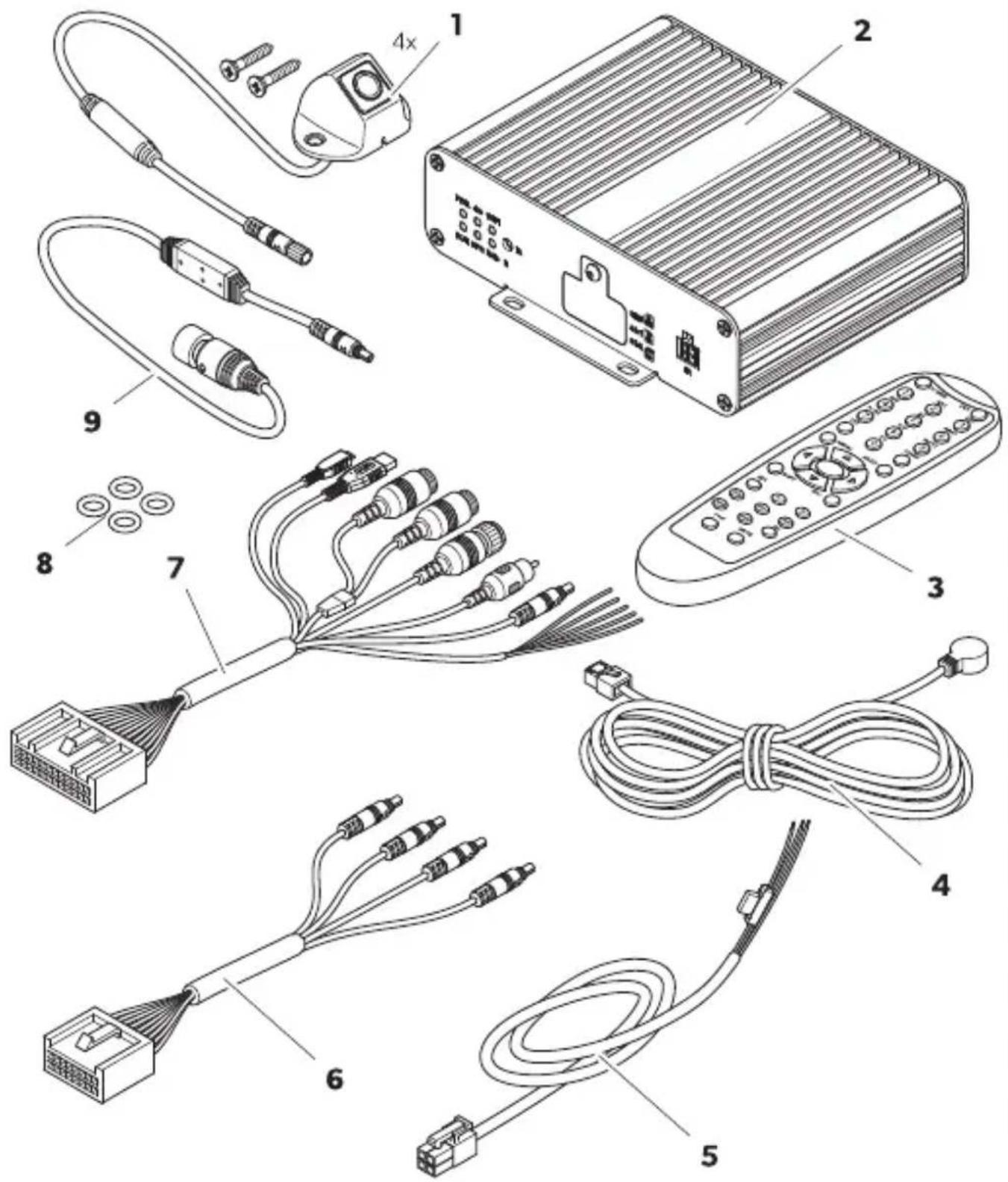
| N, P C, mD, ) e) t R 1a) tity |
| Q f amera V |
| I f ontroller Q |
| T Uemote control Q |
| V IU receiver Q |
| K aehicle connection cable Q |
| W f onnecting harness or the camera cables Q |
| X . niversal connection cable Q |
| Y O-rings V |
| Z Monitor connection cable Q |
QPH Accessories
Available as accessories, not included in the scope of delivery.
| C, mD, ) e) t ReJP ), P | |
| f alibration set V mats ZWI J J QTI TJ |
6 I) te) ded 1 se
The camera system is intended for use in vehicles. The cameras transmit images in a panoramic view that provides a view of the vehicle's environment to the sides, in front, and behind.
The camera system is used to monitor the immediate surroundings of the vehicle, e.g., when driving, changing lanes, maneuvering, or parking. The display of the camera image is determined by trigger signals.
This product is only suitable for the intended purpose and application in accordance with these instructions.
This manual provides information that is necessary for proper installation and/or operation of the product. Poor installation and/or improper operation or maintenance will result in unsatisfactory performance and a possible failure.
The manufacturer accepts no liability for any injury or damage to the product resulting from
• Incorrect installation, assembly, or connection, including excess voltage
• Incorrect maintenance or use of spare parts other than original spare parts provided by the manufacturer
• Alterations to the product without express permission from the manufacturer
• Use for purposes other than those described in this manual
Lomestic reserves the right to change product appearance and product specifications.
The camera system consists of four wide angle cameras that are located on the front, the rear, the left, and the right sides of the vehicle. The video system displays a vehicle graphic on the connected monitor screen which can be customized. A video processor merges the recorded images into a 360° panoramic view that shows the vehicle's surroundings. The camera system can display the camera images in 2D, 3D, or combined. The 2D view displays the camera images in a high-angle shot. Each camera image is displayed separately. The 3D view displays the camera images as combined surround view or separately in the fish-eye or bird's-eye view. The 4 cameras create a virtual camera that moves around the vehicle depending on the settings made and trigger signals.
The camera system is equipped with a pedestrian detection function in the camera image overlap areas at the corners of the vehicle to support the safety level.
The camera system is switched on when the vehicle is started.
Depending on the settings, single cameras can be activated by trigger signals, e.g., by using a turn signal or reverse gear.
The control unit offers several functions such as
• Permanent split screen or a split screen triggered by a control signal • Automatic full screen mode for the reversing camera as a rear mirror function • Permanent full screen mode or the 360° panorama view
Videos from the cameras can be saved according to the circular buffer principle and played back within the camera system. When a recording sequence ends, the next recording sequence starts automatically. The duration of the recording sequence can be adjusted. Once the memory is full, the oldest file is overwritten automatically.
Videos can be played back on a domestic monitor, an external monitor, or via a computer using the SD cards. To play videos on a computer, the SD card cover on the controller must be easily accessible and the MPEG-4 video format must be supported by the computer.
| N, P 21tt,) DescriDti,) | ||
| Q | DEV | ' o function. |
| I J m Z | e Switches between the camera modes in the main interface depending on the default view set.e Selects various menu options in the main menu.e Rnter the corresponding numbers that are written on the buttons. | |
| T | CLEAR | L eletes the last entered number letter or character selected. |
| V | MULTI | Switches to the birds-eye view in the main interface. Only one camera image is displayed. |
| K | ENTER | Opens the main menu or confirms the selected menu selection. |
| W | ESC | RSits the main menu or returns to the main menu. |
| X | [AA8Z] | o function. |
| Y | [AA93] | |
| Z | [BOCC] | |
| QJ | [246H] | |
| [CTOT] | ||
| QI |  | |
| QT | [KT7B] | |
| QV | [2XTT] | |
| QK |  | |
| QW | [CE4A] | |
| QX | [WS30] | |
| QY | SHIFT | e L isplays the Quad mode bsee f amera modes on pageLOWc.e Opens or closes the main menu.e Switches through the settings and configurations in some windows. |
| QZ |  | e Opens the surround view in the main interface and rotates the camera view to the lei b or right b c and switches it to the rear b c or front b c.e Switches through the settings and configurations in some windows. |
| [DDOK] | ||
| [TXWY] | ||
| [SSXD] | ||
| I J | MENU | o function. |
| I Q | PTZ | Rnters a decimal point. |
| I I | POWER | Switches the camera system on and ok.Nhis function is bloc ed in the login interface menus and settings. |
The following icons are displayed in the top right-hand corner of the main interface when they have been activated.
| lc,) DescriDti,) | |
| Nhe MDS signal is good. | |
| Nhe MDS signal is average. | |
| Nhe MDS signal is poor. | |
| ' o MDS signal is detected. | |
| " n nash drive is connected and operating. | |
| ' o nash drive is detected. | |
| Nhe connected nash drive is not wor ing properly. | |
| " n SL card is connected and operating. | |
| ' o SL card is detected. | |
| Nhe connected SL card is not wor ing properly. | |
| Nhe camera system records the displayed camera imagesc. | |
| Nhe camera image o0 the front camera is displayed to the lei o0 the arrow. | |
| Nhe camera image o0 the right camera is displayed to the lei o0 the arrow. | |
| Nhe camera image o0 the rear view camera is displayed to the lei o0 the arrow. | |
| Nhe camera image o0 the lei camera is displayed to the lei o0 the arrow. | |
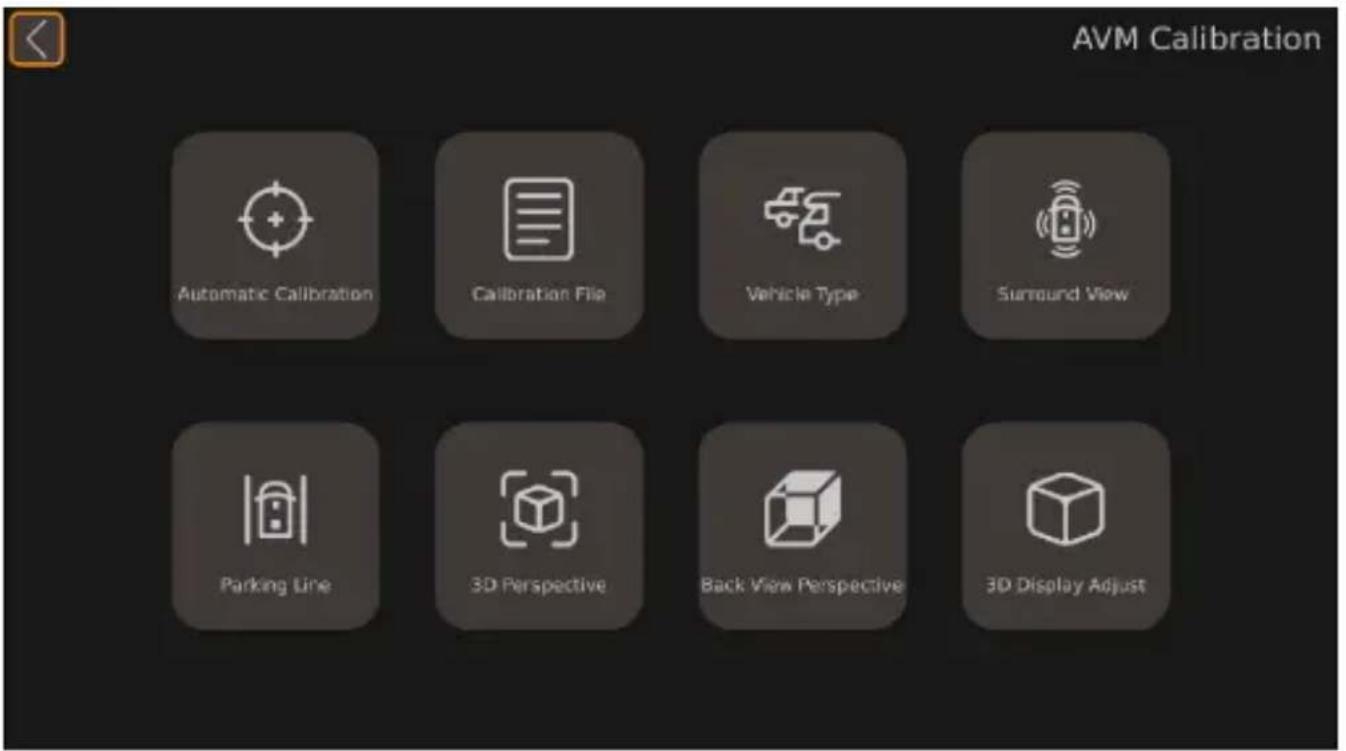
The main menu can be divided into 4 categories.
| Feat1re DescriDti,) | |
| Guidance | f ontains guides for performing calibration setting the surround view and time "das b" dvanced L rivers "ssistant Systemp and LaU bL igital aideo Uecorderc. |
| Setup | f ontains general settings for the I L /TL view the screen ratio or combined views and setting or activate and deactivate functions. |
| AVM | " ll " round aiew Monitor system b" aMcf ontains the settings for calibration vehicle model change view settings par ing line and image resolution. |
| Storage f ontains information about the storage management. | |
| Video f ontains the recording management for checking and eSporting videos. | |
| Info f ontains the information data about the version of the f D. and Mf . . | |
Guidance
The video system has a guidance function that guides the user through the most important settings and explains them with animated images.
| Feat1re DescriDti,) | |
| Calibrate f ontains the guide 0or calibrating the camera system. | |
| Surround View f ontains the guide 0or setting the surround view. | |
| Time Setup f ontains the guide 0or setting the time. | |
| Adas Setup f ontains the guide 0or the pedestrian detection system. | |
| DVR Setup f ontains the guide 0or setting the video records. | |
| arameter DescriDti,) |
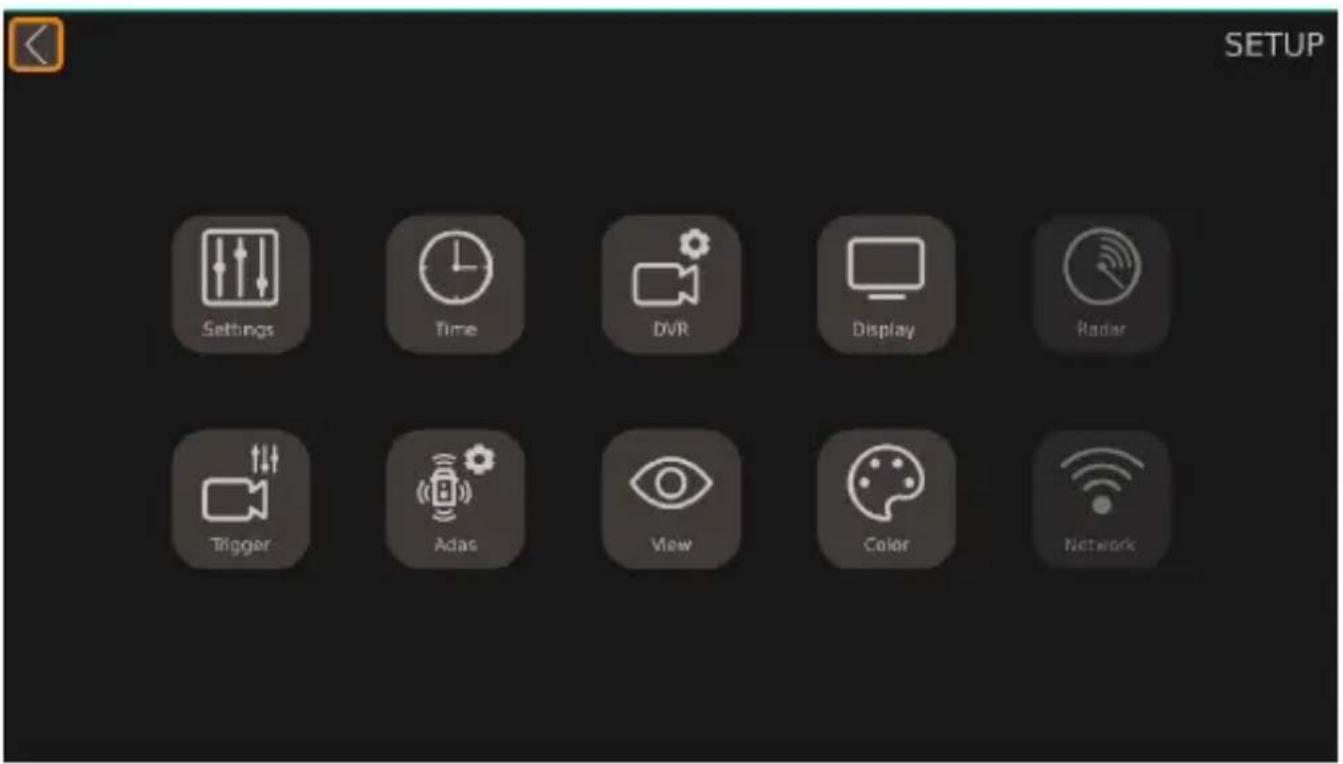
| Settings f ontains the basic settings. |
| Time f ontains the time settings. |
| DVR f ontains the digital video record settings. |
| Display f ontains the general settings for the displayed camera view. |
| Radar' ot available. |
| Trigger f ontains the settings for the displayed camera image when a trigger signal appears. |
| Adas f ontains the "das setup including the settings for the pedestrian detection system bDL Sc. |
| View f ontains the settings for the fish-eye view the camera image resolution and the rear mirror view. |
| Color f ontains the settings for the color resolution. |
| Network' ot available. |
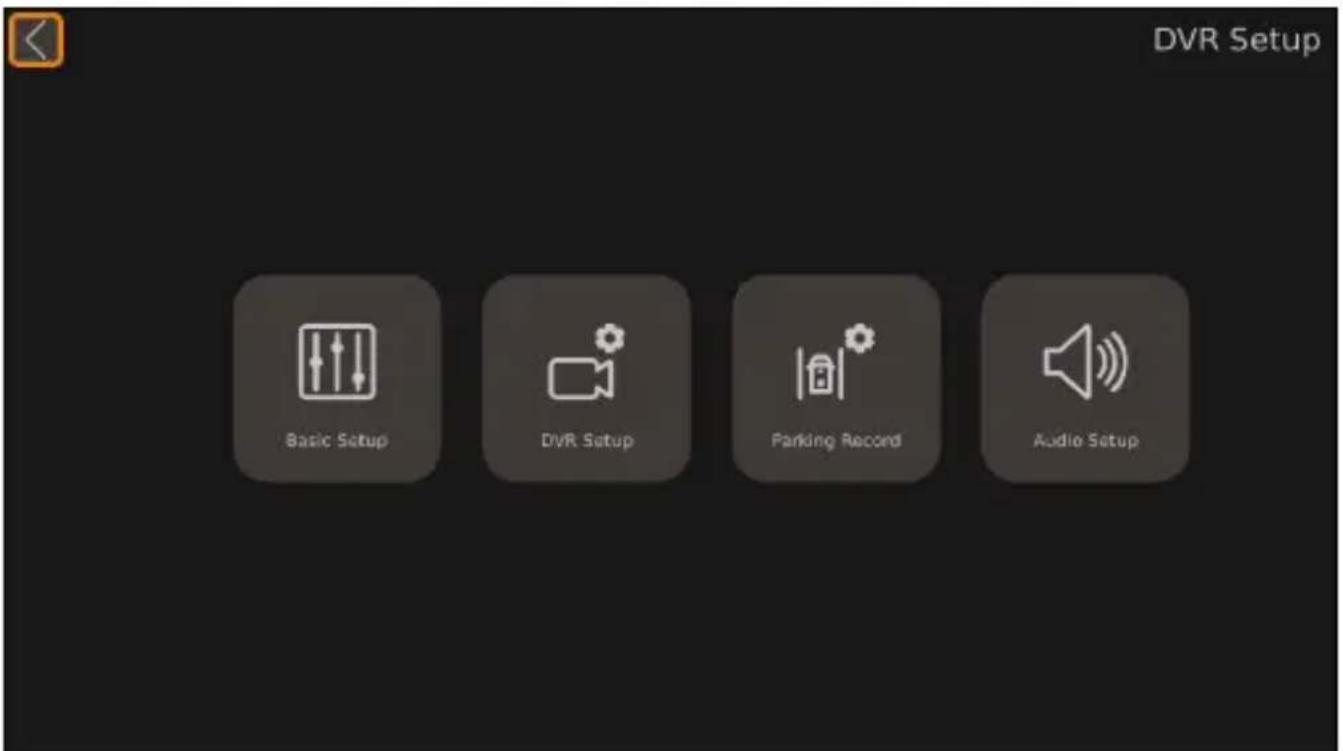
| arameter DescriDti,) | |
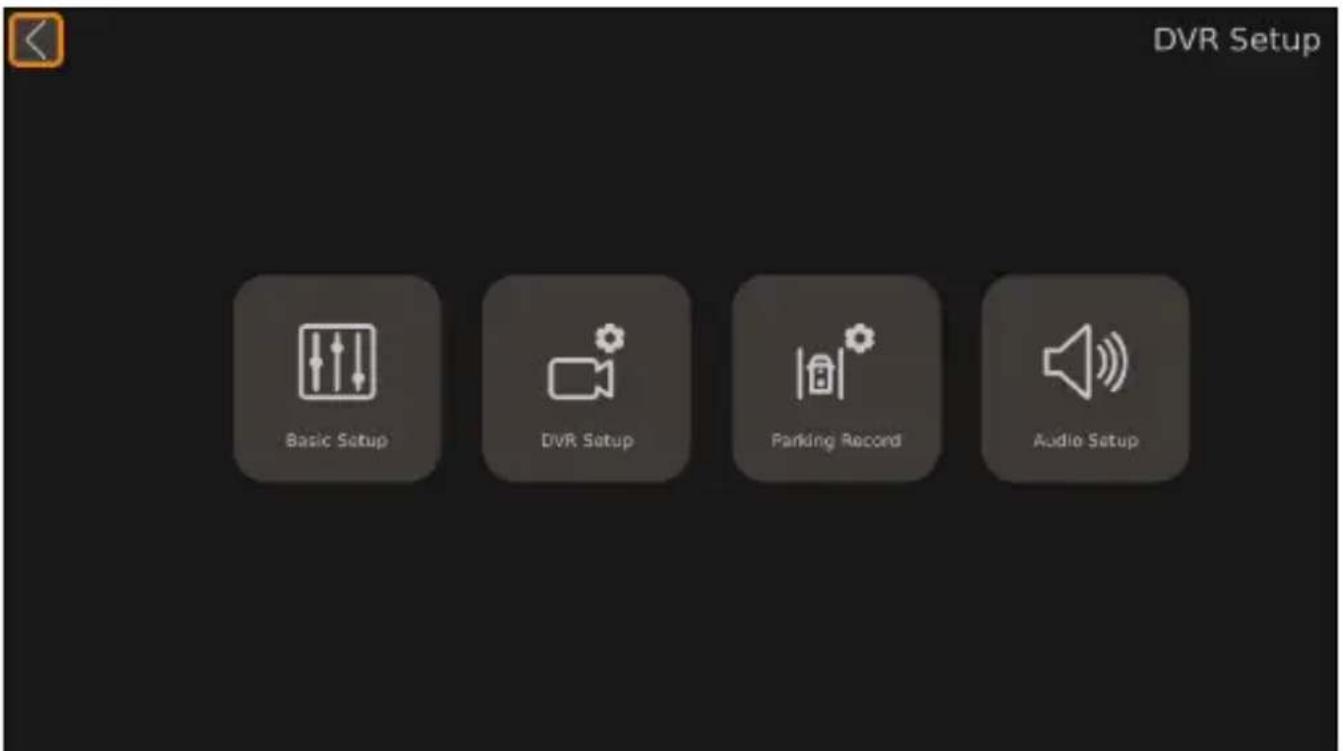
| Basic Setup | f ontains the basic settings for digital video recordingp such as video compressionp automatic recordingp recording durationp recording typep and format and further settings. |
| DVR Setup 'ot available. | |
| Parking Record f ontains settings for recording when par ing. | |
| Audio Setup 'ot available. | |
| arameter DescriDti,) | |
| Automatic Cali-bration | f ontains the calibrating settings of the camera system. |
| Calibration File | f ontains the functions for eSporting and importing calibration files to and from a Df . |
| Vehicle Type f ontains the vehicle type settings. | |
| Surround View f ontains the overlap angle and the surrounding viewing area settings. | |
| Parking Line f ontains the settings for the par ing lines. | |
| 3D Perspective | f ontains the general TL view settings only present when the TL view is activated. |
| Back View Per-spective | f ontains the TL view settings for the rear view camera only present when the TL view is activat-edc. |
| 3D Display Ad-just | f ontains the birds eye view settings only present when the TL view is activated. |
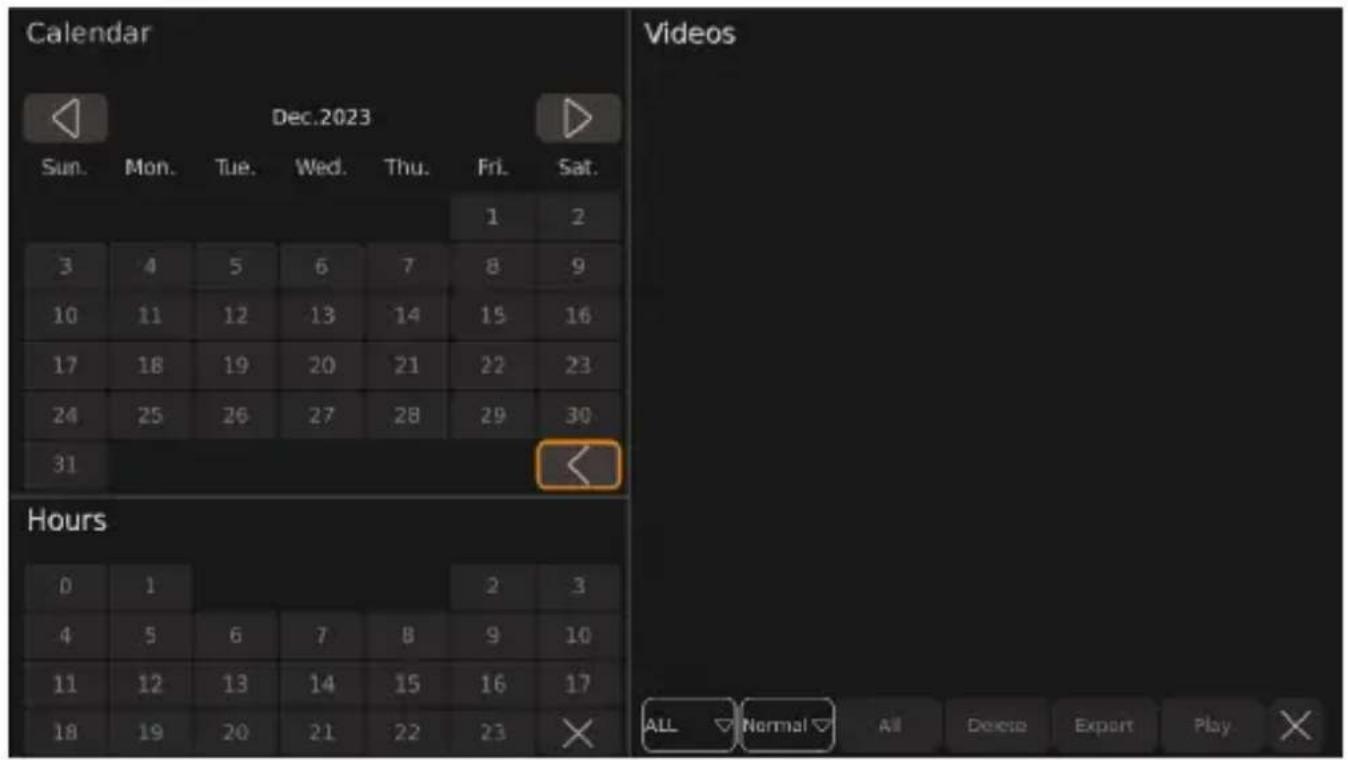
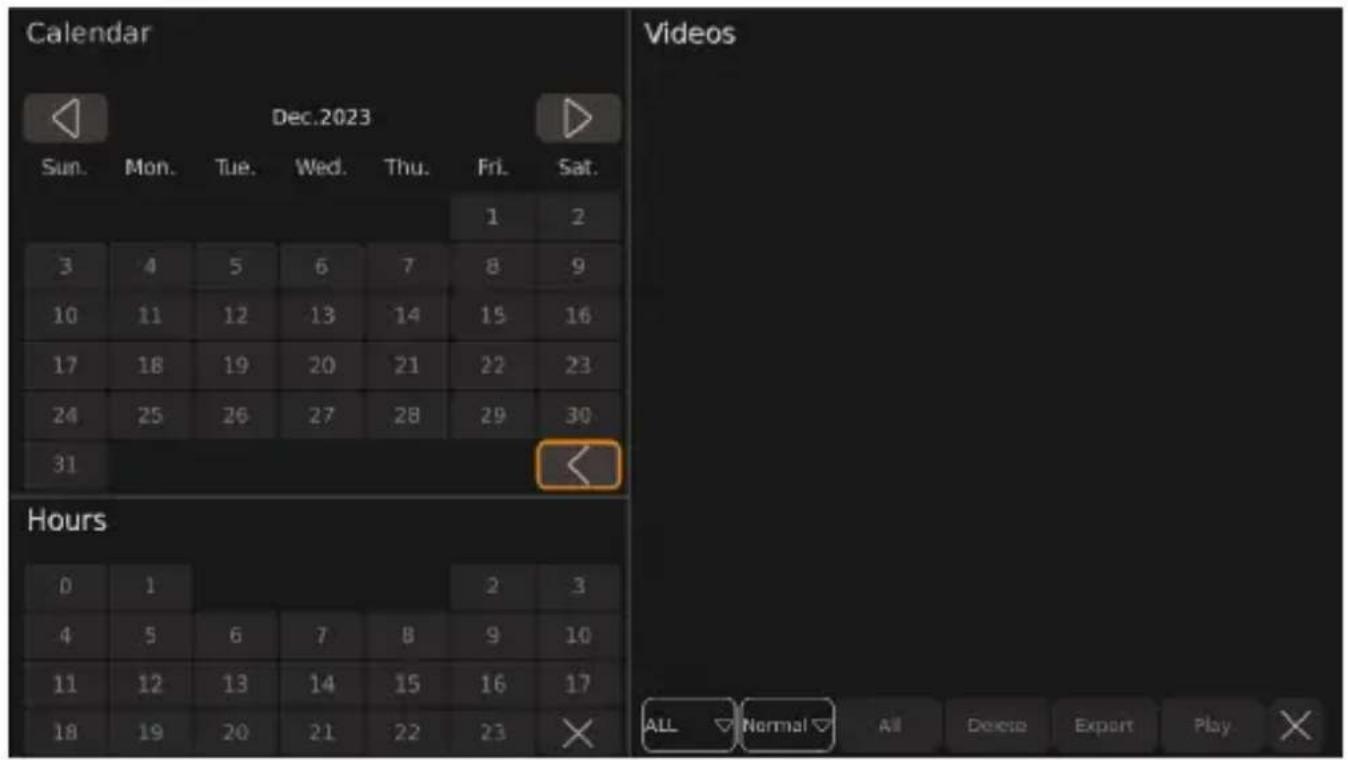
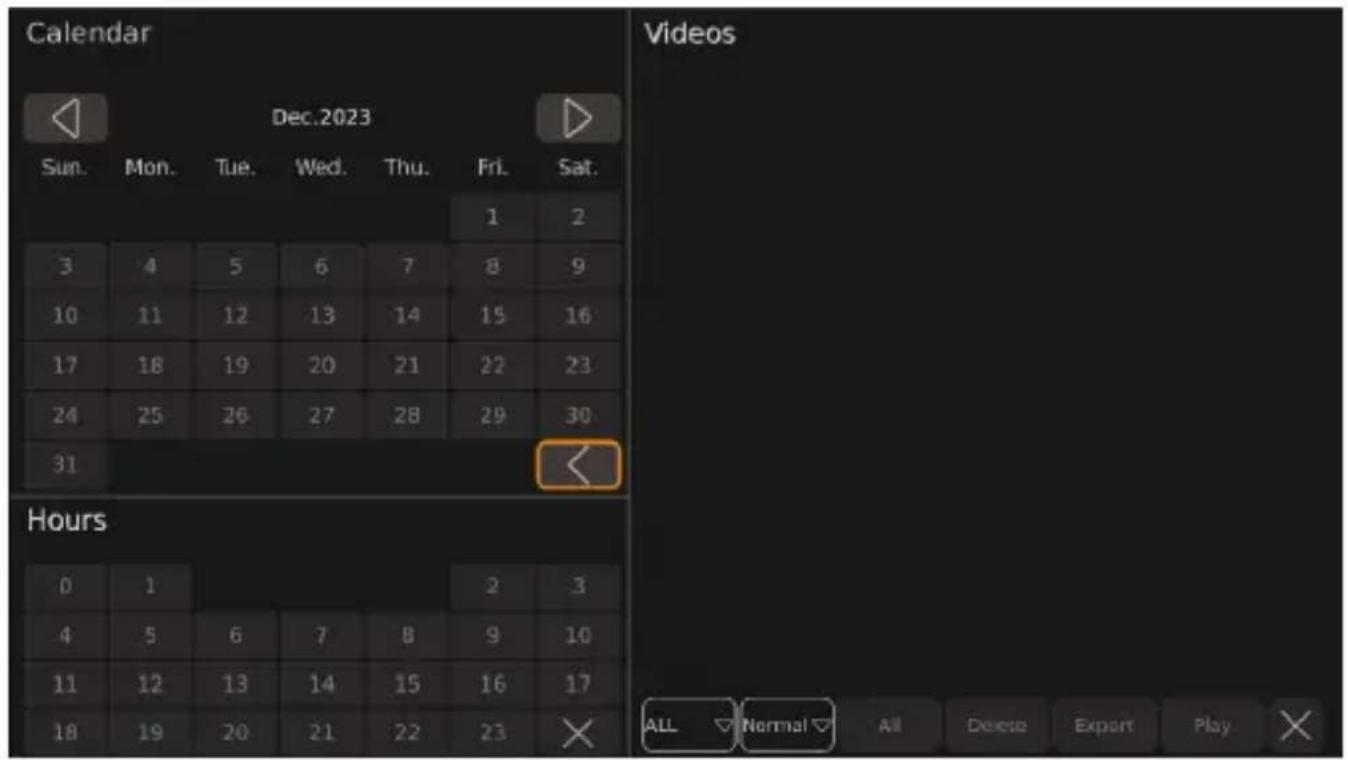
Video
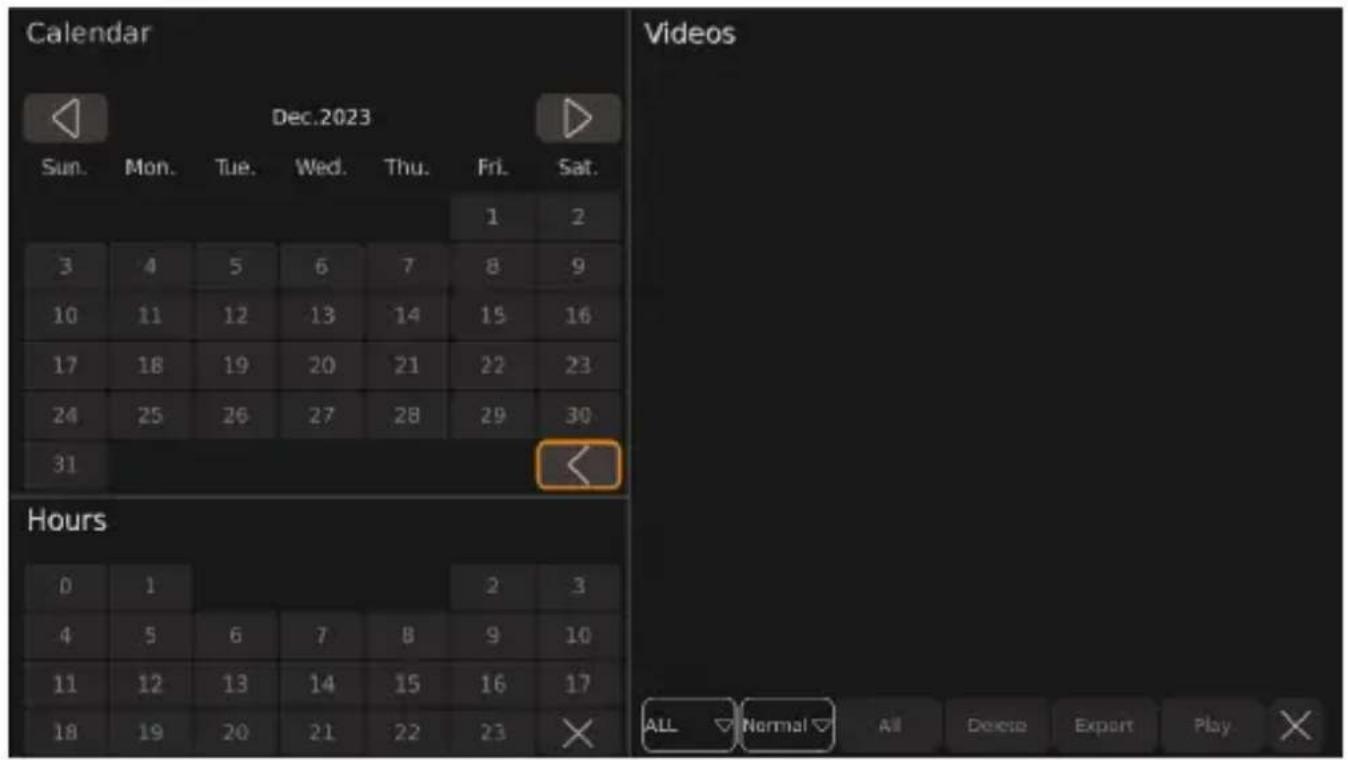
Recorded videos can be played, deleted, or exported to a USB stick via the video system.
Parameter Description
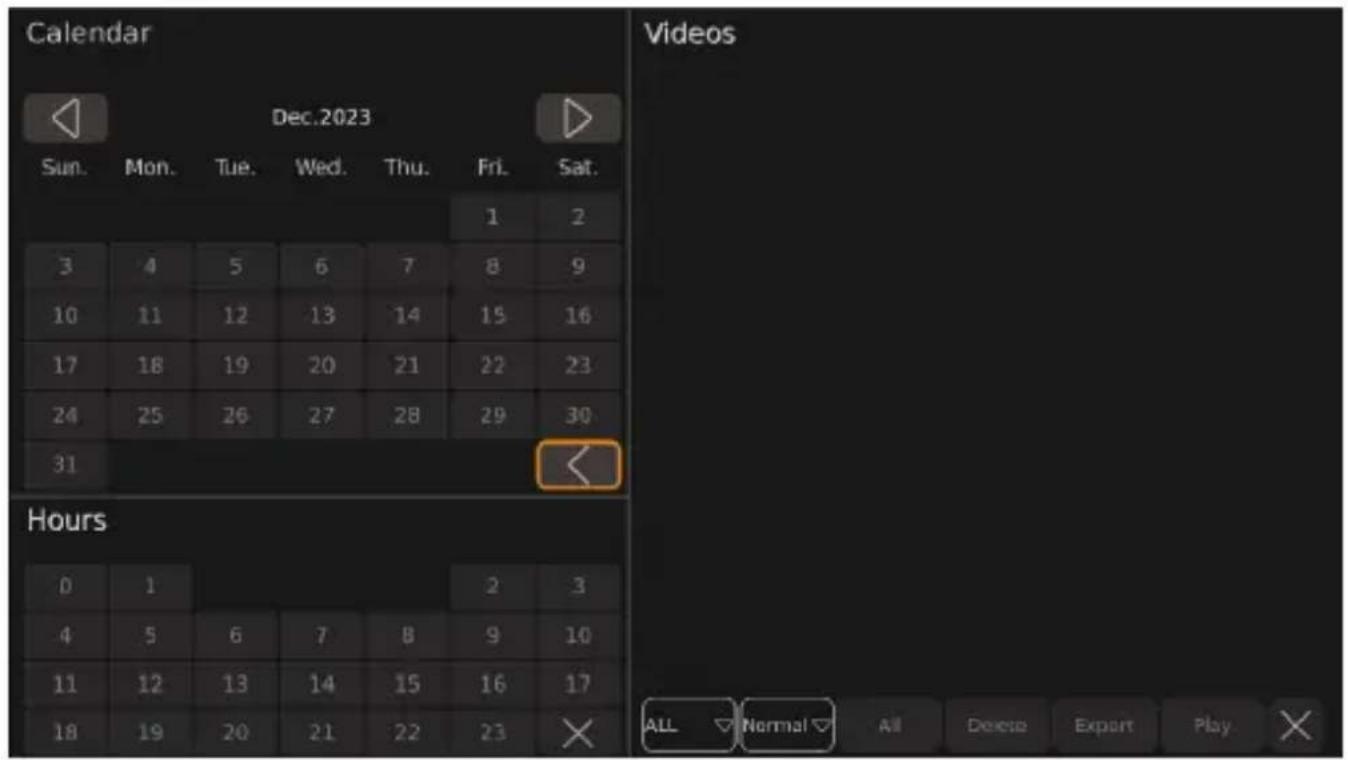
Calendar displays the time period in days during which the listed videos were saved.
Hours displays the time period in hours during which the listed videos were recorded.
Videos displays the videos saved in the displayed period.
Information
| arameter DescriDti,) | |
| Current Versione CPU:e MCU:e Linux: | f urrent f D. of entral Drocessing . nite version information.f urrent Mf . bMicrocontroller . nite version information.f urrent oinuS system version information. |
| Upgrade Section 0or updating the video system software. | |
| System Setup Section 0or resetting p importing p and eSporting configuration files. | |
| Upgrade Configure Section 0or upgrading the configuration file. | |
SPN Camera m, des

N(!E
If the camera images are displayed outside of the settings, this is referred to as the main interface. Not every camera mode can be set in all camera mode settings. Depending on the default view set, the camera mode can be switched in the main interface using the number, SHIFT, or MULTI buttons.
| Camera - ieO Descri | Dti, ) A- ailaKle i) tFe | J, ll, Oi) E set-ti) Es |
| Dual+2D_Left | Nhe birds-eye view is displayed on the lei side o0 the monitor screen. Nhe cam-era image from the lei camera is displayed in the | L view on the right side o0 the monitor screen. | Display Mode SetupTrigger Setup |
| Dual+2D_Right | Nhe birds-eye view is displayed on the lei side o0 the monitor screen. Nhe camera image from the right camera is displayed in the the | L view on the right side o0 the monitor screen. | |
| Dual+2D_Front | Nhe birds-eye view is displayed on the lei side o0 the monitor screen. Nhe camera image from the front camera is displayed in the | L view on the right side o0 the monitor screen. | |
| Dual+2D_Back | Nhe birds-eye view is displayed on the lei side o0 the monitor screen. Nhe camera image from the rear view camera is displayed in the | L view on the right side o0 the monitor screen. | |
| Dual+3D_Left | Nhe birds-eye view is displayed on the lei side o0 the monitor screen. Nhe sur-round view is displayed on the right side o0 the monitor screen from the rear lei perspective. | |
| Dual+3D_Right | Nhe birds-eye view is displayed on the lei side o0 the monitor screen. Nhe sur-round view is displayed on the right side o0 the monitor screen from the rear right perspective. | |
| Dual+3D_Front | Nhe birds-eye view is displayed on the lei side o0 the monitor screen. Nhe sur-round view is displayed on the right side o0 the monitor screen from the front perspective. | |
| Dual+3D_Back | Nhe birds-eye view is displayed on the lei side o0 the monitor screen. Nhe sur-round view is displayed on the right side o0 the monitor screen from the rear perspective. | |
| Quad " ll V camera images are displayed as fish-eye view on the monitor screen. | ||
| 3D Full View | Nhe surround view is displayed from the front perspective. | |
| Super Rear View | Nhe surround view is displayed from the rear perspective. | |
| Full Dual | Nhe birds-eye view is displayed on the monitor screen. Nhe vehicle is aligned vertically. | |
| Horizontal Full Dual | Nhe birds-eye view is displayed on the monitor screen. Nhe vehicle is aligned horizontally. | |
| IPC View ' ot available. | ||
| Scan Loop Display | Nhe birds-eye view is displayed on the left side of the monitor screen. Nhe surround view is displayed on the right side of the monitor screen. Nhe surround view rotates around the vehicle. | Setup |
| Scan | Trigger Setup | |
| Dual+Quad | Nhe birds-eye view is displayed on the left side of the monitor screen. " ll V camera images are displayed in fish-eye view on the right side of the monitor screen. | Display Mode Setup |
| Dual+IPC ' ot available. | Trigger Setup | |
| Dual+RearView | Nhe birds-eye view is displayed on the left side of the monitor screen. Nhe camera image from the rear view camera is displayed in the L view on the right side of the monitor screen.When reverse gear is engaged the camera system switches to a rear mirror view. Nhe position of the rear mirror view can be enlarged reduced and moved as re_ured. | Display Mode Setup |
| Single_RearView | Nhe camera image from the rear view camera is displayed in the L view in dull monitor screen.When reverse gear is engaged the camera system switches to a rear mirror view. Nhe position of the rear mirror view can be enlarged reduced and moved as re_ured. | Display Mode Setup |
| Single_Back | Nhe camera image from the right camera is displayed in the L view in dull monitor screen. | Trigger Setup |
| Single_Left | Nhe camera image from the left camera is displayed in the L view in dull monitor screen. | |
| Single_Right | Nhe camera image of the right camera is displayed in fish-eye view in dull monitor screen. | |
| Single_Front | Nhe camera image of the front camera is displayed in fish-eye view in dull monitor screen. | |
Installation

CAUTION! Risk of injury
Mount the camera in such a way that it cannot fall down under any circumstances and injure bystanders, e.g., by knocking branches across the roof of the vehicle. Secure the camera system components installed in the vehicle so that they cannot come loose during sudden braking, accidents, and cause injuries to the vehicle occupants. Secure parts of the camera system hidden by the bodywork so that they cannot come loose and damage other parts or cables or interfere with vehicle functions (steering, pedals, etc.).

NOTICE: Damage hazard
The system may only be permanently installed after a successful test calibration. Before drilling or screwing, ensure that the respective cable lengths are long enough. Do not reverse the polarity of the extension cables.

NOTE: If the installation of the camera changes the vehicle size specified in the vehicle documents, the vehicle must be approved by the responsible authority. This authority must note the changes in the vehicle documents.
Installation notes
Observe the following instructions.
If possible, use original trunking or other suitable options such as trim edges, ventilation grilles, or blind plugs to route the cables. If there are no openings, holes must be drilled for the cables. If possible, lay the cables inside the vehicle. If a cable has to be laid outside the vehicle, ensure the cable is well secured (use cable ties, insulating tape, etc.). Protect each through hole in the vehicle housing against water penetration, e.g., by using a cable with sealant and spraying the cable and the sleeve with sealant.

Do not start sealing through holes until all installation work on the camera has been completed.
Observe the following.
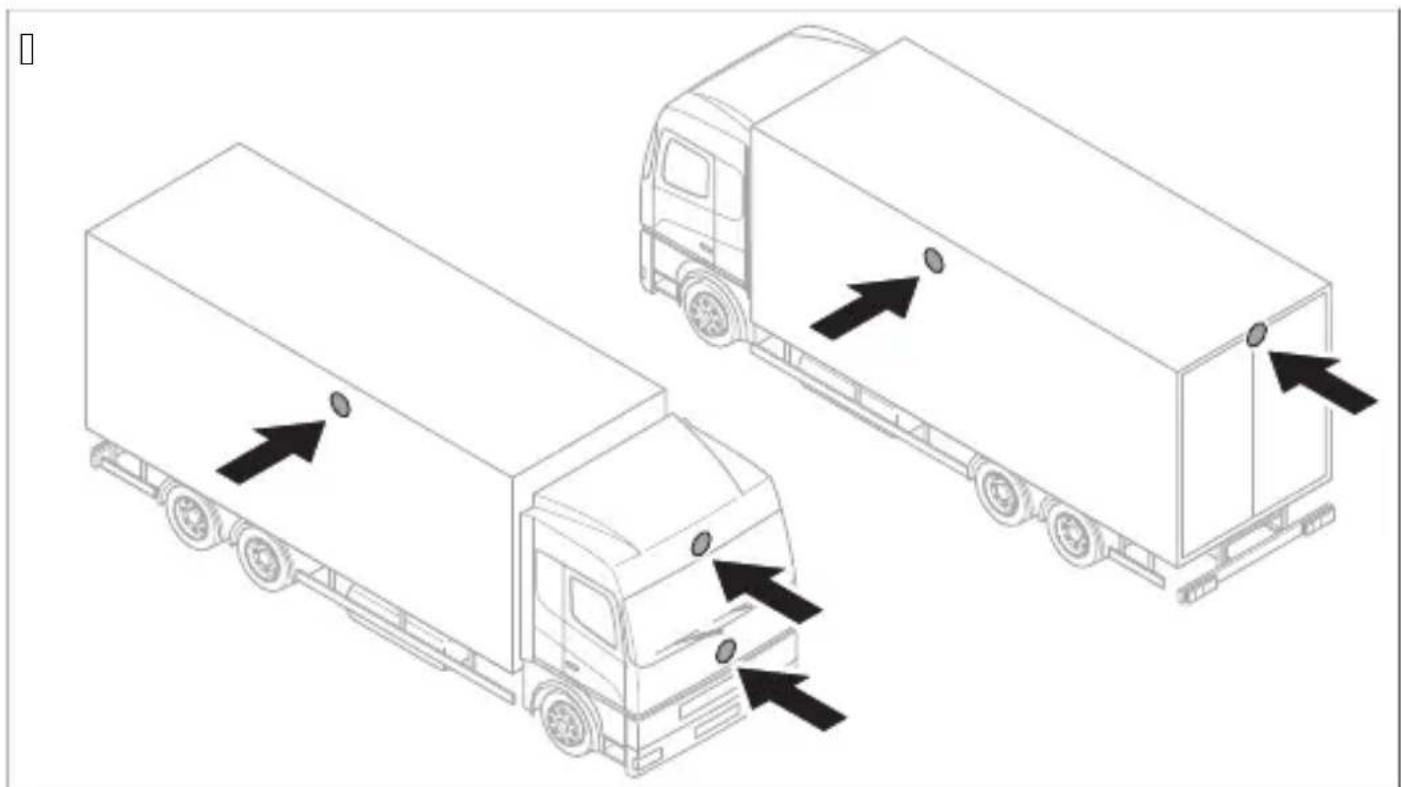
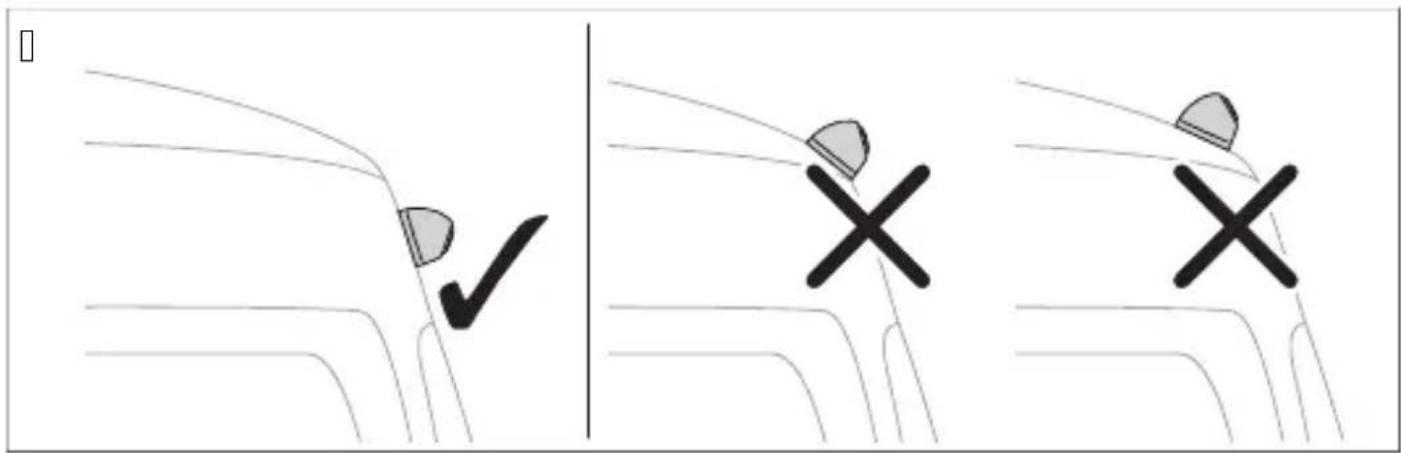
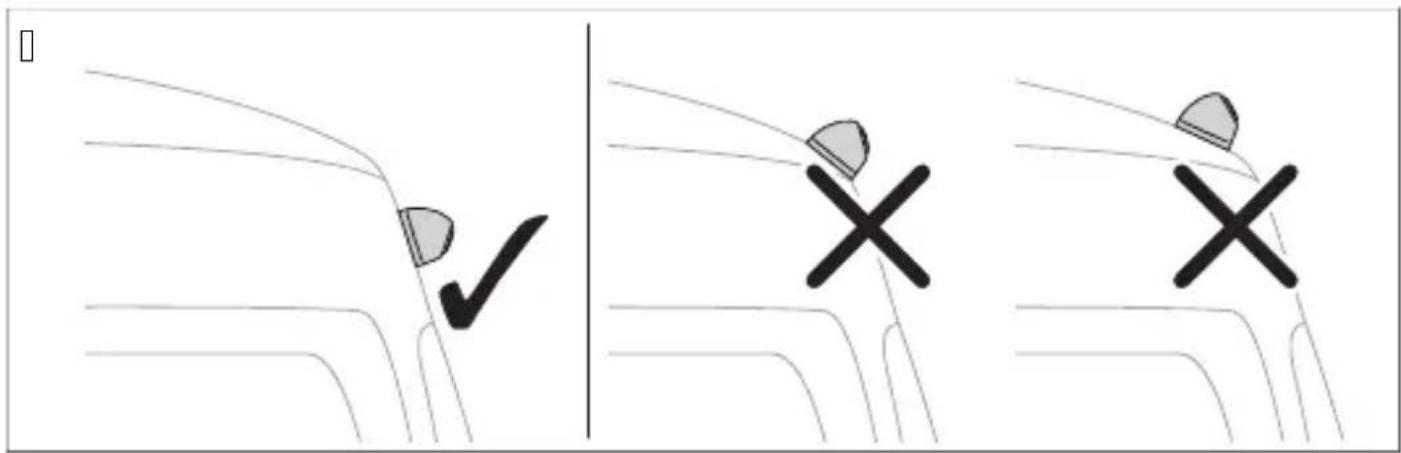
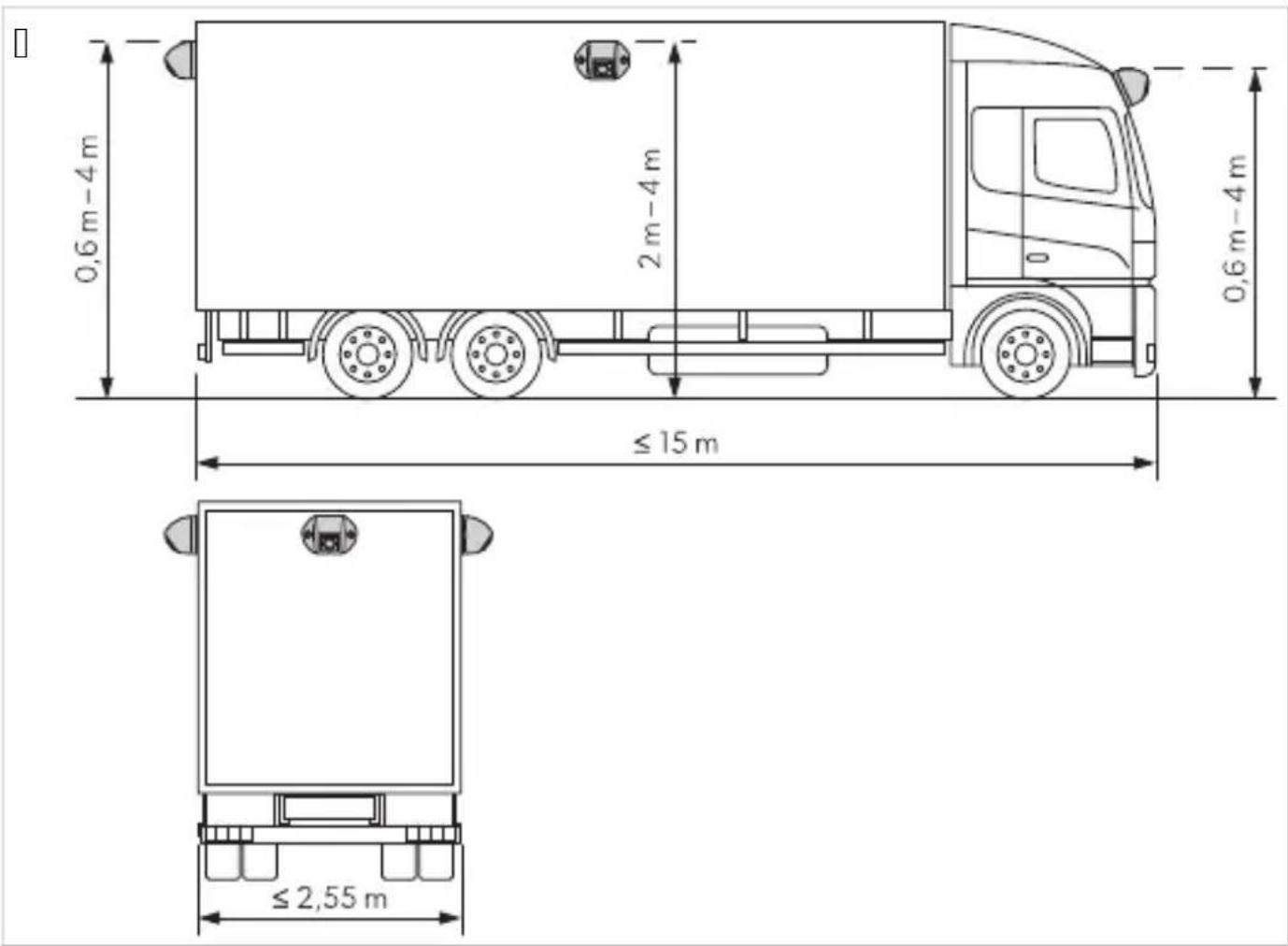
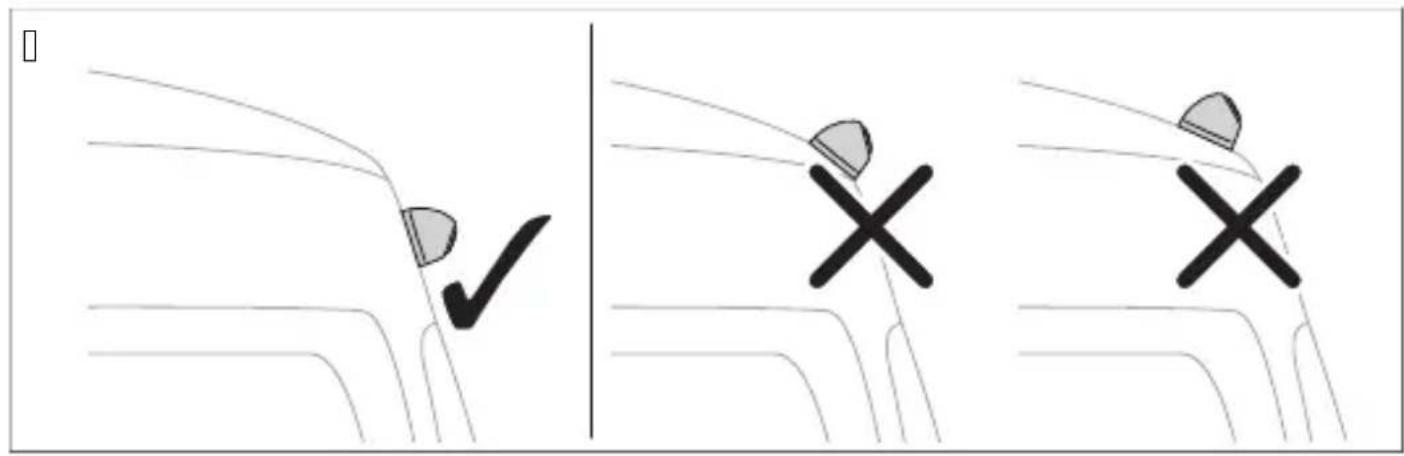
The installation surface of the camera must be firm. The location on the vehicle body where the camera is to be installed must be firm enough to securely mount the camera. The cameras must be mounted as high as possible and as close to the center of the vehicle as possible.
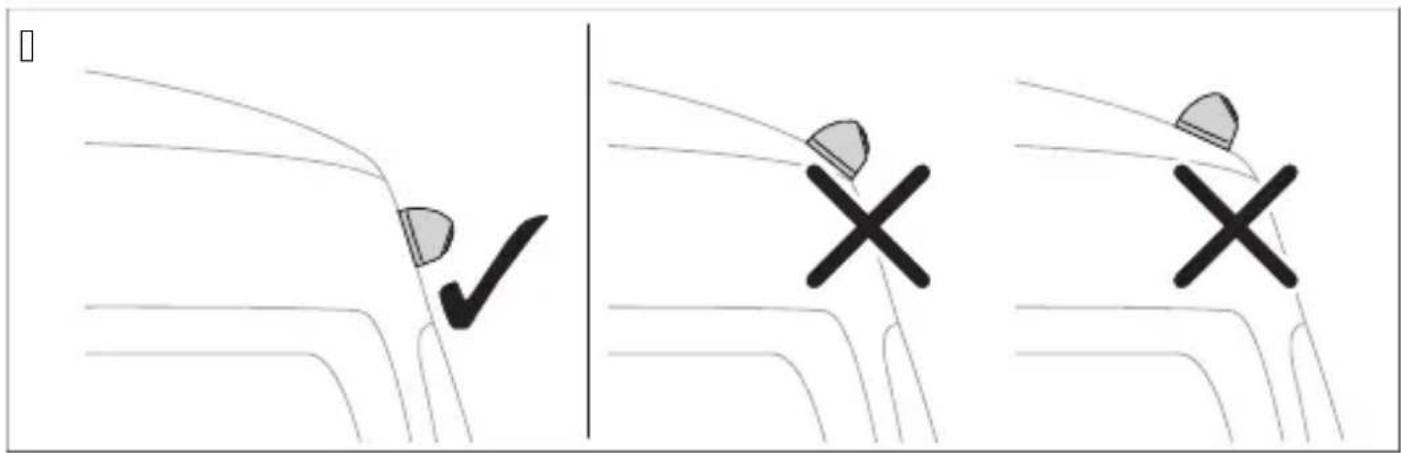
The installation location of the camera must be as perpendicular as possible.
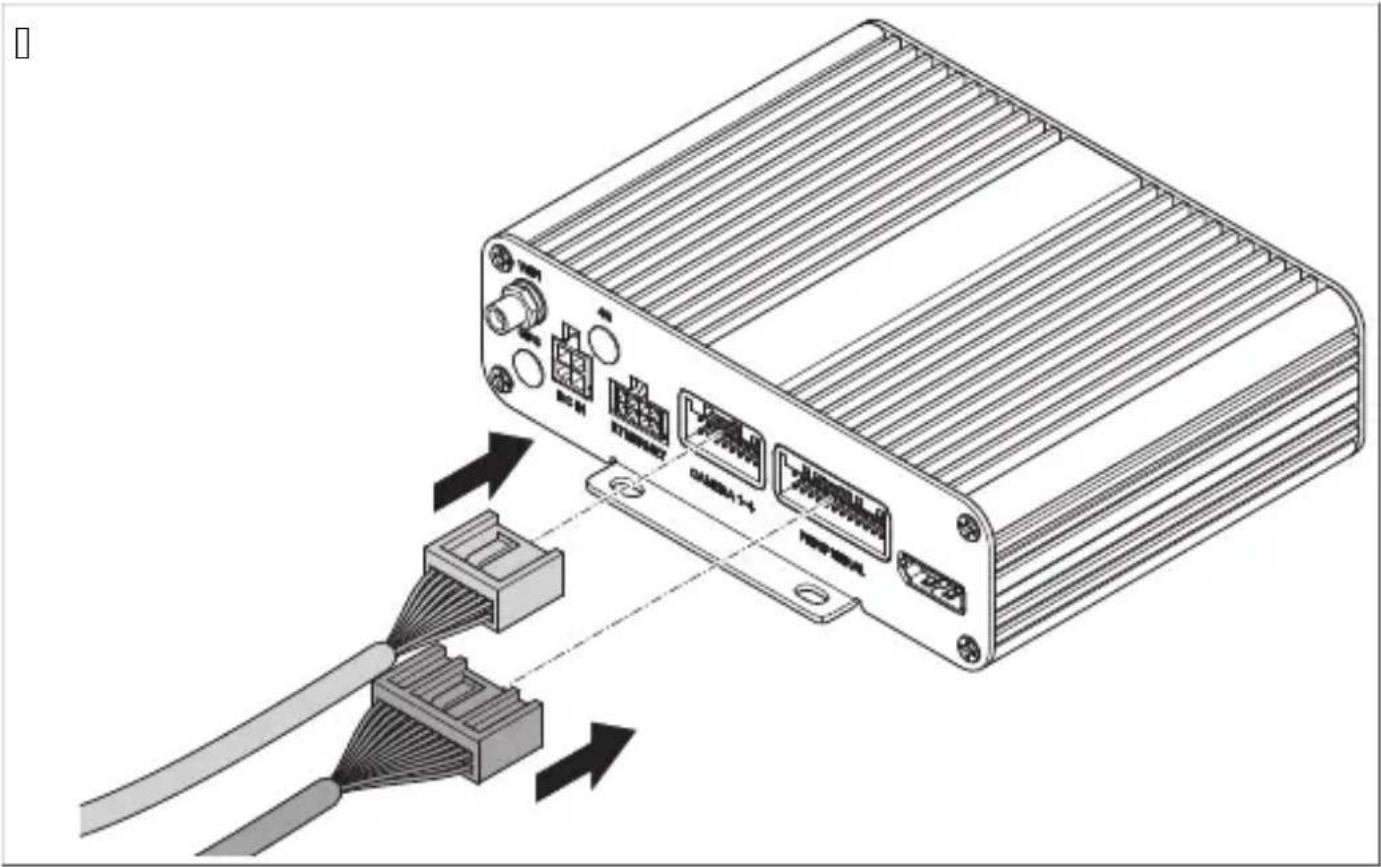
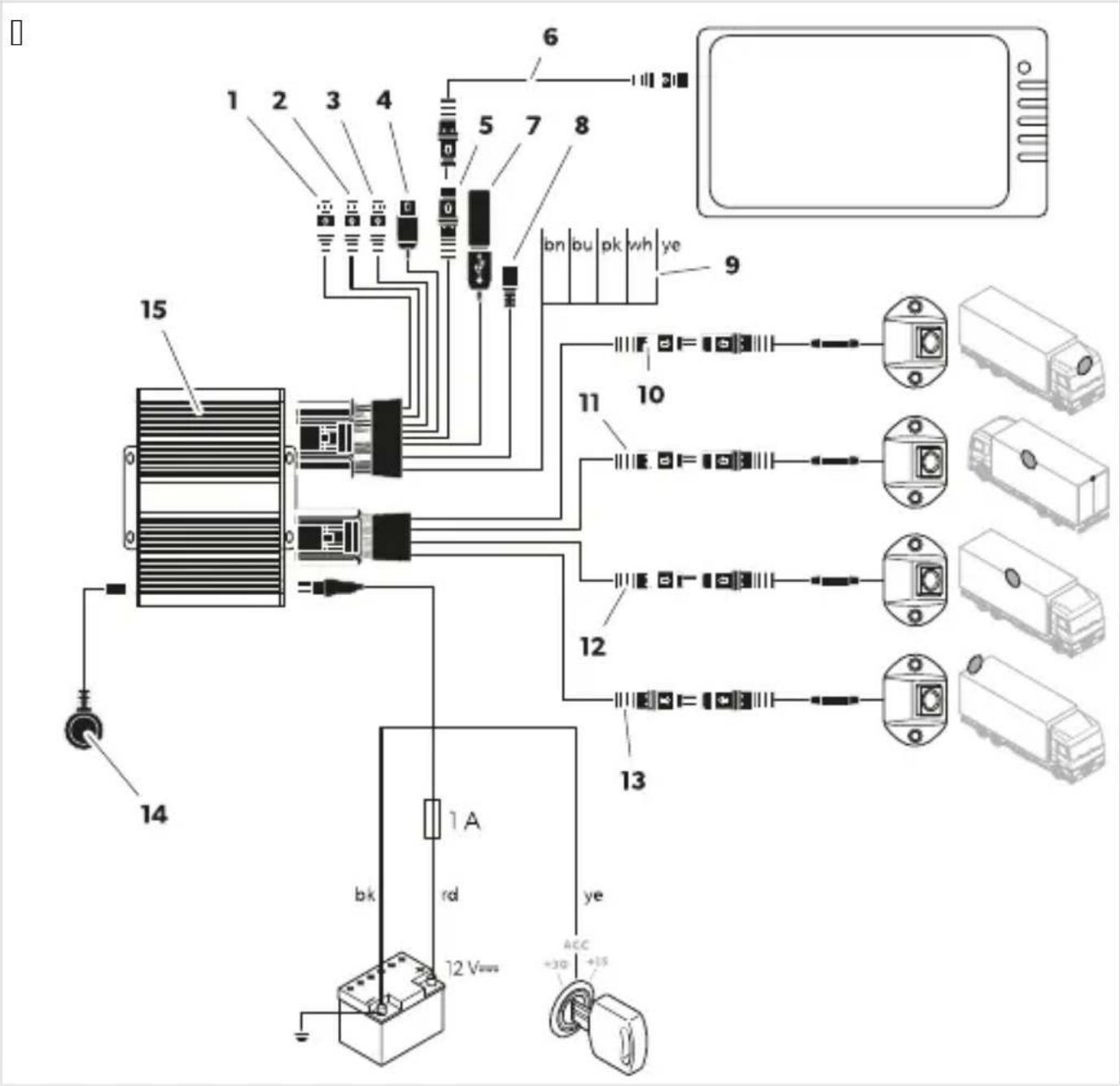
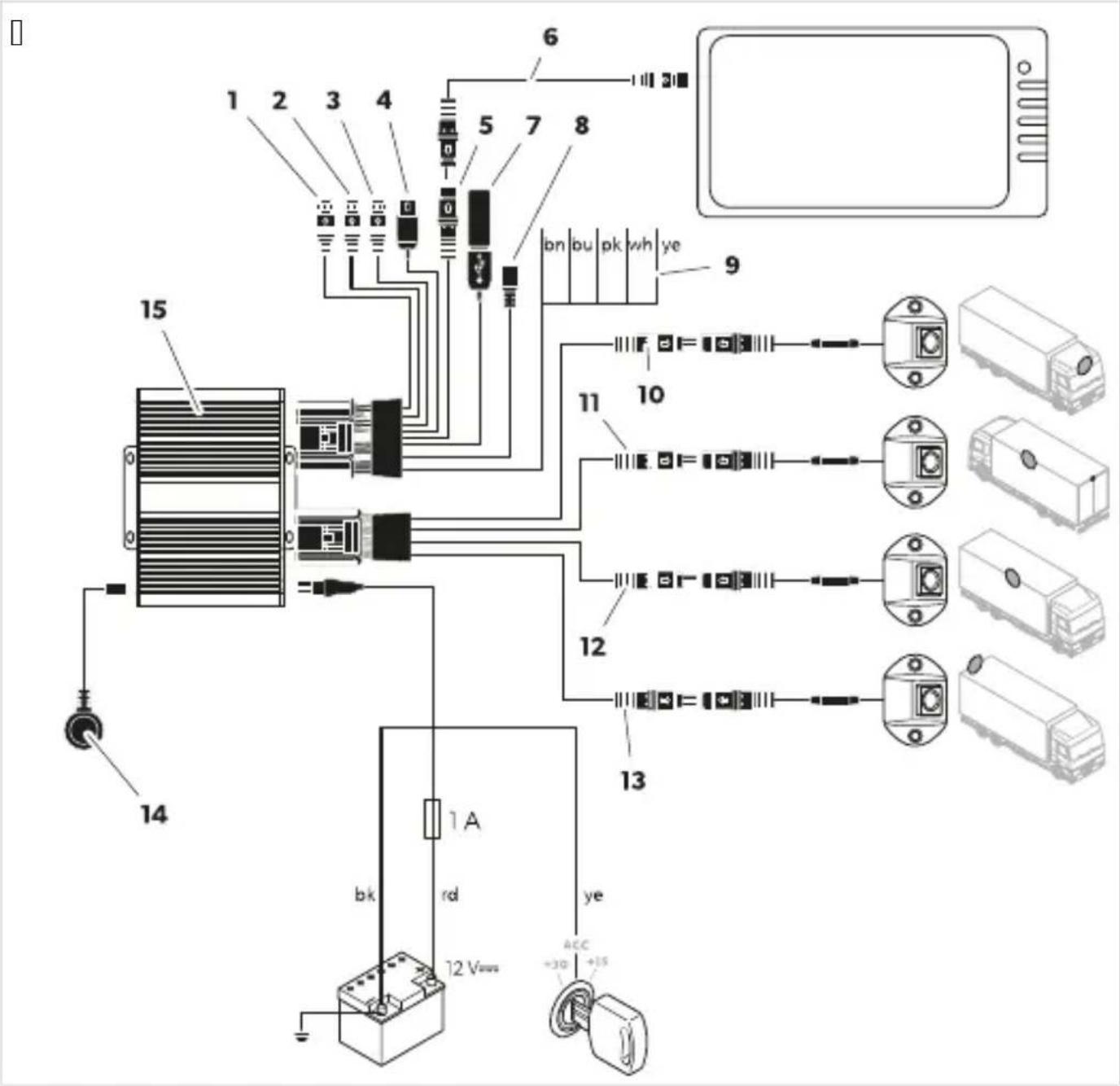
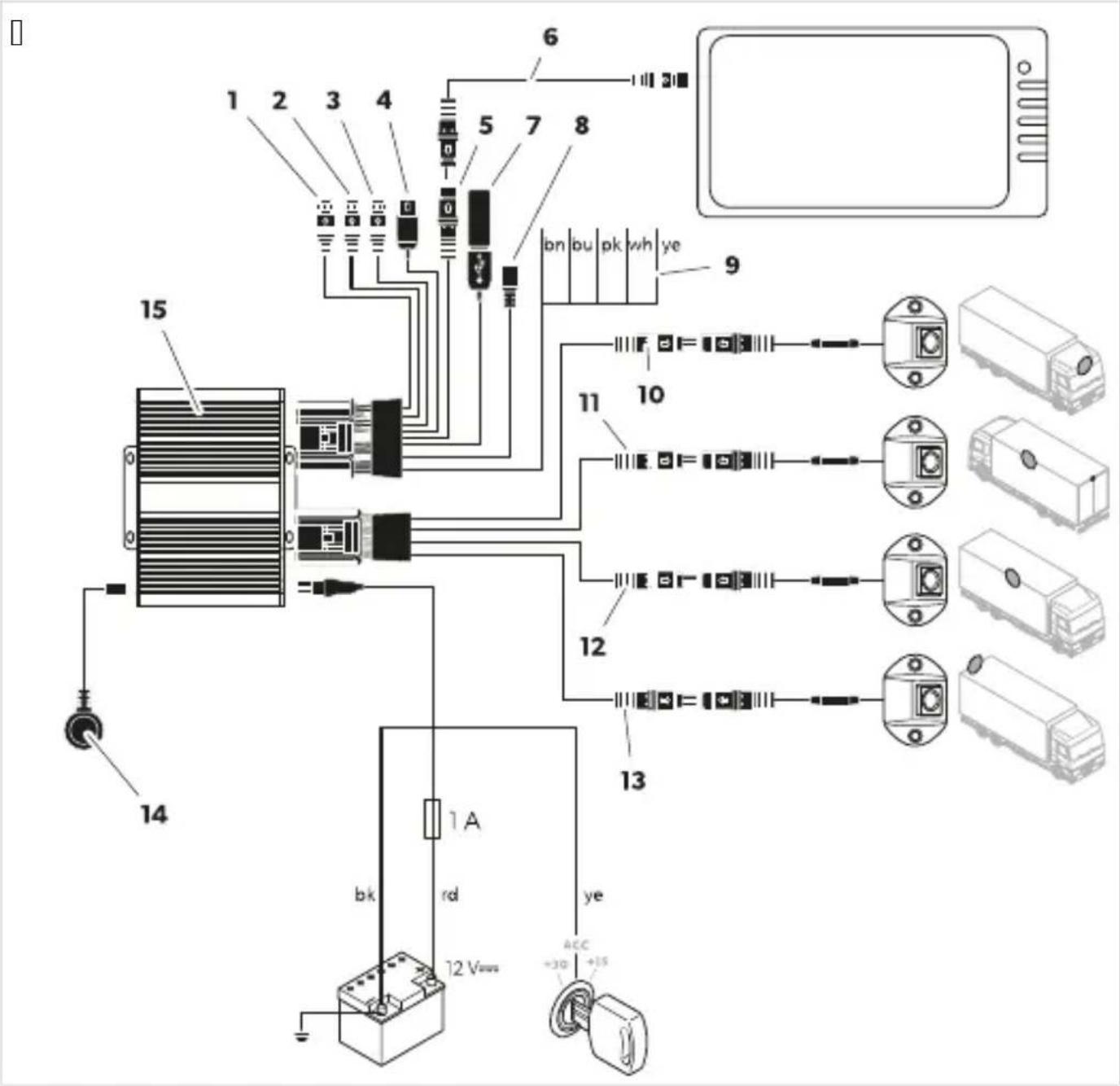
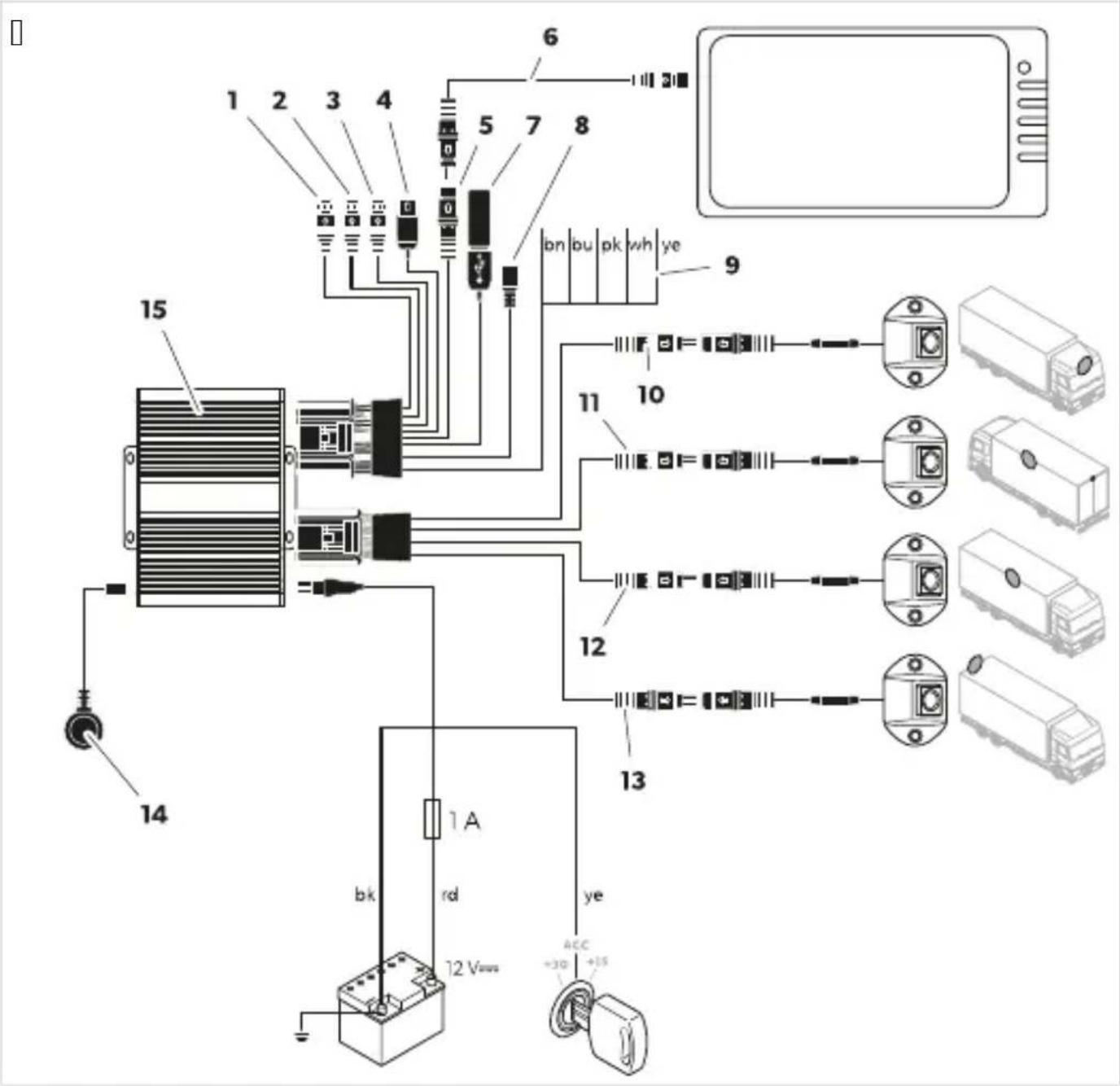
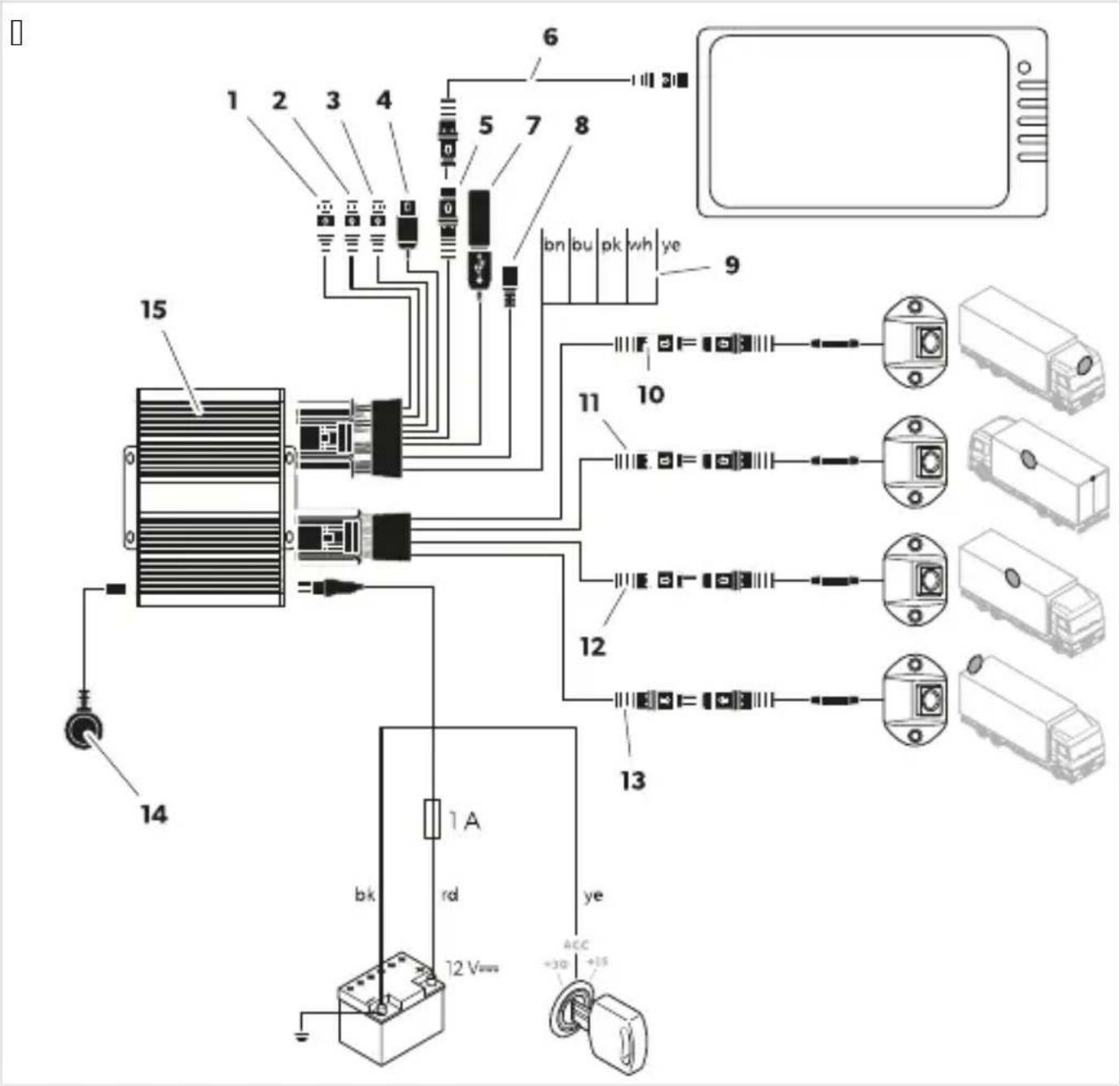
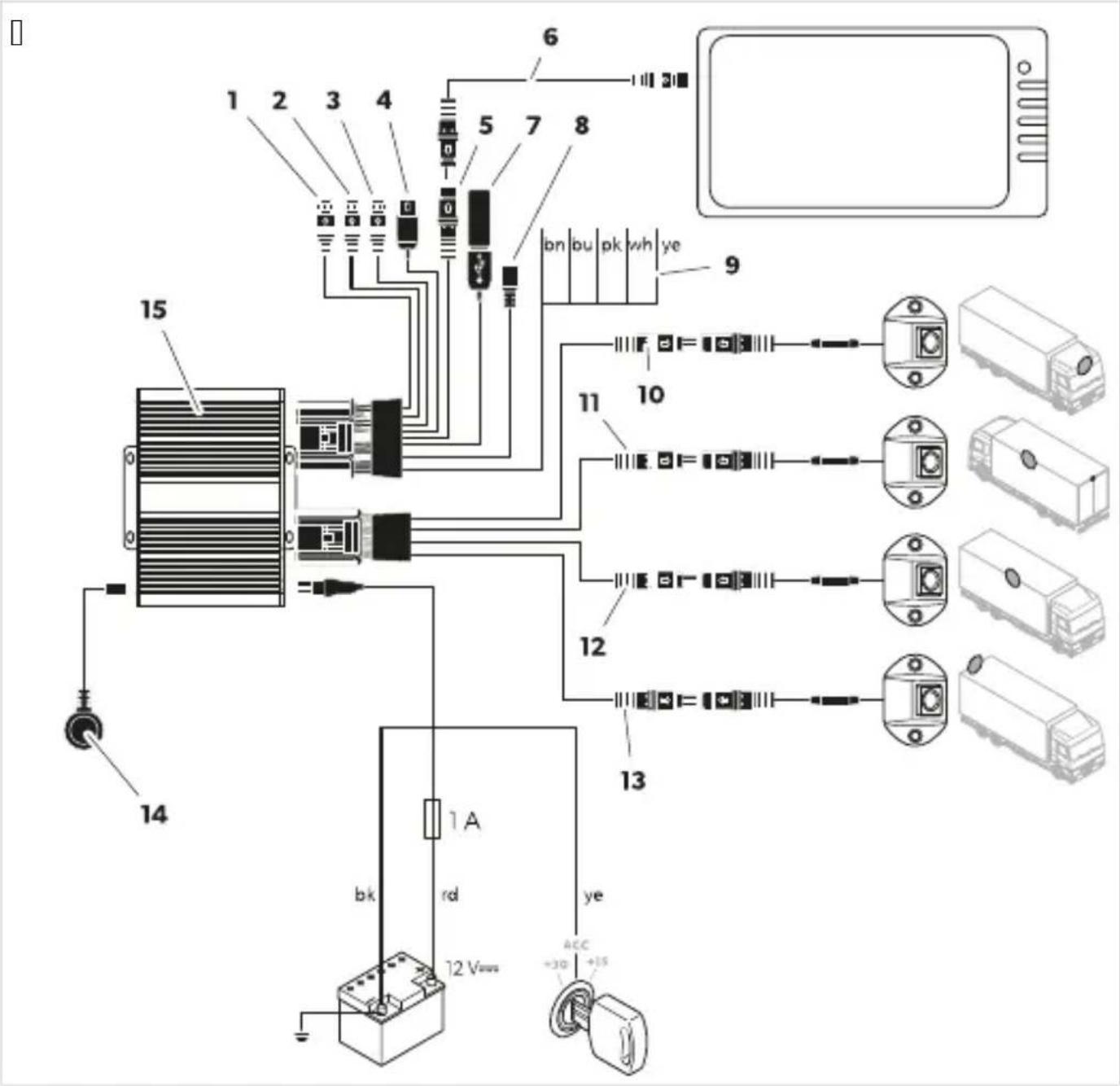
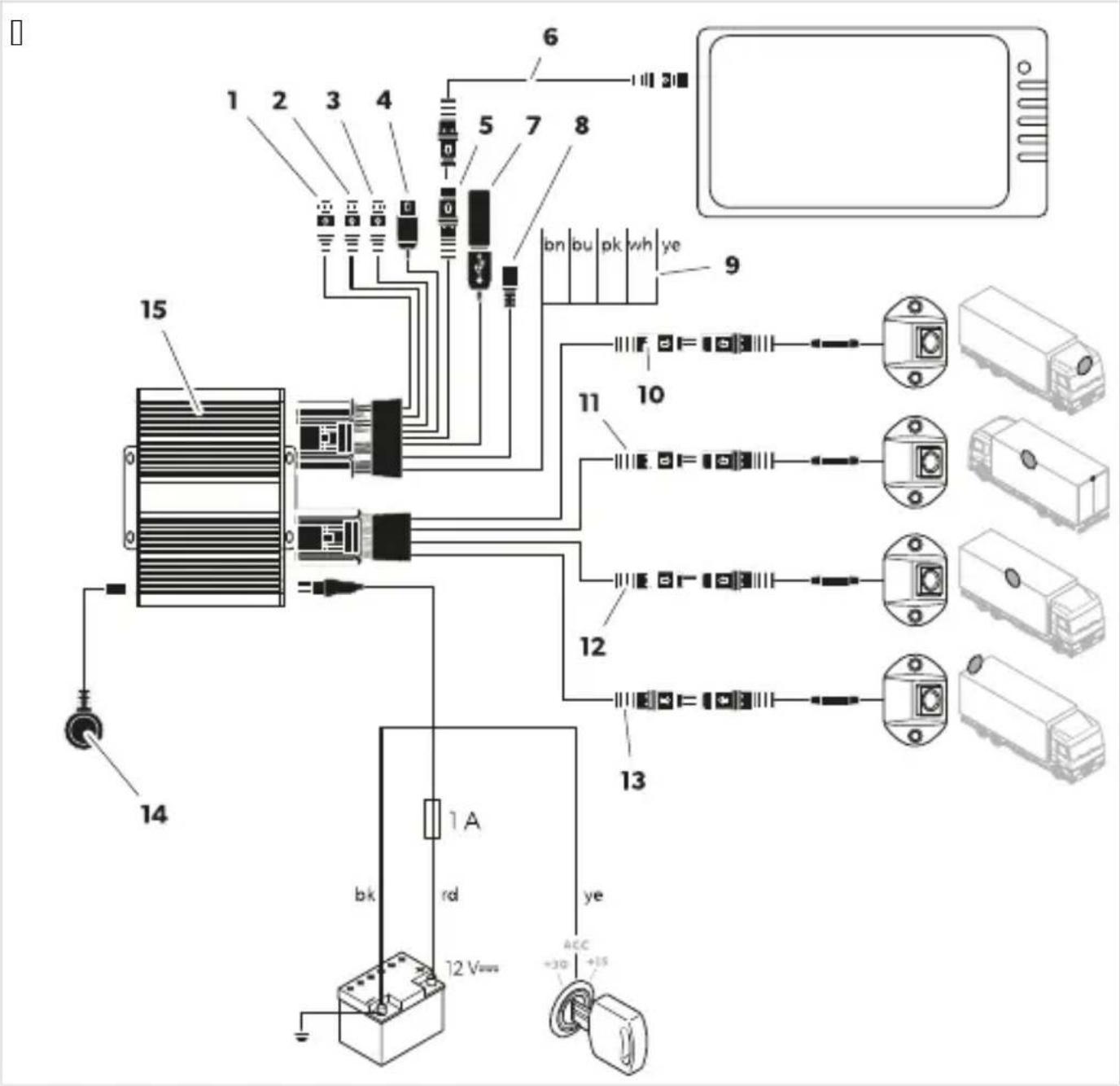
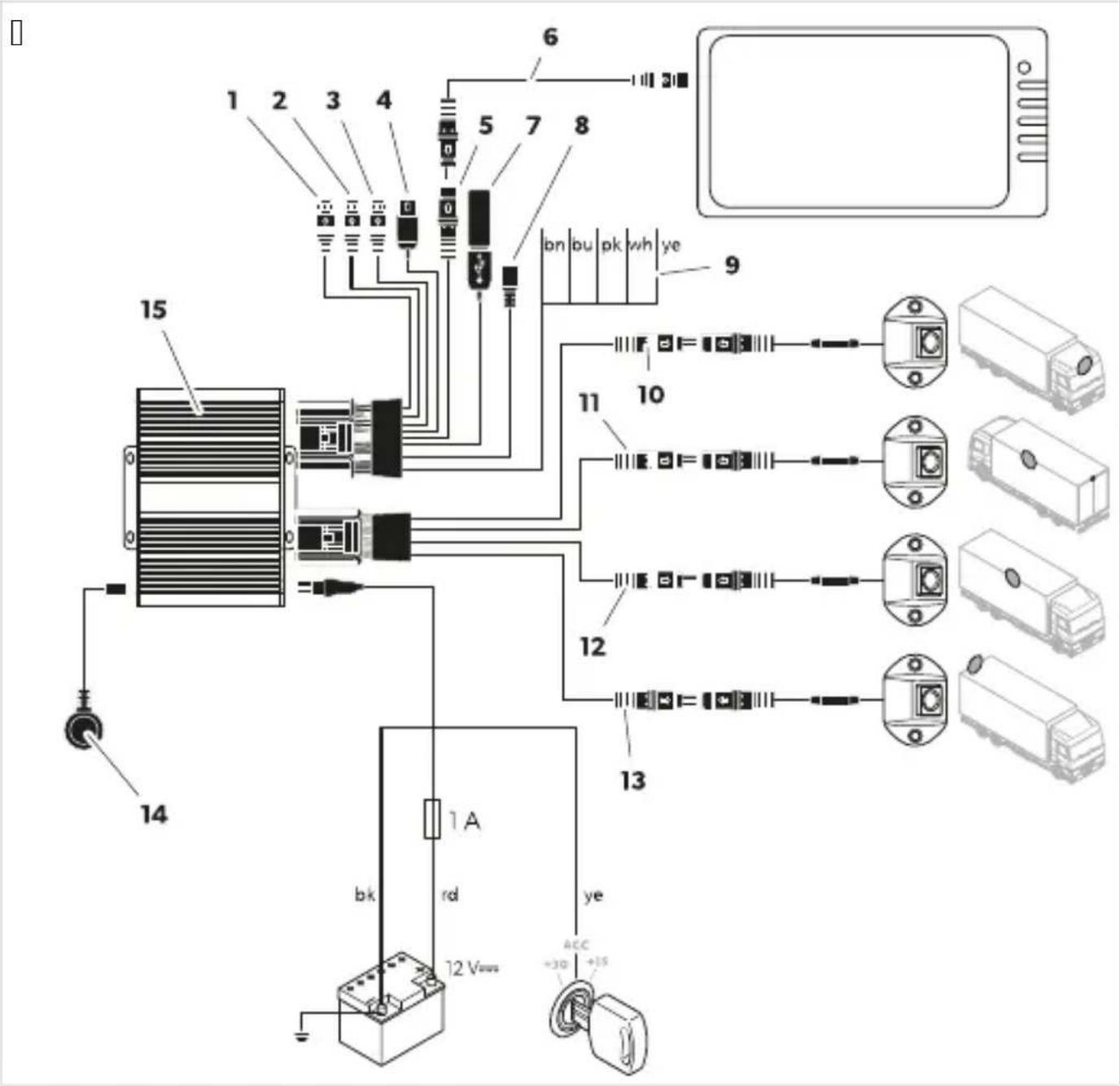
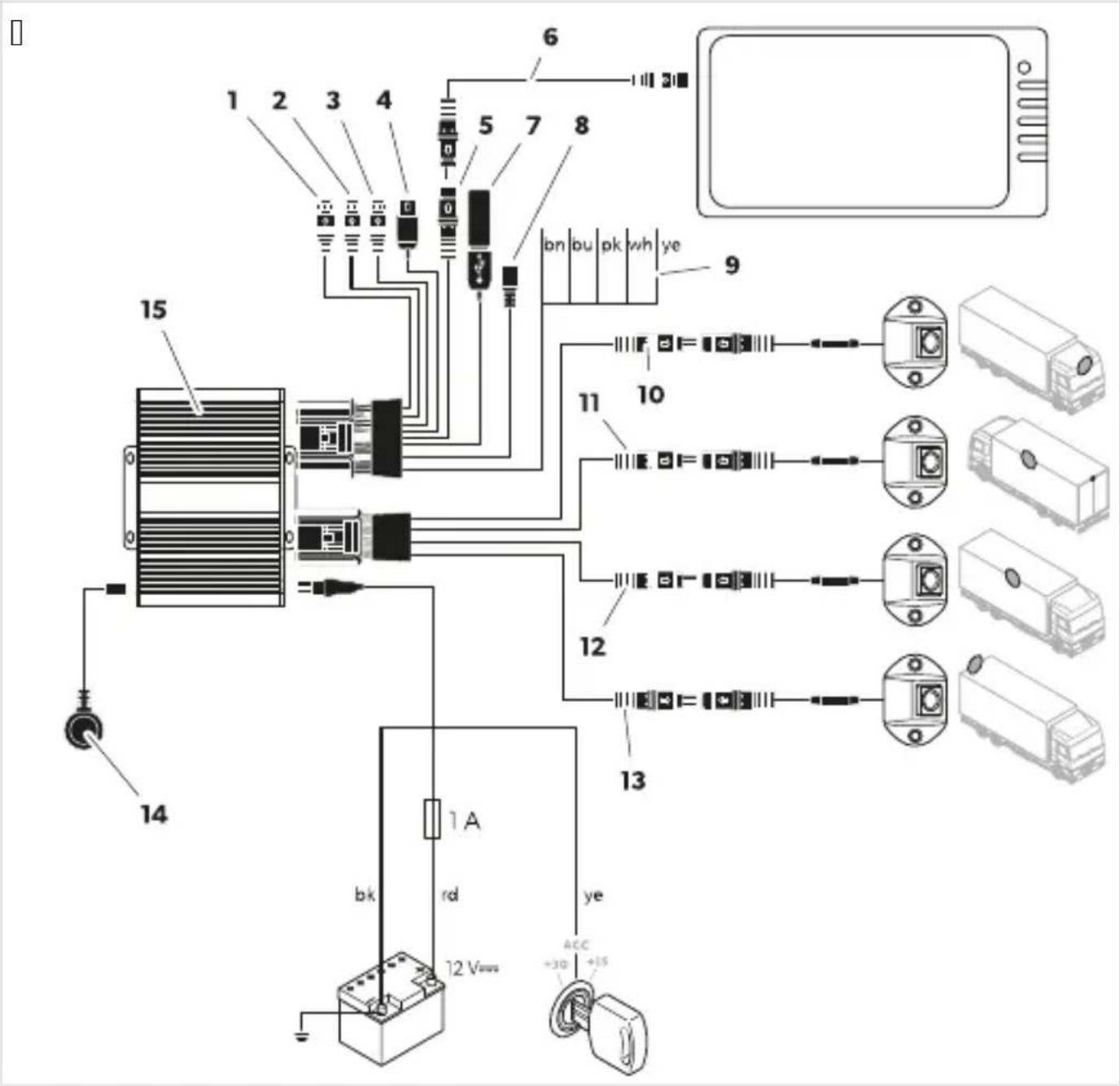
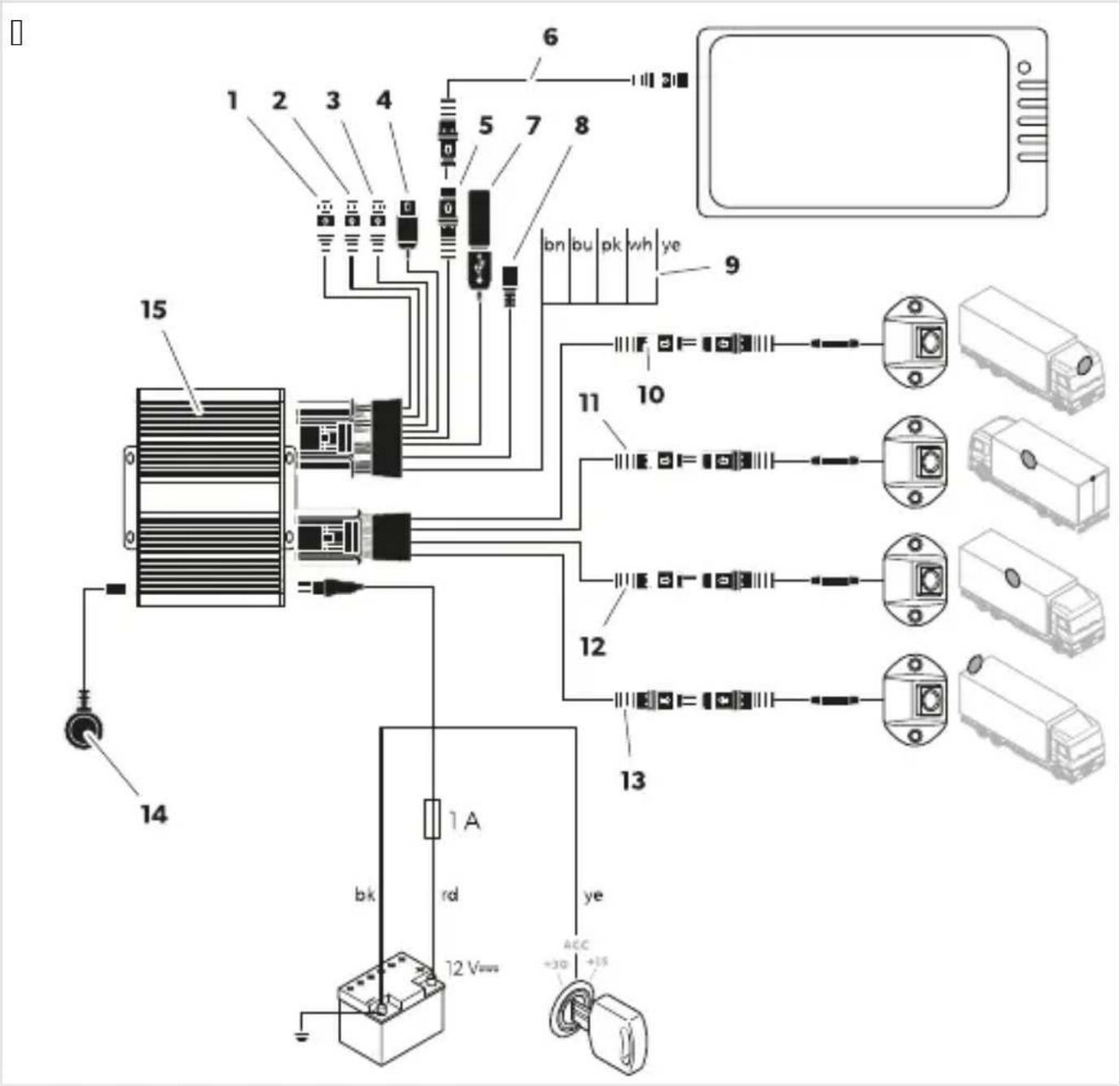
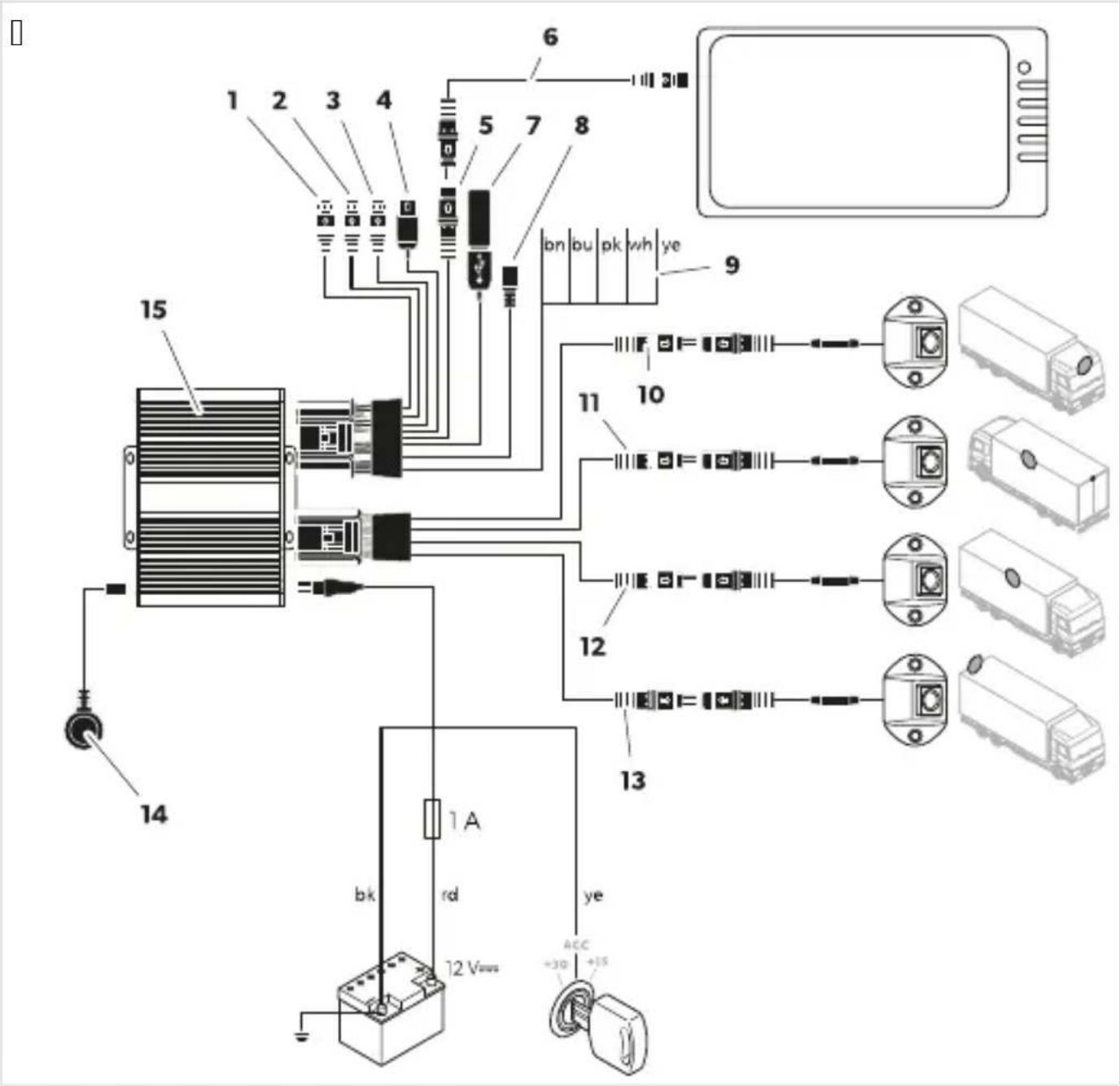
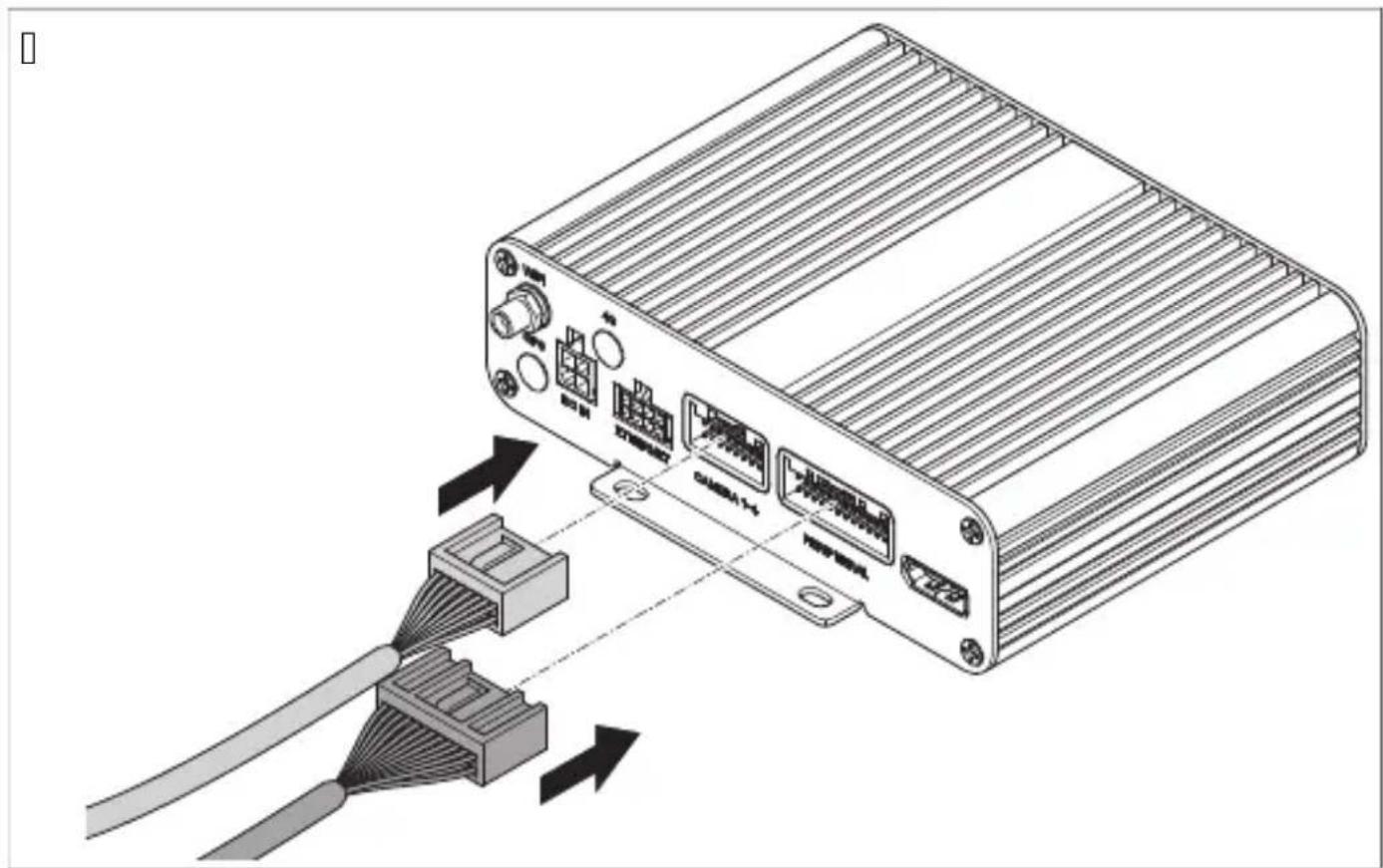
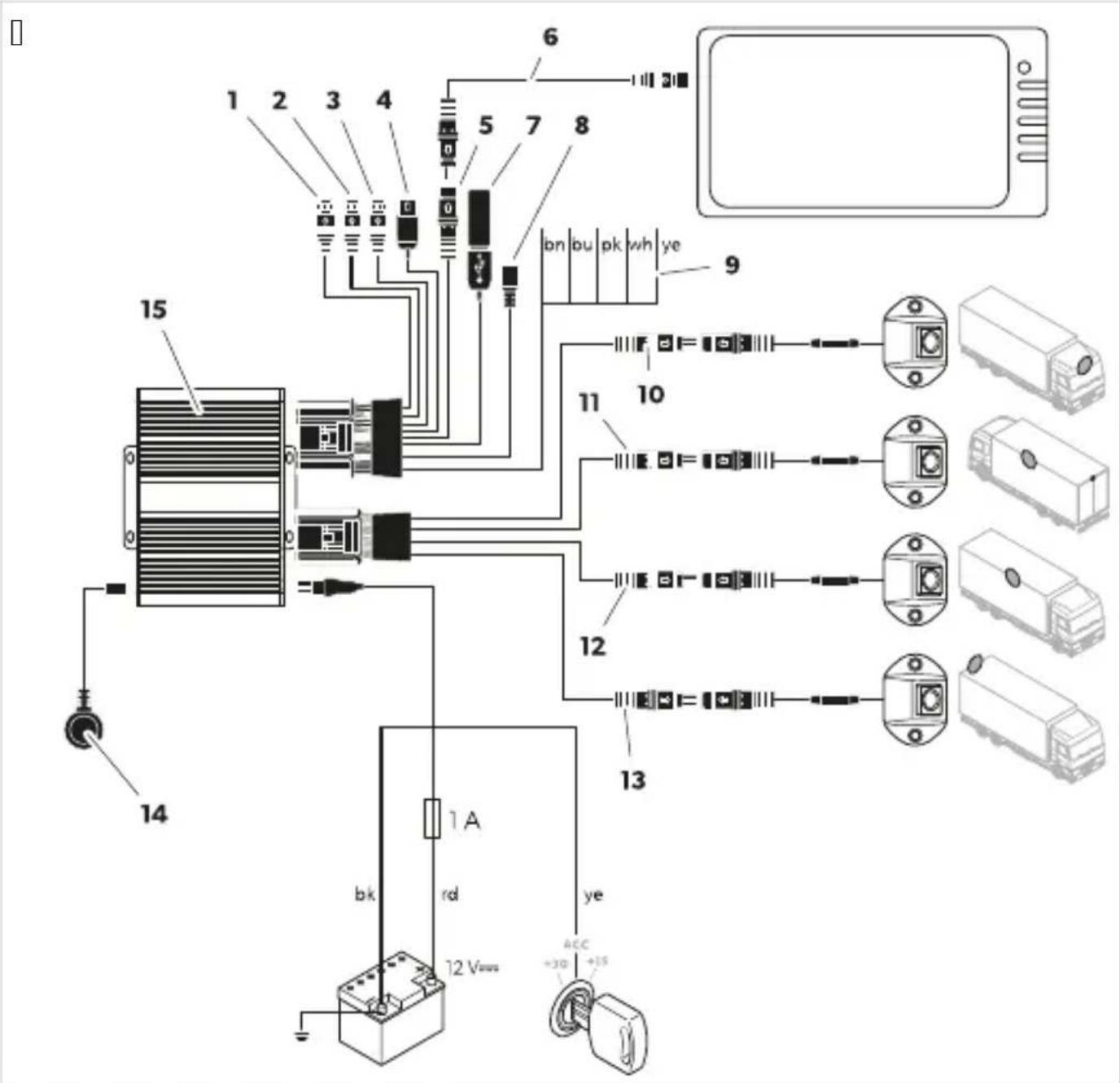
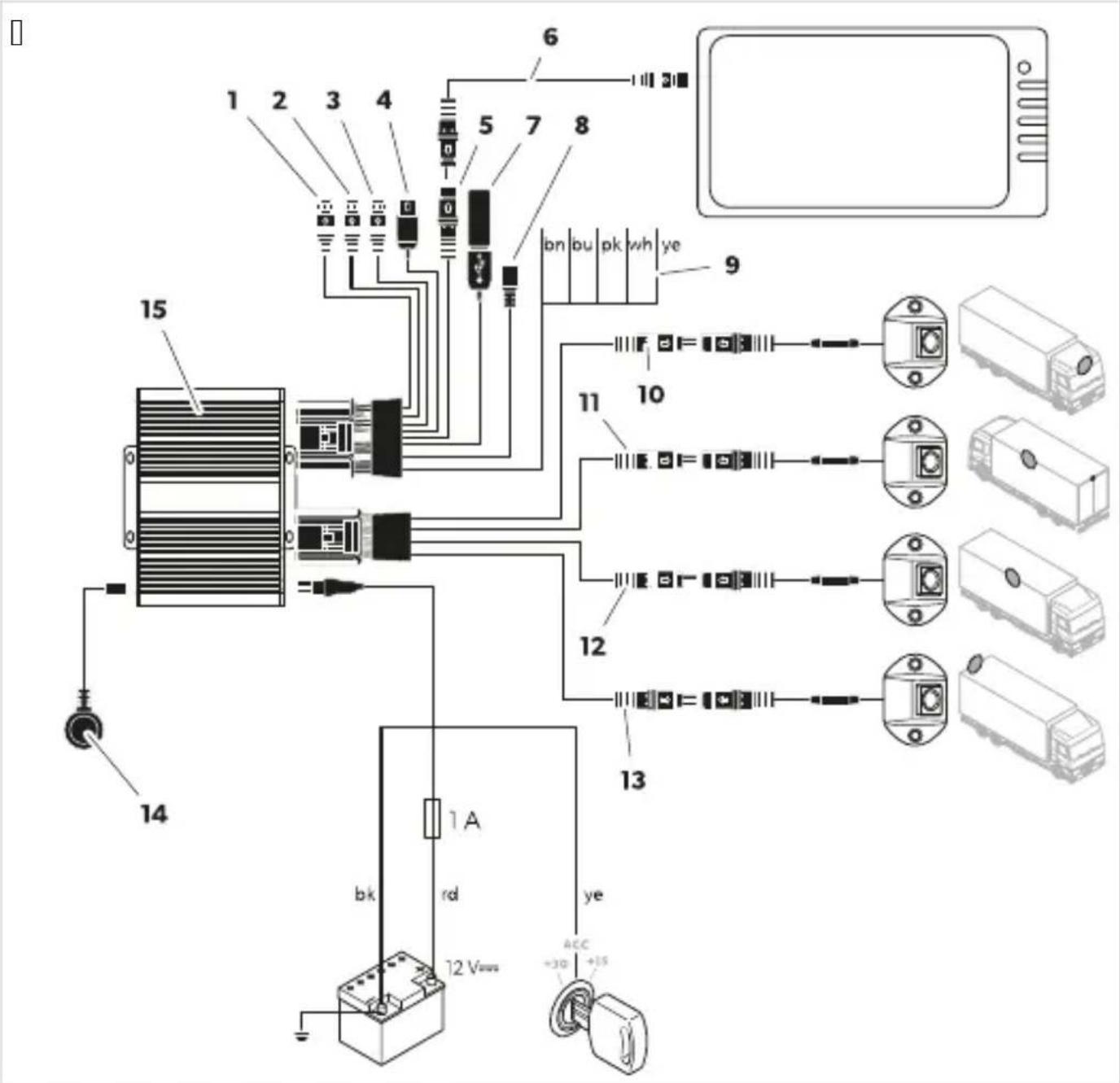
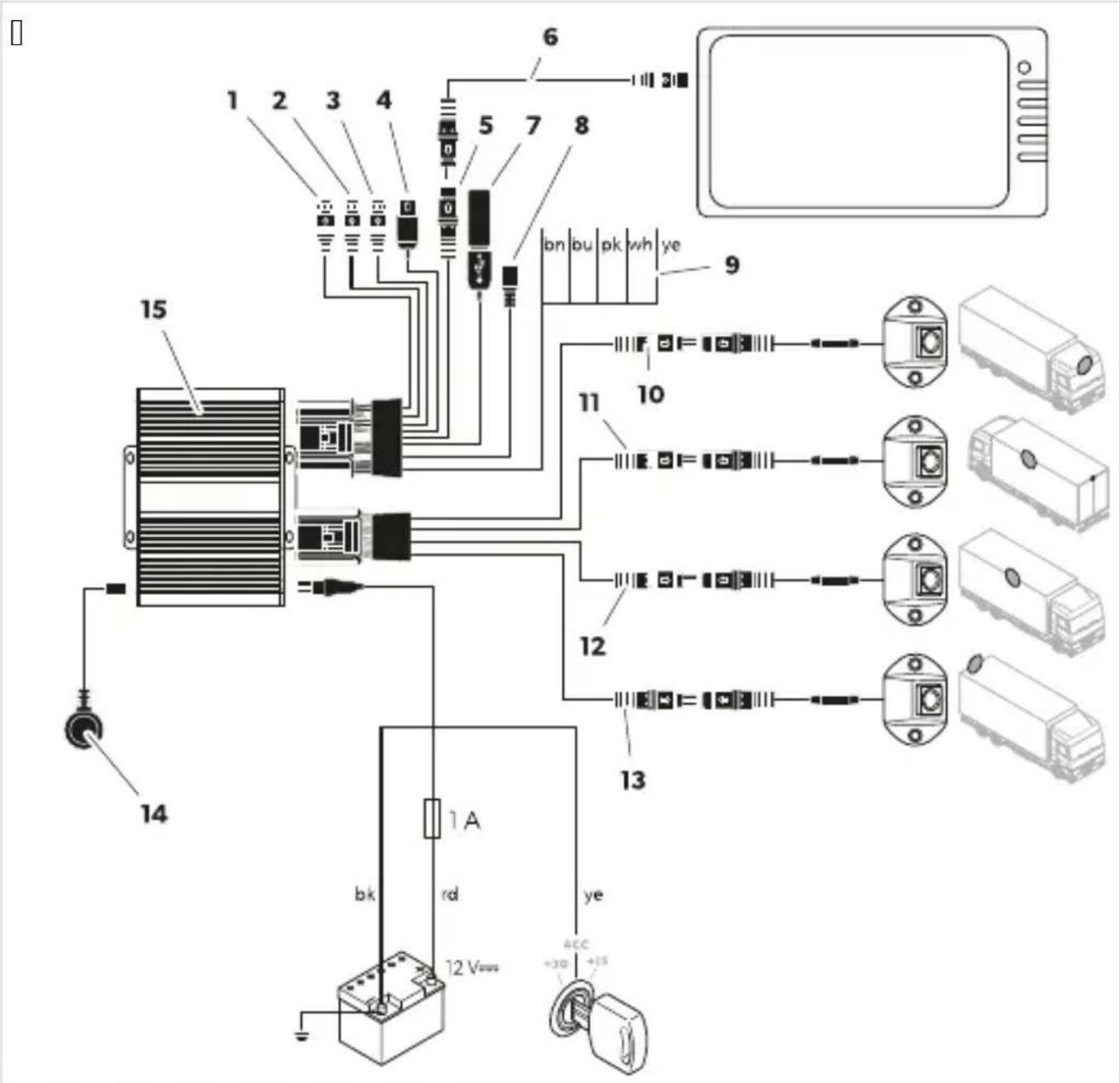
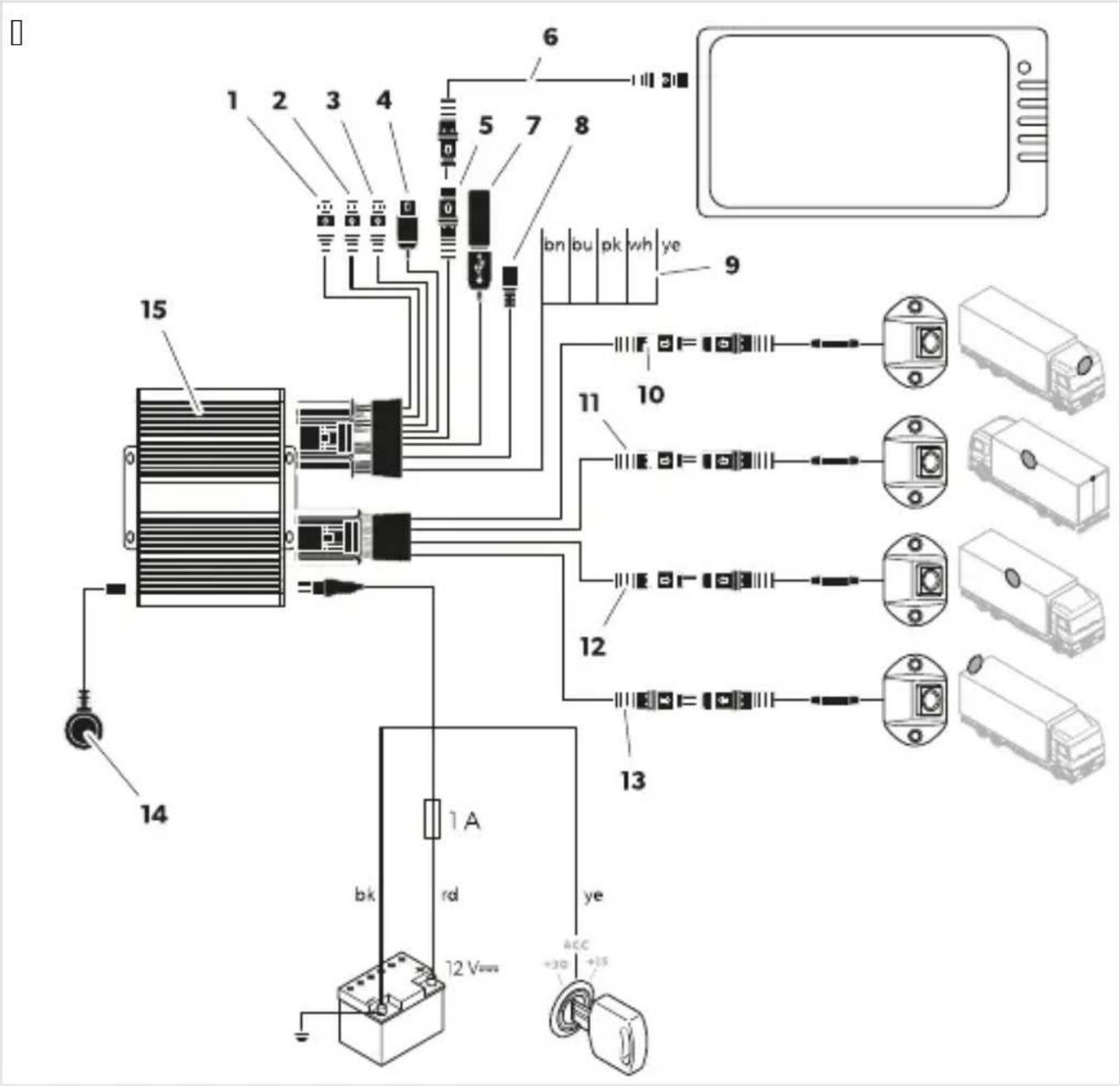
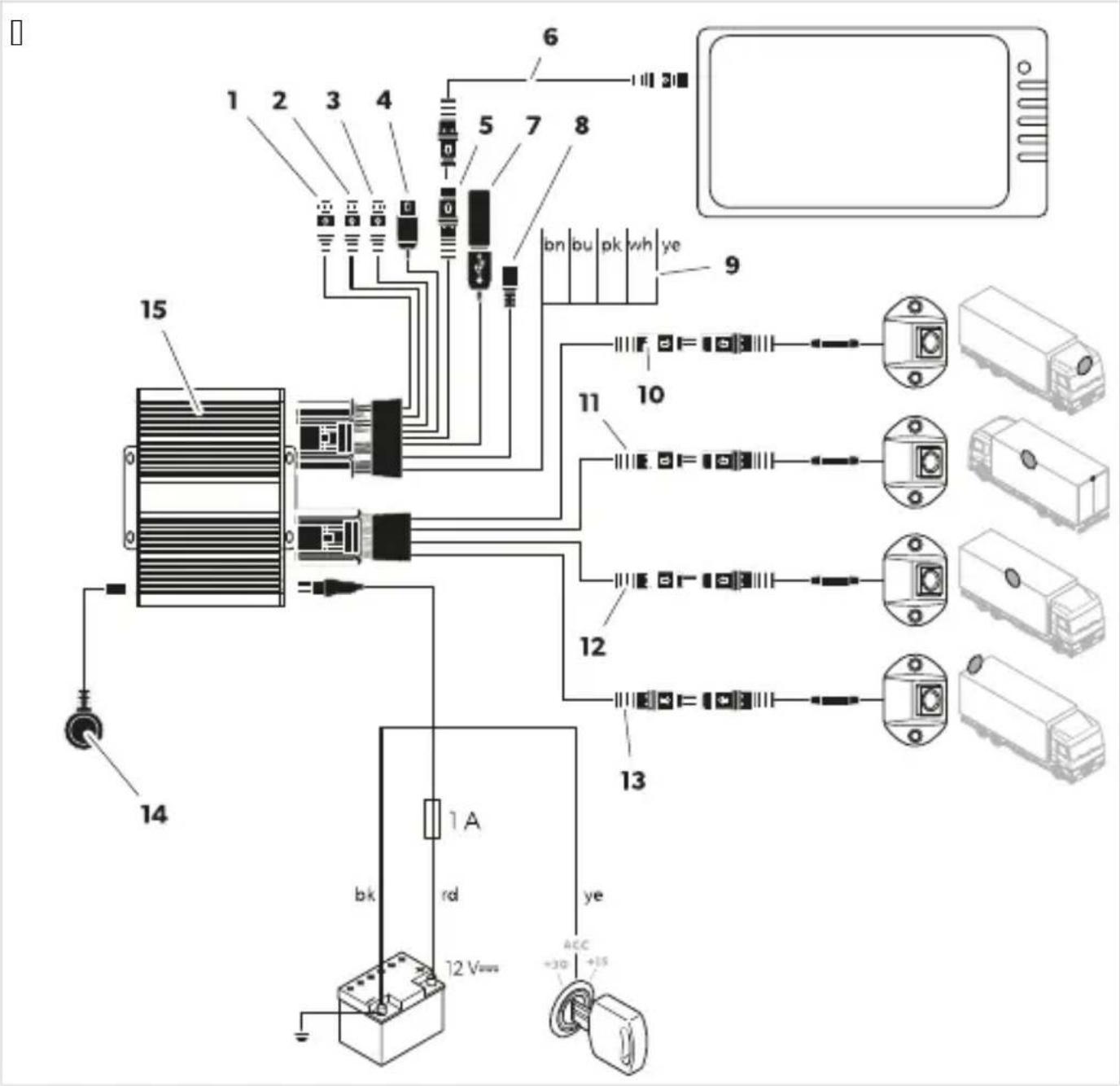
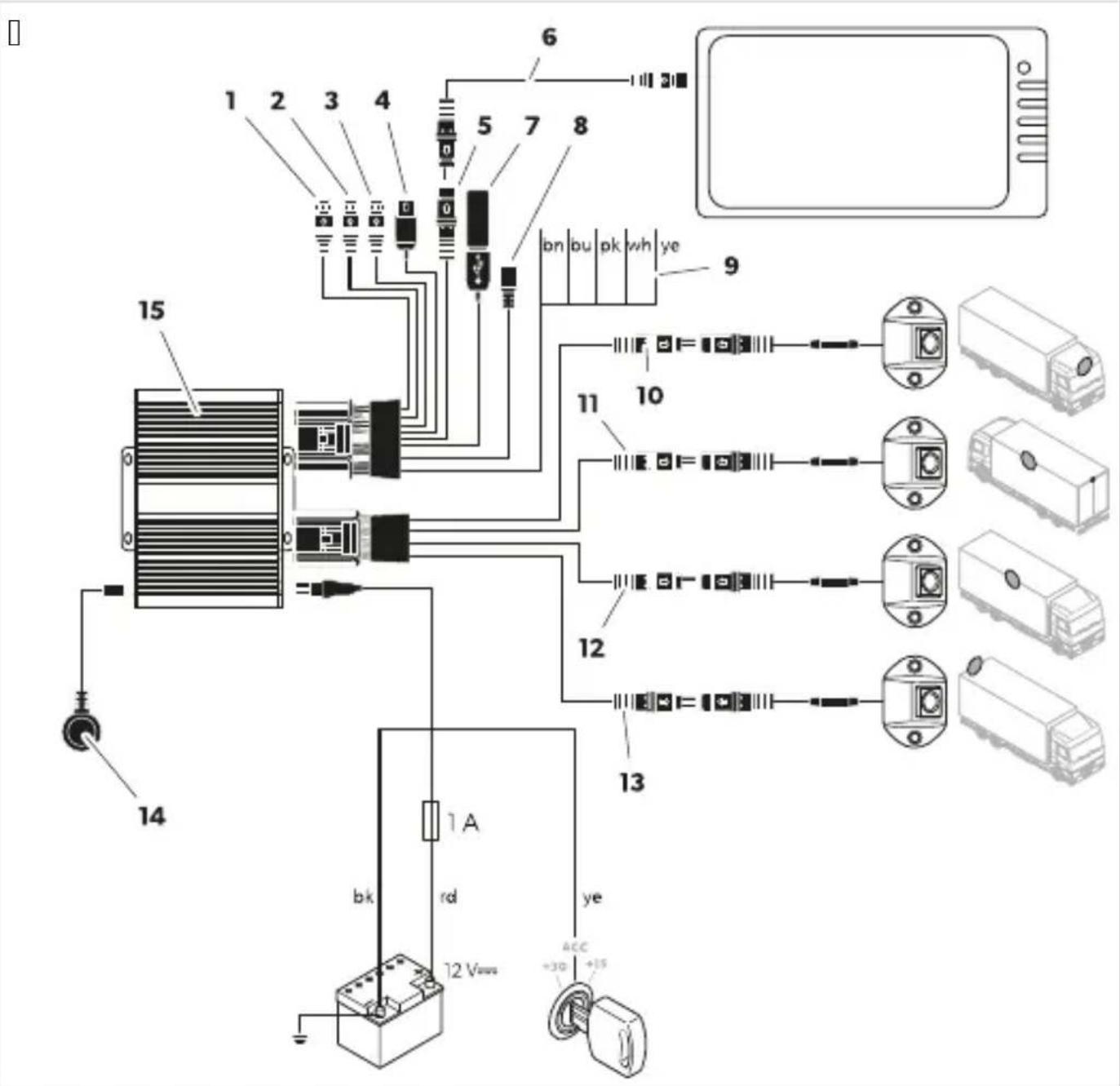
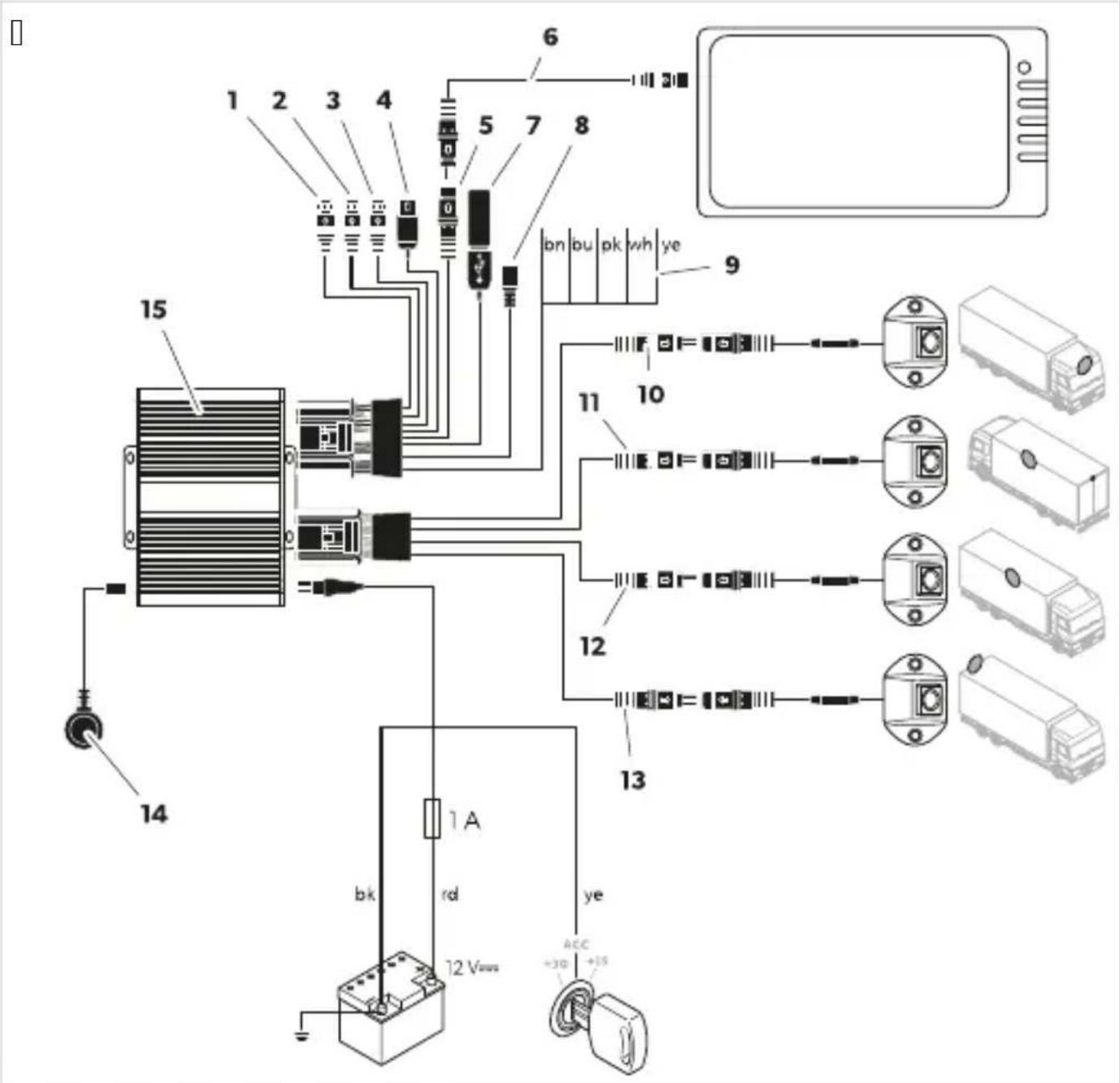
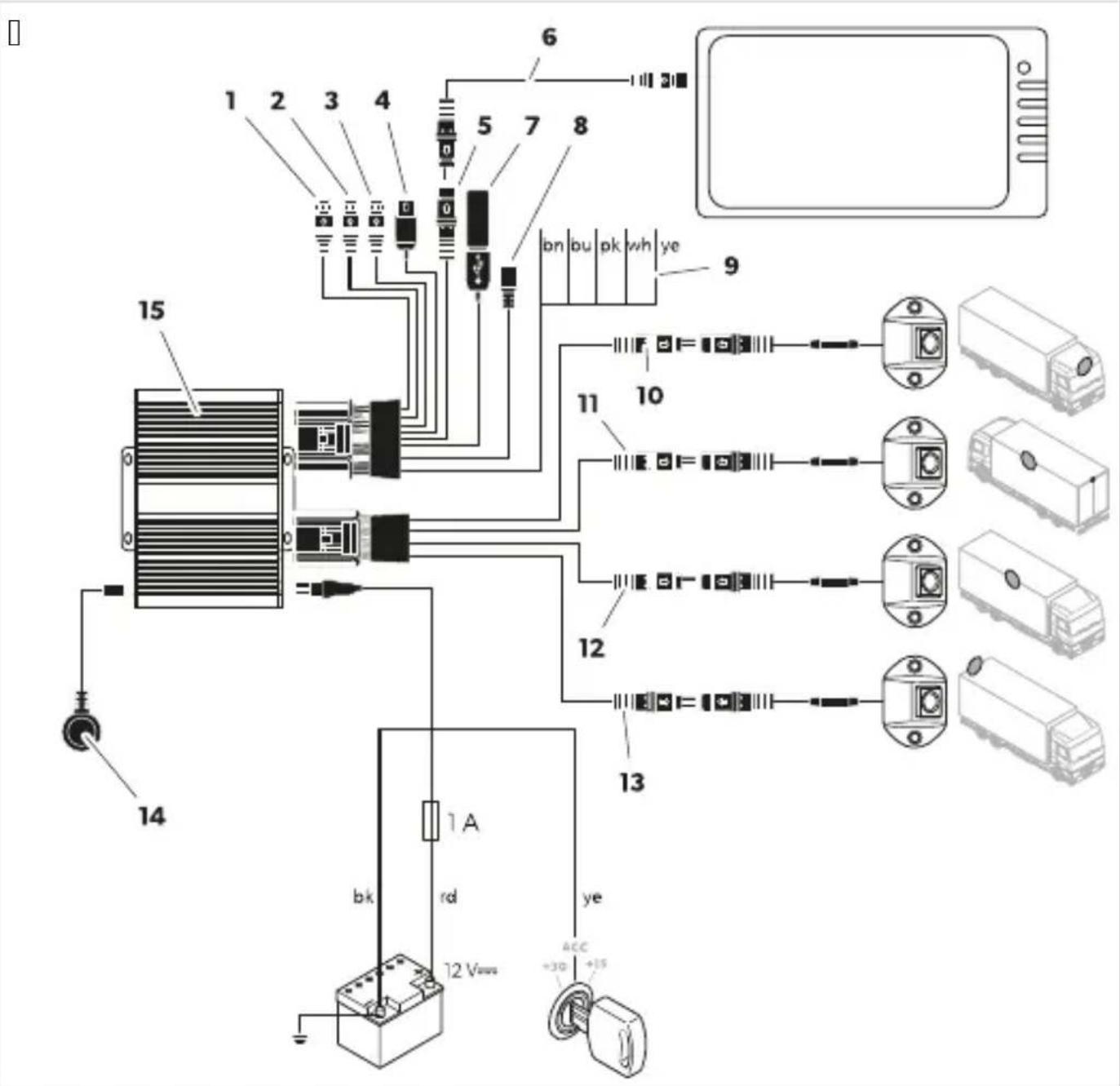
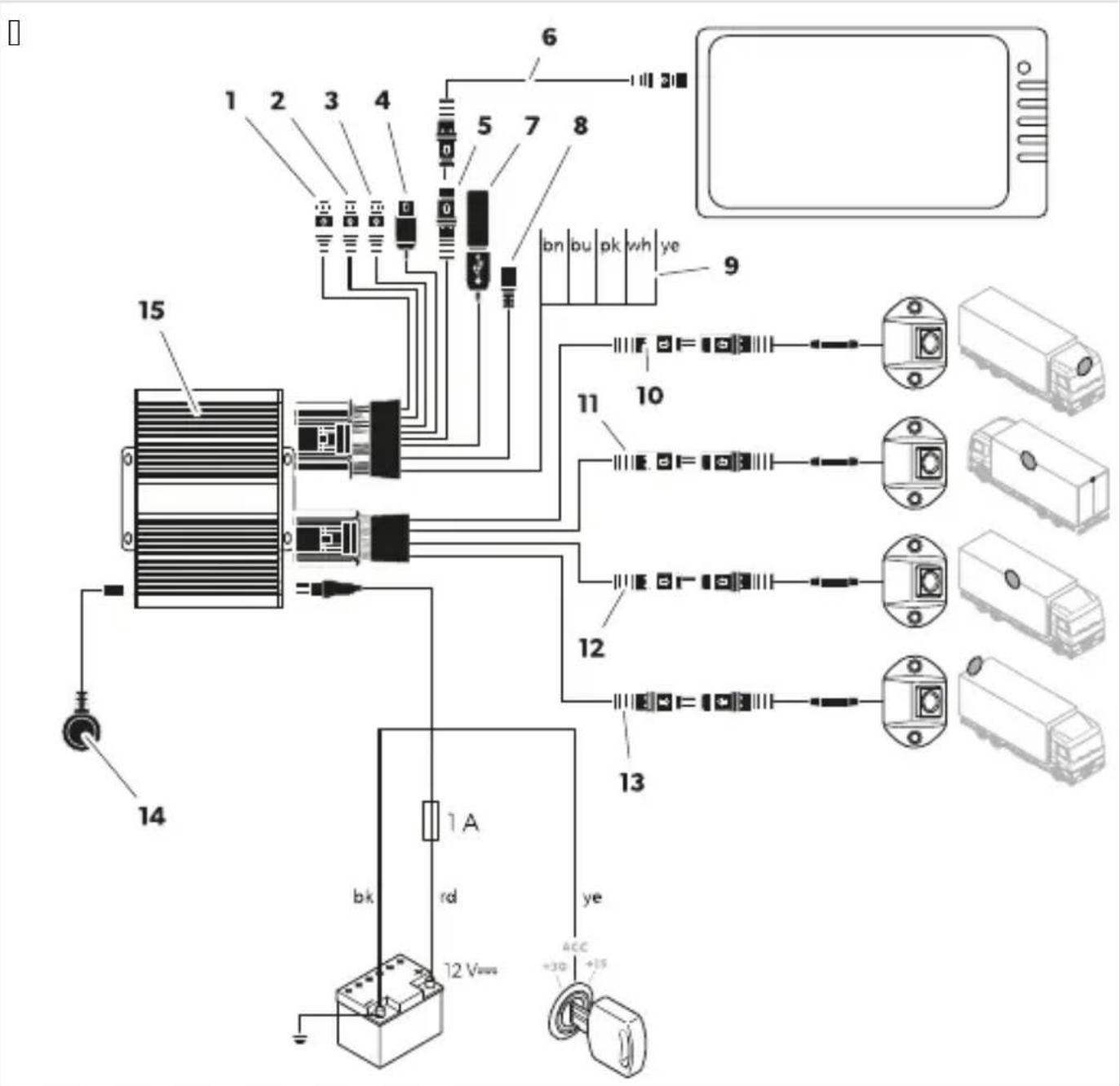
Connect the camera system (Fig. 10 on page 11) according to the wiring diagram (Fig. 10 on page 11).
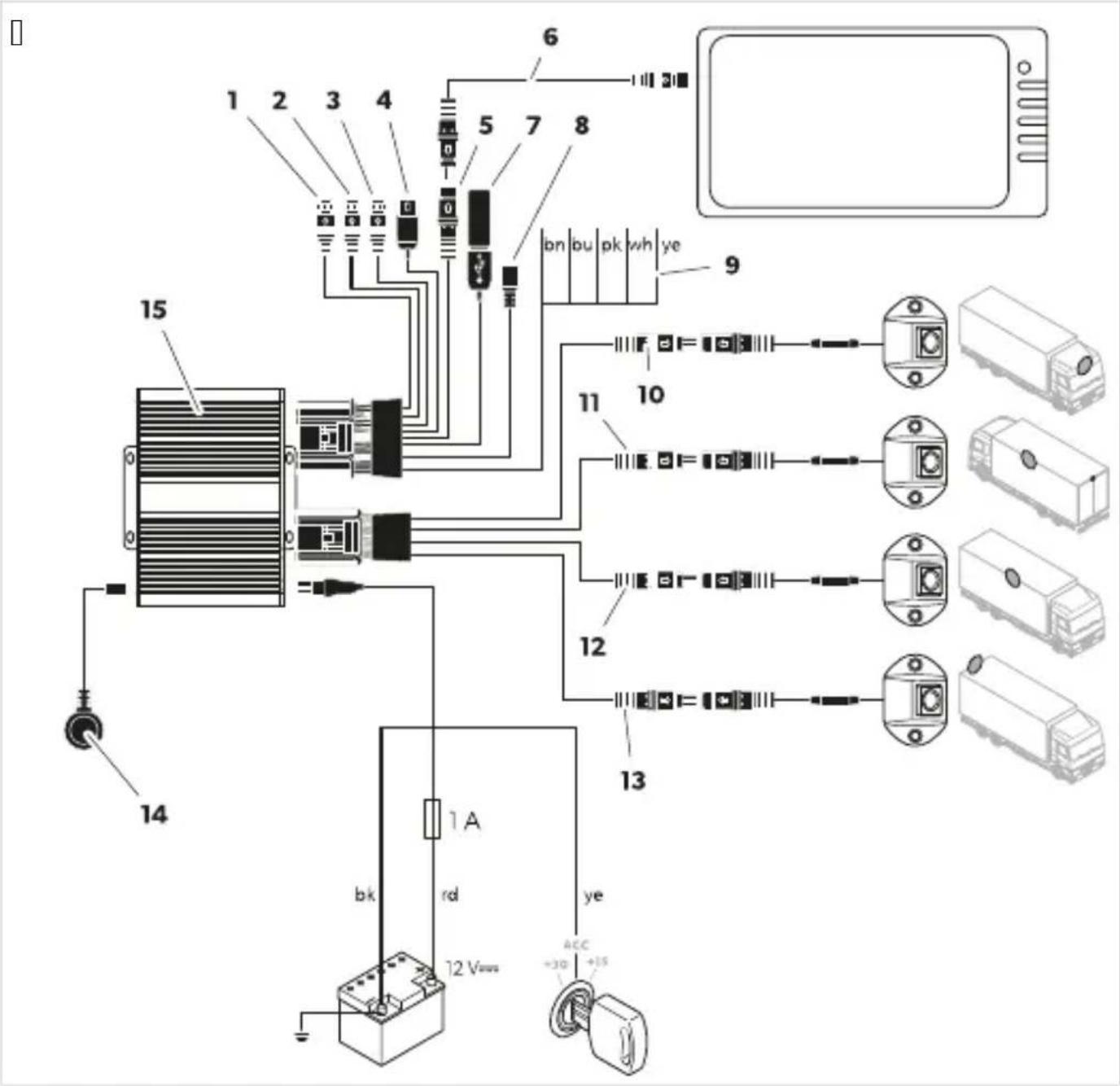
| Item DescriDti, ) | |
| Q | f '' input bnot usedc |
| I | |
| T U" L " U bnot usedc | |
| V f aBS universal video output bcompositec | |
| K " I L monitor connection | |
| W Monitor connection cable | |
| X . SB input | |
| Y Micro . SB bnot usedc | |
| Z Nrigger cables | |
| QJ Blac plug bqFront f " Mr cd Front camera | |
| QQ Blac plug bqoei f " Mrcd oei camera | |
| QI Blac plug bqUight f " Mrcd Uight camera | |
| QT Blac plug bqUear f " Mrcc Uear view camera | |
| QV IU receiver | |
| QK f ontroller | |
| bn | Brown trigger cable bpNUIMs W" UL pcd f onnection to the positive cable o0 the reversing light.When the reverse gear is engagedP the controller and the rear view camera are activated via this cable. |
| bu | Blue trigger cable bpNUIMs Rt NR' L pcd f ontrl signal input Cor displaying the birds eye view in Cull screen b QI la signalc. |
| p Din trigger cables f ontrl signal output Cor switching on a monitor b QI la signalc. | |
| wh | White trigger cable bpNUIMs opcd f onnection to the positive cable o0 the lei indicator.When the lei indicator is activatedP the controller and the corresponding camera are activated via this cable. |
| ye | Yellow trigger cable bpNUIMs Upcd f onnection to the positive cable o0 the right indicator.When the right indicator is activatedP the controller and the corresponding camera are activated via this cable. |
| b Blac cable bqM' L rcd f onnection to earth tterminal TQc | |
| rd | Ued cable bqL f QI mTI arcd f onnection to continuous battery positive terminal TJ c. Rnables amongst others saving o0 date and time brecorder functionc. |
| ye Yellow cable bq" f f rcd f onnection to the " f f ignition tterminal QKc. | |
- Test the camera system by performing a calibration test (see Calibrating the video system on page 17).
Mark the positions of the cameras.
Select the installation position of the cameras.
Observe the specified distances.
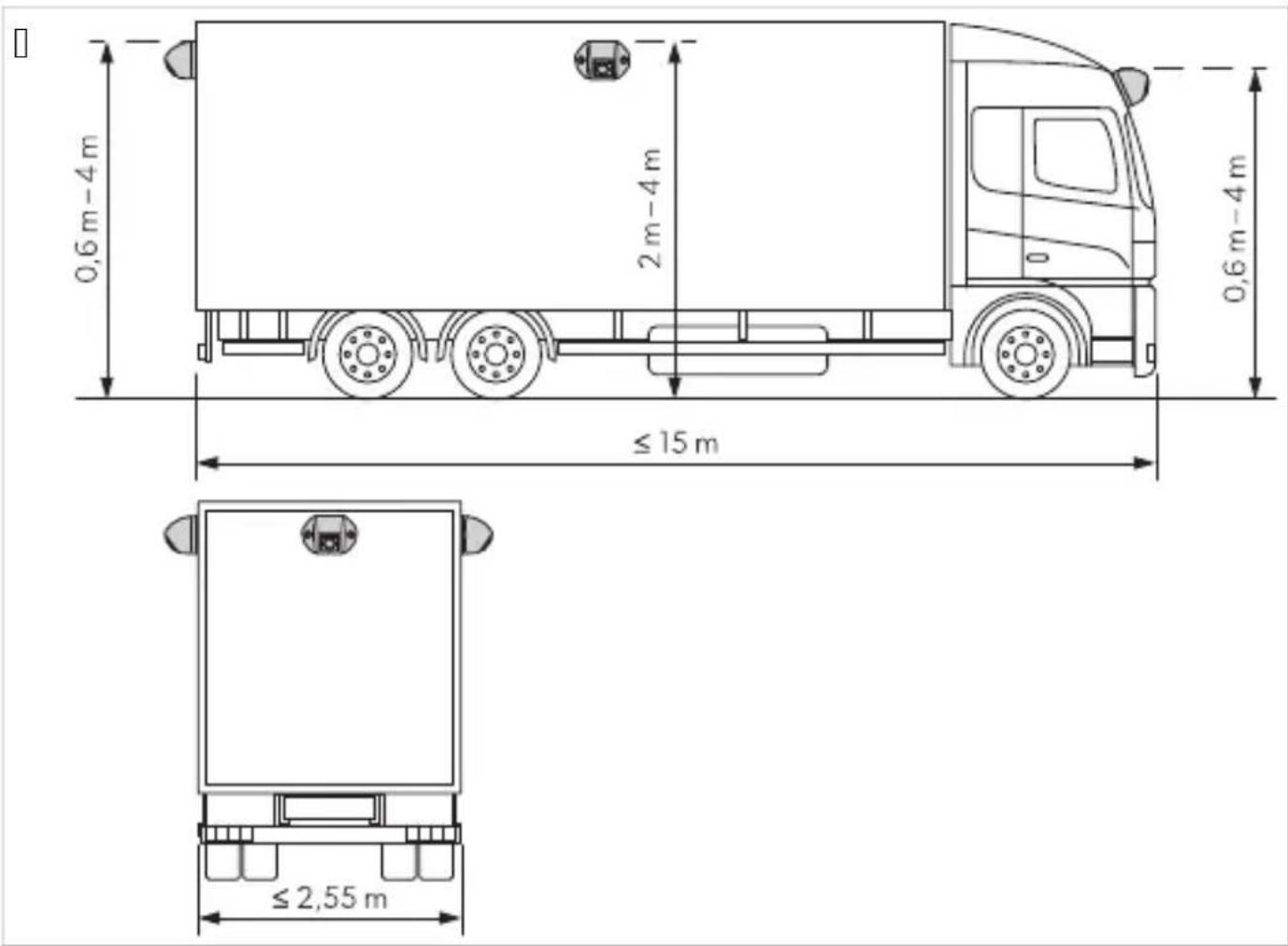
- Mark the positions of the cameras.
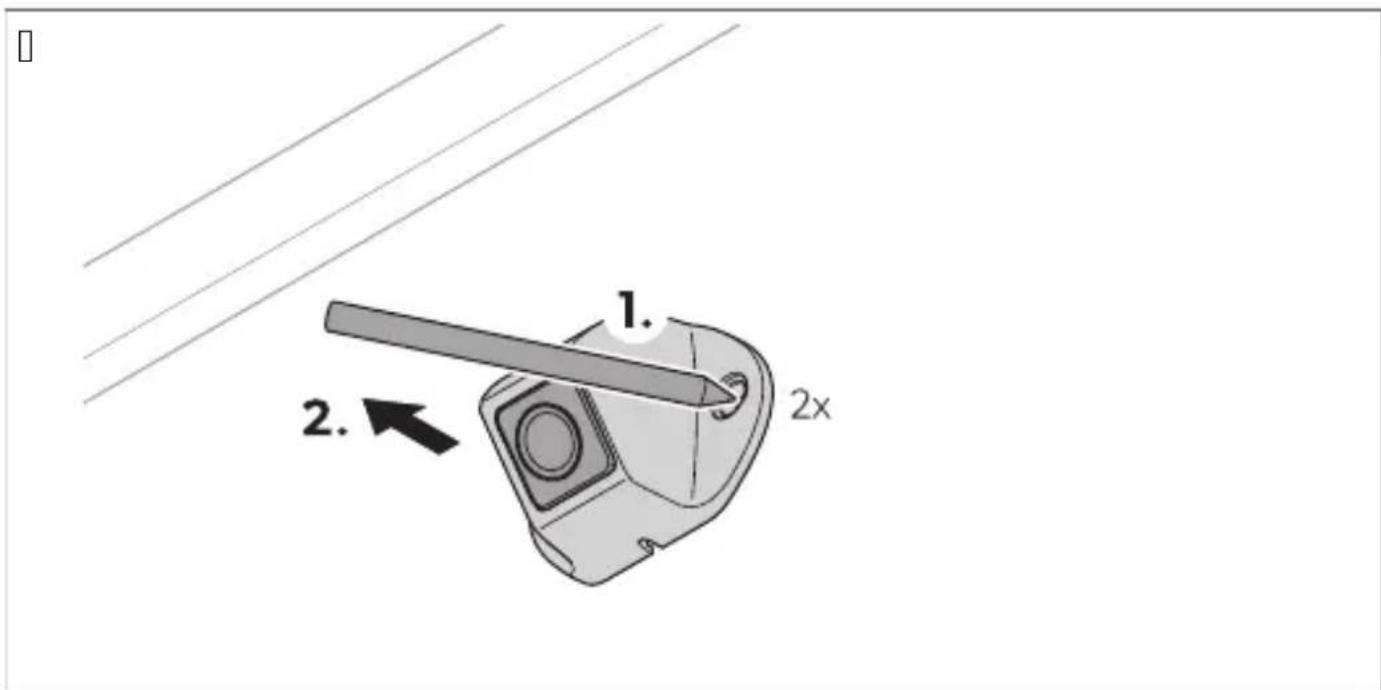
Center-punch the previously marked points to prevent the drill head from slipping.
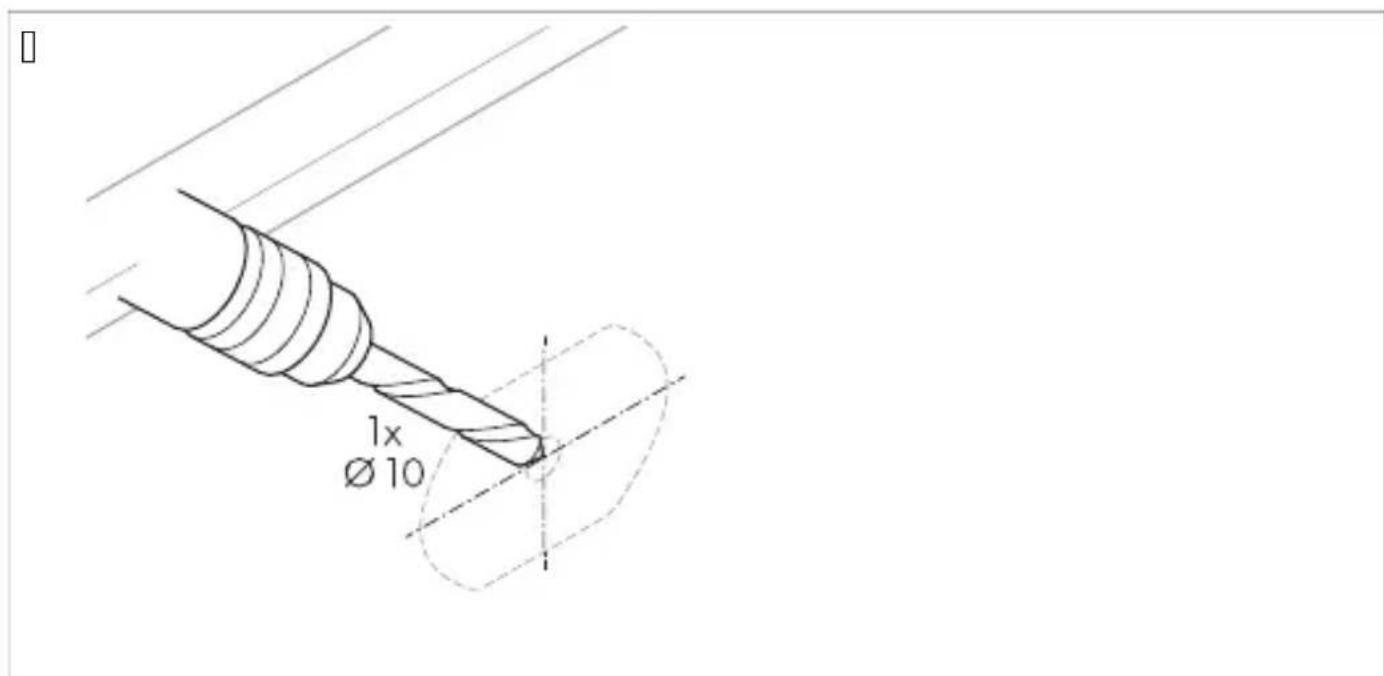
Drill a hole of ∅ 11 mm for the cable entries.
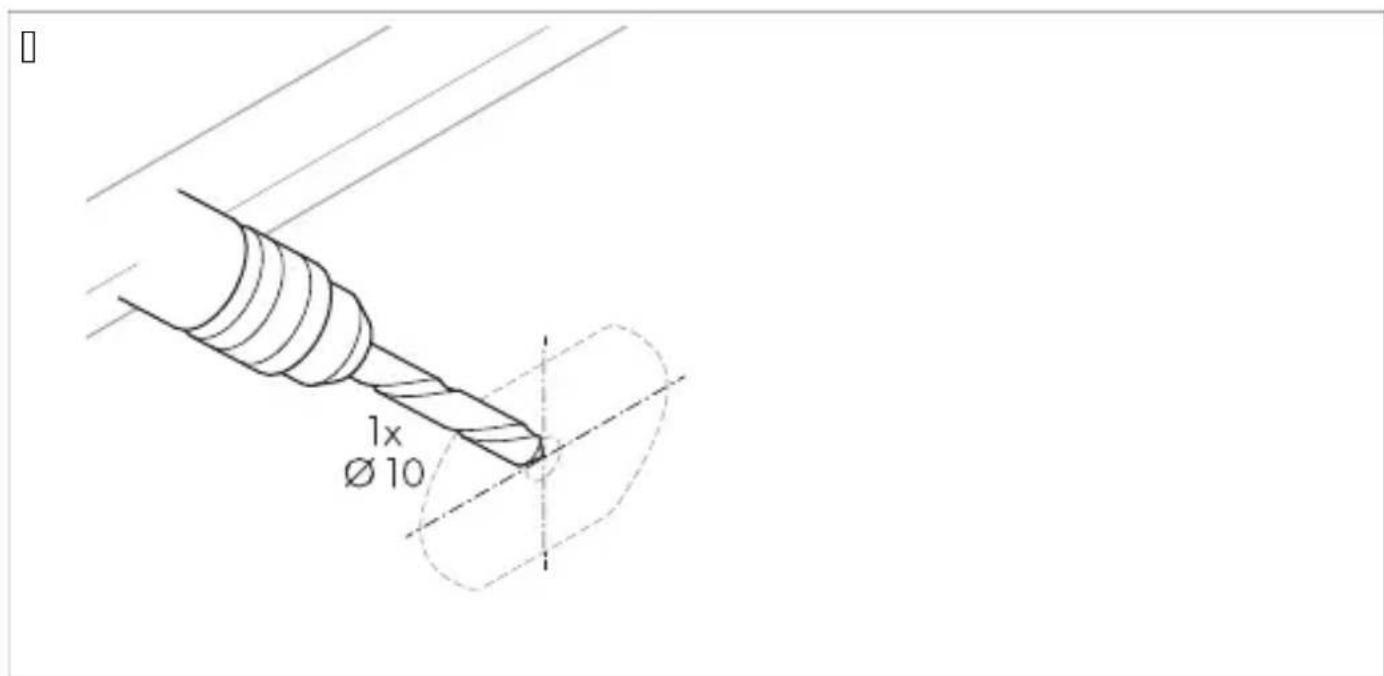
Feed the camera cable into the vehicle interior.
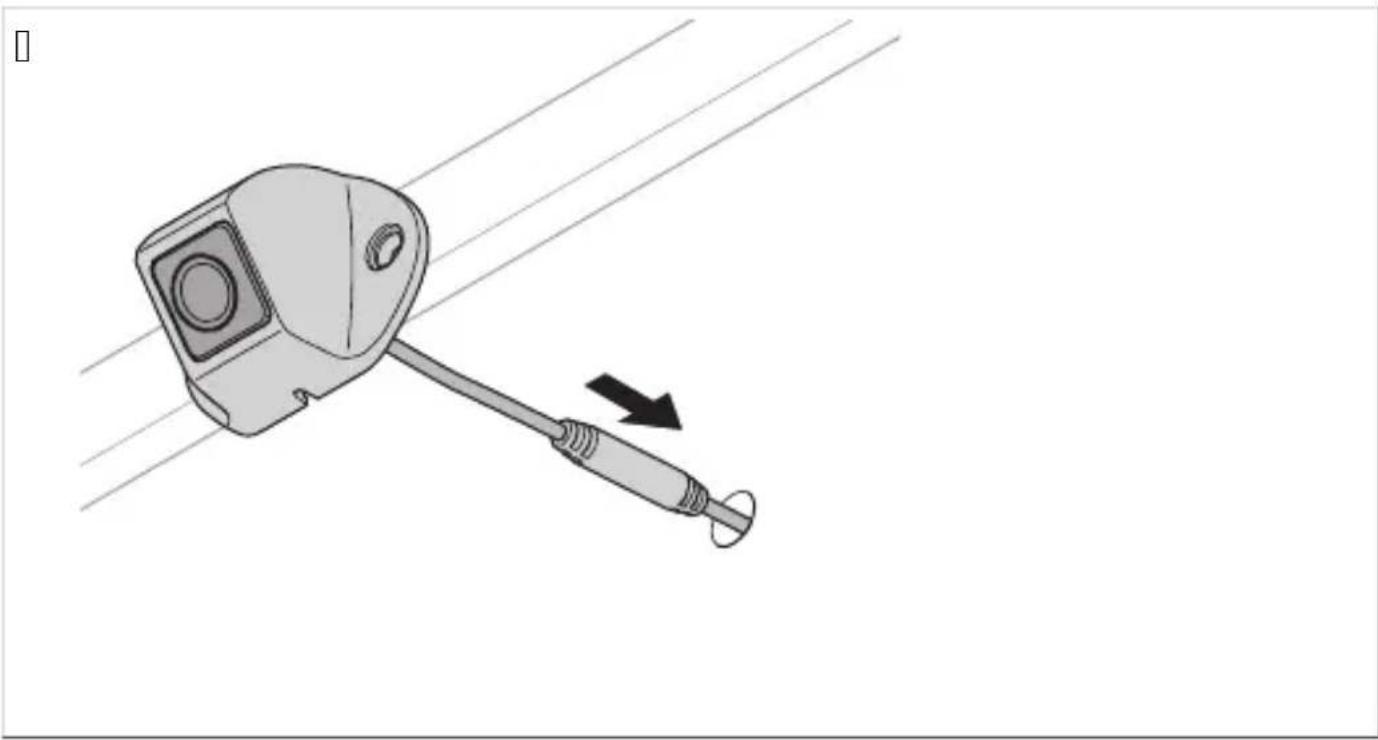
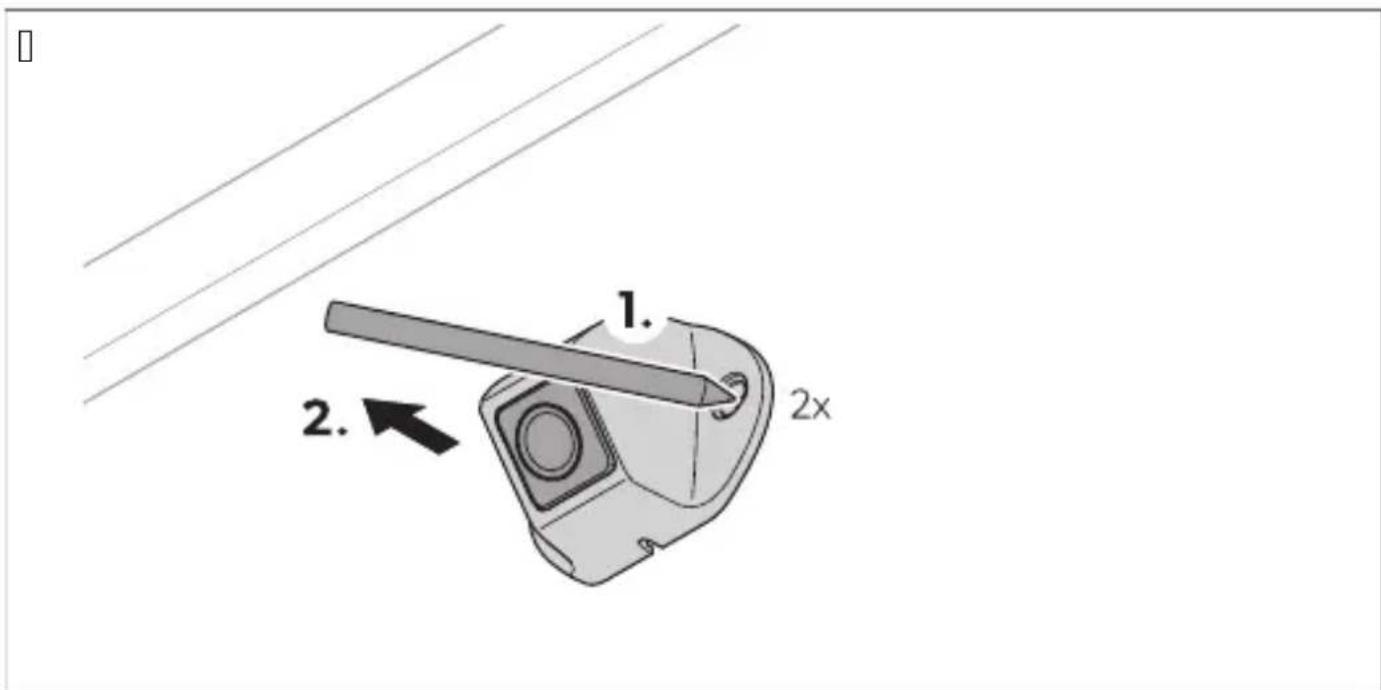
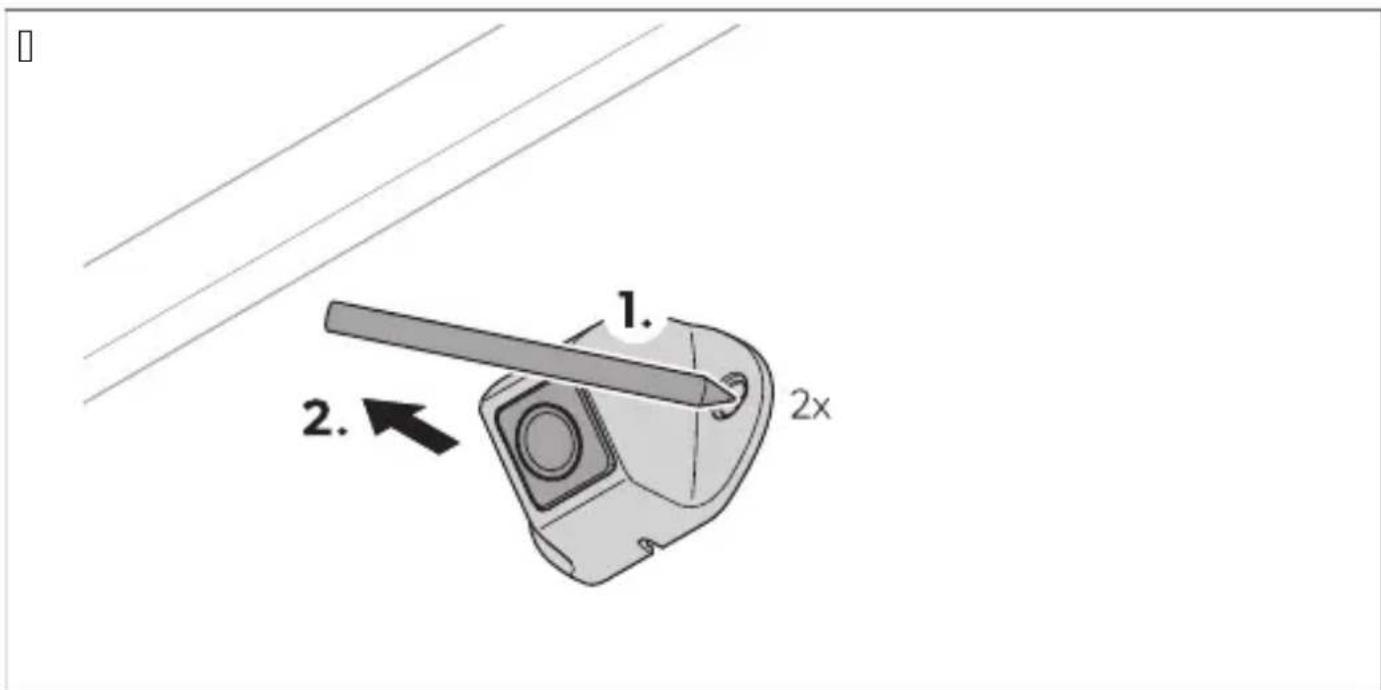
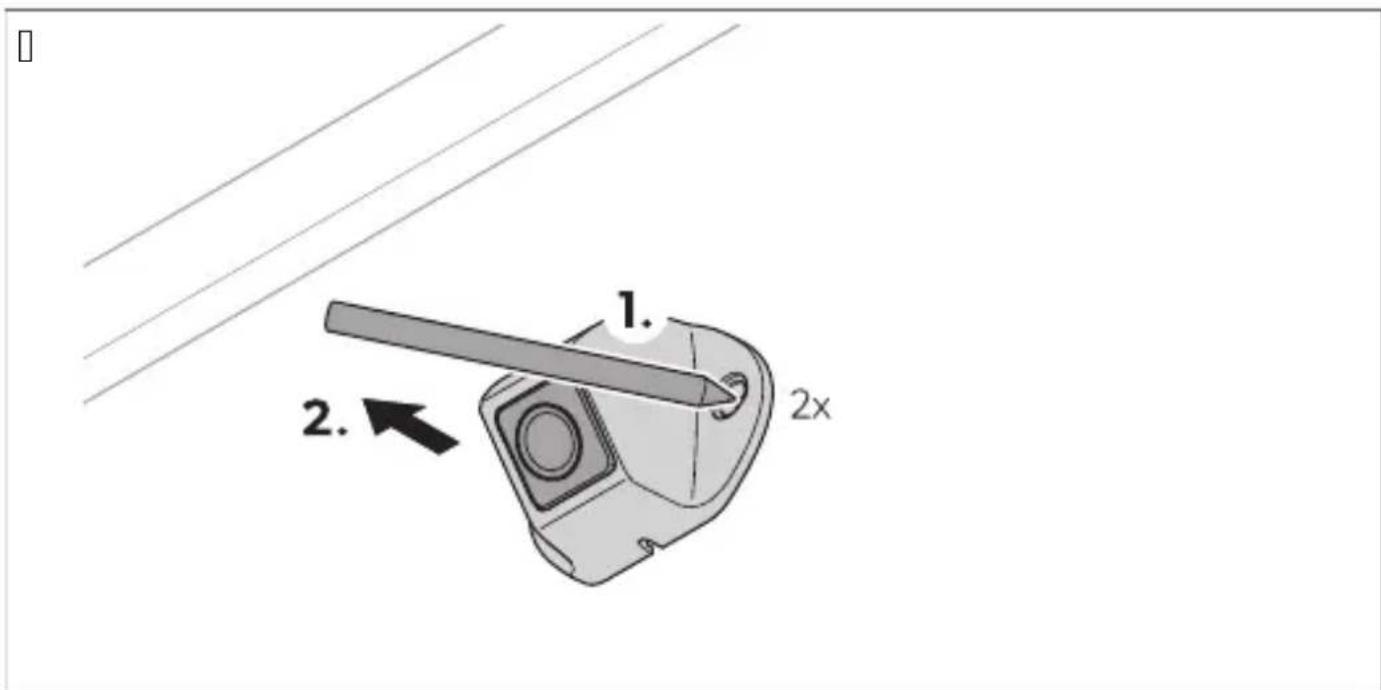
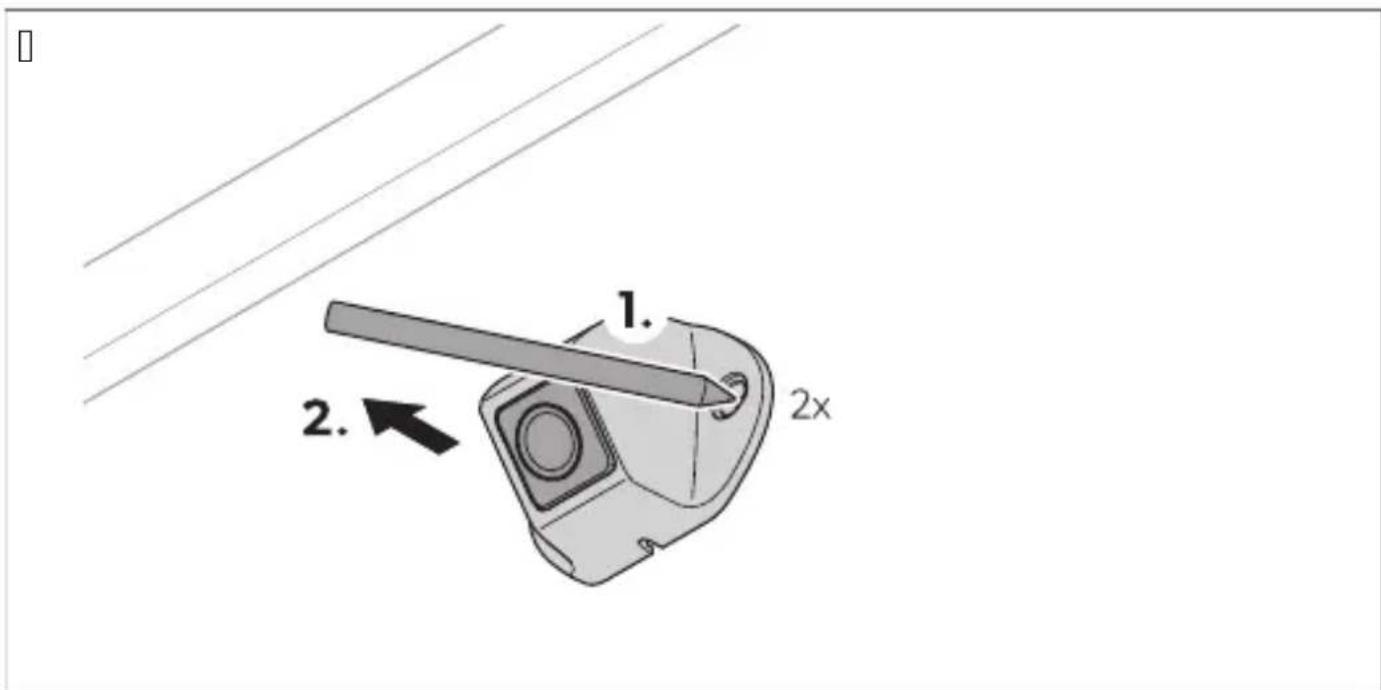
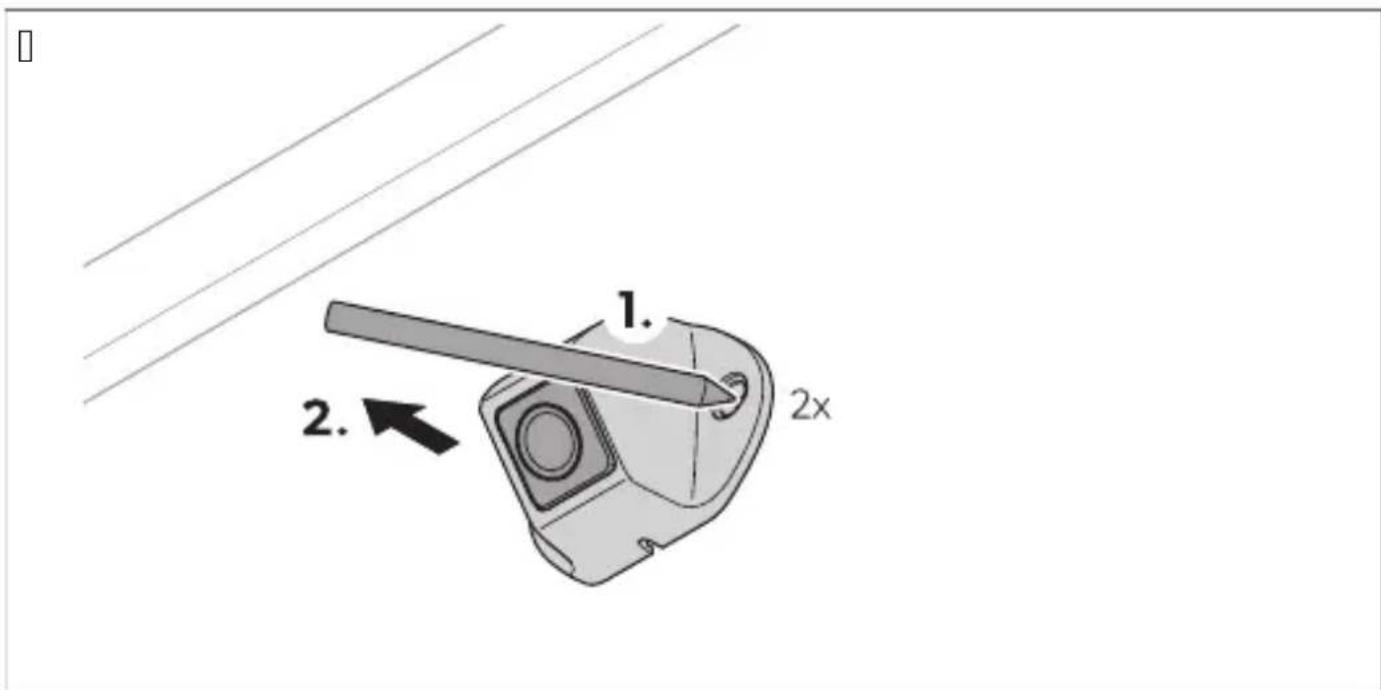
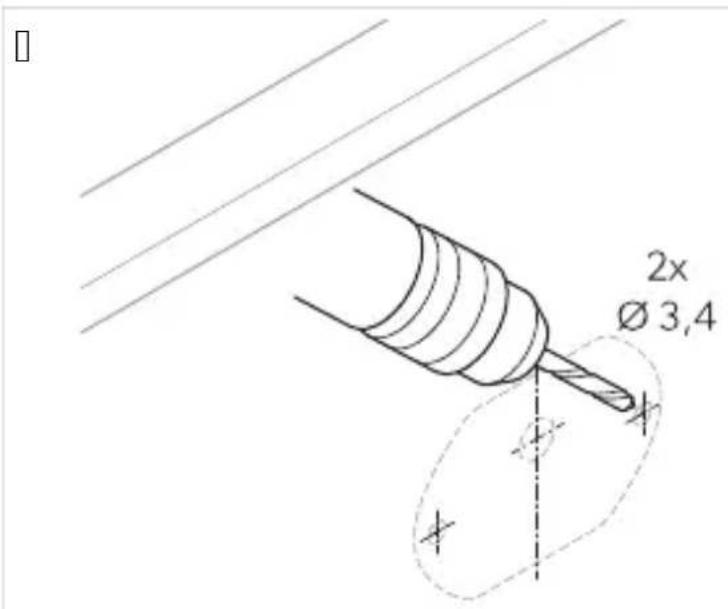
W. Mark the holes for the mounting screws.
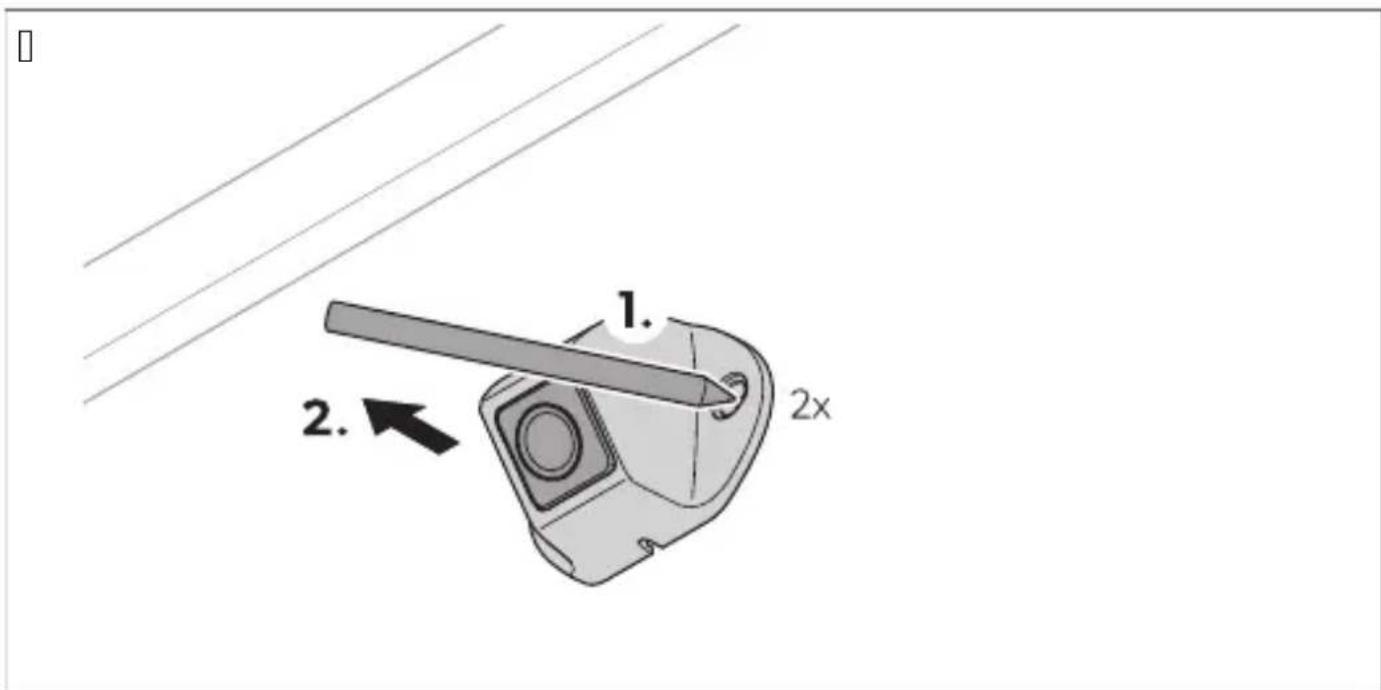
X. Remove the camera.
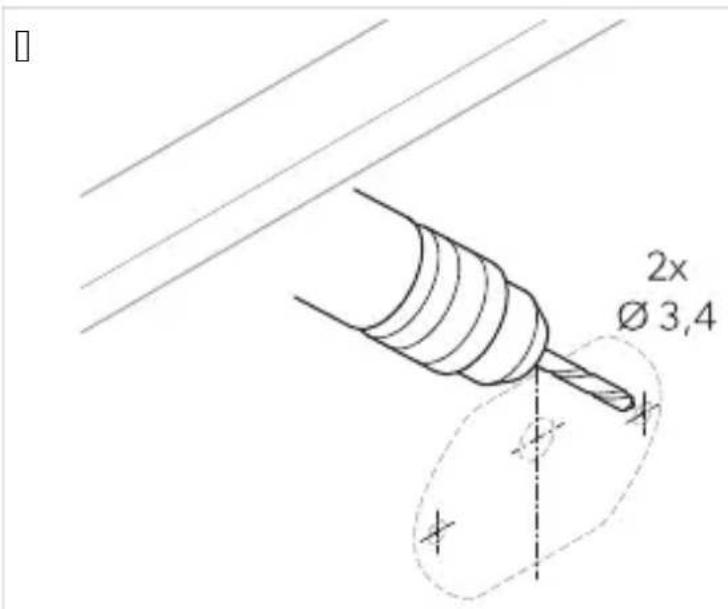
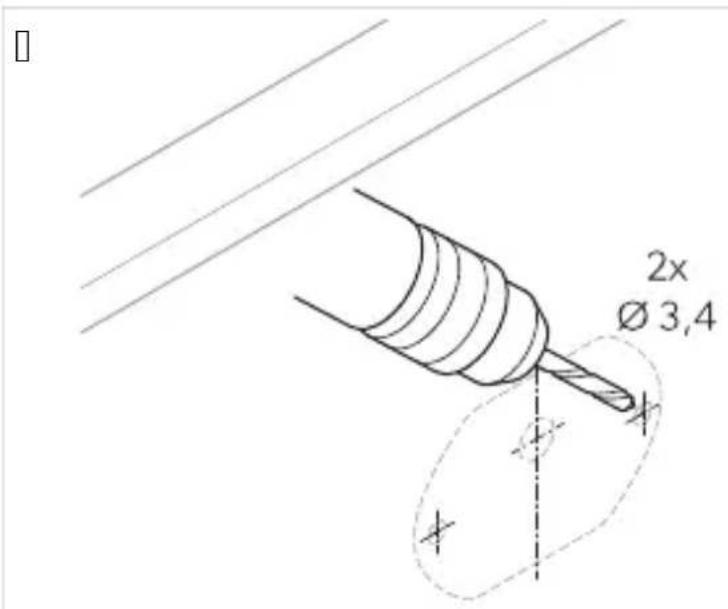
Y. Drill holes of ∅ 7 mm in the camera bracket.
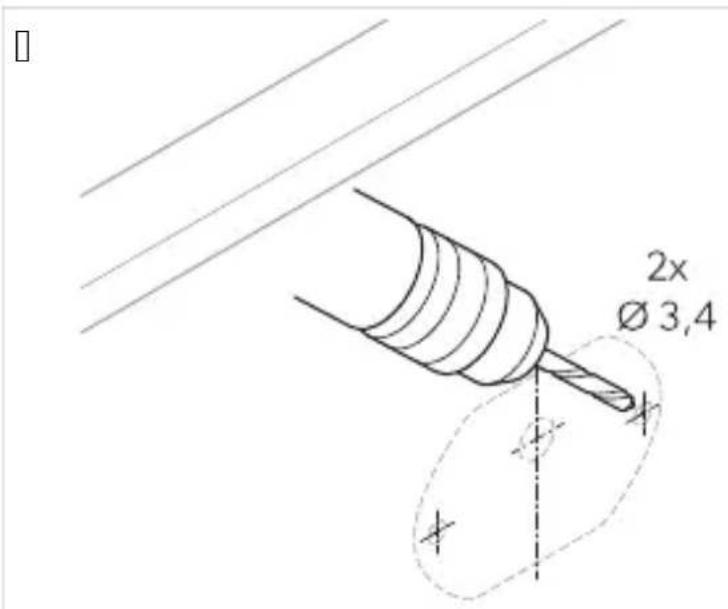
Z. Guide the camera cable into the vehicle interior.
Q. Screw on the camera and the camera bracket using the included self-tapping screws or M5 x 12 mm threaded screws.

NOTE: Depending on the thickness of the construction, longer threaded screws are required.
Do not install the controller in a location exposed to direct sunlight.

NOTE:
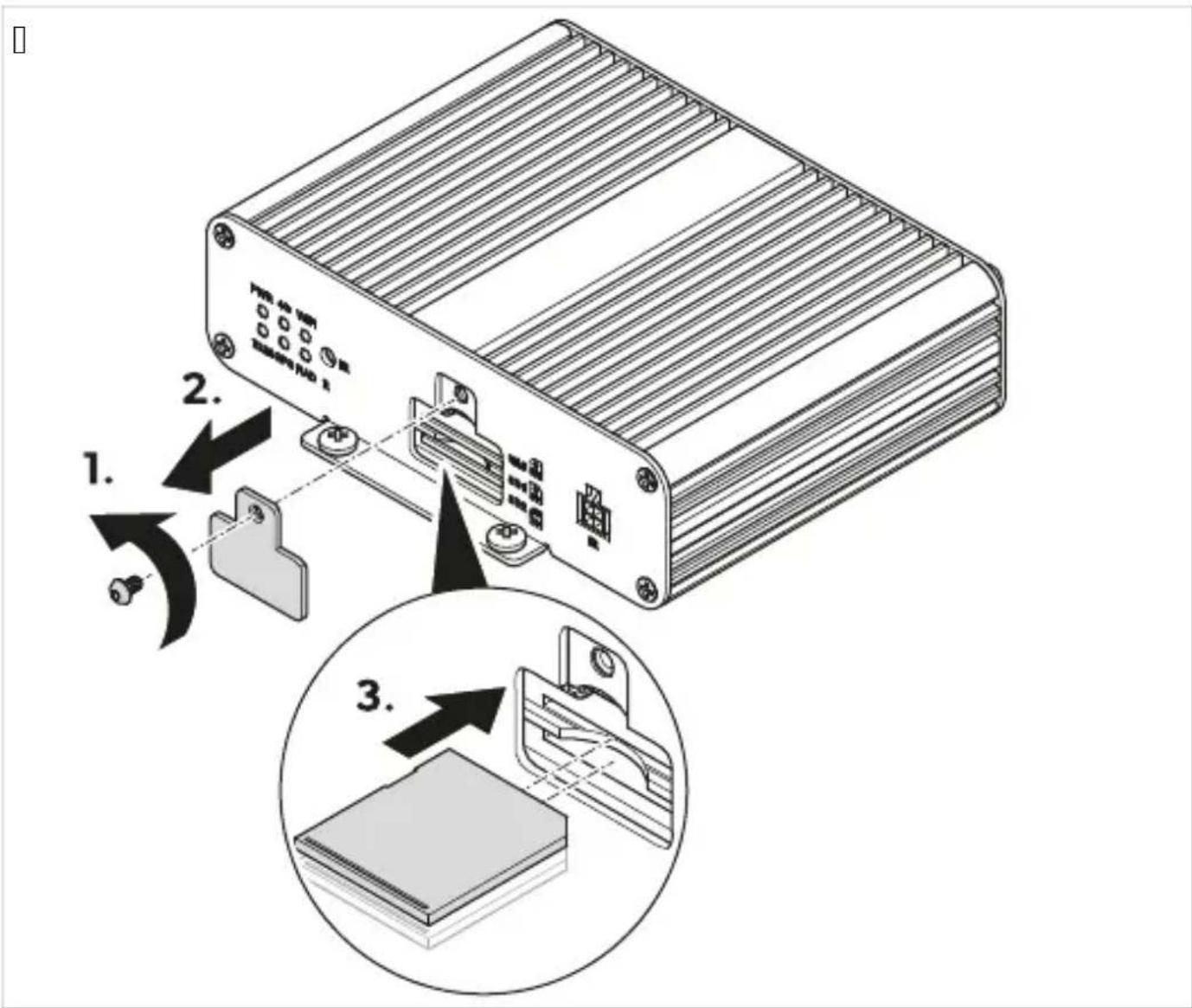
Ensure that the back of the controller is accessible after installation and that there is enough space to insert an SD card (see "Inserting an SD card" on page 11).
If a flash drive is to be used to store the video data, move the USB input (Fig. 10 on page 11) to an easily accessible location.
Q. Install the controller in a place protected from water near the monitor, e.g., under the dashboard or under the driver's seat (Fig. 10 on page 11).
- Fasten the controller with the bolts supplied.
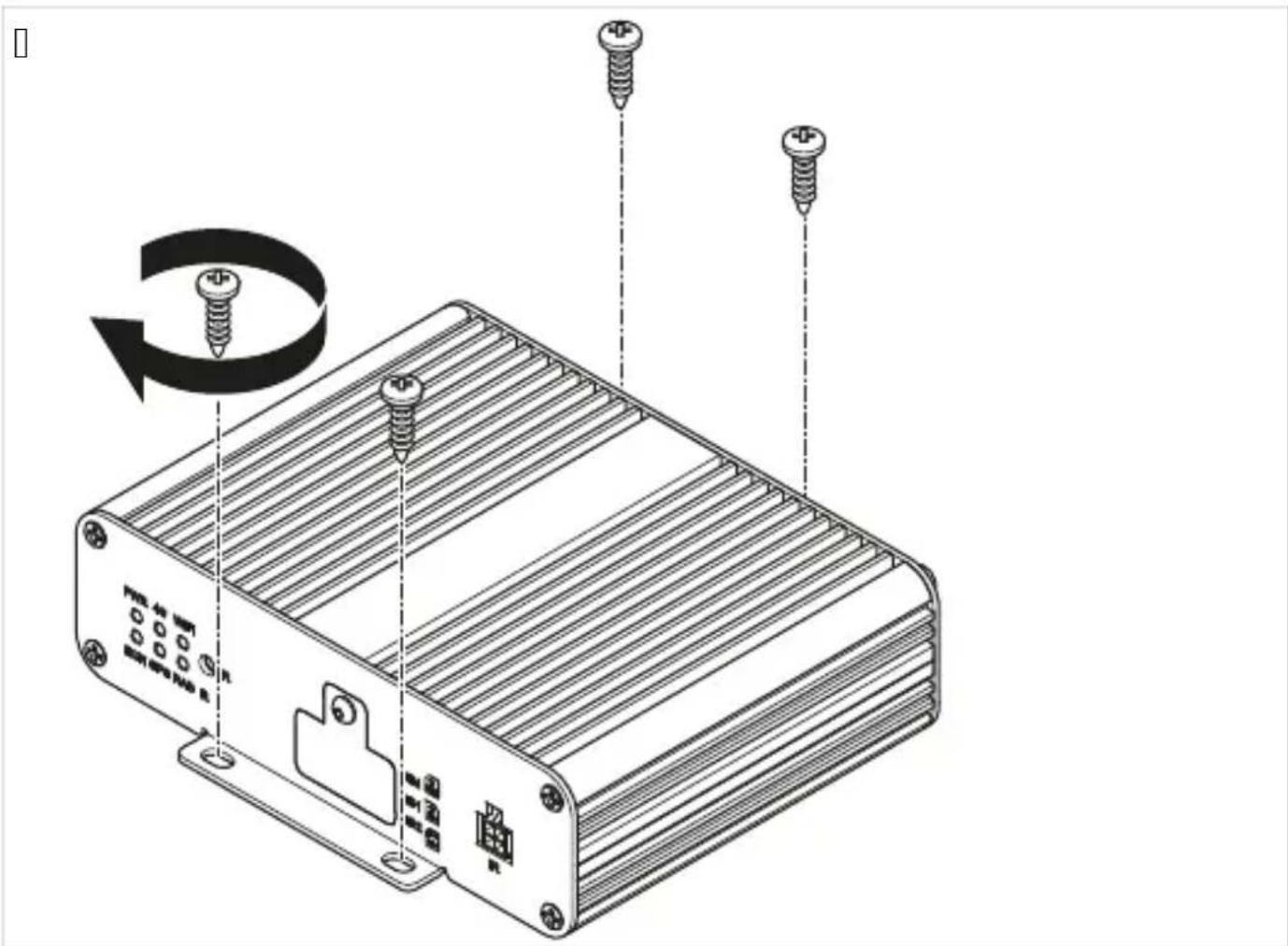
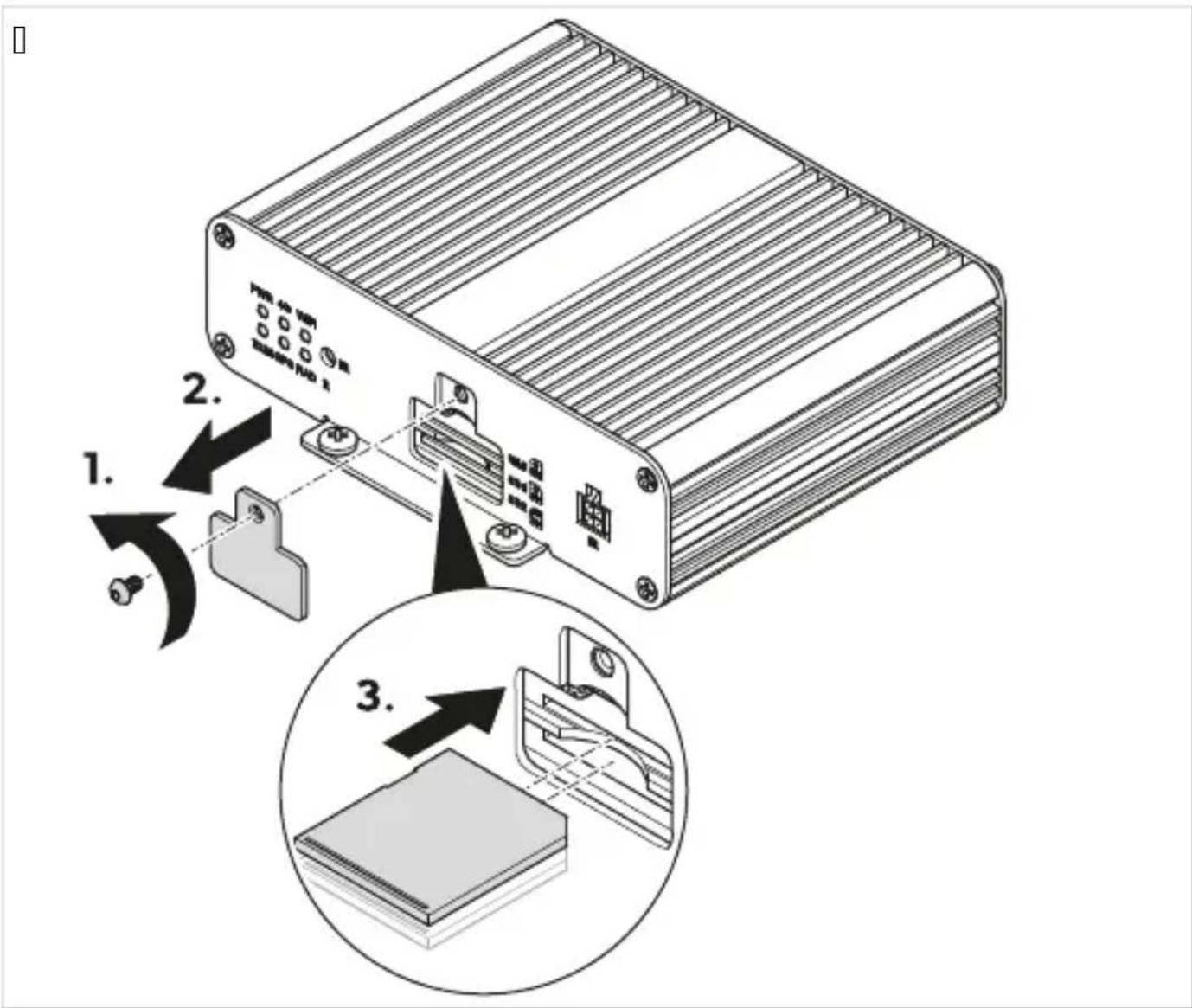
Q. Unscrew the SD card cover from the controller.
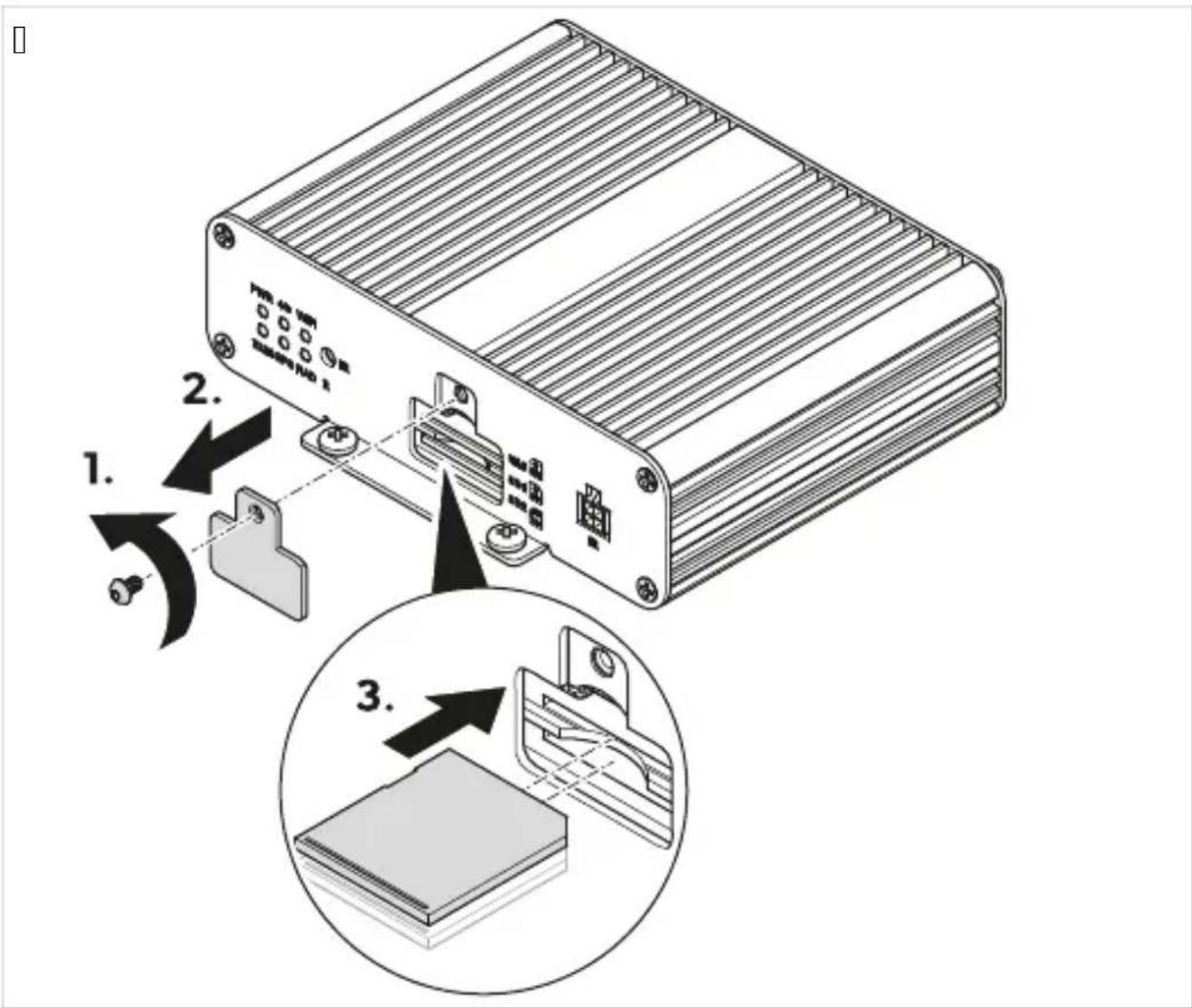
I. Insert one or two SD cards. T. Screw the SD card cover to the controller.
TPS: Install the IR receiver.
Choose a location where the IU receiver (Fig. 10 on page 11) is within sight of the remote control.
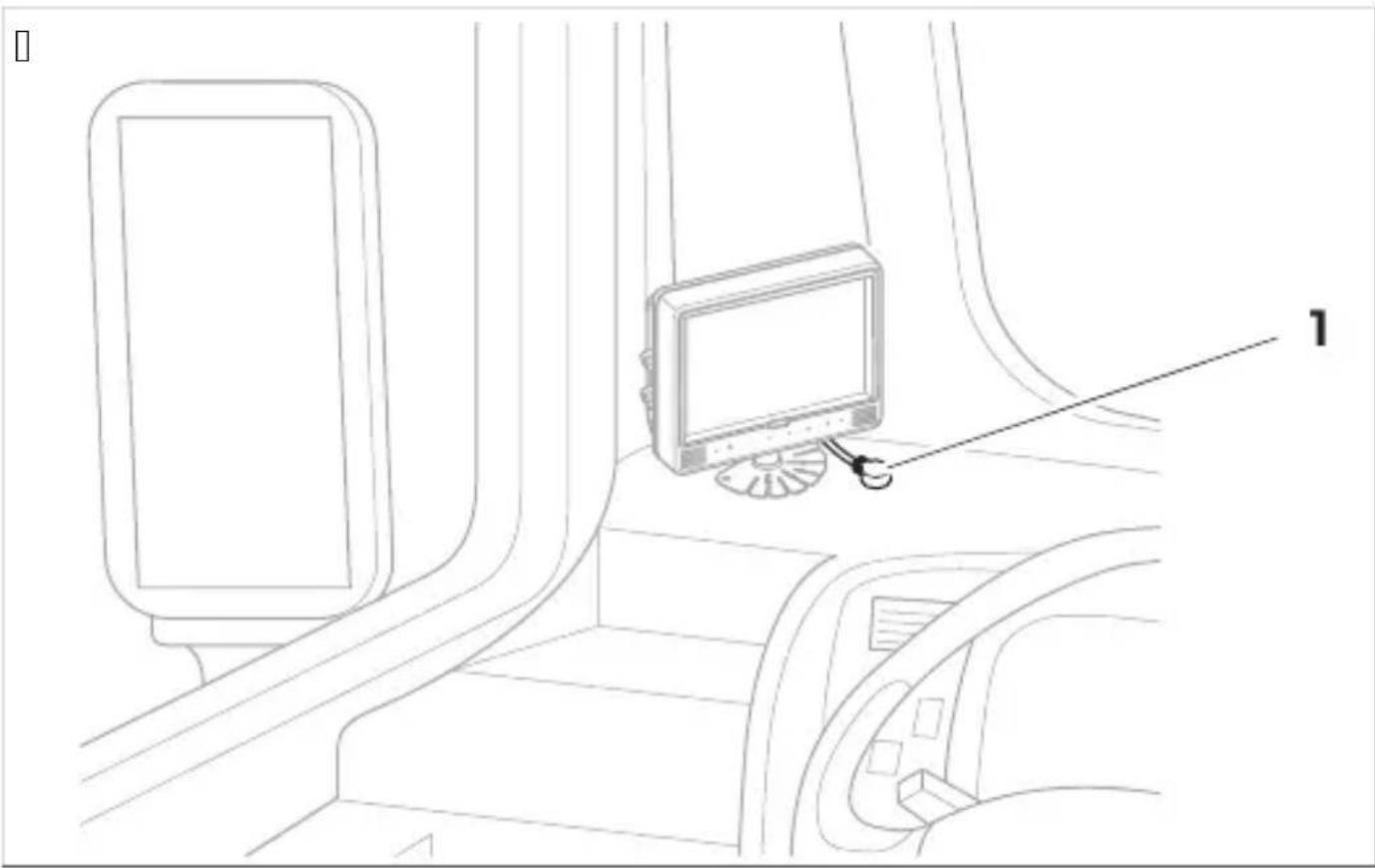
Attach the IU receiver with the supplied double-sided adhesive tape.
Ensure that the cables and connections are connected correctly to ensure permanent and trouble-free operation of the retrofitted components. Improperly installed cables and connections can lead to malfunction or damage to components. Ensure that the lines for terminal 15, left indicator, right indicator, and reverse are secured on the vehicle side with a fuse rated higher than specified (Fig. 10 on page 11). If this is not the case, then an additional fuse must be used at the corresponding consumer point. If the connection for the reverse signal is not used, the copper end must be insulated. The load of this output must not exceed 1 A.

Route the camera cable so that the connection between the camera and the extension cable is easy to reach.
Connect the camera system as shown in the wiring diagram (Fig. 10 on page 11).
- Protect the plug connection between the extension cable and the cameras each with an O-ring and vulcanizing tape.

NOTICE: Damage hazard
Attach the O-rings and vulcanization tape to protect the connectors from water and meet IPX sealing requirements.

Operation
Use the remote control and, if available, the monitor buttons or touchscreen to operate and adjust the camera system (see Remote control on page 11).
Follow the monitor manufacturer's instructions.

NOTE
It is possible that the monitor has fewer buttons than the remote control. With the buttons on the monitor there are fewer options for operating and adjusting the camera system. When opening or adjusting settings, it may take a few seconds for the camera system to load and execute the settings.
Ensure that the monitor is switched on.
- Press the POWER button on the remote control. The camera system switches on.
Ensure the main interface is displayed. 1. Press the POWER button on the remote control.
Press the Enter button on the remote control. - If the main interface has been open for several minutes or the camera system has been restarted, the login menu is displayed. If the settings were open a few minutes before, the main menu is displayed.
UPHP3 Filli) E i) tel t Jields
Select the test field.
Press the number buttons on the remote control to enter text in the text fields. Press the PTZ button on the remote control to enter a decimal point. Press the CLEAR button on the remote control to delete the last entry.
Using the keyboard

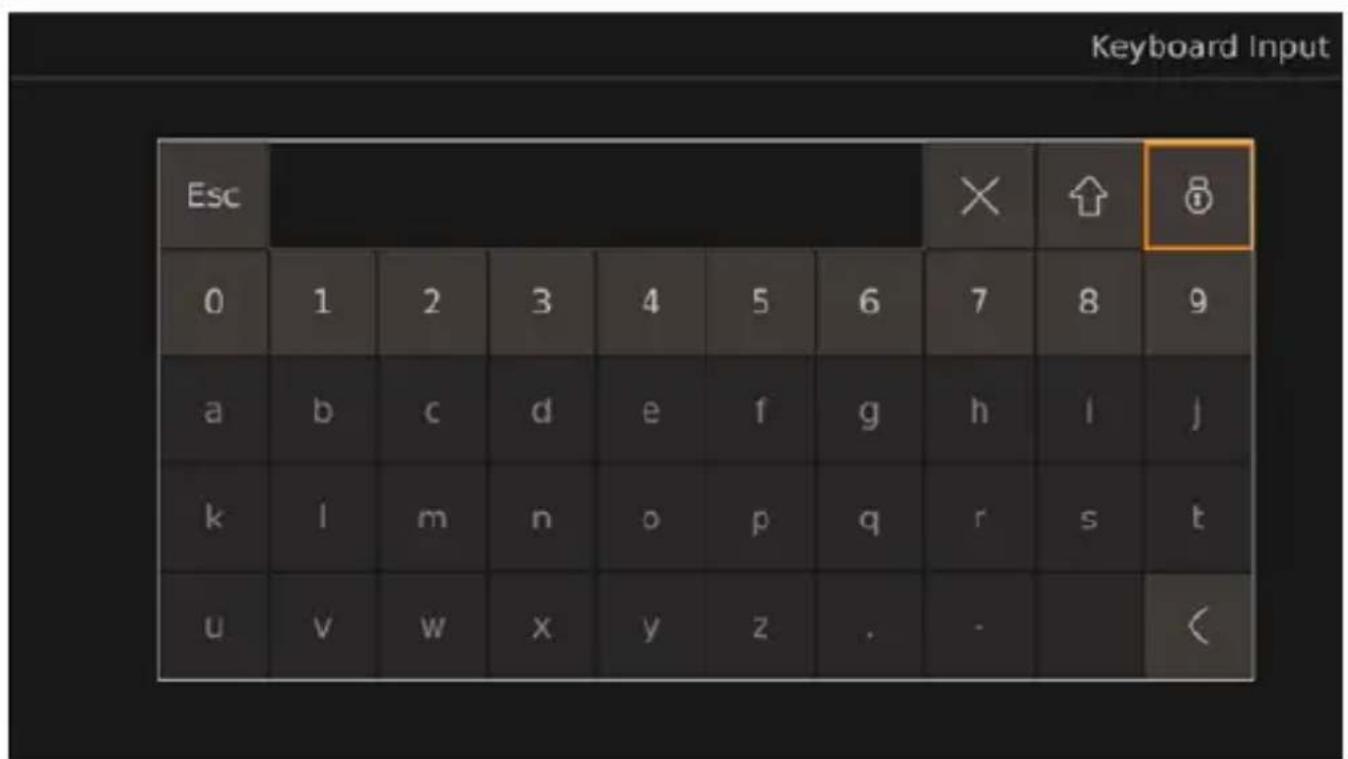
1. Press the ENTER button on the remote control to open the keyboard.
2. Use the keyboard buttons to enter the desired letters or numbers.

NOTE
The text fields are provided with a limited number of letters, numbers, and characters depending on the text field. If the limit is reached, the entry must first be deleted before new text can be added. When selecting the text field on the keyboard, values can also be changed using the number buttons on the remote control or deleted by pressing the CLEAR button on the remote control. If letters or characters (decimal points and/or hyphens) are entered in a text field that is reserved for values (numbers), the letters and characters are automatically removed from the text field after exiting the corresponding settings and the text field is set to 0.
√ ✗/ CLEAR: The last entry is deleted.
Lowercase letters become uppercase letters. Uppercase letters become characters. Characters become lowercase letters.
and: The letters and character buttons on the keyboard are locked. The numbers, Esc, and lock buttons are unlocked.
All buttons on the keyboard are unlocked.

NOTE: After unlocking the letters and characters, they will be locked again when the keyboard is reopened.
Use the and buttons on the remote control to switch through the dropdown menu.
Press the ENTER button to confirm the selection.
Press the SHIFT button to leave the dropdown menu.
Select the dropdown menu.
Use the and button on the remote control to move through the dropdown menu selections.
Press the SHIFT button to leave the dropdown menu.
Press the Save button to save the set settings and configurations.
A window for confirming and canceling the saving process is displayed.
- Confirm or cancel the saving process.
Yes: The settings are saved. The confirmation window is closed.
No: The settings are discarded. The confirmation window is closed.
Reset the settings or configurations. See "Resetting menus, settings, and configurations" on page 1c.
Press the ESC button on the remote control or, if present, use the < button to exit the displayed menu, settings, or configurations.
If settings have been made and not saved, a window for confirming and canceling the saving and exiting process is displayed.
If settings have been saved or a menu or configurations have been exited, the previous screen is displayed.
- If necessary, confirm or cancel the saving process.
Yes: The settings are saved. The confirmation window is closed. The previous screen is displayed.
No: The settings are not saved. The confirmation window is closed. The previous screen is displayed.

Note: Some settings require a restart after saving when switching back to the main menu or main interface. The camera system restarts itself.
If the password is forgotten, contact the manufacturer to request a key for resetting the password.
After logging in, the password must be entered again if the camera system menu, settings, or calibrations have not been used for 10 minutes, rebooting the camera system, deactivating the standby mode, or the camera system is switched on again after being switched off.
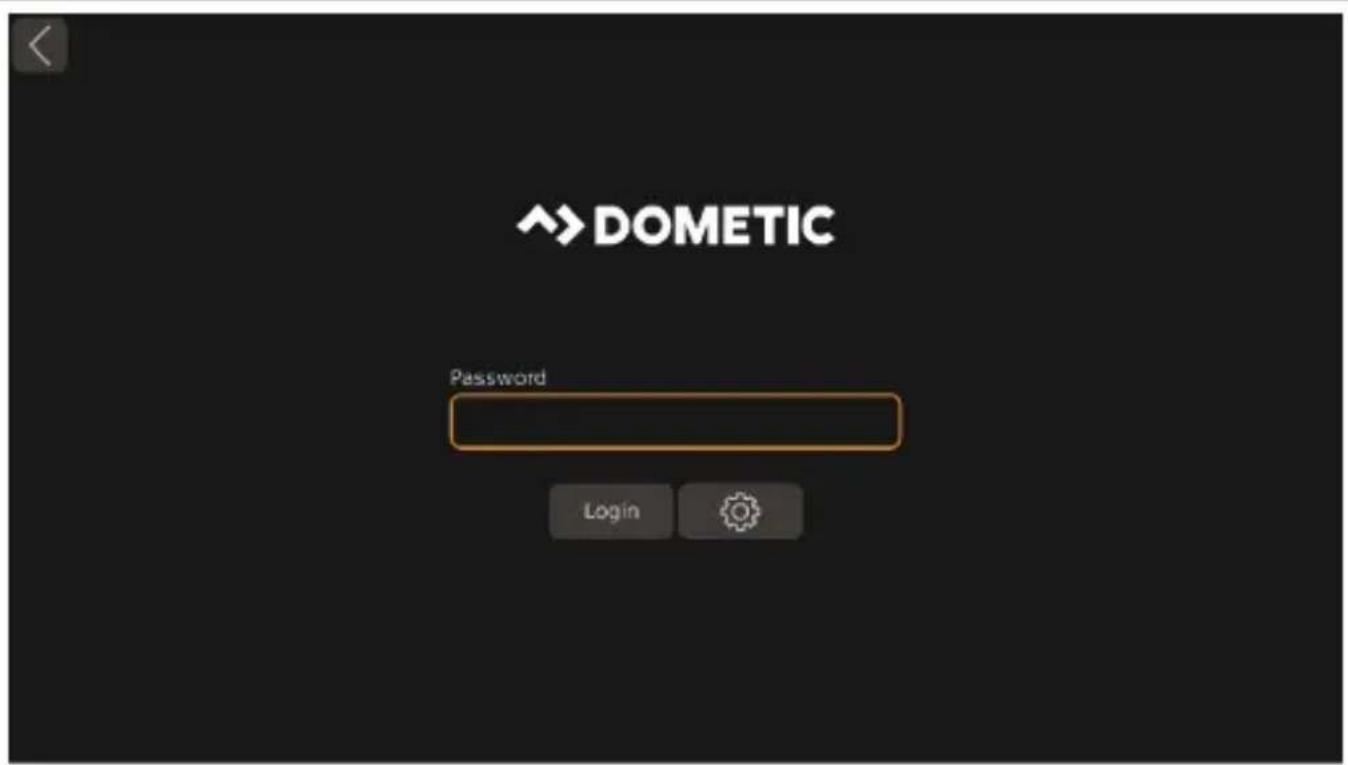
Enter the password.

Note: The default password is 88888888.
Use the Login button.
When the wrong password has been entered, "Login failed." is displayed.
When the correct password has been entered, the main menu is displayed.
If necessary, restart at step 0 on page 11.
The Password Setup is displayed.
- Enter the old password in the text field Current.
Enter the new password in the text fields New and Confirm.

The password can consist of numbers and letters. The password is limited to 8 characters.
When exiting the Password Setup without saving, the password change is discarded.
Use the Save button.
A window appears to confirm the change.
If necessary, use the No button to cancel the change.
Use the Yes button to save the change.
Log in again by logging in on page TI c.
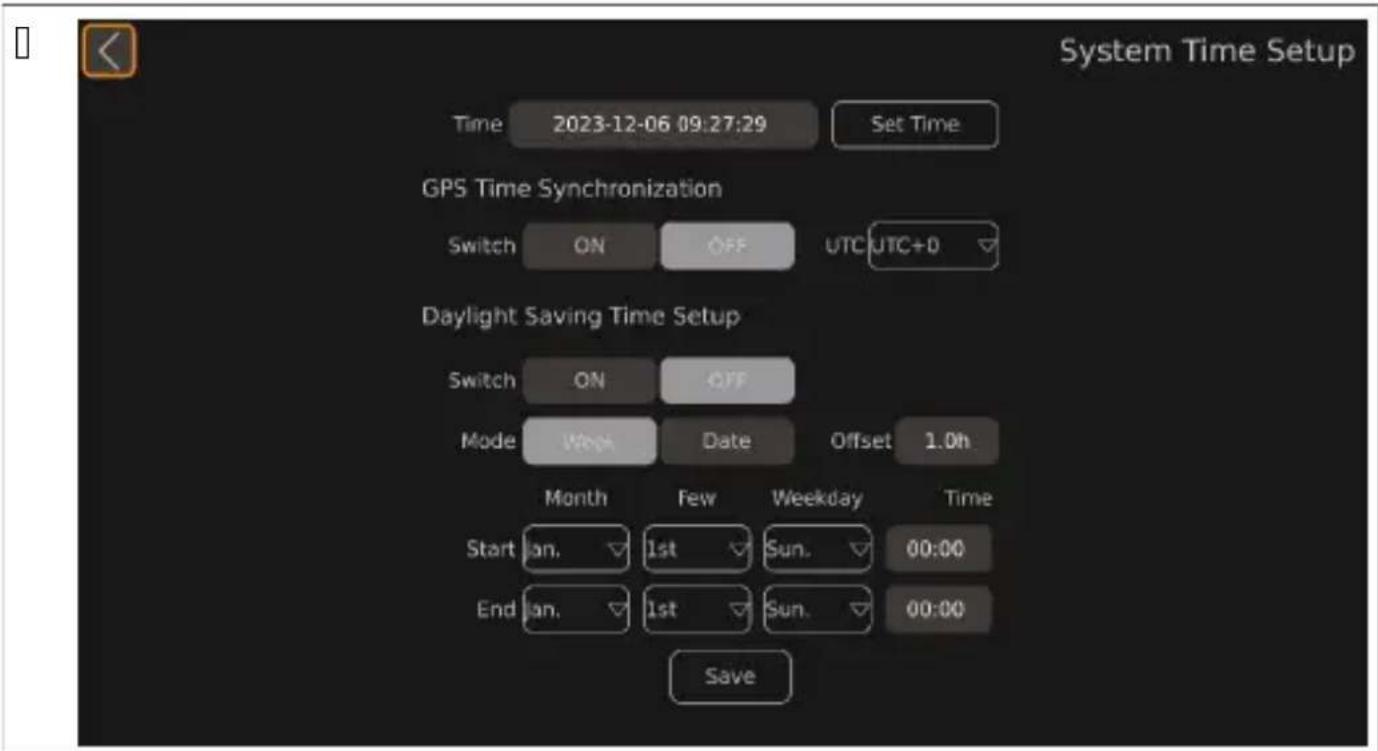
UPHPT Settings: Set the time
Open the Setup.
The SETUP settings are displayed.
- Open the Time settings.
The System Time Setup is displayed.
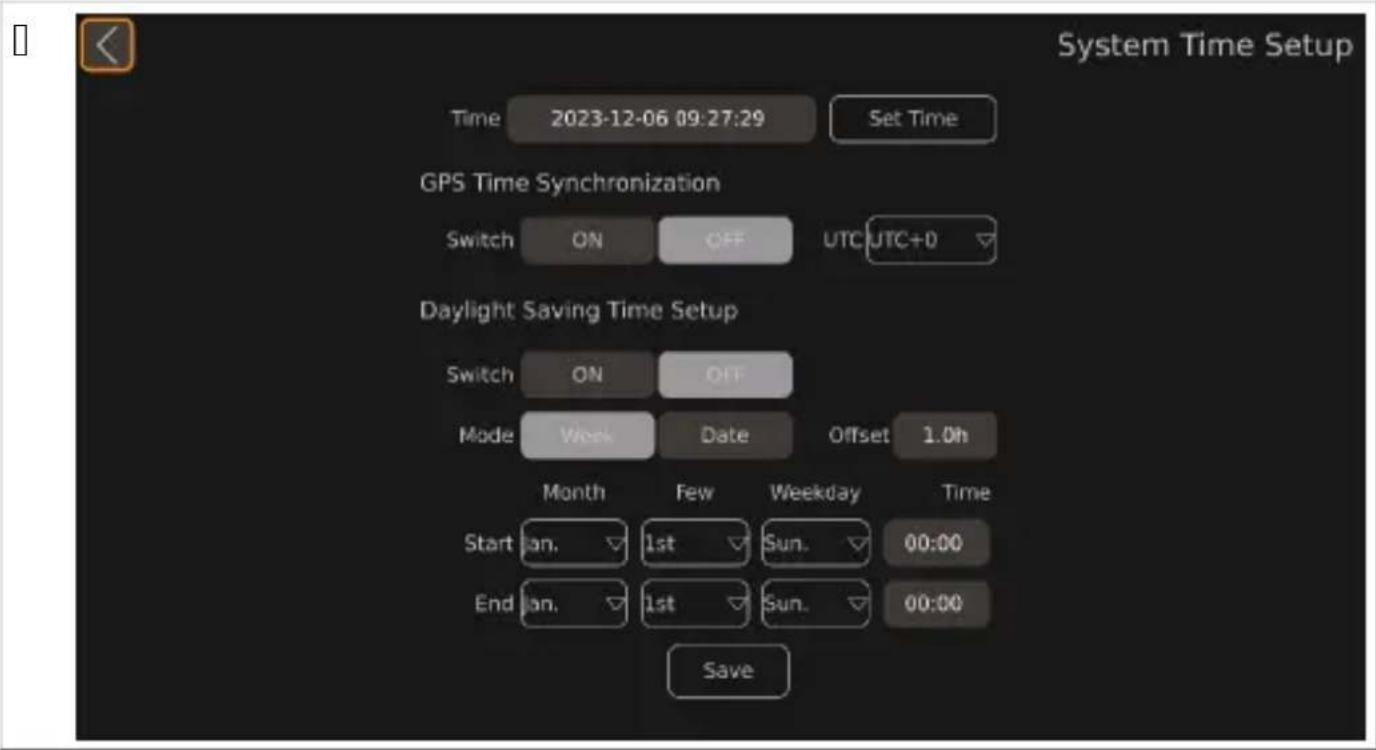
Set the desired settings.
Use the and buttons on the remote control to set the desired time.
The position of the cursor is highlighted.
Use the ▷ or SHIFT button on the remote control to switch to the next time unit.
If necessary, use the < button on the remote control to move to the previous time unit.
If necessary, repeat step Q on page TV to T on page TV.
Use the Set Time button to save the set time.
Setting the GPS Time Synchronization

Note: The video system does not support MDS. Therefore, setting the Switch button will have no effect on the function and display of the video system.
Adjusting the Daylight Saving Time Setup

Note: The video system does not support MDS. Therefore, setting the Switch button will have no effect on the function and display of the video system.
Set the daylight saving time range display using the Mode buttons. The format of the daylight saving time start and end setting changes.
Week: The displayed time is month-day-week-hour-minute.
Date: The displayed time is month-day-hour-minute.
Use the and buttons on the remote control or the keyboard to set the offset time change of the daylight saving time via the Offset button. The Offset time changes in half hour steps. Use the corresponding dropdown menus to set the start and end time for the daylight saving time, see using the dropdown menus on page TV.
UP3 Calibration Kit - IDE system

MARNIN3L Health Fa0ard
Ensure that all areas around the vehicle are displayed by the video system. Blind spots pose a safety risk.

NOTE
Avoid strong shadows on the calibration mats. Ensure uniform illumination, preferably in daylight. Each calibration mat must be fully visible in each camera. Use the fisheye views shown on orientation.
Attach the calibration mats at each corner of the vehicle.
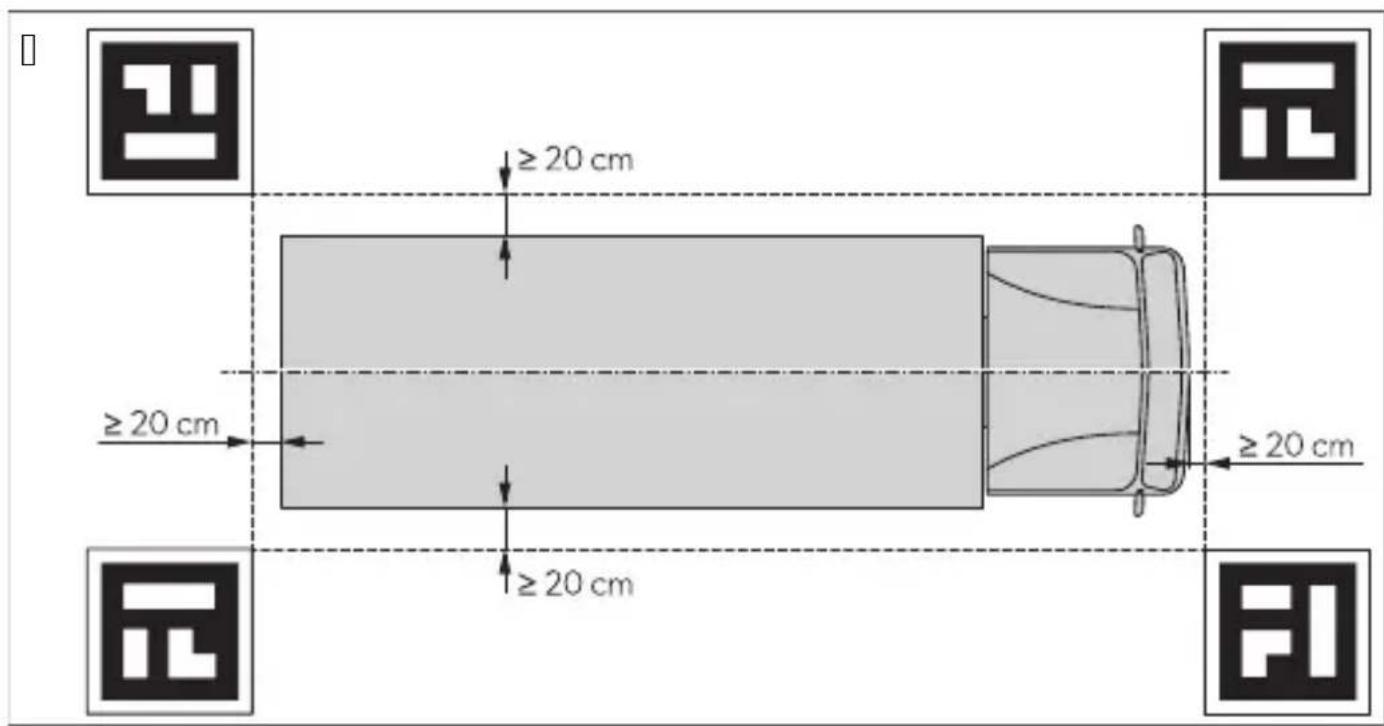
- If necessary, apply colored tape in straight lines at a distance of 0.0 cm around the vehicle.

NOTE: The tape helps to fine-tune the width and length of the vehicle graphics.
Switch on the vehicle ignition to activate the camera system.
Set up and configure the camera system.
Follow the instructions in the configuration guide (see Related documents on page \c).
Open the Video settings.
The video management interface is displayed.
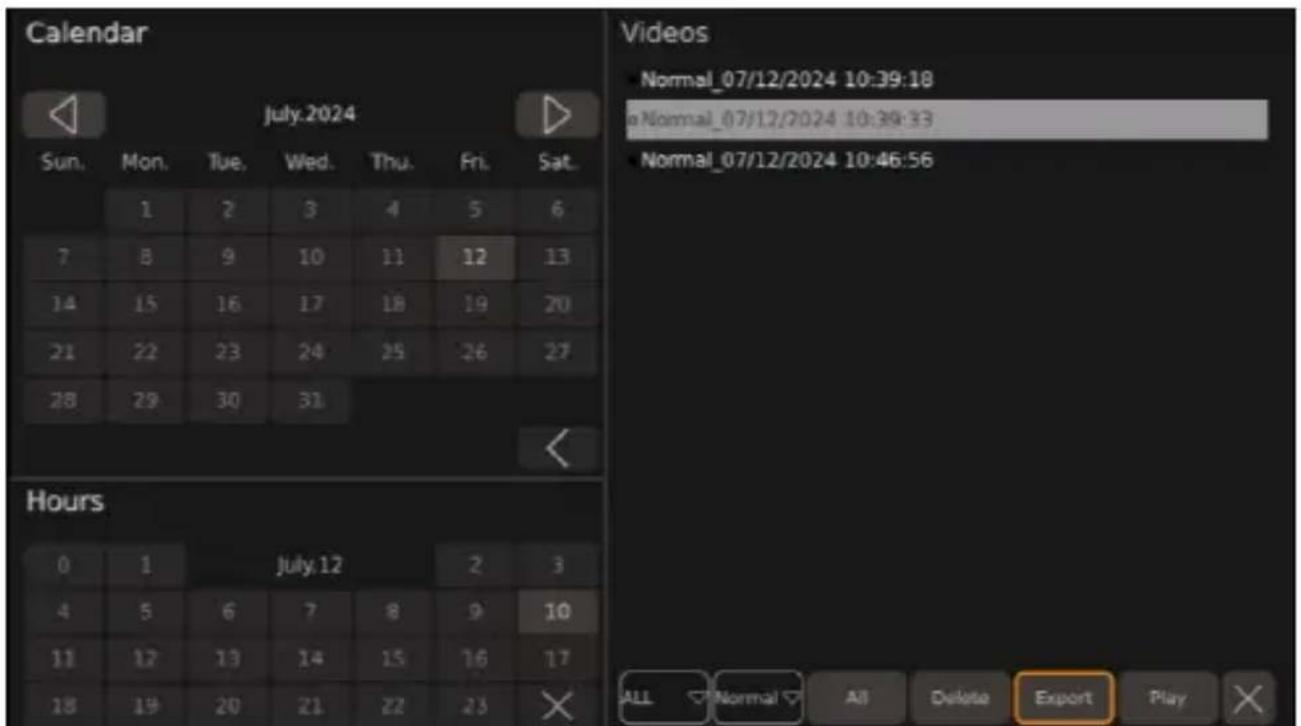
- Select the day and hour from which the video sources are to be listed.

Note: The days and hours on which video files are saved are grayed out in the calendar.
The calendar displays the previous month.

The calendar displays the next month.

The calendar and hours are closed.
The video files from the selected time are listed.
Make the desired settings.
The "ALL" dropdown menu is displayed, in which the number of video sources displayed can be selected.

A dropdown menu is displayed, in which the video categories to be listed can be selected.
Single frame recordings: Recordings in which only one camera image is displayed.
Quad recordings: Recordings in which all camera images are displayed.
Alarm trigger recordings: Recordings in which only trigger images are displayed.
Delete: The last selected video source is deleted.
Export: The last selected video source or sources is exported to the .SB file.
Play: The last selected video source is played.

The video list is closed.
Ensure that a USB stick is connected to the video system.
- Select one or more video files to be exported.
The selected video name and the dot to the left of the video name turn blue.
Select Export to export the video source to the USB stick.
A window appears asking whether the selected video source should be exported.
If necessary, cancel the export by selecting No.
Confirm the export by selecting Yes.
A window appears showing that the video file has been exported successfully.
Press the ESC button to close the window.
A window appears asking whether the export should be completed.
Confirm or cancel the process.
The window to confirm the successful export is still displayed.
Yes: The window to confirm the successful export is closed. A window appears for a few seconds indicating that the last file is being exported.
Use the button or press the button on the remote control to switch to the previous video. Use the button to pause the displayed video. Use the button or press the button on the remote control to switch to the next video. Use the button to return to the video management interface or proceed as described in "Using menus, settings, and configurations" on page 71. Press the CLEAR button on the remote control to display or hide the progress bar.
Q. To connect a monitor to the universal video output, see Fig.10 on page 11.
- Follow the instructions in "Managing the video sources" on page 10.
Q. Switch on the monitor.
- Remove the SL cards from the controller (see "Inserting an SL card" on page 10).
T. Connect the SL cards to a computer.
V. Open the desired videos on the computer.

Note: The videos can be played via a standard video player.
| r, Klem , ssiKle ca1se S1EEested remedy | ||
| ' o nash drive detected. | > f onnect an nash drive to the cam-era system. | |
| Nhe nash drive wor s abnormally. | Q. Ueconnect the nash drive.I . I0 necessary p replace the nash drive with a new one. | |
| ' o SL card detected. | > f onnect a SL card to the camera system. | |
| Nhe SL card wor s abnormally. | Q. Ueconnect the SL card.I . I0 necessary p replace the SL card with a new one. | |
| Nhe nash drive is not connected cor-rectly. | > Ueconnect the nash drive. | |
| Nhe nash drive wor s abnormally. | Q. Ueconnect the nash drive.I . I0 necessary p replace the nash drive with a new one. | |
| Nhe SL card is not connected cor-rectly. | > Ueconnect the SL card. | |
| Nhe SL card wor s abnormally. | Q. Ueconnect the SL card.I . I0 necessary p replace the SL card with a new one. | |
| When eSporting the calibration histo-ry or the calibration files the window pU Disk lost.p is displayed. | ' o nash drive is connected to the camera system. | Q. . se the Yes button.I . f onnect an nash drive to the camera system bsee F on pagell Qc.T. Uestart the eSport process. |
| When saving the daylight saving time pThe date setting for DST is invalid.p is displayed. | Nhe start date is set after the end date. | Q. . se the Yes button.I . f orrect the set date. |
| " 0ter ma ing settings p the monitor screen switches blac . | Nhe camera system restarts. | Nhe camera system displays one or more camera images after a few sec-onds p depending on the settings made. |
| ' o entries can be made in a teSt field using the ̈eyboard. | Nhe limit o0 numbers p letters p and characters is reached. | > L elete the entry osee Filling in teSt fields on pagelTJ c. |
The statutory warranty period applies. If the product is defective, please contact the manufacturer's branch in your country (see dometic.com/dealer) or your retailer.
For repair and warranty processing, please include the following documents when you send in the device: a copy of the receipt with the purchasing date.
The reason for the claim or description of the fault.
Note that self-repair or nonprofessional repair can have safety consequences and might void the warranty.
If you wish to finally dispose of the product, contact your local recycling center or specialist dealer for details about how to do this in accordance with the applicable disposal regulations. The product can be disposed of free of charge.
If the product contains any non-replaceable batteries, rechargeable batteries, or light sources, you don't have to remove them before disposal.

Place the packaging material in the appropriate recycling waste bins wherever possible. Consult a local recycling center or specialist dealer for details about how to dispose of the product in accordance with the applicable disposal regulations. The product can be disposed of free of charge.
Technical data
Parameters
| CAM360AHDHD | |
| Operating voltage QJ Iv TI la | |
| Operating voltage range 0or eSternal trigger signals QJ Iv TI la | |
| Operating electric current | w l l" l/ QI la |
| Operating temperature range m | IJ jf Iv Xjj f |
| a), ramic - ide, Darameter | |
| Input video MaS. Vf I x QJ YJ IpS I KI0ps I/ TJ 10ps y Qf I IDf | |
| L isplay mode I L /TL | |
| I L output | |
| e Uesolution | QJ YJ IpS |
| e Ueresh rate | TJ 10ps |
| SL output | |
| e Uesolution | L Q |
| e Ueresh rate | I KI0ps I/ TJ 10ps |
| Rec, rder Darameter | |
| Storage MaS. I x KQI MB SL card | |
| f ompressed encoding MaS. Vf I x QJ YJ IpS I .J WV encode | |
| L ecompression and decoding MaS. Vf I x QJ YJ IpS I .J WV decode | |
| aideo Stream QJ I V b/sP I J VY b/sP VJ ZW b/s | |
Camera parameters
| CAM360AHDHD | |
| Image device Q/I .Zr | Mega f MOS | |
| Frame rate | KI0ps |/ TJ 10ps | |
| Uesolution QZI J IpS lx QJ YJ IpS | |
| DiSel size | .Y1 | μm lx | .Yμm |
| f ompression QJ YJ IpS | |
| aideo output Qlapp P XKIOhm | |
| White balance " uto | |
| aiewing angle z QXJ bl c | |
| Dower supply QI la | |
| Operating temperature range m | IJ jf lv XJ jf P UI ZKI% MaS. |
| Storage temperature m | TJ jf lv YJ jf P UI ZKI% MaS. |
| Protection class IDWZ/ | |
Del tscF
TP3 cameras, positions, etc.
TP6, etc., etc., SD card
U 2etrieK
NOTE: The default password is 88888888.
Use...
Troubleshooting...
Warranty...
Characteristics Description
Use


[ ]
The installation location of the camera should be as perpendicular as possible.
| . Insert the SD card(s).
Function
RECAUTION: Before use,
Functionality Description
RECAUTION: Before use,
TP3: Position the cameras
TPN: Position the cameras
TP6: Insert an SD card
- Fix the receiver with the double-sided adhesive tape correctly.
Operation
UPHPT: Adjust the frames
Adjust the Daylight Saving Time Setup
Operation....TJ J
Adjustment....TJ Y
Maintenance....TJ Z
Troubleshooting....TJ Z
Technical data....TJ Z
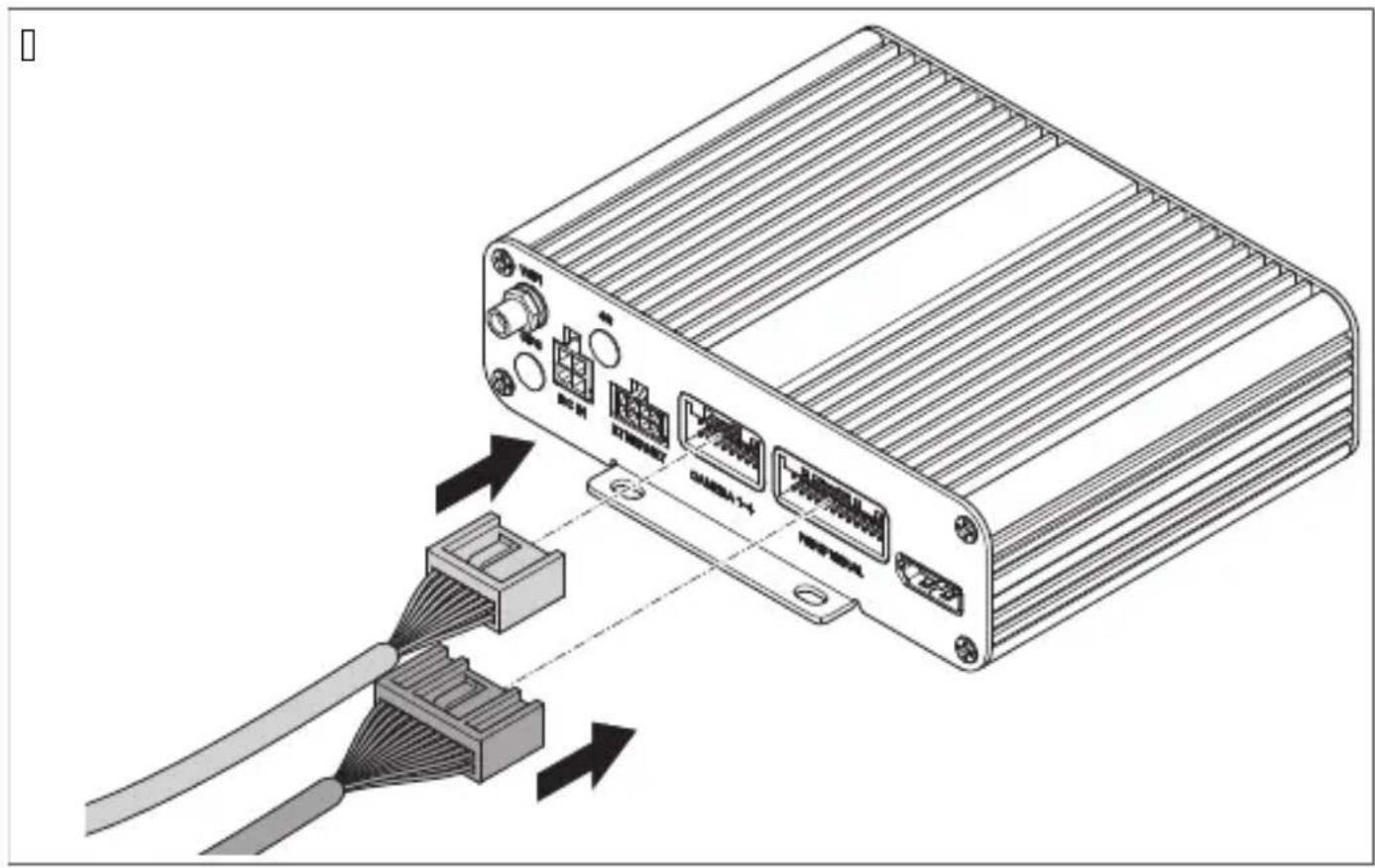
Connect to the control unit.
Password Setup is displayed.
Troubleshooting....TVV
W. Mark the holes for the mounting screws.
X. Remove the camera.
| NrP K, mD,) e) t A) tall | |
| Q /amera V | |
| I /ontrollenhet Q | |
| T Fjern ontroll Q | |
| V IU Uceiver-motta er Q |
| NrP K, mD,) e) t A) tall |
| K Nil oblings abel 0or jøretøy 0 |
| W Nil oblingsharness 0or amera ablene 0 |
| X . niversal til oblings abel 0 |
| Y O-ringer V |
| Z Nil oblings abel 0or monitor 0 |
Calibrate: Contains instructions for calibrating the camera system.
| arameter 2eskri- else | |
| Automatic Cali-bration | Inneholder alibreringsinnstillingene òor amerasystemet. |
| Calibration Fi-le | Inneholder òun sjonene òor å e sportere og importere alibreringsøller til og òra en Df . |
| Vehicle Type Inneholder innstillingene òor biltype. | |
| Surround View Inneholder innstillingene òor overlappingsvin el og omgivelsesvisningsområde. | |
| Parking Line Inneholder innstillingene òor par eringslinjer. | |
| 3D Perspective | Inneholder generelle innstillinger òor TL -visning ßbare synlig når TL -visning er a tiverte. |
| Back View Pers- pective | Inneholder innstillinger òor TL -visning òor rygge ameraet ßbare synlig når TL -visning er a tiverte. |
| 3D Display Ad- just | Inneholder generelle innstillinger òor Cugleperspe tiv ßbare synlig når TL -visning er a tiverte. |
W. Mark the holes for the mounting screws.
X. Remove the camera.
| . Insert Q or | SL - ort.
- Attach the IU receiver with the double-sided tape that comes with it.
TPT Electrical connection, clip E a- camera e)

ASS vL Danger J, r injuries
U 2etje) i) E
v Password Setup is displayed.
▼ The SETUP settings are displayed.
- Open the Time settings. √ System Time Setup is displayed.
Nr, ( sa Määrä
Q /amera V
| Ohjain Q
T /au osäädin Q
V IU receiver Q
[ ]
TP3 Camera, ide) sij, ittami) e)
U Usage
Camera V
TP3 M, camera
U Installation
For more information, see the configuration guide at r.dometic.com/bea eYa.
Part number
Camera V
Controller
Remote control
| F1) kcia ( Dis | |
| Calibrate Obsahuje n( vod na alibr( ciu amerov+ho syst+mu. | |
| Surround View Obsahuje n( vod na nastavenie priestorov+ho pohl'adu. | |
| Time Setup Obsahuje n( vod na nastavenie času. | |
| Adas Setup Obsahuje n( vod pre syst+m dete cie chodcov. | |
| DVR Setup Obsahuje n( vod na nastavenie videoz( znamov. | |
| arametre ( Dis | |
| Automatic Calibration | Obsahuje alibračn+ nastavenia amerov+ho syst+mu. |
| Calibration File | Obsahuje 0un cie na eSport alimport alibračn' ch s, borov do alzipočitača. |
| Vehicle Type | Obsahuje nastavenia typu vozidla. |
| Surround View | Obsahuje nastavenia uhla pre rytia aloblasti priestorov+ho pohl'adu. |
| Parking Line | Obsahuje nastavenia pre par ovacie čiary. |
| 3D Perspective | Obsahuje vGeobecn+ nastavenia TL zobrazenia oprítomn+ len vtedyP efl je a tivovan+ TL zobrazeniec. |
| Back View Perspective | Obsahuje nastavenia TL zobrazenia pre zadn, ameru oprítomn+ len pri a tivovanom TL zobrazenić. |
| 3D Display Adjust | Obsahuje nastavenia pohl'adu zivt( čej perspe tívy bprítomn+ len pri a tivovanom TL zobrazenić. |

Video
The camera must be mounted as low as possible.
| , 1, žka ( Dis | |
| Q | astup f " ' bnepou) íva sac |
| I | |
| T U" L " U bnepou) íva sac | |
| V . niverz( lny videov' stup f a BS b ompozitn' c | |
| K Dripojenie monitora " I L | |
| W /( bel na pripojenie monitora | |
| X astup . SB | |
| Y Mi ro . SB bnepou) íva sac | |
| Z Zapínacie ( ble | |
| QJ Čierny one tor b,,Front f " Mqcd Dredn( amera | |
| , l, žka ( Dis | |
| QQ Čierny one tor b,,oei f " Mqcd L'av(amera | |
| QI Čierny one tor b,,Uight f " Mqcd Drav(amera | |
| QT Čierny one tor b,,Uear f " Mqcd Zadn(amera | |
| QV Inôračerven' prijímač | |
| QK Ovl(dač | |
| bn | l ned' a tivačn' ( bel b,,NUIMs W" UL qcd Dripojenie u ladn+mu ( blu c, vacieho svetla.Do zaradení spiatoč y sa prostredníctvom tohto ( bla a tivuje ovl(dač a'zadn(amera. |
| bu | Modr' a tivačn' ( bel b,,NUIMs Rt NR' L qcd astup ovl(dacieho sign(lu na zobrazenie pohl'aduzlt( čej perspe tívy na cel, obrazov u b QI 1a sign(Ic. |
| ru Uu) ov' a tivačn' ( beld a' stup a tivačn+ho sign(lu zapnutia monitora b QI 1a sign(Ic. | |
| wh | Biely a tivačn' ( bel b,,NUIMs oqcd Dripojenie u ladn+mu ( blu l'av+ho smerov+ho svetla./efl sa a tivuje l'av+ smerov+ svetlo p prostredníctvom tohto ( bla sa a tivuj, ovl(dač alprísluGn(amera. |
| ye | Žlt' a tivačn' ( bel b,,NUIMs Uqcd Dripojenie u ladn+mu ( blu prav+ho smerov+ho svetla./efl sa a tivuje prav+ smerov+ svetlo p prostredníctvom tohto ( bla sa a tivuj, ovl(dač alprísluG-n(amera. |
| b Čierny ( bel b,,M' L qcd Dripojenie nal ostru tvsvor a TQc | |
| rd | Červen' ( bel b,,L f QI mTI aqcd Dripojenie u ladn+mu p- lu permanentnej bat+rie tvsvor a TJ c.O rem in+ho umo) " uje ulo) enie d(tumu alčasu b'un cia re ord+rac. |
| ye Žlt' ( bel b," f f qcd Dripojenie Izapaľovaniu " f f tvsvor a QKc. | |
W. Mark the holes for mounting the camera.
X. Remove the camera.
Y. Drill two holes of Ø TPV1mm for the camera bracket.
Z. Insert the camera bracket into the vehicle interior.
QJ. Secure the camera using the supplied self-tapping screws or screws with a TPV1mm thread.

NOTE: Depending on the thickness of the construction, longer screws with a thread may be needed.
TPQ M, load - the unit

( W( RL RiOik, DreFriatia
Do not install the control unit in a place exposed to direct sunlight.

( NOTE
TP6 'l, that) ie SD cards
Q. Remove the SD card from the control unit.
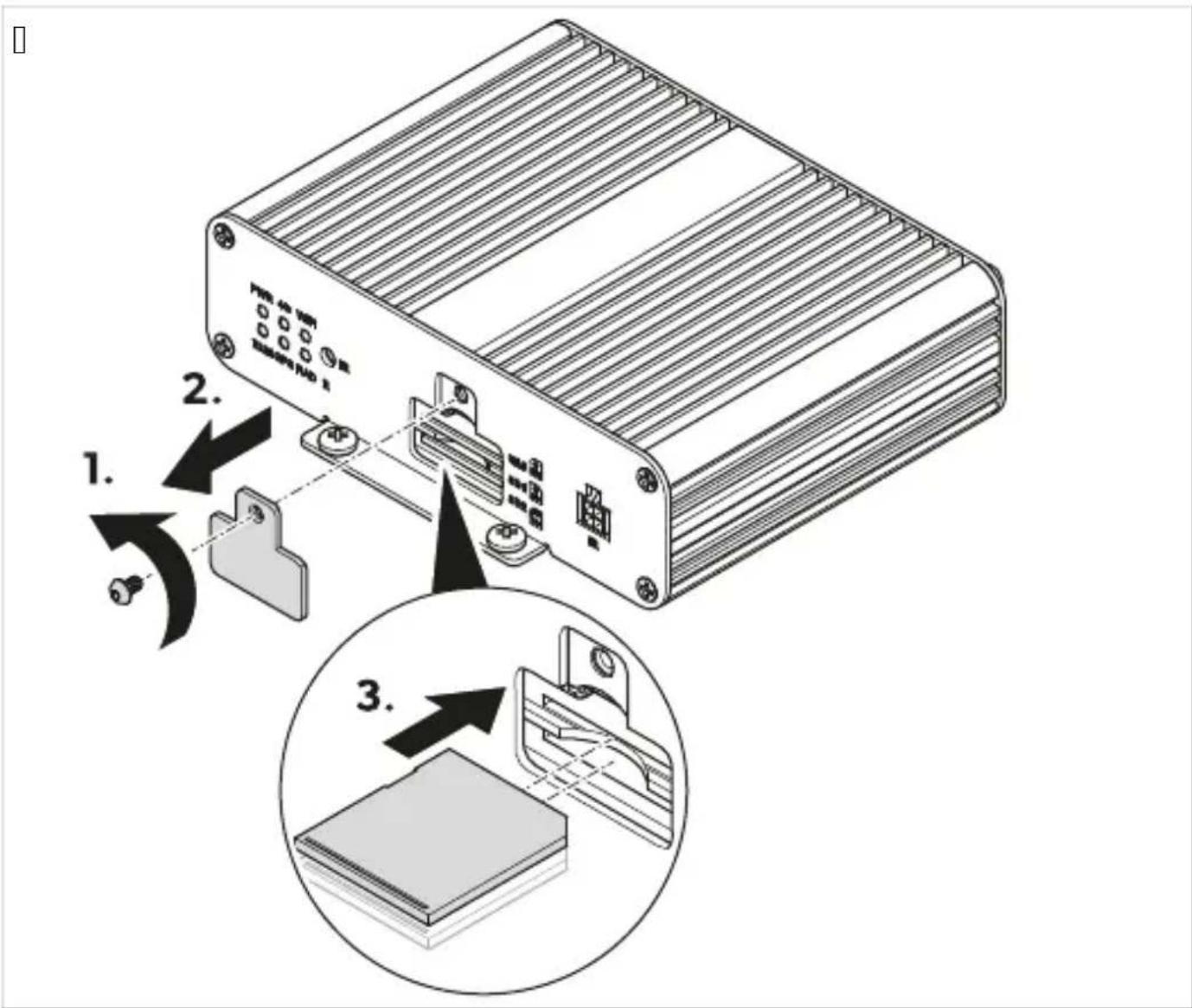
U ( Ksl1Fa
' and control or setting of the camera system use the remote control, monitor buttons, or touch screen. For available options, see section L 'Remote Control' on page IVWTc.
Read the instructions on the monitor's user manual.

(NOTE
It is possible that the monitor has fewer buttons and a remote control. The buttons on the monitor provide fewer control and adjustment options for the camera system. When opening or adjusting settings, it may take a while for the camera system to load all settings.
UPG WaD) 1 tie kamer, - éF, systém1
Q. . Make sure the monitor is turned on.
- Press the POWER button on the remote control. The camera system will turn on.
UPHPG reD) 1 tie kamer, -éF, systém1 d, D, F, t, -, st) éF, režim1
Q. . Make sure the main interface is displayed. 1. Press the POWER button on the remote control.
UPHPH ( t-, re) ie Fla-) ej D,) 1 ky
Press the Enter button on the remote control. If the main interface was opened a few minutes ago or the camera system was restarted, the login menu will appear. If the settings were opened a few minutes ago, the main menu will appear.
UPHP3 ' yDÍňa) ie tel t, - . cF D, ld
Select the test field.
, 1žd-a) ie tlačidiel dial'k, -éF, , -láda) ia

e KY bsv•tlo zp(teč yc
NeD, 1žd-ejte porcel(nov+ one tory vodičů.
UP3 camera module
Q. Connect the camera system [IMAGE] fig.10 on page KQTc according to the wiring diagram [IMAGE] fig.10 on page KQVc.
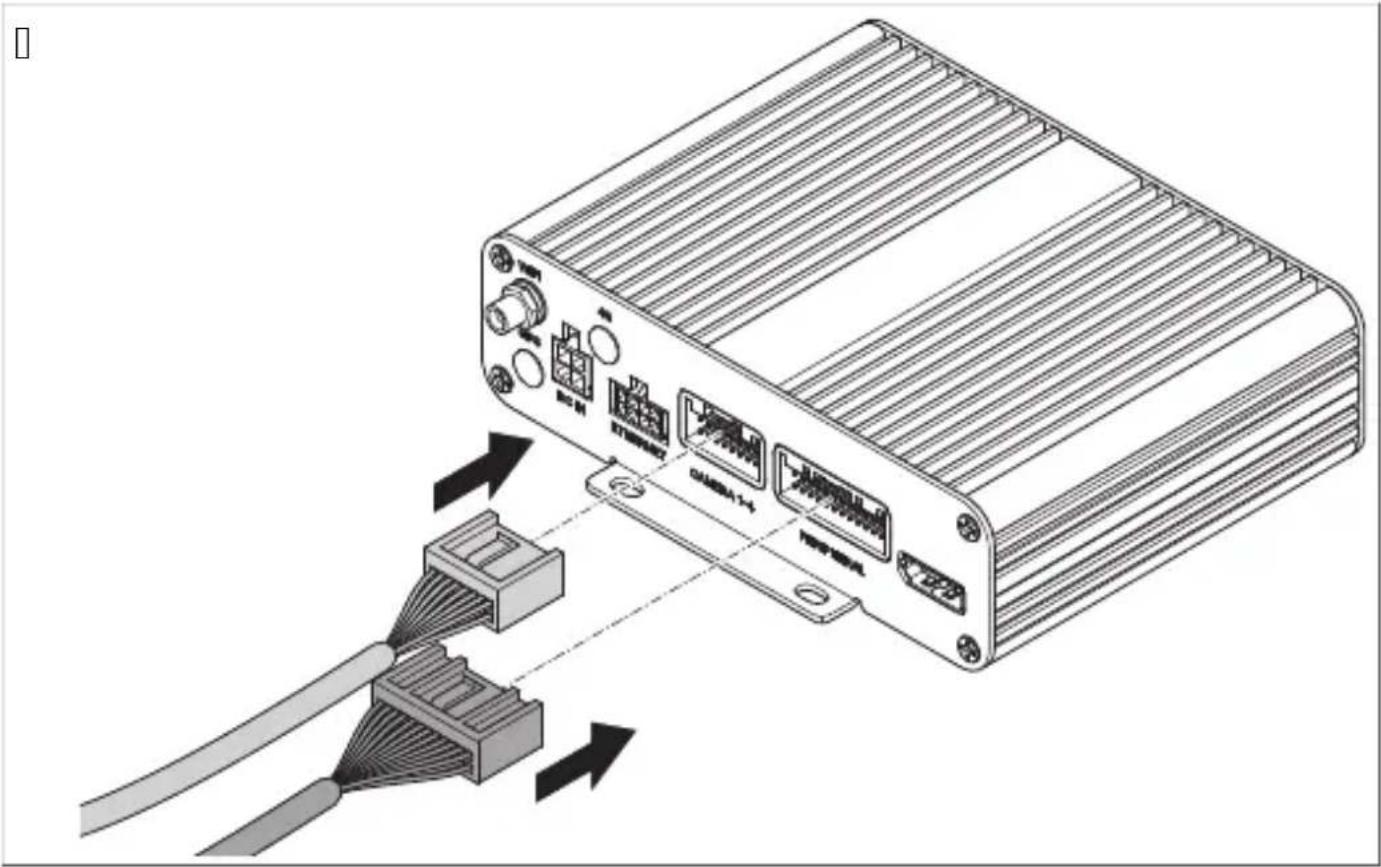
UP6 SD card slot
GO, used
GOPN SD card and Odr, jǔ - ided
| araméter Ledrás | |
| Automatic Calibration | " amerarendszer alibr( l( si be( llít( sait tartalmazza. |
| Calibration File | " alibr( ci- s 0( jlo Df -re +s Df -r»l tört+n» eSport( l( s( na +s import( l( s( na ̲un ci- it tartalmazza. |
| Vehicle Type " j( rm” típus be( llít( sait tartalmazza. | |
| Surround View " z ( t̄ed+si szög +s a ör örös n+zet területi be( llít( sait tartalmazza. | |
| Parking Line " par ol- vonala be( llít( sait tartalmazza. | |
| 3D Perspective | " z ( ltal( nos TL n+zeti be( llít( so at tartalmazza bcsa a or l( that- P ha a TL n+zet a tívc. |
| Back View Perspective | " tolat- amera TL n+zeti be( llít( sait a tolat- amera tartalmazza bcsa a or l( that- P ha a TL n+zet a tívc. |
| 3D Display Adjust | " Čelüln+zet be( llít( sait tartalmazza bcsa a or l( that- P ha a TL n+zet a tívc. |
Video

| !étel Ledrás | |
| Q | f '' -bemenet tnincs haszn( latbanc |
| I | |
| T U" L " U tnincs haszn( latbanc | |
| V f aBS univerz(lis +p imenet b ompozitc | |
| K " I L monitor csatla oz- | |
| W Monitor csatla oz- (bel | |
| X . SB bemenet | |
| Y Micro . SB tnincs haszn( latbanc | |
| Z " tiv(1- (bele | |
| QJ Fe ete dugasz t,,Front f " Mrød Rls» amera | |
| QQ Fe ete dugasz b,,oei f " Mrcd Bal –amera | |
| QI Fe ete dugasz b,,Uight f " Mrcd Jobb –amera | |
| QT Fe ete dugasz b,,Uear f " Mrcd Nolat– –amera | |
| QV IU vev» | |
| QK aez+rl» | |
| bn | Barna a tiv(1- (bel b,,NUIMs W" UL rcd f satla oz- a tolat- 1(mpa pozitív (bel+hez. l (trameneti oo ozatba apcsol(s or a vez+rl»egys+get +s a tolat- amer(t ez a (bel a tiv(lja. |
| bu | /+ a tiv(1- (bel b,,NUIMs Rt NR' L rcd aez+rl»jel bemenete a l+gičelv+teli n+zet teljes +perny»s megjelenít+s+hez b QI la jelc. |
| p U- zsaszín a tiv(1- (belc Rgy monitor be apcsol(s(na vez+rl»jel imenete b QI la jelc. | |
| wh | Feh+r a tiv(1- (bel b,,NUIMs or cd f satla oz- a bal ir(nyjelz» pozitív (bel+hez. " bal ir(nyjelz» be apcsol(sa or a vez+rl» +szül+ +s a megfelel» –amera a tiv(1- di ezzel a (bellel. |
| ye | S(rga a tiv(1- (bel b,,NUIMs Urcd f satla oz- a jobb ir(nyjelz» pozitív (bel+hez. " jobb ir(nyjelz» be apcsol(sa or a vez+rl» +szül+ +s a megfelel» –amera a tiv(1- di ezzel a (bellel. |
| b Fe ete (bel o,,M' L rcd Földel+s csatla oz- ja bTQ. apocsc | |
| rd | Diros (bel b,,L f QI mTI arcd f satla oz(s az (lland- a umul(tor pozitívhoz bT] .) apocsc. Nöbbe özött lehet»v+ teszi a d(tum +s az id» elment+s+t böelvev» cun ci- c. |
| ye S(rga (bel o,," f f rcd f satla oz(s az " f f gy, jt(shoz bQK.l apocsc. | |
U Z0emeltetés
2rP K, mD,) e) ta K, liči) a
Q /amera V
- pravljač is lop Q
| arametar ( Dis |
| Settings Sadr) i osnovne postav e. |
| Time Sadr) i postav e vremena. |
| DVR Sadr) i postav e digitalnog videosnimača. |
| Display Sadr) i opće postav e za pri az sli e s amere. |
| Radar 'ije dostupno. |
| Trigger Sadr) i postav e za pri az sli e s amere ada se pojavi a tivacijs i signal. |
| Adas Sadr) i postavljanje sustava " dasP u ljučujući postav e za sustav ot rivanja pjeGa a oDL Sc. |
| View Sadr) i postav e za pri az u stilu ribljeg o aP razlučivost sli e s amere i pri az iz retrovizora. |
| Color Sadr) i postav e za razlučivost boja. |
| Network 'ije dostupno. |
[ ]
| arametar ( Dis | |
| Basic Setup | Sadr) i osnovne postav e za digitalno snimanje videozapisa P ao Cto su ompresija videozapisa P automats o snimanje P trajanje snimanja P vrsta snimanja P 0ormat i druge postav e. |
| DVR Setup 'ije dostupno. | |
| Parking Record Sadr) i postav e za snimanje prili om par iranja. | |
| Audio Setup 'ije dostupno. | |
[]
| arametar ( Dis | |
| Automatic Cali-bration | Sadr) i postav e za alibraciju sustava amera. |
| Calibration Fi-le | Sadr) i postav e za izvoz alibracijs ih datote a na računalo i uvoz s njega. |
| Vehicle Type Sadr) i postav e za vrstu vozila. | |
| Surround View Sadr) i postav e za ut pre lapanja i o olno područje pri aza. | |
| Parking Line Sadr) i postav e za linije par iranja. | |
| 3D Perspective Sadr) i opće postav e TL pri aza bprisutno samo ada je a tiviran TL pri azc. | |
| Back View Pers-pective | Sadr) i postav e TL pri aza sa stra) nje amere bprisutno samo ada je a tiviran TL pri azc. |
| 3D Display Adjust | Sadr) i postav e za pri az iz ptičje perspe tive bprisutno samo ada je a tiviran TL pri azc. |
Video
[ ]
| arametar ( Dis | |
| Calendar Dri azuje razdoblje tu danimac tije om ojeg su popisani videozapisi bili spremljeni. | |
| Hours Dri azuje razdoblje tu satimac tije om ojeg su popisani videozapisi bili snimljeni. | |
| Videos Dri azuje videozapise spremljene u pri azanom razdoblju. | |
Information
The mounting location for the camera must be as high as possible.

TP3: Install the camera.
Q. Connect the camera system: Fig. 10 on page 11 according to the wiring diagram b, Fig. 10 on page 11.
| , Oicija ( Dis | |
| Q | f '' ulaz tne oristi sec |
| I | |
| T U" L " U tne oristi sec | |
| V . niverzalni videoizlaz f a BS b ompozitnic | |
| K Dri ljuča za " | L monitor | |
| W /abel za povezivanje s monitorom | |
| X . SB ulaz | |
| Y Mi ro . SB one oristi sec | |
| Z " tivacijs i ablovi | |
| QJ f rni uti ač b,,Front f " Mr od Drednja amera | |
| QQ f rni uti ač b,,oei f " Mrcd oijeva amera | |
| QI f rni uti ač b,,Uight f " Mrcd Lesna amera | |
| QT f rni uti ač b,,Uear f " Mrcd Stra) nja amera | |
| QV IU prijemni | |
| QK . pravljač i s lop | |
| bn | Sme...i a tivacijs i abel b,,NUIMs W" UL rod veza s pozitivnim ablom svjetla za vo) nju unatrag. /ada se a tivira stupanj prijenosa za vo) nju unatrag p putem ovog abela a tiviraju se upravljač i s lop i stra) nja amera. |
| bu | Dlavi a tivacijs i abel b,,NUIMs Rt NR' L rod ulaz ontrolnog signala za pri az ptičje perspe tive pre o cijelog zaslona o QI la signalc. |
| p Uu) ičasti a tivacijs i abeld izlaz ontrolnog signala za u ljučivanje zaslona b QI la signalc. | |
| wh | Bijeli a tivacijs i abel b,,NUIMs or cd veza s pozitivnim ablom lijevog po azivača smjera. /ada se a tivira lijevi po azivač smjera p upravljač i s lop i odgovarajuća amera a tiviraju se pu- tem ovog abla. |
| ye | Žuti a tivacijs i abel b,,NUIMs Ur cd veza s pozitivnim ablom desnog po azivača smjera. /ada se a tivira desni po azivač smjera p upravljač i s lop i odgovarajuća amera a tiviraju se putem ovog abla. |
| b f rni abel b,,M' L rod veza s uzemljenjem terminal TQc | |
| rd | f rveni abel b,,L f QI mTI arcd veza s nepre idno pozitivnim polom a umulatora terminal TJ c. Omogućuje p izme...u ostalog p pohranu datuma i vremena bûun cija snimačac. |
| ye Žuti abel b,," f f rod veza s " f f po retanjem terminal QKc. | |
- Align the camera system by performing the calibration test (see Camera System Calibration on page 17).
T. Mark the camera positions.
TPN: Install the camera.
Q. Select a mounting position for the camera.
Pay attention to the specified distances.
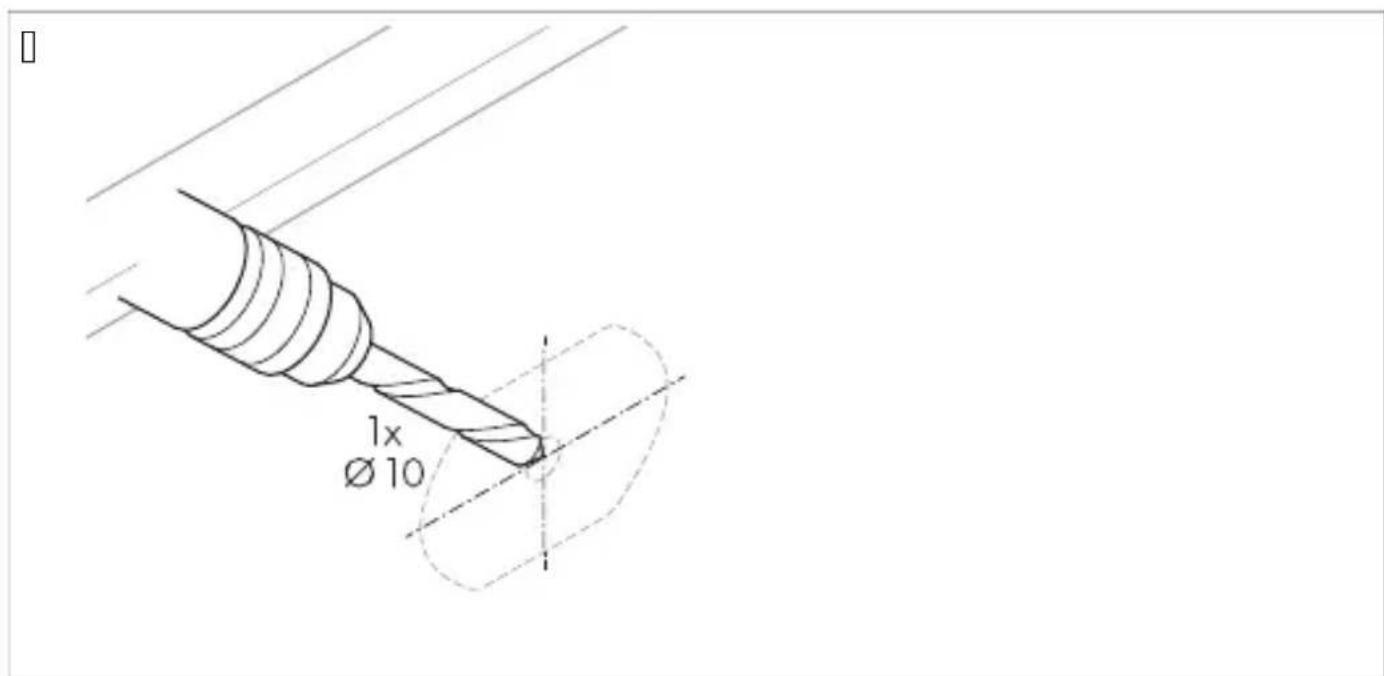
| . Mark the camera positions. T. Lightly punch the previously marked points to prevent drill bit wandering. V. Drill a hole of ∅ 6.1 mm for routing the cables.
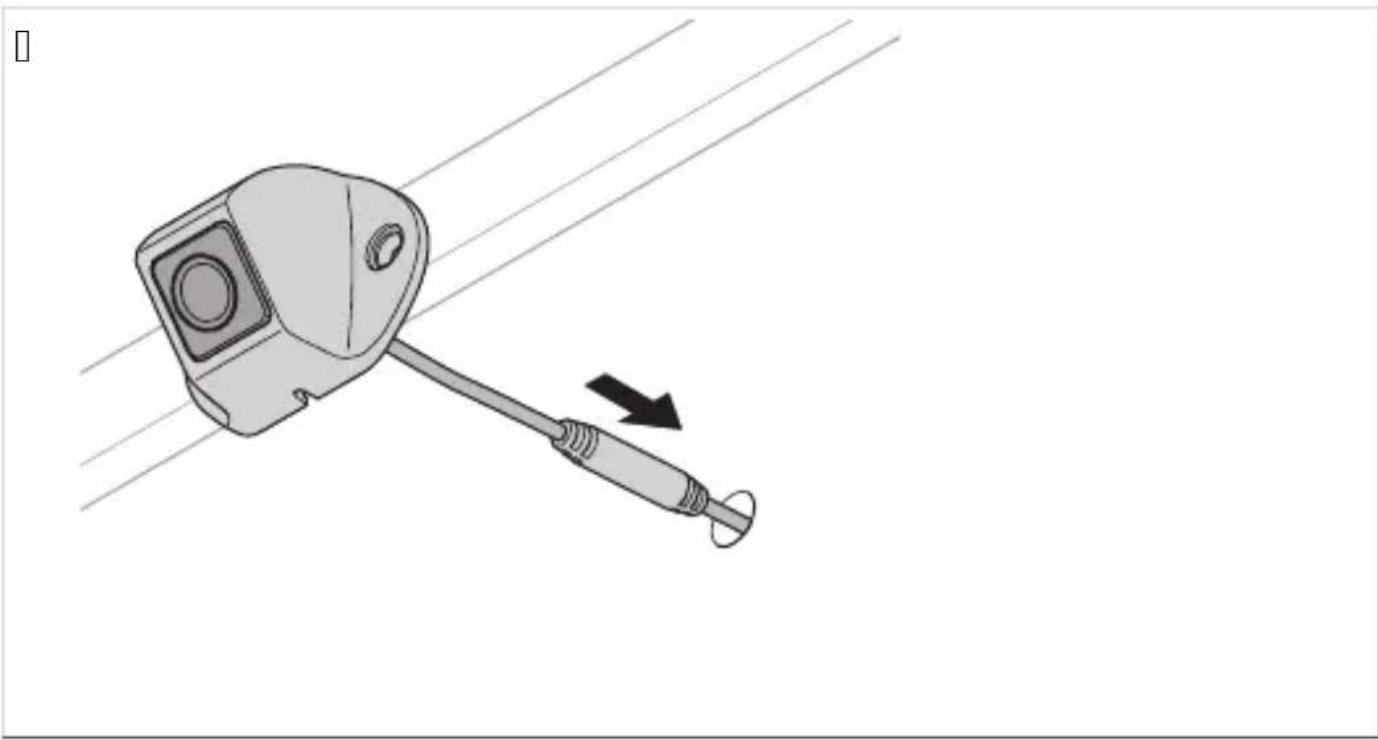
K. Route the camera cable inside the vehicle.
W. Mark the holes for the mounting screws.
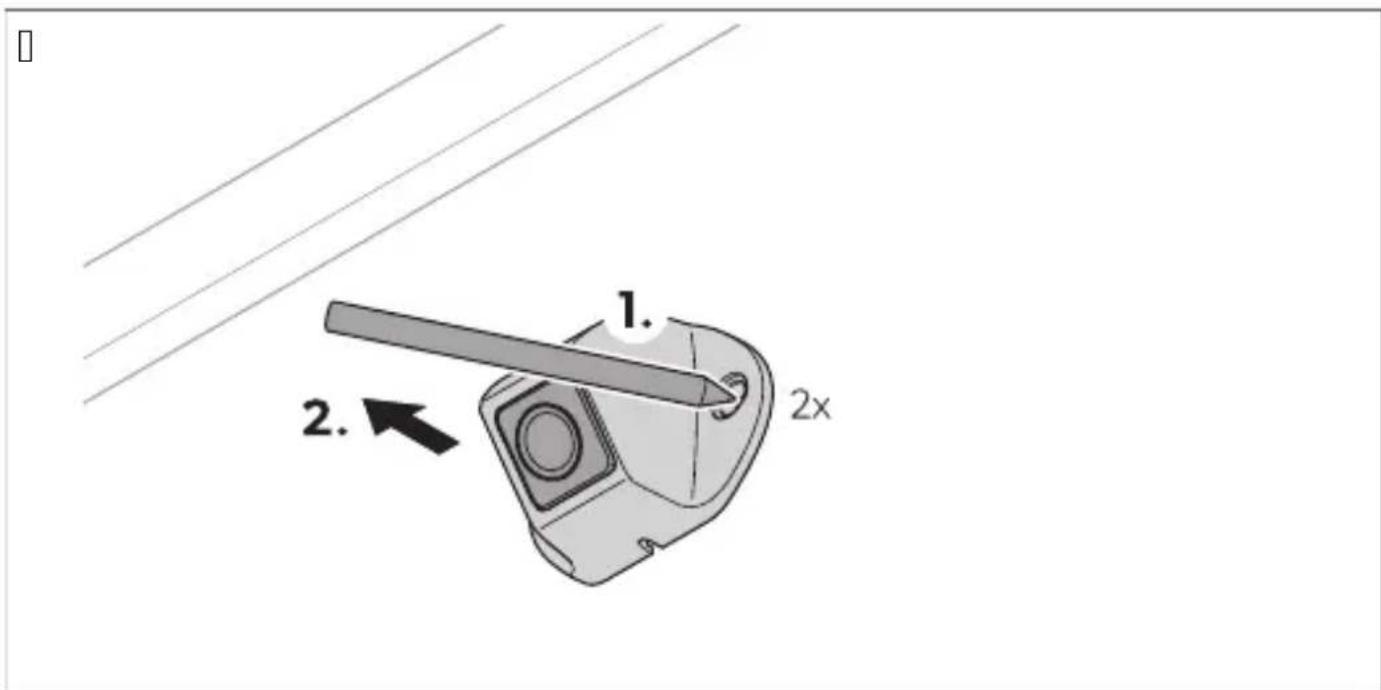
X. Remove the camera. Y. Drill | holes of ∅ 3.5 mm for the camera bracket.
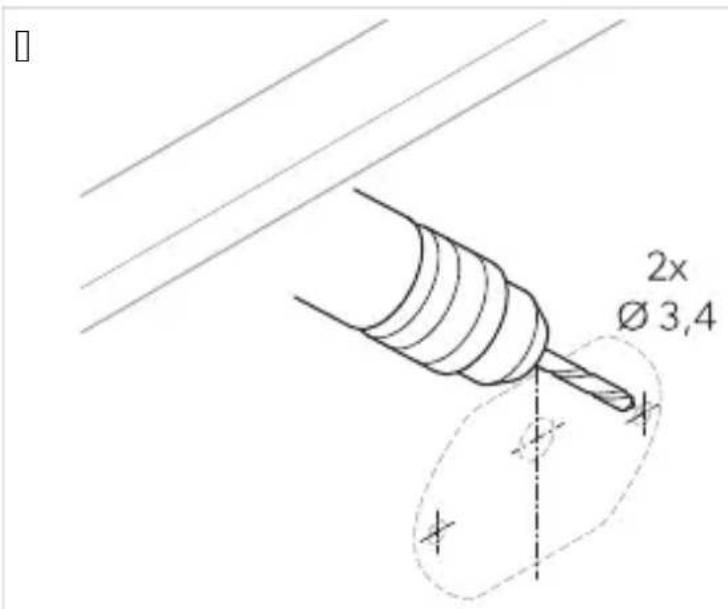
Z. Route the camera cable inside the vehicle.
AA. Secure the camera and camera bracket using sheet metal screws or self-tapping screws M5 x 1.0 mm supplied with the device.

Depending on the thickness of the construction, longer threaded screws may be required.

Inserting the SD card
Insert one or two SD cards.
Operation
To operate the camera system and adjust it, use the remote control and, if available, the buttons on the monitor or touch screen. See the remote control on page KXKc.
W. Mark the holes for the mounting screws.
TP6 Inserting an SD card
Q. Remove the SL art from the controller.
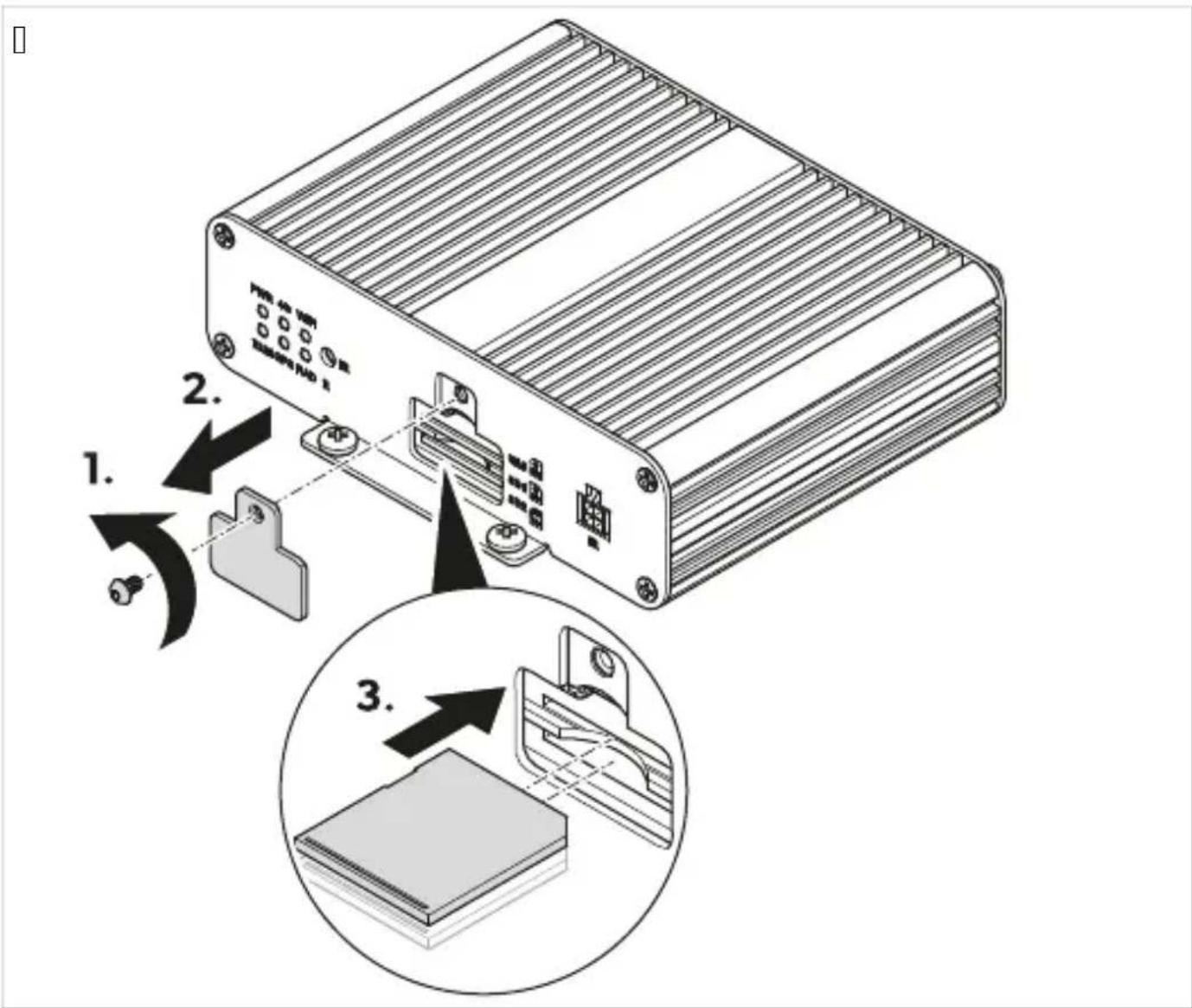
| . Q or | SL art on.
U K1lla) im
Further information on operation is available in the configuration manual at _r.dometic.com/bea eYa.
ŠtP Sesta-) i del K, liči) a
Camera
1 /rmilni 0
T L aljins i upravljalni 0
V Sprejemni IU Q
| ŠtP Sesta-) i del K, liči) a |
| K Dri ljučni abel vozila Q |
| W Dovezovalni snop za amere abli Q |
| X . niverzalni pri ljučni abel Q |
| Y Nesnilni obroč i V |
| Z Dri ljučni abel za monitor Q |
QPH D, dat) a , Drema
' a voljo ot dodatna oprema bni v ljučeno v dobavocd
| Sesta-) i del ŠtP iOdelka | |
| /omplet V tarč za umerjanje ZWI J J QTI TJ |
6 red-ide) a 1D, raKa
e /amera mora biti nameGčena v čim bolj pravo otnem polo) aju.
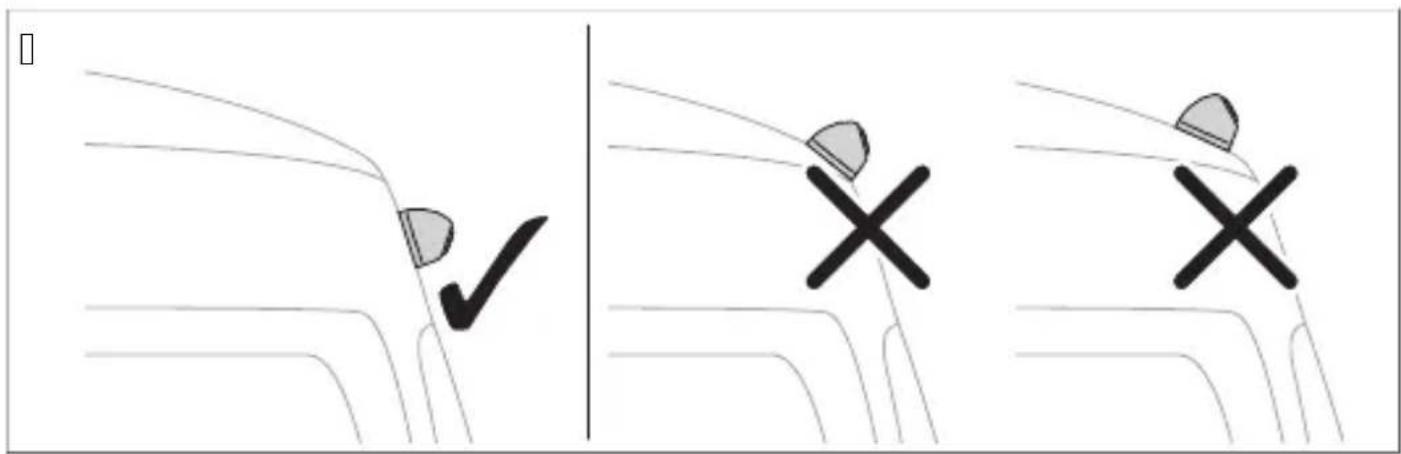
TP3 , sta- ite- kamer
Q. Sistem amer pove) ite b sl.10 na strani|WKYc s ladno z vezalno shemo b 1.10 na strani|WKZc.
| , OP ( Dis | |
| Q | ahod f " ' bni v uporabic |
| I | |
| T U" L " U tni v uporabic | |
| V . niverzalni video izhod f a BS osestavljenic | |
| K Dri ljuče za monitor " I L | |
| W Dri ljučni abel za monitor | |
| X ahod . SB | |
| Y Micro . SB oni v uporabic | |
| Z Spro) ilni abli | |
| QJ Črni vtič bqFront f " Mr od Sprednja amera | |
| QQ Črni vtič bqpei f " Mrcd oeva amera | |
| QI Črni vtič bqUight f " Mrcd Lesna amera | |
| QT Črni vtič bqUear f " Mrcd azvratna amera | |
| QV Sprejemni IU | |
| QK /rmilni | |
| rjv | Ujavi spro) ilni abel bpNUIMs W" UL pcd Dri lop na pozitivni abel luči za vzvratno vo) njo.Ob prestavitvi v vzvratno prestavo se po tem ablu v lopita rmilni in vzvratna amera. |
| mdr | Modri spro) ilni abel bpNUIMs W" UL pcd ahodni rmilni signal za celozaslons i pri az sli e iz ptičje perspe tive b QI la signalc. |
| p Uoza spro) ilni abeld Izhodni rmilni signal za v lop monitorja b QI ia signalc. | |
| be | Beli spro) ilni abel bpNUIMs W" UL pcd Dri lop na pozitivni abel levega smerni a.Ob v lopu levega smerni a se po tem ablu v lopita rmilni in ustrezna amera. |
| ru | Uumeni spro) ilni abel bpNUIMs W" UL pcd Dri lop na pozitivni abel desnega smerni a.Ob v lopu desnega smerni a se po tem ablu v lopita rmilni in ustrezna amera. |
| b Črni abel bpM' L pcd Dri lop na ozemljitev terminal TQc | |
| rd | Udeči abel bpL f QI mTI a pcc Dri lop na nepre injeno napajanje s pozitivnim polom a umulatorja tterminal TJ c. Med drugim omogoča shranitev datuma in ure bùn cija snemanjac. |
| ye Uumeni abel bp" f f pcc Dri lop na " f f za v) ig oterminal QKc. | |
I. Dreiz usite sistem amer s testom umerjanja bglejte . merjanje sistema amer na strani|WX| c. T. Označite polo) aj amer.
TPN Namestite- kamer
Q. Izberite polo) aj namestitve amer.
. poGtevajte najmanjGe obvezne razdalje.

| . Označite polo) aj amer.
T. Use a center punch to make indentations at the previously marked drilling points so that the drill bit does not slip during drilling.
V. Drill a hole of diameter ∅ QJ 1mm for routing the cables.
K. Route the cable into the interior of the vehicle.
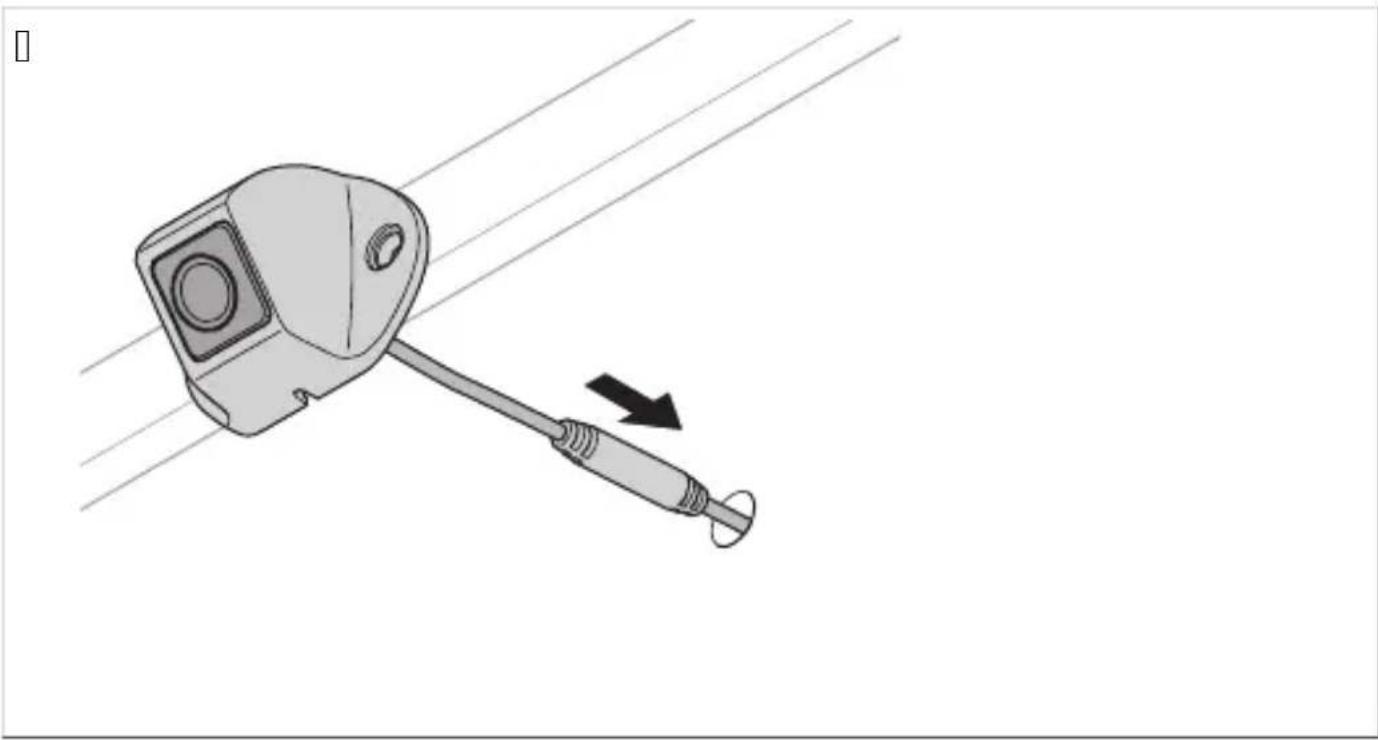
W. Mark the drilling points for the mounting screws.
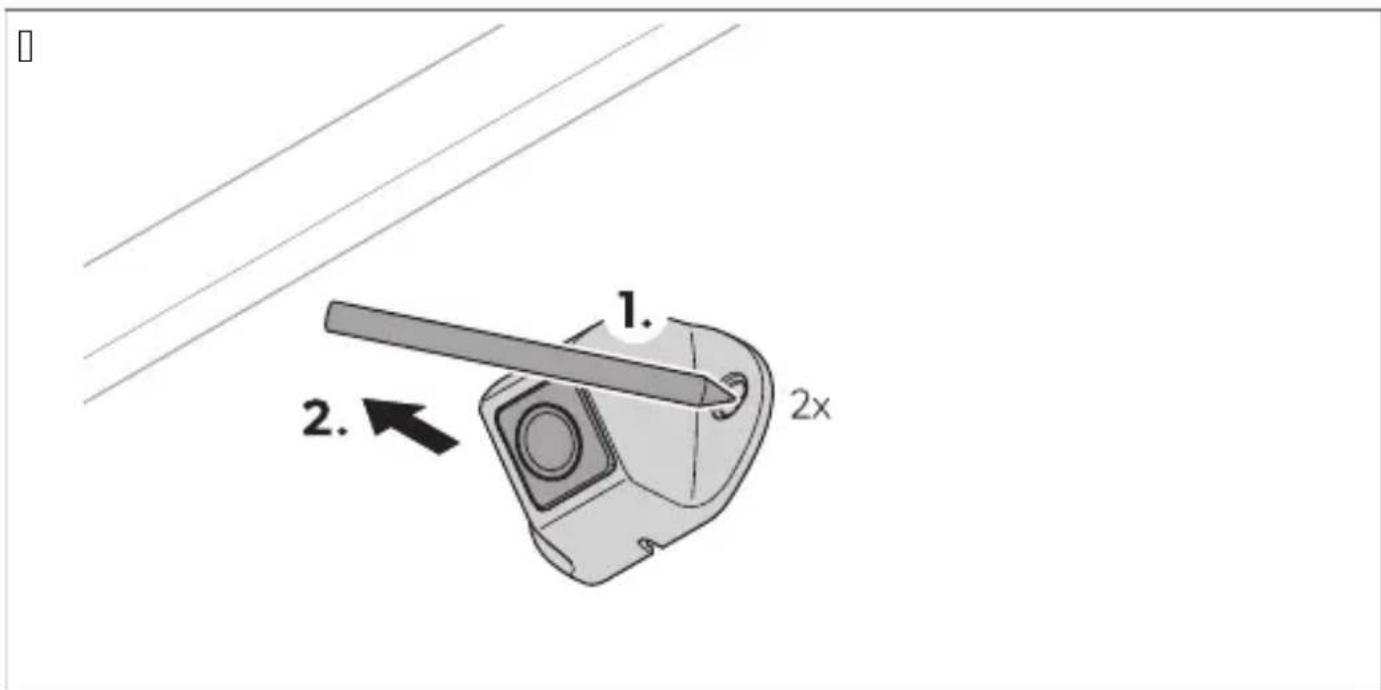
X. Remove the cable.
Y. Drill a hole of diameter ∅ TPV mm for the camera bracket.

Z. Route the cable into the interior of the vehicle.
Q]. Install the camera and tighten its bracket with the provided self-tapping screws or with metric screws MT S I J lmm.

NOTE! If the construction is thicker, longer metric screws must be used.
TPQ Install the control unit

( 2' ES! IL( L Ne- ar), st DreEre- a) ja
TP6 ' sta- ite- D, m) il) iške kartice SD
Q. Unscrew the cover for the SD memory card on the control unit.
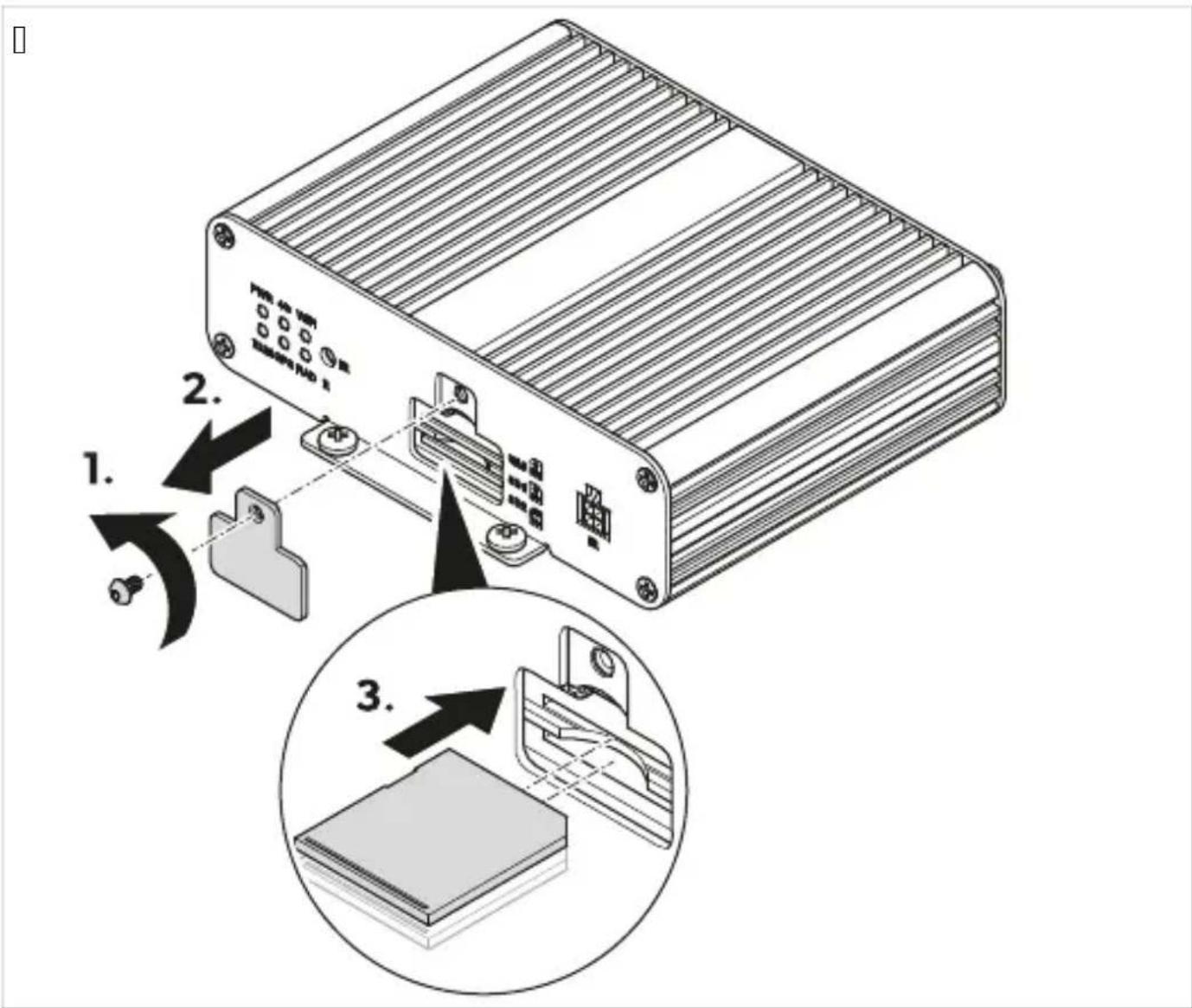
| .astavite Q ali | pomnilniG i artici SL .
T. Donovno privijte po rovče re) za pomnilniG i artici SL na rmilno enoto.
TPS Install the receiver) with the IR
I. Install the receiver using the included double-sided adhesive tape.
TPT Connect the camera

( 2' ES! IL( L Ne- ar), st D, šk, dK
U UD, raKa
W. Save the change with the Yes button.
X. Log in and view the login page at WXJ c.
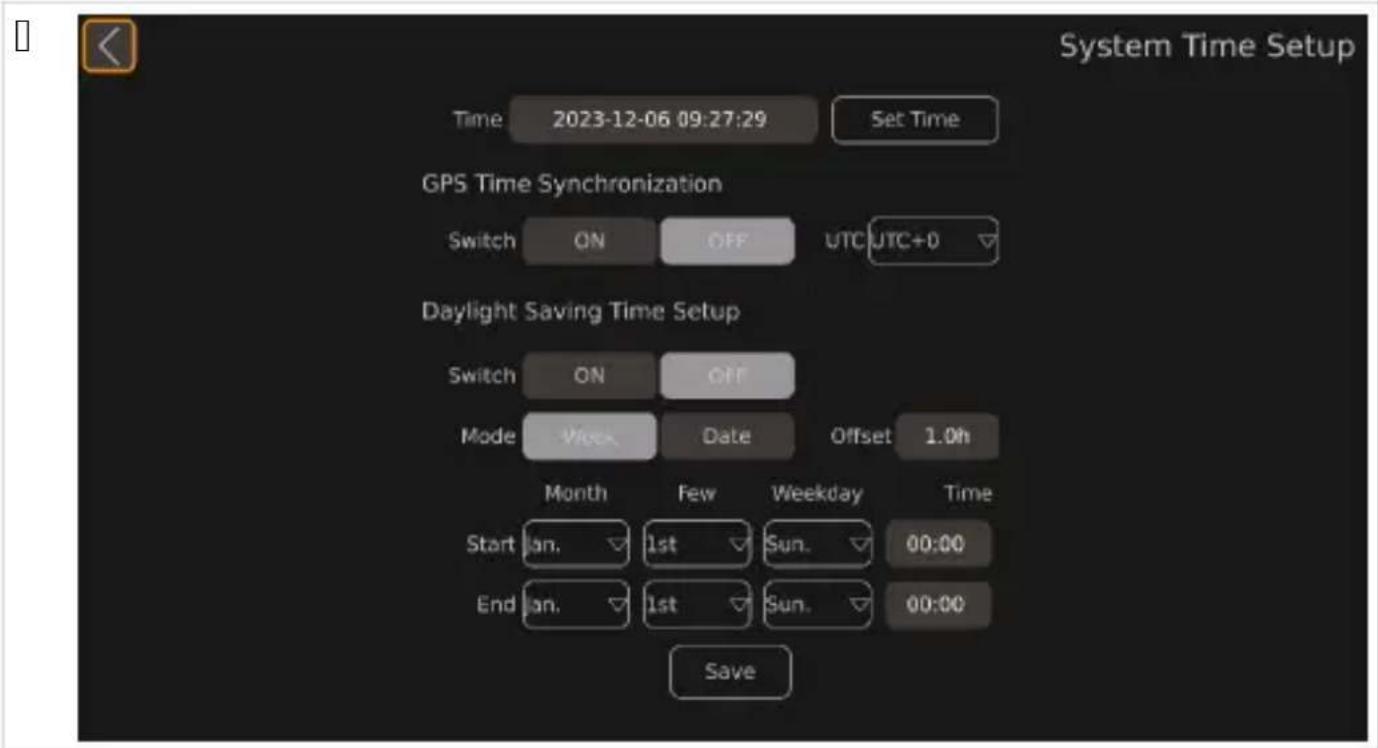
UPHPT Set the time
Q. Open Setup.
v The SETUP settings are displayed.
- Open the Time settings. The System Time Setup is displayed.
Q. Turn off the monitor.
TP3 , 0i:i,) area camerel, r
TP6 I) tr, d1cerea 1) 1i card SD
U Utili0area
Homepage: www.dometic.com/bea
Instructions for use
Instructions for use and installation for the manufacturer and the carrier
Instructions for use with the spare parts list

DANGER Risk of explosion
Read and follow the safety instructions before using the device.
Keep the device away from children and pets. The device must be used under adult supervision and in accordance with the instructions for use and the safety instructions.

| No Ko9пон8н7 Кол5ч867во |
| Q K<меВ< V |
| I К6>:В6леВ Q |
| T Ди9:<>ци6>>6 упВ<7ле>ие Q |
| V И>фВ<чеВ7е> пВием>и5 QK C74В; 7<щ 5<Сел ; < пBe76; >6:6 9Be89:76 Q |
| W C74В; 7<щ 5<Селе> 56мпле5: ; < 5<меВ<:< Q |
| X У>и7еВ9<ле> 974В; 7<щ 5<Сел Q |
| Y О-пВ49:e>и V |
| Z K<Сел ; < 974В; 7<e >< м6>и:6В Q |
6. Installation
The device must be installed by a qualified technician.
| Ф”нкц5я Оп56: н58 | |
| Calibrate C484Вж< В4567689:76:6 ;< 5<лиСВиВ<>е >< 9и9:ем<:< 6: 5<меВи. | |
| Surround View C484Вж< В4567689:76:6 ;< ><9:В6й5< > < 656л>иА и; гле8. | |
| Time Setup C484Вж< В4567689:76:6 ;< ><9:В6й5< > < 7Веме:6. | |
| Adas Setup C484Вж< В4567689:76:6 ;< 9и9:ем<:< ;< 6:5Ви7<>е >< пешех68ци. | |
| DVR Setup C484Вж< В4567689:76:6 ;< ><9:В6й5< > < 7и8е6;<пи9и:е. | |
[ ]
| П: р: 987ър Оп56: н58 | |
| Settings C484Вж< 69>67>и:е ><9:В6й5и. | |
| Time C484Вж< ><9:В6й5и:е ; < 7Веме. | |
| DVR C484Вж< ><9:В6й5и:е ; < цифВ67 7и8е6;<пи9. | |
| Display C484Вж< 6Сщи:е ><9:В6й5и ; < п65<; 7<>иА и; гле8 >< 5<меВ<:<. | |
| Radar He e ><лич>6. | |
| Trigger C484Вж< ><9:В6й5и:е ; < п65<; <>6:6би:ес и; 6СВ<же>невАс >< 5<меВ<:<Р 56г<:6 9е п6А7и 9иг><л ;;<8ей9:7<>е. | |
| Adas C484Вж< ><9:В6й5<:< >" das? 75лючи:ел>6 ><9:В6й5и:е ; < 9и9:ем<:< ; < 6:5Ви7<>е >< пешех68-ци эDL Sc. | |
| View C484Вж< ><9:В6й5и:е ; < и; гле8< ,,ВиСеш56 656qP В<; 8ели:ел><:< 9п696C>69: >< и; 6СВ<же>ие- :6 >< 5<меВ<:< и и; гле8< 6: 6гле8<л6:6 ; < ; <8>6 7иж8<>е. | |
| Color C484Вж< ><9:В6й5и:е ; < В<; 8ели:ел><:< 9п696C>69: >< ц7е:67е:е. | |
| Network He e ><лич>6. |
[ ]
| П: р: 987ър Оп56: н58 | |
| Automatic Calibration | С484Вж< ><9:В6й5и:е ;< 5<лиСВиВ<>е >< 9и9:ем<:< 6: 5<меВи. |
| Calibration File | С484Вж< фу>5ции:е ;< е59п6В:иВ<>е и имп6В:иВ<>е >< ф<йл67е ;< 5<лиСВиВ<>е 54м и 6: 56м- пю:4В. |
| Vehicle Type C484Вж< ><9:В6й5и:е ;< :ип< пВе76;>6 9Ве89:76. | |
| Surround View C484Вж< ><9:В6й5и:е ;< 4г4л< >< пВип65Ви7<>е и ;<6Си5<лАщ<:< ; 6>< ;< гле8<>е. | |
| Parking Line C484Вж< ><9:В6й5и:е ;< ли>ии:е ;< п<В5иВ<>е. | |
| 3D Perspective | С484Вж< 6Сщи:е ><9:В6й5и ;< TL и;гле8 b><лич>и 9<м6 56г<:6 e <5:и7иВ<>TL и;гле8с. |
| Back View Perspective | С484Вж< ><9:В6й5и:е ;< TL и;гле8 ;< 5<меВ<:< ;< 6СВ<:>6 7иж8<>е t><лич>и 9<м6 пВи <5:и7и- В<>е >< TL и;гле8с. |
| 3D Display Adjust | С484Вж< ><9:В6й5и:е ;< и;гле8< 6: п:ичи п6гле8 t><лич>и 9<м6 56г<:6 e <5:и7иВ<>TL и;гле8с. |
[ ]
e. The device must be connected to the mains power supply.
| Д87: йл Оп56: н58 | |
| Q | f " ' 7x68 >e 9e и; п6л; 7 |
| I | |
| T U" L " U b>e 9e и; п6л; 7 | |
| V f aBS y>и7eB9<ле> 7и8е6 и; x68 b56мп6; и:e>c | |
| K C74В; 7<e >< " | L м6>и:6В | |
| W K<Сел ;< 974В; 7<e >< м6>и:6В | |
| X . SB 7x68 | |
| Y Micro . SB >e 9e и; п6л; 7 | |
| Z 3<8ей9:7<щи 5 | |
| QJ ЧеBe> щеп9ел b,,Front f " Мард ПВе8>< 5 | |
| QQ ЧеBe> щеп9ел b,,oei f " Мард ЛА7< 5 | |
| QI ЧеBe> щеп9ел b,,Uight f " Мард ДА9>< 5 | |
| QT ЧеBe> щеп9ел b,,Uear f " Мард К<meB< ;< 6СВ<:>6 7иж8<e | |
| QV И>фВ<чеВ7е> пВием>и5 | |
| QK К6>:В6леВ | |
| bn | К<фа7 ;<8ей9:7<щ 5<Сел b,,NUIMs W" UL qcd C74В; 7<e 54м п6л6жи:ел>иА 5<Сел >< 97е:ли><:< ;<8e> x68.К6г<:6 е 75люче>< пВе8<75< ;< ;<8e> x68Р 56>:В6леВ4: и 5<меВ<:< ;< 6СВ<:>6 7иж8<e 9е<5:и7иВ<: чВе; :6; и 5<Сел. |
| bu | Си> ;<8ей9:7<щ 5<Сел b,,NUIMs L UIMMRUqcd Вх68 ;< упВ<7лА7<щ 9иг><л ;< п65<;7<e >< и; гле-8< 6: п:ичи п6гле8 >< цАл e5В<> b QI 1а 9иг><лс. |
| p 36;67 ;<8ей9:7<щ 5<Селд И; x68 ;< 56>:В6ле> 9иг><л ;< 75люч7<e >< м6>и:6В b QI 1а 9иг><лс. | |
| wh | БАл ;<8ей9:7<щ 5<Сел b,,NUIMs oqcd C74В; 7<e 54м п6л6жи:ел>иА 5<Сел >< ле7иА миг<ч.К6г<:6 ле7иА: миг<ч e <5:и7иВ<>Р 56>:В6леВ4: и 946:7e:><:< 5<меВ< 9е <5:и7иВ<: чВе; :6; и 5<Сел. |
| ye | Ж4л: ;<8ей9:7<щ 5<Сел b,,NUIMs Uqcd C74В; 7<e 54м п6л6жи:ел>иА 5<Сел >< 8e9>иА миг<ч.К6г<:6 8e9>иА: миг<ч e <5:и7иВ<>Р 56>:В6леВ4: и 946:7e:><:< 5<меВ< 9е <5:и7иВ<: чВе; :6; и 5<Сел. |
| b ЧеBe> 5<Сел a,,M' L qcd BB4; 5< 9 м<9< b5лем< TQc | |
| rd | ЧеВ7е> 5<Сел b,,L f QI mTl a qcd C74В; 7<e 54м п6л6жи:ел><:< 5лем< b5лем< TJ c >< п69:6А>>иА<5умул<:6В. П6; 76лА7<Р ><Be8 9 8Byr6:6Р ;<п<ме:A7<e >< 8<:< и ч<9 bфу>5циА ;< ;<пи97<ес. |
| ye Ж4л: 5<Сел b,,,f f qcd C74В; 7<e 54м ;<п<л7<e:6 " f f b5лем< QKc. | |
W. The device must be placed on a stable surface.
X. The device must be cleaned.
Y. ПВ6Сий:е I 6:76В<;<ø TPVImm 956С<:<><5<меВ<:<.
Z. H<96че:е 5<Сел< >> 5<меВ<:< 54м 74:Веш>69::<< пBe76;>6:6 9Be89:76.
QJ . 3<7ий:е 5<меВ<:< и 956С<:< >> 5<меВ<:<Р 5<:6 и; п6л; 7<:е 75люче>и:е 9<м6> и 7и>:67е или 7и>:67е 9 Be; C< МТ х | J 1mm.

- ПВи5Вепе:е и>фВ<чеВ7е>иА пВием>и5 9 869:<7е><:<87у9:В<>><9<м6;<леп7<щ<ле>:<.
GO P: ' o7:
И; п6л; 7<й:е 8и9:<>ци6>>6:6 упВ<7ле>ие ир <56 им<р Су:6>и:е >< м6>и:6В< или 9е>; 6В>иА е5В<>р ; < 8<упВ<7лА7<:е и ><9:В6й7<:е 9и9:ем<: < 6: 5<меВи в7иж:е Ди9:<>ци6>>6 упВ<7ле>ие >< 9:В<>иц< XI Qс. Сп<; 7<й:е и>9:Ву5ции:е >< пВ6и; 768и:елА >< м6>и:6В<.

УКА„АНИЕ
B4; м6ж>6 е м6>и: 6В4: 8< им< п6-м<л56 Су: 6>и 6: 8и9:<>ци6>>6: 6 упВ<7ле>ие. С Су: 6>и:е < м6>и: 6В< им< п6-м<л56 6пции ; < В<С6:< и ВегулиВ<>е > < 9и9:ем<:< 6: 5<меВи. К6г<:6 6:7<ВА:е или ВегулиВ<:е ><9:В6й5и:е р мбже 8< 6:>eme >А56л56 9е5у>8и р 865<:6 9и9:ем<:< 6: 5<меВи ; <Вe8и и и; п4л>и ><9:В6й5и:е.
3 Se, t1d d, k1me) did
oisateavet asutamise ohta vaada e seadistusjuhendist aadressil _r.dometic.com/beaeYa.
N ( F1t1sj1Fised
tärEiEe smid1ki t, , tja ) i) E -, litat1d töök, dade esitat1d , F1t1sj1Fiseid ja eri) m1deidP tärEiEe keFti- aid miE1s), rmeP

( H!L laF-at1s, Ft
H( IA! USL' iEast1s, Ft
TP3 Kaamerate DaiE1 tami) e
TP6 Inserting the SD card
Disconnect the device from the power supply before inserting or removing the SD card.
Insert the infrared receiver into the connector on the rear panel.
TPT Camera power supply

WARNING: Risk of electric shock
Usage
Operation
| NrP K, mD,) e) tas Kiekis |
| Q /amera V |
| I aaldi lis Q |
| T ' uotolinio valdymo pultas Q |
| V IU imtuvas Q |
| K Nransporto priemonøs prijungimo abelis Q |
| W Jungiamasis virvøs rin inys amerų abeliams Q |
| X . niversalus prijungimo abelis Q |
| Y Sandarinimo ) iedai V |
| Z Monitoriaus prijungimo abelis Q |
QPH brackets
[ ]
| K, mD, ) e) tas ADrašymas | |
| Q | f '' jvestis bnenaudojamac |
| I | |
| T U" L " U tnenaudojamac | |
| V f aBS universalioji vaizdo iGvestis osud∅tin∅c | |
| K " I L monitoriaus jungtis | |
| W Monitoriaus prijungimo abelis | |
| X . SB jvestis | |
| Y „Micro . SBq tnenaudojamac | |
| Z Daleidi lio abeliai | |
| OJ Juodas iGtu as b,,Front f " Mqcd prie in∅ amera | |
| QQ Juodas iGtu as b,,oei f " Mqcd airioji amera | |
| QI Juodas iGtu as b,,Uight f " Mqcd deGinioji amera | |
| QT Juodas iGtu as b,,Uear f " Mqcd galinio vaizdo amera | |
| QV IU imtuvas | |
| QK aaldi lis | |
| bn | Uudas paleidi lio abelis b,,NUIMs W" UL qcd jungtis su atbulin∅s eigos ) ibinto teigiamu abeliu. Ijungus atbulin∅s eigos pavarąP per Gį abelį sua tyvinamas valdi lis ir galin∅ amera. |
| bu | MØlynas paleidi lio abelis b,,NUIMs Rt NR' L qcd valdymo signalo įvestisP s irta rodyti vaizdą iG pau Gčio s ryd) io visame e rane b QI la signalasc. |
| p Uausvas paleidi lio abelisd valdymo signalo iGvestis monitoriui ijungti b QI la signalasc. | |
| wh | Baltas paleidi lio abelis o,,NUIMs oqcd jungtis su airiojo posū io ) ibinto teigiamu abeliu. Ijungus airiojo posū io ) ibintąP per Gį abelį sua tyvinamas valdi lis ir atitin ama amera. |
| ye | Meltonas paleidi lio abelis b,,NUIMs Uqcd jungtis su deGiniojo posū io ) ibinto teigiamu abeliu. Ijungus deGiniojo posū io ) ibintąP per Gį abelį sua tyvinamas valdi lis ir atitin ama amera. |
| b Juodas abelis b,,M' L qcd jungtis su i) eminimu bTQ gnybtasc | |
| rd | Uaudonas abelis b,,L f QI mTI aqcd jungtis su nuolatiniu teigiamu a umuliatoriaus gnybtu oTJ gnybtasc. Be itų daly uP leid) ia iGsaugoti datą ir lai ą braGytuvo ūun cijac. |
| ye Meltonas | abelis b,," f f qcd jungtis su " f f u) degimu bQK gnybtasc. |
W. Tighten the mounting screws.
X. Install the camera.
Y. Connect the camera cable to the camera.
Z. Route the camera cable into the vehicle interior.
Q]. Secure the camera and camera cable using the provided self-tapping screws or MTS thread screws.

| . Insert the Q or SL card.
TPS and IM1-, m,) ta-imas
U Na1d, jimas
v Uodoma Password Setup.
- Ne sto lau e Current ives ite seną slapta) odį.
T. Ne sto lai e New ives ite naują slapta) odj ir paspaus ite Confirm .

AS! A2A
G S- arīE as DieOīmes
DapildinFormEciju par izmantoGanu s atiet onfigurEcijas pamEcFbE vietnē r.dometic.com/beaeYa.
N Dr, šīKas), rādes
2RĪDINĀtUMSL!ra1m1 risks
NrP Detaļa Da1d01ms Q /amera V
| NrP Detaja Da1 d01 ms |
| I Uegulators Q |
| T NElvadFbas pults Q |
| V InČrasar anais uztvērējs Q |
| K NransportlFdze za savienojuma vads Q |
| W SavienoGanas vads ameru abešiem Q |
| X . niversElais savienojuma vads Q |
| Y BlÍvgredzeni V |
| Z Monitora savienojuma vads Q |
QPH aDild1 Dieder1 mi
L etaas p as pieejamas E papildu piederumi bnav ie aautas piegEdes omple tEcijEc
6 ared0Ctais i0ma) t, ša) as mCrkis
| F1) kcijas ADraksts | |
| Calibrate Ietver pamEcfbu par ameru sistēmas alibrēGanu. | |
| Surround View Ietver norEdfjumus par TWJ grEdu s ata iestatīGanu. | |
| Time Setup Ietver pamEcfbu par lai a iestatīGanu. | |
| Adas Setup Ietver pamEcfbu par gEjēju onstatēGanas sistēmu. | |
| DVR Setup Ietver pamEcfbu par video iera stu iestatīGanu. | |
| Eleme) ts ADraksts | |
| Q | f '' ieeja onetie izmantotac |
| I | |
| T U" L " Utnetie izmantotsc | |
| V f aBS universEla video izeja o ompozfts signElsc | |
| K " I L monitora savienojums | |
| W Monitora savienojuma vads | |
| X . SB ieeja | |
| Y Micro . SB onetie izmantotsc | |
| Z IedarbinEGanas abesi | |
| QJ Melns spraudnis bqFront f " Mr cd Drie GejE amera | |
| Eleme) ts ADraksts | |
| QQ Melns spraudnis bqoei f " Mrcd /reisEs puses amera | |
| QI Melns spraudnis bqUight f " Mrcd oabEs puses amera | |
| QT Melns spraudnis bqUear f " Mrcd " tpa aes ata amera | |
| QV Inôrasar anais uztvērējs | |
| QK Uegulators | |
| bn | Brūns palaiGanas abelis bqNUIMs W" UL rcd savienojums ar atpa aegaitas lu tura pozitīvo abeli.Ieslēdzot atpa aegaitas pErnesumuP ar GF abea palfdzību notie ontrollera un atpa aes ata a-meras a tivizēGana. |
| bu | Zils palaiGanas abelis bqNUIMs Rt DoRL rcd /ontrolējiet signEla ievadiP lai parEdftu augGs atupilne rEna re) FmE b QI 1a c. |
| p SErts palaiGanas abelisd /ontrolējiet signEla izvadi monitora ieslēgGanai b QI 1a signElsc. | |
| wh | Balts palaiGanas abelis bqNUIMs or cd Savienojums ar reisE indi atora pozitīvo abeli./ad ir a tivizēts reisais indi atorsP regulatoru un attiecFgo ameru a tivizēP izmantojot Go abeli. |
| ye | L zeltens palaiGanas abelis bqNUIMs Ur cd Savienojums ar labE indi atora pozitīvo abeli./ad ir a tivizēts labais indi atorsP regulatoru un attiecFgo ameru a tivizēP izmantojot Go abeli. |
| b Melns abelis bqM' L rcd Savienojums ar iezemējumu bizvads TQc | |
| rd | Sar ans abelis bqL f QI mTI ar cd Savienojums ar nepErtrau tu a umulatora pozitīvo polu bizvadsTJ c. f ita starpE eauj saglabEt datumu un lai u bregistratora 0un cijac. |
| ye L zeltens | abelis bq" f f rcd Savienojums ar " f f aizdedzi bizvads QKc. |
WARNING: Risk of injury
Install the regulator in a place protected from direct sunlight.

INSTALLATION
1. Insert the Q or SL bracket. Then tighten the SL bracket screw to the controller.
2. Operation
Use the remote control and monitor buttons or the buttons on the device, if available, to use and adjust the camera system. See the remote control manual, page IXYTc.
dometic.com/sales-offices


- ELISF
- G IMD, RTA) T), TES
- DANGER
- WARNING
- CAUTION
- RELATED DOCUMENTS
- NOTICE: DAMAGE HAZARD
- QPG SC, DE, J DELIVERY
- QPH ACCESSORIES
- I) TE) DED 1 SE
- GUIDANCE
- VIDEO
- INFORMATION
- SPN CAMERA M, DES
- N(!E
- INSTALLATION
- CAUTION! RISK OF INJURY
- INSTALLATION NOTES
- TPS: INSTALL THE IR RECEIVER
- OPERATION
- NOTE
- UPHP3 FILLI) E I) TEL T JIELDS
- NOTE: THE DEFAULT PASSWORD IS
- UPHPT SETTINGS: SET THE TIME
- SETTING THE GPS TIME SYNCHRONIZATION
- ADJUSTING THE DAYLIGHT SAVING TIME SETUP
- UP3 CALIBRATION KIT - IDE SYSTEM
- MARNIN3L HEALTH FA0ARD
- OPEN THE VIDEO SETTINGS
- TECHNICAL DATA
- DEL TSCF
- TP3 CAMERAS, POSITIONS, ETC
- TP6, ETC., ETC., SD CARD
- U 2ETRIEK
- CHARACTERISTICS DESCRIPTION
- USE
- FUNCTION
- RECAUTION: BEFORE USE
- TP3: POSITION THE CAMERAS
- TPN: POSITION THE CAMERAS
- TP6: INSERT AN SD CARD
- UPHPT: ADJUST THE FRAMES
- ADJUST THE DAYLIGHT SAVING TIME SETUP
- TPT ELECTRICAL CONNECTION, CLIP E A- CAMERA E)
- U 2ETJE) I) E
- TP3 CAMERA, IDE) SIJ, ITTAMI) E)
- U USAGE
- TP3 M, CAMERA
- U INSTALLATION
- TPQ M, LOAD - THE UNIT
- TP6 'L, THAT) IE SD CARDS
- U ( KSL1FA
- (NOTE
- UPG WAD) 1 TIE KAMER, - ÉF, SYSTÉM
- UPHPG RED) 1 TIE KAMER, -ÉF, SYSTÉM1 D, D, F, T, -, ST) ÉF, REŽIM
- UPHPH ( T-, RE) IE FLA-) EJ D,) 1 KY
- UPHP3 ' YDÍŇA) IE TEL T, - . CF D, LD
- UP3 CAMERA MODULE
- UP6 SD CARD SLOT
- GO, USED
- GOPN SD CARD AND ODR, JǓ - IDED
- U Z0EMELTETÉS
- TP3: INSTALL THE CAMERA
- TPN: INSTALL THE CAMERA
- INSERTING THE SD CARD
- U K1LLA) IM
- QPH D, DAT) A , DREMA
- RED-IDE) A 1D, RAKA
- TP3 , STA- ITE- KAMER
- TPN NAMESTITE- KAMER
- TPQ INSTALL THE CONTROL UNIT
- TP6 ' STA- ITE- D, M) IL) IŠKE KARTICE SD
- TPS INSTALL THE RECEIVER) WITH THE IR
- TPT CONNECT THE CAMERA
- U UD, RAKA
- UPHPT SET THE TIME
- TP3 , 0I:I,) AREA CAMEREL, R
- TP6 I) TR, D1CEREA 1) 1I CARD SD
- U UTILI0AREA
- INSTRUCTIONS FOR USE
- GO P: ' O
- УКА„АНИЕ
- SE, T1D D, K1ME) DID
- N ( F1T1SJ1FISED
- TP3 KAAMERATE DAIE1 TAMI) E
- TP6 INSERTING THE SD CARD
- TPT CAMERA POWER SUPPLY
- WARNING: RISK OF ELECTRIC SHOCK
- USAGE
- QPH BRACKETS
- TPS AND IM1-, M,) TA-IMAS
- U NA1D, JIMAS
- AS! A2A
- G S- ARĪE AS DIEOĪMES
- N DR, ŠĪKAS), RĀDES
- RĪDINĀTUMSL!RA1M1 RISKS
- QPH ADILD1 DIEDER1 MI
- ARED0CTAIS I0MA) T, ŠA) AS MCRKIS
Brand : DOMETIC
Model : CAM360AHDHD
Category : Rear Camera