
PerfectView CAM 35 2.0 TWIN - Rear Camera DOMETIC - Free user manual and instructions
Find the device manual for free PerfectView CAM 35 2.0 TWIN DOMETIC in PDF.


| Product type | Dual rear view camera (TWIN) with long distance module |
| Brand | Dometic |
| Model | PerfectView CAM 35 2.0 TWIN |
| Dimensions (L x H x D) | 379.9 x 83.66 x 51.7 mm |
| Weight | 250 g |
| Operating voltage | 6 – 16 V |
| Power consumption (AHD) | < 2.52 W |
| Power consumption (CVBS) | < 2.64 W |
| Image sensor | CMOS 1/2.9" |
| Video standard | PAL (AHD and CVBS) |
| Sensitivity | < 1 lux |
| Rear view angle (AHD) | H: 122°, V: 94° |
| Long distance angle (AHD) | H: 80°, V: 50° |
| Rear view angle (CVBS) | H: 118°, V: 90° |
| Long distance angle (CVBS) | H: 80°, V: 44° |
| Protection class | IP69K |
| Vibration resistance | ISO 16750-3:2023 |
| Operating temperature | -40 °C to 85 °C |
| Connector type | 6 pins and RCA |
| Intended use | Vehicles Fiat Ducato, Citroën Jumper, Peugeot Boxer (standard roof, from 2006) |
| Delivery contents | Camera, 15 m system cable, Y CAM adapter, NAV adapter, mounting screws |
| Maintenance | Cleaning with a damp cloth; regular check of cables and connectors |
| Safety | Follow mounting instructions, do not open the camera, avoid short circuits |
Frequently Asked Questions - PerfectView CAM 35 2.0 TWIN DOMETIC
User questions about PerfectView CAM 35 2.0 TWIN DOMETIC
0 question about this device. Answer the ones you know or ask your own.
Ask a new question about this device
Download the instructions for your Rear Camera in PDF format for free! Find your manual PerfectView CAM 35 2.0 TWIN - DOMETIC and take your electronic device back in hand. On this page are published all the documents necessary for the use of your device. PerfectView CAM 35 2.0 TWIN by DOMETIC.
USER MANUAL PerfectView CAM 35 2.0 TWIN DOMETIC
Rear View Video Camera
Installation and Operating Manual 9
Ruckfahrvideokamera
© 2024 Dometic Group. The visual appearance of the contents of this manual is protected by copyright and design law. The underlying technical design and the products contained herein may be protected by design, patent or pending patent. The trademarks mentioned in this manual belong to Dometic Sweden AB. All rights are reserved.

7
A
123
4
B
1
2
Please read these instructions carefully and follow all instructions, guidelines, and warnings included in this product manual in order to ensure that you install, use, and maintain the product properly at all times. These instructions MUST stay with this product.
By using the product, you hereby confirm that you have read all instructions, guidelines, and warnings carefully and that you understand and agree to abide by the terms and conditions as set forth herein. You agree to use this product only for the intended purpose and application and in accordance with the instructions, guidelines, and warnings as set forth in this product manual as well as in accordance with all applicable laws and regulations. A failure to read and follow the instructions and warnings set forth herein may result in an injury to yourself and others, damage to your product or damage to other property in the vicinity. This product manual, including the instructions, guidelines, and warnings, and related documentation, may be subject to changes and updates. For up-to-date product information, please visit documents.dometic.com.
Contents
1 Explanation of symbols 9
2 Safety instructions 10
3 Scope of delivery 11
4 Target groups. 12
5 Intended use 12
6 Technical description 12
7 Installation 13
8Operation. 14
9 Cleaning and maintenance 14
10 Troubleshooting 15
11 Warranty. 15
12 Disposal 15
13 Technical data 15
1 Explanation of symbols

DANGER!
Safety instruction: Indicates a hazardous situation that, if not avoided, will result in death or serious injury.

WARNING!
Safety instruction: Indicates a hazardous situation that, if not avoided, could result in death or serious injury.

CAUTION!
Safety instruction: Indicates a hazardous situation that, if not avoided, could result in minor or moderate injury.

NOTICE!
Indicates a situation that, if not avoided, can result in property damage.
2 Safety instructions
Observe the prescribed safety instructions and stipulations from the vehicle manufacturer and service workshops.
Observe the applicable legal regulations.

DANGER! Failure to obey these warnings will result in death or serious injury. Explosion hazard
- The camera does not release the driver from the duty of care when driving.
- The driver remains fully responsible for driving the vehicle, for fulfilling the road safety obligations and, for complying with the statutory road safety requirements.

WARNING! Failure to obey these warnings could result in death or serious injury. Risk of injury
- This camera can be used by children aged from 8 years and above and persons with reduced physical, sensory or mental capabilities or lack of experience and knowledge if they have been given supervision or instruction concerning use of the device in a safe way and understand the hazards involved.
- Secure the parts installed in the vehicle in such a way that they cannot become loose under any circumstances (sudden braking, accidents) and cause injuries to the occupants of the vehicle.
- Do not install the parts anywhere in the vehicle where an airbag may open. This can cause injury if the airbag deploys.
- Inadequate supply line connections can result in short circuits causing:
Cable fires
- The airbag being triggered
- Damage to electronic control devices
- Electrical malfunctions (turn signal, stoplight, horn, ignition, lights).

CAUTION! Failure to obey these cautions could result in minor or moderate injury. Risk of injury
- Secure any parts of the system concealed by the bodywork in such a manner that they cannot become loose or damage other parts or cables, or impair vehicle functions (steering, pedals, etc.).
- Always follow the safety instructions of the vehicle manufacturer.
Some work (e.g., on retention systems such as the airbag, etc.) may only be performed by qualified specialists.

NOTICE!
Damage hazard
- To prevent damage when drilling ensure that there is sufficient space on the other side for the drill head to emerge.
- Deburr all drill holes and treat them with a rust-protection agent.
- When working on the electrical system, the batteries must be separated from the vehicle ground. This applies to the main and additional batteries.
-
When working on the following cables only use insulated cable lugs, plugs and tab sleeves:
-
30 (direct input from positive battery terminal)
- 15 (connected positive terminal, behind the battery)
- 31 (return cable from the battery, ground)
- 58 (reversing light)
Do not use porcelain wire connectors.
-
Use a crimping tool to connect the cables.
-
Screw the cable when connecting cable 31 (ground).
-
Screw the cable using a cable lug and lock washer to one of the vehicle's ground bolts or
Screw the cable to the sheet metal body work using a cable lug and a self-tapping screw.
Ensure that there is a good ground connection.
- If the battery is disconnected, all data stored in all volatile memory will be lost. Data may have to be reset. Follow the instructions of the vehicle manufacturer in this case. The instructions for making these settings can be found in the operating manual.
- When testing the voltage in electrical cables only use a diode test lamp or a voltmeter.
Test lamps with a bulb consume too much voltage which can damage the vehicle's electronic system.
-
When making electrical connections ensure the following:
-
They are not kinked or twisted
- They do not rub on edges
-
They are not laid in sharp-edged through-holes without protection.
-
Insulate all connections.
- Secure the cables against mechanical stress with cable binders or insulating tape, e.g., to existing lines.
- Follow the installation and operating manual for the monitor.
- Do not open the camera.
- Do not pull the cables.
- Do not expose the cables to solvents such as benzene for long periods of time.
- Do not use the cameras under water.
- Install cables far enough away from hot or moving vehicle parts (exhaust pipes, drive shafts exhaust pipes, drive shafts, lights, blowers, heaters, etc.).
3 Scope of delivery
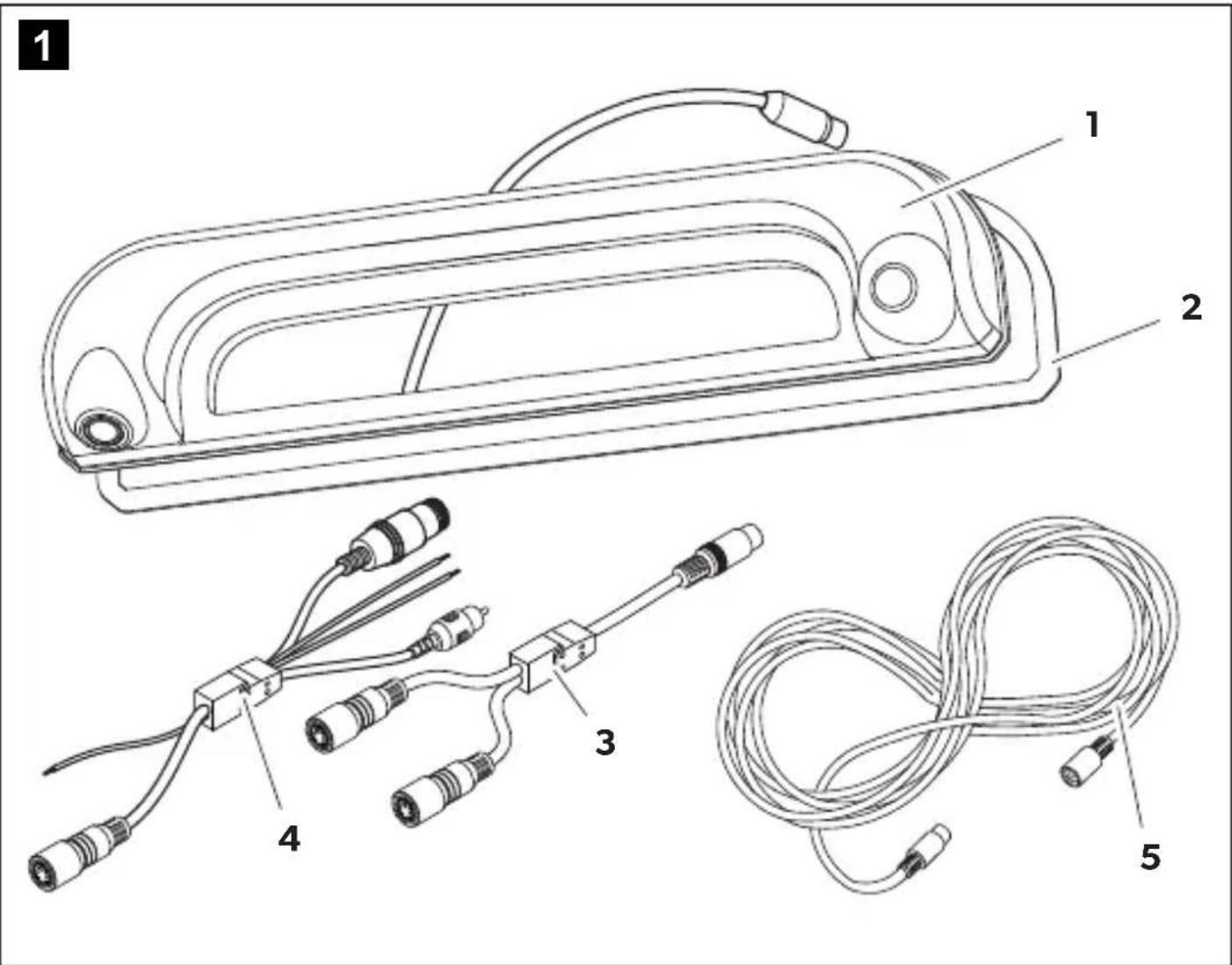
CAM35-2.0 REAR basic: fig. 1, page 3
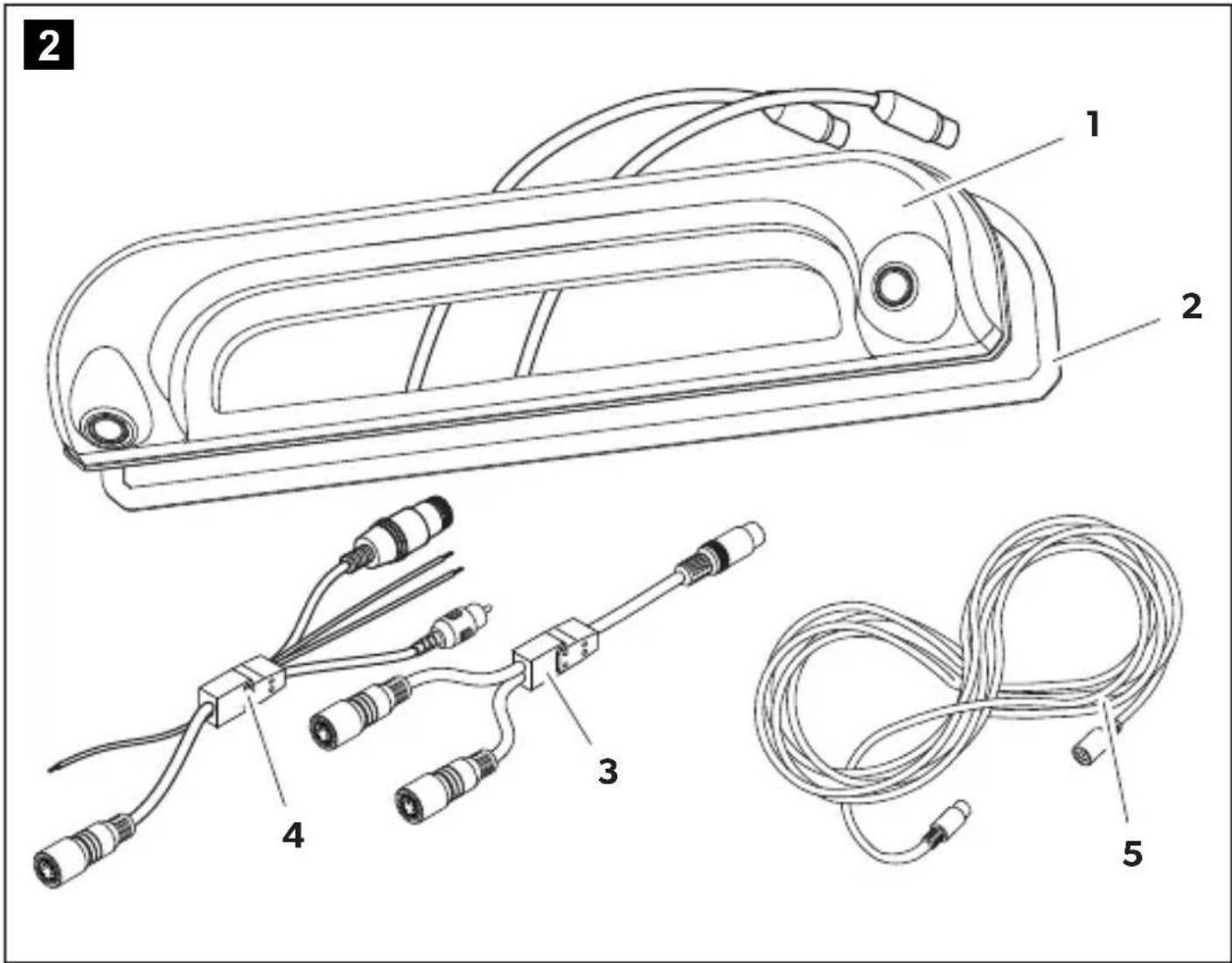
CAM35 2.0 TWIN basic: fig. 2, page 4
No. Quantity Description Ref no.
11 Camera
CAM35-2.0 REAR basic 9620017515
CAM35 2.0 TWIN basic 9620017521
21 Seal -
31Y-adapter CAM 9600000552
41Adapter NAV 9620012441
51 System cable 15m
9600001662
一
2
Fastening bolts 6 × 25 ~mm
4 Target groups

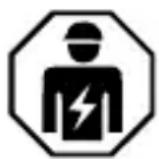
The electrical power supply must be connected by a qualified electrician who has demonstrated skill and knowledge related to the construction and operation of electrical equipment and installations, and who is familiar with the applicable regulations of the country in which the equipment is to be installed and/or used, and has received safety training to identify and avoid the hazards involved.
5 Intended use
The camera is intended for use in the Fiat Ducato, Citroen Jumper, Peugeot Boxer vehicles starting from model year 2006 with single roof. The camera console is mounted between the bodywork and the brake light. It can be used in video systems to observe the space rear of the vehicle from the driver's seat when maneuvering or parking.
This product is only suitable for the intended purpose and application in accordance with these instructions.
This manual provides information that is necessary for proper installation and/or operation of the product. Poor installation and/or improper operation or maintenance will result in unsatisfactory performance and a possible failure.
The manufacturer accepts no liability for any injury or damage to the product resulting from:
- Incorrect installation, assembly or connection, including excess voltage
Incorrect maintenance or use of spare parts other than original spare parts provided by the manufacturer - Alterations to the product without express permission from the manufacturer
- Use for purposes other than those described in this manual
Dometic reserves the right to change product appearance and product specifications.
6 Technical description
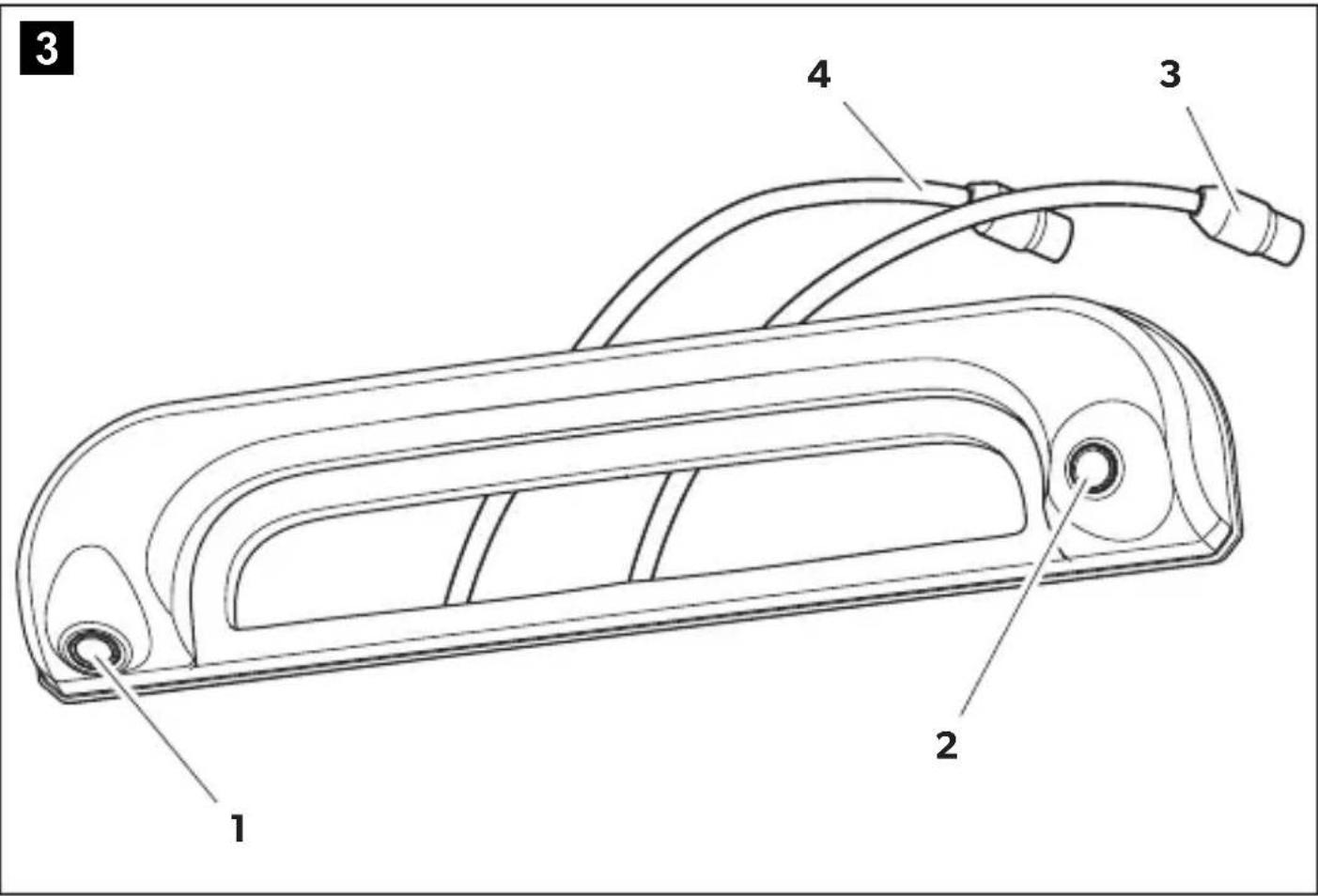
The reversing camera module and the long-distance camera module (CAM35 2.0 TWIN basic only) are housed in one console for the original brake light. The camera image is transferred to a monitor via a system cable. The camera is also suitable for connection to the Fiat navigation system Uconnect.
The camera consists of the following elements:
| No. in fig. 3, page 5 | Description |
| 1 Reversing camera module | |
| 2 | Long-distance camera module (CAM35 2.0 TWIN basic only) |
| 3 6-pin connection cable for the long-distance camera module ( CAM35 2.0 TWIN basic only) | |
| 4 6-pin connection cable for the reversing camera module | |
The CAM35-2.0 basic is equipped with an adapter that allows connection to a monitor with a 6-pin connector and to a monitor with an RCA connector (A/V input).
CAM35 2.0 TWIN basic only: The camera switching electronics enable both camera modules to be operated via only one A/V input.
7 Installation
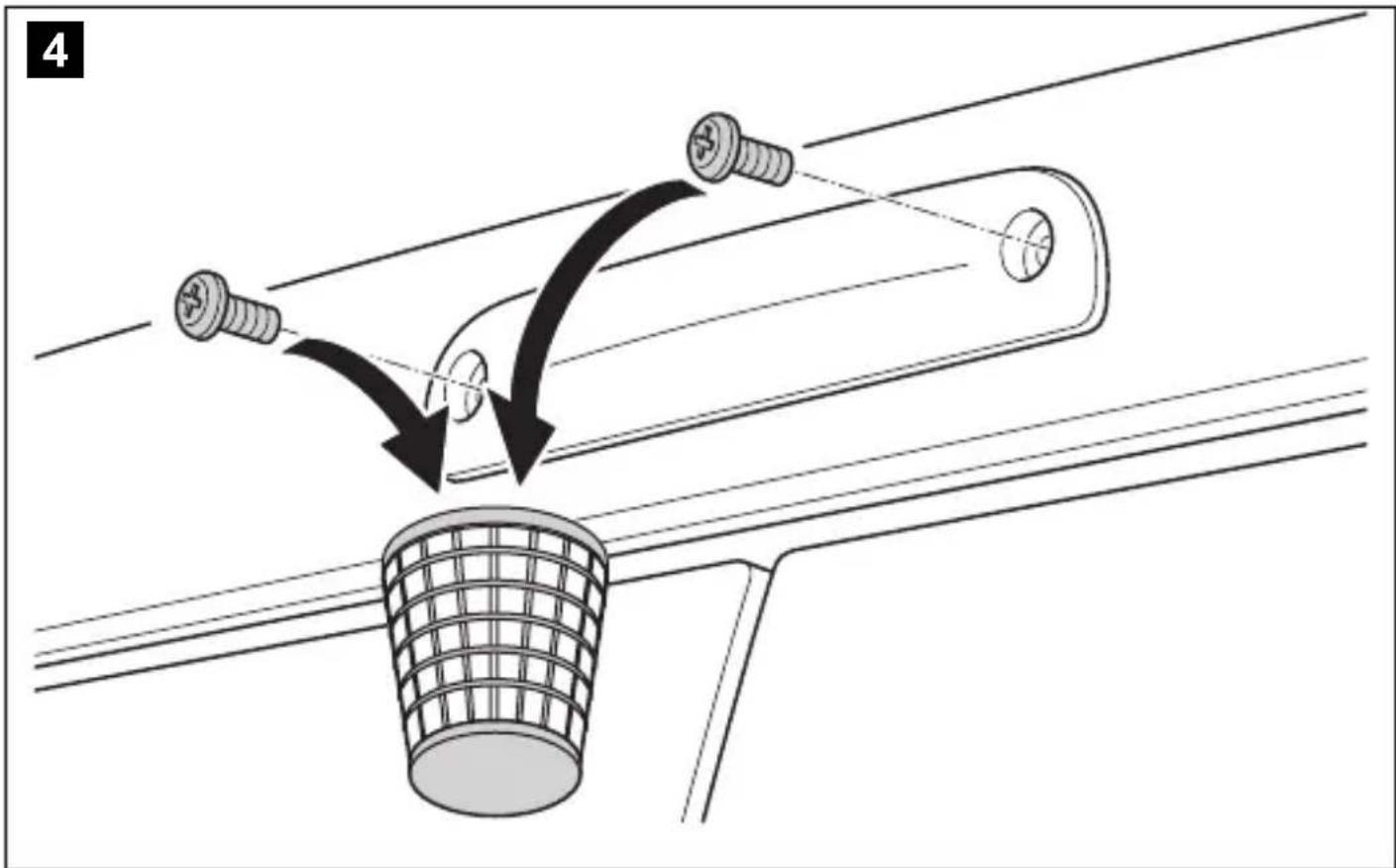
7.1 Dismantling the brake light
- Remove the screws of the brake light (fig. 4, page 5).
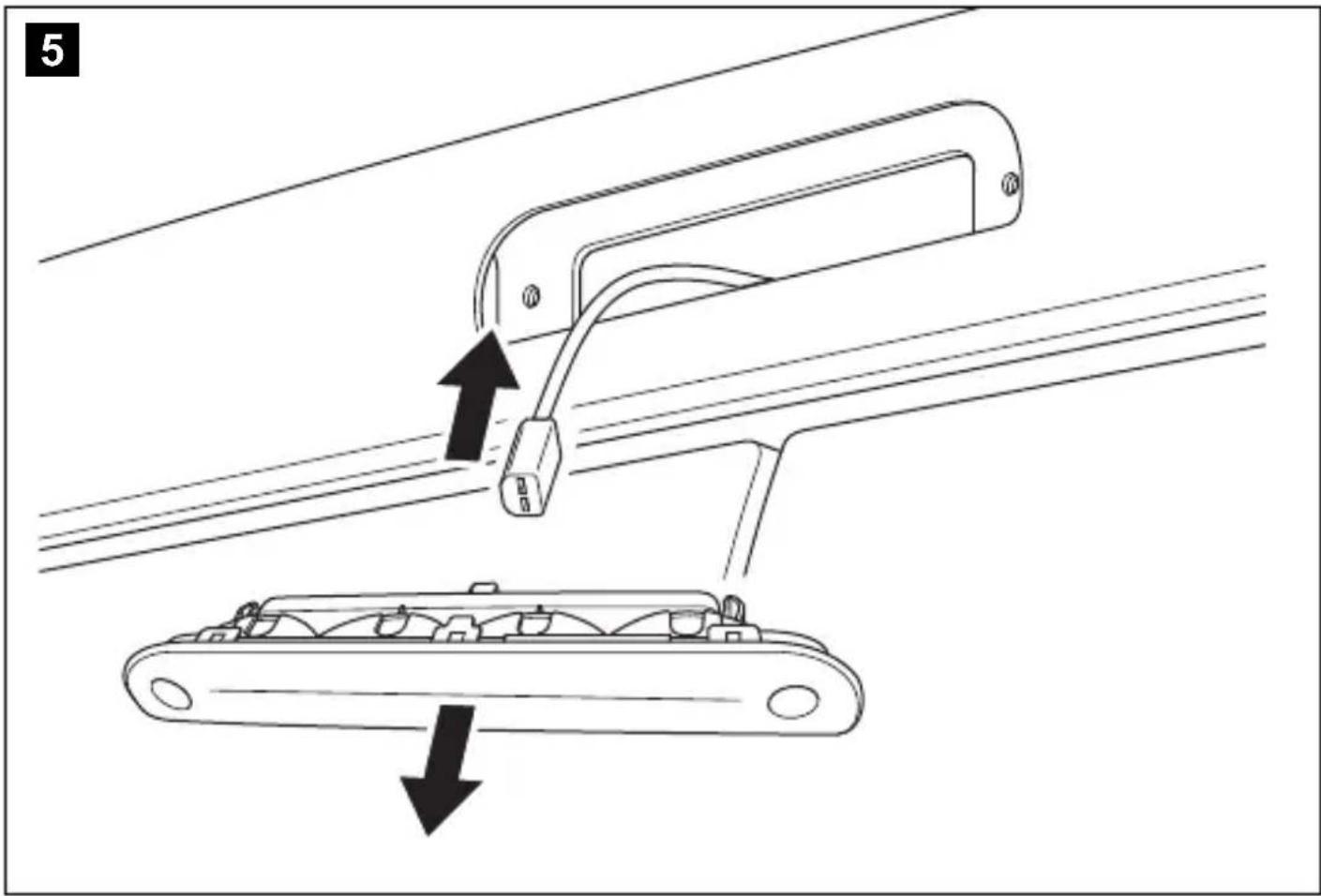
- Disconnect the brake light from the vehicle (fig. 5, page 6).
7.2 Laying cables

NOTICE! Damage hazard
- Before drilling holes check that there is sufficient space on the other side of the wall for the drill head to come out.
- Cables and connections that are not properly installed will cause malfunctions or damage to components. Install the cables and connectors as specified.
- Do not expose the cables to solvents such as benzene for a long period of time.

NOTE
Lay the cables so that the connector between the camera and the extension cable is easy to reach.
Observe the following instructions:
- Use original ducts for laying the cables or other suitable options such as paneling edges, ventilation grilles, or dummy plugs. If no openings are available, drill holes for the cables.
- Lay cables inside the vehicle. If a cable needs to be laid outside the vehicle, ensure that the cable is well fastened (use additional cable ties, insulating tape, etc.).
- Ensure that the cables are far enough away from hot or moving vehicle components (exhaust pipes, drive shafts, light systems, fans, heaters, etc.). Use corrugated piping or other protective materials to protect against mechanical wear.
- Ensure that the cables are not kinked or twisted.
- Ensure that the cables do not rub on edges.
- Ensure that the cables are not laid in sharp-edged ducts without protection.
- Attach the cables securely in the vehicles to prevent tripping hazards. Use cable binders, insulating tape, or gluing the cables in place with adhesives.
Lay the system cables.
7.3 Connecting the camera

NOTE
Apply a small amount of grease, such as pin grease, to the plugs to prevent corrosion in the plug.
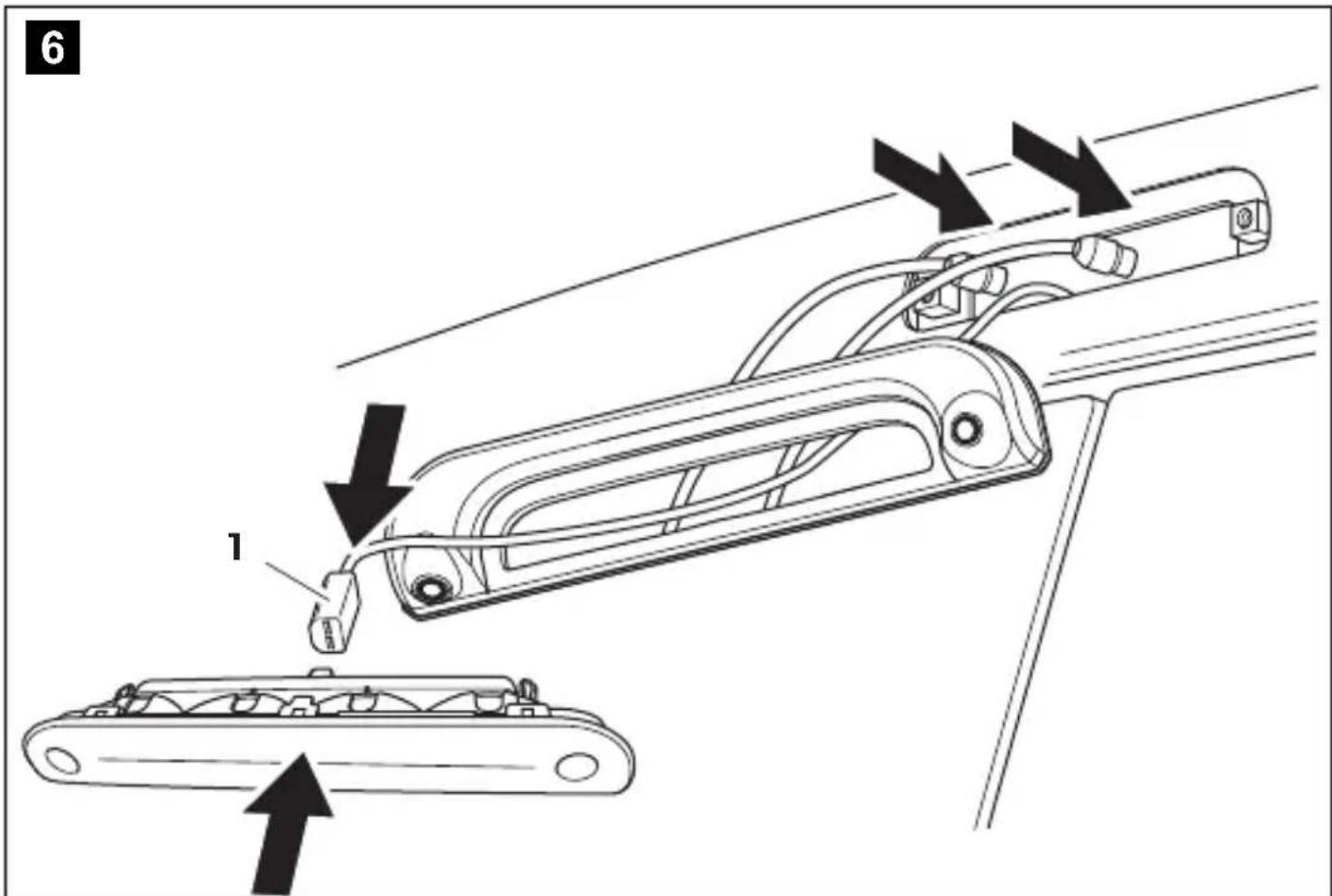
- Guide the connector of the brake light through the console.
- Re-attach the plug of the brake light onto the brake light (fig. 6, page 6).
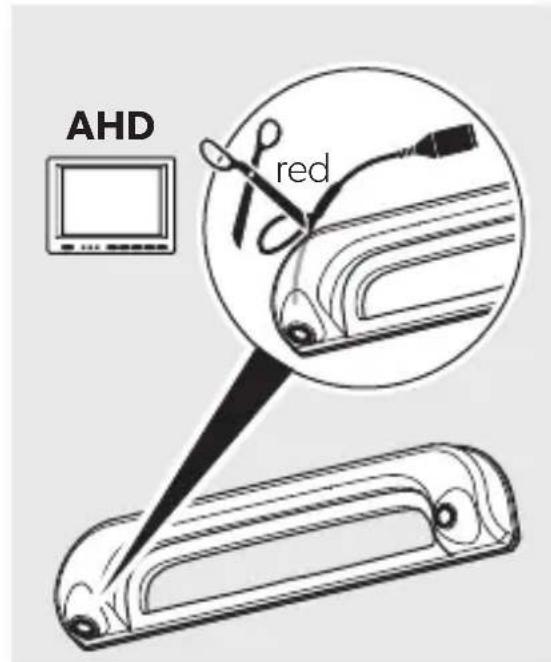
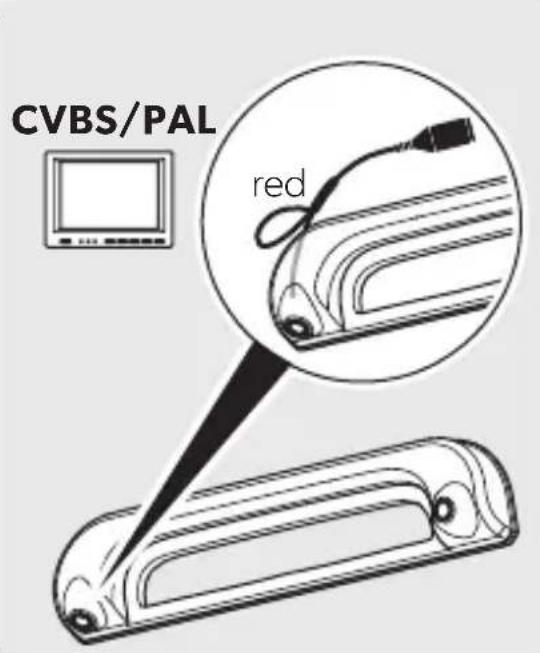
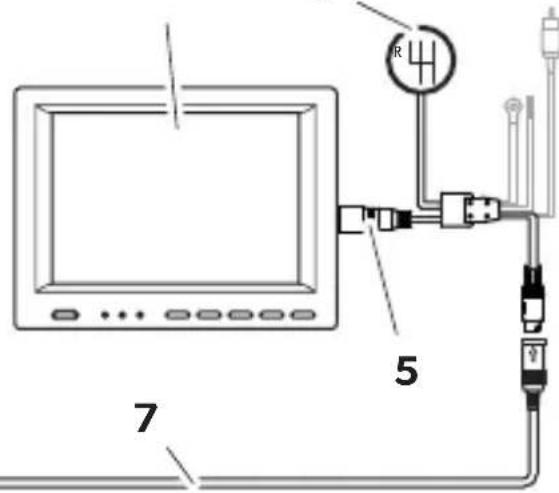
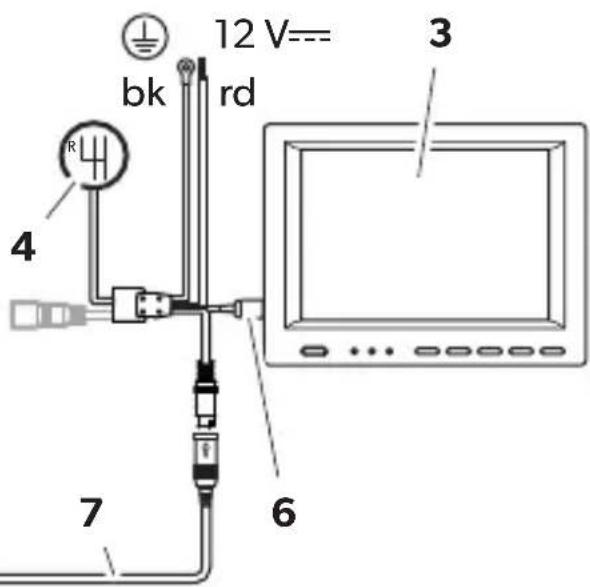
- Connect the camera as shown (fig. 7, page 7).
Legend:
| No. in fig. 7, page 7 | Description |
| 16-pin connection cable for reversing camera module | |
| 2 Y-adapter CAM | |
| 3 Monitor | |
| 4 Connection cable reverse gear | |
| 5 6-pin plug for the monitor | |
| 6 RCA plug for the monitor | |
| 7 System cable | |
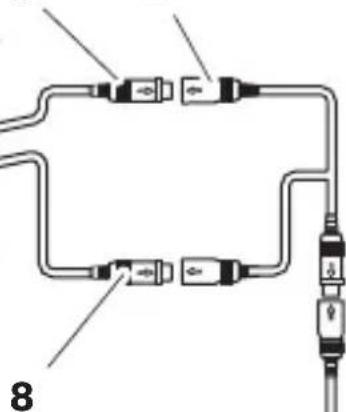
| 8 6-pin connection cable for long-distance camera module (CAM35 2.0 TWIN basic only) | |
| 9 Camera CAM35-2.0 REAR basic or CAM35 2.0 TWIN basic | |
| bk black ground connection | |
| rd red 12 V= connection | |
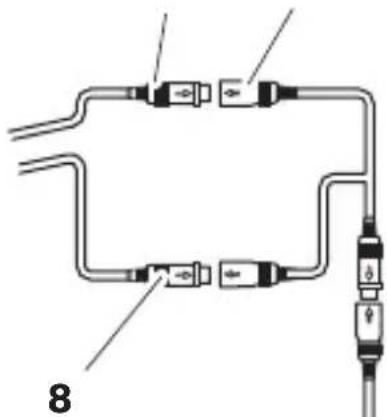
7.4 Protecting the plugs
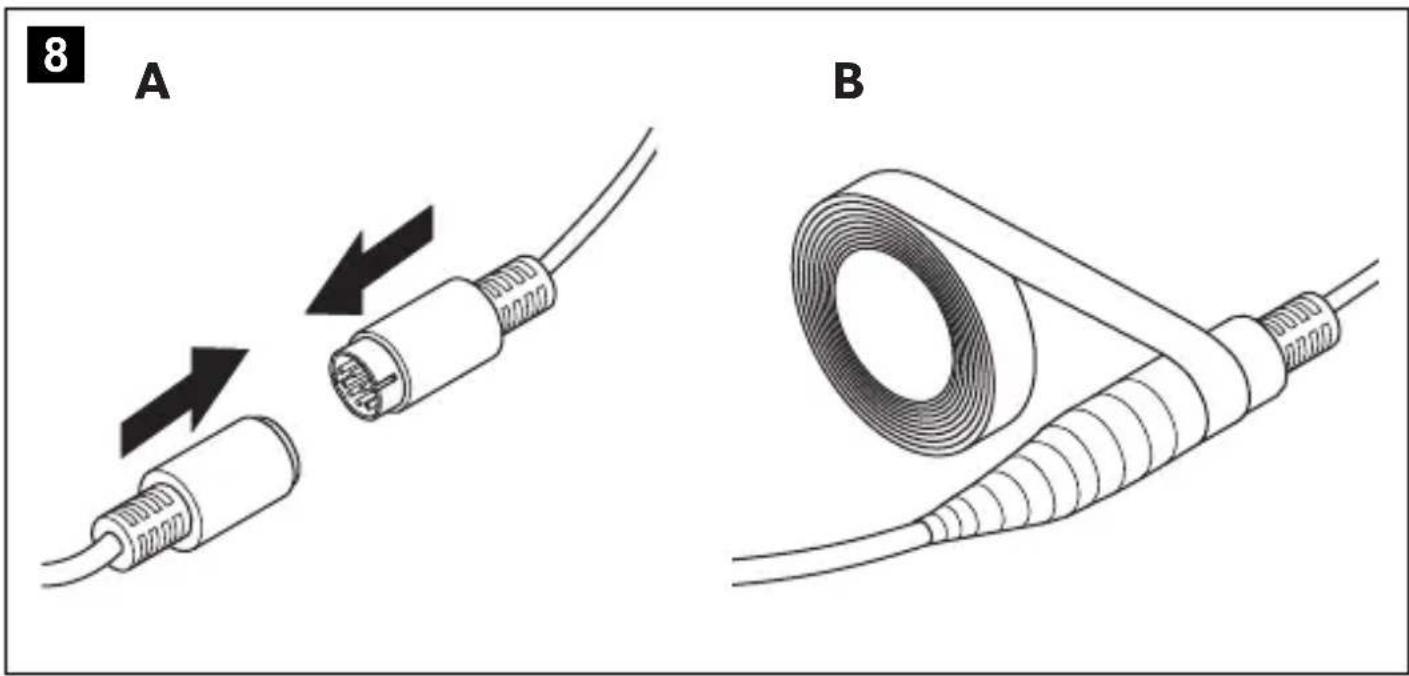
Seal the connected plugs with water repellent adhesive tape to protect them against water ingress (fig. 8, page 8).
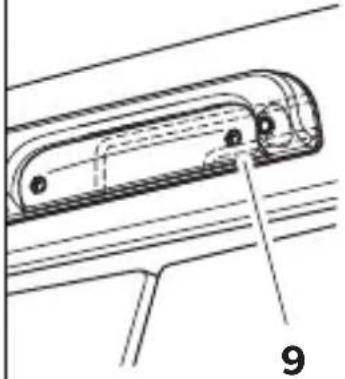
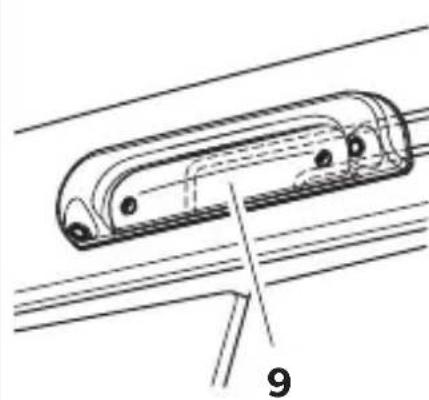
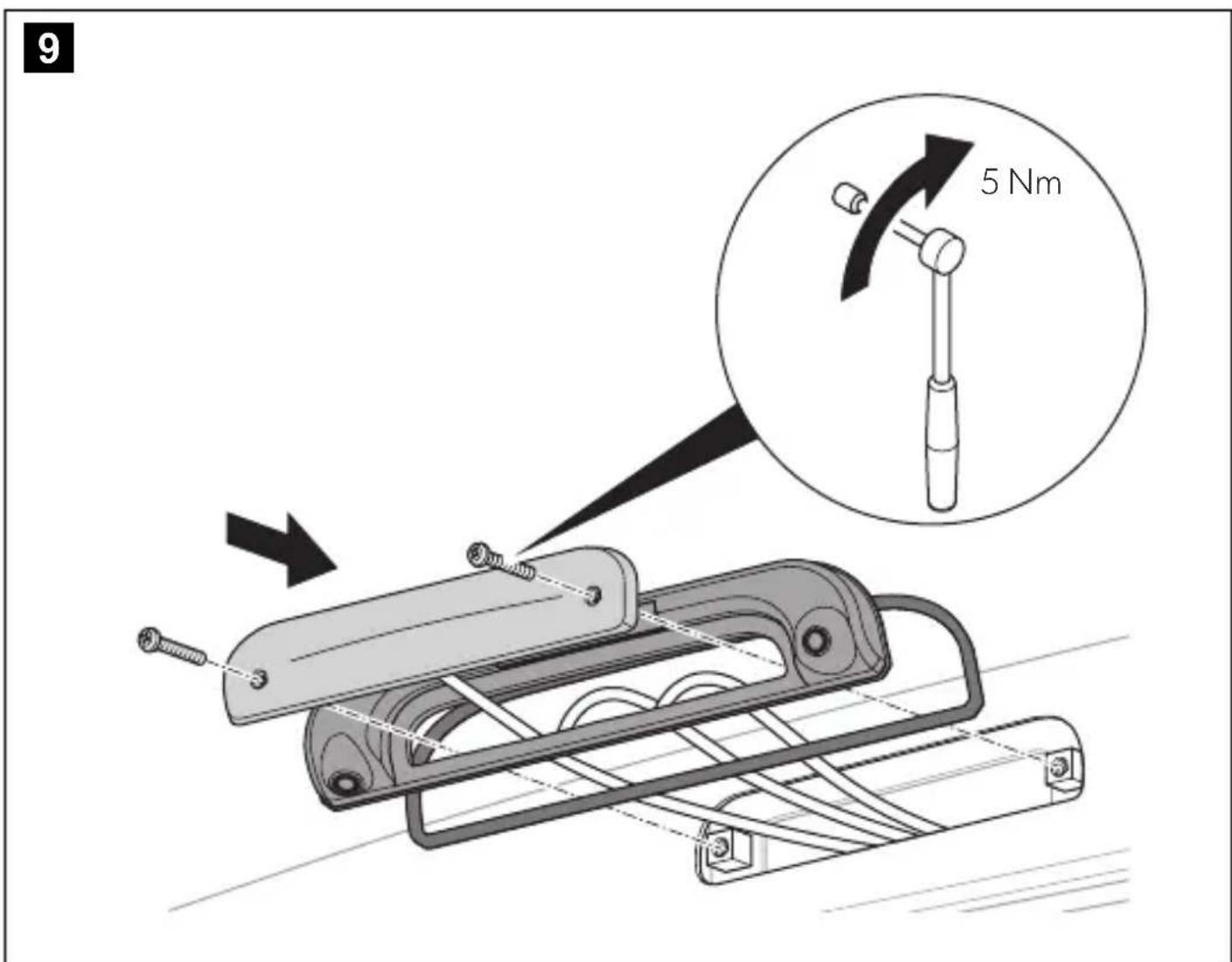
7.5 Mounting the camera (fig. 9, page 8)

NOTE
Route the camera cables in the bottom of the console up to the notches so that the cables are not pinched.
- Place the brake light in the camera opening.
- Secure the camera with two 6 × 25 mm fastening screws.
8 Operation
The camera can be used via the monitor after connecting.
Follow the monitor manufacturer's instructions.
9 Cleaning and maintenance

NOTICE! Damage hazard
Do not use sharp or hard objects, abrasive cleaning agents, or bleach for cleaning.
Occasionally clean the device with a soft, damp cloth.
Regularly check live cables or wires for insulation faults, breaks, or loose connections.
10 Troubleshooting
| Fault Possible cause Remedy | ||
| The camera does not work. The camera is connected incorrectly. | Reconnect the camera (see chapter “Connecting the camera” on page 13). | |
| A connection cable is defective. | Contact an authorized service agent. | |
| The camera is defective. | Contact an authorized service agent. | |
| The image generated by the camera is blurred or dark. | The camera is not clean. | Clean the camera (see chapter “Cleaning and maintenance” on page 14). |
11 Warranty
The statutory warranty period applies. If the product is defective, please contact your retailer or the manufacturer's branch in your country (see dosmetic.com/dealer).
For repair and warranty processing, please include the following documents when you send in the product:
- A copy of the receipt with purchasing date
- A reason for the claim or description of the fault
Note that self-repair or non-professional repair can have safety consequences and might void the warranty.
12 Disposal
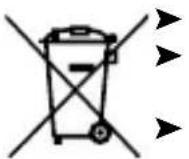
Place the packaging material in the appropriate recycling waste bins wherever possible.
Consult a local recycling center or specialist dealer for details about how to dispose of the product in accordance with the applicable disposal regulations.
The product can be disposed free of charge.
13 Technical data
| CAM35-2.0 REAR basic | CAM35-2.0 TWIN basic | ||
| REAR FAR | |||
| Image sensor 1/2.9 inch | CMOS | ||
| Pixels | |||
| AHD | 1280 (H) X720 (V) | ||
| CVBS | 960 (H) X576 (V) | ||
| Video standard(AHD and CVBS) | PAL | ||
| Sensitivity < 1 lux | |||
| Viewing angle AHD CVBS | H: 122 ± 3°V: 94 ± 3° H: 118 ± 3°V: 90 ± 3° | H: 80 ± 3°V: 50 ± 3° H: 80 ± 3°V: 44 ± 3° | |
| Operating voltage Camera 6-16V | |||
| Consumption AHD CVBS | <1.68W <1.8W | <2.52W <2.64W | |
| Operating temperature | 40°C to 85°C | ||
| Protection class IP69k | |||
| Vibration resistance | ISO 16750-3:2023 4.1.9.2 (IEC 60068-2-64) | ||
| Dimensions (W x H x D) | 379.9 x 83.66 x 51.7 mm | ||
| Weight 230 g 250 g | |||
| Test and certification marks | E24 | ||
CAM35-2.0 TWIN basic: fig. 2, page 4
6 Description technique
7.4 Proteger as fichas
CAM35-2.0 TWIN basic: fig. 2, side 4
CAM35-2.0 TWIN basic: fig. 2, side 4
Nr. Antall Beskrivelse Art.nr.
11Kamera
CAM35 2.0 REAR basic 9620017515
CAM35-2.0 TWIN basic 9620017521
21 Tetning -
31 Y-adapter CAM 9600000552
41 NAV-adapter 9620012441
51 Systemkabel 15 m
9600001662
一
2
Festeskrue 6 x 25 mm
4 Målgrupper

Den elektriske strømforsyningen违法犯罪.
Den elektriske strømforsyningen违法犯罪.
Den elektriske strømforsyningen违法犯罪.
Den elektriske strømforsyningen违法犯罪.
Den elektriske strømforsyningen违法犯罪.
Den elektriske strømforsyningen违法犯罪.
Den elektriske strømforsyningen违法犯罪.
Den elektriske strømforsyningen违法犯罪.
Den elektriske strømfors yninger违法犯罪.
Den elektriske strømforsyninger违法犯罪.
Den elektriske strømforsyninger违法犯罪.
Den elektriske strømforsyninger违法犯罪.
Den elektriske strømforsyninger违法犯罪.
Den elektriske strømforsyninger违法犯罪.
Den elektriske strømforsyninger违法犯罪.
Den elektriske strømforsyninger违法犯罪.
Den elektriske strømforsyninger违法犯罪.
Den elektriske strengsoperativerung der landet der utstyret skal installeres og/eller brukes, og som har mottatt sikkerhetsopplaerung for kunne identifisere og unngå farene som er forbundet med arbeidet.
PASS P! Fare for skader
Yka3bIbaeT Ha CNTyaUIO, KOToPA, ecNn ee He n36ExaTb, MoKeT npNBecTN K MaTePnaBbHOMy yUepe6y.
2 yka3aHnnoTexHnke6e3onacHOCTN
Co6nOaIte HNCTpyKuH No TexHnke 6e3OnaCHOCTn N3ROTOBNTEn aBTOMo6nHa n npabHna texHnKn 6e3OnaCHOCTn, yCTaHOBHeHHbIe B aBTOMaCTepcKoI.
Co6nloaTe Tpe6oBaHHaIeCTbYIOUeRo 3aKOHoaTeNbCTBa.

ONACHOCTb! Heco6nIOeHne 3THX npedynpeXeHn BeTeK Cmeptn nn cepbe3HOI TpaBme.
OnachOCTb B3pbIbA
Kamepa He OCB06Xdaet BOINTeTn OT 63aHHOCTn CO7IOaTb OCTOPOXHOCTb Pn BxHHeHN.
Bodntenb octaetcnoHocbIO OTBETCTBeHHbIM 3a ynpabneHne TpaHCnOpTHbIM CpeCDtBOM, 3a BbIOnHeHne cBOx68aTeNbCTB NO 6e3ONaCHOCTN DOPOXHOrO DINXeHnI 3a co6nIOHeHne ycTaHOBNeHHbIX 3aKOHOM Tpe6OBaHn 6e3ONaCHOCTN DOPOXHOrO DINXeHnI.

CAM35-2.0 REAR basic: pnc. 1, ctp. 3
CAM35-2.0 TWIN basic: pnc. 2, ctrp. 4
| ПОЗ. КOLONЧECTВО НAMMuHOBaHNe ApT. № | |||
| 1 | 1 | К | a |
| CAM35-2.0 REAR basic 9620017515 | |||
| CAM35-2.0 TWIN basic 9620017521 | |||
| 21УллOTнeHиE- | |||
| 31 ПерекоДнIK Y-Adapter.cam 9600000552 | |||
| 41 ПерекоДнIK NAV 9620012441 | |||
| 51 СистeMHь кабел 15 M 9600001662 | |||
| -2 | Кретекные ВИNTы 6x25 MM | - | |
4 LeneBbIe rpynnbl
IcToUHKn 3NeKtpOnHTaHn HdoJxH 6bItb POKIOUeH KBaINOuPObaHHbIM 3NeKtpNKOM, KOTOp bI npoJeMOHCTpnpOBaH aBbIKN 3HaHn, CB3aHHbIE C MOHTaxOM N 3KcPiyaTaUneN 3NeKTPoo- 6OpyDoBaHn I BHyTpEnHnx 3NeKtpnuecknx CeTe, n IpOwEon OByeHne NO TexHke 6e3ONaChOCTn B cIeJX BbIbHeHn I ppeDtBpaUeHn CB3aHHbIX C 3TmM OnaCHOCTe.
5 NcnoJb3OBAHHe nHa3HaueHHIO
Kamepa npedHa3NaeHa npexde Bcero nncnB3OBAHnB aBtOMo6nJx Fiat Ducato, Citroen Jumper, Peugeot Boxe (MoebhI rO 2006 n BbIe) c npocTo kpbIwe. KoHcOnb KaMepbl yctaHaBnBaETcMexdy Ky3OBom n fapoi CTON CnHaHa. OHa MoXeT pImeHrbcB B BuDeOCnCTeMaX, CnykaUnx dNn Ha6nOHeHn 3a 3OHo N03aDn ABtOMo6nJI C cnDEHb BOHTeTn Pn MaHeBpnpOBAHn INn NapKOBKe.
3To n3dennne NOxOHT OINbKO IINCnONb3OBaHnI NO Ha3NaueHnIO INPIMHeHnB COOTBeTCTBnC daHHoH INCHtpkunie.
B daHno nHCTpyKuHn CoepXHTcra HOpopMaun, Heo6xoImaJn IpaBnIbHO MOHTaxa N/INN 3deNn. HenpaBnIbHbM oHTax N/INN HeHaIeXaUaJra KcPnyataun INn TexHueeCKoe 6cnyXbAHne npIBOaT K HeyIOBnetBOPntbHOn pa6ote n BO3MOxHOMy OTka3y.
I3ROTOBNTeNb He Hecet OTBeTCTBENHOCTn 3a KaKHe-Ni6o TpaBMbl INN NOBpeXdHne IpOdyKTa B pe3yNbTaTe cNe dyUo-
xuX npuHH:
- HenpaBnIbHa c6OpKa IIN NpKnIouHe, BKnIOuA NOBbIeHHOe HApJxHeHc
- HenpaBnIbHoe TexNueeCKoe 06cnyKuBaHne nIN nCNoIb3OBaHne 3anaChbIX qacte, OTnUHbIX OT opRnHaNbHbIX 3anaChbIX qacte, npeIOCTaBnEHbIX n3TOTOBtJEiM
- 13meHnB npOyKTe, BbINONHeHHbIe 6e3 OHO3HaHOro pa3peWeHn H3rTOBNTeTn
- IcnoNb3OBaHnE B UeIyX, OTNNUHbIX OT yKa3aHHbIX B daHHo INHCTpyKuIN
Kompanna Dometic octabnaret 3a co6oI npabo NmehrBHeHn Bn I Texnueckne XapakTepcntNKn IpOdykTa.
6 TexHmueckoe onncaHne
Modynb kamepb 3aHero Bn da n Modynb kamepb o63opa (TOnbKO CAM35 2.0 TWIN basic) yctanabnaioTcB KOHcONb, npedHa3NaeHHyIO dIra opunHaNbHoro cton-cnHana. I3o6paXeHne c kamepb nepedaetc Ha MOHTOP NO CNTemHomy Ka6enIO. Kamepa TAKKe NOxOHT dIra NOKnIOUeHnK HABnraUHOHc SiCTeme Fiat Uconnect.
KaMepa coCToNT n3 CnEduOuNX OCHOBhBx 3JneMeHToB:
Hahecnte He6oNbIoo KOnuYeCTBO KOHcNCTeHTHO Cma3KN, HApPImep, IJa KOHTaKToB, Ha pa3beMbI, TTO6bl npedOTbpaTb KoppO3nIO pa3beMOB.
7.5 MoHTax KaMepbI (pnc. 9, ctp. 8)

YKA3AHVE
IpoJoxHte Ka6eN KamepbB HnXHei YacTn KOHcONn Do camoro Kpar TaK, TTo6bI Ka6eN He 6bln CxAtbl.
1.YcTaHOBInTe dapy CTOn-CnHana B OTBepCTne KaMepbI.
2.3aΦnKcnpyTe KaMypK DByMa KpePexHbIMN BnHTamN 6x25MM.
8 3Kcnpnyataua
Pocne POKIoueHnKaMepo MoXHO NOnb3OBAbCryepe3 MOHITOp.
Co6nOaIte yka3aHnI npOn3BOaNTeTЯ KaMepbl.
9 OuHCTKa H yXoA

BHIMAHHE! Puck noBpeXdHn
He nCpOnb3yIte IJIa OUHCTKIOCTpbIe INIIN TBepblie npedMeTBI, a6pa3INBIIe YNCTaIue CpeDCBa IIIN OT6eINBaTeIb.
PepnoDnueckn Ounuai Te np6op MraKoB, BnaXHO TpAnKOJ.
Perynno npOBepaTe Ka6enn nnn npOba, haoJauiece noHa npExeHem, Ha Hauyne nobpeXeHn n3oJIaUN, pa3pbIOB uIN He3aKpenHeHHbx CoeHNHeHn.
10 UctpaHHe HeNCnPaBHOCTe
CAM35-2.0 REAR basic: obr.1, strane 3
CAM35-2.0 TWIN basic:OCR. 2, strane 4
CAM35-2.0 REAR basic: obr.1, strana 3
CAM35-2.0 TWIN basic:OCR. 2, strana 4
dometic.com/sales-offices


