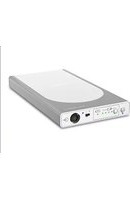
Power Station II - Battery ResMed - Free user manual and instructions
Find the device manual for free Power Station II ResMed in PDF.


| Product type | External lithium-ion battery for ResMed respiratory devices |
| Dimensions (L x W x H) | 230 x 126 x 26 mm |
| Battery weight | 0.9 kg |
| System weight (battery + adapter + bag) | 2.3 kg |
| Battery technology | Lithium-ion, capacity < 100 Wh (97 Wh) |
| Output voltage | 24 V / 26 V ± 0.5 V, 90 W continuous |
| Nominal output current | 3.75 A (24 V) / 3.46 A (26 V) |
| Input power for charging | 90 W AC power adapter or 12 V/24 V DC converter |
| Full charge time | Less than 4 hours (from 0% to >95%) |
| Typical runtime | > 8 hours with standard settings (pressure 15/5 cm H₂O, 15 BPM) |
| Main features | Backup power, LED charge level indicators, audible alarm, silence mode, output voltage selector, DC on/off switch |
| Built-in protections | Overcharge, excessive discharge, overcurrent, short circuit, high temperature |
| Operating conditions (charge) | 5 °C to 40 °C, humidity 5-85% |
| Operating conditions (discharge) | -5 °C to +40 °C, humidity 5-85% |
| Storage and transport | -20 °C to +45 °C, humidity 5-85%, pressure 600-1100 hPa |
| Airplane use | Compliant with RTCA/DO-160 Section 21, Category M (FAA) |
| IP classification | IP21 in discharge (drip-proof), IP20 in charge |
| Electrical class | Class II (double insulation), continuous operation on mains, limited on battery |
| Maintenance and cleaning | Wipe with a clean cloth; do not immerse, do not use liquids |
| Service life | > 500 charge cycles at 23 °C (residual capacity ≥ 60%) |
| Spare parts and accessories | 90 W AC power module, DC converter, AC/DC cables, DC output cables, Air10 adapter, battery coupler (optional) |
| Repairability | Battery not repairable; do not open; contact your provider or ResMed |
| Warranty | 6 months (battery), 2 years (charger) – refer to limited warranty |
| Standards and certifications | CE, IEC 60601-1, electromagnetic compatibility, WEEE, RoHS |
Frequently Asked Questions - Power Station II ResMed
User questions about Power Station II ResMed
0 question about this device. Answer the ones you know or ask your own.
Ask a new question about this device
Download the instructions for your Battery in PDF format for free! Find your manual Power Station II - ResMed and take your electronic device back in hand. On this page are published all the documents necessary for the use of your device. Power Station II by ResMed.
USER MANUAL Power Station II ResMed
User guide
English | Deutsch | Français | Italiano | Español | Português | Nederlands | Svenska | Dansk | Norsk | Suomi | Ελληνικά | Polski | 简体中文 | 繁體中文 | Български | Češky | Eesti | Magyar | Íslenska | Latviski | Lietuvių k. | Română | Русский | Slovenčina | Slovenščina | Türkçe | العربية | فارسی | نttısı | اردو
Power Station II
Battery Pack / Akkupack / Batterie / Alimentatore a batteria / Batería / Bateria / Accu / Batteripack / Batteripakke / Batteripakke / Akku / Мпатария / Bateria Akumulatorowa / 电池包 / 電池包 / Батерия / Bateriový zdroj / Akukomplekt / Akkumulátorcsomag / Rafhlöðupakki / Akumulatoru pakotne / Akumuliatorių komplektas / Acumulator / Батерия / Batériový modul / Akumulatorski sklop / Batarya Paketi / مجموعه باتری / حزمة البطارية / بیشیر پیک
Illustrations only, parts may differ / Nur Abbildungen, Teile können abweichen / Illustrations uniquement, les pièces sont susceptibles d'être différentes / Illustrazione a solo titolo di esempio, i pezzi potrebbero essere diversi / Solo ilustraciones, las piezas pueden ser diferentes / Apenas ilustrações; as peças podem ser diferentes / Dit zijn slechts illustraties, de onderdelen kunnen afwijken / Endast illustrationer, vissa delar kan skilja sig från bilden / Dette er kun eksempler. Delene kan afvige fra dine / Kun illustrasjoner, delene kan variere / Kuvat ovat vain viitteellisiä; osat voivat näyttää toisenlaisilta / Εικόνες μόνο, τα εξαρτήματα μπορεί να διαφέρουν / Przykladowa ilustracja, elementy mogą się różnić / 图示中的部件可能和实物会有差异 / 圖示中的部件可能和實物會有差異 / Това са само илюстрации, частите може да се различават / Pouze ilustrace, díly se mohou lišit / Ainult illustreeriiseks, osad vöivad erineda / Csak illusztrációk, az alkatrészek eltérhetnek / Eingöngu myndraen framsetning, hlutir gætu litið öðruvísi út / Tikai ilustrācijai, daļas var atšķirties / Tik ilustracijos, dalys gali skirtis / Doar ilustraṭii, piesele pot fi diferite / Изображения носят иллюстративный характер; реальные детали могут отличаться / Ide len o obrázky; samotné diely sa môžu odlišovat / Samo ilustracije, deli se lahko razlikujejo / Resimler yalnızca örnek amaçlıdır; parçalar farklılık gösterebilir / تصاوير صرقآجنيه فهايشى دارد; قطعات ممكن است متفاوت باشد / صور توضيحةية فقط، قد تcontinental القطع / الناملاة علابع رسمت كى غرض سى، حصى مختلف بو سكتى بېن / صرف تشريحات
a DC plug / Gleichstromstecker / Fiche CC / Spinotto DC / Enchufe de CC / Ficha CC / DC-stekker / DC-kontakt / Jævnstrømsstik / Likestrømsstøpsel / Tasavirtaliitin / Búóμα DC / Gniazdo DC / 直流电电源插头 / 直流電電源插頭 / Постояннотоков куплунг / Zástrčka pro stejnosměrný proud / Alalisvoolupistik / Egyenáramú csatlakozódugó / Jafnstraumstengikló / Līdzstrāvas spraudnis / Nuol. srovės kištukas / Fiṣā c.c. / Штекер постоянного тока / Zástrčka jednosmerného prúdu / Vtič za enosmerni tok (DC) / DC fiṣi / دوشاخه جريان مستقيم / قابس التيار المستمر / DC يَمْن / پلگ DC
Power Station II
DC output voltage & DC cables
| 24V | 26V | DC Cable Part Number | ||
| AirSenseTM Series | √ | 37343 | ||
| AirCurveTM Series | √ | 37343 | ||
| LumisTM Series | √ | 37343 | ||
| VPAPTM III ST-A | √ | 24959 | ||
| VPAPTM III ST-A with QuickNav | √ | 24959 | ||
| VPAPTM IV, VPAPTM IV ST | √ | 24960 | ||
| S8TM Auto 25 | √ | 24960 | ||
| S9TM Series | √ | 24961 | ||
| StellarTM Series | √ | 24959(24981 for StellarTM Mobility bag) | ||
| VS IIITM | √ | 24963 | ||
| EliséeTM 150 | √ | 24962 | ||
| English | Notes:Not all devices are available in all regions.To recharge the ResMed Power Station II using an Air 10 power supply unit (supplied with Air 10 and Lumis devices) or the Air 10 DC converter, an Air 10 power supply unit adaptor is required (part no. 37342).For information on battery run times refer to the Battery/Compatibility List on www.resmed.com. | |||
| Deutsch | Hinweise:Einige Geräte sind nicht in allen Ländern erhältlich.Um die ResMed Power Station II mit Hilfe eines Air 10 Netzgerätes (im Lieferumfang von Air 10 und Lumis Geräten enthalten) oder eines Air 10 Gleichstromkonverters wieder aufzuladen, ist ein Air 10 Netzgerät-Adapter (Artikelnummer 37342) erforderlich.Informationen zu den Akkulaufzeiten finden Sie in der Kompatibilitätsliste Akku/Gerät unter www.resmed.com. | |||
| Français | Remarques:Certains de ces appareils ne sont pas disponibles dans tous les pays.L'adaptateur du module d'alimentation Air10 (code produit 37342) est nécessaire pour recharger le bloc d'alimentation ResMed Power Station II avec une alimentation Air10 (fournie avec les appareils Air10 et Lumis) ou le convertisseur CC Air10.Pour plus d'informations sur l'autonomie des batteries, veuillez consulter la liste de compatibilité entre les appareils et les batteries disponible sur www.resmed.com. | |||
| Italiano | Note:Alcuni apparecchi non sono disponibili in tutti i Paesi.Per ricaricare la ResMed Power Station II utilizzando l'alimentatore elettrico Air 10 (in dotazione con gli apparecchi Air 10 e Lumis) o il convertitore DC Air 10, è necessario l'adattatore per alimentatore elettrico Air 10 (n. di catalogo 37342).Per informazioni sull'autonomia delle batterie, vedere la Tabella di compatibilità tra batterie e apparecchi su www.resmed.com. | |||
| Español | Notas:No pueden obtenerse todos los dispositivos en todas las regiones.Para recargar la ResMed Power Station II con una fuente de alimentación Air 10 (suministrada con los dispositivos Air 10 y Lumis) o el transformador de CC Air 10, se necesita un adaptador de la fuente de alimentación Air 10 (n° de pieza 37342).Para obtener información sobre la duración de las baterías, consulte la Lista de compatibilidad de baterias/dispositivos en www.resmed.com. | |||
| Portugues | Notas:Nem todos os dispositivos estão disponíveis em todas as regiões.Para recarregar a ResMed Power Station II, usando uma unidade de alimentação Air 10 (fornecida com dispositivos Air 10 e Lumis) ou o conversor CC Air 10, é necessário um adaptador da unidade de alimentação Air 10 (peça n.° 37342).Para obter informações sobre a autonomia das baterias, consulte a lista de compatibilidade entre baterias/dispositivos em www.resmed.com. | |||
| Nederlands | NBNiet alle apparaten zijn in alle regio’s verkrijgbaar.Om het ResMed Power Station II op te laden met een Air 10 voedingseenheid (die bij Air 10 en Lumis apparaten wordt verschaft) of de Air 10 DC-omvormer, is een Air 10 voedingseenheidadapter vereist (artikelnr. 37342).Raadpleeg voor informatie over bedrijfstijden van accu’s de Compatibiliteitslijst accu/apparaat op www.resmed.com. | |||
| Svenska | Obs!Vissa utrustningar finns inte i alla delar av världen.Obs!: För att ladda ResMed Power Station II med hjälp av en Air 10-strömförsörjningsenhet (som medföljer Air 10- och Lumis-apparater) eller Air 10 DC-omvandlaren, behövs en Air 10-adapter till strömförsörjningsenheten (delnr. 37342).För information om batteritider hänvisas till Battery/Device Compatibility List på www.resmed.com. | |||
| Dansk | Bemærkninger:Det er ikke alle apparater, der kan fås i alle lande.For at oplade ResMed Power Station II med en Air 10 strömforsyningsenhed (leveres med Air 10- og Lumis-enheder) eller Air 10 jævnstrømsomformeren, kræves der en adapter til Air 10 strömforsyningsenhed (varenr. 37342).Der er oplysninger om batteriers driftstid under Liste over kompatible batterier og apparater på webstedet www.resmed.com. | |||
| Norsk | Merknader:Noen apparater er ikke tilgjengelig i alle land.For å lade opp ResMed Power Station II med en Air 10 strömforsyningsenhet (leveres med Air 10 og Lumis apparater) eller Air 10 likestrømomformer, kreves en Air 10 strömforsyningsadapter (delenr. 37342).Se listen over batteri-/apparatkompatibilitet på www.resmed.com for informasjon om batterilevetid. | |||
| Suomi | Huomautukset:Kaikkia laitteita ei ole saatavissa kaikissa maissa.Jos ResMed Power Station II -virtalähde halutaan ladata Air 10 -virtalähdettä käyttäen (joka toimitetaan Air 10 - ja Lumis-laitteiden kanssa) tai Air 10 -tasavirtamuunninta käyttäen, tarvitaan Air 10 -virtalähdesovitin (tuotenro 37342).Tietoja akkujen käyttöajoista saat Laitteiden ja akkujen vastaavuus -taulukosta osoitteesta www.resmed.com. | |||
| Eλληνικά | Σημειώσεις:Δεν είναι όλες οι συσκευές διαθέσιμες σε όλες τις γεωγραφικές περιφέρειες.Για την επαναφόρτιοη του ResMed Power Station II με χρήση τροφοδοτικού Air 10 (παρέχεται με τις συσκευές Air 10 και Lumis) ή μετατροπέα DC Air 10, απατείται ένας προσαρμογέας τροφοδοτικού Air 10 (αρ. εξαρτήματος 37342).Για πληροφορίες σχετικά με τους χρόνους λειτουργίας των μπαταριών, ανατρέξτε στο Κατάλογο συμβατότητας για μπαταρίες/συσκευές στη διεύθυνοη www.resmed.com. | |||
| Polski | Uwagi:Nie wszystkie urządzenia są dostępne we wszystkich regionach.Do ladowania akumulatora ResMed Power Station II z zasilacza Air 10 (dostarczanego z urządzeniami Air 10 i Lumis) lub przetwornicy prądu stałego Air 10 potrzebna jest przejściówka do zasilacza Air 10 (nr kat. 37342).Informacje dotyczące okresów eksploatacyjnych baterii można znaleźć na Liście urządzeń kompatybilnych z baterią pod adresem: www.resmed.com. | |||
| 简体中文 | 备注:不是所有装置都在各个地区有销售。瑞思迈电源装置II采用Air 10供电装置(提供Air 10和Lumis装置)或Air 10直流电转换器充电,需要瑞思迈供电装置适配器(零件号:37342)。欲了解有关电池运行时间的信息,请浏览网站www.resmed.com,查看电池/装置兼容清单。 | |||
| 繁體中文 | 備註:不是所有装置都在各個地區有銷售。瑞思邁電源装置II採用Air 10供電裝置充電(提供Air 10和Lumis装置)或Air 10直流電轉換器充電,需要瑞思邁供電裝置轉接器(零件號:37342)。請瀏覽網站www.resmed.com,查看電池/裝置相容清單。 | |||
| Бълпарски | Забележки:Не всички устройства се предлагат във всички региони.За да презаредите батерията ResMed II с помощта на захранващ блок Air 10 (доставян с устройства Air 10 и Lumis) или преобразувател на DC на Air 10, е необходим адаптер за захранващия блок Air 10 (част No 37342).За информация относно продължителността на работа на батерията вижте списъка Батерия/Съвместимост на www.resmed.com. | |||
| Češina | Poznámky:Některá zařízení nejsou dostupná ve všech zemích.K dobíjení systému ResMed Power Station II pomocí napájecího zdroje Air 10 (dodává se se zařízeními Air 10 a Lumis) nebo stejnosměrného měniče Air 10 je zapotřebí adaptér napájecího zdroje Air 10 (č. dílu 37342).Informace o době provozu na baterie naleznete v dokumentu Battery/Device Compatibility List na www.resmed.com. | |||
| Eesti keel | Märkused.Mitte köik seadmed pole köikides piirkondades saadaval.ResMed Power Station II laadimiseks Air 10 toiteplokiga (Air 10 ja Lumisi seadmetega kaasas) või Air 10 alalisvoolu muunduriga on vajalik Air 10 toiteploki adapter (osa nr 37342).Teavet aku tööaja kohta vaadake aku/ühilduvuse loendist aadressil www.resmed.com. | |||
| Magyar | Megjegyzések:Nem minden készülék áll rendelkezésre minden régióban.A ResMed Power Station II (Air 10 és Lumis készülékekkel biztosított) Air 10 tápegységgel vagy Air 10 egyenáramú átalakítóval történő feltöltéséhez Air 10 tápegységadapter szükséges (cikkszám: 37342).Az akkumulátor működési idejére vonatkozó információkért lásd a Battery/Compatibility List (Akkumulátor/Kompatibilitási lista) részt a www.resmed.com oldalon. | |||
| Išlenska | Athugasemdir:Ekki eru öll täeki fáanleg á öllum svæðum.Til að endurhlaða ResMed Power Station II með Air 10 aflgjafaeiningu (fylgir Air 10 og Lumis tækjum) eða Air 10 jafnstraumsbreyti parf millistykki fyrir Air 10 aflgjafaeiningu (hlutanr. 37342).Upplýsingar um keyrslutíma rafhlaða má fá í listanum yfir rafhlöður/samhæfi á www.resmed.com. | |||
| Latviski | Piezīmes.Visas funkcijas nav pieejamas visos régionos.Piezīme. Lai uzlădētu RPS Power Station II, izmantojot Air 10 elektroenergijas piegādes ierici (iekļautas Air 10 un Lumi ierices) vai Air 10 līdzstrāvas pārveidotāju, nepieciešams Air 10 elektroenergijas piegādes ierīces adapters (daļas Nr. 37342).Lai uzzinātu par akumulatora darbības ilgumu, skatiet Akumulatoru/saderības sarakstu timekļa vietnē www.resmed.com. | |||
| Liebvių k. | Pastabos.Ne visuose regionuose galíma jsigyti visus prietaisus.Norint jkrauti „ResMed“ maitinimo stotelę II naudojant „Air 10“ maitinimo bloką (pateikiamas su „Air 10“ ir „Lumis“ prietaisais) arba „Air 10“ nuolatinės srovės keitiklj, reikalingas „Air 10“ maitinimo bloko adapteris (dalies nr. 37342).Informacijos apie akumuliatoriaus veikimo laiką žr. akumuliatorių / suderinamumo sąraše, esančiame tinklapyje www.resmed.com. | |
| Romānā | Note:Nu toate dispozitivele sunt disponibile în toate regiunile.Pentru a reîncârca ResMed Power Station II utilizând o unitate de alimentare Air 10 (furnizatā cu dispozitive Air 10 și Lumis) sau convertorul c.c. Air 10, este necesar un adaptor pentru unitatea de alimentare Air 10 (piesa nr. 37342).Pentru informații despre durata de funcționare a bateriei, consultați Lista de baterii/Compatibilitate de pe www.resmed.com. | |
| Русский | Примечания.He все устройства доступны во всех регионах.Для подзарядки зарядной станции II производства ResMed при помощи блока питания Air 10 (поставляется с устройствами Air 10 i Lumis) или преобразователя постоянного тока Air 10 требуется адаптер блока питания Air 10 (деталь No 37342).Информацию о времени работы от аккумулятора см. в списке аккумуляторов/совместимых устройств на сайте www.resmed.com. | |
| Slovenčina | Poznámky:Nie všetky masky sú k dispozícii vo všetkých oblastiach.Ak chcete dobijať ResMed Power Station II pomocou zdroja napájania pre Air 10 (ktorý sa dodáva so zariadeniami Air 10 a Lumis) alebo prevodníka jednosmerného prúdu pre Air 10, potrebujete adaptér zdroja napájania pre Air 10 (č. dielu 37342).Informácie o životnosti batérie nájdete v časti Batèria/Zoznam kompatibilnych zariadení na adrese www.resmed.com. | |
| Slovenščina | Opombe:Vse naprave morda niso na voljo v vseh regijah.Za ponovno polnjenje naprave Power Station II družbe ResMed z napajalnikom Air 10 (priloženim napravam Air 10 in Lumis) ali pretvornikom za enosmerni tok (DC) za Air 10 je potreben adapter za napajalnik Air 10 (št. dela 37342).Za informacije o času delovanja akumulatorja glejte seznam akumulatorjev/združljivosti na spletnem mestu www.resmed.com. | |
| Türkçe | Notlar:Her bölgede cihazların tamami bulunmamaktadır.ResMed Power Station II ūrününü (Air 10 ve Lumis cihazlarıyla birlikte tedarik edilen) bir Air 10 gūç kaynağı ünitesi veya Air 10 DC dönüştürücüsü kullanarak yeniden şarį etmek için bir Air 10 gūç kaynağı ünitesi adaptörü gereklidir (parça numarası 37342).Batarya çalışma süreleri ile ilgili bilgi için www.resmed.com adresindeki Batarya/Uyumluluk Listesine bakın. | |
| العربية | ملاحظات:لا توفر جمعي الأجهزة في جمعي المناطق.لإمادة شحن(المر话题ة مع جهازي Air 10) (Imr活動ة مع جهازي Air 10) (Imr活動ة مع جهازي Air 10) (Imr活動ة مع جهازي Air 10) (Imr活動ة مع جهازي Air 10) (Imr活動ة مع جهازي Air 10) (Imr活動ة مع جهازي Air 10) (Imr活動ة مع جهازي Air 10) (Imr活動ة Mixed-Platation) (Imr活動ة Mixed-Platation) (Imr活動ة Mixed-Platation) (Imr活動ة Mixed-Platation) (Imr活動ة Mixed-Platation) (Imr活動ة Mixed-Platation) (Imr活動ة Mixed-Platation) (Imr活動ة Mixed-Platation) (Imr活動ة Mixed-Platation) (Imr活動ة Mixed-Platation), يتطلب وجود وحددة Air 10 (Lumis) (Air 10) (Imr活動ة Mixed-Platation) (Imr活動ة Mixed-Platation) (Imr活動ة Mixed-Platation) (Imr活動ة Mixed-Platation) (Imr活動ة Mixed-Platation) (Imr活動ة Mixed-Platation) (Imr活動ة Mixed-Platation) (Imr活動ة Mixed-Platation) (Imr活動ة Mixed- Platation) (Imr活動ة Mixed-Platation) (Imr活動ة Mixed-Platation) (Imr活動ة Mixed-Platation) (Imr活動ة Mixed-Platation) (Imr活動ة Mixed-Platation) (Imr活動ة Mixed-Platation) (Imr活動ة Mixed-Platation) (Imr活動ة Mixed-Platation) (Imr活動ة Mixed-Platin) (Imr活動ة Mixed-Platin) (Imr活動ة Mixed-Platin) (Imr活動ة Mixed-Platin) (Imr活動ة Mixed-Platin) (Imr活動ة Mixed-Platin) (Imr活動ة Mixed-Platin) (Imr活動ة Mixed-Platin) (Imr活動ة Mixed-Platin) (Imr活動ة Mixed-Platin) (Imr活動ة Mixed-Platinum) (Imr活動ة Mixed-Platinum) (Imr活動ة Mixed-Platinum) (Imr活動ة Mixed-Platinum) (Imr活動ة Mixed-Platinum) (Imr活動ة Mixed-Platinum) (Imr活動ة Mixed-Platinum) (Imr活動ة Mixed-Platinum) (Imr活動ة Mixed-Platinum) (Imr活動ة Mixed-Platinum) (Imr活動ة Mixed-Pluminum) (Imr活動ة Mixed-Pluminum) (Imr活動ة Mixed-Pluminum) (Imr活動ة Mixed-Pluminum) (Imr活動ة Mixed-Pluminum) (Imr活動ة Mixed-Pluminum) (Imr活動ة Mixed-Pluminum) (Imr活動ة Mixed-Pluminum) (Imr活動ة Mixed-Pluminum) (Imr活動ة Mixed-Pluminum) (Imr活動ة Mixed-Platinum) (Imr活動ة Mixed-Platinum) (Imr活動ة Mixed-Platinum) (Imr活動ة Mixed-Platinum) (Imr活動ة Mixed-Platinum) (Imr活動ة Mixed-Platinum) (Imr活動ة Mixed-Platinum) (Imr活動ة Mixed-Platinum) (Imr活動ة Mixed-Platinum) (Imr活動ة Mixed-Plopper) (Imr活動ة Mixed-Plopper) (Imr活動ة Mixed-Plopper) (Imr活動ة Mixed-Plopper) (Imr活動ة Mixed-Plopper) (Imr活動ة Mixed-Plopper) (Imr活動ة Mixed-Plopper) (Imr活動ة Mixed-Plopper) (Imr活動ة Mixed-Plopper) (Imr活動ة Mixed-Plopper) (Imr活動ة Mixed-Pluminum) (Imr活動ة Mixed-Pluminum) (Imr活動ة Mixed-Pluminum) (Imr活動ة Mixed-Pluminum) (Imr活動ة Mixed-Pluminum) (Imr活動ة Mixed-Pluminum) (Imr活動ة Mixed-Pluminum) (Imr活動ة Mixed-Pluminum) (Imr活動ة Mixed-Pluminum) (Imr活動ة Mixed-Plum) (Imr活動ة Mixed-Plum) (Imr活動ة Mixed-Plum) (Imr活動ة Mixed-Plum) (Imr活動ة Mixed-Plum) (Imr活動ة Mixed-Plum) (Imr活動ة Mixed-Plum) (Imr活動ة Mixed-Plum) (Imr活動ة Mixed-Plum) (Imr活動ة Mixed-Plum) (Imr活動ة Mixed-Plump) (Imr活動ة Mixed-Plump) (Imr活動ة Mixed-Plump) (Imr活動ة Mixed-Plump) (Imr活動ة Mixed-Plump) (Imr活動ة Mixed-Plump) (Imr活動ة Mixed-Plump) (Imr活動ة Mixed-Plump) (Imr活動ة Mixed-Plump) (Imr活動ة Mixed-Plump) (Imr活動ة Mixed-Plum) (Imr活動ة Mixed-Plum) (Imr活動ة Mixed-Plum) (Imr活動ة Mixed-Plum) (Imr活動ة Mixed-Plum) (Imr活動ة Mixed-Plum) (Imr活動ة Mixed-Plum) (Imr活動ة Mixed-Plum) (Imr活動ة Mixed-Plum) (Imr活動ة Mixed-Plums) (Imr活動ة Mixed-Plum) (Imr活動ة Mixed-Plum) (Imr活動ة Mixed-Plum) (Imr活動ة Mixed-Plum) (Imr活動ة Mixed-Plum) (Imr活動ة Mixed-Plum) (Imr活動ة Mixed-Plum) (Imr活動ة Mixed-Plum) (Imr活動ة Mixed-Plum) (Imr活動ة Mixed-Plu) (Imr活動ة Mixed-Plu) (Imr活動ة Mixed-Plu) (Imr活動ة Mixed-Plu) (Imr活動ة Mixed-Plu) (Imr活動ة Mixed-Plu) (Imr活動ة Mixed-Plu) (Imr活動ة Mixed-Plu) (Imr活動ة Mixed-Plu) (Imr活動ة Mixed-Plu) (Imr活動ة Mixed-Plum) (Imr活動ة Mixed-Plum) (Imr活動ة Mixed-Plum) (Imr活動ة Mixed-Plum) (Imr活動ة Mixed-Plum) (Imr活動ة Mixed-Plum) (Imr活動ة Mixed-Plum) (Imr活動ة Mixed-Plum) (Imr活動ة Mixed-Plum) (Imr活動ة Mixed-PlUM) (Imr活動ة Mixed-PlUM) (Imr活動ة Mixed-PlUM) (Imr活動ة Mixed-PlUM) (Imr活動ة Mixed-PlUM) (Imr活動ة Mixed-PlUM) (Imr活動ة Mixed-PlUM) (Imr活動ة Mixed-PlUM) (Imr活動ة Mixed-PlUM) (Imr活動ة Mixed-PlUM) (Imr活動ة Mixed-Plum) (Imr活動ة Mixed-Plum) (Imr活動ة Mixed-Plum) (Imr活動ة Mixed-Plum) (Imr活動ة Mixed-Plum) (Imr活動ة Mixed-Plum) (Imr活動ة Mixed-Plum) (Imr活動ة Mixed-Plum) (Imr活動ة Mixed-Plum) (Imr活動ة Mixed-PlU) (Imr活動ة Mixed-PlU) (Imr活動ة Mixed-PlU) (Imr活動ة Mixed-PlU) (Imr活動ة Mixed-PlU) (Imr活動ة Mixed-PlU) (Imr活動ة Mixed-PlU) (Imr活動ة Mixed-PlU) (Imr活動ة Mixed-PlU) (Imr活動ة Mixed-PlU) (Imr活動ة Mixed-PlUM) (Imr活動ة Mixed-PlUM) (Imr活動ة Mixed-PlUM) (Imr活動ة Mixed-PlUM) (Imr活動ة Mixed-PlUM) (Imr活動ة Mixed-PlUM) (Imr活動ة Mixed-PlUM) (Imr活動ة Mixed-PlUM) (Imr活動ة Mixed-PlUM) (Imr活動ة Mixed-PlU) (Imr活動ة Mixed-PlU) (Imr活動ة Mixed-PlU) (Imr活動ة Mixed-PlU) (Imr活動ة Mixed-PlU) (Imr活動ة Mixed-PlU) (Imr活動ة Mixed-PlU) (Imr活動ة Mixed-PlU) (Imr活動ة Mixed-PlU) (Imr活動ة Mixed-PlUp) (Imr活動ة Mixed-PlUp) (Imr活動ة Mixed-PlUp) (Imr活動ة Mixed-PlUp) (Imr活動ة Mixed-PlUp) (Imr活動ة Mixed-PlUp) (Imr活動ة Mixed-PlUp) (Imr活動ة Mixed-PlUp) (Imr活動ة Mixed-PlUp) (Imr活動ة Mixed-PlUp) (Imr活動ة Mixed-PlU) (Imr活動ة Mixed-PlU) (Imr活動ة Mixed-PlU) (Imr活動ة Mixed-PlU) (Imr活動ة Mixed-PlU) (Imr活動ة Mixed-PlU) (Imr活動ة Mixed-PlU) (Imr活動ة Mixed-PlU) (Imr活動ة Mixed-PlU) (Imr活動ة Mixed-PlUP) (Imr活動ة Mixed-PlUP) (Imr活動ة Mixed-PlUP) (Imr活動ة Mixed-PlUP) (Imr活動ة Mixed-PlUP) (Imr活動ة Mixed-PlUP) (Imr活動ة Mixed-PlUP) (Imr活動ة Mixed-PlUP) (Imr活動ة Mixed-PlUP) (Imr活動ة Mixed-PlUP) (Imr活動ة Mixed-PlUp) (Imr活動ة Mixed-PlUp) (Imr活動ة Mixed-PlUp) (Imr活動ة Mixed-PlUp) (Imr活動ة Mixed-PlUp) (Imr活動ة Mixed-PlUp) (Imr活動ة Mixed-PlUp) (Imr活動ة Mixed-PlUp) (Imr活動ة Mixed-PlUp) (Imr活動ة Mixed-PlUP) (Imr活動ة Mixed-PlUp) (Imr活動ة Mixed-PlUp) (Imr活動ة Mixed-PlUp) (Imr活動ة Mixed-PlUp) (Imr活動ة Mixed-PlUp) (Imr活動ة Mixed-PlUp) (Imr活動ة Mixed-PlUp) (Imr活動ة Mixed-PlUp) (Imr活動ة Mixed-PlUP) (Imr活動ة Mixed-PlUP) (Imr活動ة Mixed-PlUP) (Imr活動ة Mixed-PlUP) (Imr活動ة Mixed-PlUP) (Imr活動ة Mixed-PlUP) (Imr活動ة Mixed-PlUP) (Imr活動ة Mixed-PlUP) (Imr活動ة Mixed-PlUP) (Imr活動ة Mixed-PlU) (Imr活動ة Mixed-PlU) (Imr活動ة Mixed-PlU) (Imr活動ة Mixed-PlU) (Imr活動ة Mixed-PlU) (Imr活動ة Mixed-PlU) (Imr活動ة Mixed-PlU) (Imr活動ة Mixed-PlU) (Imr活動ة Mixed-PlU) (Imr活動ة Mixed-Pl U) (Imr活動ة Mixed-PlU) (Imr活動ة Mixed-PlU) (Imr活動ة Mixed-PlU) (Imr活動ة Mixed-PlU) (Imr活動ة Mixed-PlU) (Imr活動ة Mixed-PlU) (Imr活動ة Mixed-PlU) (Imr活動ة Mixed-PlU) (Imr活動ة Mixed-PlU) (Imr活動ة Mixed-PlUS) (Imr活動ة Mixed-PlUS) (Imr活動ة Mixed-PlUS) (Imr活動ة Mixed-PlUS) (Imr活動ة Mixed-PlUS) (Imr活動ة Mixed-PlUS) (Imr活動ة Mixed-PlUS) (Imr活動ة Mixed-PlUS) (Imr活動ة Mixed-PlUS) (Imr活動ة Mixed-PlUS) (Imr活動ة Mixed-PlU) (Imr活動ة Mixed-PlU) (Imr活動ة Mixed-PlU) (Imr活動ة Mixed-PlU) (Imr活動ة Mixed-PlU) (Imr活動ة Mixed-PlU) (Imr活動ة Mixed-PlU) (Imr活動ة Mixed-PlU) (Imr活動ة Mixed-PlU) (Imr活動ة Mixed-PlUG) (Imr活動ة Mixed-PlUG) (Imr活動ة Mixed-PlUG) (Imr活動ة Mixed-PlUG) (Imr活動ة Mixed-PlUG) (Imr活動ة Mixed-PlUG) (Imr活動ة Mixed-PlUG) (Imr活動ة Mixed-PlUG) (Imr活動ة Mixed-PlUG) (Imr活動ة Mixed-PlUG) (Imr活動ة Mixed-PlU) (Imr活動ة Mixed-PlU) (Imr活動ة Mixed-PlU) (Imr活動ة Mixed-PlU) (Imr活動ة Mixed-PlU) (Imr活動ة Mixed-PlU) (Imr活動ة Mixed-PlU) (Imr活動ة Mixed-PlU) (Imr活動ة Mixed-PlU) (Imr活動ة Mixed-PlUL) (Imr活動ة Mixed-PlU) (Imr活動ة Mixed-PlU) (Imr活動ة Mixed-PlU) (Imr活動ة Mixed-PlU) (Imr活動ة Mixed-PlU) (Imr活動ة Mixed-PlU) (Imr活動ة Mixed-PlU) (Imr活動ة Mixed-PlU) (Imr活動ة Mixed-PlU) (Imr活動ة Mixed-PlUU) (Imr活動ة Mixed-PlUU) (Imr活動ة Mixed-PlUU) (Imr活動ة Mixed-PlUU) (Imr活動ة Mixed-PlUU) (Imr活動ة Mixed-PlUU) (Imr活動ة Mixed-PlUU) (Imr活動ة Mixed-PlUU) (Imr活動ة Mixed-PlUU) (Imr活動ة Mixed-PlUU) (Imr活動ة Mixed-PlU) (Imr活動ة Mixed-PlU) (Imr活動ة Mixed-PlU) (Imr活動ة Mixed-PlU) (Imr活動ة Mixed-PlU) (Imr活動ة Mixed-PlU) (Imr活動ة Mixed-PlU) (Imr活動ة Mixed-PlU) (Imr活動ة Mixed-PlU) (Imr活動ة Mixed-PlUV) (Imr活動ة Mixed-PlUV) (Imr活動ة Mixed-PlUV) (Imr活動ة Mixed-PlUV) (Imr活動ة Mixed-PlUV) (Imr活動ة Mixed-PlUV) (Imr活動ة Mixed-PlUV) (Imr活動ة Mixed-PlUV) (Imr活動ة Mixed-PlUV) (Imr活動ة Mixed-PlUV) (Imr活動ة Mixed-Pl UV) (Imr活動ة Mixed-Pl UV) (Imr活動ة Mixed-Pl UV) (Imr活動ة Mixed-Pl UV) (Imr活動ة Mixed-Pl UV) (Imr活動ة Mixed-Pl UV) (Imr活動ة Mixed-Pl UV) (Imr活動ة Mixed-Pl UV) (Imr活動ة Mixed-Pl UV) (Imr活動ة Mixed-Pl UV) (Imr活動ة Mixed-PlUV) (Imr活動ة Mixed-Pl UV) (Imr活動ة Mixed-Pl UV) (Imr活動期內重視圖書館)(Imr活動期內重視圖書館)(Imr活動期內重視圖書館)(Imr活動期內重視圖書館)(Imr活動期內重視圖書館)(Imr活動期內重視圖書館)(Imr活動期內重視圖書館)(Imr活動期內重視圖書館)(Imr活動期內重視圖書館)(Imr活動者會會會會會會會會會會會會會會會會會會會會會會會會會會會會會會會會會會會會會會會會會會會會會會會會會會會會會會會會會會會會會會會會會會會會會會會會會會會會會會會會會會會會會會會會會會會會會會會會會會會會会會會會會會會會會會會會會會會會會會會會會會會會會會會會會會會會會會會會會會會會會會會會會會會會會會會會會會會會會會會會會會會會會會會會會會會會會會會會會會會會會會會會會會會會會會會會會會會會會會會會會員會會會會會會會會會會會會會會會會會會會會會會會會會會會會會會會會會會會會會會會會會會會會會會會會會會會會會會會會會會會會會會會會會會會會會會會會會會會會會會會會會會會會會會會會會會會會會會會會會會會會議會會會會會會會會會會會會會會會會會會會會會會會會會會會會會會會會會會會會會會會會會會會會會會會會會會會會會會會會會會會會會會會會會會會會會會會會會會會會會會會會會會會會會會會會會會會會會會會會會會會常見會會會會會會會會會會會會會會會會會會會會會會會會會會會會會會會會會會會會會會會會會會會會會會會會會會會會會會會會會會會會會會會會會會會會會會會會會會會會會會會會會會會會會會會會會會會會會會會會會會會管號碼碼碼碼碼碼碼碼碼碼碼碼碼碼碼碼碼碼碼碼碼碼碼碼碼碼碼碼碼碼碼碼碼碼碼碼碼碼碼碼碼碼碼碼碼碼碼碼碼碼碼碼碼碼碼碼碼碼碼碼碼碼碼碼碼碼碼碼碼碼碼碼碼碼碼碼碼碼碼碼碼碼碼碼碼碼碼碼碼碼碼碼碼碼碼碼碼碼碼碼码碼碼碼碼碼碼碼碼碼碼碼碼碼碼碼碼碼碼碼碼碼碼碼碼碼碼碼碼碼碼碼碼碼碼碼碼碼碼碼碼碼碼碼碼碼碼碼碼碼碼碼碼碼碼碼碼碼碼碼碼碼碼碼碼碼碼碼碼碼碼碼碼碼碼碼碼碼碼碼碼碼碼碼碼碼碼碼碼碼碼碼碼碼碼碼碼碼碼碼品(2018年10月1日) | |
CELU
:תָרִי
Air 10 (בַרְהָרִי) Air 10 (בַרְהָרִי) Air 10 (בַרְהָרִי) Air 10 (בַרְהָרִי) Air 10 (בַרְהָרִי) Air 10 (בַרְהָרִי) Air 10 (גּוֹתָה) Air 10 (גּוֹתָה) Air 10 (גּוֹתָה) Air 10 (גּוֹתָה) Air 10 (גּוֹתָה) Air 10 (גּוֹתָה) Air 10 (גּוֹתָה) Air 25 (בַרְהָרִי) Air 25 (בַרְהָרִי) Air 25 (בַרְהָרִי) Air 25 (בַרְהָרִי) Air 25 (בַרְהָרִי) Air 25 (בַרְהָרִי) Air 26 (בַרְהָרִי) Air 26 (בַרְהָרִי) Air 26 (בַרְהָרִי) Air 26 (בַרְהָרִי) Air 26 (בַרְהָרִי) Air 27 (בַרְהָרִי) Air 27 (בַרְהָרִי) Air 27 (בַרְהָרִי) Air 27 (בַרְהָרִי) Air 28 (בַרְהָרִי) Air 28 (בַרְהָרִי) Air 28 (בַרְהָרִי) Air 28 (בַרְהָרִי) Air 29 (בַרְהָרִי) Air 29 (בַרְהָרִי) Air 30 (בַרְהָרִי) Air 30 (בַרְהָרִי) Air 30 (בַרְהָרִי) Air 31 (בַרְהָרִי) Air 31 (בַרְהָרִי) Air 31 (בַרְהָרִי) Air 32 (בַרְהָרִי) Air 32 (בַרְהָרִי) Air 32 (בַרְהָרִי) Air 33 (ב'–).
。
951
m = 311
•
English
Intended use
The ResMed Power Station II (RPS II) is an external lithium-ion battery that provides power when mains power is unavailable.
Please read the entire guide before using the RPS II. Refer to the device user guides for intended patients, uses, environment where used, and contraindications associated with CPAP, bilevel and ventilation therapy.
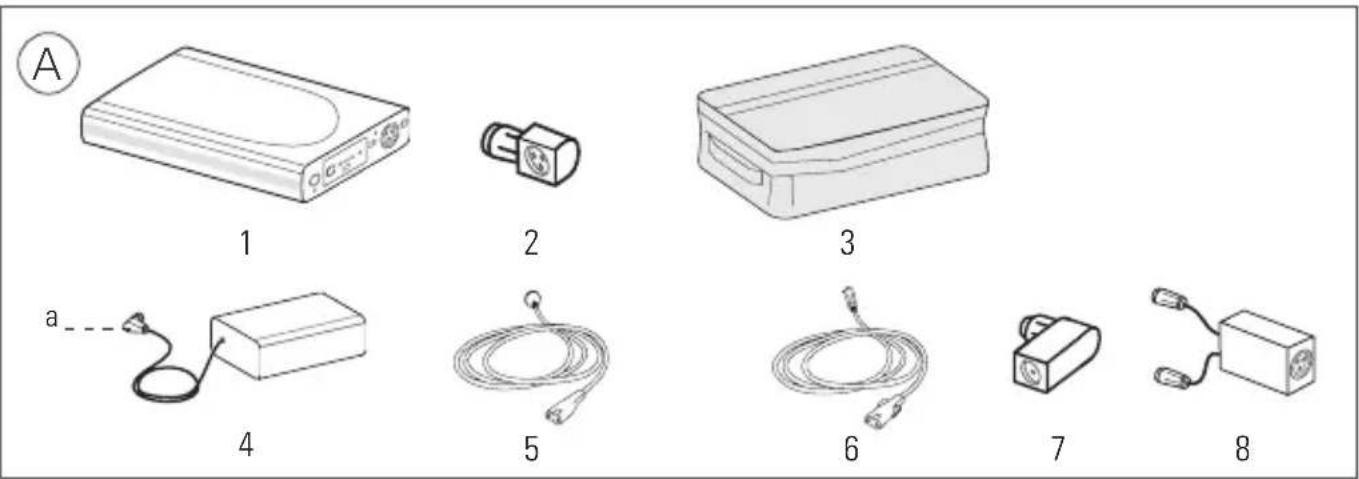
RPS II at a glance
Refer to illustration A.
The RPS II system comprises the following components:
- Battery
- Power supply unit adapter
- Carry bag
Available separately:
- 90W AC power supply unit or DC converter
- AC or DC power cord
- DC output cable
- Air 10 Power supply unit adaptor
Note: To recharge the RPS II using an Air 10 power supply unit (supplied with Air 10 and Lumis devices) or the Air 10 DC converter, an Air 10 power supply unit adaptor is required (part no. 37342).
Optional accessory:
- Battery coupler (packed with Velcro ^TM strap)
Compatible devices and accessories
For a full list of compatible devices for RPS II, see the Battery/Device Compatibility List on www.resmed.com on the Products page under Service & Support. For a full list of accessories, see the Ventilation Accessories on www.resmed.com on the Products page under Ventilation Devices. For a list of output voltages and DC cables for your device, see the attached information leaflet, your device user guide, or the Battery/Device Compatibility List on www.resmed.com. If you do not have internet access, please contact your ResMed representative.
For more information on setting up your device, see your device user guide.
Control panel
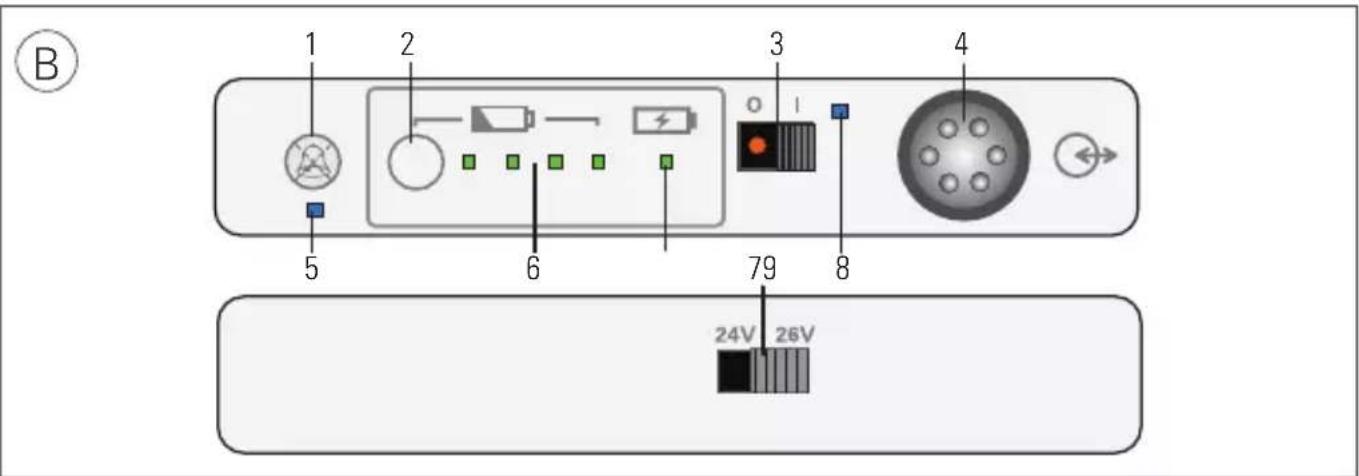
Refer to illustration B.
The control panel of your battery includes the following:
-
Audible alert mute button
-
Battery level indicators
-
Charge level check button
-
Charging indicator
-
DC on/off switch
-
DC switch/discharging indicator
-
DC input/output port
-
Voltage output selector switch (rear panel)
-
Audible alert mute indicator
Setting up

CAUTION
- Ensure the RPS II and the device are turned off before setting up.
- When the RPS II is plugged to the mains power supply, ensure all cables are properly connected.
Charging the battery
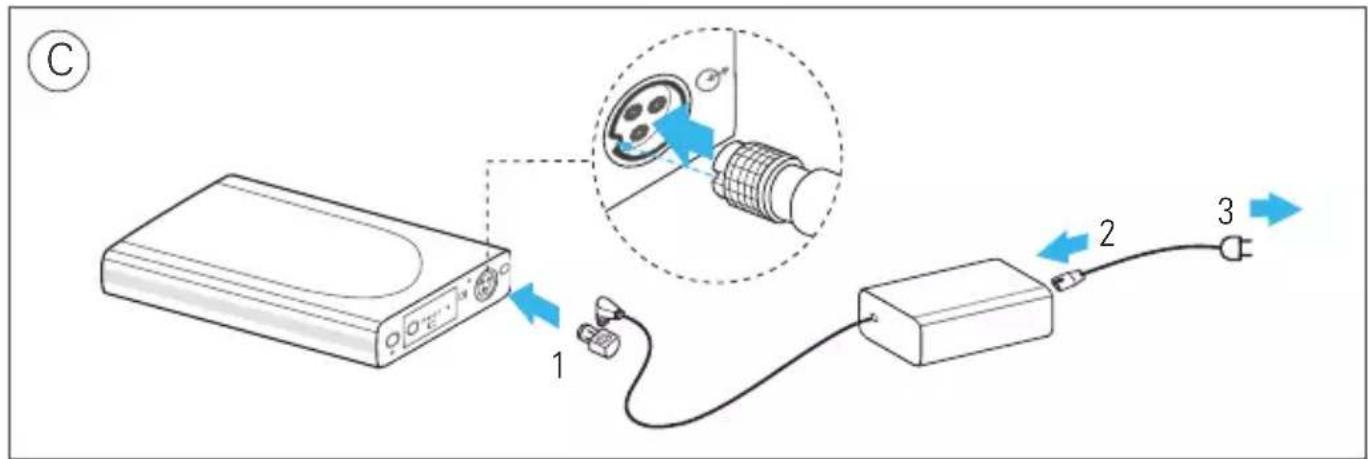
Refer to illustration C.
-
Attach the power supply unit adapter to the DC plug and connect into the battery DC input/output port.
-
Connect the AC or DC power cord to the power supply unit.
-
Plug the other end of the AC or DC power cord into the mains power outlet.
Notes:
- Charging takes less than 4 hours from 0% battery level to greater than 95% .
- To discontinue charging, unplug the power cord from the mains power outlet.
Providing power to the device
Refer to illustration D.
- Select the correct output voltage for your device using the voltage output selector from the RPS II rear panel.
- Connect the appropriate DC output cable into the battery.
- Connect the other end of the DC output cable into the device.
- Set the DC on/off switch to on.
Providing backup power to the device (for systems with both AC and DC inputs)

WARNING
In this configuration, the Elisee draws power from the RPS II first until it is fully discharged, and will not recharge. As a result, once all power has been discharged from the battery, it will not act as an AC backup.
Refer to illustration E.
- Select the correct output voltage for your device using the voltage output selector from the RPS II rear panel.
- Connect the appropriate DC output cable into the battery.
- Connect the other end of the DC output cable into the device.
-
Connect the AC power cord to the rear of the device.
-
Plug the other end of the AC power cord into the mains power outlet.
- Set the DC on/off switch to on.
Note: When powering the device regularly check the battery charge level.
Note: In the event you notice any unexplained changes in the device (RPSII/Coupler kit), signs of degradation that affect performance or if the enclosure is broken, discontinue use and contact your healthcare provider.
Using two batteries
Refer to illustration F.
- Place one battery on top of another.
If required, use the Velcro strap to hold the batteries securely.
- Plug the battery coupler cables into each of the battery DC input/output ports. The battery coupler cables are marked with '1' (primary) and '2' (reserve) labels.
- When charging two batteries, attach the power supply unit adapter to the DC plug and connect the adapter to the battery coupler.
When powering a device, connect the DC output cable of the device to the end of the battery coupler. The primary battery supplies power to the device and the reserve battery takes over when the primary battery is disconnected or discharged.
Indicators
Refer to illustration B.
The RPS II provides LEDs to indicate its current operating state.
| LED indicator Status | ||
| Battery charge level1 (B-6) | ||
| One amber flashing (audible alert beeps continuously) | Less than 5% | |
| One green flashing (audible alert beeps for 10 sec) | Less than 10% | |
| One green continuous 10% to 40% (approximate) | ||
| Two green continuous 40% to 65% (approximate) | ||
| Three green continuous 65% to 90% (approximate) | ||
| Four green continuous Greater than 90% (approximate) | ||
| Charging (B-7) | ||
| Flashing green | Charging | |
| Constant green | Fully charged | |
| DC on/off (B-8) | ||
| Flashing blue | RPS II turned on but not discharging | |
| Constant blue | RPS II turned on and discharging | |
LED indicator Status
Audible alert mute (B-5)

Flashing blue Not discharging and mute is active

Constant blue Discharging and mute is active
When setting the DC on/off switch, the charge level indicator may fluctuate between different levels.
To check the battery charge level, press the charge level check button (B-2) on the control panel. The number of green LEDs indicates the approximate charge level.
To mute the alert, press the audible alert mute button (B-1). To permanently mute, press and hold the audible alert mute button (B-1) for 5 seconds. To deactivate, press the audible alert mute button (B-1) when the mute is still active.
Using humidifiers
With the exception of AirSense 10, AirCurve 10, Lumis, S9 and H5I ^™ , when a device integrated with a humidifier is not connected to the mains power supply, the humidifier will only operate in passive unheated mode despite the warm-up message appearing on the device. When the device is connected to the mains power supply, it will return to active heated mode.
AirSense 10, AirCurve 10, Lumis, S9 and H5i devices operate normally in active heated mode when connected to the battery or to the mains power supply.
Cleaning and maintenance

WARNING
Do not immerse the RPS II in water, and do not use liquids to clean any part of the product.
-
Disconnect the battery from the power supply unit and the device. Remove all cables.
-
Wipe the exterior of the battery with a clean cloth.
Storing

CAUTION
Batteries must be charged to 100% indicated by four green LEDs and switched off before storing. You must recharge the batteries to 100% again after six months of storage. When not in use, all Lithium-Ion batteries self-discharge over time. If not periodically recharged (ie, every six months), the RPS II will eventually self-discharge to the point that it can no longer be recharged. If this occurs the RPS II is no longer usable and is unrecoverable.
Store the RPS II in a cool, dry place.
Note: A fully charged battery when left switched on, self-discharges to 0% of full capacity within four weeks of storage. When switched off, the battery self-discharges to 0% of full capacity within six months of storage.
Servicing
The RPS II is intended to provide safe and reliable operation when used and maintained in accordance with the instructions provided by ResMed. There is no servicing necessary during the lifetime of the battery.
The service life of the RPS II exceeds 500 recharge cycles. After 500 recharge cycles, the battery will last about 60% of the time from its original condition. A full charge in an older battery will not last as long as in a new battery. ResMed recommends that the RPS II be tested for battery duration regularly. As with all electrical equipment, if any irregularity becomes apparent, you should exercise caution and contact an authorised ResMed service representative.
Traveling
Consult with your carrier if you intend to take the battery on board with your device.
Troubleshooting
If there is a problem, try the following suggestions. If the problem cannot be solved, contact your equipment supplier or ResMed. Do not attempt to open the battery.
| Problem/Possible cause Solution | |
| Device is not running | |
| Power connections are disrupted. Check all cables and connect them as described in Setting up. | |
| RPS II is discharged. Connect the device to the mains power supply and recharge the RPS II. | |
| RPS II is off. Set the DC on/off switch to on. | |
| Incorrect output voltage selected. Select the correct output voltage for your device using the output voltage selector switch from the RPS II rear panel. Note: For a list of output voltages and DC cables for your device, see the attached information leaflet, your device user guide, or the Battery/Device Compatibility List on www.resmed.com. | |
| RPS II sounds an audible alert continuously and an amber LED is flashing | |
| The battery charge level is less than 5%. | Press the audible alert mute button to mute the alert. Recharge the battery as soon as possible. |
| RPS II sounds an audible alert for 10 seconds and a green LED is flashing | |
| The battery charge level is below 10%. | Recharge the battery as soon as possible. |
| Charging stops before completion | |
| When charging the battery inside the RPS II carry bag, the ambient temperature is warmer than 35°C. | Remove the battery from the RPS II carry bag or charge the battery where the ambient temperature is cooler than 35°C. |
Problem/Possible cause Solution
Battery turns off and stops powering device
When the battery is in the RPS II carry bag, the ambient temperature is warmer than 35^ C.
Remove the battery from the RPS II carry bag or power the device where the ambient temperature is cooler than 35^ C.
Battery charge level indicator is inaccurate
Ambient temperature is at extreme condition (eg, -5^ , +40^ ).
Recharge the battery as soon as possible to ensure adequate capacity.
Technical specifications
Battery technology Lithium ion
Capacity < 100 Wh (97 Wh)
UN classification UN3480 (lithium-ion batteries)
AC power supply Input range 100–240V, 50–60Hz, 1.0-1.5A Nominal for aircraft use 110V, 400Hz
DC converter Input range 12V / 24V, 13A / 6.5A
Battery output voltage (24V / 26V) ± 0.5V, 90W continuous
Power supply unit output 3.75 A current (rated)
Battery output current (rated) 3.75 A / 3.46 A
Standby current < 100 μA
Protection Overcharge, overdischarge, excess current, short circuit, high temperature
Dimensions (L x W x H) 230 mm x 126 mm x 26 mm
Battery weight 0.9 kg
System weight 2.3 kg
Minimum life cycle ≥ 500 cycles at 23^ C to 60% capacity
Operating conditions
Charging Discharging
5°C to 40°C; 5–85% maximum humidity
-5°C to 40°C; 5–85% maximum humidity
Transport/storage conditions -20°C to +45°C; 5–85% maximum humidity
Operating/storage air pressure 600 hPa to 1100 hPa
Aircraft use Product meets the Federal Aviation Administration (FAA) requirements (RTCA/D0-160, section 21, category M) for all phases of air travel.
Recharge time < 4 hrs at full level
Electromagnetic compatibility Product complies with all applicable electromagnetic compatibility requirements (EMC) according to IEC60601-1-2, for residential, commercial, and light industry environments. Information regarding the electromagnetic emissions and immunity of these ResMed devices can be found on www.resmed.com/downloads/devices.
IEC 60601-1 classification Class II (double insulation) and/or Internally Powered Equipment, IP21 (IP20 while charging), Continuous Operation (from mains), Limited Operation (from battery), Equipment not suitable for use in the presence of a flammable anaesthetic mixture with air or with oxygen or nitrous oxide.
Battery run time > 8 hrs at average device settings For more information, see the Battery/Device Compatibility List on www.resmed.com.
^1 Using 15 cm H_2O (IPAP), 5 cm H_2O (EPAP), and 15 BPM (Respiratory Rate). Not applicable to devices when using heated humidification and heated tubing.
Note: The manufacturer reserves the right to change these specifications without notice.
Symbols
The following symbols may appear on the device or packaging:
Follow instructions before use; Attention, consult accompanying documents;
Read instructions before use; IP21 Drip proof; No protection;
IPX0 No protection; Class II equipment; European RoHS; Batch Code;
SN Serial number; REF Catalogue number; Humidity limitation;
Temperature limitation (storage and transport); Charging; Battery
charge level; Audible alert mute; DC input/output; O I DC on/off; Do not
use if package is damaged; Manufacturer; Keep dry; European
Authorised Representative; Importer; Medical device.
See symbols glossary at www.resmed.com/symbols.
Environmental Information.
Disposal of the battery and the power supply unit should be carried out in accordance with applicable national laws and regulations. WEEE 2012/19/EU is a European Directive that requires the proper disposal of electrical and electronic equipment. The battery and power supply unit should be disposed of separately, not as unsorted municipal waste. To dispose of your battery and power supply unit, you should use appropriate collection, reuse and recycling systems available in your region. The use of these collection, reuse and recycling systems is designed to reduce pressure on natural resources and prevent hazardous substances from damaging the environment. European Directive 2006/66/EC requires the proper disposal of spent batteries and accumulators. The battery may only be returned to collection points fully discharged. If charged or partially discharged, care should be taken to prevent short circuiting. Batteries containing more than 0.0005% of mercury by mass, more than 0.002% of cadmium by mass or more than 0.004% of lead by mass are marked below the crossed-bin symbol with the chemical symbols (Hg, Cd, Pb) of the metals for which the limit is exceeded.
If you need information on these disposal systems, please contact your local waste administration. The crossed-bin symbol invites you to use these disposal systems. If you require information on collection and disposal of your ResMed device please contact your ResMed office, local distributor or go to www.resmed.com/environment.
General warnings and cautions

WARNINGS
- Lithium ion batteries have built-in safety protection circuits, but can still be dangerous if they are not used correctly. Damaged batteries can become inoperative or catch fire.
- Due to risk of fire or electric shock:
- do not place the RPS II near open fire or heaters.
- do not expose the RPS II to direct sunlight or heat (for example behind a car window).
- do not expose the RPS II to water, rain or high moisture levels.
- do not short-circuit the RPS II.
- do not use a damaged RPS II.
- do not open the RPS II, AC charger or the DC converter.
- Make sure to revert to AC power when the remaining capacity of RPS II and/or device internal battery is low.
- Make sure to periodically recharge the battery due to effects of self-discharging.
- As the battery ages, the available capacity decreases. When the remaining battery capacity is getting low, do not rely on the RPS II as the primary supply.
- Ensure the internal battery of any connected device is kept charged up to provide backup power in the event of loss of power from RPS II.
- Only use a supplied ResMed 90W AC power supply unit or DC converter for charging the RPS II.
- Explosion hazard—do not use in the vicinity of flammable anaesthetics.
- The RPS II system is not intended for use by persons (including children) with reduced physical, sensory or mental capabilities, or lack of experience and knowledge, unless they have been given supervision or instruction concerning use of the RPS II system by a person responsible for their safety.
- Children should be supervised to ensure that they do not play with the RPS II system.
- Care should be taken to keep the power supply unit adapter dry. The RPS II system, while connected to a device and discharging, is rated to IP21 (Drip proof) according to IEC60529. When charging, the RPS II system is rated to IP20 (No protection) due to the power supply unit adapter which is rated to IP20. The AC power supply, RPS II battery and DC converter are rated to IP21.

CAUTIONS
- Avoid hard, physical impact on the battery.
- Before using for the first time, ensure that the RPS II and its components are in good condition and operational. If there are any defects, the system should not be used.
- The RPS II is to be used only in accordance with the intended use stated in this guide. Damage to equipment or injury can result from modifications to the equipment or operation.
- Always fully charge the RPS II before use, or before relying as a backup power.
- Monitor the charge level of the RPS II. When the charge level is low, ensure that continuity of power can be maintained.
- When in use, always plug the cable from the RPS II into the device. Keep the RPS II power switch turned on to ensure it can provide backup power.
- When transporting, turn off the RPS II, unplug all cables, and pack in the carry bag.
- Medical electrical equipment requires special precautions regarding EMC and needs to be installed and operated according to the information provided in this user guide. Portable and mobile communications equipment can affect medical electrical equipment. If EMC interference is observed, for example static on radios, move the RPS II away from other equipment.
Notes:
- The above are general warnings and cautions. Specific warnings, cautions, and notes appear with the relevant instructions in the guide.
- For any serious incidents that occur in relation to this product, these should be reported to ResMed and the competent authority in your country.
Limited warranty
ResMed Pty Ltd (hereafter 'ResMed') warrants that your ResMed product shall be free from defects in material and workmanship from the date of purchase for the period specified below.
Product Warranty period
| • Mask systems (including mask frame, cushion, headgear and tubing)—excluding single-use devices | 90 days |
- Accessories—excluding single-use devices
• Flex-type finger pulse sensors
• Humidifier water tubs
| • Batteries for use in ResMed internal and external battery systems 6 months |
| • Clip-type finger pulse sensors | 1 year |
• CPAP and bilevel device data modules
- Oximeters and CPAP and bilevel device oximeter adapters
- Humidifiers and humidifier cleanable water tubs
• Titration control devices
| CPAP, bilevel and ventilation devices (including external power supply units) | 2 years |
- Battery accessories
- Portable diagnostic/screening devices
This warranty is only available to the initial consumer. It is not transferable.
If the product fails under conditions of normal use, ResMed will repair or replace, at its option, the defective product or any of its components.
This limited warranty does not cover: a) any damage caused as a result of improper use, abuse, modification or alteration of the product; b) repairs carried out by any service organisation that has not been expressly authorised by ResMed to perform such repairs; c) any damage or contamination due to cigarette, pipe, cigar or other smoke; and d) any damage caused by water being spilled on or into an electronic device.
Warranty is void on product sold, or resold, outside the region of original purchase.
Warranty claims on defective product must be made by the initial consumer at the point of purchase.
This warranty replaces all other expressed or implied warranties, including any implied warranty of merchantability or fitness for a particular purpose. Some regions or states do not allow limitations on how long an implied warranty lasts, so the above limitation may not apply to you.
ResMed shall not be responsible for any incidental or consequential damages claimed to have resulted from the sale, installation or use of any ResMed product. Some regions or states do not allow the exclusion or limitation of incidental or consequential damages, so the above limitation may not apply to you.
This warranty gives you specific legal rights, and you may also have other rights which vary from region to region. For further information on your warranty rights, contact your local ResMed dealer or ResMed office.
Deutsch
Verwendungszweck
Classification ONU UN3480 (batteries lithium-ion)
Module d'alimentation CA Courant 100–240 V, 50–60 Hz, 1,0-1,5 A
Stand-by-stroom < 100 μA
Audible alert mute (B-5)

Hleðslugeta < 100 Wh (97 Wh)
( RPS II) ResMed Power Station II ( RPS II) ResMed Power Station II ( RPS II) ResMed Power Station II ( RPS II) ResMed Power Station II ( RPS II) ResMed Power Station II ( RPS II) ResMed Power Station II ( RPS II) ResMed Power Station II ( RPS II) ResMed Power Station II ( RPS II) ResMed Power Station II ( RPS II) ResMed Power Station II LPGFÄIPISH AZ BHEKARGIRI RPS II RPS II RPS II RPS II RPS II RPS II RPS II RPS II RPS II RPS II RPS II RPS II RPS II RPS II RPS II RPS II RPS II RPS II RPS II RPS II RPS II RPS II RPS II RPS II RPS II RPS I RPS I RPS I RPS I RPS I RPS I RPS I RPS I RPS I RPS I RPS I RPS I RPS I RPS I RPS I RPS I RPS I RPS I RPS I RPS I RPS I RPS I RPS I RPS I
●
●
●
[Non-Text]
●
●
●
●
[NO TEXT]
●
△
9
(B-8) (آن/آف) DC on/off
natural_image
Sawping dotted curve with blue and red dots (no text or symbols)ResMed

ResMed Pty Ltd
1 Elizabeth Macarthur Drive
Bella Vista NSW 2153 Australia
See ResMed.com for other ResMed locations worldwide. For patent and other intellectual property information, see ResMed.com/ip. AirSense, AirCurve, H5i, Lumis, S9, Stellar and VPAP are trademarks and/or registered trademarks of the ResMed family of companies. VSIII and Elisee are trademarks of ResMed Paris SAS. Velcro is a registered trademark of Velcro Industries B.V. © 2022 ResMed. 2481012/1 2022-01