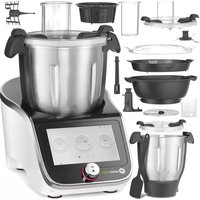
221761 - Food Processor Hendi - Free user manual and instructions
Find the device manual for free 221761 Hendi in PDF.



| Product Type | Multifunctional food processor with cooking, steaming, weighing, and 12 speeds |
| Brand / Model | Hendi / 221761 |
| Intended Use | Preparation of semi-finished products or meals: shredding, cutting, mixing, kneading, steaming, sous-vide, frying, weighing (max 5 kg) |
| Power Supply | Connection to an earthed socket (Class I) |
| Main Functions | Manual cooking, automatic recipes, automatic programs (sous-vide, steam, slow cooking, etc.), integrated weighing, touch screen, Wi-Fi connection |
| Included Accessories | Main bowl, steam bowls (deep and shallow), lids, whisk, paddle, blades, steam basket, slicing/shredding disc, measuring cup, pusher, spatula |
| Maintenance and Cleaning | Accessories are dishwasher-safe (except the base unit). Clean the base unit with a damp cloth. Never immerse the appliance. |
| Safety | Protection against electric shock (Class I), automatic stop if lid is open, hot surface warning, protected blades |
| Spare Parts and Repairability | Contact authorized service or manufacturer. Thermal reset switch at the bottom of the bowl. |
| Warranty | 1 year (apparent operational defects), proof of purchase required |
Frequently Asked Questions - 221761 Hendi
User questions about 221761 Hendi
0 question about this device. Answer the ones you know or ask your own.
Ask a new question about this device
Download the instructions for your Food Processor in PDF format for free! Find your manual 221761 - Hendi and take your electronic device back in hand. On this page are published all the documents necessary for the use of your device. 221761 by Hendi.
USER MANUAL 221761 Hendi
HENDICHEF MULTI-PURPOSE FOOD PROCESSOR
221761
GB: User manual 10
MATBEREDARE FÖR FLERA
ÄNDAMÅL
МНОГОФУНКЦИОНАЛЕН РОБОТ
ЗА ОБРАБОТКА НА ХРАНИ
МНОГОФУНКЦИОНАЛЬНОЕ
УСТРОЙСТВО
GB: Read user manual and keep this with the appliance.
GB: For indoor use only.
natural_image
Simple line drawing of a wine glass with a fork (no text or symbols)
natural_image
Simple line drawing of a trash bin with crossed lines indicating no waste or discharge (no text or symbols)

GB: Note: This manual is translated from English using AI and machine translations.
2
flowchart
graph LR
    A["Automatic recipes"] --> B["Manual cooking"]
    B --> C["Automatic programs"]
    C --> D["Download new recipes"]
3
4

5
flowchart
graph TD
    A["1: Knead"] --> B["2: Steam"]
    B --> C["3: Slow cook"]
    C --> D["4: Boil"]
    D --> E["5: Food processor"]
    E --> F["6: Chop"]
    F --> G["7: Turbo"]
    G --> H["8: Weigh"]
6
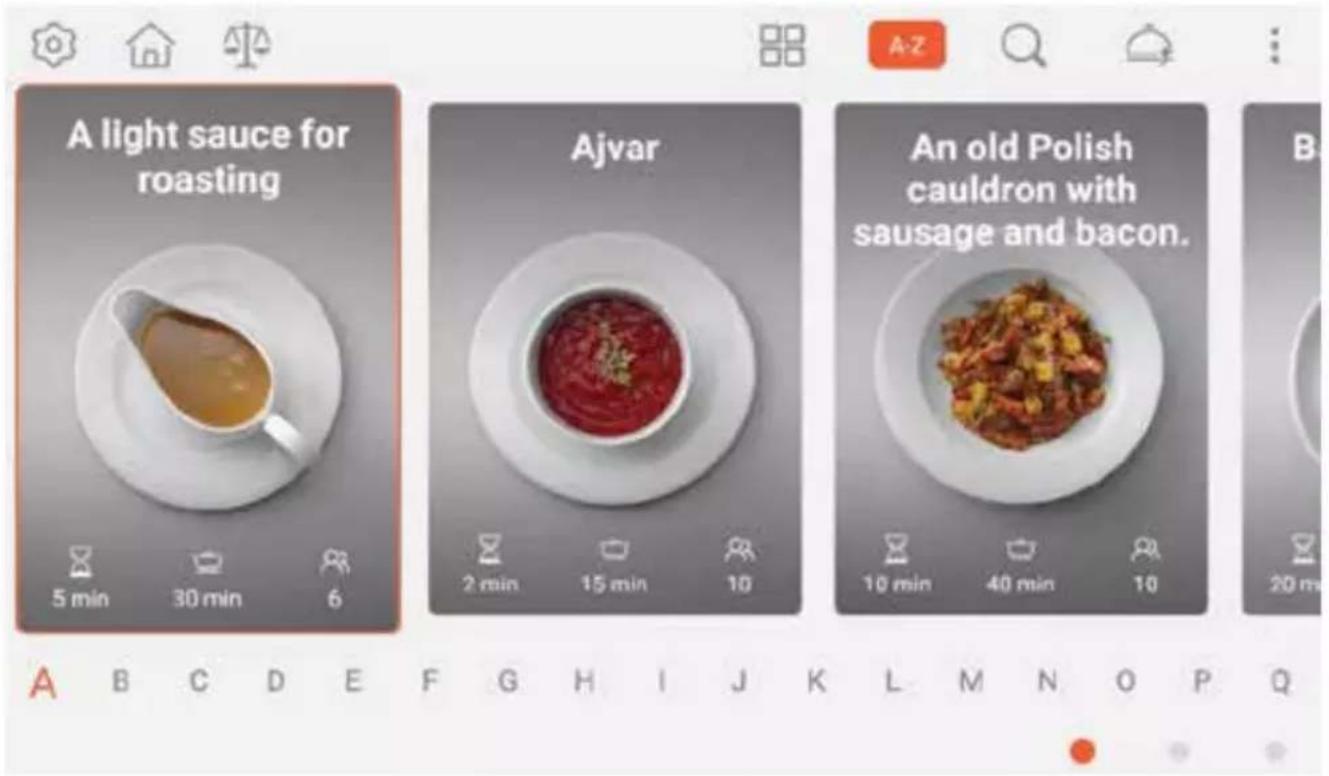
7A
7B
7C
7D
GB: Technical specifications / DE: Technische Angaben / NL: Technische gegevens / PL: Dane techniczne / FR: Données techniques / IT: Parametri di base / RO: Parametrii de bază / GR: Bašukéç paráµetrot / HR: Tehnički podaci / CZ: Technická specifikace / HU: Můszaki adatok / UA: Texníchní характеристики / EE: Tehnilised andmed / LV: Tehniskās specifikacijas / LT: Techninės specifikacijos / PT: Especificações técnicas / ES: Especificaciones técnicas / SK: Technické špecifikácie / DK: Technical specifications / FI: Tekniset tiedot / NO: Tekniske spesifikasjoner / SI: Tehnične specifikacije / SE: Tekniska specifikationer / BG: Texнически спецификации / RU: Texнические данные
| A 221761 |
| B 220-240 V~50Hz/220-240 B~50 Гц |
| C 1000 W/Bт |
| D I |
| E 210x380x(H)320 mm/мм |
| F 8,0kg/кг |
| G 3/4,5 L/Л |
| H 2400-2483,5 MHz/МГц |
| I OFDM, CCK |
A: GB:Item no. / DE:Art.-Nr. / NL:Artikelnr. / PL:Nr pozycji / FR:N° d'article / IT:N. articolo / RO:Nr. articolului/ GR:Aρ. είδους / HR:Broj stavke / CZ:Položka č. / HU:Cikkszám / UA:Номер елемента / EE:Artikli nr / LV:Vienums Nr. / LT:Prekès Nr. / PT:Item n.o / ES:N.o de artículo / SK:Č. položky / DK:Varenr. / FI:Kohteen nro / NO:Varenr. / SI:Št. izdelka / SE:Art.nr / BG: Номер на елемент / RU:Номер позиции
B: GB: Rated voltage and frequency / DE: Nennspannung und Frequenz / NL: Nominale spanning en frequentie / PL: Znamionowe napięcie i częstotliwość / FR: Tension et fréquence nominales / IT: Tensione e frequenza nominali / RO: Tensiune nominală și frecvență / GR: Ovojaotikn táon kai ouxvótnta / HR: Nazivni napon i frekvencija / CZ: Jmenovité napětí a frekvence / HU: Névleges feszültség és frekvencia / UA: Nominalna napругa ta частota / EE: Nimipinge ja -sagedus / LV: Nominālais spriegums un frekvence / LT: Vardinè jtampa ir dažnis / PT: Tensão e frequência nominais / ES: Tensión y frecuencia nominales / SK: Menovité napätie a frekvencia / DK: Nominel spænding og frekvens / FI: Nimellisjännite ja -taajuus / NO: Nominell spenning og frekvens / SI: Nazivna napetost in frekvenca / SE: Märkspänning och frekvens / BG: Nominalno напрежение и честота / RU: Nominalnohe напряжение и частота
C: GB: Rated input power / DE: Nenneingangsleistung / NL: Nominaal ingangsvermogen / PL: Znamionowa moc wejściowa / FR: Puissance d'entrée nominale / IT: Potenza nominale in ingresso / RO: Putere nominală de intrare / GR: Ovojaotik 10xúc ɛισόδου / HR: Nazivna ulazna snaga / CZ: Jmenovitý vstupní výkon / HU: Névleges bemeneti teljesítmény / UA: Номінальна вхідна потужність / EE: Nimisisendvõimsus / LV: Nominālā ieejas jauda / LT: Vardinė jėjimo galia / PT: Potência de entrada nominal / ES: Potencia de entrada nominal / SK: Menovitý vstupný výkon / DK: Nominel indgangseffekt / FI: Nimellistuloteho / NO: Nominell inngangseffekt / SI: Nazivna vhodna moč / SE: Märkineffekt / BG: Номинална входяща мощност / RU: Номинальная входная мощность
D: GB: Protection class (Class) / DE: Schutzklasse (Klasse) / NL: Beschermingsklasse (klasse) / PL: Klasa ochrony (klasa) / FR: Classe de protection (classe) / IT: Classe di protezione (classe) / RO: Clasă de protectie (clasă) / GR: Kláón proostaciaç (katnyopia) / HR: Klasa zaštite (klasa) / CZ: Trída ochrany (trída) / HU: Védelmi osztály (osztály) / UA: Клас захисту (клас) / EE: Kaitseklass (klass) / LV: Aizsardzības klase (klase) / LT: Apsaugos klasè (klasè) / PT: Classe de proteção (classe) / ES: Clase de protección (clase) / SK: Trieda ochrany (trieda) / DK: Beskyttelsesklasse (klasse) / FI: Suojausluokka (luokka) / NO: Beskyttelsesklasse (klasse) / SI: Razred zaščite (razred) / SE: Skyddsklass (klass) / BG: Клас на защита (Клас) / RU: Класс защиты (класс)
E: GB:Dimensions / DE:Abmessungen / NL:Afmetingen / PL:Wymiary / FR:Dimensions / IT:Dimensioni / RO:Dimensiuni / GR:Διαστάσεις / HR:Dimenzije / CZ:Rozměry / HU:Méretek / UA:Pozmíri / EE:Mõõtmed / LV:Izmēri / LT:Matmenys / PT:Dimensões / ES:Dimensiones / SK:Rozmery / DK:Mål / FI:Mitat / NO:Mål / SI: Mere / SE:Mått / BG: Размерi / RU:Размеры
F: GB:Net weight / DE:Nettogewicht / NL:Nettogewicht / PL:Waga netto / FR:Poids net / IT:Peso netto / RO:Greutate netă / GR:Kaθαρό βάρος / HR:Neto težina / CZ:Čistá hmotnost / HU:Nettó tömeg / UA:Bara нетто / EE:Netokaal / LV:Neto svars / LT:Grynasis svoris / PT:Peso líquido / ES:Peso neto / SK:Čistá hmotnosť / DK:Nettovægt / FI: Nettopaino / NO:Nettovekt / SI:Neto teža / SE:Nettovikt / BG: Нетно терло / RU:Вес нетто
G: GB: Capacity / DE: Kapazität / NL: Capaciteit / PL: Pojemność / FR: Capacité / IT: Capacità / RO: Capacitate / GR: Хврптукότητα / HR: Kapacitet / CZ: Kapacita / HU: Kapacitás / UA: Місткість / EE: Mahutavus / LV: Efektivităte / LT: Pajègumas / PT: Capacidade / ES: Capacidad / SK: Kapacita / DK: Kapacitet / FI: Tilavuus / NO: Kapasitet / SI: Zmogljivost / SE: Kapacitet / BG: Капацитет / RU: Вместимость
H: GB:WiFi frequency / DE:WiFi-Frequenz / NL:WiFi-frequentie / PL:Częstotliwość WiFi / FR:Fréquence Wi-Fi / IT:Frequenza Wi-Fi / RO:Frecventa WiFi / GR:Συχνότητα WiFi / HR:WiFi frekvencija / CZ:Frekvence WiFi / HU:WiFi frekvencia / UA:Частота WiFi / EE:WiFi sagedus / LV:WiFi frekvence / LT:WiFi dažnis / PT:Frequência Wi-Fi / ES:Frecuencia WiFi / SK:Frekvencia WiFi / DK:WiFi frekvens / FI:WiFi-taajuus / NO:WiFi-frekvens / SI:Frekvenca WiFi / SE:WiFi-frekvens / BG:WiFi честота / RU:Частота Wi-Fi
I: GB:Modulation mode / DE:Modulationsmodus / NL:Modulatie modus / PL:Tryb modulacji / FR:Mode de modulation / IT:Modalità di modulazione / RO:Modul de modulare / GR:Λειτουργία διαμόρφωσης / HR:Način modulacije / CZ:Modulační režim / HU:Modulációs mód / UA:Режим модуляції / EE:Modulatsioonirežiim / LV:Modulácijas režīms / LT:Moduliacijos režimas / PT:Modo de modulação / ES:Modo de modulación / SK:Modulačný režim / DK:Modulationstilstand / FI:Modulaatiotila / NO:Modulasjonsmodus / SI:Način modulacije / SE:Modulationsläge / BG:Режим на модулация / RU:Режим модуляции
GB: Remark: Technical specification is subjected to change without prior notification.
DE: Anmerkung: Die technische Spezifikation kann ohne vorherige Ankündigung geändert werden.
NL: Opmerking: De technische specificatie zijn onderworpen aan wijzigingen zonder voorafgaande kennisgeving.
PL: Uwaga: Specyfikacja techniczna może zostać zmieniona bez powiadomienia.
FR: Remarque: La spécification technique peut être modifiée sans notification préalable.
IT: Osservazione: Le specifiche tecniche sono soggette a modifiche senza preavviso.
RO: Observatie: Specificația tehnică se poate modifica fără notificare prealabilă.
GR: Σημείωση: Οι τεχνικές προδιαγραφές μπορούν να αλλάξουν χωρίς προειδοποίηση.
HR: Napomena: Tehničke specifikacije podložne su promjenama bez prethodne obavijesti.
CZ: Poznámka: Technická specifikace se může změnit bez předchozího upozornění.
HU: Megjegyzés: A műszaki adatok előzetes értesítés nélkül változhatnak.
UA: Зауваження: Технічні характеристики можуть змінюватися без попереднього повідомлення.
EE: Märkus: Tehnilisi andmeid võidakse muuta ilma eelneva teavitamiseta.
LV: Piezīme: Tehniskās specifikācijas var tikt mainīlas bez iepriekšēja brīdinājuma.
LT: Pastaba: Techninė specifikacija gali būti keičiama be išankstinio jspėjimo.
PT: Observação: As especificações técnicas estão sujeitas a alterações sem notificação prévia.
ES: Observación: Las especificaciones técnicas están sujetas a cambios sin previo aviso.
SK: Poznámka: Technické špecifikácie podliehajú zmenám bez predchádzajúceho oznámenia.
DK: Bemærkning: Tekniske specifikationer kan ændres uden forudgående varsel.
FI: Huomautus: Teknisiä tietoja voidaan muuttaa ilman ennakkoilmoitusta.
NO: Merknad: Teknisk spesifikasjon kan endres uten forhåndsvarsel.
SI: Opomba: Tehnične specifikacije se lahko spremenijo brez predhodnega obvestila.
SE: Anmärkning: Tekniska specifikationer kan ändras utan föregående meddelande.
BG: Забележка: Техническите спецификации подлежат на промяна без предварително уведомление.
RU: Примечание. Технические характеристики могут быть изменены без предварительного уведомления.
Dear Customer,
Thank you for purchasing this Hendi appliance. Read this user manual carefully, paying particular attention to the safety regulations outlined below, before installing and using this appliance for the first time.
Safety instructions
- Only use the appliance for the intended purpose it was designed for as described in this manual.
- The manufacturer is not liable for any damage caused by incorrect operation and improper use.
- Keep the appliance and electrical plug/connections away from water and other liquids. In the event the appliance falls into water, immediately remove the connections from the mains. Do not use the appliance until it has been checked by a certified technician. Failure to follow these instructions will cause life threatening risks.
- Never attempt to open the housing of the appliance by yourself.
- Do not insert objects into the housing of the appliance.
- Do not touch the plug/electrical connections with wet or damp hands.
- DANGER! RISK OF ELECTRIC SHOCK! Do not attempt to repair the appliance by yourself. Do not immerse the electrical parts of the appliance in water or other liquids. Never hold the appliance under running water.
- NEVER USE A DAMAGED APPLIANCE! Regularly check the electrical connections and cord for any damage. When it's damaged, disconnect the appliance from the power supply. It must be repaired by a supplier, service agent or similarly qualified person in order to avoid danger or injury.
- Make sure the cord does not come in contact with sharp or hot objects and keep it away from open fire. Never pull the power cord to unplug it from the socket, always pull the plug instead.
- WARNING! When positioning the appliance, securely route the power cord if necessary in order to prevent unintentional pulling, being damaged, contact with the heating surface or cause a trip hazard.
- Never leave the appliance unattended during use.
- WARNING! As long as the plug is in the socket the appliance is connected to the power supply.
- WARNING! ALWAYS switch off the appliance before disconnecting from the power supply, cleaning, maintenance or storage.
- Connect the power plug to an easily accessible electrical socket so that in case of emergency the appliance can be unplugged immediately.
- Never carry the appliance by the cord.
- Never use accessories or any extra devices other than those supplied with the appliance or recommended by the manufacturer. Failure to do so could pose a safety risk to the user and could damage the appliance. Only use original parts and accessories.
- Only connect the appliance to an electrical outlet with the voltage and frequency mentioned on the appliance label.
- This appliance should not be operated by persons with reduced physical, sensory or mental capabilities, or persons that have a lack of experience and knowledge.
- This appliance should, under any circumstances, not be used by children.
- Keep the appliance and its electrical connections out of reach of children.
- This appliance should be operated by trained personnel in kitchen of the restaurant, canteens or bar staff, etc.
- Do not place the appliance on a heating object (gasoline, electric, charcoal cooker, etc.).
- Do not cover the appliance in operation.
- Do not use the appliance near any open flames, explosive or flammable materials. Always operate the appliance on a horizontal, stable, clean, heat-resistant and dry surface.
- Do not operate this appliance by means of an external timer or remote-control system.
- Do not place any objects on top of the appliance.
- The appliance is not suitable for installation in an area where a water jet could be used.
- WARNING! Keep all ventilation openings in the appliance clear of obstruction.
- Allow at least 20 cm spacing around the appliance for ventilation purpose during use.
Special safety instructions
- This appliance is intended to be used in household and similar applications such as:
- staff kitchen areas in shops, offices and others working environment;
- farm houses;
- by clients in hotels, motels and other residential type environment;
- bed and breakfast type environment.

CAUTION! RISK OF BURNS! HOT SURFACE! Bowl, lid and accessories might be hot during use. Touch only control panel and knob.
- CAUTION! ALWAYS switch off the machine and disconnect the power supply before touching any moving parts.
- Keep long hairs, jewelry and loose clothing away from moving parts and fitted tools/attachments.
- WARNING! Take great care when handling the cutting disks or blades. Wear protective gloves (not supplied) if necessary.
- WARNING! Never remove or open the lid while the appliance is operating. The steam may come out and cause burns.
- Always remove attachments before pouring content from the bowl.
- Do not exceed the maximum fill level marked on inner side of the bowl (MAX).
• Always close the filler cap during use. - Never operate the appliance in the cook mode with the empty bowl.
- CAUTION: In order to avoid a hazard due to inadvertent resetting of the thermal cut-out, this appliance must not be supplied through an external switching device, such as a timer, or connected to a circuit that is regularly switched on and off.
Intended use
- This appliance is designed for prepare semi-finished products or ready meals (only processing food products), including shredding, cutting, blending, mixing, kneading, steaming, Sous Vide cooking, mixing, frying. The appliance also can be used for weighing products. Any other use may lead to dam-
age of the appliance or personal injury.
- Operating the appliance for any other purpose shall be deemed a misuse of the device. The user shall be solely liable for improper use of the device.
Grounding installation
This appliance is classified as protection class I and must be connected to a protective ground. Grounding reduces the risk of electric shock by providing an escape wire for the electric current.
This appliance is fitted with a power cord with grounding plug or electrical connections with grounding wire. The connections must be properly installed and grounded.
Main parts of the product
(Fig.1 on page 3)
| No. | Name No. Name | ||
| 1 | Filler cap 2 Hot processing lid | ||
| 3 | Lid gasket 4 Whisk | ||
| 5 | Stir paddle 6 Blades | ||
| 7 | Steam basket 8 Bowl | ||
| 9 | Power cord 10 Main switch | ||
| 11 | Base unit | 12 | Touch Screen Display |
| 13 | Knob | 14 Spatula | |
| 15 | Measuring cup | 16 Steamer bowl lid | |
| 17 | Shallow steamer bowl | 18 | Deep steamer bowl |
| 19 | Steamer bowl gasket | 20 Pusher | |
| 21 | Cold processing lid | 22 | Lid gasket |
| 23 | Slicing / shredding disc | 24 | Driving shaft |
Preparation before use
- Remove all protective packaging and wrapping.
- Check to make sure the appliance is undamaged and with all accessories. In case of incomplete delivery and damages. Please contact supplier immediately. Do not use the appliance.
- Clean the appliance before use (See == > Cleaning & Main tenance).
• Make sure the appliance is completely dry. - Place the appliance on a horizontal, stable and heat resistant surface that is safe against water splashes.
- Keep the packaging if you intend to store your appliance in the future.
- Keep the instructions for future reference
NOTE! Due to manufacturing residues, the appliance may emit a light odor during the first few uses. This is normal and does not indicate any defect or hazard. Make sure the appliance is well ventilated.
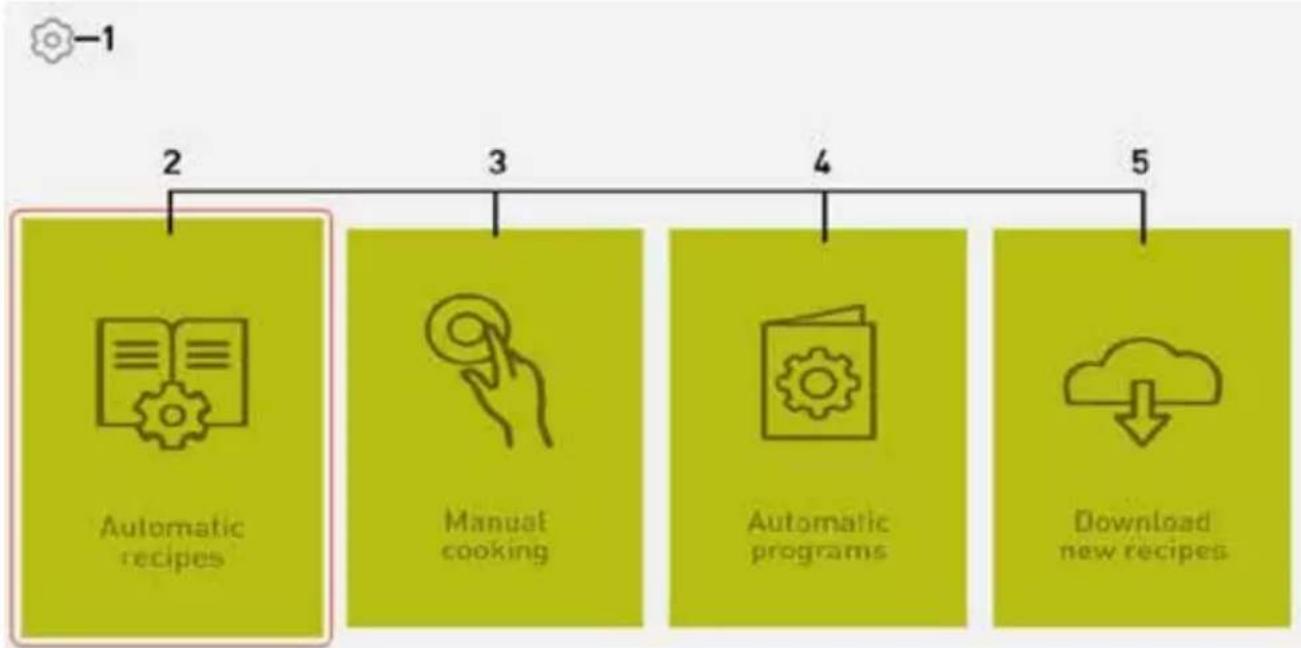
Display - Home page
(Fig.2 on page 3)
- Settings
- Automatic recipes
- Manual cooking
-
Automatic programs
-
Download new recipes
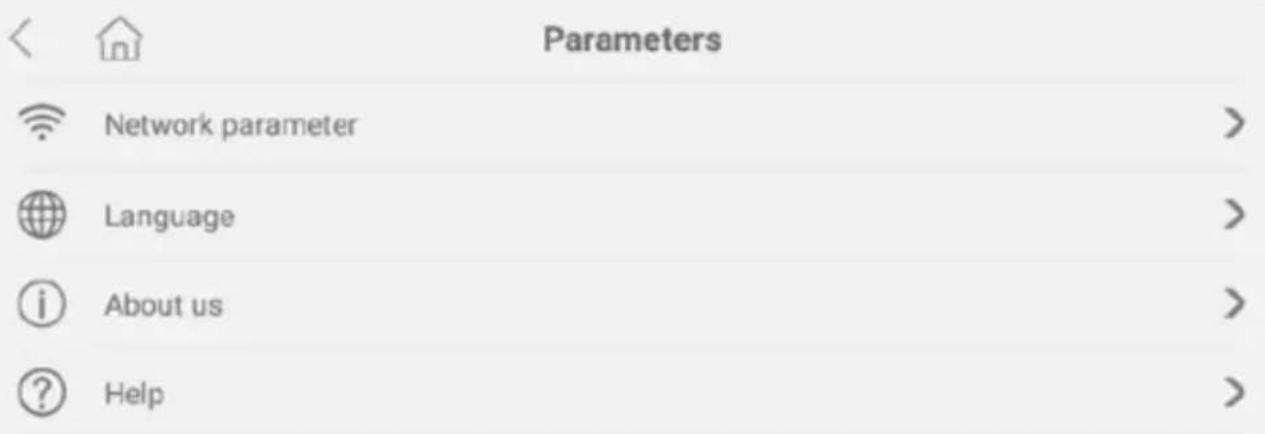
Settings
(Fig.3 on page 4)
- Touch the icon to enter the general settings.
- Choose "Network parameter" to connect available WiFinetwork. Note: WiFi network is necessary for software update and downloading new recipes.
- Choose "Language" if you want to change operational language of menu and recipes.
- Choose "About us" to see software and appliance information; you can also check if there are any available software update (See ==> Download new recipes) or return to deafault settings.
- Choose "Help" to enter to digital short user manual of main functions and modes of the appliance.
- Touch the icon to return to home page screen.
Working modes
(Fig.2.2-2.4)
- To enter desire working mode (Automatic recipes, manual cooking or automatic programs) choose any of them by touching the screen. You can also select mode by turning the knob, then enter in it by pushing the knob.
- If you want to change mode: after entering to selected mode, slide by finger on the screen (from left to right or inversely) or by touching icon in down right corner ( ).
- To start any cooking step touch the icon ▶ or press the knob; to pause process touch the icon || or press the knob.
- To cancel step and exit the program touch the icon or symbol "x" in upper right corner or press continuously knob longer than 3 sek.
Manual cooking - Main parameters settings
(Fig.4 on page 4)
NOTE: Manual cooking mode is only for single cooking cycle. There is no possibility to set more than one step or save your own settings; the appliance save only the last chosen settings. Touch the parameter on screen to be able to change value; slide finger on screen or rotate the knob for change the value:
-
Temperature Setting - Range: 37-130°C (after 37°C, next value is 40°C, then intervals at 5°C). Upper value on display means current temperature during cooking.
Note: Upper icon 📋 means "closed lid"; if you open lid, the icon will change into 📋 (start cooking is not possible). -
Time Setting - Range: 0-90min (touch separately "minutes" and "second" for changing value; interval at 1 sec or 1 min); after start cooking upper value will shows set time and lower will count down time.
-
Speed setting - Range: 1-3 (for stir paddle); 1-4 (for whisk); 1-12 (for blade); touch the icon change rotation on non-clockwise - the icon will be displayed (in that option speed range is 1-3).
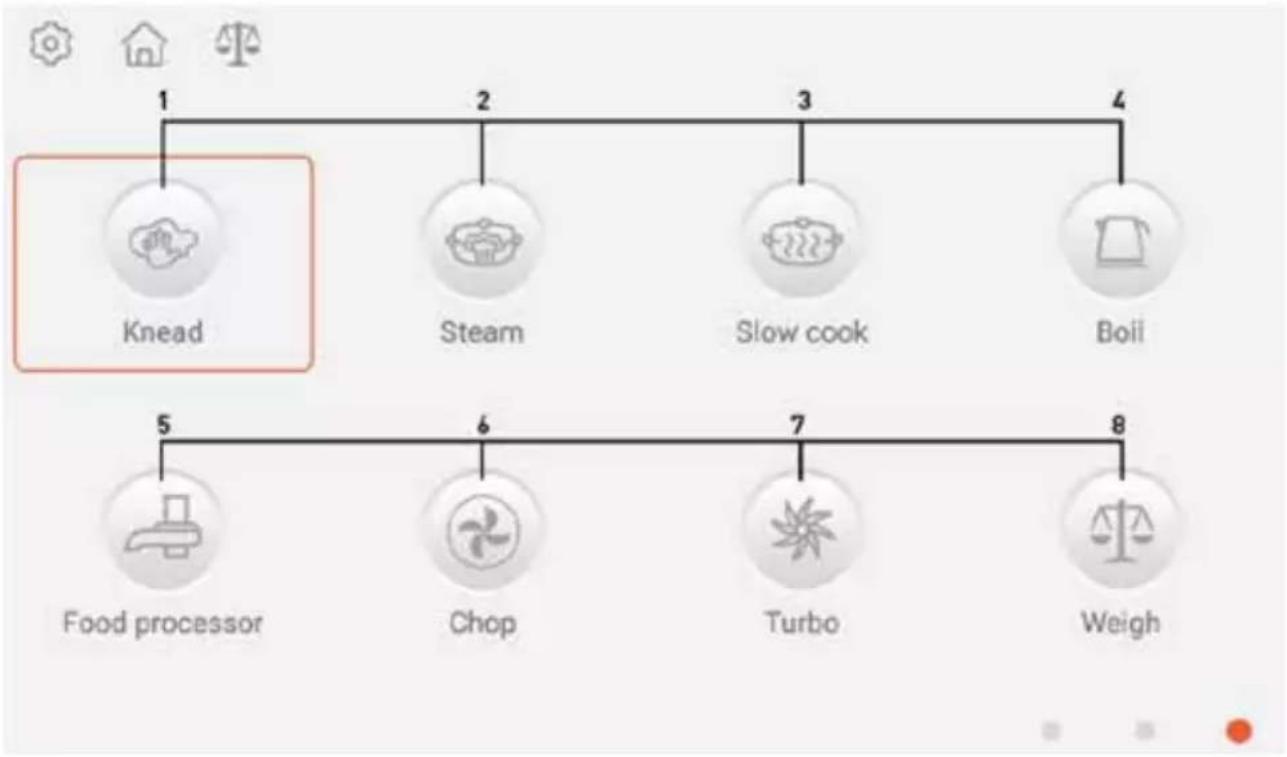
Automatic programs
(Fig.5-6 on page 5)
Note: Values in bracket are defaults settings.
- KNEAD - Temperature range: 0-37°C (0°C); Time range: 2-3 min (3 min); Speed = 3
- STEAM - In place of temperature setting there is setting of steam level in range: 1-3 (3); Time range: 1-60 min (20 min);
Speed range: 0-3 (0);
Note: Time countdown start after reaching 95°C.
- SLOW COOK - Temperature range: 60-100°C (100°C); Time range: 1-90 min (60 min); Speed range: 1-3 (1)
- BOIL - Temperature range: 60-100°C (100°C); Time = infinity [0]; No speed setting
- FOOD PROCESSOR - No temperature setting; Time range: 10-60 sek (30 sek); Speed range: 4-6 (5)
- CHOP - No temperature setting; Time range: 10 sek - 4 min [10 sek]; Speed range: 1-12 [6]
- TURBO - No temperature setting; Time = 1 min; Speed = 12
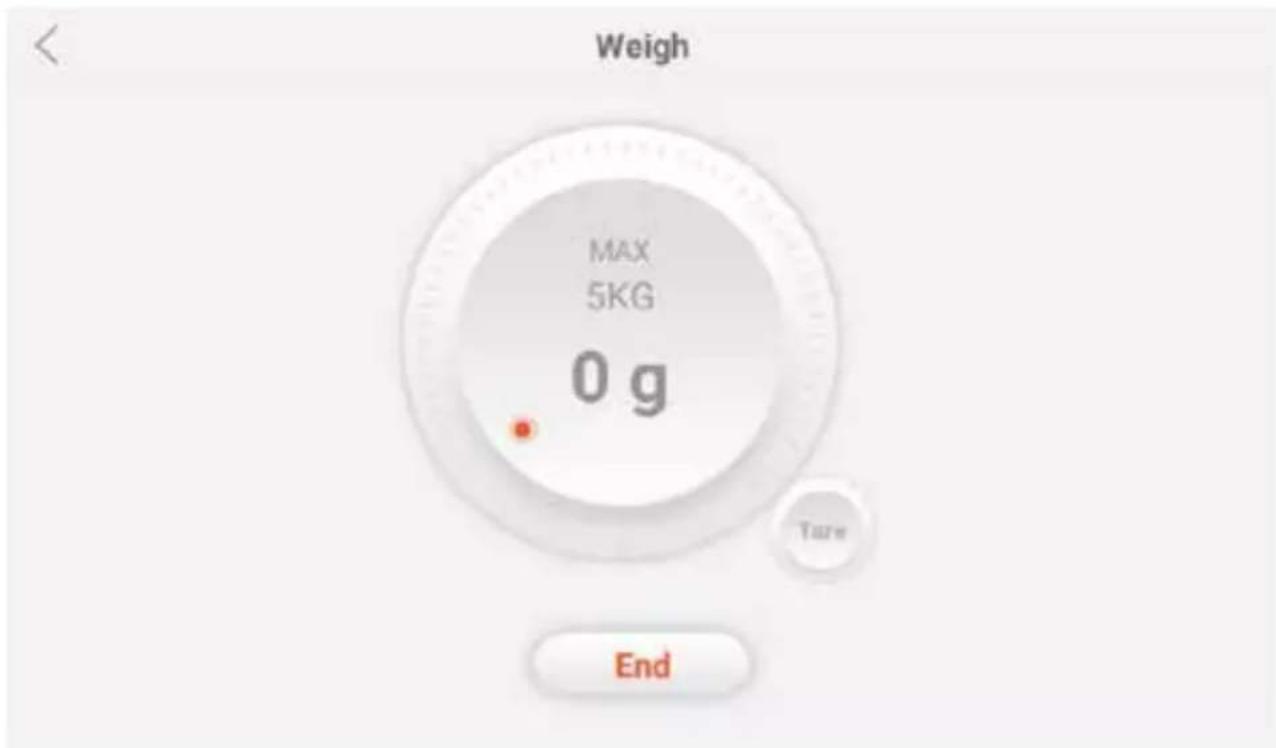
- WEIGHT - Maximum weight = 5 kg; To enter to weighting mode in other screen view touch the icon in upper side of screen; to reset weight touch symbol "Tare"; to exit weighting mode touch symbol "End".
Automatic recipes
(Fig.7A-D on page 6-7)
- Deafult screen for searching recipes is "searching by the letters A-Z (Fig. 7A); slide by finger on the screen or touch any letter on the bottom to find wanted recipe.
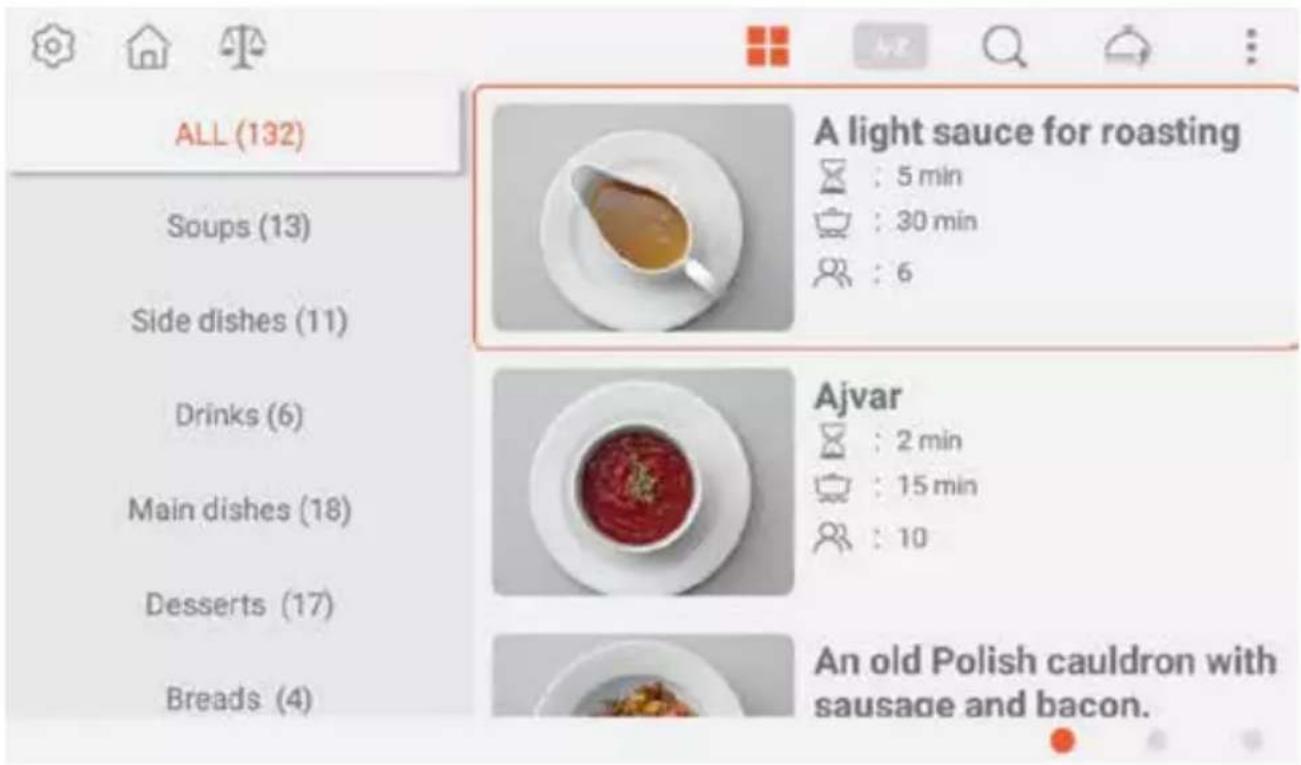
- Touch the icon to change screen view on view of searching by the sorted groups / types as like soups, main dishes, deserts, salads, etc. (Fig. 7B); touch the icon to back on previously searching view.
- To searching recipes by the phrase touch the icon and write any phrase by the displayed keyboard.
- To check if there are any new recipes to cuh the icon (Software update; see more ==> Download new recipes)
- Touch the icon: to check list of favourites recipes or history list (latest watched recipes) - to delete any recipe in favourite recipe list or delete history touch the icon.
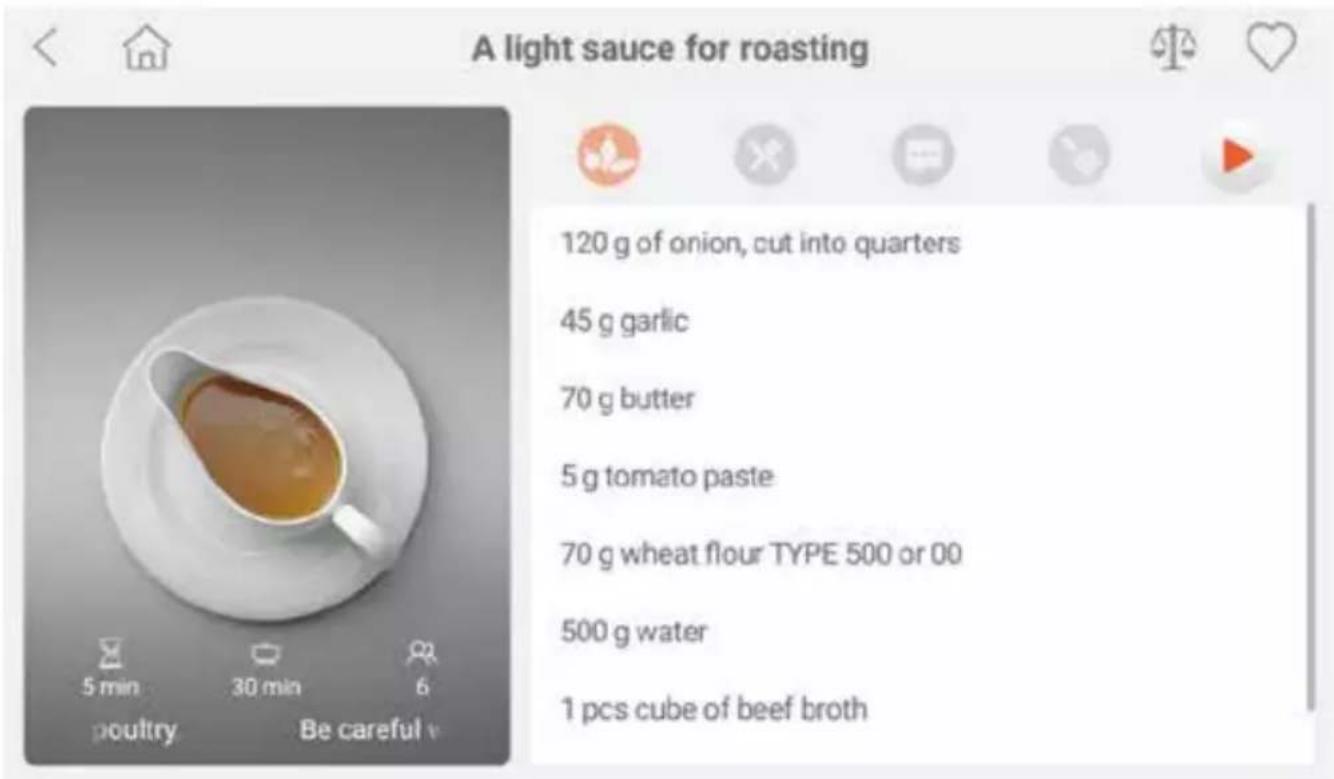
- To enter to each recipe and see details (Fig. 7C), touch the picture assigned to recipe.
- After entering into recipe details (Fig. 7C) on photo (on left) there will be display time of preparation ☐, cooking time and amount of portion ☐
- Touch the icon< for back to searching view and choose other recipe.
- Touch the icon ♥ to add recipe to list of favourite.
- Touch the icon to display list of ingredients; for display full describe of steps touch the icon; for special tips touch the icon; for list of needed tools touch the icon.
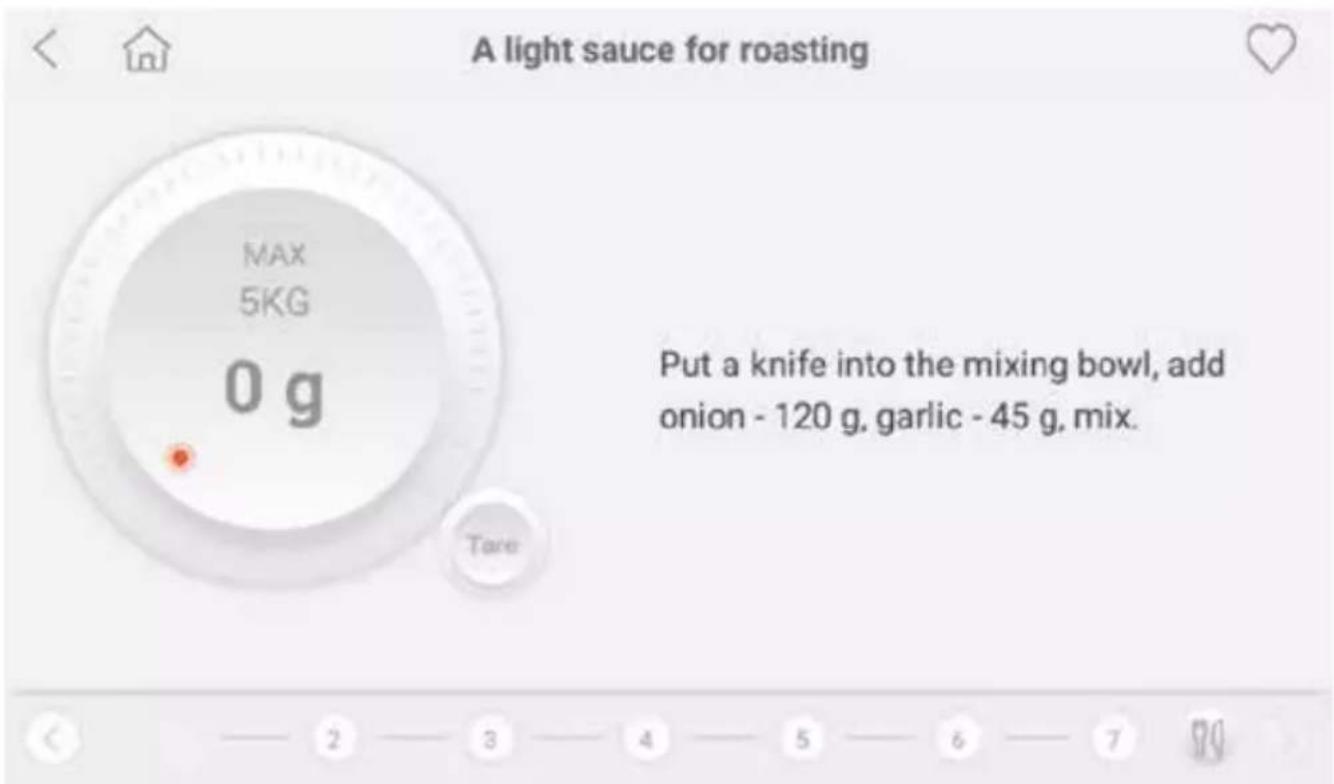
- To start make dish base on recipe touch the icon ▶; appliance will provide you step by step what is must to do (Fig. 7D).
- For skip each one step or back to previously step touch the number of step, icons < or >, slide by finger on screen or turn the knob.
- For check the details (ingredients, steps decribe or tips) touch the icon
Operating instructions
Daily use
In every daily use, please follow below steps:
- Insert bowl (Fig. 1.8) into base unit (Fig. 1.11) - marking "max" should be in the back.
- Connect plug to electric socket.
- Turn on appliance by main switch (Fig. 1.10); Home page will displayed (Fig. 2).
-
Adjust general settings (Fig. 3) or choose working mode from home page. Follow steps as describe in this manual.
-
Choose desire accessories for food processing according to chosen working mode and common instructions (see also ==> Operating tips).
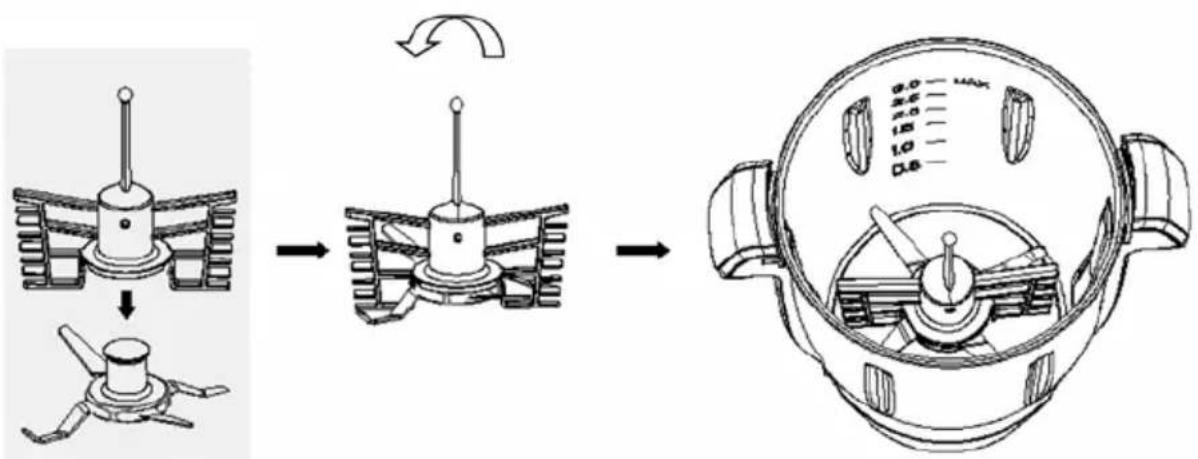
Note: Whisk should be always used with blades (Fig. 8) - After use clean appliance and accessories(See == > Cleaning & Maintenance).
Note: To take out steam basket: put measuring cup into steam basket slot, rotate clockwise and take out the basket.
Operating tips
| Accessorie Purpose Parameters | ||
| Whisk Whip egg white Speed: 4 | Time: 2-4 min | |
| Stirring paddle | Soup | Speed: 1-2Time: 1-90 minTemp.: 100°C |
| Kneading | Speed: 1-2Time: 2-4 min | |
| Other ingredients that needs to heat | Speed: 1-2Time: as per needTemp.: as per need | |
| Blade | Meat chopping | Speed: 8-12Time: 30-60 sek |
| Ice crush sugar | Speed: 8-12Time: 10-20 sek | |
| Blender | Speed: 8-12Time: 1-2 min | |
| Chopping (onion, shallot, celery, etc.) | Speed: 5-7Time: 15-60 sek | |
| Bean, soybean, nut, peanut, coffee bean, almond | Speed: 12Time: 2-3 min | |
| Steam basket | Rice, etc. | Time: 20-30 minSteam: 1-2 |
| Slicer disc | Slices (only food processor) | Speed: 4-6Time: 30-60 sek |
| Steamer | Fish, etc. | Time: 10-60 minSteam: 2-3 |
Download new recipes
Note: New recipes are updating during software updating. For update connectit with WiFi network is necessary.
- Software update and downloading new recipe is possible via 3 methods:
- By touching on home page "Download new recipes" (Fig. 2);
- In settings menu - section "About Us" (Fig. 3);
- By touching the icon icon in "Automatic recipes" mode.
- If you want to update software just in time, after choosing one of above methode, touch "Confirm" and wait for downloading and installing updates.
Note: For more details about steps of updating please see ==> Setting ==> Help ==> Short user guide.
Cleaning & maintenance
ATTENTION! Always disconnect the appliance from the electrical mains and cool down before storage, cleaning & maintenance.
Do not use water jet or steam cleaner for cleaning and do not push the appliance under the water as the parts will get wet and electric shock might be resulted.
DANGER OF INJURY! Care should be taken when handling the sharp cutting blades during cleaning.
Cleaning
- Never immerse the appliance in water or other liquids.
- Clean the cooled bowl surface with a slightly damp cloth or sponge with some mild soap solution.
- Clean the external surface of main unit and touch screen with with a slightly damp cloth
- Never use abrasive sponges or detergents, steel wool or metallic utensils to clean the interior or exterior parts of the appliance.
- Never use aggressive cleaning agents, abrasives or chlorinated cleaners. Do not use any sharp or pointed objects. Do not use petrol or solvents!
- Avoid water contacting with the electrical components.
- Accessories: Parts 1-7; 14-15. 20-24 are dishwasher safe.
Maintenance
- Check the operation of the appliance regularly to prevent problems that can cause serious accidents.
- As soon as you feel the appliance isn't working correctly or there is a problem, stop using the appliance, shut it off and contact the supplier.
- All maintenance, installation and repair works should be performed by specialized trained authorized technicians, or recommended by the manufacturer.
Transportation and Storage
- Before storage, always make sure the appliance has already been disconnected from the electrical outlet and cooled down completely.
- Store the appliance in a cool, clean and dry place.
- Never put heavy objects on the appliance as it may damage the appliance.
- Do not move the appliance while it is under operation. Dis connect the appliance from power supply when moving and hold it at the bottom.
Troubleshooting
If the appliance does not function properly, please check the below table for the solution. If you are still unable to solve the problem, please contact the supplier/service provider.
| Problems Possible cause Possible solution | ||
| Appliance does not switch on | Improper connection to main power | Check connection with main power |
| Appliance is working (knob light on) but screen is black | Internal electronic board fault | Contact with authorised service |
| Program does not start | Accesories / parts error | Follow advise on screen |
| Touch screen does not working | Touch screen fault or damage | Contact with authorised service |
| Knob does not working | Knob fault or damage | Contact with authorised service |
| Bowl does not heated up / not working | Bowl over temperature | Reset temperature control - by white reset switch on the bottom of bowl |
| Update is not possible | WiFi error Check connection to WiFi network | |
Warranty
Any defect affecting the functionality of the appliance which becomes apparent within one year after purchase will be repaired by free repair or replacement provided the appliance has been used and maintained in accordance with the instructions and has not been abused or misused in any way. Your statutory rights are not affected. If the appliance is claimed under warranty, state where and when it was purchased and include proof of purchase (e.g. receipt).
In line with our policy of continuous product development we reserve the right to change the product, packaging and documentation specifications without notice.
Discarding & Environment
When decommissioning the appliance, the product must not be disposed of with other household waste. Instead, it is your responsibility to dispose to your waste equipment by handing it over to a designated collection point. Failure to follow this rule may be penalized in accordance with applicable regulations on waste disposal. The separate collection and recycling of your waste equipment at the time of disposal will help conserve natural resources and ensure that it is recycled in a manner that protects human health and the environment.
For more information about where you can drop off your waste for recycling, please contact your local waste collection company. The manufacturers and importers do not take responsibility for recycling, treatment and ecological disposal, either directly or through a public system.
DEUTSCH
Ohutusalased erijuhised
(Obr. 7A-D na strane 6-7)
PKS Hendi South East Europe SA
5 Metsovou Str.
18346 Moschato, Athens, Greece
Tel: +30 210 4839700
Email: info@pks-hendi.com
Hendi Polska Sp. z o.o.
ul. Firmowa 12
62-023 Robakowo, Poland
Tel: +48 61 658 7000
Email: info@hendi.pl
Hendi Italia S.R.L.
Via Leonardo da Vinci 4
39100 Bolzano (BZ), Italy
Tel: +39 800 727 438
Email: office.italy@hendi.eu
Hendi Food Service Equipment GmbH
Ehring 15
1208, 12/F Exchange Tower
33 Wang Chiu Road, Kowloon Bay, Hong Kong
Tel: +852 2154 2618
Email: info-hk@hendi.eu
Hendi Food Service Equipment Romania S.R.L.
https://www.linkedin.com/company/hendi-tools-for-chefs/
www.youtube.com/HendiEquipment
GB: Changes, printing and typesetting errors reserved.
- HENDICHEF MULTI-PURPOSE FOOD PROCESSOR
- Dear Customer,
- Safety instructions
- Special safety instructions
- Intended use
- Grounding installation
- Preparation before use
- Display - Home page
- (Fig.2 on page 3)
- Settings
- (Fig.3 on page 4)
- Working modes
- (Fig.2.2-2.4)
- Manual cooking - Main parameters settings
- (Fig.4 on page 4)
- Automatic programs
- (Fig.5-6 on page 5)
- Automatic recipes
- (Fig.7A-D on page 6-7)
- Operating instructions
- Daily use
- Download new recipes
- Cleaning & maintenance
- Cleaning
- Maintenance
- Transportation and Storage
- Troubleshooting
- Warranty
- Discarding & Environment
- DEUTSCH
- Ohutusalased erijuhised
- PKS Hendi South East Europe SA
- Hendi Polska Sp. z o.o.
- Hendi Italia S.R.L.
- Hendi Food Service Equipment GmbH
- Hendi Food Service Equipment Romania S.R.L.
Brand : Hendi
Model : 221761
Category : Food Processor