DistanceMaster Home - Measuring equipment Laserliner - Free user manual and instructions
Find the device manual for free DistanceMaster Home Laserliner in PDF.



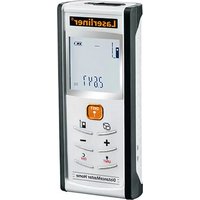
| Product type | Compact laser distance meter |
| Brand | Laserliner |
| Model | DistanceMaster Home |
| Measuring range (indoor) | 0.2 m - 25 m |
| Typical accuracy | ± 3 mm / 10 m |
| Laser class | 2 |
| Laser power | < 1 mW |
| Laser wavelength | 650 nm |
| Power supply | 2 AAA 1.5 V batteries |
| Dimensions (L x H x D) | 48 x 112 x 24 mm |
| Weight (batteries included) | 106 g |
| Auto power off | Laser: 28 s, Device: 3 min |
| Operating temperature | -10 °C to 40 °C |
| Storage temperature | -20 °C to 70 °C |
| Measuring functions | Length, area, volume, addition/subtraction, Pythagoras 1 and 2, continuous min./max., reference measurement |
| Measurement units | m, ft, inch, _' _" |
| Display | LCD display with backlight, bar graph for signal quality |
| Memory | Yes (viewing last values) |
| Maintenance and cleaning | Clean with a soft, dry cloth. Do not allow water to enter the housing. |
| Safety | Do not look into the laser beam. Keep out of reach of children. Do not point at people. |
| Error codes | Err101: replace batteries; Err104: calculation error; Err152: temperature >40°C; Err154: temperature <0°C; Err155: signal too weak; Err156: signal too strong; Err157: erroneous measurement / background too light; Err160: movement too fast. |
| Reference number | 080.949A |
| Package contents | Device, batteries, user manual, warranty card |
Frequently Asked Questions - DistanceMaster Home Laserliner
User questions about DistanceMaster Home Laserliner
0 question about this device. Answer the ones you know or ask your own.
Ask a new question about this device
Download the instructions for your Measuring equipment in PDF format for free! Find your manual DistanceMaster Home - Laserliner and take your electronic device back in hand. On this page are published all the documents necessary for the use of your device. DistanceMaster Home by Laserliner.
USER MANUAL DistanceMaster Home Laserliner
natural_image
Architectural architectural sketch showing roof, windows, and structural elements with dashed lines indicating light paths (no text or symbols)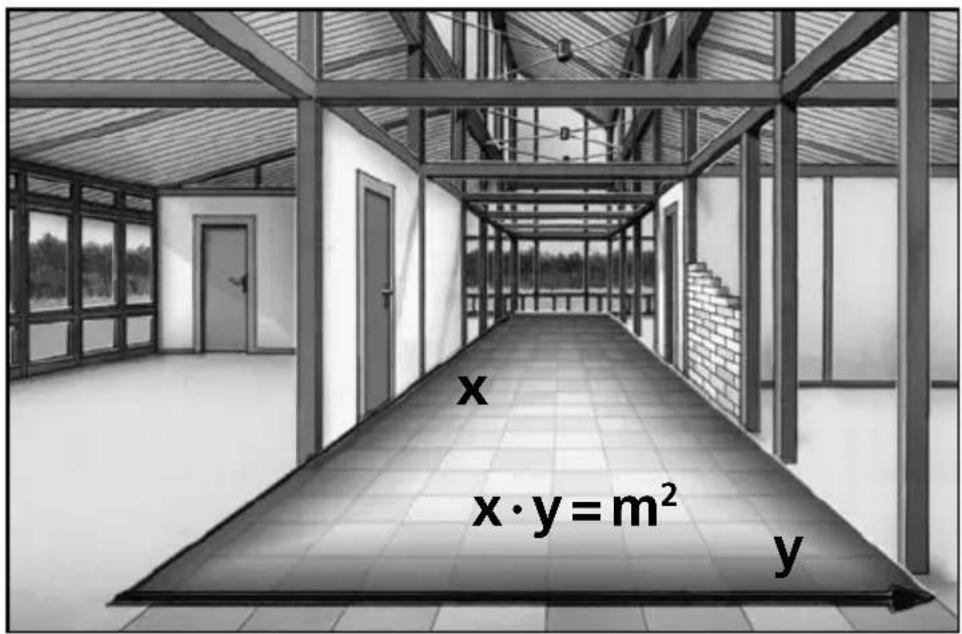
text_image
x x·y = m² y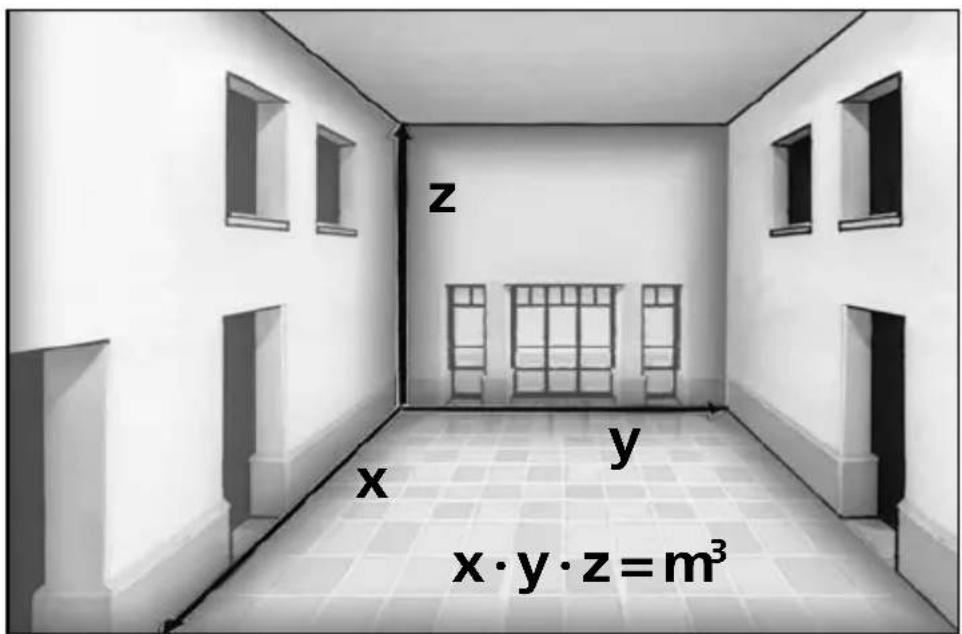
text_image
z x y x·y·z=m³!
text_image
DIST + - UNIT C OFFTASTATUR:
text_image
Warning sign with sunburst symbol inside triangle, commonly used in safety or hazard prevention context-
Messung
-
Messung = Fläche 1
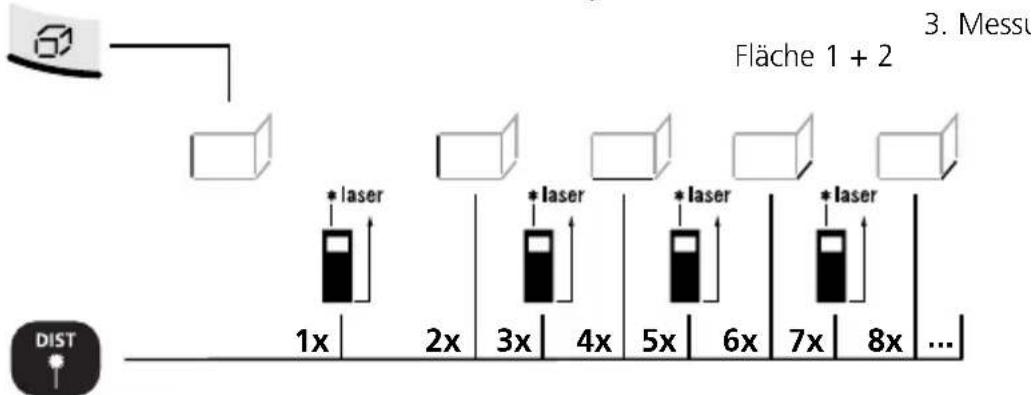
text_image
Fläche 1 + 2 3. Messu * laser 1x 2x 3x 4x 5x 6x 7x 8x ...Laser an / ... Messung = Fläche 1 + Fläche 2 + Fläche 3 + ...

text_image
1x 2x 6x4x 3x 5x * laser * laser * laser DISTRead the operating instructions and the enclosed brochure „Guarantee and additional notices“ completely. Follow the instructions they contain. Safely keep these documents for future reference.
Compact laser distance meter for measuring length, area and volume indoors
text_image
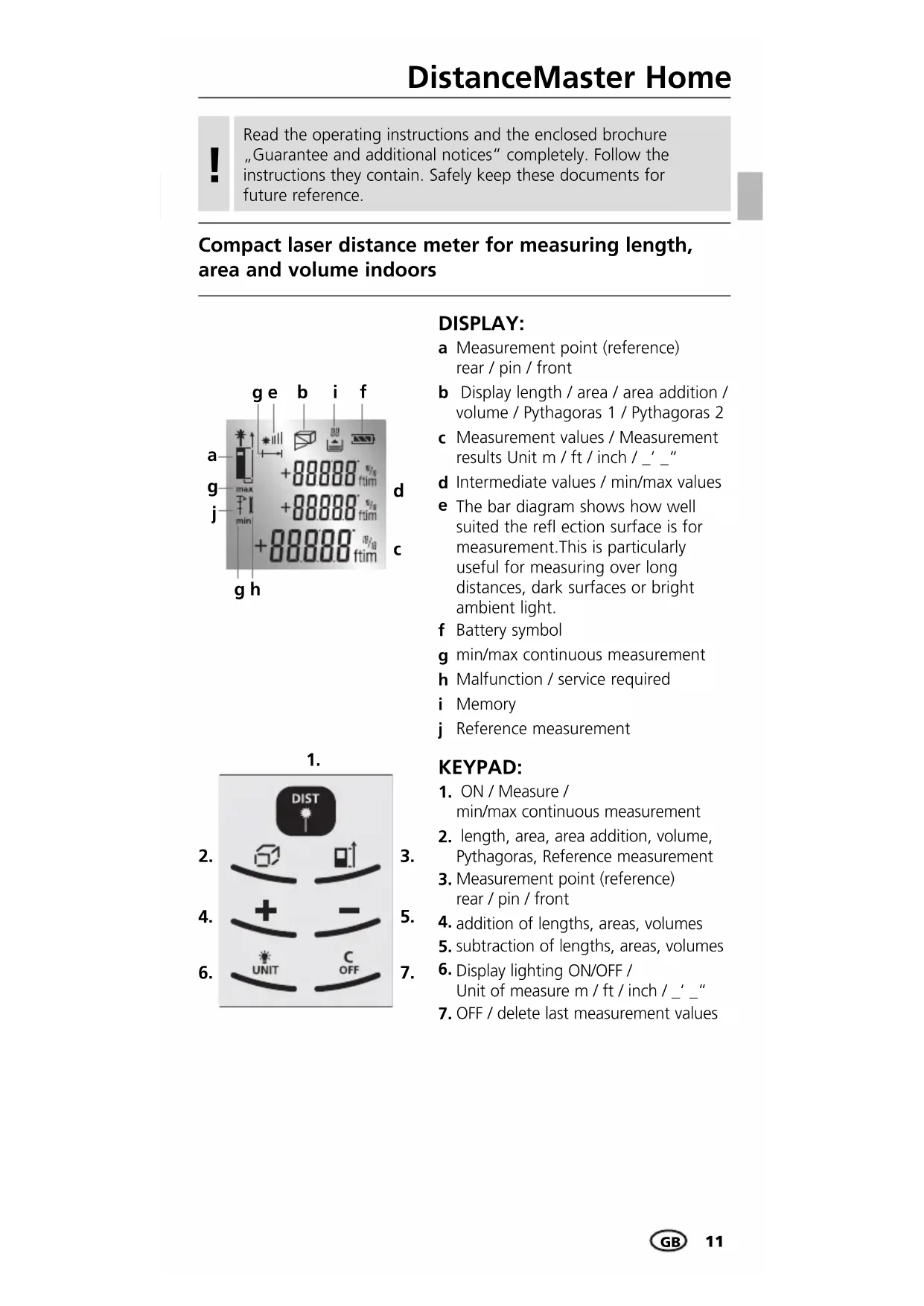
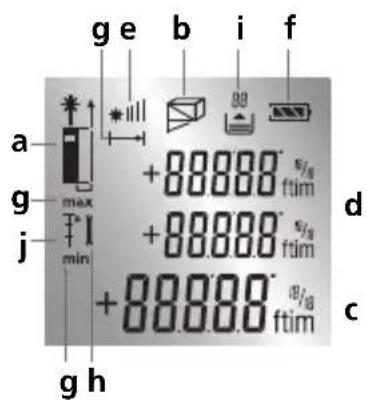
g e b i f a g max +88000 ftim j min +88000 ftim d +88000 ftim c g hDISPLAY:
a Measurement point (reference) rear / pin / front
b Display length / area / area addition / volume / Pythagoras 1 / Pythagoras 2
c Measurement values / Measurement results Unit m / ft / inch / _' _"
d Intermediate values / min/max values
e The bar diagram shows how well suited the reflection surface is for measurement. This is particularly useful for measuring over long distances, dark surfaces or bright ambient light.
f Battery symbol
g min/max continuous measurement
h Malfunction / service required
i Memory
j Reference measurement
text_image
1. DIST + - UNIT C OFF3.
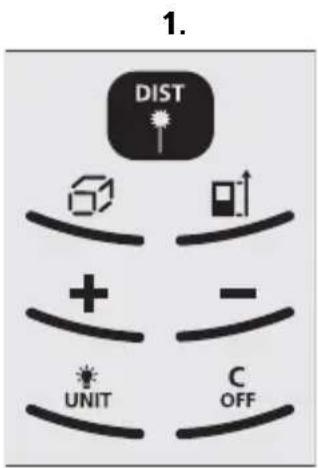
KEYPAD:
- ON / Measure / min/max continuous measurement
- length, area, area addition, volume, Pythagoras, Reference measurement
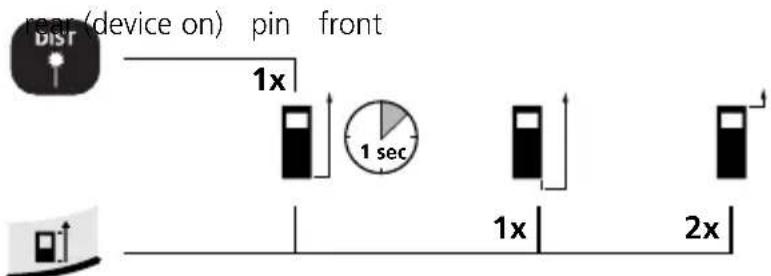
- Measurement point (reference) rear / pin / front
- addition of lengths, areas, volumes
- subtraction of lengths, areas, volumes
- Display lighting ON/OFF / Unit of measure m / ft / inch / _'_"
- OFF / delete last measurement values
text_image
Warning sign with sunburst symbol inside triangle, indicating hazard or cautionLaser radiation! Do not stare into the beam! Class 2 laser < 1 mW · 650 nm EN 60825-1:2007-10

Do not look directly into the beam. Lasers must be kept out of reach of children. Never intentionally aim the device at people.
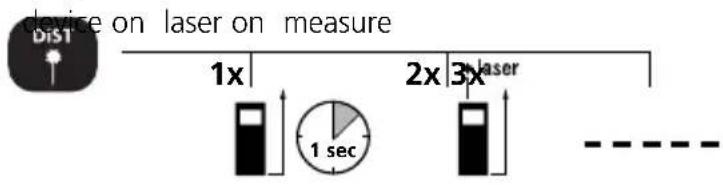
Switch on, measure and switch off:
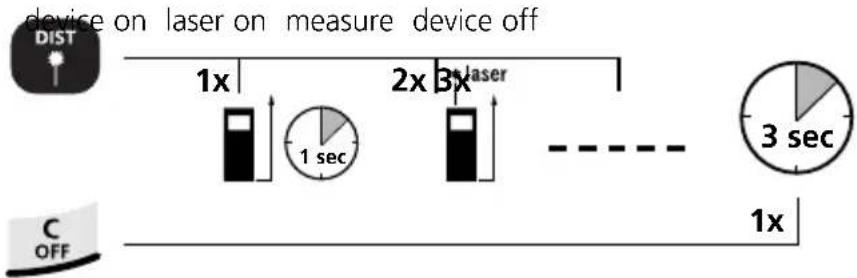
flowchart
graph LR
    A["device on laser on measure device off"] --> B["1x"]
    B --> C["1 sec"]
    C --> D["2x"]
    D --> E["3x"]
    E --> F["3 sec"]
    G["C OFF"] --> H["1x"]
    style A fill:#f9f,stroke:#333
    style G fill:#ccf,stroke:#333
Change unit of measure:
m / ft / inch / _' _"

Delete the last measured value:
Change measurement point (reference):
text_image
rear (device on) pin front 1x 1 sec 1x 2xChange measurement function:
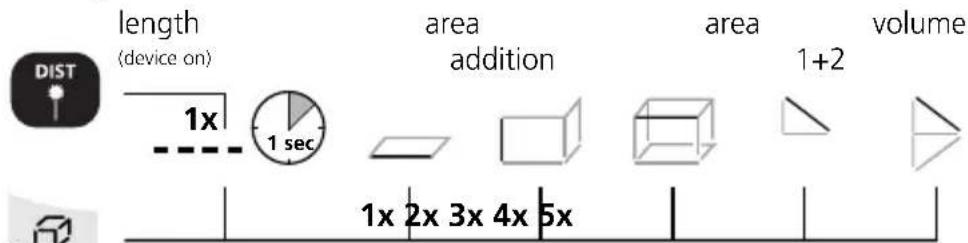
text_image
length (device on) 1x 1 sec area addition area 1+2 volume 1x 2x 3x 4x 5xDistanceMaster Home
Length measurement:
text_image
device on laser on measure Dis1 1x 2x 3x laser 1 sec - - - - -Memory function:
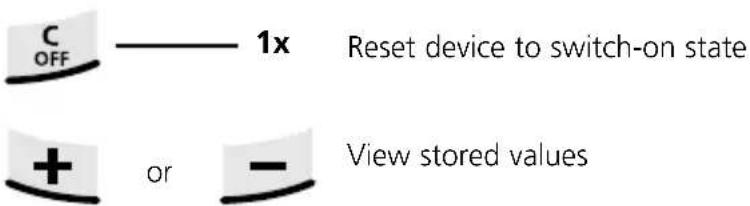
text_image
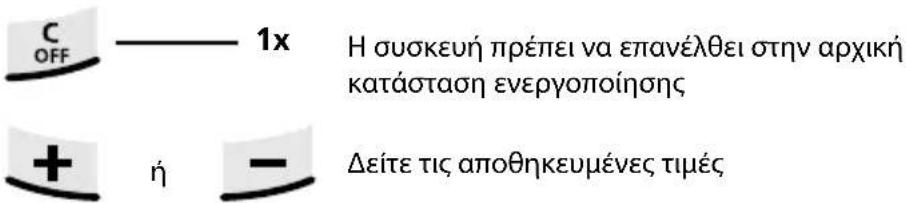
C OFF ———— 1x Reset device to switch-on state + or — View stored valuesArea measurement:
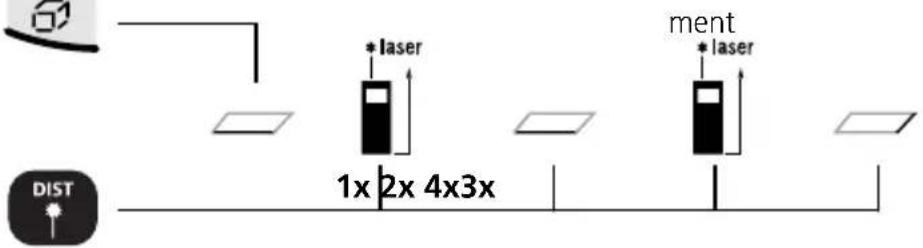
area laser on 1. measure-laser on 2. measure-
text_image
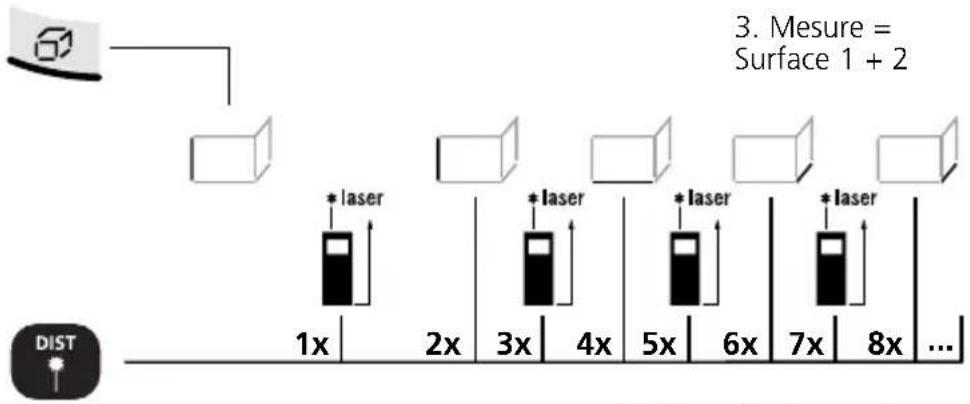
1x 2x 4x3x * laser ment * laser DISTArea addition:
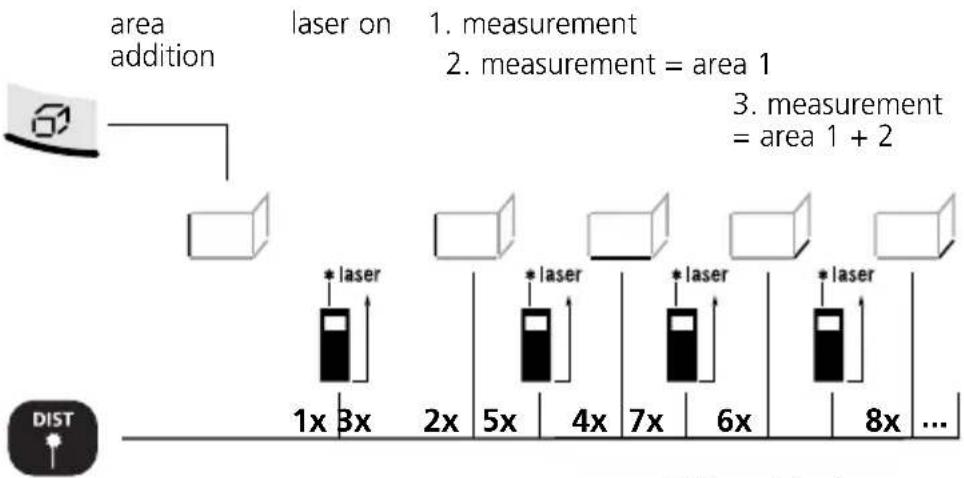
flowchart
graph TD
    A["area addition"] --> B["laser on"]
    B --> C1["1x laser"]
    B --> C2["3x laser"]
    C1 --> D1["2x laser"]
    C2 --> D2["5x laser"]
    C1 --> D3["4x laser"]
    C2 --> D4["7x laser"]
    C1 --> D5["6x laser"]
    C2 --> D6["8x laser"]
    C1 --> D7["... laser"]
    C2 --> D8["... laser"]
    C1 --> E["measurement = area 1"]
    C2 --> F["measurement = area 1 + 2"]
    style A fill:#f9f,stroke:#333
    style B fill:#ccf,stroke:#333
    style C1 fill:#cfc,stroke:#333
    style C2 fill:#cfc,stroke:#333
    style C3 fill:#fcc,stroke:#333
    style C4 fill:#fcc,stroke:#333
    style C5 fill:#fcc,stroke:#333
    style C6 fill:#fcc,stroke:#333
    style C7 fill:#fcc,stroke:#333
    style D1 fill:#ffc,stroke:#333
    style D2 fill:#ffc,stroke:#333
    style D3 fill:#ffc,stroke:#333
    style D4 fill:#ffc,stroke:#333
    style D5 fill:#ffc,stroke:#333
    style D6 fill:#ffc,stroke:#333
    style D7 fill:#ffc,stroke:#333
Addition of further areas: Laser active / ... measurement = area 1 + area 2 + area 3 + ...

Linked wall areas are added here. When adding areas, only the length needs to be measured as from the 3rd measurement. The value from the 1st measurement is always used as the height.
Volume measurement:
volume 1. measurement 2. measurement 3. measurement
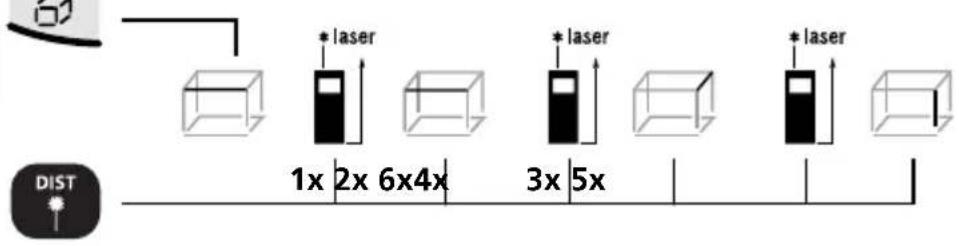
text_image
*laser 1x 2x 6x4x *laser 3x 5x *laser DISTAddition and subtraction of lengths:
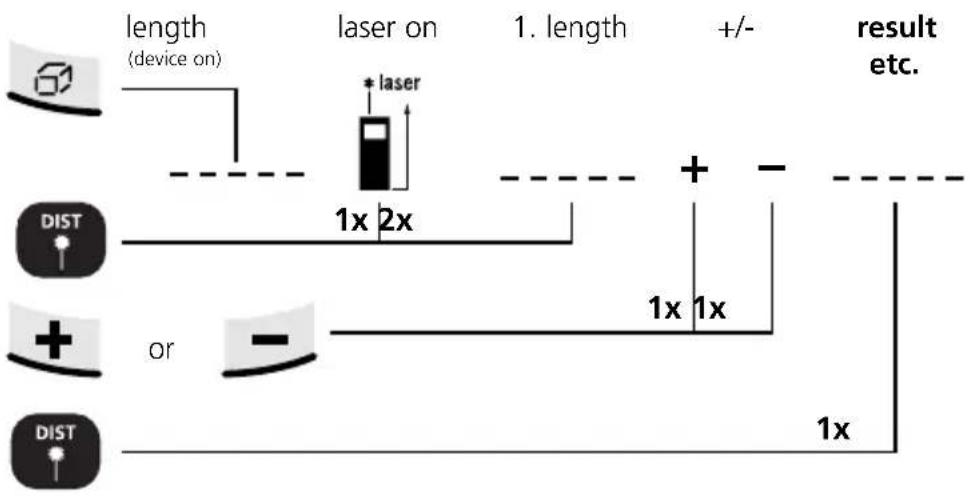
flowchart
graph TD
    A["Device with 60°"] --> B["Length (device on)"]
    B --> C["laser on"]
    C --> D["1x 2x"]
    D --> E["+"]
    E --> F["Result etc."]
    G["DIST"] --> H["or"]
    I["DIST"] --> J["or"]
    K["1x"] --> L["1x"]
    M["1x"] --> N["1x"]
Area calculation:
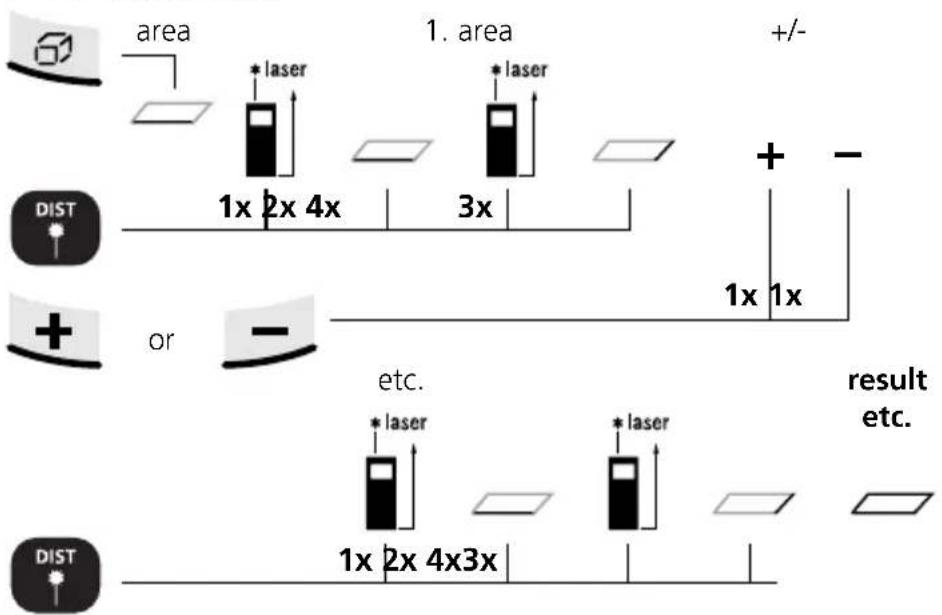
The 2nd measurement takes place with automatic Min/Max function.
min/max continuous measurement:
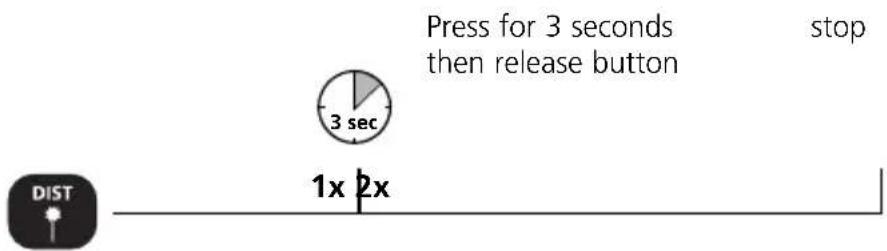
text_image
Press for 3 seconds then release button stop 3 sec 1x 2x DISTThe LC display shows the max value, the min value and the current value.
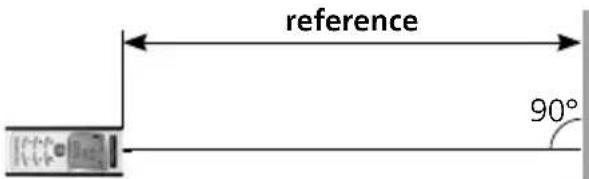
Reference measurement:
Reference length



Set reference length
1a. Selection of 1b. Number 2. Define reference
tens
position
set-up
value


1x
text_image
reference 90°-
Now move the laser forward and back.
-
Rapid beeping: Measured value within reference value of ±1 mm.
Slow beeping: Reference value not yet reached.
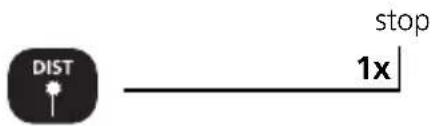
text_image
DIST stop 1xImportant notices
- The laser points to the location that will be measured. No objects may get into the laser's line of measurement.
- The device compensates the measurement for different room temperatures. Therefore allow the device a brief adaptation period when changing locations with large temperature differences.
- The device is only conditionally useable in outdoor areas and cannot be used in strong sunlight.
- The measurement results of outdoor measurements may be influenced or falsified by rain, fog and snow.
- In unfavourable conditions, e.g. with poorly reflecting surfaces, the maximum deviation may be greater than 3 mm.
- Carpeting, upholstery or curtains will not reflect the laser optimally. Measure to flat surfaces.
- Measurements made through glass (window panes) can falsify measurement results.
- An energy-saving function switches the device off automatically.
- Clean with a soft cloth. Water may not be allowed to penetrate the housing.
Technical Data (Subject to technical changes without notice)
| Inside measurement range 0,2 m | - 25 m |
| Precision (typical)* ± 3 mm / 10 m | |
| Laser class 2 < 1 mW | |
| Laser wavelength 650 nm | |
| Power supply | 2 x AAA 1.5 Volt batteries |
| Dimensions (W x H x D) 48 x 112 | x 24 mm |
| Weight (incl. batteries) 106 g | |
| Automatic switch-off | 28 sec laser / 3 min device |
| Operating temperature -10°C – 40°C | |
| Storage temperature -20°C – 70°C | |
| Article number 080.949A |
* measuring distance up to 10 m with strongly reflective target surface and at room temperature. The measurement deviation may increase by +/-0.2 mm/m for weakly reflective target surfaces.
Error codes:
Err101: Replace the battery
Err104: Calculation error
Err152: Temperature is too high: >40°C
Err154: Temperature is too low: < 0°C
Err155: Received signal too weak
Err156: Received signal too strong
Err157: Incorrect measurement or background is too bright
Err160: The device is moving too much to measure.
EU directives and disposal
This device complies with all necessary standards for the free movement of goods within the EU.
This product is an electric device and must be collected separately for disposal according to the European Directive on waste electrical and electronic equipment.
Further safety and supplementary notices at:
www.laserliner.com/info
text_image
CE —
text_image
Warning sign with sunburst symbol inside triangle, commonly used for safety or hazard warningtext_image
* laser 1x 2x 6x4x * laser 3x 5x * laser DISTtext_image
1. DIST + - UNIT C OFF3.
TASTATUR:
text_image
Warning sign with sunburst symbol inside triangle, commonly used in safety or hazard warningtext_image
DIST + - UNIT C OFFCLAVIER :
text_image
Warning sign with sunburst symbol inside triangle, indicating hazard or caution-
Mesure
-
Mesure = Surface 1
-
Mesure =
Surface 1 + 2
flowchart
graph TD
    A["Input"] --> B["Box 1"]
    B --> C["Box 2"]
    C --> D["Box 3"]
    D --> E["Box 4"]
    E --> F["Box 5"]
    F --> G["Box 6"]
    G --> H["Box 7"]
    H --> I["Box 8"]
    I --> J["..."]
    style A fill:#f9f,stroke:#333
    style J fill:#bbf,stroke:#333
    note right of C: *laser
    note right of D: *laser
    note right of E: *laser
    note right of F: *laser
    note right of G: *laser
    note right of H: *laser
    note right of I: Surface 1 + 2
    note right of J: DIST
Addition d'autres surfaces : Laser activé / ... Mesure = Surface 1 + Surface 2 + Surface 3 + ...

text_image
1x 2x 6x4x 3x 5x * laser * laser * laser DISTtext_image
1. DIST + - UNIT C OFFTECLADO:
text_image
Warning sign with sunburst symbol inside triangle, commonly used in safety or hazard prevention contexttext_image
Warning sign with sunburst symbol inside triangle, indicating hazard or alerttext_image
Area Laser On 1a misura Laser On 2a misura * laser * laser 1x 2x 4x3x DISTtext_image
1. DIST + - UNIT C OFF3.
KLAWIATURA:
text_image
Warning sign with sunburst symbol inside triangle, indicating hazard or cautiontext_image
1x 2x 6x4x 3x 5x * laser * laser * laser DISTtext_image
Warning sign with sunburst symbol inside triangle, indicating hazard or alertflowchart
graph TD
    A["Input Image"] --> B["Box"]
    B --> C["1x *laser"]
    C --> D["2x"]
    D --> E["3x *laser"]
    E --> F["4x"]
    F --> G["5x *laser"]
    G --> H["6x"]
    H --> I["7x *laser"]
    I --> J["8x ..."]
    style A fill:#f9f,stroke:#333
    style J fill:#bbf,stroke:#333
    note right of A pinta 1 + 2
    note right of J
    note right of A
    note right of D
    note right of E
    note right of F
    note right of G
    note right of H
    note right of I
    note right of J
    note left of B
    note left of C
    note left of E
    note left of G
    note left of H
    note left of I
    note left of J
    note right of D
    note right of E
    note right of F
    note right of G
    note right of H
    note right of I
    note right of J
    note right of K
    note right of L
    note right of M
    note right of N
    note right of O
    note right of P
    note right of Q
    note right of R
    note right of S
    note right of T
    note right of U
    note right of V
    note right of W
    note right of X
    note right of Y
    note right of Z
    note right of AA
    note right of AB
    note right of AC
    note right of AD
    note right of AE
    note right of AF
    note right of AG
    note right of AH
    note right of AI
    note right of AJ
    note right of AK
    note right of AL
    note right of AM
    note right of AN
    note right of AO
    note right of AP
    note right of AQ
    note right of AR
    note right of AS
    note right of AT
    note right of AU
    note right of AV
    note right of AW
    note right of AX
text_image
1x 2x 6x4x 3x 5x * laser * laser * laser DISTtext_image
LOPETA DIST 1xTärkeätä tietää
text_image
Warning sign with sunburst symbol inside triangle, commonly used for safety or hazard warningRadiação laser! ¡No mire al rayo láser! Láser classe 2 < 1 mW · 650 nm EN 60825-1:2007-10

Err101: Trocar as baterias
text_image
DIST + - UNIT C OFF3.
5.
7.
KNAPPSATS:
text_image
Warning sign with sunburst symbol inside triangle, commonly used in safety or hazard prevention contextLaserstrålning! Titta aldrig direkt in i laserstrålen! Laser klass 2 < 1 mW · 650 nm EN 60825-1:2007-10

text_image
Dist (Enhet På) Stift Fram 1x 1 sec 1x 2xtext_image
1. DIST UNIT C OFF3.
TASTATUR:
text_image
Warning sign with sunburst symbol inside triangle, commonly used for safety or hazard warningLaserstråling! Ikke se inn i strålen!
Laser klasse 2
< 1 mW · 650 nm
EN 60825-1:2007-10

Ikke se direkte inn i strålen! Laserinstrumentet må oppbevares utilgjengelig for barn! Ikke rett instrumentet mot personer när det ikke er nødvendig.
m / ft / inch / _' _"

Err155: Mottatt signal for svakt
Err156: Mottatt signal for sterkt
text_image
1. DIST + - UNIT C OFF3.
5.
7.
TUŞ TAKIMI:
text_image
Warning sign with sunburst symbol inside triangle, commonly used for safety or hazard warningtext_image
1x 2x 6x4x 3x 5x * laser * laser * laser DISTtext_image
DIST Bitir 1xÖnemli Uyarılar
text_image
DIST + - UNIT C OFF3.
5.
7.
КЛАВИАТУРА:
text_image
Warning sign with sunburst symbol inside triangle, indicating caution or hazardtext_image
DIST UNIT C OFF3.
5.
7.
КЛАВІАТУРА:
text_image
Warning sign with sunburst symbol inside triangle, indicating caution or hazardtext_image
1. DIST + - UNIT C OFF3.
KLÁVESNICE:
text_image
Warning sign with sunburst symbol inside triangle, commonly used for safety or hazard warningtext_image
1. DIST + - UNIT C OFF3.
5.
7.
KLAVIATUUR:
text_image
Warning sign with sunburst symbol inside triangle, commonly used for safety or hazard warningLaserkiirgus! Mitte vaadata laserikiirt! Laseriklass 2 < 1 mW · 650 nm EN 60825-1:2007-10

text_image
1x 2x 6x4x 3x 5x * laser * laser * laser DISTtext_image
Lôpetamine 1x DISTTähtsad nõuanded
text_image
Warning sign with sunburst symbol inside triangle, commonly used for safety or hazard warningtext_image
1x 2x 3x laser 1 sec 3 sec

text_image
1xtext_image
DIST + - UNIT C OFF3.
5.
7.
KLAVIATÜRA:
text_image
Warning sign with sunburst symbol inside triangle, commonly used for safety or hazard warningtext_image
DIST + - UNIT C OFF3.
TASTATURĂ:
text_image
Warning sign with sunburst symbol inside triangle, commonly used for safety or hazard warningtext_image
Warning sign with sunburst symbol inside triangle, indicating hazard or alerttext_image
1x 2x 6x4x 3x 5x * laser * laser * laser DISTtext_image
Warning sign with sunburst symbol inside triangle, indicating hazard or cautionΑκτινοβολία λέιζερ!
text_image
Dist 1x 1 sec 2x 3x laser - - - - -Λειτουργία μνήμης: