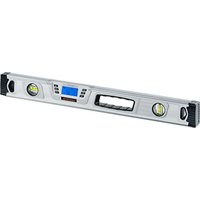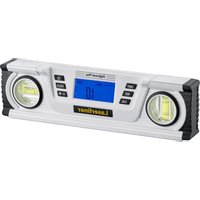
DigiLevel Plus 25 - Measuring equipment Laserliner - Free user manual and instructions
Find the device manual for free DigiLevel Plus 25 Laserliner in PDF.


| Product type | Digital electronic spirit level |
| Brand | Laserliner |
| Model | DigiLevel Plus 25 |
| Dimensions (L x H x D) | 240 x 66 x 30 mm |
| Weight (including batteries) | 315 g |
| Power supply | 2 AAA/LR03 batteries (1.5 V each) |
| Electronic measurement accuracy | ±0.1° (0° to 1° and 89° to 90°), ±0.2° (1° to 89°) |
| Bubble accuracy | ±1 mm/m |
| Display | Digital, 1 decimal |
| Measurement units | Degree (°), percentage (%), mm/m |
| Measurement range | 360° (continuous) |
| Operating temperature | 0 to 50 °C |
| Storage temperature | -20 to 70 °C |
| Permissible humidity | 80% RH, non-condensing |
| Maximum altitude | 2,000 m above sea level |
| Main functions | Angle measurement with digital display, tilt memory (REF), HOLD function, calibration, audible signal (0°, 45°, 90°), backlight, auto-off (3 min), ambient temperature display |
| Integrated accessories | Magnets, horizontal and vertical spirit levels |
| Maintenance and cleaning | Clean with a slightly damp cloth, do not use aggressive or solvent-based products. Remove batteries before prolonged storage. Store in a dry, clean place. |
| Safety | Avoid strong magnetic fields (keep at least 30 cm away from implants and sensitive devices). Do not subject to mechanical stress, extreme temperatures, humidity, or significant vibrations. |
| General information | Instruction manual included. Complies with EMC directive 2014/30/EU and WEEE directive. Subject to technical changes. |
Frequently Asked Questions - DigiLevel Plus 25 Laserliner
User questions about DigiLevel Plus 25 Laserliner
0 question about this device. Answer the ones you know or ask your own.
Ask a new question about this device
Download the instructions for your Measuring equipment in PDF format for free! Find your manual DigiLevel Plus 25 - Laserliner and take your electronic device back in hand. On this page are published all the documents necessary for the use of your device. DigiLevel Plus 25 by Laserliner.
USER MANUAL DigiLevel Plus 25 Laserliner

natural_image
Pure electrical circuit lines without any symbolsnatural_image
Pure electrical circuit lines without any symbolsCompletely read through the operating instructions, the „Warranty and Additional Information” booklet as well as the latest information under the internet link at the end of these instructions. Follow the instructions they contain. This document must be kept in a safe place and passed on together with the device.
Function / application
Digital electronic spirit level
– Horizontal and vertical angle display
- The slope memory allows angles to be easily transferred.
General safety instructions
- The device must only be used in accordance with its intended purpose and within the scope of the specifications.
- The measuring tools and accessories are not toys. Keep out of reach of children.
- The structure of the device must not be modified in any way.
- Do not expose the device to mechanical stress, extreme temperatures, moisture or significant vibration.
- The device must no longer be used if one or more of its functions fail or the battery charge is weak.
Safety instructions
Dealing with electromagnetic radiation
- The measuring device complies with electromagnetic compatibility regulations and limit values in accordance with EMC-Directive 2014/30/EU.
- Local operating restrictions – for example, in hospitals, aircraft, petrol stations or in the vicinity of people with pacemakers – may apply. Electronic devices can potentially cause hazards or interference or be subject to hazards or interference.
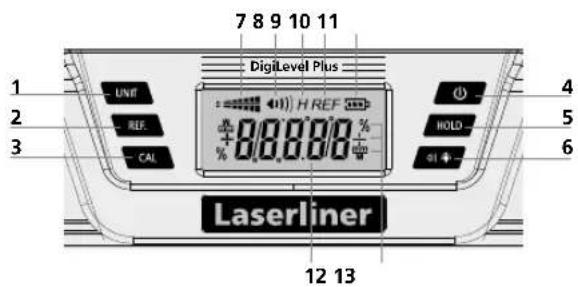
1 Change units of measure
2 Angle reference value setting
3 Calibration
4 ON/OFF button
5 Hold function
6 Acoustic signal generator / Backlighting ON/OFF
7 Slope direction
8 Acoustic signal generator active
9 HOLD: current measured value is held
10 Angle reference set
11 Battery charge
12 Slope angle
13 Units of measure
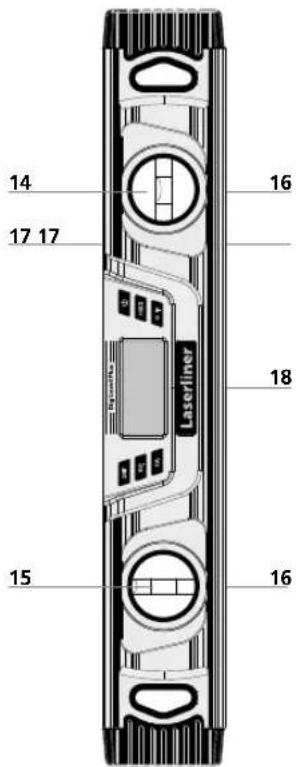
14 Horizontal vial
15 Vertical vial
16 Magnets
17 Measuring surface
18 Battery compartment (Rear)
Laserliner
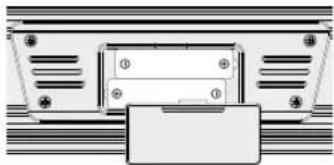
1 Inserting batteries
Open the battery compartment and insert batteries according to the symbols. Be sure to pay attention to polarity.
natural_image
Pure mechanical component diagram without any text, numbers, or symbols2 Switching on and measuring

Make sure that the reference function is deactivated before measuring.
The DigiLevel Plus can measure angles continuously to 360°.
- Switch the DigiLevel Plus on using the on/off switch (4).
- The slope angle is shown in the display (8). If slopes are measured overhead, the direction of display adjusts automatically.
- The current slope direction is also shown by the symbol (7).
3 Selection of unit of measurement
Button (5) allows the desired unit of measurement to be selected (° degrees, %, mm/m).
4 Calibration
- Place the unit with its measuring edge (17) down on a straight surface and mark the positions of the unit's ends on the underlying surface (see Fig. below). Switch the unit on (4) and press the REF button (2) until CAL 1 starts blinking. Shortly thereafter an acoustic signal will sound and CAL 2 will appear in the display.

- Now turn the unit around horizontally (end-for-end) by 180° such that its ends are positioned opposite where they previously were but again exactly at the underlying surface marks (reverse measurement). Again press the REF button (2) until CAL 2 blinks. The subsequent acoustic signal concludes the process.


The unit is properly calibrated when it displays the same measurement value, i.e. the underlying surface's deviation from absolute level, in both positions (0° and 180°).
5 Changing the angle reference value
With button (2), it is possible to transfer angles elsewhere. To do so, set the device to the desired slope and press button (2). The display then changes to „0.0°“, „REF“ flashes on the display and the required reference angle is set. The slope can now be transferred to other objects.
Press button (2) again to deactivate the angle reference.

The angle reference is not deactivated by switching off the device.
6 °C / °F / measured value
The ambient temperature is shown in °C and °F by briefly pressing the CAL button (3). Press again to switch back to the measured value.
7 HOLD
Press the HOLD button (5) to hold the current measured value on the display.
8 Acoustic signal
The acoustic signal can be switched on or off with button (6). When the angle of slope stands at 0^ , 45^ , 90^ or the most recently stored value, this is indicated by an acoustic signal.

When working with a changed angle reference value, the acoustic signal is activated on reaching the new reference value (0°, 45°, 90° display).
9 Backlighting
The backlighting is switched ON/OFF by pressing and holding button (6).
Auto Off function
In order to preserve the batteries, the measuring device switches off automatically if it is left idle for 3 minutes.
Information on maintenance and care
Clean all components with a damp cloth and do not use cleaning agents, scouring agents and solvents. Remove the battery(ies) before storing for longer periods. Store the device in a clean and dry place.
Danger - powerful magnetic fields
Powerful magnetic fields can adversely affect persons with active medical implants (e.g. pacemaker) as well as electromechanical devices (e.g. magnetic cards, mechanical clocks, precision mechanics, hard disks).
With regard to the effect of powerful magnetic fields on persons, the applicable national stipulations and regulations must be complied with such as BGV B11 §14 „electromagnetic fields“ (occupational health and safety - electromagnetic fields) in the Federal Republic of Germany.
To avoid interference/disruption, always keep the implant or device a safe distance of at least 30 cm away from the magnet.
Technical data
| Electronic measuring precision | ± 0,1° at 0° ... 1° ± 0,1° at 89° ... 90° ± 0,2° at 1° ... 89° |
| Display accuracy 1 decimal place | |
| Vial | ± 1 mm/m |
| Operating conditions | 0 ... 50°C, 80%rH, no condensation, max. working altitude 2000 m above sea level |
| Storage conditions | -20 ... 70°C, 80%rH, no condensation |
| Power supply | 2 x 1.5V (type AAA/LR03) |
| Dimensions (W x H x D) 25 240 x 66 x 30 mm | |
| Dimensions (W x H x D) 40 400 x 66 x 30 mm | |
| Dimensions (W x H x D) 60 | 600 x 66 x 30 mm |
| Weight (incl. batteries) 25 | 315 g |
| Weight (incl. batteries) 40 | 495 g |
| Weight (incl. batteries) 60 675 g | |
Subject to technical change without notice. Rev18W21
EU directives and disposal
This device complies with all necessary standards for the free movement of goods within the EU.
This product is an electric device and must be collected separately for disposal according to the European Directive on waste electrical and electronic equipment.
Further safety and supplementary notices at:
http://laserliner.com/info?an=diglevpl

Laserliner

natural_image
Pure mechanical component diagram without any text, numbers, or symbols2 Inschakelen en meten

natural_image
Pure electrical circuit lines without any symbolsnatural_image
Pure electrical circuit lines without any symbolsnatural_image
Pure electrical circuit lines without any symbols
natural_image
Pure electrical circuit lines without any symbols2 Conectar y medir

natural_image
Pure electrical circuit lines without any symbols
natural_image
Pure electrical circuit lines without any symbolsnatural_image
Technical diagram of a laser liner device with control panel and circular components (no text or symbols)natural_image
Pure electrical circuit lines without any symbols
natural_image
Pure electrical circuit lines without any symbolsnatural_image
Pure electrical circuit lines without any symbolsnatural_image
Pure electrical circuit lines without any symbols2 Ligar e medir

natural_image
Pure electrical circuit lines without any symbolsnatural_image
Pure electrical circuit lines without any symbols
natural_image
Pure electrical circuit lines without any symbolsnatural_image
Pure mechanical assembly diagram without any text, numbers, or symbolsnatural_image
Pure electrical circuit lines without any symbolsnatural_image
Technical diagram of a laser liner device with control buttons and no visible text or symbolsnatural_image
Pure electrical circuit lines without any symbolsnatural_image
Pure electrical circuit lines without any symbols2 Zapinání a měření

natural_image
Pure electrical circuit lines without any symbolsnatural_image
Pure electrical circuit lines without any symbolsnatural_image
Pure electrical circuit lines without any symbols
natural_image
Pure electrical circuit lines without any symbolsnatural_image
Pure electrical circuit lines without any symbolsnatural_image
Pure electrical circuit lines without any symbolsnatural_image
Pure electrical circuit lines without any symbolsnatural_image
Pure electrical circuit lines without any symbolsnatural_image
Pure mechanical component diagram without any text, numbers, or symbols2 Vključite in merite

natural_image
Pure electrical circuit lines without any symbolsnatural_image
Pure electrical circuit lines without any symbols2 Zapnutie a meranie:

natural_image
Diagram of a device with labeled components and control buttons (no readable text or symbols)natural_image
Pure electrical circuit lines without any symbols
natural_image
Interior architectural sketch of a wooden structure with diagonal wooden paneling and hanging fixtures (no text or symbols)SERVICE
Umarex GmbH & Co. KG
-Laserliner-