UR18DSML - Radio HiKOKI - Free user manual and instructions
Find the device manual for free UR18DSML HiKOKI in PDF.


| Product type | Digital and analog TV radio with multimedia player |
| Brand and model | HiKOKI UR18DSML |
| Dimensions (L × W × H) | 405 mm × 305 mm × 265 mm (antenna retracted) |
| Weight | 4.2 kg |
| Screen | LCD 8 inches, resolution 1024 × 600 pixels |
| Speakers | 2 × 90 mm (8 Ω), maximum power 7 W × 2 |
| Power supply | Supplied AC adapter; sliding lithium-ion battery 14.4 V or 18 V (BSL1430/BSL1830); backup batteries 2 × AA (DC 3 V) |
| Reception bands | TV: 170–230 MHz (VHF), 470–860 MHz (UHF); DAB/DAB+: 174.928–239.200 MHz (Band III); FM: 87.5–108 MHz |
| Bluetooth | Version 4.0, profiles A2DP and AVRCP, class 2, typical range 10 m |
| Ports and connectors | USB 2.0 (5 V DC, max 0.7 A); SD/SDHC card (max 32 GB, FAT16/FAT32); AUX input (3.5 mm mini-jack video+audio); headphone output (3.5 mm mini-jack stereo); external antenna 75 Ω (PAL type) |
| Supported file formats | Video: MPEG2, MPEG4, H.264; Audio: MP3, AAC; Photo: JPEG, BMP |
| Main functions | Terrestrial digital TV reception, FM radio, DAB/DAB+ digital radio, Bluetooth playback, SD card reader, USB reader, AUX input, smartphone/tablet charging |
| Battery life | Varies depending on battery; low battery indicator displayed |
| Operating temperature | -5 °C to 40 °C |
| Included accessories | AC adapter, remote control, AA batteries (2), antenna cable, screen protector, rubber cover |
| Maintenance and cleaning | Wipe with a soft dry or slightly damp cloth (soapy water). Do not use solvents. Disconnect before cleaning. |
| Safety | Use only specified batteries; do not expose to water or humidity; do not disassemble; disconnect during thunderstorms; follow hearing protection instructions. |
| Spare parts and repairability | Entrust any repair to a HiKOKI approved service center. Use only identical replacement parts. |
| Warranty | Conforms to national regulations. Does not cover damage due to misuse. |
| Manufacturer | Koki Holdings Co., Ltd. / HiKOKI – Parc de l'Eglantier, 22 rue des Cerisiers, Lisses-C.E. 1541, 91015 EVRY CEDEX, France |
Frequently Asked Questions - UR18DSML HiKOKI
User questions about UR18DSML HiKOKI
0 question about this device. Answer the ones you know or ask your own.
Ask a new question about this device
Download the instructions for your Radio in PDF format for free! Find your manual UR18DSML - HiKOKI and take your electronic device back in hand. On this page are published all the documents necessary for the use of your device. UR18DSML by HiKOKI.
USER MANUAL UR18DSML HiKOKI
natural_image
Technical illustration of a rectangular electronic device with multiple frame edges and a central screen (no text or symbols visible)
en Handling instructions
de Bedienungsanleitung
fr Mode d'emploi
it Istruzioni per l'uso
nl Gebruiksaanwijzing
es Instrucciones de manejo
pt Instruções de uso
sv Bruksanvisning
da Brugsanvisning
no Bruksanvisning
fi Käyttöohjeet
el Οδηγίες χειρισμού
pl Instrukcja obsługi
hu Kezelési utasítás
cs Návod k obsluze
tr Kullanım talimatları
ro Instructiuni de utilizare
sl Navodila za rokovanje
sk Pokyny na manipuláciu
bg Инструкция за експлоатация
sr Uputstvo za rukovanje
hr Upute za rukovanje
UK Інструкції щодо поводження з пристроєм
ru Инструкция по эксплуатации





1

natural_image
Three identical diagrams showing cylindrical objects with circular holes, arranged in a row (no text or symbols)
2

3

4
5

6

7


8

9

10
11 12


13
14

15

16-1 16-2

17 18
flowchart
graph TD
    A["②"] --> B["←"]
    B --> C["→"]
    C --> D["→"]
    D --> E["→"]
    E --> F["→"]
    F --> G["→"]
    G --> H["OR"]
    I["②2"] --> J["←"]
    J --> K["→"]
    K --> L["→"]
    L --> M["→"]
    M --> N["→"]
19 20

| UR18DSML | |
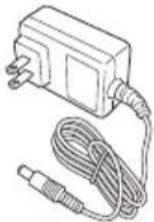 | 1 |
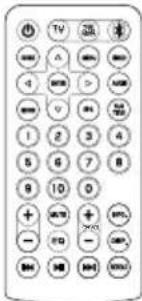 | 1 |
 | 2 |
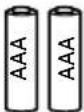 | 2 |
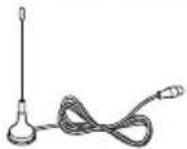 | 1 |
 | 1 |
CORDLESS TV & RADIO SAFETY WARNINGS

WARNING
Read all safety warnings and all instructions.
Failure to follow the warnings and instructions may result in electric shock, fi re and/or serious injury.
Save all warnings and instructions for future reference.
- Use only the specified power supply voltage.
- Use of any other voltage may lead to fire or electric shock.
- Avoid damaging the AC adapter cord.
- Do not modify, forcibly bend, twist or pull the cord, place heavy objects on it or place it near heating appliances.
- When not in use, remove the power plug (AC adapter) from the electric socket and from the TV & radio. Failure to do so may lead to electric shock or fi re.
- Do not touch the power plug (AC adapter) with wet hands.
• Doing so may result in electric shock.
- Do not use the TV & radio in the bathroom or shower.
- Do not use the TV & radio in wet or damp places or in the rain.
- Doing so may result in electric shock, emission of smoke or malfunction.
- Do not touch the FM antenna or power plug (AC adapter) during thunderstorms.
• Doing so may result in electric shock.
- Do not disassemble or modify the TV & radio.
- Doing so may result in electric shock or fire. Inspections and repairs should be performed by the store where purchased or by a HiKOKI power tool service center.
- Insert the power plug (AC adapter) securely as far as it will go.
- Dust or dirt between the power plug and the electric socket may lead to fi re. Remove the power plug periodically and wipe off any dust or dirt with a dry cloth.
- Do not let any unspecified objects or water get inside the TV & radio body.
- With the exception of the AC adapter and the rechargeable battery, if any metal or flammable object or water gets inside the back door, it may lead to electric shock or fire.
- Take care to prevent iron powder from the bass refl ex speakers, dust or water getting into the TV & radio.
- Do not sit or stand on the TV & radio.
• Doing so may lead to accidents or malfunction.
- Do not place the TV & radio on an unstable surface or in a high place. Do not hang the TV & radio from the handle.
- The TV & radio may fall and cause injury or malfunction.
-
When no slide battery is loaded, attach the slide terminal cover to the terminal to prevent cuts and other injuries that may result from touching the terminal area.
-
Handle the backup batteries with care.
- Danger of explosion if battery is incorrectly replaced. Replace only with the same or equivalent type.
- Incorrect handling of the batteries may result in rupture or leakage, leading to fire, injury or pollution of the surrounding area. Be sure to observe the following precautions.
- Use only the specified batteries
- Do not heat or disassemble the batteries
- Do not throw the batteries into fire or water
- Do not burn batteries or dispose them as household waste.
- Do not charge the batteries
- Make sure the batteries are correctly oriented and avoid short-circuiting
- Do not reuse batteries or use different types of battery
- Remove the batteries when the TV & radio is not in use
In the event of leakage from the batteries, wipe the battery case clean.
Should any battery fluid get on your body, wash it off carefully.
If /_i is displayed when you turn the power on with the rechargeable battery inserted, the battery power is low.
Power the TV & radio from the AC adapter or insert a charged battery.
- Recharge only with the charger specified by the manufacturer.
- A charger that is suitable for one type of rechargeable battery may create a risk of fi re when used with another battery.
- Use the TV & radio only with specifically designated rechargeable battery.
- Use of any other rechargeable battery may create a risk of injury and fire.
- When rechargeable battery is not in use, keep it away from other metal objects like paper clips, coins, keys, nails, screws, or other small metal objects that can make a connection from one terminal to another.
- Shorting the battery terminals together may cause burns or a fire.
- Under abusive conditions, liquid may be ejected from the battery; avoid contact. If contact accidentally occurs, fl ush with water. If liquid contacts eyes, additionally seek medical help.
- Liquid ejected from the battery may cause irritation or burns.
- Have your TV & radio serviced by a qualified repair person using only identical replacement parts.
- This will ensure that the safety of the TV & radio is maintained.
-
The main unit and adapter shall not be exposed to dripping or splashing and that no objects filled with liquids, such as vases, shall be placed on the unit and adapter.
-
The batteries (battery pack or batteries installed) shall not be exposed to excessive heat such as sunshine, fi re or the like.
-
The MAINS plug of adapter is used as the disconnect device, the disconnect device shall remain readily operable.
-
Do not keep batteries or memory cards in a location within the reach of small children.
- If a battery or memory card is accidentally swallowed, it may cause choking and/or injury. If this happens, seek medical attention immediately.
- Operating Temperature: -5 – 40°C
PROTECTING YOUR HEARING
Continuous exposure to loud noise may result in permanent hearing loss. The louder the volume, the shorter the time in which hearing loss may occur.
If you listen to large volume sound over a long period of time, your ears will become accustomed to it. This creates the illusion that the volume level is appropriate, despite the fact that it may be damaging your hearing.
Observe the following to prevent hearing loss.
CAUTION
- Make sure you give your ears a rest by taking regular breaks and not listening for long periods of time.
Even when set at safe volume levels, listening continuously over long periods of time may cause hearing loss.
- Be careful not to increase the volume as your hearing adapts to the sound output.
Beware of being accustomed to a certain volume level.
Adjust the volume to a safe level before your ears become accustomed to loud volumes.
-
If your ears begin to ring, if you feel any discomfort, or if conversation seems faint or indistinct, discontinue listening to music and have your ears examined by a doctor.
-
Do not turn the volume up too high when using headphones or earphones.
Listening to the TV & radio for a long time at a high volume may result in hearing impairment.
PRECAUTIONS WHEN CONNECTING TO EXTERNAL EQUIPMENT
Unexpected problems may result in the loss or corruption of data stored in smartphones and other peripheral equipment connected to the TV & radio. With this possibility in mind, a backup of the data should always be made in advance.
Note that HiKOKI cannot be held responsible for the corruption or loss of data stored within smartphones and other peripheral equipment connected to the TV & radio, nor any damage to the equipment itself.
CAUTION ABOUT CONDENSATION (DEW)
If the TV & radio is suddenly brought from the cold outdoors into a warm room in the winter, or from a cool room to the hot and humid outdoors in the summer, condensation may form inside the TV & radio.
Turning on the TV & radio's power while there are water droplets inside may result in a malfunction. Be careful not to subject the TV & radio to sudden and/or extreme temperature changes.
If water droplets do form, stop using the TV & radio immediately. Before using it again, wait until the water droplets evaporate, or gradually raise the temperature of the room until the TV & radio dries.
LICENCE AND TRADEMARK
This product is protected by certain intellectual property right of Microsoft. Use or distribution of such technology outside of this product is prohibited without a licence from Microsoft.
THIS PRODUCT IS LICENSED UNDER THE MPEG-4 VISUAL PATENT PORTFOLIO LICENCE FOR THE PERSONAL AND NON-COMMERCIAL USE OF A CONSUMER FOR
(i) ENCODING VIDEO IN COMPLIANCE WITH THE MPEG-4 VISUAL STANDARD ('MPEG-4 VIDEO') AND/OR
(ii) DECODING MPEG-4 VIDEO THAT WAS ENCODED BY A CONSUMER ENGAGED IN A PERSONAL AND NONCOMMERCIAL ACTIVITY AND/OR WAS OBTAINED FROM A VIDEO PROVIDER LICENSED BY MPEG LA TO PROVIDE MPEG-4 VIDEO.
NO LICENCE IS GRANTED OR SHALL BE IMPLIED FOR ANY OTHER USE.
ADDITIONAL INFORMATION INCLUDING THAT RELATING TO PROMOTIONAL, INTERNAL AND
COMMERCIAL USES AND LICENSING MAY BE OBTAINED FROM MPEG LA, LLC. SEE HTTP://WWW.MPEGLA.COM.
THIS PRODUCT IS LICENSED UNDER THE AVC PATENT PORTFOLIO LICENCE FOR THE PERSONAL USE OF A CONSUMER OR OTHER USES IN WHICH IT DOES NOT RECEIVE REMUNERATION TO (i) ENCODE VIDEO IN COMPLIANCE WITH THE AVC STANDARD ("AVC VIDEO") AND/OR (ii) DECODE AVC VIDEO THAT WAS ENCODED BY A CONSUMER ENGAGED IN A PERSONAL ACTIVITY AND/OR WAS OBTAINED FROM A VIDEO PROVIDER LICENSED TO PROVIDE AVC VIDEO.
NO LICENCE IS GRANTED OR SHALL BE IMPLIED FOR ANY OTHER USE.
ADDITIONAL INFORMATION MAY BE OBTAINED FROM MPEG LA, L.L.C. SEE HTTP://WWW.MPEGLA.COM.
MPEG Layer-3 audio decoding technology is licensed from Fraunhofer IIS and Thomson Licensing.
Covered by one or more claims of the patents listed at patentlist.hevcadvance.com.
Manufactured under license from Dolby Laboratories.
Dolby, Dolby Audio, and the double-D symbol are trademarks of Dolby Laboratories.
SD CARDS AND USB DEVICES SUPPORTED FOR PLAYBACK
Check the specifications and the usage instructions for SD cards and USB devices, and ensure that you use them correctly.
| Type | SDmemorycard | SDHCMemorycard | USBmemorydevice | |
| Logo | - | |||
| Format FAT16, FAT32 | ||||
| Playablefi le formats | VIDEO MPEG2, MPEG4, H.264 | |||
| AUDIO MP3, AAC | ||||
| PHOTO | JPEG, BMP | |||
NOTE
- SD memory cards and SDHC memory cards are referred to as "SD cards" in this manual.
☐ Be sure to place miniSD cards and microSD/microSDHC cards in an SD card adapter before inserting them into the TV & radio.
Do not insert unsupported types of memory cards into the TV & radio. Inserting an incompatible memory card may result in a malfunction or damage to the TV & radio as well as the memory card.
Even if an SD card is of the type described above, it may not be usable depending on its format and the usage conditions. If a card isn't able to be read properly, eject it from the TV & radio.
- The specifications do not allow importing files when the SD card is locked.
Unlock the card to import fi les.
○ Do not connect unsupported USB devices.
○ Not all USB devices are guaranteed to be connectable.
☐ Do not remove or insert SD cards or USB devices during playback. Doing so may result in malfunction of the TV, the SD card, or the USB device.
O SD and SDHC are trademarks of SD-3C, LLC.
English
This product is protected by certain intellectual property rights of Microsoft. Use or distribution of such technology outside of this product is prohibited without a license from Microsoft.
CAUTION
○ Data saved on a connected SD card and a USB memory device could be corrupted in an unforeseen accident. Always back up data to guard against possible loss.
☐ Do not turn the power off or remove an SD card or USB memory device while an SD card or USB memory device is being read or played back. There is a risk that recorded data could be corrupted.
MAIN FUNCTIONS
| Source Main functions | ||
| Digital TV | Watch terrestrial digital broadcasts | |
| FM Listen to FM radio | ||
| DAB Listen to digital radio | ||
| Bluetooth Playback of | Bluetooth devices | |
| SD card | VIDEO | Watch videos, listen to music, and view photos on an SD card |
| AUDIO | ||
| PHOTO | ||
| USB | VIDEO | Watch videos, listen to music, and view photos on a USB memory device |
| AUDIO | ||
| PHOTO | ||
| AUX | Play back video and audio from video cameras, portable music players, etc. | |
| System Setting | Set the current time and date, reset the system to default settings, and update software | |
○ Smartphone and cell phone recharging
○ Compatibility with HiKOKI power tool rechargeable battery and AC adapter
SPECIFICATIONS
| Frequency band | TV: 170 to 230 MHz, 470 to 860 MHzDAB / DAB+: 174.928 to 239.200 MHz (BAND III)FM: 87.5 to 108 MHz |
| Antenna Rod antenna (For TV and FM) | |
| External antenna port | 75 Ω PAL-type connector(For TV and DAB / DAB+) |
| Headphone port | Φ3.5mm stereo minijack |
| SD card port Supports SD / SDHC (up to 32 GB) | |
| USB port | USB 2.0(power supplied: DC 5 V, up to 0.7 A) |
| AUX input port Φ3.5mm (video + audio) | |
| Speakers 90 mm (8 Ω) × 2 | |
| LCD size 8 inch | |
| Pixel dimensions | W 1024 x H 600 |
| Max. power output | 7 W × 2 |
| Power supply | Slide battery: DC 14.4 V, 18 V |
| Household power supply(using provided AC adapter) | |
| Backup batteries: DC 3 V, two AA batteries | |
| Bluetooth | Bluetooth Ver. 4.0Profi le:A2DP(Advanced Audio Distribution Profi le)AVRCP(AV Remoto Control Profi le)Send/receive Sensitivity: Class 2Bluetooth frequency range:2402-2480MHzBluetooth maximum RF power:BT2.1:-0.47dBm, BT4.0(BLE):0.9dBm |
| Exterior dimensions | L 405 mm x W 305 mm x H 265 mm(with antenna refracted) |
| Weight 4.2 kg |
For applicable power supplies see user instructions: Applicable power suppliers: (Manufacture) Dong Guan Sun Hung Kin Electrical Co., Ltd (Model) HKP18-1202000dV, HKP18-1202000dB (Input) 100V-240V \~50/60Hz 0.68Amax (Output) 12V == 2A
○ Only below slide battery could be used (Model) BSL1430:14.4V 3000mAh Lithium battery (Model) BSL1830:18V 3000mAh Lithium battery (Manufacture) Koki Holdings Co., Ltd.
NAMES OF PARTS AND BUTTON FUNCTIONS
| Names of parts | Functions | |
| 1 | Display | - |
| 2 | Operation panel | - |
| 3 | Handle | - |
| 4 | Remote control sensor | - |
| 5 | External device connection ports | - |
| 6 | External antenna port | - |
| 7 | Antenna | - |
| 8 | Speaker | - |
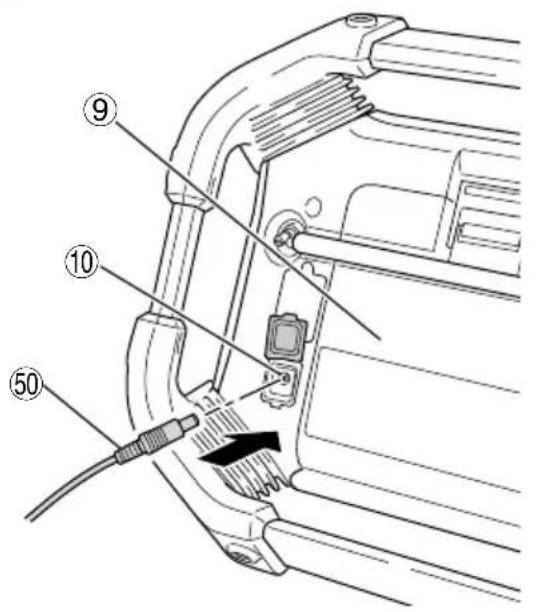
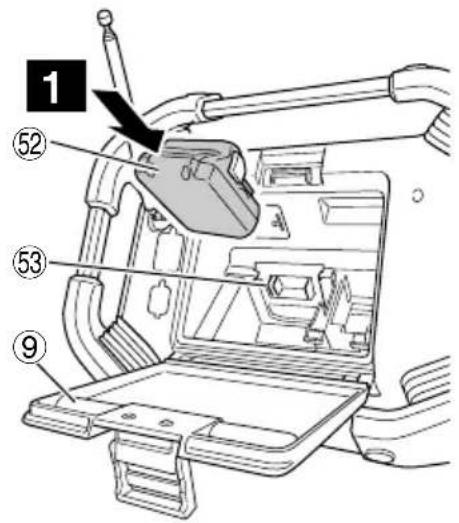
| 9 | Rear cover | - |
| 10 | AC adapter port | - |
| 11 | Power button | Switches Power ON/OFF |
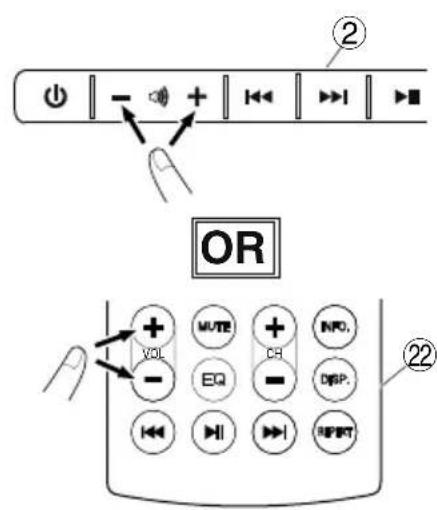
| 12 | Volume button | Raises or lowers volume |
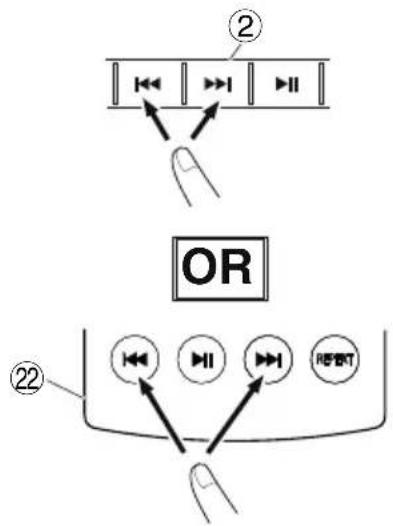
| 13 | Skip button | • Item selection• Selecting songs on external devices• Changes channel |
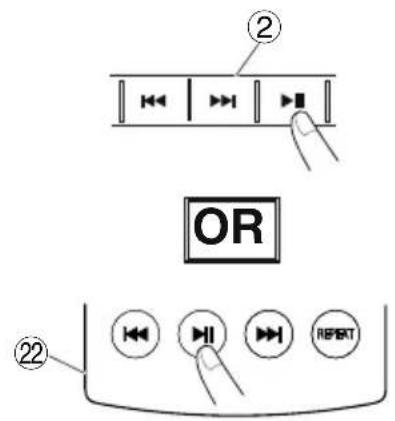
| 14 | Play / Stop button | Plays or stops playing |
| 15 | Source select button | Displays Source screen |
| 16 | Menu button Displays M | Menu screen |
| 17 | Enter / Information button | • Enters selected item• Displays Information |
| 18 | USB port – | |
| 19 | SD card port – | |
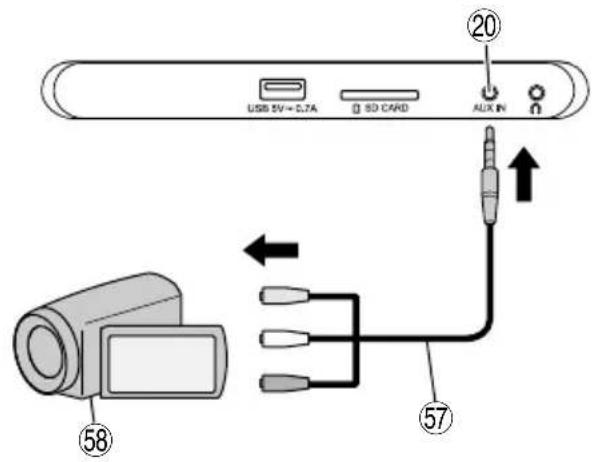
| 20 | AUX input port – | |
| 21 | Headphone port – | |
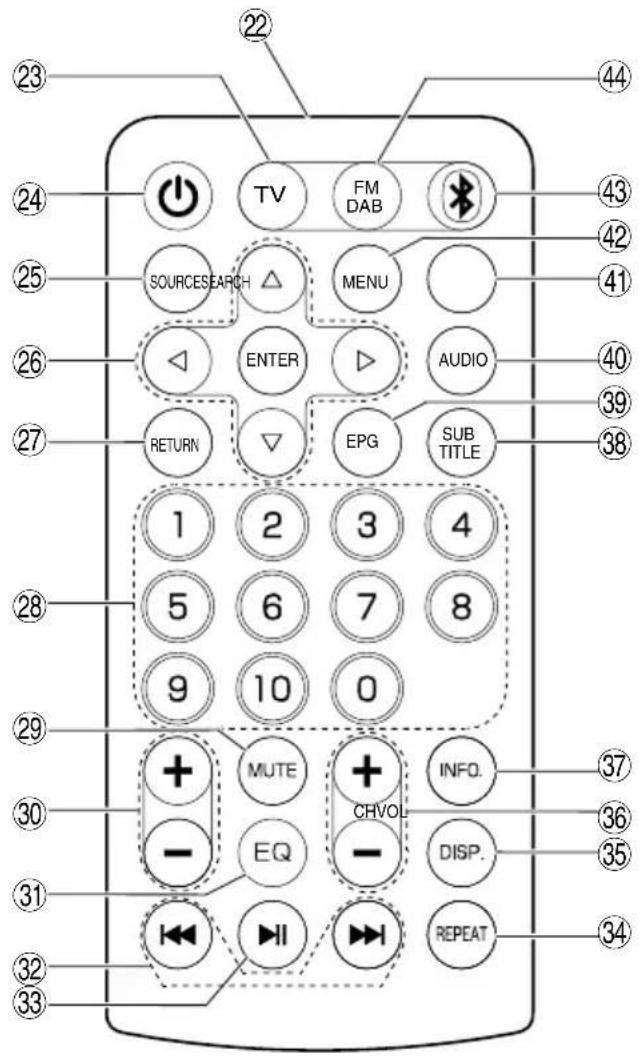
| 22 | Remote control – | |
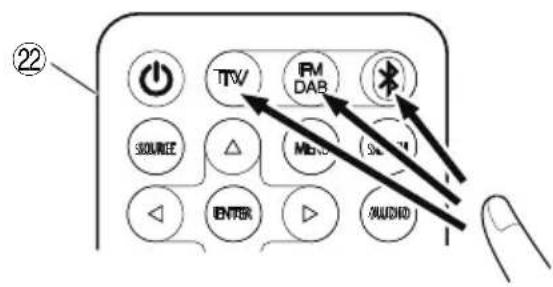
| 23 | TV button Activates TV | |
| 24 | Stand-by button | Switches stand-by ON or OFF |
| 25 | Source select button Dis | plays Source screen |
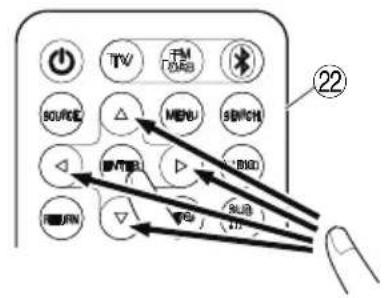
| 26 | Select / enter button Se | lects or enters item |
| 27 | Return button Returns control | |
| 28 | Number buttons | Selects numbers for channels |
| 29 | Mute button Mutes sounds | |
| 30 | Volume button Raises or lowers volume | |
| 31 | EQ button | Displays sound quality setting screen |
| 32 | Skip button | • Selecting songs on external devices• Changes FM frequency |
| 33 | Play / Stop button Plays or stops playing | |
| 34 | Repeat button Repeats | playback |
| 35 | Display button | Displays picture quality setting screen |
| 36 | Channel button Changes | channels |
| 37 | Infomation button | Displays Information |
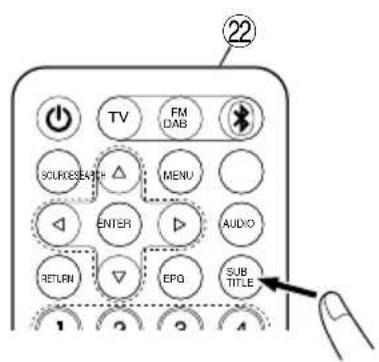
| 38 | Sub title button | Displays subtitle language setting screen |
| 39 | EPG button | Displays TV program list |
| 40 | Audio button | Displays Audio language setting screen |
| 41 | Search button | Runs Auto Search |
| 42 | Menu button Displays M | Menu screen |
| 43 | Bluetooth button | Activates Bluetooth |
| 44 | FM DAB button | Activates FM/DAB |
| 45 | Tab | – |
| 46 | AA Battery box | – |
| 47 | Lid | – |
| 48 | Remote control Lid | – |
| 49 | Protection sheet for display | – |
| 50 | AC adapter | – |
| 51 | Rubber cover | – |
| 52 | Battery | – |
| 53 | Terminals | – |
| 54 | Cable for terrestrial digital antenna | – |
| 55 | Indoor antenna port | - |
| 56 | External Antenna | - |
| 57 | Cable for AUX port | - |
| 58 | External device | - |
| 59 | USB cable | - |
| A | Source / menu indicator | - |
| B | Clock | - |
SYMBOLS
WARNING
The following show symbols used for the machine. Be sure that you understand their meaning before use.
 | UR18DSML : Cordless TV & radio |
 | ⚠ WARNING- To reduce the risk of injury, user must read instruction manual |
 | Only for EU countriesDo not dispose of electric tools together with household waste material!In observance of European Directive 2012/19/EU on waste electrical and electronic equipment and its implementation in accordance with national law, electric tools that have reached the end of their life must be collected separately and returned to an environmentally compatible recycling facility. |
 | Indoor use only |
| Polarity of output terminals | |
 | Class II equipment |
 | AC (Alternating Current) |
 | DC (Direct Current) |
 | New battery |
 | Old/used battery |
 | Can be performed on either the TV body's operation panel or the remote control |
| ex.) | Example |
 | Switching ON |
 | Switching OFF |
 | Push |
 | Source |
 | Settings item |
 | Battery exhausted indicator |
English
 | AA batteries |
 | AAA batteries for the remote control |
 | Protection sheet for display |
 | Warning |
 | Prohibited action |
For information about the operation buttons, refer to "NAMES OF PARTS AND BUTTON FUNCTIONS".
STANDARD ACCESSORIES
In addition to the main unit (1 unit), the package contains the accessories listed on page 9.
Standard accessories are subject to change without notice.
PRIOR TO OPERATION
| Action Figure Page | ||
| Installing backup batteries^*1 | 1 | 4 |
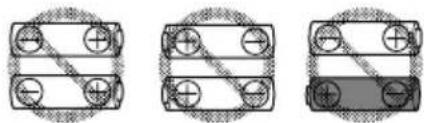
| Installing batteries in the remote control | 2 | 4 |
| Attaching the protection sheet for display | 3 | 4 |
| AC adapter installation^*2 | 4 | 5 |
| Storing the AC adapter and remote control | 5 | 5 |
| Inserting and removing the battery^*3 | 6 | 5 |
| Preparing the antenna^*4 | 7 | 5 |
☐ In order to connect a device that supports video output such as a video camera or a DVD player, use a 4-pole mini-plug cable that includes a video connection.

natural_image
Pure mechanical component diagram without any text, numbers, or symbolsVideo GroundAudioAudio
* 1: Time settings and TV & radio station frequencies can be saved by installing batteries in the unit.
* 2:
NOTE
When used together with the batteries, the AC adapter is the main power source and no battery power is consumed.
When used together with the AC adapter, the batteries will not recharge as this device has no recharge function.
* 3:
CAUTION
Do not touch the terminals.
Doing so may result in cuts to the hand or other injuries.
Only a 14.4 V or 18 V slide-type battery can be used with this device. (BSL36B18 cannot be used)
NOTE
☐ Do not apply any excessive pressure when inserting the battery. If the battery does not easily slide into place, it is not being inserted properly.
Check to see if the battery is facing the correct direction and that there is nothing obstructing the path of insertion.
○ If / is displayed when the device is switched on following battery installation, the battery charge is low.
In this situation, either use the AC adapter or install a fully charged battery.
* 4: Use the built-in antenna or the connector for an external connector.
Adjust direction, length and angle of the antenna while checking reception condition.
WATCHING TV OR LISTENING TO FM/DAB
-
Select the source you want to listen to (Digital TV, FM or DAB)
-
Selecting an antenna
Use "Antenna Select" to select Built-in or External antenna.
Adjust antenna orientation, length, angle and position.
- Set a channel.
Use "Auto Search" to select.
For TV, it is also possible to use "Manual Search" to set channels.
- Select the desired station.
NOTE
- Reception in some locations and areas can be poor or non-existent.
With the TV, you will not be able to set up channels if the Country setting is incorrect.
- The TV & radio can only receive non encrypted free TV channels.
CONNECTING WITH BLUETOOTH DEVICES
1. Pairing (Registering devices)
Pairing is required for Bluetooth communication.
Set your Bluetooth device to pairing mode.
(For instructions on pairing, see the manual for the Bluetooth device to be used.)
2. Set the TV & radio for pairing mode
Switch the source to "Bluetooth".
“Bluetooth Ready” is displayed on the screen, and the machine enters pairing standby mode.
Select “UR18DSML” on your Bluetooth device's list of connected devices to complete the pairing.
3. Input pass key
Some Bluetooth devices may require pass key input when connecting.
If this should be the case, input "0000".
Also, if connection authorization is requested, input "authorized".
Connection is successful once "Connected" is displayed.
NOTE
Once paired, connection will be automatically established the next time the devices are switched on. If the Bluetooth connection is lost, re-pair the devices.
○ No more than two devices can be paired simultaneously.
○ Connection with all Bluetooth devices cannot be guaranteed. Before attempting connection, always check for compatibility.
○ The Bluetooth® word mark and logos are registered trademarks owned by Bluetooth SIG, Inc.
OPERATION
| Action Figure Page | ||
| Turning the power ON/OFF*1 | 8-1 6 | |
| Turning the stand-by ON/OFF*2 | 8-2 6 | |
| Displays Source screen*3 | 9 | 6 |
| Remote control selection of Digital TV, FM/DAB or Bluetooth source*4 | 10 | 6 |
| Display Menu screen 11 7 | ||
| Selecting Source, Menu and Other Setup Items | 12 | 7 |
| Volume adjustment*5 (All source) 13 7 | ||
| Switching channels*4(S: Digital TV, FM, DAB) | 14 | 7 |
| Displays All Channel List (S: Digital TV) | 15 | 7 |
| Displays Audio language setting screen(S: Digital TV) | 16-1 7 | |
| Displays Subtitle language settingscreen (S: Digital TV) | 16-2 7 | |
| Playing/pausing external devices*6(S: Bluetooth, SD card, USB) | 17 | 8 |
| Selecting songs on external devices(changing tracks)*6(S: Bluetooth, SD card, USB) | 18*5 | 8 |
| Changing the FM frequency (S: FM) | ||
| Playing back video or music from anexternal device*7 (S: AUX) | 19 | 8 |
| Recharging your smartphone*8 | 20 | 8 |
* 1: The unit cannot be turned on by pressing the Standby button on the remote control.
* 2: In standby mode, the power button LED lights red.
NOTE
☐ The power is automatically turned off after about 24 hours in standby mode.
* 3: The currently selected item is highlighted in green.
* 4: Source Selection Screen is not displayed.
* 5: When playing back content from Bluetooth devices or external devices, lower the volume of the player before beginning playback, and then gradually raise the volume of the player.
* 6:
Pair a Bluetooth-compatible device with the TV in advance. Insert an SD card or plug a USB memory device into the TV properly.
An external device connected to the AUX port of the TV cannot be controlled using the TV. Please control the external device itself.
* 7:
NOTE
- Obtain a 4-pole mini-plug to connect a video camera, DVD player or other video output compatible device.
○ Only audio can be output from a smart phone.
○ If there is no audio signal, "NO SIGNAL" is displayed on the screen.
○ If the audio signal on an external device is low, it may not be possible to increase it.
When connected to a smart phone, the ring tone may not be heard when there is an incoming call.
* 8: A smartphone or a mobile phone can be connected to the TV & radio and recharged using a commercially available charging cable with a USB connector. Other sources can be played back while a smartphone or mobile phone is charging.
NOTE
○ In SD card mode, USB charging is not available.
During USB charging, switch to some other source.
☐ While charging through USB, the sound may occasionally cut out, or the power may shut off. If this happens, lower the volume, or stop charging through USB.
○ Some USB devices may not be chargeable.
☐ The TV & radio is designed to deactivate USB output and disable the recharging of smartphones and mobile phones when the power level of the battery is low. Should the aforementioned occur, recharge the battery or replace with a fully charged battery.
○ If the voltage is low when the AC adapter is in use, the USB output may be cut off, discontinuing any recharging.
- Use a fully charged battery when using a battery as this device's power source.
You will not be able to recharge smartphones or mobile phones when the battery power level becomes low.
- The time required for charging varies in accordance with the smartphone or mobile phone being recharged.
- Do not use the recharge function for any devices other than a smartphone or mobile phone.
☐ The TV & radio may not be able to recharge some smartphone or mobile phone models.
SETTINGS ITEMS
| Settings items | Main functions | Source | |||||||||||
| Digital TV | FM | DAB | Bluetooth | SD card | USB | AUX | System setting | ||||||
| VIDEO | AUDIO | PHOTO | VIDEO | AUDIO | PHOTO | ||||||||
| Auto Search*1 | Receivable TV/FM/DAB broadcast frequencies are registered automatically | ○ | ○ | ○ | - | - | - | - | - | - | - | - | - |
| Manual Search*1 | TV broadcast frequencies are registered manually | ○ | - | - | - | - | - | - | - | - | - | - | - |
| Antenna select | Selects antenna (Built-in/External) | ○ | ○ | ○ | - | - | - | - | - | - | - | - | - |
| Country | Sets the country in which the TV broadcast receiver is installed. | ○ | - | - | - | - | - | - | - | - | - | - | - |
| Settings items Main functions | Source | ||||||||||||
| Digital TV | FM | DAB | Bluetooth | SD card USB | B | AUX | System setting | ||||||
| VIDEO | AUDIO | PHOTO | VIDEO | AUDIO | PHOTO | ||||||||
| EPG | Displays a chart of TV programs and allows a channel to be selected | ○ | - | - | - | - | - | - | - | - | - | - | - |
| Display mode Sets the color tone of the display | ○ | - | - | - | ○ | - | ○ | ○ | - | ○ | ○ | - | |
| Color Temperature Sets the color balance of the image | ○ | - | - | - | ○ | - | ○ | ○ | - | ○ | ○ | - | |
| Aspect Ratio Selects the size of the image | ○ | - | - | - | ○ | - | ○ | ○ | - | ○ | ○ | - | |
| EQ | Sound quality (Bass/Treble) can adjusted according to preference. | ○ | ○ | ○ | ○ | ○ | ○ | - | ○ | ○ | - | ○ | - |
| Time Zone Sets the time zone and region | ○ | - | - | - | - | - | - | - | - | - | - | - | |
| Summer time Sets summer time | ○ | - | - | - | - | - | - | - | - | - | - | - | |
| Preset channel Manually registers a radio station | - | ○ | ○ | - | - | - | - | - | - | - | - | - | |
| Stereo | Switches FM broadcasts between stereo and monaural | - | ○ | - | - | - | - | - | - | - | - | - | - |
| Station List Displays all stations of DAB | - | - | ○ | - | - | - | - | - | - | - | - | - | |
| Date Time sync. | If “ON” is selected, your TV & radio can be synchronized the time and date | - | - | ○ | - | - | - | - | - | - | - | - | - |
| File List | Displays folders/fi les and allows them to be selected | - | - | - | - | ○ | ○ | ○ | ○ | ○ | ○ | - | - |
| Auto Play | Sets options for displaying photos such as the auto-play mode and the display interval | - | - | - | - | - | - | ○ | - | - | ○ | - | - |
| Alarm | Sets a time at which the power turns on automatically | - | - | - | - | - | - | - | - | - | - | - | ○ |
| Sleep Timer | Power can be set to automatically switch OFF after a certain amount of time has elapsed by using the sleep timer function | - | - | - | - | - | - | - | - | - | - | - | ○ |
| Date Adjust Sets the date and time | - | - | - | - | - | - | - | - | - | - | - | ○ | |
| OSD Language Sets the language to be displayed | - | - | - | - | - | - | - | - | - | - | - | ○ | |
| Restore Factory Default Restores settings to factory default | - | - | - | - | - | - | - | - | - | - | - | ○ | |
| Software Update Updates the software | - | - | - | - | - | - | - | - | - | - | - | ○ | |
NOTE
For shared items that can be set for several sources, settings changes are applied for all of those sources. These items cannot be set separately for each source.
* 1:
To receive a more stable signal, connect the TV & radio to the port of the indoor antenna with a separately-sold cable for terrestrial digital antennas.
NOTE
Depending on the region and the location, the condition of the signal may be poor, or the image may not appear.
MAINTENANCE AND INSPECTION
WARNING
When not in use or during inspection and maintenance, be sure to remove the AC plug, rechargeable battery and backup batteries.
● Inspecting the mounting screws
Regularly inspect all mounting screws and ensure that they are properly tightened. Should any of the screws be loose, retighten them immediately. Failure to do so could result in serious hazard.
● Cleaning on the outside
When the TV & radio is stained, wipe with a soft dry cloth or a cloth moistened with soapy water.
Do not use chloric solvents, gasoline or paint thinner, for they melt plastics.
● Storing the TV & radio
Do not store the TV & radio in the following places.
○ Within reach of or easily accessible to children
○ In humid or dusty places
○ In high temperature such as inside a car or exposed to direct sunlight
○ In extremely cold places or directly exposed to cold draughts
○ Where the temperature changes drastically
○ Where it is exposed to smoke or steam such as near a cooking appliance or humidifi er
MODIFICATIONS
HiKOKI Power Tools are constantly being improved and modified to incorporate the latest technological advancements.
Accordingly, some parts may be changed without prior notice.
GUARANTEE
We guarantee HiKOKI Power Tools in accordance with statutory/country specific regulation. This guarantee does not cover defects or damage due to misuse, abuse, or normal wear and tear. In case of complaint, please send the Power Tool, undismantled, with the GUARANTEE CERTIFICATE found at the end of this Handling instruction, to a HiKOKI Authorized Service Center.
NOTE
Due to HiKOKI's continuing program of research and development, the specifications herein are subject to change without prior notice.
TROUBLESHOOTING
Use the inspections in the table below if the tool does not operate normally. If this does not remedy the problem, consult your dealer or the HiKOKI Authorized Service Center.
| Symptom Possible cause | Remedy | |
| The power won't turn on The AC adapter | is disconnected, or isn't plugged all the way into the outlet. | Firmly plug the AC adapter all the way into the outlet. |
| No remaining battery power Charge the | battery. | |
| There is no audio The volume is too low. | Adjust the volume. | |
| The power turned off automatically | The sleep function activated. | Disable the sleep function. |
| The date and/or time is incorrect The back | Backup battery is exhausted. Replace the | backup battery with a new one. |
| The TV cannot receive signals | The channels are not configured. | Configure the channels. |
| Unable to set up TV channels Country setting is incorrect. Please check Country setting. | ||
| Some TV broadcast signals cannot be received | Terrestrial digital signals are not being broadcast. | Ask your nearest broadcast station whether they are broadcasting terrestrial digital signals. |
| Subtitles are not displayed, or Multichannel Television Sound doesn't function | The TV program you are watching doesn't support subtitles and/or Multichannel Television Sound. | Try using subtitles or Multichannel Television Sound on a TV program that supports it. |
| The TV's image becomes scrambled or stops | The antenna is pointed in the wrong direction, or the antenna cable is disconnected or broken. | Ensure there are no problems with the direction in which the antenna is pointed or with the antenna cable connection. |
| The TV stops showing images soon after the power is turned on or the channel is changed | This is not a malfunction. | Because the signal must be processed to prepare it for being displayed on the screen, changing the channel takes several seconds. |
| A Bluetooth device can't connect, or its sound cuts out intermittently | The device is not paired. | Pair the device. |
| There is another nearby device that is emitting radio signals that are interfering, such as a wireless router. | Try moving the device causing interference and the TV & radio farther away from each other. | |
| The Bluetooth device is too far away from the TV & radio. | Try bringing the device closer to the TV & radio. | |
| The video, music, or photos of an external device cannot be displayed or played back, or the device's folders and fi les cannot be displayed. | The connection isn't properly recognized. | Try disconnecting and reconnecting the external device. If it is still not recognized, try turning the TV & radio's power off and on again. |
| The remote control doesn't work The remote control isn't aimed at the remote control sensor. | Point the remote control at the remote control sensor of the TV & radio while operating it. | |
| Operate the remote control from approx. 3 m away or closer. | ||
| Place the TV & radio in a location out of direct sunlight and other bright light. | ||
| Replace the remote control's batteries with new ones. | ||
KABELLOSER FERNSEHER & RADIO SICHERHEITSHINWEISE
WARNING
natural_image
Pure mechanical component diagram without any text, numbers, or symbolsErdenAudio VideoAudio
Alimentations applicables:
(Fabricant) Dong Guan Sun Hung Kin Electrical Co., Ltd
(Modèle) HKP18-1202000dV, HKP18-1202000dB
(Entrée) 100V-240V \~50/60Hz 0,68Amax (Sortie) 12V == 2A
natural_image
Pure mechanical component diagram without any text, numbers, or symbolsnatural_image
Pure mechanical component diagram without any text, numbers, or symbolsTerraAudio VideoAudio
DRAADLOZE TV & RADIO VEILIGHEIDSWAARSCHUWINGEN
⚠ WAARSCHUWING
WARSCHUWING OVER CONDENSATIE (DEW)
natural_image
Pure mechanical component diagram without any text, numbers, or symbolsGrondAudio VideoAudio
VERBINDING MET BLUETOOTH-APPARATEN
1. Koppelen (Apparaten registreren)
natural_image
Pure mechanical component diagram without any text, numbers, or symbolsSueloAudio VídeoAudio
(Manufatura) Dong Guan Sun Hung Kin Electrical Co., Ltd
(Modelo) HKP18-1202000dV, HKP18-1202000dB
(Entrada) 100V-240V \~50/60Hz 0,68Amáx
(Saída) 12V = 2A
natural_image
Pure mechanical component diagram without any text, numbers, or symbolsTerraÁudio VídeoÁudio
WARNING OM KONDENSERING (IMMA)
natural_image
Pure mechanical component diagram without any text, numbers, or symbolsJordAudio VideoAudio
natural_image
Pure mechanical component diagram without any text, numbers, or symbolsJordAudio VideoAudio
ORHOLDSREGLER VED TILKOPLING TIL EKSTERNT UTSTYR
natural_image
Pure mechanical component diagram without any text, numbers, or symbolsBakkeAudio VideoAudio
VEDLIKEHOLD OG INSPEKSJON
ADVARSEL
OSIEN NIMET JA PAINIKKEIDEN TOIMINNOT
natural_image
Pure mechanical component diagram without any text, numbers, or symbolsMaaÄäni VideoÄäni
natural_image
Pure mechanical component diagram without any text, numbers, or symbols(Producent) Dong Guan Sun Hung Kin Electrical Co., Ltd
(Model) HKP18-1202000dV, HKP18-1202000dB
natural_image
Pure mechanical component diagram without any text, numbers, or symbolsUziemienieAudio WideoAudio
natural_image
Pure mechanical component diagram without any text, numbers, or symbolsnatural_image
Pure mechanical component diagram without any text, numbers, or symbols(Model) HKP18-1202000dV, HKP18-1202000dB
(Giriş) 100V-240V \~50/60Hz 0,68Amax
(Çıkış) 12V == 2A
(Model) BSL1830:18V 3000mAh Lityum pil
(Uretici) Koki Holdings Co., Ltd.
natural_image
Pure mechanical component diagram without any text, numbers, or symbolsToprakSes VideoSes
(Model) HKP18-1202000dV, HKP18-1202000dB
(Intrare) 100V-240V \~50/60Hz 0,68Amax
(leşire) 12V == 2A
natural_image
Pure mechanical component diagram without any text, numbers, or symbolsTlaAvdio VideoAvdio
(Model) HKP18-1202000dV, HKP18-1202000dB
(Vstup) 100V-240V \~50/60Hz 0,68Amax (Výstup) 12V == 2A
O Používajte len nasledovnú zasúvaciu batériu (Model) BSL1430: 14,4V 3000mAh lítiová batéria (Model) BSL1830: 18V 3000mAh lítiová batéria (Výroba) Koki Holdings Co., Ltd.
NÁZVY ČASTÍ A FUNKCIÍ TLAČIDIEL
natural_image
Pure mechanical component diagram without any text, numbers, or symbolsUzemnenieAudio VideoAudio
natural_image
Pure mechanical component diagram without any text, numbers, or symbolsПриземноАудио
(Model) HKP18-1202000dV, HKP18-1202000dB
(Ulaz) 100V-240V \~50/60Hz 0,68Amax
(Izlaz) 12V-2A
○ Može da se koristi samo dole navedena baterija sa klizaljkom
(Model) BSL1430: 14,4V 3000mAh litijumska baterija
(Model) BSL1830: 18V 3000mAh litijumska baterija
(Proizvodnja) Koki Holdings Co., Ltd.
NAZIVI DELOVA I FUNKCIJA DUGMADI
| Imena delova Funkcije | ||
| 1 | Prikaz | - |
| 2 | Upravljački panel | - |
| 3 | Ručka | - |
| 4 | Senzor daljinskog upravljača | - |
| 5 | Priključci za povezivanje eksternih uređaja | - |
| 6 | Priključak eksterne antene | - |
| 7 | Antena | - |
| 8 | Zvučnik | - |
| 9 | Zadnji poklopac | - |
| 10 | Ulaz za AC adapter | - |
| 11 | Dugme za paljenje | PALI/GASI napajanje |
| 12 | Dugme Jačina zvuka Pojačava ili smanjuje zvuk | |
| 13 | Dugme Preskoči | Biranje stavkeBiranje pesama na spoljnim uređajimaMenja kanal |
| 14 | Dugme Pusti/Zaustavi | Pušta ili zaustavlja reprodukciju |
| 15 | Dugme Izvor za biranje izvora | Prikazuje ekran izvora |
| 16 | Dugme Meni Prikazuje | ekran menija |
| 17 | Dugme Unos/Informacija | Unosi odabranu stavkuPrikazuje informacije |
| 18 | USB utičnica – | |
| 19 | Ulaz za SD karticu – | |
| 20 | Ulazni AUX priključak – | |
| 21 | Ulaz za slušalice – | |
| 22 | Daljinski upravljač | – |
| 23 | TV dugme Aktivira TV | |
| 24 | Pripravnost dugme | Menja pripravnost za UKLJUČENO ili ISKLJUČENO |
| 25 | Dugme Izvor za biranje izvora | Prikazuje ekran izvora |
| 26 | Dugme Izaberi/unesi Bira ili unosi stavku | |
| 27 | Dugme Povratak Komanda se vraća | |
| 28 | Dugmad za brojeve Bira brojeve kanala | |
| 29 | Dugme Utišaj Isključuje zvuk | |
| 30 | Dugme Jačina zvuka Pojačava ili smanjuje zvuk | |
| 31 | EQ dugme | Prikazuje ekran za podešavanje kvaliteta zvuka |
| 32 | Dugme Preskoči | Biranje pesama na spoljnim uređajimaPromene FM frekvencije |
| 33 | Dugme Pusti/Zaustavi | Pušta ili zaustavlja reprodukciju |
| 34 | Dugme Ponovi Ponavlja reprodukciju | |
| 35 | Dugme Prikaz | Prikazuje ekran za podešavanje kvaliteta slike |
| 36 | Dugme Kanal Promena kanala | |
| 37 | Dugme Informacija Prikažuje informacije | |
| 38 | Dugme Titl | Prikazuje ekran za podešavanje jezika titlova |
| 39 | EPG dugme Prikazuje Istu TV programa | |
| 40 | Audio dugme | Prikazuje ekran za podešavanje zvučnog jezika |
| 41 | Dugme Traži | Pokreće automatsko pretraživanje |
| 42 | Dugme Meni Prikazuje ekran menija | |
| 43 | Bluetooth dugme | Aktivira Bluetooth |
| 44 | FM DAB dugme | Aktivira FM/DAB |
| 45 | Jezičak | – |
| 46 | Kutija za AA bateriju | – |
| 47 | Poklopac | - |
| 48 | Poklopac daljinskog upravljača | - |
| 49 | Zaštitni list za prikaz | - |
| 50 | AC adapter | - |
| 51 | Gumeni poklopac | - |
| 52 | Baterija | - |
| 53 | Krajevi baterije | - |
| 54 | Kabl za zemaljsku digitalnu antenu | - |
| 55 | Priključak sobne antene | - |
| 56 | Eksterna antena | - |
| 57 | Kabl za AUX port | - |
| 58 | Eksterni uređaj | - |
| 59 | USB kabl | - |
| A | Izvor/meni indikator | - |
| B | Sat | - |
SIMBOLI
UPOZORENJE
Ovde su prikazane oznake koje se koriste na mašini. Postarajte se da razumete njihovo značenje pre upotrebe.
 | UR18DSML : Bežični TV i radio |
 | ⚠UPOZORENJE- Da bi se smanjio rizik od povreda, korisnik mora da pročita korisničko uputstvo. |
 | Samo za zemlje EUNemojte odlagati električni alat zajedno sa smećem iz domaćinstva!Na osnovu Evropske direktive 2012/19/EU o dotrajaloj električnoj i elektronskoj opremi, kao i njene primene u skladu s državnim propisima, električni alat koji je došao do kraja svog radnog veka mora se prikupiti zasebno i odneti u postrojenje za reciklažu koje ispunjava ekološke zahteve. |
 | Upotreba samo u zatvorenom prostoru |
| Polaritet izlaznih terminala | |
 | Oprema klase II |
| AC (Naizmenična struja) | |
 | DC (Jednosmerna struja) |
 | Nova baterija |
 | Stara/korišćena baterija |
 | Može da se izvrši ili na upravljačkom panelu tela TV-a ili daljinskom upravljaču |
| ex.) | Primer |
| I | UKLJUČIVANJE |
 | ISKLJUČIVANJE |
 | Gurni |
 | Izvor |
 | Stavka podešavanja |
 | Indikator istrošenosti baterije |
 | AA baterije |
 | AAA baterije za daljinski upravljač |
 | Zaštitni list za prikaz |
 | Upozorenje |
 | Zabranjena radnja |
Za informacije o dugmadima za upravljanje, pogledajte „NAZIVI DELOVA I FUNKCIJA DUGMADI”.
STANDARDNI PRIBOR
natural_image
Pure mechanical component diagram without any text, numbers, or symbolsUzemljenjeAudio VideoAudio.
* 1: Podešavanja vremena i frekvencija TV i radio stanica mogu da se sačuvaju instaliranjem baterija u jedinicu.
* 2:
NAPOMENA
○ Kada se koristi zajedno sa baterijama, AC adapter je glavni izvor napajanja i nimalo baterijskog napajanja se ne troši.
○ Kada se koriste zajedno sa AC adapterom, baterije se neće puniti jer ovaj uređaj nema funkciju punjenja.
* 3:
OPREZ
Ne dodirujte terminale.
(Model) HKP18-1202000dV, HKP18-1202000dB
(Ulaz) 100V-240V \~50/60Hz 0,68Amax
(Izlaz) 12 V =2A
○ Samo klizne baterije u nastavku se mogu koristiti (Model) BSL1430:14,4V 3000mAh litijska baterija (Model) BSL1830:18V 3000mAh litijska baterija (Proizvodnja) Koki Holdings Co., Ltd.
NAZIVI DIJELOVA I FUNKCIJE TIPKI
| Nazivi dijelova Funkcije | ||
| 1 | Prikaz | - |
| 2 | Upravljačka ploča | - |
| 3 | Ručica | - |
| 4 | Senzor daljinskog upravljača | - |
| 5 | Priključci za spajanje vanjskog uređaja | - |
| 6 | Priključak vanjske antene | - |
| 7 | Antena | - |
| 8 | Zvučnik | - |
| 9 | Stražnji poklopac | - |
| 10 | Priključak za AC adapter | - |
| 11 | Gumb za uključivanje | UKLJUČUJE/ISKLJUČUJE napajanje |
| 12 | Gumb za glasnoću | Povećava ili smanjuje glasnoću |
| 13 | Gumb za preskakanje | • Odabir stavke • Odabir pjesama na vanjskim uređajima • Mijenja program |
| 14 | Gumb Reproduciraj/ Zaustavi | Reproducira ili prestaje reproducirati |
| 15 | Gumb odabira izvora | Prikazuje zaslon izvora |
| 16 | Gumb izbornika | Prikazuje zaslon izbornika |
| 17 | Gumb Ulaz/ Informacije | • Ulazi u odabranu stavku • Prikazuje informacije |
| 18 | USB ulaz | - |
Hrvatski
| 19 | Priključak SD kartice – | |
| 20 | Priključak za AUX ulaz – | |
| 21 | Priključak za slušalice – | |
| 22 | Daljinski upravljač | – |
| 23 | Gumb TV Aktivira TV | |
| 24 | Stand-by gumb | UKLJUČUJE ili ISKLJUČUJE stand-by |
| 25 | Gumb odabira izvora Prikazuje zaslon izvora | |
| 26 | Gumb odabira/unosa Odabire ili ulazi u stavku | |
| 27 | Gumb za povratak Vrađa kontrolu | |
| 28 | Brojčane tipke Odabire brojeve za kanale | |
| 29 | Gumb za isključivanje zvuka | Utišava zvukove |
| 30 | Gumb za glasnoću | Povećava ili smanjuje glasnoću |
| 31 | Gumb EQ | Prikazuje zaslon za podešavanje kvalitete zvuka |
| 32 | Gumb za preskakanje | • Odabir pjesama na vanjskim uređajima • Mijenja FM frekvenciju |
| 33 | Gumb Reproduciraj/ Zaustavi | Reproducira ili prestaje reproducirati |
| 34 | Gumb za ponavljanje Ponavlja reprodukciju | |
| 35 | Tipka za prikaz | Prikazuje zaslon za podešavanje kvalitete slike |
| 36 | Gumb kanala Mijenja programe | |
| 37 | Gumb informacija Prikazuje informacije | |
| 38 | Gumb podnaslova | Prikazuje zaslon za podešavanje jezika titlova |
| 39 | Gumb EPG | Prikazuje popis TV programa |
| 40 | Gumb Audio | Prikazuje zaslon za podešavanje audio jezika |
| 41 | Gumb Traži | Pokreće automatsko pretraživanje |
| 42 | Gumb izbornika Prikazuje zaslon izbornika | |
| 43 | Gumb Bluetooth Aktivira Bluetooth | |
| 44 | Gumb FM DAB Aktivira FM/DAB | |
| 45 | Kartica – | |
| 46 | Kutija AA baterije | – |
| 47 | Poklopac | – |
| 48 | Poklopac daljinskog upravljača | – |
| 49 | Zaštitni list za zaslon – | |
| 50 | AC adapter | – |
| 51 | Gumeni poklopac | – |
| 52 | Baterija | – |
| 53 | Terminali | – |
| 54 | Kabel za zemaljsku digitalnu antenu | – |
| 55 | Priključak sobne antene | - |
| 56 | Vanjska antena | - |
| 57 | Kabel za AUX ulaz | - |
| 58 | Vanjski uređaj | - |
| 59 | USB kabel | - |
| ^A | Indikator izvora/izbornika | - |
| ^B | Sat | - |
SIMBOLI
UPOZORENJE
Za uređaj se koriste sljedeći simboli. Uvjerite se da prije uporabe razumijete njihovo značenje.
 | UR18DSML: Bežični televizor i radio |
 | ⚠UPOZORENJE- Kako bi smanjio opasnost od ozljede, korisnik mora pročitati priručnik za uporabu. |
 | Samo za zemlje EUElektrični alat ne bacajte zajedno s ostalim kućnim otpadom!Sukladno europskim direktivama 2012/19/EU o otpadnoj električnoj i elektroničkoj opremi, te provedbi u skladu s nacionalnim zakonima i propisima, električni alat i baterije koji su dostigli kraj korisnog radnog vijeka potrebno je prikupljati odvojeno i predati u ustanove za recikliranje. |
 | Samo za unutarnju uporabu |
| Polaritet izlaznih priključaka | |
 | Oprema klasa II |
| AC (naizmjenična struja) | |
: | DC (direktna struja) |
| Nova baterija | |
 | Stara/korištena baterija |
| Može se izvesti bilo na upravljačkoj ploči tijela televizora ili na daljinskom upravljaču | |
 | |
| ex.) | Primjer |
| Uključivanje | |
| Isključivanje | |
 | Pritisnite |
 | Izvor |
 | Stavka postavki |
 | Indikator potrošene baterije |
 | AA baterije |
 | AAA baterije za daljinski upravljač |
 | Zaštitni list za zaslon |
 | Upozorenje |
 | Zabranjena radnja |
Za informacije o funkcijskim tipkama pogledajte "NAZIVI DIJELOVA I FUNKCIJE TIPKI".
STANDARDNA OPREMA
Osim glavne jedinice (1 jedinica), paket sadrži opremu navedenu na stranici 9.
Standardna oprema može se promijeniti bez prethodne najave.
PRIJE RADA
| Aktivnost Slika Stranica | ||
| Instalacija rezervnih baterija*1 | 1 | 4 |
| Instaliranje baterija u daljinski upravljač | 2 | 4 |
| Postavljanje zaštitnog lista za zaslon 3 | 4 | |
| Instalacija AC adaptera*2 | 4 | 5 |
| Pohranjivanje AC adaptera i daljinskog upravljača | 5 | 5 |
| Umetanje i uklanjanje baterije*3 | 6 | 5 |
| Pripremanje antene*4 | 7 | 5 |
natural_image
Pure mechanical component diagram without any text, numbers, or symbolsOsnovaAudio VideoAudio
* 1: Postavke vremena i frekvencija televizora i radio stanica mogu se spremiti ugradnjom baterija u jedinicu.
* 2:
NAPOMENA
○ Kada se koristi zajedno s baterijama, AC adapter je glavni izvor napajanja te se napajanje iz baterije ne koristi.
natural_image
Pure mechanical component diagram without any text, numbers, or symbolsnatural_image
Pure mechanical component diagram without any text, numbers, or symbolsЗаземлениеАудио
ВидеоАуди
natural_image
Line drawing of a quill pen with inkwell (no text or symbols)| English Dansk Română | ||||
| GUARANTEE CERTIFICATE1 Model No.2 Serial No.3 Date of Purchase4 Customer Name and Address5 Dealer Name and Address(Please stamp dealer name and address) | GARANTIBEVIS1 Modelnummer2 Serienummer3 Købsdato4 Kundes navn og adresse5 Forhandlers navn og adresse(Indsæt stempel med forhandlers navn og adresse) | CERTIFICAT DE GARANTIE1 Model nr.2 Nr. de serie3 Data cumpărării4 Numele și adresa clientului5 Numele și adresa distribuitorului(Vă rugăm aplicați ștampila cu numele și adresa distribuitorului) | ||
| Deutsch Norsk Slovenščina | ||||
| GARANTIESCHEIN1 Modell-Nr.2 Serien-Nr.3 Kaufdatum4 Name und Anschrift des Kunden5 Name und Anschrift des Händlers(Bitte mit Namen und Anschrift des Handlers abstempeln) | GARANTISERTIFIKAT1 Modellnr.2 Serienr.3 Kjøpsdato4 Kundens navn og adresse5 Forhandlerens navn og adresse(Vennligst stemple forhandlerens navn og adresse) | GARANCIJSKO POTRDILO1 Št. modela2 Serijska št.3 Datum nakupa4 Ime in naslov kupca5 Ime in naslov prodajalca(Prosimo tvisnite žig z imenom in naslovom prodajalca) | ||
| Français Suomi Slovenčina | ||||
| CERTIFICAT DE GARANTIE1 No. de modèle2 No de série3 Date d'achat4 Nom et adresse du client5 Nom et adresse du revendeur(Cachet portant le nom et l'adresse du revendeur) | TAKUUTODISTUS1 Malli nro2 Sarja nro3 Ostopäivämäärä4 Asiakkaan nimi ja osoite5 Myyjän nimi ja osoite(Leimaa myyjän nimi ja osoite) | ZÁRUČNÝ LISTA1 Č. modelu2 Sériové č.3 Dátum zakúpenia4 Meno a adresa zákazníka5 Názov a adresa predajcu(Pečiatka s názvom a adresou predajcu) | ||
| Italiano Ελληνικά Български | ||||
| CERTIFICATO DI GARANZIA1 Modello2 N° di serie3 Data di acquisto4 Nome e indirizzo dell'acquirente5 Nome e indirizzo del rivenditore(Si prega di apporre il timbro con questi dati) | ПІЕТОПОІНТИКО ЕГГУНЗНЗ1 Ap. Movtėlou2 Aučšuv Ap.3 Нμερομηνία αγοράς4 ́Оvoμα και διεύθυνση πελάτη5 ́Оvoμα και διεύθυνση μεταπωλητή(Παρακαλούμε να χρησιμοποιηθεί οφραγίδα) | ГАРАНЦИОНЕН СЕРТИФИКАТ1 Модел No2 Сериен No3 Дата за закупуване4 Име и адрес на клиента5 Име и адрес на търговеца(Моля, отпечатайте името и адрес на дилъра) | ||
| Nederlands Polski Srpski | ||||
| GARANTIEBEWIJS1 Modelnummer2 Serienummer3 Datum van aankoop4 Naam en adres van de gebruiker5 Naam en adres van de handelaar(Stempel a.u.b. naam en adres vande de handelaar) | GWARANCJA1 Model2 Numer seryjny3 Data zakupu4 Nazwa klienta i adres5 Nazwa dealera i adres(Pieczęć punktu sprzedažy) | GARANTNI SERTIFIKAT1 Br. modela.2 Serijski br.3 Datum kupovine4 Ime i adresa kupca5 Ime i adresa prodavca(Molimo da stavite pečat na ime i adresu trgovca) | ||
| Español Magyar Hrvatski | ||||
| CERTIFICADO DE GARANTÍA1 Número de modelo2 Número de serie3 Fecha de adquisición4 Nombre y dirección del cliente5 Nombre y dirección del distribuidor(Se ruega poner el sello del distribuidor con su nombre y dirección) | GARANCIA BIZONYLAT1 Tipusszám2 Sorozatszám3 A vásárlás dátuma4 A Vásárló neve és címe5 A Kereskedő neve és címe(Kérjük ide elhelyezni a Kereskedő nevének és címěnek pecsétjét) | JAMSTVENI CERTIFIKAT1 Br modela.2 Serijski br.3 Datum kupnje4 Ime i adresa kupca5 Ime i adresa trgovca(Molimo stavite pečat na ime i adresu trgovca) | ||
| Português Češťina Український | ||||
| CERTIFICADO DE GARANTIA1 Número do modelo2 Número do série3 Data de compra4 Nome e morada do cliente5 Nome e morada do distribuidor(Por favor, carimbe o nome e morada do distribuidor) | ZÁRUČNÍ LIST1 Model č.2 Série č.3 Datum nákupu4 Jméno a adresa zákazníka5 Jméno a adresa prodejce(Prosíme o razitko se jménem a adresou prodejce) | ГАРАНТИЙНИЙ СЕРТИФИКАТ1 Ne моделі2 Ne серії3 Дата придбання4 Îм'я і адреса клиента5 Îм'я і адреса дилера(Будь ласна, поставте печатку з іменем і адресою дилера) | ||
| Svenska Türkçe | Русский | |||
| GARANTICERTIFIKAT1 Modellnr2 Serienr3 Inköpsdatum4 Kundens namn och adress5 Försäljarens namn och adress(Stämpia försäljarens namn och adress) | GARANTÍ SERTÍFÍKASI1 Model No.2 Seri No.3 Satin Alma Tarihi4 Müşteri Adi ve Adresi5 Bayi Adi ve Adresi(Lütfen bayi adini ve adresini kaşe olarak basin) | ГАРАНТИЙНЫЙ СЕРТИФИКАТ1 Модель No2 Серийный No3 Дата покупки4 Названию и адрес заказчика5 Название и адрес дилера(Пожалуйста, внесите название и адрес дилера) | ||
HiKOKI
| 1 | |
| 2 | |
| 3 | |
| 4 | |
| 5 |
Siemensring 34, 47877 willich, Germany
Tel: +49 2154 49930
Fax: +49 2154 499350
URL: http://www.hikoki-powertools.de
Hikoki Power Tools Netherlands B.V.
Brabanthaven 11, 3433 PJ Nieuwegein, The Netherlands
Tel: +31 30 6084040
Fax: +31 30 6067266
URL: http://www.hikoki-powertools.nl
Hikoki Power Tools (U.K.) Ltd.
Precedent Drive, Rooksley, Milton Keynes, MK 13, 8PJ,
United Kingdom
Tel: +44 1908 660663
Fax: +44 1908 606642
URL: http://www.hikoki-powertools.uk
Hikoki Power Tools France S.A.S.
Hikoki Power Tools Belgium N.V./S.A.
Koningin Astridlaan 51, B-1780 Wemmel, Belgium
Tel: +32 2 460 1720
Fax: +32 2 460 2542
URL http://www.hikoki-powertools.be
Hikoki Power Tools Italia S.p.A
Via Piave 35, 36077, Altavilla Vicentina (VI), Italy
Tel: +39 0444 548111
Fax: +39 0444 548110
URL: http://www.hikoki-powertools.it
Hikoki Power Tools Ibérica, S.A.
C/ Puigbarral, 26-28, Pol. Ind. Can Petit, 08227 Terrassa
(Barcelona), Spain
Tel: +34 93 735 6722
Fax: +34 93 735 7442
URL: http://www.hikoki-powertools.es
Kjeller Vest 7, N-2007 Kjeller, Norway
Tel: (+47) 6692 6600
Fax: (+47) 6692 6650
URL: http://www.hikoki-powertools.no
Hikoki Power Tools Sweden AB
Rotebergsvagen 2B SE-192 78 Sollentuna, Sweden
Tel: (+46) 8 598 999 00
Fax: (+46) 8 598 999 40
URL: http://www.hikoki-powertools.se
Hikoki Power Tools Denmark A/S
Lillebaeltsvej 90, 6715 Esbjerg N, Denmark
Tel: (+45) 75 14 32 00
Fax: (+45) 75 14 36 66
URL: http://www.hikoki-powertools.dk
Hikoki Power Tools Finland Oy
Tupalankatu 9, 15680 Lahti, Finland
Tel: (+358) 20 7431 530
Fax: (+358) 20 7431 531
URL: http://www.hikoki-powertools.fi
Hikoki Power Tools Hungary Kft.
Hikoki Power Tools Romania S.R.L.
Ring Road, No. 66, Mustang Traco Warehouses, Warehouse
No.1, Pantelimon City, 077145, Ilfov County, Romania
natural_image
Line drawing of a quill pen with inkwell (no text or symbols)
natural_image
Line drawing of a quill pen with inkwell (no text or symbols)| English NederlandsObject of declaration: HiKOKI Cordless TV & Radio UR18DSMLEC DECLARATION OF CONFORMITYWe declare under our sole responsibility that this product is in conformity with standards or standardization documents EN60065, EN55032, EN55035, EN61000-3-2, EN61000-3-3, EN301489-1, EN301489-17, EN62479, EN303340, EN303345 and EN300328 in accordance with Directives 2014/30/EU, 2014/35/EU and 2014/53/EU.This product also conforms to RoHS Directive 2011/65/EU.Included AC Adaptor is in conformity with COMMISSION REGULATION (EC) No 278/2009 implementing Directive 2005/32/EC amended by 2009/125/EC.This declaration is applicable to the product affi xed CE marking.Hereby, Koki Holdings Co., Ltd, declares that this Cordless TV & radio is in compliance with the essential requirements and other relevant provisions of Directive 2014/53/EU.The full test of the EU declaration of conformity is available at the following internet address: www.koki-holdings.com. | Onderwerp van verklaring: HiKOKI Draadloze TV & radioUR18DSMLEC VERKLARING VAN CONFORMITEITWij verklaren onder eigen verantwoordelijkheid dat dit product conform de richtlijnen of gestandardiseerde documenten EN60065, EN55032, EN55035, EN61000-3-2, EN61000-3-3, EN301489-1, EN301489-17, EN62479, EN303340, EN303345 en EN300328 voldoet aan de eisen van bepalingen 2014/30/EU, 2014/35/EU en 2014/53/EU.Dit product voldoet ook aan de RoHS-richtlijn 2011/65/EU.Het meegeleverde voedingsapparaat is in overeenstemming met COMMISSION REGULATION (EC) No 278/2009 implementatierichtlijn 2005/32/EC versie 2009/125/EC.Deze verklaring is van toepassing op produkten voorzien van de CE-markeringen.Hierbij Koki Holdings Co., Ltd, verklart dat deze Draadloze TV & radio in overeenstemming is met de essentiële eisen en andere relevante bepalingen van Richtlijn 2014/53/EU.De volledige test van de EU-conformiteitsverklaring is beschikbaar op het volgende internetadres: www.koki-holdings.com. | |
| Deutsch EspañolGegenstand der Erklärung: HiKOKI Kabelloses Fernsehen & RadioUR18DSMLEG-KONFORMITÄTSERKLÄRUNGWir erklären mit alleiniger Verantwortung, dass dieses Produkt den Standards oder Standardisierungsdokumenten EN60065, EN55032, EN55035, EN61000-3-2, EN61000-3-3, EN301489-1, EN301489-17, EN62479, EN303340, EN303345 und EN300328 in Übereinstimmung mit den Direktiven 2014/30/EU, 2014/35/EU und 2014/53/EU entspricht.Dieses Produkt stimmt auch mit der RoHS-Richtlinie 2011/65/EU überein.Das mitgelieferte Netzeil entspricht der Verordnung der Kommission (EG) Nr. 278/2009 zur Durchführung der Richtlinie 2005/32/EG, geändert durch 2009/125/EG.Diese Erklärung gilt für Produkte, die die CE-Markierung tragen.Hiermit erklärt Koki Holdings Co., Ltd, dass dieses Kabellose Fernsehen & Radio den grundlegenden Anforderungen und anderen relevanten Bestimmungen der Richtlinie 2014/53/EU entspricht.Der vollständige Inhalt der EU-Konformitätserklärung ist unter der folgenden Internetadresse verfügbar: www.koki-holdings.com. | Objeto de declaración: HiKOKI Televisión y radio sin cableUR18DSMLDECLARACIÓN DE CONFORMIDAD DE LA CEDeclaramos bajo nuestra única responsabilidade que este producto está de acuerdo con las normas o con los documentos de normalización EN60065, EN55032, EN55035, EN61000-3-2, EN61000-3-3, EN301489-1, EN301489-17, EN62479, EN303340, EN303345 y EN300328, según indican las Directrices 2014/30/UE, 2014/35/UE y 2014/53/UE.Este producto satisface también los requisitos establecidos por la Directiva 2011/65/UE (RoHS).El adaptador de CA incluido cumple la REGULACIÓN DE LA COMISION (CE) no 278/2009 que implementa la Directiva 2005/32/CE enmendada por 2009/125/CE.Esta declaración se aplica a los productos com marcas de la CE.Por la presente, Koki Holdings Co., Ltd, declara que esta TV y radio inalámbricas está en conformidad con los requisitos esenciales y otras disposiciones relevantes de la Directiva 2014/53/UE.La prueba completa de la declaración de conformidad de la UE está disponible en la siguiente dirección de Internet: www.koki-holdings.com. | |
| Français PortuguêsObjet de la déclaration: HiKOKI TV & radio sans fil UR18DSMLDECLARATION DE CONFORMITE CENous déclarons sous notre seule et entière responsabilité que ce produit est conforme aux normes ou documents de normalisation EN60065, EN55032, EN55035, EN61000-3-2, EN61000-3-3, EN301489-1, EN301489-17, EN62479, EN303340, EN303345 et EN300328 en accord avec les Directives 2014/30/UE, 2014/35/UE et 2014/53/UE.Ce produit est aussi conforme à la Directive RoHS 2011/65/UE.L'adaptateur CA inclus est conforme à la Directive 2005/32/CE amendée par 2009/125/CE de la COMMISSION DE REGULATION (CE) No 278/2009.Cette déclaration s'applique aux produits désignés CE.Par la présente, Koki Holdings Co., Ltd, déclare que cette TV et radio sans fil est conforme aux exigences essentielles et autres dispositions pertinentes de la directive 2014/53/UE.Le test complet de la déclaration UE de conformité est disponible à l'adresse internet suivante: www.koki-holdings.com. | Objeto de declaración: HiKOKI TV e rádio sem fi os UR18DSMLDECLARACÃO DE CONFORMIDADE CEDeclaramos, sob nossa única e inteira responsabilidade, que este produto está de acordo com as normas ou documentos normativos EN60065, EN55032, EN55035, EN61000-3-2, EN61000-3-3, EN301489-1, EN301489-17, EN62479, EN303340, EN303345 y EN300328, em conformidade com as Directizes 2014/30/UE, 2014/35/UE e 2014/53/UE.Este producto está também em conformidade com a Directiva RoHS 2011/65/UE.O transformador AC incluido está em conformidade com o REGULAMENTO DA COMISSÃO (CE) No 278/2009 que implementa a Directiva 2005/32/CE alterada pela Directiva 2009/125/CE.Esta declaración se aplica aos produtos designados CE.Por este meio, Koki Holdings Co., Ltd, declara que esta TV e rádio sem fios está em conformidade com os requisitos essenciales e outras disposições da Diretiva 2014/53/UE.O teste completo da declaração de conformidade da UE está disponível no seguinte endereço de internet: www.koki-holdings.com. | |
| Italiano SvenskaOggetto della dichiarazione: HiKOKI TV e radio cordless UR18DSMLDICHIARAZIONE DI CONFORMITÀ CEDichiariamo sotto nostra responsabilità che questo prodotto è conforme agli standard o ai documenti sulla standardizzazione EN60065, EN55032, EN55035, EN61000-3-2, EN61000-3-3, EN301489-1, EN301489-17, EN62479, EN303340, EN303345 e EN300328 in conformità alle Direttive 2014/30/UE, 2014/35/UE e 2014/53/UE.Il prodotto è inoltre conforme alla direttiva RoHS 2011/65/UE.L'adattatore CA é conforme al REGOLAMENTO DELLA COMMISSIONE (CE) N. 278/2009 che implementa la Direttiva 2005/32/CE corretta da 2009/125/CE.Questa dichiarazione è applicabile ai prodotti cui sono applicati i marchi CE.Con la presente, Koki Holdings Co., Ltd, dichiara che questo apparecchio TV e radio cordless è conforme ai requisiti essenziali e alle altre disposizioni pertinenti della direttiva 2014/53/UE.Il teste completo della dichiarazione di conformità UE è disponibile al seguente indirizzo internet: www.koki-holdings.com. | Objekt för deklaration: HiKOKI Sladdlös TV-radio UR18DSMLEG-DEKLARATION BETRÄFFANDE LIKFORMIGHETVi tillkännagiver med eget anvar att denna produkt överensstämmer med standard eller standardiserings dokument EN60065, EN55032, EN55035, EN61000-3-2, EN61000-3-3, EN301489-1, EN301489-17, EN62479, EN303340, EN303345 och EN300328 i enlighet med direktiven 2014/30/EU, 2014/35/EU och 2014/53/EU.Denna produkt efterlever även RoHS-direktiv 2011/65/EU.Den medföljande vävelströmsadaptern efterlever KOMMISSIONSREGLERING (EG) nr. 278/2009 som implementerar direktiv 2005/32/EG, andrat den 2009/125/EG.Denna deklaration gäller för CE-märkningen på produkten.Härmed förklarar Koki Holdings Co., Ltd att produkten batteridriven TV-radio överensstämmer med de väsentliga kraven och andra relevanta bestämmelser i direktiv 2014/53/EU.Det fullständiga testel av EU-förklaringen om överensstämmelse finns på följande internetadress: www.koki-holdings.com. | |
| Representative offi ce in EuropeHikoki Power Tools Deutschland GmbHSiemensring 34, 47877 Willich, GermanyHead offi ce in JapanKoki Holdings Co., Ltd.Shinagawa Intercity Tower A, 15-1, Konan 2-chome,Minato-ku, Tokyo, Japan | 31. 10. 2019Naoto YamashiroEuropean Standard Manager31. 10. 2019A. NakagawaCorporate Offi cer | |
| Dansk PolskGenstand for erklæring: HiKOKI Trádløst TV & radio UR18DSML EF-OVERENSS TEMMELSESERKLÆRINGVi erklærer os fuldstændige ansvarlige for, at dette produkt modsvarer gældende standard eller standardiserings dokumenter EN60065, EN55032, EN55035, EN61000-3-2, EN61000-3-3, EN301489-1, EN301489-17, EN62479, EN303340, EN303345 og EN303328 i overensstemmelse med direktiver 2014/30/EU, 2014/35/EU og 2014/53/EU.Dette produkt er også i overensstemmelse med RoHS direktiv 2011/65/EU.Den medfolgende AC adapter er i overensstemmelse med KOMMISIONSREGULATIV (EF) Nr. 278/2009 og implementerer Direktiv 2005/32/EF med tilføjelser 2009/125/EF.Denne erklæring gælder produkter, der er mærket med CE.Herved erklærer Koki Holdings Co., Ltd, at dette trádløse TV & radio er i overensstemmelse med de vassentlige krav og andre relevante bestemmelser i direktivet 2014/53/EU.Den komplette test af EU-overensstemmelseserklæringen er tilgængelig på følgende internetadresse : www.koki-holdings.com. | Przedmiot deklaracji: HiKOKI Bezprzewodowy odbiornik telewizyjno-radiowy UR18DSMLDEKLARACJA ZGODNOŚCI Z WEOznajmiamy z całkowitą odpowiedzialnością, że produkt ten jest zgodny ze standardami lub standardowymi dokumentami EN60065, EN55032, EN55035, EN61000-3-2, EN61000-3-3, EN301489-1, EN301489-17, EN62479, EN303340, EN303345 i EN303328 w zgodzie z Zasadami 2014/30/UE, 2014/35/UE i 2014/53/UE.Ten produkt spelnia także wymagania Dyrektywy RoHS 2011/65/UE.Dostarczony adapter prądu zmiennego jest zgodny z PRZEPISAMI KOMISJI (WE) Nr 278/2009, wdrażającymi Dyrektywę 2005/32/WE znowelizowaną przez 2009/125/WE.To oświadczenie odnosi się do załączonego produktu z oznaczeniami CE.Niniejszym, Koki Holdings Co., Ltd, deklaruje, że Bezprzewodowy odbiornik telewizyjno-radiowy jest zgodny z zasadniczymi wymaganiami oraz pozostałymi stosownymi postanowieniami Dyrektywy 2014/53/UE.Pelny test deklaracji zgodności UE dostępny jest pod następującym adresem internetowym : www.koki-holdings.com. | |
| Norsk MagyarErklæringens objekt: HiKOKI Trádløs TV & radio UR18DSML EF'S ERKLÆRING OM OVERENSSTEMMELSEVi erklærer herved at vi påtar oss det fulle annuar for at dette produktet er i overensstemmelse med normer eller standardiseringsdokumentene EN60065, EN55032, EN55035, EN61000-3-2, EN61000-3-3, EN301489-1, EN301489-17, EN62479, EN303340, EN303345 og EN303328 i samsvar med direktivene 2014/30/EU, 2014/35/EU og 2014/53/EU.Dette produktet er også i samsvar med RoHS-direktivet 2011/65/EU.Medfolgende stromadapter er i samsvar med REGULERING FRA KOMMISJON (EF) nr. 278/2009 som implementerer direktiv 2005/32/EF endret av 2009/125/EF.Denne erklæringen gelder produktets páklistrede CE-merking.Herved erklærer Koki Holdings Co., Ltd, at dette produktet Trádløs TV og radio er i samsvar med de grunnleggende krav og øvrige relevante krav i direktiv 2014/53/EU.Den fullstendige testen av EU-samsvarserklæringen er tilgængelig på følgende internettadresse : www.koki-holdings.com. | Megfelelőségi nyilatkozat: HiKOKI Vezeték nélküli tv- és rádiókészülék UR18DSMLEK MEGFELELŐSÉGI NYILATKOZATTeljes felelősségünk tudatában kijelentjük, hogy ez a termék megfelel az EN60065, EN55032, EN55035, EN61000-3-2, EN61000-3-3, EN301489-1, EN301489-17, EN62479, EN303340, EN303345 és EN303328 szabványoknak illetve szabványosítási dokumentumoknak, az Európa Tanács 2014/30/EU, 2014/35/EU és 2014/53/EU Direktiválval összhangban.Ez a termék is megfelel a 2011/65/EU RoHS irányelvnek.A mellékelt AC adapter megfelel a BIZOTTSAG 278/2009 RENDELETÉNEK (EK), amely végrehajta a 2009/125/EK rendelet által módositott 2005/32/EK rendelet.Jelen nyilatkozat a terméken feltüntetet CE jelzésre vonatkozik.Ezáltal, a Koki Holdings Co., Ltd. kijelenti, hogy a Vezeték nélküli TV & rádió megfelel az alapvető követelményeknek és más vonatkozo 2014/53/EU irányelvnek.Az EU-megfelelőségi nyilatkozat teljes vizsgálata a következő internetes címen érhető el : www.koki-holdings.com. | |
| Suomi ČeštiņaIlmoituksen kohde: HiKOKI Langaton TV- ja radiolaite UR18DSML EY-ILMOITUS YHDENMUKAISUUDESTAYksinomaisella vastudella vakuutamme, että tämä tuote vastaa tai normitettuja dokumentteja EN60065, EN55032, EN55035, EN61000-3-2, EN61000-3-3, EN301489-1, EN301489-17, EN62479, EN303340, EN303345 ja EN303328 ohjeiden 2014/30/EU, 2014/35/EU ja 2014/53/EU mukaisesti.Tämä tuote on myös RoHS-direktiivin (2011/65/EU) mukainen.Toitlitukseen kuuluya verkkolaite on KOMISSION SÄADOKSEN (EY) nro 278/2009:n mukainen ja siłihen sovelletaan direktiivai 2005/32/EY, johon on lisätty direktiivi 2009/125/EY.Tämä ilmoitus sovelletaan tuotekohtaiseen CE-merkintään.Koki Holdings Co., Ltd vakuuttaa täten, että tämä langaton TV- ja radiolaite on direktiivin 2014/53/EU olennaisten vaatimusten ja muiden asiaa koskevien säännösten mukainen.EU-vaatimustenmukaisuusvakuutuksen täydellinen testi löytyy seuraavasta Internet-osolitteesta : www.koki-holdings.com. | Předmět prohlášení: HiKOKI Bezdrátová televize & rádio UR18DSMLPROHLÁŠENÍ O SHODĚ S ESProhlašujeme na svoji zodpovědnost, że tento výrobek odpovídá normám EN60065, EN55032, EN55035, EN61000-3-2, EN61000-3-3, EN301489-1, EN301489-17, EN62479, EN303340, EN303345 es EN303328 se směrnicemi 2014/30/EU, 2014/35/EU a 2014/53/EU.Tento výrobek je rovněž v souladu se směrnici RoHS 2011/65/EU.Přiložený adaptér odpovídá NÁRIZENÍ KOMISE (ES) č. 278/2009, kterým se provádí směrnice 2005/32/ES novelizovaná směrnici 2009/125/ES.Toto prohlášení plati pro výrobek označený značkou CE.Timto společnost Koki Holdings Co., Ltd prohlášuje, że tento bezdrátový televizor a rádio splňuje základní požadavky a další příslušná ustanovení Směrnice 2014/53/EU.Kompletní test EU prohlášení o shodě je k dispozici na následující internetové adrese : www.koki-holdings.com. | |
| Ελληνικά TürkçeΑντικείμενο δήλωσης: HiKOKI Ασύρματη τηλεόραση-ραδιόφωνο UR18DSMLEK ΔΗΛΩΣΗ ΕΝΑΡΜΟΝΙΣΜΟΥΔηλώνουμε με απόλυτη υπευθυνόττα στι αυτό το προϊόν είναι εναρμονισμένο με τα πρότυπα ή τα εγραφα δημιουργίας προτύπων EN60065, EN55032, EN55035, EN61000-3-2, EN61000-3-3, EN301489-1, EN301489-17, EN62479, EN303340, EN303345, EN303345 και EN303328 σε συμφωνία με τις Οδηγίες 2014/30/EE, 2014/35/EE και 2014/53/EE.Autó το προϊόν συμμοφώνεται επίσης με την οδηγία RoHS 2011/65/EE.To trofoδοτικό AC που περιλαμβάνεται στη συκευσία συμμοφώνεται με τον KANONIΣΜΟ ΤΗΣ ΕΠΙΤΡΟΠΗΣ (ΕΚ) Ap. 278/2009 που εφαρμόζει την Οδηγία 2005/32/ΕΚ όπως τροποποιήθηκε από την 2009/125/ΕΚ.Autó η δήλωση ισχύει στο προϊόν με το στιμάδι CE.Δια του παρόντος, η Koki Holdings Co., Ltd, δήλώνει ότη η Ασύρματη τηλεόραση & ραδιόφωνο συμμοφώνεται προς τις ουσιώδεις απαιτήσεις και τις λοιπές σχετικές διατάξεις της οδηγίας 2014/53/EE.H πλήρης δοκιμή της δήλωσης συμμόρφωσης της ΕΕ διατίδεται στην ακόλουθη διεύθυνον διαδικτύου : www.koki-holdings.com. | Beyan konusu: HiKOKI Kablosuz Televizyon ve radyo UR18DSML AT UYGUNLUK BEYANIBu ürünün, 2014/30/AB, 2014/35/AB, sayli Direktiflerine uygun olarak, EN60065, EN55032, EN55035, EN61000-3-2, EN61000-3-3, EN301489-1, EN301489-17, EN62479, EN303340, a EN303345 ve EN303328 sayli standartlara ve standardizasyon belgelerine uygun olduğunu, tamamen kendi sorumluluğumuz allinda beyan edeniz.Bu ürün, ayrna RoHS Yönergesi 2011/65/AB ya uygundur.Birlkte verilen, AC Adaptör, 2009/125/AT ile tadil edilen 2005/32/AT Yönergesí'ni uygulayan KOMISYON TÜZÜĞU (AT) No 278/2009'a uygundur.Bu beyan, üzerinde CE işareli bulunan ürünler için geçerlidir.Işbu belgeyle, Koki Holdings Co., Ltd, bu Kablosuz TV ve radyo ürününün 2014/53/AB Direktifi'nin temel gereksinimleri ve ilgili diğer hükümleri ile uyumlu olduğunu beyan eder.AB uygunluk beyannin tam metni aşağıdaki internet adresinde mevcuttur : www.koki-holdings.com. | |
Representative offi ce in EuropeHikoki Power Tools Deutschland GmbHSiemensring 34, 47877 Willich, GermanyHead offi ce in JapanKoki Holdings Co., Ltd.Shinagawa Intercity Tower A, 15-1, Konan 2-chome,Minato-ku, Tokyo, Japan  A. NakagawaCorporate Offi cer A. NakagawaCorporate Offi cer | ||
| Română SrpskiObiectul declarației: HiKOKI Televizor și aparat radio cu acumulatorUR18DSMLDECLARATIE DE CONFORMITATE CEDeclarăm pe propria răspundere că acest produs este conform cu standardele sau documentele de standardizare EN60065, EN55032, EN55035, EN61000-3-2, EN61000-3-3, EN301489-1, EN301489-17, EN62479, EN303340, EN303345 și EN300328 și cu Directivele 2014/30/UE, 2014/35/UE și 2014/53/UE.Acest produs este, de asemenea, conform cu Direciva RoHS 2011/65/UE.Adaptorul CA inclus este în conformitate cu REGULAMENTUL COMISIEI (CE) Nr. 278/2009 pentru implementarea Directivei 2005/32/CE modificată prin 2009/125/CE.Prezenta declarajie se referă la produsul pe care este aplicat semnul CE.Prin prezenta, Koki Holdings Co., Ltd, declară că acest Televizor și aparat radio digital cu acumulator este în conformitate cu cerintele esențiale și cu alte preveden relevante ale Directivei 2014/53/UE.Testul complet al declarajiei de conformitate UE este disponibil la urmăloarea adresă de internet: www.koki-holdings.com. | Predmet deklaracije: HiKOKI Bežični TV i radio UR18DSMLEZ DEKLARACIJA O USAGLAŠENOSTIPod punom odgovornošću izjavljujemo da je ovaj proizvod usklađen s normama i dokumentima za standardizaciju EN60065, EN55032, EN55035, EN61000-3-2, EN61000-3-3, EN301489-1, EN301489-17, EN62479, EN303340, EN303345 i EN300328 shodno Direktivama 2014/30/EU, 2014/35/EU i 2014/53/EU.Ovaj proizvod je takođe usklađen sa RoHS Direktivom 2011/65/EU.Uključeni AC adapter je u saglasnosti sa UREDBOM KOMISIJE (EZ) broj 278/2009 koja primenjuje Direktivu 2005/32/EZ dopunjenu sa 2009/125/EZ.Ova izjava se odnosi na proizvod na koji je stavljena CE oznaka.Ovim, kompanija Koki Holdings Co., Ltd, izjavljuje da je ovaj Bežični TV i radio u saglasnosti sa osnovnim zahtevima i drugim relevantnim odredbama Direktive 2014/53/EU.Punt tekst izjave o EU usaglašenosti dostupan je na sledećoj internet adresi: www.koki-holdings.com. | |
| Slovenščina HryatskiPredmet deklaracije: HiKOKI Brežična TV in radio UR18DSMLES IZJAVA O SKLADNOSTIPo lastni odgovornosti objavljamo, da je izdelek v skladu s standardi ali dokumenti za standardizacijo EN60065, EN55032, EN55035, EN61000-3-2, EN61000-3-3, EN301489-1, EN301489-17, EN62479, EN303340, EN303345 in EN300328 v skladu z direktivami 2014/30/EU, 2014/35/EU in 2014/53/EU.Za izdelek je skladen tudi z direktivo RoHS 2011/65/EU.Priloženi AC adapter je v skladu z UREDBO KOMISIJE (ES) št. 278/2009 o izvajanju Direktive 2005/32/ES, kot je bila spremenjena z Direktivo 2009/125/ES.Deklaracija je označena na izdelku s pritrjeno CE označbo.Koki Holdings Co., Ltd izjavlja, da je ta brežična TV in radio v skladu z bistvenimi zahtevami in drugimi ustreznimi določbami Direktive 2014/53/EU.Celotno besedilo izjave EU o skladnosti je na voljo na naslednjem spletnem naslovu: www.koki-holdings.com. | Predmet deklaracije: HiKOKI Bežični televizor i radio UR18DSMLEZ IZJAVA O SUKLADNOSTIJizjavljujemo s punom odgovornošću da je ovaj proizvod sukladan normama i dokumentima za standardizaciju EN60065, EN55032, EN55035, EN61000-3-2, EN61000-3-3, EN301489-1, EN301489-17, EN62479, EN303340, EN303345 i EN310328 sukladno Direktivama 2014/30/EU, 2014/35/EU i 2014/53/EU.Ovaj proizvod je također sukladan RoHS Direktivi 2011/65/EU.Priloženi AC adapter je uskađen s ODREDBOM EUROPSKE KOMISIJE (EZ) br. 278/2009 koja primjenjuje Direktivu 2005/32/EZ, izmijenjenu odredbom 2009/125/EZ.Ova izjava se primjenjuje na proizvod na kojem je stavljena CE oznaka.Ovime, Koki Holdings Co., Ltd, izjavljuje da je ovaj Bežični TV i radio u skladu s osnovnim zahtjevima i drugim relevantnim odredba M Direktive 2014/53/EU.Potpuni tekst izjave o EU sukladnosti dostupan je na sljedećoj internetskoj adresi: www.koki-holdings.com. | |
| Slovenčina УкраїнськийPredmet vyhlásenia: HiKOKI Bezdrótový televízor a rádio UR18DSMLES VIYLASENIE O ZHODETýmto vyhlasujeme na našu vlastnú zodpovednosť že tento výrobok je v zhode s nasledujúcim innormami a dokumentmi normalizácie, EN60065, EN55032, EN55035, EN61000-3-2, EN61000-3-3, EN301489-1, EN301489-17, EN62479, EN303340, EN303345 a EN300328 a v súlade so smernicami 2014/30/EU, 2014/35/EU a 2014/53/EU.Tento výrobok vyhovuje tiže smernici RoHS č. 2011/65/EÚ.Dodany siefový adaptér je v súlade s NARIADENIM KOMISIE (ES) č. 278/2009, ktoré implementuje Smernicu 2005/32/ES doplneniu Smernicou 2009/125/ES.Toto vyhlásenie sa vzfahuje na výrobok s označenim CE.Koki Holdings Co., Ltd týmto vyhlasuje, že láto bezdrótová televízia a rádio splňa základné požiadavky a všetky prislušné ustanovenia smernice 2014/53/EU.Cely test vyhlásenia o zhode EU je k dispozicii na nasledovnej internetovej adrese: www.koki-holdings.com. | Предмет декларування: HiKOKI Бездротовий теле - i radiónipriймач UR18DSMLДЕКЛАРАЦИЯ ВІДПОВІДНОСТІ ЄСМи декларуємо, що цей виріб відповідае стандартам або стандартизаційним документам EN60065, EN55032, EN55035, EN61000-3-2, EN61000-3-3, EN301489-1, EN301489-17, EN62479, EN303340, EN303345 i EN300328 згідно Директиви 2014/30/EC, 2014/35/EC i 2014/53/EC.Цей виріб також відповідае Директив про вміст небезпечних речовин 2011/65/EC.Адаптер змінного струму, що входить у комплект пристрою, відповідає РЕГЛАМЕНТУ КОМИСІІ (ЄС) No 278/2009 на основі Директиви 2005/32/EC із поправками 2009/125/EC.Ця заява стосуетсья виробу, на який нанесено маркування СЕ.Таким чином, Koki Holdings Co., Ltd, заявляє, що цей Бездротовий телевізор та радіо відповідае основним вимогам та іншим відповідним положенням Директиви 2014/53/EC.Повний тест декларації відповідності ЄС доступний за такою інтернет-адресою: www.koki-holdings.com. | |
| Български РусскийПредмет на декларацията: HiKOKI Безжични телевизор и радио UR18DSMLEО ДЕКЛАРАЦИЯ ЗА СЪОТВЕТСТВИЕНие декларираме на собствена отговорност, че продуктът ге в съответствие със стандартите или стандартизаирии документи EN60065, EN55032, EN55035, EN61000-3-2, EN61000-3-3, EN301489-1, EN301489-17, EN62479, EN303340, EN303345 и EN300328 съгласно Директиви 2014/30/EC, 2014/35/EC и 2014/53/EC.Този продукт съответства, сщо така, на Директива RoHS 2011/65/EC.Вилочений АС адаптер е в съответствие с НАРЕДЕА НА КОМИСИЯТА (EO) No 278/2009 г в изпълнение на Директива 2005/32/EO, променена с 2009/125/EO.Tази декларация и приложима за продуктите с прикрепена маркировка СЕ.С настоящото Koki Holdings Co., Ltd декларира, че Безжичният телевизор и радио отговаря на съществените изисквания и на другите приложими разпоредби на Директива 2014/53/EC.Пълницт текст на ЕС декларацията за съответствие е на разположение на следния интернет адрес: www.koki-holdings.com. | Предмет декларирования: HiKOKI Беспроводные телевизоры и радиоприемники UR18DSMLДЕКЛАРАЦИЯ СООТВЕТСТВИЕМы с полной ответственностью заявляем, что данное изделие соответствует стандартам или документам стандартизаційни EN60065, EN55032, EN55035, EN61000-3-2, EN61000-3-3, EN301489-1, EN301489-17, EN62479, EN303340, EN303345 и EN300328 согласно Директивам 2014/30/EC, 2014/35/EC и 2014/53/EC.Данный продукт соответствует требованиям Директивы 2011/65/EC по ограничению на использование опасных веществ.Прилагающийся адаптер питания соответствует требованиям РЕГЛАМЕНТА ЕВРОНОМИССИИ (ЕС) No 278/2009 по применению Директивы 2005/32/EC, исправленной с учетом Директивы 2009/125/EC.Данная декларация относится к изделиям, на которых имеется маркировка СЕ.Настоящим компания Koki Holdings Co., Ltd, заявляет, что данное беспроводное телевіднение и радио соответствует основным требованиям и прочим соответствующим положенням директивы 2014/53/EC.Полный текст декларации соответствия ЕС доступен по следующему адресу в Интернете: www.koki-holdings.com. | |
| Representative offi ce in EuropeHikoki Power Tools Deutschland GmbHSiemensring 34, 47877 Willich, GermanyHead offi ce in JapanKoki Holdings Co., Ltd.Shinagawa Intercity Tower A, 15-1, Konan 2-chome,Minato-ku, Tokyo, Japan | ||

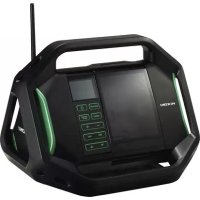
- CORDLESS TV & RADIO SAFETY WARNINGS
- WARNING
- Save all warnings and instructions for future reference.
- PROTECTING YOUR HEARING
- CAUTION
- PRECAUTIONS WHEN CONNECTING TO EXTERNAL EQUIPMENT
- CAUTION ABOUT CONDENSATION (DEW)
- LICENCE AND TRADEMARK
- SD CARDS AND USB DEVICES SUPPORTED FOR PLAYBACK
- NOTE
- English
- SYMBOLS
- STANDARD ACCESSORIES
- PRIOR TO OPERATION
- WATCHING TV OR LISTENING TO FM/DAB
- CONNECTING WITH BLUETOOTH DEVICES
- Pairing (Registering devices)
- Set the TV & radio for pairing mode
- Input pass key
- MAINTENANCE AND INSPECTION
- ● Inspecting the mounting screws
- ● Cleaning on the outside
- ● Storing the TV & radio
- MODIFICATIONS
- GUARANTEE
- TROUBLESHOOTING
- KABELLOSER FERNSEHER & RADIO SICHERHEITSHINWEISE
- DRAADLOZE TV & RADIO VEILIGHEIDSWAARSCHUWINGEN
- ⚠ WAARSCHUWING
- WARSCHUWING OVER CONDENSATIE (DEW)
- VERBINDING MET BLUETOOTH-APPARATEN
- Koppelen (Apparaten registreren)
- WARNING OM KONDENSERING (IMMA)
- ORHOLDSREGLER VED TILKOPLING TIL EKSTERNT UTSTYR
- VEDLIKEHOLD OG INSPEKSJON
- ADVARSEL
- SIMBOLI
- UPOZORENJE
- STANDARDNI PRIBOR
- NAPOMENA
- OPREZ
- Hrvatski
- STANDARDNA OPREMA
- Hikoki Power Tools Netherlands B.V.
- Hikoki Power Tools (U.K.) Ltd.
- Hikoki Power Tools France S.A.S.
- Hikoki Power Tools Belgium N.V./S.A.
- Hikoki Power Tools Italia S.p.A
- Hikoki Power Tools Ibérica, S.A.
- Hikoki Power Tools Sweden AB
- Hikoki Power Tools Denmark A/S
- Hikoki Power Tools Finland Oy
- Hikoki Power Tools Hungary Kft.
- Hikoki Power Tools Romania S.R.L.
Brand : HiKOKI
Model : UR18DSML
Category : Radio