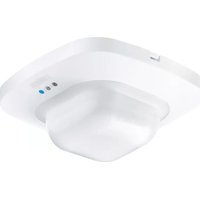
IR Quattro COM2 - Motion detector STEINEL - Free user manual and instructions
Find the device manual for free IR Quattro COM2 STEINEL in PDF.


| Product type | Infrared presence detector |
| Brand | Steinel |
| Model | IR Quattro COM2 |
| Dimensions (H x W x D) | 120 x 120 x 76 mm |
| Supply voltage | 230 – 240 V, 50/60 Hz |
| Switching output 1 power | max. 2000 W (resistive), max. 1000 VA (inductive) |
| Switching output 2 power (presence) | max. 230 W / 230 V, 1 A |
| Detection area – Presence | max. 4 x 4 m (16 m²) |
| Detection area – Radial | max. 5 x 5 m (25 m²) |
| Detection area – Tangential | max. 7 x 7 m (49 m²) |
| Brightness setting | 10 – 1000 lux, day/night mode |
| Timer output 1 | 30 s – 30 min, impulse mode, IQ mode |
| Timer output 2 | 1 min – 2 h |
| Mounting height | 2.5 m – 8 m (IR Quattro) |
| Protection rating | IP 2D (IP54 with AP Box) |
| Protection class | II |
| Operating temperature | 0 °C to +40 °C |
| Number of detection zones | 1760 zones (IR Quattro) |
| Warranty | 5 years |
| Installation location | Indoor, ceiling mounting |
| Control type | Potentiometers, DIP switches, optional remote control |
| DIM control output | 1 – 10 V / 50 ballasts max. |
| Test mode | Yes (via DIP 1) |
| Semi-automatic / fully automatic operation | Yes (via DIP 2) |
| Supplied accessories | None (optional accessories available) |
Frequently Asked Questions - IR Quattro COM2 STEINEL
User questions about IR Quattro COM2 STEINEL
0 question about this device. Answer the ones you know or ask your own.
Ask a new question about this device
Download the instructions for your Motion detector in PDF format for free! Find your manual IR Quattro COM2 - STEINEL and take your electronic device back in hand. On this page are published all the documents necessary for the use of your device. IR Quattro COM2 by STEINEL.
USER MANUAL IR Quattro COM2 STEINEL
natural_image
World map silhouette in gray, showing continents and oceans (no text or labels)Contact
www.steinel.de/contact

natural_image
Technical diagram of a circuit board with wires and a plug inserted (no text or symbols)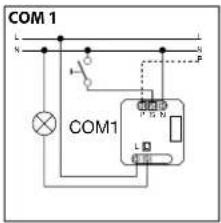
natural_image
Illustration of hands inserting a device into a device casing (no text or symbols visible)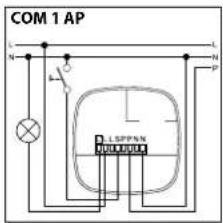
Technische Daten
natural_image
Abstract geometric pattern with radial lines and a central square (no text or symbols)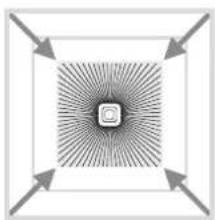
natural_image
Abstract geometric pattern with radial arrows and a central square (no text or symbols)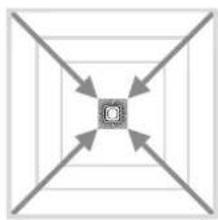
flowchart
graph TD
    A[" "] --> C["C"]
    B[" "] --> C["C"]
    D[" "] --> C["C"]
    E[" "] --> C["C"]
Poti⑨
GB Operating instructions
Dear Customer,
Congratulations on purchasing your new STEINEL sensor and thank you for the confidence you have shown in us. You have chosen a high-quality product that has been manufactured, tested and packed with the greatest care.
Please familiarise yourself with these instructions before attempting to install the product because prolonged, reliable and trouble-free operation will only be ensured if it is fitted and used properly.
We hope your new STEINEL sensor will bring you lasting pleasure.

Safety warnings
■ Disconnect the power supply before attempting any work on the sensor!
During installation, the electric power cable to be connected must be dead. Therefore, switch 'OFF' the power first and use a voltage tester to make sure the wiring is off circuit.
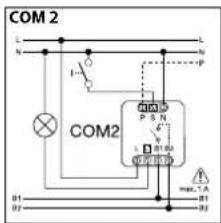
■ Installing the sensor involves work on the mains power supply. This work must therefore be carried out professionally in accordance with the applicable national wiring regulations and electrical operating conditions (VDE 0100).
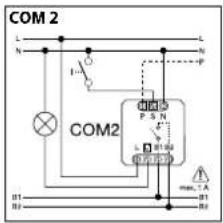
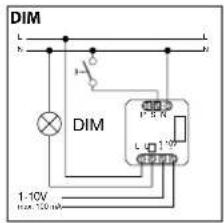
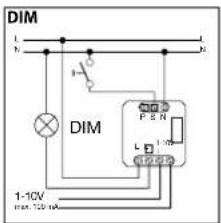
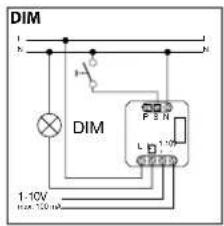
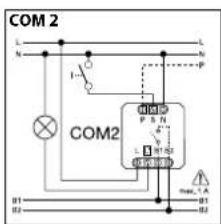
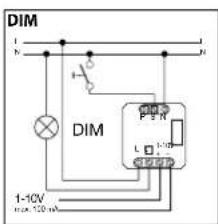
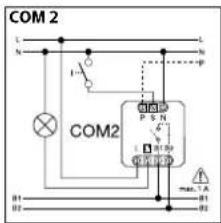
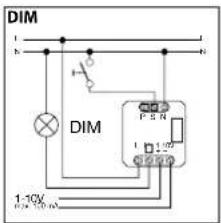
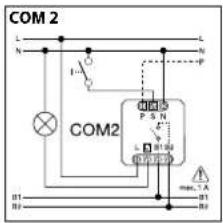
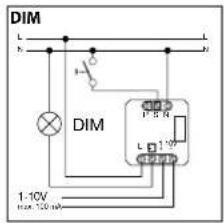
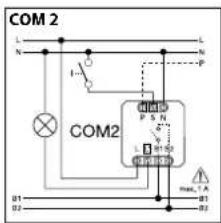
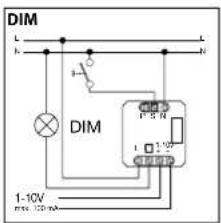
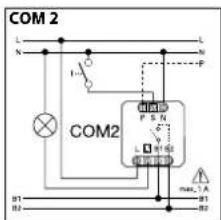
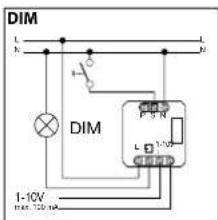
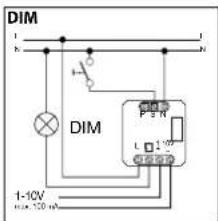
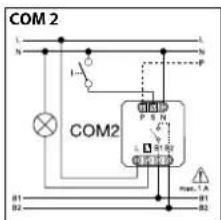
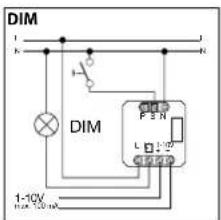
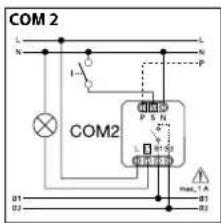
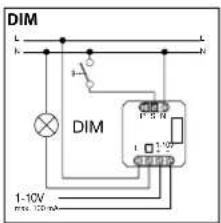
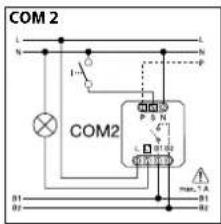
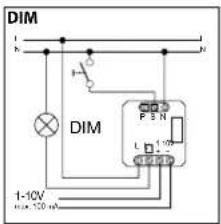
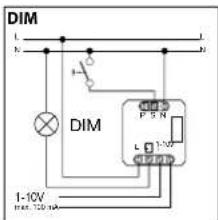
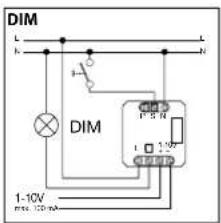
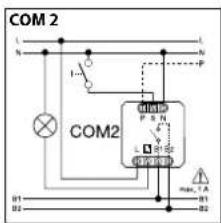
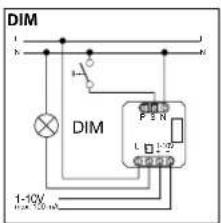
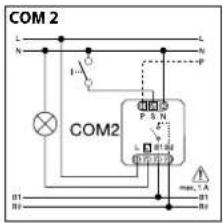
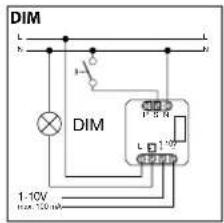
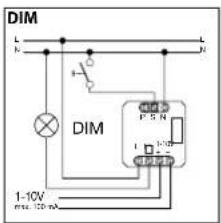
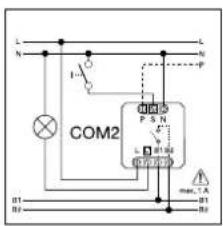
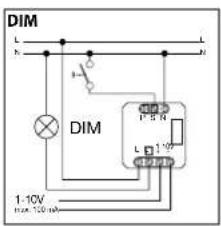
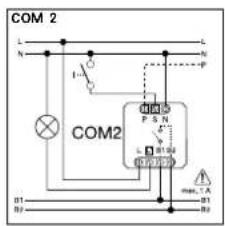
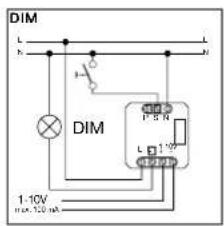
- Terminal B 1, B 2 is a switching contact for low-energy circuits, no higher than 1 A. This must be provided with appropriate fuse protection. - Control output DIM 1-10 V must only be used for connecting electronic ballasts with electrically isolated control signal,
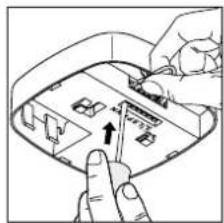
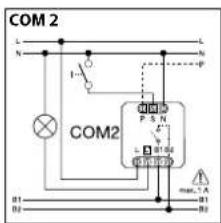
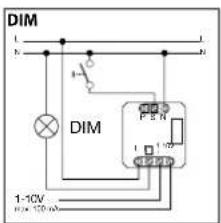
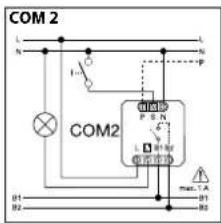
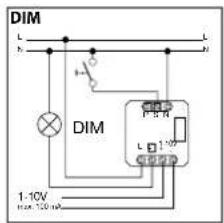
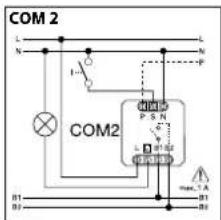
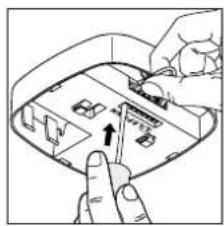
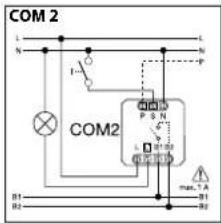
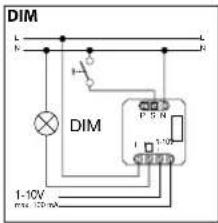
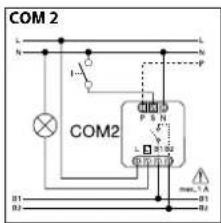
Assembly/Installation ⑬ (see chart on page 2)
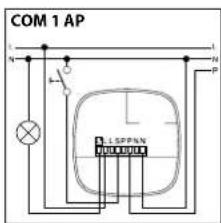
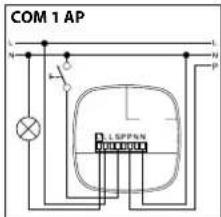
The sensor is only intended for concealed, indoor installation in ceilings (apart from the COM 1 AP - surface-mounted - option). A clamping-type ceiling adapter or surface-mounting adapter is not included.
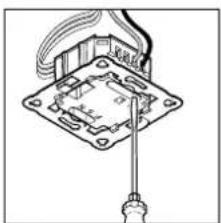
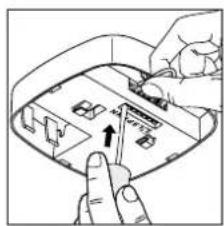
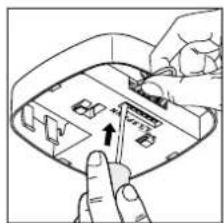
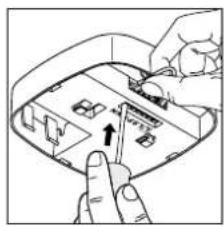
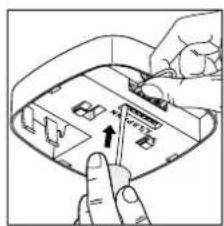
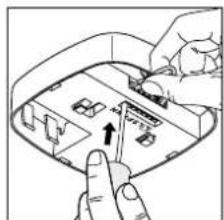
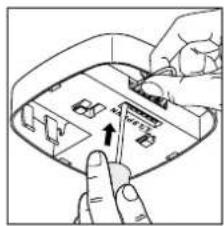
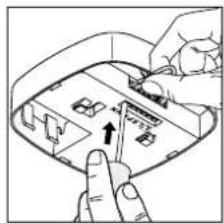
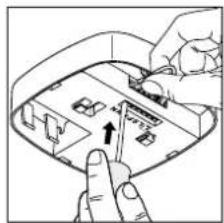
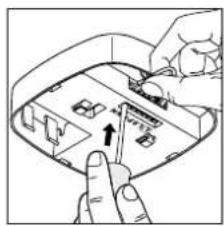
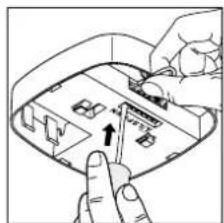
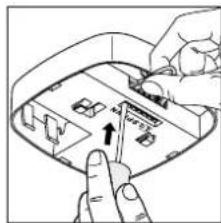
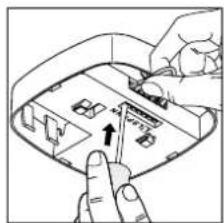
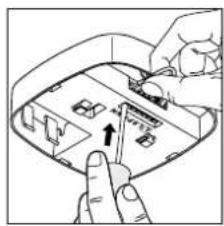
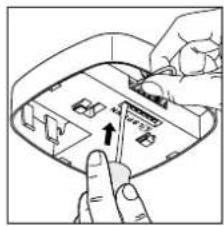
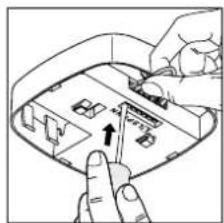
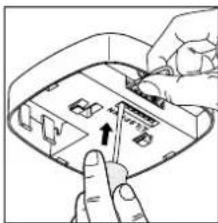
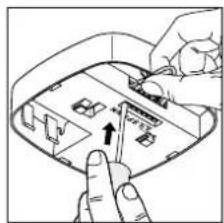
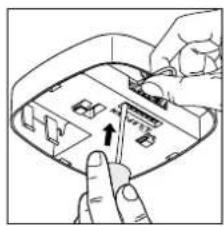
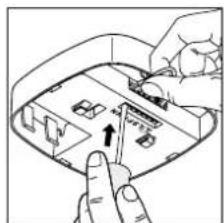
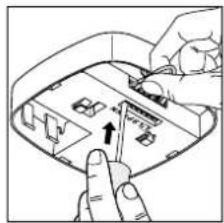
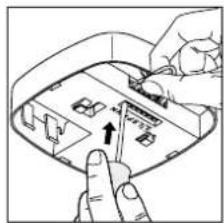
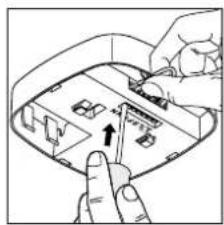
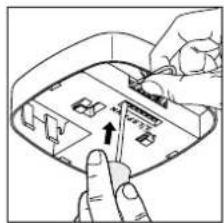
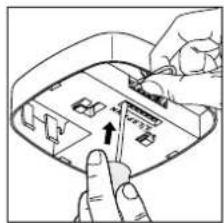
Sensor and load module come ready assembled and must be plugged together after fitting the load module and setting the potentiometers/dip switches. The sensor module must then be locked in position at the catch mechanism ⑫, using a screwdriver if necessary.
Accessories: Kaiser junction box for stud walls EAN no.: 4007841 000370 Clamping-type ceiling adapter EAN no. 4007841 002855 Surface-mounting adapter, EAN no.: 4007841 000363 Guard cage, EAN no.: 4007841 003036 Service remote control, EAN no.: 4007841 000387 User remote control, EAN no.: 4007841 003012
System components
① Load module
② Sensor module
③ Sensor base
④ Din switches
(1) Normal/test mode
(1) Normal test mode
(2) Semi-fully automatic mode
(2) Semi-fully automatic mode (3) Button switch
(3) Button/switch
(4) ON / ON-OFF button
(5) DIM option
Constant lighting control 'ON/'OFF'
⑤ Twilight setting
⑥ Time setting
Switching output 1
⑦ HVAC stay-'ON' time
Switching output 2
⑧ HVAC switch-'ON' delay
Switching output 2
⑨ Reach setting
⑩ Kaiser stud-wall junction box, optional
⑩ Clamping-type ceiling adapter, optional
⑪ Surface mounting adapter IP 54, optional
⑫ Locking mechanism
⑬ Assembly/Installation
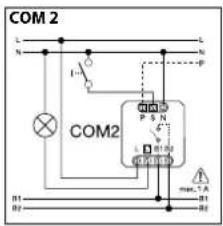
⑭ Parallel-connected
- Parallel connections
⑮ Stay-'ON' time
③ Stay ON time Orientation light DIM option
How it works / Basic function
The infrared presence detectors from the Control PRO range control lighting as well as heating, ventilation and air-conditioning (COM 2 only), e.g. in offices, schools, public buildings or at home, in relation to ambient light level and the presence of persons.
The pyro-sensor with highly advanced lens provides a square detection zone, as the typical shape of a room, in which the smallest of movements are sensed. The presence detector's switching outputs and reach are set at the potentiometers and dip switches or by using
the optional remote control.
Presence Control has a low intrinsic power consumption.
Presence Control PRO
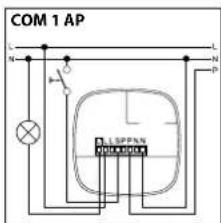
IR Quattro COM 1 / COM 1 AP (surface-mounted) IR Quattro HD COM 1 /
COM 1 AP (surface-mounted)
1 switching output operating in relation to brightness setting and presence of persons.
Settings:
- Brightness setting
- Stay-'ON' time, pulse mode, IQ mode
Presence Control PRO
IR Quattro COM 2 IR Quattro HD
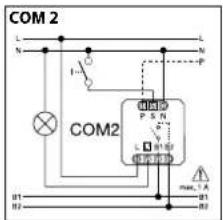
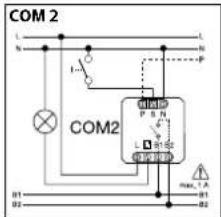
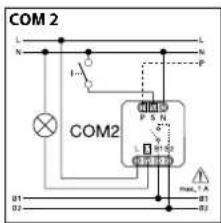
1 switching output as COM 1. An additional 2nd switching output for operating HVAC (heating/ventilation/air-conditioning) in relation to the presence of persons.
Settings:
- Stay-ON' time
- Switch-'ON' delay
- Room surveillance
Presence Control PRO
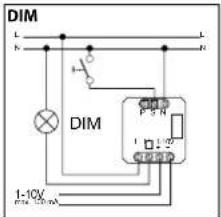
IR Quattro DIM
IR Quattro HD DIM
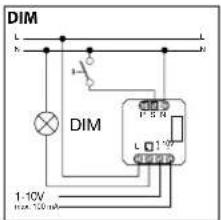
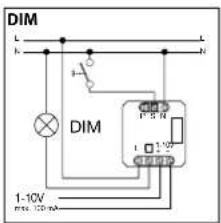
1 switching output operating in relation to brightness setting and presence of persons.
Settings:
- Brightness setting
- Stay-'ON' time, IQ mode
- Orientation light
- Constant lighting control
Detection zone
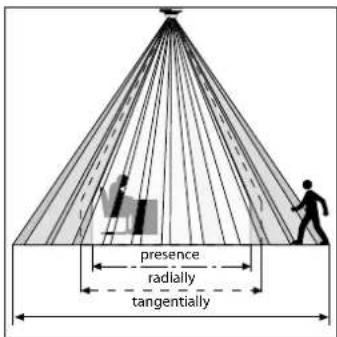
Reliable presence detection largely depends on the number, condition and arrangement of the lens segments. The IR Quattro with its square detection zone of 49 m ^2 divided up into 13 levels and 1760 switching zones senses the smallest of movements. With
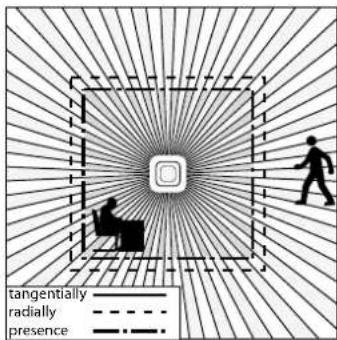
a square detection zone covering an area of 64 m ^2 , the IR Quattro HD has 4800 switching zones that provide even greater precision. These reaches can be adjusted to suit specific requirements at the setting potentiometer.
The square detection zone and the capability of interconnecting master/slave versions provide the basis for creating optimum configurations quickly and easily.
Electrical installation/Automatic mode
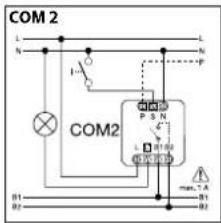
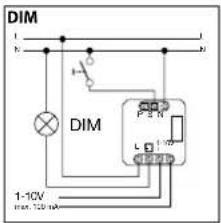
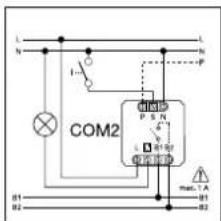
In selecting the wiring leads, it is important to meet the wiring regulations laid down in VDE 0100 (see Safety warnings on page 20). The following applies to wiring presence detectors: Section 6 of VDE 0100 520 permits the use of a multiple-
conductor cable containing both the mains-voltage wires as well as the control lines (e.g. NYM 5 × 1.52) for the wiring between sensor and electronic ballast. The mains supply lead must be no greater than 10 mm in diameter. The clamping range of
the mains terminal is designed for a maximum of 2 × 2.5 mm^-2 . When installing the surface-mounting version, connect a circuit breaker (16 A) on the line side.
natural_image
Pure electrical circuit lines without any symbols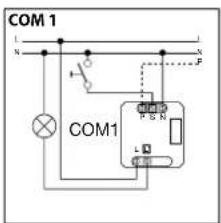
natural_image
Illustration of hands interacting with a device panel, showing a finger pressing a button (no text or symbols visible)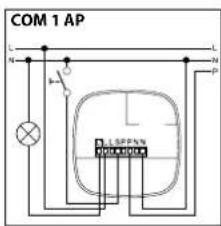
Technical Specifications
| Dimensions (H × W × D): 120 × 120 × 76 mm | |
| Power supply: 230 - 240 V, 50 Hz / 60 Hz | |
| Minimum load: 3 W | |
| Capacity, switching output 1: 230 V relay | |
| (COM 1/COM 2) resistive load of 2000 W max. (cos φ = 1) | |
| 1000 VA max. (cos φ = 0.5) | |
| Electronic ballast: Max. 'ON' current 800 A/200 μs | |
| (COM 1/COM 1 AP/COM 2/DIM) 30 × (1 × 18 W), 25 × (2 × 18 W) | |
| 25 × (1 × 36 W), 15 × (2 × 36 W) | |
| 20 × (1 × 58 W), 10 × (2 × 58 W) | |
| Pay attention to specific 'ON' currents of electronic ballasts! | |
| A relay or contactor must be provided on line side for higher switching capacities. | |
| Capacity, switching output 2: Presence | |
| (COM 2 only) max. of 230 W/230 V | |
| 1A max. (cos φ = 1) for HVAC (heating/ventilation/air conditioning) | |
| Square detection zones: IR Quattro IR Quattro HD | |
| Presence: max. of 4 × 4 m (16 sq.m.) max. of 8 × 8 m (64 sq.m.) | |
| Radially: max. of 5 × 5 m (25 sq.m.) max. of 8 × 8 m (64 sq.m.) | |
| Tangentially: max. of 7 × 7 m (49 sq.m.) max. of 20 × 20 m (400 sq.m.): | |
| Light-level setting: 10 - 1000 lux,∞ / daylight / DIM 100 - 1000 lux control threshold | |
| Switching output 1: 30 sec. - 30 min., pulse mode (approx. 2 sec.), | |
| Time setting IQ mode (automatic adjustment to the usage profile) | |
| Switching output 2: COM2 only, for HVAC | |
| Time setting 0 sec. - 10 min. switch-'ON' delay | |
| 1 min. - 2 hrs. stay-'ON' time | |
| Automatic room surveillance | |
| DIM: 30 sec. - 30 min., | |
| Time setting IQ mode (automatic adjustment to the usage profile) | |
| Control output: 1 - 10 V / max. of 50 electronic ballasts, max. of 100 mA | |
| Installation height: 2.5 m - 8 m (IR Quattro) | |
| (mounted to ceiling) 2.5 m - 10 m (IR Quattro HD) | |
| Installation site: indoors | |
| Sensors: 13 detection levels, 1760 switching zones (IR Quattro) | |
| 13 detection levels, 4800 switching zones (IR Quattro HD) | |
| IP rating: IP 20 | |
| Protection class: II | |
| Temperature range: 0°C to +40°C |
Functions – Settings by DIP switch
COM 1 + COM 2
DIP 1
Normal mode / Test mode (NORM / TEST)
Test mode has priority over all other settings on the presence detector and serves the purpose of checking for proper working order as well for testing the detection zone. Irrespective of am-
bient light level, the presence detector activates the light to stay 'ON' for approx. 8 sec. in response to movement in the room (blue LED flashes when movement is detected). All user-
selected potentiometer settings apply in normal mode. The presence detector can also be set by means of the blue LED without any load connected.
DIP 2
Semi-automatic mode (MAN) / fully automatic mode (AUTO)
Semi-automatic mode: (MAN)
The light now only switches 'OFF' automatically. Light is switched 'ON' manually. Light must be requested using the
button and stays 'ON' for the time set at the potentiometer. (pressing twice switches 'ON' for 4 hours).
Fully automatic mode: (AUTO)
The light automatically switches 'ON' and 'OFF' in relation to brightness when someone is present. Light can be switched 'ON' and 'OFF' manually at any time. This temporarily interrupts
the automatic switching function. Irrespective of the settings selected, light stays 'ON' for 4 hours after manually pressing the button twice or switches 'OFF' after manually pressing the
button once. Pressing the button before the 4 hours elapse returns the Presence Control IR Quattro to the normal operating mode.
DIP 3
Button/switch
Tells the sensor how to interpret the incoming signal. Assigning external buttons/switches allows you to operate the detector as a semi-automatic unit and override it manually at any time.
- Operation either by button or switch - Several buttons possible on one control input - Only use illuminated pushbutton with neutral conductor connected
■ Cable length between sensor and switch < 50 m
DIP 4
'ON'/'ON'-OFF' button
In the 'ON'-OFF' setting, the light can be switched 'ON' and 'OFF' manually at any time (except in pulse mode: no manual 'OFF').
In the 'ON' setting, light can no longer be switched 'OFF' manually. The stay-'ON' time starts from the beginning again each
time the button is pressed.
DIM
DIP 5
Constant light 'ON'/'OFF'
Provides a constant level of brightness. Detector measures the prevailing level of daylight and activates sufficient artificial light to achieve the required lev-
el of brightness. As daylight changes, the switched-in artificial lighting component is adjusted accordingly. In addition to the daylight component, artificial
light is also switched 'ON' and 'OFF' In relation to whether or not persons are present.
Functions – Settings by potentiometer
COM 1 + COM 2
Potentiometer ⑤
Twilight setting
The chosen response threshold can be infinitely varied from approx. 10 - 1000 lux.
Control dial turned fully clockwise: MAX daylight mode Control dial turned fully anti-clockwise: MIN night-time operation
Depending on the site of installation, the setting may need to be corrected by 1-2 marks on the scale.
| Examples of use Brightness settings | |
| Night-time mode min | |
| Corridors, foyers 1 | |
| Stairs, escalators, moving walkways 2 | |
| Washrooms, toilets, switchrooms, canteens 3 | |
| Sales floor, kindergartens, nursery school rooms, sports halls | 4 |
| Work environments: Offices, conference and meeting rooms, precision assembly activities, kitchens | 5 |
| Working areas requiring good light:Laboratory, technical drawing, precision work | >=6 |
| Daylight mode max |
Note: Depending on the site of installation, the setting may need to be corrected by 1 – 2 marks on the scale. Brightness is measured directly at the sensor.
Potentiometer ⑥
Time setting
Stay-'ON'-time for
switching output 1 Setting 30 sec. – 30 min.
The chosen stay-'ON' time is infinitely variable from a minimum of approx. 30 sec. to a maximum
of 30 min. Light is calibrated after 3 min. When the threshold is exceeded, the sensor switches 'OFF' after the stay-'ON' time expires.
Pulse mode (except DIM) ∩
If the dial is set to ∠ (fully anti-clockwise), the unit is in pulse mode, i.e. the output is switched 'ON' for approx. 2 sec. (e.g. for stair-
well lighting timer). Afterwards, the sensor does not respond to movement for approx. 8 sec.
Day mode is the only mode possible here because of dazzle by light from external sources.
IQ mode
Turned fully clockwise: The stay-'ON' time is self-learning and adjusts dynamically to user
behaviour. The optimum time cycle is determined by means of a learning algorithm.
The shortest time is 5 min., the longest 20 min.
COM 2
Potentiometer ⑦
Stay-'ON' time for switching output 2 HVAC
Setting 1 sec. - 2 hr.
- Turned fully clockwise: max
• Turned fully anti-clockwise: min
Potentiometer ⑧
Switch-'ON' delay for switching output 2 HVAC
- Setting 0 sec. - 10 min.
• Turned fully clockwise:
Room surveillance
- Turned fully anti-clockwise: 0 sec. (OFF)
Potentiometer 15
Basic brightness (DIM option)
Provides basic illumination for the selected stay-'ON' time when ambient light falls below the selected brightness threshold that is set. This can be dimmed to 10% of maximum light intensity. As soon as a person enters the scene, the detector switches either to 100% light intensity (constant-lighting
Turning the potentiometer to the "Surveillance" setting reduces the sensitivity of the "Presence" switching output. The contact only closes on detecting a pronounced
controller 'OFF') or adjusts to the preselected brightness level (constant-lighting controller 'ON'). When no movement is being detected, the detector dims back to basic brightness after the stay-'ON' time expires. This is switched 'OFF' when stay-'ON' time (1 min. - 30 min.) has expired or the daylight
movement, signalling with a high degree of certainty that persons are present. The stay-'ON'-time remains active. The switch-'ON' delay is inactivated.
component is sufficient to exceed the selected level of brightness. In the 'ON' setting, the detector switches basic brightness 'ON' and 'OFF' as soon as the level of light falls below the brightness threshold.
Reach adjustment
natural_image
Abstract geometric pattern with radial lines and a central square (no text or symbols)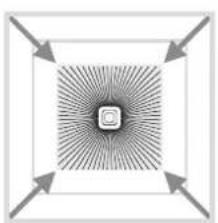
natural_image
Abstract geometric pattern with radial lines and arrows, no text or symbols present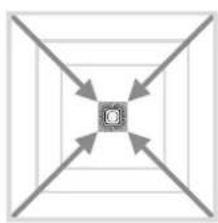
natural_image
Symmetrical diagram with four diagonal arrows pointing inward toward a central square (no text or symbols)Potentiometer ⑨
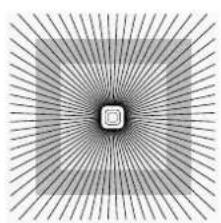
Adjusts reach to specific requirements.
See table on pages 4 – 5 showing Technical Specifications for selecting settings to suit specific requirements.
Parallel-connected configurations
When using several detectors, they must be connected to the same phase!
14.1 Master/master
A parallel-connected configuration also permits the use of several masters. In this case, each master operates the lighting group in accordance with the level of
brightness it measures. Delay times and brightness thresholds are selected at each master as required. The switched load is spread among the individual masters.
Presence is still detected collectively by all detectors. The presence output can be picked off from any master.
142 Master/slave
The master/slave configuration permits detection of movement in large-type rooms or spaces (load connected = master, no load =
slave). The level of brightness prevailing in the room is only evaluated at the master. The slaves report movements detected to the mas-
ter. Lighting or HVAC is switched 'ON' and 'OFF' by the master only.
④ Two detectors linked with an external stairwell lighting timer
Old building / building modernisation
External light source activated by button. No twilight mode, day mode only.
⑭ detector as stairwell lighting timer
IDM detector
Additional functions with RC5
Burning-in function
Pressing the button for > 5 s activates the burn-in function for 100 h.
Additional functions with RC 8 (DIM version)
Basic brightness
Pressing the relevant button for > 5 s changes the basic brightness to 60 min.

Basic brightness level
Pressing the relevant button for >5 s changes the brightness level In steps of 10% to: 1 = 10%, 2 = 20%, ... 6 = 60%
Dimming by pushbutton
When a pushbutton is connected to the S terminal, lighting can be dimmed by pressing the pushbutton. The pushbutton first increases lighting to maximum level and then returns it to minimum level. After releasing the pushbutton without further control action, the lighting level selected is maintained until the light is switched OFF.
The detector is then in the previously selected sensor mode. The direction in which the level of lighting is changed (max./min.) can be reversed by briefly releasing and then re-pressing the push button.
Presentation mode
Pressing the button for > 5 s keeps the light OFF while movement is being detected. If movement is no longer being detected, the light switches back to sensor mode after the stay-ON time elapses (LED ON).
Remote control
Using the remote control, functions can be conveniently activated from the floor.
Note: The pulse mode cannot be overridden by the remote control. Switch pulse mode 'OFF' manually.
Presence Control remote control unit: EAN no.: 4007841 000387
Troubleshooting
Malfunction Cause Remedy
| Light does not switch 'ON' | No supply voltageLux setting too lowNo motion detection | Check supply voltageSlowly increase lux setting until light switches 'ON'Ensure unobstructed sensor visionCheck detection zone |
| Light does not switch 'OFF' | Lux setting too highStay-'ON' time running outInterference from sources of heat, e.g.: fan heater, open doors and windows, pets, light bulb/halogen floodlight, moving objectsPosition Wi-Fi device very close to the sensor | Reduce lux settingWait until stay-'ON' time elapses; reduce stay-'ON' time if necessaryUse stickers to mask out stationary sources of interferenceIncrease distance between Wi-Fi device and sensor |
| Sensor switches 'OFF' in spite of persons being present | Stay-'ON' time too shortLight-level threshold too low | Increase stay-'ON' timeChange light threshold |
| Sensor does not switch 'OFF' quickly enough | Stay-'ON' time too long | Reduce stay-'ON' time |
| Sensor does not switch 'ON' quickly enough when approached from the front | Reach is reduced when approached from the front | Install additional sensorsReduce distance between two sensors |
| Sensor does not switch 'ON' when persons are present in spite of it being dark | Lux setting too low | Sensor deactivated by switch/button?Semi-automaticmode?Increase light-level threshold |
Disposal
Electrical and electronic equipment, accessories and packaging must be recycled in an environmentally compatible manner.

Do not dispose of electrical and electronic equipment as domestic waste.
EU countries only:
Under the current European Directive on Waste Electrical and Electronic Equipment and its implementation in national law, electrical and electronic equipment no longer suitable for use must be collected separately and recycled in an environmentally compatible manner.
Manufacturer's warranty
As purchaser, you are entitled to your statutory rights against the vendor. If these rights exist in your country, they are neither curtailed nor restricted by our Warranty Declaration. We guarantee that your STEINEL Professional sensor product will remain in perfect condition and proper working order for a period of 5 years. We guarantee that this product is free from material-, manufacturing- and design flaws. In addition, we guarantee that all electronic components and cables function in the proper manner and that all materials used and their surfaces are without defects.
Making Claims
If you wish to make a claim, please send your product complete and carriage paid with the original receipt of purchase, which must show the date of purchase and product designation, either to your retailer or contact us at STEINEL (UK) Limited, 25 Manasty Road, Axis Park, Orton Southgate, Peterborough, PE2 6UP, for a returns number. For this reason, we recommend that you keep your receipt of purchase in a safe place until the warranty period expires. STEINEL shall assume no liability for the costs or risks involved in returning a product.
For information on making claims under the terms of the warranty, please go to www.steinel-professional.de/garantie If you have a warranty claim or would like to ask any question regarding your product, you are welcome to call us at any time on our Service Hotline 01733 366700.

YEAR MANUFACTURER'S WARRANTY
FR Mode d'emploi
Cher client,
③ Montage/Installation
natural_image
Pure electrical circuit lines without any symbols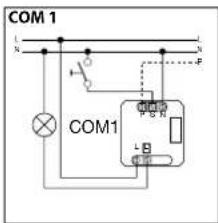
natural_image
Illustration of hands interacting with a device panel, showing a finger pointing at the screen (no text or symbols visible)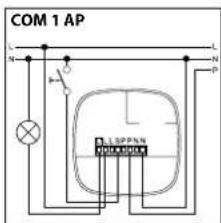
natural_image
Abstract geometric pattern with radial lines and a central square (no text or symbols)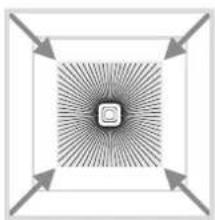
natural_image
Abstract geometric pattern with radial lines and arrows, no text or symbols present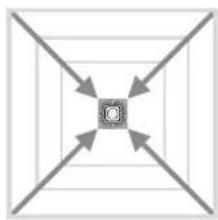
natural_image
Symmetrical geometric diagram with four arrows pointing inward toward a central square (no text or symbols)Potentiomètre ⑨
natural_image
Pure electrical circuit lines without any symbols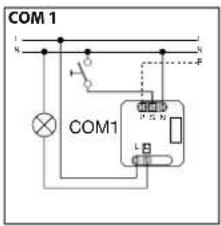
natural_image
Illustration of hands inserting a device into a device casing (no text or symbols visible)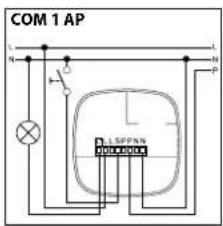
Technische gegevens
natural_image
Abstract geometric pattern with radial lines and a central square (no text or symbols)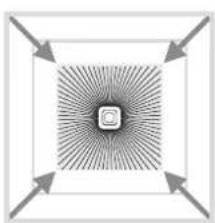
natural_image
Abstract geometric pattern with concentric squares and radial arrows, no text or symbols present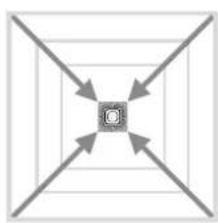
natural_image
Symmetrical diagram with four diagonal arrows pointing inward toward a central square (no text or symbols)Potentiometer ⑨
natural_image
Pure electrical circuit lines without any symbols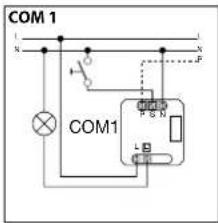
Dati tecnici
natural_image
Abstract geometric pattern with radial lines and a central square (no text or symbols)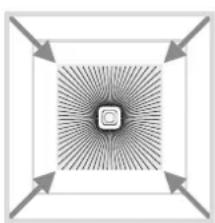
natural_image
Abstract geometric pattern with radial lines and arrows, no text or symbols present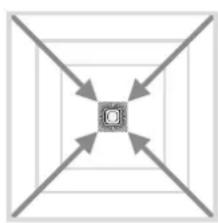
natural_image
Symmetrical diagram with four arrows pointing inward toward a central square (no text or symbols)Potenziometro ⑨
natural_image
Pure electrical circuit lines without any symbols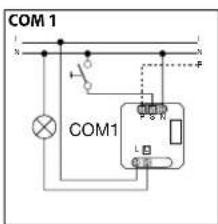
natural_image
Illustration of hands interacting with a device panel, showing a finger pointing at a component (no text or symbols visible)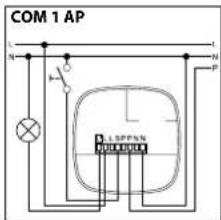
Datos técnicos
natural_image
Abstract geometric pattern with radial lines and a central square (no text or symbols)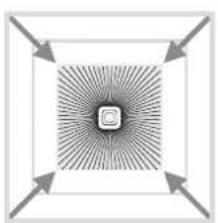
natural_image
Abstract geometric pattern with radial lines and arrows, no text or symbols present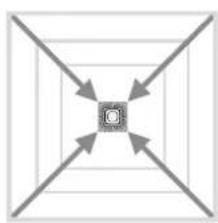
flowchart
graph TD
    A[" "] --> C["C"]
    B[" "] --> C["C"]
    D[" "] --> C["C"]
    E[" "] --> C["C"]
Potenciómetro ⑨
natural_image
Technical line drawing of a circuit board with wires and connectors (no text or symbols)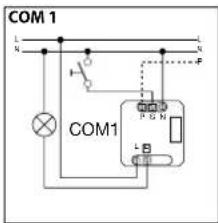
natural_image
Illustration of hands interacting with a device panel, showing a finger pressing a button (no text or symbols visible)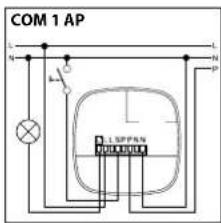
Dados técnicos
natural_image
Abstract geometric pattern with radial lines and a central square (no text or symbols)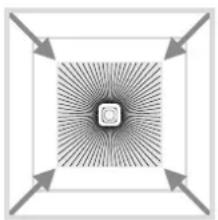
natural_image
Abstract geometric pattern with radial arrows and central square (no text or symbols)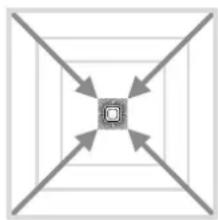
natural_image
Symmetrical geometric diagram with four arrows pointing inward toward a central square (no text or symbols)Potenciómetro ⑨
natural_image
Technical diagram of a circuit board with wires and a plug inserted (no text or symbols)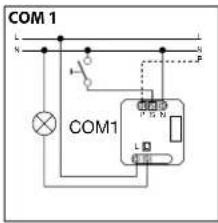
natural_image
Illustration of hands interacting with a device panel, showing a finger pressing a button (no text or symbols visible)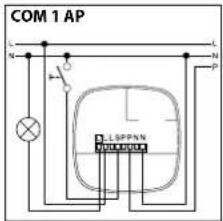
natural_image
Abstract geometric pattern with radial lines and a central square (no text or symbols)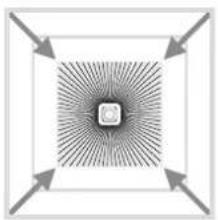
natural_image
Abstract geometric pattern with radial lines and arrows, no text or symbols present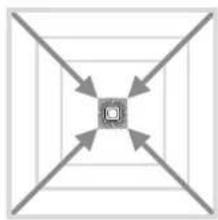
natural_image
Symmetrical geometric diagram with four diagonal arrows pointing inward toward a central square (no text or symbols)Potentiometer ⑨
natural_image
Technical line drawing of a circuit board with wires and a screwdriver inserted (no text or symbols)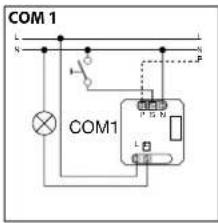
natural_image
Illustration of hands inserting a device into a device casing (no text or symbols visible)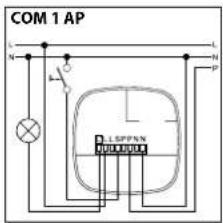
Tekniske data
natural_image
Abstract geometric pattern with radial lines and a central square (no text or symbols)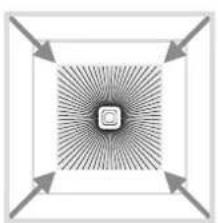
natural_image
Abstract geometric pattern with radial lines and arrows, no text or symbols present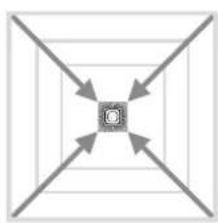
flowchart
graph TD
    A["Start"] --> B["Central Node"]
    B --> C["Arrow 1"]
    B --> D["Arrow 2"]
    B --> E["Arrow 3"]
    B --> F["Arrow 4"]
Potentiometer ⑨
natural_image
Technical line drawing of a circuit board with wires and a screwdriver inserted (no text or symbols)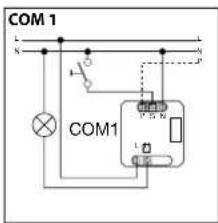
natural_image
Illustration of hands interacting with a device panel, showing a finger pointing at a component (no text or symbols visible)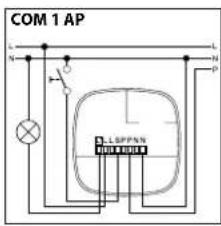
Tekniset tiedot
natural_image
Abstract geometric pattern with radial lines and a central square (no text or symbols)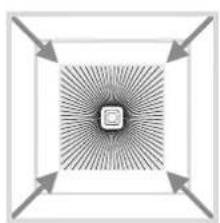
natural_image
Abstract diagram with concentric arrows pointing inward toward a central square (no text or symbols)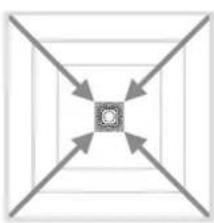
natural_image
Symmetrical geometric diagram with four arrows pointing inward toward a central square (no text or symbols)Säädin ⑨
natural_image
Technical line drawing of a circuit board with wires and a screwdriver inserted (no text or symbols)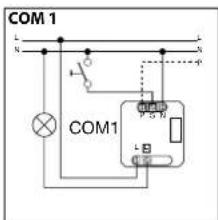
natural_image
Abstract radial pattern with concentric lines and a central square (no text or symbols)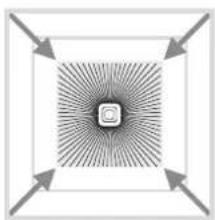
natural_image
Abstract geometric pattern with radial arrows and central square (no text or symbols)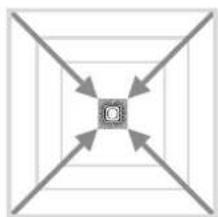
flowchart
graph TD
    A[" "] --> C["C"]
    B[" "] --> C["C"]
    D[" "] --> C["C"]
    E[" "] --> C["C"]
Potensiometer ⑨
natural_image
Pure electrical circuit lines without any symbols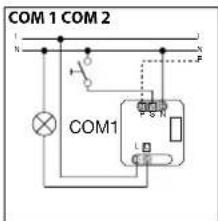
natural_image
Illustration of hands interacting with a device panel, showing a hand pressing a button (no text or symbols visible)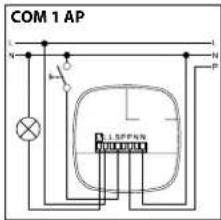
Τεχνικά δεδομένα
natural_image
Abstract geometric pattern with radial lines and a central square (no text or symbols)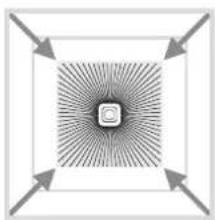
natural_image
Abstract geometric pattern with radial lines and arrows, no text or symbols present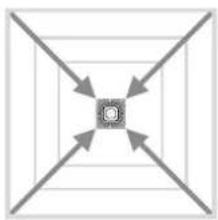
flowchart
graph TD
    A["Start"] --> B{Decision}
    B --> C["End"]
    B --> D["Next Step"]
    D --> E["End"]
    B --> F["Next Step"]
    F --> G["End"]
Ποτενσιόμετρο ⑨
natural_image
Pure electrical circuit lines without any symbols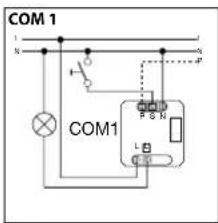
natural_image
Illustration of hands interacting with a device panel, showing a finger pressing a button (no text or symbols visible)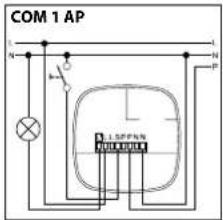
Teknik Özellikler
natural_image
Abstract geometric pattern with radial lines and a central square (no text or symbols)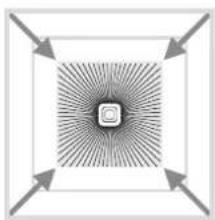
natural_image
Abstract geometric pattern with radial lines and arrows, no text or symbols present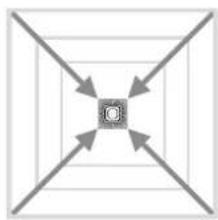
natural_image
Symmetrical diagram with four arrows pointing inward toward a central circle (no text or symbols)Potensiyometre ⑨
natural_image
Technical line drawing of a circuit board with wires and a screwdriver inserted (no text or symbols)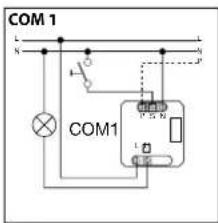
natural_image
Illustration of hands inserting a device into a device casing (no text or symbols visible)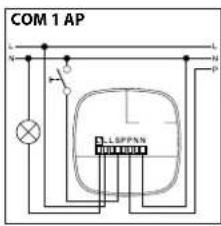
Müszaki adatok
natural_image
Abstract geometric pattern with radial lines and a central square (no text or symbols)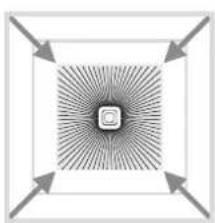
natural_image
Abstract geometric pattern with radial lines and arrows, no text or symbols present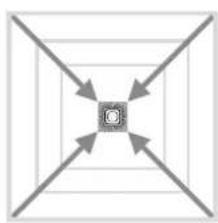
flowchart
graph TD
    A[" "] --> C["C"]
    B[" "] --> C["C"]
    D[" "] --> C["C"]
    E[" "] --> C["C"]
Potméter ⑨
natural_image
Pure technical diagram of a circuit board with wires and connectors, no text or symbols present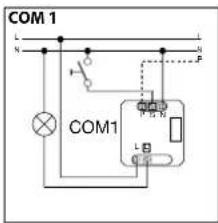
natural_image
Illustration of hands inserting a device into a device casing (no text or symbols visible)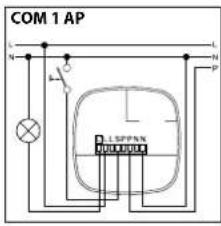
Technické parametry
natural_image
Abstract geometric pattern with radial lines and a central square (no text or symbols)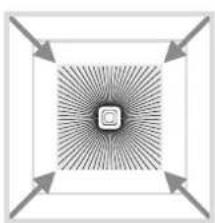
natural_image
Abstract geometric pattern with radial lines and arrows, no text or symbols present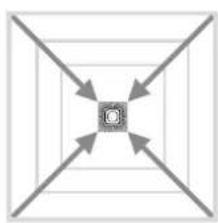
natural_image
Symmetrical diagram with four diagonal arrows pointing inward toward a central square (no text or symbols)Potenciometr ⑨
natural_image
Pure electrical circuit lines without any symbols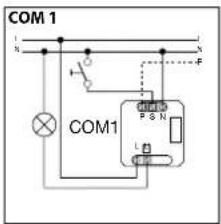
natural_image
Illustration of hands interacting with a device panel or tray (no text or symbols visible)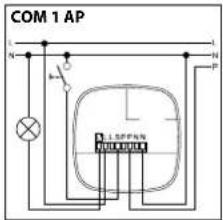
Technické údaje
natural_image
Abstract geometric pattern with radial lines and a central square (no text or symbols)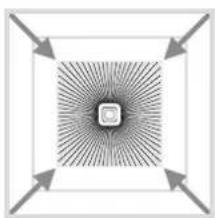
natural_image
Abstract geometric pattern with radial lines and arrows, no text or symbols present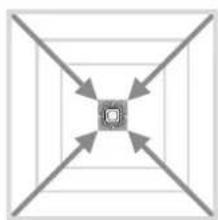
flowchart
graph TD
    A["Top Node"] --> B["Left"]
    A --> C["Right"]
    A --> D["Bottom Left"]
    A --> E["Bottom Right"]
Potencimeter ⑨
natural_image
Pure electrical circuit lines without any symbols
natural_image
Illustration of hands interacting with a device panel, showing a hand pressing a button (no text or symbols visible)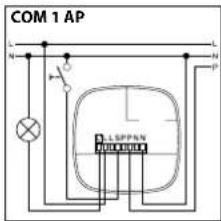
Dane techniczne
natural_image
Abstract geometric pattern with radial lines and a central square (no text or symbols)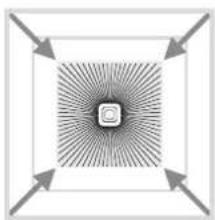
natural_image
Abstract geometric pattern with radial lines and arrows, no text or symbols present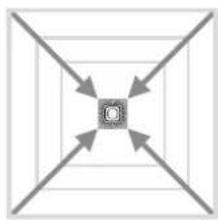
natural_image
Symmetrical diagram with four arrows pointing inward toward a central square (no text or symbols)Potencjometr ⑨
natural_image
Technical line drawing of a circuit board with wires and a plug inserted (no text or symbols)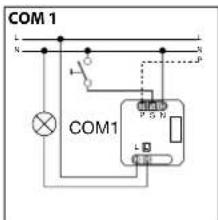
natural_image
Illustration of hands interacting with a device panel, showing a finger pointing at the screen (no text or symbols visible)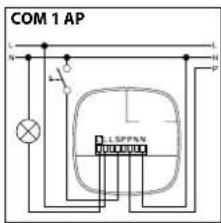
Date tehnice
Regim semiautomat: (MAN)
natural_image
Abstract radial pattern with concentric lines and a central square (no text or symbols)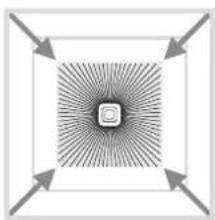
natural_image
Abstract geometric pattern with concentric squares and radial arrows, no text or symbols present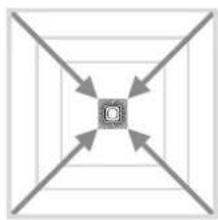
flowchart
graph TD
    A[" "] --> C["C"]
    B[" "] --> C["C"]
    D[" "] --> C["C"]
    E[" "] --> C["C"]
Potentiometrul ⑨
natural_image
Technical line drawing of a circuit board with wires and a screwdriver inserted (no text or symbols)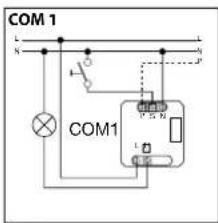
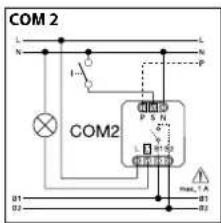
natural_image
Illustration of hands inserting a device into a device casing (no text or symbols visible)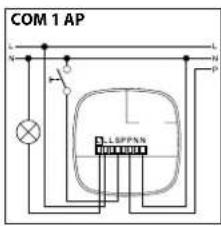
Tehhnični podatki
natural_image
Abstract geometric pattern with radial lines and a central square (no text or symbols)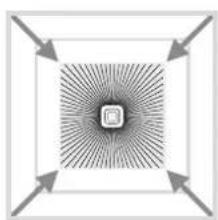
natural_image
Abstract geometric pattern with concentric square and radial arrows, no text or symbols present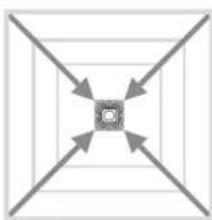
flowchart
graph TD
    A["Start"] --> B{Decision}
    B -->|Yes| C["Process"]
    B -->|No| D["End"]
Potencimeter ⑨
Prilagoditev dosega na individualne potrebe.
natural_image
Technical line drawing of a circuit board with wires and a screwdriver inserted (no text or symbols)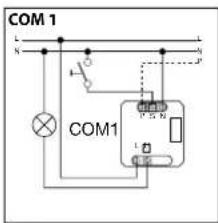
natural_image
Illustration of hands inserting a device into a device casing (no text or symbols visible)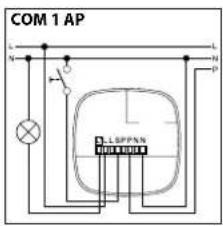
Tehnički podaci
| Dimenzije (S × V × D): 120 × 120 × 76 mm | ||
| Mrežni napon: 230 – 240 V, 50 Hz / 60 Hz | ||
| Minimalno opterećenje: 3 W | ||
| Snaga, uklopni izlaz 1: relej 230 V(COM 1/COM 2) maks. 2000 W omsko opterećenje (cos φ = 1)maks. 1000 VA (cos φ = 0,5) | ||
| Elektronička predspojna naprava: Vrsna struja uključivanja maks. 800 A/200 μs(COM 1/COM 1 AP/COM 2/DIM) 30 × (1 × 18 W), 25 × (2 × 18 W)25 × (1 × 36 W), 15 × (2 × 36 W)20 × (1 × 58 W), 10 × (2 × 58 W)Važno je obratiti pozornost na individualne struje uključivanja elektroničkih predspojnih naprava!Kod većih snaga uključivanja treba prethodno uključiti relej ili kontaktor | ||
| Snaga, uklopni uzlaz 2: prisutnost(samo COM 2) maks. 230 W/230 Vmaks. 1A, (cos φ = 1) za GVK (griljanje/ventilacija/klima) | ||
| Kvadrati detekcije: | IR Quattro | IR Quattro HD |
| Prisutnost: maks. 4 × 4 m (16 qm) | maks. 8 × 8 m (64 qm) | |
| Radljalno: maks. 5 × 5 m (25 qm) | maks. 8 × 8 m (64 qm) | |
| Tangencijalno: maks. 7 × 7 m (49 qm) | maks. 20 × 20 m (400 qm) | |
| Podešavanje jačine svjetla: | 10 – 1000 luksa, ≈ / dnevno svjetlo /DIM 100 – 1000 luksa prag regulacije | |
| Uklopni izlaz 1: | 30 sek. – 30 min., impulsni modus (oko 2 sek),IQ modus (automatsko prilagođavanje korisničkom profilu) | |
| Podešavanje vremena | ||
| Uklopni izlaz 2: | samo COM2 za GVK | |
| Podešavanje vremena1 min – 2 sata. trajanje uključenja izlazaAutomatsko nadziranje prostora | 0 sek – 10 min Kašnjenje uključivanja | |
| DIM: | 30 sek. – 30 min. | |
| Podešavanje vremena | IQ modus (automatsko prilagođavanje korisničkom profilu | |
| Izlaz upravljanja:maks. 100 mA | 1 – 10 V / maks. 50 elektroničkih predspojnih naprava, | |
| Visina montaže: | 2,5 m – 8 m (IR Quattro) | |
| (stropna montaža) | 2,5 m – 10 m (IR Quattro HD) | |
| Mjesto koristenja: | u unutrašnjem području zgrada | |
| Senzorika: | 13 razine detekcije, 1760 zona uključivanja (IR Quattro) | |
| 13 razina detekcije, 4800 zona uključivanja (IR Quattro HD) | ||
| Vrsta zaštite: | IP 20 | |
| Klasa zaštite: | II | |
| Temperaturno područje: | 0 °C do +40 °C | |
Funkcije – Podešavanja pomoću DIP sklopke
COM 1 + COM 2
DIP 1
Normalni rad / Probni rad (NORM / TEST)
Probni rad ima prednost pred svim ostallm podešavanjima na dojavniku prisutnosti i služi za kontrolu funkcionalnosti kao i područja detekcije. Dojavnik prisutnosti neovisno o svjetloći
uključuje rasvjetu, kod detektiranja pokreta u području detekcije na cca 8 sek. (prilikom detekcije plavi LED treperi). U normalnom režimu rada vrijede sve individualno podešene vrijednosti
potenciometra. Čak i bez priključenog opterećenja dojavnik prisutnosti može se podesiti pomoću plavog LED-a.
DIP 2
Poluautomatika (MAN) / automatika (AUTO)
Poluautomatika: (MAN)
natural_image
Abstract radial pattern with concentric lines and a central square (no text or symbols)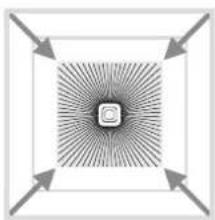
natural_image
Abstract geometric pattern with radial lines and arrows, no text or symbols present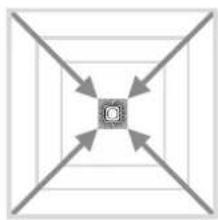
flowchart
graph TD
    A[" "] --> C["C"]
    B[" "] --> C["C"]
    D[" "] --> C["C"]
    E[" "] --> C["C"]
Potenciometar ⑨
Prilagodba dometa individualnim zahtjevima.
Usp. tablicu Tehnički podaci Podešavanje individualnih zahtjeva, stranica 4 – 5.
Paralelni spojevi
natural_image
Technical diagram of a circuit board with wires and connectors, no visible text or symbols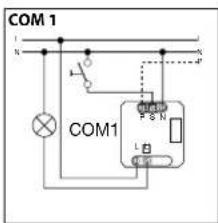
Tehnilised andmed
natural_image
Abstract geometric pattern with radial lines and a central square (no text or symbols)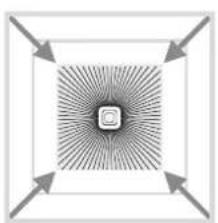
natural_image
Abstract geometric pattern with radial lines and arrows, no text or symbols present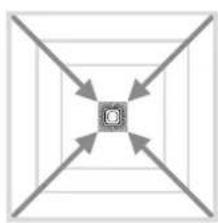
flowchart
graph TD
    A[" "] --> C["C"]
    B[" "] --> C["C"]
    D[" "] --> C["C"]
    E[" "] --> C["C"]
Potentsiomeeter ⑨
natural_image
Pure electrical circuit lines without any symbols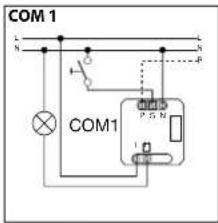
natural_image
Illustration of hands interacting with a device panel, showing a finger pointing at the screen (no text or symbols visible)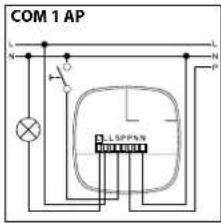
Techniniai duomenys
natural_image
Abstract geometric pattern with radial lines and a central square (no text or symbols)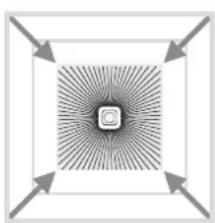
natural_image
Abstract geometric pattern with radial arrows and a central square (no text or symbols)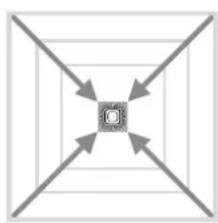
natural_image
Symmetrical diagram with four arrows pointing inward toward a central square (no text or symbols)Potenciometras ⑨
natural_image
Technical diagram of a circuit board with wires and a plug inserted (no text or symbols)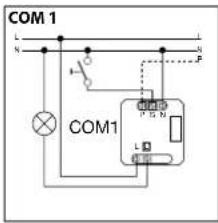
natural_image
Illustration of hands interacting with a device component, showing a finger pressing a button (no text or symbols visible)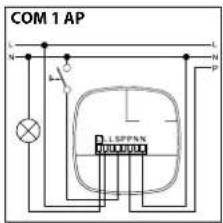
Tehniskie dati
natural_image
Abstract geometric pattern with radial lines and a central square (no text or symbols)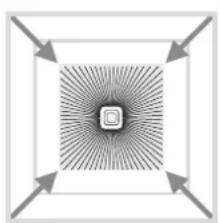
natural_image
Abstract geometric pattern with concentric squares and radial arrows, no text or symbols present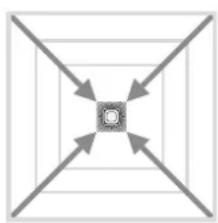
natural_image
Symmetrical geometric diagram with four arrows pointing inward toward a central square (no text or symbols)Potenciometrs ⑨
natural_image
Technical line drawing of a circuit board with wires and a screwdriver inserted (no text or symbols)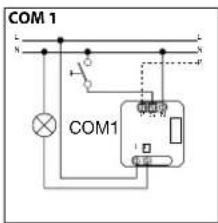
natural_image
Illustration of hands interacting with a device panel, showing a finger pointing at a component (no text or symbols visible)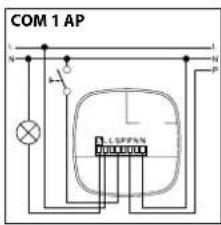
Технические данные
natural_image
Abstract geometric pattern with radial lines and a central square (no text or symbols)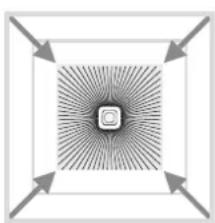
natural_image
Abstract geometric pattern with radial lines and arrows, no text or symbols present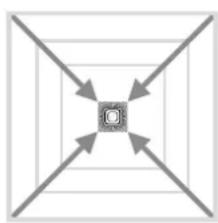
natural_image
Symmetrical diagram with four arrows pointing inward toward a central square (no text or symbols)Потенциометр ⑨
natural_image
Technical diagram of a circuit board with wires and a plug inserted (no text or symbols)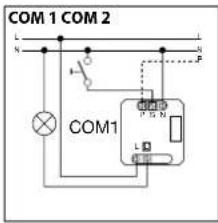
natural_image
Illustration of hands inserting a device into a device casing (no text or symbols visible)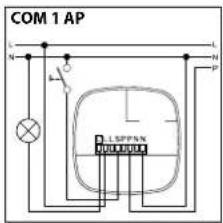
Технически данни
natural_image
Abstract geometric pattern with radial lines and a central square (no text or symbols)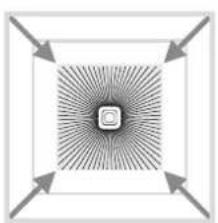
natural_image
Abstract geometric pattern with radial lines and arrows, no text or symbols present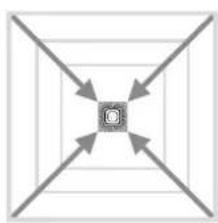
flowchart
graph TD
    A["C"] --> B["Arrow 1"]
    A --> C["Arrow 2"]
    A --> D["Arrow 3"]
    A --> E["Arrow 4"]
Потенциометър ⑨
natural_image
Technical diagram of a circuit board with wires and a plug inserted (no text or symbols)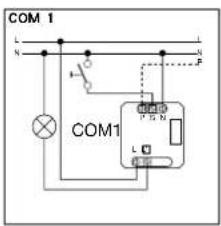
natural_image
Illustration of hands inserting a device into a device casing (no text or symbols visible)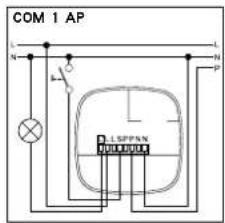
技术参数
natural_image
Abstract geometric pattern with radial lines and a central square (no text or symbols)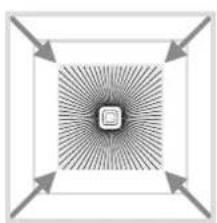
natural_image
Abstract geometric pattern with radial arrows and a central square (no text or symbols)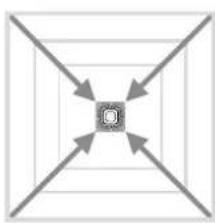
natural_image
Symmetrical diagram with four diagonal arrows pointing inward toward a central square (no text or symbols)电位计⑨
根据个性化需求调整有效距离。