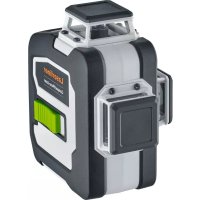
CompactPlaneLaser 3G Pro - Laser pointer Laserliner - Free user manual and instructions
Find the device manual for free CompactPlaneLaser 3G Pro Laserliner in PDF.



| Product Type | 3D green line laser |
| Brand | Laserliner |
| Model | CompactPlaneLaser 3G Pro |
| Category | Laser pointer / Laser level |
| Dimensions (L x W x H) | 120 x 122 x 80 mm |
| Weight | 525 g (with battery pack) |
| Power Supply | Li-ion battery pack 7.4 V / 2.6 Ah; charging time approx. 4 h |
| Battery Life | Approx. 9 h (3 laser planes), approx. 17 h (1 laser plane) |
| Accuracy | ± 0.35 mm/m |
| Self-leveling Range | ± 3° |
| Visibility (typical) | 30 m; up to 60 m with GRX manual receiver |
| Laser Wavelength | 515 nm (green) |
| Laser Class | 2 (< 1 mW) according to EN 60825-1 |
| Main Functions | Projection of 3 laser circles at 360° (horizontal, vertical, slope); horizontal and vertical leveling; slope mode; manual receiver mode; Tilt function; digital connection via smartphone app |
| Tripod Mount Thread | 1/4" and 5/8" |
| Radio Interface | IEEE 802.15.4 (Digital Connection); max range 10 m |
| Maintenance and Cleaning | Clean with a slightly damp cloth; no solvents or abrasives; remove battery before extended storage; store in a dry and clean place |
| Safety | Laser class 2: do not look into the beam; do not point at people; turn off before transport; comply with EMC and RED regulations |
| Spare Parts and Repairability | For any adjustment or repair, contact the dealer or UMAREX-LASERLINER customer service; annual calibration recommended |
| Working Conditions | 0°C to 50°C; max. humidity 80% RH; max. altitude 4000 m |
| Warranty and Compliance | Compliant with EU and UK directives; warranty according to manufacturer's conditions |
Frequently Asked Questions - CompactPlaneLaser 3G Pro Laserliner
User questions about CompactPlaneLaser 3G Pro Laserliner
0 question about this device. Answer the ones you know or ask your own.
Ask a new question about this device
Download the instructions for your Laser pointer in PDF format for free! Find your manual CompactPlaneLaser 3G Pro - Laserliner and take your electronic device back in hand. On this page are published all the documents necessary for the use of your device. CompactPlaneLaser 3G Pro by Laserliner.
USER MANUAL CompactPlaneLaser 3G Pro Laserliner
natural_image
Exterior view of a Laserliner optical device with black and white casing (no text or symbols visible on body)
Laser
515nm
AUTOMATIC
LEVEL

lock

GRX
READY
(Tilt)

verGreen
LASER
1H360° 2V360°
natural_image
Isometric line drawing of a 3D cube structure with no text or symbols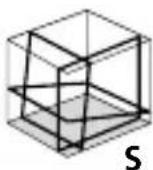
Laserliner
DE
02
EN
13
NL
24
DA
35
FR
46
ES
57
IT
68
PL
79
FI
90
PT
01
SV
12
NO
23
TR
34
RU
45
UK
56
CS
67
ET
78
RO
89
BG
00
EL
11
SL
22
HU
33
SK
44
HR
55
!
https://packd.li/ll/anb/in
natural_image
Isometric line drawing of a 3D cube with visible and hidden edges (no text or symbols)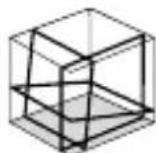
S1H360°
natural_image
Close-up of a USB flash drive with a USB port and cable connector (no text or symbols visible)USB-C
!
https://packd.li/ll/anb/in

Completely read through the operating instructions, the „Warranty and Additional Information“ booklet as well as the latest information under the internet link at the end of these instructions. Follow the instructions they contain. These documents must be kept in a safe place and passed on together with the product.
Intended use
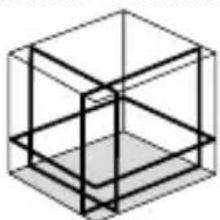
This three-dimensional laser projects three green 360° laser circles and is intended for aligning horizontals, verticals and slopes. The upper and lower laser crosses are suitable for plumb lining. Optical signals indicate when the unit is outside its self-levelling range. The product has an integral handheld receiver mode as well as 1/4" and 5/8" tripod connections. The digital connection interface allows the device to be operated remotely from a smart phone via the Commander app.
General safety instructions
- The device must only be used in accordance with its intended purpose and within the scope of the specifications.
- The measuring tools and accessories are not toys. Keep out of reach of children.
- Modifications or changes to the device are not permitted, this will otherwise invalidate the approval and safety specifications.
- Do not expose the device to mechanical stress, extreme temperatures, moisture or significant vibration.
- The device must no longer be used if one or more of its functions fail, the battery charge is weak, or the housing has been damaged.
Safety instructions
Using class 2 lasers
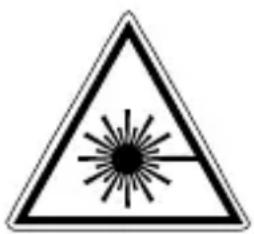
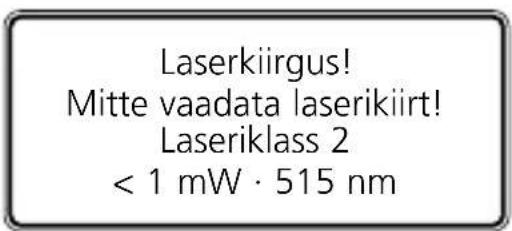
Laser radiation! Do not stare into the beam! Class 2 laser < 1 mW · 515 nm
IEC 60825-1:2014, EN 60825-1:2014/A11:2021,
EN 50689:2021
Laserliner
- Attention: Do not look into the direct or reflected beam.
- Do not point the laser beam towards persons.
- If a person's eyes are exposed to class 2 laser radiation, they should shut their eyes and immediately move away from the beam.
- Under no circumstances should optical instruments (magnifying glass, microscope, binoculars) be used to look at the laser beam or reflections.
- Do not use the laser at eye level (1.40 ... 1.90 m)
- Reflective, specular or shiny surfaces must be covered whilst laser devices are in operation.
- In public areas shield off the laser beam with barriers and partitions wherever possible and identify the laser area with warning signs.
Safety instructions
Dealing with electromagnetic radiation
- The measuring device complies with electromagnetic compatibility regulations and limits in accordance with the EMC Directive 2014/30/EU which is covered by the Radio Equipment Directive 2014/53/EU.
- Local operating restrictions – for example, in hospitals, aircraft, petrol stations or in the vicinity of people with pacemakers – may apply. Electronic devices can potentially cause hazards or interference or be subject to hazards or interference.
- The measuring accuracy may be affected when working close to high voltages or high electromagnetic alternating fields.
Safety instructions
Dealing with RF radiation
- The measuring device is equipped with a wireless interface.
- The measuring device complies with electromagnetic compatibility and wireless radiation regulations and limits in accordance with the RED 2014/53/EU.
- Umarex GmbH & Co. KG hereby declares that the CompactPlane-Laser 3G radio equipment complies with the essential requirements and other provisions of the European Radio Equipment Directive 2014/53/EU (RED). The EU Declaration of Conformity can be found in its entirety at the following address: https://packd.li/ll/anb/in
Information on maintenance and care
Clean all components with a damp cloth and do not use cleaning agents, scouring agents and solvents. Remove the battery(ies) before storing for longer periods. Store the device in a clean and dry place.

When transporting, always switch off all lasers, secure pendulum and push the slide switch (3) to the right.
Special product features

Automatic alignment of the device with a magnetically dampened pendulum system. The device is brought into initial position and aligns itself autonomously.

Transport LOCK: The device is protected with a pendelum lock during transport.

GRX-READY technology enables line lasers to be used even in unfavourable light conditions. The laser lines pulsate at a high frequency and this can be picked up by special laser receivers over long distances.

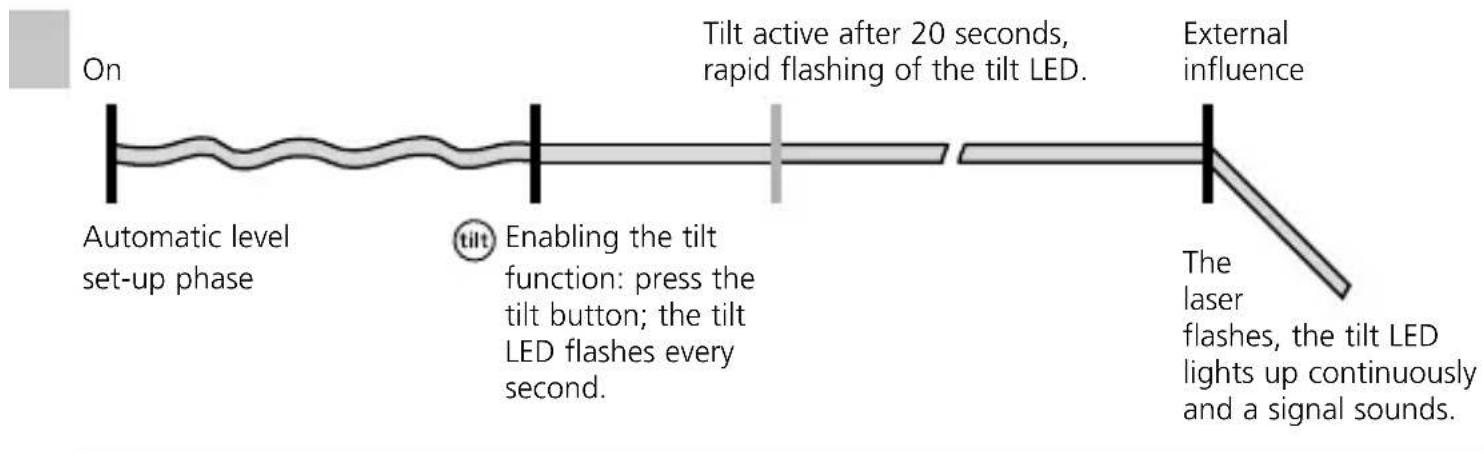
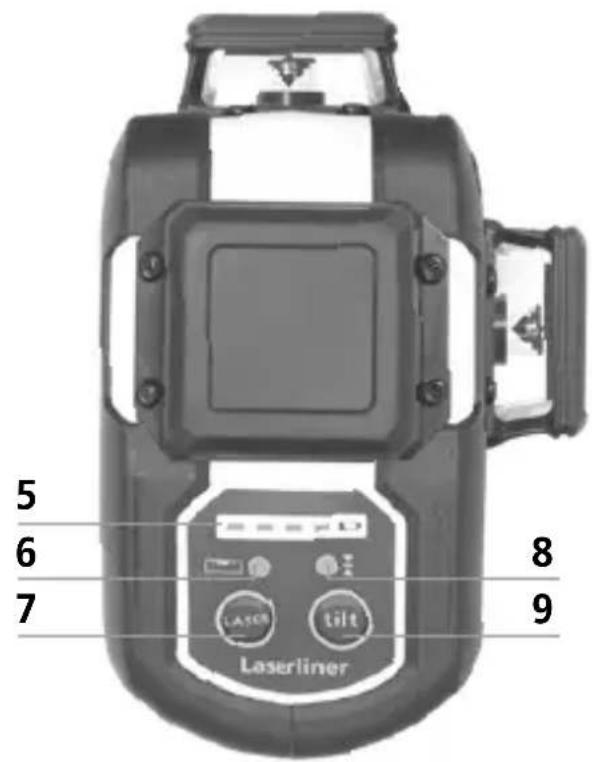
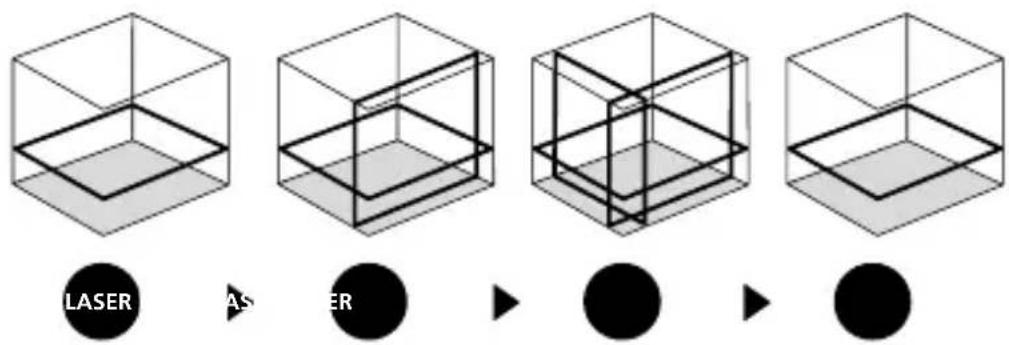
The tilt function is not active following switch-on. Once the device has been set up, press the tilt button to activate the tilt function, enabling you to protect the laser from changes in position caused by the device being disturbed by external factors. The tilt LED flashes to indicate that the tilt function is active. If the position of the laser was shifted through external factors, a signal sounds, the laser flashes and the tilt LED lights up continuously. Press the tilt button twice to continue. Erroneous and inaccurate measurements are thus prevented simply and reliably.

The tilt function does not activate monitoring until 20 seconds after the laser has been fully levelled (set-up phase). The tilt LED flashes every second during the set-up phase, and flashes rapidly when tilt is active.
How the tilt function works
flowchart
graph LR
    A["On"] --> B["Automatic level set-up phase"]
    B --> C["Enabling the tilt function: press the tilt button; the tilt LED flashes every second."]
    C --> D["Tilt active after 20 seconds, rapid flashing of the tilt LED."]
    D --> E["External influence"]
    E --> F["Laser flashes, the tilt LED lights up continuously and a signal sounds."]
Green laser technology
Approx. 6 times brighter than a typical red laser with 630 - 660 nm
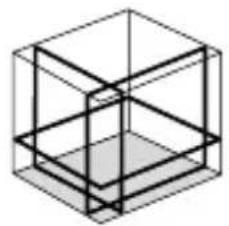
Number and direction of the lasers
H = horizontal laser
V = vertical laser
S = slope function
natural_image
Isometric line drawing of a 3D cube with visible and hidden edges (no text or symbols)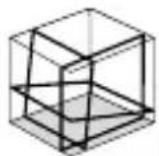
S1H360°
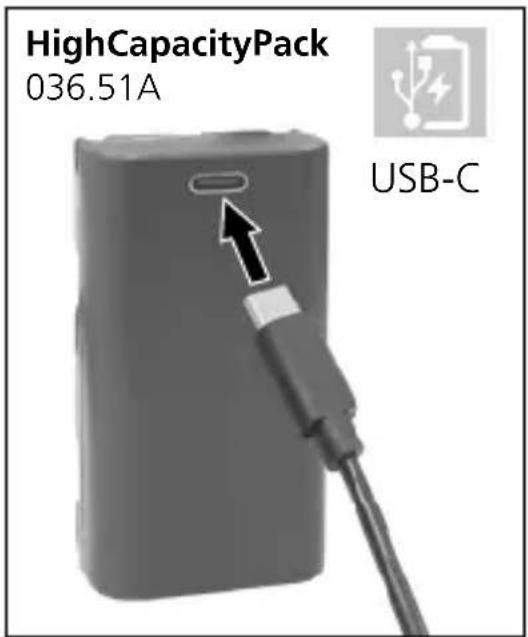
1 Use of lithium-ion rechargeable battery
- Use the power supply/charger unit only in closed rooms; do not expose to moisture or rain otherwise risk of electric shock.
- Charge the device's battery completely prior to use.
- Connect the power pack/charger to the mains power supply and the socket in the battery pack. Please only use the power pack/charger supplied. Using any other power pack/charger will invalidate the warranty.
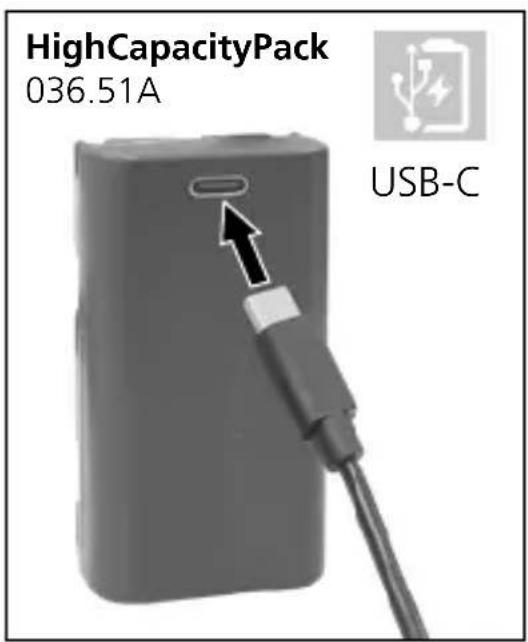
- The LED on the battery pack lights up red while the battery is charging. When the LED changes to blue, charging is complete.
!
The battery may only be charged with the battery charger provided and used only in this laser device. Any other use may cause injury or fire. (3G Pro)
!
Make sure there are no conductive objects in the vicinity of the battery contacts. Short-circuiting of these contacts can cause burn injuries or fire.
!
Do not open the rechargeable battery. This could cause short-circuits.
2 Power supply
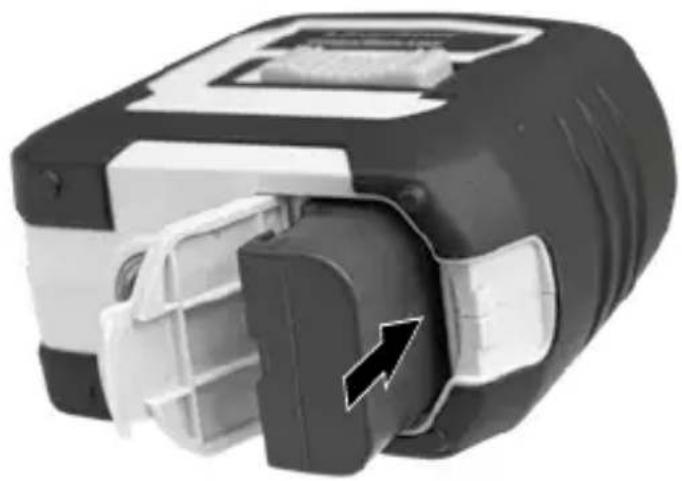
To insert the lithium-ion rechargeable battery
Open the battery compartment and insert the lithium-ion battery as illustrated.
natural_image
Close-up of a mechanical device with internal components and a black arrow indicating a specific part (no visible text or symbols)1
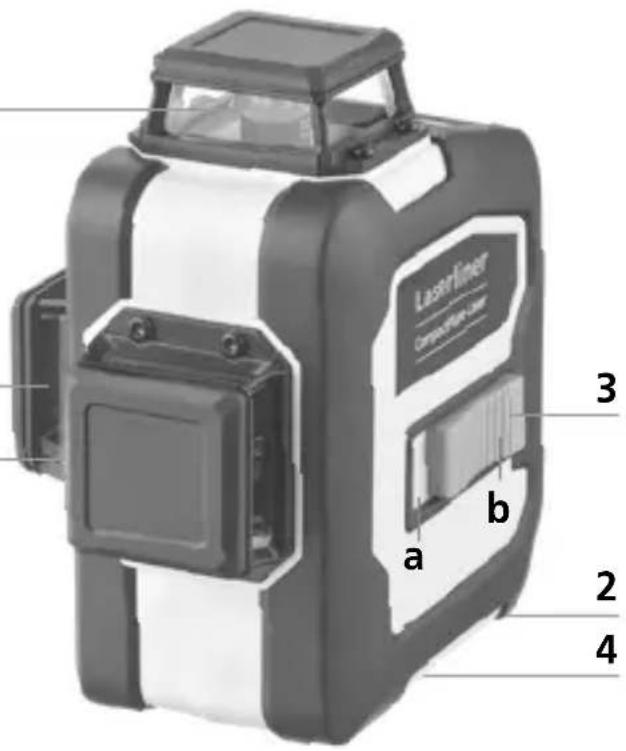
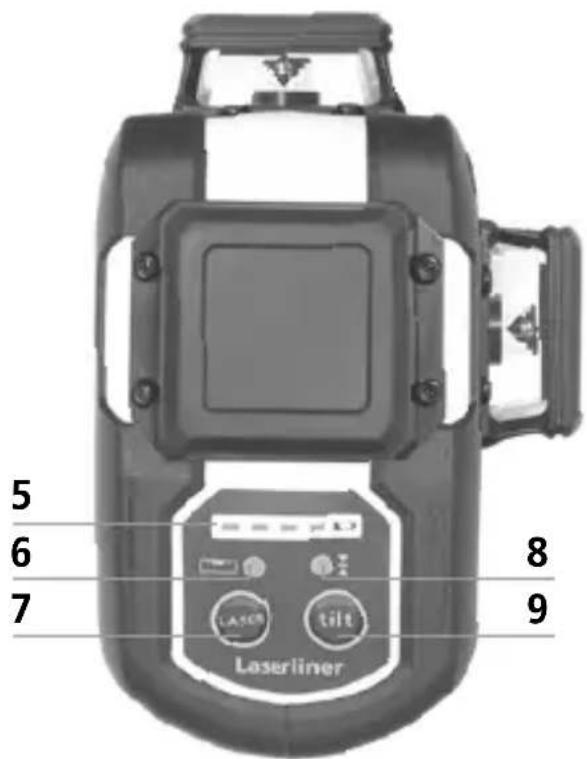
1 Laser output windows
2 Battery compartment (bottom)
3 Slide switch
a ON
b OFF / Transport lock / Slope mode
4 1/4" / 5/8" tripod threads (bottom)
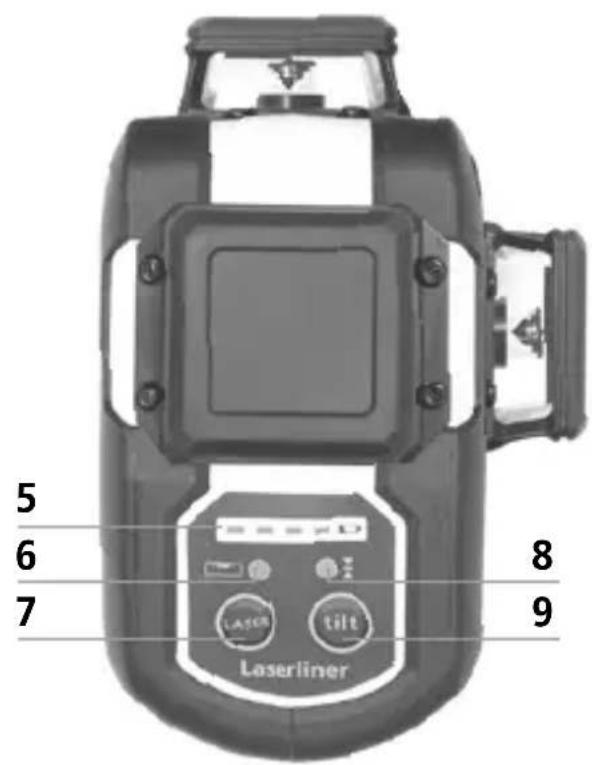
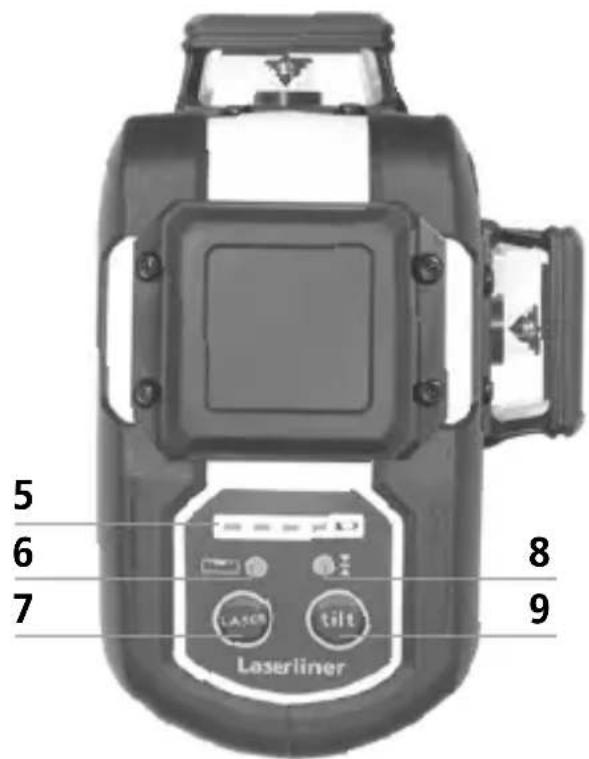
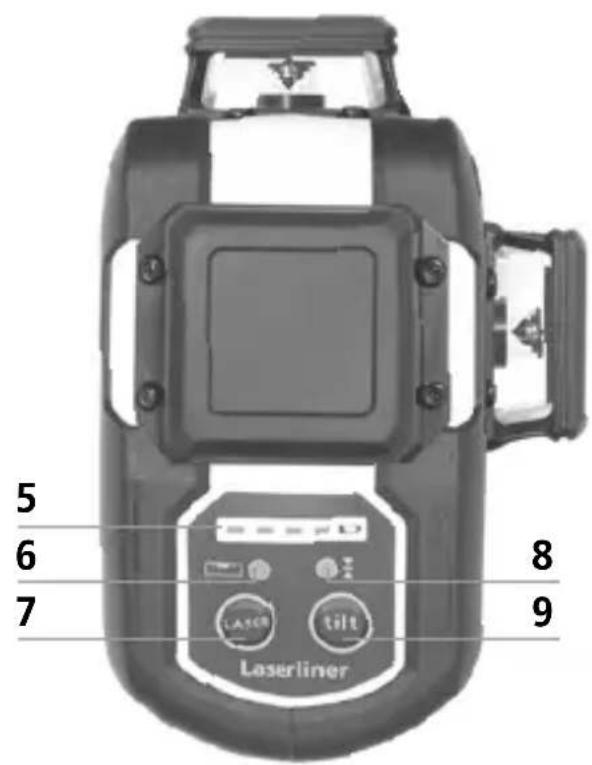
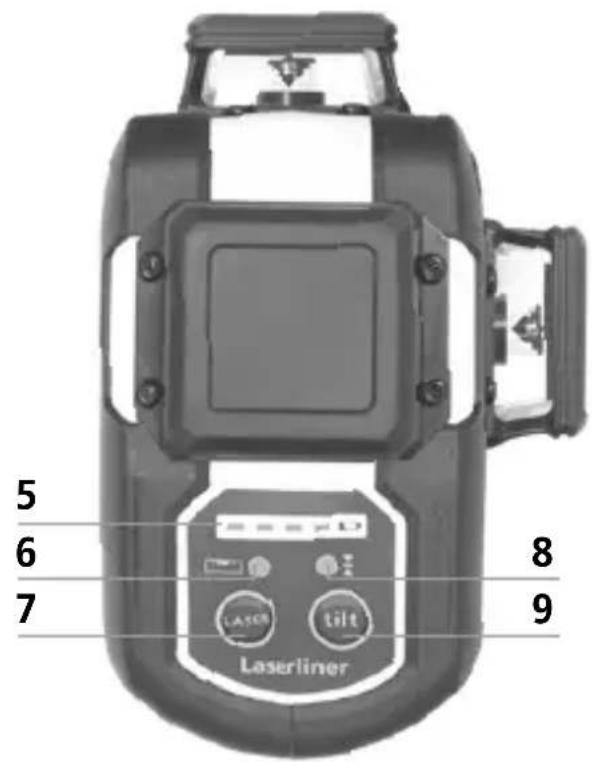
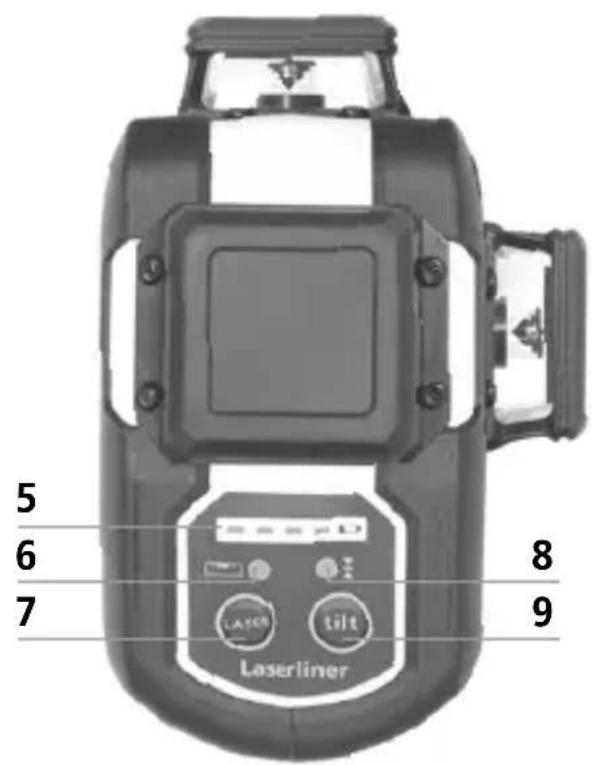
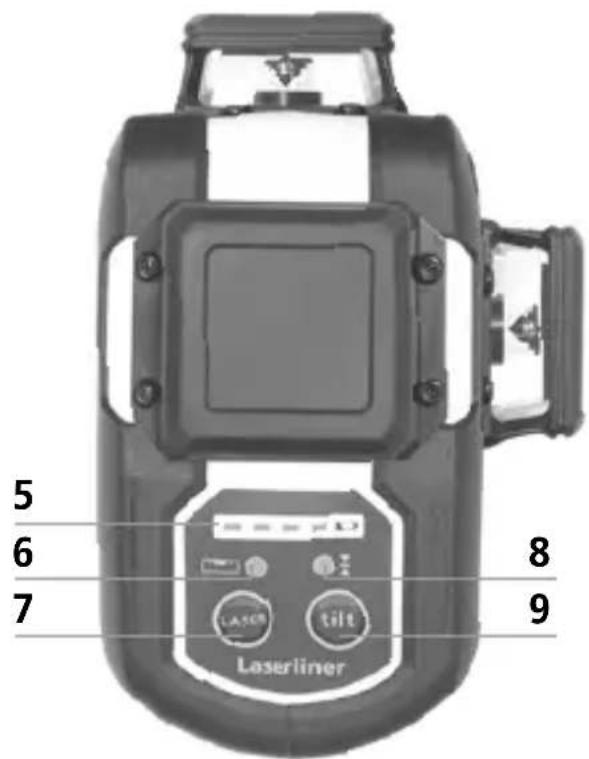
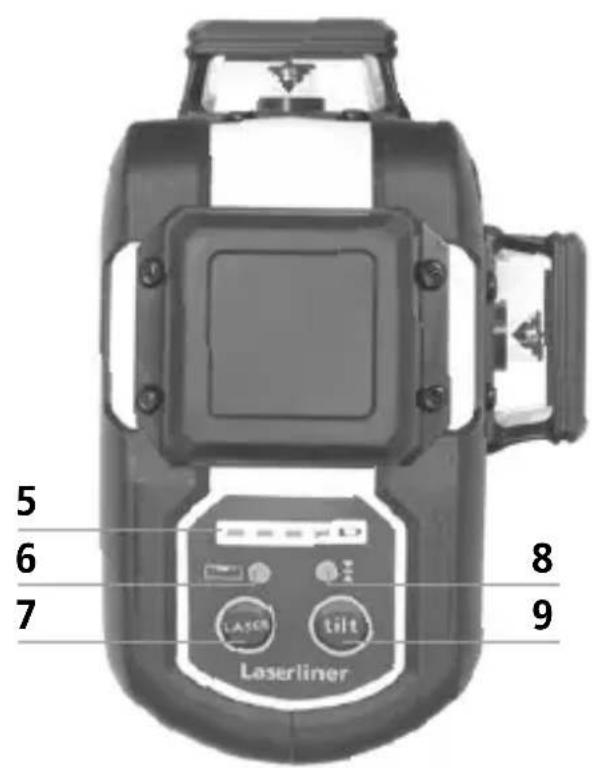
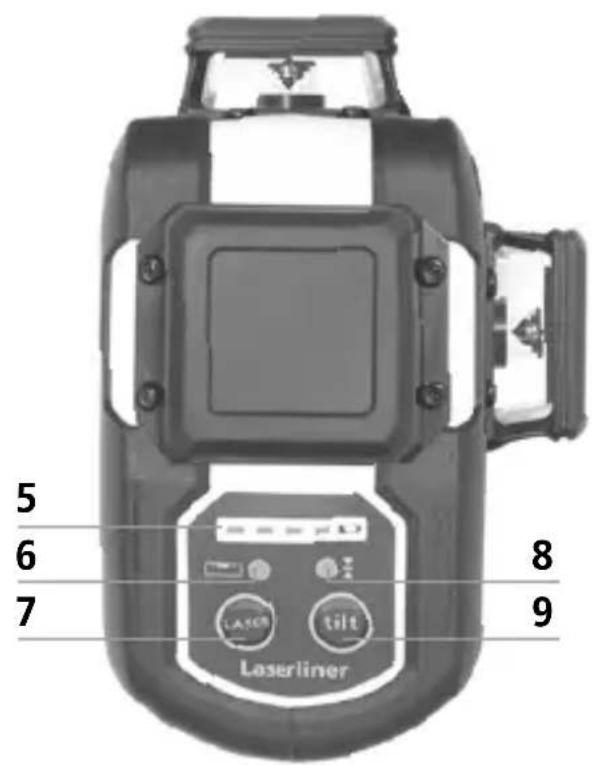
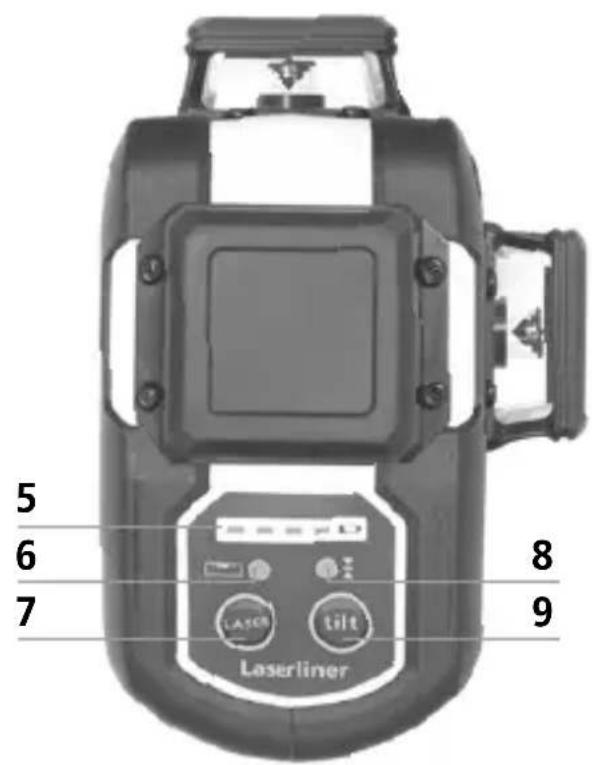
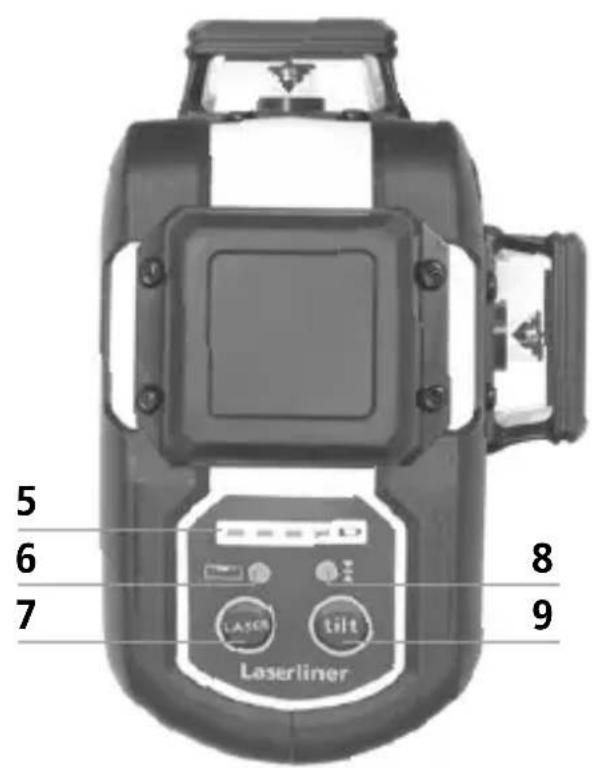
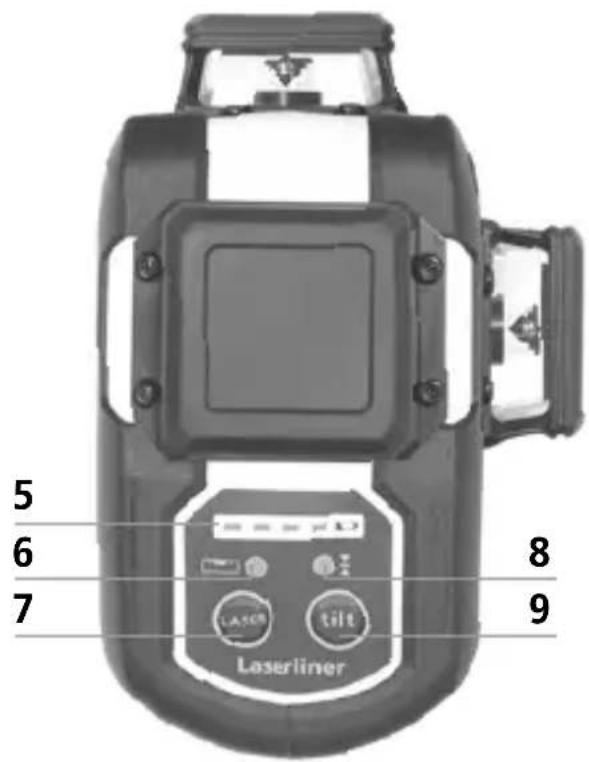
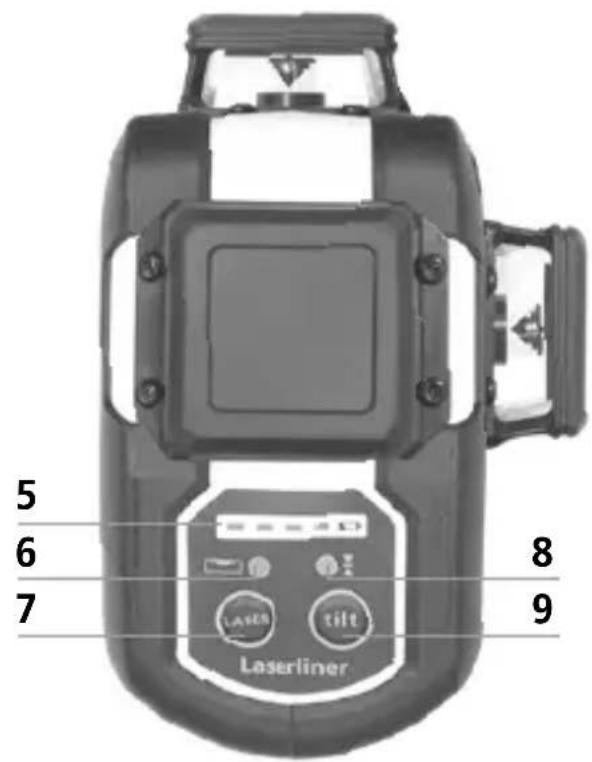
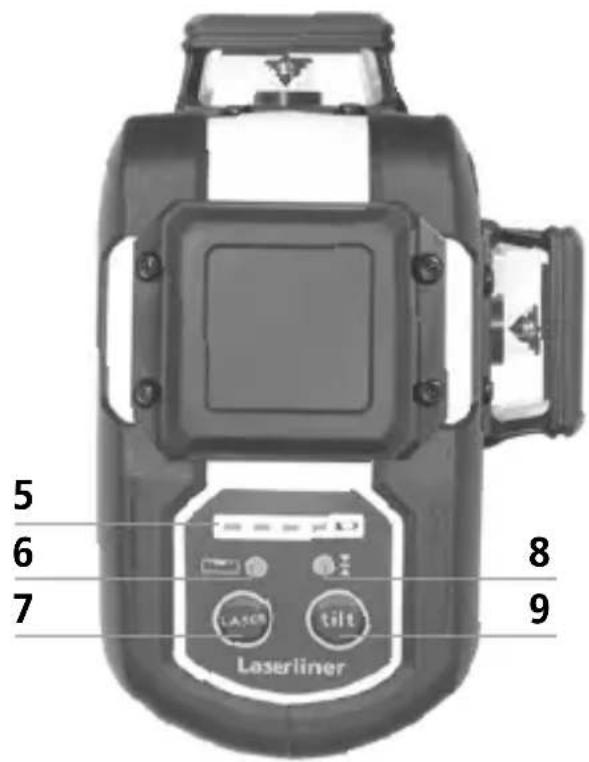
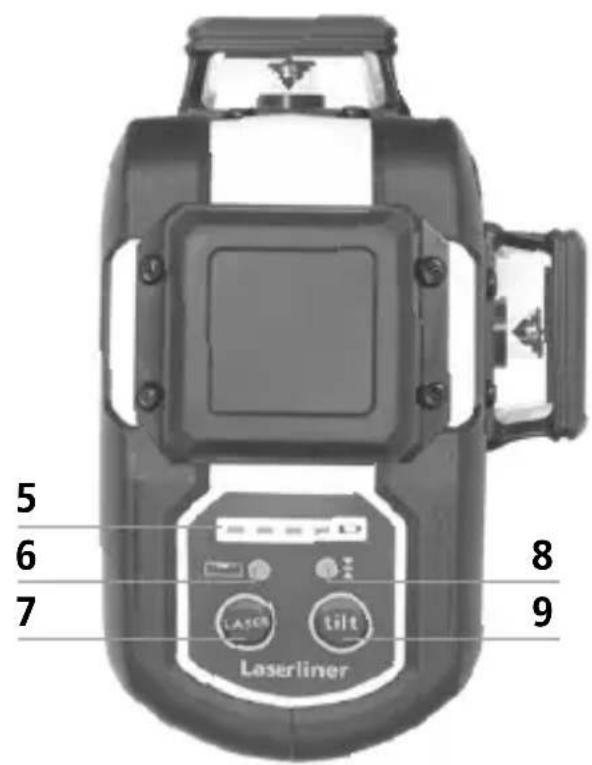
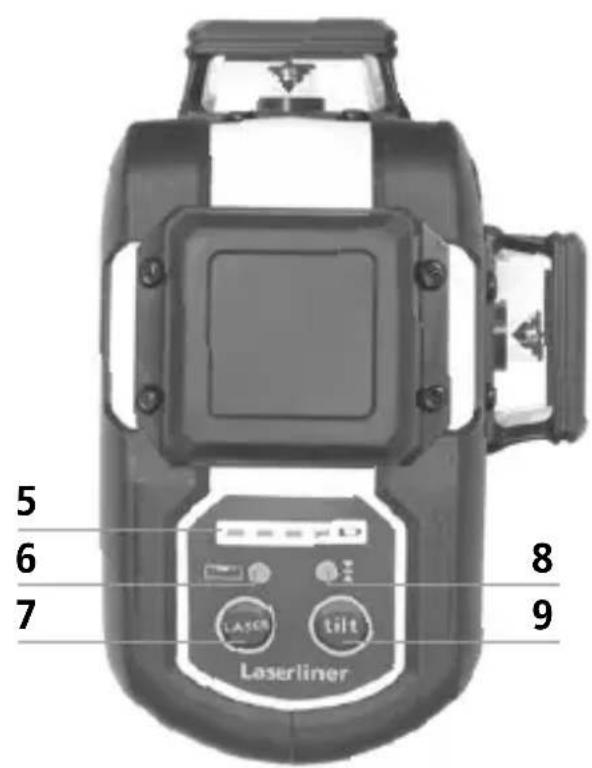
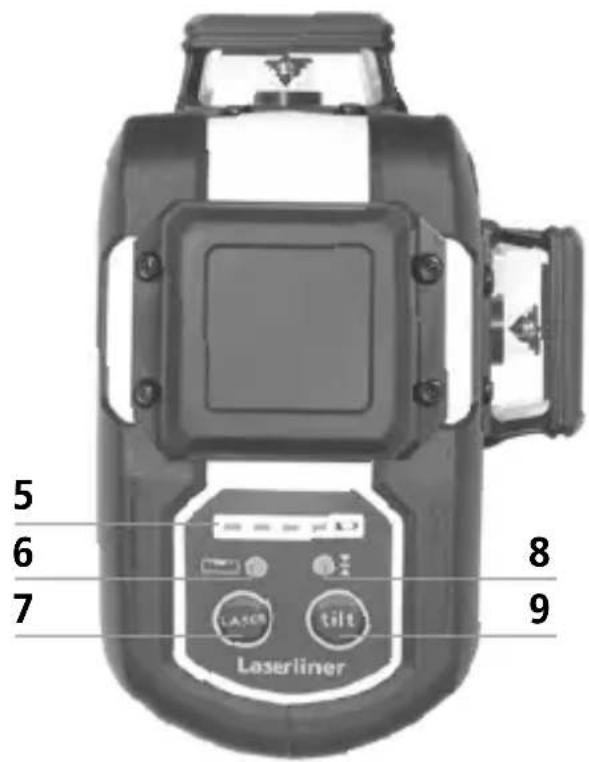
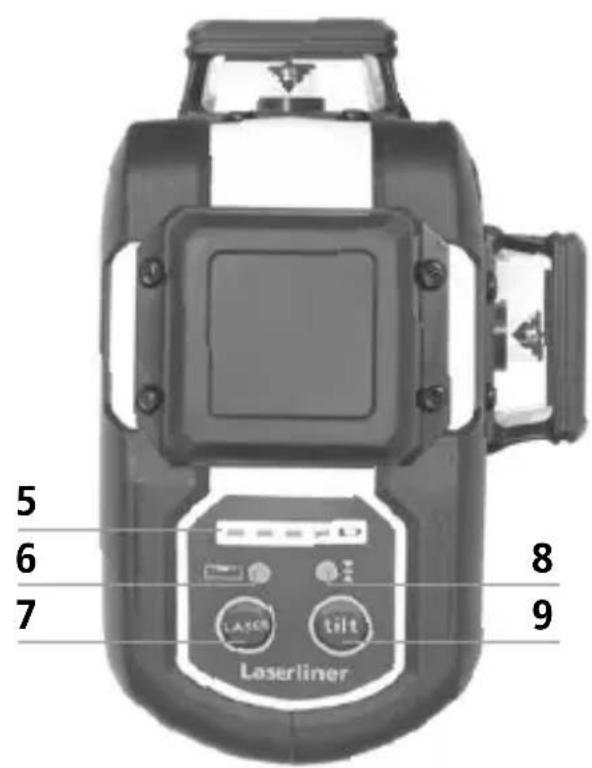
5 Battery status
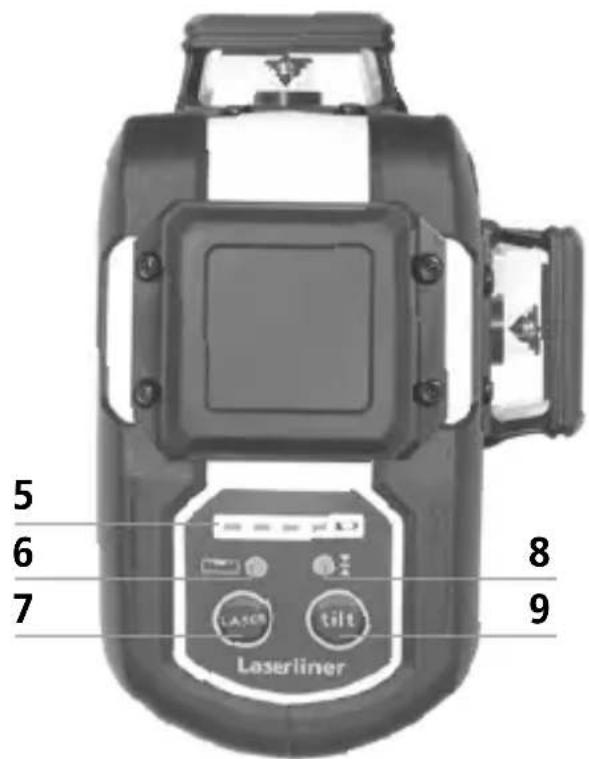
6 LED levelling
red: levelling off
green: levelling on
7 Laser line selection button; Hand receiver mode on / off
8 LED hand receiver mode / LED tilt function
9 Tilt function
3 Horizontal and vertical levelling
Release the transport restraint, push the slide switch (3) to the left. The laser cross will appear. The laser lines can be switched individually with the selection button.
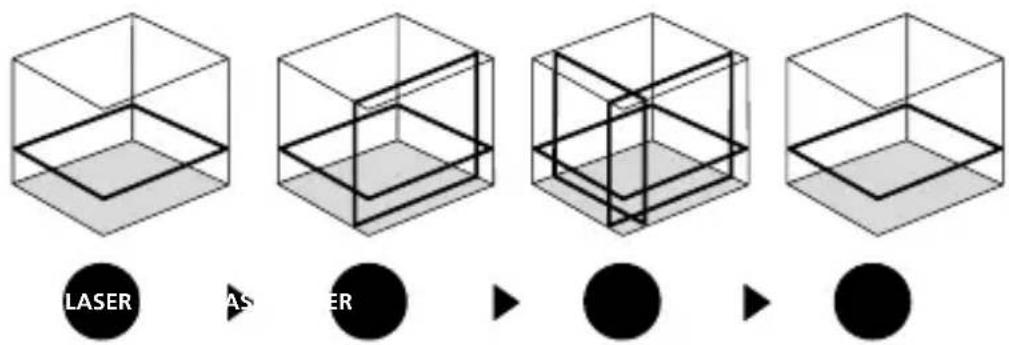
!
The transport restraint must be released for horizontal and vertical levelling. The laser lines flash and the LED lights red as soon as the device is outside the automatic levelling range of 3^ . Position the device such that it is within the levelling range. The LED switches back to green and the laser lines stop flashing (steady light).
4 Slope mode
Do not release transport restraint, push slide switch (3) to the right. Select the laser with the selector button (7). Sloping planes and tilts can now be measured. In this mode, the laser lines no longer align automatically. The LED (6) lights constantly red.
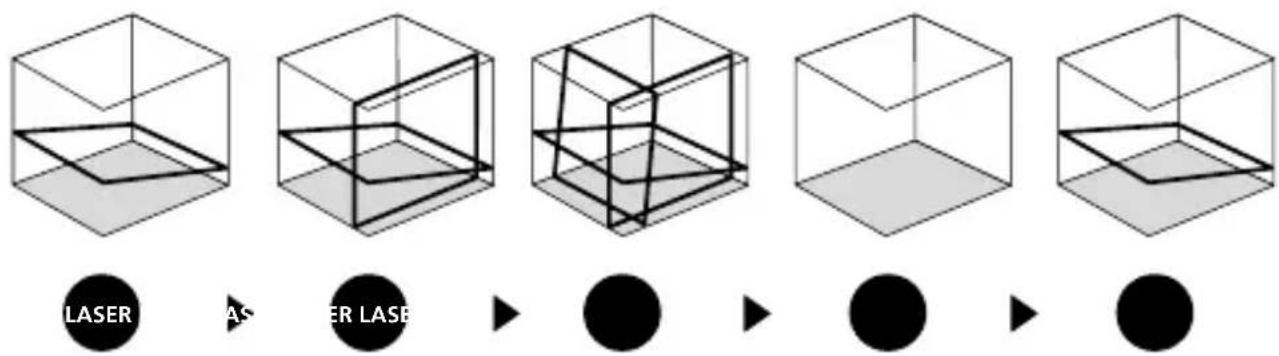
5 Hand receiver mode
Optional: Working with the laser receiver GRX
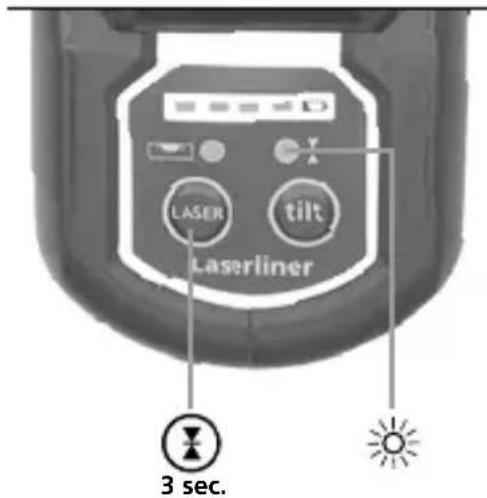
Use an GRX laser receiver (optional) to carry out levelling at great distances or when the laser lines are no longer visible. To work with a laser receiver, switch the line laser to handheld receiver mode by keeping button 7 (handheld receiver mode on / off) pressed. The laser lines will now pulsate with high frequency, making the laser lines darker. The laser receiver can detect these pulsating laser lines.
!
Observe the laser receiver's operating instructions for line lasers.
!
Due to the special optics required to generate a continuous 360^ laser line, the underlying technology may cause differences in brightness in different areas of the line. This may lead to different ranges in hand receiver mode.
Preparing the calibration check
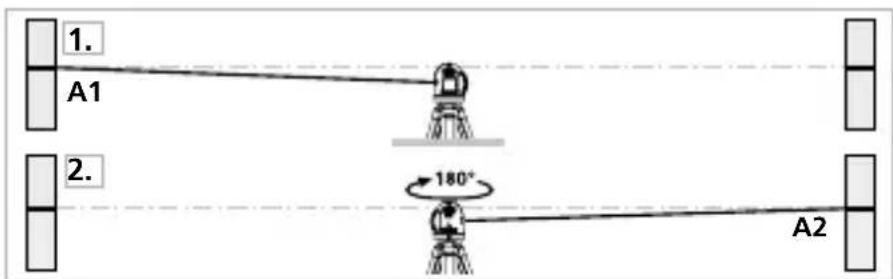
It is possible for you to check the calibration of the laser. To do this, position the device midway between 2 walls, which must be at least 5 m apart. Switch the device on (Laser cross ON). The best calibration results are achieved if the device is mounted on a tripod.
- Mark point A1 on the wall.
- Turn the device through 180^ and mark point A2. You now have a horizontal reference between points A1 and A2.
Performing the calibration check
- Position the device as near as possible to the wall at the height of point A1.
- Turn the device through 180^ and mark point A3. The difference between points A2 and A3 is the tolerance.
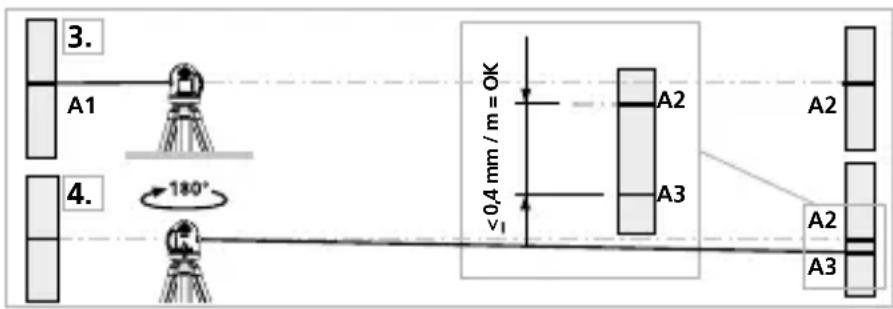

When A2 and A3 are more than 0.35 mm / m apart, an adjustment is necessary. Contact your authorised dealer or else the UMAREX-LASERLINER Service Department.
Checking the vertical line
Position the device about 5 m from a wall. Fix a plumb bob with a line of 2.5 m length on the wall, making sure that the bob can swing freely. Switch on the device and align the vertical laser to the plumb line. The precision is within the specified tolerance if the deviation between the laser line and the plumb line is not greater than ± 2 mm.
Checking the horizontal line
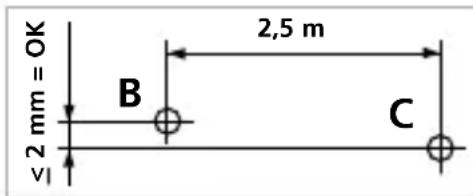
Position the device about 5 m from a wall and switch on the cross laser. Mark point B on the wall. Turn the laser cross approx. 2.5 m to the right and mark point C. Check whether the horizontal line from point C is level with point B to within ± 2 mm. Repeat the process by turning the laser to the left.

Regularly check the calibration before use, after transport and after extended periods of storage.
Data transfer
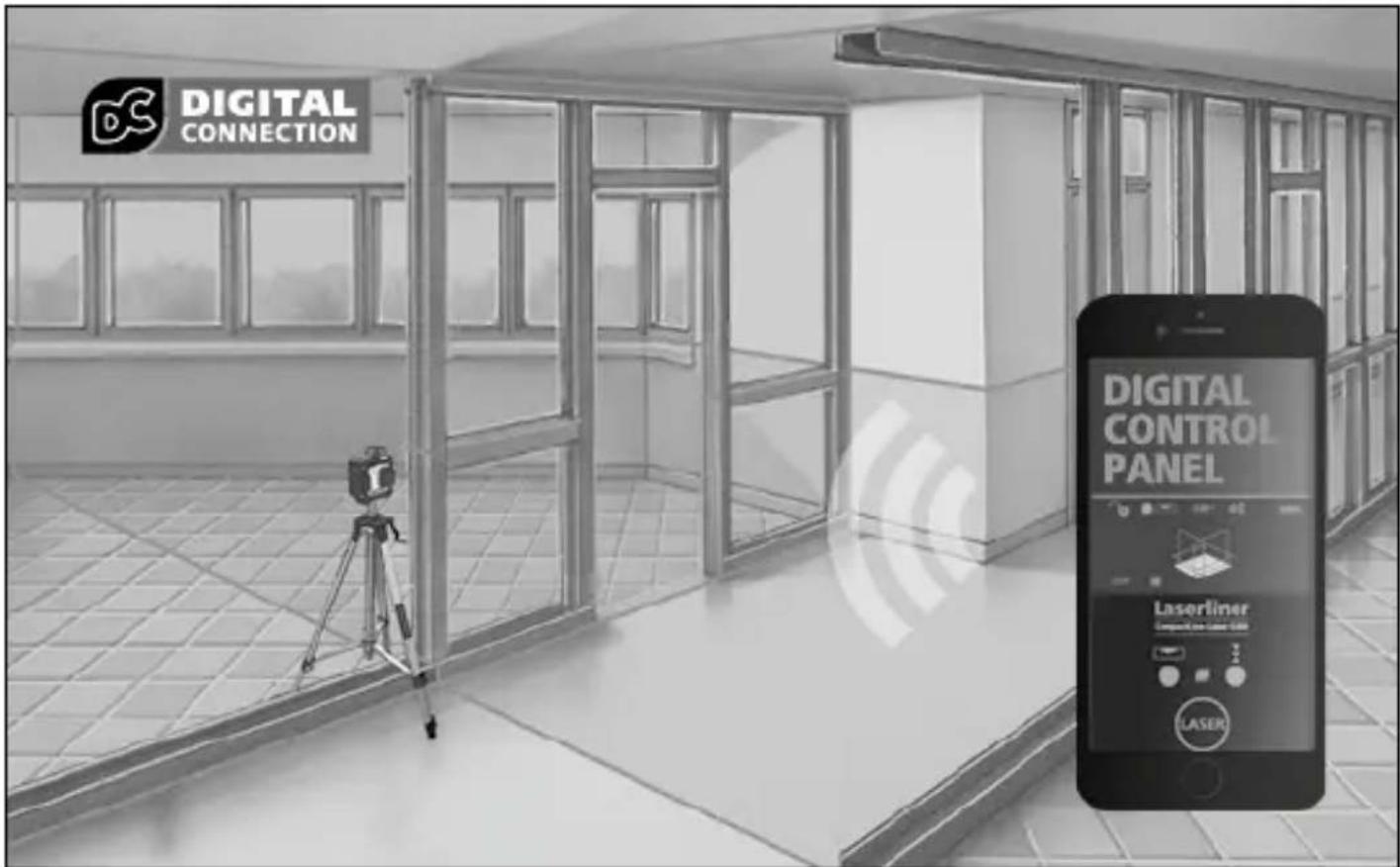
This device has digital connectivity which allows wireless data transfer to mobile devices such as smart phones or tablets with a wireless interface.
The system prerequisites for a digital connection are specified at
https://packd.li/ll/anb/in
This device can generate a wireless connection to devices which are compatible with the wireless standard IEEE 802.15.4. The wireless standard IEEE 802.15.4 is a transfer protocol for Wireless Personal Area Networks (WPAN). The range is set to a maximum distance of 10 m from the terminal device and greatly depends on the ambient conditions such as the thickness and composition of walls, sources of interference as well as the transmit / receive properties of the terminal device.
Application (app)
An app is required to use the digital connection You can download the app from the corresponding stores for the specific type of terminal device:

Download on the App Store

GET IT ON Google Play

Make sure that the wireless interface of the mobile device is activated.
After starting the app and activating the digital connection, a connection can be set up between a mobile device and the measuring device. If the app detects several active measuring devices, select the matching device.
This measuring device can be connected automatically the next time it is switched on.
Additional functions via the app
The app offers a range of additional functions. If it is not possible to control your device via the app for technical reasons, reset the device to the factory settings by switching it off and back on again so that you can continue to use the regular functions without problems.
Calibration
The meter needs to be calibrated and tested on a regular basis to ensure it produces accurate measurement results. We recommend carrying out calibration once a year.
Technical data (Subject to technical changes without notice. 25W03)
| Self-levelling range | ± 3° |
| Accuracy | ± 0.35 mm / m |
| Levelling | automatic |
| Visibility (typical)* 30 m | |
| Working range with hand receiver | 60 m (depends on how the technology affects the difference in brightness) |
| Laser wavelength 515 nm | |
| Laser class | 2 / < 1 mW (EN IEC 60825-1:2014/A11:2021) |
| Power supply | Li-ion battery pack 7.4V / 2,6Ah |
| Charging time | approx. 4 hours |
| Operating time with 3 laser levels | approx. 9 hours with 1 laser level: approx. 17 hours |
| Operating conditions | 0°C ... 50°C, max. humidity 80% rH, no condensation, max. working altitude 4000 m above sea level |
| Storage conditions -10°C ... 70°C | C, max. humidity 80% rH |
| Radio module operating data | IEEE 802.15.4. LE ≥ 4.x (Digital Connection) interface; Frequency band: ISM band 2400–2483.5 MHz, 40 channels; Transmission power: max. 10 mW; Bandwidth: 2 MHz; Bit rate: 1 Mbit/s; Modulation: GFSK/FHSS |
| Dimensions (W x H x D) | 120 x 122 x 80 mm |
| Weight | 525 g (incl. battery pack) |
* at max. 300 lux
EU and UK directives and disposal
This device complies with all necessary standards for the free movement of goods within the EU and the UK.
This product, including accessories and packaging, is an electrical appliance that must be recycled in an environmentally appropriate manner in accordance with European and UK directives on waste electrical and electronic equipment, batteries and packaging, in order to recover valuable raw materials. Remove the batteries from the device without damaging it using standard tools and a separate collection arranged before returning the device for disposal.
Further safety and supplementary notices at:
!
natural_image
Isometric line drawing of a 3D cube with visible and hidden edges (no text or symbols)
S1H360°
natural_image
Close-up of a black and white electronic device with internal components and a black arrow indicating a specific part (no visible text or symbols)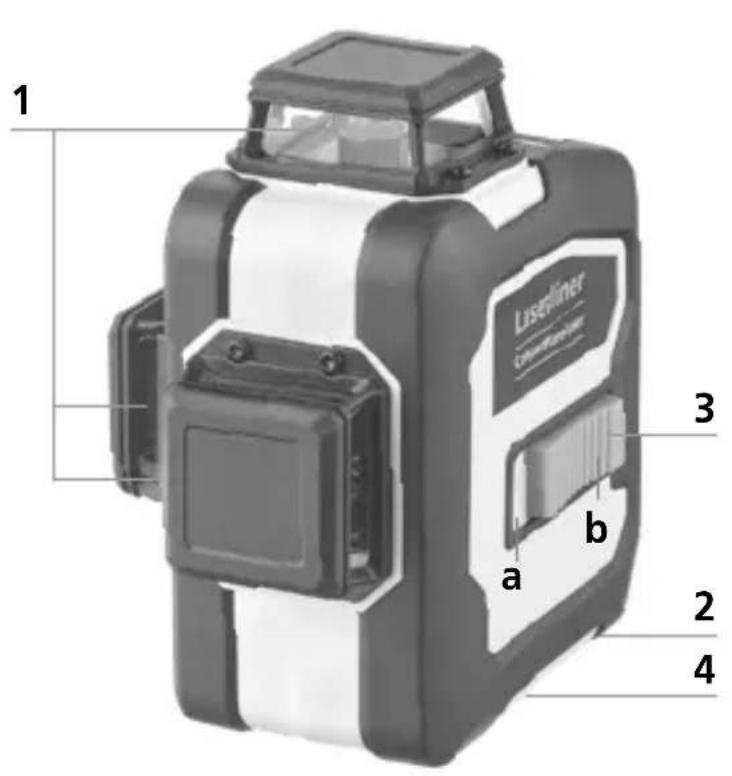



https://packd.li/ll/anb/in
!
natural_image
Warning symbol with a triangular triangle and central sunburst pattern (no text)natural_image
Isometric line drawing of a 3D cube with visible and hidden edges (no text or symbols)
S1H360°
natural_image
Close-up of a USB flash drive with a cable inserted, showing the port and connector (no text or symbols on the device itself)USB-C

natural_image
Close-up of a black and white electronic device with internal components, showing a directional arrow (no text or symbols visible)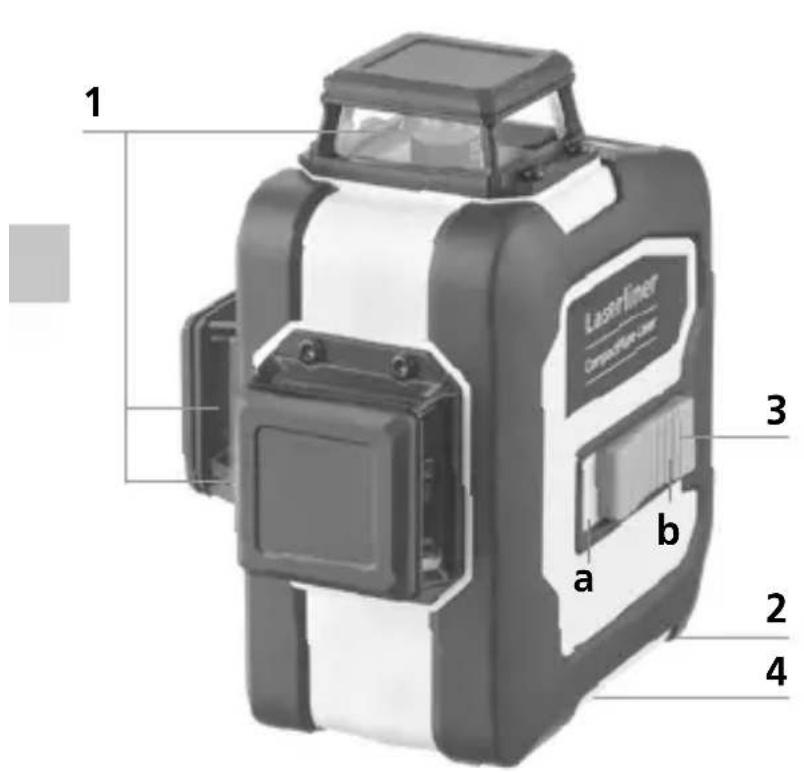
1 Lasers udgangsrude
2 Batterirum (underside)
3 Skydekontakt
a TIL
b FRA / Transportsikring / Hældningsfunktion
4 1/4" / 5/8" gevindbøsning (underside)
5 Batteristatus

Hvis A2 og A3 ligger mere end 0,35 mm / m fra hinanden, skal der foretages en justering. Indlevér laseren til forhandleren, som sørger for det videre fornødne, eller kontakt serviceafdelingen hos UMAREX-LASERLINER.
Kontrol af lodret laserlinie
https://packd.li/ll/anb/in
Download on the App Store

GET IT ON Google Play


https://packd.li/ll/anb/in
!
natural_image
Warning symbol with a triangular frame and central sunburst pattern (no text)natural_image
Isometric line drawing of a 3D cube with visible and hidden edges (no text or symbols)
S1H360°
natural_image
Close-up of a USB flash drive with a cable and connector (no text or symbols visible)USB-C
Laserliner
!
natural_image
Close-up of a black and white electronic device with internal components and a black arrow indicating a specific part (no text or symbols visible)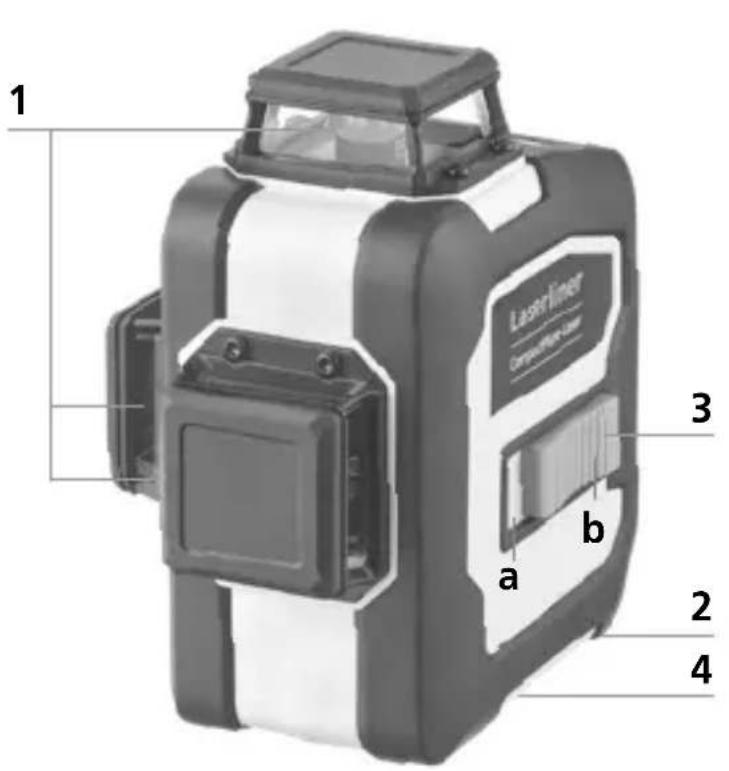


natural_image
Isometric line drawing of a 3D cube with visible and hidden edges (no text or symbols)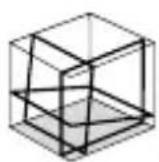
S1H360°
natural_image
Close-up of a USB flash drive with a cable and connector (no text or symbols visible)!
natural_image
Close-up of a black and white electronic device with internal components and a black arrow indicating a specific part (no visible text or symbols)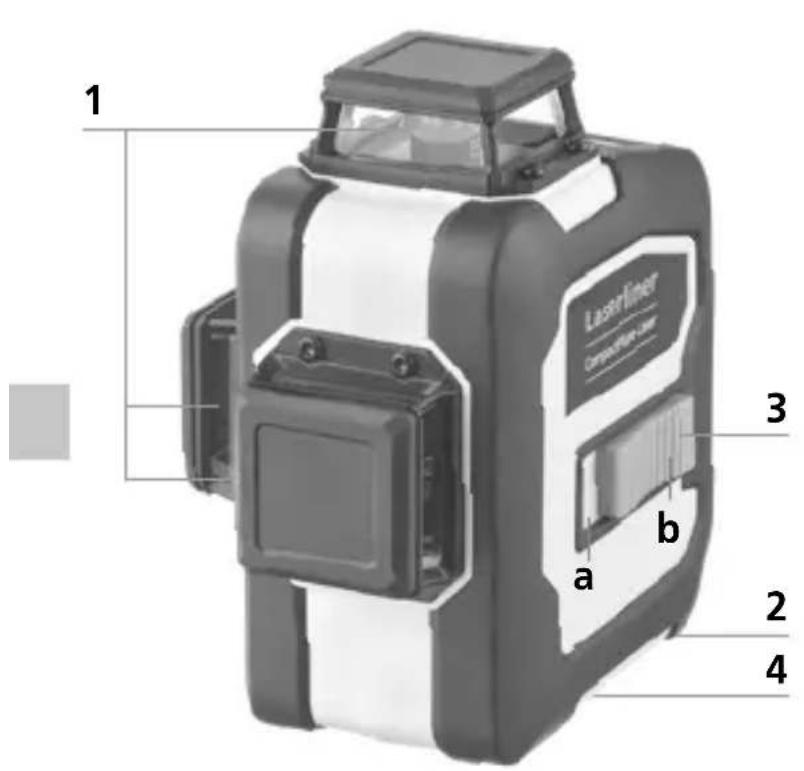
!

https://packd.li/ll/anb/in
Download on the App Store

GET IT ON Google Play
!
natural_image
Warning symbol with a triangular triangle and radiating lines, no text or numbers presenthttps://packd.li/ll/anb/in
natural_image
Isometric line drawing of a 3D cube with visible and hidden edges (no text or symbols)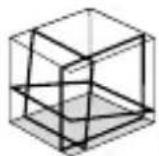
S1H360°
natural_image
Close-up of a black and white electronic device component with internal wiring (no visible text or symbols)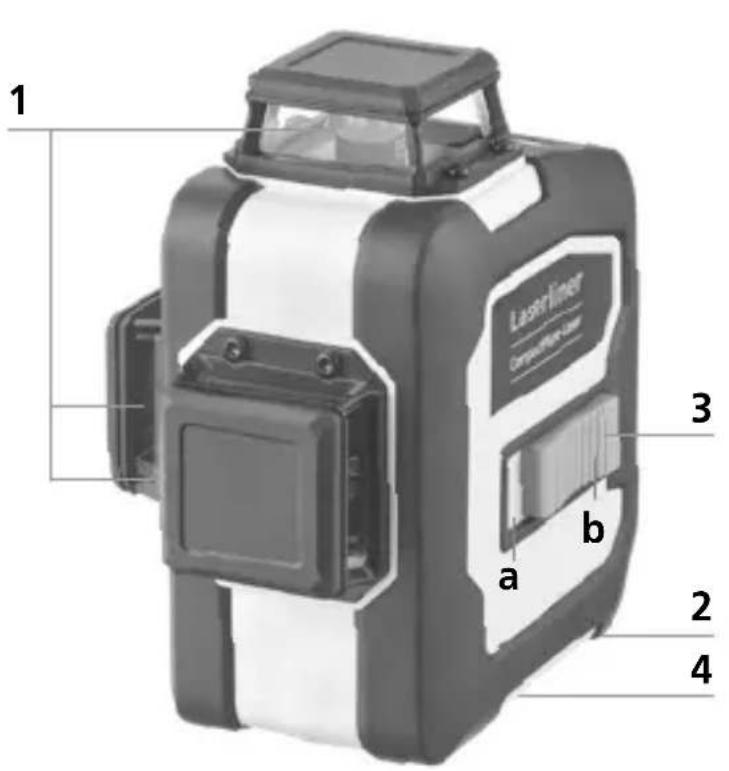
!
https://packd.li/ll/anb/in



https://packd.li/ll/anb/in
!
natural_image
Warning symbol with a triangular triangle and central sunburst (no text or numbers)natural_image
Isometric line drawing of a 3D cube with visible and hidden edges (no text or symbols)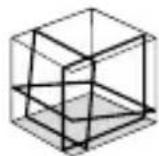
S1H360°
natural_image
Close-up of a USB flash drive with a cable inserted, showing the port and connector (no text or symbols on the device itself)!
natural_image
Close-up of a mechanical component with internal structure and a black arrow indicating direction (no visible text or symbols)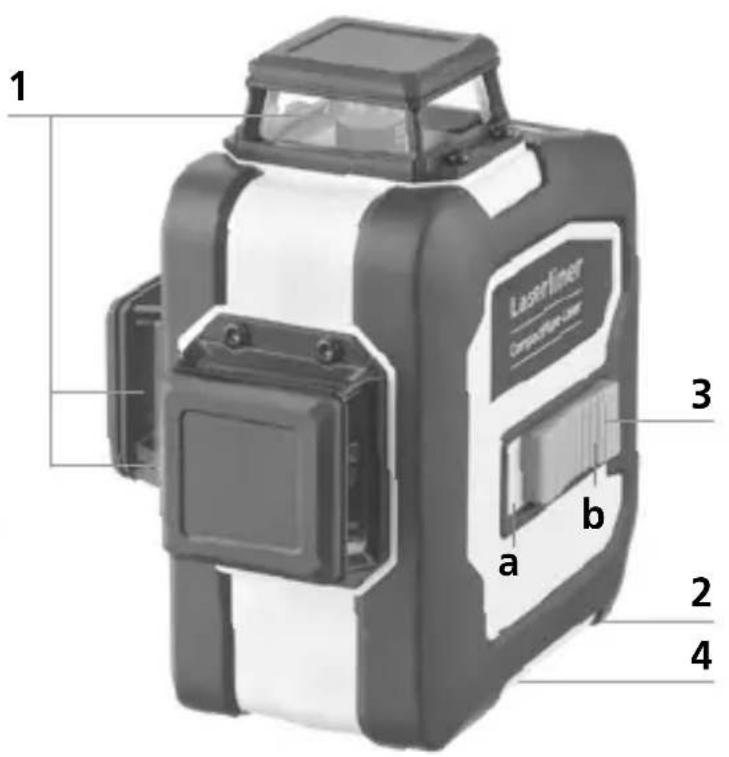

Download on the App Store

GET IT ON Google Play


natural_image
Warning symbol with a triangular triangle and central sunburst pattern (no text)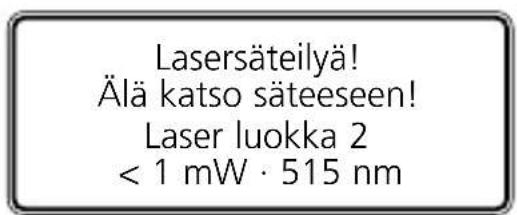
natural_image
Isometric line drawing of a 3D cube with visible and hidden edges (no text or symbols)
S1H360°
natural_image
Close-up of a mechanical device with internal components and a black arrow indicating a specific part (no text or symbols visible)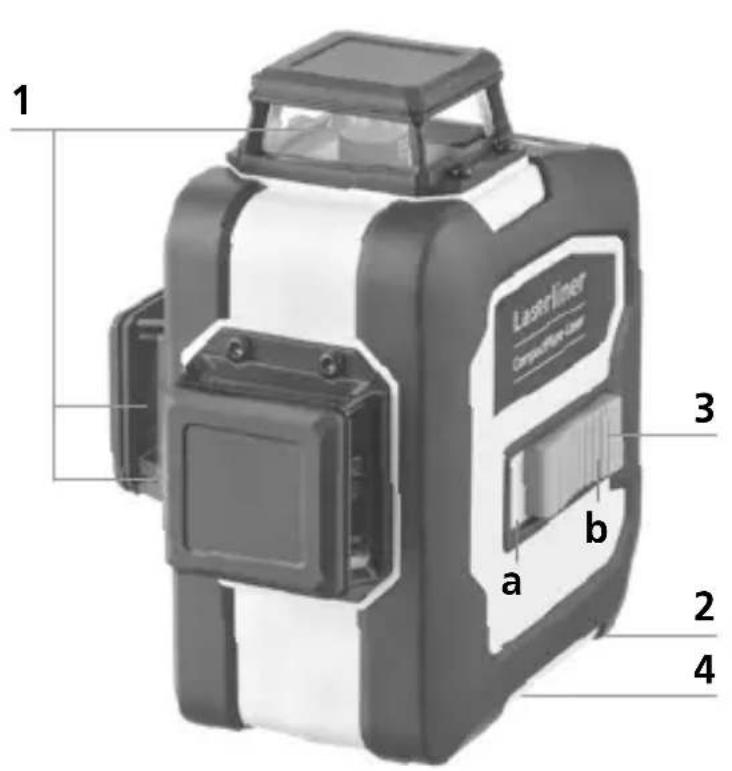



https://packd.li/ll/anb/in
!
natural_image
Warning symbol with a sunburst pattern inside a triangle (no text or numbers)https://packd.li/ll/anb/in
natural_image
Isometric line drawing of a 3D cube structure with no text or symbols
S1H360°
natural_image
Close-up of a USB flash drive with an arrow pointing to the port (no text or symbols on the device itself)!
natural_image
Close-up of a mechanical device with internal components and a black arrow indicating a specific part (no visible text or symbols)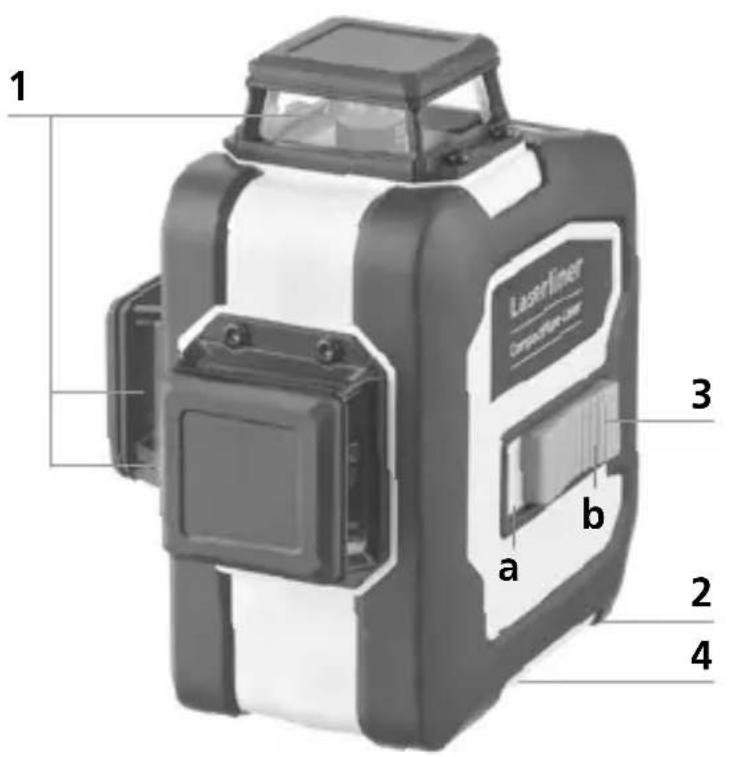
!

Download on the App Store

GET IT ON Google Play
!
natural_image
Warning symbol with a triangular frame and central starburst pattern (no text)Laserstrålning! Titta aldrig direkt in i laserstrålen! Laser klass 2 < 1 mW · 515 nm
IEC 60825-1:2014, EN 60825-1:2014/A11:2021,
EN 50689:2021
natural_image
Isometric line drawing of a 3D cube with visible and hidden edges (no text or symbols)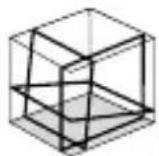
S1H360°
natural_image
Close-up of a USB flash drive with an arrow pointing to the port (no text or symbols on the device itself)USB-C
Laserliner

natural_image
Close-up of a mechanical component with a black arrow indicating a directional change (no text or symbols visible)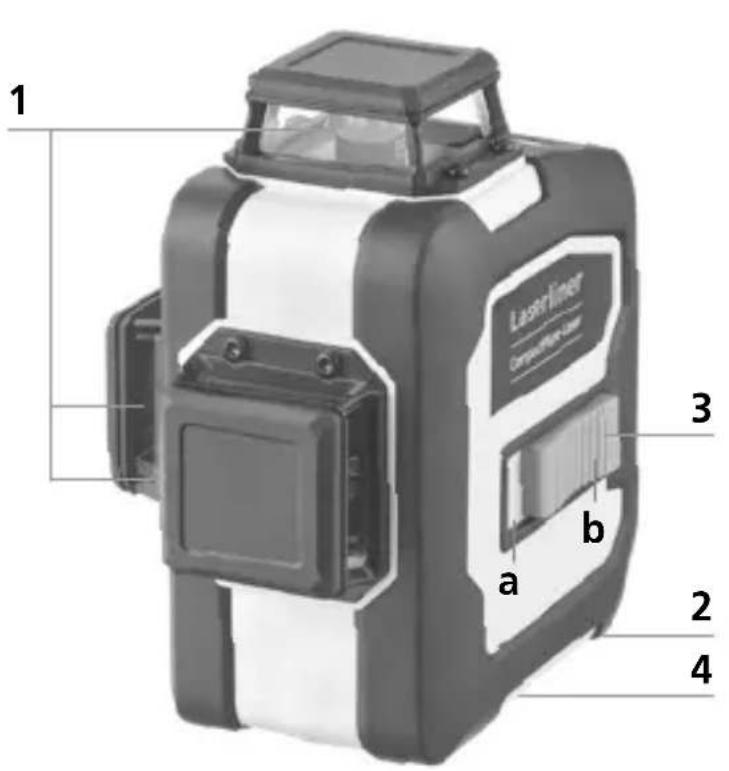

https://packd.li/ll/anb/in


https://packd.li/ll/anb/in
!
Laserstråling! Ikke se inn i strålen! Laser klasse 2 < 1 mW · 515 nm
IEC 60825-1:2014, EN 60825-1:2014/A11:2021,
EN 50689:2021
Laserliner
natural_image
Isometric line drawing of a 3D cube structure with no text or symbols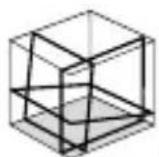
S1H360°
natural_image
Close-up of a USB flash drive with an arrow pointing to the port (no text or symbols on the device itself)natural_image
Close-up of a mechanical device with internal components and a black arrow indicating direction (no visible text or symbols)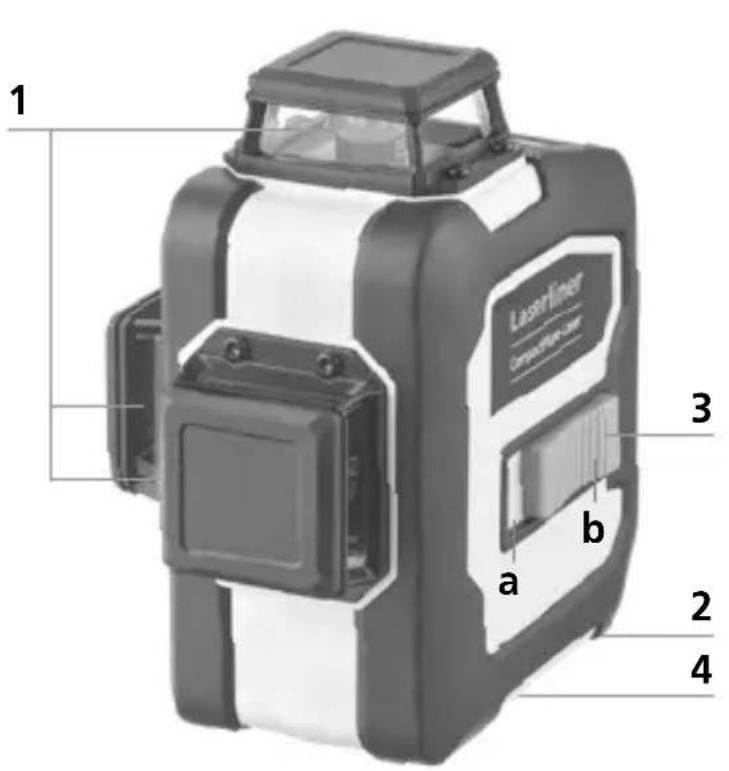
1 Laserstrålehull
2 Batterirom (underside)
3 Skyvebryter
a PÅ
b AV / Transportsikring / Hellingsmodus
4 Stativgjenger 1/4" / 5/8" (underside)
5 Batteristatus





https://packd.li/ll/anb/in
!
natural_image
Warning symbol with a sunburst pattern inside a triangle (no text or numbers)natural_image
Isometric line drawing of a 3D cube with visible and hidden edges (no text or symbols)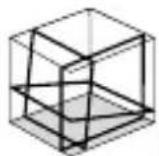
S1H360°
natural_image
Close-up of a USB flash drive with a cable inserted, showing the port and arrow pointing to the fuse (no text or symbols on device body)Laserliner
!
natural_image
Close-up of a black and white electronic device with a black arrow pointing to a component (no visible text or symbols)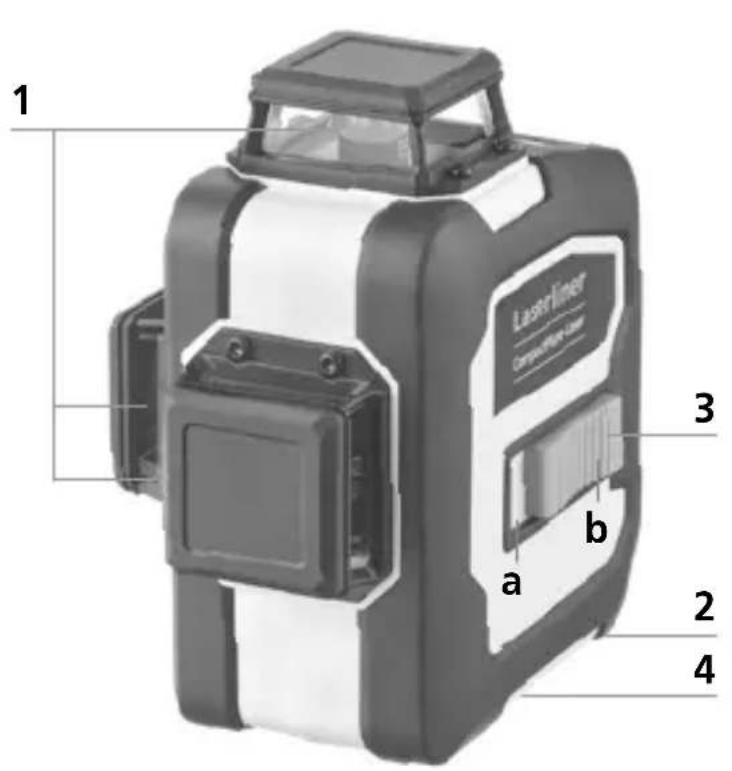

https://packd.li/ll/anb/in
https://packd.li/ll/anb/in
!
Лазерное излучение!
Избегайте попадания
луча в глаза!
Класс лазера 2
< 1 mBT · 515 HM
IEC 60825-1:2014, EN 60825-1:2014/A11:2021,
EN 50689:2021
Laserliner
natural_image
Isometric diagram of a 3D cube with visible and hidden edges, no text or symbols present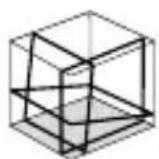
S1H360°
natural_image
Close-up of a USB flash drive with a cable and connector (no text or symbols visible)
natural_image
Close-up of a black and white electronic device with a directional arrow indicating a component (no visible text or symbols)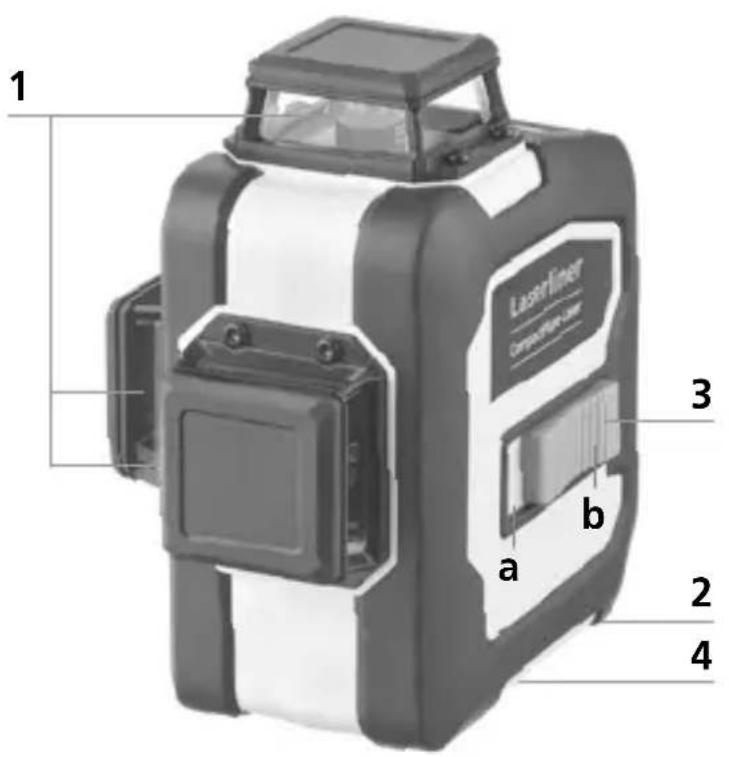
https://packd.li/ll/anb/in
Download on the App Store

GET IT ON Google Play


natural_image
Warning symbol with a triangular triangle and central starburst (no text or numbers)https://packd.li/ll/anb/in
natural_image
Isometric line drawing of a 3D cube structure with no text or symbols
S1H360°
natural_image
Close-up of a mechanical device with a black and white component, showing internal structure and a black arrow indicating direction (no text or symbols visible)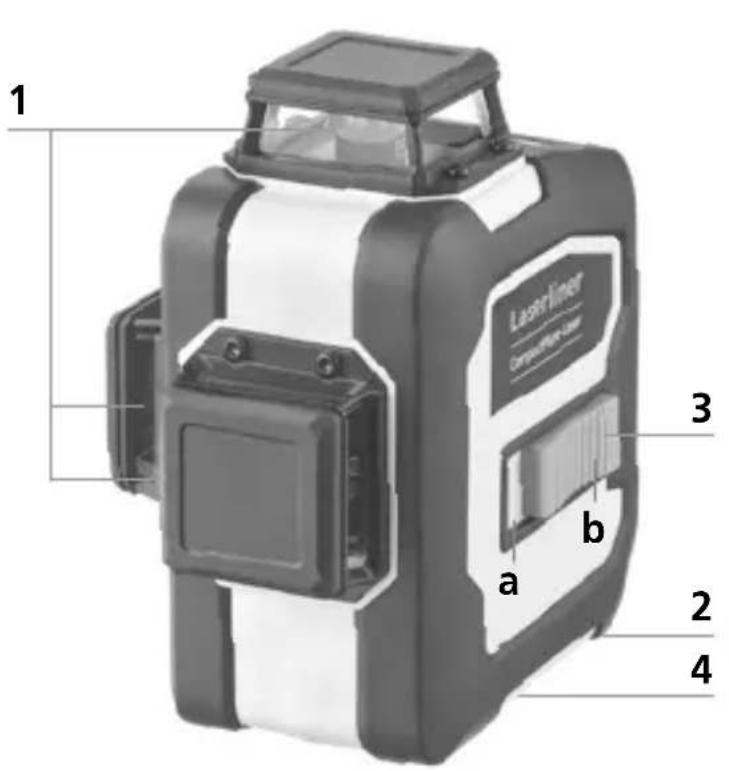

https://packd.li/ll/anb/in
https://packd.li/ll/anb/in
!
natural_image
Warning symbol with a triangular frame and central sunburst pattern (no text)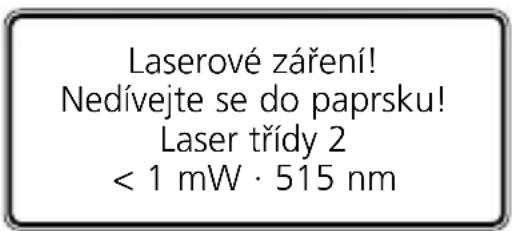
natural_image
Isometric line drawing of a 3D cube with visible and hidden edges (no text or symbols)
S1H360°
1 Manipulace s Li-lon akumulátorem
natural_image
Close-up of a USB flash drive with a cable and connector (no text or symbols visible)!
natural_image
Close-up of a black and white electronic device with a black arrow pointing to a component (no visible text or symbols)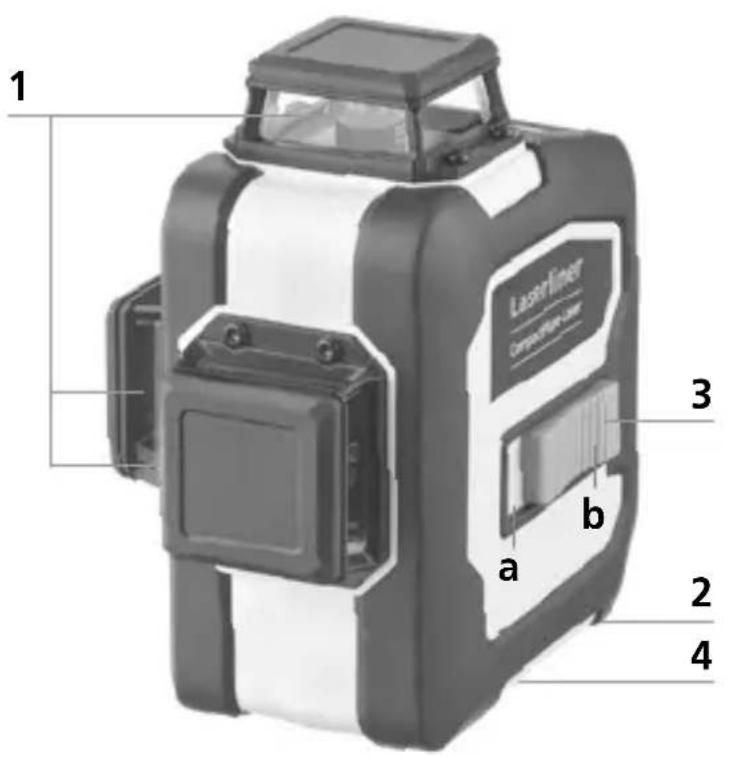


https://packd.li/ll/anb/in
https://packd.li/ll/anb/in
!
IEC 60825-1:2014, EN 60825-1:2014/A11:2021,
EN 50689:2021
natural_image
Isometric line drawing of a 3D cube with visible and hidden edges (no text or symbols)
S1H360°
natural_image
Close-up of a mechanical component with internal structure and directional arrow (no visible text or symbols)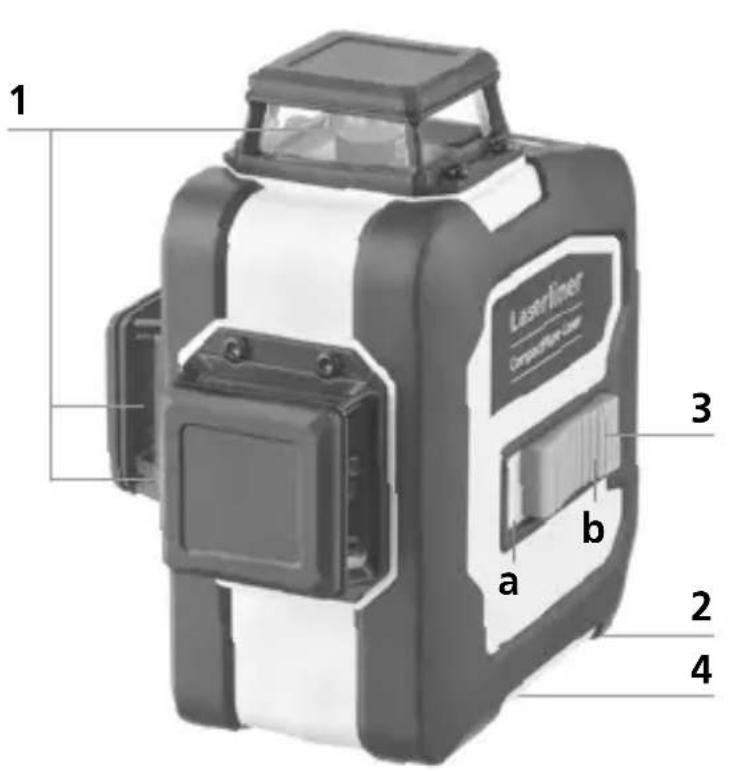

https://packd.li/ll/anb/in
https://packd.li/ll/anb/in
!
natural_image
Warning symbol with a triangular frame and central sunburst pattern (no text)https://packd.li/ll/anb/in
natural_image
Isometric line drawing of a 3D cube with visible and hidden edges (no text or symbols)
S1H360°
natural_image
Close-up of a USB flash drive with an arrow pointing to the port (no text or symbols on the device itself)!
natural_image
Close-up of a black and white electronic device with a black arrow pointing to a component (no visible text or symbols)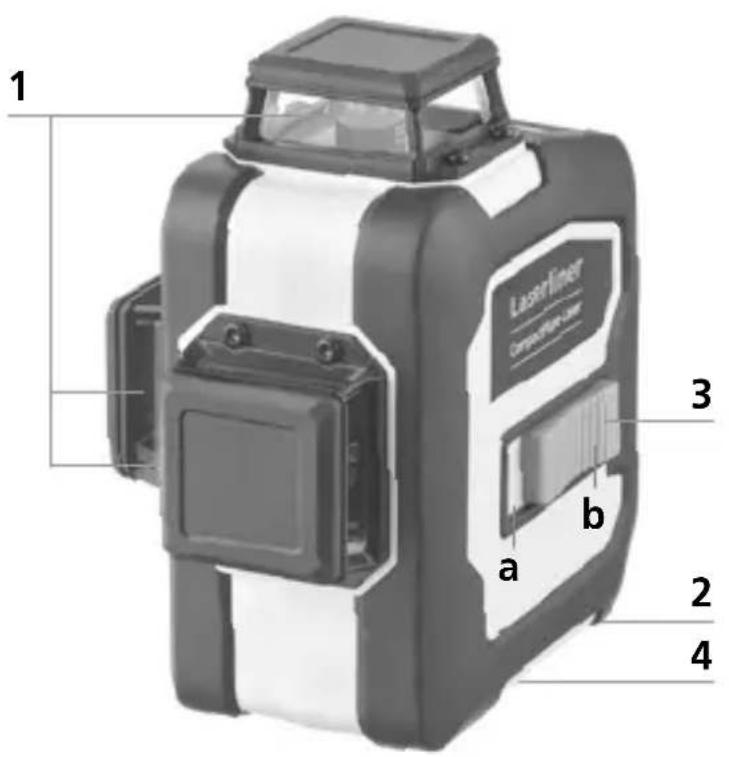

https://packd.li/ll/anb/in
Download on the App Store

GET IT ON Google Play


natural_image
Warning symbol with a triangular triangle containing a central starburst pattern (no text or numbers)Лазерно лъчение!
Не гледайте срещу
лазерния лъч!
Лазер клас 2
< 1 mW · 515 nm
IEC 60825-1:2014, EN 60825-1:2014/A11:2021,
EN 50689:2021
natural_image
Pure diagram of a mechanical or electrical component with no text, numbers, or symbolsnatural_image
Isometric line drawing of a 3D cube structure with no text or symbols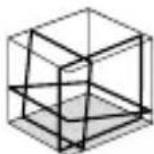
S1H360°
1 Боравене с литиево-йонната зарядна батерия
natural_image
Close-up of a USB flash drive with an arrow pointing to the port (no text or symbols on the device itself)Laserliner
!
natural_image
Close-up of a black and white electronic device component with a black arrow pointing to a specific part (no visible text or symbols)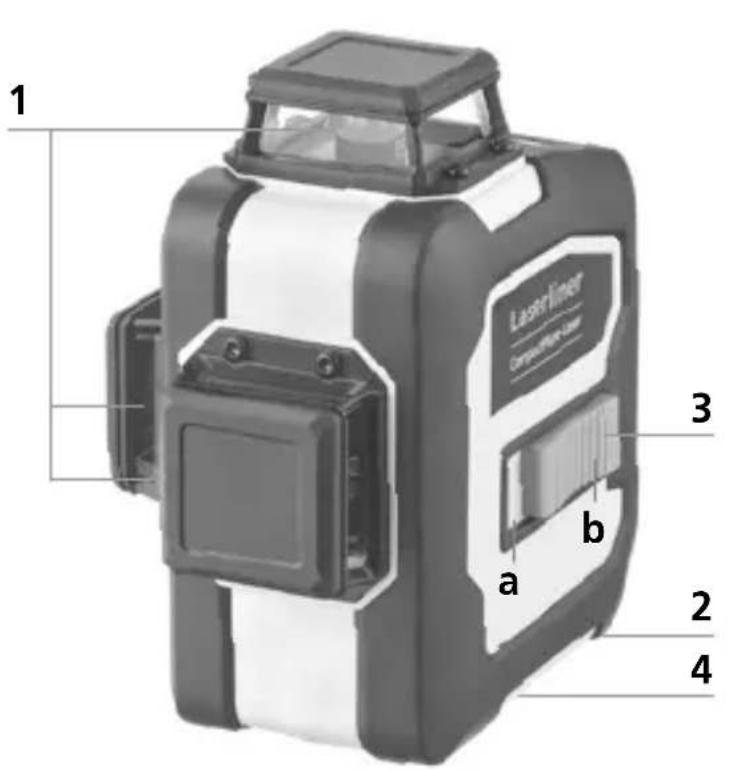
https://packd.li/ll/anb/in
https://packd.li/ll/anb/in
!
natural_image
Warning symbol with a triangular triangle and central sunburst pattern (no text)https://packd.li/ll/anb/in
natural_image
Isometric line drawing of a 3D cube structure with no text or symbols
S1H360°
natural_image
Close-up of a USB flash drive with a cable inserted, showing the port and connector (no text or symbols visible)natural_image
Close-up of a black and white electronic device with a black arrow pointing to a component (no visible text or symbols)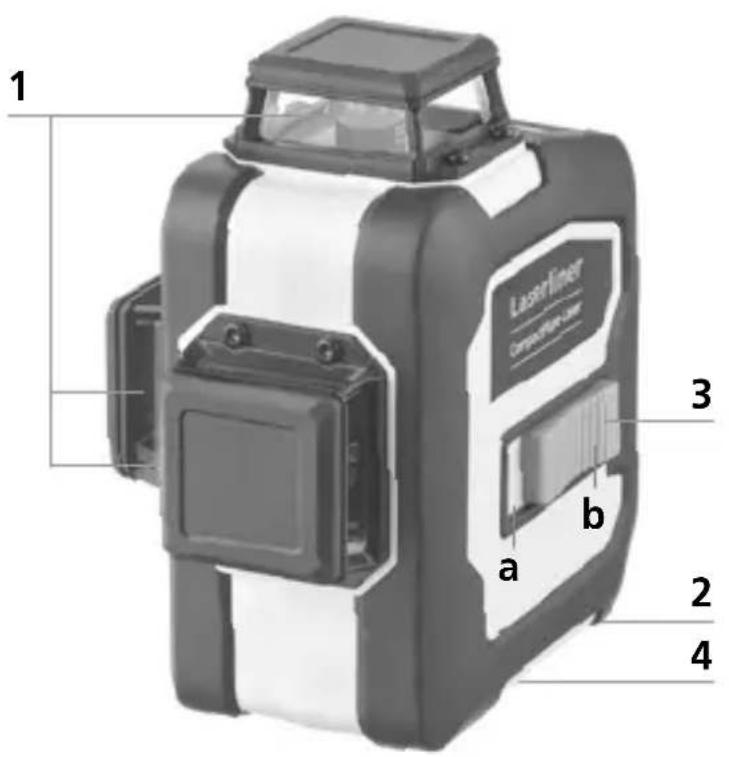
https://packd.li/ll/anb/in
Download on the App Store

GET IT ON Google Play

!
https://packd.li/ll/anb/in
!
V celoti preberite navodila za uporabo, priloženo knjižico „Garancijski in dodatni napotki“ ter aktualne informacije in napotke na spletni povezavi na koncu teh navodil. Upoštevajte vsebovana navodila. Ovu dokumentaciju potrebno je sačuvati i u slučaju prosljeđivanja proizvoda proslijediti je zajedno s njime.
Pravilna uporaba
https://packd.li/ll/anb/in
natural_image
Isometric line drawing of a 3D cube with visible and hidden edges (no text or symbols)
S1H360°
1 Ravnanje z litij-ionskim akumulatorjem
natural_image
Close-up of a black and white electronic device with internal components, showing a directional arrow (no text or symbols visible)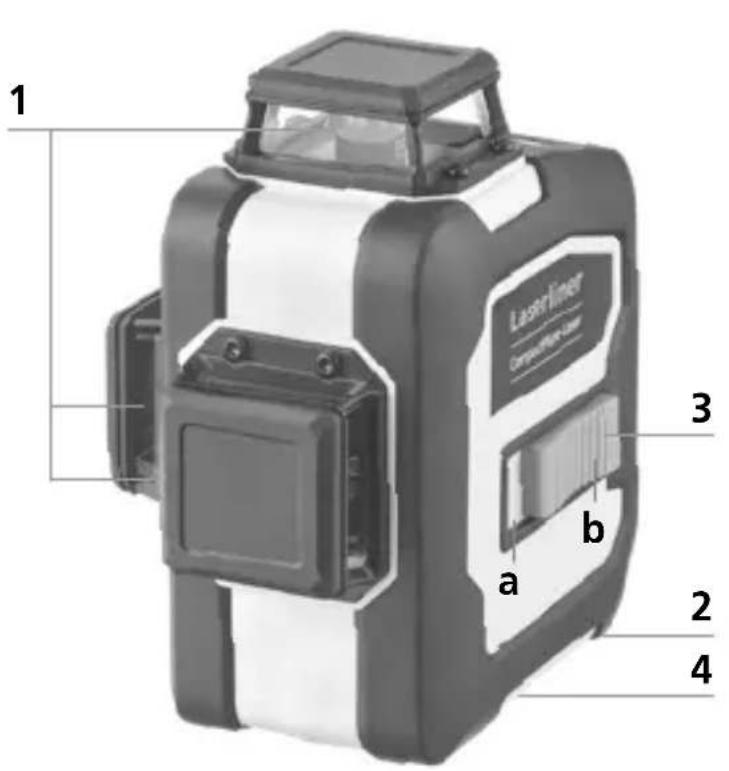
1 Izhodno okno laserja
2 Prostor za baterijo (spodnja stran)
3 Drsno stikalo
a VKLOP
b I ZKLOP / Transportno varovalo / Način nagibanja
4 1/4 / 5/8-palčni navoj stativa (spodnja stran)
5 Stanje baterije
https://packd.li/ll/anb/in
https://packd.li/ll/anb/in
!
natural_image
Warning symbol with a triangular frame and central sunburst pattern (no text)https://packd.li/ll/anb/in
natural_image
Isometric line drawing of a 3D cube with visible and hidden edges (no text or symbols)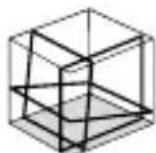
S1H360°
natural_image
Close-up of a USB flash drive with a cable inserted, showing the port and connector (no text or symbols visible)USB-C
natural_image
Close-up of a mechanical device with internal components and a black arrow indicating a specific part (no visible text or symbols)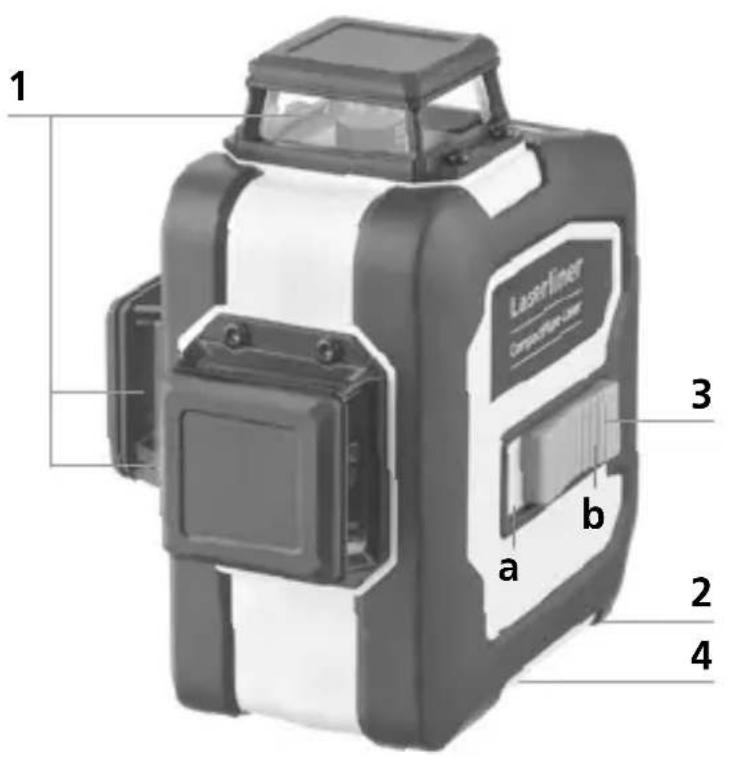

4 Kézi vevő mód
!
https://packd.li/ll/anb/in
Download on the App Store

GET IT ON Google Play

!
https://packd.li/ll/anb/in
!
natural_image
Isometric line drawing of a 3D cube with visible and hidden edges (no text or symbols)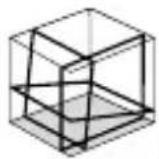
S1H360°
natural_image
Close-up of a USB flash drive with a cable inserted, showing the port and connector (no text or symbols on the device itself)Laserliner

natural_image
Close-up of a mechanical device with internal components and a black arrow indicating a specific part (no visible text or symbols)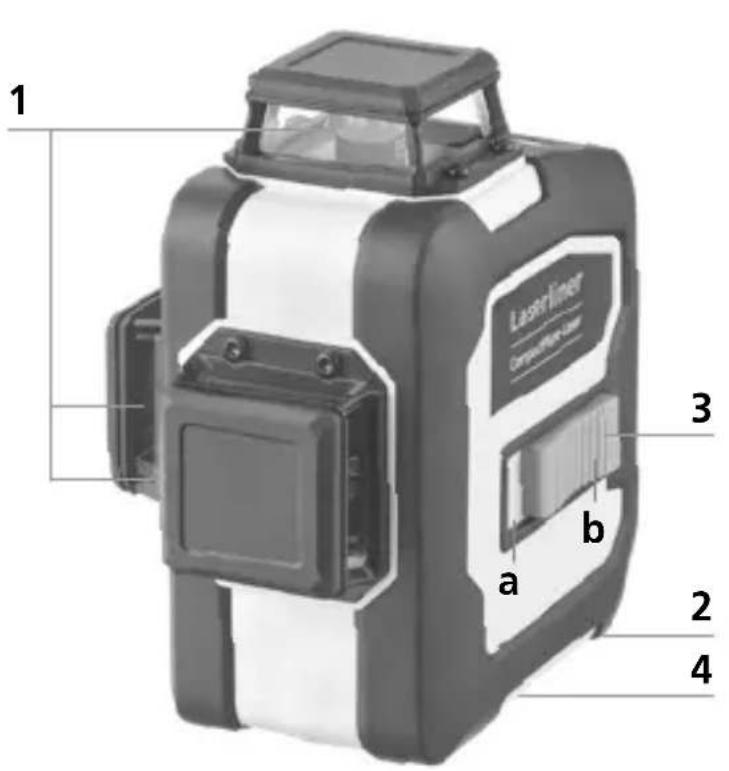
1 Priezor na výstup laserových lúčov
2 Priečinok na batérie (spodná strana)
3 Posuvný spínač
a ZAP
b VYP / Prepravná poistka / Režim nastavenia sklonu
4 1/4" / 5/8" statívový závit (spodná strana)
!
https://packd.li/ll/anb/in
https://packd.li/ll/anb/in
!
natural_image
Warning symbol with a triangular frame and central sunburst pattern (no text)Lasersko zračenje! Ne gledati u lasersku zraku! Laser klase 2 · < 1 mW · 515 nm
IEC 60825-1:2014, EN 60825-1:2014/A11:2021, EN 50689:2021
Laserliner
https://packd.li/ll/anb/in
natural_image
Isometric line drawing of a 3D cube with visible and hidden edges (no text or symbols)
S1H360°
1 Rukovanje litij-ionskom punjivom baterijom
- Mrežni adapter koristite samo unutar zatvorenih prostorija i ne izlažite ga vlazi niti kiši jer inače prijeti opasnost od električnog strujnog udara.
- Prije uporabe uređaja u potpunosti napunite punjivu bateriju.
- Spojite mrežni adapter sa strujnom mrežom i priključnom utičnicom. Koristite samo priloženi mrežni adapter. U slučaju uporabe pogrešnog mrežnog uređaja prestaje važiti garancija.
- Dok se baterija puni LED dioda na bateriji svijetli crveno. Proces punjenja je gotov kada LED dioda svijetli plavo.
!
Punjiva baterija smije se puniti samo priloženim mrežnim adapterom i koristiti samo s ovim laserskim uređajem. U protivnom postoji opasnost od ozljeda i požara. (3G Pro)
!
Vodite računa o tome da se u blizini kontakata punjive baterije ne nalaze vodljivi predmeti. Kratki spoj ovih kontakata može prouzročiti opekline i požar.
!
natural_image
Close-up of a black and white electronic device component with a black arrow indicating a specific part (no visible text or symbols)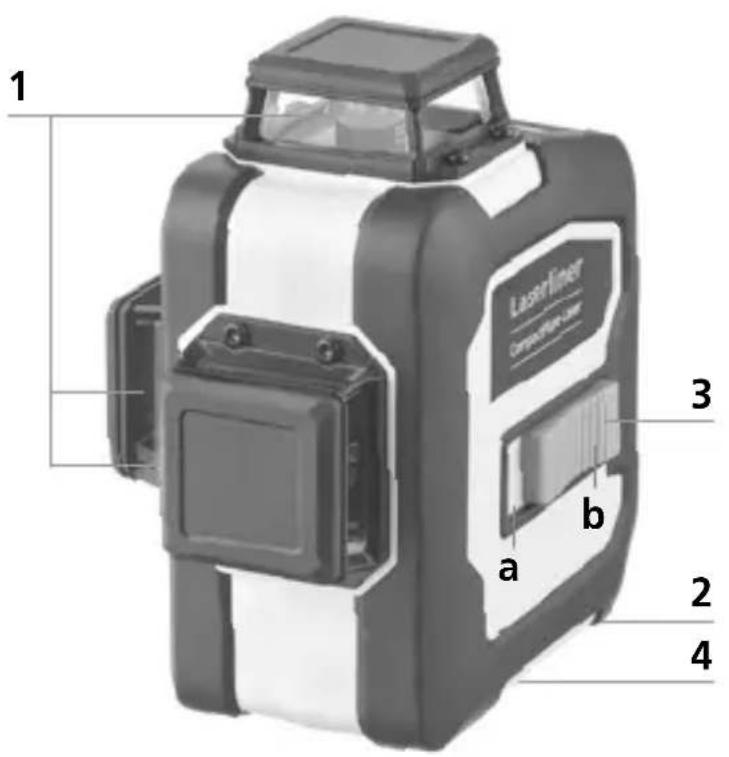
1 Otvor laserskog izlaza
2 Pretinac za bateriju (dno)
3 Klizna sklopka
a ON (uključeno)
b OFF (isklj.) / Blokada za transport / Nagib
4 1/4" / 5/8" navoji za stativ (dno)
5 Status baterije
6 LED za nivelaciju
crveno: nivelacija isklj.
zeleno: nivelacija uklj.
7 Tipka za odabir laserske linije; mod za ručni prijemnik uklj./ isklj.
8 LED za ručni prijemnik /
LED indikator funkcije naginjanaj
9 Funkcija naginjanja
3 Horizontalno i vertikalno niveliranje
Otpustite transportno osiguranje; pomaknite kliznu sklopku (3) ulijevo. Pojavit će se laserski križ. Laserske linije se mogu pojedinačno uključivati pomoću tipke za odabir.
!
Transportni zatvarač se mora otpustiti za horizontalno i vertikalno niveliranje. Laserske linije bljeskaju i upali se crveni LED čim je uređaj izvan raspona automatskog niveliranja od 3°. Postaviti uređaj da bude unutar raspona nivelacije. LED se ponovno prebaci na zeleno, a laserske linije prestanu bljeskati (svijetli postojanim svjetlom).

Ako su točke A2 i A3 razdvojene više od 0,35 mm/m, nužno je obaviti podešavanje. Kontaktirati ovlaštenog zastupnika ili servis UMAREX- LASERLINER.
https://packd.li/ll/anb/in
Uređaj može uspostaviti radijsku vezu s uređajima kompatibilnima s tehničkim standardom IEEE 802.15.4. Tehnički standard IEEE 802.15.4 je protokol za prijenos za bežične osobne područne mreže (Wireless Personal Area Networks – WPAN). Raspon je postavljen na maksimalnu udaljenost od 10 m od priključnog uređaja i uvelike ovisi o ambijentalnim uvjetima kao što su debljina i sastav zidova, izvore smetnji kao i svojstva prijenosa / prijema priključnog uređaja.
Aplikacija (app)
Za korištenje digitalne veze potrebna je aplikacija. Ona se može preuzeti u odgovarajućim prodavaonicama ovisno o terminalnom uređaju.

Download on the App Store

GET IT ON Google Play

!
Vodite računa o tome da je aktivirano radijsko sučelje mobilnog terminalnog uređaja.
Nakon pokretanja aplikacije i aktiviranja digitalne veze može se uspostaviti veza između mobilnog terminalnog uređaja i mjernog uređaja.
https://packd.li/ll/anb/in