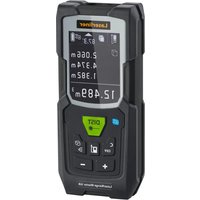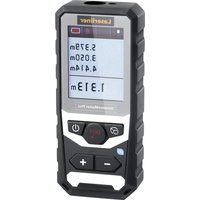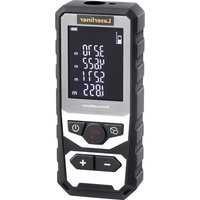
LaserRange-Master Gi4 Mini - Laser pointer Laserliner - Free user manual and instructions
Find the device manual for free LaserRange-Master Gi4 Mini Laserliner in PDF.


| Product type | Laser rangefinder |
| Brand | Laserliner |
| Model | LaserRange-Master Gi4 Mini |
| Dimensions (L x H x D) | 40 x 75 x 20 mm |
| Weight | 49 g (battery pack included) |
| Power supply | Li-ion battery 3.7 V / 3.0 Ah / 11.1 Wh, recharge via USB (5 V / ≥ 1000 mA) |
| Accuracy (typical) | ± 2 mm (up to 10 m on reflective surface) |
| Measuring range (indoor) | 0.05 m - 40 m |
| Laser class | 2 / < 1 mW · 515 nm (EN 60825-1:2014/A11:2021) |
| Memory | 19 slots |
| Protection rating | IP 40 |
| Automatic shutdown | Laser after 28 s, device after 3 min |
| Operating conditions | -10°C to 40°C, humidity 20-85% rH, non-condensing |
| Storage conditions | -20°C to 70°C, max. humidity 80% rH, non-condensing |
| Main functions | Length, area, volume measurement, Pythagoras 1 & 2, min./max. measurement, memory |
| Maintenance and cleaning | Clean with a slightly damp soft cloth, no solvents |
| Laser safety | Do not look into the beam, do not point at people |
| Batteries / Battery | Replaceable Li-ion battery (contact customer service) |
| Recommended calibration | Every year |
Frequently Asked Questions - LaserRange-Master Gi4 Mini Laserliner
User questions about LaserRange-Master Gi4 Mini Laserliner
0 question about this device. Answer the ones you know or ask your own.
Ask a new question about this device
Download the instructions for your Laser pointer in PDF format for free! Find your manual LaserRange-Master Gi4 Mini - Laserliner and take your electronic device back in hand. On this page are published all the documents necessary for the use of your device. LaserRange-Master Gi4 Mini by Laserliner.
USER MANUAL LaserRange-Master Gi4 Mini Laserliner

Laser
515 nm
Laserliner

©
Sicherheitshinweise
natural_image
Close-up of a black DSLR camera with USB port and USB-C logo (no readable text beyond branding)Ausbau des Akkus
a
f DISPLAY:
b
https://packd.li/ll/AQK/in
Laserliner
!
Completely read through the operating instructions, the "Warranty and Additional Information" booklet as well as the latest information under the internet link at the end of these instructions. Follow the instructions they contain. These documents must be kept in a safe place and passed on together with the product.
Intended use
This laser rangefinder provides precise determination of lengths, areas and volumes, and is perfect for acquiring room sizes and calculating material quantities. Heights and distances can be determined indirectly using the Pythagoras angle function.
General safety instructions
- The device must only be used in accordance with its intended purpose and within the scope of the specifications.
- Keep the measuring device away from children.
Keep out of reach of children.
- Modifications or changes to the device are not permitted, this will otherwise invalidate the approval and safety specifications.
- Do not expose the device to mechanical stress, extreme temperatures, moisture or significant vibration.
- The device must no longer be used if one or more of its functions fail, the battery charge is weak, or the housing has been damaged.
- When using the device outdoors, make sure that the weather conditions are appropriate and/or that suitable protection measures are taken.
- Please ensure compliance with the safety regulations set out by local and national authorities with regard to the correct and proper use of the device.
Safety instructions
Using class 2 lasers

Laser radiation!
Do not stare into the beam!
Class 2 laser · < 1 mW · 515 nm
EN 60825-1:2014/A11:2021 / EN 50689:2021
- Attention: Do not look into the direct or reflected beam.
- Do not point the laser beam towards persons.
- If a person's eyes are exposed to class 2 laser radiation, they should shut their eyes and immediately move away from the beam.
- Tampering with (making changes to) the laser device is not permitted.
- Under no circumstances should optical instruments (magnifying glass, microscope, binoculars,...)
Safety instructions
Dealing with electromagnetic radiation
- The measuring device complies with electromagnetic compatibility regulations and limit values in accordance with EMC-Directive 2014/30/EU.
- Local operating restrictions – for example, in hospitals, aircraft, petrol stations or in the vicinity of people with pacemakers – may apply. Electronic devices can potentially cause hazards or interference or be subject to hazards or interference.
- The measuring accuracy may be affected when working close to high voltages or high electromagnetic alternating fields.
Green laser technology

Approx. 6 times brighter than a typical red laser with 630 - 660 nm
Use of lithium-ion battery
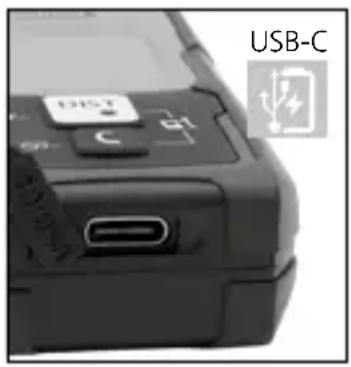
- The battery may be charged only with the enclosed USB charging cable on a standard commercial USB power supply unit (5V/>= 1000mA). Using any other power pack/charger will invalidate the warranty.
- Use the power supply/charger unit only in closed rooms; do not expose to moisture or rain otherwise risk of electric shock.
- Charge the device's battery completely prior to use.
- After the charging cable has been plugged in, a battery symbol with increasing bars appears in the display for the entire duration of the charging process. As soon as the charging process is complete, a battery symbol with a full number of bars appears.

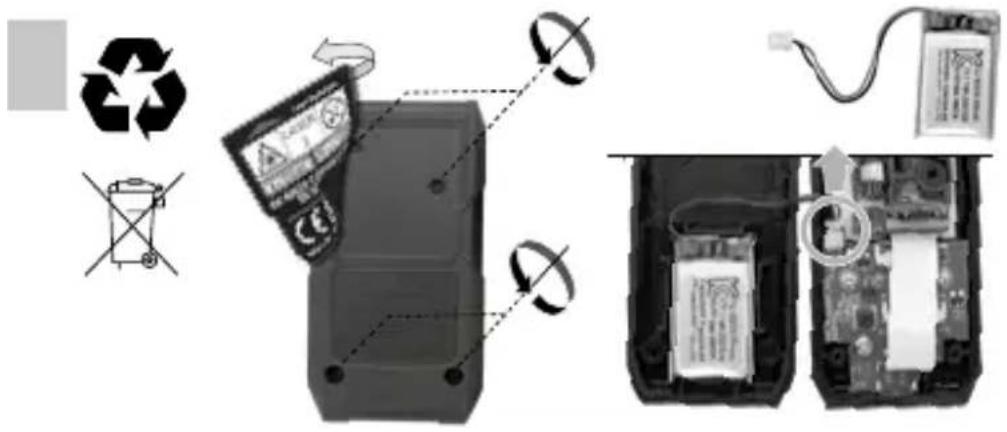
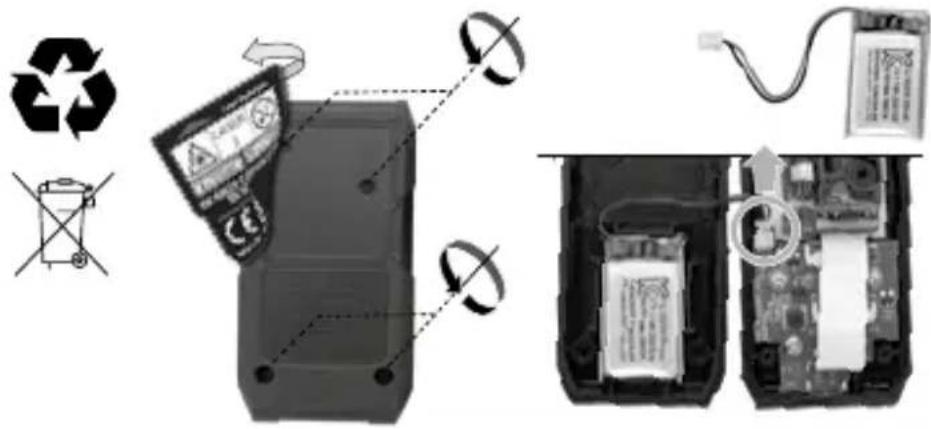
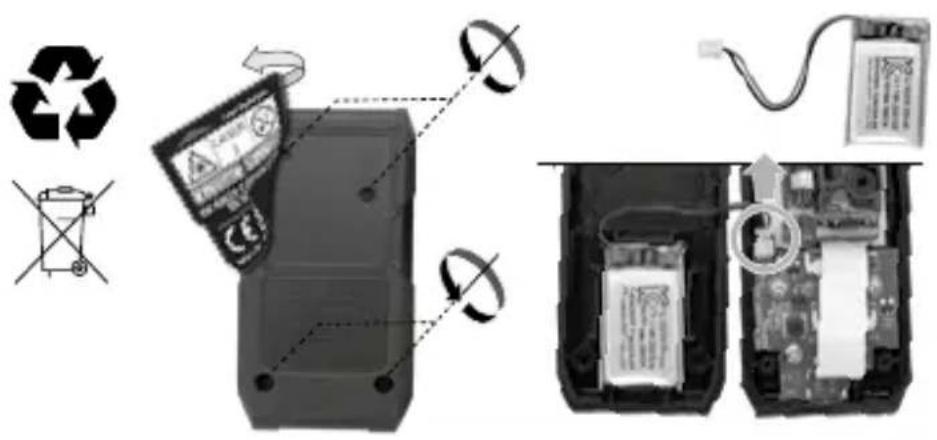
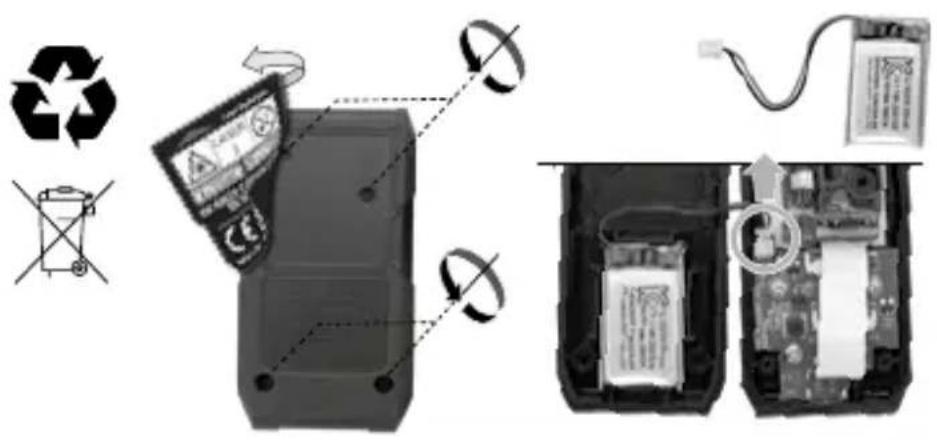
The device has a replaceable battery. Contact your distributor or the UMAREX-LASERLINER service department.
natural_image
Close-up of a black USB flash drive with a C port and USB-C battery icon (no text or symbols on the device body)Laserliner
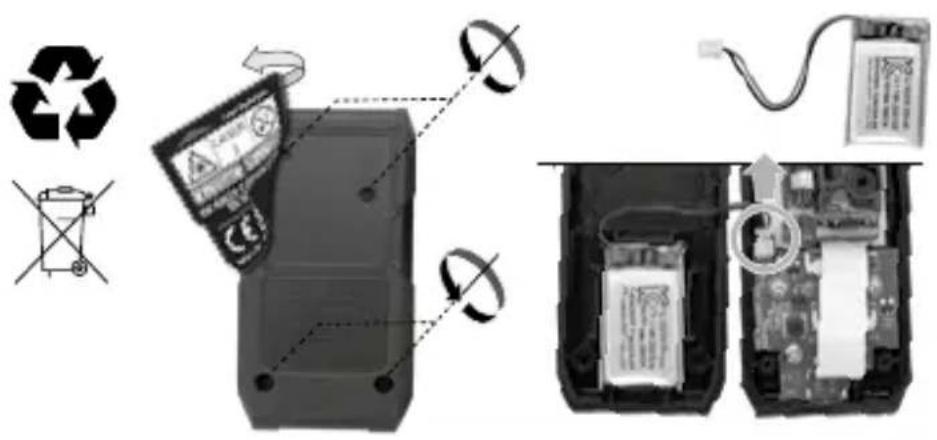
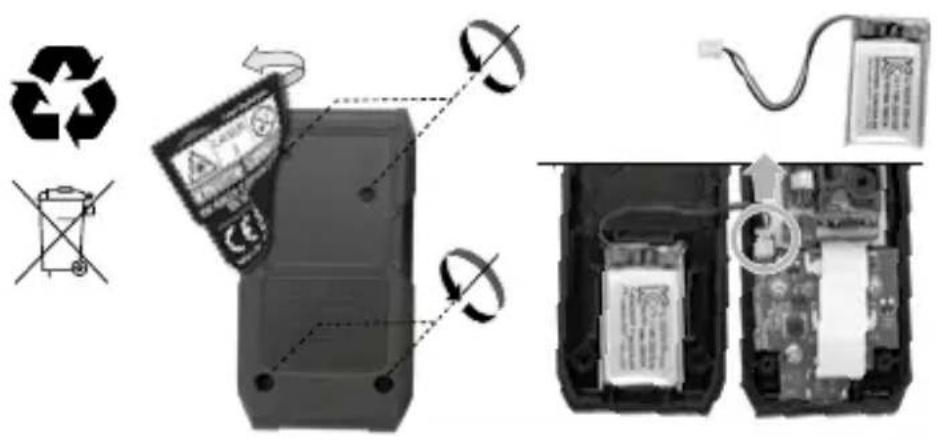
Removing the battery
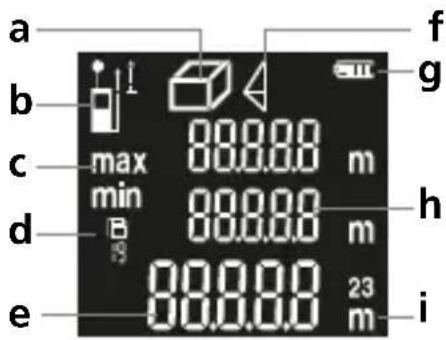
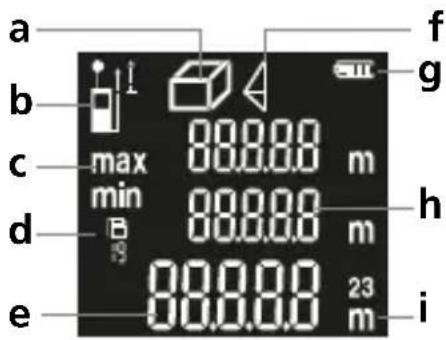
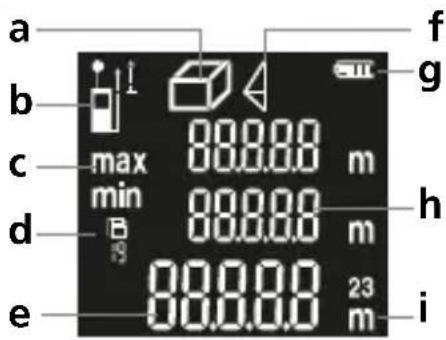
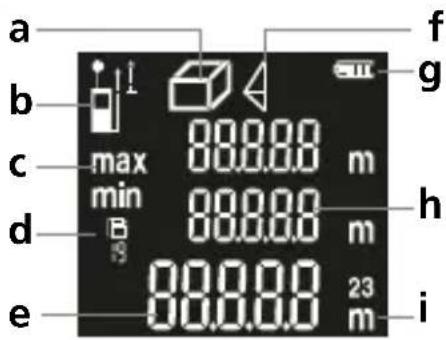
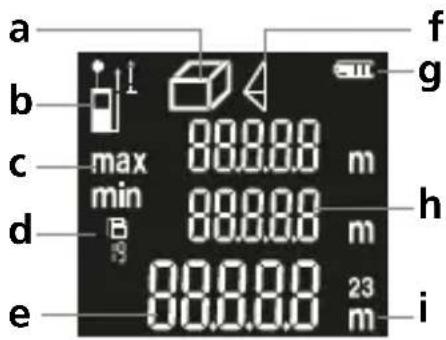
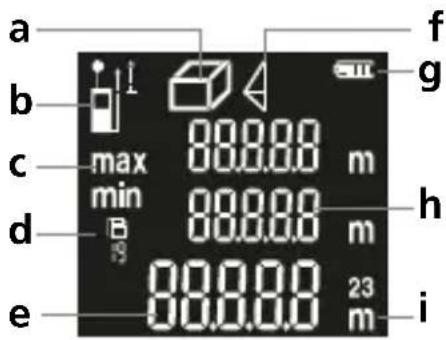
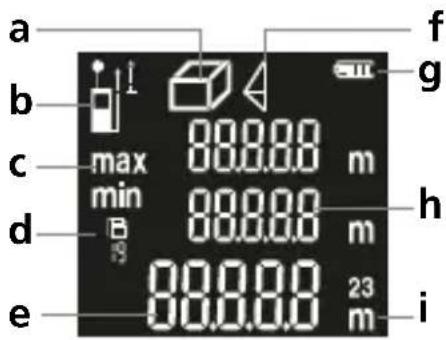
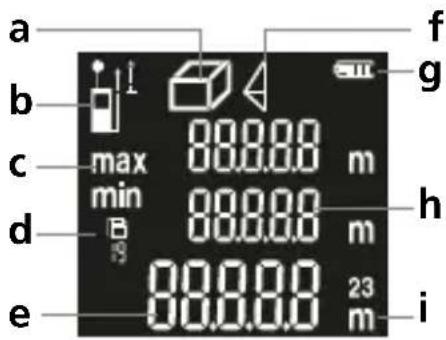
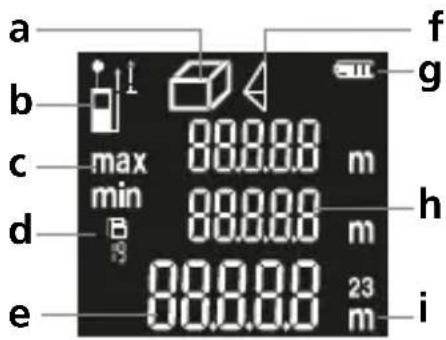
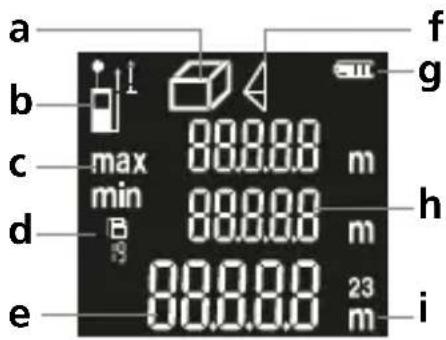
DISPLAY:
a Display length / area / volume
b Measurement point (reference) rear / front
c Min./max. measurement
d Memory
e Measurement values / Measurement results / malfunction
f Pythagoras 1 + 2
g Battery symbol
h Intermediate values / min/max values
i Unit m
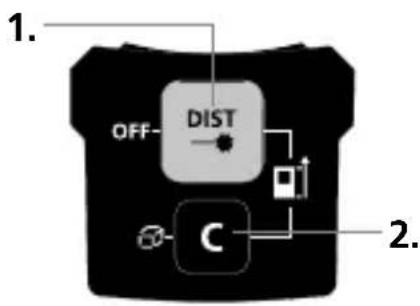
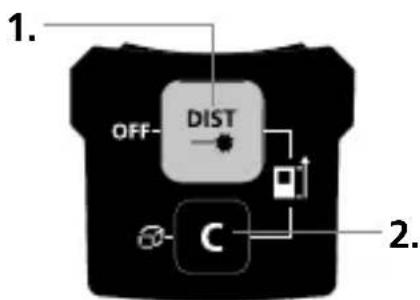
KEYPAD:
1 ON / Measure / OFF, Measurement point (reference) rear / front
2 Length,min./max.measure-ment, area, volume, Pythagoras 1 + 2, Memory, Delete values, Measurement point (reference) rear / front
Switch on, measure and switch off:
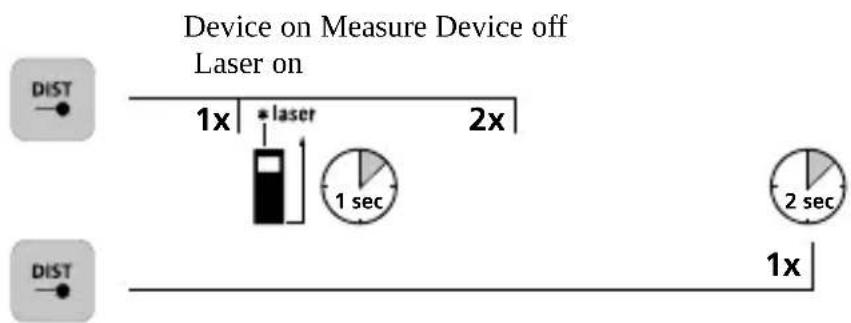
LaserRange-Master Gi4 Mini
Delete the last measured value:

Change measurement function:
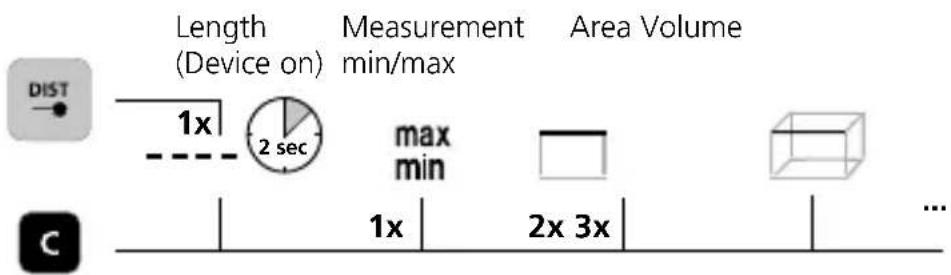
Pythagoras 1 Pythagoras 2 Memory

Change measurement point (reference):
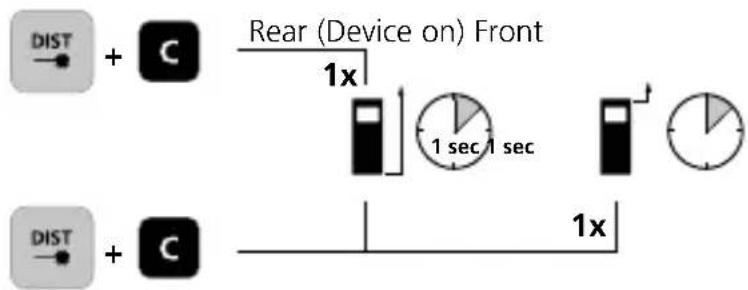
flowchart
graph LR
    A["Dist"] --> B["+ C"]
    B --> C["Rear (Device on) Front"]
    C --> D["1x clock"]
    D --> E["1 sec/1 sec"]
    E --> F["+ Pie chart"]
    G["Dist"] --> H["+ C"]
    H --> I["1x timeline"]
Length measurement:
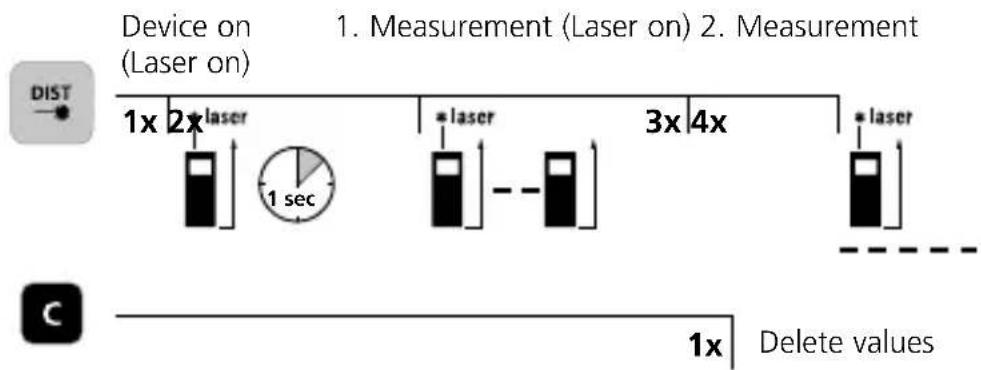
flowchart
graph LR
    A["Device on (Laser on)"] --> B["1x laser"]
    B --> C["1 sec"]
    C --> D["2x laser"]
    D --> E["3x laser"]
    E --> F["4x laser"]
    F --> G["5x laser"]
    style A fill:#f9f,stroke:#333
    style G fill:#bbf,stroke:#333
Laserliner
Min/max continuous measurement:
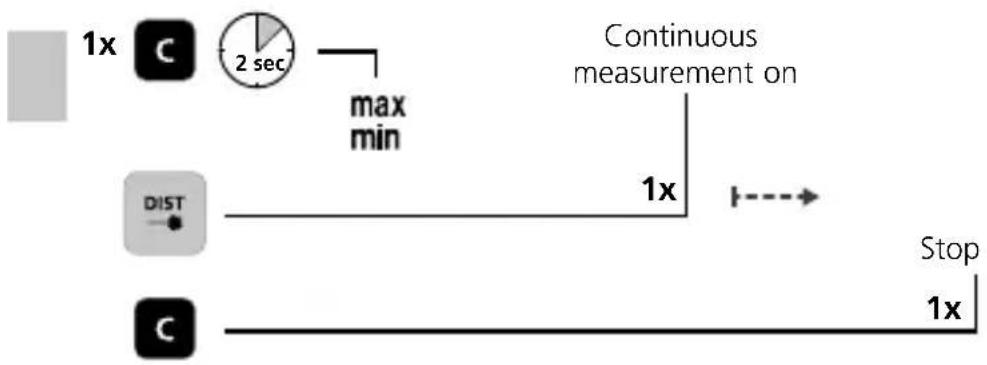
flowchart
graph LR
    A["1x clock"] --> B["2 sec timer"]
    B --> C["max min"]
    C --> D["Continuous measurement on"]
    D --> E["1x stop"]
    F["DIST"] --> G["Stop"]
    H["1x clock"] --> I["Stop"]
The LC display shows the max value (max), the min value (min) and the current value.
Area measurement:
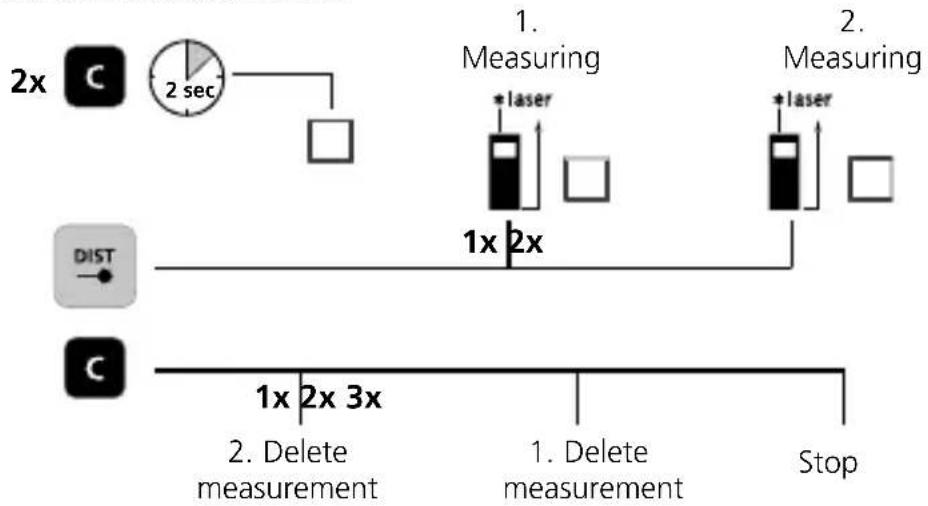
flowchart
graph TD
    A["1. Measuring"] --> B["1x 2x"]
    B --> C["2x 2sec"]
    D["2. Measuring"] --> E["1x 2x"]
    E --> F["2x 3x"]
    G["1x 2x"] --> H["2. Delete measurement"]
    I["1. Delete measurement"] --> J["Stop"]
Volume measurement:
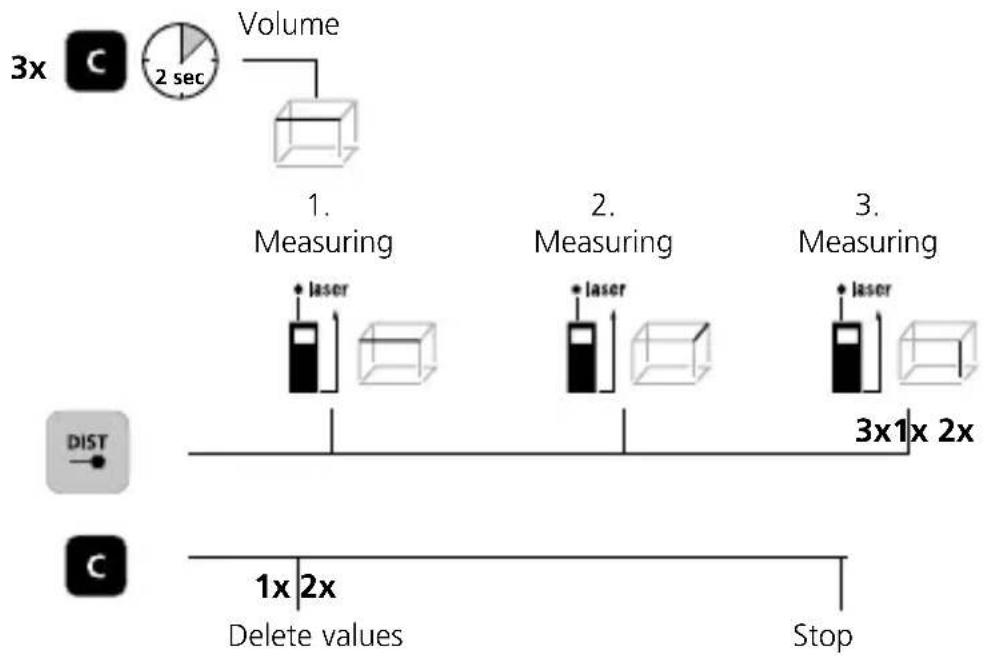
flowchart
graph TD
    A["3x C"] --> B["Volume"]
    B --> C["2 sec"]
    C --> D["1. Measuring"]
    D --> E["3x1x 2x"]
    F["DIST"] --> G["1x 2x Delete values"]
    H["Stop"] --> I["3x1x 2x"]
    J["laser"] --> K["Measuring"]
    L["laser"] --> M["Measuring"]
    N["laser"] --> O["Measuring"]
LaserRange-Master Gi4 Mini
Pythagoras 1:
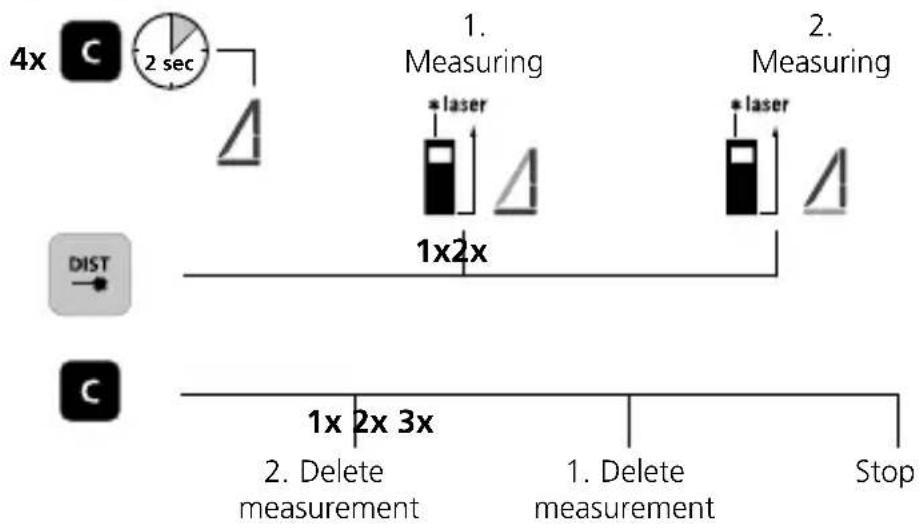
flowchart
graph TD
    A["4x"] --> B["Clock with 2 sec"]
    B --> C["△"]
    D["DIST"] --> E["1x2x"]
    E --> F["Measuring 1. Measuring"]
    G["C"] --> H["1x 2x 3x"]
    H --> I["2. Delete measurement"]
    J["1. Delete measurement"] --> K["Stop"]
    L["*laser"] --> M["△"]
    N["*laser"] --> O["△"]
Pythagoras 2:
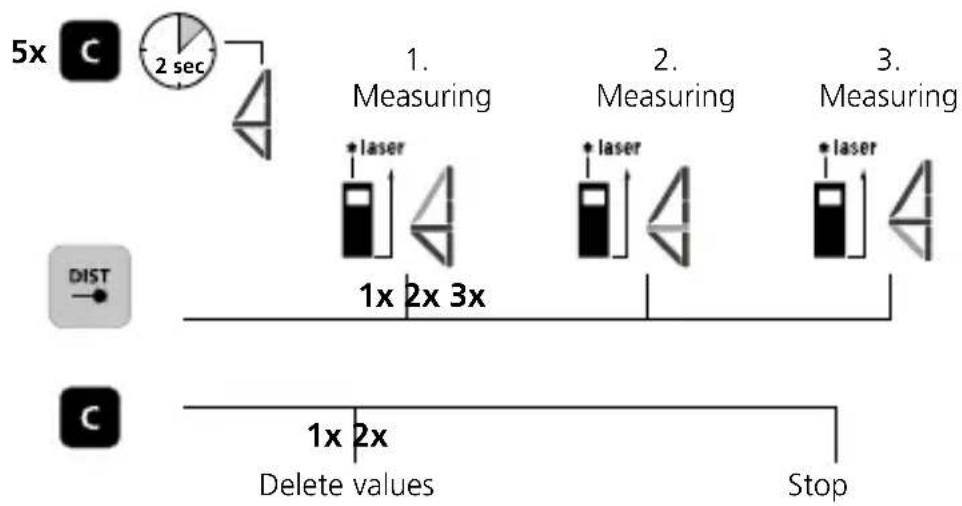
flowchart
graph TD
    A["5x"] --> B["2 sec"]
    B --> C["1x 2x 3x"]
    C --> D["1x 2x Delete values"]
    E["DIST"] --> F["Stop"]
    G["Measuring"] --> H["1. Laser"]
    I["Measuring"] --> J["2. Laser"]
    K["Measuring"] --> L["3. Laser"]
Memory function:
The device has 19 storage locations.
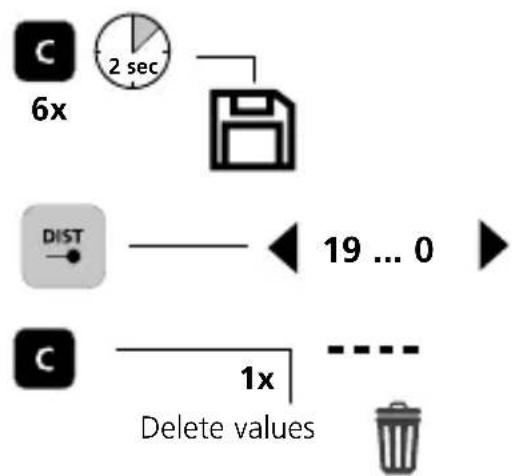
Laserliner
Error codes:
Err08: Pythagorean measurement error
Err10: Replace the battery
Err11: Parameter error
Err15: Outside the measuring range
Err16: Received signal too weak
Err26: Value outside display range
Important notices
- The laser points to the location that will be measured.
No objects may get into the laser's line of measurement. - The device compensates the measurement for different room temperatures. Therefore allow the device a brief adaptation period when changing locations with large temperature differences.
- The device is only conditionally useable in outdoor areas and cannot be used in strong sunlight.
- The measurement results of outdoor measurements may be influenced or falsified by rain, fog and snow.
- In unfavourable conditions, e.g. with poorly reflecting surfaces, the maximum deviation may be greater than 3 mm.
- Carpeting, upholstery or curtains will not reflect the laser optimally. Measure to flat surfaces.
- Measurements made through glass (window panes) can falsify measurement results.
- An energy-saving function switches the device off automatically.
- Clean with a soft cloth. Water may not be allowed to penetrate the housing.
Information on maintenance and care
Clean all components with a damp cloth and do not use cleaning agents, scouring agents and solvents. Remove the battery(ies) before storing for longer periods. Store the device in a clean and dry place.
Calibration
The measuring device should be calibrated and tested on a regular basis to ensure it is accurate and working properly. We recommend the measuring device is calibrated every year. If necessary, contact your distributor or the UMAREX-LASERLINER service department.
Technical Data (Subject to technical changes without notice. 25W13)
| Precision (typical)* ± 2 mm | |
| Measurement range (inside)** | 0.05 m - 40 m |
| Laser class | 2 / < 1 mW (EN 60825-1:2014/A11:2021 / EN 50689:2021) |
| Laser wavelength 515 nm | |
| Memory 19 storage locations | |
| Degree of protection IP 40 | |
| Automatic switch-off 28 sec laser / 3 min device | |
| Power supply Li-Ion battery pack 3,7V / 3,0Ah / 11,1Wh | |
| Operating conditions | -10°C ... 40°C, max. humidity20 ... 85% rH, no condensation, max.working altitude 2000 m above sea level |
| Storage conditions | -20°C ... 70°C, max. humidity 80% rH,no condensation |
| Dimensions (W x H x D) 40 x 75 x 20 mm | |
| Weight 49 g (incl. battery pack) | |
* measuring distance up to 10 m with strongly reflective target surface and at room temperature. The measurement deviation may increase by ± 0.2 mm/m for greater distances and under unfavourable measuring conditions such as strong sunlight or weakly reflective target surfaces.
** at max. 5000 lux
EU and UK directives and disposal
This device complies with all necessary standards for the free movement of goods within the EU and the UK.
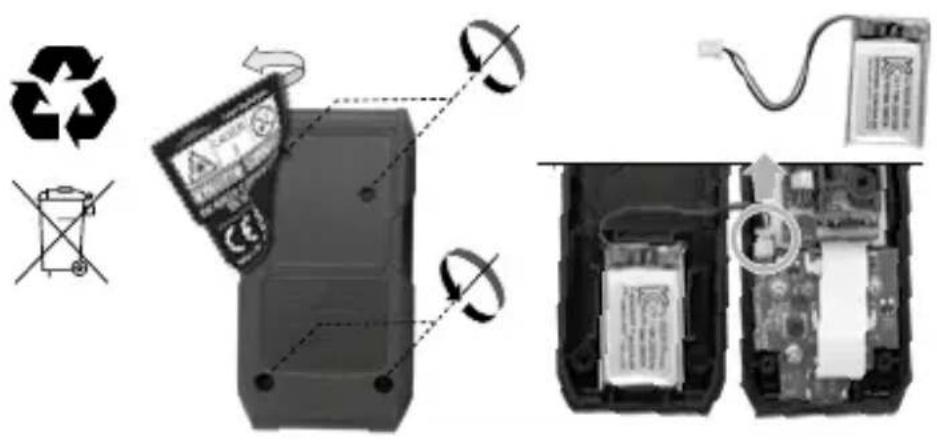
This product, including accessories and packaging, is an electrical appliance that must be recycled in an environmentally appropriate manner in accordance with European and UK directives on waste electrical and electronic equipment, batteries and packaging, in order to recover valuable raw materials. Electrical devices, batteries and packaging do not belong in household waste. Users are obliged by law to surrender used batteries or battery packs to a public collection point, to sales outlets, or to technical customer services, free of charge. Remove the battery from the device without damaging it using standard commercial tools: arrange separate collection before returning the device for disposal. Please do not hesitate to contact the UMAREX-LASERLINER service department if you have any queries regarding removing the battery. Look for information on local disposal facilities and note the relevant disposal and safety information at the collection points.
Further safety and supplementary notices at:
https://packd.li/ll/AQK/in
Laserliner
!
natural_image
Close-up of a black USB flash drive with a C port and USB-C battery icon (no text or symbols on the device body)Laserliner
De accu verwijderen

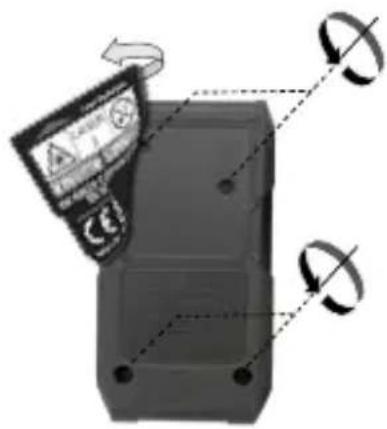
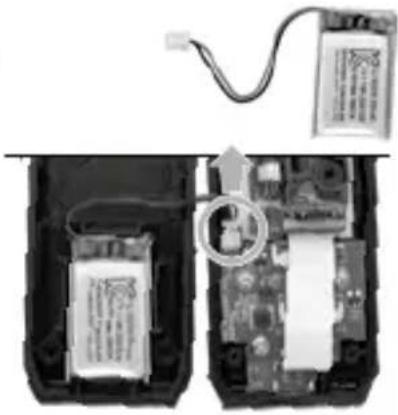
natural_image
Interior view of an electronic device showing battery pack, circuit board, and wiring (no text or symbols visible)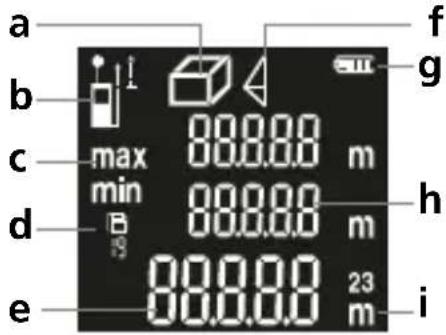
DISPLAY:
https://packd.li/ll/AQK/in
Laserliner
!
natural_image
Close-up of a black USB flash drive with ports and a USB-C logo (no readable text or symbols beyond branding)Laserliner
DISPLAY:
https://packd.li/ll/AQK/in
Laserliner
!
natural_image
Close-up of a black DSLR camera with USB port and USB-C logo (no readable text beyond branding)natural_image
Diagram of a remote control device with two rotating arrows indicating rotation (no text or symbols)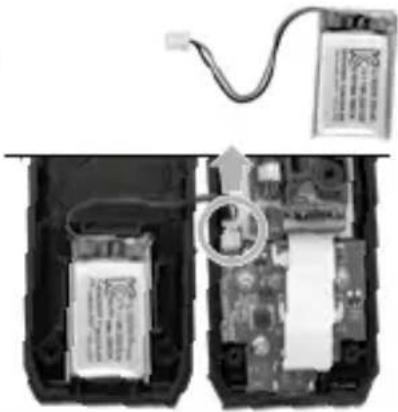
natural_image
Interior view of an electronic device showing battery pack, circuit board, and wiring (no text or symbols visible)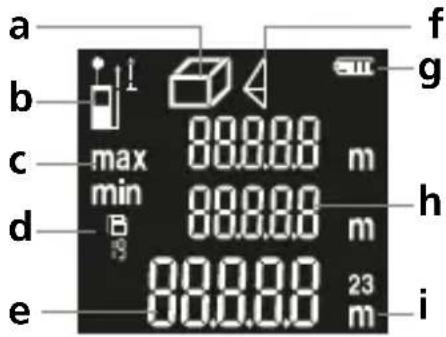
AFFICHAGE :
Pythagore 1 Pythagore 2
Mémoire

https://packd.li/ll/AQK/in
Laserliner
!
natural_image
Close-up of a black USB flash drive with labeled buttons and port (no readable text or symbols beyond branding)Laserliner
INDICADOR:
https://packd.li/ll/AQK/in
Laserliner
!
natural_image
Close-up of a black USB flash drive with ports and a USB symbol, no readable text or symbols beyond the label (USB-C icon)Laserliner
DISPLAY:
LaserRange-Master Gi4 Mini
Laserliner
Codici di guasto:
https://packd.li/ll/AQK/in
Laserliner
!
natural_image
Close-up of a black USB flash drive with ports and a USB-C logo (no readable text or symbols beyond branding)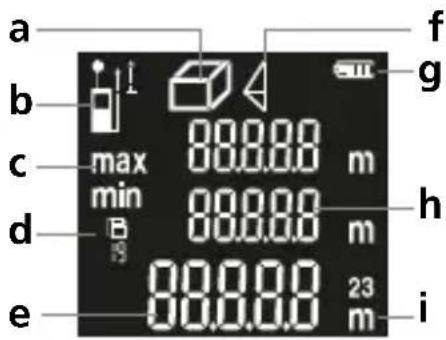
WYŚWIETLACZ:
natural_image
Close-up of a black digital camera with USB-C logo and ports (no readable text beyond branding)Laserliner
Akun irrottaminen
NÄYTTÖ:
https://packd.li/ll/AQK/in
Laserliner
!
natural_image
Close-up of a black digital camera with USB-C logo and ports (no readable text beyond branding)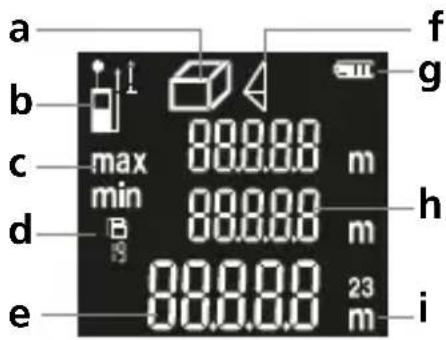
VISOR:
Err10: Trocar as pilhas
https://packd.li/ll/AQK/in
Laserliner
!
natural_image
Close-up of a black digital camera with USB-C battery icon and port label (no readable text beyond branding)Laserliner
Ta bort batteriet

DISPLAY:
https://packd.li/ll/AQK/in
Laserliner
!
natural_image
Close-up of a black digital camera with USB-C logo and ports (no readable text beyond branding)Laserliner
Ta ut batteriet
DISPLAY:
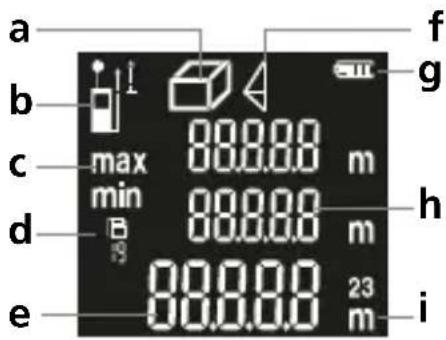
a Visning lengde / flate / volum
b Målenivå (referanse)
bak / foran
c Måling min. / maks.
d Minne
e Måleverdier / måleresultater / funksjonsfeil
f Pythagoras 1 + 2
g Batterisymbol
h Mellomverdier / min/maks-verdier
i Enhet m
TASTATUR:
Err16: Mottatt signal for svakt
https://packd.li/ll/AQK/in
Laserliner
!
natural_image
Close-up of a black USB flash drive with a C port and USB-C logo (no readable text or symbols beyond branding)Laserliner
Akünün çıkarılması
EKRAN:
https://packd.li/ll/AQK/in
Laserliner
!
natural_image
Close-up of a black USB flash drive with control buttons and port (no readable text or symbols)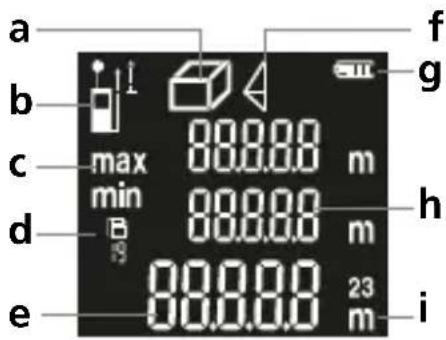
ДИСПЛЕЙ:
https://packd.li/ll/AQK/in
Laserliner
!
natural_image
Close-up of a black digital camera with USB port and USB-C logo (no readable text or symbols beyond branding)https://packd.li/ll/AQK/in
Laserliner
!
natural_image
Close-up of a black digital camera with USB-C battery icon and port label (no readable text beyond branding)Laserliner
Vyjmutí baterie
DISPLEJ:
https://packd.li/ll/AQK/in
Laserliner
!
natural_image
Close-up of a black digital camera with USB-C battery icon and port label (no readable text beyond branding)Laserliner
Akupaki eemaldamine
EKRAAN:
https://packd.li/ll/AQK/in
Laserliner
!
natural_image
Close-up of a black digital camera with USB port and USB-C logo (no readable text or symbols beyond branding)Laserliner
DISPLAY:
https://packd.li/ll/AQK/in
Laserliner
!
natural_image
Close-up of a black digital camera with USB-C logo and ports (no readable text or symbols beyond branding)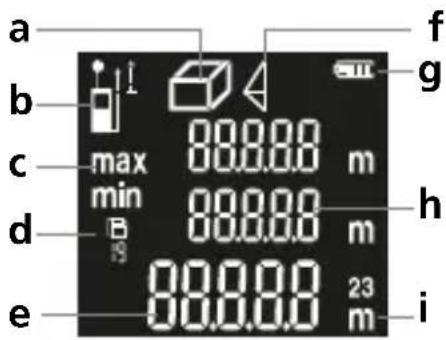
ДИСПЛЕЙ:
natural_image
Close-up of a black digital camera with USB port and control buttons, labeled 'USB-C' (no additional text or symbols visible)
OOONH:
Err10: Replace the battery
https://packd.li/ll/AQK/in
Laserliner
!
V celoti preberite navodila za uporabo, priloženo knjižico „Garancijski in dodatni napotki“ ter aktualne informacije in napotke na spletni povezavi na koncu teh navodil. Upoštevajte vsebovana navodila. Ovu dokumentaciju potrebno je sačuvati i u slučaju prosljeđivanja proizvoda proslijediti je zajedno s njime.
Pravilna uporaba
Ovaj laserski mjerač udaljenosti omogućava precizno mjerenje duljina, površina i volumena te je idealan za utvrđivanje veličine prostorija i izračun količine materijala. Pomoću funkcije Pitagorinog kuta može se izvršiti neizravno određivanje visine i udaljenosti.
natural_image
Close-up of a black digital camera with USB-C battery icon and port label (no readable text beyond branding)- Prije uporabe uređaja u potpunosti napunite punjivu bateriju.
- Spojite mrežni adapter/punjač na strujnu mrežu i na priključnu utičnicu punjive baterije uređaja.
- Nakon priključivanja kabela za punjenje na zaslonu se prikazuje simbol za bateriju s rastućim crtama tijekom čitavog postupka punjenja. Čim je završen postupak punjenja, simbol za bateriju prikazuje se s punim brojem crta.

Uređaj raspolaže zamjenjivom punjivom baterijom.
Kontaktirati ovlaštenog zastupnika ili servis
UMAREX- LASERLINER.
Laserliner
Vađenje baterije
ZASLON:
a Prikaz duljine / površine / volumena
natural_image
Interior view of a room with stairs and a digital air conditioner unit (no text or symbols visible)Manuale
PAP 22
CARTA
RACCOLTA CARTA