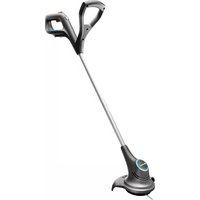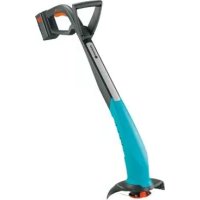
SmallCut 300 Accu - Grass trimmer GARDENA - Free user manual and instructions
Find the device manual for free SmallCut 300 Accu GARDENA in PDF.

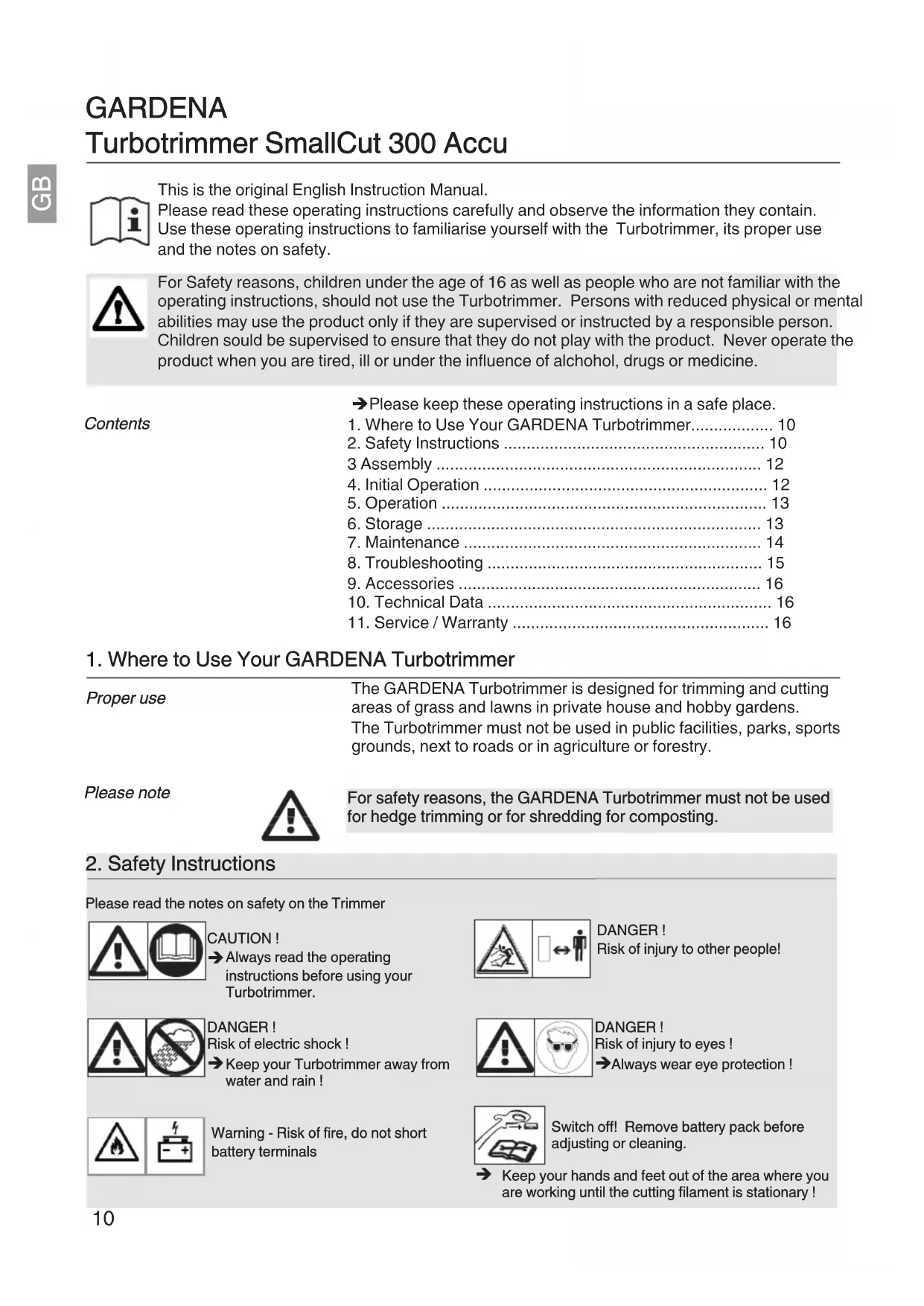


| Product type | Cordless grass trimmer |
| Brand | Gardena |
| Model | SmallCut 300 Accu |
| Cutting width | 230 mm |
| Line thickness | 1.5 mm |
| Line spool capacity | 10 m |
| Line feed | 100% automatic |
| Weight (with battery) | 2.0 kg |
| Rotation speed | 8,500 rpm |
| Sound pressure level (LpA) | 75 dB(A) |
| Vibration level (ahw) | 2.6 m/s² |
| Battery type | NiMH 18 V |
| Battery capacity | 1.6 Ah |
| Charging time | Approx. 6 hours |
| Charger mains voltage | 230 V / 50 Hz |
| Charger rated current | 600 mA |
| Charger output voltage | 21 V DC |
| Intended use | Private and domestic gardens (edging and lawn trimming) |
| Safety devices | Safety lock, automatic stop when button released, protective cover |
| Maintenance | Clean the cover and ventilation slots after each use; replace the line spool (ref. 5306); rechargeable battery (ref. 8834) |
| Warranty | 2 years contractual (parts and labour) subject to conditions of use |
Frequently Asked Questions - SmallCut 300 Accu GARDENA
User questions about SmallCut 300 Accu GARDENA
0 question about this device. Answer the ones you know or ask your own.
Ask a new question about this device
Download the instructions for your Grass trimmer in PDF format for free! Find your manual SmallCut 300 Accu - GARDENA and take your electronic device back in hand. On this page are published all the documents necessary for the use of your device. SmallCut 300 Accu by GARDENA.
USER MANUAL SmallCut 300 Accu GARDENA
GB Operating Instructions
Battery Turbotrimmer
F Mode d'emploi
Batterie Turbotrimmer
This is the original English Instruction Manual.
Please read these operating instructions carefully and observe the information they contain. Use these operating instructions to familiarise yourself with the Turbotrimmer, its proper use and the notes on safety.

For Safety reasons, children under the age of 16 as well as people who are not familiar with the operating instructions, should not use the Turbotrimmer. Persons with reduced physical or mental abilities may use the product only if they are supervised or instructed by a responsible person. Children could be supervised to ensure that they do not play with the product. Never operate the product when you are tired, ill or under the influence of alcohol, drugs or medicine.
Contents
Please keep these operating instructions in a safe place.
- Where to Use Your GARDENA Turbotrimmer 10
- Safety Instructions 10
3Assembly 12 - Initial Operation 12
- Operation 13
6.Storage 13
7.Maintenance 14
8.Troubleshooting 15 - Accessories 16
- Technical Data 16
- Service/Warranty 16
1. Where to Use Your GARDENA Turbotrimmer
Proper use
The GARDENA Turbotrimmer is designed for trimming and cutting areas of grass and lawns in private house and hobby gardens. The Turbotrimmer must not be used in public facilities, parks, sports grounds, next to roads or in agriculture or forestry.
Please note

For safety reasons, the GARDENA Turbotrimmer must not be used for hedge trimming or for shredding for composting.
2. Safety Instructions
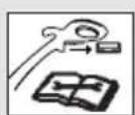
Please read the notes on safety on the Trimmer

CAUTION!
Always read the operating instructions before using your Turbotrimmer.

DANGER!
Risk of electric shock!
Keep your Turbotrimmer away from water and rain!
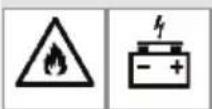
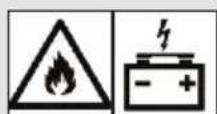
Warning - Risk of fire, do not short battery terminals

DANGER!
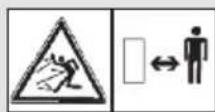
Risk of injury to other people!

DANGER!
Risk of injury to eyes!
Always wear eye protection!
Switch off! Remove battery pack before adjusting or cleaning.
Keep your hands and feet out of the area where you are working until the cutting filament is stationary!
Check your Trimmer before each use
→Always visually inspect your Trimmer before each use.
Check that the ventilation slots are not obstructed in any way.
Do not use your Trimmer if the safety devices (push button, safety cover) and/or the filament cassette are damaged or worn.
Never bypass the safety devices.
Inspect the area to be cut before you begin work. Remove any foreign objects and look out for foreign objects (such as stones, pieces of wood, strings and wires) while you are working.
If you should come across an obstacle while cutting, turn off the Trimmer and remove the battery pack. Remove the object and check the Trimmer for any damage. If necessary have your Trimmer repaired.
Use / responsibility
The Trimmer can cause serious injuries.
Use the Trimmer only for the purpose specified in these operating instructions.
You are responsible for the safety in the area where you are working.
Ensure that there are no other people (especially children) or animals within or near the area where you are working.
Never use the Trimmer if the safety devices are damaged or defective.
Remove the battery pack after use and check your Trimmer, especially the filament cassette, regularly for damage. Have your Trimmer repaired and / or replace the filament cassette if necessary.
→Always wear an eye shield or safety goggles!
Wear sturdy shoes and long trousers to protect your legs. Keep your fingers and feet away from the cutting filament -above all when starting work.
→Always ensure that you have a secure foothold whilst working.
Take extra care when walking backwards.
You may stumble!
Only work in the daylight or when visibility is good. Interrupting work
Never leave the Trimmer unattended where you are working.
If you stop work, remove the battery pack and store your Trimmer in a safe place.
If you stop work in order to move to another part of the garden, always switch off the Trimmer, wait until the tool stops and then remove the battery pack.
Familiarise yourself with the surroundings
Familiarise yourself with the surroundings and look out for possible dangers which you may not hear due to machine noise.
Never use the Trimmer when it is raining or in damp, wet areas.
Do not operate your Trimmer directly next to swimming pools or garden ponds.
Battery safety

FIRE RISK!
Never charge the battery near acids or easily inflammable materials.
Only use the original GARDENA Battery Charger for charging. The use of other battery chargers may damage the battery irreparably and even cause a fire.
RISK OF EXPLOSION!
Protect your trimmer from heat and fire.
Do not leave on radiators or expose to strong sunshine for long periods.
Only use your trimmer in an ambient temperature between -10^ and +45^ .
The charging cable should be checked regularly for signs of damage or ageing (brittleness) and may only be used if it is in perfect condition.
The charger unit provided may only be used to charge the rechargeable battery supplied with the trimmer.
Non-rechargeable batteries must not be charged with this battery charger (danger of fire).
Use/responsibility
Attention! For risks of injury the battery must not be used as power source for other devices.
Only use the battery for the GARDENA appliances intended.
Allow battery to cool down after long periods of use (cooling time up to 1hr). An excessively hot battery cannot be charged.
Storage
Do not store the battery above 45^ or in direct sunlight. Ideally, the battery should be stored below 25^ so that self-discharge is low.
Never store while still attached to a tool, this prevents misuse and accidents.
Do not store the battery in places where static electricity is present.
3. Assembly
4. Initial Operation
-
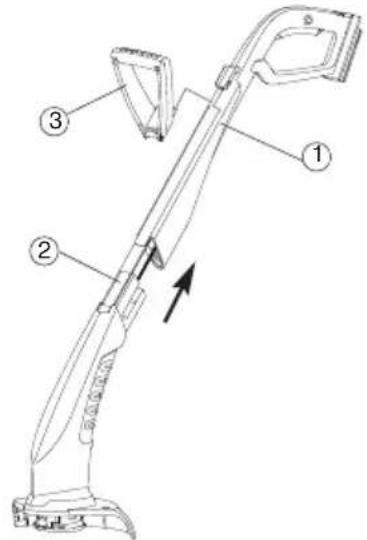
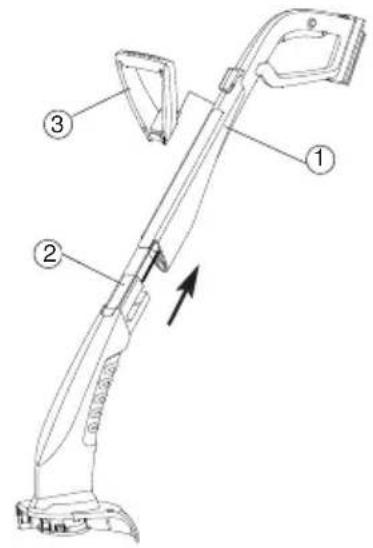
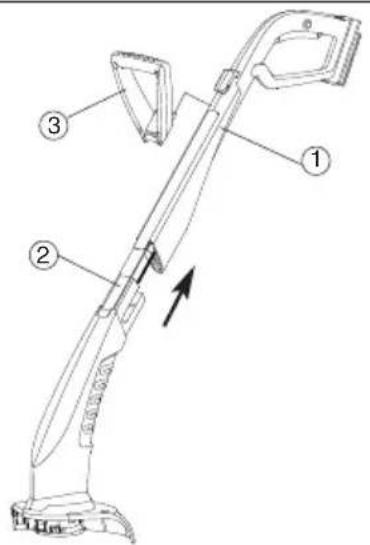
Fit the upper part of the handle (1) and the lower part of the trimmer (2) together until they click into place. The internal cable must not be stretched or trapped when doing this.
-
Put the additional handle (3) onto the upper part of the handle (1) until it clicks into place.
-
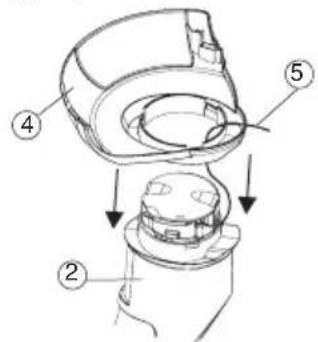
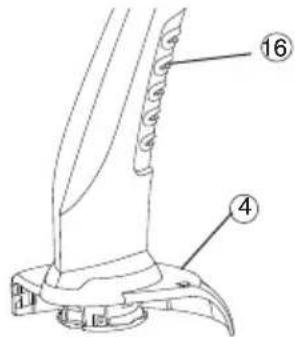
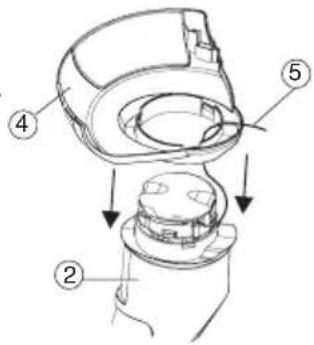
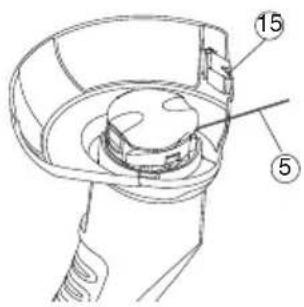
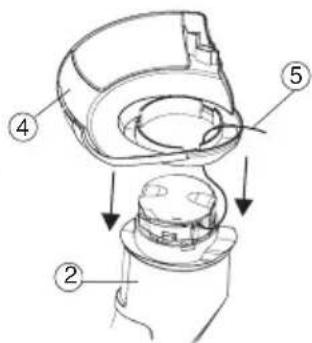
Put the cover (4) onto the lower part of the trimmer (2) while feeding the cutting filament (5) through the opening in the cover (4).
-
Put the cover (4) onto the lower part of the trimmer (2) until the connection (3 snap fittings) clicks into place.
Before using for the first time, the battery must be fully charged. Charging time (for uncharged battery) approx. 6hrs.
The NiMH battery can be charged in any state of charge, and the charging process can be interrupted at any time without harming the battery (no memory effect).
So that the fully charged battery is not discharged, the battery should be disconnected from the battery charger.

WARNING!
Overvoltage damages batteries and the battery charger.
Ensure the correct mains voltage.
Use the charger indoors only.
Do not expose the charger to moisture
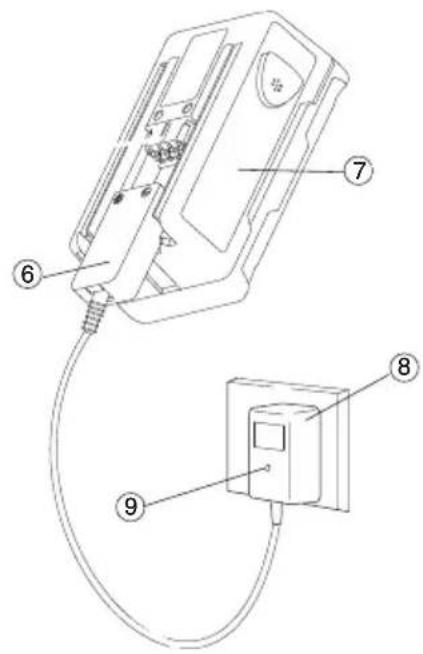
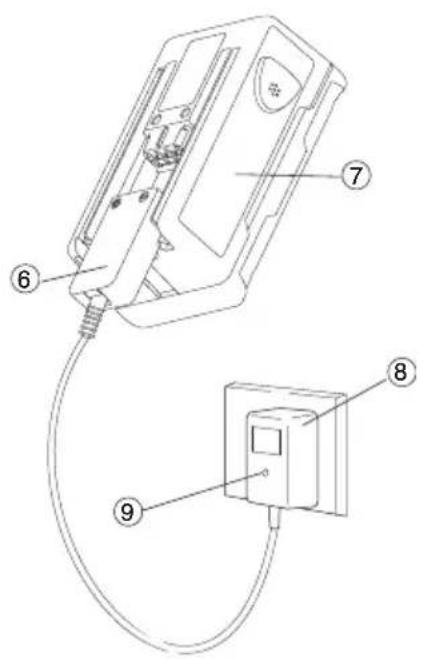
- Plug the plug of the charger cable (6) into the battery (7).
- Plug battery charger (8) into a mains socket.
The charging indicator lamp (9) on the battery charger lights up red. The battery is being charged.
When the charging indicator lamp (9) lights up green, the battery is fully charged.
- First remove the charging cable (6) from the battery (7) and then unplug the battery charger (8) from the mains socket.
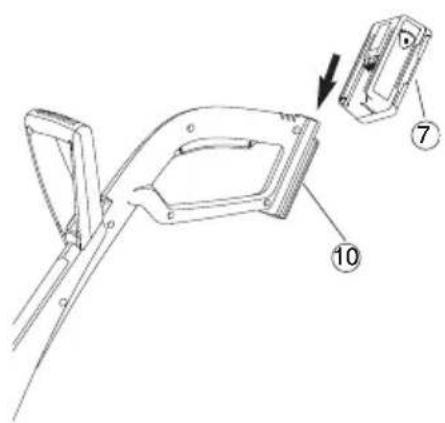
- Push the battery (7) from the bottom onto the handle (10).
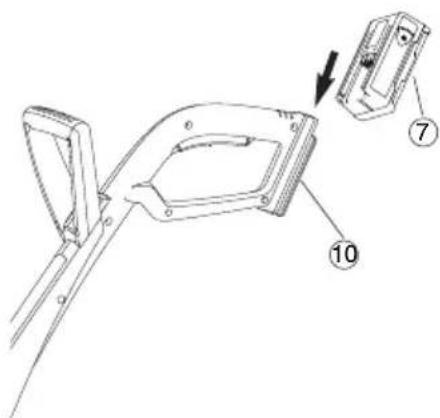
Avoid exhaustive discharge:
Stop using the trimmer before the battery is fully discharged as this shortens the battery life.
If the output of the trimmer decreases noticeably, charge the battery.
If the battery has been totally discharged, the LED will flash at the start of charging. If the LED is still flashing after an hour, a fault has occurred (see 8. Troubleshooting).
5. Operation
Risk of Injury!

Working position:
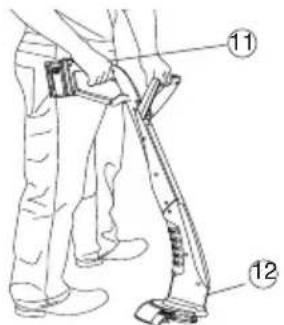
Starting the Trimmer:
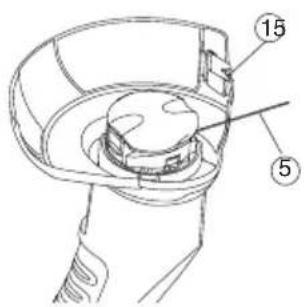
Lengthening of the filament (automatic):
6. Storage
Storage:
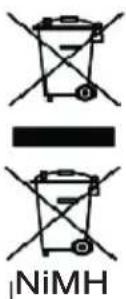
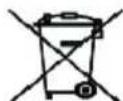
Disposal: (in accordance with 2002/96/EC)
Disposal of batteries:
Risk of injury if the Turbotrimmer does not switch off when you release the start button.
Never bypass the safety devices or switches (e.g. by tying the safety lock to the handle).
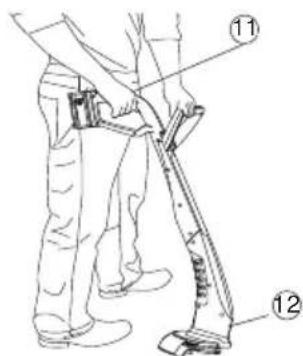
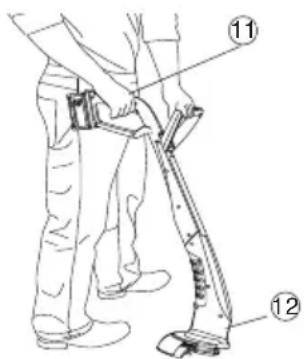
Hold the trimmer by the top of the handle (11) and the additional handle so that the cutting head (12) is tilted slightly forward.
Avoid the filament coming into contact with hard objects (walls, stones, fences etc.) to prevent the filament welding together or snapping off.
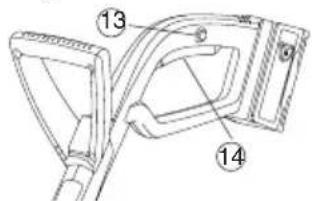
Switching the trimmer on:
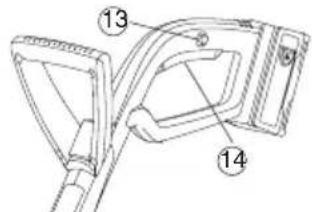
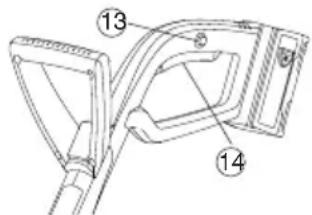
- Press and hold the safety lock (13) and then press the start button (14) on the handle.
- Release the safety lock (13) again.
Switching the trimmer off:
Release the start button (14) on the handle.
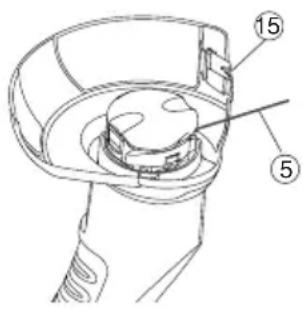
A clean cut is achieved only with the maximum filament (5) length.
The cutting filament (5) is lengthened automatically when the filament cassette comes to a standstill after switch off.
As the filament can only be lengthened in small increments, it can be necessary in some cases to repeat the switch-off /switch-on action several times (up to 6 times). Important is that the filament cassette comes to a complete standstill each time.
The cutting filament has been sufficiently lengthened when, after switch-on, it audibly strikes the filament limiter(15).
The filament cassette has to be replaced (GARDENA Replacement
Filament Cassette Art. 5306) when the cutting filament has been used up.
The Turbotrimmer must be stored out of the reach of children.
- Disconnect the Battery and fully charge (see 4. Initial Operation).
- Clean the trimmer (see 7. Maintenance)
- Store your Turbotrimmer in a dry place where it is protected from frost.
Recommendation: The trimmer can be hung up by the handle. The cutting head is not put under any unnecessary strain if the trimmer is stored hanging up.
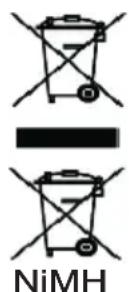
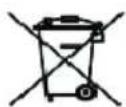
The product must not be added to normal household waste. It must be disposed of in line with local environmental regulations.
Important: Make sure that the unit is disposed of via your municipal recycling collection centre.
- Discharge NiMH batteries completely.
- Dispose of NiMH batteries properly.
Important:
Please return the NiMH batteries to your GARDENA dealer or dispose of them properly at a public recycling centre.
7. Maintenance

Risk of Injury!

There is a risk of injury from the cutting filament!
Always remove the battery pack of the Turbotrimmer before carrying out maintenance work!
Risk of Injury!

Risk of injury and risk of damage to property!
Never clean the Turbotrimmer under running water or with a water jet (in particular a high pressure water jet).
Cleaning the cover and the ventilation slots:

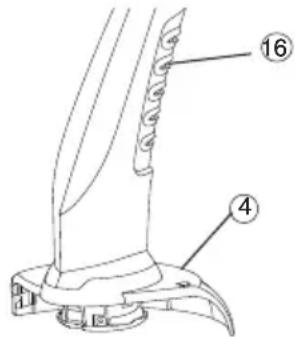
The ventilation slots must always be free of dirt.
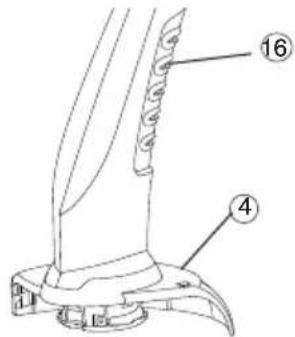
After each use remove grass and dirt residue from the cove(4) and the ventilation slots (16).
Replacing the filament cassette:

Risk of injury!
Never use metallic cutting elements or replacement parts and accessories not provided by GARDENA.

Risk of injury from the filament limiter!
Gloy Keepofigirs GAAPEBfA fllarimteatettes.You can order After replacing the filament cassette always return the trimmer
d to its normal operating position before switching on.
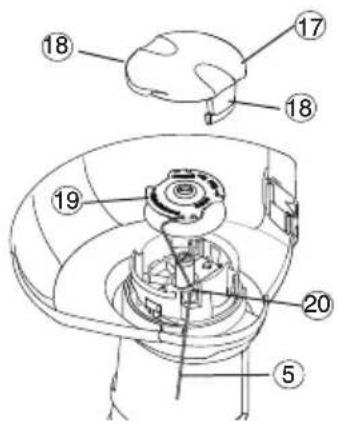
- Filament Cassette for Turbotrimmer SmallCut 300 Accu: Art. 5306
- Remove the battery pack.
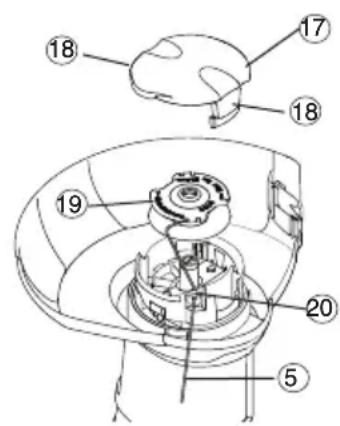
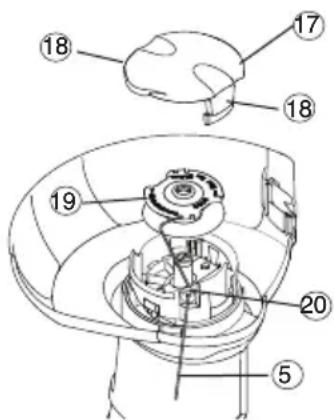
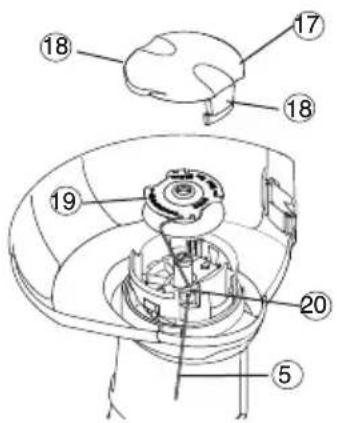
- Release the cassette cover(17) by pressing both locking clips(18) and remove the cover.
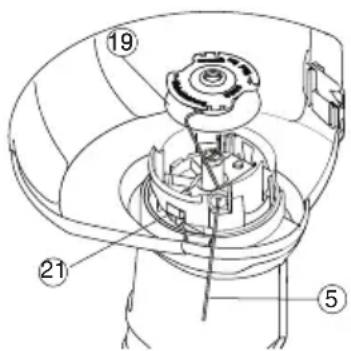
- Remove the filament cassette (19).
- Remove any dirt.
- Feed the cutting filament (5) of the new filament cassette (19) through the hole (20) and pull out about 10cm .
- Insert the filament cassette (19). Do not trap the cutting filame (8) when you do this.
- Fit the cassette cover (17) so that you hear both locking clips (18) click into place.
If the cassette cover (17) does not lock into position, turn the filament cassette (19) slightly, until the filament cassette (19) is correctly located in the filament cassette holder.
Check the cassette cover (17) is correctly fitted by trying to remove it without pressing the locking clips (18).
8. Troubleshooting
Risk of Injury!
Pulling the cutting filament manually out of the filament cassette:
Risk of injury from the cutting filament!
Always remove the battery pack of the Turbotrimmer before troubleshooting.
Risk of injury from the filament limiter!
Keep fingers away from the filament limiter
After extending the cutting filament always return the trimmer to its normal operating position before switching on.
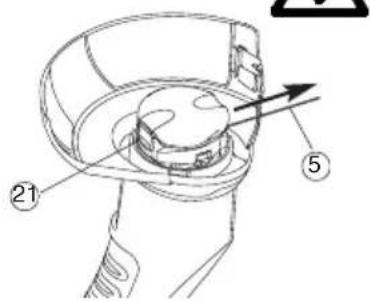
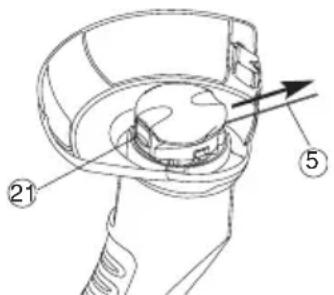
A cutting filament that is too short or no longer extends automatically when the trimmer is turned on can be pulled out manually.
Releasing a cutting filament that has gone into the cassette or which has fused:
- Remove the battery pack.
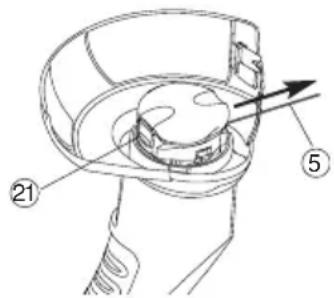
- Hold the automatic slide feed (21) down with your hand and at the same time pull on the cutting filament (5).
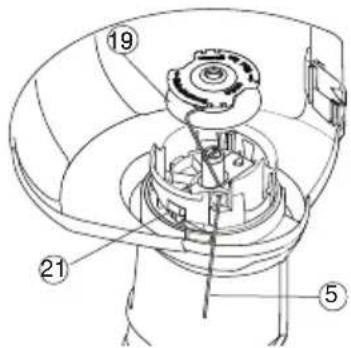
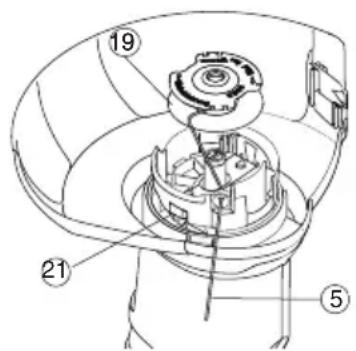
If the cutting filament has disappeared into the filament cassette or if the automatic filament extension still doesn't work after pulling the cutting filament(5) it may be fused together in the filament cassette.
- Remove the battery pack.
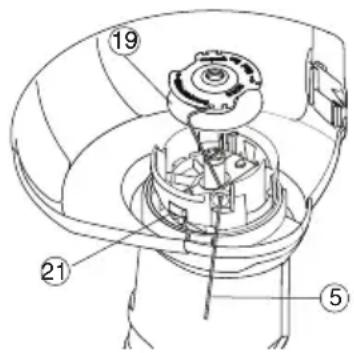
- Remove the filament cassette (19) as described in
- Maintenance "Replacing the filament cassette".
- Unwind the cutting filament (5), clean the filament cassette (19) and the cutting filament (5) and wind the cutting filament (5) onto the cassette (19) once more.
- Clean the automatic mechanism lever (21). The automatic lever must move freely.
- Insert the filament cassette again as described under
- Maintenance "Replacing the filament cassette".
Fault Possible cause Remedy
| The Turbotrimmer no longer cuts | Filament cassette empty. | Replace the filament cassette (see 6. Maintenance “Replacing the filament cassette”). |
| Cutting filament too short or the automatic filament extension cassette manually. | ||
| Cutting filament inside the cassette or fused. disappeared into the cassette or fused together. | ||
| Charging indicator lamp does not light up | Battery not plugged →Plug in battery charger in properly. and charging cable properly. | |
| Charging indicator lamp flashes for more than 1 hour | A fault has occurred. →Unplug and reinsert charging cable. The fault will be reset. | |
| The battery can no longer charged of other faults please contact GARDENA Service.(Art. 8834). Repairs should only be carried out by GARDENA service centres or dealers authorised by GARDENA. | ||
9. Accessories
| GARDENA Replacement Filament Cassette | for Turbotrimmer SmallCut 300 Accu | Art. 5306 |
| GARDENA Replacement Battery NiMH 18V | Battery for additional duration or for replacement 1.6 Ah (approx. 25 Min.) | Art. 8834 |
10. Technical Data
| Turbotrimmer SmallCut 300 Accu (Art. 8844) | |
| Designation Lawn Trimmer | |
| Filament thickness 1.5 mm | |
| Cutting width 230 mm | |
| Filament supply 10 m | |
| Filament feed Fully automatic | |
| Weight including battery 2.0 kg | |
| Rpm of filament cassette 8,500 rpm | |
| Workplace related sound pressure level LpA1) 75 dB (A) | |
| Uncertainty KpA | 3 dB (A) |
| Noise emission value LwA2) measured 86 dB (A) / guaranteed 88 dB (A) | |
| Hand / arm vibration avhw1) 2.6 m/s | 2 |
| Uncertainty Kah | 1.5 m/s2 |
| Battery | NiMH (18 V) |
| Battery capacity | 1.6 Ah |
| Battery charging time | approx. 6 hrs |
| Battery charger | |
| Mains voltage | 230 V / 50 Hz |
| Rated output current | 600 mA |
| Max. output voltage | 21 V (DC) |
Measuring method according to 1) EN 786 2) directive 2000/14/EC
11. Service / Warranty
GARDENA guarantees this product for 2 years (from date of purchase). This guarantee covers all serious defects of the unit that can be proved to be material or manufacturing faults. Under warranty we will either replace the unit or repair it free of charge if the following conditions apply:
- The unit must have been handled properly and in keeping with the requirements of the operating instructions.
- Neither the purchaser or a non-authorised third party have attempted to repair the unit.
The filament cassette and cassette cover are consumables and are not covered by the guarantee.
This manufacturer's guarantee does not affect the user's existing warranty claims against the dealer/seller.
If a fault occurs with your Turbotrimmer, please return the faulty unit together with a copy of the receipt and a description of the fault, with postage paid to one of the GARDENA Service Centres listed on the back of these operating instructions.
GARDENA
Turbotrimmer SmallCut 300 Accu

Application/Responsibilité
The ventilation slots must always be free of dirt.
When the charging indicator lamp (9) lights up green, the battery is fully charged.
Tpaumoioc twu patuw!
→Φopáteπpooataeutiká μaɪwɪv!
EaTwma Nthavn aia Aon
YTo6bI npedOTbpaNTb CBapnBaHne HnO6pbIB peHyuei HHTN, n36eaiTe npn paOte ee KOHTaKTa C JecETKIMn npedMetam (CTehbl, KaMHN, 3a6opbl ...).
BhIoueHne TpIMmepa:
- HαKaTb n ārpKaTb HαKaToN KHOnKy 6LOKnPoBKn BKNIO-ueHnra(13), 3aTeM HaKaTb NcCKOByo KHOnK(14) Ha pyuKe TpIMMepa.
- Otnyctntb KhoNky 6JIOKNPOBHN BKnIoueHn (13).
OTKJIIOUeHHe TpIMMepa:
OTnyctntb KhoNHy nycka (14) ha pyyke.
Tolbko npMakcmaJIbHOJ dInHe peKyuIero KOpda (5) DocTH- raETca HcTbI cpe3 ra3OHa.
Iocne OTKIOUeHn TpMMepa n OCTaHOBKn KaTuWKn C KOpDm peKuzaactb Kopda (5) ydInHReTcra ABToMaTHueckn.
Nockolbky peKyuyn KOpd yDInHReTc TOnbKO He6OJIbIMN CTyneHMN, INoRda Tpe6yeTc HecKoIbKO (do 6) pa3 NOBTOPITb Ipouecc BkHoueHn. Ppi 3Tom BaXHO KaXdbi pa3 DOxDaTb- Cn OJHO OCTaHOBN KaTuKN C KOpDM.
Pexyun KOpD IOCTnraeT DOCTaTOHOn DInHbI, KOrda npu BkIIOueHHN RCHO CbliWeH ydape ro KOHca no ORpaHnHTeIIO Ko
Iocne n3pacxodobHnKopda HyHKHO CMeHNTb KaTyuKy (GARDENA Kacceta Cmehna, apT. 5306).
MecTo xpaHHeNo DOJIHHo 6bITb HeIOCTyHNO dJIa DeTei.
- BbIbTe aKHyMylTOp n NOHocTbIO 3apAInTe erO (cm.4. NaBHaCtAnn EKcNpyatauH).
- OuHCTHe n3dEJIne (cM. 7. TexHnueckoe o6cnyKbAHHe).
3 XpaHnTb TpHMMep BCyXOM MeCTe, 3aUHHeHHOM OT 3aMeP3aHn.
Cobet: Tpmmep MoJHNO IOBecntb 3a pyKy. Ppi xpaehn B NOBeHHOM NIOJKeHN peKuzaI rOIOBka He 6ydet H3JIuHe HaRpyKeHa.
yTnna3aun: (corlacho 2002/96/EG)
yTHnHaaH aKHyMylTopa:
Ipi6op HeJIb3a Bbl6paCbIBaTb C 06bIHbIM DomaHm MycOpOM, erO HxKHO yTHIN3nPoBA Tb COOTBETCTBYIOHM O6pa3OM.
→B TepMaHn BaxHo yTnIln3npoBaTb np6Op uepe3 KOMMyHaJIbHbI NyHKT c6opa OTXoOob
BaHHo:
IoxaIyIcTa, BepHnTe HKeJIb-MeTaNOrN6pIhBie 6aTapen BaIeMy areHTy no npOdaKe GARDENA nIn yTnIn3npyIte nx HaJleKaunm 06pa3OM B o6UecTBeHHOM ueHTpe nepepa6oTkn OTXoDob.
1.Полноctью pa3рдnte HnkeJIb-MetanIIOrgnbDHyBie 6aTapeN.
2. Ytuln3npyTe HnKeIb-MeTaIIOrI6pndHbIe 6aTapeN DOJIHHbIM O6pa30M.
7. TexHHueckoe 06cIyKHBaHne
Onachoctb TpaBMnpoBaHna!

Onachocb TpaBMnpoBaHnO pexyuyu Hntb!
Bcerda BbIHMaTe aKHyMylrTop, npEeJe Yem BblOnHrTb TexHueeCKoe 6cnyKuBaHne!
Onachoctb TpaBMnpoBaHna!

OnachocTb TpaBMnpoBaHnI npuHHeHnMaTePnaIbHoro yuepe6a! 3anpeuaetc npo3BOIDtB YNCTKy ra3OHOKCN B npToCHOBde,a TaKHe NOc CTpyeB OBDbl (OCO6eHHo NOD BBICOHM daBLeHNEM).
OuHCTKa KpbIuHNn BeHTNIAUHOHBIX UeJeN:
He donyckaIte cKoJIeHnI rPraI B Bo3dyxo3a6OpHnKe.
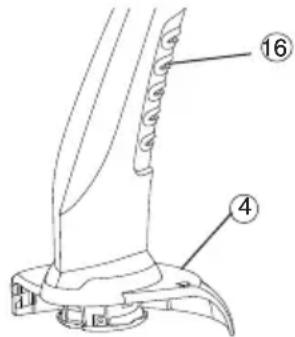
→Pocne KaHDoRo HcNoB3OBAHn ydaJIHTb OCTaTKI TpaBbl 3aarp3HeHn I3 KpbIiKu(4) IN BEHTnlaUIOHbIX ueJe(16).
3aMeHa KaTyuKn C Kop-OM:

Onachoctb TpaBMnpoBaHnI
3aIpeaaeTcHcnoJIb3ObaTbMeTaJIInueckHepeKHyUne3JeMeHTbl,a TaKHe 3aNuaCTn HpN-HaJIeHHoCTn, He npEynCmTopeHHbIe GARDENA.

PnHcnoJIb3OBAHNOrpaHnHTeIaJIneCKMmHO npaHITbcra! He BCTabJIte naJIbUbI B OrpaHnHTeJI bJIneCKn.
3aMeHnB KaccTe C JieckO, BceRda Bo3BpaauTe TpMMep B pa6ooye nolokHeHne, PpeKeJe Yem ERO BKIOUaTb.
Heo6xOdmo HcnoB30BaTb ToIbKO OpnHnHaJIbHbIe KaTyuKn C HHTbIO GARDENA. KaTuKn C HHTbIO MOXHO npNo6peTn y ToproBOro aRrTa GARDENA nIN B cepBnChOn cnyk6e GARDENA.
Katyusha C HHTbIO DnI Typ60ra3oHOKOcNk N SmallCut: Homep 13dennr 5306
1. BbHbTe aKKymyIaTOp.
2. OndOBpeMeHHO COHmTE KpbIuKy KaTuKn (17) B MeCTe 06nx 3aueJok (18) n CHmnte.
3. BbIbTe KaTyuKh y Ia HHTn (19).
4.Пи Heo6xOdHMoCTn ydaJIte rpa3b.
5. PpOpyCTnTb peKyuHnTb (5) C HOBo KaTyuKn (19) uepe3 neTIO (20), BbITaHyB ee npImepHO Ha 10 cm.
6. BLOHHTb KaTyuHy (19). PpN 3TOM peKyuJa HHTb(5) He DoJIHHa 3aJHMaTbCra.
7. YcTaHOBnTe KpbIshKy KaTyuShn (17) Ha dePkaTeJIb KaTyuShn TaHm 6pa3oM, YTO6bl cpa60TaN oBe 3aueJkn (18).
EcIn He ydaeTc3aΦHcnpoBaTb KpbIuKy KaccTebl (17) B HxHOM NIOJKeHn, CJIeRka NOBepHITe KaccTy C JecKoI(19), IOKa OHa (19) He OKaKeTcB INpaBnIbHOM NIOJKeHn OTHCINTEbHO DePkaTeJIa KaccTebl.
→Пюверьт,праиьно Лу устовileна Кршka KacceТы (17).ДЯ STORO nonpo6yIte OTcoeINHTb ee,HaKaB Ha 6LOKHyUOuNe 3aKIMbl (18).
8. Понск и устараенье несправноTei
Onachoctb TpaBMnpoBaHna!

OnachocTb TpaBMnpoBaHnpeKyuEe HHTbIo!
Npeed ycTpaHHeHMe HeNCpPaBHOCTe TpMMepa OTKIOHTb OT CeH erO ceTeByo BVIKy!
BbITaRnBaHnepeKyuuei HHTN n3 KaTyuKu BpyHyIO:

PnHcnoJIb3OBAHNOrpaHnHTeIaJIneCKMmHO npaHnTbcra! He BCTabJIte naJIbUbI B OrpaHnHTeJI bJIneCKn.
BbInyIecky IaIcpe3aHn, Bcerda Bo3BaPauaTe TpMMep B pa6ooye nolokHeHne, npEKeJe cem ERO BkIOUaTb.
Ecn peKyua HnTb CnIeKOM KOpOTKa HnH He nOaETc aBTOMaTneCn np BkIoueHn, To ee MOJHO BbITaHyTb BpyHyU.
Ocbobokdene 3aTaNyToHnn npBaepHHo peKyuEHNTH:
- BbHbTe aKHyMylTOp.
- HaKaTb DBnKoK aBtOMaTnKn (21) BpyHyIO N OJHObpemeHNO BblrHyTb peKuSyIO HHTb (5).
Ecn npKyuza HnTb 3aTyrnaB B KAtyHky nAn aBTOMaTuYe- cKaI NOdaTaKaKe I NocLe BbITraBaHnB BpyHyO He pa6oTaeT, To KOHeC Kopda (5), Bo3MOxHo, npNbapnnc K KaTyuKe (19).
- BbHbTe aKHyMylrTOP.
- BbHyTb KaTyWky C KOpDm (19), KaK OnHcAHO B n. 6 TexHnueCKOrO 06ClyJHHBaHnR "3aMeHa KaTyWKn C KOpDm".
- Pa3MoTaTb peKyuIyIO HHTb (5) OChCTNtB KaTyuKy (19) IN KOpD (5), ChOBA HAMoTaTb KOpD(5) Ha KaTyuKy (19).
- OuHCTnTb DvHKoK aBTOMaTHKn(21). DvHKoK dOJIKeH CBO6oHDNo nepemeuaTbcra.
- BCTaBnTb KaTuShky C KOpDom Ha3aI, KaK OnPcAHO B n.7 TexHnueCkOrO 06cLyJKNBaHnra "3ameHa KaTuShKn C KOpDOM".
HapyeHHe Bo3MOHHa npuHa YcTaPaeHHe
Tpmmep 6oIbIe He peKeT
Hopd n3pacxodBaH.
→3aMeHnTb KaTyuKc KOpDom (cm.7.TexHnueckoe 06CnyKuBaHne "3aMeHa KaTyuKc C KopDom").
ClnuHOM KopoTka peKyuza HnTb nn He pa6Otae T aBTO- mAtnuecka nOdaHHTN.
→BbITaHtBpeKyuHnHTb yuKN BpyHyU..
Koneu peJxueHnTn 3aTaryT
Ocbo6oNDtB 3aTnHyTyIO/HHnyOpEJyU HHTb.
BnIka 3apAHO yCTpoiCTBa IpaBnIbHO BCTaBNTb
HnI Ka6eJI BCTaBHeHa yCTpoiCTBO n BnIKy
He Do KOHua. Ka6eJI.
KoHTpoJIbHaJa lamna 3apIaHOrO yCTpOiCTBa He rOpIT
PnncyTCTByeT HapyuHHe.
OTKJIIOUHTbI CHOBA NOI-KJIIOUHTb 3apAHyBn Ka6eJb.HapyuHHe yCTpaHReTc.
HOnTpOlbHaJaAMn3apAnHO yCTpOYCTBaMnraetdoMbweyaca
Дeфekt aKHyMylrTopa. 3aMeHnTb aKHyMylrTop (apT.8834).
AkkymyIaTOp 60nbIe He noIdaTeC 3apJdHe

B clyuae dpyHX hapuHmMbI npocn BAc o6paTntbC8 B 6iOpo 6cbnyHbAHnA FnpMbIGARDENA.PeMOHT pa3peWaeTcB bInOJHrTb TObkO Ha NyHKtax cepBnca FnpMbIGARDENA nIy chepe3 ynoHOMOeHHbIe FnpMoGARDENA ToproBbIe opraHn3aun.
9. NocTaBlaeMbIe npHaJedKHOCTN
He 3aIiShaTe aKymyIaTOpHi 6aTapei Ha 6aTaapex onaIeHHra Ta nID BnIbOM npRmIX COHryHnx npOMEHB npOTAROM TpINBaIoro Yacy.
- BnKOpncToBnyTe TpMep IInIe 3a TeMnepaTpyn BiD-10°C Do +45°C.
- Ka6eIb IJIa 3apJdKeHHa kMyIaTOpHIX 6aTapei cnI nepioDnUHO nepeBiprTu Ha HArBHiCTb O3HaK NOWKoDKeHHa 60 CTapIHHa (JaMKoCTi). Ka6eIb MOxHa BnKOpNcTOBvBaTH NIIue 3a yMOBn BiIMHHoro cTaHy.
- 3apAHHn npncptpi, lo BXoNDt do KOMNJIeKTy NOCTABKN, MoKHb BHKOpNCTOBByBaTN IINHe IJH 3apAHHn aKymyIaTOPa, lo NocTaYaeTbcra pa3om i3 TpIMepom.
- 3a donomoro zuoro 3apndoro npnctroo He MoxHa 3apdkaTH 6aTapei iHux TnIB, Kpim aKymyIaTOPHO, TOM yo ue MOKe npn3BecTN do nokehi.
3acToCyBaHHI/BiJIOBiaIbHicTb:
Ybara!Yepe3 He6e3neky Tilechoro yuKoJKeHHa kMyIaTOp 3a6opOHeNo BnKOpNCToBbATn Jk dKepeIoo eHeprii Ira nHux npunaIb.
BukopncToByTe aKymyIaTOp IInIe IpnlaIb, nepeI6aueHx GARDENA.
Iicra cnIbHoro HabaHTaKeHHaKymyIaTOpHy 6aTaapeo cnoatky oxIoOitb (TpnbAnicTh oxIoOJHeHHa -do 1 roq.).HaTo rapuy aKymyIaTOpHy 6aTaapeo He MoXHa 3apAnKaTH.
36epiraHHa:
3a6bOpHeNo 36epiratn akymyIaTOp npn Tempepatypi noHa4 45^ a6o nD npramm coHMym npomHHM.
IdeaJIbHOIO (3 MIPkyBaHb 3MeHSeHHa CamOpOzPrdKN) IJIA 36epirahnn e TemnepaTpya 25 ^ C . HikoJn He 36epiraTe
Pnncpii, He BnHnBnAkyMylTOp, OchIbKnZe MoKe Pn3BeCTn Do HnPaBnJbHOro BnKOpNCtAHHn PnpCTpoAo 60 TpaBMyBaHHa.
3a6bopoHeHO 36epiratn aKymyIaTOp B Micx CtaTuHoro eJeKTPOcTpmy.
3.Складання
-
BCTabIyTe BepxHIO qactHy pyKn(1) B HnKHiO qactHy TpImepa(2),doHne 6yde cyTHo KlaaunHa. Ppi cBomy CJIkyTe, Uo6 BHyTpiiHni Ka6eIb He 6bylo po3TgHyTo a60 3aTncHyTo.
-
Hān rhiTb DóaTHOBn āepKaH (3) Ha BépxHIO qactHy pyKIB' (1), dOKn He noCyTe KlaaHaHH, 0o O3Haaye npabNlbe φikcyBaHH.
-
BcTaHOBtB 3axnCHN KOxH (4) Ha HHHIO qACTnHy TpIMeTa BnBeiTb piKyuN KOpD (5) UpeE3 OTBip y KOxHyci (4).
-
BctahOBiTb 3axnCHn KOxHx (4)Ha HHHIO qactHy Typ6oTpN-Mepa (2),DOKn He noyTe KlaCaHH, zo O3NaHae npabInbHe fikCyBaHH (3 fikCaTopHNrAHa).
→KaIIO NOTyXHicTb TpIMepa NOMiTHO 3HN3nlaCra, cIid 3apAHTN aKymyIaTOp.
3a noBHoro po3pndKeHH aKymIaTOpHOi 6aTapeHa noaTHy II 3apdKeHH 6yde 6JIIMaTN CBIITIOIOHN iINKaTOp. RaHIO uepe3 roHy CBITIOIOHN iINKaTOp He 3rac, cE O3NaHae, IIO BUNHKnla npo6Iema (nVB. po3di9 "YcyHeHH HenoJaOK").
5. Eknyatajia
Hebe3neKa OTpMaHHa TpaBM! Po6oHa no3niz:

KnO npB iDnycKaHHI NyckOBoi KHONK Tpy6oTpImep He BmNkaCTbC, BHNkAc He6e3neKa OTPMaHHa TpaBM! KIO npB iDnycKaHHI NyckOBoi KHONK Typ6oTpImep He BmNkaCTbC, BHNkAc He6e3neKa OTPMaHHa TpaBM!
→TpmaTe Tpy6oTpmepe 3a pyKIB' (11) Ta doaTHOBn DePkaT aHm YHOM, o6 piKyU roIOBky (12) 6yIo TPOXn HaxJIeHO Bnepe.
YHnKaIe KOHTaKTy pIKyUro KOpdy 3 TBepdImn npEmdTaMn (CTiHO, KaMeHmN, napKaHOM Ta iH.) dIy 3anO6irAHn 3HOWeHn a6o o6pNBv pIKyUro KOpdy.
3anyckTyp60TpHmepa:
NoobHeHHaHTHn (aBToMaTHHa):
BmKahHr Typ6oTpImepa:
- HaTnCHiTb Ha KhoNky 6IokyBaHHa DOBilbHOro BMnKaHHa (13) Ta yTPmMyTe II HaTnCKaHHa, NOTIM HaTnCHiTb Ha NyCHOby KhoNky (14) Ha pyKIB".
- BiDnycTb KHOHKy 6LOKYBaHHa (13).
BIMnKaHH Tpy6oTpHmepa:
→BiDnycTnTb nycKoby KHONKy (14)Ha pykIB'
TilbKn ToDi, KOJI pIXyHa HHTKa (5) B'TaHa MaKcMaJIbHy DOBHHy, DoCraeTaBCa anypaTHa CTPnKHa ra3OHy.
Jaio nici BnKIOUeHHa KOTyuKa 3 HHTKOIO 3yINHReTbcra, pIkyua HNTka (5) NOOBKyEbCRA ABTomaTHHO.
Ockibkn pKnyn KOp nOIOBkyETcra Tlkbn MaJIIMN KpOKaMn, B OKpeMnx BNpaIakx MOKe BHNHaTn Heo6xHicTb NOBTOPTn npOec BKIOUeHHB/BNKIOUeHHa (do 6 pa3iB). Ppi cboMy BaHKINBO, 06 KOtyuKa 3 pIKyum KOpOM KOXHOrO pa3y IOBHCTU 3yINHJLacra.
PikyuN KOpI NOOBKeH N DOCTaTHbO IINe ToI, KOJI BIn NiCJI BKNIOEHHYyTHo TOpKaETbcra O6MeKHyBaHa HHTKn (15).
Y BnnaKy BVtpauehoi piKyuoi HHTKN KOTyshky 3 HHTKOIO NOTPI6- HO 3amHNT (3amHna KOTywa ka apt.5306 BiGARDENA).
6.36epirannn
YTNi3aui: (3rIHO 3 nOIOHeH HAM EC 2002/96/EG)
YTNlisaia naymyaTopa:
36epiraIe Typ6oTpImep B Micu, HeIOCTynHOMy dIaTei.
- BnmiTb aKymyIaTOp i 3apRiTb Noro (DnB. po3di 4 "NoaToK ekCnlyaTaui).
2.Поунсты Тример (ДИВ. роздл 7 "Тexhiу He obcIyroByBaHЯ").
3 Micue 36epiraHHN Typ60TpHmepa Mae 6yTN cyxHM Ta 3axnueHIM BiD npomep3aHH.
PekomeHaJ: Typ60tpmep MOHa NiDiBiuYBaTu 3a pyKIB'. Ipn 36epirahHi y TaKOMy NIOJOKeHHI He BUNHkae 3aIBORo HAB TaKeHHHa pIKHy roLOBky.
IpnlaH Me MoXHa BnKnDaTn pa30m i3 DomaunHcMCTTAM, Ioro ytni3aui NOBHHa BnKOHyBaTncs 3 DoTpmaHHam ycix npabnl.
→Пилад yTnI3yBaTN B Micux Дя KOMyHaJIbHnx BiXoDiB. Ybara!
NoBepHb Hikeb-MetalipdpiuHi aKymyIaTOpn dIepey GARDENA a60 yTuNi3yIte ix HaJIeKHM mYHOM y ueHTPi BToPnHHoI nepepo6Kn bIxOiB.
- NobHicTIO po3pAitb HikeB-MeTaIriDpiNdi akymyTAToPn.
- Ytni3yIte HikeB-MeTaIriDpiNdi akymyIaTOpn HaJIeKHM NHHOM.
7. Texhivhe o6cnyroByBaHHa
He6e3neKa 3aBdaTn TpaBMn!

He6e3neKa 3aBdaTn TpaBMn pIXyUHm KOpDOM!
→3aBxNn BnMaTe aKymyJrTOp, nepu Hix BnKohyBaTH texHiue 06cIyROByBaHH!
He6e3neka 3aBdaTu TpaBMn!

He6e3neKa 3aBdaTn TpaBM Ta MaTepiJIbHx 36ntKIB!
→3a6oHReTbcMNTu Typ6oTpmeRpiD npOTiHIO BOIOU H BOJHM CtpymHeM (OCO6JIbBOPiD BnCOKm TnCKOM).
Ynctka 3axnCHoro Koxyxa Ta BeHTnIaHINX OTBOpIb:
OTBOPn IaI HaXoJKeHHaOJIOHyBaJIbHOrO NOBITpMaIOTb 3aBXHn 6yTH NCTHMN.
→Пия КОнного ВИКОпсТаHHЯ ВДаJIITb 3aIIuKn TpaBn Ta 6pydY 3axHcHOrO KOKyX(4) Ta BeHTnIaIiHnx OTbopi616).
3aMiHa KOTuLHn:

He6e3neKa 3aBdaTn TpaBMn!
Hikoln He KopncTyntecb MeTaJIeBIMPiKyuIMN eJeMeHTaMn a6o 3anacHmN qactHaMn Ta iHBeHTapeM, kI He 3anpOnoHObaHo Bnpo6HnKOM GARDENA.

IChye pN3nK TpaBMyBaHHaPiD Yac BnKOpNCtAHHaOBMeJyBaHa DnRA BOLOCiHHa!
→He Klaɪdɪt b nʌlbu B ObmeKyBaŋ dɪn BɔIocɪHn.
→3amihnBwn KaceTy 3 BOLOciHHa, 3abKdN NOBepTaTepmep y po6oye noJooKeHHa, nepu HiK NOrO BMnKaTu.
I03BOJEAETbCBAHKOpNCaHnRAJIuIe φIpMOBoI KOtyuHn GARDENA. KoTyuKMy MoKHa npnd6aTu y perioHaJIbHnx dInlepiB GARDENA uN 6e3nocepEnbO B cepbcHomy ueHTpi GARDENA.
- 3MiHnHa KoTyuHaДЯ Tpy6oTpImepy SmallCut 300:apr.5306
- BnIMt b aKymyIaTOp.
- HATNCiTB BOdHocac 6nDi 3aCKouKn(17) Ha KpnuCi KoTyu- Kn (18) Ta 3HiMiTb KpnuHy.
- BnIMiTb KOtyuKy (19).
- y pa3i 3a6pydHeHH oUcHtB DeTaJI.
- Pijyuyn Kopd (5) HOBoi KOtyu (19) npocyHbTe Kpi3b Byuho (20) Ta BnTgHiTb Noro Ha DOBxHy MaJke 10 cm.
- YklaIbIb KOTyUkUy (19). 3aNo6iraIe npu UcbOMy 3aTnCHHeHHa pKHyUro KOpdy (5).
- HānjiHitb KpniKh y KoTyW TaHm YHOM, ξo6 oBnDi 3aCHOHN (18) cTaln Ha Micue Ta 3amKHyIeNc. DOKn Bn He NooyeTe KlaaHaHH.
→HKUo He Bdaetbcra 3aphiKcyBaTn KpnWky KaceTuB NOtpi6Homy NIOJKeHHi, 3JIerKa NOBepTaIte KaceTy 3 BOLOciHHaM(19), DOKN BOHa (19) He ONINHTbcra y npabNlBHomy NIOJKeHHi BiIDHO TpIMaHa cieI HaceTu.
→IpeBipTe, n npabnIbHO BCTaHOBHeHO KaceTy 3 BOJocIHnM (17).ДЯцboro cnpo6yIe BiI'edHaTn II, He HaTnCKaOuH Na 6LoKByaJIbHi cKo6n (18).
8. YcyhenHH HeNoJaOK
He6e3neKa 3aBdaTn TpaBMn!
BntarHitb Kinecb pixyoro Kopdy 3i 3MiHHO'KOTUKN:

He6e3neKa 3aBdaTn TpaBMpiKyuHm KOpDom!
→ 3aBxDn BnMaIte aKymyJrTOp, nepu HiK BnKohyBaTH texHiUHe 06cLyroByBaHHra!
IcHye pN3NK TpaBMyBaHHr NiD Yac BnKOpNCTaHHr O6MeKByBaHa dJI RBOJOCIHHe!
→He klaidiTb naIbci B 6MeKyBaay dIy BOLOCiHHa.
→3amHnBn HaceTy 3 BOLOciHHaM, 3aBKn NOBepTaIe TpIMep ypo6oue nOJKeHHa, nepu HiK NOro BMnKaTH.
JaKuO pIXyUH KOpd 3aHaTTo KOpOTn a6o He NODaETbCra ABTOMaTHUHO npn BBIMKHeHHi, Ioro MOxHa BNTaRHyTN 3 KOTuHN pyKOHO.
- BnIMt b aKymyIaTOp.
- HATnCHiTb pyKOIO yTpmyTe BaJIb aBTOMaTHUHOI NOaHi pIKyUoro KOpdy(21) Ta BOdHocac NotarHtB 3a piKyuN Ko
BndaJIb 3acTpIyI / cnpaBoBaHn pIXyHn KOpd:
JaKuo piKyuH KOpd 3acTpyHyB y KOtyu a6o MexaHi3m aBTOMaTHNoI NOaqi piKyuOro Kopdy nicra BnTaryBaHHra pKiUyoro Kopdy BCE He npaioe, MoKJIInBO, piKyuH KOpd (5) B KOtyu- (19) 3HOCBc.
- BnIMt b aKymyIaTOp.
- BntaHrHiTb KoTyuKy 3 pixyuHm KOpDom (19) Jk HabeJeHO y n. 6 po3dIy TexHicHe o6cLyroBvBaHHra,3aMiHa KoTyuKn".
- BiDMOTaIe piKyuN KOpD(5), npOuNCITb KOtyuN (19) Ta piKyuN KOpD(5) Ta HAMOTaIe piKyuN KOpD(5) 3HOB Ha KOtyuNy (19).
4.Почспть BaЖиь abTOMaTHOoi noaqui piKyuOro KOpdy (21). BaЖиь nobuHEn nobiJbHo pyxatncr. - 3HOB BCTaHOBiTb KOtyuKy 3 piKyuHm KOpdOM RaK HabeDeHo y n.7 po3diY TexHiUHe o6cIyROByBaHHra "3amHa KOtyuKn".
HecnpabHictb MoxlnBa npuHa Cnoci6 ycHeHHa
Mnaedekn do 16 roHN, KaTo n OT Iua, KOnTo He ca 3aNo3HaTn C Hactoata HnCTpyKun 3a
eKcnnoataa. Xopa c orpaHnueHH nCnxNueeCKn HInnHnueeCKn Bb3MOX-HOCTMORATda
H3NoJ3BaT TO3N IpoDyKT cMo NOp pBkoBOcTBOTn HaI3Opa Ha OTro-BOPHO 3a TAX JInCe.
Deata Tp6Ba Da 6bDaT Ha6JIIOdaBAHn, 3a Da ce rapaHTnpa, Ye He cn IrgpaT C npOdykTa.
Hnkora He pa6oTeTe C npOdykTa, KOraTo CTe yMopeHH, 60JIHN IIN NOB Bb3dEInCTBnETo Ha
aIKOXOI, HAPKOTNII INIJIeKApCTBa.
CbDbpKaHne
→Molny,ДрькTe Te3n INHCTpyKuIN 3a pa6Ota Ha 6e3onacHO MrcTo.
1.Kbde da n3noJ3BaTe GARDENA Turbotrimmer. 164
2.Инструкци 3a6e3oNaChocT 164
3 CrIIO6BaHe 166
4.Пьрвално руckahe 166
5.ДeйстВи.. 167
6.CbxpaeHne 167
7. Pdprkka 168
8. OTeTpaHraBaHe Ha npo6IeMn 169
9.Пинадлжнocтн.. 170
10. Texnueckn daHHN 170
11.ObcnyKbaHe/ΓapaHua 170
1. Kbde da n3noJ3BaTe GARDENA Turbotrimmer
PpaBnHIO n3nOJ3BaHe
Typ6o-tpmepa GARDENA e npedha3nauehen 3a nodpabHbBahe n Kocene Ha 3eJIeHN I TpeBHN IIIOUIN B YacTHN DOMOBe I rpaDHHN.
He ce pa3pewaba n3noI3BaHe Ha TpImepa Ha o6ueCTBeHn MeCTa, napKOBe, cnpTHi IIOuaKn, IIbTuHa, B CeJIckOTOn IROPCKO CTO- nAHCTBO.
BHHMaHHe

Iopadn onacnoct OT hapaHbaHe, Typ6o-TrnPmepa GARDENA
He Tp6Ba Da Ce H3NoJ3Ba 3a NOpR3BaHe Ha KINB NJIeTOBe Hn 3a pa3Dpo6BaHe Ha KOMNocT.
2.Инстукции 3a 6e3oNaChocT
CnazBaTe yka3aHnraTa 3a TexnHa Ha 6e3oNaCHocT O6eJhaHn Bbpxy Typ6o-tpmepa.

BHIMAHHE!
Ppei Da 3anoHete pa6oTa npOeTe TE HCTpyKunraTa3a eknloatauia!

ONACHOCT! TokOB yap!
→ Na3eTe TpHMepa O TbKd n Bnara!
PpeDynpEckdHne - pNCK OT NOKap, He npEn3BnKBAte OKcbraHe Ha KJIeMNTe Ha 6aTePNrTa.
ONACHOCT!HapaHbAHe Ha TpeTn Iuca!

TpTeHnIuca He TpR6Ba Da ce HAMnPaB Onac-Hata 30Ha!
H3KIOUcTe!IpeiHaCTpOHaII INIOuNCtBaHe,IN3BaJeTe 6aTePnTa.
→Дрьктpe рьцeteи Кранataси далеу ot pa60THaT3OHa Do nBnHOTOCnnpa- He Haata KOPda!
PpOBePKa npEiN BCraKa yNoTpe6a
→Ппдн BCЯку ynoTppe6a HanpaBeTe Bn3y- anHa npOBepka Ha Tpy6o-TpImepa.
→Поверете Дали BeHTnlaцHOHHTe OTBO-pn ca
чп. He n3noJIbaIte Tpy6o-ТрIMepa, ako ca
nobpeHEN nIN n3HOceHn 3aUNTHIte npN
cNoC6JIeHn (6yTOHeH npeKbCBaY, 3aUNTeH
KOpNyc) n/Inn KAcetata C Kopdata.
→Hnkora He pa6oTeTe 6e3 3aunTHn npncno-c6neHn.
Празн haayanoTo ha pa6oTaT npOBepTe TpeBHaTnlou, KOrTO ue Kocnte. OTrpaHHeT HaMPaUHTe ce TaM yJHKn TeJa n BHMaBaYTe NO Bpeme Ha pa6oTa 3a yJHKn TeJa (HaNP. KIOHN, BbKeTa, TeJObE, KaMbHn...).
→Ako doKaTo peKeTe ce HaTbKHeTe Ha HraKaBO npenrTCTBne, n3KIOUeTe KocauKaTa n 3BaJeTe 6aTePnTa. OTCpaHete npedMeTa n orJeJaTe KocauKaTa 3a HkaKBn NOpeN. Ako ce HanoJN, 3aHeCeTe KocauKaTa B cepBu3.
H3noJ3BaHe /OTROBOPHOCT
To3n Typ6o-tpmep MoKe Da CtaHe npuHa 3a cepno3Hn HapaHbAHn!
→H3noJ3BaIte Typ6o-TPmepa cbrIacHO ueJI Ta 3a H3noJ3BaHe daJeHa B Ta3n INHCTpyKcIg 3a EKcNlOaTaIy.
Bne Hocnte OTROBOPHOCT 3a 6e30nachOCTTa B a6OTHaTAtoHa.
→BHMaBaTe 3a TOBa, B6IIN3OCTdo pa6oTHaTa 30Ha Da He Ce HAMpaT dpyrH IuCa (ocObeHo Deua) N KINBOThN.
→Hnkora He n3no3BaIte Typ6o-TrpImepa C Hen3npaBHN IIN JInCBAuN 3auNTn npncnoc6JeHnI
CneI yIIOTe6a n3BaIeTe 6aTeepnra T peIOBHO orJIeKdAte KocauKaTa 3a IOBpeN,OCO6eHO KOHTeHepa.AKOce HAIOnH,3aHeCeTe KocauKaTa B cepBn3 N/IN CMeHTe KOHTeHepa.
HocTe 3aunTHn OuHa!
→3a 3aunTa Ha KpaKaTa HocTe 3dpBn O6yBKn INbIg nAHTaIOH.NpBkTe daJeu OT peKeuaTa Kopda npbCTnTe Ha pBcTe N KpaKaTa - oco6eNo npn pa6oTa Ha Typ6o-TpImepa!
→Pn pa6oTa BnHaRn 3aemaIte 6e3OanCHO n yCTOnHBO NIOJKeHHe..
BHHMaBaTe pRi DnHKeHHe Ha3aI. OnaCHOCT OT npenbBaHe!
→Pa6oTeTe cAmO npn DHeBHa CBeTlnHa HIn B yCIOBnTa Ha Do6pa BnDnMoCT.
IpeKbcBaHe Ha pa6oTaT
→Hnkora He ocTabaIte Typ6o-tpmepa 6e3 Hnd30p Ha MrcTOTo 3a pa6ota.
→Ako npeyctaHOBNTe pa6oTa, n3BaTeTe 6aTePnraTn NOCTaBeTe KocayKaTa Ha 6e3OnaCHO MACTO.
Ako npeyctaHOBnTe pa6oTa,3a da ce npemecHTe Bpyra YacT Ha rpaHnHaTb, BNHaN nKIOUyBaIte KocayKaTa, N3aKaBaITe, DOkATO HCTpyMeHTb T cnppe pa6oTa n CJeD TOBa n3BaIeTe 6aTePnIra.
Cb6IIOaBaTe BnHHeTo Ha OKoHaTa cpea
→3aNo3HaIte ce c OKoJHaTa cpea N BHNMaBaIte 3a Bb3MOxHn ONaCHOCTN, KOUTO
MOKeTe Da He YyeTe 3apaNn UyMa Ha HNCTpyMeHTa.
→Hnkora He n3noJ3BaIe Tpy6o-TrpImepa npu DbHKnHa BlaKHa, MOKpa MeCT-HOCT.
→He pa6oTeTe C Typ6o-TPmepa HenocpeiCTBeHO OKOJIO BOHN 6aceHn IIN BOHN HacaXdEHH.
Be3onacnoct Ha 6aTepeyra
PNCROHOARAP
- Hnkora He 3apeKdaiTe 6aTePnnte B 6IIN3OCTdo KnceJIHHI INI JecHO 3anaJIMMaTePnAIn.
-ПиЗарEнДанИЗБaIte eDINHCTBeHO opRnHaHHTO 3apRdHO yCTpoIcTBO 3a GARDENA.N3noJ3BaHeTO Ha DpyrN 3apRdHn yCTpoIcTBA MoHe Da NOBpeDn 6aTePnITe Heo6paTmIO n DOpN da npuHnN noKap.
PNCOT EKCNIO3NIA
- Na3eTe Kocaykata OTOJINHa NnKap.
He octabnTe Bbpxy paanatopn nn Ha cnHa CbHcBeBA CBETnHa npOdbJIKNHTeHbBpeMe.
1.ИзлбайтЕ КOCанкATA сAmO npI TEmпepaТурВДианasoHOT-10°Cdo+45°C.
2. 3apeKdaunrKa6eI Tpr6Ba peoBHO da 6bde npOBepraBaH 3a npn3Haun Ha nobpeDa nn H3HOCBaHe (n3TbHraBaHe) n Tp6Ba Da ce n3NoJ3Ba eHNCTBeHO, aKO e B n3npaBHO cbctOHHne.
3.ПпсдбгсгоЗардуусгсгво можда ceинолзba caMo 3a 3apeжданeHa aKymlyaTophaTa 6aTePnI, cblbTCTBaUca KocaykaTa.
4. B TOBa 3aApIaHOb yCTpoiCtBO He MoXeTe Da NOCTaBArTe HeaKMyJIaTOpHN 6aTePnN (ONaCHOCT OT NOKap).
N3no3BaHE /OTROBOPHOCT
BHHMaHHe! PopaOn onachOCT OT HapaHbAhe, aKymlaTOpHaTa 6aTePnI He TpR6Ba Da ce N3No13Ba KaTo eHeprIne H3ToUHnK 3a Dpyn UpeNi.
I3noJ3BaIte 6aTepeHra cAmo 3a npEbnJeHnTe 3a He ypeN 3a BkIIOUbaHe Ha GARDENA.
CneiHnHO HatoBapBaHe nbpBO OCTaBeTe 6aTePnTa da ce oxlaDi (npoDbJHKteJIHoCT Ha oxlaKDaHe do 1 u.). TbpeHarpaTa 6aTePnHa He MoKe Da 6bDe 3apeDeHa.
CbxpaHHe:
He cbxpanhaite 6aTepyta npi TemnepaTpaHa, 45^ nIHa npraCa bHueBa CBeTlnHa. HaI-do6pe e da cbxpanhaTe 6aTepyta npi TemnepaTpaNo2 25^ , taKa camopa3peKdaHeTo e Hau-MaIKo. HNKora He npi6npaTe HHCTpymeHTa, npede 6aTepyTA da 6bJe N3BaDeHa OT Hero, TOBa ue npedOTbpaTH He npabNHaTa My ynotpe6a HnHnDEHTN.
He cbxpanraBaiTe 6aTeepnTa Ha MeCTa CbC CTaTHNO eNeKTPnueCTBO.
3. Crno6BaHe
- CbeHHeTe rOpHaTa qact Ha pbKoXbKaTata(1) cdoHaTa qact Ha KocauKaTata (2), DOkato upaHnat ha mCTo. Korato npabnte TOBa, He Tp6Ba Da ONbBaTe nnn npNTnckate BbTpewHnHa6eJI.
- NocTaBeTe cNoMaRaTeHaTaДрьнka(3)Вbpxy ropHaTaЧаTЯ
Дрьнкata(1),ДOKATOceчуе钙kaBaHepnCBp3BaHeto.
-
NocTabete Kanaka (4) Bbpxy DOLHaT a YacT Ha TpImepa (2) n npu TOBa npOKapaTe peKeMaTa KOpda (5) npe3 OTbopa Ha Kanaka (4).
-
NocTaBeTe KanaKa (4) Bbpyx ydoHaT a Yac T ha TprImepa (2), DOkaTo ce yye UpaKbaHe npn CBbp3BaHcTo (3 fNkCaTopa).
4.Пьрвонаално русанe
Ipei nIbpoBOnaHaJIHO nIeJn3BaHe e Heo6xoJIMo da 3apeIITe 6aTePnraTn3uJaNo. BpeMe Ha 3apeKdaHe (3a He3apeJeHa 6aTePnra) np6JI.6 Yaca.
HnKeI-MeTaXnDpNHaTb6aTePnMoHe Da Ce 3apeKDa BbB BCaHO CbCTOHHne, a npoceCbT Ha 3apeKdaHe MoKe Da 6bDe npeKbcAH NO BCaHO BpeMe, 6e3 TOBa Da nOBpeDi 6aTePnTa (HrMa OTpaKeHne Bbpx NaMeTTa).
3a da He ce pa3peIype3 3apJHOTO yCTpoiCTBO HantbJIHO 3apeHHTe 6aTePn, 6aTePnIte Tp8Ba Da 6bDat OTCTpaHeH NOT 3apJHOTO yCTPOIcTBO.

BHIMAHNE!
IpekomepHOTo HnpeXeHne NOBpeXda 6aTePnTa n3apdHOTyycTPOYCTBO.
YBepTe ce,Ye HAppeKeHHeTo e NOxOJa.
H3noI3BaIte 3apAaHOTo yCTPOcTBO cMo B 3aKpHTn
nomeueHn.
He n3laarTe 3apAaHOTo yCTPOcTBO Ha Blara.
- BkIIOUeTe ⅢeCeHa Ha Ka6eHa Ha 3apAHOTo yCTpoiCTBO (6)B 6aTePnTa (7).
- BhIoHcTe 3apAnHOTo yCtPOIcTBo (8)B KOHTaKaTa. CBeTnHHNrt NHdNKatOp 3a 3apeJHaHe (9)Ha 3apAnHOTo yCTPOIcTBO Ha 6aTePnra TcBETBa B YepBeHo. BatePnra Tce 3apeJda.
Korato CBetTINHHNt INHnKaTop 3a 3apeXdahe(9) CBeTHe B 3eJeHo, 6aTePnTa e n3uIIO 3apeDeHa.
- Han-Hanpei cBaIeTe 3axpaHbAunna Ka6eI (6) ot 6aTeepnraT (7) n CLeI TOBa H3KIOUeTe 3apdHOTO yCTpOcTBO Ha 6aTeepnraT (8) ot eEKeTpueckata MpeHa.
- NocTaBete 6aTepeHra (7) B npOdyKta (10).
I36yBaIte HHTeH3NBHO pa3peHdaHe:
CnpTe H3NoJI3BaHeTo Ha KocauKaTa npEi 6aTepeRJa da ce H3TOUdo KpaHcTeNeH, TbKATObHaHaMaJIyBa H3dpJbKnIbOCCTTa N.
Ako npoIN3BOIDNTeJIHOCCTTa Ha KocaKaTa BnIMo HamaJe, 3apeTe 6aTePnIra.
Ako 6aTePnraTa e HAnbIHO n3ToSeHa, CBeToIONoBt ue CBeThe B HauHnna MOMeHT Ha 3apeKdAnaHeTo. Ako cIeJeIN Yac CBeToIONoBt BCE OSe CBETn, E Bb3HNKHaJa NOBpeJa (BNKe TgIaBa 9, "OTcPaHnBaHe Ha npo6JIem").
5.ДeиCTBnE
OnachocOT HapaHbAhe!
Pa6oTHo nIoJxHHe:

NyskaHe Ha TpImepa:
YdblnkaheHaKopdaT (ABTomatika):
OnachocT OT HapaHЯBaHe, KOraTo TpImepa He ce n3KJIouN npn OTnyckaHe Ha KonUeTo 3a NyskaHe!
He 6loKnpaTe 3auHTHnTe Hn npBKnIOuBaun yCTpO- CTBa (HaNP. Upe3 npNBpb3BaHe Ha 6loKnpOBKaTa cpeuy BKnIOUbaHe KbM dpbHKata)!
→ДрькTe Trpimepa 3a rophata yacT ha dpbkkata (11)и cnomaraTeHATA npbKKa, Taka che pekeaTa rnaBa(12) da e nekoHaKIOHeHa Happei.
I36raTe KOHTaHa KOpTaTc TBbpN npEdMeTN (CTeHN, KaMbHn, PteOBe ...), 3a Da N36erHeTe N3HOCBaHTo NIN Ckbc-BaHTo Ha KopdaTa.
BkIIOUBaHe Ha TpImepa:
- HaTnCHeTe n 3aApbXte 6IoknpoBkata cpeuY BKnIOUbaHe (13) n CneT TOBa HaTnCHeTe KOnueTo 3a BKnIOUbaHe(14) Bbpx y dpbXkata.
- Ocbo6oTe oTHOBo 6IoknpoBkata cpeu y BknouBaHe (13). N3KIOUBaHe Ha TpImepa:
Ocbo6oTe TE KOHcTo 3a BkIIOUbaHe (14) Bbpy dpbKHaTa.
Camo KOrato peKeuata KOpda (5) e MaKcHMaJHo Dblra, ce NOCTnra YHcTO KoCeHe.
Korato cIeI n3HIOUbaHe KAcTaTa C Kopda MInHe B CbCTOAHne Ha NOKo, peKeIaTa Kopda (5) ce ydJIkaBa aBTOMaTHNo. TbN KaTO KopdaT MaOHe Da 6bDe ydJIkHeHa cAmO Ha MaJKn CTbKN, B OTdeJIHN cIyuaH MoKe Da 6bDe HeoBXOJIMO MHOrO- paTHo Da cE NOBTopn IpoUeca Ha n3KIOUbaHe n BcIOUbaHe (do 6 nbTu). Ppi TOBa e BaXHo, BCEHn PbT KAcTeTa C KopDaTa HAnbJHo da cnpe. PeKeIaTa Kopda e n3KapapaHa DoCTaTbUHO Toraba, Korato cIeD BcIOUbaHe TЯ 3ByuHO ydApn Ha orpaHnHTeJRA 3a KopDaTa(15). Ppi n3HOceHa Kopda Tp8Ba Da 6bDe cmHeHa KAcTeTa C KopdaTa (GARDENA pe3epBna shnyla c Kopda ApT. 5306).
6.Сьхсане
PeuKnnpahe: (CnopeA npekTnBa 2002/96/EO)
Onachoct ot HapaHbAhe!
Onachoct ot HapaHbaHe!


IOnuHCTBaHe Ha KanaKa N BeHTnlaUHOHHTe OTBOpN:
CmHaHa hAcetata c Kopda:


OnachoctOT HapaHbAhe OT peKeuata Kopda!
BnHaHn 3BaXdAaTe 6aTeepnraTa Ha Turbotrimmer, npedn da H3BbPwBaTe DeHOCTH nO NOdpbKkHaTa Ha HhCTpyMeHTa!
OnachocOT HapaHbAhe mMaTePnaJIHn 1eTn!
→He nouchBaIte TpIMepa NOI Teuasa BOda HnC BODHa CTpyra (HaBcepe NOI BnCOHO HaIraHe).
He donyckaIte 3ambpcBaHe Ha OTBOpTe 3a OxlaKaDahe.
→CneBcya ynoTpe6a OTCpaHraBaIte OCTaTbUO TpeBa N3aMbpcBaHe OT KaNaKa(4) IN BEHTnlaUOHHnte OTBOpu16).
OnchoCT OHT HapaHbAhe!
3a6paHbBa ce n3noI3BaHeTo Ha MeTaJIHn peXeUeIeMeHTn nnpe3epBn Yactn I npHaJdJIeKHOCTN, KOHTo He ca npedBnDeHn ot GARDENA.
Puck OT hapaHbAhe OT orpaHnUteJra 3a cTb6bIua!
→Pn3eTnpbCTnTe cH daJeu OT orpaHnHTeJra 3a Ctb6bIua.
→Cnei CmHa Ha KaceTaTa 3a CTb6bIua BnHaHn BpBuaTe KOcaKaTa B O6HauHTo N pa60THo NIOJKeHne H eDba CJeT TOBa R BKIOUHbAte.
Tp6Ba Da ce H3noJ3Ba cAmO opnHaJIHa KaceTa C Kopda GARDENA. KaceTa C kopda MoHe da 3aKynIte npi Baunr Ta TbproBcN aReHT Ha GARDENA nHn dInpeKTHO OT cepBn3HaTa cnX6a Ha GARDENA.
- KaceTa c KOpda 3a Typ6o-TpImep SmallCut 300: ApT. 5306
1.ИЗва对接ба对接па
2. EДнOBрЕмEHNo HATnCHeTe KanaKa Ha Kacetata(17) npi DBeTe 3akonuaJIk (18) n ro cBaIeTe.
3.ИЗвадеTeКасетаТСКордотa(19).
4. OtcpaheTe eBeHTyaJIHn 3aMbpcBaHHa.
5.ИЗТЕгЛЕТе Oколо 10сm.ржела HOPDA(5)Ha HOBaTа Hacete C HOPda(19)ppe3 OTbopa(20)
6. NocTabete HaceTaTa C Kopda(19). Pn ToBa peKeuata KOpda (5) He Tp6Ba Da ce 3aTgra..
7. NocTaBeTe KaNaKa Ha Kacetata(17), TaKa Ye Da ce Yye UpaKaBaHeTo Ha DBeTe 3aKoNuaIKN (18).
→Ako KaapanbHa Kacetata7)He upaKHe Ha MCTOTOCn,3aBbptTe neko Kacetata 3a CTb6bl(19),doKATO Kacetata 3a CTb6bl(19) He 3aeme npabHNO NOLOKeHne B rHe3dOTO Ha Kacetata.
→Поверетадами Канakьт ha KaceTaTa (17) e npabnHIO nocTaBeH, KaTO OOnTaTe da rO CBaInTe, 6e3 da HATNCHaTe 3aKJIouBaunTe cKo6n (18).
8. OTeTpaHЯBaHe Ha npo6JIeMn
OnachocT OT HapaHbAhe!
H3BaXdaHe Ha peKeMaTa KOpDa OT Kacetata C Kopda:

OnachocOT HapaHbAhe OT peXeMaTa KOpda!
→Преши OTсразнаване на површи NO Тримера ИЗВадете
шенилу OT KOhardt!
PICK OT HapaHbAHe OT ORpaHnHTeJra 3a CTb6bIua!
→PnaseTe npbctnte cn daJeu OT orpaHnHTeJra 3a cTb6bIua.
→CneiH3BaJdaHe Ha CTb6bIaTa,OTdJIeHN IO BpeMe Ha pR3aHe, BnHaHn Bp7aainTe Kocaykata B ObnuauHOTo npa60THO nIOJOxHHe N eDBA Cled TOBa BKIIouyBaIte HNCTpyMeHTa.
OcbobokdabaHeHa3aterhana /cienhana pekeeta Kopda:
PeKeesa KOpda, KOaTo e TBbPde KbCa nnBce He ce noDaBa aTOMaTHUHO npn NyckaHe, MoKe Da 6bDe n3BaDeHa c pbKa.
1.Изва对接ебатерияа.
2. Hatachete n 3aapbke c pka aBtomaTHnna 3aTbop(21) n CbueBpeMeHHo N3TeIeTe peKeaTa Kopda(5).
Ako pekeata KOpda e 3aterhaJa B KaceTaTc KOpda nn ABTO- MaTHHOTO yCTPOINCTBO 3a NOdaBaHe Ha KOpdaTa BCE OSe He fYHKUHOHPa CLeI N3TeRJIHe Ha peKeuata KOpda, e Bb3MOJHO peKeueata Kopda (5) da e 3aIeHHaJa B KaceTaTc KOpda (19).
1.Изва对接ебатерияа.
2. CbaTe KaceTaTa c Kopda(19) KaHTo e onHcHo B 6. TexHnuecko obClyKBaHe "CmHa Ha KaceTaTa c Kopda".
3. Pa3BnIe peKeIaTa KOpda(5), noHcTeTe KAcEtaTa 3a Kopda (19) n peKeIaTa KOpda(5) n OTHOBo HABnIe peKe- IaTa KOpda (5) Ha KaCetata 3a Kopda (19).
4.Почирете abTomatнчня 3aTBOP(21).ABTomatнчняТ 3aTBOP Tp6Ba Da MOKe Da ce DBnHn CBO6OdHo.
5. NocTabete Kacetata c Kopda KaKTo e onHcaHo7
6. TexHnuecko 6cIyKbaHe "CmHa Ha Kacetata c Kopda".
Iobpea Bb3MOJHa npuHa OTrpaHBAHe
TapaHnraHa npOn3BODnteHa He HapuShaBa 3aKoHNHe npaba Ha KIneHTa 3a TapaHnOHHN NCKOBc CnpMa DNbpa/npodaBaHa
Molra, B clyuay Ha rapaunnoHNO o6cnyKbahe n3npaTe 3a Haua CMeTHa NOBpeDeHry ypeD 3aeDnO C KOJIne OT KAcOBaTa 6eJIeKHa N OINCAHHe Ha NOBpeDaTa, Ha aApca Ha cepBn3HaTa fHpMa n3PiNcAHa O6paTHaTa CTpaHa.
GARDENA
Turbotrimmer SmallCut 300 Accu

Ky ehtudhezimi manual original, pkrkthyer nga Anglishtja. Ju lutemi lexoni me kujdes udhezimet e perdorimit dhe zbatoni informacionin qe permbajne. Perdorini keto udhezime perdorimi per t'unjohur me Turbotrimmer-in, perdorimin e tj ne menyren e duhur dhe shenimet mbi sigurine.

m = 311
NiMH
We expressly point out that, in accordance with the product liability law, we are not liable for any damage caused by our units if it is due to im-proper repair or if parts exchanged are not original GARDENA parts or parts approved by us, and, if the repairs were not carried out by a GARDENA Service Centre or an authorised specialist. The same applies to spare parts and accessories.
Responsabilité
Ulm, 14.02.2014 Authorised representative
Chief Technical Officer
| Deutschland / Germany | China | Georgia | Luxembourg | Singapore |
| GARDENA GmbH | Husqvarna (China) Machinat | Group | Magasins Jules Neuberg | Hy-Ray PRIVATE LIMITED |
| Central Service | Manufacturing Co., Ltd. | Beliashvili 8 | 39, rue Jacques Stas | 40 Jalan Perimimpin |
| Hans-Lorensen-Straße 40 | Nb. 1355, Jia Xin Rd. | 1159 Tleilisi | Luxembourg-Garapirich 2502-08 Tat Ann Building | |
| D-89079 UIm | Ma Lu Zhen, Jia Ding Dist | Great Britain | Case Postale No. 12 | Singapore 577185 |
| Produktfragen: | Shanghai | Husqvarna UK Ltd | Luxembourg 2010 | Phone: (+65) 6253 2277 |
| (+49) 731 490-123 | 201801 | Preston Road | Phone: (+352) 40 14 01 | shiyijing@hyray.com.sg |
| Reparaturen: | Phone: (+86) 21 59159629 | Acclimate Industrial Park | ipi@neuberg.lu | Slovak Republic |
| (+49) 731 490-290 | Domestic Sales | Newton Aycliffe | Mexico | Husqvarna Cesko s.r.o. |
| service@gardena.com | www.gardena.com.cn | County Durham, | AFOSA | Turkova 2319/5b |
| Albania | Colombia | DL5 6UP | A. Lopez Mateos Sur # 5019 | 00 Praha 4 - Chodov |
| COBALT Sh.p.k. | Husqvarna Colombia S.Ainfo.gardena@ | Col. La Calma 45070 | Bezplatan inflinka: | |
| Rr. Siri Kodra | Calle 18 No. 68 D-31, zonausqvarna.co.uk | Zapopan, Jalisco | 800 154 044 | |
| 1000 Tirana | Industrial de Montevideo | Greece | Mexico | servis@sk.husqvarna.com |
| Argentina | Bogotá, Cundinamarca | HUSQVARNA EMAA | Phone: (+52) 33 3818-343 | Slovenia |
| Husqvarna Argentina S.A.Tel. | 51 792 2270 ext. 105 | A.E.B.E. | icornjeo@afosa.com.mx | Husqvarna Austria GmbH |
| Av. del Libertador 5954 - | jairosalazar@ | Yn jau Hpaioi 33A | Moldova | Consumer Products |
| Piso 11 - Torre B | husqvarna.com.co | Bi. Ite. Kpmtu | Convel S.R.L. | Industriezeille 36 |
| (C1428ARP) Buenos Aires | Costa Rica | 194 00 Kpuvi Attiknc | 2900 Muncetri Str. | 4010 Linz |
| Phone: (+54) 11 5194 500 | Compania Exim | V.A.T. EL094094640 | 2002 Chsinau | Tel. : (+43) 732 77 01 01 - 90 |
| info.gardena@ | Euroberoamericana S.A. | Phone: (+30) 210 66 20 | Netherlands | consumer.service@ |
| ar.husqvarna.com | Los Colegios, Moravia, | info@husqvarna- | GARDENA Nederland B. | Husqvarna.at |
| Australia | 200 metros al Sur del Colegcomer | info@husqvarna- | Postbus 50176 | South Africa |
| Husqvarna Australia Pty. | Saint Francis - San Jose | Hungary | B05 AD ALMERE | Husqvarna |
| Locked Bag 5 | Phone: (+506) 297 68 83 | Husqvarna Magyarorszag | Ripine: (+31) 36 521 00 | South Africa (Pty) Ltd |
| Central Coast BC, | exim_euro/Racsa.co.cr | Ezred u. 1-3 | info@gardena.nl | Postnet Suite 250 |
| NSW 2252 | Croatia | 1044 Budapest | Neth. Antilles | Private Bag X6, |
| Phone: (+61) (0) 2 4352 | 7006 ADRIA d.o.o. | Telefon: (+36) 1 251-4161 | Jonka Enterprises N.V. | Cascadas, 3202 |
| customer.service@ | Josipa Loncara 3 | vevoszolgalat.husqvarna@sta. | Rosa Weg 196 | South Africa |
| husqvarna.com.au | 10090 Zagreb | husqvarna.hu | P.O. Box 8200, | Phone: (+27) 33 846 9700 |
| Austria / Österreich | Phone: (+385) 1 3794 580 | Celand | Curaçao | info@gardena.co.za |
| Husqvarna Austria GmbH | silk.adria@zg.t-com.br | O. Johnson & Kaaber | Phone: (+599) 9 767 66 5 | Spain |
| Consumer Products | Cyprus | Tunguhalsi 1, | pgm@jonka.com | Husqvarna España S.A. |
| Industriezelle 36 | Med Marketing | 110 Reykjavik | New Zealand | C Basauri, n°6 |
| 4010 Linz | 17 Digeni Akrita Ave | ooj@ojk.is | Husqvarna New Zealand | Europa |
| Tel.: (+43) 732 77 01 01 - | P.O. Box 27017 | Ireland | PO Box 76-437 | 28023 Madrid |
| consumer.service@ | 1641 Nicosia | Husqvarna UK Ltd | Manukau City 2241 | Phone: (+34) 91 708 05 00 |
| husqvarna.at | Czech Republic | Preston Road | +64 (0) 9 92024 | Infrecioncliente@ |
| Azerbaijan | Husqvarna Cosko s.r.o. | Acielse Industrial Park | support.nz@ | gardena.es |
| Firm Progress | Turkova 2319/5b | Newton Acielse | husqvarna.co.nz | Suriname |
| a. Aliyev Str. 26A | 149 00 Praha 4 - Chodov | Salgaskonjortge | Norway | Agrofix n.v. |
| 1052 Baku | Bezplatan infolinka : | Dunham, DL5 6UP | Husqvarna Consumer | Verlangde Hogestraat #22 |
| Belgium | 800 100 425 | info@gardena@ | Outdoor Products | agrofix@sr.net |
| GARDENA Belgium NV/S | Srivis@cz.husqvarna.com | hosp.gardena.co.uk | Salgaskonjortge | Pobox: +2006 |
| Sterbeekstraat 163 | Denmark | Italy | Kleverveien 6 | Paramaribo |
| 1930 Zaventem | GARDENA / Husqvarna | Consumer Outdoor Prod. | 1540 Vestby | Suriname - South America |
| Phone: (+32) 2 7 20 92 12 | Husqvarna Italia S.p.A. | Husqvarna Italia S.p.A. | Husqvarna AB | |
| Mail: info@gardena.be | Salgsafdelining Danmark | 23868 VALMADRERA (L) | fo@gardena.no | |
| Bosnia Herzegovina | Box 9003 | Phone: (+39) 0341 203.11 | Peru | |
| SILK TRADE d.o.o. | S-200 39 Malmö | info@gardena.co.uk | 1540 Vestby | S-561 82 Huskvarma |
| Industrjska zona Bukva b | info@gardena.co.uk | Japan | Jr. Ramón Cárccamo 710 | info@gardena.se |
| 74260 Teşanj | Dominican Republic | KAKUICHI Co. Ltd. | Lima 1 | Switzerland / Schweiz |
| Brazil | BOSQUESA, S.R.L. | Sumitomo Realty & | Tel: (+51) 1 3320400 ext. | |
| Husqvarna do Brasil Ltda | Carretera Santiago Licey | Development Kojimachi | juan.romuzgo@ | Consumer Products |
| Av. Francisco Matarazzo, | Km. 5 1⁄2 | BLDG, 8F, | husqvarna.com | Industriestasse 10 |
| 1400 - 19° andar | Esquina Copal II. | 5-1 Nibanncy, | Poland | 5506 Möngonwil |
| São Paulo - SP | Santiago, Dominican Republic | Chiyoda-ku, | Husqvarna | Phone: (+41) (0) 848 800 464 |
| CEP: 05001-903 | Tel: (+809) 736-0333 | Tokyo 102-0084 | Spolski z o.o. | info@gardena.ch |
| Tel: 0800-11252 | Phone: (+809) 736-0333 | Phone: (+81) 33 264 472 | tul. Wyssockiego 15 b | Turkey |
| marketing.brh.husqvarna@ | Joserbosquesesa@claro.net | Jesihara@kaku-ichi.co. | R3-371 Warszawa | GARDENA Dost Dis Ticaret |
| huspvarna.com.br | Ecuador | Kazakhstan | Phone: (+48) 22 330 96 00 | Münessillik A.S. |
| Bulgaria | Husqvarna Ecuador S.A. | LAMED Ltd. | gardena@husqvarna.com | Schnajl Kad. Adil Sokak |
| Xusbva Na Btla Tepa EOM | Atpos E1-181 | 155/1 Tazhibayevoi Sr. | Portugal | No: 1/B Kartal |
| Byun. Anidren Lameu N' | y 10 de Agosto | 050060 Almaty | Husqvarna Portugal, SA | 34873 Istanbul |
| 1799 Cofina | Quito, Pichincha | IP Schmidt | Lagoa - Albarraque | Phone: (+90) 216 38 93 939 |
| Tel.: (+359) 02/9753076 | Tel: (+593) 22800739 | Abayavenue 3B | 2635 - 595 Rio de Mouro | info@gardena- |
| www.husqvarna.bg | francisco.jacome@ | 110 005 Kostenay | Tel.: (+351) 21 922 85 30. | dost.com.tr |
| Canada / USA | husqvarna.com.ec | Korea | Fax: (+351) 21 922 85 36 | Ukraine / Ukrainia |
| GARDENA Canada Ltd. | Estonia | Kyung Jin Trading CO., LT@f@gardena.pl | Tolb@xvchapnyu.ru | TOB - Xvchapnyu YUJI. |
| 100 Summerlee Road | Husqvarna Eesti OÜ | 107-4, SunDuk Bld., | Romania | |
| Brampton, Ontario LST 4X | Consumer Outdoor Prod. | Secocho-gu, | Soseaua Odai 117-123, | 03022, Kiev |
| Phone: (+1) 905 792 933 | Keske tee 10, Aavuk kula | Seoul, (code: 137-891) | RO 013603 | ToT. (+38) 044 98 39 02 |
| info@gardena.acn.com | Rae vald, Harju maakond | Phone: (+82) (0) 2574-6390 | Socureti, S1 | info@gardena.ua |
| Chile | 7530 Estoni | Krygyzstan | Phone: (+40) 21 352 76 00 | 8844-20,960 04/0214 |
| Mquinarias Agroforestale | Rontakt.etj@husqvarna.ee | Kyrgyzstan | maden@ines.ro | |
| Ltda. (Maga Ltda.) | Finland | Alye Maki | Russia | |
| Santiago, Chile | Oy Husqvarna Ab | av. Moladaya Guardir J 3 | Russia | |
| Avda. Chesterton | Consumer Outdoor Prod. | CIO14 | OOO ,Xvchabparna" | |
| #8355 comuna Las Compañía | Futuratharankatu B 8 /PL | Bishkek | 141400, Moskobscaká ob6Montevideo - Uruguay | |
| Phone: (+56) 2 202 4417 | 00581 HELSINKI | Latvia | r. Xhmniks, ylnuia Lehnivradecay, | |
| Dalton@magsa.cl | info@gardena.fi | Latvia | r. Xhmniks, ylnuia Lehnivradecay, | |
| Zipcode: 7560330 | France | Consumer Outdoor Prod. | 11273 Belgrade | |
| Zipcode: 7560330 | GARDENA France | Bakcu zu iela 6 | BisneceL centhp | |
| Zipcode: 7560330 | Gardena France | LV-1024 Riga | Xmnhni Bissnec Plapk", | |
| Zipcode: 7560330 | ZAC des Barbanniers, B. P. | Lithuania | Serbia | |
| ZAP code: ZAC des Barbanniers, B. P. | Husqvarna Littuvu | Ludom'do.o. | Tomou@labdo.com | |
| F-92232 GENVEILLIER | consumer Outroprod. | Atetimes pl. 77C | 11273 Belgrade | |
| tel. (+33) 01 40 85 30 40 LT-52104 Kaunas service.com | Immobule Exponential | LV-1024 Riga | 11273 Belgrade | |
| service.consoomateurs@ | 9-11 allée des Pierres | info@husqvarna.lv | mimoislav jejlna@domel rs. | 8844-20,960 04/0214 |
| Zipcode: 4780441 | Mayettes Mayettes | Lithuania | Serbia |