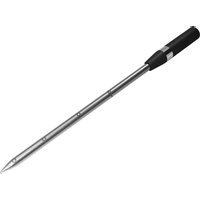
USER MANUAL HZ32WA00 SIEMENS
Wireless food ther- mometer

natural_image
Simple line drawing of a chef's hat on a dark background (no text or symbols)
AR دليل المستخدم 2 MK Упатство за употреба 107
BG Ръководство за употреба ..... 8 NL Gebruikershandleiding ..... 113
CS Návod k obsluze 14 NO Bruksanvisning 119
DA Betjeningsvejledning 20 PL Instrukcja obsługi 125
DE Gebrauchsanleitung 26 PT Manual do utilizador 132
EL Εγχειρίδιο χρήστη ...... 33 RO Manual de utilizare ...... 139
EN Information for Use 40 RU Руководство пользователя 145
ES Manual de usuario .... 47 SK Návod na používanie .... 151
ET Kasutusjuhend 54 SL Navodila za uporabo 157
FI Käyttöohje 60 SQ Manuali i përdorimit 163
FR Manuel d'utilisation .... 66 SR Uputstvo za upotrebu .... 169
HE 72 SV Bruksanvisning 175
HR Upute za upotrebu 77 TR Kullanım kılavuzu 181
HU Használati útmutató 83 UK Керівництво з експлуатації 187
IT Manuale utente 89 ZH 使用说明书 193
LT Naudotojo vadovas 95 ZH-TW 使用手册 198
LV Lietotāja rokasgrāmata ..... 101 VI Hóng dǎn sù dụng ..... 203



Battery manufacturer: Dongguan LiNeng Electronic Technology Co., Ltd., floor 3, building A1, New Asia
Pujing tech park, Fumin industrial town, Dalang,
Dongguan, China
Importer: Witt Hvidevarer A/S, Gødstrup Søvej 9, 7400
Herning, Denmark
Забележка
1 Safety 40
2 Environmental protection and saving energy .... 41
3 Familiarising yourself with your appliance ..... 41
4 Before using for the first time 42
5 Basic operation 43
6 Cleaning and servicing 44
7 Disposal 44
8 Declaration of Conformity 45
9 Technical data 46

Safety
Observe the following safety instructions.
You can find general information for this instruction manual here.

- Read these instructions carefully. Only then will you be able to use your appliance safely and efficiently.
- Keep the instruction manual and the product information safe for future reference or for the next owner.
1.2 Intended use
Read the information on intended use to ensure that you use the wireless food probe correctly and safely.
Only use the wireless food probe:
■ Indoors or outdoors in a domestic environment.
■ To prepare meals.
■ Up to an altitude of 2000 m above sea level.
Do not use the wireless food probe:
■ In microwaves or microwave combination ovens.
1.3 Restriction on user group
This appliance may be used by children aged 8 or over and by people who have reduced physical, sensory or mental abilities or inadequate experience and/or knowledge, provided that they are supervised or have been instructed on how to use the appliance
safely and understand the resulting dangers. Do not let children play with the appliance.
Cleaning and user maintenance must not be performed by children unless they are being supervised.
Children must not perform cleaning or user maintenance unless they are at least 15 years old and are being supervised.
Keep children under the age of 8 years away from the appliance and power cable.
1.4 Safe use
Follow these safety instructions when using the wireless food probe.
⚠ WARNING – Risk of suffocation!
Children may put packaging material over their heads or wrap themselves up in it and suffocate.
- Keep packaging material away from children.
- Do not let children play with packaging material.
Children may breathe in or swallow small parts, causing them to suffocate.
- Keep small parts away from children.
- Do not let children play with small parts.
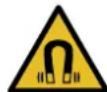
⚠ WARNING – Danger: Magnetism!
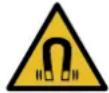
Caution: Magnetism

Caution for people with pacemakers
Permanent magnets are used in the charging station. These may impair the functionality of electronic implants, e.g. pacemakers or insulin pumps.
▶ Persons with electronic implants must stand at least 10 cm away from the charging station.
▶ Never carry the charging station in clothing pockets.
⚠ WARNING – Risk of injury!
The wireless food probe is sharp.
- Handle the wireless food probe with care.
⚠ WARNING – Risk of burns!
The wireless food probe gets very hot during use.
- Wear gloves when removing the wireless food probe from the food.
⚠ WARNING – Risk of harm to health!
Consuming raw or undercooked meat or fish can increase the risk of a foodborne illness.
- Hygienically prepare meat, poultry, fish and seafood.
▶ Use fresh food.
Charging station contains a Li-ion battery.
Fumes that escape from a damaged battery are dangerous.
▶ Supply fresh air.
▶ If there are any problems, seek medical advice from a doctor.
Liquids that escape from a damaged battery are dangerous.
▶ If these come into contact with the skin, wash immediately with cold water.
▶ If these come into contact with the eyes, seek medical help.
⚠ WARNING – Risk of explosion!
A short-circuit may cause the battery to explode.
- Protect the battery against fire, heat and constant sunlight.
- Protect the battery against water and penetrating moisture.
▶ Never open the battery.
2 Environmental protection and saving energy
2.1 Disposing of packaging
The packaging materials are environmentally compatible and can be recycled.
- Sort the individual components by type and dispose of them separately.
3 Familiarising yourself with your appliance
3.1 Scope of delivery
After unpacking all parts, check for any damage in transit and completeness of the delivery.
Component Number
| Charging station/range ex- 1 tender |
3.2 Components
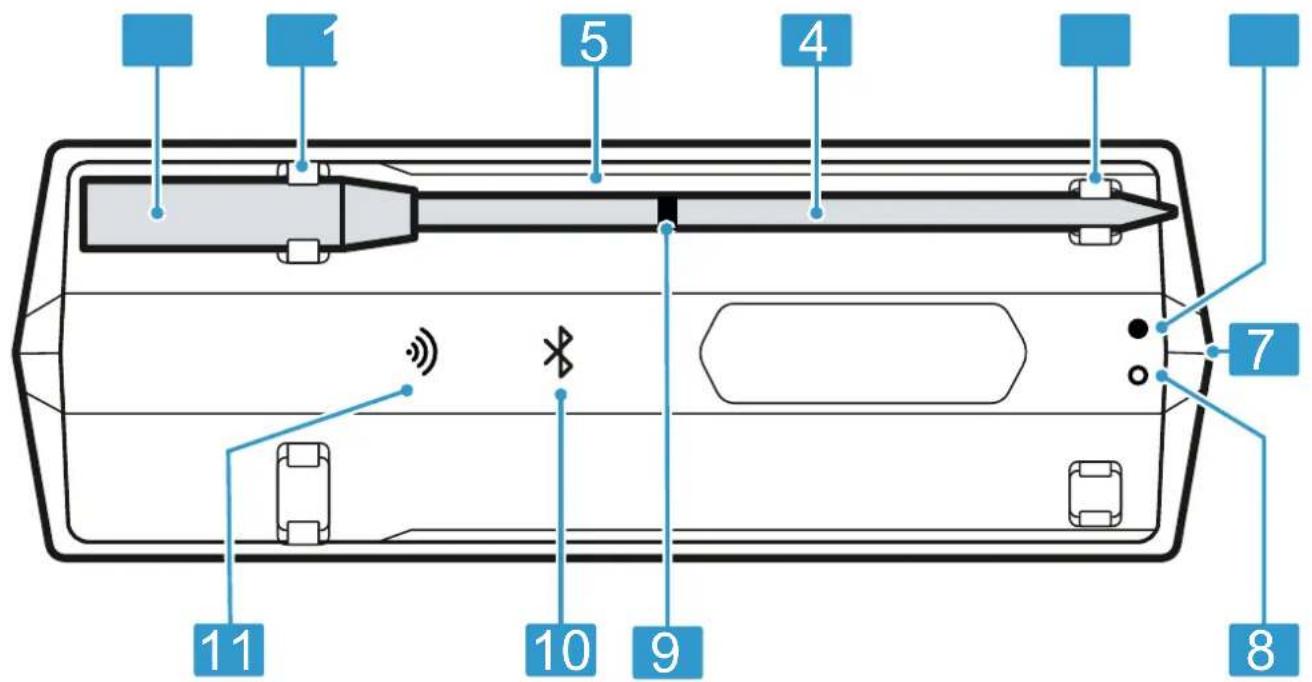
1 Grip
2 Charging contact
3 Charging station/range extender
4 Probe
5 Charging point
6 Green LED (USB connection indicator)
3.3 LED status display
The LED status display on the charging station provides you with information on the operating status of your wireless food probe.
Operating status Status display
| The charging station is switched on. | Bluetooth LED flashes or lights up blue. |
| The connection between the probe and the range extender is established. | Bluetooth LED lights up blue. |
7 USB charging socket
8 Red LED (charge indicator)
9 Safety marking
10 Bluetooth® ^1 LED
11 Wi-Fi LED
Operating status Status display
| The connection to the home Wi-Fi network has been established. | Wi-Fi LED lights up green. ^2 |
| The charging station is charging. | Green and red LEDs light up. |
| The charging station has a low battery. | Red LED flashes. |
4 Before using for the first time
Prepare the appliance for use.
4.1 Charging the wireless food probe before using for the first time
- Charge the wireless food probe for at least 8 hours.
4.2 Setting up Home Connect
Requirements

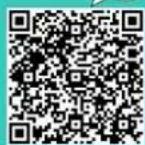
- Scan the following QR code with your mobile phone.
https://bsh.group/hvd7hz

- Follow the instructions in the Home Connect app.
Note: For the Wi-Fi connection type, only one 2.4 GHz network is supported.
4.3 Clean probe
- Before using for the first time clean probe with water and detergent to remove residues from production.
5 Basic operation
5.1 Charging the wireless food probe
ATTENTION
Moisture may damage the charging station.
- Make sure that the wireless food probe is dry before placing it on the charging station.
Requirements
■ The wireless food probe is clean.
→ "Cleaning the wireless food probe", Page 44
■ The charging station is sufficiently charged.
→ "Charging the charging station/range extender", Page 43
- Place the wireless food probe onto the charging station.
√ The Bluetooth LED is off while the wireless food probe is charging.
Note: If the Bluetooth LED flashes while the wireless food probe is on the charging station, make sure that the metal ring and the probe are connected to the charging contacts.
5.2 Charging the charging station/range extender
Charge the charging station as soon as the battery is empty.
ATTENTION
Very high ambient temperatures may damage the charging station.
- Do not exceed the maximum ambient temperature of 10 °C to 35 °C.
- Store the charging station in a dry place.
-
Do not place the device on or near hot surfaces, e.g. hobs.
-
Connect the charging station using the USB cable supplied.
- Connect the USB cable to the power supply and plug it into the socket.
Notes
- The charging station goes into low power mode after 10 minutes when the battery is fully charged. The green LED stays lit as long as the USB supply is connected.
- Only charge with an approved USB power supply (5 V = min. 1 A, max. 3 A) that complies with the relevant regulations and standards in the country of destination.
■ To meet the requirements of regulation (EU) 2023/826, the low power mode consumption of the USB power supply used must be less than 0.4 W.
- This appliance contains batteries that cannot be replaced. When the battery has reached the end of its service life, the appliance must be disposed of properly.
5.3 Using the wireless food probe
ATTENTION
Very high core temperatures or ambient temperatures may damage the wireless food probe.
- Do not exceed the maximum core temperature of 100 °C.
- Do not exceed the maximum ambient temperature of 300 °C.
- The wireless food probe must not come into contact with any direct heat sources.
- Do not expose the wireless food probe to direct flames.
There must be a gap of a few centimetres between the grill element or a direct heat source and the wireless food probe. Note that the meat can expand during the cooking process.
Improper use may damage the wireless food probe.
- Never use the wireless food probe in an oven with a self-cleaning program running.
- Never use the wireless food probe on the hob in a pressure cooker.
Requirements
■ The wireless food probe is charged.
→ "Charging the wireless food probe", Page 43
■ The Home Connect app is ready to use.
1. To switch on the wireless food probe, remove it from the charging station.
2. Select the appropriate temperature in the Home Connect app.
3. Insert the wireless food probe into the food.
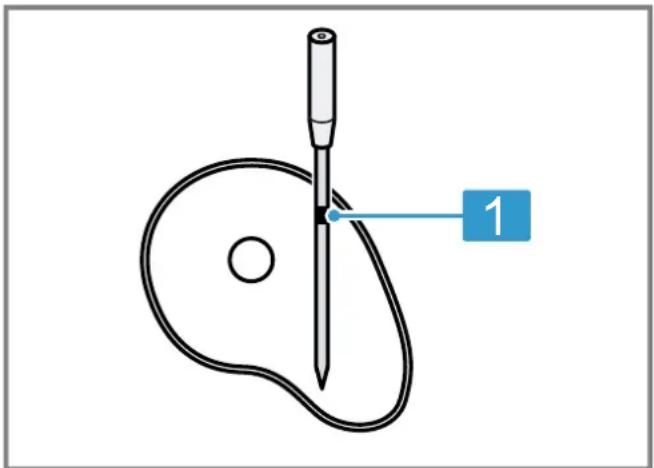
1 Minimum penetration depth up to safety marking
The wireless food probe has several measuring points. Ensure that the probe is inserted into the food at least up to the safety marking.
- Place the food with the wireless food probe inserted into the oven cavity.
- Move the charging station near the food without exceeding the maximum ambient temperature of 0 °C to 50 °C .
Notes
- If you turn the food, do not remove the wireless food probe. After turning, check that the wireless food probe is inserted correctly in the food.
- You must stay within the Bluetooth range (up to 50 m line of sight) for cooking process information. Additionally, switching off the oven remotely is only possible when both the app and the oven have an internet connection.
Tip: You can find more information on using the wireless food probe in the Home Connect app.
5.4 Switching off the wireless food probe
- Place the wireless food probe onto the charging station and wait 10 seconds until all the LEDs go out.
Note: If the Bluetooth LED is still flashing or lit after 10 seconds while the wireless food probe is on the charging station, make sure that the metal ring and the probe are connected to the charging contacts.
6 Cleaning and servicing
6.1 Cleaning the wireless food probe
ATTENTION
Incorrect cleaning may damage the wireless food probe.
- Never hold the wireless food probe under cold water after use.
Requirement: The wireless food probe has cooled down.
- Clean the wireless food probe by hand using a hot detergent solution.
You can also clean the wireless food probe in the dishwasher.
6.2 Cleaning the charging station
ATTENTION
Incorrect cleaning may damage the charging station.
- Never immerse the charging station in water or other liquids.
- Do not use cleaning agents containing solvents or abrasives.
- Clean the charging station with a damp cloth.
7 Disposal
7.1 Disposing of old appliance
Valuable raw materials can be reused by recycling.
- Dispose of the appliance in an environmentally friendly manner.
Information about current disposal methods are available from your specialist dealer or local authority.
This appliance is labelled in accordance with European Directive 2012/19/EU concerning used electrical and electronic appliances (waste electrical and electronic equipment - WEEE). The guideline determines the framework for the return and recycling of used appliances as applicable throughout the EU.
7.2 Disposing of batteries
Batteries should be recycled in an environmentally friendly manner. Do not dispose of the batteries in the household rubbish.
- Dispose of batteries in an environmentally friendly manner.
Battery manufacturer: Dongguan LiNeng Electronic Technology Co., Ltd., floor 3, building A1, New Asia Pujing tech park, Fumin industrial town, Dalang, Dongguan, China
Importer: Witt Hvidevarer A/S, Gødstrup Søvej 9, 7400 Herning, Denmark
Note
- The charging tray contains a rechargeable lithium-ion battery.
- Disposal must be carried out by our authorised customer service or specialist retailers.
- Only trained professionals may remove the integrated battery for disposal.
- Opening the appliance housing may destroy the charging station.
- To avoid a short-circuit, disconnect each connection at the battery separately and insulate the poles one after the other.
- Even when fully discharged, the battery still contains residual capacity that may be discharged in case of a short-circuit.
BSH Hausgeräte GmbH hereby declares that the appliance with Home Connect functionality conforms to the essential requirements and other relevant provisions of Directive 2014/53/EU.
A detailed RED Declaration of Conformity can be found online at siemens-home.bsh-group.com among the additional documents on the product page for your appliance.
CE
Hereby, BSH Hausgeräte GmbH declares that the appliance with Home Connect functionality is in compliance with relevant statutory requirements. ^1
A detailed Declaration of Conformity can be found online at siemens-home.bsh-group.com/uk/ among the additional documents on the product page for your appliance. ^1
UK CA
BT/BLE 2.4 GHz band (2402–2480 MHz): Max. 20 mW (EIRP)
Wi-Fi 2.4 GHz band (2412–2472 MHz): Max. 80 mW (EIRP)
FC
FCC ID Dock: 2A6ST-CP-W-200
FCC ID Sensor: 2A6ST-CP-W-500
8.1 Statement of Compliance ^2
This Statement of Compliance is prepared by the manufacturer, BSH Hausgeräte GmbH (address see last page), and covers this device of type identifier HTA01. The full Statement of Compliance according to the UK Statutory Instrument 2023 No. 1007 can be found on-
line at www.bosch-home.co.uk among the additional documents on the product page for your device.
BSH Hausgeräte GmbH deems that it has complied with the provision of ETSI EN 303 645 v2.1.1 as detailed in the full statement of compliance.
The support period of security updates necessary to maintain the main functions is until at least 10 years after the date of signature that can be found on the full Statement of Compliance (see above).
9 Technical data
| Probe diameter 4,3 mm |
| Length of wireless food probe 141 mm |
| Minimum penetration depth 65 mm |
| Bluetooth range (visual contact) Up to 50 m |
| Operating time at full battery Up to 16 h charge |
| Dishwasher-safe Yes |
| Suitable for self-cleaning No |
| Pyrolysis-safe No |
| Microwave-safe No |
| Steam oven-safe Yes |
| Number of temperature sensors 4 for measuring the core temper-ature |
| Maximum core temperature 100 °C |
| Maximum ambient temperature 300 °C |
| Charging voltage via USB 5 V |
4.2 Ajustar Home Connect
Requisitos
⚠ HOIATUS – Oht: magnetism!
Hoiatus: magnetid

Pujing tech park, Fumin industrial town, Dalang, Dongguan, China
Importer: Witt Hvidevarer A/S, Gødstrup Søvej 9, 7400 Herning, Denmark
Märkus
Conditions
.הכלההוּרָהוּרָהוּרָהוּרָהוּרָהוּרָהוּרָהוּרָהוּרָהוּרָהוּרָהוּרָהוּרָהוּרָהוּרָה

הכלה 1.4
.הכלההוּרָהוּרָהוּרָהוּרָהוּרָהוּרָהוּרָהוּרָהוּרָהוּרָהוּרָהוּרָהוּרָהוּרָהוּרָה
Battery manufacturer: Dongguan LiNeng Electronic Technology Co., Ltd., floor 3, building A1, New Asia
Pujing tech park, Fumin industrial town, Dalang,
Dongguan, China
7400 Herning, Denmark
תַרְשָׁ
.בְרַעָה אַלְאָה
.הכלה
siemens-home.bsh-group.com
- Slijedite upute u aplikaciji Home Connect.
4.2 Home Connect diegimas
Reikalavimai
⚠ BRĪDINĀJUMS – Traumu risks!
■ in magnetrons of combi-magnetrons.
⚠ WAARSCHUWING – Kans op verstikking!
⚠ WAARSCHUWING – Kans op letsel!
⚠ WAARSCHUWING – Explosiegevaar!
Door kortsluiting kan de accu exploderen.
- Følg veiledningen i Home Connect-appen.
- Elimine as baterias/pilhas de forma ecológica. Battery manufacturer: Dongguan LiNeng Electronic Technology Co., Ltd., floor 3, building A1, New Asia Pujing tech park, Fumin industrial town, Dalang, Dongguan, China
Importer: Witt Hvidevarer A/S, Gødstrup Søvej 9, 7400 Herning, Denmark
Nota
- Eliminați în mod ecologic accumulatorii/bateriile.
Battery manufacturer: Dongguan LiNeng Electronic Technology Co., Ltd., floor 3, building A1, New Asia Pujing tech park, Fumin industrial town, Dalang, Dongguan, China
Importer: Witt Hvidevarer A/S, Gødstrup Søvej 9, 7400 Herning, Denmark
Observatie
- Sledite navodilom v aplikaciji Home Connect.
- Pratite uputstva u aplikaciji Home Connect.
Napomena: Kod vrste povezivanja putem WiFi veze, podržana je samo mreža od 2,4 GHz.
4.3 Čišćenje sonde
- Da biste uklonili ostatke od proizvodnje, pre prve upotrebe očistite sondu vodom i sredstvom za čišćenje.
5 Osnovno rukovanje
5.1 Punjenje bežičnog kuhinjskog termometra
PAŽNJA
Battery manufacturer: Dongguan LiNeng Electronic Technology Co., Ltd., floor 3, building A1, New Asia Pujing tech park, Fumin industrial town, Dalang, Dongguan, China
Importer: Witt Hvidevarer A/S, Gødstrup Søvej 9, 7400 Herning, Denmark
Napomena
- U posudi za punjenje se nalazi litijum-jonska baterija.
- Odlaganje u otpad je dozvoljeno samo preko ovlašćenog koriničkog servisa i specijalizovanih prodavnica.
- Samo stručno osoblje sme da vadi integrisanu bateriju radi odlaganja u otpad.
- Otvaranjem opne kućišta se može uništiti posuda za punjenje.
- Da ne bi došlo do kratkog spoja, pojedinačno razdvojite priključke na bateriji i jedan za drugim izolujte polove.
- Čak i kada se potpuno isprazni, u bateriji postoji preostali kapacitet koji se može osloboditi u slučaju kratkog spoja.
Valid within Great Britain:
Imported to Great Britain by
BSH Home Appliances Ltd.
Grand Union House
Old Wolverton Road
Wolverton, Milton Keynes
MK12 5PT
United Kingdom
BSH Hausgeräte GmbH
Carl-Wery-Straße 34
81739 München, GERMANY
siemens-home.bsh-group.com

9001868538 (051015)
ar, bg, cs, da, de, el, en, es, et, fi, fr, he, hr, hu, it,
lt, lv, mk, nl, no, pl, pt, ro, ru, sk, sl, sq, sr, sv, tr,
uk, zh, zh-tw, vi