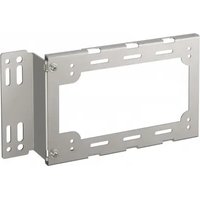
NUA-BK10 - Electronic accessory SONY - Free user manual and instructions
Find the device manual for free NUA-BK10 SONY in PDF.


| Product type | Mounting bracket for IP converter |
| Brand | Sony |
| Model | NUA-BK10 |
| Monitor compatibility | LMD-X310 series |
| IPC bracket dimensions | Approx. 194 x 123 x 10 mm (W x H x D) |
| Monitor bracket dimensions | Approx. 80 x 120 x 39 mm (W x H x D), thickness 2 mm |
| Overall dimensions | Approx. 233 x 123 x 41 mm (W x H x D, excluding projections) |
| IPC bracket weight | Approx. 130 g |
| Monitor bracket weight | Approx. 150 g |
| Total weight | Approx. 285 g (set) |
| Material | Not specified (likely metal and plastic) |
| Color | Not specified (likely black) |
| Main function | Attach an IP converter to a compatible monitor |
| Mounting method | Via monitor stand or direct attachment (M4 or M6 screws) |
| Included accessories | M4x8 screws (2), M6x12 screws (2), instruction manual, European customer information |
| Storage temperature | -20°C to +60°C |
| Storage humidity | 20% to 90% (without condensation) |
| Storage pressure | 700 hPa to 1060 hPa |
| Recommended cleaning | Isopropyl alcohol 50-70% v/v or ethanol 76.9-81.4% v/v |
| Usage precautions | Do not use with other monitors; avoid power strip extensions; maintain a 4 cm clearance around the IP converter |
| Warranty | Sony limited warranty (see website for terms) |
| Country of origin | Not specified |
Frequently Asked Questions - NUA-BK10 SONY
User questions about NUA-BK10 SONY
0 question about this device. Answer the ones you know or ask your own.
Ask a new question about this device
Download the instructions for your Electronic accessory in PDF format for free! Find your manual NUA-BK10 - SONY and take your electronic device back in hand. On this page are published all the documents necessary for the use of your device. NUA-BK10 by SONY.
USER MANUAL NUA-BK10 SONY
© 2016 Sony Corporation
安全のために
natural_image
Technical line drawing of a rectangular metal frame with mounting holes and cutouts (no text or symbols)モニターブラケット
モニターに取り付けます。

natural_image
Technical line drawing of a metal bracket with mounting holes and support brackets (no text or symbols)スペーサー(2 個)
natural_image
Technical line drawing of a mechanical device with multiple wheels and a central housing (no text or symbols)natural_image
Technical diagram of a computer monitor case with mounting holes and internal components (no text or labels)モニターブラケットを取り付ける
次のどちらかの方法で取り付けます。
- モニタースタンドで固定する
natural_image
Technical line drawing of a mechanical component with a handle and mounting bracket (no text or symbols)natural_image
Diagram of a device with an arrow indicating direction, showing internal components and alignment lines (no text or symbols)natural_image
Diagram showing a hand holding an electronic device with a button, before and after assembly (no text or symbols present)Information for Customers in
Europe(欧州顧客向け情報)
(1)
Before operating the unit, please read this manual thoroughly and retain it for future reference.
Symbols on the product

Safety sign
Follow the warnings in the instructions for use for parts of the unit on which this symbol appears.
NOTE Background color:
Blue
Symbol: White

This symbol indicates the manufacturer, and appears next to the manufacturer's name and address.
This symbol indicates the European Community representative, and appears next to the European Community representative's name and address.

This symbol indicates the serial number.

This symbol indicates the version of the accompanying document.

This symbol indicates the date of manufacture.

Storage and transport temperature
This symbol indicates the acceptable temperature range for storage and transport environments.

Storage and transport humidity
This symbol indicates the acceptable humidity range for storage and transport environments.

Storage and transport pressure
This symbol indicates the acceptable atmospheric pressure range for storage and transport environments.
Caution
When you dispose of the unit or accessories, you must obey the laws in the relative area or country and the regulations in the relative hospital regarding environmental pollution.
Caution
For cautions and further information on using this product, refer to the Instructions for Use for the monitor and the IP converter.
Caution
During installation, maintain a space of at least 4 cm surrounding the IP converter and the amount space specified for each device to ensure proper ventilation and ease of access for servicing.
For the customers in the U.S.A. SONY LIMITED WARRANTY - Please visit http://www.sony.com/psa/warranty for important information and complete terms and conditions of Sony's limited warranty applicable to this product.
For the customers in Canada SONY LIMITED WARRANTY - Please visit http://www.sonybiz.ca/pro/lang/en/ ca/article/resources-warranty for important information and complete terms and conditions of Sony's limited warranty applicable to this product.
For the customers in Europe
Sony Professional Solutions Europe - Standard Warranty and Exceptions on Standard Warranty.
Please visit http://www.pro.sony.eu/warranty for important information and complete terms and conditions.
For the customers in Korea SONY LIMITED WARRANTY - Please visit http://bpeng.sony.co.kr/handler/ BPAS-Start for important information and complete terms and conditions of Sony's limited warranty applicable to this product.
Usage Precautions

WARNING
Supported monitors
The unit is designed specifically for use with LMD-X310 series monitors.
Do not install the unit on monitors other than the above, as doing so may result in smoke, fire, electromagnetic interference, etc.
WARNING
Use of power strips prohibited
When using a power strip, increases in leakage currents may occur due to cutoff of the power strip's protective earth conductor, which may result in electric shock. Do not connect either the monitor or the IP converter to a power strip.
Multi-installations
Do not use the unit to install multiple IP converters on a monitor, as doing so may result in drops and device malfunctions.
Orientation
Always install the IP converter with its front panel facing up and its connector panel facing down.
Maintenance
- Clean the unit's surface using isopropyl alcohol with a concentration of 50% to
70% v/v or ethanol with a concentration of 76.9% to 81.4% v/v.
- For stubborn dirt, wipe using a soft cleaning cloth lightly moistened with a mild detergent that has been diluted with water, and then clean using the previous chemical cleaning method. Do not use benzene, thinners, acidic cleaning solutions, alkaline cleaning solutions, abrasive cleaning agents, chemically treated cloths, or other volatile solvents to clean or disinfect the unit, as doing so may damage the unit's surface.
Condensation
If the unit is suddenly taken from a cold to a warm location, or if ambient temperature suddenly rises, moisture may form on the outer surface of the unit. This is known as condensation. If condensation occurs, wait until the condensation clears before using the unit. Using the unit while condensation is present may damage the other connected devices.
Unit Components
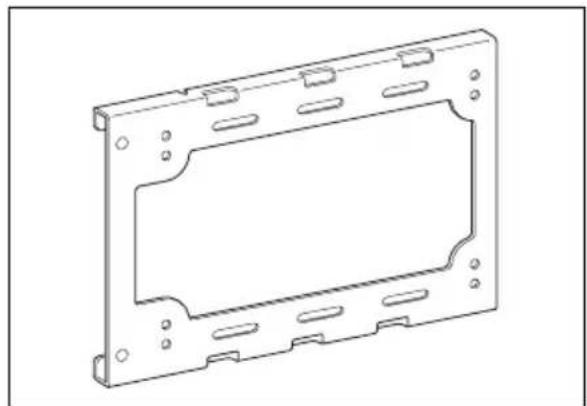
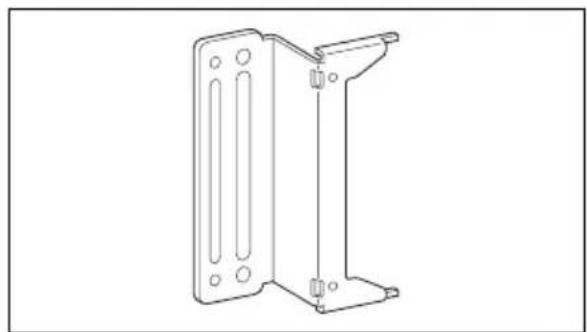
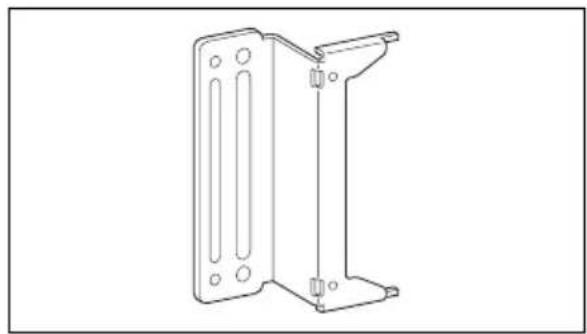
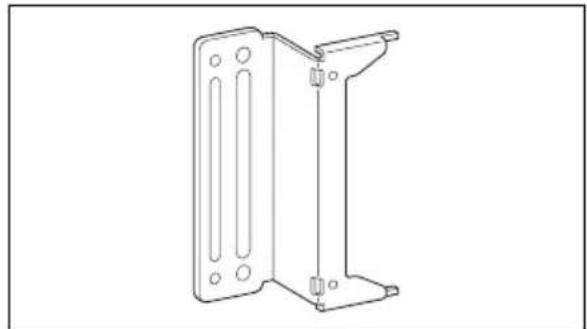
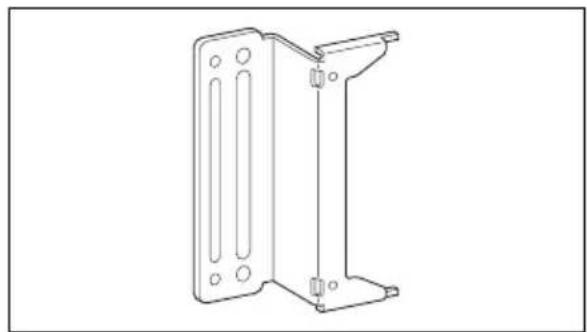
IPC bracket
Attach this to the bottom of the IP converter.
natural_image
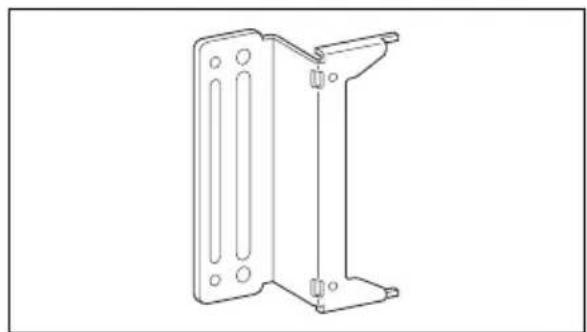
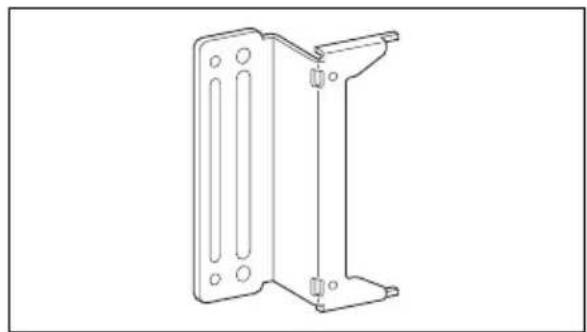
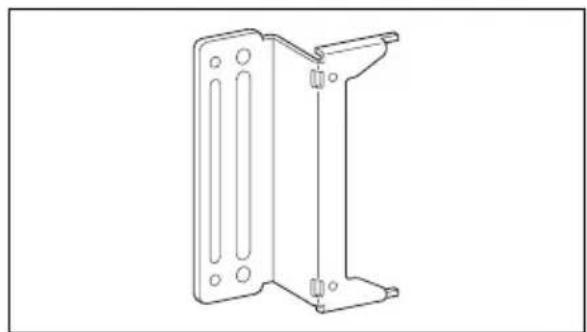
Technical line drawing of a rectangular metal frame with mounting holes and cutouts (no text or symbols)Monitor bracket
Attach this to the monitor.
natural_image
Technical line drawing of a metal bracket component (no text or symbols)Spacers (2)
Use these when securing the unit to the monitor using the monitor stand.

natural_image
Two circular mechanical components with central holes, shown in line drawing style (no text or symbols)Installation
Attaching the IPC Bracket
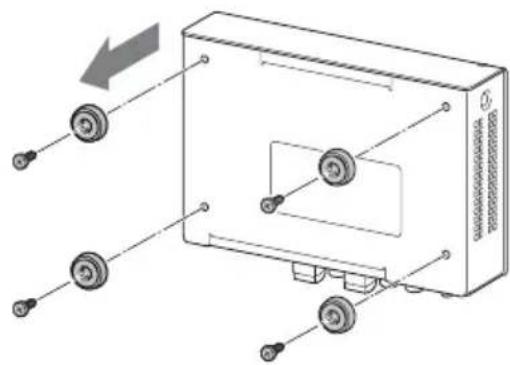
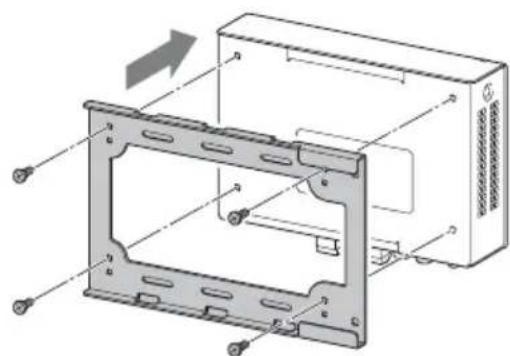
1 Remove the screws that secure the feet (4) at the bottom of the IP converter, and remove the feet.
natural_image
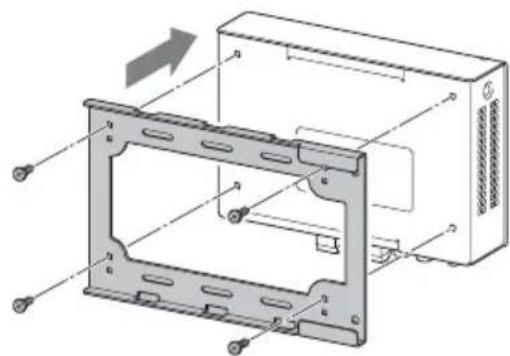
Diagram of a device with labeled components and directional arrows indicating movement (no text or symbols present)2 Use the screws removed in step 1 to secure the IPC bracket to the IP converter.
When mounting to the monitor, attach the IPC bracket onto the IP converter with the front panel of the IP converter facing up and the connector panel facing down.
natural_image
Technical diagram of a computer monitor case with mounting holes and internal components (no text or labels)Attaching the Monitor Bracket
Attach the bracket using one of the following methods.
- Use the monitor stand to secure the unit
- Attach the unit with the monitor stand attached
Caution
Although the VESA mount screw holes on either the left or right side of the monitor's rear can be used, both sides cannot be used at the same time to mount multiple IP converters.
To use the monitor stand to secure the unit
Remove the monitor stand, and use it to secure the monitor bracket between it and the monitor.
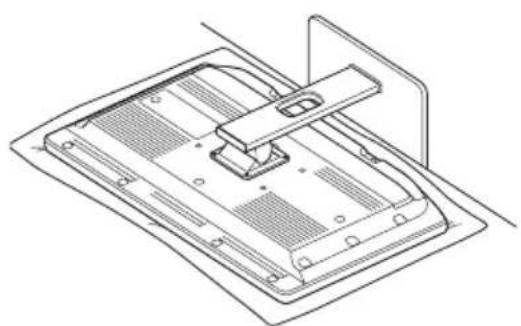
1 Place the monitor face down on a soft cloth.
natural_image
Technical line drawing of a mechanical component with mounting bracket and housing (no text or symbols)2 Remove the screws that secure the monitor stand, and remove the monitor stand.
3 Align the M4 screw holes on the monitor bracket with the M4 screw holes on the monitor's rear, insert the spacers in the M4 holes on the other side, and use the screws to secure the monitor stand back onto the monitor.
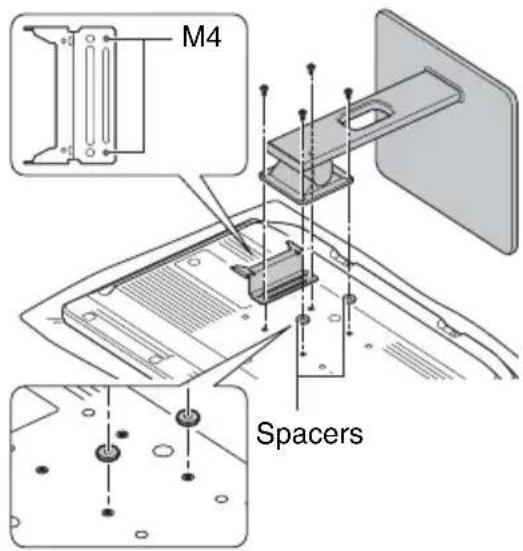
After attachment, place the monitor in an upright position before mounting the IP converter (page7).
To attach the unit with the monitor stand attached
Align the M6 screw holes on the monitor bracket with the M6 screw holes on the monitor's rear, and secure it with the supplied screws (M6×12). You can attach the monitor bracket with the monitor stand attached.
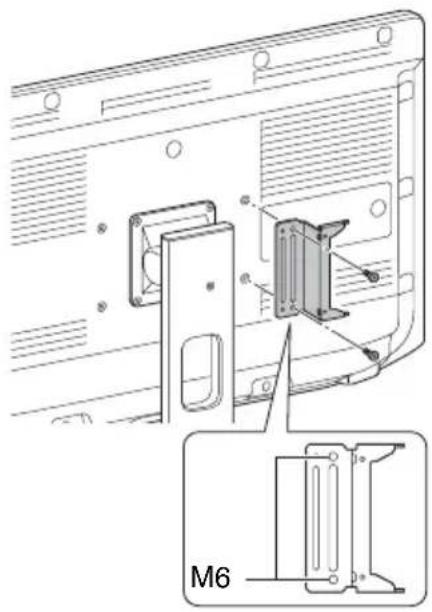
Mounting the IP Converter
Caution
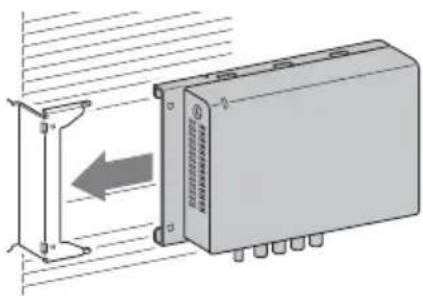
Always install the IP converter with its front panel facing up and its connector panel facing down.
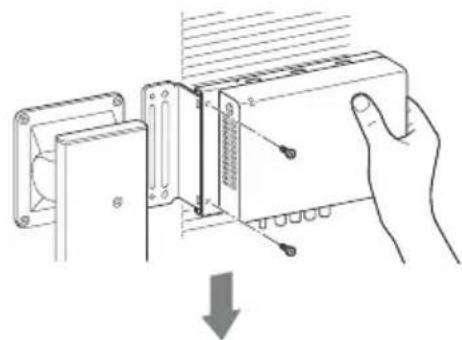
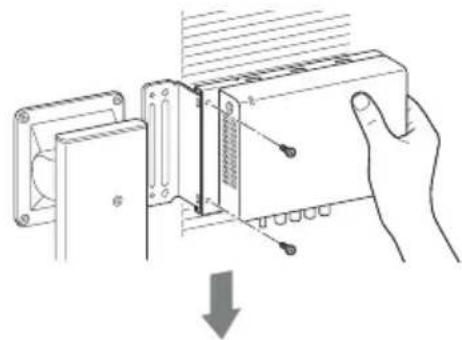
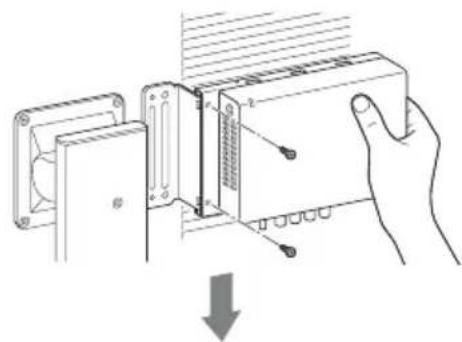
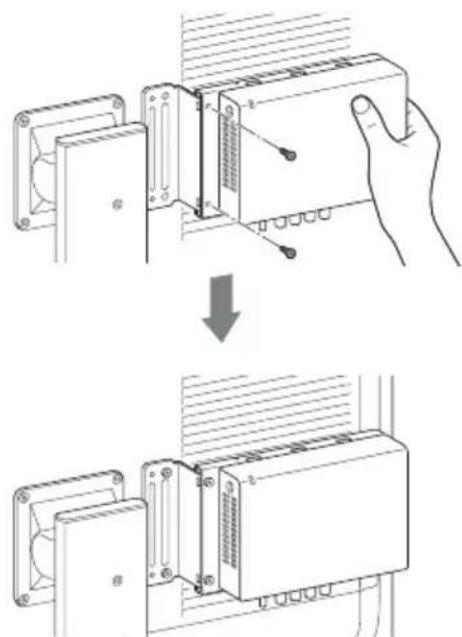
1 Slide the IP converter onto the monitor bracket from the side.
natural_image
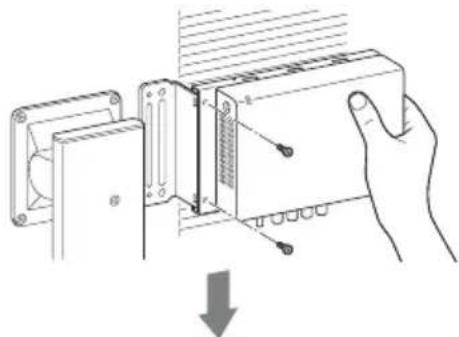
Diagram of a device with an arrow indicating direction, showing internal components and wiring (no text or symbols)2 Secure the IPC bracket with the supplied screws (M4×8) while holding the bracket to support it.
natural_image
Diagram of a hand inserting a component into a device, showing internal structure and alignment (no text or symbols)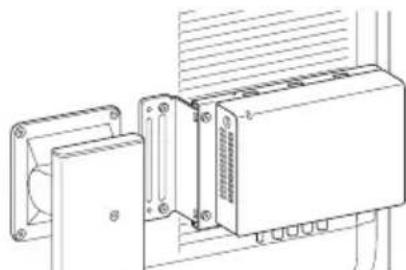
natural_image
Technical line drawing of a mechanical or electronic device assembly with mounting brackets and wiring (no text or symbols)(When attaching the unit with the monitor stand attached)
Specifications
Storage and transport conditions
Temperature
$$ - 2 0 ^ {\circ} \mathrm{C} \text { to } + 6 0 ^ {\circ} \mathrm{C} $$
$$ (- 4 ^ {\circ} \mathrm{F} \text { to } + 1 4 0 ^ {\circ} \mathrm{F}) $$
Humidity
20% to 90% (no condensation
allowed)
Pressure
700 hPa to 1,060 hPa
Dimensions
IPC bracket
Approx. 194 × 123 × 10 mm
$$ (7 ^ {3} / _ {4} \times 4 ^ {7} / _ {8} \times {} ^ {1 3} / _ {3 2} \text {in.}) $$
$$ (\mathrm{W} \times \mathrm{H} \times \mathrm{D}) $$
Monitor bracket
Approx. 80 × 120 × 39 mm
$$ (3 ^ {1} / _ {4} \times 4 ^ {3} / _ {4} \times 1 ^ {9} / _ {1 6} \text {in.}) $$
(W× H× D),2mm(0.079in.)
(thickness)
Combination of both brackets
Approx. 233 × 123 × 41 mm
$$ (9 ^ {1} / _ {4} \times 4 ^ {7} / _ {8} \times 1 ^ {5} / _ {8} \text {in.}) $$
(W× H× D, excluding
protrusions)
Spacers
Approx. φ15 mm (0.59 in.)
(diameter), 2 mm (0.079 in.)
(thickness)
Mass IPC bracket
Approx. 130 g (4.6 oz.)
Monitor bracket
Approx. 150 g (5.3 oz.)
Combination of both brackets
Approx. 285 g (10 oz.)
Spacer
Approx. 2 g (0.071 oz.)
Supplied accessories
Instructions for Use (1)
M4×8 screws (2)
M6×12 screws (2)
Information for Customers in Europe (1)
Design and specifications are subject to change without notice.
Notes
• Always verify that the unit is operating properly before use. SONY WILL NOT BE LIABLE FOR DAMAGES OF ANY KIND INCLUDING, BUT NOT LIMITED TO, COMPENSATION OR REIMBURSEMENT ON ACCOUNT OF THE LOSS OF PRESENT OR PROSPECTIVE PROFITS DUE TO FAILURE OF THIS UNIT, EITHER DURING THE WARRANTY PERIOD OR AFTER EXPIRATION OF THE WARRANTY, OR FOR ANY OTHER REASON WHATSOEVER.
• SONY WILL NOT BE LIABLE FOR CLAIMS OF ANY KIND MADE BY USERS OF THIS UNIT OR MADE BY THIRD PARTIES.
- SONY WILL NOT BE LIABLE FOR THE TERMINATION OR DISCONTINUATION OF ANY SERVICES RELATED TO THIS UNIT THAT MAY RESULT DUE TO CIRCUMSTANCES OF ANY KIND.
Français
natural_image
Technical line drawing of a rectangular electronic device housing (no text or symbols)Support du moniteur
natural_image
Technical line drawing of a metal bracket component (no text or symbols)Entretoises (2)
natural_image
Two circular mechanical components with central holes, shown in line drawing style (no text or symbols)Installation
Fixation du support IPC
natural_image
Diagram of a device with multiple wheels and a central panel, showing no text or symbolsnatural_image
Technical diagram of a computer monitor case with mounting holes and internal components (no text or labels)natural_image
Technical line drawing of a mechanical component with mounting bracket and housing (no text or symbols)natural_image
Diagram of an electronic device with a rectangular component and a directional arrow indicating motion (no text or symbols present)natural_image
Diagram of a hand holding a device with a lock and adjustment panel, showing no text or symbols
natural_image
Technical line drawing of an electronic device with mounting brackets and a central housing (no text or symbols)natural_image
Technical line drawing of a rectangular metal frame with mounting holes and cutouts (no text or symbols)Monitorwinkel
natural_image
Technical line drawing of a metal bracket component (no text or symbols)Distanzstücke (2)
natural_image
Two circular mechanical components with concentric rings, no text or symbols presentInstallation
natural_image
Diagram of a device with wheels and an arrow indicating motion (no text or symbols)natural_image
Technical diagram of a computer monitor case with mounting holes and internal components (no text or labels)natural_image
Technical line drawing of a mechanical component with mounting flanges and a handle (no text or symbols)natural_image
Diagram of an electronic device with a rectangular component and a vertical line, showing internal structure and directional arrow (no text or symbols)natural_image
Diagram showing a hand holding an electronic device with a button, before and after assembly (no text or symbols present)Information for Customers in
natural_image
Technical line drawing of a rectangular electronic device housing (no text or symbols)Staffa del monitor
natural_image
Technical line drawing of a metal bracket component (no text or symbols)Distanziali (2)
natural_image
Two circular mechanical components with central holes, shown in line drawing style (no text or symbols)Montaggio
natural_image
Diagram of a device with multiple wheels and a central panel, showing no text or symbolsnatural_image
Technical diagram of a computer monitor case with mounting holes and internal components (no text or labels)natural_image
Technical line drawing of a mechanical component with no visible text or symbolsnatural_image
Diagram of a device with an arrow indicating direction, showing internal components and wiring (no text or symbols)natural_image
Diagram of a hand holding a device with a lock and adjustment panel, showing no text or symbols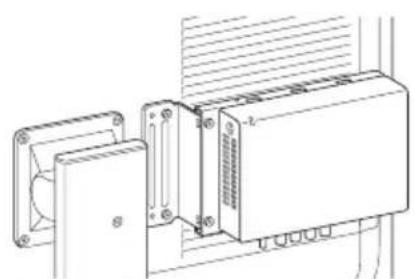
natural_image
Technical line drawing of an electronic device with mounting flanges and a central control unit (no text or symbols)$$ \text { Information for Customers in } $$
natural_image
Technical line drawing of a rectangular metal frame with mounting holes and cutouts (no text or symbols)Soporte del monitor
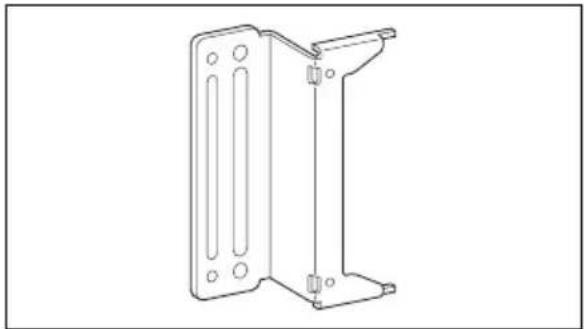
Acople este soporte al monitor.
natural_image
Technical line drawing of a metal bracket component (no text or symbols)Separadores (2)
natural_image
Two circular mechanical components with central holes, shown in line drawing style (no text or symbols)Instalación
natural_image
Diagram of a device with wheels and an arrow indicating direction (no text or symbols)natural_image
Technical diagram of a computer case with mounting holes and internal components (no text or labels)natural_image
Technical line drawing of a mechanical component with mounting bracket and housing (no text or symbols)natural_image
Diagram of an electronic device with a rectangular block and directional arrow, no text or symbols presentnatural_image
Technical line drawing of a rectangular metal frame with mounting holes and cutouts (no text or symbols)Suporte do monitor
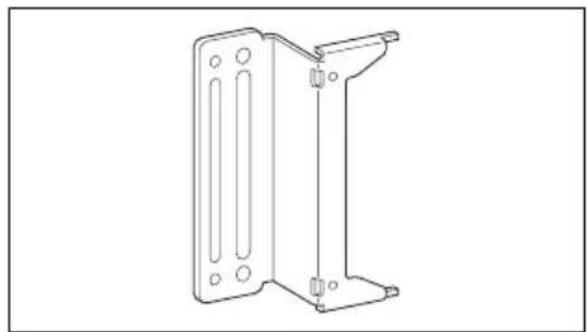
Instale isto no monitor.
natural_image
Technical line drawing of a metal bracket component (no text or symbols)Espaçadores (2)
natural_image
Two circular mechanical components with concentric rings, no text or symbols presentInstalação
Instalar o suporte IPC
natural_image
Diagram of a device with labeled components and directional arrows indicating movement (no text or symbols present)natural_image
Technical diagram of a computer monitor case with mounting holes and internal components (no text or labels)Instalar o suporte de monitor
natural_image
Technical line drawing of a mechanical component with no visible text or symbols2 Retire os parafusos que fixam a base do monitor e retire a base do monitor.
natural_image
Diagram of a device with an arrow indicating direction, showing internal components and wiring (no text or symbols)natural_image
Diagram of a hand holding a mechanical component with a downward arrow indicating force or direction (no text or symbols present)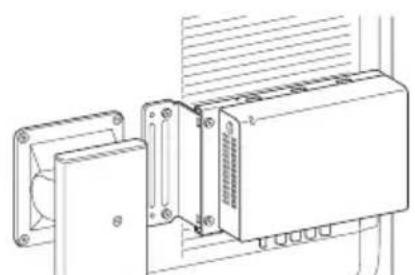
natural_image
Technical line drawing of an electronic device with mounting flanges and a central housing (no text or symbols)$$ (L \times A \times P) $$
Suporte do monitor
Aprox. 80 × 120 × 39 mm
(L × A × P), 2 mm (espessura)
(L × A × P, excluindo
saliências)
Espaçadores
Information for Customers in
natural_image
Technical line drawing of a rectangular metal frame with mounting holes and cutouts (no text or symbols)Monitorbeugel
natural_image
Technical line drawing of a metal bracket component (no text or symbols)Afstandhouders (2)
natural_image
Two circular mechanical components with central holes, shown in line drawing style (no text or symbols)Installatie
De IPC-beugel bevestigen
natural_image
Diagram of a device with multiple wheels and an open box, showing no text or symbolsnatural_image
Technical diagram of a computer chassis with labeled components and directional arrows indicating motion (no text or symbols present)De monitorbeugel bevestigen
natural_image
Technical line drawing of a mechanical component with no visible text or symbolsnatural_image
Diagram of an electronic device with a rectangular component and a directional arrow indicating motion (no text or symbols present)natural_image
Diagram of a hand holding a device with a tool, showing internal components and a downward arrow (no text or symbols)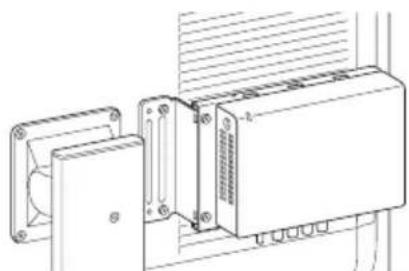
natural_image
Technical line drawing of an electronic device with mounting brackets and a central housing (no text or symbols)(B × H × D), 2 mm (dikte)
Information for Customers in
Multi-installeringer
natural_image
Technical line drawing of a rectangular metal frame with mounting holes and cutouts (no text or symbols)Monitorbeslag
Monter dette på monitoren.
natural_image
Technical line drawing of a metal bracket component (no text or symbols)Afstandsstykker (2)
natural_image
Two circular mechanical components with central holes, shown in line drawing style (no text or symbols)Installation
natural_image
Diagram of a device with multiple wheels and an open box, showing alignment or assembly (no text or symbols)natural_image
Technical diagram of a computer monitor case with mounting holes and internal components (no text or labels)natural_image
Technical line drawing of a mechanical component with a bracket and mounting base (no text or symbols)natural_image
Diagram of a device with an arrow indicating direction, showing internal components and wiring (no text or symbols)(B × H × D), 2 mm (tykkelse)
Information for Customers in
Europe (Information til kunder
i Europa) (1)
natural_image
Technical line drawing of a rectangular metal frame with mounting holes and cutouts (no text or symbols)Näyttöpidike
natural_image
Technical line drawing of a metal bracket component (no text or symbols)Välikappaleet (2)
natural_image
Two circular mechanical components with central holes, no text or symbols presentAsennus
natural_image
Diagram of a device with wheels and an arrow indicating direction (no text or symbols)natural_image
Technical diagram of a computer monitor case with mounting holes and internal components (no text or labels)natural_image
Technical line drawing of a mechanical component with mounting bracket and housing (no text or symbols)natural_image
Diagram of a device with an arrow indicating direction, showing internal components and wiring (no text or symbols)natural_image
Diagram showing a hand inserting a device into a panel, with no visible text or symbolsInformation for Customers in
Europe (Tietoa asiakkaille
Euroopassa) (1)
natural_image
Technical line drawing of a rectangular metal frame with mounting holes and cutouts (no text or symbols)Skjermbrakett
natural_image
Technical line drawing of a metal bracket component (no text or symbols)Skiver (2)
natural_image
Two circular mechanical components with concentric rings, no text or symbols presentInstallering
Feste IPC-braketten
natural_image
Diagram of a device with multiple wheels and a central panel, showing no text or symbolsnatural_image
Technical diagram of a computer chassis with mounting brackets and internal components (no text or symbols)natural_image
Technical line drawing of a mechanical component with no visible text or symbolsnatural_image
Diagram of a device with an arrow indicating direction, showing internal components and wiring (no text or symbols)2 Fest IPC-brakett med de medfølgende skruene (M4×8) mens du holder i braketten for å støtte den.
natural_image
Diagram of a hand holding a device with a ruler and screwdriver, showing internal components and a downward arrow (no text or symbols)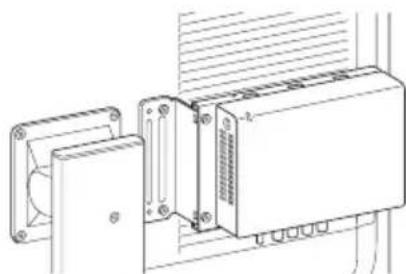
natural_image
Technical line drawing of an electronic device with mounting brackets and a central housing (no text or symbols)$$ \text { Information for Customers in } $$
natural_image
Technical line drawing of a rectangular electronic device housing (no text or symbols)Skärmfäste
natural_image
Technical line drawing of a metal bracket component (no text or symbols)Vingar (2)
natural_image
Two circular mechanical components with central holes, shown in line drawing style (no text or symbols)Montering
Montera IPC-fästet
natural_image
Diagram of a device with multiple wheels and a central panel, showing no text or symbolsnatural_image
Technical diagram of a computer monitor case with mounting holes and internal components (no text or labels)Montera skärmfästet
natural_image
Technical line drawing of a mechanical component with mounting bracket and housing (no text or symbols)natural_image
Diagram of an electronic device with a rectangular block and directional arrow indicating motion (no text or symbols)natural_image
Diagram of a hand inserting a component into a device, showing internal structure and a downward arrow (no text or symbols)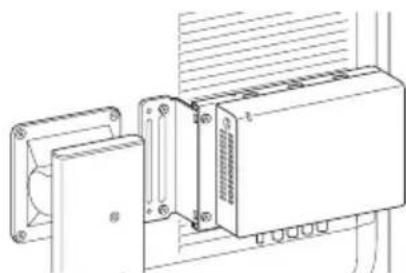
natural_image
Technical line drawing of a mechanical or electronic device with mounting brackets and wiring (no text or symbols)$$ \text { Information for Customers in } $$
$$ \text { Europe (Information \text { för kunder }} $$
$$ \mathrm{iEuropa}) (1) $$
natural_image
Technical line drawing of a rectangular metal frame with mounting holes and slots (no text or symbols)Uchwyt monitora
natural_image
Technical line drawing of a metal bracket component (no text or symbols)natural_image
Two circular mechanical components, possibly rollers or washers, shown side by side without any text or symbols.Instalacja
natural_image
Diagram of a device with wheels and an arrow indicating motion (no text or symbols)natural_image
Technical diagram of a computer monitor case with mounting holes and internal components (no text or labels)natural_image
Technical line drawing of a mechanical component with no visible text or symbolsnatural_image
Diagram of an electronic device with a rectangular block and a vertical component, showing an arrow indicating direction (no text or symbols present)natural_image
Technical line drawing of a rectangular metal frame with mounting holes and cutouts (no text or symbols)natural_image
Technical line drawing of a metal bracket component (no text or symbols)Αποστάτες (2)
natural_image
Two circular mechanical components with central holes, shown in isometric view (no text or symbols)Εγκατάσταση
natural_image
Diagram of a device with labeled components and directional arrows indicating movement (no text or symbols present)natural_image
Technical diagram of a computer chassis with labeled components and an arrow indicating motion (no text or symbols present)natural_image
Technical line drawing of a mechanical component with no visible text or symbolsnatural_image
Diagram of an electronic device with a rectangular block and directional arrow indicating motion (no text or symbols)natural_image
Diagram showing a hand inserting a device into a rack, with no visible text or symbols(Π × Y × B, χωρίς τις
προεξοχές)
Αποστάτες
Περίπου φ15 mm
Information for Customers
natural_image
Technical line drawing of a rectangular electronic device housing (no text or symbols)Držák monitoru
natural_image
Technical line drawing of a metal bracket component (no text or symbols)natural_image
Two circular mechanical components with central holes, shown in line drawing style (no text or symbols)Instalace
Upevnění držáku IPC
natural_image
Diagram of a device with multiple wheels and a central panel, showing no text or symbolsnatural_image
Technical diagram of a computer monitor case with mounting holes and internal components (no text or labels)natural_image
Technical line drawing of a mechanical component with no visible text or symbolsnatural_image
Diagram of a device with an arrow indicating direction, showing internal components and wiring (no text or symbols)natural_image
Diagram of a hand holding an electronic device with a downward arrow indicating a process (no text or symbols present)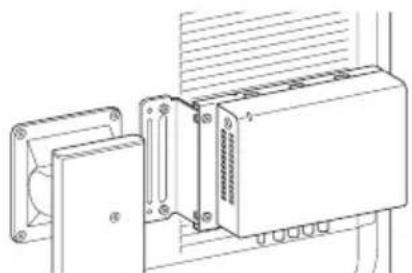
natural_image
Technical line drawing of an electronic device with mounting brackets and a central housing (no text or symbols)Information for Customers
in Europe (Informace pro
natural_image
Technical line drawing of a rectangular metal frame with mounting holes and cutouts (no text or symbols)Monitorkeret
natural_image
Technical line drawing of a metal bracket with mounting holes and mounting holes (no text or symbols)Távtartók (2)
natural_image
Two circular mechanical components with concentric rings, no text or symbols presentFelszerelés
natural_image
Diagram of a device with wheels and an arrow indicating direction (no text or symbols)natural_image
Technical diagram of a computer monitor case with mounting holes and internal components (no text or labels)natural_image
Technical line drawing of a mechanical component with no visible text or symbolsnatural_image
Diagram of a device with an arrow indicating direction, showing internal components and wiring (no text or symbols)natural_image
Diagram of a hand holding a device with a downward arrow indicating a process (no text or symbols present)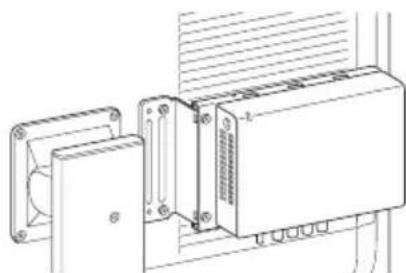
natural_image
Technical line drawing of a mechanical or electronic device assembly with mounting brackets and wiring (no text or symbols)Information for Customers
natural_image
Technical line drawing of a rectangular metal frame with mounting holes and cutouts (no text or symbols)Конзола за монитор
natural_image
Technical line drawing of a metal bracket component (no text or symbols)Дистанционни подложки (2)
natural_image
Two circular mechanical components with concentric rings, no text or symbols presentМонтаж
natural_image
Diagram of a device with wheels and an arrow indicating motion (no text or symbols)natural_image
Technical diagram of a computer chassis with labeled components and directional arrows indicating movement (no text or symbols present)natural_image
Technical line drawing of a mechanical component with no visible text or symbolsnatural_image
Diagram of an electronic device with a rectangular component and a vertical line, showing no text or symbols.natural_image
Diagram showing a hand inserting a device into a rack, with no visible text or symbolsInformation for Customers
natural_image
Technical line drawing of a rectangular metal frame with mounting holes and cutouts (no text or symbols)Držiak monitora
Pripojte ho na monitor.
natural_image
Technical line drawing of a metal bracket component (no text or symbols)natural_image
Two circular mechanical components with concentric rings, no text or symbols presentInštalácia
natural_image
Diagram of a device with multiple wheels and a central panel, showing no text or symbolsnatural_image
Technical diagram of a computer monitor case with mounting holes and internal components (no text or labels)Pripojenie držiaku monitora
natural_image
Technical line drawing of a mechanical component with no visible text or symbolsnatural_image
Diagram of a device with an arrow indicating direction, showing internal components and wiring (no text or symbols)natural_image
Diagram showing a hand inserting a component into an electronic device, with no visible text or symbols.natural_image
Technical line drawing of a rectangular metal frame with mounting holes and cutouts (no text or symbols)Nosilec monitorja
Namestite ga na monitor.
natural_image
Technical line drawing of a metal bracket component (no text or symbols)Distančnika (2)
natural_image
Two circular mechanical components with central holes, no text or symbols presentNamestitev
Namestitev nosilca IPC
natural_image
Diagram of a device with wheels and an arrow indicating direction (no text or symbols)2Z vijaki, ki ste jih odstranili v 1. koraku, pritrdite nosilec IPC na IP-pretvornik.
natural_image
Technical diagram of a computer monitor case with mounting holes and internal components (no text or labels)natural_image
Technical line drawing of a mechanical component with mounting holes and a handle (no text or symbols)natural_image
Diagram of a device with an arrow indicating direction, showing internal components and wiring (no text or symbols)2 Podprite nosilec IPC tako, da ga držite, nato pa ga pritrdite s priloženimi vijaki (M4×8).
natural_image
Hand holding a mechanical component with a downward arrow indicating a process (no text or symbols present)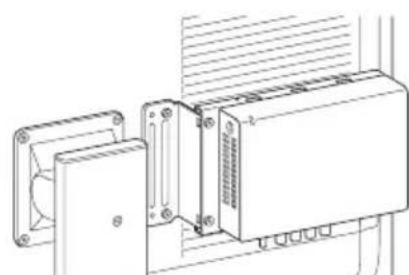
natural_image
Technical line drawing of an electronic device with mounting flanges and a central housing (no text or symbols)natural_image
Technical line drawing of a rectangular electronic device housing with mounting holes and mounting brackets (no text or symbols)Monitör aparatı
natural_image
Technical line drawing of a metal bracket component (no text or symbols)Mesafe tutucular (2)
natural_image
Two circular mechanical components with central holes, no text or symbols presentKurulum
natural_image
Diagram of a device with multiple wheels and a central panel, showing no text or symbolsnatural_image
Technical diagram of a computer case with mounting holes and internal components (no text or symbols)natural_image
Technical line drawing of a mechanical component with no visible text or symbolsnatural_image
Diagram of a device with an arrow indicating direction, showing internal components and wiring (no text or symbols)natural_image
Diagram of a hand holding a device with a panel, showing internal components and a downward arrow (no text or symbols)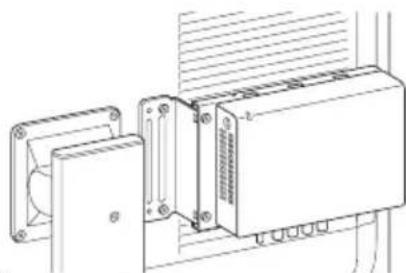
natural_image
Technical line drawing of a mechanical or electronic device with mounting brackets and wiring (no text or symbols)Information for Customers in
Europe (Avrupa'daki
natural_image
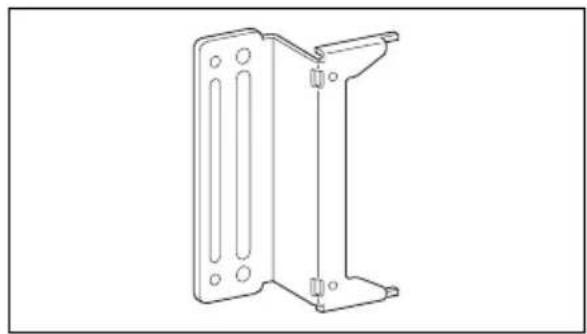
Technical line drawing of a rectangular metal frame with mounting holes and cutouts (no text or symbols)Nosač monitora
Pričvrstite ovo za monitor.
natural_image
Technical line drawing of a metal bracket component (no text or symbols)Odstojnici (2)
Upotrebljavajte ih kada pričvršćujete jedinicu za monitor koristeći se stalkom za monitor.

natural_image
Two circular mechanical components, possibly washers or rollers, shown in line drawing style without any text or symbols.Postavljanje
natural_image
Diagram of a device with wheels and an arrow indicating direction (no text or symbols)natural_image
Technical diagram of a computer monitor case with mounting holes and ventilation slots (no text or labels)natural_image
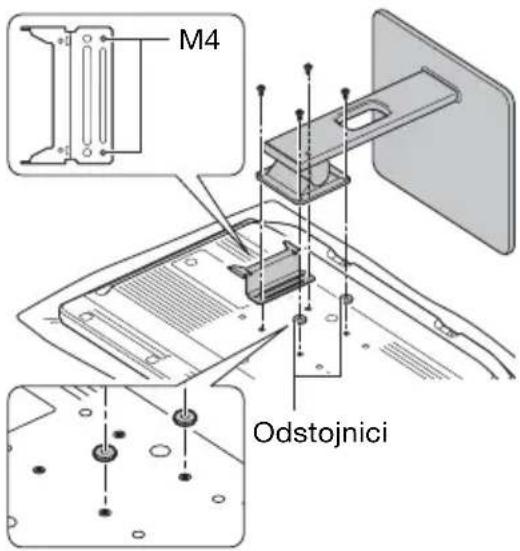
Technical line drawing of a mechanical component with mounting bracket and housing (no text or symbols)2 Uklonite vijke koji pričvršćuju stalak za monitor i uklonite stalak za monitor.
3Poravnajte otvore za vijke M4 na nosaču monitora s otvorima za vijke M4 na stražnjoj strani monitora, umetnite odstojnike u otvore za M4 na drugoj strani i upotrijebite vijke kako biste pričvrstili stalak natrag na monitor.
natural_image
Diagram of an electronic device with a rectangular block and directional arrow indicating motion (no text or symbols)natural_image
Diagram of a hand holding a mechanical component with a downward arrow indicating force or direction (no text or symbols present)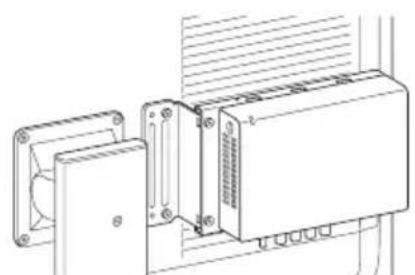
natural_image
Technical line drawing of an electronic device with mounting flanges and a central housing (no text or symbols)Information for Customers
natural_image
Technical line drawing of a rectangular metal frame with mounting holes and cutouts (no text or symbols)Consolă monitor
natural_image
Technical line drawing of a metal bracket component (no text or symbols)Distanțiere (2)
natural_image
Two circular mechanical components, possibly washers or rollers, shown in line drawing style without any text or symbols.Instalare
Montarea consolei IPC
natural_image
Diagram of a device with labeled components and directional arrows indicating movement (no text or symbols present)natural_image
Technical diagram of a computer chassis with mounting holes and internal components (no text or labels)natural_image
Technical line drawing of a mechanical component with mounting bracket and housing (no text or symbols)natural_image
Diagram of an electronic device with a rectangular block and directional arrow indicating motion (no text or symbols)(L × h × l, exclusiv
protuberanțele)
Distanțiere
Aprox. 15 mm (diametru),
2 mm (grosime)
Masă Consolă IPC
Aprox. 130 g
Consolă monitor
Aprox. 150 g
Information for Customers
natural_image
Technical line drawing of a rectangular electronic device housing (no text or symbols)Monitori kronstein
Kinnitage see monitori külge.
natural_image
Technical line drawing of a metal bracket component (no text or symbols)Vahehoidikud (2)
natural_image
Two circular mechanical components with central holes, no text or symbols presentPaigaldamine
IP-konverteri kronsteini kinnitamine
natural_image
Diagram of a device with multiple wheels and an open box, showing no text or symbolsnatural_image
Technical diagram of a computer monitor case with mounting holes and internal components (no text or labels)Monitori kronsteini kinnitamine
natural_image
Technical line drawing of a mechanical component with mounting bracket and housing (no text or symbols)natural_image
Diagram of a device with an arrow indicating direction, showing internal components and wiring (no text or symbols)2 Kinnitage IP-konverteri kronstein kaasasolevate kruvidega (M4×8), hoides samal ajal kronsteini selle toetamiseks.
natural_image
Diagram of a hand holding a device with a ruler and adjustment lever, showing internal components (no text or symbols)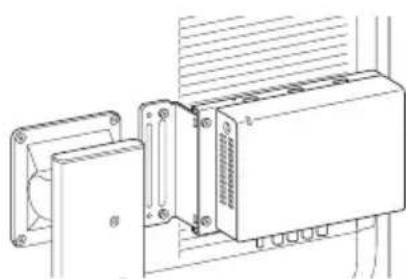
natural_image
Technical line drawing of an electronic device with mounting bracket and internal components (no text or symbols)(diameeter), 2 mm (paksus)
Kaal IP-konverteri kronstein
Ligikaudu 130 g
Monitori kronstein
Ligikaudu 150 g
Information for Customers in
Europe (Teave klientidele
Euroopas) (1)
natural_image
Technical line drawing of a rectangular electronic device housing with mounting holes and slots (no text or symbols)natural_image
Technical line drawing of a metal bracket component (no text or symbols)Tarpinès (2)
natural_image
Two circular mechanical components with central holes, no text or symbols presentTvirtinimas
natural_image
Diagram of a device with multiple wheels and an open panel, showing no text or symbolsnatural_image
Technical diagram of a computer monitor case with mounting holes and internal components (no text or labels)natural_image
Technical line drawing of a mechanical component with a bracket and mounting base (no text or symbols)natural_image
Diagram of a device with an arrow indicating direction, showing internal components and wiring (no text or symbols)2IPC laikikli priveržkite pridedamais varžtais (M4×8); laikikli prilaikykite ranka.
natural_image
Diagram showing a hand inserting a component into an electronic device, with no visible text or symbols.$$ \text { Information for Customers in } $$
$$ \text { Europe (Informacija Europos } $$
$$ \text { k l i e n t a m s }) (1) $$
natural_image
Technical line drawing of a rectangular electronic device housing (no text or symbols)natural_image
Technical line drawing of a metal bracket component (no text or symbols)Starplikas (2)
natural_image
Two identical circular mechanical components with central holes, shown in isometric line drawing style (no text or symbols)Uzstādīšana
natural_image
Diagram of a device with multiple wheels and an open box, showing no text or symbolsnatural_image
3D diagram of a computer monitor case with mounting holes and ventilation slots (no text or labels)natural_image
Technical line drawing of a mechanical component with mounting bracket and housing (no text or symbols)natural_image
Diagram of an electronic device with a rectangular block and directional arrow indicating motion (no text or symbols)natural_image
Diagram showing a hand inserting a device into a rack, with no visible text or symbolsnatural_image
Technical line drawing of a rectangular metal frame with mounting holes and cutouts (no text or symbols)Nosač monitora
Pričvrstite ovaj deo na monitor.
natural_image
Technical line drawing of a metal bracket component (no text or symbols)Podloške (2)
Upotrebite podloške pri pričvršćivanju uređaja na monitor pomoću postolja monitora.

natural_image
Two circular mechanical components with concentric rings, no text or symbols presentMontiranje
natural_image
Diagram of a device with wheels and an arrow indicating direction (no text or symbols)2 Pomoću zavrtanja koje ste uklonili u koraku 1, pričvrstite IPC nosač na IP konvertor.
Prilikom montiranja na monitor, pričvrstite IPC nosač na IP konvertor tako da je prednja strana IP konvertora okrenuta nagore, a panel sa konektorima okrenut nadole.
natural_image
Technical diagram of a computer monitor case with mounting holes and internal components (no text or labels)natural_image
Technical line drawing of a mechanical component with mounting holes and a central bracket (no text or symbols)natural_image
Diagram of a device with an arrow indicating direction, showing internal components and wiring (no text or symbols)natural_image
Diagram of a hand holding a device with a button and screwdriver, showing internal components and a downward arrow (no text or symbols)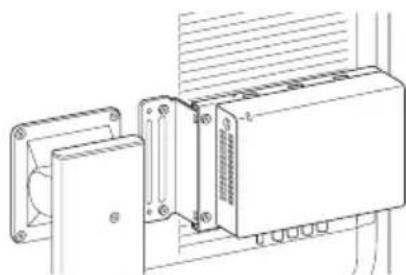
natural_image
Technical line drawing of an electronic device with mounting bracket and internal components (no text or symbols)natural_image
Technical line drawing of a rectangular electronic device housing (no text or symbols)모니터 브래킷
모니터에 부착합니다.
natural_image
Technical line drawing of a metal bracket component (no text or symbols)스페이서 (2)
natural_image
Two circular mechanical components with central holes, shown in line drawing style (no text or symbols)설치
IPC 브래킷 부착
natural_image
Diagram of a device with wheels and an arrow indicating motion (no text or symbols)natural_image
Technical diagram of a computer monitor case with mounting holes and internal components (no text or labels)모니터 브래킷 부착
natural_image
Technical line drawing of a mechanical component with a bracket and mounting base (no text or symbols)natural_image
Diagram of a device with an arrow indicating direction, showing internal components and wiring (no text or symbols)natural_image
Diagram showing a hand holding a device with a panel and a button, illustrating a process of assembly or disassembly (no text or symbols present)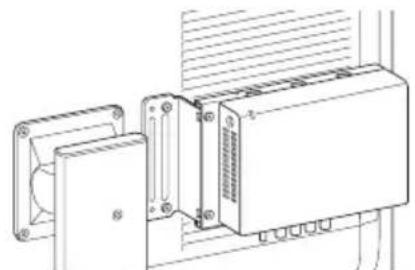
natural_image
Technical line drawing of an electronic device with mounting brackets and a central housing (no text or symbols)$$ \text { Customers in Europe } $$
(유럽 내 고객을 위한 정보)
(1)

- 安全のために
- モニターブラケット
- スペーサー(2 個)
- モニターブラケットを取り付ける
- Symbols on the product
- Safety sign
- Storage and transport temperature
- Storage and transport humidity
- Storage and transport pressure
- Caution
- For the customers in Europe
- Usage Precautions
- Supported monitors
- Use of power strips prohibited
- Multi-installations
- Orientation
- Maintenance
- Condensation
- Unit Components
- IPC bracket
- Monitor bracket
- Spacers (2)
- Installation
- Attaching the IPC Bracket
- Attaching the Monitor Bracket
- To use the monitor stand to secure the unit
- To attach the unit with the monitor stand attached
- Mounting the IP Converter
- Specifications
- Information for Customers in Europe (1)
- Notes
- Français
- Support du moniteur
- Entretoises (2)
- Fixation du support IPC
- Monitorwinkel
- Distanzstücke (2)
- Staffa del monitor
- Distanziali (2)
- Montaggio
- Soporte del monitor
- Separadores (2)
- Instalación
- Suporte do monitor
- Espaçadores (2)
- Instalação
- Instalar o suporte IPC
- Instalar o suporte de monitor
- Monitorbeugel
- Afstandhouders (2)
- Installatie
- De IPC-beugel bevestigen
- De monitorbeugel bevestigen
- Multi-installeringer
- Monitorbeslag
- Afstandsstykker (2)
- Näyttöpidike
- Välikappaleet (2)
- Asennus
- Skjermbrakett
- Skiver (2)
- Installering
- Feste IPC-braketten
- Skärmfäste
- Vingar (2)
- Montering
- Montera IPC-fästet
- Montera skärmfästet
- Uchwyt monitora
- Instalacja
- Αποστάτες (2)
- Εγκατάσταση
- Držák monitoru
- Instalace
- Upevnění držáku IPC
- Monitorkeret
- Távtartók (2)
- Felszerelés
- Конзола за монитор
- Дистанционни подложки (2)
- Монтаж
- Držiak monitora
- Inštalácia
- Pripojenie držiaku monitora
- Nosilec monitorja
- Distančnika (2)
- Namestitev
- Namestitev nosilca IPC
- Monitör aparatı
- Mesafe tutucular (2)
- Kurulum
- Nosač monitora
- Odstojnici (2)
- Postavljanje
- Consolă monitor
- Distanțiere (2)
- Instalare
- Montarea consolei IPC
- Monitori kronstein
- Vahehoidikud (2)
- Paigaldamine
- IP-konverteri kronsteini kinnitamine
- Monitori kronsteini kinnitamine
- Tarpinès (2)
- Tvirtinimas
- Starplikas (2)
- Uzstādīšana
- Podloške (2)
- Montiranje
- 모니터 브래킷
- 스페이서 (2)
- 설치
- IPC 브래킷 부착
- 모니터 브래킷 부착
Brand : SONY
Model : NUA-BK10
Category : Electronic accessory