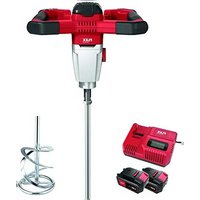
MXE 18.0-EC - Paint mixer Flex - Free user manual and instructions
Find the device manual for free MXE 18.0-EC Flex in PDF.


| Product type | Cordless paint mixer |
| Brand | Flex |
| Model | MXE 18.0-EC |
| Weight (without battery) | 4.1 kg (according to EPTA 01/2003) |
| Battery weight | AP 18.0/2.5 Ah: 0.42 kg; AP 18.0/5.0 Ah: 0.72 kg |
| Voltage | 18 V |
| Compatible battery capacities | 2.5 Ah and 5.0 Ah (Lithium-ion) |
| No-load speed (1st gear) | 210 / 325 / 530 rpm (3 levels) |
| No-load speed (2nd gear) | 320 / 490 / 780 rpm (3 levels) |
| Max. mixing paddle diameter | 120 mm |
| Tool attachment | M14 |
| Power source | Rechargeable battery (accumulator) |
| Number of speeds | 2 gears with end stop |
| Electronic control | Yes, speed selection on 3 levels |
| Overload protection | Yes, automatic shutdown in case of overload or overheating |
| Charge level display | Yes, via LED on battery |
| Safety switch | Double switch with anti-engagement notch |
| Intended use | Mixing paints, varnishes, glues, plasters, mortars, resins (excluding foodstuffs) |
| Maintenance | Regularly clean the ventilation slots and motor with dry compressed air |
| Cleaning | Clean the mixing paddle immediately after use |
| Repairability | Repairs exclusively by an authorized service center |
| Spare parts | Available at www.flex-tools.com |
| Compliance | CE according to directives 2014/30/EU, 2006/42/EC, 2011/65/EU |
Frequently Asked Questions - MXE 18.0-EC Flex
User questions about MXE 18.0-EC Flex
0 question about this device. Answer the ones you know or ask your own.
Ask a new question about this device
Download the instructions for your Paint mixer in PDF format for free! Find your manual MXE 18.0-EC - Flex and take your electronic device back in hand. On this page are published all the documents necessary for the use of your device. MXE 18.0-EC by Flex.
USER MANUAL MXE 18.0-EC Flex
natural_image
Illustration of a mechanical mixing tool with a rotating base and handle (no text or symbols)de Originalbetriebsanleitung 3
en Original operating instructions 12
fr Notice d'instructions d'origine ..... 20
it Istruzioni per l'uso originali 29
es Instrucciones de funcionamiento originales ..... 38
pt Instruções de serviço originais 47
nl Originele gebruiksaanwijzing 56
da Originale driftsvejledning 65
no Originale driftsanvisningen 73
sv Originalbruksanvisning 81
fi Alkuperäinen käyttöohjekirja 89
el Auθεντικές οδηγίες χειρισμού 97
tr Orijinal işletme kılavuzu 106
pI Instrukcja oryginalna 114
hu Eredeti üzemeltetési útmutató ..... 123
cs Originální návod k obsluze 132
sk Originálny návod na obsluhu 140
hr Originalna uputa za rad 148
sl Izvirno navodilo za obratovanje 156
ro Instructiuni de functionare originale 164
bg Оригинално упътване за експлоатация ..... 173
ru Оригинальная инструкция по эксплуатации ..... 182
et Originaalkasutusjuhend 191
It Originali naudojimo instrukcija 199
Iv Lietošanas pamācības oriģināls 207
ar 223
ترجمة لإرشادات التشفيل الأصلية
Inhalt
Verwendete Symbole 3
Symbole am Gerät 3
Symbole am Gerät 3
Technische Daten 3
Auf einen Blick 4
Drehzahlregulierung
natural_image
Illustration of hands operating a mechanical power tool (no text or symbols visible)Überlastschutz
i HINWEIS
Manager Research & Development (R & D)
Klaus Peter Weinper
Head of Quality Department (QD)
06.09.2019
Symbols used in this manual ..... 12
Symbols on the power tool 12
Technical specifications 12
Overview 13
Important safety information ..... 14
Noise and vibration 15
Instructions for use 16
Maintenance and care 18
Disposal information 19
C ∈ -Declaration of Conformity ..... 19
Exemption from liability 19
Symbols used in this manual

WARNING!
Denotes impending danger. Non-observance of this warning may result in death or extremely severe injuries.

CAUTION!
Denotes a potentially dangerous situation. Non-observance of this warning may result in injury or damage to property.

NOTE!
Denotes application tips and important information.
Symbols on the power tool

Before switching on the power tool, read the operating manual!

Wear protective goggles!

Wear ear defenders!
Disposal information for the old machine (see page 19)!
Technical specifications
| Mixer MXE 18.0-EC | ||
| Idling speed– 1st gear– 2nd gear | rpmrpmrpm | --210/325/530320/490/780 |
| Battery | AP 18.0 (2.5 Ah)AP 18.0 (5.0 Ah) | |
| Tool holder M14 | ||
| Max. mixer paddle diameter | mm 120 | |
| Weight according to “EPTA procedure 01/2003” | kg 4.1 | |
| Weight of battery- AP 18.0/2.5- AP 18.0/5.0 | kgkg | 0.420.72 |
Overview
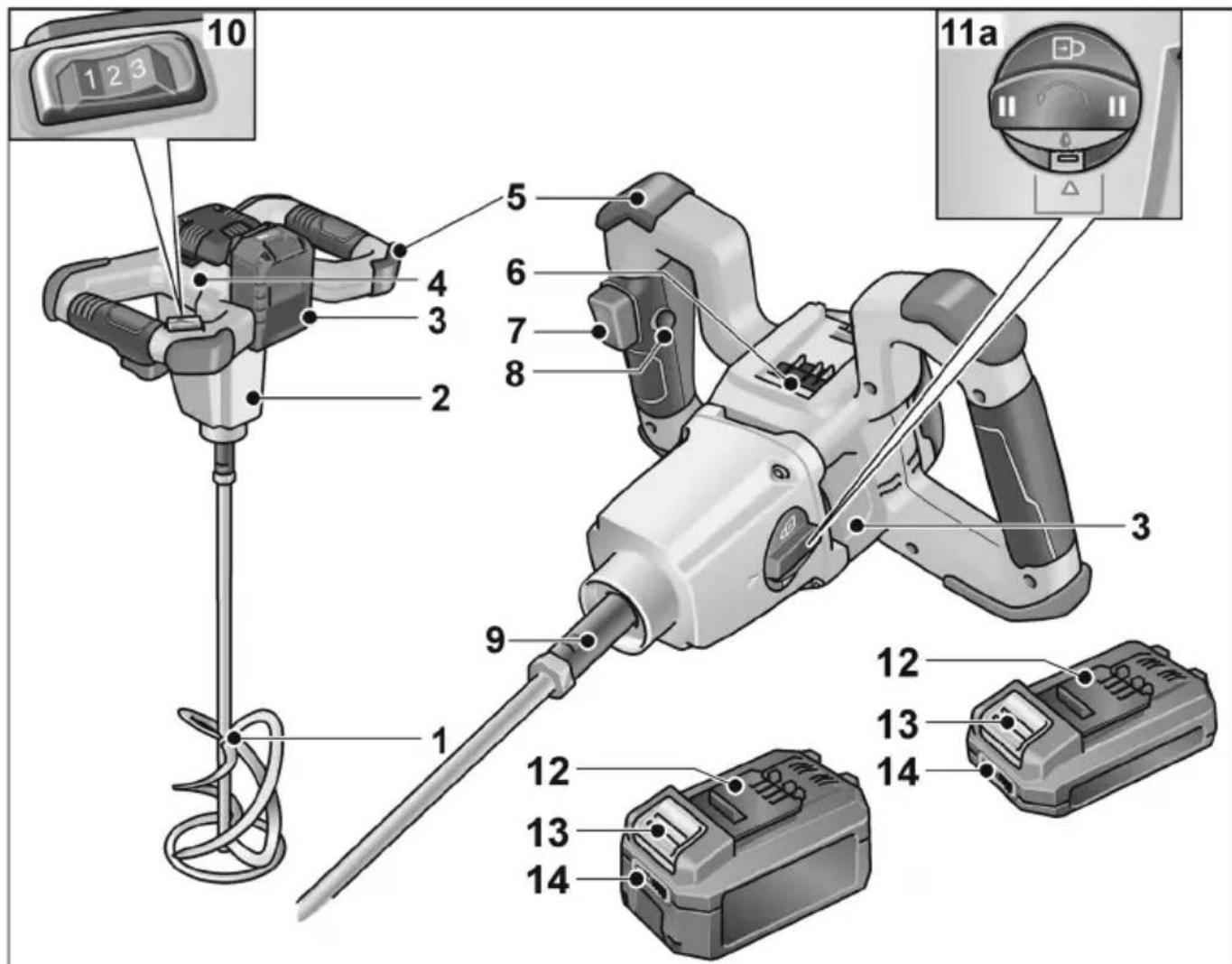
1 Mixer paddle
2 Gear head
3 Rating plate *
4 Motor housing with 2 handles
5 Impact guard and rest
6 Slot for battery
7 ON/OFF switch
8 Locking button
9 Drive spindle
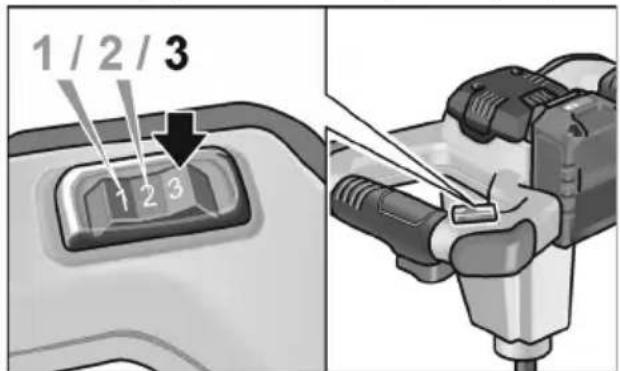
10 Speed preselector switch
11 Gear selector switch
a) 2nd speed and spindle lock
12 Li-ion battery (2.5 Ah or 5.0 Ah)
13 Release button for battery
14 State of charge indicator
* not shown
Important safety information

WARNING!
Before using the power tool, please read the following and act accordingly:
– these operating instructions,
- the "General safety instructions" on the handling of power tools in the enclosed booklet (leaflet no.: 315.915),
– the currently valid site rules and the regulations for the prevention of accidents.
This power tool is state of the art and has been constructed in accordance with the acknowledged safety regulations.
Nevertheless, when in use, the power tool may be a danger to life and limb of the user or a third party, or the power tool or other property may be damaged. The power tool may be operated only if it is
- for its intended use,
- in perfect working order.
Faults which compromise safety must be repaired immediately.
Intended use
The mixer is designed
– for commercial use in industry and trade,
– with mixer paddle of appropriate size and shape,
– for mixing liquids of low viscosity such as paint, varnish, adhesive, light plaster, resin,
– for mixing material of high viscosity such as plaster, mortar, lime, screed, filler etc.,
- for mixing stiff and sticky material of high viscosity such as adhesive, resin, sealing and insulating compound etc.,
– for use with mixer paddles and accessories which are indicated in these instructions or recommended by the manufacturer.
The mixer is not to be used for mixing foodstuffs.
Safety instructions

WARNING!
Read all safety warnings, instructions, illustrations and specifications provided with this power tool. Failure to follow all instructions listed below may result in electric shock, fire and/or serious injury.
Save all warnings and instructions for future reference.
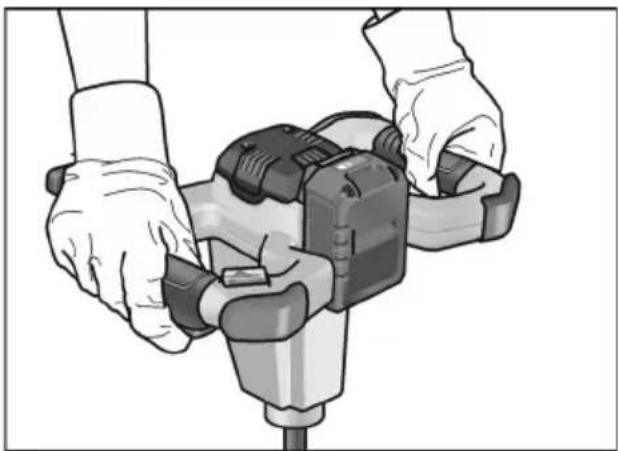
■ Hold the tool with both hands at the intended handles. Loss of control can cause personal injury.
■ Ensure sufficient ventilation when mixing flammable materials to avoid a hazardous atmosphere. Developing vapour may be inhaled or be ignited by the sparks the power tool produces.
■ Do not mix food. Power tools and their accessories are not designed for processing food
- Keep the cord away from the working area. The cord may be entangled by the mixer basket.
■ Ensure that the mixing container is placed in a firm and secure position. A container that is not properly secured may move unexpectedly.
■ Ensure that no liquid splashes against the housing of the power tool. Liquid that has penetrated the power tool can cause damage and lead to electric shock.
■ Follow the instructions and warnings for the material to be mixed. Material to be mixed may be harmful.
If the power tool falls into the material to be mixed, unplug the tool immediately and have the power tool checked by a qualified repair person. Reaching into the bucket with the tool still plugged in can lead to electric shock.
■ Do not reach into the mixing container with your hands or insert any other objects into it while mixing. Contact with the mixer basket may lead to serious personal injury.
■ Start up and run down the tool in the mixing container only. The mixer basket may bend or spin in an uncontrolled manner.
■ Do not process explosive materials (e.g. highly inflammable solvents). Power tools generate sparks that could ignite the vapour given off.
■ Do not process explosive materials (e.g. highly inflammable solvents). Power tools generate sparks that could ignite the vapour given off.
Special safety instructions Battery tool use and care
■ Recharge only with the charger specified by the manufacturer. A charger that is suitable for one type of battery pack may create a risk of fire when used with another battery pack.
■ Use power tools only with specifically designated battery packs. Use of any other battery packs may create a risk of injury and fire.
■ When battery pack is not in use, keep it away from other metal objects, like paper clips, coins, keys, nails, screws or other small metal objects, that can make a connection from one terminal to another. Shorting the battery terminals together may cause burns or a fire.
■ Under abusive conditions, liquid may be ejected from the battery; avoid contact. If contact accidentally occurs, flush with water. If liquid contacts eyes, additionally seek medical help. Liquid ejected from the battery may cause irritation or burns.
■ Do not use a battery pack or tool that is damaged or modified. Damaged or modified batteries may exhibit unpredictable behaviour resulting in fire, explosion or risk of injury.
■ Do not expose a battery pack or tool to fire or excessive temperature. Exposure to fire or temperature above 130 °C may cause explosion.
i NOTE!
The temperature „130 °C“ can be replaced by the temperature „265 °F“.
■ Follow all charging instructions and do not charge the battery pack or tool outside the temperature range specified in the instructions. Charging improperly or at temperatures outside the specified range may damage the battery and increase the risk of fire.
Service
■ Have your power tool serviced by a qualified repair person using only identical replacement parts. This will ensure that the safety of the power tool is maintained.
■ Never service damaged battery packs. Service of battery packs should only be performed by the manufacturer or authorized service providers.
Noise and vibration
The noise and vibration values have been determined in accordance with EN 62841.
The A-weighted noise level of the power tool is typically:
- Sound pressure L _pA : 73 dB(A);
- Sound power L _WA : 84 dB(A);
– Uncertainty K: 3 dB.
Vibration total value (when mixing mineral materials of medium viscosity): - Emission value a_h : <2.5 m/s
– Uncertainty K: 1.5 m/s ^2
WARNING!
The indicated measurements refer to new power tools. Daily use causes the noise and vibration values to change.
i NOTE!
The vibration emission level given in this information sheet has been measured in accordance with a standardised test given in EN 62841 and may be used to compare one tool with another. It may be used for a preliminary assessment of exposure. The declared vibration emission level represents the main applications of the tool. However if the tool is used for different applications, with different accessories or poorly maintained, the vibration emission may differ. This may significantly increase the exposure level over the total working period.
To make an accurate estimation of the vibration exposure level, it is also necessary to take into account the times when the tool is switched off or running but not actually in use. This may significantly decrease the exposure level over the total working period. Identify additional safety measures to protect the operator from the effects of vibration such as: maintain the tool and the accessories, keep the hands warm, organisation of work patterns.

CAUTION!
Wear ear defenders at a sound pressure above 85 dB(A).
Instructions for use

WARNING!
Remove the battery before carrying out any work on the power tool.
Before initial operation
Unpack the mixer and check that there are no missing or damaged parts.

NOTE
The batteries are not fully charged on delivery. Prior to initial operation, charge the batteries fully. Refer to the charger operating manual.
Inserting/replacing the battery
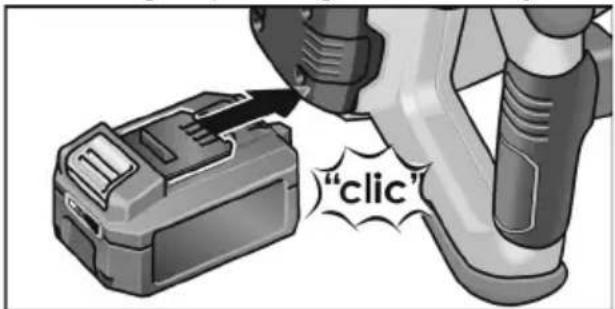
■ Press the charged battery into the power tool until it clicks into place.
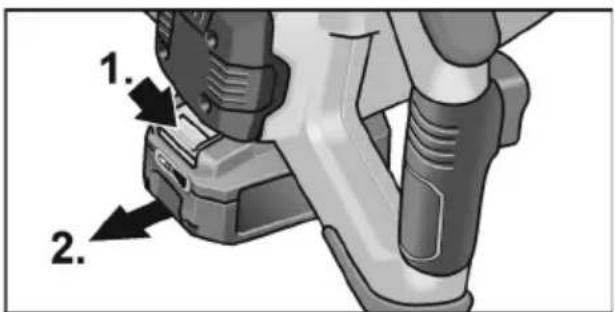
■ To remove, press the release button (1.) and pull out the battery (2.).

CAUTION!
When the device is not in use, protect the battery contacts. Loose metal parts may short-circuit the contacts; explosion and fire hazard!
Battery state of charge
■ Press the button to check the state of charge at the state of charge indicator LEDs.
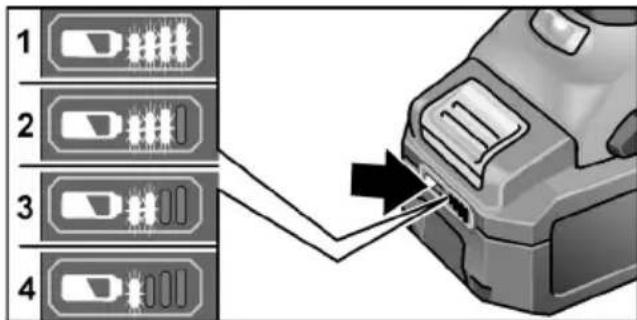
The indicator goes out after 5 seconds. If one of the LEDs flashes, the battery must be recharged. If none of the LEDs light up after the button is pressed, the battery is faulty and must be replaced.

NOTE
Follow the instructions for charging the battery set out in the charger operating manual.
Mounting/changing the mixer paddle
Tool with spindle lock
■ Press the lock and turn the gear selector switch in anti-clockwise direction to 📂1.).
■ Bolt the paddle onto the drive spindle (2.).
■ Tighten the mixer paddle with an open-end spanner AF 22 (3.).
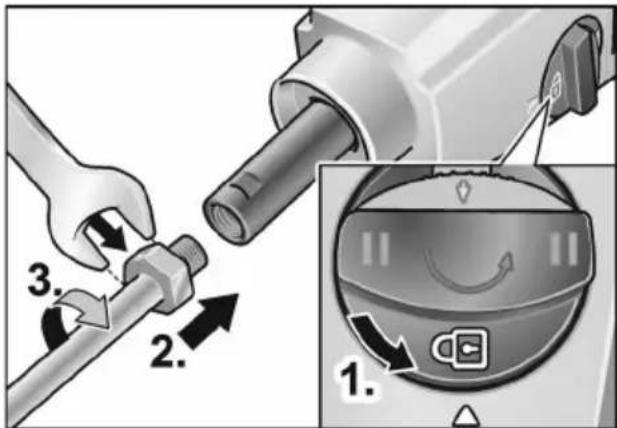
Remove in the reverse order.
Gear selection

CAUTION!
Only select gear with motor stationary.
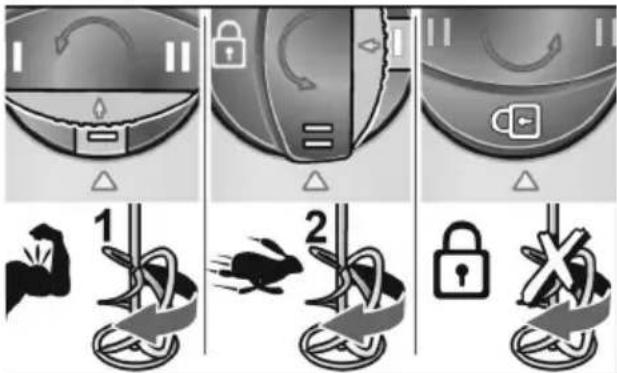
■ Press lock (1.) and turn switch in anticlockwise direction to the required stage (2.)
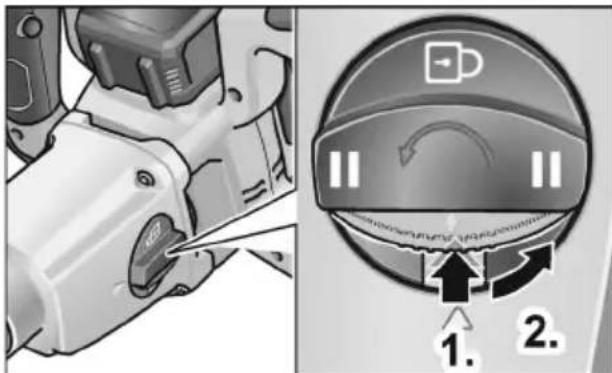
2nd speed and spindle lock:
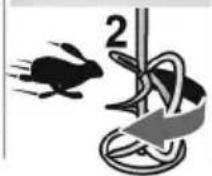
I Output stage with higher torque
II Output stage with higher speed

Spindle lock for changing mixer paddle
Regulating the speed
■ To adjust the maximum working speed, set the speed preselector switch to the desired stage.
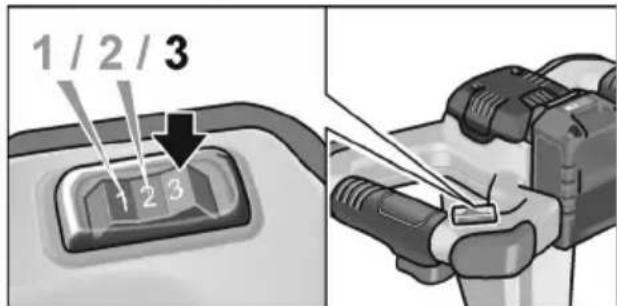
| Stage\Speed | I | II |
| 1 210 320 | ||
| 2 325 490 | ||
| 3 530 780 |
Switching the mixer on and off Brief operation without engaged switch rocker
■ First press the starting lockout (1.). Then press and hold down the switch (2). Release switch interlock. (3).
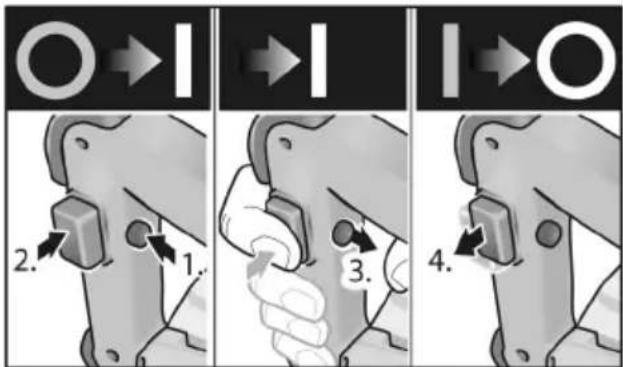
■ To switch off, release the switch (4.). Continuous operation with engaged switch rocker
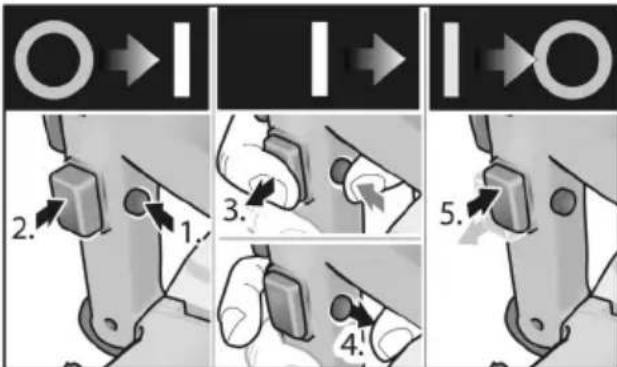
■ First press and hold down the starting lockout (1.) and then the switch. (2.).
■ To lock into position, further press the locking button and release the switch (3.). Release switch interlock (4.).
flowchart
graph TD
    A["Step 1: Initial state"] --> B["Step 2: Click button"]
    B --> C["Step 3: Roll arrow"]
    C --> D["Step 4: Pull button"]
    D --> E["Step 5: Close button"]
    E --> F["Final state"]
■ To switch off, briefly press and then release the switch (5.).
i NOTE!
If the mixer does not turn after switching on:
- Switch the power tool off (release lock by pressing switch).
- Rotate the mixer paddle manually by 45^ .
- Switch the power tool back on again.
Operating instructions
■ After it has been switched off, the mixer runs on for a short time.
■ If the rotating mixer paddle strikes a surface, it could cause a jolt.
■ Only switch on the tool after the mixer paddle has been immersed in the product to be mixed. When doing this, slowly press the switch and wait until the tool has reached maximum speed.
■ When taking a break from work, place the tool down on the rests.
natural_image
Person using a handheld power tool to adjust or install a mechanical component (no text or symbols visible)Overload protection
i NOTE
In the event of overload or overheating in non-stop operation, the power tool will switch off.
To continue working, switch the power tool off and back on again
For further information on the manufacturer's products go to www.flex-tools.com.
Maintenance and care
WARNING!
Remove the battery before carrying out any work on the power tool.
Cleaning
■ Regularly clean the power tool and ventilation slots.
■ Regularly blow out the housing interior and motor with dry compressed air.
■ Clean the mixer paddle straight after use. Do not allow the mixed product to dry on.
Charger
WARNING!
Before performing any work on the charger, pull out the mains plug. Do not use water or liquid detergents.
■ Remove dirt and dust from the housing with a brush or a dry cloth.
Gear
i NOTE
Do not loosen the screws on the gear head during the warranty period. Failure to comply with this requirement will invalidate any claims under the manufacturer's warranty.
Repairs
Repairs may be carried out by an authorised customer service centre only.
Spare parts and accessories
Mixer paddles for different applications and other accessories can be gleaned from the manufacturer's catalogues.
Exploded drawings and sparepart lists can be found on our homepage:
www.flex-tools.com
Disposal information

WARNING!
Render redundant power tools unusable:
- mains operated power tool by removing the power cord,
- battery operated power tool by removing the battery.
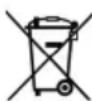
EU countries only.
Do not dispose of electric power tools in the household waste!
In accordance with the European Directive 2012/19/EU on Waste Electrical and Electronic Equipment and its incorporation into national law, used power tools must be collected separately and recycled in an environmentally friendly manner.

Raw material recovery instead of waste disposal.
Device, accessories and packaging should be recycled in an environmentally friendly manner. Plastic parts are identified for recycling according to material type.

WARNING!
Do not throw batteries into the household waste, fire or water. Do not open used batteries.
EU countries only:
In accordance with Directive 2006/66/EC defective or used batteries must be recycled.

NOTE!
Please ask your dealer about disposal options.
CE-Declaration of Conformity
We declare on our sole responsibility that the product described in “Technical specifications” conforms to the following standards or normative documents:
EN 62841 according to the provisions of Directives 2014/30/EU, 2006/42/EC, 2011/65/EU.
Responsible for technical documents:
Eckhard Rühle
Manager Research & Development (R & D)
Klaus Peter Weinper
Head of Quality
Department (QD)
06.09.2019
Exemption from liability
The manufacturer and his representative are not liable for any damage and lost profits due to interruption in business caused by the product or by an unusable product. The manufacturer and his representative are not liable for any damage which was caused by improper use of the power tool or by use of the power tool with products from other manufacturers.
Table des matières
natural_image
Illustration of hands operating a mechanical power tool (no text or symbols visible)Protection contre la surcharge
i REMARQUE!
natural_image
Mechanical component diagram showing a lever mechanism with no visible text or symbols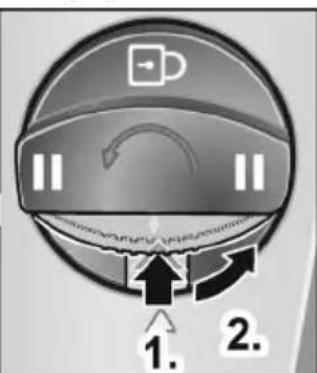
natural_image
Person using a power tool to adjust or install a mechanical component (no text or symbols visible)Eckhard Rühle
Manager Research & Development (R & D)
06/09/2019
Klaus Peter Weinper
Head of Quality
Department (QD)
flowchart
graph TD
    A["Opening"] --> B["Step 1: Disassembly"]
    B --> C["Step 2: Disassembly with a knob"]
    C --> D["Step 3: Disassembly with a knob"]
    D --> E["Step 4: Disassembly with a knob"]
    E --> F["Step 5: Disassembly with a knob"]
natural_image
Illustration of hands operating a mechanical power tool (no text or symbols visible)Manager Research & Development (R & D)
Klaus Peter Weinper
Head of Quality Department (QD)
06.09.2019
natural_image
Person operating a mechanical power tool with hands adjusting it (no visible text or symbols)Eckhard Rühle
Manager Research & Development (R & D)
Klaus Peter Weinper
Head of Quality
Department (QD)
06/09/2019
natural_image
Person using a power tool to adjust or install a mechanical component (no text or symbols visible)Overbelastingsbeveiliging

LET OP
2 gear og spindelspærre:
Regulering af omdrejningstal
natural_image
Person operating a mechanical power tool with hands adjusting it (no visible text or symbols)Overbelastningsbeskyttelse
i BEMAERK
Ved overbelastning eller overophedning under konstant drift slukker maskinen.
Eckhard Rühle
Manager Research &
Development (R & D)
Klaus Peter Weinper
Head of Quality
Department (QD)
06.09.2019
Turtallsregulering
natural_image
Illustration of hands operating a mechanical power tool (no text or symbols visible)Overbelastningsvern
i MERKNAD
Ved overbelastning eller overoppheting i kontinuerlig drift stopper maskinen.
Manager Research & Development (R & D)
Klaus Peter Weinper
Head of Quality Department (QD)
06.09.2019
Varvtalsinställning
natural_image
Person using a handheld power tool on a stand (no text or symbols visible)flowchart
graph TD
    A["Step 1: Lock"] --> B["Step 2: Jumping"]
    B --> C["Step 3: Lock with Pin"]
    C --> D["End"]
Kierrosluvun säätö
natural_image
Person using a power tool on a tripod (no text or symbols visible)Ylikuormitussuoja
i OHJE!
Eckhard Rühle
Manager Research & Development (R & D)
Klaus Peter Weinper
Head of Quality
Department (QD)
06.09.2019
natural_image
Person using a handheld power tool to adjust or install a mechanical component (no text or symbols visible)Eckhard Rühle
Manager Research & Development (R & D)
Klaus Peter Weinper
Head of Quality
Department (QD)
06.09.2019
2. vites ve mil kilidi:
natural_image
Illustration of hands operating a mechanical power tool (no text or symbols visible)Eckhard Rühle
Manager Research & Development (R & D)
Klaus Peter Weinper
Head of Quality Department (QD)
06.09.2019
natural_image
Person operating a mechanical power tool with hands adjusting the component (no visible text or symbols)Eckhard Rühle
Manager Research & Development (R & D)
Klaus Peter Weinper
Head of Quality Department (QD)
06.09.2019
natural_image
Mechanical component with a tool inserted, showing no visible text or symbols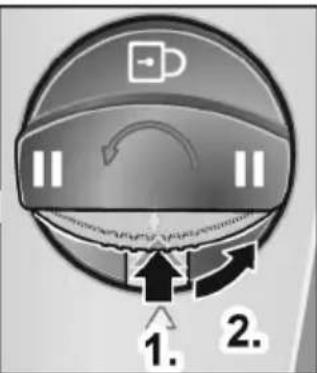
natural_image
Close-up of a car's front and side panels showing a curved arrow, flame, and triangle (no text or symbols)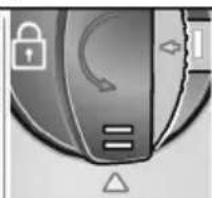
natural_image
Close-up of a metallic device with a lock icon and directional arrow, no visible text or symbols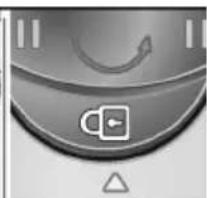
natural_image
Close-up of a computer mouse control knob with a scroll icon and triangular warning symbol (no text or labels)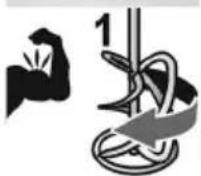

natural_image
Close-up of a mechanical device with a tool interacting with a small component (no visible text or symbols)Eckhard Rühle
Manager Research &
Development (R & D)
Klaus Peter Weinper
Head of Quality
Department (QD)
-
- 06.
Regulace otáček
natural_image
Person operating a mechanical power tool with hands adjusting it (no visible text or symbols)Eckhard Rühle
Manager Research & Development (R & D)
Klaus Peter Weinper
Head of Quality
Department (QD)
06.09.2019
Regulácia otáčok
natural_image
Illustration of hands operating a mechanical power tool (no text or symbols visible)Ochrana proti pret'aženiu
i UPOZORNENIE
Eckhard Rühle Manager Research & Development (R & D)
Klaus Peter Weinper Head of Quality Department (QD)
06.09.2019
Demontaža se provodi obrnutim redoslijedom.
Biranje brzina

OPREZ!
Promijenite brzinu samo kada je motor zaustavljen.
2 brzine i blokada vretena:
Reguliranje broje okretaja
■ Za namještanje maksimalnog broja okretaja stavite prekidač za biranje broja okretaja pri radu na željeni stupanj.
| Stupanj\Brzina | I | II |
| 1 210 320 | ||
| 2 325 490 | ||
| 3 530 780 |
natural_image
Illustration of hands operating a mechanical power tool (no text or symbols visible)Zaštita od preopterećenja
i NAPOMENA
Hrup in tresljaji 159
Demontažo izvedite v obratnem vrstnem redu.
Izbira prestav
PREVIDNO!
2-stopenjsko delovanje in blokada vretena:
natural_image
Illustration of hands operating a mechanical power tool (no text or symbols visible)Klaus Peter Weinper Head of Quality Department (QD)
06.09.2019
Reglarea turației
natural_image
Person operating a mechanical power tool with hands adjusting it (no visible text or symbols)Directivei 2014/30/UE, 2006/42/CE,
2011/65/UE.
Eckhard Rühle
Manager Research &
Development (R & D)
Klaus Peter Weinper
Head of Quality
Department (QD)
06.09.2019
Регулиране на оборотите
natural_image
Person using a handheld power tool to adjust or install a mechanical component (no text or symbols visible)natural_image
Person operating a mechanical power tool with hands adjusting it (no visible text or symbols)Manager Research & Development (R & D)
Klaus Peter Weinper
Head of Quality
Department (QD)
06.09.2019
natural_image
Person using a power tool to adjust or install a mechanical component (no text or symbols visible)Ülekoormuskaitse
i MÄRKUS
Eckhard Rühle
Manager Research & Development (R & D)
Klaus Peter Weinper
Head of Quality Department (QD)
06.09.2019
natural_image
Person operating a mechanical power tool with hands adjusting it (no visible text or symbols)Eckhard Rühle
Manager Research & Development (R & D)
Klaus Peter Weinper
Head of Quality
Department (QD)
2019-09-06
Klaus Peter Weinper Head of Quality Department (QD)
2019/09/06
natural_image
Illustration of hands operating a mechanical power tool (no text or symbols visible)ضبط عدد اللفات