
Numeric - Telephone Flex - Free user manual and instructions
Find the device manual for free Numeric Flex in PDF.


| Product Type | DECT Cordless Phone |
| Brand | Flex |
| Model | Numeric |
| Dimensions (Base Station) | 9.5 x 6.2 x 10.8 cm |
| Dimensions (Handset) | 16.5 x 4.8 x 2.5 cm |
| Weight (Handset) | 112 g |
| Weight (Base Station) | 85 g |
| Power Supply | AC 230V, 50Hz; Handset: 2x AAA NiMH 600mAh |
| Range | Up to 50m indoors, 300m outdoors |
| Caller ID | Yes |
| Phonebook Capacity | 50 entries |
| Redial Memory | 10 last numbers |
| Display | 1.8-inch monochrome LCD with backlight |
| Sound Features | Polyphonic ringtones, ringer volume control |
| Hands-free Function | Yes, on speakerphone |
| Answering Machine | Integrated digital answering machine |
| Recording Time | Up to 10 minutes |
| Battery Life | Up to 15 hours talk time, 100 hours standby |
| Charging Time | Approximately 8 hours |
| Number of Handsets Supported | Up to 4 |
| Intercom Feature | Yes, between handsets |
| Wall Mountable | Yes (base station) |
Frequently Asked Questions - Numeric Flex
User questions about Numeric Flex
0 question about this device. Answer the ones you know or ask your own.
Ask a new question about this device
Download the instructions for your Telephone in PDF format for free! Find your manual Numeric - Flex and take your electronic device back in hand. On this page are published all the documents necessary for the use of your device. Numeric by Flex.
USER MANUAL Numeric Flex
natural_image
Pure electrical circuit lines without any symbolsnatural_image
Technical line drawing of a mechanical component with no visible text or symbolsnatural_image
Line drawing of a mobile phone connected to a headset via cable, showing terminal blocks and wiring (no text or symbols)Två headset
natural_image
Line drawing of two headset connections with ports and connectors (no text or symbols)Mikrofonval
natural_image
Pure electrical circuit lines without any symbolsnatural_image
Simple line drawing of a rectangular object with a circular hole and a small protrusion on top (no text or symbols)Mikrofonvolym
Introduction, what's in the box » 1
Overview » 2
Installation » 3
Two headsets, recording » 4
Settings (microphone volume, tone control and ringer signal) » 5-6
Guarantee, CE information » 7
Introduction
FLEX numeric is developed especially to be used together with a headset. The phone has superior ergonomics and audio quality, and is packed with smart features. Best performance is delivered together with an original FLEX headset, but the phone can also be used with other headset brands.
Features
- Microphone and earpiece volume controls (can be adjusted during a call)
- Dual RJ9 modular sockets for one or two headsets (Ideal for training)
• Automatic and manual last number redial
• LED-indication of incoming call, active call and mute - Recording output jack (connect to computer or other recording device)
- Compatibility settings for different headsets (volume boost, tone control)
- Programmable ringer signal, flash button and tone control
What's in the box
Contents
- Telephone set
- Telephone line cord (RJ11/RJ11)
- Headset hanger
- Manual

natural_image
Line drawing of a telephone handset and cable connector (no text or symbols)Numeric is easy to install together with another telephone or a caller ID box.
Keypad

Sockets
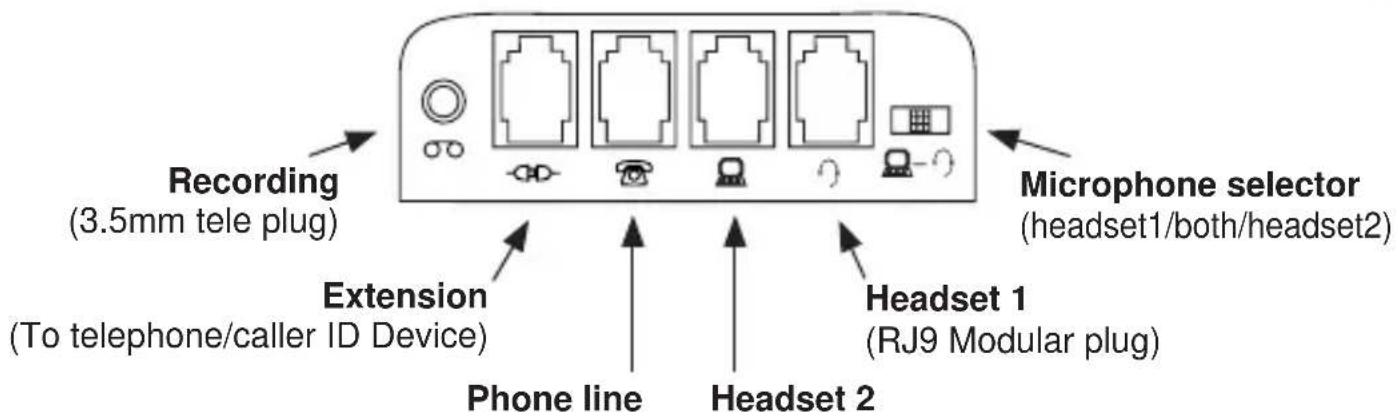
Controls

Flash button
(Programmable.
Default value is 100 ms)
Function switches
Microphone volume
(Adjusts microphone volume)
Headset hanger installation

natural_image
Technical line drawing of a mechanical component with arrows indicating assembly or movement (no text or symbols)Align the headset hanger with the two slots on the underside of the phone. Carefully push the hanger fully into the slots.
Headset hanger
Slot
Stop
Installation
Numeric is easy to install together with a caller ID device or another phone. Connect the supplied telephone line cord to the socket and to the caller ID device. Connect the telephone line cord from the caller ID device to the socket. Finally connect the headset to the socket.
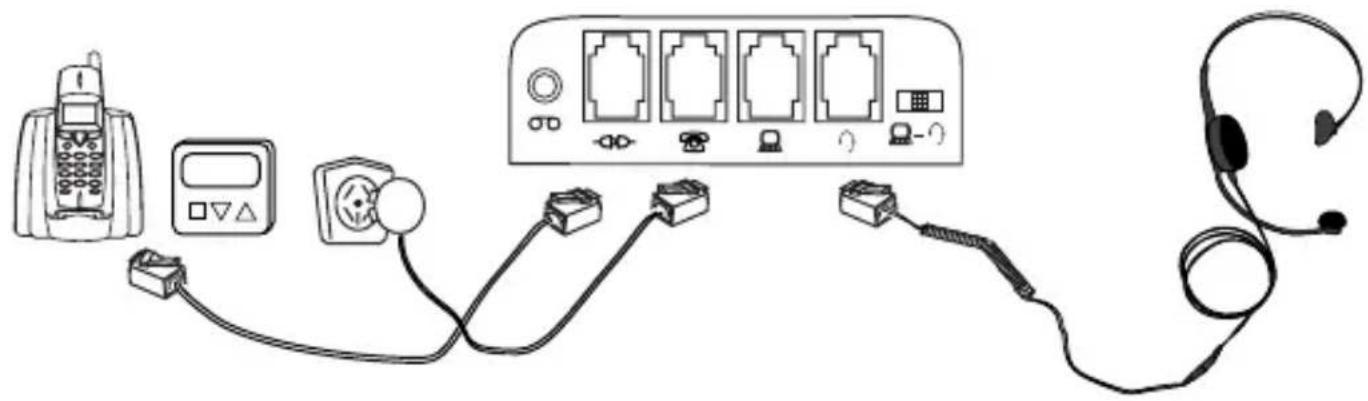
natural_image
Line drawing of a mobile phone connected to a headset via cable, showing connections with no text or symbols.Two headsets
When two headsets are to be connected, use the socket for the second headset.

natural_image
Line drawing of two headset heads connected to a device panel (no text or symbols)Microphone selector
Depending on the position of the three-way switch, the microphone can be switched on or off in the two connected headsets. You can always listen in both headsets.

Only the headset connected to the socket will have the microphone switched on.

In the middle position, both microphones will be switched on.
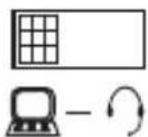
Only the headset connected to the socket will have the microphone switched on.
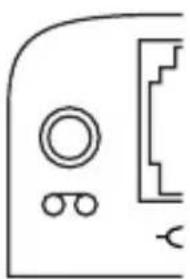
Recording
natural_image
Pure electrical circuit lines without any symbolsTo the recording output jack, a recording device such as a computer or tape recorder can be connected. Use a cord with a 3.5mm plug.
It is also possible to connect an external speaker.
Settings

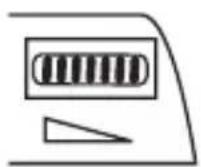
The function switches are located on the left side of the phone. Slide the cover downward to open it.

natural_image
Simple line drawing of a rectangular basin with a circular hole on the top (no text or symbols)Microphone volume level

Microphone volume can be increased or decreased with the volume control. Ideally, this setting should be made when you are in a call. Please note that high volume settings may affect the audio quality negatively in the headset.
Function switches

Factory default » all switches set to the Off position.
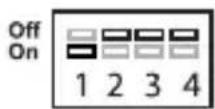
Increased headset volume » switch 1 in the On position will increase the receiving volume in the headset.
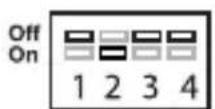
Increased ringer signal » switch 2 in the On position will increase the ringer volume.

Tone control » switch 3 in the On position will attenuate high frequencies in the headset.

Puls/Tone dial » switch 4 in the On position will switch dial method to pulse dial. This switch should normally be set to Off, since tone dial (DTMF) is the standard dialling method.
Note: it is possible to change more that one setting.
Ringer signal type
It is possible to adjust the ringer signal type in three different modes.
» Push the on/off button to get dial tone.
» Press ✗
» Press #.
» Dial the digit corresponding to the ringer signal preferred:
- Digit 3 = the ringer signal is repeated once (slow)
- Digit 6 = four repetitions (standard setting)
- Digit 9 = ten repetitions (fast)
» Push the hook switch to store the setting.
Flash (Recall) button

The timer for the flash (recall) button can be set to a different duration. Default setting is 100 ms, but for some PABX systems, the duration can be set to 270 or 600 ms instead.
Guarantee
ILD International AB warrants this product to be free from defects in materials and workmanship at the date of purchase. The guarantee covers defects in materials and workmanship during the warranty period, as stated in the consumer purchasing law. This guarantee shall not apply to a fault caused by accident, abnormal usage, product not reasonably maintained or faults caused by a thunderstorm or lightning.
If the goods deteriorate during the guarantee period in such a way as is covered by the guarantee, please return the product together with a dated sales receipt to the retailer, and it will be repaired or replaced at ILD's option.
CE declaration of conformity according to EN 45014

This equipment complies with the essential requirements of the European Union directive 1999/5/EC.
More information
Can be found on our web page; www.ILD.nu
Norsk »
Innhold
Norsk
To headset, innspilling » 4
Innstillinger (mikrofonvolum, tonekontroll og ringesignal) » 5-6
natural_image
Technical line drawing of a mechanical component with arrows indicating assembly or movement (no text or symbols)natural_image
Line drawing of a mobile phone connected to a headset via cable, showing terminal blocks and wiring (no text or symbols)To headset
natural_image
Line drawing of two headset connections with ports and connectors (no text or symbols)Mikrofonvalg
natural_image
Pure electrical circuit lines without any symbolsnatural_image
Simple line drawing of a rectangular object with a circular hole and a small protrusion on top (no text or symbols)Mikrofonvolum

natural_image
Pure electrical circuit lines without any symbolsnatural_image
Technical line drawing of a mechanical component with two parallel rods and three black fasteners inserted (no text or symbols)natural_image
Line drawing of a mobile phone connected to an electronic device with earphones and switches (no text or symbols)Kaksi kuuloketta
natural_image
Line drawing of two headset connections with ports and connectors (no text or symbols)Mikrofonin valinta
natural_image
Pure electrical circuit lines without any symbolsnatural_image
Simple line drawing of a rectangular object with a circular hole and a small protrusion on top (no text or symbols)



- Två headset
- Mikrofonval
- Mikrofonvolym
- Introduction
- Features
- What's in the box
- Contents
- Keypad
- Sockets
- Controls
- Headset hanger installation
- Installation
- Two headsets
- Microphone selector
- Recording
- Settings
- Microphone volume level
- Function switches
- Ringer signal type
- Flash (Recall) button
- Guarantee
- CE declaration of conformity according to EN 45014
- More information
- Innhold
- Norsk
- To headset
- Mikrofonvalg
- Mikrofonvolum
- Kaksi kuuloketta
- Mikrofonin valinta
Brand : Flex
Model : Numeric
Category : Telephone