
Assistant - Answering Machine Flex - Free user manual and instructions
Find the device manual for free Assistant Flex in PDF.


| Product Type | Answering Machine |
| Brand | Flex |
| Model | Assistant |
| Dimensions (W x D x H) | Approx. 20 x 15 x 8 cm |
| Weight | Approx. 500 g |
| Power Supply | AC adapter (included) or 4x AA batteries |
| Recording Time | Up to 60 minutes |
| Message Storage | Digital flash memory |
| Key Functions | Answer, record, play, delete, skip, repeat, announce |
| Display | LCD screen with call counter and time |
| Connection | RJ-11 telephone line |
| Installation | Plug into phone line and power outlet |
| Cleaning | Wipe with dry, soft cloth. Do not use liquid cleaners. |
| Safety | Keep away from water and moisture. Use only provided adapter. |
| Spare Parts | AC adapter, telephone cable available from Flex support |
| Environmental | RoHS compliant; recyclable packaging |
| Manual Languages | English, Finnish, Norwegian, Swedish, and more via request |
Frequently Asked Questions - Assistant Flex
User questions about Assistant Flex
0 question about this device. Answer the ones you know or ask your own.
Ask a new question about this device
Download the instructions for your Answering Machine in PDF format for free! Find your manual Assistant - Flex and take your electronic device back in hand. On this page are published all the documents necessary for the use of your device. Assistant by Flex.
USER MANUAL Assistant Flex

natural_image
Line drawing of a telephone handset connected to a coffee machine via cable (no text or symbols)Innehåll
Svenska
natural_image
Technical line drawing of a fuse box and its wire connection (no text or symbols)Översikt
natural_image
Line drawing of a telephone handset connected to a hexagonal phone and earphone (no text or symbols)natural_image
Line drawing of a handheld device with a circular head and internal components (no text or symbols)
natural_image
Simple geometric symbol: a circle with diagonal lines and a cross inside, enclosed in a rectangle (no text or labels)Mikrofonvolym
Introduction, features, what's in the box » 1
Overview, headset hanger » 2
Installation, test » 3
Settings (headset transmit and receive volume, ringer signal)» 4
Operation, recording » 5
Guarantee, CE information » 6
Introduction
FLEX assistant is a combined headset amplifier and answer phone. The unit is connected directly to the phone line, which makes it possible to receive calls just by pressing a button. The unit can also be used as a stand alone answer only phone. The amplifier delivers superior audio quality in the headset with separate volume controls for receiving and microphone. Best performance is delivered together with an original FLEX headset, but the unit can also be used with other brands.
Features
- Transmit and receive audio level controls (can be adjusted during a call)
- Pick up/hang up switch - no need to lift the handset to receive a call
- Can be used together with a phone or as a stand alone answer only phone
- LED indication when line is picked up and when mute is activated
- Recording output jack (connect to computer or other recording device)
- Compatibility switch for different headsets
- Adjustable ringer signal
- Powered by the phone line, no need for batteries
- Standard modular headset socket
What's in the box
Contents
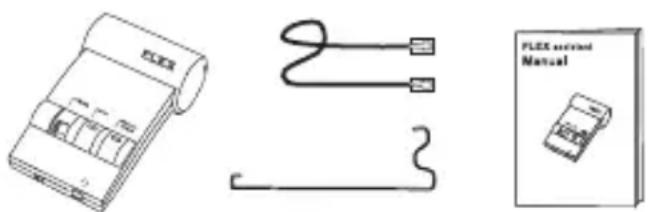
- FLEX assistant
- Telephone line cord (RJ11/RJ11)
- Headset hanger
- Manual
Overview
FLEX assistant is designed for easy operation. All switches are easy to access on top of the unit.

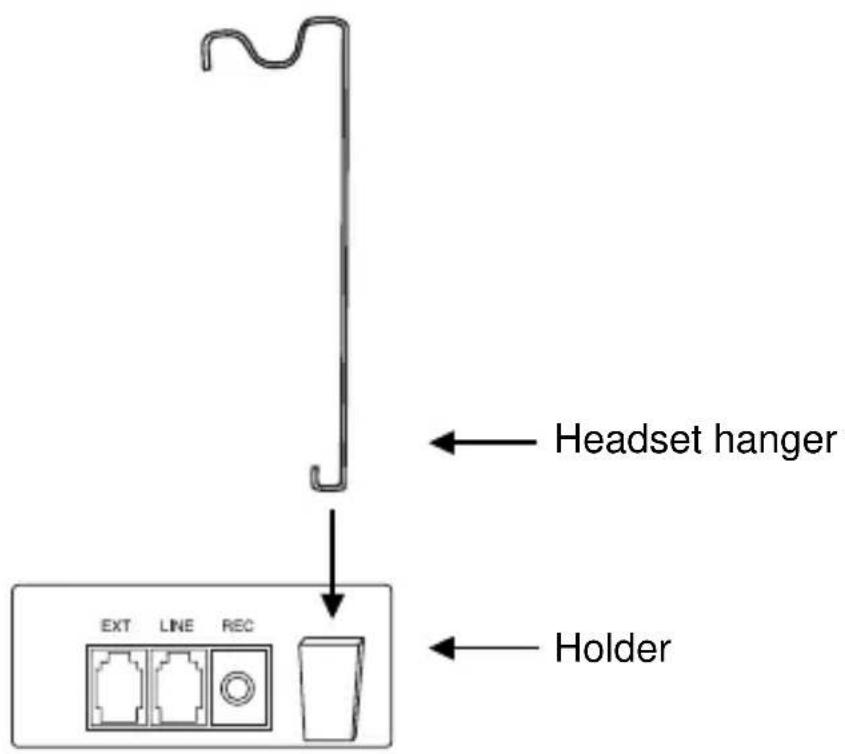
Headset hanger
Gently push the headset hanger into the slot on the back of the unit.
Installation

FLEX assistant can be installed in parallel with an analog desk phone or as a stand alone unit. Unplug the tele line cord from the phone and plug it into the LINE port. Then connect the supplied line cord to the EXT port and to the phone. Finally connect the headset to the port.

natural_image
Three black arrows pointing upward and to the right, with no text or symbols present.REC
Standard 3.5 mm recording jack
EXT To the phone
LINE
To the phone line wall socket

natural_image
Line drawing of a telephone handset connected to a keypad and power outlet (no text or symbols)The unit can also be connected as a stand alone phone for incoming calls.
Test
Place a call on the phone, press HEADSET ON/OFF to transfer the call to the headset and hang up the handset. Adjust the receiving volume to a suitable level with the volume control. If no audio is heard, try the other position of the headset compatibility switch.
If the other party have a hard time hearing your voice, the microphone volume can be adjusted according to the instructions on next page.
Settings
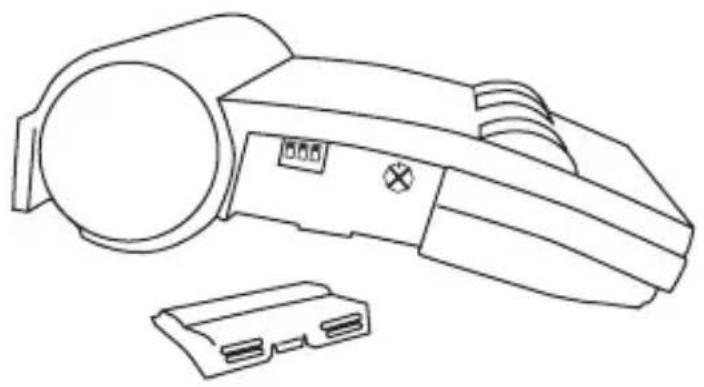
Transmit volume control, receive and ringer volume switches are located under the cover on the side of the unit.
natural_image
Line drawing of a handheld device with a circular head and two plastic housing (no text or symbols)
Function switches
Transmit
volume control

natural_image
Simple line drawing of a crossed circle with diagonal lines inside, enclosed in a rectangular border (no text or symbols)Transmit level adjustment
Microphone volume can be increased or decreased with the volume control. Ideally, this setting should be made when you are in a call. Turning the dial clockwise will increase the transmit level. Please note that high volume settings may affect the audio quality negatively in the headset.

Increased ringer volume
Switch 1 set to the On position will increase the volume of the built-in ringer. This setting can be convenient when the unit is used as a stand alone answer phone.

Decreased receive volume
Switch 2 set to the On position will lower the receive volume, if the range of the volume switch on top of the unit is too short.

Decreased transmit volume
Switch 3 set to the On position will decrease the microphone transmit level. Try to adjust the transmit volume with the dial before using this switch.
Factory default setting
All switches set to Off.
Operation
Place a call
Lift the handset and dial the number. Press ON/OFF to transfer the call to the handset and put the handset on hook. To end the call, just press ON/OFF.
Receive a call
Press ON/OFF to receive the call. To end the call, press ON/OFF again.
Switching between headset and handset
Pick up the handset and press ON/OFF to tranfer the call to the phone.
Using FLEX assistant as an answer only phone
When you receive a call, the built-in ringer will alert you. Press ON/OFF to receive the call. Press ON/OFF again to end the call.
Recording
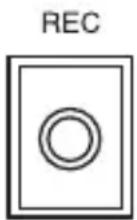
A recording device such as a computer or tape recorder can be connected to the recording port. Use a cord with a standard 3.5 mm plug. Both parties on the line will be heard on the recording.
Guarantee
ILD International AB warrants this product to be free from defects in materials and workmanship at the date of purchase. The guarantee covers defects in materials and workmanship during the warranty period, as stated in the consumer purchasing law. This guarantee shall not apply to a fault caused by accident, abnormal usage, product not reasonably maintained or faults caused by a thunderstorm or lightning.
If the goods deteriorate during the guarantee period in such a way as is covered by the guarantee, please return the product together with a dated sales receipt to the retailer, and it will be repaired or replaced at ILD's option.
CE declaration of conformity according to EN 45014

This equipment complies with the essential requirements of the European Union directive 1999/5/EC.
More information
Can be found on our web page; www.ILD.nu

RoHS compliant
Norsk »
Innhold
Norsk
natural_image
Technical line drawing of a fuse and cable assembly (no text or symbols)Oversikt
EXT Til telefonen
FLEX assistant kobles direkte til et analogt telefonuttak, før en eksisterende telefon. Koble først den medfølgende kabelen mellom uttaket EXT og telefonen. Koble deretter telekabelen (fra telefonen) mellom uttaket LINE og nærmeste telefonkontakt. Hodesettet kobles til uttaket
REC
natural_image
Line drawing of a telephone handset connected to a flexible phone and a coffee receiver (no text or symbols)natural_image
Line drawing of a handheld device with a circular head and internal components (no text or symbols)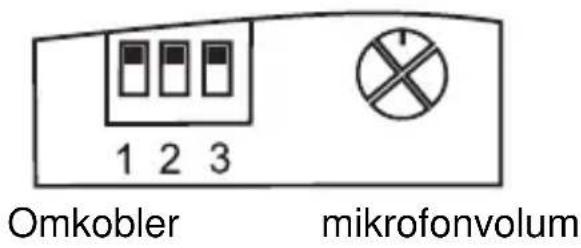

natural_image
Simple line drawing of a crossed circle with diagonal lines inside, enclosed in a rectangular border (no text or symbols)Mikrofonvolum
natural_image
Technical line drawing of a fuse and coiled cable (no text or symbols)Yleiskuva
natural_image
Line drawing of a telephone handset connected to a hexagonal phone and earphone (no text or symbols)natural_image
Line drawing of a handheld device with a circular head and internal components (no text or symbols)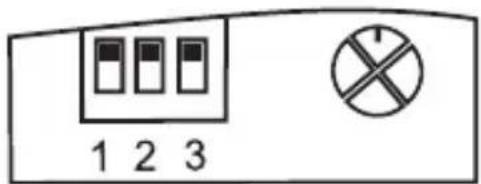
natural_image
Simple geometric symbol: a circle with diagonal lines inside, enclosed in a rectangular border (no text or labels)



- Innehåll
- Svenska
- Översikt
- Mikrofonvolym
- Introduction
- Features
- What's in the box
- Contents
- Overview
- Headset hanger
- Installation
- REC
- LINE
- Test
- Settings
- Transmit level adjustment
- Increased ringer volume
- Decreased receive volume
- Decreased transmit volume
- Factory default setting
- Operation
- Place a call
- Receive a call
- Switching between headset and handset
- Using FLEX assistant as an answer only phone
- Recording
- Guarantee
- CE declaration of conformity according to EN 45014
- More information
- Innhold
- Norsk
- Oversikt
- Mikrofonvolum
- Yleiskuva
Brand : Flex
Model : Assistant
Category : Answering Machine