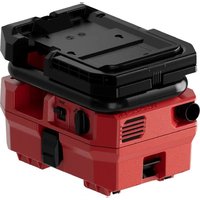
VC 5A22 - Vacuum Cleaner HILTI - Free user manual and instructions
Find the device manual for free VC 5A22 HILTI in PDF.



User questions about VC 5A22 HILTI
0 question about this device. Answer the ones you know or ask your own.
Ask a new question about this device
Download the instructions for your Vacuum Cleaner in PDF format for free! Find your manual VC 5A22 - HILTI and take your electronic device back in hand. On this page are published all the documents necessary for the use of your device. VC 5A22 by HILTI.
USER MANUAL VC 5A22 HILTI
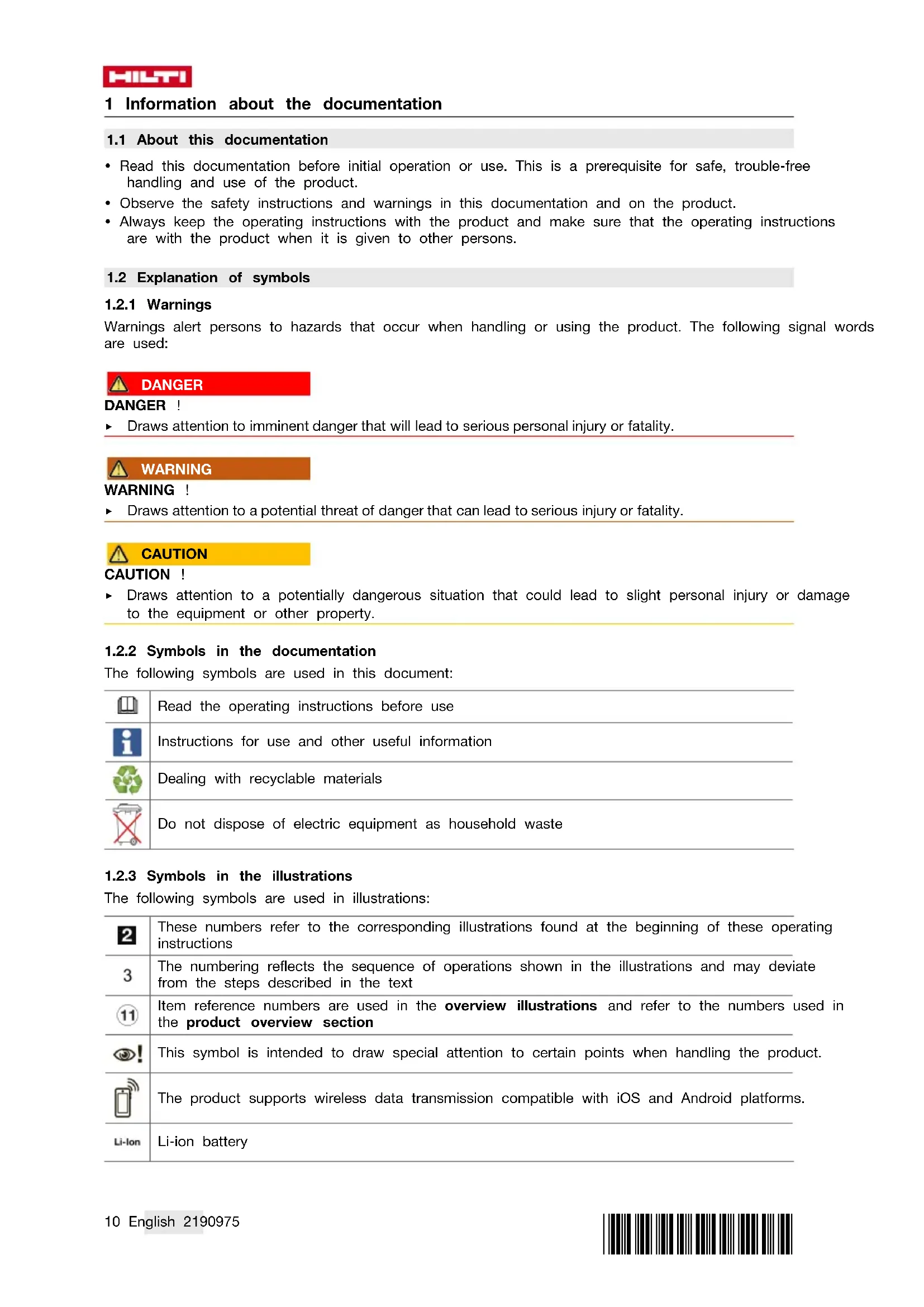
- Read this documentation before initial operation or use. This is a prerequisite for safe, trouble-free handling and use of the product.
- Observe the safety instructions and warnings in this documentation and on the product.
- Always keep the operating instructions with the product and make sure that the operating instructions are with the product when it is given to other persons.
1.2 Explanation of symbols
1.2.1Warnings
Warnings alert persons to hazards that occur when handling or using the product. The following signal words are used:

DANGER
DANGER!
Draws attention to imminent danger that will lead to serious personal injury or fatality.

WARNING
WARNING!
Draws attention to a potential threat of danger that can lead to serious injury or fatality.

CAUTION
CAUTION !
Draws attention to a potentially dangerous situation that could lead to slight personal injury or damage to the equipment or other property.
1.2.2 Symbols in the documentation
The following symbols are used in this document:
| Read the operating instructions before use |
| Instructions for use and other useful information |
| Dealing with recyclable materials |
| Do not dispose of electric equipment as household waste |
1.2.3 Symbols in the illustrations
The following symbols are used in illustrations:
| 2 | These numbers refer to the corresponding illustrations found at the beginning of these operating instructions |
| 3 | The numbering reflects the sequence of operations shown in the illustrations and may deviate from the steps described in the text |
| 11 | Item reference numbers are used in the overview illustrations and refer to the numbers used in the product overview section |
| ! | This symbol is intended to draw special attention to certain points when handling the product. |
| The product supports wireless data transmission compatible with iOS and Android platforms. | |
| Li-ion | Li-ion battery |
| Hilti Li-ion battery type series used. Observe the information given in the section headed Intended use. | |
| Never use the battery as a striking tool. | |
| Do not drop the battery. Never use a battery that has suffered an impact or is damaged in any other way. | |
1.3 Symbols on the product
1.3.1 Product-dependent symbols
The following symbols are used on the product:
| --- | Direct current (DC) |
| Do not pick up moisture |
1.4 Product information
Hilti products are designed for professional users and only trained, authorized personnel are permitted to operate, service and maintain the products. This personnel must be informed of any particular hazards that may be encountered. The product and its ancillary equipment can present hazards if used incorrectly by untrained personnel or if used not in accordance with the intended use.
The type designation and serial number are stated on the rating plate.
Write down the serial number in the table below. You will be required to state the product details when contacting Hilti Service or your local Hilti organization to inquire about the product.
Product information page 11
Product information
| Dry vacuum cleaner VC 5-A22 | |
| Generation 01 | |
| Serial no. |
1.5 Declaration of conformity
We declare, on our sole responsibility, that the product described here complies with the applicable directives and standards. A copy of the declaration of conformity can be found at the end of this documentation.
The technical documentation is filed here:
Hilti Entwicklungsgesellschaft mbH | Tool Certification | Hiltistrasse 6 | 86916 Kaufering, Germany
2 Safety
2.1 General safety instructions for electric devices
WARNING! Read all safety precautions and other instructions. Failure to observe the safety instructions and other instructions can result in electric shock, fire and/or serious injury.
Keep all safety precautions and instructions for future reference.
This product is not intended for use by persons (including children) with physical, sensory or mental disabilities or persons lacking the appropriate experience and/or knowledge.
- Only persons who are familiar with it, who have been trained on how to use it safely and who understand the resulting hazards are permitted to use the device. The device is not intended for use by children.
Do not allow children to play with the device. Do not allow unsupervised children to clean the device or to carry out user-maintenance tasks.
- Do not use the device to vacuum up flammable and/or explosive dusts (magnesium or aluminum dust etc.) or dusts that constitute a health hazard. Do not use the device to vacuum up materials with a temperature of over 60~^ C (e.g., glowing cigarettes, hot ash).
Do not use water, oil, grease or cleaning products.
- Do not use gasoline or other flammable liquids for cleaning.
2.2 Battery use and care
- Observe the special regulations and instructions applicable to the transport, storage and use of Li-ion batteries.
Do not expose batteries to high temperatures, direct sunlight or fire.
Do not disassemble, crush or incinerate batteries and do not subject them to temperatures over 80^ - Do not use or charge batteries that have suffered mechanical impact, have been dropped from a height or show signs of damage. In this case, always contact your Hilti Service.
- If the battery is too hot to touch it may be defective. In this case, place the product in a non-flammable location, well away from flammable materials, where it can be kept under observation and allowed to cool down. In this case, always contact your Hilti Service.
2.3 Additional safety instructions for vacuum cleaners
Work area safety
- Keep bystanders, children and visitors away while operating the power tool. Distractions may cause you to lose control of the tool.
Electrical safety
- Avoid body contact with earthed / grounded surfaces such as pipes, radiators, cookers, stoves and refrigerators. There is an increased risk of electric shock if your body is grounded.
- Do not expose the vacuum cleaner to rain or wet conditions. Water entering a vacuum cleaner will increase the risk of electric shock.
Personal safety
- Stay alert, watch what you are doing and use common sense when operating a power tool. Do not use a power tool while you are tired or under the influence of drugs, alcohol or medication. A moment of inattention while operating the power tool may result in serious personal injury.
- Wear your personal protective equipment and always wear protective glasses. Depending on the type of power tool you are using and its purpose, wearing safety equipment such as a dust mask, slip-resistant safety shoes, a hard hat or hearing protection will reduce the risk of injury.
- Do not use the vacuum cleaner in extremely dusty conditions.
- Misuse can result in liquid escaping from the battery. Avoid contact with the liquid. Liquid escaping from the battery can cause skin irritation or burns. If contact occurs, rinse off with water. In the event of the liquid coming into contact with the eyes, rinse the eyes with plenty of water and consult a doctor.
Using and handling the power tool
- Store power tools out of reach of children when not in use. Do not allow persons who are not familiar with the tool or these instructions to operate it. Power tools are dangerous in the hands of inexperienced persons.
- Take good care of the power tool. Check that moving parts operate satisfactorily and do not jam, and make sure that no parts are broken or damaged in such a way that the power tool might no longer function correctly. Have damaged parts repaired before using the tool. Many accidents are caused by poorly maintained power tools.
- Use power tools, accessories, insert tools, etc. in accordance with these instructions. Take the working conditions and the work to be performed into account. Use of power tools for applications other than those intended can result in hazardous situations.
- Use the right appliance for the job. Do not use the appliance for purposes for which it was not intended. Use it only as directed and when in faultless condition.
- Do not use the vacuum cleaner as a dust extractor in combination with other electric appliances.
- Operate the vacuum cleaner only with the filter installed.
- Avoid unintentional starting. Switch the device off before inserting the battery and before lifting or transporting the device. Never carry the device with your finger on the control switch. Always remove the battery when the device is not in use, before maintenance, before changing accessory tools and in preparation for and throughout transport.
Do not sit or stand on the appliance.
Service
- Have the power tool repaired only by a qualified specialist using only genuine Hilti spare parts. The safety of the power tool can thus be maintained.
3 Description
3.1 Intended use
The product described here is a vacuum cleaner suitable for commercial use, e.g. in hotels, schools, hospitals, factories, shops, offices and by rental companies. It is suitable for dry applications only. Hilti products are designed for professional users and only trained, authorized personnel are permitted to operate, service and maintain the products. The product and its ancillary equipment can present hazards if used incorrectly by untrained personnel or if used not in accordance with the intended use.
Use only Hilti Li-ion batteries of the B 22 series with this product.
Use only Hilti battery chargers of the C4/36 series for charging these batteries.
3.2 Product overview
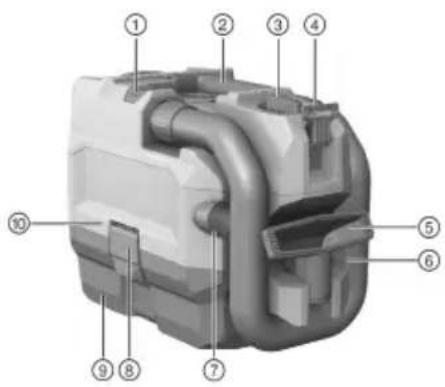
① EJECT button for hose
② Grip
③ Control switch
④ Holder for shoulder strap
⑤ Hand nozzle
6 Hose
⑦ Crevicenozzle
Catch
⑨ Waste material container
⑩ Suction head
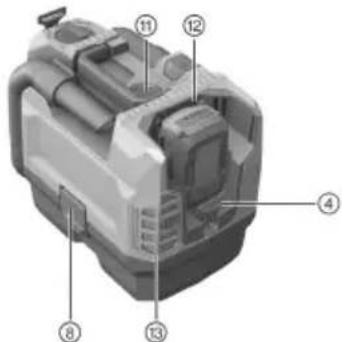
⑪ CLEAN button for filter cleaning
12 Battery compartment
⑬ Discharged-air filter
3.3 Control switch
| Status Meaning | |
| ECO Energy-saving mode | |
| MAX Switching on | |
| OFF Switching off |
3.4 Items supplied
Dry vacuum cleaner complete with filter element, suction hose with connectors, hand nozzle, crevice nozzle, shoulder strap and operating instructions.
Other system products approved for use with this product can be found at your local Hilti Store or online at: www.hilti.group | USA: www.hilti.com
3.5 Li-ion battery state of charge display
The state of charge of the Li-ion battery and malfunctions of the appliance are indicated by the display on the Li-ion battery. The state of charge of the Li-ion battery is displayed after pressing one of the two battery release buttons.
| Status Meaning | |
| 4 LEDs light. | State of charge: 75 % to 100 % |
| 3 LEDs light. State of charge: 50 % to 75 % | |
| 2 LEDs light. State of charge: 25 % to 50 % | |
| 1 LED lights. State of charge: 10 % to 25 % | |
| 1 LED blinks, the appliance is ready for use. State of charge: < 10 % | |
| 1 LED blinks, the appliance is not ready for use. The battery has overheated. | |
| 4 LEDs blink, the appliance is not ready for use. The appliance has overheated or is overloaded | |

Battery state of charge cannot be displayed while the control switch is pressed and for up to 5 seconds after releasing the control switch.
If the battery charge state LEDs blink, please refer to the information given in the Troubleshooting section.
3.6 Indication of overloading and overheating
The power tool is equipped with an electronic system to protect against overloading and overheating. The power tool switches itself off automatically in the event of overloading or overheating. After releasing the control switch, the power tool may not restart immediately when the switch is pressed again (while the power tool is cooling down).
4 Technical data
| VC 5-A22 | |
| Rated voltage (DC) | 21.6 V |
| Rated current input | 16 A |
| Weight in accordance with EPTA-Procedure 01 (measured with B22522) kg | |
| Ambient temperature | -17 °C ... 60 °C |
| Storage temperature | -20 °C ... 70 °C |
4.1 Noise and vibration information, measured in accordance with EN 60335-2-69
| VC 5-A22 | |
| Sound pressure levelpA | 70.9 dB(A) |
| Sound power levelwA | 85.2 dB(A) |
| Uncertainty | 2.4 dB(A) |
| Vibration emission valueh/a | < 2.5 m/s2 |
| Uncertainty (K) | Is taken into account in the stated value |
5 Operation
5.1 Preparations at the workplace
Observe the safety instructions and warnings in this documentation and on the product.
WARNING The appliance may be operated only by authorized, trained personnel.
5.1.1 Charging the battery
- Before charging the battery, read the operating instructions for the charger.
- Make sure that the contacts on the battery and the contacts on the charger are clean and dry.
- Use an approved charger to charge the battery.
5.1.2 Inserting the battery

CAUTION
Risk of injury by short circuit or falling battery!
Before inserting the battery, make sure that the contacts on the battery and the contacts on the product are free of foreign matter.
Make sure that the battery always engages correctly.
- Charge the battery fully before using it for the first time.
- Push the battery into the battery holder until it engages with an audible click.
- Check that the battery is seated securely.
5.1.3 Removing the battery
- Press the battery release buttons.
- Remove the battery from the tool.
5.1.4 Changing the filter ba
- Switch the appliance off.
- Open the two catches.
- Lift the suction head off the waste material container.
- Remove the filter bag and remove the holder for the filter bag.
- Push the holder for the filter bag on to a new filter bag.
- Secure the holder with the filter bag to the ribs of the waste material container.
- Set the suction head on the waste material container and close the two catches.
5.1.5 Connecting/disconnecting the suction hose
- Connect the suction hose to the suction hose intake socket.
The suction hose should be heard to engage. - To disconnect the suction hose, press and hold down the EJECT button.
- Disconnect the suction hose from the suction hose intake socket.
5.2 Types of work

WARNING
Risk of injury!
- Use of this product to pick up hazardous dusts is not permissible.
Use this product only for dry applications.
5.2.1 Switching the device on / off
- To switch on the device, turn the control switch to this position: MAX.

To operate the device for a longer period at reduced suction power, set the control switch to this position: ECO.
- To switch off the device, set the control switch to this position: OFF.
5.2.2 Cleaning the filter
- Switch the appliance on.
- Hold your hand over the end of the hose.
- Wait until maximum vacuum pressure is reached.
- Press the CLEAN button 4-5 times.
- Switch the appliance off.
5.2.3 After vacuuming
- Turn the control switch to this position: OFF.
- Empty the container and clean the appliance by wiping it with a damp cloth.
- Snap the hose into the hose holder.
-
Stow the nozzles away.
-
Store the vacuum cleaner in a secure, dry place where it is inaccessible to unauthorized users.
CAUTION This vacuum cleaner may be stored only indoors.
6 Care and maintenance

WARNING
Risk of injury with battery inserted!
Always remove the battery before carrying out care and maintenance tasks!
Care and maintenance of the tool
- Carefully remove stubborn dirt.
- Clean the air vents carefully with a dry brush.
- Use only a slightly damp cloth to clean the casing. Do not use cleaning agents containing silicone as these can attack the plastic parts.
Care of the Li-ion batteries
- Keep the battery free from oil and grease.
- Use only a slightly damp cloth to clean the casing. Do not use cleaning agents containing silicone as these may attack the plastic parts.
- Avoid ingress of moisture.
Maintenance
- Check all visible parts and controls for signs of damage at regular intervals and make sure that they all function correctly.
- Do not operate the product if signs of damage are found or if parts malfunction. Have it repaired immediately by Hilti Service.
- After cleaning and maintenance, fit all guards or protective devices and check that they function correctly.

To help ensure safe and reliable operation, use only genuine Hilti spare parts and consumables. Spare parts, consumables and accessories approved by Hilti for use with the product can be found at your local Hilti Store or online at: www.hilti.group.
6.1 Changing the filter E
- Switch the device off.
- Open the two catches.
- Lift the suction head off the waste material container.
- To remove the filter frame, turn the filter latch through 180^ .
- Remove the filter along with the filter frame.
- Remove all dust from the seal and from the filter frame holder.
- Set the filter frame on a new filter.
- Fit the filter frame into the holder for the filter frame.
- Lock the filter frame into position with the filter latches.
- Set the suction head on the waste material container and close the two catches.
6.2 Changing the filter mat
- Press the button to release the discharged-air filter and remove the filter support.
- Remove the filter mat from the filter support.
- Attach a new filter mat to the filter support.
- Fit the filter support to the appliance.
7 Transport and storage of cordless tools
Transport

CAUTION
Accidental starting during transport!
Always transport your products with the batteries removed!
Remove the battery.
- Never transport batteries in bulk form (loose, unprotected).
- Check the tool and batteries for damage before use after long periods of transport.
Storage

CAUTION
Accidental damage caused by defective or leaking batteries !
Always store your products with the batteries removed!
- Store the tool and batteries in a place that is as cool and dry as possible.
- Never store batteries in direct sunlight, on heating units or behind a window pane.
- Store the tool and batteries in a place where they cannot be accessed by children or unauthorized persons.
- Check the tool and batteries for damage before use after long periods of storage.
8 Troubleshooting
If the trouble you are experiencing is not listed in this table or you are unable to remedy the problem by yourself, please contact Hilti Service.
8.1 Troubleshooting
| Trouble or fault Possible | cause Action to be taken | |
| The battery does not engage with an audible double click. | The retaining lugs on the battery are dirty. | Clean the retaining lugs and push the battery in until it engages. |
| 1 LED flashes.The device does not work. | The battery is discharged. Change the battery and charge the empty battery. | |
| The battery is too hot or too cold. Allow the battery to cool down or warm up slowly to room temperature. | ||
| 4 LEDs blink. | The motor has overheated. | Switch the appliance off.Wait 10 minutes.Remove the blockage or clean the filter, intake connector, hose or exhaust air filter.Switch the appliance on. |
| Reduced suction performance. | The waste material container is full. | Empty the waste material container. |
| The suction hose or nozzle is blocked. | Clean the suction hose and nozzle. | |
| The filter is clogged. | Clean the filter. → page 15Change the filter. → page 16Check that the filter is seated correctly. | |
| The suction hose or nozzle is damaged. | Replace the suction hose or nozzle. | |
| The suction hose is not engaged. | Connect/disconnect the suction hose. → page 15 | |
| Slight electric shocks are felt. | Electrostatic discharge. | Increase the air humidity Operate the vacuum cleaner in ECO mode. |
9 Disposal
Most of the materials from which Hilti tools and appliances are manufactured can be recycled. The materials must be correctly separated before they can be recycled. In many countries, your old tools, machines or appliances can be returned to Hilti for recycling. Ask Hilti Service or your Hilti representative for further information.
Battery disposal
Improper disposal of batteries can result in health hazards from leaking gases or fluids.
DO NOT send batteries through the mail!
- Cover the terminals with a non-conductive material (such as electrical tape) to prevent short circuiting.
- Dispose of your battery out of the reach of children.
- Dispos of the battery at your Hilti Store, or consult your local governmental garbage disposal or public health and safety resources for disposal instructions.

Do not dispose of power tools, electronic equipment or batteries as household waste!
10 Manufacturer's warranty
- Please contact your local Hilti representative if you have questions about the warranty conditions.
1 Informatie over documentatione
5.2.3 After opsugning
Sugslangen hakar fast.
- Häll in knappen EJECT für att ta frigöra dammsugarslangen.
- Ta loss dammsugarslangen fran slangfaste for sugfungkction.
5.2 Arbeta

WARNING
Risk for personskada!
5.2.2 Rengora filter
5.2.3 After dammsugning
5.2.3 Etter stovsuging
- Drei bryteren til davon stillingen: OFF.
- Tøm beholderen og rengjør apparatet ved a tørke av med en fuktig klut.
- Fest slangen til slangeholderen.
- Rydd bort munnstykkene.
- Sett bort stovsugeren pa en torr plass der ingen uvedkommene kan fak tak i den.
MERK! Denne stovsugeren mA oppbevares i lukkede rom.
Utilitieskjet start under transport !
He BnKndaIte eNeKTpoIHCTpyMeHTy 6aKn IJIra NObyTOBOro CMITT!
1.2.3 ChmbonHa iHoctpaiax
Ha iIOCTpaiaix BnKOpNCTOBHyOTbca TaKi CmBOJIN:

LHpaMn no3HaouTbc BIDnoBidiHi inoctpaui, HabeDeHi Ha noaTk yiei hctpykii
3
Hymepaia BidoopaKae noCniIOBHiCTb po6OuNX KpOKiB Ha iInocTpaIax Ta MoKe BiDiPI3HrTnca BiD Hymepauiy TeKCTI

Homepa no3u, Habeenei Ha ornaobii inoctpaii, Biinobiaotb Homepam y nereHdi, npedctabneHa y posdini «Ornnd npodykty»

Ley Cnmbon no3haaacneKTH, Ha kic nid 3BepHyTH ocO6nBy yBary ni d ac 3actocybaHHH IHCTpymeHa.

Ihctpyment niTpmye 6e3dpoToBy nepaay daHnx ta e cymicn i3 natafopmamn iOS Ta Android.
| Li-Ion | Литий-iodнога akумларонна 6atapera |
| Викорисовувань тплій-iodногиakумларонпбатapei Hilti. Дотрич'tecя вka3ibok, habe- дених у роздini «Викорисань за пизнием». | |
| Hikоли не викорисовуйte akумларону 6atapeю у якового=inструмента. | |
| He дolyсятete падиня akумларонпбатape!. He викорисовуйte akумларону 6atapeю, рka Заэнala ударною habаHTажehнä abó 6byna пошкоordжehа inhIMЧINOM. |
1.3 CmBOnn Ha iHctpymeHTi
1.3.1 CnmbonH, 0o o6yMOBneHi TnOM iHCTpyMeHTa
Ha iHCTpymEnTI HabeDeHi TaKi CnMBOJN:
3.6 INdkaTop nepeHaBaHTaXeHH Ta neperpiBaHH
IhctpyMeHT OchaueHO eNEKtpOHnH 3anobixHHKOM BiD nepeHaBaHTaKeHH Ta neperpibAHn. y pa3i nepeHaBaHTaKeHH a6o neperpibAHn IHcTpyMeHT ABtOMaTHNo BmNkaetbCra. KaIO BiINyCTHTn BmMkau, a NotIM 3HOBy HATNCHTn Ioro, IHcTpyMeHT MoKe yBIMKHyTnC r 3aTpmkOIO (pa3a OxonoJKeHH).
4 TexhiHi daHi
| VC 5-A22 | |
| Hominahha Hanpyra (ПОCTIйний СТРУМ) | 21,6 B |
| Hominahhaьний Струм | 16 A |
| Maca зriдно 3 EPTA-Procedure 01(BHMіряна за дочомого B22/5.2) | 5,2 кг |
| Tempepatура habkonлшього сeredовица | -17 °C ... 60 °C |
| Tempepatура збериганna | -20 °C ... 70 °C |
4.1 InΦopMaζιη Κοῦ ΜωΜγ Ta Bi6paζι (dani Bmɪpəhi 3riHσ 3i cτaɪnʌpTOM EN 60335-2-69)
| VC 5-A22 | |
| Ровenvзвковоро{TССКУ} | 70,9 ήБ(A) |
| РовenvшимовиnotужноCTiW | 85,2 ήБ(A) |
| Пожнбka | 2,4 ήБ(A) |
| Ровenvы вибацii (ь) | < 2,5 M/c2 |
| Пожима (К) | Врахована у вkaза-hому зачинни |
5 Ekchnnyatauaia
5.1PiIgROTOBka do po60TH
Iotpmyteca nonepdkybblhix Bka3iBOK Ta Bka3iBOK 3 Texhikn 6e3neKn, HabeJeHX y cboMy dokymenti Ta Ha Kopnyci iHcTpymenta.
IONEPEJXEHH! EKcnnyatauio IHctpymeHa cniD opyaTH nIwe aBTOpH3OBAHOMy nepcoHany 3 BiINO-BiHOIO niDrTOBkoHO.
5.1.1 3apJxKaHHn aKymyIaTOpHoI 6aTapei
- Ipeed 3apRdKaHHaKymIaTOpHOi 6aTaPeiTpoHTaTe iHCTpyKciIO 3 ekCnlyatau 3apHOrO npHcTpoIO.
- KoHTaKTH aKymyIaTropHoI 6aTaapei Ta 3apAHorO npHrpo IO NobHHI 6yTH YHCTHM Ta cyxMn.
- 3apnKaTe akymyntopHy 6atapeo TinbKn 3a donomoroTox 3apnHnx npncTpoB, kki donyuenei do 3actocyBaHHr 3 Heo.
5.1.2 YctaHOBJeHHA kMyJrTOPOH6aTapei

OBEPEKHO
PnHK OTpHMaHH TpaBM BHacJIIOK KOpOTKOro 3AMKaHH a6o naIHHa akymyIaTOpHOi 6aTapei!
-
Iepw HIX yCTaHOBIOBaTH aKymyIaTOphy 6aTaapeH, nepeKOHaIteCra, 1o Ha KOHTaKTax 6aTaapei Ta IHCTpyMeHTA HeMaE CTOpOHix npedMetIB.
3aBKnnepeBipnTe,06akymyIToPHa 6aTape8bna npabnlbNo 3aikcoBaHa. -
Npeed nepuHm BnKOpHCTaHHa kAymyIaTOpHy 6aTaapeo cnid nobHicTIO 3apdntn.
- YCTABTE akymyIaTOpHy 6aTapeo y TpMaay Ha iHcTpymeHTi TaKHM uHOM, uO6 BOHa 3aΦikCyBaIacr i3 uTKHM XapaKTEPHM 3BYKOM.
- IpepekohaTecra, 10 akymyaTopha 6aTape HaJiHo 3aikcoBaHa B iHCTpyMeHTI.
5.1.3 Bhimahna akymyntopho 6aTapei
- Hatnchitb Ha de6kUyBaJbHi KHONK aKymyIaTOpHoi 6aTapei.
- DictaHbTe aKymyIaTOpHy 6aTapeH 3 IHCTpyMeHTa.
5.1.4 3amiHa miuka i3 pinbtpo
- BumKHiTb iHCTpyMeHT.
- BIDKPNTE Dba φikcatopn.
- 3HIMtB BepxHIO qACTHy NINOOCa 3 KOHTeHepa dna CMITT.
- DictaHbTe MiWok i3 fInbTpOM Ta 3HIMiB i3 HbOro TpMaU.
- YctaHObitb TpmaH a HOBN Miok i3 fiIbTpom.
- 3akpinitb Tpmau Ta miwok i3 pfnbtpom Ha pe6pa JopctKocti KOHTeHepa dIra cmTTA.
- YctaHObitb BepxHIO qactHy pnilococa Ha3ad Ha KOHTeHep dna CMITTa 3akpnte Dba fikcatopn.
5.1.5 PnEHaHHB/Id'EnHAAYCMOKTyBaHbHO 0nAHa
- PnneHaHte yCMOKTyBaIbHn IJnHr Do BiIDNOIBHO 3a6ipHO 0iINHra.
Φikcaui ycmoktybaIbHoro Iunahra BiD6yBaETbcra i3 itKIM XapaKTepHM 3BYKOM. - Ⅱo6 BiD'eHATN yCMOKTyBaIbHn WHaHr, HATNCiTb Ta YTpMHyTe KHNky EJECT.
- Notim dictaHbte yCMOKTyBaIbHn IlaHr i3 a6ipHO rIHra.
5.2Пдчacpo6otn

NONEPENKENH
Texhiue 06cnyrobyaHHA
- Perynapno nepebipraite yci 30Bhiu hi actHH Ha HABHicTb NOWKoJKeHb, a opraHH KepyBaHH iHCTpyMeHTa - Ha npedmet cnpaBHOi po6OTn.
- Akiho Bn BnBnn nookdken Hra ta/a60 npuyehn fHKioHaNbHocti hctpyMeHa, npnHtB noro BnkopncTahna. HeaHO 3BepHbcr do cepbcHO Cnyk6n KomnaHii Hitti dna 3diCHeHH peMOHTy.
- PioBedeHn DOrJy i TexHiuHoro 06CnyroByBaHH BCTaHOBiY yci 3axnchi npncptoi Ta nepeBipTe ixHIO po6Ory.

Lio6 rapaHTyBaTHn HanexKHy po6Oty IHcTpymeHTa, BnKOpncTObyTe TlBKn opurHbHi 3anachI qactHH Ta BuaTkoBIMatepiAn. PekomeHdoBahi 3anachI qactHH, BnuAtkOBi MATEPIAN Ta npnaadn Da BaUoro IHcTpymeHTa Bn MoKeTe npu6bAtn y Hau6nnKyuOMy Mara3nHi Hilti Store afo Ha Be6-caTti www.hilti.group.
6.1
3aima h
- BumKhItb iHcTpymeHT.
- BiikpnTe Dba ikcatopn.
HILTI
- 3HIMITb BepxHIO yactnHy nINOCoca 3 KOHTeHepa dIra CMITTR.
- Lio6 BiD'EnHaTn paMy fInbTpA, noBepHiB fIKcaTop fInbTpA Ha 180°.
5.ДICTaHbTeФinbtppa30m i3 paMoIOФinbtpa. - OuHCTbTe BiD nIy yIiJIbHeHHa Ta KpInJIeHHa paMn fInbTpA.
- YcTaHOBItb pamy fInbTp aHa HOBn fInbTp.
- YcTaBTe paMy pfIbTp a y nepeIb6aueHn Ira HeI TpImaU.
- 3akpinitb pamy fipbtpa 3a donomoroio fikcatopibinbtpa.
- YctahOBiB BepxHIO uactnHy nIIIOcoCA Ha3aI HA KOHTeHep Ira CMTT Ta 3akpnte Dba fikcatopn.
6.2 3aHa φinbtpa-miuka 3 HETkAHoro MaTepiAn
- Hatnchitb KhoNky de6NOKyBaHHa FInbTp a dna ouHueHHa BHTAHHoro nobitrpa, nicra yoro icTaHbTe TpMaay fInbTp a.
- BID'eHaIte fInbTp-MiwoK i3 HeTKaHOro MaTepiany BiD TpImaay a fIbTpTa.
- 3akpinitb Ha Tpmaqi fIbtpa HOBn fIbtp-Miok i3 HetKaHOro MaTepiany.
- 3akpinitb tpmau pfntpa Ha iHctpymEnTi.
7 TpaHcnpTybaHH i 36epirAHn akymyIaTOPHX IHCTpyMeHTiB
TpaHcnopTyBaHH

OBEPEKHO
Henepedaehe yBimKHeHHH iHcTpymeHTa nd TpaHcnoptyBaHH
Ha qac TpaHcnpTybaHHaBKn dicTaBaIte 3 IHCTpyMeHTa akymyIaTOpHy baTapeHO!
Bnimitb akymyIaTOPhi 6atapei.
He cnid npeBo3nTH akyMylrToPi 6aTapei y He3anaKOBaHOMy BnIJI.
- Nepu Hix BnKOpNCTOBaTu iHcTpymeHT Ta akymyIaTophi 6aTaapei nicra daIbHix nepeBe3eHb, ix cnid nepeBipuHa Ha HauBHiCb NoWKoJKeHb.
36epiraHHH

OBEPEKHO
Henepedaehe nowkoJeHHn IHctpMeHTa yepe3 HecnpabHicb akymyIaTOPHOi 6aTapei a6o uepes BHTOK eNekTpOJIty 3 akymyIaTOPHOi 6aTapei!
Ha yac 36epirahn 3aBKn iictabaTe 3 iHcTpymenta akyMnyTopHy 6atapeHo!
36epiraTe IHCTpyMeHT Ta akymyIaTOPhi 6aTapei y Akomora 6inbI npoxoJOnHOMy ta cyxomy micui.
3a6opohraetbca 36epiratn akymnyatophi 6atapei Ha coHci,Ha onaIOBaIbHnx npnaJax a6o Ha niDbikoHHi.
36epiraTe iHCTpyMeHT Ta akymyIaTOPHi 6aTapei y cyxomy Micci, HeoocTyHOMy dIteN Ta cTOpOHHX oci6.
- Nepu Hix BnKOpNCTOByBaTn IHcTpymeH Ta aKymIaTOpHi 6aTaPei nicna doBroro 36epirAHn, ix cnid nepeBipNTn Ha HauBHicTh noWkoJKeHb.
8 Donomora y pa3i BHHKHeHHH HeCnpaBHOcte
Y pa3i BnHnKHeHH HeCnpaBHOCTe, kI He 3a3NaYeHi y ciu Ta6nui a6o kI Bn He MoKeTe nolarOHTn camocTiHo, 3BepHITbCra Do cepBicHO CIyX6N KOMnAHII Hilti.
8.1 Nowyki ycyHeHH HecnpaBHOcTei
| Hecnpabhnicb Moxjlnba npuynha Piuehenn | |
| AkymnyarTopna 6atapere He 3aΦikcoBvetybc8 3чitko Biiyu-THIM NOdBiHIM KlauzAHNM. | Φikcatop akymyarTophoi 6atapei 3acmuiyehn. |
| 1 cBtIioJIoM Mngc. IHCTpymeHT He npaQoE. | AkymnyarTopna 6atapere p03pr-dKHe. |
| AkymnyarTopna 6atapere 3aHaJTO xOJODHa a6o rapya. |
| Hecnpabhnicb Moxlnba prunna Hn | IiueHHa | |
| 4 cBtIOIOHN MngAOTb. ДВИгн peperpiBc. > ВIMKHITb IHCTpymnt. | 3auekaite 10 xBvlnn. BvdaIITb 3acMieHnna ΦIbtpa, 3abipHO rO shTycepa, shAnra Ta BnPyckHoro ΦIbtpa. YbIMKnHITb IHCTpyment. | |
| 3MeHsHeHa notyKnicb yCMo-KtyBaHHa. | 3aONBHeHn KOHTeHep dIra CmITT. > CnoporoxHitb KOHTeHep dIra CmITT. | |
| 3a6loKOBaHn yCMOKTuBaJIbHnшlaHr a6o hacadka. | > Прочstbte yCMOKTuBaJIbHnшlaHr a6o hacadky. | |
| ΦIbTp 3a6loKOBaHn > Прочstbte ΦIbTp. → CTOp. 189 | ||
| > 3amHITb ΦIbTp. → CTOp. 189 | ||
| > Перевірte, чи habeЖнмчHOM yCTaHOBJIeHn ΦIbTp. | ||
| ПОшКоДжЕну yCMOKTuBaJIbHnшlaHr a6o hacadka. | > 3amHITb yCMOKTuBaJIbHnшlaHr a6o hacadky. | |
| YCMOKTuBaJIbHnшlaHr 3akpinne-Hn HeNaJExHHM ChHOM. | >Пресдайт/ВiD'EdJaTe yCMo-KtyBaJIbHnшlaHr. → CTOp. 189 | |
| Лerki udapri eNeKTPnuHOrO cTpyMу. | EneKTPocStaTUnHi eFeKTH. | > 36iIbSte BOLorictb nobITpr. BvKopnctobuYeплOCoc y pexkimi ECO. |
9 Ytniiaui
Bilbwiictb MaTepiAIB, 3 RaKx BnROTOBHeO IHCTpymeHTN KOMNaHII Hilti, npuaTHI dJI BTOPHHO IpepeboKn. NepedyMOBOIO dIa IXhBoI BTOPNHHOI nepepo6Kn e HaJeXHe cOpTyBaHHB BiXoIDIB 3a TINOM MaTepiany. Y Baratbox KpaIHax CbITy KOMNAHIAH Hilti npHMAe CTapi IHCTpymeHTN dJI XhBoI yTNl3aQII. Lio6OTPMaTH DoDAkOBy IHOpMaUIO 3 UBOrO NHTAHRA, 3BeptaTecra DO cepBicHOI cJyK6N KOMNaHII Hilti a6o do CBORO TOPROBORO KOHCyNbTaHTA.
Ytni3aia akymyIaTOPnX6aTapei
Y pa3i HeHaJIeKHOI yTHNI3aui akymyIaHTOPHX 6aTapei 3 HIX MOKyb BNXOJNTn He6e3neHi dIra 3IOPOB'ra3n a6o piINH.
- Nookkehi akymyTophi 6atae3a6opohertcpecnatn noToIO a6o Kyp'epcbkoHO cnJxbo!
3aKpHne KOHTaKTn aKymyIaTOpHnx 6aTapee eNeKtpoHepoBIDHM MaTePiaIOM, 3o6 3aNo6irN KopoT-KOMy 3aMnKaHHIO.
Ytni3yIte akymnyatophi 6aatapei TAKHM YHOM, IO6 BOHN He NotpanuN Do pyk ditee.
Uo6 ytni3yBaTHn akymyHToPHy 6bataeIO, nepeaTe II do Hau6nKHO rMa3nHy Hilti Store a60 3BepHITbcra Do npedctabHnka BiINOBIHOI KOMnaHII 3 ytni3aui BixOIB.

He BnKndaTe eNektpoiHCTpyMeHTn, eNektpoHHi npncptpo Ta akymyIaTOPHi 6aataei y 6akn dna no6yTOBOrO cmTT!
10 rapaHTiHi 3o6OB'raaHnB Hpo6HnKa
I3 nHTaHb rapaHTi, 6yNb IacKa, 3BeptaHTecn Do BaUoro MicueBOro napTHepa KOMnaHii Hilti.
1 DaHHn 3a DOKyMeHTaunrTa
1.1 KbM HACTOaTa DOKymeHTaun
-Прдь Вььждане В ecknloatauaи npoetete NaHctOaata DOkymentau. Toba e npednoctBaKa 3a 6e3onacha pa6ota n 6e3abapnHa ynotpe6a.
Cb6IIOaBaIte yka3aHnra 3a 6e3oNaCHOCT n npedynpeKdEHNBE HAcToaTa DOkymeHTaUN Bbpxy npOdykta.
CbXpaHbBaIe PbKOBOCTBOTO 3a ekcnnoataun BnHaHn 3aeHNO c npOdyKta n ppeDaBaIte npOdyKta Ha dpYrN Iuca camo 3aeHNO C HactOraTO pKOBODCTBO.
1.2 YcnoBHN 06o3HaueHHA
1.2.1 PpeynpeinteHn yka3aHH
IpeynpeinteHnTe yka3aHH npeynpexkdaBt 3a onachoc B 3oHaTa OKOIO npodykta. H3noJ3Bat ce CneHNTE CnHnHn Dymn:

ONACHOCT
ONACHOCT!
Othacr ce 3a HnocpeCTBeHa onachocr O3anlaXa, KOrTO BoN Do TeKKn TeneCHn HapaHbAHn nn Cmbpt.

PENDynpEXDEHNE
PENyPEXKDEHNE!
Othacce 3a Bb3MOxHa onaCHOCT OT 3anlaXa, KOrTO MOKe Da IOBeJe Do TeKKn TeneCHn HapaHBAHn nn Cmbpt.

PNEIINBOCT
PNEI3NBOCT!
OthacCe 3a Bb3MOXHa onaCha CHTyaun, KOrTO MOKe Da IOBeJe DO Jekn TeLeChn HapahBaHn IIM MaTePnaJIHn UeTn.
1.2.2 ChmboJH B DOKymeHTaunrTa
B HactoIaata DOkymeHTaunCe n3NON3BaT CneHnTe CHMBOJN:

Ppeynynoptpe6a npooyete PboKOBOCTBOTO 3a ekcnnoataua

Ppenopbkn npn ynoptpe6a n dpyra noJe3Ha HhOpMaun

BopaBeHe c peuKnpyemMaTePnaH

He n3xBbplnTe eJeKtpoypeDn B 6ntOBnTe OTnaDbu
1.2.3 CnmboHn BbB hpynte
BbBnpynte ce n3non3BaT cneDHNTe CmBOJN:
He ceede Te nn He cToIe Bbpxy ypea.
CepBn3npaNe
- PemontbT ha eIeKTPoHnCTpyMeHTa Bn TpA6Ba da ce n3BbPbBa cMo OT KBaJIHΦuHpaHcneuaHnCTn H caMo C opHnHaHn pe3epBHN qactn. NTo3n HaunCe rapaHTnpa CbXpAHHeHn Ha 6e3OnacHocTTa Ha eIeKTPoHnCTpyMeHTa.
3 OnncanHe
3.1 ynoTppe6a no npedHa3HaueHne
Oncanrtyk npodkyt npedctabnba npaxocmykaka, noxdo#a 3a npofoeohalha ynotpe6a, Hanpimep B xotei, yuHnua, 60Hnui, fapnki, maraHH, oHcN i OTdaBAHN noHaem nomeueHn. Ta e npiloxhima camo 3a cyxo nouchtahe.
Hilti PpOdyKTHe ca npEHa3HaueHn 3a npoPecnoHaHn nOpTeHn MOrat da 6bDat OScnyKBAHN, NOIbIpbKaHn B I3npaBHOCT n peMOHTnpaHn cAmO OT OToPi3HpaH KOMNteHTeH nepcoHaJ. PpOdyKTbT H erOBtte npncnOC6JIeHn MORAT Da 6bDat Onachn, aKO 6bDat EKcNlOaTHpaHn HenpaBOMepHo OT HEKBaIIHfUHpAH NEPCOHaI IIN aKO 6bDat I3No3BaHn He no npEHa3HaueHne.
3a TOnI pOdyKT H3IOJI3BaIe cAmO JInTHeBO-IOHHnTe aKymlaTOpH Ha Hilti OT TnB 22.
3a Te3n akymylatopn H3noJ3BaIte cAmO 3apdHnte yctpoiCTba Ha Hilti ot cepna C4/36.
3.2 PperneHa npodykTa

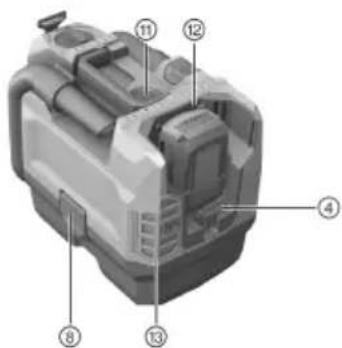
① EJECT-6yTOH 3a Mapkyu
② PbKOXBaTKa
③ PpeBknOuBaTeN
④ 甲bpxka3a peMbK 3a paMo
⑤ PbyHaIIO3a
6 Mapkyu
⑦ 103a3aФyH
⑧ 3aKJIIOUBaua cKO6a
9 KOHTeHepue 3a 60KJyK
10 CMykaTeJHa rnaBa
⑪ CLEAN-6yToH 3a NOuCTBaHe Ha qntbpa
12 THe3do 3a 6aTeepn
⑬ ΦπTbP 3a npéuHCTBaHe Ha Bb3dYxa
3.3 PpeBknHouBaTeI
5.1.5 MoHTIpaHc /OTCTpaHRAHa He cMyKaTeHe HapKyu
- CbpbkTe CmyKaTeHnHa MapKyu KbM BXODHnA ΦHTnHr 3a CmyKaTeJeHmApKyu.
CmykaTeJenrMapkyce3aToOpBa c rHO 1paKaBaHe.
- 3a da otctpaHnte cmykaTeHNHa MapKyu, 3aDpBKeTe 6yToHa EJECT B HATnCHaTO NIOJKeHne.
- OtctpaHete CmykATEHnMapkyOT BXoHNHaFTINr 3a CmykATEHeh MapKyU.
5.2 DehnocTH

PNEyPEXKDEHNE
Onachoct ot HapaHbAhe!
CTo3n npOdyKT He Tp86Ba Da ce H3cMykBaT onaChn npaxObe.
- H3noJ3BaIte To3n npOdyKT caMo 3a npHIOKeHHe B cyXoTO cTpOnTeJCTBO.
5.2.1 BkIIOUbaHe / n3KIOUbaHe Ha ypei
- 3a da BKNIOHTe ypeDa, 3aBbPTeTe npeBKnHObBaTeIeB CneHOTo NIOJOKeHHe MAX.

3a da perynipate npoIbIknTeHnata pa6ota npi HamaIeHa BCMykTeHnHa MOuHOCT, noCTaBeTnpEKBIOUBAteI B CneHOTO NONOKeHHe ECO.
- 3a da n3KlnHcypega, noCTaBeTe npEeKnHcyBaTeI B cIeHOTo nIOJKeHne OFF.
HILTI
5.2.2 NouhcBaHe Ha hntbp
- BkIIOUeTe ypeJa.
- 3aTbOpTe Kpa Ha Mapkya pbuHO.
3.ИЗчakайт,ДOKATOce yCTaHOBIMAKCIMAJHOTO NOHIXeHOHaJIraHe. - HatncheTe 6yToHa CLEAN 4-5 nTn.
- N3knIOyTe ypeJa.
5.2.3 CneHn3cMyKBaHeTo
- 3aBbptete npeBknHouBaTeIeB CneHOTo NIOJKeHHe: OFF.
- H3npa3HeTe KOHTeHepyTe n NouchTeTe ypeDa, KaTo ro N36bPwTe C BnaJHa Kbpna.
3.ФИКСИРаTe МарКуya КБМ ДьрЖача 3a МарКуya. - Hamectete IIO3nTe.
- NocTabete npaxocmykaqkata B cyxO nOMEueHne, 3aunTeHa ot HnpaBOMepHo n3no3BaHe.
BHIMAHHE Ta3n npaxocmykaKa moKe da 6bJe cbxpaHbHa cAmo B 3aTBopeHn NOMEueHn.
6 O6cnyXbaHe n noDipbXka
PNEyPExDEHNE
Onachoct OT HapaHbAhe npn noCTaBEN akymyNatop!
BnHaHn 3BaJaTe aKymyIaTopa npEi nBCKa DeHocT no o6CnyXbaHe n noDpXka!
PnK3a ypea
- OTepaHbBaIe BHMaTeHnHO HAnlaCTeHnTe 3aMbpcBaHa.
-ПоунctBaHTe BHHMaTeJIHOb BeHTnlaUauHOHHHe OTBOpN CbC CyxA YeTka.
-Почистваши Корпунca само с leко habлakн He npenapatn 3a nouchte boc cnIKOH,Ть кATO Te MOraT DA yBpeI TnaCTMaCOBITE qactn.
rpnn 3a nHTneBO-NOHHn akymynaTOPn
-ПодьржайteakymyntopanoocnctehOTmacJaHcma3Kn.
-Почистваши Корпунca само с leкно Habлжн Hekpna. He n3no3baite npenapatn 3a nouchte boc cnIKOH, Tb kato Te MOrat da yBpejrt nlaactMacobTe qactn.
He donyckaTe npOHkBaHe Ha Blara.
IopdpbKka
- PeIobHO npOBepBaIe BCnUKN BnIMN YacTn 3a HAnuHne Ha NOBpeDN, a eJeMeHTnTe 3a ynpaBJIeHne - 3a n3npaBHO FyHKcNoHnpaHe.
He pa6oTe c npOyKTA npn HauHnue Ha noBpeu n/nn CmyeHn BbB FyHKnHTe. He3a6aBHO npedabaTe ypeDa B cepBn3 Ha Hilti 3a peMOHT.
Cnei n3BpWbAHe Ha deHocn no o6cnyXBaHe n noDpBXKa MOHTpaIte BCuN 3aunTHn ycTpoiCTBa n npOBepTe yHKunTe.

3a 6e3onacha pa6ota n3non3BaIte camo opnHnHaHn pe3epBn qactn i KOHCyMaTHBn. Pa3peSeHnte ot hac pe3epBn qactn, KOHCyMaTHBn n npHaJdEeKHOCTn 3a Baun npOdyKT ue haMePHTe BbB Baun Hilti Store nn Ha: www.hilti.group.
6.1 CmHa Ha qntbp E
- N3knioye ypeja.
- OTbopete 1Bete 3aKJIIOUBAuIN cKo6n.
- OTeIeTe cMyKaTeHHaTa rnaBa ot KOHTeHepyTo 3a 6OknyK.
- 3a Na H3BaIInTe ΦHnTbPHaTa paMka, 3aBbPtTe ΦHKcaTopa 3a ΦHnTbpa Ha 180^
5.ИзвадеTe Фнгъра c Фнгърна差别ka. - NpueCTeTe ot npax yIITbTHHeHnTo n rHe3doTo 3a fNITbPHaTa paMka.
- NocTaBete fHITbPHaT a paMka Bbpxy fHITbP.
- NocTaBeTe ΦHnTbPhata paMka B DtbPkaka 3a ΦHnTbPHaTa paMka.
9.Блokиразе Фнлтбрната рамka c Фнксалпгte 3a Фнлтьpa. - NocTaBete CmyKaTeHHaT a IaBa Bbpxy KOHTeHepUeTo 3a 6oKny K 3aTbOpTe DBeTe 3aKnHouBaun cKobn.
6.2 CmHa Ha hntbpho nlaTHO
- Hatahe 6ytoHa 3a de6nokpaHe Ha fntbpa 3a npuehctBaHe Ha Bb3dyxa n 3BaTe Fntbphn HocHTe.
- OTeIeTe FInTbPhOTo NnAThO OT FInTbPnH HocnteI.
- 3aKpeneTe HOBO ΦNITbPHO NlaTHO KbM ΦNITbPHH HOCHTeJ.
4.3aKpeneTe ΦπTbPnHn HocHTeKbM ypeHa.
7 TpaHcnpT n cBxpaHeHne Ha akymylaTopHn ypeHn
TpaHcnopt

PNEIINBOCT
HeboHbBkIIOUbaHe npn TpaHCnpTnpaHe!
BnHaHr TpaHcnpTnpaTe BaunTe npOdyKTH 6e3 noCTaBeHN aKymnaTopn!
H3BaTe aKymyTaTopa.
He TpaHcnopTnpaTe aKymyIaTOPte B HacnHc bCToRHe.
Cne npoBJIKHTeHNO TpaHCnOpTnPaHe npedyn ynoTpe6a npOBepBaIte ypea n aKymlaTopnte 3a Hauuue Ha noBpei.
CbxpaHHe

PPEJNA3JIHBOCT
HeBolHa nobpea, IbIkaa ca Ha deeKTHn Hn H3Tuau anakymlaTopn!
BnHaHcxbpaHbBaTe BaWnte npOdykTN 6e3 noCTaBeHN akyMylaTopn!
CbxaHbAaTe ypea n akymyIaTOPnTE NO Bb3MOxHOCT Ha cyxo IpoXlaHO MRCTO.
Hikora He cxbxaHbBaTe aKymyNaTopHe Ha CbHc, BbpXy OTOnnTeJHn ypei nn 3aD CTbKnHa np03Opu.
CbXpaHbAaTe ypea n akymyIaTOPHe daJIeU OT DCtBna Ha DeIca H HeOTOpn3npaHn Iua.
Cne npoDbnKHeHNO cbxpaHHe npeyn ynoTpe6a npOBepBaTe ypea n akymyIaTOPte 3a HauHne Ha noBpei.
8 Nomou npn HauHne Ha cmyeHHa
Ipn HauHnue Ha CmyuEHH, KOHTo He ca NocOeuHN B Ta6JIucaTa HIN KOHTo Bne camn He MoKHe Da OTCTpaHHTe, MOH, O6bPHeTe Ce KbM Haun cepBn3 Ha Hilti.
8.1 IokaH3npaHe Ha noBpeHn
Ytnoeicxpnnckai aee xpoiae pnpopoe

Aopaaia xwpou epyaoic
Kata Tn xpon Tou nekpikou epyaleiou kpaTATE aKpiA ta Taiaia Kai aAa npoWnt. Eav oac anoannouv Tnv npoox, mOpel va xaote tov eeyxo tou epyaleiou.
Halektpikn aopaaie
AnopueyTe Tny eTn Tou ouatoC ue yieuwvec eTnpaveies, otwoc waiyeves, kaopipep, nektpikecs kouivec kaipsiyeia. Ynapxai uEnmuevoc kivduvo; nektponlqiaac, otav to ouaa oac eivai yiewevo.
Mnv EKETETNv NkTpiKn OoUaOe BPOx n uypaoia. H EIOxwpnan vepou oE mia NkTpiKn OoUa aEvToV KIVuvo NkTporanIgic.
Aopaxia npoowv
jllgsswlllgsdglgaaaalldaslae!
JJI 134 J021 j011 g aai I go laI Jaaai Jbai
2.1
aJdJUdsJ! 1.2.1
:alll aall lalss |sawil y jy |g o laill sic a wll |bals |a
b)
bajl
.ogllgfoa aouo 5d g ydo
1
.ogglg aas y
1u
aJg aagaa yssy 1s y j k s
JuaJgJU 2.2.1
:iiuall i aull jgojol saiw pi
L aall alal lalalal g aalw! sll
aJg aJaaJJI JdJI (UlaBla) 100
aaiw jns 1g o auiu u g oogdall
jblalg cgc gag aai aayb aywug ayu jy laoj jlqll pl sainljg
Jlabu yao jyai. dic gii
aJgdsaiuallg cbiull Jau jgjLjLj
loggssssssggsgglj jaoaagaaagagagagagagagagagagagagagagagagagagagagagagagagagagagagagagagagagagagagagagagagagagagagagagagagagagagagagagag
.(jawll Jl,alaiwJilawll Jio)p60Lc jjSjjllolaljbnawgss.(d
.1g g g g g g g
gulguljIbJg jaoJg JaiJaaJUaJUaJI Uj
j4ll lcc ojbuill saoa
LauU∑μU
gagllg aolil ojlg mugalgl aolal bawl jaojgo abw gpoaolu
.1u 100000000000000000000000000000000000000000000
gbsbnaa jyjblawlal lllww. gI boklncis bsblow
a1^2 + a2^2 + a_3^2 = 8b^2
1
auiuJ 1s21 pssuW .Lp JauI sic Josu auiuJ uoi g o Jaoj la duiig Loo
aalolulipdssd gglgaggglg lgs
.
aLgll elio aasw agog ulj jI .aglg oJIbJ IaI sJlg aasw agog Ujj
ol 101 101 101 101 101 101 101 101 101 101 101 101 101 101 101 101 101 101 101
L
auiis buaa jusll baw paaai 2
J 1
JU JUU UJUU 1. LALI aabwai aawosla ula .gj gag g ju
. 100000000000000000000000000000000000000000000
LalaiIg auiuSllol Srls
J 1 J 1 J 1 J 1 J 1 J 1 J 1 J 1 J 1 J 1 J 1 J 1 J 1 J 1 J 1 J 1 J 1 J 1 J 1 J 1 J 1 J 1 J 1 J 1 J 1 J 1 J 1 J 1 J 1 J 1 J 1 J 1 J 1 J 1 J
.aaIgll oJl l 1sL sL
gds 1aaggl 1s 1n nn aasall aljssal .aaiyll sll l gssll aaii j
Lc Lw jg jn Js yjauu aouss g oJgwsa JzJgag cns JpaaIg IjuaJ pscg Uslws
JgJgJgJgJgJgJgJgJgJgJgJgJgJgJgJgJgJgJgJgJgJgJgJgJgJgJgJgJgJgJgJgJgJgJgJgJgJgJgJgJgJgJgJgJgJgJgJgJgJgJ
J 1
10 1
e 1 1
.0jubdaolgajSdsjUJSSaL Joo
JbaoaaiI y jnssll 1j0j0j0j0j0j0j0j0j0j0j0j0j0j0j0j0j0j0j0j0j0j0j0j0j0j0j0j0j0j0j0j0j0j0j0j0j0j0j0j0j0j0j0j0j0j0j0j0j0j0j
.aaLw aIa gog 1auaiu Ibs
.ajgjiSj j1 glo bui jui jusl jusllbawp dawx
J 1
- alai gil jllggl ailll l jlll qalq
dolsswlpccjla j4all noaillglgag.1/llslll elo noeaoj4all
.1aiIwlgogJgJgJgaiJalJgadJIjdo
jlll lcc oai gulai
JlJIg bpaI aIg 1e JauoKlg baq nssnns ngs yIg auiu kll lal Ic Jacl .aia Iaia uiau kll oai aiau w nn dW uag.aui
aJiu
3
Uul (uBolI pdsw21 1.3
a a a a a a a a a a a a a a a a a a a a a a a a a a a a a a a a a a a a a a a a a a a a a a a a a a a a a a a a a a a a a a a a a a a a a a a a a aaa
gaiJI gIc aolc oji 2.3


j4JI eloo 3.3
pI j, gglgag gag gag gag gag gag gag gag gag gag gag gag gag gag gag gag gag gag gag gag gag gag gag gag gag gag gag gag gag gag gag gag gag gag gag gag gag gag gag gag gag gag gag gag gag gag gag gag gag gag gaggaggaggaggaggaggaggaggaggaggaggaggaggaggaggaggaggaggaggaggaggaggaggaggaggaggaggaggaggaggaggaggaggaggaggaggaggaggaggaggagg
.111 111 111 111 111 111 111 111 111 111 111 111 111 111 111 111 111 1
| الانعال | |
| % 100 % 75 :%. | . LED噤噤噤噤噤噤噤噤噤噤噤噤噤噤噤噤噤噤噤噤噤噤噤噤噤噤噤噤噤噤噤噤噤噤噤噤噤噤噤噤噤噤噤噤噤噤噤噤噤噤噤噤噤噤噤噤噤噤噤噤噤噤噤噤噤噤噤噤噤噤噤噤噤噤噤噤噤噤噤噤噤噤噤噤噤噤噤噤噤噤噤噤噤噤噤噤噤噤噤噤嘜嘜嘜嘜嘜嘜嘜嘜嘜嘜嘜嘜嘜嘜嘜嘜嘜嘜嘜嘜嘜嘜嘜嘜嘜嘜嘜嘜嘜嘜嘜嘜嘜嘜嘜嘜嘜嘜嘜嘜嘜嘜嘜嘜嘜嘜嘜嘜嘜嘜嘬嘜嘜嘜嘜嘜嘜嘜嘜嘜嘜嘜嘜嘜嘜嘜嘜嘜嘜嘜嘜嘜嘜嘜嘜嘜嘜嘜嘜嘜嘜嘜嘜嘜嘜嘜嘜嘜嘜嘜嘜嘜嘜嘜嘜嘜嘜嘜嘜嘜嘫嘜嘜嘜嘜嘜嘜嘜嘜嘜嘜嘜嘜嘜嘜嘜嘜嘜嘜嘜嘜嘜嘜嘜嘜嘜嘜嘜嘜嘜嘜嘜嘜嘜嘜嘜嘜嘜嘜嘜嘜嘜嘜嘜嘜嘜嘜嘜嘜嘜嘯嘜嘜嘜嘜嘜嘜嘜嘜嘜嘜嘜嘜嘜嘜嘜嘜嘜嘜嘜嘜嘜嘜嘜嘜嘜嘜嘜嘜嘜嘜嘜嘜嘜嘜嘜嘜嘜嘜嘜嘜嘜嘜嘜嘜嘜嘜嘜嘜嘜嘭嘜嘜嘜嘜嘜嘜嘜嘜嘜嘜嘜嘜嘜嘜嘜嘜嘜嘜嘜嘜嘜嘜嘜嘜嘜嘜嘜嘜嘜嘜嘜嘜嘜嘜嘜嘜嘜嘜嘜嘜嘜嘜嘜嘜嘜嘜嘜嘜嘜嘦嘜嘜嘜嘜嘜嘜嘜嘜嘜嘜嘜嘜嘜嘜嘜嘜嘜嘜嘜嘜嘜嘜嘜嘜嘜嘜嘜嘜嘜嘜嘜嘜嘜嘜嘜嘜嘜嘜嘜嘜嘜嘜嘜嘜嘜嘜嘜嘜嘜嘕嘜嘜嘜嘜嘜嘜嘜嘜嘜嘜嘜嘜嘜嘜嘜嘜嘜嘜嘜嘜嘜嘜嘜嘜嘜嘜嘜嘜嘜嘜嘜嘜嘜嘜嘜嘜嘜嘜嘜嘜嘜嘜嘜嘜嘜嘜嘜嘜嘜嘊嘜嘜嘜嘜嘜嘜嘜嘜嘜嘜嘜嘜嘜嘜嘜嘜嘜嘜嘜嘜嘜嘜嘜嘜嘜嘜嘜嘜嘜嘜嘜嘜嘜嘜嘜嘜嘜嘜嘜嘜嘜嘜嘜嘜嘜嘜嘜嘜嘜嘡嘜嘜嘜嘜嘜嘜嘜嘜嘜嘜嘜嘜嘜嘜嘜嘜嘜嘜嘜嘜嘜嘜嘜嘜嘜嘜嘜嘜嘜嘜嘜嘜嘜嘜嘜嘜嘜嘜嘜嘜嘜嘜嘜嘜嘜嘜嘜嘜嘜嘧嘜嘜嘜嘜嘜嘜嘜嘜嘜嘜嘜嘜嘜嘜嘜嘜嘜嘜嘜嘜嘜嘜嘜嘜嘜嘜嘜嘜嘜嘜嘜嘜嘜嘜嘜嘜嘜嘜嘜嘜嘜嘜嘜嘜嘜嘜嘜嘜嘜嘇嘜嘜嘜嘜嘜嘜嘜嘜嘜嘜嘜嘜嘜嘜嘜嘜嘜嘜嘜嘜嘜嘜嘜嘜嘜嘜嘜嘜嘜嘜嘜嘜嘜嘜嘜嘜嘜嘜嘜嘜嘜嘜嘜嘜嘜嘜嘜嘜嘜嘪嘜嘜嘜嘜嘜嘜嘜嘜嘜嘜嘜嘜嘜嘜嘜嘜嘜嘜嘜嘜嘜嘜嘜嘜嘜嘜嘜嘜嘜嘜嘜嘜嘜嘜嘜嘜嘜嘜嘜嘜嘜嘜嘜嘜嘜嘜嘜嘜嘜嘩嘜嘜嘜嘜嘜嘜嘜嘜嘜嘜嘜嘜嘜嘜嘜嘜嘜嘜嘜嘜嘜嘜嘜嘜嘜嘜嘜嘜嘜嘜嘜嘜嘜嘜嘜嘜嘜嘜嘜嘜嘜嘜嘜嘜嘜嘜嘜嘜嘜嘛嘜嘜嘜嘜嘜嘜嘜嘜嘜嘜嘜嘜嘜嘜嘜嘜嘜嘜嘜嘜嘜嘜嘜嘜嘜嘜嘜嘜嘜嘜嘜嘜嘜嘜嘜嘜嘜嘜嘜嘜嘜嘜嘜嘜嘜嘜嘜嘜嘜嘗嘜嘜嘜嘜嘜嘜嘜嘜嘜嘜嘜嘜嘜嘜嘜嘜嘜嘜嘜嘜嘜嘜嘜嘜嘜嘜嘜嘜嘜嘜嘜嘜嘜嘜嘜嘜嘜嘜嘜嘜嘜嘜嘜嘜嘜嘜嘜嘜嘜嘚嘜嘜嘜嘜嘜嘜嘜嘜嘜嘜嘜嘜嘜嘜嘜嘜嘜嘜嘜嘜嘜嘜嘜嘜嘜嘜嘜嘜嘜嘜嘜嘜嘜嘜嘜嘜嘜嘜嘜嘜嘜嘜嘜嘜嘜嘜嘜嘜嘜嘨嘜嘜嘜嘜嘜嘜嘜嘜嘜嘜嘜嘜嘜嘜嘜嘜嘜嘜嘜嘜嘜嘜嘜嘜嘜嘜嘜嘜嘜嘜嘜嘜嘜嘜嘜嘜嘜嘜嘜嘜嘜嘜嘜嘜嘜嘜嘜嘜嘜嘆嘜嘜嘜嘜嘜嘜嘜嘜嘜嘜嘜嘜嘜嘜嘜嘜嘜嘜嘜嘜嘜嘜嘜嘜嘜嘜嘜嘜嘜嘜嘜嘜嘜嘜嘜嘜嘜嘜嘜嘜嘜嘜嘜嘜嘜嘜嘜嘜嘜嘢嘜嘜嘜嘜嘜嘜嘜嘜嘜嘜嘜嘜嘜嘜嘜嘜嘜嘜嘜嘜嘜嘜嘜嘜嘜嘜嘜嘜嘜嘜嘜嘜嘜嘜嘜嘜嘜嘜嘜嘜嘜嘜嘜嘜嘜嘜嘜嘜嘜嘍嘜嘜嘜嘜嘜嘜嘜嘜嘜嘜嘜嘜嘜嘜嘜嘜嘜嘜嘜嘜嘜嘜嘜嘜嘜嘜嘜嘜嘜嘜嘜嘜嘜嘜嘜嘜嘜嘜嘜嘜嘜嘜嘜嘜嘜嘜嘜嘜嘜嘖嘜嘜嘜嘜嘜嘜嘜嘜嘜嘜嘜嘜嘜嘜嘜嘜嘜嘜嘜嘜嘜嘜嘜嘜嘜嘜嘜嘜嘜嘜嘜嘜嘜嘜嘜嘜嘜嘜嘜嘜嘜嘜嘜嘜嘜嘜嘜嘜嘜�fty |
jlll 5 5 g jll l i s c b a ll s ic a ll l L ED u Jg o d

63
gJlJI JIJI IJI JIJI JIJI JIJI JIJI JIJI JIJI JIJI JIJI JIJI JIJI JIJI JIJI JIJI JIJI JIJI JIJI JIJI JIJI JIJI JIJI JIJI JIJI JIJI JIJI JIJI JIJI JIJI JIJI JIJI JIJI JIJI JIJI JIJI JIWI (J1J1J1J1J1J1J1J1J1J1J1J1J1J1J1
ailll lolgall 4
| VC 5-A22 | |
| 1621.6 | (DC) الحرفية الحرفية |
| 16 | Illicitariat |
| S452 | (B22/5.2 مسériم) EPTA-Procedure 01 بعس و جلopyramid |
| ρ° 60 ... ρ° 17- | الإستعمال |
| ρ° 70 ... ρ° 20- | الإستعمال |
EN 60335-2-69 aolgallabawllesljjglg 1.4
.1sui 1g 1aai jia 1c bai uj yu .7
baWJ ggbj gl/μ≤ji 5.1.5
.1
.egawuUkwuulso bawll ggbu
.EJECT jll lbc baiu I yaiu I aaiu I ggbg 2
bawl pgbj JlaJ oji jc bawl pgbj gla .3
adj 5.2
#
!a loxjbs
ailllloiowjboai jbi bawgaw
.
j4Jl lal/1saw 1.2.5
MAXgJlGlcjllaiioggii jll1.1
ECO 1JgJ4JgJgJgJgJgJgJgJgJgJgJgJgJgJgJgJgJgJgJgJgJgJgJgJgJgJgJgJgJgJgJgJg
i
. OFF g@g|1 100 1c j433 | aiaaa buaa | j433 | aiaaa .2
512H
j4JU JsWoo .1
. 2
.aaaiI bssll no gai I aII gSsu JiaJbui .3
4-5 CLEAN jll 10 Lbdo/.4
gj1j
OFF: glll lcc jll elia s1
Jggsg 10 pIaI I g jai I g aal Jai
131
wth
.1.
1u|uu|uguyu|uaa|juau
.1kJg jIg Jg jIg jIg
aajlglil calg gdl aegll ojpal g lgc wawwaaewi jyjau
Jgogll dssxK nIgall g jlabl lgc uusu 1kgs uulbllg jalll ujai lcl p
Jg g 10 p aalll jgljall g alg
8
a a j s o gill i y eauaiy lllc j s g 0g5 do u c
.Hilti
1.8
| الله | الإستعمال | الترجمة |
| بُمَفَسَبْفَسَبْفَسَبْفَسَبْفَسَبْفَسَبْفَسَبْفَسَبْفَسَبْفَسَبْفَسَبْفَسَبْفَسَبْفَسَبْفَسَبْفَسَبْفَسَبْفَسِبْفَسَبْفَسَبْفَسَبْفَسَبْفَسَبْفَسَبْفَسَبْfَسَبْسَبْسَبْسَبْسَبْسَبْسَبْسَبْسَبْسَبْسَبْسَبْسَبْسَبْسَبْسَبْسَبْسَبْسَبْسَبْسَبْسَبْسَبْسَبْسَبْسَبَالحَرْزَهُّل | بُمَفَسَبْفَسَبْفَسَبْfَسَبْسَبْسَبْسَبْسَبْسَبْسَبْسَبْسَبْسَبْسَبْسَبْسَبْسَبْسَبْسَبْسَبْسَبْسَبْسَبَالحَرْزَهُّل | |
| بُمَفَسَبْفَسَبْfَسَبْfَسَبْfَسَبْfَسَبْfَسَبْfَسَبْfَسَبْfَسَبْfَسَبْfَسَبْfَسَبْfَسَبْfَسَبْfَسَبْfَسَبْfَسَبْfَسَbَرْزَهُّل | بُمَفَسَبْfَسَbَرْزَهُّل | |
| بُمَفَسَبْfَسَبْfَسَبْfَسَbَرْزَهُّل | بُمَفَسَبْfَسَbَرْزَهُّل | |
| بُمَفَسَبْfَسَbَرْزَهُّل | بُمَفَسَbَrْzَهُّل | |
| بُمَفَسَbَرْزَهُّل | بُمَفَسَb—r_\d\text{10}\text{3}\text{6}\text{7}\text{8}\text{9}\text{10}\text{11}\text{12}\text{13}\text{14}\text{15}\text{16}\text{17}\text{18}\text{19}\text{20}\text{21}\text{22}\text{23}\text{24}\text{25}\text{26}\text{27}\text{28}\text{29}\text{30}\text{31}\text{32}\text{33}\text{34}\text{35}\text{36}\text{37}\text{38}\text{39}\text{40}\text{41}\text{42}\text{43}\text{44}\text{45}\text{46}\text{47}\text{48}\text{49}\text{50}\text{51}\text{52}\text{53}\text{54}\text{55}\text{56}\text{57}\text{58}\text{59}\text{60}\text{61}\text{62}\text{63}\text{64}\text{65}\text{66}\text{67}\text{68}\text{69}\text{70}\text{71}\text{72}\text{73}\text{74}\text{75}\text{76}\text{77}\text{78}\text{79}\text{80}\text{81}\text{82}\text{83}\text{84}\text{85}\text{86}\text{87}\text{88}\text{89}\text{90}\text{91}\text{92}\text{93}\text{94}\text{95}\text{96}\text{97}\text{98}\text{99}\text{100}\text{101}\text{102}\text{103}\text{104}\text{105}\text{106}\text{107}\text{108}\text{109}\text{110}\text{111}\text{112}\text{113}\text{114}\text{115}\text{116}\text{117}\text{118}\text{119}\text{120}\text{121}\text{122}\text{123}\text{124}\text{125}\text{126}\text{127}\text{128}\text{129}\text{130}\text{131}\text{132}\text{133}\text{134}\text{135}\text{136}\text{137}\text{138}\text{139}\text{140}\text{141}\text{142}\text{143}\text{144}\text{145}\text{146}\text{147}\text{148}\text{149}\text{150}\text{151}\text{152}\text{153}\text{154}\text{155}\text{156}\text{157}\text{158}\text{159}\text{160}\text{161}\text{162}\text{163}\text{164}\text{165}\text{166}\text{167}\text{168}\text{169}\text{170}\text{171}\text{172}\text{173}\text{174}\text{175}\text{176}\text{177}\text{178}\text{179}\text{180}\text{181}\text{182}\text{183}\text{184}\text{185}\text{186}\text{187}\text{188}\text{189}\text{190}\text{191}\text{192}\text{193}\text{194}\text{195}\text{196}\text{197}\text{198}\text{199}\text{200}\text{201}\text{202}\text{203}\text{204}\text{205}\text{206}\text{207}\text{208}\text{209}\text{210}\text{211}\text{212}\text{213}\text{214}\text{215}\text{216}\text{217}\text{218}\text{219}\text{220}\text{221}\text{222}\text{223}\text{224}\text{225}\text{226}\text{227}\text{228}\text{229}\text{230}\text{231}\text{232}\text{233}\text{234}\text{235}\text{236}\text{237}\text{238}\text{239}\text{240}\text{241}\text{242}\text{243}\text{244}\text{245}\text{246}\text{247}\text{248}\text{249}\text{250}\text{251}\text{252}\text{253}\text{254}\text{255}\text{256}\text{257}\text{258}\text{259}\text{260}\text{261}\text{262}\text{263}\text{264}\text{265}\text{266}\text{267}\text{268}\text{269}\text{270}\text{271}\text{272}\text{273}\text{274}\text{275}\text{276}\text{277}\text{278}\text{279}\text{280}\text{281}\text{282}\text{283}\text{284}\text{285}\text{286}\text{287}\text{288}\text{289}\text{290}\text{291}\text{292}\text{293}\text{294}\text{295}\text{296}\text{297}\text{298}\text{299}\text{300}\text{301}\text{302}\text{303}\text{304}\text{305}\text{306}\text{307}\text{308}\text{309}\text{310}\text{311}\text{312}\text{313}\text{314}\text{315}\text{316}\text{317}\text{318}\text{319}\text{320}\text{321}\text{322}\text{323}\text{324}\text{325}\text{326}\text{327}\text{328}\text{329}\text{330}\text{331}\text{332}\text{333}\text{334}\text{335}\text{336}\text{337}\text{338}\text{339}\text{340}\text{341}\text{342}\text{343}\text{344}\text{345}\text{346}\text{347}\text{348}\text{349}\text{350}\text{351}\text{352}\text{353}\text{354}\text{355}\text{356}\text{357}\text{358}\text{359}\text{360}\text{361}\text{362}\text{363}\text{364}\text{365}\text{366}\text{367}\text{368}\text{369}\text{370}\text{371}\text{372}\text{373}\text{374}\text{375}\text{376}\text{377}\text{378}\text{379}\text{380}\text{381}\text{382}\text{383}\text{384}\text{385}\text{386}\text{387}\text{388}\text{389}\text{390}\text{391}\text{392}\text{393}\text{394}\text{395}\text{396}\text{397}\text{398}\text{399}\text{400}\text{401}\text{402}\text{403}\text{404}\text{405}\text{406}\text{407}\text{408}\text{409}\text{410}\text{411}\text{412}\text{413}\text{414}\text{415}\text{416}\text{417}\text{418}\text{419}\text{420}\text{421}\text{422}\text{423}\text{424}\text{425}\text{426}\text{427}\text{428}\text{429}\text{430}\text{431}\text{432}\text{433}\text{434}\text{435}\text{436}\text{437}\text{438}\text{439}\text{440}\text{441}\text{442}\text{443}\text{444}\text{445}\text{446}\text{447}\text{448}\text{449}\text{450}\text{451}\text{452}\text{453}\text{454}\text{455}\text{456}\text{457}\text{458}\text{459}\text{460}\text{461}\text{462}\text{463}\text{464}\text{465}\text{466}\text{467}\text{468}\text{469}\text{470}\text{471}\text{472}\text{473}\text{474}\text{475}\text{476}\text{477}\text{478}\text{479}\text{480}\text{481}\text{482}\text{483}\text{484}\text{485}\text{486}\text{487}\text{488}\text{489}\text{490}\text{491}\text{492}\text{493}\text{494}\text{495}\text{496}\text{497}\text{498}\text{499}\text{500}\text{501}\text{502}\text{503}\text{504}\text{505}\text{506}\text{507}\text{508}\text{509}\text{510}\text{511}\text{512}\text{513}\text{514}\text{515}\text{516}\text{517}\text{518}\text{519}\text{520}\text{521}\text{522}\text{523}\text{524}\text{525}\text{526}\text{527}\text{528}\text{529}\text{530}\text{531}\text{532}\text{533}\text{534}\text{535}\text{536}\text{537}\text{538}\text{539}\text{540}\text{541}\text{542}\text{543}\text{544}\text{545}\text{546}\text{547}\text{548}\text{549}\text{550}\text{551}\text{552}\text{553}\text{554}\text{555}\text{556}\text{557}\text{558}\text{559}\text{560}\text{561}\text{562}\text{563}\text{564}\text{565}\text{566}\text{567}\text{568}\text{569}\text{570}\text{571}\text{572}\text{573}\text{574}\text{575}\text{576}\text{577}\text{578}\text{579}\text{580}\text{581}\text{582}\text{583}\text{584}\text{585}\text{586}\text{587}\text{588}\text{589}\text{590}\text{591}\text{592}\text{593}\text{594}\text{595}\text{596}\text{597}\text{598}\text{599}\text{600}\text{601}\text{602}\text{603}\text{604}\text{605}\text{606}\text{607}\text{608}\text{609}\text{610}\text{611}\text{612}\text{613}\text{614}\text{615}\text{616}\text{617}\text{618}\text{619}\text{620}\text{621}\text{622}\text{623}\text{624}\text{625}\text{626}\text{627}\text{628}\text{629}\text{630}\text{631}\text{632}\text{633}\text{634}\text{635}\text{636}\text{637}\text{638}\text{639}\text{640}\text{641}\text{642}\text{643}\text{644}\text{645}\text{646}\text{647}\text{648}\text{649}\text{650}\text{651}\text{652}\text{653}\text{654}\text{655}\text{656}\text{657}\text{658}\text{659}\text{660}\text{661}\text{662}\text{663}\text{664}\text{665}\text{666}\text{667}\text{668}\text{669}\text{670}\text{671}\text{672}\text{673}\text{674}\text{675}\text{676}\text{677}\text{678}\text{679}\text{680}\text{681}\text{682}\text{683}\text{684}\text{685}\text{686}\text{687}\text{688}\text{689}\text{690}\text{691}\text{692}\text{693}\text{694}\text{695}\text{696}\text{697}\text{698}\text{699}\text{700}\text{701}\text{702}\text{703}\text{704}\text{705}\text{706}\text{707}\text{708}\text{709}\text{710}\text{711}\text{712}\text{713}\text{714}\text{715}\text{716}\text{717}\text{718}\text{719}\text{720}\text{721}\text{722}\text{723}\text{724}\text{725}\text{726}\text{727}\text{728}\text{729}\text{730}\text{731}\text{732}\text{733}\text{734}\text{735}\text{736}\text{737}\text{738}\text{739}\text{740}\text{741}\text{742}\text{743}\text{744}\text{745}\text{746}\text{747}\text{748}\text{749}\text{750}\text{751}\text{752}\text{753}\text{754}\text{755}\text{756}\text{757}\text{758}\text{759}\text{760}\text{761}\text{762}\text{763}\text{764}\text{765}\text{766}\text{767}\text{768}\text{769}\text{770}\text{771}\text{772}\text{773}\text{774}\text{775}\text{776}\text{777}\text{778}\text{779}\text{780}\text{781}\text{782}\text{783}\text{784}\text{785}\text{786}\text{787}\text{788}\text{789}\text{790}\text{791}\text{792}\text{793}\text{794}\text{795}\text{796}\text{797}\text{798}\text{799}\text{800}\text{801}\text{802}\text{803}\text{804}\text{805}\text{806}\text{807}\text{808}\text{809}\text{810}\text{811}\text{812}\text{813}\text{814}\text{815}\text{816}\text{817}\text{818} |
1aJU UJU Jg gUJU Joo
auiHs oiao gaa qaiu uag yhss aolgoe ool poaawlu uugill aubau p
JlalbUgliouI JooBuljuaJolai
Hilti Store 15
!aJjaiI aiaI I JbIg aigjS| oJH, auiJU | gJl 1

aJalal aJAL Jau
10
Hlti 1g 1 g 1n 1a 1b g w gaa a a a a a a a a a a a a
1 文件相關資訊
1.1 關於此文件
Head of Quality and Process Management BA Electric Tools & Accessories
Tassilo Deinzer
Executive Vice President
Business Unit Power Tools & Accessories

Hilti Corporation
LI-9494 Schaan
Tel.:+423 234 21 11
Fax:+423 234 29 65
www.hilti.group