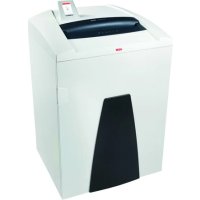
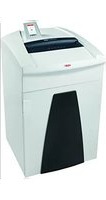
USER MANUAL Securio P44i HSM
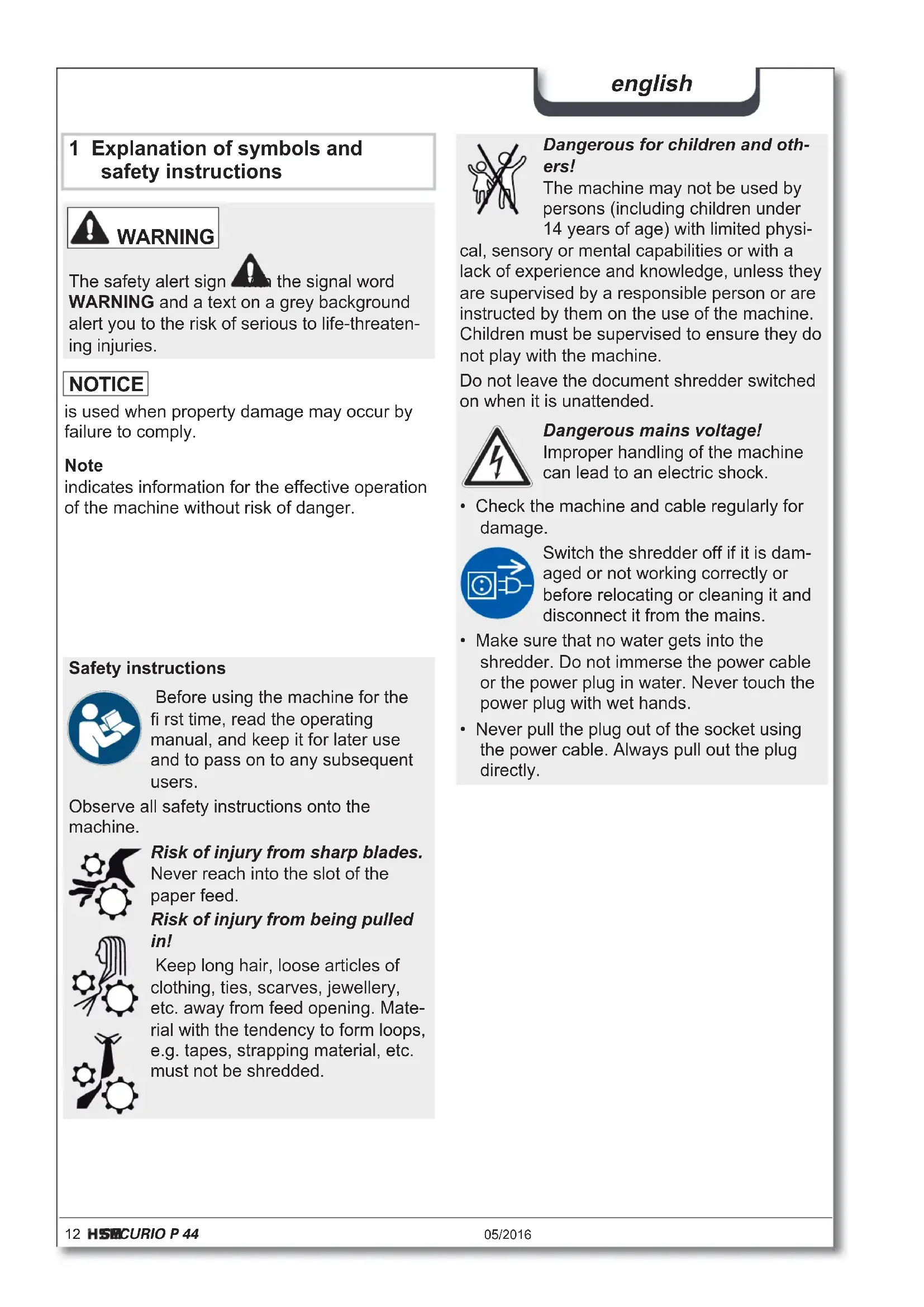
1 Explanation of symbols and safety instructions

WARNING

the signal word
The safety alert sign the signal word WARNING and a text on a grey background alert you to the risk of serious to life-threatening injuries.
NOTICE
is used when property damage may occur by failure to comply.
Note
indicates information for the effective operation of the machine without risk of danger.
Safety instructions

Before using the machine for the first time, read the operating manual, and keep it for later use and to pass on to any subsequent users.
Observe all safety instructions onto the machine.

Risk of injury from sharp blades. Never reach into the slot of the paper feed.
Risk of injury from being pulled in!
Keep long hair, loose articles of clothing, ties, scarves, jewellery, etc. away from feed opening. Material with the tendency to form loops, e.g. tapes, strapping material, etc. must not be shredded.

Dangerous for children and others!
The machine may not be used by persons (including children under 14 years of age) with limited physi
cal, sensory or mental capabilities or with a lack of experience and knowledge, unless they are supervised by a responsible person or are instructed by them on the use of the machine. Children must be supervised to ensure they do not play with the machine.
Do not leave the document shredder switched on when it is unattended.
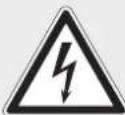
Dangerous mains voltage!
Improper handling of the machine can lead to an electric shock.
- Check the machine and cable regularly for damage.

Switch the shredder off if it is damaged or not working correctly or before relocating or cleaning it and disconnect it from the mains.
-
Make sure that no water gets into the shredder. Do not immerse the power cable or the power plug in water. Never touch the power plug with wet hands.
-
Never pull the plug out of the socket using the power cable. Always pull out the plug directly.
Check the name plate on the back of the machine to find out the cutting width and mains voltage for your document shredder and observe the applicable instructions in the operating manual.
The shredder is designed for destroying paper. Depending on the cutting type, it can also handle small quantities of the following materials:
| Shred width (mm) 5.8 3.9 3.9x40 1.9x15 |
| Credit cards, CDs, floppy discs, USB sticks | ● | ● | ● | ● |
Its sturdy drive mechanism is not damaged by paper clips and staples. Only on machines with a cutting width of 1 × 5 ~mm can the paper not contain staples or paper clips.
Note
You can also shred CDs, diskettes and credit cards in the separate CD cutting unit (optional) without using the paper cutting unit.
The warranty period for the document shredder is 3 years. There is a special warranty for the HSM solid steel cutting rollers in the document shredder, which is provided independently of the guarantee, and remains valid for the entire service life of the machine (HSM Lifetime Warranty). This does not apply to document shredders with cutting widths of 0.78 × 11 ~mm and 1 × 5 ~mm . This warranty and guarantee exclude wear and damage caused by improper handling or actions taken by third parties.
HSM guarantees the delivery of spare parts for up to 10 years after the production of this model has been discontinued.
3 Overview2 Proper use, warranty
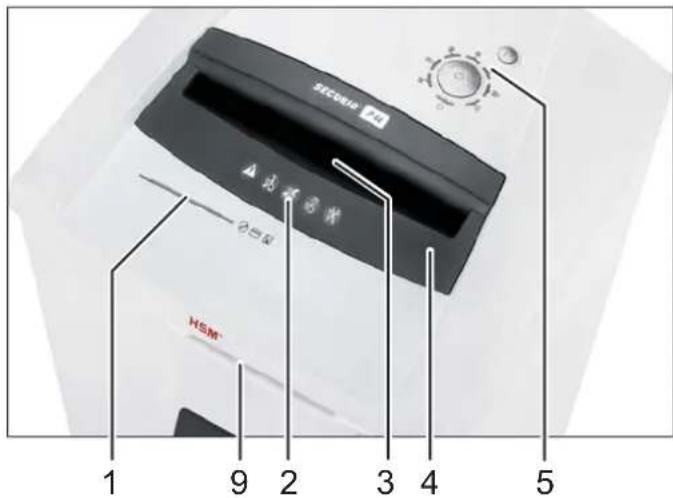
Note: Depending on the version, your machine may not include all the assemblies.
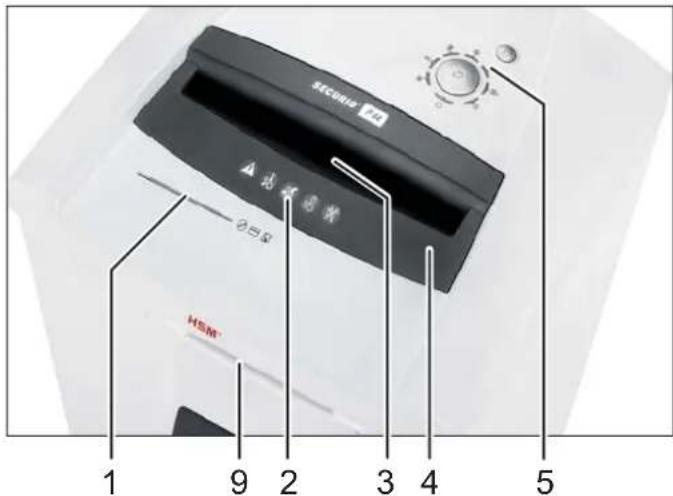
1 Feed slot for CDs, fl oppy discs and credit cards (optional)
2 Safety instructions
3 Light barrier in the paper feed
4 Safety element
5 Operating and display unit
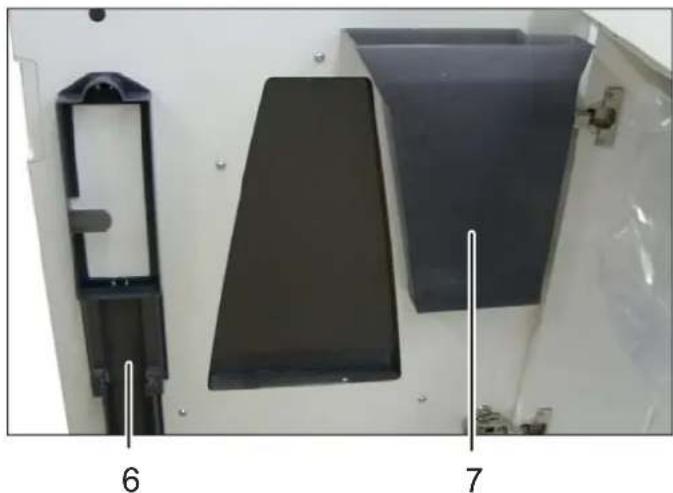
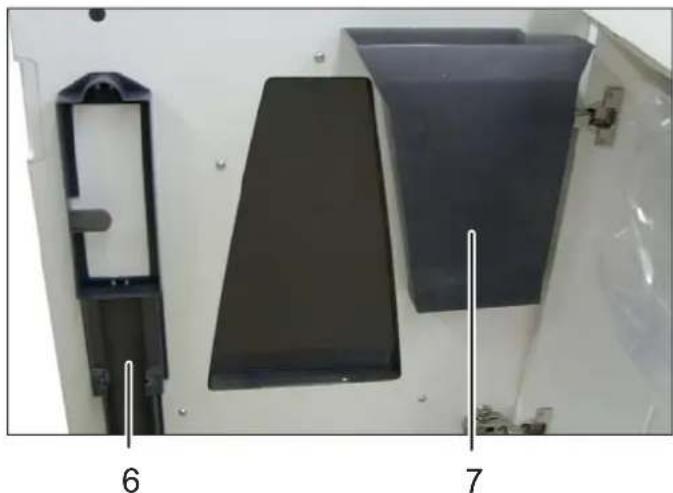
6 Holder for operating manual and oil bottle
7 Shredded material for CDs, fl oppy discs and credit cards (optional)
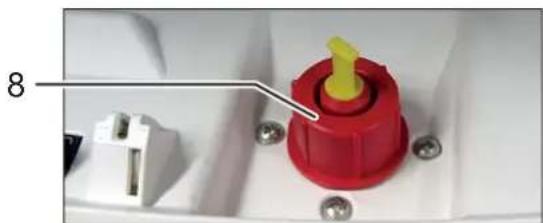
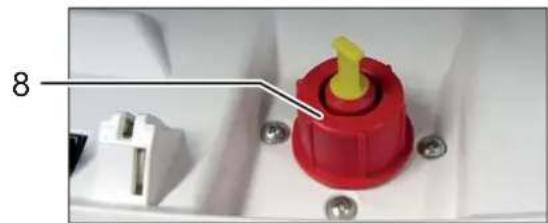
8 Filler opening for cutting apparatus oil (cross cut only)
9 PAPERcontrol
english
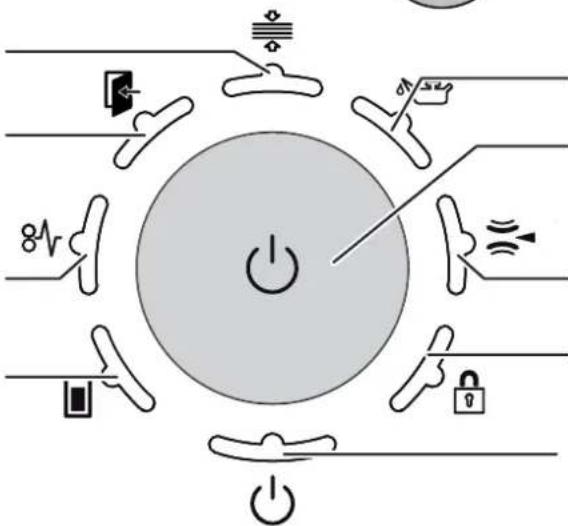
Operating and display elements
Note: Depending on the machine version, not all functions may be available.
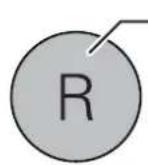
R
R button:
Cutting unit runs in reverse
- Error acknowledgement
- Software version display (for service technicians only)
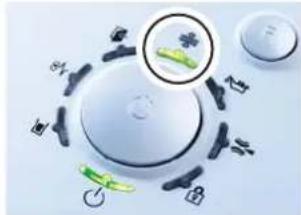
Indicator: PAPERcontrol
Indicator: door open or safety element not latched
Indicator: overload (paper jam)
Indicator: paper/CD container full
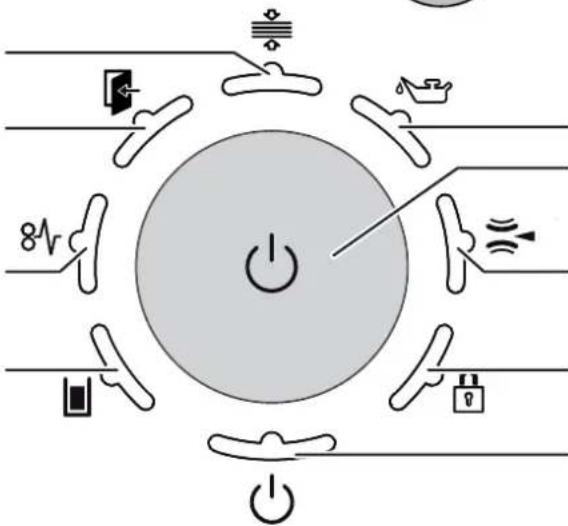
Indicator: oil reservoir empty
Function button "On/off/start"
Indicator: metal detection
Indicator: button lock
Indicator: ready for operation / Stand-by
4 Initial start-up

WARNING
Dangerous mains voltage!
Improper handling of the machine can lead to an electric shock.
- Only use the machine in a dry room indoors. Never operate the machine in damp rooms or in the rain.
- Keep the machine, the plug and cable away from open fire and hot surfaces. The ventilation slots must not be blocked or covered and there must be at least 5 cm space between the shredder and any wall or furniture.
- Make sure that the power plug is easily accessible.
-
Before you insert the power plug, make sure that the voltage and frequency of your power supply comply with the information on the name plate.
-
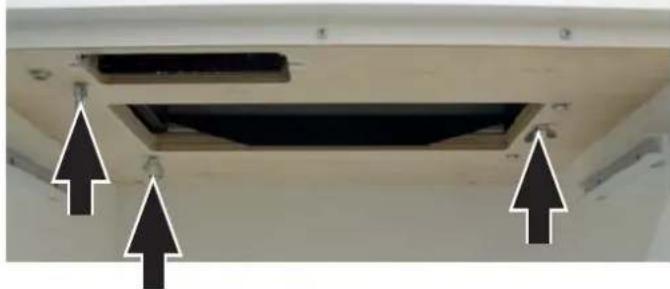
Before starting up the machine for the first time, open the door and remove the three wing nuts of the transport locks from the base plate under the cutting unit.
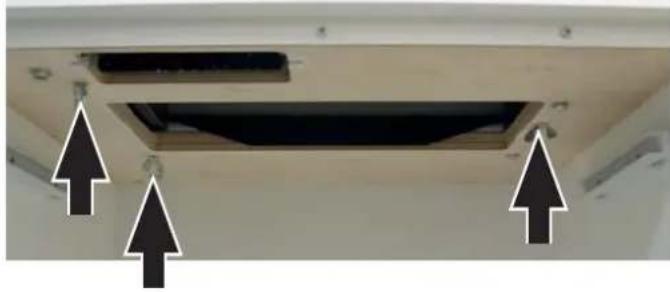
- Connect the power plug of the machine into a properly installed socket.
5 Operation
Switching on the shredder
- Set mains switch at rear of paper shredder to n! .
- Check that no paper is in the paper feed slit.
- Press the operation button.
The "Ready for operation" indicator lights up.
Shredding paper
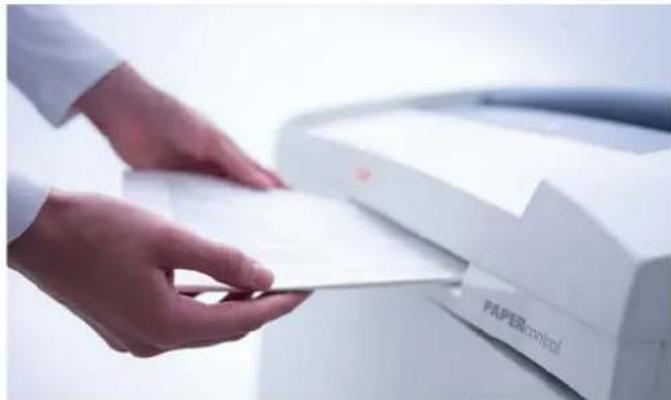
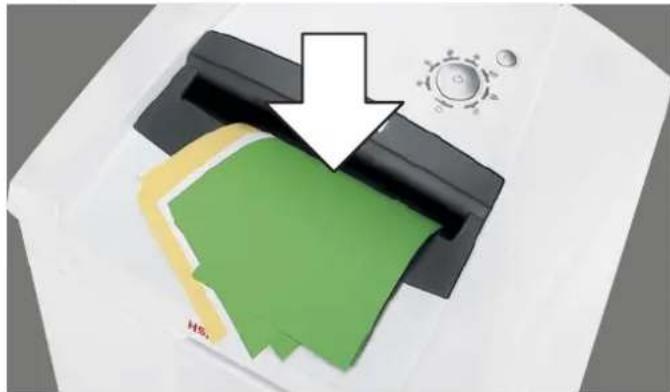
- Paper thickness measurement PAPERcontrol The document shredder features an integrated paper thickness measurement. This allows you to check whether a stack of paper can be shredded in a single go.
- Slide the stack of paper into the control slot.
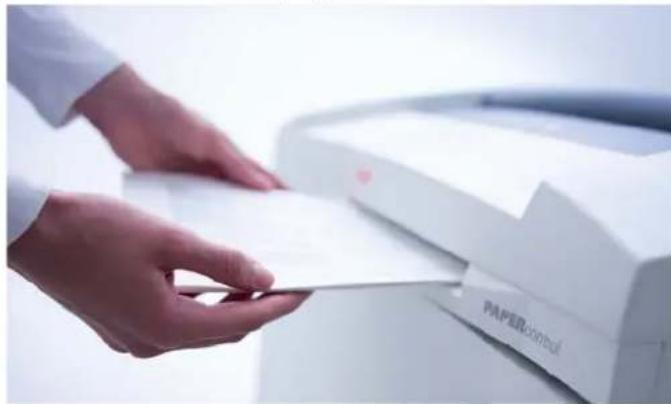
After a short time lag, the display on the operating control lights up:
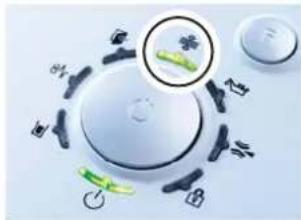
in green: The stack of paper can be shredded.
in yellow: The amount of paper is within the machine's upper capacity range. Reduce the number of sheets in order not to damage the machine and prevent a paper jam.
in red: The number of sheets exceeds the maximum cutting capacity of the machine. Prevent the cutting unit from blocking by reducing the amount of paper.
Remove the stack of paper.
- Feed the paper into the centre of the paper slot.
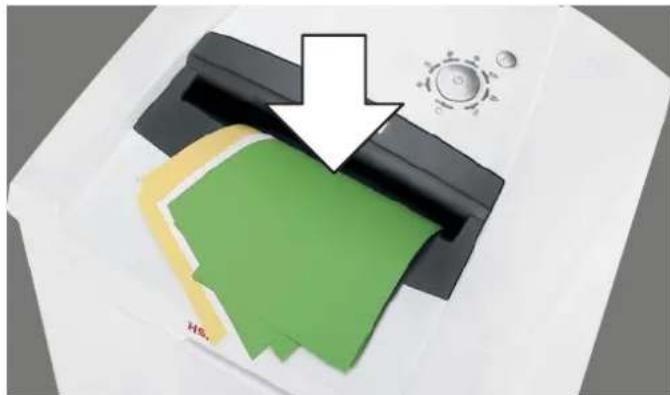
The light barrier starts the cutting unit automatically. Therefore, with thin paper strips, make sure the light barrier detects them.
NOTICE
Do not shred paper in the CD cutting unit. This can cause damage.
Note
Paper and CD cutting unit cannot be used at the same time. Only shred one kind of material at a time.
3 seconds after the light barrier in the paper feed opening is free again, the cutting unit is switched off automatically and the shredder switches to standby.
Shredding CDs, USB sticks, credit cards and floppy disks
- Check whether your machine is certified for destroying these materials (see "Proper use").
- For machines with a separate CD cutting unit (optional), put CDs, diskettes and credit cards in the feed slot of this cutting unit. This protects you from splinters.
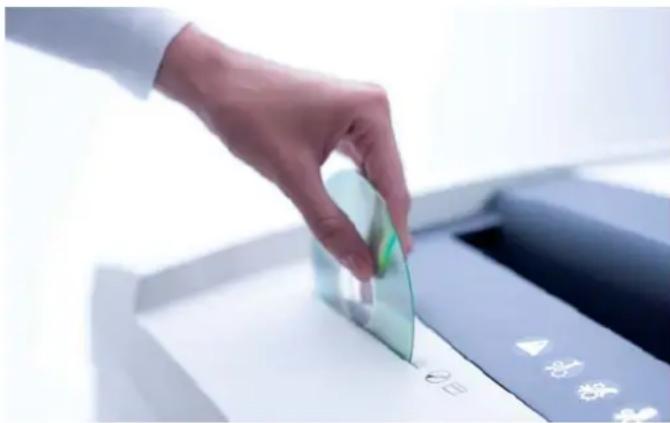
For machines without a separate CD cutting unit, use the paper feed.
Note
Paper and CD cutting unit cannot be used at the same time. Only shred one kind of material at a time.
Always use the paper cutting unit to destroy USB sticks.
- Dispose the shredded material and the waste paper separately.
Switching off the shredder
- Press the operation button.
The "Ready for operation" indicator goes out.
- Set mains switch at rear of paper shredder to "0".
Other function modes
Permanent mode
Function: Cutting unit runs continuously. If no material is fed in within a period of 2 minutes, the cutting unit shuts down and the shredder switches to standby.
Start: Press the operation button for three seconds.
Premature cancellation: Press the operation button.
- Stand-by mode
Function: Two minutes after the last paper feed operation, all consumers that are not required are switched off automatically.
The „Ready for operation“ indicator flashes briefly at regular intervals.
The shredder starts automatically when paper is fed in.
Automatic shutdown
Function: If the shredder is not used for 40 minutes, it shuts down completely and therefore does not consume any more electricity (at night, at the weekend).
Restart: Press the operation button.
Fault and function indicators
Display Problem Measure
| 8V
Continuous lamp | Paper jam Overload | You have fed in too much paper.
➢The cutting unit runs in reverse for a few seconds and pushes the paper back out again.
➢If necessary, press the reverse button “R” to remove the stack of paper.
➢Take half the stack of paper.
➢Feed the paper in portions.
Note
You can lift up the safety element in order to better remove paper. To do this, press the middle section of the front of the safety element and lift up the fl ap. | |
| Flashing light | Paper and CD fed at the same time | ·Do not use both cutting units at the same time, but rather shred paper and CDs/diskettes/credit cards separately. |
| Press safety element | ·The LED also flashes if you press the safety element or open the door while there is a paper jam. |
| Continuous lamp | Paper/shredded material container full | ·Empty the paper/shredded material container.
Note
If you press the reverse button briefly before opening the door, part of the material is pulled back into the cutting apparatus. |
| Flashing light | CD container full | ·Empty the CD container. To do so, lift it upwards out of the bracket. |
| Door is open or safety element not latched | ·Close the door or latch in the safety element.
Note
Movement of the safety element was detected during the shredding procedure. If your machine switches off without signalling an error, pull the paper out of the paper slit and feed it back in again. |
| Metal detection | ·Press the reverse button and pull the paper put of the feed slot.
➢Remove any metal which is in the paper or on the safety element.
➢Acknowledge the error by pressing the R button. |
| Problem | |
| Cutting unit runs continuously even though the machine is not in the permanent mode. | The light barrier is soiled with paper dust.
• Clean the light barrier in the paper feed using a dry brush or cloth. |
| Display Indicator | |
| Several indicators are lit The R button was pressed for more than 20 s.: Software version display (for service technicians only) |
| Display Problem Measure |
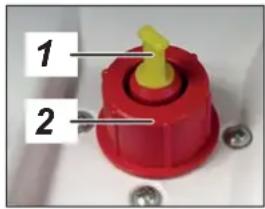
| Oil reservoir empty | • Fill the reservoir with cutting apparatus oil.
Nur Hersteller Öl verwenden!
Exclusive use with manufacturer oil!
1
2 |
| Display Function Activate/deactivate |
| Button lock is activated | To activate or deactivate the button lock
• Press and hold the reverse button
• Press the on/off button
• Release the on/off button and then the R button |
Notes
Manual reversing
If you press the reverse button, the cutting unit runs in reverse and switches off after 2 seconds, even if you keep the button pressed. To reverse manually, release the button and press it again.
If the shredder is already running forward, pressing the button immediately reverses it.
Shredded material container
Both cutting units stop when the paper or CD container is full.
On machines with a separate CD cutting unit, the level in the CD container (see overview, item 7) is monitored. Empty the container after there is a signal on the operating and indicator element.
Please consider the environment and dispose of different materials separately.
Automatic oiler (cross cut only)
The cutting units are oiled for 1.5 seconds after:
The cutting unit is in operation for 200 seconds (corresponding to 50 paper shreds)
- The cutting unit runs forwards after the reverse button has been pressed
The "Oil reservoir empty" signal is automatically deactivated after the reservoir is filled. The shredder remains operational even when the oil reservoir is empty.
The document shredder can be optionally equipped with a metal detector. The automatic switch-off allows damage to the cutting unit by paper clips or other metal objects to be avoided.
Safety element monitoring
Movement of the safety element was detected during the shredding procedure. If your machine switches off without signalling an error, pull the paper out of the paper slit and feed it back in again.
PAPERcontrol
The measuring of the paper thickness is regularly calibrated: the LED flashes for a short time after 400 seconds.
6 Cleaning and maintenance

WARNING
Dangerous mains voltage!
Improper handling of the machine can lead to an electric shock.

Switch the shredder off before relocating or cleaning it and disconnect the mains plug.
Service work which requires the housing covers to be removed may only be carried out by HSM Customer Service and service technicians of our contractual partners.
See page 202 for our customer service addresses.
Clean the document shredder only with a soft cloth and a mild soap-water solution. However, no water must enter the equipment.

Strip cut only:
Oil the cutting unit when cutting performance decreases or the device becomes noisy, or every
time you empty the waste container. Only use
HSM special lubricating oil for the cutting unit to do this:
- Spray the special cutting unit oil through the paper feed along the entire width of the cutting shafts.
- Let the cutting unit run in the permanent mode for about 10 seconds without any paper.
Paper dust and particles are shaken off.
7 Disposal / Recycling
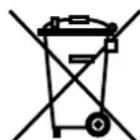
Electrical and electronic old devices contain a variety of valuable materials, but also hazardous substances which were required for function and safety. Incorrect disposal or handling can be dangerous to your health and
the environment. Never dispose of old devices in the household waste. Observe the current applicable regulations and use the collection points for returning and recycling electric and electronic devices. Dispose of all the packaging materials also in an environmentally-responsible way.
8 Scope of delivery
- Paper shredder, ready for connection, in carton packing, carton on pallet, tied with strapping tape
- 5 bags for shredded material
- Special cutting block oil (cross cut)
- Operating instructions
Acces sories
25 bags for shredded material, order No.: 1.452.995.000
- Special cutting block oil 250 ml, order No.: 1.235.997.403
See page 202 for our customer service addresses.
9 Technical data
| Cutting type Strip cut Cross cut | | |
| Shred size (mm) 5.8 3.9 3.9 x 40 1.9 x 15 0.78 | x 11 1 x 5 | | | | | |
| Sa fe ty ra ting DIN 66399 | P-2/O-2/T-2E-2 | P-2/O-2/T-2E-2 | P-4/O-3/T-4E-3/F-1 | P-5/O-4/T-5E-4/F-2 | P-6/F-3 | P-7/F-3 |
| Cutting ca pa ci ty* (sheets), DIN A4 70 g/m80 g/m2 | 76 - 7870 - 72 | 61 - 6356 - 58 | 43 - 4639 - 41 | 28 - 3023 - 25 | 18 - 1915 - 16 | 1210 |
| Cutting speed | 100 mm/s |
| Lo ading width | 400 mm |
| VoltagePower for the maximum number of sheets | 230 V, 50 Hz2600 W |
| Ambient conditions in operation:TemperatureRelative humidityHeight above sea-level (MSL) | -10°C to +25°Cmax. 90%, without condensationmax. 2,000 m |
| Dimensions W x D x H (mm) | 700 x 592 x 1025 |
| Weight | ca. 108 kg |
| Volume of the shredded paper container | 205 l |
| Sound pressure level emissions(Idle running/ load) | 64 - 67 dB(A) / 65 dB(A) |
| Cutting size of the separate CD cutting unit (optional) | Order number +C, E ** | Order number +M, N ** |
| 4 x 7 mm | 2 x 2 mm |
| Security level of the CD cutting unit | O-4 / T-5 / E-4 | O-6 / T-6 / E-5 |
- The maximum number of sheets (DIN A4, 70 g/m² or 80 g/m²), fed lengthways, which can be cut in one cycle. The performance data is determined when the motor is cold and the cutting device is freshly oiled. A weaker mains voltage or a different mains frequency to the one specified could result in less sheet capacity and increased noise during operation. The sheet capacity can vary depending on the structure and properties of the paper and on the way it enters.
** Identified by the letter after the 7-digit order number on the name plate on the back of the machine.
e.g. 1873111C >> cutting size 4 x 7 mm

This document shredder meets the applicable harmonisation legislation of the European Union:
Low Voltage directive 2014/35/EU
EMC directive 2014/30/EU
RoHS directive 2011/65/EU
The EU declaration of conformity can be requested from the manufacturer.
Display: PAPERcontrol
Indicate: PAPERcontrol
Indicatie: deur open of veiligheidselement nicht vergrendeld
Indicatie: overbelasting (papier vastgelopen)
Farlig netspaending!
Farlig netspaending!
Exclusive use with manufacturer oil!
peepaBaTe ee nocneDyUOuM NOB3OBaTeJAM.
Co6nJaTe Bce yka3aHnI NO texHnke 6e3o- nacHOCTN, npBVeEHHbI Ha cAmOM WpeDepe.

Onachocmbmpaemupoeahua ocmpbIM HOXOM!
HnB Koem cnyae He BBOIDTe pyKn B MexaHN3M NOaun 6yMaN.

Onachocmbmpaemupoeahua u3-3a emrauehaHua!
He donyckaite nonadaHnaIINHHbIX B0NOC, CBO6oHOB OJekDbI, rAnCTyKOB, PnATKOB, HaSeHbIX HApuyHbIX cENOueK B 3OHy, paCNoJoxeHNyO B HeNocpeDCTBeHHoB 6n3OCTN OT npneMHoH ueJI.
He yHnHToKaIte MaTePnaJIb, CKIOHHbIe K o6pa3OBaHnIO nTeJIb, HApPIMep, IeHTbl, UHypbl, PIACTMaCCOByIO pIeHky N T. I.

Onachocmu dna demeu u uhbix IIOdeu!
MaunHon 3anpeaaetcnoIb30BaTbcnLmam(BKJIOUaJeTeMnadwe14net)COrpaHueHHbIMN
ФИЗЕСКIMN,CEHCOPHBIMNIIYNMCTBEH HBIMN CNO6HOCTYIMNIINC HeIOCTaTKOM ONbITA N/INN 3HaHn,3a NCKIIOUeHNEM CNyuaEB,KORda OHN HAXOJTCNPOD NOCTOHHbIM PnICMOTPOM OTBETCTBEHHbIX 3aNHX JINC INN INONYHNIOT HNX YKa3AHN,KAK NOLb3OBaTbCnPn6Opom.3a DeTbMn Heo6XoIMNoCTOHHO CJIeINTb,YTO6bI He DOnyCTNTb INNrPbIC nPn6Opom.
He octabnayte wpeep BkIoueHHbIM 6e3 npncmOTpa.
Onachocmb,6bl3b16aemar 3nekmpuueckum mokom!
HenpaBnIbHoe o6paueHne c MaunHO MoKeT npNBOuNTb K nopaXeHHO 3JIeKTPnueCKM TOKOM.
Perynepno KOHTpOIpnyTe yCTpoiCTBO n Ka6eNb Ha npEaMeT NOBpeKdEnH.

Pn noBpeXdEHNx nn HnnpaBnBHO paBoTe, a TaKKe nepeCMeHOn MeCTa NcNoB3OBAHnN OuNCTKo BbIKJIOHTe WpeDep nI Te 1TEnCeNb n3 p03eTKn.
- IpeodTbpaaIte nonadHne BObblB wpeep. He norgykaTe cTeBOi Ka6eInN cTeByIO BVILKY B BodY. KaTeOpnueckN3aIpeuAetc8paTbcra 3a cTeByIO BVILKMyOKpbIMn pykAmN.
He BbITACKnBaIte BNkCy n3 po3eTKn 3a ceTeBOI Ka6eJIb, a BCerDa 6epNTecb 3a camy BNkKy.
2 IcnoIb3OBAHne no Ha3HaueHnIO, rapaHTna
IocmOTpnte Ha 3aBODCKo Ta6nUKe, pacnoJIOXeHHoHa 3aDHe CTOPOHe yCTPOHCTBa,Ha Kakyu UpiNHy pe3a HAnpJxHne CETn paccHTan Upeep, IN COIoJaTe COOTBeTCTByIOUe Yka3aHnB B INHcTpKcUN N O EKcNpyTaun.
Upeep npedha3haeH ncknouHTeIbHo Ira yHnTuXeHHa6yMaHn. Kpme TOrO, B 3aBNCIMoCTn OT TnPa pe3aHnRA MOxHO yHnTuXaTb He6oJIbWne KOJNUeCTBa CNeDyUOuNX MaTePnaJIOB:
HnKau: TOTOBHOCTb K pa6oTe / Stand-by
4 BbD B 3KcPnyatauHIO

PPEyPExEHEHNE
Onachoe HanpiaeHue cemu!
HenpaBnIbHoe 6paueHne c MaunHOJ MOKeT npINBOuNTb K NopaxeHIO 3JIeKTpUeCKIM TOKOM.
IcnoJIb3yIte yCTpoIcTBO TOnbKO B cyNX BHyTpEHnIX NOMeUeHnIX. He 3KcnIpyaTIpyuTe erO BO BJaXhBIX NOMeUeHnIX IIN IOddoJDEM.
He yctaHaBnBaIte n He 3KnpyuYte yCTPOcTBO, CTeBOI Ka6eIb I BnIKy B6n3N OTKpbITOrO OrHn I rOpAUX NOBepx-HocTe. IJa oBeCneUeHn DOCTaTOUHO OXnaJdEHHa 3aPpeuaeTcra NepeKpbIBaTb BEHTINLAIOHhIE npope3n. Heo6xoIMo YcTaHOBtB Wpeep Ha pacCToHn H MeHee 5 CM OT CTeH nn Me6eIi.
- Φpeép yctaHabnBaIte TaKIM o6pa3OM, yTo6bI o6ecneuBaIcN terKm IocTy n K wTeNCeIIO cTeBOrO npoBoJa.
- Ipeep BkIIOueHnEM B cetb y6eIITecb B TOM, YTO ee HaIpaJKeHne N YaCTOta COOTBETCTBYOT DaHHbIM, Yka3aHHbIM Ha 3aBOdCKoI Ta6nUyke.
- Ipeed nepBbIM BBOOM B 3KcNpyaTuIO OTKpoIe DBepu y udaJIte 3 bapaWkoBbIX BnHTa, cnykauxДЯ KpeJIeHnI npITpaHCnOpTIpOBKe, n3 ONOPHOIJIITbI NOd peJxM MEXaHN3MOM.
BCTaBbTe BnIky yctpoiCTBa B noIxOJaIyUo p03eTKy.
pycckn
5 YnpaBneHne
BknoueHne upeepa
Cetebov BbIKIOuATEIb Ha 3aHHe cTeHKe Iwpeepa yCTaHOBtB b NOJOxHne «I».
- Y6eIITecb B TOM, UTO B Ieenn IJn 6ymarn OTCyTCTByet 6ymara.
- HaxMMTe KhoNky ynpaBneHn.
3aropaetcHnDnKatop «TOrOBHocb K pa6oTe».
yHnTuToXeHne 6ymaru
CnCTema n3MepeHn TaIuHHbI 6ymarnp PAPERcontrol
Ipeep ochaueh BCTpoehno cnctemoi
n3mepeHna ToiunHbI bymar. C ee nOmoBbIO
BbIMoKeTe npOBepntb, MoXHO JIn yHNHTb
cToNk cybMarn 3a OndHy pa6oyuOn onepaunio.
BcTaBbTe cTOnKy 6ymaH B KOHTpOJIbHyIO npope3b.
Yepe3 HeKOTOpoe Bpem 3aropaetcNHNKATOp y opraHa ynpaBneHn:
3eHeh: Ctonka 6ymarn MoXet 6bItb yHnU-TOxKeHa.
KeIb: KOnnueCTBO 6ymar npn6nka-ETcK MaKcImaJIbHO BO3MOXHOMy.ymeHb-1tTe YncNo NtCB, YTO6bI He nepepy3ntb MaunHy n HndexHo ppeoTbpaTb 3aTop 6ymar.
KpacbHbI: YnCNo JnCTOB npeBbIaet MaKcMmaJIbHyIO npOn3BOIDTeNbHOCTb MauINbI. PpeDoTbPaTtB 6nOKnPOBaHne pexyUero MexaHN3Ma, yMeHbSINB KOJInueCTBO 6ymarN.
- BbItaIte CTOnKy 6ymarn.
BBeDnTe 6yMaRy B ceHr npope3n dna 6ymaRn.
Ipocecc n3MeIbueHn 3aNyckaetc4 foToaIeMeHTOM. I03TOMy npu yHNUTOxKeHHn TOHKnx 6yMaXhBix NOnOCOK CNeDNTe 3a TEM, YTO6bl OHI paCnO3HaBaJIncb foToaJIeMeHTOM.
BHHMAHNE
He yHnHToKaIte 6bMaIy B pExKyIeM mExaHN3Me IJI KOMNaKT-DINCKOB. 3TO MOKeT npNBOuNTb K NOBpeKdEHNrM.
Yka3aHne
HeIb3a OndHOBpeMeHHo NcNoJIb3OBaTb MExaHN3MbI Dnpe3Kn 6yMaHn N KOMNaKT-ДИCKOB. He CmeuBaHTe MaTePnaIbI B IpoUeCEyHNUTOXKeHn.
Yepe3 3 c nocne toro, kak ocbo6oxkdaeTcA foTopeIe B npHemHOJ uen, peKyuI MExaHn3M aBtOMaTHueCKN OTKJIuOaETcR, I UpeIep NepexoINT B pEXIM rTOBHOCTN.
YHNUTOXeHne KOMNaKT-ДиCKOB / USB-HaKoNITeIN / KpeDHTbIX KapT / DnCKeT
A B T O M A T N U E C K A M C L E N H K A (T O N B K O p n H ape3Ke Ha Y a c T N C b I)
Cma3ka pexyux MexaHn3MOB npoN3BOIDTCB TeueHne 1,5 ckyHdbI uepe3
200 c pa6oTbI pexyUeRo mexaHn3Ma (npu- 6n3ntelbHo COOTBeTCTByet 50 onepaunm no yHHTOKeHIO 6ymarN)
Haxatna KhoNKe peBepCupOBaHn np CneDyUoSe pa6Te B pa6OeM HAnpaBHeHn CnHaHn3aunr «EmKocTb DnA macna npCTaR abTomatnuceKn Ncye3aet nocne 3anONHeHn emKocTn. Wpeep daXe npn npCToI emKocTn dnn Macna OCTaETc rTOOBbIM K pa6ote.
Upepeochaueh MeTaIIODeTeKTopom B KaueCTBe onu. Blaorapr aBToMaTnueckomy OTKnUoyHIO npedOTbpaauTcNOBpeJdHn peKyUeO MexaHn3Ma cKpenkamN IIn dpynMm MetaJInuyeCKMn DeTaIyMn.
KoHTpoJIb 3aUHTHOrO 3JeMeHtA
Indicator: PAPERcontrol
Indicator: uša beschisiau element de siguranta neblocat
Indicator: suprasolicitare (blocaj de hartiie)
Indicator: recipient harti/ CD-uri deschis
Tasta R:
Indicator: recipient ulei gol
Tasta-function
yKa3aHn 3a6e3oNaCHOCT

Ipei npckane B eKcnnoataaHa MaunHata npoTeTe nHcTpykunrTa 3a ekcnloataua,cbxpaHeTe r 3a 6bJeIO n3nO13BaHe n nppe6bJeNTe noJ3BaU.
Cb6nIpaBaTe BCnUKNIOCTaBeHn Bbpxy MaunHaTa 3a yHnOxKaBaHe Ha DOKymeHTu yka3aHna 3a 6e3oNaCHOCT.

Onachocm om HapaHyahe om ocmpu Hoxoee!
B HnkaKbB cIyuaH He nbXaIe pkbA B NOdaBaHeTo Ha XapTnaTa.

Onachocm om HapaHaahe ype3 noemaHe Ha pbkama!
Дьлга кoca, сбобони дрени, Вразовпьзки, Шаловe, колиета И Гривни пазete далочу OT OTВора за падаваен Ha xaptnя. He yнцожавaite MaTePnaiN, CkIoHn KbM 3aBbP3BaHe, Hanpimep, Лentи, ShhypoBe, плacrmacobOфОПИNo.

Onacnocmu 3a deua u dpyuu nuca!
MaunHata He Tp6Ba Da ce H3noJ3Ba OT Nua (BKnUHTeHNo Dea no14 roDHH) c orpaHnueHn
NCHXNUeCKN,CEH3OPHN NIN YMCTBEHN CnOc6- HOCTN NIN NINCA HA ONIT N/INN P03HaHne, OCBEN,AKO Ca NOD HAD3opa HA OTROBAPrSO 3a TExHaTc CNyPHOCT Nlue NIN Ca NOnyUHN yKa3AHNAOT Hero,KaK Da N3NOJ3BaT UpeDa. Deuata Tp6Ba Da ce Ha6JIIOdaBAT Da He IrrpaTc CypeDa.
He octabrTe BkIIOueHa MaunHaTa 3a yHn-ooXaBaHe Ha DOKyMeHTn 6e3 HAd3Op.

Onachocm om eIekmpuuecku ydap!
HenpaBnHOTOn 3NoI3BaHe Ha MaunHaTa MoKe Da DoBeDe Do eNeKtpnueckn TOKOB ydap.
- PeioBHO npOBepaIte ypeHa n Ka6eNa 3a UeTI.

Pn noBpeHa nn He npabuHNO
fynKUHOHpaHe KaKTo n npedn
npemecTbaHe nn NOuchBaHe
n3KnIOyTe MaunHaTa 3a yHNoJoxa-
dOKyMeHTn n3BaTe UeIcena.
BHMabaTe Da He nonaHe Boda B MaHnHaTa 3a yHnOxKaBaHe Ha DokyMeHTn. He NotanrYe MpeKOBn KaBeI nII NZeKePa BbB BODa. He nPiNaTe Hnkora Zekepa C BnaJHn PbUe.
- Hnkora He nbpnaite uekepa 3a ka6eena ot KOHTaKTa, XBa7aainTe BnHaHn 3a uekepa.
2 I3noJ3BaHe no npedHa3HaueHne, rapaHcIy
IpoBepTe Ha 6pHnHaTa TabeKHa Ha obaTHaTcTpaHa Ha ypeHa, 3a KaKBa 7uPnHa Ha p3aHe mpeXoBO HAnpeXeHne e PpeBnDeHa BaWata MaunHa 3a yHnOxKaBaHe Ha DOkyMeHTn n CbIIOdaBaIte CbOTBeTHnte TOkN OT HnCTpyKzraTa 3a EKcnNoatau.
MaunHaTa 3a yHnOxKaBaHe Ha DOKymeHTn e npedHa3NaYeHa cAmo 3a yHnOxKaBaHe Ha xapTna. B 3aBNCmOcT OT BnDa Ha pR3aHe MORat Da yHnOxKaBaT BMJKN KOJIyEcTBA N CneIHNTe MaTePnAIn:
| ШирINA на рязане (mm) 5,8 | 3,9 3 | 9x40 | 1,9x15 | |
| КредиNTи КарТи, КOMпаKTДиСКовe, ДиСКеТи, USBCтИКовe | ● | ● | | ● |
3dpabnT pexeH nHCTpymeH e HeuyBCTBNTeH KbM KIamepN n Te16oD. Camo npMaunnC uipnHa Ha p3aHe 1x5 mm xaptnaTa He Tpa6Ba da Ima KIamepN n Te16oD.
Yka3aHne
B OTdJIHnpeKeeu INCTpyMeHT 3a KOMNaKTndCKOBe (Onu) MoT Da ce yHnIOXaBaT He3aBNCMO OT pexeun HNCTpyMeHT 3a XapTnKOMNaKTndCKOBe, DnckETn IN KpeDnTHn KapTn.
MaunHaTa 3a yHnOxKabHe Ha DOKymeHTn
Ima rapaHcnoHcPok OT 3 roDHH. Baxn
He3aBNCIMa OT OTROBOPHOCTTa 3a HeIOCTaTbCNI
rapaHcNra 3a CTOMaHcHInTe pExeUu BaIcN
HSM Ha MaunHInTe 3a yHnOxKabHe Ha DOKyMeHTn NO BpeMe Ha cEINr CpOK Ha EKCnlo-
ataaHa ypeDa. (HSM Lifetime Warranty).
N3KnUoyHeNe OT TOBa npABrMaunHn 3a yHnOxKabHe Ha DOKymeHTn C WnpHa Ha P3aHe
0,78x11 mm n 1x5 mm. N3HocBaHe, UeTu OT
N3NoN3BaHe He No IpeHa3NaueHne KaKTo n
INHTepBeHcNn OT TpeTn Nlua He CE NOKpNBat OT
rapaHcNraTa.
HnnpMa HSM rapaHTnpa DoCTaBHeTo Ha pe3epBn YacTn Do 10 roDHH CneI cnpaHe Ha npOuN3BODCTBOTO Ha To3N MoDen.
3 063op
Yka3aHHe: B 3aBnCmOcT OT MoJeNa MaunHata Bn He cbIbpxKa BCnUKn MoDyN.
1 Ⅲnuc3a noDaBaHe Ha KOMNaKTdNcKOBe, DnCKeTn n KpeDnTHn KapTu (onu)
2 Ka3aHn3a 6e3oNaCHOCT
3 ΦOTOKJIeTKa B noJaBaHeTo Ha XapTnA
4 EneMeHT 3a 6e3oNaCHOCT
5 YnpabnBaui n HndkaTopeh enemHT
6 1bpxka3a nHCTpykunra 3a eKcnpnoataunn m
7 Pe3epBoap 3a c6bnpaHe Ha yHnOxKeHN KOMNaKTdNcKOBe / DnCKeTn / KpeDnTHn KapTu (onzna)
8 OTbop 3a nblHeHe Ha MaCNo 3a peXeUnna6nok (cAmO npn pR3aHe Ha YacTn)
9 PAPERcontrol
6bIrrapckn
YnpaBnaBauN INHdkaTopn eJeMeHTN
Yka3aHHe: B 3aBnCmOcT OT MoJeNa Ha MaunHaTa He ca HAnuHN BCnKn FyHKUIN.
ИнданацьЯ: PAPERcontrol
Hnka:OTbopeHa Bpata nn HeKcpaneIem3a 630nacHOCT
Hnka:PpeTobapBaHe (3aPbCTBaHe Ha xapTna)
Hdkaun: Tbnepe3epBoap 3a xaptn /KOMNaKTdNCKOBe
(R
BytoH R:
- PexeIyIHT NHCtpymeHCTpeBnKHa3aI
KbntnpaHeHa cMyuHne
- INdkaun Ha coofTyepHa Bepn (cmo 3a cepBn3Hn Texnnc)
HnDka: Ppa3eH macneH pe3epBoap
yHKUHOHaJen 6yTOH
"BKnIOBaHe / N3KIOUbaHe / CtapTnpaHe"
Hdka:MetaneH dTeKTop
Hnka: BIOKnpOBKa Ha 6yToHnTe
Инд�示а: Готов за павotas / Stand-by
- Pekim cbcToHHe Ha RotOBHOCT
Функия: 2 Mнутспд посnéДНОТ NOДаВане Ha xapTЯ abTomatNHO ce n3KЛHQUBATBCUKN HeHyxHn NOTpe6nteJI.
HnkaunraT aToB 3a pa6oTa" npMnRb KaTko Ha paBNn INTEpBaII.
Pn noBaHe Ha xapTna MaunHaTa 3a yHnIooJaBaHe Ha DokyMeHTn ABTomTuHc Ce 3aDbNkBa.
- ABTomatnHOnu N3KJIIOUvBaHe
88699 Frickingen / Germany
Tel. +49 7554 2100-0
Fax +49 7554 2100 160
info@hsm.eu
www.hsm.eu
HSM (UK) Ltd.
14 Attwood Road / Zone 1
Burntwood Business Park
Burntwood • Staffordshire
WS7 3GJ
United Kingdom
Tel. +44 1543 272-480
Fax +44 1543 272-080
info@hsmuk.co.uk
www.hsm.eu
HSM of America LLC
419 Boot Road
Downingtown, PA 19335
USA
Tel. +1 484 237-2308
+1800613-2110
Fax +1 484 237-2309
customerservice@hsm.us
info@hsm.us
www.hsm.us
HSM Polska SP. z o.o.
ul. Emaliowa 28
02-295 Warszawa
Poland
Tel. +48 22 862 2369
Fax +48 22 862 2368
Handlowy@hsm.eu
www.hsm.eu
HSM France SAS
Parc de Genève
240, Rue Ferdinand Perrier
69800 Saint-Priest
France
Tel. +33 472 210580
Fax +33 472 517481
France@hsm.eu
www.hsm.eu