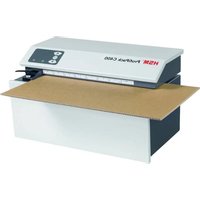
ProfiPack C400 - Shredder HSM - Free user manual and instructions
Find the device manual for free ProfiPack C400 HSM in PDF.


| Product type | Cardboard packaging cushioning machine |
| Brand | HSM |
| Model | ProfiPack C400 |
| Dimensions (L x D x H) | 610 x 395 x 375 mm |
| Weight | 47 kg |
| Power supply | 230 V / 50 Hz (100 V, 120 V, 220 V versions available) |
| Motor power | 800 W / 625 W / 855 W / 660 W depending on voltage |
| Working width | 415 mm |
| Infeed height | 10 mm |
| Cutting capacity | 1 layer |
| Spacing interval | 6 x 60 mm |
| Operating speed | 8.0 m/min |
| Operating mode | Continuous operation |
| Noise level (idle / under load) | 66-68 dB(A) / 68-70 dB(A) |
| Operating temperature | -10 °C to +25 °C |
| Max. relative humidity | 90% non-condensing |
| Main functions | Creation of protective packaging cushions, automatic cutting of oversized cardboard, forward/reverse, emergency stop |
| Safety | Jam protection (reverse button), shutdown via mains switch, overload protection (cooling required) |
| Maintenance and cleaning | Clean with non-corrosive soapy water and a soft cloth; maintenance reserved for HSM after-sales service |
| Repairability | Repairs only by HSM after-sales service or authorized technicians |
| Warranty | 2 years (excluding wear, misuse, third-party intervention) |
| Delivery contents | Machine, power cord, instructions |
| Standards | EU directives: Low Voltage 2014/35/EU, EMC 2014/30/EU, RoHS 2011/65/EU |
Frequently Asked Questions - ProfiPack C400 HSM
User questions about ProfiPack C400 HSM
0 question about this device. Answer the ones you know or ask your own.
Ask a new question about this device
Download the instructions for your Shredder in PDF format for free! Find your manual ProfiPack C400 - HSM and take your electronic device back in hand. On this page are published all the documents necessary for the use of your device. ProfiPack C400 by HSM.
USER MANUAL ProfiPack C400 HSM
english: Device for the manufacture of packing cushions 8
natural_image
Diagram of a gray industrial machine with white arrows pointing to its side, showing internal components and a small outlet (no text or symbols present)natural_image
Industrial machine with woven material being processed (no visible text or symbols)Normalbetrieb
Klappe oben
natural_image
Industrial machine with woven material being processed, no visible text or symbolsAufpolsterung
natural_image
Close-up of a cardboard box being cut with a ruler and a small object, no visible text or symbols1 Use for intended purpose, guarantee
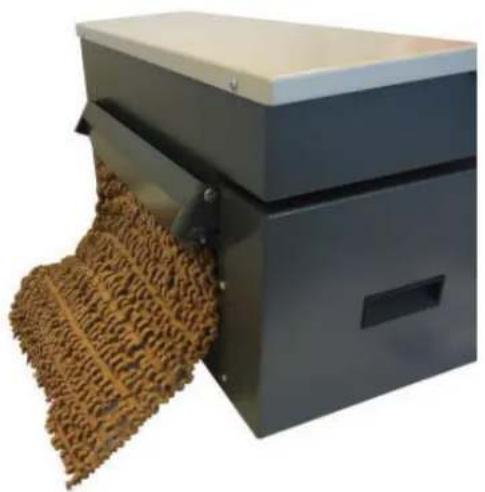
The Profi Pack C400 is exclusively designed for the manufacture of packaging cushions made from cardboard.
The warranty period for the machine is 2 years. This guarantee does not cover wear, damage caused by incorrect handling, natural wear and intervention by third parties.
2 Safety instructions

Before initial start-up of the machine, read the operating instructions and keep them in a safe plate for use at a later date. Please observe all of the safety instructions attached to the Profi-Pack.
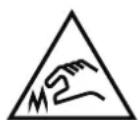
Risk of injury!
Never reach into the slot of the feed opening.
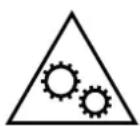
Risk of injury during intake!
Do not go near the feed opening with long hair, loose clothing, ties, scarves, necklaces, bracelets etc. Do not process any material that may have a tendency to form loops, such as tapes, lacing or soft plastic film.
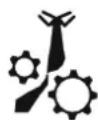


Danger to children and other persons!
This equipment is not suitable for use in locations where children are likely to be present.
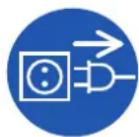
Switch the ProfiPack off if it is damaged or not working correctly and before relocating or cleaning it, and disconnect it from the mains.

Service work may only be carried out by HSM Customer Service or by the service technicians of our contractual partners.
- Make sure that the mains plug is well accessible.
- Before you insert the mains plug, make sure that the voltage and frequency of your power supply comply with the information on the name plate.
- Make sure that no liquids get into the Profi Pack.
- The machine must not be placed near a radiator or other heat source.
- The ventilation slots must be unobstructed, and there must be a distance of at least 5 cm between the shredder and the walls and furniture.
3 Transportation and installation
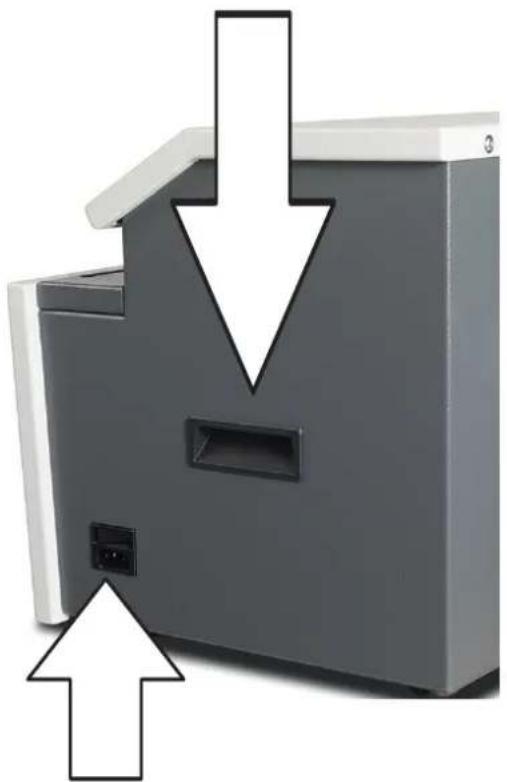
Use the recessed grips at the sides to transport the shredder.
natural_image
Diagram of a gray industrial machine with downward arrows indicating flow or movement, no text or symbols present.Connect the power cable to the machine. The machine must be connected to a power source which meets the specifications on the nameplate. Make sure that the power cable is unobstructed and that nobody can tread on it. Plug the connecting plug of the machine into a properly installed socket.
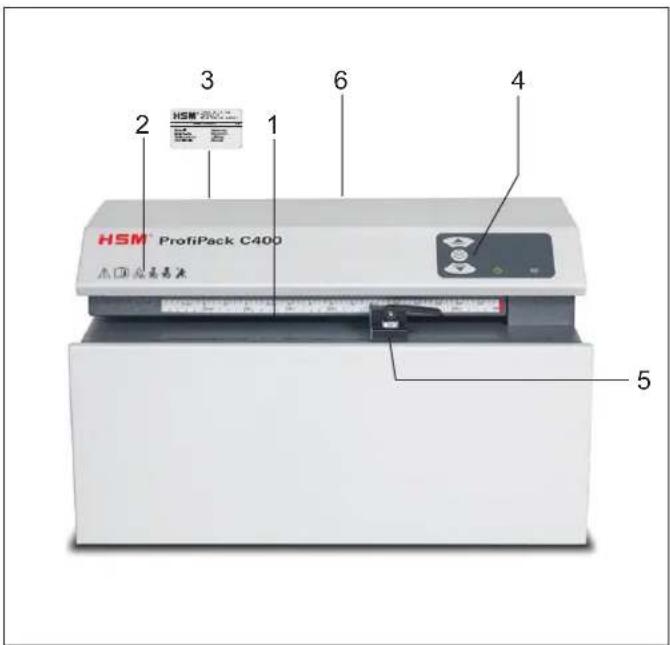
4 Overview
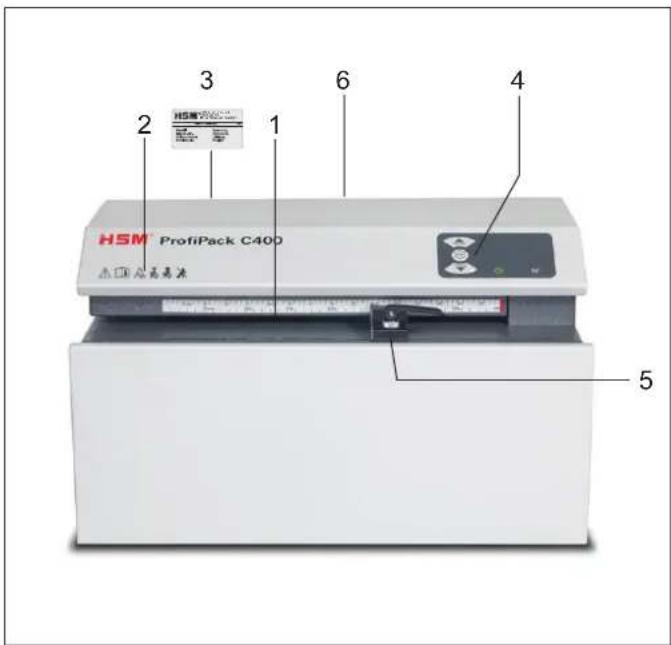
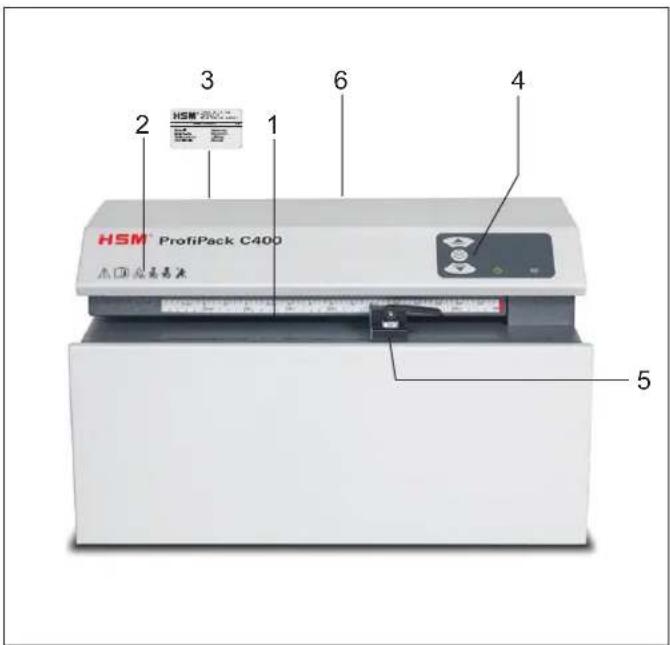
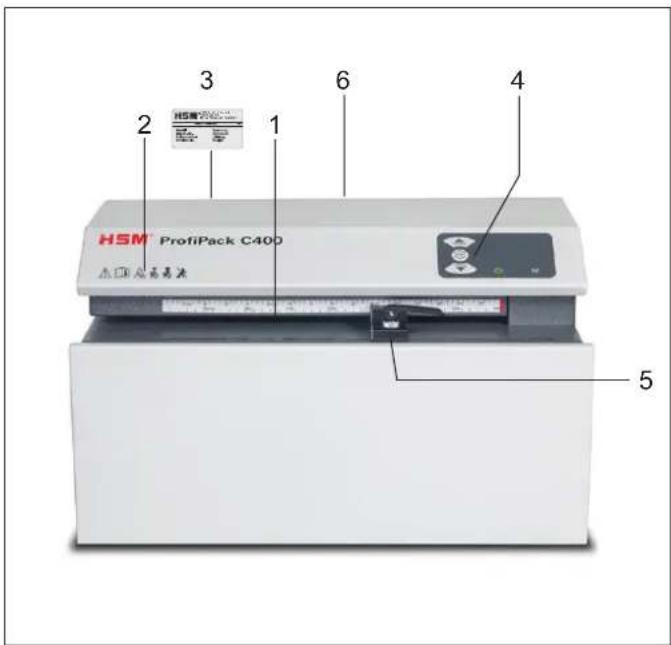
1 Feed opening
2 Safety notice
3 Warning sticker / type plate
4 Operator control panel
5 Limit stop
6 "Padding" fl ap
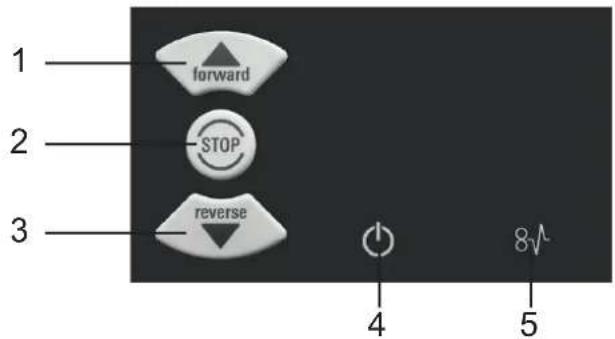
5 Display and control panel
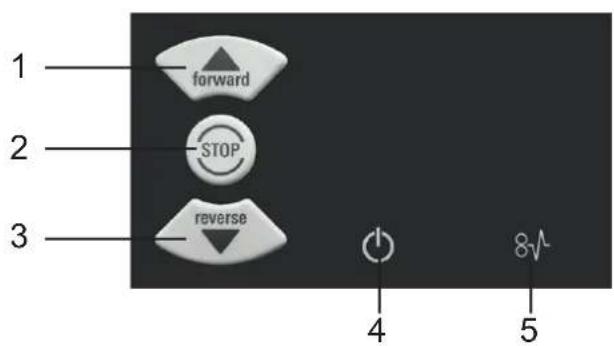
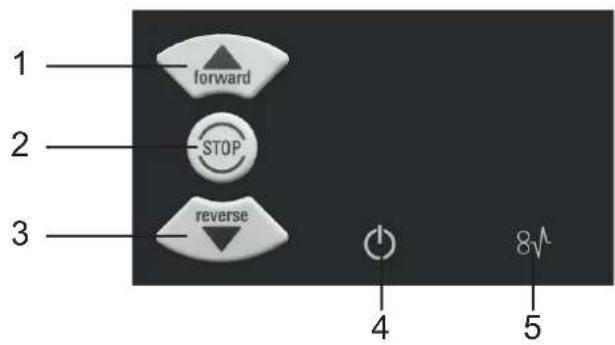
1 Forward button
2 Stop button
3 Reverse button
4 "Ready for operation" display
5 "Blockage" display
english
6 Operation
Switching the system on

- Move the power switch at the right-hand side to position "I".
- The "Ready for operation" indicator lights up.
The machine is ready to operate.
Press the "Forward button".
The cutting unit starts up.
Feed in cardboard
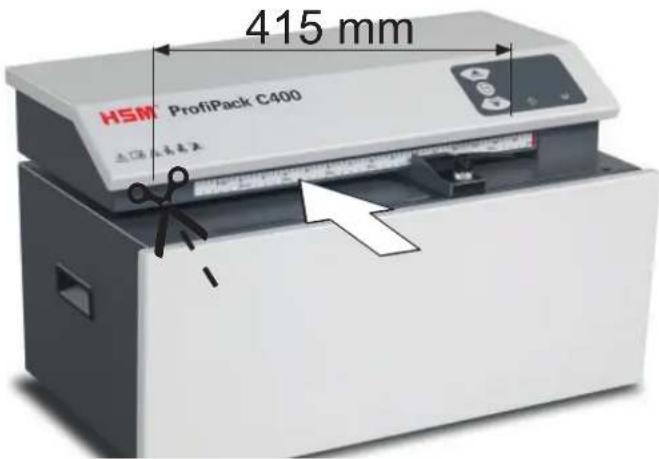
- Cardboard widths of up to 415 mm can be processed.
- Wider cardboard is automatically trimmed.
- The cutting unit is switched off using the stop button.
Switch off
Move the power switch on the right-hand side to position "0".
natural_image
Close-up of a mechanical device emitting a woven material, no visible text or symbolsNormal operation
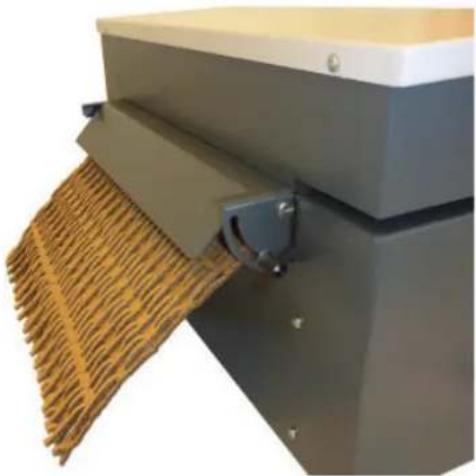
Flap up
Secure setting with wing nut on left (finger-tight).
natural_image
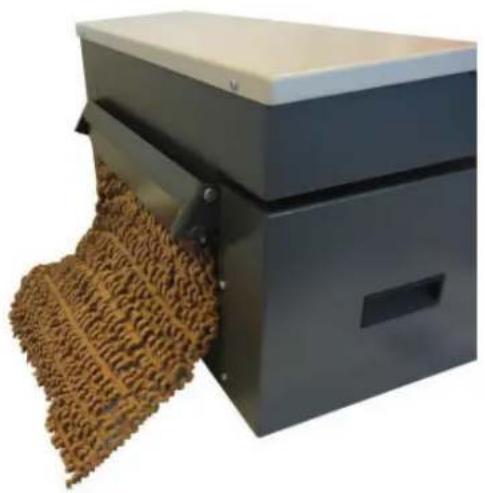
Industrial machine emitting a textured brown material, no visible text or symbolsPadding
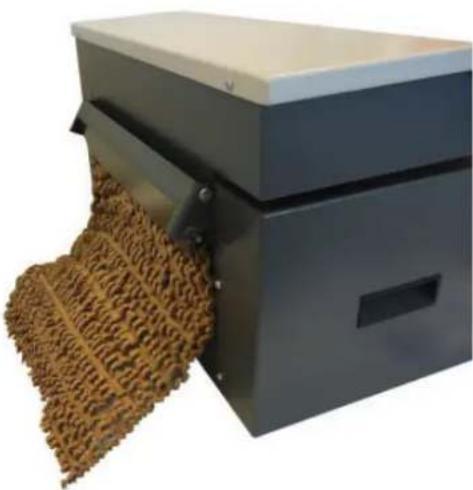
Flap in lower position
Secure setting with wing nut on left (fi nger-tight).
- Insert at least 2–3 pieces of cardboard one after the other, only then will the padded cardboard come out on the compression plate.
Removing material residue
Remove material residue when changing from "Padding cardboard" to "Perforating cardboard".
- Switch off the machine.
6 Operation
natural_image
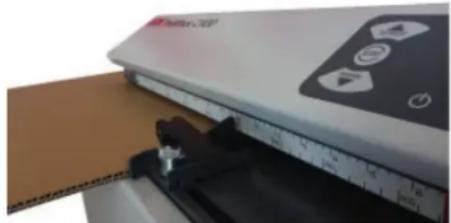
Close-up of a white electronic device with a black control panel and a ruler, partially placed over a brown cardboard sheet (no visible text or symbols)Adjustable limit stop
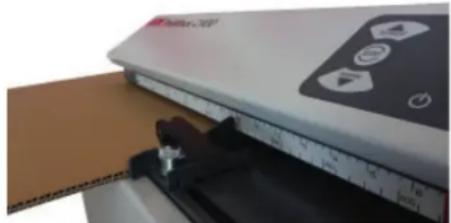
Lever up: For moving
Lever down: Limit stop fi xed
7 Troubleshooting
Blockage
Press the "Reverse button" to remove material in the event of problems.
The cutting unit reverses for approx. 3 sec and pushes the cardboard back.
Note
If a large quantity of cardboard has already been pulled in before the blockage occurred, you can also press the forward button. This makes the cutting unit run forwards and shreds the remaining cardboard.
During this function, the “Ready for operation” and “Blockage” indicators flash alternately.
For all other malfunctions, check whether the motor was overloaded before contacting our customer service. Let the machine cool down for approx. 15 – 20 mins. before re-starting.
8 Cleaning
Switch off the machine and disconnect the power plug. When cleaning, only use a soft cloth and a mild soap-water solution. However, no water must enter the equipment.
9 Disposal / Recycling
Electrical and electronic old devices contain a variety of valuable materials, but also hazardous substances which were required for function and safety. Incorrect disposal or handling can be dangerous to your health and the environment. Never dispose of old devices in the household waste. Observe the current applicable regulations and use the collection points for returning and recycling electric and electronic devices. Dispose of all the packaging materials also in an environmentally-responsible way.
10 Technical data
| Grid dimension 6 x 60 mm | |
| Cutting capacity 1 layer | |
| Operating speed 8,0 m/min | |
| Working width 415 mm | |
| Infeed height 10 mm | |
| Power supply | 100 V / 60 Hz 230 V / 50 Hz 120 V / 60 Hz 220 V / 60 Hz |
| Operating mode Continuous operation | |
| Motor power 800 W / 625 W / 855 W / 660 W | |
| Ambient conditions for transport, storage and operation:Temperature relative humidity height above SL | -10 °C up to +25 °Cmax. 90%, non-condensingmax. 2.000 m |
| Noise emission(idle / under load) | 66 - 68 dB(A)68 - 70 dB(A) |
| Size W x D x H (mm) 610 x 395 x 375 | |
| Weight 47 kg | |

This document shredder meets the applicable harmonisation legislation of the European Union:
- Low Voltage directive 2014/35/EU
• EMC directive 2014/30/EU
• RoHS directive 2011/65/EU
The EU declaration of conformity can be requested from the manufacturer.

• Electrical Equipment (Safety) Regulations 2016
• Electromagnetic Compatibility Regulations 2016
- The Restriction of the Use of Certain Hazardous Substances in Electrical and Electronic Equipment Regulations 2012
The EU declaration of conformity can be requested from the manufacturer.
natural_image
Diagram of a gray industrial machine with white arrows pointing to its side, showing internal components and a small outlet (no text or symbols present)natural_image
Industrial machine with woven material being processed, no visible text or symbolsnatural_image
Industrial machine with textured material being processed, no visible text or symbolsMatelassage
natural_image
Close-up of a cardboard box being cut with a ruler and a small object, no visible text or symbolsButée réglable
natural_image
Diagram of a gray industrial machine with downward arrows pointing to its side, indicating process or flow (no text or symbols present)natural_image
Close-up of a mechanical device emitting a woven material, no visible text or symbolsnatural_image
Industrial machine with textured material being processed, no visible text or symbolsImbottitura
natural_image
Close-up of a beige electronic device with a ruler and a partially open panel, no visible text or symbols.Battuta regolabile
natural_image
Diagram of a gray industrial machine with white arrows pointing to its side, showing internal components and a small outlet (no text or symbols present)natural_image
Industrial machine with woven material being processed, no visible text or symbolsnatural_image
Industrial machine with textured material being processed, no visible text or symbolsAcolchado
natural_image
Close-up of a cardboard box being cut with a ruler and a small object, no visible text or symbolsTope ajustable
natural_image
Diagram of a gray industrial machine with white arrows pointing to its side, indicating flow or process (no text or symbols present)natural_image
Close-up of a mechanical device emitting a woven material, no visible text or symbolsnatural_image
Industrial machine with textured material being processed, no visible text or symbolsMaterial almofadado
natural_image
Close-up of a beige electronic device with a ruler and a partially open panel, no visible text or symbols.Batente ajustável
natural_image
Diagram of a gray industrial machine with white arrows pointing to its side, showing internal components and a small outlet (no text or symbols present)natural_image
Industrial machine with woven material being processed, no visible text or symbolsNormaal bedrijf
natural_image
Industrial machine with textured material being processed, no visible text or symbolsOpbolling
natural_image
Close-up of a cardboard box being cut with a ruler and a small object, no visible text or symbolsInstelbare aanslag
natural_image
Diagram of a gray industrial machine with downward arrows pointing to its side, indicating process or flow (no text or symbols present)1 Fremad-tast
2 Stop-tast
3 Reverseringstast
4 Visning "driftsklar"
5 Visning "blokering"
6 Betjening
Tilkobling

natural_image
Close-up of a mechanical device emitting a woven material, no visible text or symbolsNormal drift
Klap oppe
natural_image
Industrial machine emitting a textured brown material, no visible text or symbolsPolstring
Klap i position forneden
natural_image
Close-up of a white electronic device with a ruler and a brown panel, no visible text or symbols.9 Bortskaff else/recycling
natural_image
Diagram of a gray industrial machine with white arrows pointing to its side, showing internal components and a small outlet (no text or symbols present)1 Framåtknapp
2 Stoppknapp
3 Reverseringsknapp
4 Indikator "Driftklar"
5 Indikator "Blockad"
6 Användning
Slå på

natural_image
Industrial machine with woven material being processed, no visible text or symbolsNormal drift
Lucka uppe
natural_image
Industrial machine with textured material being processed, no visible text or symbolsnatural_image
Close-up of a cardboard box being cut with a ruler and a small object, no visible text or symbolsnatural_image
Diagram of a gray industrial machine with white arrows pointing to its side, indicating flow or process (no text or symbols present)natural_image
Close-up of a mechanical device emitting a woven material, no visible text or symbolsNormaalikäyttö
natural_image
Industrial machine with textured material being processed, no visible text or symbolsPehmustaminen
natural_image
Close-up of a white electronic device with a black control panel and a ruler, partially placed over a brown cardboard sheet (no visible text or symbols)Säädettävä rajoitin
natural_image
Diagram of a gray industrial machine with white arrows pointing to its side, showing internal components and a small outlet (no text or symbols present)natural_image
Industrial machine with woven material being processed (no visible text or symbols)Normal drift
Spjeld oppe
natural_image
Industrial machine emitting a textured brown material, no visible text or symbolsPolstring
natural_image
Close-up of a cardboard box being placed next to a white electronic device with control buttons and a ruler (no visible text or symbols)Innstillbart anslag
Hendel oppe: for forskyving
Hendel nede: anslag fast
7 Feilretting
Blokkering
9 Avhending/ resirkulering
natural_image
Diagram of a gray industrial machine with white arrows pointing to its side, indicating flow or process (no text or symbols present)natural_image
Close-up of a mechanical device emitting a woven material, no visible text or symbolsTryb zwykły
natural_image
Industrial machine emitting a textured brown material, no visible text or symbolsWyściełanie
natural_image
Close-up of a white electronic device with a ruler and a brown panel, no visible text or symbols.natural_image
Diagram of a gray industrial machine with white arrows pointing to its side, showing internal components and a small outlet (no text or symbols present)natural_image
Industrial machine with woven material being processed (no visible text or symbols)Normální provoz
natural_image
Industrial machine with woven material being processed (no visible text or symbols)Vytváření polštářků
natural_image
Close-up of a cardboard box being cut with a ruler and a small object, no visible text or symbolsNastavitelný doraz
natural_image
Diagram of a gray industrial machine with white arrows pointing to its side, indicating flow or process (no text or symbols present)1 Tlačidlo Vpred
2 Tlačidlo Stop
3 Reverzné tlačidlo
4 Indikátor „Pripravený na prevádzku“
5 Indikátor „Blokovanie“
6 Obsluha
Zapnutie

natural_image
Close-up of a mechanical device emitting a woven material, no visible text or symbolsNormálna prevádzka
Klapka hore
natural_image
Industrial machine emitting a textured brown material, no visible text or symbolsVýplňový materiál
Klapka v polohe dole
natural_image
Close-up of a white electronic device with a black control panel and a ruler, partially placed over a brown cardboard sheet (no visible text or symbols)Nastavitel'ný doraz
natural_image
Diagram of a gray industrial machine with white arrows pointing to its side, showing internal components and a small outlet (no text or symbols present)natural_image
Industrial machine with woven material being processed (no visible text or symbols)Tavarežiim
Klapp üleval
natural_image
Industrial machine with woven material being processed (no visible text or symbols)Polsterdamine
Klapp alumises asendis
natural_image
Close-up of a cardboard box being cut with a ruler and a small object, no visible text or symbolsSeatav piirik
natural_image
Diagram of a gray industrial machine with downward arrows pointing to its side panel (no text or symbols present)natural_image
Close-up of a mechanical device with a woven material being inserted, no visible text or symbolsnatural_image
Industrial machine emitting a textured brown material, no visible text or symbolsnatural_image
Close-up of a white electronic device with a black control panel and a ruler, partially placed over a brown cardboard sheet (no visible text or symbols)Регулируемый упор
natural_image
Diagram of a gray industrial machine with white arrows pointing to its side, showing internal components and a small outlet (no text or symbols present)Priključni kabel priključite na napravo. Priključek je treba izvesti na vir električne energije, ki ustreza podatkom na tipski tablici. Pazite, da bo priključni kabel prost in da nihče ne bo mogel stopiti nanj. Priključni vtič stroja vstavite v ustrezno nameščeno vtičnico.
4 Pregled
natural_image
Industrial machine with woven material being processed (no visible text or symbols)Normalno delovanje
Loputa zgoraj
Nastavitev fi ksirajte, tako da z roko privijete Krilna matica levo.
natural_image
Industrial machine with textured material being processed, no visible text or symbolsPerforiranje
Loputa je spodaj v položaju
Nastavitev fi ksirajte, tako da z roko privijete Krilna matica levo.
natural_image
Close-up of a cardboard box being cut with a ruler and a small object, no visible text or symbolsnatural_image
Diagram of a gray industrial machine with white arrows pointing to its side, indicating flow or process (no text or symbols present)natural_image
Industrial machine with woven material being processed, no visible text or symbolsNormál üzem
Csapófedél fent
natural_image
Industrial machine with woven material being processed (no visible text or symbols)Kitámasztás
natural_image
Close-up of a white electronic device with a black control panel and a ruler, partially placed over a brown cardboard sheet (no visible text or symbols)Beállítható ütköző
Kar fent: eltolás
natural_image
Diagram of a gray industrial machine with white arrows pointing to its side, showing internal components and a small outlet (no text or symbols present)natural_image
Industrial machine with woven material being processed (no visible text or symbols)Regim normal
Clapetă sus
natural_image
Industrial machine with woven material being processed (no visible text or symbols)Umplutură anti-şoc
natural_image
Close-up of a cardboard box being cut with a ruler and a small object, no visible text or symbolsOpritor reglabil
natural_image
Diagram of a gray industrial machine with white arrows pointing to its side, indicating flow or process (no text or symbols present)natural_image
Industrial machine with woven material being processed, no visible text or symbolsНормален режим
Бутон нагоре
natural_image
Industrial machine emitting a textured brown material, no visible text or symbolsОблицовка
Бутон в режим долу
natural_image
Close-up of a white electronic device with a black control panel and a ruler, partially placed over a brown cardboard sheet (no visible text or symbols)Диапазон на настройка на опората
natural_image
Diagram of a gray industrial machine with white arrows pointing to its side, showing internal components and a small outlet (no text or symbols)natural_image
Industrial machine with woven material being processed (no visible text or symbols)Κανονική λειτουργία
Πάνω βαλβίδα
natural_image
Industrial machine with woven material being processed, no visible text or symbolsΕπικόλληση
natural_image
Close-up of a cardboard box being cut with a ruler and a small object, no visible text or symbolsnatural_image
Diagram of a gray industrial machine with white arrows pointing to its side, indicating flow or process (no text or symbols present)natural_image
Industrial machine with woven material being processed, no visible text or symbolsNormal işletme
Kapak yukarıda
natural_image
Industrial machine emitting a textured brown material, no visible text or symbolsDöşeme
Kapak alt konumda
natural_image
Close-up of a white electronic device with a black control panel and ruler, partially overlapping a brown cardboard sheet (no visible text or symbols)Ayarlanabilen dayanak
Kol yukarıda:
kaydırmak için
Kol aşağıda:
Sabit dayanak
7 Arıza Giderme
Sıkışma
natural_image
Diagram of a gray industrial machine with white arrows pointing to its side, showing internal components and a small outlet (no text or symbols present)Spojite priključni kabel na stroj. Stroj se mora priključiti na izvor struje, čiji podaci odgovaraju onima na tipskoj pločici. Vodite računa da priključni kabel slobodno leži i da ga se ne može nagaziti. Ukopčajte priključni utikač stroja u propisno instaliranu utičnicu.
4 Pregled
1 Otvor za umetanje
2 Sigurnosna napomena
3 Naljepnica s upozorenjem / tipska pločica
4 Upravljačko polje
5 Graničnik
6 Zaklopac „Ojačavanje"
5 Upravljačka i prikazna jedinica
natural_image
Industrial machine with woven material being processed, no visible text or symbolsnatural_image
Industrial machine with woven material being processed, no visible text or symbolsOjačavanje
Zaklopac u položaju dolje
Za postavljanje položaja rukom čvrsto pritegnite pomoću leptiraste matice s lijeve strane.
- Uvedite minimalno 2-3 kartonaže jednu za drugom, tek nakon toga na limu za sabijanje izlazi ojačana kartonaža.
Uklanjanje ostataka materijala
Uklonite ostatke materijala kad mijenjate s načina rada s „Ojačavanje kartonaže” na „Perforiranje kartonaže”.
• Isključite stroj.
6 Rukovanje

natural_image
Close-up of a cardboard box being cut with a ruler and a small object, no visible text or symbolsnatural_image
Three black-and-white pictograms showing animals and symbols: a bird, a sun, and a person with a diagonal line (no text or labels)natural_image
Diagram of a gray server unit with two white arrows pointing to its side, indicating process or operation (no text or symbols present)natural_image
Industrial machine with woven material being processed, no visible text or symbolsStandarta režims
Vāks augšā
natural_image
Industrial machine with textured material being processed (no visible text or symbols)Uzpolsterēšana
Vāks lejā
natural_image
Close-up of a white electronic device with a black control panel and a wooden panel, showing mechanical components (no visible text or symbols)lestatāms atturis
natural_image
Diagram of a gray industrial machine with white arrows pointing to its side, showing internal components and a small outlet (no text or symbols present)natural_image
Industrial machine with woven material being processed, no visible text or symbolslprastas režimas
Dangtis viršuje
natural_image
Industrial machine with woven material being processed, no visible text or symbolsnatural_image
Close-up of a mechanical device with a ruler and clamped components, no visible text or symbolsReguliuojama atrama
natural_image
Diagram of a gray industrial machine with white arrows pointing to its side, indicating flow or process (no text or symbols present)Spojite priključni kabel na stroj. Stroj se mora priključiti na izvor struje, čiji podaci odgovaraju onima na tipskoj pločici. Vodite računa da priključni kabel slobodno leži i da ga se ne može nagaziti. Ukopčajte priključni utikač stroja u propisno instaliranu utičnicu.
4 Pregled
1 Otvor za umetanje
2 Sigurnosna napomena
3 Naljepnica s upozorenjem / tipska pločica
4 Upravljačko polje
5 Graničnik
6 Zaklopac „Ojačavanje"
5 Upravljačka i prikazna jedinica
natural_image
Industrial machine with woven material being processed, no visible text or symbolsnatural_image
Industrial machine with textured material being processed (no visible text or symbols)Ojačavanje
Zaklopac u položaju dolje
Za postavljanje položaja rukom čvrsto pritegnite pomoću leptiraste matice s lijeve strane.
- Uvedite minimalno 2-3 kartonaže jednu za drugom, tek nakon toga na limu za sabijanje izlazi ojačana kartonaža.
Uklanjanje ostataka materijala
Uklonite ostatke materijala kad mijenjate s načina rada s „Ojačavanje kartonaže” na „Perforiranje kartonaže”.
- Isključite stroj.
6 Rukovanje
natural_image
Close-up of a white electronic device with a black control panel and a ruler, partially placed over a brown cardboard sheet (no visible text or symbols)natural_image
Diagram of a gray industrial machine with white arrows pointing to its side, showing internal components and a small outlet (no text or symbols present)natural_image
Industrial machine with woven material being processed, no visible text or symbols常规运行
盖板朝上
手动拧紧左侧翼型螺母以锁定设置。
natural_image
Industrial machine with woven material being processed, no visible text or symbols膨切纸板
盖板在下部位置
手动拧紧左侧翼型螺母以锁定设置。
natural_image
Close-up of a mechanical device with a ruler and clamped components, no visible text or symbols可调的止挡
摇杆朝上:可以移动
摇杆朝下:锁定止挡
7 故障排除
堵塞
natural_image
Close-up of a white electronic device with a black cover and control panel, partially open over a brown cardboard sheet (no visible text or symbols)المصد القابل للاضبط
natural_image
Industrial machine with woven material being inserted, no visible text or symbolsالاتشفيل الاعادي
natural_image
Industrial machine with textured material being processed (no visible text or symbols)الاتبطين
natural_image
Diagram of a gray industrial machine with white arrows pointing downward and upward, indicating flow or movement (no text or symbols present)1 زر الحركة للأمام
2 زر التوقف
3 زر عكس الحركة
natural_image
Four black-and-white warning symbols: triangle with hand gesture, gear, missile, person silhouette, and sun (no text or labels)88699 Frickingen / Germany
Tel. +49 7554 2100-0
Fax +49 7554 2100 160
info@hsm.eu
www.hsm.eu
Gratis Hotline
DE, AT, IT, ES, BE, NL, LU
Tel. 00800 44 77 77 66
14 Attwood Road / Zone 1
Burntwood Business Park
Burntwood · Staff ordshire
WS7 3GJ
United Kingdom
Tel. +44 1543 272-480
Fax +44 1543 272-080
sales.uk@hsm.eu
www.hsm.eu
HSM Polska Sp. z o.o.
ul. Emaliowa 28
02-295 Warsaw
Poland
Tel. +48 22 862-2369
Fax +48 22 862-2368
handlowy@hsm.eu
www.hsm.eu
HSM of America LLC
419 Boot Road
Downingtown, PA 19335
USA
Tel. +1 800 613-2110
Fax +1 484 698-7978
customerservice@hsm.us
info@hsm.us
www.hsm.us
HSM China Ltd.
Room 504, Building C
Hangcheng Guangchang
Nanfaxin Town
Shunyi District
Beijing, PRC, 101300
China
Tel. +86 10 61429168
Fax +86 10 61429169
info@hsm-china.cn
www.hsm-china.cn
HSM®
Great Products, Great People.


- Normalbetrieb
- Aufpolsterung
- Use for intended purpose, guarantee
- Safety instructions
- Risk of injury!
- Risk of injury during intake!
- Danger to children and other persons!
- Transportation and installation
- Overview
- Display and control panel
- english
- Operation
- Switching the system on
- Feed in cardboard
- Switch off
- Normal operation
- Padding
- Removing material residue
- Adjustable limit stop
- Troubleshooting
- Blockage
- Note
- Cleaning
- Disposal / Recycling
- Matelassage
- Butée réglable
- Imbottitura
- Battuta regolabile
- Acolchado
- Tope ajustable
- Material almofadado
- Batente ajustável
- Normaal bedrijf
- Opbolling
- Instelbare aanslag
- Betjening
- Tilkobling
- Normal drift
- Polstring
- Bortskaff else/recycling
- Användning
- Slå på
- Normaalikäyttö
- Pehmustaminen
- Säädettävä rajoitin
- Innstillbart anslag
- Feilretting
- Blokkering
- Avhending/ resirkulering
- Tryb zwykły
- Wyściełanie
- Normální provoz
- Vytváření polštářků
- Nastavitelný doraz
- Obsluha
- Zapnutie
- Normálna prevádzka
- Výplňový materiál
- Nastavitel'ný doraz
- Tavarežiim
- Polsterdamine
- Seatav piirik
- Регулируемый упор
- Pregled
- Normalno delovanje
- Perforiranje
- Normál üzem
- Kitámasztás
- Beállítható ütköző
- Regim normal
- Umplutură anti-şoc
- Opritor reglabil
- Нормален режим
- Облицовка
- Диапазон на настройка на опората
- Κανονική λειτουργία
- Επικόλληση
- Normal işletme
- Döşeme
- Ayarlanabilen dayanak
- Arıza Giderme
- Sıkışma
- Upravljačka i prikazna jedinica
- Ojačavanje
- Uklanjanje ostataka materijala
- Rukovanje
- Standarta režims
- Uzpolsterēšana
- lestatāms atturis
- lprastas režimas
- Reguliuojama atrama
- 常规运行
- 膨切纸板
- 故障排除
- 堵塞
- Gratis Hotline
- HSM Polska Sp. z o.o.
- HSM of America LLC
- HSM China Ltd.
Brand : HSM
Model : ProfiPack C400
Category : Shredder