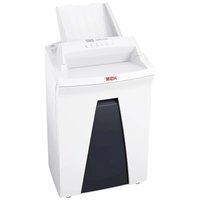
Securio AF 150 1.9 x 15mm - Shredder HSM - Free user manual and instructions
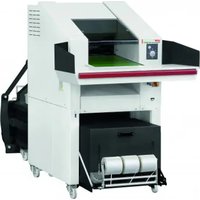
Find the device manual for free Securio AF 150 1.9 x 15mm HSM in PDF.


| Product Type | Document shredder |
| Cut Type | Cross-cut (particle cut) |
| Cut Width | 1.9 x 15 mm |
| Security Level (DIN 66399) | P-5 / T-5 / E-4 / F-2 |
| Sheet Capacity (80 g/m²) | 8 to 9 sheets per pass |
| Auto Feed Capacity (80 g/m²) | Up to 150 sheets |
| Bin Volume | 34 litres |
| Feed Width | 240 mm |
| Dimensions (W x D x H) | 395 x 381 x 740 mm |
| Weight | 19.4 kg |
| Power Supply | 230 V, 50 Hz |
| Power Consumption | 500 W |
| Shred Speed | 65 mm/s |
| Operating Mode | Continuous operation (2 min before standby) |
| Credit card shredding | Yes (one at a time) |
| CD/DVD shredding | No (only for width 4.5 x 30 mm) |
| Anti-jam | Automatic reverse function in case of jam |
| Safety | Safety device preventing opening during operation |
| Maintenance | Regular oiling of cutters with HSM special oil |
| Warranty | 3 years, with HSM lifetime warranty on cutting drums |
| Included accessories | Special oil 50 ml, 5 shredder bags, power cord, manual |
Frequently Asked Questions - Securio AF 150 1.9 x 15mm HSM
User questions about Securio AF 150 1.9 x 15mm HSM
0 question about this device. Answer the ones you know or ask your own.
Ask a new question about this device
Download the instructions for your Shredder in PDF format for free! Find your manual Securio AF 150 1.9 x 15mm - HSM and take your electronic device back in hand. On this page are published all the documents necessary for the use of your device. Securio AF 150 1.9 x 15mm by HSM.
USER MANUAL Securio AF 150 1.9 x 15mm HSM
natural_image
Exterior view of a white HSM printer with black cover and control panel (no visible text or symbols on body)BETRIEBSANLEITUNG
OPERATING INSTRUCTIONS
NOTICE D'UTILISATION
MANUALE OPERATIVO
INSTRUCCIONES DE SERVICIO
natural_image
Close-up of a mechanical component with a black arrow pointing to a specific part (no visible text or symbols)natural_image
Close-up of a mechanical component with a white arrow pointing to a small component (no visible text or symbols)natural_image
Close-up of a printer with paper feed and paper roll, showing paper and cable colors (no text or symbols visible)natural_image
Close-up of a white paper printer with a black arrow pointing to its cover (no visible text or symbols)natural_image
Close-up of a plastic bag with a tray holding shredded paper, no visible text or symbolsHinweis:
1 Explanation of symbols and safety instructions
Safety and warning signs indicate situations in which personal injuries or property damage may occur and provide measures to prevent this danger.
The safety alert sign with the signal word WARNING and text on a grey background warns of the risk of serious to life-threatening injuries.
NOTICE
alerts you to potential property damage.
Note
indicates information for the effective operation of the machine without risk of danger.
Safety instructions

Before using the machine for the first time, read the operating manual, and keep it for later use and to pass on to any subsequent users.
Observe all safety instructions onto the machine.

Risk of injury from sharp blades.
Never reach into the slot of the paper feed.

Risk of injury from being pulled in!

Keep long hair, loose articles of clothing, ties, scarves, jewellery, etc. away from feed opening. Material with the tendency to form loops, e.g. tapes, strapping material, etc. must not be shredded.
Dangerous for children and others!

The machine may not be used by persons (including children under 14 years of age) with limited physical, sensory or mental capabilities or with a lack of
experience and knowledge, unless they are supervised by a responsible person or are instructed by them on the use of the machine. Children must be supervised to ensure they do not play with the machine. Do not leave the document shredder switched on when it is unattended.
Electrical hazard
Dangerous mains voltage!
Improper handling of the machine can lead to an electric shock.
- Check the machine and cable regularly for damage.

Switch the shredder off if it is damaged or not working correctly or before relocating or cleaning it and disconnect it from the mains.
- Make sure that no water gets into the shredder. Do not immerse the power cable or the power plug in water. Never touch the power plug with wet hands.
- Never pull the plug out of the socket using the power cable. Always pull out the plug directly.
2 Proper use, warranty
Remove the shredded material container and check the name plate on the cutting head (see point 4 Machine components) to find out which cutting width and mains voltage your document shredder is designed for. Refer to the relevant point in the operating manual.
The shredder is designed for destroying paper. Depending on the cutting type, it can also handle small quantities of the following materials:
| Shred width (mm) 4.5 x 30 1.9 x 15 | ||
| Credit and charge cards ● | ● | |
| CDs ● | ||
Do not feed this material via the automatic feed tray.
Its sturdy drive mechanism is not damaged by paper clips and staples. The paper may not contain any paper clips only when the automatic feeder is used.
The warranty period for the document shredder is 3 years. There is a special warranty for the HSM solid steel cutting rollers in the document shredder, which is provided independently of the guarantee, and remains valid for the entire service life of the machine (HSM Lifetime Warranty). This does not apply to document shredders with cutting widths of 0.78 x 11 mm. This warranty and guarantee exclude wear and damage caused by improper handling or actions taken by third parties. The intake rollers in the paper cassette are wear parts.
HSM guarantees the delivery of spare parts for up to 10 years after the production of this model has been discontinued.
3 Machine components
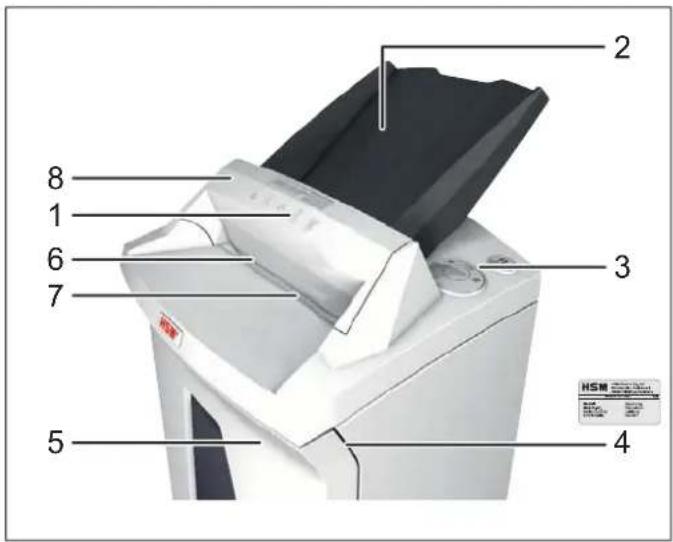
1 Safety instructions
2 Automatic feed tray
3 Operating and display unit
4 Name plate
5 Shredded material container
6 Feed opening
7 Light barrier
8 Safety element
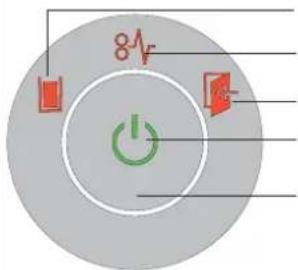
Operating and display elements
Reverse button
Display options:
Container full
Cutting unit blocked
Container or safety element open
Ready for operation
Operation button
4 Initial start-up

WARNING
Dangerous mains voltage!
Improper handling of the machine can lead to an electric shock.
- Only use the machine in a dry room indoors. Never operate the machine in damp rooms or in the rain.
- Keep the machine, the plug and cable away from open fire and hot surfaces. The ventilation slots must not be blocked or covered and there must be at least 5 cm space between the shredder and any wall or furniture.
- Make sure that the power plug is easily accessible.
- Before you insert the power plug, make sure that the voltage and frequency of your power supply comply with the information on the name plate.
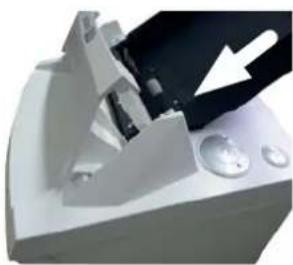
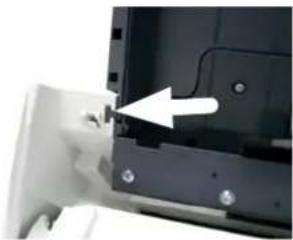
Installing the automatic feed tray:
- Fold down the safety element towards you.
- The tray is packed in a separate box.
natural_image
Close-up of a mechanical component with a white arrow pointing to a black component (no visible text or symbols)Place the tray in the guide and press down until it clicks into place.
natural_image
Close-up of a mechanical component with an arrow pointing to a small component (no visible text or symbols)Tofi x the tray, push out the catches on the left and right of the tray.
- Fold back the safety element again.
- Connect the power cable provided to the back of the document shredder and plug the power supply into a properly installed socket.
5 Operation
Switching on the shredder
- Set mains switch at rear of paper shredder to "I".
- Press the operation button.
The "Ready for operation" indicator lights up.
Shredding paper
You can shred paper by feeding it directly into the opening or you can use the automatic intake. Papers or CDs can be fed manually during autofeed stack processing.
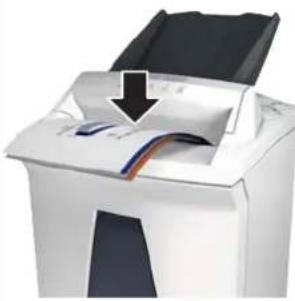
1. Feed the paper directly into the feed opening
natural_image
Close-up of a white printer with a paper airplane being inserted, showing paper roll and color stripe (no text or symbols visible)When you feed paper, the light barrier automatically starts the cutting unit.
Two seconds after the light barrier in the paper feed opening is free again, the cutting
unit is switched off automatically and the shredder switches to standby.
2. Feed the paper using the automatic feed tray
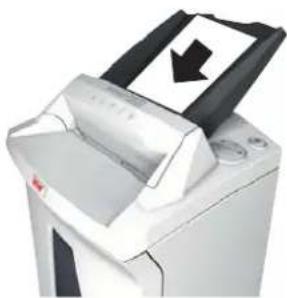
The document shredder is equipped with an automatic feeder which can hold up to 150 sheets of paper. After starting the cutting unit by switching on the permanent mode or by feeding individual sheets into the infeed slot, the sheets from the automatic feed tray are drawn in one by one. Once the shredding is finished, the document shredder goes into standby mode again.

WARNING Risk of injury!

The intake rollers in the paper cassette keep running during the shredding process even if the lid is open. Do not go near the rollers with long hair, loose clothing, ties, scarves, necklaces, bracelets etc.
natural_image
Close-up of a printer with a paper feed and a black arrow indicating a download or write operation (no visible text or symbols)Place the stack of papers (max. 150 sheets, 80 g / m2 ) in the automatic feed tray.
NOTICE: The paper may not have any paper clips or staples attached.
- Start the shredding process. You have 2 options to do this:
a) Press the operating button for 4 seconds.
This selects the permanent mode.
The cutting unit and automatic feed drive start. The paper is fed into the cutting unit. 2 minutes after shredding all the sheets from the automatic feed tray, the drive switches off and the document shredder goes into standby mode.
Premature cancellation: Press the operating button.
b) Feed one sheet of paper directly into the infeed slot.
The cutting unit and automatic feed drive start. The paper is fed into the cutting unit. 2 minutes after shredding all the sheets from the automatic feed tray, the drive switches off and the document shredder goes into standby mode.
Shredding CDs and credit cards
CDs in cutting size 4.5 x 30 mm only, credit cards in cutting sizes 4.5 x 30 mm and 1.9 x 15 mm only

WARNING
Danger of injury by splinters!

Depending on the type of material, splinters can fly out of the cutting unit while shredding CDs and injure your eyes.
- For this reason, wear protective goggles.
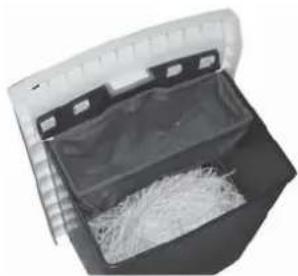
- Feed in just one CD/DVD or card in the middle of the feed opening. Do not feed in these materials via the automatic feed tray.
natural_image
Close-up of a plastic bag with a tray holding shredded paper, no visible text or symbolsNote:
To completely separate the materials shredded, you can insert the CD bag supplied for machines with cutting sizes 4.5 x 30 mm.
Please consider the environment and dispose of different materials separately.
Switching off the shredder
- Press the operation button.
The "Ready for operation" indicator goes out. - Set mains switch at rear of paper shredder to „0“.
Other function modes
- Permanent mode
Application: Destroying large quantities of paper
Function: Cutting unit runs continuously. If no material is fed in within a period of 2 minutes, the cutting unit shuts down and the shredder switches to standby.
Start: Press the on/off button for at least 4 seconds.
To cancel: Press the on/off button.
- Standby mode
Function: Two minutes after the last paper feed operation, all consumers that are not required are switched off automatically.
The "Ready for operation" indicator goes out briefly at regular intervals.
The shredder starts automatically when paper is fed in.
6 Troubleshooting
| Display Problem Measure | ||
| - Motor runscontinually without taking paper from the stack | Paper jam in the autofeed stackThis is usually caused by paper clips or staples in the paper stack.Remove the paper clips or staples from the paper, and load the stack again. | |
 Continuous lamp Continuous lamp | Paper jam You | have fed in too much paper.➢ The cutting unit runs in reverse for a few seconds and pushes the paper back out again.If necessary, press the reverse button “R” to remove the stack of paper.Take half the stack of paper.Feed the paper in portions. |
| Motor is not running | ➢ There has been a paper jam in the autofeed magazine for more than 2 minutes. See troubleshooting above.➢ If the motor runs continually - for example, because the light barrier in the infeed slot is permanently broken by paper articles or dust - then it switches off after 60 minutes. | |
| Overload • The motor was overloaded. Let the shredder cool down for approx.15 – 20 mins. before using it again. | ||
| Flashing light | General fault displays | A fault has occurred while shedding paper.Pull the paper out of the slot to clear the light barrier. |
| [3H2H] | Shredded material container full | Empty the shredded material container.NoteIf you press the reverse button briefly before removing the container, part of the material is pulled back into the cutting apparatus and does not fall inside the document shredder. |
| [205K] | Container or safety element open | Insert the shredded material container correctly in the base cabinet.Fold back the safety element. |
7 Cleaning and maintenance 8 Disposal / Recycling

WARNING
Dangerous mains voltage!
Improper handling of the machine can lead to an electric shock.

Switch the shredder off before relocating or cleaning it and disconnect the mains plug.
Service work which requires the housing covers to be removed may only be carried out by HSM Customer Service and service technicians of our contractual partners. See page 204 for our customer service addresses.
Clean the document shredder only with a soft cloth and a mild soap-water solution. However, no water must enter the equipment.

Oil the cutting unit when cutting performance decreases or the device becomes noisy, or every time you empty the waste container. Only use HSM special lubricating oil for the cutting unit to do this:
- Spray the special cutting unit oil through the paper feed along the entire width of the cutting shafts.
- Let the cutting unit run in the permanent mode for about 10 seconds without any paper.
▶ Paper dust and particles are shaken off.
If the paper from the automatic feed tray no longer feeds into the cutting unit properly, the intake rollers are worn and need replacing. We can provide a replacement kit for you to do this. Please get in touch with our customer services.
Electrical and electronic old devices contain a variety of valuable materials, but also hazardous substances which were required for function and safety. Incorrect disposal or handling can be dangerous to your health and the environment. Never dispose of old devices in the household waste. Observe the current applicable regulations and use the collection points for returning and recycling electric and electronic devices. Dispose of all the packaging materials also in an environmentally-responsible way.
9 Scope of delivery
• Paper shredder in carton packing
- Power supply cable
- 5 Bags for shredded material
- 1 CD bag for machines with cutting widths of 4.5 x 30 mm
• Special cutting block oil 50 ml
- Operating instructions
Acces so ries
• 10 waste bags, order no. 1.661.995.150
• Special cutting block oil 250 ml order No.: 1.235.997.403
See page 204 for our customer service addresses.
10 Technical data
| Cutting type Cross cut | |||
| Cut size (mm) 4.5 x 30 1.9 x 15 0.78 x 11 | |||
| Security level DIN 66399 P-4 / O-3 / T-4 / E-3 | F-1 | P-5 / T-5 / E-4 / F-2 P-6 / F-3 | |
| Cutting capacity* (sheets), A4 70 g/m2 | 10 - 12 | 8 - 9 | 6 |
| 80 g/m2 | 6 - 7 | 5 | |
| Weight | 19.6 kg | 19.4 kg | |
| Cutting speed | 65 mm/s | ||
| Intake width | 240 mm | ||
| Power supply | 230 V, 50 Hz | 110 V - 120 V, 60 Hz | 220 V, 60 Hz |
| Power consumption with max. number of sheets | 500 W | ||
| Energy consumption in standby mode | < 2 Wh | ||
| Operating mode | Continuous operation | ||
| Ambient conditions in operation: | |||
| Temperature | -10°C to +25°C | ||
| Relative humidity | max. 90%, without condensation | ||
| Height above sea-level (MSL) | max. 2,000 m | ||
| Size W x D x H (mm) | 395 x 381 x 740 | ||
| Shredded material container volume | 34 l | ||
* The maximum number of sheets (DIN A4, 70 g/m² or 80 g/m²), fed lengthways, which can be cut in one cycle. The performance data is determined when the motor is cold and the cutting device is freshly oiled. A weaker mains voltage or a different mains frequency to the one specified could result in less sheet capacity and increased noise during operation. The sheet capacity can vary depending on the structure and properties of the paper and on the way it enters.

This document shredder meets the applicable harmonisation legislation of the European Union:
• Low Voltage directi ve 2006/95/EU
• EMC directi ve 2004/108/EU
• RoHS directi ve 2011/65/EU
The EU declaration of conformity can be requested from the manufacturer.
natural_image
Close-up of a mechanical device with a black lever and metallic components (no visible text or symbols)natural_image
Close-up of a mechanical component with a white arrow pointing to a small component (no visible text or symbols)natural_image
Close-up of a white printer with a paper airplane and a black arrow pointing to the paper's edge (no visible text or symbols)natural_image
Close-up of a white paper printer with a black arrow indicating a download or file (no visible text or symbols)natural_image
Interior view of a plastic bag with a tray holding shredded paper (no text or symbols visible)Remarque :
- Directi ve CEM 2004/108/CE
- Directi ve LdSD 2011/65/UE
natural_image
Close-up of a mechanical component with a white arrow pointing to a black part, no visible text or symbols.natural_image
Close-up of a mechanical component with a white arrow pointing to a small component (no visible text or symbols)natural_image
Close-up of a white printer with a paper airplane being inserted, showing paper and cable (no text or symbols visible)natural_image
Close-up of a printer with a paper feed and a black arrow indicating a download or write operation (no text or symbols visible)natural_image
Open plastic bag with a mesh inside, no visible text or symbolsNota:
natural_image
Close-up of a mechanical component with a white base and black handle, showing a curved structure and a white arrow pointing to a feature (no text or symbols visible)natural_image
Close-up of a mechanical component with a white arrow pointing to a small component (no visible text or symbols)natural_image
Close-up of a white printer with a paper airplane being inserted, showing internal cable routing (no text or symbols visible)natural_image
Close-up of a white paper printer with a black arrow indicating a download or file (no visible text or symbols)natural_image
Close-up of a plastic bag with a mesh inside, showing internal structure (no text or symbols visible)Nota:
natural_image
Close-up of a mechanical component with a white arrow pointing to a black component (no visible text or symbols)natural_image
Close-up of a mechanical component with a white arrow pointing to a small feature (no visible text or symbols)natural_image
Close-up of a printer with paper feed and paper strip being inserted (no visible text or symbols)natural_image
Close-up of a white paper printer with a black arrow indicating a paper cut or download (no visible text or symbols)natural_image
Close-up of a plastic bag with a tray holding shredded paper, no visible text or symbolsObservação:
natural_image
Close-up of a mechanical device with a black lever and white base, showing no visible text or symbols.natural_image
Close-up of a mechanical component with a white arrow pointing to a small feature (no visible text or symbols)natural_image
Close-up of a white printer with a black arrow pointing to its paper edge (no text or symbols visible)natural_image
Close-up of a white paper printer with a black arrow indicating a download or export action (no text or symbols visible)Leg de papierstapel (max. 150 vellen, 80 g/m 2 ) in de autofeed-bak.
natural_image
Interior view of a cleaning or cleaning device with a bag filled with shredded material (no visible text or symbols)Aanwijzing:
natural_image
Close-up of a mechanical component with a white arrow pointing to a black component (no visible text or symbols)natural_image
Close-up of a mechanical component with a white arrow pointing to a small feature (no visible text or symbols)natural_image
Close-up of a white printer with a paper airplane being inserted, showing the blade and cover (no text or symbols visible)natural_image
Close-up of a printer with a paper feed and a black arrow indicating a download or export (no visible text or symbols)Læg papirstablen (maks. 150 ark, 80 g/m²) i autofeed-bakken.
natural_image
Interior view of a cleaning or cleaning device with a bag filled with white paper strips (no visible text or symbols)Bemærk:
natural_image
Close-up of a mechanical component with a black arrow pointing to a feature, no visible text or symbolsnatural_image
Close-up of a mechanical component with a white arrow pointing to a small component (no visible text or symbols)natural_image
Close-up of a white printer with a paper airplane and cable spool, showing no visible text or symbols.natural_image
Close-up of a white paper printer with a black arrow indicating a download or file (no visible text or symbols)natural_image
Interior view of a plastic bag with a tray holding shredded material (no text or symbols visible)Märk:
Käyttöpainikkeet
4 Käyttöönotto

VAROITUS
natural_image
Close-up of a mechanical component with a white arrow pointing to a black component (no visible text or symbols)natural_image
Close-up of a mechanical component with a white arrow pointing to a small feature (no visible text or symbols)natural_image
Close-up of a printer with a paper airplane and a black arrow pointing to the paper (no visible text or symbols)natural_image
Close-up of a printer with a paper feed and a black arrow indicating compression (no text or symbols visible)natural_image
Close-up of a plastic bag with a tray holding shredded paper, no visible text or symbolsVihje:
natural_image
Close-up of a mechanical component with a black handle and white base, showing no visible text or symbols.natural_image
Close-up of a mechanical component with a white arrow pointing to a small component (no visible text or symbols)natural_image
Close-up of a white printer with a paper airplane and cable spool, showing no visible text or symbols.natural_image
Close-up of a white paper printer with a black arrow indicating a download or write operation (no text or symbols visible)Legg papirstabelen (maks. 150 ark, 80 g/m²) inn i den automatiske matehyllen.
natural_image
Interior view of a cleaning or cleaning device with a plastic bag filled with shredded material (no visible text or symbols)Merk:
natural_image
Close-up of a mechanical device with a black arrow pointing to a component (no visible text or symbols)natural_image
Close-up of a mechanical component with a white arrow pointing to a small component (no visible text or symbols)natural_image
Close-up of a white printer with a paper airplane being inserted, showing paper roll and cover (no text or symbols visible)natural_image
Close-up of a printer with a paper feed and a black arrow indicating a download or export (no visible text or symbols)natural_image
Interior view of a plastic bag with a tray holding shredded material (no text or symbols visible)Wskazówka:
natural_image
Close-up of a mechanical device with a black lever and white base, showing no visible text or symbols.natural_image
Close-up of a mechanical component with a white arrow pointing to a small feature (no visible text or symbols)natural_image
Close-up of a white printer with a paper airplane being inserted, showing color bands and a black arrow indicating the process (no text or symbols visible)natural_image
Close-up of a white paper printer with a black arrow indicating a download or file (no visible text or symbols)natural_image
Close-up of a plastic bag with a tray holding shredded paper, no visible text or symbolsPoznámka:
natural_image
Close-up of a mechanical component with a black arrow pointing to a feature (no visible text or symbols)natural_image
Close-up of a mechanical component with a white arrow pointing to a small component (no visible text or symbols)natural_image
White printer with paper feed and paper clip, showing paper roll and cover (no text or symbols visible)natural_image
Close-up of a printer with a paper feed and a black arrow indicating a download or export (no visible text or symbols)natural_image
Interior view of a plastic bag with a tray holding shredded material (no text or symbols visible)Poznámka:
natural_image
Close-up of a mechanical device with a black lever and white arrow pointing to a component (no visible text or symbols)natural_image
Close-up of a mechanical component with a white arrow pointing to a small component (no visible text or symbols)natural_image
Close-up of a white printer with a paper airplane being inserted, showing color scheme and paper edge (no text or symbols visible)natural_image
Close-up of a white paper printer with a black arrow indicating a download or write operation (no text or symbols visible)Asetage paberivirn (max 150 lehte, 80 g/m²) automaatsöötealusele.
natural_image
Open plastic bag with attached paper filter material, no visible text or symbolsMärkus:
natural_image
Close-up of a mechanical component with a black arrow pointing to a feature (no visible text or symbols)natural_image
Close-up of a mechanical component with a white arrow pointing to a small component (no visible text or symbols)natural_image
Close-up of a white printer with a paper airplane and cable being inserted (no visible text or symbols)natural_image
Close-up of a printer with a paper feedlet and a black arrow indicating a download or export (no visible text or symbols)natural_image
Interior view of a plastic bag with a tray holding shredded material (no text or symbols visible)Указание:
natural_image
Close-up of a mechanical device with a black lever and white arrow pointing to a component (no visible text or symbols)natural_image
Close-up of a hand inserting a component into a device (no visible text or symbols)Da dovajalno površino fi ksirate, pritisnite zaskočna nastavka levo in desno od dovajalne površine navzven.
• Varnostni element ponovno obrnite nazaj.
natural_image
Close-up of a white printer with a paper airplane and cable spool, showing a black arrow pointing to the paper (no text or symbols visible)natural_image
Close-up of a white paper printer with a black arrow pointing to its paper (no text or symbols visible)Skladanico papirja (maks. 150 listov, 80 g/m²) položite na samodejno dovajalno površino (Autofeed).
OBVESTILO: Na papirju ne sme biti sponk.
- Zaženite postopek uničevanja. Za to imate 2 možnosti:
a) Upravljalno tipko pritisnite za 4 sekunde. S tem izberete permanentni način.
▶ Rezalna naprava in pogon Autofeed se zaženeta. Papir se dovaja rezalni napravi. 2 minuti po uničenju vseh listov s samodejne dovajalne površine (Autofeed) se pogon izklopi in uničevalec listin se vrne v stanje pripravljenosti za obratovanje. Predčasna prekinitev: Pritisnite upravljalno tipko.
natural_image
Open storage bag with plastic wrap and loose material inside (no visible text or symbols)Nasvet:
natural_image
Close-up of a mechanical component with a black arrow pointing to a feature (no visible text or symbols)natural_image
Close-up of a mechanical component with an arrow pointing to a small part (no visible text or symbols)natural_image
Close-up of a white printer with a paper airplane being inserted, showing the blade and paper (no text or symbols visible)natural_image
Close-up of a printer with a paper feed and a black arrow indicating a download or write operation (no text or symbols visible)natural_image
Interior view of a microwave oven with a tray holding shredded material (no text or symbols visible)Megjegyzés:
natural_image
Close-up of a mechanical component with a black handle and metallic parts, no visible text or symbolsnatural_image
Close-up of a mechanical component with a white arrow pointing to a small component (no visible text or symbols)natural_image
3D rendering of a printer with paper feed and paper strip, showing internal structure (no text or symbols)natural_image
Three black-and-white icons representing warning symbols: warning triangle, human profile with gears, and gear with a knife (no text or labels)AVERTIZARE
Pericol de accidentare!
natural_image
Close-up of a white paper printer with a black arrow indicating a download or write operation (no text or symbols visible)natural_image
Close-up of a plastic bag with a textured inner panel and side tabs (no visible text or symbols)Indicatie:
natural_image
Close-up of a mechanical component with a black arrow pointing to a feature (no visible text or symbols)natural_image
Close-up of a mechanical component with a white arrow pointing to a small component (no visible text or symbols)natural_image
Close-up of a printer's front panel showing paper feed and paper strip (no text or symbols visible)natural_image
Close-up of a printer with a paper feed and a black arrow indicating a download or write operation (no text or symbols visible)natural_image
Interior view of a plastic bag with visible contents and side panels (no text or symbols)Указание:
natural_image
Close-up of a mechanical device with a white arrow pointing to a black component (no visible text or symbols)natural_image
Close-up of a hand inserting a component into a device (no visible text or symbols)natural_image
Close-up of a white printer with a paper airplane and a black arrow pointing to the paper's edge (no visible text or symbols)natural_image
Close-up of a white paper printer with a black arrow indicating a download or write operation (no text or symbols visible)natural_image
Close-up of a plastic bag with a transparent lid and a partially open container filled with shredded paper (no text or symbols visible)Υποδειξη:
natural_image
Close-up of a mechanical component with a white arrow pointing to a black component (no visible text or symbols)natural_image
Close-up of a mechanical component with a white arrow pointing to a small feature (no visible text or symbols)natural_image
Close-up of a printer with a paper airplane and cable spool, showing no visible text or symbols.natural_image
Three black-and-white icons representing warning symbols: a warning triangle, a person with gears, and a tie with gears (no text or labels)natural_image
Close-up of a printer with a paper feed and a black arrow indicating a download or write operation (no text or symbols visible)natural_image
Open storage bag with plastic wrap and shredded material inside (no text or symbols visible)Not:
88699 Frickingen / Germany
Tel. +49 7554 2100-0
Fax +49 7554 2100 160
info@hsm.eu
www.hsm.eu
HSM (UK) Ltd.
14 Attwood Road / Zone 1
Burntwood Business Park
Burntwood · Staffordshire
WS7 3GJ
United Kingdom
Tel. +44 1543 272-480
Fax +44 1543 272-080
info@hsmuk.co.uk
www.hsm.eu
HSM France SAS
Parc de Genève
240, Rue Ferdinand Perrier
69800 Saint-Priest
France
Tél. +33 472 210580
Fax +33 472 517481
France@hsm.eu
www.hsm.eu
HSM of America LLC
419 Boot Road
Downingtown, PA 19335
USA
Tel. +1 484 237-2308
+1 800 613-2110
Fax +1 484 237-2309
customerservice@hsm.us
info@hsm.us
www.hsm.us


- Hinweis:
- Explanation of symbols and safety instructions
- NOTICE
- Note
- Safety instructions
- Dangerous for children and others!
- Electrical hazard
- Dangerous mains voltage!
- Proper use, warranty
- Machine components
- Operating and display elements
- Initial start-up
- WARNING
- Installing the automatic feed tray:
- Operation
- Switching on the shredder
- Shredding paper
- Feed the paper directly into the feed opening
- Feed the paper using the automatic feed tray
- WARNING Risk of injury!
- a) Press the operating button for 4 seconds.
- b) Feed one sheet of paper directly into the infeed slot.
- Shredding CDs and credit cards
- Danger of injury by splinters!
- Switching off the shredder
- Other function modes
- - Permanent mode
- - Standby mode
- Cleaning and maintenance 8 Disposal / Recycling
- Scope of delivery
- Acces so ries
- Remarque :
- Nota:
- Observação:
- Aanwijzing:
- Bemærk:
- Märk:
- Käyttöpainikkeet
- Käyttöönotto
- VAROITUS
- Vihje:
- Merk:
- Wskazówka:
- Poznámka:
- Märkus:
- Указание:
- Nasvet:
- Megjegyzés:
- AVERTIZARE
- Pericol de accidentare!
- Indicatie:
- Υποδειξη:
- Not:
- HSM (UK) Ltd.
- HSM France SAS
- HSM of America LLC
Brand : HSM
Model : Securio AF 150 1.9 x 15mm
Category : Shredder