
SB VC 2 - Industrial vacuum cleaner Kärcher - Free user manual and instructions
Find the device manual for free SB VC 2 Kärcher in PDF.
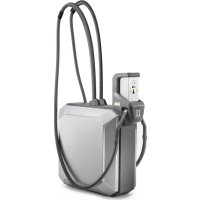



| Product type | Industrial dry vacuum cleaner |
| Brand | Kärcher |
| Model | SB VC 2 |
| Number of suction positions | 2 (SB VC 2) |
| Mains voltage | 220-230 V |
| Frequency | 50-60 Hz |
| Maximum power | 2 x 1380 W |
| Rated power | 2 x 1200 W |
| Max. air flow rate | 2 x 74 l/s |
| Max. vacuum | 25,4 kPa (254 mbar) |
| Sound pressure level | < 70 dB(A) |
| Filter type | Pleated flat filter (ref. 6.904-360.0) |
| Automatic filter cleaning | Yes, by air pulse after start |
| Intended use | Suction of dry impurities in the interior of motor vehicles |
| Commissioning | Reserved for trained specialist personnel |
| Routine maintenance | Empty the dirt collector 1-2 times per week; replace the filter once a year or depending on soiling |
| Safety | Danger: turn off the main switch before any intervention; observe safety instructions No. 5.956-249.0 |
| Spare parts | Pleated flat filter ref. 6.904-360.0, available at www.kaercher.com |
| Warranty | According to local distributor conditions; free repair of material or manufacturing defects |
| Weight | Not specified in the manual |
Frequently Asked Questions - SB VC 2 Kärcher
User questions about SB VC 2 Kärcher
0 question about this device. Answer the ones you know or ask your own.
Ask a new question about this device
Download the instructions for your Industrial vacuum cleaner in PDF format for free! Find your manual SB VC 2 - Kärcher and take your electronic device back in hand. On this page are published all the documents necessary for the use of your device. SB VC 2 by Kärcher.
USER MANUAL SB VC 2 Kärcher
Chairman of the Board of Management
S. Reiser Director Regulatory Affairs & Certification
71364 Winnenden (Germany)
Tel.: +49 7195 14-0
Fax: +49 7195 14-2212
Winnenden, 2017/04/01

Please read and comply with these original instructions prior to the initial operation of your appliance and store them for later use or subsequent owners.
to the initial operation of your appliance and store them for later use or subsequent owners.
- Before first start-up it is definitely necessary to read the safety indications Nr. 5.956-249.0!
- The non-compliance of the operating and safety instructions may lead to damages of the appliance and to dangers for the operator and other persons.
- In case of transport damage, inform the vendor immediately.
Environmental protection . . . EN 1
Danger or hazard levels . . . . EN 1
Proper use EN 1
Proper use EN 1
Overview of the appliance. . . . EN 2
Device elements EN 3
Start up EN 3
Operation EN6
Care and maintenance . EN 7
Menu structure EN 10
Troubleshooting EN 14
Warranty EN 16
Accessories and Spare Parts. EN 16
Technical specifications EN 16
EU Declaration of Conformity. EN 16
Environmental protection

The packaging material can be recycled. Please do not throw the packaging material into household waste; please send it for recycling.
Old appliances contain valuable materials that can be recycled; these should be sent for recycling. Batteries, oil, and similar substances must not enter the environment. Please dispose of your old appliances using appropriate collection systems.
Notes about the ingredients (REACH)
You will find current information about the ingredients at:
www.kaercher.com/REACH
Danger or hazard levels
DANGER
Immediate danger that can cause severe injury or even death.
WARNING
Possible hazardous situation that could lead to severe injury or even death.
CAUTION
Pointer to a possibly dangerous situation, which can lead to minor injuries.
ATTENTION
Pointer to a possibly dangerous situation, which can lead to property damage.
Proper use
Note: In the event of non-compliance with the conditions outlined in this Operating Instructions manual, Kärcher cannot assume any liability for damages to the machine or the customer vehicles to be cleaned as well as for any other damages.
- The machine is meant for sucking out dry dirt from automobile interiors.
- Sucking in inflammable substances, health-hazardous dusts and liquids indicates improper use of the machine and is therefore prohibited.
- This appliance is suitable for industrial use. -A single-station (SB VC 1) or two-station (SB VC 2) variant is available.
Overview of the appliance
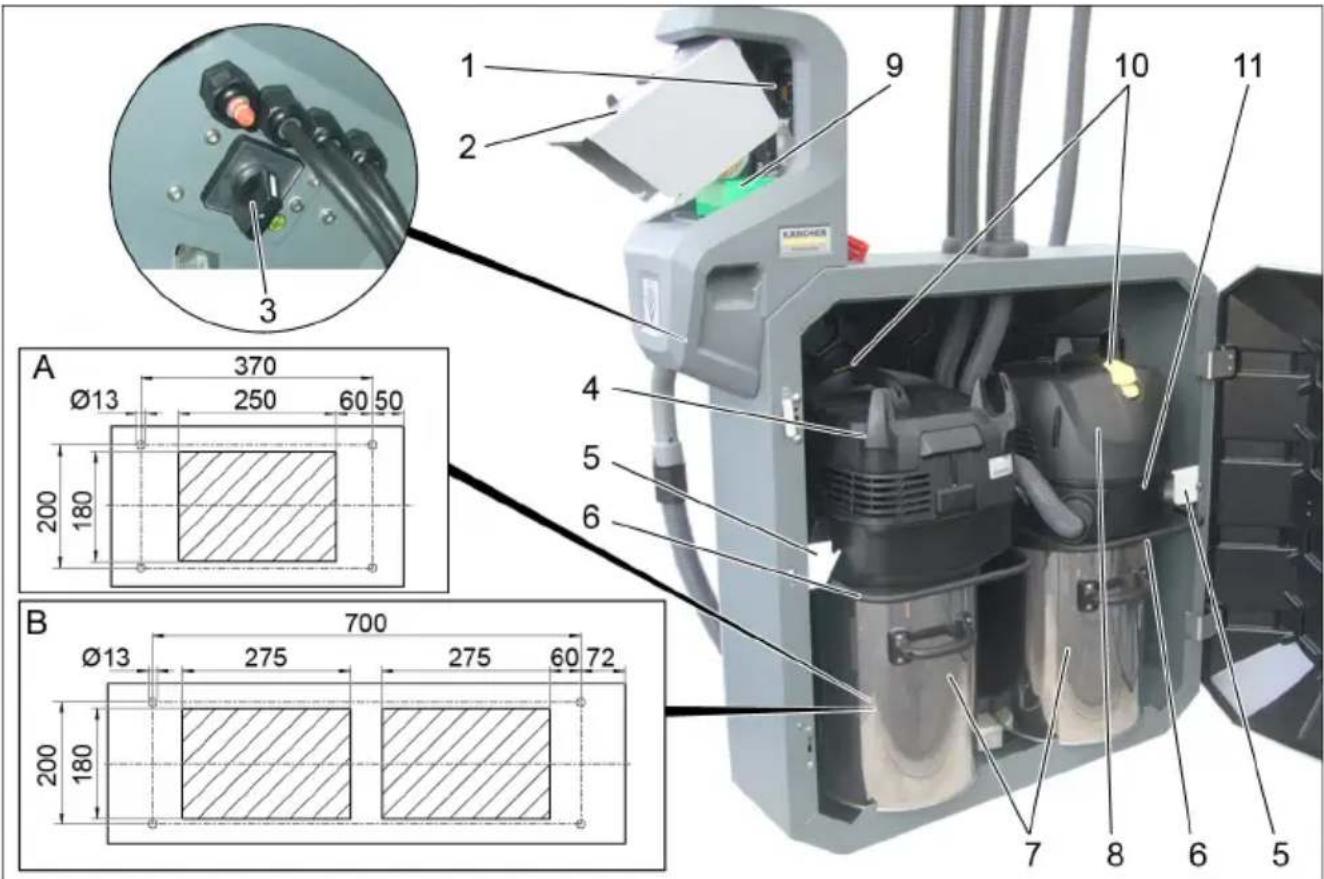
Variant shown SB VC 2:
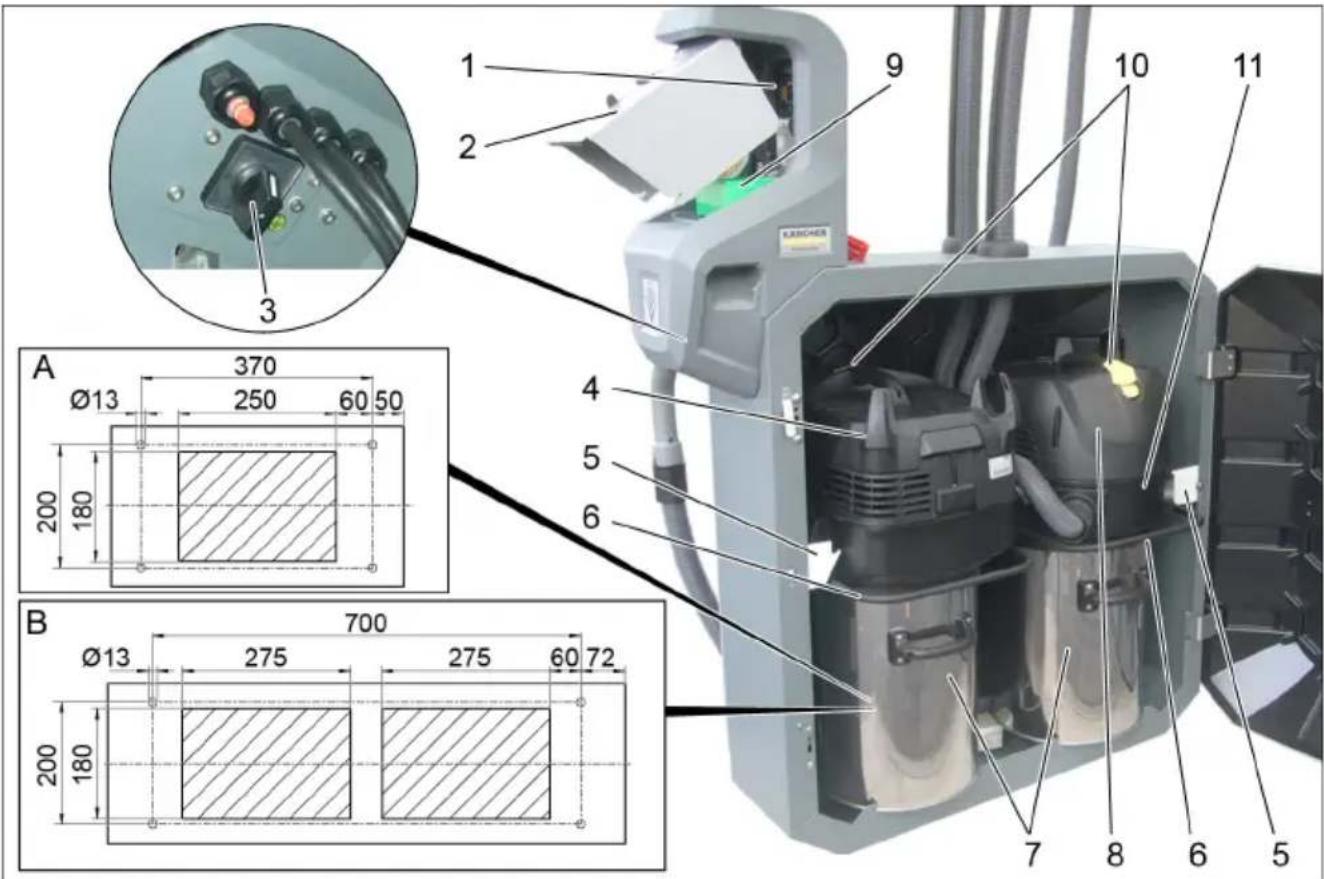
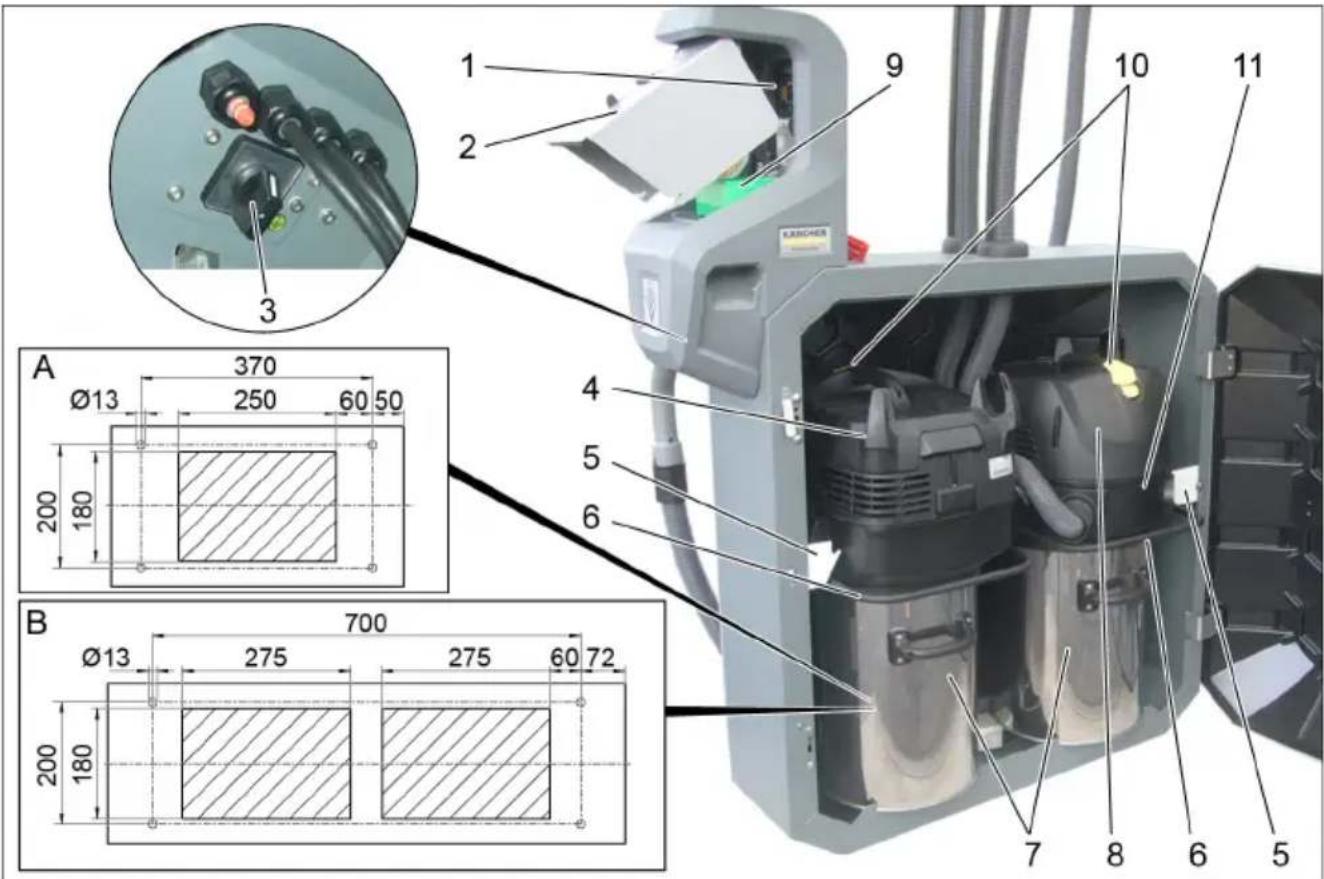
1 Control 2 Throwing in the coin 3 Main switch 4 Suction head 1 5 Bracket 6 Bow 7 Dirt receptacle 8 Suction head 2
9 Coin acceptor
10 Automatic filter dedusting switch
11 Intermediate ring
A Cable pass-through
SBVC1
B Cable pass-through
SBVC2
ntrol
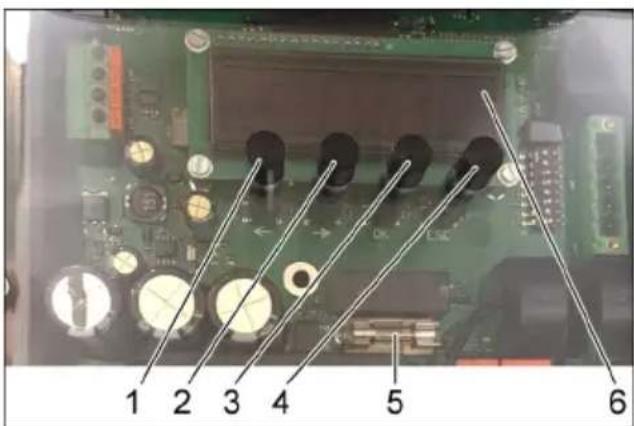
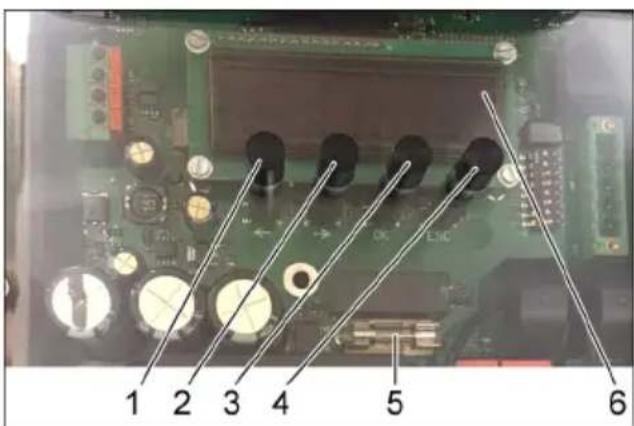
1 LEFT key 2 RIGHT key 3 "OK" button 4"ESC" button 5 Fuse 6 Display
Press the "OK" button for 2 seconds to access the unit control menu. The "Info" menu appears.
Device elements
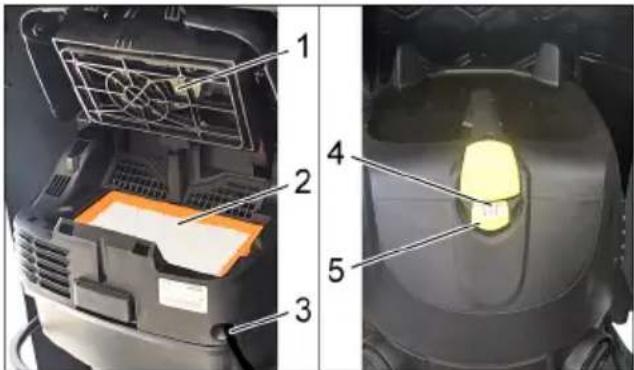
1 Filter deducting 2 Flat fold filter 3 Power cord 4 Indicator lamp 5 Automatic filter deducting switch
Start up
ATTENTION
The device may only be operated by trained specialist personnel.
The flat pleated filter must always be in place while vacuuming.
Note
The suction hose is in the dirt receptacle.
Suction hose installation
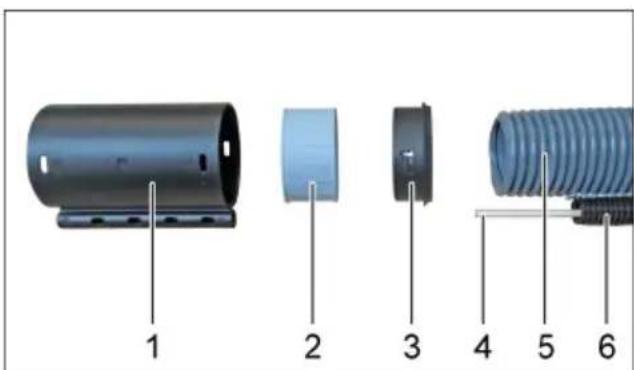
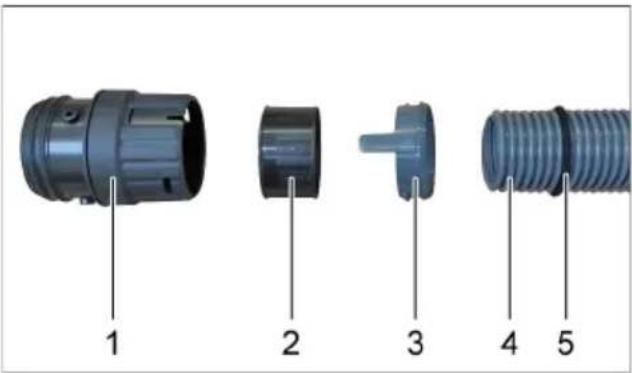
1 Hose coupling 2 Threaded bush 3 Clamp ring 4 Fibreglass rod 5 Double casing suction hose 6 Guide hose
Mount the clamp ring, threaded bush and hose coupling on the double casing suction hose. Insert the fiberglass rod in the guide hose and thread through the hose coupling.
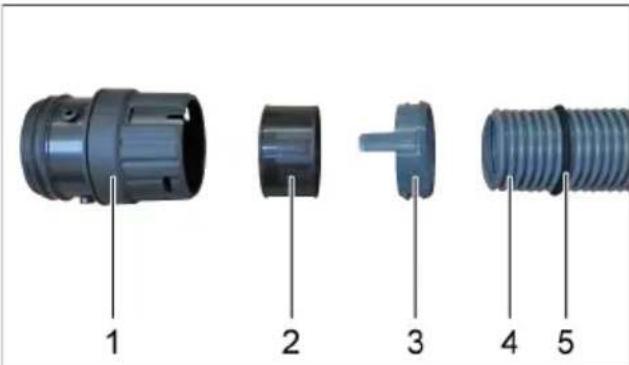
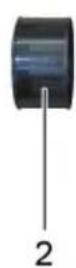
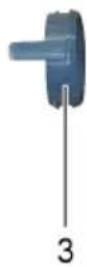
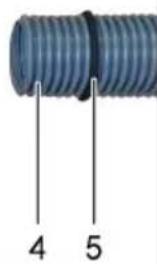
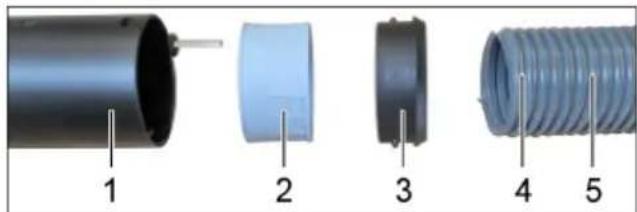
1 Suction connection 2 Washer ring 3 Snap ring 4 Double casing suction hose 5 Sponge rubber seal
Push the sponge rubber seal over the double casing suction hose to just before the dual channel. Guide the double casing suction hose through the suction hose intake. Mount the snap ring, washer ring and suction connection on the double casing suction hose. Connect the suction connection to the intermediate ring. Before closing the door, the suction hose must be pushed in between both suction vacuum cleaners in order to be able to shut the door.
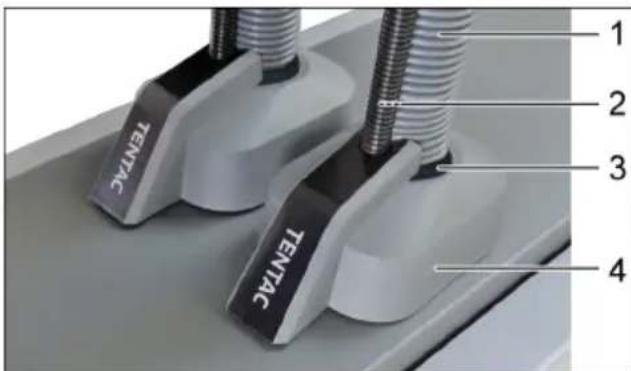
1 Double casing suction hose 2 Fiberglass rod 3 Sponge rubber seal 4 Suction hose intake
Insert the fibreglass rod, double casing suction hose and sponge rubber seal into the suction hose intake.
Note
The sponge rubber seal must be inserted flush in the suction hose intake.
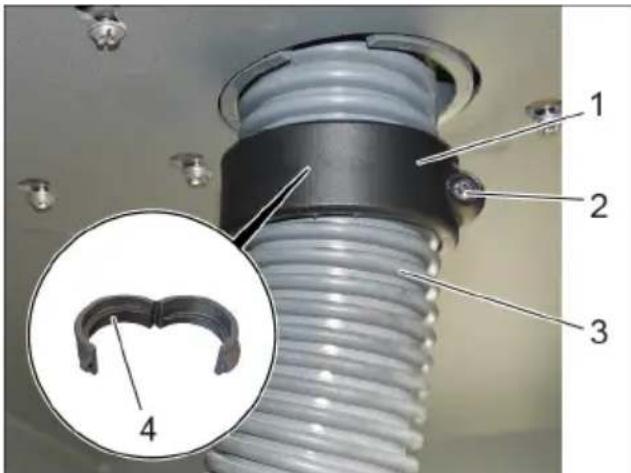
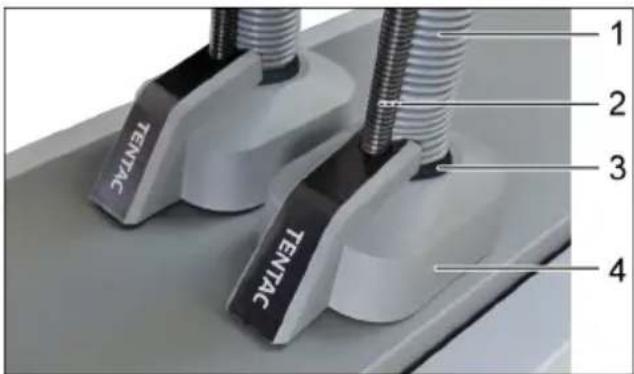
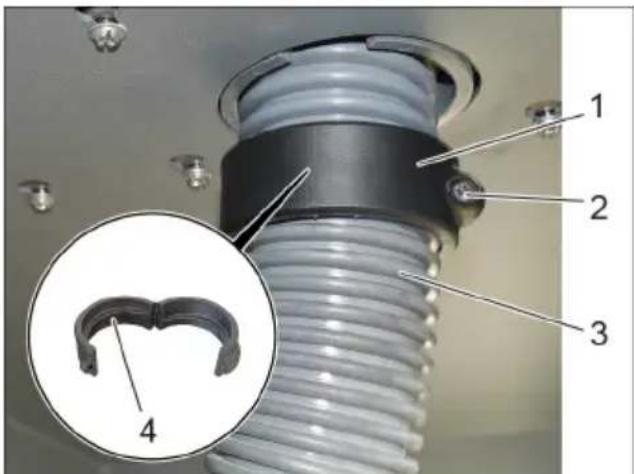
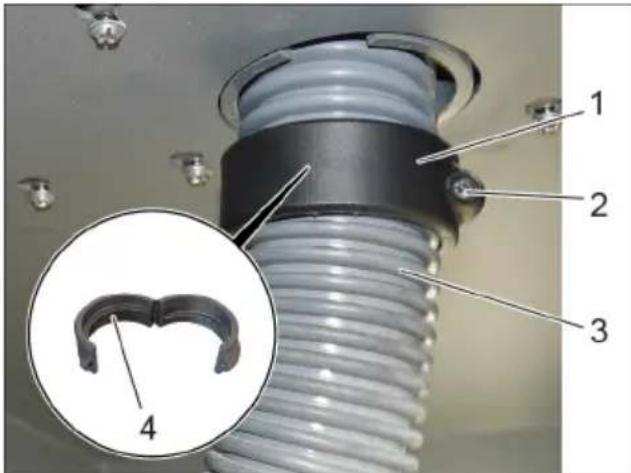
1 Rotating ring 2 Screw 3 Double casing suction hose 4 Thread in rotary ring
Fit the opened rotary ring around the double casing suction hose. Close the rotary ring and secure with the screw.
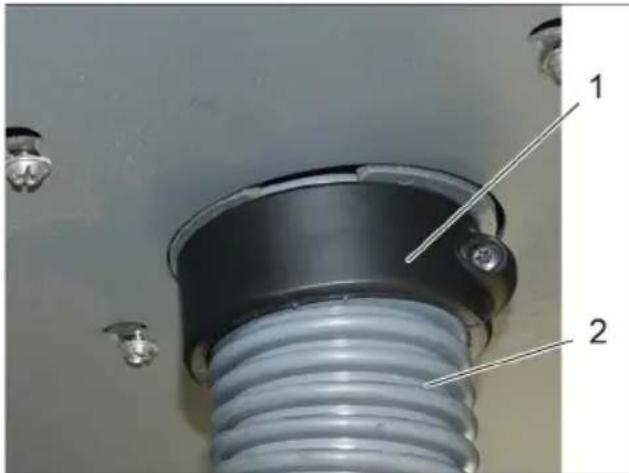
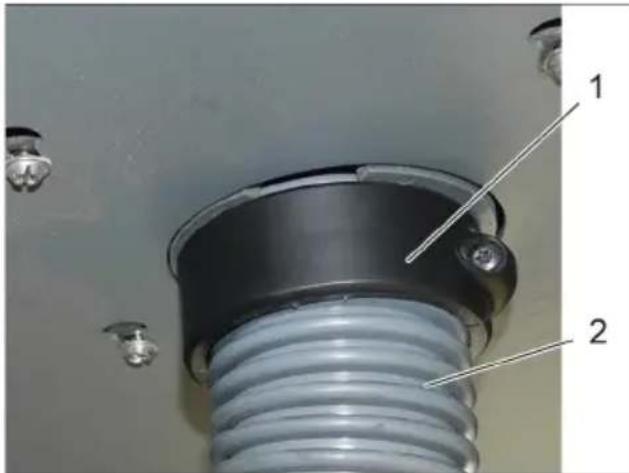
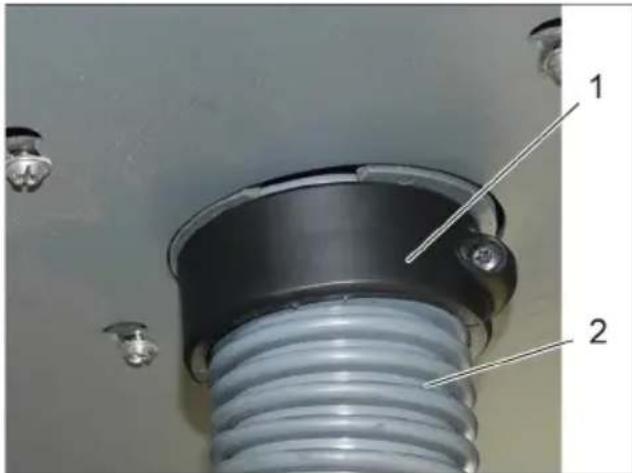
1 Rotating ring 2 Double casing suction hose
Pull the double casing suction hose downwards slightly. Manually turn the rotary ring upwards so that the double casing suction hose is tensioned between the interior and exterior.
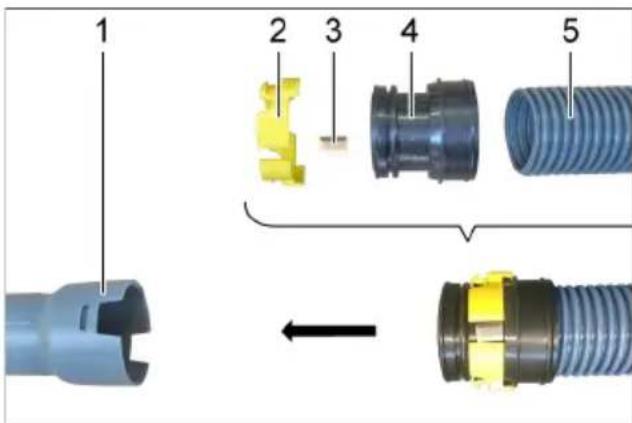
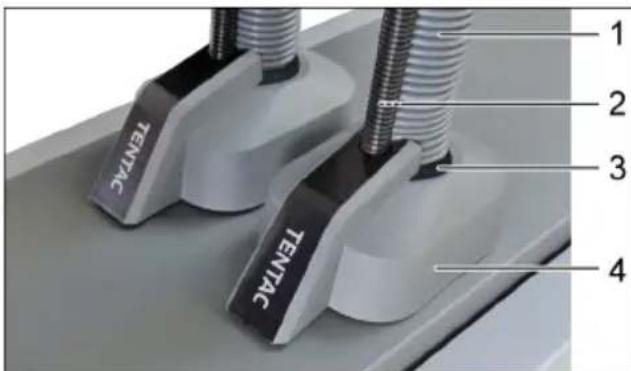
1 Car vacuuming tool 2 Threaded ring 3 Automatic nozzle anti-theft device 4 Tensioning ring 5 Operator suction hose. Adjust the length of the operator suction hose. Mount the tensioning ring, threaded ring and automatic nozzle anti-theft device on the operator suction hose and attach to the automatic nozzle.
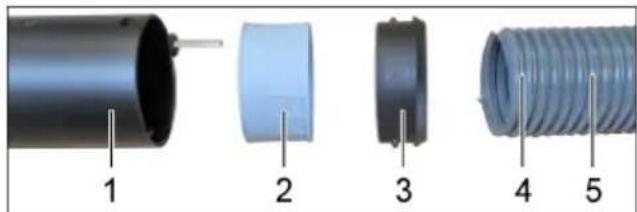
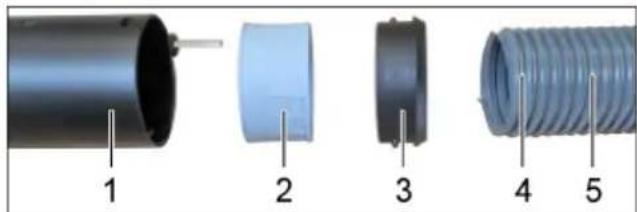
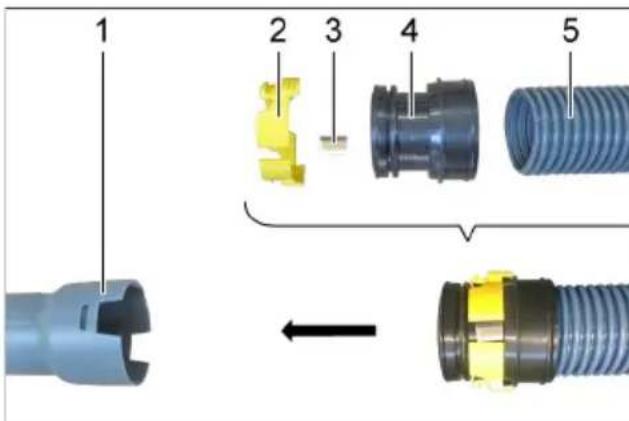
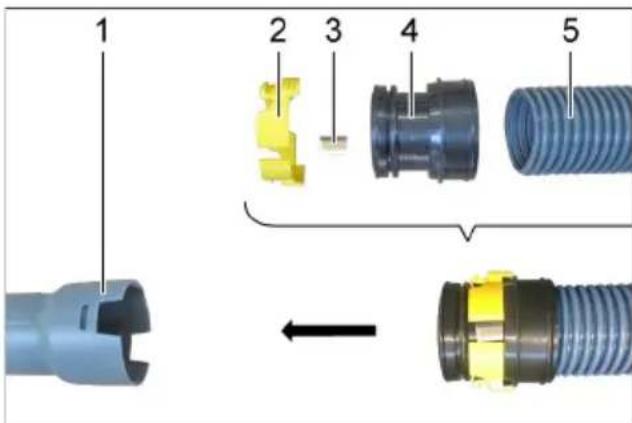
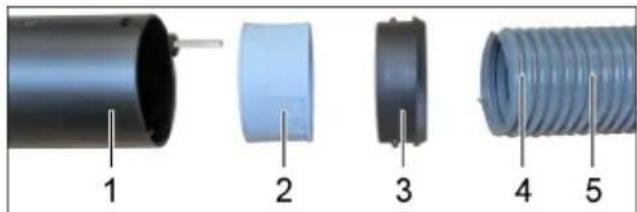
1 Hose coupling 2 Threaded bush 3 Clamp ring 4 Spring kink protection 5 Operator suction hose
Mount the clamp ring, threaded bush on the operator suction hose and insert into the hose coupling.
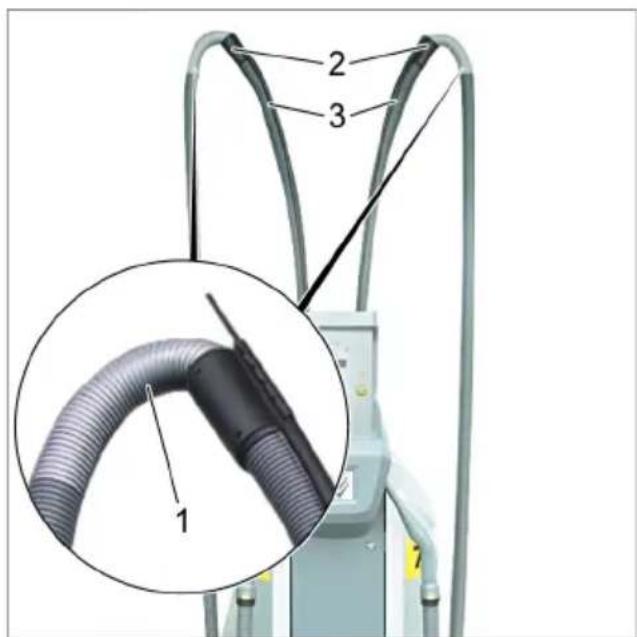
Overall view
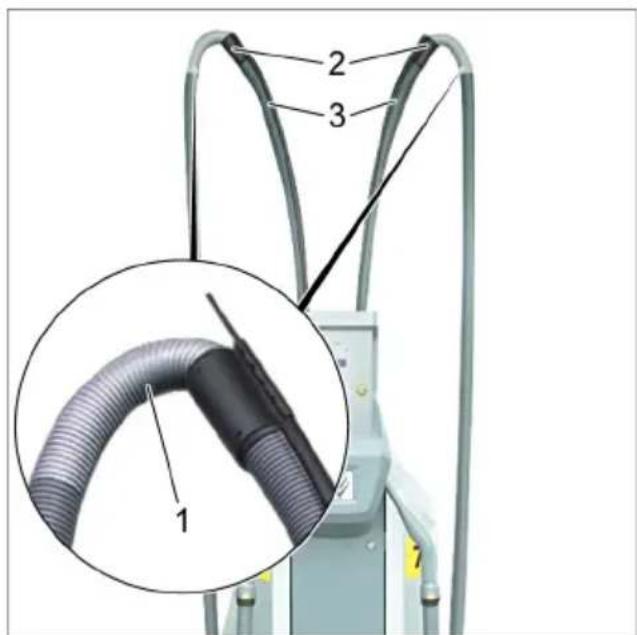
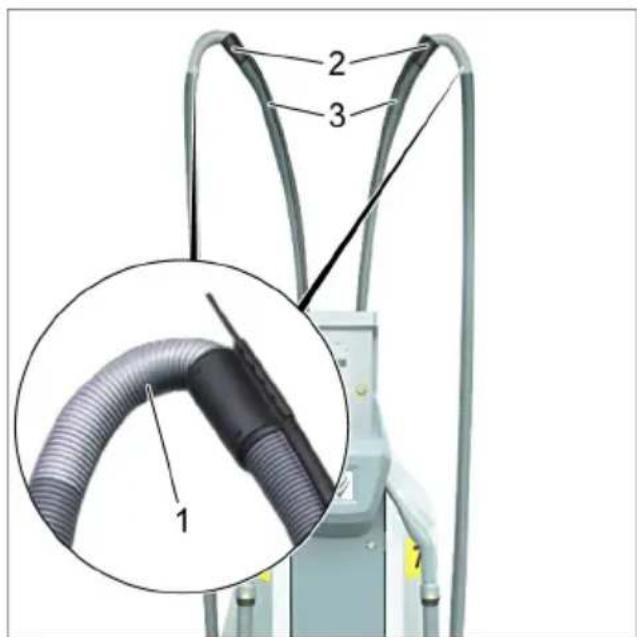
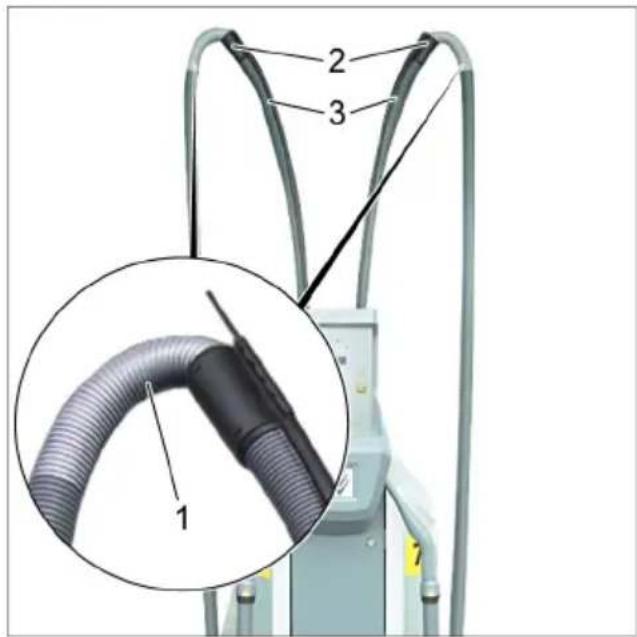
1 Suction hose operator with spring kink protection 2 Hose coupling 3 Double casing suction hose Installation information
The spring kink protection must be installed on the hose coupling and not on the automatic nozzle.
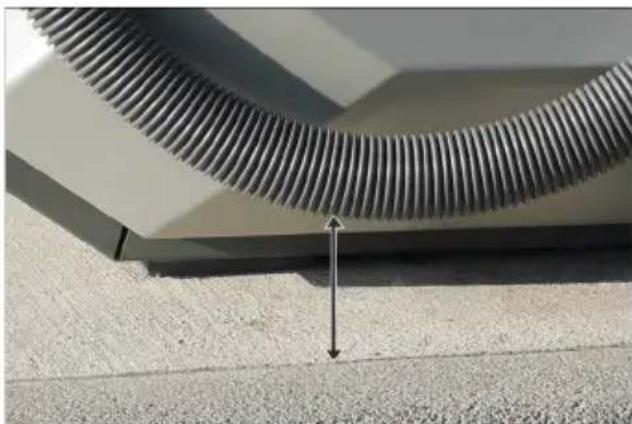
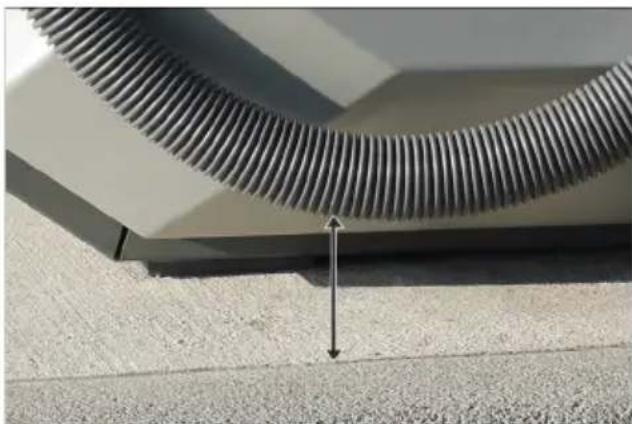
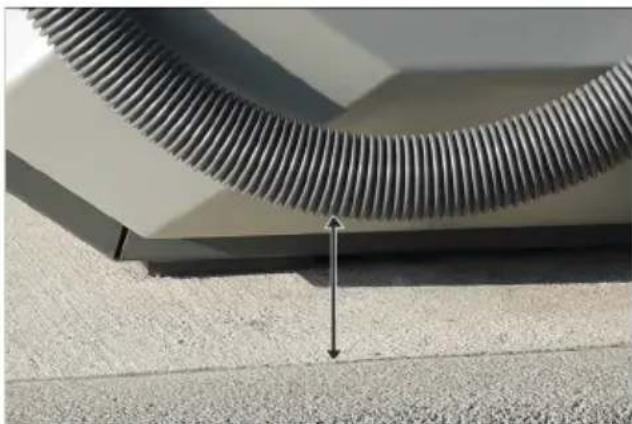
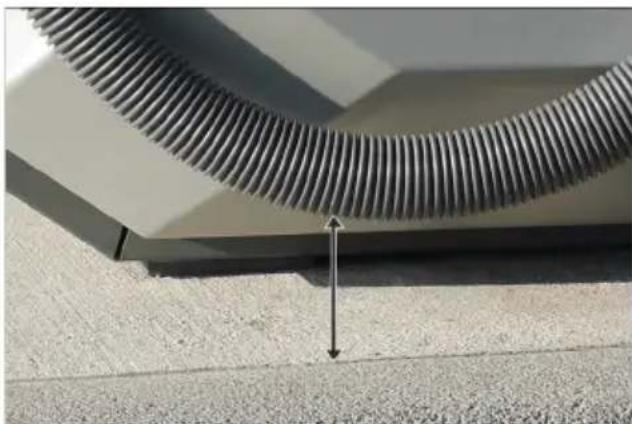
Adjust hose length on site. When the automatic nozzle is attached, the suction hose operator may not lay on the floor, and must therefore maintain a minimum distance of 5 cm to the floor. If necessary, adjust the length of the double casing suction hose.
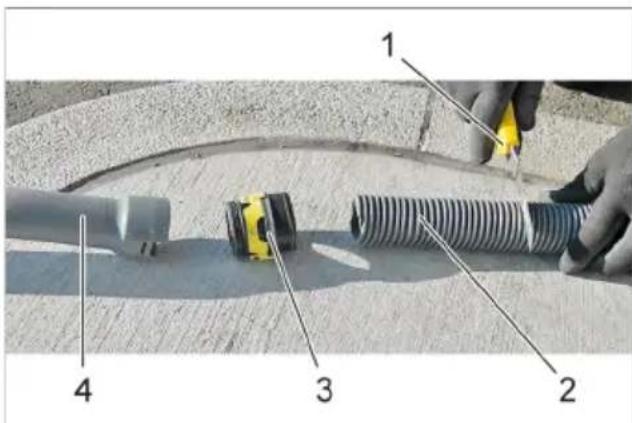
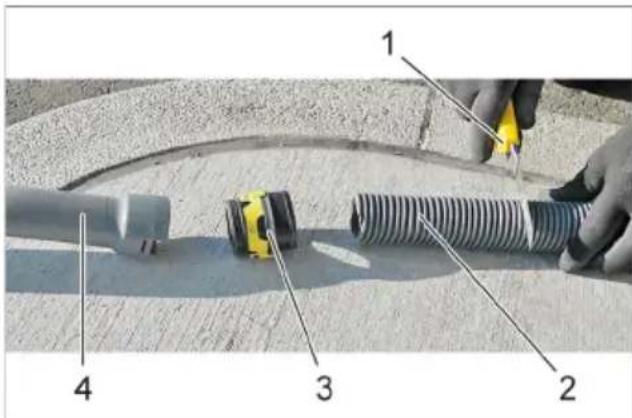
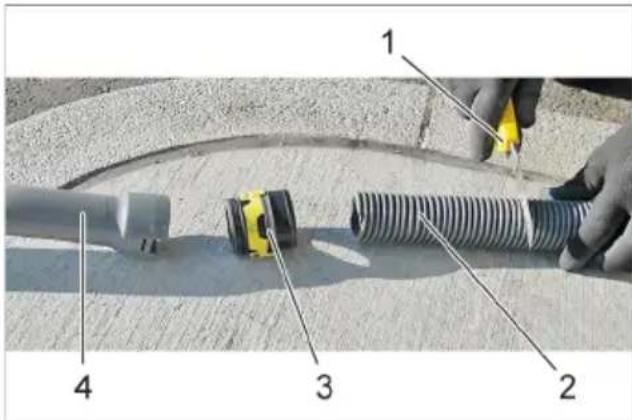
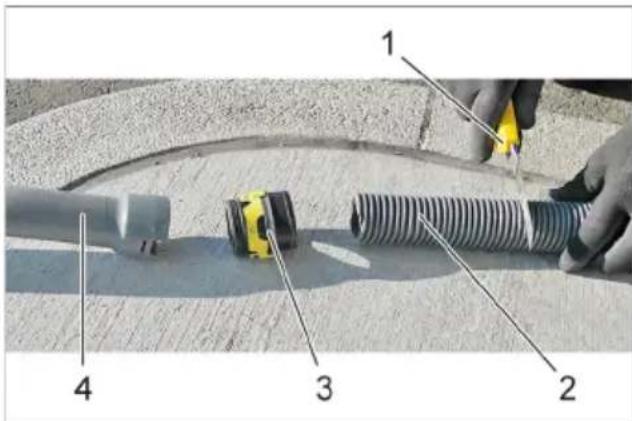
1 Knife 2 Double casing suction hose 3 Car nozzle mount 4 Car vacuuming tool
Press in the latches of the car nozzle mount. Remove the car nozzle. Unscrew the car nozzle mount. Shorten the double casing suction hose using a knife.
Operation
Differences between the start-up control
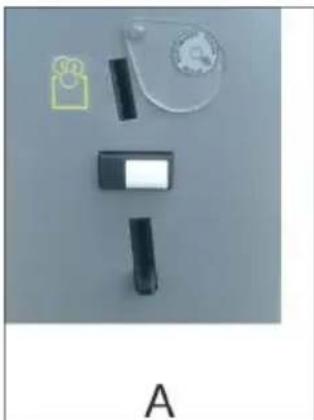
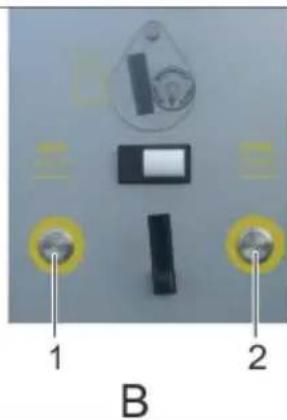
A SB VC BSBC2 1 Vacuum selection button, left 2 Vacuum selection button, right
SBVC1
Vacuuming starts immediately after a coin is inserted.
SBVC2
After inserting a coin, select the corresponding vacuum cleaner station using the button. Vacuuming starts.
1 Display (optional)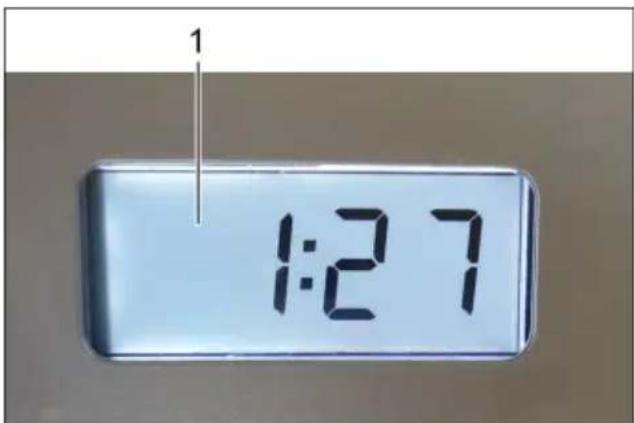
Other versions:
With/without coin slot.
Automatic filter cleaning
The device has an automatic filter dedusting function that is especially effective in removing fine dust. After starting vacuuming, the flat fold filter is automatically cleaned by three pulsating bursts of air.
Note: Automatic filter dedusting is switched on at the factory.
Note: The automatic filter dedusting function can only be switched on/off when the appliance is switched on.
- To switch off automatic filter cleaning:
Activate the switch. Indicator lamp in the switch goes off. - To switch on automatic filter cleaning: Press the switch again. Indicator lamp in the switch glows green.
Note
Switching off the automatic filter cleaning function leads to premature filter wear and a reduction in suction power.
Care and maintenance
Replacing the flat pleated filter
Note
Change the flat pleated filter annually, or as necessary and/or depending on the degree of contamination.
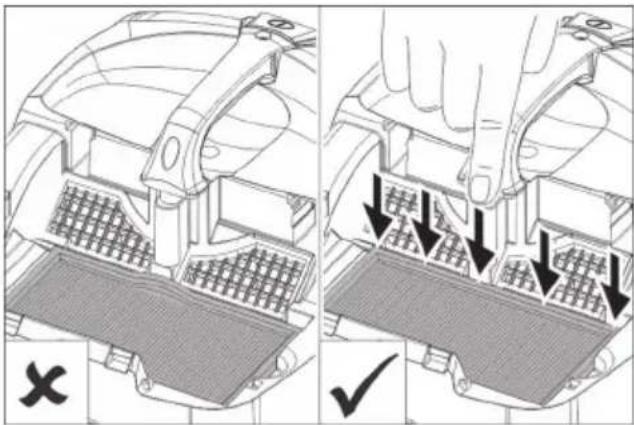
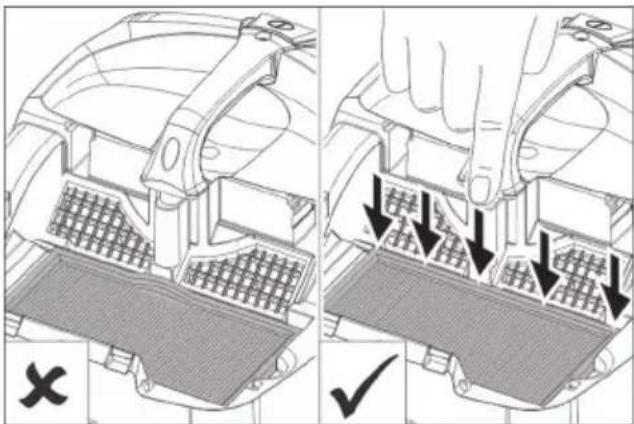
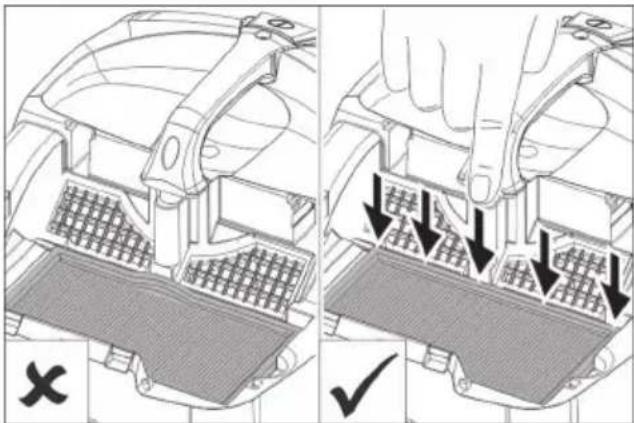
→ Check for correct seating when installing the flat pleated filter.
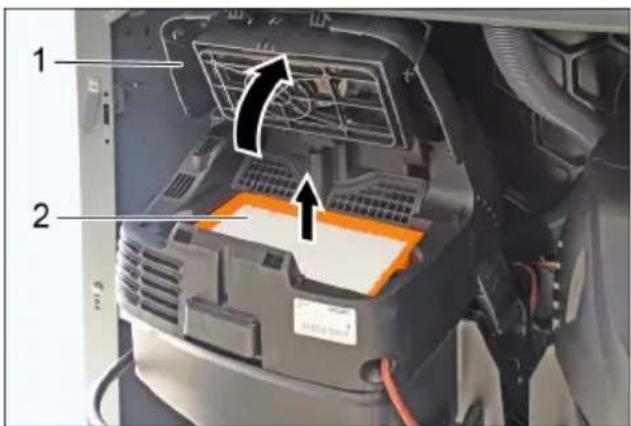
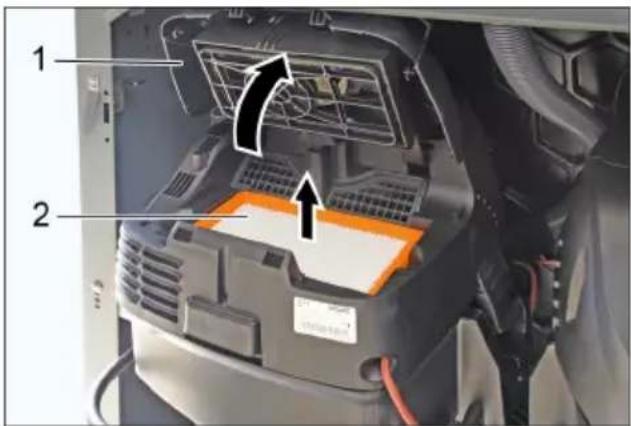
1 Filter cover 2 Flat pleated filter. Open the filter door. → Replace the flat pleated filter.
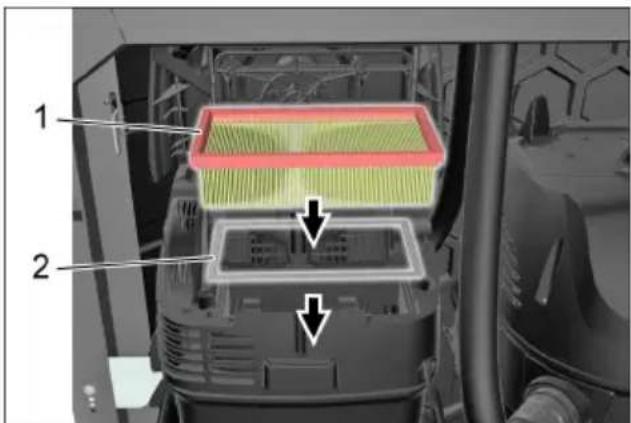
1 Flat pleated filter 2 Metal frame
→ Ensure that the additional metal frame is inserted. → Close the filter door; it must lock into place.
Note
The flat pleated filter with item number 6.904-360.0 is resistant to moisture. We recommend using this filter when replacing the filter.
Emptying the dirt receptacle Checking the suction power
Note
Empty the dirt receptacle 1 to 2 times a week.
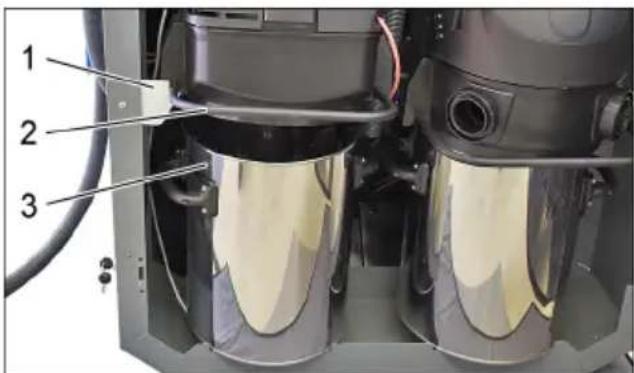
1 Bracket 2 Bow 3 Dirt receptacle → Lift up the suction head using the bow and set it down in the bracket. → Remove the waste container.
Note
Ensure correct positioning when putting the suction head in place. Before closing the door, push the suction hose in between both suction vacuum cleaners so that the door can be shut.
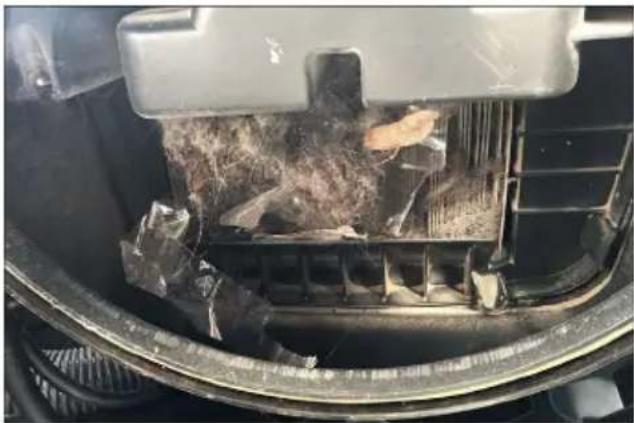
Each time after emptying the dirt receptacle, check the flat fold filter from below for coarse dirt and remove any soiling. → Check the suction power each time after emptying the dirt receptacle. If the suction power is insufficient, the flat fold filter must be cleaned using the automatic dedusting function.
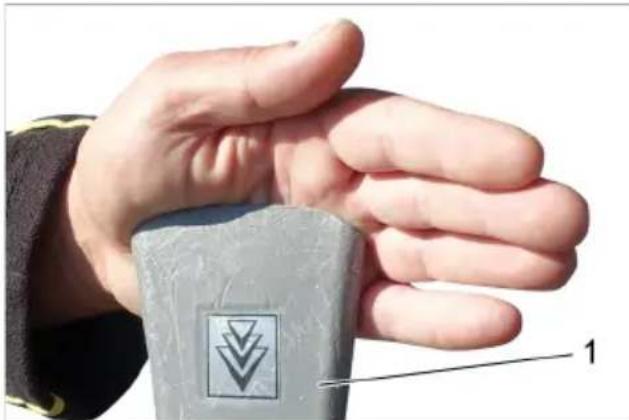
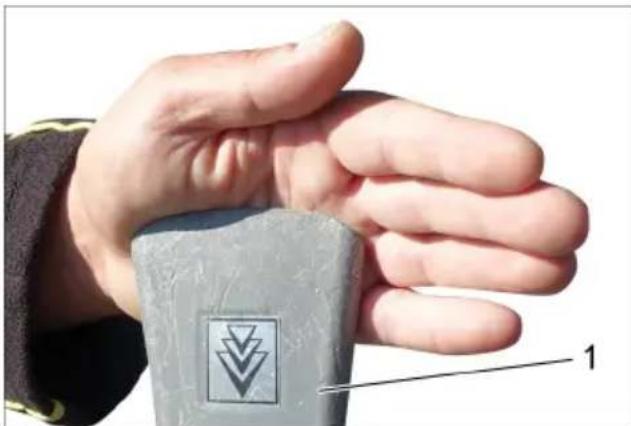
1 Car vacuuming tool
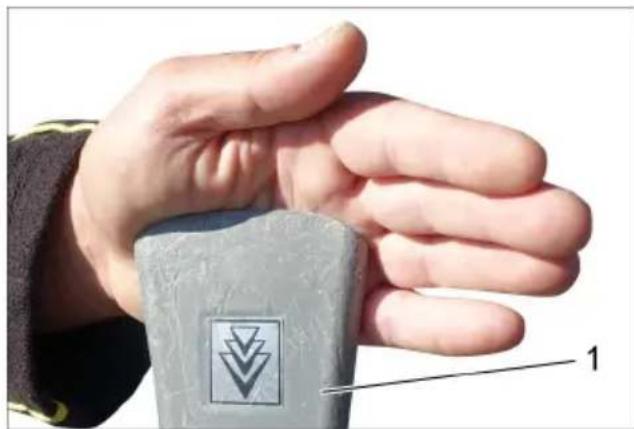
→ Seal off the car nozzle with your hand while the device is running. The car nozzle must remain stuck to your hand through the vacuum generated by the device. If the car nozzle does not remain stuck to your hand, the flat fold filter must be cleaned using the automatic dedusting function.
Cleaning the flat fold filter using the automatic dedusting function
Step 1
→ Turn on the appliance.
Step 2
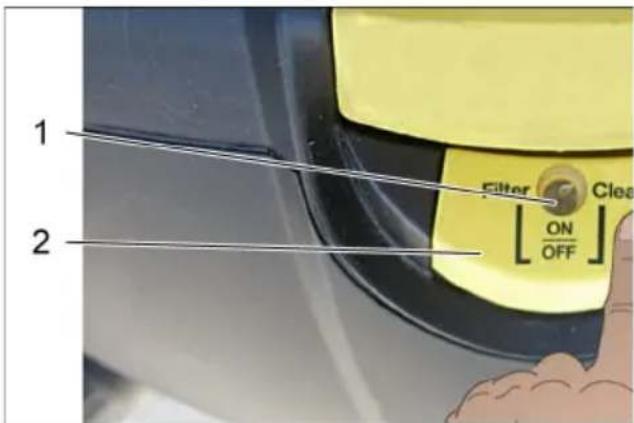
→ Switch the automatic filter dedusting off using the switch.
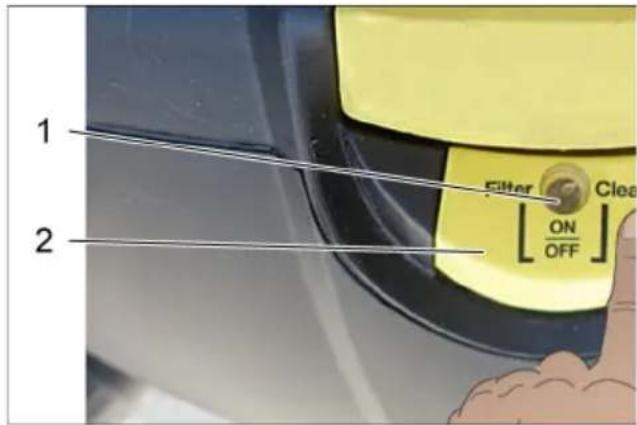
1 Indicator lamp 2 Automatic filter dedusting switch
Step 3
→ Seal off the car nozzle with your hand.
Note
Keep the car nozzle closed during automatic filter dedusting.
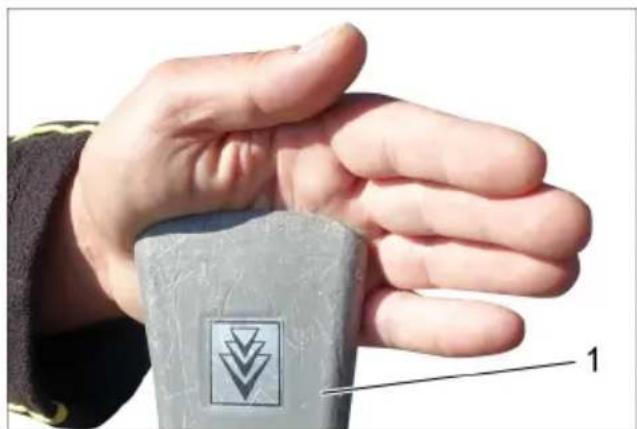
1 Car vacuuming tool
Step 4
Switch on the automatic filter dedusting using the switch.
Step 5
The flat fold filter is now automatically cleaned by three pulsating air bursts. Repeat step 2 to step 4.
Repeat the procedure 5 to 8 times (or depending on the degree of soiling). Then check the suction power.
Note
The indicator lamp must light up green after the cleaning procedures.
Note
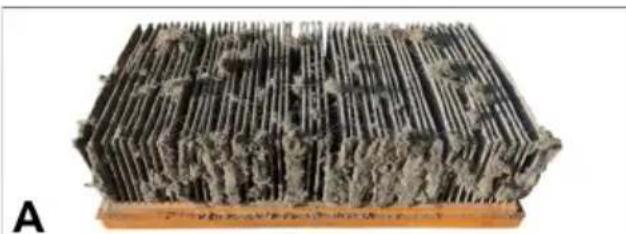
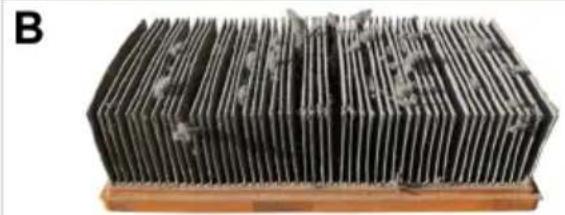
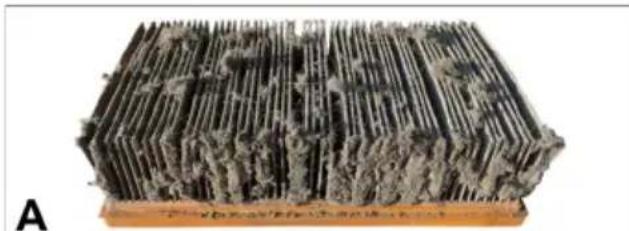
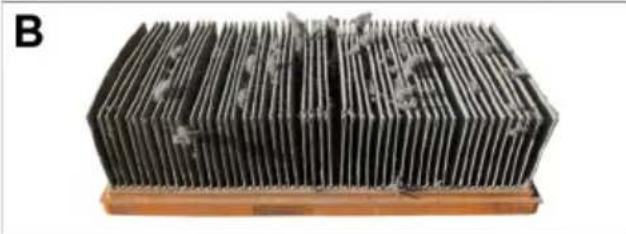
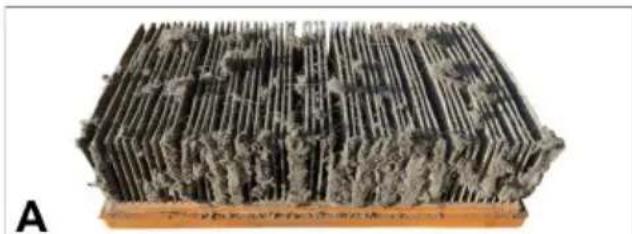
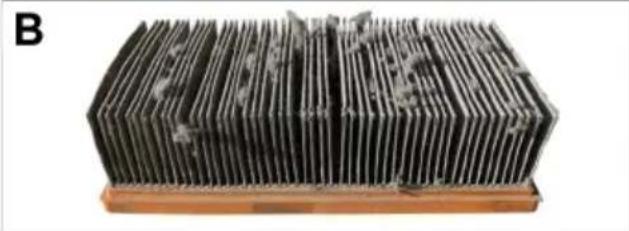
Cleaning the flat fold filter using the automatic dedusting function removes the fine dust clogging the pores of the flat fold filter. Any existing fluff does not impair the suction power.
If necessary, carefully remove any existing fluff using a brush.
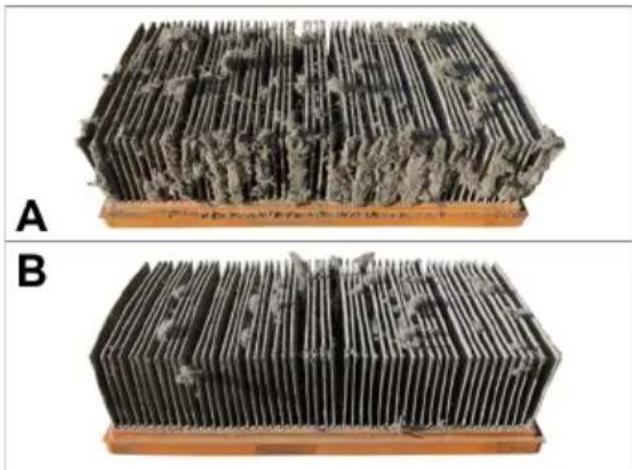
A Flat fold filter before cleaning B Flat fold filter after cleaning
ATTENTION
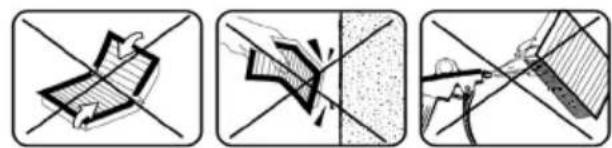
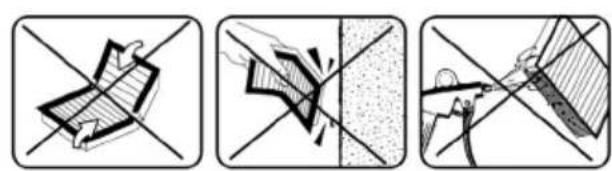
The flat fold filter is damaged if kinked, beaten out or cleaned with compressed air.
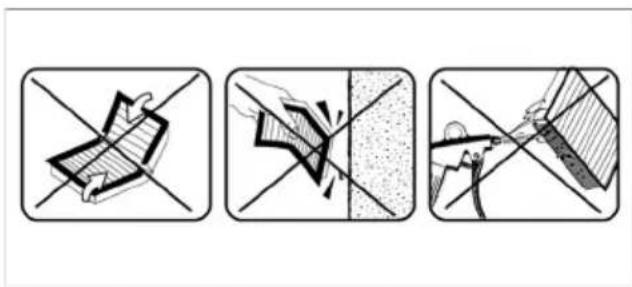
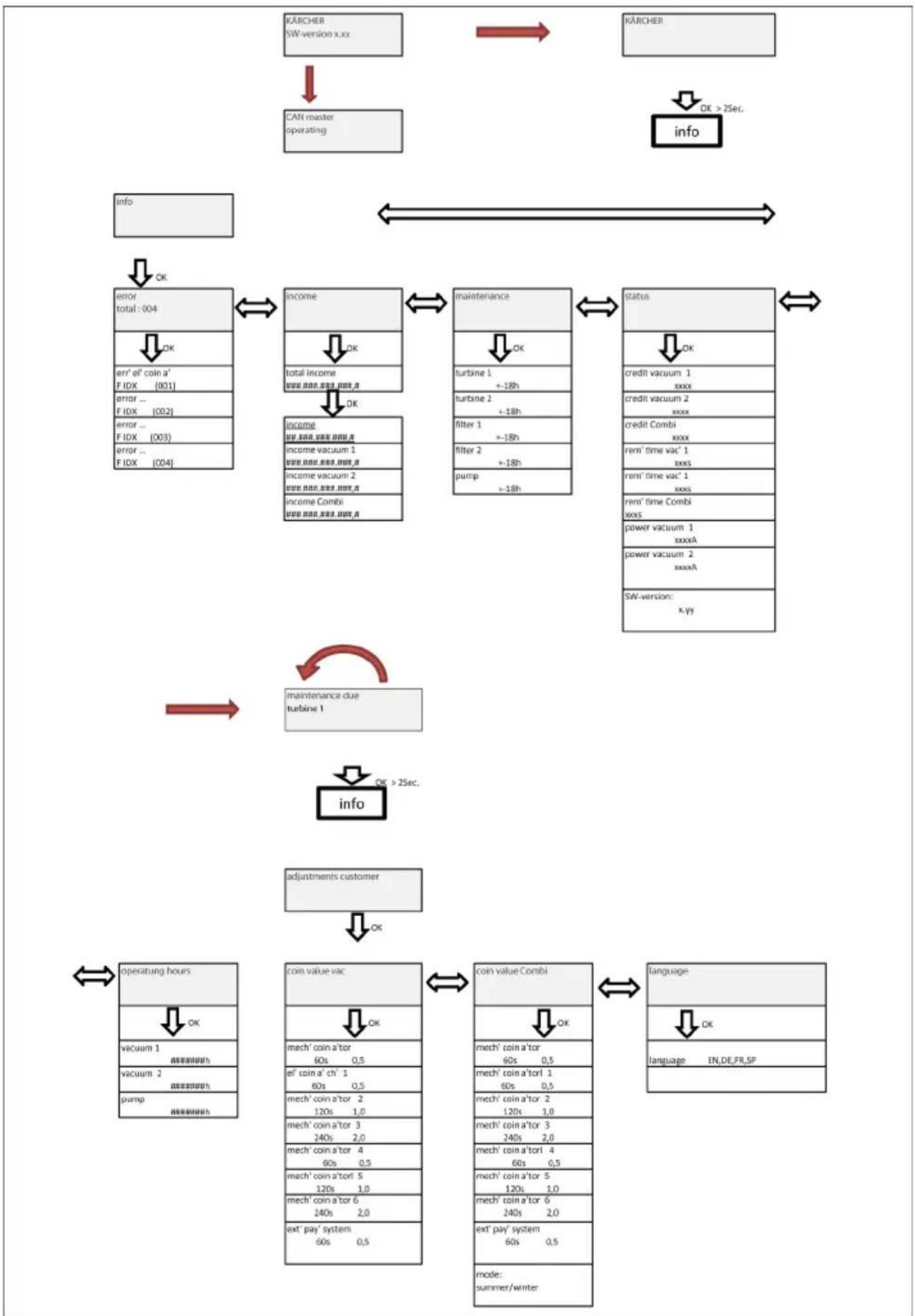
Menu structure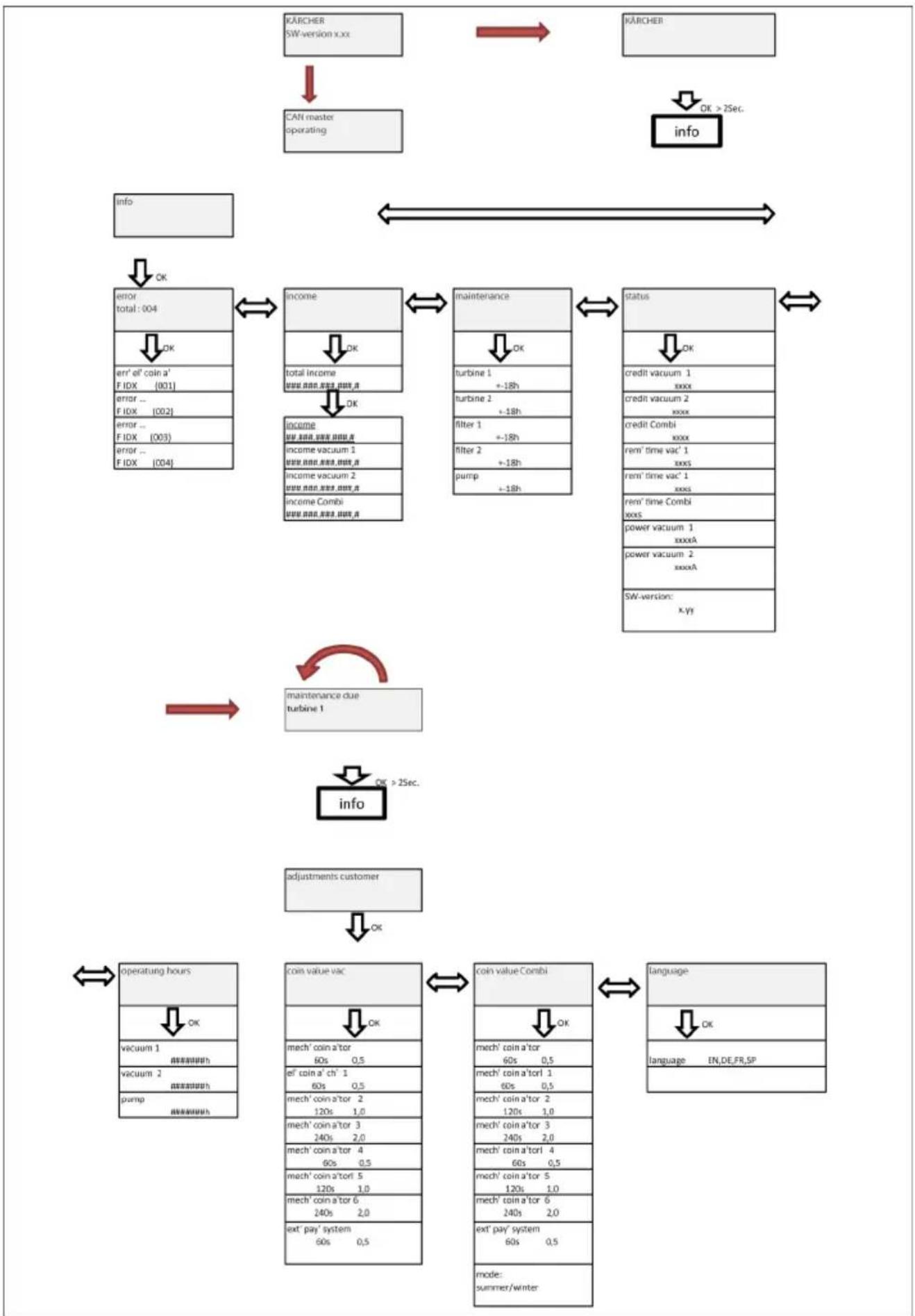
| Menu point Important | |
| CAN master operating | If the system is operated in CAN master mode (car wash plant), any settings can only be made on the central control. |
| error total:004 | To acknowledge the fault, switch off the main switch, remedy the fault, wait at least 5 seconds and switch the system back on again. |
| income | The total turnover cannot be reset. |
| OK | |
| total income ###.###.###.###.###. | Turnover / Turnover vacuum cleaner 1 / Turnover vacuum cleaner SG 2 / Turnover combined: The corresponding turnover can be reset. To do so, press the LEFT and RIGHT button simultaneously and confirm with the "OK" button. Cancel using the "ESC" button. |
| OK | |
| income ###.###.###.###. | Turnover / Turnover vacuum cleaner 1 / Turnover vacuum cleaner SG 2 / Turnover combined: The corresponding turnover can be reset. To do so, press the LEFT and RIGHT button simultaneously and confirm with the "OK" button. Cancel using the "ESC" button. |
| ###.###.###.###. | |
| income vacuum 1 | The corresponding turnover can be reset. To do so, press the LEFT and RIGHT button simultaneously and confirm with the "OK" button. Cancel using the "ESC" button. |
| ###.###.###.###. | |
| income vacuum 2 | The corresponding turnover can be reset. To do so, press the LEFT and RIGHT button simultaneously and confirm with the "OK" button. Cancel using the "ESC" button. |
| ###.###.###.###. | |
| income Combi | Can only be reset by Service. |
| ###.###.###.###. | |
| maintenance | |
| OK | |
| turbine 1 | The corresponding filter can be reset. To do so, press the LEFT and RIGHT button simultaneously and confirm with the "OK" button. Cancel using the "ESC" button. |
| + -18h | |
| turbine 2 | The corresponding filter can be reset. To do so, press the LEFT and RIGHT button simultaneously and confirm with the "OK" button. Cancel using the "ESC" button. |
| + -18h | |
| filter 1 | The corresponding filter can be reset. To do so, press the LEFT and RIGHT button simultaneously and confirm with the "OK" button. Cancel using the "ESC" button. |
| + -18h | |
| filter 2 | The corresponding filter can be reset. To do so, press the LEFT and RIGHT button simultaneously and confirm with the "OK" button. Cancel using the "ESC" button. |
| + -18h | |
| coin value vac | Note The menu item Mechanical coin acceptor is also used for setting the run time for the variant with a start button. |
| OK | → Mechanical coin acceptor run time 60s, coin value 0.5 |
| mech' coin a'tor 60s 0,5 | |
| el' coin a' ch' 1 60s 0,5 | |
| mech' coin a'tor 2 120s 1,0 | → Electronic coin acceptor Channel 1, run time 60s, coin value 0.5 |
| mech' coin a'tor 3 240s 2,0 | → Channel 2, run time 120s, coin value 1.0 |
| mech' coin a'tor 4 60s 0,5 | → Channel 3, run time 240s, coin value 2.0 |
| mech' coin a'torl 5 120s 1,0 | → Channel 4, run time 60s, coin value 0.5 |
| mech' coin a'tor 6 240s 2,0 | → Channel 5, run time 120s, coin value 1.0 |
| ext' pay' system 60s 0,5 | → Channel 6, run time 240s, coin value 2.0 |
| → External payment system run time 60s, coin value 0.5 | |
| coin value Combi | Note This mode can only be switched over for the combi-variant. Times are halved when the mode is switched to "Winter". The coin values remain the same. |
| OK | |
| mode: | |
| summer/winter |
Description of Function Keys
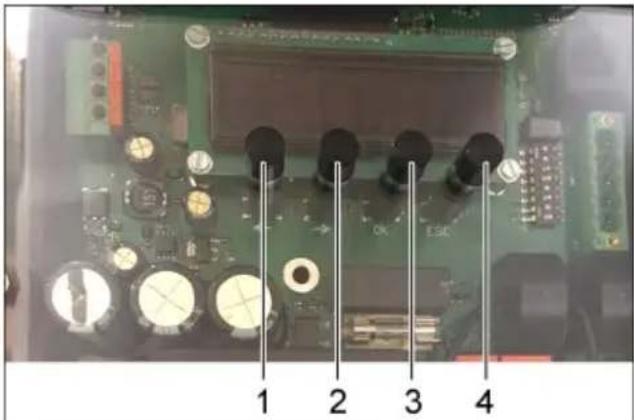
1 LEFT key 2 RIGHT key 3 "OK" button 4 "ESC" button
Functions described with an *:
LEFT key allows a movement to the left within the menu
RIGHT key allows a movement to the right within the menu
"OK" button allows and confirms modifications
"ESC" button step-by-step reversal, backward browsing to the basic display
Description of the menu
Note
Depending on how the system is equipped, irrelevant menus or pages are hidden. The last parameter selected remains visible on the display (e.g. total turnover...).
Select the parameter you want to set
Select the menu point with the LEFT and the RIGHT button. Press OK to open the parameter group. Use the LEFT and RIGHT buttons to select the parameter you want to set.
Set the parameter with a variable
Press the OK button.
The selectable variable blinks.
Use the LEFT and RIGHT buttons to select the variable value.
Press and hold the button for a swift change of the variable.
Press the OK button to save the selected value.
or
Press ESC to abort the change.
Setting a parameter with several variables
Press the OK button. The selectable variable blinks. Use the LEFT and RIGHT buttons to select the variable value. Press and hold the button for a swift change of the variable. Press OK briefly to save the value and to jump to the next variable. Press the OK button for more than 1 second to save set values. Or press ESC to abort the change.
Exiting the menu
Press the ESC to return to the next higher menu.
The respective area can be exited by pressing the "ESC" button if the user is not in modification mode.
Troubleshooting
DANGER
Switch the main switch (in the outer casing)
to "OFF" before carrying out any tasks on
the device.
| Failure Possible | cause Correction | ||
| Appliance is not running | Current supply interrupted (slot lock closed) | Check the cables, fuse and electronics | Qualified electrician |
| Coin acceptor dirty Clean the coin acceptor Operator | |||
| The slot lock in the coin acceptor does not open | Coin jammed, remove coin | Operator | |
| Slot lock in the mechanical coin acceptor jammed | Repair and/or replace the slot lock | Operator Customer Service | |
| Suction capacity decreases | Suction system clogged Remove blockage from the suction nozzle, suction hose, hose coupling or flat fold filter | Operator | |
| Filter cover not properly engaged | Correctly engage the filter cover | Operator | |
| Flat fold filter clogged Replace the flat fold filter Operator | |||
| Flat fold filter damaged Replace the flat fold filter Operator | |||
| Dust comes out during the vacuuming | Flat fold filter not inserted properly | Establish and/or observe the correct installation position for the flat fold filter | Operator |
| Flat fold filter clogged Replace the flat fold filter Operator | |||
| Automatic filter deducting is not working | Suction hose not connected properly | Connect the suction hose | Operator |
| Automatic filter deducting function switched off via Automatic filter deducting switch | Switch on the automatic filter deducting function (the LED on the Automatic filter deducting switch must light up) | Operator | |
| The automatic filter deducting function cannot be switched on/off | - Customer ser-vice | Operator | |
| The filter cover is not properly closed | Close the filter cover properly | Operator | |
| The suction head is not correctly positioned on the suction container | Position the suction head correctly | Operator | |
Fault codes
| Display Display | Faults Error description Operator correction | |||
| err' el' coin a' 001 | Electrical coin ac- ceptor defective Rem | ove, clean the coin acceptor | Call customer service. | |
| err' me' coin a' 002 | Mechanical coin ac- ceptor defective | |||
| err' buttom 1 003 | Start button/vacuum cleaner station se- lection button 1 is jammed | Check the start button | ||
| err' buttom 2 004 | Start button/vacuum cleaner station se- lection button 2 is jammed | |||
| err' turbine 1 005 | Turbine 1 defective Switch the main switch off and on Check whether the power switch is switched on for devices up to product number 010120 | main switch off and on Check whether the power switch is switched on for devices up to product number 010120 | ||
| err' turbine 2 006 | Turbine 2 defective | |||
| error relay 1 007 | Turbine 1 relay de- fective Switch the main switch off and on | in switch off and on | ||
| error relay 2 008 | Turbine 2 relay de- fective | |||
| overcurr'turb' 1 009 | Turbine 1 overcur- rent | Switch the main switch off and on | ||
| overcurr'turb' 2 010 | Turbine 2 overcur- rent | Check the filter for coarse contamination | ||
| maint' turb' 1 011 | Turbine 1 mainte- nance due | Note Maintenance intervals for turbine in the control ex- pired | ||
| maint' turb' 2 012 | Turbine 2 mainte- nance due | |||
| maint' filter 1 013 | Filter 1 maintenance due | Note Maintenance intervals for filter in the control expired | ||
| maint' filter 2 014 | Filter 2 maintenance due | |||
Warranty
The warranty terms published by the relevant sales company are applicable in each country. We will repair potential failures of your appliance within the warranty period free of charge, provided that such failure is caused by faulty material or defects in manufacturing. In the event of a warranty claim, please contact your dealer or the nearest authorized Customer Service centre. Please submit the proof of purchase.
Accessories and Spare Parts
Only use original accessories and spare parts; they ensure the safe and trouble-free operation of the device.
For information about accessories and spare parts, please visit www.kaercher.com.
Technical specifications
| SB VC1 VC2 | |||
| Mains voltage V | 220-240 | 220-230 | |
| Frequency Hz 1 | ~ 50-60 | ||
| Max. perfor- mance | W 1380 | 2x 1380 | |
| Rated power W | 1200 2x | 1200 | |
| Air volume (max.) | l/s 74 2x | 74 | |
| Negative pres- sure (max.) | kPa (mbar) | 25,4 (254) | |
| Sound pres- sure level LpA | dB (A) | < 70 | |
| SB VC1 EC VC2 EC | |||
| Mains voltage V | 220-240 | 220-240 | |
| Frequency Hz 1 | ~ 50-60 | ||
| Max. perfor- mance | W 1380 | 2x 1380 | |
| Rated power W | 1200 2x | 1200 | |
| Air volume (max.) | l/s 60 2x | 60 | |
| Negative pres- sure (max.) | kPa (mbar) | 24,4 (244) | |
| Sound pres- sure level LpA | dB (A) | < 70 | |
EU Declaration of Conformity
We hereby declare that the machine described below complies with the relevant basic safety and health requirements of the EU Directives, both in its basic design and construction as well as in the version put into circulation by us. This declaration shall cease to be valid if the machine is modified without our prior approval.
Product: Dry vacuum cleaner
Type: 1.070-xxx
Relevant EU Directives
2000/14/EC
2006/42/EC (+2009/127/EC)
2011/65/EU
2014/30/EU
Applied harmonized standards
EN 60335-1
EN 60335-2-69
EN 60335-2-75
EN 50581
EN 55014-1: 2006+A1: 2009+A2: 2011
EN 55014-2: 2015
EN 61000-3-3:2013
EN 62233: 2008
Applied national standards
The signatories act on behalf of and with the authority of the company management.
H.Jenner
Chairman of the Board of Management
S. Reiser
Director Regulatory Affairs & Certification
Documentation supervisor: S. Reiser
Alfred Kärcher SE & Co. KG
71364 Winnenden (Germany)
Tel.: +49 7195 14-0
Fax: +49 7195 14-2212
Winnenden, 2017/04/01
www.kaercher.com/REACH
Hazard level
△DANGER
2006/42/EC (+2009/127/EC)
2011/65/EU
2014/30/EU
Chairman of the Board of Management
S. Reiser
Director Regulatory Affairs & Certification
Responsible for documentation:
S. Reiser
Alfred Kärcher SE & Co. KG
71364 Winnenden (Germany)
Tel.: +49 7195 14-0
Fax: +49 7195 14-2212
Winnenden, 2017/04/01

www.kaercher.com/REACH
Hazard levels
△DANGER
2006/42/EC (+2009/127/EC)
2011/65/EU
2014/30/EU
Chairman of the Board of Management
S. Reiser
Director Regulatory Affairs & Certification
71364 Winnenden (Germany)
Tel.: +49 7195 14-0
Fax: +49 7195 14-2212
Winnenden, 2017/04/01
www.kaercher.com/REACH
Hazard levels
△DANGER
Chairman of the Board of Management
S. Reiser
Director Regulatory Affairs & Certification
71364 Winnenden (Germany)
Tel.: +49 7195 14-0
Fax: +49 7195 14-2212
Winnenden, 2017/04/01
www.kaercher.com/REACH
Hazard levels
DANGER
2006/42/EC (+2009/127/EC)
2011/65/EU
2014/30/EU
Chairman of the Board of Management
S. Reiser
Director Regulatory Affairs & Certification
Document responsible:
S. Reiser
Alfred Kärcher SE & Co. KG
71364 Winnenden (Germany)
Tel.: +49 7195 14-0
Fax: +49 7195 14-2212
Winnenden, 2017/04/01

Read the original manual before using your
2006/42/CE (+2009/127/CE)
2011/65/EU
2014/30/UE
Chairman of the Board of Management
S. Reiser
Director Regulatory Affairs & Certification
71364 Winnenden (Germany)
Tel.: +49 7195 14-0
Fax: +49 7195 14-2212
Winnenden, 2017/04/01

www.kaercher.com/REACH
Faregrader
△FARE
An immediate threatening danger that can lead to serious personal injury or death.
WARNING
2006/42/EC (+2009/127/EC)
2011/65/EU
2014/30/EU
Chairman of the Board of Management
S. Reiser Director Regulatory Affairs & Certification
71364 Winnenden (Germany)
Tel.: +49 7195 14-0
Fax: +49 7195 14-2212
Winnenden, 2017/04/01

www.kaercher.com/REACH
Risk level
△FARE
A Flat folded filter for cleaning B Flat folded filter after cleaning
OBS
2006/42/EF (+2009/127/EF)
2011/65/EU
2014/30/EU
Chairman of the Board of Management
S. Reiser
Director Regulatory Affairs & Certification
71364 Winnenden (Germany)
Tel.: +49 7195 14-0
Fax: +49 7195 14-2212
Winnenden, 2017/04/01

www.kaercher.com/REACH
Risk levels
△FARA
A Plan filter before cleaning B Plan filter after cleaning
NOTE
Chairman of the Board of Management
S. Reiser Director Regulatory Affairs & Certification
Documentation authorized representative:
S. Reiser
Alfred Kärcher SE & Co. KG
71364 Winnenden (Germany)
Tel.: +49 7195 14-0
Fax: +49 7195 14-2212
Winnenden, 2017/04/01

www.kaercher.com/REACH
Hazard levels
DANGER
1 Button LEFT 2 Button RIGHT 3 Button "OK" 4 Button "ESC"
H. Jenner Chairman of the Board of Management
S. Reiser Director Regulatory Affairs & Certification
71364 Winnenden (Germany)
Tel.: +49 7195 14-0
Fax: +49 7195 14-2212
Winnenden, 2017/04/01
Before using the device for the first time, read and follow these original operating instructions, keep them for future use or for the next owner.
- Before first use, read and follow the safety instructions no. 5.956-249.0! Non-compliance with the operating instructions and safety instructions can cause damage to the device or hazards to the user or other persons. In case of damage during transport, notify the supplier immediately.
www.kaercher.com/REACH
Hazard levels
DANGER
Immediate danger that can lead to serious injury or death.
WARNING
Possible dangerous situation that can lead to serious injury or death.
Chairman of the Board of Management
S. Reiser
Director Regulatory Affairs & Certification
71364 Winnenden (Germany)
Tel.: +49 7195 14-0
Fax: +49 7195 14-2212
Winnenden, 2017/04/01

www.kaercher.com/REACH
Hazard levels
DANGER
Chairman of the Board of Management
S. Reiser Director Regulatory Affairs & Certification
71364 Winnenden (Germany)
Tel.: +49 7195 14-0
Fax: +49 7195 14-2212
Winnenden, 2017/04/01

Before using your device for the first time, read
this original instruction manual. After that, act accordingly and keep it for future use or for the next owner.
www.kaercher.com/REACH
Hazard levels
DANGER
Immediate danger that can lead to serious injuries or death.
WARNING
Possible dangerous situation that can lead to serious injuries or death.
CAUTION
Indicates a potentially dangerous situation that can lead to minor injuries.
ATTENTION
Indicates a potentially dangerous situation that can lead to property damage.
Intended use
Note: The Karcher company bears no liability for damage to the device, damage to the customer's vehicle that must be repaired, as well as for other damage that arises as a result of failure to comply with the provisions of this operating manual.
- The device is intended for collecting dry dirt in the interiors of vehicles. - Use not in accordance with its intended purpose is considered to be collecting hot materials, harmful to health dust and liquids, and therefore this use is prohibited. - This device is intended for industrial use. - Available in single-seat (SB VC 1) or two-seat (SB VC 2) versions.
Device overview
Shown: SB VC 2:
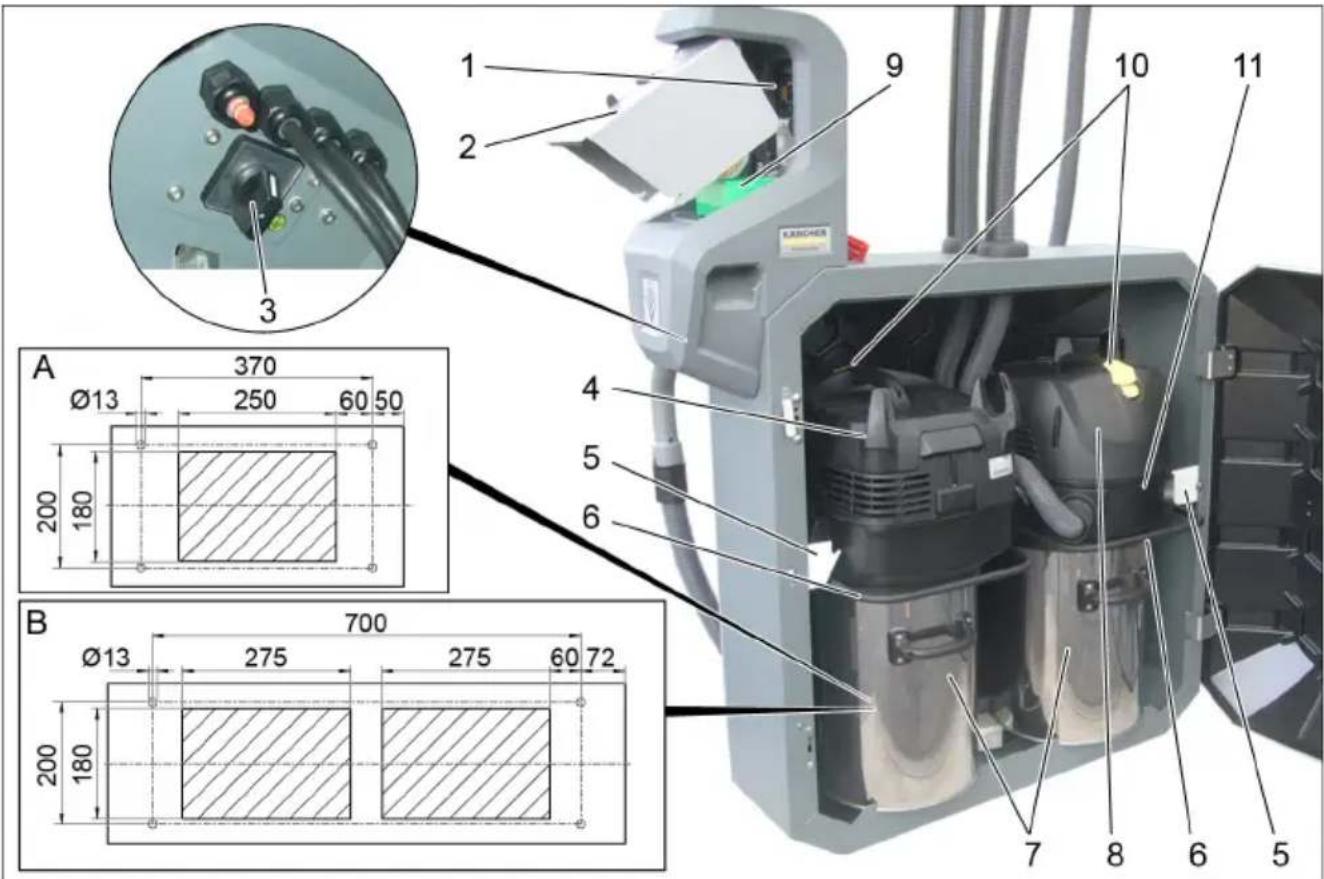
1 Control unit 2 Coin drop slot 3 Main switches 4 Suction head 1 5 Holder 6 Handle 7 Dirt container 8 Suction head 2
9 Coin counter 10 Automatic filter cleaning switch 11 Sealing ring A Cable entry SB VC 1 B Cable entry SB VC 2
Control system
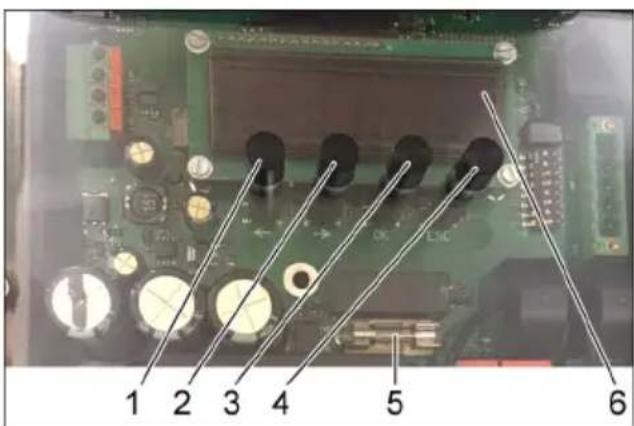
1 Left button 2 Right button 3 "OK" button 4 "ESC" button 5 Fuse 6 Display
To access the control system menu, press and hold the "OK" button for 2 seconds. The "Info" display appears.
Elements of the device
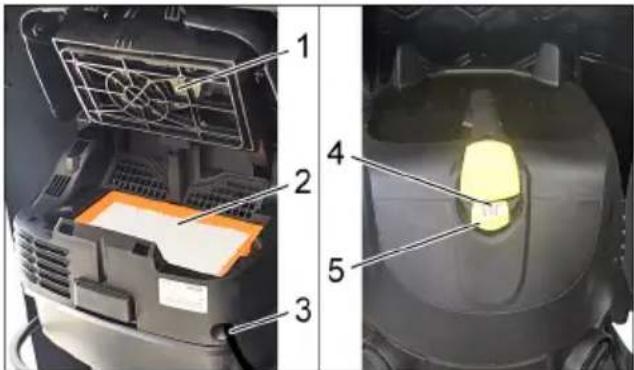
1 Filter cleaning 2 Flat pleated filter 3 Mains cable 4 Control lamp 5 Automatic filter cleaning switch
Start of operation
ATTENTION
The device may only be operated by trained personnel.
Removal of the folded filter is not permitted.
Instruction
The suction hose is located in the waste collection container.
INSTALLATION OF THE SUCTION HOSE
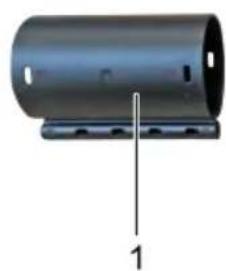
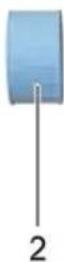

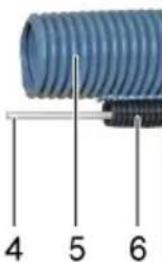
1 Plug connection 2 Threaded sleeve 3 Clamping ring 4 Fiberglass rod 5 Suction hose with double wall 6 Guide tube
Install the clamping ring, threaded sleeve and plug connection on the suction hose with double wall. Insert the fiberglass rod into the guide tube and run it through the plug connection.
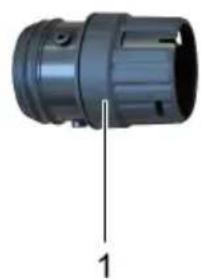
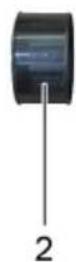
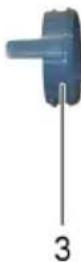
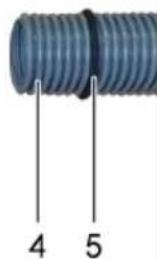
1 Suction element 2 Seal 3 Spring-loaded stop ring 4 Suction hose with double wall 5 Seal made of foam rubber
Slide the foam rubber seal onto the suction hose with double wall and push it down to the double channel. → Run the suction hose with double wall through the hose fitting. Install the spring-loaded stop ring, sealing ring and suction nozzle on the suction hose with double wall. → Connect the suction nozzle to the sealing ring. → Before closing the door, the suction hose must be routed between the two dust extractors so that the door can close.
1 Suction hose with double wall 2 Fiberglass rod 3 Seal made of foam rubber 4 Fastening of the suction hose
Insert the fiberglass rod, suction hose with double wall and foam rubber seal into the fastening of the suction hose.
Instruction
The foam rubber seal must be inserted into the fastening of the suction hose so that it is filled.
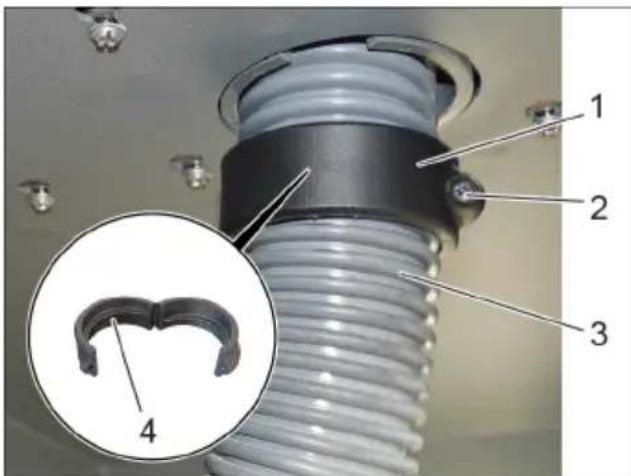
1 Rotating ring 2 Screw 3 Suction hose with double wall 4 Thread of the rotating ring
Install the open rotating ring on the suction hose with double wall. Close the rotating ring and secure it with the screw.
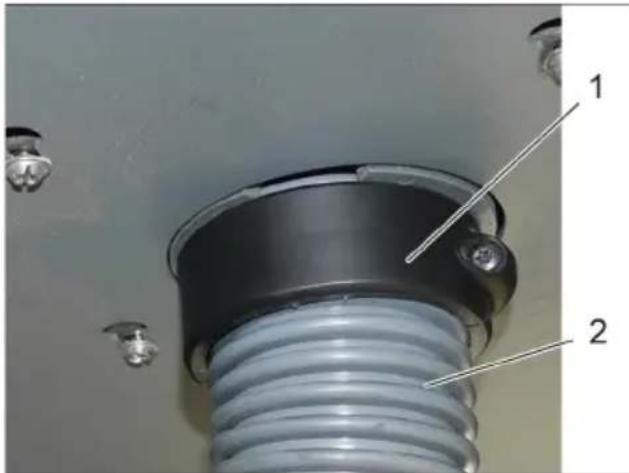
1 Rotating ring 2 Suction hose with double wall
→ Press the suction hose with double wall down slightly. → Turn the rotating ring by hand upwards so that the suction hose is stretched between the outer and inner areas.
1 Suction hose 2 Threaded ring 3 Protection against car jack scratches 4 Clamping ring 5 Operator's suction hose
Adjust the length of the operator's suction hose. → Install the clamping ring, threaded ring, and protection against car jack scratches on the operator's suction hose and insert the car jack.
1 Hose connection 2 Threaded fitting 3 Clamping ring 4 Bushing for protection against bending 5 Operator's suction hose
Install the clamping ring and threaded bushing on the operator's suction hose and insert it into the hose connection.
O6nnBnD
1 Operator's suction hose with protection bushing against bending 2 Hose connection 3 Suction hose with double jacket
HctpyKnno MoTaxy
The protection bushing against bending must be mounted on the hose fitting, not on the car jack.
→ Adjust the length as needed. When the car jack is lowered, the suction hose must not touch the floor; the minimum distance from the floor should be 5 cm.
If necessary, adjust the length of the suction hose with double jacket.
1 Knife 2 Suction hose with double jacket 3 Fastening of the suction hose 4 Suction nozzle
Secure the clamps to the fastening of the suction hose. → Remove the suction nozzle. Loosen the fastening of the suction hose. → Shorten the suction hose with double jacket using a knife.
Control
Startup systems
A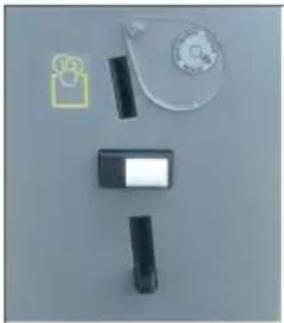
B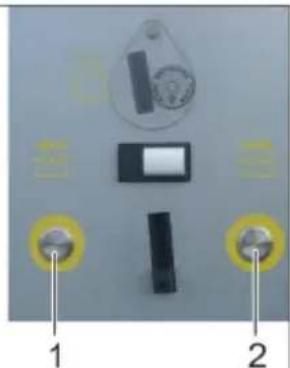
ASBVC1
BSBVC2
1 Khonka Bb6opa nbinecoca cneBa 2 Khonka Bb6opa nbilecoca cnpaba
SBVC1
Ipocecc BcacbHaHna HauHaeTc npa3y nocJe onyckaHn MOHeTbl.
SBVC2
Iocne onyckaHnma MOHeTbIC NOMOuBIO KHOKN BbIbpaTb COOTBeTCTByUoUee MeCTO nbIeCoca. HauHaetc npouec CbacblBaHn.
1 Dicnne (onua)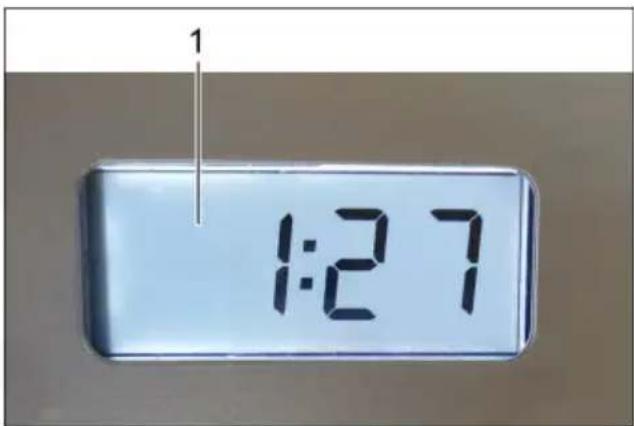
Дугne Испонненя:
c/6e3 onyckaHn MOHeT
A B T O M A T N U C E C K A Y N C T K A Φ N J B T P a
YcTpoIcTBO OCHaUeHO aBTOMaTnueCKoO uHCTKoN pINbTpA, KOTopA Oco6eHHO 3ΦΦeKTnBHa npM MeIKo Nbln. PpN 3Tom nlockn cKnaDuaTbI NblTp nocne 3anyCKa npOceDpybl BCacBbAHn aBTOMaTnueCKn OuHuaetcN oCpeDCTBOM Tpex NylbcnpyUoXn NHeBMaTnueCKNX yapOB.
Yka3aHHe: ABTomatnuecka YnCTKa 0nIb- Tpa 3aBepuNTcra CamoCTOReTbHO.
Yka3aHHe: BkIIOUeHHe N BBKIIIOUeHHe aBTOmatnuecko YNCTKn QINbTpA BO3MOXHO TOJbKO np IN BkIIOUeHHOM yCTpOJCTBe.
- Turn on the automatic filter cleaning:
Press the switch. The control lamp on the switch goes out. - Turn on the automatic filter cleaning: press the switch again. The green control lamp on the switch lights up.
Note
Deactivating the filter cleaning function leads to premature wear of the filter and to a reduction in suction power.
Maintenance
Replacing the filter bag
Note
The filter bag should be replaced regularly or as needed depending on the degree of contamination.
Close the suction hose by hand.
Note
During automatic filter cleaning, the suction hose must be closed.
1 Suction hose
Step 4
Turn on the automatic filter cleaning using the switch.
Step 5
The flat filter is cleaned automatically with the help of three pneumatic shocks.
Repeat steps 2-4.
Repeat the process 5-8 times (depending on the degree of contamination). Then check the suction power.
Note
After the cleaning process, the control lamp should light up green.
Note
During cleaning of the flat filter with the automatic filter cleaning, the dust that clogs the pores of the flat filter is removed.
The collected debris does not affect the suction power.
If necessary, carefully remove existing debris with a brush.
Do not wash, rinse, or clean the flat filter with water, so as not to damage it.
Menu structure
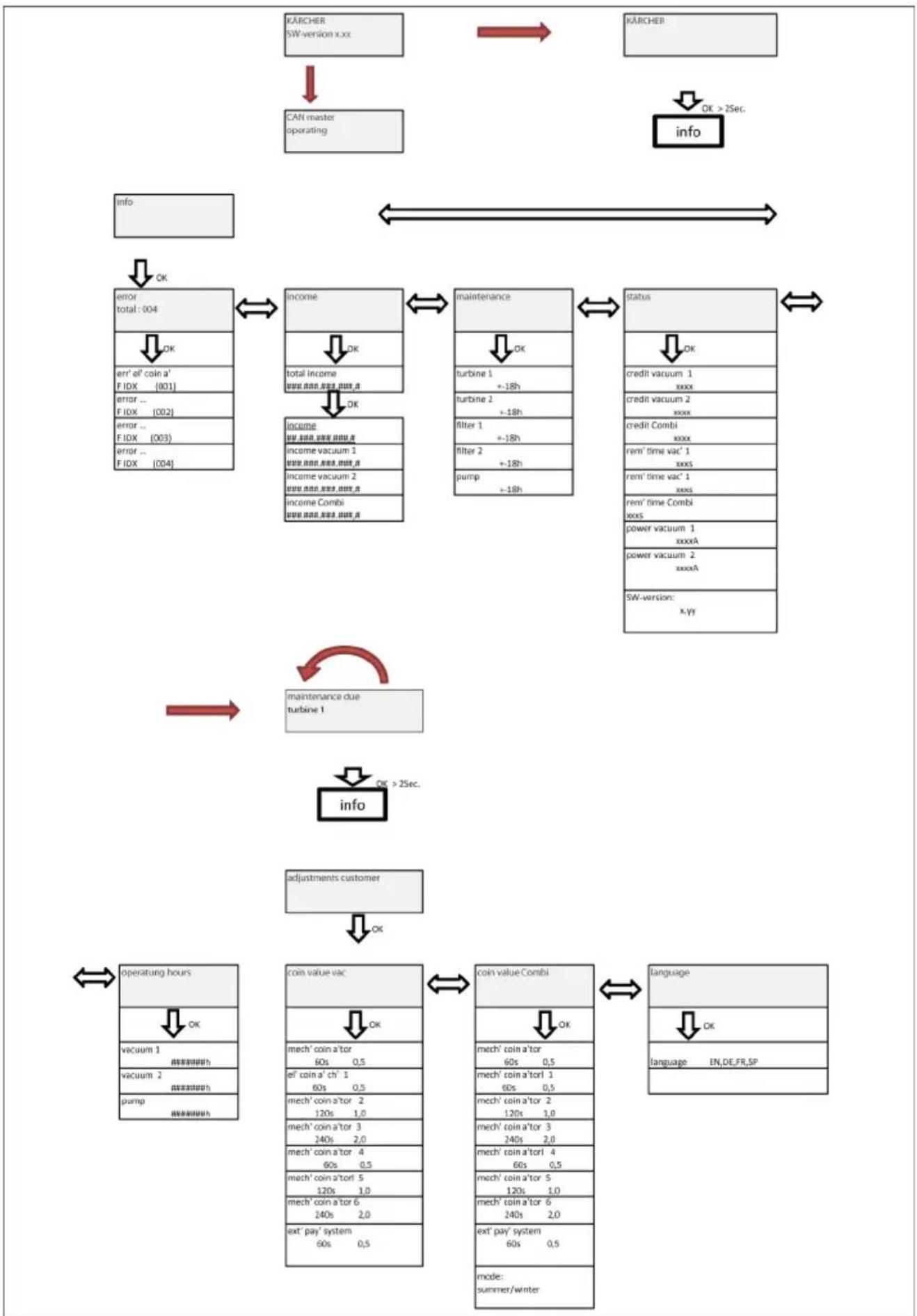
Select the number of the parameter to be set.
Select the menu item using the left and right buttons. Open the parameter group with the "OK" button.
Select the parameter to be set using the left and right buttons.
Set the variable parameters.
Press the "OK" key. The adjustable value of the variable flashes. → Set the value of the variables using the left and right keys. For quick change of variables, hold down the key in the pressed position. → Save the value by pressing the "OK" key. To cancel the change, press the "ESC" key.
Set a parameter with several variables.
→ Press the "OK" key. The adjustable value of the variable flashes. → Set the value of the variables using the left and right keys. For quick change of variables, hold down the key in the pressed position. Save the value by briefly pressing the "OK" key and simultaneously pressing the other variable. Save the set value by long pressing (1 second) the "OK" key. To cancel the change, press the "ESC" key.
Exit the menu
→ By pressing the "ESC" key, you can go to a higher-level menu.
From the corresponding menu area, you can exit with the "ESC" key if the user is not in change mode.
Help in case of malfunctions
DANGER
Before carrying out any work on the device, set the main switch (on the external housing) to the "OFF" position.
Table in coded form.
The digits have the following meaning:
Example: 30190
3 year of manufacture 0 decade of manufacture 1 decade of manufacture 9 second digit of month of manufacture 0 first digit of month of manufacture
Thus, in this example, the code 30190 means the date of manufacture 09/(2)013.
Spare parts
Use only original accessories and spare parts - only they guarantee safe and trouble-free operation of the device.
You can find information about accessories and spare parts on the website www.kaercher.com.
Technical data
Chairman of the Board of Management
S. Reiser
Director Regulatory Affairs & Certification
Authorized representative for documentation:
S. Reiser
Alfred Kärcher SE & Co. KG
71364 Winnenden (Germany)
Tel.: +49 7195 14-0
Fax: +49 7195 14-2212
Winnenden, 2017/04/01

www.kaercher.com/REACH
DANGER
1 LEFT button 2 RIGHT button 3 "OK" button 4 "ESC" button
H.Jenner Chairman of the Board of Management
S. Reiser Director Regulatory Affairs & Certification
71364 Winnenden (Germany)
Tel.: +49 7195 14-0
Fax: +49 7195 14-2212
Winnenden, 2017/04/01

www.kaercher.com/REACH
Danger
DANGER
2006/42/EC (+2009/127/EC)
2011/65/EU
2014/30/EU
Chairman of the Board of Management
S. Reiser
Director Regulatory Affairs & Certification
71364 Winnenden (Germany)
Tel.: +49 7195 14-0
Fax: +49 7195 14-2212
Winnenden, 2017/04/01

Before using your device for the first time, read these original instructions.
www.kaercher.com/REACH
Hazard levels
DANGER
Applicable EU Directives:
2000/14/EC
2006/42/EC (+2009/127/EC)
2011/65/EU
2014/30/EU
Chairman of the Board of Management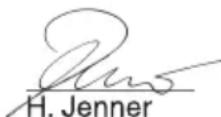
S. Reiser Director Regulatory Affairs & Certification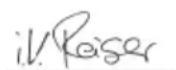
Person responsible for documentation: S. Reiser
Alfred Kärcher SE & Co. KG
71364 Winnenden (Germany)
Tel.: +49 7195 14-0
Fax: +49 7195 14-2212
Winnenden, 2017/04/01
www.kaercher.com/REACH
Hazard levels
DANGER
2006/42/EC (+2009/127/EC)
2011/65/EU
2014/30/EU
S. Reiser Director Regulatory Affairs & Certification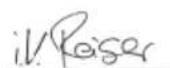
Documentation administrator:
S. Reiser
Alfred Kärcher SE & Co. KG
71364 Winnenden (Germany)
Tel.: +49 7195 14-0
Fax: +49 7195 14-2212
Winnenden, 2017/04/01
www.kaercher.com/REACH
Hazard levels
△DANGER
Immediate danger that leads to serious or fatal injuries.
△WARNING
Possible dangerous situation that could lead to serious or fatal injuries.
△CAUTION
Indicates a possible dangerous situation that could lead to minor injuries.
WARNING
Indication of a possible dangerous situation that could lead to property damage.
Correct use
EU Directives complied with:
2000/14/EC
2006/42/EC (+2009/127/EC)
2011/65/EU
2014/30/EU
Harmonized standards used:
EN 60335-1
EN 60335-2-69
EN 60335-2-75
EN 50581
EN 55014-1: 2006+A1: 2009+A2: 2011
EN 55014-2:2015
EN 61000-3-3:2013
EN 62233: 2008
National application standards:
Chairman of the Board of Management
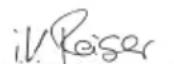
S. Reiser
Director Regulatory Affairs & Certification
71364 Winnenden (Germany)
Tel.: +49 7195 14-0
Fax: +49 7195 14-2212
Winnenden, 2017/04/01

Before first use of your device, read this
2006/42/EC (+2009/127/EC)
2011/65/EU
2014/30/EU
Chairman of the Board of Management
S. Reiser
Director Regulatory Affairs & Certification
71364 Winnenden (Germany)
Tel.: +49 7195 14-0
Fax: +49 7195 14-2212
Winnenden, 2017/04/01
Before first use of your device, please read these original operating instructions, follow them, and keep them for later use or for the next owner.
www.kaercher.com/REACH
Hazard levels
DANGER
2006/42/EZ (+2009/127/EZ)
2011/65/EU
2014/30/EU
Applied harmonized standards:
EN 60335-1
EN 60335-2-69
EN 60335-2-75
EN 50581
EN 55014-1: 2006+A1: 2009+A2: 2011
EN 55014-2: 2015
EN 61000-3-3: 2013
EN 62233: 2008
Applied national standards
Chairman of the Board of Management
S. Reiser
Director Regulatory Affairs & Certification
Authorized for documentation: S. Reiser
Alfred Kärcher SE & Co. KG
71364 Winnenden (Germany)
Tel.: +49 7195 14-0
Fax: +49 7195 14-2212
Winnenden, 2017/04/01

Before using your device for the first time, read these original instructions.
www.kaercher.com/REACH
Hazard levels
DANGER
Indicates an imminent threat that leads to severe bodily injury or death.
WARNING
Indicates a potentially dangerous situation that may lead to severe bodily injury or death.
CAUTION
A note indicating a potentially dangerous situation that may cause minor bodily injury.
ATTENTION
A note indicating a potentially dangerous situation that may cause material damage.
Intended use
2006/42/EC (+2009/127/EC)
2011/65/EU
2014/30/EU
Applied harmonized standards:
EN 60335-1
EN 60335-2-69
EN 60335-2-75
EN 50581
EN 55014-1: 2006+A1: 2009+A2: 2011
EN 55014-2: 2015
EN 61000-3-3: 2013
EN 62233: 2008
S. Reiser Director Regulatory Affairs & Certification
Authorized for documentation: S. Reiser
Alfred Kärcher SE & Co. KG
71364 Winnenden (Germany)
Tel.: +49 7195 14-0
Fax: +49 7195 14-2212
Winnenden, 2017/04/01
Before first use, read the original operating instructions and follow them. Keep them for later use or for the subsequent owner.
Before starting the device, it is mandatory to read the operating instructions No. 5.956-249.0! If the safety instructions are not followed, damage to the device and danger to the operator and other persons may occur. In case of transport damage, inform the dealer immediately.
Storage
Hazard levels: BG 1 Danger. BG 2 Intended use. BG 3 Safety devices. BG 4 Start-up. BG 4 Operation. BG 7 Maintenance. BG 8 Care and maintenance. BG 11 Menu structure. BG 15 Troubleshooting. BG 18 Warranty. BG 18 Spare parts. BG 18 Technical data. BG 19 EC Declaration of Conformity.
www.kaercher.com/REACH
Hazard levels
DANGER
For immediate danger that can lead to serious injury or death.
WARNING
For a possible dangerous situation that could lead to serious injury or death.
CAUTION
Warning about a possible dangerous situation that could lead to personal injury.
ATTENTION
Warning about a possible dangerous situation that could lead to material damage.
Intended use
Note: Karcher cannot accept any liability for damage to the device, damage to the customer's vehicle, which has been cleaned, as well as for other damage caused by failure to comply with the specified operating instructions.
- The device is intended for cleaning dry surfaces in the interior of motor vehicles.
- Not suitable for cleaning: it is forbidden to clean burning substances, asbestos dust and liquids. This device is suitable for professional use.
- Available in a version with one seat (SB VC 1) and two seats (SB VC 2).
Device overview
Representation of SB VC 2:
1 Control 2 Opening for coin insertion 3 Main switch 4 Suction hose 1 5 Holder 6 Bracket 7 Tank for cleaning agent 8 Suction hose 2
9 Coin counter 10 Switch for automatic filter cleaning 11 Intermediate ring A Cable passage SB VC 1 B Cable passage SB VC 2
Device control
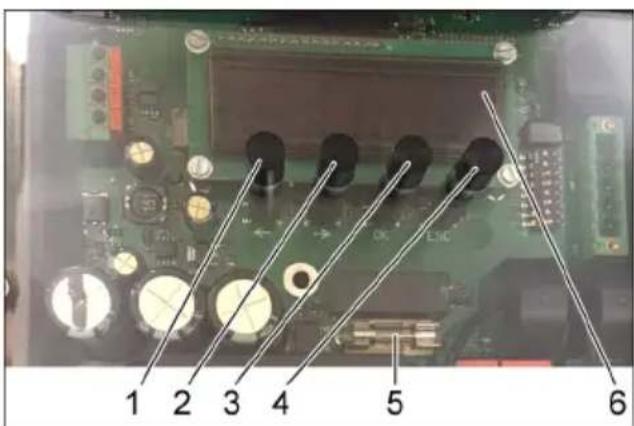
1 Button LEFT 2 Button RIGHT 3 Button OK 4 Button ESC 5 Display 6 Nozzle To open the device control menu, press and hold the OK button for 2 seconds. The menu "Information" is displayed.
Device elements
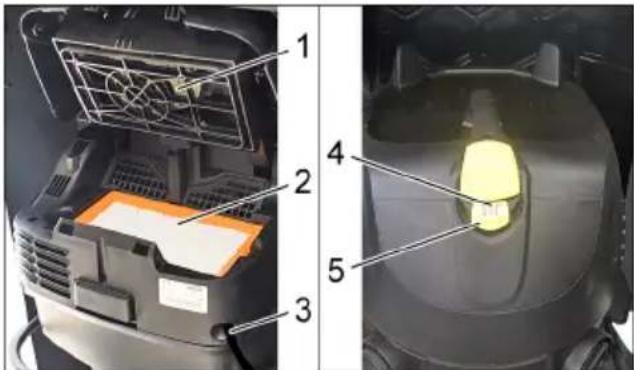
1. Pump station filter 2. Flat filter 3. Cable guard 4. Control lamp 5. Adjustment for automatic operation of the filter
Start-up and operation
WARNING
The device may be started and operated only by trained and qualified personnel.
When servicing, never remove the flat filter.
Instruction
The suction hose is placed in the reservoir for the liquid.
Mounting the suction hose
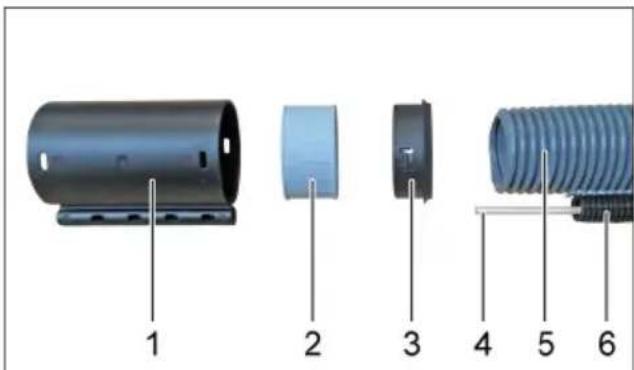
1. Hose coupling 2. Screw-in sleeve 3. Sealing ring 4. Flat gasket 5. Suction hose with double collar 6. Guide hose
Mount the sealing ring, the screw-in sleeve, and the hose coupling of the suction hose with double collar. → Press the flat gasket into the guide hose and slide it through the hose coupling.
1. Suction connection 2. Seal 3. Spring for sealing ring 4. Suction hose with double collar 5. Seal from the pump housing
→ Place the seal from the pump housing on the suction hose with double collar slightly before the double collar. → Slide the suction hose with double collar through the suction connection. Mount the spring for sealing ring, the sealing ring, and the suction connection of the suction hose with double collar. → Connect the suction connection of the suction hose to the intermediate ring. → When closing the suction hose valve, it must be pressed between the two suction openings so that the valve can close.
1. Suction hose with double collar 2. Flat gasket 3. Seal from the pump housing 4. Suction connection of the suction hose
→ Press the flat gasket, the suction hose with double collar, and the seal from the pump housing into the suction connection of the suction hose.
Instruction
Turn the handle to the right to adjust the height of the suction cup marker.
1 Turn the handle 2 Bolt 3 Suction cup marker with double cover 4 Thread in the handle turner → Place the open handle turner around the suction cup marker with double cover. Tighten the handle turner by turning it clockwise.
1 Turn the handle 2 Suction cup marker with double cover → Do not press the suction cup marker with double cover too hard. Turn the handle turner upwards so that the suction cup marker is positioned between the outer and inner zone.
1 Suction cup base 2 Threaded pin 3 Automatic stop for the anti-tip system 4 Rear handle 5 Suction cup marker for the user
Adjust the height of the suction cup marker for the user. → Mount the pressure handle, the threaded pin, and the automatic stop of the anti-tip system on the suction cup marker for the user and insert them into the automatic stop.
1 Cap of the marker 2 Locking pin 3 Locking handle 4 Spring for the anti-tip system 5 Suction cup marker for the user
Mount the locking handle and the locking pin on the suction cup marker for the user and insert them into the cap of the marker.
General information
1 Suction cup marker for the user with spring as protection against tipping 2 Cap of the marker 3 Suction cup marker with double cover
Mounting instructions
The spring as protection against tipping must be mounted on the cap of the marker, not on the automatic stop.
Adjust the height of the marker on site. When the automatic stop is installed, the suction cup marker for the user must not touch the floor, so a minimum distance of 5 cm from the floor must be maintained.
If necessary, adjust the height of the suction cup marker with double cover.
1 Knife 2 Suction cup marker with double cover 3 Supply for the automatic stop 4 Suction cup base → Press the supply for the automatic stop. → Pull the automatic stop. Extend the supply for the automatic stop. → Cut the suction cup marker with double cover using the knife.
Maintenance
Control panel of the starter
A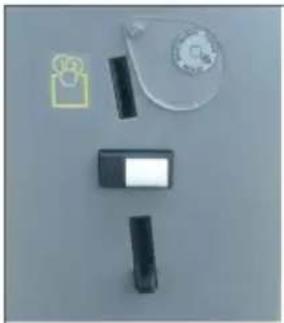
B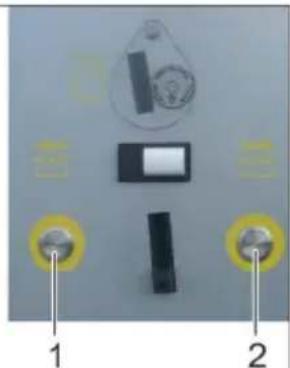
ASBVC1
BSBVC2
1 Button for selecting washing program 2 Button for selecting washing program
SBVC1
The washing process starts automatically after the coin is inserted.
SBVC2
The coin insertion is selected with the corresponding button for the washing program. The washing process starts.
1 Display (unit)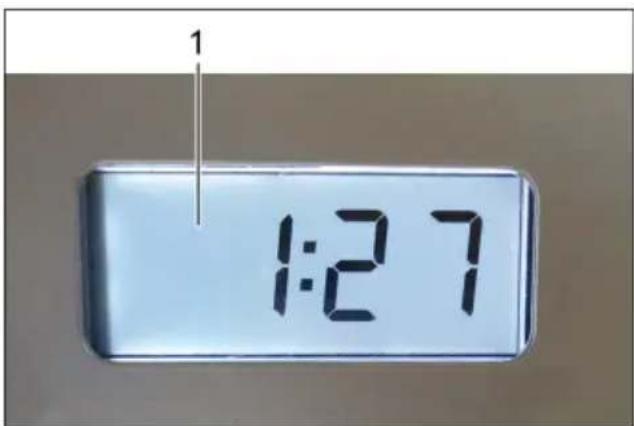
Additional functions:
C/without coin insertion.
AUTOMATIC DETERGENT DISPENSING
The device is equipped with a function for automatic detergent dispensing, which is especially effective when washing. The detergent is dispensed automatically after the start of the washing process via the corresponding valve.
Instruction: The automatic filter cleaning is switched on at the factory.
Instruction: The automatic filter cleaning can only be switched off/on when the device is switched on.
- Switching off the automatic filter cleaning: Press the filter button. The control lamp in the button goes out. - Switching on the automatic filter cleaning: Press the filter button again. The control lamp in the button lights up green.
Instruction
Switching off the automatic filter cleaning leads to premature wear of the filter and a reduction in suction power.
Cleaning and maintenance
Changing the flat filter
Instruction
Change the flat filter regularly, at least when necessary, e.g. when it is clogged.
→ When installing, check the flat filter for correct position.
1 Filter cover 2 Flat filter Open the filter cover. → Remove the flat filter.
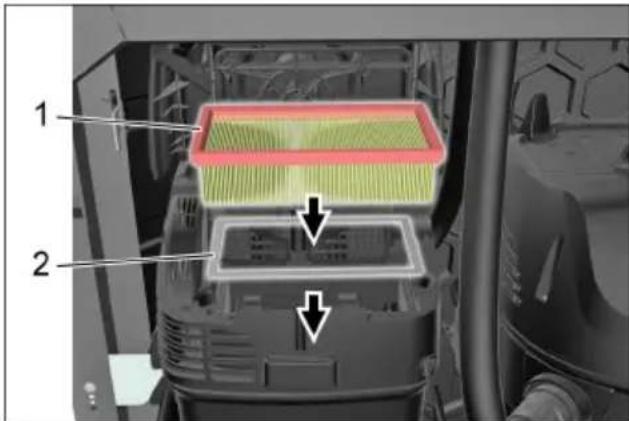
1 Flat filter 2 Metal frame The metal frame must be placed correctly. Close the filter cover, it must click into place.
Instruction
The flat filter is a consumable part number 6.904-360.0 and is resistant to cleaning agents. When replacing the filter, it is recommended to use this filter.
Empty the dirt reservoir
Instruction
Drain the oil reservoir 1 to 2 times per semester.
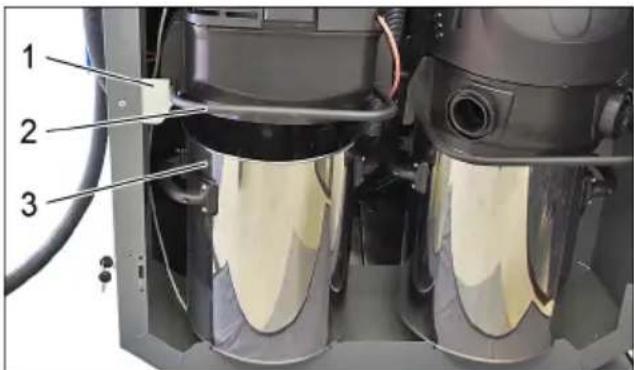
1 Cover 2 Bracket 3 Oil reservoir
Remove the suction head with the bracket and place it on top. → Drain the oil reservoir.
Instruction
When installing the suction head, make sure it is positioned correctly.
Before closing the suction valve, the marking must be aligned between the two suction openings so that the valve can close.
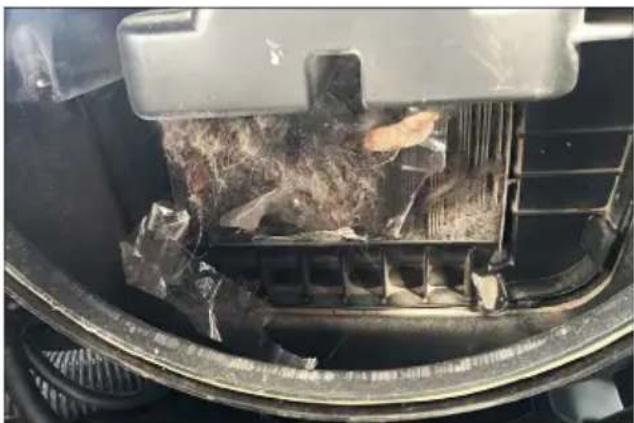
→ After each draining of the oil reservoir, check the coarse filter for dirt and clean it if necessary. → After each draining of the oil reservoir, check the suction power.
If the suction power is insufficient, the flat filter must be cleaned using the automatic filter cleaning function.
Checking the suction power
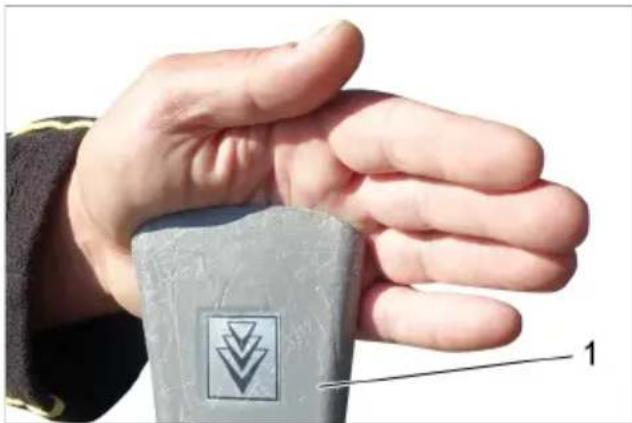
1 Suction hose
→ When working, always hold the automatic hose with your hand. → The automatic hose must be held against the hand by the vacuum generated. If the automatic hose does not stay attached to the hand by itself, the flat filter must be cleaned with the automatic filter cleaning function.
Cleaning the flat filter using the automatic filter cleaning function
Joint 1
Joint 2
Press the button. → Activate the automatic filter cleaning function.
1 Control lamp 2 Pre-filter 3 Automatic filter cleaning
Step 3
Start the automatic cleaning process.
Note
During automatic filter cleaning, keep the automatic process closed.
1 Suction nozzle
Step 4
Switch on the automatic filter cleaning function.
Step 5
Now the filter will be cleaned automatically by means of three suction pulses. Repeat steps 2 to 4. Repeat the process 5 to 8 times (depending on the degree of clogging). After that, check the suction power.
Note
After the cleaning process, the control lamp must light up green.
Note
When cleaning the last filter with the automatic filter cleaning function, the dust that has accumulated on the surface of the last filter is removed.
HaHnUHnT Mbx He BnIe OTpuIaTeJHo Bbpxy CmyKaTeJIHaTa MOuHOCT.
Ipn Heo6xOaHMoCT OTcTaHeTe BnMaTeNo HAnuHmMbxCpBuHa MeTna.
A IIOscbK fNJIITbp INpeDn NOUHCTBaHeTo
BПиocькфиNTbp cneI NOuHCTBaHETO
BHUMAHNE
Ipu npeebeane, u3myneane u noucmeaHe cbc c2bcmeh eb3dyx nnockuymfunmbp ce noepexka.
CTpykTypa Ha MeHIOTo
C6yToH,ESC"nonaTe o6paTHOB MeHIOTo Ha3aI.
OT cbotbethata oJnact moKe da ce n3ne-3e c6ytoHa ,ESC" aKo noJ3BaTeJrT He e B peKIM Ha npOMraHa.
Помоц прн HeN3празвhoeТN
ONACHOCT
Ipeu ecuku deuHocmu no ypea no-cmae me 2naehn npekbcay (Ha ebhu-Hua Kopnyc) Ha "OFF".
H.Jenner Chairman of the Board of Management
S. Reiser Director Regulatory Affairs & Certification
ПьнHomошнК NOДOKум entaцята:
S. Reiser
Alfred Kärcher SE & Co. KG
71364 Winnenden (Germany)
Tel.: +49 7195 14-0
Fax: +49 7195 14-2212
Winnenden, 2017/04/01

Chairman of the Board of Management
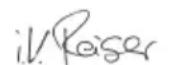
S. Reiser
Director Regulatory Affairs & Certification
71364 Winnenden (Germany)
Tel.: +49 7195 14-0
Fax: +49 7195 14-2212
Winnenden, 2017/04/01

Before first use of the device, read the original instructions.
www.kaercher.com/REACH
△BISTAMI
Indicates an imminently hazardous situation which, if not avoided, will result in death or serious injury.
△WARNING
Indicates a potentially hazardous situation which, if not avoided, could result in death or serious injury.
△CAUTION
Indicates a potentially hazardous situation which, if not avoided, may result in minor or moderate injury.
NOTE
1 Left button 2 Right button 3 OK button 4 ESC button
Chairman of the Board of Management
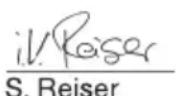
Director Regulatory Affairs & Certification
Authorized to compile the documentation:
S. Reiser
Alfred Kärcher SE & Co. KG
71364 Winnenden (Germany)
Tel.: +49 7195 14-0
Fax: +49 7195 14-2212
Winnenden, 2017/04/01

Before first use of the device, it is essential to read the original instructions carefully, follow them, and keep them for future reference or for passing on to the new owner.
Read the original instructions, follow them, and keep them for future reference or to pass on to the new owner.
Risk levels
DANGER
Indicates an imminent direct danger that can cause serious injuries or death.
WARNING
Indicates a possible danger that can cause serious injuries or death.
CAUTION
Indicates a possible danger that can cause minor injuries.
ATTENTION
Reference to a possible danger that can cause material damage.
Chairman of the Board of Management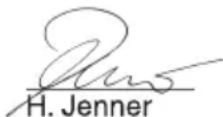
S. Reiser Director Regulatory Affairs & Certification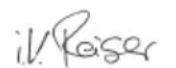
71364 Winnenden (Germany)
Tel.: +49 7195 14-0
Fax: +49 7195 14-2212
Winnenden, 2017/04/01

Read the operating instructions before using the device.
Follow the original operating instructions, use the device only in accordance with them, and keep them for future use by the next owner.
- Before first use, read the safety instructions No. 5.956-249.0 carefully. - Failure to follow the operating instructions and safety rules may lead to injury to the device user and other persons. - If damage occurs during transport, please contact the dealer immediately.
Contents
Environmental protection
Device description UK 1
Safety instructions UK 1
Proper use... UK 2
Scope of delivery. UK 3
Elements of the device... UK 4
Introduction to operation... UK 4
Operation UK 7
Maintenance and technical service UK 8
Menu structure. UK 11
Help in case of malfunctions UK 15
Warranty. UK 18
Spare parts list.. UK 18
Technical specifications .UK 18
Declaration of conformity of the manufacturer...UK 19
Environmental protection

Packaging materials are recyclable. Please do not dispose of packaging materials with household waste, take them for recycling.
Old devices contain valuable materials that can be reused. Batteries, oil and similar materials must not enter the environment. Therefore, please dispose of old devices using special waste collection systems.
Instructions for use of components (REACH)
Current information about components is provided on the website at the address:
www.kaercher.com/REACH
Safety instructions
DANGER
Immediate danger that can lead to severe injury or death.
WARNING
Possible dangerous situation that can lead to severe injury or death.
CAUTION
Indicates a potentially dangerous situation that can lead to minor injuries.
NOTICE
Indicates a possible dangerous situation that can cause property damage.
Proper use
Note: Kärcher accepts no liability for damage to the device, damage to the vehicle of the customer, or damage caused by improper use or operation not in accordance with the instructions.
The device is intended for collecting dry dirt in the interior of vehicles. Use other than intended, such as collecting ashes, is hazardous to health and is therefore prohibited. The device is intended for commercial use. Available in versions (SB VC 1) and (SB VC 2).
Device description
Illustration SB VC 2:
1 Control system 2 Hose connection 3 Hose 4 Sealing head 1 5 Drive 6 Handle 7 Container capacity 8 Sealing head 2
9 Coin validator
10 Automatic hose outlet 11 Guide ring A Cable entry SB VC 1 Cable entry SB VC 2
Device control system
1 LEFT button (LINKS) 2 RIGHT button (RECHTS) 3 OK button 4 ESC button 5 Reserve 6 Display
To enter the device control system menu, press and hold
Install the guide ring, insert the bushing and the flange coupling onto the sealing flange with full shell. → Slide the rod into the inserted pipe and pass through the flange coupling.
1 Sealing element 2 Sealing ring 3 Spring stop ring 4 Sealing flange with shell 5 Seal with thick rubber
Slide the seal with thick rubber onto the sealing flange with shell and move it to the full groove. → Pass the sealing flange with shell through the flange opening. Install the spring stop ring, sealing ring, and sealing pipe onto the sealing flange with shell. → Press the sealing pipe to the front ring. → Before closing the door, the sealing flange must be passed between the two hoses so that the door can close.
1 Sealing flange with shell 2 Rod 3 Seal with thick rubber 4 Sealing flange mounting
Insert the rod, sealing flange with shell, and seal with thick rubber into the sealing flange mounting.
Note
The seal with thick rubber must be inserted into the sealing flange mounting at the level.
1 Swivel ring 2 Bolt 3 Sealing flange with shell 4 Swivel ring thread Install the open swivel ring onto the sealing flange with shell. Close the swivel ring and tighten with the screw.
1 Swivel ring 2 Sealing flange with shell
→ Pull the telescopic handle with the outer shell of the hose out. → Check the rotation rings by hand so that the telescopic handle extends between the outer and inner parts.
1 Suction hose 2 Threaded ring 3 Protection against car paint damage 4 Locking ring 5 Telescopic handle for operator
Adjust the telescopic handle for the operator. Install the locking ring, threaded ring and protection against car paint damage on the telescopic handle for the operator and insert into the car hose.
1 Hose guide 2 Threaded bushing 3 Locking ring 4 Spring for protection against kinking 5 Telescopic handle for operator. Install the locking ring and threaded bushing on the telescopic handle for the operator and insert into the hose guide.
General view
1 Operator's telescopic handle with protective spring against kinking 2 Hose guide 3 Telescopic handle with outer shell
Installation instructions
The protective spring against kinking must be installed on the hose guide, not on the automatic hose.
→ Adjust the handle length on site. When the suction hose is raised, the operator's telescopic handle must not touch the floor; the minimum distance to the floor must be 5 cm.
If necessary, adjust the length of the telescopic handle with the outer shell.
1 Nozzle 2 Telescopic handle with outer shell 3 Fastening of the suction hose 4 Suction hose
Close the fasteners of the suction hose. Remove the suction hose. Unscrew the fastening of the suction hose. Shorten the telescopic handle with the outer shell using a saw.
Operation
Features of the recording systems
ASBVC1
BSBC2
1. Coin slot for inserting a coin on the left 2. Coin slot for inserting a coin on the right
SBVC1
The insertion process is activated by pressing the button.
SBVC2
Press the button to insert the coin in the appropriate slot. The insertion process is activated.
1. Display (on/off)
EXECUTION:
The current tariff does not affect the activation power.
If necessary, check the current tariff using the key.
Set the parameters with the variable
→ Press the "OK" button.
The change that is set will be applied.
Set the value of the variable using the LEFT (LINKS) and RIGHT (RECHTS) buttons.
For a quick change, hold the button pressed.
Save the value by briefly pressing the "OK" button, or
Cancel the change by pressing the "ESC" button.
Set parameters with several variables
Press the "OK" button.
The change being set is applied.
Set the value of the variable using the LEFT (LINKS) and RIGHT (RECHTS) buttons.
For a quick change, hold the button pressed.
Save the value by briefly pressing the "OK" button and automatically move to the next variable.
Save the set value by long pressing (1 second) the "OK" button, or
Cancel the change by pressing the "ESC" button.
Exit the menu
Using the "ESC" button, you can go back up in the menu.
From the corresponding zone, you can exit using the "ESC" button, if the user is not in the change mode.
DANGER
Before carrying out any work on the device, set the main switch (accessory) to the "OFF" position.
Chairman of the Board of Management
S. Reiser
Director Regulatory Affairs & Certification
Authorized representative for documentation:
S. Reiser
Alfred Kärcher SE & Co. KG
71364 Winnenden (Germany)
Tel.: +49 7195 14-0
Fax: +49 7195 14-2212
Winnenden, 2017/04/01
- ENVIRONMENTAL PROTECTION . . . EN
- ENVIRONMENTAL PROTECTION
- NOTES ABOUT THE INGREDIENTS (REACH)
- DANGER OR HAZARD LEVELS
- DANGER
- WARNING
- CAUTION
- ATTENTION
- PROPER USE
- OVERVIEW OF THE APPLIANCE
- VARIANT SHOWN SB VC
- NTROL
- DEVICE ELEMENTS
- START UP
- NOTE
- SUCTION HOSE INSTALLATION
- OVERALL VIEW
- OPERATION
- DIFFERENCES BETWEEN THE START-UP CONTROL
- AUTOMATIC FILTER CLEANING
- CARE AND MAINTENANCE
- REPLACING THE FLAT PLEATED FILTER
- EMPTYING THE DIRT RECEPTACLE CHECKING THE SUCTION POWER
- CLEANING THE FLAT FOLD FILTER USING THE AUTOMATIC DEDUSTING FUNCTION
- STEP
- DESCRIPTION OF FUNCTION KEYS
- FUNCTIONS DESCRIBED WITH AN
- DESCRIPTION OF THE MENU
- SELECT THE PARAMETER YOU WANT TO SET
- SET THE PARAMETER WITH A VARIABLE
- SETTING A PARAMETER WITH SEVERAL VARIABLES
- EXITING THE MENU
- TROUBLESHOOTING
- WARRANTY
- ACCESSORIES AND SPARE PARTS
- EU DECLARATION OF CONFORMITY
- HAZARD LEVEL
- △DANGER
- HAZARD LEVELS
- FAREGRADER
- △FARE
- RISK LEVEL
- OBS
- RISK LEVELS
- △FARA
- INTENDED USE
- DEVICE OVERVIEW
- SHOWN: SB VC
- CONTROL SYSTEM
- ELEMENTS OF THE DEVICE
- START OF OPERATION
- INSTRUCTION
- INSTALLATION OF THE SUCTION HOSE
- O6NNBND
- HCTPYKNNO MOTAXY
- CONTROL
- STARTUP SYSTEMS
- A B T O M A T N U C E C K A Y N C T K A Φ N J B T P A
- MAINTENANCE
- REPLACING THE FILTER BAG
- SUCTION HOSE
- MENU STRUCTURE
- SELECT THE NUMBER OF THE PARAMETER TO BE SET
- SET THE VARIABLE PARAMETERS
- SET A PARAMETER WITH SEVERAL VARIABLES
- EXIT THE MENU
- HELP IN CASE OF MALFUNCTIONS
- SPARE PARTS
- TECHNICAL DATA
- △WARNING
- △CAUTION
- CORRECT USE
- STORAGE
- REPRESENTATION OF SB VC
- DEVICE CONTROL
- START-UP AND OPERATION
- MOUNTING THE SUCTION HOSE
- GENERAL INFORMATION
- MOUNTING INSTRUCTIONS
- CONTROL PANEL OF THE STARTER
- AUTOMATIC DETERGENT DISPENSING
- CLEANING AND MAINTENANCE
- CHANGING THE FLAT FILTER
- EMPTY THE DIRT RESERVOIR
- CHECKING THE SUCTION POWER
- CLEANING THE FLAT FILTER USING THE AUTOMATIC FILTER CLEANING FUNCTION
- JOINT
- SUCTION NOZZLE
- BHUMAHNE
- CTPYKTYPA HA MEHIOTO
- ПОМОЦ ПРН HEN3ПРАЗВHOEТN
- ONACHOCT
- △BISTAMI
- INDICATES AN IMMINENT DIRECT DANGER THAT CAN CAUSE SERIOUS INJURIES OR DEATH
- INDICATES A POSSIBLE DANGER THAT CAN CAUSE SERIOUS INJURIES OR DEATH
- INDICATES A POSSIBLE DANGER THAT CAN CAUSE MINOR INJURIES
- REFERENCE TO A POSSIBLE DANGER THAT CAN CAUSE MATERIAL DAMAGE
- CONTENTS
- INSTRUCTIONS FOR USE OF COMPONENTS (REACH)
- SAFETY INSTRUCTIONS
- NOTICE
- DEVICE DESCRIPTION
- ILLUSTRATION SB VC
- DEVICE CONTROL SYSTEM
- GENERAL VIEW
- INSTALLATION INSTRUCTIONS
- FEATURES OF THE RECORDING SYSTEMS
- SET THE PARAMETERS WITH THE VARIABLE
- SET PARAMETERS WITH SEVERAL VARIABLES
Brand : Kärcher
Model : SB VC 2
Category : Industrial vacuum cleaner