
KM 100120 R G - Vacuum Cleaner Kärcher - Free user manual and instructions
Find the device manual for free KM 100120 R G Kärcher in PDF.
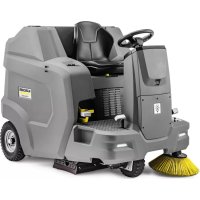



| Product type | Suction sweeper |
| Brand | Kärcher |
| Model | KM 100/120 R G |
| Use | Commercial floor cleaning (parking lots, sidewalks, warehouses, etc.) |
| Engine | Honda GX 270, single-cylinder 4-stroke, 270 cc, 6.3 kW (8.4 HP) |
| Fuel | Unleaded gasoline (minimum 91 octane), tank 5.3 L |
| Battery | 12 V, maintenance-free |
| Dimensions (L × W × H) | 1660 × 1110 × 1355 mm |
| Empty weight | 570 kg |
| Permissible total weight | 944 kg |
| Dust hopper capacity | 120 L |
| Max. working width | 1280 mm (with 2 side brooms) |
| Working speed | 0 – 7 km/h |
| Operating time | Approximately 3.5 h |
| Max. permissible slope | 18 % |
| Dust filter | Round filter, area 6 m², automatic cleaning |
| Sound level (LpA) | 79 dB(A) |
| Main functions | Sweeping with roller brush + side brooms, filtered suction, high-dump |
| Safety | Parking brake, seat switch, safety hood, two-hand control for dumping |
| Routine maintenance | Hopper emptying, oil check, filter cleaning, belt inspection, etc. |
| Spare parts available | Side brooms, roller brushes, filters, seals, tires, etc. |
| Approval | StVZO kit available for use on public roads |
Frequently Asked Questions - KM 100120 R G Kärcher
User questions about KM 100120 R G Kärcher
0 question about this device. Answer the ones you know or ask your own.
Ask a new question about this device
Download the instructions for your Vacuum Cleaner in PDF format for free! Find your manual KM 100120 R G - Kärcher and take your electronic device back in hand. On this page are published all the documents necessary for the use of your device. KM 100120 R G by Kärcher.
USER MANUAL KM 100120 R G Kärcher
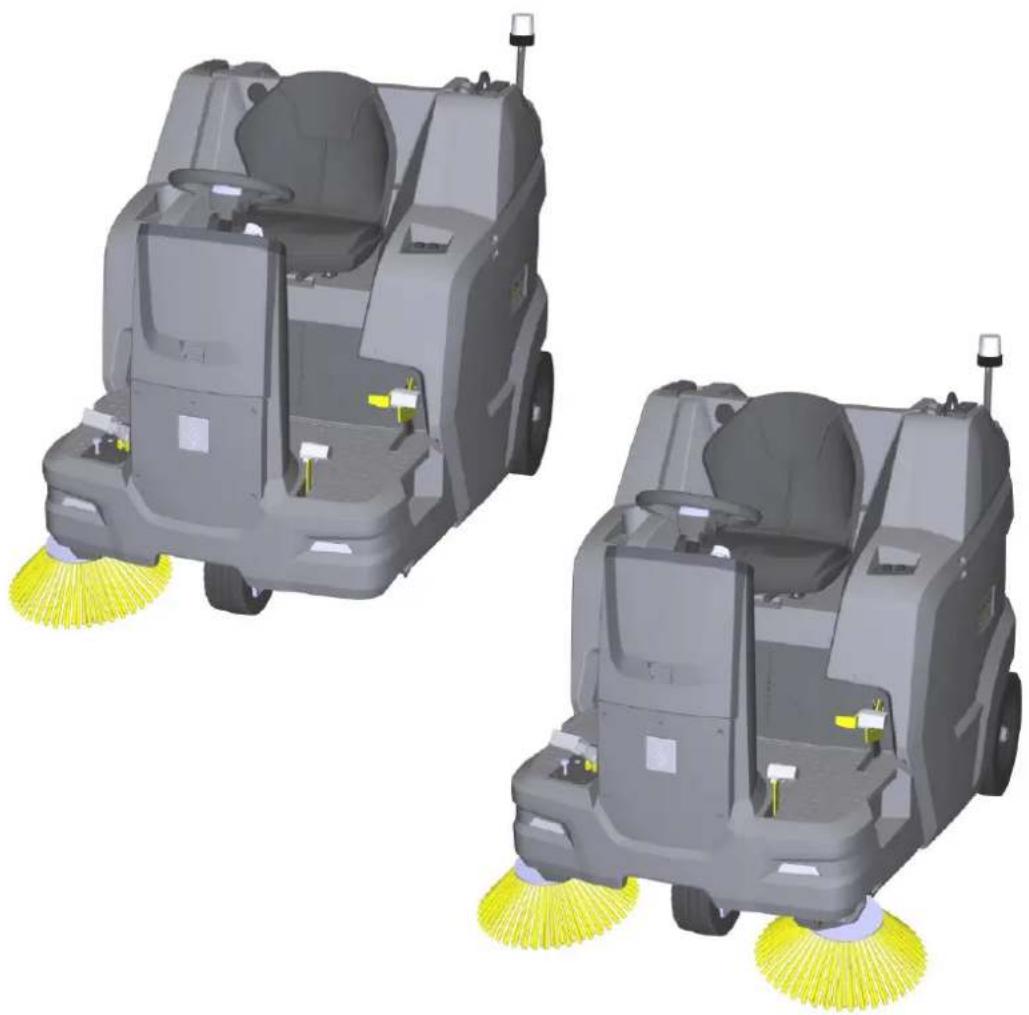
KM 100/120 R G KM 100/120 R G 2SB
German 2
English 20
French 38
Italian 56
Spanish 74
Portuguese 92
Dutch 110
Turkish 127
Swedish 145
Finnish 162
Norwegian 179
Danish 196
Estonian 213
Latvian 230
Lithuanian 247
Polish 265
Hungarian 283
Czech 301
Slovak 318
Slovenian 336
Romanian 352
Croatian 370
Serbian 388
Greek 405
Russian 424
Ukrainian 443
Bulgarian 462
Japanese 481

Register your product
www.kaercher.com/register

EAC
Read Online


59990960

(01/25)
Contents
①Fuel tap
①Oil dipstick
②Oil filler opening
①Wing nut
②Cover
③Air filter
④Fastening
Chairman of the Board of Management
S. Reiser
Director Regulatory Affairs & Certification
71364 Winnenden (Germany)
Tel.: +49 7195 14-0
Fax: +49 7195 14-2212
Winnenden, 2021/06/01
Contents
General notes 20
Intended use 21
Function 21
Safety instructions 21
Device description.... 22
Precommissioning.... 24
Initial startup 25
Operation 26
Transport 27
Storage 28
Care and maintenance 28
Troubleshooting guide 33
Accessories / spare parts.... 35
Technical data 36
Declaration of Conformity 37
General notes

Read the original instructions before using the device for the first time and act in accordance with them. Keep these instructions for future reference or for future owners.
Checking the delivery
Please report any defects or shipping damage identified on the vehicle when it is handed over directly to your dealer or department store.
Environmental protection

The packing materials can be recycled. Please dispose of packaging in accordance with the environmental regulations.

Electrical and electronic devices contain valuable, recyclable materials and often components such as batteries, re-
chargeable batteries or oil, which - if handled or disposed of incorrectly - can pose a potential danger to human health and the environment. However, these components are required for the correct operation of the device. Devices marked by this symbol are not allowed to be disposed of together with the household rubbish.
Notes on the content materials (REACH)
Current information on content materials can be found at: www.kaercher.de/REACH
Disposal of the worn out vehicle
Vehicles that are no longer fit for service contain valuable recyclable materials. We recommend you cooperate with a waste management company with regard to the disposal of your vehicle.
Warranty
The warranty conditions issued by our relevant sales company apply in all countries. We shall remedy possible malfunctions on your appliance within the warranty period free of cost, provided that a material or manufacturing flaw is the cause. In a warranty case, please contact your dealer (with the purchase receipt) or the next authorised customer service site.
(See overleaf for the address)
Further warranty information (if available) can be found in the service area of your local Kärcher website under "Downloads".
Accessories and spare parts
Only use original accessories and original spare parts. They ensure that the appliance will run fault-free and safely.
Information on accessories and spare parts can be found at www.kaercher.com.
Hazard levels
DANGER
- Indication of an imminent threat of danger that will lead to severe injuries or even death.
△WARNING
- Indication of a potentially dangerous situation that may lead to severe injuries or even death.
△CAUTION
- Indication of a potentially dangerous situation that may lead to minor injuries.
ATTENTION
- Indication of a potentially dangerous situation that may lead to damage to property.
Symbols on the machine

△DANGER
Risk of burns from hot surfaces
Allow the vehicle to cool down before working on it.

⚠️DANGER
Risk of fire
Do not sweep up burning or glowing objects such as cigarettes, matches or similar objects.

△DANGER
Risk of accident from tipping
Only use high dumping on level ground.

△WARNING
Risk of injury
Risk of being squeezed or hurt at the belts, side-brushes, waste container, cover.

△WARNING
Risk of injury
Cut and crush injuries from moving vehicle parts inside.
Do not reach into openings in the device.

△DANGER
Risk of accident due to improper handling
Read these operating instructions and the safety instructions before using the device for the first time.

Parking brake

Tyre pressure

Attachment point for jack

Lashing point

Max. load of the storage area 20 kg

Max. load 150 kg
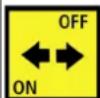
ON position: device can be driven with its own drive OFF position: device can be pushed

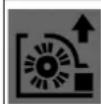
Coarse dirt flap pedal

Wet sweeping flap
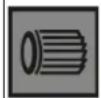
Releasing/fastening the dust filter
Intended use
Use the sweeper to clean commercial floor areas.
Use the sweeper for the following intended areas of application:
1 Parking spaces 2 Footpaths 3 Production systems 4 Logistics areas 5 Hotels 6 Retail trade 7 Storage areas
Only use the sweeper in accordance with the information in these operating instructions. Any other use is considered as improper use. The manufacturer assumes no liability for any resultant damage. The user is solely responsible for the risk.
The sweeper can only be used with the StVZO attachment kit for operation on public roads.
No modifications must be made to the sweeper.
Only the areas approved by the company or the company's representatives must be driven on and cleaned.
Operation in enclosed spaces is prohibited.
Foreseeable misuse
Never sweep or suction up explosive liquids, gases, non-diluted acids or solvents (e.g. petrol, paint thinner, heating oil) because they form explosive vapours or mixtures in conjunction with the suction air.
Never sweep or suction up acetone, non-diluted acids or solvents, as they will corrode and damage the materials used on the device.
Never sweep or suction up reactive metal dusts (e.g. aluminium, magnesium, zinc). They form explosive gases in conjunction with highly alkaline or acidic cleaning agents.
Do not sweep or suction up burning or smouldering objects.
There is a risk of fire.
Do not sweep up any harmful substances.
Standing in hazard zones is prohibited. Operation in explosive spaces is prohibited.
Carrying passengers is prohibited.
This device must not be used to push/pull or transport objects.
Suitable sweeping surfaces
- Asphalt
- Industrial floor
- Screed
- Concrete
- Paving stones
Function
The sweeper operates using the direct-throw principle.
- The rotating side brushes clean corners and edges of the sweeping surface and convey the waste into the path of the roller brush.
- The rotating roller brush conveys the waste directly into the waste container.
- The dust which is swirled up in the waste container is separated by a dust filter, and the suction fan suctions the filtered clean air.
- The dust filter is cleaned automatically.
Safety instructions
Safety devices
Safety devices protect the user and may not be taken out of operation or functionally circumvented.
Adhere to the safety instructions in the chapters!
Bonnet/panel on the right
The bonnet and the right panel have a safety device. When the cover or panel are opened, the running combustion motor is switched off.
The motor can only be started when both are closed.
Emptying the waste container
The roller brush is automatically blocked while the waste container is being emptied.
Waste container two-handed operation
To prevent persons from reaching into the emptying mechanism and the swivel range of the waste container, lifting, lowering and emptying the waste container is only possible with two-handed operation.
Waste container safety brace
It is not permitted to stand under the waste container unless it is fully raised and secured against lowering with the supplied, correctly fitted safety brace.
Seat contact switch
A seat contact switch ensures that the machine can only be started when the driver is sitting in the driver's seat.
Safety instructions for operation
△ WARNING • Only use the device for its proper use. Take into account the local conditions and beware of third parties, in particular children, when working with the device. • Check the device with the operating devices to make sure it is in proper condition and operational safe and reliable. If it is not in perfect condition, you must not use it. • Adhere to the respective safety regulations in hazard zones (e.g. service stations). Never operate the device in explosive spaces. • The device is not intended for use by persons with restricted physical, sensory or mental abilities or those lacking in experience and / or lacking in knowledge.
- Only people who have been instructed on how to use the device, or have proven their ability to operate it, and have been explicitly instructed to use it, must use the device. ATTENTION
- Before starting work, the operator must check whether the safety devices have been attached properly and are fully functional.
- The device operator is responsible for accidents with other people and their property. WARNING • The operator must wear close-fitting clothing and sturdy footwear. Avoid loose-fitting clothing. • Children must be supervised to prevent them from playing with the appliance. • Children and minors must not use the device. ATTENTION • Check the immediate vicinity before setting off (e.g. children). Make sure you have a sufficient view. DANGER • Never leave the device unattended unless the device is secured against unintentional movement. Always apply the parking brake before leaving the device. ATTENTION • Remove the ignition key or KIK (Kärcher Intelligent Key) to prevent unauthorised use of the device. CAUTION • Do not use the device in areas in which there is a possibility of being struck by falling objects. WARNING • Do not look directly into the light source on devices equipped with Blue Spot lighting.
Safety instructions for driving
Note • The list on the risk of overturning is not necessarily comprehensive. DANGER • Danger of tilting if hill or slope is too steep! Observe the maximum permissible values in the technical data when driving up hills and slopes. • Danger of tilting in case of excessive tilting at side! Observe the maximum permissible values in the technical data when driving lateral to the travel direction. • Danger of tilting on unstable subsurfaces! Only use the device on firm subsurfaces.
⚠ WARNING ● Risk of accident due to not adapting speed. Approach corners slowly.
Safety instructions for combustion engines
△ DANGER • Observe the special safety instructions in the operating instructions of the motor manufacturer. • Operation in enclosed spaces is prohibited. • Danger of poisoning: Do not inhale the exhaust gases. • Never close off the exhaust gas openings.
- Never bend down over the exhaust gas opening and take hold of it. - Be aware of the engine after-running time after switching off (3-4 seconds). Keep away from the drive area during this time.
Care and service
⚠ WARNING • Disconnect the battery before working on the electrical system. • Before cleaning, maintenance, replacing parts and resetting to another function, you must switch off the device and remove the ignition key.
△ CAUTION ● Repairs may only be carried out by approved customer service sites or staff qualified in this area who are familiar with all relevant safety instructions.
ATTENTION • Adhere to the safety inspection requirements for mobile devices for industrial use in accordance with the locally applicable regulations (e.g. in Germany: VDE 0701). • Short-circuits or other damage. Do not clean the device with a hose or high-pressure water jet. • Always wear suitable gloves when working on the device.
Device description
Device illustration
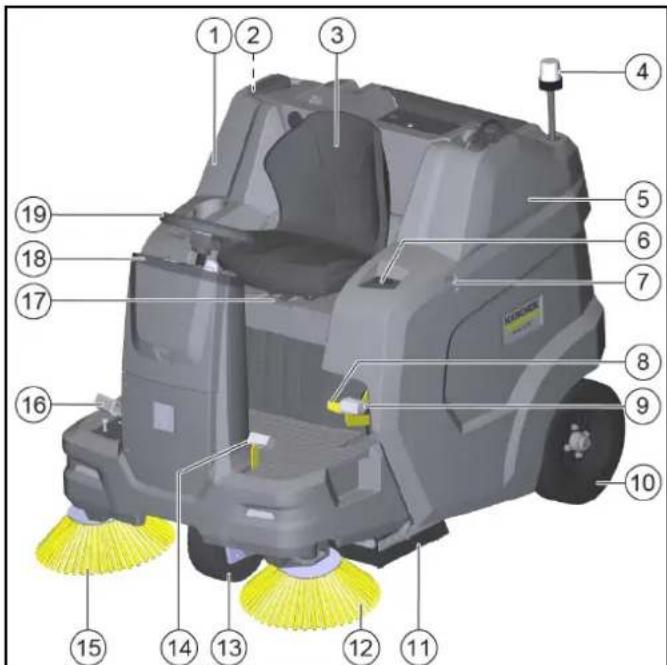
①Right panel (pivoting)
② Waste container safety brace
③Driver's seat (with seat contact switch)
④Flashing beacon
⑤Bonnet (pivoting)
⑥Raising/emptying waste container button
⑦Retaining rail for "Homebase System"
⑧Release the brake
⑨Parking brake
⑩Rear wheel
⑪ Roller brush with sealing strips
⑫Left side brush*
⑬Front wheel
⑭Raising/lowering coarse dirt flap
⑮Right side brush
⑯ Accelerator pedal forward/backward
⑰Seat adjustment lever
18 Control elements**
⑲Steering wheel
* only KM 100/120 R G 2SB
** described in more detail in a later chapter
Optional
The following equipment is not shown if it is already installed at the factory when ordered or can be installed by the service department at a later date.
1 Comfort seat
2 Work light
3 StVZO kit
4 Blue spot
5 Overhead guard
6 Left side brush
7 Water spray system
8 Fleet management module
Control elements
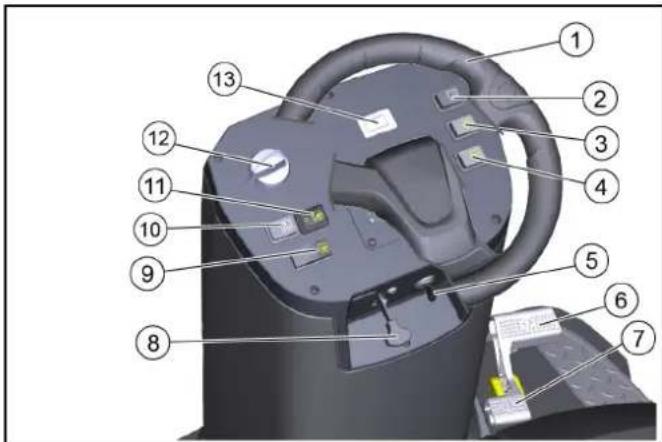
① Steering wheel
② Work light switch (option)
③ Flashing beacon switch (option)
④ Horn
⑤ Key-operated switch
⑥ "Forward" accelerator pedal
⑦ "Reverse" accelerator pedal
⑧ Choke lever
⑨ High dumping button
⑩ Dust filter cleaning button
⑪ Water spray system switch (option)
⑫ Programme selection switch*
⑬ Operating hours counter
* described in more detail in a later chapter
Programme selection switch
Note
The functions are only activated when the key switch is switched on.
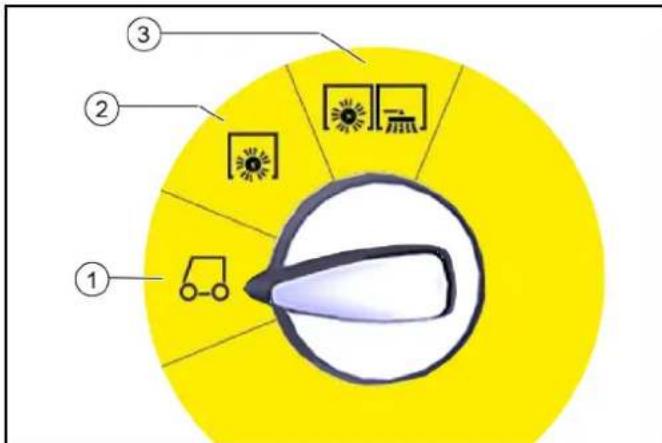
① Driving
- The motor can be started in this position
- The sweeper can be driven to the place of use – Roller brush and side brushes are raised and switched off
② Sweeping with a roller brush
– Roller brush is lowered and switched on
③ Sweeping with a roller brush, right and left side brushes
- Roller brush, right and left side brushes (optional) are lowered and switched on
Panels
⚠ WARNING
Malfunction due to open panels
Only open the panels when the key switch is on <0> and the key has been removed.
Opening during operation is prohibited.
Opening/closing the bonnet
The bonnet must be opened for certain activities:
1 Refuelling 2 Checking/topping up the hydraulic oil level 3 Replace hydraulic oil filter
(only by authorized customer service)
4 Checking/replacing roller brushes 5 Disconnecting the battery
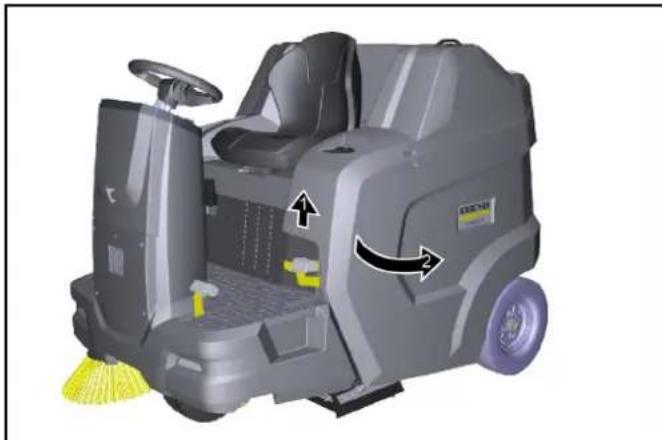
To open the bonnet, grasp the recessed grip at the front, unlock it upwards, then swivel it to the side.
Opening/closing the right panel
The panel on the right must be opened for certain activities:
1 Opening/closing the freewheel 2 Opening the fuel cock 3 Checking/topping up the engine oil level 4 Motor oil change 5 Checking/replacing spark plug 6 Cleaning/replacing air filters
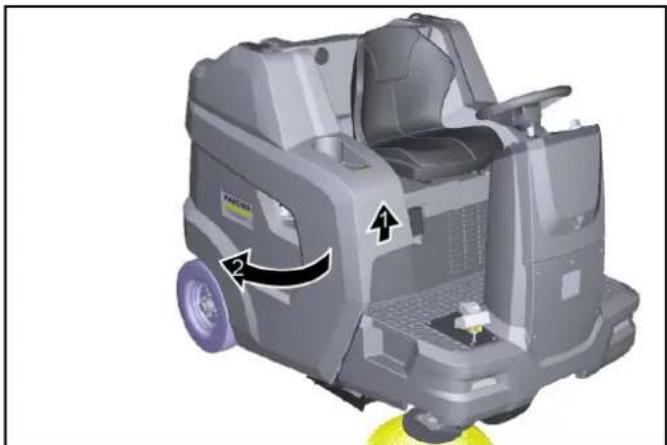
To open the panel, grasp the recessed grip, unlock it upwards, then swing it to the side.
Storage area
The maximum permissible load on the storage compartments is 20 kg.
Ensure that the load is securely fastened.
Batteries / chargers
ATTENTION
Only use the batteries and chargers recommended by the manufacturer.
Only replace batteries with batteries of the same type.
Before disposing of the vehicle, remove the battery and dispose of it in accordance with national or local regulations.
Warning symbols
Observe the following warnings when handling the batteries:
 | Observe notes in the instructions of the battery, on the battery and in these operating instructions. |
 | Wear eye protection. |
 | Keep acids and batteries away from children. |
 | Risk of explosion |
 | Fire, sparks, open flames and smoking are prohibited. |
 | Risk of acid burns |
 | First aid |
 | Warning |
 | Disposal |
 | Do not throw batteries in the bin. |
Safety instructions for lead-acid batteries
△DANGER
Danger of fire and explosion!
Do not place tools or similar items on the battery. Risk of short-circuit and explosion.
Smoking and naked flames must be strictly avoided.
Rooms where batteries are charged must have good ventilation as highly explosive gas is emitted during charging.
△DANGER
Risk of acid burns
Use caution with leaking batteries (sulphuric acid may leak).
△DANGER
Risk of injury!
Ensure that wounds never come into contact with lead.
Always clean your hands after working on batteries.
△WARNING
Environmental risk due to improper disposal of batteries
Ensure that defect or used batteries are disposed of safely (contact a waste management company or Kärcher Service).
Procedures in the event of unintentional release of battery acid
When used normally, and when observing the instructions, lead-acid batteries do not pose any risk.
However, keep in mind that lead-acid batteries contain sulphuric acid which can cause serious chemical burns and corrosion.
- If there is spillage or, if the battery is leaking, acid is escaping, lay down a binding agent such as sand. Do not let it reach the sewer system, soil or a body of water.
- Neutralise the acid with lime/baking soda and dispose of it according to local regulations.
- Contact a waste management company to dispose of faulty batteries.
- Rinse out your eyes or rinse off your skin with copious amounts of fresh water if acid splashes into your eyes or onto your skin.
- Then consult a doctor immediately.
- Wash any contaminated clothing with water.
- Change clothes.
Precommissioning
Unloading instructions
△DANGER
Risk of accidents when unloading the device
Use a suitable ramp when unloading the device.
Do not use a forklift to unload or load the device.
Be aware of the weight of the device when unloading or loading.
See also the chapter "Technical data".

Figure: Ramp
- Connect the battery and charge if necessary.
- Use the enclosed boards to build a ramp according to the sketch.
- Cut the plastic packing strips and remove the film.
- Remove the strap fastening at the attachment points.
- Unscrew the three floor boards shown and the squared timber on the pallet.
- Position the boards on the edge of the pallet; align the boards so that they lie in front on the wheels on the device. Screw the boards tight.
- Place the squared timber under the boards as a support.
- Remove the wooden blocks locking the wheels.
- Release the parking brake.
- Carefully drive the device off the pallet via the ramp (see chapter "Moving the device with its own drive") or push it off the pallet (see chapter "Moving the device without its own drive").
Opening/closing the freewheel lever
△DANGER
Risk of accidents due to absence of braking power
Secure the device to prevent it from rolling away before you actuate the neutral lever.
△CAUTION
Risk of damage to the hydrostatic drive
Push the device slowly and only over a short distance.
Do not tow the device under any circumstances.
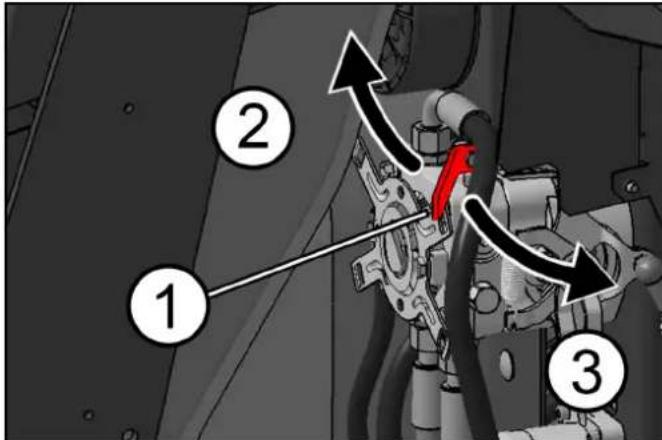
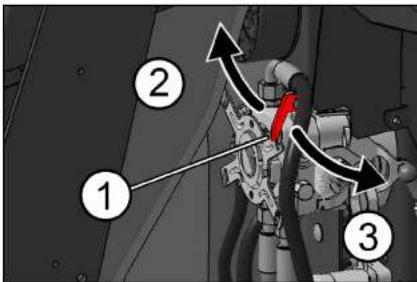
①Neutral lever, red ②Freewheel position closed – The device is ready to c ③Freewheel position open – Device can be pushed
Move device without own drive (device can be moved)
1 Open the neutral lever to move the device.
a Swivel the right panel outwards. b Pull the neutral lever towards your body (open). c Release the parking brake. d Move device.
Moving the device with its own drive (device is ready to drive)
1 After moving the device, close the neutral lever.
a Apply the parking brake. b Push the neutral lever away from your body (close). c Close the right panel.
Installing the side brush
Note
The side brush or brushes are attached to the driver's seat with a cable tie when delivered.
- Attach the side brushes to the device before initial startup. See chapter "Changing the side brushes".
Initial startup
Safety check before startup
ATTENTION
Risk of burns from hot surfaces
Stay away from hot motor, exhaust pipe, angle piece and hydraulic drive motor.
Allow the device to cool down before the safety check.
Note
Missing information in the chapter "Care and maintenance | Maintenance work".
- Check the safety function of the bonnet/panel on the right. a The combustion motor must not start when the bonnet is open. b The combustion motor must not start when the panel is open.
- Check the seat contact switch to make sure it is fully functional.
With the combustion motor running, the device must switch off when the driver gets up from the driver's seat.
- Check the tyre pressure.
- Check the engine oil level.
- Check the filling level of the hydraulic tank.
- Check the roller brush and side brushes for foreign objects and any tangled pieces of tape.
- Check the accelerator pedal for ease of movement and functional reliability (only when the device is at a standstill).
- Empty the waste container.
- Check the filling level of the fuel tank.
Refuelling
DANGER
Explosion hazard due to overflowing fuel
Take care to ensure that no fuel spills onto hot surfaces when refuelling.
DANGER
Explosion hazard due to smoking and naked flames
Ensure strict prohibition of smoking and open flames during the refuelling procedure.
⚠ WARNING
Health risk from inhaled vapours
Do not refuel in confined spaces.
ATTENTION
Risk of damage due to incorrect fuel
Only fill up with suitable fuel as specified in the technical data.
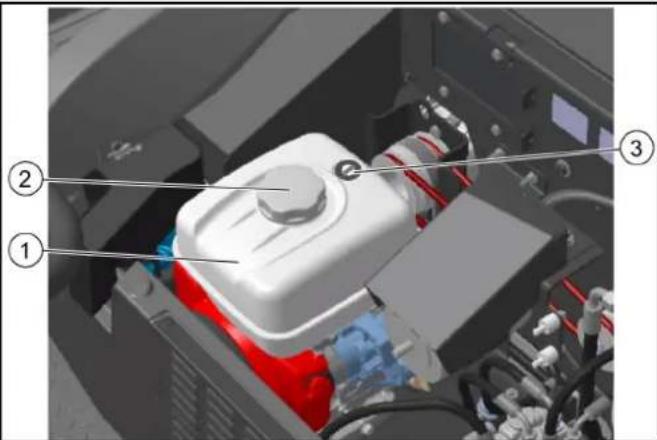
①Fuel tank
②Fuel cap
③Fuel level indicator
- Switch off the device (switch off the motor).
- Pivot the bonnet outwards.
- Open the tank cap.
- Fill with fuel.
- Wipe up any spilled fuel and close the tank cap.
Adjusting the driver's seat
DANGER
Danger of accident
Only adjust the driver's seat when the device is stationary.
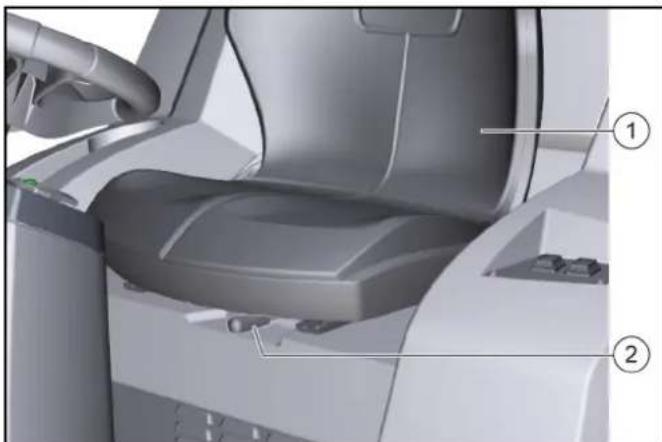
1 Driver's seat
2 Seat adjustment lever
- Pull the seat adjustment lever to the right and move the driver's seat to the desired position.
- Release the seat adjustment lever.
- Move the driver's seat back and forth to check that it is properly latched in place.
Opening/closing the fuel cock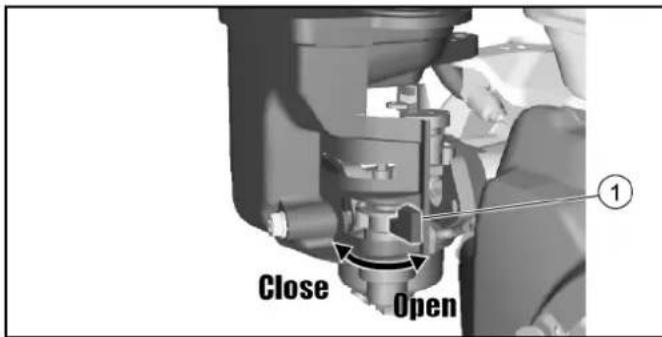
1 Fuel cock. To open or close the fuel cock, turn it in the corresponding direction up to the stop.
Applying/releasing the parking brake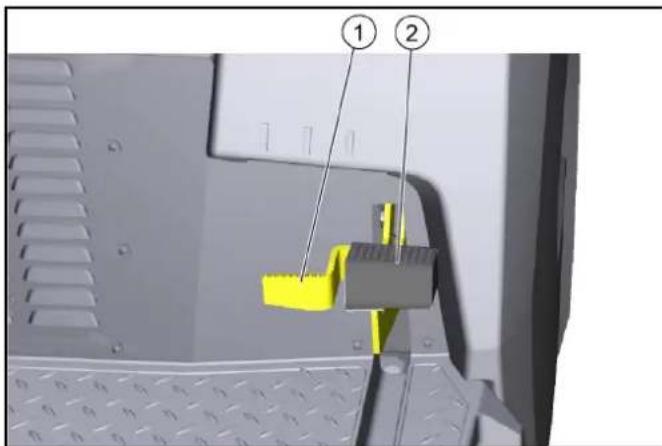
1 Parking brake unlocking, 2 Parking brake. Apply the parking brake: 1. Press the parking brake (engages). Release the parking brake: 2. Press the release button, the parking brake is released.
Operation
Starting the device (motor)
Note
To start the motor, the bonnet must be closed and the driver must sit in the driver's seat.
- Open the fuel cock.
- Sit in the driver's seat (seat contact switch).
- Set the programme selection switch to "Drive" position.
- Insert the key in the key switch and turn to the "I - ON" position, the motor starts.
- During cold exterior temperatures: Operate the choke lever.
Driving the device
ATTENTION
Risk of injury when reversing
There must be no danger to third parties when reversing. If necessary, have them instructed.
⚠ WARNING
Risk of accident
Do not drive while the waste container is raised.
ATTENTION
Risk of damage to the drive!
Before driving, make sure that the neutral lever is closed. Always press the accelerator pedal carefully and slowly. Do not switch suddenly from reverse to forward drive or vice versa.
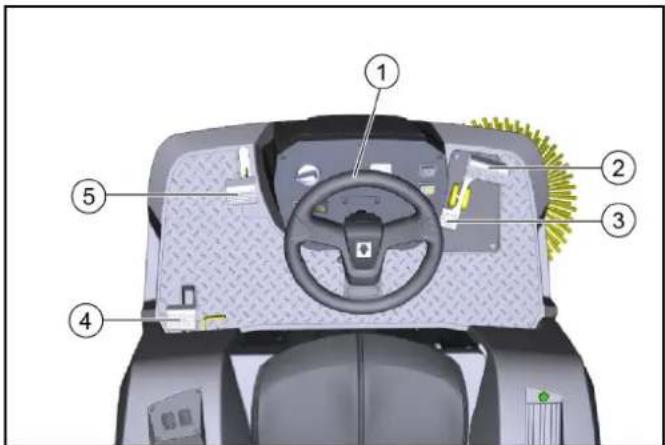
① Steering wheel ② Drive forwards ③ Drive in reverse ④ Parking brake ⑤ Coarse dirt flap
- Carefully press the accelerator pedal.
a Continuously regulate the travel speed with the accelerator pedal.
b Avoid jerking the pedal.
c Adapt the travel speed to the respective conditions.
- Steer the travel direction using the steering wheel.
- Release the accelerator pedal, the device brakes automatically and stops.
a In an emergency, also apply the parking brake.
Sweeping mode
Information on sweeping operation
△DANGER
Risk of injury from abrupt stopping
Do not get out of the driver's seat while driving or carrying out cleaning work (the seat contact switch brings the device to an abrupt halt).
△WARNING
Risk of injury from stones or chippings
When the coarse dirt flap is open, beware of people, animals and objects in the vicinity (projectile stones or chippings are dangerous).
△CAUTION
Risk of damage due to parcel tape or similar material
Do not sweep parcel tape, pieces of string or similar items (damage to the sweeping mechanics).
Objects or loose obstacles must not be driven over or pushed.
- Adjust the travel speed to the circumstances for optimum cleaning results.
- Sweeping is only permitted with the waste container retracted. a If the programme selector is set to "Drive", the container flap is automatically closed.
b If you switch the programme selector switch to "Sweeping", the container flap opens automatically and the waste container is ready to pick up waste.
- Empty the waste container at regular intervals.
a If mainly chippings were swept up (heavy waste), empty the waste container earlier.
- When cleaning surfaces, set the programme selector to "Sweeping with roller brush".
- To clean side edges, also use the side brushes by setting the programme selector switch to "Sweeping with roller brush and side brushes".
- Fixed obstacles up to 6 cm high can be driven over slowly and carefully.
- Drive over fixed obstacles of more than 6 cm in height with a suitable ramp.
Sweeping with roller brush and side brush
- For cleaning work, select the forwards direction of travel.
- For surface cleaning: Lower the roller brush by setting the programme selector to "Sweeping with the roller brush".
- For wet or damp surfaces: Open the wet sweeping flap.
- For cleaning close to the edge: also lower the right side brushes by setting the programme selector switch to "Sweeping with roller brush and side brushes".
- To pick up larger objects (50 mm): Briefly press the coarse dirt flap pedal.
- Clean the dust filter from time to time. a The dust filter is automatically cleaned at regular intervals. b In dusty environments, also press the filter cleaning switch.
Emptying the waste container
The high dumping system on the unit allows the waste to be directly emptied into a waste container (see chapter "Technical data" for maximum discharge height).
⚠ WARNING
Risk of injury due to falling objects!
When lifting and lowering the waste container, there is a risk of injury from objects falling from the storage surface.
Before lifting the waste container, remove all objects that are not securely fastened from the storage surface.
⚠ WARNING
Risk of injury due to tipping of the machine when emptying the waste container!
Empty the waste container only on firm, level ground.
Maintain a safety distance when emptying on stockpiles and ramps.
⚠ WARNING
Risk of injury when standing in the swivel range of the waste container!
Make sure that no persons or animals are in the swivel range of the waste container during the emptying process.
⚠ WARNING
Risk of injury due to crushing or shearing off of body parts when reaching into the mechanics of the waste container!
Do not reach into the movement area or the components of the emptying mechanism of the waste container.
⚠ WARNING
Risk of injury if the waste container falls!
The raised waste container can fall abruptly and cause serious injuries due to crushing and trapping.
Do not walk underneath the waste container if it is unsecured.
Secure the raised waste container properly with the supplied safety brace before walking underneath the waste container.
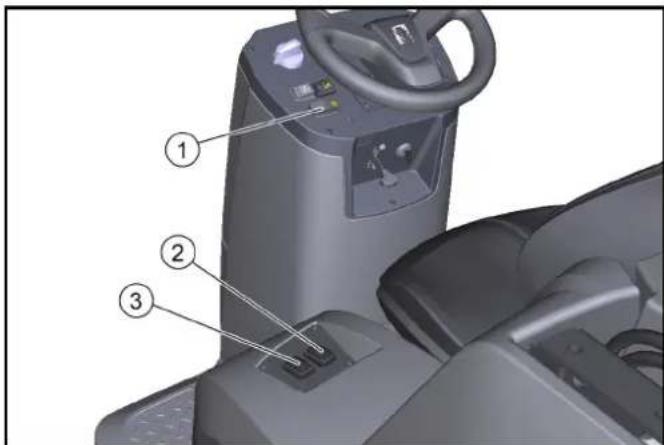
①High dumping button
②Switch for raising/lowering the waste container
③Open/close container flap switch
- Set the programme selector switch to the "Drive" position (the waste container can only be lifted in this position).
- Roughly position the device. a After switching off the device, wait at least 1 minute so that the dust can settle before emptying.
- Press the high discharge button on the control panel and keep it pressed.
- Press the waste container switch and raise the waste container. a To empty it into a waste bin, lift the waste container completely and slowly move towards the collection container. b For free emptying, lift the waste container approximately to the middle until the container flap can be opened (if the emptying height is too low, the operation of the container flap is blocked).
- Apply the parking brake.
- Press the container flap switch and empty the waste container.
- Close the container flap.
- Release the parking brake.
- Drive away from the emptying station.
- Lower the waste container completely.
Switching off the device
The dust filter is automatically cleaned when the device is switched off.
1 Park the device on a level surface.
2 Turn the programme selection switch to the "Drive" position.
3 Apply the parking brake.
4 Remove the key from the key switch.
5 Close the fuel cock.
Transport
△DANGER
Risk of accident when loading
Always close the neutral lever when loading the device. Only then are the drive and parking brake ready for operation. The device must always be moved with its own drive on inclines or slopes.
Only load and unload devices on a level surface.
Risk of injury and damage
Note the net weight (transport weight) of the device when transporting it on trailers or vehicles.
Secure the device in accordance with the respectively applicable guidelines to prevent it from slipping or overturning.
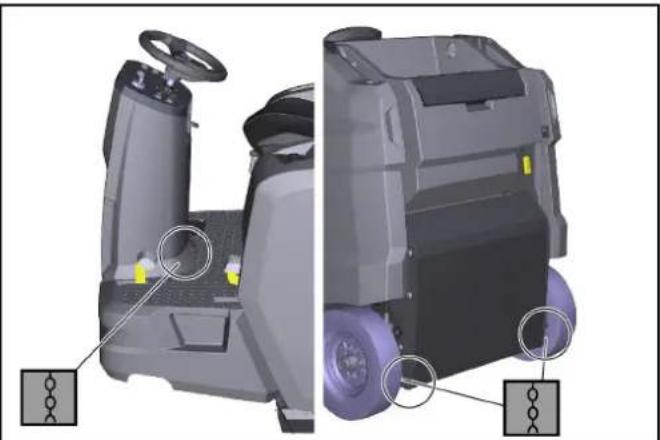
1 Close the fuel cock.
2 Secure the sweeper to the wheels with wedges.
3 Secure the sweeper with lashing straps or ropes.
1 Close the fuel cock. 2 Secure the sweeper to the wheels with wedges. 3 Secure the sweeper with lashing straps or ropes.
Note the markings for fastening areas on the basic frame (chain symbols).
- The left and right rear fastening points are openings (approx. ∅ 30 mm) in the frame between the rear wheel and the waste container.
- At the front is the fastening area between the footrest and the front tower.
4 Disconnect the minus terminal at the battery.
5 Remove key.
Storage
△CAUTION
Risk of injury and damage
Be aware of the weight of the device before storing it.
Additionally, observe the notes in the operating instructions of the motor.
1 Park the sweeper on a level surface in a dry, frost-free environment. Protect against dust with a tarpaulin.
2 Secure the sweeper against rolling away (parking brake).
3 Close the fuel cock.
4 Remove key.
5 Disconnect the negative pole of the battery if the sweeper is not used for more than 4 weeks.
6 Charge the battery approx. every 2 months.
If the sweeper is not used for a long time:
1 Drain the fuel completely from the tank.
2 Change the motor oil.
3 Unscrew the spark plug and pour 5 ml of fresh motor oil into the spark plug bore. Crank the motor several times without the spark plug (do not start). Screw in the spark plug.
Care and maintenance
ATTENTION
Adhere to the safety instructions for care and maintenance at the beginning of these operating instructions.
Cleaning the device
ATTENTION
Short-circuits or other damage. Do not clean the device with a hose or high-pressure water jet.
ATTENTION
Improper cleaning
Risk of damage.
Do not use any abrasive or aggressive detergents.
△DANGER
Health risk from dust
For interior cleaning with compressed air.
Wear a dust mask and safety goggles.
Clean the inside of the device
1 Open panels. 2 Blow out the device with compressed air. 3 Clean the unit using a damp cloth, wetted with a mild washing lye. 4 Closing the panels.
Cleaning the outside of the device
1 Clean the unit using a damp cloth, wetted with a mild washing lye.
Maintenance intervals
Note
To preserve eligibility for warranty claims, all servicing and maintenance work during the warranty period has to be performed by an authorised Customer Service (ICL), in accordance with the inspection check list.
- The operating hour counter indicates the time of the maintenance intervals.
- The intervals for service and maintenance work by the customer/operator are listed in the chapter "Maintenance by the customer". The work must be carried out by qualified staff. A Kärcher specialist dealer can be consulted at any time if needed.
- Further maintenance work must be carried out by the authorized Customer Service according to the inspection checklist. Please inform the Customer Service department in time.
Maintenance by the customer
Note
All servicing and maintenance work must be performed by a qualified specialist. If necessary, you can consult a Kärcher specialist dealer at any time.
Work on the hydraulics may only be carried out by the authorized Customer Service department.
Note
See chapter "Maintenance work" for descriptions.
• Daily
1 See chapter "Safety check before starting".
- Weekly
△WARNING
Risk of injury if the waste container falls!
The raised waste container can fall abruptly and cause serious injuries due to crushing and trapping.
Do not walk underneath the waste container if it is unsecured.
Secure the raised waste container properly with the supplied safety brace before walking underneath the waste container.
1 Check the moving parts to make sure that they move smoothly.
Note
Before all maintenance and repair work with the sweepings container raised, install the safety brace, see chapter Installing/removing the waste container safety brace.
2 Check the sealing strips in the sweeping area for correct adjustment and for wear. 3 Checking sealing strips on container flap of waste container (3x) 4 Check the roller brush and side brush for wear. 5 Check the dust filter and clean the filter box as necessary. 6 Check the air filter. 7 Check the fuel and hydraulic systems for leaks. 8 Check the tension of belts, check for wear and check that they are functional.
- Maintenance every 50 operating hours
1 Clean the air filter (more frequently when used in a dusty environment).
• Maintenance every 100 operating hours
1 Motor oil change (first change after 20 operating hours). 2 Check and clean the spark plug. 3 Clean the air filter. 4 Clean the sediment basin.
- Maintenance every 300 operating hours
1 Change the air filter. 2 Clean the fuel filter. 3 Change the spark plug.
- Maintenance after wear
1 Replace the sealing strips. 2 Replace the roller brush. 3 Replace the side brush.
Maintenance by Customer Service
Note
In order to preserve warranty entitlements, all servicing and maintenance work during the warranty period has to be performed by an authorised Kärcher Customer Service, in accordance with the inspection check list.
- Initial inspection after 20 operating hours
- Maintenance every 100 operating hours
- Maintenance every 300 operating hours
Maintenance work
Checking/topping up the engine oil level
Check the oil level when the device is parked and standing horizontally.
ATTENTION
Danger of burns
Do not touch any hot surfaces such as the exhaust pipe or motor.
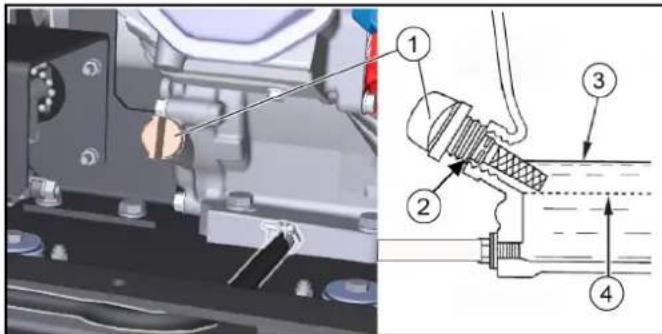
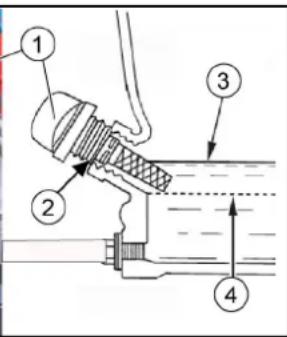
①Oil dipstick ②Oil filler opening ③Upper oil level (MAX) ④Lower oil level (MIN)
- Park the device on a level surface.
- Allow the motor to cool.
a Check the motor oil level no earlier than 5 minutes after the motor has been switched off.
- Close the right-hand panel.
- Unscrew the oil dipstick and read the oil level.
If the oil level is below MIN, top up the motor oil.
For the correct oil type, see the "Technical data" chapter.
Do not overfill; fill only up to MAX.
- If the oil level is correct, screw in the dipstick.
- Close the panel.
Oil change
Perform the oil change on a warm engine so that the oil drains better.
- Shut down the engine.
- Place the device on a level surface.
- Provide a suitable catch pan for the used oil.
- Open the right panel (pivot).
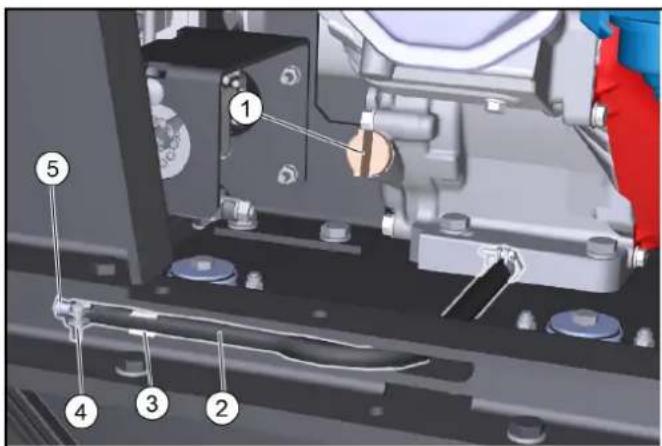
①Dipstick/oil filler opening ②Drain hose ③Drain hose holder ④Hose clamp ⑤Locking piece
- Unscrew the oil dipstick.
- Remove the drain hose from the support.
- Open the hose clip on the drain hose and pull out the locking piece.
- Allow the oil to drain completely into the catch pan.
- Insert the locking piece and tighten with a hose clip.
- Fill new engine oil (see "Technical data") up to the lower edge of the filler opening. 11. Screw in and tighten the oil dipstick.
- Close the panel.
- Dispose of the old oil in accordance with the environmental regulations.
Check the air filter.
- Unscrew the wing nut.
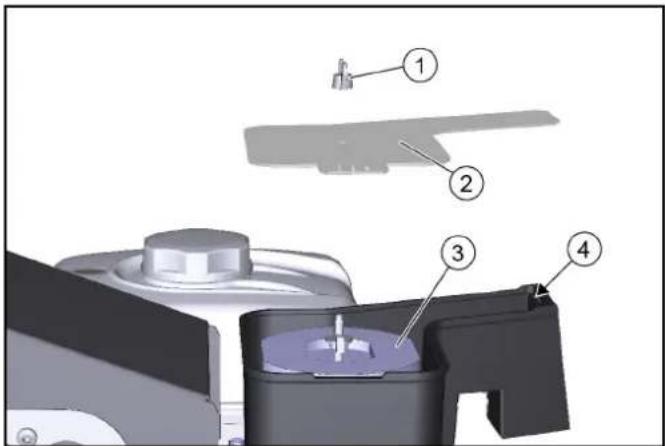
① Wing nut
② Cover ③ Air filter ④ Fixing
- Remove the cover.
- Check the air filter for soiling, clean if necessary.
- Slide the cover into the fixing, then put it on. Pay attention to the correct position in the fixing.
- Screw on the wing nuts and tighten.
Cleaning the air filter
- Unscrew the wing nuts on the cover.
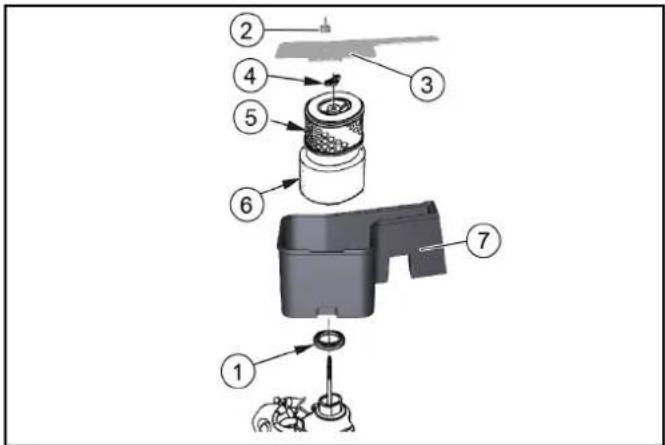
1 Seal ②Cover wing nuts ③Cover ④Air filter wing nuts ⑤Paper filter insert ⑥ Foam filter insert ⑦ Air filter housing
- Remove the cover.
- Unscrew the air filter wing nuts.
- Remove the air filter insert.
- Remove the foam filter insert from the paper filter insert.
- Check both air filter inserts for damage.
- Replace any damaged air filter inserts.
- Clean any reused air filter inserts.
- Knock the paper filter insert a few times on a hard surface to clean it or blow it out from the inside with compressed air (maximum 0.2 MPa). 10.Foam filter insert:
a Clean in warm soapy water. b Rinse with clear water. c Or clean in a non-inflammable solvent. d Allow to dry.
e Immerse in clean engine oil.
Press out the excess oil.
- Wipe off the inner side of the cover and air filter housing with a damp cloth. Take care to ensure that no dirt enters the engine.
- Fit the foam filter insert on the paper filter insert.
- Fit the air filter insert into the air filter housing.
- Ensure that the seal is correctly fitted between the air filter housing and the engine.
- Fit the air filter wing nuts and tighten. 16. Fit the cover.
- Fit the cover wing nuts and tighten.
Cleaning the settling cup
- Turn the fuel cock to the "OFF" position.
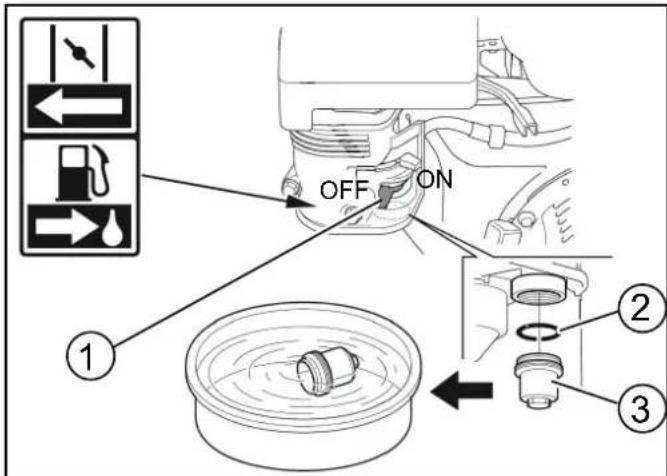
① Fuel cock ② O-ring ③ Settling cup 2. Unscrew the settling cup. 3. Remove the O-ring. 4. Clean the settling cup in a non-inflammable solvent. 5. Thoroughly dry the settling cup. 6. Fit the O-ring into the housing. 7. Screw in and tighten the settling cup. 8. Turn the fuel cock to the "ON" position. 9. Check that the settling cup is tightly seated. 10. Turn the fuel cock to the "OFF" position.
Checking/adjusting the spark plug
- Pull off the spark plug connector.
- Clean the region around the spark plug to prevent dirt from entering the engine when the spark plug is removed.
- Unscrew the spark plug with a 13/16" spark plug wrench.
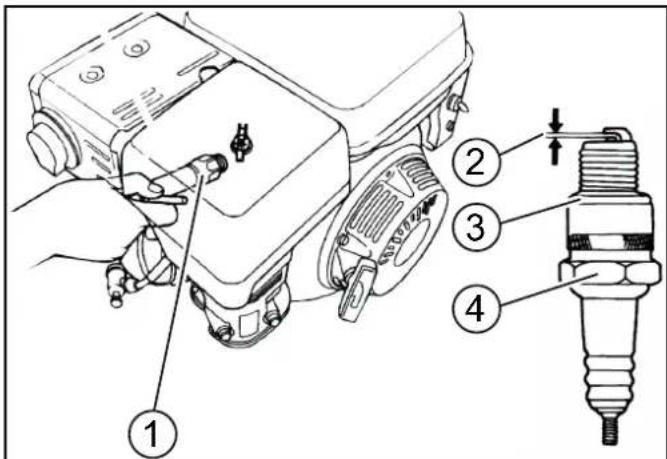
① Spark plug wrench
②0.7...0.8 mm ③Seal ④Spark plug
- Replace a spark plug that has worn electrodes or a broken insulator.
- Check the electrode gap of the spark plug. Target value 0.7...0.8 mm.
- Check the spark plug seal for damage.
ATTENTION
Risk of damage
A loose spark plug can overheat and damage the engine. An overtightened spark plug can damage the thread in the engine. Observe the following instructions for tightening the spark plug. 7. Carefully screw the spark plug in by hand. Do not cross the thread. 8. Screw the spark plug all the way in using the plug spanner and then tighten as follows.
a Tighten a used spark plug by an additional 1/8...1/4 turn. b Tighten a new spark plug by an additional 1/2 turn.
- Plug on the spark plug connector.
Checking the hydraulic oil level and topping up the hydraulic oil
ATTENTION
Risk of damage to the hydraulic system
Pay attention to the utmost cleanliness when refilling. Work on the hydraulic system may only be carried out by the authorized Customer Service department.
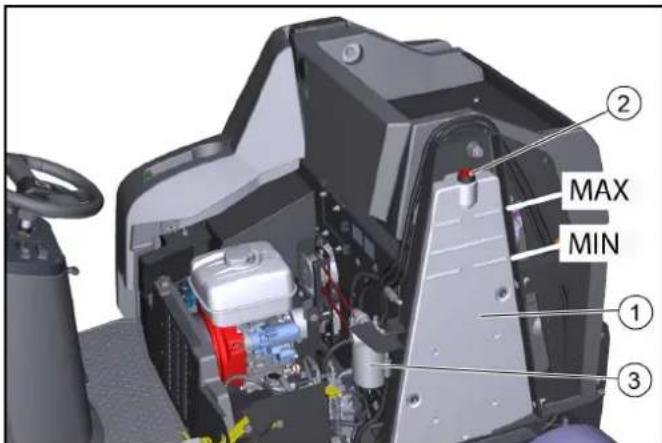
Figure without bonnet
①Hydraulic oil tank ②Breather cap/filler hole ③ Hydraulic oil filter
- Park the device.
- Open the bonnet.
- Check the hydraulic oil level when the motor is cold. The correct hydraulic oil level must be between the upper "MAX" and lower mark "MIN".
- Top up the hydraulic oil if necessary.
Remove the breather cap.
Top up the hydraulic oil.
For the hydraulic oil type: See chapter "Technical data".
Attach the breather cap.
- Close the bonnet.
Replacing the rear wheel
WARNING
Risk of injury
Only park the vehicle on a stable surface.
Check that the ground is stable. Additionally secure the device against rolling away with a wheel chock.
Use a suitable, commonly available jack.
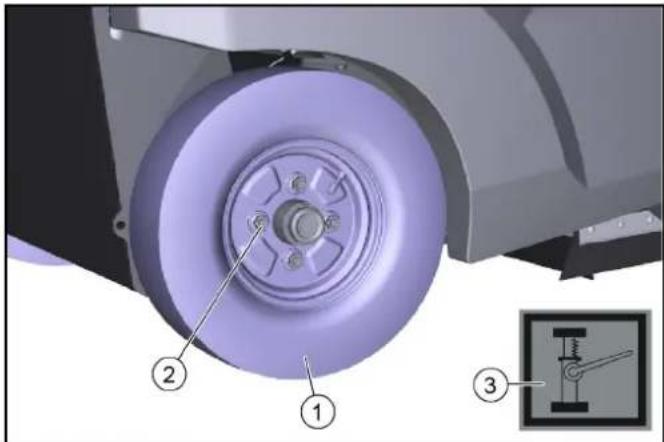
①Rear wheel ②Wheel nut (4x) ③Attachment point icon
- Park the device on a level surface.
a Check that the ground is stable.
b Secure the device against rolling away.
c Open the side panel or bonnet.
- Place the jack at the marked attachment points on the frame.
- Use a suitable tool to release the wheel nuts by approx. 1 turn.
- Lift the device with a jack.
- Unscrew and remove wheel nuts.
- Remove the wheel.
- Have the defective wheel repaired in a specialist workshop or have it replaced.
- Position the wheel, screw in the wheel nuts as far as they will go and tighten slightly.
- Lower the device with the jack.
- Close the side panel or bonnet.
- Tighten the wheel nuts to the required torque (56 Nm).
Replacing the front wheel
- Contact the Customer Service department to remove the front wheel.
Replacing the side brush
Thanks to the floating bearing of the side brushes, the sweeping area automatically adjusts itself when the bristles are worn. If it is too worn (bristle length approx. 10 cm), replace the side brushes.
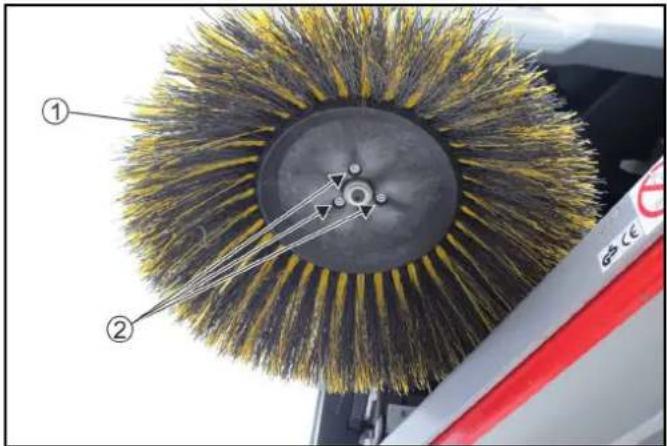
①Side brushes ② Screws
- Park the device.
- Unscrew the 3 screws on the underneath.
- Remove the side brush.
- If necessary, clean the mount.
- Connect the new side brush to the driver and fasten it in place with the screws.
Replacing / inspecting the roller brush
Removing the roller brush
Due to the floating mounting of the roller brush, the sweeping level automatically adjusts itself when the bristles are worn. Replace if it is too worn (cleaning result is not satisfactory).
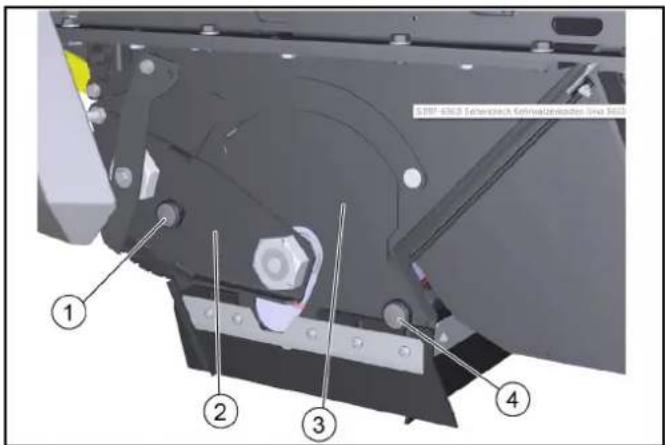
①Knurled screw, left ② Bearing plate ③Cover plate ④ Knurled screw, right
- Park the device.
- Open the bonnet.
- Unscrew the left-hand knurled screw.
- Remove the bearing plate.
- Unscrew the right-hand knurled screw.
- Remove the cover plate
- Pull out the roller brush.
Installing the roller brush
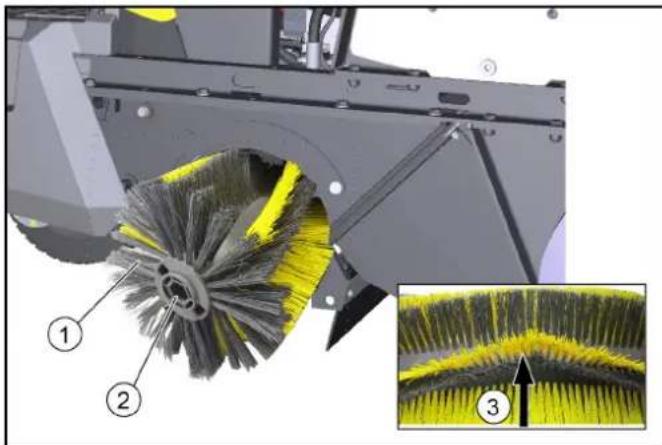
① Roller brush ②Brush roller mount ③ Alignment of the bristles forwards in the direction of travel 1. Check roller brushes for wear and entangled pieces of tape. 2. As necessary: Install the new roller brush. 3. When installing, ensure that the bristles are correctly aligned (roller brush mounts are identical). 4. Install the cover plate and bearing plate in reverse order.
Replacing / setting the sealing strips
Sealing strips Setting values
| Side sealing strips Distance from floor 0 - 1 mm |
| Front sealing strip Trailing distance 10-15 mm |
| Rear sealing strip Trailing distance 5-10 mm |
Note
The trailing distance of the front and rear sealing strip defines how much the sealing lip folds backwards when driving the device forwards.
When set correctly, there must be a gap between the side sealing strips and the floor.
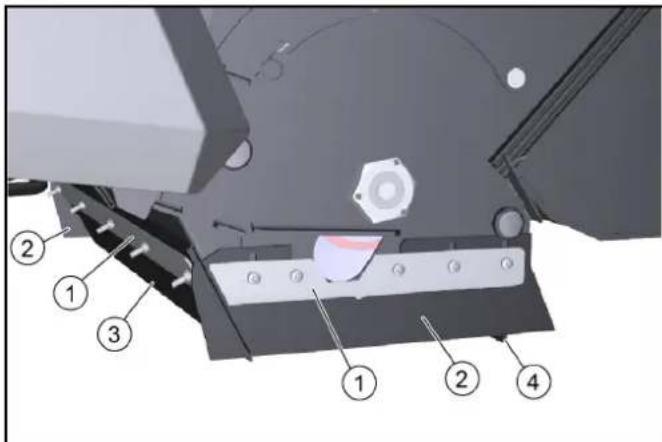
①Fastening ②Side sealing strip ③Front sealing strip ④Rear sealing strip
- Unfasten the fastening of the sealing strips.
- Set the sealing strip by shifting it in the elongated holes. a Refer to the table for the values.
- Once the settings are correct, fasten the sealing strips.
Checking/replacing dust filter
△DANGER
Health risk from dust
Wear a dust mask and safety goggles when working on the filter system.
Observe the safety instructions on the handling of fine dust.
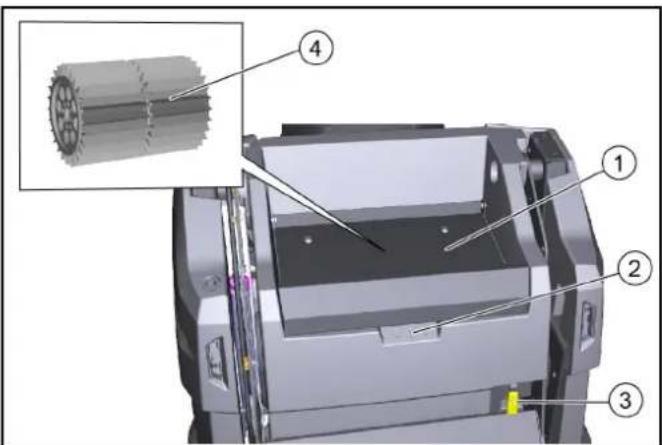
①Bar cover
②Recessed grip
③Dust filter lever
④Dust filter (round filter)
- Park the device.
- Wait at least 1 minute for the dust to settle.
- Pivot the cover upwards on the recessed grip.
- Move the dust filter lever to the right.
- Remove the dust filter upwards.
- As necessary: Clean the dust filter (vacuum or carefully tap it out) or insert a new dust filter.
Installing/removing the waste container safety brace
Installation:
- Park the machine on a firm, horizontal surface.
- Lower the waste container completely, see chapter Emptying the waste container.
- Switch off the machine, see chapter Switching off the device.
- Open the right-hand panel, see chapter Opening/closing the right panel.
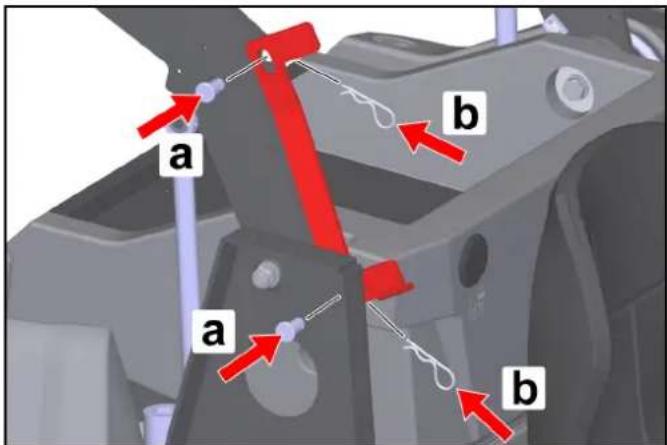
- Remove the safety brace.
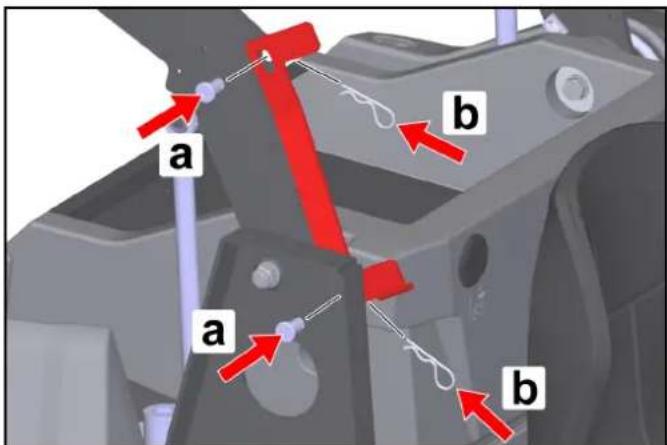
a Pull the cotter pins out of the bolts.
b Pull out the bolts and remove the safety brace on the tie bar.
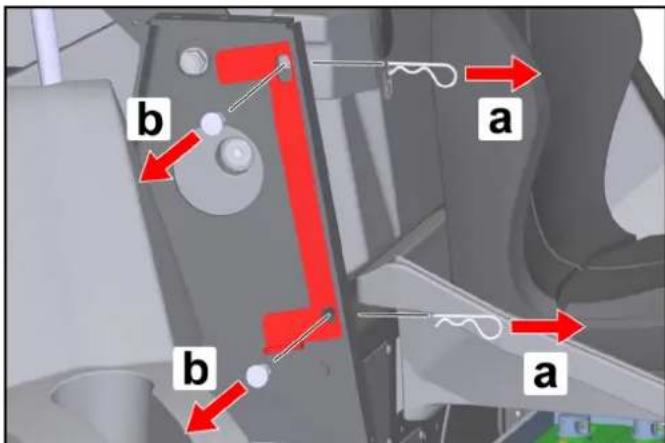
- Position the safety brace between the right-hand tie bar and the right-hand lift arm as shown.
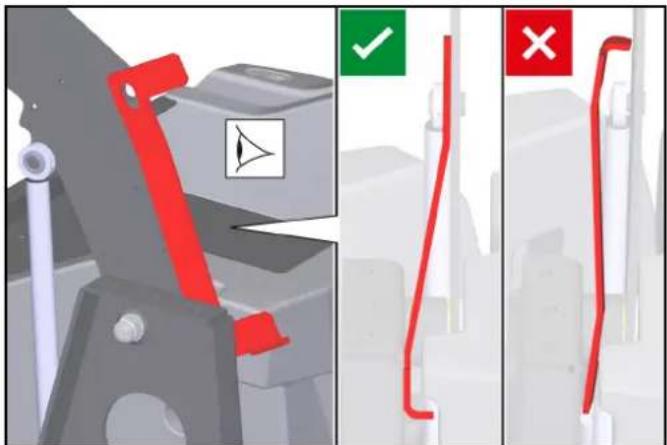
- Install the bolts. a Insert the bolts into the holes. b Insert the cotter pins into the holes in the bolts until the cotter pins engage.
ATTENTION
Risk of damage!
Raising or lowering the waste container with the safety brace installed causes damage to the machine and the safety brace! To prevent the waste container from being raised or lowered hydraulically, it is not possible to close the right-hand panel when the safety brace is fitted. This activates the safety circuit.
Do not close the right-hand panel by force!
Removal:
- Removal is performed in the reverse sequence.
Troubleshooting guide
You can remedy minor faults using the following overview.
Contact the Customer Service department in the case of any faults not listed!
△DANGER
Risk of accidents and injuries due to unintentional movement of the vehicle
Switch off the vehicle before carrying out any care and maintenance work, and remove the ignition key.
△DANGER
Risk of electric shock
Disconnect the battery when working on electrical components. Repair work and work on electrical components must only be performed by your authorised Customer Service.
Device fuses
If a function fails, you can check the device fuses before contacting Customer Service.
△WARNING
Risk of damage through incorrect handling
The controller or device components can be damaged by incorrectly inserted device fuses!
Replace device fuses only with fuses of the same type (blade-type fuse) and value (A)
The device fuses are located on the vehicle's electronic controller.
The controller is located under the front cover of the steering column:
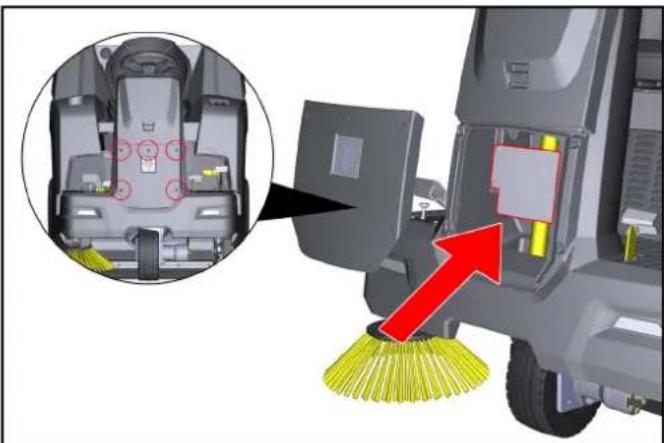
- Switch off the device and secure it against rolling away.
- Disconnect the minus terminal at the battery.
- Completely unscrew 5 screws from the front cover.
- Remove the cover.
- Identify faulty device fuses using the table.
- Replace any faulty device fuses.
- Reattach the cover.
- Reconnect the minus terminal of the battery.
Device fuses (overview)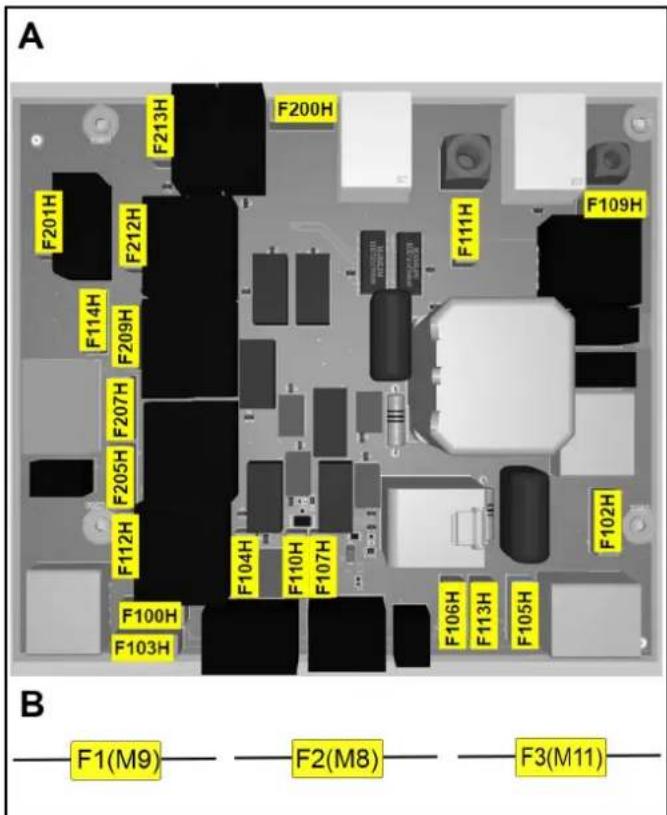
A: Fuses on the electronic controller
| Device fuse Value (A) Designation | ||
| F100H 7.5 Key-operated switch | ||
| F102H 7.5 Work light | ||
| F103H 7.5 Water pump | ||
| F104H 3 LED | ||
| F105H 7.5 Work light | ||
| F106H 3 Blue spot | ||
| F107H 1 Counter | ||
| F109H 5 Filter motor | ||
| F110H 7.5 Signal horn | ||
| F111H 10 Lifting motors | ||
| F112H 5 Start the motor | ||
| F113H 1 Flashing beacon | ||
| F114H 1 Position sensor, | emptying | |
| F200H 30 Main fuse | ||
| F201H 3 K1 Main valve | ||
| F205H 3 K4 Sweeper units | ||
| F207H 3 K6 Open flap | ||
| F209H 3 K3 Close flap | ||
| F212H 3 K5 Lift | ||
| F213H 3 K2 Lower | ||
B: Fuses in the wiring harness (fuse holder)
| Device fuse Value (A) Designation | |
| F1 (M9) 7.5 Lifting motor | |
| F2 (M8) 7.5 Lifting motor | |
| F3 (M11) 7.5 Lifting motor |
| Fault Rectification | |
| Motor will not start | Check/charge the starter battery.Key switch to position “I - ON”.Programme selector switch to "Drive" positionDuring cold exterior temperatures: Operate the choke lever.Sit in the driver's seat (seat contact switch is activated).Fully close the bonnet and right panel.Check motor oil level, top up motor oil if necessary.Fill with fuel.Open the fuel cock.Check spark plug. |
| Motor running irregularly | Check the filling level of the fuel tank.Check the position of the choke lever.Check connections and lines of fuel system.Check/clean/replace spark plug.Clean/replace the air filter. |
| Engine is running, but the device does not drive or just slowly | Release the parking brake.Check the position of the neutral lever.Check/top up the filling level of the hydraulic oil tank.In the event of freezing temperatures and cold hydraulic oil: Allow the device to warm up for at least 3 minutes. |
| Motor does not switch off(programme selector switch and key switch are in the OFF position) | Petrol engine:a Open the bonnet (be careful of the rotating V-belt).b Close the fuel cock. |
| Dust when sweeping / insufficient suction power | Empty the waste container.Check / clean / replace the dust filter.a Check that the dust filter is firmly in place.b In case of light soiling, clean the dust filter.c In case of damage or heavy soiling, replace the dust filter.Check the sealing strips in the sweeping area to check for wear. Readjust or replace if necessary.Check/replace the seals on the filter box.Check/replace sealing strips on waste container. |
| Fault Rectification | |
| Cleaning result not satisfactory | Check the roller brush and side brush for wear, replace them as necessary.Check the sealing strips for wear, replace them as necessary.Check that the coarse dirt flap is fully functional.Close the wet sweeping flap.Check the hydraulic oil tank filling level.Check the hydraulic system for leaks. |
| The roller brush / side brush are not running | Turn the programme selection switch to the desired “Sweeping” programme.Check the filling level of the hydraulic oil tank.Check the hydraulic system for leaks.Check the roller brush / side brush for any tangled pieces of tape.Contact Customer Service. |
| Waste container emptying does not work | The shear protection screw on the waste container (left and right sides) has sheared off, replace the broken screw.Contact Customer Service. |
| The right-hand panel cannot be closed | The waste container is secured with the safety brace. Remove the high-pressure nozzle, see chapterInstalling/removing the waste container safety brace. |
Accessories / spare parts
The following is an overview (excerpts thereof) of wear parts or optionally available accessories.
| Accessories Description Order no. | ||
| Side brush, standard | For indoor and outdoor surfaces | 6.905-986.0 |
| Side brush, soft for | fine dust, on indoor and outdoor surfacesMoisture resistant | 6.906-133.0 |
| Side brush, hard for | removal of stubborn dirt, for outdoor useMoisture resistant | 6.906-065.0 |
| Weed brush Side brush for removing weeds 6.906-065.0 | ||
| Roller brush, standard | For indoor and outdoor surfacesWear and moisture resistant | 6.905-095.0 |
| Roller brush, soft for | fine dust, on indoor and outdoor surfacesMoisture resistant | 6.905-190.0 |
| Roller brush, hard for | removal of stubborn dirt, for outdoor useMoisture resistant | 6.905-191.0 |
| Dust filter (round filter) |  | 6.414-532.0 |
| Sealing strip, side Left and right | 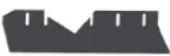 | 5.365-078.0 |
Sealing strip, rear 5.3 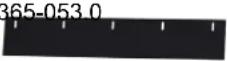 | ||
Sealing strip, front 5.3 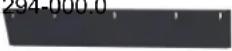 | ||
| Side brush attachment kit, left | Has to be installed by Customer Service | 2.852-912.7 |
| Front wheel | As a replacement | 6.435-120.0 |
| Rear wheel | As a replacement | 6.435-291.0 |
| Home Base accessories | Description Order no. | |
| Adapter | For securing to Home Base rail (device) | 5.035-488.0 |
| Double hook | Can only be used in conjunction with adapter | 6.980-077.0 |
| Detergent container | Can only be used in conjunction with adapter | 4.070-006.0 |
| Coarse dirt pliers set | Coarse dirt pliers including attachment to the device | 4.035-524.0 |
Technical data
| KM 100/120 R G KM 100/120 R G 2SB | |||
| Device performance data | |||
| Travel speed (max.) km/h 7 7 | |||
| Working speed (max.) km/h 7 7 | |||
| Climbing ability (max.) % 18 18 | |||
| Working width without side brushes mm 730 730 | |||
| Working width with 1 side brushes mm 1000 1000 | |||
| Working width with 2 side brushes mm 1280 | |||
| Theoretical surface performance | |||
| Surface performance without side brushes | m2/h | 5110 5110 | |
| Surface performance with 1 side brushes | m2/h | 7000 7000 | |
| Surface performance with 2 side brushes | m2/h | 8960 | |
| Battery | |||
| Battery type | Maintenance-free | Maintenance-free | |
| Working voltage of the battery | V | 12 12 | |
| Environmental conditions | |||
| Ambient temperature | °C | -5...+40 | -5...+40 |
| Humidity, non-condensing | % 0...90 | 0...90 | |
| Dimensions and weights | |||
| Length | mm 1660 1660 | ||
| Width | mm 1110 1140 | ||
| Height | mm 1355 1355 | ||
| Net weight (transport weight) | kg | 570 570 | |
| Approved total weight | kg | 944 944 | |
| Width of roller brush | mm 730 730 | ||
| Diameter of roller brush | mm 285 285 | ||
| Diameter of side brush | mm 410 410 | ||
| Waste container | |||
| Waste container volume | l (kg) | 120 120 | |
| Discharge height (max.) | mm 1520 1520 | ||
| Filter and suction system | |||
| Filter area | m2 | 6 | 6 |
| Internal combustion engine | |||
| Engine type | Honda GX 270 | Honda GX 270 | |
| Type | 1 cylinder 4 stroke | 1 cylinder 4 stroke | |
| Engine capacity | cm3 | 270 270 | |
| CO2 emission according to the measurement procedure of EU regulation 2016/1628 (level V) | g/kWh | 762 762 | |
| Cooling type | Air-cooled | Air-cooled | |
| Engine performance | kW/PS | 6,3 / 8,4 | 6,3 / 8,4 |
| Spark plug type | BPR6ES (NGK) | BPR6ES (NGK) | |
| Fuel tank capacity | l | 5,3 | 5,3 |
| Engine speed | 1/min | 3600 3600 | |
| Working time with a fully filled fuel tank | h | ca. 3,5 | ca. 3,5 |
| Operating materials | |||
| Fuel type | Benzin bleifrei (min. 91 Oktan) | Benzin bleifrei (min. 91 Oktan) | |
| Engine oil type | API SJ | API SJ | |
| Engine oil volume | l | 1,1 | 1,1 |
| Oil type | SAE 10W30 | SAE 10W30 | |
| Type of hydraulic oil | Shell Tellos S 3 V 68 | Shell Tellos S 3 V 68 | |
| Tyres | |||
| Tyre size, front | ø 300 mm | ø 300 mm | |
| Tyre size, rear | 4.00-8 6PR | 4.00-8 6PR | |
| Tyre pressure | MPa (bar) | 0,6 (6) | 0,6 (6) |
Determined values according to EN 60335-2-72
| Hand-arm vibration value m/s | 2 | 1,9 1,9 |
| Seat Vibration value m/s | 2 | 0,4 0,4 |
| Sound level LpA | dB(A) 79 79 | |
| Uncertainty dB(A) 2,5 2,5 | ||
| Sound power level LWA + Uncertainty KWA | dB(A) 95 95 | |
Subject to technical changes without notice.
Declaration of Conformity
EU Declaration of Conformity
We hereby declare that the machine described below complies with the relevant basic safety and health requirements in the EU Directives, both in its basic design and construction as well as in the version placed in circulation by us. This declaration is invalidated by any changes made to the machine that are not approved by us.
Product: Sweeper vacuum
Type: 1.280-xxx.0
Currently applicable EU Directives
2006/42/EC (+2009/127/EC)
2014/30/EU
2000/14/EC
2014/53/EU (TCU)
Harmonised standards used
EN 60335-1
EN 60335-2-72
EN 55012: 2007 + A1: 2009
EN 62233: 2008
TCU
EN 301 511 V12.5.1
EN 300 440 V2.1.1
EN 300 328 V2.2.2
EN 300 330 V2.1.1
Applied conformity evaluation method
2000/14/EG: Annex V
Sound power level dB(A)
Measured: 93
Guaranteed: 95
The signatories act on behalf of and with the authority of the company management.
H. Jenner
Chairman of the Board of Management
S. Reiser
Director Regulatory Affairs & Certification
Documentation supervisor:
S. Reiser
Alfred Kärcher SE & Co. KG
Alfred-Kärcher-Str. 28 - 40
71364 Winnenden (Germany)
Ph.: +49 7195 14-0
Fax: +49 7195 14-2212
Winnenden, 2021/06/01
Declaration of Conformity (UK)
We hereby declare that the machine described below complies with the relevant basic safety and health requirements in the EU Directives, both in its basic design and construction as well as in the version placed in circulation by us. This declaration is invalidated by any changes made to the machine that are not approved by us.
Product: Sweeper vacuum
Type: 1.280-xxx.0
Currently applicable EU Directives
2006/42/EC (+2009/127/EC)
2014/30/EU
2000/14/EC
2014/53/EU (TCU)
Harmonised standards used
EN 60335-1
EN 60335-2-72
EN 55012: 2007 + A1: 2009
EN 62233: 2008
TCU
EN 301 511 V12.5.1
EN 300 440 V2.1.1
EN 300 328 V2.2.2
EN 300 330 V2.1.1
Applied conformity evaluation method
2000/14/EG: Annex V
Sound power level dB(A)
Measured: 93
Guaranteed: 95
The signatories act on behalf of and with the authority of the company management.
H. Jenner
Chairman of the Board of Management
S. Reiser
Director Regulatory Affairs & Certification
Documentation supervisor:
S. Reiser
Alfred Kärcher SE & Co. KG
Alfred-Kärcher-Str. 28 - 40
71364 Winnenden (Germany)
Ph.: +49 7195 14-0
Fax: +49 7195 14-2212
Winnenden, 2021/06/01
Contents
①Handwheel
①Hose
Figure: Descent ramp
①Oil gauge
①Wing nut
②Cover
③Air filter
④Fastener
①Gasket
①Spark plug wrench
②0.7...0.8 mm
③Gasket
④Spark plug
①Side brushes
②Screw
- Mount the bolts.
2006/42/EC (+2009/127/EC)
2014/30/EU
2000/14/EC
2014/53/EU (TCU)
Chairman of the Board of Management
S. Reiser
Director Regulatory Affairs & Certification
71364 Winnenden (Germany)
① Guide
Figure without hood
① Fastening
H. Jenner Chairman of the Board of Management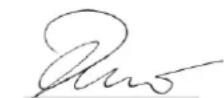
S. Reiser Director Regulatory Affairs & Certification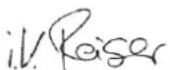
71364 Winnenden (Germany)
Tel.: +49 7195 14-0
Fax: +49 7195 14-2212
Winnenden, 01/06/2021
① Steering wheel
① Circulation
① Freewheel lever, red
① Spark plug wrench
② 0.7...0.8 mm
③ Gasket
④ Spark plug
Figure without engine cover
① Hydraulic oil tank
① Rear wheel
② Wheel nut (4x)
① Side brushes
② Screws
① Cover
② Retractable
③ Dust filter lever
④ Dust filter (round filter)
- Mount the bolts.
2006/42/EC (+2009/127/EC)
2014/30/EU
2000/14/EC
2014/53/EU (TCU)
Chairman of the Board of Management
S. Reiser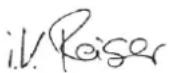
Director Regulatory Affairs & Certification
71364 Winnenden (Germany)
Tel.: +49 7195 14-0
Fax: +49 7195 14-2212
Winnenden, 01/06/2021
Index
①Steering wheel
①Driving
Figure: Descent ramp
1 Close the fuel tap. 2 Immobilize the sweeper with wheel chocks. 3 Secure the sweeper with tension straps or cables.
①Gasket ②Wing nut of the cover ③Cover ④Wing nut of the air filter ⑤Paper filter cartridge ⑥Foam filter cartridge ⑦Air filter housing 2. Remove the cover. 3. Unscrew the wing nut of the air filter. 4. Remove the air filter cartridge. 5. Remove the foam filter cartridge from the paper filter cartridge.
①Spark plug wrench
②0.7...0.8 mm
③Gasket
④Spark plug
①Side broom
②Screws
2006/42/EC (+2009/127/EC)
2014/30/EU
2000/14/EC
2014/53/EU (TCU)
Chairman of the Board of Management
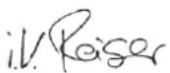
S. Reiser
Director Regulatory Affairs & Certification
① Steering wheel
Program selector switch
Instruction
① Driving
① Fuel tap
① Parking brake lock ② Parking brake
Operating the parking brake:
- Press the parking brake in (it locks).
Releasing the parking brake:
Starting the device (engine)
Instruction
① Oil dipstick / oil filler opening ② Drain hose ③ Drain hose holder ④ Hose clamp ⑤ Closing piece
① Wing nut ② Cover ③ Air filter ④ Fastening
① Spark plug wrench
② 0.7...0.8 mm
③ Seal
④ Spark plug
① Side brush ② Screws
① Cover ② Handle ③ Cloth filter lever ④ Cloth filter (round filter)
- Place the bolts.
H. Jenner Chairman of the Board of Management
S. Reiser Director Regulatory Affairs & Certification
71364 Winnenden (Germany)
Tel.: +49 7195 14-0
Fax: +49 7195 14-2212
Winnenden, 2021/06/01
Contents
General warnings 127
① Steering wheel
① Driving
Picture: loading ramp
① Fuel valve
① Wing nut ② Cover ③ Air filter ④ Fastening
① Spark plug wrench
② 0.7...0.8 mm
③ Gasket
④ Spark plug
① Side brush
② Screws
① Cover
② Handle housing
③ Dust filter lever
- Install the screws.
2006/42/EC (+2009/127/EC)
2014/30/EU
2000/14/EC
2014/53/EU (TCU)
Chairman of the Board of Management
S. Reiser Director Regulatory Affairs & Certification
Winnenden, 2021/06/01
Contents
General information 145
① Driving
Image: Exit ramp
① Fuel tap
① Steering wheel
② Drive forward
③ Pull backwards
④ Parking brake
⑤ Coarse dirt flap
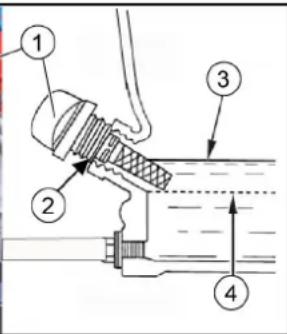
① Oil dipstick ② Oil filler hole ③ Upper oil level (MAX) ④ Lower oil level (MIN)
① Wing nut ② Cover ③ Air filter ④ Bracket
① Gasket ② Cover wing nut ③ Cover ④ Air filter wing nut ⑤ Paper filter insert ⑥ Foam filter insert ⑦ Air filter housing
Figure without engine hood
① Rear wheel
② Wheel nut (4x)
③ Lifting point symbol
① Side brushes
② Screws
① Sweeping roller
② Sweeping roller pickup
① Bracket
② Side sealing strip
① Cover
② Finger recess
④ Dust filter (around filter)
- Mount the bolts.
H. Jenner Chairman of the Board of Management
S. Reiser Director Regulatory Affairs & Certification
D-71364 Winnenden (Germany)
Phone: +49 7195 14-0
Fax: +49 7195 14-2212
Winnenden, 01.06.2021
Contents
① Driving
Image: Loading ramp
① Steering wheel
② Driving forward
① Side brush ② Screws
① Guard
- Install the bolts.
Chairman of the Board of Management
S. Reiser Director Regulatory Affairs & Certification
71364 Winnenden (Germany)
Tel.: +49 7195 14-0
Suitable surface for sweeping
- Asphalt
- Industrial floor
- Cast floors
- Concrete
- Cobblestone
Function
①Driving
Image: Downhill ramp
①Fuel tank
②Fuel cap
③Fuel gauge
①Driver's seat ② Seat adjustment lever
① Release the parking brake ②Parking brake
①Steering wheel ②Drive forward ③Drive backward ④Parking brake ⑤ Throttle
①Wing nut ②Cover ③ Air filter ④Holder
①Gasket
②Wing nut cover ③Cover ④Wing nut air filter ⑤ Paper filter element ⑥Foam filter element ⑦ Air filter housing
①Fuel valve
②O-ring
③Sediment bowl
Check spark plug, adjust
① Spark plug wrench
② 0.7-0.8 mm
③ Gasket
④ Spark plug
- If the spark plug electrodes are worn or its insulator is broken, it should be replaced.
- Check the electrode gap of the spark plug. Nominal value 0.7–0.8 mm.
- Check the spark plug gasket for damage.
NOTE
Risk of material damage
① Rear wheel
② Wheel nut (4x)
③ Symbol attachment point
① Side brush
② Screws
- Park the machine.
- Unscrew three screws on the underside.
- Remove the side brush.
- Clean the mounting if necessary.
- Place the new side brush on the driver and secure it with screws.
Replacing/checking the sweeping roller
Remove the sweeping roller
- Mount the bolts.
a Insert the bolts into the holes.
2006/42/EC (+2009/127/EC)
2014/30/EU
2000/14/EC
2014/53/EU (TCU)
Applied harmonized standards
EN 60335-1
EN 60335-2-72
EN 55012: 2007 + A1: 2009
EN 62233: 2008
TCU
EN 301 511 V12.5.1
EN 300 440 V2.1.1
EN 300 328 V2.2.2
EN 300 330 V2.1.1
2000/14/EC: Annex V
Sound power level dB(A)
Measured: 93
Warranty: 95
Chairman of the Board of Management
S. Reiser Director Regulatory Affairs & Certification
71364 Winnenden (Germany)
Tel.: +49 7195 14-0
Winnenden, 2021/06/01
Contents
①Engine
①Operation
-The engine can be started in this position
① Red gear lever ②Neutral position closed
①Fuel tap
①Oil dipstick
①Wing nut
②Cover
③ Air filter
④ Fixing
① Gasket ② Wing nut cover ③ Cover ④ Wing nut air filter ⑤ Paper filter insert ⑥ Foam filter insert ⑦ Air filter housing
① Spark plug wrench
② 0.7...0.8 mm
③ Gasket
④ Spark plug
① Rear wheel ② Wheel nut (4x) ③ Lifting point symbol
① Side brush ② Screws
① Fastening
② Side sealing strip
① Cover ② Handle recess ③ Dust filter arm ④ Dust filter (round filter)
- Mount the bolts.
2006/42/EC (+2009/127/EC)
2014/30/EU
2000/14/EF
2014/53/EU (TCU)
Chairman of the Board of Management
S. Reiser Director Regulatory Affairs & Certification
71364 Winnenden (Germany)
Tel.: +49 7195 14-0
Fax: +49 7195 14-2212
Winnenden, 2021/06/01
Table of contents
General instructions.... 213
① Steering wheel
① Driving
① Driver's seat ② Seat adjustment lever
① Fuel tap
① Parking brake release lever ② Parking brake
Pressing the parking brake:
- Press the parking brake (it locks into place).
Releasing the parking brake:
①Oil dipstick
②Oil filler cap
③Upper oil level (MAX)
④Lower oil level (MIN)
- Place the device on a level surface.
- Allow the engine to cool down.
①Fuel valve ②O-ring ③Sediment cup
①Side brush ②Bolts
①Fastener
①Cover ②Grip recess ③Dust filter lever ④Dust filter (round filter)
- Mounting bolts.
a Insert the bolts into the drill holes.
2006/42/EÜ (+2009/127/EÜ)
2014/30/EL
2000/14/EÜ
2014/53/EU (TCU)
Chairman of the Board of Management
S. Reiser
Director Regulatory Affairs & Certification
71364 Winnenden (Germany)
Tel: +49 7195 14-0
Winnenden, 2021/06/01
Contents
①Drive
①Freewheel lever, red
①Fuel tank ②Fuel filler cap ③Tank content indicator
①Fuel tap
①Wing nut ②Cover ③Air filter ④Retainer
①Side broom ②Screws
①Cover ②Recessed handle ③Dust filter lever ④Dust filter (round filter)
- Tighten the bolts.
Chairman of the Board of Management
S. Reiser
Director Regulatory Affairs & Certification
①Right side cover (rotatable)
①Driving
①Driver's seat ②Seat adjustment lever
①Fuel tap
①Steering wheel
② Drive forward
③ Drive backward
④ Parking brake
① Fuel valve
② O-ring
③ Sediment bowl
Figure without engine cover
① Rear wheel ② Wheel nut (4×) ③ Lifting point icon
① Mounting
① Cover
② Recessed handle
- Insert the screws.
① Driving
①Fuel tank
② Fuel filler
①Fuel valve
①Dipstick
①Rear wheel
①Side brush
②Screws
2006/42/EC (+2009/127/EC)
2014/30/EU
2000/14/EC
2014/53/EU (TCU)
Chairman of the Board of Management
S. Reiser
Director Regulatory Affairs & Certification
71364 Winnenden (Germany)
Tel.: +49 7195 14-0
① Vehicle movement
Chairman of the Board of Management
S. Reiser
Director Regulatory Affairs & Certification
Winnenden, 2021/06/01
Contents
① Driving
Fig.: Departure ramp
① Fuel cock
① Steering wheel
② Driving forward
③ Driving backward
④ Parking brake
⑤ Coarse dirt flap
①Cover
- Mount the pins.
2006/42/EC (+2009/127/EC)
2014/30/EU
2000/14/EC
2014/53/EU (TCU)
Chairman of the Board of Management
S. Reiser
Director Regulatory Affairs & Certification
Winnenden, 2021/06/01
KM 100/120 R G KM 100/120 R G 2SB
dB(A) 95 95
Contents
①Steering wheel
①Driving
- When opening, grip the trim at the gripping recess, unlock it upwards, and then fold it to the side.
Storage area
① Driver's seat ② Seat adjustment lever
① Fuel valve
① Parking brake release ② Parking brake
Activating the parking brake:
- Press the parking brake (it engages). Releasing the parking brake:
- Press the release, the parking brake disengages.
Operation
① Steering wheel ② Move forward ③ Move backward ④ Parking brake ⑤ Coarse dirt flap
1 Close the fuel valve. 2 Secure the sweeper on wheels with wedges. 3 Secure the sweeper with tension straps or ropes. Observe the markings for attachment areas on the base frame (chain symbols).
① Wing nut
② Cover
③ Air filter
④ Fixation
①Rear wheel ②Wheel nuts (4x) ③Mounting point symbol
- Place the device on a flat surface.
①Sweeping roller ②Sweeping roller mounting ③Align bristles forward in the direction of travel
①Mounting
②Side sealing strip
③Front sealing strip
④Rear sealing strip
①Cover
②Handle recess
- Install the pins.
a Insert the pins into the holes.
- Switch off the device and secure it against unintentional movement.
- Disconnect the negative terminal of the battery
- Unscrew the 5 screws of the front cover.
- Remove the cover.
- Use the table to identify the faulty fuse of the device.
- Replace the faulty fuse of the device.
- Reinstall the cover.
- Reconnect the negative terminal of the battery.
Device fuses (overview)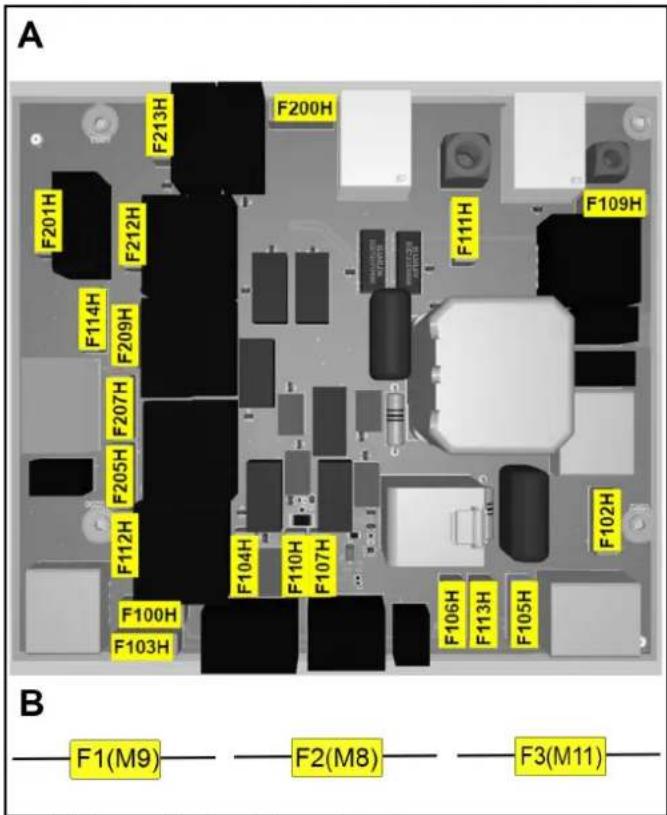
2006/42/EC (+2009/127/EC)
2014/30/EU
2000/14/EC
2014/53/EU (TCU)
H. Jenner Chairman of the Board of Management
S. Reiser Director Regulatory Affairs & Certification
71364 Winnenden (Germany)
Tel.: +49 7195 14-0
Fax: +49 7195 14-2212
Winnenden, 01.06.2021
Table of Contents
General Instructions 336
Intended Use 337
Operation.... 337
Safety Instructions 337
Device Description 338
Before Starting 340
Starting.... 341
Operation 342
Transport 343
①Steering wheel
①Driving
①Fuel tank ②Fuel tank cap ③Fuel level indicator
- Switch off the device (turn off the engine).
- Turn the engine cover outward.
- Open the fuel tank cap.
- Add fuel.
- Wipe up any spilled fuel and close the fuel tank cap.
①Fuel valve
1 To open or close the fuel valve, turn it fully in the appropriate direction.
①Steering wheel
②Drive forward
③Drive backward
④Parking brake
①High-dump button ②Garbage container lift/lower switch ③Container flap open/close switch 1. Set the program selection switch to the driving position (the garbage container can only be lifted in this position). 2. Position the machine approximately.
①Fuel valve
②O-ring
③Sediment bowl
- Unscrew the sediment bowl.
- Remove the O-ring.
- Do not clean the sediment bowl with a non-flammable solvent.
- Dry the sediment bowl thoroughly.
- Insert the O-ring into the housing.
- Screw on and tighten the sediment bowl.
- Turn the fuel tap to the ON position.
- Check that the sediment bowl is tight.
10. Turn the fuel tap to the OFF position.
Checking, adjusting the spark plug
Image without engine cover
①Rear wheel ②Wheel nut (4x) ③Support point symbol
- Stop the device on a level surface and switch off the engine.
a Check that the base is stable.
b Secure the device against accidental movement.
①Side brushes
②Screws
- Park the device.
- Unscrew the 3 screws on the underside.
- Remove the side brush.
- Clean the holder if necessary.
- Install a new side brush on the holder and screw it on with the screws.
①Fastening
②Side sealing strip
①Cover ②Handle recess ③Dust filter lever ④Dust filter (round filter) 1. Park the device. 2. Wait at least 1 minute for the dust to settle. 3. Turn the cover on the handle recess upwards. 4. Move the dust filter lever to the right. 5. Remove the dust filter upwards. 6. If necessary: Clean the dust filter (vacuum it or carefully scrape it off) or insert a new dust filter.
- Install the bolts.
a Insert the bolts into the holes. b Insert the spring pins into the holes of the bolts until the spring pins engage.
CAUTION
- Park the device and secure it against unintentional movement.
- Disconnect the negative terminal of the battery.
- Unscrew the 5 screws of the front cover.
- Remove the cover.
- Use the table to identify the faulty device fuse.
- Replace the faulty device fuses.
- Reinstall the cover.
- Reconnect the negative terminal of the battery.
Device fuses (overview)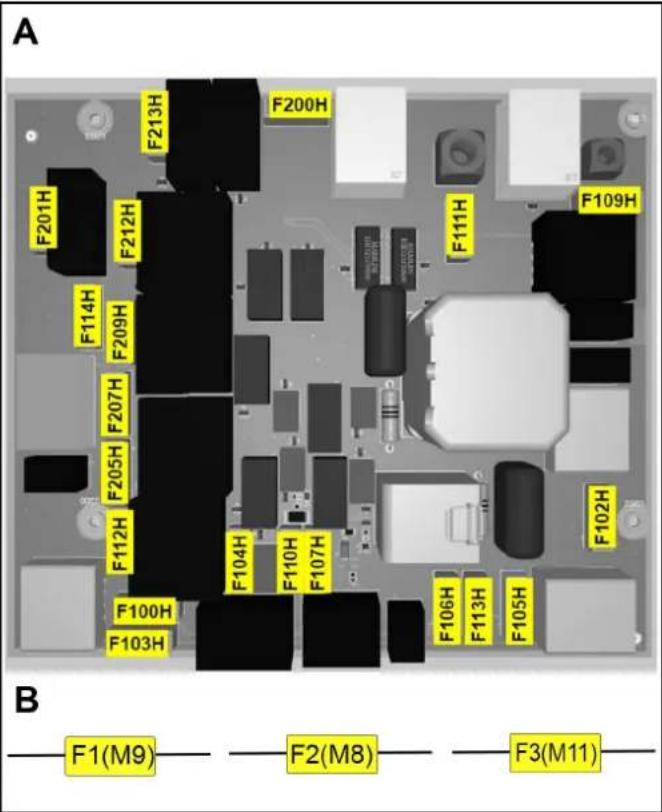
B: Fuses in the wiring harness (fuse holder)
| Varovalka naprave Vrednost (A) Poimenovanje | ||
| F1 (M9) 7,5 Motor za | dviganje | |
| F2 (M8) 7,5 Motor za | dviganje | |
| F3 (M11) 7,5 Motor za | dviganje | |
2006/42/EC (+2009/127/EC)
2014/30/EU
2000/14/EC
2014/53/EU (TCU)
Chairman of the Board of Management
S. Reiser
Director Regulatory Affairs & Certification
Winnenden, 1. 6. 2021
Contents
① Right housing (pivoting)
① Displacement
① Fuel tap
① Parking brake release ② Parking brake
① Oil dipstick ② Oil filler opening ③ Upper oil level (MAX) ④ Lower oil level (MIN)
① Wing nut ② Cover ③ Air filter ④ Mounting bracket
① Rear wheel
① Side brush
② Screws
① Cover
- Mount the bolts.
Relevant EU Directives
2006/42/EC (+2009/127/EC)
2014/30/EU
2000/14/EC
2014/53/EU (TCU)
Harmonized standards applied
EN 60335-1
EN 60335-2-72
EN 55012: 2007 + A1: 2009
EN 62233: 2008
TCU
EN 301 511 V12.5.1
EN 300 440 V2.1.1
EN 300 328 V2.2.2
EN 300 330 V2.1.1
Applicable national standards
H. Jenner Chairman of the Board of Management
S. Reiser Director Regulatory Affairs & Certification
71364 Winnenden (Germany)
Tel.: +49 7195 14-0
Fax: +49 7195 14-2212
Winnenden, 2021/06/01
Contents
General notes 370
Proper use.... 371
Function.... 372
Safety instructions 372
① Right side panel (swivel)
② Safety support for the dirt collection container
① Handle
① Driving
– The engine can be started in this position
- To open the engine cover, grip the recessed handles at the front, unlock it upwards, and then swing it to the side.
Opening / closing the right side panel
The right side panel must be opened for certain activities:
- To open the panel, grip the recessed handles, unlock it upwards, and then swing it to the side.

Warning

Disposal
Figure: Descending ramp
- Connect the battery and charge it if necessary.
- Using the supplied boards, make a ramp according to the sketch.
- Cut the plastic packing straps and remove the packaging film.
- Remove the tension straps attached to the limit points.
- Unscrew the three floor boards shown and the wooden beam on the pallet.
- Place the boards on the edge of the pallet, positioning them so that they are in front of the device's wheels. Secure the boards with screws.
- Place the wooden beam under the boards as a support.
- Remove the wooden blocks that hold the wheels.
- Release the parking brake.
- Carefully move the device off the pallet over the ramp you made (see chapter "Moving the device with its own drive") or push it off the pallet (see chapter "Moving the device without its own drive").
Opening / closing the freewheel lever
△DANGER
①Freewheel lever, red ②Freewheel position is closed – The device is ready to drive ③Freewheel position is open – The device can be moved
Moving the device without its own drive (the device can be moved)
1 To move the device, open the freewheel lever.
a Swing the right side panel outward. b Pull the freewheel lever toward the body (opening). c Release the parking brake. d Move the device.
Moving the device under its own power (device ready to drive)
1 After moving the device, close the freewheel lever. a Press the parking brake. b Push the freewheel lever away from the body (closing). c Close the right side panel.
Mounting the side broom
Note
①Fuel tank
②Tank cap
③Fuel level indicator
- Switch off the device (turn off the engine).
- Turn the engine cover outward.
- Open the tank cap.
- Fill with fuel.
- Wipe off any spilled fuel and close the fuel tank cap.
Adjusting the driver's seat
△DANGER
Risk of accident
①Driver's seat
②Seat adjustment lever
①Fuel valve
1 To open or close the fuel valve, turn it in the appropriate direction until it stops.
Applying/releasing the parking brake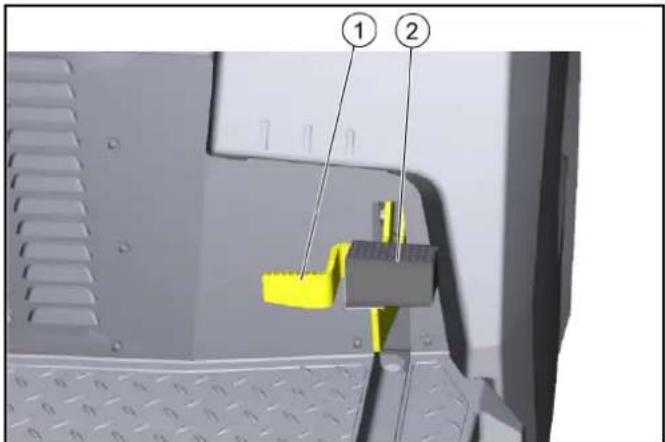
①Releasing the parking brake
①Drain button at height ②Switch for raising/lowering the dirt collection container ③Switch for opening/closing the container lid
- Set the program selection switch to the "Drive" position (the dirt collection container can only be raised in this position).
- Position the machine roughly.
a After switching off the machine, wait at least 1 minute for the dust to settle before emptying.
- Press the drain button on the control panel and hold it down.
- Press the dirt collection tank switch and lift it up.
④ Lower oil level (MIN)
- Stop the device on a level surface.
- Allow the engine to cool down.
a Check the engine oil level at the earliest 5 minutes after turning off the engine.
① Wing nut
② Cover
③ Air filter
④ Fastener
- Remove the cover.
- Check whether the air filter is dirty and clean it if necessary.
- Push the cover into the holder, then put it on. a Pay attention to the correct position in the fastener.
- Place the wing nut and tighten it.
①Gasket
② Cover wing nut
③Cover
④ Air filter wing nut
①Fuel tap
②O-ring
③Sediment cup
- Unscrew the sediment cup.
- Remove the O-ring.
- Clean the sediment cup in a non-flammable solvent.
- Wipe the sediment cup thoroughly.
- Install the O-ring into the housing.
- Screw on the sediment cup and tighten it.
- Turn the fuel valve to the "ON" position.
- Check that the sediment cup sits firmly and does not leak.
10. Turn the fuel valve to the "OFF" position.
① Spark plug wrench
② 0.7...0.8 mm
③ Gasket
④ Spark plug
Figure without engine cover
① Hydraulic oil tank
② Vent cap / filling opening
③ Hydraulic oil filter
①Rear wheel ②Wheel nut (4x) ③Lifting point symbol
- Park the device on a level surface. a Check that the ground is stable. b Secure the device against movement. c Open the side panel or engine cover.
- Place the vehicle lifting jack on the marked lifting points on the frame.
- Loosen the wheel nuts with a suitable tool by approximately 1 turn.
- Lift the device using the vehicle lifting jack.
- Unscrew and remove the wheel nuts.
- Remove the wheel.
- A defective wheel should be repaired by a specialist workshop or replaced.
- Install the wheel, screw the wheel nuts fully on and tighten them lightly.
- Lower the device with the vehicle lifting jack. 10. Close the side panel or engine cover.
- Tighten the wheel nuts to the required torque (56 Nm).
①Side broom
②Screws
- Place the device down.
- Unscrew the 3 screws from the bottom side.
- Remove the side broom.
- Clean the holder if necessary.
- Attach the new side broom to the holder and secure it with the screws.
①Attachment
②Side sealing strip
③Front sealing strip
④Rear sealing strip
①Cover
② Recess for holding
③ Dust filter lever
- Install the bolts.
a Insert the bolts into the holes.
- Park the device and secure it against being switched on again.
- Remove the clamp from the negative terminal of the battery.
- Unscrew the 5 screws from the front cover.
- Remove the cover.
- Identify the faulty device fuse using the table.
- Replace the faulty device fuse.
- Refit the cover.
- Reconnect the negative terminal of the battery.
Device fuses (overview)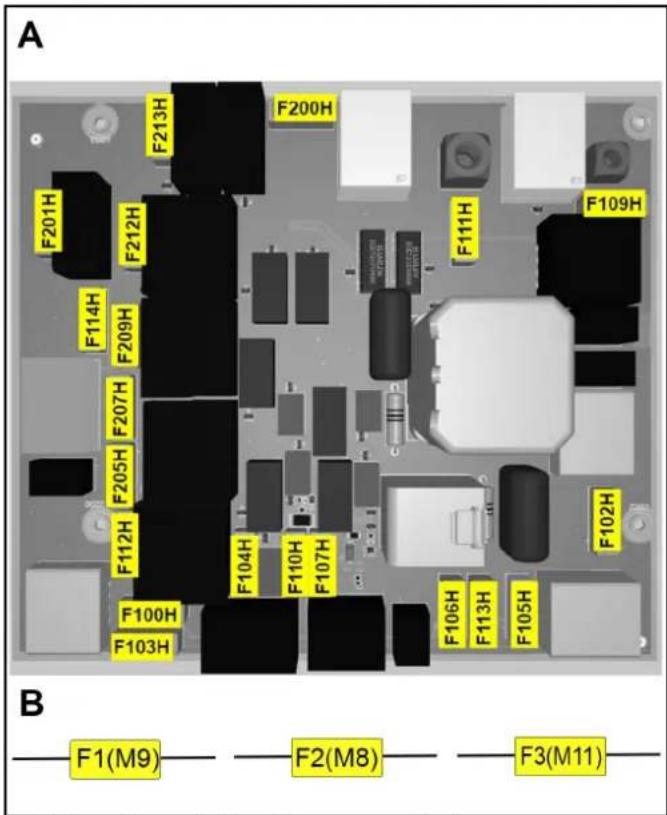
A: Fuses on the electronic control unit
| Osigurač uređaja | Vrijednost (A) | Oznaka |
| F100H 7,5 Sklopka s | ključem | |
| F102H 7,5 Radno svjetlo | ||
| F103H 7,5 Pumpa za | vodu | |
| F104H 3 LED | ||
| F105H 7,5 Radno svjetlo | ||
| F106H 3 Plavo svjetlo | ||
| F107H 1 Brojač | ||
| F109H 5 Motor filtra | ||
| F110H 7,5 Sirena | ||
| F111H 10 Motori za podizanje | ||
| F112H 5 Pokretanje motora | ||
| F113H 1 Rotacijska signalna | svjetiljka | |
| F114H 1 Senzor položaja pra- | žnjenja | |
| F200H 30 Glavni osigurač | ||
| F201H 3 Glavni ventil | K1 | |
| F205H 3 Jedinice za | metenje | K4 |
| F207H 3 Otvaranje zaklopke | K6 | |
| F209H 3 Zatvaranje zaklopke | K3 | |
| F212H 3 Podizanje K5 | ||
| F213H 3 Spuštanje K2 | ||
B: Fuses in the wiring harness (fuse holder)
| Osigurač uređaja | Vrijednost (A) | Oznaka |
| F1 (M9) 7,5 Motor za | podizanje | |
| F2 (M8) 7,5 Motor za | podizanje | |
| F3 (M11) 7,5 Motor za | podizanje |
2006/42/EC (+2009/127/EC)
2014/30/EU
2000/14/EC
2014/53/EU (TCU)
Applied harmonized standards
EN 60335-1
EN 60335-2-72
EN 55012: 2007 + A1: 2009
EN 62233: 2008
TCU
EN 301 511 V12.5.1
EN 300 440 V2.1.1
EN 300 328 V2.2.2
EN 300 330 V2.1.1
Applied national standards
H. Jenner Chairman of the Board of Management
S. Reiser Director Regulatory Affairs & Certification
Authorized representative for documentation:
S. Reiser
Alfred Kärcher SE & Co. KG
Alfred-Kärcher-Str. 28 - 40
71364 Winnenden (Germany)
Tel.: +49 7195 14-0
Fax: +49 7195 14-2212
Winnenden, 01.06.2021.
Contents
| Opšte napomene | 388 |
| Namenska upotreba | 389 |
| Funkcija | 389 |
| Sigurnosne napomene | 389 |
| Opis uređaja | 390 |
| Pre puštanja u pogon | 392 |
| Puštanje u pogon | 393 |
| Rad | 394 |
| Transport | 395 |
| Skladištenje | 396 |
| Nega i održavanje | 396 |
| Pomoć u slučaju smetnji | 401 |
| Pribor / rezervni delovi | 403 |
| Tehnički podaci | 404 |
| EU izjava o usklađenosti | 405 |
General notes
| Pre prve upotrebe uređaja, pročitajte ovo originalno uputstvo za rad i postupajte u skladu sa njim. Čuvajte originalna uputstva za upotrebu za buduću upotrebu ili za buduće vlasnike. |
Checking the delivery
| Prilikom predaje vozila, prodavcu, tj. prodavnici odmah prijavite ustanovljene nedostatke i štete nastale prilikom transporta. |
① Right housing (swiveling) ② Securing the support for the dirt collection container ③ Driver's seat (with seat contact switch) ④ Rotating beacon ⑤ Engine cover (swiveling) ⑥ Button for lifting/emptying the dirt collection container ⑦ Support rail for "Hombase System" ⑧ Brake release ⑨ Parking brake ⑩ Rear wheel ⑪ Sweeping roller with sealing strips
⑫ Side broom, left* ⑬ Front wheel ⑭ Pedal for raising/lowering the coarse dirt flap ⑮ Side broom, right ⑯ Forward/reverse pedal ⑰ Seat adjustment lever ⑱ Operating elements** ⑲ Steering wheel * only KM 100/120 R G 2SB ** described in more detail in a later chapter
Option
The following equipment, which is already installed when ordering or can be retrofitted at a service center, is not shown.
1 Comfortable seat
2 Work light
3 Kit in accordance with the Road Traffic Act
4 Blue Spot
① Steering wheel ② Work light switch (option) ③ Rotating beacon switch (option) ④ Horn ⑤ Key switch ⑥ Forward travel pedal ⑦ Reverse travel pedal ⑧ Throttle lever ⑨ High-dump button ⑩ Dust filter cleaning button ⑪ Water spray system switch (option) ⑫ Program selection switch* ⑬ Hour meter * described in more detail in the next chapter
Program selection switch
Note
① Driving
- To open, grasp the engine cover at the front recess, unlock it from the top, and then swing it to the side.
- To open, grasp the cowling at the front recess, unlock it from the top, and then swing it to the side.
Figure: Loading ramp
- Connect the battery and charge it if necessary.
- Using the provided boards, build a ramp according to the sketch.
- Cut the plastic packaging straps and remove the packaging film.
- Remove the tension strap fasteners at the anchoring points.
- Unscrew the screws on the three marked floor boards and the wooden block on the pallet.
- Place the boards on the edge of the pallet and position them so that they are in front of the device's wheels. Tighten the boards securely.
- Place the wooden block as a support under the boards.
- Remove the wooden wedges blocking the wheels.
- Release the parking brake.
- Carefully drive the device off the pallet over the installed ramp (see chapter "Moving the device with its own drive") or push it off the pallet (see chapter "Moving the device without its own drive").
Opening / closing the freewheel lever
△DANGER
①Freewheel lever, red ②Freewheel position closed – Device ready for driving ③Freewheel position open – Device can be moved
①Fuel tank
② Fuel tank cap
③Fuel gauge
①Driver's seat
② Seat adjustment lever
- Pull the seat adjustment lever to the right and move the driver's seat to the desired position.
- Release the seat adjustment lever.
- Move the driver's seat forward and backward to check that the lever is properly engaged.
Opening/closing the fuel valve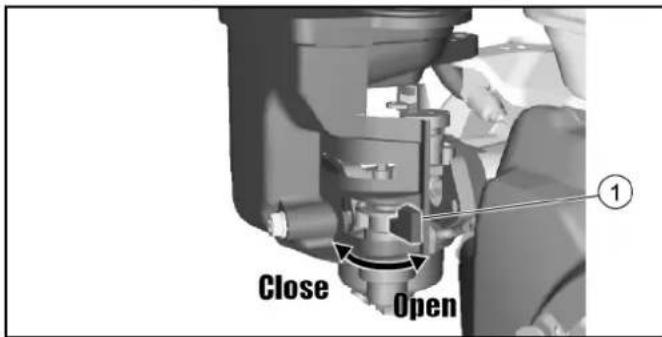
① Parking brake release ② Parking brake
① Steering wheel ② Drive forward ③ Drive backward ④ Parking brake ⑤ Coarse dirt cover
- Carefully activate the accelerator pedal.
a The driving pedal continuously regulates the driving speed.
b Avoid pressing the pedal suddenly.
① High-dump button ② Switch for raising/lowering the dirt container ③ Switch for opening/closing the container cover
- Set the program selection switch to the “Drive” position (the dirt container can only be raised in this position).
- Roughly position the device.
a After switching off the device, wait at least 1 minute so that the dust settles before emptying.
- Press and hold the high-dump button on the control panel.
- Press the dirt container switch and lift the dirt container.
a For emptying into a waste container, lift the dirt container all the way up and gently bring it close to the collection container. b For free emptying, lift the dirt container approximately halfway until the container lid can be opened (with a lower emptying height, the activation of the container lid is blocked).
- Engage the parking brake.
- Press the switch on the container lid and empty the dirt container.
- Close the container lid.
- Release the parking brake.
- Move away from the emptying point. 10. Lower the dirt container all the way down.
①Oil dipstick
②Oil filler opening
③Upper oil level (MAX)
④ Lower oil level (MIN)
- Place the device on a flat surface.
- Allow the engine to cool down.
a Check the engine oil level no earlier than 5 minutes after stopping the engine.
- Open the right cover.
- Unscrew the oil level dipstick and read the oil level.
① Oil dipstick / oil filler opening ② Drain hose ③ Drain hose holder ④ Hose clamp ⑤ Closing element
- Unscrew the oil level dipstick.
- Pull the drain hose out of the holder.
- Open the hose clamps on the drain hose and pull out the closing element.
- Let the oil drain completely into a catch container.
- Insert the closing element and tighten it with the hose clamp.
- Fill new engine oil (see section "Technical Data") up to the lower edge of the oil filler opening. 11. Insert the oil level dipstick and tighten it. 12. Close the cover. 13. Dispose of old oil in accordance with environmental regulations.
Checking the air filter
① Wing nut ② Cover ③ Air filters ④ Fastening
- Remove the cover.
- Check if the air filter is dirty and clean it if necessary.
- Insert the cover into the fixing part, then set it in place. a Make sure it is positioned correctly in the fixing part.
- Install the wing nut and tighten it.
Cleaning the air filter
- Unscrew the wing nut on the cover.
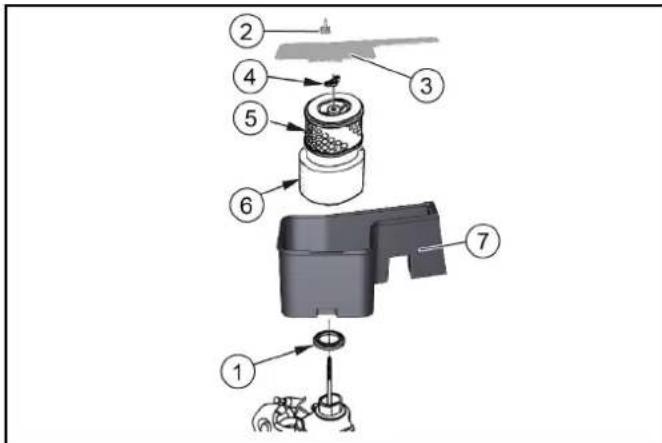
①Gasket ②Cover wing nut ③Cover ④Air filter wing nut ⑤Paper filter element ⑥Foam filter element ⑦Air filter housing 2. Remove the cover. 3. Unscrew the air filter wing nut. 4. Remove the air filter element. 5. Remove the foam filter element from the paper filter element. 6. Check the air filter elements for damage. 7. Replace damaged air filter elements. 8. If reusing, clean the air filter elements. 9. Tap the paper filter element several times on a hard surface and blow it out from the inside with compressed air (max. 0.2 MPa). 10. Foam filter element:
a Clean in warm soapy water. b Rinse with clean water. c Or clean with a non-flammable solvent. d Allow to dry. e Soak in clean engine oil. f Squeeze out excess oil.
- Wipe the inside of the cover and the air filter housing with a damp cloth. Make sure that no dirt gets into the engine. 12. Place the foam filter element onto the paper filter element. 13. Place the air filter element into the air filter housing.
- Make sure that the gasket is installed between the air filter housing and the engine.
- Install the air filter wing nut and tighten it.
- Install the cover.
- Install the cover wing nut and tighten it.
Cleaning the sediment bowl
- Turn the fuel valve to the "OFF" position.
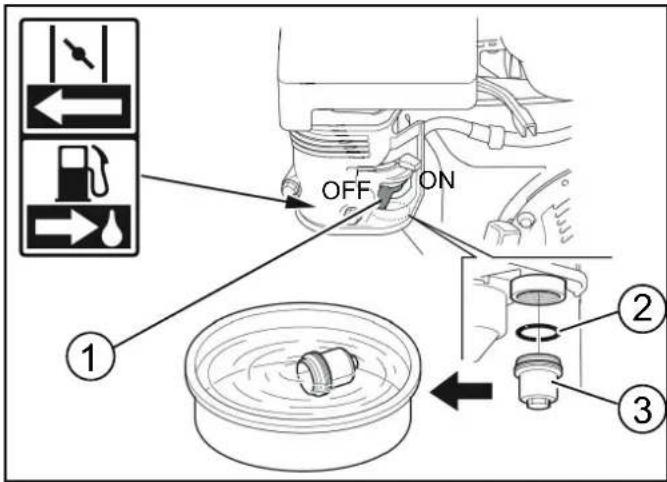
① Spark plug ② 0.7...0.8 mm ③ Gasket ④ Spark plug
- Replace the spark plug if the electrodes are worn or the insulator is broken.
- Check the condition of the spark plug electrode. Specified value: 0.7...0.8 mm.
- Check the spark plug gasket for damage.
CAUTION
Figure without engine cover
① Hydraulic oil tank ② Vent cap / filling opening ③ Hydraulic oil filter
- Park the machine.
- Open the engine cover.
- Check the hydraulic oil level when the engine is cold.
① Sweeper roller ② Sweeper roller holder ③ Bristle direction in forward driving direction
- Check for wear and for wrapped bands.
- If necessary: install a new sweeper roller.
- When installing, pay attention to the correct bristle direction (sweeper roller holders are identical).
- Mount the cover and bearing plate in reverse order.
① Fastening ② Side sealing strip ③ Front sealing tape ④ Rear sealing tape
- Loosen the fastening of the sealing strips.
- Adjust the sealing strip by moving it in the longitudinal slots. See the values in the table.
- If the adjustments are correct, fasten the sealing strips.
Checking / replacing the dust filter
△DANGER
Health hazard due to dust
Wear a dust mask and protective goggles when performing work on the filter system.
Observe the safety regulations when handling fine dusts.
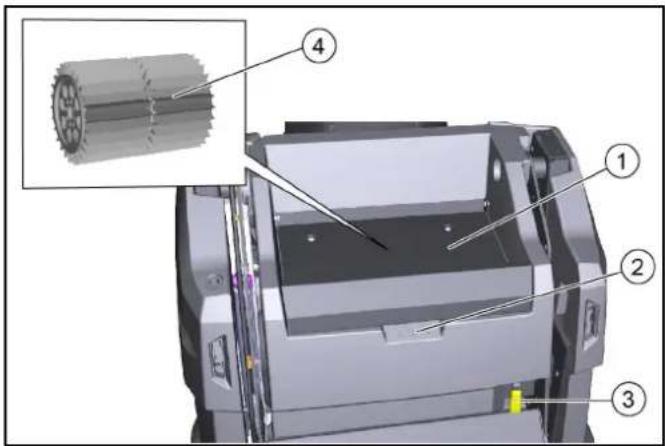
① Cover ② Recess for holding ③ Dust filter lever ④ Dust filter (round filter)
- Switch off the device.
- Wait at least 1 minute for the dust to settle.
- Turn the cover upward on the recess for holding.
- Move the dust filter guard to the right.
- Remove the dust filter upwards.
- If necessary: Clean the dust filter (vacuum it or carefully shake it out) or insert a new dust filter.
Safety support for installing/removing the dirt collection container
Installation:
- Place the machine on a stable, level surface.
- Fully raise the dirt collection container, see chapter Emptying the dirt collection container.
- Switch off the machine, see chapter Switching off the device.
- Open the right panel, see chapter Opening/closing the right panel.
- Remove the safety support. a Pull the spring pins out of the screws. b Pull out the screws and remove the safety support from the bracket.
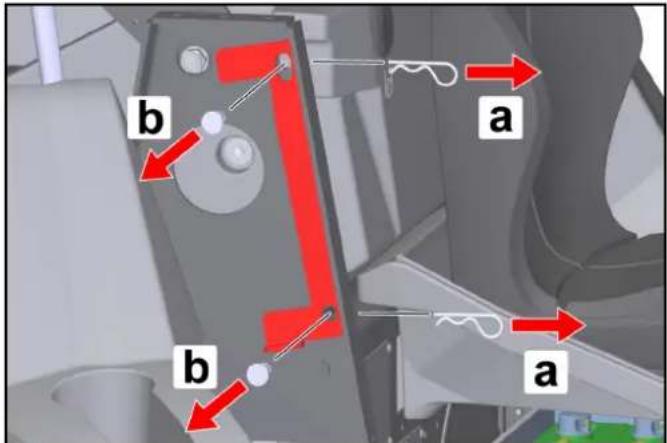
- Switch off the device and protect it from rolling away.
- Disconnect the negative terminal of the battery.
- Unscrew the 5 screws of the front cover.
- Remove the cover.
- Identify the faulty device fuse based on the table.
- Replace faulty fuses.
- Refit the cover.
- Reconnect the negative battery terminal.
Device fuses (overview)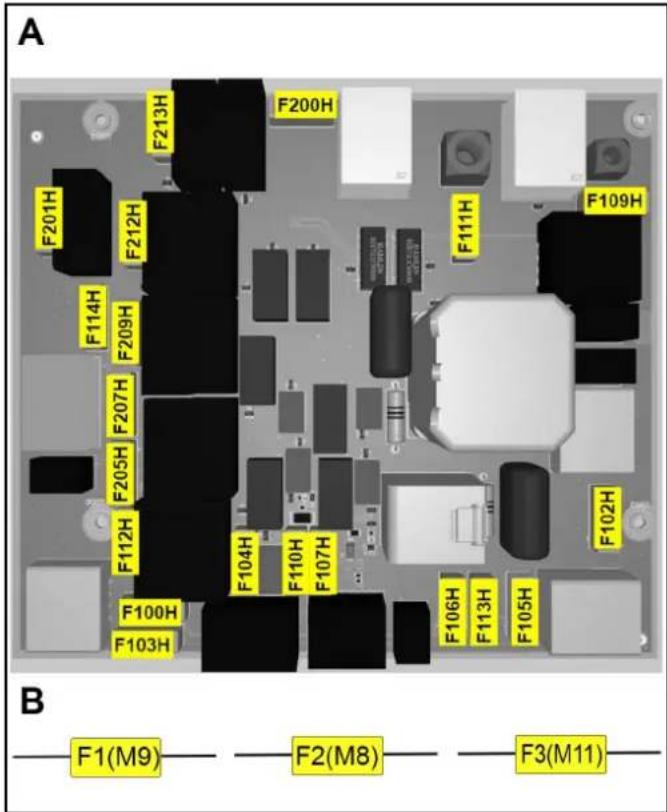
A: Fuses on the electrical control unit
| Osigurači uređaja | Vrednost (A) | Oznaka |
| F100H 7,5 Prekidač sa ključem | ||
| F102H 7,5 Radno svetlo | ||
| F103H 7,5 Pumpa za vodu | ||
| F104H 3 LED | ||
| F105H 7,5 Radno svetlo | ||
| F106H 3 Blue Spot | ||
| F107H 1 Brojač | ||
| F109H 5 Filter motora | ||
| F110H 7,5 Radna sirena | ||
| F111H 10 Podizni motori | ||
| F112H 5 Pokretanje motora | ||
| F113H 1 Rotaciona signalna | svetiljka | |
| F114H 1 Pražnjenje senzora | položaja | |
| F200H 30 Glavni osigurač | ||
| F201H 3 K1 Glavni ventil | ||
| F205H 3 K4 Agregati za | metenje | |
| F207H 3 K6 Otvaranje | poklopca | |
| F209H 3 K3 Zatvaranje | poklopca | |
| F212H 3 K5 Podizanje | ||
| F213H 3 K2 Spuštanje | ||
B: Fuses on the cable harness (fuse holder)
| Osigurači uređaja | Vrednost (A) | Oznaka |
| F1 (M9) 7,5 Podizni motori | ||
| F2 (M8) 7,5 Podizni motori | ||
| F3 (M11) 7,5 Podizni motori |
| Greška Otklanjanje | |
| Motor se ne pokreće. | Proverite / napunite bateriju pokretača.Prekidač sa ključem u položaju "I - ON".Prekidač za odabir programa u položaju "Vožnja"Na niskim spoljašnjim temperaturama: Aktivirajte polugu prigušnice.Sedite na sedište vozača (kontaktni prekidač sedišta se aktivira).Zatvorite do kraja poklopac motora i desnu oplatu.Proverite nivo motornog ulja, po potrebi dopunite motorno ulje.Sipajte gorivo.Otvorite slavinu za gorivo.Proverite svećicu za paljenje. |
| Motor radi neravnomerno | Proverite nivo napunjenosti rezervoara goriva.Proverite položaj poluge prigušnice.Proverite priključke i vodove u sistemu goriva.Proverite / zamenite svećice za paljenje.Očistite / zamenite filter za vazduh. |
| Motor radi, ali uređaj ne ili veoma sporo | Otpustite ručnu kočnicu.Proverite položaj poluge za slobodni hod.Proverite / dopunite nivo u rezervoaru hidrauličkog ulja.Kada je temperatura u minusu i ulje hidraulike hladno: Najmanje 3 minuta ostavite uređaj da se zagreva. |
| Motor se ne isključuje (prekidač za odabir programa i prekidač sa ključem su u položaju OFF) | Benzinski motor:a Otvorite poklopac motora (oprez zbog rotirajućeg klinastog remena).b Zatvorite slavinu za gorivo. |
| Prašina prilikom metenja / nedovoljna snaga usisavanja | Ispraznite posudu za nakupljenu prljavštinu.Proverite / očistite/ zamenite filter za prašinu.a Proverite ispravno naleganje filtera za prašinu.b Filter za prašinu očistite, ako je blago zaprljan.c Filter za prašinu zamenite, ako je oštećen ili jako zaprljan.Proverite istrošenog zaptivne trake u oblasti metenja. Po potrebi dodatno podesiti odnosno zameniti.Proverite / zamenite zaptivke na filterskoj kaseti.Proverite / zamenite zaptivne trake na posudi za nakupljenu prljavštinu. |
| Rezultat čišćenja nije zadovoljavajući | Valjak za metenje i bočnu metlu proverite na znakove istrošenosti i zamenite ih, ako je potrebno.Zaptivne lestvice proverite na znakove istrošenosti i podesite / zamenite ih, ako je potrebno.Proverite funkciju poklopca za grubu prljavštinu.Zatvoriti poklopac za metenje mokrih površina.Proverite nivo napunjenosti rezervoara ulja hidraulike.Proverite zaptivenost hidrauličkog sistema. |
| Valjak za metenje / bočna metla se ne okreću | Okrenite prekidač za odabir programa na željeni program "Metenje".Proverite nivo napunjenosti rezervoara ulja hidraulike.Proverite zaptivenost hidrauličkog sistema.Proveriti da li ima umotanih traka na valjku za metenje / bočnoj metli.Kontaktirajte servisnu službu. |
| Pražnjenje posude za nakupljenu prljavštinu ne funkcioniše | Zavrtanj za sigurnosni element na smicanje na posudi za nakupljenu prljavštinu je osiguran, zamenite polomljeni zavrtanj.Kontaktirajte servisnu službu. |
| Desna oplata se ne može zatvoriti | Posuda za nakupljenu prljavštinu je obezbeđena sigurnosnim podupiračem. Demontirajte sigurnosni podupirač (pogledajte poglavlje Sigurnosni podupirač za ugradnju / uklanjanje posude za nakupljenu prljavštinu). |
Accessories / spare parts
2006/42/EC (+2009/127/EC)
2014/30/EU
2000/14/EC
2014/53/EU (TCU)
Applied harmonized standards
EN 60335-1
EN 60335-2-72
EN 55012: 2007 + A1: 2009
EN 62233: 2008
TCU
EN 301 511 V12.5.1
EN 300 440 V2.1.1
EN 300 328 V2.2.2
EN 300 330 V2.1.1
Applied national standards
Chairman of the Board of Management
S. Reiser
Director Regulatory Affairs & Certification
Person authorized for documentation:
S. Reiser
Alfred Kärcher SE & Co. KG
Alfred-Kärcher-Str. 28 - 40
71364 Winnenden (Germany)
Tel.: +49 7195 14-0
Winnenden, 2021/06/01
Contents
① Movement
Figure: Ramp
Figure without hood
① Rear wheel
① Side brush
② Screws
① Bracket
① Cover
Chairman of the Board of Management
S. Reiser
Director Regulatory Affairs & Certification
71364 Winnenden (Germany)
Tel.: +49 7195 14-0
Fax: +49 7195 14-2212
Winnenden, 2021/06/01
Contents
General instructions 424
①Movement
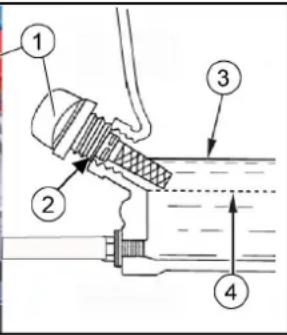
①Fuel tap
①Spark plug wrench
②0.7-0.8 mm
③Seal
④Spark plug
- Install the bolts.
H. Jenner Chairman of the Board of Management
S. Reiser Director Regulatory Affairs & Certification
71364 Winnenden (Germany)
Tel.: +49 7195 14-0
Fax: +49 7195 14-2212
①Handle
Figure: Ramp
①Steering wheel
②Forward movement
③Reverse movement
④Parking brake
①Dipstick
Figure without hood
①Side brush ②SCREWS
- Install the bolts.
Chairman of the Board of Management
S. Reiser
Director Regulatory Affairs & Certification
71364 Winnenden (Germany)
Tel.: +49 7195 14-0
Fax: +49 7195 14-2212
① Fuel tank ② Tank cap ③ Fuel gauge
① Fuel tap
Chairman of the Board of Management
S. Reiser
Director Regulatory Affairs & Certification
71364 Winnenden (Germany)
Tel.: +49 7195 14-0
Fax: +49 7195 14-2212
Winnenden, 2021/06/01
Table of contents
① Right panel (swivelable)
② Safety support for the sweepings container
① Steering wheel
② Work light switch (option)
③ Rotating beacon switch (option)
④ Horn
⑤ Key switch
⑥ Accelerator pedal "forward"
⑦ Accelerator pedal "reverse"
⑧ Choke lever
⑨ High-dump button
⑩ Dust filter cleaning button
① Travel
- The engine can be started in this position
- The sweeper can travel to the place of use
Figure: Slope
① Fuel tank
② Fuel tank cap
③ Fuel gauge
① Driver's seat
② Seat adjustment lever
① Fuel cock
① Parking brake release
② Parking brake
Parking brake operation:
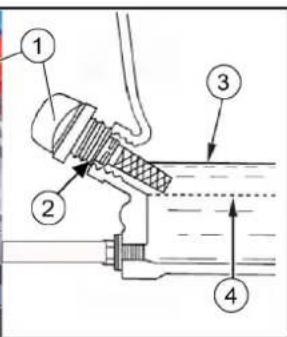
① Oil dipstick
② Oil filler neck
③ Maximum oil level (MAX)
④ Minimum oil level (MIN)
① Fuel cock
② O-ring
③ Sediment cup
① Spark plug wrench
With the hood removed
① Side brush
② Screw
① Roller brush
② Sweep roller mount
③ Alignment of bristles toward the forward direction of travel
① Fixed part
② Side seal strip
③ Front seal strip
④ Rear seal strip
① Cover
② Recessed grip
③ Dust filter lever
④ Dust filter (circular filter)
- Attach the bolt.
Chairman of the Board of Management
S. Reiser
Director Regulatory Affairs & Certification
Authorized representative for documentation:
S. Reiser
Alfred Kärcher SE & Co. KG
Alfred-Kärcher-Str. 28 - 40
71364 Winnenden (Germany)
Phone: +49 7195 14-0
THANK YOU!
MERCI! DANKE! iGRACIAS!
Register your product and benefit from many advantages.
www.kaercher.com/welcome

Rate your product and tell us your opinion.

www.kaercher.com/dealersearch
Alfred Kärcher SE & Co. KG
Alfred-Kärcher-Str. 28-40
71364 Winnenden (Germany)



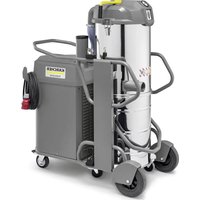
- CONTENTS
- GENERAL NOTES
- CHECKING THE DELIVERY
- ENVIRONMENTAL PROTECTION
- NOTES ON THE CONTENT MATERIALS (REACH)
- DISPOSAL OF THE WORN OUT VEHICLE
- WARRANTY
- ACCESSORIES AND SPARE PARTS
- HAZARD LEVELS
- DANGER
- △WARNING
- △CAUTION
- ATTENTION
- SYMBOLS ON THE MACHINE
- △DANGER
- RISK OF BURNS FROM HOT SURFACES
- ⚠️DANGER
- RISK OF FIRE
- RISK OF ACCIDENT FROM TIPPING
- RISK OF INJURY
- RISK OF ACCIDENT DUE TO IMPROPER HANDLING
- INTENDED USE
- FORESEEABLE MISUSE
- SUITABLE SWEEPING SURFACES
- FUNCTION
- SAFETY INSTRUCTIONS
- SAFETY DEVICES
- BONNET/PANEL ON THE RIGHT
- EMPTYING THE WASTE CONTAINER
- WASTE CONTAINER TWO-HANDED OPERATION
- WASTE CONTAINER SAFETY BRACE
- SEAT CONTACT SWITCH
- SAFETY INSTRUCTIONS FOR OPERATION
- SAFETY INSTRUCTIONS FOR DRIVING
- SAFETY INSTRUCTIONS FOR COMBUSTION ENGINES
- CARE AND SERVICE
- DEVICE DESCRIPTION
- DEVICE ILLUSTRATION
- OPTIONAL
- CONTROL ELEMENTS
- PROGRAMME SELECTION SWITCH
- NOTE
- ① DRIVING
- ② SWEEPING WITH A ROLLER BRUSH
- ③ SWEEPING WITH A ROLLER BRUSH, RIGHT AND LEFT SIDE BRUSHES
- PANELS
- ⚠ WARNING
- MALFUNCTION DUE TO OPEN PANELS
- OPENING/CLOSING THE BONNET
- OPENING/CLOSING THE RIGHT PANEL
- STORAGE AREA
- BATTERIES / CHARGERS
- ONLY USE THE BATTERIES AND CHARGERS RECOMMENDED BY THE MANUFACTURER
- WARNING SYMBOLS
- SAFETY INSTRUCTIONS FOR LEAD-ACID BATTERIES
- DANGER OF FIRE AND EXPLOSION
- RISK OF ACID BURNS
- ENVIRONMENTAL RISK DUE TO IMPROPER DISPOSAL OF BATTERIES
- PROCEDURES IN THE EVENT OF UNINTENTIONAL RELEASE OF BATTERY ACID
- PRECOMMISSIONING
- UNLOADING INSTRUCTIONS
- RISK OF ACCIDENTS WHEN UNLOADING THE DEVICE
- OPENING/CLOSING THE FREEWHEEL LEVER
- RISK OF ACCIDENTS DUE TO ABSENCE OF BRAKING POWER
- RISK OF DAMAGE TO THE HYDROSTATIC DRIVE
- MOVE DEVICE WITHOUT OWN DRIVE (DEVICE CAN BE MOVED)
- MOVING THE DEVICE WITH ITS OWN DRIVE (DEVICE IS READY TO DRIVE)
- INSTALLING THE SIDE BRUSH
- INITIAL STARTUP
- SAFETY CHECK BEFORE STARTUP
- REFUELLING
- EXPLOSION HAZARD DUE TO OVERFLOWING FUEL
- EXPLOSION HAZARD DUE TO SMOKING AND NAKED FLAMES
- HEALTH RISK FROM INHALED VAPOURS
- RISK OF DAMAGE DUE TO INCORRECT FUEL
- ADJUSTING THE DRIVER'S SEAT
- DANGER OF ACCIDENT
- OPERATION
- STARTING THE DEVICE (MOTOR)
- DRIVING THE DEVICE
- RISK OF INJURY WHEN REVERSING
- RISK OF ACCIDENT
- RISK OF DAMAGE TO THE DRIVE
- SWEEPING MODE
- INFORMATION ON SWEEPING OPERATION
- RISK OF INJURY FROM ABRUPT STOPPING
- RISK OF INJURY FROM STONES OR CHIPPINGS
- RISK OF DAMAGE DUE TO PARCEL TAPE OR SIMILAR MATERIAL
- SWEEPING WITH ROLLER BRUSH AND SIDE BRUSH
- RISK OF INJURY DUE TO FALLING OBJECTS
- RISK OF INJURY DUE TO TIPPING OF THE MACHINE WHEN EMPTYING THE WASTE CONTAINER
- RISK OF INJURY WHEN STANDING IN THE SWIVEL RANGE OF THE WASTE CONTAINER
- RISK OF INJURY DUE TO CRUSHING OR SHEARING OFF OF BODY PARTS WHEN REACHING INTO THE MECHANICS OF THE WASTE CONTAINER
- RISK OF INJURY IF THE WASTE CONTAINER FALLS
- SWITCHING OFF THE DEVICE
- TRANSPORT
- RISK OF ACCIDENT WHEN LOADING
- RISK OF INJURY AND DAMAGE
- STORAGE
- IF THE SWEEPER IS NOT USED FOR A LONG TIME
- CARE AND MAINTENANCE
- CLEANING THE DEVICE
- IMPROPER CLEANING
- HEALTH RISK FROM DUST
- CLEAN THE INSIDE OF THE DEVICE
- CLEANING THE OUTSIDE OF THE DEVICE
- MAINTENANCE INTERVALS
- MAINTENANCE BY THE CUSTOMER
- DAILY
- WEEKLY
- MAINTENANCE EVERY 50 OPERATING HOURS
- MAINTENANCE EVERY 100 OPERATING HOURS
- MAINTENANCE EVERY 300 OPERATING HOURS
- MAINTENANCE AFTER WEAR
- MAINTENANCE BY CUSTOMER SERVICE
- MAINTENANCE WORK
- CHECKING/TOPPING UP THE ENGINE OIL LEVEL
- DANGER OF BURNS
- OIL CHANGE
- CHECK THE AIR FILTER
- CLEANING THE AIR FILTER
- CLEANING THE SETTLING CUP
- CHECKING/ADJUSTING THE SPARK PLUG
- RISK OF DAMAGE
- CHECKING THE HYDRAULIC OIL LEVEL AND TOPPING UP THE HYDRAULIC OIL
- RISK OF DAMAGE TO THE HYDRAULIC SYSTEM
- REPLACING THE REAR WHEEL
- WARNING
- REPLACING THE FRONT WHEEL
- REPLACING THE SIDE BRUSH
- REPLACING / INSPECTING THE ROLLER BRUSH
- REMOVING THE ROLLER BRUSH
- INSTALLING THE ROLLER BRUSH
- REPLACING / SETTING THE SEALING STRIPS
- CHECKING/REPLACING DUST FILTER
- INSTALLING/REMOVING THE WASTE CONTAINER SAFETY BRACE
- INSTALLATION
- REMOVAL
- TROUBLESHOOTING GUIDE
- DEVICE FUSES
- DECLARATION OF CONFORMITY
- EU DECLARATION OF CONFORMITY
- CURRENTLY APPLICABLE EU DIRECTIVES
- HARMONISED STANDARDS USED
- TCU
- APPLIED CONFORMITY EVALUATION METHOD
- SOUND POWER LEVEL DB(A)
- DECLARATION OF CONFORMITY (UK)
- ① GUIDE
- INDEX
- ①DRIVING
- REISER
- PROGRAM SELECTOR SWITCH
- INSTRUCTION
- OPERATING THE PARKING BRAKE
- RELEASING THE PARKING BRAKE
- STARTING THE DEVICE (ENGINE)
- PICTURE: LOADING RAMP
- IMAGE: EXIT RAMP
- IMAGE: LOADING RAMP
- SUITABLE SURFACE FOR SWEEPING
- IMAGE: DOWNHILL RAMP
- CHECK SPARK PLUG, ADJUST
- RISK OF MATERIAL DAMAGE
- REPLACING/CHECKING THE SWEEPING ROLLER
- REMOVE THE SWEEPING ROLLER
- APPLIED HARMONIZED STANDARDS
- TABLE OF CONTENTS
- PRESSING THE PARKING BRAKE
- ①DRIVE
- ① VEHICLE MOVEMENT
- CHECKING, ADJUSTING THE SPARK PLUG
- CAUTION
- RELEVANT EU DIRECTIVES
- HARMONIZED STANDARDS APPLIED
- APPLICABLE NATIONAL STANDARDS
- OPENING / CLOSING THE RIGHT SIDE PANEL
- OPENING / CLOSING THE FREEWHEEL LEVER
- MOVING THE DEVICE WITHOUT ITS OWN DRIVE (THE DEVICE CAN BE MOVED)
- MOVING THE DEVICE UNDER ITS OWN POWER (DEVICE READY TO DRIVE)
- MOUNTING THE SIDE BROOM
- APPLIED NATIONAL STANDARDS
- OPTION
- PROGRAM SELECTION SWITCH
- CHECKING THE AIR FILTER
- CLEANING THE SEDIMENT BOWL
- CHECKING / REPLACING THE DUST FILTER
- HEALTH HAZARD DUE TO DUST
- SAFETY SUPPORT FOR INSTALLING/REMOVING THE DIRT COLLECTION CONTAINER
- ① MOVEMENT
- ① COVER
- ①MOVEMENT
- ①HANDLE
- ①DIPSTICK
- AUTHORIZED REPRESENTATIVE FOR DOCUMENTATION
- THANK YOU
- MERCI! DANKE! IGRACIAS
Brand : Kärcher
Model : KM 100120 R G
Category : Vacuum Cleaner