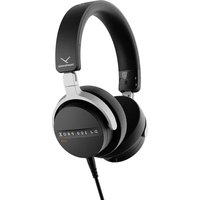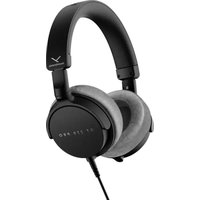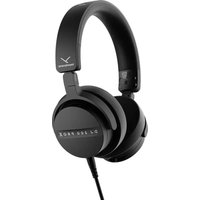
Aventho 200 - Earphones BEYERDYNAMIC - Free user manual and instructions
Find the device manual for free Aventho 200 BEYERDYNAMIC in PDF.



User questions about Aventho 200 BEYERDYNAMIC
0 question about this device. Answer the ones you know or ask your own.
Ask a new question about this device
Download the instructions for your Earphones in PDF format for free! Find your manual Aventho 200 - BEYERDYNAMIC and take your electronic device back in hand. On this page are published all the documents necessary for the use of your device. Aventho 200 by BEYERDYNAMIC.
USER MANUAL Aventho 200 BEYERDYNAMIC
Adjusting the volume 3
General maintenance instructions 3
Risk of swallowing 3
Power and connecting cable. 3
Using the battery. 3
Environmental conditions 3
ABOUT THIS MANUAL 4
BOX CONTENTS 4
OPERATING ELEMENTS 4
CHARGING THE BATTERY 4
Remarks on the life of Li-ion batteries 4
Displaying the battery charge level 4
5
COMPATIBILITY WITH PLAYBACK DEVICES. 5
SUPPORTED AUDIO CODECS 5
OPERATION 5
Switching on/off 5
Connect to a device via Bluetooth 5
Pairing 6
Multi-point operation 6
Setting up multi-point 6
Using multi-point. 6
Delete pairing list 6
Playing media. 7
Adjusting the volume. 7
Telephone. 8
Reset to factory settings 8
Overview of the operating functions 8
Overview of the LED displays on the headphone 9
Audio cable connection. 9
Cleaning 9
Changing ear pads 9
Battery change 10
TROUBLESHOOTING 10
HELP WITH PROBLEMS / FAQ. 11
PRODUCT REGISTRATION 11
DISPOSAL 11
Battery disposal 11
EU DECLARATION OF CONFORMITY 11
TECHNICAL SPECIFICATIONS 11
WARRANTY CONDITIONS 11
TRADEMARKS 11
Thank you for purchasing the AVENTHO 200 Wireless Over-Ear headphones from beyerdynamic.
Please take some time to read this information carefully before using the AVENTHO 200.
SAFETY INSTRUCTIONS
Read these safety instructions carefully before using the AVENTHO 200.
Heed all instructions given, especially those regarding the safe use of the AVENTHO 200.
Do not use the AVENTHO 200 when it is damaged.
Intended use
Only use the AVENTHO 200 as described in this manual.
The company beyerdynamic GmbH & Co. KG accepts no liability for damage to the AVENTHO 200 or injury to persons caused by careless, improper or incorrect use of the AVENTHO 200, or by use for purposes not specified by the manufacturer.
The company beyerdynamic GmbH & Co. KG is not liable for damage to USB devices that do not comply with the USB specifications.
The company beyerdynamic GmbH & Co. KG is not liable for damage resulting from connection interruptions due to batteries being empty or too old, or due to exceeding the Bluetooth® transmission range.
Please also observe the relevant country-specific regulations before using the product.
Adjusting the volume

High volume levels over longer listening periods can permanently damage your hearing.
Before using the AVENTHO 200, set the volume to minimum.
Only increase the volume after putting on the AVENTHO 200.
Do not use the AVENTHO 200 at high volume over a long period of time.
When listening and speaking normally using AVENTHO 200, your own voice should still be perceptible.
In case of tinnitus, reduce the volume. If necessary, consult a doctor.
We would like to point out that consistent high volume levels and longer listening periods can damage your hearing. Damage to hearing is irreversible. Always ensure an adequate volume level. It is advisable to keep listening periods as short as possible at high volume levels.
Reducing perception of ambient noise
The AVENTHO 200 headphones drastically reduce the perception of ambient noise. Using the AVENTHO 200 in road traffic can be potentially dangerous. The user's hearing must not be impaired to the extent that it causes road safety risks.
Do not use the AVENTHO 200 within the action area of potentially dangerous machines and tools.
Avoid using the AVENTHO 200 in situations where hearing must not be impaired — particularly in road traffic, when crossing a level crossing or on a construction site.
General maintenance instructions
Clean all parts of the AVENTHO 200 with a soft cloth moistened with water. Make sure that no liquid gets into the housing or the transducer.
Do not use cleaning agents containing solvents, alcohol or acids, as these can damage the surface.
Risk of swallowing
- Keep small parts, such as product, packaging and accessories, away from children and pets. They constitute a choking hazard if swallowed!
Power and connecting cable
Only use the cable supplied by us for both charging and connecting to a laptop.
Using the battery
Danger from heat, water and mechanical stress
Excessive heat, water and mechanical stress, may cause explosion, heat, fire, smoke or fumes. Injuries and irreversible damage to the battery may result.
Do not expose the battery to excessive heat, fires or extremely low air pressure. There is a risk of explosion, fire, smoke or gas.
Do not subject the battery to mechanical stress such as crushing. This may lead to an irreversible damage to the battery, explosion or injuries.
Only use a USB 2.0/3.0 standard-compliant 5 V power adapter to charge the battery via the integrated USB type C socket.
Environmental conditions
Do not expose the AVENTHO 200 to rain, snow, liquids or moisture.
ABOUT THIS MANUAL
These instructions describe the most important functions of the product.
The information in these instructions refers to the standard settings of the software. A newer version may be available.
Information on the software update can be found in the "beyerdynamic App" chapter.
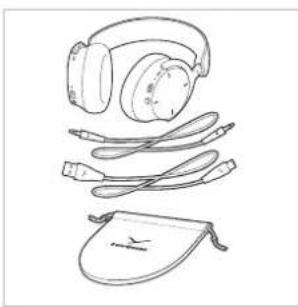
BOX CONTENTS
▶ AVENTHO 200 headphone
USB-A to USB-C charging cable
Mini jack cable
Soft bag
Quick start guide
Compliance booklet
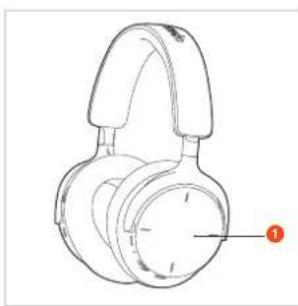
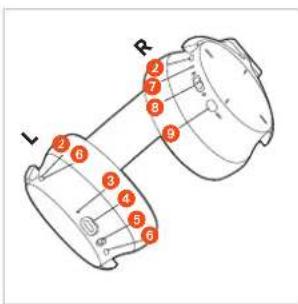
OPERATING ELEMENTS
Touch pad
Microphones (ANC)
Charging LED
USB port
5 Jack connection, 3.5 mm
Microphones (Voice)
Status LED
On/off and Bluetooth slide switch
9 ANC button
CHARGING THE BATTERY
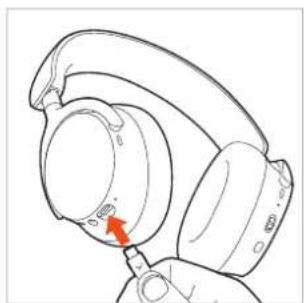
Before using the AVENTHO 200 for the first time, we recommend that you fully charge the battery in the headphone. Please only use the USB cable supplied for charging.
Connect the AVENTHO 200 with the USB charging cable to a USB-compliant voltage carrying USB connection (e.g. USB power supply unit).
The status LED indicates the charging status.
Remarks on the life of Li-ion batteries
When fully charged, disconnect the USB cable from the charger and the product.
CAUTION! High temperatures, especially with a high charge level, can cause irreversible damage.
If the battery is not used or is stored for extended periods of time, it is recommended to charge it to approx. 50% and store it at no more than 20^
Switch off the AVENTHO 200 after use.
Displaying the battery charge level
The charge level of the AVENTHO 200 is displayed by the charging LED.
| Charge level Display charging LED | |
| 0 to 30% Flashes red | |
| 31 to 70% Flashes yellow | |
| 71 to 99% Flashes green | |
| 100% (battery fully charged) | Illuminates green |
DOWNLOAD BEYERDYNAMIC APP
The beyerdynamic app gives you a customised control of your AVENTHO 200.
Before using your AVENTHO 200 for the first time:
Download the beyerdynamic app from the App Store (for iOS devices) or Google Play (for Android devices).
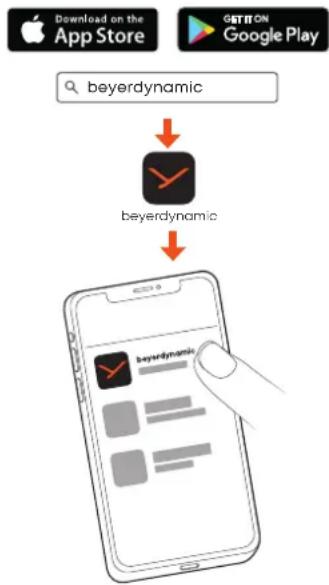
- With the beyerdynamic app you can carry out customised operation settings and software updates.
These settings are saved to your AVENTHO 200, so you can enjoy them with any playback device connected to your AVENTHO 200.
COMPATIBILITY WITH PLAYBACK DEVICES
VENTHO 200 is compatible with Bluetooth® devices that support the following profiles:
A2DP (for audio transmission)
HFP/HSP (for phone operation and voice assistant)
AVRCP (for control signal transmission)
SUPPORTED AUDIO CODECS
Within the A2DP profile, AVENTHO 200 supports the audio codec sBC, AAC, aptX Adaptive and aptX Lossless.
Only codecs that are available in the playback device can be used for audio transmission.
The playback device and AVENTHO 200 automatically agree on the best available codec in the following order:
- SBC
- AAC
- aptX Adaptive
- aptX Lossless
Most playback devices do not indicate which codec is actively in use.
OPERATION
You can operate the AVENTHO 200 via the touch pad by lightly tapping and swiping with your finger.
We recommend that you only ever operate the touch pad with one finger to avoid malfunctions.
Switching on/off
Switching on
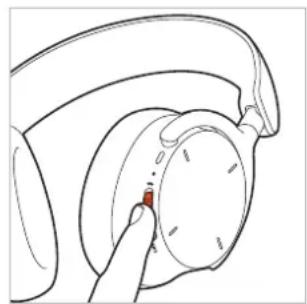
Slide the on/off switch to the centre position. The status LED lights up red for 2 seconds and then goes out. The current battery status is announced.
Switching off
Slide the on/off switch downwards. The status LED lights up red for 2 seconds and then go
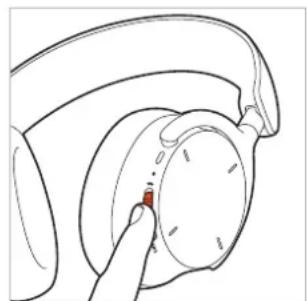
If you are using the AVENTHO 200 with a cable, you must also switch it on.
Connect to a device via Bluetooth®
Before you can use the AVENTHO 200, you must connect it to a mobile phone or other Bluetooth®-enabled device.
The connection procedure may differ between the various devices.
- Please refer to the operating instructions of the device to which you wish to connect the AVENTHO 200.
Pairing
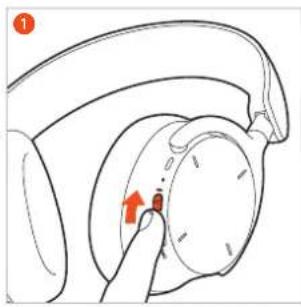
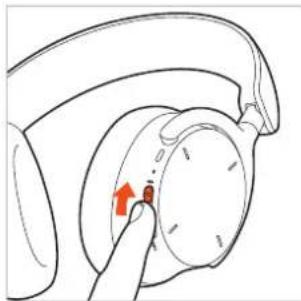
Slide the on/off switch of the switched on AVENTHO 200 upwards to the Bluetooth symbol and hold it for one second. The status LED flashes blue and red alternately.
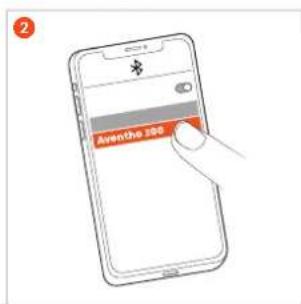
Select "VENTHO 200" from the pairing list of the playback device.
Multi-point operation
The AVENTHO 200 can be paired with up to eight devices via Bluetooth. An active connection is possible with a maximum of two devices at the same time. Music playback and phone operation is only possible with one device at a time. Phone operation has priority over music playback, i.e. music playback is interrupted when a call is received.
The following priority list applies to the use of playback devices (PD):
| Priority ProfilePlayback devices(PD) | ||
| 1 HFP (phone) operation) PD 1 (device used first) | ||
| 2 HFP (phone) operation) PD 2 (device used second) | ||
| 3 A2DP | (playback of music) | PD 1 (device used first) |
| 4 A2DP | (playback of music) | PD 2 (device used second) |
Setting up multi-point
Connect the AVENTHO 200 to the first device (see "Pairing").
Deactivate the Bluetooth connection on the first device.
▶ Slide the on/off switch 7 upwards and hold it for one second to start the connection mode (status LED 6 flashes slowly alternately blue and red).
Connect the AVENTHO 200 to the second device (see "Pairing").
- Activate the Bluetooth connection of the first device, which automatically connects to the AVENTHO 200.
- When both devices are paired with the AVENTHO 200, the AVENTHO 200 automatically connects to both devices each time it is switched on.
Using multi-point
| Media playback active / accept call | Briefly tap the touch pad twice (●●) |
| Hang up / start media playback again | Briefly tap the touch pad twice (●●) |
Delete pairing list
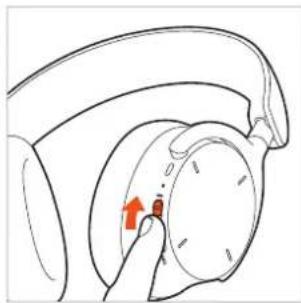
▶ Slide the on/off switch of the switched on AVENTHO 200 upwards and hold it for 10 seconds, until the status LED flashes alternately red and blue.
Switch between noise cancellation (ANC) and transparency mode
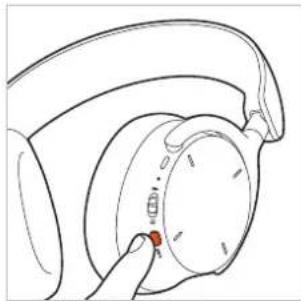
You can use the ANC button to switch between active noise cancellation (ANC), transparency mode and OFF mode. The AVENTHO 200 is supplied in OFF mode.
If you always press the ANC button only once, ANC mode, Transparency mode and ANC OFF mode again are activated in succession.
If you always press the ANC button twice, Transparency mode, ANC mode, and then ANC OFF mode are activated in succession.
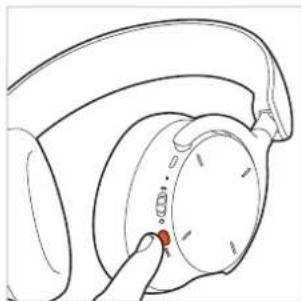
You can make settings for noise cancellation (ANC) and transparency mode via the beyerdynamic app.
Sidetone on/off
Press the ANC button for 2 seconds ( ) to switch the sidetone on or off.
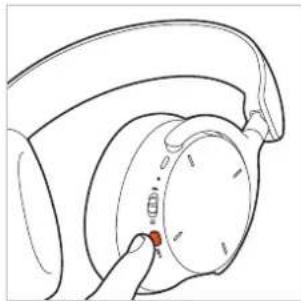
Previous track
Swipe backwards to play the previous track.*
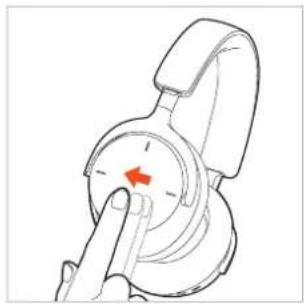
*Function depends on the streaming service or media player used
Playing media
Please note that the functions described below depend on the player and player software and may not be available. Please operate the touch pad with one finger only to avoid malfunctions.
Start / stop playback
Tap twice (●●) to start or stop playback.
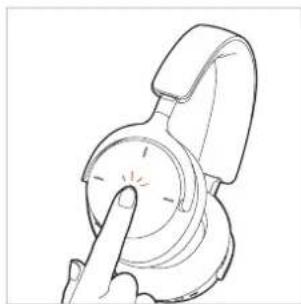
Thanks to a sensor integrated in the housing, playback stops automatically when you put the AVENTHO 200 down and starts automatically when you put it back on.
Next track
- Swipe forwards to play the next track.
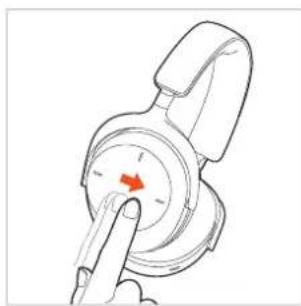
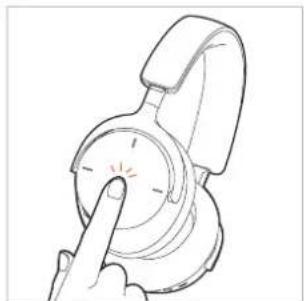
Switch on the voice assistant
Tap and hold once ( ) to activate the voice assistant installed on the smartphone.
Adjusting the volume
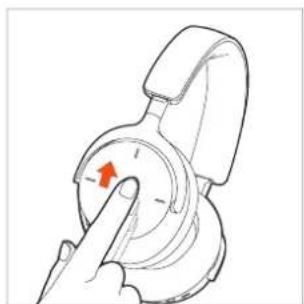
Increase the volume
- Swipe upwards to increase the volume. If you swipe upwards and hold, the volume is gradually increased to the maximum.
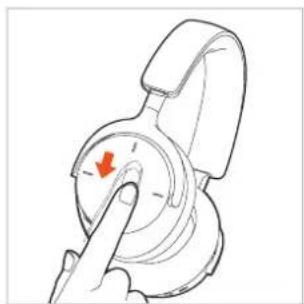
Decrease the volume
- Swipe downwards to decrease the volume. If you swipe down and hold, the volume is gradually reduced to the minimum.
Telephone
Accept / end / cancel call
Tap twice (to accept an incoming or end an active call or cancel an outgoing call.
Tap twice to accept a second incoming call and end the first active call at the same time.
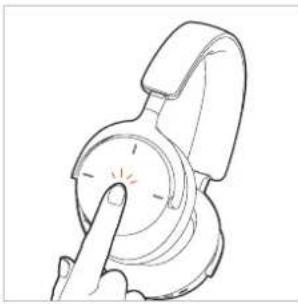
Reject call
Tap and hold once () to reject the incoming call.
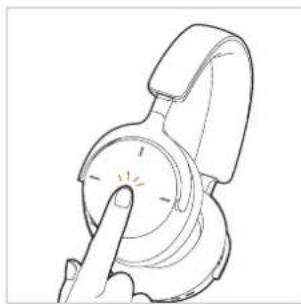
No call active Operation
| Accept incoming call | Tap twice (●●) |
| Reject incoming call | Tap and hold once (●●) |
| End active call | Tap twice (●●) |
| Cancel outgoing call | Tap twice (●●) |
Call already active Operation
Accept second incoming call Tap twice ( ) and end active call
Reset to factory settings
When resetting to factory settings, all personal data is deleted!
▶ Slide the on/off switch of the switched on
AVENTHO 200 quickly 5 times upwards
(● ● ●) until the status LED flashes purple.
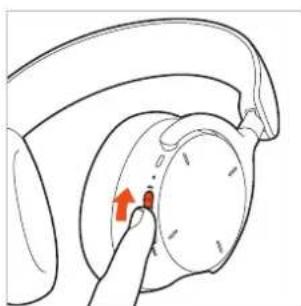
Overview of the operating functions
If not stated otherwise, the functions listed apply to a switched-on headphone.
| Function Operation on headphone | |
| Switch on | ▶ Slide the on/off switch to the centre position. |
| Switch off | ▶ Slide the on/off switch downwards. |
| Pairing mode | ▶ Slide the on/off switch upwards and hold it for 1 second (●). |
| Delete pairing list | ▶ Slide the on/off switch upwards and hold it for 10 seconds (●) until the status LED alternately flashes red and blue. |
| Restoring the factory settings | ▶ Slide the on/off switch quickly 5 times upwards (●●●●). |
| Check battery status | ▶ Slide the on/off switch to the centre position; the battery capacity is announced. |
| Activate the transparency mode | ▶ Depending on the mode, press the ANC button once (●) or twice (●). |
| Activate the ANC mode | ▶ Depending on the mode, press the ANC button once (●) or twice (●). |
| Sidetone on/off | ▶ Press the ANC button for 2 seconds (●). |
| Start / pause | ▶ Tap the touch pad twice (●). |
| Increase volume | ▶ Swipe upwards on the touch pad. |
| Decrease volume | ▶ Swipe downwards on the touch pad. |
| Next track | ▶ Swipe forwards on the touch pad. |
| Previous track | ▶ Swipe backwards on the touch pad. |
| Accept / end call | ▶ Briefly tap the touch pad twice (●). |
| Reject call | ▶ Tap and hold the touch pad once (●). |
| Cancel outgoing call | ▶ Briefly tap the touch pad twice (●). |
| Accept second incoming call and end active call | ▶ Briefly tap the touch pad twice (●). |
| Activate voice assistant | ▶ Tap and hold the touch pad once (●). |
Overview of the LED displays on the headphone
| Action LED display | |
| Low battery warning | LED rapidly flashes red |
| Charging via USB 0 - 30% | LED flashes red |
| Charging via USB 31 - 70% | LED flashes yellow |
| Charging via USB 71 - 99% | LED flashes green |
| Charging via USB 100% | LED illuminates green |
| Bluetooth®pairing recognisable | LED flashes blue and red |
| Bluetooth®connection active | LED slowly flashes blue with pauses of 7 seconds |
| Bluetooth®connection lost | LED slowly flashes blue with pauses of 3 seconds |
| Media playback active | LED slowly flashes blue with pauses of 7 seconds |
| Delete pairing list | LED flashes red and blue |
| Restore factory settings | LED flashes purple three times |
Audio cable connection
The delivery includes an audio cable with a mini jack plug (3.5 mm) at both ends.
Connect one end of the audio cable to the jack socket of the headphone housing, if you would like to use the AVENTHO 200 without Bluetooth.
Alternatively, you can use the USB cable as an audio cable.
Switch on the AVENTHO 200. Please note that with this type of application power is consumed via the battery.
Control the media playback and volume via the playback device.
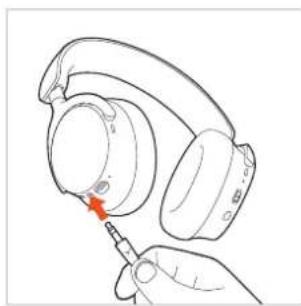
Cleaning
For reasons of hygiene, you should occasionally clean the ear and headband pads with a soft cloth moistened with water. Make sure that no water gets into the ear cups or transducers.
Do not use cleaning agents containing solvents, alcohol or acids.
Never use a vacuum cleaner for cleaning the headphone, as this may cause irreparable damage.
As ear pads are subject to natural wear and tear, it will be necessary to replace them from time to time. You can easily do this yourself.
If other components have to be replaced, please contact your local beyerdynamic representative.
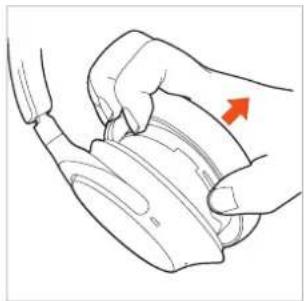
Changing ear pads
Grab the ear pad between the ear pad and rim of the housing and pull the ear pad from the housing.
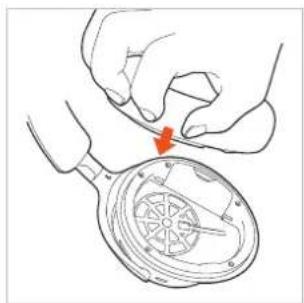
Attach the new ear pad to the housing and press it firmly until it clicks into place.
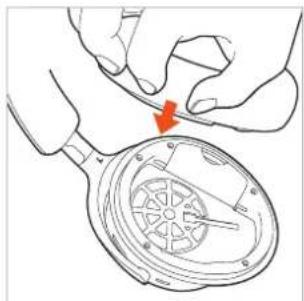
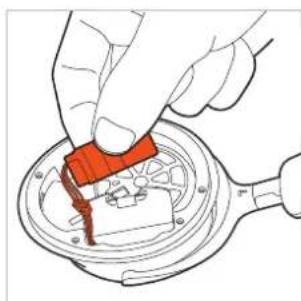
Battery change
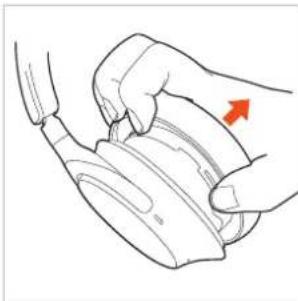
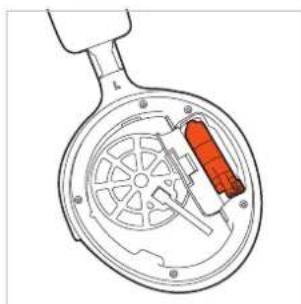
Grab between the ear pad and the rim of the housing of the left housing shell and remove the ear pad.
- Close the battery compartment.
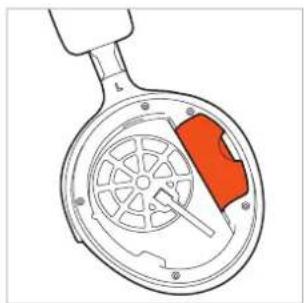
- Open the battery compartment and pull the battery carefully out of the compartment using the strap.
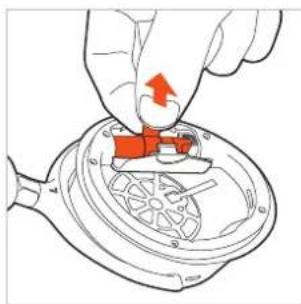
Put the ear pad onto the housing again and press it firmly into place.
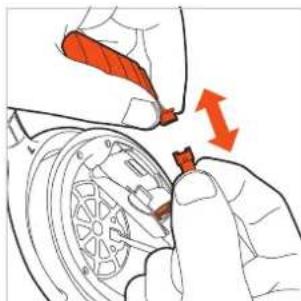
- Disconnect the plug connection. Only pull on the plugs, not on the cables.
TROUBLESHOOTING
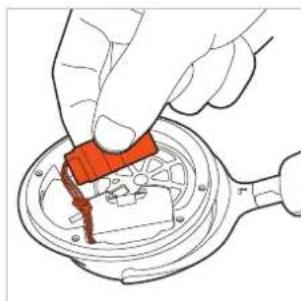
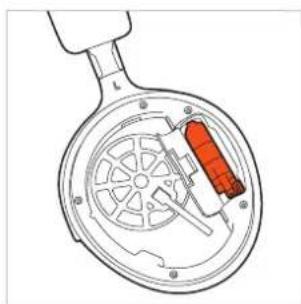
Connect the new battery (the plug has a reverse polarity protection).
| Problem Cause Solution | ||
| AVENTHO 200 cannot be switched on | Battery is empty or almost empty. | Charge the battery. |
| No audio output | No Bluetooth3 connection | Pair AVENTHO 200 with the play-back device. |
| AVENTHO 200 does not appear among the available Bluetooth® devices on the playback device | AVENTHO 200 is turned off. AVENTHO 200 is not in the pairing mode. There exists a Bluetooth® connection to another play-back device already. | Turn on AVENTHO 200. Put AVENTHO 200 into the pairing mode. Disconnect the Bluetooth® connection to the other play-back device and connect AVENTHO 200 to the desired device. |
| Playback volume is too low, despite the volume of AVENTHO 200 is set to maximum | The received audio signal is too low. | Increase the playback volume on the playback device to maximum. |
| The sound is sharp and the bass response is too low | The sealing of the ear pads is not sufficient. | Adjust the head-band so that the ear pads seal as tightly as possible. |
| The wireless range is too low or the connection is disrupted | There are interferences with other devices. | Move away from WLAN routers and microwave ovens. Make sure that your body is not between the playback device and AVENTHO 200. Use a different codec on the playback device. |
Place the battery in the battery compartment as illustrated.
HELP WITH PROBLEMS / FAQ
Answers to more most common problems and questions can be found on the internet at:
https://www.beyerdynamic.com/faq
PRODUCT REGISTRATION
Using the serial number, you can register your AVENTHO 200 on the internet at:
https://www.beyerdynamic.com/service
DISPOSAL
This symbol on the product, in the operating instructions or on the packaging means that electrical and electronic devices must be disposed of separately from household waste at the end of their life cycle.
Always dispose of used equipment in accordance with applicable regulations.

For sale within the EU only:
For the return of old equipment, there are free collection points or a free return to beyerdynamic, as well as other acceptance points for reuse. The addresses are available at the local city or municipal administration.
- Dealers for electronic equipment are generally obliged to take back waste electrical/electronic equipment free of charge. This obligation also applies to sales via remote communication.
For further information, please contact the local authorities or the dealer from whom the product was purchased
Battery disposal
Dispose of batteries separately from the product after use in accordance with the applicable regulations. They must not be disposed of with household waste. Returning batteries is free of charge.
Discharge the batteries before disposal.
EU DECLARATION OF CONFORMITY
The company beyerdynamic GmbH & Co. KG hereby declares that this radio transmission device complies with the EU Directive 2014/53/EU and the EU Directive 2011/65/EU.
You will find the full text of the EU declaration of conformity on the internet at: https://www.beyerdynamic.com/cod
TECHNICAL SPECIFICATIONS
Bluetooth® frequency range 2,400 - 2,483.5 MHz
Transmitting power ≤ 10 dBm (Bluetooth*)
Charging temperature range +10 to +40^
Operating temperature range -10 to +50^
Battery type: Lithium-ion
rechargeable battery
More detailed information on the technical specifications can be found on the internet at: https://www.beyerdynamic.com
WARRANTY CONDITIONS
The company beyerdynamic GmbH & Co. KG provides a limited warranty for the original beyerdynamic product you have purchased.
You can find detailed information about beyerdynamic's warranty conditions on the internet at: https://www.beyerdynamic.com/service/warranty
TRADEMARKS
The Bluetooth® word mark and logos are registered trademarks of the Bluetooth® SIG, Inc. and any use of such marks by beyerdynamic is under license. Other trademarks and trade names are the property of the respective owners.
USB Type-A, USB Type-B and USB Type-C are trademarks of USB Implementers.
INHALT
- SBC
- AAC
- aptX Adaptive
- aptX Lossless
https://www.beyerdynamic.com/service
- SBC
- AAC
- aptX Adaptive
- aptX Lossless
https://www.beyerdynamic.com/faq
ENREGISTREMENT DU PRODUIT
CONDITIONS DE GARANTIE
- SBC
- AAC
- aptX Adaptive
- aptX Lossless
- SBC
- AAC
- aptX Adaptive
- aptX Lossless
https://www.beyerdynamic.com/faq
https://www.beyerdynamic.com/cod
SPECIFICHE
INDICACOs DE SEGURANCA. 53
- SBC
2.AAC - aptX Adaptive
- aptX Lossless
PROBLEEMOPLOSING. 70
HULPBIJ PROBLEMEN/FAQ 71
PRODUKTREGISTRATIE 71
VERWIJDERING. 71
- SBC
2.AAC - aptX Adaptive
- aptX Lossless
https://www.beyerdynamic.com/faq
PRODUKTREGISTRATIE
Op het internet op
https://www.beyerdynamic.com/cod
TECHNISCHE GEGEVENS
Bluetooth®-frequentiebereik 2.400 - 2.483,5 MHz
Zendvermogen ≤ 10 dBm (Bluetooth®)
https://www.beyerdynamic.com/service/garantie
HANDELSMERKEN
I profilen A2DP understotter AVENTHO 200 Audio-Codecs SBC, AAC, aptX Adaptive og aptX Lossless.
- SBC
2.AAC - aptX Adaptive
- aptX Lossless
Etabler Multi-Point forbindelse
Tilslut AVENTHO 200 med det forste apparat (se EtablerSAMmenkobling).
Deaktiver Bluetooth®-forbindelsen på det forste apparat.
Skyd taend-/sluktasten 7 opad og hold den nede i 1 sekund for at starte forbindelsesmodus (Status-LED 6 blinker langsomt skiftevis blat og rdt).
Tilslut AVENTHO 200 med det andet apparat (se ,EtablerSAMmenkobling"
Aktiver igen forbindelsen via Bluetooth® pa det forste apparat, som automatisk forbinds med AVENTHO 200.
Nár begge apparater er koblet sammen med AVENTHO 200, tilslutter AVENTHO 200 sig automatisk til begge apparater, hvr gang de taendes.
Brug Multi-Point
https://www.beyerdynamic.com/faq
PRODUKTREGISTRERING
På Internetet under
https://www.beyerdynamic.com/service kan du
registrere din AVENTHO 200 under angivelse of
serienummeret.
BORTSKAFFALSE
- SBC
2.AAC - aptX Adaptive
- aptX Lossless
https://www.beyerdynamic.com/faq
TUOTTEEN REKISTERÖINTI
https://www.beyerdynamic.com/service.
HÄVITTÄMINEN
https://www.beyerdynamic.com/cod
TEKNISET TIEDOT
Bluetooth®-taajuusalue 2400-2483,5 MHz
Lahetysteho ≤ 10 dBm (Bluetooth*)
https://www.beyerdynamic.com/service/garantie
TAVARAMERKIT
Fare for svelging 93
- SBC
- AAC
- aptX Adaptive
- aptX Lossless
Uppratta koppling 106
Multi-Point-anvandning 106
Uppratta Multi-Point anslutning. 106
Anvanda Multi-Point 106
Raderakopplingslstan. 106
Spelauppmedia. 107
Stalla in Ijudvolymen 107
Ringa. 108
- SBC
2.AAC - aptX Adoptive
- aptX Lossless
Satt p/stalla in Sidetone
Tryck pA ANC-knappen i 2 sekunder (), for att satta pA aller stangav Sidetone.
Föregäende titel
- SBC
- AAC
- aptX Adaptive
- aptX Lossless
https://www.beyerdynamic.com/faq
REGISTRACE VYROBKU
Na internetu na adrese
https://www.beyerdynamic.com/cod
TECHNICKÉ UDAJE
Frekvenčni pásmo Bluetooth® 2400-2483,5 MHz
Vysilaci vykon
≤10 dBm (Bluetooth*)
Rozsah nabijeci teploty +10a +40^
Rozsa h provozni teploty -10 a +50 °C
Typ akumulatoru:
3,7VDC,1110mAh
Lithium-ionovy akumulátor
Bližsī informace k technickým udajum najdete na internetu na adrese: https://www.beyerdynamic.com
ZÁRUÇNÍ PODMÍNKY
https://www.beyerdynamic.com/service/garantie
OCHRANNÉ ZNÁMKY
Uldised hooldusjuhised 123
Uldised hooldusjuhised
- SBC
2.AAC - aptX Adaptive
- aptX Lossless
LEDvilgub3xvioletsett
Audiokaabli liitmik
Tarnekomplektis sisaldub molemas otsas olevate umarpistikutega (3,5mm) audiokaabel.
https://www.beyerdynamic.com/service saate om
AVENTHO 200 seerianumbri abil registreerida.
JÄATMEKÄITLUS
Multi-point-uzemmod 136
https://www.beyerdynamic.com/faq
TERMÉKREGISZTRÁCIO
https://www.beyerdynamic.com/cod
MUSZAKI ADATOK
https://www.beyerdynamic.com/service/garantie
VEDJEGY
- SBC
2.AAC - aptX Adaptive
- aptX Lossless
ATBALSTITIE AUDIO KODEKSI 155
LIETOSANA. 155
PROBLEMU NOVER'SANA 160
PALIDZIBA PROBLEMU GADIJUMA / BUJ. 161
IZSTRADAJUMA REGISTRESANA 161
UTILIZACIJA. 161
Akumulatoruutilizacija 161
ES ATBILSTIBAS DEKLARACIJA 161
TEHNISKIE DATI 161
GARANTIJAS NOTEIKUMI. 161
PRECZIME 161
Paldies, ka iegadajaties beyerdynamic ausim aptverosas bezvadu austinas AVENTHO 200.
Ludzu,veltiet nedaudz laika,lai pirms AVENTHO 200 lietosanas uzmanigi izlasitu so informaciju.
DROŠIBAS NORÄDİJUMI
Pirms AVENTHO 200 lietošanas uzmanigi un lidz galam izlasiet so pamacibu.
leverojiet visas sniegtas norades, jo iposi par AVENTHO 200 drosu lietoansu.
ATBALSTITIE AUDIO KODEKSI
ProfilA2DP ietvaros AVENTHO 200 atbalsta audio kodeksus SBC, AAC, aptX Adaptive un aptX Lossless
Skanas parradei var izmantot tikai tos kodeksus, kas ir pieejami atskanoanas ieric.
Atskaosanas icerce un AVENTHO 200 automatiski vienojas par labako piejamokodeksu sada seciba:
- SBC
- AAC
- aptX Adaptive
- aptX Lossless
Lielaka dala atskanoosanas ieriucnenorada, kurns kodeksiem tiek aktivi izmantots.
LIETOSANA
AVENTHO 200 var lietot, izmantojot vadibas virsmu, viegli pieskaroties un pavelkot ar pirkstu.
lesakam lietot vadibas virsmu tikai ar vienu pirkstu, lai izvairitos no ierices kuldainas daribas.
Ieslegsana un izlegsana
leslegsana
Pärbīdiet IESL./IZSL.
sledzi vidus pozicijā.
Statusa gaismas diode
2 sekundes deg sarkanā
krāsa un tad nodziest.
Tiek raidits pazinojums
par uzlades limeni.
Izslegsana
Pärbīdiet IESL./IZSL.
sledzi uz leju. Statusa
gaímas diode 2 sekundes
deg sarkana krāsa un
tad nodziest.
Ja izmantojat AVENTHO 200 ar vadu, lai varetu izmantot visas pieejamas funkcijas, ir jaiesledz ari vad.
Savienošana ar icerici, izmantojot Bluetooth®
Pirms varat izmantot AVENTHO 200, tās vispirms ir jāsasaista ar mobilo tālruni vai citu ar Bluetooth saderigu ierici. Savienosanas procedura dažadam iericem var atskirties.
https://www.beyerdynamic.com/cod
TEHNISKIE DATI
| Bluetooth® frekvenču diapazons | 2 400 - 2 483,5 MHz |
| Raidišanas jauda | ≤10 dBm (Bluetooth®) |
| Uzlădes temperatūras diapazons | no +10 lidz +40 °C |
| Darba temperatūras diapazons | no -10 lidz +50 °C |
| Akumulatora tips: litija jonu akumulators | 3,7 Vdc, 1110 mAh |
https://www.beyerdynamic.com/service/garantie
PREČZIME
Bluetooth® vardiskā zime un logotips ir registretas precu zimes, kas pieder Bluetooth® SIG, Inc., un uzemums "beyerdynamic GmbH & Co. KG" tās lieto saskaña ar licenci. Citas precu zimes un tirdzniecibas nosaukumi pieder to attiecigajam ipasniekiem.
USB Typ-A, USB Typ-B un USB Typ-C ir USB Implementers precu zimes.
SPIS TRESCI
ZASADY BEZPIECZENSTWA 163
W ramach profilu A2DP sIuchawki AVENTHO 200 obslugujk kodeki audio SBC, AAC, aptX Adaptive, aptX Lossless.
- SBC
- AAC
- aptX Adaptive
- aptX Lossless
DEKLARACJA ZGODNOSCI WE
Specifications refer to the durata de viata functionala a accumulatorilor de tip Li-Ion
- SBC
2.AAC - aptX Adaptive
- aptX Lossless
Majoritatea aparatelor de redare nu indicacce Codec activ este inutilizare.
OPERARE
https://www.beyerdynamic.com/faq
INREGISTRAREA PRODUSULUI
In Internet la https://www.beyerdynamic.com/service puieti sá va inregistrati setul dvs. AVENTHO 200 indicánd numárul de série.
ELIMINAREA CA DESEU
RIESENIE PROBLEMOV 190
POMOC PRI PROBLEM/FAQ 191
REGISTRÁCIA VYROBKAU 191
LIKVIDÁCIA 191
Likvidacia akumulatorov 191
EU VYHLASENIE O ZHODE 191
TECHNICKÉ UDAJE. 191
ZARUCNE PODMIENKY 191
OCHRANNÁ ZNÁMKA 191
Dakujeme, ze ste si zakupili bezdrótrové sluchadla Wireless Over-Ear AVENTHO 200 od spolocnosti beyerdynamic.
Pred pouzitim pristroja AVENTHO 200 si pozorne precltajte tieto informacia.
BEZPECNOSTNÉ UPOZORNENIA
Pred pouzitim zariadenia AVENTHO 200 si pozorne a upline precitajte tento navod.
Dodrzte vsetky uvedené upozornenia, najma pre bezpečné použivanie zariadenia AVENTHO 200.
Nepouživajte poškodené zariadenie AVENTHO 200.
- SBC
2.AAC - aptX Adaptive
- aptX Lossless
https://www.beyerdynamic.com/faq
REGISTRÁCIA VYROBKA
Na internete pod https://www.beyerdynamic.com/service mozete registrovat'vas AVENTHO 200 pri zadani seryoheho cisla.
LIKVIDÁCÍA
https://www.beyerdynamic.com/cod
TECHNICKE UDAJE
Frekvencny rozsah Bluetooth® 2400-2483,5 MHz
Vysielaci vykon ≤ 10 dBm (Bluetooth*)
https://www.beyerdynamic.com/service/garantie
OCHRANNÁ ZNÁMKA
- SBC
- AAC
- aptX Adaptive
- aptX Lossless
https://www.beyerdynamic.com/faq
製品登錄
AVENTHO200の登録は、
https://www.beyerdynamic.com/service/
乃尔番号入力之才才兰行
糜棄
- SBC
- AAC
- aptX Adaptive
- aptX Lossless
大部本的原生造可在朝,农用中在
主
主作表用示者之以为
AVENTHO200将主销台
SsFTrWoeAeHdR,1Ji#uHJtJU
默默默默默默默默默默默默默默默默默默默默默默默默默默默默默默默默默默默默默默默默默默默默
AVENTHO200
封机/卫机s用封
向罗月切5
□■
主销能开
緦図、語音等。
能德三
| 목재 옆선 퍷워plet 기재 | |||
| AVENTHO 2000이 체지일성고다 | ▷情况进行了一些事情 내용품만 기재 내용품만 기재. | ▷情况进行了一些事情 내용품만 기재 내용품만 기재. | |
| 오리다가 죽류해지 全覆盖고다 | ▷Bluetooth® 가 채류해지 全覆盖해지. | ▷ AVENTHO 200 을 채류해지 全覆盖해지. | |
| AVENTHO 2000이 체선 장치에 사용가一定能 bluetooth® 장치로 내용고다 | ▷ AVENTHO 2000 체선 원신 ethylene ethylene ethylene ethylene ethylene ethylene ethylene ethylene ethylene ethylene ethylene ethylene ethylene ethylene ethylene ethylene ethylene ethylene ethylene ethylene ethylene ethylene ethylene ethylene ethylene ethylene ethylene ethylene ethylene ethylene ethylene ethylene ethylene ethylene ethylene ethylene ethylene ethylene ethylene ethylene ethylene ethylene ethylene ethylene ethylene ethylene ethylene ethylene ethylene ethylene ylene ethylene ethylene ethylene ethylene ethylene ethylene ethylene ethylene ethylene ethylene ethylene ethylene ethylene ethylene ethylene ethylene ethylene ethylene ethylene ethylene ethylene ethylene ethylene ethylene ethylene ethylene ethylene ethylene ethylene ethylene ethylene ethylene ethylene ethylene ethylene ethylene ethylene ethylene ethylene ethylene ethylene ethylene ethylene ethylene ethylene ethylene ethylene ethylene ethylene 乙烯 乙烯 乙烯 乙烯 乙烯 乙烯 乙烯 乙烯 乙烯 乙烯 乙烯 乙烯 乙烯 乙烯 乙烯 乙烯 乙烯 乙烯 乙烯 乙烯 乙烯 乙烯 乙烯 乙烯 乙烯 乙烯 乙烯 乙烯 乙烯 乙烯 乙烯 乙烯 乙烯 乙烯 乙烯 乙烯 乙烯 乙烯 乙烯 乙烯 乙烯 乙烯 乙烯 乙烯 乙烯 乙烯 乙烯 乙烯 乙烯 乙烯 乙烯 乙烯 | ▷ AVENTHO 2000 체선 ethylene ethylene ethylene ethylene ethylene ethylene ethylene ethylene ethylene ethylene ethylene ethylene ethylene ethylene ethylene ethylene ethylene ethylene ethylene ethylene ethylene ethylene ethylene ethylene ethylene ethylene ethylene ethylene ethylene ethylene ethylene ethylene ethylene ethylene ethylene ethylene ethylene ethylene ethylene ethylene ethylene ethylene ethylene ethylene ethylene ethylene ethylene ethylene ethylene ethanol ethanol ethanol ethanol ethanol ethanol ethanol ethanol ethanol ethanol ethanol ethanol ethanol ethanol ethanol ethanol ethanol ethanol ethanol ethanol ethanol ethanol ethanol ethanol ethanol ethanol ethanol ethanol ethanol ethanol ethanol ethanol ethanol ethanol ETHAL ETHAL ETHAL ETHAL ETHAL ETHAL ETHAL ETHAL ETHAL ETHAL ETHAL ETHAL ETHAL ETHAL ETHAL ETHAL ETHAL ETHAL ETHAL ETHAL ETHAL ETHAL ETHAL ETHAL ETHAL ETHAL ETHAL ETHAL ETHAL ETHAL ETHAL ETHAL ETHAL ETHAL | |
| AVENTHO 2000 체선 장치에 사용가一定能 bluetooth® 장치로 내용고다 | ▷전화일 신고 신고 사용고 사용고 | ▷ 상품 상품 상품 상품 상품 상품 상품 상품 상품 상품 상품 상품 상품 상품 상품 상품 상품 상품 상품 상품 상품 상품 상품 상품 상품 상품 상품 상품 상품 상품 상품 상품 상품 상품 ethanol ethanol ethanol ethanol ethanol ethanol ethanol ethanol ethanol ethanol ethanol ethanol ethanol ethanol ethanol ethanol ethanol ethanol ethanol ethanol ethanol ethanol ethanol ethanol ethanol ethanol ethanol ethanol ethanol ethanol ethanol ethanol ethanol | ▷ 상품 상품 상품 상품 상품 상품 상품 상품 상품 상품 상품 상품 상품 상품 상품 상품 상품 상품 상품 상품 상품 상품 상품 상품 상품 상품 상품 상품 상품 상품 상품 상품 urfactant ethanol ethanol ethanol ethanol ethanol ethanol ethanol ethanol ethanol ethanol ethanol ethanol ethanol ethanol ethanol ethanol ethanol ethanol ethanol ethanol ethanol ethanol ethanol ethanol ethanol ethanol ethanol ethanol ethanol ethanol ethanol ethanol ethanol |
| 全覆盖고다 全覆盖고다 全覆盖고다 全覆盖고다 全覆盖고다 全覆盖고다 全覆盖고다 全覆盖고다 全覆盖고다 全覆盖고다 全覆盖고다 全覆盖고다 全覆盖고다 全覆盖고다 全覆盖고다 全覆盖고다 全覆盖고다 全覆盖고다 全覆盖고다 全覆盖고다 全覆盖고다 全覆盖고다 全覆盖고다 全覆盖고다 全覆盖고다 全覆盖고다 | ▷ 乙烯 乙烯 乙烯 乙烯 乙烯 乙烯 乙烯 乙烯 乙烯 乙烯 乙烯 乙烯 乙烯 乙烯 乙烯 乙烯 乙烯 乙烯 乙烯 乙烯 乙烯 乙烯 乙烯 乙烯 乙烯 乙烯 乙烯 乙烯 乙烯 乙烯 乙烯 乙烯 乙烯 乙烯 乙烯 乙烯 乙烯 乙烯 乙烯 乙烯 乙烯 乙烯 乙烯 乙烯 乙烯 乙烯 乙烯 乙烯 乙烯 ethanol ethanol ethanol ethanol ethanol ethanol ethanol ethanol ethanol ethanol ethanol ethanol ethanol ethanol ethanol ethanol ethanol ethanol ethanol ethanol ethanol ethanol ethanol ethanol ethanol ethanol ethanol ethanol ethanol ethanol ethanol ethanol ethanol |
→
宣结却自
[得拉上那在的
述
其值和差值都为1
[BaT]
相日
[bay]https://www.beyerdynamic.com/service/ 1
端
- SBC
2.AAC - aptX Adaptive
- aptX Lossless
- SBC
2.AAC - aptX Adaptive
- aptX Lossless
https://www.beyerdynamic.com/faq
產品註冊
您可於https://www.beyerdynamic.com/service
https://www.beyerdynamic.com/cod
技術文件
For further distributors worldwide, please go to www.beyerdynamic.com
Non-contractual illustrations. Subject to change without notice.