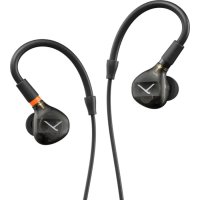
DT 71 IE - Earphones BEYERDYNAMIC - Free user manual and instructions
Find the device manual for free DT 71 IE BEYERDYNAMIC in PDF.

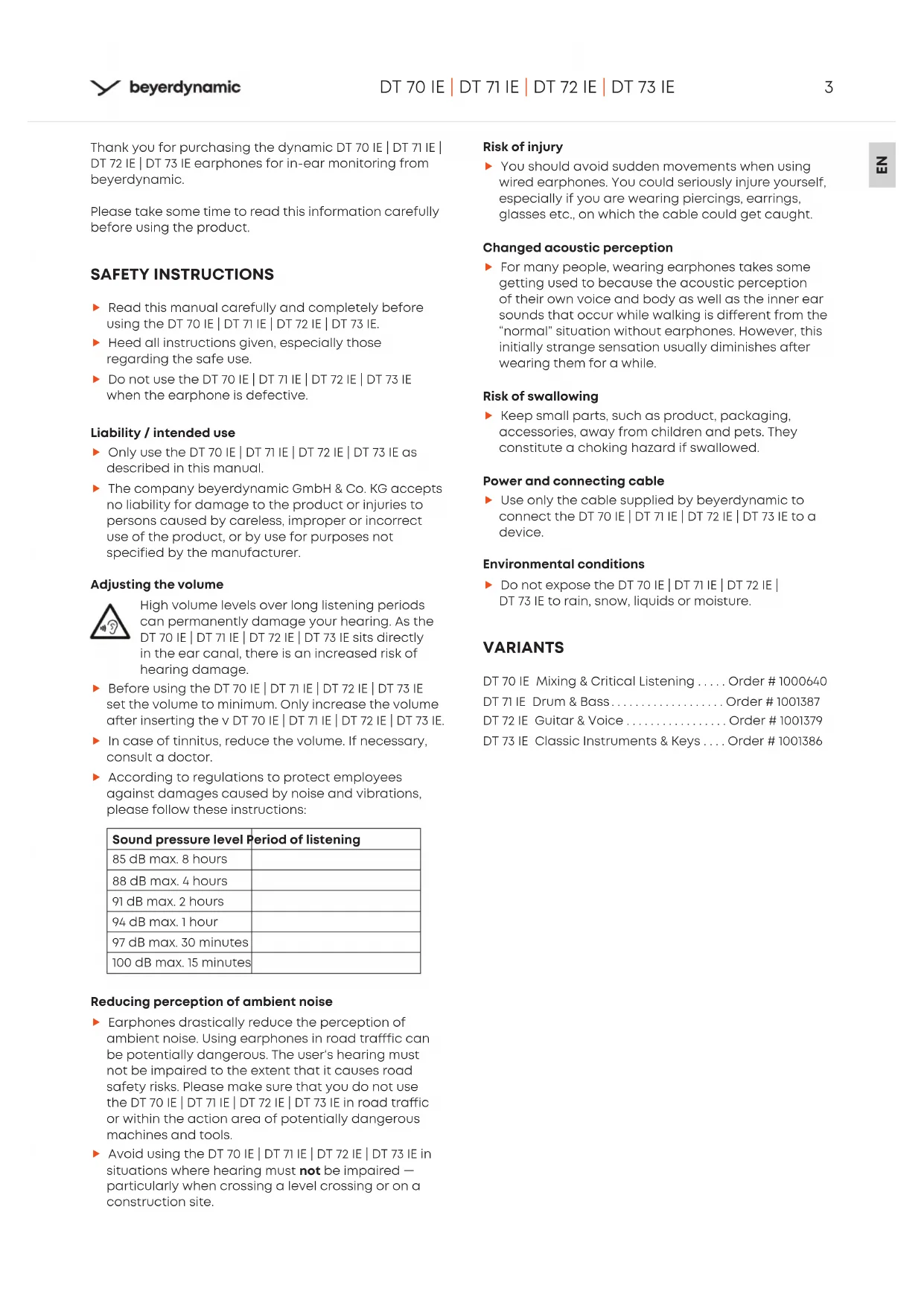


| Product type | Dynamic in-ear headphone |
| Acoustic principle | Closed |
| Frequency response | 5 – 40 000 Hz |
| Nominal impedance | 16 Ω |
| Sound pressure level (1 kHz, 1 mW) | 112 dB SPL |
| Sound pressure level (1 kHz, 1 Vrms) | 130 dB SPL |
| Harmonic distortion factor | 0.02% @ 500 Hz and 1 kHz |
| Rated input power | 200 mW |
| Ambient noise isolation | 39 dBA |
| Weight (without cable or eartips) | 3 g per earphone |
| Cable length | 1.40 m, smooth MMCX detachable cable on both sides |
| Connector | 3.5 mm stereo jack plug with 3 poles + 6.35 mm adapter included |
| Protection rating (DT 71 IE) | IP65 |
| Included eartips | 5 pairs silicone (XS, S, M, L, XL) + 3 pairs Comply™ foam (S, M, L) |
| Additional wax guards | Yes, 1 pair |
| Carrying case | Included |
| Available variants | DT 70 IE (mixing), DT 71 IE (drums/bass), DT 72 IE (guitar/vocals), DT 73 IE (classical instruments) |
| Spare parts available | Cable, adapter, silicone and foam eartips, wax guards, carrying case |
| Warranty | 2 years (limited, upon registration) |
| Safety recommendations | Set volume to minimum before use; do not use on public roads; avoid sudden movements with the cable |
| Recommended cleaning | Silicone eartips with warm soapy water; earphones with a soft lint-free cloth; replace wax guards if clogged |
Frequently Asked Questions - DT 71 IE BEYERDYNAMIC
User questions about DT 71 IE BEYERDYNAMIC
0 question about this device. Answer the ones you know or ask your own.
Ask a new question about this device
Download the instructions for your Earphones in PDF format for free! Find your manual DT 71 IE - BEYERDYNAMIC and take your electronic device back in hand. On this page are published all the documents necessary for the use of your device. DT 71 IE by BEYERDYNAMIC.
USER MANUAL DT 71 IE BEYERDYNAMIC
SAFETY INSTRUCTIONS 3
Liability/intended use 3
Adjusting the volume. 3
Reducing perception of ambient noise. 3
Risk of injury 3
Changed acoustic perception. 3
Risk of swallowing 3
Power and connecting cable 3
Environmental conditions 3
VARIANTS 3
BOX CONTENTS 4
USING AND FITTING THE EARTIPS 4
Silicone eartips 4
ComplyTM foam eartips 4
Fitting the silicone eartips. 4
Fitting and adjusting the Comply™ eartips 4
Removing Comply™ eartips 4
REPLACING EARTIPS 5
ATTACHING AND CHANGING THE CABLE 5
INSERTING AND WEARING THE EARPHONES 5
6
Cleaning the eartips 6
Cleaning the earphones reinigen 6
DISPOSAL 6
TECHNICAL SPECIFICATIONS 7
DT70IE|DT71IE|DT72IE|DT73IE 7
SERVICE 7
REPLACEMENT PARTS 7
PRODUCT REGISTRATION 7
WARRANTY 7
TRADEMARKS 7
Thank you for purchasing the dynamic DT 70 IE | DT 71 IE | DT 72 IE | DT 73 IE earphones for in-ear monitoring from beyerdynamic.
Please take some time to read this information carefully before using the product.
SAFETY INSTRUCTIONS
Read this manual carefully and completely before using the DT 70 IE | DT 71 IE | DT 72 IE | DT 73 IE.
Heed all instructions given, especially those regarding the safe use.
Do not use the DT 70 IE | DT 71 IE | DT 72 IE | DT 73 IE when the earphone is defective.
Liability / intended use
Only use the DT 70 IE | DT 71 IE | DT 72 IE | DT 73 IE as described in this manual.
The company beyerdynamic GmbH & Co. KG accepts no liability for damage to the product or injuries to persons caused by careless, improper or incorrect use of the product, or by use for purposes not specified by the manufacturer.
Adjusting the volume

High volume levels over long listening periods can permanently damage your hearing. As the DT 70 IE | DT 71 IE | DT 72 IE | DT 73 IE sits directly in the ear canal, there is an increased risk of hearing damage.
Before using the DT 70 IE | DT 71 IE | DT 72 IE | DT 73 IE set the volume to minimum. Only increase the volume after inserting the v DT 70 IE | DT 71 IE | DT 72 IE | DT 73 IE.
In case of tinnitus, reduce the volume. If necessary, consult a doctor.
According to regulations to protect employees against damages caused by noise and vibrations, please follow these instructions:
| Sound pressure level | Period of listening |
| 85 dB max. 8 hours | |
| 88 dB max. 4 hours | |
| 91 dB max. 2 hours | |
| 94 dB max. 1 hour | |
| 97 dB max. 30 minutes | |
| 100 dB max. 15 minutes |
Reducing perception of ambient noise
- Earphones drastically reduce the perception of ambient noise. Using earphones in road traffic can be potentially dangerous. The user's hearing must not be impaired to the extent that it causes road safety risks. Please make sure that you do not use the DT 70 IE | DT 71 IE | DT 72 IE | DT 73 IE in road traffic or within the action area of potentially dangerous machines and tools.
Avoid using the DT 70 IE | DT 71 IE | DT 72 IE | DT 73 IE in situations where hearing must not be impaired - particularly when crossing a level crossing or on a construction site.
Risk of injury
You should avoid sudden movements when using wired earphones. You could seriously injure yourself, especially if you are wearing piercings, earrings, glasses etc., on which the cable could get caught.
Changed acoustic perception
For many people, wearing earphones takes some getting used to because the acoustic perception of their own voice and body as well as the inner ear sounds that occur while walking is different from the "normal" situation without earphones. However, this initially strange sensation usually diminishes after wearing them for a while.
Risk of swallowing
- Keep small parts, such as product, packaging, accessories, away from children and pets. They constitute a choking hazard if swallowed.
Power and connecting cable
Use only the cable supplied by beyerdynamic to connect the DT 70 IE | DT 71 IE | DT 72 IE | DT 73 IE to a device.
Environmental conditions
Do not expose the DT 70 IE | DT 71 IE | DT 72 IE | DT 73 IE to rain, snow, liquids or moisture.
VARIANTS
DT 70 IE Mixing & Critical Listening .... Order # 1000640
DT 71 IE Drum & Bass. Order # 1001387
DT 72 IE Guitar & Voice. Order # 1001379
DT 73 IE Classic Instruments & Keys . . . Order # 1001386
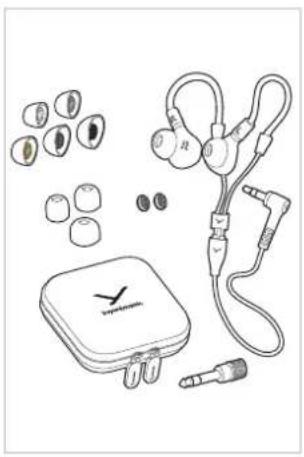
BOX CONTENTS
One pair of earphones
One straight cable, 1.40 m, MMCX to 3-pole mini jack (3.5 mm)
One adapter mini jack (3.5 mm) to 1/4" jack (6.35 mm)
One carrying case
Three pairs of memory foam eartips (S, M, L)
Five pairs of silicone eartips (XS, S, M, L, XL)
One additional pair of earwax guard grilles
USING AND FITTING THE EARTIPS
For optimum fit and comfort, your DT 70 IE | DT 71 IE | DT 72 IE | DT 73 IE comes with five pairs of silicone eartips and three pairs of Comply™ foam eartips in different sizes.
Each ear is unique and the size of the eartip required may vary from one ear to another.
Please take the time to try out different sizes and pick the most suitable one - it's worth the effort!
Silicone eartips
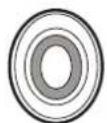
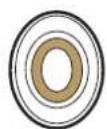
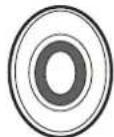
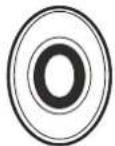
XSSMLXL
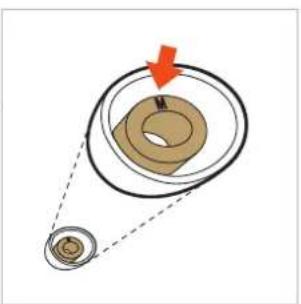
The delivery includes five pairs of silicone eartips. The sizes are marked on the shaft of the silicone eartips.
Comply™ foam eartips
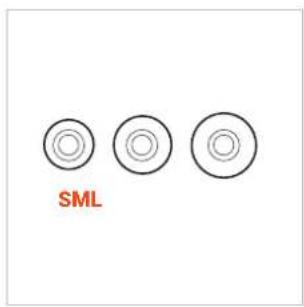
The Comply™ eartips are included in the delivery as a pair each in the sizes S, M and L. The sizes of the eartips are visually recognisable.
Fitting the silicone eartips
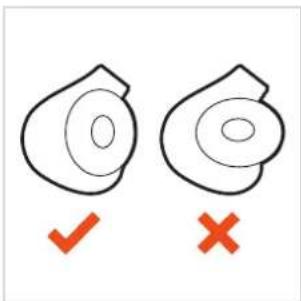
Carefully place the silicone eartips onto the earphone housings.
Make sure that the oval opening of the eartip aligns with the oval shape of the housing.
Fitting and adjusting the Comply™ eartips
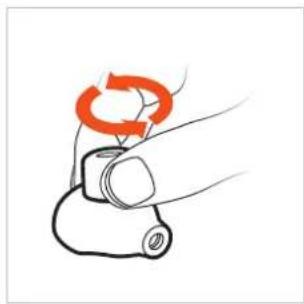
Carefully place the Comply™ eartips onto the microphone housings.
Before inserting, roll the eartip attached to the earphone tightly lengthwise between your fingers.
After insertion, the eartips will expand, providing a secure fit and good support for the earphones, even during movement.
Removing Comply™ eartips
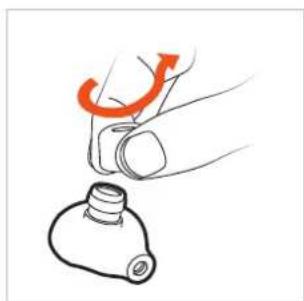
To remove Comply™ eartips, squeeze them firmly and pull them off the housing with a slight twisting motion.
REPLACING EARTIPS
If you are using them regularly, we recommend changing the eartips every three months.
Replacement silicone eartips can be ordered from the beyerdynamic replacement parts shop: https://www.beyerdynamic.com/service/replacement-parts
Replacement Comply foam eartips, together with dealers where you can order the eartips, can be found at: www.complyfoam.com Eartip types used: Tx-500
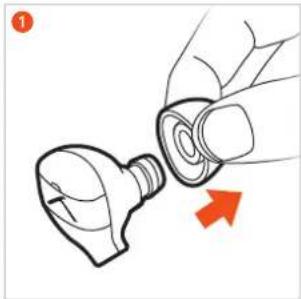
Carefully remove the eartip from the earphone.
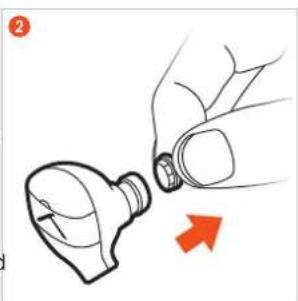
2 Dirty sound outlets can be cleaned by replacing the small earwax guard grilles.
Use a lint-free cleaning cloth to clean the earphone's sound outlet from residues.
Make sure that no liquid flows into the outlet.
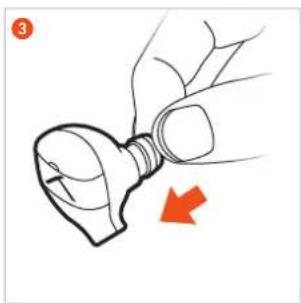
3 Attach the earwax guard grille to the microphone.
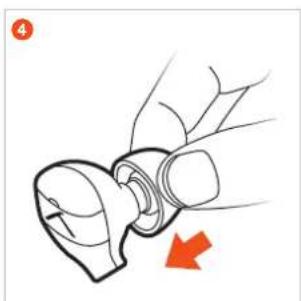
4 Attach the eartip to the earphone.
ATTACHING AND CHANGING THE CABLE
The earphones have plug-in cables on the housings with standard MMCX connectors with locking mechanisms.
When detaching or attaching the cable, always hold the cable by the connector to avoid damaging the cable or earphone. Do not pull directly on the cable! Otherwise the cable or the earphone may be damaged.
Detach the cable from the housing.
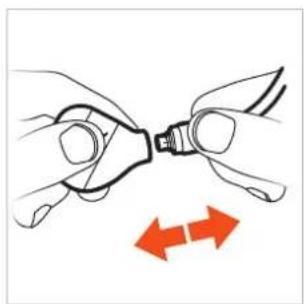
Attach the cable.

INSERTING AND WEARING THE EARPHONES
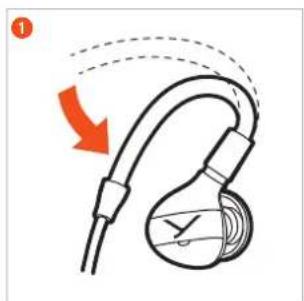
Due to the anatomical shape of the earphone housing, the cable of the earphone is routed behind the ear. This way of wearing the earphone effectively suppresses cable noise, and the earphone sits firmly in the ear even when the cable is pulled.
1 Bend the ear hooks to fit around your ears. Insert the earphones so that they ensure a proper seal. A good fit has a major effect on the sound quality.
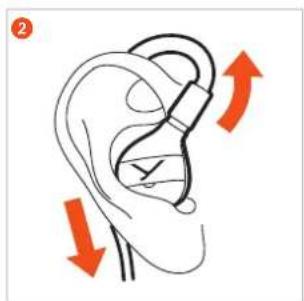
2 Important: If the bass is weak, the eartips are not sealing properly. Insert the earphone deeper or use another size of the eartips to achieve a better fit.
Hold the earphone housing and gently twist to remove it. Note: Do not pull the cable to remove the araphone.

USAGE AND CLEANING
Before using earphones, you should check the following aspects:
Only use the earphones in healthy ears! If you have an ear canal infection or other ear disease, never use earphones until the disease is completely healed.
When washing your hair, water enters the ear canal and the pinna. Please wait until the ear canal is completely dry before using the earphones. If you use earphones when the ear canal is still wet, the moist environment in the ear canal provides a very favourable climate for skin fungi!
We recommend cleaning the eartips and the earphones on a daily basis! In this way you prevent a large amount of cerumen, for example, from accumulating on the earwax guard grille and clogging it to such an extent that cleaning is no longer possible.
If earphones and eartips are not properly maintained, germs such as fungi and bacteria can colonise on the surface. This can result in a fungal infection or inflammation of the ear canal.
Cleaning the eartips
- Remove the eartips from the earphones. Silicone eartips can be cleaned under running, lukewarm water with a little bit of hand soap.
- Earwax, which is inside the eartip, can be removed with a cotton bud.
Rinse off the soap and allow the eartips to dry.
Only reattach the eartips when they are completely dry.
To dry them you can use a lint-free cloth, a drying device or a drying bag.
Never use a hairdryer, oven/microwave, heater or fan heater for drying!
Cleaning the earphones
Only clean the earphones with a soft, lint-free cloth.
You can lightly moisten the cloth with lukewarm water and wipe the earphones with it. Make sure that the cloth is not soaking wet, as penetrating liquids can damage the earphones.
- Never use solvent-based or aggressive cleaning agents, as these can damage the surfaces or cables.
If earwax sticks to the housing, please make sure that the earwax is not smeared into the small opening of the bass port.
If the earphones are heavily clogged with earwax, clean the earphones from the housing in the direction of the nozzle and always use a new part of the cloth for each new area.
If the earwax guard grille is heavily clogged with earwax, the sound will be significantly affected!
It is important to allow the earwax to dry before cleaning.
Only when the earwax has dried, the earwax guard grille can be carefully wiped off with a cotton bud or a fine brush.
Hold the microphone so that the nozzle is pointing towards the floor to prevent any loosened earwax from falling into the microphone.
- Store the earphones in the supplied case when not in use.
DISPOSAL
This symbol on the product, in the operating instructions or on the packaging means that electrical and electronic devices must be disposed of separately from household waste at the end of their life cycle.
Always dispose of used equipment in accordance with applicable regulations.

For sale within the EU only:
For the return of old equipment, there are free collection points or a free return to beyerdynamic, as well as other acceptance points for reuse. The addresses are available at the local city or municipal administration.
- Dealers for electronic equipment are generally obliged to take back waste electrical/electronic equipment free of charge. This obligation also applies to sales via remote communication.
For further information, please contact the local authorities or the dealer from whom the product was purchased.
TECHNICAL SPECIFICATIONS
| Transducer type Dynamic | |
| Operating principle Closed | |
| Wearing type In-ear | |
| Frequency response 5 - 40,000 Hz | |
| Nominal impedance 16 Ω | |
| Sound pressure level [dB SPL] @ 1 kHz @ 1 mW | DT 70 IE: 113 dB SPL DT 71 IE: 112 dB SPL DT 72 IE: 114 dB SPL DT 73 IE: 115 dB SPL |
| Sound pressure level [dB SPL] @ 1 kHz @ 1 Vrms | DT 70 IE: 129 dB SPL DT 71 IE: 130 dB SPL DT 72 IE: 130 dB SPL DT 73 IE: 131 dB SPL |
| T.H.D. @ 1 mW 0.02% @ 500 Hz | 0.02% @ 1 kHz |
| Nominal power handling capacity | 200 mW |
| Ambient noise attenuation | 39 dBA |
| Weight (without cable and eartip) | 3 g per earphone |
| Length and type of cable Straight cable, 1.40 m, detachable, double-sided | |
| Connection MMCX to 3-pole mini stereo jack (3.5 mm) | |
| IP 68 DT 70 IE, DT 72 IE, DT 73 IE | |
| IP 65 DT 71 IE | |
SERVICE
If you require service, please contact qualified service personnel or directly:
beyerdynamic service and logistics centre E-mail: service@beyerdynamic.com
Dismantling the earphone yourself will invalidate the guarantee.
REPLACEMENT PARTS
Straight cable, MMCX to 3-pole mini stereo jack (3.5 mm), length 1.4 m.... Order # 1001842
Jack adapter 3.5 mm to 1/4" jack (6.35 mm) Order # 1002114
Five pairs of silicone eartips (XS, S, M, L, XL) Order # 1002103
Three pairs of foam eartips (Type ComplyTM Tx-500) Size S. Order # 728136 Size M. Order # 728144 Size L. Order # 728152
Set of earwax guard grilles.. Order # 928542
Storage case. Order # 1002115
Additional, optional accessories and replacement parts can be found at: https://www.beyerdynamic.com/service
Comply™ eartips of type Tx-500 can be found at: https://www.complyfoam.com
PRODUCT REGISTRATION
Stating the serial number, you can register your DT 70 IE | DT 71 IE | DT 72 IE | DT 73 IE on the internet at: https://www.beyerdynamic.com/service/product-registration
WARRANTY
beyerdynamic provides a limited guarantee of two years for the original beyerdynamic product. Detailed information about the beyerdynamic's warranty conditions can be found online: https://www.beyerdynamic.com/service/warranty
TRADEMARKS
Trademarks and trade names such as ComplyTM belong to their respective owners.
INHALT
https://www.beyerdynamic.com/service/garantie
WARENZEICHEN
REMPLACER LES EMBOUTS 17
RACCORDEMENT ET REMPLACEMENT DU CABLE 17
MISE EN PLACE ET PORT DES ÉCOUTEURS 17
UTILISATION ET NETTOYAGE 18
REMPLACER LES EMBOUTS
https://www.beyerdynamic.com/service/warranty
MARCAS REGISTRADAS
https://www.beyerdynamic.com/service/warranty
MARCHI REGISTRATI
ANVANDA OCH ANPASSA HÖRLURSPROPPARNA 34
ANVANDA OCH ANPASSA HÖRLURSPROPPARNA
ComplyTM Iyapeusの取外L 40
ヤーヒースの交換 41
接綫とケーメルの交換 41
41
使用匕清掃 42
1y-1e-1s#. 42
ヤはトの清掃 42
魔藥 42
43
DT70IE|DT71IE|DT72IE|DT73IE. 43
43
交换部品 43
製品登錄 43
保证 43
商標 43
3.5 mm 3 極JJJJJJJJJJJJJJJJJJJJJJJJJJJJJJJJJJJJJJ
> 奎克阿达夫一 3.5mm 6.35 mm注文番号1002114
5組のシルコーメン製イヤー一化一式
喜 :https://www.beyerdynamic.com/service
ComplyTM 一巴一巴Tx-500是、次を見くは
https://www.complyfoam.com
製品登錄
U:https://www.beyerdynamic.com/service/warranty
商標
For further distributors worldwide, please go to www.beyerdynamic.com
Non-contractual illustrations. Subject to change without notice.