
Byron BTA - Earphones BEYERDYNAMIC - Free user manual and instructions
Find the device manual for free Byron BTA BEYERDYNAMIC in PDF.


| Product Type | In-ear wireless earphone |
| Brand | Beyerdynamic |
| Model | Byron BTA |
| Dimensions (earbuds) | Approx. 20 x 15 x 20 mm |
| Weight (per earbud) | Approx. 5 g |
| Weight (charging case) | Approx. 45 g |
| Power supply | Rechargeable lithium-ion battery, 3.7 V, 60 mAh (earbuds), 500 mAh (case) |
| Battery life | Up to 6 hours (earbuds), 12 additional hours with case |
| Connection technology | Bluetooth 4.1 with Qualcomm aptX codec |
| Impedance | 32 ohms |
| Frequency response | 20 Hz - 20 kHz |
| Microphone type | Built-in omnidirectional microphone |
| Controls | Touch controls on each earbud (play/pause, volume, call) |
| Water resistance | IPX4 (splash resistant) |
| Box contents | Earbuds, charging case, USB cable, 4 pairs of ear tips, manual |
| Care and cleaning | Clean with a soft dry cloth; do not use harsh liquids |
| Safety instructions | Do not listen at high volume for prolonged periods; keep out of reach of children |
| Available spare parts | Ear tips, USB cable, charging case (on request) |
| Repairability | The earbud battery is not user-replaceable; contact customer service |
| Warranty | 2 years (according to local legislation) |
Frequently Asked Questions - Byron BTA BEYERDYNAMIC
User questions about Byron BTA BEYERDYNAMIC
0 question about this device. Answer the ones you know or ask your own.
Ask a new question about this device
Download the instructions for your Earphones in PDF format for free! Find your manual Byron BTA - BEYERDYNAMIC and take your electronic device back in hand. On this page are published all the documents necessary for the use of your device. Byron BTA by BEYERDYNAMIC.
USER MANUAL Byron BTA BEYERDYNAMIC
- Safety instructions....4
- Features 5
- Accessories....5
- Controls and indicators 6
- Operating instructions ..... 7
- How to wear the in-ear headset 8
- Button Guide 9
- Getting started with your Byron BTA ..... 11
8.1 Pairing to your mobile phone ..... 11
8.2 Multi point setting 11
8.3 Call 12
8.4 Factory reset 12
8.5 Playing music 12
9. What does the LED colour mean? 13
10. FAQ & Troubleshooting.... 13
11. Maintenance.... 13
12. Specifications ..... 14
13. Disposal 14
14. Battery disposal 14
15. Certification....15
16. Simplified EU Declaration of Conformity ..... 15
Thank you for selecting the Byron BTA stereo Bluetooth in-ear headset from beyerdynamic. Please take some time to read carefully through this manual before using the product. Please keep the manual. When passing on the headset to a third party, please pass on the manual as well.
1. Safety instructions
Warning: When connecting the in-ear headset, make sure that

you have turned the volume down to the minimum. Adjust the volume only after the in-ear headset are in place. To avoid any potential damage to your hearing, do not use the in-ear headset at loud volumes for extended periods of time. As a rule of thumb, when you have the in-ear headset on, set the volume to a level at which you can still hear your own voice when you speak at a normal volume while listening.
We would like to point out that listening at high volumes over a long period of time may damage your hearing irreversibly.
Make sure that the set volume is not too high.
Rule of thumb: The higher the volume, the shorter the time of listening. According to employer's regulations for safety and health the noise exposure should not exceed 85 dB (low volume) when working with an allowed time of listening of 8 hours at maximum. If the volume is increased by 3 dB, the allowed time of listening is halved, i.e. with 88 dB the time of listening is 4 hours, with 91 dB 2 hours and so on.
Danger!
In-ear headsets dramatically reduce your ability to hear ambient noise. Using the in-ear headsets while in road traffic is potentially very dangerous and is therefore prohibited by law. Also, please make sure that you do not use your in-ear headset when in the vicinity of possibly dangerous machines and tools.
Risk of injury!
When wearing wired in-ear headphones, avoid any sudden movements. You could seriously injure yourself, especially if you have any piercings or wear earrings or glasses, etc. that can get caught in the wire.
Altered auditory perception
Many people need some time to get used to wearing in-ear headsets. Your auditory perception of your own voice and body, and even the sounds in your inner ear while walking, are different from “normal” situations when you are not wearing an in-ear headset. This strange sensation will usually abate after wearing in-ear headsets for a while.
2. Features
- Premium Sound
(MSTS™ Tuning Technology & apt-X codec & AAC codec)
MSTS™ Tuning Technology together with compression codec apt-X & AAC codec enables you to enjoy premium hi-fi stereo sound.
With a built-in DSP chip, it supplies optimal call quality by noise reduction and echo cancellation.
- Multi Point
- Bluetooth 4.2
- Voice prompts
- Firmware upgrade
The latest firmware is available for optimised usage.
Its functions are variable depending on the mobile phone.
- Fixing magnet
There is a built-in magnet to hold the L&R earphone together, making it easier to carry when not using.
Caution:
American Heart Association and British Drug Administration warn that magnets can affect medical equipments (pacemaker, defibrillators, insulin pump and other electronic medical equipment) if the distance between magnets and medical equipment is within 15 cm).
Please do not use this product before you consult with your doctor, if you are using the mentioned medical equipment.
Please do not place this product around areas, influenced by magnetism.
Of magnetic products such as a credit card, telephone card, bank account or ticket, the information can be deleted.
3. Accessories
1 pair of in-ear headset
4 pairs of eartips (1x S, 2x M, 1x L)
1 pair of ear hooks
1 charging cradle
1 cable clip
4. Controls and indicators
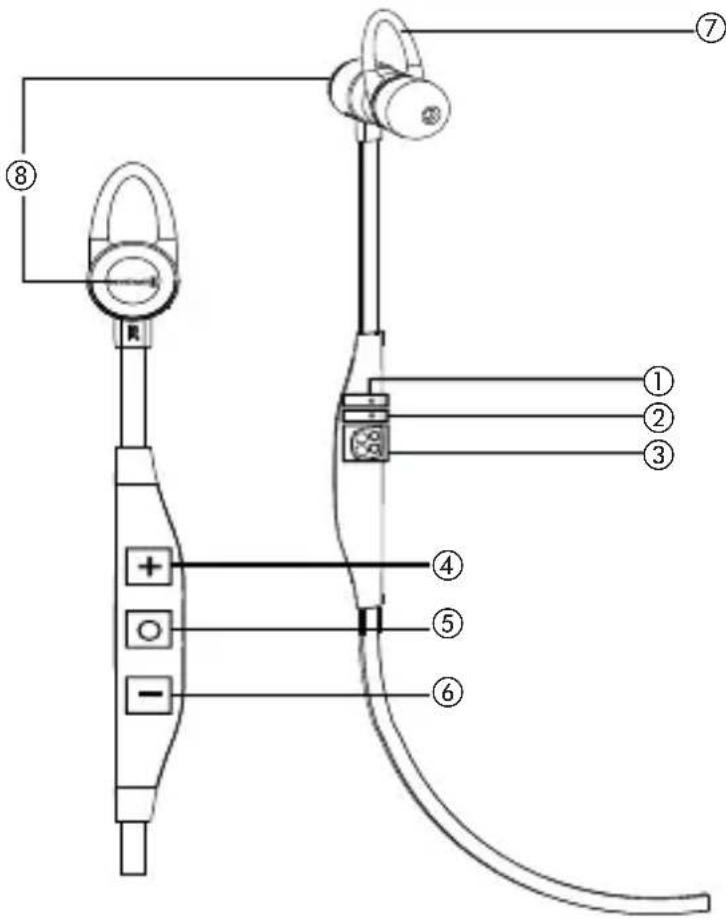
① Microphone
② LED guide light for headset status LED
③ Charging contacts
④ Volume up, next song etc.
⑤ Main function button (MFB) for turning on/off, answer/reject/convert a call/play/etc.
⑥ Volume down, previous song etc.
⑦ Ear hook for comfortable wearing
⑧ Fixing magnet for holding L/R earphone together while not in use
5. Operating instructions
When turning the headset on/off or selecting the pairing mode, you will hear a voice prompt.
Turn on the in-ear headset
Press the MFB button until you hear "Power on" and the blue LED glows.
Turn off the in-ear headset
When you press the MFB button for a longer time (approx. 5 seconds), the purple LED will glow and the headset is turned off after you hear "Power off".

Charging
Make sure that your headset is fully charged before you use it. The LED glows "red" during charging and will turn "blue" when fully charged.

6. How to wear the in-ear headset
Fix the ear hook first, if you need a stronger fit.

Then attach the eartip to the earphone.
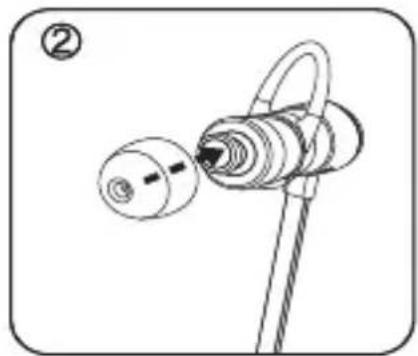
Fix the eartip to the ear.

Wear the earphone as shown in the illustration.

Tip
Select the eartip size that fits you best. It is comfortable to wear the in-ear headset with the supporting ear hook.

7. Button guide
You can easily control the in-ear headset with these 3 buttons.
⊕ Volume up
Volume down
MFB
Basic button control
Press the MFB button

Answer a call ....Press briefly
End a call....Press briefly
Turn on headset ..... Press for 2 seconds (If there is a paired device, it connects to the paired device.)
Turn off headset . . . . . . Press for 4 seconds If you press the MFB button for a longer time, the purple LED glows and the in-ear headset will be turned off after you hear "Power off".
Pairing mode ..... Press for 4 seconds when you turn on (if the headset has been connected to a device before, the headset must be turned off and turned on again as described before)
Reject a call....Press for 1 second
Convert a call ..... Press briefly during call
Play/Pause....Press briefly
Stop.....Press for 1 second (during play)
Press the Volume up button

Volume up (+)....Press briefly
Mic mute . . . . . . . . . . . Press for 1 second (during call)
Next song....Press for 1 second (during play)
Press the Volume down button

Volume down (-) ..... Press briefly
Mic mute . . . . . . . . . . . Press for 1 second (during call)
Previous song ..... Press for 1 second (during play)
Factory reset
Press the buttons in the following order:

The purple LED will glow and the in-ear headset will be initialised. After a factory reset, pair the in-ear headset again for use.
8. Getting started with your Byron BTA
8.1 Pairing to your mobile phone
Before you use the Byron BTA in-ear headset, you have to pair it with your mobile phone or Bluetooth enabled device. The pairing process may be different with various mobile phone makers. Please refer to the appropriate mobile phone manual.
When the in-ear headset is turned off, press the MFB button for 6 seconds to start the pairing mode (blue LED is continuously on).
Select the Bluetooth mode on your mobile phone.
Pairing on first purchasing
- Select the pairing mode with the Bluetooth in-ear headset.
- Pairing with mobile phone (you need to pair with your mobile within 3 minutes).
- On first purchasing, the in-ear headset enters into pairing mode automatically when the power is on and the blue LED is continuously on.
Pairing with mobile phone setting
- Activate the Bluetooth function on your mobile phone according to the phone manual, search the in-ear headset model name and select. Then “Pairing” is displayed. (Some mobile phones need pass key (PIN), then enter 0000).
- If pairing is successful, the message “Connected to phone and media audio” is displayed and the blue LED glows 5 times. Now it is ready to use.
Pairing to other devices
- Select the pairing mode with the Bluetooth in-ear headset.
- Deactivate the Bluetooth function of the connected device if there is a connected device.
- Press the MFB button for 4 seconds to turn off.
- Press the MFB button for 2 seconds. The in-ear headset is turned on and enters into the pairing mode.
Pairing with mobile phone
- Follow the pairing procedure as described above in the paragraph "Pairing with mobile phone setting".
- If pairing is successful, the message “Connected to phone and media audio” is displayed and the blue LED glows 5 times. Now it is ready to use.
8.2 Multi point setting
It is possible to connect up to 8 Bluetooth enabled devices and 2 devices can be used simultaneously.
Setting Multi point
- Please pair the Bluetooth in-ear headset to the first device according to the pairing process (refer to pairing process).
-
Turn off the Bluetooth in-ear headset.
-
Press the MFB button for around 4 seconds until the blue LED is continuously on.
- Please pair the Bluetooth in-ear headset to the 2nd device according to the pairing process.
- Then, turn off the Bluetooth in-ear headset and turn on again, it will be connected to two devices.
How to use Multi point
- At the status of connecting two devices, press the MFB button to answer a call when there is an incoming call.
- At the status of connecting two devices, press the MFB button to listen the music that was played lately.
8.3 Call
- Answering a call:
Press the MFB button to answer a call. - Ending a call:
Press the MFB button shortly to end a call.
- Rejecting a call:
During an incoming call, press the MFB button for about 1 second.
- Converting a call:
During a call with mobile, press the MFB button to convert to the headset (to call with the mobile again, use your mobile phone menu).
• Volume control:
With the + and - buttons you can control the volume.
- Microphone Mute:
If you press the + or - button for about 1 second during a call, the microphone will mute.
During mute, it will be released, if you press the – button for about 1 second.
- A waiting call and putting a call on hold: This feature allows you to put a call on hold during a conversation and answer a waiting call.
Press the + button for approximately 1 second to put an active call on hold and answer a waiting call.
Give the + button a long press to switch between two calls. To end a call press the MFB button briefly.
8.4 Factory reset
- Press the buttons in the following order:

The purple LED will glow and the in-ear headset will be initialised. After a factory reset, pair the in-ear headset again for use.
8.5 Playing music
- To enjoy the best audio quality, please set 70\~80% from the max. volume in your device.
- On first purchasing, the volume sets in level 8 of all 15 levels (please adjust with + or - button for volume).
Play / Pause: Press the MFB button briefly
Stop: Give the MFB button a long press
Volume up: Press the + button briefly
Volume down: Press the – button briefly
Next song: Give the + button a long press
Previous song: Give the – button a long press
9. What does the LED colour mean?
| Status LED indication | |
| Standby LED off (if you press the | button, the blueLED blinks 5 times) |
| Battery is running low Red light blinks | |
| Charging Red light ON | |
| Fully charged Blue light ON | |
| Pairing mode Blue light ON | |
10. FAQ & Troubleshooting
- I hear crackling noise
- For the best audio quality, always place your in-ear headset close to the mobile phone.
• I cannot hear anything
- Increase the volume on the headphone.
- Make sure that the in-ear headset is paired with the phone.
- If the in-ear headset fails to connect when you pressed the MFB button, try to connect again by following the pairing procedure.
- I have problems with pairing even though my phone indicates otherwise
- Please delete the in-ear headset paired to your mobile phone and pair the in-ear headset again.
Please refer to set up "Pairing mode".
- Will the Byron BTA work with other Bluetooth equipment?
- The Byron BTA is designed to work with Bluetooth mobile, computer or portable audio devices which are built in. It can also work with other Bluetooth devices that are compliant with Bluetooth version 1.1/1.2/2.0/2.1+EDR/3.0/4.0 and that support HSP, HFP, A2DP and AVRCP.
11. Maintenance
- Make sure the in-ear headset is turned off when storing, and protect it safely when it is not in use.
- Sunlight and high temperatures can affect battery life of the Byron BTA and may be the cause of malfunction.
• High temperatures may also degrade performance.
- Do not expose the Byron BTA in-ear headset to rain or other liquids.
- Prevent babies, children or pets to bite or suck the in-ear headset.
- Please do not disassemble.
- Please make sure to use certified power supplies (rated voltage: 5 V).
12. Specifications
| Talk time . . . . . . . . . . . . . . . . . . . up to 9 hrs |
| Music play time . . . . . . . . . . . . . . . . . . up to 7.5 hrs |
| Standby time . . . . . . . . . . . . . . . . . . . up to 5 days |
| Charging time. . . . . . . . . . . . . . . . about 1.5 hrs |
| Size. . . . . . . . . . . . . . . . . . . . . . . . . . . . . . . . . . . . . . . . . . . . . . . . . . . . . . . . . . . . . . . . . . . . . . . . . . . . . . . . . . . . . . . . . . . . . . . . . . . . . |
| Cable length. . . . . . . . . . . . . . . . . . . . . . . . . . . . . . . . . . . . . . . . . . . . . . . . . . . . . . . . . . . . . . . . . . . . . . . . . . . . . . . . . . . . . . . . . . . . . . . . . . . 570 mm |
| Battery. . . . . . . . . . . . . . . . . . . . . . . . . . . . . . . . . . . . . . . . . . . . . . . . . . . . . . . . . . . . . . . . . . . . . . . . . . . . . . . . . . . . . . . . . . . . . . . . . . . Polymer |
| Weight. . . . . . . . . . . . . . . . . . . . . . . . . . . . . . . . . . . . . . . . . . . . . . . . . . . . . . . . . . . . . . . . . . . . . . . . . . . . . . . . . . . . . . . . . . . . . . . . . . . about 12 g |
| Operation range . . . . . . . . . . . . . . . . . . . . . . . . . . . . . . . . . . . . . . . . . . . . . . . . . . . . . . . . . . . . . . . . . . . . . . . . . . . . . . . . . . . . . . . . . . . . . . . within 10 m |
| Bluetooth profile . . . . . . . . . . . . . . . . . . . . . . . . . . . . . . . . . . . . . . . . . . . . . . . . . . . . . . . . . . Headset profile A2DPAVRCP SPP |
| Bluetooth profile . . . . . . . . . . . . . . . . . . . . . . . . . . . . . . . . . . . . . . . . . . . . . . . . . . . . . . . . . . . . . . . . . . Ver. 4.2 |
The operation time may vary, depending on the connected device or setting status.
13. Disposal
This symbol on the product, in the instructions or on the packaging means that your electrical and electronic equipment should be disposed at the end of its life separately from your household waste. There are separate collection systems for recycling in the EU. For more information, please contact the local authority or your retailer where you purchased the product.

14. Battery disposal
This symbol means that according to local laws and regulations your product and/or its battery shall be disposed of separately from household waste. When this product reaches its end of life, take it to a collection point designated by local authorities. The separate collection and recycling of your product and/or its battery at the time of disposal will help conserve natural resources and ensure that it is recycled in a manner that protects human health and the environment.

- Old batteries may contain substances that are harmful to your health and environment.
- Dispose used batteries always according to the applicable disposal regulations. Please do not throw used battery packs into the fire (danger of explosion) or your household rubbish, take them to your local collection points. The return is free and required by law. Please dispose discharged batteries only.
- All batteries are recycled to reclaim valuable material such as iron, zinc or nickel.
15. Certification
FCC ID: UZCGBH-S880
Note: This equipment has been tested and found to comply with the limits for a Class B digital device, pursuant to part 15 of the FCC Rules
These limits are designed to provide reasonable protection against harmful interference in a residential installation. This equipment generates, uses and can radiate radio frequency energy and, if not installed and used in accordance with the instructions, may cause harmful interference to radio communications. However, there is no guarantee that interference will not occur in a particular installation.
If this equipment does cause harmful interference to radio or television reception, which can be determined by turning the equipment off and on, the user is encouraged to try to correct the interference by one or more of the following measures:
- Reorient or relocate the receiving antenna.
- Increase the separation between the equipment and receiver.
- Connect the equipment into an outlet on a circuit different from that to which the receiver is connected.
- Consult the dealer or an experienced radio/TV technician for help.
CAUTION: Changes or modifications not expressly approved by the manufacturer responsible for compliance could void the user's authority to operate the equipment.
Made in Korea
In accordance with the R&TTE Directive 1999/5/EC.
16. Simplified EU Declaration of Conformity
Hereby, beyerdynamic declares that the radio equipment type Byron BTA is in compliance with the R&TTE Directive 1999/5/EC.
The full text of the EU declaration of conformity is available at the following internet address:
http://www.beyerdynamic.com/cod
www.beyerdynamic.com


beyerdynamic GmbH & Co. KG . Theresienstraße 8 . 74072 Heilbronn . Germany Tel. +49 7131 617-0 . Fax +49 7131 617-204 . info@beyerdynamic.de
For further distributors worldwide, please go to www.beyerdynamic.com Non-contractual illustrations. Subject to change without notice.
EN 4 / Byron BTA (09.16)
Byron BTA
BLUETOOTH IN-EAR HEADSET
Bedienungsanleitung
Inhalt
Ohrpassstück
Consejo
7. Guía de botones
Subir volumen (+) ..... Presionar brevemente
Conseil
8.2 Réglage Multi-point
Suggerimento
⊕ Aumenta Volume
⊖ Diminuire Volume
MFB
耳に、イヤーチップを固定します。

チップ
7. ボタンガイド
Совет
7. Кнопки
充电
再将耳塞装到耳机上。
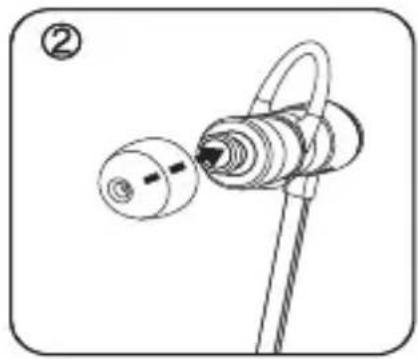
将耳塞放入耳朵内。

如示意图所示戴上耳机。
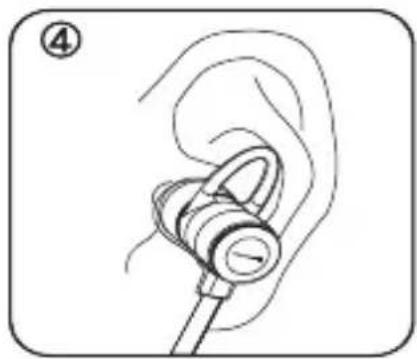
提示
7. 按键指南
增大音量 (+)……快速按下
降低音量 (-)……快速按下
麦克风静音……按住1秒钟(在通话时)
前一首歌 按住1秒钟(在播放时)
恢复出厂设置
按照以下顺序按下按键:


- SAFETY INSTRUCTIONS
- DANGER
- RISK OF INJURY
- ALTERED AUDITORY PERCEPTION
- FEATURES
- CAUTION
- ACCESSORIES
- CONTROLS AND INDICATORS
- OPERATING INSTRUCTIONS
- TURN ON THE IN-EAR HEADSET
- TURN OFF THE IN-EAR HEADSET
- CHARGING
- HOW TO WEAR THE IN-EAR HEADSET
- TIP
- BUTTON GUIDE
- BASIC BUTTON CONTROL
- PRESS THE MFB BUTTON
- PRESS THE VOLUME UP BUTTON
- PRESS THE VOLUME DOWN BUTTON
- FACTORY RESET
- GETTING STARTED WITH YOUR BYRON BTA
- 8.1 PAIRING TO YOUR MOBILE PHONE
- PAIRING ON FIRST PURCHASING
- PAIRING WITH MOBILE PHONE SETTING
- PAIRING TO OTHER DEVICES
- PAIRING WITH MOBILE PHONE
- 8.2 MULTI POINT SETTING
- SETTING MULTI POINT
- HOW TO USE MULTI POINT
- 8.3 CALL
- 8.4 FACTORY RESET
- 8.5 PLAYING MUSIC
- WHAT DOES THE LED COLOUR MEAN
- FAQ & TROUBLESHOOTING
- I HEAR CRACKLING NOISE
- I CANNOT HEAR ANYTHING
- I HAVE PROBLEMS WITH PAIRING EVEN THOUGH MY PHONE INDICATES OTHERWISE
- WILL THE BYRON BTA WORK WITH OTHER BLUETOOTH EQUIPMENT
- MAINTENANCE
- SPECIFICATIONS
- DISPOSAL
- BATTERY DISPOSAL
- CERTIFICATION
- FCC ID: UZCGBH-S880
- SIMPLIFIED EU DECLARATION OF CONFORMITY
- BYRON BTA
- INHALT
- OHRPASSSTÜCK
- CONSEJO
- GUÍA DE BOTONES
- CONSEIL
- 8.2 RÉGLAGE MULTI-POINT
- SUGGERIMENTO
- ボタンガイド
- СОВЕТ
- КНОПКИ
- 提示
- 按键指南
Brand : BEYERDYNAMIC
Model : Byron BTA
Category : Earphones