
CUSTOM STUDIO - Earphones BEYERDYNAMIC - Free user manual and instructions
Find the device manual for free CUSTOM STUDIO BEYERDYNAMIC in PDF.


| Product type | Wired closed-back circumaural headphone |
| Brand | Beyerdynamic |
| Model | CUSTOM STUDIO |
| Transducer | Dynamic (neodymium magnet) |
| Frequency response | 5 Hz – 35 000 Hz |
| Impedance | 32 Ω (at 1 kHz) |
| Sensitivity | 96 dB SPL (at 1 mW) |
| Maximum sound pressure level | 117 dB SPL (at 1 kHz) |
| Weight (without cable) | 290 g |
| Cable | Detachable, 1.5 m, mini-XLR 3-pin connector |
| Connector | 3.5 mm unbalanced jack (6.35 mm adapter included) |
| Microphone | Integrated on cable, omnidirectional |
| Controls | Wired remote (volume, play/pause, call) |
| Sound adjustment | 3-position switch: bass / neutral / treble |
| Earpads | Removable, velour (standard) or leatherette (optional) |
| Headband | Double-jointed, self-adjusting |
| Included accessories | Cable with microphone, 6.35 mm adapter, user manual |
| Recommended use | Studio, monitoring, critical listening, video games |
| Care and cleaning | Clean with a soft dry cloth; earpads washable with lukewarm water |
| Spare parts and repairability | Cables, earpads, and headband available separately; repair possible by after-sales service |
Frequently Asked Questions - CUSTOM STUDIO BEYERDYNAMIC
User questions about CUSTOM STUDIO BEYERDYNAMIC
0 question about this device. Answer the ones you know or ask your own.
Ask a new question about this device
Download the instructions for your Earphones in PDF format for free! Find your manual CUSTOM STUDIO - BEYERDYNAMIC and take your electronic device back in hand. On this page are published all the documents necessary for the use of your device. CUSTOM STUDIO by BEYERDYNAMIC.
USER MANUAL CUSTOM STUDIO BEYERDYNAMIC
Congratulations on your purchase of a set of beyerdynamic CUSTOM series headphones. We would like to thank you for demonstrating your confidence in our brand. Before using your headphones for the first time, please take a moment to carefully read the following information.
Safety Instructions
- When connecting the headphones, make sure the volume is turned to minimum. Only adjust the volume after putting the headphones on. Do not turn the volume up too loud. You could cause permanent damage to your hearing.
- When using cabled headphones please avoid any extreme movements which may cause the headphones to fall off. You could sustain serious injury, especially if you have piercings or are wearing earrings or glasses etc. The cable could become wound around the neck and cause strangulation.
Characteristics and Use
The CUSTOM series represents an entirely new concept which transforms the experience of listening to music via headphones into an interactive event. Thanks to CUSTOM sound, CUSTOM style and the CUSTOM cable, the headphones can be adapted at any given time to any given requirements – providing an all-in-one solution for almost any scenario.
CUSTOM Sound Slider
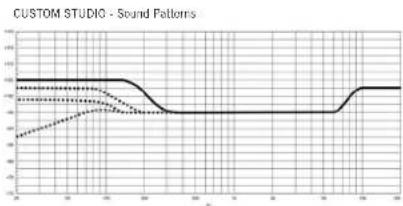
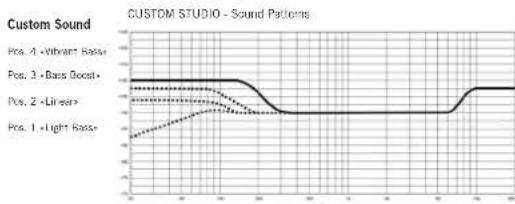
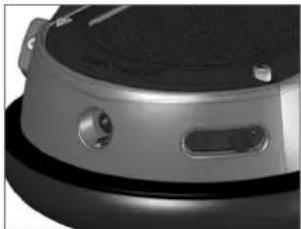
The CUSTOM sound sliders ensure that your listening experience couldn't be more individual. Variable bass reflex vents on the side of the housing shells incrementally alter the audio characteristics of the headphones in four stages.
The following settings are possible using the CUSTOM sound slider on the right and left housing shell:

Pos. 1: "Light Bass" Pos. 2: "Linear"
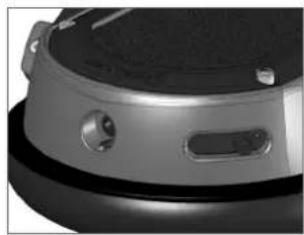


Pos. 3: "Bass Boost" Pos. 4: "Vibrant Bass"
CUSTOM STUDIO – Sound Patterns
Custom Sound
Pos. 4 "Vibrant Bass" Pos. 3 "Bass Boost" Pos. 2 "Linear" Pos. 1 "Light Bass"
CUSTOM Noise Isolation
A further feature of the innovative CUSTOM sound slider: closing the headphones gradually increases sound isolation. Ambient noise is attenuated considerably and spill-over effects are avoided.
Passive damping CUSTOM STUDIO

CUSTOM Style
The headphones are not only interactive in terms of sound but also design. The rings, covers and ear pads of the headphone shells can be exchanged just as easily as the headband pad. All accessories can be found at: www.beyerdynamic.com/custom
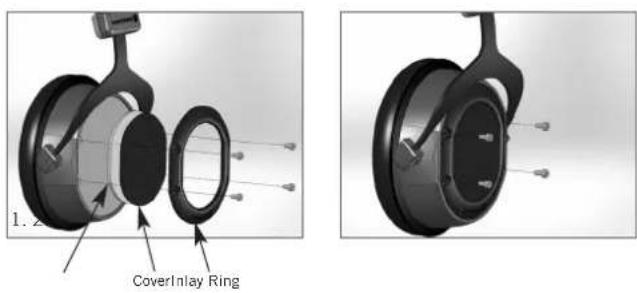
Changing covers and/or rings
- Unscrew the four screws on the ring using the Allen key included with the headphones and remove the ring, the cover and the inlay.
- Place the new cover and inlay in position and screw the ring back in place.
Changing the Headband Pad
The special shape of the headband pad protects the fontanelle against too much pressure. If necessary, please replace the headband pad as described in the following.
- Open the snap fasteners and remove the padding from the headband. Take care not to damage the cable.
- Place the new opened headband pad on the underside of the headband. Make sure to lay the cable in the crease of the pad on the outer edge of the band. Tip: to do this, splay the headphones slightly, over both knees, for example.
- First close the middle snap fasteners and then the two outer ones.
Changing the Ear Pads
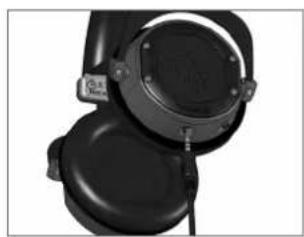
- Place the lip of the ear pad in the notch at the top of the headphone casing.
- Then turn the ear pad on the right-hand casing clockwise and the left-hand casing anti-clockwise until the lip of the entire pad is sitting outside the casing.

Notch Notch

CUSTOM Cable
The cable couldn't be more flexible – and just like the headphones, can be modified with ease. Various cable options and headsets can be found at: www.beyerdynamic.com/custom
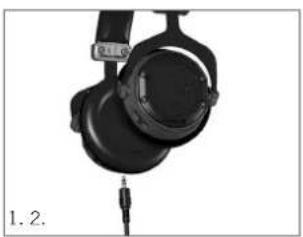
Changing the Cable
- Pull the cable, which is connected at one side, out of the headphones.
- When inserting the new cable, make sure that the slot in the connector housing is turned towards the detent in the housing shell.

Maintenance
For reasons of hygiene, the headband should be cleaned occasionally with a soft damp cloth.
You may need to change the ear and headband pads from time to time as a result of normal wear and tear. This is easy to do yourself. In the event that other components need to be replaced, please contact your local beyerdynamic representative.
Accessories and Spares
Accessories and replacement equipment can be found at www.beyerdynamic.com/custom
Technical Specifications
Transducer type ...... Dynamic
Operating principle .... Closed
Frequency response 5 - 35,000 Hz
Nominal impedance....80 Ω
Nominal SPL....96 dB (500 Hz / 1 mW)
Max. SPL 116 dB
T.H.D. < 0.2%
Nominal power handling capacity .. 100 mW
Sound coupling to the ear.....Circumaural
Ambient noise attenuation ..... approx. 18 dBA
Nominal headband pressure ..... approx. 3.5 N
Weight without cable ..... 290 g
Length and type of cable ..... 3 m, coiled cable, plug-in, single-sided cable
Connection . . . . . . . . . . . . . . . . . . . . . . . . . . . . . . . . Gold-plated mini stereo jack (3.5 mm) &
1/4" adapter (6.35 mm)
Accessories.... Interchangeable style kits;
variable cables
Disposal
At the end of its operating life this product may not be disposed of along with normal household waste. Please take it to a designated recycling point for electric and electronic appliances. This is indicated by the symbol on the product, the operating instructions or the packaging.

CUSTOM STUDIO – Bedienungsanleitung
Pos. 1: „Light Bass“ Pos. 2: „Linear“


Pos. 3: „Bass Boost“ Pos. 4: „Vibrant Bass“

CUSTOM STUDIO – Sound Patterns

CUSTOM Noise Isolation
Kerbe Kerbe

CUSTOM Cable
Pflege
Pos. 1: «Light Bass» Pos. 2: «Linear»


Pos. 3: «Bass Boost» Pos. 4: «Vibrant Bass»

CUSTOM STUDIO – Sound Patterns
CUSTOM Noise Isolation
Rainure Rainure

24125
CUSTOM Cable

Entretien
Pos. 1: «Light Bass» Pos. 2: «Linear»

Pos. 3: «Bass Boost» Pos. 4: «Vibrant Bass»

Muesca Muesca

32133
CUSTOM Cable

Mantenimiento
For further distributors worldwide, please go to www.bayerdynamic.com

A Comparison Study (11.13/64.2.251) • Androgen fixation • Subject to change without notice


- SAFETY INSTRUCTIONS
- CHARACTERISTICS AND USE
- CUSTOM SOUND SLIDER
- CUSTOM STUDIO – SOUND PATTERNS
- CUSTOM NOISE ISOLATION
- CUSTOM STYLE
- CHANGING COVERS AND/OR RINGS
- CHANGING THE HEADBAND PAD
- CHANGING THE EAR PADS
- CUSTOM CABLE
- CHANGING THE CABLE
- MAINTENANCE
- ACCESSORIES AND SPARES
- TECHNICAL SPECIFICATIONS
- DISPOSAL
- CUSTOM STUDIO – BEDIENUNGSANLEITUNG
- PFLEGE
- ENTRETIEN
- MANTENIMIENTO
Brand : BEYERDYNAMIC
Model : CUSTOM STUDIO
Category : Earphones