
Custom Street - Earphones BEYERDYNAMIC - Free user manual and instructions
Find the device manual for free Custom Street BEYERDYNAMIC in PDF.



| Product type | On-ear headphone (headset) |
| Brand | Beyerdynamic |
| Model | Custom Street |
| Weight | 290 g (without cable) |
| Power supply | None (passive) |
| Cable | Detachable with integrated remote/microphone |
| Sound adjustment | Sound Slider 3 positions: Linear, Standard, Heavy Bass |
| Noise isolation | Yes, ambient noise reduced by closing the slider |
| Customization | Interchangeable covers, headband, and ear pads |
| Included accessories | 1 cable, 16 covers, 1 storage case |
| Care | Clean with a soft damp cloth; avoid water entering the transducer |
| Repairability | Easy replacement of ear pads and headband padding |
| Customer service | Contact service@beyerdynamic.de |
| Warranty | Void if unauthorized opening |
| Safety | Set volume to minimum before connection; prolonged listening at high volume may damage hearing; do not use in traffic |
| Disposal | Do not dispose with household waste; WEEE recycling |
Frequently Asked Questions - Custom Street BEYERDYNAMIC
User questions about Custom Street BEYERDYNAMIC
0 question about this device. Answer the ones you know or ask your own.
Ask a new question about this device
Download the instructions for your Earphones in PDF format for free! Find your manual Custom Street - BEYERDYNAMIC and take your electronic device back in hand. On this page are published all the documents necessary for the use of your device. Custom Street by BEYERDYNAMIC.
USER MANUAL Custom Street BEYERDYNAMIC
Congratulations on your purchase of a set of beyerdynamic CUSTOM series headphones. We would like to thank you for demonstrating your confidence in our brand. Before using your headphones for the first time, please take a moment to carefully read the following information.
Safety Instructions
Warning: When connecting the headphones, make sure that you have
turned the volume down to the minimum. Adjust the volume only after the headphones are in place.
We would like to point out that listening at high volumes over a longperiod of time may damage your hearing irreversibly.
Make sure that the set volume is not too high. Rule of thumb: The higher the volume, the shorter the time of listening. According to employer's regulations for safety and health the noise exposure should not exceed 85 dB (low volume) when working with an allowed time of listening of 8 hours at maximum. If the volume is increased by 3 dB, the allowed time of listening is halved, i.e. with 88 dB the time of listening is 4 hours, with 91 dB 2 hours and so on.
Danger!
Headphones dramatically reduce your ability to hear ambient noise. Using the headphones while in road traffic is potentially very dangerous and is therefore prohibited by law. Also, please make sure that you do not use your headphones when in the vicinity of possibly dangerous machines and tools.
Risk of injury!
When wearing wired headphones, avoid any sudden movements. You could seriously injure yourself, especially if you have any piercings or wear earrings or glasses, etc. that can get caught in the wire.
Characteristics and Use
The CUSTOM series represents an entirely new concept which transforms the experience of listening to music via headphones into an interactive event. Thanks to CUSTOM sound, CUSTOM style and the CUSTOM cable, the headphones can be adapted at any given time to any given requirements – providing an all-in-one solution for almost any scenario.
CUSTOM Sound Slider
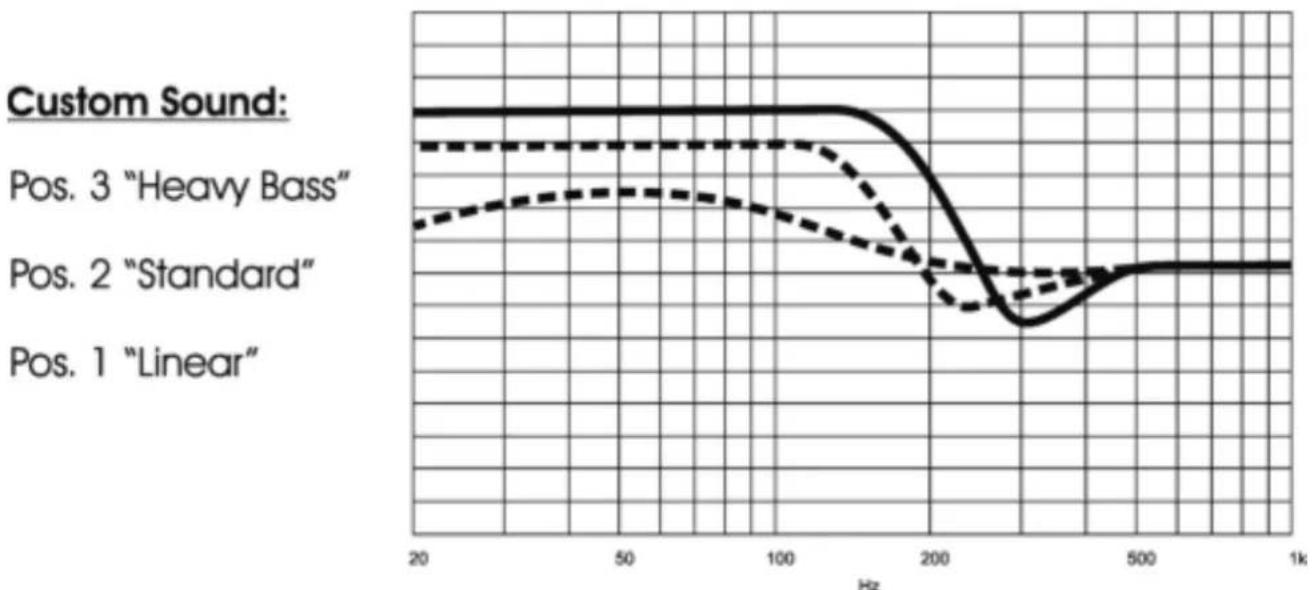
The CUSTOM sound sliders ensure that your listening experience couldn't be more individual. Variable bass reflex vents on the side of the housing shells incrementally alter the audio characteristics of the headphones in three stages.
The following settings are possible using the CUSTOM sound slider on the right and left housing shell:
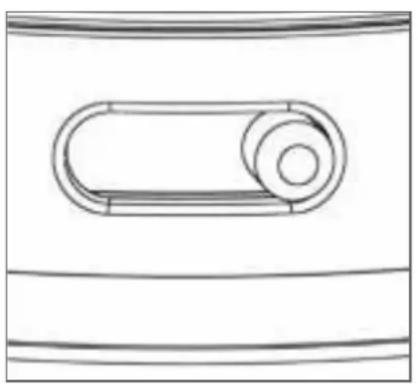
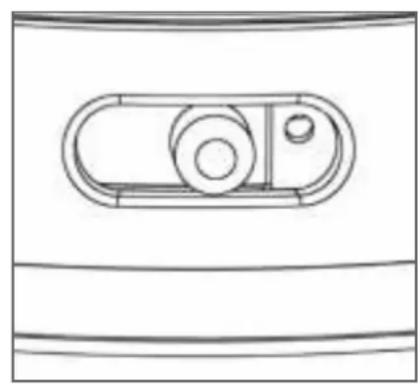
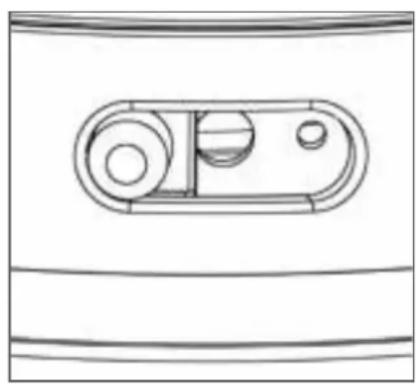
Pos. 1: "Linear" Pos. 2: "Standard" Pos. 3: "Heavy Bass"
CUSTOM STREET - Sound Patterns
CUSTOM Noise Isolation
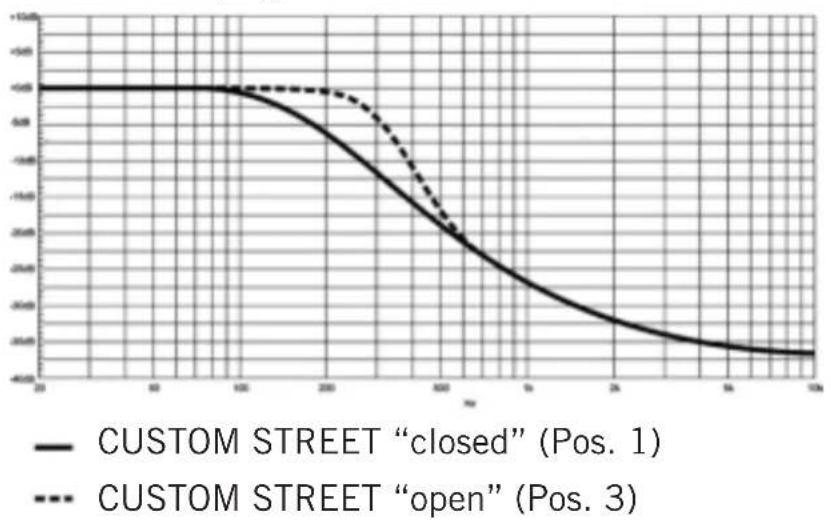
A further feature of the innovative CUSTOM sound slider: closing the headphones gradually increases sound isolation. Ambient noise such as the humming of aeroplane engines or street noise is attenuated considerably.
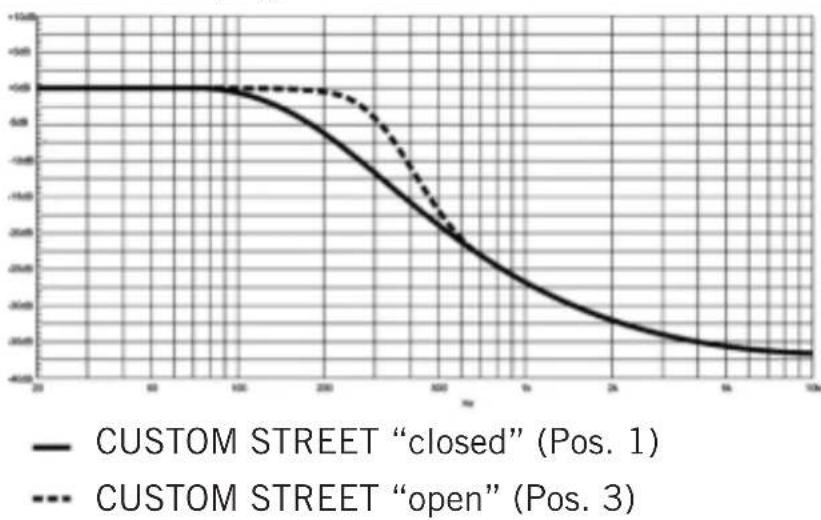
Passive damping CUSTOM STREET
CUSTOM Style
The headphones are not only interactive in terms of sound but also design. Due to the supplied various covers you can change the design of the headphone according to your personal taste.
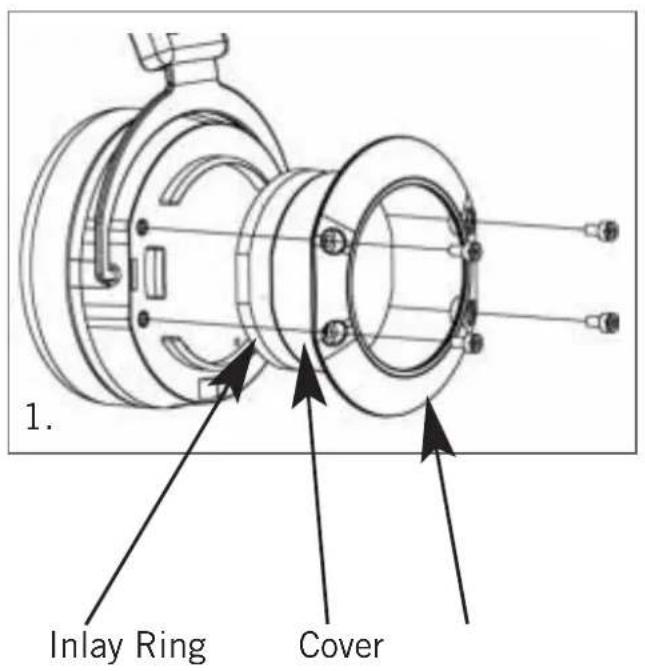
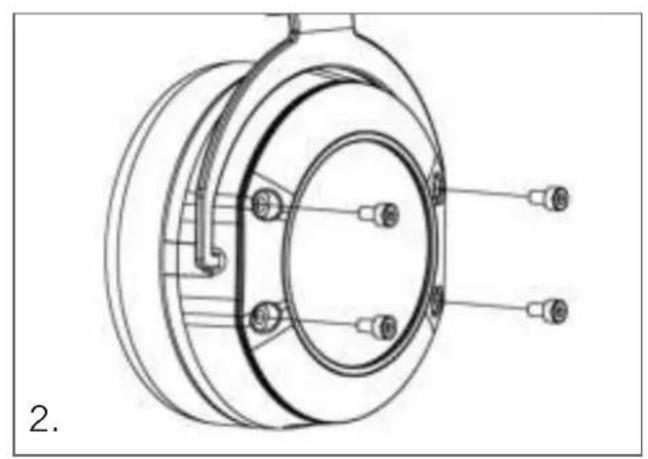
Changing covers
- Unscrew the four screws on the ring using the Allen key included with the headphones and remove the ring, the cover and the inlay.
- Place the new cover and inlay in position and screw the ring back in place.
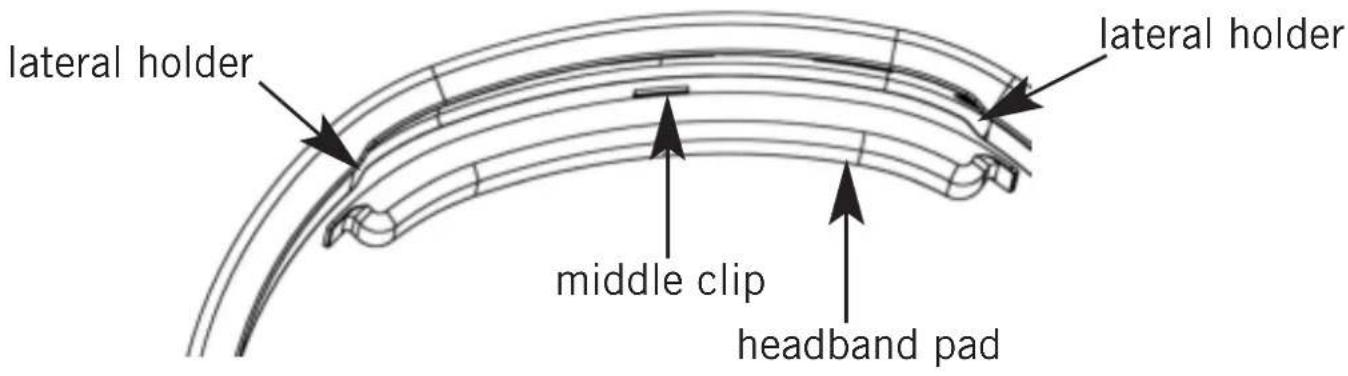
Changing the Headband Pad
- Pull the headband pad carefully upwards near to the rim of the headband and unclasp the middle clip.
- Pull the headband pad from the left and right holders. While doing so, bend the headband pad slightly.
- Slide one end of the new headband pad into one of the holders.
- Clasp the clip in the middle of the pad to the headband with an audible "click".
- Bend the headband pad slightly and slide the other end of the headband pad into the other holder.
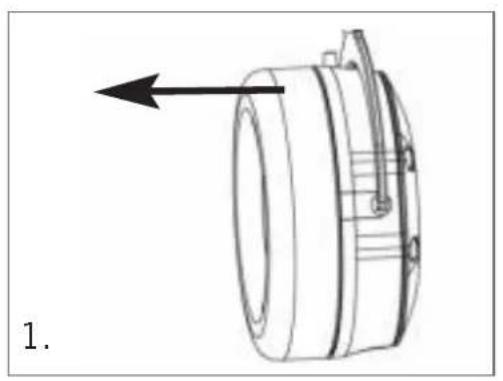
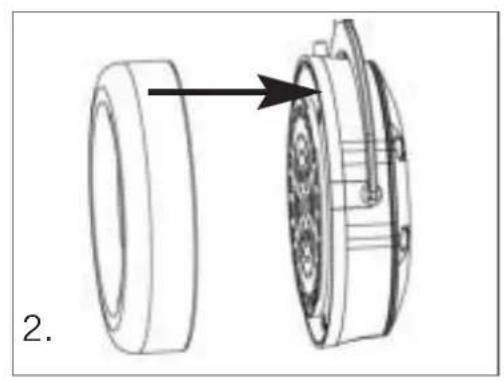
Changing the Ear Pads
- Grasp the ear pad inwards and outwards and pull it carefully off.
- Press the new ear pad onto the housing shell.
CUSTOM Cable
The cable couldn't be more flexible – and just like the covers, can be modified with ease. At www.beyerdynamic.com you will find a gooseneck microphone, which can be used for gaming sessions and internet phone calls, as well as a coiled cable.
Changing the Cable
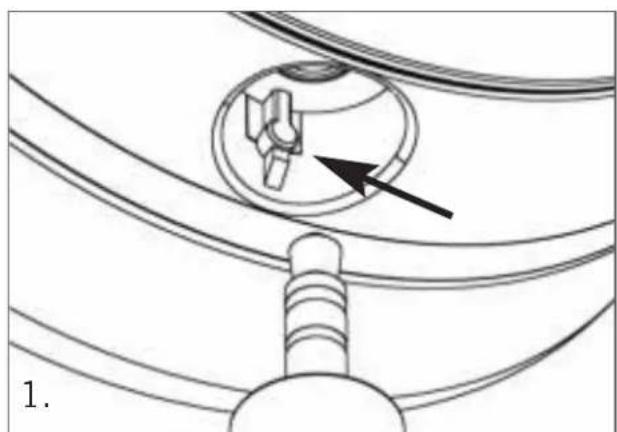
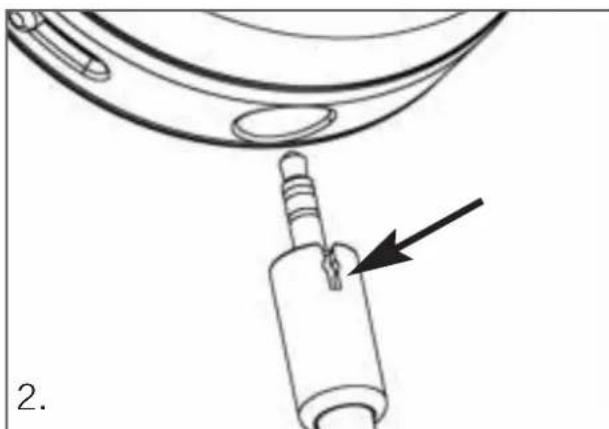
- Pull the cable, which is connected at one side, out of the headphones.
- When inserting the new cable, make sure that the slot in the connector housing is turned towards the detent in the housing shell.
How to Use the Remote Control/Microphone
When you receive a call, also via internet (e.g. online phone calls or in-game chats), you can operate the integrated microphone as follows:
Press button: Answers the phone call Press button again: Ends the phone call
With some mobile phones you have to press the button a little bit longer to end the phone call.
Depending on the software of the mobile phone or player (e.g. MP3 player) you can use the microphone button for controlling other functions such as playing music.

Maintenance
For reasons of hygiene, the ear pads and headband should be cleaned occasionally with a soft damp cloth. Take care that water does not come into contact with the transducers. You may need to change the ear and headband pads from time to time as a result of normal wear and tear. This is easy to do yourself. In the event that other components need to be replaced, please contact your local beyerdynamic representative.
Service
If you require service, please contact qualified service personnel or directly:
Dismantling the headphone yourself will invalidate the guarantee.
Supplied Accessories
1 x detachable cable with remote control/microphone
16 x covers
1 x hard case
You will find more optional accessories and spare parts at:
www.beyerdynamic.com
Technical Specifications
You will find the technical specifications for this product on the packaging or internet at www.beyerdynamic.com
Disposal
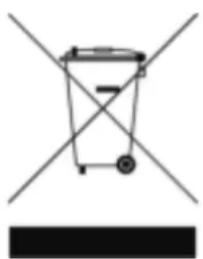
At the end of its operating life this product may not be disposed of along with normal household waste. Please take it to a designated recycling point for electric and electronic appliances. This is indicated by the symbol on the product, the operating instructions or the packaging.
CUSTOM STREET - Bedienungsanleitung
Passive damping CUSTOM STREET
CUSTOM Style
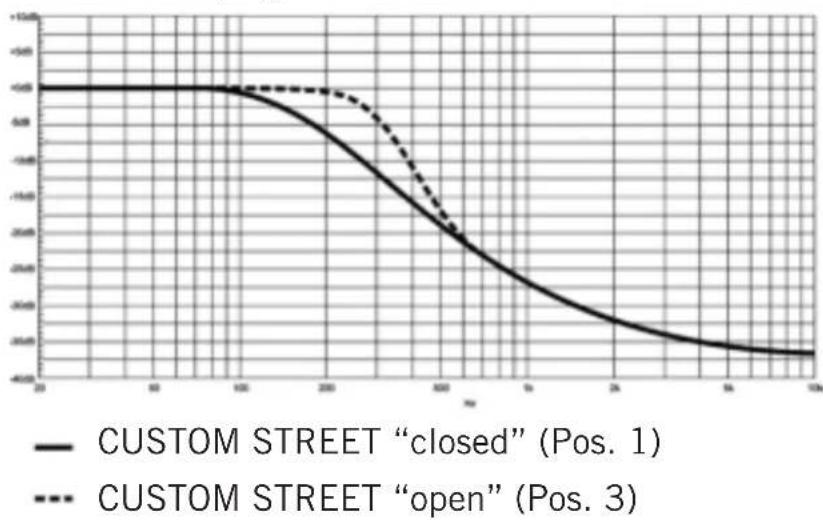
Passive damping CUSTOM STREET
CUSTOM Style
Specifications techniques
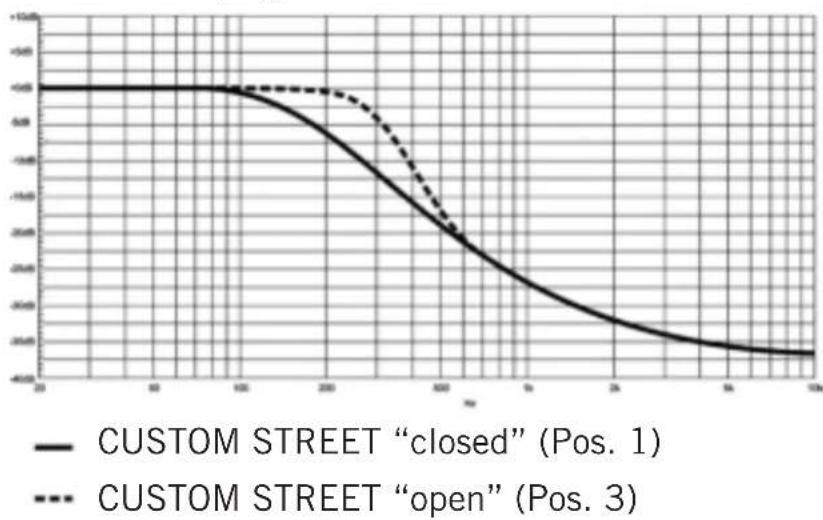
Passive damping CUSTOM STREET
CUSTOM Style
For further distributors worldwide, please go to www.beyerdynamic.com