
Lagoon ANC Traveller - Earphones BEYERDYNAMIC - Free user manual and instructions
Find the device manual for free Lagoon ANC Traveller BEYERDYNAMIC in PDF.

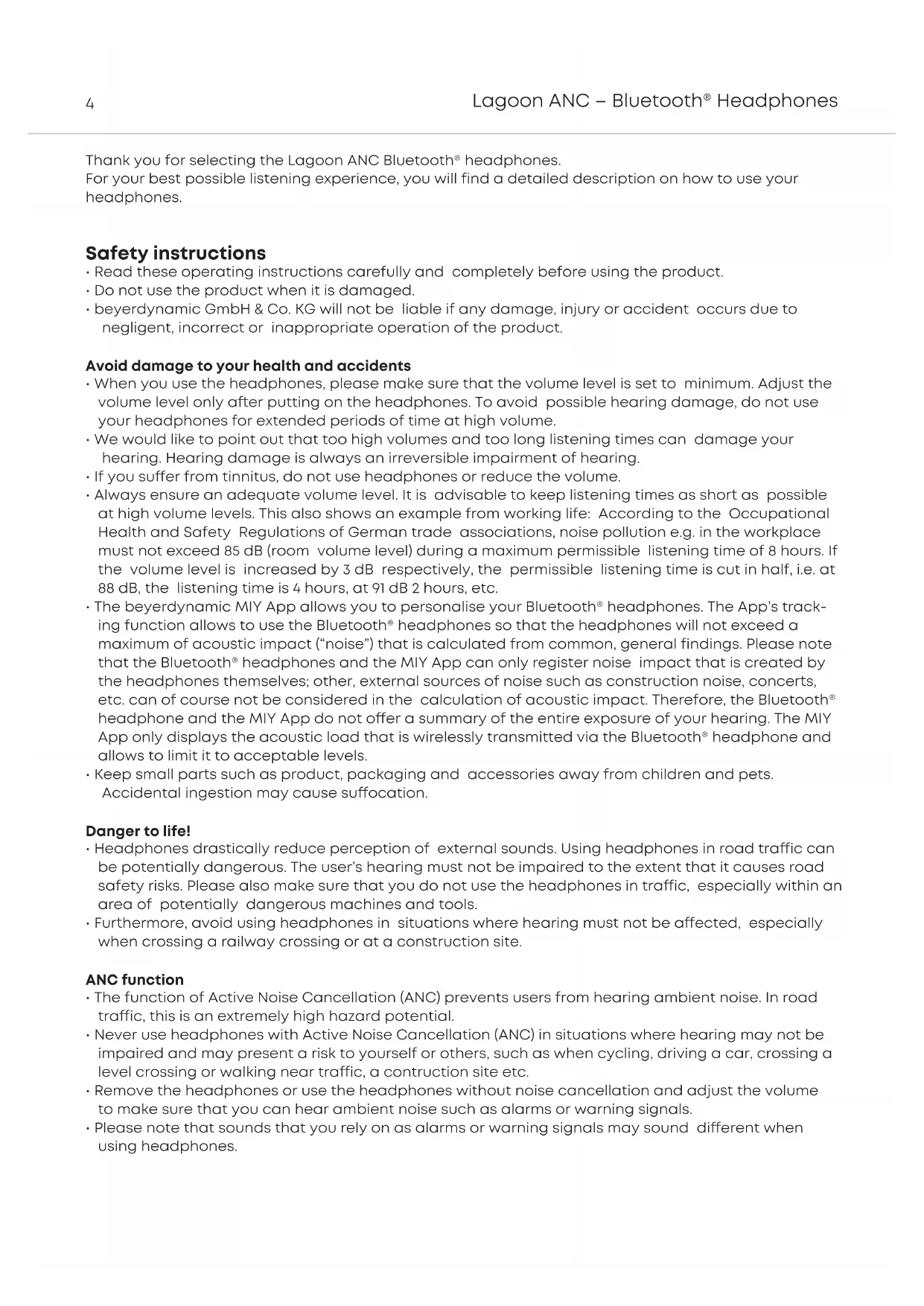


| Product Type | Bluetooth in-ear headphones with active noise cancellation (ANC) |
| Brand | Beyerdynamic |
| Model | Lagoon ANC Traveller |
| Power supply | Rechargeable lithium-ion battery via USB-C (5V, max 1A) |
| Wireless connection | Bluetooth® with A2DP, HFP, HSP, AVRCP profiles |
| Supported audio codecs | SBC, AAC, aptX™, aptX™ HD, aptX™ LL |
| Main features | Active noise cancellation (ANC), touch controls, MIY app, multipoint (up to 15 devices), NFC, voice assistant |
| Control elements | Touch panel, 2-step ANC switch, On/Off/Pairing switch, 3.5 mm jack socket, USB-C socket, microphone |
| Display | Light-Guide System (LGS) in the earcups (indicates charge status, connection, etc.) |
| Package contents | Lagoon ANC headphones, 3.5 mm audio cable, USB-A to USB-C charging cable, hard case, quick start guide |
| Care and cleaning | Soft, dry cloth or slightly dampened with water; do not use solvents |
| Safety | Do not use at high volume for too long; do not open the housing; do not expose to temperatures >60°C; do not use in hazardous situations (road, construction site) |
| Spare parts and repairability | Spare parts available at www.beyerdynamic.com/service |
| Warranty | Limited 2-year warranty from purchase date |
| Operating temperature | 0 °C to 40 °C |
| RF frequency range | 2.402 – 2.480 GHz |
| RF transmission power | 10 dBm |
Frequently Asked Questions - Lagoon ANC Traveller BEYERDYNAMIC
User questions about Lagoon ANC Traveller BEYERDYNAMIC
0 question about this device. Answer the ones you know or ask your own.
Ask a new question about this device
Download the instructions for your Earphones in PDF format for free! Find your manual Lagoon ANC Traveller - BEYERDYNAMIC and take your electronic device back in hand. On this page are published all the documents necessary for the use of your device. Lagoon ANC Traveller by BEYERDYNAMIC.
USER MANUAL Lagoon ANC Traveller BEYERDYNAMIC
Thank you for selecting the Lagoon ANC Bluetooth® headphones.
For your best possible listening experience, you will find a detailed description on how to use your headphones.
Safety instructions
- Read these operating instructions carefully and completely before using the product.
- Do not use the product when it is damaged.
- beyerdynamic GmbH & Co. KG will not be liable if any damage, injury or accident occurs due to negligent, incorrect or inappropriate operation of the product.
Avoid damage to your health and accidents
- When you use the headphones, please make sure that the volume level is set to minimum. Adjust the volume level only after putting on the headphones. To avoid possible hearing damage, do not use your headphones for extended periods of time at high volume.
- We would like to point out that too high volumes and too long listening times can damage your hearing. Hearing damage is always an irreversible impairment of hearing.
- If you suffer from tinnitus, do not use headphones or reduce the volume.
- Always ensure an adequate volume level. It is advisable to keep listening times as short as possible at high volume levels. This also shows an example from working life: According to the Occupational Health and Safety Regulations of German trade associations, noise pollution e.g. in the workplace must not exceed 85 dB (room volume level) during a maximum permissible listening time of 8 hours. If the volume level is increased by 3 dB respectively, the permissible listening time is cut in half, i.e. at 88 dB, the listening time is 4 hours, at 91 dB 2 hours, etc.
- The beryerdynamic MIY App allows you to personalise your Bluetooth® headphones. The App's tracking function allows to use the Bluetooth® headphones so that the headphones will not exceed a maximum of acoustic impact ("noise") that is calculated from common, general findings. Please note that the Bluetooth® headphones and the MIY App can only register noise impact that is created by the headphones themselves; other, external sources of noise such as construction noise, concerts, etc. can of course not be considered in the calculation of acoustic impact. Therefore, the Bluetooth® headphone and the MIY App do not offer a summary of the entire exposure of your hearing. The MIY App only displays the acoustic load that is wirelessly transmitted via the Bluetooth® headphone and allows to limit it to acceptable levels.
- Keep small parts such as product, packaging and accessories away from children and pets. Accidental ingestion may cause suffocation.
Danger to life!
- Headphones drastically reduce perception of external sounds. Using headphones in road traffic can be potentially dangerous. The user's hearing must not be impaired to the extent that it causes road safety risks. Please also make sure that you do not use the headphones in traffic, especially within an area of potentially dangerous machines and tools.
- Furthermore, avoid using headphones in situations where hearing must not be affected, especially when crossing a railway crossing or at a construction site.
ANC function
- The function of Active Noise Cancellation (ANC) prevents users from hearing ambient noise. In road traffic, this is an extremely high hazard potential.
- Never use headphones with Active Noise Cancellation (ANC) in situations where hearing may not be impaired and may present a risk to yourself or others, such as when cycling, driving a car, crossing a level crossing or walking near traffic, a construction site etc.
- Remove the headphones or use the headphones without noise cancellation and adjust the volume to make sure that you can hear ambient noise such as alarms or warning signals.
- Please note that sounds that you rely on as alarms or warning signals may sound different when using headphones.
Liability / intended use
- Do not use the product for any application which is not described in this product information.
beyerdynamic is not liable for improper use of the product and its accessories. - beyerdynamic is not liable for damages to USB devices that do not comply with USB specifications.
- beyerdynamic is not liable for damages resulting from transmission breakdowns due to empty or old batteries or exceeding the Bluetooth® transmission range.
- Please observe the respective country-specific regulations before using the product.
Unit usage warning
- Use only a USB 2.0/3.0 compliant 5V power supply to charge the battery via the integrated USB type-C port (power consumption is max. 1.0 A).
- WARNING: The batteries (battery pack or batteries installed) shall not be exposed to excessive heat such as sunshine, fire or the like.
- CAUTION: Please do not open the housing. Danger of explosion if battery is incorrectly replaced.
Battery warning
- Do not disassemble.
- Do not use the battery after soaking.
- Do not expose to high temperature (60 °C/140 °F). High temperatures, particularly in association with a high charging status, result in irreversible damage of the battery.
- If you are not intending to use the battery for an extended period or are planning to put it into storage, it is advisable to lower the battery's charging level to around 50% and to store it at temperatures of maximum 30^ .
- Never expose the battery to excessive heat such as sunshine, fire or the like.
- Misuse or improper use could damage the battery. In extreme cases, there is a risk of explosion, heat, fire, smoke or gas.
Manufacturer: A&S Power Technology Co., Ltd.
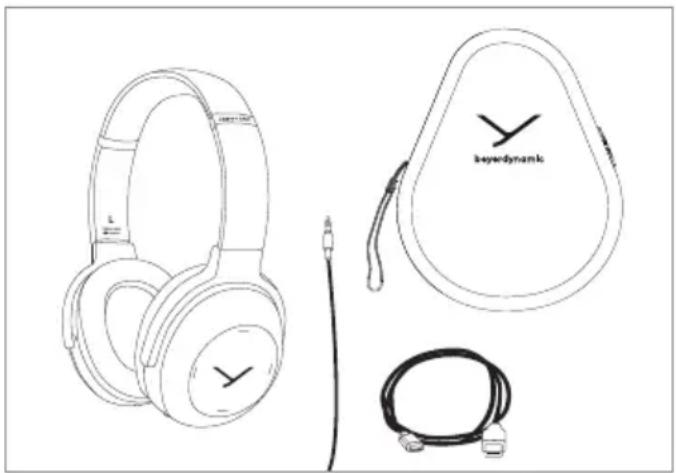
Supplied accessories
- Lagoon ANC headphones
Audio cable, mini jack (3.5 mm) - Charging cable USB-A to USB-C
Hard case
Quick start guide
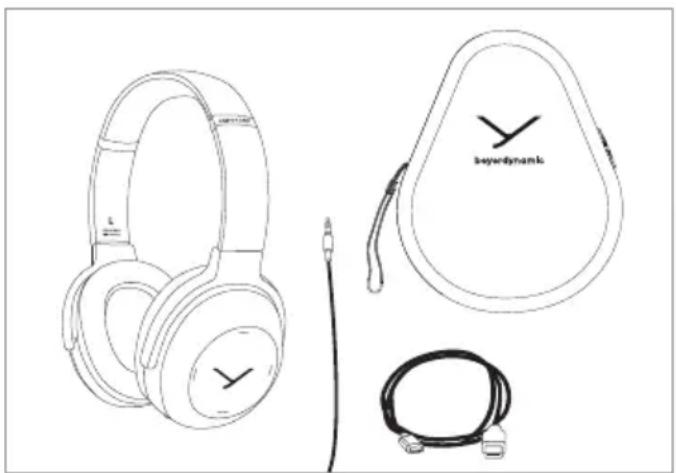
Storage and removal from the packaging
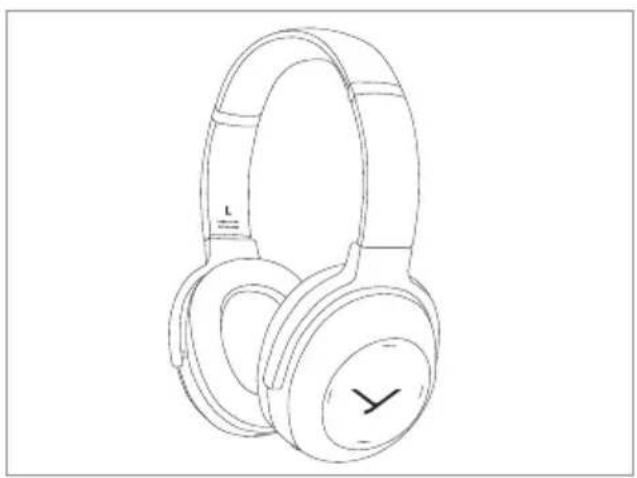
Removal from the packaging
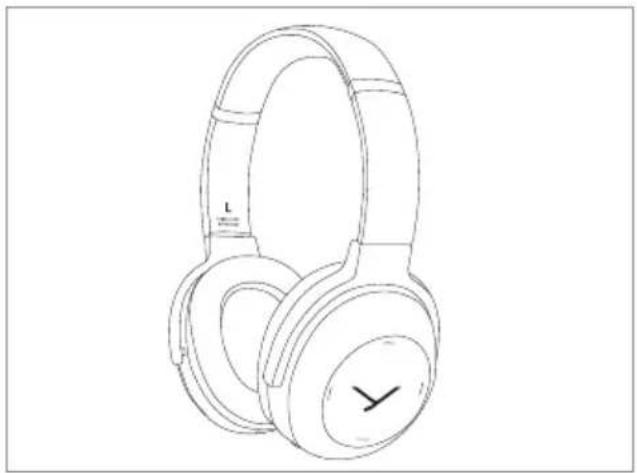
- Open the hard case and remove the headphones.
- Rotate the two housing shells inwards so that the ear pads are facing each other.
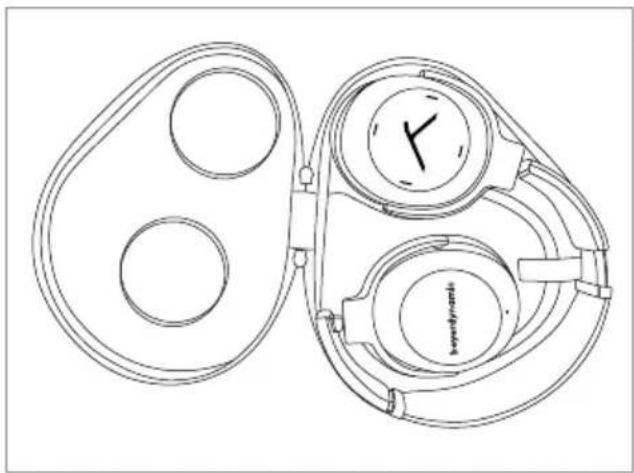
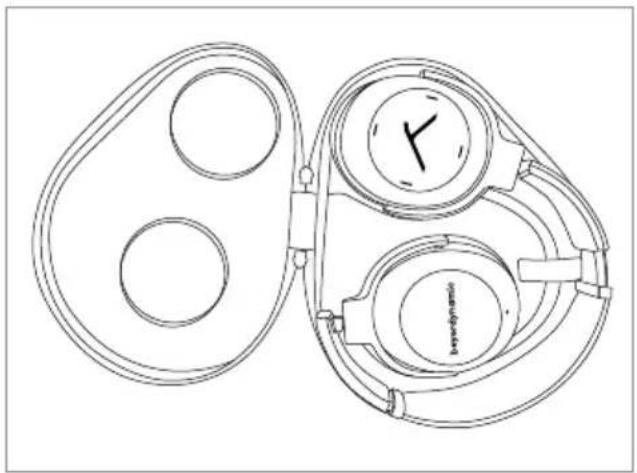
Storage
- Rotate the two housing shells outwards and into each other, so that the right ear cup with the jack connection is on the outside.
- Put the headphones into the hard case with the ear pads pointing downwards.
beyerdynamic MIY app
By using the beyerdynamic MIY app you can personalise your headphones. The app is available for Apple iOS and Android and can be downloaded from both the Apple App Store and the Google Play Store.
Note firmware version 1.0
The following descriptions refer to the standard settings and to the firmware version 1.0 installed on the present Bluetooth® headphones.
Firmware update
A more recent firmware version than installed (version 1.0) might be available, which you can update with the beyerdynamic MIY app.
Compatibility
The Bluetooth® headphones are compatible with Bluetooth® playback devices that support the following profiles:
A2DP (for audio transmission)
HFP (for phone operation)
HSP (voice output)
AVRCP (for the transmission of controls signals)
Note: All associated functions are only available, if they are supported by the player.
Supported audio codecs
Within the A2DP profile, the headphones support the audio codes SBC, AAC, aptX™ and aptX™ LL. The best audio quality is offered by aptX™. aptX™ LL offers the shortest audio latency.
Note: Please note that only audio codec can be used for audio transmission, which are available in the player.
The player and the in-ear headphones automatically select the best codec available on both devices according to the following order:
- aptXTM LL
- aptXTM
- AAC
4.SBC
Note: Please note that most playback devices do not indicate which codec is active.
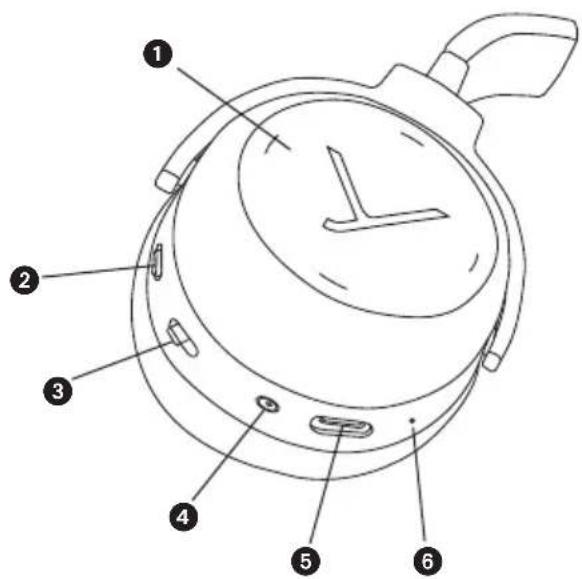
Operating elements
Touch pad
Switch ANC function
On-off switch and pairing
4 Mini jack connector (3.5 mm)
USB connection for charging cable, (USB-C)
6 Microphone
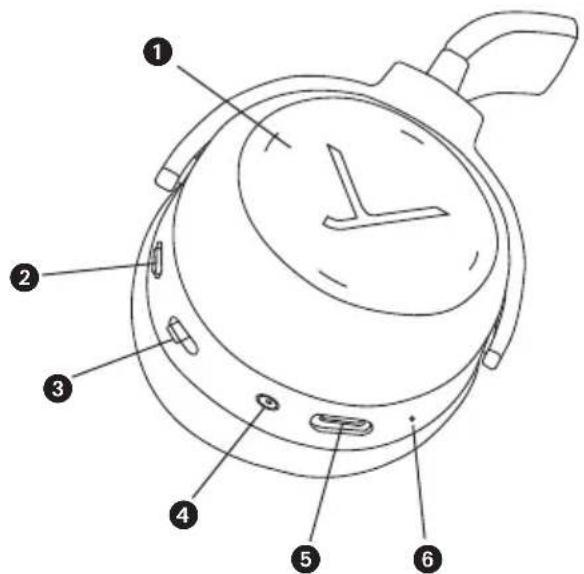
Light-Guide-System (LGS)
In the housing shells there is a so-called Light Guide System (LGS). The LGS is a visual display indicating various operating conditions.
In order to activate the LGS, please switch on the headphones.
- As soon as the headphones are picked up, the inside of the right housing shell will illuminate red and the left one will illuminate white.
- If the headphones are stored e.g. on a table, the standby mode will be activated after more than 10 seconds and the LGS will be turned off. The Bluetooth® connection still remains.
- In the pairing mode, the right and left housing shell alternately light up blue.
- A successful pairing is indicated by a blue light fading in.
For more information, please refer to the "Light Guide System" table.
Turning on / off
- Turning on
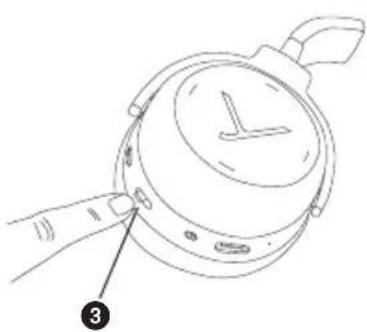
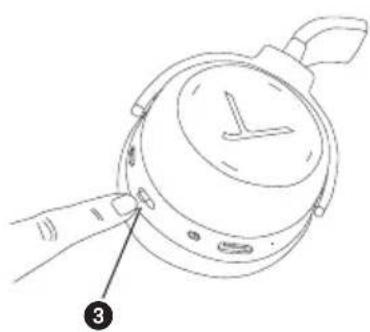
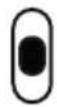
Set the switch 3 to the "On" position.
- Turning off
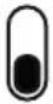
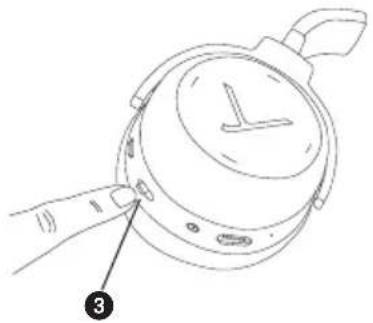
Set the switch 3 to the "Off" position.
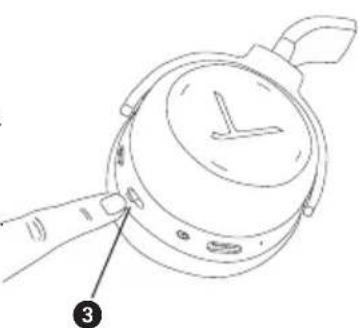
"On" position

"Off" position

Pairing with the player
Before you use the headphones for the first time, you have to pair them with your mobile phone or another Bluetooth® enabled device. The pairing process may be different with various players. Please refer to the appropriate manual of the player.
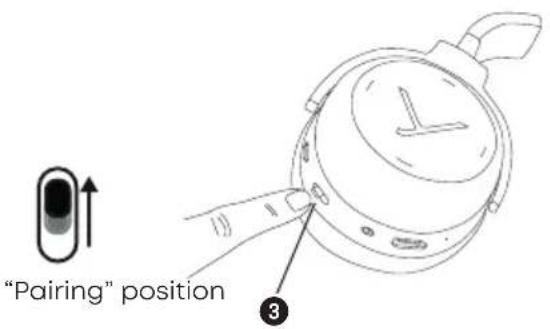
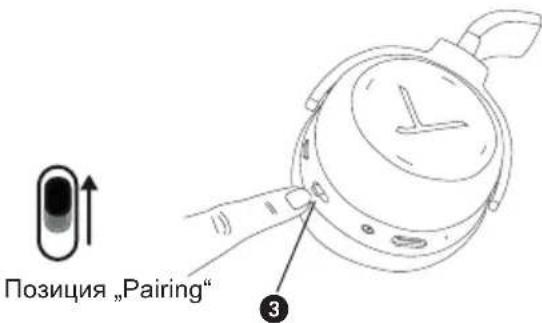
- Set the switch 3 to the "On" position.
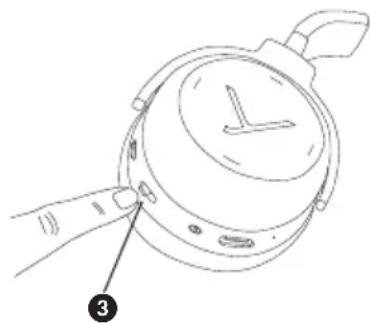
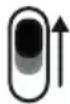
- Set the switch 3 for three seconds to the "Pairing" position.
The Light Guide System displays the pairing mode by flashing blue alternately in the left and right housing shell.
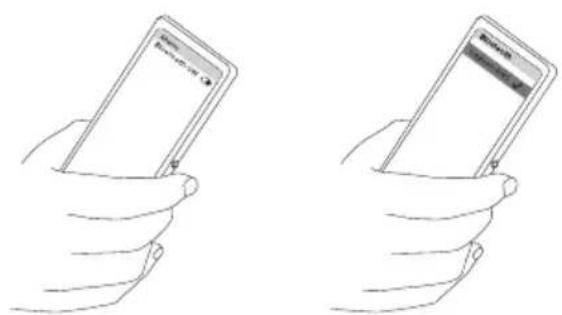
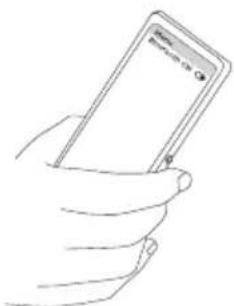
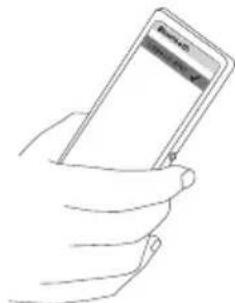
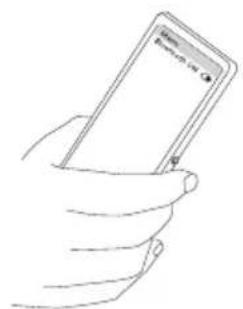
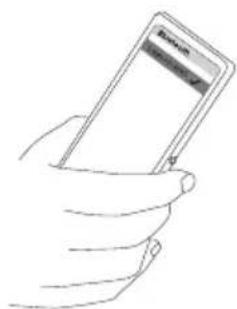
- Activate the Bluetooth® function on the player and, if necessary, search for new devices.
- Select "Lagoon ANC" from the available devices in the Bluetooth menu of the player and connect both devices.
- The Light Guide System displays a successful Bluetooth connection by a blue light fading in. Each time when turning on, both devices connect automatically when in range.
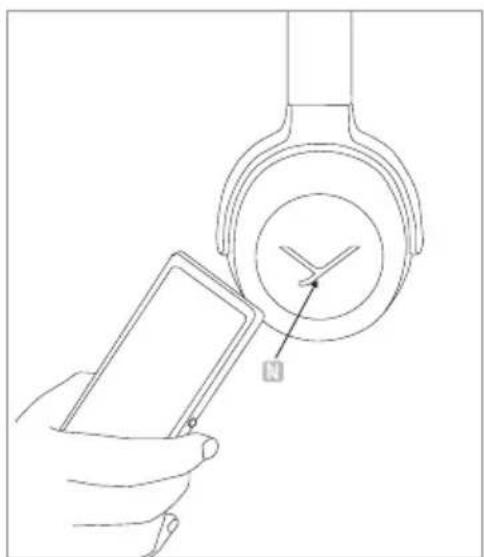
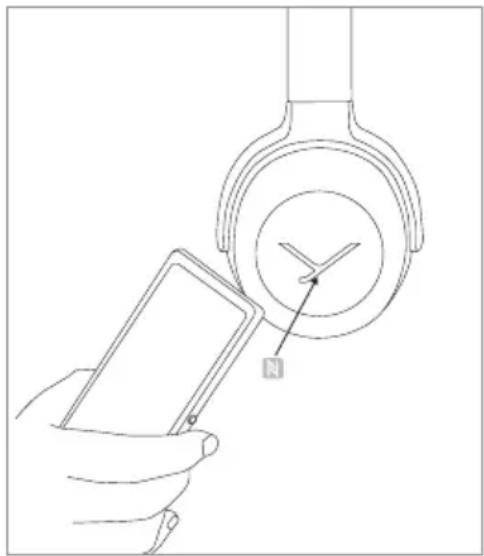
Pairing with the player via NFC
Alternatively, you can connect the headphones with an NFC-capable player through NFC. The headphones must be switched on. It does not matter whether the headphones are in pairing mode or not.
- Set the switch 3 to the "On" position.
- Activate the NFC function in the player.
- Hold the player over the left housing shell so that both NFC chips are close to each other. If required, test this by sliding movements.
Multi point operation
The headphones can be paired to a maximum of 15 Bluetooth® enabled devices. Active connections can be established with up to two devices at a time. However, playback of music and phone operation is only possible with one device at a time. Phone operation has priority over playback of music; i.e. playback of music is interrupted during phone calls.
The following priorities apply during the use of playback devices:
| Priority | Profile | Playback device (PD) |
| 1 HFP (phone operation) AG 1 (device used first) | ||
| 2 HFP (phone operation) AG 2 (device used second) | ||
| 3 A2DP (playback of music) AG 1 (device used first) | ||
| 4 A2DP (playback of music) AG 2 (device used second) | ||
Setting up multi point
- Pair the headphones with the first device (refer to "Pairing with the player").
- Deactivate the Bluetooth connection on the first device.
- Switch the headphones off by using the switch ③.
- Set the switch 3 to the "Pairing" position.
- Pair the headphones with the second device (refer to "Pairing with the player").
- Re-activate the Bluetooth® connection to the first device that automatically connects to the headphones.
- Once both devices are paired with the headphones, the headphones automatically connect with both devices each time when powered up, provided they are within the range.
"Pairing" position
Using multi point
If you have connected the headphones with two devices
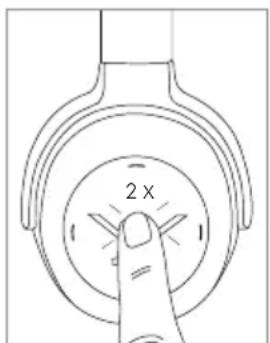
- and have just activated media playback, briefly press the touch pad twice to accept an incoming call.
- and have just finished a call, briefly press the touch pad twice to restart the media playback that was playing most recently.
How to set the volume
- Increase volume
Drag your finger upwards on the touch pad. When you drag your finger upwards and hold it, the volume is gradually increased until the maximum is achieved.
An acoustic signal indicates the achieved maximum.
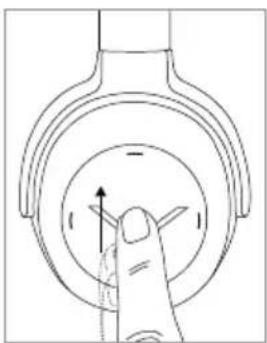
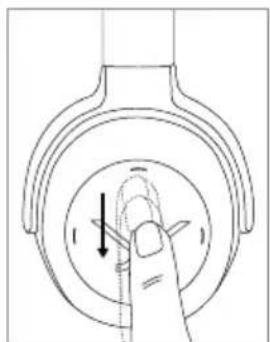
- Reduce volume
Drag your finger downwards on the touch pad. When you drag your finger downwards and hold it, the volume is gradually reduced until the minimum is achieved.
An acoustic signal indicates the achieved minimum.
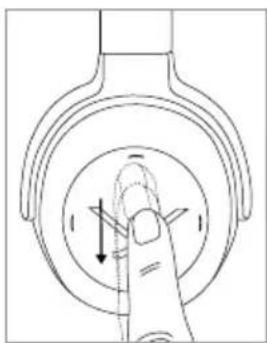
Media playback
Please note that the functions described in the following, depend on the player and the player software and may not be available. The headphones only transmit control signals that comply with the Bluetooth® standard.
Important: To avoid malfunction, use only one finger when you use the touch pad.
- Start / Stop:
Briefly tap the touch pad twice.
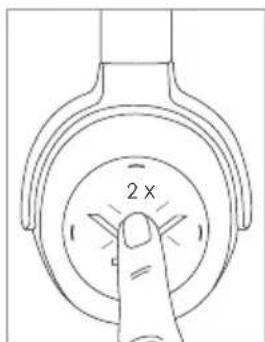
- Play next track:
Drag your finger forwards on the touch pad.
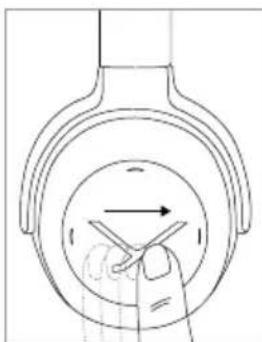
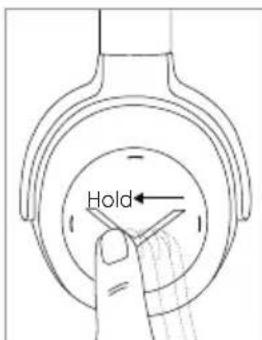
- Play previous track:
Drag your finger backwards on the touch pad.
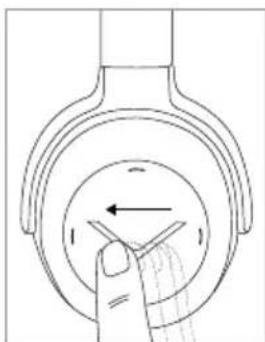
Fast forward:
Drag your finger forwards on the touch pad and hold it for at least 1 second.
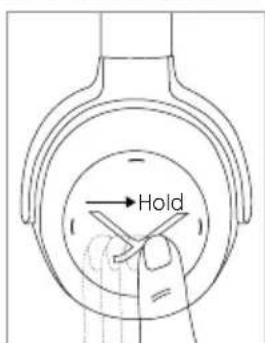
- Rewind:
Drag your finger backwards on the touch pad and hold it for at least 1 second.
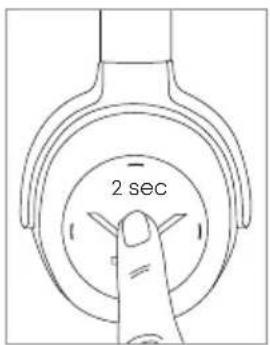
Call personal assistant
- To call the personal assistant on your smartphone or tablet such as Siri, Google Assistant etc.:
Press the centre of the touch pad for approx. 2 seconds.
Call control
Accept / end a call:
Briefly tap the touch pad twice.
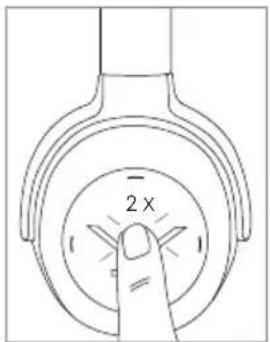
Reject a call:
Press the centre of the touch pad for approx. 2 seconds.
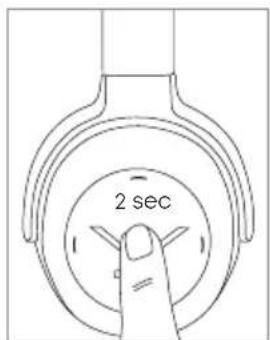
- Toggle between two callers:
Press the centre of the touch pad for approx. 2 seconds.
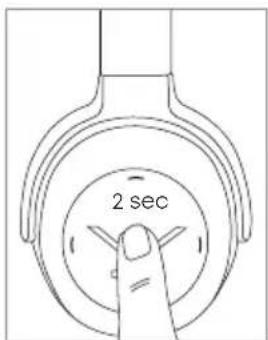
- Increase volume of call:
Drag your finger upwards on the touch pad. When you drag your finger upwards and hold it, the volume is gradually increased until the maximum is achieved. An acoustic signal indicates the achieved maximum.
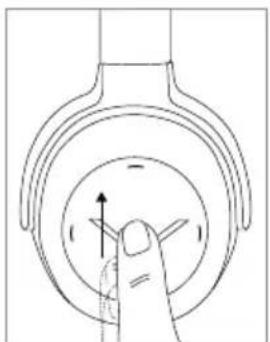
- Reduce volume of call:
Drag your finger downwards on the touch pad. When you drag your finger downwards and hold it, the volume is gradually reduced until the minimum is achieved. An acoustic signal indicates the achieved minimum.
Charging the battery
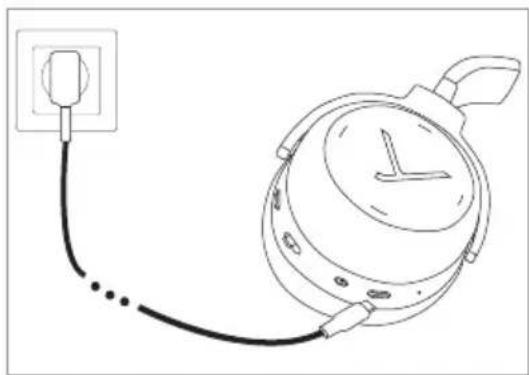
For charging the rechargeable battery, we recommend using the supplied USB charging cable only.
- Switch headphones off.
- Connect the headphones with the supplied USB charging cable to any compliant USB Type A port supplying voltage (e.g. USB power supply).
- The light guide system displays the charging status: Pulsating red = battery charged 0 to 30% Pulsating yellow = battery charged 30 to 70% Pulsating green = battery charged 70 to 99% Green light constant = battery charged 100%
- Detach the USB charging cable after the charging process.
Reset to factory settings
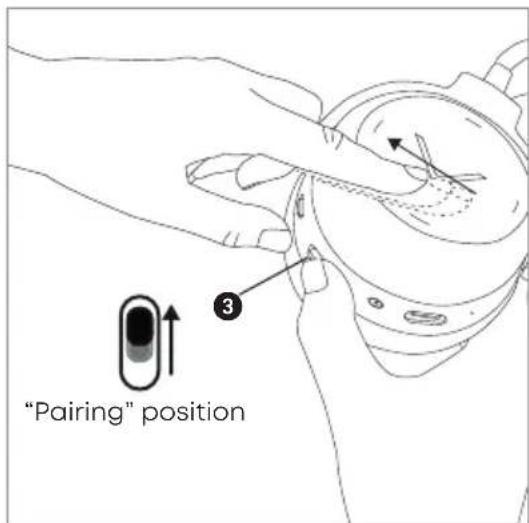
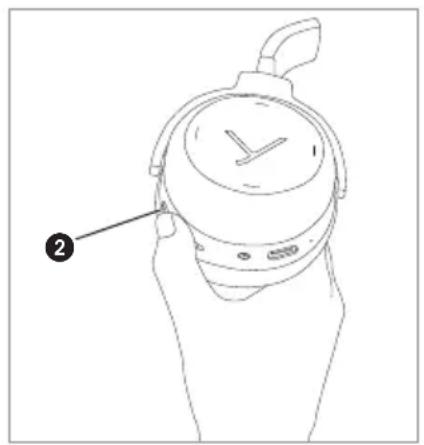
- Set the switch 3 to the "On" position.
- Take the right housing shell into your hands.
- Set the switch to the "Pairing" position and at the same time drag your finger backwards on the touch pad.
Touch pad and button functions table
Unless otherwise stated, the functions listed apply for headphones that are switched on.
| Switch on | Set switch to 3 the "On" position |
| Switch off | Set the switch 3 to the "Off" position |
| Paring mode | Switch on headphones, set switch 3 to "Pairing" position and hold it for 3 seconds |
| Delete pairing mode list | Switch on headphones, set switch 3 to "Pairing" position and hold it for 10 seconds |
| Start / pause | Briefly tap the touch pad 1 twice |
| Next track | Drag forwards on the touch pad 1 |
| Previous track | Drag backwards on the touch pad 1 |
| Fast forward | Drag forwards on the touch pad 1 and hold for at least 1 second |
| Rewind | Drag backwards on the touch pad 1 and hold for at least 1 second |
| Accept / finish a call | Briefly tap the touch pad 1 twice |
| Reject a call | Press the touch pad 1 for 2 seconds |
| Toggle between 2 callers | Briefly tap the touch pad 1 twice |
| Call personal assistant (Siri, Google Assistant etc.) | Press the touch pad 1 for 2 seconds |
Settings table
The functions listed apply for headphones that are switched on.
| Activating and deactivating voice messages | Set the switch ③ to the “Pairing” position and hold for 1 second. At the time tap the touch pad ① twice with one finger. |
| Reset to factory settings | Set the switch ③ to the “Pairing” position and at the same time drag your finger backwards on the touch pad ①. |
Light Guide System table
| Charging battery 0-30% 30-70% 70-99% full (100%) | Pulsating red Pulsating yellow Pulsating green Green light constant |
| Battery almost empty 4 x flashing red | |
| Bluetooth® connection mode active (Pairing) | Inside of left and right housing shell is flashing alternately blue |
| Bluetooth® connection active Orange light | |
| Bluetooth® connection lost Flashing slowly blue with interruptions of 3 seconds | |
| Media playback active Orange light | |
| Incoming call Flashing rapidly blue with interruptions of 1 second | |
| During a call Orange light | |
| Display of “sound dosage” (stress on your hearing) | After taking the headphones off, the status will be displayed on a scale between green and red for 3 seconds |
| Firmware update mode Flashing pink | |
| Standby mode If the headphone is not used for more than 10 seconds, the Light Guide System is turned off. | |
Player settings for your best wireless sound
To achieve your best possible sound via Bluetooth® with the headphones, you should consider the following practical hints:
- Set the volume of the headphones to minimum, of the player to maximum.
- Then a djust the volume on the headphones only, not on the player.
Important:
This applies only to players that do not automatically synchronise the volume.
On players that automatically synchronise the volume (e.g. iPhone, iPad, various Android smartphones), the headphone volume is always identical to the volume of the player.
- Deactivate any audio effects that might exist in your player software.
Troubleshooting
| Problem | Cause | Solution |
| The headphones cannot be switched on | Battery is empty or almost empty | Charge the battery |
| No audio output No Bluetooth® connection Pair the headphones with the player | ||
| The headphones do not appear among the available Bluetooth® devices on the player | · The headphones are switched off · The headphones are not in pairing mode · A Bluetooth® connection to another player exists already | · Turn on the headphones · Put the headphones into pairing mode · Disconnect the Bluetooth® connection to the other player and connect the headphones to the desired device |
| Playback volume is too low, even though the headphone volume is set to maximum | The received audio signal is too low | Increase the playback volume on the player to maximum |
| The sound is harsh and the bass response is too low | Insufficient seal of the ear pads | Adjust the headphones over your ears so that maximum seal is achieved |
| The wireless range is too low or the connection is disrupted | There are interferences with other devices | Move away from WLAN routers and microwave ovens, ensure that your body is not between player and the headphone |
ANC - Switching on and off
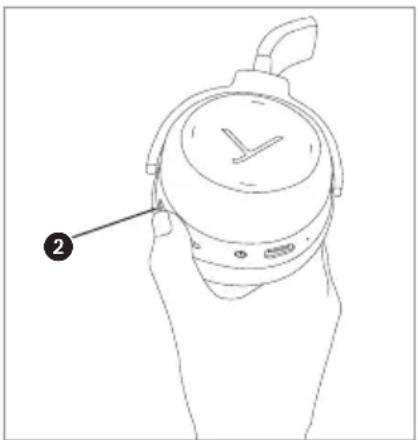
The Active Noise Cancellation (ANC) can be switched on and in two stages with the ANC switch 2.
Hints for best ANC function
Active noise cancellation works particularly well at low frequencies, such as the noise of wheel tires on rails or the deep roar of aircraft engines. Therefore, active noise cancellation is mainly used for rail or air travelling.
Active noise cancelling headphones eliminate annoying ambient noise best, when the battery is charged.
When using this function, always make sure that the battery is charged.
Using the audio cable
Delivery includes an audio cable with a mini jack plug (3.5 mm) on either end. With the audio cable you can use the headphones without Bluetooth connection or when the battery is empty.
- Switch off the headphones so that no electricity is drawn from the battery.
- Connect one end of the audio cable to the jack socket 4 of the right housing shell.
- Connect the other end of the audio cable to the player.
Maintenance
- To clean the Lagoon ANC use only a soft cloth - either dry or slightly damp.
- Do not use cleaners that contain solvents as they can damage the surface.
Notes on battery life for Li-ion batteries
After fully charging, disconnect the charging cable from the charger and the headphones.
- High temperatures, especially when fully charged can lead to irreversible damage.
- If the battery is not used for extended periods of time, it is recommended to charge it to approx. 50% and store it at temperatures no more than 20^ .
- Turn-off the battery-powered product after use.
Spare parts
- Spare parts for the headphone can be found on the web at: www.beyerdynamic.com/service.
Disposal
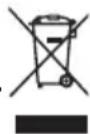
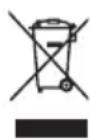
This symbol on the product, in the instructions or on the packaging means that your electrical and electronic equipment should be disposed at the end of its life separately from your household waste. There are separate collection systems for recycling in the EU. For more information, please contact the local authority or your retailer where you purchased the product.
Battery disposal
This symbol means that according to local laws and regulations your product and/or its battery shall be disposed of separately from household waste. When this product reaches its end of life, take it to a collection point designated by local authorities. The separate collection and recycling of your product and/or its battery at the time of disposal will help conserve natural resources and ensure that it is recycled in a manner that protects human health and the environment.

- Old batteries may contain substances that are harmful to your health and environment.
- Dispose used batteries always according to the applicable disposal regulations. Please do not throw used battery packs into the fire (danger of explosion) or your household rubbish, take them to your local collection points. The return is free and required by law. Please dispose discharged batteries only.
- All batteries are recycled to reclaim valuable material such as iron, zinc or nickel.
Simplified EU Declaration of Conformity
Hereby, beyerdynamic declares that the radio equipment is in compliance with Directive 2014/53/EU. The full text of the EU declaration of conformity is available at the following internet address: http://www.beyerdynamic.com/cod
Technical specifications
RF frequency range 2.402 - 2.480 GHz
Transmission power. 10 dBm
Operating temperature range .0 to 40^
Charging temperature range 0 to 40^
Detailed technical specifications can be found on the internet at:
www.beyerdynamic.com/lagoon-anc
Product registration
- Using the serial number, you can register your headphone on the web at: www.beyerdynamic.com.
Guarantee terms
beyerdynamic GmbH & Co. KG, Theresienstrasse 8, 74072 Heilbronn, Germany (subsequently called: "beyerdynamic") provides this limited guarantee for the original beyerdynamic product (subsequently called: "product") purchased by you.
If you wish to make a guarantee claim for your product, take it to the retailer from which you purchased it or to another authorised beyerdynamic service partner. A list of all service partners worldwide can be found on the Internet at:
www.beyerdynamic.com/distributors.
In accordance with the terms of this limited guarantee, beyerdynamic guarantees that this product at the time of initial purchase is free of material and manufacturing defects. This guarantee is valid for two (2) years from the date of purchase of brand-new, unused products by the original end user.
As proof of purchase by all means please retain the sales receipt. The date of purchase and the name of the product have to be indicated on the sales receipt. Without this proof, which is checked by beyerdynamic or the relevant beyerdynamic service partner, no claims may be put forward with respect to beyerdynamic based on this limited guarantee; beyerdynamic and the beyerdynamic service partners reserve the right to charge a processing fee if this product in accordance with the guarantee terms fails to meet the guarantee criteria.
The guarantee undertaking consists at the option of beyerdynamic of the elimination free of charge of material and manufacturing defects through repair, exchange of parts or replacement of the entire product. If beyerdynamic repairs the product, exchanges parts or replaces the product, then the guarantee claim for the defect in question or the replaced product is valid for the remaining duration of the original guarantee period or for ninety (90) days from the date of repair, whichever period happens to be longer. The repair or replacement claims may be filled with functionally equivalent, reconditioned products. The replaced parts or components become the property of beyerdynamic.
This guarantee claim is void if the product has been tampered with by unauthorised persons or workshops.
This limited guarantee is valid worldwide in all countries in which in each respective case the national laws do not conflict with these guarantee terms. Other or broader claims than those set forth here may not be asserted on the basis of this limited guarantee. At the same time, however, you as an end user may in your country have legal claims which are not limited by this limited guarantee. The limited guarantee limits neither your legal rights nor the rights of consumer vis-à-vis the retailer which arise from the purchase contract.
Excluded from this limited guarantee are:
- Minor defects or irregularities in the condition of the product which are insignificant as far as the quality and intended use of the product are concerned.
- Accessories included with the product.
- Rechargeable and non-rechargeable batteries (due to their nature these products have a shorter lifespan which in individual cases also depends practically on the intensity of use).
Headband pad, ear pads, wind shield and all parts of the product that have body contact. - Defects which have occurred through improper use or misuse of the product (for example, faulty operation, mechanical damage, incorrect operating voltage), including, but not limited to, any unintended use of the product.
- Defects in the product resulting from failure to comply with the operating and maintenance instructions of beyerdynamic.
- Defects in the product which have occurred through normal wear and tear.
- Defects in the product resulting from or in connection with modifications made to the product to the extent that regarding the nature and extent of the modification no prior written consent on the part of beyerdynamic exists.
- Defects in the product resulting from force majeure.
Defects in the product of which you were already aware at the time of purchase. - Defects in the product caused by the use of accessory components or peripheral devices which are not among the original accessories of beyerdynamic developed for this product.
THERE EXIST NO EXPRESS GUARANTEES, REGARDLESS OF WHETHER THEY ARE WRITTEN OR VERBAL, BEYOND THIS PRINTED VERSION OF THE LIMITED GUARANTEE. ALL IMPLIED GUARANTEES, INCLUDING - BUT NOT RESTRICTED TO - GUARANTEES OF COMMERCIAL PRACTICE AND OF SUITABILITY FOR A PARTICULAR PURPOSE, ARE ONLY VALID FOR THE DURATION OF THIS LIMITED GUARANTEE. BEYERDYNAMIC IS, TO THE EXTENT THAT AN EXCLUSION OF LIABILITY IS PERMITTED, IN NO INSTANCE LIABLE FOR INDIRECT OR CONSEQUENTIAL DAMAGES OF WHATEVER KIND, INCLUDING - BUT NOT RESTRICTED TO - LOST PROFITS AND ECONOMIC DISADVANTAGES.
In some countries / states the exclusion or limiting of indirect or consequential damages or the limiting of the duration of implicit guarantees is not allowed. In this case the previously mentioned limitations and exclusions do not apply to you.
FCC / IC Regulation
FCC ID:OSDLAGOONANC Canada IC:3628A-LAGOONANC
NOTICE:
This device complies with Part 15 of the FCC Rules and with Industry Canada licence- exempt RSS standard(s).
Operation is subject to the following two conditions:
(1) this device may not cause harmful interference, and
(2) his device must accept any interference received, including interference that may cause undesired operation.
Changes or modifications made to this equipment not expressly approved by beyerdynamic may void the FCC authorization to operate this equipment.
Radiofrequency radiation exposure information:
This device has been tested and meets the FCC / ISED exposure guidelines.
Note: This equipment has been tested and found to comply with the limits for a Class B digital device, pursuant to part 15 of the FCC Rules
These limits are designed to provide reasonable protection against harmful interference in a residential installation. This equipment generates, uses and can radiate radio frequency energy and, if not installed and used in accordance with the instructions, may cause harmful interference to radio communications. However, there is no guarantee that interference will not occur in a particular installation.
If this equipment does cause harmful interference to radio or television reception, which can be determined by turning the equipment off and on, the user is encouraged to try to correct the interference by one or more of the following measures:
- Reorient or relocate the receiving antenna.
- Increase the separation between the equipment and receiver.
- Connect the equipment into an outlet on a circuit different from that to which the receiver is connected.
- Consult the dealer or an experienced radio/TV technician for help.
Made in China
This device is granted pursuant to the Japanese Radio Law (電波法) and the Japanese
Telecommunications Business Law (電氣通信事業法)
This device should not be modified (otherwise the granted designation number will become invalid.
Trademarks
The Bluetooth® word mark and logos are registered trademarks of Bluetooth SIG, Inc. and all use of these trademarks by beyerdynamic is licensed. Other trademarks and trade names are the property of the respective owners.
Qualcomm aptX™ is a product of Qualcomm Technologies, Inc. and/or its subsidiaries. Qualcomm® is a registered trademark of Qualcomm Incorporated in the USA and in other countries. aptX™ is a registered trademark of Qualcomm Technologies International, Ltd.
beyerdynamic MIY App
Appeler I'assistantant personnel
beyerdynamic MIY App
beyerdynamic MIY App
beyerdynamic MIY App
Light-Guide-system (LGS)
Stalla in Multi-Point
Tabell for Light-Guide-systemet
PpeDToBpaueHne pncKa DnIe 3dOpOBbN HeCuaCTbIX CnyaEB
- Ppr nscnoj30BaHm HayuHnKOB y6eDntecb, YTO hauaIbHa rPOMKOCTb yCTaHOJIeHa Ha MInHMaJIbHbIyPOBeHb. Perynpyte rPOMKocTb ToJbKO nOcne HaeBaHnry HayuHnKOB. Bo n36exKaHne nobpeJdeHnra clyxa He nCNoJb3yTe HayuHnKn npoOnkntelHoB Bpem C BBICOKM yPOBHeM rPOMKOCTn 3Byka.
MbXOTIMOBaWeBnMaHHeHaTo,TOcNtIKOM npOIOJXnteHbOe BpEmnoIb30BaHnHayuHKAMN CnNtKOM BbICOKm yPOBeHrpoMkOCTn MOrY TnpNBecTn K NOBpeXdEHNIO OpraHOB clyxa. NObpeXdEHNcnyx aBnAOTcBAcTa Heo6paTImbIMi. - Ecnn Bbl ctpaadaete THHHTycom, Bam cneJeT OTka3aTbCra OT nCnoJb3OBAHn HAYHnKOB nn Jke CHn3ntb FpOMKOCTb.
- Heo6xOIMO NOCTOHN 3a TEM, YTO6bI yPOBHeB rPOMKocTb 6bl OTpeylnpOBaHn HADNeJkaUIM Oba3OM. OChOBHO npabIno — YEM Bblwe rPOMKOCTb, Tem Kopoye npoDOnKnteBHOCTb npocnyuBaHn. Cornacho nOIOXeHnM HemeucKIO npofoeeCNOHaBHO ACCouNaUIN NO TexNke 6eONacHOCTn INrHneHE Tpyda WymOBaHarpy3Ka, HApnpMeR, Ha paBOeHM MeTe, He DOJIkHA pReBbIaTb 85 D (rPOMKocTb 3Byka, He BbIXOJaero 3a npedeJIb NOMEseHn) npu MaKcMaJIbHO dOnycTmOIN pOdoJnxTbeHoCTNB 03DeiCTBn Wyma, paBHO 8 cacAM. PnIOBbIeHN rPOMKocTb 3Byka Ha 3 D DoNcyTmA INpOdoJnxTbeHoCTb BO3DeiCTBn Wyma cOKpaUaeTcB vBoE, T. e. npu 88 D ona paBHareTc4 YacAM, npu 91 D - 2 YacAM n T. d.
C nomoubu npinoxehn beyerdynamic MIY Bbi mokeTe npdaTb HnduBuaHboctb cboIM Bluetooth-hayshnkaM.Функця oTcIeKunBaHnra (Tracking) npinoxehn no3BoJAE TcnoIb3oBaTb nx TaKIM o6pa3OM, yTo6bl ypoBeH 3Byka B BaInx hayuHKax He npebIiAaJ MaKcImaIbHoro obIeepnHrTOO yPOBHa akyCTNuecko harpy3kn («шуma»). Ioxaanycta, obpatnte BHMamHe Ha To, YTO Bluetooth-hayuHKn i npinoxehne MIY moryt pernctpnpobatb TOnbKO yPOBHN Wyma, KOtOpBI Bbi noIyaeTe HeNocePdCTBeHHO n3 camIX hayuHKOB; pyrNe, BHeuHne NCTOUYHKn Wyma, KaHapnmep, Wym cTponTeBHO nnOuaAdKn, Wym npn nocseHm KOHepTa n T. d., He Moryt 6b1b yUteHb npn onpeJeHn ankyCTNuecko harpy3Kn. Bluetooth-hayuHKn i npinoxehne MIY He daOT, taKIM o6pa3OM, noIHO KAPTHb BCex nCTOuyHKOB cTpecca DnB BaWero CnyxA. B npinoxehn MIY oTo6paXaETcT OToBko nepeDaBaemg Bluetooth-hayuHKamn akyCTNuecka harpy3Ka, KOtOpaM o6kET 6b1b Bamn orpaHueHa do npneMJIeMOrO yPOBn.
XpaHnte MeIKeIe DeTJIIN 3dEJIINy, yNAKOBKN I AKCECCyApOB B HeIOCTyINHom IJIaDeTeN I DOMAUNHX JKNBOTbIX MeCTe. CnyauHHe npOrIaTbIbAHne MOKET pInBecT N ydysbIO.
Yrpo3a dny kni3Hn!
- HoWeHne HayuHnKOB pe3KO CHNkaet cnOCo6HOCTb BocpHnHMaTb BHeUHne pa3dpaXHTeJIi. IcNoIb3OBAHne HayuHnKOB yuaCTHnKAMn DOPOxHOrO DvIXeHnYpe3BbUaHNo ONaCHO. Pn noJb3OBAHN HauuHnKAMn CnoOC6HOCTb CbIaTaB H N B KOEM Cnyae He DoJnxHa CHNXaTbCra Do UyOBH, Co3daUcero ONaCHOCTb Dnay uactHnKOB DOPOxHOrO DvIXeHnY. TaKe Obpatnte Oco6oe BHImaHne Ha To, YTObI He NCnoJb3OBAtB HayuHnKn B O6NaCTn DeIeCTBnI NOteHUnAIBHO ONaCHbIX MaUnH N MexAHN3MOB.
- N36eraIte nCNoJIb3OBAHnRA HayUHnKOB B CnTyauJnx, KOrDa Cnyx He DonJxH 6bTb HApUWeH, Oco6eHNO npI nepeceHeHH JKeNE3HOOpOxHbIX PyTei IIN HA CTponteJIbHOI NIOuaJaKe.
ФункияakTNBHorOуMonoDaBHeHNA NC
-
Aktubhoe uymonoablenhe He no3Bnonet noIb3oBaTeIO cnbiTaB okpykaoun erO yum. B dopoxhOM DBHXeHH 3TO CBraHc Upe3BbUaHIO BBICOKO NOteHuaJIbHO ONaCHOCTbIO.
-
HNKoIgHa He IcNoJIb3yIte HayuHnKc cakTbHbIM yMOnOaBneHnem (ANC) B cnTyauqnx, KOrda cIyx He doJXeH 6bITb HApUWeH, YTO MOKeT npEcdTabr pNck dJa Bac camix nII dJa OkpykaOuXh, HapPmEp: npi e3e Ha BeIOcInpe, BOXdEHn ABtOMoBnIg, nepeceueHn JkeJe3HOOpOKHbIX NpTei, npi HaxOxJdeHN B6IIN3n DBrKJuIeOcra TpaHCnOpTa IIH Na CTpOHTbHoi nIOuaAdKe.
B TaKnx cnTyauqnx CHNMIte HayuHnki nn Jne IcNoIb3yIe HayuHnki 6e3 uymonoIaBJIeHnA, a TAKKe OtperyIpyuIte rpoMkoCTb Do TaKoro ypOBHn, YTO6bl OTYeTlnBO CblIaTb BHeUHnE 3ByKn, HAnpIMep: CnHaJIbI TpeBOrn n PpeDynpexJaIoUne CNHaJIbI. - 06paTHe BnHMaHHe, UTo 3ByKn, KOtOpBle B obbYhbix o6ctOaTeJIbCTBaX 3ByuAt KaK cnHaIbI TpeBorN nn npEduPexKeHHn, MoryT 3ByuTaT No-DpyrOmy npu NcNoJb3ObaHHn HayUHNKOB.
OTBetCTBeHHOCTb /HaJIeKauJee IcNoIb30BaHne
- He nCnoIb3yIte n3dJIe NHaue, Yem OnIcaHo B HacTOraIe pyKOBoIcTBe no 3KcnIpyaIu. beyerdynamie He HecET OTBtCTBHeHIOCTn 3a HeHaJIeJkaUee nCNoIb3ObaHne n3dJIra NIn erO akceccyapOB.
- beyerdynamie He Hecet OTBeTCTBHeHOctn 3a IOBpeKdEHNe USB-ycTpoiCTB, He COOTBeTCTByIOx nCneuФнkaцma USB.
beyerdynamie He HeceT OTBeTCTBHeHOctn 3a yUep6, BbI3BaHHbI HApUeHnMn CB8n IIO npuHHe He 3apJxHeHbIX nIN CTapbIX aKKyMyJrTopHbIX 6aTapeN INI NO npuHHe BbIXOda 3a IpeJebl 30HbI nepeDaHN Bluetooth.
-Перд Вбдом B Зкплгаataцио co6лдадаite HoPmbi n npabnla COOTBeTCTBHyoцero rocyapcBa.
Mepb npedoctopoxhoctn npn 3knpyaataun npnbopa
- 3apnyakaykymytnophbx6atapein npoBOnTb chepe3 BCTpoEHnbl pa3bem USB Type-C, nCnoNb3yra 6nok nntanr5 B, COBmecTmbl co cTahdApTOM USB 2.0/3.0 (3apnyhbl TK MAKCMYM 1,0 A).
- PnpnpeJeHHe NoBepraTe aKymyIaTOpbl (akmyIaTOpHbIe 6aTaPeHnIN BCTpoEHbIe aKymyIaTOpbl) Upe3MepHomY HarpBy, HapnMpE, Bo3deNCTBnIO COlHeuHbIX Iyuei, OrHr N Tomy nOdo6Horo.
- Octopoxho: Kopnyc He OTKpbIbTaB. Pn HnPaBnBHO 3aMeHe aKKyMylTOPOB cyueCTBye TOnaCHOCTb B3pbBa.
Mepb npedoctopoxhOCTn npinncnoJIb3OBAHm aKKymJrTOpHoi 6aTapei
- He pa3bnpaTb.
-П配电TbIcNoIb3OBAHHe OTCbIpeBuxx AkKMyJrTophIx 6aTaepi. - He noDBepraTb Bo3dIeCTBnIO BlicOKnx TempeaTp (60°C/140°F). CInuKOM BlicOKne TempeaTpbl OkpykaHoue cpebl MoryT npueCTn K Heo6paTMOMy NOpeJdeHHO AKyMylTopa, Oc6eHNO pni BlicOKom ypOBHe 3apJa.
- Ecni BbI He nCnOJIb3yTe aKKMyIaTOp B TeueHHe dNITeIbHO BpeMeHN IIN JxepaHIne erO, peKOMeHnyeTcI doBecTI ypoBeHb 3apra da lo 50% nnoDnepJINBaT b MeCe XpaHeHn TEmnpaTy pO 30°C.
- Hn B Koem cnlyae He noDBeprAte aKKyMyIaTOp Upe3MePHOMy HarpeBy, HanpIMep, Bo3deNCTBIO COJIHeHbIX Jnye, OTHa TOMy nOIO6Horo.
- IcnoIb3OBAHne He No Ha3HaueHnIO nIe HnpeBaIIbHoe IcNoIb3OBAHne MOrT npBecT N NOBpeJeHIO aKKyMylAToPA. B 3KCTpeMaJIbHbIX CnyaIcx CyueCTByIOT pNCK: B3pbIBa, BblJeHn8 60JIbWOrO KOInueCTBa TeIIJa, NoXapa, BblJeHn8 DbIMa IIIN rA3a.
-ПОНЗВОДТЕЛБ: A&S Power Technology Co., Ltd.
KomnJIeKtaUra
Hayunl LAGOON ANC
-AyDnokKa6eBc3-NonpHbIMpa3beMOMTRS3,5MM
- 3apänHyk Ka6eIb USB-A Ha USB-C
-Футлар
KpaTKe pykoBocBo nO 3KnIyatauN
BbHmHaHne n yKnaDbBaHne B cyTnp
BbHIMMaHne
- OTKpbTb cyTJrnp N BblHyTb HayUHnK.
- NObepHyb o6a HayuHnka BHytpb TaK, YTo6bl yHbIe BKnaDbIuN 6bInu NobepHyTb Ipyr Kdpry.
YknaDbbHnneBpyTnp
-Повернгь оба hayшнka Ha Bheшню CTopoHy TAK,чTO6bl BXOD pa3bema TRSВ npabOM hayшнke 6bl NOBepHyT BO BheSHHIO CTopoHy.
- YIIOXHTb HAYWHHKN BΦyTJIrp yWHBIMBKNaDbIwAMN BHIN3.
Прилwxене beryerdynamic MIY
C nomoubI npnloxehna beryerdynamc MIY Bbl moKeTe npuDaTb HndBnuDyabHocTb CBOIM HayuHKaM.
Ppnoxne nocTynHO dJa Apple iOS u Android u MoKeT 6bIb 3aRpyKeHo KaK u3 Apple App Store, TaK u3 Google Play Store.
IpimueaHne OTHOCHTeBHO BepCN MKNponporpaMMHoro oecneuHn 1.0
PnBBeHbIe HKe yKa3aHnO THOCTcK CTaHApTHo YCTaHOBHeHOB BepCN MKNpOpporpaMMHOro o6ecneHnBluTeoth-HayuHKnOB 1.0.
O6HOBJIeHHe MmKpOpnporpaMMHOro o6ecneHnA
Bo3MOxHO HmeeTc8 o6HOBJIeHHe yCTaHOBJIeHHo BepCm MKNpOporpaMMHOrO o6ecneueHn 1.0
C nOmoIbIO npINOxKeHn beyerdynamc MIY Bbl MoKeTe npn Heo6xoDMocTn ee 0bOBHTb.
COBMECTUMOCTb C yCTPOINCTBOM BOCIPON3BeDENH
CoeHnTeBbbluTooth-ka6enbcobmecTcBluTooth-yCTpOcTBAMNBOCnpo3BeDeHn,noDepKBAUUMNCneDuOnne npoHn:
A2DP(dЯ nepedau3buka)
HFP (Дя.TeJeléФонов CBЯЗ)
·HSP (Bocnpoun3BeDenepeun)
AVRCP (dЯпегдау уравлгюхи сигнанов)
BHHMaHHe: C8ra3aHbIe C 3TMM npoqnilm yHKcN IOCTyINbI TOJbKO B TOM cNyae, ecn OHn NOdepKmbaOTcYcTPOINCTBOM BOCpON3BeHn.
POndepxKnBaembIe ayDnOKoKeN
HayunnB pamkax npoHnA2DP noDepKnBaHT aydnokoe SBC, AAC, aptXTM n aptXTM LL. MaKcImaJIbHoe kaueCTBO 3ByaHn oecneuHbaetc aptXTM. MnHmAbH naTeHTHOCT bOCTnraETc npn aptXTM LL.
BnmaHHe: IJIa nepeaun 3Byka MOryT NcNoIb3ObaTbcra TOnbKO Te KOeKIN, KOTOpbl TaKKe DoCTyHbI B yCTpOInCTBe BocPon3BeDeneHn.
YcpoIcTBO BOCPON3BedeHn HuyuHNK ABOTMATUeCKn COeHHaTcR, ICNoJIb3yJyuHn, IM O6oM IOCTyHbIK KOdek BCNEdyUoE MnpAKe:
- aptXTM LL
- aptXTM
3.AAC - SBC
BHHMaHHe:BoJIbIINHCTBO yCTpOInCTB BOCnPOn3BeDeHnR He NOKa3bBaIoT, KaKoN KOeK npN 3ToM aKTNBHO nCNoJIb3yeTcR.
3nemeHbI ynpaBHeHH
Taunad
2 NepekeHouateIb fyHKun ANC
3 nepekeHouaTeIb BKn / BbIKn n coeHHeHn (Pairing)
4 IopT nIaKa6eIc pa3bemOM TRS (3,5 mm)
USB-nopT dπa3apAnHoro Ka6eNa (USB-C)
6 Mnkpooh
CnCTema CBeTOBOH HndnKaun (LGS)
HayuHnKn ChabkeHb TaK Ha3bIbaemcNCTeMoC BcTeBOHmHaKaun (LGS) LGS - 3TO cNCTema ONTuecko Hndkaun, noka3bIbaUoSe aKtuaJIbHbIe pexMbl pa60bl n3dEIny.
JaakBaun LGS BKIOHTe HayuHkn.
KaTOnbKO BbI Bo3bMeTe HayuHnKn BpyKn, npaBbHayuHnK 3acBETTCraPacHbIM CBETOM,a NeBb-6eMbIM.
- Ecnn HayunnK n ChmaoTc n KnaDyTc, Hanpimep, Ha cToI, To np6n3nteJbHo uepe 10 cekyH oH npeBODaTc B pexm OxuaHn n LGS oTKIOuAeTc. Pn 3Tom yCTaHOBneHHa Bluteoth-cBra3b ocTaetc aKTINBHOn.
BpeXmE yCTaHOBnEHn CBy3n CdpYrIM ycTPOcTBOM (PaIring) JeBbI n npAbH NayuHnK nonepMeHHo KOpOTKO MrrAOT rOly6bIM CBETOM.
- YcneuHoe yctaHOBJeHHe CBA3n INHdUpPyETC NOCTOHHbIM FOLy6bIM CBETOM.
Ioppo6Ha HOpmaunn npBedeHa Tabnue «CncTeMa CBeTOBOHnDnKaunn
BkIIOUeHne n BbIKIOUeHne
BknoueHne IpeeknoyateIb 3 nepeBecTu B no3nUo, BKn".
BbIKnOueHne IpeeknOuateIb 3 nepeBecTu B no3nUIO ,BbIKN".
POnzuaBkT

POnuBn

CoeHHeHne c ycTpoNCTBOM BocnpOn3BeDeHnra (Pairing)
Ipeed nepbIM nCnoJIb3OBAHnEM HayuHNKOB Heo6xOJMo IOKNIQUHTb IX K MObJIbHOMy TeJeFOHy IIN dpyromy yctpoiCTBy c Bluetooth. Cnocob yCTaHOBKn CoeHNHeNMA MoKeT OTIIuATbcra PnI NcNoJIb3OBAHm pa3NHyBX ycToCB BOCpON3BeDeHn. ToXaNyIcTa, o6paTntecb K INCTpykUn No EKcnIyataun COOTBeTCTByIOeO yctpoiCTBa BOCpON3BeDeHn.
- NpeekIIOUaTeJIb 3 nepeBeCTn B nO3nIu, BkN".
- NapeKIOUaTeJIb 3 nepeBecTu Ha TpN CEkyHdbI B no3nucu „Paiing".
CnCTema CBETOBOH INDnKAUIN NOKa3bIbaeTpeXIM yCTaHOBJIeHNA CoEINHeHHA (PaIring) - IpaBbI N NeBbI HayuHKnN NOpeMeHHOMMraHOT rOJIy6bIM CBETOM.
3.AkTNBnpyTe Bluetooth Ha yCTpoNCTBe BOCnpOn3-BeDeHnI npn Heo6xOIMoCTn AKTNBnpyTe cyHKUHO NONCA HOBbIX YCTPOINTB.
4.B MeHIO Bluetooth ycTpoINCTBA BOCnpon3BeHnB CnNcKe DoCTyINbIX ycTpoINCTB Bbl6epnte "Lagoon ANC" n yctaHOBInTe coeHNHeHne Mekdy ycTPOINCTBaMn.
5.CnCTema CBETOBOH INDNKAUIN NOKa3bBaET ycneuHoe yctahOBJIeHHe Bluetooth-cBra3n NOCTOHHbIM rJy6bIM CBeTOM. PnKaxdOM CNeDyIOUeM BKNIOUeHm YcTPOIcTBa COEINHRAOTcABTOMATNueckn,ecn OHn HAXODTcB 30He DOCTYNUHOCTn Dpyr Dpyra.
CoedHHeHc yctpoiCTBOM Bocnpn3BeHnuepe3 6nXnIO 6eKoHTaKTHyIO CB3b NFC
BbMOKeTe NOkNouHTb HayuHnKuYepe3 NFC K yctpoiCTBy BocnpoN3BeDeHn, NoDepxNbaIoUeMy NFC. HayuHnKu DOJXhbl HaxOuTbcra BO BKIOUeHHOM COCToHn.Ipn 3tOM He Imeet 3HaueHn, HaxoJaTc8 OHN B pexime coeDInHeHn (Pairing) nIi Het.
- NpeeknioateIb 3 nepeBecTn B no3nIO, BkN".
- AKTNBnpoBaTb yHKuHNO NFC Ha ycTPOIcTBEOCnpON3BeDeHnA.
- YcpoBBO Bocpon3BeHnna NoDHeTn 6n3Ko K neBOMy HauuHky TaK, Yo6bI oBa NFC-ua HaxOuINCb B HeOpceDCTBeHHoN 6n3OcTn Dpyr K dpuyr. Ppr Heo6xOaMOCtN CdBnHyTb yCtpoCTBO Bocpon3BeHnra B Ty nIn nHyTO CTopoHy.
MylbTInTOueHbIpeXIM
HayunnmoYt yctaHabnBaTb coeINHeHne c MaKc. 15 yctpoiCTbAmn c Bluetooth.
Pn3TOM OJHOBpeMeHHa AKTNBHAR CB3b BO3MOXHa MaKcIMaJIbHO DByMyCTpoICTBaM. OJHAKO BOCpON3BeDeHne My3bIKN TeNEoHHa CB3b MOKeT 6bITb yCTaHOBNeHa OJHOBpeMeHHo TOnbKO C OJHM yCTPOICTBOM.
TeleponHna CB3b Imeet npenmyeCTBO nepeI My3bikalhBIM Bocpnn3BeHeHem, T. e. npu nocTynnHn Teleohoro 3BOHka BOCpOun3BeHeHne My3bIKn aBTOMaTueeCKn npepbIbaETcra.
PnncnoJb3OBaHHy UcTpoIcTB BocpnOn3BeHEny (YB) co6JIoudaETc CneyuOa OepeHocTb:
HacpoBn B yctpoBCTbax Bocnpo3BeDeHnA JnNoJyHeHnHaNnyUeRo KaueCTBa 3ByKa np6ecnpoBOHOcB3n
YTo6bI uepe3 Bluetooth nonyunTB B Baunx HayuHKax HauNyUwee KaueCTBO 3ByaHn, BocnoJb3yTeCb CNeDyUoUMn npakTNUeCKMn COBETAMn:
- PpOMKocTb 3Byka B HayuHKax NOCTaBnTb Ha MmHmMy, a Ha yCTpoNCTBe BOCnpON3BeHeHn - Ha MaKcMym.
2.ДаьншуюperynipOBky rpoMkoCTn 3Byka npOn3BoOHTb TOnbKO Ha HayuHnKax, a He Ha yCtpoiCTBe BocnpOn3BVeHnIy.
BaxkHo:
3TO OTHOCHTC TOnbko K yCTpOINCTBAM BOCPON3BeDEHnA, B KOTOpbIX OTCyTCTByET aBTOMaTnueCKa CnHXPOHN3aU nrgomKoctn 3Byka. B yCTpOINCTBAX BOCPON3BeDEHnA, KOtOpbIE aBTOMaTnueCKn CnHXPOHN3npyIOT rPOMKOcTB 3Byka (HanpImep, iPhone, iPad, pa3NnHbIe Android-cMapTfoHbI), rPOMKOcTB 3Byka HayuHKnOB BCerda coBnaJaet C rPOMKOcTBIO 3Byka yCTpOINCTBA BOCPON3BeDEHnA.
- B nporpaMMHOM o6ecneueHHn HeKoTObix yctpoiCTB BOCpOu3BeDeHHa IMeETcBA03MOxHOCTb OTKJIIOHeHHa cyueCTByUOxN x ayDNO-3ΦΦeKTOB.
YcTpaHeHne HEnCnpaBHOCTe
| Heincpapbnoctb PrunuHa YcTpaHene | ||
| Hayushnikn He BkIouaOTcAkkymylan | Top nucT nII nIIoxo 3apJxKeH | Зардntь akKумлтор |
| He npOncxOndt BocnpoIN3VeDeHnna medna | OcTcYcTbYeT Bluetooth-coeDInHeHne UcTpoiCTBOM BOCpOIN3VeDeHnna | СТановпь CBЯЗы hayшнкOB C устpoiCTBOM BOCpOIN3VeDeHnna |
| Hayushnikn OTCyTcTbYUToB M MeHIO Bluetooth ycTpoiCTBa BocnpoIN3VeDeHnna B cIuske dOcTynbIX ycTpoiCTB | · Hayushnikn BbIKLIOUChEbl · Hayushnikn He haxOJaTcB V peXime coeDInHeHnna · UcTahOBJIeHO Bluetooth-coeDInHeHne C dpyrIM yCtpoiCTBOM BocnpoIN3VeDeHnna | ·ВКПОчNTь hayшнки ·Перевесы hayшнкь в рекIM Bluetooth-coeDInHeHnna ·Первать Bluetooth-coeDInHeHnna СnexeJaTeNbIbM yCtpoiCTBOM BOCpOIN3VeDeHnna uYCTaHOBITb HOBOE coeDInHeHnne |
| BocnpoIN3VeDeHnne 3Byka nIeT oUeHb TnxO, XOTa rPOMKOCTb Ha hayshnKax yCTaHOBJIeHa Na MaKcIMaJIbHbI yroBeHb | OчeHb TnxN ImEIoUChSry 3BykOBoi cIrgHaN | ГромКоCTь 3Byka Na устpoiCTBc BocnpoIN3VeDeHnna ПОCTaВИТь Na MaKcIMyM |
| 3Byk peZkni, a BocnpoIN3VeDeHnne 6acob cIINsKOM cIa6o | IzolЯцnia Hayushnikov HeDcOtaTouHa | Надetь hayшнки ТAK пIoTHNo, ЧTOБы ДОCTИчь МakcIMaJIbHои ИЗOLЯцnia |
| Дальноctb DeiIcTBnY beCspOBoVDHnO CBa3N cIINsKOM maja nII nIIMeIOTcR пррьIBaHnY CBa3N | IIMEIoTcR IomExn OT dpyrInx ycTpoiCTB | УBEJIuCyTepacStOJHnne OT WLAN- pOyterpoBи MmKpOBoJHOBbIx neeey, yБeДиTeCb, чTO BaSe TeNo He HaxOДиTcR MexdY uCtpoiCTBOM BOCpOIN3VeDeHnry n HauShNKaMn |
ANC-BkIIOUeHneN BbIKIOUeHne
AKTINBHOe yMOnOaBneHHe (ANC) MoKet 6bITb BKIOUeHO N BbIKIOUeHO IocpeIcTBOM ANC-nepeKIOUaTeJIa 2B DBA 3Tana.
Yka3aHnI dIyIOCTNKeHnHaI6OJIeKauEcTBeHHoIyHKuIN ANC
AKTUBHOe yMOnoDABHeHne pa6OtaeT Oc06eHNO xopoWo Ha Hn3Knx YacOTax, TaKx KaK CTyuaHne KOnc No peIbcam NnCnIbHbY mYm pa6OtaOuX ABNaUHOHHbIX DBrIaTeNei. IOrToMy aKTUBHOe yMOnoDABHeHne B OCHOBHOM NcNoJb3yeTc npN PyTeUeCTBnX Ha JKeJIe3HOOpOXHOM NnBO3DyUHOM TpaHCnOpTe.
HayuHKnC aKTHBbIM yMOnoDaJIeHHeM Han6OJee 300fKeTbHNOyCTpaHJOT pa3dpaxaIOUne OkpyKaIOUne YMbI, KOrda aKKyMJIaTO pONHOCTbIO 3apJKeH. Pn nCNoJIb3OBaHHn cyHKcNn aKTHBHO rOMonoDAJIeHn CNeDyET NOCTOARHNO cNeIDNTb 3a 3apJIKoAkkMyJrTopa.
IcnoJIb3OBAHne aydnoKa6eJia
B KOMNJIeTe NoCTaBKn IMeETcA yAnIOKa6eIb c 3-NoJIrpHbIMn pa3bEmAmn TRS 3,5 MM Ha o6Oux KOHcaX. C NMOUTo 3TOro ayAnIOKa6eIg HauuHNKm Moryr nCnoJIb3ObaTbc8 6e3 Bluetooth-coeDInHeHn IIN npn pa3pJxEHHom aKkyMyltope.
1.HayuHnKu BbIKNouHTb, YTO6bl NHTaHne NOCTynaNo HE OT aKKMyJrTopa.
2. OdniKoheu aydnoka6eBCTaBnTB rHe3do pa3bema TRS 4Ha npabom hayuHmke.
3.ДpyroI KOHeI aydnokabena noCoeHHnTb K yctpoiCTBy BocpnOn3BeHnIa.
yxo
-Дя чсткни hayшнков Lagoon ANC IncnoJb3yIte cyxyu nnn cnerka cmoeHHyo BODO mRrkkyo TkaHb.
He nCnoB3yTe MOUuIe cpeCTBa, CoedePkaIue paCTbOpNTeIN, NocKoJIbky OHI MOrY T NOBpeDITb NOBepXHOCTb 13denn.
Yka3aHnno cpoKy 3KcNpyatau nn NHTn-NOHHbIX 6aTapei
- No DocTnkeHHN nonHOn 3apRdKn OTcoeHNHTe USB-ka6enb OT 3aprHoro yCTpoiCTBa n OT HayuHkoB.
- Bo3dienCTBnE BbICOKnx TemnepaTpy, B Oc06eHHoCTN B COyehHm C BbICOKM ypoBHem 3apra, MoKet npNBecTN K BO3HKnHOBeHnO HeycTpaHmblx NobpeXdeHn.
- Ecni Bbl nlaHpye Te TceHne DoIrO He IcnoJb3OBaTb NCTouHnK nITaHnI XpaHntb ero, peKOMeHnyetcdoBecTN ypoBeHb 3apra aKKyMnyTopa do 50% nNoDepKuBaTb B MeTe xpaHeHnY tempeatpy do 20^
- Nocne nCnoNb3OBaHnna 13dJeHne, coDepXaUee aKKyMnyTOpbl, OTKJIOnuHTb.
3aNachbIe Yactn
3aunactn dny hauynkoB bmyoKeTe haTn BVIntepHete no aDpecy www.beyerdynamic.com/service.
Ytunn3aun
JaHbI CmB0J Ha n3deJIIN, B INCTpyKUIN PO 3KcNlYaTaUIN nIN Ha yNaKOBKe O3HaayeT, YTO BaUN 3NeKTPnueckne I 3NEKTPoHHbIe Pnp6opbl IO nCTeueHN cPoka Cnyk6bl DOJXHbI yTNIN3nPOBaTbcr OTdJIbHOOT 6bITOBbIX OTxODOB. B EC DeiCTByET CnCTema pa3dJeNbHorO c6opa nepepa6aTBiBaembIX OTxODOB. JIy NOnyueHn NOpO6HoN INΦOpMaun ObpaAaTEcb, NOXaNyIcTa, B MeCThIE INHCTaHUN INN K TOPROBOpraHn3aUIN, y KOToPoiB Bbl npno6peIn n3deJIne.
YtJIN3aun aKKymyIaTOPOB
IaHHbI CmB0J O3HaayaeT, YTO B COOTBeTCTBNN C 3aKOHAmN I npabnlaMn, DeiCTByIOUmmN B KOHKpeTHOM pernohe, Baue n3dennne n/nnn 6atapere DoJXHbI yTNJIn3npoBaTbcra OTJeNbHO OT 6bITOBbIX OTxOIOB.
Ecnp cpoK 3cknnyataun n3deJnna HCTeK, ero cneJeT yTuInn3nPoBaTb B yka3aHHom TeppntOpnaIbHO aDMnHnctpaunen MeTe c6opa. Pa3dJIbHbN C6Op n yTuInn3aun DaHHoro n3deJn n/nnn AkkymyIaTOPOB nOMOxET c6epu npnpoINbIe pecypcbI n rapaHTnpyeT, YTO npoueeCC yTuINn3aun He HaHeCET uIep6a 3doPobBoIIOJe n OKpyKaIOUeI cpeIe.
- CtapbIe nCTOuyHnK nITAHnI MOry T coepkataB BeuectBa, cnocobHbIe hAheCTn BpeD BaIeMy 3dOpOBbIO n OkpykaIoUeI cpeIe.
Bcerda ytnn3npyTe nCNOJb3OBAHHBe 6aTapeN B COOTBEcTBm C DeIcTBU0iIMM 3aKOHAMn I npabuamn. He 6pocaiTe nCnoJIb3OBAHHBe aKKymjAToPbI B OROHb (yrpo3a B3pbBa), He ytnn3npyTe nx BmeCTe c 6bITOBbIMn OTXoJamn. AkmyJrAToPbI CneJyET ytnn3nPoBaTb B IMeIOxxCnpyHKtax c6opa. Bo3BpaNTOCHNKOB NHTAHn8 BeCnPaTeH n PpeDnncBbAeTCs 3aKHOaTaTeNbCTBOM. IoxaJyNCTa, ytnn3npyTe TOnbKO pa3prKeHHBe 6aTapeN.
Bce nctouhkn nntaHn noCTynaHT ha BtOpuHyo nepepa60Ky, yTO no3BOJareT noTyuHTb n3 Hnx TaKne ceHHbIe MaTePuaJIb, kAK JeJIe3O, UHK NIIH HKeJIb.

YnpoehnHa DeeknapauncootBcTbna cTaHapTaM EC
beyerdynamic hactoIzum 3aBnreT, yTo paOnpeaioee ycToCTBO COOTBeCTBye T NipeKtBE EC
2014/53/EU. Nohb TeKCT Keapauu COOBtCTBna CTaHapTa EC MoXHO HauTN B INHTepHeTe no aDpecy:
http://www.beyerdynamic.com/cod
TexHnueckne daHHbIe
Dnana3OH BbICOKnx YacToT. 2,402-2,480 GHz
MoHocTb nepeDaTUnKa 10 dBm
Dnana30n pa6oynx TemnepaTyp . . . . . . . . . . . . . . . . . . . . . . . . . . . . . . . . . . . . . . . . . . . . . . . . . . . . . . . . . . . . . . . . . . . . . . . . . . . . . . . . . . . . . .
Huaan3oH TemnepaTpy 3apAKn. . . . . . . . . . . . . . . . . . . . . . . . . . . . . . . . . . . . . . . . . . . . . . . . . . . . . . . . . . . . . . . . . . . . . . . . . . . . . . . . . . . . . . . . . . . . . . . . . . 0 do 40 °C
Poiop6nyo INΦopMaζιO texHuecknx daHbIX Bbl haIeTe b HtepHeTe no aIpecy:
www.beyerdynamic.com/lagoon-anc
Pericpaunn 3nden
- Bы можete зaperгострюваь Baши hayшнки в Intерпесу www.beyerdynamic.com При заху уka3aTB срейнblй Homep n3djenna.
TapaHTnHbIe 06a3aTeNbCTBa
beyerdynamic npeioctabnraet orpaHueHHyIO rapaHTNU Ha npno6peTeHHoe Bamn opurnaIbHoe n3dne (daene: "I3dne").
Pn BO3HKnHOBeHHrapaHTnHOrO cnya CneNyET PpeBbNTb U3dennpe npoabuy, y KOTOPoro Oho 6blno npnoobpeTeHO Hn Dpyromy ABTOp3OBaHHOMy cepBNC-napTHepy KomnaHm beyerdynamic. Npeueh MEXdyHapOnbIX ABTOp3OBaHHbIX cepBNC-napTHepo KOMNAHn Bbl NaTe B INTEpHeTe www.beyerdynamic.com/vertriebspartner B COOTBeCTBnC yCNOBnMn HactoJeorpaHNeHHoR rapaHTn KOMNAHn beyerdynamic rapaHTnpyET OcytCTBne pON3BOODtBEHHORO 6paka n DeΦeKToB MaTePnAHa N3dEJIHa NM oMeHT ero npNo6peTHeN. CpOK dIeCTBnR rapaHTn -Dba (2) rOda C MOMeHTa npNo6peTeHn nepBOHaJbHbIM notpe6nteJem HOBO, HeINcNoB3OBAHHORU N3dEJIIn.
Для подеверждени петени сседует пп рокунке obяstаельно coхрангь KBNTAHцИ.В KBNTAHцИdoJXHbI 6byt yka3aHbI data nokynки и habане ИделЯ.В счuae otcytCTBЯ KBNTAHцИ,КOTOPAбуET npOBepHa camой komпаней beyerdynamicилл ee abTOpN3OBAHHbIM cepBIC-napTHepOM,ppeTeH3Nn no rapaHTm He npHHMaIoTc; beyerdynamicи eee cepBIC-napTHepbl octablanot 3a co6oи npabo BbICTaBtB cuet 3a obpa60kTy 3a8Bkn, ecIn He co6lNoDeHbl ycNoBny ppeOCTaBleHry HactToIe rapaHTn.
PnB03HKnHOBeHnI rapaHTnHOrO cnyaHa Bb6op beyerdynamic npOn3BODITc 6ecnlaTHe oYCTpaHeHne deΦekTa MaTePnAna IIn IpnON3BODCTBeHHoro 6paka nyTem pEmoHTa, 3amehbl qacteN N3dEIny IIn BCero N3dEIny. EcnKOMnAhnE beerydinamic 6bl BbINONHeH peMOHT, 3ameHa qacteN N3dEIny IIn BCero N3dEIny, rapaHTnHa OTpeMOHTnpOBaHHbI eNN 3ameHeHHbI qactN IIn Ha 3ameHeHHoe N3dEInye DeICTByET Ha IpOTJKeHN BpeMeHN,
OCTaBweroocr O TepBOHaayIbHoro rapaHTnHoro cpoka, IIN DeBraHocTa (90) dHe C DaTbpeMOHTa. Ppr 3OM yHt bBaetc 6OJIe e nnTeIbHbI IN 3 EINx nepnoob. TpeBOaHnro no peMOHTy INN 3aMeHe MOrY 6bITb yDObJIeTBopeHbC nOMouHIO aHaONuHORo NO CBOIM FyHKzIaM NcnpabHoro IN3dEJIa. 3aMeHehHbIe Yactn ININ KOMNoHEhTb CTaHOBRTc co6CTBeHHocTbIO beyerdynamic.
OrpaHnueHHa rapaHTnHa He pacnpoCTpaHnEeTcHa:
- He3HaHTeBHeIe HcnpaBHOCTn INN OTKIOHeHr ON TcAHHApTHbIX XapaKTePNCtIK N3dEINr, KOTOpbIE CyueCTBeHHo HE CHXKAIoT ERO CEHHOCTn IN He MeSAIoT NCNOJb3OBaTb ERO NO HA3HaueHHIO
- npinlaraeemble akceccsyapbl
- aKKyMnyIaTOpbI n 6aTapei (BCJeCDTBnE CBOe npuPoDbI 3Ta npOdyKzna IMeet 6oJIee KopoTKn cPOK cnJxkbI, 3aBnCraUm OT INHTeHCNBHOCTN NcNoJb3OBAHNA)
am6yupb, BknaDbuH, BeTpO3aunTy n BCE qactn 3dennr, KOtOpbl epn 3KcnnyataunmmeIHT HeNOCpeDCTBeHHbIKoHTAKT C TeIOM - HenncnpabHocTn, npon3oWedHne no npuHne HeHaJnxKaUero nHn HnepaBnIbHorO nCnoJIb3OBaHnra N3dEHNRA (Hanpimep, HeBepHOe o6cnyKINBaHne, MexAHueckne NOBpeKDeHnra, nOdkIIOUeHne HeDOnyCTUMORO HAnpJxKeHnra), B TOM YNCNE IcNOJb3OBaHne N3dEHNRA He No Ha3NaueHnHO
- HeicnpaBHOCTn, npOn3oWeIDune BCneDCTBne HecO6JIIODeHnI HcTpyKun beyerdynamic no o6cnyJbAHnIO n 3KcNpyatauun N3dennr
- HeuCnpaBHOCTN, YABLIOUeNEcpe3yJbTaTOM eCTeCTBeHHoro N3Hoca
- HenncnpaBHOCTN, Bo3HnKUne BCNEcTBe HIN CBra3aHHbIe C npOBeDEHHbIMu MOiΦnKaUmaM N3dJIyA, ecIn BND n o6bEM MoiΦnKaUm He 6bln PpeDbaPteJIbHO B INCbMeHHo fOpme corlaocBaHbIC KOMpaHne beyerdynamic
- HenCnpaBHOCTN, BO3HnKUne BCNeDCTBHe fOpc-MaxOpHBx O6CTOReTbCTB
- HencppaBHOCTn, o KOtOpbIX 6bIIO n3BeCTHO npn noKynke I3dennia
- HenCnpaBHOCTN, Bo3HKnUne B pe3yIbTaTe NCNoJIb3OBAHnKOMnJIeKTyIOUx IN nepuΦepnHBIX yCTpoiCTB CTOpOHnX npOn3BODInTeNei, KOtOpBie He RaJrOTc OpiRHaJIbHbIMu YacTAmN u o6opydOBaHnEM beyerdynamic, CneuaJIbHo pa3pa6oTaHHbIMn dIra daHHoro N3dennia
IOnb3OBaTeNb IInuAeTcra rapaHTnHbIX npab, ecnn nMeJIO MecTO BMeUaTeNbCTBO HeaBTopu3ObaHHbIX NIIu nnMactepcknx.
OrpaHueHHa rapaHTnJa eIcTByeT Bo BcEx cTpaHax, B KOtOpbIX HaCuHOHaJIbHoe npaBO He npenTCTByeT
npedocTabneHIO hactoJe rapaHTn. IpOpye nn6Bonee Wipokne, Yem ONcaHbIe 3decb, npTeH3nn
npedocTabnEma orpaHueHHa rapaHTn He nokpbIbAeT. KoHeHybI NOKyNaTeJIb TaKke MoKe T BOCNoB3OBaTbcra
DOONHITbHBIM npabAMn, npEOCTaBnEmbIM 3aKOHOM KOHKpeTHOJ CTpaHbI, ecNI OH He NCKLIQUaOTcra
UCNOBmN 3TOI orpaHueHHo rapaHTn. rapaHTn He orpaHNUBaET Hn IOpDInueckne npaba NOKyNaTeJI, HN
npaba B3aMooTHoWeHIN NotpeBnteJIc C npOdaBcOM, KOTOpbIE cNeDuYOT n3 DOROBOPa KyNN-NpOdaXn.
KPOME DAHHOI PIEATHOIBEPCIN OTRAHUeyHHOI TAPAHNTN HIKAKNE DpyTNE O63ATEJIbCTBA, HIN NICbMeHHbIE, HN YCTHBIE, HE IMEIOT Cnbl. BCE NOJPA3yMEBAEMbIE TAPAHNTN, B TOM YNCJIe IPIHNrTbIE B TOPROBIE CTAHdAPTHbIE TAPAHNTN I TAPAHNTN PPINOHOCTN DJIY ONPEDELEHHOUI, DEICTBNTIELbHI TOJIbKO HA IPOTJAKeHNI CPOKA DEICTBNA HACTOUI OE TPOAHUEHHOITAPAHNTN. IOKA NCKJIIOUeHNE OTBETCTBEHHOCTN DOIYCKAETCRA 3AKOHODATEJIbCTBOM, KOMPANHBEYERDYNAMIC HN IN PKN KAKNX OBCTOReTbCTBAX HE HECET OTBETCTBEHHOCTN 3A IPRMOIIN KOCBEHbI UIep5 JIOBOTOPODA, BKJIIOUAYI, NOMMIO IPOUERO, YNUSEHHYIO BblOdy N 3KOHOMUeCKNe Y6blITKn.
3aKoHOdaTeIbCTBOM HeKOTOpbIX CTpaH He DoNyckaetcra NCKIIOUeHne IIN ORpaHueHne OTBeTCTBeHHOCTN 3a npMbIe IIN KOCBeHHbIe y6bITKn IIN ORpaHueHne cPoka DeIcTBnRA rapaHTn. B 3tOM Cnyae BblweynomrHytbie OrpaHueHn I NCKIIOUeHn H e yuHTbIBaIOTcra.
TobapHbI 3HaK
CnoBechTTOBAPHb3nak Bluetooth® nIoroTnblrABJIOTc 3apeRNCtpnpOBaHHbIMN TOBAPHBIMN 3HaKaMn Bluetooth SIG, Inc., nIIO6oe nCNoJIb3OBAHne TaKnx 3nAkoB beyerdynamic npOn3BOdntcB pAmkax IInCeH3nOHHO corlaWeHn. DpyrHe TOBAPHbIe 3nAKn I TOpROBbIe HAnMeHOBAHnRA BJIOTc CO6CTBeHHoCTbIO COOTBEcTcByUux BnaDeIbueB.
LaiyIeT kaIeT SiSt( LGS)
hawjg h 10
LGS 論 横線形態者 用 用
- StwI"ON"WtJro hSsiSiO.
- 十 Stwif ③ "OFF" wifloi hsiSiO.
"ON" 虎视
"OFF" 1
新起记与
海德子将由来人有责,自一在国,有能是。

"贝阿"
For further distributors worldwide, please go to www.beyerdynamic.com Non-contractual illustrations. Subject to change without notice.