DJ 300 PRO X CLUB - Earphones BEYERDYNAMIC - Free user manual and instructions
Find the device manual for free DJ 300 PRO X CLUB BEYERDYNAMIC in PDF.


User questions about DJ 300 PRO X CLUB BEYERDYNAMIC
0 question about this device. Answer the ones you know or ask your own.
Ask a new question about this device
Download the instructions for your Earphones in PDF format for free! Find your manual DJ 300 PRO X CLUB - BEYERDYNAMIC and take your electronic device back in hand. On this page are published all the documents necessary for the use of your device. DJ 300 PRO X CLUB by BEYERDYNAMIC.
USER MANUAL DJ 300 PRO X CLUB BEYERDYNAMIC
SAFETY INSTRUCTIONS 3
APPLICATION....3
MAINTENANCE....3
HOW TO CONNECT THE CONNECTING CABLE....4
HOW TO CHANGE THE COVER CAP....4
HOW TO CHANGE THE EAR PAD....4
HOW TO CHANGE THE HEADBAND PAD....5
HOW TO TRANSPORT THE HEADPHONES....5
VERSIONS....6
SUPPLIED ACCESSORIES 6
ACCESSORIES AND REPLACEMENT PARTS 6
SERVICE 6
DISPOSAL....6
TECHNICAL SPECIFICATIONS 6
WARRANTY 6
Thank you for purchasing the dynamic DJ 300 PRO X | DJ 300 PRO X CLUB DJ headphone from beyerdynamic.
Please take some time and read this information carefully before using the product.
SAFETY INSTRUCTIONS
Risk of injury
We would like to point out that an excess of high volumes and long periods of listening may cause hearing damage. Therefore, use the lowest possible volume levels.
▶ If you suffer from tinnitus, do not use headphones, or reduce the volume.
According to regulations to protect employees against damages caused by noise and vibrations, please follow these instructions:
| Sound pressure level | Period of listening |
| 85 dB max. 8 hours | |
| 88 dB max. 4 hours | |
| 91 dB max. 2 hours | |
| 94 dB max. 1 hour | |
| 97 dB max. 30 minutes | |
| 100 dB max. 15 minutes |
When connecting the headphones, please ensure that the volume is turned down to minimum. Adjust the volume after putting on the headphones.
Danger to life
Headphones drastically reduce perception of external sounds. Using headphones in road traffic can be potentially dangerous. The user's hearing must not be impaired to the extent that it causes road safety risks. Please also make sure that you do not use the headphones in traffic or within an area of potentially dangerous machines and tools. Furthermore, avoid using the headphones in situations where hearing must not be affected, especially when crossing a railway crossing or at a construction site.
Liability / intended use
▶ Do not use the headphones for any application which is not described in this product information.
The company beyerdynamic GmbH & Co. KG accepts no liability for damage to the headphones or injury to persons caused by careless, improper or incorrect use of the headphones, or by use for purposes not specified by the manufacturer.
APPLICATION
The DJ 300 PRO X and DJ 300 PRO X CLUB are closed-back headphones, ideal for accurate cueing and monitoring.
▶ Both provide a clear, powerful sound with focused mids, defined highs and rich bass.
Both models are designed for loud environments such as clubs and festivals and are equally suitable for stylish DJ sets at pop-up events, rooftops, art events or in bars.
▶ Due to interchangeable ear pads, they can be used flexibly as on-ear or over-ear headphones.
The cover caps can be personalised directly via the "MANUFACTUR" online configurator on the beyerdynamic website.
▶ Compact when folded and quick to store — ideal for spontaneous party nights and flexible use.
The cable can be connected to the left or right ear cup and sits securely due to a lockable bayonet lock.
- Replaceable parts ensure sustainable and long-lasting use.
▶ Sweat-resistant leatherette pads offer comfort, isolation and durability.
The gold-plated mini jack plug (3.5 mm) with a screw-on 1/4" adapter (6.35 mm) is compatible with all standard headphone outputs.
MAINTENANCE
For hygienic reasons, you should occasionally clean the ear pads and headband pad with a soft cloth moistened with water. Make sure that no water drops into the ear cups or transducers.
▶ If necessary, you can carefully remove the ear pads and clean them with mild soapy water.

Never use any solvent or aggressive cleaning agents! Also avoid cleaning agents containing alcohol or acids. Furthermore, the ear pads must be completely dry before they are re-attached to the headphones.
Never use a vacuum cleaner for cleaning the DJ 300 PRO X | DJ 300 PRO X CLUB, as this may cause irreparable damage.
As ear pads and headband pad are subject to natural wear and tear, they will need to be replaced from time to time. You can easily do this yourself. Refer also to the "How to change the ear pads" and "How to change the headband pad" chapters.
▶ If other components must be replaced, please contact the beyerdynamic service and logistics centre.
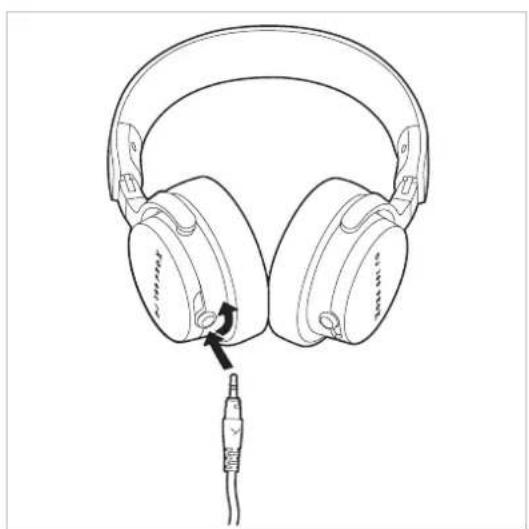
HOW TO CONNECT THE CONNECTING CABLE
At the end that connects to the headphone, the connecting cable is fitted with a mini jack plug (2.5 mm).
Insert the 2.5 mm jack plug into the left or right ear cup. Please only use one connection at a time to avoid possible damage to the headphone.
▶ Turn the plug clockwise until it clicks into place completely and audibly.
▶ To remove, carefully turn the plug counter-clockwise and pull it out.
natural_image
Line drawing of a pair of headphones with a cable connector, no text or symbols presentAt the other end of the connecting cable is a gold-plated mini jack plug (3.5 mm) with a screw-on 1/4" adapter (6.35 mm).

Connect the stereo jack plug of the cable to a headphone output only! If you connect the DJ 300 PRO X | DJ 300 PRO X CLUB to any other jack socket, it could be damaged.
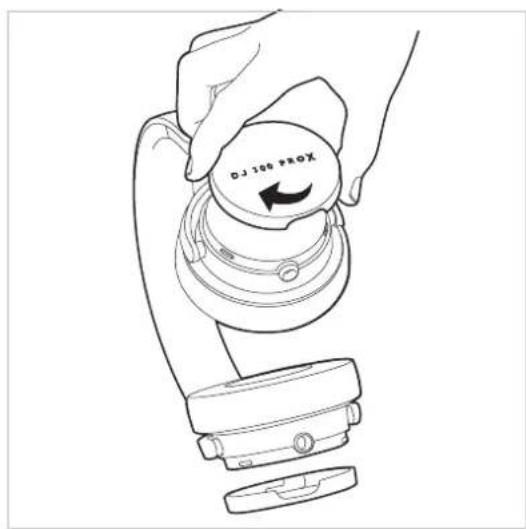
HOW TO CHANGE THE COVER CAP
Remove the cover cap from the ear cup by turning it clockwise and lifting it off.
Align the cap so that the narrow opening faces downwards and turn it counter-clockwise until it stops turning. Make sure that the cap clicks audibly into place - this indicates that it is securely locked.
text_image
XJ 100 DHOW TO CHANGE THE EAR PAD
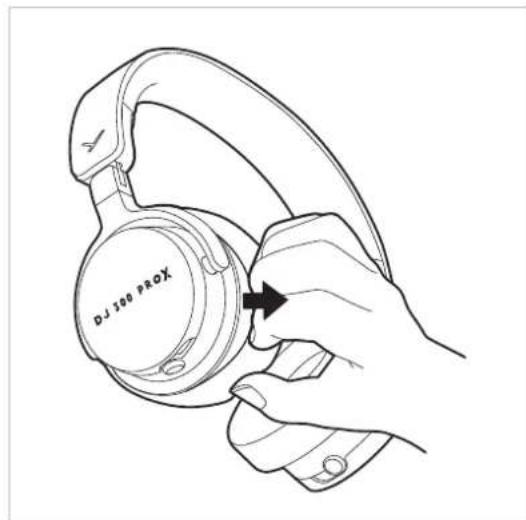
Remove the ear pad from the ear cup by carefully pulling it smoothly along the edge from the ear cup.
natural_image
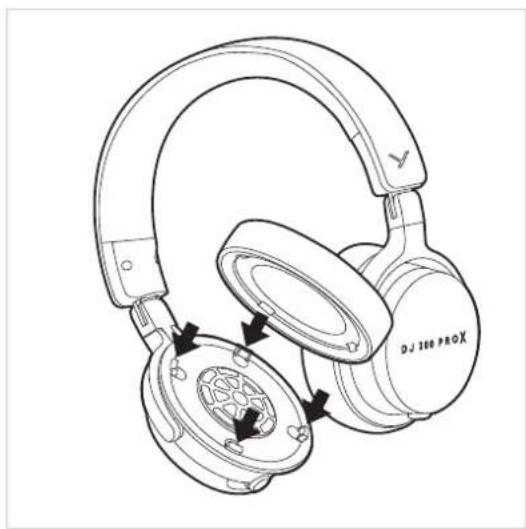
Line drawing of a hand holding a DJ 300 Prox headphones, no text or symbols presentPlace the new ear pad onto the ear cup so that the snap-in noses on the housing fit directly into the slots on the ear pad. Press the ear pad firmly until it clicks into place.
natural_image
Line drawing of a DJ360 PROX headphones with earbuds and charging case (no text or symbols)HOW TO TRANSPORT THE HEADPHONES
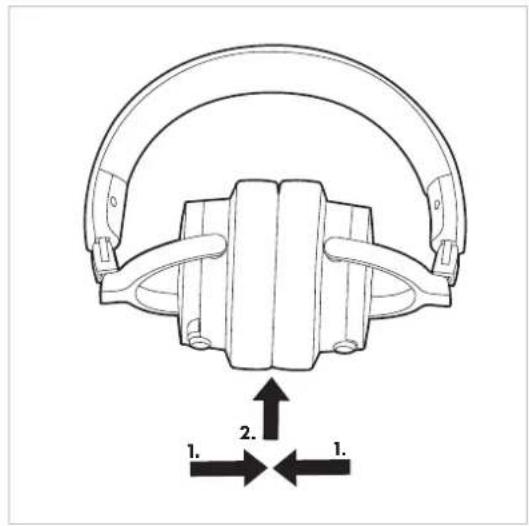
There are two options to fold the headphones to save space during transport.
Put the ear pads together facing each other on the inside. Hold them in place with one hand and push them upwards towards the headband.
text_image
1. 2. 1.HOW TO CHANGE THE HEADBAND PAD
Carefully pull the headband apart until a small opening appears on the left.
Using the back of a teaspoon handle, carefully lever the pad from the headband until it is fully released from the guide rail.
To attach the new pad, insert the plastic lip on the right-hand side into the slot provided. Press the pad firmly along the guide rail until it clicks into place.

natural_image
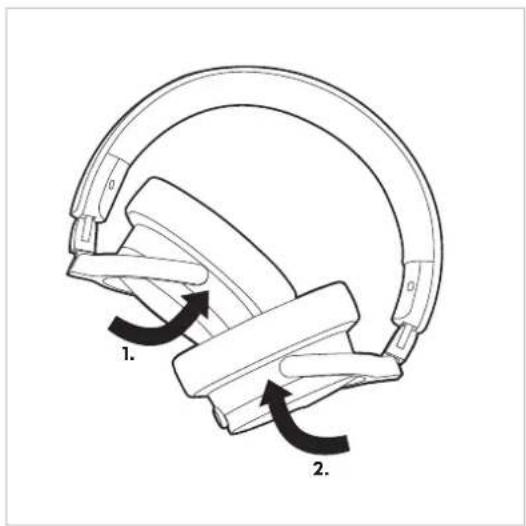
Line drawing of a hand holding a spiral ear device with a black arrow indicating rotation (no text or symbols)As an alternative, you can "pile" the ear cups on top of each other to save space during transport.
▶ First fold one ear cup inwards so that the ear pad points upwards. Then fold the other ear cup inwards so that the ear pad also points upwards and lies under the ear cup that was folded inwards first.
text_image
Diagram of a mechanical component with labeled parts and directional arrows indicating motion or force directions.VERSIONS
DJ 300 PRO X
Dynamic DJ headphone,
closed-back, 48 Ω ........ Order # 1001619
DJ 300 PRO X CLUB
Dynamic DJ headphone,
closed-back, 48 Ω ........ Order # 1001971
SUPPLIED ACCESSORIES
▶ 1 pair of on-ear and 1 pair of over-ear pads
▶ 1.5 m (4.9 ft) special cable (coiled and straight)
▶ 1 x 6.35 mm (1/4") jack adapter
Drawstring bag
▶ Quick start guide
ACCESSORIES AND REPLACEMENT PARTS
Accessories and replacement parts can be found on the internet at: https://www.beyerdynamic.com
▶ If you have technical problems while using the DJ 300 PRO X | DJ 300 PRO X CLUB or need further guidance, please visit our FAQ website at: https://support.beyerdynamic.com
SERVICE
▶ If you require service, please contact qualified service personnel or directly:
beyerdynamic service and logistics centre E-mail: service@beyerdynamic.de
Dismantling the DJ 300 PRO X | DJ 300 PRO X CLUB yourself will invalidate the guarantee.
DISPOSAL
This symbol on the product, in the operating instructions or on the packaging means that electrical and electronic devices must be disposed of separately from household waste at the end of their life cycle.
▶ Always dispose of used equipment in accordance with applicable regulations.
For sale within the EU only:
For the return of old equipment, there are free collection points or a free return to beyerdynamic, as well as other acceptance points for reuse. The addresses are available at the local city or municipal administration.
▶ Dealers for electronic equipment are generally obliged to take back waste electrical/electronic equipment free of charge. This obligation also applies to sales via remote communication.
For further information, please contact the local authorities or the dealer from whom the product was purchased.
TECHNICAL SPECIFICATIONS
| Transducer Dynamic, 45 mm | |
| Acoustic design Closed-back | |
| Wearing type | On-ear & over-ear |
| Frequency response | 5 - 35,000 Hz |
| Nominal impedance 48 Ω | |
| Nominal SPL@ 1 mW / 500 Hz | |
| On-ear: | 115 dB |
| Over-ear: | 109 dB |
| Nominal SPL@ 1 V / 500 Hz | |
| On-ear: | 122 dB |
| Over-ear: | 117 dB |
| Maximum SPL | |
| On-ear: | 122 dB SPL |
| Over-ear: | 117 dB SPL |
| T.H.D. @ 500 Hz | |
| On-ear: | 0.05 % |
| Over-ear: | 0.07 % |
| Max. short-term power handling capacity 10 mW | |
| Ambient noise attenuation 20 dBA | |
| Headband pressure | |
| On-ear: | 6 N |
| Over-ear: | 7 N |
| Weight (without cable) | |
| On-ear: | 288 g |
| Over-ear: | 315 g |
| Length and type of cable | 1.5 m (4.9 ft) / special cable (coiled and straight) |
| Connection | Gold-plated mini (3.5 mm) stereo jack plug & 1/4" (6.35 mm) adapter |
(all specifications acc. to EN 60 268-7)
WARRANTY
The company beyerdynamic GmbH & Co. KG offers a limited warranty of 2 years on the purchased beyerdynamic product. The exact warranty conditions can be found on our website at
https://www.beyerdynamic.com/service/warranty
INHALT
OHRPOLSTER WECHSELN 9
KOPFPOLSTER WECHSELN....10
KOPFHÖRER TRANSPORTIEREN 10
VERSIONEN 11
LIEFERZUBEHÖR....11
natural_image
Line drawing of a pair of headphones with a cable connector, no text or symbols presentnatural_image
Line drawing of a hand holding a DJ 300 ProX headphones, no text or symbols presentnatural_image
Line drawing of a pair of X-ray 300+ headphones with internal components and mounting holes (no text or symbols)KOPFHÖRER TRANSPORTIEREN
KOPFPOLSTER WECHSELN
natural_image
Line drawing of a hand holding a device with an arrow indicating rotation (no text or symbols)text_image
Diagram of a mechanical component with labeled parts and directional arrows indicating motion or force directions.VERSIONEN
DJ 300 PRO X
REMPLACEMENT DES COUSSINETS ....14
REMPLACEMENT DU BANDEAU DE L'ARCEAU SERRE-TÊTE ....15
TRANSPORT DU CASQUE....15
MODÈLES....16
CONTENU DE L'EMBALLAGE ....16
ACCESSOIRES ET PIÈCES DE RECHANGE....16
SERVICE APRÈS-VENTE....16
MISE AU REBUT....16
CARACTÉRISTIQUES TECHNIQUES ....16
GARANTIE....16
natural_image
Line drawing of a pair of headphones with a cable connector, no text or symbols present
REEMPLACEMENT DES COUSSINETS
natural_image
Line drawing of a hand holding a DJ 100 ProX-branded headphones, with no text or symbols on the device itself.natural_image
Line drawing of a DJ 380 ProX headphones with earbuds and plastic case (no text or symbols)TRANSPORT DU CASQUE
natural_image
Line drawing of a hand holding a spiral ear device with a black arrow indicating the motion direction (no text or symbols)text_image
Diagram of a mechanical component with labeled parts and directional arrows indicating motion or force directions.MODÈLES
https://www.beyerdynamic.com/service/garantie
CONTENIDO
natural_image
Line drawing of a pair of headphones with a cable connector, no text or symbols present
natural_image
Line drawing of a hand holding a DJ 100 PROX-branded headphones, with no text or symbols on the device itself.natural_image
Line drawing of a DJ 300 PROX headphones with earbuds and plastic case (no text or symbols)TRANSPORTAR LOS AURICULARES
natural_image
Line drawing of a hand holding a spiral-shaped device with a black arrow indicating rotation (no text or symbols)text_image
Diagram of a mechanical component with labeled parts 1 and 2, showing directional arrows indicating motion or force.VERSIONES
DJ 300 PRO X
https://www.beyerdynamic.com/service/garantie
CONTENUTO
AVVERTENZE PER LA SICUREZZA....23
USO 23
MANUTENZIONE....23
COLLEGAMENTO DEL CAVO DI ALLACCIAMENTO 24
GUIDA AL RICICLAGGIO....26
natural_image
Line drawing of a pair of headphones with a cable connector, no text or symbols presentnatural_image
Line drawing of a hand holding a DJ 100 ProX-branded headphones, with no text or symbols on the device itself.natural_image
Line drawing of a pair of XROO headphones with earbuds and plastic case, showing mechanical components (no text or symbols)TRASPORTO DELLE CUFFIE
natural_image
Line drawing of a hand holding a device with an arrow indicating rotation (no text or symbols)text_image
Diagram of a mechanical component with labeled parts and directional arrows indicating motion or force directions.VERSIONI
DJ 300 PRO X
Cuffie dinamiche da DJ,
chiuse, 48 Ω ....... Nr. ord. 1001619
DJ 300 PRO X CLUB
Cuffie dinamiche da DJ,
chiuse, 48 Ω ....... Nr. ord. 1001971
https://www.beyerdynamic.com/service/garantie
GUIDA AL RICICLAGGIO

natural_image
Line drawing of a pair of headphones with a cable connector, no text or symbols presentBYTA TÄCKLOCK
natural_image
Line drawing of a hand holding a DJ 100 PROX-branded headphones, with no text or symbols on the device itself.natural_image
Line drawing of a pair of X-ray 300+ headphones with internal components and mounting holes (no text or symbols)TRANSPORTERA HÖRLURAR
natural_image
Line drawing of a hand holding a spiral-shaped device with a black arrow indicating rotation (no text or symbols)text_image
Diagram of a mechanical component with labeled parts and directional arrows indicating motion or force directions.VERSIONER
DJ 300 PRO X
Dynamiska DJ-hörlurar, slutna, 48 Ω...... best.-nr 1001619
DJ 300 PRO X CLUB
Dynamiska DJ-hörlurar, slutna, 48 Ω..... best.-nr 1001971
LEVERANSTILLBEHÖR
natural_image
Line drawing of a pair of headphones with a cable inserted, showing head and ear details (no text or symbols)WYMIANA NAKŁADEK
natural_image
Line drawing of a hand holding a DJ 100 ProX-branded headphones, with no text or symbols on the device itself.natural_image
Line drawing of a DJ 300 ProX headphones with earbuds and plastic cover (no text or symbols)TRANSPORT SŁUCHAWEK
natural_image
Line drawing of a hand holding a spiral earbell with a black arrow indicating the motion direction (no text or symbols)text_image
Diagram of a helmet with labeled parts and directional arrows indicating motion or movementWERSJE
DJ 300 PRO X
natural_image
Line drawing of a pair of headphones with a cable connector, no text or symbols presentカバーキャップの交換
natural_image
Line drawing of a hand holding a DJ 100 ProX-branded headphones, with no text or symbols on the device itself.natural_image
Line drawing of a pair of X-ray 300 headphones with internal components and mounting holes (no text or symbols)ヘッドホンを持ち運ぶ
natural_image
Line drawing of a hand holding a spiral-shaped device with a black arrow indicating rotation (no text or symbols)text_image
Diagram of a mechanical component with labeled parts and directional arrows indicating motion or force directions.バージョン
DJ 300 PRO X
ダイナミック DJ ヘッドホン、
https://www.beyerdynamic.com/service/garantie
目录
安全注意事项 43
应用 43
保养 43
连接连接线 44
更换耳罩盖 44
更换耳垫.... 44
更换头箍垫 45
运输耳机.... 45
版本 46
交付配件.... 46
配件和备件 46
服务 46
废弃处理.... 46
技术指标 46
质保 46
natural_image
Line drawing of a pair of headphones with a cable inserted, showing head and ear details (no text or symbols)更换耳罩盖
natural_image
Line drawing of a hand holding a DJ 100 ProX-branded headphones, with no text or symbols on the device itself.natural_image
Line drawing of a pair of Xroad headphones with earbuds and plastic case (no text or symbols)运输耳机
natural_image
Line drawing of a hand holding a spiral-shaped device with a curved arrow indicating rotation (no text or symbols)text_image
Diagram of a mechanical component with labeled parts and directional arrows indicating motion or force directions.版本
DJ 300 PRO X
动感 DJ 耳机,
封闭式,48Ω....订购编号1001619
DJ 300 PRO X CLUB
动感DJ耳机,
https://www.beyerdynamic.com/service/garantie
beyerdynamic GmbH & Co. KG
For further distributors worldwide, please go to www.beyerdynamic.com
Non-contractual illustrations. Subject to change without notice.