
T51i - Earphones BEYERDYNAMIC - Free user manual and instructions
Find the device manual for free T51i BEYERDYNAMIC in PDF.


| Product type | Closed over-ear headphone |
| Brand | Beyerdynamic |
| Model | T51i |
| Dimensions (folded) | 175 x 150 x 60 mm |
| Weight | 200 g |
| Power supply | Passive (no battery) |
| Transducer type | Dynamic |
| Frequency response | 20 - 20 000 Hz |
| Impedance | 32 Ω |
| Sensitivity | 107 dB SPL |
| Cable length | 1.2 m |
| Connector | 3.5 mm TRRS jack plug |
| Remote and microphone | Yes, three-button compatible with iOS |
| Operating temperature range | -10 °C to +55 °C |
| Maintenance and cleaning | Clean with a slightly damp soft cloth. Do not use harsh solvents. |
| Safety | Do not use at high volume for long periods to protect your hearing. |
| Spare parts | Detachable cable, replaceable ear pads |
| Repairability | Spare parts available from the manufacturer |
Frequently Asked Questions - T51i BEYERDYNAMIC
User questions about T51i BEYERDYNAMIC
0 question about this device. Answer the ones you know or ask your own.
Ask a new question about this device
Download the instructions for your Earphones in PDF format for free! Find your manual T51i - BEYERDYNAMIC and take your electronic device back in hand. On this page are published all the documents necessary for the use of your device. T51i by BEYERDYNAMIC.
USER MANUAL T51i BEYERDYNAMIC
Operating Instructions
Bedienungsanleitung
Manual del usuario
Mode d'emploi
Thank you for selecting the T 51 i headphone from beyerdynamic. Please take some time to read carefully through this manual before using the product.
The T 51 i opens up new sound dimensions with its excellent bass and treble reproduction and superior materials.
The new Tesla technology developed by beyerdynamic is now also used in headphones for mobile applications. Whether on your way to work, college or travelling by train or aircraft, the supraaural T 51 i shields ambient noise with its closed design.
The efficient Tesla drivers provide extraordinarily precise and detailed sound.
With their slimline shape marked by simplicity and elegance, the smooth lightness of the T 51 i is also a winner for its appearance. There is no longer anything standing in the way of ultimate music enjoyment on portable devices, wherever you may be.
Safety instructions
Caution:
We would like to point out that listening at high volumes over a long period of time may damage your hearing irreversibly.
Therefore, reduce the volume before putting into operation. Make sure that the set volume is not too high. Rule of thumb: The higher the volume, the shorter the time of listening. According to employer's regulations for safety and health the noise exposure e.g. when working should not exceed 85 dB (low volume). This is an allowed time of listening of 8 hours at maximum. If the volume is increased by 3 dB, the allowed time of listening is halved, i.e. with 88 dB the time of listening is 4 hours, with 91 dB 2 hours and so on.
Danger to life!
Headphones dramatically reduce your ability to hear ambient noise. Using headphones while in road traffic is potentially very dangerous and is therefore prohibited by law. Also, please make sure that you do not use your headphones when in the vicinity of possibly dangerous machines and tools.
Risk of injury!
When wearing wired headphones, avoid any sudden movements. You could seriously injure yourself, especially if you have any piercings or wear earrings or glasses, etc. that can get caught in the wire.
How to adjust the headband
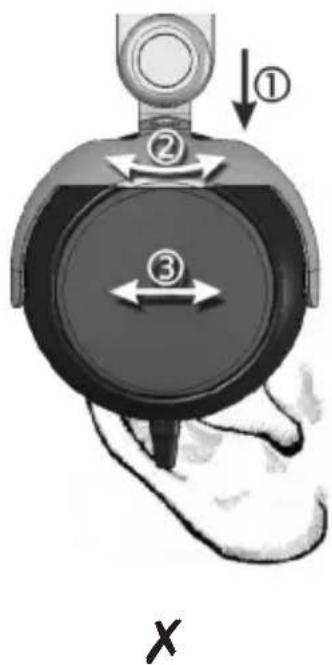
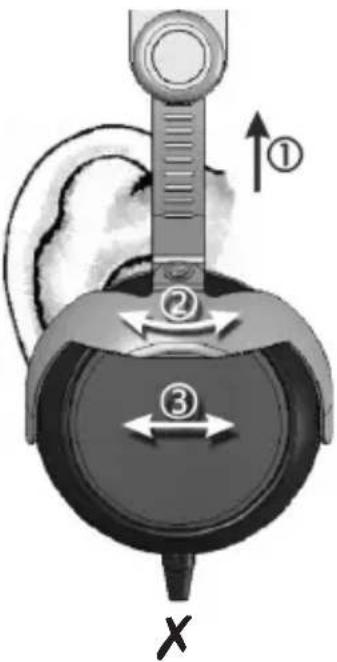
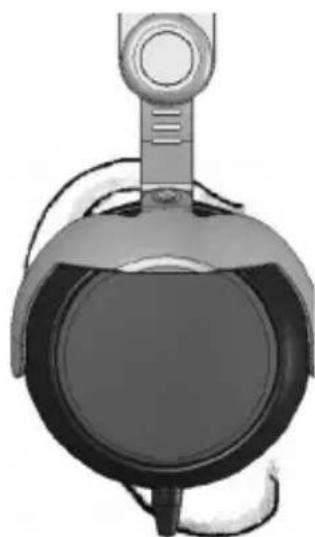
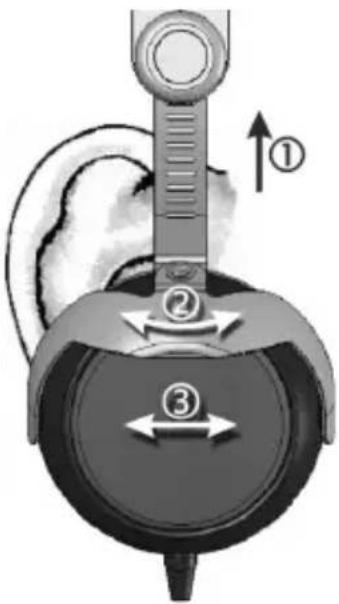
Before wearing the T 51 i for the first time you should adjust it properly to achieve the best sound and ambient noise attenuation.
Please refer to the following tips:
- Select the appropriate lock-in position on both sides of the headband. See ①.
- Adjust the angle of the ear pads. See ②and ③.
- Place the T 51 i centrally on your ears as shown in the middle picture.
Headphone is too high Perfect fit of the headphone Headphone is too low


How to connect to Apple and other compatible devices
The connection cable of the headphone is provided with a stereo mini jack plug (3.5 mm).
- Connect the T 51 i via the mini jack plug directly to your iPod, iPhone, iPad or other compatible devices.
How to connect to devices incompatible to Apple
Should you connect the T 51 i headphone to other devices and should the headphone fail to operate as usual, you can use the adapter cable (mini jack socket (3.5 m) – mini jack plug (3.5 m)).
- Connect the mini jack plug (3.5 mm) of the T 51 i to the mini jack socket (3.5 mm) of the adapter cable.
- By using the mini jack plug (3.5 mm) of the adapter cable, you can connect the T 51 i to your mobile phone, tablet PC or MP3 player.
Using the 3-button controller

Via a 3-button controller with integrated microphone incorporated in the cable you can jump to selected titles or make telephone calls with your iPhone while listening to music.
Music playback
- Press the middle button to stop the music playback. Press the middle button again to start the music playback.
- Press the middle button twice quickly to track forward.
- Press the middle button once quickly and hold it to fast forward.
- Press the middle button three times quickly to track backward.
- Press the middle button twice quickly and hold it to fast backward.
Incoming calls
- Press the middle button once quickly to answer an incoming call. Press the middle button once again to end the call.
- Press and hold the middle button for about 2 seconds to reject an incoming call.
- Press the middle button once to accept another incoming call. Press the middle button once again to return to the original call.
Increase volume
- Press and hold down the “+” button to increase the volume quickly.
Reduce volume
- Press and hold down the “-” button to reduce the volume quickly.
Note
- The remote and mic are supported only by iPhone 3GS or later, iPad, iPod touch (2nd generation or later), iPod classic (120GB, 160GB), and iPod nano (4th generation or later). The remote is supported by iPod shuffle (3rd generation or later). Audio is supported by all iPad and iPod models.
Cleaning and changing of ear pads
Clean the ear pads of your beyerdynamic headphones by using a damp cloth. For cleaning use pure water (no cleaning fluids or detergents) only taking care not to allow any water drops into the transducers.
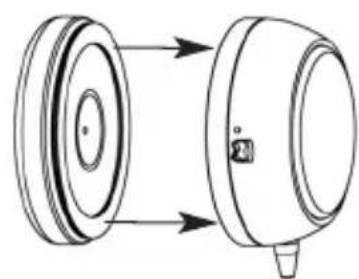
You may need to change the ear pads from time to time as a result of normal wear and tear. This is easy to do yourself.

- Remove the old ear pad. • The ear pad is provided with a
double sided adhesive tape to attach it.
- Remove the protective foil from the new ear pad and apply it to the housing.
In the event that other components need to be replaced, please contact your local beyerdynamic representative.
Service
If you require service please contact qualified service personnel or directly:
Dismantling the headphone yourself will invalidate the guarantee.
Supplied accessories
• 1/4" jack adapter (6.35 mm)
- Adapter cable mini jack socket (3.5 mm) – mini jack plug (3.5 mm)
- In-flight adapter
- Bag
Spare parts
Ear pads .... Order # 912.603
Headband pad.... Order # 906.875
1/4" jack adapter (6.35 mm) .... Order # 906.824
In-flight adapter 2 x 3.5 mm.... Order # 906.832
Bag .... Order # 906.840
Technical specifications
Transducer type .... Dynamic
Operating principle .... Closed
Frequency response 10 - 23,000 Hz
Nominal impedance....32 Ω
Sound pressure level 111 dB
Power handling 100 mW
Max. sound pressure level..... 131 dB
Sound coupling to the ear. . . . . . . . . . . . . . . . . . . . . . . . Supraaural
Headband pressure 2.5 N
Length and type of cable 1.2 m, from both sides
Weight without cable 174 g
Disposal
This symbol on the product, in the instructions or on the packaging means that your electrical and electronic equipment should be disposed at the end of its life separately from your household waste. There are separate collection systems for recycling in the EU. For more information, please contact the local authority or your retailer where you purchased the product.

Notes
english


X
√
X
・古いイヤーパッドを取り外します。

- 将旧耳垫取下。

Apple 기기에 연결(및 호환성)
- 낮은 이어패드를 벗겨내십시오.

iPad, iPhone, iPod, iPod classic, iPod nano, iPod shuffle, and iPod touch are trademarks of Apple Inc., registered in the U.S. and other countries.
For further distributors worldwide, please go to www.beyerdynamic.com


- SAFETY INSTRUCTIONS
- CAUTION
- DANGER TO LIFE
- RISK OF INJURY
- HOW TO ADJUST THE HEADBAND
- PLEASE REFER TO THE FOLLOWING TIPS
- HOW TO CONNECT TO APPLE AND OTHER COMPATIBLE DEVICES
- HOW TO CONNECT TO DEVICES INCOMPATIBLE TO APPLE
- USING THE 3-BUTTON CONTROLLER
- MUSIC PLAYBACK
- INCOMING CALLS
- INCREASE VOLUME
- REDUCE VOLUME
- NOTE
- CLEANING AND CHANGING OF EAR PADS
- SERVICE
- SUPPLIED ACCESSORIES
- SPARE PARTS
- TECHNICAL SPECIFICATIONS
- DISPOSAL
- NOTES
- APPLE 기기에 연결(및 호환성)
Brand : BEYERDYNAMIC
Model : T51i
Category : Earphones