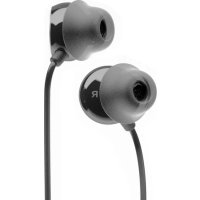
Blue Byrd - Earphones BEYERDYNAMIC - Free user manual and instructions
Find the device manual for free Blue Byrd BEYERDYNAMIC in PDF.



| Product Type | Bluetooth In-Ear Headphones |
| Model | Blue Byrd (2nd generation) |
| Brand | Beyerdynamic |
| Weight | Approx. 30 g |
| Power Supply | Rechargeable lithium-ion battery via USB-C |
| Battery Life | Up to 10 hours |
| Supported Audio Codecs | SBC, AAC, aptX Adaptive |
| Bluetooth Profiles | A2DP, HFP, HSP, AVRCP |
| Bluetooth Range | Up to 10 m |
| Features | Multi-point (up to 8 devices), touch controls, microphone, voice assistant, MIY app |
| Included Eartips | 5 pairs silicone (XS, S, M, L, XL) |
| Care and Cleaning | Soft cloth moistened with alcohol-based cleaner; avoid solvents |
| Safety | Volume adjustment, ambient noise reduction, risk of ingestion, battery use |
| Spare Parts and Repairability | Replacement eartips available at beyerdynamic.com/service/spare-parts |
| Warranty | Limited warranty, details at beyerdynamic.com/service/garantie |
| Operating Temperature | -10 °C to +60 °C |
| Storage Temperature | 0 °C to +45 °C |
Frequently Asked Questions - Blue Byrd BEYERDYNAMIC
User questions about Blue Byrd BEYERDYNAMIC
0 question about this device. Answer the ones you know or ask your own.
Ask a new question about this device
Download the instructions for your Earphones in PDF format for free! Find your manual Blue Byrd - BEYERDYNAMIC and take your electronic device back in hand. On this page are published all the documents necessary for the use of your device. Blue Byrd by BEYERDYNAMIC.
USER MANUAL Blue Byrd BEYERDYNAMIC
Apple, Apple TV, Apple Watch, iPad, iPad Air, iPad Pro, iPhone, and Lightning are trademarks of Apple Inc., registered in the U.S. and other countries. tvOS is a trademark of Apple Inc. The trademark "iPhone" is used in Japan with a license from Aiphone K.K.
Android is a trademark of Google LLC.
The Bluetooth® word mark and logos are registered trademarks of Bluetooth SIG, Inc. and all use of these trademarks by beyerdynamic is licensed. Other trademarks and trade names are the property of the respective owners.
qualcomm aptX™ is a product of qualcomm Technologies, Inc. and/or its subsidiaries. qualcomm® is a registered trademark of qualcomm Incorporated in the USA and in other countries.
aptXT is a registered trademark of qualcomm Technologies International, Ltd.
Blue BYRD
2nd generation
IN-EAR HEADPHONES
Operating Instructions
CONTENTS
SAFETYINSTRUCTIONS 7
Intended use. 7
Adjusting the volume. 7
Reducing perception of ambient noise 7
Changed acoustic perception 7
Cleaning. 7
Risk of swallowing. 7
Using the batteries. 7
Environmental conditions 7
ABOUT THIS MANUAL 8
SUPPLIED ACCESSORIES 8
PRODUCT OVERVIEW 8
FIRST STEPS 8
Removing from packaging and storing. 8
Charging the battery. 8
Selecting/changing eartips 9
Inserting and wearing the earphones 9
BEYERDYNAMIC MIY APP. 9
SOFTWARE UPDATE 9
COMPATIBILITY WITH PLAYBACK DEVICES. 9
SUPPORTED AUDIO CODECS 9
OPERATION 10
Switching on and off 10
Pairing with a playback device. 10
Multi-point operation 10
Adjusting the volume. 11
Playing media. 11
Calling up the personal assistant 11
Controlling calls. 11
Resetting to factory settings 11
Overview of operating functions 11
Overview of the LED displays 12
Settings for best sound. 12
HELP WITH PROBLEMS / FAQ. 12
BATTERY LIFE 12
CLEANING AND MAINTENANCE. 12
SPARE PARTS 12
DISPOSAL 13
EU/UK DECLARATION OF CONFORMITY 13
TECHNICAL DATA 13
PRODUCT REGISTRATION 13
WARRANTY CONDITIONS 13
FCC/IC REGULATION. 14
Thank you for choosing Blue BYRD in-ear headphones.
SAFETY INSTRUCTIONS
Please read these instructions carefully and completely before using the product.
Please observe all instructions given, especially those concerning the safe use of the product.
The company beyerdynamic GmbH & Co. KG accepts no liability for damage to the product or injury to persons caused by careless, improper or incorrect use of the product, or by use for purposes not specified by the manufacturer.
Do not use the product if it is defective.
Intended use
Only use the product as described in this product manual. beyerdynamic accepts no liability for damage to the product or injury to persons caused by careless, improper or incorrect use of the product, or by use for purposes not specified by the manufacturer.
beyerdynamic is not liable for damage to USB devices that do not comply with the USB specifications.
beyerdynamic is not liable for damage resulting from connection interruptions due to batteries being empty or too old, or due to exceeding the Bluetooth® transmission range.
Please also observe the relevant country-specific regulations before using the product.
Adjusting the volume
High volume levels and long listening times can permanently damage your hearing. Because in-ear headphones are placed directly in the ear canal, they can become
6-9 dB louder than conventional headphones, and this increases the risk of hearing damage.
Before inserting the earphones, set the volume to minimum. Only increase the volume after inserting the earphones.
Do not use the in-ear headphones at high volume for a long time. When listening and speaking normally with in-ear headphones, your own voice should still be perceptible.
In case of tinnitus, reduce the volume. If necessary, consult a doctor.
You can personalise your Bluetooth® headphones with the beyerdynamic MIY app. The app's "Statistics" function records the sound pressure your ears are exposed to over time. However, it only refers to the sound pressure generated through the headphones' speakers and not to that from external sources of noise.
Reducing perception of ambient noise
In-ear headphones drastically reduce perception of ambient noise. Using in-ear headphones in road traffic can be potentially dangerous. The user's hearing must not be impaired to the extent that it causes road safety risks.
Do not use the in-ear headphones within the action area of potentially dangerous machines and tools.
- Avoid using in-ear headphones in situations where hearing must not be impaired - particularly in road traffic, when crossing a level crossing or on a construction site.
Changed acoustic perception
For many people, wearing in-ear headphones takes some getting used to because the acoustic perception of their own voice and body as well as the inner ear sounds that occur while walking is different from the "normal" situation without in-ear headphones. However, this initially strange sensation usually diminishes after wearing them for a while.
Cleaning
Dirt on the eartips and the formation of a warm and humid climate in the ear canal can cause an increased level of germs, which can increase the risk of an ear canal infection.
Regularly clean the eartips.
Risk of swallowing
- Keep small parts, such as product, packaging and accessories, away from children and pets. They constitute a choking hazard if swallowed!
Using the batteries
Danger from heat, water and mechanical stress
Excessive heat, water and mechanical stress may cause explosion, heat, fire, smoke or fumes. Injuries and irreversible damage to the battery may result.
Do not expose the battery (battery pack or integrated battery) to excessive heat, direct sunlight or fire.
Do not open the housing or disassemble the battery.
Do not use the battery if there is a risk it has come into contact with water.
Only use a USB 2.0/3.0-standard-compliant 5 V power supply unit to charge the battery via the integrated USB socket type C (current consumption is max. 0.5 A).
Storing the battery
If the battery is not going to be used for an extended period, set the charge level to approximately 50% of the maximum capacity and store it at temperatures up to max. 30^
Environmental conditions
Do not expose the product to rain, snow, liquids or moisture.
ABOUT THIS MANUAL
This Quick Start Guide describes the most important functions of the Blue BYRD in-ear headphones
The information in this manual refers to the default settings of the software version 1.0. A newer version may be available.
SUPPLIED ACCESSORIES
In-ear headphones Blue BYRD with Bluetooth
- Five pairs of silicone eartips (XS, S, M, L, XL).
USB-A to USB-C cable
- Hard case for storage
- Operating instructions
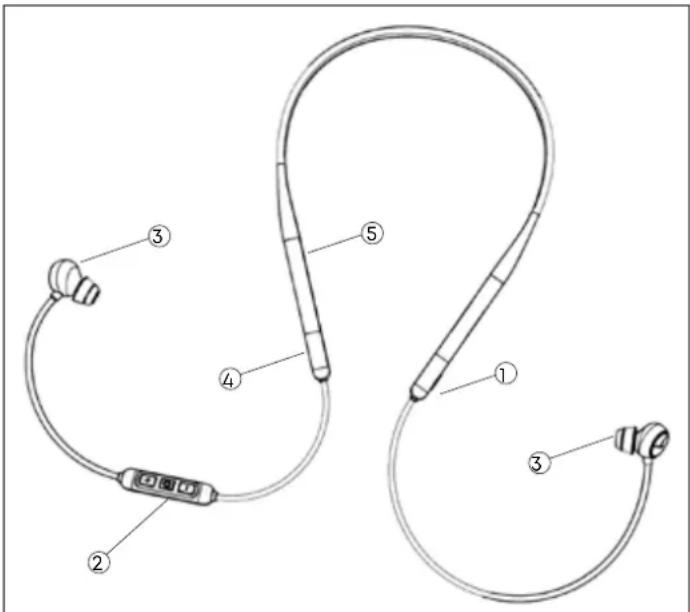
PRODUCT OVERVIEW
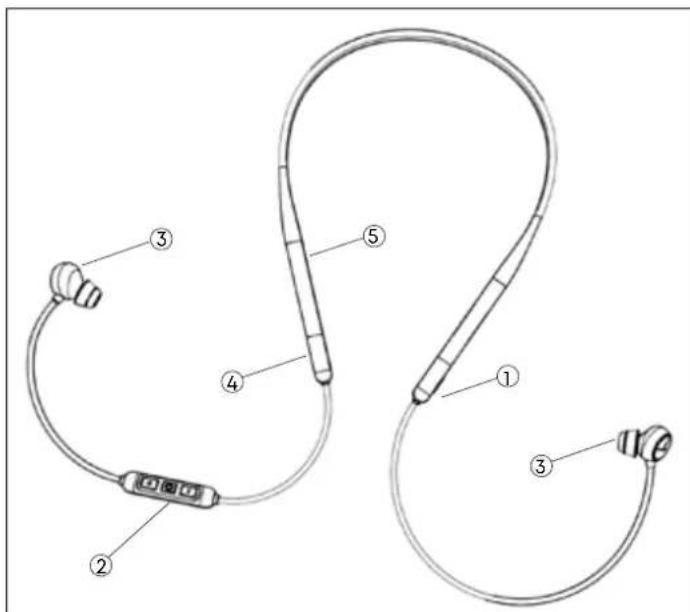
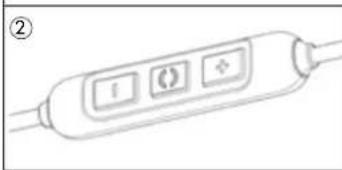
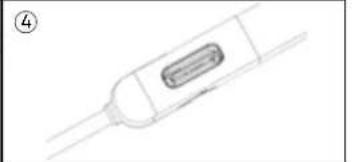
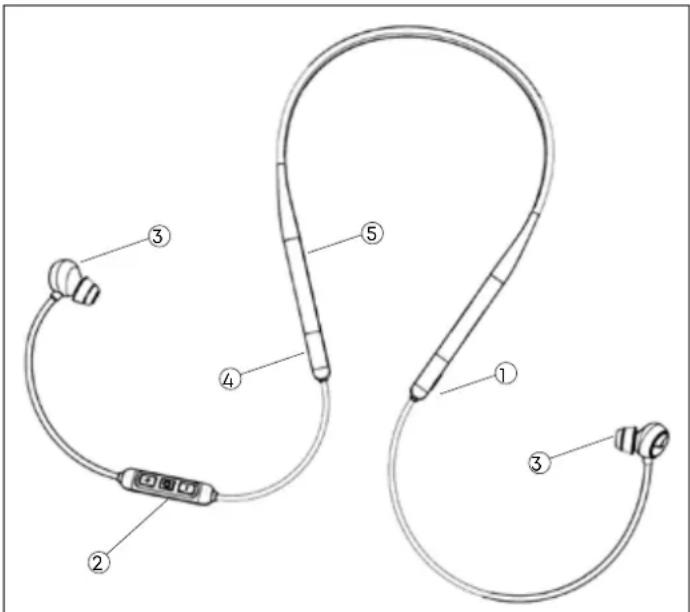
1 On/off button
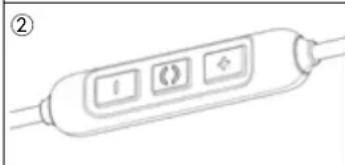
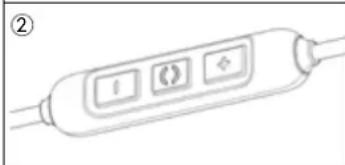
2 Remote control
[+] /[-] Increase / lower volume
()Multifunction button
Microphone on the back of the remote control
3 Earphones with replaceable eartips
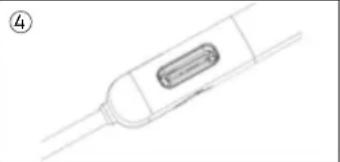
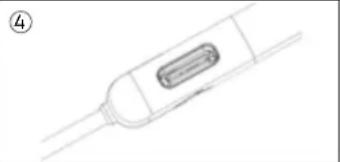
4 USB-C connector for cable (underneath)
5 LED display (inside)
FIRST STEPS
Removing from packaging and storing
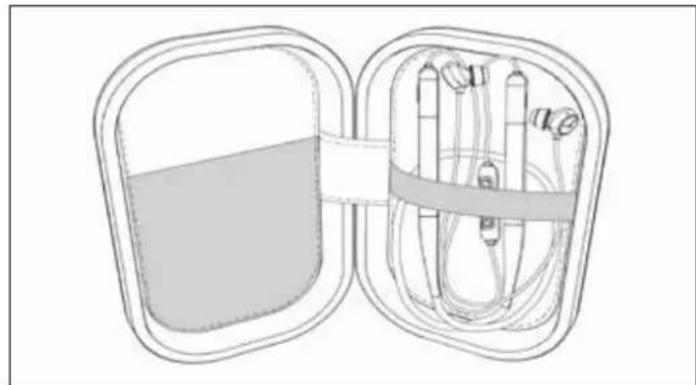
- When not in use and for transport, store the in-ear headphones and accessories in the hard case supplied.
This provides the best protection and prevents damage.
Charging the battery
We recommend you use only the supplied USB cable to charge the battery.
- Connect the in-ear headphones with the cable supplied to any standard-compliant live USB-A socket (e.g. USB power supply).
- Remove the USB cable after charging.
LED charging display
Flashing red: Battery 0-30% full
Flashing yellow: Battery 30-70% full
Flashing green: Battery 70-99% full
Steady green: Battery 100% full
Remarks on the life of Li-ion batteries
- When fully charged, disconnect the USB cable from the charger and in-ear headphones.
- CAUTION! High temperatures, especially with a high charge level, can cause irreversible damage.
- If the battery is not used or is stored for extended periods of time, it is recommended to charge it to approx. 50% and store it at no more than 20^ .
- Switch off the battery-powered product after use.
Selecting/changing eartips
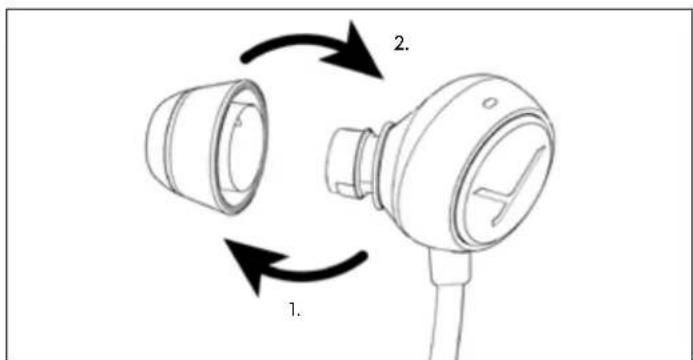
The in-ear headphones come with five different sizes of eartips. It is important to choose the right eartips for your ears to achieve a comfortable and secure fit, good ambient noise attenuation and the best possible sound.
If you are using them regularly, we recommend changing the eartips every three months. Replacement eartips made of silicone and other materials can be ordered from the beyerdynamic spare parts shop: www.beyerdynamic.com/service/spare-parts
- Carefully remove the current eartip from the araphone.
- Attach the new eartip to the arophone.
Inserting and wearing the earphones
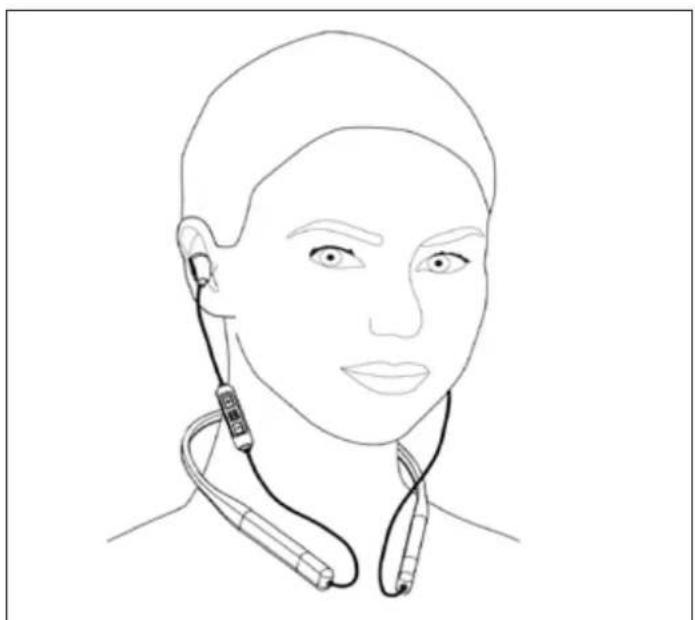
Place the neckband around the neck and insert the earphones into the left and right ear according to their markings.
The earphones should fit comfortably and securely.
BEYERDYNAMIC MIY APP
The beyerdynamic MIY app is constantly evolving to customise your Blue BYRD to your own needs with useful functions such as MOSAYC sound personalisation, tracking statistics of your daily listening habits and other settings. If you use MOSAYC sound personalisation, your Blue BYRD will sound even better.
SOFTWARE UPDATE
Software updates are easily available via the MIY app.
COMPATIBILITY WITH PLAYBACK DEVICES
The in-ear headphones are compatible with Bluetooth® playback devices that support the following profiles:
A2DP (for audio transmission)
HFP (for phone operation)
HSP (voice output)
AVRCP (for control signal transmission)
All associated functions are only available if they are supported by the playback device.
SUPPORTED AUDIO CODECS
Within the A2DP profile, the in-ear headphones support the audio codes SBC, AAC and aptX™ Adaptive. The best audio quality is offered by aptX™ Adaptive.
Please note that only the codecs available in the playback device can be used for audio transmission.
The playback device and in-ear headphones automatically agree on the best mutually available codec in the following order:
- aptXAdaptive
- aptXTM
- AAC
- SBC
Most playback devices do not show which codec is actively in use.
OPERATION
Switching on and off
Switching on:
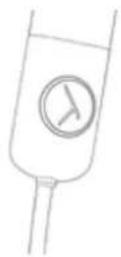
Press the On/Off button for 2 s.
Switching off:
Press the On/Off button for 4 s.
Pairing with a playback device
Before you can use the in-ear headphones for the first time, you must pair them with your mobile phone or another Bluetooth®-enabled device. The pairing procedure may differ depending on the playback device.
Please refer to the corresponding operating instructions of the playback device.
Establishing pairing:
The in-ear headphones are switched off.
- Press the On/Off button for 4 s. The Bluetooth pairing mode starts. The LED display flashes alternate blue and red.
- Activate the Bluetooth function on the playback device and search for new devices if necessary.
- In the Bluetooth® menu on the playback device, select "Blue Byrd (2nd gen.)" from the available devices and pair the two devices with each other.
After a successful connection, the LED briefly flashes blue every 7 s. Each time the unit is switched on again, the units will connect as soon as they are within range of each other.
If the Bluetooth® connection has been lost, the LED briefly flashes blue every 3 s.
Deleting the list of already paired devices:
Press the On/Off button for longer than 10 s. The list of already paired Bluetooth® devices (maximum 8) is deleted, and the in-ear headphones switch to the Bluetooth® pairing mode.
Multi-point operation
The in-ear headphones can be paired with up to 8 Bluetooth®-enabled devices. Active connections are possible with up to two devices at a time. However, playback of music and phone operation is only possible with one device at a time. Phone operation has priority over playback of music, i.e. playback of music is interrupted during phone calls.
Priority list when using the playback devices (PD):
PRI. Profile Playback devices (PD)
1 HFP (phone operation) PD 1 (device used first)
2 HFP (phone operation) PD 2 (device used second)
3 A2DP (playback of PD1 (device used first) music)
4 A2DP (playback of music) PD 2 (device used second)
Setting up multi point:
- Connect the in-ear headphones with the first device (see „Pairing with a playback device" auf Seite 10).
- Deactivate the Bluetooth connection on the first device.
- Switch off the in-ear headphones.
- Connect the in-ear headphones with the second device (see „Pairing with a playback device" auf Seite 10).
- Re-activate the Bluetooth® connection with the first device that automatically connects to the in-ear headphones. Once both devices are paired with the in-ear headphones, the in-ear headphones automatically connect with both devices every time they are switched on.
Using multi point:
- You have connected the in-ear headphones with two devices and just activated media playback.
- Briefly press the () once, to accept an incoming call.
- You have connected the in-ear headphones with two devices and have just ended a call.
- Briefly press the () button once, to start the media playback that was last played.
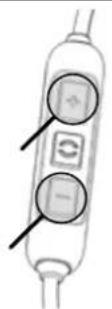
Adjusting the volume
Increasing/decreasing the volume:
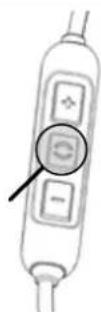
In stages: briefly press the [+] /[-] button.
▶ Continuously: press and hold the [+]/[-] button.
A signal tone sounds when the maximum/ minimum volume is reached.
Playing media
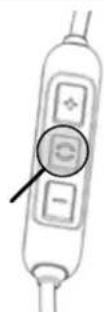
The functions described depend on the playback device and playback device software and may not be available.
Start / pause playback:
- Briefly press the () button once.
Playing the next / previous track:
- Briefly press the () button twice / three times.
Fast forward / rewind:
- Briefly press the () button twice / three times, then hold it down.
Calling up the personal assistant
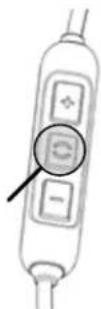
Call up the personal assistant of your smartphone or tablet:
Press the () button for 2 s.
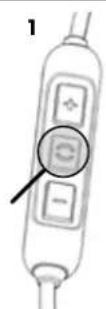
Controlling calls
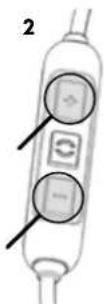
Accepting / ending a call (1):
- Briefly press the () button.
Rejecting a call:
Press the () button for 2 s.
Increasing/decreasing the call volume (2):
Press the [+] /[-] button.
Resetting to factory settings
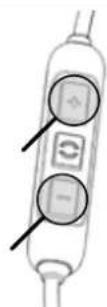
All personal data is deleted if the device is reset to the factory settings!
Reset to factory settings:
Press the [+] and [-] button simultaneously for 4 s.
Overview of operating functions
Function Operation
Increase volume
Press the [+] button
Decrease volume level
Press the [-] button
Switch on
Press the On/Off button for 2 s
Switch off
Press the On/Off button for 4 s
Start/stop media playback
Briefly press the () button once
Jump to the next track
Briefly press the () button twice
Jump to the previous track
Briefly press the () button three times
Fast forward Briefly press the
() button twice and then hold
Rewind Briefly press the
() button three times and then hold
Accept / end a call ▶ Briefly press the
() button once
Reject an incoming call
Press the () button for 2 s
Start personal assistant (Siri, Google Assistant etc.)
Press the () button for 2 s
Switch voice messages on or off
Press the () button and the [+] button simultaneously for 2 s
Reset to factory settings
Press the [+] button and the [-] button simultaneously for 4 s
Overview of the LED displays
| LED display Function | |
| Flashes red/yellow/green Charging | |
| Steady green light Fully charged | |
| Lights up once red for 1.5 s Switch off | |
| Flashes rapidly red Battery almost empty | |
| Flashes alternately blue and red | Bluetooth® pairing mode active |
| Flashes blue briefly every 7 sa | Bluetooth® connection active |
| Flashes blue briefly every 3 s | Bluetooth® connection lost |
| Flashes blue briefly every 7 s | Media playback active |
| Flashes rapidly blue Incoming call | |
| Flashes blue briefly every 7 s | Call active |
| Lights up pink three times per s | Software update mode active |
Settings for best sound
To achieve the best possible Bluetooth® sound with your in-ear headphones, please observe the following practical tips:
- Set the volume to minimum on the in-ear headphones and to maximum on the playback device.
- Then adjust the volume only on the in-ear headphones, not on the playback device.
This applies only to playback devices that do not automatically synchronise the volume. On playback devices that automatically synchronise the volume (e.g. iPhone, iPad and various Android smartphones), the headphone volume is always identical to the volume of the playback device.
- Deactivate any audio effects that may be present in the software of the playback device.
HELP WITH PROBLEMS / FAQ
In-ear headphones will not switch on
| Battery is empty or almost empty. | Charge the battery. |
| No audio output. | |
| There is no Bluetooth® connection. | Pair in-ear headphones with the playback device. |
The in-ear headphones do not appear among the available Bluetooth® devices on the playback device.
| The in-ear headphones are switched off. | Switch on the in-ear headphones. |
| The in-ear headphones are not in pairing mode. | Set the in-ear headphones to pairing mode. |
| There is already a Bluetooth* connection to another playback device. | Disconnect the Bluetooth* connection to the other playback device and connect the in-ear headphones to the desired device. |
Playback volume is too low, although set to maximum on the in-ear headphones
| The audio signal being played back is too quiet. | Set playback volume on the playback device to maximum. |
The sound is harsh and the bass reproduction too low
Insufficient seal on the earphones.
Try out alternative left and right eartips until sound is ideal.
The wireless range is too low, or the connection is disrupted
There is interference with other devices.
- Keep your distance from WLAN routers and microwave ovens.
Do not stand between playback device and in-ear headphones.
BATTERY LIFE
- Disconnect the USB connection cable from the charger and in-ear headphones when battery is fully charged.
- High temperatures, especially with a high charge level, can cause irreversible damage.
- For battery storage, see Seite 7.
- Switch off the battery-powered product after use.
CLEANING AND MAINTENANCE
- Use a soft cloth moistened with alcohol cleaner to clean all parts of the in-ear headphones. Make sure that no liquid enters the housing or the transducer.
- Do not use cleaners containing solvents, as these can damage the surface.
SPARE PARTS
Spare parts for the in-ear headphones can be found at www.beyerdynamic.com/service.
DISPOSAL
This symbol on the product, in the user manual or on the packaging means that your electrical and electronic devices must be disposed of separately from household waste at the end of their life cycle. For further information, please contact your local authorities or the dealer where you purchased the product.
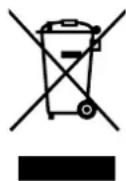
Always dispose of used batteries or devices with batteries in accordance with the applicable regulations. Returning batteries is free of charge.
Please dispose of discharged batteries only.
EU/UK DECLARATION OF CONFORMITY
beyerdynamic hereby declares that this radio transmission device complies with the EU Directive 2014/53/EU and the UK Directive "The Radio Equipment Regulations 2017".
The full text of the EU/UK declaration of conformity can be found on the Internet at: www.beyerdynamic.com/ cod
TECHNICAL DATA
Bluetooth® frequency range 2.400-2.4835 GHz
Transmitting power 10 dBm
Operating temperature range -10 to +60^
Charging temperature range 0 to +45^
You can find more detailed information about the technical data online at: www.beyerdynamic.com/blue-byrd
PRODUCT REGISTRATION
Using the serial number, you can register your in-ear headphones online at www.beyerdynamic.com.
WARRANTY CONDITIONS
beyerdynamic provides a limited warranty for the original beyerdynamic product you have purchased.
You can find detailed information about beyerdynamic's warranty conditions online at www.beyerdynamic.de/service/garantie
FCC / IC REGULATION
FCC ID: OSDPIE21
Canada IC:3628C-PIE21
NOTICE:
This device complies with Part 15 of the FCC Rules [and with Industry Canada licence-exempt RSS standard(s)].
Operation is subject to the following two conditions:
- this device may not cause harmful interference, and
- this device must accept any interference received, including interference that may cause undesired operation.
Changes or modifications made to this equipment not expressly approved by beyerdynamic may void the FCC authorization to operate this equipment.
Radiofrequency radiation exposure information:
For body worn operation, this phone has been tested and meets the FCC RF exposure guidelines when used with the beyerdynamic accessories supplied or designated for this product. Use of other accessories may not ensure compliance with FCC RF exposure guidelines.
Note: This equipment has been tested and found to comply with the limits for a Class B digital device, pursuant to part 15 of the FCC Rules These limits are designed to provide reasonable protection against harmful interference in a residential installation. This equipment generates, uses and can radiate radio frequency energy and, if not installed and used in accordance with the instructions, may cause harmful interference to radio communications. However, there is no guarantee that interference will not occur in a particular installation.
If this equipment does cause harmful interference to radio or television reception, which can be determined by turning the equipment off and on, the user is encouraged to try to correct the interference by one or more of the following measures:
- Reorient or relocate the receiving antenna.
- Increase the separation between the equipment and receiver.
- Connect the equipment to an outlet on a circuit different from that to which the receiver is connected.
- Consult the dealer or an experienced radio/TV technician for help.
CAUTION
Changes or modifications not expressly approved by the manufacturer responsible for compliance could void the user's authority to operate the equipment.
Made in China
This device is granted pursuant to the Japanese Radio Law (電波法) and the Japanese Telecommunications Business Law (電気通信事業法).
This device should not be modified (otherwise the granted designation number will become invalid).
Blue BYRD
2. Generation
IN-EAR-KOPFHOrER
Bedienungsanleitung
INHALT
- aptXTM Adaptive
- aptX
- AAC
- SBC
ACCESSIONS FOURNIS AVEC LE SYSTème 28
VUE D'ENSEMBLE DU PRODUIT 28
PREMIÈRES ÉTAPES 29
VUE D'ENSEMBLE DU PRODUIT
1 Touche Marche/Arret
2 Telecommande
- aptXTM Adaptive
- aptTM
- AAC
- SBC
Lancer I'assistant personnel (Siri, Google Assistant, etc.)
CONDITIONS DE GARANTIE
VUE D'ENSEMBLE DU PRODUIT 28
PREMIÈRES ÉTAPES 29
VUE D'ENSEMBLE DU PRODUIT
1 Touche Marche/Arret
2 Telecommande
- aptXTM Adaptive
- aptTM
- AAC
- SBC
Lancer I'assistant personnel (Siri, Google Assistant, etc.)
CONDITIONS DE GARANTIE
- aptXTM Adaptive
- aptX
- AAC
- SBC
- aptXTM Adaptive
- aptXT
- AAC
- SBC
Stalla in Multi-Point:
Anvanda Multi-Point:
- aptXAdaptive
- aptX
- AAC
- SBC
- aptX™ Adaptive
- aptXTM
- AAC
- SBC
www.beyerdynamic.com/service
废弃处理
www.beyerdynamic.com/blue-byrd
产品注册
- aptXTM Adaptive
- aptXIM
- AAC
- SBC
For further distributors worldwide, please go to www.beyerdynamic.com
Non-contractual illustrations. Subject to change without notice.
EN-DE-FR-ES-IT-SV-JP-ZH-NL 5 Blue BYRD (2nd generation) (10.22)
CREATE THE AMAZING