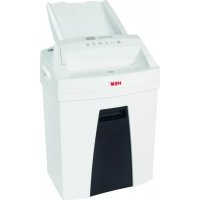
Securio AF100 - Shredder HSM - Free user manual and instructions
Find the device manual for free Securio AF100 HSM in PDF.



| Product type | Particle-cut document shredder |
| Dimensions (W x D x H) | 375 × 260 × 620 mm |
| Weight | 7.6 kg |
| Power supply | 220-240 V / 50/60 Hz or 110-130 V / 50/60 Hz |
| Power | 185 W (EU) / 160 W (US) |
| Cut type | Particles 4 x 25 mm |
| Security level | DIN 66399 P-4, T-4, E-3, F-1 |
| Cutting capacity (Autofeed) | Up to 100 sheets (80 g/m²) |
| Manual cutting capacity | 6-7 sheets (80 g/m²) per pass |
| Feed width | 225 mm |
| Cutting speed | 45 mm/s |
| Bin volume | 25 liters |
| Noise level | 55-70 dB depending on load |
| Feed type | Auto-feed (Autofeed) and manual |
| Accepted materials | Paper (no staples for Autofeed), credit cards (manually) |
| Special functions | Auto start/stop, reverse function (R button) |
| Maintenance | Oil the cutting cylinders after emptying the bin; use HSM oil |
| Cleaning | With a soft cloth and non-corrosive soap solution |
| Safety | Electric shock protection; safety lock; automatic stop in case of jam |
| Warranty | 3 years on the device; HSM lifetime warranty on cutting cylinders |
| Spare parts | Available up to 10 years after end of production; optional feed roller kit |
| Operating temperature | -10 °C to +25 °C |
| Relative humidity | Max. 90% without condensation |
Frequently Asked Questions - Securio AF100 HSM
User questions about Securio AF100 HSM
0 question about this device. Answer the ones you know or ask your own.
Ask a new question about this device
Download the instructions for your Shredder in PDF format for free! Find your manual Securio AF100 - HSM and take your electronic device back in hand. On this page are published all the documents necessary for the use of your device. Securio AF100 by HSM.
USER MANUAL Securio AF100 HSM
1 Explanation of symbols and safety instructions
Safety and warning signs indicate situations in which personal injuries or property damage may occur and provide measures to prevent this danger.
The warning triangle with the signal word WARNING and a text on a grey background alert you to the risk of serious to life-threatening injuries.
Caution is used when property damage may occur by failure to comply.
Note
indicates information for the effective operation of the machine without risk of danger.
Safety instructions

Before starting up the machine for the first time, read the operating manual, and keep it for later use and to pass on to any subsequent users.
Observe all safety instructions attached to the machine.
Risk of injury from sharp blades!
Never reach into the slot of the paper feed.
Risk of injury during intake!
Do not go near the rollers with long hair, loose clothing, ties, scarves, necklaces, bracelets etc. Do not shred any material that might get tangled, such as tapes, binder ties plastic or foil.
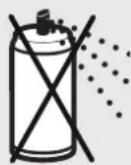
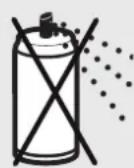
Risk of combustion!
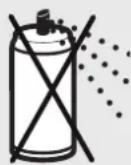
Do not use cleaning agents or compressed air spray bottles containing flammable substances. These substance could ignite.

Danger to children and other persons!
The machine may not be used by persons (including children under 14 years of age) with limited phys
ical, sensory or mental capabilities or with a lack of experience and knowledge, unless they are supervised by a responsible person or are instructed by them on the use of the machine. Children must be supervised to ensure they do not play with the device. Do not leave the document shredder switched on when it is unattended.
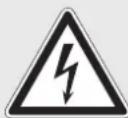
Electrical hazard
Dangerous mains voltage can lead to electrocution in the event of improper handling of the machine.
- Check the machine and cable regularly for damage.

Switch the shredder off if it is damaged or not working correctly or before relocating or cleaning it and disconnect the power plug from the mains.
- Make sure that no water gets into the shredder. Do not immerse the power cable or the power plug in water. Never touch the power plug with wet hands.
- Never pull the power plug out of the socket using the power cable. Always pull out the power plug directly.
2 Proper use, warranty
Check the name plate on the back side for what main voltage your document shredder uses. Refer to the relevant point in the operating manual.
The document shredder is designed for shredding paper and small volumes of credit cards.
Only paper without staples and paper clips must be fed into the automatic feed tray.
Paper with staples and paper clips and also credit cards may only be fed via the feed opening.
Its sturdy cutting unit is not damaged by paper clips and staples.
The warranty period for the document shredder is 3 years. There is a special warranty for the HSM cutting rollers in the document shredder, which is provided independently of the guarantee, and remains valid for the entire service life of the machine (HSM Lifetime Warranty).
This warranty and guarantee exclude wear and damage caused by improper handling or actions taken by third parties. The intake rollers in the paper cassette are wear parts.
HSM guarantees the delivery of spare parts for up to 10 years after the production of this model has been discontinued.
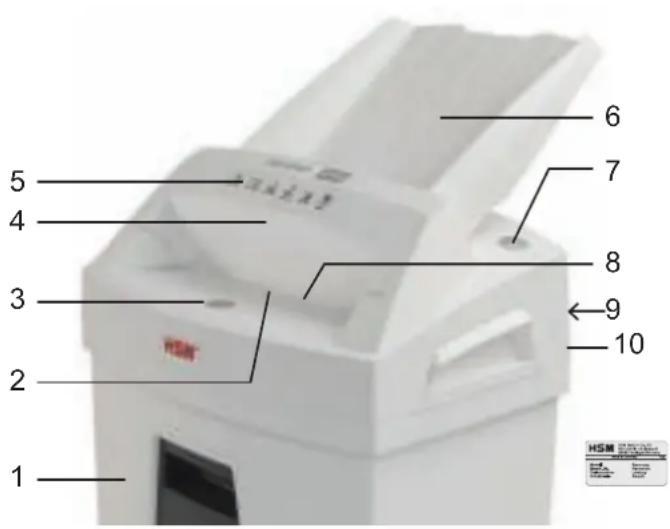
3 Overview
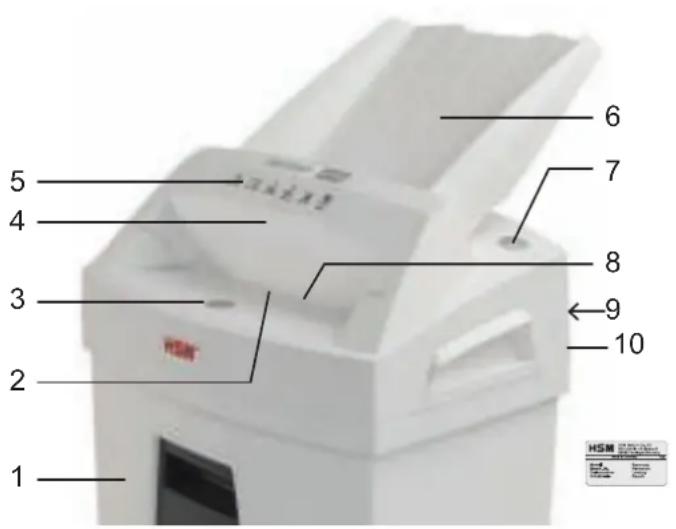
1 Shredded material container
2 Automatic start/stop
3 Operation button
4 Safety element
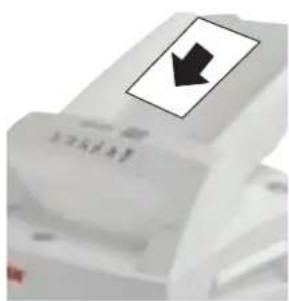
5 Safety notice
6 Automatic feed tray
7 "R" reverse button
8 Feed opening
9 Cutting head
10 Name Plate
4 Initial start-up

WARNING
Dangerous mains voltage!
Improper handling of the machine can lead to an electric shock.
- Only use the document shredder in a dry room indoors. Do not operate the device in rooms with high humidity or the rain.
- Keep the device, the power plug and the cable away from naked fl ames and hot surfaces. The ventilation slots must not be blocked or covered and there must be at least 5 cm space between the shredder and any wall or furniture.
- Make sure that the power plug is easily accessible.
- Before you insert the power plug, make sure that the voltage and frequency of your power supply correspond with the information on the type plate.
Installing the automatic feed tray:
- Fold down the safety element towards you.
The tray is included in the box.
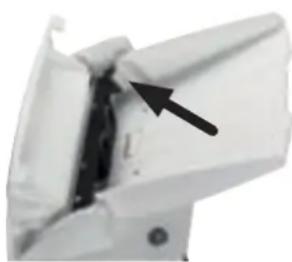
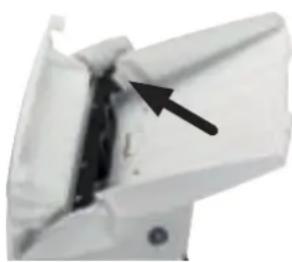
Place the tray into the guide and press down until it clicks into place.
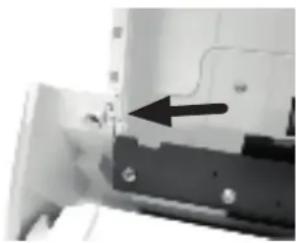
Tofi x the tray, push out the catches on the left and right of the tray.
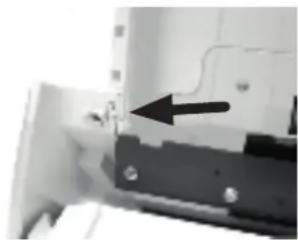
- Fold back the safety element again.
- Connect the power cable provided to the back of the document shredder and plug the power plug into a properly installed socket.
5 Operation
Switching on the document shredder
- Move the power switch on the back of the document shredder to position "l".
Shredding paper
You can shred paper by feeding it directly into the opening or you can use the automatic intake. Paper can be fed in manually during autofeed stack processing.
1. Feed the paper directly into the feed opening
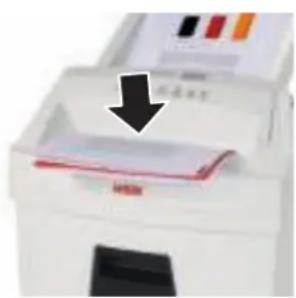
The automatic start/stop of the cutting unit starts when paper is fed in.
The cutting unit is switched off 5 seconds after the automatic start/stop in the paper
feeder is clear again.
2. Feed the paper using the automatic feed tray
The document shredder is equipped with an automatic feeder which can hold up to 100 sheets of paper.

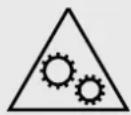
WARNING Risk of injury during intake!
The intake rollers of the automatic feed tray run continuously during the shredding process. Do not go near the rollers with long hair, loose clothing, ties, scarves, necklaces, bracelets etc.

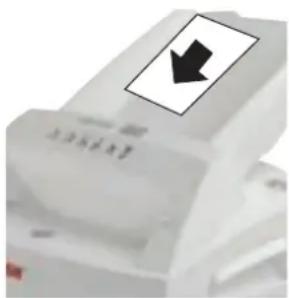
Place the stack of papers (max. 100 sheets, 80g / m^2 ) in the automatic feed tray. CAUTION: The paper must not have any paper clips or staples attached.
- Start the shredding process. You have 2 options to do this:
a) Press the operation button for 2 seconds.
Start the cutting unit and the automatic feed drive. The paper is fed into the cutting unit.
The cutting unit switches off 5 seconds after shredding all of the sheets in the automatic feed tray.
Premature cancellation: Press the operation butt
b) Feed one sheet of paper directly into the feed opening.
Start the cutting unit and the automatic feed drive. The paper is fed into the cutting unit.
The cutting unit switches off 5 seconds after shredding all of the sheets in the automatic feed tray.
Shredding credit cards Emptying the shredded material container
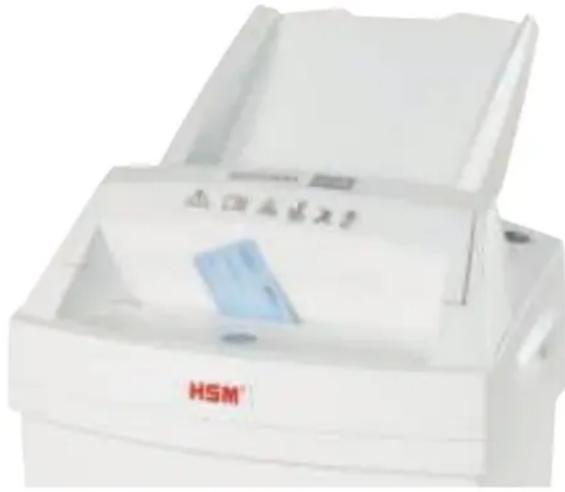
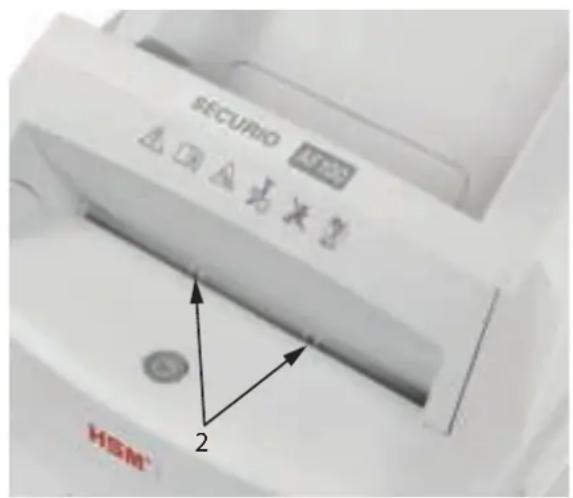
- Put the cards into the feed opening so they can be detected by the automatic start/stop (2).
Do not feed in these materials via the automatic feed tray.
Dispose of the shredded material separately from waste paper.
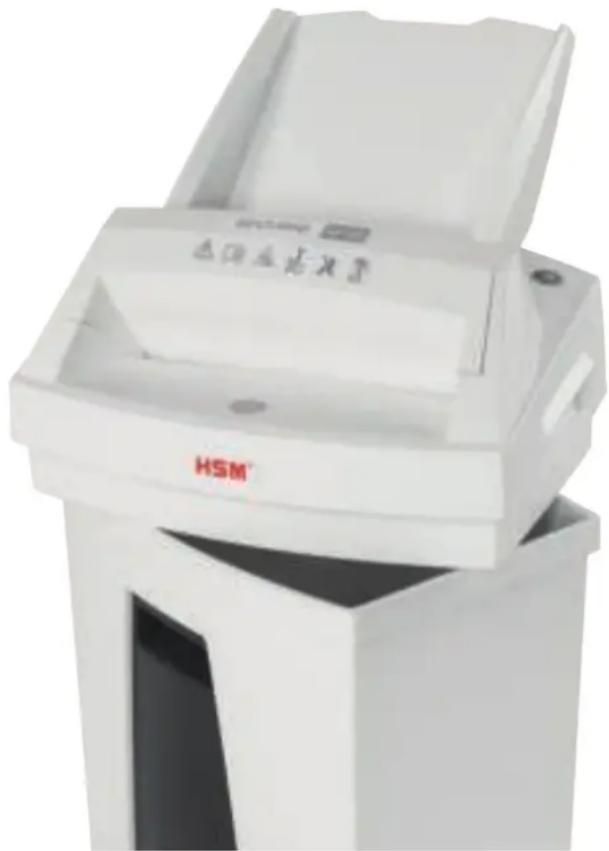
Full shredded material container
Check the fi lling level in the shredded material container at regular intervals.
CAUTION Empty the full shredded material container immediately, since cutting unit malfunctions can occur from repeated pressing of the shredding material.
Two recessed handles are incorporated on the left and right of the housing top which make it easier for you to lift the cutting head from the shredded material container.
Switching off the shredder
- Move the power switch on the right-hand side of the document shredder to position "0".
6 Troubleshooting
| Problem Remedy | |
| The cutting unit runs for approx. 5 seconds without pulling in paper from the stack. | Paper jam in the auto-feed stack.Cause: Paper clips or staples in the paper stack.Remove the paper clips or staples from the paper, and load the stack again. |
| Paper jam | The cutting unit runs in reverse for a few seconds and pushes the paper back out again.Cause: You have fed in too much paper at once.If necessary, press the reverse button “R” to remove the stack of paper.Take half the stack of paper.Feed in the paper in sheet at a time.Note:If the majority of the paper stack has already been drawn in before the blockage occurred, you can also press the reverse button “R” for longer than 5 seconds.This makes the cutting unit run forwards again and shred the remaining paper. |
| Cutting unit is not working. | Paper jam in the auto-feed stack.For troubleshooting see above.Incorrect cutting head positionPLACE the cutting head in the correct position on the container for shredded material.Full shredded material containerEmpty the shredded material container.\NCAUTION Empty the full shredded material container immediately,since cutting unit malfunctions can occur from repeated pressing of the shredding material. |
| The motor was overloaded.Let the shredder cool down for 45 - 60 minutes before starting it up again. | |
7 Cleaning and maintenance 8
Disposal/Recycling

WARNING
Dangerous mains voltage!
Improper handling of the machine can lead to an electric shock.

Switch off the document shredder before relocating or cleaning and disconnect the power plug.

Service work which requires the housing covers to be removed may only be carried out by HSM Customer Service and service technicians of our contractual partners.
For our customer service addresses see page 220.
Clean the document shredder only with a soft cloth and a mild soap-water solution. However, no water must enter the equipment.

Oil the cutting unit when cutting capacity decreases or the device becomes noisy, or every time you empty the waste
container. Only use HSM special lubricating oil for the cutting unit to do this:
- Spray the special cutting unit oil through the feed opening along the entire width of the cutting shafts.
- Press the operation button for approx. 5 seconds without feeding paper.
This loosens paper dust and particles.
If the paper from the automatic feed tray no longer feeds into the cutting unit properly, the intake rollers are worn and need replacing. We can provide a replacement kit for you to do this. Please get in touch with our customer services.
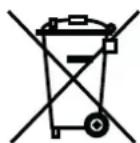
Electrical and electronic old devices contain a variety of valuable materials, but also hazardous substances which were required for function and safety. Incorrect disposal or handling can be danger
ous to your health and the environment.
Never dispose of old devices in the residual waste. Observe the current applicable regulations and use the collection points for returning and recycling electric and electronic devices. Also dispose of the packaging material in an environmentally-responsible way.
9 Scope of delivery
- Document shredder packed in a cardboard box
Automatic feed tray - Power supply cable
1 bottle of special lubricating oil for cutting head (50 ml) - Operating manual
Accessories (not included)
- Special lubricating oil for cutting head (250 ml)
Order no. 1.235.997.403
For our customer service addresses see page 220.
10 Technical data
| Cutting type Particle cut | |
| Cutting size (mm) 4 X 25 | |
| Security level DIN 66399 P-4, T-4, E-3, F-1 | |
| Cutting capacity* (sheet), DIN A4 70 g/m2802 | 6-7g5m6 |
| Weight | 7.6 kg |
| Intake width 225 mm | |
| Cutting speed 45 mm/s | |
| Power supply 220-240 V / 50/60 Hz | 110-130 V / 50/60 Hz |
| Output with max. number of sheets | 185 W (EU) / 160 W (US) |
| Energy consumption in standby mode | < 2 Wh |
| Operating time for max. number of sheets | up to 15 min |
| Operating time for single sheet | up to 20 min |
| Operating ambient conditions: | |
| Temperature | -10 °C up to +25 °CMax. 90%, non-condensing |
| relative humidity | |
| height above SL | max. 2,000 m |
| Size W x D x H (mm) | 375 x 260 x 620 |
| Shredded material container volume | 25 l |
| Emission sound pressure level(idle running / under load) | 55-60 dB / 65-70 dB |
| A-weighted sound power level(LWAd in idle mode) | 71 dB |
- The maximum number of sheets (DIN A4, 70 g/m² or 80 g/m²) fed in lengthways which can be cut in one cycle. The specified capacity is determined with the cutting unit new and freshly oiled and with a cold motor, and relates to a voltage of 230 V / 50 Hz or 120 V / 60 Hz. A weaker mains voltage or different mains frequency than that specified may reduce the sheet capacity and increase the operation noises. The sheet capacity may vary depending on the structure and properties of the paper and the way it is fed.

This document shredder meets the applicable harmonisation legislation of the European Union:
EMC directive 2014/30/EU
Low voltage directive 2014/35/EU
RoHS directive 2011/65/EU
The EU declaration of conformity can be requested from the manufacturer.
Fare for forbreading!
Farlig netspaending!
Forkert omgang med
Farlig netspaending!
Forkert omgang med
8 Bortskaff else/recycling
Fare for forbrenning!
Beholder for makulatur full
HnB Koem cnyuae He BBOOnTe pyKn B MexaHn3M noDaun 6ymaru.

Onachocmbmpaemupoeahua u3-3a emzueahua!
He donyckaite nonadaHnna DnHHbIX BONOC, CBO6oHNo ODeXdbI, rAnCTyKOB, PnAaTKOB, HAsWeINhBix N HApUHybIX ZeNooyek B 3OHy, pacNoJoxeHHyIO B HenocpeDCTBeHHoN 6bln3OCTn OT npneMHOJzenn. He yHnTuXaJIte MaTePnaJIbI, CKNoHNbIe K O6pa3OBAHNIO PeTEn, HAnpIMep JeHTbl, UHypbl, PnactMaCCOBYIO PnEHky.
Onachocmb oxkoza!
He donyckaTe npImeHnnaKaknx-Jin6O YnCTaXxCpeDCTB nJIn a3p030JIbHbIX 6BytIeN,Coepka-ux ropUChE BeIecTba.Takne BeIecTBA MOryt BOCnIaMeHHTbcra.

Onachocmu dny demeu u npoyux nuu!
Maunnoi 3aepaaetcnoIb3oBAtbcnam (BkJIOyAeTeMna1we 14 net) cOpaHueHHbIMN
ФИЗЕСКИМN,CEHCOPHbIMN NJIYUMCTBEHNbIMCNO6HOCTaMNIcHEIOCTaTKOMOnbITA N/IN3HaHn,3aNCKJIIOUeHHeEM ClyuJaEB,KOrda OHn HAXOJrTc NOI NOCToRHHbIMPnCMOTpOM OTBETCTBeHHbIX 3a HNX JNU ININONyUHNIOT HIX YKa3AHn,KaK NOp3OBatbcnPn6Opom.3a DeTbMIHEO6XoDmONoCToRHHO CJIeNTb,YTO6bI He DOnyCTntbNX INrpbIC yCTpoiCTBOM.
He octabnIte MaunHy BKNIOueHHoH 6e3 npncMOtpa.
Onachocmb ydapa 3neKmpuyeckum mokom
Onachoe cTeBoe HapjKeHne npn He npaBnblHom o6paueHn
C MaUNHO MOKeT PnBecTu K yApy 3NeK-TPnueckm TOKOM.
- Perynapno npoBepaTe yctpoiCTBO n Ka6eIb Ha npedMet nobpejdeHn.

Pn NOBpeXeHnax nIi HnpaBnIbHO paBoTe, a TaKke nepeCMeHOJ MeCTa NcNoJIb3OBaHnI IIN ONUCTKO BbIKIOUaHTeY IINyHNuTOXeHnA DOKymeHTOBMaITe WTeNCEJbHyIO BVNIky.
- He donyckaite nonadaHna BOdbi B MaunHy. He okyhaite ceTeBOJ Ka6elb N 7TeNCeIbHyIO BnIKy B Body. KaTeOpnueckn 3a npeeuaetc8paTbcra 3a cTeByIO BnIKy MOKpbIMn pyKaMn.
- HnKoIa He TAHnTe 7TEnCeHbHyO BnIKy n3 po3eTKn 3a ceTeBOn Ka6eJb, a BceIda 6epNTecb 3a camy BNkY.
HaedxhblpexyunmMexaHn3MHeBocnpnIMcNbKCKo6kamN KaHceJrPcknM CKpeNkaM.
TapaHTnHbI cPOk Ha MaunHy COCTaBnAeT 3 rOda. B OTHOWeHN pexyux BaIOB MaunH dIyUHToXeHN yOKymENTOB DeiCTByET ODA He3aBnCmMaOT rapaHTnHBIX oB3aTeNbCTB rapaHTnHa Becb cPOK CnyK6bl ycPoNcTB (rapaHTnHa Becb cPOK CnyK6bl ycPoNcTB HSM). B rapaHTnHO He BXoJr T3HOC, yIep6, Bbl3BaHHbI He npabInhBIM ObpaSeHEm, n BMeuTaJIbCTBa NOCTOpOHnX JnU. BTaryBaIOuJe BAJIKN KACCetbl DJIa 6yMaHn OTHOcTcR K KaTeOPIN N3HaUNBaIOUxxCsDeTaJIeN.
KoMaHnHa HSM rapaHTnpyET noCTaBky 3anacbIX deTaleN B TeueHne 10 let noCJe OKOHuaHnI npOn3BOdCTBa DaHHoM MoJI N yCTpOiCTBa.
3 O6nBn
1 C6opHbI pe3epByap
2 ABTomatika Nycka n octaHOBKn
3 Khonka ynpabNeHnA
4 3aunTHbI 3JeMeHT
5 Yka3aHne no TexHnke 6e3onacHOCTN
6 IOTOK dIa aBTOMaTnuecko nOdaH
7 Khonka peBepcnpobHnR
8 PnemHoe OTBepCTne
9 Pekyua ronobka
10 3aBODcka Ta6JnUka
4 BbOaB 3KcPnyatauHIO

PPEyPExKdEHN
Onachoe HapjkeHue cemu!
HenpaBnIbHoe o6paueHne c MaunHOJ MOKeT npNBecTN K ydApy 3JeKtpnueckm TOKOM.
- IcnoIb3yIte MaunHy dIyHnTuXeHN Hymar TOnbKO B cyNX BHyTpEHNHX NOMEuHnx. He nOJIb3yIteCb MaUN-HoB B NOMEuHnx C BblCOKoBnAxAHOCTbIO BO3dYx aIIIN BO BpeMdoJkJa.
- He yctaHaBnBaIte n He 3KcNpyaTnpyIte ycIpoIcTBO, ceTeBoi Ka6eIb n BnIky B6IIN3n OTkpblTOrO OrHn I ropaynx NobepxHocTei. IJra oBeCneHEnia DOCTaTOUHO OXJaXdEHHa3anpeua-etcra nepeKpbIbAtb BEHTNJrUOHhie npope3n. Heo6xoIMo yCTaHaBnBaTb MaunHy Ha pacCToRHN He MeHee 5 cm OT CTeH nn Me6eJI.
- O6paTnte BnMaHne Ha doCTyNHOCTb 1TeIceIbHOB BNJKN.
-Перетд ВКлюченem MaшиньВ ceТь yбeДиТecьВ TOM,чTo ee Hanрженье И чаctOTA COOTBETCTBYOT ДaHHыМ, уka3aHHbIM Ha 3aBOДСКОТаБлИЧЕ.
YcTaHOBInTe JNotOKДЯ aBTOMaTnueCKo NOpaUn
OTKINbTe 3aunTHbI 3nEmeHT BnepeI.
- JIoTOK HauOДNTcB Kopo6ke.
BCTaBbTe IOTOK BHaPpaBnIouyIO IN pNkMnte eRO Bn3 Do 3aUeKnBaHnI.
YTo6bI 3aΦnKcnpoBaTb IOTOK, OTOXMITE HapyxypacnoJoxKeH HbIe Ha HemΦnKcnpyIOuIne 3aUeJIKN CNeBa n Cnpaba.
6 YctpaHHe HeNCpPaBHOCTeI
Yka3aHna 3a 6e3oNaCHOCT

Ipei nycaHe B eKcnnoatauHa MaunHaTa npOeTe Te HnCTpyK-uaTa 3a eknloatau, CbXpaHete 3a 6bdeo n3nol3BaHe
I npdaTe Ha 6bDeuTe nO3Baun.
Cb6IIOdaBaIe BCnKn NOCTaBeHn Bbpxy MaunHaTa 3a yHnOxKaBaHe Ha DOKymEnTu yka3aHna 3a 6e30NaChocT.

Onachocm om hapaHyahe om ocmpu HoxoBe!
B HnKaKbB CnyaH He NbXaIte pKa B NOdaBaHeTo Ha XapTnaTa.
Onachocm om hapaheane npu u3bpeane Haebmpe!
BceKTopa Ha OTbopa 3a BbBexJaHe He HocTe cNychata Dblra Koca, CBO6oJHO oBleKNo, BpaTOBpb3Kn, WAnOBe, KOJIneTa N rPnBn N dp. He yHnUxoXaBaYte MaTepnaIi, KOINTo MOrat Da ce yBnT, HApnIMep, NeHTn, ShHypObe, PnactMacobO fOnno.
Onachocm om u3zapnHe!
He n3noJ3BaIte noUcTBAuN cpeDCTBa IJIncpeNoBE,cbDbpKaU3aJaNTeHn BeuecTBA. Te3nBeuecTBA MORaT Da ce 3aJaT.

Onachocmu 3a deua u dpyu nuca!
MaunHata He Tp6Ba da ce H3noJ3Ba OT Iuca (BKNIOHTeHNO Deua no14 roDHH) c orpaHn-
YeH NcNXUeCKN, CeH3OpHN IJIN yMCTBeHn CnOCo6HOCTN IJIN JIINca Ha ONNT IJIN IJIN PO3HaHHe, OCBHe, aKO ca NOd HaN3Opa Ha OTROBapraIoo 3a TjXHaTc CNrpyHocT IJnce IJIN ca IONyUHNI yKa3aHnIg OT HeRo, KaK Da I3NoJ3BaT UpeDa. Deuata Tp8Ba Da ce Na6IIOdaBAt Da He INpArT CupeDa. He OCTabRyTe BKNIOUeHa MaUNHaTa 3a YHNUOxKaBaHe Ha DOKUMeHTN 6e3 HAD3Op.
Onachocm om eIekmpuuecku ydap
HenpaBnHOTOn 3noJ3BaHe Ha MaunHaTa MoKe Da DoBeDe Do
eNeKtpnueckn TOKOB ynap.
- PeIDOBHO npOBepaIte ypeia n Ka6ena 3a uetn.

Pn noBpeHa nn HnnpaBnHNO cyHKUOHnpaHe KaKTo n npedn npemeCTBaHe nn NouchTbaHe N3KNUOteMaunHaTa 3a yHnOka
BnHmBaIte Da He nonaDHe BODa B MaHnHaTa 3a yHnOxKaBaHe Ha DOKyMeHTN. He notapTne MpeXOBn Ka6eN nJIn Ukepa BbB BoDa. He nnaTe Hnkora Ukepa C BnAChn Pbue.
- HnKora He nbpnaIte uekepa 3a Ka6eJa ot KOHTaKTa, XBaUaIte BnHaRn 3a uekepa.
BaHe Ha DOKyMeHTN IN N3BaTe UeNCena.
Siparis No. 1.235.997.403
Müsteri hizmetleri adresleri icin, bkz. sayfa 220.
10 Teknik Bilgiler
1 1 a a a a a a a a a a a a a a a a a a a a a a a a a a a a a a a a a a a a a a a a a a a a a a a a a a a a a a a aaa

5
ggl a
aaii iie 100000000000000000000000000000000000000
#
a 12000000000000000000000000000000000000000000
()g 80 100
ailll aill
2y y 21 oai
s 1
2 1
J.
J.
J.
J.
J.
aaii 1 aie 1 1 1 1 1 1 1 1 1 1 1 1 1 1 1 1 1 1 1 1 1
a 1
88699 Frickingen / Germany
Tel. +49 7554 2100-0
Fax +49 7554 2100 160
info@hsm.eu
www.hsm.eu
Gratis Hotline
DE, AT, IT, ES, BE, NL, LU
Tel. 00800 44 77 77 66
14 Attwood Road / Zone 1
Burntwood Business Park
Burntwood·Staffordshire
WS73GJ
United Kingdom
Tel. +44 1543 272-480
Fax +44 1543 272-080
sales.uk@hsm.eu
www.hsm.eu
HSM Polska Sp. z o.o.
ul. Emaliowa 28
02-295 Warsaw
Poland
Tel. +48 22 862-2369
Fax +48 22 862-2368
handlowy@hsm.eu
www.hsm.eu
HSM of America LLC
419 Boot Road
Downingtown, PA 19335
USA
Tel. +1 484 237-2308
+1800613-2110
Fax +1 484 237-2309
customerservice@hsm.us
info@hsm.us
www.hsm.us
HSM China Ltd.
Room 504, Building C
Hangcheng Guangchang
Nanfaxin Town
Shunyi District
Beijing, PRC, 101300
China
Tel. +86 10 61429168
Fax +86 10 61429169
info@hsm-china.cn
www.hsm-china.cn
HSM®
Great Products, Great People.


- Explanation of symbols and safety instructions
- Note
- Safety instructions
- Risk of injury from sharp blades!
- Risk of injury during intake!
- Risk of combustion!
- Danger to children and other persons!
- Electrical hazard
- Proper use, warranty
- Overview
- Initial start-up
- WARNING
- Dangerous mains voltage!
- Operation
- Switching on the document shredder
- Shredding paper
- Feed the paper directly into the feed opening
- Feed the paper using the automatic feed tray
- WARNING Risk of injury during intake!
- a) Press the operation button for 2 seconds.
- b) Feed one sheet of paper directly into the feed opening.
- Shredding credit cards Emptying the shredded material container
- Full shredded material container
- Switching off the shredder
- Troubleshooting
- Cleaning and maintenance 8
- Disposal/Recycling
- Scope of delivery
- Accessories (not included)
- Fare for forbreading!
- Farlig netspaending!
- Bortskaff else/recycling
- Beholder for makulatur full
- Onachocmbmpaemupoeahua u3-3a emzueahua!
- Onachocmb oxkoza!
- Onachocmu dny demeu u npoyux nuu!
- Onachocmb ydapa 3neKmpuyeckum mokom
- O6nBn
- BbOaB 3KcPnyatauHIO
- PPEyPExKdEHN
- Onachoe HapjkeHue cemu!
- YcTaHOBInTe JNotOKДЯ aBTOMaTnueCKo NOpaUn
- Yka3aHna 3a 6e3oNaCHOCT
- Onachocm om u3zapnHe!
- Onachocmu 3a deua u dpyu nuca!
- Onachocm om eIekmpuuecku ydap
- 5
- ggl a
- #
- a 1
Brand : HSM
Model : Securio AF100
Category : Shredder