G24SDS - Drill GREENWORKS - Free user manual and instructions
Find the device manual for free G24SDS GREENWORKS in PDF.



| Product Type | SDS 24V Rotary Hammer |
| Brand | Greenworks |
| Model | G24SDS |
| Rated Voltage | 24 V |
| No-load Speed | 0 – 1,200 rpm |
| Impact Speed | 0 – 5,600 bpm |
| Single Impact Energy (EPTA) | 1.8 J |
| Drilling diameter in concrete | 18 mm |
| Drilling diameter in stone | 18 mm |
| Drilling diameter in steel | 13 mm |
| Drilling diameter in wood | 30 mm |
| Weight (without battery and charger) | 2.0 kg |
| Battery type | Lithium-ion 24 V |
| Compatible battery models | 29807 / 29837 |
| Compatible chargers | 29817 (VDE), 29827 (BS), 2913907 (VDE & BS) |
| Sound power level (LwA) | 87.7 dB(A), K=3 dB |
| Sound pressure level (LpA) | 76.7 dB(A), K=3 dB |
| Vibration (drilling in metal) | 12.028 m/s², K=1.5 m/s² |
| Chuck | SDS Plus (SDS Quick) |
| Included accessories | Auxiliary handle, depth stop |
| Warranty | 2 years (domestic use), 30 days (professional use) |
Frequently Asked Questions - G24SDS GREENWORKS
User questions about G24SDS GREENWORKS
0 question about this device. Answer the ones you know or ask your own.
Ask a new question about this device
Download the instructions for your Drill in PDF format for free! Find your manual G24SDS - GREENWORKS and take your electronic device back in hand. On this page are published all the documents necessary for the use of your device. G24SDS by GREENWORKS.
USER MANUAL G24SDS GREENWORKS
English (Original Instructions)
PRODUCT FEATURES
The numbering of the product features refers to the illustration of the machine on the graphics page.
1 Auxiliary handle
2 SDS chuck
3 Depth stop rod
4 Mode selector
5 Direction of rotation selector
6 Switch trigger
7 Battery pack
8 Battery unlocking button
9 Release button for mode selector switch
10 Rod adjustment button
11 SDS bit*
*Accessories shown or described are not part of the standard delivery scope of the product. A complete overview of accessories can be found in our accessories program.
DELIVERY SCOPE
Rotary hammer, auxiliary handle and depth stop.
Application tools and other accessories shown or described are not part of the standard delivery scope.
A complete overview of accessories can be found in our accessories program.
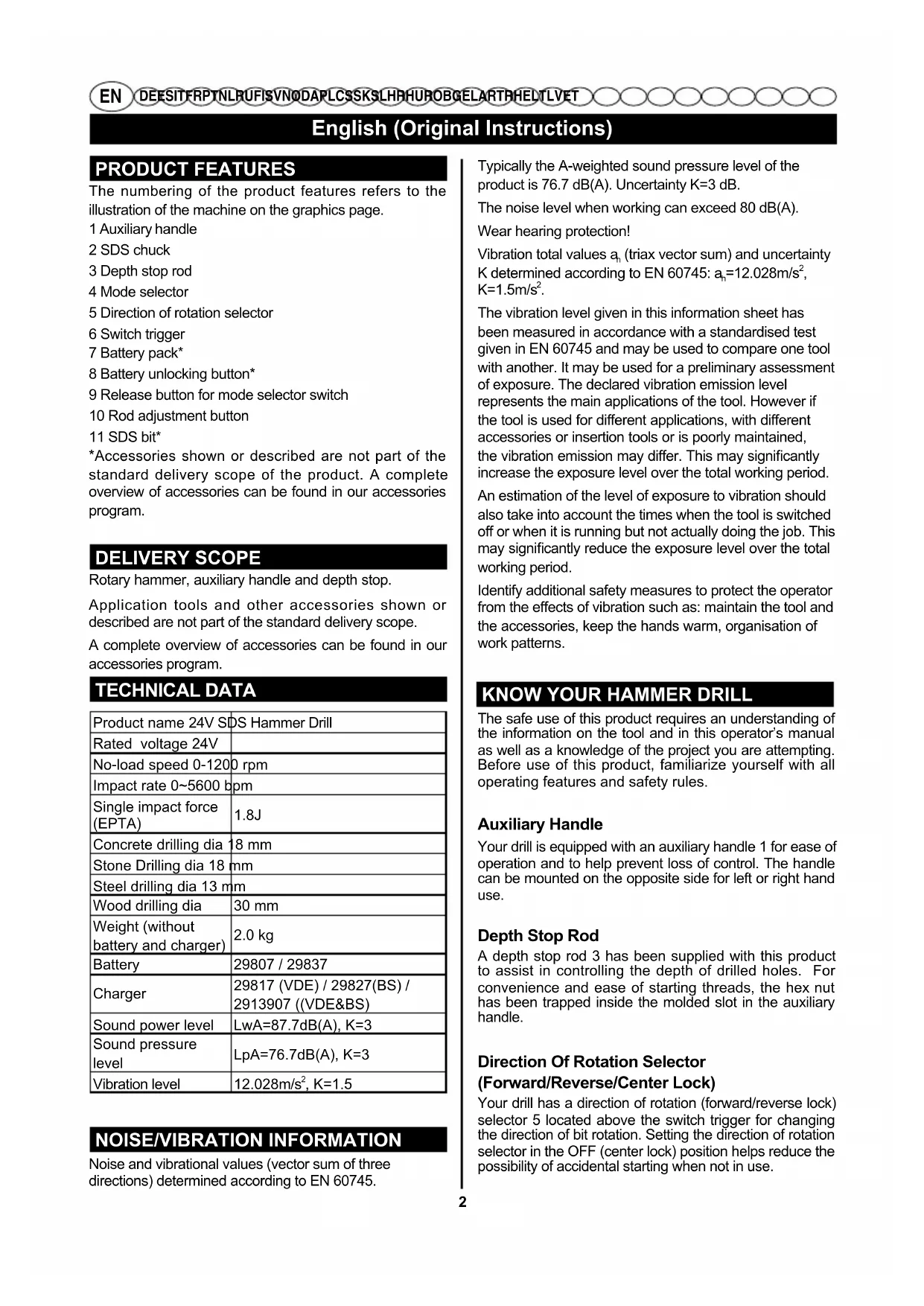
TECHNICAL DATA
| Product name 24V SDS Hammer Drill | |
| Rated voltage 24V | |
| No-load speed 0-120 rpm | |
| Impact rate 0~5600 bpm | |
| Single impact force (EPTA) | 1.8J |
| Concrete drilling dia | 18 mm |
| Stone Drilling dia 18 | mm |
| Steel drilling dia 13 | mm |
| Wood drilling dia | 30 mm |
| Weight (without battery and charger) | 2.0 kg |
| Battery | 29807 / 29837 |
| Charger | 29817 (VDE) / 29827(BS) / 2913907 ((VDE&BS) |
| Sound power level | LwA=87.7dB(A), K=3 |
| Sound pressure level | LpA=76.7dB(A), K=3 |
| Vibration level | 12.028m/s², K=1.5 |
NOISE/VIBRATION INFORMATION
Noise and vibrational values (vector sum of three directions) determined according to EN 60745.
Typically the A-weighted sound pressure level of the product is 76.7 dB(A). Uncertainty K = 3 dB.
The noise level when working can exceed 80 dB(A).
Wear hearing protection!
Vibration total values an (triax vector sum) and uncertainty K determined according to EN 60745: an = 12.028m / s2 K = 1.5m / s2
The vibration level given in this information sheet has been measured in accordance with a standardised test given in EN 60745 and may be used to compare one tool with another. It may be used for a preliminary assessment of exposure. The declared vibration emission level represents the main applications of the tool. However if the tool is used for different applications, with different accessories or insertion tools or is poorly maintained, the vibration emission may differ. This may significantly increase the exposure level over the total working period.
An estimation of the level of exposure to vibration should also take into account the times when the tool is switched off or when it is running but not actually doing the job. This may significantly reduce the exposure level over the total working period.
Identify additional safety measures to protect the operator from the effects of vibration such as: maintain the tool and the accessories, keep the hands warm, organisation of work patterns.
KNOW YOUR HAMMER DRILL
The safe use of this product requires an understanding of the information on the tool and in this operator's manual as well as a knowledge of the project you are attempting. Before use of this product, familiarize yourself with all operating features and safety rules.
Auxiliary Handle
Your drill is equipped with an auxiliary handle 1 for ease of operation and to help prevent loss of control. The handle can be mounted on the opposite side for left or right hand use.
Depth Stop Rod
A depth stop rod 3 has been supplied with this product to assist in controlling the depth of drilled holes. For convenience and ease of starting threads, the hex nut has been trapped inside the molded slot in the auxiliary handle.
Direction Of Rotation Selector
(Forward/Reverse/Center Lock)
Your drill has a direction of rotation (forward/reverse lock) selector 5 located above the switch trigger for changing the direction of bit rotation. Setting the direction of rotation selector in the OFF (center lock) position helps reduce the possibility of accidental starting when not in use.
English (Original Instructions)
SDS Plus Chuck
The SDS chuck 2 allows quick insertion and release of SDS and SDS Plus bits.
Mode Selector
The mode selector 9 allows you to quickly switch from rotary mode to hammer mode.
ASSEMBLY
Unpacking
This product requires assembly.
- Carefully remove the product and any accessories from the box. Make sure that all items listed in the packing list are included.
WARNING
Do not use this product if any parts on the Packing List are already assembled to your product when you unpack it. Parts on this list are not assembled to the product by the manufacturer and require customer installation. Use of a product that may have been improperly assembled could result in serious personal injury.
Inspect the product carefully to make sure no breakage or damage occurred during shipping.
- Do not discard the packing material until you have carefully inspected and satisfactorily operated the product.
WARNING
If any parts are damaged or missing do not operate this product until the parts are replaced. Use of this product with damaged or missing parts could result in serious personal injury.
WARNING
Do not attempt to modify this product or create accessories not recommended for use with this product. Any such alteration or modification is misuse and could result in a hazardous condition leading to possible serious personal injury.
WARNING
To prevent accidental starting that could cause serious personal injury, always remove the battery pack from the product when assembling parts.
Battery Charging
- Use only the chargers listed in the technical data. Only these chargers are matched to the lithium-ion battery of your power tool.
NOTE: The battery supplied is partially charged. To ensure full capacity of the battery, completely charge the battery in the battery charger before using your power tool for the first time.
The lithium-ion battery can be charged at any time without reducing its service life. Interrupting the charging procedure does not damage the battery.
The lithium-ion battery is protected against deep discharging by the "Electronic Cell Protection (ECP)". When the battery is empty, the machine is switched off by means of a protective circuit: The inserted tool no longer rotates.
- Do not continue to press the On/Off switch after the machine has been automatically switched off. The battery can be damaged.
Observe the notes for disposal.
OPERATION
WARNING
Do not allow familiarity with this product to make you careless. Remember that a careless fraction of a second is sufficient to inflict serious injury.
WARNING
Always wear eye protection with side shields marked to comply with ANSI Z87.1 along with hearing protection. Failure to do so could result in objects being thrown into your eyes and other possible serious injuries.
WARNING
Do not use any attachments or accessories not recommended by the manufacturer of this product. The use of attachments or accessories not recommended can result in serious personal injury.
Removing the battery (see figure A)
To remove the battery 7, press the battery unlocking button 8 and pull the battery out of the power tool toward the rear. Do not exert any force.
Switch Trigger (see figure B)
To turn the drill ON, depress the switch trigger. To turn it OFF, release the switch trigger.
Direction Of Rotation Selector (see figure C - D) (Forward/Reverse/Center Lock)
The direction of bit rotation is reversible and is controlled by a selector located above the switch trigger. With the drill held in normal operating position, the direction of rotation selector should be positioned to the left of the switch trigger for drilling. The drilling direction is reversed when the selector is to the right of the switch trigger.
Setting the direction of rotation selector in the OFF (center lock) position helps reduce the possibility of accidental starting when not in use.
CAUTION
English (Original Instructions)
To prevent gear damage, always allow the chuck to come to a complete stop before changing the direction of rotation.
To stop the drill, release the switch trigger and allow the chuck to come to a complete stop.
NOTE: The drill will not run unless the direction of rotation selector is pushed fully to the left or right.
Avoid running the drill at low speeds for extended periods of time. Running at low speeds under constant usage may cause the drill to become overheated. If this occurs, cool the drill by running it without a load and at full speed.
Using The Auxiliary Handle Assembly (see figure E)
- Loosen the handle assembly by turning the handle counterclockwise.
- Slide the auxiliary handle assembly onto the hammer drill in the desired operating position either right handed or left handed.
- Securely tighten by turning the auxiliary handle clockwise.
NOTE: Be sure the auxiliary handle is securely tightened against the depth stop rod clamp. This secures the depth stop rod at the desired depth of cut. It also secures the auxiliary handle.
Adjusting The Depth Stop Rod (see figure F - G)
Lock the switch trigger by placing the direction of rotation selector in the center position.
Press the rod adjustment button.
Adjust the depth stop rod so that the drill bit extends beyond the end of the rod to the required drilling depth.
- Release the rod adjustment button.
NOTE: When properly installed, the teeth on the depth stop rod should be aligned with the teeth indicator on the depth stop rod clamp.
Fitting And Changing SDS Bit (see figure H)
This tool is equipped with an SDS Plus connection system.
Clean the bit and grease it with machine grease before inserting it into the chuck.
Pull back the clamp collar and hold it.
- Push and rotate the dust-free tool into the bit holder as far as it will go.
- Release the clamp collar to lock the bit.
Check that bit has locked by pulling on it.
Removing The Bit From The SDS Plus System (see figure I)
Pull back the clamp collar and remove the bit.
Mode Selector(see figure J)
In general, rotary mode should be used for drilling and other heavy duty applications. Hammer mode should be used for hammer drilling.
To change the operating mode, push the release button and turn the mode selector switch to the requested position until it can be heard to latch.
For drilling, place the selector in the position.
For hammer drilling, set mode selector to (T).
Switch between modes when tool is at a standstill.
NOTE: Hammer drilling mode will damage the tool's mechanism when used for fastening or drilling by non-SDS Plus bits. Select the rotary mode only on such purpose.
When hammer drilling, use only bits with hard metal and SDS Plus shaft only. The use of commercially available masonry bits with cylindrical shaft by means of the drill adaptor is impossible.
CAUTION
When hammer drilling, do not apply too much pressure. Too much pressure will place unnecessary load on the motor.
Drilling (see figure K)
- Check the direction of rotation selector for the correct setting (forward or reverse).
- Secure the material to be drilled in a visor with clamps to keep it from turning as the drill bit rotates.
Hold the drill firmly and place the bit at the point to be drilled.
Depress the switch trigger to start the drill.
- Move the drill bit into the workpiece, applying only enough pressure to keep the bit cutting. Do not force the drill or apply side pressure to elongate a hole. Let the tool do the work.
WARNING
Be prepared for binding at bit breakthrough. When these situations occur, drill has a tendency to grab and kick opposite to the direction of rotation and could cause loss of control when breaking through material. If not prepared, this loss of control can result in possible serious injury.
- When drilling hard, smooth surfaces, use a center punch to mark the desired hole location. This will prevent the drill bit from slipping off-center as the hole is started.
- When drilling metals, use a light oil on the drill bit to keep it from overheating. The oil will prolong the life of the bit and increase the drilling action.
If the bit jams in the workpiece or if the drill stalls, stop the tool immediately. Remove the bit from the workpiece and determine the reason for jamming.
NOTE: This drill has an electric brake. When the switch
English (Original Instructions)
trigger is released, the chuck stops turning. When the brake is functioning properly, sparks will be visible through the vent slots on the housing. This is normal and is the action of the brake.
Wood Drilling
For maximum performance, use high speed steel bits for wood drilling.
Select drilling mode.
- Begin drilling at a very low speed to prevent the bit from slipping off the starting point. Increase the speed as the drill bit bites into the material.
- When drilling through holes, place a block of wood behind the workpiece to prevent ragged or splintered edges on the back side of the hole.
Metal Drilling
For maximum performance, use high speed steel bits for metal or steel drilling.
- Select drilling mode.
- Begin drilling at a very low speed to prevent the bit from slipping off the starting point.
Maintain a speed and pressure which allows cutting without overheating the bit. Applying too much pressure will:
Overheat the drill;
- Wear the bearings;
Bend or burn bits; and
- Produce off-center or irregular-shaped holes.
- When drilling large holes in metal, start with a small bit, then finish with a larger bit. Also, lubricate the bit with oil to improve drilling action and increase bit life.
Masonry Drilling
For maximum performance, use carbide-tipped masonry impact bits when drilling holes in brick, tile, concrete, etc.
- Slide adjustment button on hammer drill left for hammer mode.
Apply light pressure and medium speed for best results in brick. - When drilling holes in tile, practice on a scrap piece to determine the best speed and pressure. Begin drilling at a very low speed to prevent the bit from slipping off the starting point.
MAINTENANCE
WARNING
When servicing, use only identical replacement parts. Use of any other parts may create a hazard or cause product damage.
General Maintenance
Avoid using solvents when cleaning plastic parts. Most plastics are susceptible to damage from various types of commercial solvents and can be damaged by their use. Use clean cloths to remove dirt, dust, oil, grease, etc.
WARNING
Do not at any time let brake fluids, gasoline, petroleum-based products, penetrating oils, etc., come in contact with plastic parts. Chemicals can damage, weaken or destroy plastic which could result in serious personal injury.
Tool Storage
Always remove battery pack from tool before storing the tool.
Battery pack preparation for recycling
WARNING
Do not attempt to destroy or disassemble battery pack or remove any of its components. Lithium-ion and nickel-cadmium batteries must be recycled or disposed of properly. Also, never touch both terminals with metal objects and/or body parts as short circuit may result. Keep away from children. Failure to comply with these warnings could result in fire and/or serious injury.
DISPOSAL

The machine, rechargeable batteries, accessories and packaging should be sorted for environmentalfriendly recycling.
Do not dispose of power tools and batteries/rechargeable batteries into household waste!
ENVIORMENTAL PRORECTION
Recycle raw materials instead of disposing of as waste. The machine, accessories and packaging should be sorted for environmental-friendly recycling.
Switch between modes when tool is at a standstill.
IOnHbI Ha6Op npHaJNExKHOCTe Bbl HaJeTe B Hauem accOPTIMeHTe npHaJNExKHOCTe.
TEXHnueCKNE DAHHbIE
HeoctOBepHOCTbN3MepeHnK=3B.
YpOBeHbUyMaHa pa6Oyem MeCTe MoXeT nepeBbIaTb 80 dB(A).
IOnb3yInTeCb cpeCTBaMM 3aunTbI opraHOB cnYxa! CymMapHa Bn6paun a, (BeKTopHaCyMa Tpex HAnpaB-JeHn) n NorpeuHocTh K onpeJeHb B COOTBeTcBm c EN 60745: ah = 12.028m / s2 K = 1.5m / s2
Yka3aHHbB 3TNX INHCTpyKUHX yPOBeH Bn6paCmN ONpeJeH B COOTBETCTBm CO CTaHdAPTH3OBaHHoMeTOJHKo N3MpeHm, npOncAHHoB EN 60745, mOKeT nONb3OBaTBcR dIe CpaBHeHn 3JIeKTponHCTpyMeHTOB. OH pInrOeH TaKke IpnpeBapntelbHO OceHKn Bn6paCNoHHo HArpy3Kn.
YpOBeH Bn6paun yKa3aH dIy OChOBbIX BnIOB pa6OTbC 3JIeKTPoINHCTpyMeHTOM. OJHaKO eCNI 3JIeKTPoINHCTpyMeHT 6yDet NcNOJB3OBaH dIy BBINO-JHeHrA DpyRnx pa6OT, Cpa3JIuHbIMN npINA-dJIeXHOCTaMn, CnpIMHeHEm CMeHHbIX pa6OuNX INCTpyMeHTOB, He npElyCMOTpeHHbIX N3ROTO-BITJeM, INI TEXHnueCKoe 06cJIyKbAHne He 6yDet OTBeYaTb npEiNCAHNAM, TO ypOBeH Bn6paun MoKeT 6bITb INbIM. 3TO MOKeT 3HaHTeNbHO NOBbICNTB Bn6paUHOHHyU Harpy3ky B TeueHne BcE I pOdoJXtNEbHOCTn pa6Obl.
Дя TOUHOn OueHKN Bn6paunOHNoHarpy3Kn B TeueHne ONpeJeHHoro BpeMeHHoro INHTepBaIa HxKHO yHT-biBaTb TaKe N BpEm, KOrJa IHCTpyMeHT BblKnIOeH IIN, XOTa N BKIOUeH, HO He HaxOJNTcR B pa6ote. 3To MoKet 3HaHTeJIbHO COKpaTtB Harpy3ky OT Bn6paunB paChTe Ha NOJIHOe Pa6oOee BpEm. IpeDycmOTPte DOnONHITeJIbHbIe Mepbl Be3onacHocTn DnA 3aunTbI OpeATopA OT Bo3dEInCTBra Bn6paun, HapPIMeP:TexHnueCKoe ObClyKnBaHne 3JIeKTpONHCTpyMeHTa n Pa6OuX INCTpyMeHTOB, Mepbl No no-DoepXaHHo pyk B TeTTne, opraHn3aIyra TexHoJOnruecknx npouceCOB.
Pycckn (IpebeO d opunHaJIbHbIX nHCTpyKcN)
3HAKOMCTBO C ydAPHOI DPEJIbIO
Ig6630NaCHOrIO nCnOJb3OBaHnI DaHHOro n3dEJIINr Heo6xOJIMo N3yUHTb CBeDeHnO 6N3dEJIINu, yKa3aHHbIe B DaHHOM pyKOBODCTBe NO 3KcNpyTaUIN, a TaKKe IOHNMaHnB bInONHReMoN 3aJaU. IpePe INCIOJB3OBaHnEM DaHHOrO n3dEJIINr O3HaKOMbTECb Cero pa6oUHMn FyHKUJMMn IN ppabNJAMn 6e3OnacHOCTN.
BcnoMoraTeIbHa Pyka
OrpaHnHTeIb Iny6HHb CBepeHn
OrpaHnHTeNb rIy6uHb CBepeHn3, BxOJaunB KOMNKeT NOCTaBKn N3DeJnna, PpeHa3HaueH dJaDOCTNXeHn ToHOn rIy6uHb IpocBepInBaembIXOTBepCTn. YTo6bl OrpaHnHTeNb 6blNo ydo6HeepoDBuRaTb,ByrIy6LnHn BCnOMoratJeHbHOpyKn yctahOBnHeHa WeCTnprHnra raKa.
IpeeknoateHnpaBneHn BpaueHn (AnkcaTop BnepeD/PeBepc/LeHTp)
Дрел bochaeHa nepeknloyatelem HanpaBneHn Bpauhena (Bpepe/peBepc) 5, pacnoIooKeHHbIM NaKhoNko 3anycka Ira N3MeHeHn HAnpaBneHn BpaueHn CbePna. YctahOBka nepeknoyateHn HanpaBneHn BpaueHn B noJoxKeHne BblKn. (6IOkpOBKa no ceHTpy) nO3BOJareT CHN3ntB BepoTHocTb CnyauHOrO BKIOUeHn, KOrda dpeB He NCNOJb3yeTcR.
NaTPOH SDS Plus
NATPOH SDS 2 NO3BOJRAET 6bICTPO BCTABNtB n 13BJIeKAtb CBePnA C XBOCTOBUKOM TINa SDS n SDS Plus.
CJIeKTop Peknma
CeNEKTop pexIMOB 9 no3B0JAEt 6bIcTpo nepeKIOUaTbcra n3 peXIMAbpaueHnB yDapHbI peXIM.
CEOPKA
PacnaKOBka
DaHHoe yctpoiCTBO Tpe6yeT BbINONHeHnC6OpKn
OcToPoxKHO N3BJIeKNTe YCTPOIcTBO N BCE npncnoc6nEHHN 3 KOp06Kn. PpOBepbTe HaHnHne Bcex DeTaJIe, npeuNCHeHHbIX B CnICke KOMnEKeTJUOLnx.
BHUMAHNE!
He nCNoB3yIte 3TO n3dJIne,ecn Bbl o6hApXHITe B yNaKOBKe, YTO KAcNc - JIn6O DeTaJIb N3 KOMPNeKTA NOCTABN yXe yCTaHOBnEhbl Ha n3dJIe. DeTALN I3 3TOrO CnNcKa He yCTaHaBnBaIOrTa Hn3dJIeN E3ROTOBnTeJEM n DOJXHbI 6bITb yCTaHOBnEhbl NOK yNaTeJem. NcNoIb3OBAHnE He npabINbHo c6paHHoro n3dJIeM MoKET pInBeCTN K cepBe3HbIM TpaBMam.
BHHMaTeJIbHO OCMOTOpTe yCTpoNCTBO Ha NpeDMET HAnHnIeDePekTOB INI NOBpeKdEHN, BOaHNKJnx npn TpaHCnOpiPOBKe.
He Bb6pacbBAIte ynaKOBOCHB MaTePnA I Do Tex NOp, NOKa Bbl BHMaTeJIbHO He OCMOTpeJIN H He Haapan 3KcNpyATnpOBaTb N3dEJIne.
BHUMAHNE!
EcnIJIIO6bIe Yactn NOBpeXdeHbI, HINOTCYTCTBYOT, He IcnoJb3OBAtB 3TO N3DeJIne, NOKa YactN He 3aMeHeHbI. IcNoJb3OBAHne 3TORo npOdyKta C IOBpeXdeHHbIMN DeTaNMy MIn NpN OTCyTCTBm KAKNX-Ni6o DeTaNey MoKeT pNvBeCTN K NOnyuHnIO TAAKKX TeLeChbIX NOBpeXdeHn.
BHUMAHNE!
He nbTaIteScb n3MeHrTb 3To n3DeJIne nJIn CO3DaBaTb npHaIaJIeXHoCTn,He peKOMeHdyEmble dJa NCNoJIb3OBAHnC 3TmN n3DeJIeM JIO6oe TaKoe n3MeHHe NnMoINΦKaUa- He npaBnHoe yNOTpe6JeHne,MOyT KOHaTbCra ONaChbIM ycN OBnEM,BEduSMM K BO3MOxHOMy cepBe3HOMy nepcoHaJIbHaJIbHOMy uSepe6y.
BHUMAHNE!
Ipy npdeOTbpaueHn cnyauHO 3anycka, KOtOpbl MOKeT pNBecTu K TjKeNo TpaBMe, npu c6opKe DeTaNe BcERda N3BLeKaTe 6aTapeHbI 6LoK.
3apkaakkymyTopa
IOnb3yntecbToJIbKO 3apAaHbIMn yCTpoiCTBaMn, yka3aHHbIe B TexHnuecknx DaHHbIX. ToJIbKO 3TN 3apAaHbIe yCTpoiCTBa npiroDhbl Dnra IHTneBOHOHOrO akKymyIaTopa BaUero 3JIeKtpoIHcTpyMeHTa.
PIMMEAHNE. AKKymyIaTOP NOCTabJIeTcH He NONHOCTbIO 3apJxKeHHbIM. IJIa OBeCneUeHnN IOJIHOI MOuHOCTu AKKymyIaTOPa 3apJdnte erO NOnHOCTbIO nepeD nepBbIM pIMMeHHeHem.
IHTN-NOHbIaKKymJrTOp MoKeT 6bITb 3apJxHe B IIO6oe BpeM 6e3 COKpaueHnCpoka CnyK6bl. IpeKpaueHne npoucecca 3apJdkn He HaHocnBpeDa aKKymJrTOpY.
3neKtpoHna CnCTema «Electronic Cell Protection (ECP)» 3aunuaeT NHTneBO-nOHbI aKKymJIaTO Tny60ko pa3pRdKn. 3aunTHa Cxema BblIOuAeT 3neKtpoHCTpyMeH T np pa3pRjKeHHOM aKKymJIaTope - pa6OuH INCTpyMeH OCTaHaBnBaeTcra.
IocJIe ABtOMaTHeCKOrO BbIKNIOueHnra 3JIeKTPoHCTpyMeHTa He HaxIMaTe 60JIbWe Ha BbIKIOHaTeJIb.AKKMyJITOp MOKeT 6bITb NOBpeXDeH.
yHTbBaIte yka3aHnnoytunin3aun.
ENCTBNE
BHUMAHNE!
Pycckn (IpebeO d opunHaJIbHbIX nHCTpyKcN)
CobnIaIte npedbHyO octopxHocTb, daKe ecnBxopo3HaKOMbIc MaunHO. He 3abBaTe, yTO daKe ckyHdna paCCeHHOCb MoXe TpNBecTN K cepbe3HbIM TpaBMam.
BHUMAHNE!
BcerdaHaedeBaIte3aunTHbIeOcKNC6OKOBIMnUHTkAMN,0eecneuHbIoUe 3aunTy B COOTBeTCTBmnc EN166,a TaKKe yctpoiCTBa 3auNTbI cLyxa.Heco6nIOJeHne 3TOrnpaBnla MoKet npNBecTn KnonadaHIO JETaUeO MyCopa B rna3a N npOumCEpbE3hBM TpaBMam.
BHUMAHNE!
He nCnoJb3yInTe KOMnOHeHtbl NIN npHaJdJIeKHOCTN, He peKOMeHNoBaHHbIe I3rOToBUNTeJeM.
IcnoJIb3OBAHHe KOMNoHEHTOB ININ npnHaJNEXKHOCTe, He peKOMeHNIOBaHHbIX N3ROTOBtJEiEM, MOKeTnpNBecTN K TjXeJIbIM TEJIeCHbIM NOBpeJDeHnM.
N3BJeHHe aKKyMylrTopa (cm. pnc. A)
IIN3bTnAkkymyJrTopa7HaxMnte KhoNky pa36nOKupOBKn8N BbITAHTE aKKMyJrTop N3 HCTpymEntHa3a,He npUarag Ype3MePbIx yCnni.
KhoNka 3anycka (cM. pnc. B)
YTo6bI BKNIOUHTb dpEnb, HaxMnte KhoNky 3anycka.
YtobblbkiHHTb ee,OTyCTnTe KhoNky 3anycka.
IpeeknoateJIb HanpaBneHn BpaueHn (cM. pnc.C-D)
ydpHOro CBePJIeHnIa.
YTo6bI CMeHnTb pexHM, HaxMnte KHOJky fKcTaOpa n nepeBeNTe ceJIeKTopHbI nepeKIOuAteJb peXmOB B HyxHoe NOIOXKeHne Do UeJIyKa.
■CbepeHn yctaHOBNTe ceNtOp B noIOXKeHne
IyapHoro CbepnEny yctaHOBtce cneKTop B nooxHe(1).
IpeeknouaTecb MeKdy peKImamN, KOrda nHCTpyMeHT He pa6otaet.
PIMMEYAHNE.3KcnnyataunnHCTpyMeHTaBpeXIME ydpHORO cBepneHnIOBpeNT erO MExaHN3Mecnn NcNoJb3OBaTb CBePna, XBOCTOBNK KOToPbIX HecooTBetCTBye TcAhpTy SDS Plus. TaKne cBepnaMOxHO nCNOJb3OBaTb ToNbKO dNn o6bUHOrO cBepJeHnI.
Дя удар Horo CBepнeHЯ nCNoIb3yIte TOnbKOB TBePocnlaBHeIe CBepNa C xBOcTOBnKOM SDS Plus. IcnoIb3OBAHne KopoHOK c uJINHdpuYeCKIM XBOCTOBNkOM NOCpeDCTBOM NepeXoDnKA HeBO3MOxHO.
A INPEDUNPEXDEHNE!
Bo Bpem yIapHoro CbepJeHnHa He daBHTe cNtukom cnJIbHO Ha IHCTpyMeHr. Ype3MepHoe DaBHeHne npIBeTeK cNtukOM 6oJbWoHarpy3Ke Ha DBnIraTeJIb.
CBepeHHe (cM. pnc. K)
Y6eNTecb,TO HnPaBHeH BpaueHn (BnepeN nn peBepc) BBipao npabnlo.
3akpenite npocBepnIbAeMyIO DeTaN B TnCKax NIN C NOMOsbIO CTpy6uH, YTO6bl OHa He NOBOPaUNBaIacb BO BpeMcBepHeHIA.
Kpenko Depeknte DpeJIb IN pncTaBbTe CbePNO KTOUKe CBepJeHnI.
Haxmte KhoNky 3anycka, yTo6bHaayatb CBepeHeHMe.
IorpykaTe CBepno B DeTaB, OKa3bIBa yMepeHHoe daBnHe. He neperpykaTe dpen b Hne daBnte B6ok, YTO6bl yDNIHnTb OTBepCTne. He daBNTe CNIuKOM CNlbHO HA INCTpyMeHT.
A BHUMAHNE!
БудтгOTOBK TOMy,чToNoCNe npocBepnBaHnA
DEtaHn HAcKBO3b MoXeT npOn3OHTn 3aKnHnBaHne.
B 3Tom cnyae obbyHNO npOnCxOHT ot6paCbBAHne
B HanpaBHeHn, npOTNBONIOxHOM HanpaBHeHn
BpaSeHn, B pe3yIbTaTe OepaTop MoXe TNotepaTB KOHTpOJIb Haid nHCTpyMeHtOM. HerOTOBHOCTb K 3Tomy
MOXeT pInBeCTN K cepbe3HOn TpaBMe OepaTopa.
Ipeed TemkakHaunHaTb CbePJIeHne TBepDoI IaKoI NOBepXHOCTN, cdeNaTe yrJy6JIeHne C nOMOuBo KepHepa B ToUKe CbePJIeHn. 3To npEdoTbPaTNT CKOBxEHn CBePna np HaJaNe CbePJIeHn.
■Pn CBepeHm MeTAnIOB HAHOCHTe CBETIOE
Macno Ha cBepNo BO n36exaHne ero neperpeBa. MacnI npOanT cPOK cnYk6bl CBePna n NobbcNT 3000eKTHBHOCTb CBePJIeHnI.
Ecn CBePNO 3aKJINHIT N OCTaHOBNTC B DeTaN, HEmeJeHHO OCTaHOBNTe INHCTpyMeHT. 3BNEKeNTe CBePNO n3 3arOTOBKn n ONpeJeNITE npuHy 3aKJINHBAHn.
PIMMEUAHNE. IpeIb IMeET 3JIeKTPnueckn TOpM03. EcnO OTNcyTnTB KHOKNy 3Anycca, NaTPOH nepeCTaET BpaataBc. KorDa TOPMo3 pa6oTaet npabINbHo, Ype3 BEHTNJIAIOHHbIE OTBepCTnHa KOpnyce 6ydyT BnHbI NCKpbI. 3TO HOpMaJIbHO.
CBepeHne dpeBecnHbI
MakmabHO npou3BOuTeHbHOCTN nCNOJb3yTe CBepna, ppeHa3HaueHHbIe IJI BbICOKOcKOpocTHoT CBePHeHn DpeBecnbl.
BbIbepuTepeKIMcBepJeHnA.
HaHnHaTe CBepeHne Ha ouheb MaIbIX o6OpOtax, UTo6bl CbePIO He CMeUaIOcB OT HaayabHOJ TOKIN. NObbiAaTe O6OpOTBI NO MEpe IORpyKeHHa CBepJa B MaTepnaI.
■Pn CBepeHnCKBO3HbIX OTBepCTNI NOMECTNTE DepeBraHHbI 6JOK No3aNi DeTaN, YTO6bl IpeoTbPaTb pacuenHeKpaEB OTBepCTNa Ha 3aHne CTopoHE Detan.
CbepeHne MeTJIa
MakmabHoi npo3BOHTeHOCnIOb3yTe CBepna,npedHa3haueHHbIe IJI BbICOKOcPOCTHO CBePHeHMeTannla.
BbIbepuTepexim cBepeHna.
Haunhaite CBepeHHe Ha ouheb Manbix 6OpOtax, UTo6bl CbePIO He CMeUaIocb OT HaanbHOr TOKn.
I OndepKnBaTe CKOpocb N daBHeHne, Heo6xoDmblE DnA CBepJeHn 6e3 nepePebAHn CBepJa. IocNeCTBnU ype3MePHoro daBHeHn: nepePebAHne CBepNa;
HOCIOJINHHKA
- n3r6 nn cropanhe cBepna;
CMEUHNEOTcHTpaNHePpABnBHaOpMa OTBepCTnA.
Pn CBepeHn OTBepCtn 6oIbIoro DnaMeTp a MetaJIe HauHIne CBePInTb He6oJIbIuM CBePnOM, a 3aKOHIne CBePnOM 6oJIbUero DnaMeTp a. Kpome TORO, cMa3bIAaTe CBePNO MacnOM, yTO6bl yNyUHTb CBePHeHne n YBeJIuHnTb CpOK Cnyk6bl.
CBepeHne KopoHko
MakcmaJbHoi npOn3BOJTeJbHOCTN mONb3yTe TBepocnnaBhble KOPOHn dnyuDAPHO CBepneHn npn CbepeHn OTBepctn B Knpnue, nNTke,6eTOHe nT.Ⅱ.
YcTaHOBnTe IpeKJIIOHAteIb peXIMOB BJeBO, YTO6bl BB6paTb peXIM yDapHOro CBepJeHn.
Pycckn (IpebeO d opunHaJIbHbIX nHCTpyKcN)
Oka3bIaBte He6oBbwoe DaBHeHne n IcNoIb3ynte cpeHnne o6oPoTbI dIra NoIyuEHHa HauLyuHX pe3yIbTaTOB npi CBePHeHH KInpNua.
Ipeed hauanom cbepehna nntkn nonpobyte cdeIaTb OTBepCTne Ha HeHyKHO nnTKe, YTObI onpeJeNTb ONTMaJIbHbIE O6OpObI n daJIeHne. HauHaIe TcBepeHne Ha ouehb MaIbIX o6Opotax, YTObI CBePNO He CMeUAnOCb OT HauAIBHO TOkN.
TEXHUNCHECKOE OBCJNYXINBAHNE JONACTEIN
A INPEDyIPEXXDEHNE
B cnyuae 3aMeHbI NcNoIb3OBAt b NckIIOHTeJIbHO cnIpMeHHbIe 3aNaChbIe Yactn. NcNoIb3OBAHne DpyrNk KomnoHETOB MOKeT NpeDCTaBnTb ONaCHOCt b NII NOcNyKntb PnpUHHo NOBpeKdEHHy yCTpoiCTBa.
06uee Texnueckoe 06cnykBaHne
IcnoJb3ObaTb pactbOpTeJI INIy IuCTKN IIaCTNKOBbIX qacte. Bonbwa JAcTb INaCTNKOBbIX MaTePnaIob MOket 6blb NOBpeKdHa IMeIOUIMMC B IpOdaXe pactbOpTeJIaMn. IcnoJb3ObaTb YIcTyO BeToMb dJIy DaJIeHnI rpa3N, PbIN, MacNa, rycToN CMA3KN I T.D.
A INPEDyIPEXXDEHNE
He donyckaTb nonadaHnHa nnaCTKOBbIe qactn Topmo3HOJ XnDKoCTn, 6eH3nHa, HePTeXmUneCKnx npOdyKTOB, npOHkaIOuNX MaceN I T.I. TaKe XmUneCKNe npOdyKbI MOrY NOBpeDHTb, Ocna6ntb HnPa3pyuHTb PnACTkY, YTO MOKeT pNBecTn K JInhBIM TpaBMam PeMOHTy Hn3aMeHe NOnb3ObaTeENe NODJIExkAT TOJbKO KOMNOHEtbl, BXOJaune B CnICOK 3anachbIX qacte. BCE dpyrue qactn DoJxHbI 3aMeHrTBCa ABTOPIN3OBaHHbIM cepBNCbHM ceHTpOM.
XpaHeHne uHcTpymeHTa
Bcerda cHmMaIte 6aTapeo C nHcTpymeHa nepei noCTaHOBko ero Ha xpaHeHne.
IoproToBka 6aTapen ee K yTuJn3aun
BHUMAHNE!
He nbTaIteScb cNoMaTb nII pa3o6paTb 6atapeo nIOTJOMNTb KAKOJIIN60 n3 ee KOMNOHEHTOB. JInTHIOHHBIE HnKeJIbKaADMneBBie 6atapEn DOnXHbI 6bITb HAdJIeKaUIM O6pa3OM yTNIIN3NpOBAHbI. 3aIpeuaetc npKacatbcra K o6eIM KJIeMMaM MeTa-JIINueCKIMN PpeDMeTAMn I/INu YactaMn TeNa, INaue MoKeT pON3OHTN KOPOTKOE 3aMbIKAHHe. DePKeTe 6atapeo B HeNoCTynHom dIraDeTe MceTe. HecobIoJeHne 3TNx IpaBn MOKeT pInBeCTN K BO3rOpAHIO N/INn CepBe3HbIM TpaBMam.
YTNIN3AUIN

YcTpoIcTBo,6aTapei,akCEccyapbI ynaKOBka doJIxHbI 6bITb NOdrotOBJeHbI dIra daIbHeJWe nepepa60tKn.
He BbIbpaCbIbAaIte 3NeKTpOuHCTpyMeHTbI N 6aTapeN BmecTe C 6bITOBbIMN OTXoJam!
- Loosen the handle assembly by turning the handle counterclockwise.
- Slide the auxiliary handle assembly onto the hammer drill in the desired operating position either right handed or left handed.
- Securely tighten by turning the auxiliary handle clockwise.
Switch between modes when tool is at a standstill.
Switch between modes when tool is at a standstill.
*Accessories shown or described are not part of the standard delivery scope of the product. A complete overview of accessories can be found in our accessories program.
ZAKRES DOSTAWY
Cnycbk (Bx. pfnpya B)
3aДаВКПIOUHTe nepФОAPOTa,HaTNCHETe cnycbKa.3a Da ro N3KIIIOUHTe,OCBO6ODeTe cnycbKa.
CenekTop Ha Nocoka Ha BbptHe (Bx. fpya C-D) (Hanpei/Ha3aJ/3aknIOyBaHe B ceHTbpa)
Iocokata Ha Bbptene Ha CBpeDnTo MOKe Da ce Osbpne H da CE KOHTPOJnPa C NOMOuTa Ha CeNEKTop, HAMIPAuCe HAD CNycbKa. Korato Dbpxknte NepΦopatOpBT B HopMaHa No3uqra 3a pa6oTa, CeNEKTopbT Ha NOcoka Ha Bbptene Tpr6Ba Da 6bJe HAnrBO OT CNycbKa, 3a da npobnBaTe. Iocokata Ha npobnBaHe ce Osbu, KOrato CENEKTopbTe NOCTABeH HAdrCHO OT CNycbKa.
IocTabraHTo Ha CeJeKTopa Ha Nocoka Ha BbPteHe B No3nua OFF (3akNIOUbaHe B cHTbpa) NOMara 3a HamaJBAHe Ha Bb3MOXHOCTTa OT CnyaHHO CTapTnpaHe, KORATO INHCTpyMeHTbT He CE n3NOJ3Ba.
BHIMAHNE
3a da ce npedotbpatn nobpeHa nHCTpyMeHTA, BnHaTn OCTabraTe NaTpOHHNka Da cnpe HAnbNHO, npedn da CmEHTE NOCOKATA Ha BpTeHe.
3a da cnpeTe nepoopatopa,ocbo6oTe cnycbka n octabeTe natpoHHnKa da cnpe HnblHo.
3A6EJEXKA: NaTPOHHKbT HMa Da 3apa6OTn, OCBeh aKO He HaTNCHe CeJIeKTopa Ha NocOKa Ha BbPteHe HAnbNHO HAJIBO UNI HAJRCHO.
N36raBauTe da pa6oTne Ha HnCKa ckopoc T c nepoopaTopa 3a npOdbJnxTeHn nepnoOn OT BpeMe. PpOdbJnxTeHnata pa6oTa Ha HnCKa ckopoc MoKe da DObeDe Do nperpaBaHe Ha Baunr nepoopatop.Ako ToBa ce cnuy, oxnaTe nepoopaTopa, kato ro octabnte da pa6oTu Ha BnCoka ckopocT, 6e3 Da ro HATOBapBaTe.
N3nON3BaHe Ha cnomaraTeJHaTa pBkoXBaTKa (Bx. qnrgpa E)
Pa3xna6epepbKoXBaTkata,kaTora3aBbPntTe 06paTHOHaYacOBHnKBaTaCTpeJka.
Ib3he CnOmaraTeHata pbkoXBaTKBbpxy nepopopatopa Ha JekaHaTa No3uJra 3a pa6ota nn 3a DaCHA, nJ3a JBa pbka.
3aTeHHeTe 3dpaBO, KaTO 3aBbPTNTe CnOMaraTeJIHaTa pbKOXBaTKa NO YacOBHNKOBaTA CTpeJIka.
3A5EJEXKKA: YBepete ce, ye cnomaraTeHnHaTa pbKOXBaTka e 3dpabo 3aterHata KbM cKo6ata Ha npbTa 3a perylnupaHe Ha nbIoBuHata. Toba 3actOnopBa npbTa 3a perylnupaHe Ha nbIoBuHata Ha JeNaHata Dbl6OuHa. OcBeH TOBa 3actOnopBa nn CnOMarATEJIHATA pbKOXBaTka.
PerynnpaHe Ha npbTa 3a perynpaHe Ha bIb6OuHaTAt (Bx. fIpya F-G)
3aKnHoyete cnycbka, kato NOCTabNTe CEneKTopa Ha Nocoka Ha BbptHe B cHTpanHa No3nIyra.
HaTushe 6yToHa 3a peYIpIpaHe Ha npTa.
Perynpaite npbTa 3a perynpnahe Ha nb6oHnHaTataKaYe CBpeINoTo Da 6bDe OTBbKpa Ha npbTa HHeo6xOIMATA bJb6OuHa 3a npo6Bahe.
Ocbo6oTe 6yToHa 3a peryInpae Ha npTa.
3ABENEKKA: Korato e MOHTnpaH npabnHo, 3b6nte Ha npbTa 3a perynpAne Ha nb6ounHa Tp6Ba da 6bDat HanaChatn C nHdkaTopa Ha 3b6nte Ha ckobata Ha npbTa.
IocTaBHe n CmHa Ha CBpeDNo 3a naTpOHHK (Bx. fHypa H)
To3n HnctpymEnTe o6OpyDbaH cbc cnCTema 3a CBp3BaHe SDS Plus.
I OOnCTe TcBpeJIoTO n ITo CmaKeTe C MaunHHa rpec, npEi Da Iro NoCTaBtE B NaTPOHHka.
IpybHHe Te npbCTeHa Ha cko6aTa Ha3aI n ro 3aApbXTe.
HaTncheteH 3aBbPteTe HNCTpyMeHTa, B KOITo He Tp6Ba Da IMa npax, B DbpXkaHa Ha CBpeDnoto
KOJIKOTO e Bb3MOxHO.
Ocbo6oTe npbcteHa Ha cko6aTa, 3a da qnknpate CBpeIIOTO.
IpoBepete daHn CBpeJnTo e qKcnpaHo KaTO onNTate da ro n3dbpnaTe
I3BaXdAHe Ha CBpeIIOTo OT CnCTeMaTa SDS Plus (Bx. fIurpa I)
IpybHHeTe npbCTeHa Ha cko6aTa Ha3aN n 3BaTe CBpeJNOTo.
CeIeKTop Ha peXIM (Bx. pfurpa J)
KATO zIyno peXnmbT Ha BbptHe Ce n3NoJ3Ba 3a npo6nBaHe n npuTo npuToKeHH, KOtO n3NCKBAt rJMa npOn3BOJnteJIHOCT. PexnmbT Ha ydapHo npo6nBaHe ce n3NoJ3Ba cAmo 3a Ta3n Uen.
3a da cmeHnte pexnma Ha pa6oTa, HATNCHEte 6yToHa 3a OCBO6OxJaBaHe n 3aBbPTeTe IpeBKnHcyBaTeJHa CeNEKTopa Ha peXm KbM XeNaHaT a No3uYn, DOKaTO UpaKHe Ha MRCTO
3a npo6nBaHe, nocTaBeTe ceNeKToPa B nO3nUyTa (9).
3a ynapno npo6nbaHe, nocTaBeTe ceNeKTopa Ha peKIM Ha (T).
IpeBknHouBaIte MeKJy peKIMITE, KOraTO INCTpyMeHTbTe HAnbHNO HeNoDbVKeH.
3A6EJIEXKKA: Pexmbl Ha ydapno npoibahe ue NOBpei MexaHn3Ma Ha IHCTpyMeHTa, aKO ce n3PON3Ba 3a 3akpenBaHe nIIN npoibahe cbc CBpeDna, KOITO He ca SDS Plus. 3a Ta3n cen I3bpaTe camo pexmHa BbptHe.
Korato n3BbPwBaTe ydapHo np6nBaHe, n3noJ3BaIte camo BaJ OT TBbpD OT MeTaN iSDS Plus. n3noJ3BaHeto Ha DCtBnHTe B TbProBCKa MpeKa CBpeJa 3a 3nApna C cUInnHpruyeh Bac C NOMOuta Ha aAnTepa 3a np6nBaHe e HeBb3MOxHO.
BHIMAHHEE
Korato n3BpWbATE ydapHo np6nBaHe, He HaTnCKaIte ppeKaJIeHO MHOr. PpeKaJIeHO CnHnIaT HaTnCK Ie DoBeIe Do HeHyJHo HATOBaPBAHe Ha MOTopa.
PpO6nBaHe (Bx. pfIpypa K)
PpOBepeTe NocOKaTa Ha cEneKTopa Ha nocoka Ha BbPteHe DaJIe e 3aJaDeHa npaBnH0 (HaIpeD nnNn o6paTHo)
3actonopete Maepnana, KOTo ige npobate, B MeHreMe nnCKo6n, 3a Da He ce 3abptn npn Bbpteheto Ha CBpeDnoto.
IpykTe npopopatopa 3npaBO NIOCTABeTe OCHOBATA BTOUKATA, B KORTO ue npo6NBate.
HaTnCHETe cnycbka,3a da 3anOHTe npo6BaHTo.
DbIXkTe CbpeIIOTo Bpa6OTHnIeTaN, npuIaraiKn Camo HATNCKa, DOCTaTBueH 3a npoNBaHETo. He npuIaraiTe cna Bbpxy INcTpymeHTa, HnTO CTpaHnueH HATNCK C qen ydbJnkBaHe Ha DyPkata.
HeKa HnCTpymEnTb Ta cn CbPun pa6oTaTa.
A INPEДУПЕХДECHNE
Бьдete roTOBn CBpeДноTo Да ce 3akNeu, KOraTo npemHe npe3 MaTePnAna. Korato TOBa ce Cnyu, INHCTpyMeHTbT MOKe Da 3axBaHe NIn Da OTCKOuB INOTINBOJIOJoxHa Na BbPtHeTo NocKa N MOKe Da npuHHN 3ary6a Ha KOHTpon, Korato CBpeDnToTo npemHe npe3 MaTePnAna. Ako He cTe roTOBn 3a TOBa, 3ary6aTa Ha KOHTpon MOKe Da DOBeDe Do BB3MOxHO cepNo3HO HapaHBAhe.
Korato npo6nBaTe TBbpN, nAaKn NOBbpxHocTn, IN3NOJ3BaIe INHcTpymEHT 3a HaHaacRHe Ha cHTbp, 3a Da MapKnpaTe MrcTO To Ha XeJaHr OTBop. Toba upeDnTbpATn N3JIn3aHe Ha CBpeDnTo OT cHTbpa, Korato 3aNoCHte da npo6nBaTe.
Korato npo6nBaTe meta, n3noJ3BaIte neko MacNo Ha CBpeJnTo, 3a da ro npedna3nte OT nperpraBaHe. MacNoTo ue yDJIKN JIBOTA ha CBpeJnTo nIe noOp6pn npo6nBaHeto.
Ako CBpeIIOTo 3aceHHe B DeTaNnNnCe 3aKneu, He3a6abHO cnpeTe HnHCTpyMeHTa. V3BaTe Te CBpeIIOTo OT DeTaNnNnOppeJeTe npUHHata 3a 3acraHaTO.
3A6EENKKA:To3n nepoopatOp mHa eNektpueckc cnnpaKa. Korato cnycbkbTe oCBO6OeH, NaTPOHNkBT npectaba Da ce Bbptn. Korato cnnpaKaTa fYHKUHOHPaPABUNHO, Ie MOKeTe da 3a6eNEKHTe NCKpn Ppe3 BEHTINaUIOHHnte OTBOPn Ha KOpnyca. ToBa e HOpMaJHo n Ce DJIKN Ha DeICTBnETo Ha cnnpaKaTa.
PpO6nBaHe Ha DbPBo
3a MaKcMaJHa npOn3BoDnTeHOCt, n3NoJ3BaJTe BnCOKOCKOPoCTHn CTOMaHeHn CBpeJna 3a npO6BaHe Ha DbPBO.
I36peTe pexKIM Ha npo6uBaHe.
3aIOHHeIPO6nBaHTo HA MHORO HNCKa CKOPoCT, 3a Da N36BerHTe NIIb3BaHe Ha CBpeJIoTO N3BbH HauHaHATA TOyKa. YBeJIuHaBaIe CKOpocTt a C HABIN3aHTo HA CBpeJIoTO B MaTePnJa.
Korato npo6nBaTe npe3 DynKn, NOCTaBete IbPBeHo 6nokHe 3ad DetaiHa, 3a Da npedOTbPaTne Ha3b6eHn KpaIua Nn Tpeckn No TEx Ha 3aHaTa CTpaHa Ha DynKaTa.
PpO6nBaHe Ha MeTaN
3a MaKcImMaJIHa npOn3BOdnteJIHOCT, nIIOJI3BaIte BnCOKOCKOPOCTHn CTOMaHEHn CBpeJna 3a Ipo6NBAHe Ha MeTJI INI CTOMaHa.
I36pepepeKIMHa npo6Bahe.
3aNoHHeIpo6nBaHTo Ha MHoro HnCKa CKOpOCT, 3a Da N36erHete Pb3BaHe Ha CBpeDnTO n3BbH HaanHaTtoyka.
PnDpKaIeCKOpOCTNHaTNC,KOITOnNo3BOJBAt npoBnBaHe6e3nperePraBaHeHaCBpeJIoTO. PnPnlaHrEToHaPpeKaJeHHaTNCUe:
Uusuusususususususususususususususususususususususususususususususususususususususususususususus
#
JU 1 JU 1 JU 1 JU 1 JU 1 JU 1 JU 1 JU 1 JU 1 JU 1 JU 1 JU 1 JU 1 JU 1 JU 1 JU 1 JU 1 JU 1 JU 1 JU 1 JU 1 JU 1
yduu Uduue Eus uo e oedus uucu c uua
1J 1
| الله محيى | الله محيى |
| الله محيى 24 نور | |
| الله محيى 0-1200 نور | الله محيى 0-1200 |
| الله محيى | 0~5600 نور |
| الله محيى (EPTA) | 1.8 نور |
| الله محيى بعس | 18 نور |
| الله محيى رهش | 18 نور |
| الله محيى بعس | 13 نور |
| الله محيى بعس | 30 نور |
| الله محيى نور | 2.0 نور |
| الله محيى | 29807 / 29837 |
| الله محيى | 29817 (VDE) / 29827(BS) / 2913907 ((VDE&BS) |
| الله محيى | LwA=87.7نور(1),K=3 |
| الله محيى | LpA=76.7نور(1),K=3 |
| الله محيى | 12.028n/ n, K=1.5 |
eJgai 1jzgals/1lloi j
JU 1 JU 1 U 1 U 1 U 1 U 1 U 1 U 1 U 1 U 1 U 1 U 1 U 1 U 1 U 1 U 1 U 1 U 1 U 1 U 1 U 1 U 1 U 1 U 1 U 1 U 1 U 1 U 1 U 1 U 1 U 1 U 1 U 1 U 1 U 1 U
176.7 4
()
- 品 = 12.028户 /2 = 1.5户
10 1000000000000000000000000000000000000000000000000000000000000000000000000000
UuullalpUoJolUaunuauuua Uusuauuua uuuuauuua uuuuuuuuuuuuuuuuuuuuuuuuuuuuuuuuuuuuuuuuuuuuuuuuuuuuuuuuuuuuuuuuuuuuuuuuuuuuuuuuuuuuuuuuuuuuuuuuuuuuuuuuuuuuuuuuuuuuuuuuuuuuuuuuuuuuuuuuuuuuuuuuuuuUU
1. ω = 2. | u1| = | u2| = 2
p 1 1 1 1 1 1 1 1 1 1 1 1 1 1 1 1 1 1 1 1 1 1 1 1 1 1 1 1 1
Jg
5 (UJ/ UJ/J J J)
(1000000000000000000000000000000000000000000000000000000000000000000000000000000000000000
Jgpo JUwGyO UcU (SDS Plus)
2 1
PC = PC
1 9 1 1 1 1 1 1 1 1 1 1 1 1
UeJg (UeJgP
UCCSE
J
oojuie
1
A C
JU 1 JU UUUUUUUUUUUUUUUUUUUUUUUUUUUUUUUUUUUUUUUUUUUUUUUUUUUUUUUUUUUUUUUUUUUUUUUUUUUUUUUUUUUUUUUUUUUUUUUUUUUUUUUUUUUUUUUUUUUUUUUUUUUUUUUUUUUUUUUUUUUUUUUUUUUUUUUUUUUUUUUUUUUUUUUUUuuuuuuuuuuuuuuuuuuuuuuuuuuuuuuuuuuuuuuuuuuuuuuuuuuuuuuuuuuuuuuuuuuuuuuuuuuuuuuuuuuuuuuuuuuuuuuuuuuuuuuuuuuuuuuuuuuuuuuuuuuuuuuuuuuuuuuuuuuuuuuuuuuuuuuuuuuuuuuuuuuuuuuuuuuuuuuuuuuuuuuuuuuuuuuuuuuuuuuuu uu u u u u u u u u u u u u u u u u u u u u u u u u u u u u u u u u u u u u u u u u u u u u u u u u u u uu uu uu uu uu uu uu uu uu uu uu uu uu uu uu uu uu uu uu uu uu uu uu uu uu uu uu uu uu uu uu uu uu uu uu uu uu uu uu uu uu uu uu uu uu uu uu uu uu uu uu uu uu uu uu uu uu uu uu uu uu uu uu uu uu uu uu uu uu uu uu uu uu uu uu uu uu uu uu uu uu uu uu uu uu uu uu uu uu uu uu uu uu uu uu uu uu uu uu uu ku k k k k k k k k k k k k k k k k k k k k k k k k k k k k k k k k k k k k k k k k k k K K K K K K K K K K K K K K K K K K K K K K K K K K K K K K K K K K K K K K K K K K K K K K K K K K K K K K K K K K K K K K K K K K K K K K K K K K K K K K K K K K K K K K K K K K K K K K K K K K K K
L 1
11 1u u 1u 1u 1u 1u 1u 1u 1u
A C
J 1 J 1 J 1 J 1 J 1 J 1 J 1 J 1 J 1 J 1 J 1 J 1 J 1 J 1 J 1 J 1 J 1 J 1 J 1 J 1 J 1 J 1 J 1 J 1 J 1 J 1 J 1 J 1 J 1 J 1 J 1 J 1 J 1 J 1 J
A C
J 1 J 1 1 1 1 1 1 1 1 1 1 1 1 1 1 1 1 1 1 1 1 1 1 1 1 1 1 1 1 1 1 1 1 1
A C
Jue liu jie sJ Egs Juaa uo Jus yjus Juae Juae Juae Juae Juae Juae Juae Juae Juae Juae Juae Juae Juae Juae Juae Juae Juae Juae Juae Juae Juae Juae Juae Juae
C 1
L 1
y 1u1u1u1u1u1u1u1u1u1u1u1u1u1u1u1u1u1u1u1u1u1u1u1u1u1u1u1u1u1u1u1u1u1u1u1u1u1u1u1u1u1u1u1u1u1u1u1u1u1u1 u 1 u 1 u 1 u 1 u 1 u 1 u 1 u 1 u 1 u 1 u 1 u 1 u 1 u 1 u 1 u 1 u 1 u 1 u 1 u 1 u 1 u 1 u 1 u 1 u 1 u 1 u 1 u 1 u 1 u 1 u 1 u 1 u 1 u 2
JU JU UUUuUuuuuuuuuuuuuuuuuuuuuuuuuuuuuuuuuuuuuuuuuuuuuuuuuuuuuuuuuuuuuuuuuuuuuuuuuuuuuuuuuuuuuuuuuuuuuuuuuuuuuuuuuuuuuuuuuuuuuuuuuuuuuuuuuuuuuuuuuuuuuuuuuuuuuuuuuuuuuuuuuuuuuuuuuuuuuuuuuuuuUU
U
A C
JU 10000000000000000000000000000000000000000000000000000
A C
1 1 1 1 1 1 1 1 1 1 1 1 1 1 1 1 1 1 1 1 1 1 1 1 1 1 1 1 1 1 1 1 1 1 1 1 1 1 1 1 1 1 1 1 1 1 1 1
A C
1 1 1 1 1 1 1 1 1 1 1 1 1 1 1 1 1 1 1 1 1 1 1 1 1 1 1 1
Jc
j1j6 1u7.1u2eJus jRc8
jduu
JU 100 (ON) UoE EUs JU Uu (OFF)
c01000(-)
(jla/1zj/
1111111111111111111111111111111111111111111111
(OFF)(j)()()()()()
A
J 1
Jg 1
1 1 1 1 1 1 1 1 1 1 1 1 1 1 1 1 1 1 1 1 1 1 1 1 1 1 1 1 1 1 1 1 1 1 1 1 1 1 1 1 1 1 1 1
1000000000000000000000000000000000000000
1
1
j 11111111111111111111111111111111111
UeJg (UeJgP
-)
E 1
1
1
1
e 111111111111111111111111111
()
0oUoldo jzss uobp Uusu 1uysu
11111111111111111111
1 1
1 1
1
C
1J5J30s 1u8gso 12eUgysyj (1
1
c21Jab()
gss sss ss sss sss sss sss sss sss sss sss
Jus Jus Jus Jus Jus Jus Jus Jus Jus
Jue Jue Ue Ue Eus
W
L 1
g 1111111111111111111111111111111111
JU 1 JU 1 U 1 U 1 U 1 U 1 U 1 U 1 U 1 U 1 U 1 U 1 U 1 U 1 U 1 U 1 U 1 U 1 U 1 U 1 U 1 U 1 U 1 U 1 U 1 U 1 U 1 U 1 U 1 U 1 U 1 U 1 U 1 U 1 U 1 U
A C
1 1 1 1 1 1 1 1 1 1 1 1 1 1 1 1 1 1 1 1
()
Cg 100000000000000000000000000000000000000
U
1 1
1
Lus 1uus
1 1 1 1 1 1 1 1 1 1 1 1 1 1 1 1 1 1 1 1 1 1 1 1 1 1 1 1 1 1 1 1 1
A C iS
1 1 1 1 1 1 1 1 1 1 1 1 1 1 1 1 1 1 1 1 1 1 1 1 1 1 1 1 1 1 1 1 1 1 1 1 1 1 1 1 1 1
E 1111111111111111111111111111
E 1 1 1 1 1 1 1 1 1 1 1 1 1 1 1 1 1 1 1 1 1 1 1 1 1
1eJgUo 1uOg 10000000000000000000000000000000000000000000
j 1 j 1 j 1 j 1 j 1 j 1 j 1 j 1 j 1 j 1 j 1 j 1 j 1 j 1 j 1 j 1 j 1 j 1 j 1 j 1 j 1 j 1 j 1 j 1 j 1 j 1 j 1 j 1 j 1 j 1 j 1 j 1 j 1 j 1 j
#
JcagjIeJusIeIuWzJUwJUwJUwEJUg
1
1 1 1 1 1 1 1 1 1 1 1 1 1 1 1 1 1 1 1 1 1 1 1 1 1 1 1 1 1 1 1 1 1 1 1 1
1 1
中
Jcag Jia Jd Uj 1Uj 1Uj 1Uj 1Uj 1Uj
1
1u 1u 1u 1u 1u 1u 1u 1u 1u 1u 1u 1u 1u 1u 1u 1u 1u 1u 1u 1u 1u 1u 1u 1u 1u 1u 1u 1u 1u 1u 1u 1u 1u 1u 2
1 1
·
∴ bi2 = ai2 + biai
∴ SΔOBC = 1/2 · CO · BC = 1/2 × CD × 5
U 1
UeJg (UeJgP
E 10000000000000000000000000000000000000000000000
U
Jggs Jgss Jgss Jgss Jgss Jgss Jgss Jgss Jgss Jgss Jgss Jgss Jgss Jgss Jgss Jgss Jgss Jgss Jgss Jgss
1J 1
1 1
E 1
∴ SΔOBC = SΔCOD + SΔBOC
A C
JU 1 JU 1 UJU 1 UJU 1 UJU 1 UJU 1 UJU 1 UJU 1 UJU 1 UJU 1 UJU 1 UJU 1 UJU 1 UJU 1 UJU 1 UJU 1 UJU 1 UJU 1 UJU 1 UJU 1 UJU 1 UJU 1 U
j1i
12e 150 1u 1u 1u 1u 1u 1u 1u 1u 1u
A C
JU 1 JU 1 JU 1 JU 1 JU 1 JU 1 JU 1 JU 1 JU 1 JU 1 JU 1 JU 1 JU 1 JU 1 JU 1 JU 1 JU 1 JU 1 JU 1 JU 1 JU 1 JU 1 JU 1 JU 1 JU 1 JU 1
duu uolg

JU 1 JU UUJUUUUUUUUUUUUUUUUUUUUUUUUUUUUUUUUUUUUUUUUUUUUUUUUUUUUUUUUUUUUUUUUUUUUUUUUUUUUUUUUUUUUUUUUUUUUUUUUUUUUUUUUUUUUUUUUUUUUUUUUUUUUUUUUUUUUUUUUUUUUUUUUUUUUUUUUUUUUUUUUUUUUUUUUUUUUuuuuuuuuuuuuuuuuuuuuuuuuuuuuuuuuuuuuuuuuuuuuuuuuuuuuuuuuuuuuuuuuuuuuuuuuuuuuuuuuuuuuuuuuuuuuuuuuuuuuuuuuuuuuuuuuuuuuuuuuuuuuuuuuuuuuuuuuuuuuuuuuuuuuuuuuuuuuuuuuuuuuuuuuuuuuuuuuuuuuuuuuuuuuuuuuuuuuuuuu uu
Culsss
J 10000000000000000000000000000000000000000000000000
| הכלה��―NY―NY―NY―NY―NY―NY―NY―NY―NY―NY―NY―NY―NY―NY―NY―NY―NY―NY―NY―NY―NY―NY―NY―NY―NY―NY―NY―NY―NY―NY―NY―NY―NY―NY―NY―NY―NY―NY―NY―NY―NY―NY―NY―NY―NY―NY―NY―NY―NY―NY―NA―NY―NY―NY―NY―NY―NY―NY―NY―NY―NY―NY―NY―NY―NY―NY―NY―NY―NY―NY―NY―NY―NY―NY―NY―NY―NY―NY―NY―NY―NY―NY―NY―NY―NY―NY―NY―NY―NY―NY―NY―NY―NY―NY―NY―NY―NY―NY―NY―NY―N―NY―NY―NY―NY―NY―NY―NY―NY―NY―NY―NY―NY―NY―NY―NY―NY―NY―NY―NY―NY―NY―NY―NY―NY―NY―NY―NY―NY―NY―NY―NY―NY―NY―NY―NY―NY―NY―NY―NY―NY―NY―NY―NY―NY―NY―NY―NY―NY―NY―NG―NY―NY―NY―NY―NY―NY―NY―NY―NY―NY―NY―NY―NY―NY―NY―NY―NY―NY―NY―NY―NY―NY―NY―NY―NY―NY―NY―NY―NY―NY―NY―NY―NY―NY―NY―NY―NY―NY―NY―NY―NY―NY―NY―NY―NY―NY―NY―NY―NY―Y―NY―NY―NY―NY―NY―NY―NY―NY―NY―NY―NY―NY―NY―NY―NY―NY―NY―NY―NY―NY―NY―NY―NY―NY―NY―NY―NY―NY―NY―NY―NY―NY―NY―NY―NY―NY―NY―NY―NY―NY―NY―NY―NY―NY―NY―NY―NY―NY―NY―NT―NY―NY―NY―NY―NY―NY―NY―NY―NY―NY―NY―NY―NY―NY―NY―NY―NY―NY―NY―NY―NY―NY―NY―NY―NY―NY―NY―NY―NY―NY―NY―NY―NY―NY―NY―NY―NY―NY―NY―NY―NY―NY―NY―NY―NY―NY―NY―NY―NY―NE―NY―NY―NY―NY―NY―NY―NY―NY―NY―NY―NY―NY―NY―NY―NY―NY―NY―NY―NY―NY―NY―NY―NY―NY―NY―NY―NY―NY―NY―NY―NY―NY―NY―NY―NY―NY―NY―NY―NY―NY―NY―NY―NY―NY―NY―NY―NY―NY―NY―CY―CY―CY―CY―CY―CY―CY―CY―CY―CY―CY―CY―CY―CY―CY―CY―CY―CY―CY―CY―CY―CY―CY―CY―CY―CY―CY―CY―CY―CY―CY―CY―CY―CY―CY―CY―CY―CY―CY―CY―CY―CY―CY―CY―CY―CY―CY―CY―CY―CY―C—CY―CY―CY―CY―CY―CY―CY―CY―CY―CY―CY―CY―CY―CY―CY―CY―CY―CY―CY―CY―CY―CY―CY―CY―CY―CY―CY―CY―CY―CY―CY―CY―CY―CY―CY―CY―CY―CY―CY―CY―CY―CY―CY―CY―CY―CY―CY―CY―CY―CY.—CY.—CY.—CY.—CY.—CY.—CY.—CY.—CY.—CY.—CY.—CY.—CY.—CY.—CY.—CY.—CY.—CY.—CY.—CY.—CY.—CY.—CY.—CY.—CY.—CY.—CY.—CY.—CY.—CY.—CY.—CY.—CY.—CY.—CY.—CY.—CY.—CY.—CY.—CY.—CY.—CY.—CY.—CY.—CY.—CY.—CY.—CY.—CY.—CY.—CY.--CY.—CY.—CY.—CY.—CY.—CY.—CY.—CY.—CY.—CY.—CY.—CY.—CY.—CY.—CY.—CY.—CY.—CY.—CY.—CY.—CY.—CY.—CY.—CY.—CY.—CY.—CY.—CY.—CY.—CY.—CY.—CY.—CY.—CY.—CY.—CY.—CY.—CY.—CY.—CY.—CY.—CY.—CY.—CY.—CY.—CY.—CY.—CY.—CY.—CY.-—CY.—CY.—CY.—CY.—CY.—CY.—CY.—CY.—CY.—CY.—CY.—CY.—CY.—CY.—CY.—CY.—CY.—CY.—CY.—CY.—CY.—CY.—CY.—CY.—CY.—CY.—CY.—CY.—CY.—CY.—CY.—CY.—CY.—CY.—CY.—CY.—CY.—CY.—CY.—CY.—CY.—CY.—CY.—CY.—CY.—CY.—CY.—CY.—CY.—CY—.—CY.—CY.—CY.—CY.—CY.—CY.—CY.—CY.—CY.—CY.—CY.—CY.—CY.—CY.—CY.—CY.—CY.—CY.—CY.—CY.—CY.—CY.—CY.—CY.—CY.—CY.—CY.—CY.—CY.—CY.—CY.—CY.—CY.—CY.—CY.—CY.—CY.—CY.—CY.—CY.—CY.—CY.—CY.—CY.—CY.—CY.—CY.—CY.—CY.—C—CY.—CY.—CY.—CY.—CY.—CY.—CY.—CY.—CY.—CY.—CY.—CY.—CY.—CY.—CY.—CY.—CY.—CY.—CY.—CY.—CY.—CY.—CY.—CY.—CY.—CY.—CY.—CY.—CY.—CY.—CY.—CY.—CY.—CY.—CY.—CY.—CY.—CY.—CY.—CY.—CY.—CY.—CY.—CY.—CY.—CY.—CY.—CY.—CY.—C---CY.—CY.—CY.—CY.—CY.—CY.—CY.—CY.—CY.—CY.—CY.—CY.—CY.—CY.—CY.—CY.—CY.—CY.—CY.—CY.—CY.—CY.—CY.—CY.—CY.—CY.—CY.—CY.—CY.—CY.—CY.—CY.—CY.—CY.—CY.—CY.—CY.—CY.—CY.—CY.—CY.—CY.—CY.—CY.—CY.—CY.—CY.—CY.—CY.—CY)—C—C—C—C—C—C—C—C—C—C—C—C—C—C—C—C—C—C—C—C—C—C—C—C—C—C—C—C—C—C—C—C—C—C—C—C—C—C—C—C—C—C—C—C—C—C—C—C—C—C—C-—C—C—C—C—C—C—C—C—C—C—C—C—C—C—C—C—C—C—C—C—C—C—C—C—C—C—C—C—C—C—C—C—C—C—C—C—C—C—C—C—C—C—C—C—C—C—C—C—C——C—C—C—C—C—C—C—C—C—C—C—C—C—C—C—C—C—C—C—C—C—C—C—C—C—C—C—C—C—C—C—C—C—C—C—C—C—C—C—C—C—C—C—C—C—C—C—C—C—D—C—C—C—C—C—C—C—C—C—C—C—C—C—C—C—C—C—C—C—C—C—C—C—C—C—C—C—C—C—C—C—C—C—C—C—C—C—C—C—C—C—C—C—C—C—C—C—C—C—B—C—C—C—C—C—C—C—C—C—C—C—C—C—C—C—C—C—C—C—C—C—C—C—C—C—C—C—C—C—C—C—C—C—C—C—C—C—C—C—C—C—C—C—C—C—C—C—C—C—E—C—C—C—C—C—C—C—C—C—C—C—C—C—C—C—C—C—C—C—C—C—C—C—C—C—C—C—C—C—C—C—C—C—C—C—C—C—C—C—C—C—C—C—C—C—C—C—C—C—N—C—C—C—C—C—C—C—C—C—C—C—C—C—C—C—C—C—C—C—C—C—C—C—C—C—C—C—C—C—C—C—C—C—C—C—C—C—C—C—C—C—C—C—C—C—C—C—C—C— C—C—C—C—C—C—C—C—C—C—C—C—C—C—C—C—C—C—C—C—C—C—C—C—C—C—C—C—C—C—C—C—C—C—C—C—C—C—C—C—C—C—C—C—C—C—C—C—C—C— |
yuyuyuyuTIN
ynuu yuyun (oo 100 uo yuyu) yuyu EN 60745.
nynny nny A noiin 76.7dB(A).
K=3dB.
n-80dB(A).
yynnnnnaa(0o170uyn)IN-NTN K 795 nEN60745:a=12.028m/s²,K=1.5m/s².
n nn nnn nn nn nn nn nn nn nn nn nn nn nn nn nn nn nn nn nn nn nn nn nn nn nn nn nn nn nn nn nn nn nn nn nn nn nn nn nn nn nn nn nn nn nn nn nn nn nn nn nn nn nn nn nn nn nn nn nn nn nn nn nn nn nn nn nn nn nn nn nn nn nn nn nn nn nn nn nn nn nn nn nn nn nn nn nn nn nn nn nn nn nn nn nn nn nn nn nn nn nn nn.
n nn nnnnnnnnnnnnnnnnnnnnnnnnnnnnnnnnnnnnnnnnnnnnnnnnnnnnnnnnnnnnnnnnnnnnnnnnnnnnnnnnnnnnnnnnnnnnnnnnnnnnnnnnnnnnnnnnnnn
yynnnn nn nnnnnnnnnnnnnnnnnnnnnnnnnnnnnnnnnnnnnnnnnnnnnnnnnnnnnnnnnnnnnnnnnnnnnnnnnnnnnnnnnnnnnnnnnnnnnnnnnnnnnnnnnnnnnnnnnnnnnnnnnnnnnnnnnnnnnnnnn
nannnnn
wnnnn n nn nnnn nn nnnn nn nnnn nn nnnn nn nnnn nn nnnn nn nnnn nn nnnn nn nnnn nn nnnn nn nnnn nn nnnn nn nnnn nn nnnn nn nnnn nn nnnn nn nnnn nn nnnn nn nnnn nn nnnn nn nnnn nn nnnn nn nnnn nn nnnn nn nnnn nn nnnnn nn nnnn nn nnnn nn nnnn nn nnnn nn nnnn nn
y
n nn nnn 1 nnnn noynnnn nn nnnn nn nnnnnn nn nnnnnn nn nnnnnn nn nnnnnn nn nnnnnn nn nnnnnn nn nnnnnn nn nnnnnn nn nnnnnn nn nnnnnn nn nnnnnn nn nnnnnn nn nnnnnn nn nnnnnn nn nnnnnn nn nnnnnn nn nnnnnn nn nnnnnn nn nnnnnn nn nnnnnn nn nannnnn nn nannnnn nn nannnnn nn nannnnn nn nannnnn nn nannnnn nn nannnnn nn nannnnn nn nannnnn nn nannnnn nn nannnnn nn nannnnn nn nannnnn nn nannnnn nn nannnnn nn nannnnn nn
nnoynyin
n 3 nnnn nn nnnn nnnn nnnn nnnn nnnn nnnn nnnn nnnn nnnn nnnn nnnn nnnn nnnn nnnn nnnn nnnn nnnn nnnn nnnn nnnn nnnn nnnn nnnn nnnn nnnn nnnn nnnn nnnn nnnn nnnn nnnn nnnn nnnn nnnn
1
(PTnn/NNN/ynn nnx)
nannnnnnnnnnnnnnnnnnnnnnnnnnnnnnnnnnnnnnnnnnnnnnnnnnnnnnnnnnnnnnnnnnnnnnnnnnnnnnnnnnnnnnnnnnnnnnnnnnnnnnnnnnnnnnnnnnnnnnnnnnnnnnnnnnnnnnnnnnnnnnnnnnnnnnnnnnnn
PS SDSPlus
SDS 2 SDS Plus.
#
9n nn nnnnnnnnnnnnnnnnnnnnnnnnnnnnnnnnnnnnnnnnnnnnnnnnnnnnnnnnnnnnnnnnnnnnnnnnnnnnnnnnnnnnnnnnnnnnnnnnnnnnnnnnnnn
nannnnn
#
m.
nXnnn nn nnnn nn nnnn nn nn nn
yun (nnxin npin)
177 177
NNTNNTNNTNNTNNTNNTNNTNNTNNTNNTNNTNNTNNTNNTNNTNNTNNTNNTNNTNNTNNTNNTNNTNNTNNTNNTNNTNNTNNTNNTNNTNNTNNTNNTNNTNNTNNTNNTNNTNNTNNTNNTNNTNNT
A
Xn nnnn nn no. nnnn nn nnnn nn nnnn nn nn nn nn nn nn nn nn nn nn nn nn nn nn nn nn nn nn nn nn nn nn nn nn nn nn nn nn nn nn nn nn nn nn nn nn nn nn nn nn nn nn nn nn nn nn nn nn nn nn nn nn nn nn nn nn nn nn nn nn nn nn nn nn nn nn nn nn nn nn nn nn nn nn nn nn nn nn nn nn nn nn nn nn nn nn nn nn nn nn nn nn nn nn nn nn nn nn nn nn
AXTnTn
xion nn nnnn nn nnnn nn nnnn nn nnnn nn nnnn nn nnnn nn nnnn nn nnnn nn nnnn nn nnnn nn nnnn nn nnnn nn nnnn nn nnnn nn nnnn nn nnnn nn nnnn nn nnnn nn nnnn nn nnnn nn nnnn nn nnnn nn nnnn nn nnnn nn nnnn nn nnnnn nn nnnn nn nnnn nn nnnn nn nnnn nn nnnn nn nnnn nn nnnn nn nnnn nn nnnn nn nnnn nn nnnn nn nnnn nn nnnn nn nnnn nn nnnn nn nnnn nn nnnn nn nnnn nn
A
yyn noyn noyn noyn yyn noyn noyn noyn noyn noyn noyn noyn noyn noyn noyn noyn noyn noyn noyn noyn noyn noyn noyn noyn noyn noyn noyn noyn noyn noyn noyn noyn noyn noyn noyn noyn noyn noyn noyn noyn noyn noyn noyn noyn noyn noyn noyn noyn noyn noyn noyn noyn noyn noyn noyn
ouin oithin
n nnnn nn nnnn nn nnnn nnnn nnnn nnnn nnnn nnnn nnnn nnnn nnnn nnnn nnnn nnnn nnnn nnnn nnnn nnnn nnnn nnnn nnnn nnnn nnnn nnnn nnnn nnnn nnnn nnnn nnnn nnnn nnnn nnnn nnnn nnnn nnnn nnnn nn
A
*Accessories shown or described are not part of the standard delivery scope of the product. A complete overview of accessories can be found in our accessories program.
PIEGADES KOMPLEKTS
Perforators, papildrokturis un dziluma ierobežotájs.
Darbinstruments un citi attelotie vai aprakstitie piederumi neietilsp standarta piegades komplekta.
Pilns parskats par izstradajuma pigeonumiem ir sniegts musu pigeonumu kataloga.
TEHNISKIE PARAMETRI
Rotary hammer, auxiliary handle and depth stop.
Application tools and other accessories shown or described are not part of the standard delivery scope.
A complete overview of accessories can be found in our accessories program.
TEHNILISED ANDMED
Noise and vibrational values (vector sum of three directions) determined according to EN 60745.
The vibration level given in this information sheet has been measured in accordance with a standardised test given in EN 60745 and may be used to compare one tool with another. It may be used for a preliminary assessment of exposure. The declared vibration emission level represents the main applications of the tool. However if the tool is used for different applications, with different accessories or insertion tools or is poorly maintained, the vibration emission may differ. This may significantly increase the exposure level over the total working period.
An estimation of the level of exposure to vibration should also take into account the times when the tool is switched off or when it is running but not actually doing the job. This may significantly reduce the exposure level over the total working period.
Identify additional safety measures to protect the operator from the effects of vibration such as: maintain the tool and the accessories, keep the hands warm, organisation of work patterns.
ÖPPIGE OMA PUURVASARAT TUNDMA
All new Greenworks Tools machinery is supplied with a 2 year parts and labour warranty from original date of purchase. A 30 day warranty is available for machines used professionally as Greenworks Tools are designed primarily to be used by DIY consumers.
This warranty is non-transferable.
LIMITATIONS
This warranty applies only to defective parts/components and does not cover repairs due to:
- Normal wear and tear.
- Routine tune up or adjustment.
- Damage caused by improper handling/abuse/misuse or neglect.
- Overheating due to lack of maintenance.
- Damage due to fittings/fasteners becoming loose/detached through lack of maintenance.
- Damage caused by cleaning with water
- Machines serviced or repaired by non-authorised Greenworks Tools service centres.
- Machines incorrectly assembled or adjusted.
- Damage caused by improper use of the machine.
- Damage caused by improper winterisation (pressure washers)
-
Items considered as consumable parts are not normally covered by the warranty, including but not limited to:
-
Batteries
Electric cables - Blade and blade assemblies
Belts -
Filters
-
Chucks and tool holders
-
Certain products may contain components such as engines, transmissions from an alternative manufacturer, these items will be subject to the appropriate manufacturer's warranty policy except where Greenworks Tools Europe GmbH agrees to underwrite any claims outside the said manufacturer's warranty period.
- Second hand goods are not covered under this warranty policy.
- The fitting of spares, replacements or extra components which are not supplied or approved by Greenworks Tools Europe GmbH.
Warranty
To claim a warranty on any product under this policy a proof of original purchase is required. Credit card statement do not qualify as sufficient proof of purchase. In the first instance of a warranty event occurring the consumer should return the product to the original place of purchase with their proof of purchase. The machine will be sent to our central service facility and an inspection made. If the machine be found to be at fault it will be repaired and sent back to the address of the consumer free of charge. Machines that retail for less than €100 euros including sales taxes will generally be replaced.
If the central service facility finds that machine is not found to be at fault then the consumer will be advised they will need to pay for the cost the repair.
This warranty policy is subject to change from time to time to accommodate the needs of new products. A copy of the latest warranty policy will be available at www.greenworkstools.eu.

TapaHOnHH npaBnHa Ha Greenworks Tools 3a camOeHN MaunH
IEPNOI HA IAPAHUNTA
BcunKmMaunHnHaGreenworksToolsce npedoctabrC2-rounha rapaun3a cepBn3Ha DeHooT nepebpHn qactn, cHTaHO OT daTata Ha 3akynBaHe Ha npdykTa. PnpocTabra ce camo 30-dHeBH aRaPauu3a npopecnoHnHO nION3BaHne MaunHn, 3aTO npOyKTMHe Ha Greenworks Tools ca npedna3HaueHn ppeDmH0 3a KIneHTn, paObeTnc CamoJeHH MaunHn. Hactoata rapaunHe moke da ce npexbprna.
OTPAHnueHHN
Hactoata rapaHcna e BAnuHa cAmO 3a DepeKTHn qactN/ KOMnoHEHTn H He NOKPbA peMOHTn, NopoEHN OT: 1. HopMaIHO n3HOCBaHe n AmOpTH3aUa.
- PyTHHHH HAcTPOKIN NIN DeHocTN PO perynpaHe.
- NOBpeNi, npuHHeHn OT He npaBnHNo 6opabeHe/3noynoTpe6a/ rpeWHO n3NoI3BaHe nnpoBa Ha He6peXHoCT.
- IperpraBaHe npaDi NoWa NODpbXkKa
- NopBpeH npaPi pa3Xna6eHn/pa3KaueHn cHaKn nNcKpeNTnHn eIeMeHTn B cIeDCTBne Ha noWa npOdpbJka.
- NOBpei, npuHHeH B cJeCTBHe Ha noUcTbaHe C B0da.
- MaunHH, 06cnyKbAHn Hnn peMOHTnpaHOn OT cepBn3Hn ceHTpOBe, KOHTo He ca oTOpu3npaHOn OT Greenworks Tools.
8.MaunHn, konTo ca crno6eHN nnpeynpaHn HnnpaHnHO. - NOBpeH, npoOeHn OT HenpaBnJIHO 6opabeHe c MaunHaTa.
10.Поведи,порodeнOTНеравинноЗзмьане(Bодостук) - EneMeHTN, KOnTO CE cCHTaT 3a KOHCymATNB, HO O6NKHOBHe He ce NOKPBAt OT rapaHnIra, BKNIOUHTeJIHO (HO He caMo):
-Батейн
- EneKtpueeckn Ka6eJn
- Octpeta N KOMPINEKTN OCTpeta
Pembun
-ФИNTPn
-Патронии и дьржачи за ИнстуMeHTN
-
HЯkon npodykTN MoRAT da cbdbpxkT KOMnoHEHTN (Hapmep DVBraTeHn, TpaHCmncn) OT dpyrN pOn3BODnteIN - 3a Te3n ElenMeHTn Ca Bcna rapaHIOHNHTe YcNOBnHa CbOTBeTHn npOn3BODnteN oCBH CnayAnTe, Korato Greenworks Tools Europe GmbH ce cbflacn Da noKpne IeHTe, KOtTO He ce nokpnbat OT rapaHIOHNHn nepNoD Ha To3n npOn3BODnteJ.
-
CToKn BTopa yNoTpe6a He ce nokpmbat ot hAcToaTa rapaHua.
- MoThIpaHTo Ha pe3epBn YacTn, 3aMeCTBaUu NIN DoNbHInTeHIN KOMTOHeHTN, KOTo He ca IpeIOCTaBeHN NIN ODo6peHN OT Greenworks Tools Europe GmbH.
Fapanua
3a npedraBaHe h rapaHnoHnck 3a dahen npdykt Tpr6Ba da ce npdeocTabn Doka3aTeNTBO 3a nbpBOHaauHnTO My 3akynyBaHe.
N3BneHnHTAOT KpeDTHnKAPTN He npdeCTabnBaT BnHIO
Doka3aTeNTBO 3a3akynBaHe. PnPnbTO Bb3hKnBA HcNOBne,
No3BOBaIaO npdeRBABaH ra paHnHOH NCK, KNHEbT Tpr6Ba da
3aHece npOyKT Ha MCTOTO Ha HeroBOTo NpboHOaHnHO 3aknyBaHe,
KbTeTo Tpr6Ba Da npdeocTabn Doka3aTeNTBO 3a3akynBaHeTo.
MaunHaata 6bDe n3npaTeHa Do hauinr InaBeH cepBnEe HcETbp,
KbTeTo 6bDe n3BbpuHa HnCneKuHa. Ako CE yCTaHOBn FapuH e
deΦeKt NO MaunHaata, Ta 6bDe 6e3IIaTHo pemOHtnpaHa n
InnpateHa o6pTHo Ha aIpeca Ha KInHtA. MaunHnte Ha na3apHa
ctOIOCT NO 100 Ebo (BKN, DaHbK npdoax6a) O6knHObeHo 6bDaT
NOmehHH C HOBn.
Ako haunrT rnaBHe cepBn3eH ceHTbpeYcTaHOBn pa6pnHH DepeKTo N O MaunHaT, KIneHTb Tse 6bde yBeDomeH, Ye Toi ue TprBa da 3annat paxOdnte No peMOHa Ha npOdyKTa.
HactoInte rapaHIOHH npaBnla MoT a 6bDat npomeHa n nepnoDnHO, 3a da 6bDaT aKtYaNHO aadantnpaH N kM HOBNTe npodykTN. Konne Ha Na-AkTaYaNHTe rapaHIOHH npaBnla e HAnuHo Ha aDpec www.greenworkstools.eu.

Ioiitik yyyuno ng ouke uuv maotopepaoc Greenworks Tools
NEPIOAOEETYHSE
Ola ta vea unxavnata tnc Greenworks Tools ouvobuovtai ato evyunon 2 etwv ia ta eapntnata kai ta epyatika touc, ato tv apxikn nepounvia ayopac. Eyyunon 30 nepowv napexetai yia unxavnata Tou xnpoiioiouvtaeayelaukakto pioovtanaeGreenworks Tools auteubuvotai kupic oepaitexve c katavaawtec tpioiovuw maotepaotoc.
H eyyun eivai μeTaβiaiμ.
NEPIOPIMOI
H Tapaouaa Eyyunon Ioxuei movo ia Eaattwpatiké Egaptnputa/Evotntc Kai dev kautte EIIOKEUECS TOU Opeiaovtai oE: 1. Duiooyik npopa
Uuus uus esUs Ue jle/ Ueljul Ueue uie 1s Uus
1. U
2. UU,UU
3. 1
4. 15
5. Uusuue uue euee / uuaui uuey / uueaee
6. 1
7. Uu u u u u u u u u u u u u u u u u u u u u u u u u u u u u u u u u u uu uuuuuuuuuuuuuuuuuuuuuuuuuuuuuuuuuuuuuuuuuuuuuuuuuuuuuuuuuuuuuuuuuuuuuuuuuuuuuuuuuuuuuuuuuuuuuuuuuuuuuuuuuuuuuuuuuuuuuuuuuuuuuuuuuuuuuuuuuuuuuuuuuuuuuuuuuuuuuuuuuuuuuuuuuuuuuuuuuuuuuuuuuuuuuuuuuuUU
8. 1
9. UUuUeUuUuUuUuUuUuUuUu
10. UUUUUUUUUUUUUUUUUUUUUUUUUUUUUUUUUUUUUUUUUUUUUUUUUUUUUUUUUUUUUUUUUUUUUUUUUUUUUUUUUUUUUUUUUUUUUUUUUUUUUUUUUUUUUUUUUUUUUUUUUUUUUUUUUUUUUUUUUUUUUUUUUUUUUUUUUUUUUUUUUUUUUUUUUUUUUUUUUUUUuuuuuuuuuuuuuuuuuuuuuuuuuuuuuuuuuuuuuuuuuuuuuuuuuuuuuuuuuuuuuuuuuuuuuuuuuuuuuuuuuuuuuuuuuuuuuuuuuuuuuuuuuuuuuuuuuuuuuuuuuuuuuuuuuuuuuuuuuuuuuuuuuuuuuuuuuuuuuuuuuuuuuuuuuuuuuuuuuuuuuuuuuuuuuuuuuuuuuuuu uu
11. 1u1iUgE: EjIe Poo0oJb JI gcp Cogal Gs Uuapn pI cgs uusuusuusuuu
∴ SΔOBC = SΔCOD + SΔBOC
1
·
·
·152
- 4u uuuu uuuuuuuuuuuuuuuuuuuuuuuuuuuuuuuuuuuuuuuuuuuuuuuuuuuuuuuuuuuuuuuuuuuuuuuuuuuuuuuuuuuuuuuuuuuuuuuuuuuuuuuuuuuuuuuuuuuuuuuuuuuuuuuuuuuuuuuuuuuuuuuuuuuuuuuuuuuuuuuuuuuuuuuuuuuuuuuuuuuuuuuuuUU
-
- Greenworks Tools Europe GmbH
U
Lulalu Lus Lus Lus Lus Lus Lus Lus Lus Lus Lus Lus Lus Lus Lus Lus Lus Lus Lus Lus Lus Lus Lus Lus Lus Lus Lus Lus Lus Lus Lus Lus Lus Lus Lus Lus Lus Lus Lus Lus Lus Lus Lus Lus Lus Lus Lus Lus Lus Lus Lus LUS 100 100
1 1
EC DECLARATION OF CONFORMITY
Manufacturer: Changzhou Globe Co., Ltd.
Address: No.65 Xinggang Road Zhonglou Zone Changzhou, Jiangsu 213000 P.R.China
Name and address of the person authorised to compile the technical file:
Name: Ted Qu Haichao (Quality Director)
Address: Greenworks Tools Europe GmbH, Wankelstrasse 40. 50996
Cologne Germany
Herewith we declare that the product
Category: 24V SDS hammer drill
Model: 3802507
Serial number: See product rating label
Year of Construction: See product rating label
■ is in conformity with the relevant provisions of the Machinery Directive 2006/42/EC; EMC directive :2014/30/EU; ROHs directive 2011/65/EU.
And furthermore, we declare that
the following (parts/clauses of) European harmonised standards have been used
EN 60745-1:2009+A11:2010,EN 60745-2-6:2010
EN 55014-1:2006+A1:2009+A2:2011
EN 55014-2:1997+A1:2001+A2:2008
Place, date: Changzhou, 14/12/2016
Signature: Ted Qu Haichao
Quality Director
Ted 44

Indirizzo: No.65 Xinggang Road Zhonglou Zone Changzhou, Jiangsu
Endereço: No.65 Xinggang Road Zhonglou Zone Changzhou, Jiangsu 213000 China
Apec: No.65 Xinggang Road Zhonglou Zone Changzhou, Jiangsu
213000, P.R.China (Kurai)
IIMn aDpnc nua, OTBetCTBeHHoro 3a NOdroTOBky TexHnueckoro
Фаин.
IMr:TeKyXaHao(DnpeKTOp NO KaueCTBy)
Ampec: Greenworks Tools Europe GmbH, Wankelstrasse 40. 50996
Cologne Germany (FepmaHnna)
HaTcToaM Mbl 3aBbIeM, yTO cNeDyIOoee HdEInne
I Kpome TOrO, Mbl 3aBnAem, yTo
6blln nCNoJIb3OBAHbI cNeDyIOUne corNaCoBaHHbe eBponeckne
CTaHdapTbI
EN 60745-1:2009+A11:2010,EN 60745-2-6:2010
EN 55014-1:2006+A1:2009+A2:2011,
EN 55014-2:1997+A1:2001+A2:2008
MecTo, DaTa: YaHcyKoy, 14.12.2016 NpDnncb: Tei Ky XaHyao
DuplekTop no KaueCTBy
Ted qu

C-SÄÖSTENMUKAISUUSILMOITUS EU-DEKLARATION OMÖVERENSSTÄMMELSE
DEKLARACJA ZGODNOSCI WE
Produce: Changzhou Globe Co., Ltd.
Adres: Nr 65 Xinggang Road Zhonglou Zone Changzhou, Jiangsu 213000, ChRL
CepnH Hmep:BnKTe eTnKeTa cbc CneuNfKnAunTe Ha npOyKtA
TOnHa Ha npOn3BOOCTBO: BnKTe eTKeTa cbc cneuΦnKaunTe Ha npOyKta
e B cBfJIacHe CbC cbOTBeTHnTe KJay3n Ha DnpeKTHBaTa OTHOCHO
MaunHnTe 2006/42/EC; EMC npeKtnBa 2014/30/EU; ROHS
DnpekTnBa 2011/65/EU.
IOCBENTOBAKeKnapuPame,Ye
CJIeHHTe (JIIOBe/KNlay3n Ha) eBpOneNCKx XapMOHN3npAHn CTaHdApTN
ca 6nH N3nOJI3BaHn
EN 60745-1:2009+A11:2010,EN 60745-2-6:2010
EN 55014-1:2006+A1:2009+A2:2011,
EN 55014-2:1997+A1:2001+A2:2008
MЯсTo,ДаТа:Changzhou,14/12/2016 ПоДиС:TedQuHaichao
DuplekTop kayecTBo
Ted.
Ted.

AHQEH SYMMOPΦQEHSEK
KaTaKaKeuaaTc: Changzhou Globe Co., Ltd.
Διεύθυνηρ: No.65 Xinggang Road Zhonglou Zone Changzhou, Jiangsu 213000 P.R.China
Ovoja kai dieuuvan atou eouoiotnevou va ouvtaei tov texvikó pakeo:
Ovoja: Ted Qu Haichao (Aieuovtns Noiotnta)
Δuθvun : Greenworks Tools Europe GmbH, Wankelstrasse 40.
50996 Cologne Germany
Aia Tou npovtoe nnawoume ot to npoiov
Katnyopia: σ upoputnavo 24v SDS
Movéλo: 3802507
Aipuoc eipac: Bλ. Etiketa baovouonns Tpoiovos
EtoC kataoKeun: BA. EtiketaaBauovumnnpoiovtoc
Eivai oumuwoe Tc sOxetikcs biataei ts Ondyia Mnxavmaw
2006/42/EK, TnC o8nyiae EMC 2014/30/EE KAI TnC O8nyiae ROHs 2011/65/EE.
No.65 Xinggang Road Zhonglou Zone Changzhou, Jiangsu
213000 P.R.China.
LgXgUuUuaUaUauUauUauUau
()
U: Greenworks Tools Europe GmbH, Wankelstrasse 40. 50996
Cologne Germany
U 24
U3802507
U
iuee:ieae
2006/42/EC.
EMC:2014/30/EU.ROHS:2011/65/EU
Eg EUs JUs
Lulol (UJ/Un) UUuSso Uuuu
EN 60745-1:2009+A11:2010,EN 60745-2-8:2010
EN 55014-1:2006+A1:2009+A2:2011,
EN 55014-2:1997+A1:2001+A2:2008
14/12/2016
Ug:Gd,0g
( m + n) = 1
Ted qu

Uretici: Changzhou Globe Co., Ltd.
Adres: No.65 Xinggang Road Zhonglou Zone Changzhou, Jiangsu 213000
Dian: No.65 Xinggang Road Zhonglou Zone Changzhou, Jiangsu 213000
P.R.China
e nn nnnn nn nnnn nn nnnn
wn:Ted Qu Haichao (nnn nn)
Dun: Greenworks Tools Europe GmbH, Wankelstrasse 40. 50996 Cologne
Germany
X
pynn: npnn nwn SD5 24170
Tao: 3802507
no'07n: yntnn nnnn
wnn:nnnnnnnnnnnnnn
2006/42
EC; non"n EMC2014/30/EU; non"n ROHs2011/65/EUC
109, Nn nn n
wn nn nnnn nn nnnn (nn7/907nn) nn
EN 60745-1:2009+A11:2010,EN 60745-2-6:2010
EN 55014-1:2006+A1:2009+A2:2011
EN 55014-2:1997+A1:2001+A2:2008
npi, nni: Changzhou, 14/12/2016
m7
nnm: Ted Qu Haichao
Ted qu

EB ATITIKTIES DEKLARACija
Gamintojas: Changzhou Globe Co., Ltd.
Adresas: No.65 Xinggang Road Zhonglou Zone Changzhou, Jiangsu 213000, Kinija
Technine byla tvarkyi jgaloto asmens vardas, pavarde, adreas:
Vardas, pavarde: Ted Qu Haichao (kokybes direktorius)
Adresas: Greenworks Tools Europe GmbH, Wankelstrasse 40. 50996
Cologne, Vokietija
Adrese: No.65 Xinggang Road Zhonglou Zone Changzhou, Jiangsu 213000 P.R.China
Personas vards un adrese, kas pilnvarota sastadit tehnisko failu:
Vards: Ted Qu Haichao (kvalitates direktors)
Adrese: Greenworks Tools Europe GmbH, Wankelstrasse 40. 50996 Cologne, Germany
Ar so mēs pazinojam, ka prece
Kategorija: 24v SDS triecienurbjmasina
Modelis: 3802507
Serijas numurs: skatit preces etiketi
Razosanas gads: skatit preces etiketi




- ENGLISH (ORIGINAL INSTRUCTIONS)
- PRODUCT FEATURES
- DELIVERY SCOPE
- NOISE/VIBRATION INFORMATION
- KNOW YOUR HAMMER DRILL
- AUXILIARY HANDLE
- DEPTH STOP ROD
- DIRECTION OF ROTATION SELECTOR
- (FORWARD/REVERSE/CENTER LOCK)
- SDS PLUS CHUCK
- MODE SELECTOR
- ASSEMBLY
- UNPACKING
- WARNING
- BATTERY CHARGING
- OPERATION
- REMOVING THE BATTERY (SEE FIGURE A)
- SWITCH TRIGGER (SEE FIGURE B)
- DIRECTION OF ROTATION SELECTOR (SEE FIGURE C - D) (FORWARD/REVERSE/CENTER LOCK)
- CAUTION
- USING THE AUXILIARY HANDLE ASSEMBLY (SEE FIGURE E)
- ADJUSTING THE DEPTH STOP ROD (SEE FIGURE F - G)
- FITTING AND CHANGING SDS BIT (SEE FIGURE H)
- REMOVING THE BIT FROM THE SDS PLUS SYSTEM (SEE FIGURE I)
- MODE SELECTOR(SEE FIGURE J)
- DRILLING (SEE FIGURE K)
- WOOD DRILLING
- METAL DRILLING
- MASONRY DRILLING
- MAINTENANCE
- GENERAL MAINTENANCE
- TOOL STORAGE
- BATTERY PACK PREPARATION FOR RECYCLING
- DISPOSAL
- ENVIORMENTAL PRORECTION
- PYCCKN (IPEBEO D OPUNHAJIBHBIX NHCTPYKCN)
- 3HAKOMCTBO C YDAPHOI DPEJIBIO
- BCNOMORATEIBHA PYKA
- ORPAHNHTEIB INY6HHB CBEPEHN
- IPEEKNOATEHNPABNEHN BPAUEHN (ANKCATOP BNEPED/PEBEPC/LEHTP)
- NATPOH SDS PLUS
- CJIEKTOP PEKNMA
- CEOPKA
- PACNAKOBKA
- BHUMAHNE
- 3APKAAKKYMYTOPA
- ENCTBNE
- N3BJEHHE AKKYMYLRTOPA (CM. PNC. A)
- KHONKA 3ANYCKA (CM. PNC. B)
- IPEEKNOATEJIB HANPABNEHN BPAUEHN (CM. PNC.C-D)
- A INPEDUNPEXDEHNE
- CBEPEHHE (CM. PNC. K)
- A BHUMAHNE
- CBEPEHNE DPEBECNHBI
- CBEPEHNE METJIA
- CBEPEHNE KOPOHKO
- TEXHUNCHECKOE OBCJNYXINBAHNE JONACTEIN
- A INPEDYIPEXXDEHNE
- 06UEE TEXNUECKOE 06CNYKBAHNE
- XPAHEHNE UHCTPYMEHTA
- IOPROTOBKA 6ATAPEN EE K YTUJN3AUN
- YTNIN3AUIN
- ZAKRES DOSTAWY
- CNYCBK (BX. PFNPYA B)
- CENEKTOP HA NOCOKA HA BBPTHE (BX. FPYA C-D) (HANPEI/HA3AJ/3AKNIOYBAHE B CEHTBPA)
- BHIMAHNE
- N3NON3BAHE HA CNOMARATEJHATA PBKOXBATKA (BX. QNRGPA E)
- PERYNNPAHE HA NPBTA 3A PERYNPAHE HA BIB6OUHATAT (BX. FIPYA F-G)
- IOCTABHE N CMHA HA CBPEDNO 3A NATPOHHK (BX. FHYPA H)
- I3BAXDAHE HA CBPEIIOTO OT CNCTEMATA SDS PLUS (BX. FIURPA I)
- CEIEKTOP HA PEXIM (BX. PFURPA J)
- BHIMAHHEE
- PPO6NBAHE (BX. PFIPYPA K)
- A INPEДУПЕХДECHNE
- PPO6NBAHE HA DBPBO
- PPO6NBAHE HA METAN
- EJGAI 1JZGALS/1LLOI J
- Ω = 2. | U1| = | U2| = 2
- JG
- JGPO JUWGYO UCU (SDS PLUS)
- PC = PC
- UEJG (UEJGP
- UCCSE
- J
- A C
- C 1
- U
- JC
- JDUU
- C01000(-)
- (JLA/1ZJ
- A
- 1000000000000000000000000000000000000000
- )
- ()
- 1J5J30S 1U8GSO 12EUGYSYJ (1
- C21JAB()
- A C IS
- 中
- ∴ SΔOBC = SΔCOD + SΔBOC
- J1I
- DUU UOLG
- CULSSS
- YUYUYUYUTIN
- NANNNNN
- Y
- NNOYNYIN
- 1
- (PTNN/NNN/YNN NNX)
- PS SDSPLUS
- YUN (NNXIN NPIN)
- AXTNTN
- OUIN OITHIN
- PIEGADES KOMPLEKTS
- ÖPPIGE OMA PUURVASARAT TUNDMA
- LIMITATIONS
- WARRANTY
- TAPAHONHH NPABNHA HA GREENWORKS TOOLS 3A CAMOEHN MAUNH
- IEPNOI HA IAPAHUNTA
- OTPAHNUEHHN
- FAPANUA
- IOIITIK YYYUNO NG OUKE UUV MAOTOPEPAOC GREENWORKS TOOLS
- NEPIOAOEETYHSE
- NEPIOPIMOI
- EC DECLARATION OF CONFORMITY
- C-SÄÖSTENMUKAISUUSILMOITUS EU-DEKLARATION OMÖVERENSSTÄMMELSE
- DEKLARACJA ZGODNOSCI WE
- AHQEH SYMMOPΦQEHSEK
- EB ATITIKTIES DEKLARACIJA
Brand : GREENWORKS
Model : G24SDS
Category : Drill