
YOUseries Vac - Vacuum Cleaner BOSCH - Free user manual and instructions
Find the device manual for free YOUseries Vac BOSCH in PDF.
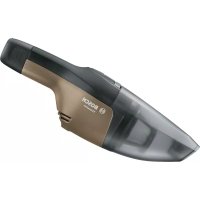



| Brand | Bosch |
| Model | YOUseries Vac |
| Device type | Cordless vacuum cleaner |
| Dust container capacity | 0.25 L (gross) |
| Maximum suction pressure | 4.2 kPa |
| Maximum air flow | 1.1 m³/min |
| Weight (with battery) | 0.61 kg (according to EPTA 01:2014) |
| Power supply | Lithium-Ion battery (ref. 1 607 A35 08) |
| Mains charger | Ref. 1 600 A01 6A (varies by country) |
| Permissible charging temperature | +10 to +35 °C |
| Operating and storage temperature | -10 to +50 °C |
| Filtration | Coarse filter + fine dust filter |
| Charging socket type | USB Type-C (protective cover) |
| Charge level indicator | 4 LEDs (green, yellow, red) – visual signal |
| Battery protection | Electronic Cell Protection (ECP) against deep discharge |
| Intended use | Vacuuming dry materials, indoor domestic use |
| Cleaning the dust container | Empty after each use via release button |
| Cleaning the filter | Tap or brush; do not wash the fine dust filter |
| Included accessories | Crevice nozzle, USB cable, mains charger (depending on country) |
| Product code | 3 603 CD7 0.. |
Frequently Asked Questions - YOUseries Vac BOSCH
User questions about YOUseries Vac BOSCH
0 question about this device. Answer the ones you know or ask your own.
Ask a new question about this device
Download the instructions for your Vacuum Cleaner in PDF format for free! Find your manual YOUseries Vac - BOSCH and take your electronic device back in hand. On this page are published all the documents necessary for the use of your device. YOUseries Vac by BOSCH.
USER MANUAL YOUseries Vac BOSCH
Safety information for vacuum cleaners

Read all the safety information and instructions. Failure to observe the safety information and follow instructions may result in electric shock, fire and/or serious injury.
Save all warnings and instructions for future reference.
This vacuum cleaner is not intended for use by children or persons with physical, sensory or mental impairments. It should not be used by persons who have insufficient experience and knowledge. This vacuum cleaner can be used by children aged 8 or older and by persons who have physical, sensory or mental limitations or a lack of experience or knowledge if a person responsible for their safety supervises them or has instructed them in the safe operation of the vacuum cleaner and they understand the associated dangers. Otherwise, there is a danger of operating errors and injuries.
Supervise children. This will ensure that children do not play with the vacuum cleaner.
WARNING
Do not vacuum any harmful substances, e.g. beech or oak wood dust, rock dust or asbestos. These substances are con-
sidered carcinogenic. Make sure you inform yourself about the applicable regulations/laws on how to handle harmful types of dust in your country.
Only use the vacuum cleaner if you have been adequately informed about how to use it. Thorough instruction on how to use the equipment prevents accidental misuse and injuries.
WARNING
The vacuum cleaner is only suitable for vacuuming dry substances. The penetration of liquids increases the risk of an elec-
tric shock.
NOTE: The vacuum cleaner must only be used and stored indoors. The penetration of rain or moisture into the top of the vacuum cleaner increases the risk of electric shock. ▶ Ensure that the workplace is well ventilated. The vacuum cleaner should be repaired exclusively by a qualified professional using only genuine spare parts. This will ensure that the safety of the vacuum cleaner is maintained. Before using the equipment for the first time, check that the vacuum hose is in perfect condition. Leave the vacuum hose fitted to the vacuum cleaner while doing this so that no dust escapes accidentally. Otherwise, you may end up inhaling dust particles. ▶ Do not clean the vacuum cleaner by spraying a jet of water directly at it. Water entering the top of the vacuum cleaner will increase the risk of electric shock. In case of damage and improper use of the battery, vapours may be emitted. The battery can set alight or explode. Ensure the area is well ventilated and seek medical attention should you experience any adverse effects. The vapours may irritate the respiratory system. If used incorrectly or if the battery is damaged, flammable liquid may be ejected from the battery. Contact with this liquid should be avoided. If contact accidentally occurs, rinse off with water. If the liquid comes into contact with your eyes, seek additional medical attention. Liquid ejected from the battery may cause irritation or burns. The battery can be damaged by pointed objects such as nails or screwdrivers or by force applied externally. An internal short circuit may occur, causing the battery to burn, smoke, explode or overheat. When the battery is not in use, keep it away from paper clips, coins, keys, nails, screws or other small metal objects that could make a connection from one terminal to another. A short circuit between the battery terminals may cause burns or a fire. ▶ Do not open the battery. There is a risk of short-circuiting.


Protect the battery against heat, e.g. against continuous intense sunlight, fire, water, dirt and moisture. There is a risk of explosion.
▶ Only use the battery with products from the manufacturer. This is the only way in which you can protect the battery against dangerous overload. ▶ Do not vacuum hot or burning dust or in potentially explosive areas. Dust can easily ignite or explode.
Product description and specifications
Intended use
The vacuum cleaner is intended for vacuuming dry materials that are not harmful to health.
The vacuum cleaner is intended only for household and domestic use.
Product features
The numbering of the components shown refers to the illustrations on the graphics pages at the beginning of the manual.
(1) Release button for dust container (2) On/off button (3) Battery A) (4) Battery charge indicator A) (5) USB Type-C™ port A)B) (6) Flap for USB Type-C™ port A) (7) Motor housing (8) Dust container (9) Crevice nozzle (10) Power adaptor A) (country-specific) (11) USB cable A) (12) Battery bay (13) Battery release button A) (14) Coarse dirt filter (15) Fine dust filter (16) Removal pin
A) Accessories shown or described are not included with the product as standard. You can find the complete selection of accessories in our accessories range.
B) USB Type-C™ and USB-C™ are trademarks of USB Implementers Forum.
Technical data
| Cordless dry vacuum cleaner Vac | |
| Article number | 3 603 CD7 0.. |
| Container volume (gross) | 0.25 | |
| Max. vacuum (turbine) kPa 4.2 | |
| Max. flow rate (turbine) m | 3 /min 1.1 |
| Weight according to EPTA-Procedure 01:2014 kg 0.61 | |
| Permitted ambient temperature | |
| – while charging °C +10 to +35 | |
| – During operation A) and during storage °C | -10 to +50 |
| Recommended batteries 1 607 A35 08. | |
| Recommended power adaptor 1 600 A01 6A. | |
A) Limited performance at temperatures < 0°C. Technical data determined using the battery that comes with the product.
Fitting
Remove the battery before cleaning or performing maintenance on the dust extractor, making tool adjustments, changing accessories or placing the dust extractor in storage. This safety measure prevents the dust extractor from being started accidentally.
Battery charging (see figure A)
▶ Use only the power adaptor listed in the technical data. Only this power adaptor is compatible with your vacuum cleaner's lithium-ion battery.
Note: The battery is supplied partially charged. To ensure the maximum performance of the battery, use the power adaptor to fully charge the battery before first use.
The lithium-ion battery can be charged at any time without reducing its service life. Interrupting the charging process does not damage the battery.
The lithium-ion battery is protected against deep discharge by the Electronic Cell Protection (ECP). A protective circuit switches the vacuum cleaner off when the battery is drained.
▶ Do not continue to press the on/off button after the vacuum cleaner has automatically switched itself off. This can damage the battery.
The battery features NTC temperature monitoring, which only permits charging in a temperature range between 10 °C and 35 °C. This achieves a long battery life.
You can charge the battery (3) separately or in the vacuum cleaner.
- Open the cover (6).
- Connect the battery (3) to the power adaptor (10) using a USB cable (11).
- Plug the power adaptor (10) into the plug socket.
The charging process will begin. The battery charge indicator (4) indicates the charging progress.
During the charging process, the vacuum cleaner is deactivated and cannot be used.
If you are not planning to use the power tool again soon, disconnect the power adaptor (10) from the mains.
Inserting and removing the battery (see figures B1-B2)
Do not use force to insert the battery. The battery is designed in such a way that it can only be inserted into the vacuum cleaner when it is in the right position.
- Slide the battery (3) all the way into the battery bay (12).
- To remove the battery (3), press the release button (13) on the battery and pull it out of the battery bay (12).
Follow the instructions on correct disposal.
Battery charge indicator
The battery charge indicator (4) is automatically activated as soon as the battery (3) is moved. The battery charge indicator (4) goes out if the battery (3) is not moved for a few seconds. The battery charge indicator (4) is switched off when the vacuum cleaner is being used.
| Charge Battery separate or in the vacuum cleaner (in motion) | Charging process (battery with connected power adaptor) | |
| 100% Green | (continuous) | Green (continuous) |
| 100%-50% Green | (continuous) | Green (flashing) |
| 50%-20% Yellow | (continuous) | Green (flashing) |
| 20%-5% Red | (continuous) | Green (flashing) |
| Charge Battery separate or in the vacuum cleaner (in motion) | Charging process (battery with connected power adaptor) |
| 5%-0% Red (flashing) | Green (flashing) |
Note: If the battery (3) has been stored away and not used for a long period of time, it is possible that the battery charge indicator (4) will not activate. This protects the battery (3) from deep discharge. Once the battery (3) is charged, the indicator will activate again. In this case, the charging time will increase.
The battery charge indicator (4) goes out a few minutes after the battery (3) has been fully charged.
Note: If the battery charge indicator (4) is flashing white, the temperature is outside the permitted ambient temperature range. The charging process begins automatically once the permitted temperature range has been reached again. The battery charge indicator (4) will flash green during the charging process.
Fitting the Vacuuming Accessories
The vacuum cleaner accessories can be directly connected with the dust container (8).
- Insert the individual vacuum cleaner accessories firmly into the connection on the dust container (8) and into one another.
Operation
Remove the battery before cleaning or performing maintenance on the dust extractor, making tool adjustments, changing accessories or placing the dust extractor in storage. This safety measure prevents the dust extractor from being started accidentally. ▶ Ensure that the flap of the USB Type-C port (6) is closed during operation. This will prevent dust from getting in.
Start-up
Before extraction, ensure that the filter unit is securely fitted.
▶ Do not use damaged filters (e.g. no cracks, small holes, etc.). Replace any damaged filters immediately.
Switching on/off
- To switch on the vacuum cleaner, press the on/off button (2).
- To switch off the vacuum cleaner, press the on/off button (2) again.
Maintenance and Servicing
Maintenance and Cleaning
Remove the battery before cleaning or performing maintenance on the dust extractor, making tool adjustments, changing accessories, or placing the dust extractor in storage. This safety measure prevents the dust extractor from being started accidentally. To ensure safe and efficient operation, always keep the dust extractor and the ventilation slots clean.
Clean the housing of the vacuum cleaner occasionally with a damp cloth.
Clean dirty charging contacts using a dry cloth.
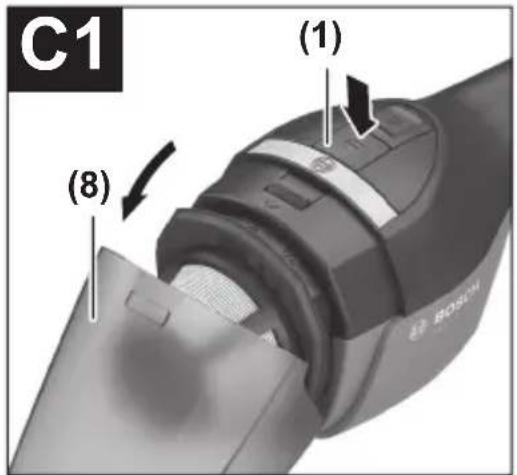
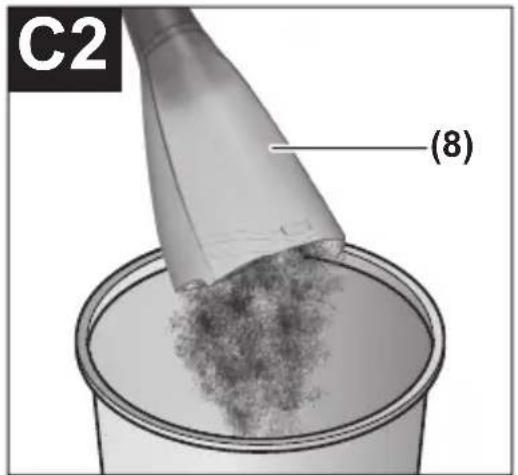
Cleaning the Dust Container (see figures C1-C2)
Clean the dust container (8) after each use to ensure that the vacuum cleaner continues to perform optimally.
- Hold the vacuum cleaner down slightly so that dust cannot fall out of the dust container when the vacuum cleaner is opened.
- Press the release button (1) and remove the dust container (8) from the motor housing (7).
- Shake out the dust container (8) over a suitable waste bin.
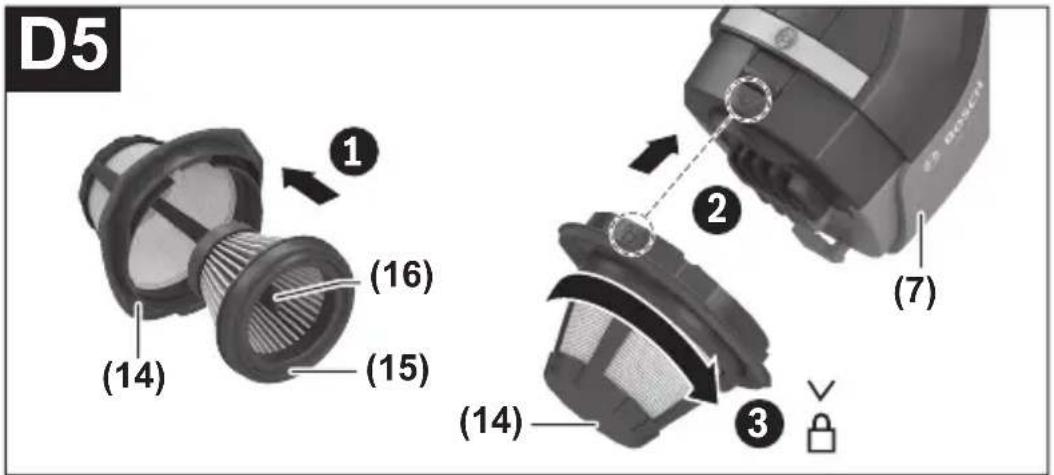
- If necessary, clean the filters (see "Cleaning the Filters (see figures D1-D5)", page 22).
- Then attach the dust container (8) below the motor housing (7) and swivel it closed so that it audibly clicks into place.
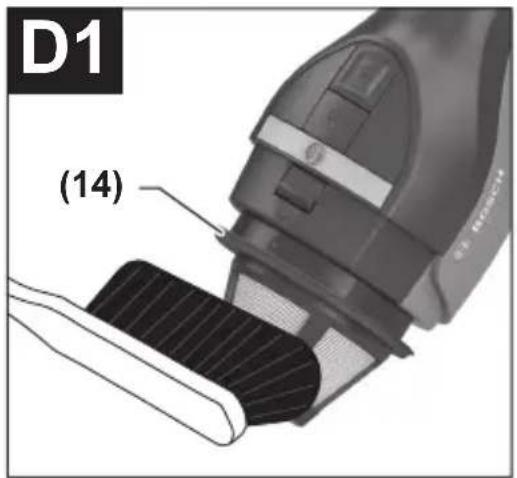
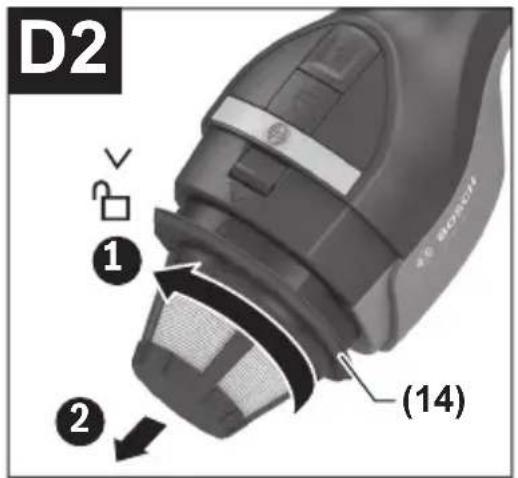
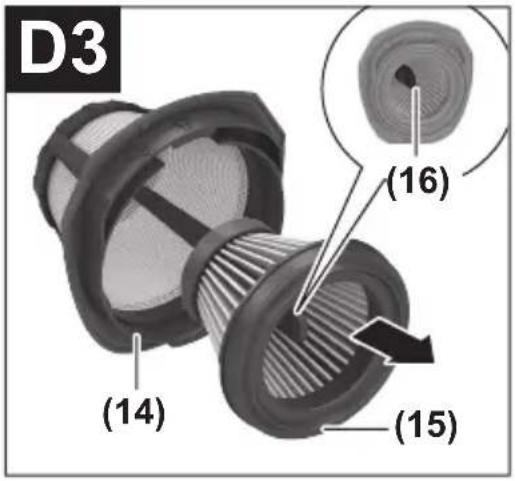
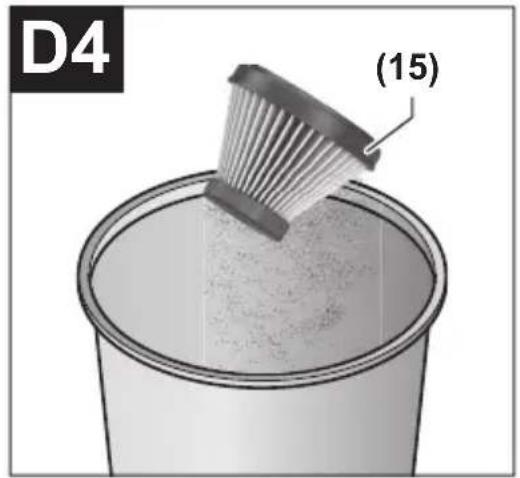
Cleaning the Filters (see figures D1-D5)
The fine dust filter (15) must not be wet cleaned.
- Hold the vacuum cleaner down slightly so that dust cannot fall out of the dust container when the vacuum cleaner is opened.
- Press the release button (1) and remove the dust container (8) from the motor housing (7).
- Brush the coarse dirt filter (14).
- Turn the filter unit (coarse dirt filter (14) and fine dust filter (15)) all the way in the "unlock" direction and detach it from the motor housing.
- Pull the fine dust filter (15) out of the coarse dirt filter (14) using the removal pin (16).
- Tap the fine dust filter (15) carefully over a suitable waste bin. If necessary, brush the flaps of the fine dust filter with a soft brush.
- To assemble, perform the same steps in reverse order.
Faults
If the suction power is insufficient, check:
- Is the dust container (8) full? ▷ (see "Cleaning the dust container (see figures C1-C2)", page 22)
- Are the filters ((14), (15)) clogged with dust? ▷ (see "Cleaning the filters (see figures D1-D5)", page 22)
- Is the state of charge of the battery (3) too low? ▷ (see "Battery charging (see figure A)", page 19)
Regularly emptying the dust container and cleaning the filters will ensure optimum suction power.
If suction power is still not sufficient, take the vacuum cleaner to the after-sales service.
After-sales service and advice on using products
Our after-sales service can answer questions concerning product maintenance and repair, as well as spare parts. You can find exploded drawings and information on spare parts at: www.bosch-pt.com
The Bosch product use advice team will be happy to help you with any questions about our products and their accessories.
In all correspondence and spare parts orders, please always include the 10-digit article number given on the type plate of the product.
Great Britain
Robert Bosch Ltd. (B.S.C.)
P.O. Box 98
Broadwater Park
North Orbital Road
Denham Uxbridge
UB 9 5HJ
At www.bosch-pt.co.uk you can order spare parts or arrange the collection of a product in need of servicing or repair.
Tel. Service: (0344) 7360109
E-Mail: boschservicecentre@bosch.com
Ireland
24 | English
Origo Ltd.
Unit 23 Magna Drive
Magna Business Park
City West
Dublin 24
Tel. Service: (01) 4666700
Fax: (01) 4666888
Australia, New Zealand and Pacific Islands
Robert Bosch Australia Pty. Ltd.
Power Tools
Locked Bag 66
Clayton South VIC 3169
Customer Contact Center
Inside Australia:
Phone: (01300) 307044
Fax: (01300) 307045
Inside New Zealand:
Phone: (0800) 543353
Fax: (0800) 428570
Outside AU and NZ:
Phone: +61 3 95415555
www.bosch-pt.com.au
www.bosch-pt.co.nz
Republic of South Africa
Customer service
Hotline: (011) 6519600
Gauteng - BSC Service Centre
35 Roper Street, New Centre
Johannesburg
Tel.: (011) 4939375
Fax: (011) 4930126
E-mail: bsctools@icon.co.za
KZN - BSC Service Centre
Unit E, Almar Centre
143 Crompton Street
Pinetown
Tel.: (031) 7012120
Fax: (031) 7012446
E-mail: bsc.dur@za.bosch.com
Western Cape - BSC Service Centre
Democracy Way, Prosperity Park
Milnerton
Tel.: (021) 5512577
Fax: (021) 5513223
E-mail: bsc@zsd.co.za
Bosch Headquarters
Midrand, Gauteng
Tel.: (011) 6519600
Fax: (011) 6519880
E-mail: rbsa-hq.pts@za.bosch.com
Transport
The contained lithium-ion batteries are subject to the Dangerous Goods Legislation requirements. The batteries are suitable for road-transport by the user without further restrictions.
When shipping by third parties (e.g., by air transport or forwarding agency), special requirements on packaging and labelling must be observed. For preparation of the item being shipped, consulting an expert for hazardous material is required.
Dispatch battery packs only when the housing is undamaged. Tape or mask off open contacts and pack up the battery in such a manner that it cannot move around in the packaging. Please also observe the possibility of more detailed national regulations.
Disposal

Dust extractors, batteries, accessories and packaging should be sorted for environmentally friendly recycling.
Do not dispose of dust extractors or battery packs/batteries with household waste.
Only for EU countries:
According to European Directive 2012/19/EU, dust extractors that are no longer usable, and according to European Directive 2006/66/EC, defective or used battery packs/batteries, must be collected separately and disposed of in an environmentally correct manner.
Battery packs/batteries:
Li-ion:
Please observe the notes in the section on transport (see "Transport", page 25).
Robert Bosch (France) S.A.S.
Bosch Service Center
Telegrafvej 3
2750 Ballerup
On www.bosch-pt.dk, spare parts can be ordered online or a repair order can be created.
Service Center phone: 44898855
Fax: 44898755
E-Mail: vaerktoej@dk.bosch.com
Transport
Bosch Service Center
Telegrafvej 3
2750 Ballerup
Denmark
Tel.: (08) 7501820 (within Sweden)
Fax: (011) 187691
Transport
Robert Bosch Sp. z o.o.
Bosch Service Center PT
K Vápence 1621/16
692 01 Mikulov
Power tool service
Strada Horia Măcelariu Nr. 30–34, sector 1
013937 Bucharest
Power tool service
Strada Horia Măcelariu Nr. 30–34, sector 1
013937 Bucharest, Romania
www.bosch-pt.com/bg/bg/
Transport
(14) Coarse dust filter
(15) Fine dust filter
(16) Removal pin
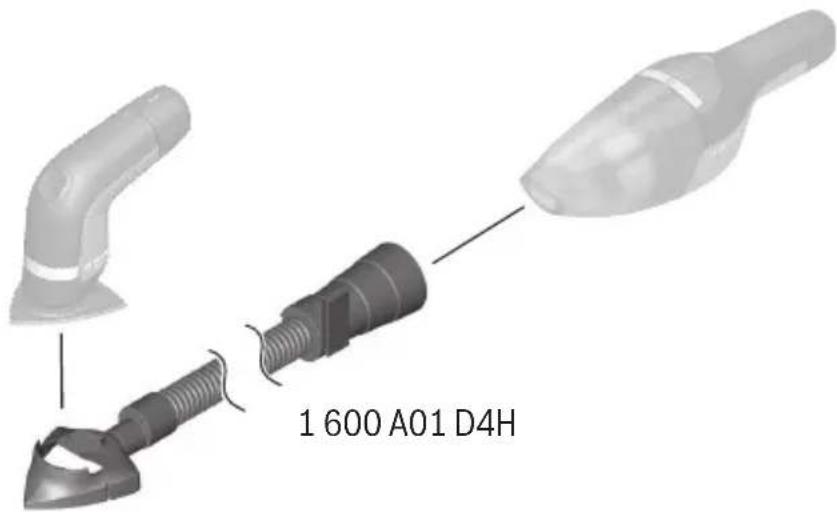
1 600 A01 7L.
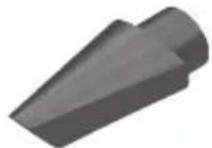
1 619 PB3 868
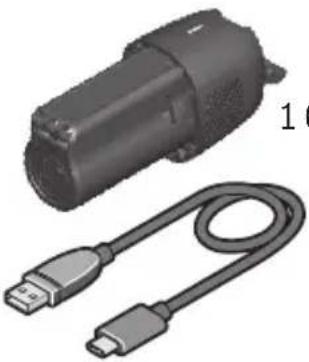
1 600 A01 D0.
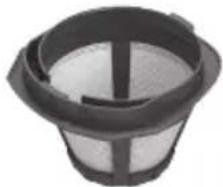
1 619 PB3 836
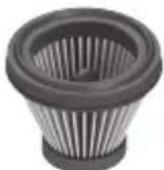
1 600 A01 D64
- SAFETY INFORMATION FOR VACUUM CLEANERS
- WARNING
- PRODUCT DESCRIPTION AND SPECIFICATIONS
- INTENDED USE
- PRODUCT FEATURES
- FITTING
- BATTERY CHARGING (SEE FIGURE A)
- INSERTING AND REMOVING THE BATTERY (SEE FIGURES B1-B2)
- BATTERY CHARGE INDICATOR
- FITTING THE VACUUMING ACCESSORIES
- OPERATION
- START-UP
- SWITCHING ON/OFF
- MAINTENANCE AND SERVICING
- MAINTENANCE AND CLEANING
- CLEANING THE DUST CONTAINER (SEE FIGURES C1-C2)
- CLEANING THE FILTERS (SEE FIGURES D1-D5)
- FAULTS
- AFTER-SALES SERVICE AND ADVICE ON USING PRODUCTS
- GREAT BRITAIN
- IRELAND
- ENGLISH
- AUSTRALIA, NEW ZEALAND AND PACIFIC ISLANDS
- REPUBLIC OF SOUTH AFRICA
- CUSTOMER SERVICE
- GAUTENG - BSC SERVICE CENTRE
- KZN - BSC SERVICE CENTRE
- WESTERN CAPE - BSC SERVICE CENTRE
- BOSCH HEADQUARTERS
- TRANSPORT
- DISPOSAL
- ONLY FOR EU COUNTRIES
Brand : BOSCH
Model : YOUseries Vac
Category : Vacuum Cleaner