
GWS 18V125 PC - Angle grinder BOSCH - Free user manual and instructions
Find the device manual for free GWS 18V125 PC BOSCH in PDF.



| Brand | Bosch |
| Model | GWS 18V-125 PC |
| Category | Cordless angle grinder |
| Rated voltage | 18 V |
| Rated speed | 9000 rpm |
| Max. wheel diameter | 125 mm |
| Spindle thread | M14 |
| Weight (according to EPTA) | 2.4 - 2.8 kg (depending on battery and handle) |
| Power supply | 18 V Lithium-ion battery (recommended GBA 18V... or ProCORE18V...) |
| Recommended chargers | AL 18.., GAL3680 |
| Protection | Kickback stop, Restart protection |
| Trigger pointer | On/Off switch with unlock lever |
| Spindle lock | Yes, for accessory change |
| Connectivity | Compatible Bluetooth® Low Energy module GCY 30-4 (optional) |
| Temperature range (operation) | 0 to +45 °C |
| Temperature range (storage) | -20 to +50 °C |
| Applications | Grinding, cutting, sanding, brushing of metal and stone |
| Maintenance | Clean ventilation slots with a soft brush; remove battery before any maintenance |
| Spare parts | Available at www.bosch-pt.com |
| Supplied accessories | Auxiliary handle, protective guard for grinding, pin wrench, clamping nut |
| Warranty | Consult Bosch after-sales service |
Frequently Asked Questions - GWS 18V125 PC BOSCH
User questions about GWS 18V125 PC BOSCH
0 question about this device. Answer the ones you know or ask your own.
Ask a new question about this device
Download the instructions for your Angle grinder in PDF format for free! Find your manual GWS 18V125 PC - BOSCH and take your electronic device back in hand. On this page are published all the documents necessary for the use of your device. GWS 18V125 PC by BOSCH.
USER MANUAL GWS 18V125 PC BOSCH
Robert Bosch Power Tools GmbH
70538 Stuttgart
GERMANY
www.bosch-pt.com
1609 92A 47G (2017.11) AS / 382
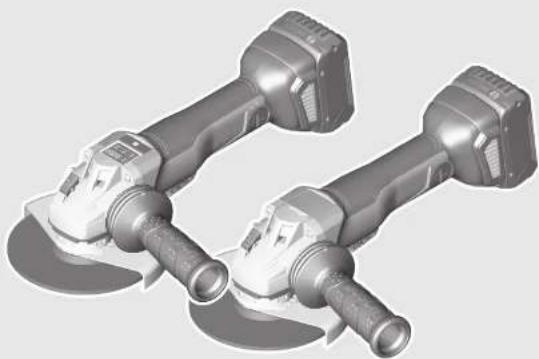
GWS Professional
HEAVY
DUTY
18V-125 PSC | 18V-125 PC

BOSCH


21
Deutsch.... Seite 6
English Page 19


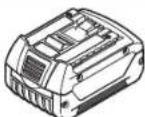
GBA 18V ...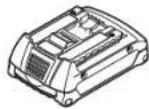
GBA 18V 6.3Ah
ProCORE 18V ...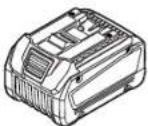
AL 1860 CV (14.4/18 V)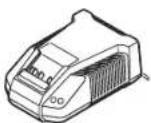
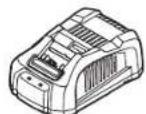
GAL 1880 CV GAL 1830 W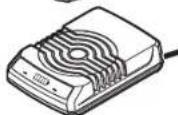
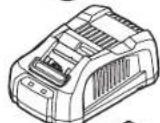
GAL 3680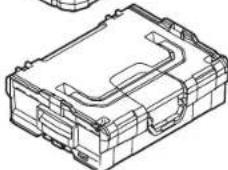
L-BOXX 136 2 608 438 692
1600A01166
1 600 A00 R26
1609 92A 47G | (15.11.17) Bosch Power Tools






5|4|
1 509 92A 47G | (15.11.17) Bosch Power Tools
Safety instructions
General Power Tool Safety Warnings
WARNING Read all safety warnings and all instructions. Failure to follow the warnings and instructions may result in electric shock, fire and/or serious injury.
Save all warnings and instructions for future reference. The term "power tool" in the warnings refers to your mains-operated (corded) power tool or battery-operated (cordless) power tool.
Work area safety
- Keep work area clean and well lit. Cluttered or dark areas invite accidents. Do not operate power tools in explosive atmospheres, such as in the presence of flammable liquids, gases or dust. Power tools create sparks which may ignite the dust or fumes. Keep children and bystanders away while operating a power tool. Distractions can cause you to lose control.
Electrical safety
Power tool plugs must match the outlet. Never modify the plug in any way. Do not use any adapter plugs with earthed (grounded) power tools. Unmodified plugs and matching outlets will reduce risk of electric shock. Avoid body contact with earthed or grounded surfaces, such as pipes, radiators, ranges and refrigerators. There is an increased risk of electric shock if your body is earthed or grounded. Do not expose power tools to rain or wet conditions. Water entering a power tool will increase the risk of electric shock. Do not abuse the cord. Never use the cord for carrying, pulling or unplugging the power tool. Keep cord away from heat, oil, sharp edges and moving parts. Damaged or entangled cords increase the risk of electric shock. When operating a power tool outdoors, use an extension cord suitable for outdoor use. Use of a cord suitable for outdoor use reduces the risk of electric shock. If operating a power tool in a damp location is unavoidable, use a residual current device (RCD) protected supply. Use of an RCD reduces the risk of electric shock.
Personal safety
Stay alert, watch what you are doing and use common sense when operating a power tool. Do not use a power tool while you are tired or under the influence of drugs, alcohol or medication. A moment of inattention while operating power tools may result in serious personal injury. Use personal protective equipment. Always wear eye protection. Protective equipment such as dust mask, non-skid safety shoes, hard hat, or hearing protection used for appropriate conditions will reduce personal injuries.
▶ Prevent unintentional starting. Ensure the switch is in the off-position before connecting to power source and/or battery pack, picking up or carrying the tool. Carrying power tools with your finger on the switch or energising power tools that have the switch on invites accidents. Remove any adjusting key or wrench before turning the power tool on. A wrench or a key left attached to a rotating part of the power tool may result in personal injury. - Do not overreach. Keep proper footing and balance at all times. This enables better control of the power tool in unexpected situations. ▶ Dress properly. Do not wear loose clothing or jewellery. Keep your hair, clothing and gloves away from moving parts. Loose clothes, jewellery or long hair can be caught in moving parts. ▶ If devices are provided for the connection of dust extraction and collection facilities, ensure these are connected and properly used. Use of dust collection can reduce dust-related hazards.
Power tool use and care
▶ Do not force the power tool. Use the correct power tool for your application. The correct power tool will do the job better and safer at the rate for which it was designed. ▶ Do not use the power tool if the switch does not turn it on and off. Any power tool that cannot be controlled with the switch is dangerous and must be repaired. ▶ Disconnect the plug from the power source and/or the battery pack from the power tool before making any adjustments, changing accessories, or storing power tools. Such preventive safety measures reduce the risk of starting the power tool accidentally. ▶ Store idle power tools out of the reach of children and do not allow persons unfamiliar with the power tool or these instructions to operate the power tool. Power tools are dangerous in the hands of untrained users. - Maintain power tools. Check for misalignment or binding of moving parts, breakage of parts and any other condition that may affect the power tool's operation. If damaged, have the power tool repaired before use. Many accidents are caused by poorly maintained power tools. ▶ Keep cutting tools sharp and clean. Properly maintained cutting tools with sharp cutting edges are less likely to bind and are easier to control. ▶ Use the power tool, accessories and tool bits etc. in accordance with these instructions, taking into account the working conditions and the work to be performed. Use of the power tool for operations different from those intended could result in a hazardous situation.
Battery tool use and care
▶ Recharge only with the charger specified by the manufacturer. A charger that is suitable for one type of battery pack may create a risk of fire when used with another battery pack.
Use power tools only with specifically designated battery packs. Use of any other battery packs may create a risk of injury and fire. When battery pack is not in use, keep it away from other metal objects, like paper clips, coins, keys, nails, screws or other small metal objects, that can make a connection from one terminal to another. Shorting the battery terminals together may cause burns or a fire. Under abusive conditions, liquid may be ejected from the battery; avoid contact. If contact accidentally occurs, flush with water. If liquid contacts eyes, additionally seek medical help. Liquid ejected from the battery may cause irritation or burns.
Service
Have your power tool serviced by a qualified repair person using only identical replacement parts. This will ensure that the safety of the power tool is maintained.
Safety Warnings for Angle Grinder
Safety Warnings common for Grinding, Sanding, Wire Brushing or Abrasive Cutting Off Operations
This power tool is intended to function as a grinder, sander, wire brush or cut-off tool. Read all safety warnings, instructions, illustrations and specifications provided with this power tool. Failure to follow all instructions listed below may result in electric shock, fire and/or serious injury. Operations such as polishing are not recommended to be performed with this power tool. Operations for which the power tool was not designed may create a hazard and cause personal injury. Do not use accessories which are not specifically designed and recommended by the tool manufacturer. Just because the accessory can be attached to your power tool, it does not assure safe operation. The rated speed of the accessory must be at least equal to the maximum speed marked on the power tool. Accessories running faster than their rated speed can break and fly apart. The outside diameter and the thickness of your accessory must be within the capacity rating of your power tool. Incorrectly sized accessories cannot be adequately guarded or controlled. Threaded mounting of accessories must match the grinder spindle thread. For accessories mounted by flanges, the arbour hole of the accessory must fit the locating diameter of the flange. Accessories that do not match the mounting hardware of the power tool will run out of balance, vibrate excessively and may cause loss of control. Do not use a damaged accessory. Before each use inspect the accessory such as abrasive wheels for chips and cracks, backing pad for cracks, tear or excess wear, wire brush for loose or cracked wires. If power tool or accessory is dropped, inspect for damage or install an undamaged accessory. After inspecting and installing an accessory, position yourself and bystanders
away from the plane of the rotating accessory and run the power tool at maximum no-load speed for one minute. Damaged accessories will normally break apart during this test time.
▶ Wear personal protective equipment. Depending on application, use face shield, safety goggles or safety glasses. As appropriate, wear dust mask, hearing protectors, gloves and workshop apron capable of stopping small abrasive or workpiece fragments. The eye protection must be capable of stopping flying debris generated by various operations. The dust mask or respirator must be capable of filtrating particles generated by your operation. Prolonged exposure to high intensity noise may cause hearing loss. ▶ Keep bystanders a safe distance away from work area. Anyone entering the work area must wear personal protective equipment. Fragments of workpiece or of a broken accessory may fly away and cause injury beyond immediate area of operation. Hold power tool by insulated gripping surfaces only, when performing an operation where the cutting accessory may contact hidden wiring. Cutting accessory contacting a "live" wire may make exposed metal parts of the power tool "live" and shock the operator. ▶ Never lay the power tool down until the accessory has come to a complete stop. The spinning wheel may grab the surface and pull the power tool out of your control. ▶ Do not run the power tool while carrying it at your side. Accidental contact with the spinning accessory could snag your clothing, pulling the accessory into your body. ▶ Regularly clean the power tool's air vents. The motor's fan will draw the dust inside the housing and excessive accumulation of powdered metal may cause electrical hazards. ▶ Do not operate the power tool near flammable materials. Sparks could ignite these materials. ▶ Do not use accessories that require liquid coolants. Using water or other liquid coolants may result in electrocution or shock.
Kickback and related warnings
▶ Kickback is a sudden reaction to a pinched or snagged rotating wheel, backing pad, brush or any other accessory. Pinching or snagging causes rapid stalling of the rotating accessory which in turn causes the uncontrolled power tool to be forced in the direction opposite of the accessory's rotation at the point of the binding.
For example, if an abrasive wheel is snagged or pinched by the workpiece, the edge of the wheel that is entering into the pinch point can dig into the surface of the material causing the wheel to climb out or kick out. The wheel may either jump toward or away from the operator, depending on direction of the wheel's movement at the point of pinching. Abrasive wheels may also break under these conditions.
Kickback is the result of power tool misuse and/or incorrect operating procedures or conditions and can be avoided by taking proper precautions as given below.
Maintain a firm grip on the power tool and position your body and arm to allow you to resist kickback forces. Always use the auxiliary handle, if provided, for maximum control over kickback or torque reaction during start-up. The operator can control torque reactions or kickback forces if proper precautions are taken. Never place your hand near the rotating accessory. The accessory may kickback over your hand. Do not position your body in the area where the power tool will move if kickback occurs. Kickback will propel the tool in the direction opposite to the wheel's movement at the point of snagging. Use special care when working corners, sharp edges, etc. Avoid bouncing and snagging the accessory. Corners, sharp edges, or bouncing have a tendency to snag the rotating accessory and cause loss of control or kickback. Do not attach a saw chain woodcarving blade or toothed saw blade. Such blades create frequent kickback and loss of control.
Safety warnings specific for grinding and abrasive cutting-off operations
Use only wheel types that are recommended for your power tool and the specific guard designed for the selected wheel. Wheels for which the power tool was not designed cannot be adequately guarded and are unsafe. The grinding surface of the center depressed wheels must be mounted below the plane of the guard lip. An improperly mounted wheel that projects through the plane of the guard lip cannot be adequately protected. The guard must be securely attached to the power tool and positioned for maximum safety, so the least amount of wheel is exposed towards the operator. The guard helps to protect the operator from broken wheel fragments, accidental contact with the wheel, and sparks that could ignite clothing. Wheels must be used only for recommended applications. For example: do not grind with the side of the cut-off wheel. Abrasive cut-off wheels are intended for peripheral grinding; side forces applied to these wheels may cause them to shatter. Always use undamaged wheel flanges that are of correct size and shape for your selected wheel. Proper wheel flanges support the wheel, thus reducing the possibility of wheel breakage. Flanges for cut-off wheels may be different from grinding wheel flanges. Do not use worn down reinforced wheels from larger power tools. Wheels intended for larger power tools are not suitable for the higher speed of a smaller tool and may burst.
Additional safety warnings specific for abrasive cutting off operations
Do not "jam" the cut-off wheel or apply excessive pressure. Do not attempt to make an excessive depth of cut. Overstressing the wheel increases the loading and susceptibility to twisting or binding of the wheel in the cut and the possibility of kickback or wheel breakage.
Do not position your body in line with and behind the rotating wheel. When the wheel, at the point of operation, is moving away from your body, the possible kickback may propel the spinning wheel and the power tool directly at you. When the wheel is binding or when interrupting a cut for any reason, switch off the power tool and hold the power tool motionless until the wheel comes to a complete stop. Never attempt to remove the cut-off wheel from the cut while the wheel is in motion, otherwise kickback may occur. Investigate and take corrective action to eliminate the cause of wheel binding. Do not restart the cutting operation in the workpiece. Let the wheel reach full speed and carefully re-enter the cut. The wheel may bind, walk up, or kickback if the power tool is restarted in the workpiece. Support panels or any oversized workpiece to minimize the risk of wheel pinching and kickback. Large workpieces tend to sag under their own weight. Supports must be placed under the workpiece near the line of cut and near the edge of the workpiece on both sides of the wheel. Use extra caution when making a "pocket cut" into existing walls or other blind areas. The protruding wheel may cut gas or water pipes, electrical wiring, or objects that can cause kickback.
Safety warnings specific for sanding operations
Do not use excessively oversized sanding disc paper. Follow manufacturers' recommendations when selecting sanding paper. Larger sanding paper extending beyond the sanding pad presents a laceration hazard and may cause snagging, tearing of the disc, or kickback.
Safety warnings specific for wire brushing operations
Be aware that wire bristles are thrown by the brush even during ordinary operation. Do not overstress the wires by applying excessive load to the brush. The wire bristles can easily penetrate light clothing and/or skin. If the use of a guard is recommended for wire brushing, do not allow any interference of the wire wheel or brush with the guard. Wire wheel or brush may expand in diameter due to work load and centrifugal forces.
Additional safety warnings
Wear safety goggles.
Use appropriate detectors to determine if utility lines are hidden in the work area or call the local utility company for assistance. Contact with electric lines can lead to fire and electric shock. Damaging a gas line can lead to explosion. Penetrating a water line causes property damage. Do not touch grinding and cutting discs before they have cooled down. The discs can become very hot while working.
Secure the workpiece. A workpiece clamped with clamping devices or in a vice is held more secure than by hand. Do not open the battery. Danger of short-circuiting. Protect the battery against heat, e.g., against continuous intense sunlight, fire, water, and moisture. Danger of explosion.


In case of damage and improper use of the battery, vapours may be emitted. Ventilate the area and seek medical help in case of complaints. The vapours can irritate the respiratory system. ▶ Use the battery only in conjunction with your Bosch product. This measure alone protects the battery against dangerous overload. The battery can be damaged by pointed objects such as nails or screwdrivers or by force applied externally. An internal short circuit can occur and the battery can burn, smoke, explode or overheat. ▶ Caution! When using the power tool with Bluetooth ® , interference can occur with other devices and equipment, aircraft and medical devices (e.g. pacemakers, hearing aids). Also, damage to people and animals in the immediate vicinity cannot be completely excluded. Do not use the power tool with Bluetooth ® near medical devices, petrol stations, chemical plants, in areas where there is a danger of explosion and where blasting takes place. Do not use the power tool with Bluetooth ® in aircraft. Avoid using the product near your body for extended periods.
The Bluetooth ® word mark and logos are registered trademarks owned by Bluetooth SIG, Inc. and any use of such marks by Robert Bosch Power Tools GmbH is under licence.
Product Description and Specifications

Read all safety warnings and all instructions. Failure to follow the warnings and instructions may result in electric shock, fire and/or serious injury.
While reading the operating instructions, unfold the graphics page for the machine and leave it open.
Intended Use
The machine is intended for cutting, roughing and brushing of metal and stone materials without the use of water.
For cutting with bonded abrasives, a special cutting guard (accessory) must be used.
When cutting in stone, provide for sufficient dust extraction. With approved sanding tools, the machine can be used for sanding with sanding discs.
With the Bluetooth ® Low Energy Module GCY 30-4 inserted, data and settings of the power tool can be transferred between the power tool and a mobile terminal device by means of Bluetooth ® wireless technology.
GWS 18V-125 PSC:
The light of this power tool is intended to illuminate the power tool's direct area of working operation and is not suitable for household room illumination.
Product Features
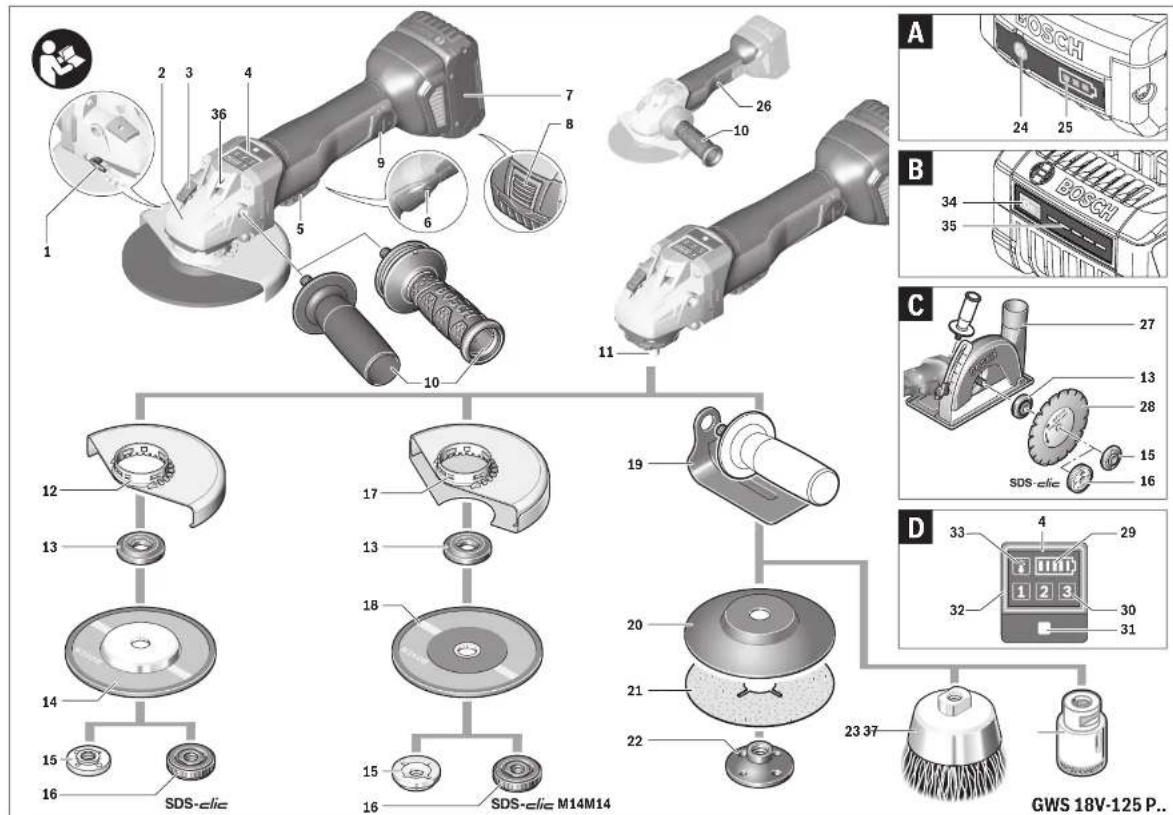
The numbering of the product features refers to the illustration of the machine on the graphics page.
1 Release lever for protection guard 2 Direction-of-rotation arrow on housing 3 Spindle lock button 4 User interface (GWS 18V-125 PSC) 5 On/Off switch 6 Unlocking lever for on/off switch
7 Battery pack 4
8 Battery unlocking button*
9 Cover for Bluetooth® Low Energy Module GCY 30-4
10 Auxiliary handle (insulated gripping surface)
11 Grinder spindle
12 Protection guard for grinding
13 Mounting flange with O-ring
14 Grinding wheel*
15 Clamping nut
16 Quick-clamping nut SDS4)lic
17 Protection guard for cutting*
18 Cutting disc*
19 Hand guard*
20 Rubber sanding plate*
21 Sanding sheet
22 Round nut 2
23 Cup brush*
24 Button for charge-control indicator (GBA 18V...)
25 Battery charge-control indicator (GBA 18V...)
26 Handle (insulated gripping surface)
27 Cutting guide with dust extraction protection guard *
28 Diamond cutting disc*
29 Battery status indicator (User interface)
30 Speed preselection level indicator (User interface)
31 Speed preselection button (User interface)
32 Power tool status indicator (User interface)
33 Overload protection indicator (User interface)
34 Button for charge-control indicator (GBA 18V 6.3Ah/ProCORE18V...)
35 Battery charge-control indicator (GBA 18V 6.3Ah/ProCORE18V...)
36 LED work light (GWS 18V-125 PSC)
37 Diamond core cutter*
*Accessories shown or described are not part of the standard delivery scope of the product. A complete overview of accessories can be found in our accessories program.



1 609 92A 47G | (15.11.17) Bosch Power Tools





English | 23 Technical Data
| Angle Grinder GWS 18V-125 PC GWS 18V-125 PSC | |||
| Article number | 3 601 JG3 E.. 3 601 JG3 F.. | ||
| Rated voltage | V= 18 18 | ||
| Rated speed | min -1 | 9000 9000 | |
| No-load speed | min -1 | -4500 - 9000 | |
| Grinding disc diameter, max. | mm 125 125 | ||
| Thread of grinder spindle | M 14 M 14 | ||
| Thread length (max.) of grinder spindle | mm 22 22 | ||
| Kickback stop | ● | ● | |
| Restarting Protection | ● | ● | |
| Speed preselection | - ● | ||
| Weight according to EPTA-Procedure 01:2014 | |||
| - with vibration-damping auxiliary handle | kg | 2.6 - 2.8* | 2.6 - 2.8 |
| - with standard auxiliary handle | kg | 2.4 - 2.6* | 2.4 - 2.6 |
| Permitted ambient temperature | |||
| - during charging | °C | 0...+45 | 0...+45 |
| - during operation" and during storage | °C | -20...+50 | -20...+50 |
| Recommended batteries | GBA 18V... | GBA 18V... | |
| GBA 18V... W | GBA 18V... W | ||
| ProCORE18V... | ProCORE18V... | ||
| Recommended chargers | AL 18.. | AL 18.. | |
| GAL3680 | GAL3680 | ||
| Recommended chargers for wireless charging batteries | GAL 18... W | GAL 18... W | |
| Data transmission | |||
| Bluetooth® | Bluetooth® 4.2(Low Energy) A) | Bluetooth® 4.2(Low Energy) A) | |
| Signal interval | 8 s | 8 s | |
| Signal range | maximum 30 m B) | maximum 30 m B) | |
* depending on the battery pack being used ** limited performance at temperatures <0 °C A) The mobile terminal devices must be compatible with Bluetooth® Low Energy devices (version 4.1) and support the Generic Access Profile (GAP). B) The signal range may vary greatly depending on external conditions, including the receiving device used. The Bluetooth® range may be significantly weaker inside closed rooms and through metallic barriers (e.g. walls, shelving units, cases, etc.).
Noise/Vibration Information
| GWS 18V-125 PC GWS 18V-125 PSC | |||
| 3 601 JG3 E.. 3 601 JG3 F.. | |||
| Sound emission values determined according to EN 60745-2-3. | |||
| Typically the A-weighted noise levels of the product are | |||
| Sound pressure level | dB(A) | 79 | 79 |
| Sound power level | dB(A) | 90 | 90 |
| Uncertainty K | dB | 3 | 3 |
| Wear hearing protection! | |||
24 | English
| GWS 18V-125 PC GWS 18V-125 PSC | |||
| Vibration total values an (triax vector sum) and uncertainty K determined according to EN 60745-2-3: | |||
| Surface grinding: | |||
| an | m/s 2 | 5.0 | 5.0 |
| K | m/s 2 | 1.5 | 1.5 |
| Disk sanding: | |||
| an | m/s 2 | 3.5 | 3.5 |
| K | m/s 2 | 1.5 | 1.5 |
The vibration level given in this information sheet has been measured in accordance with a standardised test given in EN 60745 and may be used to compare one tool with another. It may be used for a preliminary assessment of exposure. The declared vibration emission level represents the main applications of the tool. However if the tool is used for different applications, with different accessories or insertion tools or is poorly maintained, the vibration emission may differ. This may significantly increase the exposure level over the total working period.
An estimation of the level of exposure to vibration should also take into account the times when the tool is switched off or when it is running but not actually doing the job. This may significantly reduce the exposure level over the total working period.
Identify additional safety measures to protect the operator from the effects of vibration such as: maintain the tool and the accessories, keep the hands warm, organisation of work patterns.
Assembly
Inserting the Bluetooth® Low Energy Module GCY 30-4
Note: The Bluetooth® Low Energy Module GCY 30-4 is available as an accessory for power tools GWS 18V-125 PC; it is included in the scope of delivery of power tools GWS 18V-125 PSC.
Read the corresponding operating instructions for information about the Bluetooth® Low Energy Module GCY 30-4.
Battery Charging
▶ Use only the battery chargers listed on the accessories page. Only these battery chargers are matched to the lithium-ion battery of your power tool.
Note: The battery supplied is partially charged. To ensure full capacity of the battery, completely charge the battery in the battery charger before using your power tool for the first time. The lithium-ion battery can be charged at any time without reducing its service life. Interrupting the charging procedure does not damage the battery.
The lithium-ion battery is protected against deep discharging by the "Electronic Cell Protection (ECP)". When the battery is empty, the machine is switched off by means of a protective circuit: The inserted tool no longer rotates.
▶ Do not continue to press the On/Off switch after the machine has been automatically switched off. The battery can be damaged.
Observe the notes for disposal.
Removing the battery
The battery 7 is equipped with two locking levels that should prevent the battery from falling out when pushing the battery unlocking button 8 unintentionally. As long as the battery is inserted in the power tool, it is held in position by means of a spring.
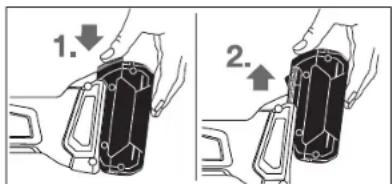
To remove the battery 7, press the unlocking button 8 and pull out the battery toward the front. Do not exert any force.
Battery Charge-control Indication (Battery model GBA 18V...) (see figure A)
The three green LEDs of the battery charge-control indicator 25 indicate the charge condition of the battery 7. For safety reasons, it is only possible to check the status of the charge condition when the machine is at a standstill.
Press button 24 to indicate the charge condition. This is also possible when the battery 7 is removed.
LED Capacity
| Continuous lighting 3 x green ≥2/3 |
| Continuous lighting 2 x green ≥1/3 |
| Continuous lighting 1 x green < 1/3 |
Flashing light 1 x green Reserve
When no LED lights up after pushing button 24, then the battery is defective and must be replaced.
Note: The battery charge condition is also displayed on the user interface 4 (see section "User interface").
Battery Charge-control Indication
(Battery type GBA 18V 6.3Ah/ProCORE18V...) (see figure B)
The five green LEDs of the battery charge-control indicator 35 indicate the charge condition of the battery. For safety reasons, it is only possible to check the status of the charge condition when the power tool is at a standstill.
For safety reasons, it is only possible to check the status of the charge condition when the power tool is at a standstill.
Press button 34 to indicate the charge condition. This is also possible when the battery is removed.
LED Capacity
| Continuous lighting 5 x green | >80 - 100 % |
| Continuous lighting 4 x green | >60 - ≤ 80 % |
| Continuous lighting 3 x green | >40 - ≤ 60 % |
| Continuous lighting 2 x green | >20 - ≤ 40 % |
| Continuous lighting 1 x green | >0 - ≤ 20 % |
Flashing light 1 x green 0 %
If no LED lights up after pressing button 34, then the battery is defective and must be replaced.
Note: The battery charge condition is also displayed on the user interface 4 (see section "User interface").
Mounting the Protective Devices
Before any work on the machine itself (e.g. maintenance, tool change, etc.) as well as during transport and storage, remove the battery from the power tool. There is danger of injury when unintentionally actuating the On/Off switch.
Note: After breakage of the grinding disc during operation or damage to the holding fixtures on the protection guard/power tool, the machine must promptly be sent to an after-sales service agent for maintenance. For addresses, see section "After-sales Service and Application Service".
Protection Guard for Grinding
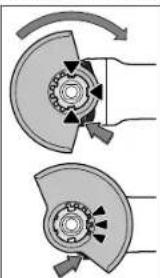
Place the protection guard 12 on the power tool's holding fixture until the protection guard's coding lugs line up with the holding fixture. When doing so, press and hold the unlocking lever 1. Press the protection guard 12 on to the spindle collar until the shoulder of the protection guard is seated against the flange of the machine, and turn the protection guard until it can clearly be heard to engage.
Adjust the position of the protective guard
to the requirements of the work process. For this, press the release lever 1 upward and turn the protective guard 12 to the required position.
▶ Always adjust the protective guard 12 in such a manner that all 3 red cams of release lever 1 engage into the corresponding notches of the protective guard 12. ▶ Adjust the protective guard 12 in such a manner that sparking is prevented in the direction of the operator. The protective guard 12 may be turned only upon actuation of the release lever 1! Otherwise the power tool may not continue to be used under any circumstances and must be taken to an after-sales service agent.
Note: The encoding keys on the protective guard 12 ensure that only a protective guard that fits the machine type can be mounted.
Protective Guard for Cutting
For cutting with bonded abrasives, always use the protective guard for cutting 17. ▶ Provide for sufficient dust extraction when cutting stone.
The protective guard for cutting 17 is mounted in the same manner as the protective guard for grinding 12.
Cutting Guide with Dust Extraction Protective Guard
The cutting guide with dust extraction protective guard 27 is mounted in the same manner as the protective guard for grinding 12.
Auxiliary Handle
▶ Operate your machine only with the auxiliary handle 10.
Screw the auxiliary handle 10 on the right or left of the machine head depending on the working method.
Vibration-dampening Auxiliary Handle
Vibration Control
The vibration dampening auxiliary handle reduces the vibrations, making operation more comfortable and secure.
▶ Do not make any alterations to the auxiliary handle. Do not continue to use an auxiliary handle if it is damaged.
Hand Guard
For operations with the rubber sanding plate 20 or with the cup brush/wheel brush/flap disc, always mount the hand guard 19.
The hand guard 19 is fastened with the auxiliary handle 10.
Mounting the Grinding Tools
Before any work on the machine itself (e.g. maintenance, tool change, etc.) as well as during transport and storage, remove the battery from the power tool. There is danger of injury when unintentionally actuating the On/Off switch. ▶ Do not touch grinding and cutting discs before they have cooled down. The discs can become very hot while working.
Clean the grinder spindle 11 and all parts to be mounted.
For clamping and loosening the grinding tools, lock the grinder spindle with the spindle lock button 3.
▶ Actuate the spindle lock button only when the grinder spindle is at a standstill. Otherwise, the machine may become damaged.
Grinding/Cutting Disc
Pay attention to the dimensions of the grinding tools. The mounting hole diameter must fit the mounting flange without play. Do not use reducers or adapters.






When using diamond cutting discs, pay attention that the direction-of-rotation arrow on the diamond cutting disc and the direction of rotation of the machine (see direction-of-rotation arrow on the machine head) agree.
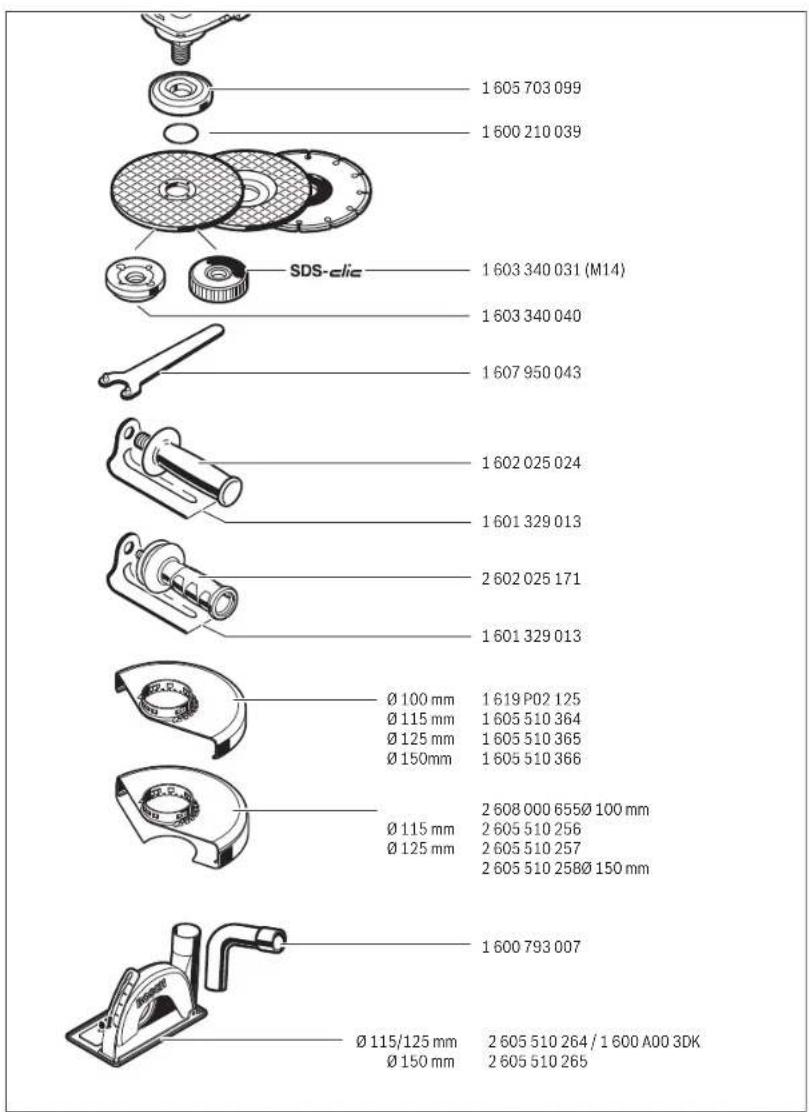
See graphics page for the mounting sequence.
To fasten the grinding/cutting disc, screw on the clamping nut 15 and tighten with the two-pin spanner; see Section "Quick-clamping Nut".
Ensure that the abrasive product is firmly seated, so that it does not twist away from the spindle in the runout of the power tool.
After mounting the grinding tool and before switching on, check that the grinding tool is correctly mounted and that it can turn freely. Make sure that the grinding tool does not graze against the protection guard or other parts.
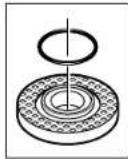
A plastic part (O-ring) is fitted around the centring collar of mounting flange 13. If the O-ring is missing or damaged, the mounting flange 13 must be replaced before resuming operation.
Flap Disc
For operations with the flap disc, always mount the hand guard 19.
Rubber Sanding Plate
For operations with the rubber sanding plate 20, always mount the hand guard 19.
See graphics page for the mounting sequence.
Screw on the round nut 22 and tighten with the two-pin spanner.
Cup Brush/Disc Brush
For operations with the cup brush/wheel brush, always mount the hand guard 19.
See graphics page for the mounting sequence.
The cup brush/disc brush must be able to be screwed onto the grinder spindle until it rests firmly against the grinder spindle flange at the end of the grinder spindle threads. Tighten the cup brush/disc brush with an open-end spanner.
Quick-clamping Nut (SDS)-clic
For convenient changing of grinding tools without the use of additional tools, you can use the quick-clamping nut 16 instead of the clamping nut 15.
The quick-clamping nut 16 may be used only for grinding or cutting discs.
▶ Use only a flawless, undamaged quick-clamping nut 16.
When screwing on, pay attention that the side of the quick-clamping nut 16 with printing does not face the grinding disc; the arrow must point to the index mark 38.
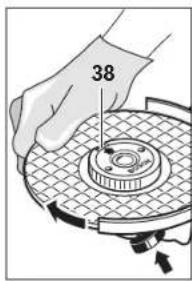
Lock the grinder spindle with the spindle lock button 3. To tighten the quick-clamping nut, firmly turn the grinding disc in clockwise direction.
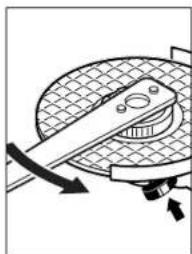
A properly attached, undamaged quick-clamping nut can be loosened by hand when turning the knurled ring in anticlockwise direction.
Never loosen a tight quick-clamping nut with pliers. Always use the two-pin spanner. Insert the two-pin spanner as shown in the illustration.
Approved Grinding Tools
All grinding tools mentioned in these operating instructions can be used.
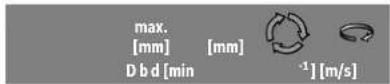
The permissible speed [min-1] or the circumferential speed [m/s] of the grinding tools used must at least match the values given in the table.
Therefore, observe the permissible rotational/circumferential speed on the label of the grinding tool.


125 7 22.2 9000 80

125--900080

75 30 M 14 9000 45
English | 27

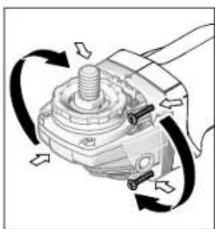
Rotating the Machine Head (GWS 18V-125 PC)
Before any work on the machine itself (e.g. maintenance, tool change, etc.) as well as during transport and storage, remove the battery from the power tool. There is danger of injury when unintentionally actuating the On/Off switch.
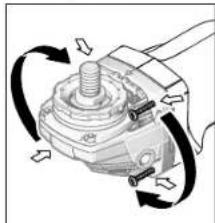
The machine head can be rotated with respect to the machine housing in 90° steps. In this manner, the On/Off switch can be brought into a more convenient position for special working situations, e.g. for left-handed persons. Completely unscrew the four screws. Rotate the
machine head carefully, without removing it from the housing, to the new position. Screw in and tighten the four screws again.
Dust/Chip Extraction
Dust from materials such as lead-containing coatings, some wood types, minerals and metal can be harmful to one's health. Touching or breathing-in the dust can cause allergic reactions and/or lead to respiratory infections of the user or bystanders. Certain dust, such as oak or beech dust, is considered carcinogenic, especially in connection with wood-treatment additives (chromate, wood preservative). Materials containing asbestos may only be worked by specialists. - Provide for good ventilation of the working place. - It is recommended to wear a P2 filter-class respirator. Observe the relevant regulations in your country for the materials to be worked. ▶ Prevent dust accumulation at the workplace. Dust can easily ignite.
Operation
Starting Operation
Inserting the battery
Insert the charged battery 7 from the front into the base of the power tool until the battery is securely locked.
Switching On and Off
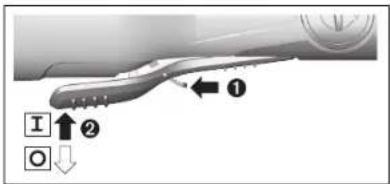
To start the power tool, push the unlocking lever 6 forwards and then push the on/off switch 5 up.
To switch off the machine, release the On/Off switch 5.
To save energy, only switch the power tool on when using it.
▶ Check grinding tools before using. The grinding tool must be mounted properly and be able to move freely. Carry out a test run for at least one minute with no load. Do not use damaged, out-of-centre or vibrating grinding tools. Damaged grinding tools can burst and cause injuries.
Kickback stop

If there is a sudden kickback in the power tool, e.g. jamming in a separating cut, the power supply to the motor will be interrupted electronically.
The LED work light 36 then flashes white and the status indicator 32 flashes red.
To restart the operation, switch the On/Off switch 5 to the Off position and start the machine again.
Restarting Protection
The restarting protection feature prevents uncontrolled re-starting of the machine after an interruption in the power supply.
When restart protection is activated, the status indicator 32 flashes red.
To restart the operation, switch the On/Off switch 5 to the Off position and start the machine again.
User interface (see figure D)
The user interface 4 is used to preselect the speed and to indicate the status of the power tool.
Speed preselection (GWS 18V-125 PSC)
You can use the button for speed preselection 31 to preselect the required speed, even during operation.
The data in the following table are recommended values.
28|English
| Material | Application | Accessory | Speed preselection level | GWS 18V-125 PSC [min -1 ] | |||
| Metal | Brushing, rust removal | Cup brush 1 | 4 | 5 | 0 | 0 | |
| Stainless steel | Grinding Fibre disc 2 | 6 | 0 | 0 | 0 | ||
| Metal | Rough grinding Grinding disc | 3 | 9 | 0 | |||
| Metal | Cutting | Cutting disc | 3 | 9 | 0 | ||
| Masonry, stone | Cutting | Diamond cutting disc and cutting guide (cutting stone is permitted only with a cutting guide) | 3 | 9 | 0 | ||
The values specified for speed levels are guide values. The rated speed of the accessory must be at least equal to the maximum speed marked on the power tool. Accessories running faster than their rated speed can break and fly apart.
Status indications
| Battery status indicator (User interface) 29 | Meaning/Cause | Solution |
| green | Battery charged | |
| yellow | Battery almost empty | Replace or charge battery soon |
| red | Battery pack empty | Replace or charge battery |
| Overload protection indicator (User interface) 33 | Meaning/Cause | Solution |
| yellow | Critical temperature has been reached (motor, electronics, battery) | Run the power tool at no load and allow it to cool down |
| red | Power tool is overheated and switches off | Allow the power tool to cool down |
| Power tool status indicator (User interface) 32 | Meaning/Cause | Solution |
| green | Status OK | - |
| yellow | Critical temperature has been reached or battery is almost empty | Run the power tool at no load and allow it to cool down, or replace or charge the battery soon |
| Illuminated red | Power tool is overheated or battery is empty | Allow the power tool to cool down, or replace or charge the battery |
| Flashing red | Kickback shutdown or restart protection has been triggered | Switch the power tool off and on again |
| Flashing blue | Power tool is connected to a mobile terminal device or settings are being transferred | - |
Connectivity functions
In conjunction with the Bluetooth® Low Energy Module GCY 30-4, the following connectivity functions are available for the power tool:
- Registration and personalisation
- Status check, output of warning messages
- General information and settings
- Management
Read the corresponding operating instructions for information about the Bluetooth® Low Energy Module GCY 30-4.
Working Advice
The power tool with inserted Bluetooth® Low Energy Module GCY 30-4 is equipped with a radio interface. Local operating restrictions, e.g. in aircraft or hospitals, must be observed. Exercise caution when cutting slots in structural walls; see Section "Information on Structures". ▶ Clamp the workpiece if it does not remain stationary due to its own weight. ▶ Do not strain the machine so heavily that it comes to a standstill.
| 0 | 0 |
| 0 | 0 |
| 0 | 0 |
English | 29
▶ After heavily straining the power tool, continue to run it at no-load for several minutes to cool down the accessory. ▶ Do not touch grinding and cutting discs before they have cooled down. The discs can become very hot while working. ▶ Do not use the power tool with a cut-off stand.
If the power tool becomes electrostatically charged, the built-in electronics will switch the power tool off.
To start the power tool, push the unlocking lever 6 forwards and then push the on/off switch 5 up.
Rough Grinding
Never use a cutting disc for roughing.
The best roughing results are achieved when setting the machine at an angle of 30° to 40°. Move the machine back and forth with moderate pressure. In this manner, the workpiece will not become too hot, does not discolour and no grooves are formed.
Flap Disc
With the flap disc (accessory), curved surfaces and profiles can be worked.
Flap discs have a considerably higher service life, lower noise levels and lower sanding temperatures than conventional sanding sheets.
Cutting Metal
For cutting with bonded abrasives, always use the protection guard for cutting 17.
When cutting, work with moderate feed, adapted to the material being cut. Do not exert pressure onto the cutting disc, tilt or oscillate the machine.
Do not reduce the speed of running down cutting discs by applying sideward pressure.
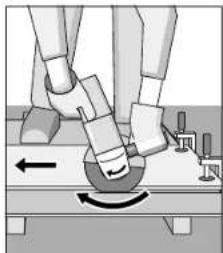
The machine must always work in an up-grinding motion. Otherwise, the danger exists of it being pushed un-controlled out of the cut.
When cutting profiles and square bar, it is best to start at the smallest cross section.
Cutting Stone (see figure C)
Provide for sufficient dust extraction when cutting stone. Wear a dust respirator. The machine may be used only for dry cutting/grinding.
For cutting stone, it is best to use a diamond cutting disc. When using the cutting guide with dust extraction protection guard 27, the vacuum cleaner must be approved for vacuuming masonry dust. Suitable vacuum cleaners are available from Bosch.
ing masonry dust. Suitable vacuum cleaners are available from Bosch.
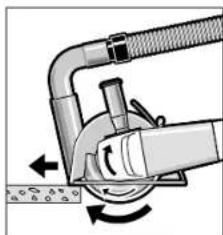
Switch on the machine and place the front part of the cutting guide on the workpiece. Slide the machine with moderate feed, adapted to the material to be worked.
For cutting especially hard material, e.g., concrete with high pebble content, the diamond cutting disc can overheat and become damaged as a result. This is clearly indicated by circular sparking, rotating with the diamond cutting disc. In this case, interrupt the cutting process and allow the diamond cutting disc to cool by running the machine for a short time at maximum speed with no load.
Noticeably decreasing work progress and circular sparking are indications of a diamond cutting disc that has become dull. Briefly cutting into abrasive material (e.g. lime-sand brick) can resharpen the disc again.
Slots in structural walls are subject to the Standard DIN 1053 Part 1, or country-specific regulations.
Slots in structural walls are subject to the Standard DIN 1053 Part 1, or country-specific regulations.
These regulations are to be observed under all circumstances. Before beginning work, consult the responsible structural engineer, architect, or the construction supervisor.
Recommendations for Optimal Handling of the Battery
Protect the battery against moisture and water.
Store the battery only within a temperature range between -20°C and 50°C. For example, do not leave the battery in the car in summer.
Occasionally clean the venting slots of the battery using a soft, clean and dry brush.
A significantly reduced working period after charging indicates that the battery is used and must be replaced.
Maintenance and Service
Maintenance and Service
Maintenance and Cleaning
Before any work on the machine itself (e.g. maintenance, tool change, etc.) as well as during transport and storage, remove the battery from the power tool. There is danger of injury when unintentionally actuating the On/Off switch.
For safe and proper working, always keep the machine and ventilation slots clean.
Please store and handle the accessory(-ies) carefully.
After-sales Service and Application Service
Our after-sales service responds to your questions concerning maintenance and repair of your product as well as spare parts. Exploded views and information on spare parts can also be found under:
www.bosch-pt.com
Bosch's application service team will gladly answer questions concerning our products and their accessories.
In all correspondence and spare parts orders, please always include the 10-digit article number given on the nameplate of the product.
Great Britain
Robert Bosch Ltd. (B.S.C.)
P.O. Box 98
Broadwater Park
North Orbital Road
Denham
Uxbridge
UB 9 5HJ
At www.bosch-pt.co.uk you can order spare parts or arrange
the collection of a product in need of servicing or repair.
Tel. Service: (0344) 7360109
E-Mail: boschservicecentre@bosch.com
Ireland
Origo Ltd.
Unit 23 Magna Drive
Magna Business Park
City West
Dublin 24
Tel. Service: (01) 4666700
Fax: (01) 4666888
Australia, New Zealand and Pacific Islands
Robert Bosch Australia Pty. Ltd.
Power Tools
Locked Bag 66
Clayton South VIC 3169
Customer Contact Center
Inside Australia:
Phone: (01300) 307044
Fax: (01300) 307045
Inside New Zealand:
Phone: (0800) 543353
Fax: (0800) 428570
Outside AU and NZ:
Phone: +61 3 95415555
www.bosch-pt.com.au
www.bosch-pt.co.nz
Republic of South Africa
Customer service
Hotline: (011) 6519600
Gauteng - BSC Service Centre
35 Roper Street, New Centre
Johannesburg
Tel.: (011) 4939375
Fax: (011) 4930126
E-Mail: bsctools@icon.co.za
KZN - BSC Service Centre
Unit E, Almar Centre
143 Crompton Street
Pinetown
Tel.: (031) 7012120
Fax: (031) 7012446
E-Mail: bsc.dur@za.bosch.com
Western Cape - BSC Service Centre
Democracy Way, Prosperity Park
Milnerton
Tel.: (021) 5512577
Fax: (021) 5513223
E-Mail: bsc@zsd.co.za
Bosch Headquarters
Midrand, Gauteng
Tel.: (011) 6519600
Fax: (011) 6519880
E-Mail: rbsa-hq.pts@za.bosch.com
Transport
The contained lithium-ion batteries are subject to the Dangerous Goods Legislation requirements. The user can transport the batteries by road without further requirements. When being transported by third parties (e.g.: air transport or forwarding agency), special requirements on packaging and labelling must be observed. For preparation of the item being shipped, consulting an expert for hazardous material is required.
Dispatch batteries only when the housing is undamaged. Tape or mask off open contacts and pack up the battery in such a manner that it cannot move around in the packaging. Please also observe possibly more detailed national regulations.
Disposal

The machine, rechargeable batteries, accessories and packaging should be sorted for environmental-friendly recycling.

Do not dispose of power tools and batteries/rechargeable batteries into household waste!
Only for EC countries:
According to the European Guideline 2012/19/EU, power tools that are no longer usable, and according to the European Guideline 2006/66/EC, defective or used battery packs/batteries, must be collected separately and disposed of in an environmentally correct manner.


Batteries no longer suitable for use can be directly returned at:
Great Britain
Robert Bosch Ltd. (B.S.C.)
P.O. Box 98
Broadwater Park
North Orbital Road
Denham
Uxbridge
At www.bosch-pt.co.uk you can order spare parts or arrange the collection of a product in need of servicing or repair.
Tel. Service: (0344) 7360109
E-Mail: boschservicecentre@bosch.com
Battery packs/batteries:
Li-ion:
Please observe the instructions in section "Transport", page 30.
Subject to change without notice.
French
Robert Bosch (France) S.A.S.
Quick-release chuck (SDS)-click
106 | Danish
Bosch Service Center
Telegrafvej 3
2750 Ballerup
Denmark
Tel.: (08) 7501820 (within Sweden)
Fax: (011) 187691
Transport
A correctly fitted, undamaged quick-release can be loosened by turning the knurled ring counterclockwise by hand. Never loosen a stuck quick-release with a lever, but use a hook wrench. Place the hook wrench as shown in the picture.
Robert Bosch Sp. z o.o.
BSC
Ul. Szyszkowa 35/37
02-285 Warszawa
Bosch Service Center PT
K Vápence 1621/16
692 01 Mikulov
218 | Hungarian
Power tool service
Strada Horia Măcelariu Nr. 30–34, sector 1
013937 Bucharest, Romania
www.bosch-pt.com/bg/bg/
Transport
Place the protective hood 12 onto the receptacle on the power tool, until the coding ridges of the protective hood align with the receptacle. Press and hold the release lever 1 while doing so.
A properly attached, undamaged quick-release nut can be unscrewed by hand by turning the knurled ring counterclockwise. Do not use pliers to unscrew a tightly fastened quick-release nut; instead, use a two-hole wrench. Use the wrench as shown in the figure.
Approved grinding tools
You can use all grinding tools listed in these operating instructions.
You can rotate the gear head 90° in steps. This allows you to bring the on/off switch into a more favorable position for holding the tool, for example for left-handed users. Unscrew all 4 screws. Carefully tilt the head
of the gear unit into a new position without removing it from the housing. Retighten the 4 screws.
Dust/chip extraction
▶ Dust from materials such as lead-containing coatings, some types of wood, minerals, and metals can be harmful to health. Contact with or inhalation of dust can cause allergic reactions and/or respiratory diseases in workers or people nearby. Some dusts, such as oak and beech dust, are considered carcinogenic, especially in combination with wood treatment additives (chromates, wood preservatives). Asbestos-containing material may only be worked on by specialists.
- Ensure good ventilation of the work area. - It is recommended to wear a breathing mask with filter class P2. Observe the regulations for the materials to be processed in your country.
Place the guard 12 onto the receptacle on the power tool until the coding lugs of the guard match the receptacle. Press and hold the release lever 1 while doing so. Press the guard 12 onto the spindle collar until the guard's stop sits on the flange of the power tool, and turn the guard until it audibly clicks into place. Adjust the position of the guard 12 to the requirements of the work operation. To do this, press the release lever 1 upward and turn the guard 12 to the desired position.
- Set the grinding guard 12 so that all 3 red lugs of the release lever 1 engage in the corresponding openings of the grinding guard 12. ▶ Mount the guard 12 so that sparks are prevented from flying towards the person operating the power tool. The guard 12 must not be turned while the release lever 1 is actuated! Otherwise, the power tool must not be used under any circumstances and must be taken to a service center.
Note: The coding ring on the guard 12 ensures that only a guard that matches the power tool can be mounted.
Cutting guard
The power tool must always be guided against the direction of rotation. However, there is a risk that it may be uncontrollably pushed out of the cut. When cutting profiles and square tubes, it is best to place them on the smallest cross-section.
9 Bluetooth® Low Energy module GCY 30-4
Installing the Bluetooth® Low Energy module GCY 30-4
Safety instructions
Place the protective guard 12 onto the mounting flange of the power tool so that the coding lugs on the guard align with the grooves on the flange. Press and hold the locking lever 1. Press the protective guard 12 onto the spindle collar until the collar rests against the mounting flange of the power tool, then turn the protective guard until it engages with a clearly audible click.






| I | CE | |
| de | EU-KonformitätserklärungWinkelschleifer Sachnummer | Wir erklären in alleinler Verantwortung, dass die genannten Produkte allen einschlägigen Bestimmungen der nachfolgend aufgeführten Richtlinien und Verordnungen entsprechen und mit folgenden Normen übereinstimmen.Technische Unterlagen bei: * |
| en | EU Declaration of ConformityAngle Grinder Article number | We declare under our sole responsibility that the stated products comply with all applicable provisions of the directives and regulations listed below and are in conformity with the following standards.Technical file at: * |
| fr | Déclaration de conformité UEMeuleuse angulaire N° d'article | Nous déclarons sous notre propre responsabilité que les produits décrits sont en conformité avec les directives, règlements normatifs et normes énumérés ci-dessous.Dossier technique auprès de : * |
| es | Declaración de conformidad UEAmoladora angular N° de articulo | Declaramos bajo nuestra exclusiva responsabilidad, que los productos nombrados cumplen con todas las disposiciones correspondientes de las Directivas y los Reglamentos mencionados a continuación y están en conformidad con las siguientes normas.Documentos técnicos de: * |
| pt | Declaração de Conformidade UERebarbadora N.° do produto | Declaramos sob nossa exclusiva responsabilidade que os produtos mencionados cumprem todas as disposições e os regulamentos indicados e estão em conformidade com as seguintes normas.Documentação técnica pertencente à: * |
| it | Dichiarazione di conformità UELevigatrice angolare Codice prodotto | Dichiariamo sotto la nostra piena responsabilità che i prodotti indicati sono conformi a tutte le disposizioni pertinenti delle Direttive e dei Regolamenti elencati di seguito, nonché alle seguenti Normative.Documentazione Tecnica presso: * |
| nl | EU-conformiteitsverklaringHaakse slijpmachines Productnummer | Wij verklaren op eigen verantwoordelijkheid dat de genoemde producten voldoen aan alle desbetreffende bepalingen van de hierna genoemde richtlijnen en verordeningen en overeenstemmen met de volgende normen.Technisch dossier bij: * |
| da | EU-overensstemmelseserklæringVinkelsliber Typenummer | Vi erklærer som eneansvarlige, at det beskrevne produkt er i overensstemmelse med alle gældende bestemmelser i følgende direktiver og forordninger og opfylder følgende standarder.Tekniske bilag ved: * |
| sv | EU-konformitetsförklaringVinkelslip Produktnummer | Vi förklarar under eget ansvar att de nämnda produkterna uppfyller kraven i alla gällande bestämmelser i de nedan angivna direktiven och förordningarnas och att de stämmer överens med följande normer.Teknisk dokumentation: * |
| no | EU-samsvarserklæringVinkelslipr Produktnummer | Vi erklærer under eneansvar at de nevnte produktene er i overensstemmelse med alle relevante bestemmelser i direktivene og forordningene nedenfor og med følgende standarder.Teknisk dokumentasjon hos: * |
| fi | EU-vaatimustenmukaisuusvakuutusKulmahiomakone Tuotenumero | Vakuutamme täten, että mainitut tuotteet vastaavat kaikkia seuraavien direktivien ja asetusten asiaankuuluvia vaatimuksia ja ovat seuraavien standarden vaatimusten mukaisia.Tekniset asiakirjat saatavana: * |
| el | Δήλωση πωτότητας EEΓωνιακός λειαντήρας Αριθμός ευρετηρίου | Δηλώνουμε με αποκλειοτική μας ευθύνη, ότι τα αναφερόμενα προϊόντα αντιστοιχούν σε όλες τις σχετικές διατάξεις των πιο κάτω αναφερόμενων οδηγιών και κανονισμών και ταυτίζονται με τα ακόλουθα πρότυπα.Τεχνικά έγγραφα στη: * |
| tr | AB Uygunluk beyaniTaşlama makinesi Ürün kodu | Tek sorumlu olarak, tanımlanan ürünün aşağıdaki yönetmelik ve direktiflerin geçerli bütün hükümlerine ve aşağıdaki standartlara uygun olduğunu beyan ederiz.Teknik belgelerin bulunduğu yer: * |

| CE | II | |||
| pl | Deklaracja zgodności UESzlifierka kątowa Numer katalogowy | Oświadczamy z pełną odpowiedzialnością, że niniejsze produktyodpowiadają wszystkim wymaganiom poniżej wyszczególnionych dyrektyw irozporządzeń, oraz że są zgodne z następującymi normami.Dokumentacja techniczna:* | ||
| cs | EU prohlásení o shoděÚhlová bruska Objednaci číslo | Prohlašujeme na výhradní zodpovědnost, že uvedený výrobek splňujevšechna příslušná ustanovení niže uvedených smérnic a nařízení a jev souladu s následujícími normami:Technické podklady u:* | ||
| sk | EÚ vyhlásenie o zhodeUhlová brúska Vecné číslo | Vyhlasujeme na výhradní zodpovednosť, že uvedený výrobok splňa všetkypríslušně ustanovenia nižšie uvedených smerníc a nariadení a je v súlades nasledujúcími normami:Technické podklady má spoločnosť:* | ||
| hu | EU konformitási nyilatkozatSarokcsiszoló Cikkszám | Egyedüli felelőséggel kijelentjük, hogy a megnevezett termékek megfelelnekaz alábbiakban felsorolásra kerülő irányelvek és rendeletek valamennyi ide-vágó előírásainak és megfelelnek a következő szabványoknak.Műszaki dokumentumok megőrzési pontja:* | ||
| ru | Заявление о соответствии ЕСУгловая Товарный Noшлифовальная машина | Мы заявляем под нашу единоличную ответственность, что названныепродукты соответствуют всем действующим предписаннямнижеуказанных директив и распоряжений, а также нижеуказанныхнорм.Техническая документация хранится y:* | ||
| uk | Заява про відповідність ЄСКутова шліфмашина Товарний номер | Мизаявляемо під нашу одноособову відповідальність, що названі виробивідповідають усім чинним положенням нищеозначених директив ірозпоряджень, а також нижчеозначеним нормам.Технічна документація зберігається у:* | ||
| kk | EO сәйкестік маглумдамасыБурыштык терістеу Өнім нөмірімашинасы | Өз жауапкершіліклені біз аталган енімдер теменде жзылған директикалармен жарлықтардың тиісті қағидаларына сайкестігін және темендерінормаларға сай екенин білдіреміз.Техникалық құжаттар:* | ||
| ro | Declarație de conformitate UEPolizor unghiular Număr deidentificare | Declarăm pe proprie răspundere că produsele mentionate corespund luturordispozițiilor relevante ale directivelor și reglementărilor enumerate în cele ceurmează și sunt în conformitate cu următoarele standarde.Documentаție tehnică la:* | ||
| bg | EC декларация за съответствиеЪглошпайф Каталожен номер | С пьлина отговорностние декларираме, че посочените продуктиотговарят на всички валидни изисквания на директивите и разпоредбипо-долу и съответства на следните стандарти.Техническа документация при:* | ||
| mk | EU-Изjava за сообразностАголна брусилка Број на дел/артикл | С целосна одговорност изјавуваме, дека опишаните производи се восогласност со сите релевантни одредби на следните регулативи ипрописи и се во согласност со следните норми.Техничка документacija кај:* | ||
| sr | EU-izjava o usaglašenostiUgaona brusilica Broj predmeta | Na sopstveno odgovornost izjavljujemo, da navedeni proizvodi odgovarajusvim dotičnim odredbama naknadno navedenih smernica u uredaba i da su uskladu sa sledećim standardima.Tehnička dokumentacija kod:* | ||
| sl | Izjava o skladnosti EUKotni brusilnik Številka artikla | Izjavljamo pod izključno odgovornostjo, da je omenjen izdelek v skladu z vse-mi relevantnimi določili direktiv in uredb ter ustreza naslednjim standardom.Tehnična dokumentacija pri:* | ||
| hr | EU izjava o sukladnostiKutna brusilica Kataloški br. | Pod punom odgovornošću izjavljujemo da navedeni proizvodi odgovarajusvim relevantnim odredbama direktiva i propisima navedenima u nastavku ida su sukladni sa sljedećim normama.Tehnička dokumentacija se može dobiti kod:* | ||
| et | EL-vastavusdeklaratsioonNurklihvmasin Tootenumber | Kinnitame ainuvastutajatena, et nimetatud tooted vastavad järgnevalt loetle- tud direktiivide ja määruste köikidele asjaomastele nõuetele ja on kooskõlas järgmiste normidega.Tehnilised dokumentid saadaval: * | ||
| Iv | Deklaräcija par atbilstibu ES standartiemLeņka slīpmašina | Izstrādājuma numurs | Mēs ar pilnu atbildību paziņojam, ka šeit aplūkotie izstrādājumi atbilst visiem talak minētajas direktīvas un rīkojumos ietvertajām saistošajām nostadnēm. kā arī sekojošiem standartiem.Tehniskā dokumentacija no: * | |
| It | ES atitikties deklaracijaKampinio šlifavimo mašina | Gaminio numeris | Atsakingai pareiškiame, kad išvardyti gaminiai atitinka visus privalomus žemiau nurodytų direktyvų ir reglamentų reikalavimus ir šiuos standartus.Techninė dokumentacija saugoma: * | |
| GWS 18V-125 PCGWS 18V-125 PSC | 3 601 JG3 E..3 601 JG3 F.. | 2006/42/EC2014/30/EU2011/65/EU | EN 60745-1:2009+A11:2010EN 60745-2-3:2011+A2:2013+A11:2014+A12:2014+A13:2015EN 62471:2008EN 55014-1:2006+A1:2009+A2:2011EN 55014-2:1997+A1:2001+A2:2008EN 50581:2012 | |
| BOSCH | ^Robert Bosch Power Tools GmbH (PT/ECS)70538 StuttgartGERMANY | |||
| Henk BeckerExecutive Vice PresidentEngineering and Manufacturing | Helmut HeinzelmannHead of Product Certification | |||
| Robert Bosch Power Tools GmbH, 70538 Stuttgart, GERMANYStuttgart, 01.11.2017 | ||||
- GWS PROFESSIONAL
- BOSCH
- SAFETY INSTRUCTIONS
- GENERAL POWER TOOL SAFETY WARNINGS
- WORK AREA SAFETY
- ELECTRICAL SAFETY
- PERSONAL SAFETY
- POWER TOOL USE AND CARE
- BATTERY TOOL USE AND CARE
- SERVICE
- SAFETY WARNINGS FOR ANGLE GRINDER
- SAFETY WARNINGS COMMON FOR GRINDING, SANDING, WIRE BRUSHING OR ABRASIVE CUTTING OFF OPERATIONS
- KICKBACK AND RELATED WARNINGS
- PRODUCT DESCRIPTION AND SPECIFICATIONS
- INTENDED USE
- GWS 18V-125 PSC
- PRODUCT FEATURES
- ASSEMBLY
- INSERTING THE BLUETOOTH® LOW ENERGY MODULE GCY
- BATTERY CHARGING
- REMOVING THE BATTERY
- BATTERY CHARGE-CONTROL INDICATION (BATTERY MODEL GBA 18V...) (SEE FIGURE A)
- BATTERY CHARGE-CONTROL INDICATION
- (BATTERY TYPE GBA 18V 6.3AH/PROCORE18V...) (SEE FIGURE B)
- MOUNTING THE PROTECTIVE DEVICES
- PROTECTION GUARD FOR GRINDING
- PROTECTIVE GUARD FOR CUTTING
- AUXILIARY HANDLE
- VIBRATION-DAMPENING AUXILIARY HANDLE
- VIBRATION CONTROL
- HAND GUARD
- MOUNTING THE GRINDING TOOLS
- GRINDING/CUTTING DISC
- FLAP DISC
- RUBBER SANDING PLATE
- CUP BRUSH/DISC BRUSH
- QUICK-CLAMPING NUT (SDS)-CLIC
- APPROVED GRINDING TOOLS
- ROTATING THE MACHINE HEAD (GWS 18V-125 PC)
- DUST/CHIP EXTRACTION
- OPERATION
- STARTING OPERATION
- INSERTING THE BATTERY
- SWITCHING ON AND OFF
- KICKBACK STOP
- RESTARTING PROTECTION
- USER INTERFACE (SEE FIGURE D)
- SPEED PRESELECTION (GWS 18V-125 PSC)
- CONNECTIVITY FUNCTIONS
- WORKING ADVICE
- ROUGH GRINDING
- CUTTING METAL
- CUTTING STONE (SEE FIGURE C)
- SLOTS IN STRUCTURAL WALLS ARE SUBJECT TO THE STANDARD DIN 1053 PART 1, OR COUNTRY-SPECIFIC REGULATIONS
- RECOMMENDATIONS FOR OPTIMAL HANDLING OF THE BATTERY
- MAINTENANCE AND SERVICE
- MAINTENANCE AND CLEANING
- AFTER-SALES SERVICE AND APPLICATION SERVICE
- WWW.BOSCH-PT.COM
- GREAT BRITAIN
- IRELAND
- AUSTRALIA, NEW ZEALAND AND PACIFIC ISLANDS
- REPUBLIC OF SOUTH AFRICA
- CUSTOMER SERVICE
- GAUTENG - BSC SERVICE CENTRE
- KZN - BSC SERVICE CENTRE
- WESTERN CAPE - BSC SERVICE CENTRE
- BOSCH HEADQUARTERS
- TRANSPORT
- DISPOSAL
- ONLY FOR EC COUNTRIES
- BATTERY PACKS/BATTERIES
- FRENCH
- QUICK-RELEASE CHUCK (SDS)-CLICK
- DANISH
- CUTTING GUARD
- INSTALLING THE BLUETOOTH® LOW ENERGY MODULE GCY
Brand : BOSCH
Model : GWS 18V125 PC
Category : Angle grinder