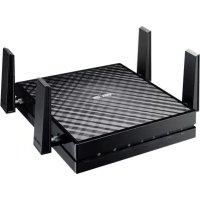
EAAC87 - Wireless Access Point ASUS - Free user manual and instructions
Find the device manual for free EAAC87 ASUS in PDF.



| Product Type | Wireless Access Point / Media Bridge |
| Brand | ASUS |
| Model | EA-AC87 |
| Operating Modes | Media Bridge, Access Point |
| Wireless Technology | Wi-Fi AC1800 (5 GHz) |
| Network Ports | 1 Ethernet RJ-45 port |
| Buttons | On/Off, WPS, Reset, Mode Selector |
| Indicator Lights | Power, Wired Network, Signal (5 levels) |
| Power Supply | AC adapter |
| Default Configuration | Web interface: http://findasus.local, credentials: admin/admin |
| Default SSID (Access Point mode) | ASUS_5G |
| Safety | Compliant with Industry Canada RSS, minimum distance 20 cm |
| Maintenance and Cleaning | Clean with a dry, soft cloth |
| Spare parts and repairability | Not available, device not user-serviceable |
Frequently Asked Questions - EAAC87 ASUS
User questions about EAAC87 ASUS
0 question about this device. Answer the ones you know or ask your own.
Ask a new question about this device
Download the instructions for your Wireless Access Point in PDF format for free! Find your manual EAAC87 - ASUS and take your electronic device back in hand. On this page are published all the documents necessary for the use of your device. EAAC87 by ASUS.
USER MANUAL EAAC87 ASUS
Wireless-AC 1800 Gigabit
Access Point/Media Bridge

Quick Start Guide
U9417/First Edition/August 2014
English 7
Былгарский 19
Hrvatski 31
Cestina 43
Dansk 55
Nederland 67
Eesti 79
Suomi 91
Francais 103
Deutsch 115
Eaynika 137
Magyar 139
Italiano 156
Latviski 168
Lietuviu 180
Norsk. 192
Polski 204
Portugues 216
Romana 228
Pycckn 240
Srpski 252
Slovensky 264
Slovenscina 276
Espanol 288
Svenska 300
Türkce 312
yKpaIHcbka 324




Quick look

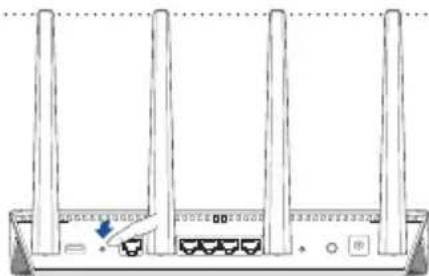
- DC In port
- Power button
- Ethernet ports
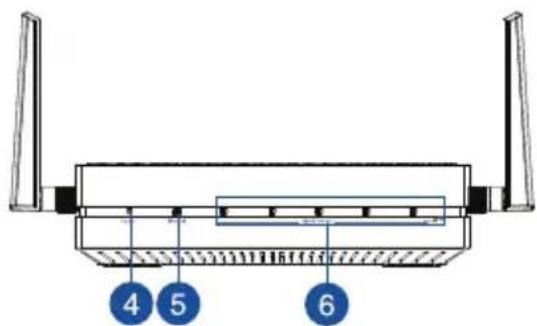
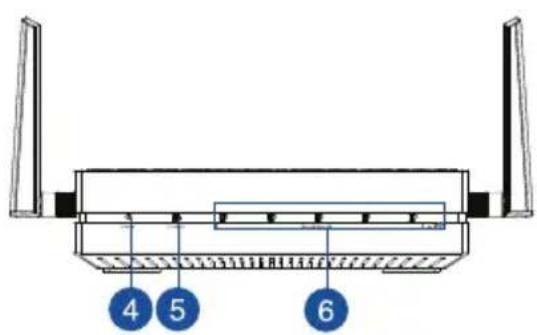
- Power LED
- LANLED
- Signal Indicator
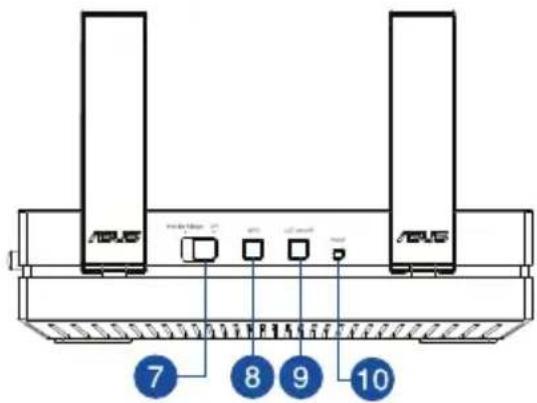
- Switch for Media bridge/AP (Access Point) mode
- WPS button
- LED on/off button
- Reset button


LED indicators
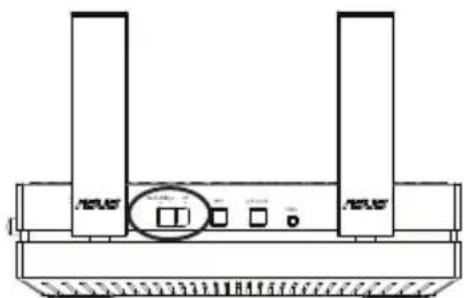
Move the slide switch on the side of your EA-AC87 to your preferred operation mode (Media Bridge or Access Point). Refer to the following table to confirm the mode status.
| Media bridge mode AP mode | |||
| Power LED | Solid On: Power on Off: Power off Blinking fast: Reset to default Blinking slow: Rescue mode | Solid On: Power on Off: Power off Blinking fast: Reset to default Blinking slow: Rescue mode | |
| LAN LED | Solid On: has physical connection to a local area network (LAN) Blinking frequency: according to data transmission rate | Solid On: has physical connection to a local area network (LAN) | |
| Signal Indicator | LED1 solid on: Wi-Fi on LED1~5 solid on: Wi-Fi on | ||
| LED action Signal | |||
| 1 | 2 | 3 | |
| 4 | 5 | ||
| Excellent | |||
| 1 | 2 | 3 | |
| 4 | 5 | ||
| Weak | |||
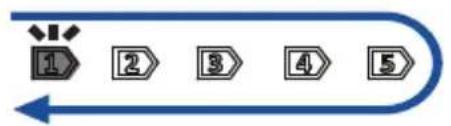
| Wi-Fi site survey / WPS connection | Blinking sequentially back and forth: | ||


The following table lists the LED status when boot up completes.
| Media bridge mode AP mode | ||||||||||
| LED Status(Solid on) | #Eternet 1 2 3 4 5 | #Eternet 1 2 3 4 5 | ||||||||


Operation modes
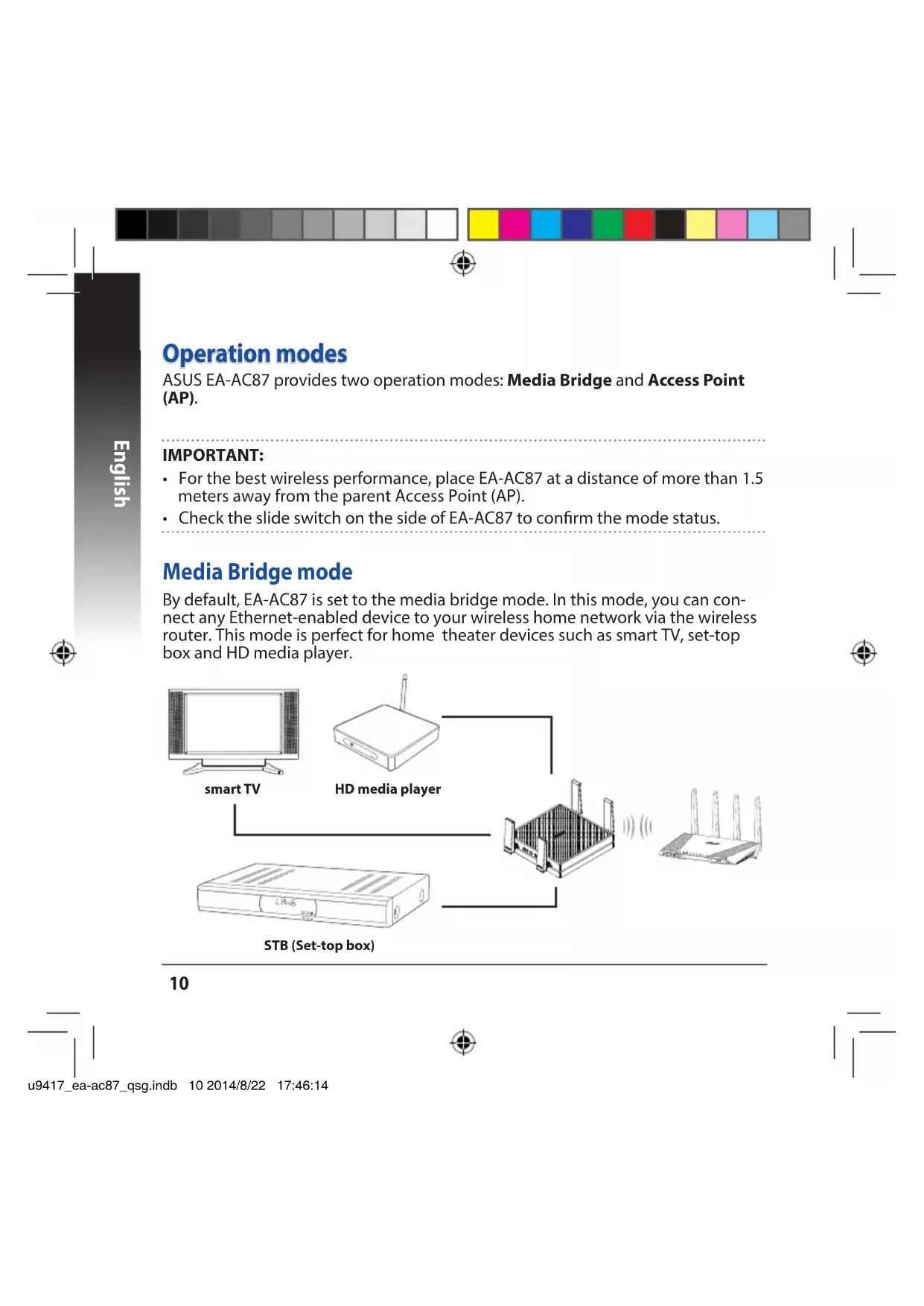
ASUS EA-AC87 provides two operation modes: Media Bridge and Access Point (AP).
IMPORTANT:
- For the best wireless performance, place EA-AC87 at a distance of more than 1.5 meters away from the parent Access Point (AP).
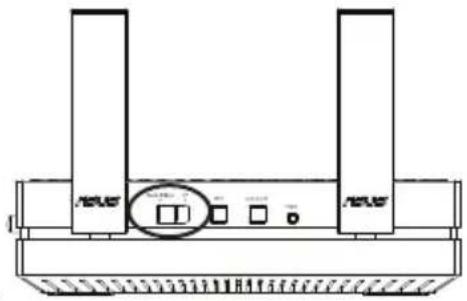
- Check the slide switch on the side of EA-AC87 to confirm the mode status.
Media Bridge mode
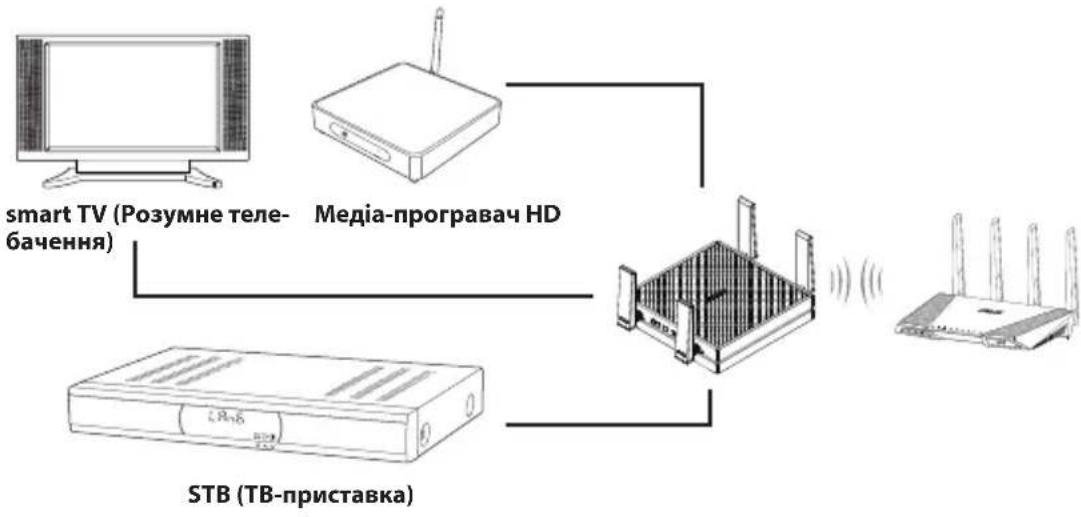
By default, EA-AC87 is set to the media bridge mode. In this mode, you can connect any Ethernet-enabled device to your wireless home network via the wireless router. This mode is perfect for home theater devices such as smart TV, set-top box and HD media player.


Access Point (AP) mode
You can also turn your EA-AC87 into access point (AP) mode by switching the side switch. If you already have a router, you can upgrade your router to the latest 4x4 AC1800 5Ghz Wi-Fi.


Media Bridge mode
We recommend that you connect your EA-AC87 to a wireless router by pressing the WPS (Wi-Fi Protected Setup) button.


Setting up with WPS
a. Adjust the slide switch to media bridge mode and plug in the power adapter.


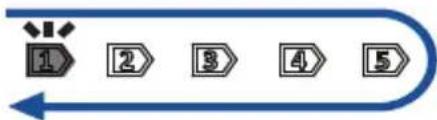
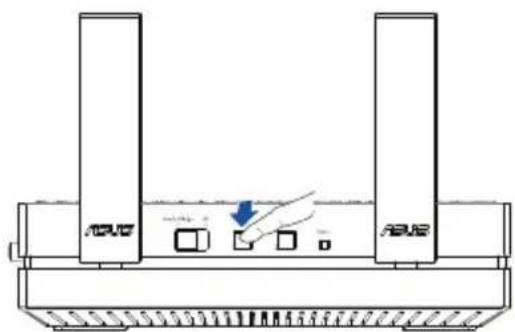
b. Press the WPS button on your EA-AC87 for more than three seconds until the signal indicator LED1 to LED5 blink sequentially back and forth.



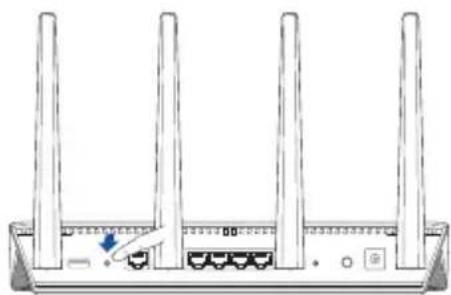
c. Press the WPS button of your router.
NOTE: Refer to the router's user manual for the location of its WPS button.
d. Wait until at least one of the LED signal indicators turns to a solid light, which indicates that it has successfully established connection with your wireless network.
e. Using the bundled network cable, connect your smart TV, set-top box, HD media player, or other Ethernet-enabled device, to your EA-AC87's LAN port.

NOTE: You can also connect your EA-AC87 to your wireless network via the Web GUI. For more details, refer to the section Setting up via web-based interface.


Setting up via web-based interface
NOTE: If you have already used WPS to connect your device, skip this section.
a. Adjust the slide switch to media bridge.
b. Plug in the power adapter and using the bundled network cable, connect your computer to your EA-AC87's LAN port.
c. In your web browser, key in http://findasus.local or 192.168.1.1 in the browser's address bar. Key in admin as the default username and password to log into EA-AC87's web graphical user interface (Web GUI).
d. Follow the onscreen instructions to complete the wireless connection setup
e. Check if EA-AC87's LED indicator turns a solid light, which indicates that EA-AC87 has successfully connected to the wireless network.


Access Point (AP) mode
Setting up via web-based interface
a. Adjust the slide switch to AP mode.
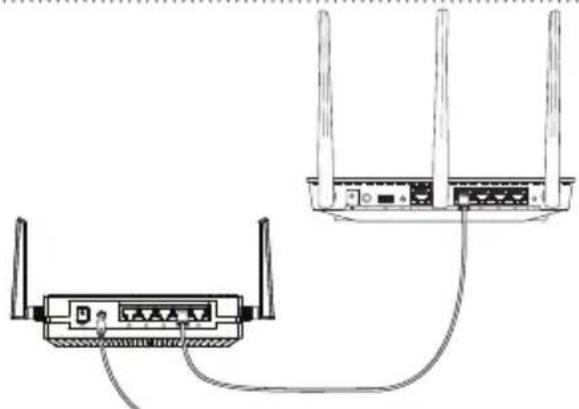
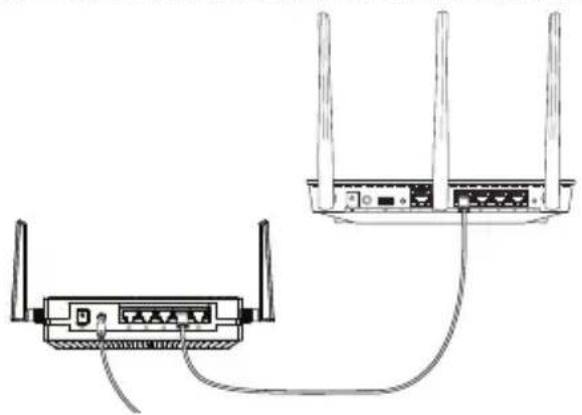
b. Plug in the power adapter and using the bundled network cable to connect to your router's LAN port.
c. Connect your device to EA-AC87's default network name (SSID) ASUS_5G.
d. On your web browser, key in the http://findasus.local in the address bar. Key in the default username and password: admin.
e. Follow the Web GUI to configure various settings. You can assign a new SSID and security key of your EA-AC87.
NOTE:
- In AP mode, you can use the WPS button to connect other devices.
- Ensure to connect EA-AC87 to a router's LAN port before setting up.

Frequently Asked Questions
Q1: What are the default IP, SSID, and login name password for EA-AC87?
| IP before setting | IP after settings | URL for setup* | Default SSID | Login username and password | |
| Media bridge mode | 192.168.1.1 | Assigned by connected router | http://findasus.local | N/A | username: admin password: admin |
| Access point mode | Assigned by connected router | Assigned by connected router | http://findasus.local | ASUS_5G |
- Windows® XP does not support findasus.local. If you use Windows® XP operating system, please download the device discovery utility from ASUS website www.asus.com to find the IP of EA-AC87.
Q2: I cannot access the web GUI to configure the EA-AC87 settings.
- Close all running web browsers and launch again.
- Follow the steps below to configure your computer settings based on its operating system.
Windows® 7
A. Disable the proxy server, if enabled.
- Click Start > Internet Explorer to launch the web browser.
- Click Tools > Internet options > Connections tab > LAN settings.
- From the Local Area Network (LAN) Settings screen, untick Use a proxy server for your LAN.
- Click OK when done.

B. Set the TCP/IP settings to automatically obtain an IP address.
- Click Start > Control Panel > Network and Internet > Network and Sharing Center > Manage network connections.
- Select Internet Protocol Version 4 (TCP/IPv4), then click Properties.
- Tick Obtain an IP address automatically.
- Click OK when done.

Mac 10.5.8
A. Disable the proxy server, if enabled.
- From the menu bar, click Safari > Preferences... > Advanced tab.
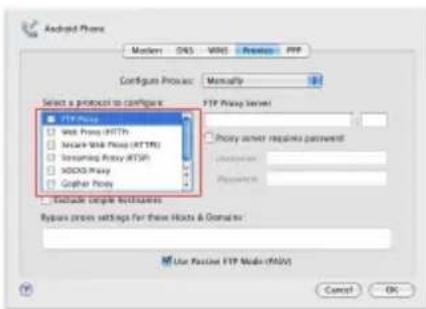
- Click Change Settings... in the Proxies field.
- From the list of protocols, deselect FTP Proxy and Web Proxy (HTTP).
- Click OK when done.
B. Set the TCP/IP settings to automatically obtain an IP address.
- Click the Apple icon > System Preferences > Network.
- Select Ethernet and select Using DHCP in the Configure field.
- Click Apply when done.



Бbv3 npereid


- DC In BxoD
- ByToH 3a BKNIOUbaHe n N3KIOUBAHe
- Ethernet nopToBe
- LED Ha 3axpaHbaHeTo
- LAN nHdkaTop
- INdikatop Ha cunHa
- Ппевкlioюваноpeжим Media bridge (MyltimmedneH Mocr)/AP (Tocka 3adoctb)
- WPS 6yToH
- LED 6yToH 3a BkIIOUbaHe/ n3KJIIOUBAHe
10.Бутонза hyиранe


LED nHdnikatopn
ПльзHeTe Пьзraча OТСТРани Ha Baшя EA-AC87do npeДноЧаня ржим Ha pa6ota (Media Bridge (MyntmeHmocT) nIn Access Point (Toka 3a doctbI)). BxTe CneHata Tabnua, 3a da NOTBpDnTe CTaTyca Ha pexmHa.
B. HaTnchTe WPS 6yToHa Ha Baunr pyTeP.
3A6EIXKKA: BnXTe pBKOBOCTBOTO Ha nOTpe6uTeIa MeCtOnOJxKeHneTo Ha WPS 6yToHa.
I.ИЗчakайтEOKATO Ha-MAKKO eINH OT LED ИнДИКATOPITE Ha cnHал 3aNoUHe
Да CBeTи HeNpeKbCHaTo, KOeTO NOKa3Ba, Ye Bpb3KaTa C BaWaTa 6e3xNHyHa
Мржа e yCTaHOBeHa yCneuHo.
I.ИЗПОЛЗВаite BKЛЮЧЕНЯ B KOMПЛЕКТа МржOB Ka6eJ 3a CBp3BaHe KbM smart TV,ДeKOДер, HD MyЛтIMeДиЕн ПLEйБР ИИnpуг uCTpoiCtBa c Ethernet KbM LAN nopta Ha Baшя EA-AC87.

3A6ELEKKA: MoxkeTe cBtO TaKa Da CbPKeTe CBOr EA-AC87 KbM 6e3XnUHaTa MpeKa ype3 ye6 nTope6nteJcKnI INTEppeic. 3a NObeue HOpMaun, BIXTe pa3dien Setting up via web-based interface (HAcTpoiKa ype3 ye6-6a3npaH INTEppeic).


Hactpoika ype3 ye6-6a3npaH mHTeppeic
3A6EJIEXKA: Ako Beue cTe n3noJ3BaJI WPS 3a Cbbp3BaHe Ha BaWeTo yCTpOInCTBO, npOnyChTe To3n pa3dI.
a. PeryunpaTe nnb3raVa B peKm media bridge (MynmMeHnMoCT).
6. BkIouTe 3axpaHbAun aanTep n 3nOJ3BaIe BkIoyEnn MpeXOB Ka6en 3a CBbp3BaHe Ha BaUnn KOMNtbp KbM LAN nopTa Ha EA-AC87.
B. BbBeTe http://findasus.local B aDpeChata neHa Bauny ye6 6pay3bp. BbBeTe admin KaTO notpe6nteNcK Ome n napona no Noppa36npane, 3a da Bne3e T ye6 notpe6nteNcK INTepfecn c Ha EA-AC87 (ye6 GUI).
r.CneBbAte HNCTpyKcUNTE Ha eKpaHa,3a Da 3aBbPwTe HAcTpoiKaTa Ha 6e3KuHAta Bpb3Ka.
Д. ПювереталLEDиндакатовт ha EA-AC87CBetn6e3прексbaHe, Koeto noka3Ba,уЕ EA-AC87e CBbp3aH ycneшо c 6e3xuHaTa Мржа.


PexmAccessPoint(Touka3adoctb)
HactpoIka ue3 ye6-6a3npaH mHTeppeic
a. PerynnpaTe nIb3raVa B pexm AP (ToUka 3a doctbn).
6. BkHouTe 3axpaHbAunnaTep n N3noJ3BaIe BKIOueHn MpeXOB Ka6eJ 3a Cbbp3BaHe KbM LAN nopTa Ha pyTepa.
B. CbpxKeTe CBOeTo ycTpoiCTBO KbM HMeTo No NpOpa36nPaHe Ha MpeXaTa (SSID) Ha EA-AC87 ASUS.
r. BbBeTe http://findasus.local B aIpeChHa IeHTa Ha BaIINy ye6 6pay3bp. BbBeTe NTpe6nteJCKOTOn Me n npOJaTn NO NpOpa36npaHe: admin.
I. CneBbAitne Notpe6nteNcKnaye6 nHTepFeic, 3a da konHnpynpaTe pa3nUHNactpoyn.MoKeTe da 3aadete HOBu SSID u KJIou 3a 3auNTa Ha EA-AC87.
3A6EJIEXKA:
B AP pexum, moke Ta n3no3BaTe WPS 6yToHa 3a Cbbp3BaHe c npyn yctpoiCTBa.
- Ybepete ce, ye cte cBbp3aII EA-AC87 KbM LAN npota ha pyTepa npedn HacTpoJa.
OTCTpaHЯBaHe Ha Heu3npaBHOCTN
B3: KaKbnca IP, SSID, noTpe6nteIckoto nme n napolata 3a Bn3aHe no noDpa36upaHe 3a EA-AC87?
| IP п的对象 надюка | IP сеД надюкM | URL за Инстампанe* | SSID по побразбиранe | ПOTpe6nteNTСКО име и napола | |
| РекIM Media bridge (Мулимедиемоct) | 192.168.1.1 | 3ададано от сбврзан рунер | http://findasus.local | Няма | пOTpe6nteNTСКО immediate admin napола: admin |
| РекIM Access Point (Tочka за достын) | 3ададано от сбврзан рунер | 3ададано от сбврзан рунер | http://findasus.local | ASUS |
- Windows® XP He польбра findasus.local. Ако n3пальate onepaцнонca cnctema Windows® XP, n3terlne nomoша поррама 3a OTkpиbahe Ha yctpoicTba ot ye6 caita ha ASUS www.asus.com, 3aда OTkpиte IP ha EA-AC87.
B2: He mora da nonyuca doctbnp do ye6 GUI, 3a da konhphiynpam hactpoiKnte ha 6e3xuHnry pyTep.
3aTBOpTe BCnKn PnchAtn ye6 6pay3bpn n cTapTnpaTe OTHOBO.
CneBaiTe CTbIKnTe NO-IOJy,3a Da KOHnHypnpaTe HAcTpoiKnTe Ha CBOr KOMNtbp Cbo6pa3HO OepaunOHHaTa My CNTema.
Windows 7
A. DeakTbUnpaTe npOKCu cbPbBpa, aKO e akTbUnpaH.
- ⅢpaKHeTe Bbpxy Start (Ctapt) > Internet Explorer, 3aДа CTapTpape ye6 6pay3bpa.
- UpaKHeTbPxy Tools (HnctpyMeHTu) >Internet options (Onznn 3a nHTepHeT) > pa3dEn Connections (Bpb3Kn) > LAN settings (LAN hactpoiKn).
- OT ekpaHa Local Area Network (LAN) Settings (HacTpoKn Ha loKaHa MpeXa), MaxHeTe OTMETkata B Use a proxy server for your LAN (N3noJ3BaIe npOKCu cbpBbP 3a BaWata loKaHa MpeXa).


-
KoHnIpynpaIte TCP/IP HAcTpOyKInTe 3a aBTOMaTNUHO nolyuabaHe Ha IP aDpec.
-
Κρακητε Βυρχy Start (Старт) > Control Panel (Контpoлен naнел) > Network and Internet (Мразka и мHTернет) > Network and Sharing Center (Дentbp 3a мразки и мHTернет) > Manage networkconnections (Упавлиенье на мразковite Вьзк).
2.Изберетe Internet Protocol Version 4 (TCP/IPv4) (ИнтэрпpoToKoI Bepcna 4(TCP/IPv4))иHaTnCHeTe Properties (Свовсва). - NocTabeTe OTMeTka B Obtain an IP address automatically (NonyuBaB aBTOMaTuH OIP aDpec).
4.ⅢpaKHeTeBbpxOk(OK),Korato cTe roTobn.
Mac 10.5.8
A. DeakTbnpaIte npokcu cbpBbpa, ako e akTbnpaH.
- OT leHTata C MeHIOTo UpaKHeTe Bbpy Safari > Preferences... (IpeDnoUHaTnHa...) > pa3dEe Advanced (Pa3uPepn).
- Μρακητενύβρχγ Change Settings... (Προγήσαν ἀνακτροῦς...) B Μηλότο Proxies (Προκυς ένρυμη).
- Ot cnncbka c npotoKoJI npemaxHeTe FTP Proxy (FTP npokcu) n Web Proxy (HTTPS) (Ye6 npokcu (HTTPS)).
-
lpaKHe Te Bbpy Ok (OK), KoraTo cTe roTobn.
-
Konfumpräte TCP/IP hactpoikne 3a abTomatuHNo noJyuaBaHe Ha IP aDpec.
-
IlpaKHeTe Bbpxy IKoHaTa Ha Apple > System Preferences (CnCTemHn npednoHTaHn) > Network (Mpeka).
- ɪn36epeTe Ethernet uɪn36epeTe Using DHCP (ɪnʒoɪn3BaHé Ha DHCP) B nɒjTeO Configure (KɔnφuŋpɪpaHé).
- lpaKHe Te Bpxy Apply (PpunoKn), KoraTo CTe roTobn.




Brzi pregled


Availability: Mon. to Fri.
8:30-12:00am EST
(5:30am-9:00pm PST)
Sat. to Sun.
9:00am-6:00pm EST
(6:00am-3:00pm PST)
BRAZIL
Hotline Number: 4003 0988 (Capital) /
Language: Portuguese
Availability: Mon. to Fri.
9:00am-18:00
Manufacturer
ASUSTeK Computer Inc.
Tel: +886-2-2894-3447
Address: No. 150, LI-TE RD., PEITOU, TAIPEI 112, TAIWAN
Authorised representative in Europe
ASUS Computer GmbH
Address: HARKORT STR. 21-23, 40880 RATINGEN, GERMANY
Authorised distributors in Turkey
BOGAZICI BIL GISAYAR SAN. VE TIC. A.S.
Tel: +90 212 3311000
Address: AYAZAGA MAH. KEMERBURGAZ CAD. NO.10 AYAZAGA/ISTANBUL
CIZGI Elektronik San. Tic. Ltd. Sti.
Tel: +90 212 3567070 Address: CEMAL SURURI CD. HALIM MERIC IS MERKEZI
No: 15/C D:5-6 34394 MECIDIYEKOY/ISTANBUL
KOYUNCU ELEKTRONiK BiLGi iSLEM SiST. SAN. VE DIS TIC. A.S.
Tel: +90 216 5288888
Address: EMEK MAH.ORDU CAD. NO:18, SARIGAZI, SANCAKTEPE ISTANBUL
ASUS recycling and takeback programs come from our commitment to the highest standards for protecting our environment. We believe in providing solutions for you to be able to responsibly recycle our products, batteries, other components, as well as the packaging materials. Please go to
http://csr.asus.com/english/Takeback.htm for the detailed recycling information in different regions.
REACH
Complying with the REACH (Registration, Evaluation, Authorisation, and Restriction of Chemicals) regulatory framework, we published the chemical substances in our products at ASUS REACH website at http://csr.asus.com/english/REACH.htm
Federal Communications Commission Statement
This device complies with Part 15 of the FCC Rules. Operation is subject to the following two conditions:
- This device may not cause harmful interference.
- This device must accept any interference received, including interference that may cause undesired operation.
This equipment has been tested and found to comply with the limits for a class B digital device, pursuant to part 15 of the FCC Rules. These limits are designed to provide reasonable protection against harmful interference in a residential installation.
This equipment generates, uses and can radiate radio frequency energy and, if not installed and used in accordance with the instructions, may cause harmful interference to radio communications. However, there is no guarantee that interference will not occur in a particular installation. If this equipment does cause harmful interference to radio or television reception, which can be determined by turning the equipment off and on, the user is encouraged to try to correct the interference by one or more of the following measures:
- Reorient or relocate the receiving antenna.


- Increase the separation between the equipment and receiver.
- Connect the equipment into an outlet on a circuit different from that to which the receiver is connected.
- Consult the dealer or an experienced radio/TV technician for help.
WARNING:
- Any changes or modifications not expressly approved by the party responsible for compliance could void the user's authority to operate the equipment. Prohibition of Co-locationThis device and its antenna(s) must not be co-located or operating in conjunction with any other antenna or transmitter.
- Users must not modify this device. Modification by anyone other than the party responsible for compliance with the rules of the Federal Communications Commission (FCC) may void the authority granted under FCC regulations to operate this device.
Prohibition of Co-location
This device and its antenna(s) must not be co-located or operating in conjunction with any other antenna or transmitter.
IMPORTANT NOTE:
Radiation Exposure Statement: This equipment complies with FCC radiation exposure limits set forth for an uncontrolled environment. End users must follow the specific operating instructions for satisfying RF exposure compliance. To maintain compliance with FCC exposure compliance requirement, please follow operation instruction as documented in this manual.
Declaration of Conformity for R&TTE directive 1999/5/EC
Essential requirements - Article 3 Protection requirements for health and safety - Article 3.1a


Testing for electric safety according to EN 60950-1 has been conducted. These are considered relevant and sufficient.
Protection requirements for electromagnetic compatibility - Article 3.1b
Testing for electromagnetic compatibility according to EN 301 489-1 and EN 301
489-17 has been conducted. These are considered relevant and sufficient.
Effective use of the radio spectrum - Article 3.2
Testing for radio test suites according to EN 300 328- 2 has been conducted. These are considered relevant and sufficient.
CE Mark Warning
This is a Class B product, in a domestic environment, this product may cause radio interference, in which case the user may be required to take adequate measures.
Operation Channels: CH1~11 for N. America; CH1~14 for Japan; CH1~13 for Europe (ETSI)
IC Warning
This device complies with Industry Canada licence-exempt RSS standard(s).
Operation is subject to the following two conditions: (1) this device may not cause interference, and () this device must accept any interference, including interference that may cause undesired operation of the device."
Industry Canada Statement
This device complies with RSS-210 of the industry Canada Rules. Operation is subject to the following two conditions:
-
This device may not cause harmful interference.
-
This device must accept any interference received, including interference that may cause undesired operation.


IMPORTANT NOTE:
Radiation Exposure Statement: This equipment complies with IC radiation exposure limits set forth for an uncontrolled environment. End users must follow the specific operating instructions for satisfying RF exposure compliance. To maintain compliance with IC RF exposure compliance requirement, please follow operation instruction as documented in this manual.
NCC 警語
SAFE TEMP: This wireless router should be only used in environments with ambient temperatures between 5^ (41^) and 40^ (104^) .
DO NOT expose to or use near liquids, rain, or moisture. DO NOT use during electrical storms.
Panorama


PexkM Toykn Doctyna (AP)
Moxho nepekniouhTb yctpoiCTBO B peKm TouKn DocTyna (AP) c nomoubu nepekniouaTeHa 6okoboi nanei Ecn y Bac yxe ectb poyTe, moxho do6abntb emy 4x4 AC1800 5 TTuWi-Fi.



PexnM medna-MoCT
PekomeHnyeTcnoKJIouHTb yCTpoIcTBO K 6ecnpoBODHomy poyTepy, Haxab KhoNky WPS.

Pycckn
HacrpoIka c nOmoIbIO WPS
a. NepekIIOUHTe nepeKIIIOuATeNb B pexkM Medna-mocr n noKIOUOTe 6nok nHTAHIA.


b. Haxmte u yepkna Te KhoKy WPS Ha EA-AC87 6oJee Tpex cekyH, noka nnkaTOpby cnHaJa 1-5 He 3amraOT NoopeDHO



c. Haxmnte KhoNky WPS ha poytepe
PIMMEUHNE: PacnonoxeHne KONKn WPS cMOTPe B pyKOoDCTBe noJIb3ObaTeJra.

d.Дождntecb noka xotЯ 6bl ODNH nIuNkAToPOB CnHaJa He 3aROpNTc, YTO O3Haayet yCneuHoe nOdkIoueHne K 6ecnpoBOHO CETn.
e. C nomoiyio noctabnemoro ceTeBOro Ka6ena noiknioune Ethernet-coBmecTnmoe yctpoiCTBO K LAN npTy EA-AC87

IPIMUEAHHE: TaKxe MoXeTe NODKNIOHTb EA-AC87 K 6ecnpoBODHOcTn Upe3 Be6-nHTepfnc. POnpO6HyIO INΦOpMaUIO CMOTPnTE B pa3dJe HAcTpoJauepe3 Be6-nHTepfnc


PexnM TocKn Doctyna (AP)
HactpoJa uepe3 Be6-IMTepΦeIc
a. Npeeknoute nepeknoateBpekm AP
b. NOKIIOHTe 6NOK NITAHIN C NOMOUBIO NOCTABJEMORO CeTeBOrO Ka6eJI NOKIIOHTe K LAN-nOpTy poyTepa.
C.ПОДКИСHTЕУСТРОИСТВОКСЕТNOумOLЧАнЮASUS.
d. B aDpechoH CTPOKe 6pay3epa BBeDnTe http://findasus.local B kaueCTBe IMeHN IONb3OBaTeJI N napOJI NO yMOJUHaHIO NCNoB3yIte admin
e. IcnoIb3yIte Be6-ntepfecn dIra HacptpoKu pa3nnHbIX npaMeTPOB MoKHO Ha3HaunTB HObII SSID n KIOUc 6e3Oanachocn dIra EA-AC87.
ПРИМЕЧАНЕ:
BpeKmAp MOxHO uCIOJb3OBaTb KONkY WPS nI IOKJIuOeHn dpyrnx yCTpoiCTB.
- Пожключпь EA-AC87 к порту рочета до настroduк.

acto 3aabaemble Bonpocbi (FAQ)
B1: KaKne 3naueHn no yMOnuHaHnIO dIg IP, SSID, mMeHn noIb3OBaTeJI n napOJI?
Frequently Asked Questions
ASUS EA-AC87 maeДBA peximpo6otn: Media Bridge (Media-micr) i Access Point (AP) (Toka doctyny).
BAJKJINBOI
-Дяпокрашени роботи 6e3dpoTOBOМерекi BCTaHOBIT npictpiEA-AC87
Ha BiDCTaHI He MeHsE 1,5 МетрIB BiDпepBnHoiToUkNdoctyny (AP).
- Ipepebipte, uI nepeMkau Ha npucptpoi EA-AC87 BcTaHOBLeHn npaBnJbHo dny niTBePdKeHHra TAnHy peKmMy.
Pexim «Media Bridge» (Media-mict)
3a npomobuaHHm dI pynctropo EA-AC87 BcTaHOBHeHn pexim «Media Bridge» (Media-mict). Y cboMy pexmi moKHa niklouHTn npicctpi Ethernet do 6e3dpoTOBOi DomauHbOi Mepeki 3a DOnOMoRO 6e3dpoToboro MapwpyTu3atopa. Ley pexim iDeaIbHO nixOuNTb dI pynctrooB DOMaunHbOro KIOHOTaTp, HapnKnaD, smart TV, TB-npncTabKa ta media-nporpaBaHD.


Pexm «Access Point» (AP) (Touka doctyny)
Takokha npncpo EA-AC87 moKha BBIMkHytn pexm «Access Point» (AP) (Toka doctny), nobephywn nepemikau. kso B Bac Bke e Mapwpytn3aTOp, BN MoKeTe OHOBtN Ioro Do octAHboi Bepci 4x4 AC1800 5 Tru Wi-Fi.

Pěkám «Media Bridge» (Média-mict)
PekomeHnyEmo niknouatnpicti EA-AC87 do 6e3poToBOro mapwpyTu3aTopa,HaTnCKaOuN KOnkY WPS (3axnue He hactpoOBaHHra Wi-Fi).

HanaHTyBaHHa 3a DonomoroIO WPS
a. Переевить посякay у реки Media Bridge (Media-micr) ta πίдкlioчтб\ аадлстор кИВлення.


- HatnckaTe KhoNky WPS Ha npncptoi EA-AC87 DoBwe hix 3 c,doKu CbiTIOiOHi iHdNKatOpu CunHaNy 1-5 He noUHyb 6nnMaTu no cep3i.

330


B. HatncHt b KhoNky WPS Ha mapuptyn3aTopi.
PIMITKA. NIB. noci6HnK KopnCTyBaHa MapwpyTu3aTopa, 0o6 i3HaTnc, de po3miueHa KOnkA WPS.

r.Доуекайтеся,ДOKихаябODINCBITIOIDHINiHnKaTOpCnHanyHeNoUHe ropitn noCTiHo.LeВka3yeHaTe,ISOBdaIocnpiKlnuHTncnDo6e3dpoTOBOI Mepeksi.
Д. 3a ДОПOMоЮ МерекнOrO Ka6eIIO 3 KOMnIeKTy NiДКIlyuIb smart TV, TB-прИставКу,media-прорразч HD ChIиИши npicrtpiI Ethernetdo npota LAN npicrtpoI EA-AC87.

ПРИМТК. Також можна пдкючтп ристри EA-AC87do 6e3dpoTOBOI Mepeksi za donomoro Web GUI. Порpoшни в.у роздлнннн HeaawtyBaHnHa chepe3 Be6-intepфс.


HanaTbyBaHHaYepe3Be6-iHTepFeic
PIMITKA. Raio Bn Bxe BnkOpncToBye WPS npiKIOueHH npcTpoI, nepeiitb do HactynHoro po3diny.
a. Пецевить пемпау ржим Media Bridge (Media-Mict).
6. BCTaBTe aanTep XnBneHn Ta nikluOitb KOMIOTep do npTa LAN npncToPo EA-AC87 3a donomoro mopexHoro ka6eIo 3 KOMNKeTy.
B. BBeiTb http://findasus.local B pyAnky aDpeCn Be6-nerperlaa. BBeiTb i'Ma KOpNCTyBaA Ta napOlb 3a npOMOBaHHM, IIO6 BBiHTu B rpaichHn B6-iHTepFeic KOpNCTyBaA (Web GUI) npncTropo EA-AC87.
r. BnKoHyTe nOaHi Ha ekpaHi iHCTpyKu, 063aBepuHTn HanaWtYBaHH 6e3dpoTOBOrPiDKNIOUeHH.
d. IpekehauTecra, 0cCBiTIOiDNHIN iHnkaTop EA-AC87 ropntb HenepepbHO: ce O3Haue, 0o EA-AC87 ycniuHo NiKluoyeHo do 6e3DpoTOBOi Mepeki.


Pexim «Access Point» (AP) (Touka doctyny)
HanaTbHaHHape3 Be6-iHTepeic
a.перевдьсямкauв ржIM AP (Toчka doctyny).
6. BCTaBte aAnTepeKnBHeHH Ta niKlHouItbCn DO npTa LAN mappyTu3aTopa 3a DonOMoroIO MepeXHOrO Ka6eNo 3 KOMnIeKtY.
B.ПиДКнИчITьnpИСТPIйdoМерЕжIЗHAЗBOIOASUS3a npOMOBuaHHaM(iJeHTnΦiKaTOpSSID)Ha npICTpoiEA-AC87.
r. BBeiB http://findasus.local B pRky aIpeCn Be6-nerpIaJa. BBeiTb im'KopNCTyBaay Ta npOJIb 3a npOMOBaHHM: admin.
Д. Викорисовут Web GUI, уб 3mihuВатувань. В може ппзанчын Новий IDeHTnФikaTops SSID та кд 6e3neкnpсntpo EA-AC87.
IPNMITKA.
- Y peximi «AP» (Toouka doctyny) moxHa πικλίουατης Σ ο ένιχιν πριστροῖν, Ḥαπικαύουν κόνηκγ WPS.
- YneBhitbca, 10 npncptpi EA-AC87 niknoueHn do nopTa LAN mappyTu3aTo- pa, nepsh Hix HanaTobByBaTu Noro.
UcyHeHH HeCnpaBHOcte
31:ЯкIP-адра,ideHTnФikatop SSID,i'mяКористувача тanapовьтаньенид EA-AC87 3a npomobuaHHam?
Availability: Mon. to Fri.
8:30-12:00am EST
(5:30am-9:00pm PST)
Sat. to Sun.
9:00am-6:00pm EST
(6:00am-3:00pm PST)
BRAZIL
Hotline Number: 4003 0988 (Capital) /
Language: Portuguese
Availability: Mon. to Fri.
9:00am-18:00
Manufacturer
ASUSTeK Computer Inc.
Tel: +886-2-2894-3447
Address: No. 150, LI-TE RD., PEITOU, TAIPEI 112, TAIWAN
Authorised representative in Europe
ASUS Computer GmbH
Address: HARKORT STR. 21-23, 40880 RATINGEN, GERMANY
Authorised distributors in Turkey
BOGAZICI BIL GISAYAR SAN. VE TIC. A.S.
Tel: +90 212 3311000
Address: AYAZAGA MAH. KEMERBURGAZ CAD. NO.10 AYAZAGA/ISTANBUL
CIZGI Elektronik San. Tic. Ltd. Sti.
Tel: +90 212 3567070 Address: CEMAL SURURI CD. HALIM MERIC IS MERKEZI
No: 15/C D:5-6 34394 MECIDIYEKOY/ISTANBUL
KOYUNCU ELEKTRONiK BiLGi iSLEM SiST. SAN. VE DIS TIC. A.S.
Tel: +90 216 5288888
Address: EMEK MAH.ORDU CAD. NO:18, SARIGAZI, SANCAKTEPE ISTANBUL
ASUS recycling and takeback programs come from our commitment to the highest standards for protecting our environment. We believe in providing solutions for you to be able to responsibly recycle our products, batteries, other components, as well as the packaging materials. Please go to
http://csr.asus.com/english/Takeback.htm for the detailed recycling information in different regions.
REACH
Complying with the REACH (Registration, Evaluation, Authorisation, and Restriction of Chemicals) regulatory framework, we published the chemical substances in our products at ASUS REACH website at http://csr.asus.com/english/REACH.htm
Federal Communication Commission Interference Statement
This equipment has been tested and found to comply with the limits for a Class B digital device, pursuant to Part 15 of the FCC Rules. These limits are designed to provide reasonable protection against harmful interference in a residential installation. This equipment generates, uses and can radiate radio frequency energy and, if not installed and used in accordance with the instructions, may cause harmful interference to radio communications. However, there is no guarantee that interference will not occur in a particular installation. If this equipment does cause harmful interference to radio or television reception, which can be determined by turning the equipment off and on, the user is encouraged to try to correct the interference by one of the following measures:
- Reorient or relocate the receiving antenna.
- Increase the separation between the equipment and receiver.
- Connect the equipment into an outlet on a circuit different from that to which the receiver is connected.
- Consult the dealer or an experienced radio/TV technician for help.
CAUTION: Any changes or modifications not expressly approved by the party responsible for compliance could void the user's authority to operate this equipment.


WARNING:
- Any changes or modifications not expressly approved by the party responsible for compliance could void the user's authority to operate the equipment. Prohibition of Co-locationThis device and its antenna(s) must not be co-located or operating in conjunction with any other antenna or transmitter.
- Users must not modify this device. Modification by anyone other than the party responsible for compliance with the rules of the Federal Communications Commission (FCC) may void the authority granted under FCC regulations to operate this device.
This device complies with Part 15 of the FCC Rules. Operation is subject to the following two conditions: (1) This device may not cause harmful interference, and (2) this device must accept any interference received, including interference that may cause undesired operation.
This device and it's antennas(s) must not be co-located or operating in conjunction with any other antenna or transmitter except in accordance with FCC multi-transmitter product procedures.
This device is going to be operated in 5.15 5.25GHz frequency range, it is restricted in indoor environment only.
IMPORTANT NOTE:
FCC Radiation Exposure Statement: This equipment complies with FCC radiation exposure limits set forth for an uncontrolled environment. This equipment should be installed and operated with minimum distance 20cm between the radiator & your body.
Declaration of Conformity for R&TTE directive 1999/5/EC
Essential requirements - Article 3
Protection requirements for health and safety - Article 3.1a
Testing for electric safety according to EN 60950-1 has been conducted. These are considered relevant and sufficient.
Protection requirements for electromagnetic compatibility - Article 3.1b
Testing for electromagnetic compatibility according to EN 301 489-1 and EN 301 489-17 has been conducted. These are considered relevant and sufficient.
Effective use of the radio spectrum - Article 3.2
CE Mark Warning
This is a Class B product, in a domestic environment, this product may cause radio interference, in which case the user may be required to take adequate measures.
IC Statement
This device complies with Industry Canada license-exempt RSS standard(s).
Operation is subject to the following two conditions: (1) this device may not cause interference, and (2) this device must accept any interference, including interference that may cause undesired operation of the device.
This device and it's antennas(s) must not be co-located or operating in conjunction with any other antenna or transmitter except in accordance with IC multi-transmitter product procedures.
The device for the band 5150-5250 MHz is only for indoor usage to reduce potential for harmful interference to co-channel mobile satellite systems.
IC Radiation Exposure Statement:
This equipment complies with IC RSS-102 radiation exposure limits set forth for an uncontrolled environment. This equipment should be installed and operated with minimum distance 20cm between the radiator & your body.
Industry Canada Statement
This device complies with RSS-210 of the industry Canada Rules. Operation is subject to the following two conditions:
-
This device may not cause harmful interference.
-
This device must accept any interference received, including interference that may cause undesired operation.
IMPORTANT NOTE:
Radiation Exposure Statement: This equipment complies with IC radiation exposure limits set forth for an uncontrolled environment. End users must follow the specific operating instructions for satisfying RF exposure compliance. To maintain compliance with IC RF exposure compliance requirement, please follow operation instruction as documented in this manual.


NCC警語
SAFE TEMP: This wireless router should be only used in environments with ambient temperatures between 5^ (41^) and 40^ (104^) .
DO NOT expose to or use near liquids, rain, or moisture. DO NOT use during electrical storms.


- Wireless-AC 1800 Gigabit
- Access Point/Media Bridge
- Quick Start Guide
- LED indicators
- Operation modes
- IMPORTANT:
- Media Bridge mode
- Access Point (AP) mode
- Setting up with WPS
- Setting up via web-based interface
- NOTE:
- Frequently Asked Questions
- Q1: What are the default IP, SSID, and login name password for EA-AC87?
- Q2: I cannot access the web GUI to configure the EA-AC87 settings.
- Windows® 7
- Disable the proxy server, if enabled.
- Mac 10.5.8
- Бbv3 npereid
- LED nHdnikatopn
- Hactpoika ype3 ye6-6a3npaH mHTeppeic
- PexmAccessPoint(Touka3adoctb)
- HactpoIka ue3 ye6-6a3npaH mHTeppeic
- 3A6EJIEXKA:
- OTCTpaHЯBaHe Ha Heu3npaBHOCTN
- B2: He mora da nonyuca doctbnp do ye6 GUI, 3a da konhphiynpam hactpoiKnte ha 6e3xuHnry pyTep.
- Windows 7
- Brzi pregled
- BRAZIL
- Manufacturer
- Authorised representative in Europe
- Authorised distributors in Turkey
- REACH
- Federal Communications Commission Statement
- WARNING:
- Prohibition of Co-location
- IMPORTANT NOTE:
- Declaration of Conformity for R&TTE directive 1999/5/EC
- CE Mark Warning
- IC Warning
- Industry Canada Statement
- NCC 警語
- Panorama
- PexkM Toykn Doctyna (AP)
- PexnM medna-MoCT
- HacrpoIka c nOmoIbIO WPS
- PexnM TocKn Doctyna (AP)
- HactpoJa uepe3 Be6-IMTepΦeIc
- ПРИМЕЧАНЕ:
- acto 3aabaemble Bonpocbi (FAQ)
- BAJKJINBOI
- Pexim «Media Bridge» (Media-mict)
- Pexm «Access Point» (AP) (Touka doctyny)
- Pěkám «Media Bridge» (Média-mict)
- HanaHTyBaHHa 3a DonomoroIO WPS
- HanaTbyBaHHaYepe3Be6-iHTepFeic
- Pexim «Access Point» (AP) (Touka doctyny)
- HanaTbHaHHape3 Be6-iHTepeic
- IPNMITKA.
- UcyHeHH HeCnpaBHOcte
- Federal Communication Commission Interference Statement
- IC Statement
- IC Radiation Exposure Statement:
- NCC警語
Brand : ASUS
Model : EAAC87
Category : Wireless Access Point