
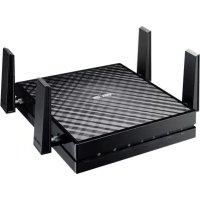
WL-330NUL - Wireless Access Point ASUS - Free user manual and instructions
Find the device manual for free WL-330NUL ASUS in PDF.



| Product type | Wireless access point / portable router |
| Brand | ASUS |
| Model | WL-330NUL |
| Dimensions | Approx. 9.5 x 3.5 x 1.5 cm |
| Weight | Approx. 50 g |
| Power supply | USB port (5V) |
| Wired connectivity | 1 RJ45 Ethernet port |
| Wireless connectivity | Wi-Fi 802.11n (2.4 GHz) |
| Main functions | Portable router, access point, connection sharing |
| Configuration | Via ASUS utility or web interface |
| Security | Supervisor password, WPA/WPA2 encryption |
| Compatibility | Windows, Mac, tablets, smartphones |
| Maintenance | Clean with a soft, dry cloth |
| Repairability | Non-disassemble device, contact ASUS support |
| Operating temperature | 0°C to 40°C |
Frequently Asked Questions - WL-330NUL ASUS
User questions about WL-330NUL ASUS
0 question about this device. Answer the ones you know or ask your own.
Ask a new question about this device
Download the instructions for your Wireless Access Point in PDF format for free! Find your manual WL-330NUL - ASUS and take your electronic device back in hand. On this page are published all the documents necessary for the use of your device. WL-330NUL by ASUS.
USER MANUAL WL-330NUL ASUS
(For 802.11g/b/n Wireless Networks)
Quick Start Guide

U7564/First Edition/December 2012
English 3
Francais 8
Deutsch 13
Italiano 18
Pycckn 23
Българск. 28
Čeştna 33
Dansk 38
Nederland 43
Eesti 48
Suomi. 53
Elambdaiká 58
Magyar 63
Latviski 68
Lietuviu 73
Norsk. 78
Polski. 83
Portugues 88
Româna 93
Slovensky. 98
Espanol. 103
Svenska 108
Türkce 113
YkpaHcbka. 118
Use WL-330NUL as a portable router
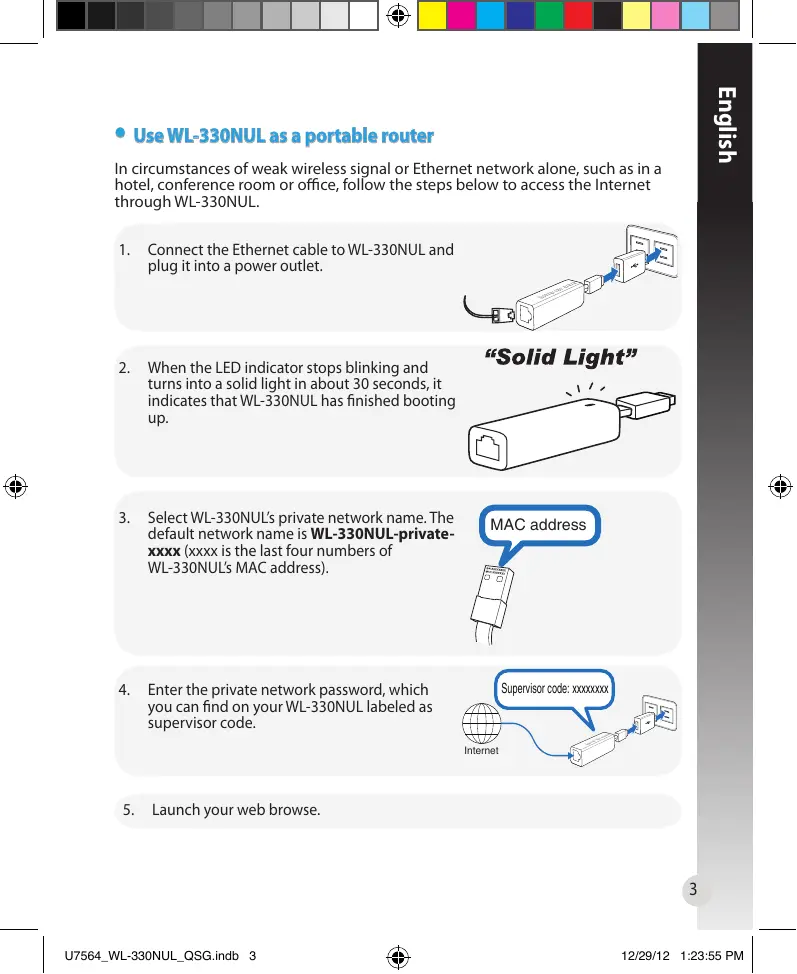
In circumstances of weak wireless signal or Ethernet network alone, such as in a hotel, conference room or office, follow the steps below to access the Internet through WL-330NUL.
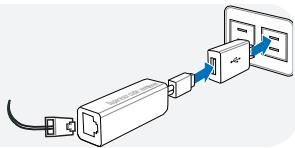
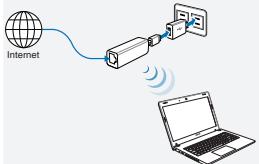
- Connect the Ethernet cable to WL-330NUL and plug it into a power outlet.
- When the LED indicator stops blinking and turns into a solid light in about 30 seconds, it indicates that WL-330NUL has finished booting up.
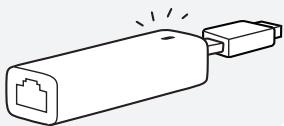
"Solid Light"
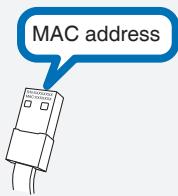
- Select WL-330NUL's private network name. The default network name is WL-330NUL-private-xxxx (xxxx is the last four numbers of WL-330NUL's MAC address).
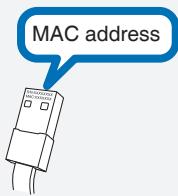
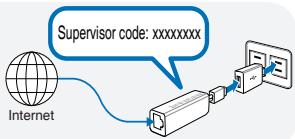
- Enter the private network password, which you can find on your WL-330NUL labeled as supervisor code.
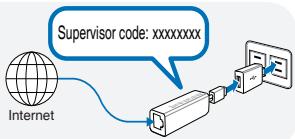
- Launch your web browse.

For Windows® users
If your device is running on Windows® operating system, ensure that you have installed the WL-330NUL Utility before connecting to the Internet.
A. Utility installation
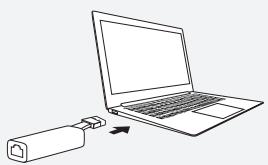
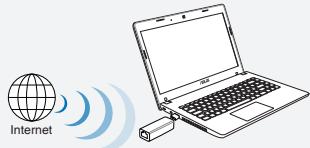
- Insert WL-330NUL into the device's USB port.
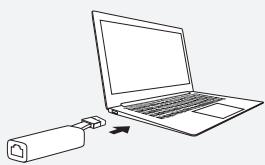
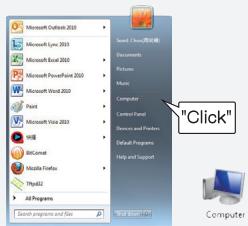
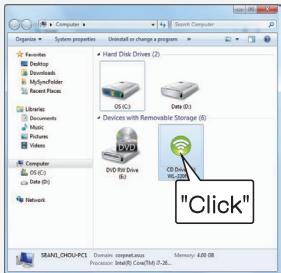
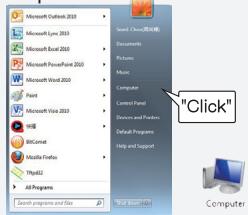
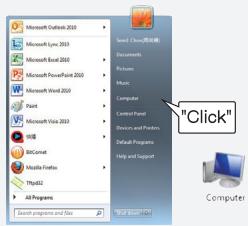
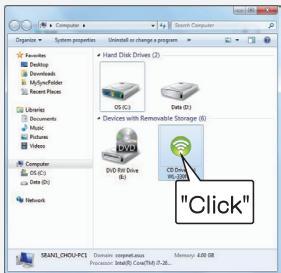
- Click Start > Computer or click the computer icon on the desktop.
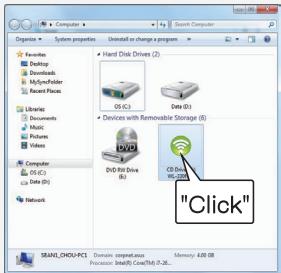
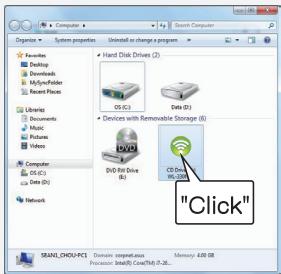
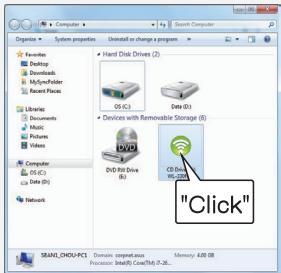
- Click the WL-330NUL icon in Device with Removable Storage.
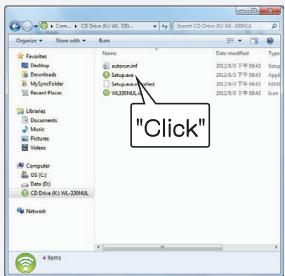
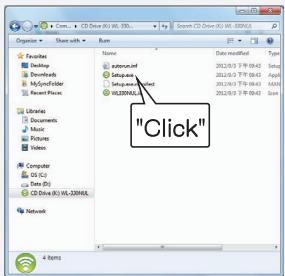
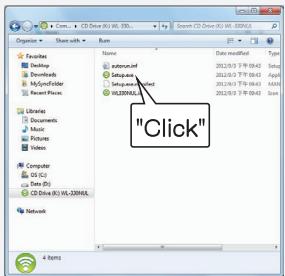
- Double-click Setup.exe to install the WL-330NUL utility.
B. Internet connection
Select one of the following ways to access the Internet:
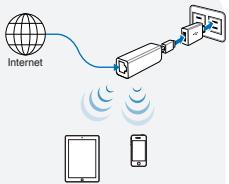
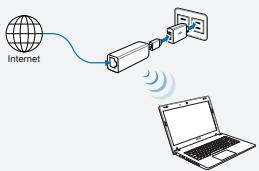
Mode 1
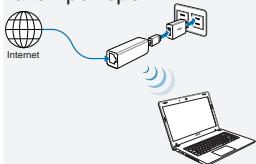
Connect an Ethernet cable to WL330NUL and plug to a power source
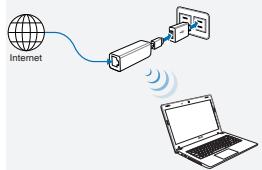
- Connect to the WL-330NUL private network name.
- Enter the private network password.
- Launch your web browser and start surfing the Internet.
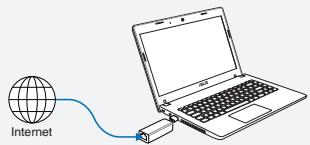
Mode 2
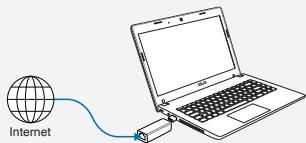
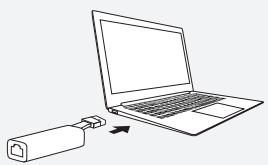
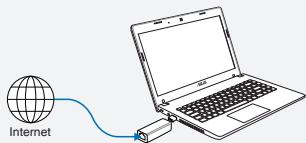
Connect WL-330NUL to a computer via an Ethernet cable
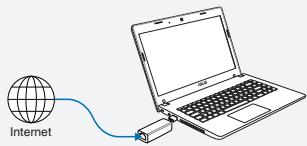
- Launch your browser and start surfing the Internet. To configure the router settings, please launch the WL-330NUL utility.

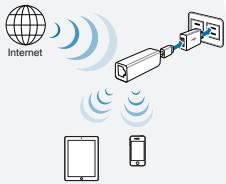
Mode 3
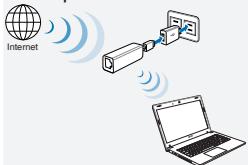
Plug WL-330NUL to a power source
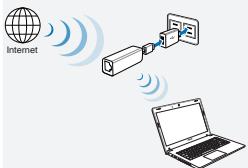
- Connect to the WL-330NUL private network name.
- Enter the private network password.
- Use the WL-330NUL utility to select a Wi-Fi network (SSID) and connect to the Internet.
Mode 4
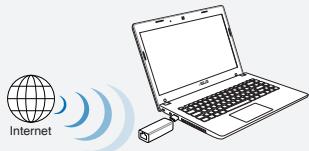
Connect WL-330NUL to a computer
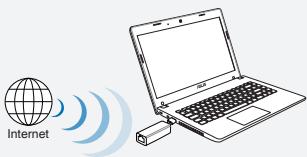
- Select a Wi-Fi network (SSID) through the Utility and connect to the Internet.
C. One-click sharing
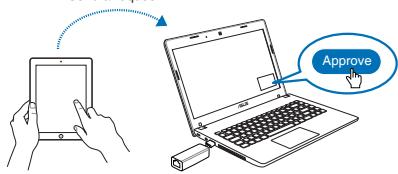
To share Internet access:
- Let the guest client connect to Wi-Fi network (SSID): WL-330NUL-Guest-xxxx (xxxx is the last four numbers of WL-330NUL's MAC address).
- Launch the web browser.
- Follow the onscreen instructions.
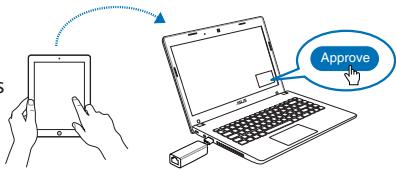
Send a request
Ensure to launch the utility before using the Guest Access function.
- For tablet PC and smartphone users
To access the Internet via an Ethernet cable :
- Connect to the WL-330NUL private network name.
- Enter the private network password.
- Launch the web browser and start surfing the Internet.
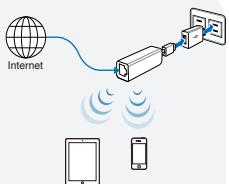
To access the Internet wirelessly:
- Connect to the WL-330NUL private network name.
- Enter your private network password.
- Go to http://www.asusnetwork.net.
- Enter the supervisor code shown on the surface of WL-330NUL.
- Open the Wireless Setting page.
- Select a Wi-Fi network (SSID) and connect to the Internet.
- Launch the web browser and start surfing the Internet.
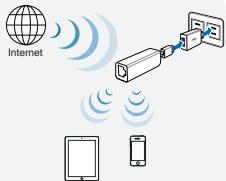
For MAC OS X users
Select one of the ways to access the Internet:
Mode 1
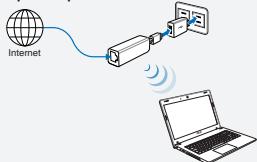
Connect an Ethernet cable to WL-330NUL and plug to a power source
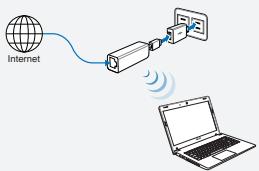
Follow the steps in To access the Internet via Ethernet in section For tablet PC and smartphone users.
Mode 2
Connect WL-330NUL to a computer via an Ethernet cable
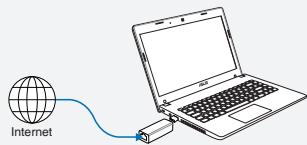
- Launch your browser and start surfing the Internet.
Mode 3
Plug WL-330NUL to a power source
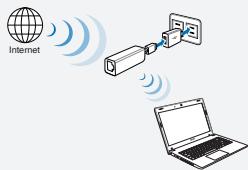
Follow the steps in To access the Internet wirelessly in section For tablet PC and smartphone users.
Mode 4
Connect WL-330NUL to a computer
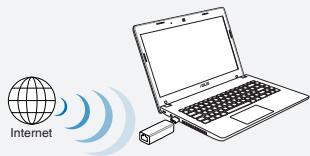
- Go to http://www.asusnetwork.net.
- Enter the supervisor code shown on the surface of WL-330NUL.
- Open the Wireless Setting page.
- Select a Wi-Fi network (SSID) and connect to the Internet.
- Haxmnte IKoHky WL-330NUL B nOle Device with Removable Storage.
4.ДвждыцелкнITE Setup.exe yctaHOBKN yTNINtbl WL-330NUL.
B.ПодклоченkeКсетиИнтерnet
BbI6epntcnoocnoKcTeHHTepHeT:
PexkM 1
IopkIouHte Ethernet-ka6eBb K WL330NUL u npokIouHte ero K po3eTke
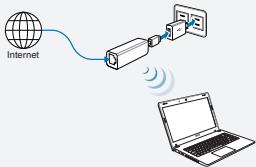
- Повлочи teb K ceTn, co3dahnoi WL-330NUL.
- BBeDnte cTeBoi npOJIb.
- 3aŋyctnte 6paŋyεp dπa cepΦnHra B cetn ΜHTepHeT.
Pexum 2
Полкlioчite WL-330NUL K komlbolyepy c nomoobu Ethernet- ka6ba
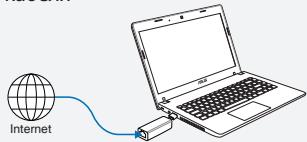
- 3aynctnte 6pay3ep dans cepunnra B cetn INhtepnet. 3aynctnte ytniuty WL-330NUL dans KOHNpypaun poytepa.
Pexim3
ПоdkлочITE WL-330NUL K Источикупиташия
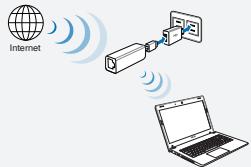
- Повлючтесь К сети, созданhoe WL-330NUL.
- BBeDnte ceTeBOn npoNb.
- BytuNTne BvIbepnte 6ecnpoBdHyU cetb (SSID) n noDknIOHTncB K cTn INHTepHET.
PexkM 4
Пдклочи TE WL-330NUL K Комьтуру
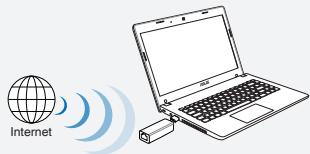
- Bytunite Bvibepitne 6ecnpoBnHyo cetb (SSID) n poKnIOuHITcB K cetn INHTepHet.

- BkIIOUeTE WL-330NUL B USB npota Ha yCTpOImCTBOTO.
- lpaKaHHeTe Bbpxy Start (Haayano)
Computer (Komnotb)p)mni
UpaKHeTe Bbpxu KOnHota C KomnOtbp
Ha pa60THnIPT.
- IlpaKaHHeTe Bbpxu IkoHaTa WL-330NUL B Device with Removable Storage (YcTpoiCTBO C npENoCM HocHTen).
U36epete eunHOT CNEHNTE HauHH 3a DOCTbI Do INHTepHET:
PexMM 1
CbpxeThe Ethernet k6eI KbM WL330NUL nBkIoHeTe KbM n3TOuHnK ha eJeKTPNueCTBO
- Cbbykxe Ce KbM IMeTo Ha YaactHaTa mpeka Ha WL-330NUL.
- BbBedeTe napola 3a chaTnata MPexka.
- CstaptnaTne cBor ye6 6pay3bp n 3anOHTHe Da CbPnPaTe B INHTepHET.
Pexim 2
CbpxKeTe WL-330NUL c kOMnIOrBp 4pe3 Ethernet ka6en
- StaptnpaJte CbO B6pa3bp ⅢaNoHTe Da CbPfNpAte B INHTepHNe.
3a KOHΦnIgypnIpaHe Na HAcTpoIKNKeIte MaIspUpyTN3aTopa, CTApTIpAne TNOMOuHnata nporpaMa WL-330NUL.
Pexkum 3
BkIIOUeTE WL-330NUL B eNEKTPnueckn n3TOuHnK
- CbpxKeTe Ce KbM IMMeTo Ha YaactHaTa MpeXa Ha WL-330NUL.
- BbBedeTe npOJa 3a YacThHaTmpeKa.
- Исторытей пошпату пограима на WL-330NUL, за дзберете WI-Fi мрека (SSID) и за сържete с Интөгү.T.
Pexim 4
CbpxKeTc WL-330NUL KbM KOMNIOTbp
CnoJeIHe Ha nHTepHET doCTbI:
- Позволета на Клиент на сс CBьрке с Wi-Fi мразжета (SSID): WL-330NUL-Guest-xxxx (xxxx споследниerte 4 сифриоут MT Адрася на WL-330NUL).
- CtaptnpaTneye6bpay3bpa.
- CneBbAte nHcTpkyCUnTe Ha ekpaHa.
Send a request
Ybepete ce, ye cte staptnpani nomoosnata nporpama npedn da n3non3bate yhknzra Guest Access (Doctbn 3a roctn).
3a notpe6nteIc Ta6neTm CmaptfoHN
DocTbn do nHTepHet Upe3 Ethernet ka6eI:
- CbpxKeTe ce KbM NMeTo Ha YaactHaTa MpeXa Ha WL-330NUL.
- BbBedeTe npola 3a qactHaTmpeka.
- CstaptnpaTe ye6 6pay3bpa n 3aNoCHeTe da cbpphiPate B INHTepHET.
Be3xuueHdoCTbI Do uHTepHeT:
- CbpxKeTe ce KbM IMeTo Ha yactHaTa MpeKa Ha WL-330NUL.
- BbBeDeTe BaWaTa npOla 3a yacTha MpeXa.
- OtniTeHa http://www.asusnetwork.net.
- BbBeTe KoJa Ha KOHTpOJIbOpa, nOKa3AH Bbpxy WL-330NUL.
- OTbOpeTe CTpaHnUcaTa Wireless Setting (Be3KmUHa hAcTpoIka).
6.ИЗбэрпс经-Wi-Fi Мржа(SSID)и се CBьркгeСИнтернeT. - CtaptnpaIte ye6 6pay3bpa I 3aNoHHeTe da cbpphiPaTe B INHTepHET.
3a MAC OS X potpe6nte1n
U36epete eunHOT NaHHnTe 3a DoctbI Do nHTepHeT:
Pexim 1
Cbpxete Ethernet Kaben KbM WL-330NUL uBkniohe Te KbM n3TOuHnK ha eNeKTPNueCTBO
CnEaBaiTe CbIKNiTe B DocTbn Do nHTepHer Upe3 Ethernet B pazdien 3a notpe6nteni c Ta6netu m CmapTfoHm.
Pexim 2
CbpxeTe WL-330NUL c kOMnIOrTp 4pe3 Ethernet ka6en
- CstaptnpaTne cB08 6pay3b np 3aNoUHeTe da cBpΦnPaTe B INHTepHET.
Pexkum 3
Bknioye WL-330NUL B eneKtpnueckn n3tOuHnK
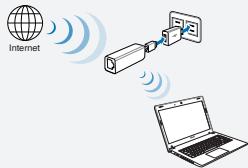
CneBaIeCTbKnTeBBe3KnueH
IOCTbNIO INHTepHETpa3JeI
3aNotpe6nTei n Ta6netn m
cMaprfoHn.
Pexim 4
Cbpbjxete WL-330NUL KbM KOMNIOTbp
- OtnideTe Ha http://www.asusnetwork.net.
- BbBeTeTe KoJa Ha KOHTrpOblopa, nokaah Bbpxy WL-330NUL.
- OTbOpTe CTpaHnIaTa Wireless Setting (Be3xMnHa nactPoiKa).
4.ИЗберетe Wi-Fi мрека (SSID)и ce CBьркетe с Иntepнет.
A. Installing of programmet
- Sæt din WL-330NUL i enhedens USB-port.
- Klik på Start > Computer eller klik på computer-ikonet på skrivebordet.
- Klik på WL-330NUL-ikonet i Device with Removable Storage (Enhed med flytbare lager).
- Bn6epiBt HaNbY npBbTaHoi MepeXi WL-330NUL. 3a IpomOBuHaNHAM, H3Ba MepeXi -WL-330NUL-private-xxxx (xxxx - ce octaHHI qHTnpu cHpMAC-aDpcn WL-330NUL).
- BveiTb npoJI npBAtHOI mepeKi, kIIO3NaHcHoHa WL-330NUL kK kOJ cynePBizopa.
- 3anyctitbB6-6pay3ep.
KopncTyBaayam Windows
Якwo Ha BaшоуnpистpoipnapoO EC Windows,nepeKoHaTecra,io BvBctahOBuHn3aTocyHOK WL-330NUL Utility nepei ndklnouenHm do lHTepHet.
- Klaunitb no niktorpami WL-330NUL y Device with Removable Storage (Pnctpi 3i 3'EMHO npam'rTTO).
- Дови КlaцитБ Setup.exe,Истадловати За��ocунok WL330NUL.
B. Intepnet-nidklnouenHH
Bn6epitb oINH i3 hactynnHex cnoc6ib BXOy do lntepheT:
PexMM 1
Плклчь Ka6eь Ethernet do WL-330NUL i BCTaBte Do po3eTkn eNeKtprOpepexi
1.Плдклочьdo WL-330NUL ha3By npmbaTHoi Мерекi.
2. Bveihtb napoIb npuBaTHoi Mepexi.
3. 3anyctitb Be6-6pay3ep i nouHtB neperlaD ctopiHOK B lInTePHeT.
Pexim 2
Пдклочь WL-330NULdo КOMп'tepa ka6elem Ethernet
- 3anycTitb Be6-6pay3epi noHITb neperIaI CTOpIHOK IBHTepHet. Lio6 KOHphiIrypByaTn HanaTuBaHHaMapuPTM3aTopa,6yNb naCa, 3anycTitb 3aCTocyHOK WL- 330NUL.
Pexkum 3
KopncTyBaayam OC MAC X
Bn6epitb ounh 3i cnoco6ib Bxoy do lntepheT:
Pexum 1
Пдключьka6ьb Ethernetdo WL-330NULI bCTaBte do po3etkn eNeKTPomepexi
BvKoHyTe KpOKn B VbIa IIO
IntePte HpeZ3 Ethernet y po3dini
KopncTyBaVam pnaHwetib i cMapTfoHIB.
Pexum 2
Пдклочь WL-330NULdo KOMПЮТepa ka6eJem Ethernet
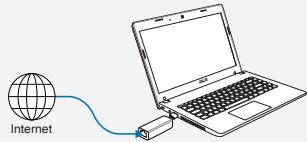
- 3aynctitb Be6-6pay3ep i nouHtB nepeTjA d CTopiHOK B IHTepHnet.
Pexim 3
Пдклочить WL-330NULdoДжөретаЖИВЛЕннг
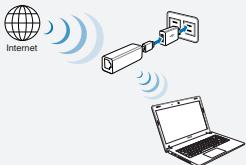
Bukohyte KpOKn To access the Internet wirelessly (Uo6 OTPMa 6e3dpoTobn Doctyn do IntepHe) y po3di For tablet PC and smartphone users (KopncTyBaayam pnaHneTib i cMaprTfoHib).
Pexim 4
Пдклочить WL-330NULdo KOMп'otepa
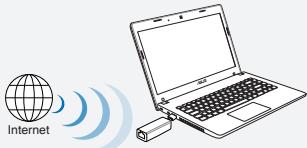
- Перацьdo http://www.asusnetwork.net.
- Bveitb koid cynepebi3opa, Bka3aHnHa noBepxhi WL-330NUL.
- BvdkniTre ctopiNky Wireless Setting (Be3dpoToBe HanaaTuByAHn).
- Bn6epiB mepejx Wi-Fi (SSID) i niklouitbcra do IHTepHet.

Federal Communications Commission Statement
This device complies with Part 15 of the FCC Rules. Operation is subject to the following two conditions:
- This device may not cause harmful interference.
- This device must accept any interference received, including interference that may cause undesired operation.
This equipment has been tested and found to comply with the limits for a class B digital device, pursuant to part 15 of the FCC Rules. These limits are designed to provide reasonable protection against harmful interference in a residential installation.
This equipment generates, uses and can radiate radio frequency energy and, if not installed and used in accordance with the instructions, may cause harmful interference to radio communications. However, there is no guarantee that interference will not occur in a particular installation. If this equipment does cause harmful interference to radio or television reception, which can be determined by turning the equipment off and on, the user is encouraged to try to correct the interference by one or more of the following measures:
Reorient or relocate the receiving antenna.
- Increase the separation between the equipment and receiver.
- Connect the equipment into an outlet on a circuit different from that to which the receiver is connected.
- Consult the dealer or an experienced radio/TV technician for help.

Warning: Any changes or modifications not expressly approved by the party responsible for compliance could void the user's authority to operate the equipment. Prohibition of Co-locationThis device and its antenna(s) must not be co-located or operating in conjunction with any other antenna or transmitter.
FCC Mark Warning
This equipment must be installed and operated in accordance with provided instructions and the antenna(s) used for this transmitter must be installed to provide a separation distance of at least 20cm from all persons and must not be co-located or operated in conjunction with any other antennas or transmitters. End users and installers must be provided with antenna installation instructions and transmitter operating conditions for satisfying RF exposure compliance.
Prohibition of Co-location
This device and its antenna(s) must not be co-located or operating in conjunction with any other antenna or transmitter.
IMPORTANT NOTE:
Radiation Exposure Statement: This equipment complies with FCC radiation exposure limits set forth for an uncontrolled environment. End users must follow the specific operating instructions for satisfying RF exposure compliance. To maintain compliance with FCC exposure compliance requirement, please follow operation instruction as documented in this manual.
Declaration of Conformity for R&TTE directive 1999/5/EC
Essential requirements - Article 3
Protection requirements for health and safety - Article 3.1a
Testing for electric safety according to EN 60950-1 has been conducted. These are considered relevant and sufficient.
Protection requirements for electromagnetic compatibility - Article 3.1b
Testing for electromagnetic compatibility according to EN 301 489-1 and EN 301 489-17 has been conducted. These are considered relevant and sufficient.
Effective use of the radio spectrum - Article 3.2
Testing for radio test suites according to EN 300 328- 2 has been conducted. These are considered relevant and sufficient.
CE Mark Warning
This is a Class B product, in a domestic environment, this product may cause radio interference, in which case the user may be required to take adequate measures. Operation Channels: CH1~11 for N. America; CH1~14 for Japan; CH1~13 for Europe (ETSI)
Canada, Industry Canada (IC) Notices
This Class B digital apparatus complies with Canadian ICES-003 and RSS-210.
Operation is subject to the following two conditions: (1) this device may not cause interference, and (2) This device must accept any interference, including interference that may cause undesired operation of the device.
Radio Frequency (RF) Exposure Information
The radiated output power of the ASUS Wireless Device is below the Industry Canada (IC) radio frequency exposure limits. The ASUS Wireless Device should be used in such a manner such that the potential for human contact during normal operation is minimized.
This device has been evaluated for and shown compliant with the IC Specific Absorption Rate ( "SAR") limits when installed in specific host products operated in portable exposure conditions (antennas are less than 20 centimeters of a person's body).
This device has been certified for use in Canada. Status of the listing in the Industry Canada's REL (Radio Equipment List) can be found at the following web address: http://www.ic.gc.ca/app/sitt/relte1r/scrh/wfRdSrch.do?lang eng
Additional Canadian information on RF exposure also can be found at the following web address: http://www.ic.gc.ca/eic/site/smt-gst.nsf/eng/so8792.html
Canada, vis d'Industry Canada (IC)
Industry Canada Statement
This device complies with RSS-210 of the industry Canada Rules. Operation is subject to the following two conditions:
- This device may not cause harmful interference.
- This device must accept any interference received, including interference that may cause undesired operation.
IMPORTANT NOTE:
Radiation Exposure Statement: This equipment complies with IC radiation exposure limits set forth for an uncontrolled environment. End users must follow the specific operating instructions for satisfying RF exposure compliance. To maintain compliance with IC RF exposure compliance requirement, please follow operation instruction as documented in this manual.
NCC 普悟
Complying with the REACH (Registration, Evaluation, Authorisation, and Restriction of Chemicals) regulatory framework, we published the chemical substances in our products at ASUS REACH website at http://csr.asus.com/english/REACH.htm
ASUS Recycling/Takeback Services
ASUS recycling and takeback programs come from our commitment to the highest standards for protecting our environment. We believe in providing solutions for you to be able to responsibly recycle our products, batteries, other components, as well as the packaging materials. Please go to http://csr.asus.com/english/Takeback.htm for the detailed recycling information in different regions.
Networks Global Hotline Information
| Area | Hotline Number | Support Languages | Availability |
| Australia | 1300-2787-88 | English | Mon. to Fri. 8:00-20:00 |
| Austria | 0043-820240513 | German | Mon. to Fri. 9:00-18:00 |
| Belgium | 0032-78150231 | Dutch /French | Mon. to Fri. 9:00-17:00 |
| China | 400-620-6655 | Simplified Chinese | Mon. to Sun. 9:00-18:00 |
| Denmark | 0045-3832-2943 | Danish/English | Mon. to Fri. 9:00-17:00 |
| Finland | 00358-9693-7969 | Finnish/English/Swedish | Mon. to Fri. 10:00-18:00 |
| France | 0033-170949400 | French | Mon. to Fri. 9:00-17:45 |
| Greece | 00800-44-14-20-44 | Greek | Mon. to Fri. 9:00-13:00 14:00-18:00 |
| Hong Kong | 3582-4770 | Cantonese/Chinese/English | Mon. to Fri. 10:00-20:00 Sat. 10:00-17:00 |
| Indonesia | +62-21-500128 | Indonesia, English | Mon. to Fri 9:30 - 17:00 |
| Ireland | 0035-31890719918 | English | Mon. to Fri. 9:00-17:00 |
| Italy | 199-400089 | Italian | Mon. to Fri. 9:00-13:00 14:00-18:00 |
| Japan | 0800-123-2787 | Japanese | Mon. to Fri. 9:00-18:00 Sat. to Sun. 9:00-17:00 |
Networks Global Hotline Information
| Malaysia | +603 2148 0827 (Check Repair Detail Status Only)/ +603-6279-5077 | Bahasa Melayu/ English | Mon. to Fri. 10:00-19:00 |
| Netherlands / Luxembourg | 0031-591-570290 | Dutch / English | Mon. to Fri. 9:00-17:00 |
| New Zealand | 0800-278-788/ 0800-278-778 | English | Mon. to Fri. 9:00-17:00 |
| Norway | 0047-2316-2682 | Norwegian /English | Mon. to Fri. 9:00-17:00 |
| Philippines | +632-636 8504/ 180014410573 | English | Mon. to Fri. 9:00-18:00 |
| Poland | 00225-718-033/ 00225-718-040 | Polish | Mon. to Fri. 9:00-17:00 8:30-17:30 |
| Portugal | 707-500-310 | Portuguese | Mon. to Fri. 9:00-17:00 |
| Russia | +8-800-100-ASUS/ +7-495-231-1999 | Russian/ English | Mon. to Fri. 9:00-18:00 |
| Singapore | +65-6720-3835 (Check Repair Detail Status Only)/ +65-66221701 | English | Mon. to Fri. 11:00-19:00 |
| Slovak | 00421-232-162-621 | Czech | Mon. to Fri. 8:00-17:00 |
| Spain | 902-88-96-88 | Spanish | Mon. to Fri. 9:00-18:00 |
| Sweden | 0046-8587-6940 | Swedish/ English | Mon. to Fri. 9:00-17:00 |
| Switzerland | 0041-848111010 | German/French | Mon. to Fri. 9:00-18:00 |
| 0041-848111014 | French | Mon. to Fri. 9:00-17:45 | |
| 0041-848111012 | Italian | Mon. to Fri. 9:00-17:00 |

Networks Global Hotline Information
| Taiwan | 0800-093-456/02-81439000 | Traditional Chinese | Mon. to Fri.9:00-12:0013:30-18:00 |
| Thailand | +662-679-8367 -70/001 800 852 5201 | Thai/English | Mon. to Fri.9:00-18:00 |
| Turkey | +90-216-524-3000 | Turkish | Mon. to Fri.09:00-18:00 |
| United Kingdom | 0044-870-1208340/0035-31890719918 | English | Mon. to Fri.9:00-17:00 |
| USA/Canada | 1-812-282-2787 | English | Mon. to Fri.8:30am-12:00am EST(5:30am-9:00pm PST)Sat .to Sun.9:00am-6:00pm EST(6:00am-3:00pm PST) |

MANUFACTURER
ASUSTeK Computer Inc.
Tel: +886-2-2894-3447
Address: 4F, No. 150, LI-TE RD., PEITOU, TAIPEI 112, TAIWAN
AUTHORISED REPRESENTATIVE IN EUROPE
ASUS Computer GmbH
Address: HARKORT STR. 21-23, 40880 RATINGEN, GERMANY
AUTHORISED DISTRIBUTORS IN TURKEY
BOGAZICI BIL GISAYAR SAN. VE TIC. A.S.
Tel: +90 212 3311000
Address: AYAZAGA MAH. KEMERBURGAZ CAD. NO.10 AYAZAGA/ISTANBUL
CIZGI Elektronik San. Tic. Ltd. Sti.
Tel: +90 212 3567070
Address: CEMAL SURURI CD. HALIM MERIC IS MERKEZI
No: 15/C D:5-6 34394 MECIDIYEKOY/ISTANBUL
- (For 802.11g/b/n Wireless Networks)
- Use WL-330NUL as a portable router
- For Windows® users
- Utility installation
- Internet connection
- Select one of the following ways to access the Internet:
- Mode 1
- Mode 2
- Mode 3
- Mode 4
- One-click sharing
- To share Internet access:
- - For tablet PC and smartphone users
- To access the Internet via an Ethernet cable :
- To access the Internet wirelessly:
- For MAC OS X users
- Select one of the ways to access the Internet:
- B.ПодклоченkeКсетиИнтерnet
- BbI6epntcnoocnoKcTeHHTepHeT:
- PexkM 1
- Pexum 2
- Pexim3
- PexkM 4
- U36epete eunHOT CNEHNTE HauHH 3a DOCTbI Do INHTepHET:
- PexMM 1
- Pexim 2
- Pexkum 3
- Pexim 4
- CnoJeIHe Ha nHTepHET doCTbI:
- 3a notpe6nteIc Ta6neTm CmaptfoHN
- DocTbn do nHTepHet Upe3 Ethernet ka6eI:
- Be3xuueHdoCTbI Do uHTepHeT:
- 3a MAC OS X potpe6nte1n
- Pexim 1
- Installing of programmet
- KopncTyBaayam Windows
- Intepnet-nidklnouenHH
- Bn6epitb oINH i3 hactynnHex cnoc6ib BXOy do lntepheT:
- KopncTyBaayam OC MAC X
- Bn6epitb ounh 3i cnoco6ib Bxoy do lntepheT:
- Pexum 1
- Pexim 3
- Federal Communications Commission Statement
- FCC Mark Warning
- Prohibition of Co-location
- IMPORTANT NOTE:
- Declaration of Conformity for R&TTE directive 1999/5/EC
- CE Mark Warning
- Canada, Industry Canada (IC) Notices
- Radio Frequency (RF) Exposure Information
- Canada, vis d'Industry Canada (IC)
- Industry Canada Statement
- NCC 普悟
- ASUS Recycling/Takeback Services
- MANUFACTURER
- AUTHORISED REPRESENTATIVE IN EUROPE
- AUTHORISED DISTRIBUTORS IN TURKEY
Brand : ASUS
Model : WL-330NUL
Category : Wireless Access Point