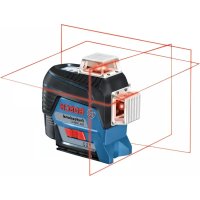
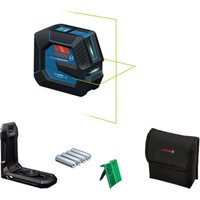
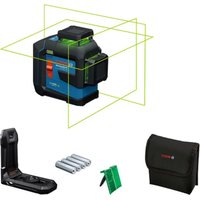
USER MANUAL GLL 380 C Professional BOSCH
__SUPPIMER__
Instruction: original
Original instructions for use
Keep the original instructions for future reference. Original instructions in Latvian.

German. Page 7
English. Page 16
French. Page 26
Spanish. Page 36
Portuguese. Page 46
Italian. Page 56
Dutch. Page 65
Danish. Page 75
Swedish. Page 83
Norwegian. Page 92
Finnish. Page 101
Greek. Page 110
Turkish. Page 119
Polish. Page 129
Czech. Page 139
Slovak. Page 148
Hungarian. Page 157
Russian. Page 167
Ukrainian. Page 178
Kazakh. Page 188
Mongolian. Page 198
Romanian. Page 210
Macedonian. Page 229
Serbian. Page 239
Slovenian. Page 248
Croatian. Page 257
Estonian. Page 266
Laser Radiation. Do not
stare into beam. Class 2
Consumer Laser Product
EN50689:2021
IEC60825-1:2014.
<10mW, 630-650nm
(17) (18) (19) (20)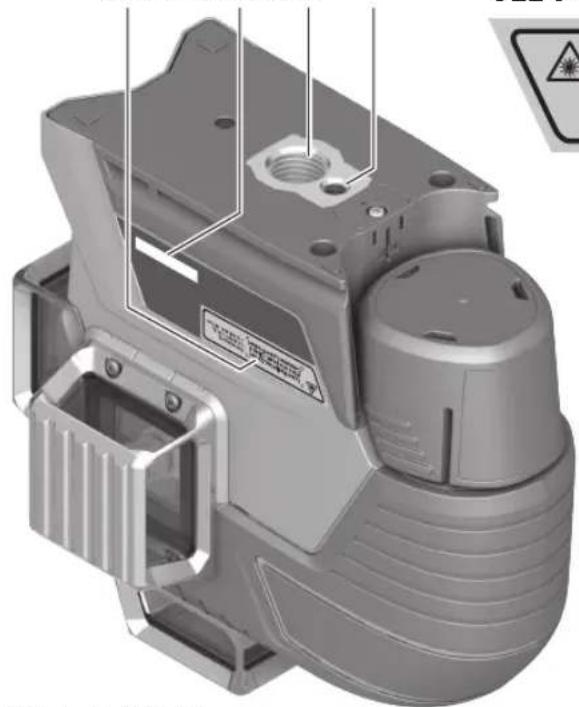
GLL 3-80 CG
(17)

Laser Radiation. Do not
stare into beam. Class 2
Consumer Laser Product
EN50689:2021
IEC60825-1:2014
<10mW.500·540nm
GLL 3-80 C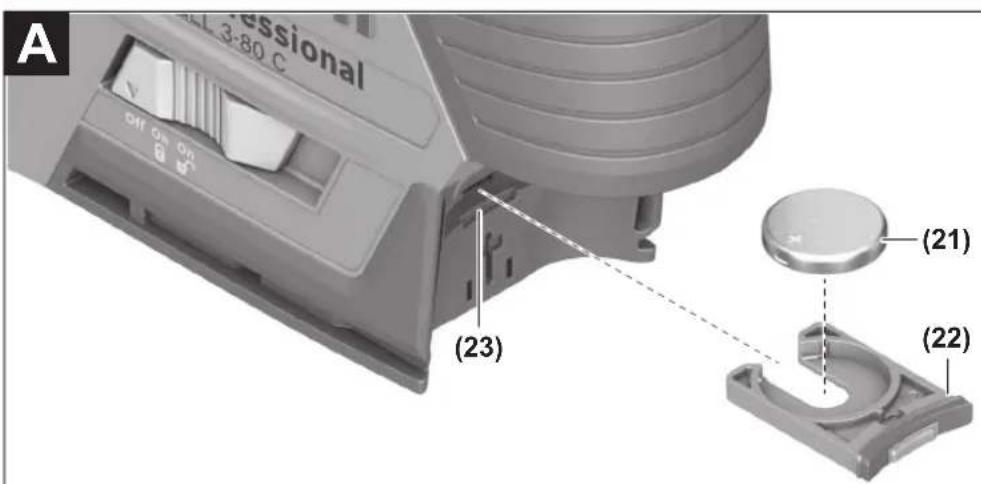
Bosch Power Tools 1609 92A 8AR| (18.10.2022)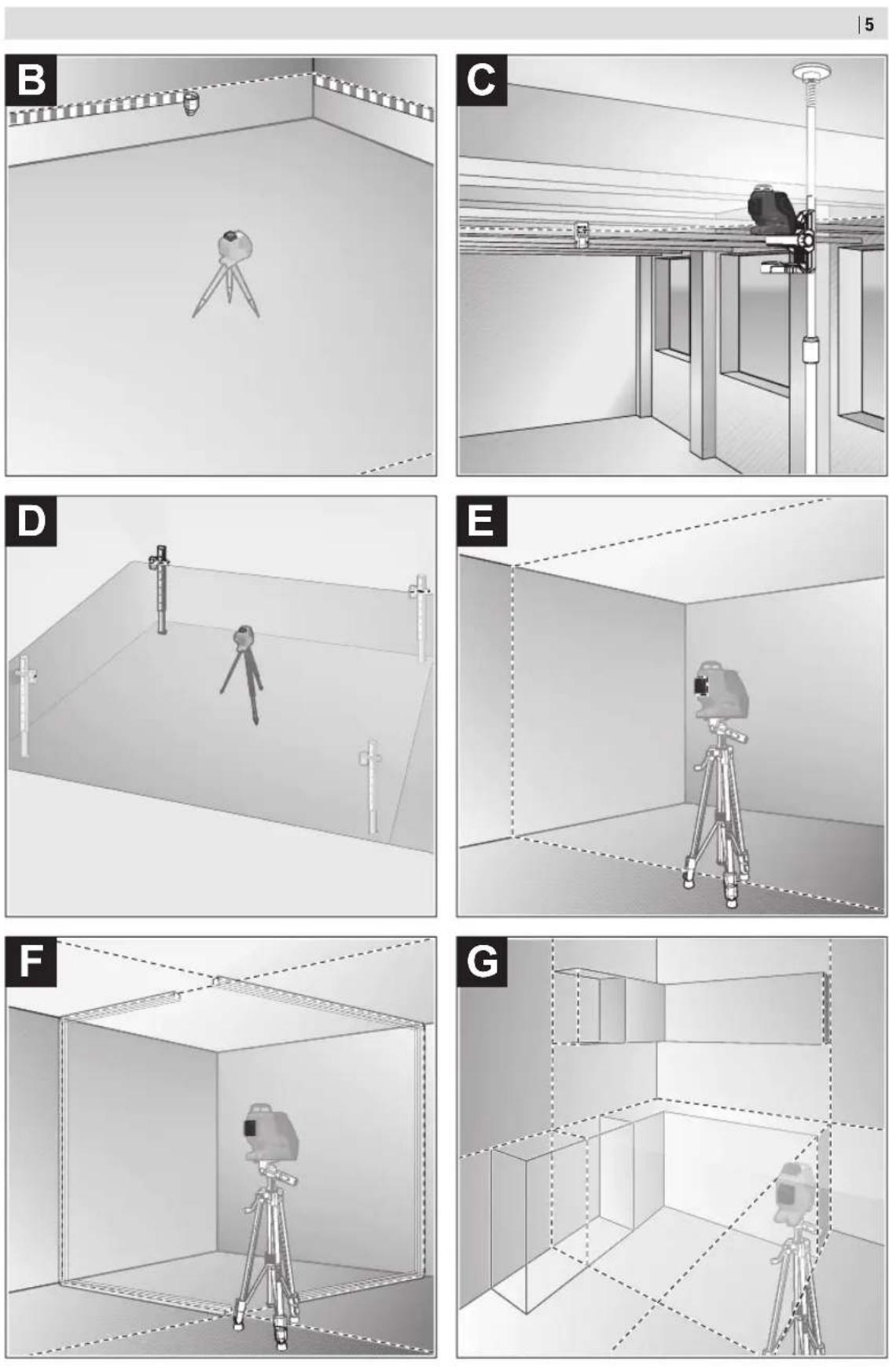
(25) BM1 0601015A01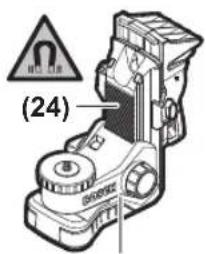
(24)
RM3 0601092800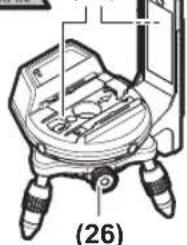
(29) LR6 0601069H00 (GLL 3-80 C)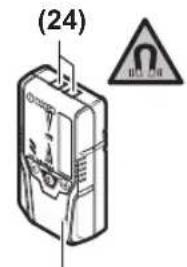
(24) (29) LR7 0601069J00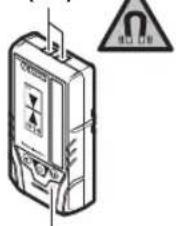
(GLL 3-80 C) GLL 3-80 CG) ST150 0601096B00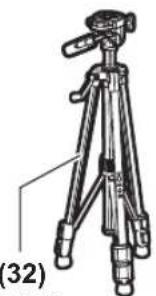
(34) L-BOXX 136 1600A012G0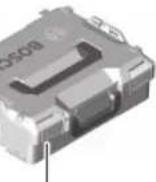
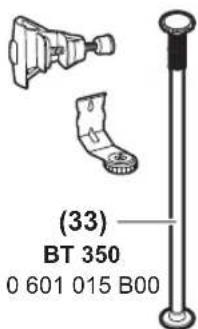
(34) 1608M00C1Y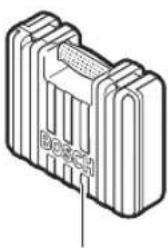
(27) RC2 0601069C00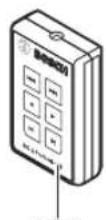
1608M0005B (GLL 3-80 C) 1608M0005J (GLL 3-80 CG)
AA1 1608M00C1B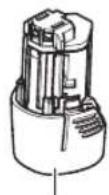
(35) 1608M00C20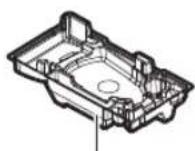
(24)
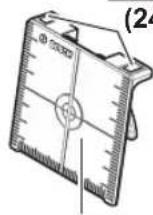
(28)
(31)
German
Safety instructions

www.bosch-pt.com/serviceaddresses
Transport
All instructions must be read and observed in order for the measuring tool to function safely. The safeguards integrated into the measuring tool may be compromised if the
measuring tool is not used in accordance with these instructions. Never make warning signs on the measuring tool unrecognisable. SAVE THESE INSTRUCTIONS FOR FUTURE REFERENCE AND INCLUDE THEM WITH THE MEASURING TOOL WHEN TRANSFERRING IT TO A THIRD PARTY.
Warning! If operating or adjustment devices other than those specified here are used or other procedures are followed, this may result in hazardous radiation exposure.
If measurements are carried out, this can lead to dangerous exposure to radiation.
The measuring tool is delivered with a laser warning sign (marked in the illustration of the measuring tool on the graphics page). If the text of the laser warning label is not in your national language, stick the provided warning label in your national language over it before operating for the first time.

Do not direct the laser beam at persons or animals and do not stare into the direct or reflected laser beam yourself. You could blind somebody, cause accidents or damage your eyes.
If laser radiation hits your eye, you must close your eyes and immediately turn your head away from the beam. Do not make any modifications to the laser equipment. Do not use the laser goggles (accessory) as protective goggles. The laser goggles make the laser beam easier to see; they do not protect you against laser radiation. Do not use the laser goggles (accessory) as sunglasses or while driving. The laser goggles do not provide full UV protection and impair your ability to see colours. Have the measuring tool serviced only by a qualified specialist using only original replacement parts. This will ensure that the safety of the measuring tool is maintained. Do not let children use the laser measuring tool unsupervised. They could unintentionally blind themselves or other persons. Do not use the measuring tool in explosive atmospheres which contain flammable liquids, gases or dust. Sparks may be produced inside the measuring tool, which can ignite dust or fumes. Do not open the battery. There is a risk of short-circuiting. In case of damage and improper use of the battery, vapours may be emitted. The battery can set alight or explode. Ensure the area is well ventilated and seek medical attention should you experience any adverse effects. The vapours may irritate the respiratory system. If used incorrectly or if the battery is damaged, flammable liquid may be ejected from the battery. Contact with this liquid should be avoided. If contact accidentally occurs, rinse off with water. If the liquid comes into contact with your eyes, seek additional medical attention. Liquid ejected from the battery may cause irritation or burns. The battery can be damaged by pointed objects such as nails or screwdrivers or by force applied externally. An internal short circuit may occur, causing the battery to burn, smoke, explode or overheat.
When the battery is not in use, keep it away from paper clips, coins, keys, nails, screws or other small metal objects that could make a connection from one terminal to another. A short circuit between the battery terminals may cause burns or a fire. Only use the battery with products from the manufacturer. This is the only way in which you can protect the battery against dangerous overload. Only charge the batteries using chargers recommended by the manufacturer. A charger that is suitable for one type of battery may pose a fire risk when used with a different battery.

Protect the battery against heat, e.g. against continuous intense sunlight, fire, dirt, water and moisture. There is a risk of explosion and short-circuiting.


WARNING


Ensure that the coin cell is kept out of the reach of children. Coin cells are dangerous.
- Coin cells must never be swallowed or inserted into any other part of the body. If you suspect that someone has swallowed a coin cell or that a coin cell has entered the body in another way, seek medical attention immediately. Swallowing coin cells can result in severe internal burns and death within 2 hours. Ensure that coin cell replacement is carried out properly. There is a risk of explosion. Only use the coin cells listed in this operating manual. Do not use any other coin cells or other forms of electrical power supply. Do not attempt to recharge the coin cell and do not short circuit the coin cell. The coin cell may leak, explode, catch fire and cause personal injury. Remove and dispose of drained coin cell correctly. Drained coin cell may leak and damage the product or cause personal injury. Do not overheat the coin cell or throw it into fire. The coin cell may leak, explode, catch fire and cause personal injury. Do not damage the coin cell and take the coin cell apart. The coin cell may leak, explode, catch fire and cause personal injury. Do not allow damaged coin cells to come into contact with water. Leaking lithium may mix with water to create hydrogen, which could cause a fire, an explosion, or personal injury. Do not use the measuring tool if the coin cell holder (22) does not close. Remove the coin cell and have it repaired. Remove the rechargeable battery/non-rechargeable batteries from the measuring tool before carrying out
work on the measuring tool (e.g. assembly, maintenance, etc.). The battery/batteries should also be removed for transport and storage. There is risk of injury from unintentionally pressing the on/off switch.
When operating the measuring tool, loud signal tones may sound under certain circumstances. For this reason, keep the measuring tool away from your ears and from other persons. The loud sound can damage hearing.
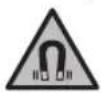
Keep the measuring tool and the magnetic accessories away from implants and other medical devices, e.g. pacemakers or insulin pumps. The magnets inside the measuring tool and accessories generate a field that can impair the function of implants and medical devices.
- Keep the measuring tool and the magnetic accessories away from magnetic data storage media and magnetically sensitive devices. The effect of the magnets inside the measuring tool and accessories can lead to irreversible data loss. The measuring tool is equipped with a wireless interface. Local operating restrictions, e.g. in aeroplanes or hospitals, must be observed.
The Bluetooth® word mark and logos are registered trademarks owned by Bluetooth SIG, Inc. and any use of such marks by Robert Bosch Power Tools GmbH is under license.
Caution! When using the measuring tool with Bluetooth, a fault may occur in other devices and systems, aeroplanes and medical devices (e.g. pacemakers, hearing aids). Also, damage to people and animals in the immediate vicinity cannot be completely excluded. Do not use the measuring tool with Bluetooth in the vicinity of medical devices, petrol stations, chemical plants, areas with a potentially explosive atmosphere and in blasting areas. Do not use the measuring tool with Bluetooth on aeroplanes. Avoid using the product near your body for extended periods.
Product Description and Specifications
Please observe the illustrations at the beginning of this operating manual.
Intended Use
The measuring tool is intended for determining and checking horizontal and vertical lines.
The measuring tool is suitable for indoor and outdoor use.
This product is a consumer laser product in accordance with EN 50689.
Product Features
The numbering of the product features shown refers to the illustration of the measuring tool on the graphic page.
(1) Laser beam outlet aperture (2) State of charge of rechargeable batteries/non-rechargeable batteries
(3) Display CAL guard (4) Pendulum lock indicator (5) Receiver mode button (6) Receiver mode indicator (7) Button for laser operating mode (8) Bluetooth connection indicator (9) Bluetooth button
(10) Battery bay (11) Battery adapter cover (12) Batteries (13) Rechargeable battery/battery adapter release button (14) Battery adapter cap (15) Rechargeable battery (16) On/off switch (17) Laser warning label (18) Serial number (19) 5/8" tripod mount (20) 1/4" tripod mount (21) Coin cell (22) Coin cell holder (23) Coin cell port (24) Magnet (25) Universal holder (26) Rotating platform (27) Remote control (28) Laser target plate (29) Laser receiver (30) Laser viewing glasses (31) Protective bag (32) Tripod (33) Telescopic rod (34) Case (35) Inlay
a) Accessories shown or described are not included with the product as standard. You can find the complete selection of accessories in our accessories range.
Technical Data
| Line laser GILL 3-80 C GILL 3-80 CG |
| Article number | 3601 K63 R.. | 3601 K63 T.. |
| Working rangea) | | |
| - Standard 30 m 30 m | | |
| - in receiver mode 25 m 25 m | | |
| - With laser receiver 5-120 m 5-120 m | | |
| Levelling accuracyb(CD) | ±0.2 mm/m ±0.2 mm/m |
| Self-levelling range ±4° ±4° | | |
| Levelling time < 4 s < 4 s | | |
| Max. altitude 2000 m 2000 m | | |
| Relative air humidity max. | 90 % | 90 % |
| Pollution degree according to IEC 61010-1 | 2E) | 2F) |
| Laser class | 2 | 2 |
| Laser type | < 10 mW, 630-650 nm | < 10 mW, 500-540 nm |
| C6 | 10 | 10 |
| Divergence of laser line | 50 × 10 mrad (full angle) | 50 × 10 mrad (full angle) |
| Shortest pulse duration | 1/10000 s | 1/10000 s |
| Pulse frequency | | |
| - Operating without receiver mode | 23 kHz | 23 kHz |
| - Operating with receiver mode | 10 kHz | 10 kHz |
| Compatible laser receivers | LR 6, LR 7 | LR 7 |
| Tripod mount | 1/4", 5/8" | 1/4", 5/8" |
| Measuring tool power supply | | |
| - Rechargeable battery (Li-ion) | 12 V | 12 V |
| - Non-rechargeable batteries (al-kaline manganese) | 4 × 1.5 V LR6 (AA) (with battery adapter) | 4 × 1.5 V LR6 (AA) (with battery adapter) |
| - Buffer battery (coin cell) | CR2032 (3 V lithium battery) | CR2032 (3 V lithium battery) |
| Operating time with three laser planesf) | | |
| - With rechargeable battery | 8 h | 6 h |
| - With non-rechargeable batteries | 6 h | 4 h |
| Bluetooth® measuring tool | | |
| - Compatibility | Bluetooth® 4.0 (Low Energy)G) | Bluetooth® 4.0 (Low Energy)G) |
| - Max. signal range | 30 mH) | 30 mH) |
| - Operating frequency range | 2402-2480 MHz | 2402-2480 MHz |
| - Max. transmission power | < 1 mW | < 1 mW |
| Bluetooth® smartphone | | |
| - Compatibility | Bluetooth® 4.0 (Low Energy)G) | Bluetooth® 4.0 (Low Energy)G) |
| - Operating system | Android 6 (and above) | Android 6 (and above) |
| iOS 11 (and above) | iOS 11 (and above) |
| Weight according to EPTA-Procedure 01:2014 | | |
| - With rechargeable battery | 0.90 kg | 0.90 kg |
| - With non-rechargeable batteries | 0.86 kg | 0.86 kg |
| Dimensions (length × width × height) | 162 × 84 × 148 mm | 162 × 84 × 148 mm |
| Protection ratingI) | IP54 (dust and splash-proof) | IP54 (dust and splash-proof) |
20|English
| Line laser GLL 3-80 C GLL 3-80 CG |
| Recommended ambient temperature during charging | 0°C to +35°C | 0°C to +35°C |
| Permitted ambient temperature during operation | -10°C to +40°C | -10°C to +40°C |
| Permitted ambient temperature during storage | -20°C to +70°C | -20°C to +70°C |
| Recommended rechargeable batteries GBA 12V... | (except for GBA 12V ≥ 4.0 Ah) | GBA 12V... |
| (except for GBA 12V ≥ 4.0 Ah) |
| Recommended chargers GAL 12... | GAX 18... | GAL 12... |
| GAX 18... |
A) The working range may be reduced by unfavourable environmental conditions (e.g. direct sunlight). B) At 20-25°C. C) Applies to the four horizontal intersection points. D) The values stated presuppose normal to favourable environmental conditions (e.g. no vibration, no fog, no smoke, no direct sunlight). Extreme fluctuations in temperature can cause deviations in accuracy. E) Only non-conductive deposits occur, whereby occasional temporary conductivity caused by condensation is expected. F) Shorter operating times in Bluetooth® operation and/or in conjunction with RM 3. G) When using Bluetooth® Low Energy devices, it may not be possible to establish a connection depending on the model and operating system. Bluetooth® devices must support the SPP profile. H) The signal range may vary greatly depending on external conditions, including the receiving device used. The Bluetooth® range may be significantly weaker inside closed rooms and through metallic barriers (e.g. walls, shelving units, cases, etc.). 1) The lithium-ion battery and the AA1 battery adapter are excluded from IP54. The serial number (18) on the type plate is used to clearly identify your measuring tool.
Assembly
The measuring tool can be operated either with conventional non-rechargeable batteries or with a Bosch lithium-ion battery.
Operation with Rechargeable Battery
Use only the chargers listed in the technical data. Only these chargers are matched to the lithium-ion battery of your measuring tool.
Note: Lithium-ion rechargeable batteries are supplied partially charged according to international transport regulations. To ensure full rechargeable battery capacity, fully charge the rechargeable battery before using your tool for the first time.
To insert the charged battery (15), slide it into the battery bay (10) until you feel it engage.
To remove the battery (15), press the release buttons (13) and pull it out of the battery bay (10). Do not use force to do this.
Operation with Non-Rechargeable Batteries
It is recommended that you use alkaline manganese batteries to operate the measuring tool.
The batteries are inserted into the battery adapter.
The battery adapter is intended only for use in designated Bosch measuring tools and must not be used with power tools.
To insert the batteries, slide the cover (11) of the battery adapter into the battery bay (10). Place the batteries into
the cover as per the illustration on the sealing cap (14).
Slide the sealing cap over the cover until you feel it click into place.

To remove the batteries (12), press the release buttons (13) of the sealing cap (14) and pull off the sealing cap. Make sure that the batteries do not fall out. To do this, hold the measuring tool with the battery bay (10) facing upward. Remove the batteries. To remove the cover (11) from inside the battery bay, reach into the cover and pull it out of the measuring
tool, applying light pressure to the side wall as you do so.
Always replace all the batteries at the same time. Only use batteries from the same manufacturer and which have the same capacity.
Take the batteries out of the measuring tool when you are not using it for a prolonged period of time. The batteries can corrode and self-discharge during prolonged storage in the measuring tool.
Battery Charge Indicator
The battery charge indicator (2) shows the state of charge of the battery/batteries:
| LED State of charge |
| Green continuous light 100-75 % |
| Yellow continuous light 75-35 % |
| Red continuous light 35-10 % |
| No light - Rechargeable battery de-
fective
-Batteries drained |
If the rechargeable battery or non-rechargeable batteries are running low, the laser lines will gradually become dimmer. Immediately replace a faulty rechargeable battery or any empty batteries.
The measuring tool is fitted with a coin cell (21) so that date and time can be saved for the CAL guard function without having a battery pack or batteries inserted.
In order to change the coin cell, remove the battery pack or the entire battery adapter.
Pull the coin cell holder (22) out of the coin cell port (23).
Remove the empty coin cell (21) and insert a new coin cell. Ensure that the polarity is correct according to the illustration on the coin cell holder (the positive terminal of the coin cell must be facing upwards).
With the coin cell fitted, slide the coin cell holder (22) into the port (23). Ensure that the coin cell holder is inserted correctly and fully, as otherwise protection from dust and splashes is no longer guaranteed.
When using for the first time, remove the protective film from the coin cell (21). To do this, follow the same steps as when changing the coin cell.
Operation
Starting Operation
Protect the measuring tool from moisture and direct sunlight. Do not expose the measuring tool to extreme temperatures or temperature fluctuations. For example, do not leave it in a car for extended periods. If it has been subjected to significant temperature fluctuations, first allow the measuring tool to adjust to the ambient temperature, and then always carry out an accuracy check before continuing work (see "Accuracy Check of the Measuring Tool", page 23).
The precision of the measuring tool may be compromised if exposed to extreme temperatures or temperature fluctuations.
Avoid substantial knocks to the measuring tool and avoid dropping it. Always carry out an accuracy check before continuing work if the measuring tool has been subjected to severe external influences (see "Accuracy Check of the Measuring Tool", page 23). Switch the measuring tool off when transporting it.
The pendulum unit is locked when the tool is switched off, as it can otherwise be damaged by big movements.
Switching On/Off
To switch on the measuring tool, slide the on/off switch (16) to the "On" position (for working with the pendulum lock) or to the "On" position (for working with automatic levelling). As soon as it is switched on, the measuring tool emits laser lines from the outlet apertures (1).
Do not direct the laser beam at persons or animals and do not stare into the laser beam yourself (even from a distance). To switch off the measuring tool, slide the on/off switch (16) to the Off position. The pendulum unit is locked when the tool is switched off. Never leave the measuring tool unattended when switched on, and ensure the measuring tool is switched off after use. Others may be blinded by the laser beam.
If the maximum permitted operating temperature of 40°C is exceeded, the tool shuts down to protect the laser diode. Once it has cooled down, the measuring tool is operational again and can be switched back on.
If the temperature of the measuring tool is approaching the maximum permissible operating temperature, the laser lines will gradually become dimmer.
The measuring tool is protected against electrostatic discharge (ESD). If the measuring tool becomes electrostatically charged (e.g., when it is touched in an environment with low humidity), it switches itself off automatically. In such cases, switch the on/off switch (16) off and on again.
Deactivating the Automatic Shut-Off Function
If no button on the measuring tool is pressed for approx.
120 min, the measuring tool will automatically switch itself off to preserve battery life.
To switch the measuring tool back on after it has been automatically switched off, you can either slide the on/off switch (16) to the "Off" position first and then switch the measuring tool back on, or press either the laser mode button (7) or the receiver mode button (5) once.
To deactivate the automatic shut-off function, hold down the laser mode button (7) for at least 3 seconds (with the measuring tool switched on). If the automatic shut-off function is deactivated, the laser beams will flash briefly as confirmation.
To activate the automatic shut-off function, switch the measuring tool off and on again.
Deactivating the Signal Tone Function
The signal tone function is always activated once the measuring tool is switched on.
To deactivate or activate the signal tone function, simultaneously press the laser mode button (7) and the receiver mode button (5) and hold them down for at least 3 seconds.
Three short signal tones will sound as confirmation both when the signal tone function is activated and deactivated.
Operating Modes
The measuring tool has several operating modes which you can switch between at any time. These are for:
- Generating a horizontal laser plane,
- Generating a vertical laser plane,
- Generating two vertical laser planes,
- Generating a horizontal laser plane and two vertical laser planes.
After you switch it on, the measuring tool generates a horizontal laser plane. To change the operating mode, press the laser mode button (7).
All operating modes can be selected with either automatic levelling or the pendulum lock.
Receiver Mode
Receiver mode must be activated when working with the laser receiver (29), regardless of which operating mode is selected.
In receiver mode, the laser lines flash at a very high frequency, enabling them to be detected by the laser receiver (29).
To switch on receiver mode, press the receiver mode button (5). The receiver mode indicator (6) will light up green.
When receiver mode is switched on, the laser lines are less visible to the human eye. Therefore, switch receiver mode off by pressing the receiver mode button (5) again to work without a laser receiver. The receiver mode indicator (6) will go out.
Automatic Levelling
Working with Automatic Levelling
Position the measuring tool on a level, firm surface or attach it to the universal holder (25) or the tripod (32).
For work with automatic levelling, slide the on/off switch (16) to the "On" position.
The automatic levelling function automatically compensates irregularities within the self-levelling range of ±4°. The levelling is finished as soon as the laser lines stop moving.
If automatic levelling is not possible, e.g. because the surface on which the measuring tool stands deviates by more than 4° from the horizontal plane, the laser lines will begin to flash quickly. If the signal tone function is activated, rapid signal tones will sound.
Place the measuring tool in a horizontal position and wait for self-levelling to take place. As soon as the measuring tool is within the self-levelling range of ±4°, the laser beams will light up continuously and the signal tones will cease.
In case of ground vibrations or position changes during operation, the measuring tool is automatically levelled again.
Upon re-levelling, check the position of the horizontal or vertical laser line with regard to the reference points to avoid errors by moving the measuring tool.
Working with the Pendulum Lock
For work with the pendulum lock, slide the on/off switch (16) to the "On" position. The pendulum lock indicator (4) lights up red and the laser lines continuously flash slowly.
For work with the pendulum lock, the automatic levelling is switched off. You can hold the measuring tool freely in your hand or place it on a sloping surface. This means that the laser lines are no longer levelled and no longer necessarily run perpendicular to one another.
Remote control via the Bosch Levelling Remote App
The measuring tool is equipped with a Bluetooth® module which uses radio technology to enable remote control via a smartphone with a Bluetooth® interface.
The Bosch Levelling Remote App application (app) is required to use this function. You can download this in the app store for your terminal device (Apple App Store, Google Play Store).
Information about the system requirements for a Bluetooth connection can be found on the Bosch website at www.bosch-pt.com
When remote controlling via Bluetooth, poor reception conditions can cause time delays between the mobile terminal device and the measuring tool.
Switching on Bluetooth®
To switch on Bluetooth®, press the Bluetooth® button (9). Ensure that the Bluetooth® interface is activated on your mobile terminal device.
The connection between mobile end device and measuring tool is established after the Bosch application has started. If multiple active measuring tools are found, select the appropriate measuring tool. A connection will be established automatically if only one active measuring tool is found.
The connection is established as soon as the Bluetooth indicator (8) lights up.
The Bluetooth® connection may be interrupted if the distance between the measuring tool and the mobile terminal device is too great or is blocked, and if there are any sources of electromagnetic interference. Should this occur, the Bluetooth® indicator (8) will flash.
Switching off Bluetooth®
To switch off Bluetooth® for remote control, press the Bluetooth® button (9) or switch off the measuring tool.
Calibration warning CAL guard
The sensors for calibration warning CAL guard monitor the status of the measuring tool, even when it is switched off. If the measuring tool is not being supplied with power by a rechargeable battery or non-rechargeable batteries, an internal energy storage system provides continuous monitoring by the sensors for 72 hours.
The sensors are activated when the measuring tool is started up for the first time.
Calibration Warning Triggers
If one of the following events occurs, the calibration warning CAL guard is triggered and the indicator CAL guard (3) lights up red:
- The calibration interval (every 12 months) has expired.
- The measuring tool was stored outside of the storage temperature range. The measuring tool was subjected to a strong shock (e.g. impact with the ground after being dropped).
You can refer to the Bosch Levelling Remote App to see which of the three events triggered the calibration warning.
Without the app, the cause cannot be identified, as the indicator CAL guard (3) lighting up indicates merely that the levelling accuracy needs to be checked.
Once the warning has been triggered, the indicator CAL guard (3) lights up until the levelling accuracy has been checked and the indicator switched off.
Procedure in the Event of a Calibration Warning Being Triggered
Check the levelling accuracy of the measuring tool (see "Accuracy Check of the Measuring Tool", page 23).
If the maximum deviation has not been exceeded in any of the tests, switch the indicator CAL guard (3) off. To do so, press and hold the receiver mode button (5) and the Bluetooth® button (9) at the same time for at least 3 s. The indicator CAL guard (3) will go out.
Should the measuring tool exceed the maximum deviation during one of the tests, please have it repaired by a Bosch after-sales service.
Influences on Accuracy
The largest influence is exerted by the ambient temperature. In particular, temperature differences that occur from the ground upwards can refract the laser beam.
In order to minimise thermal influences resulting from heat rising from the floor, it is recommended that you use the measuring tool on a tripod. In addition, position the measuring tool in the centre of the work surface, wherever this is possible.
In addition to external influences, device-specific influences (e.g. falls or heavy impacts) can also lead to deviations. For this reason, check the levelling accuracy each time before beginning work.
First check the levelling accuracy of the horizontal laser line, then the levelling accuracy of the vertical laser lines.
Should the measuring tool exceed the maximum deviation during one of the tests, please have it repaired by a Bosch after-sales service.
Checking the Horizontal Levelling Accuracy of the Transverse Axis
For this check, you will need a free measuring distance of 5 m on firm ground between two walls (designated A and B).
- Mount the measuring tool close to wall A on a tripod, or place it on a firm, flat surface. Switch on the measuring tool in the mode with automatic levelling. Select the operating mode for generating a horizontal laser plane and a vertical laser plane directly in front of the measuring tool.
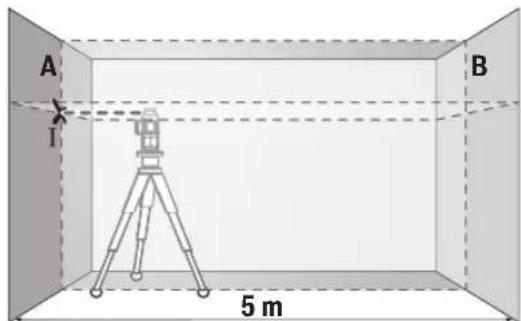
- Aim the laser at the closer wall A and allow the measuring tool to level in. Mark the middle of the point at which the laser lines cross on the wall (point I).
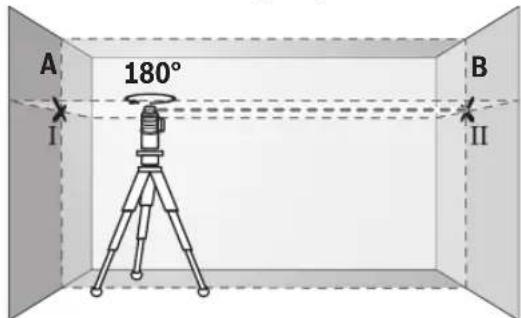
- Turn the measuring tool 180°, allow it to level in and mark the point where the laser lines cross on the opposite wall B (point II).
- Position the measuring tool - without rotating it - close to wall B, switch it on and allow it to level in.
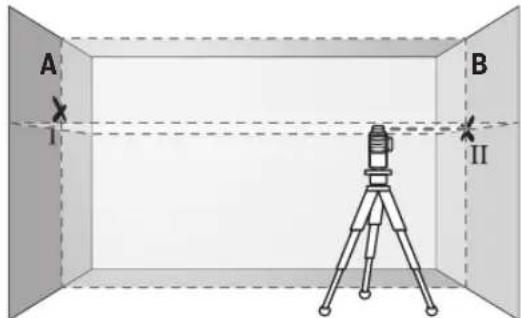
Align the height of the measuring tool (using the tripod or by placing objects underneath as required) so that the point where the laser lines cross exactly hits the previously marked point II on wall B.
24|English
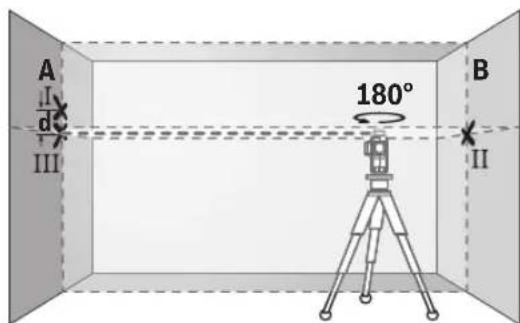
Turn the measuring tool 180° without adjusting the height. Aim it at wall A such that the vertical laser line runs through the already marked point I. Allow the measuring tool to level in and mark the point where the laser lines cross on wall A (point III). - The discrepancy d between the two marked points I and III on wall A reveals the actual height deviation of the measuring tool.
The maximum permitted deviation on the measuring distance of 2 × 5 m = 10 m is as follows:
10 m × ±0.2 mm/m = ±2 mm. The discrepancy d between points I and II must therefore amount to no more than 2 mm.
Checking the Levelling Accuracy of the Vertical Lines
For this check, you will need a door opening (on solid ground) which has at least 2.5 m of space either side of the door. - Place the measuring tool 2.5 m away from the door opening on a firm, flat surface (not on a tripod). Switch on the measuring tool in the mode with automatic levelling. Select the operating mode for generating a vertical laser plane directly in front of the measuring tool.
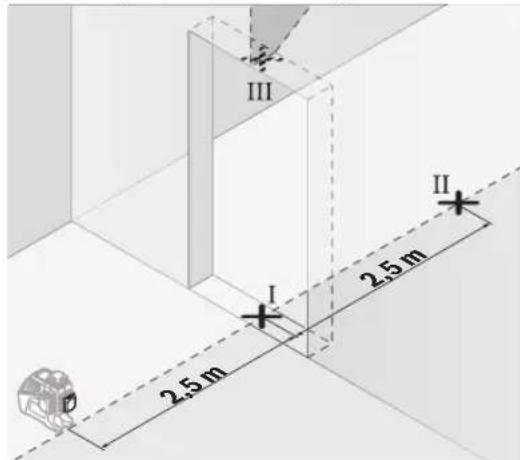
- Mark the centre of the vertical laser line on the floor of the door opening (point I), 5 m away on the other side of the door opening (point II) and on the upper edge of the door opening (point III).
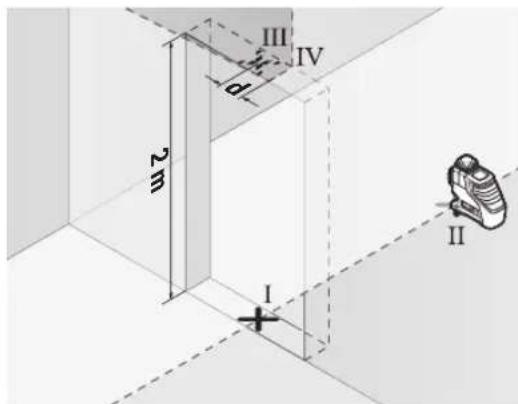
- Rotate the measuring tool 180° and position it on the other side of the door opening, directly behind point II. Allow the measuring tool to level in and align the vertical laser line in such a way that its centre passes through points I and II exactly.
- Mark the centre of the laser line on the upper edge of the door opening as point IV.
- The discrepancy d between the two marked points III and IV reveals the actual vertical deviation of the measuring tool.
- Measure the height of the door opening.
Repeat the measuring process for the two vertical laser planes. To do this, select the operating mode for generating a vertical laser plane to one side of the measuring tool and rotate the measuring tool by 90° before beginning the measuring process.
You can calculate the maximum permitted deviation as follows:
Doubled height of the door opening × 0.2 mm/m
Example: At a door opening height of 2 m, the maximum deviation amounts to
2 × 2m × ± 0.2mm/m = ± 0.8mm . The points III and IV must therefore be no further than 0.8mm from each other.
Working Advice
Only the centre of the laser line must be used for marking. The width of the laser line changes depending on the distance.
Working with the Laser Target Plate
The laser target plate (28) improves visibility of the laser beam in unfavourable conditions and at greater distances.
The reflective surface of the laser target plate (28) improves visibility of the laser line. The transparent surface enables the laser line to be seen from behind the laser target plate.
Working with the Tripod (Accessory)
A tripod offers a stable, height-adjustable support surface for measuring. Place the measuring tool with the 1/4'' tripod mount (20) on the thread of the tripod (32) or a conventional camera tripod. Use the 5/8'' tripod mount (19) to secure the measuring tool on a conventional building tripod. Tighten the measuring tool using the locking screw of the tripod.
Roughly align the tripod before switching on the measuring tool.
You can secure the measuring tool, for example, on vertical surfaces or magnetisable materials using the universal holder (25). The universal holder is also suitable for use as a floor stand and facilitates the height adjustment of the measuring tool.
- Keep your fingers away from the rear side of the magnetic accessory while attaching the accessory to surfaces. The strong pulling force of the magnets may jam your fingers.
Roughly align the universal holder (25) before switching on the measuring tool.
Use the laser receiver (29) to improve detection of the laser lines in adverse lighting conditions (bright environment, direct sunlight) and over greater distances. When working with the laser receiver, switch on receiver mode (see "Receiver Mode", page 22).
Laser Goggles (Accessory)
The laser goggles filter out ambient light. This makes the light of the laser appear brighter to the eye.
Do not use the laser goggles (accessory) as protective goggles. The laser goggles make the laser beam easier to see; they do not protect you against laser radiation. Do not use the laser goggles (accessory) as sunglasses or while driving. The laser goggles do not provide full UV protection and impair your ability to see colours.
Examples of possible applications for the measuring tool can be found on the graphics pages.
Maintenance and Service
Maintenance and Cleaning
Keep the measuring tool clean at all times.
Never immerse the measuring tool in water or other liquids. Wipe off any dirt using a damp, soft cloth. Do not use any detergents or solvents.
The areas around the outlet aperture of the laser in particular should be cleaned on a regular basis. Make sure to check for lint when doing this.
Only store and transport the measuring tool in the protective bag (31) or the case (34).
If the measuring tool needs to be repaired, send it off in the protective bag (31) or the case (34).
After-Sales Service and Application Service
Our after-sales service responds to your questions concerning maintenance and repair of your product as well as spare
parts. You can find explosion drawings and information on spare parts at: www.bosch-pt.com
The Bosch product use advice team will be happy to help you with any questions about our products and their accessories.
In all correspondence and spare parts orders, please always include the 10-digit article number given on the nameplate of the product.
Great Britain
Robert Bosch Ltd. (B.S.C.)
P.O.Box 98
Broadwater Park
North Orbital Road
Denham Uxbridge
UB95HJ
At www.bosch-pt.co.uk you can order spare parts or arrange the collection of a product in need of servicing or repair.
Tel. Service: (0344) 7360109
E-Mail: boschservicecentre@bosch.com
You can find further service addresses at:
www.bosch-pt.com/serviceaddresses
Transport
The recommended lithium-ion batteries are subject to legislation on the transport of dangerous goods. The user can transport the batteries by road without further requirements.
When shipping by third parties (e.g.: by air transport or forwarding agency), special requirements on packaging and labelling must be observed. For preparation of the item being shipped, consulting an expert for hazardous material is required.
Dispatch battery packs only when the housing is undamaged. Tape or mask off open contacts and pack up the battery in such a manner that it cannot move around in the packaging. Please also observe the possibility of more detailed national regulations.
Disposal

Measuring tools, rechargeable/non-re-chargeable batteries, accessories and packaging should be sorted for environmental-friendly recycling.
Do not dispose of the measuring tools or battery packs/batteries with household waste.
Only for EU countries:
According to the Directive 2012/19/EU on waste electrical and electronic equipment and its transposition into national law, measuring tools that are no longer usable, and, according to the Directive 2006/66/EC, defective or drained batteries must be collected separately and disposed of in an environmentally correct manner.
If disposed incorrectly, waste electrical and electronic equipment may have harmful effects on the environment and
human health, due to the potential presence of hazardous substances.
Only for United Kingdom:
According to The Waste Electrical and Electronic Equipment Regulations 2013 (SI 2013/3113) (as amended) and the Waste Batteries and Accumulators Regulations 2009 (SI 2009/890) (as amended), products that are no longer usable must be collected separately and disposed of in an environmentally friendly manner.
Battery packs/batteries:
Li-ion:
Please observe the notes in the section on transport (see "Transport", page 25).
Robert Bosch (France) S.A.S.
www.bosch-pt.com/serviceaddresses
Transport
Remote control via "Bosch Levelling Remote App"
www.bosch-pt.com/serviceaddresses
Transport
Calibration warning CAL guard
The sensors for the calibration warning CAL guard monitor the condition of the measuring tool, even when it is switched off. When the measuring tool is without power supply from the battery or batteries, an internal energy storage provides 72 hours of continuous monitoring using the sensors.
Bosch Service Center
Telegrafvej 3
2750 Ballerup
At www.bosch-pt.dk, spare parts can be ordered online or a repair order can be created.
Tel. Service Center: 44898855
Fax: 44898755
E-Mail: vaerktoej@dk.bosch.com
www.bosch-pt.com/serviceaddresses
Transport
Steady green light 75-35%
Steady red light 35-10%
No light - battery defective
- Batteries empty
Remote control via "Bosch Levelling Remote App"
The measuring tool is equipped with a Bluetooth® module that allows wireless remote control via a smartphone with a Bluetooth® interface.
To use this function, the "Bosch Levelling Remote App" is required. You can download it from an app store (Apple App Store, Google Play Store) depending on the device. Information about system requirements for a Bluetooth® connection can be found on the Bosch website at www.bosch-pt.com. When using remote control via Bluetooth®, delays may occur between the mobile device and the measuring tool if reception is poor.
Activating Bluetooth®
To activate Bluetooth® for remote control, press the Bluetooth® button (9). Make sure that the Bluetooth® interface is activated on your mobile device.
Bosch Service Center
Telegrafvej 3
92 | Norsk
2750 Ballerup
Denmark
Tel.: (08) 7501820 (within Sweden)
Fax: (011) 187691
You can find more contact details for service here:
www.bosch-pt.com/serviceaddresses
Transport
The recommended lithium-ion batteries are subject to the requirements for dangerous goods. The user can transport the batteries by road without further obligations.
www.bosch-pt.com/serviceaddresses
Transport
www.bosch-pt.com/serviceaddresses
Transport
Keep the power tool clean at all times.
Do not immerse the power tool in water or other liquids. Wipe off any dirt with a damp cloth. Do not use any cleaning agents or solvents.
Do not use this product in the rain or in wet conditions. Follow the safety instructions to avoid electric shock.
Connect the measuring tool to the battery (31) or to the charger (34).
To switch on, insert the measuring tool into the battery (31) or into the charger (34).
Maintenance and service
Our after-sales service answers your questions concerning the maintenance and repair of your product as well as spare parts. Exploded views and information on spare parts can be found at:
The Bosch advisory team will be happy to answer your questions about our products and their accessories. In all correspondence and spare parts orders, please always include the 10-digit article number given on the product nameplate.
Greece
Robert Bosch A.E.
Epexia 37
19400 Koropi-Athens
Tel: 2105701258
Fax: 2105701283
Email: pt@gr.bosch.com
www.bosch.com
www.bosch-pt.gr
Please read the safety instructions at the beginning of the electronic manual:
www.bosch-pt.com/serviceaddresses
Transport
The contained lithium-ion batteries are subject to the Dangerous Goods Legislation requirements. The batteries can be transported by road without further requirements.
When transported by third parties (e.g. by air freight or forwarding agency), special requirements on packaging and labelling must be
observed. For preparation of the item being sent, consulting an expert for hazardous material is required.
Dispatch batteries only when the housing is undamaged. Tape or mask off open contacts and pack up the battery such that it cannot move around in the packaging. Please also observe the possibly more detailed national regulations.
Disposal
Measuring tools, accessories and packaging should be sorted for environmental-friendly recycling.

Do not dispose of measuring tools and batteries in household waste!
Only for EU countries:
According to the European Directive 2012/19/EU, measuring tools that are no longer usable, and according to the European Directive 2006/66/EC, defective or used battery packs/batteries, must be collected separately and disposed of in an environmentally correct manner.
If disposed improperly, waste electrical and electronic equipment may have harmful effects on the environment and human health.
In case of improper disposal, the electrical and electronic equipment may have harmful effects on the environment and human health.
Battery type / Battery:
Li-Ion:
Instructions for safe use of the battery pack (see "Battery pack", page 119).
Turkish
Safety instructions

www.bosch-pt.com/serviceaddresses
Shipping
Robert Bosch Sp. z o.o.
www.bosch-pt.com/serviceaddresses
Transport
Steady yellow light 75-35%
Steady red light 35-10%
Bosch Service Center PT
K Vapence 1621/16
692 01 Mikulov
You can order the repair of your machine or spare parts online at www.bosch-pt.cz.
www.bosch-pt.com/serviceaddresses
Transport
Recommended lithium-ion batteries are subject to the requirements of the law on dangerous goods. These batteries can be transported by the user by road without further conditions.
www.bosch-pt.com/serviceaddresses
Transport
Recommended lithium-ion batteries are subject to the requirements for the transport of dangerous goods. These batteries may be transported by the user by road without further measures.
www.bosch-pt.com/serviceaddresses
Transport
Do not place the measuring tool and magnetic accessories near implants or other medical devices, e.g., pacemakers or insulin pumps. The magnets of the measuring tool and accessories create a field that can adversely affect the operation of implants and medical devices.
Keep the measuring tool and magnetic accessories away from magnetic data carriers and devices sensitive to magnetic fields. The effect of the magnets of the measuring tool and accessories can lead to irreversible data loss. The measuring tool is equipped with a Bluetooth® interface. Observe local restrictions when using it, e.g., in airplanes or hospitals.
The Bluetooth® word mark and graphic logo (figurative mark) are registered trademarks and property of Bluetooth SIG, Inc.
Robert Bosch Power Tools GmbH uses this word mark/logo under license. Caution! When using the measuring tool with Bluetooth®, interference with other devices and installations, aircraft, and medical devices (e.g., pacemakers, hearing aids) is possible. In addition, harm to persons and animals in the immediate vicinity cannot be completely excluded. Do not use the measuring tool with Bluetooth® near medical devices, hospitals, chemical plants, or areas where there is a risk of explosion or where blasting operations are in progress. Do not use the measuring tool with Bluetooth® in aircraft. Try not to switch it on for extended periods in the immediate vicinity of the body.
Product description and services
Please observe the illustrations at the beginning of the operating instructions.
This measuring instrument is intended for construction, control of horizontal and vertical lines.
The measuring instrument is designed for work indoors and outdoors.
This device is a consumer laser device according to EN 50689.
Illustrated components
The numbering of the illustrated components is done according to the illustration of the measuring instrument on the page with illustrations.
(1) Laser beam outlet opening (2) Battery charge status (3) CAL guard indicator (4) Leveling indicator (5) Receiver mode button (6) Receiver mode indicator (7) Laser mode selection button (8) Bluetooth® connection indicator (9) Bluetooth® button (10) Battery compartment (11) Battery adapter cover (12) Batteries (13) Battery/adapter release button (14) Battery adapter cover (15) Battery
170|Russian
(16) Switch (17) Laser radiation warning label (18) Serial number (19) 5/8" thread (20) 1/4" thread (21) Battery button (22) Battery button cover (23) Battery button compartment (24) Magnet (25) Universal mount (26) Rotating platform
(27) Remote control system (28) Laser beam exit mark (29) Laser receiver (30) Holes for working with the laser instrument (31) Protective goggles (32) Target plate (33) Telescopic rod (34) (35) Insert
a) The illustrated and described accessories are not included in the standard delivery. The complete range of accessories can be found in the accessories program.
Technical data
Battery operation
It is recommended to use alkaline-manganese batteries in the measuring instrument.
The batteries are inserted into the battery adapter.
Use only original Bosch measuring tools batteries. Using other batteries is not permitted.
To insert the batteries, slide the battery adapter cover (11) into the battery compartment (10). Place the batteries in the cover according to the diagram on the adapter cover (14). Slide the cover onto the housing until it clicks into place.

To remove the batteries (12), press the release buttons (13) on the adapter cover (14) and pull off the cover. Then pull the measuring tool upward by the battery compartment (10) to remove the batteries. To remove the batteries from the cover (11), pull the cover off the battery compartment.
To remove the batteries from the compartment, grasp the cover and pull it off, pressing the side walls of the measuring tool.
Always replace all batteries at the same time. Use only batteries of the same brand and with the same capacity.
Remove the batteries from the measuring tool if it will not be used for a long time. During prolonged storage in the measuring tool, the batteries may corrode and discharge themselves.
Battery charge indicator
The battery charge indicator (2) shows the charge level of the rechargeable battery or batteries:
If the rechargeable battery or batteries begin to discharge, the visibility of the laser lines decreases.
Replace the rechargeable battery or batteries with new ones immediately.
Replacing the button cell (see figure A)
The measuring tool is equipped with a button cell (21) that maintains the date and time even without a rechargeable battery or batteries.
To replace the button cell, remove the rechargeable battery or the battery adapter completely.
Pull the button cell holder (22) out of the button cell compartment (23). Remove the discharged button cell (21) and insert a new one. Ensure correct polarity according to the diagram on the button cell holder (the positive pole of the button cell must face upward).
Insert the button cell holder (22) with the new button cell into the compartment (23). Ensure that the button cell holder is inserted correctly and completely, as otherwise protection against dust and water splashes cannot be guaranteed.
Perform the protective grounding of the power supply element (21). To do this, act in accordance with the instructions for replacing the power supply element.
Working with the instrument
Turning on the instrument
Protect the measuring instrument from moisture and direct sunlight. Do not expose the measuring instrument to extreme temperatures or temperature fluctuations. For example, do not leave it in a car for a long time. At significant temperature fluctuations, first allow the measuring instrument to stabilize at the temperature before continuing to work with the instrument. Always check its accuracy (see "Instrument accuracy checks", page 175). Extreme temperatures and temperature fluctuations can adversely affect the accuracy of the measuring instrument. Avoid strong shocks and drops of the measuring instrument. After strong external impacts on the measuring instrument, it is recommended to check its accuracy before continuing to work with the instrument (see "Instrument accuracy checks", page 175). When transporting, switch off the measuring instrument. When switched off, the magnetic damping mechanism is locked, which otherwise could be damaged by strong shocks.
Switching on/off
To switch on the measuring instrument, move the switch (16) to the "On" position (for working with the magnetic damping) or to the "On" position (for working with automatic leveling). Immediately after switching on, the measuring instrument emits a laser beam from the laser beam outlet (1).
Do not direct the laser beam at people or animals, and do not look into the laser beam yourself, even from a distance.
To switch off the measuring instrument, move the switch (16) to the Off position. When switched off, the magnetic damping mechanism is locked.
Do not leave the measuring instrument unattended and switch off the measuring instrument after use. Other people could be blinded by the laser beam.
At the specified maximum permissible operating temperature of 40°C, the laser unit switches off as a protective measure. After cooling down, the measuring instrument is ready for operation again and can be switched on again.
If the temperature of the measuring instrument approaches the maximum permissible operating temperature, the brightness of the laser lines decreases slowly.
The measuring instrument is protected against the effects of electrostatic discharge (ESD). If the measuring instrument is subjected to electrostatic discharge (e.g., when touched under conditions of low humidity), it switches off automatically. In this case, move the switch (16) to the Off position, and then to the On position.
Deactivation of automatic switch-off
If no buttons are pressed on the measuring instrument for approx. 120 minutes, the measuring instrument switches off automatically to save the accumulator or battery.
After automatic shutdown, the measuring instrument can be turned on again by first setting the switch (16) to the "Off" position and then turning the measuring instrument on again, or by pressing the laser operating mode button (7) or the receiver mode button (5) once.
To reactivate the automatic shutdown, with the measuring instrument switched on, hold down the laser operating mode button (7) for at least 3 seconds. If the automatic shutdown is deactivated, the laser beams flash briefly for confirmation.
To deactivate the automatic shutdown, switch off the measuring instrument and switch it on again.
Switching off the acoustic signal
When the measuring instrument is switched on, the acoustic signal is always switched on.
To switch off the acoustic signal, press the laser operating mode button (7) and the receiver mode button (5) simultaneously and hold them down for at least 3 seconds.
As confirmation of switching on and off, a short acoustic signal is emitted.
Operating modes
The measuring instrument has several operating modes that can be switched at any time:
- emission of a single horizontal laser plane, - emission of a single vertical laser plane, - emission of two vertical laser planes, - emission of one horizontal laser plane and two vertical laser planes.
After switching on, the measuring instrument emits a single horizontal laser plane. To change the mode, press the laser operating mode button (7).
All operating modes can be switched on automatically with self-leveling and pendulum lock.
Receiver mode
For working with the laser receiver (29) - in any operating mode - the receiver mode must be switched on. In receiver mode, the laser lines flash at a very high frequency, which allows the laser receiver (29) to detect them.
To switch on the receiver mode, press the button (5). The receiver mode indicator (6) lights up green.
The power of the laser beam is reduced for the human eye. Therefore, to avoid the laser beam, switch the receiver to the measurement mode by pressing the receiver mode button (5) again. The receiver mode indicator (6) goes out.
Automatic leveling
Working with automatic leveling
Place the measuring instrument on a stable horizontal base or on the universal tripod (25) or on the staff (32).
To work with automatic leveling, turn the switch (16) to the "ON" position.
The automatic leveling function compensates for unevenness within the automatic leveling range of ±4°. Leveling is complete as soon as the laser lines stop moving.
If automatic leveling is not possible, for example because the surface on which the measuring instrument is placed deviates from the horizontal by more than 4°, the laser lines begin to flash rapidly. If the acoustic signal is switched on, it sounds at short intervals.
Place the measuring instrument horizontally and wait for automatic self-leveling to finish.
After the measuring instrument has entered the automatic leveling range of ±4°, the laser beams begin to shine continuously and the acoustic signal switches off.
During shocks or changes in position during operation, the measuring instrument automatically levels itself again. After repeated leveling, check the horizontal or vertical laser line position relative to the reference points to avoid errors in the measurement results of the measuring instrument.
Working with the block leveling
To work with block leveling, turn the switch (16) to the "OFF" position. The block leveling indicator (4) lights up red and the laser lines flash continuously at a slow tempo.
When working with block leveling, automatic leveling is switched off. The measuring instrument can be held in your hand or placed on an inclined base. In this case, the laser lines are no longer leveled and do not necessarily form a right angle.
Remote control using the Bosch Levelling Remote App
The measuring instrument is equipped with a Bluetooth module, which, with the help of radio technology, enables remote control via a smartphone with a Bluetooth interface.
The Bosch Levelling Remote App is used for remote control. Depending on the end device, it can be downloaded from the relevant app stores (Apple App Store, Google Play Store).
Information on the required system conditions for the Bluetooth connection can be found on the Bosch website at www.bosch-pt.com.
With remote control via Bluetooth®, there may be a delay between the mobile end device and the measuring tool due to poor connection conditions.
Switching on Bluetooth
To switch on Bluetooth® for remote control, press the Bluetooth button (9). Make sure that the Bluetooth interface on the mobile end device is switched on.
After starting the Bosch app, a connection is established between the mobile end device and the measuring tool. If several active measuring tools are detected, select the appropriate measuring tool. If only one active measuring tool is detected, the connection is established automatically.
The connection is established when the Bluetooth® indicator (8) lights up.
The Bluetooth connection can be interrupted due to a large distance or obstacles between the measuring
tool and the mobile end device, as well as due to electromagnetic interference. In such a case, the Bluetooth® indicator (8) flashes.
Switching off Bluetooth
To switch off Bluetooth for remote control, press the Bluetooth button (9) and switch off the measuring tool.
Calibration warning indicator CAL guard
The CAL guard calibration warning indicator monitors the condition of the measuring tool, even when it is switched off. If the measuring tool does not receive power from the rechargeable battery or batteries, an internal energy storage device ensures 72 hours of continuous monitoring using sensors.
The sensors are activated when the measuring tool is first switched on.
Factors that trigger the calibration warning
The device automatically compares the measured values and warns about calibration of the CAL guard and the CAL guard indicator (3) lights up in red: - the calibration interval (calibration every 12 months) has expired.
Checking the accuracy of the measuring instrument
Factors affecting accuracy
The greatest influence on accuracy is exerted by the ambient temperature. In particular, temperature differences between the floor and the ceiling can cause deviations of the laser beam.
We recommend using the measuring instrument on a tripod to minimize the influence of heat rising from below. In addition, install the measuring instrument, if possible, in the middle of the work surface.
In addition to external influences, mechanical impacts on the instrument (e.g., falls or strong shocks) can also lead to deviations. Therefore, always check the accuracy of the alignment before starting work.
First check the accuracy of the horizontal laser line, then the accuracy of the vertical laser lines.
If during one of the checks the measuring instrument exceeds the maximum permissible deviation, have it repaired at a Bosch service center.
Checking the accuracy of the horizontal leveling along the transverse axis
For the check, a free section of 5 m on a firm base between walls A and B is required.
Mount the measuring instrument near wall A on a tripod or place it on a firm, flat base. Switch on the measuring instrument with automatic leveling. Select the mode in which the horizontal and vertical laser planes are emitted from the front of the measuring instrument.
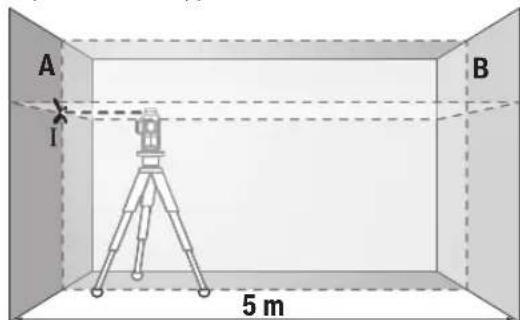
- Aim the laser at wall A and allow the measuring instrument to level itself. Mark the center of the point where the laser lines cross on the wall (point I).
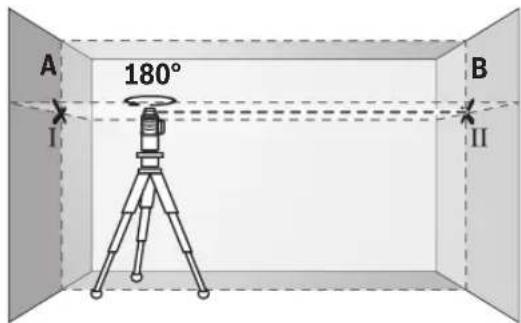
Rotate the measuring instrument by 180°, wait until it has leveled itself, and mark the point of intersection of the laser lines on the opposite wall B (point II).
- Place the measuring instrument – without rotating it – near wall B, switch it on and allow it to level itself.
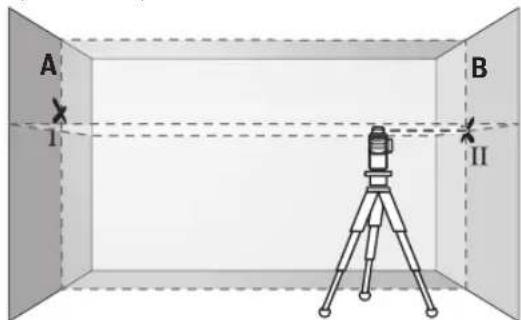
Align the height of the measuring instrument (using the tripod or by placing shims) so that the point of intersection of the laser lines exactly coincides with the previously marked point II on wall B.
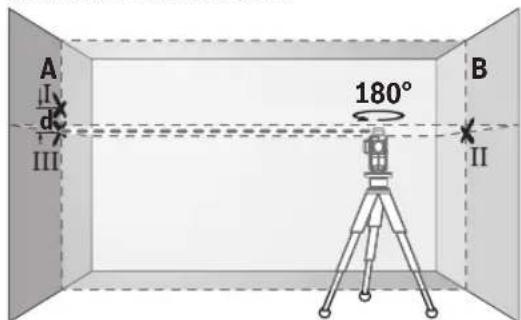
Rotate the measuring tool 180°, without changing the height. Aim the tool at wall A so that the vertical laser line runs through the previously marked point I. Allow the tool to level in and mark the point of intersection of the laser lines on wall A (point III). The difference d between the two marked points I and III on wall A reflects the actual deviation of the measuring tool in height.
On a measuring section of 2 × 5 m = 10 m, the maximum permissible deviation is:
10 m × ±0.2 mm/m = ±2 mm. Thus, the distance d between points I and III must not exceed 2 mm.
Checking the leveling accuracy of the vertical lines
For this check, you will need a door opening with at least 2.5 m of space on either side of the door (on firm ground).
- Place the measuring tool at a distance of 2.5 m from the door opening on a firm, level surface (not on a tripod). Switch on the measuring tool and select the mode with automatic leveling. Choose the operating mode in which a vertical laser plane is emitted in front of the measuring tool.
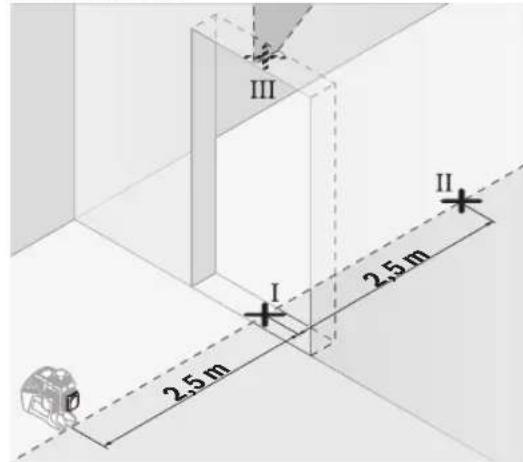
Mark the center of the vertical laser line on the floor in the door opening (point I), at a distance of 5 m on the other side of the door opening (point II), and at the upper edge of the door opening (point III).
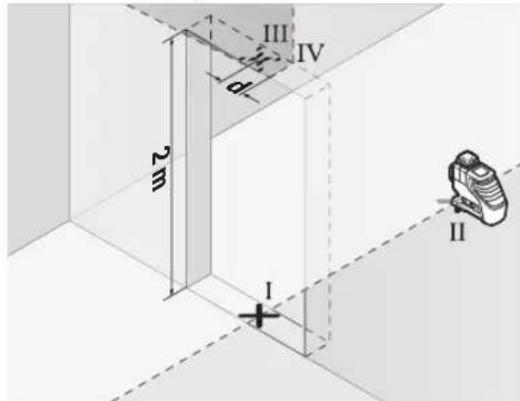
Rotate the measuring tool 180° and place it on the other side of the door opening directly behind point II. Allow the measuring tool to level in and align the vertical laser line so that its center passes exactly through points I and II. Mark the center of the laser line at the upper edge of the door opening as point IV.
The difference d between the two marked points III and IV reflects the actual deviation of the measuring tool from the vertical. Measure the height of the door opening.
Repeat the measuring process for the two vertical laser planes. Select the operating mode in which a vertical laser plane is emitted to the side of the measuring tool, and rotate the measuring tool 90° before starting the measurement.
The maximum permissible deviation is calculated as follows: double the height of the door opening × 0.2 mm/m. Example: at a door opening height of 2 m, the maximum deviation may be 2 × 2 m × ±0.2 mm/m = ±0.8 mm. Points III and IV must therefore be no more than 0.8 mm apart.
Working advice
Always use only the center of the laser line for marking. The width of the laser line changes with distance.
Working with the laser target plate
The laser target plate (28) improves visibility of the laser beam under unfavorable conditions and at greater distances. The reflective surface of the laser target plate (28) improves visibility of the laser line. The transparent portion allows the laser line to be seen from the back of the laser target plate.
Working with the tripod (accessory)
The tripod provides a stable, height-adjustable support for the measuring instrument. Place the measuring instrument with the 1/4" (20) tripod thread onto the tripod (32) or onto a commercially available tripod. For setting up on a building tripod, use the 5/8" (19) tripod thread. Secure the measuring instrument with the tripod mounting screw.
Level the tripod before switching on the measuring instrument.
Fastening with the universal holder (accessory) (see figure C)
With the universal holder (25), you can fasten the measuring instrument, for example, on vertical surfaces or on surfaces made of magnetic materials. The universal holder can also be used as a stand. It allows the instrument to be aligned by height.
Fastening the accessory to a surface: Keep your fingers away from the rear side of the magnetic accessory. The strong magnetic attraction can pinch your fingers.
Level the universal holder (25) before switching on the measuring instrument.
Working with the laser receiver (accessory) (see figure C)
In unfavorable lighting conditions (bright light, direct sunlight) at large distances, use the laser receiver (29) for better detection of the laser lines. When working with the laser receiver, switch on the receiver mode (see "Receiver mode", page 173).
Working with the laser viewing glasses (accessory)
The laser viewing glasses filter out ambient light. This makes the laser beam appear brighter for visual perception.
Do not use the laser viewing glasses (accessory) as safety goggles. The glasses for working with the laser instrument improve the recognition of the laser beam, but they do not protect against laser radiation. Do not use the laser viewing glasses (accessory) as sunglasses or while driving. The laser viewing glasses do not provide protection against UV radiation and reduce color perception.
Examples of possible applications (see figures B-G)
Examples of possible applications of the measuring instrument are shown on the pages with figures.
Maintenance and service
Keep the measuring tool clean at all times.
Never immerse the measuring tool in water or other liquids.
Wipe off contamination with a dry, soft cloth. Do not use any cleaning agents or solvents.
Clean the surface of the laser outlet window regularly and pay attention to the absence of lint.
Store and transport the measuring tool only in the protective pouch (31) or in the case (34).
For repairs, send the measuring tool in the protective pouch (31) or in the case (34).
Service and consultation on application questions
The service department will answer all your questions regarding repair and maintenance of your product, as well as spare parts. Exploded views and information on spare parts can also be found at:
The Bosch team of experts will be happy to answer any questions you may have regarding our products and their accessories.
Please always state the 10-digit article number on the type plate when making inquiries or ordering spare parts.
For the regions: Russia, Belarus, Kazakhstan, Ukraine
Warranty service and repair of power tools, in compliance with the requirements and standards of the manufacturer, are carried out in all countries only in authorized or certified service centers of "Robert Bosch". WARNING! Use of counterfeit products is dangerous in operation and may lead to harm to your health. The manufacture and distribution of counterfeit products is prosecuted under administrative and criminal law.
Manufacturer: LLC "Robert Bosch" Balashikha, vl. 24
141400, Khimki, Moscow region.
Tel.: +7 800 100 8007
E-Mail: info.powertools@ru.bosch.com www.bosch-pt.ru
Additional service center addresses can be found at the link:
www.bosch-pt.com/serviceaddresses
Transportation
The recommended lithium-ion batteries are subject to the requirements for the transportation of dangerous goods. The battery can be transported by the user by road without the need to comply with additional regulations.
When transported by third parties (e.g., by air or freight forwarder), special requirements for packaging and labeling must be observed. In this case, when preparing the goods for shipment, the involvement of a dangerous goods expert is required.
Send the battery only if the housing is undamaged. Tape or cover the open contacts and pack the battery so that it does not move in the packaging. Please also observe any possible additional national regulations.
Disposal

Measuring tools, batteries/accumulators, accessories, and packaging should be disposed of in an environmentally friendly manner.
Do not dispose of batteries/accumulators in household waste!
Only for EU countries:
In accordance with European Directive 2012/19/EU on waste electrical and electronic equipment and its transposition into national legislation, measuring instruments that have been taken out of use must be collected separately and handed over for environmentally sound recycling. In accordance with European Directive 2006/66/EC, defective or expired batteries/accumulators must be collected separately and handed over for environmentally sound recycling.
When disposed of incorrectly, waste electrical and electronic equipment can have harmful effects on the environment and human health due to the possible presence of hazardous substances.
Batteries/accumulators:
Nickel-based:
Please observe the instructions in the "Transport" section (see "Transport", page 177).
Ukrainian
Safety Instructions

Read all safety instructions and follow them when working with the measuring instrument. Use of the measuring instrument without following these instructions may lead to injury from the integrated mechanisms. Never allow children to use the measuring instrument unattended. Keep these instructions and pass them on when handing over the measuring instrument.
Improper use, incorrect operation, or use of unauthorized accessories may lead to unsafe measurement results. The measuring instrument is equipped with a laser warning label (shown in the figure of the measuring instrument and on page 3 with a magnifying glass). If the text on the laser warning label is not in your language, before first use, cover it with the warning label in your language that is included in the delivery.
Do not direct the laser beam at people or animals, and do not look into the laser beam yourself or expose others to it. You could blind others,

cause accidents or damage their eyes.
Do not direct the laser beam at people or animals, and do not look into the laser beam yourself or expose others to it. You could blind others, cause accidents or damage their eyes.
Do not look directly into the laser beam. If your eyes are exposed, close them immediately and turn away from the beam. Do not insert anything into the laser device. Do not use the device with a laser (laser attachment) for eye protection. The laser attachment may improve laser beam recognition, but it does not protect against laser radiation. Do not use the device with a laser (attachment) with safety glasses and do not wear them when operating the device. The device with a laser does not provide complete protection against UV radiation and may impair color recognition. Send the measuring instrument for repair only to qualified specialists and only with original spare parts. Under such conditions, your measuring instrument will remain safe. Do not allow children to use the laser measuring instrument without supervision. Protect yourself and others from unintended exposure. Do not work with the measuring instrument in environments where there is a risk of explosion due to the presence of flammable liquids, gases, or dust. Sparks may be created in the measuring instrument, which can ignite dust or vapors. Do not open the battery pack. There is a risk of short circuit if the battery is damaged or incorrectly used, and the battery may leak, catch fire, or explode. If the battery leaks, avoid contact and consult a doctor. Vapors may irritate the respiratory tract. Incorrect use of the battery may cause injury. Avoid contact with the battery. If contact occurs, rinse with plenty of water. If the battery is swallowed, seek medical attention immediately. The battery may cause irritation to the skin or eyes. Sharp objects, such as nails, screwdrivers, or external force, can damage the battery. Moisture inside can cause short circuits, corrosion, the formation of gas, explosion, or rupture of the battery. Do not store the battery, even when not in use, together with paper clips, coins, nails, screws, or other small metal objects that can cause bridging of contacts. Short circuiting the battery contacts can cause fire or injury.
Use the battery pack only in products specified by the manufacturer. Under such conditions, the battery will be protected from dangerous overload. Charge the battery packs only in chargers recommended by the manufacturer.
Using a charger not intended for the battery pack, or one that is not compatible, may cause fire or injury.

Protect the battery pack from heat, e.g., from direct sunlight, fire, dirt, water, or moisture. There is a risk of explosion or short circuit.


WARNINGS


Keep hearing protectors out of reach of children. Hearing protectors are dangerous.
The miniature element of the liquid must not be bent or inserted into other openings of the device. In case of suspicion of damage to the miniature element of the liquid or its insertion through other openings of the device, immediately contact a doctor. Damage to the miniature element of the liquid can lead to serious internal injuries and death. Perform the replacement of miniature elements of the liquid in a safe manner. There is a risk of injury. Use only the liquid elements specified in the operating instructions. Do not use any other miniature elements of the liquid or other sources of current. Do not disassemble the miniature element of the liquid and do not short-circuit the miniature element of the liquid. The miniature element of the liquid may lose its tightness, swell, catch fire, or cause injury. Carefully dispose of discharged miniature elements of the liquid in accordance with the instructions. Discharged miniature elements of the liquid may lose their tightness and damage the product or cause injury. Do not interrupt the miniature element of the liquid and do not place it in water. The miniature element of the liquid may lose its tightness, swell, catch fire, or cause injury. Do not damage the miniature elements of the liquid and do not disassemble them. The miniature element of the liquid may lose its tightness, swell, catch fire, or cause injury. Do not allow the miniature element of the liquid to come into contact with water. The liquid may leak.
Contact with water, which may occur during this process, can cause injury.
When using the measuring instrument, do not hold the miniature element of the liquid (22). Remove the miniature element of the liquid and send it for repair. Before all work on the measuring instrument (e.g., assembly, maintenance, etc.), as well as during transport and storage, remove the rechargeable battery or the batteries from the measuring instrument. There is a risk of injury if the device is switched on unintentionally. When working with the measuring instrument under certain conditions, loud acoustic signals may occur. Keep the measuring instrument at a distance from the ear and from other people. Loud sound can damage hearing.

Do not install the measuring instrument with magnetic attachments near implants or medical devices, e.g., pacemakers or insulin pumps. The magnets of the measuring instrument and its attachments can affect the function of implants or medical devices.
The measuring instrument with magnetic attachments should not be placed near magnetic data carriers and devices that are sensitive to magnetic fields. The magnets of the measuring instrument and its attachments can cause irreversible data loss. The measuring instrument is equipped with a radio interface. Observe local restrictions, e.g., in airplanes or hospitals.
The Bluetooth® word mark and the figurative trademark (logo) are registered trademarks owned by Bluetooth SIG, Inc. The company Robert Bosch Power Tools GmbH uses these word/figurative trademarks under license.
The power tool is intended for use in industrial installations, as well as in medical devices (e.g., pacemakers, hearing aids). Caution: Do not use the power tool near medical devices, as it may interfere with their operation. Do not use the power tool with Bluetooth in medical devices, without protective covers, in chemical installations, and in areas where there is a risk of explosion or fire. Do not use the power tool with Bluetooth in such areas. Do not switch on the power tool near medical devices.
180|Ukrainian
Battery packs LR 6, LR 7 LR 7
Under the stand 1/4", 5/8" 1/4", 5/8"
Charging the power tool
-Accumulator battery (Li-ion 12V 12V or more)
-Batteries (alkaline-manganese) 4×1.5V LR6 (AA) (3 adapters for 4×1.5V LR6 (AA) (3 adapters for batteries)
-Buffer battery (miniature CR2032 (Li-ion accumulator CR2032 (Li-ion accumulator battery) for element replacement
Operating time with laser level
-With accumulator battery 8 pcs. 8 pcs.
-With batteries 6 pcs. 4 pcs.
Bluetooth® of the power tool
- Bluetooth® 4.0 (Low Energy) Bluetooth® 4.0 (Low Energy)
-Max. signal range 30 m 30 m
-Operating frequency range 2402-2480 MHz 2402-2480 MHz
Power consumption max. <1W <1W
Bluetooth® smartphone
- Bluetooth® 4.0 (Low Energy) Bluetooth® 4.0 (Low Energy)
Operating system Android 6 (or later) Android 6 (or later) iOS 11 (or later) iOS 11 (or later)
Battery voltage per EPTA-Procedure 01:2014
Charger input 0.90 kg 0.90 kg
Battery pack 0.86 kg 0.86 kg
Dimensions 162×84×148 mm 162×84×148 mm
Deactivating the auto power-off function
If the tool is left idle for approx. 120 minutes, it will automatically switch off to protect the battery or cells. Do not press any button on the measuring tool.
To switch the measuring tool back on after automatic switch-off, you can either slide the switch (16) to the Off position and then switch the measuring tool back on, or press the laser mode button (7) or the receiver mode button (5) once.
To deactivate the automatic switch-off, with the measuring tool switched on, keep the laser mode button (7) pressed for at least 3 seconds. When the automatic switch-off is deactivated, the laser beams will flash briefly as confirmation.
To activate the auto power-off function, switch the measuring tool off and then switch it back on.
Deactivating the acoustic signal
When the measuring tool is switched on, the acoustic signal is activated by default.
To turn on the laser level, press the operating mode button (7) and the receiver mode button (5) and hold them pressed for 3 seconds.
The receiver and transmitter emit three short sound signals to confirm the operation.
Operating modes
The laser level can be switched to any of the following modes:
-Horizontal laser line, -Vertical laser line, -Vertical laser lines, -Horizontal laser line and two vertical laser lines.
To turn on the laser level, press the operating mode button (7) to switch on the horizontal laser line. To switch it off, press the operating mode button (7) again.
All operating modes can be switched on automatically or manually.
Receiver mode
For the laser receiver (29) to work in any operating mode, the receiver mode must be turned on.
In receiver mode, the laser pulses at a high frequency, allowing the laser receiver (29) to detect them.
To turn on the receiver mode, press the receiver mode button (5). The receiver mode indicator (6) lights up green.
When the receiver mode is turned on, the laser lines are dimmed. To turn off the receiver mode, press the receiver mode button (5) again. The receiver mode indicator (6) goes out.
Automatic leveling
Working in automatic leveling mode
Place the laser level on a firm horizontal surface, attach it to the universal bracket (25) or to the tripod (32).
For automatic leveling, move the switch (16) to the "T" position.
Automatic leveling: the automatic leveling mechanism compensates for unevenness within the range of ±4°. Leveling is complete when the laser lines stop moving.
Automatic leveling is not possible if, for example, the surface on which the measuring tool is placed is inclined more than 4° from the horizontal. The laser lines then flash quickly.
An audible signal sounds at short intervals.
Place the measuring tool in a horizontal position and wait until automatic leveling is completed. If the tool is within the automatic leveling range of ±4°, the laser lines will light up continuously and the audible signal will stop.
After use, the measuring tool automatically levels again when repositioned. After repeated leveling, to ensure accurate measurement results, check the position of the horizontal and vertical laser lines relative to the reference points.
Working with the tilt mode
For working with the tilt mode, move the switch (16) to the "ON" position. The tilt mode indicator (4) lights up, and the laser lines flash slowly in the pulse mode.
In the tilt mode, automatic leveling is disabled. The measuring tool can be held by hand or placed on an inclined surface. The laser lines are no longer leveled and do not necessarily run perpendicular to each other.
After using the tilt mode, the CAL guard indicator (3) lights up until the leveling accuracy is checked and the indicator is reset.
After using the tilt mode, check the calibration.
Check the leveling accuracy of the measuring tool (see "Checking the Leveling Accuracy of the Measuring Tool", page 185).
If the maximum deviation is not exceeded during the checks, reset the CAL guard indicator (3). To do this, press and hold the mode button (5) and the plus button (9) simultaneously for at least 3 seconds. The CAL guard indicator (3) goes out.
If the measuring tool exceeds the maximum permissible deviation during one of the checks, it must be repaired by a Bosch customer service center.
Checking the leveling accuracy of the measuring tool
Factors affecting accuracy
The most important factor is the ambient temperature. The temperature of the environment
must be monitored and the device must be adjusted to the recommended temperature for the application.
To ensure maximum accuracy, it is recommended to set up the measuring tool on a tripod. However, if a tripod is not available, the tool must be placed in the center of the work area.
Under certain conditions, such as impacts or shocks, the tool may become misaligned. Therefore, before each use, check the accuracy of the tool.
First, check the accuracy of the horizontal laser line, then check the accuracy of the vertical laser lines.
If the tool exceeds the maximum permissible deviation during these checks, it must be sent to a Bosch service center for repair.
Checking the accuracy of the horizontal leveling
For this check, you need a free measuring distance of 5 m on a solid surface between two walls A and B.
Mount the measuring tool on a tripod or place it on a firm, level surface. Switch on the tool for operation with automatic leveling. Select the operating mode in which the horizontal and vertical laser lines are projected in front of the tool.
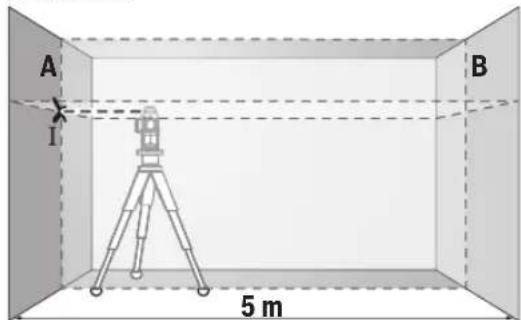
- Aim the laser at wall A and allow it to level. Mark the center of the point where the laser lines cross on the wall (point I).
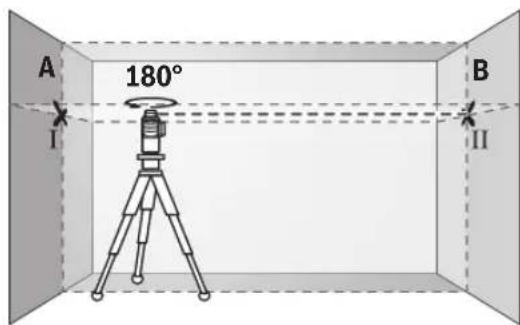
- Rotate the tool by 180°, allow it to level, and mark the point where the laser lines cross on the opposite wall B (point II). - Without turning the tool, position it close to wall B, switch it on, and allow it to level.
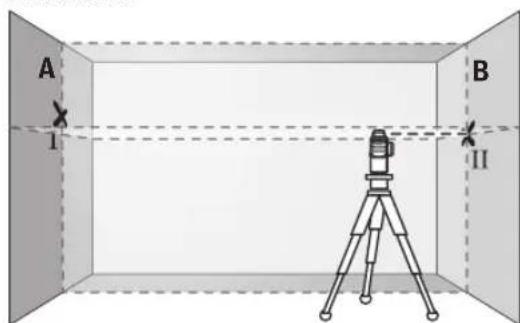
Adjust the height of the tool (using the tripod or by placing shims underneath) so that the point where the laser lines cross exactly coincides with the previously marked point II on wall B.
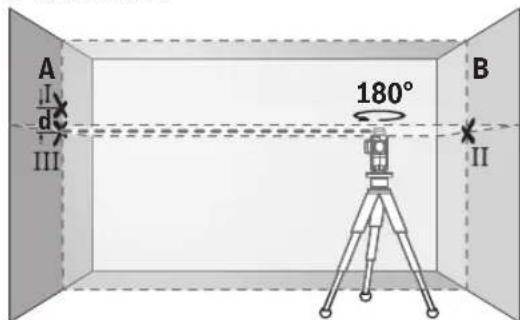
- Rotate the tool by 180° without changing its height. Aim it at wall A in such a way that the vertical laser line passes through the previously marked point I. Allow the tool to level and mark the point on wall A where the laser lines cross (point III). - The difference d between the two marked points I and III on wall A is the actual deviation of the tool in height.
For a measuring distance of 2 × 5 m = 10 m, the maximum permissible deviation is:
10 m × ±0.2 mm/m = ±2 mm. Taking into account the measuring tool, the maximum deviation may be 2 mm.
Checking the vertical leveling accuracy. For this check, you need a door opening with a clearance of at least 2.5 m on both sides of the door (on firm ground).
Place the measuring tool at a distance of 2.5 m from the door opening on a firm, level surface (not on a tripod). Switch on the measuring tool with automatic leveling. Select the operating mode in which the vertical laser line is projected in front of the measuring tool.
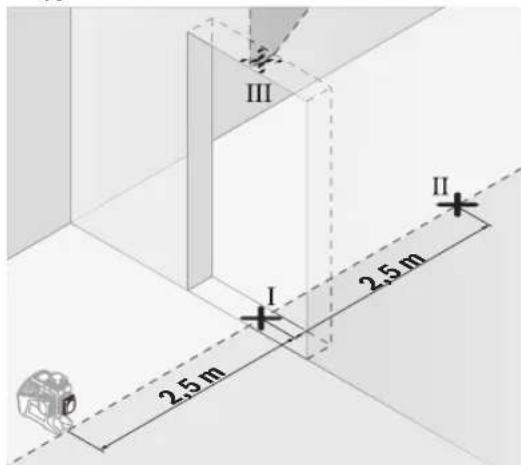
- Mark the center of the vertical laser line on the floor of the door opening (point I), at a distance of 5 m on the other side of the door opening (point II), and also on the upper edge of the door opening (point III).
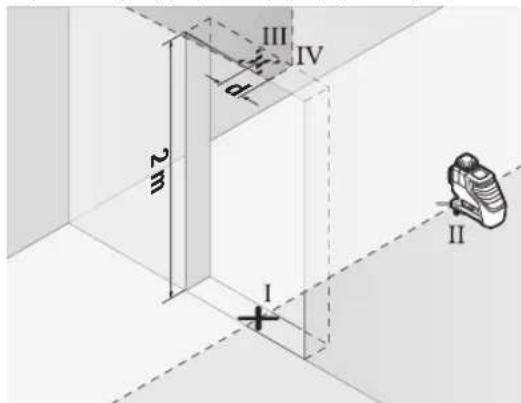
- Rotate the measuring tool 180° and place it on the other side of the door opening directly behind point II. Allow the measuring tool to level in and align the vertical laser line in such a way that its center passes exactly through points I and III. - Mark the center of the laser line on the upper edge of the door opening as point IV.
www.bosch-pt.com/serviceaddresses
Transport
The recommended lithium-ion batteries are subject to the Dangerous Goods Legislation. The user can transport the batteries by road without further requirements.
When transporting by third parties (e.g.: air transport or forwarding agency), special requirements on packaging and labelling must be observed. For the preparation of the item being shipped, consulting an expert for hazardous material is required.
Only dispatch the battery if the housing is undamaged. Tape or mask off open contacts and pack up the battery in such a manner that it cannot move around in the packaging. Please also observe possibly more detailed national regulations.
Disposal

Measuring tools, rechargeable batteries, accessories and packaging should be sorted for environmental-friendly recycling.
Do not dispose of measuring tools and rechargeable batteries/ batteries in household waste!
Only for EU countries:
According to the European Directive 2012/19/EU on Waste Electrical and Electronic Equipment and its implementation in national law, measuring tools that are no longer usable must be collected separately and disposed of in an environmentally correct manner. According to the European Directive 2006/66/EC, defective or exhausted batteries must also be collected separately and disposed of in an environmentally correct manner.
Batteries/battery packs must be disposed of separately and recycled in an environmentally friendly manner. Improper disposal of batteries and battery packs may have harmful effects on the environment and human health due to the possible presence of hazardous substances.
Batteries/battery packs:
Direct current:
The building, wiring, and installation must be carried out in accordance with the "Transportation" (see Transportation, page 188).
Cable
The Eurasian Economic Union (EAEU) member states must comply with the requirements of the technical regulations.
Instructions for use and maintenance are provided in the user manual. Before using the device, read the user manual carefully.
The manufacturer is not responsible for damage caused by improper use. The manufacturer's warranty does not cover damage caused by improper use.
The manufacturer's warranty does not cover damage caused by improper use or failure to follow the instructions in the user manual.
The manufacturer's warranty does not cover damage caused by improper use of the device.
Instructions for use
The device is intended for use in accordance with the instructions. The manufacturer is not responsible for damage caused by improper use (failure to follow the instructions) or by use of the device for purposes other than those intended.
The device must be used in accordance with the instructions and the safety precautions.
The device must not be used in environments with high humidity or in the presence of water (e.g., in a bathroom). The device must not be immersed in water.
Safety instructions
__SUPPIMER__
Storage
When storing, it is necessary to maintain the required temperature and humidity conditions, and to protect from the effects of direct sunlight - during storage, it is necessary to protect from sudden temperature changes.
If the device is stored in a cold room or outdoors, it should be kept in a protective casing - for storage conditions, refer to the requirements of GOST 15150-69 (Part 1).
Transportation
During transportation, the device should be transported in the packaging provided by the manufacturer. It is allowed to transport machines with short-term loading during loading/unloading. - For transportation conditions, refer to the requirements of GOST 15150-69 (Part 5).

Safety instructions
Before operating the device, it is necessary to read all safety instructions. The device must be operated in accordance with these instructions.
Failure to follow the safety instructions may result in dangerous consequences. Do not operate the device without proper training. If these instructions are not followed, the device may be dangerous to others.

Do not use the device for purposes other than those specified in the operating or adjustment instructions. The device must be used together with the protective cover (see the figure of the device on the cover). If the protective cover is not installed correctly, do not use the device until it is properly installed.
Do not point the laser at people or animals, and do not look into the laser beam yourself or with optical instruments. It is possible to temporarily blind people, which can cause accidents or eye injuries.
Only use the battery charger for its intended purpose. Do not use it for other purposes. It is forbidden to use the charger without supervision. They may cause harm to other people or to the user themselves. Do not use the charger in wet conditions, in the rain, or in places with high humidity. Do not cover, block, or obstruct the charger. Do not use the battery. There is a short circuit risk. If the battery is damaged or the case is broken, it may cause a fire. The battery may leak or be damaged. If there are any signs of damage, do not use it and contact the service center. Do not disassemble the device. If the battery is damaged or the case is broken, do not remove the battery from the device. It is dangerous. Keep it away from heat sources, and do not expose it to direct sunlight. Do not touch the battery with wet hands.
Do not disassemble or repair the battery charger. Do not use it near flammable materials or in explosive atmospheres. Do not expose the battery to short circuits, high temperatures, or fire. Do not use the battery if it is damaged. Do not short-circuit the battery terminals, and do not connect them with metal objects. Do not store the battery in places with high temperatures, such as near heat sources, in direct sunlight, or in hot vehicles.
Do not insert objects into the battery terminals or the charger openings.
This battery is intended only for use with the specified device. Do not use the battery with other devices. Charge the battery only with the specified charger. The charger is designed for a specific type of battery, and using it for other batteries may cause damage.

Do not expose the battery to water, rain, or high humidity. Do not use the battery if it is wet or damaged. Keep it away from heat sources.




Do not let children handle the battery without supervision. Keep the battery away from children.
Turn the element off and wait until the lamp stops blinking before replacing the lamp. If the element has been turned off and the lamp has stopped blinking, you can replace it. The element can be turned on again after 2 hours of cooling. Do not touch the element with bare hands. There is a risk of burns. If the lamp is damaged, replace the element. If the element is damaged, replace it with a new one. Do not touch the lamps with bare hands, as they may be hot. Lamps can be removed, replaced, or cleaned. Do not use damaged lamps; replace them with new ones. Damaged lamps may cause short circuits or other hazards. Do not disassemble or repair the lamps yourself. Lamps can be removed, replaced, or cleaned. Do not disassemble or dispose of the lamps improperly. Lamps can be removed, replaced, or cleaned. Do not touch the lamp with wet hands. If the lamp is broken, remove it carefully. If the lamp is broken, do not use it. Remove the lamp and dispose of it properly. Batteries or lamps should be replaced only when the device is turned off, and then, after replacement, they should be disposed of and stored properly. During operation, the device may heat up. The device should be placed on a flat surface. Do not place the device on or near other heat sources. The device may be damaged if not used properly.

The device and its required accessories should be installed and connected according to the instructions in the manual. The device and its required accessories should be installed and connected according to the instructions in the manual.
MeuHaBk KpybIbIaPbIH XMbicBaHa acep eTeiH epic TybIpaBl.
The device is designed for use with the original accessories and spare parts recommended by the manufacturer. Using accessories and spare parts from other manufacturers may lead to damage. The device has been tested and approved. It is recommended to have it checked by a specialist if it has been dropped or damaged, or if it has been exposed to moisture or extreme temperatures.
Bluetooth® is a registered trademark of Bluetooth SIG, Inc. and is used by Robert Bosch Power Tools GmbH under license. The Bluetooth® word mark and logo are owned by Bluetooth SIG, Inc. and are used under license.
The device can be used with Bluetooth and laser levels, as well as with other devices and accessories (tripods, laser receivers, etc.). It is not possible to use it with devices and accessories that are not compatible. The device can be used with Bluetooth and laser levels, with a range of up to 8 meters, with various accessories, and with various applications. The device can be used with Bluetooth and laser levels. We recommend using it with the appropriate accessories.
Safety instructions
Intended use
General safety instructions
The device is intended for leveling and checking horizontal and vertical lines.
The device is intended for use in dry indoor areas.
The device complies with the EN 50689 standard for laser class 2.
Bluetooth® interface
The device has a laser level with a range of up to 30 meters.
(1) Laser beam outlet (2) Battery/battery compartment (3) CAL guard indicator (4) Magnetic bracket indicator (5) Cable connection port (6) Cable connection indicator (7) Pulse mode indicator (8) Bluetooth® indicator
(9) Bluetooth® button (10) Battery level indicator (11) Battery compartment cover (12) Batteries (13) Battery adapter connection port (14) Battery adapter (15) Battery (16) Charger (17) Laser receiver (18) Serial number (19) Thread 5/8 inch (20) Thread 1/4 inch (21) Base element (22) Base element holder (23) Base element cover
(24) Magnet (25) Furniture bracket (26) Platform (27) Locking knob (a) (28) Laser receiver (b) (29) Laser cable (30) Laser viewing window (31) Protective cover (32) Thread (33) Telescopic rod (34) Adapter (35) Wedge
a) The device must be used in accordance with the required standards. Only use the device with the required accessories.
Technical specifications
The device operates with standard batteries or with a rechargeable battery.
The technical multimeter is designed for charging batteries. To charge the battery, connect it to the charger.
Warning: When charging the battery, follow the safety instructions. To fully charge the battery, charge it until the indicator shows full charge.
To install the charged battery (15), insert it into the battery compartment (10) until it clicks into place.
To remove the battery (15), press the release button (13) and pull the battery out of the battery compartment (10). Be careful not to drop it.
Charging with batteries
To use the charger, you can charge the battery with the included batteries.
Batteries are inserted into the battery compartment.
The battery compartment is designed for Bosch batteries and should not be used with other electrical devices.
To insert the batteries, open the battery compartment cover (11) and insert the batteries into the battery compartment (10).
To remove the batteries, press the release button (14) as shown in the figure and pull out the batteries. Press the release button and remove the batteries.

(10) Install the cover.
Remove the batteries. Then insert the batteries (11) into the battery compartment
Press the release button and pull out the batteries, then remove them from the charger.
Do not mix old and new batteries. Always replace all batteries at the same time.
Always keep the battery charger and batteries away from moisture.
When using the charger, always place the batteries and their terminals correctly.
Charge indicator
The charge indicator (2) shows the charge level of the batteries or accumulators:
Charge level
Red indicator 100-75%
Yellow indicator 75-35%
Green indicator 35-10%
Red flashing - battery empty
- Battery charge is low
If the batteries or accumulator are low, the indicator lights up red.
Remove the accumulator or empty batteries and recharge them.
Replacing the fuse (see figure A)
The charger is equipped with a fuse (21). If the fuse is defective, replace it with a fuse of the same type and rating.
To replace the fuse, remove the accumulator or the battery pack from the charger.
TMyMeI 3neMeH TcTaBbH (22) TYMeI 3neMeH HayacbHaH (23) TaTbIn aNbHbH3.3apabTaycbnFaH TYMeI 3neMeHTI (21) WbIfapBn, KaHaCbH cNbHbH3.
TMyemIeMeHytCTaftbHbHdaFbCypTe KepcTeINReHdEn, nonIOCTepDIn DYpbic 60NYbH KaMTamac3 EtIH3 (TMyemI eMeHTIH NIOC NOIOci KOfApBkapan Tpyblnic).
Tymeni 3nement yctfaibih (22) canbHfAH tymeni 3nementnebipre hayara (23) kipriizhi3. Tymeni 3nement yctfaibihhDpybcxHE ToIbIFIMeH kipriizireHHe Ke3 XeTKi3iH3, eHTnece Wau MeH WauBpaHdbCydah KopraHbc KaMTaMacbl3 etinmeNi.
Anfaw pet KOndaHbicka eHri3y yuH Tymeni 3nEMeHTIH (21) KopFaBbIy yndipih anbIn TaCTaHbI. On yuH Tymeni 3nEMeHTTI anMaTbpy KeiHderiepeApeKeTeiH3.
Paiandaanhy
Палданугehdipy
Onwey KypanbH cb3daH XaHe TIKenei KyH cayneepineh caKtaHbI3. Onwey KypalbHa aibkwa TemnepaTypa Hemece TemnepaTypa 3repictepinH acepiTHr13yre 60MaNbIb. OHbl, MbICb, ABTOMObnIb iWInDe y3ak yaBtKa KaIbIpMaHbI3. TemnepaTypa 3repictepi WfBln 60FaH KaFdaJa, anDbIme H JWey KypalbHbIH TypaKbI TemnepaTypacbIH caTahb3 XHe KYMbICTbl KaIFactbIPMac 6pybIH apdaiBM dAnik TEkcepiciH etKl3H3 (KapaHbI3,Onwey KypalbHbIH dAnirih TekcepY, Bet 195).
Aipbikka TemnepaTypa Hemece TemnpaTypa e3repictepi opbH anFaH kafda, OIwey KypaBbHdAndi TEmHeDeyi MymKIn.
Onwey KypanbH KaTbI cofbinydAn Hemece Tcydene CaKaTaHb3. CbytKbI KywTI acepIepEn KeiH onwey KypaBbHbIKyMbICbH KANFaCTbpydAn 6bpH apDaBHIM
dππικ TeKcepyH opbHday Kepek (kapaHb3, ΘIwey KypaIbHbH dππirH TeKcepy", Bet 195).
Oneyky KypanbH TacbMaIaydAn anbH OHb KocbHb3. Ewyde ter6eny 6eniri 6yFaTana, eHtnce on KaTbI apeKeTepne 3aKbIMdaNybl MyMKH.
Kocy/ewipy
Onuey Kypabih Kocy yuih axbipatkbltb1 (16) On" KyiHe (MaTHNKTI 6yfaTAY TetirimeH xMybc icTeY uH) Hemece "n" KyiHe (HNBENHPney abOMaTKacbIme HxMbic icTeY uH) XblXbITbHb3. Onuey KpyabI KocbIFAHHaH KeiH 6ipDeH bIfbc caBInaynapan (1) Na3ep Cb3bIKTapbiH xi6pepi.
Panaep caynein aadamapra hemece xanyapnapra 6aftTamaHb3 Xehe tinti anbictan GoncbHxapbk cayneine e3iH3 kapaMaHb3.
Ouwe Kypabih eipy yin Kockbw/ewipriwi (16) Off KyiHe Xblkblb3. Wipy KezHnTepe6ny 6norbl 6yFaTanaa.
Close the shut-off valve and open the drain valve to drain the system. Then remove the filter element.
Maximum operating temperature 40°C. If the temperature exceeds this, the valve may be damaged. Drain the system before closing the valve.
If the valve temperature is higher than the maximum operating temperature, the valve seals may be damaged.
The valve is protected against electrostatic discharge (ESD). If the valve becomes electrostatically charged (e.g., by friction or dry air flow), it will automatically open. This opening will release the pressure (16) and close the valve.
To set the cable mode, press the cable mode button (5). The cable mode indicator (6) will light up.
To set the cable mode, the valve must be closed. If the valve is not closed, the cable mode (5) will not be activated. The cable mode indicator (6) will remain off.
Leveling automatic
Leveling automatic with valve
On the valve, there is a leveling bracket (25) and a leveling screw (32).
To use the leveling automatic with valve, turn the screw (16) to the "n" position.
The leveling automatic is set to ±4° of the leveling range. If the valve does not move, the leveling is automatic.
If the automatic leveling is not possible, e.g., the valve is not connected to the 4°-range, the valve will start to move. If the signal is too strong, wait a moment.
The valve is closed and the leveling automatic is activated. If the valve is within ±4° of the leveling range, the valve will open and the signal will be emitted.
If the valve is not closed and the leveling automatic is activated, the valve will open and the leveling automatic will close the valve after the leveling is complete.
Pendulum with leveling
The measuring tool must be switched on for the measurement function (16) "on" key. The measuring tool indicators (4) must not be covered by the user's fingers. When the measurement function is switched on, the leveling automatic is activated. The measuring tool can be held freely in the hand or placed on a firm surface. The laser lines must not be directed at people or animals.
Control via the "Bosch Levelling Remote App"
The measuring tool is equipped with a Bluetooth® module. It can be controlled remotely via a smartphone using the Bluetooth® interface. To use this function, the "Bosch Levelling Remote App" is required. The app can be downloaded from the corresponding app stores (Apple App Store, Google Play Store). For Bluetooth® operation, the required accessories are available at www.bosch-pt.com. Remote control via Bluetooth® is possible between the measuring tool and the smartphone within the specified range.
Bluetooth® connection
To connect via Bluetooth®, press the Bluetooth® button (9). The Bluetooth® indicator on the measuring tool will light up.
After the Bosch app has been started, a connection is established between the smartphone and the measuring tool. If the connection is successful, the Bluetooth® indicator (8) will light up. The Bluetooth® connection between the measuring tool and the smartphone can be interrupted by obstacles or electromagnetic interference. In this case, the Bluetooth® indicator (8) will go out.
Bluetooth® disconnection
To disconnect the Bluetooth® connection, press the Bluetooth® button (9) or switch off the measuring tool.
CAL guard calibration check
The CAL guard calibration check should be performed even if the measuring tool is working properly. If the measuring tool is powered by a rechargeable battery or battery, the
sensors will be activated for 72 hours after the power is switched on. The sensors will be calibrated automatically.
Activating the calibration check
If the temperature is too high, the CAL guard calibration check can be activated by pressing the CAL guard (3) button:
- The calibration check (every 12 months) is performed. - The measuring tool must be stored at a constant temperature. - The measuring tool must be placed on a firm surface.
The "Bosch Levelling Remote App" can also be used to activate the calibration check. The app will indicate when the CAL guard (3) needs to be checked.
Check the calibration of the CAL guard (3) with the cross level indicator for the cross expansion of the channel.
Calibration check of the CAL guard sensor
If the maximum output is not displayed on the level indicator (see "Level indicator", page 195), the CAL guard indicator (3) lights up. It will remain lit for 3 seconds after the operating mode switch (5) and Bluetooth switch (9) are pressed simultaneously. CAL guard indicator (3) lights up.
If the maximum output is not displayed on the level indicator, contact the Bosch service center.
Level indicator
Data storage
The device is protected against temperature fluctuations. However, extreme temperature changes can affect the laser unit.
To ensure accurate temperature measurements, allow the device to acclimate to the ambient temperature before use. The device can be used in a wide range of temperatures. It is suitable for use in cold or hot environments. Check the level indicator for accuracy.
Before using the device, check the level indicator and the laser unit.
If the maximum output is not displayed on the level indicator, contact the Bosch service center.
Checking the level indicator
For the check, place the device on a flat surface at a distance of 5 m between walls A and B.
- Mark the center of wall A with a cross. Then rotate the device 180° and mark the center of wall B. Check the level indicator.
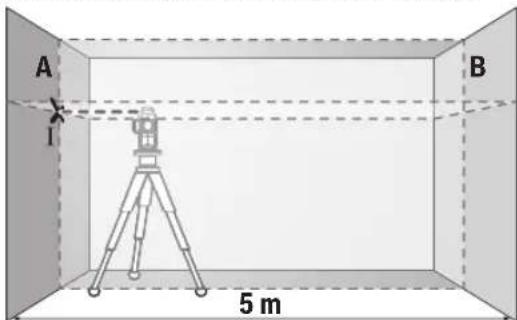
- Place the laser on wall A, mark the center. Rotate the device 180° and mark the center on wall B. The laser marks should be within the tolerance range (I).
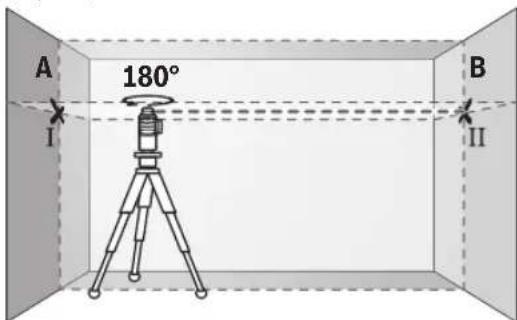
- Rotate the device 180°, mark the center on wall B. The laser marks should be within the tolerance range (II).
Do not use the laser level on the wall surface without first checking it.
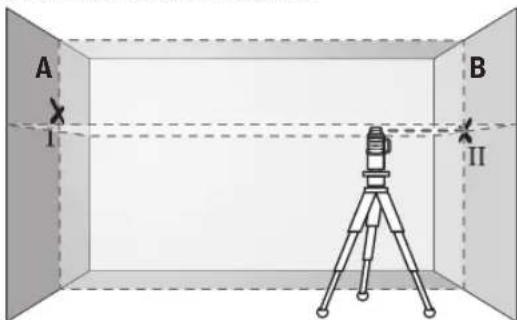
Do not use the laser level (if it has a pendulum lock) without first checking the laser beam's accuracy on the wall surface. It is necessary to check it before use.
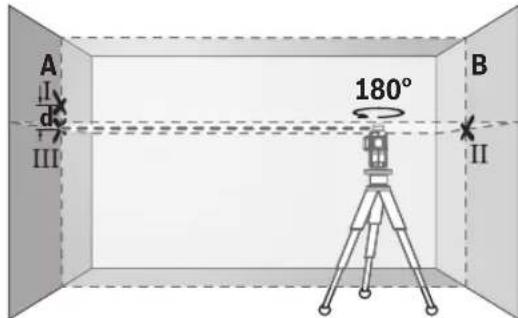
Do not use the laser level if it is damaged. Also, do not use it if the laser beam is not accurate on the wall surface. Do not use the laser level if the laser beam's accuracy is not correct.
The difference between the two accuracy checks on the wall surface should not exceed the laser level's specified accuracy.
2× 5M = 10M maximum permissible deviation:
10M×±0,2MM/M=±2MM. The difference between the two checks should not exceed 2MM.
Checking the laser beam's accuracy
For the check (on a flat surface) you need a wall at least 2.5M away from the laser.
- Place the laser level on a flat surface at 2.5M from the wall (see figure). Do not use the laser level's automatic leveling. The laser beam's accuracy should be checked while the laser is on.
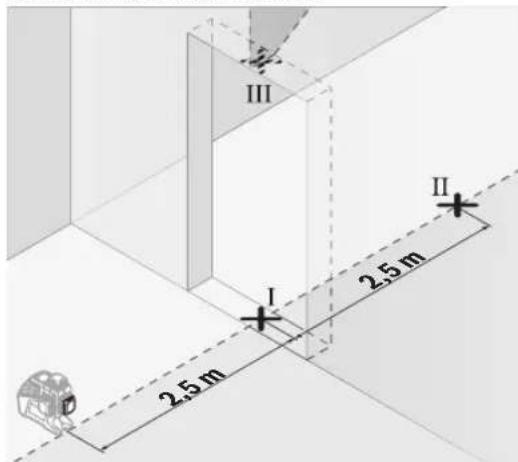
Mark the laser beam's center on the wall, at the bottom (I check), at 5M distance, at the top (II check), and at the highest point (III check).
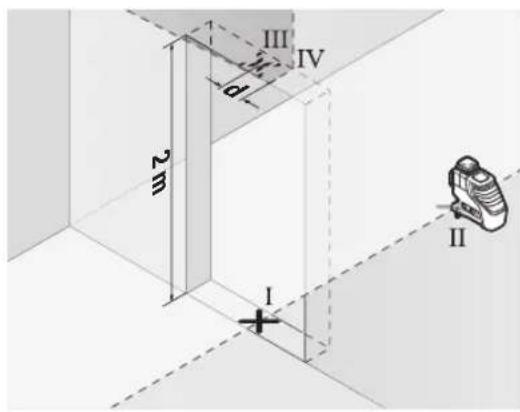
Do not move the laser level during the check. Do not use the laser level if the laser beam's center does not pass through the II check. Mark the laser beam's center at the highest point as IV check. The difference between III and IV checks on the wall should not exceed the laser level's specified accuracy. Do not use the laser level if the difference is too large.
For the second laser beam, repeat the same procedure. For this, turn the laser level 90° from the first laser beam's position.
Maximum permissible deviation is calculated as:
laser level's specified accuracy × 0,2 MM/M
Example: maximum deviation for a 2M laser level is 0,4 MM
2×2M×±0.2MM/M=±0.8MM. Therefore, points III and IV must be at least 0.8 mm apart.
Adjusting the laser beams
The laser beams must be aligned with the center of the crosshair. The beams must not be misaligned.
Adjusting the laser beam focus
The laser beam focus (28) can be adjusted by turning the focus ring and using the locking screws to secure the beam.
To adjust the laser beam focus (28), turn the focus ring to adjust the beam, then use the locking screws to secure the beam in place.
Mounting the device (if necessary)
The mounting bracket can be attached to the device. Use the 1/4" mounting thread (20) or the 5/8" mounting thread (19) as needed. Ensure the bracket is securely attached. Do not overtighten the bracket.
Installing the device (if necessary) (see figure)
The device (25) can be installed on a tripod, wall, or magnetic surfaces. The device must be securely attached to the mounting bracket.
For magnetic surfaces, ensure the surface is clean and free of debris. The magnetic base must be securely attached to prevent falling.
Do not install the device (25) on surfaces that are not level.
Laser safety (if necessary) (see figure)
When using the laser, ensure that the beam is not directed at people or animals. Use the laser aperture (29) to adjust the beam. Do not look directly into the laser beam (see figure, item 194).
Laser protective eyewear (if necessary)
- The laser device (laser level) is intended for leveling work. The laser device is designed for use with the laser receiver, but can also be used without the laser receiver. The laser device (laser level) is intended for leveling work on floors and walls. The laser device
must be used with the laser receiver for outdoor work and for leveling over long distances.
The laser device must not be used in explosive atmospheres or in areas with flammable gases.
Safety instructions and warnings
For safe and proper use, read and follow all safety instructions and warnings. Keep the safety instructions and warnings for future reference. For questions about the product, contact the Bosch service center: www.bosch-pt.com
Bosch service center will answer your questions about the product and its accessories.
For questions about the product, please contact the Bosch service center. The product is covered by a 10-year warranty.
Repairs and maintenance of the power tool must be carried out by qualified personnel using original spare parts. This ensures the safety of the power tool. If the power tool is damaged, do not use it and have it repaired by a qualified person. Use only original spare parts and accessories.
Kazakhstan
Service centers and contact addresses:
Robert Bosch LLC
Almaty.
Republic of Kazakhstan, 050012
Muratbaev K., 180
"TepeMec" 60.7 cable
Tel.: +7 (727) 331 31 00
Fax: +7 (727) 233 07 87
E-Mail: ptka@bosch.com
For information on service centers and collection points, you can visit: www.bosch-professional.kz
For other service centers and repair rules, see:
www.bosch-pt.com/serviceaddresses
Disposal
Used batteries and rechargeable batteries must be disposed of separately from household waste.
Dispose of rechargeable batteries only when discharged.
Protect the battery from heat, e.g., from intense sunlight, fire, or moisture. When disposing, do not throw batteries into fire or water. Do not dispose of batteries with household waste.
If the battery housing is damaged, do not use it. Do not open the battery and do not expose it to moisture. If necessary, contact a qualified specialist.
Viewing

The device, accessories, and packaging should be recycled in an environmentally friendly manner. Do not dispose of the device with household waste.
Do not dispose of the device and batteries in household waste!
This product contains batteries that are subject to the EU Directive 2012/19/EU and must not be disposed of as unsorted municipal waste. Batteries that are covered by the EU Directive 2006/66/EC must not be disposed of with household waste. Please dispose of batteries separately at the appropriate collection point.
If it is possible that the product contains batteries, they must be removed and disposed of separately at the appropriate collection point.
Batteries:
Lithium:
The marking on the product, packaging, or instructions (see the symbol "Recycling" on page 198) indicates that the product must not be disposed of with other household waste.








Jusbman bnguysy y 66306mns 3mmnmb6mygno 6306mymo 68dou unnyu n uusug66 68uueummoomoo. Jusbman bnguysy y 66306mns 68moedn 68 mos unmgcn 68moqolungn. Jusbman m58mym dmymooss ambsaogmalongn EN 50689 agluudusso.
a0mbsbynn 3ma3m6g6gdo
mamgogobomn m3m6b6gdo osmbmnn myuusogodu 339m8g bsmdg60moos bomluysymu abgg00n.
(1) m8gmyo ubn0n ydmbuugmnn bgymo (2)dyymo mno/aaognol ybno gom (3) 05000000CAL guard (4)dojdmun ngduomnu 600300mnn (5) aaggonan ygsmnab ggnadob mgs30 (6) aaggonan agasmonn ngoadn o6o3o (7) C086b0nluuogdmoxnoaouo (8) Ws33d0ngdou Bluetooth® 6500330 (9) mngmgo3n Bluetooth®
(10) 33y3gms6mnb 86ymogmgo (11) 000g00n g00sdy86nDyog (12) 00000000 (13) 33ydymsmou/0s8mouu 8008y35b0 86dmm33nMgmo3a
(14) 0000000000000000000000000000000000000000 (15) 3700000000a (16)amn03m (17) 586gmyo ydoomobogdoy 3886mboaogmo gnno (18) 60 (19) 5/8" (20) 1/4" (21) (22) cooLgmo doogmgo (23) onuynn doyognnu yogymogngos (24) 8a6n (25) 603gusmogn uosgogna (26) 3000000000000000000000000000000000000000000000000 (27) 0ofofofofofofofofofofofofofofofofofofofofofofofofofofofofofofofofofofofofofofofofofofofofofofofofofo (28) mssymyma bogoua a866g 6086ymo (29) wssggygmn andgogna (30) 586ymybmoaoymouo5uoydum (31) 0000000000000000a) (32) 080g03a (33) 00guym3y6n0858 (34) (35) ωωωωωa)
a) 88mbbym 56 gnnn n juguygogon an agunu 8ngogdnu 86s6gym 3m3mgjdn. 8uguygouan dgonn sumogbo nn. 8gna 8uguysgoan 36mggsan.
Gg63gna 0m64gajn
| bssgmaa bssgmaa bssgmaa | GLL 3-80 C GLL 3-80 CG |
| bssgmaa bssgmaa bssgmaa | 3 601 K63 R.. 3 601 K63 T.. |
| bssgmaa bssgmaa bssgmaaA) | | |
| - bssgmaa bssgmaa | 30 θ 30 θ |
| - bssgmaa bssgmaa bssgmaa bssgmaa | 25 θ 25 θ |
| - bssgmaa bssgmaa bssgmaa | 5-120 θ 5-120 θ |
| bssgmaa bssgmaa bssgmaa B(C)D) | ± 0,2 θ/θ | ± 0,2 θ/θ |
| bssgmaa bssgmaa bssgmaa bssgmaa bssgmaa | ±4° ±4° |
| bssgmaa bssgmaa bssgmaa cmm | < 4 θ < 4 θ |
| bssgmaa bssgmaa bssgmaa bssgmaa bssgmaa | 2000 θ 2000 θ |
| bssgmaa bssgmaa bssgmaa bssgmaa bssgmaa | 90 % 90 % |
| bssgmaa bssgmaa bssgmaa bssgmaa bssgmaa bssgmaa | 2E) | 2E) |
| IEC 61010-1-nu dsgsdaa | 2 | 2 |
| bssgmaa bssgmaa bssgmaa | < 10 θ3θ, 630-650 θ | < 10 θ3θ, 500-540 θ |
| C6 | 10 10 |
| bssgmaa bssgmaa bssgmaa bssgmaa bssgmaa | 50 × 10 θ60 (bssgmaa bssgmaa) | 50 × 10 θ60 (bssgmaa bssgmaa) |
Bosch Power Tools 1609 92A 8AR| (18.10.2022)
2021
| bssmssn | GLL 3-80 C | GLL 3-80 CG |
| 1/10000 | 1/10000 |
| 23.3838 | 23.3838 |
| 10.3838 | 10.3838 |
| LR 6, LR 7 LR 7 |
| 1/4", 5/8" | 1/4", 5/8" |
| 12.3 | 12.3 |
| 4×1,53 LR6 (AA) (2020000000000000000000000000000000000000000000000000000000000000000000000000000000000000000000000000000 | 4×1,53 LR6 (AA) (20200000000000000000000000000000000000000000000000000000000000000000000000000000000000 |
| CR2032 (20200000000000000000000000000000000000000000000000000000000000000000000000000000000000000000000000 | CR2032 (20200000000000000000000000000000000000000000000000000000000000000000000000000000000000000000 |
| | |
| 8U | 6U |
| 6U | 4U |
| Bluetooth® usmào n5u | Bluetooth® 4.0 (Low Energy) | Bluetooth® 4.0 (Low Energy) |
| Bluetooth® 4.0 (Low Energy) | Bluetooth® 4.0 (Low Energy) |
| Bluetooth® 4.0 (Low Energy) | Bluetooth® 4.0 (Low Energy) |
| Bluetooth® 4.0 (Low Energy) | Bluetooth® 4.0 (Low Energy) |
| Bluetooth® 4.0 (Low Energy) | Bluetooth® 4.0 (Low Energy) |
| s#y#m##s
usbm#n o#u#y#d#y#n 3330s
usbm#n n#u#y#d#y#n 425
usbm#n #u#y#d#y#n 461
usbm#n u#y#d#y#n 481
usbm#n ##y#d#y#n 501
usbm#n ##y#d#y#n 511
usbm#n ##y#d#y#n 521
usbm#n ##y#d#y#n 531
usbm#n ##y#d#y#n 541
usbm#n ##y#d#y#n 551
usbm#n ##y#d#y#n 561
usbm#n ##y#d#y#n 571
usbm#n ##y#d#y#n 581
usbm#n ##y#d#y#n 591
usbm#n ##y#d#y#n 601
usbm#n ##y#d#y#n 611
usbm#n ##y#d#y#n 621
usbm#n ##y#d#y#n 631
usbm#n ##y#d#y#n 641
usbm#n ##y#d#y#n 651
usbm#n ##y#d#y#n 661
usbm#n ##y#d#y#n 671
usbm#n ##y#d#y#n 681
usbm#n ##y#d#y#n 691
usbm#n ##y#d#y#n 701
usbm#n ##y#d#y#n 711
usbm#n ##y#d#y#n 721
usbm#n ##y#d#y#n 731
usbm#n ##y#d#y#n 741
usbm#n ##y#d#y#n 751
usbm#n ##y#d#y#n 761
usbm#n ##y#d#y#n 771
usbm#n ##y#d#y#n 781
usbm#n ##y#d#y#n 791
usbm#n ##y#d#y#n 801
usbm#n ##y#d#y#n 811
usbm#n ##y#d#y#n 821
usbm#n ##y#d#y#n 831
usbm#n ##y#d#y#n 841
usbm#n ##y#d#y#n 851
usbm#n ##y#d#y#n 861
usbm#n ##y#d#y#n 871
usbm#n ##y#d#y#n 881
usbm#n ##y#d#y#n 891
usbm#n ##y#d#y#n 901
usbm#n ##y#d#y#n 911
usbm#n ##y#d#y#n 921
usbm#n ##y#d#y#n 931
usbm#n ##y#d#y#n 941
usbm#n ##y#d#y#n 951
usbm#n ##y#d#y#n 961
usbm#n ##y#d#y#n 971
usbm#n ##y#d#y#n 981
usbm#n ##y#d#y#n 991
usbm#n ##y#d#y#n 100-75%
usbm#n |
LED aBol aogmoadgmo
Oy aydyommo 5b do yngo oxxogdo, mdymymo bsgdal un3dsd6gm-6cmns 3mgdymmol.
yymgdmgymdmygmgydsmon 3ydymsmngs
aagaaag aamggaagaaag 6 mnn-mnou wogamnol aagaaagaaag 860000000000000000000000000000000000000000000000000000000000000000000000000000000000000000000000000000
-3sUymoos 3sOmo6m330u 058gmo3smo (ym3gmo12o39). -58man n5uuygogn 68n 68bgoos ygdgogm g3gmy 30mmgdo. -000003d0500u08m0n 05u0y0g060u dmo mgyo3u (a..g06oNusu noo0s6 a2xabnUsb).
Bosch Levelling Remote App" 6b6m, uan an 6n6 mdo 600030 600030 abgab gaoomboaog 600030. 600030 aagab 600030. 600030 aagab CAL guard (3) 63g6o, ma uan 600030. 600030 aagm
aannnngnnnnaaamhagnu aagaaagaaonanmnnn nnnn nnnnnnnnnnnnnnnnnnnnnnnnnnnnnnnnnnnnnnnnnnnnnnnnnnnnnnnnnnnnnnnnnnnnnnnnnnnnnnnnnnnnnnnnnnnnnnnnnnnnnnnnnnnnnnnnnnnnnnnnnnnnnn nn nannn nannn nannn nannn nannn nannn nannn nannn nannn nannn nannn nannn nannn nannn nannn nannn nannn nannn nannn nannn nannn nannn nannn nannn nannn nannn nannn nannn nannn nannn nannn nannn nannn nannn nn ann
3aamnem3nulgubgo aommbngonu aamgbnusumdagogogndn 56anqg3mss
dAmgo 1s8mna 6uGyognlu 60gmaogdo un8yog (ab. U8mna bumusyymlu un8yognu dAmgo,33.206).
my ygmoaagmogonu gmo u 66 aamn adunadymnoo oosdgon oomdo nol oogodoo, gdmnoo on 6003oMn CAL guard (3). adouanmnu gnmoynmwo gossn andogon an dsmnlu ngndnu gnmsu (5) mssu Bluetooth(9) 80fnnmna 3 7 obgnomn CAL guard (3) hgd.
my gmon-gmon agomgogonu comluusman bngusbym gocoofojmofoa jundasmyoosobgoosobmol,ou j60s hdoosaglu o603no amalusbymgonu 356mon dogosogos Bosch.
U8mnbomubymyunbgyuGou agmddgds
unugjg jg oJgog gom
y3gms89 gong 203mg5b sbog6u gomgdml g23gmo7ymo. 3gmdmo, m8gmo lu bnglu 8oosmbn glusdmgoqmo 3g3gmo ymo 3mgo6nu 3d m ns3ncs6 8gaon.
B3g5 gnnR03m 1s8mdn o5uGmyd6o 6aDmyg6mo Oo38g, moos Iooomb 8gdymjagocds anny36mo o6ooyd6og, mdoomab d33cog6 dmcon. dsus, oossy6gn 1s8mdn o5uGmyd6o
dngonwgs3nsuaydsm gwsnnn yasn.
www.bosch-pt.com/serviceaddresses
Gul3mGnogds
6g30d260606060606060606060606060606060606060606060606060606060606060606060606060606060606060606060606060606060606
GonnoBss
Romanian
Safety instructions

Power tool service
Strada Horia Macelariu Nr. 30-34, sector 1 013937 Bucharest
www.bosch-pt.com/serviceaddresses
Transport
Lithium-ion batteries are subject to the requirements of the legislation on the transport of dangerous goods.
The batteries can be transported by road without restriction by the user.
The power tool can be powered by either a normal battery or a lithium-ion battery pack.
Working with the battery pack
Use only the chargers listed in the technical data. Only these chargers are suitable for the battery pack used in your power tool.
Note: The lithium-ion battery packs are supplied partially charged according to international transport regulations. To ensure full battery pack capacity, fully charge the battery pack before first use.
Insert the rechargeable battery (15) into the compartment (10) until you feel a distinct click.
To remove the rechargeable battery (15), press the release buttons (13) and pull the battery
out of the compartment (10). Do not use force.
Working with ordinary batteries
To protect the measuring instrument, it is recommended to use alkaline-manganese batteries. The batteries are placed in the battery adapter.
The battery adapter is intended only for use with this measuring instrument. Use with other electrical tools is not permitted.
To insert the batteries, push the adapter's drawer (11) into the battery compartment (10). Insert the batteries as shown in the illustration on the drawer's latch (14). Push the drawer's latch into the drawer until you feel a distinct click.

To remove the batteries (12), press the release buttons (13) on the drawer (14) and pull it out. When doing so, ensure the batteries do not fall out. To do this, hold the measuring instrument with the battery compartment (10) facing upward. Remove the batteries. To remove the drawer
(11) from the battery compartment, grasp it from
the inside and pull it out of the measuring instrument towards the rear.
Replace all batteries at the same time. Use only batteries of the same type and from the same manufacturer with the same capacity.
If you do not intend to use the instrument for a long period, remove the batteries from it. During prolonged storage, the batteries in the measuring instrument may corrode and discharge themselves.
Battery charge indicator
The battery charge indicator (2) shows how much charge is left in the rechargeable battery or batteries:
| СbvToNDоД Стени на за佩даховсT |
| Helenpbckbchata зелега СbvT-100-75% |
| Лина |
| Helenpbckbchata Кьлга СbvT- 75-35% |
| Линa |
| Helenpbckbchato СbvTeца чeр35-10% |
| Вehа СbvТлпа |
| НЯма СbvТлпа - Akумлалогната бateрпяe Deф ekтнa -Бateрпite ca ИЗтошени |
The rechargeable battery or batteries are almost discharged. Charge the rechargeable battery or replace the batteries.
CMAHa Ha 6yToHHa76ATEpHn(BK.ΦnR.A)
H3mePBateHNHTypee cHa6deHc6yToHHa 6atePn1(21), 3aJaMOrT aTaTAt NacBt 3aΦyHKInrTaI CAL guard Ja ce CbXpaHBAH H6e3 H3IOJI3BaHa akymlaTopHa 6atePn, peCn.6e3 IOCTaBeHN 6atePn.
3a da 3aemeHHe 6yToHHaTa 6aTePn, n3BaTe eKMyJAtopHata 6aTePn, pecn. aJaTepa 3a 6aTePn.
H3bpaaiTe cKo6ata, bPkaa 6yToHHata 6aTepeHr(22)OT rHe3dOto Ha 6yToHHata 6aTepeHr(23). H3BaIe Te p3HaT a 6yToHHa 6aTepeHr(21) HIOCTabeTe HOBA. BHIMaBaiTe 3a IpaBnHATA NOIApHOCT CbflACHO H3o6paKeHNeto Bpxy CKo6ata, dPkaa 6yToHHata 6aTepeHra (NOIOKHTeIHHT NO- JIOc Ha 6yToHHata 6aTepeHra Tp6Ba da e o6bpHar Harope).
BkapaIte cToiKaTa Ha 6yToHHa 6aTepeH(22) C NOCTBeHa B Heia 6yToHHa 6aTepeH BHe3IOHO (23). BHMaBaIte cToI KaHa 6yToHHa 6aTepeH da Ce Bkapa IpaBnHO HnHbI- HO, Tb Kato B IpoTHBeH ClyaH 3aIIHTaO t IpaX n Ppck BoDa Beue He MoKe da Ce rapaHTnpa.
PnIbpoHauJHO NyckaHe B EcknoataaOn OTCpaHete 3aIIHTHOΦIoHO Ha 6yToHHata 6aTepeHn(21).3aJeTtA DeNCTBAHte KaKTo IINp CmHa Ha 6yToHHata 6aTepeHn.
Pa6ota
IyckaneBekcnnoataa
PpeJa3BaIte H3MepBaTeHnHn np6Op OOBnAaKHaBAHe HdpeKTHO NOnaDaHe Ha CbHuEeBn IbYn.
He n3naIaIte H3MepBaTeHnHa ypeHa ekCTpeHHN TemnepaTyPh Hn pe3Kn TemnepaTyPh npomEH.
Hanp. He ro octabnIte npOdbJHKHTeHIO BpeMe B aBToMo-6HJI. PInr foIemH TemIepaTpHN KOIEbHaHH OCTABnIte H3MepBaTeJHHy ypeJ Da c aIaIHTnpA H ppeN IpoDbJkaBaHe Ha paBoTATA BnHaH N3BbPbIIBaIte IpoBepKa Ha ToUHOCTTA (Bk. ,PiobepKa 3a ToUHOCT Ha H3MepBaTeJHHy ypeJ", CtpaHnla226).
IpnE kctpemHn TeMnepaTyprn HIN ROJIeMH TeMnepaTyprn pa3JHKN TOOHCTTa Ha N3MePbaTeJHHyypeJ MoKe Ja Ce BLOHn.
H36BraTe CnHH yDAPN Hn H3nyCkaHe Ha H3MePbaTeHHype. CJeUyapHN Bb3deIeCTBnB Bbpxy H3MePBaTeHHypeTp8bA da H3BbPWBate IPOBepKa Ha TOHOCTTa My, IpeIN Da IPOJbJKHTe Da rO H3IOJ3BaTe (BK. "IPOBepKa 3a ToHocCT Ha H3MePBATeHHype", CtpaHnHa226).
Korato npenacte ypea, npedbapntno ro n3knouBaTe. PnH3KNIOUHaHE MoyIbT 3a KOle6aTeHN DBNJKeHHce 3actOnOpBa, Tb KaTO pNCHIN B6paunMOKe da 6bJe IOBpeH.
BKNIOyBaHe H3KIOyBaHe
To switch on the measuring instrument, press the start button (16) to position "On" (for work with manual targeting) or position "On" (for work with automatic leveling). The laser line appears after switching on the measuring instrument through the outlet opening (1).
Do not point the laser beam at people or animals; do not stare into the laser beam, even from a distance.
To switch off the measuring instrument, press the start button (16) to position Off. When switching off, the pendulum unit may lock.
Do not leave the device switched on unattended; after finishing work, switch it off. The laser beam could dazzle other people.
When the maximum permissible operating temperature of 40°C is reached, the device switches off to prevent damage to the laser diode. The measuring instrument cools down and can be switched on again.
When the temperature of the measuring instrument approaches the maximum permissible operating temperature, the brightness of the lines decreases gradually.
The measuring instrument is protected against electrostatic discharge (ESD). If the measuring
instrument is electrostatically charged (e.g., by touching in conditions of low air humidity), it switches off automatically. Switch it on again by pressing the start button (16).
Deactivating the automatic switch-off
If within approximately 120 minutes no button on the measuring instrument is pressed, the measuring instrument switches off automatically to save the accumulator or batteries.
To switch the measuring instrument on again after automatic switch-off, you can press the start button (16) briefly to the "Off" position and then switch the measuring instrument on again, or press the button for laser operating mode (7) or the button for reception mode (5).
To deactivate the automatic switch-off, press and hold the button for operating mode (7) for at least 3 seconds (when the measuring instrument is switched on). When the automatic switch-off is deactivated, the laser lines flash briefly for confirmation.
To activate the automatic switch-off, switch the measuring instrument off and then on again.
Deactivating the acoustic signal
When the measuring instrument is switched on, the acoustic signal is activated.
Turning on and off the sound and visual alarm signals simultaneously with the operating mode (7) or the reception mode (5) or for the shortest time.
Both when activating and when deactivating the sound and visual alarm, confirmation is performed with short sound signals.
Operating modes
The laser level has several operating levels, between which you can switch at any time:
- Generation of one horizontal laser plane,
- Generation of one vertical laser plane, - generation of two vertical laser planes, - generation of one horizontal and two vertical laser planes.
When switching on, the measuring tool generates one horizontal laser plane. To change the operating mode, press button (7).
Each mode can be used both with automatic leveling and with manual adjustment.
Receiver mode
For working with the laser receiver (29) regardless of the selected mode, the receiver mode must be switched on.
In receiver mode, the laser lines pulse at a very high frequency and thus become easier to detect for the laser receiver (29).
To switch on the receiver mode, press the receiver mode button (5). The receiver mode indicator (6) lights up in green.
If the receiver mode is switched on, the visibility of the laser lines is reduced. Therefore, when working without a laser receiver, switch off the receiver mode by pressing the receiver mode button (5) again. The receiver mode indicator (6) goes out.
Automatic leveling
Working with the automatic leveling system
Place the measuring tool on a horizontal base, attach it to the stand (25) or the tripod (32). To work with automatic leveling, set the slide switch (16) to position "n".
The automatic leveling system compensates for deviations from the horizontal within the automatic leveling range of ±4°. Leveling stops when the laser lines stop moving.
If automatic leveling is not possible, e.g., when the surface on which the measuring tool is placed is inclined more than 4° from the horizontal, the laser lines start flashing quickly. In this case, an acoustic signal is also heard, which repeats rapidly.
Place the measuring tool horizontally and switch on its automatic leveling. When the measuring tool is placed within the self-leveling range of ±4°, the laser lines start to shine continuously and the acoustic signal is switched off.
If the measuring tool is moved during operation, it levels itself again automatically. After the repeated leveling, check the position of the horizontal, resp. vertical laser line with reference to the reference points to avoid errors due to displacement of the measuring tool.
Working with manual leveling
To work with manual leveling, set the slide switch (16) to position "On". The indicator for manual leveling (4) lights up in red and the laser lines flash constantly.
When working with manual leveling, the automatic leveling is switched off. You can hold the measuring tool freely in your hand or place it on an inclined surface. The laser lines are no longer leveled and are not necessarily perpendicular to each other.
Remote control via the "Bosch Levelling Remote App"
The measuring tool is equipped with a Bluetooth® module, which allows wireless control via a smartphone with the Bluetooth® interface.
To use this function, you need the
"Bosch Levelling Remote App". Depending on the type of device, you can download it from one of the app stores (Apple App Store, Google Play Store).
Information on the required system requirements for the Bluetooth® connection can be found on the Bosch website at www.bosch-pt.com.
Remote control via Bluetooth® is possible only if the smartphone and the measuring tool are within the range of the Bluetooth® connection.
Switching on Bluetooth®
To activate the Bluetooth interface for remote control, press the Bluetooth button (9). Make sure the Bluetooth interface on your mobile device is enabled.
The app starts playing the connection between the device and the measuring tool. If a measuring tool is already active, you must select the device you want to communicate with. If the measuring tool is switched on, the connection is established automatically.
The connection is established when the Bluetooth® indicator (8) lights up continuously.
The Bluetooth connection can be interrupted if there is a large distance between the measuring tool and the mobile device, as well as due to electromagnetic interference. In such a case, the Bluetooth indicator (8) flashes.
Disabling Bluetooth®
To disable Bluetooth for remote control, press the Bluetooth button (9) or switch off the measuring tool.
Calibration warning indicator CAL guard
The sensors of the calibration warning indicator CAL guard monitor the condition of the measuring instrument, even when it is switched off. If the measuring instrument is without a protective cover or the battery is low, the sensors operate for 72 hours.
The sensors are activated when the measuring instrument is first switched on in operation.
Activating the calibration warning indicator
If any of the following conditions occur, the calibration warning indicator CAL guard is activated and the CAL guard indicator (3) lights up in sequence:
- Calibration interval exceeded (every 12 months). - The measuring tool was stored outside the specified temperature range. - The measuring tool was subjected to strong impact (e.g., dropped after being switched on).
In the "Bosch Levelling Remote App" you can see which of the three conditions activated the calibration warning indicator. Without the app, this function is not available.
To avoid misinterpretation, the lighting of the CAL guard indicator (3) only indicates that a calibration check is necessary.
After activating the warning system, the CAL guard indicator (3) lights up until the accuracy of the leveling has been checked. After that, the indicator is not switched off.
The measuring tool is equipped with a calibration system.
Check the accuracy of the measuring tool (see "Accuracy Check of the Measuring Tool", page 226).
If the maximum permissible deviation is not exceeded during any of the checks, the CAL guard indicator (3) remains lit. To switch it off, press the rotary mode button (5) and the Bluetooth button (9) simultaneously for at least 3 seconds. The CAL guard indicator (3) goes out.
If the measuring tool exceeds the maximum permissible deviation during any of the checks, it must be repaired by a Bosch after-sales service center for power tools.
Accuracy Check of the Measuring Tool
Factors Affecting Accuracy
The greatest influence on accuracy is exerted by the ambient temperature. In particular, temperature differences from the floor upward can cause deviations in the laser.
To minimize thermal influences, place the measuring tool on the floor or on a stable surface. If possible, also place the measuring tool in the middle of the working area.
In addition to external factors, device-specific influences (e.g., impacts or vibrations) can also lead to deviations. Therefore, check the accuracy of the measuring tool each time before starting work. First check the leveling accuracy of the horizontal laser line, then the leveling accuracy of the vertical laser line.
If the measuring tool exceeds the maximum permissible deviation during any of the checks, it must be repaired by a Bosch after-sales service center for power tools.
Checking the Horizontal Leveling Accuracy in the Direction of the Longitudinal Axis
For the check, you need a free measuring area of 5 m on a firm base between two walls A and B.
Mount the measuring tool close to wall A on a tripod, or place it on a firm, level surface. Switch on the measuring tool in the mode with automatic leveling. Select the mode in which a horizontal laser plane and a vertical laser plane are generated in front of the measuring tool.
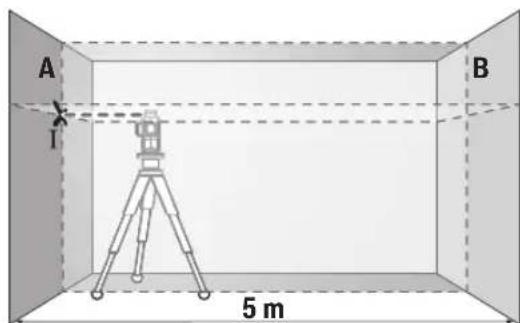
Aim the laser at the nearby wall A and allow the tool to level itself. Mark the center of the crossing point of the two laser lines on wall A (point I).
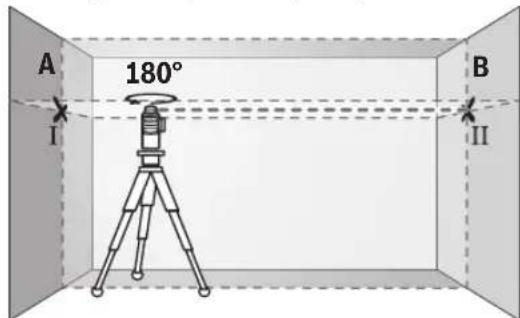
Rotate the measuring tool by 180°, allow it to level itself automatically, and mark the crossing point of the two laser lines on wall B (point II). Place the measuring tool – without rotating it – close to wall B, switch it on, and allow it to level itself.
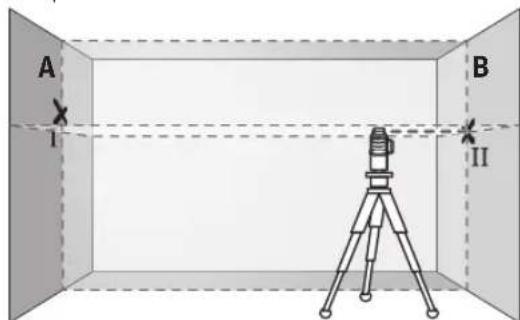
Set the measuring tool at the height of the upper edge (or as needed), and mark the intersection point of the laser lines so that it falls exactly on the previously marked point on wall B.
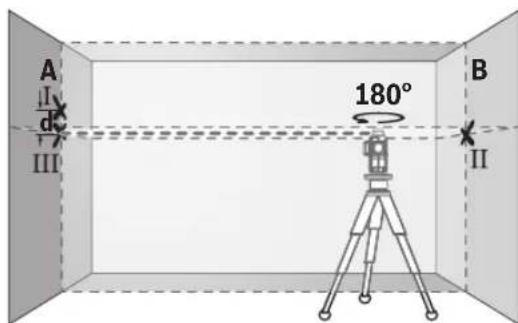
- Rotate the measuring tool by 180° without changing the height. Aim it at wall B so that the vertical laser line passes through the marked point. Wait for the measuring tool to level itself, then mark the intersection point of the laser lines on wall B (point III). - The difference d between the two marked points I and III on wall B gives the actual deviation in height of the measuring tool.
At a distance of 2 x 5 m = 10 m, the maximum permissible deviation is:
10 m x ±0.2 mm/m = ±2 mm. Therefore, the difference d between points I and III must be at most 2 mm.
Checking the accuracy of leveling of the vertical lines
For this check, a door opening is required, with at least 2.5 m of free space on both sides (on solid ground).
- Place the measuring tool at a distance of 2.5 m from the door opening on a solid, flat surface (not on a tripod). Switch on the measuring tool in the mode with automatic leveling. Select the operating mode in which a vertical laser plane is generated in front of the measuring tool.
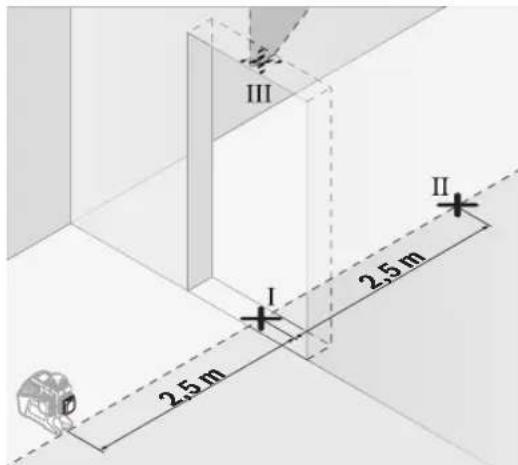
- Mark the center of the vertical laser line on the floor of the door opening (point I), at a distance of 5 m on the other side of the door opening (point II), and on the upper edge of the door opening (point III).
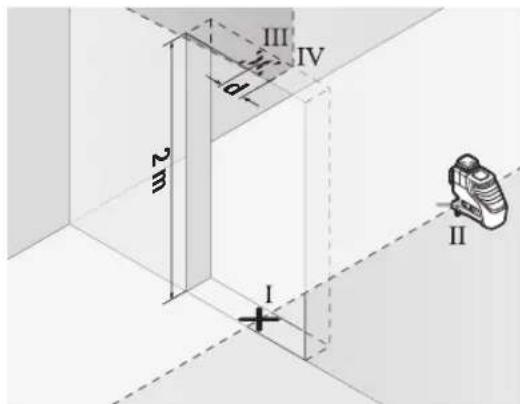
- Rotate the measuring tool by 180° and place it on the other side of the door opening directly behind point II. Wait for the measuring tool to level itself, and align the vertical laser line so that its center passes through points I and II. - Mark the center of the laser line on the upper edge of the door opening as point IV. - The difference d between the two marked points III and IV gives the actual deviation in height of the measuring tool. - Measure the height of the door opening.
Repeat the procedure for the second vertical laser plane. To do this, select the operating mode in which a vertical laser plane is generated to the side of the measuring tool, and before starting the measurement, rotate the tool by 90°.
The maximum permissible deviation can be calculated as follows:
Double the height of the door opening x 0.2 mm/m. Example: For a door opening height of 2 m, the maximum deviation may be
2 x 2 m x ±0.2 mm/m = ±0.8 mm. Therefore, points III and IV must be at most 0.8 mm apart.
Working instructions
Always mark the center of the laser line. The width of the laser line changes with distance.
Laser measuring device
The laser measuring device (28) detects the laser beam under unfavorable working conditions and at greater distances.
The reflective surface of the laser measuring device (28) improves the visibility of the laser beam, and the reflective surface can be attached to the side of the laser measuring device.
Working with the tripod (accessory)
Use of the tripod: Place the measuring tool on a stable, height-adjustable tripod. Attach the measuring tool with the 1/4" tripod mount.
(20) Screw the tripod mount and the screw of the tripod into the standard tripod thread for cameras. For mounting on a standard tripod, use the 5/8" tripod mount (19). Tighten the measuring tool with the screw of the tripod.
Before switching on the measuring tool, align the tripod roughly.
Mounting the universal holder (accessory) (see figure C)
With the universal holder (25), you can attach the measuring tool, e.g., to vertical surfaces, pipes, or magnetic materials. The universal holder is also suitable for use as a floor stand and allows height adjustment of the measuring tool.
The magnetic holder (accessory) allows the measuring tool to be attached to magnetic surfaces. The magnets on the underside of the holder can be used for attachment.
Align the universal holder (25) roughly before switching on the measuring tool.
Working with the laser receiver (accessory) (see figure C)
For better detection of the laser beam under unfavorable lighting conditions (bright surroundings, direct sunlight) and at greater distances, the use of the laser receiver (29) is recommended. When working with the laser receiver, switch on the receiver mode (see "Receiver mode", page 225).
Laser viewing glasses (accessory)
The laser viewing glasses filter out ambient light. This makes the laser beam appear much brighter.
Laser goggles (accessory) serve as protective goggles. The goggles help to recognize the laser beam better; they do not protect against laser radiation. Do not use the laser goggles (accessory) as safety goggles or for other purposes. The laser goggles do not provide complete protection and may impair the perception of light.
Working examples (see figures A-B)
Examples of how to use the measuring tool can be found on the page with the figures.
Maintenance and service
Maintenance and cleaning
Keep the measuring tool clean. Do not immerse the measuring tool in water or other liquids.
Wipe off dirt with a dry, soft cloth. Do not use cleaning agents or solvents.
Clean the lenses regularly with a special surface cleaning cloth, taking care not to leave any fibers.
Store and transport the measuring tool only in the protective pouch (31) or the case (34).
Repair the measuring tool only in the protective pouch (31) or the case (34).
After-sales service and application service
Our after-sales service responds to your questions concerning the repair and maintenance of your product as well as spare parts. Exploded views and information on spare parts can also be found at:
The Bosch application service team will be happy to help you with any questions about our products and their accessories.
Please quote the 10-digit article number from the type plate when making enquiries about spare parts.
Robert Bosch SRL
Service sculelectric
Strada Horia Macelariu Nr. 30-34, sector 1
013937 Bucuresti, Romania
Tel.: +359(0)70013667 (Bulgaria)
Fax: +40 212 331 313
Email: BoschServiceCenterBG@ro.bosch.com
www.bosch-pt.com/bg/bg/
Other service addresses can be found at:
www.bosch-pt.com/serviceaddresses
Transport
The contained lithium-ion batteries are subject to the Dangerous Goods Legislation requirements. The batteries can be transported by the user on public roads without further requirements.
When transporting by third parties (e.g., by air transport or forwarding agency), special requirements on packaging and labelling must be observed. For the preparation of the item being shipped, consulting an expert for hazardous material is required.
Only dispatch the battery if the housing is undamaged. Tape or mask off open contacts and pack up the battery such that it cannot move around in the packaging. Please also observe the possibly more detailed national regulations.
Rejected

Disposal of end-of-life measuring devices, ordinary accumulators and batteries, and original accessories. They must be handed over for recycling of the materials they contain.
raw materials.
Do not throw measuring devices, accumulators, batteries, or accessories into household waste!
Only for non-EU countries:
According to European Directive 2012/19/EC on waste electrical and electronic equipment, transposed into national law, measuring devices that can no longer be used must be collected separately and handed over for recycling of the materials they contain. According to European Directive 2006/66/EC, defective or exhausted batteries and accumulators must also be collected separately and handed over for recycling.
Proper disposal of old electrical and electronic devices helps prevent potential hazardous substances from having a negative impact on the environment and human health.
Accumulators/batteries:
Lithium-ion:
Please follow the instructions in the section on transport
(see Transport, page 229).
Macedonian
Safety instructions

Read and follow all safety instructions carefully to work safely and without danger with the measuring device. If the measuring device is not
used according to the enclosed instructions, the protective mechanisms built into the measuring device may be impaired. Do not ignore the warning notices. Keep these instructions and include them with the measuring device when passing it on.
WARNING: Using the device for purposes other than those specified in these instructions may lead to dangerous exposure to radiation. Periodically check the warning labels (shown in the diagram on the periodic maintenance chart). If the text on the warning label for radiation is not in your language, cover it with
the label in your language before first use.

Do not point the laser beam at people or animals, and do not look directly into or reflect the laser beam. This can damage your eyes, cause burns, or ignite fires.
Since the laser beam is dangerous to the eyes, you must close and turn your head away from the laser beam. Do not make changes to the laser device. Do not use laser safety glasses (additional equipment) as safety glasses. Laser safety glasses are intended for good recognition of the laser beam; however, they do not protect against laser radiation. Do not use laser safety glasses (additional equipment) as safety glasses for welding or similar operations. Laser glasses do not provide complete UV protection and may reduce visibility of the workpiece. The measuring device may only be adjusted by qualified personnel using original spare parts. Only in this way can you be assured of the safety of the measuring device. Do not leave children to use the laser measuring device without supervision. Without supervision, they could endanger themselves or others. Do not work with the measuring device in explosive atmospheres, where there is a risk of explosion, where there are flammable gases, or in the presence of dust. The measuring device creates sparks that could ignite dust or vapors. Do not open the battery. There is a risk of short circuit. Improper use or misuse of the battery may cause vapors to escape. The battery may ignite or explode. Provide fresh air and if you have been affected, consult a doctor. Vapors may irritate the respiratory tract. If the battery is used incorrectly or is damaged, liquid may leak from the battery. Avoid contact with it. If you accidentally come into contact with the liquid, rinse with water. If the liquid comes into contact with your eyes, seek medical help. Leaked battery liquid may cause skin irritation or burns. The battery can be damaged by sharp objects such as nails or screwdrivers or by external impact. This can cause an internal short circuit, and the battery may ignite, emit smoke, explode, or overheat. Keep the unused battery away from paper clips, coins, keys, nails, screws,
or other small metal objects that could bridge the contacts. A short circuit between the battery contacts may cause burns or fire.
Replace the battery only with a battery from the manufacturer. Only in this way will the battery be protected from dangerous reactions. The battery is intended exclusively for use with the manufacturer. If the battery is used for a purpose other than the intended one, there is a risk of fire.

Protect the battery from heat, e.g., from prolonged exposure to sunlight, fire, water, and moisture. There is a risk of explosion and short circuit.


WARNING

Follow the safety instructions: do not let the battery come into contact with the battery compartment. The battery compartment is dangerous.
Never swallow the battery or insert it into any other opening of the device. If you suspect that the battery has been swallowed or has entered another opening of the device, seek medical help immediately. Swallowing the battery can cause serious internal burns or death within 2 hours. When replacing the battery, make sure it is inserted correctly. Otherwise, there is a risk of explosion. Use only the batteries listed in this user manual. Do not use the battery with other devices. Do not attempt to recharge the battery and do not short-circuit it. The battery may leak, explode, catch fire, or cause injury. Remove and dispose of used batteries properly. Used batteries may leak and damage the product or cause injury. Do not disassemble the battery or throw it into fire. The battery may leak, explode, catch fire, or cause injury. Do not damage or dismantle the battery. The battery may leak, explode, catch fire, or cause injury. Do not immerse the battery in water. The liquid that leaks from the battery can react with water to produce hydrogen, which can lead to fire, explosion, or injury.
Do not use the measuring device if the battery compartment (22) cannot be closed. Remove the battery and repair it. Any interference with the measuring device (e.g., installation, maintenance, etc.) as well as its transport and maintenance should be carried out by the battery manufacturer. The batteries are part of the measuring device. Improper handling can lead to electric shock. During operation of the measuring device, audible signals may occur in certain situations. Therefore, keep the measuring device away from your ears and other people. The audible signal may damage your hearing.
Do not bring the measuring device near magnetic equipment, such as implants or other medical devices, e.g., pacemakers or insulin pumps.
During measurement, the measuring device and its accessories generate a magnetic field that can affect the function of implants or medical devices.
Keep the measuring tool away from magnetic implants and magnetic data carriers. The influence of magnets on the measuring tool and the accessories can lead to irreversible damage to the data carriers. The measuring tool is equipped with a non-slip interface. Local operating restrictions must be observed, e.g., in aircraft or hospitals.
The Bluetooth® word mark and the logos (symbols) are registered trademarks and property of Bluetooth SIG, Inc. Any use of these marks/logos by Robert Bosch Power Tools GmbH is under license.
Warning! When using the measuring tool with Bluetooth®, interference with other devices and systems, aircraft, and medical devices (e.g., pacemakers, hearing aids) may occur. Also, the possibility of harm to living beings in the immediate vicinity cannot be completely excluded. Do not use the measuring tool with Bluetooth® near medical devices, gasoline pumps, chemical devices, areas with explosion hazard, and near mines. Do not use the measuring tool with Bluetooth® in aircraft. Avoid prolonged use in direct proximity to the body.
Product description and performance
Observe the illustrations at the beginning of the operating instructions.
Intended use
The measuring tool is intended for measuring and checking horizontal and vertical lines.
The measuring tool is suitable for use in indoor and outdoor spaces.
This product is a laser class 2 consumer laser device in accordance with EN 50689.
Illustration of components
The numbering of the component illustrations refers to the representation of the measuring tool on the graphics page.
(1) Laser beam outlet aperture (2) Battery charge indicator
(3) Laser warning label (4) Laser classification label (5) Receiver lens (6) Display of operating mode (7) Laser operating mode button (8) Bluetooth® display (9) Bluetooth button
(10) Battery compartment cover (11) Battery compartment cover lock (12) Battery (13) Battery pack/battery compartment release button (14) Battery compartment cover latch (15) Battery (16) On/off switch (17) Laser warning label (18) Serial number (19) 5/8" tripod thread (20) 1/4" tripod thread (21) Battery adapter (22) Battery adapter holder (23) Battery adapter slot (24) Magnet (25) Universal adapter (26) Rotating platform (27) Remote control receiver (28) Laser target plate (29) Laser receiver (30) Laser protective glasses (31) Protective pouch (32) Tripod (33) Telescopic rod (34) Case
232|Macedonian
(35) Bnouka
a) The device is designed and manufactured in accordance with the standard requirements. The device can be found in our Equipment Program.
Technical data
| Плинский пасер GLL 3-80 C GLL 3-80 CG | |
| Бpoj на дол | 3 601 K63 R.. | 3 601 K63 T.. | |
| РавOTно поleA) | | | |
| - Стандарно 30 m 30 m | | | |
| - Ворожим на п��емпк 25 m 25 m | | | |
| - Сласерскп п��емпк 5-120 m 5-120 m | | | |
| Точность на НовлирабeB(CD) | ±0,2 mm/m | ±0,2 mm/m | |
| Поле на самониvelларыe ±4° ±4° | | | |
| В徕е на Новлирабe < 4 s < 4 s | | | |
| Мас. орета вьна висна пекуpeфераNTната Висна | 2000 m | 2000 m | |
| Мас. релатвьна влажноct наВоздунот | 90% | 90% | |
| Стосян на ИзвалканocSt соредIEC 61010-1 | 2E) | | 2E) |
| Клеса на пасер | 2 | | 2 |
| Тип на пасер | < 10 mW, 630-650 nm | | < 10 mW, 500-540 nm |
| С6 | | 10 | 10 |
| Остanyвашие на пасерскata плиниja | 50 × 10 mrad (цelenocen aron) | | 50 × 10 mrad (цelenocen aron) |
| Нajкрату к в徕етрабе на Импунсot | 1/10000 s | | 1/10000 s |
| Фразковшия на пунс | | | |
| - Рабotingе бez ржим на п��емпк | 23 kHz | | 23 kHz |
| - Рабotingе ворожим на п��емпк | 10 kHz | | 10 kHz |
| Коматрил徳л пасерскп п��емпк | LR 6, LR 7 | | LR 7 |
| Прифат за.stашиBOT | 1/4", 5/8" | | 1/4", 5/8" |
| Сныдунове со[eнергий на мернот урeded | | | |
| - Актулatorsсь baterи (л'tиums-johски) | 12 V | 12 V | |
| - Бaterи (алкални-mанганскп) | 4 × 1,5 V LR6 (AA) (co baterискпадалпетр) | | 4 × 1,5 V LR6 (AA) (co baterискпадалпетр) |
| - Бaterида зеервно hayanoювашие (кочецда baterиа) | CR2032 (л'tиumscka baterиа 3 V) | | CR2032 (л'tиumscka baterиа 3 V) |
| В徕етрабе на ржим со 3 пасерскп рамнениF) | | | |
| - Со akтулatorsсь baterиа | 8 h | | 6 h |
| - Со baterи | 6 h | | 4 h |
| Bluetooth® мерен урeded | | | |
| - Kompatибилост | Bluetooth® 4.0 (Low Energy) | Bluetooth® 4.0 (Low Energy)G | |
| - Мас. oncesг на сигалот | 30 mH | | 30 mH |
| - Oncesг на оретахьна Фразковциja | 2402-2480 MHz | | 2402-2480 MHz |
| - Лучна наInsprakаые мас. | < 1 mW | | < 1 mW |
| Bluetooth® пamетен тelenфон | | | |
| - Kompatибилost | Bluetooth® 4.0 (Low Energy)G | Bluetooth® 4.0 (Low Energy)G | |
Laser rangefinder GLL 3-80 / GLL 3-80 CG
| -Операцhev симстem Android 6 (и поюв) | iOS 11 (и поюв) | Android 6 (и поюв)iOS 11 (и поюв) |
| Текина сорласно EPTA-Procedure 01:2014 |
| -Со akумалаторда bateрINA 0,90 kg 0,90 kg |
| -Со bateрINA 0,86 kg 0,86 kg |
| Димензи(дожина ×ширина × висна) | 162×84×148 mm | 162×84×148 mm |
| Вид на заштITAII | IP54 (эаштITA od прав и псканые BOДA) | IP54 (эаштITA od прав и псканые BOДA) |
| Преторачан окулaite temпература停下来停下来 | 0°C ... +35°C | +35°C |
| Дозволега окулaite temпература停下来停下来 | -10°C ... +40°C | -10°C ... +40°C |
| Дозволега окулaite temпература停下来停下来 | -20°C ... +70°C | -20°C ... +70°C |
| Преторачаны akумалаторда bateрINA | GBA 12V... | GBA 12V... |
| (ocbeh GBA 12V ≥ 4,0 Ah) | (ocbeh GBA 12V ≥ 4,0 Ah) |
| Преторачны пльчны GAL 12... | GAX 18... | GAL 12... |
| GAX 18... |
A) The working range may be limited under unfavorable ambient conditions (e.g. direct sunlight). B) At 20-25°C C) Batteries for the horizontal and vertical crosshair laser points. D) The specified times refer to normal ambient conditions (e.g. no vibration, no humidity, no dust, no direct sunlight). Under extreme temperatures, deviations in accuracy may occur. E) Use only non-conductive cleaning agents, but periodically clean the conductive contacts caused by condensation. F) Operate the device in Bluetooth® mode only during the time with the RM 3. G) With Bluetooth® devices with low energy, depending on the model and operating system, it may not be possible to restore the connection. Bluetooth® devices must support the SPP profile. H) The range may vary depending on ambient conditions, switching off and the receiver used. In enclosed spaces with metal barriers (e.g. walls, radiators, cabinets, etc.), the Bluetooth range may be significantly reduced. I) The lithium-ion battery pack AA1 is excluded from IP54. The serial number (18) on the specification plate is used to clearly identify your measuring tool.
Mounting
Power supply with the measuring tool
The measuring tool can be operated either with alkaline batteries or with a Bosch lithium-ion battery.
Working with batteries
Use only the batteries listed in the technical data. Only these devices are suitable for the lithium-ion battery and can be used with the measuring tool.
Note: Lithium-ion batteries are shipped partially charged. To ensure full battery capacity, fully charge the battery before first use.
Inserting the charged battery (15) into the battery compartment (10) until it clicks into place.
To remove the battery (15), press the release button (13) and pull it out of the compartment (10). Do not use force.
Working with batteries
For operation with the measuring tool, the use of alkaline-manganese batteries is recommended.
Battery status indicator on the battery compartment.
Battery compartment and changing the batteries: Before inserting the batteries, check the measuring device and do not use it with electrical appliances.
Inserting the batteries: Slide the battery compartment cover (11) onto the battery compartment opening (10). Insert the batteries according to the polarity indicated in the compartment. Slide the cover back into place until it clicks.

To remove the batteries (12), press the release button (13) on the cover (14) and lift it. Be careful not to drop the batteries. Hold the measuring device with the battery compartment opening (10) facing upward. Remove the batteries. To remove the cover (11) from the inside of the battery compartment opening,
pull it out with a gentle press on the side of the measuring device.
Always replace the batteries with new ones. Use only batteries from the same manufacturer with the same quality.
If you do not use the measuring device for a long time, remove the batteries. If the batteries are stored in the measuring device for a long time, they may corrode and discharge.
Display of the charge status
The charge status display (2) on the display shows the charge status of the battery. The batteries:
LED indicator Charge status
Green light 100-75%
Yellow light 75-35%
Red light 35-10%
No light - Defective battery
-Empty battery.
A weak battery will weaken the light intensity of the headlights and they will dim.
Replace the battery or recharge it immediately.
Replacing the battery (see Figure A)
The measuring device is powered by the battery (21), so that the date and time for the CAL guard function can be maintained even when the battery or rechargeable battery is removed.
To replace the battery, remove the battery or the battery compartment cover.
Pull the battery connector (22) out of the battery compartment (23). Remove the empty battery (21) and insert a new one. Pay attention to the correct polarity according to the marking on the battery compartment (the positive pole of the battery must point upwards).
Insert the battery connector (22) with the new battery into the opening (23). Make sure that the battery connector is correctly and securely inserted, so that in the end there is no risk of protection against water splashes.
On first use, remove the protective film from the battery (21). To do this, proceed in the same way as when replacing the battery.
Operation
Putting into operation
Do not operate the measuring device directly in sunlight. Do not expose the measuring device to extreme temperatures or temperature fluctuations. For example, do not leave it in a car for a long time. In case of temperature fluctuations, let the measuring device acclimatize first and then perform a check.
For accuracy, always continue working (see "Checking the accuracy of the measuring device", page 236).
In extreme temperatures or temperature fluctuations, the accuracy of the measuring device may be impaired.
Avoid impacts and drops of the measuring device. After strong external influences on the measuring device, before continuing to work, always perform an accuracy check (see "Checking the accuracy of the measuring device", page 236). Switch off the measuring device during transport.
Transport. When switching off, the oscillation unit is blocked, which would otherwise be damaged during intensive movement.
BknyyBaBe/ncknyyBaBe
To switch on/off the measuring device, press the switch for on/off (16) to position "On" (for operation with the oscillating blade).
Or to position "Off" (for operation with the automatic shut-off). After switching on, the measuring device emits a laser beam from the outlet opening (1).
Do not point the laser beam at people or animals and do not stare into the beam directly, even from a distance.
To switch off the measuring device, press the switch for on/off (16) to position Off. When switching off, the oscillating unit is locked.
Do not leave the measuring device switched on unattended and switch it off after use. Other persons could be blinded by the laser beam.
The maximum permitted operating temperature of 40°C is switched off for protection of the laser diode. After cooling down, the measuring device is ready for operation again and can be switched on again.
As the temperature of the measuring device approaches the maximum permitted operating temperature, the brightness of the laser lines decreases.
The measuring device is protected against electrostatic discharge (ESD). If the measuring device is electrostatically charged (e.g. by touching it with a dry cloth or low humidity), the automatic shut-off may trigger. In this case, switch it off and on again using the switch for on/off (16).
Deactivating the automatic shut-off
If no button is pressed on the measuring device for 120 min, it switches off automatically to protect the batteries. The batteries.
To switch the measuring device on again after automatic shut-off, you can either set the switch for on/off (16) to position 'Off' and then switch it on again, or press the button for operating mode
of the laser (7) or the button for receiver mode (5).
To deactivate the automatic shut-off, press and hold the button for operating mode (7) (with the measuring device switched on) for at least 3 seconds. When the automatic shut-off is deactivated, the laser beams flash briefly for confirmation.
To activate the automatic shut-off, switch the measuring device off and then on again.
Deactivation of the laser
By pressing the measuring device, the laser is deactivated.
For deactivation, press simultaneously the button for operating mode of the laser (7) and the button for operating mode of the receiver (5) and hold them for at least 3 seconds.
Activation and deactivation are signaled by short laser signals.
Operating modes
The measuring device has several operating modes that you can change at any time:
- Emits a single horizontal laser line, - Emits a single vertical laser line, - Emits a vertical laser line, - Emits a single horizontal laser line as well as two vertical laser lines.
By default, the measuring device emits a horizontal laser line. To change the operating mode, press the button for operating mode of the laser (7).
All operating modes can be selected with the automatic leveling as well as with the oscillator lock.
Receiver mode
For working with the laser receiver (29), the receiver mode must be activated - regardless of the selected operating mode.
When the receiver mode is activated, the laser lines pulse at a very high frequency and thus the laser receiver (29) can be found.
To deactivate the receiver mode, press the button for receiver mode (5). The indicator for receiver mode (6) lights up green.
For the human eye, the visibility of the laser lines is reduced when the receiver mode is activated. For working without the laser receiver, deactivate the receiver mode by pressing the button for receiver mode (5). The indicator (6) goes out.
Automatic leveling
Working with the self-levelling function
Set up the measuring tool horizontally on a stable support, attach it to the universal holder (25) or the tripod (32).
To work with the self-levelling function, press the on/off switch (16) to position "
The self-levelling function automatically compensates for irregularities within the self-levelling range of ±4°. Levelling is complete when the laser lines no longer move.
If automatic levelling is not possible, e.g. because the surface on which the measuring tool is standing deviates more than 4° from the horizontal, the laser lines will flash quickly. If the levelling is not possible, the levelling is not possible.
Set up the measuring tool horizontally and wait for self-levelling. The measuring tool will then be within the self-levelling range of ±4°. The laser lines will shine continuously and the levelling will be switched off.
During operation, the measuring tool will automatically level again if the position changes. After re-levelling, check the position against the horizontal. The vertical laser line in relation to the reference points to avoid errors when positioning the measuring tool.
Working with the oscillation block
To work with the oscillation block, press the on/off switch (16) to position "On". The oscillation block indicator (4) lights up red and the laser lines flash in a slow rhythm.
When working with the oscillation block, the self-levelling function is switched off. The measuring tool must be held by hand or placed on a stable support. The laser lines are no longer levelled and do not have to be vertical to each other.
Remote control via the "Bosch Levelling Remote App"
The measuring tool is equipped with a Bluetooth® module that, using wireless technology, allows remote control via a smart device with a Bluetooth® interface.
To use this function, the app "Bosch Levelling Remote App" is required. You can download it from the corresponding app store depending on the device (Apple App Store, Google Play Store).
Information on the required system prerequisites for the Bluetooth connection can be found on the Bosch website at www.bosch-pt.com.
When using remote control via Bluetooth, there may be time delays between the mobile measuring tool and the receiving conditions.
Bluetooth® connection
To connect via Bluetooth® for remote control, press the Bluetooth® button (9). Check that the Bluetooth® interface is active on your mobile device.
The Bosch app establishes a connection between the mobile device and the measuring tool. If several active measuring tools are found, select the appropriate measuring tool. If only one active measuring tool is found, the connection is established automatically. The connection is established when the Bluetooth® indicator (8) lights up.
The Bluetooth® connection can be interrupted by obstacles or electromagnetic sources between the measuring tool and the mobile device. In this case, the Bluetooth® indicator (8) flashes.
Disabling Bluetooth®
To disable Bluetooth® for remote control, press the Bluetooth® button (9) or switch off the measuring tool.
CAL guard calibration warning
The CAL guard calibration sensors monitor the condition of the measuring tool when it is switched off. If the measuring tool is not charged from the mains or batteries, the internal energy storage for 72 hours is sufficient for continuous monitoring with the sensors.
The sensors are activated with the first start of the measuring tool.
Activation of the calibration warning
If one of the following events occurs, the CAL guard calibration warning is activated and the CAL guard indicator (3) lights up red:
- The calibration interval (every 12 months) has expired. - The measuring tool has been stored outside the storage temperature range. - The measuring tool has been subjected to a strong impact (e.g. dropped on a hard surface).
In the "Bosch Levelling Remote App" you can see which of the three events activated the calibration warning. Without the app, the cause cannot be identified, and the lighting of the CAL guard indicator (3) only indicates that the leveling accuracy must be checked.
The CAL guard indicator (3) lights up until the leveling accuracy has been checked and the warning is deactivated.
Behavior when the calibration warning is activated
Check the accuracy of the measuring tool (see "Checking the measuring tool accuracy", page 236).
If the maximum deviation is not exceeded during a check, then the CAL guard (3) is not needed. To do this, simultaneously press the button for the measuring tool's mode (5) and the Bluetooth button 3s. The CAL guard (3) is deactivated.
If during one of the checks the measuring tool exceeds the maximum deviation, then it must be repaired by the Bosch after-sales service.
Checking the measuring tool accuracy
Influences on accuracy
The greatest influence is exerted by the ambient temperature.
In particular, temperature differences that occur from the floor upwards can distort the laser beam.
It is recommended to let the measuring tool warm up before use in order to minimize thermal influences from the floor. If possible, place the measuring tool in the middle of the working surface.
In addition to external influences, deviations can also be caused by specific device characteristics (e.g., falls or impacts). Therefore, check the accuracy of the leveling before each work session.
First check the leveling accuracy of the horizontal laser line, then the leveling accuracy of the vertical laser lines.
If during one of the checks the measuring tool exceeds the maximum deviation, then it must be repaired by the Bosch after-sales service.
Checking the horizontal leveling accuracy of the transverse axis
For the check, you need a free measuring distance of 5 m on a firm surface between two walls A and B.
- Mount the measuring tool near wall A on a tripod or place it on a firm, flat surface. Switch on the measuring tool in the mode with automatic leveling. Select the operating mode in which a horizontal laser line and a vertical laser line are generated in front of the measuring tool.
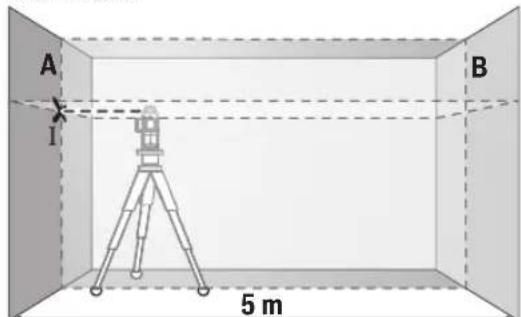
- Direct the laser at wall A and allow the measuring tool to level itself. Mark the center of the point where the laser lines cross on wall A (point I).
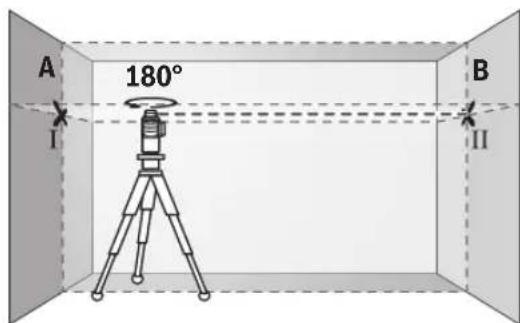
- Rotate the measuring tool 180°, allow it to level, and mark the point where the laser lines cross on the opposite wall B (point II). - Place the measuring tool without rotating it near wall B, switch it on, and allow it to level.
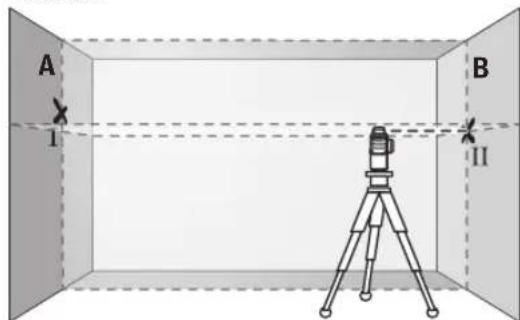
Position the measuring tool at the correct height (using the tripod or with shims if necessary), so that the crossing point of the laser lines exactly hits the previously marked point II on wall B.
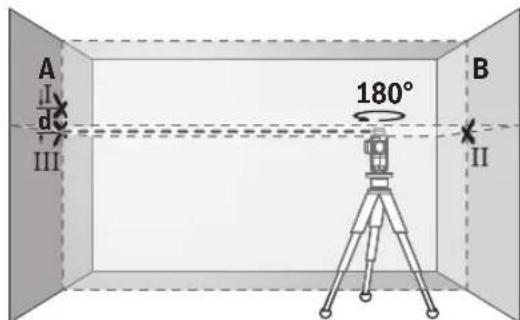
- Rotate the measuring tool 180° without changing the height. Aim it so that the vertical laser line passes through the marked point I. Allow the measuring tool to level and mark the crossing point of the laser lines on wall A (point III). The difference d between the marked points I and III on wall A gives the actual deviation of the measuring tool from the horizontal plane.
The maximum permitted deviation on the measuring distance of 2 × 5m = 10m is: 10m × ± 0.2mm/m = ± 2mm. The difference d between points I and III must therefore be no more than 2 mm.
Checking the accuracy of the horizontal line
For this check, you need a free area of approximately 5 x 5 m in front of a wall.
- Mount the measuring tool at a distance of 2.5 m from the wall on a tripod or place it on a firm, level surface (not on a stand). Switch on the measuring tool in the mode with automatic levelling. Select the operating mode in which a vertical laser line is generated in front of the measuring tool.

Mark the centre of the vertical laser line on the floor at the opening of the door (point I), at a distance of 5 m on the other side of the door opening (point II), and on the upper edge of the door opening (point III).
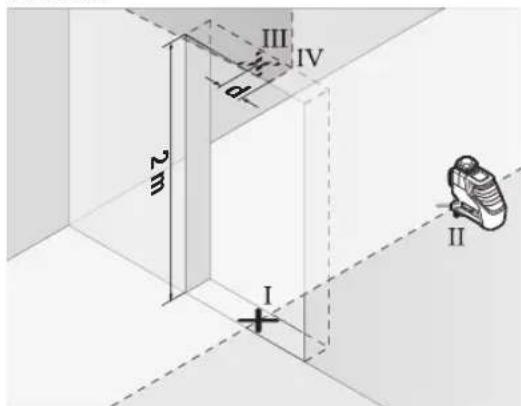
- Rotate the measuring tool 180° and place it on the other side of the door opening directly behind point II. Allow the measuring tool to level and align the vertical laser line so that its centre passes exactly through points I and II. - Mark the centre of the laser line on the upper edge of the door opening as point IV. The difference d between the two marked points III and IV gives the actual deviation of the measuring tool from the vertical line.
- Measure the height of the door opening.
Repeat the measuring procedure for the second vertical laser line. To do this, select the operating mode in which a vertical laser line is generated to the side of the measuring tool, and rotate the measuring tool by 90° before starting the measurement.
The maximum permitted deviation is calculated as follows:
Double the height of the door opening × 0.2mm/m Example: If the height of the door opening is 2 m, the maximum deviation must be no more than
2 × 2m × ± 0.2mm/m = ± 0.8mm. Points III and IV must therefore be no more than 0.8 mm apart.
Working advice
Always use the middle of the laser line. The position of the laser line changes with the adjustment.
Working with the laser target plate
The laser target plate (28) improves the visibility of the laser beam under unfavorable lighting conditions and at greater distances.
The reflective surface of the laser target plate (28) improves the visibility of the laser line. Through the transparent surface, the laser line is visible from the back side of the target plate.
Working with the tripod (accessory)
The tripod offers a stable measuring base that can be adjusted in height. Place the measuring tool with the 1/4" tripod mount (20) on the thread of the tripod
(32) or on a conventional tripod. For mounting on a conventional tripod, use the 5/8" tripod mount (19). Tighten the measuring tool with the tripod mounting screw.
Roughly align the tripod before switching on the measuring tool.
Working with the universal holder (accessory) (see figure C)
With the universal holder (25), you can attach the measuring tool, e.g., to vertical surfaces or magnetizable materials. The universal holder is also suitable as a floor stand and facilitates the height adjustment of the measuring tool.
Keep your fingers away from the back of the magnetic accessory when attaching it to
surfaces. The strong pulling force of the magnets can pinch your fingers.
Roughly align the universal holder (25) before switching on the measuring tool.
Working with the laser receiver (accessory) (see figure C)
The laser receiver makes it possible to detect laser beams even over long distances
Noo6po HaafoaHe Ha nacepckte IHHN KOpHCTeTe ro nacepcknO TnpemHNK (29). PnpaOteHe co Iacepckn npemHNK Bknyute Ro pekmOT Ha npemHNK (BnDn PekmHa npemHNK, CtpaHua 235).
Nacepcn 3aunTHH ouHa (onpeMa)
Nacepckte 3aHTTHO Ounna ja qHnTPnpaaT OKO nATA CBETNIHa. Ha ToJ HauHH CBETNO HA nacepot N3rIeJa NOCBETNo 3a OKOTO.
He Hn Kopnctete nacepckhte 3aHTTHO uHna (doonHHTeHa onpema) kako 3aHTTHN OHNla.
Iacepcknte 3aunTHN Ounna Cnykat 3a noOp6po paon3HaBaHbHe Ha IacepcknOt 3paK; cenak, Tne He UTAT oI Nacepckoto 3pauehe.
He rKopHcteIacepcknte3aHTTHOcHna (DononHnTeHa onpeMa) kako Ounla 3a COHue Hn nak Bo coo6paKaJot. Iacepcknte Ounna He daBaat cenocha UV-3aHTTa n ro HamanyBaat npen03HaBaHeto Ha 60n.
PpHmepn 3a pa60ta (Bnu n CnKn B-G)
PpMepn 3a MoXHocHTne Ha npmeha Ha MePHNOtypek Ke HajTe Ha rpaNcKte CTpaHn.
OdpKyBaHe n cepBnC
OdpxbyBaBe n uHCTeHe
Iocjoaho OdpjxBajTe ja HcTotaHa MePHHOTypei. He ro notonybajTe MePHHOTypei BO BODa Nn DpyrTeuHOCTN.
H36pnueTe rHeuCTOTnTE CO BnaKHa MeKa Kpna. He KopncTete CpeCTBa 3a YnCTeHe HnN pactBopn.
PeIOBHO YIcTeTg NOBpHINHTe OKOYI H3ne3HNOt OTBOP Ha Iacepot IN pntoA BHIMAbajte HA BlaKHeuata.
MepHHOTypeCmee da ccecknnapa n TpaHcnpTnpa cmo BO 3aHTTHa YHaTa (31) OIN. KyΦep (34).
Bo cnyaj ha nonpaBka, hcnpaTe ro MEPHnotypeD Bo 3aHTnTHata YaHTA (31)OHN. KypePOT (34).
www.bosch-pt.com/serviceaddresses
Transport
The rechargeable battery must be removed from the device before transport. The batteries may only be transported by the user, without additional qualification.
When transporting the device by a third party (e.g. by air transport or forwarding agency), special attention must be paid to the packaging and labeling. In such a case, the device must be prepared by an expert for hazardous substances.
Transport the batteries only when the device is not in use. Secure the contacts and pack the battery in such a way that it cannot move in the packaging. Please note any additional national regulations.
Disposal

Measuring tools, rechargeable batteries/batteries, accessories and packaging should be sorted for environmentally friendly recycling.
Do not dispose of measuring tools and batteries in household waste!
Only for EU countries:
According to the European Directive 2012/19/EU on waste electrical and electronic equipment and its implementation in national law, measuring tools that are no longer usable, and according to Directive 2006/66/EC, defective or used batteries must be collected separately and recycled for reuse. If disposed of improperly, electrical and electronic equipment may have harmful effects on the environment and human health due to the possible presence of hazardous substances.
Rechargeable batteries/batteries:
Li-ion:
Please note the information in the transport section (see "Transport", page 239).
Serbian
Bluetooth® 4.0 (Low Energy)
Bluetooth® 4.0 (Low Energy)
30m H
30mH)
-Operating frequency range
2402-2480MHz
2402-2480 MHz
Maximum transmission power
<1mW
<1mW
Bluetooth® smart phone
Bluetooth® 4.0 (Low Energy) G)
Bluetooth® 4.0 (Low Energy)
-Operating system
Android 6 (and higher)
Android 6 (and higher)
iOS 11 (and higher)
iOS 11 (and higher)
Weight in accordance with EPTA-Procedure 01:2014
0.90 kg
0.90 kg
0.86 kg
0.86 kg
Dimensions (length x width x height)
162 x 84 x 148 mm
162 x 84 x 148 mm
Type of protection
www.bosch-pt.com/serviceaddresses
Transport
The recommended lithium-ion batteries are subject to the requirements of the regulations on dangerous goods. The user can transport the batteries by road without additional conditions.
When shipping via third parties (e.g., air transport or freight forwarding), special requirements regarding packaging and labeling must be observed. In such cases, a dangerous goods expert must be consulted when preparing the shipment.
Only send batteries if the housing is undamaged. Tape off open contacts and pack the battery so that it cannot move in the package. Please also observe any further national regulations.
Disposal

Measuring tools, accumulators/batteries, accessories, and packaging should be handed in for recycling in an environmentally friendly manner.
Do not dispose of measuring tools and accumulators/batteries in household waste!
Only for EU countries:
According to the European Directive 2012/19/EU on waste electrical and electronic equipment and its implementation in national law, measuring tools that can no longer be used, and according to the European Directive 2006/66/EC, accumulators/batteries that are defective or worn out must be collected separately and brought to recycling that meets environmental requirements.
www.bosch-pt.com/serviceaddresses
Transport
www.bosch-pt.com/serviceaddresses
Transport
The recommended lithium-ion batteries are subject to the law on the transport of dangerous goods. The user can transport the batteries by road without any conditions.
Transport
Working with the tripod (accessory)
The tripod is a device with adjustable height for stable mounting of the measuring tool. Using the 1/4" thread (20) on the measuring tool, attach it to the thread of the tripod (32) or to a standard camera tripod available in stores. To attach the measuring tool to a construction tripod available in stores, use the 5/8" thread (19). Tighten the measuring tool firmly with the tripod mounting screw.
Before switching on the measuring tool, roughly align the tripod.
Laser viewing glasses (accessory)
Laser viewing glasses have the special property of filtering out ambient light, making the laser beam appear brighter to the eye.
Do not use the laser viewing glasses (accessory) as protective goggles. Laser viewing glasses are intended to improve visibility of the laser beam, but they cannot protect the eyes from laser radiation. Do not use the laser viewing glasses as sunglasses or while driving a vehicle. Laser viewing glasses do not provide complete protection from ultraviolet radiation and impair color perception.
Examples of work operations (figures B–G)
Transport
The recommended lithium-ion batteries are subject to the regulations of the Dangerous Goods Act. The user can transport the batteries by road without further requirements.
When shipping them via third parties (e.g., by air transport or other transport agencies), special packaging and labeling requirements must be observed. Therefore, a dangerous goods transport specialist must be consulted when preparing the shipment.
Only ship the battery if its housing is not damaged. Tape off the open battery contacts and pack the battery so that it cannot move around in the packaging. Please also observe any national regulations regarding battery transport, if applicable.
Transport
The regulations for transporting the recommended lithium-ion batteries are subject to the provisions of laws governing the transport of dangerous goods. The user is permitted to transport the batteries by road without any restrictions.
If third parties are used for shipping (e.g., air transport, freight forwarding company), special requirements for packaging and labeling must be taken into account. It is necessary that
294 | Lithuanian.
a dangerous goods transport specialist be involved in preparing the shipment.

Robert Bosch Power Tools GmbH
(a) aIg aI J I J I J oIa (32)
(a) duo (34)
[a] iou 35
aJg aJb2 (21)
a a Jol (22)
aajjulai (23)
a u b li a (24)
(a) L ∪ L ∪ L ∪ L ∪ (25)
ȧ ij g j ȧ ii a i ȧ j (26)
(aaggall gll sllc) yjglk jlg (27)
Lai j 1 aolSgIgII .aaggl g Ig
aJUU Lgawj aagj (28)
(a) jU U Joo (29)
aaiiI uui
| GLL 3-80 CGLL 3-80 CG | Jahal
Jahal
Jahal
Jahal
Jahal
Jahal
Jahal
Jahal
Jahal
Jahal
Jahal
Jahal
Jahal
Jahal
Jahal
Jahal
Jahal
Jahal
Jahal
Jahal
Jahal
Jahal
Jahal
Jahal
Jahal
Jahal | |
| 3601 K63 R.. 3601 K63 T.. | ### | |
| (###) | |
| 30 j### 30 | -### | |
| 25 p 25 | -### | |
| 120-5 p 120-5 | -### | |
| j###/### 0,2± | j###/### 0,2± | (D/C) | |
| ±4° ±4° | ### | |
| ### 4> | ### 4> | ### | |
| ### 2000 | ### 2000 | ### | |
| % 90 | % 90 | ### | |
| 2E) | 2E) | ### | |
| 2 | 2 | ### | |
| ### 540-500.### 10> | ### 650-630.### 10> | ### | |
| 10 | 10 | C6 | |
| (a) ### 10×50 | (a) ### 10×50 | ### | |
| 1/10000 | 1/10000 | ### | |
| ### | |
| ### 23 | ### 23 | ### | |
| ### 10 | ### 10 | ### | |
| LR 7 | LR 7 g LR 6 | ### | |
| ### 5/8,### 1/4 | ### 5/8,### 1/4 | ### | |
| ### | |
| ### 12 | ### 12 | ### | |
| LR6 (AA) | LR6 (AA) | ### | |
| ### 1,5×4 | ### 1,5×4 | ### | |
| ### 2032 | ### 3 p 10 p 10 p 10 p 10 p 10 p 10 p 10 p 10 p 10 p 10 p 10 p 10 p 10 p 10 p 10 p 10 p 10 p 10 p 10 p 10 p 10 p 10 p 10 p 10 p 10 p 11 p 11 p 11 p 11 p 11 p 11 p 11 p 11 p 11 p 11 p 11 p 11 p 11 p 11 p 11 p 11 p 11 p 11 p 11 p 11 p 11 p 11 p 11 p 11 p 11 p 12 p 12 p 12 p 12 p 12 p 12 p 12 p 12 p 12 p 12 p 12 p 12 p 12 p 12 p 12 p 12 p 12 p 12 p 12 p 12 p 12 p 12 p 12 p 12 p 12 p 11 p 11 p 11 p 11 p 11 p 11 p 11 p 11 p 11 p 11 p 11 p 11 p 11 p 11 p 11 p 11 p 11 p 11 p 11 p 11 p 11 p 11 p 11 p 11 p 10 p 10 p 10 p 10 p 10 p 10 p 10 p 10 p 10 p 10 p 10 p 10 p 10 p 10 p 10 p 10 p 10 p 10 p 10 p 10 p 10 p 10 p 10 p 10 p 12 p 12 p 12 p 12 p 12 p 12 p 12 p 12 p 12 p 12 p 12 p 12 p 12 p 12 p 12 p 12 p 12 p 12 p 12 p 12 p 12 p 12 p 12 p 12 p 10 p 10 p 10 p 10 p 10 p 10 p 10 p 10 p 10 p 10 p 10 p 10 p 10 p 10 p 10 p 10 p 10 p 10 p 10 p 10 p 10 p 10 p 10 p 10 p 1
|
| ### | |
| ### 6 | ### 8 | ### | |
| ### 4 | ### 6 | ### | |
| Bluetooth® | |
298|
| GLL 3-80 CGLL 3-80 CG | الجعault |
| Bluetooth® 4.0 (Low Energy)G | Bluetooth® 4.0 (Low Energy)G | -الجعault |
| H μö 30 | H μö 30 | -الجعault |
| jürgen 2480-2402 | jürgen 2480-2402 | -الجعault |
| b1g l.l.l.l> | b1g l.l.l.l> | -الجعault |
| | Bluetooth® رززالداللانيال |
| Bluetooth® 4.0 (Low Energy)G | Bluetooth® 4.0 (Low Energy)G | -الجعault |
| (الجعault)6 رززالداللانيال | (الجعault)6 رززالداللانيال | -الجعault |
| )الجعault(g) iOS 11 | )الجعault(g) iOS 11 | -الجعault |
| EPTA-Procedure 01:2014 مصحيى |
| p≤0,90 | p≤0,90 | معربيالسلام |
| p≤0,86 | p≤0,86 | معربيالسلام |
| p≥148×84×162 | p≥148×84×162 | السلام |
| | (العربية × الحرفية × الحرفية) |
| (الإستعمال وشرmination)(الإستعمال) IP54 | (الإستعمال وشرmination)(الإستعمال) IP54 | "الإستعمال"السلام |
| \( p^{\circ}35+ \ldots p^{\circ}0 \) | \( p^{\circ}35+ \ldots p^{\circ}0 \) | السلام |
| \( p^{\circ}40+ \ldots p^{\circ}10- \) | \( p^{\circ}40+ \ldots p^{\circ}10- \) | السلام |
| \( p^{\circ}70+ \ldots p^{\circ}20- \) | \( p^{\circ}70+ \ldots p^{\circ}20- \) | السلام |
| GBA 12V...(aclw 4,0 ≤ GBA 12V |sc lo) | GBA 12V...(aclw 4,0 ≤ GBA 12V |sc lo) | السلام |
| GAL 12...(GAX 18...) | GAL 12...(GAX 18...) | السلام |
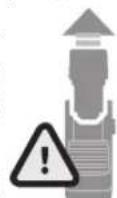
LED
jai jiuwog%75-100
jol jaiu 9%35-75
jao jaiu w jg% 10-35
g 8-001
J 1
"Bosch Levelling Remote App"
Bluetooth 1g jd
"Bosch Levelling Remote App" (gubill)
Apple App Store) wlll l
(Google Play Store
WjB Bosch go Bluetooth
www.bosch-pt.com
Bluetooth abwgl syjc sill sic
(29) j山山 aai
(5)jllIcIbOaI,(Joooll aab Jfo
.1uU (6) u
sic oJjU jUU bgs aqg aJSo!
jUJUaunuugdJusll.Juaunll aJb Jssu
Iaal qjb u c laiuall aayb aayp
(5)(204
(6) Jauwall aJb uJy Gabiy
a0s jso 5u wuloll ooc uoljglp
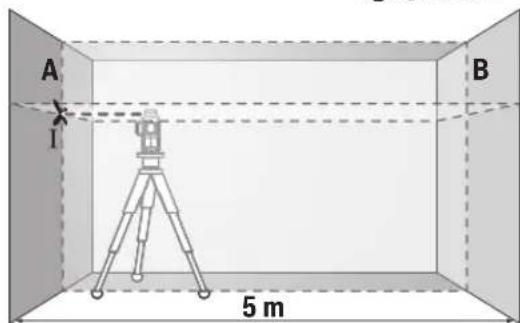
Bluetooth®
The Bluetooth® word mark and logos are registered trademarks owned by Bluetooth SIG, Inc. and any use of such marks by Bosch is under license.
Other trademarks and trade names are those of their respective owners.
Bluetooth® word mark and logos are registered trademarks owned by Bluetooth SIG, Inc. (8)
Bluetooth
blal 100
CAL guard 1JLJI J
cal guard 111111111111111111111111111111111111111111111111111111
-10a A 1
jlll jd 1b! cIg
[cal] puiu wul uai 10 gog a calg uall CAL guard oJau (3) guard
-1.aaai (jw 12 J5
-0jlaa jgjj
.
-()
(1)
Bosch Levelling Remote App" 120 .8aI aai I aai I aai I aai I aai I aai I aai I aai I aai I aai I aai I aai I aai I aai I aai I aai I aai I aai I aai I aai I aai I aai I aai I aai I aai I aai I aai I aai I aai I aai I aai I aai I aai I cal guard (3)
1gijx|b
(a,j)wulfoLgwlbuα(204.301 aoull,“wulfoLoo
JGgUGLuI JIJI 15JUL CAL guard (3) UaI Iabu
jjg(5)Jaaaall gggjLbc bdo1 3 3 aagll uai j Bluethoth9
.CAL guard (3) UJU Jabi. J2
302
jgSj wJwug.02= p/00,2x 10 Jd jg| jabaiJJ d gJal
15golJI bJI yguWJI 89
2.5 1 Jy y aai jiai w,aaai pui SJ .uill uilg no uil uLc (aui aoij Ulc)
Jolal yu) aagugag uiaa JyU 1 g wul ooc jwuy p. (jglal y Ie gj jai ayguill aai yduil adb ooc plai sogac jj lsgua a kuiy i
-aaig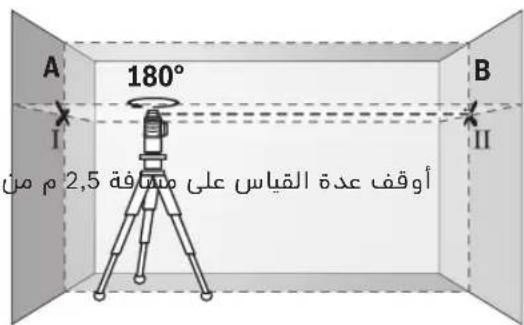
abai jai g g wai ygwi B JaaJI JdJU Lc JJU (11 abai)
-ogai Iacg,aa
buiy gai Lcug,glu wu p9gBblU.
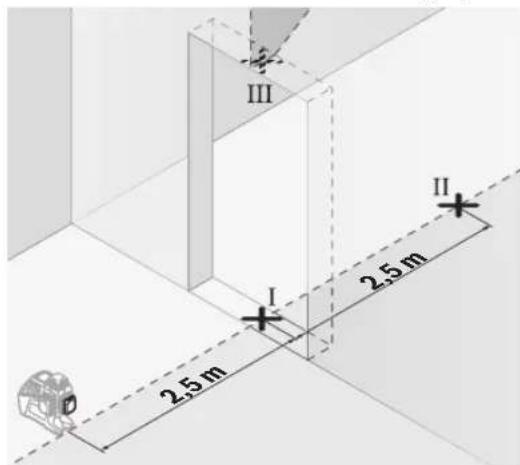
15 5 1g (I abai) aiai aai Ic lag (II abai) uai aiai jai. (III abai) uai aiai aggl
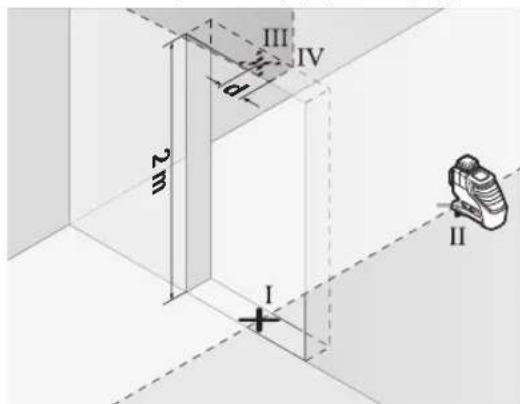
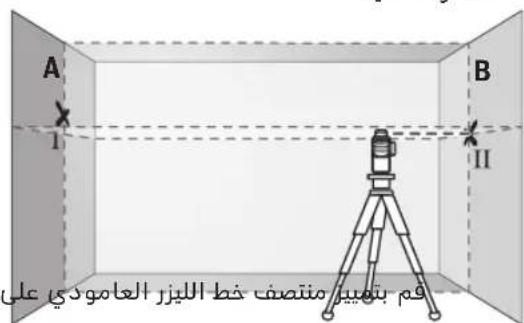
sic lai lo g jg jg jilgal yjll iab abai abai (ogal jll lgl aai pig qw il abai ag B
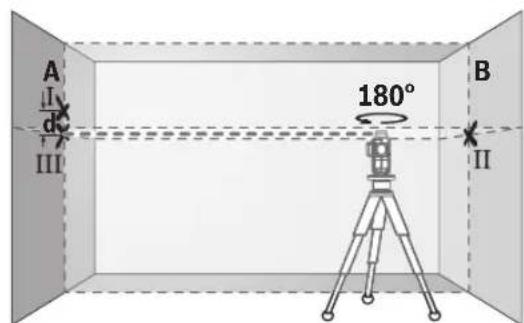
g.11 abaiI Ia 1u y uui aia jao jai ba aag g li 1gwiBauy po aui o i iibai Jn daaio juy y sgoJI jll .aa 11 g
IV abaii ui yuiia
jullb juy A Jdall lc qingg j lcs. ljuai g w jll aboill u c s golal gblai abai juiy pag qwail yogai .(ll aboi) A Jdall lc jull b
oaiu juii aag ojuaig. aLaa oJbIs aui 2 i1 1, uao Jksw juiu Eaw uanaux juu eau
aJlI I JJJU 0JbIs gJ maw aolll lalj jll ujjg jLbi pga J .Jgall oJdll JqI Ls,aaawaill gge aow J .JgJl Jau Jlc
(B-GJgJJIbJI)Joo
Lc wai ooc laaaw alal c j aubabail pgujll
aJg aJal
aillg ailll
wJl oJgIjLc Jla
Joo 10g Joll JwJol oXuJgWJ
- aBg aBaaabwglawgwl aWol aSgo gI cBbJ slgo p SAAU W JJJ 29a aig sic gBwll aolo bbl .uui uuiuuiu
Robert Bosch Morocco SARL
Jgssao jolal gJw,53 LlJI JI 20300
+212529314327:
sav.outillage@ma.bosch.com: JJI JJI
:aaJdJIuglic JsJdJI
www.bosch-pt.com/serviceaddresses
Jai
UjwLgogolpogulUgolpo gaa
gassjjglgawalwlaol alac jjgl gwaoudu kwwy sll wu wgi jai .jill uwllo lxc jlg wll oxc qiy gao
j0s0o0s0s0go jg sglwgj 1jg aia oio slgi Gdi a dgs
aui 5jL
Lol
<awjjjjl.
Bosch Levelling Remote App, jS 1u CcI Gai I J pAs S uu 1s Solj ng y. Cw o w p aJ CAL Jwai n Wn Wg Jw Jn Jw w Jw Jw Jw (3) guard
(3) CAL guard jwailoi jdu wu jui jwaioi g ujiis jj ci silo o wgj dai .gawolag
g 11111111111111111111111111111111111111111111111111111111111
jI jS jS jS oJl jI jI sI b a JI JdJI 1g jI g (c)al) Ia JI JI JI JI JI JI JI JI JI JI JI JI JI JI JI JI JI JI JI JI JI JI JI JI JI JI JI JI JI JI JI JI JI JI JI JI JI JI JI JI JI JI JI JI JI JI JI JI JI JI J
jJlJjI jiiS
Jucs josjissuolgc
gss.51sbslo slosj juiu 1j jgl gnsilgco xb a sla slos daii .sis
jI jU Loo uu uu uuuu uuuu uuuu uuuu uuuu uuuu uuuu uuuu uuuu uuuu uuuu uuuu uuuu uuuu uuuu uuuu uuuu uuuu uuuu uuuu uuuu uuuu uuuu uuuu uuuu uuuu uuuu uuuu uuuu uuuu uuuu uuuu uuuu uuuuu uuuu uuuu uuuu uuuu uuuu uuuu uuuu uuuu uuuu uuuu uuuu uuuu uuuu uuuu uuuu uuuu uuuu uuuu uuuu uuuu uuuu uuuu uuuu uu
"Bosch Levelling Remote App,"
Bluetooth® (Bluetooth App) allows you to control the measuring tool via your smartphone. You can download the "Bosch Levelling Remote App" from the Apple App Store or Google Play Store. For more information, visit www.bosch-pt.com. The Bluetooth® word mark and logos are registered trademarks owned by Bosch.
Bluetooth®
Bluetooth® is a registered trademark of Bluetooth SIG, Inc. and any use of such marks by Bosch is under license.
CAL guard
CAL guard protects the calibration of the measuring tool.
312|w
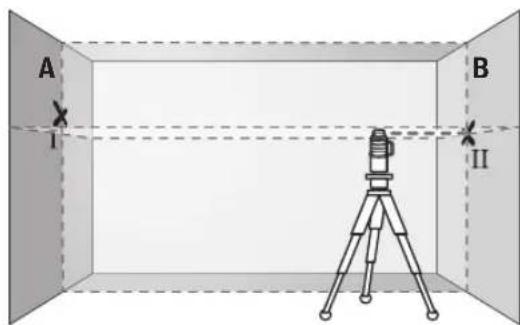
www.bosch-pt.com/serviceaddresses
Copyright © 2012-2020 STMicroelectronics
All rights reserved.
Redistribution and use in source and binary forms, with or without modification, are permitted provided that the following conditions are met:
- Redistributions of source code must retain the above copyright notice, this list of conditions and the following disclaimer.
- Redistributions in binary form must reproduce the above copyright notice, this list of conditions and the following disclaimer in the documentation and/or other materials provided with the distribution. Neither the name of STMicroelectronics nor the names of its contributors may be used to endorse or promote products derived from this software without specific prior written permission.
THIS SOFTWARE IS PROVIDED BY THE COPYRIGHT HOLDERS AND CONTRIBUTORS "AS IS" AND ANY EXPRESS OR IMPLIED WARRANTY, INCLUDING, BUT NOT LIMITED TO, THE IMPLIED WARRANTIES OF MERCHANTABILITY AND FITNESS FOR A PARTICULAR PURPOSE ARE DISCLAIMED. IN NO EVENT SHALL THE COPYRIGHT OWNER OR CONTRIBUTORS BE LIABLE FOR ANY DIRECT, INDIRECT, INCIDENTAL, SPECIAL, EXEMPLARY, OR CONSEQUENTIAL DAMAGES (INCLUDING, BUT NOT LIMITED TO, PROCUREMENT OF SUBSTITUTE GOODS OR SERVICES; LOSS OF USE, DATA, OR PROFITS; OR BUSINESS INTERRUPTION) HOWEVER CAUSED AND ON ANY THEORY OF LIABILITY, WHETHER IN CONTRACT, STRICT LIABILITY, OR TORT (INCLUDING NEGLIGENCE OR OTHERWISE) ARISING IN ANY WAY OUT OF THE USE OF THIS SOFTWARE, EVEN IF ADVISED OF THE POSSIBILITY OF SUCH DAMAGE.
| de | Hiermit erklart Robert Bosch Power Tools GmbH, dass der Funkanlage typ GLL 3-80 C/GLL 3-80 CG der Richtlinie 2014/53/EU entspricht. Der vollständige Text der EU-Konformitätserklärung ist unter der folgenden Internetadressee verfügbar: |
| en | Hereby, Robert Bosch Power Tools GmbH declares that the radio equipment type GLL 3-80 C/GLL 3-80 CG is in compliance with Directive 2014/53/EU. The full text of the EU declaration of conformity is available at the following internet address: |
| fr | Le sousigné, Robert Bosch Power Tools GmbH, déclare que l'équipment radioélectrique du type GLL 3-80 C/GLL 3-80 CG est conforme à la directive 2014/53/UE. Le texte complet de la déclaration UE de conformité est disponible à l'adresse internet suivante: |
| es | Por la presente, Robert Bosch Power Tools GmbH declares que el tipo de equipo radioélectrico GLL 3-80 C/GLL 3-80 CG es conforme con la Direiva 2014/53/UE. El textscomplet de la déclaration ue de conformidad está disponible en la dirección Internet suivente: |
| pt | A abaixa assinada Robert Bosch Power Tools GmbH declares que o presente tipo de equipamento de rádio GLL 3-80 C/GLL 3-80 CG está em conformidade com a Direiva 2014/53/UE. O texto integral da déclaration de conformidade está disponível no segunte endereço de Internet: |
| it | Il fabricante, Robert Bosch Power Tools GmbH, dichiara che il tipo di apparecchiatura radio GLL 3-80 C/GLL 3-80 CG é conforme alla direittiva 2014/53/UE. Il testo completeness della dichiarazione di conformità ue è disponibile al segmente indirizzo Internet: |
| nl | Hierbij verkaar ik, Robert Bosch Power Tools GmbH, dat het type radioapparatuur GLL 3-80 C/GLL 3-80 CG conform is met Richtlijn 2014/53/EU. De volledige tekst van de EU-conformiteitsverklaring kan worden geraadpleegd op het volgende internetadres: |
| da | Hermed erklasser Robert Bosch Power Tools GmbH, at radioudystyrstypen GLL 3-80 C/GLL 3-80 CG er i overensstemmelse med direktiv 2014/53/EU. EU-overensstemmelseserkräingens fulde tekst kan findes på følgende internetadresse: |
| sv | Härmed fösakrar Robert Bosch Power Tools GmbH attenna typ av radioutrustning GLL 3-80 C/GLL 3-80 CG overensstämmer med direktiv 2014/53/EU. Den fullständiga texten till EU-fösakran om overensstämmlse finns på foljande webbadress: |
| no | Robert Bosch Power Tools GmbH erklasser herved at radioustyrstypen GLL 3-80 C/GLL 3-80 CG er i overensstemmelse med direktivet 2014/53/EU. Den fullstandige teksten i EU-samsvarserkläeringen er tilgiengelig på følgende nettadresse: |
| fi | Robert Bosch Power Tools GmbH vakuuttaa,etta radiolaitetyppi GLL 3-80 C/GLL 3-80 CG on direktiavin 2014/53/EU mukainen. EU-vaatimustemmukaisuusvakuutuksen täysmittainen teksti on saatavilla seuraavassa internetosoitteessa: |
| el | Me tvn napouca o/n Robert Bosch Power Tools GmbH, δηλωνει οτιοράσεξαπιμός GLL 3-80 C/GLL 3-80 CG πλροι tvn obnyia 2014/53/EE. To πλήρες κειμένο της δηλωνός συμύρφωσε EE διαίθεται στην ακόλουθη στοσελίδα στο διαβίκτο: |
| tr | Robert Bosch Power Tools GmbH, GLL 3-80 C/GLL 3-80 CG radyo ekipmani tipinidirektif 2014/53/EU ile uyumlu oldugunu banyan eder. AB uygunluk banyanin tam metnine asagidaki internet adresinden ulasabilirsiniz: |
| pl | Robert Bosch Power Tools GmbH ninejsym oswiadzca, ze typ urzadzenia radiowego GLL 3-80 C/GLL 3-80 CG jest zgodny z dyrektywja 2014/53/UE. Pelny tekst deklaraci zgodnosci ue jest dostepny pod nastepujacym adresem internetowym: |
| cs | Tínto Robert Bosch Power Tools GmbH prohlaseje, ze typ rádioveho zaflizeni GLL 3-80 C/GLL 3-80 CG je v souladuseme směrnici 2014/53/EU. Üplné zněni EU prohlaseni o shodé je k dispozici na tefo internetové adrese: |
| sk | Robert Bosch Power Tools GmbH týmto vyhlasuje, ze rádiove zariadenie typu GLL 3-80 C/GLL 3-80 CG je v sulade so smernicou 2014/53/EU. Üplné EU vyhlasenie o zhode je k dispozicii na tejto internetovej adrese: |
| hu | Robert Bosch Power Tools GmbH igazolja, hogy a GLL 3-80 C/GLL 3-80 CG típusu rádioberendezés megfelela 2014/53/Irányelnek. Az EU-megfelelo ségi nyilatkozat teljes szövege elérhetó a kõvetkežo internetes cîmen: |
| ru | Сим Robert Bosch Power Tools GmbH záraßnej, чу радиоборudованип Ттуна GLL 3-80 C/GLL 3-80 CG cootbetCTbyeДирektivze 2014/53/EU. С пелнымTekстом декларцио COOTBETCTBи EU можно ознakомпься по сеюшему Итерnet-a-dpresу: |
| uk | Сим Robert Bosch Power Tools GmbH záraßnej, чу радиobладаннь Ттуна GLL 3-80 C/GLL 3-80 CG Biindobidae Дирektivze 2014/53/EU. 3 navnomTekstomanдекларци вдповдости EU можна ознakомпься за takочи Interpnet-a-dpresoco: |
| II |
| kk | Осыmens Robert Bosch Power Tools GmbH Kompanhiers GmbH 3-80 C/GLL 3-80 CG Tjurin deri radio jazbiktardbi 2014/53/EU Д配电иьсын сальыгш мafлUMды. EO саджостik мafлUMдамасы Тeme徴и INTEPnet Mekeнжайда калжетимdi: |
| ro | Prin prezenta, Robert Bosch Power Tools GmbH declară că tipul de echipamente radio GLL 3-80 C/GLL 3-80 CG este în conformitate cu Direcva 2014/53/UE. Textul integral al declarației UE de conformitate este disponibil la următoarea adresă internet: |
| bg | С насточто Robert Bosch Power Tools GmbH Д配电иьа 2014/53/EC. РадocTHЯТTekCT ha EC Д配电иьота за сбответбе Mayo da se habero Na садпюй INTEPnet adpec: |
| mk | С ова, Robert Bosch Power Tools GmbH почртура, чу този ти п радиосьорьени GLL 3-80 C/GLL 3-80 CG e bo coласноct со Д配电иьота 2014/53/EU. ZeioschnotTekCT ha Изавата за coobpaцноct ha EU maye da ro npochitate Ha садпава INTEPnet CTpansuca: |
| sr | Ovim Robert Bosch Power Tools GmbH izjavljupe da je radio-oprema tipa GLL 3-80 C/GLL 3-80 CG u skladu sa direktivom 2014/53/EU. Kompletan tekst EC izjave o usaglaşeniosti je dostupan na sledecoj veb-adresi: |
| sl | Robert Bosch Power Tools GmbH potrjuje, da je tip radijske opreme GLL 3-80 C/GLL 3-80 CG sk laden z Direktivo 2014/53/EU. Celotno besedilo izjave EU o skladnosti je na voljo na naslednjem spltenem naslovu: |
| hr | Robert Bosch Power Tools GmbH ovime izjavljupe da je radijska opreme tipa GLL 3-80 C/GLL 3-80 CG u skladu s Direktivom 2014/53/EU. Cjeloviti tekst EU izjave o sukladnosti dostupan je na sljedecoj internetskoj adresi: |
| et | Käesolevaga deklareerib Robert Bosch Power Tools GmbH, et käesolev raadioseadme tüpp GLL 3-80 C/GLL 3-80 CG sk laden z Direktivo 2014/53/EL nouetele. ELi vastavusdeklaratsioni täielik tekst on kattesaadamav jargmisel internetaadressil: |
| lv | Ar so Robert Bosch Power Tools GmbH deklare, ka radioiekârta GLL 3-80 C/GLL 3-80 CG atbilst Direktivai 2014/53/ES. Pilns ES atbilstibas deklaracijas teksts ir pieejams šādā interneta vietne: |
| lt | Aš, Robert Bosch Power Tools GmbH, patvirtinu, kad radipo jrenginiç tipas GLL 3-80 C/GLL 3-80 CG atitinka Direktvyá 2014/53/ES. Visas ES atitikties deklaracijos tekstas prieinamas šiuo interneto adresu: |
| → http://eu-doc.bosch.com/ |
Hereby, Robert Bosch Limited as authorised representative acting on behalf of Robert Bosch Power Tools GmbH declares that the radio equipment type GLL 3-80 C/GLL 3-80 CG is in compliance with the Radio Equipment Regulations 2017. The full text of the declaration of conformity is available at the following internet address: