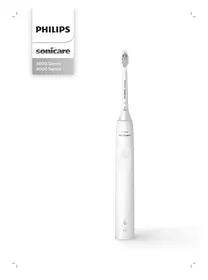
4100 series - HX3681 - Electric toothbrush PHILIPS - Free user manual and instructions
Find the device manual for free 4100 series - HX3681 PHILIPS in PDF.
 FR
FR
 AZ
AZ
 BG
BG
 CS
CS
 DA
DA
 DE
DE
 EL
EL
 EN
EN
 ES
ES
 ET
ET
 FI
FI
 HE
HE
 HU
HU
 HY
HY
 IT
IT
 KA
KA
 KK
KK
 KY
KY
 LT
LT
 LV
LV
 MK
MK
 NL
NL
 NO
NO
 PL
PL
 PT
PT
 RO
RO
 RU
RU
 SK
SK
 SL
SL
 SQ
SQ
 SV
SV
 TG
TG
 TK
TK
 UK
UK
 UZ
UZ
| Product type | Electric toothbrush |
| Brand | Philips |
| Model | 4100 series - HX3681 |
| Power supply | USB charger (5V DC, 2.5 W wall adapter, UL Class 2 or equivalent) |
| Battery | Built-in rechargeable, autonomy of at least 28 brushing sessions (14 days with twice daily use) |
| Brushing modes | Clean and Sensitive |
| Special functions | EasyStart (gradual activation), QuadPacer (4-quadrant timer), SmartTimer (auto stop at 2 min), Pressure sensor, Brush head replacement reminder (BrushSync) |
| Compatible brush heads | Philips Sonicare smart brush heads with BrushSync technology |
| Charge indicator | LED indicator: solid green (full), blinking green (charging), blinking orange (low/empty) |
| Radio frequency | Bluetooth 2.4 GHz (3 dBm max), NFC 13.56 MHz (30.16 dBm max) |
| Operating and charging temperature | Between 0 °C and 40 °C |
| Cleaning and maintenance | Rinse brush head after each use; clean handle with a damp cloth; clean unplugged charger with a damp cloth; do not wash in dishwasher or use chemicals |
| Brush head replacement | Every 3 months or according to wear detected by BrushSync |
| Warranty | International warranty (refer to leaflet) |
| Recycling | Do not dispose of with household waste; rechargeable battery must be removed by a professional |
Frequently Asked Questions - 4100 series - HX3681 PHILIPS
User questions about 4100 series - HX3681 PHILIPS
0 question about this device. Answer the ones you know or ask your own.
Ask a new question about this device
Download the instructions for your Electric toothbrush in PDF format for free! Find your manual 4100 series - HX3681 - PHILIPS and take your electronic device back in hand. On this page are published all the documents necessary for the use of your device. 4100 series - HX3681 by PHILIPS.
USER MANUAL 4100 series - HX3681 PHILIPS
Congratulations on your purchase and welcome to Philips! To fully benefit from the support that Philips offers, register your product at www.philips.com/welcome.
Important safety information
Only use the product for its intended purpose. Read this important information carefully before you use the product and its batteries and accessories, and save it for future reference. Misuse can lead to hazards or serious injuries.
Warnings
- Charge only with Philips WAA1001, WAA2001, UL or equivalent safety approved adapters with input ratings (100 - 240V~; 50/60Hz; 3.5W) and output ratings (5Vdc; 2.5W). For the list of adapters, please see www.philips.com/support.
- Keep the charger away from water.
- Make sure the handle is completely dry before you connect the USB charger.
- This appliance can be used by children and persons with reduced physical, sensory or mental capabilities or lack of experience and knowledge if they have been given supervision or instruction concerning use of the appliance in a safe way and understand the hazards involved. Cleaning and user maintenance shall not be made by children without supervision.
- Children should be supervised to ensure that they do not play with the product.
Only use original Philips accessories or consumables. Only use the USB charger provided with the product with an UL (Class 2) or equivalent approved 5V DC adapter (IPX4 or higher). - This appliance contains no user-serviceable parts. If the appliance is damaged, stop using it and contact the Consumer Care Center in your country (see 'Warranty and support').
-
Do not charge the product outdoors or near heated surfaces.
-
Do not clean any part of the product in the dishwasher.
- This appliance has only been designed for cleaning teeth, gums and tongue.
- Stop using the appliance and consult your dentist/doctor if excessive bleeding occurs after use, if bleeding continues to occur after 1 week of use or if you experience discomfort or pain.
If you have had oral or gum surgery in the previous 2 months, consult your dentist before you use this appliance.
If you have a pacemaker or other implanted device, contact your doctor or the manufacturer of the implanted device prior to use.
If you have medical concerns, consult your doctor before you use this appliance. - This appliance is a personal care device and is not intended for use on multiple patients in a dental practice or institution.
- Stop using a brush head with crushed or bent bristles. Replace the brush head every 3 months or sooner if signs of wear appear.
- If your toothpaste contains peroxide, baking soda or bicarbonate (common in whitening toothpastes), thoroughly clean the brush head with soap and water after each use. This prevents possible cracking of the plastic.
- Avoid direct contact with products that contain essential oils or coconut oil. Contact may result in bristles dislodging.
- Charge, use and store the product at a temperature between 32^ / 0^ and 104^ / 40^ .
- Keep product and batteries away from fire and do not expose them to direct sunlight or high temperatures.
- If the product becomes abnormally hot or smelly, changes color or if charging takes longer than usual, stop using and charging the product and contact Philips.
-
Do not place products and their batteries in microwave ovens or on induction cookers.
-
Do not open, modify, pierce, damage or dismantle the product or battery to prevent batteries from heating up or releasing toxic or hazardous substances. Do not short-circuit, overcharge or reverse charge batteries.
If batteries are damaged or leaking, avoid contact with the skin or eyes. If this occurs, immediately rinse well with water and seek medical care.
Electromagnetic fields (EMF)
This Philips appliance complies with all applicable standards and regulations regarding exposure to electromagnetic fields.
Radio Equipment Directive
Hereby, Philips declares that electric toothbrushes equipped with a radio frequency interface (Bluetooth or BrushSync) are in compliance with Directive 2014/53/EU.
- Bluetooth radio frequency: 2.4 GHz
Maximum Bluetooth radio frequency power: 3 dBm - NFC radio frequency: 13.56 MHz
Maximum NFC radio frequency power: 30.16 dBm The full text of the EU declaration of conformity is available at the following internet address:
www.philips.com/support
Intended use
3000 and 4000 series power toothbrushes are intended to remove adherent plaque and food debris from the teeth to reduce tooth decay and improve and maintain oral health. 3000 and 4000 series power toothbrushes are intended for consumer home use. Use by children should be with adult supervision.
Your Philips Sonicare toothbrush
1 Hygienic travel cap
2 Brush head
3 Handle
4 Power on/off button
5 Brush head replacement reminder
6 Battery level indicator
7 USB charger (wall adapter not included)
8 Travel case (Specific models only)
Note: Wall adapter not included. Only use 5V adapter (Type A).
Note: Brush heads may vary.
Getting started
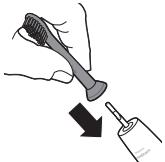
Attaching the brush head
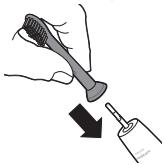
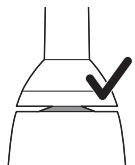
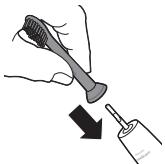
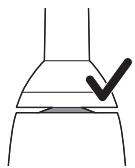
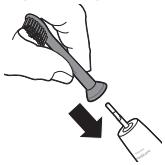
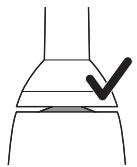
1 Align the brush head so the bristles point in the same direction as the front of the handle.
2 Firmly press the brush head down onto the metal shaft until it stops.
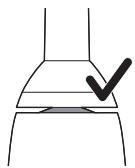
Note: It is normal to see a slight gap between the brush head and the handle. This allows the brush head to vibrate properly.
Charging your Philips Sonicare
1 Plug the USB charging cord into a wall adapter that is connected to a electrical outlet.
2 Place the handle on the charger.
- The light of the battery level indicator illuminates and the handle beeps twice. This indicates that the toothbrush is charging.
Note: It can take up to 24 hours to fully charge the battery, but you can use the Philips Sonicare toothbrush before it is fully charged.
Using your Philips Sonicare toothbrush
If you are using your Sonicare toothbrush for the first time, it is normal to feel more vibration than when using a non-electric toothbrush. It is common for first time users to apply too much pressure. Only apply gentle pressure and let the toothbrush do the brushing for you.
Please follow brushing instructions below for the best experience. To help you transition to your new Sonicare power toothbrush, it comes with the EasyStart feature turned on. This feature gently increases the power over the first 14 brushings to help you adapt to brushing with a Philips Sonicare toothbrush.
Brushing instructions
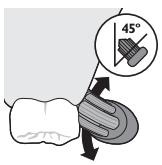
1 Wet the bristles and apply a small amount of toothpaste.
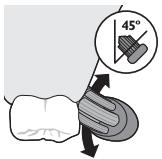
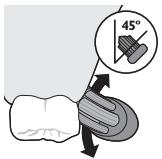
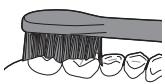
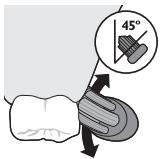
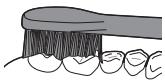
2 Place the toothbrush bristles against the teeth at a slight angle (45 degrees), pressing gently to make the bristles reach the gumline or slightly beneath the gumline.
Note: Keep the center of the brush in contact with the teeth at all times.
3 Press the power on/off button to turn on the Philips Sonicare.
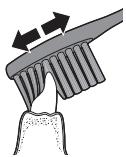
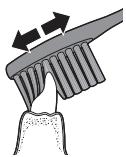
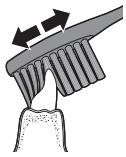
4 Gently keep the bristles placed on the teeth and in the gumline. Brush your teeth with small back and forth motion so the bristles reach between the teeth. Continue this motion throughout your brushing cycle.
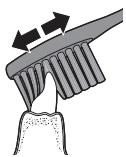
Note: The bristles should slightly flare. It is not recommended to scrub as you would with a manual toothbrush.
5 To clean the inside surfaces of the front teeth, tilt the brush handle semi-upright and make several vertical overlapping brushing strokes on each tooth.
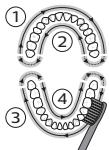
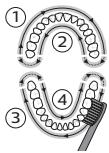
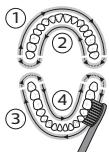
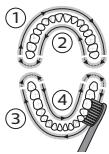
Note: To make sure you brush evenly throughout the mouth, divide your mouth into 4 sections using the QuadPacer feature (see chapter 'Features').
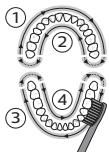
6 Begin brushing in section 1 (outside upper teeth) and brush for 30 seconds before you move to section 2 (inside upper teeth). Continue brushing in section 3 (outside lower teeth) and brush for 30 seconds before you move to section 4 (inside lower teeth).
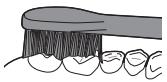
7 After you have completed the brushing cycle, you can spend additional time brushing the chewing surfaces of your teeth and areas where staining occurs. You can also brush your tongue, with the toothbrush turned on or off, as you prefer.
Your Philips Sonicare toothbrush should be safe to use on braced (brush heads wear out sooner when used on braces) and dental restorations (fillings, crowns, veneers) if they are properly adhered and not compromised. If a problem occurs, please follow up with a dental professional.
Note: When the Philips Sonicare toothbrush is used in clinical studies, the handle should be used in clean mode, fully charged and the EasyStart feature deactivated.
Charging and battery status
1 Attach the USB charging cord to a wall adapter, plug the wall adapter into an electrical wall outlet.
2 Place the handle on the charger.
Note: The handle will emit 2 short beeps to confirm that the handle is placed properly on the charger and is charging.
Note: This Philips Sonicare toothbrush is designed to provide at least 28 brushing sessions, each session lasting 2 minutes (14 days if used twice per day). The battery level indicator shows the battery status when you complete the 2-minute brushing session, when you pause the handle, or while it is charging.
Battery status (when handle is on a working charger)
Battery status
Battery indicator
| Full | Solid green (turns off after 30 seconds) |
| Charging | Flashing green |
Battery status (When handle is not placed on charger)
| Battery status | Battery indicator | Sound |
| Full | Solid green | - |
| Partially full | Flashing green | - |
| Low | Flashing orange | 3 beeps |
| Empty | Flashing orange | 2 sets of 5 beeps |
| Note: To save energy, the battery light will turn off when not in use. | ||
| Note: When the battery is completely empty, the Philips Sonicare toothbrush turns off. Place the Philips Sonicare toothbrush on the charger to charge it. | ||
| Note: To keep the battery fully charged at all times, you may keep your Philips Sonicare toothbrush on the charger when not in use. | ||
Features
- Modes (for 4000 series)
EasyStart
Brush head replacement reminder
Pressure sensor - Quadpacer
- SmarTimer
Modes (for 4000 series)
Your power toothbrush gives you the option to choose between sensitive and clean modes.
Note: When you use the toothbrush for the first time, the default setting is the sensitive mode.
To change modes:
- Press the power on/off button once to turn on the toothbrush.
- Press a second time within 2 seconds to change the mode.
- Press a third time within 2 seconds to pause.
After 2 seconds of brushing, pressing the power button again will also pause the toothbrush.
EasyStart
This Philips Sonicare model comes with the EasyStart feature activated. The EasyStart feature gently increases the power over the first 14 brushings to help you get used to the brushing with the Philips Sonicare.
To deactivate EasyStart see 'Activating or deactivating features'.
Brush head replacement reminder
Your Philips Sonicare is equipped with BrushSync technology that tracks the wear of your brush head.
Note: This feature only works with Philips Sonicare smart brush heads with BrushSync technology.
1 When attaching a new smart brush head for the first time the handle recognizes that you have a Philips brush head with BrushSync technology and begins tracking brush head wear.
2 Over time, based on the pressure you apply and the amount of time used, the handle will track brush head wear in order to determine the optimal time to change your brush head. This feature gives you the guarantee for the best cleaning and care of your teeth.
3 When the brush head replacement reminder light lights up amber, you should replace your brush head.
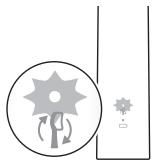
To deactivate the brush head replacement reminder see 'Activating or deactivating features'.
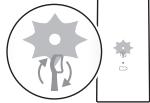
Pressure Sensor
Your Philips Sonicare is equipped with an advanced sensor that measures the pressure you apply while brushing. If you apply too much pressure, the toothbrush will provide immediate feedback to indicate that you need to reduce the pressure. This feedback is given by a change in vibration and therefore brushing sensation and sound. Additionally, the brush head replacement reminder light will flash amber.
To deactivate the pressure sensor see 'Activating or deactivating features'.
QuadPacer
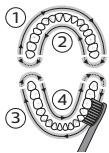
The QuadPacer is an interval timer that has a short beep and pause to remind you to brush the 4 sections of your mouth evenly and thoroughly. This Philips Sonicare toothbrush comes with the QuadPacer feature activated.
SmarTimer
The SmarTimer indicates that your brushing cycle is complete by automatically turning off the toothbrush at the end of the brushing cycle.
Dental professionals recommend brushing no less than 2 minutes twice a day.
Note: If you press the power on/off button after you started the brushing cycle, the toothbrush will pause.
After a pause of 15 seconds, the SmarTimer resets.
Activating or deactivating features
You can activate or deactivate the following features of your toothbrush:
EasyStart
Brush head replacement reminder
- Pressure sensor
To activate or deactivate these features, follow the instructions below:
EasyStart
1 Put the handle on the plugged-in charger.
2 Press and hold the power on/off button while the handle remains on the charger.
3 Keep the power on/off button pressed until you hear a single short beep (after 3 seconds).
4 Release the power on/off button.
- Triple tone of low-med-high means the EasyStart feature has been activated. The battery level indicator light will also blink green 2 times to confirm activation.
Triple tone of high-med-low means the EasyStart feature has been deactivated. The battery level indicator light will blink amber 1 time to confirm deactivation.
Note: To achieve clinical efficacy, EasyStart needs to be deactivated.
Brush head replacement reminder
Note: You can only activate or deactivate the brush head replacement reminder when a smart brush head is on the handle.
Note: New smart brush heads come with the brush head replacement reminder feature activated.
1 Put the handle on the plugged-in charger.
2 Press and hold the power on/off button while the handle remains on the charger.
3 Keep the power on/off button pressed until you hear a series of two short beeps (after 5 seconds).
4 Release the power on/off button.
- Triple tone of low-med-high means the brush head replacement reminder feature has been activated. The battery level indicator light will also blink green 2 times to confirm activation.
- Triple tone of high-med-low means the brush head replacement reminder feature has been deactivated. The battery level indicator light will blink amber 1 time to confirm deactivation.
Pressure sensor
1 Put the handle on the plugged-in charger.
2 Press and hold the power on/off button while the handle remains on the charger.
3 Keep the power on/off button pressed until you hear a series of three short beeps (after 7 seconds).
4 Release the power on/off button.
- Triple tone of low-med-high means the pressure sensor feature has been activated. The battery level indicator light will also blink green 2 times to confirm activation.
- Triple tone of high-med-low means the pressure sensor feature has been deactivated. The battery level indicator light will blink amber 1 time to confirm deactivation.
If you continue holding the power on/off button after the three short beeps, the activate/deactivate sequence repeats.
Cleaning
You should clean your Philips Sonicare toothbrush regularly to remove toothpaste and other residue. Failure to clean your Philips Sonicare toothbrush may result in an unhygienic product and damage to it may occur.
Warning: Do not clean product or accessories with sharp objects or in dishwasher, microwave, with chemicals or in boiling hot water
Toothbrush handle
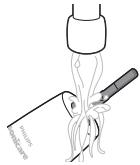
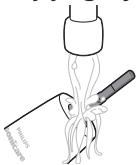
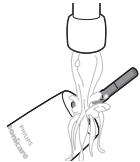
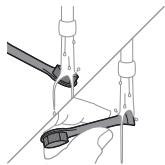
1 Remove the brush head and rinse the metal shaft area with warm water. Make sure you remove any residual toothpaste.
Caution: Do not push on the rubber seal on the metal shaft with sharp objects, as this may cause damage.
2 Wipe the entire surface of the handle with a damp cloth.
Note: Do not tap the handle on the sink to remove excess water.
Brush head
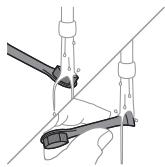
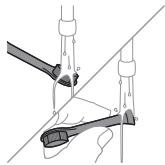
1 Rinse the brush head and bristles after each use.
2 Remove the brush head from the handle and rinse the brush head connection with warm water at least once a week. Rinse the travel cap as often as needed.
Charger
1 Unplug the charger before you clean it.
2 Wipe the surface of the charger with a damp cloth.
Travel case
Rinse with warm water and use a damp cloth to clean inside of travel case.
Storage
If you are not going to use the product for a long time, unplug it, clean it (see chapter 'Cleaning') and store it in a cool and dry place away from direct sunlight.
Replacement
Brush head
Replace Philips Sonicare brush heads every 3 months to achieve optimal results. Use only Philips Sonicare replacement brush heads.
Locating the model number
Look on the bottom of the Philips Sonicare toothbrush handle for the model number (HX36XX).
Warranty and support
If you need information or support, please visit www.philips.com/support or read the international warranty leaflet.
Warranty restrictions
The terms of the international warranty do not cover the following:
Brush heads.
- Damage caused by use of unauthorized replacement parts.
- Damage caused by misuse, abuse, neglect, alterations or unauthorized repair.
- Normal wear and tear, including chips, scratches, abrasions, discoloration or fading.
Recycling
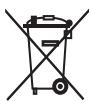
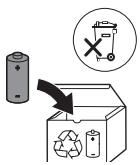
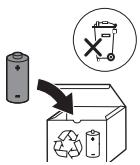
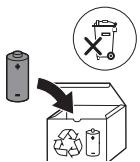
- This symbol means that electrical products and batteries shall not be disposed of with normal household waste.
- Follow your country's rules for the separate collection of electrical products and batteries.
Removal of built-in rechargeable battery
The built-in rechargeable battery must only be removed by a qualified professional when the appliance is discarded. Before removing the battery, make sure that the battery is completely empty.
Take any necessary safety precautions when you handle tools to open the appliance and when you dispose of the rechargeable battery. Be sure to protect your eyes, hands, fingers, and the surface on which you work.
When you handle batteries, make sure that your hands, the product and the batteries are dry.
To avoid accidental short-circuiting of batteries after removal, do not let battery terminals come into contact with metal objects (e.g. coins, hairpins, rings). Do not wrap batteries in aluminum foil. Tape battery terminals or put batteries in a plastic bag before you discard them.
Removing the rechargeable battery
Before removing the battery, make sure that the battery is completely empty.
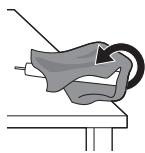
To remove the rechargeable battery, you need a towel or cloth, a hammer and a flat-head (standard) screwdriver.
1 To deplete the rechargeable battery of any charge, remove the handle from the charger, turn on the Philips Sonicare and let it run until it stops. Repeat this step until you can no longer turn on the Philips Sonicare.
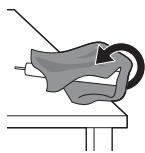
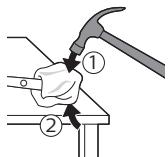
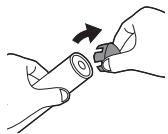
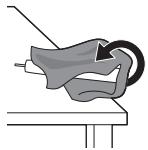
2 Remove and discard the brush head. Cover the entire handle with a towel or cloth.
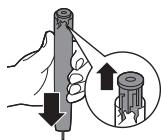
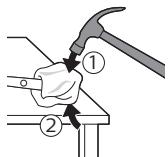
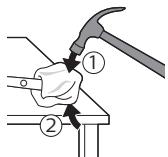
3 Hold the top of the handle with one hand and strike the handle housing 0.5 inch above the bottom end. Strike firmly with a hammer on all 4 sides to eject the end cap.
Note: You may have to hit on the end several times to break the internal snap connections.
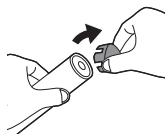
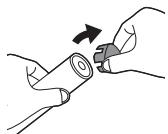
4 Remove the end cap from the toothbrush handle. If the end cap does not release easily from the housing, repeat step 3 until the end cap is released.
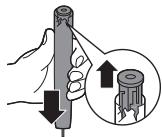
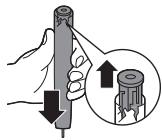
5 Holding the handle upside down, press the shaft down on a hard surface. If the internal components do not easily release from the housing, repeat step 3 until the internal components are released.
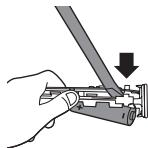
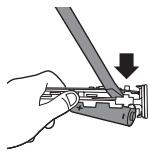
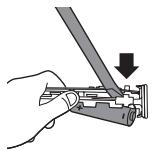
6 Wedge the screwdriver between the battery and the white frame at the bottom of the internal components. Then pry the screwdriver away from the battery to break the bottom of the white frame.
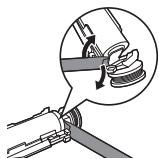
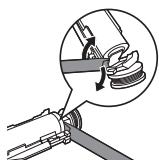
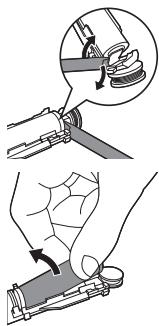
7 Insert the screwdriver between the bottom of the battery and the white frame to break the metal tab connecting the battery to the green printed circuit board. This will release the bottom end of the battery from the frame.
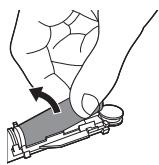
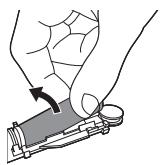
8 Grab the battery and pull it away from the internal components to break the second metal battery tab.
Caution: Be aware of the sharp edges of the battery tabs so as to avoid injury to your fingers.
9 Cover the battery contacts with tape to prevent any electrical short from residual battery charge. The rechargeable battery can now be recycled and the rest of the product discarded appropriately.
Giris
www.philips.com/support
Istifada Teyinatni
www.philips.com/support
Zamyslené použití
Tilstande (for 4000-series)
www.philips.com/support
Modi (fur 4000 Series)
www.philips.com/support
Reziimid (4000 series)
Elektrilisel hambaharjal on voimalik valida reziimide Sensitive ja Clean vahel.
www.philips.com/support
Uso previsto
www.philips.com/support
Paredzêta lietošana
3000 un 4000 Series elektriskas zobu birstes ir
paredzetas, lai nonemtu no zoiem appliku um partikas
atiekas, mazinatu zobu bojašanos un uzlabotu un
uzturetu mutes dobuma veslibu. 3000 and 4000 series
elektriskas zobu birstes ir paredzetas lietošanai majas
apstaklos. Berniem tás jaliesto pieaugu so uzraudžibā.
Philips Sonicare zobu suka
1 Higienisks cellojuma vacins
2 Birstes uzgalis
3 Rokturis
4 leslegsanas/izslegsanas poga
5 sukas uzgaja maina atgadinajumu
6 Baterijas limena indicators
7 USBladetajs (sienas adapterisnaviekjutskomplekta)
8 Cejojumu fulturalis (tikai noteiktiem modejiem)
www.philips.com/support
Uzemmodok (4000 Series)
Moduser (for 4000 Series)
Philips Sonicare tish pastangiz
1 Gigiyienik sayohat qopqog'i
2 Cho'tka kallagi
3 Dasta
4 Yoqish/o'chirish tugmachasi
5 Cho'tka kallagini almashtirishni eslatish funksiyasi
6 Batareya darajasi indicatori
7 USB quvvatlash moslamasi (devor adapteri taqdim etilmaydi)
8 Sayohat g'ilofi (faqat alohida modellarda)
Izoh: Devor adapteri taqdim etilmaydi. Faqat 5V adapteridan (A tardagi) foydalaning.
Philips Sonicare tish pastangizdan foydalanish
Agar Sonicare tish pastasidan birinchi marta
foydalanayotgan bo'lsangiz, elektr bo'Imagan tish
cho'tkasidan foydalanishga qaraganda ko'proq tebranish
sezish normal holat. Odatda birinchi marta
foydalanayotgan foydalanuvchilar ortiqcha bosim beradi.
Faqat yumshoq bosib bering va tish cho'tkasi sis uchun
tozalashiga imkon bering. Eng yaxshi taassurot uchun
tish tozalash ko'satmalarigaa amal qiling. Yangi Sonicare motorli tish cho'tkasiga o'tishiningizga yordam berish
uchun EasyStart funksiyasi yogilgan holatda taqdim
etiladi. Bu funksiya Philips Sonicare tish cho'tkasi bilan
tozalashingizga ko'nikishingiz uchun ilk 14 ta tozalah davomida dastaning quwatini asta-sekin oshirib boradi.
Tish tozakash ko'satmalari
1 Cho'tkani namlang va unga kam miqdorda tish pastasi surting.
2 Tish cho'tkasini tishlar qarshisida kichik (45 daraja) burchak ostida tuting va cho'tkalar milk chizig'iga yoki uning tagiga yetishi uchun uni yengil bosing.
Izoh: Cho'tka markazini tisharga doimi to'liq tekkizib turing.
3 Philips Sonicare yoqilishi uchun yoqish/o'chirish tugmachasini bosing.
4 Cho'tkani tishlar va milk chizig'iga yengil tutib turing. Cho'tkalar tishlar orasiga kirishi uchun cho'tka kallagini oldinga-orqqa kichik harakatlar bilan tishlaringizni tozalang. Bu harakatlarni tish tozakashiklingiz yakunlangunga qadar bajaring.
www.philips.com/support
Przeznaczenia
www.philips.com/support
Utilização prevista
Modos (para 4000 Series)
www.philips.com/support
Domeniu de utilizes
Moduri (pentru 4000 Series)
Periuta dvs. electrica va ofera optiunea de a algeintre modurile Sensitive si Clean.
www.philips.com/support
Pérdorimi i synuar
Načini (za 4000 series)
Rezimi (pre 4000 Series)
www.philips.com/support
Käytötarkoitus
Lagen (for 4000 series)
www.philips.com/support
Niyetlenilyän ulany
3000 we 4000 seriiyaly elektrikli dis cotgalary disi n ciyregeini azaltmak we agyz saglygny saklamak maksady bilen, dislerdaki dasy hem-de iymit galyndylaryny ayyrmaklya gnietlenilyar. 3000 we 4000 seriiyaly elektrikli dis cotgalary di ne oyde ulanmaklya gnietlenilyar. Cagalaryn ulanmagy ulularyn gozegcili agstynda bolmalydyr.
Philips Sonicare dis cotganyz
1 Gigiyenik syyahat gapagy
2 Nasadka
3 Tutawa
4 Aç/ocürduwmesi
5 Nasadkany calsyrmagy yatladys
6 Zaryad derejesi gorkezijisi
7 USB zaradyadnik (diwar adapteri degisliDAL)
8 Syahat ceholy (Dine belli bir modellerde)
Bellik: Diwar adapteri degisi dal. Dine 5V adapter (Gornus A) ulanyn.
Nasadkany calsyrmagy yatladys
Philips Sonicare-iñiz nasadkanyñ konelmegini yzarlayan BrushSync tehnologiáy bilen upjūn edilendir.
Basyssensory
Bellik: Bu ayratynlyk dinhBrushSync tehnologiisy bar bolan Philips Sonicare akylly nasadk Salarynda isleyar.
1 Täze akylly nasadkany birinji gezek dakanynyzda, tutawac sizde BrushSync technologiyyaly Philips nasadkasynn bardygyny tanayar we nasadkanyn konelmegini yzarlamaga baslayar.
2 Wagtyn geçmegi bilen, ulanyan basysnyz we wag moberiniz esasynda, tutawac nasadkany calsymagyn amatly wagtyn ksegitlemek ucin, onu n konelmegini yzarlar. Bu ayratynlyk dislerinize in gowry arassalamagy we idegi upjun etmekligi kepillendiryar.
3 Nasadkany calsyrmagy yatladyc cyrasy sary reikhde yananda, nasadkany calsyrmagynyz gerek.
Nasadkany calsyrmagy yatalady sy deaktiwirlemek ucin, "Ayratynlyklary isjeleshdirmek ya-da deaktiwirlemek" bolumine seredin.
Philips Sonicare-iñiz cotgalayán wagtyñyz ulanyan basysnyzy olceyān kAMIL sensor bilen enjamlasderyrlandyr. Eger gaty kop basys ulansañyz, dis cotgasy dessine seslenme berip, bassy azaltmagynz gerekdigini görkezer. Bu seslenme titremani üytgetmek arkaly berilyar we sol sebpli cotgalama duygusy hem-de ses üytgeyar. Mundan bsga-da, nasadkany calsrmagy yatlady s cyrasy sary renkde yanyp söner.
Basyssensoryndeaktiwirlemekucin,"Aryatynlyklary isjehlesdirmek ya-da deaktiwirlemek"bolumine seredin.
QuadPacer
QuadPacer aralyk taymer bolup, ol gysgaca biplap saginyar we agyz boşlugynyₙ 4 bolegini gyradeñ we mazaly cotgalamak gerekdiginı yatladyar. Bu Philips Sonicare dis cotgasynda QuadPacer ayratynlygy isjenleşen进展情况 gelýar.
SmarTimer
SmarTimer cotgalama dowresiniñ ahyrynda dis cotgasny awtomatik ocürmek arkaly, cotgalama dowräniziñ tamam bolandygyny görkezyär.
Dis lukmanlary gunde iki gezek azyndan 2 minutlap cotgalamagy maslahat beryar.
Bellik: Eger cotgalama dowresini basladanyñyzdan soh, ac/ocür duwmesini bassañyz, dis cotgasy sāginer. 15 sekuntlyk sāginmeden soh, SmarTimer nol edilyár.
Ayratynlyklary isjeñlesdirmek yá-da deaktiwirlemek
Dis cotgañzyn su asakdaky ayratynlyklaryny isjenlesdirip ya-da deaktiwirlap bilersiniz:
EasyStart
- Nasadkany calsyrmagy yatladys
- Basys sensory
Nasadkany calsyrmagy yatladys
Bellik: Nasadkany calsyrmagy yatalady sy dine akilly nasadka tutawaja dakylgy wagty isjeleşdirip ya-da deaktiwirlap bilersiniz.
Bellik: Taze akylly nasadkalar nasadkany calsyrmagy yatladys aryatynlyg iyenelesdirligi gornusde gelyar.
1 Tutawajy toga dakylgy zaradydnigin ustunde goyuñ.
2 Tutawaç záryadnikde durka, ac/ocür duwmesini basyp saklan.
3 Yzly-zyyna iki gysgajyk bipleme (5 sekunt son) esidyançäniz ac/ocür duwmesini basyp saklan.
4 Aç/ócur dūwmesini goyberiñ.
-
Pes-orta-yokary uç sany ton esidilse, ol nasadkany calsyrmagy yatladies ayratynlygynyn isjenlesendigini anladyar. Isjenlesmani tasyklamak ucin, zarad derejesi gorkezijisinin cyrasy hem 2 gezek yasyl renkde yanyp soner.
-
Yokary-orta-pes üç sany ton esidilse, ol nasadkany calsyrmagy yatladys ayratnylgynyndeaktiwirlenendigiin anladyar. Deaktiwirlenmani tassyklamak üçin, zarýd derejesti görkezijisiniñ cyrasyhem 1 gezek sary renkde yanyp söner.
Basyssensory
1 Tutawajy toga dakylgy zaradynigin ustunde goyun.
2 Tutawaç záryadnikde durka, ac/ocür duwmesini basyp saklan.
3 Yzly-zyyna uç gysgajyk bipleme (7 sekunt son) esidyançäniz ac/ocür duwmesini basyp saklan.
4 Aç/ocür duwmesini goyberiñ.
-
Pes-orta-yokary uç sany ton esidilse, ol basys sensory a'ratynlygynyn isjelesgendigini anladyar. Isjelesmani tassyklamak ucin, zarad derejesi gorkezijisiniñ cyrasy hem 2 gezek yasyl renkde yanyp söner.
-
Yokary-orta-pes uç sany ton esidilse, ol basys sensory ayratynlygyny deaktiwirlendigini anladyar. Deaktiwirlenmani tasyklamak ücin, zarýad derejesigi görkezijisiniñ cyrasy hem 1 gezek sary reñkde yanyp söner.
Eger uç sany gysga biplemeden soñ ac/ocür Düwmesini basmaga dowam etseñiz, isjenlesdirme/deaktiwirleme yzygiderligi gaytalanar.
Arassalamak
Dis pastasyny we beyleki galyndylary ayyrmak üçin, Philips Sonicare dis Çotgañzy wagty-wagtna arassalamagynz gerek. Philips Sonicare dis Çotgañzy arassalamasañyz, önümün gigiyenik bolmazlygy we ona zerper yetmekligi mumkindir.
Duydurys: Onumi ya-da esbaplary yiti zatlar bilen ya-da gap-gac yuwujya, mikrotolkunda, himiki seriisdeler bilen ya-da gaynap duran suwda arassalam
Dis cotgasynyn tutawajy
1 Nasadkany ayryn we metal wally yeri yyly suw bilen yuwup durlan. Hi c hili dis pasta galyndysny goyman ayryn.
Seresap bolun: Metal waldaky rezin dykzlandyryjyny yiti zatlar bilen arassalam, sebabi ol zeper yetirip biler.
2 Tutawajyn tutus yuzuni cgyly mata bilen supurin.
Bellik: Artykmaç suwuny aýrjak bolup, tutawajy rakowina kakman.
Nasadka
1 Her ulanysdan son nasadkany we gyllary yuwup durlan.
2 Azyndan hepdede bir gezek nasadkany tutawacdana myrnp, nasadkanyn birikmesini yly suw bilen yuwup durlan. Syahat gapagyny nae yyglykda zerur bolsa yuwup durlan.
Zaryadnik
1 Zaryadnigi arassalamazdan on, ony tokdan ayryn.
2 Zaryadnigiñ yuzuni cgylg mata bilen supuriñ.
Syahat ceholy
Syahat ceholynyn icini arassalamak ucin, ylysw bilen yuwup durlan we cygly mata bilen arassalan.
Saklamak
Eger onumi uzak wagtlap ulamajak bolayz, ony tokdan sogrup arassalan ("Arassalamak" bolumine seredi) we gönümel günsöhlesi dusmeyan salkyn, gury yerde saklan.
Çalşyrmak
Nasadka
Optimal netijeleri almak ucin, Philips Sonicare nasadkalsyny her 3 aydan calsyyp durun. Dine Philips Sonicare atiyaclyk nasadkalsyny ulanyn.
www.philips.com/support
PpOβλεπόμενn xρήση
Oi nλeKtpiKc oobvtobuptoec twv oepwv 3000 kai 4000 series npoopicovta iia tvn aphioeon tnns nakac kai uolalemuatvw tpoov an to ta bovria, yia tn meiowon tnc ternofovac kai tn beltiwon tnctotouatikn uyieiac. Oi nλeKtpiKc oobvtobuptoec 3000 and 4000 Series npoopiciovta ia okiakn npoowtikxphon.H xponan ao taiaia npenei va yivetai uno tvn eipbexn evnaika.
Xphon ts osovtoobuptoac Philips Sonicare
Aetoupyiec (yia tn oepa 4000 series)
www.philips.com/support
PpeHa3NaueHne
EneKtpnuecknte Yetkn 3a 3b6n 3000 n 4000 series ca npedHa3nauehn Da npemaxBAT noelenHanaTnlaKa n octTaBcHTe OT xpaHa OT 3b6nTe, 3a Da ce HaMaII pa3BaJIaHeta Ho 3b6nTe n Da ce noo6pn i NoDlbPka 3dPaBeTo H a yCThata KuxHna. EneKtpnuecknte Yetkn 3a 3b6n, 3000 n 4000 series, ca npedHa3nauehn 3a DomaSha hya ynotpe6a. INIpoJ3BaHeto OT deca Tp86ba da ce CnyBa nOd poNtEnCKn Ha3Op.
Bawata yetka 3a 3b6n Philips Sonicare
1 XnIeHnUHO KaNaue 3a nbTyBaHe
2 TlaBaHa YeTeKaTa
3Дрьжka
4 ByToH 3a BKJ./n3KJ. Ha 3axpaHbHaHeTO
5 HanomnHe 3a CmHa Ha rIaBaTa Ha YeTKaTa
6 INDkaTop 3a 3apraHa 6aTepeyta
7 USB 3apЯДио (aДaПТeрьТЗ aЗapекДане He e BКЛЮЧЕНВ KOMЛЕКТа)
8 KaIbΦ 3a IIbTyBaHe (cAmO 3a KOHKpeTHM MoJeJIH)
3a6eJekka:AaanTpBt 3a 3apeXJaHe He e BkIuOeH B KOMnJIeKta.ИЗПОЛЗВаиТе сAmO aanTep 5 V (TInA).
3a6eJekka:IJIaBNTeHaYeTKITeMOKeJaCE pa3JIuHabT.
PbpBn cTbnKn
IocTabrHe Ha rJaBaTa Ha yeTkata
1 NopabHeTefnaBataHaYeTKaTaTaka, Ye KocbMcyTaTdaCoyaTBcUaTaNOCKa KaTo npedHaTaYactHaDpbXkTa.
2 HatncheTe cnHIO rIaBaTa Ha YeTkata Bbpx MyaIIHnBaJI,doKaTo Cnpe.
3a6eJekka: HopMaIHO eJaCe BVXJaMaJIko pa3cTOrHHe MExNy rJaBaTa Ha YeTKaTa NДpbXKaTa. TOba nO3BOJIra Ba Ha rJaBaTa Ha YeTKaTa Da Bn6pnpa do6pe.
3aTeXdaneHa Philips Sonicare
1 BkJIIOUeTe USB Ka6eJa 3a 3apeXdaHe B aIaIaTep 3a CTeHa, KOITo e CbBp3aH KbM eJEnKTpuYeCKN KOHTaKT.
2 NocTaBeTe IpbXKaTa B3apAnHOTo.
- INHINKaTOpbT3a HNBO Ha 6aTepeYra CBeTBa INDbXkAta N3daBa IBa 3ByKOBn CInHaJa. TOBa POKa3Ba, Ye YeTkata 3a 3b6n Ce 3apexJa.
3a6eJekka: PbIHOto 3apeKdahe Ha 6aTepeNtA MoKe da OTHEme Do 24 Yaca, Ho MOKeTe Da N3PON3BaTe YeTkata 3a 3b6n Philips Sonicare n npedn da e HapbIno 3apeDeHa.
I3noJ3BaHe Ha ueTkata 3a 3b6n Philips Sonicare
Ako n3noJ3BaTe yeKtAa 3a 3b6n Sonicare 3a npBb NbT, e HOpMaJHo Da yceUaTe NOBeYe Bn6paunu, OTKoJIKOTO KOrato n3noJ3BaTe HEeNEKeTrPueCKa YeTkA 3a 3b6n. O6uayHO e nOte6bnteJIne, KOInTO n3noJ3BaT ypeDa 3a npBb NbT, Da oka3BaT TBbpRe IOnmHaTnck. PnpIoXeTe cAmo Jek HaTnck N octabeTe YEkTaA 3a 3b6n Da n3yeTkA 3b6nBE McTeO Bac. CneDbaIte INCTpyKUnTe 3a YcTeNaHe No-dOly 3a NaH-nO6pn pezyltaTn. 3a BaWe yDo6cTBo Prn IpemHaBaHe KbM HoBaTa Bn YeTkA 3a 3b6n Sonicare, Ta ce npedlaRa c actNbupana fynkuiy
EasyStart.Функшята ува постени moшноctта на paбота пи пьвпte 14 ceанca, за да ви nomоге за пивикнete Кьм чеканeto с чека з bб Philips Sonicare.
Инстукции за чеканe
1 HabnaJxHe T KocbMcyTeTa Ha YeTKata 3a 3b6n n CLOXKeTe MaJIKO NaCTa 3a 3b6n.
2 NocTabeteKcMbetaHaYeTkata3a3b6nNoJ MaJIbK bIbJ (45 rpaJaCa) KbM 3b6NTe, KaTO HATNCKaTe JIeKO, Taka Ye KcMbetaTa Da DCtHrHaT JINHraTa Ha BEHcNTe IJIM MaJIKO NoJ HeJ.
3a6eJekka: LcHbptHa YetKaTa Tp86Ba Da DOKocBa 3b6Te NoCToRHHO.
3 HaTnCHeTe 6yToHa 3a BKJIOUBaHe/V3KJIIOUBaHe, 3a Da BKNIOHTe YETKaTa Philips Sonicare.
4 BnMaTeHNO npuNbbpXaJIte KocbMYeTaTaoNocTaBeHN Bbpyx 3b6nte n IINnIra Ha BeHcIte. YetKaIte 3b6nte C JIeKn DvBxJeHn HaIpeI-Ha3aI, TaKa Ye noDblrnte KocbMyeTa Da IOCTnHAT IpocTpHaCTBaT a MExy 3b6nte. PpOdbJxKe ToBa DvBxJeHne ppe3 UKNbJa Hn3VETKBAHe.
3a6eJekka: KocbMcyTa Tpr6Ba neKo da ce pa3JeIa. He ce npenOpbUba Da TbpKaTe KaTo c pbuHa YetKa 3a 3b6n.
5 3a nouchteBaHe Ha BbTpeuHInTe NOBbpxHOCTn Ha npedHInTe 3b6n, HAKLOHEte DpbXkata Ha YeTKaTa DO HAIOLOBHa N3npaBeHo nOLOKeHne H anpaBeTe HANKO KEPurKaJIHn pniNOKpRbAunCe YeTKaUn DBNKHeHn Ha BCEKn 3b6.
3a6eJekka: 3a da cte cnrgpHn, ye etkate paBHomePBO BcIJaTa yCTHa KxHnA, pa3npedeJeTe yCTa Ta Cn Ha 4 3OHN C NOMOuTa Ha fynKuYrta QuadPacer (BIXKTe rnaBa, "DyHKuN").
6 3aNoohHeTe Da YcTKaTe 3oHa 1 (BbHsHaTa CtpHa Ha rohpHnTe 3b6n) B npOdbJxKeHne Ha 30 cekyHdn, npEi Da npemHne KbM 3oHa 2 (BbTpEwHaTa CtpHa Ha rohpHnTe 3b6n). PpOdbJxKeTe Da YcTKaTe 3oHa 3 (BbHsHaTa CtpHa Ha dOJIhNeTbe 3b6n) B npOdbJxKeHne Ha 30 cekyHdn, npEi Da npemHne KbM 3oHa 4 (BbTpEwHaTa CtpHa Ha dOJIhNeTbe 3b6n).
7 Cnei kaTo 3aBbPunTe cIKbJa ha YeTkAHe, MoXeTe Da OTdJIInTe IOnbIINrTeHbPeMe, 3a Ja N3YeTkAte DbBkAteHnHa TIOBpXHOCT Ha 3b6NeTe cn u O6JlactNte, KbJeTO ce NOBRA BA OCBETBAHe. MoXeTe Da N3YeTkAte H e3Nka - CBKJIIOUeHa NN N3KJIIOUeHa YcTKa, NO Bau N3Op. Baaata YcTa 3a 3b6n Philips Sonicare e 6eOanacha 3a N3No13BaHe Bbpy 6peKeTu (rIaNBeTa Ha YcTKnTe ce N3HOCBaT No-paHo, KOrato Ce N3NoJ3BaT Bbpxy 6peKeTu) n DeHtALn PeKoHCTpyKUm (Piom6n, KopoHn, faceTu), aKO npinraT npabUNHO n ZeIOCTTa NM He e HapUWeHa. AKO BB3HnKHe npo6Lem, O6bPhete Ce KbM 3b6OJIeKap.
3a6eJekka:Korato yeKaTa 3a 3b6n Philips Sonicare ce n3noI3Ba npn KInHnUHn I3nITBaHn,dpjXkata Tp86Ba da ce n3noI3Ba B pexm Clean, HanbIHO 3apeJeHa n c de3aKTHBpuHa fynKUra EasyStart.
3apeKdaHe n cBCToHnne Ha 6aTepeyTa
1 PπικρεπeTe USB ka6eba3a 3aapexkaande KbM aandaTep 3a 3apexdaHe, BKJIIOUeTe aandaTepa B eJIeKtpuYeCKN KOHTaKT.
2 NocTaBeTe npbXkKaTa B3aprHTo.
3a6eJekka:ДрьЖКATA ue Bb3npon3Bvee 2 KpaTkn 3ByKOBu CnHaJa,3aДЯ NOTBbPdN,Ye e NocTaBeHa npaBUNHO 3a4pAnHOTO yCTPOINCTBO u Ce 3apejka.
3a6eJekka: Ta3n Yetka 3a 3b6n Philips Sonicare e npedna3haueHa da ocnpyr nnoe 28 ccsn Ha mneHe ha 3b6nte, BcRA KA OT KOInTo e C npOdbJIxNtEINHOCT 2 MNHTn (14 dHn, aKOe CE NpON3BA DBa nTbN dHEBO). UHdkatOpBt Ha HNBOTo HA 6aTepeRyTa POKa3Ba cbSTOrHNeTo Ha 6aTepeRyTa, KORATO 3aBbPShte
2-MNHyTHa CecnHa MmHe Ha 3b6nte, KOrTaTO NOCTaBNTe npjXkTaHa nay3a Nlln KOrTaO ce 3apeKda.
CbctoHnne Ha 6aTePnraTa (KOrato dpbXkata e nocTaBeHa B pa6oTeo 3apAHO yCTpoiCTBO)
Pekumn (3a 4000 series)
BaWata eJeKtpnuecka YeTka 3a 3b6n BN daBa Bb3MOxHocT da n3bnpate Mejdy pexkMnte Sensitive n Clean.
3a6eJekka: Pn npBpBOTo n3noJI3BaHe Ha BaIaTa YetKa 3a 3b6n HAcTpoiKaTa IIO NpOpa36uPaH e pexmbl T Sensitive.
3a da npomehnte pexmnte:
- HaTnSchTe BeDnBx 6yToHa 3a BKJIIOUBaHe/IN3KJIIOUBaHe, 3a Da BKJIIOUHTe YeTKaTa 3a 3b6n.
- HatncheTe BtOpn PbT B pAMKInTe Ha 2 cekyHn, 3a da npomehnte pekma.
- HatncheTe TpeTn PbT B pAMKInTe Ha 2 cekyHn, 3a da nay3npate.
CleI 2 cekyHnIeYtKaHe,HaTnckaHTo Ha 6yToHa 3a 3axpaHbAe OTHOBO cbIoo nay3npa YTeKaTa 3a 3b6n.
EasyStart
To3n MoJeI Ha Philips Sonicare ce npedJIara c aKTHBnIpaHa dHyNKcIe AysStart. dHyNKcIeTa AysStart yBeJIuYaBa NOCTeHNO MOUHOCITHa ha pa6Ota npi nbPBrte 14 ceaHcA, 3a Da BV NOMOrHe da npBvIKHeTe KbM YeTkaHTo c Philips Sonicare.
3a De3akTbBpaHe Ha EasyStart Bx. "AkTbBpaHe nIi De3akTbBpaHe Ha cyHKun".
Hanomnhahe 3a cmHa Ha rJaBaTa C yeTka
Bawata Philips Sonicare e obopydBaHa cTexHoiIognraBrushSync, kOTo Cnei n3HocBaHeTo Ha rnaBata Ha etkata.
3a6eJekka: Ta3nФyHKZpa80Tu cAmO cNHTeJIrEHTHn rIaBn 3a Yetkn Philips Sonicare cTexHolorn BrushSync.
1 KOraTo 3a nbpBn nBt npKpEnIe HoBa INTeJIInFEHTHa IJaba Ha YetKaTa, IpbXkata pa3No3HbA, ye IMaTe rJaBa Ha YetKa Philips c TexHOJrMaTa BrushSync, n3aoNuBa d npocJeJaBa n3HOcBAHeTo Ha rJaBaTa Ha YetKtA.
2 CnEi BpeMe, B 3aBnCmOcT OT npUlaqAHnHaTnCK n BpeMeTO Ha nI3NoI3BaHe, DpbJxKa Tse IpocJei n3HOCBaHETo HA rJaBaTa Ha yEtKaTa, 3a Da OnPeJei ONtIMaJIHOTo BpeMe 3a CMHa Ha rJaBaTa Ha YEtKATA. Ta3i FyHKuNBA rapaHTnpa Hai-Do6pOTO nouchTbAHe i rpnjka 3a BaUnTe 3b6n.
3 KOrato HAnOMHuaTa JAmMnUka 3a CmHa CBETHe TBMHoXbITo, Tpr6Ba Da CMeHnte IJaBaTa Ha YetKaTa.
3aДe3akTnBnpaHаHaNOMHHeTO 3a CMHa Ha
rIaBaTaHa YeTKaTa Bx. "AknBnpaHe NJIi
d3akTnBnpaHae HaФyHKcUIn".
Cen3Op 3a HaTnCK
BaWata Philips Sonicare o obOpyDbHa c
cYbBpWeHCTBaHdTaTnK, n3MePBAuH aTnCKa, KOITo
npiIarate npi MHeNe Ha 3b6Ite. AKO npiIooJnte
TBbPde TOrJaM HATNcK, YeTKaTa 3a 3b6n He3a6abHo 1e
n3npatn ObaPaTHa Bp3Ka, 3a Da yKaKe, Ye Tp86Ba Da
HaMaJInte HATNcKa. Ta3n ObpaTHa Bp3Ka ce nOlyuBaVa
3apAdn npOMHa BvB Vb6paZnaTn a CneIOBaTeJIHO B
UceSaeHTo n 3Byka npi MHeNe Ha 3b6InTe. OCBEN TOBa
JaAMnKAta 3a HApOMHHe 3a CMHa Ha TJaBaTa Ha
YetKaTa 1e MnRa B XbIto.
3aJe3akTbBpuHa He DaTcNka 3a HaTcCK Bx. "AkTbBpuHa He JIn De3akTbBpuHa Ha dyHKun".
QuadPacer
QuadPacer e TaMep 3a INHTepBaJ OT Bpeme, KoTo
n3daBA KpaTbK 3BvKOB CmHaN I CNIPA, 3a Da BN
HaNOMHN, Ye TpRbBA da NOChNTe BCuKNte 4 30Hn Ha
yCThATA KxynHApabHOpemHo n CTapaTeJIHO. Ta3u YeTka
3a 3b6n Philips Sonicare ce npednara c akTbBnpaHa
fynkzna QuadPacer.
SmarTimer
TaMepbT SmarTimer noka3Ba, Ye zKbJbT Ha MneHe Ha 3b6nte e 3aBbPun, KaTO INKJIouBa aBTOMaTHNO 7etKaT3a 3b6n B Kpa8 My. CTomatolOJ3te npenOpBvBAT 3b6nte da ce mIHT He noMaJIko OT 2 MNHyTN PIO DBA PtBN Ha DeH.
3a6eJekka: Ako haTncHe 6byToHa 3a BkIIOUBaHe/U3KIIIOUBaHe Ha 3axpaHbAHeTO, YeTKaTa 3a 3b6n ige cnpe Ha nay3a. Cnei nay3a ot 15 ckyHdn SmarTimer ce Hynipa.
AknBnpaHne nn DeakTnBnpaHn HcHkun
Moxete daakTbnpate nIIN deakTbnpate cneHnTe fynkun Ha BaasaTa Yetka 3a 3b6n:
EasyStart
- HanomHЯнзЯн ha nglaBaTa Ha YeTkata
-Датук 3a HaTиСК
3a daakTNBupate NIN DeakTNBupate Te3n fynKcnn, n3nbHHeTe HNCTpyKUnITE NO-DOJy:
EasyStart
1 NocTaBeTe DpbXkKaTbBpXy BkJIIOueHOTo B KOHTa3apJHO yCTpoIcTBO.
2 HaTnSchTe n 3aJpbXkTe 6yToHa 3a BKJIIOUvBaHe/IM3KJIIOUvBaHe,IOKaTO IpBjXKaTa OCTaBA B 3apJdHOTO yCTpoIcTBO.
3 3aπpβxTe 6yToHa 3a BkLIOUBAHe/N3KlIOUBAHe HaTnCHaT, IDOKaTO He yyeTe eJHOKpaTeH KpaTbK 3ByKOB CnHnA1 (CneI 3 cekyn).
4 OtnycheTe 6yToHa 3a BKnIOUBaHe/13KnIOUBaHe.
TpoHnHT HnCBK-CpeJeH-BnCOK TOH O3HaayBa,Ye cyHKuYra EasyStart eakTNBupaHa. INdNkaTopbT 3a HNBOTO Ha 6aTeepyra Ta cbUO 1e npMmRhe 3eJeHO 2 TbTI, 3a Da NOTBbpN aKTBNpaHeTO.
TpoHnHT BvOCK-cpeDeH-HNCbK TOH O3Haaba,Ye cyHKcNtA EayStart e De3aKTbNbpaHa. HNDkaTOPbT 3a HbTO Ha batepNtA ue npMmIHe BeDhbX B XbJTo, 3a Da NOTbBprn De3aKTbNpaHeto.
3a6eexka: 3a da noctnHte KlnHHuHa eΦnKaCHOCT, fynKcunTa EasyStart Tpr6Ba da 6bJe de3akTbUpaHa.
HanomhHe 3a CmHa Ha TlaBaTa C yeTka
3a6eJekka: MokTe da akTbupate nIi de3akTbupate HAnOMHHeTO 3a CmHa Ha rJaBaTa Ha YeTkata CaMO KOraTo Ha npBkKaTa NMa INHTeJIInrEHTHa rJaBa Ha YcTkata.
3a6eJekka: HOBIne INHTeINrEHTHn rIaBn Ha YeTkn ce npedlaarat c akTbUpaHa fYHKzna 3a HaNOMHnHe 3a CMraHa Ha YeTKata.
1 NocTaBeTe DpbXKaTa Bbpxy BKIOueHTo B KOHTa3apAnHO yCTpoIcTBO.
2 HaTnCHeTe n 3aIpbXTe 6yToHa 3a BkJIIOUBaHE/N3KJIIOUBaHE,IOKaTO IpBxKaTa OCTaBA B 3apJHOTO yCTPOINCTBO.
3 3aIpbjxTe HaTnchTa 6yToHa 3a BKJIIOUvBaHe/U3KJIIOUvBaHe,ДOKaTO He UyeTe cepna OТ ДВа KpaTkn 3ByKOBu CnHnla (CneI 5 cekyHn).
4 OTnycheTe 6yToHa 3a BKNIOUBaHe/1N3KJIIOUBaHe.
TpoHnHT HnCbK-CpeDeH-BnCOK TOH O3HaBa,Ye ФИнкцЯТа 3a HAnOMHЯHe 3a CMЯHa HfIaBaTa Ha YeTkAte eakTNBupaHa.ИнДиKaTOpbT 3a HNBOTo Ha 6aTepeRy aCbIo Ze npuMnHre 3eIeHo 2 nbTn, 3a da NOTBbPdIn aKtNBpArHeTO.
TpoHnraT BnCOK-CpeDeH-HnCbk TOH O3HaCaBa,Ye ΦyHKnraTa 3a HAnOMnHRe 3a CMnHa Na IraBata Ha YeTkata Ee3aKtNBuPaHa. INnKaTopbT 3a HnBOTO Ha 6aTeepNaE 3e npMnRHe BeDnBx B XkblTO, 3a da NOTBbpDn De3aKtNBpuHaETO.
Cen3op 3a HATNCK
1 NocTaBeTe DpbXkKaTbBpXy BKJIIOueHOTo B KOHTa3apJHO yCTpoIcTBO.
2 HatncheTe n 3aIpbXte 6yToHa 3a BkIIOUVAHe/IN3KIOUVAHe,IOKaTO IpBxKaTa OCTaBA B 3apJHOto YcTpoNCTBO.
3 3aДрьжTe HaTиСHaT 6byToHa 3a BKJIIOUBaHe/U3KJIIOUBaHe,ДОКaTO He UyeTe cepЯ OТ TpN KpaTK 3ByKObN CnHHaJa (CneJ7 6eKyHnI).
4 OTnycheTe 6yToHa 3a BKJIOUBaHe/N3KJIIOUBaHe.
TpoHnHT HnCBK-cpeDeH-BvCOK TOH O3HaUaBa,Ye fHyHKuNtA 3a DaTChkA 3a HaTmck e AkTNBnPaHa. HndkaTopbT 3a HnBOTo Ha 6aTePnTa cblO lpe npMnIHe 3eJeHo 2 nTn, 3a da nOTbPd n aKTNBnPaHeTO.
TpoHnHT BnCK-CpeJeH-NHcBk TOH O3HaYaba,Ye ΦyHKnIa 3a DaTHNka 3a HATNCK e De3AKTNBUnpaHa. VHnKaTOpt 3a HNBOTo Ha 6aTepeRnTa Ie npIMrHe BeHNbX B KJIto,3a Ja NOTBbpDn De3AKTNBUnpaHEo. Ako npOdbJNXte Da IbPxNte HaNTCHat 6yToHa 3a BKlIOUBaHe/INKIIIOUBaHe CneD TpntKe KpaTKn 3ByKOBN cNHaJa, NocNeDoBATEJIHOCTTa 3a AKTNBUnpaHe/De3AKTNBUnpaHe Ce NOBtApA.
Почистванe
Tp6Ba Da nouchTBate YeTkata 3a 3b6n Philips Sonicare peoBHO, 3a Da npemaxHete nactata 3a 3b6n n npytn octaTbU. Ako Philips Sonicare He ce nouchTa, TOBa MOxKe Da NobeJe Do HapuShaBaHe Ha XnrgneHa Ta H npodykTa N nobpeDaTa My.
IpeDynpexdHne:He nouchTbaTe npoDyKta n akcecoapnte C octprn ppeMeTN B cbDomnHaMaunHa, MKNPOBbJHOBA fypHa,B XmMknAIN NnBbB Brpa ropea Boda
Дрьжka Ha ueTkata 3a 3b6n
1 Cbale Te rnaBata Ha Yetkata Nn3JIaKHeTe o6NaCTTa OKoI MoTaJIHnBaC ToIIa BOJa. IorpnKeTe ce da npEmaxHeTe BcKaBn OCTaHKn OT nacta 3a 3b6n.
BnmaHne:He hatackaTe rymehoto ynlbTHeHne Ha MeTaHnBaJ C OcTpNi PpeMeTu, Tb KATO TOBa MoXe Da Ro NOBpeDu.
2 136bpcBaIteIaTaIOBbpxHocTHaIpbKkataC BlaJxHa Kbpna.
3a6eJekka: He notynBaIte npbKkata Bbpxy MNBkata, 3a da oTcpaHnTe n3nshHaTa BOda.
Глава на четкata
1 N3nlaKBaIte rnaBaTa Ha YeTkata N KocbMcyTaCNeD BcKO NOJ3BaHe.
2 CbaJIaIe TflaBaTa Ha YeTkATo OT dpbXkATo n ɪЗпlaɪkBaɪte MЯCTOTO ṢM Na CBp3BaHe C TOnla Bɔda Ḥaɪ-МɑJIko BeɪdHbЖ CeɪdMnUHɑ.ɪЗпlaɪkBaɪte KaNaayeto 3a ПытУbaHé TOLKOba YecTo, KÖЛКOTO e Heo6xOДиMo.
3apndno yctpoNCTBO
1 N3kIIOUbaIte 3aPraHTo yCTpoIcTBO, npei da npicntbIInte KbM IOuNCTBaHeTO My.
2 136bpcBaIte NOBpXHOCTHa Ha 3apAHOTo yCTPOICTBO C BLnAJHa KbPna.
KaIbΦ3a nTByBaHe
Изпалкайтс сюла ВODи И n3нольаве Влжн Кьрп,ЗдяпocHTBaTe BbTpEшHOCTTa Ha KaJbФa 3a nbTyBaHe.
CbXpaHeneHne
AkoHMaJaI3NoJI3BaTe ypeDa IbIro BpeMe,
I3KJIIOUteToIroIOuNCTe(Bx.pa3JeI"PiOcTBAHe")
IroCbXpaHЯBaTeHaXlaIHOICyXOMaCTO,daJIeUOT
IpyKa CbHYeBaCBETJInHa.
CmHa
Глaba на четкata
3a da nocTnIaTe ONTnMaJIHn pe3yJITaN, cMeHnTe rnaBnTe Ha Yetkata Philips Sonicare Ha Bcekn 3 Meceua. IV3noN3BaYte caMo pe3epBHN rJaBn Philips Sonicare.
Hamipahe Ha Homepa Ha MoeJa
Погледnete 3a Homepa Ha MOneJa OTДолнаТСтранa Ha Дьжкata NaЧеткata 3a 3b6n Philips Sonicare (HX36XX).
Tapaanu n noDpBxka
Ako ce hyxdaete OT nHOpmauny nnno npbckka, nocetete www.philips.com/support nnn pOouTeTe JINCTOBkata 3a MeKdyHapOnHa rapaHcna.
OrpaHnueHnHa rapaHnzraTa
YcnoBnTaHaMeKdUnHapOnHaTa rapaHcna He oxbaIaT CneIHOto:
- IanaBn 3a Yetkata.
- LlETn, npuunHeHOn OT n3NoJ3BaHeTo Ha HeoO6peHn pe3epBHN qactn.
-Поврени,причинени OT He nprabinhaуnotpe6a, Използвае He по прднэхочи, Heбржноct, Наравенпnpомени Или HeOTOpn3upaH peMOHT. - HopmaJIHo n3HOCBaHe, BKJIIOUHTeJIHO OTHyIbAHe, I3IpaCKBaHe, I3TbPkBaHe, OBe3UBeTЯBaHe IJI IN36JIeNDHaBaHe.
Peuzklnpapane

To3n CmB0J O3NaUaBA, Ye eNeKtpuYeCKn npOyKT n 6aTePm He 6BaJa ce N3XbPJIaT 3aeHNo c 6oNkHOBeHIne 6ntOBn OTnaDbu.
CneBaaTe npaBnlaTa Ha BaWata IbpxaBa 3a pa3dJIHo Cb6npaHe Ha eJekTpueckn npOdykTn I 6baTeprn.
I3BaJdaHe Ha BrpaDeHa akymylaTOpHa 6aTepeH
Brgpaedeta akymylaTopha 6aTepe Tp86Ba da 6bJe n3BaDeHa cAmO t KBaInnphiuPAn CneuaIaNt, KOraTo ypeBt ce n3XbPJI. Ppei Da n3BaJnte 6aTepeTAta, ce yBepeTe, ye 6aTepeYraTa e n3TOUeHa HnblHo.
B3eMeTe BCnUKN Heo6XODmM MepkN 3a
6eONaChOC, KOraTO 6opABNTe C nHcTpymEnTn 3a
OTbApHe Ha ypeA N KOraTO n3XBpIaTe
akymlaTopHpHa7 6aTePn. 3aBbJnxTeJIHO na3eTe
OHTe, PbueTe N PpbCTnTe CN, KaKTo N
IOBbPxHOCTTa, Bbpxy KoTOn pa60tNe.
Korato 6opabnte c 6atepuNTe, ce noprnxKeTe pbcTe Bn, npOdykTa u 6atepuNTe da 6bdaT cyxn.
3a da n36eHHe TE HnUdENTHO KbCo CbeDInHeHne Ha 6atePnITE CJIeI N3BaXDaHne, He DOnyCKaIte KJIeMITE Ha 6atePnITE Da BIAraT B KOHTAKC MetaJIHn PpeDMETn (KATO HApPImep MOHeTI, Fb6n, PpbCTeHI). He yBvBaIte 6atePnITE B aJyUmHHeBO FOJIINO. 3aJeNeTe KJIeMITE Ha 6atePnITE IIN NoCTabete 6atePnITE B NaJIOHOBA Top6uKa, PpeDN da rN IN 3XXBpJIte.
I3BaJdaHe Na akymylaTopHaTa 6aTePna
IpeiJa n3BaJnte 6ateprrata,ce yBepete,ye 6ateprrata e n3TOUeHa HnblHO.
3a da n3BaDnTe aKymyIaTOpHata 6aTePnra, Bn Tp86Ba KbPna nn Napue nnat, uYk nnlocka (CTaHdapTHa) OTBepTKa.
1 3a da nToOnTe np3apeXdaemata 6aTepeYr O TcEJnI N3BaTe DpBxKATA OT 3apdHOTo, BkIoUeTe Philips Sonicare Iro octabeTepa pa60Tu, dOKaTO cnpe cam. NObTopeT a3n CTbNka, dOKaTO Philips Sonicare BeYe He Ce BkIOuBa.
2 Cbane n I3Xbplte TlaBaTa NaYeTkata. NokpnTe UraIaT aDpbkka Ckbpna nn Naphe PnAT.
3 XbaheTe rOpHaTa YacT Ha npbXkKaTa C eJHa pKa N yapape KOpnyca Ha nPbXkKaTa H oK. 1 cM hA dOJIHHa KpaYyapape CnHNo C uYK OT BCNUKKe 4 CTpaHn, 3a Da N3BaNtE KpaHata KaNaYaKa.
3a6eJekka: Moke da ce hanoKn da yapuTe B kpaHЯKoIko PbTn, 3a da ce cuypT BbTpEshHnTe 3axBaUaUk Kykn.
4 CbaneKpaHataKaanaKaOTdpXkataHaYeTkata 3a3b6n.AKOuN3BaJxDaeHoToOtKopnyCaHeCTaBa JIeCHO,NOBTOpeCTbKnA3,DOKaTO HeOcBOoDnTe.
5 KaTo IbpxNte DpbXkata CdoJIHaTa qact HaOpe, HATINCHETe BAJa HAnOJy BbPX TYBbPa NOBbPXHOCT. Ako BVtpeShnTe KOMNoHEHTn He ce ocBO6oJdaBaT JeLcHo OT Kopnyca, NOBTOpeTe CTbnKa 3, Dokato He rI OCBO6oJnte.
6 BmBkHete OTBeTpKaTa MExdy 6aTepeRnTa n 6aJaTa paMka B DoJIHaTa YacHT Ha BbTpeUHnTE KOMNoHEHTN. CJeI TOBa OToJEnTe OTBeTpKaTa OT 6aTepeRnTa, 3a da cyuInTe DoJIHaTa YacHT Ha 6aJaTa paMka.
7 BkapaIte OTBepTkata MeJy DoJIHaTa YacT Ha 6bATEpIa I 6bIATA pAMKa, 3a Da ChyI NTe MTeJIHATA KJIeMa, CBbP3BaIa 6bATEpIa TcB 3eJIeHATA NeaTHA IIaTAt. TOBA 0e OCbObOdi DoJIHra KpaI Ha 6bATEpIa OT pAMKaT.
8 XbaHete 6bepnraTny n3nbpnaTe OT BbTpseHNHTe KOMHOHEHTN, 3a Da CuyNTe BTOpata MeTaJHa KJIema Ha 6bepnraTta.
BnmaHne: Pa3eTe ce ot octpnte KpaunHa KaIemnte Ha 6atepyra, 3a da n36erHe TapaHbAbe Ha npbctnte.
9 POKPnIte KOHTaKTInTe Ha 6aTepeRnA t C TIKCO, 3a da npEoTbPaTInTe KbCo CbeINHeHne OCTaTbUeH 3apJn Ha 6aTepeRnTa. AkymyLaToPnHaT a 6aTepeRnBaue MoKeJa Ce peuKlnpa N octaHaJaT a Yact OT npOdykTA Da ce N3XbPnN pNoDxOJaU NaHH.
Knpnuy
CaTbI anyyHy3 MeHen kyTnyKaTaNb3 XaHa Philips'Ke Koo KelenH3! Philips cyHyTuTaH KOJIIOO KbI3MaTbIH ToJyry MeHEN naJaIaIahyy YvH eHymVHy3JY
www.philips.com/welcome CaɪMbɪDa KaɪTaɪbɪz.
Maahnny Kooncy3dyk MaalbImaTbi
THyMny aHbIH 6aBtTalrHaMaKcTaI MeHeH KOJIOHOHy3.
THyMny, aHbIH 6aTapeKajap MeHeH KOUYMua
Ka6DyyLapBH KOJIOHy aNDbHJa yUyI MaaHInyI
MaalbIMaTTb KblTat OKyI YbIbHb3 KaHa KNINHcpe3K
KOJIOHy yyH CaTaN KOUHy3. Typa 3MeC KOJIOHy
3bIra He OJyTTy JkapaAt anyyra ceBen 6OJyH
MymkyH.
3ckepTyyJlep
- Philips WAA1001, WAA2001, UL je kooncy3ny bipactaIraH, Knpru3yy MyHe3dMeJepy (100-240 V~; 50/60 Hz; 3,5W) xHa aYbIrapy MyHe3dMeJepy (5V DC; 2,5W) BoIroh kBvBaIeHTTyy aAaTpePnepe MeHen rHa Ka6aTTaHb3. AaTpePnepeDin Tn3mecnH www.philips.com/support caTbHaH kaPaHb3.
- KybaTaraBHTbCyUdAn aJIbIC KaPMaHbI3.
USB Ky6aTAtTaBtTyTaUStbpyyHaM MypyH KapMaTbU ToIyTu MeHen KypraK KeHnH TeKWeepuHn3. - ⅢaMHaNbIb6aIapXaHfN3KaNbIK,ceHCopnyK XaHa aKbI-JcXaTbIHANYeKTeJIrEHN JTeJaxKpbIb6aCbI, OoOHDoIe6bIMmXoK aDAMap6BnpeOHyHKe3 aIbHdaXe TY3MeKTY KOOncy3 KOJI MeHen naJaIaHyy TuypaNy HycKaMaIap MeHen KaHa 60Io TpyraH KopKyuHyTAPdbI TyUHcKOJIdoHO aJIbIwaT. BaIapdIaMHaNbIbYOnOpDnyH Ke3EmJeLyCy3 Ta3aIaN IKe TeJle6eShKepek.
- BaIДap OHm MeHc OiHo6OroHyN KaMcbI3 KbJIyy yUyH 6aIДapIbI kapaTypyy KepeK.
-
Philips шаиманьинь Тупнусka akcesсуарларын ще kepeк-жарakтарын raha колдоунуз. UL (2-knacc) щe звалentчу 6ekntuiliren 5 V DC aanterpn (IPX4 ще andah karopy) менин бир re na USB KyбаTTaftbI KOLДОHУHy3.
-
LsAmHda KOnDoHyUy TeJLe TpyraH 6eNytepKoK. LsAmHaDg DOO KeTKeH 6oJc, aHbI KOnDoHyHy ToKToTyn, OekHv3dEry KapdapIaPdbTe Jne8 6op6OpuHa KaPbIbHbI3 («KeNpIaNk JkaHa KOnDo0»).
- ΘΗΥΜΙΝΥ ΘΙΑΝΚΤΕ Κχε ΜχήλίΤβιΓαπα ΕδΤΕρπινη ἀς Μχάντα Μχόσαταςαύβι3.
- ΘΗΥΜΙΝΗ διρ ἀς δεύγγνη έπιδως κυγγγιτα κυγγαῦλί.
- ⅢaMamTnU, TnU 3TN JkaHa TnIuTa3aLoO UyH apHaIraH.
-Ta3aIarHdAn KINH KATyy KaHaca Jze 1 anTa KOJIOHOHDOH KINH Da KAHai 6epce, Jze 60JIb6Oco, bIHraNcbl3dk Jze OOpy CeImnH Japatca, WaiMaHdbI KOJIOHOYYu TOKToTyn, TNI DOpyrJa/daPbIrepre KaipblbHb3.
2aMpyH O03yHy3ra JKe TNI 3TNIN3re OpepaJna Kacalran60Jco,laMaHaNbKoJIOHOyydaH MpyH TNI DOrDpyra KaPbIbIHbI3. - 3rep cn3de KapnOCTmmyIaTOp KOJyIyn Jx6aWka TVMkXaJIraaTbIpbJIraH 60lCO,JaMaHaNdbI KOJIHOHyDaH MypyH aHbH EHNyPyVvCyHx Je daPbIrepRe KaPbIbHbI3.
-
3repe cn3Je MeNiunHaJIbIK MaCeIeIep 6ap 6oJco, aHbI KOJIIOHOyyaH Mypyu H dpblgepInn3 MeHeH KeHeuINH3.
-Булшайманжekte колдонууга aphalgan TузмкЖанahы CTOMaTOJIoRnIbIK KINHnIkaIanapdaжemekeMepe6bnp Heue 6eHTaIkaKOLdoHyyra6BJ6OHT.
KbIJaApbl 33nInJx6yIyynKaJraH uTckacBih 6aWbIH KOLIOHyHy TOKTOHy3. UTeKaHbIH 6aWbI 3 aI caBbI H Jx6 Xe WnVy 6feRnepn aHbIKTaJIraHaJa aImaUbIpyHy3.
-3repTnIaNactaHb3da nepeKncs, TaMaIaW coaAcbl Xe6knapboHaT (Ke6yHue TnIaRapTyUyTuN 1nactaIapbInDa) 6ap 6oLIO, ap 6up K0JIOHOrOHOu KNIN UcTeKaHbIN BaUbIN CaMbIH Xe Cyy MeHe HxakUbIan JyyHy3. ByI pIaCTNKTHX npablyMymkyHUYyH aJIbH aIAT. -
ΘΦnр MaJnapbl Jke KOKOC MaBJH KaMTbIgah энчмдөргүлүдөн-ТУЗдүн3бүн3. Мaŋra Tингэнд Кылары Tушлт KaJIыlshi MymKyH.
- ΘΗΥΜΙγ 32°F / 0°C χαΗ 104°F / 40°C opτούηνι ἀνβί TeΜηρερατypαδι ταΗ εραίπαι, Κόλιθουγι χαΗ ΚαΚΤαήνι3.
- ΘΗΥΜΙΝγΚΑΗ δαΤαρεύΚΑλαρβιΟΤΟΗ αλήςΚΑρΜαπ, χαΗ ΣΤΙ ΣΤι ΕΟΕ ΚΥΗ Φινην ὃνγμγΗ εκατας τέτερην τοῦν Μαγίας Σχόντην Μαγίας Σχόντην Μαγίας Σχόντην Μαγίας Σχόντην Μαγίας Σχόντην Μαγίας Σχόντην Μαγίας Σχόντην Μαγίας Τάντους Μαγίας Τάντους Μαγίας Τάντους Μαγίας Τάντους Μαγίας Τάντους Μαγίας Τάντους Μαγίας Τάντους Μαγίας Τάντους Ελυμεύσην Ελυμεύσην Ελυμεύσην Ελυμεύσην Ελυμεύσην Ελυμεύσην Ελυμεύσην Ελυμεύσην Ελυμεύσην Ελυμεύσην Ελυμεύσηθι.
3rqrpe eHym aadattan tbiikapbblcibn kctce, jx kblt ybirapa 6austaca, tycy e3rqrce jx 3apndoo y6abir MypdaKaBdai 6oJb00, y3apbIn kaIca, KoiDOn60 Jxana 3apndabai typyn, Philips'ke KaipbIbnB13. - ΘHymykaHa aHbIn 6aTapeKaJapbIn MmKpOToJkyHyyy MeUTePmN uNHe JKe 3nKN MeHen NlTeReh 6blbprbU bEtke KoB6ohy3.
- ΘHymy jxe 6aTaapeKaHb ayyra, eHyh e3rpeTyYr, 6byyra jxe TbIbHaH aJIbI YbIpyra apaket Kbl6aHb3, 6aTaapeKaHb bIcBn KeTyyDHe Jxye yyJy Jx e KopkyHyTuYY 3aTtapDb KyIOJyn KeTyDdH aJIbCTaBlH3. 6aTaapeKaIapDb kblCka TytaWtbp6aHb3, aawbKya 3apJaDa6aHb3 xe opdynap MeHen anMaHTbp6aHb3.
- 3rqrpe 6atapeiKaapan 6byuNa je akca, tepnre je Ke3r Tnirn36oRe apaket KbIbIbIbI3. MbHdai yyurpa, cyyra daopo Oa Kaan, MedunHaBik XapdaMdbIu3DEHn3.
3JNeKTpMaHnHTnKaTanaaJaap (3MT)
Philips KOMnHaNcBbHbH 6yI Philips WaaMaHbI 3JIeKTPMaRHTTNK TaJaanapDbH Taacnpi 6OIOHa 6aPbIK TmNtTyy CtaHapTTarpa XaHa MbI3aMdparra XoON bepet.
PaioKa6yIapbIHbHnIpeKTHBaCbl
UyHy MeHen Philips paIIO XbIITbIK INItepeCn MeHen Ka6blraHn (Bluetooth® Xe BrushSync) 3JeKtp TNIUI EHTkApaBt 2014/53/EU DInpeKTINBaCbHa bJIaNbIK KeIepIN JapblaJaNT.
Bluetooth paio XblTbIb:2.4T
-Bluetooth paIIO JxblITbIHbIH MaKcImMaIy Ky6aTb:3D5M
- NFC paIIO XblITbIbI: 13.56 MΓU
- NFC paДио XblTbIbHbIH MaKcIMaJIyy Ky6aTbI: 30.16_DbM
EBhIn 7aKeTnK DeKlapaunCbHbIN ToJyK TeKCTN TEmHDoY INThepHT dapeHHHeN Kcpce aJaCbI3:
www.philips.com/support
KoIdoHyy 6aRbITbl
3000 kaHa 4000 cepnraHdaIbI TnIu IeTKaIapbl TnUke Kpyr TuyyHy aazIuy KaHa cAlJaMaTbIgB H yBuHO UyH aRa Xa6blKan HepceIepnn KaHa TaMaK-aUkAaTbI KpIaHpya ApHaIraH 3000 kaHa 4000 cepnraHdaIbTI NUI eKoJDoHyra apHaIraH. BaIaP YoKnIIeepHH Ke3OMeJy actbIHnda KoJDoHyuKepeK.
Cn3nn Philips Sonicare Tnss Tckhbl3
1 TnneHaJIbIK caKaT KAnKaIbI
2 LJIeTKaHbIb6aWbI
3 KapMaRbU
4 Kyiny3yy/eyypyy 6abckblbl
5 UeTkaHbIb 6aBbIH aImaTbIpyy KepeKTnIH 3KeepTy
6 BaTapeaHbI H DeHrJINH KepcTeKyu
7 USB3apraaIaBtu (ny6aJ aanTepn KowylnraH kok)
8 KonlO aIbIIN Jypyy yUvH KyTuHa (AinpbIM MoJeIepIe rHa)
3ckeTME:ДубаладапетериКошунганжok.5V aadanterin(Atn6n)raHaKoIdoHyu3.
3cKeTMe: 6aHTapb aIbIpMaHaHbIbMyMKyH.
Bawtoo
LttKaHbH 6aWbH TnpKeO
1 5eTkaHbIH 6aMbIH KblJapbi KapMaIbIHTbIH 6eTn KaIcbl TapaNTbl Kapan Typca, OwOJI JaKTbl KapaTypraHdai KbIbIn TyypaHaHbI3.
2 ⅡTkaHbIb6aUbIb aJ TOKTOHOr YoEH MetaJI BaJIra JxakUbIb 6acBhlB3.
3ckeptme: 6aBbMeH KapMaBbHbHn opToCyHa a6np a3 60TuKtyH 6Olyu HopMaJyU KpyHy. ByI 6eTKaBbH 6aBbHa Tyypa dnpunDee MymkyHvnyTgH 6epet.
Philip Sonicare TnW 甩TckcbH Ky6aTTOO
1 USB ky6aTTOO UHpyuH 3JIeKTp po3eTKacbHa TyTaUkHa du6aI aanTepeHne caBbIb3.
2 KapMaBbIbTb Ky6aTTaBbIbTHbIH YCTYHKe KOIOHy3.
- BatapeJeHr3JIHH INHnIKAToPuyHyJ KApbIgbl KyuN, KapMaTBuH 3Kn JxOJy YH yBtIgapat. ByI TmU 5ETKaCbIHbH KyBaTaNbIN JxATKaHbH KepcTeT.
3ckeptme: BaTape 24 caatta TOnyry MeHen Ky6aTtAlbIbI MyMKyH, 6nPOK aI TOnyK Ky6aTTaJIraHra YeHH Philips Sonicare TnIu TcKacbIH KOnDoHO aJAcbI3.
Philips Sonicare TnIuTkaHbI3bl KoJIoHyy
3rep Sonicare TnW 8eTkaHb3db6upnHxJ0ny
KoIdoHyn JxATcaHb3, 3JeKtpdNk 3MeC TnW 8eTKaHbI
KoIdoHrOHOrydAn H K6ypeOek DnpNJdeOeHy Ce3yy
HopMaJIyy KepYHyU. BinpuHx Joxy KoIdoHyn JxAtKaH
aamdap K6yHyUe aHb KaTyU bAcblTaA. AkblpH raHa
6acbln TnW 8eTKaHb3ra 0aIbHua Ta3aJoo
MymkyHyVryh 6epuHn3. 0aJMaHdBtUypa NtTeYY
yyH TEmOHky HycKaMaIapDbI aTkapblH3. KaHbI
Sonicare TnW 8eTkacBn NaJaDaHayyHy3ra KapdaM
6epyy UyH EasyStart fHKcIaBc KyIgY3yIroH 6oJOT. Philips Sonicare TnW 8eTkaCb MeHeN Ta3aJooRo
KeHyyHy3e KApam6epyyyvyn6yI yHKUaIeTkaHbI aJIraKbI 14KOJy mITeTyyHy3e Ky6aTTbI aKbIPbIH KOROPyNaTaT.
LTeKaIoo 6oIOHua HyckamAnaap
1 KbIbIH cyuJaI, TIIJ naCTacbIH a3bIpaak EJIyEMDe CbIbIN aIbIHbI3.
2 TmU ⅢeTkAcBHyH KblIaPbH 6bp a3 3KeTnTn (45 rpaIyc), KblIaPbTIuW 3TN Xe aHbIH aCTbIH aCTbIH XeTuINyuyH, aKbIpBH 6acBHy3.
3cKeTMe:UeTKaHbIN opTocy ap daNbIM TUNHn3re TnInn TpyuJy KepeK.
3 Philips Sonicare WaimaHbI Knyry3yy UyH KyIvy3yy/Euypyy 6acbIbH 6acblHbI3.
4 Kblndapbl TnIke KaHa TnIe 3TnHIN IINHraCbHa aKbIpBn KOIOHy3. Kblnp TnIeTpDn H opTOCyHa yeHH JKTnU WYH, TnUnHn3n 6nP a3 apTKa-alBbIgBaBITaIraH KbMbllnap MeHeH 8eTKaHaBtM. MbInaI kblmbIbIy eTKaLoO uKnLb 6oHua atKapbIHbI3.
3ckeptme: Kblnpabbi6np a3 kaibblbki kepek. MyHy MeHen TnHnHn3nn KOJ MeHen nIHTe Te TpyaH TnI 1tckabHdA Ta3ana6aHb3.
5 AIIbIKbI TNIHTIN HUKN 6ETepINH Ta3aJIOO yUH IETKAbHbIH KapMaIbYbIH XapBIM TIK KbJIbIN 3HKeITnI, ap 6Np TNIKE BepTKaJIyU KaYbIaW KblMbIJaAPDbI JkaCaHbI3.
3cKeTMe: Oo3yHy3dUn H uynH JkaKbI Ta3aJoo yUH QuadPacer fYHKUraCbIHbIN JkapDaMbI MeHe Oo3yHy3d4 6eJyKKe 6eJyN aJIbIHbI ("FyHKUraJap" 6eJyMn KapaHbI).
6 1-6JyKToH (xoropky TnWTePmN TbIbKb6eTn)
6aunTaHb3 Xana 30 cekyHd Ta3aIarAHn KnnH
2-6JyKKe (xoxopyk TnWTePmN uKn 6eTn) eTyHy3.
3-6JyK TY (bldbikbl TnWTHn TbIbKb 6eTn)
5eTkaNoOH ynaHTbIn, aHb 30 cekyHd
5eTkAnarAanDa nkn H4-6JyKKe (bldbikbl TnWTHn
uKn 6eTn) eTyHy3.
7 5eTkaNou ONUKInH 6yTKeHNeKnINH, KOUyma y6akbltbH NHyHne TNIH NHy O3rOpyN KaIraH JxepJIepHH XaHa YauHooCy 6bTepeHH 6eTKaIacahB3 60JOT. TnIeTkAcBn KaaIaCaHb3 6uypyN Je KyIy3yn, TnINH3Dn Da 6eTKaIacAHb3 6oJot. Philips Sonicare TnIeTkaHb3dBi 6bnPknTpyyu KaiaaIap KIOJrA H (6eTKaHbN 6aITapBb 6bnKnTpyyu Kaaalaapra KOnIOhyIraHa Te3np3k 3cknpt) XaHa KaIbIbHa KeJItnpIJIreH (Piom6a, KOPOHKa, BnHP KIOJrHa) TNIETpre KOnDOhyu Kooncy 6OlyuKepek (3rep anap Tyura KOnJyN xe Doo KeTnerEH 6oLco). 3rep KeIRei XapaJa, TnI dOrdypra KaIpbJIbHb3.
3ckepTme:PhilipsSonicare TnIu 5eTkacbKlnHnKaIbIK nIaIeOJIepN KOJIOHcya, KapMaBtu Ta3a peKImDe, ToIyry MeHen KByaTTaIbIn,EasyStart yHKnCnraCbl eUpyIgTH60nyuKepek.
Ky6aTTOO xHaNA 6aTapeHbIn a6aJIbI
1 USB ky6aTTOO shHpyh dy6aIaIbI aIaIaTePRe TnpKe, dy6aIaIbI aIaIaTePm 6oIco dy6aIaIbI 3JeKTpInK p03eTKara caBbIbI3.
2 KapMaBbIbTb Ky6aTTaBbITbIH YCTyHe KOIOHy3.
3ckeTMe: KapMaBbIy Ky6aTbTaBbIka Tyypa KoIouJyn, Ky6aTbJIbIN JAtKaHbIH bIpaCToo yUyH 2 KbICKa CnHaJIyBtIgapat.
3ckeTme: Philips Sonicare TmU 5eKacbAp 6n2 MyHtKe co3yIraH 28 5eTKaIoo ceaHcbH (kEMnHde) KepCOTyRE aPahIraH (KYHyHe 3Kn XJOLy KOJIHOUYIraHa 14 KyH).2MyHTyK 5eTKaIoo ceaHcbH 6yTkOHe, KapMaBlyTu TbIHbIpraHaJa xe Ky6aTTan KaTKaHa, 6aTapeRrHbIn DeHr3JIIn H KepCtKvU aHbIn a6aJIbH KepCtYn TypA.
BaTapeHbIn a6aIbI (KapMaRbIy Ky6aTTaRbUka KoIOJbAyn TpyraHda)
BaTapeHbIn a6aJIbI
Batapera Kepcetkyu
| Толук | Тукутуг XXашыл (30 секундан Кирин чец) |
| Кубашилуда | XXашыл түстөбулдөйт |
BaTapeaHbIn a6aIbI (KapMarbIy Ky6aTTaBlyka KoIOJI6aI TyprAnDa)
1 Ta3aNooH MypyH Ky6aTtArbHTb Cyypn cAblbIb3.
2 Ky6aTtAigbIuHTbIH 6eTIN HbIMdyy Ke3JdEm MeHeH aapYbIHbl3.
XoIIO aIbIn kypyy KyTuycbi
KoJIO aIbI IN KyUpyu KaTyUaHbIN UINH Ta3aJIO OU yHyN aHbI Kblny Cyyra YaKaPAn, HbIMdy UyVnpekTGY KOJIOnOHyU3.
CakToo
3repeHymyKeNKeYeHHKOJDoH6oTpyraH6oLcoHy3, aHbIaKbIpaTbIn,Ta3aIaan("Ta3aIoo"6eJMyH KapaHbI3), TY3 TnIReH KyH HpyHaH aIbIC 6oJIrO H cAknBIn XaHa KypraK JepDe CaKTaHbI3.
AnMaWtBipyy
山tKaHbIn 6aWbl
OnTmMaIy Jy KblbHTbIKTapra KeTyY yuyn Philips
Sonicare 6eTka 6aWtapbH 3 a cnbH anMaWbipbIn
typuyn3. Philips Sonicare 6aMaHbIn
anMaWbipbInyyu 6eTka 6aWtapbIn rHa KaONdoHyUy3.
YnyHomepnKepctyIenXep
YIiyHOMepuH (HX36XX) Philips Sonicare KapMaBbIbHbIbTy6yHeN KapaHbI3.
Kenilnik xaHa Kojoo
MaalbImat Xe KOJIOO aJIbIH3 KeJIce, www.philips.com/support caIbHa 0TyI Xe 3JI apaJIbIK KeINJINK 6apakCuacbIH OKyHy3.
KennlndnKTeu YeKToeJep
3I apaJIbIK KeINJIIMK IapITapbIHa TEmEHKJIpE KInp6eT:
- LcETkaHbIH 6aWtapbl.
- Upykcat 6epin6eRan aImaWtbpyy 6eJyKTepyH KOJIHOHydAn H KeINn YbIKKaH 6y3yIyy.
Tyypa 3Mec KOJIOHyy, HcyKaMaIapDbI 6y3yy, OJIOKcoHnyk, 3E9epTyYJep Jye IpyKcaT 6epn6eH OHIOI-Ty3OJIepEN KeINI YbIKKaH 6y3yIyy.
KaIIMKn 3cknpyy,aHbIH uHHJe MaJda cblhIK,nnNK,dat6acyynap,eHyvH eVyWjx e3rpeyWj.
KaipaaWTeTyy
- ByI CnMBOJ 3JIeKTpKnAblbK ΘHymdep MeHeH 6aTapeiKaIap KaIIMKn TnpNUnIK TaTaHDbIcBi KaTApbl bIpBtIyyrGa 6oJI6OCTyHyh 6uIINpeT.
-3JNeKTpDnK JxHa 3JNeKtpOnHdyK EHyMdEpy JxHa 6aTapeiKaIapDbI eNKeHy3yH Mbl3aMdaPbHa bJaBik E3YHHe OYrIITyHy3.
KbHaIraH kaiparaH 3apraIaIyyu 6aTapeKahbl aIbIn ybIrapyy
LJaMaHdbI yTnIIN3aIyraILOOO aRa aIbIH aIa
opHOtYIraH kaPa KybTaTaNyybBatapeRbH bKaIINKAcIaRcBb6apNraHa YbIrapbIbIkep. BatapeRbH bCyIparpyuHaMpyH batapeRbH KyBaTbToJyMy MeHeH TyErHrHyh TeKWeepInH3.
MaMaHbI aayapBHa KypaIaPdbI KOIro
aIraHbIb3da KaHa Kaipa 3apAaIaYyU
6aTapeKahbIXoK KbIraHbIb3Da 3TnT 6OlyHy3.
Ke3, K0l, MaJxapBbIb3Db IKaHa Cn3 NtTei
XaTkAH 6eTTN KoprOHy3.
BaTapeKanapdbI KOJrO aJIraHbIHbI3da, KOnyHy3, eHym JxHa 6BaTapeKanap KypraK 6OnyUyna bIHaHbIbI3.
BaTapeKanapdbIn aByIn caBbHraHdAn KINHH KOkyCTa KbICKa TytaUyyCuHaN 3TnT 6Olyyra, BaTaapeKa TepMHNaIapbl MeTal HpcSeIepre (MncAlbI, TbiBIn, UINlbKa, WakeKTeP) TmRn36oere apaket KblbHbI3. BaTapeKanapdbI aIOMHNi FOJbRacbHa opo6OHy3. BaTapeKa TepMHNaIapbl JxabIuKaak TaCmara opon je 6BaTaapeKanapdbI bIpBtyy aIbHnda. nJaCTNKaBlk MyeKKe CaBlHbI3.
Kaipa KybaTanyu6batapeHbIyirapyy BaTapeHbI yBirapyyaH MpyH 6batapeHbIH Ky6BaTbToLyry MeHEn TYrHrHyN TEKwepnH3.
KaIPA kyBaTAnyyu 6bTapeHb YbIgApy yUyN Ke3JeMe Jx CUY, 6aJa KaHa yUy XaIIpaK (CTAHdApTTyy) OTBepTKa KepeK.
1 KaIPA kyBaTaNyyu 6bTapeyHbIN kyBaTbH TOnIyrMeHEN TYFETYU yHy, aHbIN KAPMarbUHyIN kyBaTaNbTuH YbIRapBIn, Philips Sonicare uaMaHbIN KyIg3yIn, aJL TOKTOHO rEeHN HnIITe 6bpHn3. Philips Sonicare KyIb6eN kALraHrA yeHn yUyI KaJaMdbi KaITaNAbH3.
2 ⅢeTkaHbIb6aUbIHyIrapbI,ytNIn3aUraHaHbI3. 5ByTHdeKapMaBbHTbCvIgYKeKe3JeMe MeHe Hxa6bHbI3.
3 KapMaIbIHTbI HxOropy XaBbIbN Ibnp KOLyHy3 MeHen KapMaI, aI 3Mn aHbIbIKopNcyH Ty6yHEn 0,5 IIOm XoROpY b6yryH KaBbHbI3. AAKKbI KaKaBbIH YbIgApyy yuyH 4 TaapanTaH TeH baJa KaMeH KaTyy KaBbHbI3.
3ckeptme: NcKn 6ekime tytauyynapdi y3yv yuya aIbHa 6np Hee jeOly TmunuHn3 Kepek 6oJyMymkyH.
4Akkkka6bH TUNIeTkAcBHyH KapMaRbUHaHa
YbIrapbHb3.3rep aKKkbl Ka6bl Kopnyctah OHoH MeHen YbIKKaJ KAtca, aKKkbl Ka1 60IoTOHOeHH 3-KaamMbI KaTanaHbI3.
5 KapMaIbIyTbIh JxOropy KaIbIh bJNbIbI KapaTbI N Typyn, BaJIbIy KaTyy 6eTKe 6acblb3. 3repaKkbl Ka6bl KopNyctaH OHOm MeHen YbIKnai KaTaC, aKaKbl Ka9 6oWoOrOHro YeHH 3-KaJaAMbl KaTaNahB13.
6 OTBepTKaHbI uKN KOMPNOHeHTepDIN HTy6yHIDeY aK aJIKAk MeHeH 6aTapeHbIH opTOcyHa caJIbIHbI3. AK aJIKAkTBiH TTy6yH CbIHdbIPyy yUH OTBepTKaHbI 6aTapeJaH cyypn aJIbIHbI3.
7 BaTapeHbI JaaBIn 6acMa INaTaRa TyTaWbIpyUy MeaJI KAnTb CbIH DbIpyU YUH OTBepTKaHb SaTapeHbIN Ty6 MyHeA k AnKaTbH OPToCyHa caIbIHb3.YuHy MeHeH 6BaTapeHbIN bIdbIKbIyUy aJKAKTaH bYrA.
8 ΘKNHmMeTajIb6aTapeRbIH TINUeCnH CbIHDbipyy yuy H 6aTapeRbI KapMaI, INcK KypamHaJapDaH TapTbIaJIbIH3.
KoHvI 6bpyHy3:MaHxkanaIapbIbI3JXapakat anbln KaIb6aIbI yUyH,6atape TInuJepePunH yUty KblpIaIbIH aNITaT 6OlyHy3.
9 BaTapeya KaIbIn KaIraH KyBaTaan KeIin YbIyyu 3JIeKTPdNk YyKyn TpyaUyyHyn aJbIn aJyy UyH 6BaTapeaBnTH TmKeMTeepn TaCmA MeHeJ Xa6bIbI3. 3Mn KaJaP KyaTaNayUy6 BaTapeaRb KaPa nWtETVYrE 6oJot, an 3Mn EHNMyDn KaJIraH 6JnyrH TnnnWtYY Tpye yTnIN3aunrJIOKepeK.
BoVeI
YeCTnTKa 3a KynEHOTo nDobpe JoJIOBTe BO Philips! 3a
IeNoCHO da ja IckopnCTte POnpKata Koja ja Hyni
Philips, perntpapajre ro Baunot npon3BOd Ha
www.philips.com/welcome.
BaxKn 6e36eHocn HΦopMaζn
KopncTe Ro npOn3BODOT cAmo 3a HeRoBaTa HameHa. BnMaTeJNo pOouNTajTe rN OBNe BaXHN INHΦOpMaun nped Da ro KopncTnte npOn3BODOT n HeRoBnte 6aTeepu NdoTaOtU n 3aYbAJte rN 3a BO nDnHa.NpOrpeHaTa yIpOBe6a Moke da DoBede n OanChOCTn n cepno3n nobpeDi.
PpeynpeyBaHa
-Полиные симоCo Philips WAA1001, WAA2001, UIли ekвьалеHTHи 6e36dnoHcO Odo6peHn aадапетерсо Вьe3но paHTnpaHbe (100 - 240 V~; 50/60 Hz; 3,5W)иИЗлeЗно paHTnpaHbe (5 Vdc; 2,5 W).3a cnICOKOT co aДдпетер, BvIeTe Ha www.philips.com/support.
- YybajTe rO nolHaOT nOdaJeKy OJBOJa.
- Поверета далп ракета e цлочсува педдаю порзете USB-nolнанчт.
- Oboj ypei moke da ro kopncat Deca n Iuca co HamaJIeHn fI3NcKNI, cEH3OpHn IINI MEHTaJIHN CnOco6HocTn IINI CO HeIOCTnH Na NCKyCTBO I 3HaEbe, DOKoJky Ce noHd3Op IINI Do6bNAaT INCTpyKUIN 3a KOPncTeHeTo Ha ypeIoT Ha 6e3BeDen HauHH n Ira 43bnpaAT NotEHnJaJHIne OAnchocTn. DecaTa He Tpe6a da Ro Ynctat IINI da Ro OpJxByaAT ypeDTo 6e3 HaI3Op.
- Deuata Tpe6a da 6nDAT NOI ha3Op 3a da ce ocInpyn Deka He cn nIgpaat CO npOn3BODOT.
- KopncTeCaMoOpunHaHnDoaToCuN nn nnotpouHn cpeCTBa Ha Philips. KopncTe Ro caMo USB-nolhaot wto e doctaben co npon3bOoT co UL (knaca 2) nn ekBuaIeHTen DC-aanTep od 5 V (IPX4 nn noHOBA bep3nja).
- YpeJOT He coOpJN deIOBn ITO KOpNCHNOKOT MOKeJa rIe cepBcNpA. Ako ypeJOT ce oUTeTn, IpeCTaHeteJa ro KopNCtnte N KOHTaKtnpajte Co LcHTapOT 3aRpnJa Ha KOpNCHUnITE BO BaWata DpXaba (BUNDeT"GarpaHunja nNoDpShka").
He noIhHeTo IpoOn3BODOT HaBOp nIN BO 6n3Ha Hn 3aRpeaHn NOBpUnHn.
HemojTe Da YnCTNe HHTy eEn DeJ OJ PpOu3BOoDT BO MaunHaTa 3a MneHBe CaIOBn. - Oboj ypeE e nn3ajHnpaH cAmO 3a YnCTe He 3a6n, HnIu a JazIK.
-ПпесанеTe Да ГО Користпе anapatOT И COBetybaJte ce co 3abap/Jekap Ako NaCTaHе Ппетерно Крваве Бе NO KOPINCTeHbETo, aKO KPBavEBeHbETo npoДолЖи Да ceNojaByBa NO 1 cedmua od KOPINCTeHbETo NIIA aKO NoyUbCTbYBaTe HnepniJaTHOCT NIII bOJIka.
Ako cte immaIe opaIIha xinpyuKa nHTepBENZJa IJIOn OepaunJa Ha HEnIaTa BO pTeXoHNITE 2 MeceU, COBeTyBaJTe Ce CO CTOMaTOLOT nped Da ro KOpNCtnte ypeDoB.
AkoImaTe nejCmejkep nIIN dpyr NmJIaHTpuh ypei, KOHTaKTpaJte COIOKTOPOT INIIN CO npOn3BOJNTeJOT Ha NmJIaHTpaHnOt ypei npEynOTpe6ata. - Ako ImaTe npaHaBa OJ MeDiuHcKa rIeHa ToUka, KOHCyTTnpajTe Ce CO DOKTop ppe Da Ro KOpNCTnTe ypeNoB.
- YpeIOB eypeI 3a IInuHa HeI a He e HameHET 3a KopnCTeHe Ha NOBKe NaUeHTN BO CTOMaTOnIoWka OpINHaCuNJa IIN INHCTNuTcuNja.
IpeTaHeTe da ja KopnCTnte rnaBaTa Ha YetKaTa CO 3rMeeHIn nIn N3BNTkAHn BlaKHa. MeHyBajTe ja rnaBaTa Ha YetKaTa Ha CeKOn 3 Meceu nIn NopaHo aKO ce noJaBat 3NaU HA abeHe.
Ako nactata 3a 3abn coqpnn nepokcnid, cda 6nkapboha nnb6kapbohat (BOOchnaeho 3a nactte 3a 6elenbe 3abn), TeMeJIO nuCTeTe ja YekTcA co canyn H BOa no cekoja ynontpeBa. Oba cnpeyBa moKHO hanykHyBaHe h NlaCTNKaTa.
ИЗбогHyBaJTe ДиpeKTeH KOHTaKT CO npOn3BODn шTO coДрЖаТ ecEHциJaJIHn MaCJa ИЛN KOKOCOB MaCNo. KoHTaKTOT MOxe Ддове до BaDEHe Ha ВlaKaHnTa.
-Полинeteг,Користеги и Увajteглрoin3Водот
На Temператуnomeу 32°F / 0°C и 104°F / 40°C.
- Yybajte rnpo3BODOT n 6atepnte noJaIeky oJ ORaHn HEmoJTe Da rN 13JIOKByaTe Ha NipeKTHa COHcBeBa CBETJIHa HIN BVCOKN TEmpePaTyPi.
- Ako npoɪn3BODOT ce 3aŋpee πpemHORY nɪn noʊHe da Mɪŋcɪca, ja npɔmɛnɪ BOjATA nɪn aKO pɒJIhETo Tpæn oDlro Ond BOo6buaeHo, pεpctaHete co KɔpɪncTeHbEto nɒpɪnHbETo h n pɒɔɪn3BODot n Kɔntaɪkɪpaɪte co Philips.
He ctabajTe n npo3BOJnte n HNBHTe 6aTePN BO MmKpO6paHObN neuKN nn Ha INdykUncKn UIpOpETn.
- HemojTe da ro OTbopate, n3MeHvBaTe, npOdyuYBaTe, ouTeTyBaTe nnI pACKlONyBaTe npOn3BodOT nnI 6aTePojata 3a da cnpueHTe 6aTePnTE da ce 3aRpeBaAT nnI da nCnyUtaT TOKcNHy nnI onaChn cyntCTaHnn. HemojTe da npabNTe kpatOK cnoj, npEMHO da ng hAnOpNJHyBaTe nnI o6paTHo da ng noJInHe 6aTePnTE.
- Ako 6aTeepnnte ce oWTeHen nIIN npOtekybaat, n3BeHryBajTe KOHTKT co KOKATA nIIN OUnTe. Ako ce cIyN ToA, BeHaN WcPiakHeTe Do6po Co BODa n Nobapae Te Jekapcka NOMoJ.
EJektpomarHeTHnNoJIbBa(EMF)
Oboj Philips ypeE BO corglaacHoc Co CNTe BaxeKc CTaHdapn IN peYIaNIBN BO Bpcka CO n3IOJXeHOCTa Ha eJIeKTPOMaTHeTHN PONINbA.
Директina за радно onpeMa
Co oba, Philips n3jabvBa deKa eJeleKTPnHnTe YeTkn 3a 3a6n onpemeH co nHTpejejc co paIaNoOppeKeBHeuJa (Bluetooth nn BrushSync) ce BO corlaacHocT co dapekntbata 2014/53/EU.
Bluetooth paДиофpeкВьенциja:2,4 GHz
- MakcimamHa moKHOCT Ha Bluetooth paiooΦpeKBeHnzjata: 3 dBm
- NFC paДиофпсквениja: 13,56 MHz
- MaKcImaJIHa MoKHOCT Ha NFC paIIOΦpeKBeHcIJaTa: 30,16 dBm
LcIeIOsCHNt TeKCT Ha IeKJIpaUzJaTa 3a yCoIaceHOCT co EY e IOCTaIIHa Ha cIeIHaBa INTEpHET-aIpeca: www.philips.com/support
PpeBnDHa HamaHa
EneKtpnHnTe YeTkn 3a 3abn OJ cepnnte 3000 n 4000 ce hameHeTn 3a 0CTpaHyaBaHe Na HataLoXeHnOT 3a6en kAMEH n OCTaTOU nD XpHa oN 3a6bnte 3a da Ce HamaI npacnHyBaHeTo Ha 3abn I da Ce noOobpn n Odpxn opaHnOto 3dparBe. EneKtpnHnTe YeTkn 3a 3abn OJ 3000 n 4000 Series Ce hameHtN 3a DomAsha HynTpE6a oN cTpaHa h KopncnHnnte. KopmtEheto OJ cTpaHa n Deca Tpe6a Da 6nne POn Hnd3Op Ha Bo3pacn Nla.
Bawata ueTka 3a 3a6n Philips Sonicare
1 XnIeHcKo KaNaue 3a naTyBaHbe
2 TlaBa Ha YetKaTa 3a 3a6n
3 PaçaKa
4 Konue 3a BkIyUyBaHbe/ncIkyUyBaHbe
5 NOTcetHnK 3a 3aMeHa Ha rIaBa Ha YeTka
6 INdikkaTOp 3a HnBO Ha 6aTepnjata
7 USB noJnau (sɪdɪnət aʌdʌnTepe He e Bkʌyuèn)
8 KyTnja 3a naTyBaHbe (cAmO 3a KOHKpeTHN MoJeJI)
3a6eileka: SdHnOt aanTep He e BknyeH. KopncTeTe camo aanTep oN 5V (TIn A).
3a6eileka:ГлавиTe HaЧетКиTe 3a 3a6n може дa варupaat.
3anouhybahe
PnkaYBaHe Ha rJaBaTa Ha yeTkata
1 NopamheTe ja IJIaBaTa Ha YeTKaTa, Taka WTO BlaKaHATA Ke 6nDaT NoCTaBeHN BO nCTaTa HAcOka Co npedHnot dEHa paKaTa.
2 UbPCTo npTncHe ja IraBaTa Ha YeTkata Bp3 MeTaHnOT nIaDeH JeIoDeka He cOpne.
3a6eileka: HopmaJIHO e da Ima MaJn IpocToP mey rIabata Ha Yetkata N paKATA. OBa N OBO3MOxUba Ha rIabata Ha Yetkata IpaBUNHO Da BV6pnpa.
Baxkhble cBepeHnO 6e3oNaCHOCTn
IcnoIb3yIte npio6op TolbKO no Ha3HaueHnIO. Npeed nauaIOM kKnIpyataun npio6opa, AkkymyIaTOpOB u akccecCyapOB K Hemy BHNMaTeNbHO O3HaKoMbTeCb C 3Toi BaXhoN HΦOpMaUneu CoxpaHITe ee Jdla daIbHeNeIeO IcNoJIb3OBAHnB K KaYeCTBe CnpaBOvHOro MaTePnJaA. HenpArBnHoe IcNoJIb3OBAHnE npio6opa MoXeT npinBeCTN K ONaChbIM NocLeJeCTBnM m nn cepbe3HbIM TpaBMam.
PpeynpeKdienn
3apjkaTe TOLbKO c nOmoUb aadTepob Philips WAA1001, WAA2001, UL nn anaIognHbIX cepTnΦmIrpOBAHbIX no 6e3oNaChOCTn aadTepob C BxOdbIMn xapaKtePncTcKaMn (100-240 B\~; 50/60 Γu; 3, 5 Bt) n BixOdNbIMn 3HaYeHnA Mn (5 B nocToaHHoro TOKA; 2, 5 Bt). CIncoK aadTepob CM. Ha ctpaHnue www.philips.com/support.
XpaHnTe 3apAidHOe yCTpoiCTBO BdaIIN OT BObl.
- Ppei nOcOeINHeHEm 3apJnHO yCTPOI CTBa USB y6eNTecb, YTO pyKoRTKa a6C0JIOTHO cyXa.
- DeTNIuCaCOrpaHueHHbIMNf3NueCKMnINyMCTBEHHbIMN BO3MOXHOCTaMn, a TaKxe IuCa CHeIOCTaTOChbIM ONbITOM IN3HaHnRAIMMORYTNOJb3OBAbCSr 3Tm np6Opom TOnjko NpnpcmOTpOM INNPOcNE pOnyueHn INCHpykCnNp6o3nACOMHy nCNoJIb3OBAHNp6Opa. DeTN MOrytOCyUeCTBJIbTB OUnCTky IN yXoD 3a np6Opom ToJbKO NOI npncmOTpOM B3PocJIbX.
- He no3BOLJTe DeTAM IVrpaTb C daHHbIM npOdyKTOM.
-ПользуITEсьToIbKO opRINHaJIbHbIMn aKceccyapamn n paXOJbIMn MATEpnaIaMn Philips.ИсpoIb3yTeToIbKO 3apIaHoe yctPoJcTBo USB, noCTaBJIaEmoe c npIb6Opom, C seTnФицрOBaHHbIM UL (Klacc 2) nIiI anAIOUHbIM aJaIaTpePOM noCt. ToKa 5 B (c 3aIuNToI IPX4 nIII lyuye).
- 3To yctpoiCTBO He copejNt DeTalei, HjxJaIOuXcB V o6CnyKbAHn NpIb3ObaTeJeM. EcnYyctpoiCTBO NOpejKeH, npEkpatnte erO nCpIb3OBAHne N o6paTIncB V ceHTp NpIdepjKkNoTp6bUteJI B BaWeJ CTpaHe (CM. «「FapaHTn I noDpejKka").
- He 3apjkaIte n3JeIne BHe NOpMeIeHn IJI npJdOM CHaIgpeBaIOUcIMNCr NOBepxHOCTaMn.
-Дeталприбора HeJIb3Я MblB B INOCydomOeHNoI MaunHe.
-ДанhoeуctpoicTBOпpeДи3HaueHoДЯЧNTKIN 3y6OB,ДeceHиЯ3bIka.
- PpekpaTnte nCNoIb3ObaHne npIbopa nObpaTntecb K CTOMaTOnIgry/BpaHy npi HaJIuHn CmblBOrO KPOBOTEeHnPoCNe IcNoJIb3ObaHnE,ecnI NOBLeHnKPOBOTEeHnPoCNe YnCTKn He PpekpaUaTeCnCyTRe 1 HeJeIIO nCNoJIb3ObaHnE, JIo6 npi PoAIBeHn HepnPaTHbIX NJI6oJIeBbIX OUYUeHn.
- Ecn 3a nocleHne 2 MecaBbI nepeHeCnOnepaunIO B pOTOBOII POLOCTN IIN HaJeChax, nepeIcNoJIb3OBAHNEM 3TOIgno6oPa npOKOHcyJIbTIpyuTEcB CO CTOMaTJIoROM.
- EcInyBac yCTaHOBJIeN KApDIOOCIMMyJTop IINI DpyrOe IMnIaHTnpoBAHHOe YcTPOIcTB0, INpOKOHcyIbTyPuyTeCb C BpaQOM IINI pOnI3BOIDtENMe IMnIaHTnpoBAHHOуYcTPOIcTBa nepeiNCNoJIb3OBAHmE.
-Пи наличinn comHeHnпepeДиСЮЛьЗОВанем 3TOrO npIbopa npOKOHcylbTnpyTeCy bВpaça.
- 3TOT npOdyKT - yCTpOJCTBO JIJIHNOI IINHOI INHEbI, He npEiHa3NaHeHHOE JIJI NCIOJIb3OBAHnIe HECKOJIbKIMn NaIeHTaMn CTOMaTOJIoYNeCKoI KInHnIK NIIy UypeXJeHnI.
He noJIb3yITeCb HacaIKOJ-UIETKO CO CMrTbIMN IJI 3aHHTbIMN UeTIINHKAMN.3aMeHЯIte HacaIky-UeTKy KaJdbIe TpN MeCsa IIN YaUe, eCLN IIOABUNICb npn3HaKn N3HOca.
- Ecnn 3y6hna nacta coedejpnnt nepokcn, nntbebyo coyni nnpyrtne 6nkapboHata (caCTO nCnoJb3yeMbIe BOTBeJINaIOxN 3y6hIx nactax), TuaTeJbHO MOITE UETKY BODo CMbIOM NocJe kackDoR mCNoJb3OBaHnA. 3To npedotBpATNT BO3MOXHOE NOBLeHne TpeuINH.
He onyckaIte npraMOro KOHTaKTa c npOyuKTamn, KOtOpbIe COdepXaT 3HINpHbIe INJIOKOCOBIE MaCna. Tako KOnTAkT MoKeT npUBeCTN K NOBpeJDeHIO UcETINHOK.
3apJaKa,ncIpb30BaHne nXpaHeHne n3dEJIINn DOJXHbI npOIN3BOIDNbCn npN TeMnepaType O T 32°F/ 0°Cdo104°F /40°C.
XpaHnTe npi6op n 6batapeu BdaJIOn OT nCTOCHNKOB ORHn Hne IIOBBePraTe BO3JeCTBnIO pIpMOrO COJIHeHOrO CBeta IIIN BbICOKNX TemNepaTp.
- Ecni n3dJIne cInbHo HArpeBaetc INI IN3daET HePnraTHbI 3aIax, MeHReT LBeT, aTaKKe ecNI 3apRJaN3dJIeN3aHmAe6OJbIe BpEmHe, cM o6bIHy, pKePaTtE erO nCIOJIb3OBAHHe n 3apJky N o6paTtTeCb B INHΦopMaunHOhB I eHTp Philips B BaWeI CTPaH (HomeP TelefoHa ceHTpa yKa3aHa rapaHTnHom TaIoHe).
3anpeaetcnpemaaTb n3dJIyN 6aTaepnK HmB MKNkpOBOJHOByIO neYb NIIHa IN dyKUINOHhIe PInTbl.
- YTo6bI He DoNyCTnTb HaPReBa 6aTapei IIN BbICBO6OxJDeHNA TOKCNHbIX IIN OAnChbIX BeUeCTB, HE OTKpbIbAIte, He MOdNfNcIpyuTe, He npokalbIbAIte, He NoBpeXJaIte I IN pa36bnpaTe npInbOp IIN 6bATapei. He DoNyCkaiTe KopoTkoT 3AmblKaHn6 bApaeI, He 3apjXaIte IN BbIwe yCTaHOBJIeHN HoMpBl IIN 6e3 Co6JIouDeHn IONJIpHOCTn.
- EcIn 6aTapen NOBpeJdeHbI INI npTeKaIOT, He IOnyckaIteNx KOHTaKTA C KOKeI INI rA3aMn. EcIn 3To BCE Je IPOIN3OJDeT, cpa3y TuaTeJIbHO pOMoJTe 3aTpoHyTbIe MeCTa BODoI N ObaPITcE b 3a MeDInuHCKOINOMOuBIO.
3NeKtpomarHnTHbIe nOJIa (3MNI)
3To yctpoiCTBO Philips COOTBETCTBYeT BcEM npIMeHmblm CTaHdapTaM H HopMaM IO BO3JeCTBIO 3JIeKTPOMaHHTbIX NOJIe.
DinpeKTHBa OpaNIOTeXHnueckOM o6OpyIDoBaHN
Philips HactoJHMM 3aABJRE, YTO 3JeKTPnueckne 3y6HbIe
UcTeKNI, OCSaUeHHbIe PAAnOuCACTOnTHbIM INHTepPeHCOM
(Bluetooth nIN BrushSync), COOTBeTCTBvIOT NIOJOKeHnMn
DnapeKtNbbl 2014/53/EC.
- Pañóuactota Bluetooth: 2,4 Γι
- MakcimmaIbHa paIIOuOaCTOTHa MoIHoCTb: 3 IbM
- Pánnouáctota NFC: 13,56 Mις
- MaKcImaJIbHaJa paIIOuAcToTHaЯ MoUHocTb NFC: 30,16 d5M
PonHbI TeKCT DeKnapaUN EC O COOTBETCTBUN DOCTyneH NO CNeDyUoSeMy INHTepHET-aDpecy:
www.philips.com/support
Ha3nayeHne
3JNeKtpnueckne 3y6hIe 3eTkn cepri 3000 n 4000 series npedHa3NaueHbI dIy ydaJeHn3y6HOro HaIeta n OCTaKOB PIIuC 3y6OB C cIeBIO CHNKeHn RNCka pa3BNTnI KApNEcA uYnyUeHnE 3DOpOBb3y6OB n potobO n noCTn.3JNeKtpnueckne 3y6hIe 3eTkn 3000 n 4000 Series npedHa3NaueHbI NCKLIouHtTeBHO nI DOMaShHeO IcNoJIb3OBaHnI. IcNoJIb3OBaHnE JeTbMn DOnyckaetc TOIbKO pOd npICMOITpOM B3Pocblx.
Oncanhe Baese 3y6Hou 9eTkn Philips Sonicare
1 TnIneHnueckn 3aunThbI KOJNaUOK
2 Hacaika
3 PyKoTka
4 KhoNka BkLIOueHn/ByIKIIOueHn
5 HanomnHaHne O 3aMeHe HaCaIKN
6 INdikatop 3apraa akymyjTopa
7 3apraHoe yctpoiCtBO USB (aDanTep B KOMJIeKTH He BXOINT)
8Дорожн布局утлар(Tолько Дяг HeKOTopbIX MOneJIeI)
Peximbl(y cepnn 4000 series)
3Ta 3JIeKtpnuecka 3y6Haj 5eTka daet BO3MOXHOCTb BbIbnpaTbpexnmbi Sensitive (YyBCTBNTeJIbHbI) n Clean (UcTka).
PpimmeaHne. Pn npepBOM nCnoJIb3ObaHn 3y6HOI ueTKIO yMOJuaHnIO yCTaHOBJIeH pexm Sensitive (YyBCTBNTeJIbHbI).
YTo6bI n3MeHnTb peXkMbI:
- OДнOKpaTHO HabXMITE KHONKY BKJIQUeHn/ByIbKJIQUeHnДЛЯ BKJIQUeHn 3y6HOJ 串ETKn.
HaxmTe KhoNkye eue pa3 B TeueHne 2 cekynd nI3MeHeHnpeKUMa.
HaKmnte KhoNky B TpeTn pa3 B TeueHne 2 cekyH, yTo6bI npnoCTaHOBnTb pa6Oty uetKn. Ecnna HaxTaB kHOnky BkIoUeHnE eue pa3 nocIe 2 cekyHd vctKn, pa6Ota 3y6HOn uetKn TaXke 6ydet npinoCTaHOBnHeA.
ФункциЯEasyStart
B daHno moJen Philips Sonicare yHKnja EasyStart n3HaayIbHO BKIOUHeA. FyHKnja EasyStart noCTeneHHo yBeJIuHbAEt MOsOCTb YIcTKn B TeYeHne nepBbIX 14 npOeDpy, UTO NOMORAET pRbIKHyb K nCNoIb3OBAHmIO Philips Sonicare.
YTo6bI BbIKJIOuHTb fYHKcIIO EasyStart, cm. pa3dJIeB«BkIOUChEHe IIN OTKJIOUChEne fYHKcIIN
HanomnHaHneO3aMeHe HacaIKN
3y6NaJyIeTka Philips Sonicare noIdepKnBaet texHOIoRIO BrushSync,OTcIeKINBaIOUyIO I3Hoc Hacadkn.
3BYKOBbIX CnHaJIOB, NocJeIOBaTeJIbHOCTb
BKNIOUeHn/ByIKNIOUeHn NOBOTOpNTc.
OuInCTka
HeoDxOIMO peyIpaHOn OuIaTb TeKpy Philips Sonicare OT 3y6Hn NaCTb I npYnx 3aRp3HeHm. 3To denaetc
BO n36eJaHHe NOBpeJdeHn,a TaKxe B cIeJX co6JIIODeHn rIgHeHbI.
IpeynpexdHne.3aPpeaaetcOuHsTa b yctpoiCTBO nIN pInHaJnxKHOCTN K Hemy C NOMObIO OCTpbIX PpeMeTOB, a TAKKe B NOCydomoEChOI MaUNHe, MKNPOBOJHOBOI Neu, B KINJaSeI rOpayei BOe nIN NCnOJIb3yA XmNUeCKNe BeUeCTBa
PykoTka 3y6hoi 1eTKn
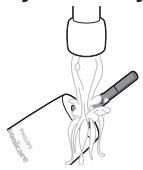
1 CHINMITE YNCTAUYHACAkyI NpOMOHTe OblaCTB BOKpyrMeTALINUeCKOROBaNA TENIOBDOI. PPOBEBTe, YTO6bl OCTATKN 3y6HOJ NaCTbl 6bl IN NOJIHOCTbHOyDAJIeHbl.
BnmaHne! He naabJIbAeTe ocTpbIM npedMeTaMn Ha pe3INHOoe yIIOThHeNHe Ha MetaJIInueckOM BaJe, TAK KaK 3TO MOKeT pNIBeCTN K NOBpeJxDeHIO.
2 IpoTnpaIte NOBepxHOCTb pyKu BJaXHoN TkaHbIO.
PpimmuHne.He kacaiTecb pykOaTKo paKOBnbl n He cTsyHteNoHe,HTObblydaJIInbIINuHIO BODy.
Hacaikka
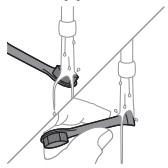
1ОпалackиBaIteЧИСТЯПУнадку посе кждого Использованя.
2 He pexe oJHoro pa3a B HeJeIIO cHmAmTe HacaIky n IpombAaTe MeTo KpeJIeHnK pyuKe TeIIOB Odoi. PpomBaAte 3aUHTbIKoJINaQOK No Heo6xoJIMOCtN.
3apndoe yctpoctbo
1 PpeoOuNcTko npn6opa oTcoeHnYte erO oT 3JIeKTPocetn.
2ПOTnapeTte NOBepxHocTb 3apAДHOrO yCTpoIcTBA BJIaJXHO TKaHbIO.
Dopoxhnyfytnap
ДяочNTКВHуТрЕнг�иОверхНСТДорожногOFyтларпомоITE erO TeNLOB BOOnиnpOTpTeBlaЖнОТKaHbI.O.
XpaHeHne
Ecnn BbI He nllanHpyTe IcnoIb3ObaTb ycTpoiCTBO TteChHe nnTeBHO BPEMeHN, peKOMeHNyETcR OKJIIOHNTb Ero OToJLEKTPocTeN, OUHCTNb (Cm. rJaBy «OuChKa) u xpaHnTb C cyXOM pNOxHaHOM MeCeBdAnl Ot npMbIX COJIHeuHbX JLyuei.
3aMeHa
Hacaika
ДяdoctижениоTNIMaIbHbIxpe3yIbTaTOB3aMeHЯnte Hacakn Philips Sonicare kackdte 3 Mecaça.ПользуTeCb Tolkoc mehhblm Hacakkam Philips Sonicare.
Ie yka3aH Homep moJeJI?
MoeJIb (TIN) 3y6HOn UeTKn yka3aHa Ha ynaKOBKe. KomIIeKtaUIM MoJeIeN 3y6HbIX UeTOK CMOTpN B DOnOJIHeHIn K HAcTOrIeMy pyKOBoDCTBy NOpJIb3OBATeJIa. MoJIbpyKn yka3aHa B ee HnXHeY qAChN.
TapaANTn n noDpeKka
U3BVeHHe aKKyMnyTopa
YTO6bI INBLeuey AkkymyJIaTOp, HeO6xoJIMo IOnIOΓOTOBITb NOIOTeHcE/TKaHb, MOJOTOK INILOCKyU (O6bIuHyU) OTBePTKy.
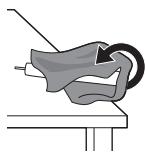
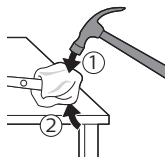
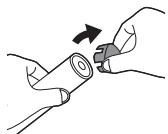
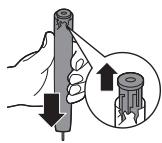
1 706bI pa3p4nITb akkyMylTOp IIO6OYO yOBHbI 3a9Ja, n3BLeKInTe pyKoTky n3 zapdHoro yCTPOiCTBa, BKJIOnHTe 5eTky Philips Sonicare nNoJOnxDInTe, noka OHa He npEpeKaTnT paboty. NToBopJrTe 3To DeCTBNe, noka 5eTka Philips Sonicare He nepeCTaHET BkJIoucAtbc.
2 CHIMnTe N BbI6pOcB Te HacJaKn. IOnHocTbIO NaKpoITe pyKoTky IOnIoTeHcEm INJ TKAHbIO.
3Пидержьая Верхню чыт pyкогтkn,удapьTe MOЛOTКOM NO HNХнй сачtn Kорпсуca pyкогтkn(Ha 1СMВblSEHnxнгКрмк).3aTeM ydapbTe MOЛOTKOM NO KOPnyc CЧeырс CTopoH,YTO6bl CHЯТь 3aJrJyUkY.
PpimmuHne.Bo3MOxHO,ДЯOTcoeINHeHHBHyTpEHnX 3aueJIOKNotpe6yETcY ydapntb NOkopnyCy eue HeckOJIbKO pa3.
4 ChmMnte 3aIyUkC pyKoTkn 3y6Hoi ueTk. EcIn 3aIyUkHy He ydaTe rOcoEduHnITb OT Kopnyca, NOBTopnIte 1ar 3, noka 3aIyUka He 6ydet n3BLeueHa.
5 IpeBepHnTe pyKoTky n npKMMte BaN K TBepDoi nobepxHOCTn. EcIn BHyTpEnHne 3JeMeENTb He ydaetc OTOeDHNHT b OT Kopnyca, NOBTopraTe Waar 3, noka OHn He 6ydyT OTOeDHNHebl.
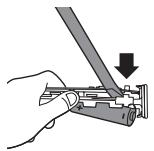
6 BCTaBbTe OTBeptKy B ⅢeIb MExJy AkKMyJIaTOpOM N 6eJoI paKMoi B HxHHeI YaCTn 6IoKa BHyTpEHHN XJIeMeHTOB.3aTeM IOJeHbTe aKKMyJIaTOp C NOMUbIO OTBePTKn, YTObI OTOeDINHb HxHKnIOU cactb 6eJoI paMKn.
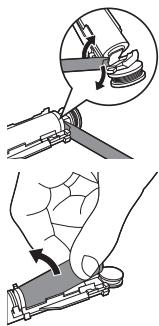
7 BCTaBbTe OTBeTpKy B ⅢeIb MmJy HnXHeY aCtBIO aKKymJLTATopo N 6BnO pAMKo, YTObI CHrTb MeTaJIInueChk fNkCaTOp, CoeINHIOuSi n aKKymJLTAc C 3eJIeHO n eauTHo PIAToH. HnXHra qACTb aKKymJLTATopo bSyTe N3BLeueHa N3 pAMKn.
8 POTaHnTe aKKyMylTOp n3 OTceKa IJIa BHTpeHHnx 3JIeMeHToB, YTOb6I OTCOEiHNHb BTOpOJ MeTaJIInueckn fIKCaTOp aKKyMylTopa.
OctopoxHo!Bo n36eXaHne NOBpeXdEHNr KOxN co6IIOaIte OCTOPOXHOCTb PnP npNKoCHOBEnn K ocTpbIM KpaAM fUKNCaTOPOB AKKyMJIaTOPa.
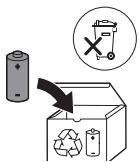
9 3aKneIte KOHTAKTbI aKKyMylAToPAJIeHToI, YTO6bI n36ExaTb Ix 3aMbKaHnra (OT OCTaBUIeOc3 zaprJa aKKyMylAToPa). AKKyMylAToPbI rTOOBblI nepeJaun B cneuJnInpOBAHHI pyHKT yTNlN3aCm; OCTaJbHbIe 3JeMeHtbl IpnIbOpa IpoJLexaT yTNlN3aCm B COOTBETCTBNI C npIMHeHMblIMn ppaBnAm.
MykandaMa
Ta6pVK 6apON xapIN Ba XyU OMaIeN 6a Philips! BapON rnpfTAnH XamaN fOuJaxo a3 DaCTrnpne, KIn Philips neuHxOJ MeKyuHaD, MmCyJIn XyIPO daP www.philips.com/welcome 6a KaId rIpeI.
Mablymotu myxum6exatap
Maxcynlnotpo TaHx MoYbOΦnKm MaKcaJ nCTnΦoJa 6apeJ.
Peea a3 NCTnΦoJaan maxCyIOT, 6atapeJXo Ba 3AMMaoJ OH, IN MaBjMOTn MyxIMPo 6OJNKKaT XOHeJ Ba OHpo
6apOn nCTnHOJ dp OJHa NHOx KUHeJ. NCTnΦoJaan
HOJypCT mTeBAHOJd 6a Xatapxo e yapoxaTxOn YnDJI
OBapJa paCOHaJ.
ДиKKaT
- Bapknpykpnyipo taHxo 6o Philips WAA1001, WAA2001, UL e aanptexon mybofukn 6exatapnn TaCnKu7da 6o uinDaTn Bypyd (100 - 240 V~; 50/60 Hz; 3,5W) BA uinDaTn bapomad (5 Vdc; 2,5W) ry3apoHe. Bapon dianh npyxatn aanptepxo, LytfaH 6a www.philips.com/support bopnd waBed.
- Bapknypkyhanaipo a3 o6 duyp hnoxdopei.
-Пeш az пайваск Kapдани барКунанДи USB, 6obapxocnil KyneД, KIДаCTak KOMInaH xuPk act.
Дастгхи мазкурpo кдakон Ba aшхоce, К Кбилготи усмони,эхсocь éakil dopanid, é Тачрпь BAdo nOnHnHaDopanH,metabOHaHn Истфда baapanH,агар onHxTo haxTn ha3OpaT édactyp Одь Sa nStнфда дactroX,OnDi 6exatapn OmoDA шуда 6oSHAнBa xatapXOn Map6ytrpo dapK yHaHn. To3akyni Ba HINOxy6MHn,dacTROx Ha6OaN a3 YOHbN Кдakon bUnyHn H3OpaT aHcOM DoJa ShaBn. - Bapon MyTmaHn ShydaH, KI KydaKoH 60 maxcyl 603i HamekyHaHd, OHxo 6oayd yap 3epu Ha3opat 6oWahd.
-TaHxoIaBO3MOTnE MaOOn MacpaΦn acnn Philips-po nCTnΦoJa 6apei.TaHxo a3 6apKnpyKyuHaJAn USB,Kn 6o maxcyn IopOn UL (CInΦn2) e aanTepn TaCnKu7yJaan 5V DC (IPX4e 6aJIaNtarp)-n MyBoΦnK TaBmH MeaBaJad, nCTnΦoJa 6apei.
Дастюн мазкур кисхои a3 сониь корбар xudmatшаванда наорад. Aarap дastroх вайрон shya boшад, nctnfoan OHpo KaTb kyHeD BA 6a МарkaЗи поубини nCTeMbONkyHaHdaRoh NapdablaatN(Kafonat Ba dactrnp-)xud myoqunat KyHeD.
- BapknypkyHm maxcyIpo 6epyH a3 6nHO eJap Ha3dNkIn caTxn TaΦcoH Haγ3apOHeI.
XeayKNCMMAxCylOTPOdapMOuHn3apΦyI TO3aHaKyHeD.
Дастroxи Ma3kyp TaHxO 6apOn To3a KapdaHn DaHDoH, MnJk Ba 3a60N ne6bHn Wydaact.
Arap nac a3 nctnfoda xyhpaBnu a3 xaad 3nejpyux dxa,arap xynpabn pac a3 1 xaftan nctnfoDa noma e6aad e arap lmyo hopoxat Ba daqd xnc kyHe, nctnfoDA naCTROxpo KaTb KyHeD BA ba DxyTpyu DaHDOH MPOChMaT KYHeD
- Arap Ljmyo nap daBomn 2 Moxn neu cappoxnn naxoh e mnilkn daHOn dOwTa 60wei, neu a3 nctnfoan nH ac6o6 60 duXtpyn daHDoH MaWBapat KyHeI.
Arap 云yMo kapDIOOCTmMyJrTOp e nIgrap dactROxn mIpaHTcnaUyda doWtA 6oWe, new a3 nCTnfoDa 6a dyXtyp E nCTexCOkUyHaHdAn dactROxn mIpaHTcnaUyda MypoUnat KyHei.
Arap Uymo HnragoHnxOn Tn66bI OoTa 6oWe, neu a3 nCTnfoaun IN daCTROX, 60 nyxtyp macInuxat KyneD.
ДаCTROxMa3KypДаCTROxHINFOxyBnHJaxcIaCTBa 6apOnIcTnΦoJaIap6emOpOHn cepUymOpIap amaJIyN JyXtPyn DaHDoE Myaccnca Ne6bHnHaUydaact.
IcTnfoaan YyTkapo xAhRomm capaK KyΦTa e XAMnDaUya 6yuaH, KaTb KyHeD. CapaKn YyTkapo xap 3 mox, e 3yUtap NBa3 KyHeD, arap HnWoHaxoN φapcydaawBn paNo shaBaHd.
Arap xaMnpan daHDoHsHy mIyMo IopOn nepokcnid, coaan HoHnazn e6Nkap6oHaT 6oMaJ (JaP 6ab3e xaMnpa nAnDIOHsY mAbMyJ act), nac a3 xap k INCTFOda capaKuTko 60 cOByn Ba 6oDnKKat TO3a KUHeD. OH NIMKOHnTn uKkactHn PnlaCTNKpo neShnpr MekyHaJ.
A3 tamocn Myctakm 60 maxcylote, KI dopoun paBfahxON 3npri e paBfAHN KOOK Me6oWAnD, xydopn HAMoeJ. TamOC metaBOHaD 6oNC KaHJa WydaHn MyjAKXOn uytkaraPdAd.
MaxcynpoIapxapopatn6aHn32oF/0oCba104oF /40oNCTnΦOda6apeJBaHraXdopeJ.
Maxcyn e6atapeaxopo a3 Otaa np hirox,popeBa OHxopo 6a 1yobn MyctakmMn ofoTo6 exapopatxon 6baIaHd Hary3ope.
- Arap maxcyn faipnoi rapm 6a16bmyda 60wa, e paHrpo nBa3 KyHaJ. 3ap4npo 6a Mydntx xeIe npo3 rnpaI, nCTufoJa Ba 3ap4kUnn OHpo KaTb Hamyda, 60 Philips np TaMoc 7aBeI.
Maxcylot Ba 6aTapeyxon OHpo 6a TaHypxon KyToxMaBv e TaxTaCaHn 3NeKtpnKn Hary3Opd.
Maxcyn e6batapejro Hakywoe, TaFInp HauNxed, cypx e Baipon HakyHe, KICMxOn OHpo Cydo HakyHe, TO KN batapejxo rapm HaawabaHd E moDaXOn 3axPHok xatapHOK a0xHO HaBapOraHd. Batapejxo 6bApk a3 xaJ3nE 6apBaKc 3apJ, HauNxed e paCnsu KyTox, HkyHe.
BakTe KI 6aTapeXo BaiPOnHaHd E MeuKaHd, OHxOpo a3 nyct e YaImxo Dyp Hnrox, Iopei. Arap 6a YaMm e npCT paCaD, 60 o6 WyeD BA 6a Ta6n6 Mpyounat HaMOeD.
MaJIOHxON 3JeKTPomarHnIT (EMF)
IN Tauxn30n Philips 6a xamam cTaHdapTxo Ba caHaXOn Mebepm Map6yT 6a Hfyu3n MaJIOxOn 3JIeKTPomarHHT MyTo6NkAT MekyHaI.
Dactypu TabmHOTn PaIIO
XaMnH TapNK, Philips əbIOn MekyHa,I, KI YyTkaxOHN daNIOHwUyn 3JekTPrKnN 60 IInTePfeuCn 6acOMaNi pAINO MyaXaaWUpa (Bluetooth e BrushSync) 6a Dactypn 2014/53/EU MyboΦnKaHd.
- Bacomaudi paanon Bluetooth: 2.4 ΓXc
- KyBBaH nHHOnn 6acOMaH paHNON Bluetooth:3 d5M
- Bacomani paiani NFL: 13.56 MXc
- KyBBaH HxOnn 6acomau paonu NFC:30.16 dM
MaTHnI npppaI eblommaI MyTo6uKaTu IAvap cypoFau INHTepHETnI 3ePHN daCTpac act: www.philips.com/support
IcTnfoan neu6HnHsya
Uytkaxon daHdoHsyyn 6apknc cnlcnilan 3000 Ba 4000
6apon HeCT kapdaHn KaabTn Yacnak Ba 6okmoHdaxon
fN3O a3 daHDOxO 6apon KoxuI DoaHn Pycniln
daHDOHXo BA 6exTap HNOX DOtAHn CaIOMatn DaXOH
ne6bHH uyaHaN. UyTkaxon daHDoHsyyn 6apknc
CcnLcHAn 3000 Ba 4000 6apon nctiFOnDaan ncteBmOnn
xoHar n ne6bHH uyaHaand. NCTpOdaan kyakOn 6oJr
taxtn Ha3Opatn KaHOcoH OH cypat rnpad.
Uytkain daHdoHsyyn «Philips Sonicare»-n yymo
1 Capnyu bexdoostn caexi
2 Capakn yyTka
3 DaCTaK
4 TymanФabJOL/xomy
5 Edpacn IBa3Kynn capaKn yTka
6 HnwoondxxahdAn caTxn 6apkn 6atapea
7 BapKnpKyHaHdAn USB (aanTepn neBopn doxnne HecT)
8 FInIoΦ 6apoun caIapap (TaHxO TaMfaxOn MyuXaaC)
Uapx:Aaantpepn DeBopn Doxnil HeCT. TaHxo a3 aanptepn 5V (HaBbN A) nctnfoda bapei.
Uapx:Capakxon yyTka apk MekyHaHn.
Ofo3n Kop
BacikyHncapaKnYtKa
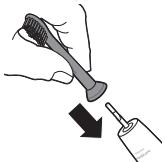
1 Capakn ytkapo poct kyne, To KN JInΦn yytka 6a camTn neu n daTak 6apo6ap waBaI.
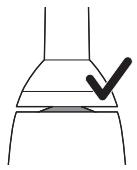
2 Capaku YyTkapo 6a MexBapn MeTaJIIn TO NOeH caxT naxu KyHeI.
Lapx; Lap 6aHn capaKu yTka Ba daCTaKn OH Kame focnla nDaH mykappar aC. IN mKoH meNxa, KI capaKn yTka dpycT lap3nW KyHaD.
BapKpyKHynn «Philips Sonicare»
1 CmM 6apKnpyKyuHaanJau USB-po 6a aanTepn DeBOpne, KI 6a 6apKBaCnaK naBacT act, BaCl KyHeI.
2 DactaKpo 6a 6apKnypKyHaHa qoHnp KyHei.
- YapofaKn HnIooHnXaHdAn caTxn 6bTapej foBol MeuBaJn BaJaCTak Ny MapoTn6aCao MeiNxAd. IN HnIooH MeiNxA,Kn YyTKaN daHDoHsYbN 60 6apK npr Siyda nctOdaact.
Lapx; Bapon komiIaH 6o 6apk, npk KapdaHn 6bTapey IN MeTBOHaJ TO 24 coat BaKtpo rnpaD, aMMO shyMo MeTBOHeJ cyTkain daHOnHsyyN «Philips Sonicare»-po To anChOM 3apArdpnn nyppa NCTnΦoJa 6apeJ.
IcTnfoaan YyTkain daHdoHsyynn 6apKnn «Philips Sonicare»
Arap yMuO yTkAn daHDoHsUyNn «Sonicare»-po bOpn
aBbAIn nctNoDa 6apeD, odaTah, yMuO hnc6bat 6a
nCTNoDan yTcKAn daHDoHsUyNn faPn6apKn lap3nShn
3neDPO xNC MEkyHe. BApOn nCTNoDA6paHdaroHn
6opn aBBaI a3 xad 3neD fNtOOPOBarAHJ K Kop
MaBMyInCT.TaHxO fNtOropn HApMPO nCTNoDA 6apeBa
mHKoON IxNEd, KN xyDu yTcKAn daHDoHsUy DaHDoHXoN
yMuOpO To3a KyHaI. LyfTaH, 6ApOn TaCpBn6bAn 6exTapnH
daCTpyXOn daHDoHsUy IN cepINHO nAmoe. BApOn
paCoHNDAHN Kymak 6a yMuO dAp rYzapRiNs OcoH 6a
yTKn DAHDoHsUy NabN «Sonicare», INH yTka 60
xycsntn fAbOJyDnAe «EasyStart» TaMbNn Kapda
MeuBaAD.Nh xycsnt Tnac a3 14 daHDoHsUy ABBaI
KYBaan yTkapo OXnCTa 3nEmd MeKyHaI, TO KN yMuO
TaboHeD 6a yTkn daHDoHsUyNn «Philips Sonicare» Odat
kyHeI.
Дастухон тозakунн
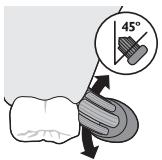
1IinФичTKapoTAPkyHeBa6aOHMnKdOpNkAMXaMnpaNdaHDoHsYInpoMOJe.
2IINΦxOuYyTkapo 6a DaHDoHxo Nap KUHyn Xyprd (45 daPaua) OoRnnp KyHe, fNIOpHn HApMPO nCTnfoDa 6apei,TO KN IINΦxo 6a XaTm MInKn DaHDOH e KaMe 3epn XaTm MInKn DaHDOH paCaH.
Tab3ex: XaMe7a Mapka3n YyTkapo 6o daHdoHxo dap TAMOC HIOX,DOpeI.
3 Bapoi φabol KapdaHn Philips Sonicare Tyrma n fo/oxmypo naxw Kyne.
4IINΦxONyTkapo60JOnDaHDOHXOBAdapXaTN MmIKN DaHDOHXO 6a TabPn DpyPcT QoRInp KyHeD, DaHDOxON xHyPcO 6o xapaKaTxON xypn nacy neu To3a KHyTe,To KN IINΦxON yTka6aHn DaHDOxO rγ3apad,IH XapaKATpo dap TAMOM daBpaan DaHDOHyyu XyD iNOMA dNXeD.
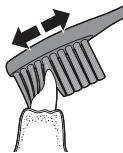
Lapx; MyjKOn yTka 6oJ kame Baceb IaBaHn, Tabcna DoJa HameWabA, KI Wymo DaHDOHXOPO MmCIn 60 YyTkain DaHDoHwYnn Dactu To3a KyHei.
5 Bapon To3a KapdaHn CaTXXoN dApyHn DaHDOHXoN neu, daCTAKn YyTKapo HmAmMyd Xam KyHeD Ba dap Xap Jk DaHDoH YaHd 3ap6an amyDn JkXeJapo anHqom DInXeJ.
Lapx; Baopn nTmHOnDIOHTaH dAp OH, KI Wymo dap TaMOMn daxOH JkCOH DaHDoHsyKapDei, daxOhpo 6o HcTNfoDa aXycuTIn «QuadPacer» 6a 4 KcM TAKCm KyHeD (6a 6bAnDi «XycuTInxo» Hnrapei).
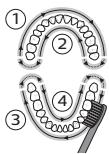
6ДанdoohyInpapKcMn1(6epHya3dAndohXoN 60no)cap KyHeBa 6a MydAtn 30 coHna nei a3 ry3apu6ba KcMn2 (doxuJn daHDoHoxon 60no)TO3a KyHe. DaHDoHsyInpap KcMn3 (6epHy a3 daHDoHoxn noE) cap KyHeBa 6a MydAtn 30 coHna nei a3 ry3apu6ba KcMn4 (doxuJn daHDoHoxn noE)TO3a KyHe.
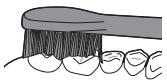
7 Nac a3 anHcOMdoaHn daBpaan daHDOHsW, yMo MeTaBOHeD BAKTN INOBaRINO 6apo T03a KapdaHn caTxN XOyHNaI DAHDOHXo BA YoXoe, KN dAp OH DoFXo NaIO MoeBaAHaND, capF KyHeD. UyMo nHyHn MeTABOHeD 6a Tabpn DInNXO 3a6OHN xUdpo 6o cyTKaAN DaHDOHsWyn PhaobI e rainpfaBoJUwDa TO3a KUYEn. CyTKaAN daHDOHsWyn «Philips Sonicare» bapon nCTNoDA nap 6peKETxo (InfXOn yTka XaHROMn nCTNoDA nap 6peKETxO Te3 fapCyda MeuBaAHd) Ba TaBmnpi DaHDOHXO (NJLObaxO, fInloqakxo, BUnHPxo) 6exatap act, arap OHxo 6 tabpn dypyct ry3oTa Wyaadn Ba BaipOHuaHaMe6oHaHd. Arap rHOH MyUKnIb 6MaHcE Ond, LyTphiH, a3 daHDoHN3nIK MaCInxAt ripeD.
Lapx; BaKte Kn yTkAn daHdoHswyn «Philips Sonicare» tap TaXKnKOTN KInHnKn NCTnΦoJa MeuBaA, daCTaKn yTka 6oayd an peayan To3a nCTnΦoJa waBaA ba dopon 3apRy nn nppa 6oWad B a xycsna T«EasyStart» 6oayn xomyu wya 6oWad.
BapKnypKynBaXoJatn 6aTape
1 CmMn 6apKnpyKuHaanJus USB-po 6a aanTepn DeBopn Bacn Kapda, aanTepn DeBopnpo 6a 6apKBacnaK 60 MaHbAn 6apK Bacn KyHeI.
2 DactaKpo 6a 6apKnpypKyaHaJa QoIrp Kyei.
Uapx;Даctaknчтka6apoTacmK,kapdAnOnH,Kn UyTkapa npkpyHaan6apK,6a TaBpN dpycT cOyRnp Kapda WyaactBa 3apJrnpΦTa nCToDnact 2 CnHnI N KyTOXMeINxA.
Uapx: IN chyTkain daHdoOnshyn «Philips Sonicare»
aKaJIaan 6apon TabmHn 28 qalacn daHdoOnshyn
6bApHomape3i Kapda shyaact BaXap kq qalaca 2 daKnka
dAbom MekyHaD (14py3MeIupad, arap xap py3 dy
mapoT6a daHDoOnshyn KyHe). BaKte Kni shymo qalacan
daHdoOnshyn 2-daknKapo uNope MekyHe, daCTako 6a
peayan TaBakKyΦ MEmOHeE oHpo 6o 6apk npr MekyHe,
HNIWOHNxAHdAn catxN 3apAeBaTapeBa3bnyTIN
6atapepero HNIOW MeINxAq.
Ba3bnaTn 6aTapei (BaKTe Kn DaCTaKu cyTka dap 6apKpykUHaHdAn Kopn QoIrgp Kapda wUdaacT)
MaHbI3dI kayinci3dk aknapaTbI
ΘHIMДI TeK apHaBbMaKaTaBHa NaaJaHaNbHbHb3. ΘHIMДi
Xe3e OHbH 6bTapeRanapbI MeH akCECCyapnabH
KoJIaHb6ac 6ypbH OCB MaHb3DbI aKnapaTTb MyKnT
OKbI bIbFbIN, OHb KeJeWeKeTe Kapay yuH CaTaN
KoBbHb3. Dpybc NauJaHa6ay KayInTepre Hemece aybp
JapaKaTtApFa AkeJyMi MymKiH.
Eckertnyep
Tek Philips WAA1001, WAA2001, UL hemeckekipc KepceTkuiTepi (100-240 V; 50/60 Hz; 3,5W) kane h bIbIc KepceTkuiTepi (5 Vdc; 2,5 W) banaMaJIb Kayinc3 aanTpElepMn KyaTTaNbIPbHb3. AanTpElepTi3IMH www.philips.com/support Be6-6etIneH kappaHb3.
3apraTafbltbl cydah aJlwaK YCTaHbI3.
USB3apraTafbIbHxajlFamac6ypbIHcantToIbIK Kypfak60JIcbH.
-5yI KpybIfBnHb Kayinc3 naIdaIaNHy XeHiHderi Hcaynap bepin, 6acka bipey kaIadafalafan JxHe KypanDb naidanaHyfa KaTbCTb KAYIN-Katepnepe TyciHdiipilreH xFaDna, oCb KypanDb 6bnap JxHe fNtkaJIbIK MmKInDiI rmeonlay, ceSy KaIjnti WeKeTeuI, 6niIM MeTHaxipinbcic a3 aamdap naIdaIanaI anaIbI. Ta3aJlMn NaIdaIaNhybFa texNHkAIBK KbIMET KOpCETy KbIMETTEPIH 6akblaycbI 6anaIapFa opbIHdayFa 6oImaiNb.
- BaJalapdbH, eHIMMeH OiHaMybH KaJaFaJaFaH XeH.
Tek Tynhyska Philips akccecyapnapbih Hemece TybHbUbIbK 3aTTapbIH naJaIaNbHbHbI3. OHIMMeH 6ipre 6epiIReH USB 3apraTafbIbHbI UL (2-KNaCTbI) Hemece cofah 6aIama MaKyIaNaHfA H 5 V DC aJaanTepeIme (IPX4 Hemece oJAH Kofapbl) paJaIaNbHbHbI3.
- 5yI KpybIaNfIa naIaIaNHybI kbl3MeT kpcTeTIN 6eJIiueKTEp JxO.K. KpybIaNfIa 3akblmJafH aONca, OHbl naIaIaNHybI ToKtAToBn, eJIiH3derI TybIHybIapFa KOnJaY KpcTeY opTaIbIFHa xa6aplaCbHb3 (KepiH3 «KeIINdk XeNe KOnJaY KpcTeY»).
- ΘHIMДдалада HeMece Kbl3bIn TpyFaH 3aTTapDbH JxHaBbIJa 3apJITaMaHbI3.
- HmHn e6i6ip 6JIirIH bIbIC JyfbMaUNHaJxyyfa 60ImaMdbI.
BvI KpybIfby TeK TICTep, Kbl3bl NeKTEp MeH TiJdi Ta3aJayfa apHaJIfAH. - PaiJaHaHaFaHHaN KeiH KAn KaK aKa, 1 anTa
PaiJaHaHaHaHaHn KeiH De TiCTIH KaHaByI TOKtAmCa
HeMeCE KOnaCbI3DbIK, HeMeCE aybIpcbHy ce3JIce,
KpybIbIbI KOJaDaHbICbIH TOKtTaBIn, Ti dApirepiHe
xa6apNaacbIbI3. - Ocby KpybIfblHbI KOJIaHaap aJbIbHda, erep ci3 2 aI shaMaCbIHda Jxak cyHeKke, 6eTIi3re HEmec eTc etiHe onepaunj xacaFah 6oJcaHbI3, dApirepiH36eH keHeciH3.
Erep ci3ne KapnocTmnyJrTop HeMece 6aKa mIJIaHTbIK KypblfB60Ca, naJaIaNap aJIbIHd dApirepiH3re HeMece MMJIaHTbIK KypblfB6IH eHdipyuicHe xa6aplacBtB3.
Erep ci3ne MeiunHaIbIK npo6nemalap 60la,ocbl KypaIbI naJaIaHap aIbIHda dApirepiH36eH KeheciH3. - ByI KpybIfbl - Zeke KYtIM KpybIfbcIbXHe CTOMaTOJIoTnJIbIK XMybIcTa HeMeCe MeKeMeJe KOp EmDeIyUJInepre KOJaHyFa apHaNMaFaH.
KbIJIbIKTapbIkaHbIJIfAHHeMeCeMaIbICaHZeTKa 6acbIH KOJaHa6aHbI3. 5eTka 6acbIH 3 aI caBbH HeMeCe To3y 6eJIinepi 6aKaJcA, oAn da epeTepek aybICTbIPbIHbI3.
Erep tic nactaHbI3da nepokcnid, ac hemece eki Kemip KblkblIbI coaIbI (afapTaBtH Tic nactaIapbIHa TaiaJanaHFaH coH ca6bIh dI, cyMeH MyKnT Ta3aHaHbI. ByI nlaCTIKTH bItbHaYbIH KOpFaHbl.
www.philips.com/support
PaindaJaHaMyMaKCaTbI
3000 xəhe 4000 series ənkeTpniK tic ueKaIapbl tictiH 6y3bIybiH aazaiTy xHe aybi3 CayIbIbH xakCapTy yuHIN TiTeH xabckak, daK neH taFam KaIbIKtapbl H KETipeJI. 3000 xəhe 4000 series ənkeTpniK tic ueKaIapbl TypMbICTa KondaHya arHaIfah. BanaJap yHemi epecek aadMhbH kaJaFaIaybIme naiDaIaNhybKepek.
Philips Sonicare tic utkacbi
1 TnneHaJIbIK KJON KaKaNaFbl
2 LlTeTka canTaMaCbI
3 Can
4 KyaTbI Kocy/əuipy TyMeci
5 LcTeKa 6acbH aybICTbpy KepeKTiriH ecke caJIbIi
6 BaTapeIeHreI INHINKaTOpbl
7 USB 3apraTafbIbbl (ka6bipfa aanTepei xHaKaTa kO)
8 Koj KaIntacbl (Kei6ip MoIeIbIepre fHa TaH)
EckepTne: Ka6bIpFa aAndTepi xHaNaKaTa xok, 5 V aAndTepDi fHaHa KOnDaHbHbI3 (A yInrici).
EckepTne: LJIeTKaIapDbIH, canTaMaIapbI ap Typni 6OJybl MymKiH.
Kymbic kacaTybI bactay
LlTeKa cattamacbH 6ekity
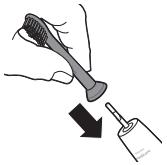
1 5eTka 6acbIiK bJIiJIbIKTap ca6bIbIH aJIbIMeH 6ipJe 6aftTa TpyaTbH eIT npaHaB3.
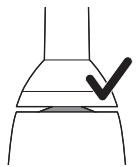
2 Toktafahwa 3eKa 6acbH MeTann 6jIiKke kprizhi3.
Eckertne: 6aebmcan apacbHaamaJIb apalbIKTH60JykaJIbITb. ByTic 5eTKAcbHbH dypbIC diipindeinyhe MymkHik6bepei.
Philips Sonicare KypbIJfBcBn 3apAnTay
1 USB 3apayay cbIMbIH TOK Ke3iHe KaIFaHfAH Ka6bipfa aanTepiHe KocBih3.
2 CanTbI 3apJTaFbIiKa KOnbIbI3.
- Batape DeHRei HnDnKaTOpb JxHaCa, ca6bHaH Dbl6bICTbK, CnHAn Eki pet 1bIfaBb. By - Tic 1eTkaCbI3apraTalbIn KaTaKaHbH KepcTeJI.
Eckertne: BaatarapenHbToIbIK 3apJdTayf24 caFatka deinih yaKbIT KeTy i MymKiH, 6ipak Philips Sonicare tic ueTKacBn TOJIbIK 3apJdTamai Tpybln naJaIaNHyfa 6oIaIbI.
Philips Sonicare tic utkacbH naaiahy
Sonicare tic tkekacbH anfaW pet naJaIaHaHcaHb3,
3JIeKTp emc tic tkekacbH naJaIaHaHydAn dipil K6bipeK
ceiIeDi. AnfauKbKe3de naJaIaHaNyblapdbH TBIM
Ken Kyu kondaHyb — KaNbITbJ XaIaDn. AkbpH Kyu
KoIaHbN, tic tkeKacbHbH cI 3yuiH Ta3aIaybHa
MymKiHdk bepiH3. EJ kakCbT aXepiB6 yuiH TEmHeeri
tkeKaMeH ta3aIay HcyKaynapbH opbHaDb3. XaHa
Sonicare KyaTbTi tic tkeKacbHa aybCyfa KMeKTecy yuiH
on EasyStart MymKiHdiRimEn KocSyI KeNei. Philips
Sonicare tic tkeKaCbIMen Ta3aIayDbI yipEny yuiH 6yJ
MymKiHdk anfaWkb14 peTTk Ta3aIay Ke3iHne KyaTbI
a3Dan apTbIpaDbI.
LTeTkamen Ta3aJay TypaJIbI HycKaynap
1 KblnblkTapblcynan,Tic nactacbHbH a3fHa MJIWeepIH XaFbIHbI3.
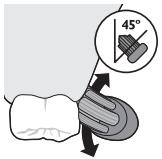
2 Tic 1eTkaBbIH KblIapbIH ticke kapa (45 rpauc) KcainTbIN YCTaHbI, CocbIH XaJIan6acbI, KbJInap Kbl3bl INK Cbl3bIFbHa HEmeCE Kb3bl INE K cbl3bIFbIH aCTbIHfbl XafbHa DeIH XeTk3iHJ3.
Eckertne: LJIeTKaHbIH opTaCbI apKaaHaH ticKe Ttin Typby Kepek.
3 Philips Sonicare KypbIbIbCbIH Kocy yuIH Kocy/ouipy TyMeciH 6acblHbI.
4 Tic neh Kb3bl NeKeTpe OphalacKaH KbIbIbKTapDbI yCTaHbI3. KblbIKTap TIC apacBHa XeTyi YuIH api-6epi akbpH K03FaJITbIN TiCti JxbyHbI3. OcbJaN uTeTkaMeH Ta3anay 6apbcIbHa JxblKbITbIN OTbIPbIHbI3.
EckepTne: KblIbIbIbKTap JkapKbIpaybl KaKet. KoJImeH peTTeTeiTH TIC UETkAcblMeH KbIPFaH DyPbIC EMcE.
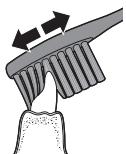
5 AiiBihfbi TICTepiH iki6BeTepiH ta3anay yuH 1eTKa tyTKacbH XapTBlaN tik Yctan, oP ticI 6ipHewe pet Ka6aTactbipa Jxpr3iH3.
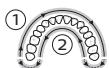
Eckertne: Bykij ayb3 kyibcH Ta3anay yuH, ayb3dbi QuadPacer MymkiHirin naiDanaHbN 46oJIke 6eJIi3 («MymkiHikTeP» TapaybH KapaHb3).
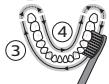
6 1-6eNikTi Ta3anaydAn 6actaHb3 (XofapfbTi TicepdiH cbtpKbl Xafbl) XaHe 30 cekyHd Ta3anaFahHAn KeiH 2-6eNikKe 0tHIn3 (XofapfbTi TicepHIn iki Xafbl). CoanH KeinH 3-6eNikTi Ta3anaHb3 (TomeHri TicepHIn cbtpKbl Xafbl) XaHe 30 cekyHd Ta3anaFahHAn KeiH 4-6eNikKe 0tHIn3 (TomeHri TicepHIn iki Xafbl).
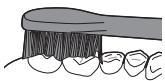
7 5eTkAmEH Ta3aJaiy uKlH aKaTaFaHHa KeiH, KaIHaN yaKbITbI TcTeepDin WaiHay 6eTepiH XaHe DaKTap naJa 6oNaTbH aMakTAPdbI 5eTkAmEH Ta3aJalayfXyMcayf6oJabl. CoHa-nA, KaLacBaI3, 5eTKa KocylbI Hemece Owipyni Ke3e 5eTkAmEH TiJdI Ta3aJalayf6oJabl.
6BeKeTET (6peKeTTepDe KOnDaHbFAnH Ke3e 5eTkAHBn 6aTcApbiXblamTo3aBl) XaHe KaJIbHa KeTIpiIrlen TcTep (NJOM6anap, KaNTaMaIap, cbHaIap) dypbicCaJIbHca XaHe 6y3blMaCA, Olanpbl Philips Sonicare tic 5eTKaHb36eH Ta3aJaNHa
MkyTbOyKepeK.EreKaHdAJa6ipMaceIe TybHdaCa, tic dApirepiHe xaBapnaBb3.
Eckertne: Philips Sonicare tic utkacblknHkaIbIK 3epTeynpde naDanaHbIca, can Clean pexmHnde naDanaHbIybl, TOBbFbImeH 3apdTaIaH 6Olybl kHe EasyStart MymKinhiri ewiipijiy kepk.
3apay khe6atapey Knyi
1 USB 3apraTay cbimbH Ka6bIpfa aanantepiHe KocbiHb3, cocbH Ka6blpfa aanantepiH po3etkaFa KocbiHb3.
2 CanTbI 3apJTaBfUkKa KOnbHbI3.
Eckertne: 3apraTafbIka caTbH dypbic KOnblfahbIH
KHe 3apraTalbIN XaTkAHbH pactay yuHc cantan 2
KbICKa DblbCTbIK CnHaJ LbIFaBl.
EckepTne:Byn Philips Sonicare tic ueTkacbI apKaaicbIcB 2 MNHyTaN 60aTbH KEMiHDe 28 Ta3anay MymKInHdiIIme KaTMaCbI eTei (erep KYHHe eki pet naJaHaBilCa, 14 KyHre JeTei). Batapei DeHrei HNdkaTOpbI 2 MNHyTbIK Ta3anay ceaHbIH aKtFaH Ke3deri, caNTbl KIDiptKeHdErI Hemece ON 3apAtdTaJIbIN XaTKaH Ke3deri 6batapeAHbIK KyHIn KcpCeTei.
Batape Kyi (can icTeN TpyFaH 3apAaTaBbIka KoIbIHaHa)
- Pekimdep (4000 series)
EasyStart - LlTeKa 6acbH aybICTbpy KepeKtiriH ecke calfblu
KbICIM DaTnIg - QuadPacer
- SmarTimer
Pekimdep (4000 series)
KyaTic uetkacbSensitive xane Clean pexmnepi apacbHaH TaHday MymKiHirin Bepei.
Eckertne: Tic ueTkacbH anFaW naJaHaHfAe Ke3Je aDenki napaMeTp Sensitive pexmI 60Jabl.
Pexmdepi 03reptyuiin:
Tic 1eTKacbH Kocy yWIn Kocy/0wipy TyMecin 6ip pet 6acblb3.
- PeximDi e3repTu ywiH 2 cekyHd iuiHne ekihpi pet 6acblb3.
- KiipTy yuHn 2 cekyHniuiHne yuHniWi peT 6acbHb3.
2 cekynd tic tckacbImeH ta3aIafHaHH KeiH Kyat Tymecin Kaeta bacytic tckacbH KijipTei.
EasyStart
Ocbi Philips Sonicare MoenH EasyStart MymkiHiriro cybI KyinHe KeenI. Philips Sonicare tKacBIme Ta3apTu yipEny yuH EasyStart MymkiHirir aJfawkb1 14 petTik ta3aay Ke3InHe Kyt a3dAn apTaDbI.
EasyStart MymkiHnirin Homegaipy yiwin «MymkiHnkTepei icke kocy Hemece oWipy» 6bnimKapaHb3.
UeTka 6acbIH aybictbipy KepeKtiriH ecke caNfbli
Philips Sonicare KpypbIJIbICbI UeTka CanTaMaCbIHbIH To3ybiH 6aKbIaNbTBiH BrushSync TexHOJIOrnAcBIMeh Ka6DbIKTaJIFaH.
Eckertne: Byl fynkunrtek BrushSync texhnoorncb6ap Philips Sonicare cmapt uetka cantamnapbimehymbic iTei.
1 Anfaw pet KaHa cMapr tcka canTamaBH 6ekity Ke3iHc can ci3e BrushSync texHONIOraCbApKbIbI Philips tcka cantamaBH 6apbH aHbIKaDbI JxHe tcka cantTamaBHbIH To3yBH 6akblaNbI.
2 Ca6bl yakbl T eTe KeNe IeTka caTnTaMaCbH aybIcTbpyFa OH TaJIbl YakblTTb aHbIKay UJiH KONJaHbIJfAH KbICbIM MeN NaJdaJaHaBJIfAH yakbl MJIWepeH6aJIhaBCTb IeTka cAnTaMaCbHIn TO3yIBH 6aKbIaNbIb. ByJ MyMkiHdk TiCihIzI eTe KaKcbTa3aJIayFa XHe Kytim KepcTeYre KeinJik 6bepi.
3 5eTka canTamaBih aybICTbpydbie ckepeTy wambl capbi 60bn jkaHca, 5eTka canTamaCbih aybICTbpyKepek.
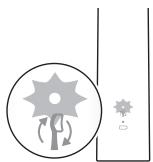
LlTeKa canTaMaBcH aybCTbIpy ecke caIbIbIbIH oIipy yuiH «MymKiHdIKeTpdi icKe Kocy Hemece oIipy» 6eJIIMiH KaPaHbI3.
KbICbIM daTunri
Philips Sonicare KypbIbnfcbl 1eTkamHe Ta3anay Ke3iHne
KoJdaHbJIFaH KbICbIMDbI eJWeTINKeHeTITReH
DaTtUKNpe Hka6DbIKTaIHaF. Erep TBIm KeN KbICbIM
KoJdaHbJIcA, TIC 1eTkacbl KbICbIMDbI a3aTynbI Kepi
6aIIaHbICnEN 6ipDen 6ilIpei. ByI kepi 6aIIaHbIC dIipI O3ERpICIMe, UTeKamEh T3aJaanay Ce3IMMeH XHe DblbCbImE 6epiJeCi CoBIme Katap 5eTka caTAMacBHy aYbICTbpaTBn ECKe cAflB1W 7aMbI capbl 60JIbN bINbJIbIKaTaNbI.
KbCIM DaTnirH eWipy yuHIN «MymkiNikTepei icKe Kocy Hemece eWipy» 6aImiH kapaHbI3.
QuadPacer
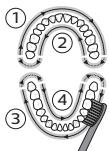
QuadPacer — aybI3 KByIcBHHB4 6OJIirH bipKeNkI JHe MyKnT Ta3aJauyIbI eCKePTeTI KbICKa CINHaJIb MeH KiDipici Bap apalIK TaIMeP. ByI Philips Sonicare Tic UeTkacBHyH QuadPacer MymKiHdiR Kocylb KyiHde KeNedi.
SmarTimer
SmarTimer 电KamEn Ta3aJaiy uKJI COhINda 电TkaHbI abTomaTTby Tpye Ewipy apkblu 电TkaMeH Ta3aJaiy uKJI aKaTaJfAHbIH KpcTeJi.
Tic dapiirepnepi ticti kynhe eke peet eKEMI 2 MnHyT Ta3aJayf kaKeHec 6epeedi.
EckepTne: 5eTkamEn Ta3aIay ZKNIH 6actaFaHHan KeiH KOCy/0wippy TuMeciH 6accabH, TIC 5eTkacbl YaKbITHa ToKtAtbIaJIb.15 cekyHbIK kjdipicTeH KeIH SmarTimer KaNNbHaKeJIdi.
MymkiHdkTepei6eIceHdpy Hemece oWipy
Tic 1eTkaBbHKeIcI MymKIniKTepiH 6eIceHdpyRe Hemece Owipyre 6oIaIbI:
EasyStart
- LlTeKa 6acbH aybICTbpy KepeKTIiH ecke caJIbIi
KbICmIaTnIg
Ocbl MymkiHikTepi6beNceHipy Hemece eipy yuH, TMeHeIerHyckaynapdbOpbHdaHb3:
EasyStart
1 Canbpo3eTkaKocbJFaHapraTafbIkwKa KoibihB3.
2 Can 3apraTafbIHTa 6oNfAH Ke3Je, KyaT Kocy/ouipy TyMeciH 6acbl TpybIbI3.
3 Bip pet KbIcKa dIbIbCTbIK CnHnAe cIITReHwe (3 ceKyHntaH KeiH), KyaT Kocy/ewipy TyMecinBacbl TpyblHbI3.
4 Kyat Kocy/ewipy Tymecin 6oCaTbHb3.
TomeH-opTaIa-koFapbl DeHReIe yW peT sbIKKaH bIbIc EasyStart MymKINIIrIH INCE KocblfAHH 6ilnpedi. BatapeJeHreinIH INnKATOp WAMbI da icke Kocyblpactay ywiN2 pet Xacbl 60bnXblnbTKaIbI.
Xofapb-opTa7a-TMeH DeHReIe yuipet 1bIKaH bIb6c EasyStart MymKInirHH uipin H 6iJipei. BaTape DeHreIHINnKAtop wAmbl eWipydpactay yuH 1 peT capb 6oBbN kblbJIbIKtaIbI.
Eckertne: EmxhaJIbIK TmIMdiIiKke KOJ XeTki3y yUoiH EasyStart MymKiHirin eWipy Kepek.
UeTka 6acbIH aybIcTbipy KepeKtiriH ecke caNfbls
EckepTne: Cmap Tke caTamaCbI ca6bHa KocblFaHda, TkeCa cTamaCbH aybCTbipy ecke caNfbluH FaHa Kocyfa Hemece eWipye 6oJabi.
Eckertne: XaHa cMapr 1eTka canTaMaIapbIHda 1eTka canTaMaCbH aybICTbpydbI eCKe cany fYHKcIycbI KocblbIKeJI.
1 Canbpo3eTkaFkoCbJFaH 3apraTaBfblkKaKoBbHbI3.
2 Can 3apraTafbIHTa 6oNfAH Ke3Je, KyaT Kocy/ouipy TyMeciH 6acbI TpybIbI3.
3 Eki Kblica Dbl6bIcTBk CnHnAe ctiIreHne (5cekyHntaKeiH), Kyat Kocy/Owipy Tymecin 6abIn TypbHbI3.
4 Kyat Kocy/ewipy TyMecin 6ocaTbHb3.
TEmeH-opTaHa-KoFapbl DeHReIe yu peT uBikKaH DblbI cIETka CaITaMaCbIH ayBtBpyDbI eCe caly fYHKunCbHbIN icke KocblfAHH bIDipeJI. Batape deHreHHIN HnDnKatOP WAmbl da icKe KocdybI paCTay yuiH 2 pet Xacbl60bnXbInbNbTkAdbI.
XofapbI-opTawa-TomeH DeHReIe yw pet 1bIKKaHdbIObcIeTKa CanTtMaCbH aybICTbpyDb ecke canyfHKcuaCBHIn oipiRHeH 6JnipeDi. BatapeJeHreHHInKatop wMbI oipydi pactay yuHin 1pet capb60lbIn XbINbIKTaaiDbI.
KbICbIM daTunri
1 Canbpo3eKaFkoCbJFaHapraTafbIkwKaKoBbHbI3.
2 Can 3apraTafbIHTa 6oNfAH Ke3Je, Kyat Kocy/ewipy TyMeciH 6acbIITpybIbI3.
3 YI KbICKa Dbl6bCTbIK CnHaN EctiINReHwe (7 cekyHntaH KeiH), Kyat Kocy/Ewipy TyMecin Bacbl TpyblHbI3.
KyaT Kocy/ewipy TyMeciH 6ocatbIb3.
TMeH-opTa7a-koFapbl DeHReIe yw pet WbIKKaH dbIbIC KbIcIM DaTunrI MymKINIIrHIH Icke KocBlnFaBH 6iInipeDi. BatapeJe HreHiH INdkaTop wAmbl da icke Kocyblp pactay ywiH 2 pet XkaBl 6OJIbIN XblNBkTAinbl.
Xofapb-opTawa-TMeH denHreJe yu peT sbiKKaH Dbl6bc KbcIbM daTHTnIy MymKHIgIH HoiipJireHH 6iDipei. Batape JdeHreHiH INdNkATOp wAmbl eWiydpiaactay ywiH 1 pet capb6oBbIn XblNBtIKTaIbI.
Erep yu KbIcKa DblbIcTbIK CnHaiJaH KeiH KyaT Kocy/ewipy TuMecin BacbIn Tpya bepceH3, icKe Kocy/ewipy peti KaTalaHaDbI.
Tazay
Tic nactacbH kHe 6aKa KaIbIKbI KeIpy yuHin Philips
Sonicare tic 5eTkacbH yHemI Ta3aIaIaN ObIpy KepeK.
Philips Sonicare tic 5eTkacbH Ta3aIay caJIapbHaH eHIM
JlactaHbI, 3aKbIMdaNybl MyMKiH.
EckepTy: ΘHimDi Hemece KepeK-JapaKTapDbI γuWikip 3aTTapMeH Hemece bIDbc JyfblI MaunHaJa, MKNpOTJKnHDbI NeiTe, XmMnJIbIK 3aTTapMeH Hemece KaHaFaH bICTbIK cyda Ta3aJaMaHaB13
UeTka ca6bl
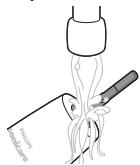
1 5eTka 6acbIH aIbIHb3 xHe MeTaJIg 6iIK aIMaFbIH XblcymeH WaiBHbI3. KaIfAH tic nactacbIHbIH KeTKeHIne K0xKti3iH3.
A6aIaNbI3: MetaII 6JIikTeri pe3eHke TbIbI3daFbIUtB I yuKip 3aTTapMeH 6acnAbI3,ce6e6i 6yI 3aKbIMaybl MyMKH.
2 CanTBH 6yKIN 6etIH DbIMKBIn W6epeKeNeh CypTiH3.
Eckertne: Apbik cyblk ketipy wih uHfblnafa bci cantblbacfy 60Imaibl.
UeTka6acbl

1 Φ npaiandaHnyaH KeiH ΚeTka 6acbH kHe KblIbIKTapDbI aaiBhl3.
2 5eTka 6acbH canTaH axbIpaTbIn, KEMiHne anTaCbHa 6ip pet 5eTka 6acbHbIH XaJIFaHaTbH XepiH Xblb cyMeH 5aBbIN TypbHb3. XoJ KaKnaFbI KaXeTIHe XmI 5aBbHb3.
3apraTafbl
1 Ta3aJaMaC 6ypbH 3apJrTaftbIHTbI TOKTaH aXbipTaHbI3.
2 3apraTafbIbTHbIH 6yKJIb6eTIHdbIMKbIJ WYBepeKeNeh cyptiHj3.
KoJ KaTacBi
XbIbI cyMeH wai bHbI3 XeHe DbIMKbl Wy6peKePteH xoJI KaTacBhlH iWHi Ta3aHaHbI3.
CaKray
Erepohimdi y3akyaKbI 6oBbI naJaIaHaH6aNtBih 60ncaHbI,po3eTKaIah cbyPbIH Ta3aIaHbI(TataaybIH KapaHbI),c9ntIN OHbTI KYH Caynepe IyCneTIn CaJIkBH JxHe KypfA JKepDe CaKaTaHbI.
Abyictbipy 5eTka6acb
OHTaIbI HAtnKeIepre KetyuH Philips Sonicare 5eTka 6acTapbIH 3 aainCaBH aybcIbI pybIH TpybIH3. Tek Philips Sonicare KocajkbI 5eTka 6acTapbIH KOJaHaBbIH3.
Moelb HemipiHIn Ophbl
Tic 1eTkanapbMoJeiHn Hmipi opaMbHa 6acBnFaH. Tic 1eTkanapbTOJbIK XMbHTbIbH, Ocb naJaanAHyBbHyCKaylbfHa KocbIMwa KaapaHb3. Tic 1eTkanapbTypi OHbTH ToMeHri 6oJIirHe opHaJnackaH TyTkAhbH KepcetijreH.
Keniinik kəHe konlay KepceTy
Erep ci3re aknapaT Hemece KoJday KaKet 6oJca, www.philips.com/support caiTbHa KipiH3 Hemece xalbIkapalbIK KeiINik NapakWacbH OkblHbI3.
Kenilndik wekteynepi
XaIbIkapalIK KeiJIik卹apTTapbi TEmHeIg 6eJIweKTepei KaMTbImaIbI:
- LlTeKa canTaMaIapbl.
PyKcat etiJmEreH aJImactbIpbjNaTbIH 6eJIweKeTpieH 6oJIfAH 3aKbIM. - MaKcaTbI3 naIdaIaHyaH, acIpa naIdaIaHyaH, hemKypaJIbJIbIKTaH, eHIri3JIreH 03repICTepHemecpeyKaTcB3 KOnHeDeYeH TbyIHdaFaH 3aKbIM.
KaJIbIbITbT03y,coHbIH iIiHHeKeptIHy,cbIpbIHy, MyKJHy,TyCTIH e3repYi HemeCe Tycci3DeHy.
Oндey
- Byn 6enrI 3neKtp eHimpei Meh 6atapeJnapdbkyHdienikTI yKoKbCTapbMeH bipre Tactayfa60ImaHTbHbH 6iJipedi.
- Θлект онимдери мен батарялардь 6олк кин hay 6оьынша щергліkti epжелерп opьндаьз.
KipictipilreKaeta3apraTalaTbH6aTapehblany
KypbIbI TaCTaIFaH Ke3e, KipicTipIReH KaTAt 3apJrTaIaTbIb 6BaTapeRbIb 6iIKTi MaMaH FaHa aNyBkaxket. 6BaTapeRbIb any aIdbIHda OHbH TOJIbIFbIMeH 6oc eKeHNirIn TeKcepin3.
KypaIbI aWy ywiH KypaIaPdbI KOJaHy Ke3iHne
JxHe KaTtza3aprTaIaNbIH 6aTapeRbHI KObkCa
Tactay Ke3iHne KaXeTTi Kayinc3iK wapanapbIH
OpbIHdaHbI.Ke3JepeN, KOJaPdbI, caycKaTapdbI
XHe JxMbIC iTeHTIH 6eTI KoPfAbl3.
BaTapeaIapdbi KOJaHaFAn Ke3e KOJIbIHbI3, OHiM XaHe 6TaTapeaIap KypFaH eKeHdiRiHe K3 XeTKi3iH3.
BaTapeJnapDbI aIFaHHaH KeiH,Ke3JeCOK KbICKa TybIKtan anMay yuH 6TaTape KJIeMMaJapbIH MeaJI 3aTTapFa (MbCaJIbI, TnBtHAp, KbICTbIPfBiIHTap, caKHaJap) TURi36eHi3. BaTapeJnapDbI aIIOHMn HxKaNTbIPfa opamaHbI3. KokbICKa Tactay aIdbIHda 6TaTape KJIeMMaJapbIH opaHbI3 HeMece 6TaTapeJnapDbI PJIaCTNK KaNTaF CaJIbHI3.
3apTaMaIbI 6aTapeIaPdbI sbIrapy
BaTapeHbI any anDbHnDa OHbIH ToIbIFbIMeH 6oc eKeHdiirH TeKcepH3.
Kaeta 3apraTataIbH 6atapeHbI aNy yuIH cyJIi HeMece
UYbepeK, 6aIHa MeH XaJInak, 6actbI (ctAHdApTTbI)
6ypaybi KaKeT.
1 Ke3 KeIreH 3apAaTb KaIra 3apAaTaNAtbIn 6aTapeAHH 3apAHH 6Itipy yuHcNCanTb 3apAaTbWHTan 7bHfApBn, Philips Sonicare KocBn, e3i ToktaFHaF DeHIN KocBn KObHb3. Philips Sonicare KocBIma KaJIFaHwa Ocb KaJaMaDb KaITaNb3.
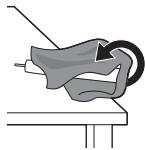
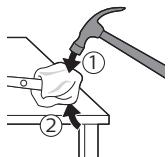
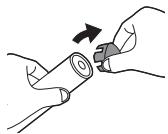
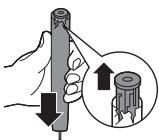

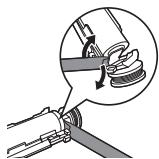
2 5eTka bacbH aIbIn, KOkbcKa JnKtbpHbI3. ByKiI canTbI cyIImEHemec Hey6peKeNHe Xa6blbI3.
3 Ca6bHbI JxofapfJxafbH 6ip K0JIbHb36eH yCTa, TEmehri JxaftbHaH 0,5ДIOm JxofapbTyPFAH can KopnycbH ypbHb3. CoHbIHdaFb KaKNaTb IuBfapy yuih 6apblk 4 xaftbHaH da 6anfameH KaTTb IypbHb3. Eckepty: Ixki imMeKTi 6aIIaHaBcTb 6y3y yuiH, yuBHaH 6ipheWe pet ypybHb3 KaXeT 6Olyb MyMKIH.
4 CoHbIHaFb KaKaNaTbI YeTa Ka6bHaH 8bIfapbI aIbIHb3.Erep coHbHaFb KaKaNaK KopnycbHaH Oaia KbpaMaCa, OHb IbIfapbI aIFaHa7a 3-KaJaMaBk KaTaNbHb3.
5 CanTbI Kofapfbl XafBih TEmeH KapaTbIn yctan, 6iNkTi KaTbI 6etke 6acbHb3. Erep iuKl KOMNoHeHTepi KopnycbHaH OHa aXbipamaca, OJapbl 7bIrapbl anFaHsa 3-KaDAmbl KaTanaHb3.
6 BaTapeMeH iUki KOMnOHeHTTePdiH TeMeHri KaFbIHdaFbIakXaKtayapacbHa 6ypaFbIUtBkipri3iHi3.CoanH KeinH 6ypaFbIUtBbTaTapeJaH KTepeIn,akXaKtaydbH TMeHri XaFbIH cbHdbIpbHbI3.
7 BaTapeHbI JXacbl Jx3aybl CXemaJIbIK TaKtaFA JxAIfAN TyPAH MetaJI INMeKTI CbIHDbpy YUHIN BpyaftBtB 6BaTapeHHbIH TEmeHI JxFaBI MeH AK JXaKtAY apacbHa caNbHb3.5yJ - 6BaTapeHHbIH TEmeHI JxAftBn XaKtaydAn AxxbipTaTaN.

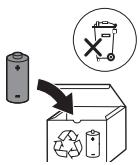
8 EkiHsi MeTan IImeKti cbHbIpy yIiH, 6aTapeYhbl YCTan, iWki KypamdaTapdAn WbIfapbn aIbHb3.
A6aJlHbI3: CaycaKTapbHbI3dbI aybIpTbI aJMac yuH, 6aTape iJMeKTepiH eTKip yuTapbHa TIn KETneH3.
9 KaIbIK 6batape 3apArBuHaH KblcKa TyblkTaIyDbI 60JIbIpMaYuHIN 6batape TynicneepiJeHTaMeH Ka6bHbI. EHHI 3aprTaIaMaJIbI 6batapeHb KaI Ta eHdyeRe XbiEpyre Xane HmHIn KaIFaH 6eJIirn TiicHHe KOKbICKa Tactayfa BoJaBIs.
Ltnuonjni
Philips-n nnnunui t atq u 2nnnhwnn quwwu
luwugnua: Philips-h unnuhg unwugnuu nn
wuguigniutug hundtp oqnulini huwun qnwugtip
atun wupn www.philips.com/welcome tgnu:
Stngynjniutn wunwnqniu uwuht
Uunpu oounwannotip uhuju pnuuwnuwuh: Uunp, nnu ununlngutnn u wputuniunutnu oounannodig wwnw yunnwgtwuynunnn intiuiywhn u whtap wju htnwqwh huwn: Ntuwnuwjhu oounqnnonuynnn twnwugutl unwuaqutn yuin ing uwwuwoptan:
2qni2ugnuiutn
Lhgpwunnpuhwuji Philips WAA1001, WAA2001, UL wuwuwnwnnwnuunwunwnghwunndup hwwwnwnwnwnuunwunwnughgttununnpwhu wunnnnghut (100-240 V\~50/60 Hz, 3,5 W), biwjuu wunnnnghut (5 V ninnh.nhuwup, 2,5 W): Runduunghut gwluyhuunnu bup dwnawlu hbnlyu hnnuu www.philips.com/support:
- 3bnl uyhtp hgpwlnnn gnhg:
Luhupuw USB hgpwnngh uhwug hn huunqutip, nn pruwn hnhuyn
- tbnhuwutn u $hghyulwu, qaqgnnylu wu uunwun n an ywnnnnnajntutnn uwwnu yunnu bu oqnwnnoi unynn uhwui utwhuynnnnjuwu utpnn, yu bte unwup unwgt bu oqnwnnnuu huwwuwuhwuy hnuhuiqutn u huwutnu bu hwnwnn unwnuqutn: Uwnp uwnu u uwwwnyqu qnnnnnaynuitn stu yunnu wnyltbnhuwutn lnu ng, te unwup zu ubnwhulynu:
tbnhuwubnhu wuhnuut2n tuwhtl ubnwhulnnnjuwu unuhwunqubni, nn unwupgTu huwnu wnnnnilvnh tbn:
Uhuwu oqunwqnnop Philips-h onghtuu wputunwnubn yuw dwhuunn uyniutn: Uhuwu uunph hbn unwwwnunn UL-nu USB hgpwnnhg (nuu 2) yuw hwiundtp hwuunwnu5 V33 huunwnh (IPX4 yuw pwn):
Uju uwnpn sh uwwnnuunni t oqunnnh unnuhg uwwwnntuynu uubtn: t a uwnp dwwuoldt, uh oounnannop wju u yuwupb abnynh 3wauhnntubn uwwunnuuuiy ubwnnnh htn (Stu qinhu 一 _ 一 tnwhhp u wguwnu):
- Uh hgpwunnp uwnp nnunu ywu unwp uwyntuubn hn:
Uh uugbp uunph nnu uuuuupgh uuguwu utpuwnu:
Uju uwnp uwhuwntuulwot uhwju wunwutn, huntnu t qniu uwni hwiun:
Uh oqwnqnodp uynn l hnvnnnwugtp atn wnuuunpydh/pd2lhy htn, tpa oqwnqnnoting htnn unjntuuhnnunjniu t unuogunu, tpa unjntuuhnnunjniu 2wnntuulnui t wju oqwnqnnoting htnn 1 2upjpe, juu t a t nubunu bp unhuanajniiu guu:
-
tānntutgtl bp pannwuh ywu huntnh uhnwhwnnnjnttu wuhluh 2 wunu, hunhnnuulgbp dab wunwuwpyndhttunwupwu wu uwnpu oqwnqnobin:
-
6a oqunwqnnonu bp unnh nhauwwn ywu wju huiwuunwnnuwnu uwn, uwwup atn pd2yh uwu huiwuunh ununwnnnn hbn'uwupw uwnph oqnwnqnnonu:
-
bpa pd2yulw uunwhnqnjntu nti, hnnhnnuugp abn p2yh htn' uuhupwu wju uwnpu oqnwnqnndt:
Uju uwnpu wuduwu wuhwug uwn tu wuhunbulwog tuh guh pnidwnnitinh ung h oqunwannduwu hwuiwunwunwupnudwlw uynlunhwiinu wuuwwunwnnpuynung:
Uh oqnuqnotip hnquwuwuy quhun, tba hnquwuuy uwatnn h2nluw yuud onunuubtu: Dhuunhup hnquwuwuy quhun wutu 3 wuhun uty uuu wultih 2nun, tpu wju uuwutuh huunuulbu:
- tpa atn wunwuh uwnluyuwwnuuuiu utnpuhn, uunwju unnuu phyuwnpuu (unuwouo 5 wunwuttn uwhunwutgunn uonluynn), jinupwusjn oounqponiug hann uwnuynh uugbp hnquwuhy qhuyn oawnn u gnn: Uw uwhunu T uwwunhhy hwnuynxugwn:
huniuuyhtg tgnuwjhu jnngn yuuynuh jin uwnnuuynn uwnuupunh htn 2hnwhg: Cchnu Lyunn n huiqtgub lunquuwuh uwhyutph pauhytintu:
Uwnp hgpwunpt, oqnwnnntpu wuhtip 32°F / 0°C-hg 104°F / 40°C gtnuwunhawuwju wuwuwunnu:
Uwnpu ni uwnunngutn htnni wuhbpynuug h uh nntpu wuhguwu unuh aunuwjubn unu yuwnan gnuununhawuwju wjuuwutnnu: - tpa uwnptu wunwnunnuyn utnunnu unpwumui t yuu npuuh hn n t quhu, unhnui t qanyun yuu, tba Ihgwunnuu unnnnuwug h anwn dwwuwuh nuwgnni uoh oonwannotip u uh igpwunnp wu ni yuubg Philips-h hbn:
Uunptn uuunlungutuh nbp Uhnnuwghwjuunwnuutnh uhu hnnlughnuunwnuutnh ub: - Uh puqtp, hnuhnhup, uultp, uuwup yww wunwnudtp uwnp ywunnuynngn uwnnu ngtnh unpwgnwn yw npntuwny wunuquwnn ywnp uynpwhn unwnuqunnn ywhutni hwnwn: Uh twnuwnp uwnnu ngtnn ywn dhuugwu, swhhg wtl yw hwlwnu wlnnun yh hgpwnnp uwnnu ngtn:
- tābūwunluyngutn qiuuulwotbu wui wunwnhnp bp uwwnnu, hnuwuhtip uw2yh uu wzptnh hbn 2hnuhg: tāb nu untnh niubu, wuhgwuwtu wu luggt gnnu lu nhtip p2yh:
Lluynnuwuquhwuulu u nu2unn (EMF)
Philips-h wju uwnghuiwwuunwuhunu t buiunwuwqhuuwu nu2untnwhqtnjauuwnpanjui hwnwnnnpnnn unwnunununutnu unnuutnh:
nwnhnuungwunnnubnh uynupbnjwnuhwq
Unjunl Philips-n hwunwnwnu t, n n
wunhnhwawuwuwunjuu ughtbnun (Bluetooth) (iwi BrushSync) wunhnuu wunwuh (tuynwnwu)
huqwuwu hwuwwuwuwu wu bhu 2014/53/EU unwnwnwnhu:
-Bluetooth nunhn huidwuulwunjniu.2,493g
- Bluetooth wuulbuwqnju nunhn huawuwuwunjwu hqnwnjntu.3nP
NFC nwn hn hwwhwuhuunjntu.13,56 URg
NFC wuuiuuiqniyu nwn hn hwuwuwunjuwuh qnnnuii.30,16 nFu
bU huiuwwuunuwuunwunjwuhjwnwnwnqnntupunu wppnnnajwup hwuuwutihunluyhunutunhwugtin www.philips.com/support
Luwunwuyjhu oqnuqnnnui
Unuwutn uwpntini tblunwuyu hnquwuyutnh 3000 u 4000 utnhutnn uwhunbuwdu t uwnuwud wwnuwuhwnu u utunwu h uwnqnutnnh nwnugutni hwwu, huu oqunu tu wubgtui wwnuwutnh yunhbun u puntwul ywu uwhutpiu wwnnnpim: Unwutn uwpntini tblunwuyu hnquwuyutnh 3000 u 4000 utnhutnn uwhuntu wuu wwnnntn lnuhg untjhu uwwututnnu oqnwnnnuu hwun: tbnwutnh lnuh ng oqnwnnonu wupt huh ubwhwuwutnh unwhulnnnyu uttnp:
Qtn Philips Sonicare uunuutnh junquuuln
1 Zwuhnnnwlwu hhtuhy uwhunh
2 hnquuuhy qhuhy
3 Pntuuly
4 3nuuuphuhuguwu/wugwnuun ynau
5 lunquuuh quhluyh hnhuunhtuwu h2tngui
6 Uwnungh uulwnwuh gnighs
7 USB [hgwuln] (wunh hwnuunlghn) utwnu[
8 Zuwuhnnnnyu wunjw (Uhwnn2 unnbltn)
L2nui nwnh hnuunwuyghz ubwnuwoj5: Uhuju oquuqqnnap 5 V hnuunh (Stuul A):
L2niu fnquwuwubn qihuyubnn yunnn bu unwnpbn hui:
Hu2hg ulutl
Unwngntpnquuulh quhun
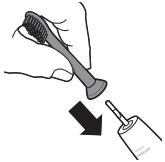
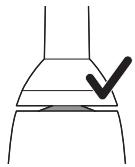
1 hnquuwuh quhhuh hwhuwwunbngtp wuytu, n uwhuyutnu nnnuud hutu unju ninnnnaiwup, hu pnuwuh nhwugh yunn:
2 Uunu utnubj hunquwuh qihuh uynpu nuh uununwuyu hutinh ubg guh nwn wju sh wunwgbi:
L2nunqunwuh qihhuh u pnuwh uhgh nwnuughp unwnjwnaun unnuu t: Uu anu t unhu hnquwuh qihhuh uwwwz ywnny enanwni
2tp Philips Sonicare-h hgpulnnwn
1 Uhugnt USB hgpwnnuu uyn uwwh hnwnuwghhu, nun uhwguot tylnnwuyu wnnuhyu:
2 Stunnnpn pwnu hgpwnnnhynu: Uwnunnygh ngh ghp uwywnnuh gnigh hn jun nuunnu t, huly pnwnnu bnu ni wqwu wqwusu t unwhu: Uw uwwuwnu t, nn wunwuh junwuwln hgpwnnu t:
L2nW ywnnn LwuhuwuBul uhu 24 dwi, nnubuqh
wnunlngu wwnnnnaiuup hgpwnnh, uwywu nnip
ywnnn bp oquwnnnol Philips Sonicare uwnuuh
hunquwnu, uwhupu wju wupnnnuh hgpwnnh:
2pn Philips Sonicare uunuutn h junuuwuh oqunwqnnu
bpu unwghu wquwupoqwnwnnnn atn Sonicare
wnuwh hnquwuyn, wulih 2wn jnanq qwn
unnwlu t hunubwnwn o n tbnwnwuy hnuwwuh
hti: Unnuwlu, bp uwwhu wquw
oounwannnugwhyng 2wn utnunu bu
qnownnnu: Uhwju lhnunbp unine utnunu u any
unlp, nnuaugh wnwhh hnquwuyn abn hnhuwnbu
uwph: Vwnnu bup hnulbl hnquwuhyg ouqutini
gnignuubhu wuuqnyu wnnnputun unwnuuni
huw: Sonicare tluwnu whu nquwuhyu wugwu
wtlh hzun npautni hwuw, wju unwupnuu
uhugulod EasyStart qnouwnnyanu: Uju qnowwnnyen
nuunwnntu wglwgunu t hnuupu unwghu 14
uwnpwnuth dwiuwu oqutini atb ununnl Philips
Sonicare wnuw hnquwuhyg oqutiniti:
Uwnpwu hnuhuiqutn
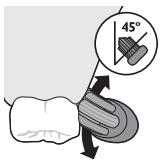
1 ngbp hunquuuwuh uwhyutnnu uqngnbp wunwuh uwnluyh gpuwuynjntu:
2 Stunnptwnuwh hnquwuwih uwhutnwnuwutnh nwhuh hnqn wuyu wny (45 wunhw) unnnbu uunutin, nuuugh uwhutn hwuutuntanwqohu wuuntanbuaqgh uh hnqn utnplu:
L2nu Uupnnn duwuwu hunquwuhy Ibunnnu uwhtp wwnuwuhh hn 2huwu ub:
3 Utnubp hnuuuph uhwugwu/wugwnuw unauln Philips Sonicare-n uhwugutni huiun:
4 Lnpnntu wuhap hunquwuhw qutnu wunwubnh unu ntnwnuwo u jinh banaqdou: Uwnp tpu wunwut npatwuhh hn ni wug 2wnduutnu, nuuugh hunwuuhw uwhjutb huutbu wunwutuhc wumtuupwuy wju wudnupdntu wupnu uhnwupnnp uagpnui:
L2nWunquwuwh uwhjutbn wbpun hynp
wjuwu: hnhninn gh unnuw wwnubnn
uwpnl wjuwu, huwu np yupnbp
unnuwuuw wwnuh hnquwuulnu:
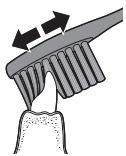
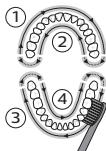
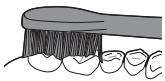
5 Unguh wunwutih utnuh uylbntuhtn uupntini huwn atptip hnquwuwln prwun yhuwninh nhpnu lu jninwuusynnh unw uh guuh ninhuwug uwpnn qnnnonnajntubn quunwntip wunwutih unw:
L2nui 3wnunqubini hwwun, nn hwuuuunwuwuh bp uwnu wupnnp ptwnu, abn ptnwn4 uwhu pudutip oounwnodinQuadPacer qnnownnyan (ntu «Nnounnyaun» pudhun):
6 Uupu wupnti hwnuud 1-hg (utnuh wunwutnh npuh uynun) u wupntip 30 uujnywu tuwhupwu hwnuud 2-hu wugutip (utnuh wunwutnh utnuh un): Cwnnuwltp uupnti hwnuod 3-nu utnpuh uwnuutnh npuh unnun) u wupntip 30 uwnyuu tuwhupuTu hnunud 4-hu wugut (utnpuh wnunutnh utnuh un):
7 Uwnpnti hnju wununbing hann yunnn tip
inwnghs dhuwuwhunlqugutwi wunwutih
dwinn uwlantutnn uwnbiniu uwu
huunwoutnh, nunn unwwunu t pounnnnu:
gwnn tip uuu wupnti qanu hnquwuln
uwhtnh uwhgnw duw wugwnw, huxtu
xuwuntnnu tip:
2tn Philips Sonicare wunuh hnquwuln utnp t
wulnua huh wenwutnh pnblutunuh
(hunqutuwah qhuhn 2niu t u2wnu pnblutunuh
dnu) u wunwutb npnuiuagnn
hunwnuwuptih (gnwnuub, zwhjutn,
ulthnutn) oqnwnnouu ntaupnu, ta nwnup
wunwad tu oqnwnnouu u stu hwununu:
hunhn wunwutnntaupnu hunnnb tip
hunhnwnygl wnwnwypnyd-uwuwbunh tn:
L2nui Tnp Philips Sonicare wunwuh hnquuwu oqwnqnnouuTu uHuhywlwu hbnwnqnunjntuBnu, pnWu npUngt u2huwunh uwnin nduhunu, wupnnnjuwup hgpwnnuuohuh, huly EasyStart qnnowwnen npUngt tuh wuwunhuluglu:
Lhgpwunnnu u wunungh hgh quwnwhau
1 Uhwngtp USB hgpwunnuu wwn uwwn uwwuhu, Uhwngtp uwwn huwnuwghp uwwn tbiunwuu hnuwph uwwuhu:
2 Stunwnnptnwnl nghpwnnhsh unw:
L2nW Anuynp Lppnnh 2 ywna wwnu2w huunununni, nn nnuun uwnu2w ybnun ununnunuol t hgpulnnhsh uu u hgpulnnunu t:
L2nui Philips Sonicare wunwuh hnquwuulu
uwuunbuwfo uunuqu 28 uwnnn
uwuunu2pwutuh wunu, jnpwutynn 2 nnuu
unnnnauwup (14 on, bp onuwu bnny ut quwu oqunwnnluu): Uununlghgph uwnunnuhy
gnighn gnuig t unhu uwnunng h uwnuhowu, np
uwunwnu bp hungwutuh 2 nnuuwrug
uwuunu2pwum, np utguwnu bp pnuu, ywu
tp wju hgpwnnuu:
Uwnunyngh yunquuuhawun (bn p nzuuw u2huwunnn hgpuwnnh hn w)
| Uwnunlŋgh lqunquwɪhʌwɪŋ | Uwnunlŋgh gnɪghʒ |
| Lhpʊ t | Unɪq lqʊwɪʒ (lqʊtɪgʊwɪnɪʃ 30 lqʊnɪtɪjʊwɪŋg) |
| Lhgpʊwɪŋpnuŋ | @wnpənn lqʊwɪʒ |
Uwnunlugh qunquwahwun (bnp nnuuyn hgpwlnnh uun 5)
| Uwunlŋgh ywnquhuδuŋ | Uwunlŋgh gnigh₂ | žuŋn |
| Lhpù 5 | Uniq yutuw₂ | - |
| Uwùtuwh yhpù 5 | @wnpenn yutuw₂ | - |
| Ph2t | @wnann'üwnügwqnju | 3 wŋnuu2w |
| Tununnyt | @wnann'üwnügwqnju | 2 uüquu5 wŋnuu2w |
| L2nu' Eúbŋhu hɪwɪjɪni hʊwɪn ñwnlʊngh iŋjʊ Uwɪgʊnʊh, tɒp wɪjʊʒ oʊnʊqnnɒŋnuː. | ||
| L2nu' tɒp ñwnlʊngh iŋgɒn iŋnuɪ nuwɪnnuŋt; Philips Sonicare wɪnʊh hɪnqʊtɪwɪt uʊwɪnnuŋt; Stɪŋwnptg Philips Sonicare wɪnʊh hɪnqʊtɪwɪn Ighpwɪnɒh unwɪ' wɪjʊ Ighpwɪnɒhni hʊwɪn: | ||
| L2nu' Uwnlʊngn wɪwnŋnuŋhʊ Ighpwɪnɒnʊ wɪuhtɪn hɪwɪn lɪŋn nɒg Philips Sonicare wɪnʊh hɪnqʊtɪwɪn Ighpwɪnɒh unwɪ wɪuhtɪ, tɒp wɪjʊʒ oʊnʊqnnɒŋnuː. | ||
Anonnyutn
- Ntduhun (4000 utnhwih hwuwn)
EasyStart - funquuulh qihuhl hnhuunhuwuhh2tgnui
- uuunyhs
- Quadpacer
- SmarTimer
Ntduhutn (4000 utnhwuh huiwn)
2b1 tbiuunuwu wunwuh hnquuwu unwugunnu 5
2bq qquwniu u uupn nbdhutun nuntni
hwnnnnnajntu:
L2nu Unuwuh hnquwuyu unwugu wuaq uqunqnodhu h uypwub unwul ywnqwunnnn qwwniutduh:
Nudhutun nnhutini huwun
Ubu wuquw uunubu unigwuuhwgwu/wugwnuw undwunwhunquwuuhugubinnhuwn:
- Utnup bnnpnnn wquw 2 uwnuwh nuaugpnu npdhun hnnhubni hwiun:
- Ubnutip tinnnn uquu 2 ywnuuh nuaugpnu nnwn unnni huiun:
Unwutn 2 wwnjnu wwnin hbn uunigwu
Unwun nunngh utnubini naepni wunwh
hunwun nnwnwn hn:
EasyStart (Rb2unUhqp)
Uju Philips Sonicare Unntih EasyStart (R2unUhqp) qnnouwnuju h uapwub uunuhuwuglu t: EasyStart (R2unUhqp) qnnouwnuju npnpnb pwnanugunu nidqunujnup unwgh 14 uwwnuutnh uawgpiu, npuuagh np unwnpwnwubn wwnu
EasyStart- (Rb2unUhqp) wuwuwunhywgbln hwuwn intu'Ulunhugwu luw wuwuwunhywgwu qnnwnnyubn:
hunquuuluh quhuh ynhunhhuw hhtgniu
2bn Philips Sonicare-uh BrushSync (UwnpuwUhupnwnugnu) nahunqhu, np hbnuqni 2bn hnquuwuh qihuh uwnuynjntn:
L2niUju qnnowunnyu w2huwwunnu t uhuji Philips Sonicare hubuugh hnquuwuh quhluyubn BrushSync (hunquuwuhUhupnwnugnu) untuninqhwnu:
1 Unwgh uuiuun huiugh hnquuwuh qihuyu wunugubhu npwnuun uwwuwu, nunuupnip Philips hnquwuul BrushSync (UnwuuuhUhpnnuwgn) unhuninqhwynu ulunu t hnunwotl hnquuwuh quhuh uu2uonajnti:
2 wuwuuyh nuaugpnw, uwhuw0 2tn ynuug hynunuud a2nwhg u oqnwnpduwu duuwuyh, pwnuyn lhtunwgh hnquwuuyh qhuhyu u2wnjnnn nn2tni hwun 2tn hnquwuuyh uhnutn huwnu wwnuwanu duuwuyh: Uju qnnwnnyen bnw2huwnnnu 2tn wuwutnh wwnqnyu wwnnui ni huwnp
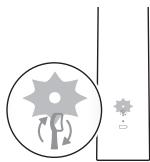
3 tnp hnquuwuh qihuh uhnhuunhuu hu2gbwu uynup quunui t uwh qnjun, mup wbn t unhutp 2tn hnquuwuh qihuh:
Jnquuh quhuh hnhuunhuu h2tgnuu wwwuynhugutni huwunntu "Uynhugutl uuu wwwuynhugutqnnounnyuptn":
ZuWuunh2
2tn Philips Sonicare- u nih pwnonwulnq unh, nnn
zwhnu t u wnttu 2tn hnwnuud a2nun: tba
zwhhg 2wn d2nu lhnunbpe, wuu wunuw h
hanquwuju uwhuwutu hnawwupgh gng uwnu
huwn, n2ta hwnyuwn t u wqtgutd a2nun: Uju
wnawwuppu unnu t nnutu pezuw
uhnhnunajniu u, htiunwpan, uwnu wu
qaqgnnnjwiu u dujuh uhengnu: Puugh nnuhg,
hanquwuh qihuh hnhuunhuu hu2bgwu niun
yulunuh uweh qnyunj:
Zu2wunhSwwwwunhhywgubn hwuwnntu Uyunhhywgubnywwwwunhhywgub qnnounnyabnn:
QuadPacer
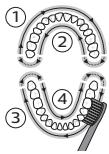
QuadPacer-n nunhuiu wduwuwih t, nnu niuh ywnu wunu2wu u nuunun h2tgubini hwun, nn atpbnuw 4 hnuunwoutn hwluwwuwu u uununlunun uwpbp: Uju Philips Sonicare wunwhunquwulu unwupuni t uhwugw QuadPacer qnnwnnyanu:
SmarTimer
SmarTimer-gnig t unhu, nn uwnpu w hniu wununw o uwnpu w hnug n wnnnu wunny wuguntny wunw hunw uwwu: Unuwupnyd-wwuwqutunh hnhnnn tu unwu hu wnpbl wunwut onwlu 2 wquwhg n uwwu: L2ni t a uutip hnuwgh uhwuw/wugwnwu undwulw uwnpu w huiu uyting hconn, winwuh
Junqiuuynluyuuiuh:15uwnyununhghbnn SmarTimer-n ytnuuljnuui t:
Uunhugut Lyuwwuwunhugut qnnwnnyutn
2bn wunwuh hnquuwuh unw nup yunnn bp uwhuugub lywwwwuunhuugubhtinuwn qnnwnnyutn
Ughwqqujhu twn2huhph uwwuubn gtu utnnnui hbnluin.
- kunqiuuuh qihuhui:
2wnnnnuuohnhuunhun uubnh oqunnpouu hbnuwugnuwugwu
Uhwoqwnqnpouw, uwnuwhuw, wunbuwu, hnhnunniutubn yuwunnnuud npwnnnnuuhtunwupnuuwnuud uwn:
Ununnyu wuyu uyw yonai niu, uwnui shuyn, panuwpubn, pujpwni, qiuwauwhnu uwnu:
4tnuud2ulnus

Uw u2uwynu t, n t bnynwyu uwnynnubn u wunnyngubn tluynnn pwhnuwgutl unwnywu ubugwnjhu wnphhtun uhuwuh:
- 3tunlup tylnnnuwu uwnpuwnnuuubnlu wunlungubn hauhnuuguwu uanwpanjuu dan bynnnu pnnnuuud uwnuubnhu:
Ubnunngulugulugulhgpulnnn uwnunngh hbnugnup
Ubnwniguwo UwniHgwunnnn uwnunng uztnp t hzuwuyuhwuju wuwuaqhnwugwou wauh lnuhg, bpuwnp awhunu t: Uwnunngn hwutinig unwz huunqutap, nn uwnunngn hnhu hgpawuhwulst
Uunpn puggtin qnpdhutnh htn w2huunbihu lu tnuwihgpuwnlnn uwnlnyngpauhbihu tuwhuatautbp wunuwqniajuufinn uuhnudt2n uwhuwqnnzulwu uhongutnn: Uwuwu wuw2unuwut dpn wpttn,dtgntn, uunutnn u uwytbn, nnh unw zhuwwnu np:
Uwunluyngutnh htn qnnn niubuwhu' huunqutp, n an atn atnpttn, uunpwunnnnuu u uwnluyngutnn nn bu:
Bnwnugutinig htnnn uwnunngutnh
uwnunwhulwu lyund uhuugnuh fnuwhtini
hudwn qtno wuhtp uwnunngutnn
ubunwnuwlwu unwnluyutnh hbn 2hnuhrg
(onhuw) utununwnuwwutn, uquulwutn,
uuwnuwhut):Uh uawatp uwnunlgutnn
uwnuhut whujwahattnh ub: Awhting unwug
whawatp uwnungh ntnuhwuttn lyuuf
uwnunngutnn nntggtn$whuh nnwnuuh ub:
Ibnwihgpuwnnnnwnunyngh hanzugubn
Uwnunngn huiug nwnghwunqap, np uwnunngn hnhu (hgpauwhu w:
Hnuihgwunnnn uwnunngn hnwgutini hwuwn
Bta hwnlwnn t unphz ywn qunn, unna u hwn
qhnun (unwnwnn) wunnnwnuhwu:
1 4nwnihgppnnnnn uununlgh hgp nnuunnti huwn hnwngnpt nwnuip hgpwnnhsg, uhwngtp Philips Sonicare-n U panj untip wju w2huwuh uhusu quunub: 4nupwju pwh, uwhu wuuwwnnuupw uhwgtip Philips Sonicare- n:
2 3nwngnap u wuhap hnquwuwah qhuhy: Uupnnp nwhuyp unphnu yuuynnnu
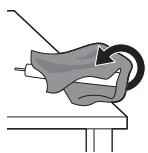
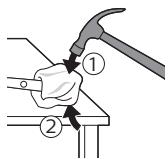
JGnHmDg6nghn 3gngn (EMF)
g Philips dmyonmmdo gboodg y3gmo djmgo b6mfo mgoynol, mgoynol, mgoynol gboos 1mdo gno 30mdo uubnog.
nunmuggymnnmmnbnnn30
Philips-n ybogob, mmd gnnmbl
mngmngnngnngn, mmdmgnngnngnmnns
mssmbnbamgnn nbgngnbnn (Bluetooth 68
BrushSync),2014/53/EU mnggngnab gbsodnbs.
-Bluetooth mwnm-bbnfng:2,483
- Bluetooth mwnm-lbnanmnb dundunmgn mnddmg:3 ggnngnn/ndnng
NFC mgonm-bnbnng: 13,56 8
NFC mnnn-bbnanb djunndmngn bndmog 30,16 nnnn/nnn
gmmnnn nglssanbmonn gymmnu ng mng 1500000000000000000
www.philips.com/support
a86m0n3n 8dmyg6do
3000 4000 bgnn bn jonnnb gdmgd mgsnbn gn
aon86mnns 6gongnns 5g23gon 6mng6gnn
mbnngnmgomn, jonnnn 5mgnbn 1gbsd3nmgomn
93nnn bn 6bdmgmnnn bn 5gogmogmnn
93nnn bn 6bdmgmnnn bn 3000 4000 bn
cmngnn mn jonnnn bn 6g23mnns 5bmdn
anmy6gonnb. 6g23gds 6g6w 6gmny6mb
6mnbgmnnb 8gssbggcmnmn.
m36n Philips Sonicare-nb 30nnn 58nbo
1 3ngngyfnn b8g8gmm nogbgynn
2508mnblb no3n
3 5bgynn
4 Hm03/8dmn03n mno3n
5 5g8mnbn b03g3nb gdm3mnab gub6go abgb6do
6 6
7 USBc00000000000000000000000000000000000000000000000000
8 5a883mm B60n (abmmg jmbjno ymn
dmogmgon)
a6n36: 300mmu800dy36n 5m3y36o.
a0dmny6g0n 6bmmmo 5V 800dy36n (n3nA).
g6n365:58mnbnsn30g6dmm, 86b3cogomg.
66yjds
s#nbnns03nss
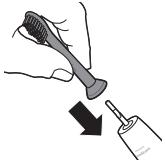
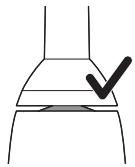
1 8oobmgon 0aognunb oan nbg, mna 0gymn bogmnn6nbabnnndomngon nyml.
2 08nogosgngonnogogomnbb88, b6dgmgo.
g6n36b: 6mn6myn, m gtaaunb n23b 00
bogmynl amnnn dnng ngd6n6gn. jg
taaunb n3b bmo6gm 3nmoanb bsymgdsb
sdmg3b.
Philips Sonicare-ub@yb30
1 0gongmng USB gddg6nb gdoomn gomega n 0o30gmdn, mdoomn gdoomn mdoomn Bfoomngm.
2 20036gababogmnnn 868.
- 10000000000000000000000000000000000000000000000000000000000000000000
g6n36: 50fngnlu bnygmog ggyb03u gndmgo 24 10nn nol ngmo, dagmPhilips Sonicare jongmnu 50mn, bmyo ggyb03dgg gndmno 60mn y6mm.
Philips Sonicare 3oennn b 58nnnb 80myg6do
mg mg36b Sonicare jongmnl 5gmnbl nngmnu ng60,6mmugnnn ggnm 20n nn
gogmd6g0, 3ngn ngm gom jongmab gogmnb
gogmy6gonb. nngmgoa o mabda gnogonbn
8goggn 8gmgnnb gogmy6do 6gogmnns.
9g6gnn 6s8oq 9gngnn 9gmonb 5gogmnbl
12gogmn, mmj 9gngnn 9gogbnbgm. gogbm3n,
9gogmn 3gagmn 9gogmn 9gogbn
n6fmgngn bn goggmum gogmgonbn
nndnngnbn, nm 9ggbdmm Sonicare-nb sbom
9gogmn jongmnbl gogmbg 9gogmnbl, 3330
9hmonnns EasyStart 9g6dn. 2b 9g6dbn 688
9mgnb dsmbn 3ngm 14 g68688, hmgmonn
9g6bdmgn dn mgmmon Philips Sonicare-nb jongmnbl
9gogmnbn 8g6gdwbl.
b63ab6b0gmdno
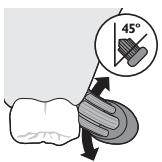
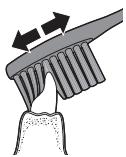
1 0003gmon 58fmygon 60 6ybuon 8nfo nmoogbmono jongmab 36
2 2000000000000000000000000000000000000000000000000000000000000000000000000000000000000000
3 Philips Sonicare-nb houhmong, qoognong Bhoomg/ogdmngnBmng.
4 0mabomg dmoosbgo gmygmgon jongngobu 00 mndnmb b88. gndnb6gog jongmg dn ng 6n6 0g y36d mdmonnug, nmd ggymgmon 63egomg6g6 jongmgdu dmnl. 656gmdgjunm 0mdmou 62g6gnl gnymn 666gmmdoan.
g6n36: g6nn m6v6g6o gondmmb. bgmnb
jonnmb g6nnnb abog6bog 660
m6m6g6g6m n sm mnb.
5 6n6 jonngn bn aobn bogbgygagmoo, gobom n 3nnbnb bbgmynn bbsbgmnc oos mddgndg 3nngn ngnn bgdggn mdnmdo gumgmonnnm
g6n36:anb0a3nl,mmo0m6y6gog,mm 05600 gunbgog jongmgon,nnnbl
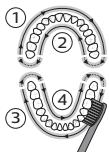
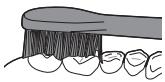
66666: mmgugduofofofofofofofofofo, Philips Sonicare jongnlu gofmnb noandgo. Philips Sonicare jongnlu gofmnb noofofofofofofofofofofofofofofofofofofofofofofofofofofofofofofofofofofofofofofofofofofofofofofofofofofofofofofo
g6n36: ymgo mgonb ngm go 0000000000000000000000000000000000000000000000000000000000
3363
- ngnogn (4000bgnnbnngn)
EasyStart - 508fnunb mgoynb gdoim3mnb agbgbgagbgbg
-8gfmnnblgfumn - QuadPacer-n
- SmarTimer-o
ngnogn (4000bghnnbn3ab)
m3g20 gddm 00mnb 00mnbn 00mn0
gmdmonng 00gdg6n bn mgndgob dmnl
m3g20n 00mnbn 00mnbn 00bdmgmmol.
g6n836: mmogbgyoannbu g6mnb 2n9300
ny6g0,gl 2m6d00n b6ycmnb8300
8mdmonng ngnd8go y6gbqymn.
mgnndgongbogbs3mgmo
4000-1 3000 nnnn nn nnnn nn nnnn nnnn nnnn nnnn nnnn nnnn nnnn nnnn nnnn nnnn nnnn nnnn nnnn nnnn nnnn nnnn nnnn nnnn nnnn nnnn nnnn nnnn nnnn nnnn nnnn nnnn nnnn nnnn nnnn nnnn nnnn nnnn nnnn nnnn
y
and 4000 Series 3000 on
nunnnn nnnn nn nnnnnnnnnnnnnnnnnnnnnnnnnnnnnnnnnnnnnnnnnnnnnnnnnnnnnnnnnnnnnnnnnnnnnnnnnnnnnnnnnnnnnnnnn
.
Philips Sonicare
1
2
JIT 3
4
5
nnnnn 6
(777777777) USB 100
() 8
0715 57wDnwn nnwn.77nn
.(A 10)
.
yinnn
wnnnn
1
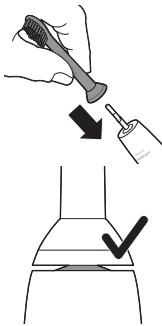
y 2
XINWYJNDN
XIN. 101777 XIN NIN YIYI YI YI YI YI YI YI YI YI YI
.
Philips Sonicare
1
.7nun
.ynnn nn nn 2
-
"111111111111111111111111111
1
y,niu 24 ty yun n7 nyi n7y wynny:ynn
Philips Sonicare 1
nniin
Philips Sonicare
,niun nn Sonicare uuiuuiuuiuuiuuiuuiuuiuuiuuiuuiuuiuuiuuiuuiuuiuuiuuiuuiuuiuuiuuiuuiuuiuuiuuiuuiuuiuuiuuiuuiuuiuuiuuiuuiuuiuuiuuiuuiuuiuuiuuiuuiuuiuuiuuiuuiuuiuuiuuiuuiuui uui uui uui uui uui uui uui uui uui uui uui uui uui uui uui uui uui uui uui uui uui uui uui uui uui uui uui uui uui uui uui uui uui uui uui uui uui uui uui uui uui uui uui uui uui uui uui uui uui uui
n nn nnnnnnnnnnnnnnnnnnnnnnnnnnnnnnnnnnnnnnnnnnnnnnnnnnnnnnnnnnnnnnnnnnnnnnnnnnnnnnnnnnnnnnnnnnnnnnnnnnnnnnn
N, N, N, N, N, N, N, N, N, N, N, N, N, N, N, N, N, N, N, N, N, N, N, N, N, N, N, N, N, N, N, N, N, N, N, N, N, N, N, N, N, N, N, N, N, N, N, N, N, N, N,
n7nn n7y9n EasyStart n7n Dn 7n7n
nniin ninn nn 147nnn nn nn
Philips 7
.Sonicare
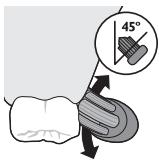
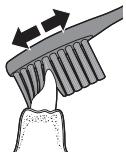
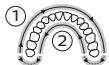
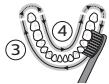
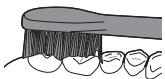
ninn
nwn 7n n7 nnnn71 d9n nn nnnn7 1
.
2
n 45)
.177 177 177 177
.
yin7 Philips Sonicare nn nn 3
n7n
4
y
. niny nn nn nn nn nn nn nn nn nn nn
y7 y7nnn7 nn
1
5
n777777777777
- 为7yni9n199INNINNINNINNIN
,nnn nn nnnnnnnnnnnnnnnnnnnnnnnnnnnnnnnnnnnnnnnnnnnnnnnnnnnnnnnnnnnnnnnnnnnnnnnnnnnnnnnnnnnnnnnnnnnnnnnnnnnnnnnnnnn
n nn nnnnnnnnnnnnnnnnnnnnnnnnnnnnnnnnnnnnnnnnnnnnnnnnnnnnnnnnnnnnnnnnnnnnnnnnnnnnnnnnnnnnnnnnnnnnnnnnnnnnnnnnn
(20 177777 ) QuadPacer
wn7n7n7n)17n7n7nn 6
277777777777 307777777
nyn7ynn.(nnynnnnnnnnn)
nyn (nnnnnn nn nn 7nnn 77n) 377n
77nn 4777 n97 30
.
7
n nn nnnn nn nn nn nn nn nn
nun,7u uynnnn7 7n nn.
1
nni nni Philips Sonicare
ynnn nn nnnnnnnnnnnnnnnnnnnnnnnnnnnnnnnnnnnnnnnnnnnnnnnnnnnnnnnnnnnnnnnnnnnnnnnnnnnnnnnnnnnnnnnnnnnnnnnnnnnnnnnnn
(1)
D7TIN Dx (D9, n, n)
9, nwnnnn nn nn 2017
.口中X9177
Philips Sonicare
n nn nnnn nnnnnn nnnnnn nnnnnn
EasyStart
y
1
n nn n
.ynnn nn nn 2
N 2017
ywnn nn
287007nPhilipsSonicare
14) nii 2 nn 7n97,niyn
n nn nnnnnnnnnnnnnnnnnnnnnnnnnnnnnnnnnnnnnnnnnnnnnnnnnnnnnnnnnnnnnnnnnnnnnnnnnnnnnnnnnnnnnnnnn
2 1111111111111111
.
(7919 yonnnn nn) 770
n7710 11nn n7710
(wnnnn nn nnnn nn) n70
| - | - | - |
| - | - | - |
| " " | " " | " " |
| 3 | 3 | 3 |
| 2 | 2 | 2 |
IN797IINNUNN77NINN:NN 77NINN DNNNUNN77
777777777
1
1
2
3
4
.7n nnnn nn 709n nn nnnn nnnn
17 101111111111111111111
.1177101 D7wn
n nn nnnn nn
ywnn nn nnnn nn noonnnnnnnnnnnnn
x7777777777777777777777
- 107 n7 n7n7n7n7
y
NNN NNNN NNNN NNNN 7
,n,y7197n.nyin nio
. nTyn Nouni Niyxnn
XIN, D'UN XII'U, 77102191n nn
.
1X,1nONnn7n7n7n7n7n7n7
y9n yynnnn7n7n1077n97
www.philips.com/Sonicare
©2021 Koninklijke Philips N.V. (KPNV). All rights reserved. Philips and the Philips shield are trademarks of KPNV. Sonicare and the Sonicare logo are trademarks of Philips Oral Healthcare, LLC and/or KPNV.
300011247231 (06/07/2023)
